Information Processes  & Technology Project Management St Joseph’s Catholic College
Outline Project Management Social and Ethical Design System Development Cycle Useful Web Sites Sample HSC Questions
Project Management Project management focuses on a project.  - a beginning  - an end   Meets established goals within cost, schedule, and quality objectives.   Coordination of a number of phases to successfully achieve identified goals.  Ref: 6, 7, 10
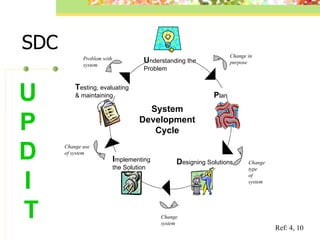
Project Management These phases include –   u nderstanding the problem,  p lan   d esigning solutions,  i mplementing and  t esting, evaluating and maintaining.  Ref: 4
Developing a Project Plan Planning is crucial in project management. Planning means listing in detail what is required to successfully complete the project along the three critical dimensions of - quality, time, and cost.   Ref: 6, 7
Developing a Project Plan A  project plan  is a summary of a project that specifies who, what, how and when.  It clarifies what needs to be done and helps people to understand how they fit into the project.  Ref: 6, 7, 10
Developing a Project Plan A project plan usually breaks the project into major tasks called  subprojects .   It must provide an overall schedule, the details of the subprojects and a schedule for each subproject.  It must also identify the  people, information technology  and  data/information  required by the system. Ref: 6, 7, 10
Developing a Project Plan Project goal — the  result of the project if it is successful. Goals may be broad or they may be very specific. Deliverable —a tangible item expected from a task. It may be a diagram, report, data dictionary, program or training manual. Schedule — shows  the timing of major tasks and who will do the work. The success of a new system depends on accurate time estimates for each task.  Ref: 6, 7, 10
Software Project plans are constructed using Information Management Software or Project Management Software. Information management software  helps individuals  conducting  a project to manage information and schedule tasks.  Project management software  contains most of the features of information management software. Ref: 6, 7, 10
Communication Skills Active listening  -  involves restating, reflecting and summarising    the speaker’s major ideas and feelings.  -  a ctive   listeners encourage the speaker and are    non-committal. Conflict resolution  -  solves arguments and disputes.  -  it  involves   listening to the other person’s views    and looking   at the conflict as a problem to be    s olved.   -   the aim is to create a “win-win” situation. Ref: 4, 10
Communication Skills Negotiation skills  -  negotiation is a discussion between two parties    with a goal of reaching agreement on issues. Interview techniques  -  involve careful preparation, implementation and    follow-up. Team building  -  is the process of getting a group of people    working together.   Ref: 4, 10
 
Ref: 9
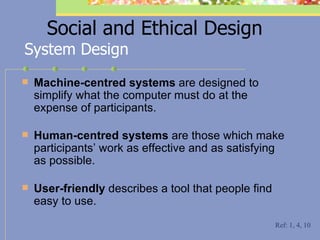
Social and Ethical Design Machine-centred systems  are designed to simplify what the computer must do at the expense of participants. Human-centred systems  are those which make participants’ work as effective and as satisfying as possible. User-friendly  describes a tool that people find easy to use. System Design Ref: 1, 4, 10
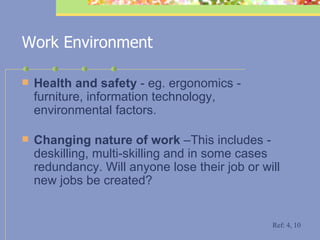
Work Environment Health and safety  - eg. ergonomics - furniture, information technology, environmental factors. Changing nature of work  –This includes - deskilling, multi-skilling and in some cases redundancy. Will anyone lose their job or will new jobs be created?  Ref: 4, 10
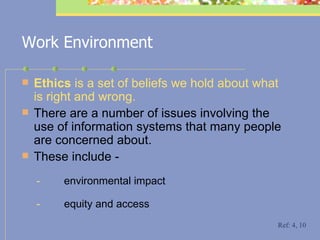
Work Environment Ethics  is a set of beliefs we hold about what is right and wrong.  There are a number of issues involving the use of information systems that many people are concerned about.   These include - -           environmental impact -           equity and access Ref: 4, 10
Work Environment Equity  concerns  equal rights for all.  It means that all people should have equal  access  to the benefits of information technology - this includes  gender equity. In vasion of privacy  Privacy  -  computer technology allows personal information to be distributed faster and further than previously before. C ontrol (rights and privileges)   Control  is the level of direct involvement that people have in decision making.   Ref: 4, 10
Work Environment F reedom of information Individuals have the right to access information regarding themselves. C omputer crime Computer crime  can be broadly defined as any illegal or immoral activity that could not work  without the use of a  computer. C opyright Copyright  laws protect the rights of an author against cases of  piracy .  Ref: 4, 10
SDC U nderstanding the Problem P lan D esigning Solutions I mplementing  the Solution T esting, evaluating  & maintaining Change in purpose Change type  of system Change system Change use of system Problem with system U  P  D  I  T System Development Cycle Ref: 4, 10
Understanding the Problem
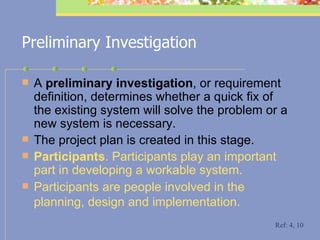
Preliminary Investigation A  preliminary investigation , or requirement definition, determines whether a quick fix of the existing system will solve the problem or a new system is necessary.  The project plan is created in this stage. P articipants . Participants play an important part in developing a workable system. P articipants are people involved in the planning, design and implementation.   Ref: 4, 10
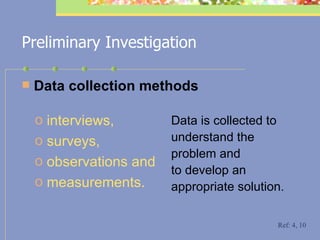
Preliminary Investigation D ata collection methods Data is collected to understand the problem and to develop an appropriate solution.  interviews,  surveys,  observations and  measurements.   Ref: 4, 10
Problem Definition Provides a clear definition of the problem, which needs to be solved. Ref: 4
Ref: 9
Requirements Report The requirements report   is a statement about the need for a new system.  It outlines the aims and objectives of the new system and how it will help the organisation.  The requirement report is based on data collected from the participants. Ref: 4, 8, 10
Negotiating specifications with the client If there is a client involved who must accept the project upon completion, the specifications that define a successful outcome must be negotiated and agreed to by the client, and included as part of the contract. A client may be either  internal  or  external .  There may also be more than one client. Ref: 4, 8, 10
Prototype A prototype is a working model of an information system, built in order to understand the requirements of the system.   Used when the problem is not easily understood.  Involves a repetitive process of prototype modification and participants' feedback, until the process is understood.  Can be the basis for further system development.   Ref: 4, 8, 10
Ref: 9
Prototype Prototypes can be created from application packages that provide screen generators and report generators.  There are advantages and disadvantages in using a prototype. Ref: 4, 8, 10
Prototype - Advantages The requirements of the system more accurately reflect the needs of the  participants.   P articipants earlier  involvement - t his may  reduce the number of changes  required by the participants in the testing, evaluating and maintaining stage. T he new system is easier to create from a prototype.   Ref: 4, 8, 10
Prototype - Disadvantages T he greater involvement of the participants could impact on their work with the old system.  T he repetitive process of the prototype can be frustrating if the succeeding versions do not provide a better solution.  S uccessful prototypes can produce software that is difficult to maintain, unreliable or inadequate. This may occur if any design restrictions are not taken into account when creating the prototype. Ref: 4, 8, 10
Questions    Name the system you investigated  What was the problem with the system you investigated? Who are the participants? What data gathering methods did you use? Describe your development of the prototype.  What was the outcome of the prototype you developed?
Planning
This stage involves making decisions using the data gathered in the preliminary investigation A  constraint  is a factor that affects the system and prevents it from achieving the desired objectives.   There are different types of constraints, such as -  Planning Ref: 4, 8, 10
Feasibility Study A  feasibility study  is a short report that analyses potential solutions in terms of the known constraints and makes a recommendation.   The feasibility study briefly examines the available options, estimates costs and identifies any constraints to be considered. Ref: 4, 8, 10
Economic Feasibility Economic feasibility  compares the costs of developing the new system with the expected benefits.  A financial analyst is often asked to assess economic feasibility. Economic feasibility is also called  cost/benefit feasibility. Ref: 4, 8, 10
Technical Feasibility Technical feasibility  determines    the information technology    requirements of the new system    and the technical demands that    will be placed on the new system. Ref: 4, 10
Schedule Feasibility Schedule feasibility  determines whether time is available to implement the new system. Ref: 4, 10
Organisational Feasibility Organisational feasibility  determines whether the new system will fit into the organisation and meet the current goals and objectives.   It also determines whether the new system will have enough support from participants to be successfully implemented and whether participants can operate the system. Ref: 4, 10
Recommendation Options A feasibility study has three recommendation options  no change develop a new system investigate other solutions Ref: 4, 10
Analysis Report The details of the new system are presented, along with recommendations for design, implementation and maintenance. The analysis report contains - design specifications  a more detailed project plan   Ref: 4, 10
Risks involved Risk is the exposure to potential threats to the project.  They differ from constraints in that they are not definite but possess some likelihood of occurrence.  Risks are identified and classified as  Low Risk Medium Risk  High Risk Ref: 4, 6, 7, 10
   Questions Describe any constraints involved in the Making Decisions stage you encountered. What recommendation was advised after your submission of your Feasibility Study? Describe the most appropriate tools used in this stage of the System Development Cycle. Give reasons why.
Designing Solutions
Designing a Solution Designing a solution  is the transformation of the specifications into appropriate hardware, software and information processes.  Involves purchasing hardware, writing or purchasing software, and specifying information processes to make the system operational. Ref: 4, 10
Designing a Solution Systems analysts and programmers often use – Top-down  -  divides a large, complicated problem into a series of smaller, easier to solve problems. Step-wise refinement  - then takes each sub-problem and breaks it down even further. Solutions based on prototypes are created in this stage. Ref: 4, 5, 10
Participant development Participant development  occurs when people within the information system develop the solution.  Participants produce their own information system using readily available information technology. Tools for participant development - eg. guided processes in application packages   Ref: 4, 10
Information Technology Acquisition of hardware and software and the process of making it operational Ref: 4, 10
Design Tools Design tools are used to better understand the system and document the new system.  The tools are used to assist in explaining the operation of the new system.  Ref: 4, 10
Types of Design Tools The design tools used in the Designing Solutions stage of the System Development Cycle include -  Context diagrams Data flow diagram Decision trees Decision tables Data dictionaries
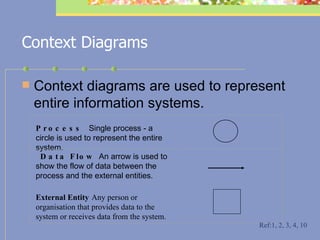
Context Diagrams Context diagrams   are used to represent entire information systems.  Ref:1, 2, 3, 4, 10   Process  Single process - a circle is used to represent the entire system.           Data Flow  An arrow is used to show the flow of data between the process and the external entities.       External Entity   Any person or organisation that provides data to the system or receives data from the system.            
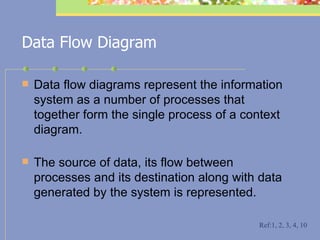
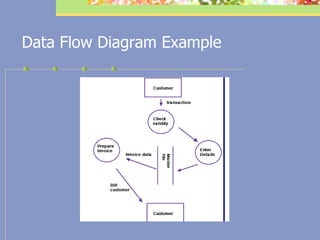
Data Flow Diagram Data flow diagrams represent the information system as a number of processes that together form the single process of a context diagram.  The source of data, its flow between processes and its destination along with data generated by the system is represented. Ref:1, 2, 3, 4, 10
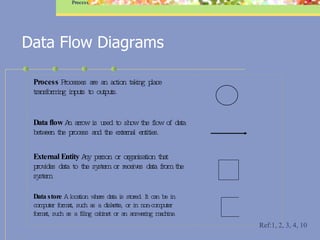
Data Flow Diagrams Process Ref:1, 2, 3, 4, 10 Process  Processes are an action taking place transforming inputs to outputs.         Data flow  An arrow is used to show the flow of data between the process and the external entities.       External Entity  Any person or organisation that provides data to the system or receives data from the system.         Data store  A location where data is stored. It can be in computer format, such as a diskette, or in non-computer format, such as a filing cabinet or an answering machine.      
Data Flow Diagram Example
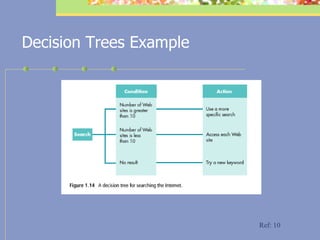
Decision Trees A  decision tree  is a diagrammatic way of representing all possible combinations of decisions and their resulting actions.  It represents the decisions made within a system as the branches of a tree. Each branch ends with a particular action.  Ref: 3, 4, 10
Decision Trees Example Ref: 10
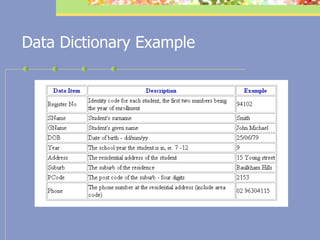
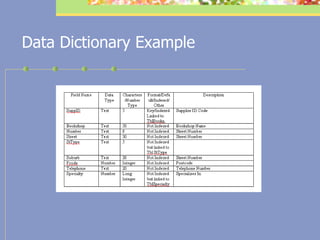
Data Dictionaries Data dictionaries  contain a comprehensive description of each field in the database.  This commonly includes:   field name,  number of characters (field width),  data type,  number of decimal places (if applicable) and  a description of the purpose of each field. Ref: 3, 4, 10
Data Dictionary Example
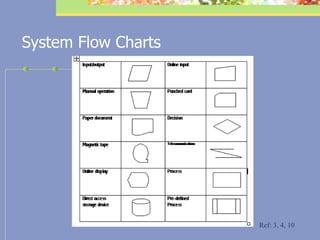
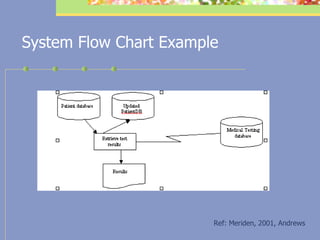
System Flow Charts System flowcharts are a diagrammatic way of representing both the flow of data and logic through an information system.  Ref: 3, 4, 10
System Flow Charts Ref: 3, 4, 10
System Flow Chart Example Ref: Meriden, 2001, Andrews
Screen Design Screen design for input and output of data are created. These are created using good principles of design, eg. ease of navigation, and use of consistent style. Ref: 3, 4, 10
Documentation Technical specifications  must be identified and documented prior to purchase of hardware. Documentation is an essential part of any system, as it communicates information to the developers, users and others on how the system operates and how to use it. Ref: 3, 4, 10
Technical and user documentation User documentation – used to assist people to use the computer system. Technical documentation – describes the construction of the computer system. Ref: 3, 4, 10
   Questions Describe the role of the Systems Analyst in Stage 3 of the System Development Cycle – Designing Solutions. Various tools can be used at this stage. Explain the difference between using a data flow diagram and a system flowchart. Outline the tools you have used in your project.
Implementing
Implementation Plan The project manager coordinates all the elements of a project.  The  implementation  stage delivers the new system to the participants.  Ref: 3, 4, 10
Implementation Plan Responsibilities of the Project Manager controlling work in progress to see that it is    carried out according to plan; providing feedback to those working on the    project; negotiating for materials, supplies, and  services; and resolving differences among those involved with    the project. Ref: 3, 4, 10
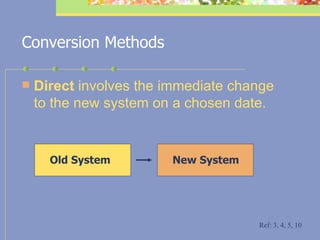
Conversion Methods Direct  involves the immediate change to the new system on a chosen date.  Ref: 3, 4, 5, 10 Old System New System
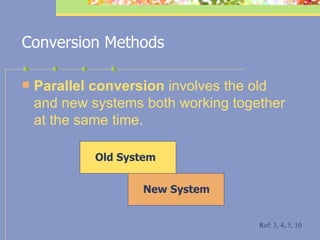
Conversion Methods Parallel  conversion  involves the old and new systems both working together at the same time.  Ref: 3, 4, 5, 10 Old System New System
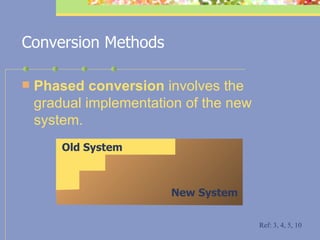
Conversion Methods Phased conversion  involves the gradual implementation of the new system.  Old System New System Ref: 3, 4, 5, 10
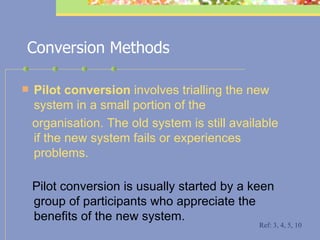
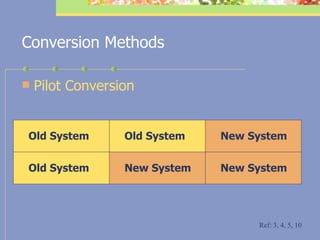
Conversion Methods Pilot conversion  involves trialling the new system in a small portion of the organisation. The old system is still available if the new system fails or experiences   problems.   Pilot conversion is usually started by a keen group of participants who appreciate the benefits of the new system. Ref: 3, 4, 5, 10
Conversion Methods Pilot Conversion Ref: 3, 4, 5, 10 Old System Old System Old System New System New System New System
Implementation of the chosen conversion process Information processes are continually tested during the implementation of the system over a period of time.  Minor changes to procedures are immediately implemented. Ref: 3, 4, 5, 10
   Questions Describe the role of the Project Manager in Stage 4 of the System  Development Cycle – Implementing. Discuss the importance of training staff during this stage. Which of the conversion methods was the most appropriate for your system? Explain why.
Testing, Evaluating  and Maintaining
System Testing Testing is a way of verify the quality of the project.  Testing a system is a very important part of the implementation of a system.  Without rigorous testing, the system cannot be guaranteed to work as expected.  Tests must be designed to examine the system operation under all possible events. Ref: 3, 4, 10
Ref: 9
Hardware Tested using  - diagnostic software and  - through general operation  Backup systems should be tested by selecting files to be restored.   Ref: 3, 4, 5, 10
Software Software is tested using data that has been structured to test all decisions made within the system.  Test data  must cover all possible combinations of data that may be encountered.  It should be based on the original design specifications.   Ref: 3, 4, 5, 10
Testing and Evaluating Testing  a solution ensures that it works. Testing is carried out throughout the system development cycle.  Evaluation  determines whether the system is working as expected or whether changes are required.  Ref: 3, 4, 5, 10
Ref: 9
Maintenance Maintenance  is the modification of the system by making minor improvements. Participants may discover deficiencies in the system and suggest improvements during the operation of the system. Ref: 3, 4, 5, 10
Operation Manual An  operation manual  details procedures participants follow when using a new system.  Participants need to be instructed about and assisted with the major features and functions of the system.  Ref: 3, 4, 5, 10
Operation Manual Some of the factors for creating an  easy-to-use operation manual include:  user-friendly format and structure clear and concise instructions steps listed in point form tasks completed in the simplest way appropriate instructions for file  management    and security  screen dumps included where possible. Ref: 10
   Questions   Explain the importance of testing a new  system.       Who is involved in this stage? Describe the methods you have used in  creating an operation manual.
Useful Web Sites Board of Studies http://www.boardofstudies.nsw.edu.au/   HSC Online http://www.hsc.csu.edu.au/
References 1. Board of Studies. (1999).  IPT Examination Assessment & Reporting Supplement.  http://www.boardofstudies.nsw.edu.au/syllabus99/syllabus2000_listi.html#i   2. Board of Studies. (1999).  IPT Software and Course Specifications.  http://www.boardofstudies.nsw.edu.au/syllabus99/syllabus2000_listi.html#i   3. Board of Studies. (1999).  IPT Support Document  http://www.boardofstudies.nsw.edu.au/syllabus99/syllabus2000_listi.html#i   4. Board of Studies. (1999).  IPT Syllabus.  http://www.boardofstudies.nsw.edu.au/syllabus99/syllabus2000_listi.html#i    5. Chivers, B. et. al. (1994).  Computing Studies - Preliminary Course.  The Jacaranda Press: Australia.    
References 6. Cotterell, M & Hughes, B (1999).  Software Project Management , International Thomson Computer Press, United Kingdom.   7. Haynes, M.E. (1989).  Project Management . Crisp Publications, California.   8. Johnstone, G. et al. (2001).  Excel HSC Information Processes and Technology – Your Step by Step Guide to HSC Success.  Pascal Press: Sydney.   9. www.offthemark.com 10. Powers, G. (2000).  HSC Information Processes & Technology.  Heinemann, Australia
Best wishes for the HSC

IT Project Management

  • 1.
    Information Processes & Technology Project Management St Joseph’s Catholic College
  • 2.
    Outline Project ManagementSocial and Ethical Design System Development Cycle Useful Web Sites Sample HSC Questions
  • 3.
    Project Management Projectmanagement focuses on a project. - a beginning - an end Meets established goals within cost, schedule, and quality objectives. Coordination of a number of phases to successfully achieve identified goals. Ref: 6, 7, 10
  • 4.
    Project Management Thesephases include – u nderstanding the problem, p lan d esigning solutions, i mplementing and t esting, evaluating and maintaining. Ref: 4
  • 5.
    Developing a ProjectPlan Planning is crucial in project management. Planning means listing in detail what is required to successfully complete the project along the three critical dimensions of - quality, time, and cost. Ref: 6, 7
  • 6.
    Developing a ProjectPlan A project plan is a summary of a project that specifies who, what, how and when. It clarifies what needs to be done and helps people to understand how they fit into the project. Ref: 6, 7, 10
  • 7.
    Developing a ProjectPlan A project plan usually breaks the project into major tasks called subprojects . It must provide an overall schedule, the details of the subprojects and a schedule for each subproject. It must also identify the people, information technology and data/information required by the system. Ref: 6, 7, 10
  • 8.
    Developing a ProjectPlan Project goal — the result of the project if it is successful. Goals may be broad or they may be very specific. Deliverable —a tangible item expected from a task. It may be a diagram, report, data dictionary, program or training manual. Schedule — shows the timing of major tasks and who will do the work. The success of a new system depends on accurate time estimates for each task. Ref: 6, 7, 10
  • 9.
    Software Project plansare constructed using Information Management Software or Project Management Software. Information management software helps individuals conducting a project to manage information and schedule tasks.  Project management software contains most of the features of information management software. Ref: 6, 7, 10
  • 10.
    Communication Skills Activelistening - involves restating, reflecting and summarising the speaker’s major ideas and feelings. - a ctive listeners encourage the speaker and are non-committal. Conflict resolution - solves arguments and disputes. - it involves listening to the other person’s views and looking at the conflict as a problem to be s olved. - the aim is to create a “win-win” situation. Ref: 4, 10
  • 11.
    Communication Skills Negotiationskills - negotiation is a discussion between two parties with a goal of reaching agreement on issues. Interview techniques - involve careful preparation, implementation and follow-up. Team building - is the process of getting a group of people working together. Ref: 4, 10
  • 12.
  • 13.
  • 14.
    Social and EthicalDesign Machine-centred systems are designed to simplify what the computer must do at the expense of participants. Human-centred systems are those which make participants’ work as effective and as satisfying as possible. User-friendly describes a tool that people find easy to use. System Design Ref: 1, 4, 10
  • 15.
    Work Environment Healthand safety - eg. ergonomics - furniture, information technology, environmental factors. Changing nature of work –This includes - deskilling, multi-skilling and in some cases redundancy. Will anyone lose their job or will new jobs be created? Ref: 4, 10
  • 16.
    Work Environment Ethics is a set of beliefs we hold about what is right and wrong. There are a number of issues involving the use of information systems that many people are concerned about. These include - -          environmental impact -          equity and access Ref: 4, 10
  • 17.
    Work Environment Equity concerns equal rights for all. It means that all people should have equal access to the benefits of information technology - this includes gender equity. In vasion of privacy Privacy - computer technology allows personal information to be distributed faster and further than previously before. C ontrol (rights and privileges) Control is the level of direct involvement that people have in decision making. Ref: 4, 10
  • 18.
    Work Environment Freedom of information Individuals have the right to access information regarding themselves. C omputer crime Computer crime can be broadly defined as any illegal or immoral activity that could not work without the use of a computer. C opyright Copyright laws protect the rights of an author against cases of piracy . Ref: 4, 10
  • 19.
    SDC U nderstandingthe Problem P lan D esigning Solutions I mplementing the Solution T esting, evaluating & maintaining Change in purpose Change type of system Change system Change use of system Problem with system U P D I T System Development Cycle Ref: 4, 10
  • 20.
  • 21.
    Preliminary Investigation A preliminary investigation , or requirement definition, determines whether a quick fix of the existing system will solve the problem or a new system is necessary. The project plan is created in this stage. P articipants . Participants play an important part in developing a workable system. P articipants are people involved in the planning, design and implementation. Ref: 4, 10
  • 22.
    Preliminary Investigation Data collection methods Data is collected to understand the problem and to develop an appropriate solution. interviews, surveys, observations and measurements. Ref: 4, 10
  • 23.
    Problem Definition Providesa clear definition of the problem, which needs to be solved. Ref: 4
  • 24.
  • 25.
    Requirements Report Therequirements report is a statement about the need for a new system. It outlines the aims and objectives of the new system and how it will help the organisation. The requirement report is based on data collected from the participants. Ref: 4, 8, 10
  • 26.
    Negotiating specifications withthe client If there is a client involved who must accept the project upon completion, the specifications that define a successful outcome must be negotiated and agreed to by the client, and included as part of the contract. A client may be either internal or external . There may also be more than one client. Ref: 4, 8, 10
  • 27.
    Prototype A prototypeis a working model of an information system, built in order to understand the requirements of the system. Used when the problem is not easily understood. Involves a repetitive process of prototype modification and participants' feedback, until the process is understood. Can be the basis for further system development. Ref: 4, 8, 10
  • 28.
  • 29.
    Prototype Prototypes canbe created from application packages that provide screen generators and report generators. There are advantages and disadvantages in using a prototype. Ref: 4, 8, 10
  • 30.
    Prototype - AdvantagesThe requirements of the system more accurately reflect the needs of the participants. P articipants earlier involvement - t his may reduce the number of changes required by the participants in the testing, evaluating and maintaining stage. T he new system is easier to create from a prototype. Ref: 4, 8, 10
  • 31.
    Prototype - DisadvantagesT he greater involvement of the participants could impact on their work with the old system. T he repetitive process of the prototype can be frustrating if the succeeding versions do not provide a better solution. S uccessful prototypes can produce software that is difficult to maintain, unreliable or inadequate. This may occur if any design restrictions are not taken into account when creating the prototype. Ref: 4, 8, 10
  • 32.
    Questions  Name the system you investigated What was the problem with the system you investigated? Who are the participants? What data gathering methods did you use? Describe your development of the prototype. What was the outcome of the prototype you developed?
  • 33.
  • 34.
    This stage involvesmaking decisions using the data gathered in the preliminary investigation A constraint is a factor that affects the system and prevents it from achieving the desired objectives. There are different types of constraints, such as - Planning Ref: 4, 8, 10
  • 35.
    Feasibility Study A feasibility study is a short report that analyses potential solutions in terms of the known constraints and makes a recommendation. The feasibility study briefly examines the available options, estimates costs and identifies any constraints to be considered. Ref: 4, 8, 10
  • 36.
    Economic Feasibility Economicfeasibility compares the costs of developing the new system with the expected benefits. A financial analyst is often asked to assess economic feasibility. Economic feasibility is also called cost/benefit feasibility. Ref: 4, 8, 10
  • 37.
    Technical Feasibility Technicalfeasibility determines the information technology requirements of the new system and the technical demands that will be placed on the new system. Ref: 4, 10
  • 38.
    Schedule Feasibility Schedulefeasibility determines whether time is available to implement the new system. Ref: 4, 10
  • 39.
    Organisational Feasibility Organisationalfeasibility determines whether the new system will fit into the organisation and meet the current goals and objectives. It also determines whether the new system will have enough support from participants to be successfully implemented and whether participants can operate the system. Ref: 4, 10
  • 40.
    Recommendation Options Afeasibility study has three recommendation options no change develop a new system investigate other solutions Ref: 4, 10
  • 41.
    Analysis Report Thedetails of the new system are presented, along with recommendations for design, implementation and maintenance. The analysis report contains - design specifications a more detailed project plan Ref: 4, 10
  • 42.
    Risks involved Riskis the exposure to potential threats to the project. They differ from constraints in that they are not definite but possess some likelihood of occurrence. Risks are identified and classified as Low Risk Medium Risk High Risk Ref: 4, 6, 7, 10
  • 43.
    Questions Describe any constraints involved in the Making Decisions stage you encountered. What recommendation was advised after your submission of your Feasibility Study? Describe the most appropriate tools used in this stage of the System Development Cycle. Give reasons why.
  • 44.
  • 45.
    Designing a SolutionDesigning a solution is the transformation of the specifications into appropriate hardware, software and information processes. Involves purchasing hardware, writing or purchasing software, and specifying information processes to make the system operational. Ref: 4, 10
  • 46.
    Designing a SolutionSystems analysts and programmers often use – Top-down - divides a large, complicated problem into a series of smaller, easier to solve problems. Step-wise refinement - then takes each sub-problem and breaks it down even further. Solutions based on prototypes are created in this stage. Ref: 4, 5, 10
  • 47.
    Participant development Participantdevelopment occurs when people within the information system develop the solution. Participants produce their own information system using readily available information technology. Tools for participant development - eg. guided processes in application packages Ref: 4, 10
  • 48.
    Information Technology Acquisitionof hardware and software and the process of making it operational Ref: 4, 10
  • 49.
    Design Tools Designtools are used to better understand the system and document the new system. The tools are used to assist in explaining the operation of the new system. Ref: 4, 10
  • 50.
    Types of DesignTools The design tools used in the Designing Solutions stage of the System Development Cycle include - Context diagrams Data flow diagram Decision trees Decision tables Data dictionaries
  • 51.
    Context Diagrams Contextdiagrams are used to represent entire information systems. Ref:1, 2, 3, 4, 10   Process Single process - a circle is used to represent the entire system.           Data Flow An arrow is used to show the flow of data between the process and the external entities.       External Entity Any person or organisation that provides data to the system or receives data from the system.            
  • 52.
    Data Flow DiagramData flow diagrams represent the information system as a number of processes that together form the single process of a context diagram. The source of data, its flow between processes and its destination along with data generated by the system is represented. Ref:1, 2, 3, 4, 10
  • 53.
    Data Flow DiagramsProcess Ref:1, 2, 3, 4, 10 Process Processes are an action taking place transforming inputs to outputs.         Data flow An arrow is used to show the flow of data between the process and the external entities.       External Entity Any person or organisation that provides data to the system or receives data from the system.         Data store A location where data is stored. It can be in computer format, such as a diskette, or in non-computer format, such as a filing cabinet or an answering machine.      
  • 54.
  • 55.
    Decision Trees A decision tree is a diagrammatic way of representing all possible combinations of decisions and their resulting actions. It represents the decisions made within a system as the branches of a tree. Each branch ends with a particular action. Ref: 3, 4, 10
  • 56.
  • 57.
    Data Dictionaries Datadictionaries contain a comprehensive description of each field in the database. This commonly includes: field name, number of characters (field width), data type, number of decimal places (if applicable) and a description of the purpose of each field. Ref: 3, 4, 10
  • 58.
  • 59.
  • 60.
    System Flow ChartsSystem flowcharts are a diagrammatic way of representing both the flow of data and logic through an information system. Ref: 3, 4, 10
  • 61.
    System Flow ChartsRef: 3, 4, 10
  • 62.
    System Flow ChartExample Ref: Meriden, 2001, Andrews
  • 63.
    Screen Design Screendesign for input and output of data are created. These are created using good principles of design, eg. ease of navigation, and use of consistent style. Ref: 3, 4, 10
  • 64.
    Documentation Technical specifications must be identified and documented prior to purchase of hardware. Documentation is an essential part of any system, as it communicates information to the developers, users and others on how the system operates and how to use it. Ref: 3, 4, 10
  • 65.
    Technical and userdocumentation User documentation – used to assist people to use the computer system. Technical documentation – describes the construction of the computer system. Ref: 3, 4, 10
  • 66.
    Questions Describe the role of the Systems Analyst in Stage 3 of the System Development Cycle – Designing Solutions. Various tools can be used at this stage. Explain the difference between using a data flow diagram and a system flowchart. Outline the tools you have used in your project.
  • 67.
  • 68.
    Implementation Plan Theproject manager coordinates all the elements of a project. The implementation stage delivers the new system to the participants. Ref: 3, 4, 10
  • 69.
    Implementation Plan Responsibilitiesof the Project Manager controlling work in progress to see that it is carried out according to plan; providing feedback to those working on the project; negotiating for materials, supplies, and services; and resolving differences among those involved with the project. Ref: 3, 4, 10
  • 70.
    Conversion Methods Direct involves the immediate change to the new system on a chosen date. Ref: 3, 4, 5, 10 Old System New System
  • 71.
    Conversion Methods Parallel conversion involves the old and new systems both working together at the same time. Ref: 3, 4, 5, 10 Old System New System
  • 72.
    Conversion Methods Phasedconversion involves the gradual implementation of the new system. Old System New System Ref: 3, 4, 5, 10
  • 73.
    Conversion Methods Pilotconversion involves trialling the new system in a small portion of the organisation. The old system is still available if the new system fails or experiences problems. Pilot conversion is usually started by a keen group of participants who appreciate the benefits of the new system. Ref: 3, 4, 5, 10
  • 74.
    Conversion Methods PilotConversion Ref: 3, 4, 5, 10 Old System Old System Old System New System New System New System
  • 75.
    Implementation of thechosen conversion process Information processes are continually tested during the implementation of the system over a period of time. Minor changes to procedures are immediately implemented. Ref: 3, 4, 5, 10
  • 76.
    Questions Describe the role of the Project Manager in Stage 4 of the System Development Cycle – Implementing. Discuss the importance of training staff during this stage. Which of the conversion methods was the most appropriate for your system? Explain why.
  • 77.
    Testing, Evaluating and Maintaining
  • 78.
    System Testing Testingis a way of verify the quality of the project. Testing a system is a very important part of the implementation of a system. Without rigorous testing, the system cannot be guaranteed to work as expected. Tests must be designed to examine the system operation under all possible events. Ref: 3, 4, 10
  • 79.
  • 80.
    Hardware Tested using - diagnostic software and - through general operation Backup systems should be tested by selecting files to be restored. Ref: 3, 4, 5, 10
  • 81.
    Software Software istested using data that has been structured to test all decisions made within the system. Test data must cover all possible combinations of data that may be encountered. It should be based on the original design specifications. Ref: 3, 4, 5, 10
  • 82.
    Testing and EvaluatingTesting a solution ensures that it works. Testing is carried out throughout the system development cycle. Evaluation determines whether the system is working as expected or whether changes are required. Ref: 3, 4, 5, 10
  • 83.
  • 84.
    Maintenance Maintenance is the modification of the system by making minor improvements. Participants may discover deficiencies in the system and suggest improvements during the operation of the system. Ref: 3, 4, 5, 10
  • 85.
    Operation Manual An operation manual details procedures participants follow when using a new system. Participants need to be instructed about and assisted with the major features and functions of the system. Ref: 3, 4, 5, 10
  • 86.
    Operation Manual Someof the factors for creating an easy-to-use operation manual include: user-friendly format and structure clear and concise instructions steps listed in point form tasks completed in the simplest way appropriate instructions for file management and security screen dumps included where possible. Ref: 10
  • 87.
    Questions   Explain the importance of testing a new system.      Who is involved in this stage? Describe the methods you have used in creating an operation manual.
  • 88.
    Useful Web SitesBoard of Studies http://www.boardofstudies.nsw.edu.au/ HSC Online http://www.hsc.csu.edu.au/
  • 89.
    References 1. Boardof Studies. (1999). IPT Examination Assessment & Reporting Supplement. http://www.boardofstudies.nsw.edu.au/syllabus99/syllabus2000_listi.html#i   2. Board of Studies. (1999). IPT Software and Course Specifications. http://www.boardofstudies.nsw.edu.au/syllabus99/syllabus2000_listi.html#i   3. Board of Studies. (1999). IPT Support Document http://www.boardofstudies.nsw.edu.au/syllabus99/syllabus2000_listi.html#i   4. Board of Studies. (1999). IPT Syllabus. http://www.boardofstudies.nsw.edu.au/syllabus99/syllabus2000_listi.html#i   5. Chivers, B. et. al. (1994). Computing Studies - Preliminary Course. The Jacaranda Press: Australia.  
  • 90.
    References 6. Cotterell,M & Hughes, B (1999). Software Project Management , International Thomson Computer Press, United Kingdom.   7. Haynes, M.E. (1989). Project Management . Crisp Publications, California.   8. Johnstone, G. et al. (2001). Excel HSC Information Processes and Technology – Your Step by Step Guide to HSC Success. Pascal Press: Sydney.   9. www.offthemark.com 10. Powers, G. (2000). HSC Information Processes & Technology. Heinemann, Australia
  • 91.