
www.bsc.es


      Executing applications on the Grid with
                    COMPSs

             IS-ENES NA2 – Tutorial Session


                       Roger Rafanell
                       Daniele Lezzi
Outline
 •   Introduction 13:30 - 14:00 (30 min.)
      –   The IS-ENES Project: The WP3/NA2 task
      –   Grid Technology: requirements for a climate grid
      –   Grid Prototype Infrastructure: design overview

 •   Programming Model 14:00 - 14:45 (45 min.)
      –   Overview of StarSs programming model
      –   Introduction to COMPSs

      –   Programming with COMPSs
      –   Configuring COMPSs & Extra features

 •   Demos 14:45 - 15:30 (45 min.)
      –   COMPSs examples

 •   Hands-on 15:30 – 16:30 (1 h.)
 •   Collection of requirements 16:30 – 17:00 (30 min.)
 •   Conclusion 17:00 – 17:30 (30 min.)
THE IS-ENES GRID TECHNOLOGY
IS-ENES Project: WP3/NA2

  The WP3/NA2 aims at:
   – Foster the deployment of a distributed e-Infrastructure within the
     Earth System Modelling (ESM) community that will leverage on
     the existing HPC ecosystems. This infrastructure or "virtual Earth-
     System modelling Resource Centre (v.E.R.C.)" will consist of:
       • The ENES v.E.R.C. Portal: an information and collaboration portal to present
         all the services, tools and data available to the community.
       • A unified HPC environment for ESM to ease and improve the utilization of
         existing and upcoming High Performance Computing (HPC) environments.
       • A prototype grid infrastructure used for training and for prototyping and testing
         complex distributed workflows used by the ESM scientists.


  The grid portal is one of services of the v.E.R.C.
  portal: http://verc.enes.org/

                                                                                        4
Grid Technology and ESMs
 Grid Technology allows the integration of heterogeneous computing
 resources
  – Critical factor: the heterogeneity can introduce differences on the
    execution of the same model on different machines or different level of
    code optimization can introduce a different order on the evaluation of the
    floating-point expressions.
  – ESM applications are very sensible to this kind of issues. For this reason,
    the climate scientist, even when possible, does not migrate a running
    experiment from a machine to another.

 An exception is represented by ensemble experiments. For this kind
 of experiments, composed by different members, the execution of
 each member is allowed on a different cluster.

 An ESM job is typically a very long job that requires large amount of
 memory and data.

                                                                             5
Grid Technology and ESMs

 Requirements for a successful grid-based climate
 application are:
  – Failure awareness
  – Check-pointing and restart
  – Job monitoring

 Fast access to storage and data from both computing and
 post-processing.

 The current Grid middleware does not fully meet these
 requirements. Therefore, the development of a new
 framework is necessary to use a distributed Grid
 environment by climate modeling applications.

                                                      6
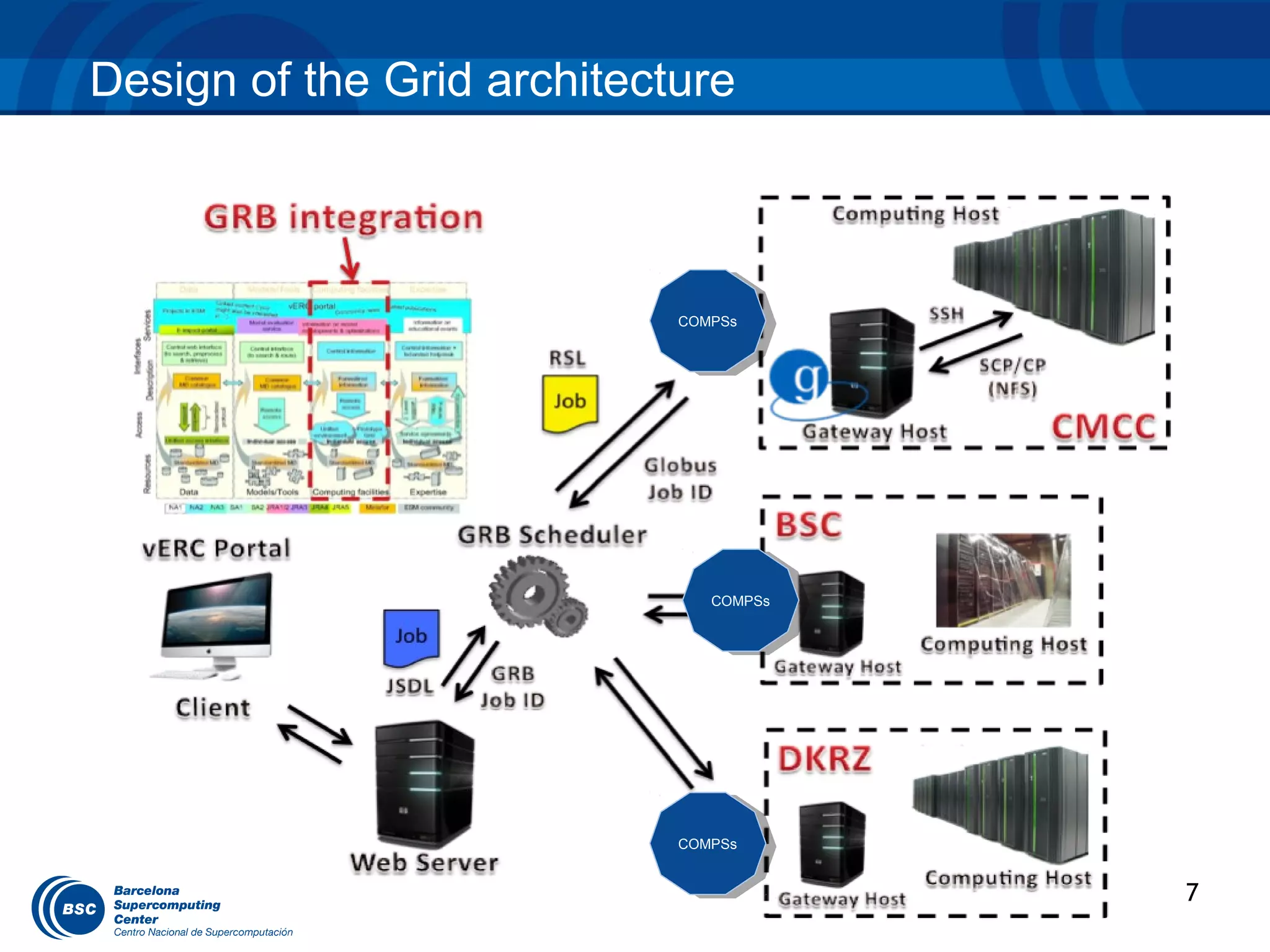
Design of the Grid architecture


                            COMPSs
                             COMPSs


                               COMPSs
                                COMPSs


                            COMPSs
                             COMPSs


                                         7
Design of the Grid architecture
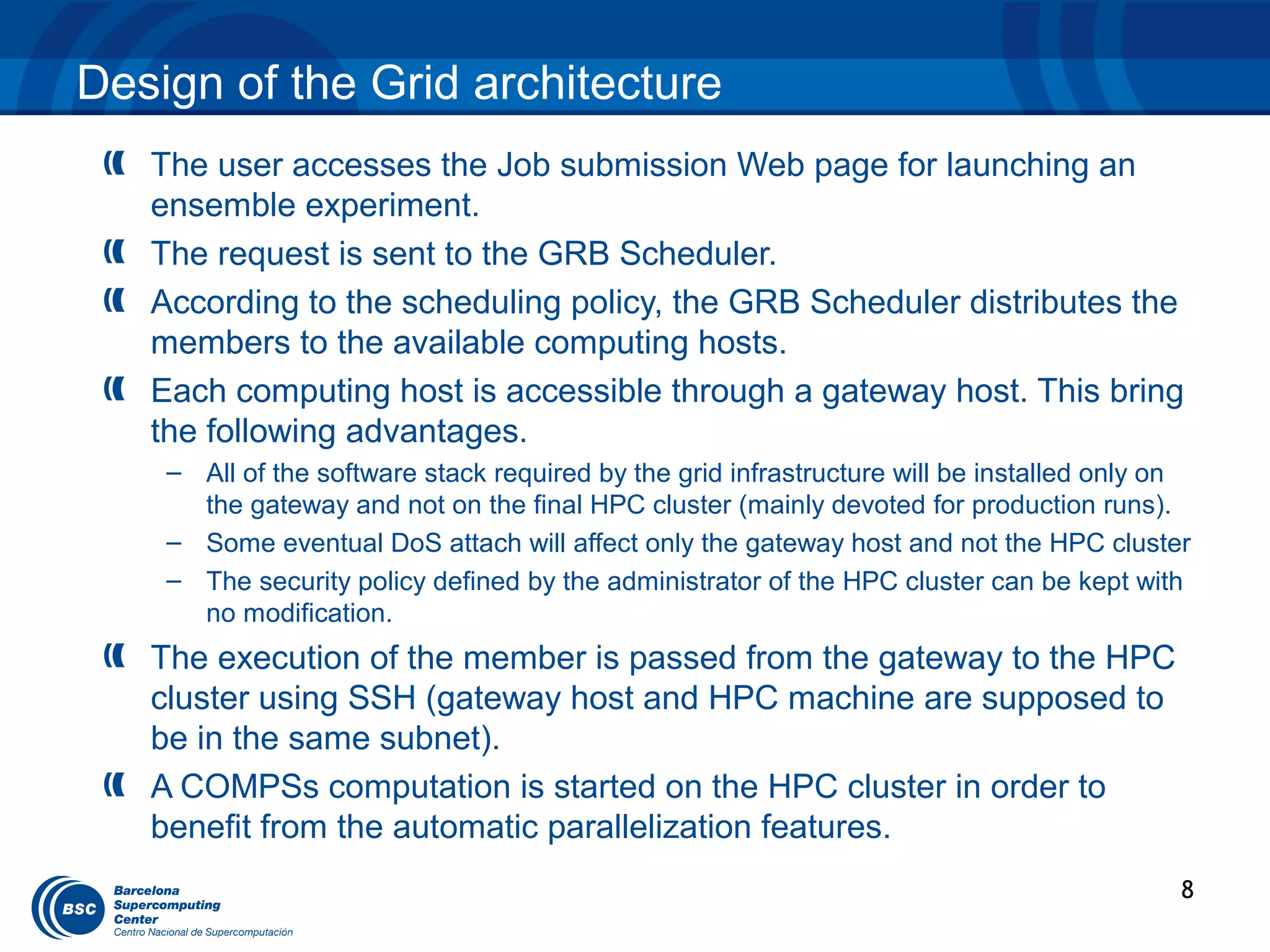
   The user accesses the Job submission Web page for launching an
   ensemble experiment.
   The request is sent to the GRB Scheduler.
   According to the scheduling policy, the GRB Scheduler distributes the
   members to the available computing hosts.
   Each computing host is accessible through a gateway host. This bring
   the following advantages.
    – All of the software stack required by the grid infrastructure will be installed only on
      the gateway and not on the final HPC cluster (mainly devoted for production runs).
    – Some eventual DoS attach will affect only the gateway host and not the HPC cluster
    – The security policy defined by the administrator of the HPC cluster can be kept with
      no modification.
   The execution of the member is passed from the gateway to the HPC
   cluster using SSH (gateway host and HPC machine are supposed to
   be in the same subnet).
   A COMPSs computation is started on the HPC cluster in order to
   benefit from the automatic parallelization features.
                                                                                            8
THE STARSS PROGRAMMING MODEL
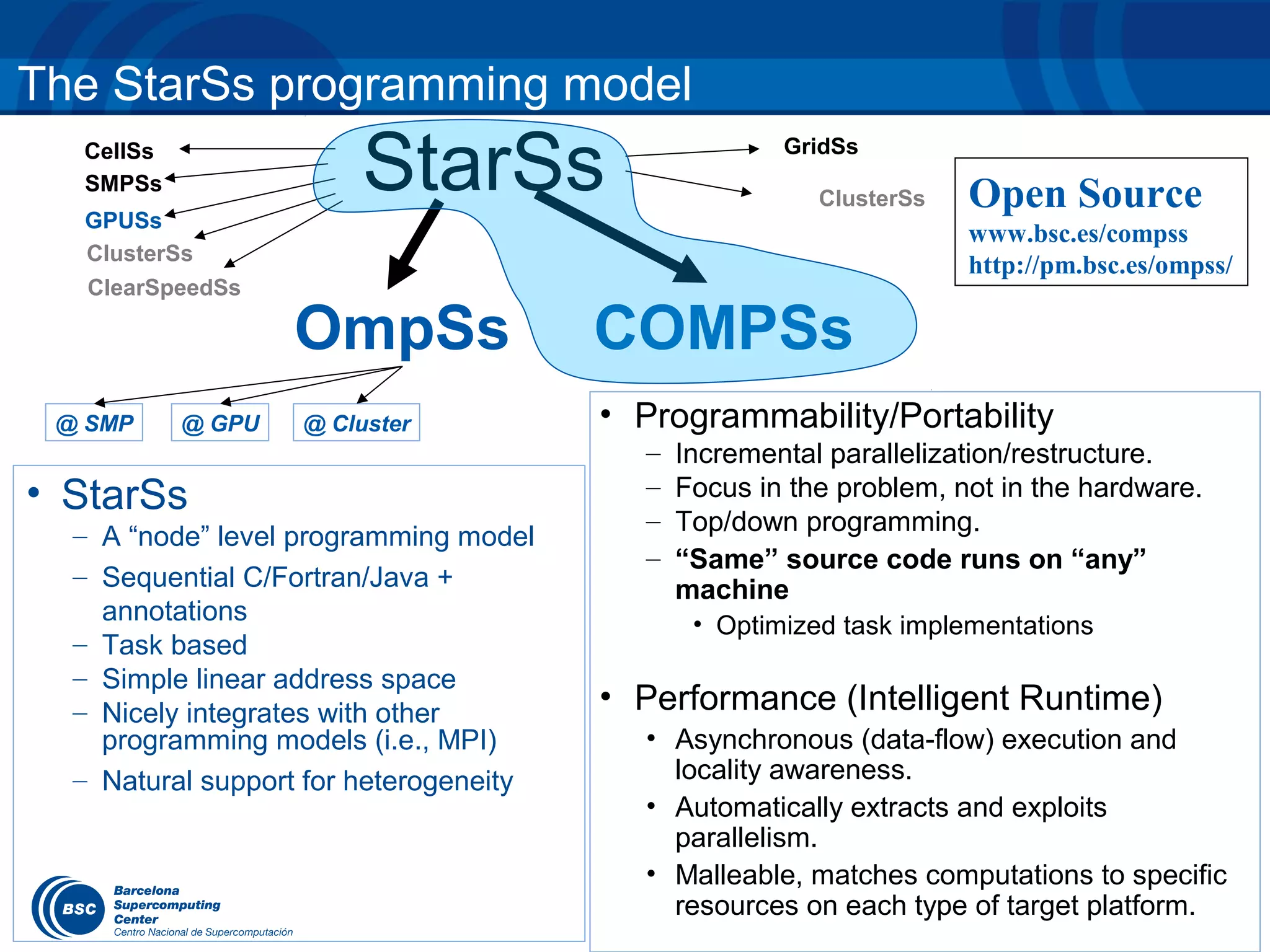
The StarSs programming model
  CellSs
  SMPSs
  GPUSs
                       StarSs                         GridSs

                                                         ClusterSs   Open Source
                                                                     www.bsc.es/compss
  ClusterSs
                                                                     http://pm.bsc.es/ompss/
  ClearSpeedSs

                   OmpSs                COMPSs
 @ SMP     @ GPU   @ Cluster            • Programmability/Portability
                                          –   Incremental parallelization/restructure.
• StarSs                                  –   Focus in the problem, not in the hardware.
                                          –   Top/down programming.
  – A “node” level programming model
                                          –   “Same” source code runs on “any”
  – Sequential C/Fortran/Java +               machine
    annotations                                • Optimized task implementations
  – Task based
  – Simple linear address space
  – Nicely integrates with other        • Performance (Intelligent Runtime)
    programming models (i.e., MPI)        • Asynchronous (data-flow) execution and
  – Natural support for heterogeneity       locality awareness.
                                          • Automatically extracts and exploits
                                            parallelism.
                                          • Malleable, matches computations to specific
                                            resources on each type of target platform.
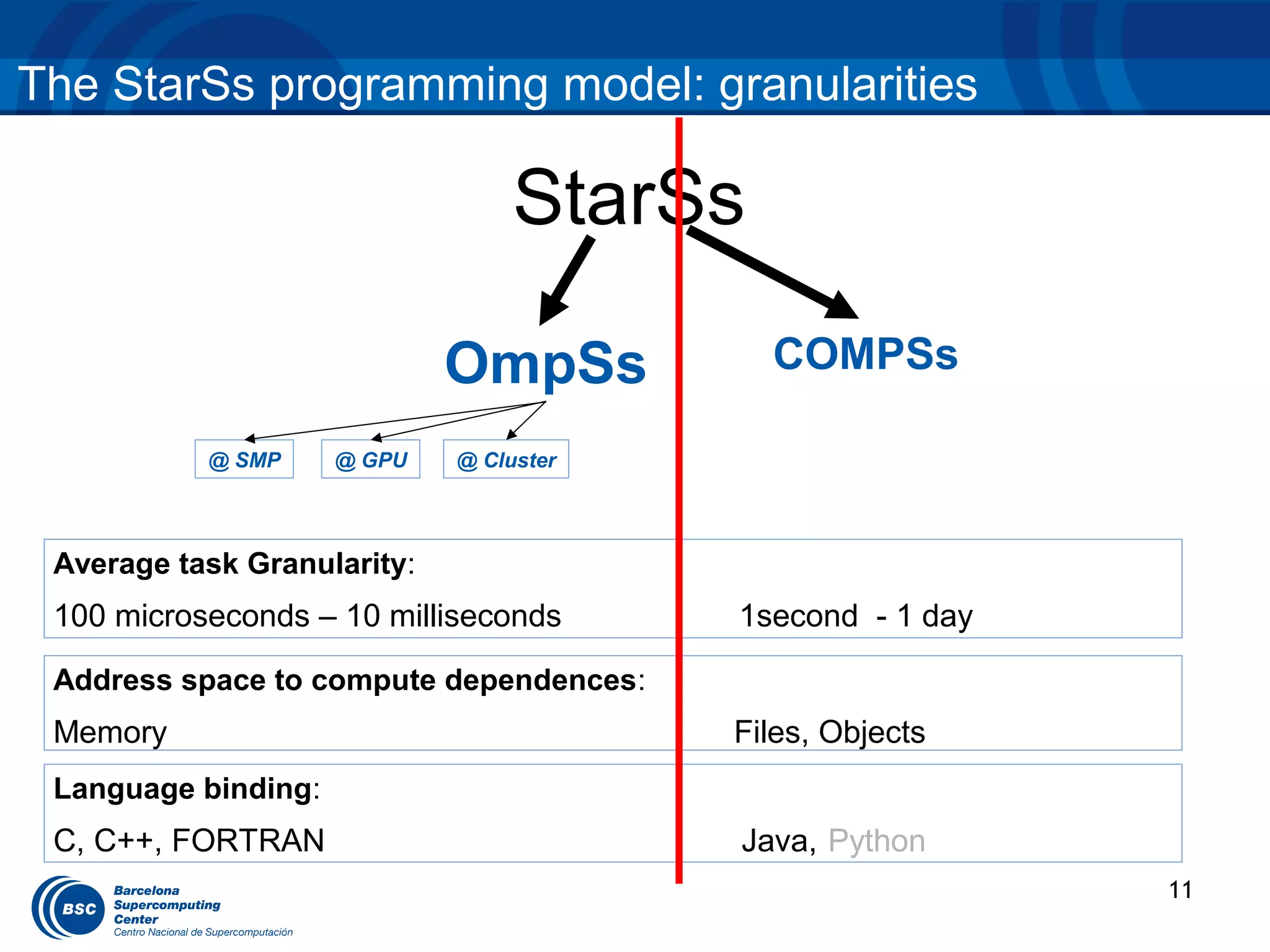
The StarSs programming model: granularities

                                  StarSs

                             OmpSs         COMPSs

           @ SMP     @ GPU   @ Cluster


 Average task Granularity:
 100 microseconds – 10 milliseconds      1second - 1 day

 Address space to compute dependences:
 Memory                                  Files, Objects
 Language binding:
 C, C++, FORTRAN                         Java, Python
                                                           11
INTRODUCTION TO COMPSS: OBJECTIVES
Introduction to COMPSs: Objectives

    Reduce the development complexity of
    Grid/Cluster/Cloud applications to the minimum
     – Writing an application for a computational distributed
       infrastructure may be as easy as writing a sequential application


    Target applications: composed of tasks, most of them
    repetitive
     – Granularity of the tasks or programs
     – Data: files, objects, arrays and primitive types


                                                                       13
Programming with COMPSs– Data types
    Type                    In a task                          In main program
 Object                                            •     Method call
               C c = a.task(b);
                                                   c.foo();
               a: Callee
                                                   •     Field access
               b: Parameter                        int i = a.f;
               c: Return value
 Array       Same as objects                   •       Access to an element

                                               int i = array[3];

 File        String file = “path/to/myFile”;   •       Stream creation:

             task(file);                       FileInputStream fis =

                                               new FileInputStream(file);


 Primitive   boolean b = task(2);              Regular use


             2: Parameter

             b: Return value
                                                                                 14
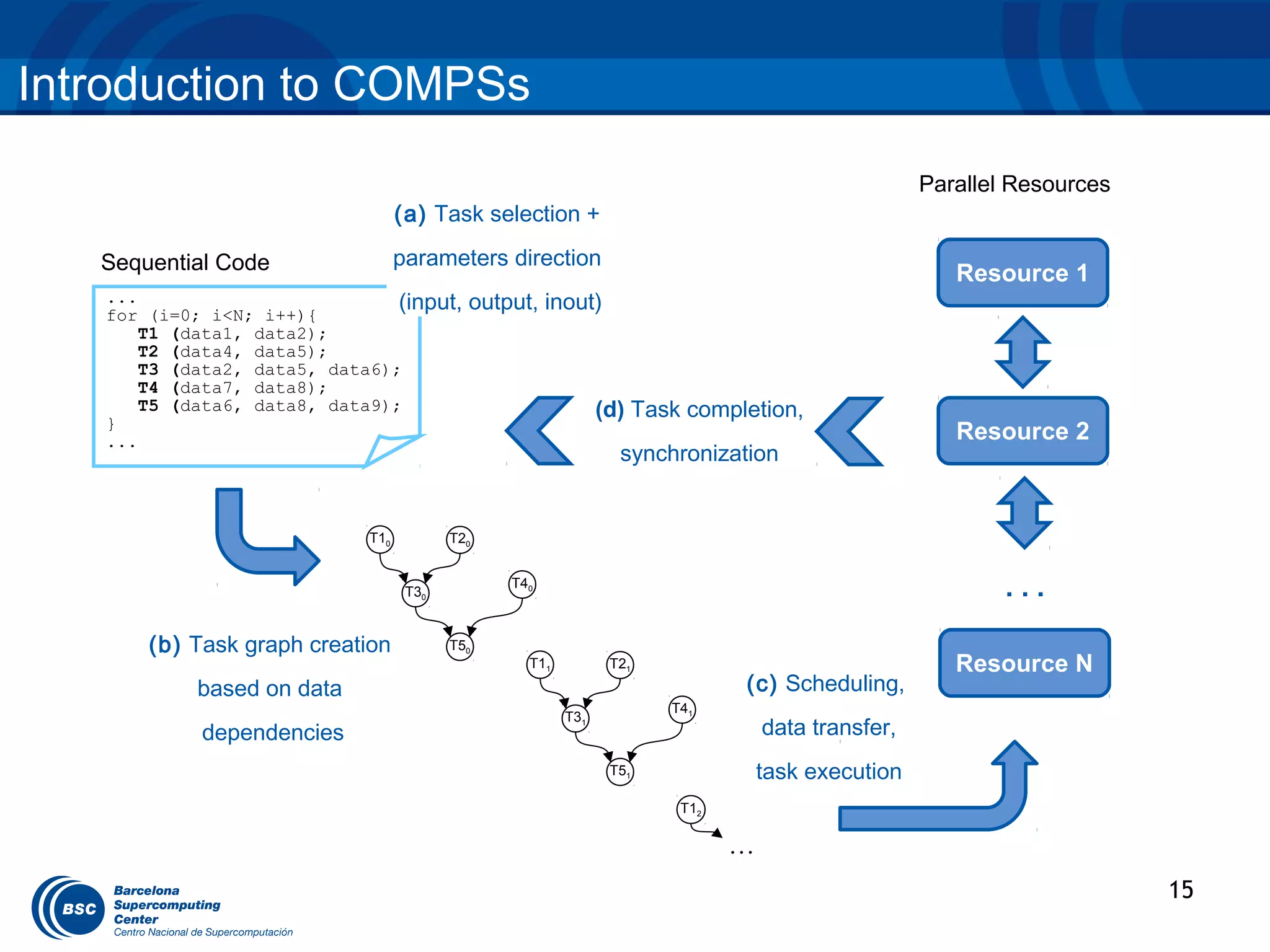
Introduction to COMPSs
                                                                                                 Parallel Resources
                                   (a) Task selection +

   Sequential Code                 parameters direction
                                                                                                    Resource 1
   ...
   for (i=0; i<N; i++){
                                (input,     output, inout)
       T1 (data1, data2);
       T2 (data4, data5);
       T3 (data2, data5, data6);
       T4 (data7, data8);
       T5 (data6, data8, data9);                              (d) Task completion,
   }
   ...                                                                                              Resource 2
                                                                synchronization


                             T10          T20


                                    T30
                                                T40
                                                                                                         ...
       (b) Task graph creation            T50
                                                  T11          T21                                  Resource N
            based on data                                                   (c) Scheduling,
                                                                     T41
                                                        T31
            dependencies                                                        data transfer,
                                                               T51              task execution
                                                                      T12

                                                                            …
                                                                                                                      15
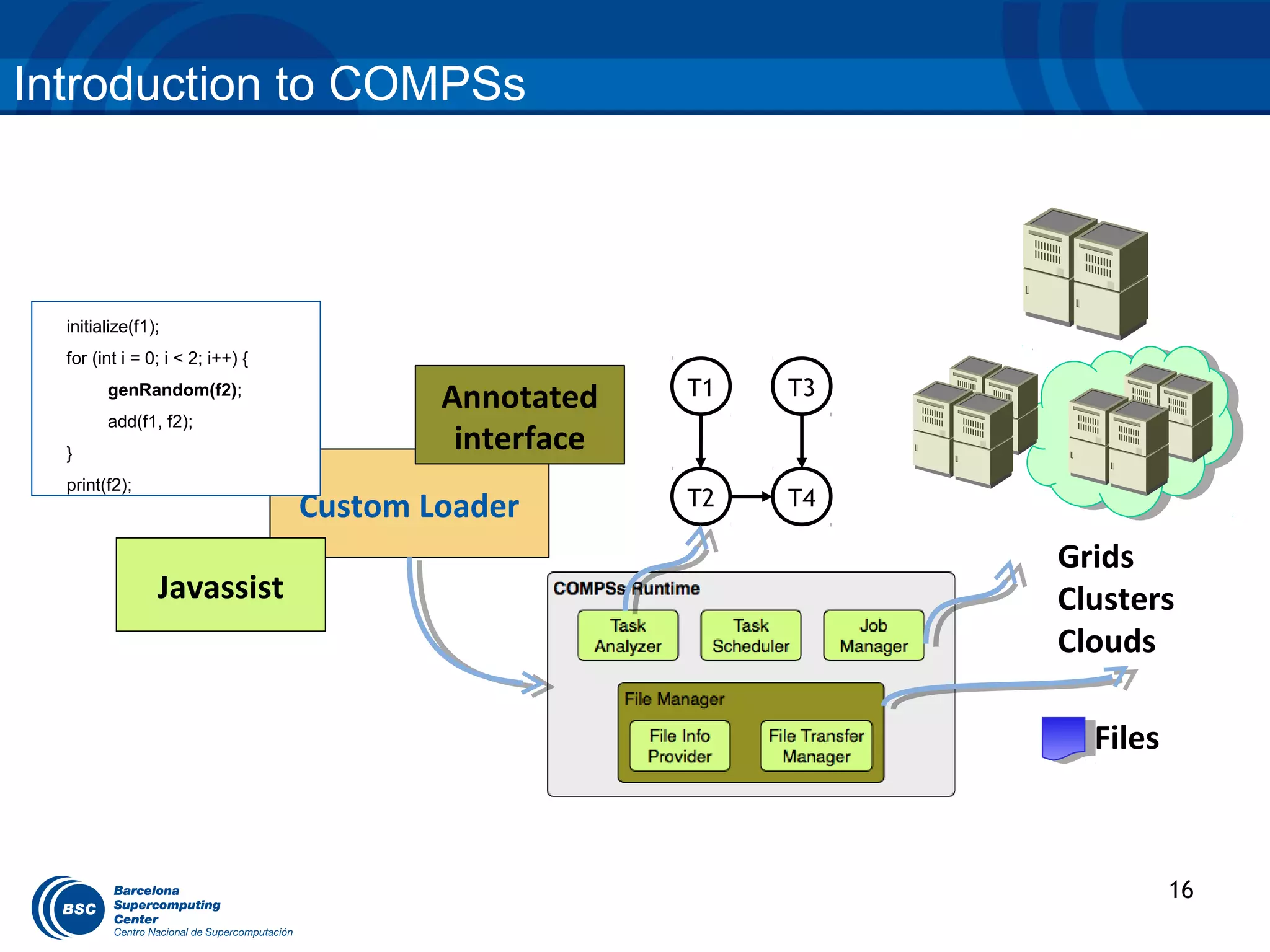
Introduction to COMPSs


                    User code

  initialize(f1);
  for (int i = 0; i < 2; i++) {
        genRandom(f2);
                                          Annotated    T1   T3
        add(f1, f2);
  }
                                           interface
  print(f2);
                                  Custom Loader        T2   T4

                                                                 Grids
                Javassist                                        Clusters
                                                                 Clouds

                                                                   Files


                                                                           16
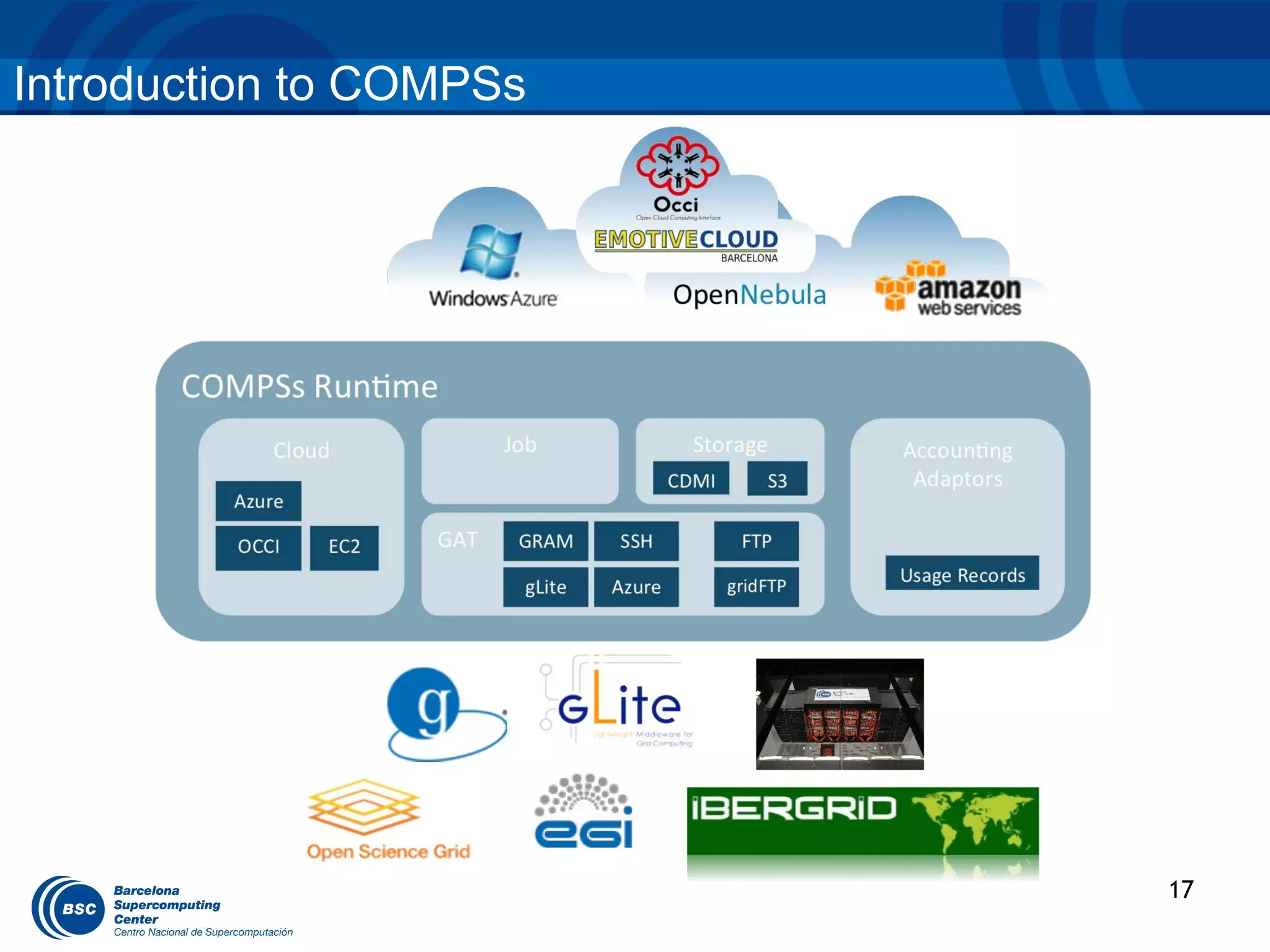
Introduction to COMPSs


                         17
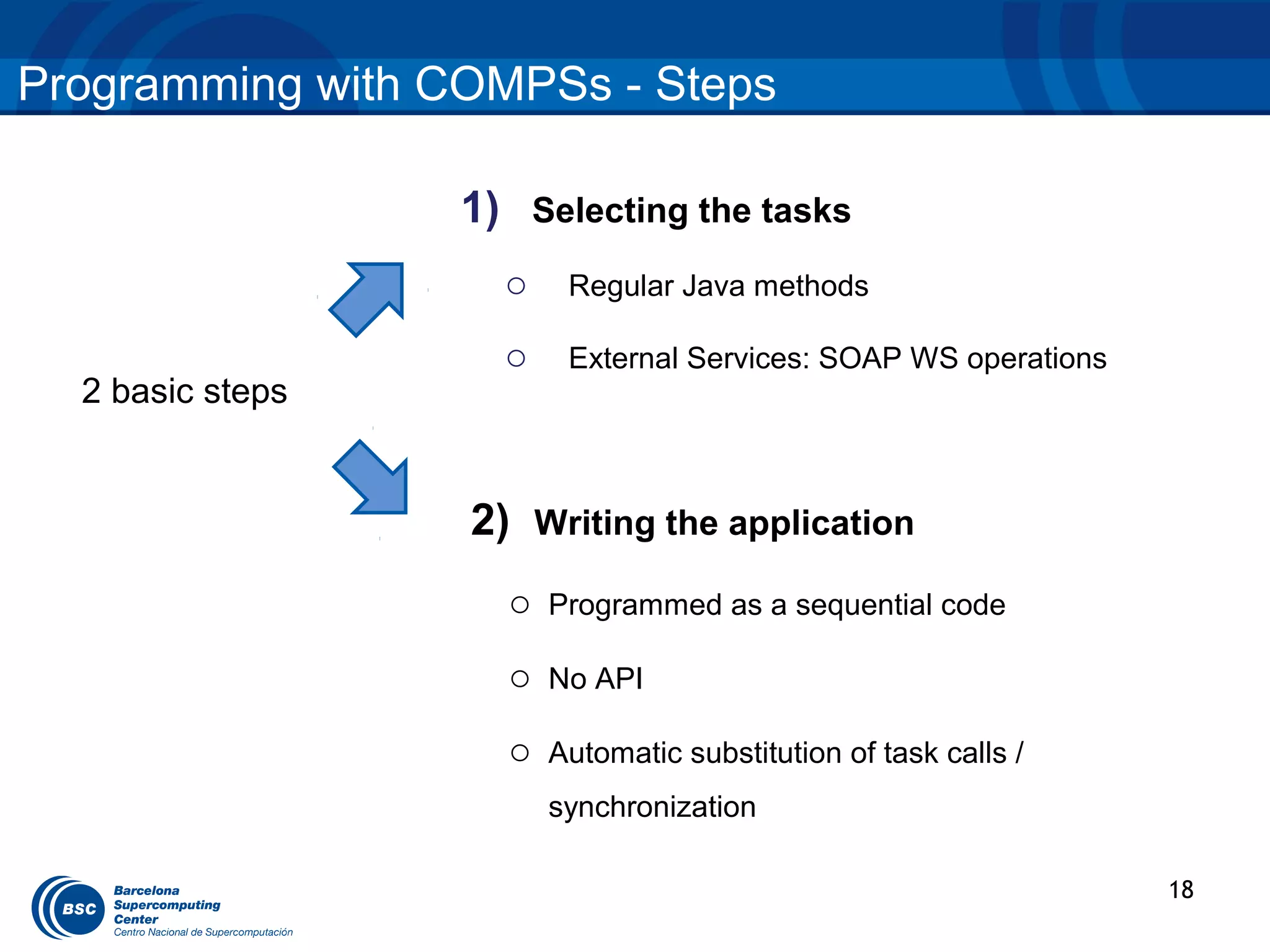
Programming with COMPSs - Steps

                  1) Selecting the tasks
                    o    Regular Java methods

                    o    External Services: SOAP WS operations
  2 basic steps


                  2) Writing the application
                    o   Programmed as a sequential code

                    o   No API

                    o   Automatic substitution of task calls /
                        synchronization

                                                                 18
Programming model – Sample application

  public static void main(String[] args) {                         Main program
           String counter1 = args[0], counter2 = args[1],
                  counter3 = args[2];

          initializeCounters(counter1, counter2, counter3);

          for (i = 0; i < 3; i++) {
            increment(counter1);
            increment(counter2);
            increment(counter3);
          }
  }                                                                     Subroutine
                   public static void increment(String counterFile) {
                            int value = readCounter(counterFile);
                            value++;
                            writeCounter(counterFile, value);
                   }


                                                                                     19
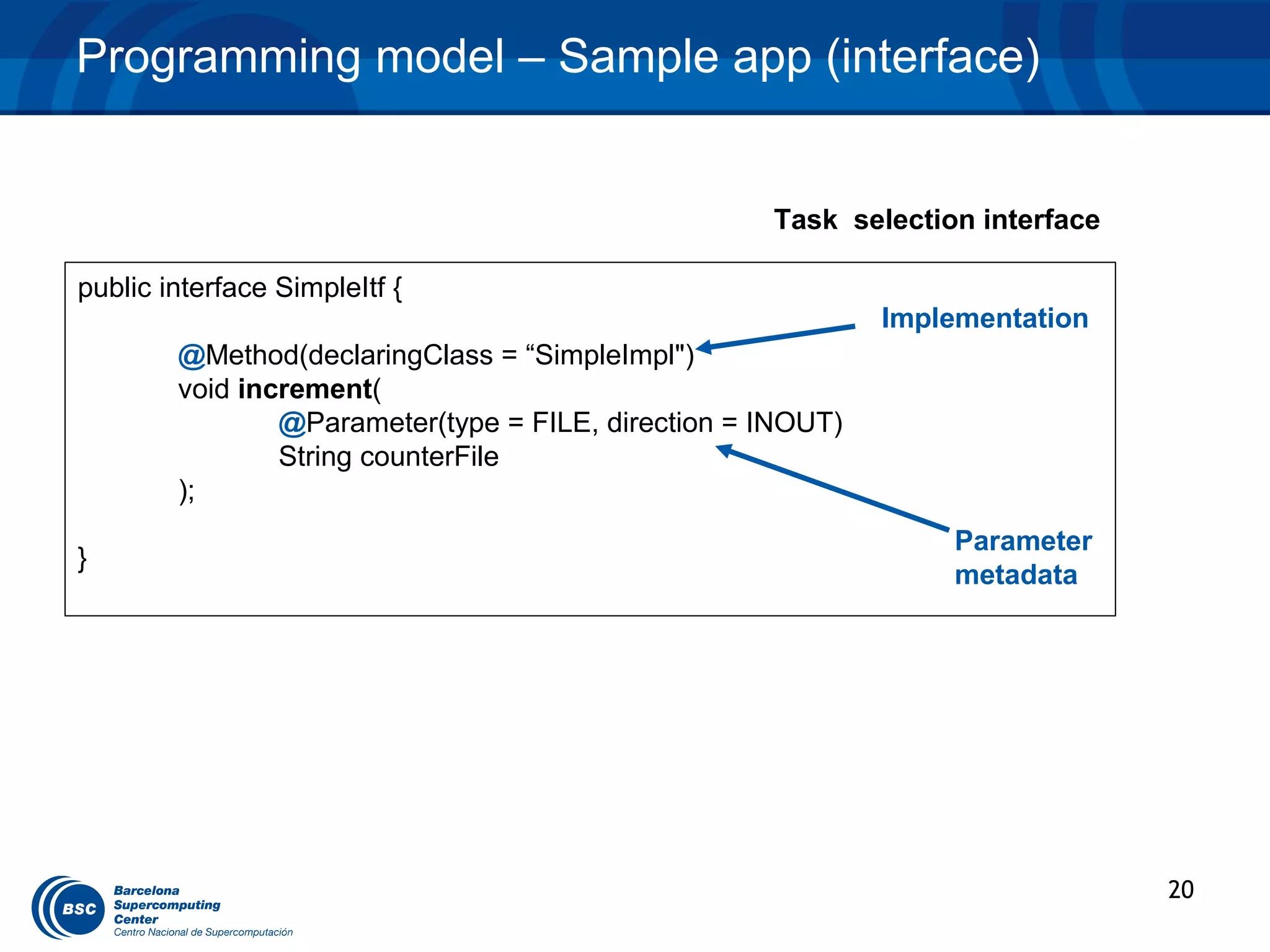
Programming model – Sample app (interface)


                                                    Task selection interface

public interface SimpleItf {
                                                             Implementation
        @Method(declaringClass = “SimpleImpl")
        void increment(
                @Parameter(type = FILE, direction = INOUT)
                String counterFile
        );
                                                                 Parameter
}
                                                                 metadata


                                                                               20
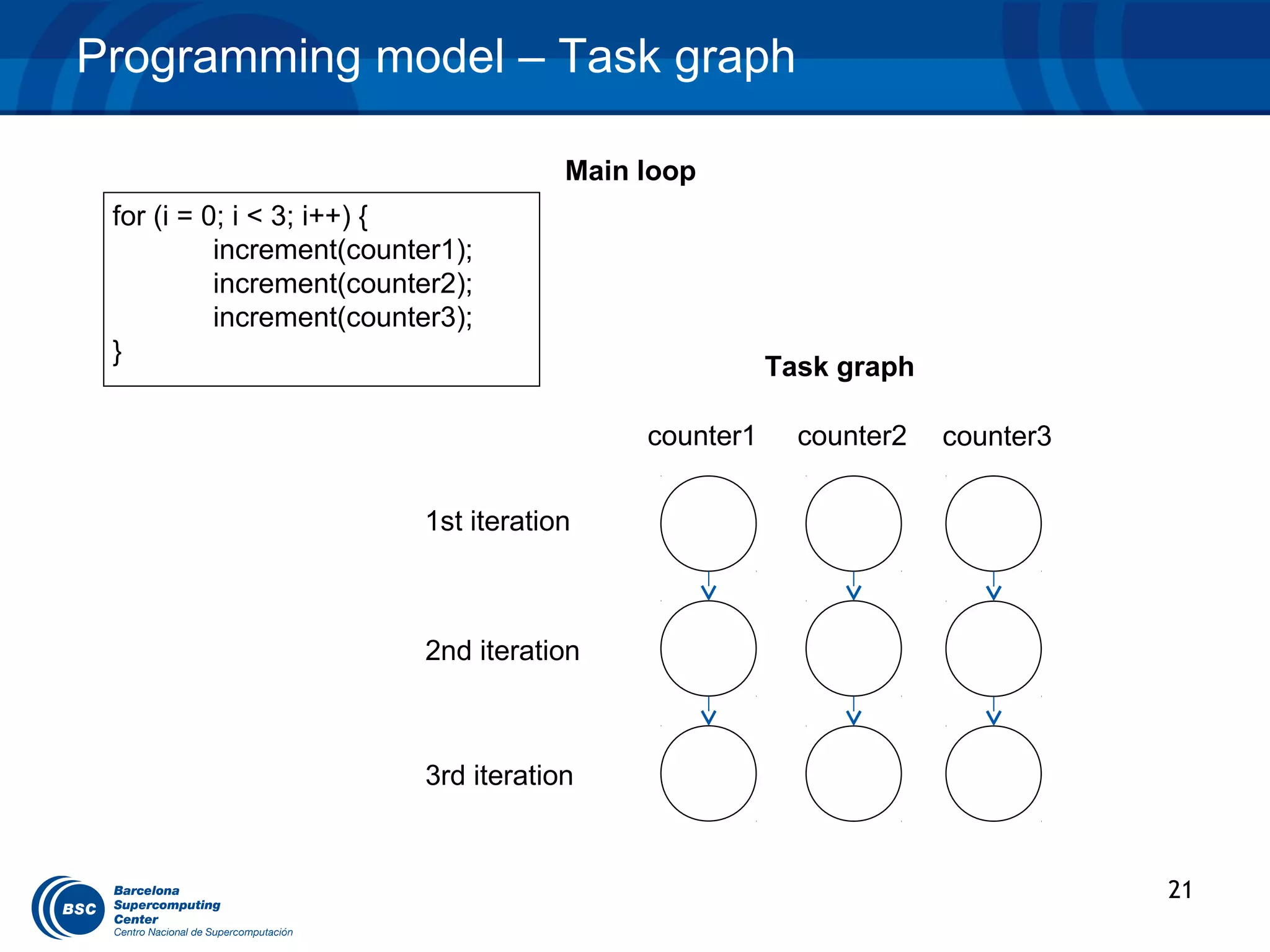
Programming model – Task graph

                                       Main loop
 for (i = 0; i < 3; i++) {
           increment(counter1);
           increment(counter2);
           increment(counter3);
 }
                                                       Task graph

                                            counter1     counter2   counter3


                          1st iteration


                           2nd iteration


                           3rd iteration


                                                                               21
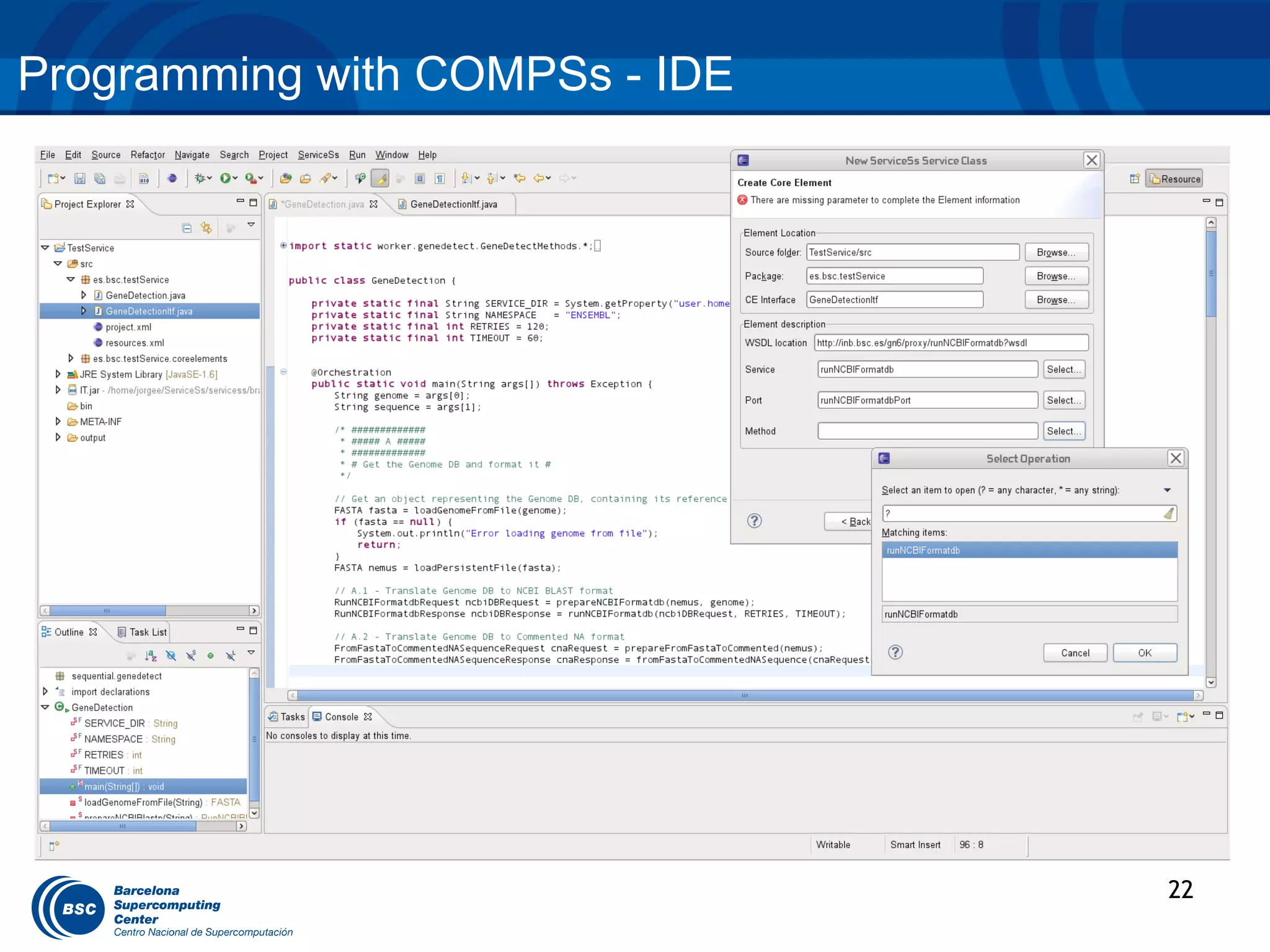
Programming with COMPSs - IDE


                                22   13
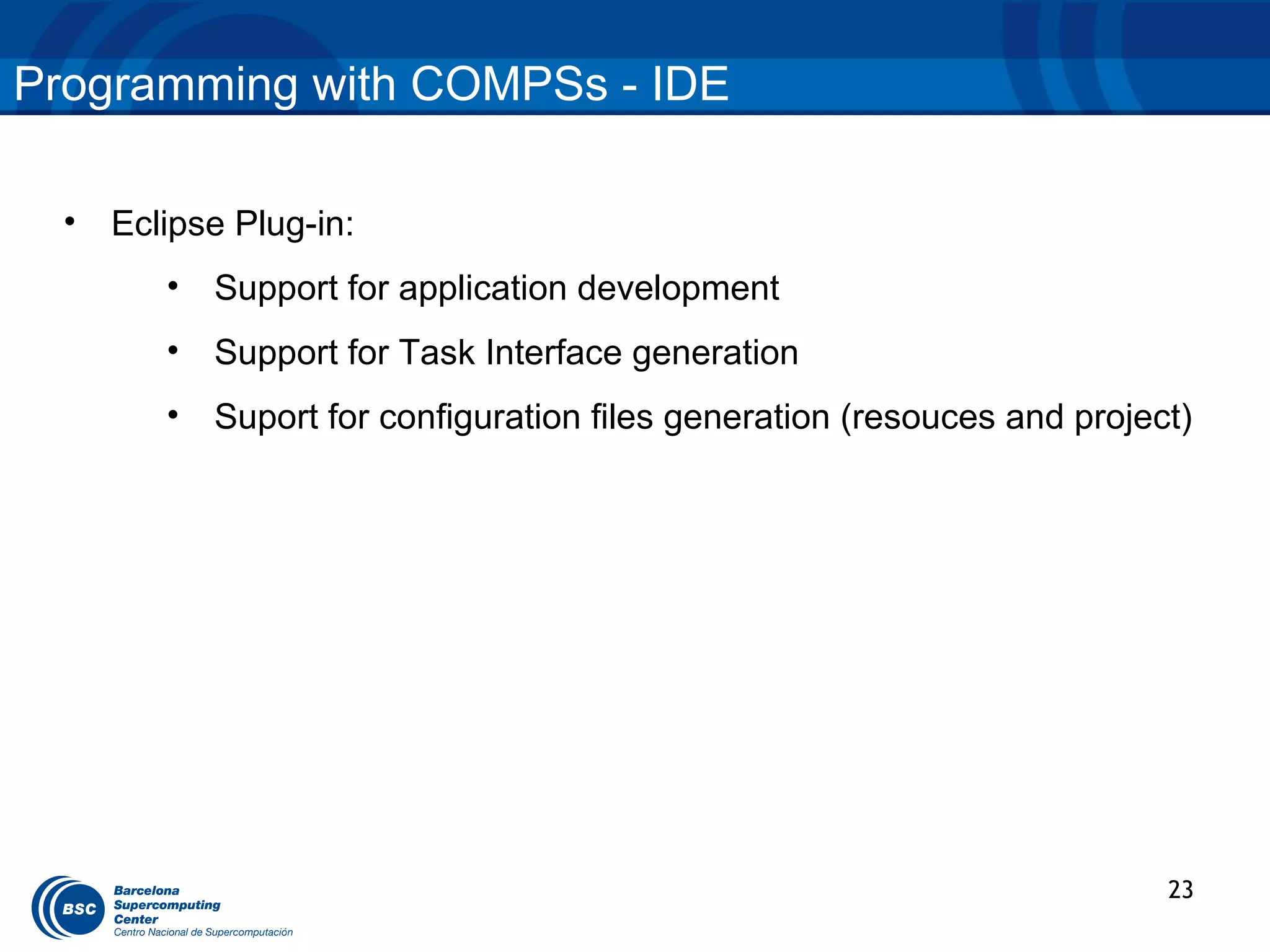
Programming with COMPSs - IDE

  •   Eclipse Plug-in:
         •   Support for application development
         •   Support for Task Interface generation
         •   Suport for configuration files generation (resouces and project)


                                                                           23
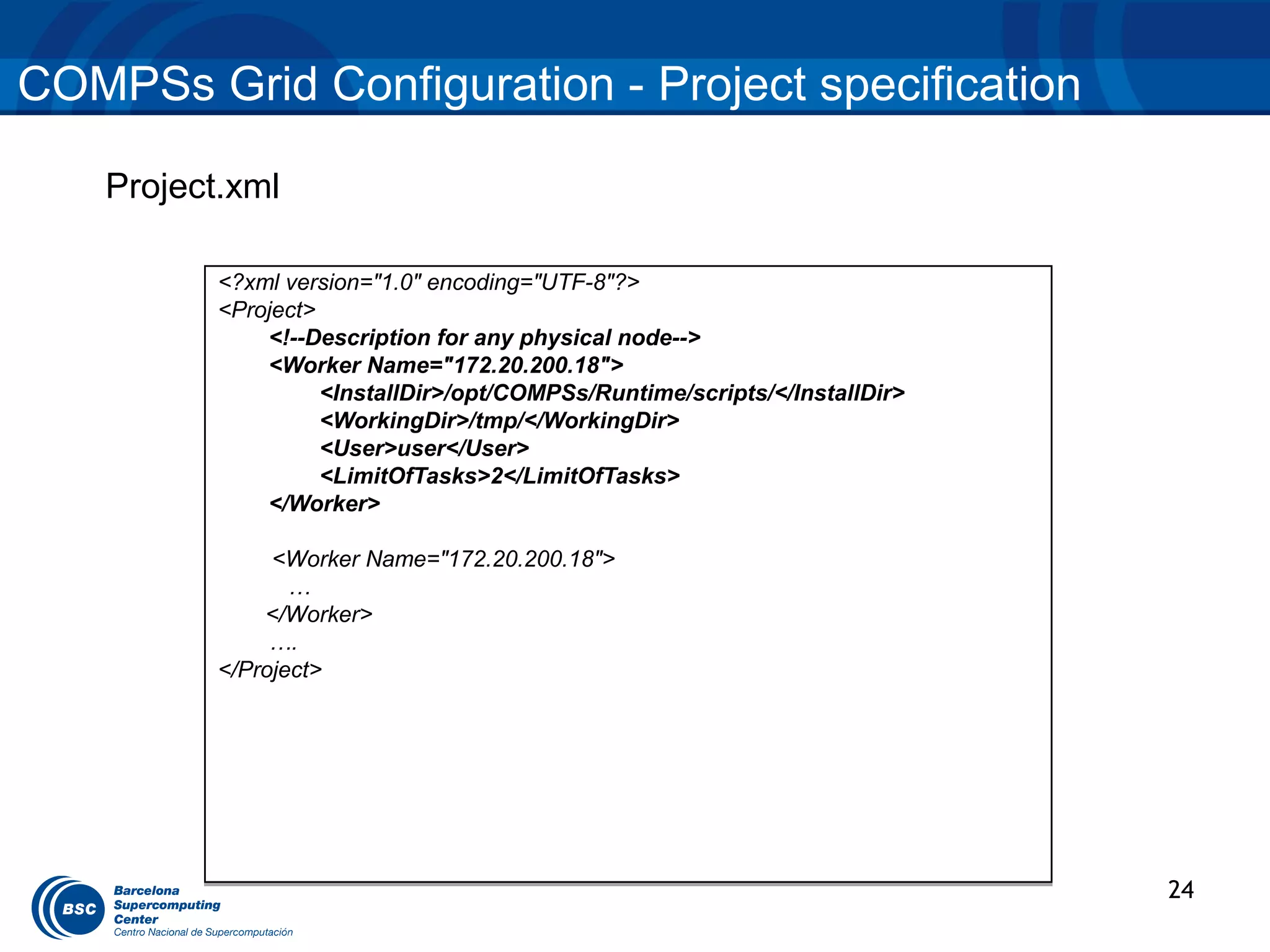
COMPSs Grid Configuration - Project specification

    Project.xml

           <?xml version="1.0" encoding="UTF-8"?>
           <Project>
               <!--Description for any physical node-->
               <Worker Name="172.20.200.18">
                     <InstallDir>/opt/COMPSs/Runtime/scripts/</InstallDir>
                     <WorkingDir>/tmp/</WorkingDir>
                     <User>user</User>
                     <LimitOfTasks>2</LimitOfTasks>
               </Worker>

                <Worker Name="172.20.200.18">
                  …
               </Worker>
                ….
           </Project>


                                                                             24
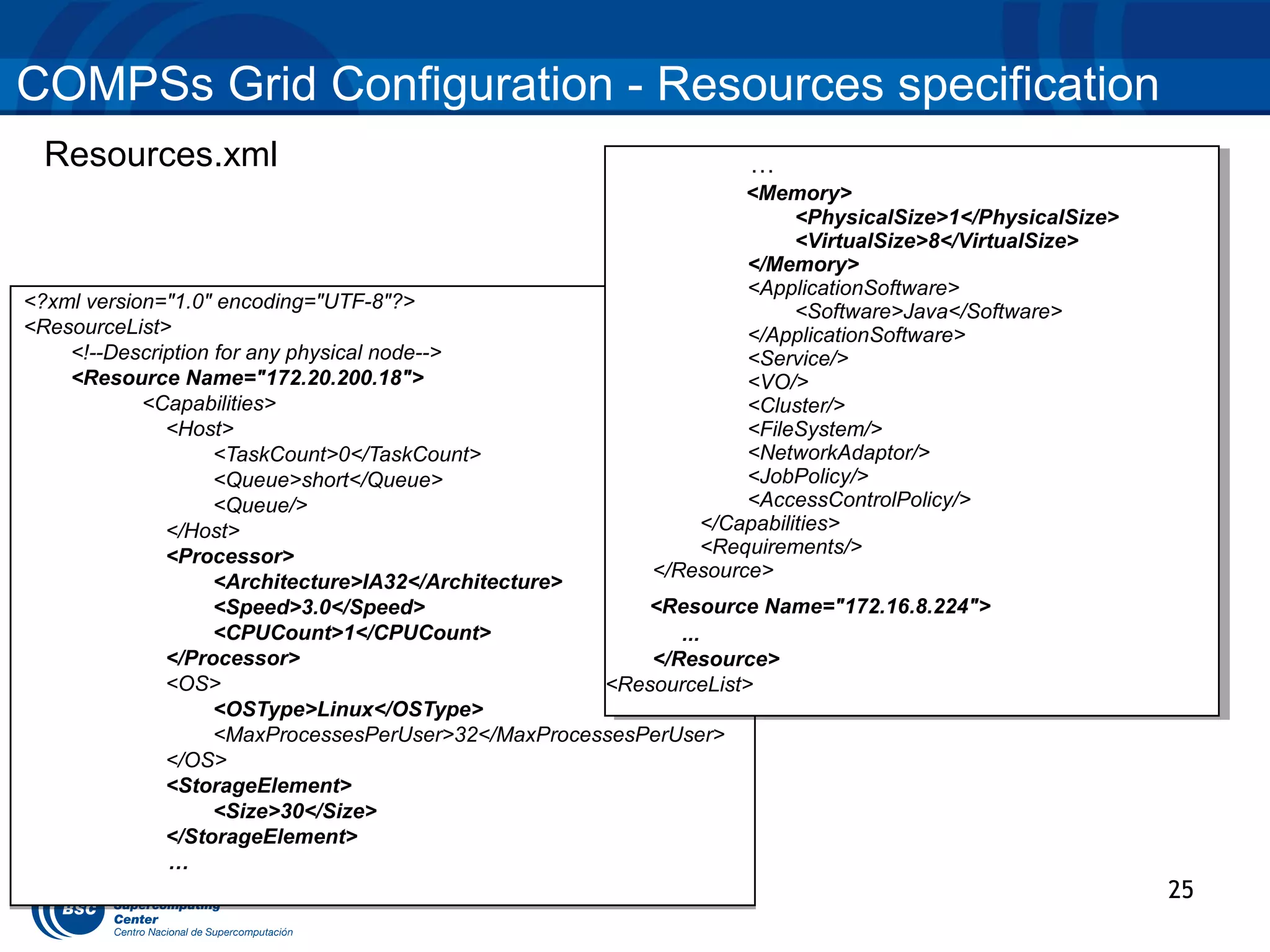
COMPSs Grid Configuration - Resources specification
 Resources.xml                                                    …
                                                                  …
                                                                  <Memory>
                                                                   <Memory>
                                                                       <PhysicalSize>1</PhysicalSize>
                                                                         <PhysicalSize>1</PhysicalSize>
                                                                       <VirtualSize>8</VirtualSize>
                                                                         <VirtualSize>8</VirtualSize>
                                                                  </Memory>
                                                                   </Memory>
                                                                  <ApplicationSoftware>
                                                                   <ApplicationSoftware>
<?xml version="1.0" encoding="UTF-8"?>                                 <Software>Java</Software>
                                                                         <Software>Java</Software>
<ResourceList>                                                    </ApplicationSoftware>
                                                                   </ApplicationSoftware>
    <!--Description for any physical node-->                      <Service/>
                                                                   <Service/>
    <Resource Name="172.20.200.18">                               <VO/>
                                                                   <VO/>
            <Capabilities>                                        <Cluster/>
                                                                   <Cluster/>
              <Host>                                              <FileSystem/>
                                                                   <FileSystem/>
                    <TaskCount>0</TaskCount>                      <NetworkAdaptor/>
                                                                   <NetworkAdaptor/>
                    <Queue>short</Queue>                          <JobPolicy/>
                                                                   <JobPolicy/>
                    <Queue/>                                      <AccessControlPolicy/>
                                                                   <AccessControlPolicy/>
                                                             </Capabilities>
                                                              </Capabilities>
              </Host>
              <Processor>                                    <Requirements/>
                                                              <Requirements/>
                                                         </Resource>
                                                          </Resource>
                    <Architecture>IA32</Architecture>
                    <Speed>3.0</Speed>                    <Resource Name="172.16.8.224">
                                                           <Resource Name="172.16.8.224">
                    <CPUCount>1</CPUCount>                   ...
                                                               ...
              </Processor>                                </Resource>
                                                           </Resource>
              <OS>                                    <ResourceList>
                                                       <ResourceList>
                    <OSType>Linux</OSType>
                    <MaxProcessesPerUser>32</MaxProcessesPerUser>
              </OS>
              <StorageElement>
                    <Size>30</Size>
              </StorageElement>
              …
                                                                                                          25
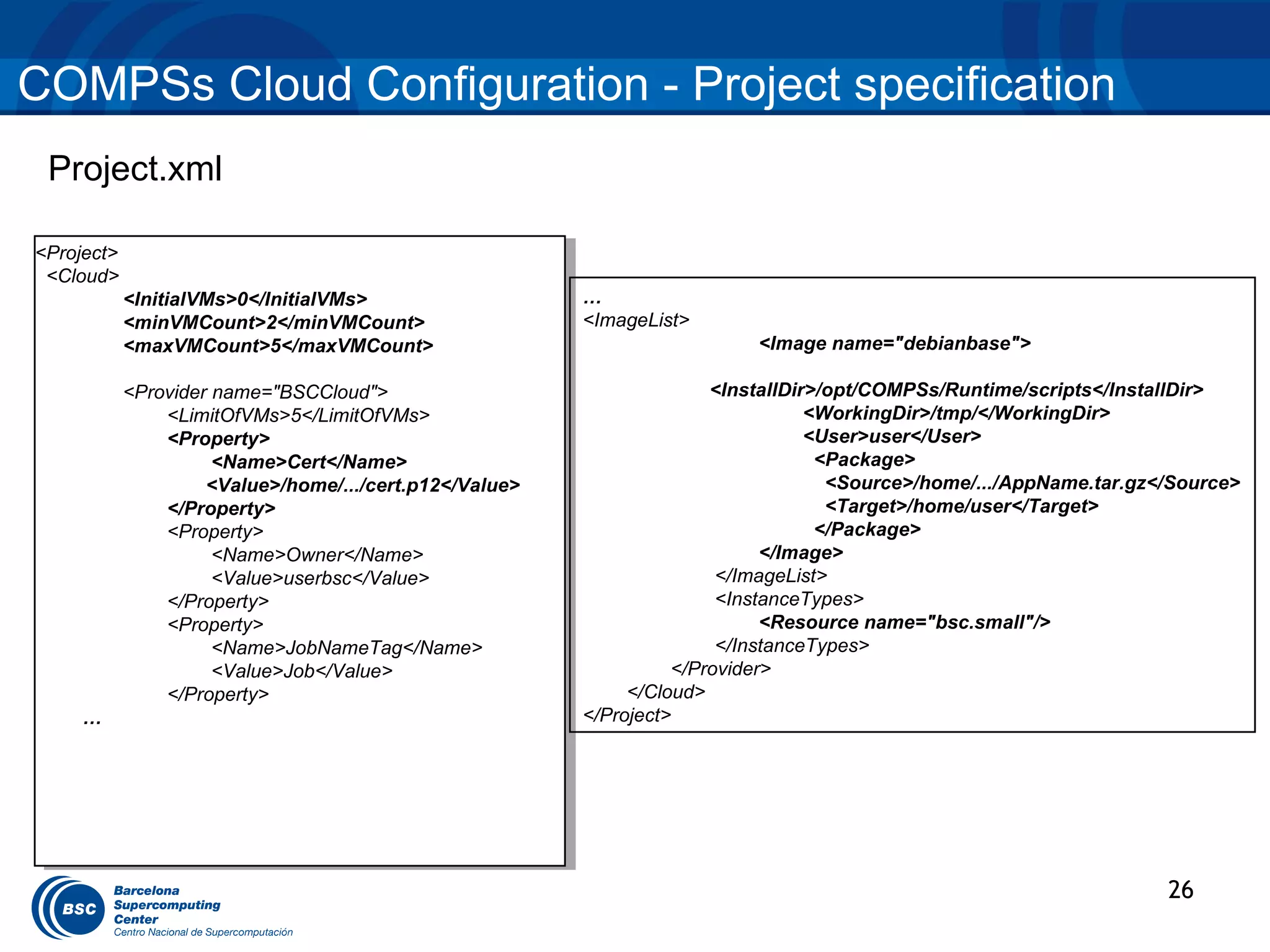
COMPSs Cloud Configuration - Project specification
 Project.xml

<Project>
 <Project>
 <Cloud>
  <Cloud>
          <InitialVMs>0</InitialVMs>
           <InitialVMs>0</InitialVMs>                  …
          <minVMCount>2</minVMCount>
           <minVMCount>2</minVMCount>                  <ImageList>
          <maxVMCount>5</maxVMCount>
           <maxVMCount>5</maxVMCount>                                    <Image name="debianbase">

         <Provider name="BSCCloud">
          <Provider name="BSCCloud">                                 <InstallDir>/opt/COMPSs/Runtime/scripts</InstallDir>
             <LimitOfVMs>5</LimitOfVMs>
               <LimitOfVMs>5</LimitOfVMs>                                       <WorkingDir>/tmp/</WorkingDir>
             <Property>
               <Property>                                                       <User>user</User>
                   <Name>Cert</Name>
                    <Name>Cert</Name>                                            <Package>
                  <Value>/home/.../cert.p12</Value>
                   <Value>/home/.../cert.p12</Value>                              <Source>/home/.../AppName.tar.gz</Source>
             </Property>
               </Property>                                                        <Target>/home/user</Target>
             <Property>
               <Property>                                                        </Package>
                   <Name>Owner</Name>
                    <Name>Owner</Name>                                     </Image>
                   <Value>userbsc</Value>
                    <Value>userbsc</Value>                            </ImageList>
             </Property>
               </Property>                                            <InstanceTypes>
             <Property>
               <Property>                                                  <Resource name="bsc.small"/>
                   <Name>JobNameTag</Name>
                    <Name>JobNameTag</Name>                           </InstanceTypes>
                   <Value>Job</Value>
                    <Value>Job</Value>                           </Provider>
             </Property>
               </Property>                                  </Cloud>
    ……                                                 </Project>


                                                                                                                   26
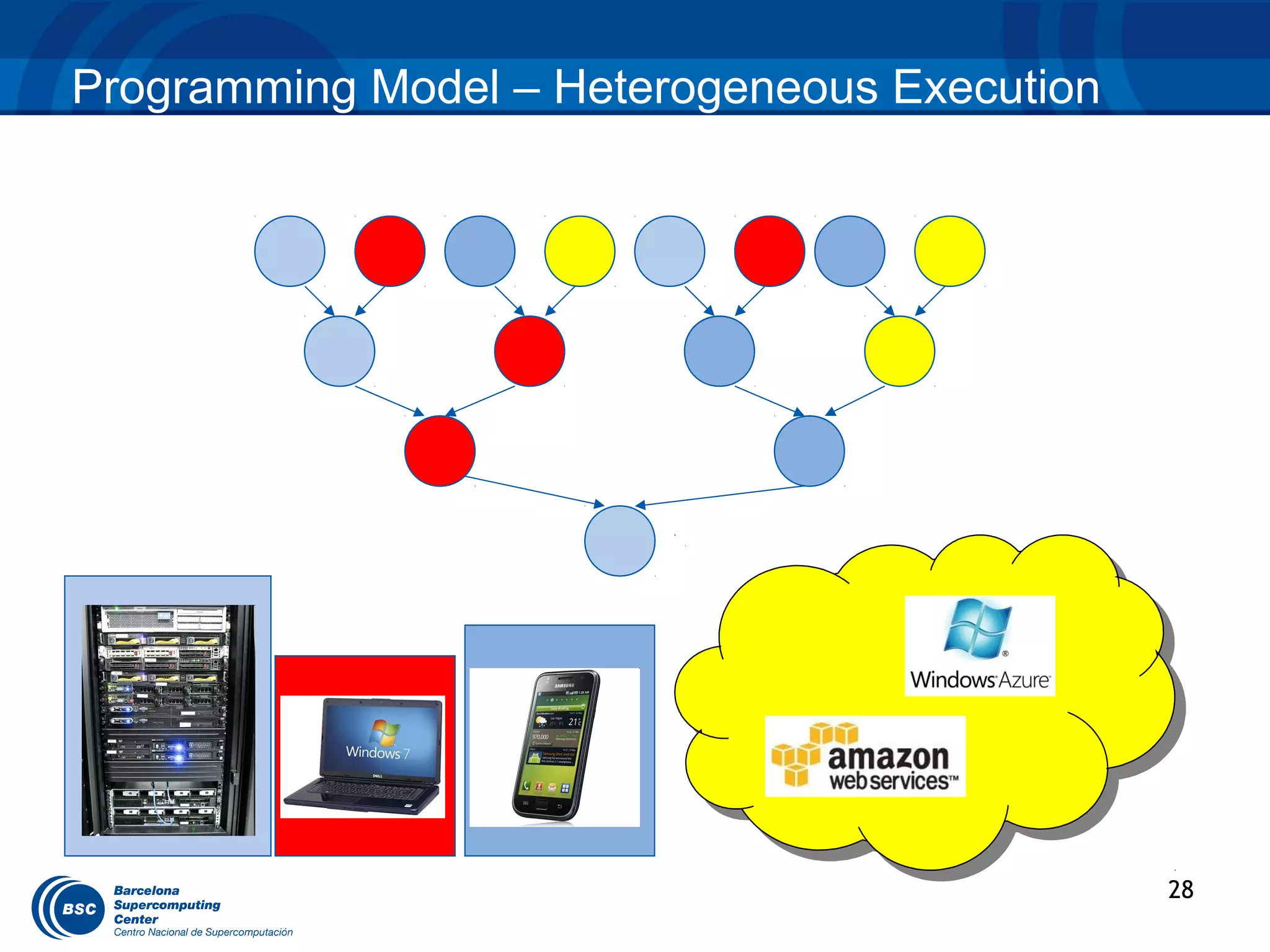
Programming Model – Heterogeneous Execution


                                              28
Tracing - Overview


•    COMPSs can generate post-mortem traces of the distributed
     execution of the application.
•    Useful for analysis and diagnosis.
•    How it works:
    • For each task execution and file transfer, an XML file is created to keep track
       of that event.
    • At the end of the execution, a perl script reads all the XML files and generates
       a Paraver trace file.

•    Traces can be visualized with the Paraver tool
    • http://www.bsc.es/paraver


                                                                                        29
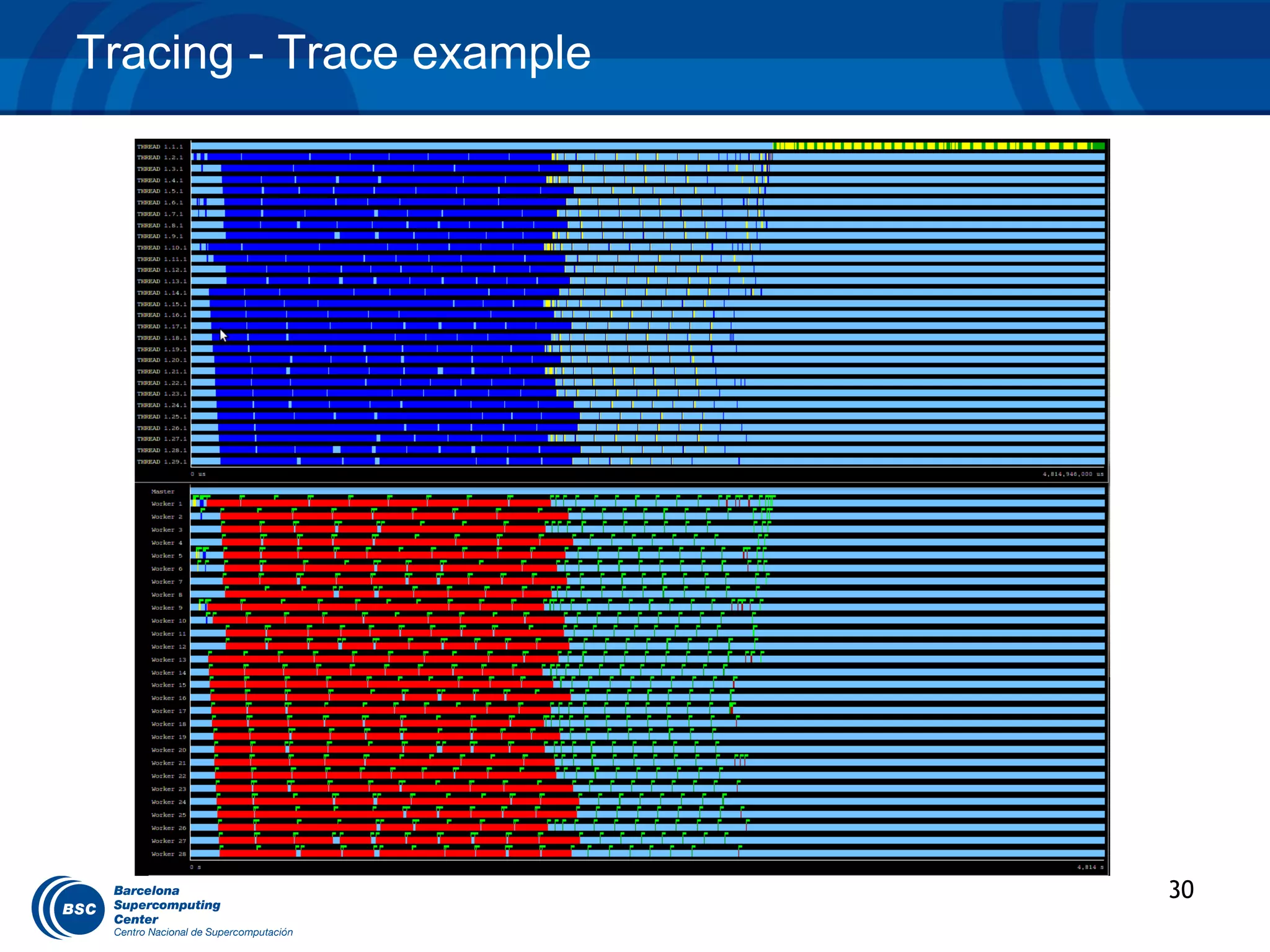
Tracing - Trace example


                          30
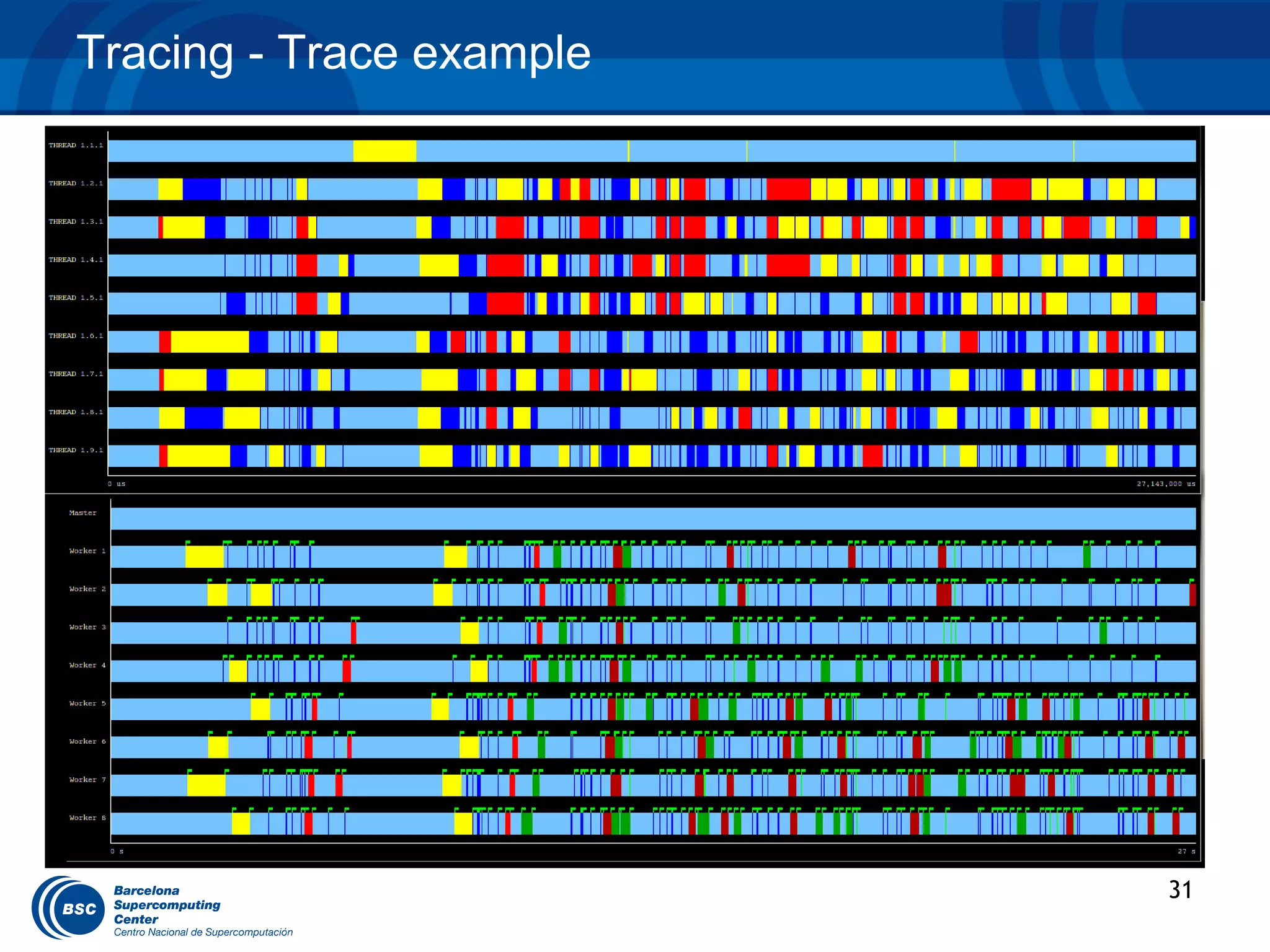
Tracing - Trace example


                          31
Tracing: Trace interpretation


•   Lines in the trace:
    •   One line for the master
    •   N lines for the workers

•   Meaning of the colours:
    •   Light blue: idle
    •   Dark blue: running a task
    •   Yellow/green: transferring data
    •   Red: waiting for data to be transferred

•   Flags (events):
    •   Start / end of task
    •   Start / end of data transfer


                                                  32
EXAMPLES
BLAST example

 VENUS-C Bioinformatics Scenario
  BLAST (Basic Local Alignment Search Tool) Suite:
   – BLAST: An algorithm for comparing primary biological
     sequence information, such as the amino-acid sequences
     of different proteins or nucleotides of DNA sequences.

   BLAST enables a researcher to compare a
   query sequence with a library or database
   of sequences, and identify sequences that
   resemble the query sequence above a certain
   threshold.


                                                              34
BLAST example

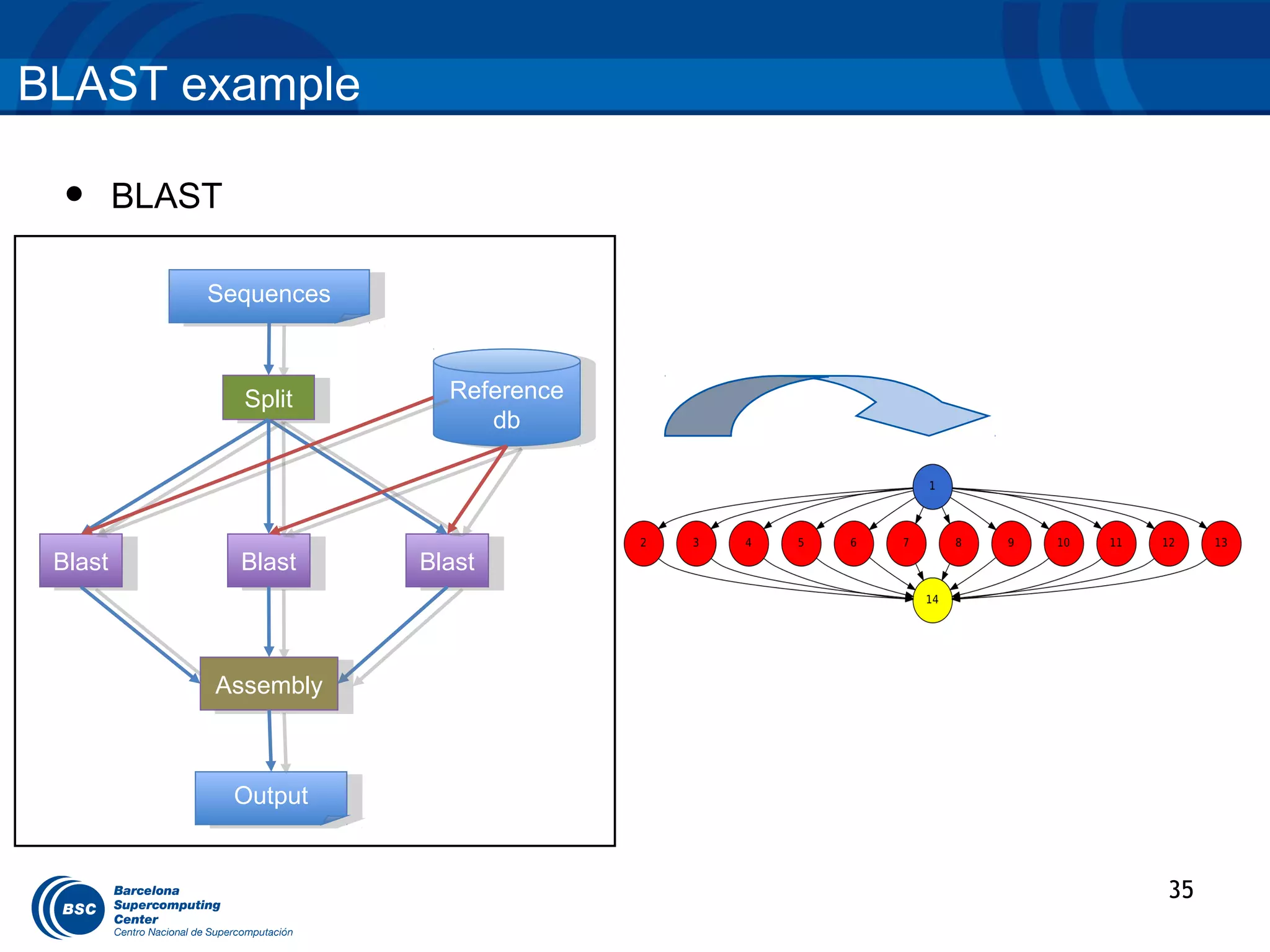
 •   BLAST

          Sequences
           Sequences


             Split
              Split      Reference
                          Reference
                            dbdb


 Blast
  Blast      Blast
              Blast    Blast
                        Blast


          Assembly
           Assembly


             Output
              Output


                                      35
BLAST example

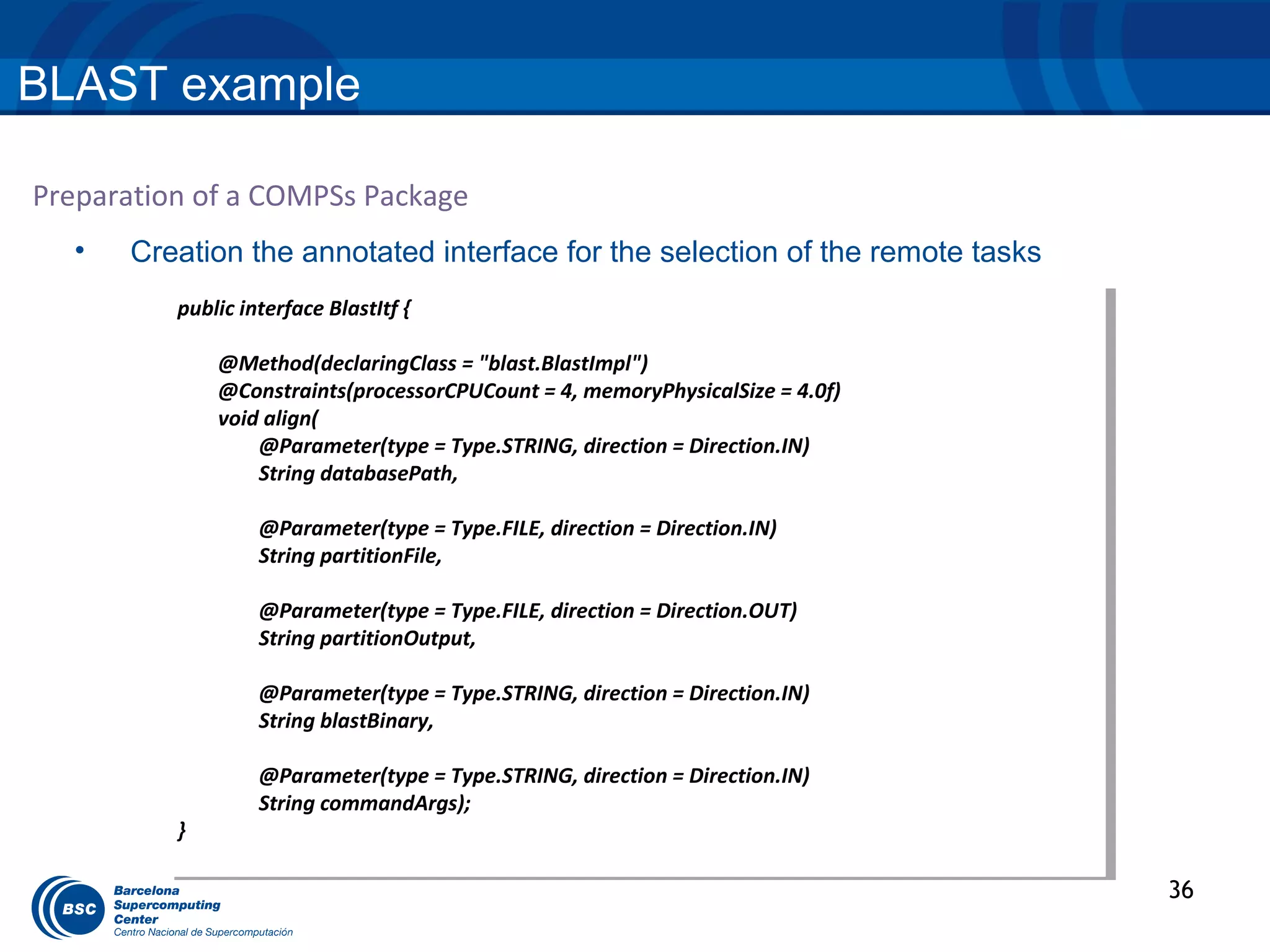
Preparation of a COMPSs Package
  •   Creation the annotated interface for the selection of the remote tasks
          public interface BlastItf { {
           public interface BlastItf

               @Method(declaringClass == "blast.BlastImpl")
                @Method(declaringClass "blast.BlastImpl")
               @Constraints(processorCPUCount == 4, memoryPhysicalSize = 4.0f)
                @Constraints(processorCPUCount 4, memoryPhysicalSize = 4.0f)
               void align(
                void align(
                   @Parameter(type == Type.STRING, direction = Direction.IN)
                    @Parameter(type Type.STRING, direction = Direction.IN)
                   String databasePath,
                    String databasePath,

                   @Parameter(type == Type.FILE, direction = Direction.IN)
                    @Parameter(type Type.FILE, direction = Direction.IN)
                   String partitionFile,
                    String partitionFile,

                   @Parameter(type == Type.FILE, direction = Direction.OUT)
                    @Parameter(type Type.FILE, direction = Direction.OUT)
                   String partitionOutput,
                    String partitionOutput,

                   @Parameter(type == Type.STRING, direction = Direction.IN)
                    @Parameter(type Type.STRING, direction = Direction.IN)
                   String blastBinary,
                    String blastBinary,

                   @Parameter(type == Type.STRING, direction = Direction.IN)
                    @Parameter(type Type.STRING, direction = Direction.IN)
                   String commandArgs);
                    String commandArgs);
          }}

                                                                                 36
BLAST example

Preparation of a COMPSs Package
  •    Main Application:

          public static void main(String args[]) throws Exception {

              sequences[] = splitSequences(inputFile, nFrags);

           for (partition: sequences)
           {
             BlastImpl.align(database, partition, partitionOutput, blastBinary,
          commandArgs);
             partitionOutputs.add(partitionOutput);
           }

              assemblyPartitions(partialOutputs, outputFileName, tempDir, nFrags);
          }


                                                                                     37
BLAST example

Preparation of a COMPSs Package

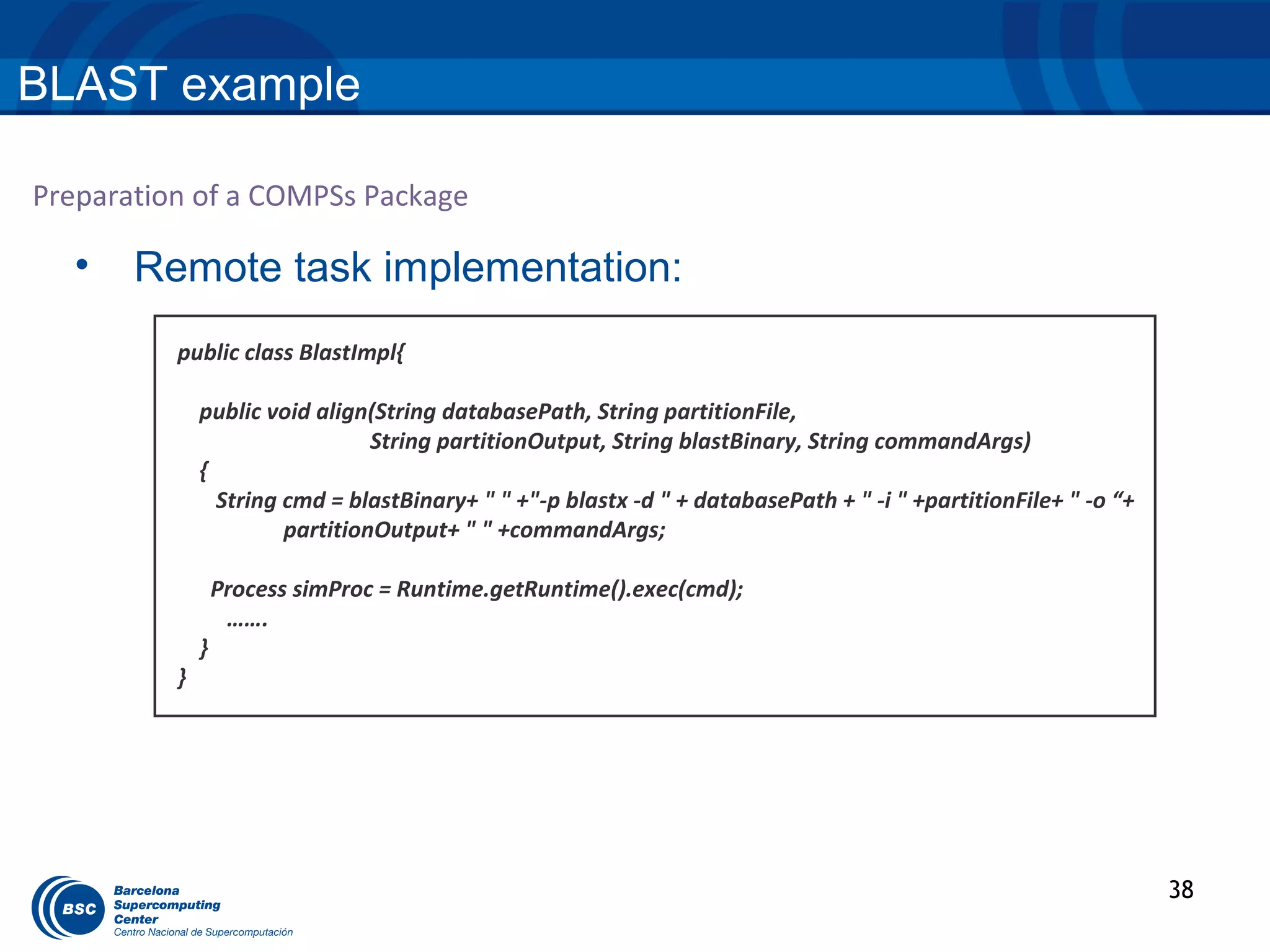
  •    Remote task implementation:
          public class BlastImpl{

              public void align(String databasePath, String partitionFile,
                                String partitionOutput, String blastBinary, String commandArgs)
              {
                String cmd = blastBinary+ " " +"-p blastx -d " + databasePath + " -i " +partitionFile+ " -o “+
                       partitionOutput+ " " +commandArgs;

                  Process simProc = Runtime.getRuntime().exec(cmd);
                   …….
              }
          }


                                                                                                                 38
BLAST example

Preparation of a COMPSs Package

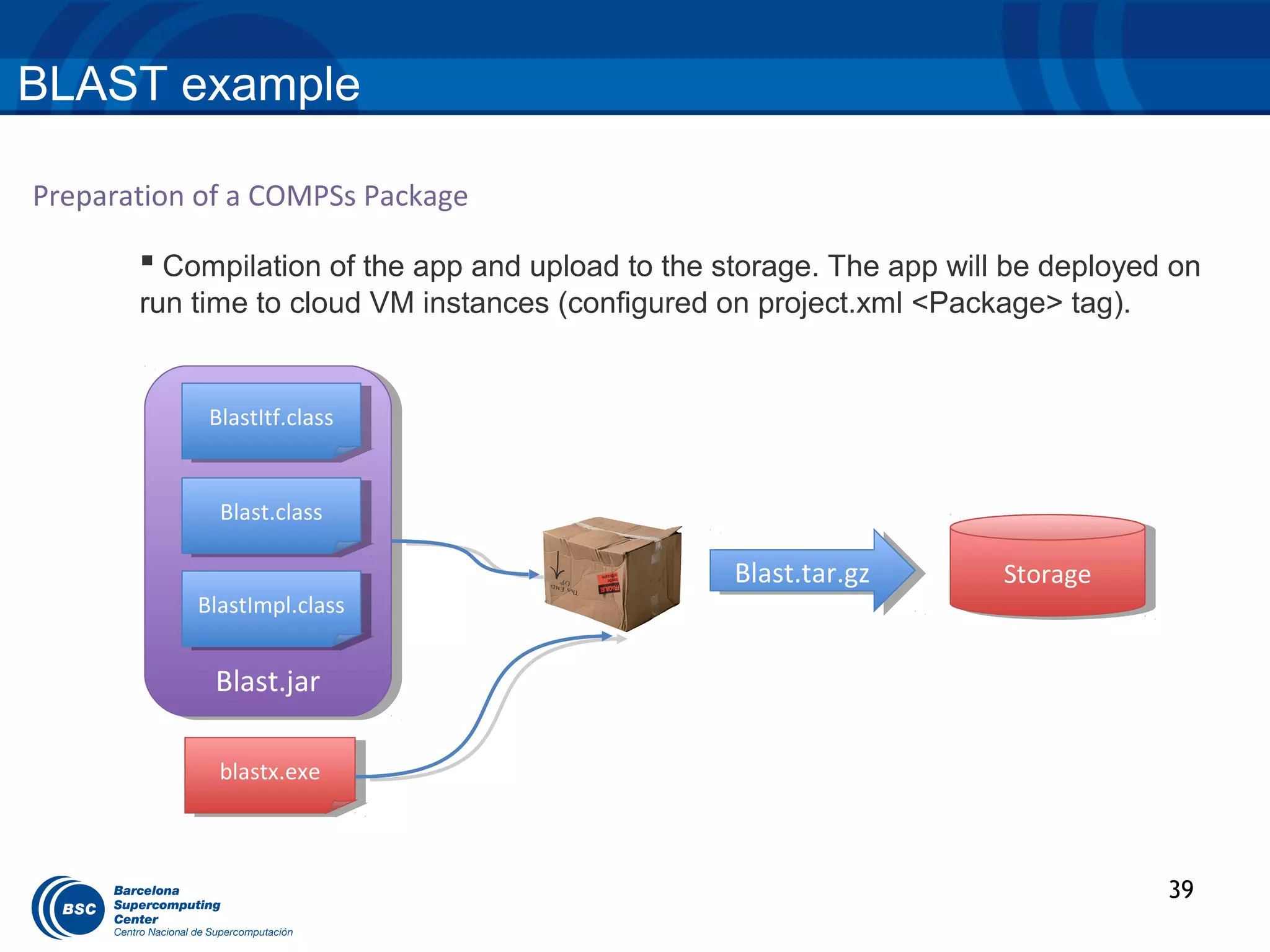
        Compilation of the app and upload to the storage. The app will be deployed on
       run time to cloud VM instances (configured on project.xml <Package> tag).


            BlastItf.class
             BlastItf.class


             Blast.class
              Blast.class

                                                   Blast.tar.gz
                                                    Blast.tar.gz       Storage
                                                                        Storage
           BlastImpl.class
            BlastImpl.class


             Blast.jar
              Blast.jar

             blastx.exe
              blastx.exe


                                                                                   39
HMMER example

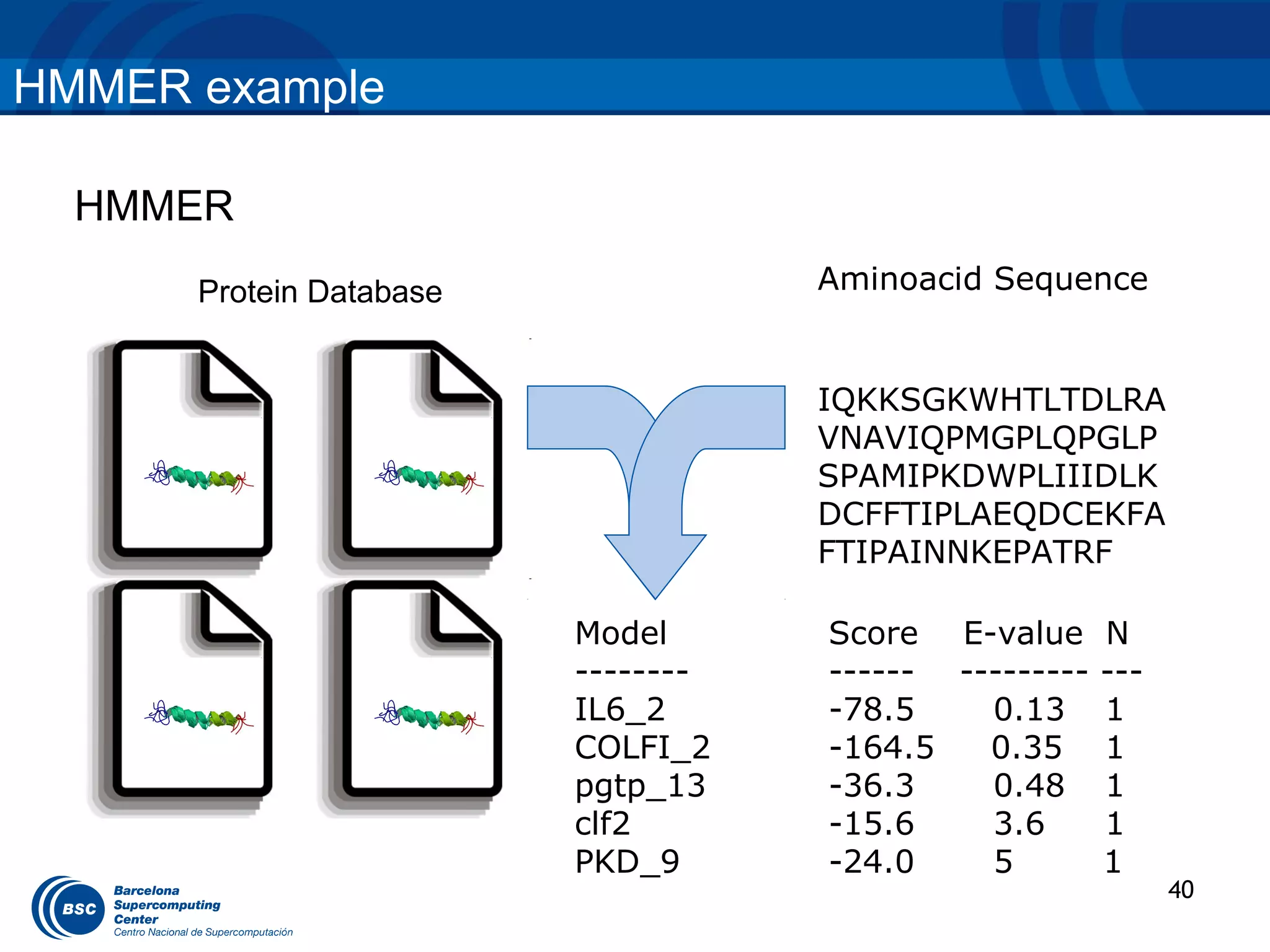
  HMMER
      Protein Database              Aminoacid Sequence


                                    IQKKSGKWHTLTDLRA
                                    VNAVIQPMGPLQPGLP
                                    SPAMIPKDWPLIIIDLK
                                    DCFFTIPLAEQDCEKFA
                                    FTIPAINNKEPATRF

                         Model      Score E-value N
                         --------   ------ --------- ---
                         IL6_2      -78.5    0.13 1
                         COLFI_2    -164.5   0.35 1
                         pgtp_13    -36.3    0.48 1
                         clf2       -15.6    3.6     1
                         PKD_9      -24.0    5       1
                                                           40
HMMER example


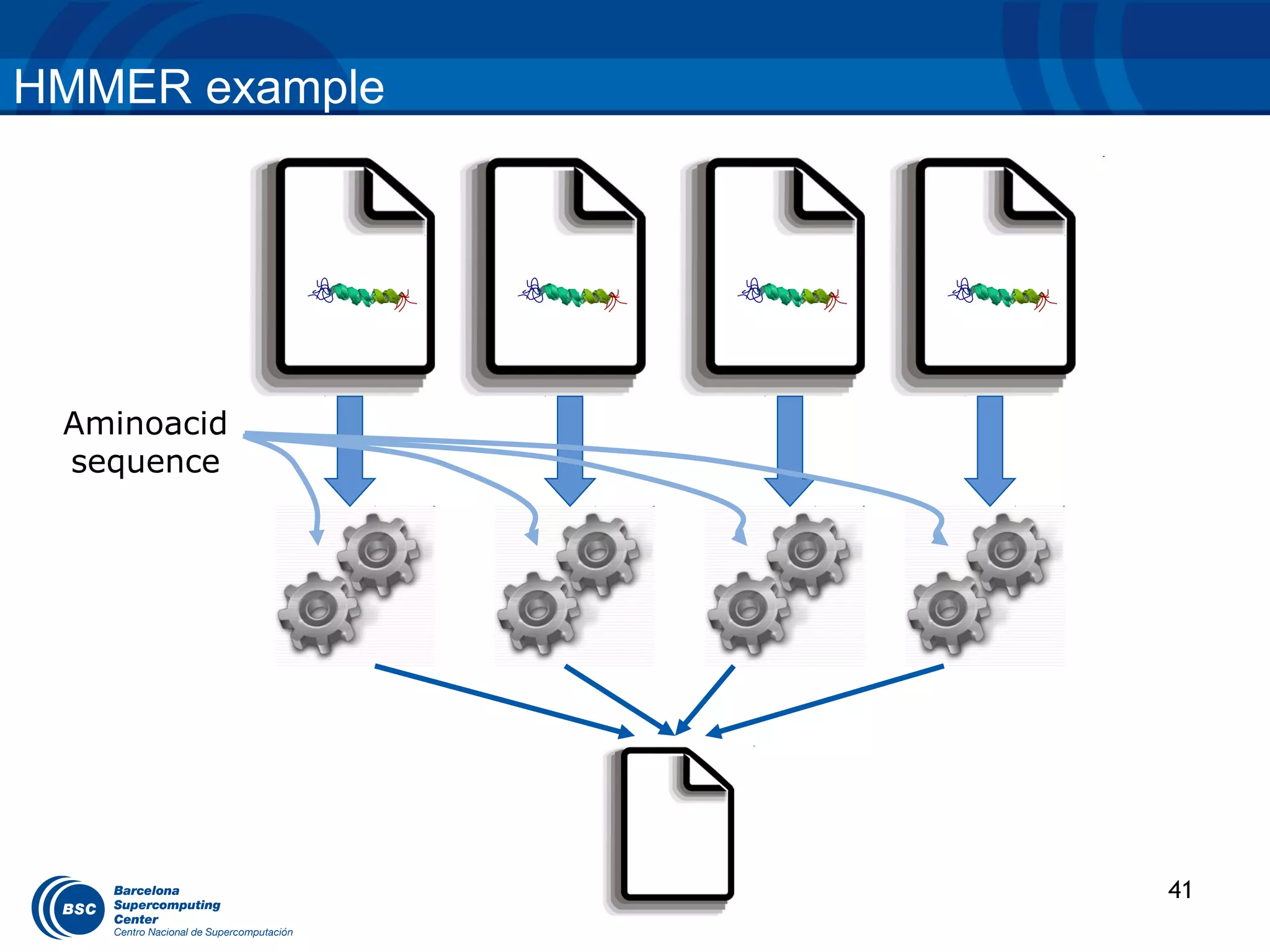
 Aminoacid
 sequence


                41
HMMER example

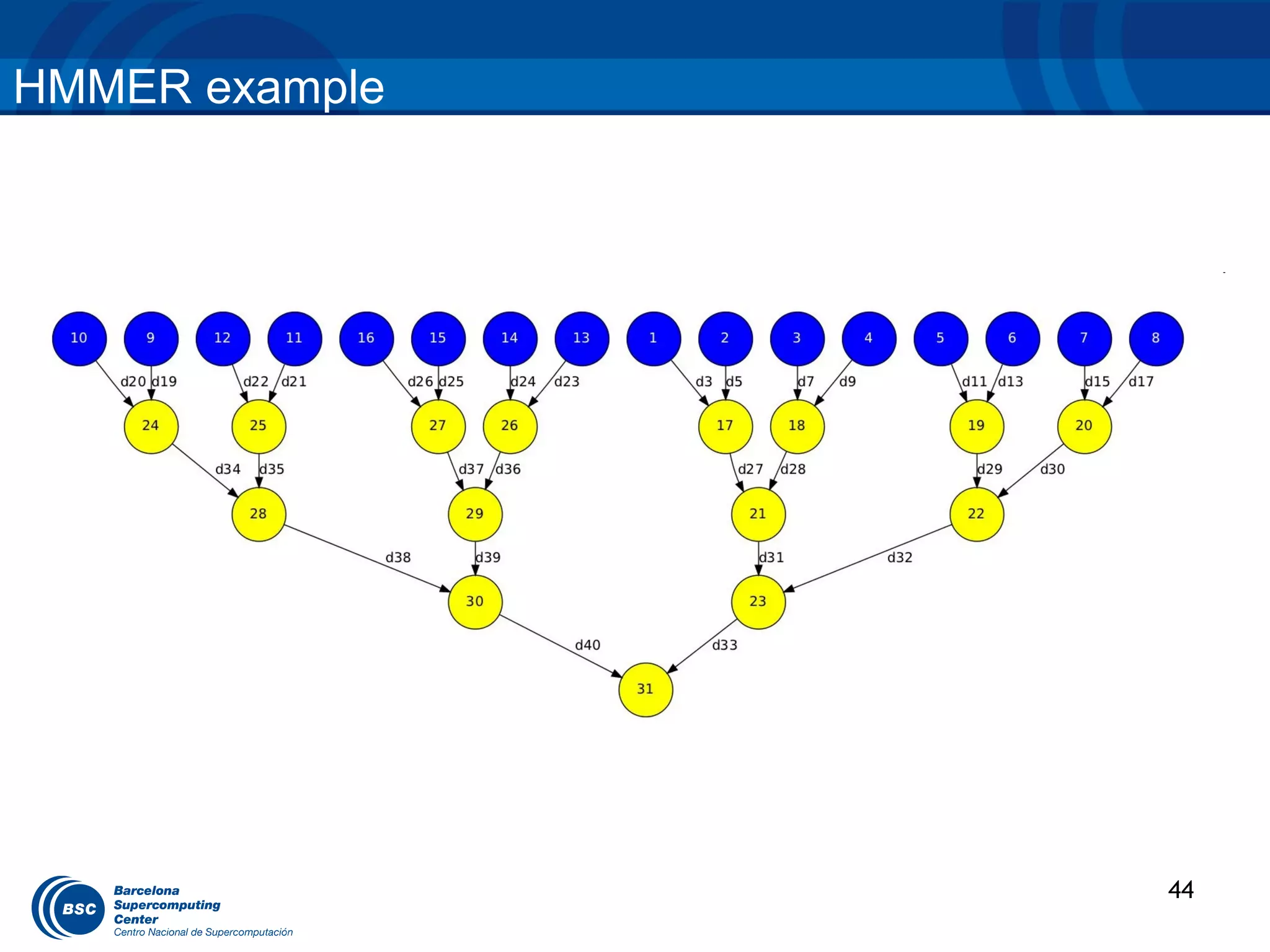
  String[] outputs = new String[numDBFrags];

  //Process
  for (String dbFrag : dbFrags) {
       outputs[dbNum]= HMMPfamImpl.hmmpfam(sequence, dbFrag);
  }


  //Merge
  int neighbor = 1;
  while (neighbor < numDBFrags) {
    for (int db = 0; db < numDBFrags; db += 2 * neighbor) {
       if (db + neighbor < numDBFrags) {
          HMMPfamImpl.merge(outputs[db], outputs[db + neighbor]);
       }
    }
    neighbor *= 2;
  }


                                                                    42
HMMER example

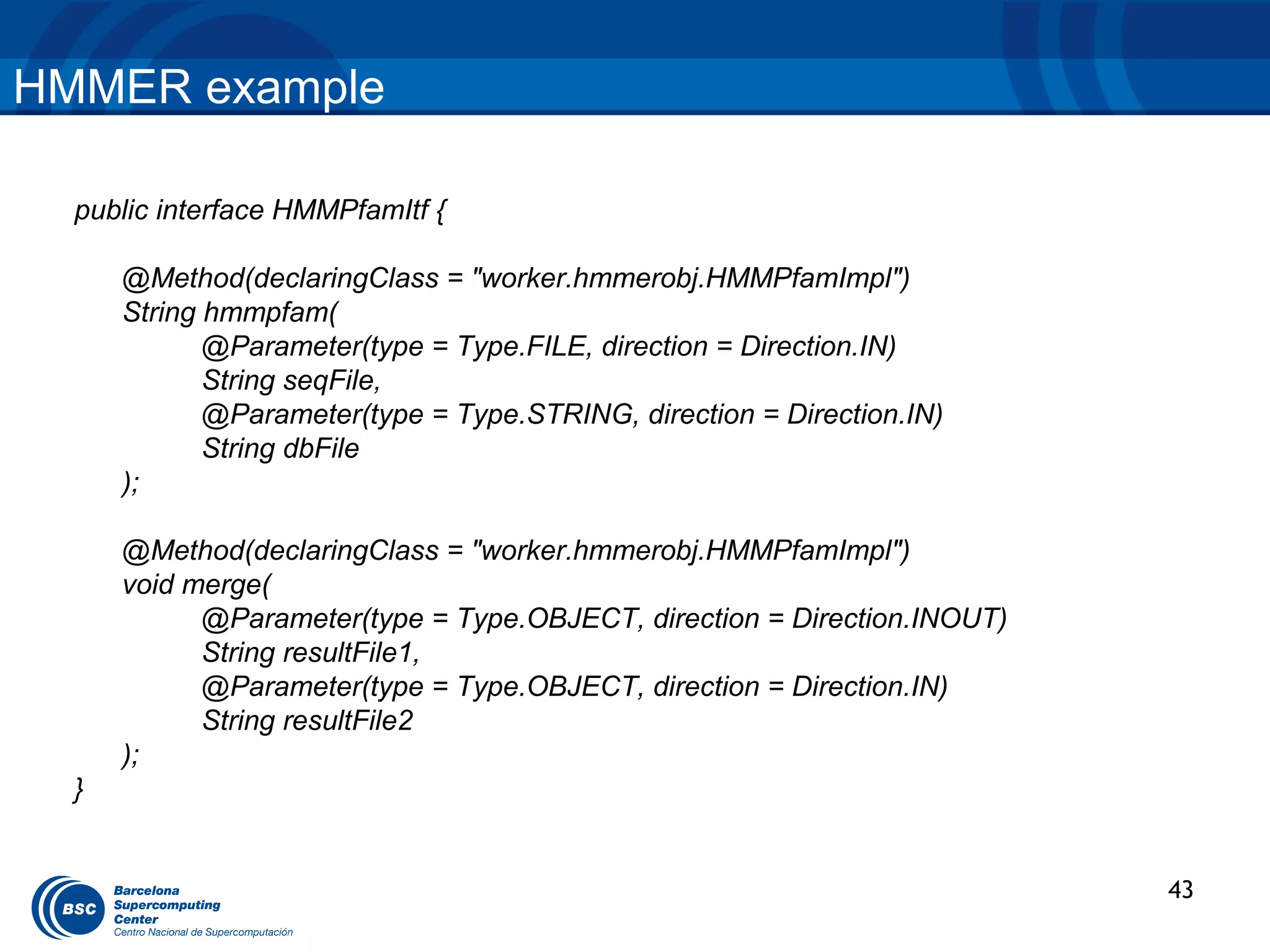
  public interface HMMPfamItf {

      @Method(declaringClass = "worker.hmmerobj.HMMPfamImpl")
      String hmmpfam(
             @Parameter(type = Type.FILE, direction = Direction.IN)
             String seqFile,
             @Parameter(type = Type.STRING, direction = Direction.IN)
             String dbFile
      );

      @Method(declaringClass = "worker.hmmerobj.HMMPfamImpl")
      void merge(
            @Parameter(type = Type.OBJECT, direction = Direction.INOUT)
            String resultFile1,
            @Parameter(type = Type.OBJECT, direction = Direction.IN)
            String resultFile2
      );
  }


                                                                          43
HMMER example


                44
Ensemble Mean (IS-ENES) example

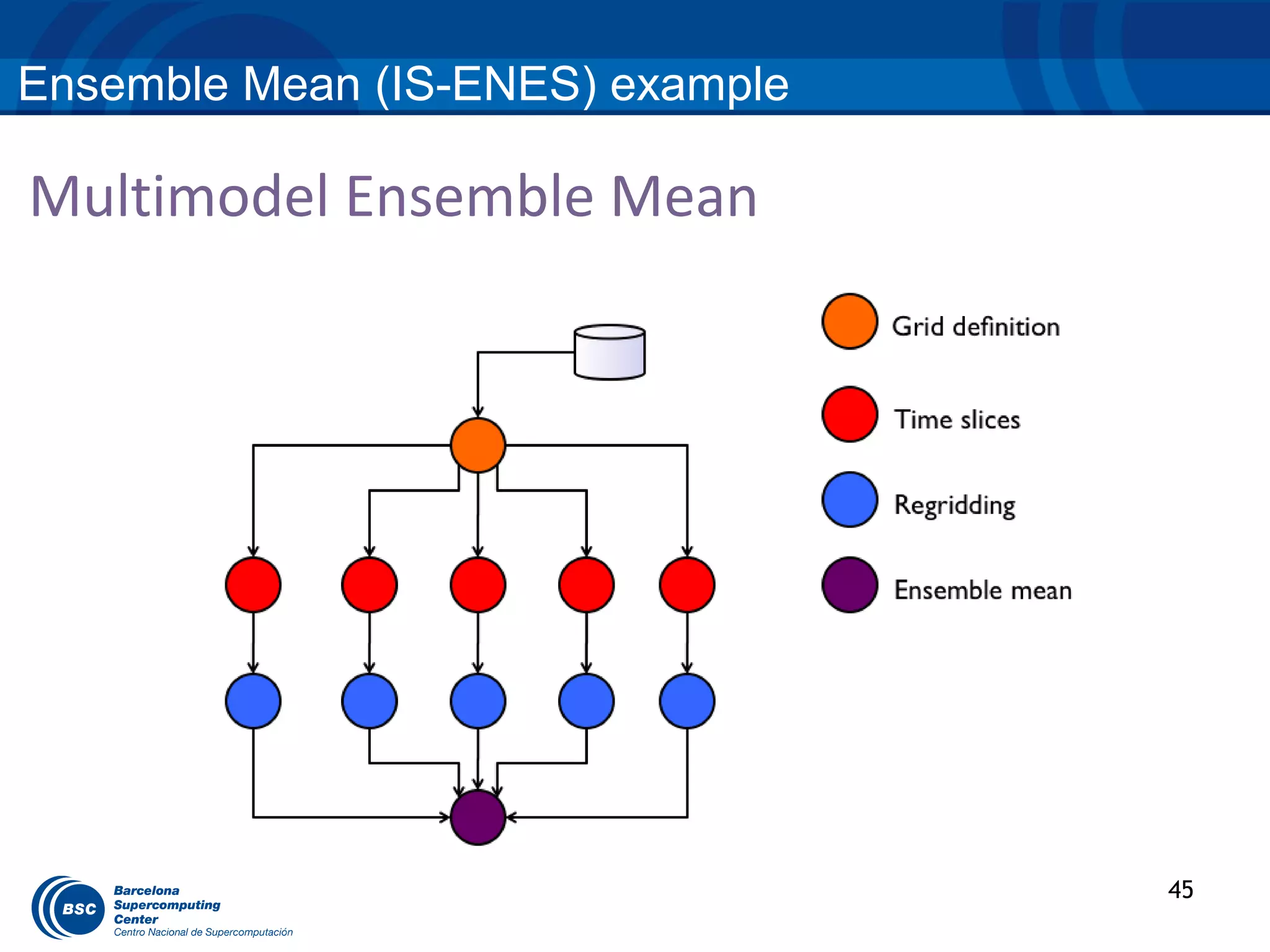
Multimodel Ensemble Mean


                                  45
Ensemble Mean (IS-ENES) example
Preparation of a COMPSs Package
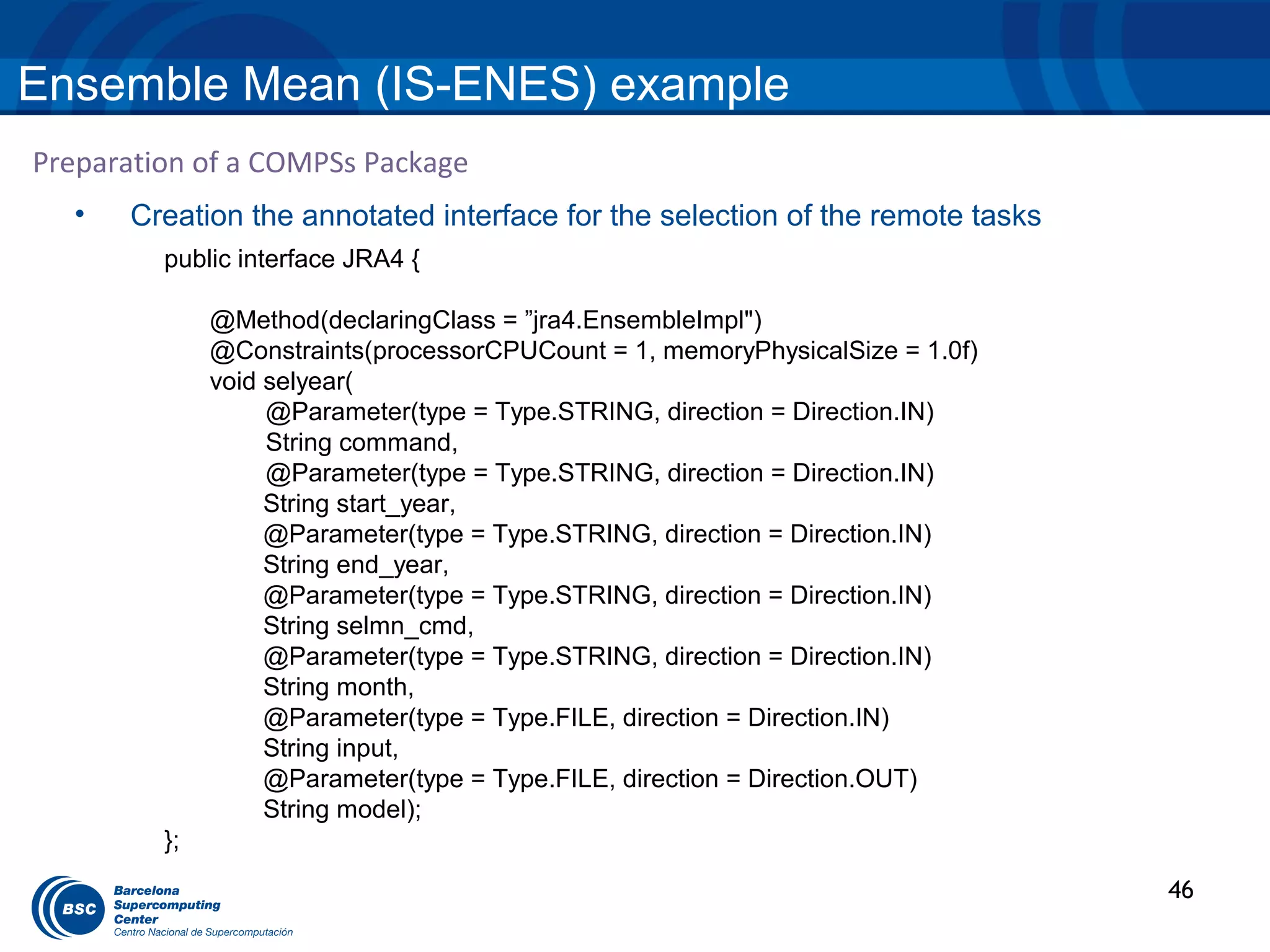
  •   Creation the annotated interface for the selection of the remote tasks
         public interface JRA4 {

              @Method(declaringClass = ”jra4.EnsembleImpl")
              @Constraints(processorCPUCount = 1, memoryPhysicalSize = 1.0f)
              void selyear(
                   @Parameter(type = Type.STRING, direction = Direction.IN)
                   String command,
                   @Parameter(type = Type.STRING, direction = Direction.IN)
                   String start_year,
                   @Parameter(type = Type.STRING, direction = Direction.IN)
                   String end_year,
                   @Parameter(type = Type.STRING, direction = Direction.IN)
                   String selmn_cmd,
                   @Parameter(type = Type.STRING, direction = Direction.IN)
                   String month,
                   @Parameter(type = Type.FILE, direction = Direction.IN)
                   String input,
                   @Parameter(type = Type.FILE, direction = Direction.OUT)
                   String model);
         };
                                                                               46
Ensemble Mean (IS-ENES) example
Preparation of a COMPSs Package
  •   Creation the annotated interface for the selection of the remote tasks

         public interface JRA4 {

              @Method(declaringClass = ”jra4.EnsembleImpl")
              @Constraints(processorCPUCount = 1, memoryPhysicalSize = 1.0f)
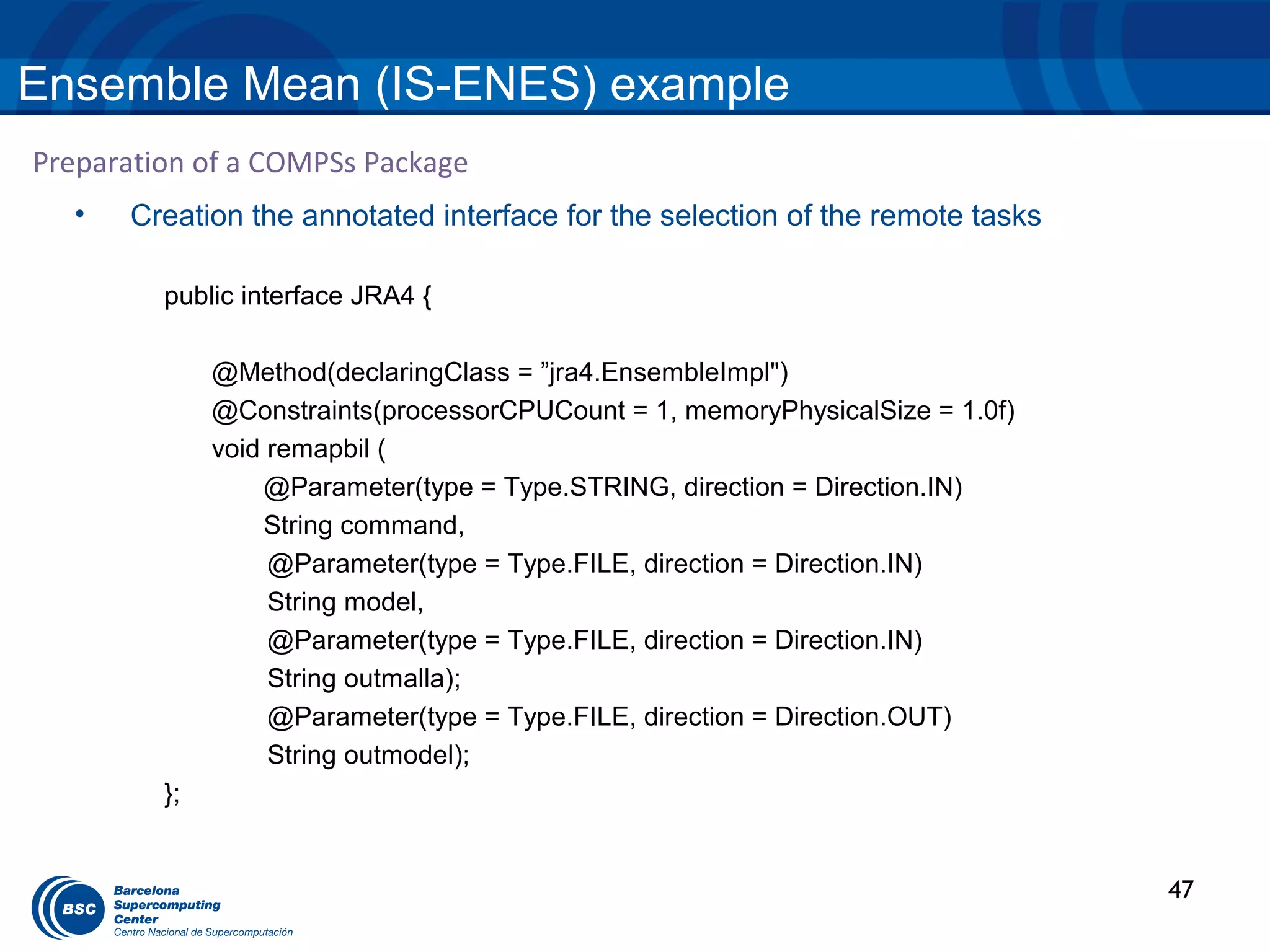
              void remapbil (
                  @Parameter(type = Type.STRING, direction = Direction.IN)
                  String command,
                   @Parameter(type = Type.FILE, direction = Direction.IN)
                   String model,
                   @Parameter(type = Type.FILE, direction = Direction.IN)
                   String outmalla);
                   @Parameter(type = Type.FILE, direction = Direction.OUT)
                   String outmodel);
         };


                                                                               47
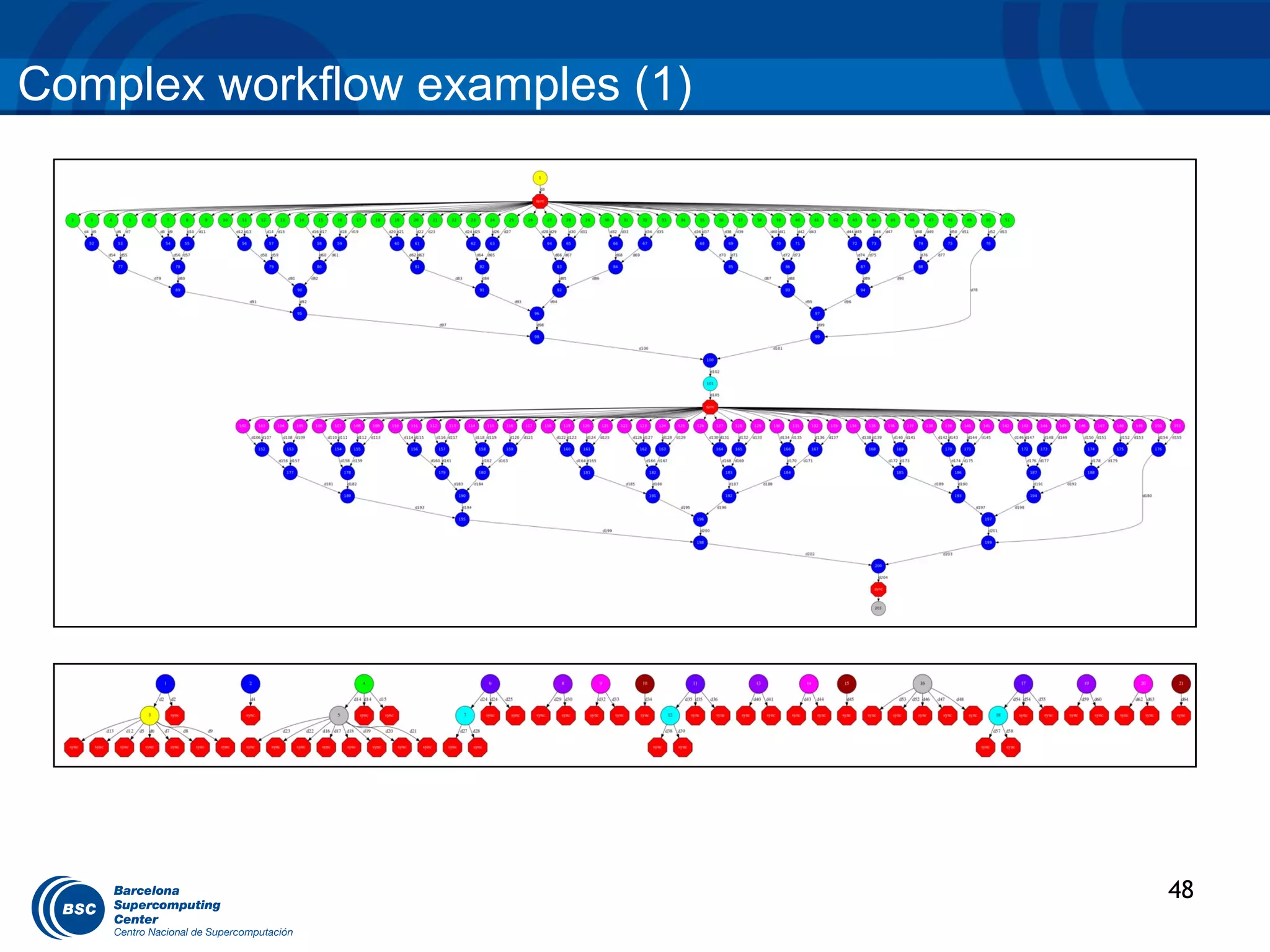
Complex workflow examples (1)


                                48
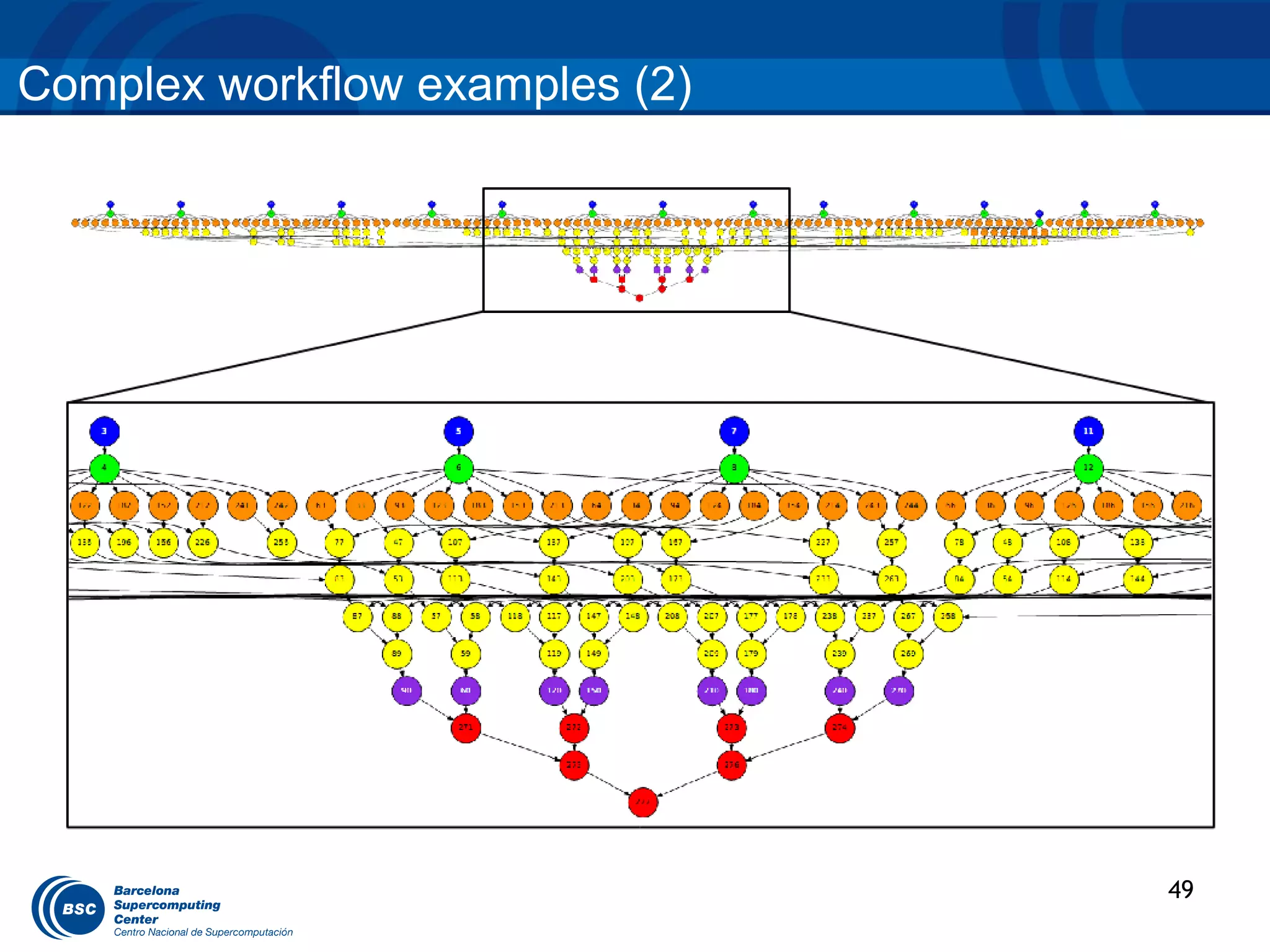
Complex workflow examples (2)


                                49
HANDS ON
Hands-on

 1. Hands-on: HRT application:
    1. Application overview.
    2. Configuration, compilation and execution.
        1. COMPSs development VM (basic steps)
    3. Monitoring and debugging

 2. Feedback


                                                   51
High Resolution T129 (HRT) Overview


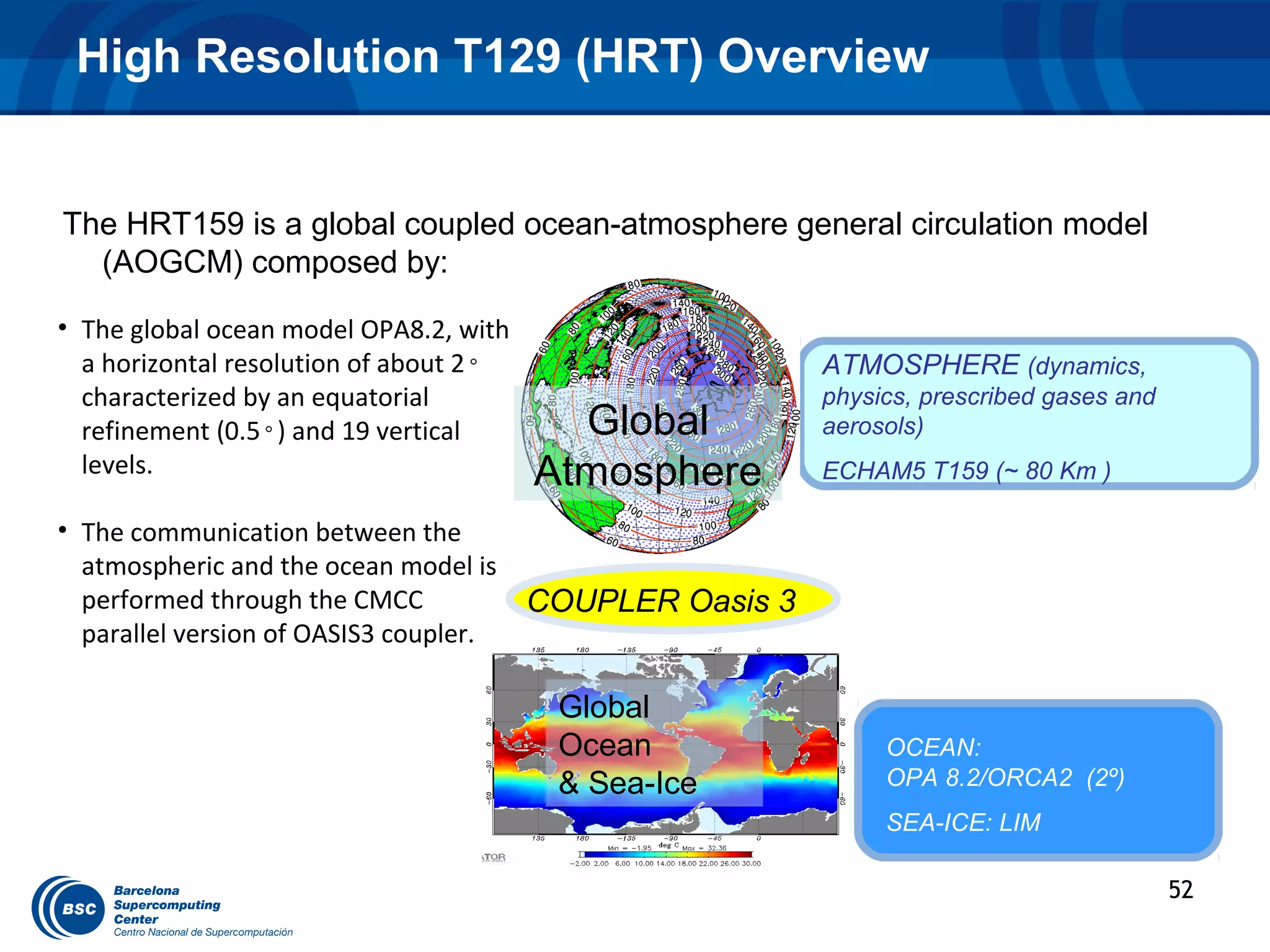
The HRT159 is a global coupled ocean-atmosphere general circulation model
  (AOGCM) composed by:

• The global ocean model OPA8.2, with
  a horizontal resolution of about 2◦                     ATMOSPHERE (dynamics,
  characterized by an equatorial                          physics, prescribed gases and
  refinement (0.5◦) and 19 vertical       Global          aerosols)
  levels.                               Atmosphere        ECHAM5 T159 (~ 80 Km )

• The communication between the
  atmospheric and the ocean model is
  performed through the CMCC            COUPLER Oasis 3
  parallel version of OASIS3 coupler.

                                         Global
                                         Ocean                 OCEAN:
                                         & Sea-Ice             OPA 8.2/ORCA2 (2º)
                                                               SEA-ICE: LIM

                                                                                          52
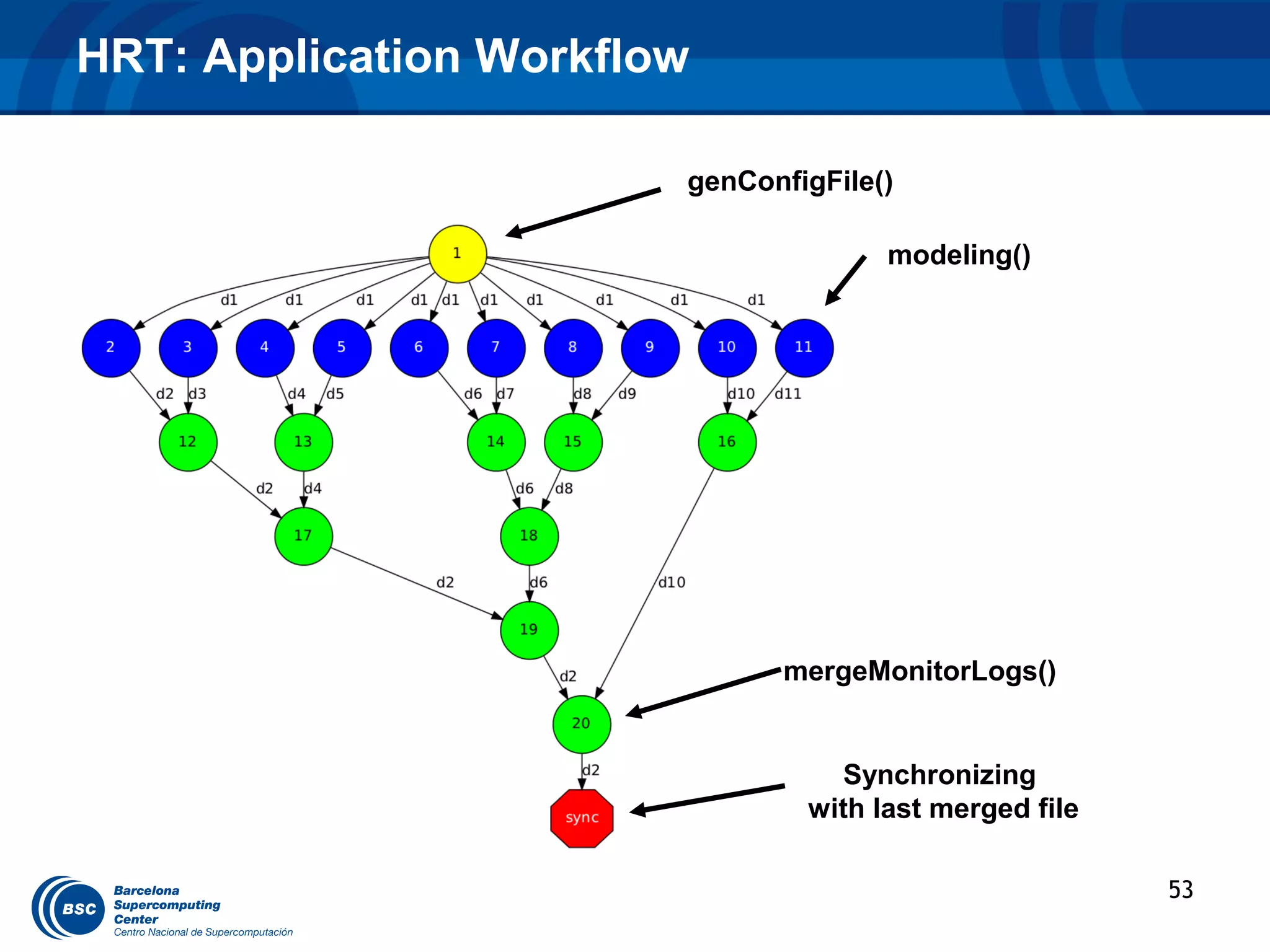
HRT: Application Workflow

                        genConfigFile()

                                      modeling()


                              mergeMonitorLogs()


                                  Synchronizing
                                with last merged file

                                                        53
HRT: Task selection and invocation


• Complete the modeling method interface

• Complete the callee of genConfigFile method

• Write the mergeMonitorLogs method interface


                                                54
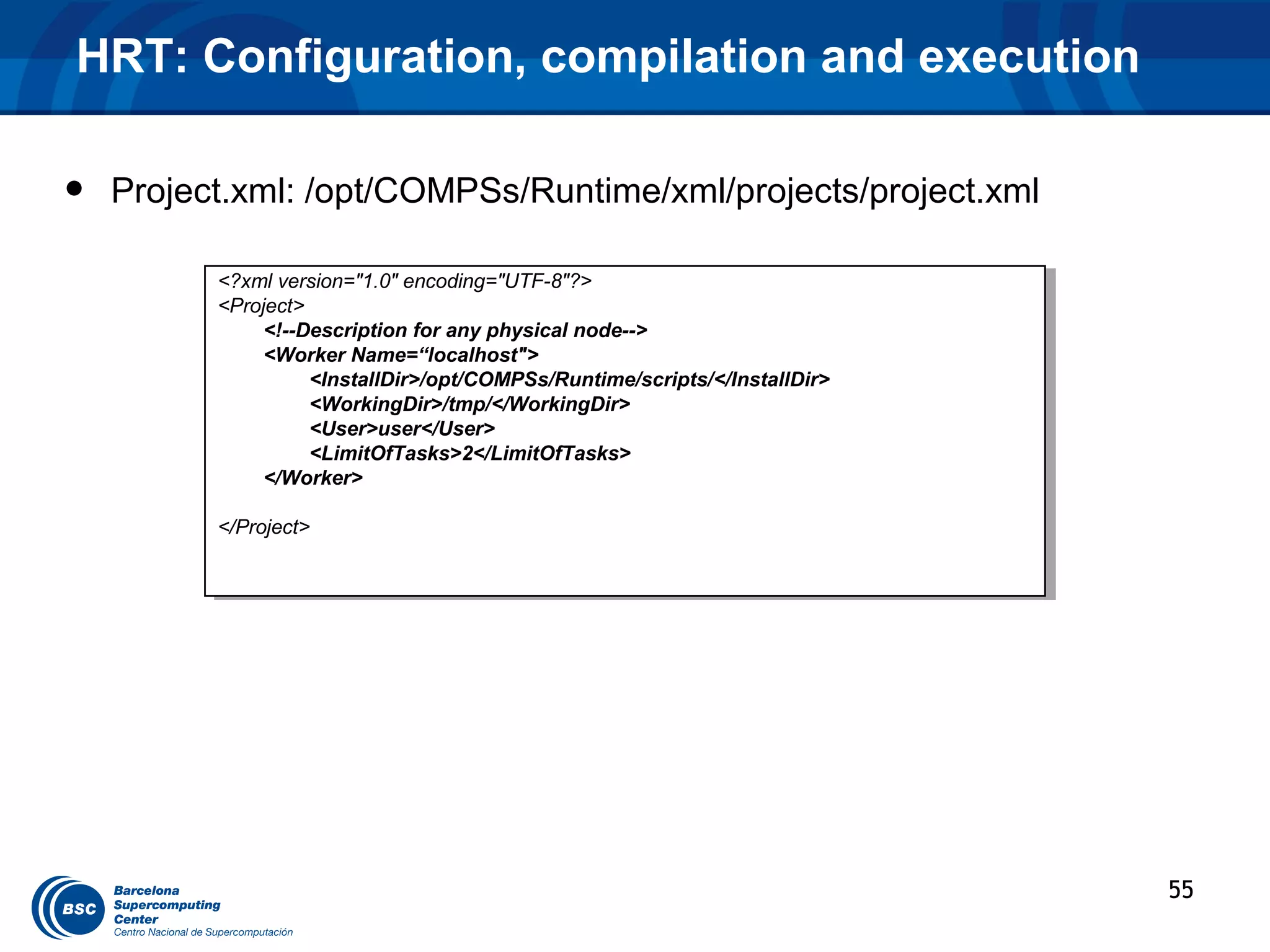
HRT: Configuration, compilation and execution

•   Project.xml: /opt/COMPSs/Runtime/xml/projects/project.xml

          <?xml version="1.0" encoding="UTF-8"?>
           <?xml version="1.0" encoding="UTF-8"?>
          <Project>
           <Project>
               <!--Description for any physical node-->
                <!--Description for any physical node-->
               <Worker Name=“localhost">
                <Worker Name=“localhost">
                    <InstallDir>/opt/COMPSs/Runtime/scripts/</InstallDir>
                     <InstallDir>/opt/COMPSs/Runtime/scripts/</InstallDir>
                    <WorkingDir>/tmp/</WorkingDir>
                     <WorkingDir>/tmp/</WorkingDir>
                    <User>user</User>
                     <User>user</User>
                    <LimitOfTasks>2</LimitOfTasks>
                     <LimitOfTasks>2</LimitOfTasks>
               </Worker>
                </Worker>

          </Project>
           </Project>


                                                                             55
HRT: Configuration, compilation and execution

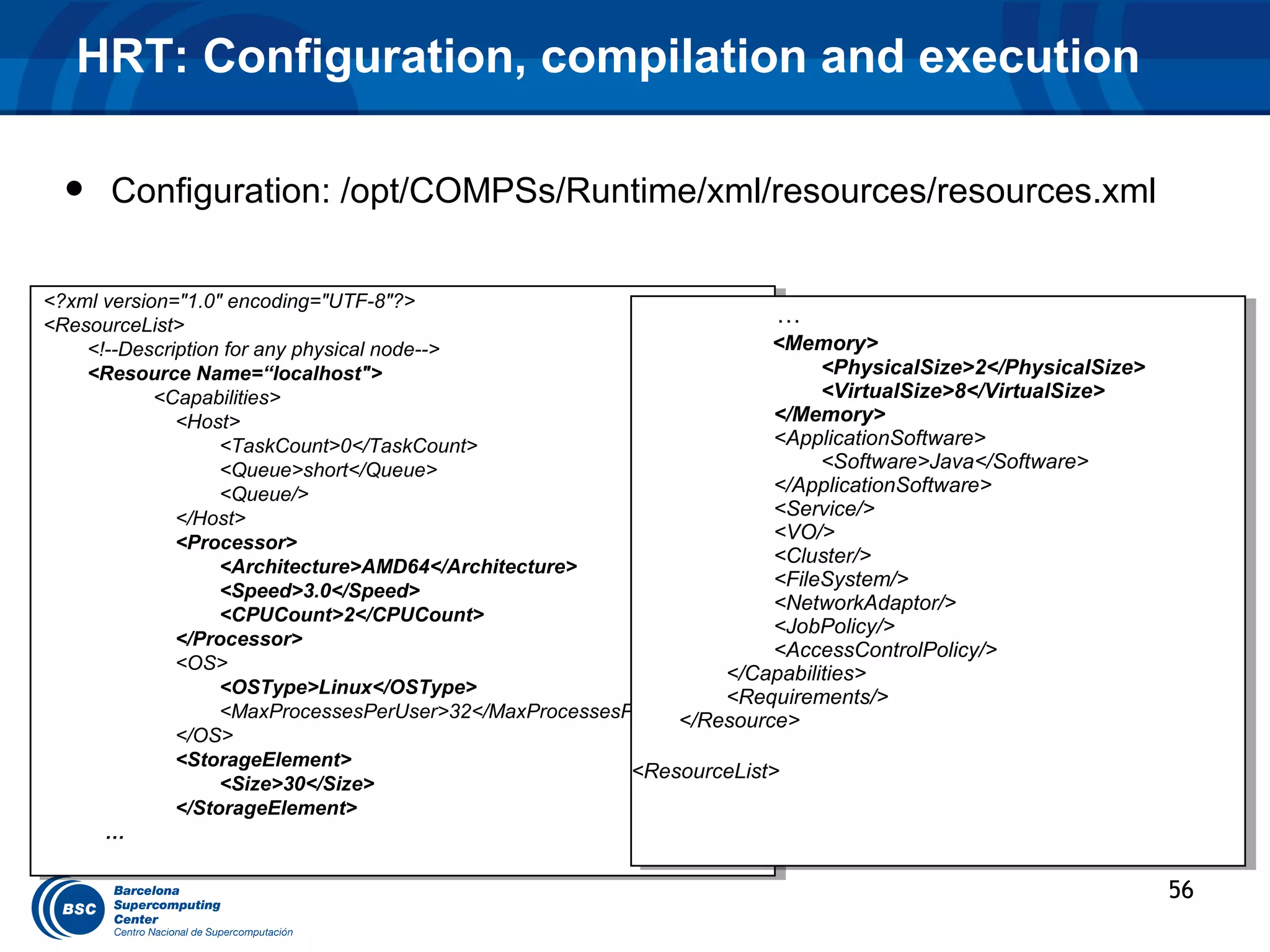
  •   Configuration: /opt/COMPSs/Runtime/xml/resources/resources.xml

<?xml version="1.0" encoding="UTF-8"?>
 <?xml version="1.0" encoding="UTF-8"?>
<ResourceList>                                                          ……
 <ResourceList>
    <!--Description for any physical node-->
     <!--Description for any physical node-->                          <Memory>
                                                                         <Memory>
    <Resource Name=“localhost">
     <Resource Name=“localhost">                                             <PhysicalSize>2</PhysicalSize>
                                                                               <PhysicalSize>2</PhysicalSize>
            <Capabilities>
             <Capabilities>                                                  <VirtualSize>8</VirtualSize>
                                                                               <VirtualSize>8</VirtualSize>
              <Host>
               <Host>
                                                                        </Memory>
                                                                         </Memory>
                   <TaskCount>0</TaskCount>                             <ApplicationSoftware>
                                                                         <ApplicationSoftware>
                     <TaskCount>0</TaskCount>
                   <Queue>short</Queue>                                      <Software>Java</Software>
                                                                               <Software>Java</Software>
                     <Queue>short</Queue>
                   <Queue/>                                             </ApplicationSoftware>
                                                                         </ApplicationSoftware>
                     <Queue/>
              </Host>                                                   <Service/>
                                                                         <Service/>
               </Host>
              <Processor>                                               <VO/>
                                                                         <VO/>
               <Processor>
                                                                        <Cluster/>
                                                                         <Cluster/>
                   <Architecture>AMD64</Architecture>
                     <Architecture>AMD64</Architecture>                 <FileSystem/>
                                                                         <FileSystem/>
                   <Speed>3.0</Speed>
                     <Speed>3.0</Speed>                                 <NetworkAdaptor/>
                                                                         <NetworkAdaptor/>
                   <CPUCount>2</CPUCount>
                     <CPUCount>2</CPUCount>                             <JobPolicy/>
                                                                         <JobPolicy/>
              </Processor>
               </Processor>                                             <AccessControlPolicy/>
                                                                         <AccessControlPolicy/>
              <OS>
               <OS>                                                </Capabilities>
                                                                    </Capabilities>
                   <OSType>Linux</OSType>
                     <OSType>Linux</OSType>                        <Requirements/>
                                                                    <Requirements/>
                   <MaxProcessesPerUser>32</MaxProcessesPerUser>
                     <MaxProcessesPerUser>32</MaxProcessesPerUser>
                                                              </Resource>
                                                               </Resource>
              </OS>
               </OS>
              <StorageElement>
               <StorageElement>                           <ResourceList>
                                                           <ResourceList>
                   <Size>30</Size>
                     <Size>30</Size>
              </StorageElement>
               </StorageElement>
      … …

                                                                                                                56
HRT: Configuration, compilation and execution

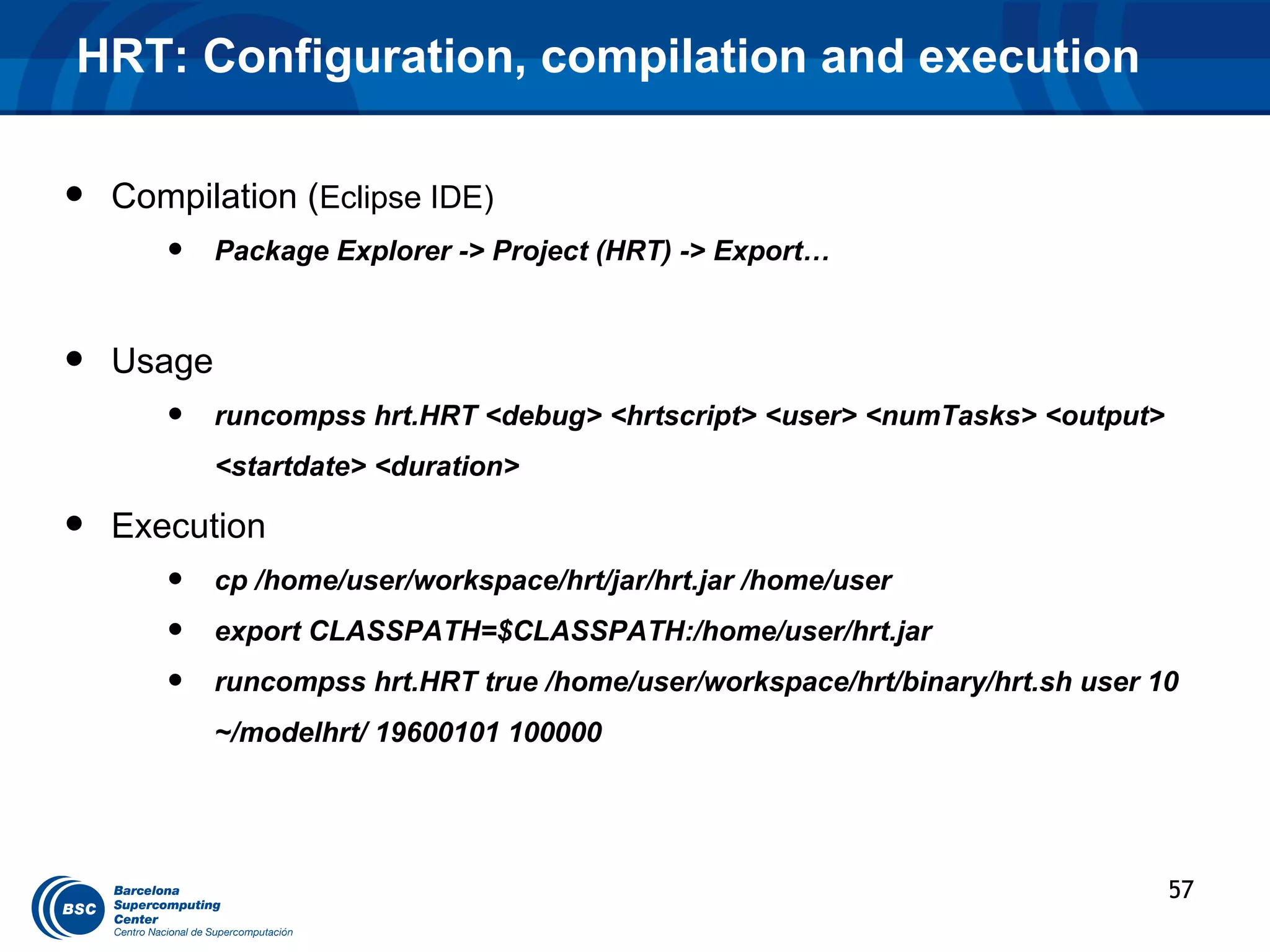
•   Compilation (Eclipse IDE)
       •    Package Explorer -> Project (HRT) -> Export…


•   Usage
       •    runcompss hrt.HRT <debug> <hrtscript> <user> <numTasks> <output>
            <startdate> <duration>

•   Execution
       •    cp /home/user/workspace/hrt/jar/hrt.jar /home/user
       •    export CLASSPATH=$CLASSPATH:/home/user/hrt.jar
       •    runcompss hrt.HRT true /home/user/workspace/hrt/binary/hrt.sh user 10
            ~/modelhrt/ 19600101 100000


                                                                                57
HRT: Execution

----------------- Executing hrt.HRT in IT mode total--------------------------
[ API] - Deploying the Integrated Toolkit
[ API] - Starting the Integrated Toolkit
[ API] - Initializing components
[ API] - Ready to process tasks

  HRT modeling Tool:
  Parameters:
     - Debug Enabled
     - HRT script: /home/user/workspace/hrt/binary/hrt.sh
     - User: user
     - Number of modeling tasks: 10
     - Output model path: /home/user/modelhrt/
     - Model name: modelhrt
     - Start date: 19600101
     - Duration: 100000

  Calculating the model:
     - Merging files -> /home/user/modelhrt/monitoring/model_0.log and /home/user/modelhrt/monitoring/model_1.log
       ….
     - Merging files -> /home/user/modelhrt/monitoring/model_0.log and /home/user/modelhrt/monitoring/model_8.log

 Moving last merged file: /home/user/modelhrt/monitoring/model_0.log to /home/user/modelhrt/monitoring/modelhrt.log

[ API] - Opening file /home/user/modelhrt/monitoring/modelhrt.log in mode WRITE
modelhrt computed successfully in 356 seconds

[ API] - No more tasks for app 1
[ API] - Stopping IT
[ API] - Integrated Toolkit stopped
------------------------------------------------------------
                                                                                                                      58
HRT: Monitoring

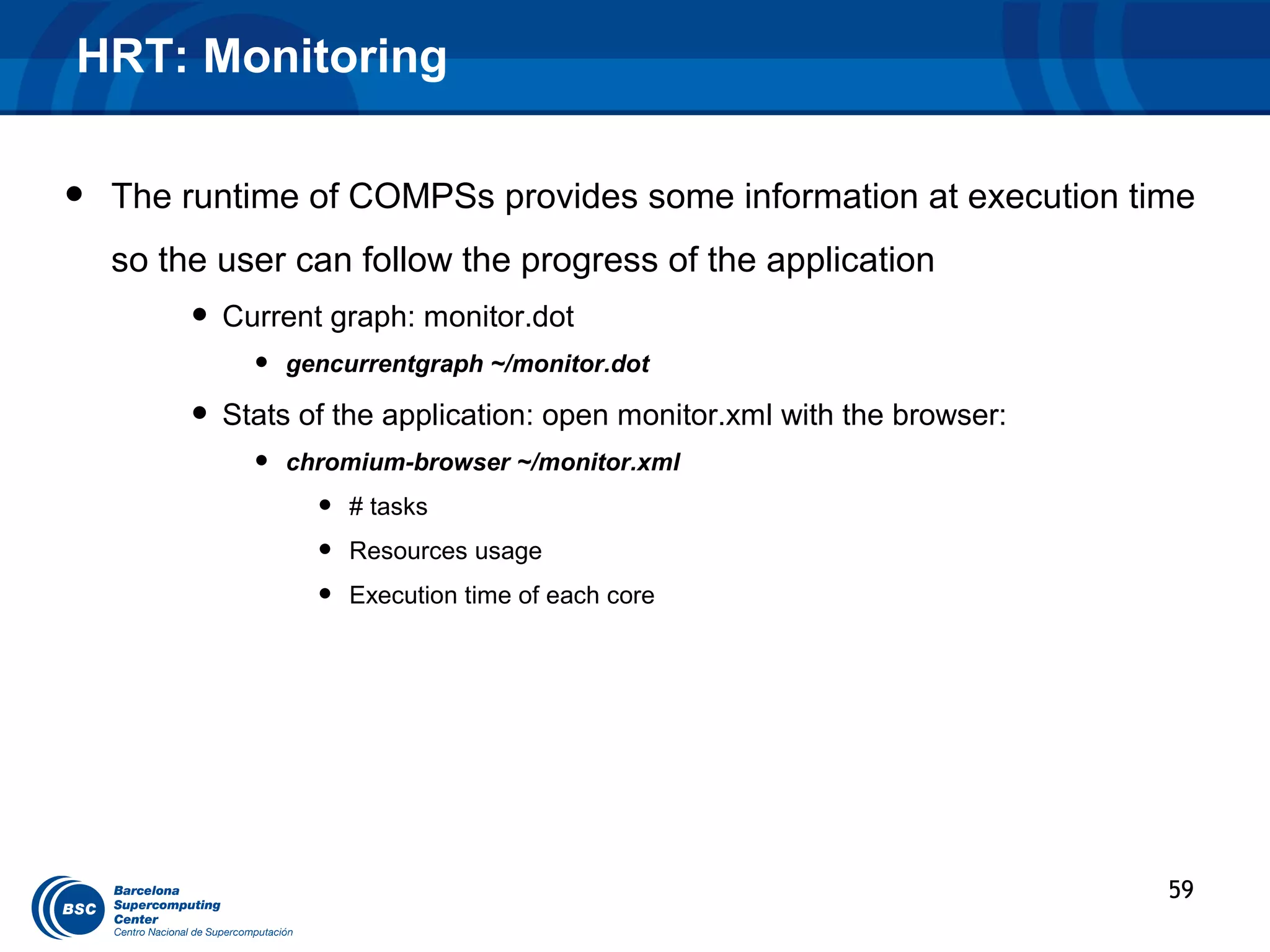
•   The runtime of COMPSs provides some information at execution time
    so the user can follow the progress of the application
         • Current graph: monitor.dot
             •   gencurrentgraph ~/monitor.dot

         • Stats of the application: open monitor.xml with the browser:
             •   chromium-browser ~/monitor.xml
                   •   # tasks
                   •   Resources usage
                   •   Execution time of each core


                                                                          59
HRT: Debugging

•   COMPSs can be run in debug mode showing more information about the
    execution allowing to detect possible problems
         •   Enabled for this tutorial

•   The user can check the execution of its application by reading:
         •   The output/errors of the main application (console)
         •   The output/error of a task # N
               •   ~/IT/[APP_NAME]/jobs/jobN.[out|err]

         •   Messages from the runtime COMPSs
               •   ~/it.log

         •   Task to resources allocation:
               •   ~/resources.log

•   The user can verify the correct structure of the parallel application with a
    complete application graph generated post-mortem
         •   gengraph $HOME/APP_NAME.dot
                                                                                   60
Conclusions

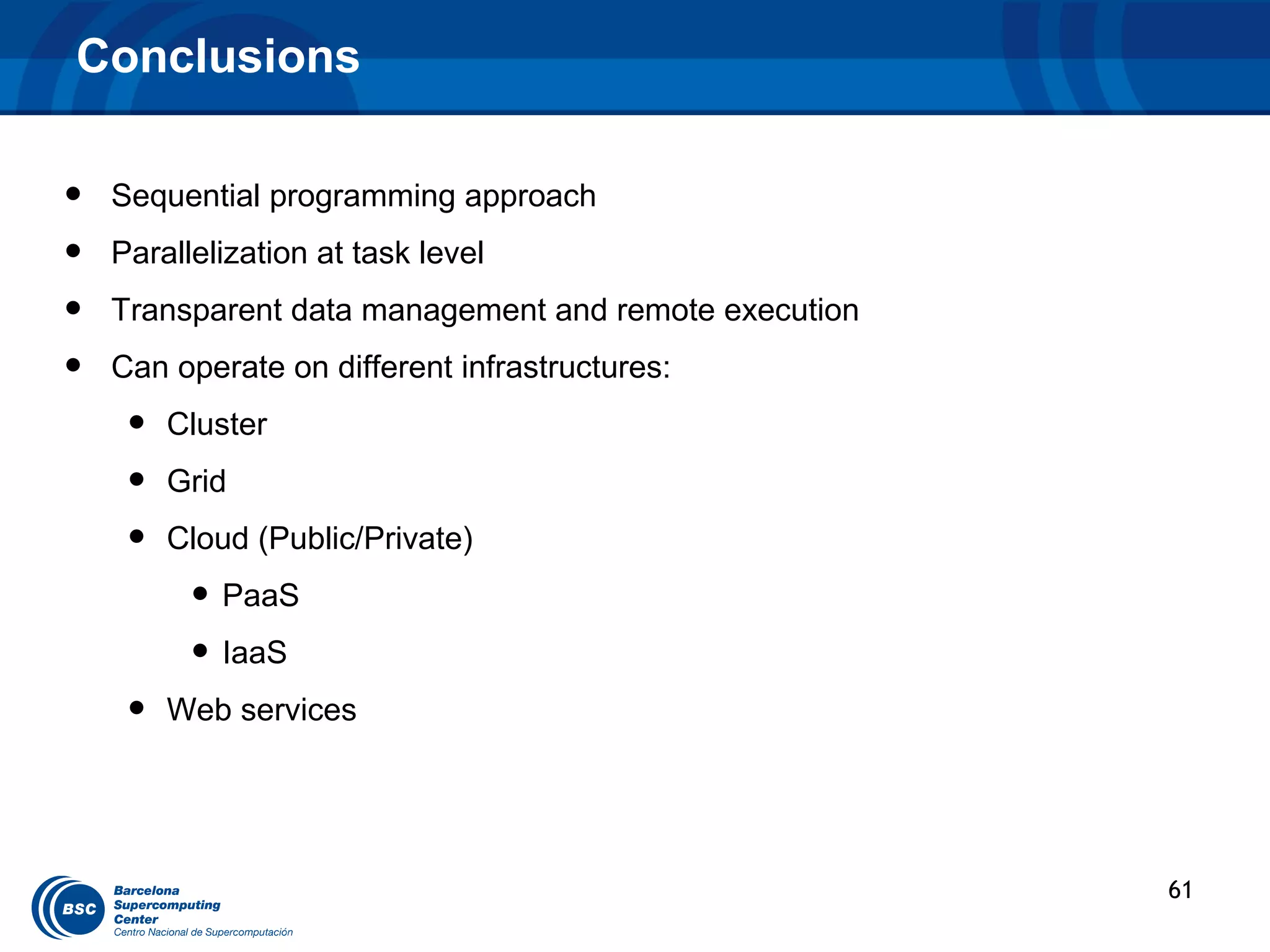
•   Sequential programming approach
•   Parallelization at task level
•   Transparent data management and remote execution
•   Can operate on different infrastructures:
     •   Cluster
     •   Grid
     •   Cloud (Public/Private)
          • PaaS
          • IaaS
     •   Web services


                                                       61
COMPSs Information


 •   Project page: http://sourceforge.net/projects/compss/
 •   Direct downloads page: http://compss.sourceforge.net/


     •   Sample applications & development virtual appliances
     •   Tutorials
     •   Red-Hat & Debian based installation packages
     •   …


                                                                62
www.bsc.es


                    Thank you!
             For further information please contact

                    roger.rafanell@bsc.es
                    daniele.lezzi@bsc.es

IS-ENES COMP Superscalar tutorial

  • 1.
    www.bsc.es Executing applications on the Grid with COMPSs IS-ENES NA2 – Tutorial Session Roger Rafanell Daniele Lezzi
  • 2.
    Outline • Introduction 13:30 - 14:00 (30 min.) – The IS-ENES Project: The WP3/NA2 task – Grid Technology: requirements for a climate grid – Grid Prototype Infrastructure: design overview • Programming Model 14:00 - 14:45 (45 min.) – Overview of StarSs programming model – Introduction to COMPSs – Programming with COMPSs – Configuring COMPSs & Extra features • Demos 14:45 - 15:30 (45 min.) – COMPSs examples • Hands-on 15:30 – 16:30 (1 h.) • Collection of requirements 16:30 – 17:00 (30 min.) • Conclusion 17:00 – 17:30 (30 min.)
  • 3.
    THE IS-ENES GRIDTECHNOLOGY
  • 4.
    IS-ENES Project: WP3/NA2 The WP3/NA2 aims at: – Foster the deployment of a distributed e-Infrastructure within the Earth System Modelling (ESM) community that will leverage on the existing HPC ecosystems. This infrastructure or "virtual Earth- System modelling Resource Centre (v.E.R.C.)" will consist of: • The ENES v.E.R.C. Portal: an information and collaboration portal to present all the services, tools and data available to the community. • A unified HPC environment for ESM to ease and improve the utilization of existing and upcoming High Performance Computing (HPC) environments. • A prototype grid infrastructure used for training and for prototyping and testing complex distributed workflows used by the ESM scientists. The grid portal is one of services of the v.E.R.C. portal: http://verc.enes.org/ 4
  • 5.
    Grid Technology andESMs Grid Technology allows the integration of heterogeneous computing resources – Critical factor: the heterogeneity can introduce differences on the execution of the same model on different machines or different level of code optimization can introduce a different order on the evaluation of the floating-point expressions. – ESM applications are very sensible to this kind of issues. For this reason, the climate scientist, even when possible, does not migrate a running experiment from a machine to another. An exception is represented by ensemble experiments. For this kind of experiments, composed by different members, the execution of each member is allowed on a different cluster. An ESM job is typically a very long job that requires large amount of memory and data. 5
  • 6.
    Grid Technology andESMs Requirements for a successful grid-based climate application are: – Failure awareness – Check-pointing and restart – Job monitoring Fast access to storage and data from both computing and post-processing. The current Grid middleware does not fully meet these requirements. Therefore, the development of a new framework is necessary to use a distributed Grid environment by climate modeling applications. 6
  • 7.
    Design of theGrid architecture COMPSs COMPSs COMPSs COMPSs COMPSs COMPSs 7
  • 8.
    Design of theGrid architecture The user accesses the Job submission Web page for launching an ensemble experiment. The request is sent to the GRB Scheduler. According to the scheduling policy, the GRB Scheduler distributes the members to the available computing hosts. Each computing host is accessible through a gateway host. This bring the following advantages. – All of the software stack required by the grid infrastructure will be installed only on the gateway and not on the final HPC cluster (mainly devoted for production runs). – Some eventual DoS attach will affect only the gateway host and not the HPC cluster – The security policy defined by the administrator of the HPC cluster can be kept with no modification. The execution of the member is passed from the gateway to the HPC cluster using SSH (gateway host and HPC machine are supposed to be in the same subnet). A COMPSs computation is started on the HPC cluster in order to benefit from the automatic parallelization features. 8
  • 9.
  • 10.
    The StarSs programmingmodel CellSs SMPSs GPUSs StarSs GridSs ClusterSs Open Source www.bsc.es/compss ClusterSs http://pm.bsc.es/ompss/ ClearSpeedSs OmpSs COMPSs @ SMP @ GPU @ Cluster • Programmability/Portability – Incremental parallelization/restructure. • StarSs – Focus in the problem, not in the hardware. – Top/down programming. – A “node” level programming model – “Same” source code runs on “any” – Sequential C/Fortran/Java + machine annotations • Optimized task implementations – Task based – Simple linear address space – Nicely integrates with other • Performance (Intelligent Runtime) programming models (i.e., MPI) • Asynchronous (data-flow) execution and – Natural support for heterogeneity locality awareness. • Automatically extracts and exploits parallelism. • Malleable, matches computations to specific resources on each type of target platform.
  • 11.
    The StarSs programmingmodel: granularities StarSs OmpSs COMPSs @ SMP @ GPU @ Cluster Average task Granularity: 100 microseconds – 10 milliseconds 1second - 1 day Address space to compute dependences: Memory Files, Objects Language binding: C, C++, FORTRAN Java, Python 11
  • 12.
  • 13.
    Introduction to COMPSs:Objectives Reduce the development complexity of Grid/Cluster/Cloud applications to the minimum – Writing an application for a computational distributed infrastructure may be as easy as writing a sequential application Target applications: composed of tasks, most of them repetitive – Granularity of the tasks or programs – Data: files, objects, arrays and primitive types 13
  • 14.
    Programming with COMPSs–Data types Type In a task In main program Object • Method call C c = a.task(b); c.foo(); a: Callee • Field access b: Parameter int i = a.f; c: Return value Array Same as objects • Access to an element int i = array[3]; File String file = “path/to/myFile”; • Stream creation: task(file); FileInputStream fis = new FileInputStream(file); Primitive boolean b = task(2); Regular use 2: Parameter b: Return value 14
  • 15.
    Introduction to COMPSs Parallel Resources (a) Task selection + Sequential Code parameters direction Resource 1 ... for (i=0; i<N; i++){ (input, output, inout) T1 (data1, data2); T2 (data4, data5); T3 (data2, data5, data6); T4 (data7, data8); T5 (data6, data8, data9); (d) Task completion, } ... Resource 2 synchronization T10 T20 T30 T40 ... (b) Task graph creation T50 T11 T21 Resource N based on data (c) Scheduling, T41 T31 dependencies data transfer, T51 task execution T12 … 15
  • 16.
    Introduction to COMPSs User code initialize(f1); for (int i = 0; i < 2; i++) { genRandom(f2); Annotated T1 T3 add(f1, f2); } interface print(f2); Custom Loader T2 T4 Grids Javassist Clusters Clouds Files 16
  • 17.
  • 18.
    Programming with COMPSs- Steps 1) Selecting the tasks o Regular Java methods o External Services: SOAP WS operations 2 basic steps 2) Writing the application o Programmed as a sequential code o No API o Automatic substitution of task calls / synchronization 18
  • 19.
    Programming model –Sample application public static void main(String[] args) { Main program String counter1 = args[0], counter2 = args[1], counter3 = args[2]; initializeCounters(counter1, counter2, counter3); for (i = 0; i < 3; i++) { increment(counter1); increment(counter2); increment(counter3); } } Subroutine public static void increment(String counterFile) { int value = readCounter(counterFile); value++; writeCounter(counterFile, value); } 19
  • 20.
    Programming model –Sample app (interface) Task selection interface public interface SimpleItf { Implementation @Method(declaringClass = “SimpleImpl") void increment( @Parameter(type = FILE, direction = INOUT) String counterFile ); Parameter } metadata 20
  • 21.
    Programming model –Task graph Main loop for (i = 0; i < 3; i++) { increment(counter1); increment(counter2); increment(counter3); } Task graph counter1 counter2 counter3 1st iteration 2nd iteration 3rd iteration 21
  • 22.
  • 23.
    Programming with COMPSs- IDE • Eclipse Plug-in: • Support for application development • Support for Task Interface generation • Suport for configuration files generation (resouces and project) 23
  • 24.
    COMPSs Grid Configuration- Project specification Project.xml <?xml version="1.0" encoding="UTF-8"?> <Project> <!--Description for any physical node--> <Worker Name="172.20.200.18"> <InstallDir>/opt/COMPSs/Runtime/scripts/</InstallDir> <WorkingDir>/tmp/</WorkingDir> <User>user</User> <LimitOfTasks>2</LimitOfTasks> </Worker> <Worker Name="172.20.200.18"> … </Worker> …. </Project> 24
  • 25.
    COMPSs Grid Configuration- Resources specification Resources.xml … … <Memory> <Memory> <PhysicalSize>1</PhysicalSize> <PhysicalSize>1</PhysicalSize> <VirtualSize>8</VirtualSize> <VirtualSize>8</VirtualSize> </Memory> </Memory> <ApplicationSoftware> <ApplicationSoftware> <?xml version="1.0" encoding="UTF-8"?> <Software>Java</Software> <Software>Java</Software> <ResourceList> </ApplicationSoftware> </ApplicationSoftware> <!--Description for any physical node--> <Service/> <Service/> <Resource Name="172.20.200.18"> <VO/> <VO/> <Capabilities> <Cluster/> <Cluster/> <Host> <FileSystem/> <FileSystem/> <TaskCount>0</TaskCount> <NetworkAdaptor/> <NetworkAdaptor/> <Queue>short</Queue> <JobPolicy/> <JobPolicy/> <Queue/> <AccessControlPolicy/> <AccessControlPolicy/> </Capabilities> </Capabilities> </Host> <Processor> <Requirements/> <Requirements/> </Resource> </Resource> <Architecture>IA32</Architecture> <Speed>3.0</Speed> <Resource Name="172.16.8.224"> <Resource Name="172.16.8.224"> <CPUCount>1</CPUCount> ... ... </Processor> </Resource> </Resource> <OS> <ResourceList> <ResourceList> <OSType>Linux</OSType> <MaxProcessesPerUser>32</MaxProcessesPerUser> </OS> <StorageElement> <Size>30</Size> </StorageElement> … 25
  • 26.
    COMPSs Cloud Configuration- Project specification Project.xml <Project> <Project> <Cloud> <Cloud> <InitialVMs>0</InitialVMs> <InitialVMs>0</InitialVMs> … <minVMCount>2</minVMCount> <minVMCount>2</minVMCount> <ImageList> <maxVMCount>5</maxVMCount> <maxVMCount>5</maxVMCount> <Image name="debianbase"> <Provider name="BSCCloud"> <Provider name="BSCCloud"> <InstallDir>/opt/COMPSs/Runtime/scripts</InstallDir> <LimitOfVMs>5</LimitOfVMs> <LimitOfVMs>5</LimitOfVMs> <WorkingDir>/tmp/</WorkingDir> <Property> <Property> <User>user</User> <Name>Cert</Name> <Name>Cert</Name> <Package> <Value>/home/.../cert.p12</Value> <Value>/home/.../cert.p12</Value> <Source>/home/.../AppName.tar.gz</Source> </Property> </Property> <Target>/home/user</Target> <Property> <Property> </Package> <Name>Owner</Name> <Name>Owner</Name> </Image> <Value>userbsc</Value> <Value>userbsc</Value> </ImageList> </Property> </Property> <InstanceTypes> <Property> <Property> <Resource name="bsc.small"/> <Name>JobNameTag</Name> <Name>JobNameTag</Name> </InstanceTypes> <Value>Job</Value> <Value>Job</Value> </Provider> </Property> </Property> </Cloud> …… </Project> 26
  • 27.
    Programming Model –Heterogeneous Execution 28
  • 28.
    Tracing - Overview • COMPSs can generate post-mortem traces of the distributed execution of the application. • Useful for analysis and diagnosis. • How it works: • For each task execution and file transfer, an XML file is created to keep track of that event. • At the end of the execution, a perl script reads all the XML files and generates a Paraver trace file. • Traces can be visualized with the Paraver tool • http://www.bsc.es/paraver 29
  • 29.
    Tracing - Traceexample 30
  • 30.
    Tracing - Traceexample 31
  • 31.
    Tracing: Trace interpretation • Lines in the trace: • One line for the master • N lines for the workers • Meaning of the colours: • Light blue: idle • Dark blue: running a task • Yellow/green: transferring data • Red: waiting for data to be transferred • Flags (events): • Start / end of task • Start / end of data transfer 32
  • 32.
  • 33.
    BLAST example VENUS-CBioinformatics Scenario BLAST (Basic Local Alignment Search Tool) Suite: – BLAST: An algorithm for comparing primary biological sequence information, such as the amino-acid sequences of different proteins or nucleotides of DNA sequences. BLAST enables a researcher to compare a query sequence with a library or database of sequences, and identify sequences that resemble the query sequence above a certain threshold. 34
  • 34.
    BLAST example • BLAST Sequences Sequences Split Split Reference Reference dbdb Blast Blast Blast Blast Blast Blast Assembly Assembly Output Output 35
  • 35.
    BLAST example Preparation ofa COMPSs Package • Creation the annotated interface for the selection of the remote tasks public interface BlastItf { { public interface BlastItf @Method(declaringClass == "blast.BlastImpl") @Method(declaringClass "blast.BlastImpl") @Constraints(processorCPUCount == 4, memoryPhysicalSize = 4.0f) @Constraints(processorCPUCount 4, memoryPhysicalSize = 4.0f) void align( void align( @Parameter(type == Type.STRING, direction = Direction.IN) @Parameter(type Type.STRING, direction = Direction.IN) String databasePath, String databasePath, @Parameter(type == Type.FILE, direction = Direction.IN) @Parameter(type Type.FILE, direction = Direction.IN) String partitionFile, String partitionFile, @Parameter(type == Type.FILE, direction = Direction.OUT) @Parameter(type Type.FILE, direction = Direction.OUT) String partitionOutput, String partitionOutput, @Parameter(type == Type.STRING, direction = Direction.IN) @Parameter(type Type.STRING, direction = Direction.IN) String blastBinary, String blastBinary, @Parameter(type == Type.STRING, direction = Direction.IN) @Parameter(type Type.STRING, direction = Direction.IN) String commandArgs); String commandArgs); }} 36
  • 36.
    BLAST example Preparation ofa COMPSs Package • Main Application: public static void main(String args[]) throws Exception { sequences[] = splitSequences(inputFile, nFrags); for (partition: sequences) { BlastImpl.align(database, partition, partitionOutput, blastBinary, commandArgs); partitionOutputs.add(partitionOutput); } assemblyPartitions(partialOutputs, outputFileName, tempDir, nFrags); } 37
  • 37.
    BLAST example Preparation ofa COMPSs Package • Remote task implementation: public class BlastImpl{ public void align(String databasePath, String partitionFile, String partitionOutput, String blastBinary, String commandArgs) { String cmd = blastBinary+ " " +"-p blastx -d " + databasePath + " -i " +partitionFile+ " -o “+ partitionOutput+ " " +commandArgs; Process simProc = Runtime.getRuntime().exec(cmd); ……. } } 38
  • 38.
    BLAST example Preparation ofa COMPSs Package  Compilation of the app and upload to the storage. The app will be deployed on run time to cloud VM instances (configured on project.xml <Package> tag). BlastItf.class BlastItf.class Blast.class Blast.class Blast.tar.gz Blast.tar.gz Storage Storage BlastImpl.class BlastImpl.class Blast.jar Blast.jar blastx.exe blastx.exe 39
  • 39.
    HMMER example HMMER Protein Database Aminoacid Sequence IQKKSGKWHTLTDLRA VNAVIQPMGPLQPGLP SPAMIPKDWPLIIIDLK DCFFTIPLAEQDCEKFA FTIPAINNKEPATRF Model Score E-value N -------- ------ --------- --- IL6_2 -78.5 0.13 1 COLFI_2 -164.5 0.35 1 pgtp_13 -36.3 0.48 1 clf2 -15.6 3.6 1 PKD_9 -24.0 5 1 40
  • 40.
  • 41.
    HMMER example String[] outputs = new String[numDBFrags]; //Process for (String dbFrag : dbFrags) { outputs[dbNum]= HMMPfamImpl.hmmpfam(sequence, dbFrag); } //Merge int neighbor = 1; while (neighbor < numDBFrags) { for (int db = 0; db < numDBFrags; db += 2 * neighbor) { if (db + neighbor < numDBFrags) { HMMPfamImpl.merge(outputs[db], outputs[db + neighbor]); } } neighbor *= 2; } 42
  • 42.
    HMMER example public interface HMMPfamItf { @Method(declaringClass = "worker.hmmerobj.HMMPfamImpl") String hmmpfam( @Parameter(type = Type.FILE, direction = Direction.IN) String seqFile, @Parameter(type = Type.STRING, direction = Direction.IN) String dbFile ); @Method(declaringClass = "worker.hmmerobj.HMMPfamImpl") void merge( @Parameter(type = Type.OBJECT, direction = Direction.INOUT) String resultFile1, @Parameter(type = Type.OBJECT, direction = Direction.IN) String resultFile2 ); } 43
  • 43.
  • 44.
    Ensemble Mean (IS-ENES)example Multimodel Ensemble Mean 45
  • 45.
    Ensemble Mean (IS-ENES)example Preparation of a COMPSs Package • Creation the annotated interface for the selection of the remote tasks public interface JRA4 { @Method(declaringClass = ”jra4.EnsembleImpl") @Constraints(processorCPUCount = 1, memoryPhysicalSize = 1.0f) void selyear( @Parameter(type = Type.STRING, direction = Direction.IN) String command, @Parameter(type = Type.STRING, direction = Direction.IN) String start_year, @Parameter(type = Type.STRING, direction = Direction.IN) String end_year, @Parameter(type = Type.STRING, direction = Direction.IN) String selmn_cmd, @Parameter(type = Type.STRING, direction = Direction.IN) String month, @Parameter(type = Type.FILE, direction = Direction.IN) String input, @Parameter(type = Type.FILE, direction = Direction.OUT) String model); }; 46
  • 46.
    Ensemble Mean (IS-ENES)example Preparation of a COMPSs Package • Creation the annotated interface for the selection of the remote tasks public interface JRA4 { @Method(declaringClass = ”jra4.EnsembleImpl") @Constraints(processorCPUCount = 1, memoryPhysicalSize = 1.0f) void remapbil ( @Parameter(type = Type.STRING, direction = Direction.IN) String command, @Parameter(type = Type.FILE, direction = Direction.IN) String model, @Parameter(type = Type.FILE, direction = Direction.IN) String outmalla); @Parameter(type = Type.FILE, direction = Direction.OUT) String outmodel); }; 47
  • 47.
  • 48.
  • 49.
  • 50.
    Hands-on 1. Hands-on:HRT application: 1. Application overview. 2. Configuration, compilation and execution. 1. COMPSs development VM (basic steps) 3. Monitoring and debugging 2. Feedback 51
  • 51.
    High Resolution T129(HRT) Overview The HRT159 is a global coupled ocean-atmosphere general circulation model (AOGCM) composed by: • The global ocean model OPA8.2, with a horizontal resolution of about 2◦ ATMOSPHERE (dynamics, characterized by an equatorial physics, prescribed gases and refinement (0.5◦) and 19 vertical Global aerosols) levels. Atmosphere ECHAM5 T159 (~ 80 Km ) • The communication between the atmospheric and the ocean model is performed through the CMCC COUPLER Oasis 3 parallel version of OASIS3 coupler. Global Ocean OCEAN: & Sea-Ice OPA 8.2/ORCA2 (2º) SEA-ICE: LIM 52
  • 52.
    HRT: Application Workflow genConfigFile() modeling() mergeMonitorLogs() Synchronizing with last merged file 53
  • 53.
    HRT: Task selectionand invocation • Complete the modeling method interface • Complete the callee of genConfigFile method • Write the mergeMonitorLogs method interface 54
  • 54.
    HRT: Configuration, compilationand execution • Project.xml: /opt/COMPSs/Runtime/xml/projects/project.xml <?xml version="1.0" encoding="UTF-8"?> <?xml version="1.0" encoding="UTF-8"?> <Project> <Project> <!--Description for any physical node--> <!--Description for any physical node--> <Worker Name=“localhost"> <Worker Name=“localhost"> <InstallDir>/opt/COMPSs/Runtime/scripts/</InstallDir> <InstallDir>/opt/COMPSs/Runtime/scripts/</InstallDir> <WorkingDir>/tmp/</WorkingDir> <WorkingDir>/tmp/</WorkingDir> <User>user</User> <User>user</User> <LimitOfTasks>2</LimitOfTasks> <LimitOfTasks>2</LimitOfTasks> </Worker> </Worker> </Project> </Project> 55
  • 55.
    HRT: Configuration, compilationand execution • Configuration: /opt/COMPSs/Runtime/xml/resources/resources.xml <?xml version="1.0" encoding="UTF-8"?> <?xml version="1.0" encoding="UTF-8"?> <ResourceList> …… <ResourceList> <!--Description for any physical node--> <!--Description for any physical node--> <Memory> <Memory> <Resource Name=“localhost"> <Resource Name=“localhost"> <PhysicalSize>2</PhysicalSize> <PhysicalSize>2</PhysicalSize> <Capabilities> <Capabilities> <VirtualSize>8</VirtualSize> <VirtualSize>8</VirtualSize> <Host> <Host> </Memory> </Memory> <TaskCount>0</TaskCount> <ApplicationSoftware> <ApplicationSoftware> <TaskCount>0</TaskCount> <Queue>short</Queue> <Software>Java</Software> <Software>Java</Software> <Queue>short</Queue> <Queue/> </ApplicationSoftware> </ApplicationSoftware> <Queue/> </Host> <Service/> <Service/> </Host> <Processor> <VO/> <VO/> <Processor> <Cluster/> <Cluster/> <Architecture>AMD64</Architecture> <Architecture>AMD64</Architecture> <FileSystem/> <FileSystem/> <Speed>3.0</Speed> <Speed>3.0</Speed> <NetworkAdaptor/> <NetworkAdaptor/> <CPUCount>2</CPUCount> <CPUCount>2</CPUCount> <JobPolicy/> <JobPolicy/> </Processor> </Processor> <AccessControlPolicy/> <AccessControlPolicy/> <OS> <OS> </Capabilities> </Capabilities> <OSType>Linux</OSType> <OSType>Linux</OSType> <Requirements/> <Requirements/> <MaxProcessesPerUser>32</MaxProcessesPerUser> <MaxProcessesPerUser>32</MaxProcessesPerUser> </Resource> </Resource> </OS> </OS> <StorageElement> <StorageElement> <ResourceList> <ResourceList> <Size>30</Size> <Size>30</Size> </StorageElement> </StorageElement> … … 56
  • 56.
    HRT: Configuration, compilationand execution • Compilation (Eclipse IDE) • Package Explorer -> Project (HRT) -> Export… • Usage • runcompss hrt.HRT <debug> <hrtscript> <user> <numTasks> <output> <startdate> <duration> • Execution • cp /home/user/workspace/hrt/jar/hrt.jar /home/user • export CLASSPATH=$CLASSPATH:/home/user/hrt.jar • runcompss hrt.HRT true /home/user/workspace/hrt/binary/hrt.sh user 10 ~/modelhrt/ 19600101 100000 57
  • 57.
    HRT: Execution ----------------- Executinghrt.HRT in IT mode total-------------------------- [ API] - Deploying the Integrated Toolkit [ API] - Starting the Integrated Toolkit [ API] - Initializing components [ API] - Ready to process tasks HRT modeling Tool: Parameters: - Debug Enabled - HRT script: /home/user/workspace/hrt/binary/hrt.sh - User: user - Number of modeling tasks: 10 - Output model path: /home/user/modelhrt/ - Model name: modelhrt - Start date: 19600101 - Duration: 100000 Calculating the model: - Merging files -> /home/user/modelhrt/monitoring/model_0.log and /home/user/modelhrt/monitoring/model_1.log …. - Merging files -> /home/user/modelhrt/monitoring/model_0.log and /home/user/modelhrt/monitoring/model_8.log Moving last merged file: /home/user/modelhrt/monitoring/model_0.log to /home/user/modelhrt/monitoring/modelhrt.log [ API] - Opening file /home/user/modelhrt/monitoring/modelhrt.log in mode WRITE modelhrt computed successfully in 356 seconds [ API] - No more tasks for app 1 [ API] - Stopping IT [ API] - Integrated Toolkit stopped ------------------------------------------------------------ 58
  • 58.
    HRT: Monitoring • The runtime of COMPSs provides some information at execution time so the user can follow the progress of the application • Current graph: monitor.dot • gencurrentgraph ~/monitor.dot • Stats of the application: open monitor.xml with the browser: • chromium-browser ~/monitor.xml • # tasks • Resources usage • Execution time of each core 59
  • 59.
    HRT: Debugging • COMPSs can be run in debug mode showing more information about the execution allowing to detect possible problems • Enabled for this tutorial • The user can check the execution of its application by reading: • The output/errors of the main application (console) • The output/error of a task # N • ~/IT/[APP_NAME]/jobs/jobN.[out|err] • Messages from the runtime COMPSs • ~/it.log • Task to resources allocation: • ~/resources.log • The user can verify the correct structure of the parallel application with a complete application graph generated post-mortem • gengraph $HOME/APP_NAME.dot 60
  • 60.
    Conclusions • Sequential programming approach • Parallelization at task level • Transparent data management and remote execution • Can operate on different infrastructures: • Cluster • Grid • Cloud (Public/Private) • PaaS • IaaS • Web services 61
  • 61.
    COMPSs Information • Project page: http://sourceforge.net/projects/compss/ • Direct downloads page: http://compss.sourceforge.net/ • Sample applications & development virtual appliances • Tutorials • Red-Hat & Debian based installation packages • … 62
  • 62.
    www.bsc.es Thank you! For further information please contact roger.rafanell@bsc.es daniele.lezzi@bsc.es

Editor's Notes

  • #5 The access point of this infrastructure is represented by the v.E.R.C. portal: it will allow the ESM scientists to run complex distributed workflows for running ESM experiments and accessing to ESM data.
  • #7 The most important requirements for a successful grid-based climate application are: • Failure awareness: the application has to foresee all the possible sources of failure (including wall-time and CPUtime limitations) being able to face them or at least to detect them and act accordingly. • Check-pointing for restart: the automatic creation of checkpoints allows managing a multitude of shorter jobs instead of a single long job. Thus, in case of failure we can restart a simulation from the most closely point it was interrupted. This is done by the creation of intermediate recovery simulation files written on disk at a given frequency. • Monitoring: since climate simulations last for a long time, the user requires to know the current status of the experiment and their associated simulations: which percentage of the experiment is complete, whether there are simulations running, which time step is being calculated by a simulation, which is the estimated time for completion, etc.
  • #16 The programming model can be defined as task-based and dependency-aware. In it, the programmer is only required to select a set of methods called from a sequential Java application, for them to be run as parallel tasks on the available distributed resources. Initially, the application starts running sequentially in one node and, whenever a call to a selected method is found, an asynchronous task is created instead, letting the main program continue its execution right away. The created tasks are processed by the runtime, which discovers the dependencies between them, building a task dependency graph. A renaming technique is used to avoid some kinds of dependencies. The parallelism exhibited by the graph is exploited as much as possible, scheduling the dependency-free tasks on the available resources. The scheduling is locality-aware: nodes can cache task data for later use, and a node that already has some or all the input data for a task gets more chances to run it. The runtime also manages these data - performing data copies or transfers if necessary - and controls the completion of tasks.
  • #21 First, the user has to provide a Java interface which declares the methods that must be executed on the Grid, that’s to say, the different kinds of task. As I mentioned before, a task is a given call to one of these methods from the application code. In addition, the user can utilise Java annotations to provide: First, the class that implements the method. Second, the constraints for each kind of task, what are the capabilities that a resource must have to run the task. This is optional. Third, it is mandatory to state the type and direction of the parameters for each kind of task. Currenly we support the file type, the string type and all the primitive types.
  • #27 certificat per poder crear maquines al provider owner del job nom del job codi font del worker
  • #28 endpoint del provider connector seleccionat