International Research Journal of Engineering and Technology (IRJET) e-ISSN: 2395-0056
Volume: 05 Issue: 12 | Dec 2018 www.irjet.net p-ISSN: 2395-0072
© 2018, IRJET | Impact Factor value: 7.211 | ISO 9001:2008 Certified Journal | Page 44
Virtual Vision for Blinds
Sameet Sonawane1, Dhairya Patel2,Akash Thomas3, Jigar Moradiya4, Pratiksha Maheshwari5,
Jenson Jacob6
1,2,3,4SRKAY Consulting Group, Surat
5La Net Team Software Solutions Pvt. LTD
6Sitarambhai Naranji Patel Institute of Technology & Research Centre, Umrakh
---------------------------------------------------------------------***----------------------------------------------------------------------
Abstract:- As we know in this world in our daily life we see
certain people with disability, among them one of the major
issue is of loss of sight or blindness. By using the recent
technologies we are trying to make a project which is
affordable to the common people having loss of sight, to
help them in their daily life by offering them a virtual vision
to have a better real life experience. It will also help the
people who are illiterate or unaware of place(tourists), who
can’t understand the texts, written in front of them. Along
with them, it can be helpful for auditory learners like
students, for memorizing notes in creative way. The
objective of our project is to assist them in multiple daily
tasks using the advantage of wearable design format in the
form of glasses. As a proof of concept this project presents
many example applications like text recognition technology
that can help reading from hard copy materials which will
then be converted to speech which will be audible to the
user with the help of ear buds attached to the glass.
1. INTRODUCTION
1.1 PROBLEM SUMMARY
As we know in this world in our daily life we see certain
people with disability, among them one of the major issue
is of loss of sight or blindness, by using the most recent
technologies we are trying to make a project which is
affordable to the common people having loss of sight to
help them in their daily life by offering them a virtual
vision to have a better life experience.
1.2 AIM AND OBJECTIVES
The objective of our project is to assist them in multiple
daily tasks using the advantage of wearable design format
in the form of glasses. As a proof of concept this project
presents many example applications like text recognition
technology that can help with reading from hard copy
materials which will then be converted to speech which
will be audible to the user with the help of ear buds
attached to the glasses. The user will also be guided on
how to click the perfect picture of the desired document or
any hard copy to be read, the user will also be made aware
about the surroundings, including human
1.3 PROBLEM SPECIFICATION
For the Users like visually impaired persons, Audio
learners, travelers and illiterate masses the following
problems are specified below:
 Reading the sign. Boards and books
 Difficult for blind students for learning and
understanding the text in the book
 For audio learners, learning the context from the
book
 Crossing the roads for the blind people
 Understand the voice communications of foreign
countries for travelers
 Understand the instructions, written in regional
language for tourists
 Difficulties in reading texts written around them,
for uneducated/illiterate people
1.4 Material/Tools Required
 Raspberry Pi
 Camera (input)
 Push Buttons
 Bread-board
 Portable Battery
 Earphone (output)
 Cables
 Sliding Button
 Wearing Glasses
 Internet connectivity module
 Casing for Pi
 Technical Specification for Rasberry pi :
The Raspberry Pi is a low cost, credit-card sized
computer that plugs into a computer monitor or TV and
uses a standard keyboard and mouse. It is a capable little
device that enables people of all ages to explore
computing, and to learn how to program in languages like
Scratch and Python. It’s capable of doing everything you’d
expect a desktop computer to do, from browsing the
internet and playing high-definition video, to making
spreadsheets, word-processing, and playing games. What’s
more, the Raspberry Pi has the ability to interact with the
outside world and has been used in a wide array of digital
maker projects, from music machines and parent
International Research Journal of Engineering and Technology (IRJET) e-ISSN: 2395-0056
Volume: 05 Issue: 12 | Dec 2018 www.irjet.net p-ISSN: 2395-0072
© 2018, IRJET | Impact Factor value: 7.211 | ISO 9001:2008 Certified Journal | Page 45
detectors to weather stations and tweeting birdhouses
with infra-red cameras We are using raspberry pi 2 model
b in our project; the specs of that board are listed below:
 Broad-com BCM2837 Arm7 Quad Core
Processor powered Single Board
Computer running at 900MHz
 1GB RAM
 40pin extended GPIO
 4 x USB 2 ports
 4 pole Stereo output and Composite video
port
 Full size HDMI
 CSI camera port for connecting the
Raspberry Pi camera
 DSI display port for connecting the
Raspberry Pi touch screen display
 Micro SD port for loading your operating
system and storing data
 Micro USB power source
 Software Requirement
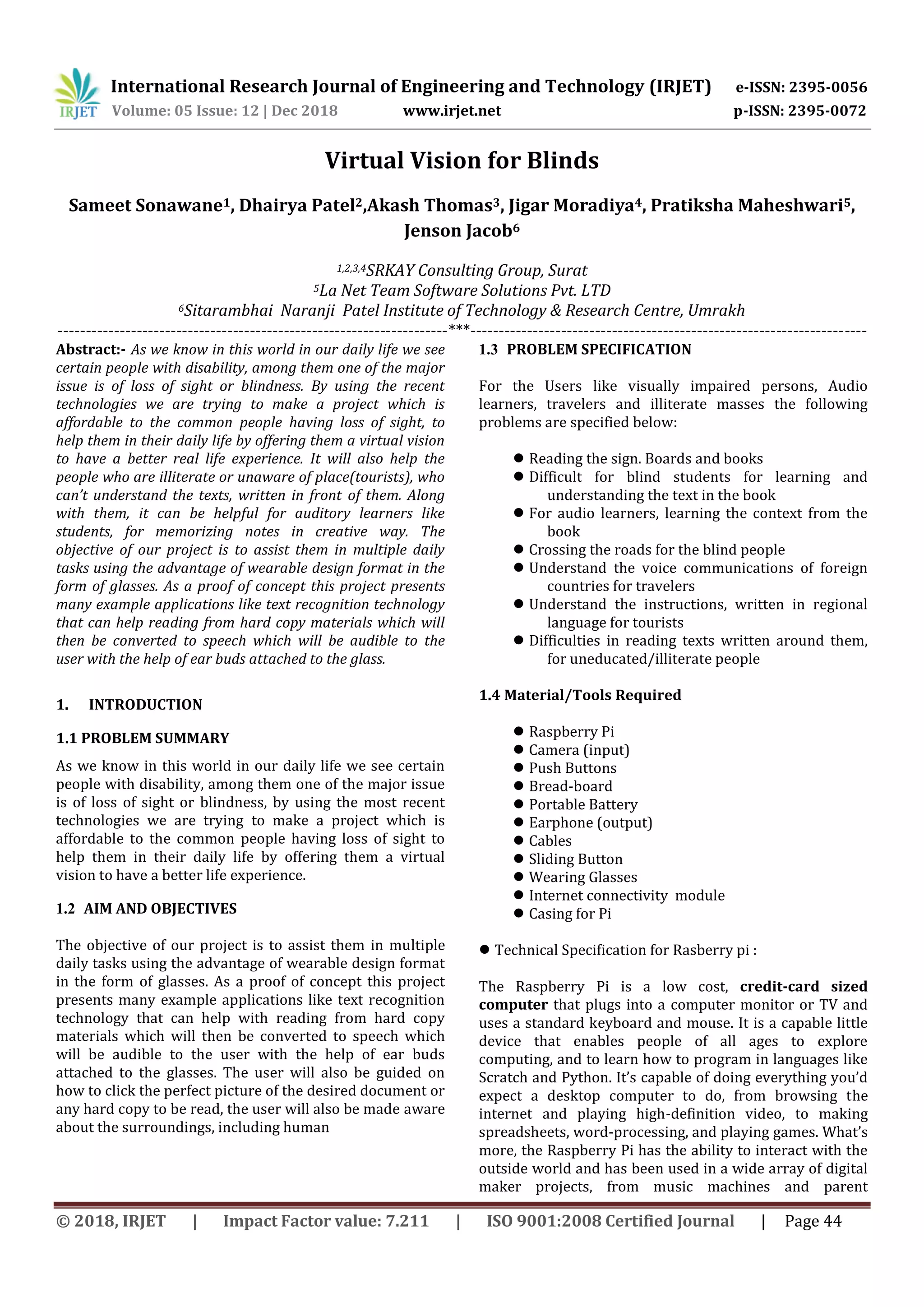
a) Optical Character Recognition:
Optical character recognition (also optical
character reader, OCR) is
the mechanical or electronic conversion
of images of typed, handwritten or printed text
into machine-encoded text, whether from a
scanned document, a photo of a document, a
scene-photo (for example the text on signs and
billboards in a landscape photo) or from subtitle
text superimposed on an image. It is a common
method of digitizing printed texts so that they can
be electronically edited, searched, stored more
compactly, displayed on-line, and used in machine
processes such as cognitive computing, machine
translation, (extracted) text-to-speech, key data
and text mining. OCR is a field of research
in pattern recognition, artificial
intelligence and computer vision.
b) OpenCV
OpenCV (Open Source Computer Vision) is a library
of programming functions mainly aimed at real-
time computer vision. Originally developed
by Intel. The library is cross-platform and free for
use. OpenCV has a modular structure, which
means that the package includes several shared or
static libraries. The following modules are
available:
Core functionality - a compact module defining
basic data structures, including the dense
dimensional array Mat and basic functions used
by all other modules.
Image processing - an image processing module
that includes linear and non-linear image filtering,
geometrical image transformations, color space
conversion, histograms, and so on.
Video - a video analysis module that includes
motion estimation, background subtraction, and
object tracking algorithm.
Video I/O - an easy-to-use interface to video
capturing and video codecs.
c) Text To Speech:
Google Text-to-Speech is a screen reader
application developed by Google. It powers
applications to read aloud (speak) the text on the
screen which support many languages. Speech
synthesis is the artificial production of human
speech. A computer system used for this purpose
is called a speech computer or speech synthesizer
and can be implemented in software or hardware
products. A text-to-speech (TTS) system converts
normal language text into speech. The quality of a
speech synthesizer is judged by its similarity to
the human voice and by its ability to be
understood clearly. An intelligible text-to-speech
program allows people with visual impairments
or reading disabilities to listen to written words
on a home computer.
d) Google Trans:
Google Translate is a free multilingual machine
translation service developed by Google, to
translate text. It offers an API that helps
developers build software applications. Google
Translate supports over 100 languages at various
levels. Rather than translating languages directly,
it first translates text to English and then to the
target language. During a translation, it looks for
patterns in millions of documents to help decide
on the best translation. Its accuracy has been
International Research Journal of Engineering and Technology (IRJET) e-ISSN: 2395-0056
Volume: 05 Issue: 12 | Dec 2018 www.irjet.net p-ISSN: 2395-0072
© 2018, IRJET | Impact Factor value: 7.211 | ISO 9001:2008 Certified Journal | Page 46
criticized and ridiculed on several occasions.
Google Translate would switch to a neural
machine translation engine - Google Neural
Machine Translation (GNMT) - which translates
"whole sentences at a time, rather than just piece
by piece. It uses this broader context to help it
figure out the most relevant translation, which it
then rearranges and adjusts to be more like a
human speaking with proper grammar".
e) Google Assistant: To help the users with their
day to day activities (for example knowing the
time, getting to know about their train schedule,
location, news. Weather, etc).
2. Design and Modelling
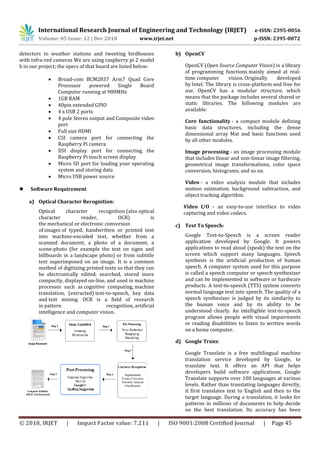
2.1 Sequence Diagram
Sequence diagrams are sometimes called event diagrams
or event scenarios. A sequence diagram shows, as parallel
vertical lines (lifelines), different processes or objects that
live simultaneously, and, as horizontal arrows, the
messages exchanged between them, in the order in which
they occur.
2.2.3 Flow Diagram
A graphical representation of a computer program in
relation to its sequence of functions (as distinct from the
data it processes).
Fig.2.7 Flow Diagram
3. Conclusion
3.1 Summary of Work
After reviewing all possible literature s, studying existing
system and gathering possible, feasible changes we started
with creating our system. The project work is started with
the designing of the product (i.e. Smart glasses). Using the
project planning, we divided the tasks among four of us.
We have studied many research papers and prior art
search related to our domain. We listed out all possible
features that we can add up to our system. In the initial
stage we found out the easiest and efficient way to
implement it by using python language, after that we
started to research various libraries that will be useful in
our project.
After studying about various hardware’s required in our
project we started assembling it. Gradually initiating with
the OCR implementation followed by image capturing, text
to speech, language translation. We added all the possible
features as we stated. We have interfaced hardware and
software portions with the use of buttons to make our
model more user friendly. We have encapsulated all this
things into working prototype.
3.2 Scope of Future Works
We have already tried to add features on the existing
system. But many more features can be added up, a voice
command to click picture, play/pause the voice and for
other functionalities. Glasses should be able to sense the
surrounding environment and according to that, using
Artificial Intelligence it will explain the whole scenario
International Research Journal of Engineering and Technology (IRJET) e-ISSN: 2395-0056
Volume: 05 Issue: 12 | Dec 2018 www.irjet.net p-ISSN: 2395-0072
© 2018, IRJET | Impact Factor value: 7.211 | ISO 9001:2008 Certified Journal | Page 47
into the ears of the blind. It will be very helpful for visually
impaired people to experience such things. We are using a
developer board, which is not only bigger in size, but also
has many components which remains unused for us, as we
are utilizing only around 30-35% of overall components,
that we are present on the board. In future work, we can
design a smaller and light weight circuit chip which
contains the components that we actually needed, which
can also result in low power consumption (from which we
can reduce size of battery to be attached) as well as overall
cost 40% lesser. We are also working on the design to
make it universal for every eyewear, by making it
attachable and detachable easily, so that anyone can attach
it with their personal eyewear too.
3.3 Unique Features
Our system’s unique features are:
 Easy to carry and use.
 Optical character recognition
 Text to Speech
 Language translation
 User Friendly
 Efficient
 Cost effective
4. REFERENCES
1. Tao Hong, Jonathan J. Hull, OCR method and
apparatus using image equivalents, U.S. Patent 5
764 799A, 1995, Comp.
2. Willis J. Luther, Graphics user interface for
controlling text-to-speech conversion, U.S. Patent
5 500 919A, 1996-03-19
3. Henry C. A. Hyde-Thomson, Roger Liron, Unified
messaging system with automatic language
identification for text-to-speech conversion U.S.
Patent 6 487 533B2, 1997-07-03
4. Mika Kivimäki User interface for text to speech
conversion, U.S. Patent 6 708 152B2, 1999-12-30
5. Abbas Rafii, Tony Zuccarino, Method and system
enabling natural user interface gestures with user
wearable glasses, U.S. Patent 8 836 768B1, 2012-
09-04
6. Ronald Fisher, Bryan Davis, James Fisher, Andrew
Merit, Paul Gautreaux, Autonomous computing
and telecommunications head-up displays glasses,
U.S. Patent 2 014 0266988A1, 2013-03-15
7. US Daniell Stevens, Robert Roth, Joel M. Gould,
Michael J. Newman, Dean Sturtevant, Charles E.
Ingold, David Abrahams, Allan Gold, Error
correction in speech recognition by correcting
text around selected area, U.S. Patent 6 912
498B2, 2000-05-02
8. I-Jen Chiang, Yi-Kung Chen, US Electronic reading
device U.S. Patent 2 011 0307842A1, 2010-06-14
9. Neorai Vardi, Computer device in form of
wearable glasses and user interface thereof, U.S.
Patent 2 013 0265300A1, 2011-07-03

IRJET- Virtual Vision for Blinds

  • 1.
    International Research Journalof Engineering and Technology (IRJET) e-ISSN: 2395-0056 Volume: 05 Issue: 12 | Dec 2018 www.irjet.net p-ISSN: 2395-0072 © 2018, IRJET | Impact Factor value: 7.211 | ISO 9001:2008 Certified Journal | Page 44 Virtual Vision for Blinds Sameet Sonawane1, Dhairya Patel2,Akash Thomas3, Jigar Moradiya4, Pratiksha Maheshwari5, Jenson Jacob6 1,2,3,4SRKAY Consulting Group, Surat 5La Net Team Software Solutions Pvt. LTD 6Sitarambhai Naranji Patel Institute of Technology & Research Centre, Umrakh ---------------------------------------------------------------------***---------------------------------------------------------------------- Abstract:- As we know in this world in our daily life we see certain people with disability, among them one of the major issue is of loss of sight or blindness. By using the recent technologies we are trying to make a project which is affordable to the common people having loss of sight, to help them in their daily life by offering them a virtual vision to have a better real life experience. It will also help the people who are illiterate or unaware of place(tourists), who can’t understand the texts, written in front of them. Along with them, it can be helpful for auditory learners like students, for memorizing notes in creative way. The objective of our project is to assist them in multiple daily tasks using the advantage of wearable design format in the form of glasses. As a proof of concept this project presents many example applications like text recognition technology that can help reading from hard copy materials which will then be converted to speech which will be audible to the user with the help of ear buds attached to the glass. 1. INTRODUCTION 1.1 PROBLEM SUMMARY As we know in this world in our daily life we see certain people with disability, among them one of the major issue is of loss of sight or blindness, by using the most recent technologies we are trying to make a project which is affordable to the common people having loss of sight to help them in their daily life by offering them a virtual vision to have a better life experience. 1.2 AIM AND OBJECTIVES The objective of our project is to assist them in multiple daily tasks using the advantage of wearable design format in the form of glasses. As a proof of concept this project presents many example applications like text recognition technology that can help with reading from hard copy materials which will then be converted to speech which will be audible to the user with the help of ear buds attached to the glasses. The user will also be guided on how to click the perfect picture of the desired document or any hard copy to be read, the user will also be made aware about the surroundings, including human 1.3 PROBLEM SPECIFICATION For the Users like visually impaired persons, Audio learners, travelers and illiterate masses the following problems are specified below:  Reading the sign. Boards and books  Difficult for blind students for learning and understanding the text in the book  For audio learners, learning the context from the book  Crossing the roads for the blind people  Understand the voice communications of foreign countries for travelers  Understand the instructions, written in regional language for tourists  Difficulties in reading texts written around them, for uneducated/illiterate people 1.4 Material/Tools Required  Raspberry Pi  Camera (input)  Push Buttons  Bread-board  Portable Battery  Earphone (output)  Cables  Sliding Button  Wearing Glasses  Internet connectivity module  Casing for Pi  Technical Specification for Rasberry pi : The Raspberry Pi is a low cost, credit-card sized computer that plugs into a computer monitor or TV and uses a standard keyboard and mouse. It is a capable little device that enables people of all ages to explore computing, and to learn how to program in languages like Scratch and Python. It’s capable of doing everything you’d expect a desktop computer to do, from browsing the internet and playing high-definition video, to making spreadsheets, word-processing, and playing games. What’s more, the Raspberry Pi has the ability to interact with the outside world and has been used in a wide array of digital maker projects, from music machines and parent
  • 2.
    International Research Journalof Engineering and Technology (IRJET) e-ISSN: 2395-0056 Volume: 05 Issue: 12 | Dec 2018 www.irjet.net p-ISSN: 2395-0072 © 2018, IRJET | Impact Factor value: 7.211 | ISO 9001:2008 Certified Journal | Page 45 detectors to weather stations and tweeting birdhouses with infra-red cameras We are using raspberry pi 2 model b in our project; the specs of that board are listed below:  Broad-com BCM2837 Arm7 Quad Core Processor powered Single Board Computer running at 900MHz  1GB RAM  40pin extended GPIO  4 x USB 2 ports  4 pole Stereo output and Composite video port  Full size HDMI  CSI camera port for connecting the Raspberry Pi camera  DSI display port for connecting the Raspberry Pi touch screen display  Micro SD port for loading your operating system and storing data  Micro USB power source  Software Requirement a) Optical Character Recognition: Optical character recognition (also optical character reader, OCR) is the mechanical or electronic conversion of images of typed, handwritten or printed text into machine-encoded text, whether from a scanned document, a photo of a document, a scene-photo (for example the text on signs and billboards in a landscape photo) or from subtitle text superimposed on an image. It is a common method of digitizing printed texts so that they can be electronically edited, searched, stored more compactly, displayed on-line, and used in machine processes such as cognitive computing, machine translation, (extracted) text-to-speech, key data and text mining. OCR is a field of research in pattern recognition, artificial intelligence and computer vision. b) OpenCV OpenCV (Open Source Computer Vision) is a library of programming functions mainly aimed at real- time computer vision. Originally developed by Intel. The library is cross-platform and free for use. OpenCV has a modular structure, which means that the package includes several shared or static libraries. The following modules are available: Core functionality - a compact module defining basic data structures, including the dense dimensional array Mat and basic functions used by all other modules. Image processing - an image processing module that includes linear and non-linear image filtering, geometrical image transformations, color space conversion, histograms, and so on. Video - a video analysis module that includes motion estimation, background subtraction, and object tracking algorithm. Video I/O - an easy-to-use interface to video capturing and video codecs. c) Text To Speech: Google Text-to-Speech is a screen reader application developed by Google. It powers applications to read aloud (speak) the text on the screen which support many languages. Speech synthesis is the artificial production of human speech. A computer system used for this purpose is called a speech computer or speech synthesizer and can be implemented in software or hardware products. A text-to-speech (TTS) system converts normal language text into speech. The quality of a speech synthesizer is judged by its similarity to the human voice and by its ability to be understood clearly. An intelligible text-to-speech program allows people with visual impairments or reading disabilities to listen to written words on a home computer. d) Google Trans: Google Translate is a free multilingual machine translation service developed by Google, to translate text. It offers an API that helps developers build software applications. Google Translate supports over 100 languages at various levels. Rather than translating languages directly, it first translates text to English and then to the target language. During a translation, it looks for patterns in millions of documents to help decide on the best translation. Its accuracy has been
  • 3.
    International Research Journalof Engineering and Technology (IRJET) e-ISSN: 2395-0056 Volume: 05 Issue: 12 | Dec 2018 www.irjet.net p-ISSN: 2395-0072 © 2018, IRJET | Impact Factor value: 7.211 | ISO 9001:2008 Certified Journal | Page 46 criticized and ridiculed on several occasions. Google Translate would switch to a neural machine translation engine - Google Neural Machine Translation (GNMT) - which translates "whole sentences at a time, rather than just piece by piece. It uses this broader context to help it figure out the most relevant translation, which it then rearranges and adjusts to be more like a human speaking with proper grammar". e) Google Assistant: To help the users with their day to day activities (for example knowing the time, getting to know about their train schedule, location, news. Weather, etc). 2. Design and Modelling 2.1 Sequence Diagram Sequence diagrams are sometimes called event diagrams or event scenarios. A sequence diagram shows, as parallel vertical lines (lifelines), different processes or objects that live simultaneously, and, as horizontal arrows, the messages exchanged between them, in the order in which they occur. 2.2.3 Flow Diagram A graphical representation of a computer program in relation to its sequence of functions (as distinct from the data it processes). Fig.2.7 Flow Diagram 3. Conclusion 3.1 Summary of Work After reviewing all possible literature s, studying existing system and gathering possible, feasible changes we started with creating our system. The project work is started with the designing of the product (i.e. Smart glasses). Using the project planning, we divided the tasks among four of us. We have studied many research papers and prior art search related to our domain. We listed out all possible features that we can add up to our system. In the initial stage we found out the easiest and efficient way to implement it by using python language, after that we started to research various libraries that will be useful in our project. After studying about various hardware’s required in our project we started assembling it. Gradually initiating with the OCR implementation followed by image capturing, text to speech, language translation. We added all the possible features as we stated. We have interfaced hardware and software portions with the use of buttons to make our model more user friendly. We have encapsulated all this things into working prototype. 3.2 Scope of Future Works We have already tried to add features on the existing system. But many more features can be added up, a voice command to click picture, play/pause the voice and for other functionalities. Glasses should be able to sense the surrounding environment and according to that, using Artificial Intelligence it will explain the whole scenario
  • 4.
    International Research Journalof Engineering and Technology (IRJET) e-ISSN: 2395-0056 Volume: 05 Issue: 12 | Dec 2018 www.irjet.net p-ISSN: 2395-0072 © 2018, IRJET | Impact Factor value: 7.211 | ISO 9001:2008 Certified Journal | Page 47 into the ears of the blind. It will be very helpful for visually impaired people to experience such things. We are using a developer board, which is not only bigger in size, but also has many components which remains unused for us, as we are utilizing only around 30-35% of overall components, that we are present on the board. In future work, we can design a smaller and light weight circuit chip which contains the components that we actually needed, which can also result in low power consumption (from which we can reduce size of battery to be attached) as well as overall cost 40% lesser. We are also working on the design to make it universal for every eyewear, by making it attachable and detachable easily, so that anyone can attach it with their personal eyewear too. 3.3 Unique Features Our system’s unique features are:  Easy to carry and use.  Optical character recognition  Text to Speech  Language translation  User Friendly  Efficient  Cost effective 4. REFERENCES 1. Tao Hong, Jonathan J. Hull, OCR method and apparatus using image equivalents, U.S. Patent 5 764 799A, 1995, Comp. 2. Willis J. Luther, Graphics user interface for controlling text-to-speech conversion, U.S. Patent 5 500 919A, 1996-03-19 3. Henry C. A. Hyde-Thomson, Roger Liron, Unified messaging system with automatic language identification for text-to-speech conversion U.S. Patent 6 487 533B2, 1997-07-03 4. Mika Kivimäki User interface for text to speech conversion, U.S. Patent 6 708 152B2, 1999-12-30 5. Abbas Rafii, Tony Zuccarino, Method and system enabling natural user interface gestures with user wearable glasses, U.S. Patent 8 836 768B1, 2012- 09-04 6. Ronald Fisher, Bryan Davis, James Fisher, Andrew Merit, Paul Gautreaux, Autonomous computing and telecommunications head-up displays glasses, U.S. Patent 2 014 0266988A1, 2013-03-15 7. US Daniell Stevens, Robert Roth, Joel M. Gould, Michael J. Newman, Dean Sturtevant, Charles E. Ingold, David Abrahams, Allan Gold, Error correction in speech recognition by correcting text around selected area, U.S. Patent 6 912 498B2, 2000-05-02 8. I-Jen Chiang, Yi-Kung Chen, US Electronic reading device U.S. Patent 2 011 0307842A1, 2010-06-14 9. Neorai Vardi, Computer device in form of wearable glasses and user interface thereof, U.S. Patent 2 013 0265300A1, 2011-07-03