Introduction to Objective-C Using Xcode


                            Dr. Thanisa Kruawaisayawan
                                   www.imcinstitute.com
Start Developing iOS Applications Today

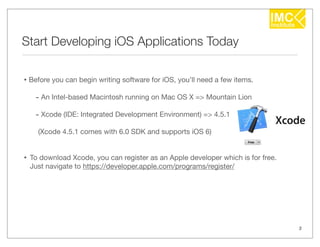
• Before you can begin writing software for iOS, you’ll need a few items.
     - An Intel-based Macintosh running on Mac OS X => Mountain Lion
     - Xcode (IDE: Integrated Development Environment) => 4.5.1
      (Xcode 4.5.1 comes with 6.0 SDK and supports iOS 6)


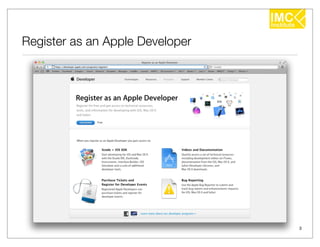
•   To download Xcode, you can register as an Apple developer which is for free.
    Just navigate to https://developer.apple.com/programs/register/


                                                                                   2
Register as an Apple Developer


                                 3
History of Objective-C

• 1980
   • Brad Cox and Tom Love
      • at Stepstone company
      • created Objective-C

• 1988
   • Steve Jobs (left Apple Inc.)
      • at NeXT company
      • licensed Objective-C from Stepstone (NS => NeXTSTEP)

• 1996
   • Apple Inc.
      • purchased NeXT company


                                                               4
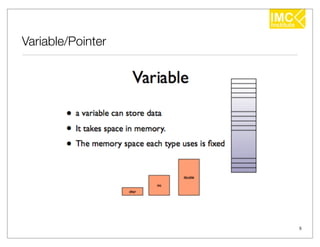
Variable/Pointer


                   5
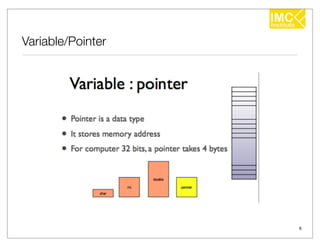
Variable/Pointer


                   6
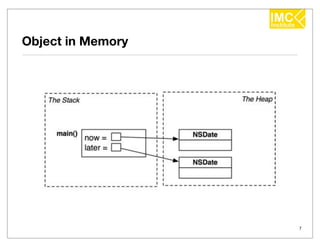
Object in Memory


                   7
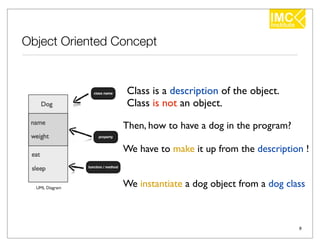
Object Oriented Concept


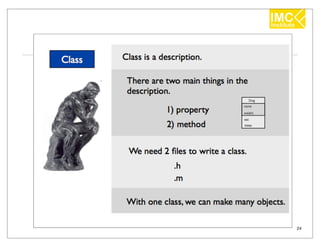
                 Class is a description of the object.
                 Class is not an object.

                 Then, how to have a dog in the program?

                 We have to make it up from the description !


                 We instantiate a dog object from a dog class


                                                           8
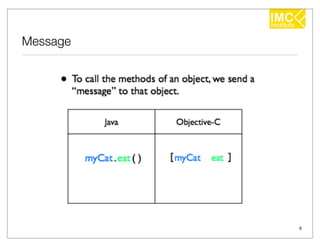
Message


          9
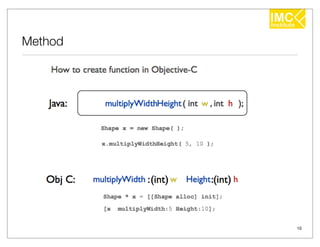
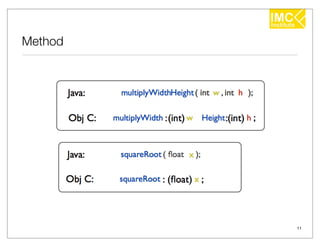
Method


         10
Method


         11
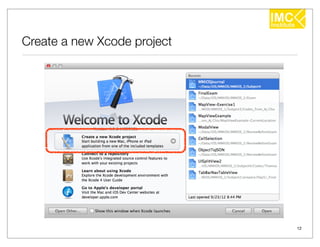
Create a new Xcode project


                             12
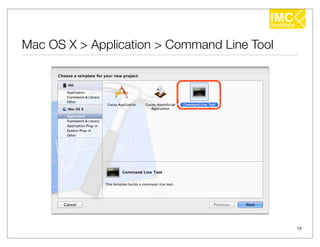
Mac OS X > Application > Command Line Tool


                                             13
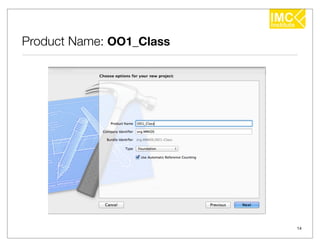
Product Name: OO1_Class


                          14
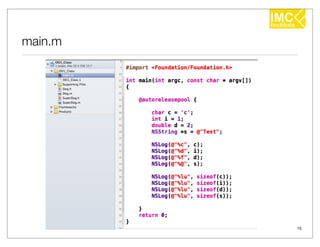
main.m


         15
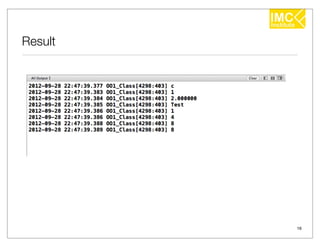
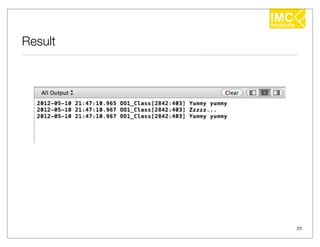
Result


         16
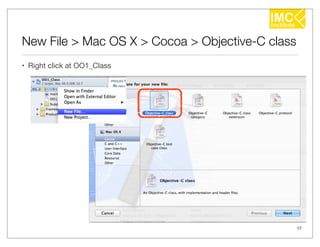
New File > Mac OS X > Cocoa > Objective-C class
• Right click at OO1_Class


                                                  17
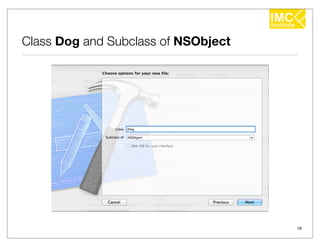
Class Dog and Subclass of NSObject


                                     18
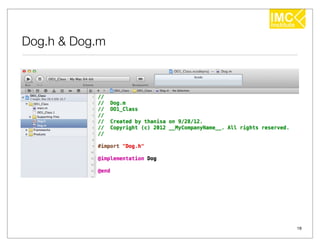
Dog.h & Dog.m


                19
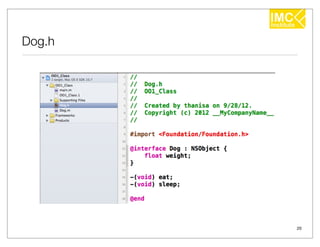
Dog.h


        20
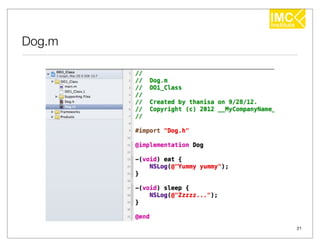
Dog.m


        21
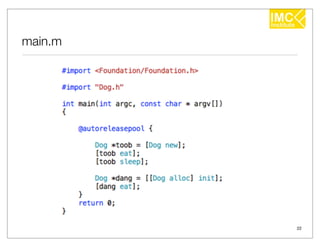
main.m


         22
Result


         23
24
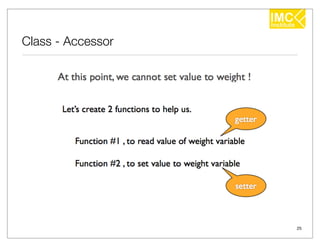
Class - Accessor


                   25
26
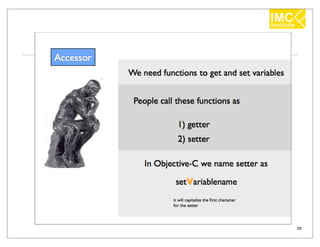
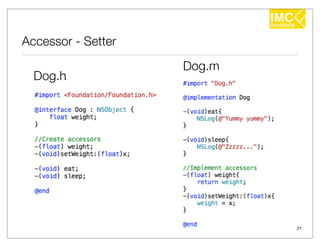
Accessor - Setter
                    Dog.m
  Dog.h


                            27
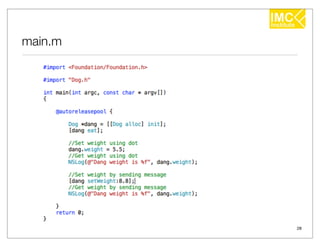
main.m


         28
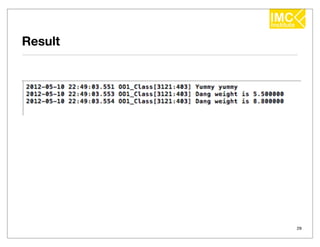
Result


         29
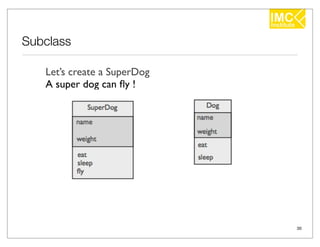
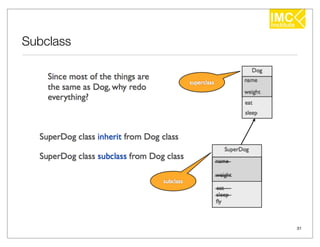
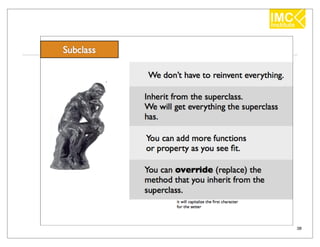
Subclass

   Let’s create a SuperDog
   A super dog can fly !


                             30
Subclass


           31
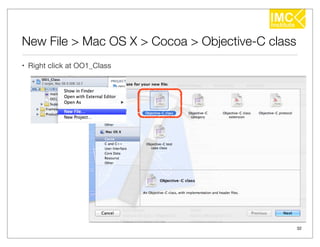
New File > Mac OS X > Cocoa > Objective-C class
• Right click at OO1_Class


                                                  32
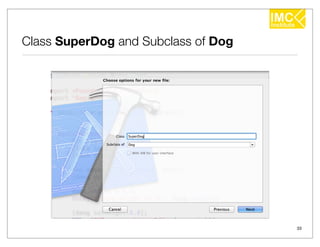
Class SuperDog and Subclass of Dog


                                     33
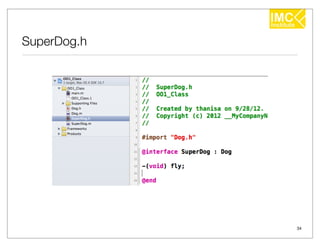
SuperDog.h


             34
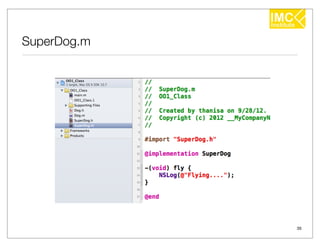
SuperDog.m


             35
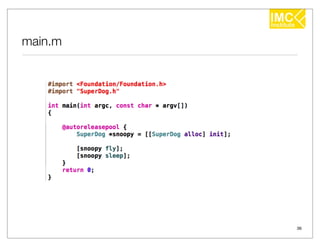
main.m


         36
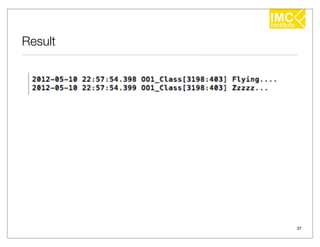
Result


         37
38
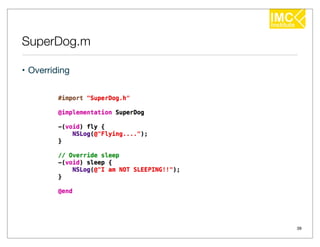
SuperDog.m

• Overriding


               39
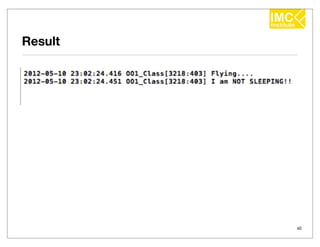
Result


         40
41
42
43
44
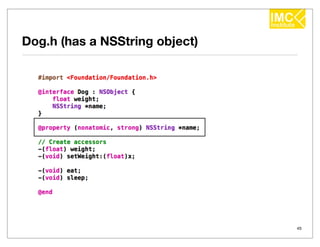
Dog.h (has a NSString object)


                                45
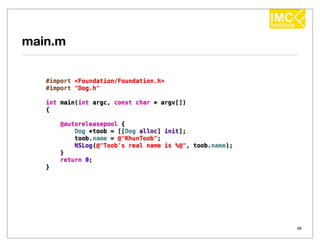
main.m


         46
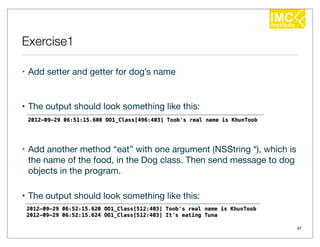
Exercise1

• Add setter and getter for dog’s name


• The output should look something like this:


• Add another method “eat” with one argument (NSString *), which is
  the name of the food, in the Dog class. Then send message to dog
  objects in the program.

• The output should look something like this:


                                                                      47
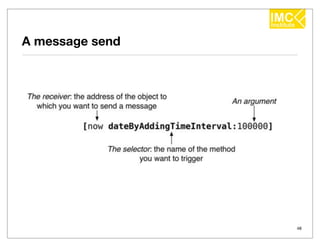
A message send


                 48
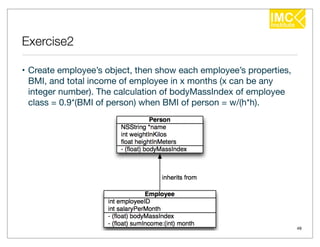
Exercise2

• Create employee’s object, then show each employee’s properties,
  BMI, and total income of employee in x months (x can be any
  integer number). The calculation of bodyMassIndex of employee
  class = 0.9*(BMI of person) when BMI of person = w/(h*h).


                                                                    49
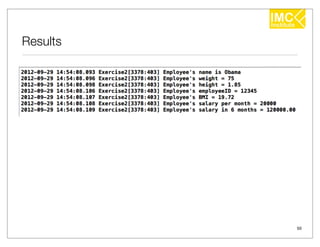
Results


          50
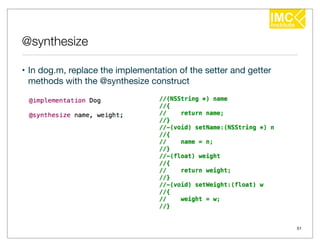
@synthesize

• In dog.m, replace the implementation of the setter and getter
  methods with the @synthesize construct


                                                                  51
id, self, super

• id is pointer to any objects (Notice that there is no asterisk in this
  declaration, id implies the asterisk).

• self is a local variable (pointer) to object itself.

• super is used when we want to send message to itself but start
  searching for method at super.


                                                                           52
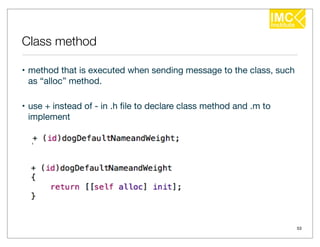
Class method

• method that is executed when sending message to the class, such
  as “alloc” method.

• use + instead of - in .h file to declare class method and .m to
  implement


                                                                    53
NSString

• In code, you can create a literal instance of NSString like this;    
      NSString *lament = @"Why me!?";


• Instances of NSString can also be created programmatically using the
  stringWithFormat: class method:      
      NSString *x = [NSString stringWithFormat:@"The best number is %d", 5];


• To get the number of characters in a string, you use the length method:      
     NSUInteger charCount = [x length];


• And you check to see if two strings are equal using the isEqual: method:      
    if ([lament isEqual:x])        
        NSLog(@"%@ and %@ are equal", lament, x);


                                                                                   54
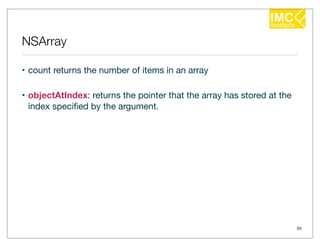
NSArray

• count returns the number of items in an array

• objectAtIndex: returns the pointer that the array has stored at the
  index specified by the argument.


                                                                        55
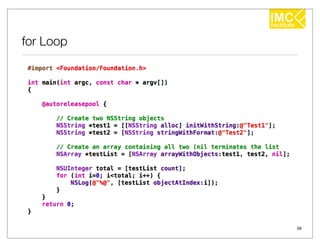
for Loop


           56
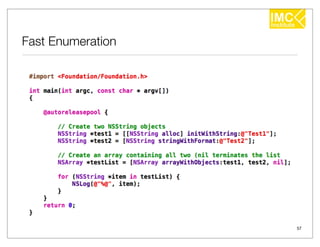
Fast Enumeration


                   57
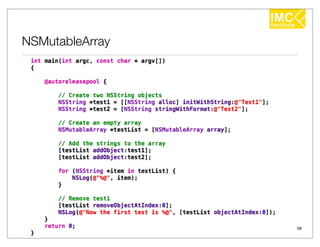
NSMutableArray


                 58
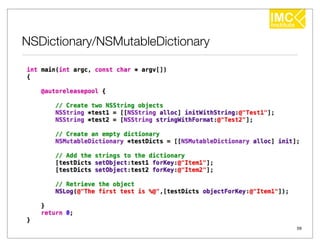
NSDictionary/NSMutableDictionary


                                   59
References

• Boonyanit Mathayomchan, Ph.D., “iPhone Application
  Development (BASIC)”, 2011

• Chotipat Pornavalai, iPhone Basic #1, Mini Master of iOS
  Application #1

• Aaron Hillegass, “Objective-C Programming: The Big Nerd Ranch
  Guide”, 2011


                                                                  60

iPhone Programming [1/17] : Objective-C

  • 1.
    Introduction to Objective-CUsing Xcode Dr. Thanisa Kruawaisayawan www.imcinstitute.com
  • 2.
    Start Developing iOSApplications Today • Before you can begin writing software for iOS, you’ll need a few items. - An Intel-based Macintosh running on Mac OS X => Mountain Lion - Xcode (IDE: Integrated Development Environment) => 4.5.1 (Xcode 4.5.1 comes with 6.0 SDK and supports iOS 6) • To download Xcode, you can register as an Apple developer which is for free. Just navigate to https://developer.apple.com/programs/register/ 2
  • 3.
    Register as anApple Developer 3
  • 4.
    History of Objective-C •1980 • Brad Cox and Tom Love • at Stepstone company • created Objective-C • 1988 • Steve Jobs (left Apple Inc.) • at NeXT company • licensed Objective-C from Stepstone (NS => NeXTSTEP) • 1996 • Apple Inc. • purchased NeXT company 4
  • 5.
  • 6.
  • 7.
  • 8.
    Object Oriented Concept Class is a description of the object. Class is not an object. Then, how to have a dog in the program? We have to make it up from the description ! We instantiate a dog object from a dog class 8
  • 9.
  • 10.
  • 11.
  • 12.
    Create a newXcode project 12
  • 13.
    Mac OS X> Application > Command Line Tool 13
  • 14.
  • 15.
  • 16.
  • 17.
    New File >Mac OS X > Cocoa > Objective-C class • Right click at OO1_Class 17
  • 18.
    Class Dog andSubclass of NSObject 18
  • 19.
  • 20.
  • 21.
  • 22.
  • 23.
  • 24.
  • 25.
  • 26.
  • 27.
    Accessor - Setter Dog.m Dog.h 27
  • 28.
  • 29.
  • 30.
    Subclass Let’s create a SuperDog A super dog can fly ! 30
  • 31.
  • 32.
    New File >Mac OS X > Cocoa > Objective-C class • Right click at OO1_Class 32
  • 33.
    Class SuperDog andSubclass of Dog 33
  • 34.
  • 35.
  • 36.
  • 37.
  • 38.
  • 39.
  • 40.
  • 41.
  • 42.
  • 43.
  • 44.
  • 45.
    Dog.h (has aNSString object) 45
  • 46.
  • 47.
    Exercise1 • Add setterand getter for dog’s name • The output should look something like this: • Add another method “eat” with one argument (NSString *), which is the name of the food, in the Dog class. Then send message to dog objects in the program. • The output should look something like this: 47
  • 48.
  • 49.
    Exercise2 • Create employee’sobject, then show each employee’s properties, BMI, and total income of employee in x months (x can be any integer number). The calculation of bodyMassIndex of employee class = 0.9*(BMI of person) when BMI of person = w/(h*h). 49
  • 50.
  • 51.
    @synthesize • In dog.m,replace the implementation of the setter and getter methods with the @synthesize construct 51
  • 52.
    id, self, super •id is pointer to any objects (Notice that there is no asterisk in this declaration, id implies the asterisk). • self is a local variable (pointer) to object itself. • super is used when we want to send message to itself but start searching for method at super. 52
  • 53.
    Class method • methodthat is executed when sending message to the class, such as “alloc” method. • use + instead of - in .h file to declare class method and .m to implement 53
  • 54.
    NSString • In code,you can create a literal instance of NSString like this;     NSString *lament = @"Why me!?"; • Instances of NSString can also be created programmatically using the stringWithFormat: class method:       NSString *x = [NSString stringWithFormat:@"The best number is %d", 5]; • To get the number of characters in a string, you use the length method:       NSUInteger charCount = [x length]; • And you check to see if two strings are equal using the isEqual: method:       if ([lament isEqual:x])         NSLog(@"%@ and %@ are equal", lament, x); 54
  • 55.
    NSArray • count returnsthe number of items in an array • objectAtIndex: returns the pointer that the array has stored at the index specified by the argument. 55
  • 56.
  • 57.
  • 58.
  • 59.
  • 60.
    References • Boonyanit Mathayomchan,Ph.D., “iPhone Application Development (BASIC)”, 2011 • Chotipat Pornavalai, iPhone Basic #1, Mini Master of iOS Application #1 • Aaron Hillegass, “Objective-C Programming: The Big Nerd Ranch Guide”, 2011 60