1
Acknowledgement
First of all, I extend my heartiest gratitude to my teacher
MR. ARUMUGAM GOUNDER under whose utmost
guidance this work could take the recent shape . “Turning
aspiration change into reality is easier, when quality
people are supportive to our efforts.” And among such
persons are my parents, whom I deeply in debt for the
positive feedback, contribution, unfailing step and ungrudging
help at every step of this project.
I wish to express my deep gratitude and sincere thanks to
Principal, MR. GAURAV DUBEY, DELHI PUBLIC
SCHOOL, BIKANER for his encouragement and for all the
facilities that he provided for this project work.
I can’t forget to offer my sincere thanks to my CLASSMATES
who helped me to carry out this project work successfully & for
their valuable advice & support, which I received from them
time to time.
Name:- Kishore Choudhary Signature of examiner Teacher Signature
Roll No…………….. Code…………… (PGT-Comp. Sci.)
2
CERTIFICATE
This is to certify that the Project entitled, Test Your
Knowledge(Database Connectivity) is a bonfire work done by
KISHORE CHOUDHARY of class XII, Session 2015-2016 in
partial fulfillment of CBSE’s AISSCE Examination 2016 and
has been carried out under my direct supervision and guidance.
This report or a similar report on the topic has not been
submitted for any other examination and does not form a part of
any other course undergone by the candidate.
Principal Signature of Teacher
Mr.GAURAV DUBEY ARUMUGAM
PGT (Comp’s.)
3
INDEX
SNo. Particular Page
No.
Signature
1. Files Generated 4
2. Working Description of
Project
5
3. Source code and
Outputs
6
4. Database Structure 23
5. Bibliography 26
4
FILES GENERATED
Login.java
Register.java
Menu.java
Test.java
Result.java
5
WORKING DESCRIPTION
OF PROJECT
The purpose of this project is to provide
a system that provides quizzes to test
your knowledge on various topics. This
project USES DATABASE
CONNECTIVITY to store details of
registered candidates, question and
answers and the test-performance details
in a MySQL database.
Technology used
 Frond End : Java Swing
 Back End : MySQL
6
SOURCE CODE
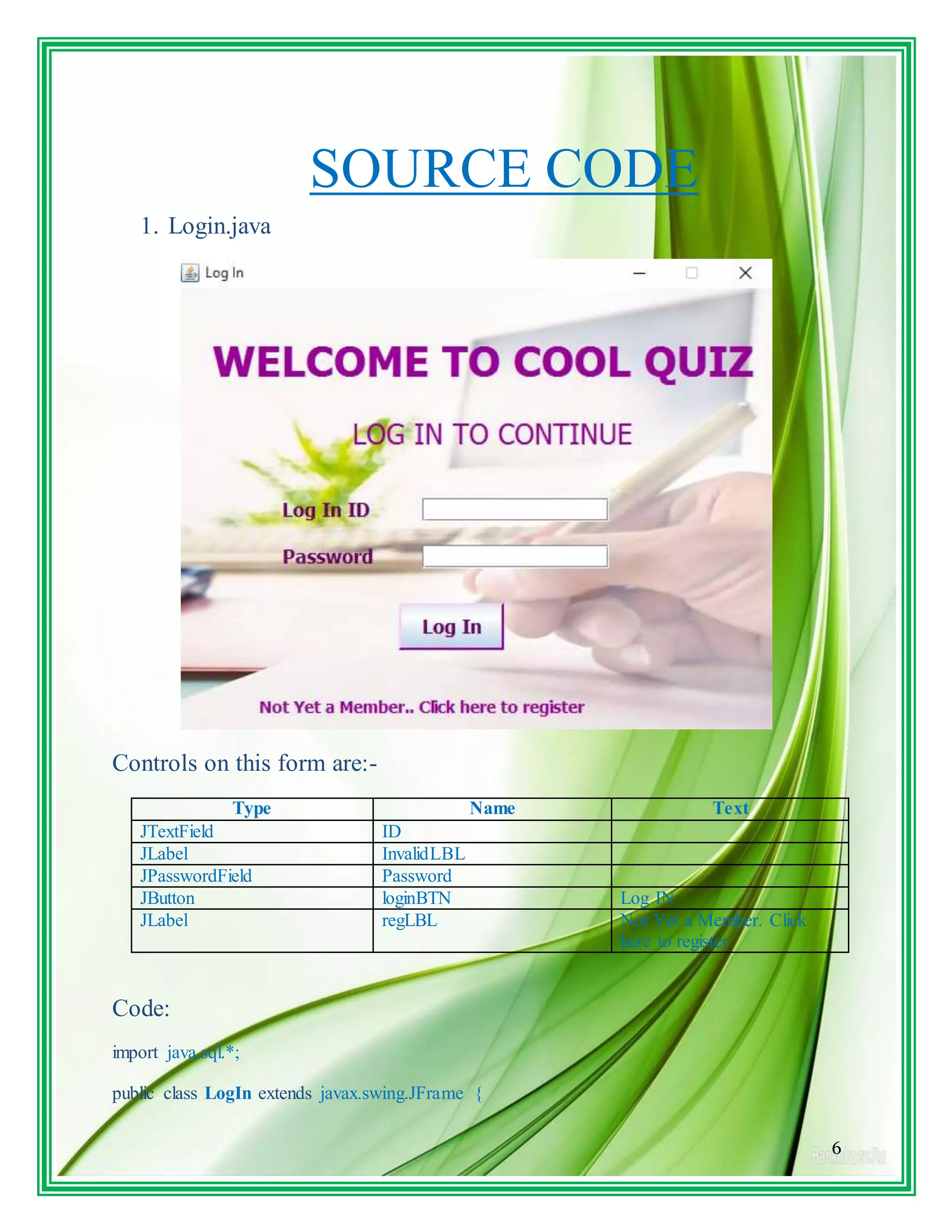
1. Login.java
Controls on this form are:-
Type Name Text
JTextField ID
JLabel InvalidLBL
JPasswordField Password
JButton loginBTN Log IN
JLabel regLBL Not Yet a Member. Click
here to register
Code:
import java.sql.*;
public class LogIn extends javax.swing.JFrame {
7
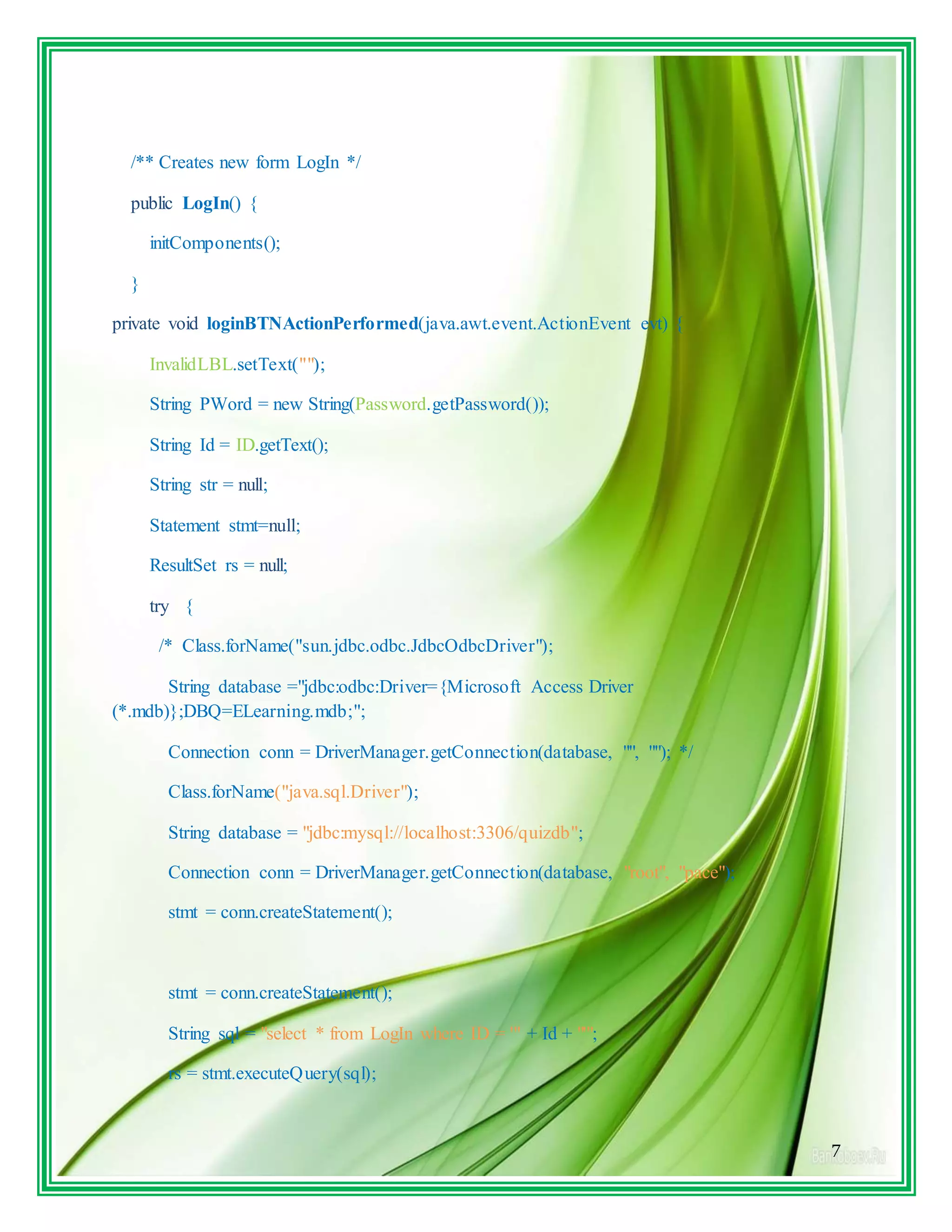
/** Creates new form LogIn */
public LogIn() {
initComponents();
}
private void loginBTNActionPerformed(java.awt.event.ActionEvent evt) {
InvalidLBL.setText("");
String PWord = new String(Password.getPassword());
String Id = ID.getText();
String str = null;
Statement stmt=null;
ResultSet rs = null;
try {
/* Class.forName("sun.jdbc.odbc.JdbcOdbcDriver");
String database ="jdbc:odbc:Driver={Microsoft Access Driver
(*.mdb)};DBQ=ELearning.mdb;";
Connection conn = DriverManager.getConnection(database, "", ""); */
Class.forName("java.sql.Driver");
String database = "jdbc:mysql://localhost:3306/quizdb";
Connection conn = DriverManager.getConnection(database, "root", "pace");
stmt = conn.createStatement();
String sql = "select * from LogIn where ID = '" + Id + "'";
rs = stmt.executeQuery(sql);
8
rs.next();
str = rs.getString("Password");
if(str.equals(PWord))
{
Menu m = new Menu(Id);
m.setVisible(true);
this.setVisible(false);
}
else
{
InvalidLBL.setText("Incorrect ID or Password");
}
} catch (Exception e) { InvalidLBL.setText("Incorrect ID or Password");}
}
private void regLBLMouseClicked(java.awt.event.MouseEvent evt) {
Register r = new Register();
r.setVisible(true);
this.setVisible(false);
}
/**
* @param args the command line arguments
*/
public static void main(String args[]) {
9
java.awt.EventQueue.invokeLater(new Runnable() {
public void run() {
new LogIn().setVisible(true);
}
});
}
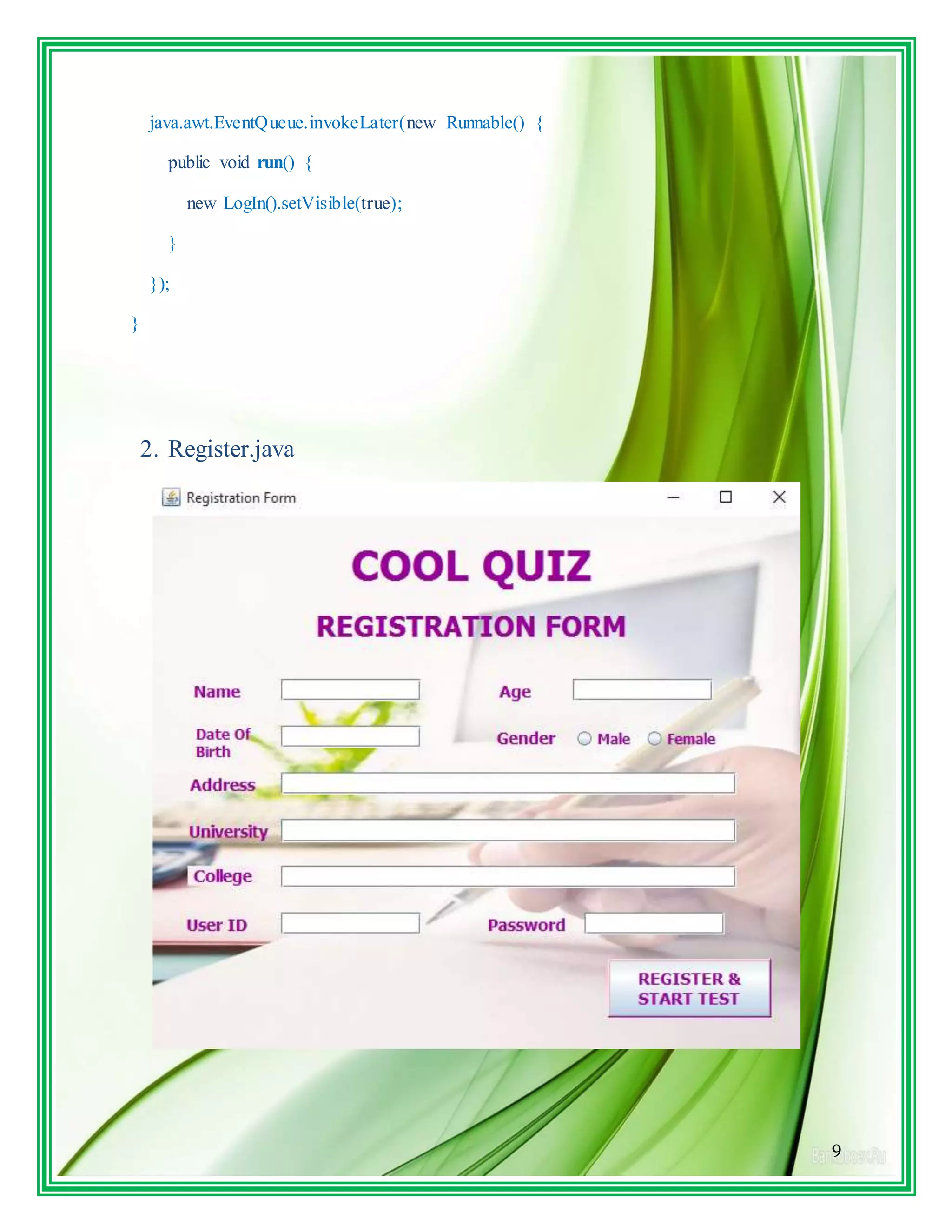
2. Register.java
10
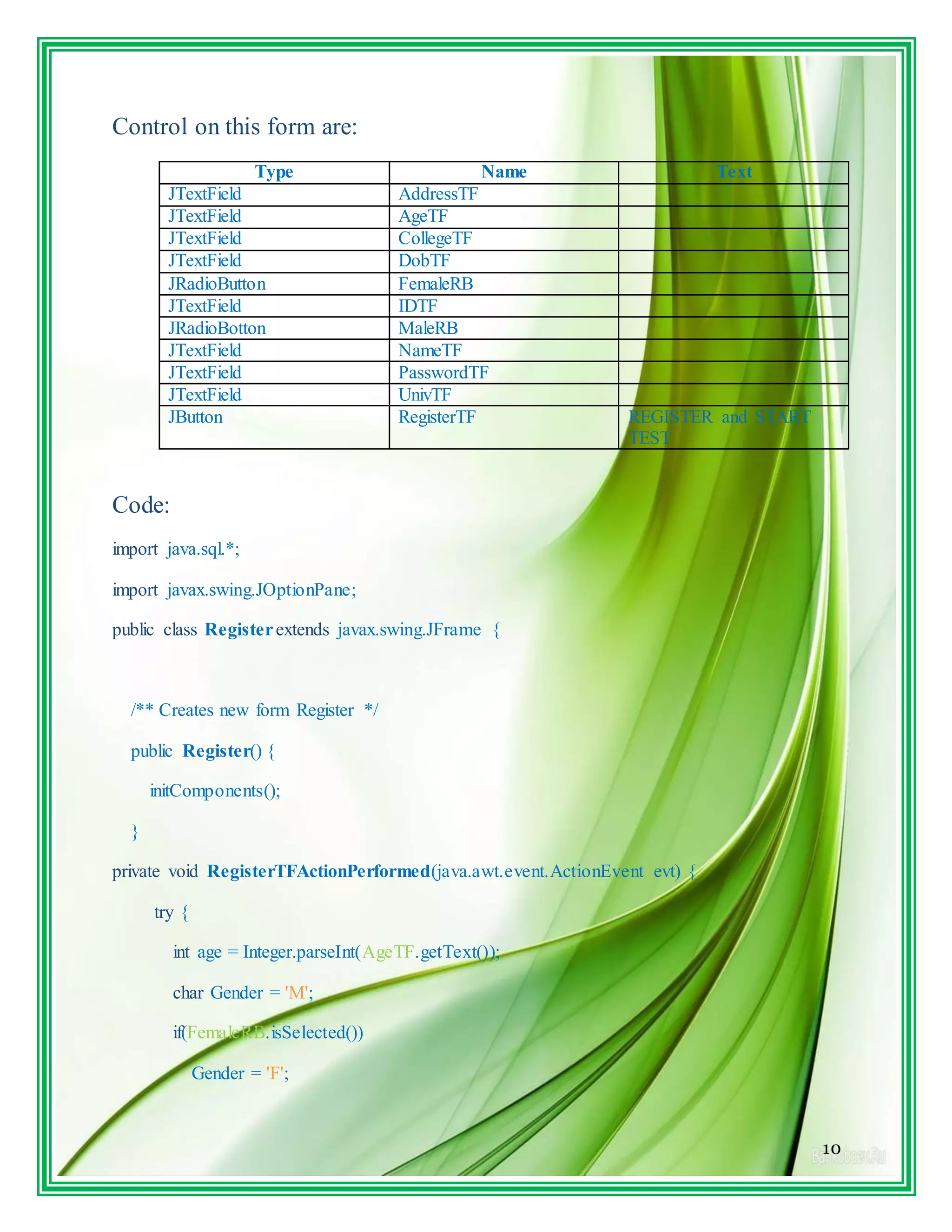
Control on this form are:
Type Name Text
JTextField AddressTF
JTextField AgeTF
JTextField CollegeTF
JTextField DobTF
JRadioButton FemaleRB
JTextField IDTF
JRadioBotton MaleRB
JTextField NameTF
JTextField PasswordTF
JTextField UnivTF
JButton RegisterTF REGISTER and START
TEST
Code:
import java.sql.*;
import javax.swing.JOptionPane;
public class Registerextends javax.swing.JFrame {
/** Creates new form Register */
public Register() {
initComponents();
}
private void RegisterTFActionPerformed(java.awt.event.ActionEvent evt) {
try {
int age = Integer.parseInt(AgeTF.getText());
char Gender = 'M';
if(FemaleRB.isSelected())
Gender = 'F';
11
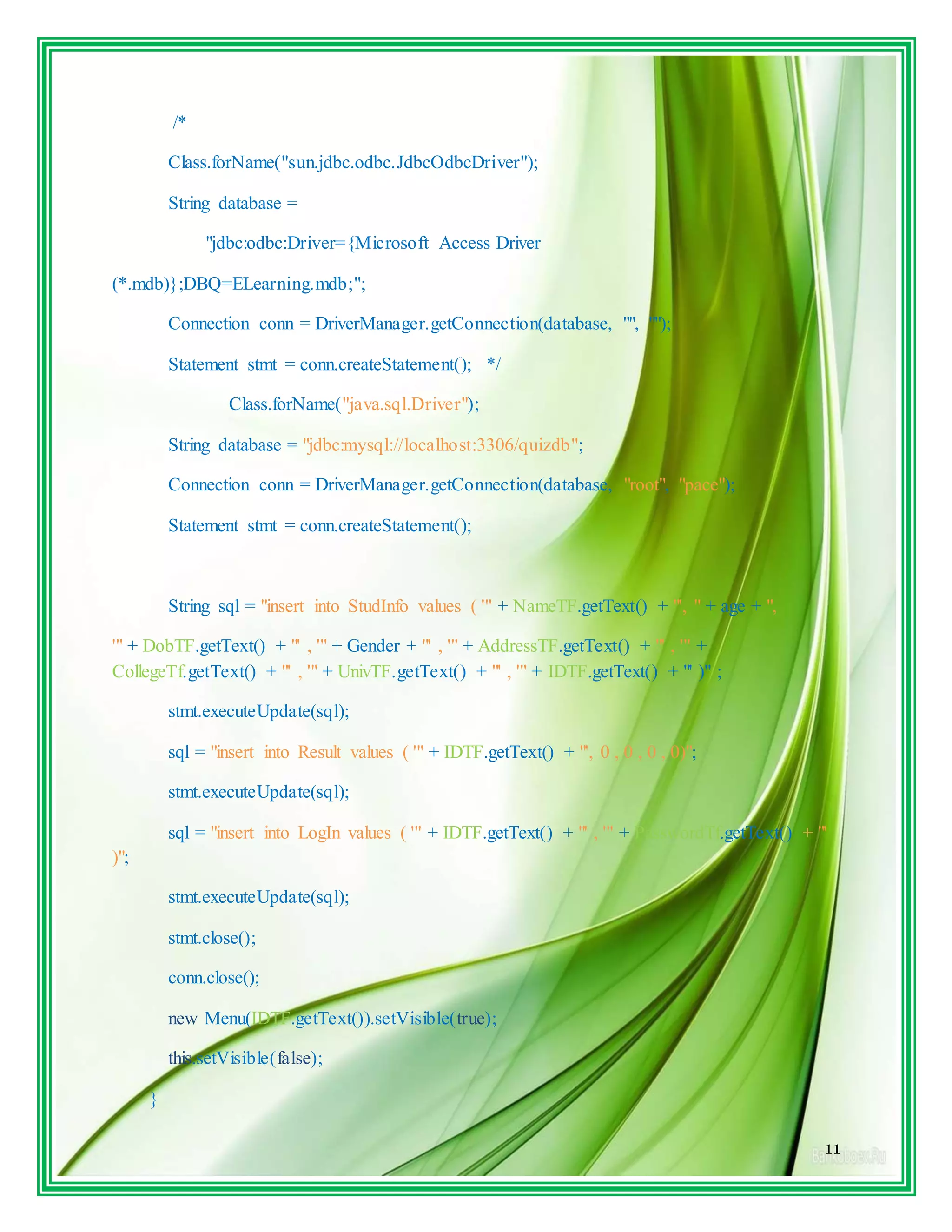
/*
Class.forName("sun.jdbc.odbc.JdbcOdbcDriver");
String database =
"jdbc:odbc:Driver={Microsoft Access Driver
(*.mdb)};DBQ=ELearning.mdb;";
Connection conn = DriverManager.getConnection(database, "", "");
Statement stmt = conn.createStatement(); */
Class.forName("java.sql.Driver");
String database = "jdbc:mysql://localhost:3306/quizdb";
Connection conn = DriverManager.getConnection(database, "root", "pace");
Statement stmt = conn.createStatement();
String sql = "insert into StudInfo values ( '" + NameTF.getText() + "', " + age + ",
'" + DobTF.getText() + "' , '" + Gender + "' , '" + AddressTF.getText() + "' , '" +
CollegeTf.getText() + "' , '" + UnivTF.getText() + "' , '" + IDTF.getText() + "' )" ;
stmt.executeUpdate(sql);
sql = "insert into Result values ( '" + IDTF.getText() + "', 0 , 0 , 0 , 0)";
stmt.executeUpdate(sql);
sql = "insert into LogIn values ( '" + IDTF.getText() + "' , '" + PasswordTf.getText() + "'
)";
stmt.executeUpdate(sql);
stmt.close();
conn.close();
new Menu(IDTF.getText()).setVisible(true);
this.setVisible(false);
}
12
catch( Exception e)
{
JOptionPane.showMessageDialog(null,"" + e);
}
}
private void AgeTFKeyTyped(java.awt.event.KeyEvent evt) {
//char ch = evt.getKeyChar();
// String str = AgeTF.getText();
// if(!Character.isDigit(ch))
// AgeTF.setText(str.substring(0,str.length()-1));
}
/**
* @param args the command line arguments
*/
public static void main(String args[]) {
java.awt.EventQueue.invokeLater(new Runnable() {
public void run() {
new Register().setVisible(true);
}
});
}
13
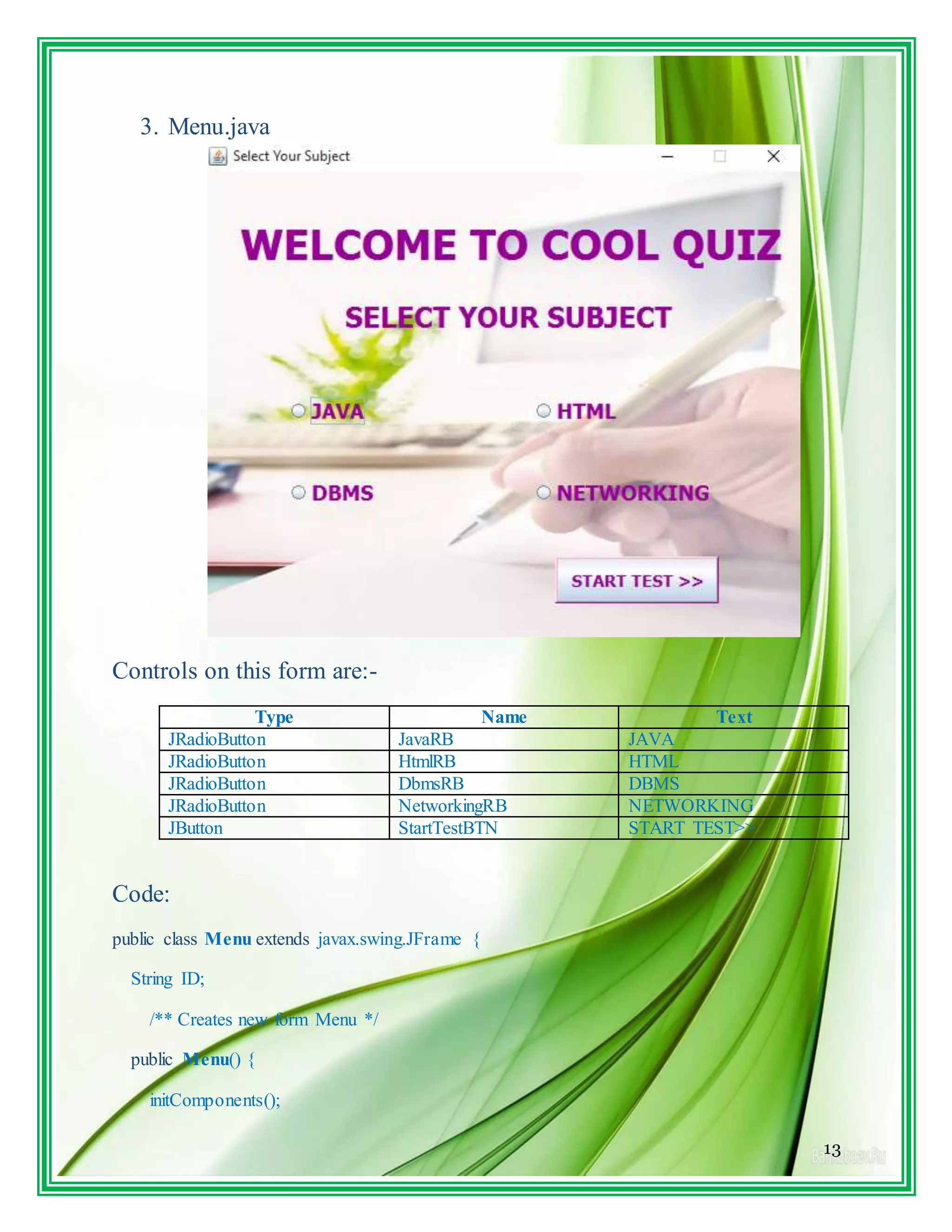
3. Menu.java
Controls on this form are:-
Type Name Text
JRadioButton JavaRB JAVA
JRadioButton HtmlRB HTML
JRadioButton DbmsRB DBMS
JRadioButton NetworkingRB NETWORKING
JButton StartTestBTN START TEST>>
Code:
public class Menu extends javax.swing.JFrame {
String ID;
/** Creates new form Menu */
public Menu() {
initComponents();
14
}
public Menu(String id) {
initComponents();
ID = id;
}
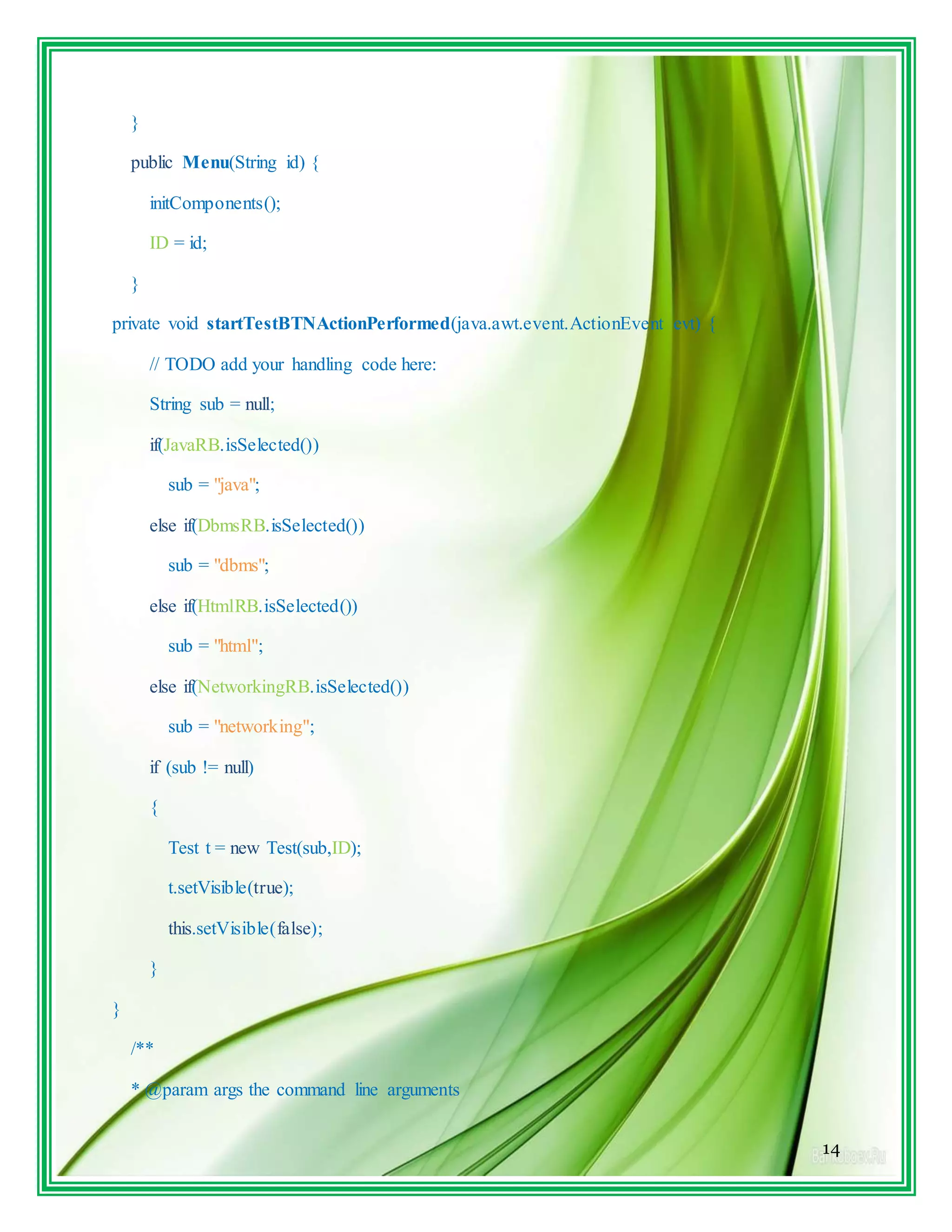
private void startTestBTNActionPerformed(java.awt.event.ActionEvent evt) {
// TODO add your handling code here:
String sub = null;
if(JavaRB.isSelected())
sub = "java";
else if(DbmsRB.isSelected())
sub = "dbms";
else if(HtmlRB.isSelected())
sub = "html";
else if(NetworkingRB.isSelected())
sub = "networking";
if (sub != null)
{
Test t = new Test(sub,ID);
t.setVisible(true);
this.setVisible(false);
}
}
/**
* @param args the command line arguments
15
*/
public static void main(String args[]) {
java.awt.EventQueue.invokeLater(new Runnable() {
public void run() {
new Menu().setVisible(true);
}
});
}
4. Test.java
16
Controls on this form are:-
Type Name Text
JButton NextBTN Next >>
JButton PrevBTN << Prev
JTextArea QuesTA
JButton ResultBTN GET RESULT
JRadioButton a
JRadioButton b
JRadioButton c
JRadioButton d
Code:
import java.sql.*;
import javax.swing.JOptionPane;
public class Test extends javax.swing.JFrame {
String ID;
String Subject;
int index =1;
int max =0;
int result = 0;
char [] answers;
/** Creates new form Test */
public Test()
{
initComponents();
}
public Test(String subject, String id)
{
17
initComponents();
ID = id;
Subject = subject;
PrevBTN.setVisible(false);
try
{
/* Class.forName("sun.jdbc.odbc.JdbcOdbcDriver");
String database ="jdbc:odbc:Driver={Microsoft Access
Driver(*.mdb)};DBQ=ELearning.mdb;";
Connection conn = DriverManager.getConnection(database, "", "");
Statement stmt = conn.createStatement(); */
Class.forName("java.sql.Driver");
String database = "jdbc:mysql://localhost:3306/quizdb";
Connection conn = DriverManager.getConnection(database, "root", "pace");
Statement stmt = conn.createStatement();
String sql = "select max(SNo) from " + Subject;
ResultSet rs = stmt.executeQuery(sql);
rs.next();
max = rs.getInt(1);
answers = new char[max];
for(int i=0; i<max;i++)
answers[i] = 'e';
rs.close();
stmt.close();
conn.close();
18
getQues();
}
catch(Exception e){ JOptionPane.showMessageDialog(null,""+ e);
}
}
private void getQues()
{
try
{Class.forName("java.sql.Driver");
String database = "jdbc:mysql://localhost:3306/quizdb";
Connection conn = DriverManager.getConnection(database, "root", "pace");
Statement stmt = conn.createStatement();
String sql = "select * from " + Subject + " where SNo = " + index;
ResultSet rs = stmt.executeQuery(sql);
rs.next();
QuesTA.setText("nQ" + index + ". " + rs.getString(2));
a.setText(rs.getString("a"));
b.setText(rs.getString("b"));
c.setText(rs.getString("c"));
d.setText(rs.getString("d"));
a.setSelected(answers[index-1] == 'a');
b.setSelected(answers[index-1] == 'b');
c.setSelected(answers[index-1] == 'c');
d.setSelected(answers[index-1] == 'd');
19
e.setSelected(answers[index-1] == 'e');
rs.close();
stmt.close();
conn.close();
}
catch(Exception e){ JOptionPane.showMessageDialog(null,""+ e); }
}
}
5. Result.java
20
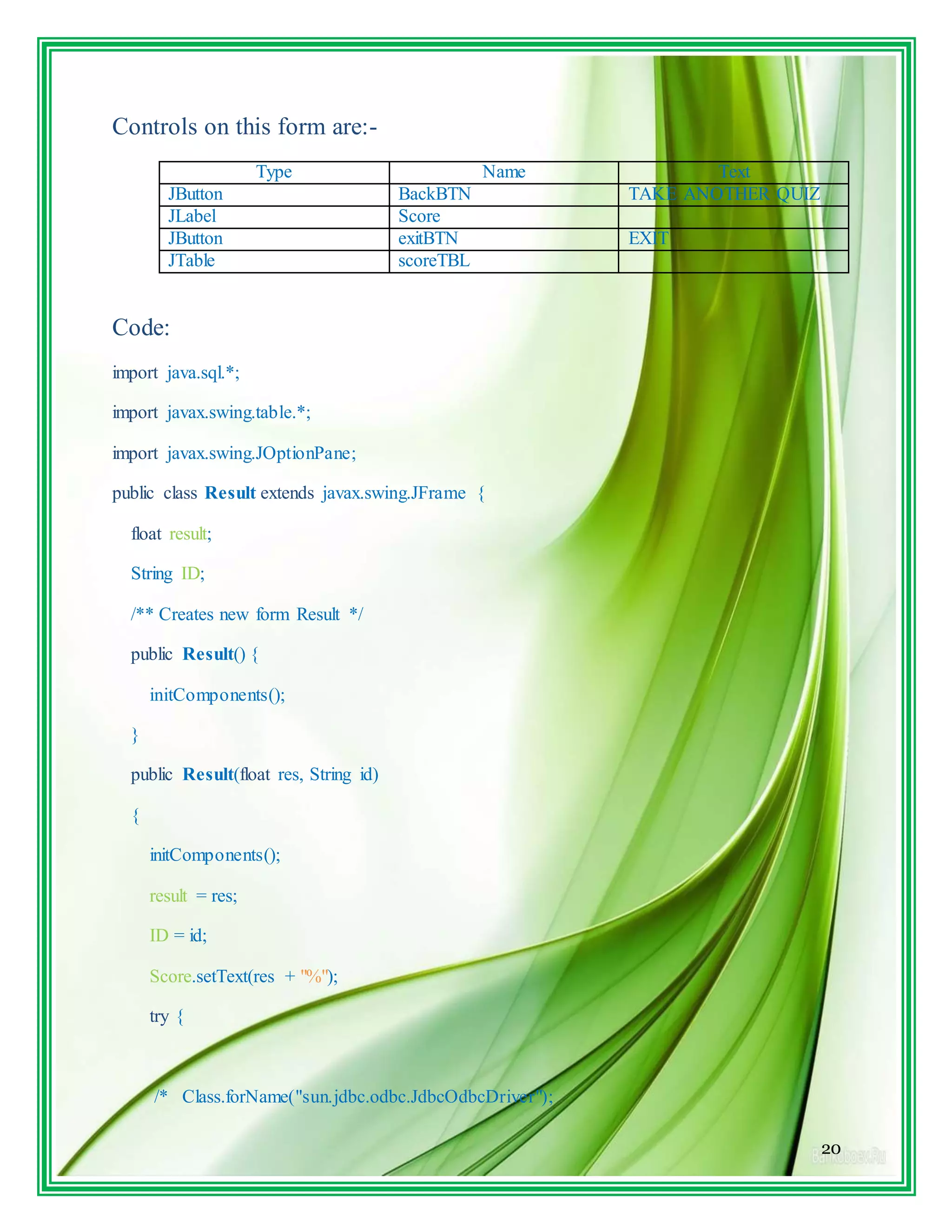
Controls on this form are:-
Type Name Text
JButton BackBTN TAKE ANOTHER QUIZ
JLabel Score
JButton exitBTN EXIT
JTable scoreTBL
Code:
import java.sql.*;
import javax.swing.table.*;
import javax.swing.JOptionPane;
public class Result extends javax.swing.JFrame {
float result;
String ID;
/** Creates new form Result */
public Result() {
initComponents();
}
public Result(float res, String id)
{
initComponents();
result = res;
ID = id;
Score.setText(res + "%");
try {
/* Class.forName("sun.jdbc.odbc.JdbcOdbcDriver");
21
String database = "jdbc:odbc:Driver={Microsoft Access
Driver(*.mdb)};DBQ=ELearning.mdb;";
Connection conn = DriverManager.getConnection(database, "", "");
Statement stmt = conn.createStatement(); */
Class.forName("java.sql.Driver");
String database = "jdbc:mysql://localhost:3306/quizdb";
Connection conn = DriverManager.getConnection(database, "root", "pace");
Statement stmt = conn.createStatement();
String sql = "select * from Result where ID = '" + ID + "'";
ResultSet rs = stmt.executeQuery(sql);
Object[] newrow = new Object[5];
newrow[0] = "MAX MARKS";
rs.next();
for(int i=1; i<=4;i++)
newrow[i] = rs.getString(i+1);
DefaultTableModel tm = (DefaultTableModel)scoreTBL.getModel();
tm.addRow(newrow);
}
catch (Exception e) { JOptionPane.showMessageDialog(null,"" + e);
}
}
private void BackBTNActionPerformed(java.awt.event.ActionEvent evt) {
new Menu(ID).setVisible(true);
this.setVisible(false);
22
}
private void exitBTNActionPerformed(java.awt.event.ActionEvent evt) {
this.dispose();
}
/**
* @param args the command line arguments
*/
public static void main(String args[]) {
java.awt.EventQueue.invokeLater(new Runnable() {
public void run() {
new Result().setVisible(true);
}
});
}
23
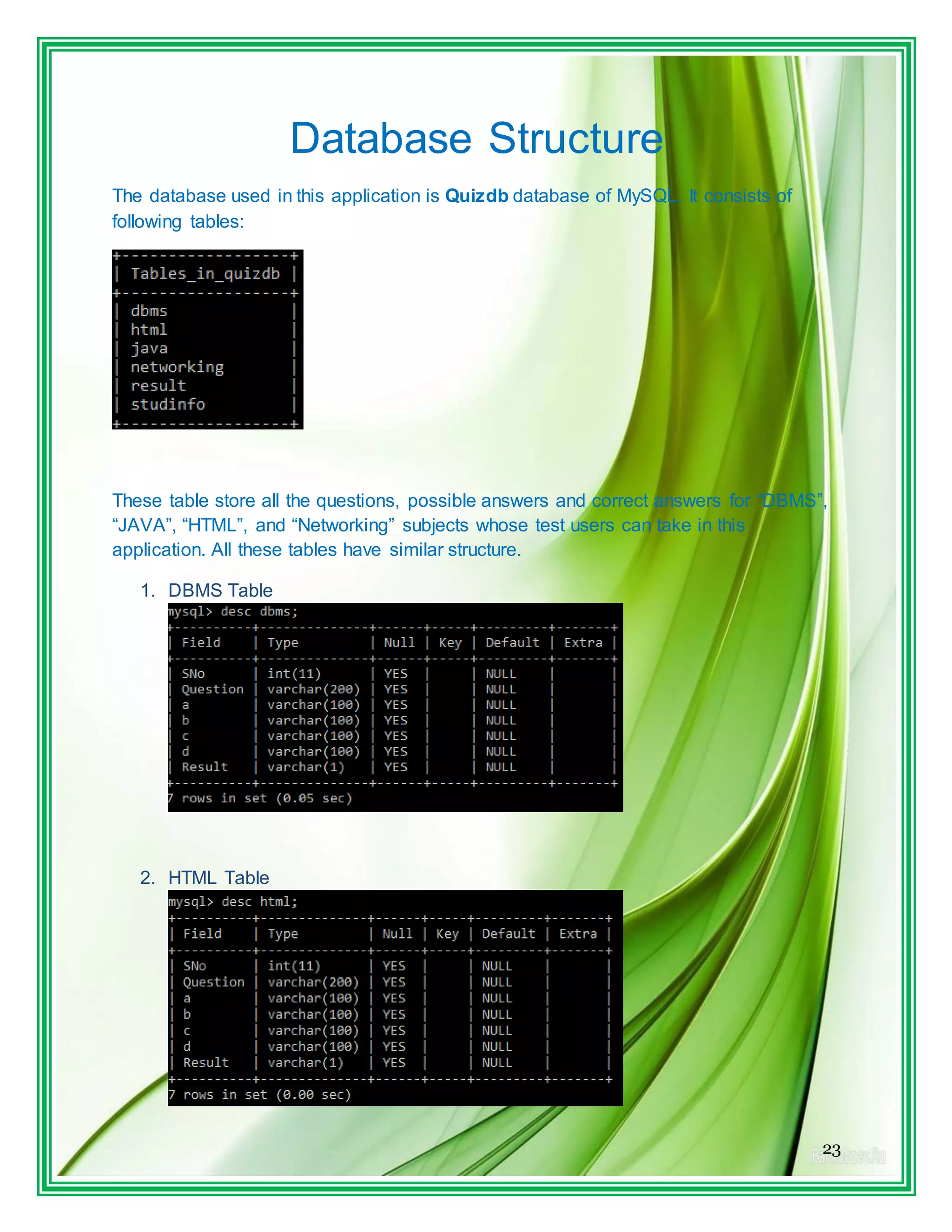
Database Structure
The database used in this application is Quizdb database of MySQL. It consists of
following tables:
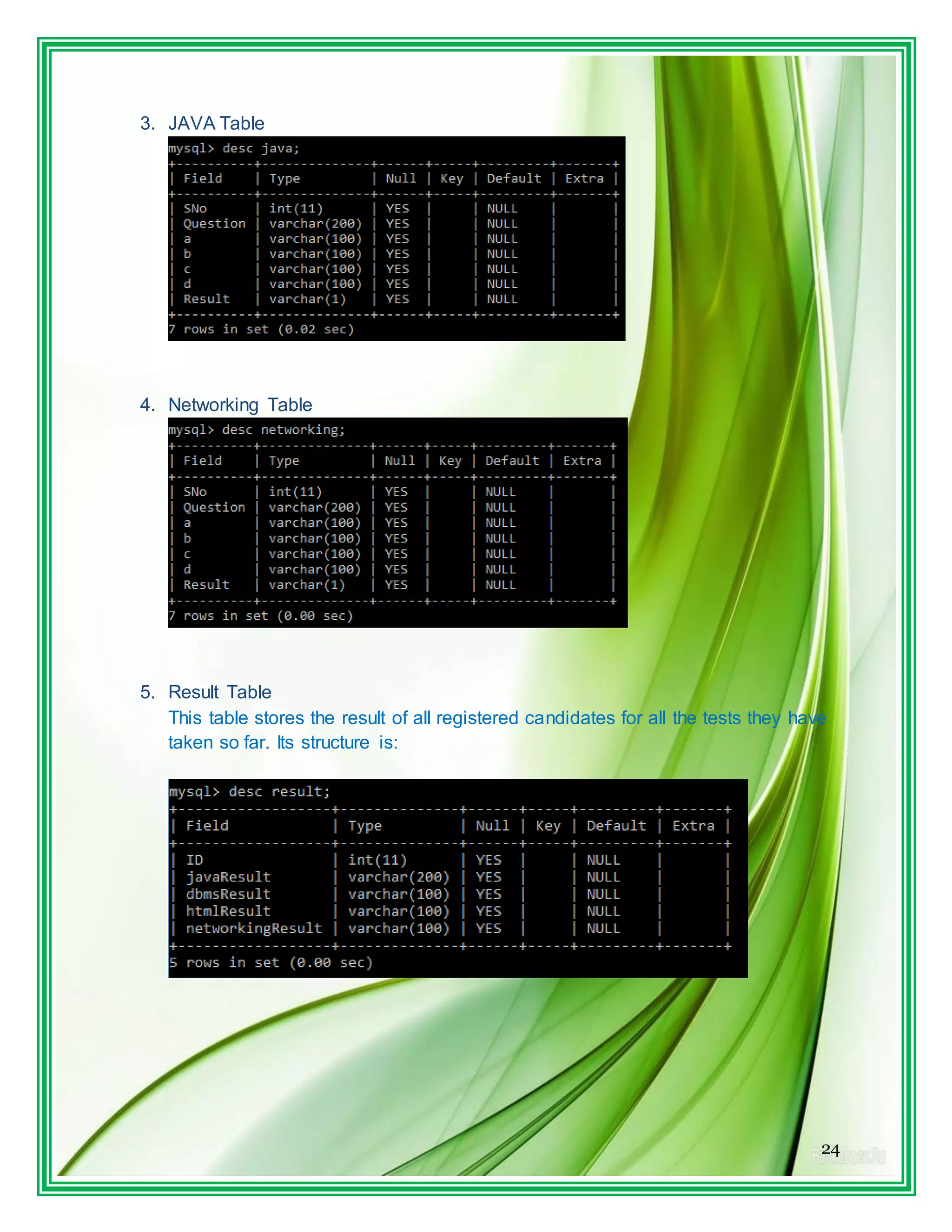
These table store all the questions, possible answers and correct answers for “DBMS”,
“JAVA”, “HTML”, and “Networking” subjects whose test users can take in this
application. All these tables have similar structure.
1. DBMS Table
2. HTML Table
24
3. JAVA Table
4. Networking Table
5. Result Table
This table stores the result of all registered candidates for all the tests they have
taken so far. Its structure is:
25
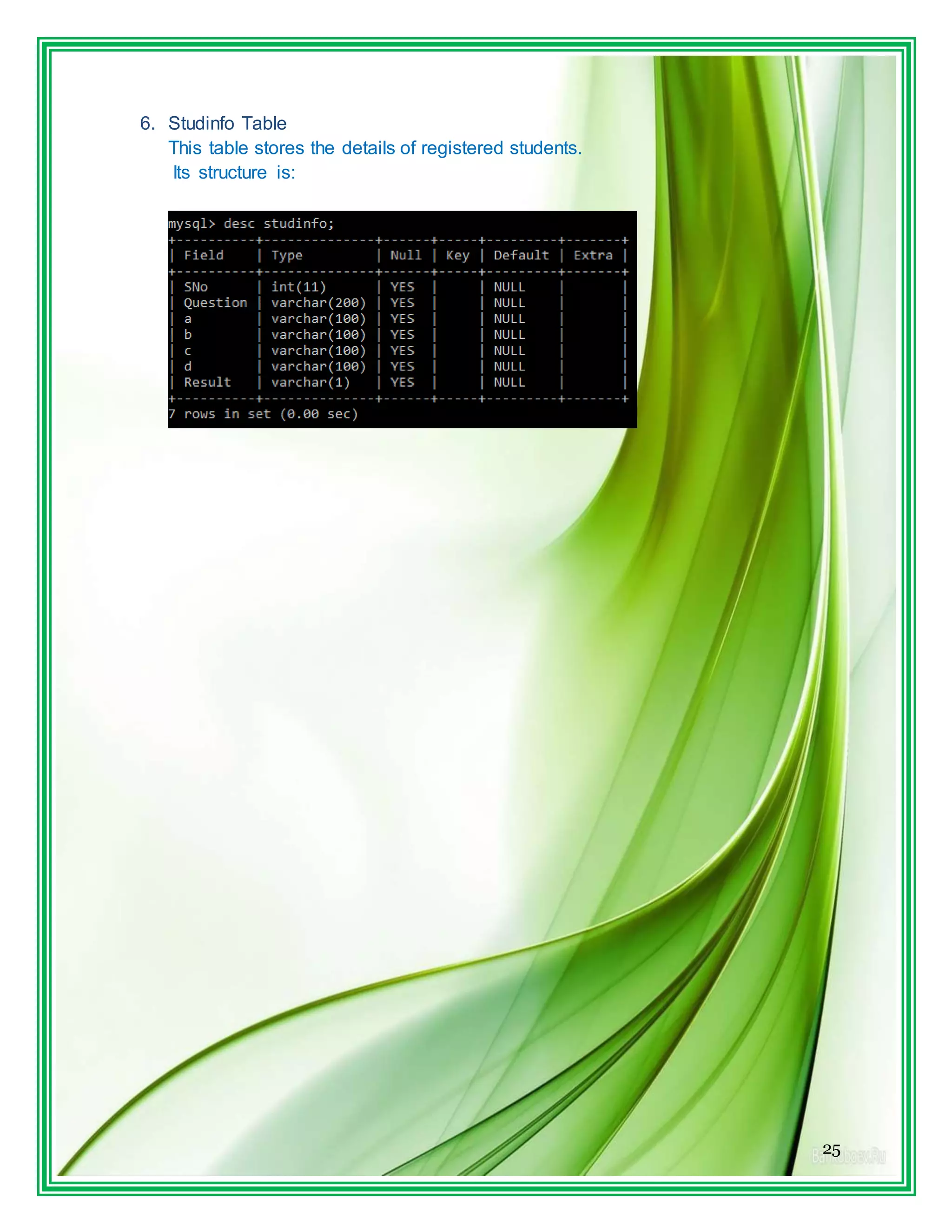
6. Studinfo Table
This table stores the details of registered students.
Its structure is:
26
BIBLIOGRAPHY
Informatics Practices +2 : SUMITA ARORA, RACHNA SAGAR
Informatics Practices +1 : SUMITA ARORA, RACHNA SAGAR
Programing in JAVA Net Beans : E.BALA GURUSWAMI
27

Ip project work test your knowledge

  • 1.
    1 Acknowledgement First of all,I extend my heartiest gratitude to my teacher MR. ARUMUGAM GOUNDER under whose utmost guidance this work could take the recent shape . “Turning aspiration change into reality is easier, when quality people are supportive to our efforts.” And among such persons are my parents, whom I deeply in debt for the positive feedback, contribution, unfailing step and ungrudging help at every step of this project. I wish to express my deep gratitude and sincere thanks to Principal, MR. GAURAV DUBEY, DELHI PUBLIC SCHOOL, BIKANER for his encouragement and for all the facilities that he provided for this project work. I can’t forget to offer my sincere thanks to my CLASSMATES who helped me to carry out this project work successfully & for their valuable advice & support, which I received from them time to time. Name:- Kishore Choudhary Signature of examiner Teacher Signature Roll No…………….. Code…………… (PGT-Comp. Sci.)
  • 2.
    2 CERTIFICATE This is tocertify that the Project entitled, Test Your Knowledge(Database Connectivity) is a bonfire work done by KISHORE CHOUDHARY of class XII, Session 2015-2016 in partial fulfillment of CBSE’s AISSCE Examination 2016 and has been carried out under my direct supervision and guidance. This report or a similar report on the topic has not been submitted for any other examination and does not form a part of any other course undergone by the candidate. Principal Signature of Teacher Mr.GAURAV DUBEY ARUMUGAM PGT (Comp’s.)
  • 3.
    3 INDEX SNo. Particular Page No. Signature 1.Files Generated 4 2. Working Description of Project 5 3. Source code and Outputs 6 4. Database Structure 23 5. Bibliography 26
  • 4.
  • 5.
    5 WORKING DESCRIPTION OF PROJECT Thepurpose of this project is to provide a system that provides quizzes to test your knowledge on various topics. This project USES DATABASE CONNECTIVITY to store details of registered candidates, question and answers and the test-performance details in a MySQL database. Technology used  Frond End : Java Swing  Back End : MySQL
  • 6.
    6 SOURCE CODE 1. Login.java Controlson this form are:- Type Name Text JTextField ID JLabel InvalidLBL JPasswordField Password JButton loginBTN Log IN JLabel regLBL Not Yet a Member. Click here to register Code: import java.sql.*; public class LogIn extends javax.swing.JFrame {
  • 7.
    7 /** Creates newform LogIn */ public LogIn() { initComponents(); } private void loginBTNActionPerformed(java.awt.event.ActionEvent evt) { InvalidLBL.setText(""); String PWord = new String(Password.getPassword()); String Id = ID.getText(); String str = null; Statement stmt=null; ResultSet rs = null; try { /* Class.forName("sun.jdbc.odbc.JdbcOdbcDriver"); String database ="jdbc:odbc:Driver={Microsoft Access Driver (*.mdb)};DBQ=ELearning.mdb;"; Connection conn = DriverManager.getConnection(database, "", ""); */ Class.forName("java.sql.Driver"); String database = "jdbc:mysql://localhost:3306/quizdb"; Connection conn = DriverManager.getConnection(database, "root", "pace"); stmt = conn.createStatement(); stmt = conn.createStatement(); String sql = "select * from LogIn where ID = '" + Id + "'"; rs = stmt.executeQuery(sql);
  • 8.
    8 rs.next(); str = rs.getString("Password"); if(str.equals(PWord)) { Menum = new Menu(Id); m.setVisible(true); this.setVisible(false); } else { InvalidLBL.setText("Incorrect ID or Password"); } } catch (Exception e) { InvalidLBL.setText("Incorrect ID or Password");} } private void regLBLMouseClicked(java.awt.event.MouseEvent evt) { Register r = new Register(); r.setVisible(true); this.setVisible(false); } /** * @param args the command line arguments */ public static void main(String args[]) {
  • 9.
    9 java.awt.EventQueue.invokeLater(new Runnable() { publicvoid run() { new LogIn().setVisible(true); } }); } 2. Register.java
  • 10.
    10 Control on thisform are: Type Name Text JTextField AddressTF JTextField AgeTF JTextField CollegeTF JTextField DobTF JRadioButton FemaleRB JTextField IDTF JRadioBotton MaleRB JTextField NameTF JTextField PasswordTF JTextField UnivTF JButton RegisterTF REGISTER and START TEST Code: import java.sql.*; import javax.swing.JOptionPane; public class Registerextends javax.swing.JFrame { /** Creates new form Register */ public Register() { initComponents(); } private void RegisterTFActionPerformed(java.awt.event.ActionEvent evt) { try { int age = Integer.parseInt(AgeTF.getText()); char Gender = 'M'; if(FemaleRB.isSelected()) Gender = 'F';
  • 11.
    11 /* Class.forName("sun.jdbc.odbc.JdbcOdbcDriver"); String database = "jdbc:odbc:Driver={MicrosoftAccess Driver (*.mdb)};DBQ=ELearning.mdb;"; Connection conn = DriverManager.getConnection(database, "", ""); Statement stmt = conn.createStatement(); */ Class.forName("java.sql.Driver"); String database = "jdbc:mysql://localhost:3306/quizdb"; Connection conn = DriverManager.getConnection(database, "root", "pace"); Statement stmt = conn.createStatement(); String sql = "insert into StudInfo values ( '" + NameTF.getText() + "', " + age + ", '" + DobTF.getText() + "' , '" + Gender + "' , '" + AddressTF.getText() + "' , '" + CollegeTf.getText() + "' , '" + UnivTF.getText() + "' , '" + IDTF.getText() + "' )" ; stmt.executeUpdate(sql); sql = "insert into Result values ( '" + IDTF.getText() + "', 0 , 0 , 0 , 0)"; stmt.executeUpdate(sql); sql = "insert into LogIn values ( '" + IDTF.getText() + "' , '" + PasswordTf.getText() + "' )"; stmt.executeUpdate(sql); stmt.close(); conn.close(); new Menu(IDTF.getText()).setVisible(true); this.setVisible(false); }
  • 12.
    12 catch( Exception e) { JOptionPane.showMessageDialog(null,""+ e); } } private void AgeTFKeyTyped(java.awt.event.KeyEvent evt) { //char ch = evt.getKeyChar(); // String str = AgeTF.getText(); // if(!Character.isDigit(ch)) // AgeTF.setText(str.substring(0,str.length()-1)); } /** * @param args the command line arguments */ public static void main(String args[]) { java.awt.EventQueue.invokeLater(new Runnable() { public void run() { new Register().setVisible(true); } }); }
  • 13.
    13 3. Menu.java Controls onthis form are:- Type Name Text JRadioButton JavaRB JAVA JRadioButton HtmlRB HTML JRadioButton DbmsRB DBMS JRadioButton NetworkingRB NETWORKING JButton StartTestBTN START TEST>> Code: public class Menu extends javax.swing.JFrame { String ID; /** Creates new form Menu */ public Menu() { initComponents();
  • 14.
    14 } public Menu(String id){ initComponents(); ID = id; } private void startTestBTNActionPerformed(java.awt.event.ActionEvent evt) { // TODO add your handling code here: String sub = null; if(JavaRB.isSelected()) sub = "java"; else if(DbmsRB.isSelected()) sub = "dbms"; else if(HtmlRB.isSelected()) sub = "html"; else if(NetworkingRB.isSelected()) sub = "networking"; if (sub != null) { Test t = new Test(sub,ID); t.setVisible(true); this.setVisible(false); } } /** * @param args the command line arguments
  • 15.
    15 */ public static voidmain(String args[]) { java.awt.EventQueue.invokeLater(new Runnable() { public void run() { new Menu().setVisible(true); } }); } 4. Test.java
  • 16.
    16 Controls on thisform are:- Type Name Text JButton NextBTN Next >> JButton PrevBTN << Prev JTextArea QuesTA JButton ResultBTN GET RESULT JRadioButton a JRadioButton b JRadioButton c JRadioButton d Code: import java.sql.*; import javax.swing.JOptionPane; public class Test extends javax.swing.JFrame { String ID; String Subject; int index =1; int max =0; int result = 0; char [] answers; /** Creates new form Test */ public Test() { initComponents(); } public Test(String subject, String id) {
  • 17.
    17 initComponents(); ID = id; Subject= subject; PrevBTN.setVisible(false); try { /* Class.forName("sun.jdbc.odbc.JdbcOdbcDriver"); String database ="jdbc:odbc:Driver={Microsoft Access Driver(*.mdb)};DBQ=ELearning.mdb;"; Connection conn = DriverManager.getConnection(database, "", ""); Statement stmt = conn.createStatement(); */ Class.forName("java.sql.Driver"); String database = "jdbc:mysql://localhost:3306/quizdb"; Connection conn = DriverManager.getConnection(database, "root", "pace"); Statement stmt = conn.createStatement(); String sql = "select max(SNo) from " + Subject; ResultSet rs = stmt.executeQuery(sql); rs.next(); max = rs.getInt(1); answers = new char[max]; for(int i=0; i<max;i++) answers[i] = 'e'; rs.close(); stmt.close(); conn.close();
  • 18.
    18 getQues(); } catch(Exception e){ JOptionPane.showMessageDialog(null,""+e); } } private void getQues() { try {Class.forName("java.sql.Driver"); String database = "jdbc:mysql://localhost:3306/quizdb"; Connection conn = DriverManager.getConnection(database, "root", "pace"); Statement stmt = conn.createStatement(); String sql = "select * from " + Subject + " where SNo = " + index; ResultSet rs = stmt.executeQuery(sql); rs.next(); QuesTA.setText("nQ" + index + ". " + rs.getString(2)); a.setText(rs.getString("a")); b.setText(rs.getString("b")); c.setText(rs.getString("c")); d.setText(rs.getString("d")); a.setSelected(answers[index-1] == 'a'); b.setSelected(answers[index-1] == 'b'); c.setSelected(answers[index-1] == 'c'); d.setSelected(answers[index-1] == 'd');
  • 19.
    19 e.setSelected(answers[index-1] == 'e'); rs.close(); stmt.close(); conn.close(); } catch(Exceptione){ JOptionPane.showMessageDialog(null,""+ e); } } } 5. Result.java
  • 20.
    20 Controls on thisform are:- Type Name Text JButton BackBTN TAKE ANOTHER QUIZ JLabel Score JButton exitBTN EXIT JTable scoreTBL Code: import java.sql.*; import javax.swing.table.*; import javax.swing.JOptionPane; public class Result extends javax.swing.JFrame { float result; String ID; /** Creates new form Result */ public Result() { initComponents(); } public Result(float res, String id) { initComponents(); result = res; ID = id; Score.setText(res + "%"); try { /* Class.forName("sun.jdbc.odbc.JdbcOdbcDriver");
  • 21.
    21 String database ="jdbc:odbc:Driver={Microsoft Access Driver(*.mdb)};DBQ=ELearning.mdb;"; Connection conn = DriverManager.getConnection(database, "", ""); Statement stmt = conn.createStatement(); */ Class.forName("java.sql.Driver"); String database = "jdbc:mysql://localhost:3306/quizdb"; Connection conn = DriverManager.getConnection(database, "root", "pace"); Statement stmt = conn.createStatement(); String sql = "select * from Result where ID = '" + ID + "'"; ResultSet rs = stmt.executeQuery(sql); Object[] newrow = new Object[5]; newrow[0] = "MAX MARKS"; rs.next(); for(int i=1; i<=4;i++) newrow[i] = rs.getString(i+1); DefaultTableModel tm = (DefaultTableModel)scoreTBL.getModel(); tm.addRow(newrow); } catch (Exception e) { JOptionPane.showMessageDialog(null,"" + e); } } private void BackBTNActionPerformed(java.awt.event.ActionEvent evt) { new Menu(ID).setVisible(true); this.setVisible(false);
  • 22.
    22 } private void exitBTNActionPerformed(java.awt.event.ActionEventevt) { this.dispose(); } /** * @param args the command line arguments */ public static void main(String args[]) { java.awt.EventQueue.invokeLater(new Runnable() { public void run() { new Result().setVisible(true); } }); }
  • 23.
    23 Database Structure The databaseused in this application is Quizdb database of MySQL. It consists of following tables: These table store all the questions, possible answers and correct answers for “DBMS”, “JAVA”, “HTML”, and “Networking” subjects whose test users can take in this application. All these tables have similar structure. 1. DBMS Table 2. HTML Table
  • 24.
    24 3. JAVA Table 4.Networking Table 5. Result Table This table stores the result of all registered candidates for all the tests they have taken so far. Its structure is:
  • 25.
    25 6. Studinfo Table Thistable stores the details of registered students. Its structure is:
  • 26.
    26 BIBLIOGRAPHY Informatics Practices +2: SUMITA ARORA, RACHNA SAGAR Informatics Practices +1 : SUMITA ARORA, RACHNA SAGAR Programing in JAVA Net Beans : E.BALA GURUSWAMI
  • 27.