INVENTORY MANAGEMENT


              VB.NET

             AMALESH DEKA

             RAJEEV SHARAN

              ALOK LIEVENS

   DFT (BFT-APPAREL PRODUCTION/ SEM-07)

               December 2011


NATIONAL INSTITUTE OF FASHION TECHNOLOGY

               BANGALORE
NATIONAL INSTITUTE OF FASHION TECHNOLOGY

National Institute of Fashion Technology was set up in 1986 under the aegis of the Ministry
of Textiles, Government of India. It has emerged as the premier Institute of Design
Management and Technology. It offers various courses in textile and leather design,
technology, management and merchandising.


CONTRIBUTOR:

Amalesh Deka
Student of semester -07, Department Of Fashion Technology, NIFT

Rajeev Sharan
Student of semester -07, Department Of Fashion Technology, NIFT
Email: rajeevsharan007@gmail.com


Alok Lievens
Student of semester -07, Department Of Fashion Technology, NIFT


Ravi Kumar, Faculty-in-charge & Consultant
Department of Fashion & Textiles, NIFT
ACKNOWLEDGEMENTS

This report was prepared as a contribution to the ‘Product Analysis & Development’ End
Term Jury, and was supported with generous & valuable inputs from the Department Of
Fashion Technology, NIFT Bangalore. The authors express their gratitude for the insights
provided at various stages of this report by Mr. Ravi Kumar, Assistant Professor- TD &
Faculty In-Charge for the subject. The authors also express their gratitude & respect for
insights provided on compilation & contents by Mr. Vasant Kothari, RIC- NIFT Bangalore.
The authors also express their appreciation & gratitude for the academic support provided by
Mr. Arivoli N, assistant professor, and Ms Jonalee Bajpai, associate professor. The authors
also express their appreciation for the administrative support provided by Mr. G T Kumaran
and Chandrashekhar. Any and all errors are the sole responsibility of the authors.
FRONT VIEW- LOGIN PAGE:


CODE:

Public Class Form1


Private Sub Button1_Click(ByVal sender As System.Object, ByVal e As System.EventArgs)
Handles Button1.Click

    If TextBox1.Text = "rajeevsharan" Then

      If TextBox2.Text = "123456" Then

         Dim frm As New Form2

         frm.Show()

      Else

         Dim result As Integer

        result = MessageBox.Show("ENTERED WRONG PASSWORD!", "Message
Box", MessageBoxButtons.OKCancel, MessageBoxIcon.Information,
MessageBoxDefaultButton.Button1, MessageBoxOptions.DefaultDesktopOnly)
TextBox2.Clear()

      End If

    Else

      Dim a As Integer

      a = MessageBox.Show("ENTERED AN INVALID ID!", "Message Box",
MessageBoxButtons.OKCancel, MessageBoxIcon.Information,
MessageBoxDefaultButton.Button1, MessageBoxOptions.DefaultDesktopOnly)

      TextBox1.Clear()

      TextBox2.Clear()

    End If

  End Sub

End Class
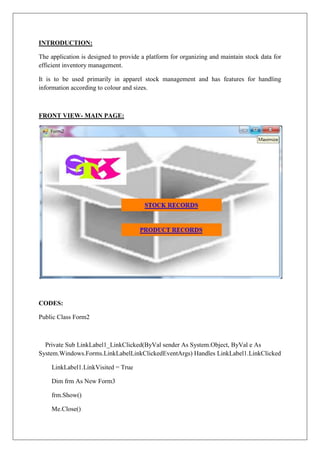
INTRODUCTION:

The application is designed to provide a platform for organizing and maintain stock data for
efficient inventory management.

It is to be used primarily in apparel stock management and has features for handling
information according to colour and sizes.


FRONT VIEW- MAIN PAGE:


CODES:

Public Class Form2


  Private Sub LinkLabel1_LinkClicked(ByVal sender As System.Object, ByVal e As
System.Windows.Forms.LinkLabelLinkClickedEventArgs) Handles LinkLabel1.LinkClicked

    LinkLabel1.LinkVisited = True

    Dim frm As New Form3

    frm.Show()

    Me.Close()
End Sub


  Private Sub LinkLabel2_LinkClicked(ByVal sender As System.Object, ByVal e As
System.Windows.Forms.LinkLabelLinkClickedEventArgs) Handles LinkLabel2.LinkClicked

    LinkLabel2.LinkVisited = True

    Dim frm As New Form7

    frm.Show()

    Me.Close()

  End Sub

End Class
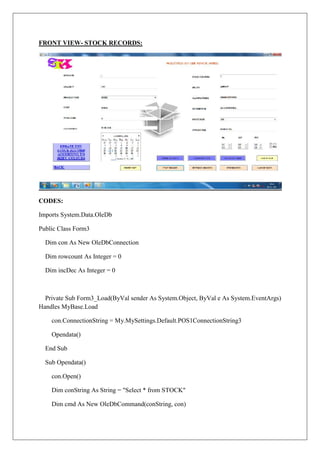
FRONT VIEW- STOCK RECORDS:


CODES:

Imports System.Data.OleDb

Public Class Form3

  Dim con As New OleDbConnection

  Dim rowcount As Integer = 0

  Dim incDec As Integer = 0


  Private Sub Form3_Load(ByVal sender As System.Object, ByVal e As System.EventArgs)
Handles MyBase.Load

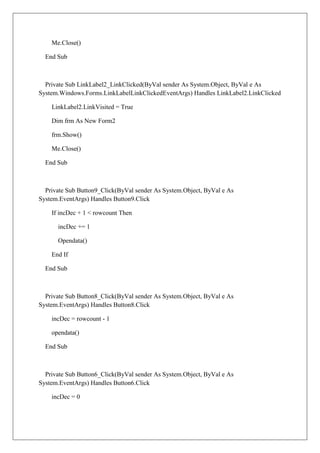
    con.ConnectionString = My.MySettings.Default.POS1ConnectionString3

    Opendata()

  End Sub

  Sub Opendata()

    con.Open()

    Dim conString As String = "Select * from STOCK"

    Dim cmd As New OleDbCommand(conString, con)
Dim adapter As New OleDbDataAdapter()

    adapter.SelectCommand = cmd

    Dim dataset As New DataSet()

    adapter.Fill(dataset)

    con.Close()


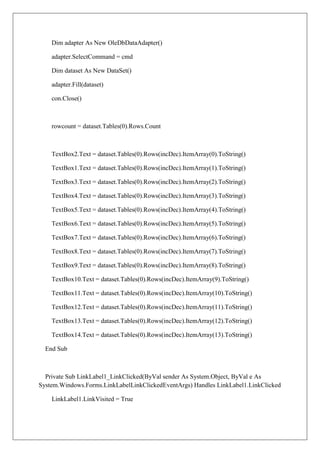
    rowcount = dataset.Tables(0).Rows.Count


    TextBox1.Text = dataset.Tables(0).Rows(incDec).ItemArray(0).ToString()

    TextBox2.Text = dataset.Tables(0).Rows(incDec).ItemArray(1).ToString()

    ComboBox2.SelectedItem = dataset.Tables(0).Rows(incDec).ItemArray(2).ToString()

    TextBox5.Text = dataset.Tables(0).Rows(incDec).ItemArray(3).ToString()

    TextBox12.Text = dataset.Tables(0).Rows(incDec).ItemArray(4).ToString()

    TextBox3.Text = dataset.Tables(0).Rows(incDec).ItemArray(5).ToString()

    TextBox4.Text = dataset.Tables(0).Rows(incDec).ItemArray(6).ToString()

    TextBox7.Text = dataset.Tables(0).Rows(incDec).ItemArray(7).ToString()

    ComboBox1.SelectedItem = dataset.Tables(0).Rows(incDec).ItemArray(8).ToString()

    TextBox9.Text = dataset.Tables(0).Rows(incDec).ItemArray(9).ToString()

    TextBox10.Text = dataset.Tables(0).Rows(incDec).ItemArray(10).ToString()

    TextBox8.Text = dataset.Tables(0).Rows(incDec).ItemArray(11).ToString()

  End Sub


  Private Sub LinkLabel1_LinkClicked(ByVal sender As System.Object, ByVal e As
System.Windows.Forms.LinkLabelLinkClickedEventArgs) Handles LinkLabel1.LinkClicked

    LinkLabel1.LinkVisited = True

    Dim frm As New Form4

    frm.Show()
Me.Close()

  End Sub


  Private Sub LinkLabel2_LinkClicked(ByVal sender As System.Object, ByVal e As
System.Windows.Forms.LinkLabelLinkClickedEventArgs) Handles LinkLabel2.LinkClicked

    LinkLabel2.LinkVisited = True

    Dim frm As New Form2

    frm.Show()

    Me.Close()

  End Sub


  Private Sub Button9_Click(ByVal sender As System.Object, ByVal e As
System.EventArgs) Handles Button9.Click

    If incDec + 1 < rowcount Then

      incDec += 1

      Opendata()

    End If

  End Sub


  Private Sub Button8_Click(ByVal sender As System.Object, ByVal e As
System.EventArgs) Handles Button8.Click

    incDec = rowcount - 1

    opendata()

  End Sub


  Private Sub Button6_Click(ByVal sender As System.Object, ByVal e As
System.EventArgs) Handles Button6.Click

    incDec = 0
Opendata()

  End Sub


  Private Sub Button7_Click(ByVal sender As System.Object, ByVal e As
System.EventArgs) Handles Button7.Click

    If incDec + 1 <> 1 Then

      incDec -= 1

      Opendata()

    End If

  End Sub


  Private Sub Button10_Click(ByVal sender As System.Object, ByVal e As
System.EventArgs) Handles Button10.Click

    con.Open()

    Dim cmd2 As New OleDbCommand()

    cmd2 = con.CreateCommand()

      cmd2.CommandText = "INSERT INTO STOCK ([STCK_SR], [QTY],
[PRODUCT_TYPE], [INWARD_DATE], [INWARD_TIME], [COST], [TOT_SIZE],
[TOT_COLOUR], [ROUTE_TYPE], [MANUFACTURER], [DISTRIBUTOR], [BRAND])
VALUES ('" & TextBox1.Text & "', '" & TextBox2.Text & "', '" & ComboBox2.SelectedItem
& "', '" & TextBox5.Text & "', '" & TextBox12.Text & "', '" & TextBox3.Text & "', '" &
TextBox4.Text & "', '" & TextBox7.Text & "', '" & ComboBox1.SelectedItem & "', '" &
TextBox9.Text & "', '" & TextBox10.Text & "', '" & TextBox8.Text & "')"

    cmd2.ExecuteNonQuery()

    Dim a = MessageBox.Show("SUCCESSFUL INSERTION!", "Message Box",
MessageBoxButtons.OKCancel, MessageBoxIcon.Information,
MessageBoxDefaultButton.Button1, MessageBoxOptions.DefaultDesktopOnly)

    con.Close()

    rowcount += 1

    incDec = rowcount - 1
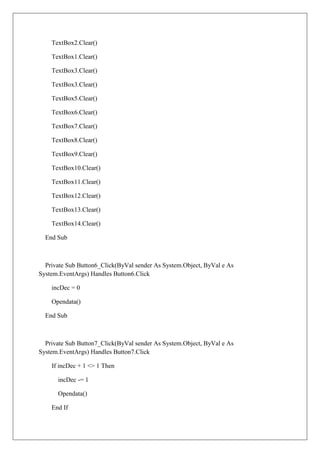
TextBox1.Clear()

    TextBox2.Clear()

    TextBox3.Clear()

    TextBox4.Clear()

    TextBox5.Clear()

    TextBox7.Clear()

    TextBox8.Clear()

    TextBox9.Clear()

    TextBox10.Clear()

    TextBox12.Clear()

    ComboBox1.SelectedItem = Nothing

    ComboBox2.SelectedItem = Nothing

  End Sub


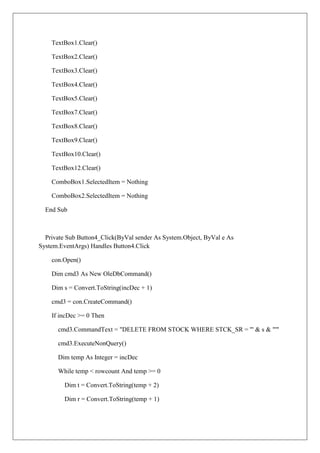
  Private Sub Button4_Click(ByVal sender As System.Object, ByVal e As
System.EventArgs) Handles Button4.Click

    con.Open()

    Dim cmd3 As New OleDbCommand()

    Dim s = Convert.ToString(incDec + 1)

    cmd3 = con.CreateCommand()

    If incDec >= 0 Then

      cmd3.CommandText = "DELETE FROM STOCK WHERE STCK_SR = '" & s & "'"

      cmd3.ExecuteNonQuery()

      Dim temp As Integer = incDec

      While temp < rowcount And temp >= 0

         Dim t = Convert.ToString(temp + 2)

         Dim r = Convert.ToString(temp + 1)
cmd3.CommandText = "Update STOCK Set STCK_SR = '" & r & "' Where
STCK_SR= '" & t & "'"

         cmd3.ExecuteNonQuery()

         temp += 1

      End While

      rowcount -= 1

      'incDec -= 1

    End If

    Dim b = MessageBox.Show("RECORD HAS BEEN DELETED!", "Message Box",
MessageBoxButtons.OKCancel, MessageBoxIcon.Information,
MessageBoxDefaultButton.Button1, MessageBoxOptions.DefaultDesktopOnly)

    con.Close()

    Opendata()

  End Sub


  Private Sub Button5_Click(ByVal sender As System.Object, ByVal e As
System.EventArgs) Handles Button5.Click

    con.Open()

    Dim cmd3 As New OleDbCommand()

    cmd3 = con.CreateCommand()

    Dim u = Convert.ToString(incDec + 1)

      cmd3.CommandText = "UPDATE STOCK SET [QTY] = '" & TextBox2.Text & "',
[PRODUCT_TYPE] = '" & ComboBox2.SelectedItem & "', [COST] = '" & TextBox3.Text &
"', [TOT_SIZE] = '" & TextBox4.Text & "', [INWARD_DATE] = '" & TextBox5.Text & "',
[TOT_COLOUR] = '" & TextBox7.Text & "', [BRAND] = '" & TextBox8.Text & "',
[MANUFACTURER] = '" & TextBox9.Text & "', [DISTRIBUTOR] = '" & TextBox10.Text
& "', [INWARD_TIME] = '" & TextBox12.Text & "', [ROUTE_TYPE] = '" &
ComboBox1.SelectedItem & "' where [STCK_SR] = '" & u & "'"

    cmd3.ExecuteNonQuery()

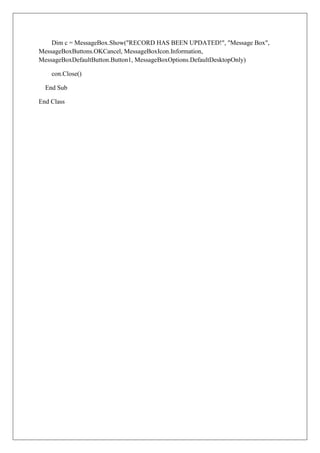
    Dim c = MessageBox.Show("RECORD HAS BEEN UPDATED!", "Message Box",
MessageBoxButtons.OKCancel, MessageBoxIcon.Information,
MessageBoxDefaultButton.Button1, MessageBoxOptions.DefaultDesktopOnly)
con.Close()


  End Sub


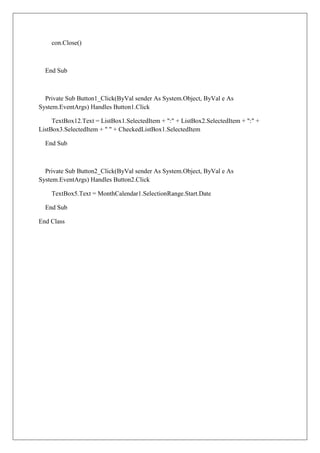
  Private Sub Button1_Click(ByVal sender As System.Object, ByVal e As
System.EventArgs) Handles Button1.Click

     TextBox12.Text = ListBox1.SelectedItem + ":" + ListBox2.SelectedItem + ":" +
ListBox3.SelectedItem + " " + CheckedListBox1.SelectedItem

  End Sub


  Private Sub Button2_Click(ByVal sender As System.Object, ByVal e As
System.EventArgs) Handles Button2.Click

    TextBox5.Text = MonthCalendar1.SelectionRange.Start.Date

  End Sub

End Class
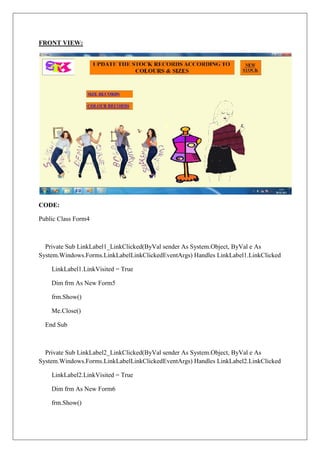
FRONT VIEW:


CODE:

Public Class Form4


  Private Sub LinkLabel1_LinkClicked(ByVal sender As System.Object, ByVal e As
System.Windows.Forms.LinkLabelLinkClickedEventArgs) Handles LinkLabel1.LinkClicked

    LinkLabel1.LinkVisited = True

    Dim frm As New Form5

    frm.Show()

    Me.Close()

  End Sub


  Private Sub LinkLabel2_LinkClicked(ByVal sender As System.Object, ByVal e As
System.Windows.Forms.LinkLabelLinkClickedEventArgs) Handles LinkLabel2.LinkClicked

    LinkLabel2.LinkVisited = True

    Dim frm As New Form6

    frm.Show()
Me.Close()

  End Sub


  Private Sub LinkLabel3_LinkClicked(ByVal sender As System.Object, ByVal e As
System.Windows.Forms.LinkLabelLinkClickedEventArgs) Handles LinkLabel3.LinkClicked

    LinkLabel3.LinkVisited = True

    Form3.Show()

    Me.Close()

  End Sub

End Class
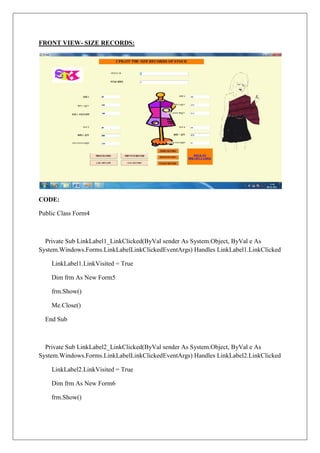
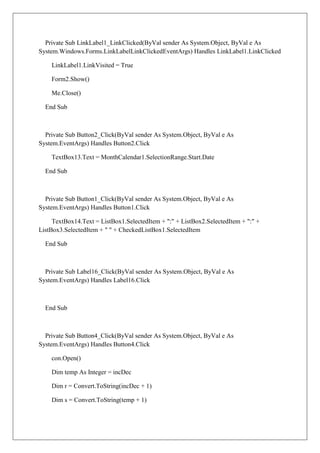
FRONT VIEW- SIZE RECORDS:


CODE:

Public Class Form4


  Private Sub LinkLabel1_LinkClicked(ByVal sender As System.Object, ByVal e As
System.Windows.Forms.LinkLabelLinkClickedEventArgs) Handles LinkLabel1.LinkClicked

    LinkLabel1.LinkVisited = True

    Dim frm As New Form5

    frm.Show()

    Me.Close()

  End Sub


  Private Sub LinkLabel2_LinkClicked(ByVal sender As System.Object, ByVal e As
System.Windows.Forms.LinkLabelLinkClickedEventArgs) Handles LinkLabel2.LinkClicked

    LinkLabel2.LinkVisited = True

    Dim frm As New Form6

    frm.Show()
Me.Close()

  End Sub


  Private Sub LinkLabel3_LinkClicked(ByVal sender As System.Object, ByVal e As
System.Windows.Forms.LinkLabelLinkClickedEventArgs) Handles LinkLabel3.LinkClicked

    LinkLabel3.LinkVisited = True

    Form3.Show()

    Me.Close()

  End Sub

End Class
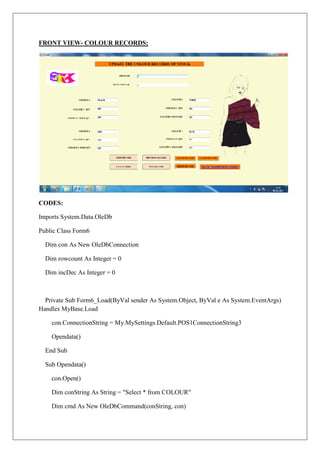
FRONT VIEW- COLOUR RECORDS:


CODES:

Imports System.Data.OleDb

Public Class Form6

  Dim con As New OleDbConnection

  Dim rowcount As Integer = 0

  Dim incDec As Integer = 0


  Private Sub Form6_Load(ByVal sender As System.Object, ByVal e As System.EventArgs)
Handles MyBase.Load

    con.ConnectionString = My.MySettings.Default.POS1ConnectionString3

    Opendata()

  End Sub

  Sub Opendata()

    con.Open()

    Dim conString As String = "Select * from COLOUR"

    Dim cmd As New OleDbCommand(conString, con)
Dim adapter As New OleDbDataAdapter()

    adapter.SelectCommand = cmd

    Dim dataset As New DataSet()

    adapter.Fill(dataset)

    con.Close()


    rowcount = dataset.Tables(0).Rows.Count


    TextBox2.Text = dataset.Tables(0).Rows(incDec).ItemArray(0).ToString()

    TextBox1.Text = dataset.Tables(0).Rows(incDec).ItemArray(1).ToString()

    TextBox3.Text = dataset.Tables(0).Rows(incDec).ItemArray(2).ToString()

    TextBox4.Text = dataset.Tables(0).Rows(incDec).ItemArray(3).ToString()

    TextBox5.Text = dataset.Tables(0).Rows(incDec).ItemArray(4).ToString()

    TextBox6.Text = dataset.Tables(0).Rows(incDec).ItemArray(5).ToString()

    TextBox7.Text = dataset.Tables(0).Rows(incDec).ItemArray(6).ToString()

    TextBox8.Text = dataset.Tables(0).Rows(incDec).ItemArray(7).ToString()

    TextBox9.Text = dataset.Tables(0).Rows(incDec).ItemArray(8).ToString()

    TextBox10.Text = dataset.Tables(0).Rows(incDec).ItemArray(9).ToString()

    TextBox11.Text = dataset.Tables(0).Rows(incDec).ItemArray(10).ToString()

    TextBox12.Text = dataset.Tables(0).Rows(incDec).ItemArray(11).ToString()

    TextBox13.Text = dataset.Tables(0).Rows(incDec).ItemArray(12).ToString()

    TextBox14.Text = dataset.Tables(0).Rows(incDec).ItemArray(13).ToString()

  End Sub


  Private Sub LinkLabel1_LinkClicked(ByVal sender As System.Object, ByVal e As
System.Windows.Forms.LinkLabelLinkClickedEventArgs) Handles LinkLabel1.LinkClicked

    LinkLabel1.LinkVisited = True
Form4.Show()

        Me.Close()

      End Sub


  Private Sub Label2_Click(ByVal sender As System.Object, ByVal e As
System.EventArgs) Handles Label2.Click


      End Sub


  Private Sub Button4_Click(ByVal sender As System.Object, ByVal e As
System.EventArgs) Handles Button4.Click

        con.Open()

        Dim temp As Integer = incDec

        Dim r = Convert.ToString(incDec + 1)

        Dim s = Convert.ToString(temp + 1)

        Dim t = Convert.ToString(temp + 2)

        Dim cmd3 As New OleDbCommand()

        cmd3 = con.CreateCommand()

        If incDec >= 0 Then

          cmd3.CommandText = "DELETE FROM COLOUR WHERE STCK_SR = '" & r &
"'"

          cmd3.ExecuteNonQuery()

          While temp < rowcount And temp >= 0

       cmd3.CommandText = "Update COLOUR Set STCK_SR= '" & s & "' Where
STCK_SR= '" & t & "'"

            cmd3.ExecuteNonQuery()

            temp += 1

          End While
rowcount -= 1

       'incDec -= 1

    End If

    Dim a = MessageBox.Show("RECORD HAS BEEN DELETED!", "Message Box",
MessageBoxButtons.OKCancel, MessageBoxIcon.Information,
MessageBoxDefaultButton.Button1, MessageBoxOptions.DefaultDesktopOnly)

    con.Close()

    Opendata()

  End Sub


  Private Sub Button3_Click(ByVal sender As System.Object, ByVal e As
System.EventArgs) Handles Button3.Click

    con.Open()

    Dim cmd2 As New OleDbCommand()

    cmd2 = con.CreateCommand()

      cmd2.CommandText = "INSERT INTO COLOUR ([STCK_SR],
[TOTAL_COLOURS], [COLOUR1], [COLOUR1_QTY], [COLOUR1_SQTY],
[COLOUR2], [COLOUR2_QTY], [COLOUR2_SQTY], [COLOUR3], [COLOUR3_QTY],
[COLOUR3_SQTY], [COLOUR4], [COLOUR4_QTY], [COLOUR4_SQTY]) VALUES ('"
& TextBox2.Text & "', '" & TextBox1.Text & "', '" & TextBox3.Text & "', '" &
TextBox4.Text & "', '" & TextBox5.Text & "', '" & TextBox6.Text & "', '" & TextBox7.Text
& "', '" & TextBox8.Text & "', '" & TextBox9.Text & "', '" & TextBox10.Text & "', '" &
TextBox11.Text & "', '" & TextBox12.Text & "', '" & TextBox13.Text & "', '" &
TextBox14.Text & "')"

    cmd2.ExecuteNonQuery()

    Dim b = MessageBox.Show("SUCCESSFUL INSERTION!", "Message Box",
MessageBoxButtons.OKCancel, MessageBoxIcon.Information,
MessageBoxDefaultButton.Button1, MessageBoxOptions.DefaultDesktopOnly)

    con.Close()

    rowcount += 1

    incDec = rowcount - 1
TextBox2.Clear()

    TextBox1.Clear()

    TextBox3.Clear()

    TextBox3.Clear()

    TextBox5.Clear()

    TextBox6.Clear()

    TextBox7.Clear()

    TextBox8.Clear()

    TextBox9.Clear()

    TextBox10.Clear()

    TextBox11.Clear()

    TextBox12.Clear()

    TextBox13.Clear()

    TextBox14.Clear()

  End Sub


  Private Sub Button6_Click(ByVal sender As System.Object, ByVal e As
System.EventArgs) Handles Button6.Click

    incDec = 0

    Opendata()

  End Sub


  Private Sub Button7_Click(ByVal sender As System.Object, ByVal e As
System.EventArgs) Handles Button7.Click

    If incDec + 1 <> 1 Then

      incDec -= 1

      Opendata()

    End If
End Sub


  Private Sub Button9_Click(ByVal sender As System.Object, ByVal e As
System.EventArgs) Handles Button9.Click

    If incDec + 1 < rowcount Then

      incDec += 1

      Opendata()

    End If

  End Sub


  Private Sub Button8_Click(ByVal sender As System.Object, ByVal e As
System.EventArgs) Handles Button8.Click

    incDec = rowcount - 1

    Opendata()

  End Sub


  Private Sub Button1_Click(ByVal sender As System.Object, ByVal e As
System.EventArgs) Handles Button1.Click

    con.Open()

    Dim cmd3 As New OleDbCommand()

    cmd3 = con.CreateCommand()

    Dim u = Convert.ToString(incDec + 1)

     cmd3.CommandText = "UPDATE COLOUR SET [TOTAL_COLOURS]= '" &
TextBox1.Text & "', [COLOUR1]= '" & TextBox3.Text & "', [COLOUR1_QTY]= '" &
TextBox4.Text & "', [COLOUR1_SQTY]= '" & TextBox5.Text & "', [COLOUR2]= '" &
TextBox6.Text & "', [COLOUR2_QTY]= '" & TextBox7.Text & "', [COLOUR2_SQTY]= '"
& TextBox8.Text & "', [COLOUR3]= '" & TextBox9.Text & "', [COLOUR3_QTY]= '" &
TextBox10.Text & "', [COLOUR3_SQTY]= '" & TextBox11.Text & "', [COLOUR4]= '" &
TextBox12.Text & "', [COLOUR4_QTY]= '" & TextBox13.Text & "', [COLOUR4_SQTY]=
'" & TextBox14.Text & "' where [STCK_SR] = '" & u & "'"

    cmd3.ExecuteNonQuery()
Dim c = MessageBox.Show("RECORD HAS BEEN UPDATED!", "Message Box",
MessageBoxButtons.OKCancel, MessageBoxIcon.Information,
MessageBoxDefaultButton.Button1, MessageBoxOptions.DefaultDesktopOnly)

    con.Close()

  End Sub

End Class
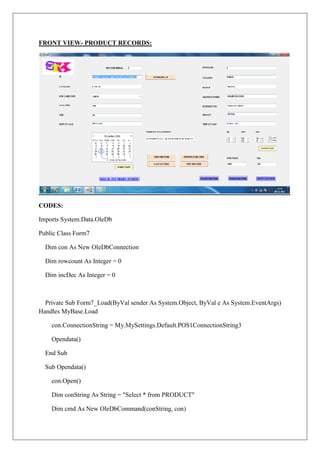
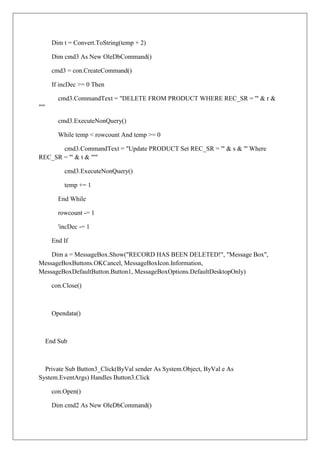
FRONT VIEW- PRODUCT RECORDS:


CODES:

Imports System.Data.OleDb

Public Class Form7

  Dim con As New OleDbConnection

  Dim rowcount As Integer = 0

  Dim incDec As Integer = 0


  Private Sub Form7_Load(ByVal sender As System.Object, ByVal e As System.EventArgs)
Handles MyBase.Load

    con.ConnectionString = My.MySettings.Default.POS1ConnectionString3

    Opendata()

  End Sub

  Sub Opendata()

    con.Open()

    Dim conString As String = "Select * from PRODUCT"

    Dim cmd As New OleDbCommand(conString, con)
Dim adapter As New OleDbDataAdapter()

  adapter.SelectCommand = cmd

  Dim dataset As New DataSet()

  adapter.Fill(dataset)

  con.Close()


  rowcount = dataset.Tables(0).Rows.Count


  TextBox1.Text = dataset.Tables(0).Rows(incDec).ItemArray(0).ToString()

  TextBox2.Text = dataset.Tables(0).Rows(incDec).ItemArray(1).ToString()

  TextBox3.Text = dataset.Tables(0).Rows(incDec).ItemArray(2).ToString()

  TextBox4.Text = dataset.Tables(0).Rows(incDec).ItemArray(3).ToString()

  TextBox5.Text = dataset.Tables(0).Rows(incDec).ItemArray(4).ToString()

  TextBox6.Text = dataset.Tables(0).Rows(incDec).ItemArray(5).ToString()

  ComboBox1.Text = dataset.Tables(0).Rows(incDec).ItemArray(6).ToString()

  TextBox8.Text = dataset.Tables(0).Rows(incDec).ItemArray(7).ToString()

  TextBox9.Text = dataset.Tables(0).Rows(incDec).ItemArray(8).ToString()

  TextBox10.Text = dataset.Tables(0).Rows(incDec).ItemArray(9).ToString()

  TextBox11.Text = dataset.Tables(0).Rows(incDec).ItemArray(10).ToString()

  TextBox12.Text = dataset.Tables(0).Rows(incDec).ItemArray(11).ToString()

  TextBox13.Text = dataset.Tables(0).Rows(incDec).ItemArray(12).ToString()

  TextBox14.Text = dataset.Tables(0).Rows(incDec).ItemArray(13).ToString()

  TextBox15.Text = dataset.Tables(0).Rows(incDec).ItemArray(14).ToString()

  TextBox16.Text = dataset.Tables(0).Rows(incDec).ItemArray(15).ToString()

  TextBox17.Text = dataset.Tables(0).Rows(incDec).ItemArray(16).ToString()

End Sub
Private Sub LinkLabel1_LinkClicked(ByVal sender As System.Object, ByVal e As
System.Windows.Forms.LinkLabelLinkClickedEventArgs) Handles LinkLabel1.LinkClicked

    LinkLabel1.LinkVisited = True

    Form2.Show()

    Me.Close()

  End Sub


  Private Sub Button2_Click(ByVal sender As System.Object, ByVal e As
System.EventArgs) Handles Button2.Click

    TextBox13.Text = MonthCalendar1.SelectionRange.Start.Date

  End Sub


  Private Sub Button1_Click(ByVal sender As System.Object, ByVal e As
System.EventArgs) Handles Button1.Click

     TextBox14.Text = ListBox1.SelectedItem + ":" + ListBox2.SelectedItem + ":" +
ListBox3.SelectedItem + " " + CheckedListBox1.SelectedItem

  End Sub


  Private Sub Label16_Click(ByVal sender As System.Object, ByVal e As
System.EventArgs) Handles Label16.Click


  End Sub


  Private Sub Button4_Click(ByVal sender As System.Object, ByVal e As
System.EventArgs) Handles Button4.Click

    con.Open()

    Dim temp As Integer = incDec

    Dim r = Convert.ToString(incDec + 1)

    Dim s = Convert.ToString(temp + 1)
Dim t = Convert.ToString(temp + 2)

        Dim cmd3 As New OleDbCommand()

        cmd3 = con.CreateCommand()

        If incDec >= 0 Then

          cmd3.CommandText = "DELETE FROM PRODUCT WHERE REC_SR = '" & r &
"'"

          cmd3.ExecuteNonQuery()

          While temp < rowcount And temp >= 0

       cmd3.CommandText = "Update PRODUCT Set REC_SR = '" & s & "' Where
REC_SR = '" & t & "'"

            cmd3.ExecuteNonQuery()

            temp += 1

          End While

          rowcount -= 1

          'incDec -= 1

        End If

    Dim a = MessageBox.Show("RECORD HAS BEEN DELETED!", "Message Box",
MessageBoxButtons.OKCancel, MessageBoxIcon.Information,
MessageBoxDefaultButton.Button1, MessageBoxOptions.DefaultDesktopOnly)

        con.Close()


        Opendata()


      End Sub


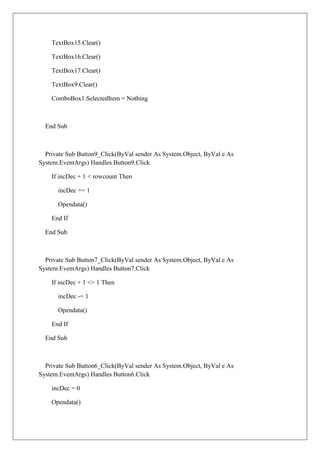
  Private Sub Button3_Click(ByVal sender As System.Object, ByVal e As
System.EventArgs) Handles Button3.Click

        con.Open()

        Dim cmd2 As New OleDbCommand()
cmd2 = con.CreateCommand()

    cmd2.CommandText = "INSERT INTO PRODUCT([ID], [STCK_SR], [UNIT_COST],
[MANUFACTURER], [BRAND], [CATEGORY], [SUBCATEGORY], [SAESON],
[SPECIFICATION], [DISTRIBUTOR], [COLOUR], [SIZE], [SALE_DATE],
[SALE_TIME], [UNIT_PRICE], [TAX], [REC_SR]) VALUES ('" & TextBox1.Text & "', '"
& TextBox2.Text & "', '" & TextBox3.Text & "', '" & TextBox4.Text & "', '" &
TextBox5.Text & "', '" & TextBox6.Text & "', '" & ComboBox1.SelectedItem & "', '" &
TextBox8.Text & "', '" & TextBox9.Text & "', '" & TextBox10.Text & "', '" &
TextBox11.Text & "', '" & TextBox12.Text & "', '" & TextBox13.Text & "', '" &
TextBox14.Text & "', '" & TextBox15.Text & "', '" & TextBox16.Text & "', '" &
TextBox17.Text & "')"

    cmd2.ExecuteNonQuery()

    Dim b = MessageBox.Show("SUCCESSFUL INSERTION!", "Message Box",
MessageBoxButtons.OKCancel, MessageBoxIcon.Information,
MessageBoxDefaultButton.Button1, MessageBoxOptions.DefaultDesktopOnly)

    con.Close()

    rowcount += 1

    incDec = rowcount - 1


    TextBox1.Clear()

    TextBox2.Clear()

    TextBox3.Clear()

    TextBox4.Clear()

    TextBox5.Clear()

    TextBox6.Clear()

    TextBox8.Clear()

    TextBox10.Clear()

    TextBox11.Clear()

    TextBox12.Clear()

    TextBox13.Clear()

    TextBox14.Clear()
TextBox15.Clear()

    TextBox16.Clear()

    TextBox17.Clear()

    TextBox9.Clear()

    ComboBox1.SelectedItem = Nothing


  End Sub


  Private Sub Button9_Click(ByVal sender As System.Object, ByVal e As
System.EventArgs) Handles Button9.Click

    If incDec + 1 < rowcount Then

      incDec += 1

      Opendata()

    End If

  End Sub


  Private Sub Button7_Click(ByVal sender As System.Object, ByVal e As
System.EventArgs) Handles Button7.Click

    If incDec + 1 <> 1 Then

      incDec -= 1

      Opendata()

    End If

  End Sub


  Private Sub Button6_Click(ByVal sender As System.Object, ByVal e As
System.EventArgs) Handles Button6.Click

    incDec = 0

    Opendata()
End Sub


  Private Sub Button8_Click(ByVal sender As System.Object, ByVal e As
System.EventArgs) Handles Button8.Click

    incDec = rowcount - 1

    Opendata()

  End Sub


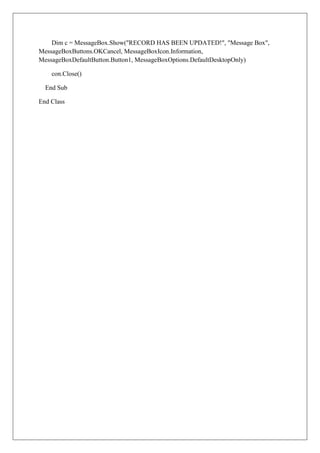
  Private Sub Button5_Click(ByVal sender As System.Object, ByVal e As
System.EventArgs) Handles Button5.Click

    TextBox1.Text = TextBox2.Text + "/" + ComboBox1.SelectedItem + "/" +
TextBox6.Text + "/" + TextBox5.Text + "/" + TextBox8.Text + "/" + TextBox11.Text + "/" +
TextBox12.Text

  End Sub


  Private Sub Button10_Click(ByVal sender As System.Object, ByVal e As
System.EventArgs) Handles Button10.Click

    con.Open()

    Dim cmd3 As New OleDbCommand()

    cmd3 = con.CreateCommand()

    Dim u = Convert.ToString(incDec + 1)

      cmd3.CommandText = "UPDATE PRODUCT SET [ID]= '" & TextBox1.Text & "',
[UNIT_COST]= '" & TextBox3.Text & "', [MANUFACTURER]= '" & TextBox4.Text & "',
[BRAND]= '" & TextBox5.Text & "', [CATEGORY]= '" & TextBox6.Text & "',
[SUBCATEGORY]= '" & ComboBox1.SelectedItem & "', [SAESON]= '" & TextBox8.Text
& "', [SPECIFICATION]= '" & TextBox9.Text & "', [DISTRIBUTOR]= '" &
TextBox10.Text & "', [COLOUR]= '" & TextBox11.Text & "', [SIZE]= '" & TextBox12.Text
& "', [SALE_DATE]= '" & TextBox13.Text & "', [SALE_TIME]= '" & TextBox14.Text & "',
[UNIT_PRICE]= '" & TextBox15.Text & "', [TAX]= '" & TextBox16.Text & "',
[STCK_SR]= '" & TextBox2.Text & "' where [REC_SR]= '" & u & "'"

    cmd3.ExecuteNonQuery()
Dim c = MessageBox.Show("RECORD HAS BEEN UPDATED!", "Message Box",
MessageBoxButtons.OKCancel, MessageBoxIcon.Information,
MessageBoxDefaultButton.Button1, MessageBoxOptions.DefaultDesktopOnly)

    con.Close()

  End Sub

End Class

Inventory management

  • 1.
    INVENTORY MANAGEMENT VB.NET AMALESH DEKA RAJEEV SHARAN ALOK LIEVENS DFT (BFT-APPAREL PRODUCTION/ SEM-07) December 2011 NATIONAL INSTITUTE OF FASHION TECHNOLOGY BANGALORE
  • 2.
    NATIONAL INSTITUTE OFFASHION TECHNOLOGY National Institute of Fashion Technology was set up in 1986 under the aegis of the Ministry of Textiles, Government of India. It has emerged as the premier Institute of Design Management and Technology. It offers various courses in textile and leather design, technology, management and merchandising. CONTRIBUTOR: Amalesh Deka Student of semester -07, Department Of Fashion Technology, NIFT Rajeev Sharan Student of semester -07, Department Of Fashion Technology, NIFT Email: rajeevsharan007@gmail.com Alok Lievens Student of semester -07, Department Of Fashion Technology, NIFT Ravi Kumar, Faculty-in-charge & Consultant Department of Fashion & Textiles, NIFT
  • 3.
    ACKNOWLEDGEMENTS This report wasprepared as a contribution to the ‘Product Analysis & Development’ End Term Jury, and was supported with generous & valuable inputs from the Department Of Fashion Technology, NIFT Bangalore. The authors express their gratitude for the insights provided at various stages of this report by Mr. Ravi Kumar, Assistant Professor- TD & Faculty In-Charge for the subject. The authors also express their gratitude & respect for insights provided on compilation & contents by Mr. Vasant Kothari, RIC- NIFT Bangalore. The authors also express their appreciation & gratitude for the academic support provided by Mr. Arivoli N, assistant professor, and Ms Jonalee Bajpai, associate professor. The authors also express their appreciation for the administrative support provided by Mr. G T Kumaran and Chandrashekhar. Any and all errors are the sole responsibility of the authors.
  • 4.
    FRONT VIEW- LOGINPAGE: CODE: Public Class Form1 Private Sub Button1_Click(ByVal sender As System.Object, ByVal e As System.EventArgs) Handles Button1.Click If TextBox1.Text = "rajeevsharan" Then If TextBox2.Text = "123456" Then Dim frm As New Form2 frm.Show() Else Dim result As Integer result = MessageBox.Show("ENTERED WRONG PASSWORD!", "Message Box", MessageBoxButtons.OKCancel, MessageBoxIcon.Information, MessageBoxDefaultButton.Button1, MessageBoxOptions.DefaultDesktopOnly)
  • 5.
    TextBox2.Clear() End If Else Dim a As Integer a = MessageBox.Show("ENTERED AN INVALID ID!", "Message Box", MessageBoxButtons.OKCancel, MessageBoxIcon.Information, MessageBoxDefaultButton.Button1, MessageBoxOptions.DefaultDesktopOnly) TextBox1.Clear() TextBox2.Clear() End If End Sub End Class
  • 6.
    INTRODUCTION: The application isdesigned to provide a platform for organizing and maintain stock data for efficient inventory management. It is to be used primarily in apparel stock management and has features for handling information according to colour and sizes. FRONT VIEW- MAIN PAGE: CODES: Public Class Form2 Private Sub LinkLabel1_LinkClicked(ByVal sender As System.Object, ByVal e As System.Windows.Forms.LinkLabelLinkClickedEventArgs) Handles LinkLabel1.LinkClicked LinkLabel1.LinkVisited = True Dim frm As New Form3 frm.Show() Me.Close()
  • 7.
    End Sub Private Sub LinkLabel2_LinkClicked(ByVal sender As System.Object, ByVal e As System.Windows.Forms.LinkLabelLinkClickedEventArgs) Handles LinkLabel2.LinkClicked LinkLabel2.LinkVisited = True Dim frm As New Form7 frm.Show() Me.Close() End Sub End Class
  • 8.
    FRONT VIEW- STOCKRECORDS: CODES: Imports System.Data.OleDb Public Class Form3 Dim con As New OleDbConnection Dim rowcount As Integer = 0 Dim incDec As Integer = 0 Private Sub Form3_Load(ByVal sender As System.Object, ByVal e As System.EventArgs) Handles MyBase.Load con.ConnectionString = My.MySettings.Default.POS1ConnectionString3 Opendata() End Sub Sub Opendata() con.Open() Dim conString As String = "Select * from STOCK" Dim cmd As New OleDbCommand(conString, con)
  • 9.
    Dim adapter AsNew OleDbDataAdapter() adapter.SelectCommand = cmd Dim dataset As New DataSet() adapter.Fill(dataset) con.Close() rowcount = dataset.Tables(0).Rows.Count TextBox1.Text = dataset.Tables(0).Rows(incDec).ItemArray(0).ToString() TextBox2.Text = dataset.Tables(0).Rows(incDec).ItemArray(1).ToString() ComboBox2.SelectedItem = dataset.Tables(0).Rows(incDec).ItemArray(2).ToString() TextBox5.Text = dataset.Tables(0).Rows(incDec).ItemArray(3).ToString() TextBox12.Text = dataset.Tables(0).Rows(incDec).ItemArray(4).ToString() TextBox3.Text = dataset.Tables(0).Rows(incDec).ItemArray(5).ToString() TextBox4.Text = dataset.Tables(0).Rows(incDec).ItemArray(6).ToString() TextBox7.Text = dataset.Tables(0).Rows(incDec).ItemArray(7).ToString() ComboBox1.SelectedItem = dataset.Tables(0).Rows(incDec).ItemArray(8).ToString() TextBox9.Text = dataset.Tables(0).Rows(incDec).ItemArray(9).ToString() TextBox10.Text = dataset.Tables(0).Rows(incDec).ItemArray(10).ToString() TextBox8.Text = dataset.Tables(0).Rows(incDec).ItemArray(11).ToString() End Sub Private Sub LinkLabel1_LinkClicked(ByVal sender As System.Object, ByVal e As System.Windows.Forms.LinkLabelLinkClickedEventArgs) Handles LinkLabel1.LinkClicked LinkLabel1.LinkVisited = True Dim frm As New Form4 frm.Show()
  • 10.
    Me.Close() EndSub Private Sub LinkLabel2_LinkClicked(ByVal sender As System.Object, ByVal e As System.Windows.Forms.LinkLabelLinkClickedEventArgs) Handles LinkLabel2.LinkClicked LinkLabel2.LinkVisited = True Dim frm As New Form2 frm.Show() Me.Close() End Sub Private Sub Button9_Click(ByVal sender As System.Object, ByVal e As System.EventArgs) Handles Button9.Click If incDec + 1 < rowcount Then incDec += 1 Opendata() End If End Sub Private Sub Button8_Click(ByVal sender As System.Object, ByVal e As System.EventArgs) Handles Button8.Click incDec = rowcount - 1 opendata() End Sub Private Sub Button6_Click(ByVal sender As System.Object, ByVal e As System.EventArgs) Handles Button6.Click incDec = 0
  • 11.
    Opendata() EndSub Private Sub Button7_Click(ByVal sender As System.Object, ByVal e As System.EventArgs) Handles Button7.Click If incDec + 1 <> 1 Then incDec -= 1 Opendata() End If End Sub Private Sub Button10_Click(ByVal sender As System.Object, ByVal e As System.EventArgs) Handles Button10.Click con.Open() Dim cmd2 As New OleDbCommand() cmd2 = con.CreateCommand() cmd2.CommandText = "INSERT INTO STOCK ([STCK_SR], [QTY], [PRODUCT_TYPE], [INWARD_DATE], [INWARD_TIME], [COST], [TOT_SIZE], [TOT_COLOUR], [ROUTE_TYPE], [MANUFACTURER], [DISTRIBUTOR], [BRAND]) VALUES ('" & TextBox1.Text & "', '" & TextBox2.Text & "', '" & ComboBox2.SelectedItem & "', '" & TextBox5.Text & "', '" & TextBox12.Text & "', '" & TextBox3.Text & "', '" & TextBox4.Text & "', '" & TextBox7.Text & "', '" & ComboBox1.SelectedItem & "', '" & TextBox9.Text & "', '" & TextBox10.Text & "', '" & TextBox8.Text & "')" cmd2.ExecuteNonQuery() Dim a = MessageBox.Show("SUCCESSFUL INSERTION!", "Message Box", MessageBoxButtons.OKCancel, MessageBoxIcon.Information, MessageBoxDefaultButton.Button1, MessageBoxOptions.DefaultDesktopOnly) con.Close() rowcount += 1 incDec = rowcount - 1
  • 12.
    TextBox1.Clear() TextBox2.Clear() TextBox3.Clear() TextBox4.Clear() TextBox5.Clear() TextBox7.Clear() TextBox8.Clear() TextBox9.Clear() TextBox10.Clear() TextBox12.Clear() ComboBox1.SelectedItem = Nothing ComboBox2.SelectedItem = Nothing End Sub Private Sub Button4_Click(ByVal sender As System.Object, ByVal e As System.EventArgs) Handles Button4.Click con.Open() Dim cmd3 As New OleDbCommand() Dim s = Convert.ToString(incDec + 1) cmd3 = con.CreateCommand() If incDec >= 0 Then cmd3.CommandText = "DELETE FROM STOCK WHERE STCK_SR = '" & s & "'" cmd3.ExecuteNonQuery() Dim temp As Integer = incDec While temp < rowcount And temp >= 0 Dim t = Convert.ToString(temp + 2) Dim r = Convert.ToString(temp + 1)
  • 13.
    cmd3.CommandText = "UpdateSTOCK Set STCK_SR = '" & r & "' Where STCK_SR= '" & t & "'" cmd3.ExecuteNonQuery() temp += 1 End While rowcount -= 1 'incDec -= 1 End If Dim b = MessageBox.Show("RECORD HAS BEEN DELETED!", "Message Box", MessageBoxButtons.OKCancel, MessageBoxIcon.Information, MessageBoxDefaultButton.Button1, MessageBoxOptions.DefaultDesktopOnly) con.Close() Opendata() End Sub Private Sub Button5_Click(ByVal sender As System.Object, ByVal e As System.EventArgs) Handles Button5.Click con.Open() Dim cmd3 As New OleDbCommand() cmd3 = con.CreateCommand() Dim u = Convert.ToString(incDec + 1) cmd3.CommandText = "UPDATE STOCK SET [QTY] = '" & TextBox2.Text & "', [PRODUCT_TYPE] = '" & ComboBox2.SelectedItem & "', [COST] = '" & TextBox3.Text & "', [TOT_SIZE] = '" & TextBox4.Text & "', [INWARD_DATE] = '" & TextBox5.Text & "', [TOT_COLOUR] = '" & TextBox7.Text & "', [BRAND] = '" & TextBox8.Text & "', [MANUFACTURER] = '" & TextBox9.Text & "', [DISTRIBUTOR] = '" & TextBox10.Text & "', [INWARD_TIME] = '" & TextBox12.Text & "', [ROUTE_TYPE] = '" & ComboBox1.SelectedItem & "' where [STCK_SR] = '" & u & "'" cmd3.ExecuteNonQuery() Dim c = MessageBox.Show("RECORD HAS BEEN UPDATED!", "Message Box", MessageBoxButtons.OKCancel, MessageBoxIcon.Information, MessageBoxDefaultButton.Button1, MessageBoxOptions.DefaultDesktopOnly)
  • 14.
    con.Close() EndSub Private Sub Button1_Click(ByVal sender As System.Object, ByVal e As System.EventArgs) Handles Button1.Click TextBox12.Text = ListBox1.SelectedItem + ":" + ListBox2.SelectedItem + ":" + ListBox3.SelectedItem + " " + CheckedListBox1.SelectedItem End Sub Private Sub Button2_Click(ByVal sender As System.Object, ByVal e As System.EventArgs) Handles Button2.Click TextBox5.Text = MonthCalendar1.SelectionRange.Start.Date End Sub End Class
  • 15.
    FRONT VIEW: CODE: Public ClassForm4 Private Sub LinkLabel1_LinkClicked(ByVal sender As System.Object, ByVal e As System.Windows.Forms.LinkLabelLinkClickedEventArgs) Handles LinkLabel1.LinkClicked LinkLabel1.LinkVisited = True Dim frm As New Form5 frm.Show() Me.Close() End Sub Private Sub LinkLabel2_LinkClicked(ByVal sender As System.Object, ByVal e As System.Windows.Forms.LinkLabelLinkClickedEventArgs) Handles LinkLabel2.LinkClicked LinkLabel2.LinkVisited = True Dim frm As New Form6 frm.Show()
  • 16.
    Me.Close() EndSub Private Sub LinkLabel3_LinkClicked(ByVal sender As System.Object, ByVal e As System.Windows.Forms.LinkLabelLinkClickedEventArgs) Handles LinkLabel3.LinkClicked LinkLabel3.LinkVisited = True Form3.Show() Me.Close() End Sub End Class
  • 17.
    FRONT VIEW- SIZERECORDS: CODE: Public Class Form4 Private Sub LinkLabel1_LinkClicked(ByVal sender As System.Object, ByVal e As System.Windows.Forms.LinkLabelLinkClickedEventArgs) Handles LinkLabel1.LinkClicked LinkLabel1.LinkVisited = True Dim frm As New Form5 frm.Show() Me.Close() End Sub Private Sub LinkLabel2_LinkClicked(ByVal sender As System.Object, ByVal e As System.Windows.Forms.LinkLabelLinkClickedEventArgs) Handles LinkLabel2.LinkClicked LinkLabel2.LinkVisited = True Dim frm As New Form6 frm.Show()
  • 18.
    Me.Close() EndSub Private Sub LinkLabel3_LinkClicked(ByVal sender As System.Object, ByVal e As System.Windows.Forms.LinkLabelLinkClickedEventArgs) Handles LinkLabel3.LinkClicked LinkLabel3.LinkVisited = True Form3.Show() Me.Close() End Sub End Class
  • 19.
    FRONT VIEW- COLOURRECORDS: CODES: Imports System.Data.OleDb Public Class Form6 Dim con As New OleDbConnection Dim rowcount As Integer = 0 Dim incDec As Integer = 0 Private Sub Form6_Load(ByVal sender As System.Object, ByVal e As System.EventArgs) Handles MyBase.Load con.ConnectionString = My.MySettings.Default.POS1ConnectionString3 Opendata() End Sub Sub Opendata() con.Open() Dim conString As String = "Select * from COLOUR" Dim cmd As New OleDbCommand(conString, con)
  • 20.
    Dim adapter AsNew OleDbDataAdapter() adapter.SelectCommand = cmd Dim dataset As New DataSet() adapter.Fill(dataset) con.Close() rowcount = dataset.Tables(0).Rows.Count TextBox2.Text = dataset.Tables(0).Rows(incDec).ItemArray(0).ToString() TextBox1.Text = dataset.Tables(0).Rows(incDec).ItemArray(1).ToString() TextBox3.Text = dataset.Tables(0).Rows(incDec).ItemArray(2).ToString() TextBox4.Text = dataset.Tables(0).Rows(incDec).ItemArray(3).ToString() TextBox5.Text = dataset.Tables(0).Rows(incDec).ItemArray(4).ToString() TextBox6.Text = dataset.Tables(0).Rows(incDec).ItemArray(5).ToString() TextBox7.Text = dataset.Tables(0).Rows(incDec).ItemArray(6).ToString() TextBox8.Text = dataset.Tables(0).Rows(incDec).ItemArray(7).ToString() TextBox9.Text = dataset.Tables(0).Rows(incDec).ItemArray(8).ToString() TextBox10.Text = dataset.Tables(0).Rows(incDec).ItemArray(9).ToString() TextBox11.Text = dataset.Tables(0).Rows(incDec).ItemArray(10).ToString() TextBox12.Text = dataset.Tables(0).Rows(incDec).ItemArray(11).ToString() TextBox13.Text = dataset.Tables(0).Rows(incDec).ItemArray(12).ToString() TextBox14.Text = dataset.Tables(0).Rows(incDec).ItemArray(13).ToString() End Sub Private Sub LinkLabel1_LinkClicked(ByVal sender As System.Object, ByVal e As System.Windows.Forms.LinkLabelLinkClickedEventArgs) Handles LinkLabel1.LinkClicked LinkLabel1.LinkVisited = True
  • 21.
    Form4.Show() Me.Close() End Sub Private Sub Label2_Click(ByVal sender As System.Object, ByVal e As System.EventArgs) Handles Label2.Click End Sub Private Sub Button4_Click(ByVal sender As System.Object, ByVal e As System.EventArgs) Handles Button4.Click con.Open() Dim temp As Integer = incDec Dim r = Convert.ToString(incDec + 1) Dim s = Convert.ToString(temp + 1) Dim t = Convert.ToString(temp + 2) Dim cmd3 As New OleDbCommand() cmd3 = con.CreateCommand() If incDec >= 0 Then cmd3.CommandText = "DELETE FROM COLOUR WHERE STCK_SR = '" & r & "'" cmd3.ExecuteNonQuery() While temp < rowcount And temp >= 0 cmd3.CommandText = "Update COLOUR Set STCK_SR= '" & s & "' Where STCK_SR= '" & t & "'" cmd3.ExecuteNonQuery() temp += 1 End While
  • 22.
    rowcount -= 1 'incDec -= 1 End If Dim a = MessageBox.Show("RECORD HAS BEEN DELETED!", "Message Box", MessageBoxButtons.OKCancel, MessageBoxIcon.Information, MessageBoxDefaultButton.Button1, MessageBoxOptions.DefaultDesktopOnly) con.Close() Opendata() End Sub Private Sub Button3_Click(ByVal sender As System.Object, ByVal e As System.EventArgs) Handles Button3.Click con.Open() Dim cmd2 As New OleDbCommand() cmd2 = con.CreateCommand() cmd2.CommandText = "INSERT INTO COLOUR ([STCK_SR], [TOTAL_COLOURS], [COLOUR1], [COLOUR1_QTY], [COLOUR1_SQTY], [COLOUR2], [COLOUR2_QTY], [COLOUR2_SQTY], [COLOUR3], [COLOUR3_QTY], [COLOUR3_SQTY], [COLOUR4], [COLOUR4_QTY], [COLOUR4_SQTY]) VALUES ('" & TextBox2.Text & "', '" & TextBox1.Text & "', '" & TextBox3.Text & "', '" & TextBox4.Text & "', '" & TextBox5.Text & "', '" & TextBox6.Text & "', '" & TextBox7.Text & "', '" & TextBox8.Text & "', '" & TextBox9.Text & "', '" & TextBox10.Text & "', '" & TextBox11.Text & "', '" & TextBox12.Text & "', '" & TextBox13.Text & "', '" & TextBox14.Text & "')" cmd2.ExecuteNonQuery() Dim b = MessageBox.Show("SUCCESSFUL INSERTION!", "Message Box", MessageBoxButtons.OKCancel, MessageBoxIcon.Information, MessageBoxDefaultButton.Button1, MessageBoxOptions.DefaultDesktopOnly) con.Close() rowcount += 1 incDec = rowcount - 1
  • 23.
    TextBox2.Clear() TextBox1.Clear() TextBox3.Clear() TextBox3.Clear() TextBox5.Clear() TextBox6.Clear() TextBox7.Clear() TextBox8.Clear() TextBox9.Clear() TextBox10.Clear() TextBox11.Clear() TextBox12.Clear() TextBox13.Clear() TextBox14.Clear() End Sub Private Sub Button6_Click(ByVal sender As System.Object, ByVal e As System.EventArgs) Handles Button6.Click incDec = 0 Opendata() End Sub Private Sub Button7_Click(ByVal sender As System.Object, ByVal e As System.EventArgs) Handles Button7.Click If incDec + 1 <> 1 Then incDec -= 1 Opendata() End If
  • 24.
    End Sub Private Sub Button9_Click(ByVal sender As System.Object, ByVal e As System.EventArgs) Handles Button9.Click If incDec + 1 < rowcount Then incDec += 1 Opendata() End If End Sub Private Sub Button8_Click(ByVal sender As System.Object, ByVal e As System.EventArgs) Handles Button8.Click incDec = rowcount - 1 Opendata() End Sub Private Sub Button1_Click(ByVal sender As System.Object, ByVal e As System.EventArgs) Handles Button1.Click con.Open() Dim cmd3 As New OleDbCommand() cmd3 = con.CreateCommand() Dim u = Convert.ToString(incDec + 1) cmd3.CommandText = "UPDATE COLOUR SET [TOTAL_COLOURS]= '" & TextBox1.Text & "', [COLOUR1]= '" & TextBox3.Text & "', [COLOUR1_QTY]= '" & TextBox4.Text & "', [COLOUR1_SQTY]= '" & TextBox5.Text & "', [COLOUR2]= '" & TextBox6.Text & "', [COLOUR2_QTY]= '" & TextBox7.Text & "', [COLOUR2_SQTY]= '" & TextBox8.Text & "', [COLOUR3]= '" & TextBox9.Text & "', [COLOUR3_QTY]= '" & TextBox10.Text & "', [COLOUR3_SQTY]= '" & TextBox11.Text & "', [COLOUR4]= '" & TextBox12.Text & "', [COLOUR4_QTY]= '" & TextBox13.Text & "', [COLOUR4_SQTY]= '" & TextBox14.Text & "' where [STCK_SR] = '" & u & "'" cmd3.ExecuteNonQuery()
  • 25.
    Dim c =MessageBox.Show("RECORD HAS BEEN UPDATED!", "Message Box", MessageBoxButtons.OKCancel, MessageBoxIcon.Information, MessageBoxDefaultButton.Button1, MessageBoxOptions.DefaultDesktopOnly) con.Close() End Sub End Class
  • 26.
    FRONT VIEW- PRODUCTRECORDS: CODES: Imports System.Data.OleDb Public Class Form7 Dim con As New OleDbConnection Dim rowcount As Integer = 0 Dim incDec As Integer = 0 Private Sub Form7_Load(ByVal sender As System.Object, ByVal e As System.EventArgs) Handles MyBase.Load con.ConnectionString = My.MySettings.Default.POS1ConnectionString3 Opendata() End Sub Sub Opendata() con.Open() Dim conString As String = "Select * from PRODUCT" Dim cmd As New OleDbCommand(conString, con)
  • 27.
    Dim adapter AsNew OleDbDataAdapter() adapter.SelectCommand = cmd Dim dataset As New DataSet() adapter.Fill(dataset) con.Close() rowcount = dataset.Tables(0).Rows.Count TextBox1.Text = dataset.Tables(0).Rows(incDec).ItemArray(0).ToString() TextBox2.Text = dataset.Tables(0).Rows(incDec).ItemArray(1).ToString() TextBox3.Text = dataset.Tables(0).Rows(incDec).ItemArray(2).ToString() TextBox4.Text = dataset.Tables(0).Rows(incDec).ItemArray(3).ToString() TextBox5.Text = dataset.Tables(0).Rows(incDec).ItemArray(4).ToString() TextBox6.Text = dataset.Tables(0).Rows(incDec).ItemArray(5).ToString() ComboBox1.Text = dataset.Tables(0).Rows(incDec).ItemArray(6).ToString() TextBox8.Text = dataset.Tables(0).Rows(incDec).ItemArray(7).ToString() TextBox9.Text = dataset.Tables(0).Rows(incDec).ItemArray(8).ToString() TextBox10.Text = dataset.Tables(0).Rows(incDec).ItemArray(9).ToString() TextBox11.Text = dataset.Tables(0).Rows(incDec).ItemArray(10).ToString() TextBox12.Text = dataset.Tables(0).Rows(incDec).ItemArray(11).ToString() TextBox13.Text = dataset.Tables(0).Rows(incDec).ItemArray(12).ToString() TextBox14.Text = dataset.Tables(0).Rows(incDec).ItemArray(13).ToString() TextBox15.Text = dataset.Tables(0).Rows(incDec).ItemArray(14).ToString() TextBox16.Text = dataset.Tables(0).Rows(incDec).ItemArray(15).ToString() TextBox17.Text = dataset.Tables(0).Rows(incDec).ItemArray(16).ToString() End Sub
  • 28.
    Private Sub LinkLabel1_LinkClicked(ByValsender As System.Object, ByVal e As System.Windows.Forms.LinkLabelLinkClickedEventArgs) Handles LinkLabel1.LinkClicked LinkLabel1.LinkVisited = True Form2.Show() Me.Close() End Sub Private Sub Button2_Click(ByVal sender As System.Object, ByVal e As System.EventArgs) Handles Button2.Click TextBox13.Text = MonthCalendar1.SelectionRange.Start.Date End Sub Private Sub Button1_Click(ByVal sender As System.Object, ByVal e As System.EventArgs) Handles Button1.Click TextBox14.Text = ListBox1.SelectedItem + ":" + ListBox2.SelectedItem + ":" + ListBox3.SelectedItem + " " + CheckedListBox1.SelectedItem End Sub Private Sub Label16_Click(ByVal sender As System.Object, ByVal e As System.EventArgs) Handles Label16.Click End Sub Private Sub Button4_Click(ByVal sender As System.Object, ByVal e As System.EventArgs) Handles Button4.Click con.Open() Dim temp As Integer = incDec Dim r = Convert.ToString(incDec + 1) Dim s = Convert.ToString(temp + 1)
  • 29.
    Dim t =Convert.ToString(temp + 2) Dim cmd3 As New OleDbCommand() cmd3 = con.CreateCommand() If incDec >= 0 Then cmd3.CommandText = "DELETE FROM PRODUCT WHERE REC_SR = '" & r & "'" cmd3.ExecuteNonQuery() While temp < rowcount And temp >= 0 cmd3.CommandText = "Update PRODUCT Set REC_SR = '" & s & "' Where REC_SR = '" & t & "'" cmd3.ExecuteNonQuery() temp += 1 End While rowcount -= 1 'incDec -= 1 End If Dim a = MessageBox.Show("RECORD HAS BEEN DELETED!", "Message Box", MessageBoxButtons.OKCancel, MessageBoxIcon.Information, MessageBoxDefaultButton.Button1, MessageBoxOptions.DefaultDesktopOnly) con.Close() Opendata() End Sub Private Sub Button3_Click(ByVal sender As System.Object, ByVal e As System.EventArgs) Handles Button3.Click con.Open() Dim cmd2 As New OleDbCommand()
  • 30.
    cmd2 = con.CreateCommand() cmd2.CommandText = "INSERT INTO PRODUCT([ID], [STCK_SR], [UNIT_COST], [MANUFACTURER], [BRAND], [CATEGORY], [SUBCATEGORY], [SAESON], [SPECIFICATION], [DISTRIBUTOR], [COLOUR], [SIZE], [SALE_DATE], [SALE_TIME], [UNIT_PRICE], [TAX], [REC_SR]) VALUES ('" & TextBox1.Text & "', '" & TextBox2.Text & "', '" & TextBox3.Text & "', '" & TextBox4.Text & "', '" & TextBox5.Text & "', '" & TextBox6.Text & "', '" & ComboBox1.SelectedItem & "', '" & TextBox8.Text & "', '" & TextBox9.Text & "', '" & TextBox10.Text & "', '" & TextBox11.Text & "', '" & TextBox12.Text & "', '" & TextBox13.Text & "', '" & TextBox14.Text & "', '" & TextBox15.Text & "', '" & TextBox16.Text & "', '" & TextBox17.Text & "')" cmd2.ExecuteNonQuery() Dim b = MessageBox.Show("SUCCESSFUL INSERTION!", "Message Box", MessageBoxButtons.OKCancel, MessageBoxIcon.Information, MessageBoxDefaultButton.Button1, MessageBoxOptions.DefaultDesktopOnly) con.Close() rowcount += 1 incDec = rowcount - 1 TextBox1.Clear() TextBox2.Clear() TextBox3.Clear() TextBox4.Clear() TextBox5.Clear() TextBox6.Clear() TextBox8.Clear() TextBox10.Clear() TextBox11.Clear() TextBox12.Clear() TextBox13.Clear() TextBox14.Clear()
  • 31.
    TextBox15.Clear() TextBox16.Clear() TextBox17.Clear() TextBox9.Clear() ComboBox1.SelectedItem = Nothing End Sub Private Sub Button9_Click(ByVal sender As System.Object, ByVal e As System.EventArgs) Handles Button9.Click If incDec + 1 < rowcount Then incDec += 1 Opendata() End If End Sub Private Sub Button7_Click(ByVal sender As System.Object, ByVal e As System.EventArgs) Handles Button7.Click If incDec + 1 <> 1 Then incDec -= 1 Opendata() End If End Sub Private Sub Button6_Click(ByVal sender As System.Object, ByVal e As System.EventArgs) Handles Button6.Click incDec = 0 Opendata()
  • 32.
    End Sub Private Sub Button8_Click(ByVal sender As System.Object, ByVal e As System.EventArgs) Handles Button8.Click incDec = rowcount - 1 Opendata() End Sub Private Sub Button5_Click(ByVal sender As System.Object, ByVal e As System.EventArgs) Handles Button5.Click TextBox1.Text = TextBox2.Text + "/" + ComboBox1.SelectedItem + "/" + TextBox6.Text + "/" + TextBox5.Text + "/" + TextBox8.Text + "/" + TextBox11.Text + "/" + TextBox12.Text End Sub Private Sub Button10_Click(ByVal sender As System.Object, ByVal e As System.EventArgs) Handles Button10.Click con.Open() Dim cmd3 As New OleDbCommand() cmd3 = con.CreateCommand() Dim u = Convert.ToString(incDec + 1) cmd3.CommandText = "UPDATE PRODUCT SET [ID]= '" & TextBox1.Text & "', [UNIT_COST]= '" & TextBox3.Text & "', [MANUFACTURER]= '" & TextBox4.Text & "', [BRAND]= '" & TextBox5.Text & "', [CATEGORY]= '" & TextBox6.Text & "', [SUBCATEGORY]= '" & ComboBox1.SelectedItem & "', [SAESON]= '" & TextBox8.Text & "', [SPECIFICATION]= '" & TextBox9.Text & "', [DISTRIBUTOR]= '" & TextBox10.Text & "', [COLOUR]= '" & TextBox11.Text & "', [SIZE]= '" & TextBox12.Text & "', [SALE_DATE]= '" & TextBox13.Text & "', [SALE_TIME]= '" & TextBox14.Text & "', [UNIT_PRICE]= '" & TextBox15.Text & "', [TAX]= '" & TextBox16.Text & "', [STCK_SR]= '" & TextBox2.Text & "' where [REC_SR]= '" & u & "'" cmd3.ExecuteNonQuery()
  • 33.
    Dim c =MessageBox.Show("RECORD HAS BEEN UPDATED!", "Message Box", MessageBoxButtons.OKCancel, MessageBoxIcon.Information, MessageBoxDefaultButton.Button1, MessageBoxOptions.DefaultDesktopOnly) con.Close() End Sub End Class