1
Information Storage and Management
Unit 3 – Direct Attached Storage and Introduction to
SCSI
2 UNIT-III
 Direct-Attached Storage, SCSI, and Storage Area Networks: Types of DAS, DAS Benefits
and Limitations, Disk Drive Interfaces, Introduction to Parallel SCSI, Overview of Fibre
Channel, The SAN and Its Evolution, Components of SAN, FC Connectivity, Fibre
Channel Ports, Fibre Channel Architecture, Zoning, Fibre Channel Login Types, FC
Topologies
3 Direct-Attached Storage
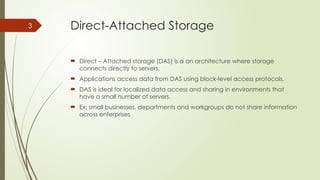
 Direct – Attached storage (DAS) is a an architecture where storage
connects directly to servers.
 Applications access data from DAS using block-level access protocols.
 DAS is ideal for localized data access and sharing in environments that
have a small number of servers.
 Ex: small businesses, departments and workgroups do not share information
across enterprises
4 What is DAS?
 Uses block level protocol for data access
Internal Direct Connect External Direct Connect
Direct Attached Storage
(Internal)
Computer System
CPU
Memory
Bus
I/O - RAID
Controller
Disk Drives
Direct Attached Storage
(Internal)
Computer System
CPU
Memory
Bus
I/O - RAID
Controller
Disk Drives
12345
John
Sm
ith
512-555-1212
1424 Main Street
Data
Direct Attached Storage
(Internal)
Computer System
CPU
Memory
Bus
I/O - RAID
Controller
Disk Drives
12345
John
Sm
ith
512-555-1212
1424 Main Street
DAS w/ internal controller and
external storage
CPU
Memory
Bus
I/O - RAID
Controller
Computer System
Disk Drives
Disk Drives
Disk Drives
Disk Enclosure
12345
John
Sm
ith
512-555-1212
1424 Main Street
Comparing Internal and External Storage
Internal Storage
Server
Storage
RAID controllers
and disk drives are
internal to the
server
SCSI, ATA, or SATA
protocol between
controller and disks
SCSI Bus w/ external storage
Server
RAID Controller
Storage
RAID Controller
Disk Drives
RAID controller is
internal
SCSI or SATA
protocol between
controller and disks
Disk drives are
external
Disk Drives
DAS w/ external controller and
external storage
Computer System
CPU
Memory
Bus
HBA
RAID
Controller
Storage System
Disk Drives
Disk Drives
Disk Drives
Disk Enclosure
12345
John
Sm
ith
512-555-1212
1424 Main Street
DAS over Fibre Channel
Server
HBA
Storage
Disk drives and
RAID controller
are external
Disk Drives
RAID Controller
HBA is internal
Fibre Channel
protocol
between HBAs
and external
RAID controller
External SAN Array
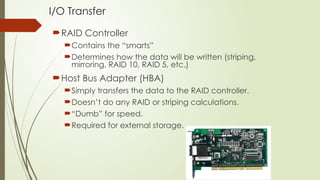
I/O Transfer
RAID Controller
Contains the “smarts”
Determines how the data will be written (striping,
mirroring, RAID 10, RAID 5, etc.)
Host Bus Adapter (HBA)
Simply transfers the data to the RAID controller.
Doesn’t do any RAID or striping calculations.
“Dumb” for speed.
Required for external storage.
Storage types
Single Disk Drive
JBOD
Volume
Storage Array
SCSI device
DAS
NAS
SAN
iSCSI
NAS: What is it?
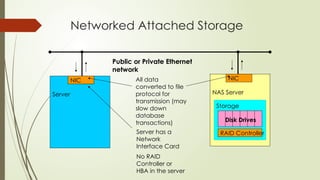
 Network Attached Storage
 Utilizes a TCP/IP network to “share” data
 Uses file sharing protocols like Unix NFS and Windows CIFS
 Storage “Appliances” utilize a stripped-down OS that optimizes file
protocol performance
Networked Attached Storage
NAS Server
Storage
Server has a
Network
Interface Card
No RAID
Controller or
HBA in the server
Public or Private Ethernet
network
RAID Controller
Disk Drives
All data
converted to file
protocol for
transmission (may
slow down
database
transactions)
Server
NIC NIC
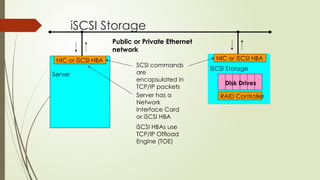
iSCSI: What is it?
 An alternate form of networked storage
 Like NAS, also utilizes a TCP/IP network
 Encapsulates native SCSI commands in TCP/IP packets
 Supported in Windows 2003 Server and Linux
 TCP/IP Offload Engines (TOEs) on NICs speed up packet encapsulation
iSCSI Storage
iSCSI Storage
Server has a
Network
Interface Card
or iSCSI HBA
iSCSI HBAs use
TCP/IP Offload
Engine (TOE)
Public or Private Ethernet
network
RAID Controller
Disk Drives
SCSI commands
are
encapsulated in
TCP/IP packets
Server
NIC or iSCSI HBA NIC or iSCSI HBA
18 DAS Benefits
 Ideal for local data provisioning
 Quick deployment for small environments
 Simple to deploy
 Low capital expense
 Low complexity
 DAS needs lower initial investment than storage networking.
 Setup is managed using host-based tools like host OS.
 It requires fewer management tasks and less hardware and software elements to set up
and operate.
19 DAS Challenges
 Scalability is limited
 Number of connectivity ports to hosts
 Difficulty to add more capacity
 Limited bandwidth
 Distance limitations
 Downtime required for maintenance with internal DAS
 Limited ability to share resources
 Array front-end port
 Unused resources cannot be easily re-allocated
 Resulting in islands of over and under utilized storage pools
20 DAS Connectivity Options
 ATA (IDE) and SATA
 Primarily for internal bus
 SCSI
 Parallel (primarily for internal bus)
 Serial (external bus)
 FC
 High speed network technology
 Buss and Tag
 Primarily for external mainframe
 Precursor to ESCON and FICON
21 Types of DAS
 There are two types of DAS depending on the location of the storage
device with respect to the host.
 Internal DAS
 External DAS
22
DAS Management
 Internal
 Host provides:
 Disk partitioning (Volume management)
 File system layout
 Direct Attached Storage managed individually through the server and the OS
 External
 Array based management
 Lower TCO (Total Cost of Ownership) for managing data and storage
Infrastructure
23 Internal DAS
 In the internal DAS architecture, the storage device is internally connected
to the host by a serial or parallel bus.
 The physical bus has distance limitations and can only be sustained over a
shorter distance for high-speed connectivity.
 Most internal buses can support only a limited number of devices
 They occupy a large amount of space inside the host, making
maintenance of other components difficult
24 External DAS
 In the external DAS architecture, the
server connects directly to the external
storage device.
 Communication between the host and
the storage device takes place over SCSI
(Simple Computer System Interconnect)
or FC (Fiber Channel) protocol.
25 DAS Limitations
 A storage device has a limited number of ports.
 A limited bandwidth in DAS restricts the available I/O processing capability.
 The distance limitations associated with implementing DAS because of direct
connectivity requirements can be addressed by using Fibre Channel connectivity.
 Unused resources cannot be easily re-allocated, resulting in islands of over-utilized and
under-utilized storage pools.
 It is not scalable.
 Disk utilization, throughput, and cache memory of a storage device, along with virtual
memory of a host govern the performance of DAS.
 RAID-level configurations, storage controller protocols, and the efficiency of the bus
are additional factors that affect the performance of DAS.
 The absence of storage interconnects and network latency provide DAS with the
potential to outperform other storage networking configurations.
26 Disk Drive Interfaces
 The host and the storage device in DAS communicate with each other by
using predefined protocols such as IDE/ATA, SATA, SAS, SCSI, and FC.
 These protocols are implemented on the HDD controller. Therefore, a
storage device is also known by the name of the protocol it supports.
27 IDE/ATA
 An Integrated Device Electronics/Advanced Technology Attachment (IDE/ATA)
disk supports the IDE protocol.
 The IDE component in IDE/ATA provides the specification for the controllers
connected to the computer’s motherboard for communicating with the device
attached.
 The ATA component is the interface for connecting storage devices, such as CD-
ROMs, floppy disk drives, and HDDs, to the motherboard.
 IDE/ATA has a variety of standards and names, such as ATA, ATA/ATAPI, EIDE, ATA-
2, Fast ATA, ATA-3, Ultra ATA, and Ultra DMA.
 The latest version of ATA—Ultra DMA/133—supports a throughput of 133 MB per
second.
28
IDE/ATA
 In a master-slave configuration, an ATA
interface supports two storage devices
per connector. However, if the
performance of the drive is important,
sharing a port between two devices is
not recommended.
 A 40-pin connector is used to connect
ATA disks to the motherboard, and a 34-
pin connector is used to connect floppy
disk drives to the motherboard.
 An IDE/ATA disk offers excellent
performance at low cost, making it a
popular and commonly used hard disk.
29
SATA
 A SATA (Serial ATA) is a serial version of the IDE/ATA specification.
 SATA is a disk-interface technology that was developed by a group of the industry’s
leading vendors with the aim of replacing parallel ATA.
 A SATA provides point-to-point connectivity up to a distance of one meter and
enables data transfer at a speed of 150 MB/s.
 Enhancements to the SATA have increased the data transfer speed up to 600 MB/s.
 A SATA bus directly connects each storage device to the host through a dedicated
link, making use of low-voltage differential signaling (LVDS
 LVDS is an electrical signaling system that can provide high-speed connectivity over
low-cost, twisted-pair copper cables. For data transfer, a SATA bus uses LVDS with a
voltage of 250 mV.
30 SATA
 A SATA bus uses a small 7-pin connector and a thin cable for connectivity.
 A SATA port uses 4 signal pins, which improves its pin efficiency compared to the parallel
ATA that uses 26 signal pins, for connecting an 80-conductor ribbon cable to a 40-pin
header connector.
 SATA devices are hot-pluggable, which means that they can be connected or removed
while the host is up and running.
 A SATA port permits single-device connectivity.
 Connecting multiple SATA drives to a host requires multiple ports to be present on the
host.
 Single-device connectivity enforced in SATA, eliminates the performance problems
caused by cable or port sharing in IDE/ATA.
31
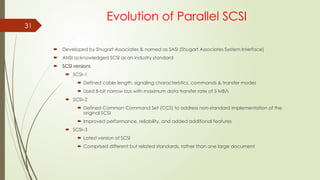
Evolution of Parallel SCSI
 Developed by Shugart Associates & named as SASI (Shugart Associates System Interface)
 ANSI acknowledged SCSI as an industry standard
 SCSI versions
 SCSI–1
 Defined cable length, signaling characteristics, commands & transfer modes
 Used 8-bit narrow bus with maximum data transfer rate of 5 MB/s
 SCSI–2
 Defined Common Command Set (CCS) to address non-standard implementation of the
original SCSI
 Improved performance, reliability, and added additional features
 SCSI–3
 Latest version of SCSI
 Comprised different but related standards, rather than one large document
32 Evolution of Parallel SCSI
 SCSI was developed to provide a device-independent mechanism for attaching to and
accessing host computers.
 SCSI also provided an efficient peer-to-peer I/O bus that supported multiple devices.
 SCSI is commonly used as a hard disk interface. However, SCSI can be used to add
devices, such as tape drives and optical media drives, to the host computer without
modifying the system hardware or software.
 Over the years, SCSI has undergone radical changes and has evolved into a robust
industry standard.
33
Evolution of Parallel SCSI
 SCSI, first developed for hard disks, is often compared to IDE/ATA.
 SCSI offers improved performance and expandability and compatibility options, making it
suitable for high-end computers.
 However, the high cost associated with SCSI limits its popularity among home or business
desktop users.
 SCSI is available in a variety of interfaces. Parallel SCSI (referred to as SCSI) is one of the
oldest and most popular forms of storage interface used in hosts.
 SCSI is a set of standards used for connecting a peripheral device to a computer and
transferring data between them.
 Often, SCSI is used to connect HDDs and tapes to a host.
 SCSI can also connect a wide variety of other devices such as scanners and printers.
 Communication between the hosts and the storage devices uses the SCSI command set.
 The oldest SCSI variant, called SCSI-1 provided data transfer rate of 5 MB/s; SCSI Ultra 320
provides data transfer speeds of 320 MB/s.
34
35 SCSI - 1
 SCSI-1, renamed to distinguish it from other SCSI versions, is the original
standard that the ANSI approved.
 SCSI-1 defined the basics of the first SCSI bus, including cable length,
signaling characteristics, commands, and transfer modes.
 SCSI-1 devices supported only single-ended transmission and passive
termination. SCSI-1 used a narrow 8-bit bus, which offered a maximum data
transfer rate of 5 MB/s.
 SCSI-1 implementations resulted in incompatible devices and several
subsets of standards.
36 SCSI – 2
 To control the various problems caused by the nonstandard
implementation of the original SCSI, a working paper was created to define
a set of standard commands for a SCSI device.
 The set of standards, called the common command set (CCS), formed the
basis of the SCSI-2 standard.
 SCSI-2 was focused on improving performance, enhancing reliability, and
adding additional features to the SCSI-1 interface, in addition to
standardizing and formalizing the SCSI commands.
 The transition from SCSI-1 to SCSI-2 did not raise much concern because
SCSI-2 offered backward compatibility with SCSI-1.
37 SCSI – 3
 In 1993, work began on developing the next version of the SCSI standard,
SCSI-3.
 Unlike SCSI-2, the SCSI-3 standard document is comprised different but
related standards, rather than one large document.
38 SCSI – 3 Architecture
 The SCSI-3 architecture defines and categorizes various SCSI-3 standards and
requirements for SCSI-3 implementations.
 This architecture helps developers, hardware designers, and users to understand and
effectively utilize SCSI.
 The three major components of a SCSI architectural model are as follows:
 SCSI-3 command protocol: This consists of primary commands that are common to all devices as
well as device-specific commands that are unique to a given class of devices.
 Transport layer protocols: These are a standard set of rules by which devices communicate and
share information.
 Physical layer interconnects: These are interface details such as electrical signaling methods and
data transfer modes.
SCSI–3 Architecture
 SCSI command protocol
 Primary commands common to all devices
 Transport layer protocol
 Standard rules for device communication and information sharing
 Physical layer interconnect
 Interface details such as electrical signaling methods and data transfer modes
SCSI Primary
Commands
SCSI Specific
Commands
Physical Layer
SCSI-3 Command Protocol
Transport Layer
Common
Access
Method
SCSI Architectural Model
SCSI-3
Protocol
Fibre Channel
Protocol
Serial Bus
Protocol
Generic
Packetized
Protocol
SCSI-3
Parallel
Interface
IEEE
Serial Bus
Fibre
Channel
40
SCSI-3 client server model
 SCSI-3 architecture derives its base from the client-server relationship, in which a
client directs a service request to a server, which then fulfills the client’s request.
 In a SCSI-3 client-server model, a particular SCSI device acts as a SCSI target
device, a SCSI initiator device, or a SCSI target/initiator device.
 Each device performs the following functions:
 SCSI initiator device: Issues a command to the SCSI target device, to perform a
task. A SCSI host adaptor is an example of an initiator.
 acts as a target device. However, in certain implementations, the host adaptor
can also be aSCSI target device: Executes commands to perform the task
received from a SCSI initiator. Typically a SCSI peripheral device target device.
41
SCSI
Initiator Device
SCSI
Target Device
Application
Client
Logical Unit
Device Service
Response
Device Service
Request
Task Management
Request
Task Management
Response
Device
Server
Task
Manager
 SCSI target device
 Executes commands issued by
initiators
 Examples: SCSI peripheral
devices
SCSI Device Model / client server model
SCSI communication involves:
 SCSI initiator device
 Issues commands to SCSI
target devices
 Example: SCSI host
adaptor
42 SCSI-3 Device Model / client server
model
 The SCSI initiator device is comprised of an application client and task
management function, which initiates device service and task
management requests.
 Each device service request contains a Command Descriptor Block (CDB).
 The CDB defines the command to be executed and lists command-specific
input sand other parameters specifying how to process the command.
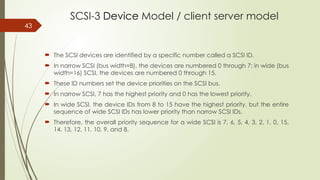
43
SCSI-3 Device Model / client server model
 The SCSI devices are identified by a specific number called a SCSI ID.
 In narrow SCSI (bus width=8), the devices are numbered 0 through 7; in wide (bus
width=16) SCSI, the devices are numbered 0 through 15.
 These ID numbers set the device priorities on the SCSI bus.
 In narrow SCSI, 7 has the highest priority and 0 has the lowest priority.
 In wide SCSI, the device IDs from 8 to 15 have the highest priority, but the entire
sequence of wide SCSI IDs has lower priority than narrow SCSI IDs.
 Therefore, the overall priority sequence for a wide SCSI is 7, 6, 5, 4, 3, 2, 1, 0, 15,
14, 13, 12, 11, 10, 9, and 8.
44
SCSI Device Model / client server
model
 Device requests uses Command Descriptor Block (CDB)
 8 bit structure
 Contain operation code, command specific parameter and control parameter
 SCSI Ports
 SCSI device may contain initiator port, target port, target/initiator port
 Based on the port combination, a SCSI device can be classified as an initiator
model, a target model, a target model with multiple ports or a combined model
(target/initiator model). Example:
 Target/initiator device contain target/initiator port and can switch orientations
depending on the role it plays while participating in an I/O operation
 To cater to service requests from multiple devices, a SCSI device may also have
multiple ports (e.g. target model with multiple ports)
SCSI Addressing
 Initiator ID - a number from 0 to 15 with the most common value being 7.
 Target ID - a number from 0 to 15
 LUN - a number that specifies a device addressable through a target.
Initiator ID Target ID LUN
Target
Initiator LUNs
46 SCSI Addressing Example
Initiator ID Target ID LUN
c0 t0 d0
Port
Port
Port
Port
Port
Host
Storage Array
Target (Front-end port)
Target – t0
Initiator (HBA)
Controller – c0
d0
d1
d2
Storage
Volumes
Host Addressing:
Storage Volume 1 - c0t0d0
Storage Volume 2 - c0t0d1
Storage Volume 3 - c0t0d2
LUN
LUN
LUN
47
48 SCSI - Ports
 SCSI ports are the physical
connectors that the SCSI cable
plugs into for communication with a
SCSI device.
 A SCSI device may contain target
ports, initiator ports, target/initiator
ports, or a target with multiple ports.
Based on the port combinations, a
SCSI device can be classified as an
initiator model, a target model, a
combined model, or a target model
with multiple ports.
© 2006 EMC Corporation. All rights reserved.
Fibre Channel
Storage Area Networks (SAN)
Module 3.3
© 2006 EMC Corporation. All rights reserved. - 50
Lesson: Fibre Channel SAN Overview
Upon completion of this lesson, you will be able to:
 Define a FC SAN.
 Describe the features of FC SAN based storage.
 Describe the benefits of an FC SAN based storage strategy.
© 2006 EMC Corporation. All rights reserved. - 51
Business Needs and Technology Challenges
Organizations are experiencing an explosive growth in information.
This information needs to be stored, protected, optimized, and managed efficiently.
Data center managers are burdened with the challenging task of providing low-cost, high-performance information
management solutions.
An effective information management solution must provide the following:
 Just-in-time information to business users
 Integration of information infrastructure with business processes
 Flexible and resilient storage architecture
This chapter provides detailed insight into the FC technology on which a SAN is deployed and also reviews SAN design
and management fundamentals.
© 2006 EMC Corporation. All rights reserved. - 52
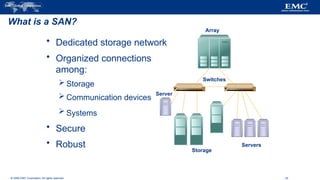
What is a SAN?
 Dedicated storage network
 Organized connections
among:
 Storage
 Communication devices
 Systems
 Secure
 Robust
Server
Servers
Array
Switches
Storage
© 2006 EMC Corporation. All rights reserved.
The SAN and Its Evolution
A storage area network (SAN) carries data between servers (also known as hosts) and
storage devices through fibre channel switches (see Figure 6-1).
A SAN enables storage consolidation and allows storage to be shared across multiple
servers.
It enables organizations to connect geographically dispersed servers and storage.
53
© 2006 EMC Corporation. All rights reserved.
54
© 2006 EMC Corporation. All rights reserved.
Components of SAN
A SAN consists of three basic components: servers, network infrastructure, and storage.
These components can be further broken down into the following key elements:
 Node Ports
 Cabling
 Interconnect Devices
 Storage Arrays
 SAN Management Software
55
© 2006 EMC Corporation. All rights reserved. - 56
Evolution of Fibre Channel SAN
SAN Islands
FC
Arbitrated Loop
Interconnected
SANs
FC
Switched Fabric
Enterprise SANs
FC Switched Fabric
HUB
Servers
Arrays
Storage
Switches
Switches
Servers
Servers
Storage
Storage
© 2006 EMC Corporation. All rights reserved. - 57
Benefits of a SAN
 High bandwidth
– Fibre Channel
 SCSI extension
– Block I/O
 Resource Consolidation
– Centralized storage and management
 Scalability
– Up to 16 million devices
 Secure Access
– Isolation and filtering
© 2006 EMC Corporation. All rights reserved. - 58
Components of a Storage Area Network
 Host Bus Adapter (HBA)
 Fiber Cabling
 Fibre Channel Switch /Hub
 Storage Array
 Management System
HBA
HBA
SAN-attached Server
SAN
Arrays
Switches
© 2006 EMC Corporation. All rights reserved. - 59
Nodes, Ports, & Links
Node
HBA
Port 0
Port 0
Port 1
Port 1
Port n
Port n
Link
Port 0
Port 0 Rx
Tx
© 2006 EMC Corporation. All rights reserved.
Cabling
SAN implementations use optical fiber cabling.
Copper can be used for shorter distances for back-end connectivity, as it provides a better
signal-to-noise ratio for distances up to 30 meters.
Optical fiber cables carry data in the form of light.
There are two types of optical cables, multi-mode and single-mode.
Multi-mode fiber (MMF) cable carries multiple beams of light projected at different
angles simultaneously onto the core of the cable (see Figure 6-4 (a)).
60
© 2006 EMC Corporation. All rights reserved.
Based on the bandwidth, multi-mode fibers are classified as OM1 (62.5μm), OM2
(50μm) and laser optimized OM3 (50μm).
In an MMF transmission, multiple light beams traveling inside the cable tend to disperse
and collide.
This collision weakens the signal strength after it travels a certain distance a process
known as modal dispersion.
An MMF cable is usually used for distances of up to 500 meters because of signal
degradation (attenuation) due to modal dispersion.
Single-mode fiber (SMF) carries a single ray of light projected at the center of the core
(see Figure 6-4 (b)).
61
© 2006 EMC Corporation. All rights reserved.
62
© 2006 EMC Corporation. All rights reserved. - 63
HBA
Host Bus Adapters
 HBAs perform low-level interface functions automatically
to minimize the impact on host processor performance
HBA
Arrays
Switches
Server
© 2006 EMC Corporation. All rights reserved. - 64
Connectivity
Single Mode
Fiber
Storage
Multimode
Fiber
Host
Switches
© 2006 EMC Corporation. All rights reserved. - 65
Connectors
Node Connectors:
 SC Duplex Connectors
 LC Duplex Connectors
Patch panel Connectors
 ST Simplex Connectors
© 2006 EMC Corporation. All rights reserved.
Interconnect Devices
Hubs, switches, and directors are the interconnect devices commonly used in SAN.
Hubs are used as communication devices in FC-AL implementations.
Hubs physically connect nodes in a logical loop or a physical star topology.
All the nodes must share the bandwidth because data travels through all the connection points.
Because of availability of low cost and high performance switches, hubs are no longer used in SANs.
Switches are more intelligent than hubs and directly route data from one physical port to another.
Therefore, nodes do not share the bandwidth. Instead, each node has a dedicated communication path, resulting in
bandwidth aggregation.
66
© 2006 EMC Corporation. All rights reserved. - 67
Connectivity Devices
 Basis for SAN communication
– Hubs, Switches and Directors
HBA
Arrays
Switches
Server
© 2006 EMC Corporation. All rights reserved. - 68
Storage Resources
 Storage Array
– Provides storage consolidation and
centralization
 Features of an array
– High Availability/Redundancy
– Performance
– Business Continuity
– Multiple host connect HBA
Arrays
Switches
Server
© 2006 EMC Corporation. All rights reserved.
Storage Arrays
The fundamental purpose of a SAN is to provide host access to storage
resources.
The capabilities of intelligent storage arrays are detailed in Chapter 4.
The large storage capacities offered by modern storage arrays have been
exploited in SAN environments for storage consolidation and centralization.
SAN implementations complement the standard features of storage arrays
by providing high availability and redundancy, improved performance,
business continuity, and multiple host connectivity. 69
© 2006 EMC Corporation. All rights reserved.
SAN Management Software
SAN management software manages the interfaces between hosts, interconnect devices,
and storage arrays.
The software provides a view of the SAN environment and enables management of various
resources from one central console.
It provides key management functions, including mapping of storage devices, switches,
and servers, monitoring and generating alerts for discovered devices, and logical
partitioning of the SAN, called zoning.
In addition, the software provides management of typical SAN components such as HBAs,
storage components, and interconnecting devices.
70
© 2006 EMC Corporation. All rights reserved. - 71
SAN Management Software
 A suite of tools used in a SAN to manage
the interface between host and storage
arrays.
 Provides integrated management of SAN
environment.
 Web based GUI or CLI
© 2006 EMC Corporation. All rights reserved. - 72
Fibre Channel SAN Connectivity
 Core networking principles
applied to storage
 Servers are attached to 2
distinct networks
– Back-end
– Front-end
Users &
Application
Clients
Storage &
Application
Data
Servers &
Applications
SAN
switches
directors
IP
network
© 2006 EMC Corporation. All rights reserved. - 73
What is Fibre Channel?
 SAN Transport Protocol
– Integrated set of standards (ANSI)
– Encapsulates SCSI
 A High Speed Serial Interface
– Allows SCSI commands to be transferred over a storage network.
 Standard allows for multiple protocols over a single interface.
© 2006 EMC Corporation. All rights reserved.
Fibre Channel: Overview
The FC architecture forms the fundamental construct of the SAN infrastructure.
Fibre Channel is a high-speed network technology that runs on high-speed optical fiber
cables (preferred for front-end SAN connectivity) and serial copper cables (preferred for
back-end disk connectivity).
The FC technology was created to meet the demand for increased speeds of data transfer
among computers, servers, and mass storage subsystems.
74
© 2006 EMC Corporation. All rights reserved.
Node Ports
In fibre channel, devices such as hosts, storage and tape libraries are all referred to as nodes.
Each node is a source or destination of information for one or more nodes.
Each node requires one or more ports to provide a physical interface for communicating with
other nodes.
These ports are integral components of an HBA and the storage front-end adapters.
A port operates in full-duplex data transmission mode with a transmit (TX) link and a receive (Rx)
link (see Figure 6-3).
75
© 2006 EMC Corporation. All rights reserved.
Fibre Channel Ports
Ports are the basic building blocks of an FC network.
Ports on the switch can be one of the following types:
 N_port
 NL_port
 E_port
 F_port
 FL_port
 G_port
76
© 2006 EMC Corporation. All rights reserved. - 77
Fibre Channel Ports
Node
Node
Node
Switch
Node
Node
Node
Node
E Port
NL Port
NL Port
N Port
F Port
N Port
F Port
N Port
F Port
N Port
F Port
E Port
FL Port FL Port
NL Port
NL Port
HUB
HUB
NL Port
Servers
Server
Server
Storage
Array
Array
Storage
Switch
Switch
© 2006 EMC Corporation. All rights reserved. - 78
World Wide Names
 Unique 64 bit identifier.
 Static to the port.
– Used to physically identify a port or node within the SAN
– Similar to a NIC MAC address
 Additionally, each node is assigned a unique port ID (address) within
the SAN
– Used to communicate between nodes within the SAN
– Similar in functionality to an IP address on a NIC
© 2006 EMC Corporation. All rights reserved.
World Wide Names
Each device in the FC environment is assigned a 64-bit unique identifier called the World Wide Name (WWN).
The Fibre Channel environment uses two types of WWNs: World Wide Node Name (WWNN) and World Wide
Port Name (WWPN).
Unlike an FC address, which is assigned dynamically, a WWN is a static name for each device on an FC
network.
WWNs are similar to the Media Access Control (MAC) addresses used in IP networking.
WWNs are burned into the hardware or assigned through software. Several configuration definitions in a SAN
use WWN for identifying storage devices and HBAs.
The name server in an FC environment keeps the association of WWNs to the dynamically created FC
addresses for nodes.
Figure 6-16 illustrates the WWN structure for an array and the HBA.
79
© 2006 EMC Corporation. All rights reserved. - 80
World Wide Names: Example
World Wide Name - HBA
1 0 0 0 0 0 0 0 c 9 2 0 d c 4 0
Reserved
12 bits
Company OUI
24 bits
Company Specific
24 bits
World Wide Name – Array
5 0 0 6 0 1 6 0 0 0 6 0 0 1 B 2
0101 0000 0000 0110 0000 0001 0110 0000 0000 0000 0110 0000 0000 0001 1011 0010
Company ID
24 bits
Port Model seed
32 bits
© 2006 EMC Corporation. All rights reserved. - 81
Fabric
Fibre Channel Logins
N Port 1 F Port F Port N Port 2
Process x
Process y
Process z
Process a
Process b
Process c
© 2006 EMC Corporation. All rights reserved. - 82
Fibre Channel Addressing
 Fibre Channel addresses are used for transporting frames from source ports
to destination ports.
 Address assignment methods vary with the associated topology (loop vs
switch)
– Loop – self assigning
– Switch – centralized authority
 Certain addresses are reserved
– FFFFFC is Name Server
– FFFFFE is Fabric Login
© 2006 EMC Corporation. All rights reserved. - 83
What is a Fabric?
 Virtual space used by nodes to
communicate with each other
once they are joined.
 Component identifiers:
– Domain ID
– Worldwide Name (WWN)
Fabric
Switches
Servers
Arrays
Storage
© 2006 EMC Corporation. All rights reserved. - 84
Fibre Channel Topologies
 Arbitrated Loop (FC-AL)
– Devices attached to a shared
“loop”
– Analogous to Token Ring
 Switched Fabric (FC-SW)
– All devices connected to a “Fabric
Switch” – Analogous to an IP
switch
– Initiators have unique dedicated
I/O paths to Targets
HUB
Switch
Clients
Arrays
Storage
Clients
© 2006 EMC Corporation. All rights reserved. - 85
Switch versus Hub Comparison
 Switches (FC-SW)
– FC-SW architecture scalable to
millions of connections.
– Bandwidth per device stays
constant with increased
connectivity.
– Bandwidth is scalable due to
dedicated connections.
– Higher availability than hubs.
– Higher cost.
 Hubs (FC-AL)
– FC-AL is limited to 127
connections (substantially fewer
connections can be implemented
for ideal system performance).
– Bandwidth per device diminishes
with increased connectivity due to
sharing of connections.
– Low cost connection.
© 2006 EMC Corporation. All rights reserved. - 86
How an Arbitrated Loop Hub Works
Transmit
Transmit
Receive
Receive
Receive
Transmit
Receive
Transmit
Byp
Byp
Byp
Byp
Hub_Pt Hub_Pt
Hub_Pt Hub_Pt
Node A
Node B Node C
Node D
Byp
Byp
NL_Port
#4
HBA
NL_Port
#4
HBA
NL_Port
#1
HBA
NL_Port
#1
HBA
NL_Port
#3
FA
NL_Port
#3
FA
NL_Port
#2
HBA
NL_Port
#2
HBA
Byp
Byp
© 2006 EMC Corporation. All rights reserved. - 87
Port
How a Switched Fabric Works
Transmit
Transmit
Receive
Receive
Receive
Transmit
Receive
Transmit
NL_Port
#1
HBA
NL_Port
#4
HBA
NL_Port
#2
HBA
N_Port #1
HBA
Port
N_Port #4
HBA
N_Port #2
Storage
Port
Port
Port
Node A
Node B Node C
Node D
NL_Port
#3
FA
N_Port #3
Storage
Port
© 2006 EMC Corporation. All rights reserved. - 88
Metro ring or point-to-point
topologies with or without
path protection
Inter Switch Links (ISLs)
Multimode Fiber
1Gb=500m 2Gb=300m
Single-mode Fiber
up to10 km
Switch
Switch
Switch
Switch
Switch
Switch
Router Router
© 2006 EMC Corporation. All rights reserved. - 89
Topology: Mesh Fabric
 Can be either partial or full mesh
 All switches are connected to each other
 Host and Storage can be located anywhere in the fabric
 Host and Storage can be localized to a single switch
Partial Mesh Full Mesh
© 2006 EMC Corporation. All rights reserved. - 90
Full Mesh Benefits
 Benefits
– All storage/servers are a maximum of one ISL hop away.
– Hosts and storage may be located anywhere in the fabric.
– Multiple paths for data using the Fabric Shortest Path First (FSPF) algorithm.
– Fabric management made simpler.
© 2006 EMC Corporation. All rights reserved. - 91
Topology: Simple Core-Edge Fabric
 Can be two or three tiers
– Single Core Tier
– One or two Edge Tiers
 In a two tier topology,
storage is usually
connected to the Core
 Benefits
– High Availability
– Medium Scalability
– Medium to maximum
Connectivity
Storage Tier
Host Tier
© 2006 EMC Corporation. All rights reserved. - 92
Core-Edge Benefits
 Simplifies propagation of fabric data.
– One ISL hop access to all storage in the fabric.
 Efficient design based on node type.
– Traffic management and predictability.
 Easier calculation of ISL loading and traffic patterns.
© 2006 EMC Corporation. All rights reserved. - 93
Lesson: Summary
Topics in this lesson included:
 The Fibre Channel SAN connectivity methods and topologies
 Fibre Channel devices
 Fibre Channel communication protocols
 Fibre Channel login procedures
© 2006 EMC Corporation. All rights reserved. - 94
SAN Management Overview
 Infrastructure protection
 Fabric Management
 Storage Allocation
 Capacity Tracking
 Performance Management
© 2006 EMC Corporation. All rights reserved. - 95
Infrastructure Security
 Physical security
– Locked data center
 Centralized server and storage infrastructure
– Controlled administrator access
Storage Arrays
Switch Switch
Secure
VPN
or
Firewall
Servers
Control
Station
Corporate LAN
Management
LAN (Private)
In-band (FC)
Out-band (IP)
© 2006 EMC Corporation. All rights reserved. - 96
Switch/Fabric Management Tools
 Vendor supplied management software
– Embedded within the switch
– Graphical User Interface (GUI) or Command Line Interface (CLI)
 Functionality
– Common functions
Performance monitoring
Discovery
Access Management (Zoning)
– Different “look and feel” between vendors
 Additional third party software add-ons
– Enhanced functionality, such as automation
© 2006 EMC Corporation. All rights reserved.
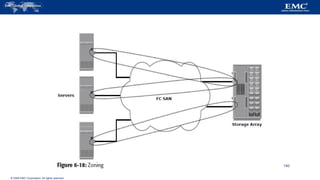
Zoning
Zoning is an FC switch function that enables nodes within the fabric to be
logically segmented into groups that can communicate with each other (see
Figure 6-18).
When a device (host or storage array) logs onto a fabric, it is registered with
the name server.
When a port logs onto the fabric, it goes through a device discovery process
with other devices registered in the name server.
The zoning function controls this process by allowing only the members in
the same zone to establish these link-level services. 97
© 2006 EMC Corporation. All rights reserved.
Types of Zoning
Zoning can be categorized into three types:
 Port zoning
 WWN zoning
 Mixed zoning
98
© 2006 EMC Corporation. All rights reserved.
99
© 2006 EMC Corporation. All rights reserved.
Fibre Channel Login Types
Fabric services define three login types:
 Fabric login (FLOGI) is performed between an N_port and an F_port.
 Port login (PLOGI) is performed between an N_port and another
N_port to establish a session.
 Process login (PRLI) is also performed between an N_port and another
N_port.
100
© 2006 EMC Corporation. All rights reserved. - 101
Fabric Management: Zoning
Servers
Arrays
© 2006 EMC Corporation. All rights reserved. - 102
Zoning Components
Zone Zone Zone
Zones
(Library)
Zone Set
Zones Sets
(Library)
Members
(WWN’s) Member Member Member Member
Member Member
© 2006 EMC Corporation. All rights reserved. - 103
Types of Zoning
Examples:
WWN Zone 1 = 10:00:00:00:C9:20:DC:40; 50:06:04:82:E8:91:2B:9E
Port Zone 1 = 21,1; 25,3
Mixed Zone 1 = 10:00:00:00:C9:20:DE:56; Port 21/1
WWN
10:00:00:00:C9:20:DC:40 WWN
50:06:04:82:E8:91:2B:9E
Domain ID = 21
Port = 1
Domain ID = 25
Port = 3
WWN
10:00:00:00:C9:20:DE:56
Servers
Array
Switches
© 2006 EMC Corporation. All rights reserved. - 104
Single HBA Zoning
 Optimally, one HBA per zone.
– Nodes can only “talk” to Storage in the same zone
 Storage Ports may be members of more than one zone.
 HBA ports are isolated from each other to avoid potential problems
associated with the SCSI discovery process.
– Also known as “chatter”
 Decreases the impact of a changes in a Fabric by reducing the amount of
nodes that must communicate.
© 2006 EMC Corporation. All rights reserved. - 105
Provisioning: LUN Masking
 Restricts volume access to
specific hosts and/or
host clusters.
 Servers can only access the
volumes that they are assigned.
 Access controlled in the storage
and not in the fabric
– Makes distributed administration
secure
 Tools to manage masking
– GUI
– Command Line
Servers
Array
Switch
© 2006 EMC Corporation. All rights reserved. - 106
Capacity Management
 Tracking and managing assets
– Number of ports assigned
– Storage allocated
 Utilization profile
– Indicates resource utilization over time
– Allows for forecasting
 SAN management software provides the tools
– Inventory databases
– Report writers
© 2006 EMC Corporation. All rights reserved. - 107
Performance Management
 What is it?
– Capturing metrics and monitoring trends
– Proactively or Reactively responding
– Planning for future growth
 Areas and functions
– Host, Fabric and Storage Performance
– Building baselines for the environment
© 2006 EMC Corporation. All rights reserved. - 108
Lesson: Summary
 Topics in this lesson included:
– Infrastructure protection
– Provisioning
– Capacity Management
– Performance Management
© 2006 EMC Corporation. All rights reserved. - 109
When Should a SAN be Used?
 SANs are optimized for high bandwidth block level I/O
 Suited for the demands of real time applications
– Databases: OLTP (online transaction processing)
– Video streaming
 Any applications with high transaction rate and high data volatility
– Stringent requirements on I/O latency and throughput
 Used to consolidate heterogeneous storage environments
– Physical consolidation
– Logical consolidation
© 2006 EMC Corporation. All rights reserved. - 110
Consolidation Example: DAS Challenge
Servers
Servers
Servers
Storage
© 2006 EMC Corporation. All rights reserved. - 111
Consolidation Example: SAN Solution
Servers Servers
Array
Switch
Servers
© 2006 EMC Corporation. All rights reserved. - 112
Connectivity Example: Challenge
Server
Switches
Array
Array
Server
Server
Server
Server
© 2006 EMC Corporation. All rights reserved. - 113
Connectivity Example: Solution
Server
Server
Server
Server
Server
Array
Switches
© 2006 EMC Corporation. All rights reserved. - 114
FC SAN Challenges
 Infrastructure
– New, separate networks are required.
 Skill-sets
– As a relatively new technology, FC SAN administrative skills need to be cultivated.
 Cost
– Large investments are required for effective implementation.
© 2006 EMC Corporation. All rights reserved.
FC Connectivity
The FC architecture supports three basic
interconnectivity options:
 point-to point
 Fibre Channel Arbitrated loop (FC-AL)
 fabric connect
115
© 2006 EMC Corporation. All rights reserved.
Point-to-Point
Point-to-point is the simplest FC configuration two devices are
connected directly to each other, as shown in Figure 6-6.
This configuration provides a dedicated connection for data
transmission between nodes.
However, the point-to-point configuration offers limited connectivity, as
only two devices can communicate with each other at a given time.
Moreover, it cannot be scaled to accommodate a large number of
network devices. Standard DAS uses point to point connectivity.
116
© 2006 EMC Corporation. All rights reserved.
117
© 2006 EMC Corporation. All rights reserved.
Fibre Channel Arbitrated Loop
In the FC-AL configuration, devices are attached to a shared loop, as shown in Figure 6-7.
FC-AL has the characteristics of a token ring topology and a physical star topology.
In FC-AL, each device contends with other devices to perform I/O operations.
Devices on the loop must “arbitrate” to gain control of the loop. At any given time, only one
device can perform I/O operations on the loop.
As a loop configuration, FC-AL can be implemented without any interconnecting devices by
directly connecting one device to another in a ring through cables.
However, FC-AL implementations may also use hubs whereby the arbitrated loop is physically
connected in a star topology. 118
© 2006 EMC Corporation. All rights reserved.
119
© 2006 EMC Corporation. All rights reserved.
 FC-AL shares the bandwidth in the loop.
 Only one device can perform I/O operations at a time.
 Because each device in a loop has to wait for its turn to process an
I/O request, the speed of data transmission is low in an FC-AL
topology.
 FC-AL uses 8-bit addressing. It can support up to 127 devices on a
loop.
 Adding or removing a device results in loop re-initialization, which
can cause a momentary pause in loop traffic.
120
© 2006 EMC Corporation. All rights reserved.
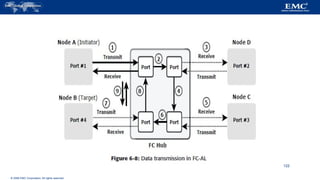
FC-AL Transmission
When a node in the FC-AL topology attempts to transmit data, the node sends an
arbitration (ARB) frame to each node on the loop.
If two nodes simultaneously attempt to gain control of the loop, the node with the highest
priority is allowed to communicate with another node.
This priority is determined on the basis of Arbitrated Loop Physical Address (AL-PA) and
Loop ID, described later in this chapter.
When the initiator node receives the ARB request it sent, it gains control of the loop.
The initiator then transmits data to the node with which it has established a virtual
connection.
Figure 6-8 illustrates the process of data transmission in an FC-AL configuration. 121
© 2006 EMC Corporation. All rights reserved.
122
© 2006 EMC Corporation. All rights reserved.
1) High priority initiator, Node A inserts the ARB frame in the
loop.
2) ARB frame is passed to the next node (Node D) in the loop.
3) Node D receives high priority ARB, therefore remains idle.
4) ARB is forwarded to next node (Node C) in the loop.
5) Node C receives high priority ARB, therefore remains idle.
6) ARB is forwarded to next node (Node B) in the loop.
7) Node B receives high priority ARB, therefore remains idle and
8) ARB is forwarded to next node (Node A) in the loop.
9) Node A receives ARB back; now it gains control of the loop
and can start communicating with target Node B. 123
© 2006 EMC Corporation. All rights reserved.
Fibre Channel Switched Fabric
Unlike a loop configuration, a Fibre Channel switched fabric (FC-SW) network provides interconnected
devices, dedicated bandwidth, and scalability.
The addition or removal of a device in a switched fabric is minimally disruptive; it does not affect the
ongoing traffic between other devices. FC-SW is also referred to as fabric connect.
A fabric is a logical space in which all nodes communicate with one another in a network. This virtual space
can be created with a switch or a network of switches.
Each switch in a fabric contains a unique domain identifier, which is part of the fabric’s addressing scheme.
In FC-SW, nodes do not share a loop; instead, data is transferred through a dedicated path between the nodes.
Each port in a fabric has a unique 24-bit fibre channel address for communication. Figure 6-9 shows an
example of FC-SW.
124
© 2006 EMC Corporation. All rights reserved.
125
© 2006 EMC Corporation. All rights reserved.
126
© 2006 EMC Corporation. All rights reserved.
Fibre Channel Architecture
 Sustained transmission bandwidth over long distances.
 Support for a larger number of addressable devices over a network. Theoretically,
FC can support over 15 million device addresses on a network.
 Exhibits the characteristics of channel transport and provides speeds up to 8.5 Gb/s
(8 GFC).
127
© 2006 EMC Corporation. All rights reserved.
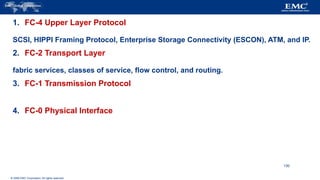
Fibre Channel Protocol Stack
It is easier to understand a communication protocol by viewing it as a structure of
independent layers.
FCP defines the communication protocol in five layers: FC-0 through FC-4 (except FC-
3 layer, which is not implemented).
In a layered communication model, the peer layers on each node talk to each other
through defined protocols.
Figure 6-13 illustrates the fibre channel protocol stack.
128
© 2006 EMC Corporation. All rights reserved.
129
© 2006 EMC Corporation. All rights reserved.
1. FC-4 Upper Layer Protocol
SCSI, HIPPI Framing Protocol, Enterprise Storage Connectivity (ESCON), ATM, and IP.
2. FC-2 Transport Layer
fabric services, classes of service, flow control, and routing.
3. FC-1 Transmission Protocol
4. FC-0 Physical Interface
130
© 2006 EMC Corporation. All rights reserved.
Fibre Channel Addressing
An FC address is dynamically assigned when a port logs on to the fabric.
The FC address has a distinct format that varies according to the type of node port in the fabric.
These ports can be an N_port and an NL_port in a public loop, or an NL_port in a private loop.
The first field of the FC address of an N_port contains the domain ID of the switch (see Figure 6-14).
This is an 8-bit field. Out of the possible 256 domain IDs, 239 are available for use; the remaining 17
addresses are reserved for specific services.
For example, FFFFFC is reserved for the name server, and FFFFFE is reserved for the fabric login
service.
The maximum possible number of N_ports in a switched fabric is calculated as 239 domains × 256
areas × 256 ports = 15,663,104 Fibre Channel addresses.
131
© 2006 EMC Corporation. All rights reserved.
132
© 2006 EMC Corporation. All rights reserved.
FC Address of an NL_port
The FC addressing scheme for an NL_port differs from other ports.
The two upper bytes in the FC addresses of the NL_ports in a private loop are assigned zero values.
However, when an arbitrated loop is connected to a fabric through an FL_port, it becomes a public loop.
In this case, an NL_port supports a fabric login.
The two upper bytes of this NL_port are then assigned a positive value, called a loop identifier, by the switch.
The loop identifier is the same for all NL_ports on a given loop. Figure 6-15 illustrates the FC address of an NL_port in
both a public loop and a private loop.
The last field in the FC addresses of the NL_ports, in both public and private loops, identifies the AL-PA.
There are 127 allowable AL-PA addresses; one address is reserved for the FL_port on the switch.
133
© 2006 EMC Corporation. All rights reserved.
134
© 2006 EMC Corporation. All rights reserved.
FC Frame
An FC frame (Figure 6-17) consists of five parts: start of frame (SOF), frame header,
data field, cyclic redundancy check (CRC), and end of frame (EOF).
The SOF and EOF act as delimiters. In addition to this role, the SOF is a flag that
indicates whether the frame is the first frame in a sequence of frames.
The frame header is 24 bytes long and contains addressing information for the frame.
It includes the following information: Source ID (S_ID), Destination ID (D_ID),
Sequence ID (SEQ_ID), Sequence Count (SEQ_CNT), Originating Exchange ID
(OX_ID), and Responder Exchange ID (RX_ID), in addition to some control fields.
135
© 2006 EMC Corporation. All rights reserved.
136
© 2006 EMC Corporation. All rights reserved.
The S_ID and D_ID are standard FC addresses for the source port and the
destination port, respectively.
The SEQ_ID and OX_ID identify the frame as a component of a specific sequence
and exchange, respectively.
The frame header also defines the following fields:
 Routing Control (R_CTL)
 Class Specific Control (CS_CTL)
 TYPE
 Data Field Control (DF_CTL)
 Frame Control (F_CTL)
137
© 2006 EMC Corporation. All rights reserved.
Structure and Organization of FC Data
 Exchange operation
An exchange operation enables two N_ports to identify and manage a set of information
units.
 Sequence
A sequence refers to a contiguous set of frames that are sent from one port to another.
 Frame
A frame is the fundamental unit of data transfer at Layer 2.
Each frame can contain up to 2,112 bytes of payload.
138
© 2006 EMC Corporation. All rights reserved.
Flow Control
Flow control defines the pace of the flow of data frames during data
transmission.
FC technology uses two flow-control mechanisms:
 buffer-to-buffer credit (BB_Credit)
 end-to-end credit (EE_Credit)
139
© 2006 EMC Corporation. All rights reserved.
140
© 2006 EMC Corporation. All rights reserved.
Multiple zone sets may be defined in a fabric, but only one zone set can
be active at a time.
A zone set is a set of zones and a zone is a set of members.
A member may be in multiple zones.
Members, zones, and zone sets form the hierarchy defined in the zoning
process (see Figure 6-19).
141
© 2006 EMC Corporation. All rights reserved.
142
© 2006 EMC Corporation. All rights reserved.
FC Topologies
Fabric design follows standard topologies to connect devices.
Core-edge fabric is one of the popular topology designs.
Variations of core-edge fabric and mesh topologies are most commonly deployed
in SAN implementations.
 Core-Edge Fabric
 Mesh Topology
143
© 2006 EMC Corporation. All rights reserved.
Core-Edge Fabric
144
© 2006 EMC Corporation. All rights reserved.
145
© 2006 EMC Corporation. All rights reserved.
Mesh Topology
In a mesh topology, each switch is directly connected to other switches by using ISLs.
This topology promotes enhanced connectivity within the SAN.
When the number of ports on a network increases, the number of nodes that can participate and
communicate also increases.
A mesh topology may be one of the two types: full mesh or partial mesh.
In a full mesh, every switch is connected to every other switch in the topology.
Full mesh topology may be appropriate when the number of switches involved is small.
A typical deployment would involve up to four switches or directors, with each of them
servicing highly localized host-to-storage traffic.
146
© 2006 EMC Corporation. All rights reserved.
In a full mesh topology, a maximum of one ISL or hop is required for host-to-
storage traffic.
In a partial mesh topology, several hops or ISLs may be required for the traffic
to reach its destination.
Hosts and storage can be located anywhere in the fabric, and storage can be
localized to a director or a switch in both mesh topologies.
A full mesh topology with a symmetric design results in an even number of
switches, whereas a partial mesh has an asymmetric design and may result in
an odd number of switches.
Figure 6-23 depicts both a full mesh and a partial mesh topology.
147
© 2006 EMC Corporation. All rights reserved.
148
© 2006 EMC Corporation. All rights reserved.
When the number of tiers in a fabric increases, the distance that a fabric
management message must travel to reach each switch in the fabric also
increases.
The increase in the distance also increases the time taken to propagate
and complete a fabric reconfiguration event, such as the addition of a
new switch, or a zone set propagation event (detailed later in this
chapter).
Figure 6-10 illustrates two-tier and three-tier fabric architecture.
149
© 2006 EMC Corporation. All rights reserved.
150
© 2006 EMC Corporation. All rights reserved.
FC-SW Transmission
FC-SW uses switches that are intelligent devices.
They can switch data traffic from an initiator node to a target node directly
through switch ports.
Frames are routed between source and destination by the fabric.
As shown in Figure 6-11, if node B wants to communicate with node D, Nodes
should individually login first and then transmit data via the FC-SW.
This link is considered a dedicated connection between the initiator and the
target.
151
© 2006 EMC Corporation. All rights reserved.
Classes of Service
The FC standards define different classes of service to meet the requirements of a
wide range of applications.
The table below shows three classes of services and their features (Table 6-1).
152
© 2006 EMC Corporation. All rights reserved.
153
© 2006 EMC Corporation. All rights reserved. - 154
Lesson: Summary
Topics in this lesson included:
 Common SAN deployment considerations.
 SAN Implementation Scenarios
– Consolidation
– Connectivity
 SAN Challenges
© 2006 EMC Corporation. All rights reserved. - 155
Apply Your Knowledge…
Upon completion of this topic, you will be able to:
 Describe EMC’s product implementation of the
Connectrix™ Family of SAN Switches and Directors.
© 2006 EMC Corporation. All rights reserved.
Concepts in Practice: EMC Connectrix
This section discusses the Connectrix connectivity products
offered by EMC that provide connectivity in large-scale,
workgroup, mid-tier, and mixed iSCSI and FC environments.
 Connectrix Switches
 Connectrix Directors
 Connectrix Management Tools
156
© 2006 EMC Corporation. All rights reserved.
EMC offers the following connectivity products under the
Connectrix brand :
 Enterprise directors
 Departmental switches
 Multiprotocol routers
157
© 2006 EMC Corporation. All rights reserved. - 158
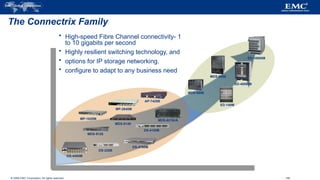
The Connectrix Family
MDS-9120
MDS-9140
DS-220B
MDS-9509
ED-140M
MP-1620M
MDS-9506
MDS-9216i/A
AP-7420B
MP-2640M
DS-4100B
ED-10000M
ED-48000B
DS-4700M
DS-4400M
 High-speed Fibre Channel connectivity- 1
to 10 gigabits per second
 Highly resilient switching technology, and
 options for IP storage networking.
 configure to adapt to any business need
© 2006 EMC Corporation. All rights reserved. - 159
Switches versus Directors
 Connectrix Switches
– High availability through redundant deployment
– Redundant fans and power supplies
– Departmental deployment or part of Data Center deployment
– Small to medium fabrics
– Multi-protocol possibilities
 Connectrix Directors
– “Redundant everything” provides optimal serviceability and highest availability
– Data center deployment
– Maximum scalability
– Maximum performance
– Large fabrics
– Multi-protocol
© 2006 EMC Corporation. All rights reserved. - 160
Connectrix Switch - DS-220B
 Provides eight, 12, or 16 ports
– Auto-detecting 1, 2, and 4 Gb/s Fibre Channel ports
– Single, fixed power supply
– Field-replaceable optics
– Redundant cooling
 Simplified setup—no previous SAN experience needed
– Eliminates the need for advanced skills to manage IP addressing or
Zoning
© 2006 EMC Corporation. All rights reserved. - 161
Connectrix Director – MDS 9509
 Multi-transport switch—Fibre
Channel, FICON, iSCSI, FCIP
– 16 to 224 Fibre Channel ports
– 4–56 Gigabit Ethernet ports for iSCSI
or FCIP
– Non-blocking fabric
– 1 / 2 Gb/s auto-sensing ports
 All components are fully
redundant
MDS-9509
© 2006 EMC Corporation. All rights reserved. - 162
Connectrix Management Interfaces
MDS-Series
Fabric Manager
M-Series
Web Server
B-Series
Web Tools
© 2006 EMC Corporation. All rights reserved. - 163
Module Summary
The Connectrix Family of Switches and Directors;
 Has three product sets:
– Connectrix B-Series
– Connectrix MDS 9000 Series
– Connectrix M-Series
 Provides highly available access to storage.
 Connects a wide range of host and storage technologies.
Summary
The SAN has enabled the consolidation of storage and benefited organizations by lowering the cost
of storage service delivery. SAN reduces overall operational cost and downtime and enables faster
application deployment.
SANs and tools that have emerged for SANs enable data centers to allocate storage to an application
and migrate workloads between different servers and storage devices dynamically.
This significantly increases server utilization.
SANs simplify the business-continuity process because organizations are able to logically connect
different data centers over long distances and provide cost-effective, disaster recovery services that
can be effectively tested.
164
The adoption of SANs has increased with the decline of hardware prices and has enhanced the maturity of storage
network standards. Small and medium size enterprises and departments that initially resisted shared storage pools have
now begun to adopt SANs.
This chapter detailed the components of a SAN and the FC technology that forms its backbone.
FC meets today’s demands for reliable, high-performance, and low-cost applications.
The interoperability between FC switches from different vendors has enhanced significantly compared to early SAN
deployments.
The standards published by a dedicated study group within T11 on SAN routing, and the new product offerings from
vendors, are now revolutionizing the way SANs are deployed and operated.
Although SANs have eliminated islands of storage, their initial implementation created islands of SANs in an enterprise.
The emergence of the iSCSI and FCIP technologies, has pushed the convergence of the SAN with IP technology,
providing more benefits to using storage technologies.
165

Information Storage Management .pptx

  • 1.
    1 Information Storage andManagement Unit 3 – Direct Attached Storage and Introduction to SCSI
  • 2.
    2 UNIT-III  Direct-AttachedStorage, SCSI, and Storage Area Networks: Types of DAS, DAS Benefits and Limitations, Disk Drive Interfaces, Introduction to Parallel SCSI, Overview of Fibre Channel, The SAN and Its Evolution, Components of SAN, FC Connectivity, Fibre Channel Ports, Fibre Channel Architecture, Zoning, Fibre Channel Login Types, FC Topologies
  • 3.
    3 Direct-Attached Storage Direct – Attached storage (DAS) is a an architecture where storage connects directly to servers.  Applications access data from DAS using block-level access protocols.  DAS is ideal for localized data access and sharing in environments that have a small number of servers.  Ex: small businesses, departments and workgroups do not share information across enterprises
  • 4.
    4 What isDAS?  Uses block level protocol for data access Internal Direct Connect External Direct Connect
  • 5.
    Direct Attached Storage (Internal) ComputerSystem CPU Memory Bus I/O - RAID Controller Disk Drives
  • 6.
    Direct Attached Storage (Internal) ComputerSystem CPU Memory Bus I/O - RAID Controller Disk Drives 12345 John Sm ith 512-555-1212 1424 Main Street Data
  • 7.
    Direct Attached Storage (Internal) ComputerSystem CPU Memory Bus I/O - RAID Controller Disk Drives 12345 John Sm ith 512-555-1212 1424 Main Street
  • 8.
    DAS w/ internalcontroller and external storage CPU Memory Bus I/O - RAID Controller Computer System Disk Drives Disk Drives Disk Drives Disk Enclosure 12345 John Sm ith 512-555-1212 1424 Main Street
  • 9.
    Comparing Internal andExternal Storage Internal Storage Server Storage RAID controllers and disk drives are internal to the server SCSI, ATA, or SATA protocol between controller and disks SCSI Bus w/ external storage Server RAID Controller Storage RAID Controller Disk Drives RAID controller is internal SCSI or SATA protocol between controller and disks Disk drives are external Disk Drives
  • 10.
    DAS w/ externalcontroller and external storage Computer System CPU Memory Bus HBA RAID Controller Storage System Disk Drives Disk Drives Disk Drives Disk Enclosure 12345 John Sm ith 512-555-1212 1424 Main Street
  • 11.
    DAS over FibreChannel Server HBA Storage Disk drives and RAID controller are external Disk Drives RAID Controller HBA is internal Fibre Channel protocol between HBAs and external RAID controller External SAN Array
  • 12.
    I/O Transfer RAID Controller Containsthe “smarts” Determines how the data will be written (striping, mirroring, RAID 10, RAID 5, etc.) Host Bus Adapter (HBA) Simply transfers the data to the RAID controller. Doesn’t do any RAID or striping calculations. “Dumb” for speed. Required for external storage.
  • 13.
    Storage types Single DiskDrive JBOD Volume Storage Array SCSI device DAS NAS SAN iSCSI
  • 14.
    NAS: What isit?  Network Attached Storage  Utilizes a TCP/IP network to “share” data  Uses file sharing protocols like Unix NFS and Windows CIFS  Storage “Appliances” utilize a stripped-down OS that optimizes file protocol performance
  • 15.
    Networked Attached Storage NASServer Storage Server has a Network Interface Card No RAID Controller or HBA in the server Public or Private Ethernet network RAID Controller Disk Drives All data converted to file protocol for transmission (may slow down database transactions) Server NIC NIC
  • 16.
    iSCSI: What isit?  An alternate form of networked storage  Like NAS, also utilizes a TCP/IP network  Encapsulates native SCSI commands in TCP/IP packets  Supported in Windows 2003 Server and Linux  TCP/IP Offload Engines (TOEs) on NICs speed up packet encapsulation
  • 17.
    iSCSI Storage iSCSI Storage Serverhas a Network Interface Card or iSCSI HBA iSCSI HBAs use TCP/IP Offload Engine (TOE) Public or Private Ethernet network RAID Controller Disk Drives SCSI commands are encapsulated in TCP/IP packets Server NIC or iSCSI HBA NIC or iSCSI HBA
  • 18.
    18 DAS Benefits Ideal for local data provisioning  Quick deployment for small environments  Simple to deploy  Low capital expense  Low complexity  DAS needs lower initial investment than storage networking.  Setup is managed using host-based tools like host OS.  It requires fewer management tasks and less hardware and software elements to set up and operate.
  • 19.
    19 DAS Challenges Scalability is limited  Number of connectivity ports to hosts  Difficulty to add more capacity  Limited bandwidth  Distance limitations  Downtime required for maintenance with internal DAS  Limited ability to share resources  Array front-end port  Unused resources cannot be easily re-allocated  Resulting in islands of over and under utilized storage pools
  • 20.
    20 DAS ConnectivityOptions  ATA (IDE) and SATA  Primarily for internal bus  SCSI  Parallel (primarily for internal bus)  Serial (external bus)  FC  High speed network technology  Buss and Tag  Primarily for external mainframe  Precursor to ESCON and FICON
  • 21.
    21 Types ofDAS  There are two types of DAS depending on the location of the storage device with respect to the host.  Internal DAS  External DAS
  • 22.
    22 DAS Management  Internal Host provides:  Disk partitioning (Volume management)  File system layout  Direct Attached Storage managed individually through the server and the OS  External  Array based management  Lower TCO (Total Cost of Ownership) for managing data and storage Infrastructure
  • 23.
    23 Internal DAS In the internal DAS architecture, the storage device is internally connected to the host by a serial or parallel bus.  The physical bus has distance limitations and can only be sustained over a shorter distance for high-speed connectivity.  Most internal buses can support only a limited number of devices  They occupy a large amount of space inside the host, making maintenance of other components difficult
  • 24.
    24 External DAS In the external DAS architecture, the server connects directly to the external storage device.  Communication between the host and the storage device takes place over SCSI (Simple Computer System Interconnect) or FC (Fiber Channel) protocol.
  • 25.
    25 DAS Limitations A storage device has a limited number of ports.  A limited bandwidth in DAS restricts the available I/O processing capability.  The distance limitations associated with implementing DAS because of direct connectivity requirements can be addressed by using Fibre Channel connectivity.  Unused resources cannot be easily re-allocated, resulting in islands of over-utilized and under-utilized storage pools.  It is not scalable.  Disk utilization, throughput, and cache memory of a storage device, along with virtual memory of a host govern the performance of DAS.  RAID-level configurations, storage controller protocols, and the efficiency of the bus are additional factors that affect the performance of DAS.  The absence of storage interconnects and network latency provide DAS with the potential to outperform other storage networking configurations.
  • 26.
    26 Disk DriveInterfaces  The host and the storage device in DAS communicate with each other by using predefined protocols such as IDE/ATA, SATA, SAS, SCSI, and FC.  These protocols are implemented on the HDD controller. Therefore, a storage device is also known by the name of the protocol it supports.
  • 27.
    27 IDE/ATA  AnIntegrated Device Electronics/Advanced Technology Attachment (IDE/ATA) disk supports the IDE protocol.  The IDE component in IDE/ATA provides the specification for the controllers connected to the computer’s motherboard for communicating with the device attached.  The ATA component is the interface for connecting storage devices, such as CD- ROMs, floppy disk drives, and HDDs, to the motherboard.  IDE/ATA has a variety of standards and names, such as ATA, ATA/ATAPI, EIDE, ATA- 2, Fast ATA, ATA-3, Ultra ATA, and Ultra DMA.  The latest version of ATA—Ultra DMA/133—supports a throughput of 133 MB per second.
  • 28.
    28 IDE/ATA  In amaster-slave configuration, an ATA interface supports two storage devices per connector. However, if the performance of the drive is important, sharing a port between two devices is not recommended.  A 40-pin connector is used to connect ATA disks to the motherboard, and a 34- pin connector is used to connect floppy disk drives to the motherboard.  An IDE/ATA disk offers excellent performance at low cost, making it a popular and commonly used hard disk.
  • 29.
    29 SATA  A SATA(Serial ATA) is a serial version of the IDE/ATA specification.  SATA is a disk-interface technology that was developed by a group of the industry’s leading vendors with the aim of replacing parallel ATA.  A SATA provides point-to-point connectivity up to a distance of one meter and enables data transfer at a speed of 150 MB/s.  Enhancements to the SATA have increased the data transfer speed up to 600 MB/s.  A SATA bus directly connects each storage device to the host through a dedicated link, making use of low-voltage differential signaling (LVDS  LVDS is an electrical signaling system that can provide high-speed connectivity over low-cost, twisted-pair copper cables. For data transfer, a SATA bus uses LVDS with a voltage of 250 mV.
  • 30.
    30 SATA  ASATA bus uses a small 7-pin connector and a thin cable for connectivity.  A SATA port uses 4 signal pins, which improves its pin efficiency compared to the parallel ATA that uses 26 signal pins, for connecting an 80-conductor ribbon cable to a 40-pin header connector.  SATA devices are hot-pluggable, which means that they can be connected or removed while the host is up and running.  A SATA port permits single-device connectivity.  Connecting multiple SATA drives to a host requires multiple ports to be present on the host.  Single-device connectivity enforced in SATA, eliminates the performance problems caused by cable or port sharing in IDE/ATA.
  • 31.
    31 Evolution of ParallelSCSI  Developed by Shugart Associates & named as SASI (Shugart Associates System Interface)  ANSI acknowledged SCSI as an industry standard  SCSI versions  SCSI–1  Defined cable length, signaling characteristics, commands & transfer modes  Used 8-bit narrow bus with maximum data transfer rate of 5 MB/s  SCSI–2  Defined Common Command Set (CCS) to address non-standard implementation of the original SCSI  Improved performance, reliability, and added additional features  SCSI–3  Latest version of SCSI  Comprised different but related standards, rather than one large document
  • 32.
    32 Evolution ofParallel SCSI  SCSI was developed to provide a device-independent mechanism for attaching to and accessing host computers.  SCSI also provided an efficient peer-to-peer I/O bus that supported multiple devices.  SCSI is commonly used as a hard disk interface. However, SCSI can be used to add devices, such as tape drives and optical media drives, to the host computer without modifying the system hardware or software.  Over the years, SCSI has undergone radical changes and has evolved into a robust industry standard.
  • 33.
    33 Evolution of ParallelSCSI  SCSI, first developed for hard disks, is often compared to IDE/ATA.  SCSI offers improved performance and expandability and compatibility options, making it suitable for high-end computers.  However, the high cost associated with SCSI limits its popularity among home or business desktop users.  SCSI is available in a variety of interfaces. Parallel SCSI (referred to as SCSI) is one of the oldest and most popular forms of storage interface used in hosts.  SCSI is a set of standards used for connecting a peripheral device to a computer and transferring data between them.  Often, SCSI is used to connect HDDs and tapes to a host.  SCSI can also connect a wide variety of other devices such as scanners and printers.  Communication between the hosts and the storage devices uses the SCSI command set.  The oldest SCSI variant, called SCSI-1 provided data transfer rate of 5 MB/s; SCSI Ultra 320 provides data transfer speeds of 320 MB/s.
  • 34.
  • 35.
    35 SCSI -1  SCSI-1, renamed to distinguish it from other SCSI versions, is the original standard that the ANSI approved.  SCSI-1 defined the basics of the first SCSI bus, including cable length, signaling characteristics, commands, and transfer modes.  SCSI-1 devices supported only single-ended transmission and passive termination. SCSI-1 used a narrow 8-bit bus, which offered a maximum data transfer rate of 5 MB/s.  SCSI-1 implementations resulted in incompatible devices and several subsets of standards.
  • 36.
    36 SCSI –2  To control the various problems caused by the nonstandard implementation of the original SCSI, a working paper was created to define a set of standard commands for a SCSI device.  The set of standards, called the common command set (CCS), formed the basis of the SCSI-2 standard.  SCSI-2 was focused on improving performance, enhancing reliability, and adding additional features to the SCSI-1 interface, in addition to standardizing and formalizing the SCSI commands.  The transition from SCSI-1 to SCSI-2 did not raise much concern because SCSI-2 offered backward compatibility with SCSI-1.
  • 37.
    37 SCSI –3  In 1993, work began on developing the next version of the SCSI standard, SCSI-3.  Unlike SCSI-2, the SCSI-3 standard document is comprised different but related standards, rather than one large document.
  • 38.
    38 SCSI –3 Architecture  The SCSI-3 architecture defines and categorizes various SCSI-3 standards and requirements for SCSI-3 implementations.  This architecture helps developers, hardware designers, and users to understand and effectively utilize SCSI.  The three major components of a SCSI architectural model are as follows:  SCSI-3 command protocol: This consists of primary commands that are common to all devices as well as device-specific commands that are unique to a given class of devices.  Transport layer protocols: These are a standard set of rules by which devices communicate and share information.  Physical layer interconnects: These are interface details such as electrical signaling methods and data transfer modes.
  • 39.
    SCSI–3 Architecture  SCSIcommand protocol  Primary commands common to all devices  Transport layer protocol  Standard rules for device communication and information sharing  Physical layer interconnect  Interface details such as electrical signaling methods and data transfer modes SCSI Primary Commands SCSI Specific Commands Physical Layer SCSI-3 Command Protocol Transport Layer Common Access Method SCSI Architectural Model SCSI-3 Protocol Fibre Channel Protocol Serial Bus Protocol Generic Packetized Protocol SCSI-3 Parallel Interface IEEE Serial Bus Fibre Channel
  • 40.
    40 SCSI-3 client servermodel  SCSI-3 architecture derives its base from the client-server relationship, in which a client directs a service request to a server, which then fulfills the client’s request.  In a SCSI-3 client-server model, a particular SCSI device acts as a SCSI target device, a SCSI initiator device, or a SCSI target/initiator device.  Each device performs the following functions:  SCSI initiator device: Issues a command to the SCSI target device, to perform a task. A SCSI host adaptor is an example of an initiator.  acts as a target device. However, in certain implementations, the host adaptor can also be aSCSI target device: Executes commands to perform the task received from a SCSI initiator. Typically a SCSI peripheral device target device.
  • 41.
    41 SCSI Initiator Device SCSI Target Device Application Client LogicalUnit Device Service Response Device Service Request Task Management Request Task Management Response Device Server Task Manager  SCSI target device  Executes commands issued by initiators  Examples: SCSI peripheral devices SCSI Device Model / client server model SCSI communication involves:  SCSI initiator device  Issues commands to SCSI target devices  Example: SCSI host adaptor
  • 42.
    42 SCSI-3 DeviceModel / client server model  The SCSI initiator device is comprised of an application client and task management function, which initiates device service and task management requests.  Each device service request contains a Command Descriptor Block (CDB).  The CDB defines the command to be executed and lists command-specific input sand other parameters specifying how to process the command.
  • 43.
    43 SCSI-3 Device Model/ client server model  The SCSI devices are identified by a specific number called a SCSI ID.  In narrow SCSI (bus width=8), the devices are numbered 0 through 7; in wide (bus width=16) SCSI, the devices are numbered 0 through 15.  These ID numbers set the device priorities on the SCSI bus.  In narrow SCSI, 7 has the highest priority and 0 has the lowest priority.  In wide SCSI, the device IDs from 8 to 15 have the highest priority, but the entire sequence of wide SCSI IDs has lower priority than narrow SCSI IDs.  Therefore, the overall priority sequence for a wide SCSI is 7, 6, 5, 4, 3, 2, 1, 0, 15, 14, 13, 12, 11, 10, 9, and 8.
  • 44.
    44 SCSI Device Model/ client server model  Device requests uses Command Descriptor Block (CDB)  8 bit structure  Contain operation code, command specific parameter and control parameter  SCSI Ports  SCSI device may contain initiator port, target port, target/initiator port  Based on the port combination, a SCSI device can be classified as an initiator model, a target model, a target model with multiple ports or a combined model (target/initiator model). Example:  Target/initiator device contain target/initiator port and can switch orientations depending on the role it plays while participating in an I/O operation  To cater to service requests from multiple devices, a SCSI device may also have multiple ports (e.g. target model with multiple ports)
  • 45.
    SCSI Addressing  InitiatorID - a number from 0 to 15 with the most common value being 7.  Target ID - a number from 0 to 15  LUN - a number that specifies a device addressable through a target. Initiator ID Target ID LUN Target Initiator LUNs
  • 46.
    46 SCSI AddressingExample Initiator ID Target ID LUN c0 t0 d0 Port Port Port Port Port Host Storage Array Target (Front-end port) Target – t0 Initiator (HBA) Controller – c0 d0 d1 d2 Storage Volumes Host Addressing: Storage Volume 1 - c0t0d0 Storage Volume 2 - c0t0d1 Storage Volume 3 - c0t0d2 LUN LUN LUN
  • 47.
  • 48.
    48 SCSI -Ports  SCSI ports are the physical connectors that the SCSI cable plugs into for communication with a SCSI device.  A SCSI device may contain target ports, initiator ports, target/initiator ports, or a target with multiple ports. Based on the port combinations, a SCSI device can be classified as an initiator model, a target model, a combined model, or a target model with multiple ports.
  • 49.
    © 2006 EMCCorporation. All rights reserved. Fibre Channel Storage Area Networks (SAN) Module 3.3
  • 50.
    © 2006 EMCCorporation. All rights reserved. - 50 Lesson: Fibre Channel SAN Overview Upon completion of this lesson, you will be able to:  Define a FC SAN.  Describe the features of FC SAN based storage.  Describe the benefits of an FC SAN based storage strategy.
  • 51.
    © 2006 EMCCorporation. All rights reserved. - 51 Business Needs and Technology Challenges Organizations are experiencing an explosive growth in information. This information needs to be stored, protected, optimized, and managed efficiently. Data center managers are burdened with the challenging task of providing low-cost, high-performance information management solutions. An effective information management solution must provide the following:  Just-in-time information to business users  Integration of information infrastructure with business processes  Flexible and resilient storage architecture This chapter provides detailed insight into the FC technology on which a SAN is deployed and also reviews SAN design and management fundamentals.
  • 52.
    © 2006 EMCCorporation. All rights reserved. - 52 What is a SAN?  Dedicated storage network  Organized connections among:  Storage  Communication devices  Systems  Secure  Robust Server Servers Array Switches Storage
  • 53.
    © 2006 EMCCorporation. All rights reserved. The SAN and Its Evolution A storage area network (SAN) carries data between servers (also known as hosts) and storage devices through fibre channel switches (see Figure 6-1). A SAN enables storage consolidation and allows storage to be shared across multiple servers. It enables organizations to connect geographically dispersed servers and storage. 53
  • 54.
    © 2006 EMCCorporation. All rights reserved. 54
  • 55.
    © 2006 EMCCorporation. All rights reserved. Components of SAN A SAN consists of three basic components: servers, network infrastructure, and storage. These components can be further broken down into the following key elements:  Node Ports  Cabling  Interconnect Devices  Storage Arrays  SAN Management Software 55
  • 56.
    © 2006 EMCCorporation. All rights reserved. - 56 Evolution of Fibre Channel SAN SAN Islands FC Arbitrated Loop Interconnected SANs FC Switched Fabric Enterprise SANs FC Switched Fabric HUB Servers Arrays Storage Switches Switches Servers Servers Storage Storage
  • 57.
    © 2006 EMCCorporation. All rights reserved. - 57 Benefits of a SAN  High bandwidth – Fibre Channel  SCSI extension – Block I/O  Resource Consolidation – Centralized storage and management  Scalability – Up to 16 million devices  Secure Access – Isolation and filtering
  • 58.
    © 2006 EMCCorporation. All rights reserved. - 58 Components of a Storage Area Network  Host Bus Adapter (HBA)  Fiber Cabling  Fibre Channel Switch /Hub  Storage Array  Management System HBA HBA SAN-attached Server SAN Arrays Switches
  • 59.
    © 2006 EMCCorporation. All rights reserved. - 59 Nodes, Ports, & Links Node HBA Port 0 Port 0 Port 1 Port 1 Port n Port n Link Port 0 Port 0 Rx Tx
  • 60.
    © 2006 EMCCorporation. All rights reserved. Cabling SAN implementations use optical fiber cabling. Copper can be used for shorter distances for back-end connectivity, as it provides a better signal-to-noise ratio for distances up to 30 meters. Optical fiber cables carry data in the form of light. There are two types of optical cables, multi-mode and single-mode. Multi-mode fiber (MMF) cable carries multiple beams of light projected at different angles simultaneously onto the core of the cable (see Figure 6-4 (a)). 60
  • 61.
    © 2006 EMCCorporation. All rights reserved. Based on the bandwidth, multi-mode fibers are classified as OM1 (62.5μm), OM2 (50μm) and laser optimized OM3 (50μm). In an MMF transmission, multiple light beams traveling inside the cable tend to disperse and collide. This collision weakens the signal strength after it travels a certain distance a process known as modal dispersion. An MMF cable is usually used for distances of up to 500 meters because of signal degradation (attenuation) due to modal dispersion. Single-mode fiber (SMF) carries a single ray of light projected at the center of the core (see Figure 6-4 (b)). 61
  • 62.
    © 2006 EMCCorporation. All rights reserved. 62
  • 63.
    © 2006 EMCCorporation. All rights reserved. - 63 HBA Host Bus Adapters  HBAs perform low-level interface functions automatically to minimize the impact on host processor performance HBA Arrays Switches Server
  • 64.
    © 2006 EMCCorporation. All rights reserved. - 64 Connectivity Single Mode Fiber Storage Multimode Fiber Host Switches
  • 65.
    © 2006 EMCCorporation. All rights reserved. - 65 Connectors Node Connectors:  SC Duplex Connectors  LC Duplex Connectors Patch panel Connectors  ST Simplex Connectors
  • 66.
    © 2006 EMCCorporation. All rights reserved. Interconnect Devices Hubs, switches, and directors are the interconnect devices commonly used in SAN. Hubs are used as communication devices in FC-AL implementations. Hubs physically connect nodes in a logical loop or a physical star topology. All the nodes must share the bandwidth because data travels through all the connection points. Because of availability of low cost and high performance switches, hubs are no longer used in SANs. Switches are more intelligent than hubs and directly route data from one physical port to another. Therefore, nodes do not share the bandwidth. Instead, each node has a dedicated communication path, resulting in bandwidth aggregation. 66
  • 67.
    © 2006 EMCCorporation. All rights reserved. - 67 Connectivity Devices  Basis for SAN communication – Hubs, Switches and Directors HBA Arrays Switches Server
  • 68.
    © 2006 EMCCorporation. All rights reserved. - 68 Storage Resources  Storage Array – Provides storage consolidation and centralization  Features of an array – High Availability/Redundancy – Performance – Business Continuity – Multiple host connect HBA Arrays Switches Server
  • 69.
    © 2006 EMCCorporation. All rights reserved. Storage Arrays The fundamental purpose of a SAN is to provide host access to storage resources. The capabilities of intelligent storage arrays are detailed in Chapter 4. The large storage capacities offered by modern storage arrays have been exploited in SAN environments for storage consolidation and centralization. SAN implementations complement the standard features of storage arrays by providing high availability and redundancy, improved performance, business continuity, and multiple host connectivity. 69
  • 70.
    © 2006 EMCCorporation. All rights reserved. SAN Management Software SAN management software manages the interfaces between hosts, interconnect devices, and storage arrays. The software provides a view of the SAN environment and enables management of various resources from one central console. It provides key management functions, including mapping of storage devices, switches, and servers, monitoring and generating alerts for discovered devices, and logical partitioning of the SAN, called zoning. In addition, the software provides management of typical SAN components such as HBAs, storage components, and interconnecting devices. 70
  • 71.
    © 2006 EMCCorporation. All rights reserved. - 71 SAN Management Software  A suite of tools used in a SAN to manage the interface between host and storage arrays.  Provides integrated management of SAN environment.  Web based GUI or CLI
  • 72.
    © 2006 EMCCorporation. All rights reserved. - 72 Fibre Channel SAN Connectivity  Core networking principles applied to storage  Servers are attached to 2 distinct networks – Back-end – Front-end Users & Application Clients Storage & Application Data Servers & Applications SAN switches directors IP network
  • 73.
    © 2006 EMCCorporation. All rights reserved. - 73 What is Fibre Channel?  SAN Transport Protocol – Integrated set of standards (ANSI) – Encapsulates SCSI  A High Speed Serial Interface – Allows SCSI commands to be transferred over a storage network.  Standard allows for multiple protocols over a single interface.
  • 74.
    © 2006 EMCCorporation. All rights reserved. Fibre Channel: Overview The FC architecture forms the fundamental construct of the SAN infrastructure. Fibre Channel is a high-speed network technology that runs on high-speed optical fiber cables (preferred for front-end SAN connectivity) and serial copper cables (preferred for back-end disk connectivity). The FC technology was created to meet the demand for increased speeds of data transfer among computers, servers, and mass storage subsystems. 74
  • 75.
    © 2006 EMCCorporation. All rights reserved. Node Ports In fibre channel, devices such as hosts, storage and tape libraries are all referred to as nodes. Each node is a source or destination of information for one or more nodes. Each node requires one or more ports to provide a physical interface for communicating with other nodes. These ports are integral components of an HBA and the storage front-end adapters. A port operates in full-duplex data transmission mode with a transmit (TX) link and a receive (Rx) link (see Figure 6-3). 75
  • 76.
    © 2006 EMCCorporation. All rights reserved. Fibre Channel Ports Ports are the basic building blocks of an FC network. Ports on the switch can be one of the following types:  N_port  NL_port  E_port  F_port  FL_port  G_port 76
  • 77.
    © 2006 EMCCorporation. All rights reserved. - 77 Fibre Channel Ports Node Node Node Switch Node Node Node Node E Port NL Port NL Port N Port F Port N Port F Port N Port F Port N Port F Port E Port FL Port FL Port NL Port NL Port HUB HUB NL Port Servers Server Server Storage Array Array Storage Switch Switch
  • 78.
    © 2006 EMCCorporation. All rights reserved. - 78 World Wide Names  Unique 64 bit identifier.  Static to the port. – Used to physically identify a port or node within the SAN – Similar to a NIC MAC address  Additionally, each node is assigned a unique port ID (address) within the SAN – Used to communicate between nodes within the SAN – Similar in functionality to an IP address on a NIC
  • 79.
    © 2006 EMCCorporation. All rights reserved. World Wide Names Each device in the FC environment is assigned a 64-bit unique identifier called the World Wide Name (WWN). The Fibre Channel environment uses two types of WWNs: World Wide Node Name (WWNN) and World Wide Port Name (WWPN). Unlike an FC address, which is assigned dynamically, a WWN is a static name for each device on an FC network. WWNs are similar to the Media Access Control (MAC) addresses used in IP networking. WWNs are burned into the hardware or assigned through software. Several configuration definitions in a SAN use WWN for identifying storage devices and HBAs. The name server in an FC environment keeps the association of WWNs to the dynamically created FC addresses for nodes. Figure 6-16 illustrates the WWN structure for an array and the HBA. 79
  • 80.
    © 2006 EMCCorporation. All rights reserved. - 80 World Wide Names: Example World Wide Name - HBA 1 0 0 0 0 0 0 0 c 9 2 0 d c 4 0 Reserved 12 bits Company OUI 24 bits Company Specific 24 bits World Wide Name – Array 5 0 0 6 0 1 6 0 0 0 6 0 0 1 B 2 0101 0000 0000 0110 0000 0001 0110 0000 0000 0000 0110 0000 0000 0001 1011 0010 Company ID 24 bits Port Model seed 32 bits
  • 81.
    © 2006 EMCCorporation. All rights reserved. - 81 Fabric Fibre Channel Logins N Port 1 F Port F Port N Port 2 Process x Process y Process z Process a Process b Process c
  • 82.
    © 2006 EMCCorporation. All rights reserved. - 82 Fibre Channel Addressing  Fibre Channel addresses are used for transporting frames from source ports to destination ports.  Address assignment methods vary with the associated topology (loop vs switch) – Loop – self assigning – Switch – centralized authority  Certain addresses are reserved – FFFFFC is Name Server – FFFFFE is Fabric Login
  • 83.
    © 2006 EMCCorporation. All rights reserved. - 83 What is a Fabric?  Virtual space used by nodes to communicate with each other once they are joined.  Component identifiers: – Domain ID – Worldwide Name (WWN) Fabric Switches Servers Arrays Storage
  • 84.
    © 2006 EMCCorporation. All rights reserved. - 84 Fibre Channel Topologies  Arbitrated Loop (FC-AL) – Devices attached to a shared “loop” – Analogous to Token Ring  Switched Fabric (FC-SW) – All devices connected to a “Fabric Switch” – Analogous to an IP switch – Initiators have unique dedicated I/O paths to Targets HUB Switch Clients Arrays Storage Clients
  • 85.
    © 2006 EMCCorporation. All rights reserved. - 85 Switch versus Hub Comparison  Switches (FC-SW) – FC-SW architecture scalable to millions of connections. – Bandwidth per device stays constant with increased connectivity. – Bandwidth is scalable due to dedicated connections. – Higher availability than hubs. – Higher cost.  Hubs (FC-AL) – FC-AL is limited to 127 connections (substantially fewer connections can be implemented for ideal system performance). – Bandwidth per device diminishes with increased connectivity due to sharing of connections. – Low cost connection.
  • 86.
    © 2006 EMCCorporation. All rights reserved. - 86 How an Arbitrated Loop Hub Works Transmit Transmit Receive Receive Receive Transmit Receive Transmit Byp Byp Byp Byp Hub_Pt Hub_Pt Hub_Pt Hub_Pt Node A Node B Node C Node D Byp Byp NL_Port #4 HBA NL_Port #4 HBA NL_Port #1 HBA NL_Port #1 HBA NL_Port #3 FA NL_Port #3 FA NL_Port #2 HBA NL_Port #2 HBA Byp Byp
  • 87.
    © 2006 EMCCorporation. All rights reserved. - 87 Port How a Switched Fabric Works Transmit Transmit Receive Receive Receive Transmit Receive Transmit NL_Port #1 HBA NL_Port #4 HBA NL_Port #2 HBA N_Port #1 HBA Port N_Port #4 HBA N_Port #2 Storage Port Port Port Node A Node B Node C Node D NL_Port #3 FA N_Port #3 Storage Port
  • 88.
    © 2006 EMCCorporation. All rights reserved. - 88 Metro ring or point-to-point topologies with or without path protection Inter Switch Links (ISLs) Multimode Fiber 1Gb=500m 2Gb=300m Single-mode Fiber up to10 km Switch Switch Switch Switch Switch Switch Router Router
  • 89.
    © 2006 EMCCorporation. All rights reserved. - 89 Topology: Mesh Fabric  Can be either partial or full mesh  All switches are connected to each other  Host and Storage can be located anywhere in the fabric  Host and Storage can be localized to a single switch Partial Mesh Full Mesh
  • 90.
    © 2006 EMCCorporation. All rights reserved. - 90 Full Mesh Benefits  Benefits – All storage/servers are a maximum of one ISL hop away. – Hosts and storage may be located anywhere in the fabric. – Multiple paths for data using the Fabric Shortest Path First (FSPF) algorithm. – Fabric management made simpler.
  • 91.
    © 2006 EMCCorporation. All rights reserved. - 91 Topology: Simple Core-Edge Fabric  Can be two or three tiers – Single Core Tier – One or two Edge Tiers  In a two tier topology, storage is usually connected to the Core  Benefits – High Availability – Medium Scalability – Medium to maximum Connectivity Storage Tier Host Tier
  • 92.
    © 2006 EMCCorporation. All rights reserved. - 92 Core-Edge Benefits  Simplifies propagation of fabric data. – One ISL hop access to all storage in the fabric.  Efficient design based on node type. – Traffic management and predictability.  Easier calculation of ISL loading and traffic patterns.
  • 93.
    © 2006 EMCCorporation. All rights reserved. - 93 Lesson: Summary Topics in this lesson included:  The Fibre Channel SAN connectivity methods and topologies  Fibre Channel devices  Fibre Channel communication protocols  Fibre Channel login procedures
  • 94.
    © 2006 EMCCorporation. All rights reserved. - 94 SAN Management Overview  Infrastructure protection  Fabric Management  Storage Allocation  Capacity Tracking  Performance Management
  • 95.
    © 2006 EMCCorporation. All rights reserved. - 95 Infrastructure Security  Physical security – Locked data center  Centralized server and storage infrastructure – Controlled administrator access Storage Arrays Switch Switch Secure VPN or Firewall Servers Control Station Corporate LAN Management LAN (Private) In-band (FC) Out-band (IP)
  • 96.
    © 2006 EMCCorporation. All rights reserved. - 96 Switch/Fabric Management Tools  Vendor supplied management software – Embedded within the switch – Graphical User Interface (GUI) or Command Line Interface (CLI)  Functionality – Common functions Performance monitoring Discovery Access Management (Zoning) – Different “look and feel” between vendors  Additional third party software add-ons – Enhanced functionality, such as automation
  • 97.
    © 2006 EMCCorporation. All rights reserved. Zoning Zoning is an FC switch function that enables nodes within the fabric to be logically segmented into groups that can communicate with each other (see Figure 6-18). When a device (host or storage array) logs onto a fabric, it is registered with the name server. When a port logs onto the fabric, it goes through a device discovery process with other devices registered in the name server. The zoning function controls this process by allowing only the members in the same zone to establish these link-level services. 97
  • 98.
    © 2006 EMCCorporation. All rights reserved. Types of Zoning Zoning can be categorized into three types:  Port zoning  WWN zoning  Mixed zoning 98
  • 99.
    © 2006 EMCCorporation. All rights reserved. 99
  • 100.
    © 2006 EMCCorporation. All rights reserved. Fibre Channel Login Types Fabric services define three login types:  Fabric login (FLOGI) is performed between an N_port and an F_port.  Port login (PLOGI) is performed between an N_port and another N_port to establish a session.  Process login (PRLI) is also performed between an N_port and another N_port. 100
  • 101.
    © 2006 EMCCorporation. All rights reserved. - 101 Fabric Management: Zoning Servers Arrays
  • 102.
    © 2006 EMCCorporation. All rights reserved. - 102 Zoning Components Zone Zone Zone Zones (Library) Zone Set Zones Sets (Library) Members (WWN’s) Member Member Member Member Member Member
  • 103.
    © 2006 EMCCorporation. All rights reserved. - 103 Types of Zoning Examples: WWN Zone 1 = 10:00:00:00:C9:20:DC:40; 50:06:04:82:E8:91:2B:9E Port Zone 1 = 21,1; 25,3 Mixed Zone 1 = 10:00:00:00:C9:20:DE:56; Port 21/1 WWN 10:00:00:00:C9:20:DC:40 WWN 50:06:04:82:E8:91:2B:9E Domain ID = 21 Port = 1 Domain ID = 25 Port = 3 WWN 10:00:00:00:C9:20:DE:56 Servers Array Switches
  • 104.
    © 2006 EMCCorporation. All rights reserved. - 104 Single HBA Zoning  Optimally, one HBA per zone. – Nodes can only “talk” to Storage in the same zone  Storage Ports may be members of more than one zone.  HBA ports are isolated from each other to avoid potential problems associated with the SCSI discovery process. – Also known as “chatter”  Decreases the impact of a changes in a Fabric by reducing the amount of nodes that must communicate.
  • 105.
    © 2006 EMCCorporation. All rights reserved. - 105 Provisioning: LUN Masking  Restricts volume access to specific hosts and/or host clusters.  Servers can only access the volumes that they are assigned.  Access controlled in the storage and not in the fabric – Makes distributed administration secure  Tools to manage masking – GUI – Command Line Servers Array Switch
  • 106.
    © 2006 EMCCorporation. All rights reserved. - 106 Capacity Management  Tracking and managing assets – Number of ports assigned – Storage allocated  Utilization profile – Indicates resource utilization over time – Allows for forecasting  SAN management software provides the tools – Inventory databases – Report writers
  • 107.
    © 2006 EMCCorporation. All rights reserved. - 107 Performance Management  What is it? – Capturing metrics and monitoring trends – Proactively or Reactively responding – Planning for future growth  Areas and functions – Host, Fabric and Storage Performance – Building baselines for the environment
  • 108.
    © 2006 EMCCorporation. All rights reserved. - 108 Lesson: Summary  Topics in this lesson included: – Infrastructure protection – Provisioning – Capacity Management – Performance Management
  • 109.
    © 2006 EMCCorporation. All rights reserved. - 109 When Should a SAN be Used?  SANs are optimized for high bandwidth block level I/O  Suited for the demands of real time applications – Databases: OLTP (online transaction processing) – Video streaming  Any applications with high transaction rate and high data volatility – Stringent requirements on I/O latency and throughput  Used to consolidate heterogeneous storage environments – Physical consolidation – Logical consolidation
  • 110.
    © 2006 EMCCorporation. All rights reserved. - 110 Consolidation Example: DAS Challenge Servers Servers Servers Storage
  • 111.
    © 2006 EMCCorporation. All rights reserved. - 111 Consolidation Example: SAN Solution Servers Servers Array Switch Servers
  • 112.
    © 2006 EMCCorporation. All rights reserved. - 112 Connectivity Example: Challenge Server Switches Array Array Server Server Server Server
  • 113.
    © 2006 EMCCorporation. All rights reserved. - 113 Connectivity Example: Solution Server Server Server Server Server Array Switches
  • 114.
    © 2006 EMCCorporation. All rights reserved. - 114 FC SAN Challenges  Infrastructure – New, separate networks are required.  Skill-sets – As a relatively new technology, FC SAN administrative skills need to be cultivated.  Cost – Large investments are required for effective implementation.
  • 115.
    © 2006 EMCCorporation. All rights reserved. FC Connectivity The FC architecture supports three basic interconnectivity options:  point-to point  Fibre Channel Arbitrated loop (FC-AL)  fabric connect 115
  • 116.
    © 2006 EMCCorporation. All rights reserved. Point-to-Point Point-to-point is the simplest FC configuration two devices are connected directly to each other, as shown in Figure 6-6. This configuration provides a dedicated connection for data transmission between nodes. However, the point-to-point configuration offers limited connectivity, as only two devices can communicate with each other at a given time. Moreover, it cannot be scaled to accommodate a large number of network devices. Standard DAS uses point to point connectivity. 116
  • 117.
    © 2006 EMCCorporation. All rights reserved. 117
  • 118.
    © 2006 EMCCorporation. All rights reserved. Fibre Channel Arbitrated Loop In the FC-AL configuration, devices are attached to a shared loop, as shown in Figure 6-7. FC-AL has the characteristics of a token ring topology and a physical star topology. In FC-AL, each device contends with other devices to perform I/O operations. Devices on the loop must “arbitrate” to gain control of the loop. At any given time, only one device can perform I/O operations on the loop. As a loop configuration, FC-AL can be implemented without any interconnecting devices by directly connecting one device to another in a ring through cables. However, FC-AL implementations may also use hubs whereby the arbitrated loop is physically connected in a star topology. 118
  • 119.
    © 2006 EMCCorporation. All rights reserved. 119
  • 120.
    © 2006 EMCCorporation. All rights reserved.  FC-AL shares the bandwidth in the loop.  Only one device can perform I/O operations at a time.  Because each device in a loop has to wait for its turn to process an I/O request, the speed of data transmission is low in an FC-AL topology.  FC-AL uses 8-bit addressing. It can support up to 127 devices on a loop.  Adding or removing a device results in loop re-initialization, which can cause a momentary pause in loop traffic. 120
  • 121.
    © 2006 EMCCorporation. All rights reserved. FC-AL Transmission When a node in the FC-AL topology attempts to transmit data, the node sends an arbitration (ARB) frame to each node on the loop. If two nodes simultaneously attempt to gain control of the loop, the node with the highest priority is allowed to communicate with another node. This priority is determined on the basis of Arbitrated Loop Physical Address (AL-PA) and Loop ID, described later in this chapter. When the initiator node receives the ARB request it sent, it gains control of the loop. The initiator then transmits data to the node with which it has established a virtual connection. Figure 6-8 illustrates the process of data transmission in an FC-AL configuration. 121
  • 122.
    © 2006 EMCCorporation. All rights reserved. 122
  • 123.
    © 2006 EMCCorporation. All rights reserved. 1) High priority initiator, Node A inserts the ARB frame in the loop. 2) ARB frame is passed to the next node (Node D) in the loop. 3) Node D receives high priority ARB, therefore remains idle. 4) ARB is forwarded to next node (Node C) in the loop. 5) Node C receives high priority ARB, therefore remains idle. 6) ARB is forwarded to next node (Node B) in the loop. 7) Node B receives high priority ARB, therefore remains idle and 8) ARB is forwarded to next node (Node A) in the loop. 9) Node A receives ARB back; now it gains control of the loop and can start communicating with target Node B. 123
  • 124.
    © 2006 EMCCorporation. All rights reserved. Fibre Channel Switched Fabric Unlike a loop configuration, a Fibre Channel switched fabric (FC-SW) network provides interconnected devices, dedicated bandwidth, and scalability. The addition or removal of a device in a switched fabric is minimally disruptive; it does not affect the ongoing traffic between other devices. FC-SW is also referred to as fabric connect. A fabric is a logical space in which all nodes communicate with one another in a network. This virtual space can be created with a switch or a network of switches. Each switch in a fabric contains a unique domain identifier, which is part of the fabric’s addressing scheme. In FC-SW, nodes do not share a loop; instead, data is transferred through a dedicated path between the nodes. Each port in a fabric has a unique 24-bit fibre channel address for communication. Figure 6-9 shows an example of FC-SW. 124
  • 125.
    © 2006 EMCCorporation. All rights reserved. 125
  • 126.
    © 2006 EMCCorporation. All rights reserved. 126
  • 127.
    © 2006 EMCCorporation. All rights reserved. Fibre Channel Architecture  Sustained transmission bandwidth over long distances.  Support for a larger number of addressable devices over a network. Theoretically, FC can support over 15 million device addresses on a network.  Exhibits the characteristics of channel transport and provides speeds up to 8.5 Gb/s (8 GFC). 127
  • 128.
    © 2006 EMCCorporation. All rights reserved. Fibre Channel Protocol Stack It is easier to understand a communication protocol by viewing it as a structure of independent layers. FCP defines the communication protocol in five layers: FC-0 through FC-4 (except FC- 3 layer, which is not implemented). In a layered communication model, the peer layers on each node talk to each other through defined protocols. Figure 6-13 illustrates the fibre channel protocol stack. 128
  • 129.
    © 2006 EMCCorporation. All rights reserved. 129
  • 130.
    © 2006 EMCCorporation. All rights reserved. 1. FC-4 Upper Layer Protocol SCSI, HIPPI Framing Protocol, Enterprise Storage Connectivity (ESCON), ATM, and IP. 2. FC-2 Transport Layer fabric services, classes of service, flow control, and routing. 3. FC-1 Transmission Protocol 4. FC-0 Physical Interface 130
  • 131.
    © 2006 EMCCorporation. All rights reserved. Fibre Channel Addressing An FC address is dynamically assigned when a port logs on to the fabric. The FC address has a distinct format that varies according to the type of node port in the fabric. These ports can be an N_port and an NL_port in a public loop, or an NL_port in a private loop. The first field of the FC address of an N_port contains the domain ID of the switch (see Figure 6-14). This is an 8-bit field. Out of the possible 256 domain IDs, 239 are available for use; the remaining 17 addresses are reserved for specific services. For example, FFFFFC is reserved for the name server, and FFFFFE is reserved for the fabric login service. The maximum possible number of N_ports in a switched fabric is calculated as 239 domains × 256 areas × 256 ports = 15,663,104 Fibre Channel addresses. 131
  • 132.
    © 2006 EMCCorporation. All rights reserved. 132
  • 133.
    © 2006 EMCCorporation. All rights reserved. FC Address of an NL_port The FC addressing scheme for an NL_port differs from other ports. The two upper bytes in the FC addresses of the NL_ports in a private loop are assigned zero values. However, when an arbitrated loop is connected to a fabric through an FL_port, it becomes a public loop. In this case, an NL_port supports a fabric login. The two upper bytes of this NL_port are then assigned a positive value, called a loop identifier, by the switch. The loop identifier is the same for all NL_ports on a given loop. Figure 6-15 illustrates the FC address of an NL_port in both a public loop and a private loop. The last field in the FC addresses of the NL_ports, in both public and private loops, identifies the AL-PA. There are 127 allowable AL-PA addresses; one address is reserved for the FL_port on the switch. 133
  • 134.
    © 2006 EMCCorporation. All rights reserved. 134
  • 135.
    © 2006 EMCCorporation. All rights reserved. FC Frame An FC frame (Figure 6-17) consists of five parts: start of frame (SOF), frame header, data field, cyclic redundancy check (CRC), and end of frame (EOF). The SOF and EOF act as delimiters. In addition to this role, the SOF is a flag that indicates whether the frame is the first frame in a sequence of frames. The frame header is 24 bytes long and contains addressing information for the frame. It includes the following information: Source ID (S_ID), Destination ID (D_ID), Sequence ID (SEQ_ID), Sequence Count (SEQ_CNT), Originating Exchange ID (OX_ID), and Responder Exchange ID (RX_ID), in addition to some control fields. 135
  • 136.
    © 2006 EMCCorporation. All rights reserved. 136
  • 137.
    © 2006 EMCCorporation. All rights reserved. The S_ID and D_ID are standard FC addresses for the source port and the destination port, respectively. The SEQ_ID and OX_ID identify the frame as a component of a specific sequence and exchange, respectively. The frame header also defines the following fields:  Routing Control (R_CTL)  Class Specific Control (CS_CTL)  TYPE  Data Field Control (DF_CTL)  Frame Control (F_CTL) 137
  • 138.
    © 2006 EMCCorporation. All rights reserved. Structure and Organization of FC Data  Exchange operation An exchange operation enables two N_ports to identify and manage a set of information units.  Sequence A sequence refers to a contiguous set of frames that are sent from one port to another.  Frame A frame is the fundamental unit of data transfer at Layer 2. Each frame can contain up to 2,112 bytes of payload. 138
  • 139.
    © 2006 EMCCorporation. All rights reserved. Flow Control Flow control defines the pace of the flow of data frames during data transmission. FC technology uses two flow-control mechanisms:  buffer-to-buffer credit (BB_Credit)  end-to-end credit (EE_Credit) 139
  • 140.
    © 2006 EMCCorporation. All rights reserved. 140
  • 141.
    © 2006 EMCCorporation. All rights reserved. Multiple zone sets may be defined in a fabric, but only one zone set can be active at a time. A zone set is a set of zones and a zone is a set of members. A member may be in multiple zones. Members, zones, and zone sets form the hierarchy defined in the zoning process (see Figure 6-19). 141
  • 142.
    © 2006 EMCCorporation. All rights reserved. 142
  • 143.
    © 2006 EMCCorporation. All rights reserved. FC Topologies Fabric design follows standard topologies to connect devices. Core-edge fabric is one of the popular topology designs. Variations of core-edge fabric and mesh topologies are most commonly deployed in SAN implementations.  Core-Edge Fabric  Mesh Topology 143
  • 144.
    © 2006 EMCCorporation. All rights reserved. Core-Edge Fabric 144
  • 145.
    © 2006 EMCCorporation. All rights reserved. 145
  • 146.
    © 2006 EMCCorporation. All rights reserved. Mesh Topology In a mesh topology, each switch is directly connected to other switches by using ISLs. This topology promotes enhanced connectivity within the SAN. When the number of ports on a network increases, the number of nodes that can participate and communicate also increases. A mesh topology may be one of the two types: full mesh or partial mesh. In a full mesh, every switch is connected to every other switch in the topology. Full mesh topology may be appropriate when the number of switches involved is small. A typical deployment would involve up to four switches or directors, with each of them servicing highly localized host-to-storage traffic. 146
  • 147.
    © 2006 EMCCorporation. All rights reserved. In a full mesh topology, a maximum of one ISL or hop is required for host-to- storage traffic. In a partial mesh topology, several hops or ISLs may be required for the traffic to reach its destination. Hosts and storage can be located anywhere in the fabric, and storage can be localized to a director or a switch in both mesh topologies. A full mesh topology with a symmetric design results in an even number of switches, whereas a partial mesh has an asymmetric design and may result in an odd number of switches. Figure 6-23 depicts both a full mesh and a partial mesh topology. 147
  • 148.
    © 2006 EMCCorporation. All rights reserved. 148
  • 149.
    © 2006 EMCCorporation. All rights reserved. When the number of tiers in a fabric increases, the distance that a fabric management message must travel to reach each switch in the fabric also increases. The increase in the distance also increases the time taken to propagate and complete a fabric reconfiguration event, such as the addition of a new switch, or a zone set propagation event (detailed later in this chapter). Figure 6-10 illustrates two-tier and three-tier fabric architecture. 149
  • 150.
    © 2006 EMCCorporation. All rights reserved. 150
  • 151.
    © 2006 EMCCorporation. All rights reserved. FC-SW Transmission FC-SW uses switches that are intelligent devices. They can switch data traffic from an initiator node to a target node directly through switch ports. Frames are routed between source and destination by the fabric. As shown in Figure 6-11, if node B wants to communicate with node D, Nodes should individually login first and then transmit data via the FC-SW. This link is considered a dedicated connection between the initiator and the target. 151
  • 152.
    © 2006 EMCCorporation. All rights reserved. Classes of Service The FC standards define different classes of service to meet the requirements of a wide range of applications. The table below shows three classes of services and their features (Table 6-1). 152
  • 153.
    © 2006 EMCCorporation. All rights reserved. 153
  • 154.
    © 2006 EMCCorporation. All rights reserved. - 154 Lesson: Summary Topics in this lesson included:  Common SAN deployment considerations.  SAN Implementation Scenarios – Consolidation – Connectivity  SAN Challenges
  • 155.
    © 2006 EMCCorporation. All rights reserved. - 155 Apply Your Knowledge… Upon completion of this topic, you will be able to:  Describe EMC’s product implementation of the Connectrix™ Family of SAN Switches and Directors.
  • 156.
    © 2006 EMCCorporation. All rights reserved. Concepts in Practice: EMC Connectrix This section discusses the Connectrix connectivity products offered by EMC that provide connectivity in large-scale, workgroup, mid-tier, and mixed iSCSI and FC environments.  Connectrix Switches  Connectrix Directors  Connectrix Management Tools 156
  • 157.
    © 2006 EMCCorporation. All rights reserved. EMC offers the following connectivity products under the Connectrix brand :  Enterprise directors  Departmental switches  Multiprotocol routers 157
  • 158.
    © 2006 EMCCorporation. All rights reserved. - 158 The Connectrix Family MDS-9120 MDS-9140 DS-220B MDS-9509 ED-140M MP-1620M MDS-9506 MDS-9216i/A AP-7420B MP-2640M DS-4100B ED-10000M ED-48000B DS-4700M DS-4400M  High-speed Fibre Channel connectivity- 1 to 10 gigabits per second  Highly resilient switching technology, and  options for IP storage networking.  configure to adapt to any business need
  • 159.
    © 2006 EMCCorporation. All rights reserved. - 159 Switches versus Directors  Connectrix Switches – High availability through redundant deployment – Redundant fans and power supplies – Departmental deployment or part of Data Center deployment – Small to medium fabrics – Multi-protocol possibilities  Connectrix Directors – “Redundant everything” provides optimal serviceability and highest availability – Data center deployment – Maximum scalability – Maximum performance – Large fabrics – Multi-protocol
  • 160.
    © 2006 EMCCorporation. All rights reserved. - 160 Connectrix Switch - DS-220B  Provides eight, 12, or 16 ports – Auto-detecting 1, 2, and 4 Gb/s Fibre Channel ports – Single, fixed power supply – Field-replaceable optics – Redundant cooling  Simplified setup—no previous SAN experience needed – Eliminates the need for advanced skills to manage IP addressing or Zoning
  • 161.
    © 2006 EMCCorporation. All rights reserved. - 161 Connectrix Director – MDS 9509  Multi-transport switch—Fibre Channel, FICON, iSCSI, FCIP – 16 to 224 Fibre Channel ports – 4–56 Gigabit Ethernet ports for iSCSI or FCIP – Non-blocking fabric – 1 / 2 Gb/s auto-sensing ports  All components are fully redundant MDS-9509
  • 162.
    © 2006 EMCCorporation. All rights reserved. - 162 Connectrix Management Interfaces MDS-Series Fabric Manager M-Series Web Server B-Series Web Tools
  • 163.
    © 2006 EMCCorporation. All rights reserved. - 163 Module Summary The Connectrix Family of Switches and Directors;  Has three product sets: – Connectrix B-Series – Connectrix MDS 9000 Series – Connectrix M-Series  Provides highly available access to storage.  Connects a wide range of host and storage technologies.
  • 164.
    Summary The SAN hasenabled the consolidation of storage and benefited organizations by lowering the cost of storage service delivery. SAN reduces overall operational cost and downtime and enables faster application deployment. SANs and tools that have emerged for SANs enable data centers to allocate storage to an application and migrate workloads between different servers and storage devices dynamically. This significantly increases server utilization. SANs simplify the business-continuity process because organizations are able to logically connect different data centers over long distances and provide cost-effective, disaster recovery services that can be effectively tested. 164
  • 165.
    The adoption ofSANs has increased with the decline of hardware prices and has enhanced the maturity of storage network standards. Small and medium size enterprises and departments that initially resisted shared storage pools have now begun to adopt SANs. This chapter detailed the components of a SAN and the FC technology that forms its backbone. FC meets today’s demands for reliable, high-performance, and low-cost applications. The interoperability between FC switches from different vendors has enhanced significantly compared to early SAN deployments. The standards published by a dedicated study group within T11 on SAN routing, and the new product offerings from vendors, are now revolutionizing the way SANs are deployed and operated. Although SANs have eliminated islands of storage, their initial implementation created islands of SANs in an enterprise. The emergence of the iSCSI and FCIP technologies, has pushed the convergence of the SAN with IP technology, providing more benefits to using storage technologies. 165

Editor's Notes

  • #5 This is an example of traditional internal data storage. (Similar to what you might have on your laptop or desktop computer.)
  • #6 Data from outside the system is entered via keyboard or some other interface…
  • #7 … and goes through the CPU, memory, bus, RAID controller and into internal storage – i.e. a hard disk drive.
  • #8 Again, data from outside the system passes through the CPU, memory, bus, and RAID controller. In this case, it then is passed outside the system to some type of external disk enclosure where it is written to disk drives. Even though the data is stored outside the computer system, this is still referred to as Direct Attached Storage since the RAID controller is internal to the computer system, and the disk drives are attached to the controller via a single path.
  • #9 Regardless of whether storage is internal to the server or external, there must be a connection between the RAID controller and the disk drives, and a communication protocol must be used to communicate across this connection. In the case of external storage, a cable connects the RAID controller and the external array. Even for internal storage, a short “ribbon” cable is commonly used to connect the RAID controller and disks. Most desktop systems with internal storage utilize the ATA or Serial ATA (SATA) protocols to communicate with disks. For desktop systems, internal disks are either ATA disks or SATA disks, depending on the protocol. ATA is a parallel communication protocol that can be used to communicate with a limited number of devices over a short distance. SATA is a serial form of the ATA protocol, which allows a true cable to be used, and allows a greater distance between the controller and disks. SCSI is a parallel protocol that allows increased distance between the controller and disks. SCSI is often used for internal storage on servers. When SCSI is used for internal storage, SCSI disks are used as well. Although SCSI may be used for internal storage on servers, its main use is with external storage. A single RAID controller may attach to up to 14 disks in an external cabinet. Most commonly, external disks attached to a SCSI RAID controller are SCSI disks. However, protocol converters may be used within the external cabinet to allow ATA or SATA drives to be attached to the SCSI bus. This is commonly done to lower disk costs. In addition, the SATA protocol allows “pure” SATA external arrays to be built. The RAID controller utilizes SATA to communicate with SATA disks, with similar characteristics to external SCSI or Fibre Channel arrays (there will be more about Fibre Channel in the next section). However, SATA arrays are currently slower and less reliable than SCSI arrays. Due to their low cost, they are ideal for backup-to-disk strategies and nearline storage. Evolving specifications for SATA promise competitive characteristics to SCSI or even Fibre Channel in the future.
  • #10 A true external storage system is defined as external by the fact that the disk enclosure and “smarts” of the system (RAID controller) are outside the computer that is receiving the data. In this case, the flow of data on the computer system is again through the CPU, memory and a bus, but then it is transferred to the external storage system through a Host Bus Adapter (HBA). From the RAID controller on the external system, the data is then passed into storage on the disk drives.
  • #11 To allow an external storage cabinet with an external RAID controller, a more flexible communication protocol is needed than SCSI. The Fibre channel protocol allows the “smart” RAID controller to reside outside the server, connected through a relatively “dumb” Host Bus Adapter (HBA). A single HBA (or two HBAs) may be directly attached to the external array, in a manner similar to SCSI or SATA Direct Attached Storage. However, the external array may contain many more disks than a SCSI array. (Disks may be Fibre, SCSI, SATA, or ATA with appropriate converters). In addition, Fibre Channel connections are not limited to a single direct path. Storage communication paths may split and merge, to form a true network. We will discuss this more under the Storage Area Network section.
  • #12 From the perspective of the server, the main difference between storage attached via Fibre Channel and storage attached via SCSI is the nature of the interface hardware. SCSI controllers contain most of the intelligence needed to manage the array “onboard” the server. With Fibre Channel, the RAID controller is actually outside the server, in the external storage cabinet. To communicate with the outside world, the server utilizes a Host Bus Adapter (HBA). An HBA is a simpler device than a RAID controller, simply transferring the data over a cable to an external RAID controller. Although the use of an HBA offloads storage processing to the external RAID controller, it does not guarantee faster performance for any given IO. The same amount of processing for the IO must be done in either SCSI or Fibre Channel scenarios. An external SCSI array may actually be faster for some types of IO. Fibre Channel does enable greater flexibility on how storage is networked with servers. Fibre Channel may also offer greater throughput for multiple simultaneous IOs on one or more servers attached to the same external storage array.
  • #13 How data is stored once it gets to the storage disk drive(s) depends on the type of storage selected. Data storage comes in many different formats. We’re all familiar with what it’s like save a file to our hard drive or to a floppy or CD. Those are all forms of storage. Obviously, it can get a lot more complicated than that. Following is a list of the most common types of data storage: Single disk drive (self explanatory) JBOD – just a bunch of disks. This is collection of disk drives pooled together for storage, but without any RAID, striping, etc. Volume – a “logical” disk drive. A concatenation of drives. When one fills up, it goes to the next one. No RAID, no striping. To the OS, a logical volume looks like one disk drive. Storage Array – Also a group of more than one disk joined together – but can do striping and/or redundancy. Implies some type of RAID (whatever the level). SCSI - SCSI stands for Small Computer System Interface. It is a means of attaching additional storage to a computer. For example, a typical RAID Controller is a SCSI device that allows connection to an external storage enclosure with multiple drives. NAS – Network Attached Storage. Sometimes rather than simply attaching storage to one machine, it is attached to the computer network. That way, multiple machines can access the storage. A file protocol must be used to communicate across the network. ISCSI – Internet/SCSI protocol. Another approach to offering storage on a network. Rather then using file protocols to communicate across a TCP/IP network, native SCSI commands are “encapsulated” in TCP/IP packets. An evolving standard that has already been adopted in Windows 2003 Server. SAN - Storage Area Network. Whereas a NAS is storage that is attached to a network, SAN is a storage network in and of itself that can be attached to multiple machines. SAN is an industry-wide term for both the storage and the switching network. A SAN does not have the protocol conversion overhead of NAS or ISCSI, and tends to offer better performance. However, a SAN may require a higher initial investment in infrastructure.
  • #14 A NAS (Network Attached Storage) is designed to provide shared access to storage across a standard TCP/IP network. Sharing data across TCP/IP is accomplished by converting block-level SCSI commands to file sharing protocols. Common file sharing protocols include the UNIX Network File System (NFS) and the Windows Common Internet File System (CIFS). Linux or Windows servers may be used to share network files. However, “Appliance” servers are becoming readily available that offer better performance. These servers utilize a stripped-down operating system that is built to optimize file protocol management, and commonly support multiple file sharing protocols.
  • #15 Unlike DAS or SAN, there is no RAID Controller or HBA on the server. Instead, a Network Interface Card is used to communicate with the NAS “server” across the TCP/IP network. The NAS server also utilizes a TCP/IP card. The ethernet network can be either a private or public network. Due to the data traffic and security concerns, a VLAN is preferred when using the public network. Native SCSI commands address storage at the block level. However, native TCP/IP can only communicate storage information at a higher logical level – the file protocol level. This means that a server must send file level requests over TCP/IP to the NAS “server”, which must convert file protocol information to block level SCSI information in order to talk to the disks. Returning data must be converted from block level disk information to file protocol once again and send it across the network cable in TCP/IP packets. Although a Gigabit Ethernet network is fast, all of this protocol conversion incurs significant overhead. The situation is even worse for database requests, because the database “talks” only in block level format to the database server, so protocol conversion must occur coming and going. Because of this, NAS may not be appropriate for all databases. Read-only databases may offer acceptable performance on NAS, as well as relatively small transactional databases. However, large transactional databases are rarely placed on NAS, due to perceived performance reasons. Despite the potential drawbacks, a NAS system may offer good performance at a good price, depending on your situation. A high end NAS appliance over a 1 Gigabit ethernet network can offer performance similar to a SAN. The advent of 10 Gigabit ethernet should alleviate any performance concerns.
  • #16 iSCSI (Internet SCSI) storage systems are similar to NAS in that communication between servers and storage is accomplished over standard TCP/IP networks. However, iSCSI does not utilize file protocols for data transport. Instead, SCSI commands are encapsulated in TCP/IP packets and sent over the network (encryption may also be performed). iSCSI is supported through the operating system. Both Windows 2003 Server and Linux support iSCSI.
  • #17 iSCSI communication can occur through standard Network Interface cards. However, the OS then incurs substantial overhead in managing TCP/IP encapsulation. A new type of NIC for storage is arriving on the market, sort of an iSCSI HBA. These cards use an onboard TCP/IP Offload Engine (TOE). TOEs perform encapsulation at the hardware level, freeing processor cycles on the server. Although the performance of iSCSI is not yet up to the speed of SCSI or SAN storage, the pace of improvement is rapid. The performance is perfectly acceptable for Small to Medium sized Businesses, and works well with non-mission critical databases. With the adoption of 10 Gigabit networks, iSCSI will become increasingly attractive, even for mission critical applications. Recently, high-performance iSCSI systems have been benchmarked at 90% of the performance of Fibre Channel SANs, at an attractive price/oerformance ratio.
  • #50 We will begin by looking at what is a FC SAN and what are the benefits of using a FC SAN.
  • #51 There are many challenges for data center managers who are supporting the business needs of the users such as: Providing information when and where the business user needs it. Things that impact this challenge include: Explosion in on-line storage Thousands of servers through out organization Mission-critical data is not just in the data center 24x7 availability is a requirement Integrating technology infrastructure with business processes to: Eliminate stovepiped application environments Secure operational environments Providing a flexible, resilient architecture that: Responds quickly to business requirements Reduces the cost of managing information
  • #52 A Storage Area Network (SAN) is a dedicated network that carries data between computer systems and storage devices, which can include tape and disk resources. A SAN consists of a communication infrastructure, which provides physical connections, and a management layer, which organizes the connections, storage elements, and computer systems so that data transfer is secure and robust.
  • #56 As business demand for data grew, DAS and NAS implementations allowed companies to store and access data effectively, but often inefficiently. Storage was isolated to the specific devices, making it difficult to manage and share. The effort to regain control over the dispersed assets caused the emergence of storage area networks (SANs). SANs had the advantage of centralization, resulting in improved efficiencies. The first implementation of SAN was a simple grouping of hosts and associated storage in a single network, often using a hub as the connectivity device. This configuration is called Fibre Channel Arbitrated Loop (FCAL). It could also be referred to as a SAN Island due to the fact that a) there is limited connectivity and b) there is still a degree of isolation. As demand increased and technology improved, Fibre channel switches replaced hubs. Switches greatly increased connectivity and performance allowing for interconnected SANs and ultimately enterprise level data accessibility of SAN applications and accessibility.
  • #57 Some of the benefits of implementing a SAN are discussed here. A SAN uses the Fibre channel transport which is a set of standards which define protocols for performing high speed serial data transfer, up to 400 Megabytes per second. It provides a standard data transport medium over which computer systems communicate with devices such as disk storage arrays. SCSI over Fibre Channel implementations allow these devices to be connected in dynamic Fibre Channel topologies which span much greater distances and provide a greater level of flexibility and manageability while retaining the basic functionality of SCSI. Fibre Channel networks are often referred to as networks that perform channel operations. As it is a networked infrastructure, many devices and host can be attached seamlessly, upwards of 16 million devices in a SAN. This allows better utilization of corporate assets and ease of management both for configuration and security.
  • #58 As can be seen from the graphic on this page, a SAN consists of three basic components – server(s), the SAN infrastructure and the storage. Each of these components can be broken down into even more finite components such as: A Host Bus Adapter (HBA) which is installed in a server (including the device drivers needed to communicate within the SAN). Cabling which is usually optical but can be optical or copper. Fibre Channel switches or hubs – devices used to connect the nodes. Storage arrays. Management system to analyze and configure SAN components.
  • #59 A node can be considered any device that is connected to the SAN for purposes of requesting or supplying data (e.g. servers and storage). Nodes use ports to connect to the SAN and to transmit data. There are two connection points on a port, a transmit (Tx) link and a receive (Rx) link. Data traveling simultaneously through these links is referred to as Full Duplex.
  • #63 The Hosts connect to the SAN via an HBA. As referenced on the previous slide, the host would be the node and the HBA would represent the port(s). HBAs can be compared to a NIC in a Local Area Network, as they provide a critical link between the SAN and the operating system and application software. An HBA: Sits between the host computer's I/O bus and a Fibre Channel network and manages the transfer of information between the two channels. Performs many low-level interface functions automatically or with minimal processor involvement, such as I/O processing and physical connectivity between a server and storage. Thus, the HBAs provide critical server CPU off-load, freeing servers to perform application processing. As the only part of a storage area network that resides in a server, HBAs also provide a critical link between the SAN and the operating system and application software.
  • #64 To connect the nodes, optical fiber cables are used. There are two types of cable employed in a SAN – Multimode and Single mode. Multimode fiber (MMF) can carry multiple light rays, or modes, simultaneously. MMF typically comes in two diameters – 50 micron and 62.5 micron ( a micron is a unit of measure equal to one millionth of a meter). MMF transmission is used for relatively short distances because the light tends to degrade, through a process called modal dispersion, over greater distance. MMF is typically used to connect nodes to switches or hubs. For longer distances, single mode fiber (SMF) fiber is used. It has a diameter of 7 – 11 microns with 9 microns being the most common and transmits a single ray of light as a carrier. As there is less bounce, the light does not disperse as easily, allowing long-distance signal transmission. This type of cable is used to connect two switches together in a SAN.
  • #65 Optical and Electrical connectors are used in SANs. The SC connector is the standard connector for fiber optic cables used for 1Gb. The LC connector is the standard connector for fiber optic cables used for 2Gb or 4 Gb. The ST connector is a fiber optic connector which uses a plug and socket which is locked in place with a half-twist bayonet lock. Often used with Fibre Channel Patch Panels. (Note: A Patch Panel is generally used for connectivity consolidation in a data center.) The ST connector was the first standard for fiber optic cabling.
  • #67 For Fibre Channel SANs, connectivity is provided by Fibre Channel hubs, switches and directors. These devices act as the common link between nodes within the SAN. Connectivity devices can be categorized as either hubs or switches. A hub is an communications device is used in FCAL and which physically connects nodes in a logical loop/physical star topology. This means that all nodes must share bandwidth , as data travels through all connection points. A Fibre Channel switch/ director is a more “intelligent” device. It has advanced services that can route data from one physical port to another directly. Therefore each node has a dedicated communication path, aggregating bandwidth in the process. Compared to switches, directors are larger devices deployed for data center implementations. They function similarly to switches but have higher connectivity capacity and fault-tolerant hardware.
  • #68 The fundamental purpose of any SAN is to provide access to storage – typically storage arrays. As discussed previously, storage arrays support many of the features required in a SAN such as: High Availability/Redundancy Improved Performance Business Continuity Multiple host connect
  • #71 SAN Management Software provides a single view of your storage environment. Management of the resources from one central console is simpler and more efficient. SAN management software provides core functionality, including: Mapping of storage devices, switches, and servers Monitoring and alerting for discovered devices Logical partitioning of the SAN Additionally, it provides management of typical SAN components such as HBAs, storage devices and switches. The management system of a SAN is a server, or console, where the objects in the SAN can be monitored and maintained. It offers a central location for a full view of the SAN, thereby reducing complexity.
  • #72 SANs combine the basic functionality of storage devices and networks, consisting of hardware and software, to obtain a highly reliable, high-performance, networked data system. Services similar to those in any LAN (e.g. name resolution, address assignment etc.) allow data to traverse connections and be provided to end-users. When looking at an overall IT infrastructure, the SAN and LAN are mutually exclusive but serve similar purposes. The LAN allows clients, such as desktop work-stations, to request data from servers. This could be considered the front-end network. This is where the average user would connect typically across an Ethernet network. The SAN, or back-end network also connects to servers, but in this case, the servers are acting as clients. They are requesting data from their servers – the storage arrays. These connections are accomplished via a Fibre Channel network. (Note: FibRE refers to the protocol versus fibER which refers to a media!) By combining the two networks together, with the servers as the common thread, the end-user is supplied with any data they may need.
  • #73 Fibre channel is a set of standards which define protocols for performing high speed serial data transfer. The standards define a layered model similar to the OSI model found in traditional networking technology. Fibre Channel provides a standard data transport frame into which multiple protocol types can be encapsulated. The addressing scheme used in Fibre Channel switched fabrics will support over 16 million devices in a single fabric. Fibre Channel has become widely used to provide a serial transport medium over which computer systems communicate with devices such as disk storage arrays. These devices have traditionally been attached to systems over more traditional channel technologies such as SCSI. SCSI over Fibre Channel implementations now allow these devices to be connected in dynamic Fibre Channel topologies which span much greater distances and provide a greater level of flexibility and manageability than found with SCSI. Fibre Channel networks are often referred to a networks that perform channel operations.
  • #77 Fibre Channel ports are configured for specific applications Host Bus Adapters and Symmetrix FC Director ports are configured as either N-Ports or NL-Ports N_Port - Node port, a port at the end of a point-to-point link NL_Port - A port which supports the arbitrated loop topology Fibre Channel Switch ports are also configured for specific applications F_Port - Fabric port, the access point of the fabric which connects to a N_Port FL_Port - A fabric port which connects to a NL_Port E_Port - Expansion port on a switch. Links multiple switches G_Port - A switch port with the ability to function as either a F_Port or a E_port Note: Port Type is defined by Firmware / HBA Device Driver configuration Settings.
  • #78 All Fibre Channel devices (ports) have 64 bit unique identifiers called World Wide Names (WWN). These WWNs are similar to the MAC address used on a TCP/IP adapter, in that they uniquely identify a device on the network and are burned into the hardware or assigned through software. It is a critical feature, as it used in several configurations used for storage access. However, in order to communicate in the SAN, a port also needs an address. This address is used to transmit data through the SAN from source node to destination node.
  • #80 In this example: When a N_Port is connected to a SAN, an address is dynamically assigned to the port. The N_Port then goes through a login at which time it registers its WWN with the Name Server. Now the address is associated with the WWN. If the N_Port is moved to a different port on the fabric, its address will change. However, the login process is repeated so the WWN will become associated with the new N_Port address. This allows for configuration to take advantage of the fact that the WWN has remained the same even though the FC address has changed
  • #81 In order for a device to communicate on the SAN it must authenticate or login to the storage network. There are three types of login supported in Fibre Channel: Fabric – All node ports must attempt to log in with the Fabric (A Fabric is the ‘complete’ SAN environment.) This is typically done right after the link or the Loop has been initialized. Port – Before a node port can communicate with another node port, it must first perform N_Port Login with that node port. Process – Sets up the environment between related processes on node ports. By completing this login process, nodes have the ability to transmit and receive data.
  • #82 As mentioned previously, FC addresses are required for node communication. Fibre Channel addresses are used to designate the source and destination of frames in the Fibre Channel network. These addresses could be compared to network IP addresses. They are assigned when the node either enters the loop or is connected to the switch. There are reserved addresses, which are used for services rather than interface addresses.
  • #83 A fabric is a virtual space in which all storage nodes communicate with each other over distances. It can be created with a single switch or a group of switches connected together. Each switch contains a unique domain identifier which is used in the address schema of the fabric. In order to identify the nodes in a fabric, 24-bit fibre channel addressing is used. Fabric services: When a device logs into a fabric, its information is maintained in a database. The common services found in a fabric are: Login Service Name Service Fabric Controller Management Server
  • #84 The ANSI Fibre Channel Standard defines distinct topologies: Arbitrated loop (FC-AL), Switched fabric (FC-SW). Arbitrated loop (FC-AL) - Devices are attached to a shared “loop”. FC-AL is analogous to the token ring topology. Each device has to contend for performing I/O on the loop by a process called “arbitration” and at a given time only one device can “own” the I/O on the loop - resulting in a shared bandwidth environment. Switched Fabric - Each device has a unique dedicated I/O path to the device it is communicating with. This is accomplished by implementing a fabric switch.
  • #85 The primary differences between switches and hubs are scalability and performance. The FC-SW architecture scales to support over 16 million devices. Expansion ports, explained within the next few pages, must be implemented on switches to allow them to interconnect and build large fabrics. The FC-AL protocol implemented in hubs supports a maximum of 126 nodes. As discussed earlier, fabric switches provide full bandwidth between multiple pairs of ports in a fabric. This results in a scalable architecture which can support multiple communications at the same time. The hub on the other hand provides shared bandwidth which can support only a single communication at a time. Hubs provide a low cost connectivity expansion solution. Switches, on the other hand, can be used to build dynamic, high-performance fabrics through which multiple communications can occur at one time and are more costly.
  • #87 FCSW: At boot time, a node initializes and logs into the fabric. The node contacts Name Service to obtain list of nodes already logged in. Node attempts individual device logins and transmits data via the FCSW. This link is considered a dedicated connection between the initiator and the target. All subsequent exchanges between these nodes will make use of this "private" link.
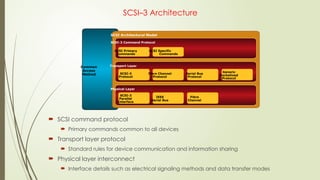
  • #88 Switches are connected to each other in a fabric using Inter-switch Links (ISL). This is accomplished by connecting them to each other through an expansion port on the switch (E_Port). ISLs are used to transfer host-to-storage data, as well as fabric management traffic, from one switch to another and, hence, they are the fundamental building blocks used in shaping the performance and availability characteristics of a fabric and the SAN.
  • #89 In this topology, all switches are connected to each other directly using ISLs. The purpose of this topology to promote increased connectivity within the SAN – the more ports that exists, the more nodes that can participate and communicate. Features of a partial mesh topology: Traffic may need to traverse several ISLs (hop) Host and storage can be located anywhere in the fabric. Host and storage can be localized to a single director or switch. Features of a full mesh topology: Maximum of one ISL link or hop for host to storage traffic. Host and storage can be located anywhere in the fabric. Host and storage can be localized to a single director or switch.
  • #90 When implementing a mesh topology, follow these recommendations: Localize hosts and storage when possible - Remember traffic will be bi-directional for both read/write and host/storage on both switches. Evenly distribute access across ISLs. Attempt to minimize hops - Traffic from remote switches should represent no more than 50% of overall traffic locally. Fabric Shortest Path First (FSPF) is a protocol used for routing in Fibre Channel switched networks. It calculates the best path between switches, establishes routes across the fabric and calculates alternate routes in event of a failure or topology change. There are some tradeoffs to keep in mind when implementing mesh fabrics such as: Additional switches raise ISL port count and reduce user port count. Thought must be given to the placement of hosts/storage or ISLs can become overloaded or underutilized.
  • #91 In this topology, several switches are connected in a “Hub and Spoke” configuration. It is called this as there is a central connection much like the wheel of a bicycle (Note: This DOES NOT refer to an FCAL hub, it is simply descriptive). There are two types of switch tiers in the fabric: Edge Tier Usually departmental switches. Offers an inexpensive approach to adding more hosts into the fabric. Fans out from the Core tier. Nodes on the edge tier can communicate with each other using the Core tier only. Host to Storage Traffic has to traverse a single ISL (two-tier) or two ISLs (three-tier). Core or Backbone Tier Usually Enterprise Directors. Ensures highest availability since all traffic has to either traverse through or terminate at this tier. With two-tier, all storage devices are connected to the core tier, facilitating fan-out. Any hosts used for mission critical applications can be connected directly to the storage tier, thereby avoiding ISLs for I/O activity from those hosts. This topology increases connectivity within the SAN while conserving overall port utilization. General connectivity is provided by the “core” while nodes will connect to the “edge”. If expansion is required, an additional edge switch can be connected to the core. This topology can have two variations: Two-tier topology (one Edge and one Core as shown) – All hosts are connected to the edge tier and all storage is connected to the core tier. Three-tier topology (two Edge and one Core) – All hosts are connected to one edge; all storage is connected to the other edge; and the core tier is only used for ISLs.
  • #92 A key benefit of the core/edge topology is the simplification of fabric propagation. Configurations are easily distributed throughout the fabric due to the common connectivity. Node workloads can be evenly distributed based on location—hosts on the edge, storage in the core. Performance analysis and traffic management is simplified since load can be predicted based on where each node resides. Increasing number of core switches grows ISL count. This is assumed to be a natural progression when growing the fabric but may cause additional hops, thus decreasing performance. Choosing the wrong switch for the core makes scaling difficult. High port-density directors are best suited at the core.
  • #93 Fibre Channel SAN is a set of nodes connected through ports. The nodes are connected into a fabric (either arbitrated loop or switched mesh) using hubs, switches and directors. A switched fabric can have different topologies such as Mesh or core-edge. Some of the benefits of a fabric include: Multiple paths between storage and hosts. One inter-switch link (ISL) access to all storage (in a core-edge topology). Fabric management is simplified.
  • #94 There are several ways to look at managing a SAN environment; Infrastructure protection - One crucial aspect of SAN management is environmental protection, or security. In order to ensure data integrity, steps must be performed to secure data and prevent unauthorized access. This includes physical security (physical access to components) and network security. Fabric Management - Monitoring and managing the switches is a daily activity for most SAN administrators. Activities include accessing the specific management software for monitoring purposes and zoning. Storage Allocation - This process involves making sure the nodes are accessing the correct storage in the SAN. The major activity is executing appropriate LUN Masking and mapping utilities. Capacity Tracking - Knowing the current state of the storage environment is important for proper allocation. This process involves record management, performance analysis and planning. Performance Management - Applications must function equal to, if not better than a DAS environment. Performance Management assists in meeting this requirement as it allows the SAN admin to be aware of current environmental operations, as well as to avoid any potential bottlenecks.
  • #95 It is imperative to maintain a secure location and network infrastructure. The continuing expansion of the storage network exposes data center resources and the storage infrastructure to new vulnerabilities. Data aggregation increases the impact of a security breach. Fibre Channel storage networking potentially exposes storage resources to traditional network vulnerabilities. For example, it is important to: Ensure that the management network, typically IP based is protected via a firewall Password are strong Completely isolate the physical infrastructure of the SAN
  • #96 Switch vendors embed their own management software on each of their devices. By connecting to the switch across the IP network, an administrator can access a graphical management tool (generally web-based) or issue CLI commands (via a telnet session). Once connected, the tasks are similar across vendors. The difference lies in the commands that are executed and the GUI. Some of the management activities include: Switch Hardware monitoring – ports, fans, power-supplies Fabric activity – node logins, data flow, transmission errors Fabric partitioning – creating managing and activating zones In addition to vendor specific software tools, there are newer SAN management packages being developed by third parties, such as Storage Resource Management (SRM) software. This software monitors a SAN and, based on policies, automatically performs administrative tasks.
  • #101 Zoning is a switch function that allows nodes within the fabric to be logically segmented into groups that can communicate with each other. The zoning function controls this process at login by only letting ports in the same zone to establish link level services.
  • #102 There are several configuration layers involved in granting nodes the ability to communicate with each other: Members - Nodes within the SAN which can be included in a zone. Zones - Contains a set of members that can access each other. A port or a node can be members of multiple zones. Zone Sets - A group of zones that can be activated or deactivated as a single entity in either a single unit or a multi-unit fabric. Only one zone set can be active at one time per fabric. Can also be referred to as a Zone Configuration.
  • #103 In general, zoning can be divided into three categories: WWN zoning (Soft) - WWN zoning uses the unique identifiers of a node which have been recorded in the switches to either allow or block access A major advantage of WWN zoning is flexibility. The SAN can be re-cabled without having to reconfigure the zone information since the WWN is static to the port. Port zoning (Hard) - Port zoning uses physical ports to define zones. Access to data is determined by what physical port a node is connected to. Although this method is quite secure, should re-cabling occur zoning configuration information must be updated. Mixed Zoning – Mixed zoning combines the two methods above. Using mixed zoning allows a specific port to be tied to a node WWN. This is not a typical method.
  • #104 Under single-HBA zoning, each HBA is configured with its own zone. The members of the zone consist of the HBA and one or more storage ports with the volumes that the HBA will use. Two reasons for Single HBA Zoning include: Cuts down on the reset time for any change made in the state of the fabric. Only the nodes within the same zone will be forced to log back into the fabric after a RSCN (Registered State Change Notification).
  • #105 Device (LUN) Masking ensures that volume access to servers is controlled appropriately. This prevents unauthorized or accidental use in a distributed environment. This is typically accomplished on the storage array using a dedicated masking database. A zone set can have multiple host HBAs and a common storage port. LUN Masking prevents multiple hosts from trying to access the same volume presented on the common storage port. The following describes how LUN Masking controls access: When servers log into the switched fabric, the WWNs of their HBAs are passed to the storage fibre adapter ports that are in their respective zones. The storage system records the connection and builds a filter listing the storage devices (LUNs) available to that WWN, through the storage fibre adapter port. The HBA port then sends I/O requests directed at a particular LUN to the storage fibre adapter. Each request includes the identity of their requesting HBA (from which its WWN can be determined) and the identity of the requested storage device, with its storage fibre adapter and logical unit number (LUN). The storage array processes requests to verify that the HBA is allowed to access that LUN on the specified port. Any request for a LUN that an HBA does not have access to returns an error to the server.
  • #106 Capacity planning is a combination of record management, performance analysis and planning. Ongoing management issues for SAN revolve around knowing how well storage resources are being utilized and proactively adjusting configurations based on application and usage needs. The key activity in managing capacity is simply to track the assets of the SAN. Objects that should be tracked include: all SAN components the allocation of assets known utilization. For example, if the amount of storage originally allocated to a host, current usage rate and the amount of growth over a period of time are tracked, we can ensure that hosts are not wasting storage. Whenever possible, reclaim unused storage and return it to the array free pool. Do not let devices remain on host ports using valuable address space. Know the capacity of the array, what is allocated, and what is free. With this data, a utilization profile can be created. This will enables report to be created based on current allocations and consumption, and allow you to project future requests. Almost all SAN management software has the capability to capture this type of data and generate either custom or “canned” reports.
  • #107 In a networked environment, it is necessary to have an end -to-end view. Each component of the system performing either a read or write will need to be monitored and analyzed. Storage administrators need to be involved in all facets of system planning, implementation, and delivery. Databases that are not properly planned for and laid-out in an array’s backend will inevitably cause resource contention and poor performance. Performance bottlenecks may be difficult to diagnose. Common causes include: Database layout can cause disk overload Server settings impact data path utilization Shifting application loads create switch bottleneck Poor SQL code causes excess I/O
  • #109 Storage Area Networks can handle large amounts of block level I/O and are suited to meet the demands of high performance applications that need access to data in real time. In several environments, these applications have to share access to storage resources and implementing them in a SAN allows efficient use of these resources. When data volatility is high, a host’s needs for capacity and performance can grow or shrink significantly in a short period of time. The SAN architecture is flexible, so existing storage can be rapidly redeployed across hosts - as needs change - with minimal disruption. SANs are also used to consolidate storage within an enterprise. Consolidation can be at a physical or logical level. Physical consolidation involves the physical relocation of resources to a centralized location. Once these resources are consolidated, one can make more efficient use of facility resources such as HVAC (heating, ventilation and air conditioning), power protection, personnel, and physical security. Physical consolidations have a drawback in that they do not offer resilience against a site failure. Logical consolidation is the process of bringing components under a unified management infrastructure and creating a shared resource pool. Since SANs can be extended to span vast distances physically, they do not strictly require that logically related entities be physically close to each other. Logical consolidation does not allow one to take full advantage of the benefits of site consolidation. But it does offer some amount of protection against site failure, especially if well planned.
  • #110 This example shows a typical networked environment, where the servers are utilizing DAS storage. This can be defined as “stove-piped” storage and is somewhat difficult to manage. There is no way of easily determining utilization and it is difficult to provision storage accurately. As an example, the server that hosts the black disks may be using 25 % of it’s overall capacity while the server hosting the blue disks may be at 90% capacity. In this model there is no way to effectively remedy this disparity. The only way information can be shared between platforms is over the user network -- this non-value-added bulk data transfer slows down the network and can consume up to 35% of the server processing capacity. This environment also does not scale very effectively and is costly to grow. Another issue in this model is administrative overhead. The individual server administrators are responsible for maintenance tasks, such as back-up. There is no way in this model, to guarantee consistency in the performance of such tasks.
  • #111 Implementing a SAN resolves many of the issues encountered in the DAS configuration. Using the SAN simplifies storage administration and adds flexibility. Note: SAN storage is still a one-to-one relationship, meaning that each device is "owned" by a single host due to zoning and LUN masking. This solution also increases storage capacity utilization, since multiple servers can share the same pool of unused resources.
  • #112 In this example, hosts and storage are connected to the same switch. This is a simple, efficient, and effective way to manage access. The entire fabric can be managed as a whole. Let us take an example of just one storage port. Access to the storage device must traverse the fabric to a single switch. As ports become needed on the fabric, the administrator may choose whatever port is open. Multiple hosts spread across the fabric are now contending for storage access on a remote switch. The initial design for the fabric may not have taken into account future growth such as this. This is only one example. Now imagine that there are dozens of storage ports being accessed by hundreds of hosts stretched across the fabric.
  • #113 By moving storage to a central location, all nodes have the same number of hops to access storage. Traffic patterns are more obvious and deterministic. Scalability is made easy.
  • #114 The traditional answer to Storage Area Networking is the implementation of FC SAN. However, with the emergence of newer SAN connectivity technology, namely IP, trends are changing. The investment required to implement FC SAN is often quite large. New infrastructure must be built and new technical skills must be developed. As a result, enterprises may find that utilizing an exiting IP infrastructure is a better option. The FC SAN challenge falls into the following categories : Infrastructure - An FC network demands FC switches, hubs and bridges along with specific GBICs and cabling. In addition, each host requires dedicated FC HBAs. Software - A variety of software tools is needed to manage all of this new equipment as well as the dedicated FC HBAs. Many of these tools do not interoperate. Human Resources - A dedicated group of FC storage and networking IT administrators is needed to manage the network. Cost – Ultimately, A good deal of time and capital must be outlayed to implement an FC SAN.
  • #154 This lesson provided an overview of deploying a SAN environment and common scenarios for consolidation and connectivity.
  • #158 Switches and Directors are key components of a SAN environment. The Connectrix family represents a wide range of products that can be used in departmental and enterprise SAN solutions. This slide displays the entire product family. The Connectrix family has the following overall strengths: Connectrix B-series (Brocade)—From the low-cost, customer-installable eight-port switch to the robust 256-port, 4 Gb ED-48000B director, the Connectrix B-series is an extensive product line. B-Series also offers a broad set of optional features such as customer-installable setup wizards, a familiar GUI, and a powerful CLI. Connectrix M-series (McData) – delivers multi-protocol storage networking for SAN-routing and SAN-extension applications. With an extensive history in mainframe environments, where high availability and performance are critical, it’s the natural choice for FICON storage networking. Connectrix MDS-series (Cisco) products provide a unified network strategy that combines data networks with SAN. For example, there’s IP across the MDS product line, and there are such data-network functionality and features as virtual SANs (VSANs), Inter-VSAN Routing (IVR), and PortChannel in the SAN.
  • #159 Functionally, an FC switch and an FC director perform the same tasks; enabling end-to-end communication between two nodes on the SAN. However, there are some differences such as scalability and availability. Directors are deployed for extreme availability and/or large scaling environments—that’s where they fit best. Connectrix directors have up to 256 ports per device; however, the SAN can scale much larger by connecting the products with ISLs (Inter-Switch Links). Directors let you consolidate more servers and storage with fewer devices and therefore less complexity. The disadvantages of directors include higher cost and larger footprint. Switches are the choice for smaller environments and/or environments in which 100% availability may not be required; price is usually a driving factor. Thus, switches are ideal for departmental or mid-tier environments. Each switch may have 16–48 ports, but, as with directors, SANs may be expanded through ISLs. Fabrics built with switches require more switches to consolidate servers and storage, which means there will be more devices and more complexity in your SAN. The disadvantages of switches include fewer ports, as well as complexity to scale.
  • #160 The departmental switches offer several key features, some of these include: buffering based on non-blocking algorithms; high-bandwidth including full-duplex serial data transfer at a rate of up to 4 Gbps; low latency with low communication overhead using the fibre channel protocol; and the ability to support multiple topologies from the same switch. However, as can be seen on the slide, they limited connectivity. The Connectrix DS-220B is an excellent example. This switch is well-suited for entry-level SANs, as well as for edge deployments in core-to-edge topologies.
  • #161 A high-availability director, the MDS-9509 has a nine-slot chassis that supports up to seven switching modules for a total of up to 224 1 / 2 Gb/s auto-sensing Fibre Channel ports in a single chassis. The IP Services Blades can also be inserted to support iSCSI and/or FCIP. And with 1.44 Tb/s of internal bandwidth, the MDS-9509 is 10 Gb/s-ready.
  • #162 The Connectrix platform offers a variety of interfaces and choices to configure and manage the SAN environment. Everything from secure CLI to GUI based device management tools are offered bundled with the hardware. Take a moment to look over the options listed here. Console Port Initial switch configuration and out-of-band troubleshooting Command Line Interface (CLI) Telnet and Secure Shell (SSH) supported Graphical User Interface (GUI) Embedded Java client-server applications Secure communication Displays topology map Configure and monitor individual switches or the entire fabric
  • #163 This module introduces the Fibre Channel Storage Area Network (FC SAN) Connectrix family. We have looked at the components and connectivity methods for a SAN as well as management topics and applications of SAN technology.