Smart TV
LED TV
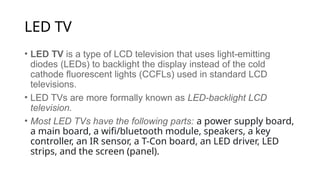
• LED TV is a type of LCD television that uses light-emitting
diodes (LEDs) to backlight the display instead of the cold
cathode fluorescent lights (CCFLs) used in standard LCD
televisions.
• LED TVs are more formally known as LED-backlight LCD
television.
• Most LED TVs have the following parts: a power supply board,
a main board, a wifi/bluetooth module, speakers, a key
controller, an IR sensor, a T-Con board, an LED driver, LED
strips, and the screen (panel).
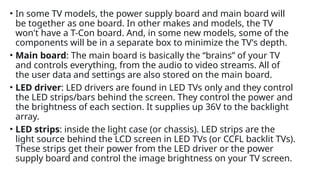
• In some TV models, the power supply board and main board will
be together as one board. In other makes and models, the TV
won't have a T-Con board. And, in some new models, some of the
components will be in a separate box to minimize the TV's depth.
• Main board: The main board is basically the “brains” of your TV
and controls everything, from the audio to video streams. All of
the user data and settings are also stored on the main board.
• LED driver: LED drivers are found in LED TVs only and they control
the LED strips/bars behind the screen. They control the power and
the brightness of each section. It supplies up 36V to the backlight
array.
• LED strips: inside the light case (or chassis). LED strips are the
light source behind the LCD screen in LED TVs (or CCFL backlit TVs).
These strips get their power from the LED driver or the power
supply board and control the image brightness on your TV screen.
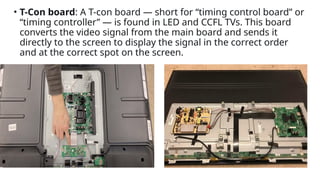
• T-Con board: A T-con board — short for “timing control board” or
“timing controller” — is found in LED and CCFL TVs. This board
converts the video signal from the main board and sends it
directly to the screen to display the signal in the correct order
and at the correct spot on the screen.
• The T-Con board, or timing control board, in a TV is responsible for
controlling the timing and driving of the pixels on the screen. It
takes the incoming video signal and processes it to control how
the pixels on the display are illuminated, ensuring that the correct
colors and images are displayed at the right time.
• Essentially, the T-Con board helps to translate the video signal into
the visual display that you see on the screen.
• The TCON (timing controller) board translates between a standard
video signal and the specific row and column driver signaling
needed by a specific LCD (or other) panel.
• The timing controller board seems to act as sort of a mini Matrox
style video wall splitter, it takes the LVDS data from the
motherboard in as a whole serial streamed frame and splits or at
least addresses it into chunks that each of the panel’s chip-on-flex
column and row drivers can handle. At the very least since it
usually has 2 outputs it splits the image into left and right halves.
• In TV video timing, you can have a video signal between 24 and 60
frames per second, and many different resolutions, but the panel
itself only supports a single resolution and timing.
• The timing is extremely precise and the distance of the cables
from the timing controller to the panel need to be very precise.
This is why the panels come from the panel manufacturer with
the TCON pre-attached and wired.
• The TV or monitor manufacturer then designs their own PCB with
TV/PC inputs, tuner, audio, speaker, etc., and the video signal
transmits to the TCON board over a standard interface. The TV
maker designs one board which can then support many panel
sizes, and can even use the same board with both LCD and OLED.
Some TCON boards have 60 Hz to 120 Hz frame rate converters,
but this isn’t very common any longer, as the TV System on chip
usually handles this these days.
• Conclussion: “T-con” is short for timing controller. The T-con itself is
typically an IC located on that board, and it’s responsible for taking the
video data sent to the LCD module and properly distributing it and the
various control signals amongst the row and column driver ICs that
actually drive the electrodes of the LCD panel.
• What are the symptoms of a bad T-con board of a TV?
• Only half the picture is OK.
• Absolutely no video or generate lines and patterns that usually cover all
or a substantial part of the screen.
• Vertical or horizontal lines on the screen, flickering or fluctuating brightness and ghosting or image
persistence.
• Colors with low contrast and turning white or dark over time
• No picture or sound, but the TV has backlights.
• Colored vertical or horizontal lines on the screen.
• Half of the screen is missing or distorted.
• Flickering or dimming of the screen.
• Gentle white flashes.
• Too much electricity: If there is a sudden change in the amount of
electricity that goes to the TV, it can break the T-Con board or some
of its parts, especially if the TV does not have a device that protects
it from too much electricity.
• One of the most common causes is overheating. If the TV is placed
in a location where it does not get proper ventilation, the T-Con
board can fail.
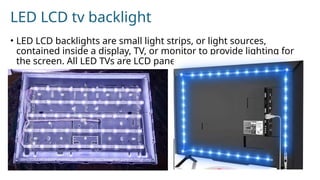
LED LCD tv backlight
• LED LCD backlights are small light strips, or light sources,
contained inside a display, TV, or monitor to provide lighting for
the screen. All LED TVs are LCD panels with LED backlighting.
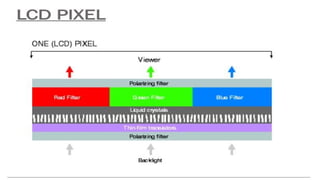
• Behind the LCD panel is a backlight, and between the backlight
and the LCD panel are usually a few layers of polarized filters,
backlight diffusers, and other optical layers designed to turn this
collection of tech components into a sharper viewable image.
• There are three main configurations of LED backlights, and your
TV's lighting configuration has a direct bearing on what you see on
the screen: Edge Lit, Full Array, and Direct Lit.
• Edge-Lit TVs, as you might have guessed, employ lights around the outside
of the screen.
• Full Array TVs have various zones throughout the display.
• Direct-Lit TVs, like Full Array TVs, have LEDs put all over the back of the
television (but fewer of them).
Symptoms of a bad or failed backlight
• If your TV screen looks unusually dark or dim, there’s a good chance its backlight
has failed. While frustrating, this is a common TV issue.
• Increasing your TV’s brightness to the maximum setting may look good short
term, but it can damage the backlight in the long term, drastically decreasing its
lifespan and leading to a dim TV.
• LED bulbs on a backlight strip are designed to last for a limited lifespan,
especially with continuous usage. So, at some point, you will need to have them
replaced. This, however, can even be 10+ years later.
• LED bulbs can also become defective due to a high voltage of electricity or
extremely high brightness, which results in high temperatures. When the LEDs
produce too much heat, it can cause them to burn out. Once backlight LED bulbs
get damaged, they have to be replaced for the TV to resume working properly.
• Another possible reason why the backlight system on your TV has failed is that
there is a faulty or failed power inverter or capacitor. The solution to this is to
have the inverter replaced.
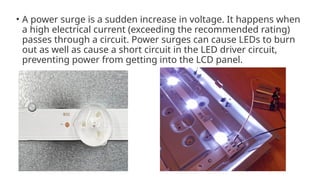
• A power surge is a sudden increase in voltage. It happens when
a high electrical current (exceeding the recommended rating)
passes through a circuit. Power surges can cause LEDs to burn
out as well as cause a short circuit in the LED driver circuit,
preventing power from getting into the LCD panel.

Introduction to Smart Television System.pptx

  • 1.
  • 10.
    LED TV • LEDTV is a type of LCD television that uses light-emitting diodes (LEDs) to backlight the display instead of the cold cathode fluorescent lights (CCFLs) used in standard LCD televisions. • LED TVs are more formally known as LED-backlight LCD television. • Most LED TVs have the following parts: a power supply board, a main board, a wifi/bluetooth module, speakers, a key controller, an IR sensor, a T-Con board, an LED driver, LED strips, and the screen (panel).
  • 11.
    • In someTV models, the power supply board and main board will be together as one board. In other makes and models, the TV won't have a T-Con board. And, in some new models, some of the components will be in a separate box to minimize the TV's depth. • Main board: The main board is basically the “brains” of your TV and controls everything, from the audio to video streams. All of the user data and settings are also stored on the main board. • LED driver: LED drivers are found in LED TVs only and they control the LED strips/bars behind the screen. They control the power and the brightness of each section. It supplies up 36V to the backlight array. • LED strips: inside the light case (or chassis). LED strips are the light source behind the LCD screen in LED TVs (or CCFL backlit TVs). These strips get their power from the LED driver or the power supply board and control the image brightness on your TV screen.
  • 12.
    • T-Con board:A T-con board — short for “timing control board” or “timing controller” — is found in LED and CCFL TVs. This board converts the video signal from the main board and sends it directly to the screen to display the signal in the correct order and at the correct spot on the screen.
  • 13.
    • The T-Conboard, or timing control board, in a TV is responsible for controlling the timing and driving of the pixels on the screen. It takes the incoming video signal and processes it to control how the pixels on the display are illuminated, ensuring that the correct colors and images are displayed at the right time. • Essentially, the T-Con board helps to translate the video signal into the visual display that you see on the screen. • The TCON (timing controller) board translates between a standard video signal and the specific row and column driver signaling needed by a specific LCD (or other) panel. • The timing controller board seems to act as sort of a mini Matrox style video wall splitter, it takes the LVDS data from the motherboard in as a whole serial streamed frame and splits or at least addresses it into chunks that each of the panel’s chip-on-flex column and row drivers can handle. At the very least since it usually has 2 outputs it splits the image into left and right halves.
  • 14.
    • In TVvideo timing, you can have a video signal between 24 and 60 frames per second, and many different resolutions, but the panel itself only supports a single resolution and timing. • The timing is extremely precise and the distance of the cables from the timing controller to the panel need to be very precise. This is why the panels come from the panel manufacturer with the TCON pre-attached and wired. • The TV or monitor manufacturer then designs their own PCB with TV/PC inputs, tuner, audio, speaker, etc., and the video signal transmits to the TCON board over a standard interface. The TV maker designs one board which can then support many panel sizes, and can even use the same board with both LCD and OLED. Some TCON boards have 60 Hz to 120 Hz frame rate converters, but this isn’t very common any longer, as the TV System on chip usually handles this these days.
  • 15.
    • Conclussion: “T-con”is short for timing controller. The T-con itself is typically an IC located on that board, and it’s responsible for taking the video data sent to the LCD module and properly distributing it and the various control signals amongst the row and column driver ICs that actually drive the electrodes of the LCD panel. • What are the symptoms of a bad T-con board of a TV? • Only half the picture is OK. • Absolutely no video or generate lines and patterns that usually cover all or a substantial part of the screen. • Vertical or horizontal lines on the screen, flickering or fluctuating brightness and ghosting or image persistence. • Colors with low contrast and turning white or dark over time • No picture or sound, but the TV has backlights. • Colored vertical or horizontal lines on the screen. • Half of the screen is missing or distorted. • Flickering or dimming of the screen. • Gentle white flashes.
  • 16.
    • Too muchelectricity: If there is a sudden change in the amount of electricity that goes to the TV, it can break the T-Con board or some of its parts, especially if the TV does not have a device that protects it from too much electricity. • One of the most common causes is overheating. If the TV is placed in a location where it does not get proper ventilation, the T-Con board can fail.
  • 17.
    LED LCD tvbacklight • LED LCD backlights are small light strips, or light sources, contained inside a display, TV, or monitor to provide lighting for the screen. All LED TVs are LCD panels with LED backlighting.
  • 18.
    • Behind theLCD panel is a backlight, and between the backlight and the LCD panel are usually a few layers of polarized filters, backlight diffusers, and other optical layers designed to turn this collection of tech components into a sharper viewable image. • There are three main configurations of LED backlights, and your TV's lighting configuration has a direct bearing on what you see on the screen: Edge Lit, Full Array, and Direct Lit. • Edge-Lit TVs, as you might have guessed, employ lights around the outside of the screen. • Full Array TVs have various zones throughout the display. • Direct-Lit TVs, like Full Array TVs, have LEDs put all over the back of the television (but fewer of them).
  • 19.
    Symptoms of abad or failed backlight • If your TV screen looks unusually dark or dim, there’s a good chance its backlight has failed. While frustrating, this is a common TV issue. • Increasing your TV’s brightness to the maximum setting may look good short term, but it can damage the backlight in the long term, drastically decreasing its lifespan and leading to a dim TV. • LED bulbs on a backlight strip are designed to last for a limited lifespan, especially with continuous usage. So, at some point, you will need to have them replaced. This, however, can even be 10+ years later. • LED bulbs can also become defective due to a high voltage of electricity or extremely high brightness, which results in high temperatures. When the LEDs produce too much heat, it can cause them to burn out. Once backlight LED bulbs get damaged, they have to be replaced for the TV to resume working properly. • Another possible reason why the backlight system on your TV has failed is that there is a faulty or failed power inverter or capacitor. The solution to this is to have the inverter replaced.
  • 20.
    • A powersurge is a sudden increase in voltage. It happens when a high electrical current (exceeding the recommended rating) passes through a circuit. Power surges can cause LEDs to burn out as well as cause a short circuit in the LED driver circuit, preventing power from getting into the LCD panel.