Introduction to LoRa
for Developers
Rob Miles
What is LoRa?
Low Powered Radio
Long Range
Low powered radio
• Designed for use in battery powered devices
• Battery life measured in years
• LoRa radio transmitters are cheap and easy to add to a device
• Uses “Spread Spectrum Technology”
• Messages are sent “below the noise” as packets of data
• Best regarded as a form of “SMS” message rather than a continuous
telephone call
• There are limits on the message size and the number of messages you can
send in a given time
Long Range
• Range up to 15-20 km
• (although this depends a lot on conditions – take it with a pinch of salt)
• Lora wavebands
• 868 MHz for Europe
• 915 MHz for North America
• 433 MHz band for Asia
• You don’t need a licence to use the LoRa band
• But you should be using properly certified devices and not breach the usage
conditions – if you’re doing this properly
Lora Radio
• “Spread spectrum technology” lets you trade bandwidth for range
• LoRa has built in Adaptive Data Rate (ADR) technology that will
manage this for an application
• Bit rates are very low (start at 250 bits per second and go up to
50Kbps)
• Transmission times can be of the order of seconds
• Packet size varies from 59 to 230 bits
• The “duty cycle” of a LoRa network connection is around 1%
• A given device should only use the network for 1% of the available time
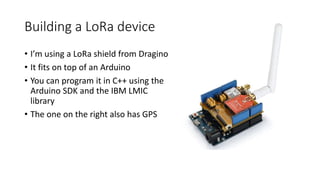
Building a LoRa device
• I’m using a LoRa shield from Dragino
• It fits on top of an Arduino
• You can program it in C++ using the
Arduino SDK and the IBM LMIC
library
• The one on the right also has GPS
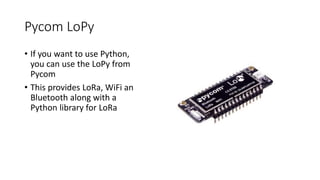
Pycom LoPy
• If you want to use Python,
you can use the LoPy from
Pycom
• This provides LoRa, WiFi an
Bluetooth along with a
Python library for LoRa
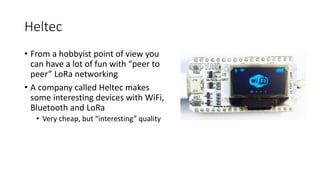
Heltec
• From a hobbyist point of view you
can have a lot of fun with “peer to
peer” LoRa networking
• A company called Heltec makes
some interesting devices with WiFi,
Bluetooth and LoRa
• Very cheap, but “interesting” quality
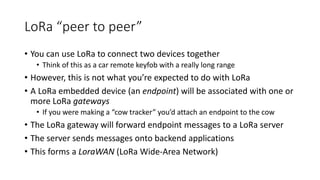
LoRa “peer to peer”
• You can use LoRa to connect two devices together
• Think of this as a car remote keyfob with a really long range
• However, this is not what you’re expected to do with LoRa
• A LoRa embedded device (an endpoint) will be associated with one or
more LoRa gateways
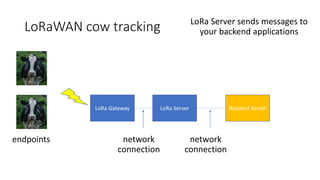
• If you were making a “cow tracker” you’d attach an endpoint to the cow
• The LoRa gateway will forward endpoint messages to a LoRa server
• The server sends messages onto backend applications
• This forms a LoraWAN (LoRa Wide-Area Network)
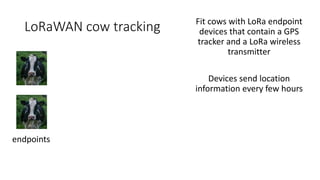
LoRaWAN cow tracking
endpoints
Fit cows with LoRa endpoint
devices that contain a GPS
tracker and a LoRa wireless
transmitter
Devices send location
information every few hours
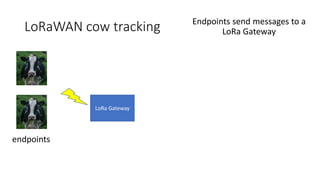
LoRaWAN cow tracking
endpoints
LoRa Gateway
Endpoints send messages to a
LoRa Gateway
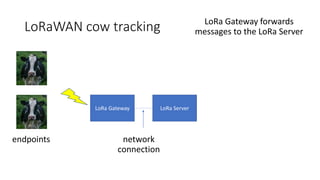
LoRaWAN cow tracking
network
connection
endpoints
LoRa Gateway LoRa Server
LoRa Gateway forwards
messages to the LoRa Server
LoRaWAN cow tracking
network
connection
endpoints
LoRa Gateway LoRa Server Backend Server
network
connection
LoRa Server sends messages to
your backend applications
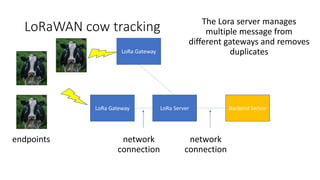
LoRaWAN cow tracking
network
connection
endpoints
LoRa Gateway LoRa Server Backend Server
network
connection
LoRa Gateway
The Lora server manages
multiple message from
different gateways and removes
duplicates
What is a gateway?
• A gateway has a LoRa radio receiver and a network connection
• Receives messages from the endpoint and forwards them to a LoRa server
• You can use LoRa endpoint devices as primitive gateways
• But they don’t expose the full functionality as they are only single channel
devices
• The cheapest “proper” LoRa gateway is around 120 pounds and runs
on a Raspberry Pi
• Best placed high up and outdoors
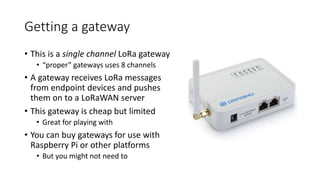
Getting a gateway
• This is a single channel LoRa gateway
• “proper” gateways uses 8 channels
• A gateway receives LoRa messages
from endpoint devices and pushes
them on to a LoRaWAN server
• This gateway is cheap but limited
• Great for playing with
• You can buy gateways for use with
Raspberry Pi or other platforms
• But you might not need to
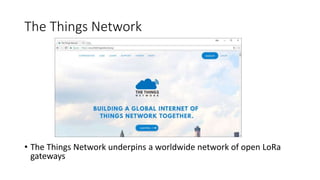
The Things Network
• The Things Network underpins a worldwide network of open LoRa
gateways
The Things Network
• Building networked communities using LoRa
• Provides the server backend for LoRaWAN applications
• Creates open source software and hardware which you can use to build your
own bespoke LoRa network
• Sells LoRa devices on Kickstarter
• You can buy your own gateway and register it on The Things Network
• Any LoRa endpoint can then use your gateway as a conduit onto The Things
Network
• The Things Network will host your LoRa applications and pass your endpoint
data into your own backend servers
Local LoRa gateways
• There are a number of gateways in Hull which are attached to The
Things Network
• We can get a reliable signal here in c4di
• We’d like to see more gateways
• Particularly one in Cottingham 
• We see a crucial outcome of this initiative as some agreement on a
means by which we can construct and manage a network of gateways
and server infrastructure for use in the area
What is a server?
• The LoRa server receives messages from the gateways, identifies ones
that are for applications it knows about, sorts out multiple messages
and then forwards them on to the application backend
• You can create your own servers, but for testing you can use those
provided by The Things Network (TTN) for free
• You can register your gateways on The Things Network and then
create your applications and connect your servers to them
• A great way to get started, but for “proper” services you would want to have
your own infrastructure
LoRa Security
• Because LoRa is a broadcast medium using public frequency bands
anyone can eavesdrop on any message
• An endpoint is associated with a particular application which is
identified in each LoRa packet that the endpoint sends
• Each application has an encryption key
• Keys can be “baked in” to a device or deployed via the LoRa network
• In addition, a given network session is encrypted by means of a
network session key
• Based on AES-128 (802.15.4 security)
Endpoint activation
• No such thing as “default password” for a LoRa device
• An endpoint must be activated before it can be used on a LoRa
network
• Two forms of activation:
• Activation By Personalisation (ABP):
• Credentials are “burned in” to the endpoint before it is deployed
• Over The Air Activation (OTAA):
• Endpoint is deployed containing an Application Root Key which is used to
authenticate a setup process that produces credentials to be stored in the
endpoint
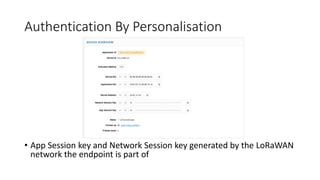
Authentication By Personalisation
• App Session key and Network Session key generated by the LoRaWAN
network the endpoint is part of
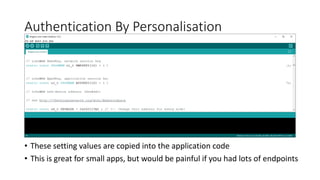
Authentication By Personalisation
• These setting values are copied into the application code
• This is great for small apps, but would be painful if you had lots of endpoints
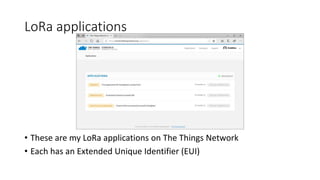
LoRa applications
• These are my LoRa applications on The Things Network
• Each has an Extended Unique Identifier (EUI)
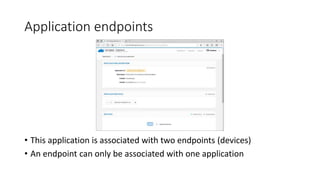
Application endpoints
• This application is associated with two endpoints (devices)
• An endpoint can only be associated with one application
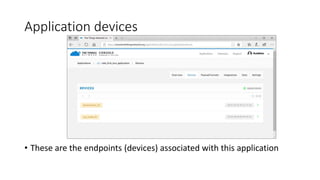
Application devices
• These are the endpoints (devices) associated with this application
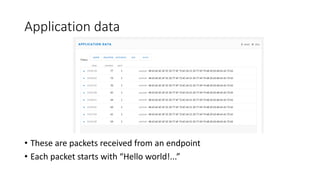
Application data
• These are packets received from an endpoint
• Each packet starts with “Hello world!...”
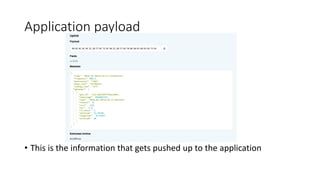
Application payload
• This is the information that gets pushed up to the application
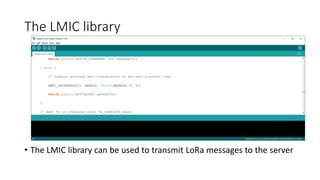
The LMIC library
• The LMIC library can be used to transmit LoRa messages to the server
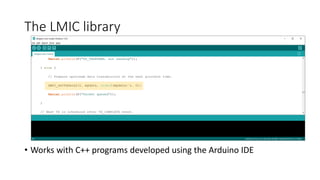
The LMIC library
• Works with C++ programs developed using the Arduino IDE
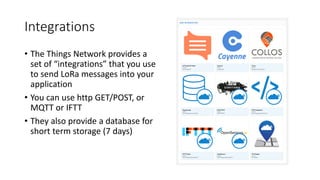
Integrations
• The Things Network provides a
set of “integrations” that you use
to send LoRa messages into your
application
• You can use http GET/POST, or
MQTT or IFTT
• They also provide a database for
short term storage (7 days)
Sending messages to a LoRa endpoint
• A LoRa endpoint will not normally be listening for messages from the
gateway
• This is to save power
• Class A
• Listen for a brief interval after the endpoint has sent something
• Class B
• Listen for a brief interval at scheduled times
• Class C
• Nearly continuous listening (not suitable for battery powered endpoints)
Lora on a page
• Cheap endpoint devices (£5.00), low power (AA batteries), long range
(in the Km)
• Great for exchanging small packets of data with endpoints that form
part of an application – not great for streaming video
• Needs gateways to connect the endpoints
• Needs servers to manage gateways
• The Things Network provide all this for free
• Endpoint associated with an application, protected by encryption at
network level and application level
• Great for cow tracking

Introduction to LoRa for developers

  • 1.
    Introduction to LoRa forDevelopers Rob Miles
  • 2.
    What is LoRa? LowPowered Radio Long Range
  • 3.
    Low powered radio •Designed for use in battery powered devices • Battery life measured in years • LoRa radio transmitters are cheap and easy to add to a device • Uses “Spread Spectrum Technology” • Messages are sent “below the noise” as packets of data • Best regarded as a form of “SMS” message rather than a continuous telephone call • There are limits on the message size and the number of messages you can send in a given time
  • 4.
    Long Range • Rangeup to 15-20 km • (although this depends a lot on conditions – take it with a pinch of salt) • Lora wavebands • 868 MHz for Europe • 915 MHz for North America • 433 MHz band for Asia • You don’t need a licence to use the LoRa band • But you should be using properly certified devices and not breach the usage conditions – if you’re doing this properly
  • 5.
    Lora Radio • “Spreadspectrum technology” lets you trade bandwidth for range • LoRa has built in Adaptive Data Rate (ADR) technology that will manage this for an application • Bit rates are very low (start at 250 bits per second and go up to 50Kbps) • Transmission times can be of the order of seconds • Packet size varies from 59 to 230 bits • The “duty cycle” of a LoRa network connection is around 1% • A given device should only use the network for 1% of the available time
  • 6.
    Building a LoRadevice • I’m using a LoRa shield from Dragino • It fits on top of an Arduino • You can program it in C++ using the Arduino SDK and the IBM LMIC library • The one on the right also has GPS
  • 7.
    Pycom LoPy • Ifyou want to use Python, you can use the LoPy from Pycom • This provides LoRa, WiFi an Bluetooth along with a Python library for LoRa
  • 8.
    Heltec • From ahobbyist point of view you can have a lot of fun with “peer to peer” LoRa networking • A company called Heltec makes some interesting devices with WiFi, Bluetooth and LoRa • Very cheap, but “interesting” quality
  • 9.
    LoRa “peer topeer” • You can use LoRa to connect two devices together • Think of this as a car remote keyfob with a really long range • However, this is not what you’re expected to do with LoRa • A LoRa embedded device (an endpoint) will be associated with one or more LoRa gateways • If you were making a “cow tracker” you’d attach an endpoint to the cow • The LoRa gateway will forward endpoint messages to a LoRa server • The server sends messages onto backend applications • This forms a LoraWAN (LoRa Wide-Area Network)
  • 10.
    LoRaWAN cow tracking endpoints Fitcows with LoRa endpoint devices that contain a GPS tracker and a LoRa wireless transmitter Devices send location information every few hours
  • 11.
    LoRaWAN cow tracking endpoints LoRaGateway Endpoints send messages to a LoRa Gateway
  • 12.
    LoRaWAN cow tracking network connection endpoints LoRaGateway LoRa Server LoRa Gateway forwards messages to the LoRa Server
  • 13.
    LoRaWAN cow tracking network connection endpoints LoRaGateway LoRa Server Backend Server network connection LoRa Server sends messages to your backend applications
  • 14.
    LoRaWAN cow tracking network connection endpoints LoRaGateway LoRa Server Backend Server network connection LoRa Gateway The Lora server manages multiple message from different gateways and removes duplicates
  • 15.
    What is agateway? • A gateway has a LoRa radio receiver and a network connection • Receives messages from the endpoint and forwards them to a LoRa server • You can use LoRa endpoint devices as primitive gateways • But they don’t expose the full functionality as they are only single channel devices • The cheapest “proper” LoRa gateway is around 120 pounds and runs on a Raspberry Pi • Best placed high up and outdoors
  • 16.
    Getting a gateway •This is a single channel LoRa gateway • “proper” gateways uses 8 channels • A gateway receives LoRa messages from endpoint devices and pushes them on to a LoRaWAN server • This gateway is cheap but limited • Great for playing with • You can buy gateways for use with Raspberry Pi or other platforms • But you might not need to
  • 17.
    The Things Network •The Things Network underpins a worldwide network of open LoRa gateways
  • 18.
    The Things Network •Building networked communities using LoRa • Provides the server backend for LoRaWAN applications • Creates open source software and hardware which you can use to build your own bespoke LoRa network • Sells LoRa devices on Kickstarter • You can buy your own gateway and register it on The Things Network • Any LoRa endpoint can then use your gateway as a conduit onto The Things Network • The Things Network will host your LoRa applications and pass your endpoint data into your own backend servers
  • 19.
    Local LoRa gateways •There are a number of gateways in Hull which are attached to The Things Network • We can get a reliable signal here in c4di • We’d like to see more gateways • Particularly one in Cottingham  • We see a crucial outcome of this initiative as some agreement on a means by which we can construct and manage a network of gateways and server infrastructure for use in the area
  • 20.
    What is aserver? • The LoRa server receives messages from the gateways, identifies ones that are for applications it knows about, sorts out multiple messages and then forwards them on to the application backend • You can create your own servers, but for testing you can use those provided by The Things Network (TTN) for free • You can register your gateways on The Things Network and then create your applications and connect your servers to them • A great way to get started, but for “proper” services you would want to have your own infrastructure
  • 21.
    LoRa Security • BecauseLoRa is a broadcast medium using public frequency bands anyone can eavesdrop on any message • An endpoint is associated with a particular application which is identified in each LoRa packet that the endpoint sends • Each application has an encryption key • Keys can be “baked in” to a device or deployed via the LoRa network • In addition, a given network session is encrypted by means of a network session key • Based on AES-128 (802.15.4 security)
  • 22.
    Endpoint activation • Nosuch thing as “default password” for a LoRa device • An endpoint must be activated before it can be used on a LoRa network • Two forms of activation: • Activation By Personalisation (ABP): • Credentials are “burned in” to the endpoint before it is deployed • Over The Air Activation (OTAA): • Endpoint is deployed containing an Application Root Key which is used to authenticate a setup process that produces credentials to be stored in the endpoint
  • 23.
    Authentication By Personalisation •App Session key and Network Session key generated by the LoRaWAN network the endpoint is part of
  • 24.
    Authentication By Personalisation •These setting values are copied into the application code • This is great for small apps, but would be painful if you had lots of endpoints
  • 25.
    LoRa applications • Theseare my LoRa applications on The Things Network • Each has an Extended Unique Identifier (EUI)
  • 26.
    Application endpoints • Thisapplication is associated with two endpoints (devices) • An endpoint can only be associated with one application
  • 27.
    Application devices • Theseare the endpoints (devices) associated with this application
  • 28.
    Application data • Theseare packets received from an endpoint • Each packet starts with “Hello world!...”
  • 29.
    Application payload • Thisis the information that gets pushed up to the application
  • 30.
    The LMIC library •The LMIC library can be used to transmit LoRa messages to the server
  • 31.
    The LMIC library •Works with C++ programs developed using the Arduino IDE
  • 32.
    Integrations • The ThingsNetwork provides a set of “integrations” that you use to send LoRa messages into your application • You can use http GET/POST, or MQTT or IFTT • They also provide a database for short term storage (7 days)
  • 33.
    Sending messages toa LoRa endpoint • A LoRa endpoint will not normally be listening for messages from the gateway • This is to save power • Class A • Listen for a brief interval after the endpoint has sent something • Class B • Listen for a brief interval at scheduled times • Class C • Nearly continuous listening (not suitable for battery powered endpoints)
  • 34.
    Lora on apage • Cheap endpoint devices (£5.00), low power (AA batteries), long range (in the Km) • Great for exchanging small packets of data with endpoints that form part of an application – not great for streaming video • Needs gateways to connect the endpoints • Needs servers to manage gateways • The Things Network provide all this for free • Endpoint associated with an application, protected by encryption at network level and application level • Great for cow tracking