INSTALL.PACKAGES
(“KERAS”)
PRESENTATION BY
C. AROUTSELVAM
I Ph.D.
Dept. of Agricultural Economics
INSTALLATION OF KERAS
PLAN OF PRESENTATION
1. ABOUT KERAS
2. BACKENDS OF KERAS
3. WHY KERAS?
4. HOW TO INSTAL KERAS?
5. ADVANTAGES OF KERAS
KERAS: Deep Learning Library
 High-level neural networks API, written in
Python
 Models described in Python code.
No separate models config files
 Allows for easy and fast prototyping
(through user friendliness, modularity, and
extensibility)
 Runs seamlessly on CPUs and GPUs
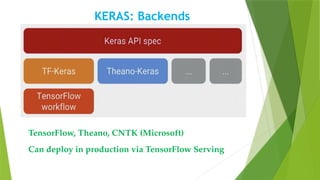
KERAS: Backends
TensorFlow, Theano, CNTK (Microsoft)
Can deploy in production via TensorFlow Serving
WHY KERAS?
Keras is an Application Programme Interface (API)
designed for human beings, not machines. It puts user
experience front and center. Keras follows best
practices for reducing cognitive load (amount of
working memory resources used): it offers consistent &
simple APIs, it minimizes the number of user actions
required for common use cases, and it provides clear
and actionable feedback upon user error.
How to install Keras in R?
1. Anaconda Python
2. Building R for windows – tools
R session:
# install.packages("remotes")
remotes::install_github("rstudio/
tensorflow")
 reticulate::install_python()
How to install Keras in R?
contd..
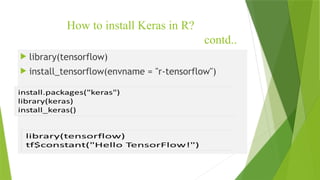
 library(tensorflow)
 install_tensorflow(envname = "r-tensorflow")
Build a simple model
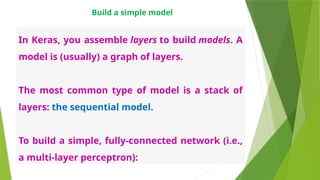
In Keras, you assemble layers to build models. A
model is (usually) a graph of layers.
The most common type of model is a stack of
layers: the sequential model.
To build a simple, fully-connected network (i.e.,
a multi-layer perceptron):
A simple, fully-connected network
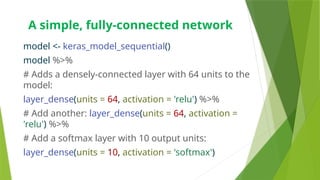
model <- keras_model_sequential()
model %>%
# Adds a densely-connected layer with 64 units to the
model:
layer_dense(units = 64, activation = 'relu') %>%
# Add another: layer_dense(units = 64, activation =
'relu') %>%
# Add a softmax layer with 10 output units:
layer_dense(units = 10, activation = 'softmax')
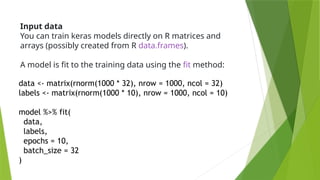
Input data
You can train keras models directly on R matrices and
arrays (possibly created from R data.frames).
A model is fit to the training data using the fit method:
data <- matrix(rnorm(1000 * 32), nrow = 1000, ncol = 32)
labels <- matrix(rnorm(1000 * 10), nrow = 1000, ncol = 10)
model %>% fit(
data,
labels,
epochs = 10,
batch_size = 32
)
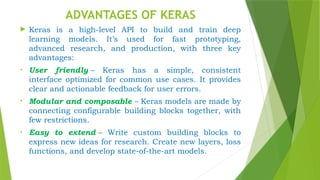
ADVANTAGES OF KERAS
 Keras is a high-level API to build and train deep
learning models. It’s used for fast prototyping,
advanced research, and production, with three key
advantages:
• User friendly – Keras has a simple, consistent
interface optimized for common use cases. It provides
clear and actionable feedback for user errors.
• Modular and composable – Keras models are made by
connecting configurable building blocks together, with
few restrictions.
• Easy to extend – Write custom building blocks to
express new ideas for research. Create new layers, loss
functions, and develop state-of-the-art models.
This Photo by Unknown Author is licensed under CC BY-SA
THANK YOU
SPECIAL THANKS TO
Ms. GOBIKA
NAGARAJ

INTRODUCTION TO KERAS FOR BEGINNERS.pptx

  • 1.
  • 2.
  • 3.
    PLAN OF PRESENTATION 1.ABOUT KERAS 2. BACKENDS OF KERAS 3. WHY KERAS? 4. HOW TO INSTAL KERAS? 5. ADVANTAGES OF KERAS
  • 4.
    KERAS: Deep LearningLibrary  High-level neural networks API, written in Python  Models described in Python code. No separate models config files  Allows for easy and fast prototyping (through user friendliness, modularity, and extensibility)  Runs seamlessly on CPUs and GPUs
  • 5.
    KERAS: Backends TensorFlow, Theano,CNTK (Microsoft) Can deploy in production via TensorFlow Serving
  • 6.
    WHY KERAS? Keras isan Application Programme Interface (API) designed for human beings, not machines. It puts user experience front and center. Keras follows best practices for reducing cognitive load (amount of working memory resources used): it offers consistent & simple APIs, it minimizes the number of user actions required for common use cases, and it provides clear and actionable feedback upon user error.
  • 7.
    How to installKeras in R? 1. Anaconda Python 2. Building R for windows – tools R session: # install.packages("remotes") remotes::install_github("rstudio/ tensorflow")  reticulate::install_python()
  • 8.
    How to installKeras in R? contd..  library(tensorflow)  install_tensorflow(envname = "r-tensorflow")
  • 9.
    Build a simplemodel In Keras, you assemble layers to build models. A model is (usually) a graph of layers. The most common type of model is a stack of layers: the sequential model. To build a simple, fully-connected network (i.e., a multi-layer perceptron):
  • 10.
    A simple, fully-connectednetwork model <- keras_model_sequential() model %>% # Adds a densely-connected layer with 64 units to the model: layer_dense(units = 64, activation = 'relu') %>% # Add another: layer_dense(units = 64, activation = 'relu') %>% # Add a softmax layer with 10 output units: layer_dense(units = 10, activation = 'softmax')
  • 11.
    Input data You cantrain keras models directly on R matrices and arrays (possibly created from R data.frames). A model is fit to the training data using the fit method: data <- matrix(rnorm(1000 * 32), nrow = 1000, ncol = 32) labels <- matrix(rnorm(1000 * 10), nrow = 1000, ncol = 10) model %>% fit( data, labels, epochs = 10, batch_size = 32 )
  • 12.
    ADVANTAGES OF KERAS Keras is a high-level API to build and train deep learning models. It’s used for fast prototyping, advanced research, and production, with three key advantages: • User friendly – Keras has a simple, consistent interface optimized for common use cases. It provides clear and actionable feedback for user errors. • Modular and composable – Keras models are made by connecting configurable building blocks together, with few restrictions. • Easy to extend – Write custom building blocks to express new ideas for research. Create new layers, loss functions, and develop state-of-the-art models.
  • 13.
    This Photo byUnknown Author is licensed under CC BY-SA THANK YOU SPECIAL THANKS TO Ms. GOBIKA NAGARAJ