Z
Week 11:
Introduction to
JavaScript
Subject Code: COMP121
By: Marlon Jamera
Email: mbjamera@ama.edu.ph
Z
Introduction to
JavaScript
Z
Scope of the Lesson
• Introduction to JavaScript
• Using JavaScript Code
• Using External Script File
• JavaScript Syntax
• Data Types
• Objects
• String Operations
• Standard Popup Boxes
• JavaScript Functions
Z
Learning Outcomes
By the end of the lesson, you will be
familiar and know how the website works
using JavaScripts.
• Discuss the introduction to JavaScript
and using JavaScript codes.
• Understand the coding syntax using
external script file and JavaScript syntax.
• Explain thoroughly the coding styles of
objects and string operations.
Z
Introduction to JavaScript
• JavaScript is a front-end scripting
language developed by Netscape for
dynamic content.
• Lightweight, but with limited
capabilities.
• Can be used as object-oriented
language.
• Client-side Technology
• Embedded in your HTML page.
• Interpreted by the web browser.
Z
Introduction to JavaScript
• JavaScript allows interactivity such as:
• Implementing form validation.
• React to user actions, e.g handle keys.
• Changing an image on moving mouse
over it.
• Sections of a page appearing and
disappearing.
• Performing complex calculation.
• Custom HTML controls like
scrollable table.
Z
Introduction to JavaScript
• What can JavaScript do?
• Can handle events
• Can read and write HTML elements
and modify the DOM tree
• Can validate form data
• Can access / modify browser cookies
• Can detect the user’s browser and OS
• Can be used as object-oriented
language
• Can handle exceptions.
Z
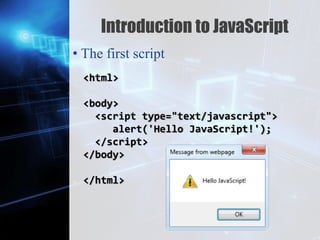
Introduction to JavaScript
• The first script
<html>
<body>
<script type="text/javascript">
alert('Hello JavaScript!');
</script>
</body>
</html>
Z
Introduction to JavaScript
• The first script
<html>
<body>
<script type="text/javascript">
alert('Hello JavaScript!');
</script>
</body>
</html>
Z
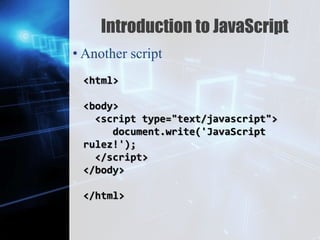
Introduction to JavaScript
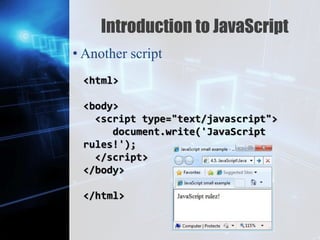
• Another script
<html>
<body>
<script type="text/javascript">
document.write('JavaScript
rulez!');
</script>
</body>
</html>
Z
Introduction to JavaScript
• Another script
<html>
<body>
<script type="text/javascript">
document.write('JavaScript
rules!');
</script>
</body>
</html>
Z
Using JavaScript Code
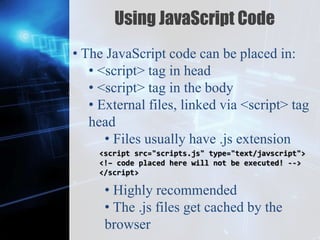
• The JavaScript code can be placed in:
• <script> tag in head
• <script> tag in the body
• External files, linked via <script> tag
head
• Files usually have .js extension
• Highly recommended
• The .js files get cached by the
browser
<script src="scripts.js" type="text/javscript">
<!– code placed here will not be executed! -->
</script>
Z
JavaScript – When is executed?
• JavaScript code is executed during the
page load or when the browser fires an
event.
• All statements are executed at page
loading
• Some statements just define functions
that can be called later.
• Function calls or code can be attached as
“event handlers” via tag attributes
• Executed when the event fired by the
browser
Z
Using External Script Files
<html>
<head>
<script src="sample.js" type="text/javascript">
</script>
</head>
<body>
<button onclick="sample()" value="Call
JavaScript
function from sample.js" />
</body>
</html>
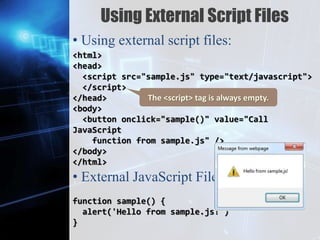
• Using external script files:
• External JavaScript File:
function sample() {
alert('Hello from sample.js!')
}
Z
Using External Script Files
<html>
<head>
<script src="sample.js" type="text/javascript">
</script>
</head>
<body>
<button onclick="sample()" value="Call
JavaScript
function from sample.js" />
</body>
</html>
• Using external script files:
• External JavaScript File:
function sample() {
alert('Hello from sample.js!')
}
The <script> tag is always empty.
Z
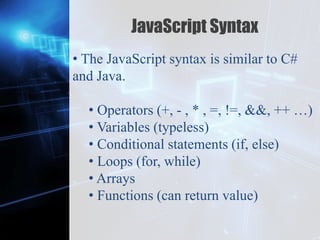
JavaScript Syntax
• The JavaScript syntax is similar to C#
and Java.
• Operators (+, - , * , =, !=, &&, ++ …)
• Variables (typeless)
• Conditional statements (if, else)
• Loops (for, while)
• Arrays
• Functions (can return value)
Z
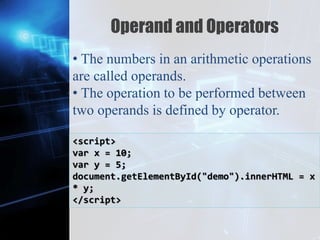
Operand and Operators
• The numbers in an arithmetic operations
are called operands.
• The operation to be performed between
two operands is defined by operator.
<script>
var x = 10;
var y = 5;
document.getElementById("demo").innerHTML = x
* y;
</script>
Z
Data Types
• The JavaScript data types:
• Numbers (integer, floating-point)
• Boolean (true / false)
• String type – string of characters
• Arrays
var myName = "You can use both single or
double quotes for strings";
var my_array = [1, 5.3, "aaa"];
Z
Everything is Object
• Every variable can be considered as
object
• For example, strings and arrays have
member functions:
var test = "some string";
alert(test[7]); // shows letter 'r'
alert(test.charAt(5)); // shows letter 's'
var arr = [1,3,4];
alert (arr.length); // shows 3
arr.push(7); // appends 7 to end of array
alert (arr[3]); // shows 7
Z
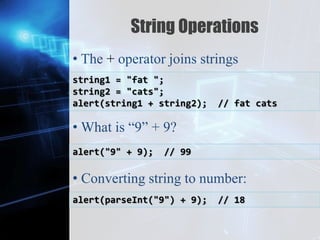
String Operations
• The + operator joins strings
• What is “9” + 9?
• Converting string to number:
string1 = "fat ";
string2 = "cats";
alert(string1 + string2); // fat cats
alert("9" + 9); // 99
alert(parseInt("9") + 9); // 18
Z
Standard Popup Boxes
• Alert box with text and [ok] button
• Just a message in a dialog box:
• Confirmation box
• Contains text, ok and cancel button.
• Prompt box:
• Contains text, input field with value.
alert("Some text here");
confirm("Are you sure?");
prompt ("enter amount", 10);
Z
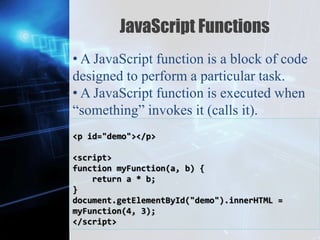
JavaScript Functions
• A JavaScript function is a block of code
designed to perform a particular task.
• A JavaScript function is executed when
“something” invokes it (calls it).
<p id="demo"></p>
<script>
function myFunction(a, b) {
return a * b;
}
document.getElementById("demo").innerHTML =
myFunction(4, 3);
</script>
Z
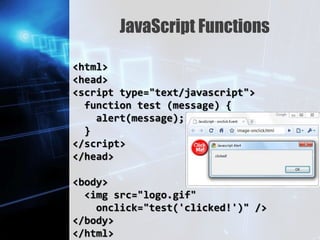
JavaScript Functions
<html>
<head>
<script type="text/javascript">
function test (message) {
alert(message);
}
</script>
</head>
<body>
<img src="logo.gif"
onclick="test('clicked!')" />
</body>
</html>
Z
Let’s call it a day,
Thank you!

Introduction to JavaScript

  • 1.
    Z Week 11: Introduction to JavaScript SubjectCode: COMP121 By: Marlon Jamera Email: mbjamera@ama.edu.ph
  • 2.
  • 3.
    Z Scope of theLesson • Introduction to JavaScript • Using JavaScript Code • Using External Script File • JavaScript Syntax • Data Types • Objects • String Operations • Standard Popup Boxes • JavaScript Functions
  • 4.
    Z Learning Outcomes By theend of the lesson, you will be familiar and know how the website works using JavaScripts. • Discuss the introduction to JavaScript and using JavaScript codes. • Understand the coding syntax using external script file and JavaScript syntax. • Explain thoroughly the coding styles of objects and string operations.
  • 5.
    Z Introduction to JavaScript •JavaScript is a front-end scripting language developed by Netscape for dynamic content. • Lightweight, but with limited capabilities. • Can be used as object-oriented language. • Client-side Technology • Embedded in your HTML page. • Interpreted by the web browser.
  • 6.
    Z Introduction to JavaScript •JavaScript allows interactivity such as: • Implementing form validation. • React to user actions, e.g handle keys. • Changing an image on moving mouse over it. • Sections of a page appearing and disappearing. • Performing complex calculation. • Custom HTML controls like scrollable table.
  • 7.
    Z Introduction to JavaScript •What can JavaScript do? • Can handle events • Can read and write HTML elements and modify the DOM tree • Can validate form data • Can access / modify browser cookies • Can detect the user’s browser and OS • Can be used as object-oriented language • Can handle exceptions.
  • 8.
    Z Introduction to JavaScript •The first script <html> <body> <script type="text/javascript"> alert('Hello JavaScript!'); </script> </body> </html>
  • 9.
    Z Introduction to JavaScript •The first script <html> <body> <script type="text/javascript"> alert('Hello JavaScript!'); </script> </body> </html>
  • 10.
    Z Introduction to JavaScript •Another script <html> <body> <script type="text/javascript"> document.write('JavaScript rulez!'); </script> </body> </html>
  • 11.
    Z Introduction to JavaScript •Another script <html> <body> <script type="text/javascript"> document.write('JavaScript rules!'); </script> </body> </html>
  • 12.
    Z Using JavaScript Code •The JavaScript code can be placed in: • <script> tag in head • <script> tag in the body • External files, linked via <script> tag head • Files usually have .js extension • Highly recommended • The .js files get cached by the browser <script src="scripts.js" type="text/javscript"> <!– code placed here will not be executed! --> </script>
  • 13.
    Z JavaScript – Whenis executed? • JavaScript code is executed during the page load or when the browser fires an event. • All statements are executed at page loading • Some statements just define functions that can be called later. • Function calls or code can be attached as “event handlers” via tag attributes • Executed when the event fired by the browser
  • 14.
    Z Using External ScriptFiles <html> <head> <script src="sample.js" type="text/javascript"> </script> </head> <body> <button onclick="sample()" value="Call JavaScript function from sample.js" /> </body> </html> • Using external script files: • External JavaScript File: function sample() { alert('Hello from sample.js!') }
  • 15.
    Z Using External ScriptFiles <html> <head> <script src="sample.js" type="text/javascript"> </script> </head> <body> <button onclick="sample()" value="Call JavaScript function from sample.js" /> </body> </html> • Using external script files: • External JavaScript File: function sample() { alert('Hello from sample.js!') } The <script> tag is always empty.
  • 16.
    Z JavaScript Syntax • TheJavaScript syntax is similar to C# and Java. • Operators (+, - , * , =, !=, &&, ++ …) • Variables (typeless) • Conditional statements (if, else) • Loops (for, while) • Arrays • Functions (can return value)
  • 17.
    Z Operand and Operators •The numbers in an arithmetic operations are called operands. • The operation to be performed between two operands is defined by operator. <script> var x = 10; var y = 5; document.getElementById("demo").innerHTML = x * y; </script>
  • 18.
    Z Data Types • TheJavaScript data types: • Numbers (integer, floating-point) • Boolean (true / false) • String type – string of characters • Arrays var myName = "You can use both single or double quotes for strings"; var my_array = [1, 5.3, "aaa"];
  • 19.
    Z Everything is Object •Every variable can be considered as object • For example, strings and arrays have member functions: var test = "some string"; alert(test[7]); // shows letter 'r' alert(test.charAt(5)); // shows letter 's' var arr = [1,3,4]; alert (arr.length); // shows 3 arr.push(7); // appends 7 to end of array alert (arr[3]); // shows 7
  • 20.
    Z String Operations • The+ operator joins strings • What is “9” + 9? • Converting string to number: string1 = "fat "; string2 = "cats"; alert(string1 + string2); // fat cats alert("9" + 9); // 99 alert(parseInt("9") + 9); // 18
  • 21.
    Z Standard Popup Boxes •Alert box with text and [ok] button • Just a message in a dialog box: • Confirmation box • Contains text, ok and cancel button. • Prompt box: • Contains text, input field with value. alert("Some text here"); confirm("Are you sure?"); prompt ("enter amount", 10);
  • 22.
    Z JavaScript Functions • AJavaScript function is a block of code designed to perform a particular task. • A JavaScript function is executed when “something” invokes it (calls it). <p id="demo"></p> <script> function myFunction(a, b) { return a * b; } document.getElementById("demo").innerHTML = myFunction(4, 3); </script>
  • 23.
    Z JavaScript Functions <html> <head> <script type="text/javascript"> functiontest (message) { alert(message); } </script> </head> <body> <img src="logo.gif" onclick="test('clicked!')" /> </body> </html>
  • 24.
    Z Let’s call ita day, Thank you!

Editor's Notes

  • #2 Left angle bracket < Right angle bracket >
  • #25 http://www.tizag.com/javascriptT/javascriptevents.php