Mobile
Applications
and Java ME
Overview
• Mobile Platforms
• How they fit together?
• CLDC
• Optional Packages
• MIDP
• MIDlets
• API Examples
• Input, Event, & Error Handling
• UI Design Principles
http://cmer.cis.uoguelph.ca 2
Motivation
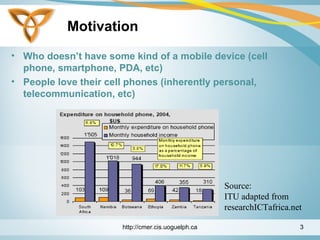
• Who doesn’t have some kind of a mobile device (cell
phone, smartphone, PDA, etc)
• People love their cell phones (inherently personal,
telecommunication, etc)
http://cmer.cis.uoguelph.ca 3
Source:
ITU adapted from
researchICTafrica.net
Mobile Devices in Education
• Mobile devices out-ship desktop computers 20 to 1
• For many students, the mobile device is becoming the
computer (calendar, note taking, etc)
• Today’s mobile devices is the supercomputer of 20 years
ago
• Students already annoy instructors with their cell phones
(lovely ring tones, text messaging, etc)
http://cmer.cis.uoguelph.ca 4
Mobile Applications
• Mobile Apps are apps or services that can be pushed to
a mobile device or downloaded and installed locally
• Classification
• Browser-based: apps/services developed in a markup
language
• Native: compiled applications (device has a runtime
environment). Interactive apps such as downloadable
games. (Our focus)
• Hybrid: the best of both worlds (a browser is needed
for discovery)
http://cmer.cis.uoguelph.ca 5
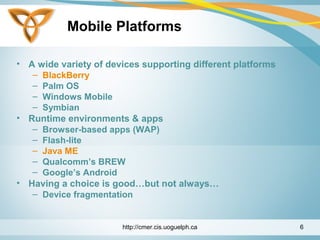
Mobile Platforms
• A wide variety of devices supporting different platforms
– BlackBerry
– Palm OS
– Windows Mobile
– Symbian
• Runtime environments & apps
– Browser-based apps (WAP)
– Flash-lite
– Java ME
– Qualcomm’s BREW
– Google’s Android
• Having a choice is good…but not always…
– Device fragmentation
http://cmer.cis.uoguelph.ca 6
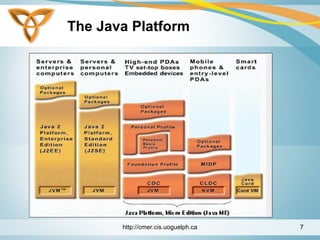
The Java Platform
http://cmer.cis.uoguelph.ca 7
Java ME
• Java Platform, Micro Edition (Java ME)
• Formerly known as J2ME Wireless Toolkit
• Purpose:
– Platform for mobile devices
– Work within the restrictions of building applications
for small devices that have limited memory, display,
and power.
http://cmer.cis.uoguelph.ca 8
Java ME (Cont.)
• Used as an environment for applications targeted
towards mobiles and stand-alone devices
– Mobile: cell phones and PDAs
– Stand-alone: Printers
http://cmer.cis.uoguelph.ca 9
Java ME (Cont.)
• Benefits:
– Flexible user interface
– Good security
– Integrated network protocols
– Support for downloadable applications that can be
networked or stand-alone
http://cmer.cis.uoguelph.ca 10
Java ME (Cont.)
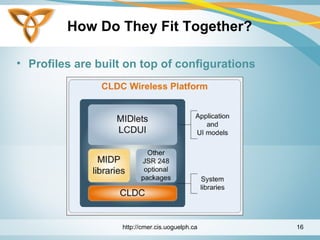
• Java ME comprised of three components
– A Configuration
– A Profile
– A Package (Optional)
http://cmer.cis.uoguelph.ca 11
Java ME (Cont.)
Configuration
• A configuration defines the minimum APIs and VM
capabilities for a family of devices:
– Similar requirements of memory size and processing
capabilities
• The minimum APIs that an application developer can
expect to be available on implementing devices
• May not contain any optional features
http://cmer.cis.uoguelph.ca 12
Java ME (Cont.)
• Defined through the Java Community Process (JCP) -
http://java.sun.com/jcp(www.jcp.org)
• Subject to compatibility tests
• Two types of configurations:
– Connected Limited Device Configuration (CLDC)
– Connected Device Profile (CDC).
http://cmer.cis.uoguelph.ca 13
Java ME (Cont.)
Profile
• A profile is a collection of APIs that supplement a
configuration to provide capabilities for a specific
vertical market
• Defined through Java Community Process initiative -
www.jcp.org
• Subject to compatibility tests
Package
• An optional set of technology-specific APIs
http://cmer.cis.uoguelph.ca 14
Java ME (Cont.)
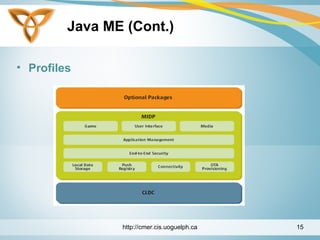
• Profiles
http://cmer.cis.uoguelph.ca 15
How Do They Fit Together?
• Profiles are built on top of configurations
http://cmer.cis.uoguelph.ca 16
Configuration - CLDC
• Targeted at devices with:
– 160 to 512 KB of total memory available for Java
technology
– Limited power (e.g. battery)
– Limited connectivity to a network (wireless)
– Constrained User Interface (small screen)
• It is available for free download
• Reference implementation built using KVM
http://cmer.cis.uoguelph.ca 17
CLDC - KVM
• Stands for Kilo Virtual Machine
• Originated from a research project called Spotless at Sun
Research Labs
• Implements the classes defined in the CLDC
specification + some additional UI classes
• Note: the UI classes are not part of the CLDC and can be
removed at any time
http://cmer.cis.uoguelph.ca 18
CLDC – KVM (Cont.)
• A complete runtime environment for small devices
• Built from the ground up in C
• Small footprint (40 –80 KB)
• Class file verification takes place off-device
• Supports multi-threading
• Supports garbage collection
http://cmer.cis.uoguelph.ca 19
CLDC – KVM Security
• VM level security
– Off-device pre-verification
– Small in-device verification
• Application level security
– No Security Manager
– Sandbox security model:
• Applications run in a closed environment
• Applications can call classes supported by the
device
http://cmer.cis.uoguelph.ca 20
Optional Packages
• Core MIDP 2.0 functionality is limited. Vendors may
include optional packages:
– JSR-75: File Connection and PIM APIs
– JSR-82: Bluetooth API
– JSR-120: Mobile Messaging API
– JSR-135: Mobile Media API
– JSR-179: Location API
– Many others…
http://cmer.cis.uoguelph.ca 21
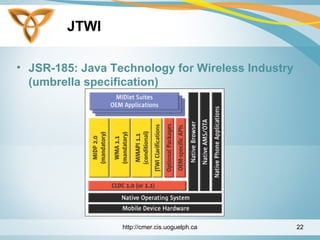
JTWI
• JSR-185: Java Technology for Wireless Industry
(umbrella specification)
http://cmer.cis.uoguelph.ca 22
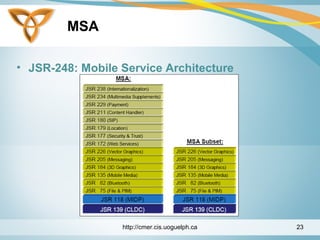
MSA
• JSR-248: Mobile Service Architecture
http://cmer.cis.uoguelph.ca 23
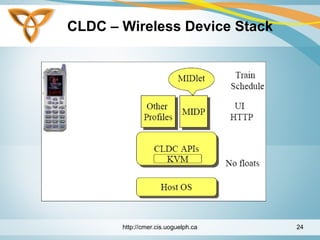
CLDC – Wireless Device Stack
http://cmer.cis.uoguelph.ca 24
CLDC - Internals
• The CLDC specification specifies VM features required
by a CLDC implementation
• Specifies requirements and APIs for
– Input / Output
– Networking
http://cmer.cis.uoguelph.ca 25
CLDC –
Language & VM Compatibility
• Goal:
– Full java language and VM specification compatibility
• Language-level exception:
– No floating point support in CLDC 1.0
• No hardware floating point support
• Manufacturers and developers can include their
own floating point
http://cmer.cis.uoguelph.ca 26
CLDC VS. J2SE JVM
• Limitations in CLDC supporting JVM:
– No floating point support
– No finalization
– Limited error handling
– No Java Native Interface (JNI)
– No support for reflection
– No thread groups or daemon threads
– No weak references
http://cmer.cis.uoguelph.ca 27
Beyond the CLDC Scope
• Profiles implemented on top of CLDC specify APIs for:
– User Interface support
– Event handling
– Persistent support
– High-level application model
• An example profile is the Mobile Information Device
Profile (MIDP)
http://cmer.cis.uoguelph.ca 28
CLDC - APIS
• Classes inherited from J2SE v1.3 are in packages:
– java.lang
– java.io
– java.util
• New classes introduced by the CLDC are in package:
– javax.microedition
http://cmer.cis.uoguelph.ca 29
CLDC Libraries: JAVA.LANG.*
• Boolean
• Byte
• Character
• Class
• Integer
• Long
• Math
• Object
• Runnable
• Runtime
• Short
• String
• StringBuffer
• System
• Thread
• Throwable
http://cmer.cis.uoguelph.ca 30
CLDC Libraries: JAVA.IO.*
• ByteArrayInputStream
• ByteArrayOutputStream
• DataInput
• DataOutput
• DataInputStream
• DataOutputStream
• InputStream
• OutputStream
• InputStreamReader
• OutputStreamWriter
• PrintStream
• Reader
• Writer
http://cmer.cis.uoguelph.ca 31
CLDC Libraries: JAVA.UTIL.*
• Calendar
• Date
• Enumeration
• Hashtable
• Random
• Stack
• TimeZone
• Vector
http://cmer.cis.uoguelph.ca 32
CLDC - MIDP
• Targets mobile two-way communication devices
implementing the CLDC
• It addresses:
– Display toolkit (user input)
– Persistent data storage
– HTTP based networking using CLDC generic
connection framework
• Available for free download
http://cmer.cis.uoguelph.ca 33
CLDC – MIDP Internals
• Goal:
– MIDP implementation must fit in small footprint
(128KB ROM)
– Must run with limited heap size (32-200KB RAM)
• To be implemented by device manufacturers, operators,
or developers
http://cmer.cis.uoguelph.ca 34
MIDP - APIS
• The MIDP specifies APIs for:
– User Interface
– Networking (based on CLDC)
– Persistent Storage
– Timers
http://cmer.cis.uoguelph.ca 35
MIDP –
User Interface (UI)
• Not a subset of AWT or Swing because:
– AWT is designed for desktop computers
– Assumes certain user interaction models (pointing
device such as a mouse)
– Window management (resizing overlapping windows).
This is impractical for cell phones
• Consists of high-level and low-level APIs
http://cmer.cis.uoguelph.ca 36
MIDP - UI APIS
• High-level API
– Applications should be runnable and usable in all
MIDP devices
– No direct access to native device features
• Low-level API
– Provide access to native drawing primitives, device
key events, native input devices
– Allows developers to choose to compromise
portability for user experience
http://cmer.cis.uoguelph.ca 37
MIDP –
UI Programming Model
• The central abstraction is a screen
• Only one screen may be visible at a time
• Three types of screens:
– Predefined screens with complex UI components
(List, TextBox)
– Generic screens (Formwhere you can add text,
images, etc)
– Screens used with low-level API (Canvas)
http://cmer.cis.uoguelph.ca 38
MIDP – UI and Display
• The Display class is the display manager
• It is instantiated for each active MIDlet
• Provides methods to retrieve information about the
device’s display capabilities
• A screen is made visible by calling:
Display’s setCurrent(screen);
http://cmer.cis.uoguelph.ca 39
MIDP – UI Classes
• javax.microedition.lcdui classes:
Alert, AlertType, Canvas, ChoiceGroup, Command,
DateField, Display, Displayable, Font, Form, Gauge,
Graphics, Image, ImageItem, Item, List, Screen,
StringItem, TextBox, TextField, Ticker
• javax.microedition.lcdui interfaces:
Choice, CommandListener, ItemStateListener
http://cmer.cis.uoguelph.ca 40
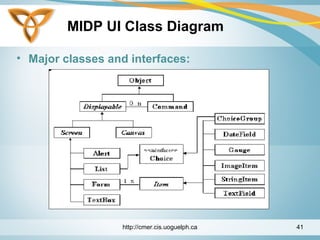
MIDP UI Class Diagram
• Major classes and interfaces:
http://cmer.cis.uoguelph.ca 41
MIDP - MIDlets
• A MIDlet consists of a class that extends the MIDletclass
and other classes as needed
• To handle events it must implement the
CommandListenerinterface
public class MyMIDlet extends MIDlet implements
CommandListener {
}
http://cmer.cis.uoguelph.ca 42
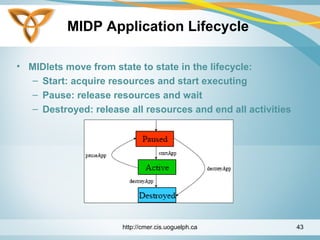
MIDP Application Lifecycle
• MIDlets move from state to state in the lifecycle:
– Start: acquire resources and start executing
– Pause: release resources and wait
– Destroyed: release all resources and end all activities
http://cmer.cis.uoguelph.ca 43
MIDLET - Packaging
• Two or mode MIDlets form a MIDlet suite
• One or more MIDlets may be packaged in a single JAR
file that includes:
– A manifest describing the contents
– Java classes for the MIDlet(s)
– Resource file(s) used by the MIDlet(s)
• Each jar file is accompanied by a Java Application
Descriptor (JAD) file
http://cmer.cis.uoguelph.ca 44
MIDLET – Packaging (Cont.)
• Java Application Descriptor (JAD) file provides info:
– Configuration properties
– Pre-download properties
• Size, version, storage requirements
http://cmer.cis.uoguelph.ca 45
MIDLET - Example
import javax.microedition.midlet.MIDlet;
import javax.microedition.lcdui.*;
public class FirstMIDletextends MIDlet {
Display display= null;
TextBox tb = null;
public FirstMIDlet() {
display = Display.getDisplay(this);
}
http://cmer.cis.uoguelph.ca 46
MIDLET – Example (Cont.)
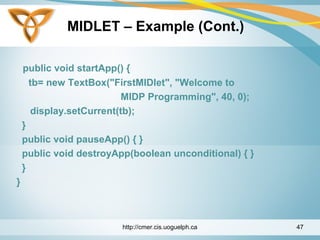
public void startApp() {
tb= new TextBox("FirstMIDlet", "Welcome to
MIDP Programming", 40, 0);
display.setCurrent(tb);
}
public void pauseApp() { }
public void destroyApp(boolean unconditional) { }
}
}
http://cmer.cis.uoguelph.ca 47
MIDLET – Example (Cont.)
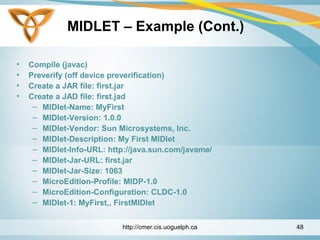
• Compile (javac)
• Preverify (off device preverification)
• Create a JAR file: first.jar
• Create a JAD file: first.jad
– MIDlet-Name: MyFirst
– MIDlet-Version: 1.0.0
– MIDlet-Vendor: Sun Microsystems, Inc.
– MIDlet-Description: My First MIDlet
– MIDlet-Info-URL: http://java.sun.com/javame/
– MIDlet-Jar-URL: first.jar
– MIDlet-Jar-Size: 1063
– MicroEdition-Profile: MIDP-1.0
– MicroEdition-Configuration: CLDC-1.0
– MIDlet-1: MyFirst,, FirstMIDlet
http://cmer.cis.uoguelph.ca 48
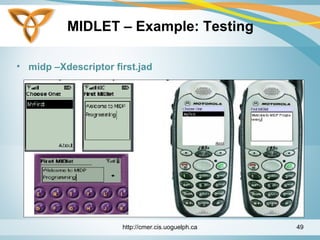
MIDLET – Example: Testing
• midp –Xdescriptor first.jad
http://cmer.cis.uoguelph.ca 49
MIDlet – Example: Deploying
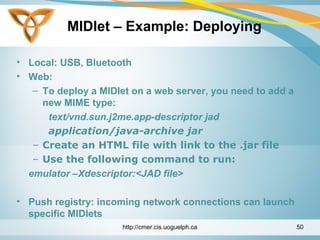
• Local: USB, Bluetooth
• Web:
– To deploy a MIDlet on a web server, you need to add a
new MIME type:
text/vnd.sun.j2me.app-descriptor jad
application/java-archive jar
– Create an HTML file with link to the .jar file
– Use the following command to run:
emulator –Xdescriptor:<JAD file>
• Push registry: incoming network connections can launch
specific MIDlets
http://cmer.cis.uoguelph.ca 50
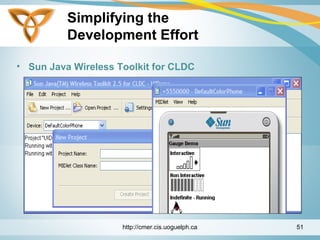
Simplifying the
Development Effort
• Sun Java Wireless Toolkit for CLDC
http://cmer.cis.uoguelph.ca 51
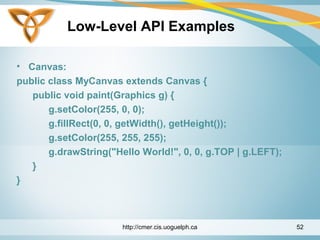
Low-Level API Examples
• Canvas:
public class MyCanvas extends Canvas {
public void paint(Graphics g) {
g.setColor(255, 0, 0);
g.fillRect(0, 0, getWidth(), getHeight());
g.setColor(255, 255, 255);
g.drawString("Hello World!", 0, 0, g.TOP | g.LEFT);
}
}
http://cmer.cis.uoguelph.ca 52
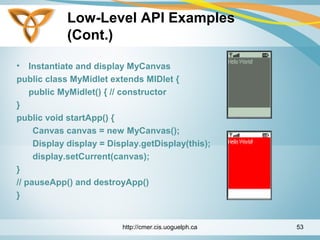
Low-Level API Examples
(Cont.)
• Instantiate and display MyCanvas
public class MyMidlet extends MIDlet {
public MyMidlet() { // constructor
}
public void startApp() {
Canvas canvas = new MyCanvas();
Display display = Display.getDisplay(this);
display.setCurrent(canvas);
}
// pauseApp() and destroyApp()
}
http://cmer.cis.uoguelph.ca 53
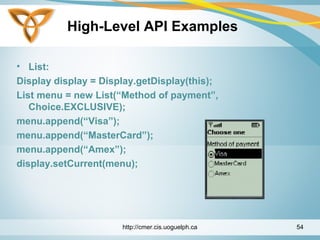
High-Level API Examples
• List:
Display display = Display.getDisplay(this);
List menu = new List(“Method of payment”,
Choice.EXCLUSIVE);
menu.append(“Visa”);
menu.append(“MasterCard”);
menu.append(“Amex”);
display.setCurrent(menu);
http://cmer.cis.uoguelph.ca 54
High-Level API
Examples (Cont.)
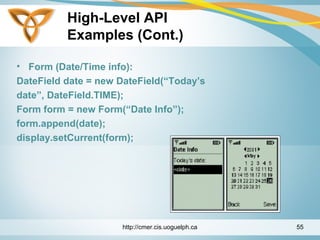
• Form (Date/Time info):
DateField date = new DateField(“Today’s
date”, DateField.TIME);
Form form = new Form(“Date Info”);
form.append(date);
display.setCurrent(form);
http://cmer.cis.uoguelph.ca 55
Input Handling
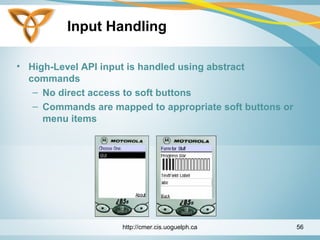
• High-Level API input is handled using abstract
commands
– No direct access to soft buttons
– Commands are mapped to appropriate soft buttons or
menu items
http://cmer.cis.uoguelph.ca 56
Input Handling: Example
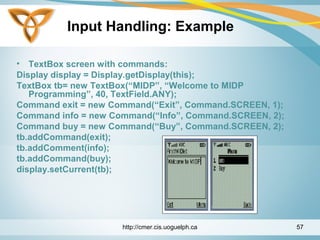
• TextBox screen with commands:
Display display = Display.getDisplay(this);
TextBox tb= new TextBox(“MIDP”, “Welcome to MIDP
Programming”, 40, TextField.ANY);
Command exit = new Command(“Exit”, Command.SCREEN, 1);
Command info = new Command(“Info”, Command.SCREEN, 2);
Command buy = new Command(“Buy”, Command.SCREEN, 2);
tb.addCommand(exit);
tb.addComment(info);
tb.addCommand(buy);
display.setCurrent(tb);
http://cmer.cis.uoguelph.ca 57
Event Handling: High-Level
• High-level Events:
– Based on a listener model
– Screen objects can have listeners for commands
– For an object to be a listener, it must implement
the CommandListenerinterface
– This interface has one method: commandAction
http://cmer.cis.uoguelph.ca 58
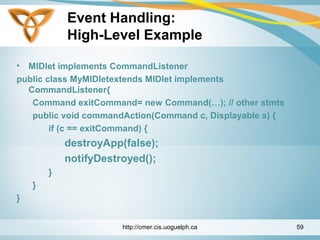
Event Handling:
High-Level Example
• MIDlet implements CommandListener
public class MyMIDletextends MIDlet implements
CommandListener{
Command exitCommand= new Command(…); // other stmts
public void commandAction(Command c, Displayable s) {
if (c == exitCommand) {
destroyApp(false);
notifyDestroyed();
}
}
}
http://cmer.cis.uoguelph.ca 59
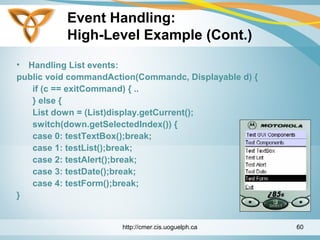
Event Handling:
High-Level Example (Cont.)
• Handling List events:
public void commandAction(Commandc, Displayable d) {
if (c == exitCommand) { ..
} else {
List down = (List)display.getCurrent();
switch(down.getSelectedIndex()) {
case 0: testTextBox();break;
case 1: testList();break;
case 2: testAlert();break;
case 3: testDate();break;
case 4: testForm();break;
}
http://cmer.cis.uoguelph.ca 60
Event Handling: Low-Level
• Low-level Events:
– Low-level API gives developers access to key press
events
– Key events are reported with respect to key codes
– MIDP defines key codes: KEY_NUM0 .. KEY_NUM9,
KEY_STAR, KEY_POUND
http://cmer.cis.uoguelph.ca 61
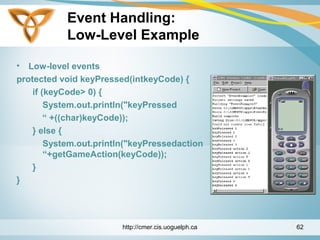
Event Handling:
Low-Level Example
• Low-level events
protected void keyPressed(intkeyCode) {
if (keyCode> 0) {
System.out.println("keyPressed
“ +((char)keyCode));
} else {
System.out.println("keyPressedaction
“+getGameAction(keyCode));
}
}
http://cmer.cis.uoguelph.ca 62
Error Handling
• Important to handle errors smoothly to provide a great
user experience
• Users should be provided clear information on how to
correct an issue if possible in a error message
• If an uncorrectable exception is possible the user should
be given an ability to log the error information to report
to developer
• All possible exceptions should be handled in some
manner in an application
http://cmer.cis.uoguelph.ca 63
MIDP UI Design Principles
• Make the UI simple and easy to use
• Use the high-level API (portability)
• If you need to use low-level API, keep to the platform-
independent part
• MIDlets should not depend on any specific screen size
• Entering data is tedious, so provide a list of choices to
select from
http://cmer.cis.uoguelph.ca 64

M app slides_1

  • 1.
  • 2.
    Overview • Mobile Platforms •How they fit together? • CLDC • Optional Packages • MIDP • MIDlets • API Examples • Input, Event, & Error Handling • UI Design Principles http://cmer.cis.uoguelph.ca 2
  • 3.
    Motivation • Who doesn’thave some kind of a mobile device (cell phone, smartphone, PDA, etc) • People love their cell phones (inherently personal, telecommunication, etc) http://cmer.cis.uoguelph.ca 3 Source: ITU adapted from researchICTafrica.net
  • 4.
    Mobile Devices inEducation • Mobile devices out-ship desktop computers 20 to 1 • For many students, the mobile device is becoming the computer (calendar, note taking, etc) • Today’s mobile devices is the supercomputer of 20 years ago • Students already annoy instructors with their cell phones (lovely ring tones, text messaging, etc) http://cmer.cis.uoguelph.ca 4
  • 5.
    Mobile Applications • MobileApps are apps or services that can be pushed to a mobile device or downloaded and installed locally • Classification • Browser-based: apps/services developed in a markup language • Native: compiled applications (device has a runtime environment). Interactive apps such as downloadable games. (Our focus) • Hybrid: the best of both worlds (a browser is needed for discovery) http://cmer.cis.uoguelph.ca 5
  • 6.
    Mobile Platforms • Awide variety of devices supporting different platforms – BlackBerry – Palm OS – Windows Mobile – Symbian • Runtime environments & apps – Browser-based apps (WAP) – Flash-lite – Java ME – Qualcomm’s BREW – Google’s Android • Having a choice is good…but not always… – Device fragmentation http://cmer.cis.uoguelph.ca 6
  • 7.
  • 8.
    Java ME • JavaPlatform, Micro Edition (Java ME) • Formerly known as J2ME Wireless Toolkit • Purpose: – Platform for mobile devices – Work within the restrictions of building applications for small devices that have limited memory, display, and power. http://cmer.cis.uoguelph.ca 8
  • 9.
    Java ME (Cont.) •Used as an environment for applications targeted towards mobiles and stand-alone devices – Mobile: cell phones and PDAs – Stand-alone: Printers http://cmer.cis.uoguelph.ca 9
  • 10.
    Java ME (Cont.) •Benefits: – Flexible user interface – Good security – Integrated network protocols – Support for downloadable applications that can be networked or stand-alone http://cmer.cis.uoguelph.ca 10
  • 11.
    Java ME (Cont.) •Java ME comprised of three components – A Configuration – A Profile – A Package (Optional) http://cmer.cis.uoguelph.ca 11
  • 12.
    Java ME (Cont.) Configuration •A configuration defines the minimum APIs and VM capabilities for a family of devices: – Similar requirements of memory size and processing capabilities • The minimum APIs that an application developer can expect to be available on implementing devices • May not contain any optional features http://cmer.cis.uoguelph.ca 12
  • 13.
    Java ME (Cont.) •Defined through the Java Community Process (JCP) - http://java.sun.com/jcp(www.jcp.org) • Subject to compatibility tests • Two types of configurations: – Connected Limited Device Configuration (CLDC) – Connected Device Profile (CDC). http://cmer.cis.uoguelph.ca 13
  • 14.
    Java ME (Cont.) Profile •A profile is a collection of APIs that supplement a configuration to provide capabilities for a specific vertical market • Defined through Java Community Process initiative - www.jcp.org • Subject to compatibility tests Package • An optional set of technology-specific APIs http://cmer.cis.uoguelph.ca 14
  • 15.
    Java ME (Cont.) •Profiles http://cmer.cis.uoguelph.ca 15
  • 16.
    How Do TheyFit Together? • Profiles are built on top of configurations http://cmer.cis.uoguelph.ca 16
  • 17.
    Configuration - CLDC •Targeted at devices with: – 160 to 512 KB of total memory available for Java technology – Limited power (e.g. battery) – Limited connectivity to a network (wireless) – Constrained User Interface (small screen) • It is available for free download • Reference implementation built using KVM http://cmer.cis.uoguelph.ca 17
  • 18.
    CLDC - KVM •Stands for Kilo Virtual Machine • Originated from a research project called Spotless at Sun Research Labs • Implements the classes defined in the CLDC specification + some additional UI classes • Note: the UI classes are not part of the CLDC and can be removed at any time http://cmer.cis.uoguelph.ca 18
  • 19.
    CLDC – KVM(Cont.) • A complete runtime environment for small devices • Built from the ground up in C • Small footprint (40 –80 KB) • Class file verification takes place off-device • Supports multi-threading • Supports garbage collection http://cmer.cis.uoguelph.ca 19
  • 20.
    CLDC – KVMSecurity • VM level security – Off-device pre-verification – Small in-device verification • Application level security – No Security Manager – Sandbox security model: • Applications run in a closed environment • Applications can call classes supported by the device http://cmer.cis.uoguelph.ca 20
  • 21.
    Optional Packages • CoreMIDP 2.0 functionality is limited. Vendors may include optional packages: – JSR-75: File Connection and PIM APIs – JSR-82: Bluetooth API – JSR-120: Mobile Messaging API – JSR-135: Mobile Media API – JSR-179: Location API – Many others… http://cmer.cis.uoguelph.ca 21
  • 22.
    JTWI • JSR-185: JavaTechnology for Wireless Industry (umbrella specification) http://cmer.cis.uoguelph.ca 22
  • 23.
    MSA • JSR-248: MobileService Architecture http://cmer.cis.uoguelph.ca 23
  • 24.
    CLDC – WirelessDevice Stack http://cmer.cis.uoguelph.ca 24
  • 25.
    CLDC - Internals •The CLDC specification specifies VM features required by a CLDC implementation • Specifies requirements and APIs for – Input / Output – Networking http://cmer.cis.uoguelph.ca 25
  • 26.
    CLDC – Language &VM Compatibility • Goal: – Full java language and VM specification compatibility • Language-level exception: – No floating point support in CLDC 1.0 • No hardware floating point support • Manufacturers and developers can include their own floating point http://cmer.cis.uoguelph.ca 26
  • 27.
    CLDC VS. J2SEJVM • Limitations in CLDC supporting JVM: – No floating point support – No finalization – Limited error handling – No Java Native Interface (JNI) – No support for reflection – No thread groups or daemon threads – No weak references http://cmer.cis.uoguelph.ca 27
  • 28.
    Beyond the CLDCScope • Profiles implemented on top of CLDC specify APIs for: – User Interface support – Event handling – Persistent support – High-level application model • An example profile is the Mobile Information Device Profile (MIDP) http://cmer.cis.uoguelph.ca 28
  • 29.
    CLDC - APIS •Classes inherited from J2SE v1.3 are in packages: – java.lang – java.io – java.util • New classes introduced by the CLDC are in package: – javax.microedition http://cmer.cis.uoguelph.ca 29
  • 30.
    CLDC Libraries: JAVA.LANG.* •Boolean • Byte • Character • Class • Integer • Long • Math • Object • Runnable • Runtime • Short • String • StringBuffer • System • Thread • Throwable http://cmer.cis.uoguelph.ca 30
  • 31.
    CLDC Libraries: JAVA.IO.* •ByteArrayInputStream • ByteArrayOutputStream • DataInput • DataOutput • DataInputStream • DataOutputStream • InputStream • OutputStream • InputStreamReader • OutputStreamWriter • PrintStream • Reader • Writer http://cmer.cis.uoguelph.ca 31
  • 32.
    CLDC Libraries: JAVA.UTIL.* •Calendar • Date • Enumeration • Hashtable • Random • Stack • TimeZone • Vector http://cmer.cis.uoguelph.ca 32
  • 33.
    CLDC - MIDP •Targets mobile two-way communication devices implementing the CLDC • It addresses: – Display toolkit (user input) – Persistent data storage – HTTP based networking using CLDC generic connection framework • Available for free download http://cmer.cis.uoguelph.ca 33
  • 34.
    CLDC – MIDPInternals • Goal: – MIDP implementation must fit in small footprint (128KB ROM) – Must run with limited heap size (32-200KB RAM) • To be implemented by device manufacturers, operators, or developers http://cmer.cis.uoguelph.ca 34
  • 35.
    MIDP - APIS •The MIDP specifies APIs for: – User Interface – Networking (based on CLDC) – Persistent Storage – Timers http://cmer.cis.uoguelph.ca 35
  • 36.
    MIDP – User Interface(UI) • Not a subset of AWT or Swing because: – AWT is designed for desktop computers – Assumes certain user interaction models (pointing device such as a mouse) – Window management (resizing overlapping windows). This is impractical for cell phones • Consists of high-level and low-level APIs http://cmer.cis.uoguelph.ca 36
  • 37.
    MIDP - UIAPIS • High-level API – Applications should be runnable and usable in all MIDP devices – No direct access to native device features • Low-level API – Provide access to native drawing primitives, device key events, native input devices – Allows developers to choose to compromise portability for user experience http://cmer.cis.uoguelph.ca 37
  • 38.
    MIDP – UI ProgrammingModel • The central abstraction is a screen • Only one screen may be visible at a time • Three types of screens: – Predefined screens with complex UI components (List, TextBox) – Generic screens (Formwhere you can add text, images, etc) – Screens used with low-level API (Canvas) http://cmer.cis.uoguelph.ca 38
  • 39.
    MIDP – UIand Display • The Display class is the display manager • It is instantiated for each active MIDlet • Provides methods to retrieve information about the device’s display capabilities • A screen is made visible by calling: Display’s setCurrent(screen); http://cmer.cis.uoguelph.ca 39
  • 40.
    MIDP – UIClasses • javax.microedition.lcdui classes: Alert, AlertType, Canvas, ChoiceGroup, Command, DateField, Display, Displayable, Font, Form, Gauge, Graphics, Image, ImageItem, Item, List, Screen, StringItem, TextBox, TextField, Ticker • javax.microedition.lcdui interfaces: Choice, CommandListener, ItemStateListener http://cmer.cis.uoguelph.ca 40
  • 41.
    MIDP UI ClassDiagram • Major classes and interfaces: http://cmer.cis.uoguelph.ca 41
  • 42.
    MIDP - MIDlets •A MIDlet consists of a class that extends the MIDletclass and other classes as needed • To handle events it must implement the CommandListenerinterface public class MyMIDlet extends MIDlet implements CommandListener { } http://cmer.cis.uoguelph.ca 42
  • 43.
    MIDP Application Lifecycle •MIDlets move from state to state in the lifecycle: – Start: acquire resources and start executing – Pause: release resources and wait – Destroyed: release all resources and end all activities http://cmer.cis.uoguelph.ca 43
  • 44.
    MIDLET - Packaging •Two or mode MIDlets form a MIDlet suite • One or more MIDlets may be packaged in a single JAR file that includes: – A manifest describing the contents – Java classes for the MIDlet(s) – Resource file(s) used by the MIDlet(s) • Each jar file is accompanied by a Java Application Descriptor (JAD) file http://cmer.cis.uoguelph.ca 44
  • 45.
    MIDLET – Packaging(Cont.) • Java Application Descriptor (JAD) file provides info: – Configuration properties – Pre-download properties • Size, version, storage requirements http://cmer.cis.uoguelph.ca 45
  • 46.
    MIDLET - Example importjavax.microedition.midlet.MIDlet; import javax.microedition.lcdui.*; public class FirstMIDletextends MIDlet { Display display= null; TextBox tb = null; public FirstMIDlet() { display = Display.getDisplay(this); } http://cmer.cis.uoguelph.ca 46
  • 47.
    MIDLET – Example(Cont.) public void startApp() { tb= new TextBox("FirstMIDlet", "Welcome to MIDP Programming", 40, 0); display.setCurrent(tb); } public void pauseApp() { } public void destroyApp(boolean unconditional) { } } } http://cmer.cis.uoguelph.ca 47
  • 48.
    MIDLET – Example(Cont.) • Compile (javac) • Preverify (off device preverification) • Create a JAR file: first.jar • Create a JAD file: first.jad – MIDlet-Name: MyFirst – MIDlet-Version: 1.0.0 – MIDlet-Vendor: Sun Microsystems, Inc. – MIDlet-Description: My First MIDlet – MIDlet-Info-URL: http://java.sun.com/javame/ – MIDlet-Jar-URL: first.jar – MIDlet-Jar-Size: 1063 – MicroEdition-Profile: MIDP-1.0 – MicroEdition-Configuration: CLDC-1.0 – MIDlet-1: MyFirst,, FirstMIDlet http://cmer.cis.uoguelph.ca 48
  • 49.
    MIDLET – Example:Testing • midp –Xdescriptor first.jad http://cmer.cis.uoguelph.ca 49
  • 50.
    MIDlet – Example:Deploying • Local: USB, Bluetooth • Web: – To deploy a MIDlet on a web server, you need to add a new MIME type: text/vnd.sun.j2me.app-descriptor jad application/java-archive jar – Create an HTML file with link to the .jar file – Use the following command to run: emulator –Xdescriptor:<JAD file> • Push registry: incoming network connections can launch specific MIDlets http://cmer.cis.uoguelph.ca 50
  • 51.
    Simplifying the Development Effort •Sun Java Wireless Toolkit for CLDC http://cmer.cis.uoguelph.ca 51
  • 52.
    Low-Level API Examples •Canvas: public class MyCanvas extends Canvas { public void paint(Graphics g) { g.setColor(255, 0, 0); g.fillRect(0, 0, getWidth(), getHeight()); g.setColor(255, 255, 255); g.drawString("Hello World!", 0, 0, g.TOP | g.LEFT); } } http://cmer.cis.uoguelph.ca 52
  • 53.
    Low-Level API Examples (Cont.) •Instantiate and display MyCanvas public class MyMidlet extends MIDlet { public MyMidlet() { // constructor } public void startApp() { Canvas canvas = new MyCanvas(); Display display = Display.getDisplay(this); display.setCurrent(canvas); } // pauseApp() and destroyApp() } http://cmer.cis.uoguelph.ca 53
  • 54.
    High-Level API Examples •List: Display display = Display.getDisplay(this); List menu = new List(“Method of payment”, Choice.EXCLUSIVE); menu.append(“Visa”); menu.append(“MasterCard”); menu.append(“Amex”); display.setCurrent(menu); http://cmer.cis.uoguelph.ca 54
  • 55.
    High-Level API Examples (Cont.) •Form (Date/Time info): DateField date = new DateField(“Today’s date”, DateField.TIME); Form form = new Form(“Date Info”); form.append(date); display.setCurrent(form); http://cmer.cis.uoguelph.ca 55
  • 56.
    Input Handling • High-LevelAPI input is handled using abstract commands – No direct access to soft buttons – Commands are mapped to appropriate soft buttons or menu items http://cmer.cis.uoguelph.ca 56
  • 57.
    Input Handling: Example •TextBox screen with commands: Display display = Display.getDisplay(this); TextBox tb= new TextBox(“MIDP”, “Welcome to MIDP Programming”, 40, TextField.ANY); Command exit = new Command(“Exit”, Command.SCREEN, 1); Command info = new Command(“Info”, Command.SCREEN, 2); Command buy = new Command(“Buy”, Command.SCREEN, 2); tb.addCommand(exit); tb.addComment(info); tb.addCommand(buy); display.setCurrent(tb); http://cmer.cis.uoguelph.ca 57
  • 58.
    Event Handling: High-Level •High-level Events: – Based on a listener model – Screen objects can have listeners for commands – For an object to be a listener, it must implement the CommandListenerinterface – This interface has one method: commandAction http://cmer.cis.uoguelph.ca 58
  • 59.
    Event Handling: High-Level Example •MIDlet implements CommandListener public class MyMIDletextends MIDlet implements CommandListener{ Command exitCommand= new Command(…); // other stmts public void commandAction(Command c, Displayable s) { if (c == exitCommand) { destroyApp(false); notifyDestroyed(); } } } http://cmer.cis.uoguelph.ca 59
  • 60.
    Event Handling: High-Level Example(Cont.) • Handling List events: public void commandAction(Commandc, Displayable d) { if (c == exitCommand) { .. } else { List down = (List)display.getCurrent(); switch(down.getSelectedIndex()) { case 0: testTextBox();break; case 1: testList();break; case 2: testAlert();break; case 3: testDate();break; case 4: testForm();break; } http://cmer.cis.uoguelph.ca 60
  • 61.
    Event Handling: Low-Level •Low-level Events: – Low-level API gives developers access to key press events – Key events are reported with respect to key codes – MIDP defines key codes: KEY_NUM0 .. KEY_NUM9, KEY_STAR, KEY_POUND http://cmer.cis.uoguelph.ca 61
  • 62.
    Event Handling: Low-Level Example •Low-level events protected void keyPressed(intkeyCode) { if (keyCode> 0) { System.out.println("keyPressed “ +((char)keyCode)); } else { System.out.println("keyPressedaction “+getGameAction(keyCode)); } } http://cmer.cis.uoguelph.ca 62
  • 63.
    Error Handling • Importantto handle errors smoothly to provide a great user experience • Users should be provided clear information on how to correct an issue if possible in a error message • If an uncorrectable exception is possible the user should be given an ability to log the error information to report to developer • All possible exceptions should be handled in some manner in an application http://cmer.cis.uoguelph.ca 63
  • 64.
    MIDP UI DesignPrinciples • Make the UI simple and easy to use • Use the high-level API (portability) • If you need to use low-level API, keep to the platform- independent part • MIDlets should not depend on any specific screen size • Entering data is tedious, so provide a list of choices to select from http://cmer.cis.uoguelph.ca 64