The document provides an overview of JavaScript, including its history, advantages, and limitations. It details its evolution from a language created by Brendan Eich in 1995 to its current versions under the ECMAScript standards. Additionally, it covers implementation methods, coding conventions, and output methods for JavaScript.
www.webstackacademy.com ‹#›
JS –What?
●
A programming language designed for web pages
●
It is embedded directly into HTML Pages
●
An interpreted, client-side, event based language
●
It is dynamic, lightweight and case-sensitive
www.webstackacademy.com ‹#›
JavaScript History
●
Createdby Brendan Eich (co-founder of Mozilla) in 1995
during his time at Netscape Communications
●
It was inspired by Java, Scheme and Self
●
Originally called Mocha (a name chosen by Marc
Andreessen)
7.
www.webstackacademy.com ‹#›
JavaScript History
●
InSep 1995 the name was changed to LiveScript
●
Then, in Dec 1995, upon receiving a trademark license
from Sun, the name JavaScript was adopted
●
The general-purpose JavaScript engine had been
embedded in web browsers (Netscape, IE, etc..)
8.
www.webstackacademy.com ‹#›
JavaScript History
●
TheECMA-262 (European Computer Manufacturer’s
Association) Specification defined a standard version of
JavaScript language
●
ECMAScript Edition 1 First standardized version of
JavaScript
●
ECMAScript Edition 2 is the second official standard
9.
www.webstackacademy.com ‹#›
JavaScript History
●
ECMAScript3 (ES3) was released in December 1999. More advanced
language, Includes regular expressions and exception handling
●
ECMAScript 4 (ES4) A new standard includes features such as JSON
(JavaScript Object Notation) & class based object-oriented programming
●
ECMAScript 5 (ES5) was released in December 2009. It adds in getter
and setter properties, introduces features for robust programming via a
strict mode and JSON handling arrays
●
ECMAScript 6 (ES6) was released in June 2015, and is the latest official
version of JavaScript
10.
www.webstackacademy.com ‹#›
JavaScript Advantages
●
JavaScriptis executed on the client side
– The code is executed on the user's processor instead
of the web server
– This means less load on server
●
JavaScript is relatively easy language
– The JavaScript language is relatively easy to learn and
comprises of syntax that is close to English
11.
www.webstackacademy.com ‹#›
JavaScript Advantages
●
Increasedinteractivity: We can create interfaces that
react when the user hovers over them with a mouse or
activates them via the keyboard
●
Richer interfaces: You can use JavaScript to include such
items as drag-and-drop components and sliders to give a
rich interface to your site visitors
12.
www.webstackacademy.com ‹#›
JavaScript Limitations
●
JavaScriptcannot write to files on the server without the
help of a server side script
– Ajax, JavaScript can send a request to the server
●
JavaScript cannot access back-end databases without a
server side script
13.
www.webstackacademy.com ‹#›
JavaScript Limitations
●
JavaScriptcannot read from or write to files in the client
– Even though JavaScript is running on the client computer
the one where the web page is being viewed) it is not
allowed to access anything outside of the web page itself
– This is done for reasons of security
●
JavaScript does not have multi-threading
– JavaScript does not have multi-threading capabilities
14.
www.webstackacademy.com ‹#›
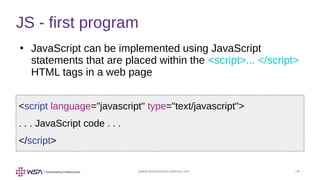
●
JavaScript canbe implemented using JavaScript
statements that are placed within the <script>... </script>
HTML tags in a web page
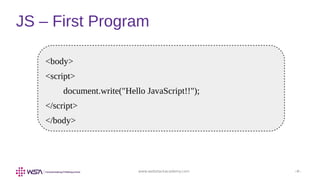
JS - first program
<script language="javascript" type="text/javascript">
. . . JavaScript code . . .
</script>
15.
www.webstackacademy.com ‹#›
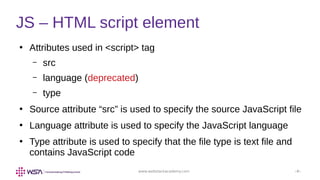
●
Attributes usedin <script> tag
– src
– language (deprecated)
– type
●
Source attribute “src” is used to specify the source JavaScript file
●
Language attribute is used to specify the JavaScript language
●
Type attribute is used to specify that the file type is text file and
contains JavaScript code
JS – HTML script element
16.
www.webstackacademy.com ‹#›
●
“language” attributeis deprecated
●
“type” attribute is needed for old browsers
●
Modern browsers by default assume the language and
type as JavaSctipt, therefore, these attributes are
optional for them
JS – HTML script element
www.webstackacademy.com ‹#›
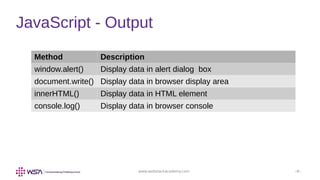
JavaScript -Output
Method Description
window.alert() Display data in alert dialog box
document.write() Display data in browser display area
innerHTML() Display data in HTML element
console.log() Display data in browser console
www.webstackacademy.com ‹#›
JS -External
●
External (or linked script) JavaScript can be inserted using
src attribute
Syntax :
<script src="URL"> </script>
Absolute URL : http://www.example.com/example.js
Relative URL : /script/example.js
21.
www.webstackacademy.com ‹#›
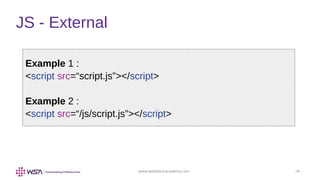
JS -External
Example 1 :
<script src=“script.js”></script>
Example 2 :
<script src=“/js/script.js”></script>
22.
www.webstackacademy.com ‹#›
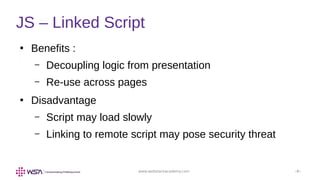
JS –Linked Script
●
Benefits :
– Decoupling logic from presentation
– Re-use across pages
●
Disadvantage
– Script may load slowly
– Linking to remote script may pose security threat
23.
www.webstackacademy.com ‹#›
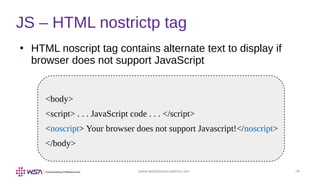
JS –HTML nostrictp tag
●
HTML noscript tag contains alternate text to display if
browser does not support JavaScript
<body>
<script> . . . JavaScript code . . . </script>
<noscript> Your browser does not support Javascript!</noscript>
</body>
www.webstackacademy.com ‹#›
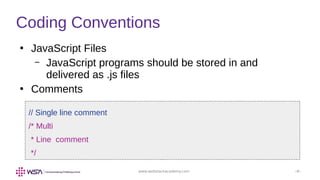
Coding Conventions
●
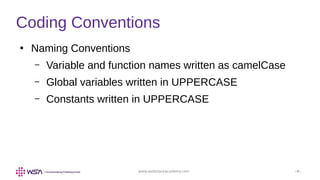
VariableNames
– Use camelCase for identifier names (variables and
functions)
– The name should be descriptive and concise
– All names start with a letter
– Variable names are case sensitive
www.webstackacademy.com ‹#›
Coding Conventions
●
StatementRule
– Always end a simple statement with a semicolon
– Put the opening bracket at the end of the first line
– Put the closing bracket on a new line, without leading
spaces
– Do not end a complex statement with a semicolon