Private Cloud for IBM i
IBM

Luca Comparini
IBM STG Lab Services EMEA
Objective of this session
At the end of this session you should have a clear understanding of:
–
–

–
–

What is the meaning of Cloud Computing and IaaS
VMControl terminology
– Virtual server
– Virtual appliance
– Image repository
– Capture and Deploy
– Server Systems Pool
SmartCloud Entry support
PowerVC support (SoD)
External links, video & social media
ThoughtsonCloud.com
IBM SmartCloud Entry: deploy two working environments in minutes
http://thoughtsoncloud.com/index.php/2013/03/ibm-smartcloud-entry-deploy-two-working-environments-in-minutes/

VIDEO
IBM SmartCloud Entry: deploying an IBM i 7.1 and an AIX 7.1 in less than 7 minutes
http://www.youtube.com/watch?v=cwGmOIRtcss
Howto: using FSM VMControl to deploy an IBM i 7.1
http://www.youtube.com/watch?v=fQApzKuFjaw

@lucacomparini
http://www.linkedin.com/in/lucacomparini
What is Cloud Computing
From Wikipedia: http://en.wikipedia.org/wiki/Cloud_computing
Cloud computing is the delivery of computing as a service rather than a product, whereby shared resources,
software, and information are provided to computers and other devices as a utility (like the electricity grid) over a
network (typically the Internet). (…)
Cloud computing describes a new supplement, consumption, and delivery model for IT services based on Internet
protocols, and it typically involves provisioning of dynamically scalable and often virtualized resources.

Key words: computing as a service, shared, scalable, virtualized
From Cloud Computing Wiki: http://sites.google.com/site/cloudcomputingwiki/
Cloud Computing is an execution of compute jobs in multi-tenant elastic environment, where jobs may dynamically
scale up or down requesting/releasing resources on a fly. Owner of the process is billed only for used capacity.

Key words: dynamically, requesting/releasing, billed for used capacity
(automated)

(self service portal)

(metering & billing)
Computing as a service – main layers
From Wikipedia: http://en.wikipedia.org/wiki/Cloud_computing
Application
Cloud application services or "Software as a Service (SaaS)" deliver software as a service
over the Internet, eliminating the need to install and run the application on the customer's own
computers and simplifying maintenance and support.
Platform
Cloud platform services, also known as platform as a service (PaaS), deliver a computing
platform and/or solution stack as a service, often consuming cloud infrastructure and
sustaining cloud applications. It facilitates deployment of applications without the cost and
complexity of buying and managing the underlying hardware and software layers
Infrastructure
Cloud infrastructure services, also known as "infrastructure as a service" (IaaS), deliver
computer infrastructure – typically a platform virtualization environment – as a service, along
with raw (block) storage and networking. Rather than purchasing servers, software, datacenter space or network equipment, clients instead buy those resources as a fully outsourced
service. Suppliers typically bill such services on a utility computing basis; the amount of
resources consumed (and therefore the cost) will typically reflect the level of activity.
Computing as a service – deployment models
Public cloud
Public cloud describes cloud computing in the traditional mainstream sense, whereby resources
are dynamically provisioned to the general public on a fine-grained, self-service basis over the
Internet, via web applications/web services, from an off-site third-party provider who bills on a
fine-grained utility computing basis
Private cloud
Private cloud is infrastructure operated solely for a single organization, whether managed
internally or by a third-party and hosted internally or externally.

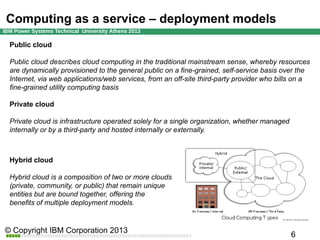
Hybrid cloud
Hybrid cloud is a composition of two or more clouds
(private, community, or public) that remain unique
entities but are bound together, offering the
benefits of multiple deployment models.
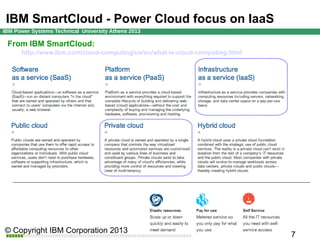
IBM SmartCloud - Power Cloud focus on IaaS
From IBM SmartCloud:
http://www.ibm.com/cloud-computing/us/en/what-is-cloud-computing.html
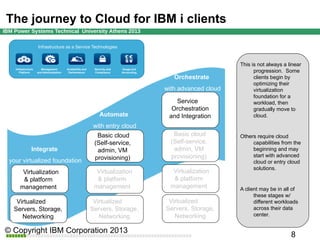
The journey to Cloud for IBM i clients
Infrastructure as a Service Technologies

Infrastructure
Platform

Management
and Administration

Availability and
Performance

Security and
Compliance

Usage and
Accounting

Orchestrate
with advanced cloud

Automate

Service
Orchestration
and Integration

This is not always a linear
progression. Some
clients begin by
optimizing their
virtualization
foundation for a
workload, then
gradually move to
cloud.

with entry cloud
Basic cloud
(Self-service,
admin, VM
provisioning)

Basic cloud
(Self-service,
admin, VM
provisioning)

Virtualization
& platform
management

Virtualization
& platform
management

Virtualization
& platform
management

Virtualized
Servers, Storage,
Networking

Virtualized
Servers, Storage,
Networking

Virtualized
Servers, Storage,
Networking

Integrate
your virtualized foundation

Others require cloud
capabilities from the
beginning and may
start with advanced
cloud or entry cloud
solutions.

A client may be in all of
these stages w/
different workloads
across their data
center.
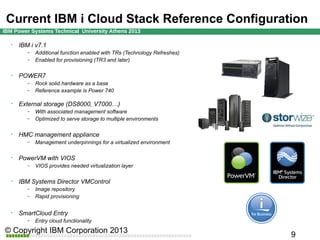
IBM i Cloud Stack Reference Configuration


IBM i v7.1
–
–



POWER7
–
–



–

VIOS provides needed virtualization layer

IBM Systems Director VMControl
–
–



Management underpinnings for a virtualized environment

PowerVM with VIOS
–



With associated management software
Optimized to serve storage to multiple environments

HMC management appliance
–



Rock solid hardware as a base
Reference example is Power 740

External storage (DS8000, V7000…)
–



Additional function enabled with TRs (Technology Refreshes)
Enabled for provisioning (TR3 and later)

Image repository
Rapid provisioning

SmartCloud Entry
–

Entry cloud functionality
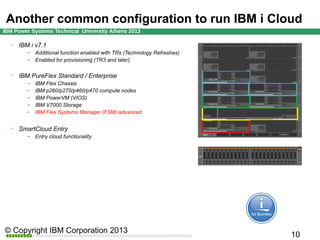
PureFlex as a Cloud ready platform for IBM i


IBM i v7.1
–
–



IBM PureFlex Standard / Enterprise
–
–
–
–
–



Additional function enabled with TRs (Technology Refreshes)
Enabled for provisioning (TR3 and later)

IBM Flex Chassis
IBM p260/p270/p460/p470 compute nodes
IBM PowerVM (VIOS)
IBM V7000 Storage
IBM Flex Systems Manager (FSM) advanced

SmartCloud Entry
–

Entry cloud functionality
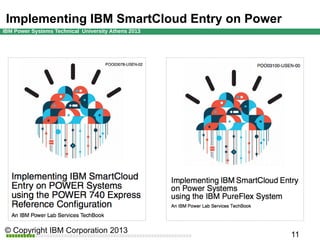
Implementing IBM SmartCloud Entry on Power
VMControl overview
IBM
What is IBM Systems Director VMControl
What is VMControl
A plugin for IBM Systems Director; a native plugin of IBM Flex Systems Manager.
A cross-platform suite of products that assists you in rapidly deploying virtual appliances to
create virtual servers, which are configured with the operating system and software
applications
Designed to simplify the management of workloads in your IT environment
Advanced features enables you to group resources into system pools
– Centrally manage and control different workloads
– Consolidate workloads into distinct and manageable groups
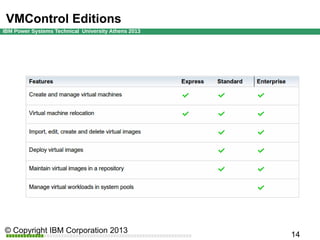
VMControl Editions
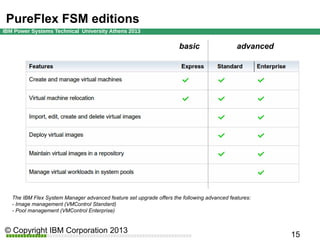
PureFlex FSM editions
basic

advanced

The IBM Flex System Manager advanced feature set upgrade offers the following advanced features:
- Image management (VMControl Standard)
- Pool management (VMControl Enterprise)
IBM Cloud is built around Open Standards
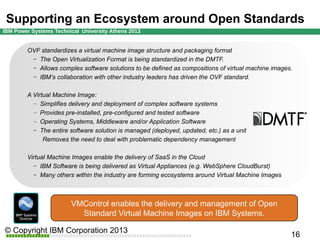
OVF standardizes a virtual machine image structure and packaging format
– The Open Virtualization Format is being standardized in the DMTF.
– Allows complex software solutions to be defined as compositions of virtual machine images.
– IBM’s collaboration with other industry leaders has driven the OVF standard.
A Virtual Machine Image:
– Simplifies delivery and deployment of complex software systems
– Provides pre-installed, pre-configured and tested software
– Operating Systems, Middleware and/or Application Software
– The entire software solution is managed (deployed, updated, etc.) as a unit
Removes the need to deal with problematic dependency management
Virtual Machine Images enable the delivery of SaaS in the Cloud
– IBM Software is being delivered as Virtual Appliances (e.g. WebSphere CloudBurst)
– Many others within the industry are forming ecosystems around Virtual Machine Images

VMControl enables the delivery and management of Open
Standard Virtual Machine Images on IBM Systems.
Understanding terminology in VMControl
Virtual Servers
–
–
–
–

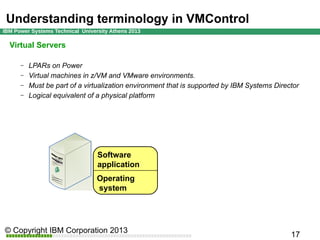
LPARs on Power
Virtual machines in z/VM and VMware environments.
Must be part of a virtualization environment that is supported by IBM Systems Director
Logical equivalent of a physical platform

Software
application
Operating
system
Understanding terminology in VMControl
Virtual Appliance
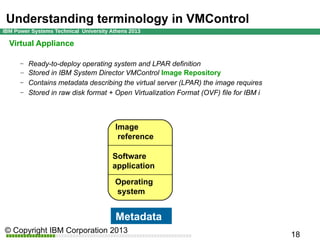
Ready-to-deploy operating system and LPAR definition
– Stored in IBM System Director VMControl Image Repository
– Contains metadata describing the virtual server (LPAR) the image requires
– Stored in raw disk format + Open Virtualization Format (OVF) file for IBM i
–

Image
reference
Software
application
Operating
system

Metadata
Understanding terminology in VMControl
Workloads
–
–
–

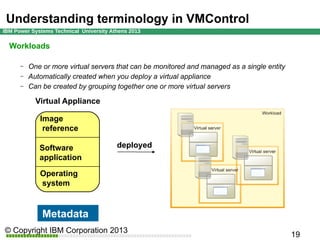
One or more virtual servers that can be monitored and managed as a single entity
Automatically created when you deploy a virtual appliance
Can be created by grouping together one or more virtual servers

Virtual Appliance
Image
reference
Software
application
Operating
system

Metadata

deployed
Understanding terminology in VMControl
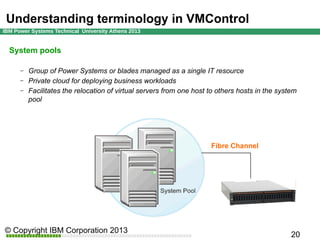
System pools
–
–
–

Group of Power Systems or blades managed as a single IT resource
Private cloud for deploying business workloads
Facilitates the relocation of virtual servers from one host to others hosts in the system
pool

Fibre Channel
IBM i provisioning with
VMControl

IBM
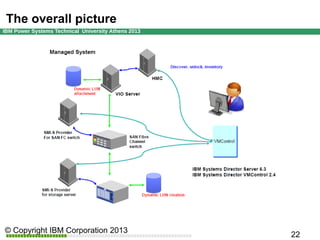
The overall picture
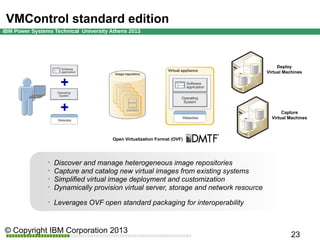
VMControl standard edition

Deploy
Virtual Machines

Capture
Virtual Machines

Open Virtualization Format (OVF)








Discover and manage heterogeneous image repositories
Capture and catalog new virtual images from existing systems
Simplified virtual image deployment and customization
Dynamically provision virtual server, storage and network resource
Leverages OVF open standard packaging for interoperability
Image Repository
Storage Copy Service (SCS) based provisioning is
- A provisioning service that allocates Virtual Servers, SAN resources, and copies OS images
via VIOS “dd” copy or SVC/V7000/DS8000 Fast Copy (for both deploy and capture)
- A provisioning service that uses VMControl Common Repository to manage and deploy
AIX/SUSE/RHEL/IBM i “raw” images
- A method that uses VIOS as the “Image Control Point” for the CR repository
- Capable of deploying VAs from a VMControl CR as new Power platform virtual servers or
onto existing virtual servers on Power platforms
Activation Engine
Customization information from UI (ip configuration) is built into an OVF “Environment
Document” ovf.env.xml
A virtual optical drive is created and attached to new virtual server and ovf.env.xml document
file is loaded into drive.
- Allows the document to be accessible to the activation engine when the new virtual server
boots up
- Requires at least one VIOS OS be discovered and have access on the host system where
new virtual server is deployed
Timer is used to remove the virtual optical drive after an hour
- If director ended and restarted in that hour virtual optical would be removed when virtual
server is relocated
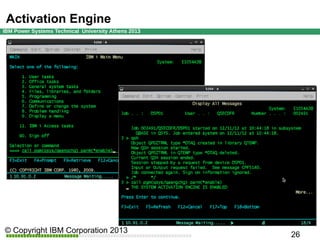
Activation Engine
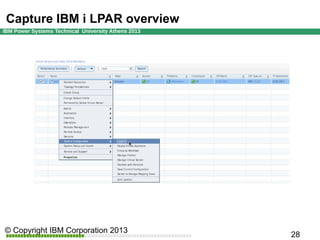
Capture IBM i LPAR overview
Install and configure VMControl and Storage Control/TPC
– SAN automation and Storage Copy Services capture are required
– NIM capture is not supported for IBM I
Prepare IBM i LPAR*
– v7.1 TR3 or later
– Install/verify required LPPs and PTFs
– Install and enable activation engine (AE, also distributed as PTF)
Discover and unlock IBM i LPAR in Director
– Director Common Agent is not required in IBM i for this function
Collect inventory on IBM i LPAR
Shut down IBM i LPAR
Use VMControl Capture wizard
Capture IBM i LPAR overview
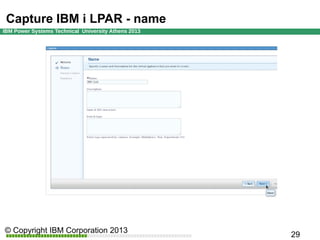
Capture IBM i LPAR - name
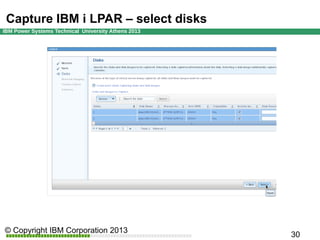
Capture IBM i LPAR – select disks
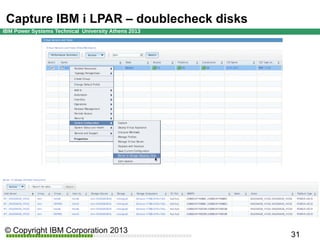
Capture IBM i LPAR – verify the relationships
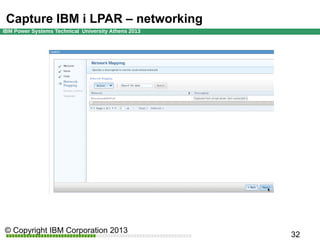
Capture IBM i LPAR – networking
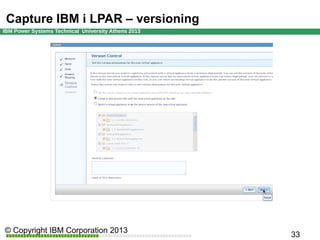
Capture IBM i LPAR – versioning
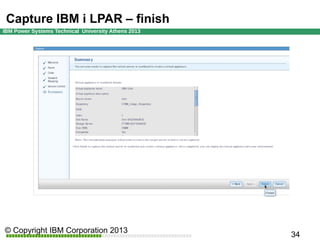
Capture IBM i LPAR – finish
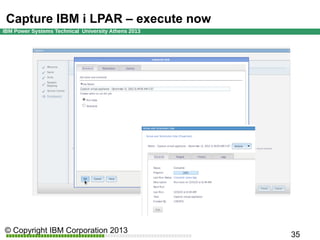
Capture IBM i LPAR – execute now
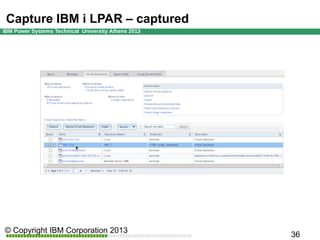
Capture IBM i LPAR – captured
Deploy IBM i LPAR overview
Select correct IBM i image in VMControl
Use VMControl deploy wizard
Select individual Power server on which to deploy
Server system pool support for IBM i is planned
– Enter network customization information for new LPAR
–

AE runs on initial IPL after deploy to customize networking
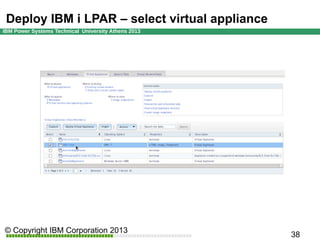
Deploy IBM i LPAR – select virtual appliance
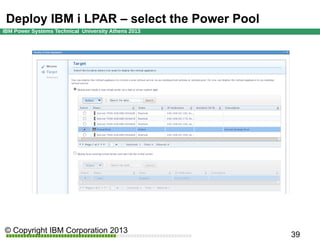
Deploy IBM i LPAR – select the Power Pool
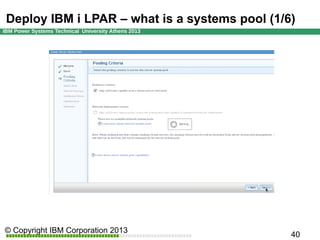
Deploy IBM i LPAR – what is a systems pool (1/6)
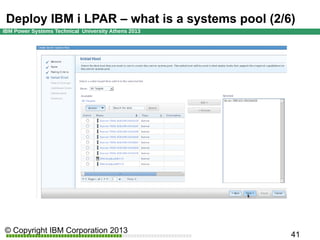
Deploy IBM i LPAR – what is a systems pool (2/6)
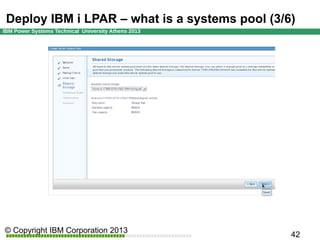
Deploy IBM i LPAR – what is a systems pool (3/6)
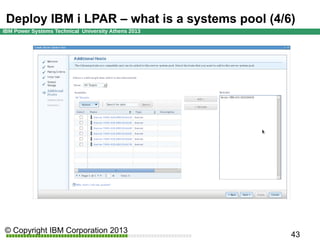
Deploy IBM i LPAR – what is a systems pool (4/6)
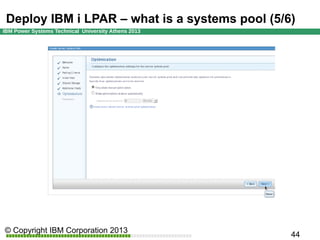
Deploy IBM i LPAR – what is a systems pool (5/6)
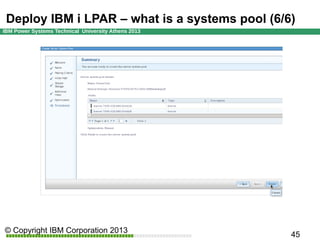
Deploy IBM i LPAR – what is a systems pool (6/6)
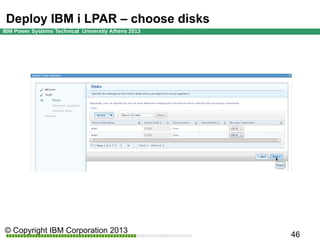
Deploy IBM i LPAR – choose disks
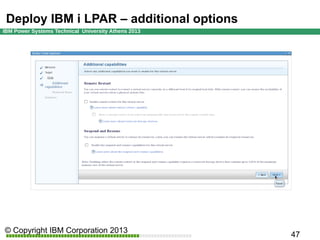
Deploy IBM i LPAR – additional options
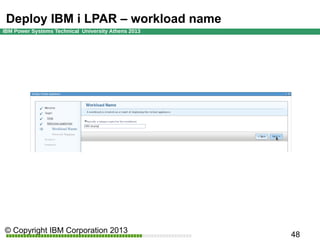
Deploy IBM i LPAR – workload name
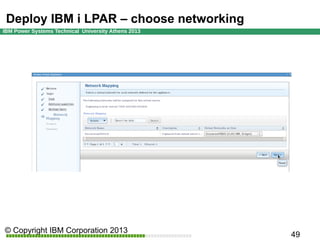
Deploy IBM i LPAR – choose networking
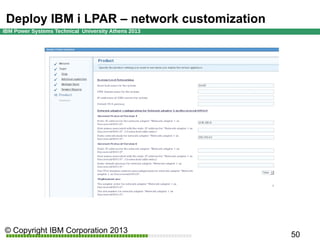
Deploy IBM i LPAR – network customization
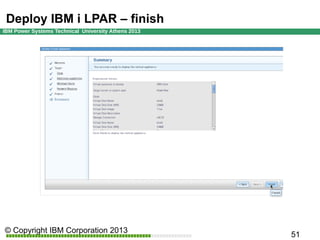
Deploy IBM i LPAR – finish
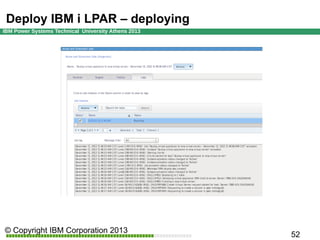
Deploy IBM i LPAR – deploying
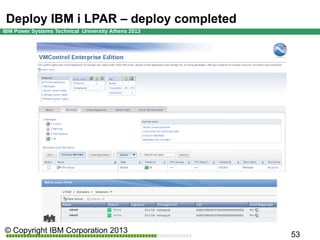
Deploy IBM i LPAR – deploy completed
SmartCloud Entry support
IBM
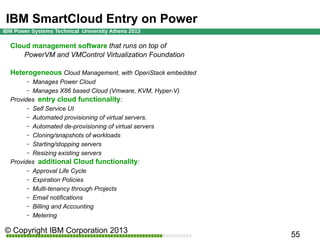
IBM SmartCloud Entry on Power
Cloud management software that runs on top of
PowerVM and VMControl Virtualization Foundation
Heterogeneous Cloud Management, with OpenStack embedded
Manages Power Cloud
– Manages X86 based Cloud (Vmware, KVM, Hyper-V)
Provides entry cloud functionality:
– Self Service UI
– Automated provisioning of virtual servers.
– Automated de-provisioning of virtual servers
– Cloning/snapshots of workloads
– Starting/stopping servers
– Resizing existing servers
Provides additional Cloud functionality:
– Approval Life Cycle
– Expiration Policies
– Multi-tenancy through Projects
– Email notifications
– Billing and Accounting
– Metering
–
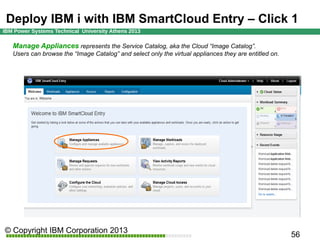
Deploy IBM i with IBM SmartCloud Entry 1st Click
Manage Appliances represents the Service Catalog, aka the Cloud “Image Catalog”.
Users can browse the “Image Catalog” and select only the virtual appliances they are entitled on.
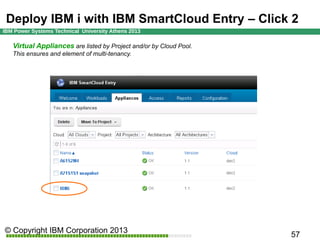
Deploy IBM i with IBM SmartCloud Entry 2nd Click
Virtual Appliances are listed by Project and/or by Cloud Pool.
This ensures and element of multi-tenancy.
Deploy IBM i with IBM SmartCloud Entry 3rd Click
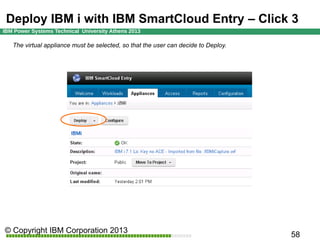
The virtual appliance must be selected, so that the user can decide to Deploy.
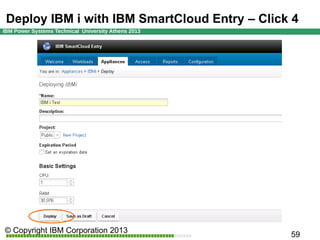
Deploy IBM i with IBM SmartCloud Entry 4th Click
PowerVC support
IBM
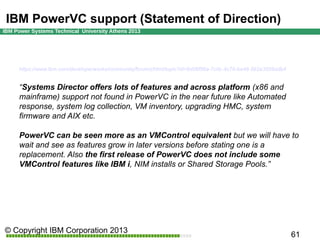
IBM PowerVC support (Statement of Direction)

https://www.ibm.com/developerworks/community/forums/html/topic?id=8d06f56a-7c0c-4c76-ba48-5b2e3508adb4

“Systems Director offers lots of features and across platform (x86 and
mainframe) support not found in PowerVC in the near future like Automated
response, system log collection, VM inventory, upgrading HMC, system
firmware and AIX etc.
PowerVC can be seen more as an VMControl equivalent but we will have to
wait and see as features grow in later versions before stating one is a
replacement. Also the first release of PowerVC does not include some
VMControl features like IBM i, NIM installs or Shared Storage Pools.”
Thank you
IBM

IBM Private Cloud Solutions with IBM i

  • 1.
    Private Cloud forIBM i IBM Luca Comparini IBM STG Lab Services EMEA
  • 2.
    Objective of thissession At the end of this session you should have a clear understanding of: – – – – What is the meaning of Cloud Computing and IaaS VMControl terminology – Virtual server – Virtual appliance – Image repository – Capture and Deploy – Server Systems Pool SmartCloud Entry support PowerVC support (SoD)
  • 3.
    External links, video& social media ThoughtsonCloud.com IBM SmartCloud Entry: deploy two working environments in minutes http://thoughtsoncloud.com/index.php/2013/03/ibm-smartcloud-entry-deploy-two-working-environments-in-minutes/ VIDEO IBM SmartCloud Entry: deploying an IBM i 7.1 and an AIX 7.1 in less than 7 minutes http://www.youtube.com/watch?v=cwGmOIRtcss Howto: using FSM VMControl to deploy an IBM i 7.1 http://www.youtube.com/watch?v=fQApzKuFjaw @lucacomparini http://www.linkedin.com/in/lucacomparini
  • 4.
    What is CloudComputing From Wikipedia: http://en.wikipedia.org/wiki/Cloud_computing Cloud computing is the delivery of computing as a service rather than a product, whereby shared resources, software, and information are provided to computers and other devices as a utility (like the electricity grid) over a network (typically the Internet). (…) Cloud computing describes a new supplement, consumption, and delivery model for IT services based on Internet protocols, and it typically involves provisioning of dynamically scalable and often virtualized resources. Key words: computing as a service, shared, scalable, virtualized From Cloud Computing Wiki: http://sites.google.com/site/cloudcomputingwiki/ Cloud Computing is an execution of compute jobs in multi-tenant elastic environment, where jobs may dynamically scale up or down requesting/releasing resources on a fly. Owner of the process is billed only for used capacity. Key words: dynamically, requesting/releasing, billed for used capacity (automated) (self service portal) (metering & billing)
  • 5.
    Computing as aservice – main layers From Wikipedia: http://en.wikipedia.org/wiki/Cloud_computing Application Cloud application services or "Software as a Service (SaaS)" deliver software as a service over the Internet, eliminating the need to install and run the application on the customer's own computers and simplifying maintenance and support. Platform Cloud platform services, also known as platform as a service (PaaS), deliver a computing platform and/or solution stack as a service, often consuming cloud infrastructure and sustaining cloud applications. It facilitates deployment of applications without the cost and complexity of buying and managing the underlying hardware and software layers Infrastructure Cloud infrastructure services, also known as "infrastructure as a service" (IaaS), deliver computer infrastructure – typically a platform virtualization environment – as a service, along with raw (block) storage and networking. Rather than purchasing servers, software, datacenter space or network equipment, clients instead buy those resources as a fully outsourced service. Suppliers typically bill such services on a utility computing basis; the amount of resources consumed (and therefore the cost) will typically reflect the level of activity.
  • 6.
    Computing as aservice – deployment models Public cloud Public cloud describes cloud computing in the traditional mainstream sense, whereby resources are dynamically provisioned to the general public on a fine-grained, self-service basis over the Internet, via web applications/web services, from an off-site third-party provider who bills on a fine-grained utility computing basis Private cloud Private cloud is infrastructure operated solely for a single organization, whether managed internally or by a third-party and hosted internally or externally. Hybrid cloud Hybrid cloud is a composition of two or more clouds (private, community, or public) that remain unique entities but are bound together, offering the benefits of multiple deployment models.
  • 7.
    IBM SmartCloud -Power Cloud focus on IaaS From IBM SmartCloud: http://www.ibm.com/cloud-computing/us/en/what-is-cloud-computing.html
  • 8.
    The journey toCloud for IBM i clients Infrastructure as a Service Technologies Infrastructure Platform Management and Administration Availability and Performance Security and Compliance Usage and Accounting Orchestrate with advanced cloud Automate Service Orchestration and Integration This is not always a linear progression. Some clients begin by optimizing their virtualization foundation for a workload, then gradually move to cloud. with entry cloud Basic cloud (Self-service, admin, VM provisioning) Basic cloud (Self-service, admin, VM provisioning) Virtualization & platform management Virtualization & platform management Virtualization & platform management Virtualized Servers, Storage, Networking Virtualized Servers, Storage, Networking Virtualized Servers, Storage, Networking Integrate your virtualized foundation Others require cloud capabilities from the beginning and may start with advanced cloud or entry cloud solutions. A client may be in all of these stages w/ different workloads across their data center.
  • 9.
    IBM i CloudStack Reference Configuration  IBM i v7.1 – –  POWER7 – –  – VIOS provides needed virtualization layer IBM Systems Director VMControl – –  Management underpinnings for a virtualized environment PowerVM with VIOS –  With associated management software Optimized to serve storage to multiple environments HMC management appliance –  Rock solid hardware as a base Reference example is Power 740 External storage (DS8000, V7000…) –  Additional function enabled with TRs (Technology Refreshes) Enabled for provisioning (TR3 and later) Image repository Rapid provisioning SmartCloud Entry – Entry cloud functionality
  • 10.
    PureFlex as aCloud ready platform for IBM i  IBM i v7.1 – –  IBM PureFlex Standard / Enterprise – – – – –  Additional function enabled with TRs (Technology Refreshes) Enabled for provisioning (TR3 and later) IBM Flex Chassis IBM p260/p270/p460/p470 compute nodes IBM PowerVM (VIOS) IBM V7000 Storage IBM Flex Systems Manager (FSM) advanced SmartCloud Entry – Entry cloud functionality
  • 11.
  • 12.
  • 13.
    What is IBMSystems Director VMControl What is VMControl A plugin for IBM Systems Director; a native plugin of IBM Flex Systems Manager. A cross-platform suite of products that assists you in rapidly deploying virtual appliances to create virtual servers, which are configured with the operating system and software applications Designed to simplify the management of workloads in your IT environment Advanced features enables you to group resources into system pools – Centrally manage and control different workloads – Consolidate workloads into distinct and manageable groups
  • 14.
  • 15.
    PureFlex FSM editions basic advanced TheIBM Flex System Manager advanced feature set upgrade offers the following advanced features: - Image management (VMControl Standard) - Pool management (VMControl Enterprise)
  • 16.
    IBM Cloud isbuilt around Open Standards OVF standardizes a virtual machine image structure and packaging format – The Open Virtualization Format is being standardized in the DMTF. – Allows complex software solutions to be defined as compositions of virtual machine images. – IBM’s collaboration with other industry leaders has driven the OVF standard. A Virtual Machine Image: – Simplifies delivery and deployment of complex software systems – Provides pre-installed, pre-configured and tested software – Operating Systems, Middleware and/or Application Software – The entire software solution is managed (deployed, updated, etc.) as a unit Removes the need to deal with problematic dependency management Virtual Machine Images enable the delivery of SaaS in the Cloud – IBM Software is being delivered as Virtual Appliances (e.g. WebSphere CloudBurst) – Many others within the industry are forming ecosystems around Virtual Machine Images VMControl enables the delivery and management of Open Standard Virtual Machine Images on IBM Systems.
  • 17.
    Understanding terminology inVMControl Virtual Servers – – – – LPARs on Power Virtual machines in z/VM and VMware environments. Must be part of a virtualization environment that is supported by IBM Systems Director Logical equivalent of a physical platform Software application Operating system
  • 18.
    Understanding terminology inVMControl Virtual Appliance Ready-to-deploy operating system and LPAR definition – Stored in IBM System Director VMControl Image Repository – Contains metadata describing the virtual server (LPAR) the image requires – Stored in raw disk format + Open Virtualization Format (OVF) file for IBM i – Image reference Software application Operating system Metadata
  • 19.
    Understanding terminology inVMControl Workloads – – – One or more virtual servers that can be monitored and managed as a single entity Automatically created when you deploy a virtual appliance Can be created by grouping together one or more virtual servers Virtual Appliance Image reference Software application Operating system Metadata deployed
  • 20.
    Understanding terminology inVMControl System pools – – – Group of Power Systems or blades managed as a single IT resource Private cloud for deploying business workloads Facilitates the relocation of virtual servers from one host to others hosts in the system pool Fibre Channel
  • 21.
    IBM i provisioningwith VMControl IBM
  • 22.
  • 23.
    VMControl standard edition Deploy VirtualMachines Capture Virtual Machines Open Virtualization Format (OVF)      Discover and manage heterogeneous image repositories Capture and catalog new virtual images from existing systems Simplified virtual image deployment and customization Dynamically provision virtual server, storage and network resource Leverages OVF open standard packaging for interoperability
  • 24.
    Image Repository Storage CopyService (SCS) based provisioning is - A provisioning service that allocates Virtual Servers, SAN resources, and copies OS images via VIOS “dd” copy or SVC/V7000/DS8000 Fast Copy (for both deploy and capture) - A provisioning service that uses VMControl Common Repository to manage and deploy AIX/SUSE/RHEL/IBM i “raw” images - A method that uses VIOS as the “Image Control Point” for the CR repository - Capable of deploying VAs from a VMControl CR as new Power platform virtual servers or onto existing virtual servers on Power platforms
  • 25.
    Activation Engine Customization informationfrom UI (ip configuration) is built into an OVF “Environment Document” ovf.env.xml A virtual optical drive is created and attached to new virtual server and ovf.env.xml document file is loaded into drive. - Allows the document to be accessible to the activation engine when the new virtual server boots up - Requires at least one VIOS OS be discovered and have access on the host system where new virtual server is deployed Timer is used to remove the virtual optical drive after an hour - If director ended and restarted in that hour virtual optical would be removed when virtual server is relocated
  • 26.
  • 27.
    Capture IBM iLPAR overview Install and configure VMControl and Storage Control/TPC – SAN automation and Storage Copy Services capture are required – NIM capture is not supported for IBM I Prepare IBM i LPAR* – v7.1 TR3 or later – Install/verify required LPPs and PTFs – Install and enable activation engine (AE, also distributed as PTF) Discover and unlock IBM i LPAR in Director – Director Common Agent is not required in IBM i for this function Collect inventory on IBM i LPAR Shut down IBM i LPAR Use VMControl Capture wizard
  • 28.
    Capture IBM iLPAR overview
  • 29.
    Capture IBM iLPAR - name
  • 30.
    Capture IBM iLPAR – select disks
  • 31.
    Capture IBM iLPAR – verify the relationships
  • 32.
    Capture IBM iLPAR – networking
  • 33.
    Capture IBM iLPAR – versioning
  • 34.
    Capture IBM iLPAR – finish
  • 35.
    Capture IBM iLPAR – execute now
  • 36.
    Capture IBM iLPAR – captured
  • 37.
    Deploy IBM iLPAR overview Select correct IBM i image in VMControl Use VMControl deploy wizard Select individual Power server on which to deploy Server system pool support for IBM i is planned – Enter network customization information for new LPAR – AE runs on initial IPL after deploy to customize networking
  • 38.
    Deploy IBM iLPAR – select virtual appliance
  • 39.
    Deploy IBM iLPAR – select the Power Pool
  • 40.
    Deploy IBM iLPAR – what is a systems pool (1/6)
  • 41.
    Deploy IBM iLPAR – what is a systems pool (2/6)
  • 42.
    Deploy IBM iLPAR – what is a systems pool (3/6)
  • 43.
    Deploy IBM iLPAR – what is a systems pool (4/6)
  • 44.
    Deploy IBM iLPAR – what is a systems pool (5/6)
  • 45.
    Deploy IBM iLPAR – what is a systems pool (6/6)
  • 46.
    Deploy IBM iLPAR – choose disks
  • 47.
    Deploy IBM iLPAR – additional options
  • 48.
    Deploy IBM iLPAR – workload name
  • 49.
    Deploy IBM iLPAR – choose networking
  • 50.
    Deploy IBM iLPAR – network customization
  • 51.
    Deploy IBM iLPAR – finish
  • 52.
    Deploy IBM iLPAR – deploying
  • 53.
    Deploy IBM iLPAR – deploy completed
  • 54.
  • 55.
    IBM SmartCloud Entryon Power Cloud management software that runs on top of PowerVM and VMControl Virtualization Foundation Heterogeneous Cloud Management, with OpenStack embedded Manages Power Cloud – Manages X86 based Cloud (Vmware, KVM, Hyper-V) Provides entry cloud functionality: – Self Service UI – Automated provisioning of virtual servers. – Automated de-provisioning of virtual servers – Cloning/snapshots of workloads – Starting/stopping servers – Resizing existing servers Provides additional Cloud functionality: – Approval Life Cycle – Expiration Policies – Multi-tenancy through Projects – Email notifications – Billing and Accounting – Metering –
  • 56.
    Deploy IBM iwith IBM SmartCloud Entry 1st Click Manage Appliances represents the Service Catalog, aka the Cloud “Image Catalog”. Users can browse the “Image Catalog” and select only the virtual appliances they are entitled on.
  • 57.
    Deploy IBM iwith IBM SmartCloud Entry 2nd Click Virtual Appliances are listed by Project and/or by Cloud Pool. This ensures and element of multi-tenancy.
  • 58.
    Deploy IBM iwith IBM SmartCloud Entry 3rd Click The virtual appliance must be selected, so that the user can decide to Deploy.
  • 59.
    Deploy IBM iwith IBM SmartCloud Entry 4th Click
  • 60.
  • 61.
    IBM PowerVC support(Statement of Direction) https://www.ibm.com/developerworks/community/forums/html/topic?id=8d06f56a-7c0c-4c76-ba48-5b2e3508adb4 “Systems Director offers lots of features and across platform (x86 and mainframe) support not found in PowerVC in the near future like Automated response, system log collection, VM inventory, upgrading HMC, system firmware and AIX etc. PowerVC can be seen more as an VMControl equivalent but we will have to wait and see as features grow in later versions before stating one is a replacement. Also the first release of PowerVC does not include some VMControl features like IBM i, NIM installs or Shared Storage Pools.”
  • 62.