© 2013 IBM Corporation
Lessons Learned during
IBM SmartCloud Orchestrator
Deployment at a Large
Telecommunications Provider
IAS-1182
Eduardo Patrocinio STSM Cloud Computing Architect
David Cavanaugh IT Architect Cloud Computing
Fabio Benedetti STSM SCO Lead Architect
John Truitt Senior Managing Consultant Cloud Computing
2
Agenda
 SmartCloud Orchestrator architecture overview
 Project and solution overview
 Lessons :
– Managing a multiple-region infrastructure
– Publishing services into the self service catalog
– Automating the deployment of application stacks
– Reusing existing assets
3
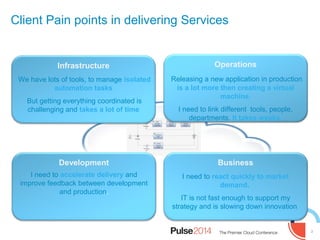
Infrastructure
We have lots of tools, to manage isolated
automation tasks
But getting everything coordinated is
challenging and takes a lot of time
Operations
Releasing a new application in production
is a lot more then creating a virtual
machine.
I need to link different tools, people,
departments. It takes weeks.
Business
I need to react quickly to market
demand.
IT is not fast enough to support my
strategy and is slowing down innovation
Development
I need to accelerate delivery and
improve feedback between development
and production.
Client Pain points in delivering Services
4
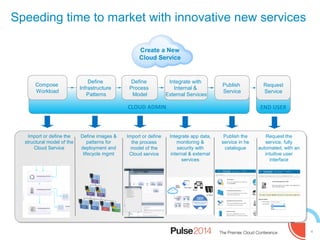
Speeding time to market with innovative new services
Define
Infrastructure
Patterns
Define
Process
Model
Integrate with
Internal &
External Services
Request
Service
Create a New
Cloud Service
CLOUD ADMIN END USER
Publish
Service
Import or define the
structural model of the
Cloud Service
Define images &
patterns for
deployment and
lifecycle mgmt
Import or define
the process
model of the
Cloud service
Integrate app data,
monitoring &
security with
internal & external
services
Publish the
service in he
catalogue
Request the
service, fully
automated, with an
intuitive user
interface
Compose
Workload
5
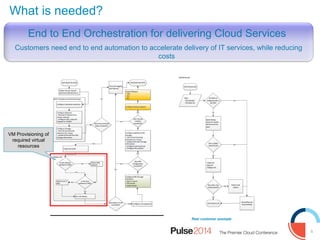
What is needed?
Real customer example
End to End Orchestration for delivering Cloud Services
Customers need end to end automation to accelerate delivery of IT services, while reducing
costs
VM Provisioning of
required virtual
resources
6
Orchestration
Engine
Network
Domain
Storage
Domain
IT
ManagementMonitoring
Domain
Data
Availability
Domain
Compute
Domain
Monitorin
g IT Asset
Manageme
nt
Service
Desk
Storag
e
Domai
n
Change
Manageme
nt
Provision PatternProvision Pattern
Networ
k
Domain
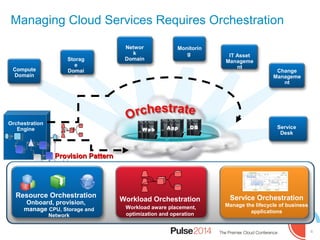
Workload Orchestration
Workload aware placement,
optimization and operation
Resource Orchestration
Onboard, provision,
manage CPU, Storage and
Network
Service Orchestration
Manage the lifecycle of business
applications
DBAppWeb
Managing Cloud Services Requires Orchestration
7
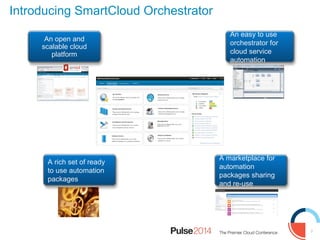
Introducing SmartCloud Orchestrator
An open and
scalable cloud
platform
An easy to use
orchestrator for
cloud service
automation
A marketplace for
automation
packages sharing
and re-use
A rich set of ready
to use automation
packages
8
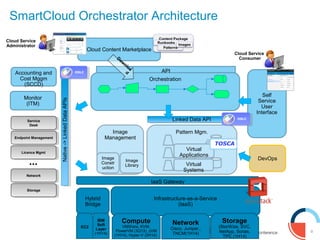
SmartCloud Orchestrator Architecture
Infrastructure-as-a-Service
(IaaS)
Orchestration
Pattern Mgm.Image
Management
DevOps
Monitor
(ITM)
Self
Service
User
Interface
Network
Cisco, Juniper,,
TNCM(1H14)
Storage
(StorWize, SVC,
NetApp, Sonas,
TPC (1H14)
Compute
VMWare, KVM,
PowerVM (3Q13), zVM
(1H14), Hyper-V (2H14)
Linked Data APILinked Data API
API
Image
Constr
uction
Image
Library
Cloud Content Marketplace
Accounting and
Cost Mggm
(SCCD)
…
Native->LinkedDataAPIsNative->LinkedDataAPIs
IaaS Gateway
Hybrid
Bridge
EC2
IBM
Soft
Layer
(1H14)
Cloud Service
Consumer
OSLC
OSLC
Cloud Service
Administrator
Dow
nloa
d
Service
Desk
Service
Desk
Licence MgmtLicence Mgmt
NetworkNetwork
StorageStorage
Endpoint ManagementEndpoint Management
Virtual
Systems
Virtual
Applications
TOSCA
9
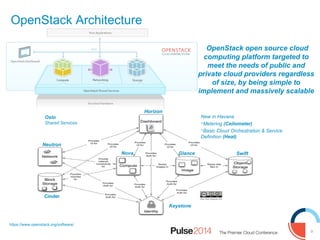
OpenStack Architecture
https://www.openstack.org/software/
OpenStack open source cloud
computing platform targeted to
meet the needs of public and
private cloud providers regardless
of size, by being simple to
implement and massively scalable
Horizon
Nova
Cinder
Swift
Neutron
Keystone
Glance
New in Havana
Metering (Ceilometer)
Basic Cloud Orchestration & Service
Definition (Heat)
Oslo
Shared Services
10
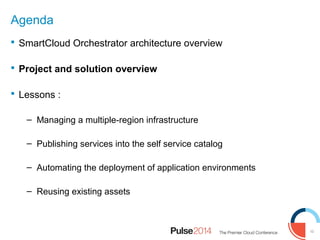
Agenda
 SmartCloud Orchestrator architecture overview
 Project and solution overview
 Lessons :
– Managing a multiple-region infrastructure
– Publishing services into the self service catalog
– Automating the deployment of application environments
– Reusing existing assets
11
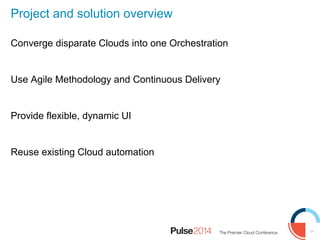
Project and solution overview
Converge disparate Clouds into one Orchestration
Use Agile Methodology and Continuous Delivery
Provide flexible, dynamic UI
Reuse existing Cloud automation
12
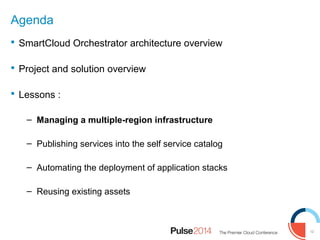
Agenda
 SmartCloud Orchestrator architecture overview
 Project and solution overview
 Lessons :
– Managing a multiple-region infrastructure
– Publishing services into the self service catalog
– Automating the deployment of application stacks
– Reusing existing assets
13
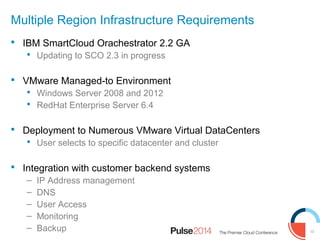
Multiple Region Infrastructure Requirements
 IBM SmartCloud Orachestrator 2.2 GA
 Updating to SCO 2.3 in progress
 VMware Managed-to Environment
 Windows Server 2008 and 2012
 RedHat Enterprise Server 6.4
 Deployment to Numerous VMware Virtual DataCenters
 User selects to specific datacenter and cluster
 Integration with customer backend systems
– IP Address management
– DNS
– User Access
– Monitoring
– Backup
14
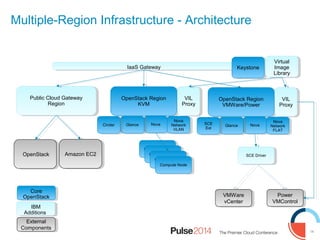
Multiple-Region Infrastructure - Architecture
Public Cloud Gateway
Region
Public Cloud Gateway
Region
IaaS GatewayIaaS Gateway KeystoneKeystone
OpenStack Region
KVM
OpenStack Region
KVM
Amazon EC2Amazon EC2
NovaNovaGlanceGlance
Nova
Network
VLAN
Nova
Network
VLAN
VIL
Proxy
VIL
Proxy
Virtual
Image
Library
Virtual
Image
Library
OpenStack Region
VMWare/Power
OpenStack Region
VMWare/Power
NovaNovaGlanceGlance
Nova
Network
FLAT
Nova
Network
FLAT
VIL
Proxy
VIL
Proxy
Compute NodeCompute Node
SCE DriverSCE Driver
VMWare
vCenter
VMWare
vCenter
Power
VMControl
Power
VMControl
CinderCinder SCE
Ext
SCE
Ext
OpenStackOpenStack
Core
OpenStack
Core
OpenStack
IBM
Additions
IBM
Additions
External
Components
External
Components
15
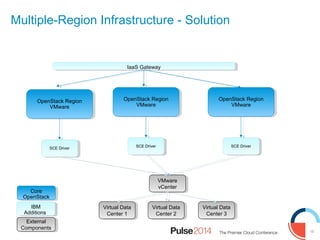
Multiple-Region Infrastructure - Solution
IaaS GatewayIaaS Gateway
VMware
vCenter
VMware
vCenter
OpenStack Region
VMware
OpenStack Region
VMware
SCE DriverSCE Driver
Core
OpenStack
Core
OpenStack
IBM
Additions
IBM
Additions
External
Components
External
Components
OpenStack Region
VMware
OpenStack Region
VMware
SCE DriverSCE Driver
OpenStack Region
VMware
OpenStack Region
VMware
SCE DriverSCE Driver
Virtual Data
Center 1
Virtual Data
Center 1
Virtual Data
Center 2
Virtual Data
Center 2
Virtual Data
Center 3
Virtual Data
Center 3
16
Agenda
 SmartCloud Orchestrator architecture overview
 Project and solution overview
 Lessons :
– Managing the multi region infrastructure
– Publishing services into the self service catalog
– Automating the deployment of application stacks
– Reusing existing assets
17
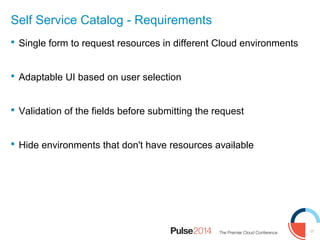
Self Service Catalog - Requirements
 Single form to request resources in different Cloud environments
 Adaptable UI based on user selection
 Validation of the fields before submitting the request
 Hide environments that don't have resources available
18
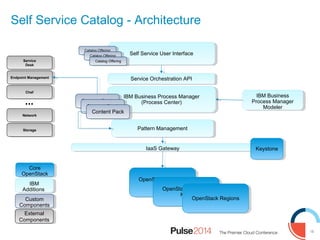
IBM Business Process Manager
(Process Center)
IBM Business Process Manager
(Process Center)
Pattern ManagementPattern Management
…
Service
Desk
Service
Desk
ChefChef
NetworkNetwork
StorageStorage
Endpoint ManagementEndpoint Management
Content PackContent Pack
Self Service Catalog - Architecture
IaaS GatewayIaaS Gateway KeystoneKeystone
OpenStack Regions
KVM
OpenStack Regions
KVM
Core
OpenStack
Core
OpenStack
IBM
Additions
IBM
Additions
Custom
Components
Custom
Components
OpenStack Regions
KVM
OpenStack Regions
KVM
OpenStack RegionsOpenStack Regions
Self Service User InterfaceSelf Service User Interface
Catalog OfferingCatalog Offering
Service Orchestration APIService Orchestration API
IBM Business
Process Manager
Modeler
IBM Business
Process Manager
Modeler
External
Components
External
Components
19
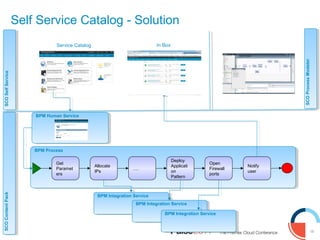
Self Service Catalog - Solution
BPM ProcessBPM Process
Get
Paramet
ers
Allocate
IPs
….
Deploy
Applicati
on
Pattern
Open
Firewall
ports
Notify
user
BPM Human ServiceBPM Human Service
BPM Integration ServiceBPM Integration Service
SCOContentPack
SCOContentPack
SCOSelfService
SCOSelfService
SCOProcessModeler
SCOProcessModeler
Service Catalog In Box
20
Agenda
 SmartCloud Orchestrator architecture overview
 Project and solution overview
 Lessons :
– Managing the multi region infrastructure
– Publishing services into the self service catalog
– Automating the deployment of application stacks
– Reusing existing assets
21
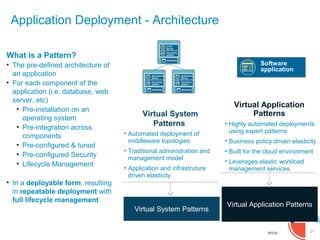
Application Deployment - Architecture
Virtual Application
Patterns
• Highly automated deployments
using expert patterns
• Business policy driven elasticity
• Built for the cloud environment
• Leverages elastic workload
management services
Virtual System
Patterns
• Automated deployment of
middleware topologies
• Traditional administration and
management model
• Application and infrastruture
driven elasticity
Virtual Appliance
Metadata
Application
Server
Operating
system
Virtual Appliance
Metadata
Application
Server
Operating
system
Virtual Appliance
Metadata
HTTP
Server
Operating
system
Virtual Application Patterns
Virtual System Patterns
Software
application
What is a Pattern?
• The pre-defined architecture of
an application
• For each component of the
application (i.e. database, web
server, etc)
• Pre-installation on an
operating system
• Pre-integration across
components
• Pre-configured & tuned
• Pre-configured Security
• Lifecycle Management
• In a deployable form, resulting
in repeatable deployment with
full lifecycle management
22
Application Deployment - Requirements
 Use existing deployment process
 Few images, many applications
 Different number of disks depending on the application
 Flavor specification varies, based on application selection
 Problem Solved: Create an easy to maintain solution, using customer’s
existing build process
23
Windows Unattended OS Install
 Previously created TSAM implementation using unattended
Windows install process
 Build Overview
 “Bare Metal” VM – blank disks on image
 Register system with build server
 Power up VM, PXE boot process
 Unattended Windows Install
24
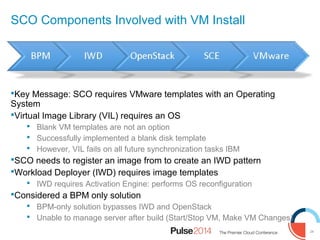
SCO Components Involved with VM Install
Key Message: SCO requires VMware templates with an Operating
System
Virtual Image Library (VIL) requires an OS
 Blank VM templates are not an option
 Successfully implemented a blank disk template
 However, VIL fails on all future synchronization tasks IBM
SCO needs to register an image from to create an IWD pattern
Workload Deployer (IWD) requires image templates
 IWD requires Activation Engine: performs OS reconfiguration
Considered a BPM only solution
 BPM-only solution bypasses IWD and OpenStack
 Unable to manage server after build (Start/Stop VM, Make VM Changes)
25
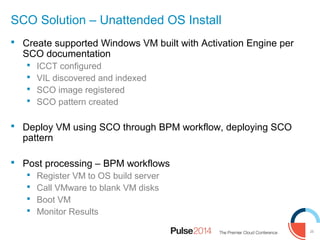
SCO Solution – Unattended OS Install
 Create supported Windows VM built with Activation Engine per
SCO documentation
 ICCT configured
 VIL discovered and indexed
 SCO image registered
 SCO pattern created
 Deploy VM using SCO through BPM workflow, deploying SCO
pattern
 Post processing – BPM workflows
 Register VM to OS build server
 Call VMware to blank VM disks
 Boot VM
 Monitor Results
26
Agenda
 SmartCloud Orchestrator architecture overview
 Project and solution overview
 Lessons :
– Managing the multi region infrastructure
– Publishing services into the self service catalog
– Automating the deployment of application environments
– Reusing existing assets
27
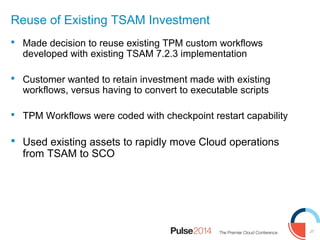
Reuse of Existing TSAM Investment
 Made decision to reuse existing TPM custom workflows
developed with existing TSAM 7.2.3 implementation
 Customer wanted to retain investment made with existing
workflows, versus having to convert to executable scripts
 TPM Workflows were coded with checkpoint restart capability
 Used existing assets to rapidly move Cloud operations
from TSAM to SCO
28
https://www-304.ibm.com/software/brandcatalog/ismlibrary/cloudmarketplace
28
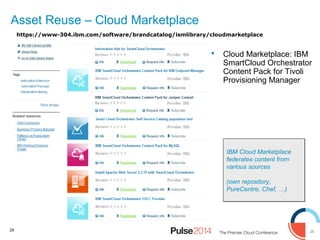
IBM Cloud Marketplace
federates content from
various sources
(own repository,
PureCentre, Chef, …)
IBM Cloud Marketplace
federates content from
various sources
(own repository,
PureCentre, Chef, …)
Asset Reuse – Cloud Marketplace
 Cloud Marketplace: IBM
SmartCloud Orchestrator
Content Pack for Tivoli
Provisioning Manager
29
Transition From TSAM to TPM Workflows
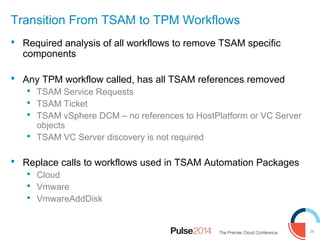
 Required analysis of all workflows to remove TSAM specific
components
 Any TPM workflow called, has all TSAM references removed
 TSAM Service Requests
 TSAM Ticket
 TSAM vSphere DCM – no references to HostPlatform or VC Server
objects
 TSAM VC Server discovery is not required
 Replace calls to workflows used in TSAM Automation Packages
 Cloud
 Vmware
 VmwareAddDisk
30
Transition From TSAM to TPM Workflows
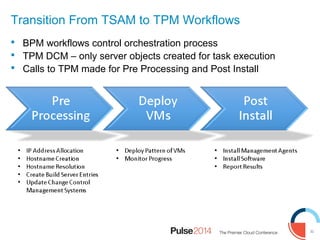
 BPM workflows control orchestration process
 TPM DCM – only server objects created for task execution
 Calls to TPM made for Pre Processing and Post Install
31
Executing TPM Workflows using BPM
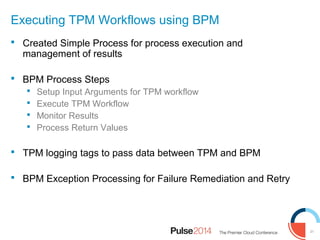
 Created Simple Process for process execution and
management of results
 BPM Process Steps
 Setup Input Arguments for TPM workflow
 Execute TPM Workflow
 Monitor Results
 Process Return Values
 TPM logging tags to pass data between TPM and BPM
 BPM Exception Processing for Failure Remediation and Retry
32
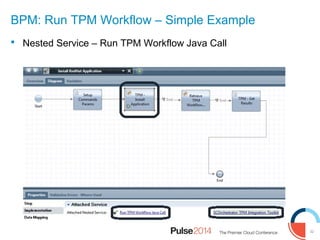
BPM: Run TPM Workflow – Simple Example
 Nested Service – Run TPM Workflow Java Call
33
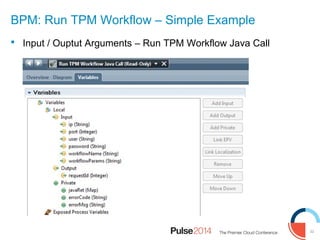
BPM: Run TPM Workflow – Simple Example
 Input / Ouptut Arguments – Run TPM Workflow Java Call
34
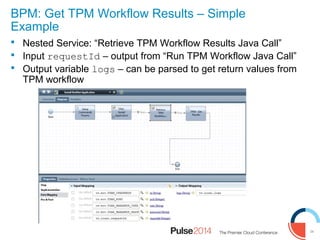
BPM: Get TPM Workflow Results – Simple
Example
 Nested Service: “Retrieve TPM Workflow Results Java Call”
 Input requestId – output from “Run TPM Workflow Java Call”
 Output variable logs – can be parsed to get return values from
TPM workflow
Thank you!
36
The workshops, sessions and materials have been prepared by IBM or the session speakers and reflect their own views. They are
provided for informational purposes only, and are neither intended to, nor shall have the effect of being, legal or other guidance or advice
to any participant. While efforts were made to verify the completeness and accuracy of the information contained in this presentation, it
is provided AS-IS without warranty of any kind, express or implied. IBM shall not be responsible for any damages arising out of the use
of, or otherwise related to, this presentation or any other materials. Nothing contained in this presentation is intended to, nor shall have
the effect of, creating any warranties or representations from IBM or its suppliers or licensors, or altering the terms and conditions of the
applicable license agreement governing the use of IBM software.
Acknowledgements and Disclaimers:
© Copyright IBM Corporation 2012. All rights reserved.
– U.S. Government Users Restricted Rights - Use, duplication or disclosure restricted by GSA ADP Schedule Contract
with IBM Corp.
IBM, the IBM logo, ibm.com, SmartCloudOrchestrator, IBM Business Process Manager, WebSphere, are trademarks or registered
trademarks of International Business Machines Corporation in the United States, other countries, or both. If these and other IBM
trademarked terms are marked on their first occurrence in this information with a trademark symbol (® or ™), these symbols indicate
U.S. registered or common law trademarks owned by IBM at the time this information was published. Such trademarks may also be
registered or common law trademarks in other countries. A current list of IBM trademarks is available on the Web at “Copyright and
trademark information” at www.ibm.com/legal/copytrade.shtml
OpenStack, VMWare, VMWare Virtual Center and other company, product, or service names may be trademarks or service marks of
others.
Availability. References in this presentation to IBM products, programs, or services do not imply that they will be available in all
countries in which IBM operates.
All customer examples described are presented as illustrations of how those customers have used IBM products and the results they
may have achieved. Actual environmental costs and performance characteristics may vary by customer. Nothing contained in these
materials is intended to, nor shall have the effect of, stating or implying that any activities undertaken by you will result in any specific
sales, revenue growth or other results.

Lessons Learned during IBM SmartCloud Orchestrator Deployment at a Large Telecommunications Provider

  • 1.
    © 2013 IBMCorporation Lessons Learned during IBM SmartCloud Orchestrator Deployment at a Large Telecommunications Provider IAS-1182 Eduardo Patrocinio STSM Cloud Computing Architect David Cavanaugh IT Architect Cloud Computing Fabio Benedetti STSM SCO Lead Architect John Truitt Senior Managing Consultant Cloud Computing
  • 2.
    2 Agenda  SmartCloud Orchestratorarchitecture overview  Project and solution overview  Lessons : – Managing a multiple-region infrastructure – Publishing services into the self service catalog – Automating the deployment of application stacks – Reusing existing assets
  • 3.
    3 Infrastructure We have lotsof tools, to manage isolated automation tasks But getting everything coordinated is challenging and takes a lot of time Operations Releasing a new application in production is a lot more then creating a virtual machine. I need to link different tools, people, departments. It takes weeks. Business I need to react quickly to market demand. IT is not fast enough to support my strategy and is slowing down innovation Development I need to accelerate delivery and improve feedback between development and production. Client Pain points in delivering Services
  • 4.
    4 Speeding time tomarket with innovative new services Define Infrastructure Patterns Define Process Model Integrate with Internal & External Services Request Service Create a New Cloud Service CLOUD ADMIN END USER Publish Service Import or define the structural model of the Cloud Service Define images & patterns for deployment and lifecycle mgmt Import or define the process model of the Cloud service Integrate app data, monitoring & security with internal & external services Publish the service in he catalogue Request the service, fully automated, with an intuitive user interface Compose Workload
  • 5.
    5 What is needed? Realcustomer example End to End Orchestration for delivering Cloud Services Customers need end to end automation to accelerate delivery of IT services, while reducing costs VM Provisioning of required virtual resources
  • 6.
    6 Orchestration Engine Network Domain Storage Domain IT ManagementMonitoring Domain Data Availability Domain Compute Domain Monitorin g IT Asset Manageme nt Service Desk Storag e Domai n Change Manageme nt ProvisionPatternProvision Pattern Networ k Domain Workload Orchestration Workload aware placement, optimization and operation Resource Orchestration Onboard, provision, manage CPU, Storage and Network Service Orchestration Manage the lifecycle of business applications DBAppWeb Managing Cloud Services Requires Orchestration
  • 7.
    7 Introducing SmartCloud Orchestrator Anopen and scalable cloud platform An easy to use orchestrator for cloud service automation A marketplace for automation packages sharing and re-use A rich set of ready to use automation packages
  • 8.
    8 SmartCloud Orchestrator Architecture Infrastructure-as-a-Service (IaaS) Orchestration PatternMgm.Image Management DevOps Monitor (ITM) Self Service User Interface Network Cisco, Juniper,, TNCM(1H14) Storage (StorWize, SVC, NetApp, Sonas, TPC (1H14) Compute VMWare, KVM, PowerVM (3Q13), zVM (1H14), Hyper-V (2H14) Linked Data APILinked Data API API Image Constr uction Image Library Cloud Content Marketplace Accounting and Cost Mggm (SCCD) … Native->LinkedDataAPIsNative->LinkedDataAPIs IaaS Gateway Hybrid Bridge EC2 IBM Soft Layer (1H14) Cloud Service Consumer OSLC OSLC Cloud Service Administrator Dow nloa d Service Desk Service Desk Licence MgmtLicence Mgmt NetworkNetwork StorageStorage Endpoint ManagementEndpoint Management Virtual Systems Virtual Applications TOSCA
  • 9.
    9 OpenStack Architecture https://www.openstack.org/software/ OpenStack opensource cloud computing platform targeted to meet the needs of public and private cloud providers regardless of size, by being simple to implement and massively scalable Horizon Nova Cinder Swift Neutron Keystone Glance New in Havana Metering (Ceilometer) Basic Cloud Orchestration & Service Definition (Heat) Oslo Shared Services
  • 10.
    10 Agenda  SmartCloud Orchestratorarchitecture overview  Project and solution overview  Lessons : – Managing a multiple-region infrastructure – Publishing services into the self service catalog – Automating the deployment of application environments – Reusing existing assets
  • 11.
    11 Project and solutionoverview Converge disparate Clouds into one Orchestration Use Agile Methodology and Continuous Delivery Provide flexible, dynamic UI Reuse existing Cloud automation
  • 12.
    12 Agenda  SmartCloud Orchestratorarchitecture overview  Project and solution overview  Lessons : – Managing a multiple-region infrastructure – Publishing services into the self service catalog – Automating the deployment of application stacks – Reusing existing assets
  • 13.
    13 Multiple Region InfrastructureRequirements  IBM SmartCloud Orachestrator 2.2 GA  Updating to SCO 2.3 in progress  VMware Managed-to Environment  Windows Server 2008 and 2012  RedHat Enterprise Server 6.4  Deployment to Numerous VMware Virtual DataCenters  User selects to specific datacenter and cluster  Integration with customer backend systems – IP Address management – DNS – User Access – Monitoring – Backup
  • 14.
    14 Multiple-Region Infrastructure -Architecture Public Cloud Gateway Region Public Cloud Gateway Region IaaS GatewayIaaS Gateway KeystoneKeystone OpenStack Region KVM OpenStack Region KVM Amazon EC2Amazon EC2 NovaNovaGlanceGlance Nova Network VLAN Nova Network VLAN VIL Proxy VIL Proxy Virtual Image Library Virtual Image Library OpenStack Region VMWare/Power OpenStack Region VMWare/Power NovaNovaGlanceGlance Nova Network FLAT Nova Network FLAT VIL Proxy VIL Proxy Compute NodeCompute Node Compute NodeCompute Node Compute NodeCompute Node Compute NodeCompute Node SCE DriverSCE Driver VMWare vCenter VMWare vCenter Power VMControl Power VMControl CinderCinder SCE Ext SCE Ext OpenStackOpenStack Core OpenStack Core OpenStack IBM Additions IBM Additions External Components External Components
  • 15.
    15 Multiple-Region Infrastructure -Solution IaaS GatewayIaaS Gateway VMware vCenter VMware vCenter OpenStack Region VMware OpenStack Region VMware SCE DriverSCE Driver Core OpenStack Core OpenStack IBM Additions IBM Additions External Components External Components OpenStack Region VMware OpenStack Region VMware SCE DriverSCE Driver OpenStack Region VMware OpenStack Region VMware SCE DriverSCE Driver Virtual Data Center 1 Virtual Data Center 1 Virtual Data Center 2 Virtual Data Center 2 Virtual Data Center 3 Virtual Data Center 3
  • 16.
    16 Agenda  SmartCloud Orchestratorarchitecture overview  Project and solution overview  Lessons : – Managing the multi region infrastructure – Publishing services into the self service catalog – Automating the deployment of application stacks – Reusing existing assets
  • 17.
    17 Self Service Catalog- Requirements  Single form to request resources in different Cloud environments  Adaptable UI based on user selection  Validation of the fields before submitting the request  Hide environments that don't have resources available
  • 18.
    18 IBM Business ProcessManager (Process Center) IBM Business Process Manager (Process Center) Pattern ManagementPattern Management … Service Desk Service Desk ChefChef NetworkNetwork StorageStorage Endpoint ManagementEndpoint Management Content PackContent Pack Content PackContent Pack Content PackContent Pack Self Service Catalog - Architecture IaaS GatewayIaaS Gateway KeystoneKeystone OpenStack Regions KVM OpenStack Regions KVM Core OpenStack Core OpenStack IBM Additions IBM Additions Custom Components Custom Components OpenStack Regions KVM OpenStack Regions KVM OpenStack RegionsOpenStack Regions Self Service User InterfaceSelf Service User Interface Catalog OfferingCatalog Offering Catalog OfferingCatalog Offering Catalog OfferingCatalog Offering Service Orchestration APIService Orchestration API IBM Business Process Manager Modeler IBM Business Process Manager Modeler External Components External Components
  • 19.
    19 Self Service Catalog- Solution BPM ProcessBPM Process Get Paramet ers Allocate IPs …. Deploy Applicati on Pattern Open Firewall ports Notify user BPM Human ServiceBPM Human Service BPM Integration ServiceBPM Integration Service BPM Integration ServiceBPM Integration Service BPM Integration ServiceBPM Integration Service SCOContentPack SCOContentPack SCOSelfService SCOSelfService SCOProcessModeler SCOProcessModeler Service Catalog In Box
  • 20.
    20 Agenda  SmartCloud Orchestratorarchitecture overview  Project and solution overview  Lessons : – Managing the multi region infrastructure – Publishing services into the self service catalog – Automating the deployment of application stacks – Reusing existing assets
  • 21.
    21 Application Deployment -Architecture Virtual Application Patterns • Highly automated deployments using expert patterns • Business policy driven elasticity • Built for the cloud environment • Leverages elastic workload management services Virtual System Patterns • Automated deployment of middleware topologies • Traditional administration and management model • Application and infrastruture driven elasticity Virtual Appliance Metadata Application Server Operating system Virtual Appliance Metadata Application Server Operating system Virtual Appliance Metadata HTTP Server Operating system Virtual Application Patterns Virtual System Patterns Software application What is a Pattern? • The pre-defined architecture of an application • For each component of the application (i.e. database, web server, etc) • Pre-installation on an operating system • Pre-integration across components • Pre-configured & tuned • Pre-configured Security • Lifecycle Management • In a deployable form, resulting in repeatable deployment with full lifecycle management
  • 22.
    22 Application Deployment -Requirements  Use existing deployment process  Few images, many applications  Different number of disks depending on the application  Flavor specification varies, based on application selection  Problem Solved: Create an easy to maintain solution, using customer’s existing build process
  • 23.
    23 Windows Unattended OSInstall  Previously created TSAM implementation using unattended Windows install process  Build Overview  “Bare Metal” VM – blank disks on image  Register system with build server  Power up VM, PXE boot process  Unattended Windows Install
  • 24.
    24 SCO Components Involvedwith VM Install Key Message: SCO requires VMware templates with an Operating System Virtual Image Library (VIL) requires an OS  Blank VM templates are not an option  Successfully implemented a blank disk template  However, VIL fails on all future synchronization tasks IBM SCO needs to register an image from to create an IWD pattern Workload Deployer (IWD) requires image templates  IWD requires Activation Engine: performs OS reconfiguration Considered a BPM only solution  BPM-only solution bypasses IWD and OpenStack  Unable to manage server after build (Start/Stop VM, Make VM Changes)
  • 25.
    25 SCO Solution –Unattended OS Install  Create supported Windows VM built with Activation Engine per SCO documentation  ICCT configured  VIL discovered and indexed  SCO image registered  SCO pattern created  Deploy VM using SCO through BPM workflow, deploying SCO pattern  Post processing – BPM workflows  Register VM to OS build server  Call VMware to blank VM disks  Boot VM  Monitor Results
  • 26.
    26 Agenda  SmartCloud Orchestratorarchitecture overview  Project and solution overview  Lessons : – Managing the multi region infrastructure – Publishing services into the self service catalog – Automating the deployment of application environments – Reusing existing assets
  • 27.
    27 Reuse of ExistingTSAM Investment  Made decision to reuse existing TPM custom workflows developed with existing TSAM 7.2.3 implementation  Customer wanted to retain investment made with existing workflows, versus having to convert to executable scripts  TPM Workflows were coded with checkpoint restart capability  Used existing assets to rapidly move Cloud operations from TSAM to SCO
  • 28.
    28 https://www-304.ibm.com/software/brandcatalog/ismlibrary/cloudmarketplace 28 IBM Cloud Marketplace federatescontent from various sources (own repository, PureCentre, Chef, …) IBM Cloud Marketplace federates content from various sources (own repository, PureCentre, Chef, …) Asset Reuse – Cloud Marketplace  Cloud Marketplace: IBM SmartCloud Orchestrator Content Pack for Tivoli Provisioning Manager
  • 29.
    29 Transition From TSAMto TPM Workflows  Required analysis of all workflows to remove TSAM specific components  Any TPM workflow called, has all TSAM references removed  TSAM Service Requests  TSAM Ticket  TSAM vSphere DCM – no references to HostPlatform or VC Server objects  TSAM VC Server discovery is not required  Replace calls to workflows used in TSAM Automation Packages  Cloud  Vmware  VmwareAddDisk
  • 30.
    30 Transition From TSAMto TPM Workflows  BPM workflows control orchestration process  TPM DCM – only server objects created for task execution  Calls to TPM made for Pre Processing and Post Install
  • 31.
    31 Executing TPM Workflowsusing BPM  Created Simple Process for process execution and management of results  BPM Process Steps  Setup Input Arguments for TPM workflow  Execute TPM Workflow  Monitor Results  Process Return Values  TPM logging tags to pass data between TPM and BPM  BPM Exception Processing for Failure Remediation and Retry
  • 32.
    32 BPM: Run TPMWorkflow – Simple Example  Nested Service – Run TPM Workflow Java Call
  • 33.
    33 BPM: Run TPMWorkflow – Simple Example  Input / Ouptut Arguments – Run TPM Workflow Java Call
  • 34.
    34 BPM: Get TPMWorkflow Results – Simple Example  Nested Service: “Retrieve TPM Workflow Results Java Call”  Input requestId – output from “Run TPM Workflow Java Call”  Output variable logs – can be parsed to get return values from TPM workflow
  • 35.
  • 36.
    36 The workshops, sessionsand materials have been prepared by IBM or the session speakers and reflect their own views. They are provided for informational purposes only, and are neither intended to, nor shall have the effect of being, legal or other guidance or advice to any participant. While efforts were made to verify the completeness and accuracy of the information contained in this presentation, it is provided AS-IS without warranty of any kind, express or implied. IBM shall not be responsible for any damages arising out of the use of, or otherwise related to, this presentation or any other materials. Nothing contained in this presentation is intended to, nor shall have the effect of, creating any warranties or representations from IBM or its suppliers or licensors, or altering the terms and conditions of the applicable license agreement governing the use of IBM software. Acknowledgements and Disclaimers: © Copyright IBM Corporation 2012. All rights reserved. – U.S. Government Users Restricted Rights - Use, duplication or disclosure restricted by GSA ADP Schedule Contract with IBM Corp. IBM, the IBM logo, ibm.com, SmartCloudOrchestrator, IBM Business Process Manager, WebSphere, are trademarks or registered trademarks of International Business Machines Corporation in the United States, other countries, or both. If these and other IBM trademarked terms are marked on their first occurrence in this information with a trademark symbol (® or ™), these symbols indicate U.S. registered or common law trademarks owned by IBM at the time this information was published. Such trademarks may also be registered or common law trademarks in other countries. A current list of IBM trademarks is available on the Web at “Copyright and trademark information” at www.ibm.com/legal/copytrade.shtml OpenStack, VMWare, VMWare Virtual Center and other company, product, or service names may be trademarks or service marks of others. Availability. References in this presentation to IBM products, programs, or services do not imply that they will be available in all countries in which IBM operates. All customer examples described are presented as illustrations of how those customers have used IBM products and the results they may have achieved. Actual environmental costs and performance characteristics may vary by customer. Nothing contained in these materials is intended to, nor shall have the effect of, stating or implying that any activities undertaken by you will result in any specific sales, revenue growth or other results.

Editor's Notes

  • #7 Compute Domain: Hypervisors (VMware, KVM, OpenStack, PowerVM, etc) Storage Domain: Storage Provisioning, Backup and Restore Network Domain: Provisioning and Configuring network devices (firewall, routing, switches, etc) IT Asset Management: Deliver repeatable business outcomes by managing both traditional applications and the intelligent IT enabled assets that support them Change Management: Defining standard, automated change procedures that ensure integrity of existing infrastructure while supporting business agility Service Desk: Improve quality of service and business resiliency by linking service requests with asset and change management, Single service desk tool for service requests & approval workflows.
  • #10 OpenStack Mission: To produce the ubiquitous open source cloud computing platform that will meet the needs of public and private cloud providers regardless of size, by being simple to implement and massively scalable.