Introduction
to the
MICRO:BIT
(How to use with IOT Devices)
1
Kasun Rukmaldeniya
Speaker
Kasun Gihan Rukmaldeniya
District Leader - Micro:Bit SLUG
Project Manager - STEMUp Foundation
(UG BICT in SEUSL, UG BScSE(Hons) in NSBM, DipIT in Person, CertICT in NAITA)
2
What is Micro:Bit ?
BBC Micro:Bit is an ARM-based embedded
system designed by the BBC
for make learning and teaching
Easy and Fun!
3Kasun Rukmaldeniya
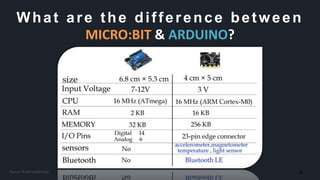
What are the difference between
MICRO:BIT & ARDUINO?
4Kasun Rukmaldeniya
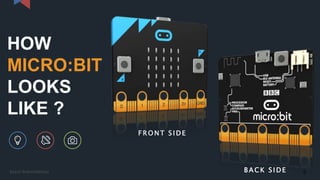
HOW
MICRO:BIT
LOOKS
LIKE ?
F R ONT S I DE
B A C K S I DE 5Kasun Rukmaldeniya
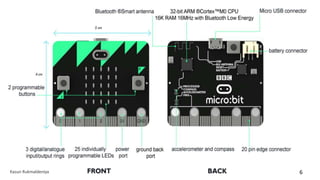
6Kasun Rukmaldeniya
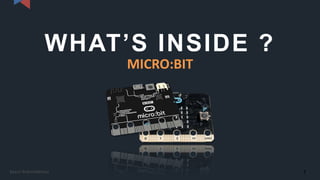
WHAT’S INSIDE ?
MICRO:BIT
7Kasun Rukmaldeniya
WHAT’S INSIDE ?
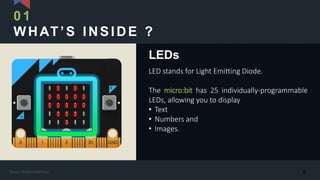
LED stands for Light Emitting Diode.
The micro:bit has 25 individually-programmable
LEDs, allowing you to display
• Text
• Numbers and
• Images.
LEDs
01
8Kasun Rukmaldeniya
WHAT’S INSIDE ?
There are two buttons on the front of the
micro:bit (labelled A and B).
You can detect when these buttons are pressed,
allowing you to trigger code on the device.
BUTTONS
02
9Kasun Rukmaldeniya
WHAT’S INSIDE ?
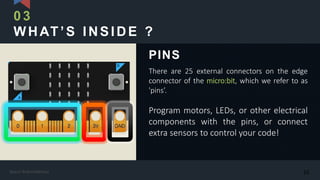
There are 25 external connectors on the edge
connector of the micro:bit, which we refer to as
'pins’.
Program motors, LEDs, or other electrical
components with the pins, or connect
extra sensors to control your code!
PINS
03
10Kasun Rukmaldeniya
WHAT’S INSIDE ?
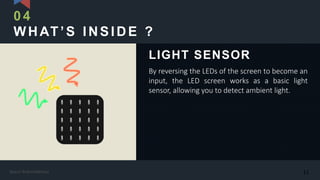
By reversing the LEDs of the screen to become an
input, the LED screen works as a basic light
sensor, allowing you to detect ambient light.
LIGHT SENSOR
04
11Kasun Rukmaldeniya
WHAT’S INSIDE ?
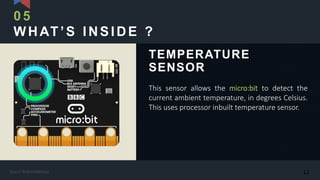
This sensor allows the micro:bit to detect the
current ambient temperature, in degrees Celsius.
This uses processor inbuilt temperature sensor.
TEMPERATURE
SENSOR
05
12Kasun Rukmaldeniya
WHAT’S INSIDE ?
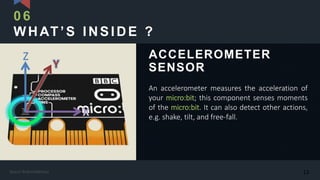
An accelerometer measures the acceleration of
your micro:bit; this component senses moments
of the micro:bit. It can also detect other actions,
e.g. shake, tilt, and free-fall.
ACCELEROMETER
SENSOR
06
Z
13Kasun Rukmaldeniya
WHAT’S INSIDE ?
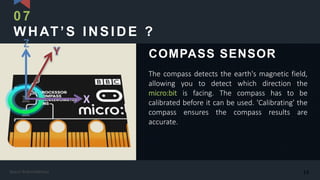
The compass detects the earth's magnetic field,
allowing you to detect which direction the
micro:bit is facing. The compass has to be
calibrated before it can be used. 'Calibrating' the
compass ensures the compass results are
accurate.
COMPASS SENSOR
07
Z
14Kasun Rukmaldeniya
WHAT’S INSIDE ?
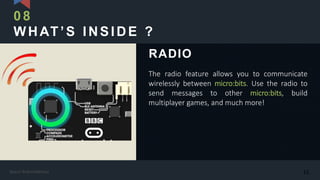
The radio feature allows you to communicate
wirelessly between micro:bits. Use the radio to
send messages to other micro:bits, build
multiplayer games, and much more!
RADIO
08
15Kasun Rukmaldeniya
WHAT’S INSIDE ?
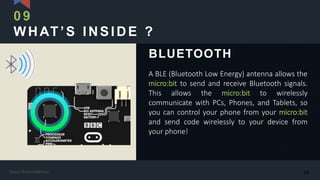
A BLE (Bluetooth Low Energy) antenna allows the
micro:bit to send and receive Bluetooth signals.
This allows the micro:bit to wirelessly
communicate with PCs, Phones, and Tablets, so
you can control your phone from your micro:bit
and send code wirelessly to your device from
your phone!
BLUETOOTH
09
16Kasun Rukmaldeniya
WHAT’S INSIDE ?
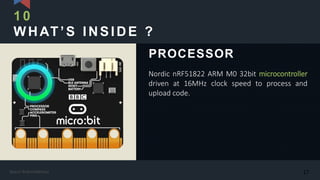
Nordic nRF51822 ARM M0 32bit microcontroller
driven at 16MHz clock speed to process and
upload code.
PROCESSOR
10
17Kasun Rukmaldeniya
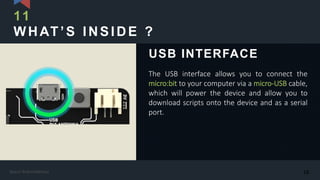
WHAT’S INSIDE ?
The USB interface allows you to connect the
micro:bit to your computer via a micro-USB cable,
which will power the device and allow you to
download scripts onto the device and as a serial
port.
USB INTERFACE
11
18Kasun Rukmaldeniya
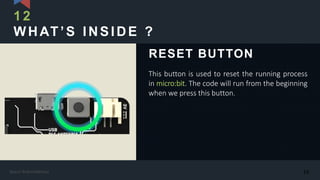
WHAT’S INSIDE ?
This button is used to reset the running process
in micro:bit. The code will run from the beginning
when we press this button.
RESET BUTTON
12
19Kasun Rukmaldeniya
LET’S DO SOME CODING
WITH MICRO:BIT
20Kasun Rukmaldeniya
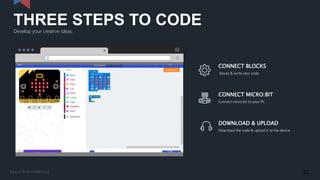
Develop your creative ideas.
THREE STEPS TO CODE
www.here.com
CONNECT BLOCKS
blocks & write your code
CONNECT MICRO:BIT
Connect micro:bit to your PC
DOWNLOAD & UPLOAD
Download the code & upload it to the device
21Kasun Rukmaldeniya
Go to this link…
makecode.microbit.org
22Kasun Rukmaldeniya
start
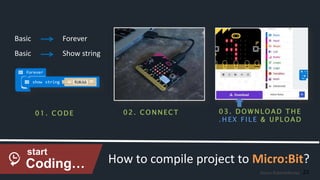
How to compile project to Micro:Bit?
Basic Forever
Basic Show string
0 1. C ODE 0 2 . C O NNE C T 0 3. D O WNLOAD T H E
. H E X F I LE & U P LOAD
Coding… 23Kasun Rukmaldeniya
ACTIVITY
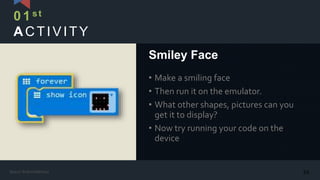
• Make a smiling face
• Then run it on the emulator.
• What other shapes, pictures can you
get it to display?
• Now try running your code on the
device
Smiley Face
01st
24Kasun Rukmaldeniya
ACTIVITY
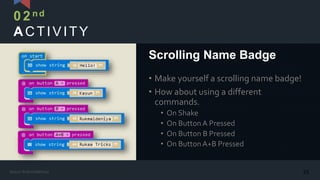
• Make yourself a scrolling name badge!
• How about using a different
commands.
• On Shake
• On ButtonA Pressed
• On Button B Pressed
• On ButtonA+B Pressed
Scrolling Name Badge
02n d
25Kasun Rukmaldeniya
ACTIVITY
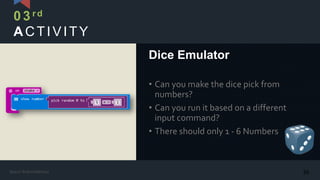
• Can you make the dice pick from
numbers?
• Can you run it based on a different
input command?
• There should only 1 - 6 Numbers
Dice Emulator
03rd
26Kasun Rukmaldeniya
ACTIVITY
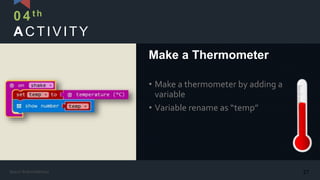
• Make a thermometer by adding a
variable
• Variable rename as “temp”
Make a Thermometer
04th
27Kasun Rukmaldeniya
ACTIVITY
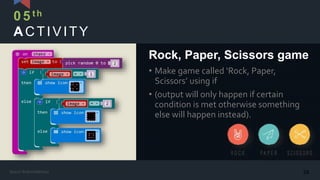
• Make game called ‘Rock, Paper,
Scissors’ using if
• (output will only happen if certain
condition is met otherwise something
else will happen instead).
Rock, Paper, Scissors game
05th
28Kasun Rukmaldeniya
ACTIVITY
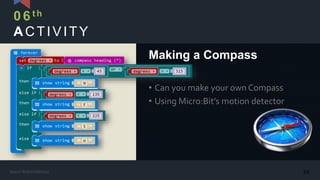
• Can you make your own Compass
• Using Micro:Bit’s motion detector
Making a Compass
06th
29Kasun Rukmaldeniya
ACTIVITY
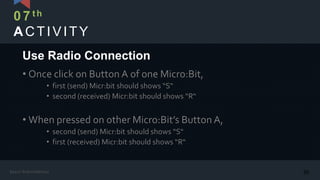
• Once click on Button A of one Micro:Bit,
• first (send) Micr:bit should shows “S“
• second (received) Micr:bit should shows “R“
• When pressed on other Micro:Bit’s Button A,
• second (send) Micr:bit should shows “S“
• first (received) Micr:bit should shows “R“
Use Radio Connection
07th
30Kasun Rukmaldeniya
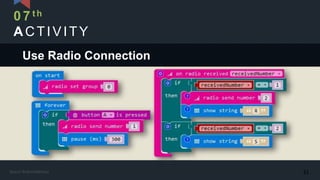
ACTIVITY
07th
Use Radio Connection
31Kasun Rukmaldeniya
LINKSYOU SHOULD CHECK
ABOUT MICRO:BIT
• Micro:Bit web site : https://www.microbit.co.uk/create-code
• Microbit.org Sinhala : https://microbit.org/si
• Micro:Bit Sri Lanka User Group : http://microbitslug.org
• To request a program like today : http://microbitslug.org/requests
• To register as a SLUG volunteer : http://microbitslug.org/volunteers
• STEMUp Foundation : http://stemup.foundation
32Kasun Rukmaldeniya
ThankYou &Any Questions?
33Kasun Rukmaldeniya
Any Questions…
Want to contact me…?
Kasun Gihan Rukmaldeniya
District Leader - Micro:Bit SLUG
Project Manager - STEMUp Foundation
(UG BICT in SEUSL, UG BScSE(Hons) in NSBM, DipIT in Person, CertICT in NAITA)
Whatsapp : +94 (77) 32 200 10
Email : rukaatricks.com@gmail.com
Facebook : Kasun Gihan Rukmaldeniya
34

Introduction to BBC Micro:Bit

  • 1.
    Introduction to the MICRO:BIT (How touse with IOT Devices) 1 Kasun Rukmaldeniya
  • 2.
    Speaker Kasun Gihan Rukmaldeniya DistrictLeader - Micro:Bit SLUG Project Manager - STEMUp Foundation (UG BICT in SEUSL, UG BScSE(Hons) in NSBM, DipIT in Person, CertICT in NAITA) 2
  • 3.
    What is Micro:Bit? BBC Micro:Bit is an ARM-based embedded system designed by the BBC for make learning and teaching Easy and Fun! 3Kasun Rukmaldeniya
  • 4.
    What are thedifference between MICRO:BIT & ARDUINO? 4Kasun Rukmaldeniya
  • 5.
    HOW MICRO:BIT LOOKS LIKE ? F RONT S I DE B A C K S I DE 5Kasun Rukmaldeniya
  • 6.
  • 7.
  • 8.
    WHAT’S INSIDE ? LEDstands for Light Emitting Diode. The micro:bit has 25 individually-programmable LEDs, allowing you to display • Text • Numbers and • Images. LEDs 01 8Kasun Rukmaldeniya
  • 9.
    WHAT’S INSIDE ? Thereare two buttons on the front of the micro:bit (labelled A and B). You can detect when these buttons are pressed, allowing you to trigger code on the device. BUTTONS 02 9Kasun Rukmaldeniya
  • 10.
    WHAT’S INSIDE ? Thereare 25 external connectors on the edge connector of the micro:bit, which we refer to as 'pins’. Program motors, LEDs, or other electrical components with the pins, or connect extra sensors to control your code! PINS 03 10Kasun Rukmaldeniya
  • 11.
    WHAT’S INSIDE ? Byreversing the LEDs of the screen to become an input, the LED screen works as a basic light sensor, allowing you to detect ambient light. LIGHT SENSOR 04 11Kasun Rukmaldeniya
  • 12.
    WHAT’S INSIDE ? Thissensor allows the micro:bit to detect the current ambient temperature, in degrees Celsius. This uses processor inbuilt temperature sensor. TEMPERATURE SENSOR 05 12Kasun Rukmaldeniya
  • 13.
    WHAT’S INSIDE ? Anaccelerometer measures the acceleration of your micro:bit; this component senses moments of the micro:bit. It can also detect other actions, e.g. shake, tilt, and free-fall. ACCELEROMETER SENSOR 06 Z 13Kasun Rukmaldeniya
  • 14.
    WHAT’S INSIDE ? Thecompass detects the earth's magnetic field, allowing you to detect which direction the micro:bit is facing. The compass has to be calibrated before it can be used. 'Calibrating' the compass ensures the compass results are accurate. COMPASS SENSOR 07 Z 14Kasun Rukmaldeniya
  • 15.
    WHAT’S INSIDE ? Theradio feature allows you to communicate wirelessly between micro:bits. Use the radio to send messages to other micro:bits, build multiplayer games, and much more! RADIO 08 15Kasun Rukmaldeniya
  • 16.
    WHAT’S INSIDE ? ABLE (Bluetooth Low Energy) antenna allows the micro:bit to send and receive Bluetooth signals. This allows the micro:bit to wirelessly communicate with PCs, Phones, and Tablets, so you can control your phone from your micro:bit and send code wirelessly to your device from your phone! BLUETOOTH 09 16Kasun Rukmaldeniya
  • 17.
    WHAT’S INSIDE ? NordicnRF51822 ARM M0 32bit microcontroller driven at 16MHz clock speed to process and upload code. PROCESSOR 10 17Kasun Rukmaldeniya
  • 18.
    WHAT’S INSIDE ? TheUSB interface allows you to connect the micro:bit to your computer via a micro-USB cable, which will power the device and allow you to download scripts onto the device and as a serial port. USB INTERFACE 11 18Kasun Rukmaldeniya
  • 19.
    WHAT’S INSIDE ? Thisbutton is used to reset the running process in micro:bit. The code will run from the beginning when we press this button. RESET BUTTON 12 19Kasun Rukmaldeniya
  • 20.
    LET’S DO SOMECODING WITH MICRO:BIT 20Kasun Rukmaldeniya
  • 21.
    Develop your creativeideas. THREE STEPS TO CODE www.here.com CONNECT BLOCKS blocks & write your code CONNECT MICRO:BIT Connect micro:bit to your PC DOWNLOAD & UPLOAD Download the code & upload it to the device 21Kasun Rukmaldeniya
  • 22.
    Go to thislink… makecode.microbit.org 22Kasun Rukmaldeniya
  • 23.
    start How to compileproject to Micro:Bit? Basic Forever Basic Show string 0 1. C ODE 0 2 . C O NNE C T 0 3. D O WNLOAD T H E . H E X F I LE & U P LOAD Coding… 23Kasun Rukmaldeniya
  • 24.
    ACTIVITY • Make asmiling face • Then run it on the emulator. • What other shapes, pictures can you get it to display? • Now try running your code on the device Smiley Face 01st 24Kasun Rukmaldeniya
  • 25.
    ACTIVITY • Make yourselfa scrolling name badge! • How about using a different commands. • On Shake • On ButtonA Pressed • On Button B Pressed • On ButtonA+B Pressed Scrolling Name Badge 02n d 25Kasun Rukmaldeniya
  • 26.
    ACTIVITY • Can youmake the dice pick from numbers? • Can you run it based on a different input command? • There should only 1 - 6 Numbers Dice Emulator 03rd 26Kasun Rukmaldeniya
  • 27.
    ACTIVITY • Make athermometer by adding a variable • Variable rename as “temp” Make a Thermometer 04th 27Kasun Rukmaldeniya
  • 28.
    ACTIVITY • Make gamecalled ‘Rock, Paper, Scissors’ using if • (output will only happen if certain condition is met otherwise something else will happen instead). Rock, Paper, Scissors game 05th 28Kasun Rukmaldeniya
  • 29.
    ACTIVITY • Can youmake your own Compass • Using Micro:Bit’s motion detector Making a Compass 06th 29Kasun Rukmaldeniya
  • 30.
    ACTIVITY • Once clickon Button A of one Micro:Bit, • first (send) Micr:bit should shows “S“ • second (received) Micr:bit should shows “R“ • When pressed on other Micro:Bit’s Button A, • second (send) Micr:bit should shows “S“ • first (received) Micr:bit should shows “R“ Use Radio Connection 07th 30Kasun Rukmaldeniya
  • 31.
  • 32.
    LINKSYOU SHOULD CHECK ABOUTMICRO:BIT • Micro:Bit web site : https://www.microbit.co.uk/create-code • Microbit.org Sinhala : https://microbit.org/si • Micro:Bit Sri Lanka User Group : http://microbitslug.org • To request a program like today : http://microbitslug.org/requests • To register as a SLUG volunteer : http://microbitslug.org/volunteers • STEMUp Foundation : http://stemup.foundation 32Kasun Rukmaldeniya
  • 33.
  • 34.
    Any Questions… Want tocontact me…? Kasun Gihan Rukmaldeniya District Leader - Micro:Bit SLUG Project Manager - STEMUp Foundation (UG BICT in SEUSL, UG BScSE(Hons) in NSBM, DipIT in Person, CertICT in NAITA) Whatsapp : +94 (77) 32 200 10 Email : rukaatricks.com@gmail.com Facebook : Kasun Gihan Rukmaldeniya 34