MICROBIT MADNESS LESSON
1
HOW TO USE AND CODE
OBJECTIVES
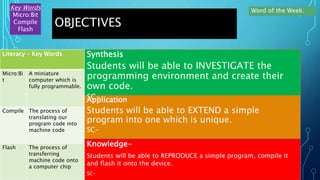
Knowledge-
Students will be able to REPRODUCE a simple program, compile it
and flash it onto the device.
SC-
Application
Students will be able to EXTEND a simple
program into one which is unique.
SC-
Synthesis
Students will be able to INVESTIGATE the
programming environment and create their
own code.
SC-
Key Words
Micro:Bit
Compile
Flash
Word of the Week:
Literacy – Key Words
Micro:Bi
t
A miniature
computer which is
fully programmable.
Compile The process of
translating our
program code into
machine code
Flash The process of
transferring
machine code onto
a computer chip
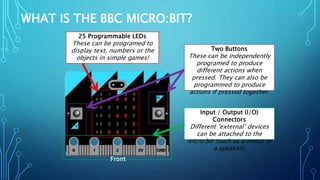
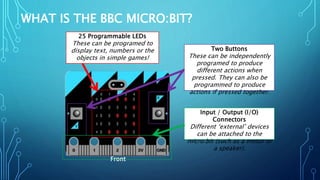
WHAT IS THE BBC MICRO:BIT?
Front
25 Programmable LEDs
These can be programed to
display text, numbers or the
objects in simple games!
Two Buttons
These can be independently
programed to produce
different actions when
pressed. They can also be
programmed to produce
actions if pressed together.
Input / Output (I/O)
Connectors
Different ‘external’ devices
can be attached to the
micro:bit (such as a motor or
a speaker).
Front
25 Programmable LEDs
These can be programed to
display text, numbers or the
objects in simple games!
Two Buttons
These can be independently
programed to produce
different actions when
pressed. They can also be
programmed to produce
actions if pressed together.
Input / Output (I/O)
Connectors
Different ‘external’ devices
can be attached to the
micro:bit (such as a motor or
a speaker).
WHAT IS THE BBC MICRO:BIT?
VIDEO OF MICRO:BIT IN USE
https://www.youtube.com/watch?v=ZIW_6rxYNBg
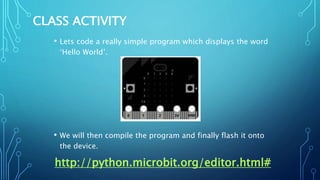
CLASS ACTIVITY
• Lets code a really simple program which displays the word
‘Hello World’.
• We will then compile the program and finally flash it onto
the device.
http://python.microbit.org/editor.html#
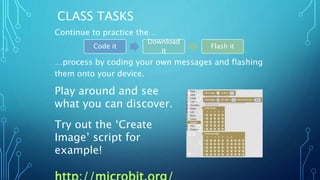
CLASS TASKS
Continue to practice the…
…process by coding your own messages and flashing
them onto your device.
Play around and see
what you can discover.
Try out the ‘Create
Image’ script for
example!
Code it
Download
it
Flash it
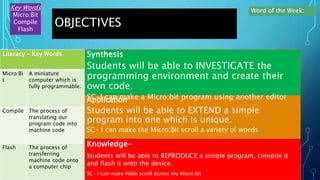
OBJECTIVES
Knowledge-
Students will be able to REPRODUCE a simple program, compile it
and flash it onto the device.
SC- I can make Hello scroll across my Micro:bit
Application
Students will be able to EXTEND a simple
program into one which is unique.
SC- I can make the Micro:Bit scroll a variety of words
Synthesis
Students will be able to INVESTIGATE the
programming environment and create their
own code.
SC-I can make a Micro:bit program using another editor
Key Words
Micro:Bit
Compile
Flash
Word of the Week:
Literacy – Key Words
Micro:Bi
t
A miniature
computer which is
fully programmable.
Compile The process of
translating our
program code into
machine code
Flash The process of
transferring
machine code onto
a computer chip

Microbit lesson 1

  • 1.
  • 2.
    OBJECTIVES Knowledge- Students will beable to REPRODUCE a simple program, compile it and flash it onto the device. SC- Application Students will be able to EXTEND a simple program into one which is unique. SC- Synthesis Students will be able to INVESTIGATE the programming environment and create their own code. SC- Key Words Micro:Bit Compile Flash Word of the Week: Literacy – Key Words Micro:Bi t A miniature computer which is fully programmable. Compile The process of translating our program code into machine code Flash The process of transferring machine code onto a computer chip
  • 3.
    WHAT IS THEBBC MICRO:BIT? Front 25 Programmable LEDs These can be programed to display text, numbers or the objects in simple games! Two Buttons These can be independently programed to produce different actions when pressed. They can also be programmed to produce actions if pressed together. Input / Output (I/O) Connectors Different ‘external’ devices can be attached to the micro:bit (such as a motor or a speaker).
  • 4.
    Front 25 Programmable LEDs Thesecan be programed to display text, numbers or the objects in simple games! Two Buttons These can be independently programed to produce different actions when pressed. They can also be programmed to produce actions if pressed together. Input / Output (I/O) Connectors Different ‘external’ devices can be attached to the micro:bit (such as a motor or a speaker). WHAT IS THE BBC MICRO:BIT?
  • 5.
    VIDEO OF MICRO:BITIN USE https://www.youtube.com/watch?v=ZIW_6rxYNBg
  • 6.
    CLASS ACTIVITY • Letscode a really simple program which displays the word ‘Hello World’. • We will then compile the program and finally flash it onto the device. http://python.microbit.org/editor.html#
  • 7.
    CLASS TASKS Continue topractice the… …process by coding your own messages and flashing them onto your device. Play around and see what you can discover. Try out the ‘Create Image’ script for example! Code it Download it Flash it
  • 8.
    OBJECTIVES Knowledge- Students will beable to REPRODUCE a simple program, compile it and flash it onto the device. SC- I can make Hello scroll across my Micro:bit Application Students will be able to EXTEND a simple program into one which is unique. SC- I can make the Micro:Bit scroll a variety of words Synthesis Students will be able to INVESTIGATE the programming environment and create their own code. SC-I can make a Micro:bit program using another editor Key Words Micro:Bit Compile Flash Word of the Week: Literacy – Key Words Micro:Bi t A miniature computer which is fully programmable. Compile The process of translating our program code into machine code Flash The process of transferring machine code onto a computer chip