


Introduction
To Apache Mesos
Joe Stein
CEO of Elodina http://www.elodina.net/ a big data as a service platform
built on top open source software. The Elodina platform enables
customers to analyze data streams and programmatically react to the
results in real-time. We solve today’s data analytics needs by providing
the tools and support necessary to utilize open source technologies.
As users, contributors and committers, Elodina also provides support for
frameworks that run on Mesos including Apache Kafka, Exhibitor
(Zookeeper), Apache Storm, Apache Cassandra and a whole lot more!
LinkedIn: http://linkedin.com/in/charmalloc
Twitter : @allthingshadoop
Overview
◉Life without Apache Mesos
◉Hit the ground running with Mesos
◉Schedulers & Executors (Frameworks)
◉Building Data Center Applications
Origins
Mesos: A Platform for Fine-Grained Resource Sharing in the Data Center
http://static.usenix.org/event/nsdi11/tech/full_papers/Hindman_new.pdf
Google Borg - https://research.google.com/pubs/pub43438.html
Google Omega: flexible, scalable schedulers for large compute clusters
http://eurosys2013.tudos.org/wp-content/uploads/2013/paper/Schwarzkopf.pdf
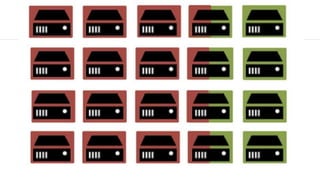
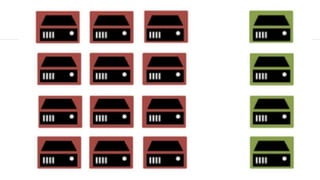
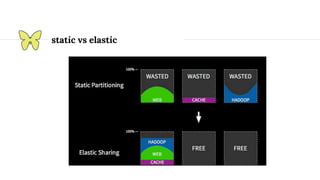
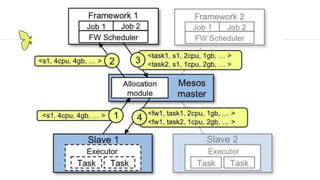
static vs elastic
Data Center Kernel
Data Center Operating System
Mesosphere’s Data Center Operating System (DCOS) is an operating
system that spans all of the machines in a datacenter or cloud and treats
them as a single computer, providing a highly elastic and highly scalable
way of deploying applications, services, and big data infrastructure on
shared resources. DCOS is based on Apache Mesos and includes a
distributed systems kernel with enterprise-grade security. It also includes
a set of core system services, such as a native Marathon instance to
manage processes and installable services, and Mesos-DNS for service
discovery. DCOS provides a web interface and a command-line interface
(CLI) to manage the deployment and scale of applications.
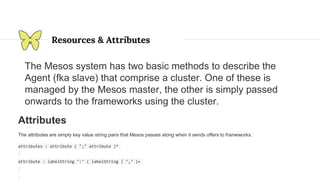
Resources & Attributes
The Mesos system has two basic methods to describe the
Agent (fka slave) that comprise a cluster. One of these is
managed by the Mesos master, the other is simply passed
onwards to the frameworks using the cluster.
Attributes
The attributes are simply key value string pairs that Mesos passes along when it sends offers to frameworks.
attributes : attribute ( ";" attribute )*
attribute : labelString ":" ( labelString | "," )+
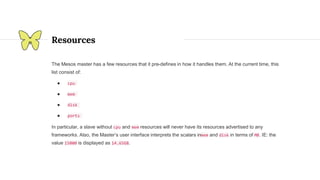
Resources
The Mesos master has a few resources that it pre-defines in how it handles them. At the current time, this
list consist of:
● cpu
● mem
● disk
● ports
In particular, a slave without cpu and mem resources will never have its resources advertised to any
frameworks. Also, the Master’s user interface interprets the scalars inmem and disk in terms of MB. IE: the
value 15000 is displayed as 14.65GB.
Here are some examples for configuring the Mesos slaves.
--resources='cpu:24;mem:24576;disk:409600;ports:[21000-24000];bugs:{a,b,c}'
--attributes='rack:abc;zone:west;os:centos5,full'
In this case, we have three different types of resources, scalars, a range, and a set. They are called cpu,
mem, disk, and the range type is ports.
● scalar called cpu, with the value 24
● scalar called mem, with the value 24576
● scalar called disk, with the value 409600
● range called ports, with values 21000 through 24000 (inclusive)
● set called bugs, with the values a, b and c
In the case of attributes, we end up with three attributes:
● rack with value abc
● zone with value west
● os with value centos5,full
Roles
Total consumable resources per slave, in the form 'name(role):value;name(role):value...'. This
value can be set to limit resources per role, or to overstate the number of resources that are
available to the slave.
--resources="cpus(*):8; mem(*):15360; disk(*):710534; ports(*):[31000-32000]"
--resources="cpus(prod):8; cpus(stage):2 mem(*):15360; disk(*):710534;
ports(*):[31000-32000]"
All * roles will be detected, so you can specify only the resources that are not all roles (*). --
resources="cpus(prod):8; cpus(stage)"
Frameworks bind a specific roles or any. A default roll (instead of *) can also be
configured.
Roles can be used to isolate and segregate frameworks.
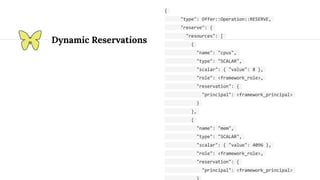
Dynamic Reservations
{
"type": Offer::Operation::RESERVE,
"reserve": {
"resources": [
{
"name": "cpus",
"type": "SCALAR",
"scalar": { "value": 8 },
"role": <framework_role>,
"reservation": {
"principal": <framework_principal>
}
},
{
"name": "mem",
"type": "SCALAR",
"scalar": { "value": 4096 },
"role": <framework_role>,
"reservation": {
"principal": <framework_principal>
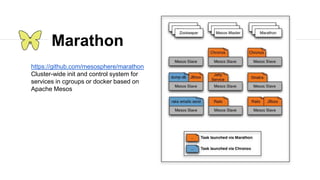
Marathon
https://github.com/mesosphere/marathon
Cluster-wide init and control system for
services in cgroups or docker based on
Apache Mesos
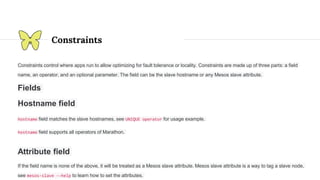
Constraints
Constraints control where apps run to allow optimizing for fault tolerance or locality. Constraints are made up of three parts: a field
name, an operator, and an optional parameter. The field can be the slave hostname or any Mesos slave attribute.
Fields
Hostname field
hostname field matches the slave hostnames, see UNIQUE operator for usage example.
hostname field supports all operators of Marathon.
Attribute field
If the field name is none of the above, it will be treated as a Mesos slave attribute. Mesos slave attribute is a way to tag a slave node,
see mesos-slave --help to learn how to set the attributes.
Unique
UNIQUE tells Marathon to enforce uniqueness of the attribute across all of an app's tasks. For example the
following constraint ensures that there is only one app task running on each host:
via the Marathon gem:
$ marathon start -i sleep -C 'sleep 60' -n 3 --constraint hostname:UNIQUE
via curl:
$ curl -X POST -H "Content-type: application/json" localhost:8080/v1/apps/start -d '{
"id": "sleep-unique",
"cmd": "sleep 60",
"instances": 3,
"constraints": [["hostname", "UNIQUE"]]
}'
Cluster
CLUSTER allows you to run all of your app's tasks on slaves that share a certain attribute.
$ curl -X POST -H "Content-type: application/json" localhost:8080/v1/apps/start -d '{
"id": "sleep-cluster",
"cmd": "sleep 60",
"instances": 3,
"constraints": [["rack_id", "CLUSTER", "rack-1"]]
}'
You can also use this attribute to tie an application to a specific node by using the hostname property:
$ curl -X POST -H "Content-type: application/json" localhost:8080/v1/apps/start -d '{
"id": "sleep-cluster",
"cmd": "sleep 60",
"instances": 3,
"constraints": [["hostname", "CLUSTER", "a.specific.node.com"]]
}'
Group By
GROUP_BY can be used to distribute tasks evenly across racks or datacenters for high availability.
via the Marathon gem:
$ marathon start -i sleep -C 'sleep 60' -n 3 --constraint rack_id:GROUP_BY
via curl:
$ curl -X POST -H "Content-type: application/json" localhost:8080/v1/apps/start -d '{
"id": "sleep-group-by",
"cmd": "sleep 60",
"instances": 3,
"constraints": [["rack_id", "GROUP_BY"]]
}'
Like
LIKE accepts a regular expression as parameter, and allows you to run your tasks only on the slaves
whose field values match the regular expression.
via the Marathon gem:
$ marathon start -i sleep -C 'sleep 60' -n 3 --constraint rack_id:LIKE:rack-[1-3]
via curl:
$ curl -X POST -H "Content-type: application/json" localhost:8080/v1/apps/start -d '{
"id": "sleep-group-by",
"cmd": "sleep 60",
"instances": 3,
"constraints": [["rack_id", "LIKE", "rack-[1-3]"]]
}'
Unlike
Just like LIKE operator, but only run tasks on slaves whose field values don't match the regular expression.
via the Marathon gem:
$ marathon start -i sleep -C 'sleep 60' -n 3 --constraint rack_id:UNLIKE:rack-[7-9]
via curl:
$ curl -X POST -H "Content-type: application/json" localhost:8080/v1/apps/start -d '{
"id": "sleep-group-by",
"cmd": "sleep 60",
"instances": 3,
"constraints": [["rack_id", "UNLIKE", "rack-[7-9]"]]
}'
Working with Marathon
TAG=sample
APP=xyz
ID=$TAG-$APP
CMD=”./yourScript "'$HOST'" "'$PORT0'" "'$PORT1'
JSON=$(printf '{ "id": "%s", "cmd": "%s", "cpus": %s, "mem": %s, "instances": %s,
"uris": ["%s"], "ports": [0,0] , “env”:{ “JAVA_OPTS”,”%s”}' "$ID" “$CMD" "0.1" "256"
"1" "http://dns/path/yourScriptAndStuff.tgz" “-Xmx 128”)
curl -i -X POST -H "Content-Type: application/json" -d "$JSON"
http://localhost:8080/v2/apps
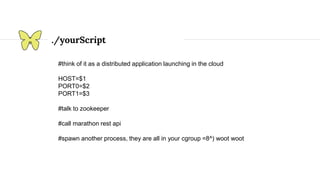
./yourScript
#think of it as a distributed application launching in the cloud
HOST=$1
PORT0=$2
PORT1=$3
#talk to zookeeper
#call marathon rest api
#spawn another process, they are all in your cgroup =8^) woot woot
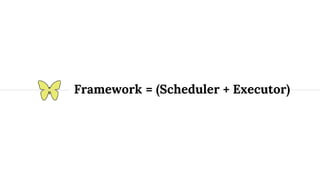
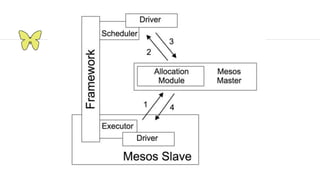
Framework = (Scheduler + Executor)
Scheduler
Executors
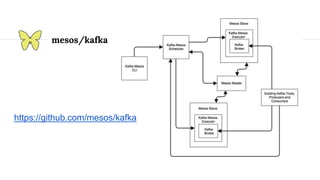
mesos/kafka
https://github.com/mesos/kafka
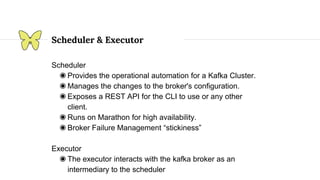
Scheduler
◉ Provides the operational automation for a Kafka Cluster.
◉ Manages the changes to the broker's configuration.
◉ Exposes a REST API for the CLI to use or any other
client.
◉ Runs on Marathon for high availability.
◉ Broker Failure Management “stickiness”
Executor
◉ The executor interacts with the kafka broker as an
intermediary to the scheduler
Scheduler & Executor
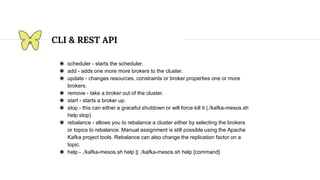
CLI & REST API
◉ scheduler - starts the scheduler.
◉ add - adds one more more brokers to the cluster.
◉ update - changes resources, constraints or broker properties one or more
brokers.
◉ remove - take a broker out of the cluster.
◉ start - starts a broker up.
◉ stop - this can either a graceful shutdown or will force kill it (./kafka-mesos.sh
help stop)
◉ rebalance - allows you to rebalance a cluster either by selecting the brokers
or topics to rebalance. Manual assignment is still possible using the Apache
Kafka project tools. Rebalance can also change the replication factor on a
topic.
◉ help - ./kafka-mesos.sh help || ./kafka-mesos.sh help {command}
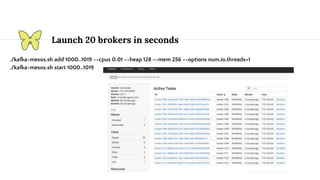
Launch 20 brokers in seconds
./kafka-mesos.sh add 1000..1019 --cpus 0.01 --heap 128 --mem 256 --options num.io.threads=1
./kafka-mesos.sh start 1000..1019
Sawfly (Elodina Software Suite of Schedulers)
Sawfly is the suite of Elodina’s proprietary and open source
schedulers Apache Mesos and DCOS. Sawfly schedulers
break out the configuration, artifact management (including
Docker containers) and service discovery from each stack
being built on Mesos. The management of both very small
and large complex stacks are managed within these
schedulers. You can have very complex stateless and
stateful stacks that when deployed be namespaced with
different resources and configurations passed to the micro
services. You can run thousands of development and
testing services as it would be configured in production (but
just with less resources). This brings the power of the
underlying fine grained resource management to reduce
risks.
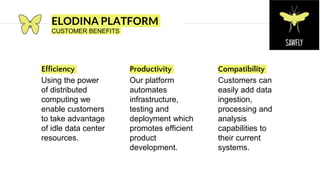
Productivity
Our platform
automates
infrastructure,
testing and
deployment which
promotes efficient
product
development.
Compatibility
Customers can
easily add data
ingestion,
processing and
analysis
capabilities to
their current
systems.
ELODINA PLATFORM
CUSTOMER BENEFITS
Efficiency
Using the power
of distributed
computing we
enable customers
to take advantage
of idle data center
resources.
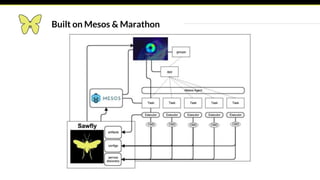
Built on Mesos & Marathon
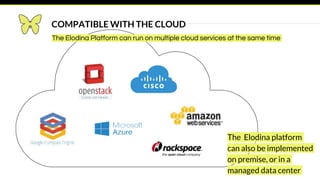
The Elodina platform
can also be implemented
on premise, or in a
managed data center
The Elodina Platform can run on multiple cloud services at the same time
COMPATIBLE WITH THE CLOUD
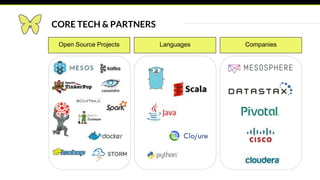
CORE TECH & PARTNERS
Open Source Projects Languages Companies
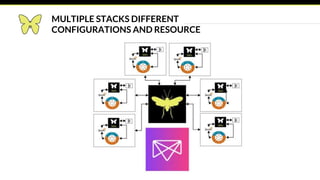
MULTIPLE STACKS DIFFERENT
CONFIGURATIONS AND RESOURCE
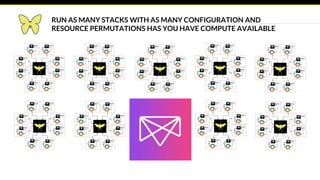
RUN AS MANY STACKS WITH AS MANY CONFIGURATION AND
RESOURCE PERMUTATIONS HAS YOU HAVE COMPUTE AVAILABLE
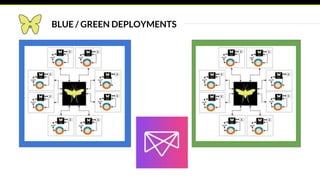
BLUE / GREEN DEPLOYMENTS
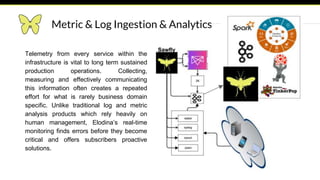
Metric & Log Ingestion & Analytics
Telemetry from every service within the
infrastructure is vital to long term sustained
production operations. Collecting,
measuring and effectively communicating
this information often creates a repeated
effort for what is rarely business domain
specific. Unlike traditional log and metric
analysis products which rely heavily on
human management, Elodina’s real-time
monitoring finds errors before they become
critical and offers subscribers proactive
solutions.
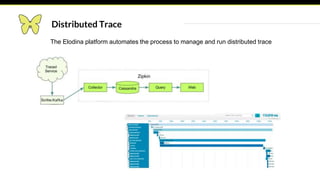
Distributed Trace
The Elodina platform automates the process to manage and run distributed trace
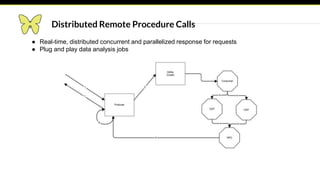
● Real-time, distributed concurrent and parallelized response for requests
● Plug and play data analysis jobs
Distributed Remote Procedure Calls
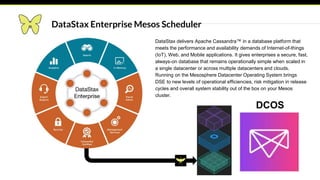
DataStax Enterprise Mesos Scheduler
DataStax delivers Apache Cassandra™ in a database platform that
meets the performance and availability demands of Internet-of-things
(IoT), Web, and Mobile applications. It gives enterprises a secure, fast,
always-on database that remains operationally simple when scaled in
a single datacenter or across multiple datacenters and clouds.
Running on the Mesosphere Datacenter Operating System brings
DSE to new levels of operational efficiencies, risk mitigation in release
cycles and overall system stability out of the box on your Mesos
cluster.
DCOS
Questions?
http://www.elodina.net

Introduction To Apache Mesos

  • 1.
  • 2.
    Joe Stein CEO ofElodina http://www.elodina.net/ a big data as a service platform built on top open source software. The Elodina platform enables customers to analyze data streams and programmatically react to the results in real-time. We solve today’s data analytics needs by providing the tools and support necessary to utilize open source technologies. As users, contributors and committers, Elodina also provides support for frameworks that run on Mesos including Apache Kafka, Exhibitor (Zookeeper), Apache Storm, Apache Cassandra and a whole lot more! LinkedIn: http://linkedin.com/in/charmalloc Twitter : @allthingshadoop
  • 3.
    Overview ◉Life without ApacheMesos ◉Hit the ground running with Mesos ◉Schedulers & Executors (Frameworks) ◉Building Data Center Applications
  • 4.
    Origins Mesos: A Platformfor Fine-Grained Resource Sharing in the Data Center http://static.usenix.org/event/nsdi11/tech/full_papers/Hindman_new.pdf Google Borg - https://research.google.com/pubs/pub43438.html Google Omega: flexible, scalable schedulers for large compute clusters http://eurosys2013.tudos.org/wp-content/uploads/2013/paper/Schwarzkopf.pdf
  • 9.
  • 10.
  • 11.
    Data Center OperatingSystem Mesosphere’s Data Center Operating System (DCOS) is an operating system that spans all of the machines in a datacenter or cloud and treats them as a single computer, providing a highly elastic and highly scalable way of deploying applications, services, and big data infrastructure on shared resources. DCOS is based on Apache Mesos and includes a distributed systems kernel with enterprise-grade security. It also includes a set of core system services, such as a native Marathon instance to manage processes and installable services, and Mesos-DNS for service discovery. DCOS provides a web interface and a command-line interface (CLI) to manage the deployment and scale of applications.
  • 15.
    Resources & Attributes TheMesos system has two basic methods to describe the Agent (fka slave) that comprise a cluster. One of these is managed by the Mesos master, the other is simply passed onwards to the frameworks using the cluster. Attributes The attributes are simply key value string pairs that Mesos passes along when it sends offers to frameworks. attributes : attribute ( ";" attribute )* attribute : labelString ":" ( labelString | "," )+
  • 16.
    Resources The Mesos masterhas a few resources that it pre-defines in how it handles them. At the current time, this list consist of: ● cpu ● mem ● disk ● ports In particular, a slave without cpu and mem resources will never have its resources advertised to any frameworks. Also, the Master’s user interface interprets the scalars inmem and disk in terms of MB. IE: the value 15000 is displayed as 14.65GB.
  • 17.
    Here are someexamples for configuring the Mesos slaves. --resources='cpu:24;mem:24576;disk:409600;ports:[21000-24000];bugs:{a,b,c}' --attributes='rack:abc;zone:west;os:centos5,full' In this case, we have three different types of resources, scalars, a range, and a set. They are called cpu, mem, disk, and the range type is ports. ● scalar called cpu, with the value 24 ● scalar called mem, with the value 24576 ● scalar called disk, with the value 409600 ● range called ports, with values 21000 through 24000 (inclusive) ● set called bugs, with the values a, b and c In the case of attributes, we end up with three attributes: ● rack with value abc ● zone with value west ● os with value centos5,full
  • 18.
    Roles Total consumable resourcesper slave, in the form 'name(role):value;name(role):value...'. This value can be set to limit resources per role, or to overstate the number of resources that are available to the slave. --resources="cpus(*):8; mem(*):15360; disk(*):710534; ports(*):[31000-32000]" --resources="cpus(prod):8; cpus(stage):2 mem(*):15360; disk(*):710534; ports(*):[31000-32000]" All * roles will be detected, so you can specify only the resources that are not all roles (*). -- resources="cpus(prod):8; cpus(stage)" Frameworks bind a specific roles or any. A default roll (instead of *) can also be configured. Roles can be used to isolate and segregate frameworks.
  • 19.
    Dynamic Reservations { "type": Offer::Operation::RESERVE, "reserve":{ "resources": [ { "name": "cpus", "type": "SCALAR", "scalar": { "value": 8 }, "role": <framework_role>, "reservation": { "principal": <framework_principal> } }, { "name": "mem", "type": "SCALAR", "scalar": { "value": 4096 }, "role": <framework_role>, "reservation": { "principal": <framework_principal>
  • 20.
    Marathon https://github.com/mesosphere/marathon Cluster-wide init andcontrol system for services in cgroups or docker based on Apache Mesos
  • 21.
    Constraints Constraints control whereapps run to allow optimizing for fault tolerance or locality. Constraints are made up of three parts: a field name, an operator, and an optional parameter. The field can be the slave hostname or any Mesos slave attribute. Fields Hostname field hostname field matches the slave hostnames, see UNIQUE operator for usage example. hostname field supports all operators of Marathon. Attribute field If the field name is none of the above, it will be treated as a Mesos slave attribute. Mesos slave attribute is a way to tag a slave node, see mesos-slave --help to learn how to set the attributes.
  • 22.
    Unique UNIQUE tells Marathonto enforce uniqueness of the attribute across all of an app's tasks. For example the following constraint ensures that there is only one app task running on each host: via the Marathon gem: $ marathon start -i sleep -C 'sleep 60' -n 3 --constraint hostname:UNIQUE via curl: $ curl -X POST -H "Content-type: application/json" localhost:8080/v1/apps/start -d '{ "id": "sleep-unique", "cmd": "sleep 60", "instances": 3, "constraints": [["hostname", "UNIQUE"]] }'
  • 23.
    Cluster CLUSTER allows youto run all of your app's tasks on slaves that share a certain attribute. $ curl -X POST -H "Content-type: application/json" localhost:8080/v1/apps/start -d '{ "id": "sleep-cluster", "cmd": "sleep 60", "instances": 3, "constraints": [["rack_id", "CLUSTER", "rack-1"]] }' You can also use this attribute to tie an application to a specific node by using the hostname property: $ curl -X POST -H "Content-type: application/json" localhost:8080/v1/apps/start -d '{ "id": "sleep-cluster", "cmd": "sleep 60", "instances": 3, "constraints": [["hostname", "CLUSTER", "a.specific.node.com"]] }'
  • 24.
    Group By GROUP_BY canbe used to distribute tasks evenly across racks or datacenters for high availability. via the Marathon gem: $ marathon start -i sleep -C 'sleep 60' -n 3 --constraint rack_id:GROUP_BY via curl: $ curl -X POST -H "Content-type: application/json" localhost:8080/v1/apps/start -d '{ "id": "sleep-group-by", "cmd": "sleep 60", "instances": 3, "constraints": [["rack_id", "GROUP_BY"]] }'
  • 25.
    Like LIKE accepts aregular expression as parameter, and allows you to run your tasks only on the slaves whose field values match the regular expression. via the Marathon gem: $ marathon start -i sleep -C 'sleep 60' -n 3 --constraint rack_id:LIKE:rack-[1-3] via curl: $ curl -X POST -H "Content-type: application/json" localhost:8080/v1/apps/start -d '{ "id": "sleep-group-by", "cmd": "sleep 60", "instances": 3, "constraints": [["rack_id", "LIKE", "rack-[1-3]"]] }'
  • 26.
    Unlike Just like LIKEoperator, but only run tasks on slaves whose field values don't match the regular expression. via the Marathon gem: $ marathon start -i sleep -C 'sleep 60' -n 3 --constraint rack_id:UNLIKE:rack-[7-9] via curl: $ curl -X POST -H "Content-type: application/json" localhost:8080/v1/apps/start -d '{ "id": "sleep-group-by", "cmd": "sleep 60", "instances": 3, "constraints": [["rack_id", "UNLIKE", "rack-[7-9]"]] }'
  • 27.
    Working with Marathon TAG=sample APP=xyz ID=$TAG-$APP CMD=”./yourScript"'$HOST'" "'$PORT0'" "'$PORT1' JSON=$(printf '{ "id": "%s", "cmd": "%s", "cpus": %s, "mem": %s, "instances": %s, "uris": ["%s"], "ports": [0,0] , “env”:{ “JAVA_OPTS”,”%s”}' "$ID" “$CMD" "0.1" "256" "1" "http://dns/path/yourScriptAndStuff.tgz" “-Xmx 128”) curl -i -X POST -H "Content-Type: application/json" -d "$JSON" http://localhost:8080/v2/apps
  • 28.
    ./yourScript #think of itas a distributed application launching in the cloud HOST=$1 PORT0=$2 PORT1=$3 #talk to zookeeper #call marathon rest api #spawn another process, they are all in your cgroup =8^) woot woot
  • 29.
  • 31.
  • 32.
  • 33.
  • 34.
    Scheduler ◉ Provides theoperational automation for a Kafka Cluster. ◉ Manages the changes to the broker's configuration. ◉ Exposes a REST API for the CLI to use or any other client. ◉ Runs on Marathon for high availability. ◉ Broker Failure Management “stickiness” Executor ◉ The executor interacts with the kafka broker as an intermediary to the scheduler Scheduler & Executor
  • 35.
    CLI & RESTAPI ◉ scheduler - starts the scheduler. ◉ add - adds one more more brokers to the cluster. ◉ update - changes resources, constraints or broker properties one or more brokers. ◉ remove - take a broker out of the cluster. ◉ start - starts a broker up. ◉ stop - this can either a graceful shutdown or will force kill it (./kafka-mesos.sh help stop) ◉ rebalance - allows you to rebalance a cluster either by selecting the brokers or topics to rebalance. Manual assignment is still possible using the Apache Kafka project tools. Rebalance can also change the replication factor on a topic. ◉ help - ./kafka-mesos.sh help || ./kafka-mesos.sh help {command}
  • 36.
    Launch 20 brokersin seconds ./kafka-mesos.sh add 1000..1019 --cpus 0.01 --heap 128 --mem 256 --options num.io.threads=1 ./kafka-mesos.sh start 1000..1019
  • 37.
    Sawfly (Elodina SoftwareSuite of Schedulers) Sawfly is the suite of Elodina’s proprietary and open source schedulers Apache Mesos and DCOS. Sawfly schedulers break out the configuration, artifact management (including Docker containers) and service discovery from each stack being built on Mesos. The management of both very small and large complex stacks are managed within these schedulers. You can have very complex stateless and stateful stacks that when deployed be namespaced with different resources and configurations passed to the micro services. You can run thousands of development and testing services as it would be configured in production (but just with less resources). This brings the power of the underlying fine grained resource management to reduce risks.
  • 38.
    Productivity Our platform automates infrastructure, testing and deploymentwhich promotes efficient product development. Compatibility Customers can easily add data ingestion, processing and analysis capabilities to their current systems. ELODINA PLATFORM CUSTOMER BENEFITS Efficiency Using the power of distributed computing we enable customers to take advantage of idle data center resources.
  • 39.
    Built on Mesos& Marathon
  • 40.
    The Elodina platform canalso be implemented on premise, or in a managed data center The Elodina Platform can run on multiple cloud services at the same time COMPATIBLE WITH THE CLOUD
  • 41.
    CORE TECH &PARTNERS Open Source Projects Languages Companies
  • 42.
  • 43.
    RUN AS MANYSTACKS WITH AS MANY CONFIGURATION AND RESOURCE PERMUTATIONS HAS YOU HAVE COMPUTE AVAILABLE
  • 44.
    BLUE / GREENDEPLOYMENTS
  • 45.
    Metric & LogIngestion & Analytics Telemetry from every service within the infrastructure is vital to long term sustained production operations. Collecting, measuring and effectively communicating this information often creates a repeated effort for what is rarely business domain specific. Unlike traditional log and metric analysis products which rely heavily on human management, Elodina’s real-time monitoring finds errors before they become critical and offers subscribers proactive solutions.
  • 46.
    Distributed Trace The Elodinaplatform automates the process to manage and run distributed trace
  • 47.
    ● Real-time, distributedconcurrent and parallelized response for requests ● Plug and play data analysis jobs Distributed Remote Procedure Calls
  • 48.
    DataStax Enterprise MesosScheduler DataStax delivers Apache Cassandra™ in a database platform that meets the performance and availability demands of Internet-of-things (IoT), Web, and Mobile applications. It gives enterprises a secure, fast, always-on database that remains operationally simple when scaled in a single datacenter or across multiple datacenters and clouds. Running on the Mesosphere Datacenter Operating System brings DSE to new levels of operational efficiencies, risk mitigation in release cycles and overall system stability out of the box on your Mesos cluster. DCOS
  • 49.

Editor's Notes

  • #39 Quotes about efficiency The Elodina platform provides novel deployment tools for quicker and smarter application development.
  • #42 The Elodina platform is based on the Elodina Open Stack
  • #47 Distributed Trace Product What the product is built on. Mesos, Kafka, Hadoop, Casandra Collectors that go out. Geppeteo: Takes offers from the salve and launches custom scheduler. Creates schedulers The schedules syslog stats d syscol (infrastructure moduel) runs on every slave and optains all agent metrics (CPU, RAM, ETC.) Benefit: Reports
  • #48 Distributed Trace Product What the product is built on. Mesos, Kafka, Hadoop, Casandra Collectors that go out. Geppeteo: Takes offers from the salve and launches custom scheduler. Creates schedulers The schedules syslog stats d syscol (infrastructure moduel) runs on every slave and optains all agent metrics (CPU, RAM, ETC.) Benefit: Reports
  • #49 Distributed Trace Product What the product is built on. Mesos, Kafka, Hadoop, Casandra Collectors that go out. Geppeteo: Takes offers from the salve and launches custom scheduler. Creates schedulers The schedules syslog stats d syscol (infrastructure moduel) runs on every slave and optains all agent metrics (CPU, RAM, ETC.) Benefit: Reports