2016 SoftUmeYa, LLC.
Masashi Umezawa
The 88th Tokyo Smalltalk meetup
What is Pharo?
 A most modern and powerful Smalltalk-
language environment
 OSS
○ MIT License
○ You can read all sources including VM
 Aggressive
○ Not so caring about backward-compatibility
○ Actively adding new features - Trait, Slot, etc.
 Multi-platform
○ Win, Mac, Linux, iOS, Android
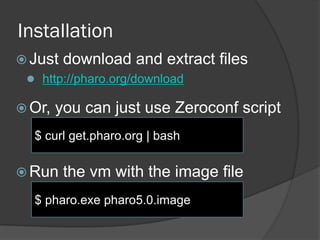
Installation
 Just download and extract files
 http://pharo.org/download
 Or, you can just use Zeroconf script
 Run the vm with the image file
$ curl get.pharo.org | bash
$ pharo.exe pharo5.0.image
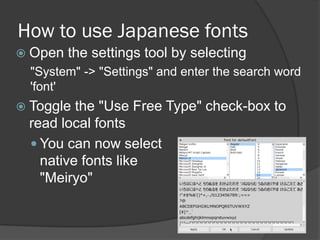
How to use Japanese fonts
 Open the settings tool by selecting
"System" -> "Settings" and enter the search word
'font'
 Toggle the "Use Free Type" check-box to
read local fonts
 You can now select
native fonts like
"Meiryo"
New features of Pharo 5.0
 Spur VM
 Breakpoint, Watchpoint
 Unified FFI
 Quality Assistant
Spur VM
 State-of-the-art, newly designed fast VM
 About 35% faster than the older Cog VM
 Fast #become:
 Fast weak reference
 Fast, efficient GC
 Segmented heap allocation
 Pinned objects
 64 bit object format
If you concatenate Japanese strings…
 Concatenating single- and multi-byte strings
was very slow
 because of costly #become:
[10000 timesRepeat: ['abcdefg', 'あいうえおかきくけこ']]
timeToRun
 Pharo 4.0
 0:00:00:17.573
 Pharo 5.0
 0:00:00:00.117
Breakpoint, Watchpoint
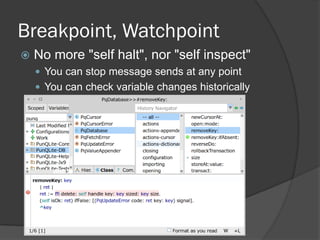
 No more "self halt", nor "self inspect"
 You can stop message sends at any point
 You can check variable changes historically
UFFI
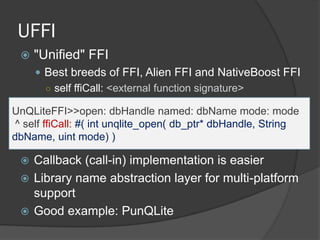
 "Unified" FFI
 Best breeds of FFI, Alien FFI and NativeBoost FFI
○ self ffiCall: <external function signature>
 Callback (call-in) implementation is easier
 Library name abstraction layer for multi-platform
support
 Good example: PunQLite
UnQLiteFFI>>open: dbHandle named: dbName mode: mode
^ self ffiCall: #( int unqlite_open( db_ptr* dbHandle, String
dbName, uint mode) )
Quality Assistant
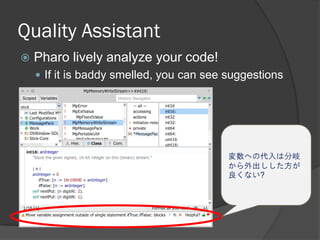
 Pharo lively analyze your code!
 If it is baddy smelled, you can see suggestions
変数への代入は分岐
から外出しした方が
良くない?
Other features
 Debugger UI Renewal
 GTDebugger
○ Simplified UI
○ Customizable debugger
 Rubric
 Newly designed text edit component
○ Develop a richer text-edit in a few lines of code
 Slot
 Variables are now objects
 You can add various hooks to variable accesses
Installing packages
 Open "Tools" -> "Catalog Browser"
 You can easily install packages via catalog
browser
○ Filter the packages by clicking 'Pharo 5.0' tag
 Mustache
 A popular template engine
 Teapot
 Sinatra-like lightweight web-app framework
 PunQLite
 UnQLite (KVS) binding
=> Now ready for Web App development!
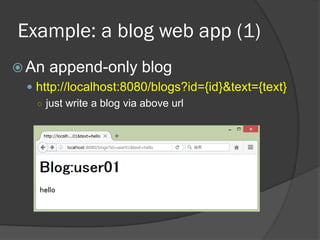
Example: a blog web app (1)
 An append-only blog
 http://localhost:8080/blogs?id={id}&text={text}
○ just write a blog via above url
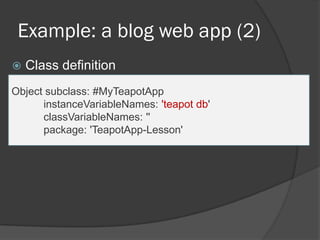
Example: a blog web app (2)
 Class definition
Object subclass: #MyTeapotApp
instanceVariableNames: 'teapot db'
classVariableNames: ''
package: 'TeapotApp-Lesson'
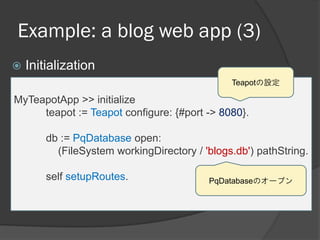
Example: a blog web app (3)
 Initialization
MyTeapotApp >> initialize
teapot := Teapot configure: {#port -> 8080}.
db := PqDatabase open:
(FileSystem workingDirectory / 'blogs.db') pathString.
self setupRoutes.
Teapotの設定
PqDatabaseのオープン
Example: a blog web app (4)
 Setting up routers
MyTeapotApp >> setupRoutes
teapot
GET: '/blogs' -> [:req | | id value |
id := req at: #id.
value := req at: #text ifAbsent: [''].
db transact: [db appendAt: id value: value].
{ 'blogId'->id. 'text'-> (db at: id)}];
output:
(TeaOutput mustacheHtml:
'<h1>Blog:{{blogId}}</h1><p>{{text}}</p>').
URLパラメータの取り出し
内容をDBに格納
テンプレートの適用
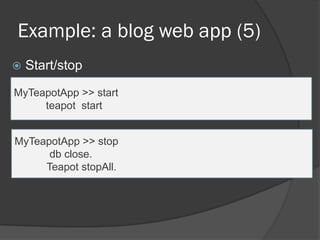
Example: a blog web app (5)
 Start/stop
MyTeapotApp >> start
teapot start
MyTeapotApp >> stop
db close.
Teapot stopAll.
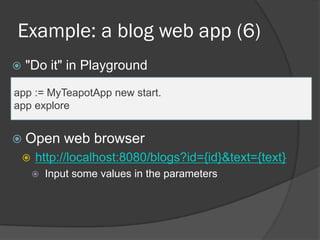
Example: a blog web app (6)
 "Do it" in Playground
app := MyTeapotApp new start.
app explore
 Open web browser
 http://localhost:8080/blogs?id={id}&text={text}
 Input some values in the parameters
Other useful links for developers
 Github
 https://github.com/pharo-project
 Pharo continuous build server
 https://ci.inria.fr/pharo
 Pharo bug tracking system
 https://pharo.fogbugz.com
Documents
 Tutorials in Pharo
 Help -> Pharo Tutorials
 Pharo MOOC
 Online-streaming seminars
○ http://files.pharo.org/mooc/
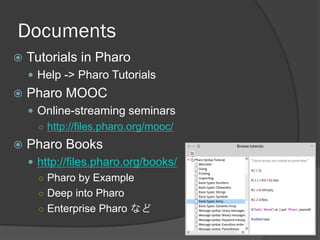
 Pharo Books
 http://files.pharo.org/books/
○ Pharo by Example
○ Deep into Pharo
○ Enterprise Pharo など
Summing up
 Pharo is a modern, aggressively
progressing Smalltalk
 Version 5.0 is the fastest and refined. It
is recommended to migrate to 5.0 if you
are using older Pharo.

Introduction of Pharo 5.0

  • 1.
    2016 SoftUmeYa, LLC. MasashiUmezawa The 88th Tokyo Smalltalk meetup
  • 2.
    What is Pharo? A most modern and powerful Smalltalk- language environment  OSS ○ MIT License ○ You can read all sources including VM  Aggressive ○ Not so caring about backward-compatibility ○ Actively adding new features - Trait, Slot, etc.  Multi-platform ○ Win, Mac, Linux, iOS, Android
  • 3.
    Installation  Just downloadand extract files  http://pharo.org/download  Or, you can just use Zeroconf script  Run the vm with the image file $ curl get.pharo.org | bash $ pharo.exe pharo5.0.image
  • 4.
    How to useJapanese fonts  Open the settings tool by selecting "System" -> "Settings" and enter the search word 'font'  Toggle the "Use Free Type" check-box to read local fonts  You can now select native fonts like "Meiryo"
  • 5.
    New features ofPharo 5.0  Spur VM  Breakpoint, Watchpoint  Unified FFI  Quality Assistant
  • 6.
    Spur VM  State-of-the-art,newly designed fast VM  About 35% faster than the older Cog VM  Fast #become:  Fast weak reference  Fast, efficient GC  Segmented heap allocation  Pinned objects  64 bit object format
  • 7.
    If you concatenateJapanese strings…  Concatenating single- and multi-byte strings was very slow  because of costly #become: [10000 timesRepeat: ['abcdefg', 'あいうえおかきくけこ']] timeToRun  Pharo 4.0  0:00:00:17.573  Pharo 5.0  0:00:00:00.117
  • 8.
    Breakpoint, Watchpoint  Nomore "self halt", nor "self inspect"  You can stop message sends at any point  You can check variable changes historically
  • 9.
    UFFI  "Unified" FFI Best breeds of FFI, Alien FFI and NativeBoost FFI ○ self ffiCall: <external function signature>  Callback (call-in) implementation is easier  Library name abstraction layer for multi-platform support  Good example: PunQLite UnQLiteFFI>>open: dbHandle named: dbName mode: mode ^ self ffiCall: #( int unqlite_open( db_ptr* dbHandle, String dbName, uint mode) )
  • 10.
    Quality Assistant  Pharolively analyze your code!  If it is baddy smelled, you can see suggestions 変数への代入は分岐 から外出しした方が 良くない?
  • 11.
    Other features  DebuggerUI Renewal  GTDebugger ○ Simplified UI ○ Customizable debugger  Rubric  Newly designed text edit component ○ Develop a richer text-edit in a few lines of code  Slot  Variables are now objects  You can add various hooks to variable accesses
  • 12.
    Installing packages  Open"Tools" -> "Catalog Browser"  You can easily install packages via catalog browser ○ Filter the packages by clicking 'Pharo 5.0' tag  Mustache  A popular template engine  Teapot  Sinatra-like lightweight web-app framework  PunQLite  UnQLite (KVS) binding => Now ready for Web App development!
  • 13.
    Example: a blogweb app (1)  An append-only blog  http://localhost:8080/blogs?id={id}&text={text} ○ just write a blog via above url
  • 14.
    Example: a blogweb app (2)  Class definition Object subclass: #MyTeapotApp instanceVariableNames: 'teapot db' classVariableNames: '' package: 'TeapotApp-Lesson'
  • 15.
    Example: a blogweb app (3)  Initialization MyTeapotApp >> initialize teapot := Teapot configure: {#port -> 8080}. db := PqDatabase open: (FileSystem workingDirectory / 'blogs.db') pathString. self setupRoutes. Teapotの設定 PqDatabaseのオープン
  • 16.
    Example: a blogweb app (4)  Setting up routers MyTeapotApp >> setupRoutes teapot GET: '/blogs' -> [:req | | id value | id := req at: #id. value := req at: #text ifAbsent: ['']. db transact: [db appendAt: id value: value]. { 'blogId'->id. 'text'-> (db at: id)}]; output: (TeaOutput mustacheHtml: '<h1>Blog:{{blogId}}</h1><p>{{text}}</p>'). URLパラメータの取り出し 内容をDBに格納 テンプレートの適用
  • 17.
    Example: a blogweb app (5)  Start/stop MyTeapotApp >> start teapot start MyTeapotApp >> stop db close. Teapot stopAll.
  • 18.
    Example: a blogweb app (6)  "Do it" in Playground app := MyTeapotApp new start. app explore  Open web browser  http://localhost:8080/blogs?id={id}&text={text}  Input some values in the parameters
  • 19.
    Other useful linksfor developers  Github  https://github.com/pharo-project  Pharo continuous build server  https://ci.inria.fr/pharo  Pharo bug tracking system  https://pharo.fogbugz.com
  • 20.
    Documents  Tutorials inPharo  Help -> Pharo Tutorials  Pharo MOOC  Online-streaming seminars ○ http://files.pharo.org/mooc/  Pharo Books  http://files.pharo.org/books/ ○ Pharo by Example ○ Deep into Pharo ○ Enterprise Pharo など
  • 21.
    Summing up  Pharois a modern, aggressively progressing Smalltalk  Version 5.0 is the fastest and refined. It is recommended to migrate to 5.0 if you are using older Pharo.