Node.js System:
The Approach
Haci M. Yaman
26/4/2021
Content
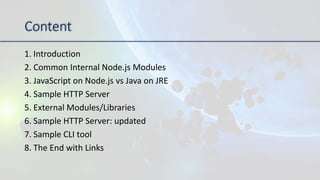
1. Introduction
2. Common Internal Node.js Modules
3. JavaScript on Node.js vs Java on JRE
4. Sample HTTP Server
5. External Modules/Libraries
6. Sample HTTP Server: updated
7. Sample CLI tool
8. The End with Links
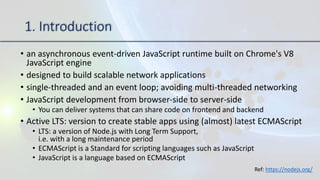
1. Introduction
• an asynchronous event-driven JavaScript runtime built on Chrome's V8
JavaScript engine
• designed to build scalable network applications
• single-threaded and an event loop; avoiding multi-threaded networking
• JavaScript development from browser-side to server-side
• You can deliver systems that can share code on frontend and backend
• Active LTS: version to create stable apps using (almost) latest ECMAScript
• LTS: a version of Node.js with Long Term Support,
i.e. with a long maintenance period
• ECMAScript is a Standard for scripting languages such as JavaScript
• JavaScript is a language based on ECMAScript
Ref: https://nodejs.org/
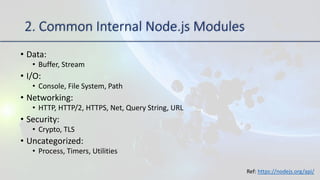
2. Common Internal Node.js Modules
• Data:
• Buffer, Stream
• I/O:
• Console, File System, Path
• Networking:
• HTTP, HTTP/2, HTTPS, Net, Query String, URL
• Security:
• Crypto, TLS
• Uncategorized:
• Process, Timers, Utilities
Ref: https://nodejs.org/api/
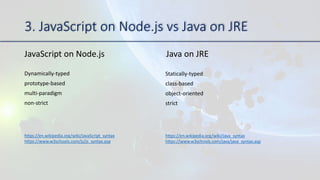
3. JavaScript on Node.js vs Java on JRE
JavaScript on Node.js Java on JRE
Dynamically-typed
prototype-based
multi-paradigm
non-strict
Statically-typed
class-based
object-oriented
strict
https://en.wikipedia.org/wiki/JavaScript_syntax
https://www.w3schools.com/js/js_syntax.asp
https://en.wikipedia.org/wiki/Java_syntax
https://www.w3schools.com/java/java_syntax.asp
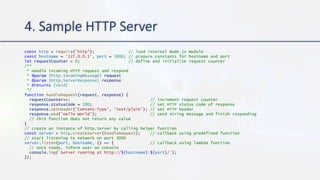
4. Sample HTTP Server
const http = require('http'); // load internal Node.js module
const hostname = '127.0.0.1', port = 3000; // prepare constants for hostname and port
let requestCounter = 0; // define and initialize request counter
/**
* Handle incoming HTTP request and respond
* @param {http.IncomingMessage} request
* @param {http.ServerResponse} response
* @returns {void}
*/
function handleRequest(request, response) {
requestCounter++; // increment request counter
response.statusCode = 200; // set HTTP status code of response
response.setHeader('Content-Type', 'text/plain'); // set HTTP header
response.end('Hello World'); // send string message and finish responding
// this function does not return any value
}
// create an instance of http.Server by calling helper function
const server = http.createServer(handleRequest); // callback using predefined function
// start listening to network on port 3000
server.listen(port, hostname, () => { // callback using lambda function
// once ready, inform user on console
console.log(`Server running at http://${hostname}:${port}/`);
});
5. External Modules/Libraries
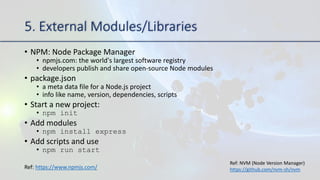
• NPM: Node Package Manager
• npmjs.com: the world's largest software registry
• developers publish and share open-source Node modules
• package.json
• a meta data file for a Node.js project
• info like name, version, dependencies, scripts
• Start a new project:
• npm init
• Add modules
• npm install express
• Add scripts and use
• npm run start
Ref: https://www.npmjs.com/
Ref: NVM (Node Version Manager)
https://github.com/nvm-sh/nvm
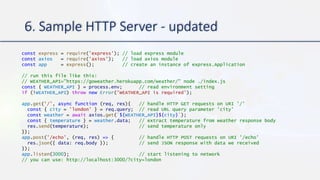
6. Sample HTTP Server - updated
const express = require('express'); // load express module
const axios = require('axios'); // load axios module
const app = express(); // create an instance of express.Application
// run this file like this:
// WEATHER_API="https://goweather.herokuapp.com/weather/" node ./index.js
const { WEATHER_API } = process.env; // read environment setting
if (!WEATHER_API) throw new Error('WEATHER_API is required');
app.get('/', async function (req, res){ // handle HTTP GET requests on URI '/'
const { city = 'london' } = req.query; // read URL query parameter 'city'
const weather = await axios.get(`${WEATHER_API}${city}`);
const { temperature } = weather.data; // extract temperature from weather response body
res.send(temperature); // send temperature only
});
app.post('/echo', (req, res) => { // handle HTTP POST requests on URI '/echo'
res.json({ data: req.body }); // send JSON response with data we received
});
app.listen(3000); // start listening to network
// you can use: http://localhost:3000/?city=london
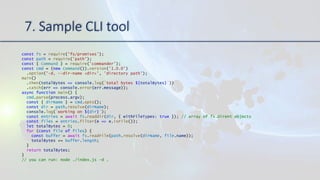
7. Sample CLI tool
const fs = require('fs/promises');
const path = require('path');
const { Command } = require('commander');
const cmd = (new Command()).version('1.0.0’)
.option('-d, --dir-name <dir>', 'directory path');
main()
.then(totalBytes => console.log(`total bytes ${totalBytes}`))
.catch(err => console.error(err.message));
async function main() {
cmd.parse(process.argv);
const { dirName } = cmd.opts();
const dir = path.resolve(dirName);
console.log(`working on ${dir}`);
const entries = await fs.readdir(dir, { withFileTypes: true }); // array of fs.Dirent objects
const files = entries.filter(e => e.isFile());
let totalBytes = 0;
for (const file of files) {
const buffer = await fs.readFile(path.resolve(dirName, file.name));
totalBytes += buffer.length;
}
return totalBytes;
}
// you can run: node ./index.js -d .
The End
Thank you
Recommended articles:
https://www.npmjs.com/package/express
https://www.npmjs.com/package/axios
https://www.npmjs.com/package/commander
https://www.30secondsofcode.org/
JS algorithms and data structures:
https://github.com/trekhleb/javascript-algorithms

Node.js System: The Approach

  • 1.
  • 2.
    Content 1. Introduction 2. CommonInternal Node.js Modules 3. JavaScript on Node.js vs Java on JRE 4. Sample HTTP Server 5. External Modules/Libraries 6. Sample HTTP Server: updated 7. Sample CLI tool 8. The End with Links
  • 3.
    1. Introduction • anasynchronous event-driven JavaScript runtime built on Chrome's V8 JavaScript engine • designed to build scalable network applications • single-threaded and an event loop; avoiding multi-threaded networking • JavaScript development from browser-side to server-side • You can deliver systems that can share code on frontend and backend • Active LTS: version to create stable apps using (almost) latest ECMAScript • LTS: a version of Node.js with Long Term Support, i.e. with a long maintenance period • ECMAScript is a Standard for scripting languages such as JavaScript • JavaScript is a language based on ECMAScript Ref: https://nodejs.org/
  • 4.
    2. Common InternalNode.js Modules • Data: • Buffer, Stream • I/O: • Console, File System, Path • Networking: • HTTP, HTTP/2, HTTPS, Net, Query String, URL • Security: • Crypto, TLS • Uncategorized: • Process, Timers, Utilities Ref: https://nodejs.org/api/
  • 5.
    3. JavaScript onNode.js vs Java on JRE JavaScript on Node.js Java on JRE Dynamically-typed prototype-based multi-paradigm non-strict Statically-typed class-based object-oriented strict https://en.wikipedia.org/wiki/JavaScript_syntax https://www.w3schools.com/js/js_syntax.asp https://en.wikipedia.org/wiki/Java_syntax https://www.w3schools.com/java/java_syntax.asp
  • 6.
    4. Sample HTTPServer const http = require('http'); // load internal Node.js module const hostname = '127.0.0.1', port = 3000; // prepare constants for hostname and port let requestCounter = 0; // define and initialize request counter /** * Handle incoming HTTP request and respond * @param {http.IncomingMessage} request * @param {http.ServerResponse} response * @returns {void} */ function handleRequest(request, response) { requestCounter++; // increment request counter response.statusCode = 200; // set HTTP status code of response response.setHeader('Content-Type', 'text/plain'); // set HTTP header response.end('Hello World'); // send string message and finish responding // this function does not return any value } // create an instance of http.Server by calling helper function const server = http.createServer(handleRequest); // callback using predefined function // start listening to network on port 3000 server.listen(port, hostname, () => { // callback using lambda function // once ready, inform user on console console.log(`Server running at http://${hostname}:${port}/`); });
  • 7.
    5. External Modules/Libraries •NPM: Node Package Manager • npmjs.com: the world's largest software registry • developers publish and share open-source Node modules • package.json • a meta data file for a Node.js project • info like name, version, dependencies, scripts • Start a new project: • npm init • Add modules • npm install express • Add scripts and use • npm run start Ref: https://www.npmjs.com/ Ref: NVM (Node Version Manager) https://github.com/nvm-sh/nvm
  • 8.
    6. Sample HTTPServer - updated const express = require('express'); // load express module const axios = require('axios'); // load axios module const app = express(); // create an instance of express.Application // run this file like this: // WEATHER_API="https://goweather.herokuapp.com/weather/" node ./index.js const { WEATHER_API } = process.env; // read environment setting if (!WEATHER_API) throw new Error('WEATHER_API is required'); app.get('/', async function (req, res){ // handle HTTP GET requests on URI '/' const { city = 'london' } = req.query; // read URL query parameter 'city' const weather = await axios.get(`${WEATHER_API}${city}`); const { temperature } = weather.data; // extract temperature from weather response body res.send(temperature); // send temperature only }); app.post('/echo', (req, res) => { // handle HTTP POST requests on URI '/echo' res.json({ data: req.body }); // send JSON response with data we received }); app.listen(3000); // start listening to network // you can use: http://localhost:3000/?city=london
  • 9.
    7. Sample CLItool const fs = require('fs/promises'); const path = require('path'); const { Command } = require('commander'); const cmd = (new Command()).version('1.0.0’) .option('-d, --dir-name <dir>', 'directory path'); main() .then(totalBytes => console.log(`total bytes ${totalBytes}`)) .catch(err => console.error(err.message)); async function main() { cmd.parse(process.argv); const { dirName } = cmd.opts(); const dir = path.resolve(dirName); console.log(`working on ${dir}`); const entries = await fs.readdir(dir, { withFileTypes: true }); // array of fs.Dirent objects const files = entries.filter(e => e.isFile()); let totalBytes = 0; for (const file of files) { const buffer = await fs.readFile(path.resolve(dirName, file.name)); totalBytes += buffer.length; } return totalBytes; } // you can run: node ./index.js -d .
  • 10.
    The End Thank you Recommendedarticles: https://www.npmjs.com/package/express https://www.npmjs.com/package/axios https://www.npmjs.com/package/commander https://www.30secondsofcode.org/ JS algorithms and data structures: https://github.com/trekhleb/javascript-algorithms