行動APP開發管理實務
WNMP & Phalcon Micro App - Part I
2015.12.29 @ 淡江大學商管B217
Taien Wang <taien_wang@hiiir.com>
時間軸科技股份有限公司
Agenda
• Part I
– Windows
• nginx
• php
• Phalcon
• Part II
– mysql
– micro-restful api
2
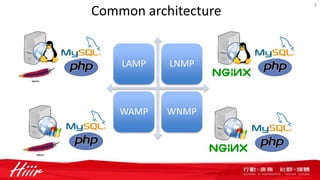
Common architecture
LAMP LNMP
WAMP WNMP
3
About nginx
• nginx [engine x] is an HTTP and reverse proxy server, a mail proxy server, and a
generic TCP proxy server, originally written by Igor Sysoev. According to Netcraft,
nginx served or proxied 23.94% busiest sites in November 2015. Here are some of
the success stories: Netflix, Wordpress.com, FastMail.FM.
• nginx is noted to be a good server for sites that need fast, efficient reverse proxies
or fast, efficient serving of static content. It is acclaimed for having low memory
usage and is recommended for sites running on a VPS.
4
source:
http://nginx.org/en/
https://www.wikivs.com/wiki/Apache_vs_nginx
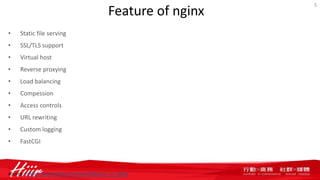
Feature of nginx
• Static file serving
• SSL/TLS support
• Virtual host
• Reverse proxying
• Load balancing
• Compession
• Access controls
• URL rewriting
• Custom logging
• FastCGI
5
source: https://www.wikivs.com/wiki/Apache_vs_nginx
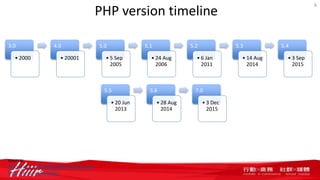
PHP version timeline
3.0
• 2000
4.0
• 20001
5.0
• 5 Sep
2005
5.1
• 24 Aug
2006
5.2
• 6 Jan
2011
5.3
• 14 Aug
2014
5.4
• 3 Sep
2015
6
5.5
• 20 Jun
2013
5.6
• 28 Aug
2014
7.0
• 3 Dec
2015
source:
http://php.net/supported-versions.php
http://php.net/eol.php
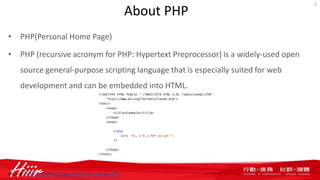
About PHP
• PHP(Personal Home Page)
• PHP (recursive acronym for PHP: Hypertext Preprocessor) is a widely-used open
source general-purpose scripting language that is especially suited for web
development and can be embedded into HTML.
7
source: http://php.net/manual/en/intro-whatis.php
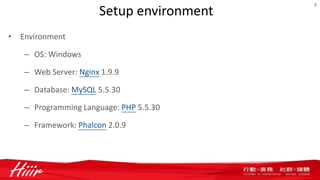
Setup environment
• Environment
– OS: Windows
– Web Server: Nginx 1.9.9
– Database: MySQL 5.5.30
– Programming Language: PHP 5.5.30
– Framework: Phalcon 2.0.9
8
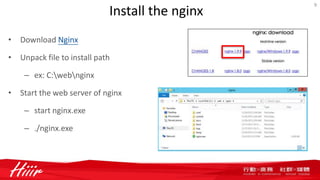
Install the nginx
• Download Nginx
• Unpack file to install path
– ex: C:webnginx
• Start the web server of nginx
– start nginx.exe
– ./nginx.exe
9
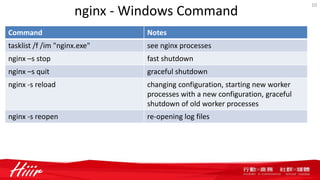
nginx - Windows Command
Command Notes
tasklist /f /im "nginx.exe" see nginx processes
nginx –s stop fast shutdown
nginx –s quit graceful shutdown
nginx -s reload changing configuration, starting new worker
processes with a new configuration, graceful
shutdown of old worker processes
nginx -s reopen re-opening log files
10
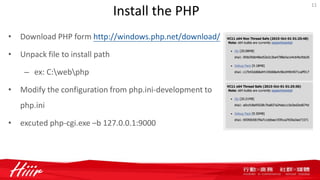
Install the PHP
• Download PHP form http://windows.php.net/download/
• Unpack file to install path
– ex: C:webphp
• Modify the configuration from php.ini-development to
php.ini
• excuted php-cgi.exe –b 127.0.0.1:9000
11
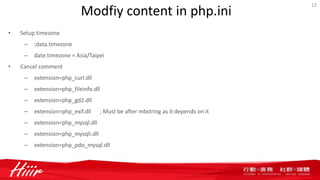
Modfiy content in php.ini
• Setup timezone
– ;data.timezone
– date.timezone = Asia/Taipei
• Cancel comment
– extension=php_curl.dll
– extension=php_fileinfo.dll
– extension=php_gd2.dll
– extension=php_exif.dll ; Must be after mbstring as it depends on it
– extension=php_mysql.dll
– extension=php_mysqli.dll
– extension=php_pdo_mysql.dll
12
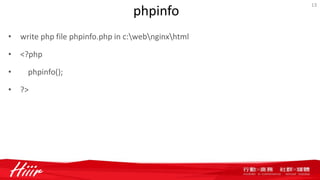
phpinfo
• write php file phpinfo.php in c:webnginxhtml
• <?php
• phpinfo();
• ?>
13
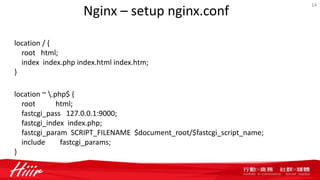
Nginx – setup nginx.conf
14
location / {
root html;
index index.php index.html index.htm;
}
location ~ .php$ {
root html;
fastcgi_pass 127.0.0.1:9000;
fastcgi_index index.php;
fastcgi_param SCRIPT_FILENAME $document_root/$fastcgi_script_name;
include fastcgi_params;
}
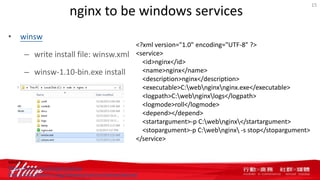
nginx to be windows services
• winsw
– write install file: winsw.xml
– winsw-1.10-bin.exe install
15
<?xml version="1.0" encoding="UTF-8" ?>
<service>
<id>nginx</id>
<name>nginx</name>
<description>nginx</description>
<executable>C:webnginxnginx.exe</executable>
<logpath>C:webnginxlogs</logpath>
<logmode>roll</logmode>
<depend></depend>
<startargument>-p C:webnginx</startargument>
<stopargument>-p C:webnginx -s stop</stopargument>
</service>
source:
https://kenai.com/projects/winsw
http://repo.jenkins-ci.org/releases/com/sun/winsw/winsw/
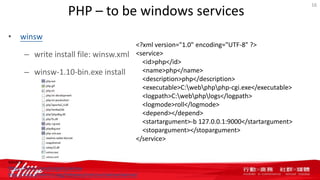
PHP – to be windows services
• winsw
– write install file: winsw.xml
– winsw-1.10-bin.exe install
16
<?xml version="1.0" encoding="UTF-8" ?>
<service>
<id>php</id>
<name>php</name>
<description>php</description>
<executable>C:webphpphp-cgi.exe</executable>
<logpath>C:webphplogs</logpath>
<logmode>roll</logmode>
<depend></depend>
<startargument>-b 127.0.0.1:9000</startargument>
<stopargument></stopargument>
</service>
source:
https://kenai.com/projects/winsw
http://repo.jenkins-ci.org/releases/com/sun/winsw/winsw/
Phalcon
• Download Phalcon form https://phalconphp.com/en/download/windows
• Copy php_phalcon.dll to php extension dir
– ex: C:webphpext
• Modify the configuration from php.ini-development to php.ini
– extension=php_phalcon.dll
17
Mission
• 50%: Install nginx & run web server (use your IP)
• 50%: Install PHP & Phalcon & execute phpinfo.php
– phpinfo.php
– include phalcon
18
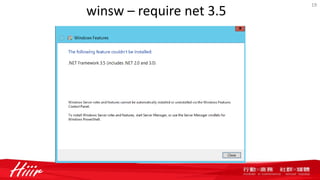
winsw – require net 3.5
19
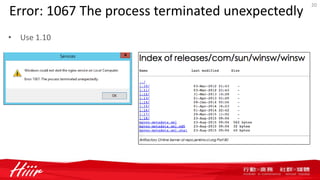
Error: 1067 The process terminated unexpectedly
• Use 1.10
20
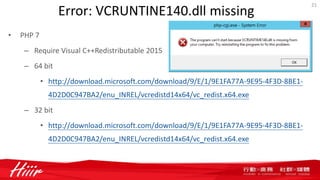
Error: VCRUNTINE140.dll missing
• PHP 7
– Require Visual C++Redistributable 2015
– 64 bit
• http://download.microsoft.com/download/9/E/1/9E1FA77A-9E95-4F3D-8BE1-
4D2D0C947BA2/enu_INREL/vcredistd14x64/vc_redist.x64.exe
– 32 bit
• http://download.microsoft.com/download/9/E/1/9E1FA77A-9E95-4F3D-8BE1-
4D2D0C947BA2/enu_INREL/vcredistd14x64/vc_redist.x64.exe
21
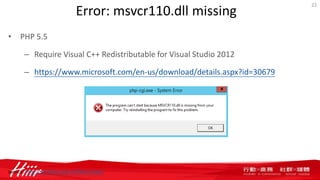
Error: msvcr110.dll missing
• PHP 5.5
– Require Visual C++ Redistributable for Visual Studio 2012
– https://www.microsoft.com/en-us/download/details.aspx?id=30679
22
source: http://windows.php.net/download/

20151229 wnmp & phalcon micro app - part I

  • 1.
    行動APP開發管理實務 WNMP & PhalconMicro App - Part I 2015.12.29 @ 淡江大學商管B217 Taien Wang <taien_wang@hiiir.com> 時間軸科技股份有限公司
  • 2.
    Agenda • Part I –Windows • nginx • php • Phalcon • Part II – mysql – micro-restful api 2
  • 3.
  • 4.
    About nginx • nginx[engine x] is an HTTP and reverse proxy server, a mail proxy server, and a generic TCP proxy server, originally written by Igor Sysoev. According to Netcraft, nginx served or proxied 23.94% busiest sites in November 2015. Here are some of the success stories: Netflix, Wordpress.com, FastMail.FM. • nginx is noted to be a good server for sites that need fast, efficient reverse proxies or fast, efficient serving of static content. It is acclaimed for having low memory usage and is recommended for sites running on a VPS. 4 source: http://nginx.org/en/ https://www.wikivs.com/wiki/Apache_vs_nginx
  • 5.
    Feature of nginx •Static file serving • SSL/TLS support • Virtual host • Reverse proxying • Load balancing • Compession • Access controls • URL rewriting • Custom logging • FastCGI 5 source: https://www.wikivs.com/wiki/Apache_vs_nginx
  • 6.
    PHP version timeline 3.0 •2000 4.0 • 20001 5.0 • 5 Sep 2005 5.1 • 24 Aug 2006 5.2 • 6 Jan 2011 5.3 • 14 Aug 2014 5.4 • 3 Sep 2015 6 5.5 • 20 Jun 2013 5.6 • 28 Aug 2014 7.0 • 3 Dec 2015 source: http://php.net/supported-versions.php http://php.net/eol.php
  • 7.
    About PHP • PHP(PersonalHome Page) • PHP (recursive acronym for PHP: Hypertext Preprocessor) is a widely-used open source general-purpose scripting language that is especially suited for web development and can be embedded into HTML. 7 source: http://php.net/manual/en/intro-whatis.php
  • 8.
    Setup environment • Environment –OS: Windows – Web Server: Nginx 1.9.9 – Database: MySQL 5.5.30 – Programming Language: PHP 5.5.30 – Framework: Phalcon 2.0.9 8
  • 9.
    Install the nginx •Download Nginx • Unpack file to install path – ex: C:webnginx • Start the web server of nginx – start nginx.exe – ./nginx.exe 9
  • 10.
    nginx - WindowsCommand Command Notes tasklist /f /im "nginx.exe" see nginx processes nginx –s stop fast shutdown nginx –s quit graceful shutdown nginx -s reload changing configuration, starting new worker processes with a new configuration, graceful shutdown of old worker processes nginx -s reopen re-opening log files 10
  • 11.
    Install the PHP •Download PHP form http://windows.php.net/download/ • Unpack file to install path – ex: C:webphp • Modify the configuration from php.ini-development to php.ini • excuted php-cgi.exe –b 127.0.0.1:9000 11
  • 12.
    Modfiy content inphp.ini • Setup timezone – ;data.timezone – date.timezone = Asia/Taipei • Cancel comment – extension=php_curl.dll – extension=php_fileinfo.dll – extension=php_gd2.dll – extension=php_exif.dll ; Must be after mbstring as it depends on it – extension=php_mysql.dll – extension=php_mysqli.dll – extension=php_pdo_mysql.dll 12
  • 13.
    phpinfo • write phpfile phpinfo.php in c:webnginxhtml • <?php • phpinfo(); • ?> 13
  • 14.
    Nginx – setupnginx.conf 14 location / { root html; index index.php index.html index.htm; } location ~ .php$ { root html; fastcgi_pass 127.0.0.1:9000; fastcgi_index index.php; fastcgi_param SCRIPT_FILENAME $document_root/$fastcgi_script_name; include fastcgi_params; }
  • 15.
    nginx to bewindows services • winsw – write install file: winsw.xml – winsw-1.10-bin.exe install 15 <?xml version="1.0" encoding="UTF-8" ?> <service> <id>nginx</id> <name>nginx</name> <description>nginx</description> <executable>C:webnginxnginx.exe</executable> <logpath>C:webnginxlogs</logpath> <logmode>roll</logmode> <depend></depend> <startargument>-p C:webnginx</startargument> <stopargument>-p C:webnginx -s stop</stopargument> </service> source: https://kenai.com/projects/winsw http://repo.jenkins-ci.org/releases/com/sun/winsw/winsw/
  • 16.
    PHP – tobe windows services • winsw – write install file: winsw.xml – winsw-1.10-bin.exe install 16 <?xml version="1.0" encoding="UTF-8" ?> <service> <id>php</id> <name>php</name> <description>php</description> <executable>C:webphpphp-cgi.exe</executable> <logpath>C:webphplogs</logpath> <logmode>roll</logmode> <depend></depend> <startargument>-b 127.0.0.1:9000</startargument> <stopargument></stopargument> </service> source: https://kenai.com/projects/winsw http://repo.jenkins-ci.org/releases/com/sun/winsw/winsw/
  • 17.
    Phalcon • Download Phalconform https://phalconphp.com/en/download/windows • Copy php_phalcon.dll to php extension dir – ex: C:webphpext • Modify the configuration from php.ini-development to php.ini – extension=php_phalcon.dll 17
  • 18.
    Mission • 50%: Installnginx & run web server (use your IP) • 50%: Install PHP & Phalcon & execute phpinfo.php – phpinfo.php – include phalcon 18
  • 19.
  • 20.
    Error: 1067 Theprocess terminated unexpectedly • Use 1.10 20
  • 21.
    Error: VCRUNTINE140.dll missing •PHP 7 – Require Visual C++Redistributable 2015 – 64 bit • http://download.microsoft.com/download/9/E/1/9E1FA77A-9E95-4F3D-8BE1- 4D2D0C947BA2/enu_INREL/vcredistd14x64/vc_redist.x64.exe – 32 bit • http://download.microsoft.com/download/9/E/1/9E1FA77A-9E95-4F3D-8BE1- 4D2D0C947BA2/enu_INREL/vcredistd14x64/vc_redist.x64.exe 21
  • 22.
    Error: msvcr110.dll missing •PHP 5.5 – Require Visual C++ Redistributable for Visual Studio 2012 – https://www.microsoft.com/en-us/download/details.aspx?id=30679 22 source: http://windows.php.net/download/

Editor's Notes

  • #11 處理完所有請求以後,關閉該進程 http://nginx.org/en/docs/windows.html taskkill /F /IM nginx.exe
  • #16 https://kenai.com/projects/winsw http://repo.jenkins-ci.org/releases/com/sun/winsw/winsw/