
Introduction into Cloud Computing


                         Part 4
Understanding Cloud Computing
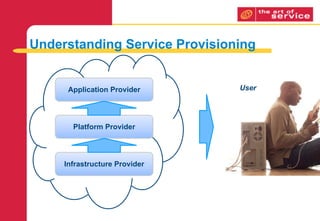
Understanding Service Provisioning


      Application Provider     User


       Platform Provider


     Infrastructure Provider
Dimensions of Provisioning Clouds
Internal/External
Proprietary/Open
Perimeterized/De-perimeterized
Insourced/Outsourced
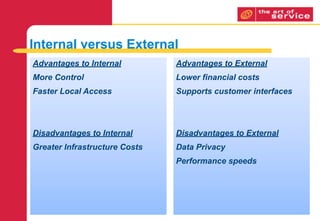
Internal versus External
Advantages to Internal         Advantages to External
More Control                   Lower financial costs
Faster Local Access            Supports customer interfaces


Disadvantages to Internal      Disadvantages to External
Greater Infrastructure Costs   Data Privacy
                               Performance speeds
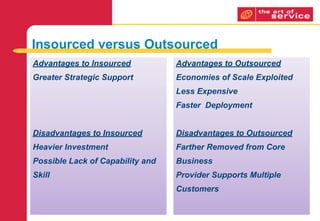
Insourced versus Outsourced
Advantages to Insourced           Advantages to Outsourced
Greater Strategic Support         Economies of Scale Exploited
                                  Less Expensive
                                  Faster Deployment


Disadvantages to Insourced        Disadvantages to Outsourced
Heavier Investment                Farther Removed from Core
Possible Lack of Capability and   Business
Skill                             Provider Supports Multiple
                                  Customers
Business Relationship Management
Service Catalog


                      Broker


     Find Service                    Deliver/Publish Service


                    Invoke Service
     Customer                         Provider
Return on Investment (ROI)
Too many organizations only focus on the reduced financial
expenditure on IT.

An effective business case will also include a financial quantification

of the full range of outcomes supported by
the use of cloud computing.
Managing Risk
Also forming part of the business case, the organization should

develop and maintain a risk profile, which classifies risks on scales

of severity and likelihood to occur with the migration of services to the
cloud e.g. risk of vendor lock-in using the suppliers cloud.
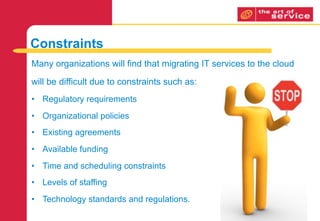
Constraints
Many organizations will find that migrating IT services to the cloud

will be difficult due to constraints such as:
• Regulatory requirements
• Organizational policies
• Existing agreements
• Available funding
• Time and scheduling constraints
• Levels of staffing
• Technology standards and regulations.
Making the change


 • How to manage the change moving
   from in-house IT to cloud based IT
   services
Cultural Change
• Keep the service simple

• Build on service transparency

• Encourage consumer contribution
• Capitalise on the familiar
Managing Organizational Change
• Organization-wide versus Subsystem changes

• Transformational versus Incremental changes

• Remedial versus Developmental changes
• Unplanned versus Planned changes
Thank you

Introduction into Cloud Computing - part 4

  • 1.
    Introduction into CloudComputing Part 4
  • 2.
  • 3.
    Understanding Service Provisioning Application Provider User Platform Provider Infrastructure Provider
  • 4.
    Dimensions of ProvisioningClouds Internal/External Proprietary/Open Perimeterized/De-perimeterized Insourced/Outsourced
  • 5.
    Internal versus External Advantagesto Internal Advantages to External More Control Lower financial costs Faster Local Access Supports customer interfaces Disadvantages to Internal Disadvantages to External Greater Infrastructure Costs Data Privacy Performance speeds
  • 6.
    Insourced versus Outsourced Advantagesto Insourced Advantages to Outsourced Greater Strategic Support Economies of Scale Exploited Less Expensive Faster Deployment Disadvantages to Insourced Disadvantages to Outsourced Heavier Investment Farther Removed from Core Possible Lack of Capability and Business Skill Provider Supports Multiple Customers
  • 7.
  • 8.
    Service Catalog Broker Find Service Deliver/Publish Service Invoke Service Customer Provider
  • 9.
    Return on Investment(ROI) Too many organizations only focus on the reduced financial expenditure on IT. An effective business case will also include a financial quantification of the full range of outcomes supported by the use of cloud computing.
  • 10.
    Managing Risk Also formingpart of the business case, the organization should develop and maintain a risk profile, which classifies risks on scales of severity and likelihood to occur with the migration of services to the cloud e.g. risk of vendor lock-in using the suppliers cloud.
  • 11.
    Constraints Many organizations willfind that migrating IT services to the cloud will be difficult due to constraints such as: • Regulatory requirements • Organizational policies • Existing agreements • Available funding • Time and scheduling constraints • Levels of staffing • Technology standards and regulations.
  • 12.
    Making the change • How to manage the change moving from in-house IT to cloud based IT services
  • 13.
    Cultural Change • Keepthe service simple • Build on service transparency • Encourage consumer contribution • Capitalise on the familiar
  • 14.
    Managing Organizational Change •Organization-wide versus Subsystem changes • Transformational versus Incremental changes • Remedial versus Developmental changes • Unplanned versus Planned changes
  • 15.

Editor's Notes

  • #2 \n
  • #3 A useful analogy to use in understanding cloud computing is the utility service for electricity. A strong comparison was first introduced by Douglas Parkhill in 1966 which mentions many of the characteristics of modern-day cloud computing \n\nAt the start of the industrial Revolution, most manufacturing companies were creating their own energy. When power plants came, however, a ‘Grid’ was formed that delivered electricity to houses and plants. This gird interconnected the different power plants to each other and provided power redundancy. Residential and businesses were charged for what they used. Initially there was a lot of resistance. Some arguments were that it was:\n Too expensive\n Not secure enough\n Not stable / available enough\n\nBut nowadays everybody accepts the electricity delivery method as normal... The idea is that storage and processing power will be delivered in a similar fashion. There will be large organisations creating and managing the IT service where everybody else uses the output from the Internet, a “grid” of networks. IT connectivity becomes a utility, just like power.\n\nOnly when you consider disaster situations and how to minimise the damage done or how to recover quickly from them you will consider electricity as something you need to generate and manage yourself. (via diesel generators or other solutions) as you can not assume that electricity is a given in a disaster situation. \n\nMany references discuss the cloud model as a form of utility computing, referring by analogy to the electric power grid. Generating assets move in and out of the grid seamlessly and all the user knows is that the light goes on when the switch is flipped and the bill comes every month for the kilowatts consumed.\n
  • #4 The transparency of a cloud service to the user provides a tremendous benefit to the service provider in most cases. Additionally, the many different service models supported by cloud computing allows any single service provider to focus on a specific service without needing to provide a complete solution themselves. When a user utilizes a cloud service, it is possible that they are using multiple cloud providers. This situation is more prevalent in SaaS offerings.\n\nLet’s walk through this. As a user, you start using a SaaS application from Company A. Company A supports the application, but they are a small independent software vendor. As an ISV, they have the programming knowledge to design, develop, and deploy the application, but they do not have the infrastructure. In addition, to control costs they have decided to use a PaaS cloud service from another party, Company B, to provide and support a pay-as-you-go Integrated Development Environment. Company B provides the development and testing tools to support several platforms where ISVs, like Company A can build their own applications. IT is possible that Company B provides a core application that Company A develops modules and add-on and markets the “improved” application as their own.\n\nStrategically, Company B may decide that they have a particular niche in providing IDEs, but they cannot support the required scale to provide the necessary infrastructure. It is possible that they can support one infrastructure platform, such as Linux; but their customer base, companies like A, are insisting additional support in Windows, Mobile Windows, Android, Mac, or other operating system platforms. To accommodate their customers, Company B starts to use the infrastructures of another cloud provider, Company C, who can exploit the economies of scale required to provide an infrastructure, but are not interested in providing PaaS or SaaS offerings to end-users.\n\nBy the end of the journey, the user is actually using the services of at least three different cloud providers. While this may not impact the user’s use of the service, the convolution of this situation could be an issue for a business seeking to use the same service. For this reason, understanding the different aspects related to provisioning a cloud should be important.\n
  • #5 While the NIST Definition of Cloud Computing provides a high level perspective of the basic tenets of clouds, it does not provide enough details about how to deliver or exploit cloud resources within a business context. To understand this more clearly, a different model is required. \n\nThe Jericho Forum, a subset of the Open Group, has an expanded model of cloud deployments as part of their current focus: “Securely Collaborating in Clouds”. From an infrastructure perspective, the easiest way to view a cloud deployment is by its physical data center: a single data center supports a single cloud. The cloud model provides four dimensions for distinguishing how clouds are formed and their manner for provisioning services. The four dimensions are:\nInternal/External: defines the physical location of the data, either within an organization’s boundaries or outside the organization’s boundaries (on or off premise)\nProprietary/Open: defines the state of ownership of the technology used; the means for provisioning cloud services is owned and controlled by the service provider or not. This dimension impacts the portability of solution (the more proprietary the provision, the harder it will be to move from one cloud solution to another).\nPerimeterized/De-perimeterized architectures: defines whether the cloud operates within the traditional IT security perimeter or outside that perimeter.\nInsourced/Outsourced: the cloud service is provided by an organization’s IT department exclusively or by a third party. An insourced cloud is typically an internal, proprietary, and perimeterized solution and represents the majority of private clouds. An outsourced cloud is typically an external, open, de-perimeterized solution and clearly represents a NIST-defined public cloud.\n\n(Cloud Cube Model ver 1.0, Jericho Forum: April 2009)\n\nHow a cloud is provisioned will expose some basic advantages and issues related to different cloud solutions. The Cloud Cube Model addresses cloud provisioning from the perspective of the business, not the service provider.\n
  • #6 The first dimension of provisioning clouds relates to the physical location of the data relative to the organization’s boundaries. If the data is located within the organization’s data center, the cloud is considered internal. If the data is located within a data center outside of the boundaries of the organization, the cloud is considered external. The internal/external dimension does not address security of the data, only its location: the security of the data can be the same whether the cloud is internal or external. The internal/external dimension also does not address support of the cloud as an organization’s IT department may support an internal or external cloud solution. \n\nIt is possible for the data used in a cloud service to be stored in a data center different from the data center managing the application using the data. This practice is actually common when a business uses the data from another source; however data transfers are not in real time and the data is often stored, at least temporarily, on a local drive. Real time transactions of data involve more resources, such as bandwidth, throughput, and data speeds – which will eventually lead to greater financial costs. Service providers, like Amazon AWS, will price packages based on data transactions per hour: usually data-out transactions, while data-in transactions are free. One of the considerations in this dimension is whether the data and the application using the data is located in the same data center. \n\nWhen the data is stored within an internal data center, the organization has greater control over the data and responsibility for the data, particularly in terms of managing the data and security. In some situations, the organization can use monitoring tools that are not supported within an external cloud environment. This condition is sometimes the deciding point for using external cloud services. Direct access to the data is also faster because the data is stored locally. Unfortunately, internal data storage leads to greater infrastructure costs for the organization, as they must implement and maintain storage devices and servers. As the business grows, different architectures, such as SAN or NAS, may be adapted leading to greater complexity and costs. \n
  • #7 The fourth dimension of the Cloud Cube Model answers the question, “Who is running the cloud?”: the organization or a third party. Any attempt to associate this answer to other dimensions or cloud models would be inaccurate as it is possible for an third party to manage an internal, perimeterized cloud (typically seen as a private cloud), just as easily as it is possible for an organization to manage an external, de-perimeterized cloud (typically seen as a public cloud). Historically, few organizations have the technical and architectural capabilities to become cloud providers, whether privately or publically, so the majority of clouds are outsourced solutions. \n\nThe decision to insource or outsource a cloud is a business decision for the organization. Typically, an external service provider will have the economies of scale and architectural experiences to effectively deploy and manage a cloud solution better than a typical organization. At the same time, these external service providers are supporting multiple customers and are farther removed from the core interests of the business: in essence, the are simply providing a service. While an internal team may have the concerns of the business in the forefront, they may not have the capabilities or skills to effectively provide a cloud environment. To insource a cloud solution, the organization will have to invest heavily in design, development, and deployment. \n\nThis level of investment would be strategically justified if the use of the insourced cloud solution was to be extended beyond simply supporting the organization’s operations. Look at the majority of the cloud infrastructure providers and a pattern starts to emerge: offering clouds solutions to their customers was a by-product of supporting themselves using cloud computing. This is true for Amazon, Google, IBM, HP, and Microsoft, as well as many others. Some of these companies may have had a plan for providing cloud support in the future, but knew they had to get their own houses in order. While insourced cloud computing does not always mean that the organization will become a cloud provider, it is likely that the business decision to insource the cloud is driven by the organization’s desire to expand within the market place. \n
  • #8 Up to this point, the discussion has merged the business and IT department, for the business, into one entity and the relationship between this entity and the service provider for the cloud has been the primary focus. While the service provider and the IT department may be the same for any implementation of a private cloud, the definition of a public cloud insists the two parties are different. While much of the discussion will continue to develop the interactions between the service provider of the cloud and the IT department for the business, some time should be spent on the relationship between the business and its IT department.\n\nThis relationship is managed through the Business Relationship Management process, which has two purposes – understand the business, and ensure the delivery of IT meets the needs of the business. Unlike many of the service delivery processes, the Business Relationship Management focuses on the strategic and tactical aspects of support for the business. This starts by understanding how the business “could” use IT from a high level perspective. In general terms, IT is useful to the business in three areas:\nSupport internal operations – in this respect, IT ensures the employees and operations of the company are productive and covers such activities as communications, data gathering, production control, etc. \nSupport customer relationship – IT is used as a means to provide services to the customer or build the company’s public image: external web sites, transaction management, product support, etc. are some of the services that the business maintains to support the customer. \nOptimize the business – improving business services is a constant objective in managing the business. As business processes are designed to capitalize on more effective and efficient methods, IT solutions may to be designed or configured to support the changes in business. Additionally, IT-based measurements may identify areas of improvement for the business.\n\nBusiness Relationship Management will work with the IT department to identify and implement IT solutions for the business and present possible IT solutions to the business, including emerging technologies and methodologies. Business Relationship Management is responsible for creating a good relationship between the business and the IT Service Provider. The relationship is dependent on three areas:\nFunctionality – often referred to as the utility of the service, functionality meets the needs of the business. The more functionality that is provided by a service provider, the greater the costs of providing the service. \nPerformance – often referred to as the warranty of the service, performance reflects the potential productivity of the business in using the service. High performance requirements are typically more expensive, but lower performance capabilities may create downtime and workload lag that increases productivity costs on the business side. \nPrice – the service provider’s charge for providing the service.\n\nThe separation of responsibility between the business organization and the service provider differs based on the type of deployment model and service model adopted. A private cloud solution places all the responsibility on the business organization, while a public SaaS solution places all responsibility on the service provider. Responsibility encompasses providing the necessary functionality, performance, and pricing that aligns with the business’ goals. Different service providers will handle this responsibility as they see fit, so they are not always consistent with each other. Business Relationship Management must determine the appropriate level and delivery of function, performance, and price to support the business, including determining how much should be provided internally or externally. \n
  • #9 When using cloud computing, IT Service Management will be used to broker services. Imagine a situation where all business services can be supported using a cloud solution, but the cloud solution for a particular service may come from a different service provider. \n\nIn this situation, the customer (business, business functions, business processes) provide the service requirements to the broker (IT Service Management). These requirements and further notations about the service will be documented within a service portfolio. The broker will evaluate the different service providers to identify who can provide the best level of service at reasonable cost. \n\nOnce a service provider is found, an agreement is made between the provider and broker, on behalf of the customer. The details of the agreement are documented in a portion of the service portfolio, commonly referred to as the service catalog. \n\nThis service catalog is available to the customer. From it, they can choose the services they would like to utilize. Whenever the customer opens the connection to the service, they are invoking the service on the service provider’s infrastructure. It is possible for the service provider to have a service catalog of service offerings to consumers, while the IT department maintains their own service catalog restricting which offerings are available to the business customer or expanding offerings to include those from other service providers.\n\nIn short:\nThe service provider manages their IT infrastructure and provides a service.\nThe broker manages the service usage to ensure it meets the customer’s requirement\nThe customer uses the services. \n\nThis brokerage approach also works to identify and provide services for in-house technical teams. \n\nThe service catalog will provide the key control for using authorized cloud services within the enterprise. The catalog will define what cloud services are available for use, how they are to be used, and any limits on usage. In most cases, the conditions for using a particular cloud service will not be enforced by the service provider, but will be done through acceptance and trust of the employee. \n\nFor the enterprise, the catalog can provide a central list of all the service providers providing resources to support the business, how those resources are being used, and the pricing of those services. Service reports can be attached to identify current usage of the services, total costs of ownership, and issues related to service provision. \n
  • #10 There is certainly a healthy debate about the potential return on investment that an organization will see as a result of migrating services to the cloud. While a lot of the focus is on reducing an organization’s capital costs, it does increase operational costs. This in itself doesn’t actually offer any financial savings. What this does allow, is the transitioning of costs that are more operational in nature, and remove the requirement for large outlays at any one time. This will certainly help smaller organizations who were previously prevented from taking part in opportunities as a result of those large capital costs. \n\nAnother myth that affects the calculation of the return on investment with cloud computing, is a myth saying that it’s cheaper to let a cloud provider manage the infrastructure rather than buying and managing it in-house. In the majority of cases this is untrue, with most providers, such as Amazon or Google, actually charging customers a premium for any computing power provided. Where the actual benefit does come from is that we only pay that premium when the service is actually be consumed. Rather than paying for it on a 24/7 basis. Even with the very high average utilization rate of 70%, there is still usually a financial savings by running services from the cloud. \n\nOther than the financial savings just mentioned, we should also seek to quantify from a financial perspective, the other benefits that cloud computing introduces. This is a very important, but unfortunately often forgotten element when calculating the return on investment from migrating services to the cloud.\n
  • #11 Another critical element for the successful migration of services to the cloud is the management of risks that would be involved with such an initiative. This involves the assessment of the potential threats that might cause disruption and also how vulnerable the organization is to those threats. Using their chosen methodology, the organization should develop and maintain a risk profile, which classifies risks on scales of severity and likelihood to occur with the migration of services to the cloud.\n\nTo enable the successful management of cultural change, these risks need to be thought of in terms of what are the risks from the IT perspective, business perspective, users perspective, and anyone else who might be involved.\n
  • #12 The last major element involved with the analysis of the potential cloud solutions, along with the return on investment and risks, is the detailed assessment of any constraints that might affect the migration of services to the cloud. \n\nMany organizations will find that migrating IT services to the cloud will be difficult due to constraints such as:\n\nRegulatory requirements\nOrganizational policies\nExisting agreements\nAvailable funding\nTime and scheduling constraints\nLevels of staffing\nTechnology standards and regulations.\n
  • #13 \n
  • #14 When dealing with organizational change, a number of experts speak about the need to change the culture within the organization. When considering cloud computing as a viable IT solution, the focus on cultural change simply because cloud computing is already culturally integrated. In many cases, the business may be farther behind the acceptance of cloud computing services than their employees. Unfortunately, many users of cloud computing may not known they are using cloud computing. Here are some prominent services that utilize cloud computing in some capacity:\nFacebook\nTwitter\nGoogle Apps, including Gmail\nAndroid Services\nMicrosoft Online Services\nWindows Mobile Operating System\nBing Search Engine\nAmazon Marketplace and Kindle\neBay\nApple Products and Services, including iTunes\nYahoo Search Engine\nNetflix\nDropBox\nSkype\n\nThe list has no potential end as many Internet companies are adopting cloud services everyday. The point being made is the general consumer may not be aware their favorite Internet services are being supported by the “cloud”. This realization also highlights an important condition of cultural change – keep the service simple. Most of the aforementioned services are simple to access and use: the startup for most will take 5-10 minutes. \n\nThe attractiveness of cloud computing can be attributed to the level of transparency associated with cloud services: the service being used is not dependent on understanding the infrastructure supporting the service. In traditional business computing, some systems require understanding command lines or the functionality built into the application. Some solutions may require registry changes or reassignment of IP addresses. With cloud services, very little of this type of knowledge is required. From a consumer’s perspective, they start using the service with very little decision making required after the initial setup. This transparency supports rapid cultural change. \n\nTo promote cultural change in using cloud computing, two more critical actions should be taken: allow contribution to the overall solution and stay with the familiar. These points are similar in context because they require knowing the users of the cloud service. The first point requires actively encouraging the community of users to provide feedback on the service, what they like or dislike about the service, the interface, and the available functionality. The mechanisms used to illicit this feedback can vary. The second point requires identifying similar functionality between services and attempting to create a common component. For instance, most services will have some form of authentication, so creating one method of authentication using the same unique identifier will break down barriers. For services that use email capabilities, it would be appropriate to use the same email service for every service. If most employees are using smartphones in their personal lives, it may be to the company’s advantage to create a smartphone app to support a business function.\n
  • #15 Cloud computing is often referred to as a disruptive technology, a term penned by Clayton M. Christensen’s 1997 book, “The Innovator’s Dilemmas”. In the book, he categorized technologies into two general areas: sustaining and disruptive. Sustaining technologies were identified as those which rely on incremental improvements to an existing technology. Disruptive technologies lack any initial refinement, have a limited audience, and its application has not yet been proven. Within this context, cloud computing as a disruptive technology has not fully been defined or explored. \n\nDespite its growth, cloud computing is still a young technology with associated risks to its adoption. Many companies may resist approaching cloud computing because no standards really exist and there are varied views about how to proceed. However, the competitiveness of the marketplace is driving the same businesses towards using cloud services. At some point, every business will have to make a decision about using cloud computing. Discussions on organizational change speak about three key types of changes:\nType I – changes that is done to us\nType II – changes that we do to ourselves\nType III – changes that we do to others\n\nIf a business has not made a decision about cloud computing, in the next few years they may find themselves in a type I change. Type I changes are the worst form of change for an organization because it devours our sense of freedom, control, and security. Type II is the best change type to support because the decision to adopt cloud computing is with the business, not anybody else, the marketplace, or customers. \n\nDone properly, cloud computing will support most approaches to organizational change, which can be summarized as:\n\nREAD SLIDE\n\nIn short, plans to adopt cloud computing should identify if the services will impact the entire enterprise or a specific line of business, will disrupt the current business environment radically or in stages, is addressing a problem or improving current operations, and the level of planning involved in adopting a particular cloud service.\n
  • #16 Well done again for completing this program, we wish you the best of luck for your next program, and every success in your furture Cloud Computing career!\n