

Magnifez Technologies| training@magnifez.com | +91 8008 048 446
Web API Intro
 Web API is a new Web Service end-point available to access data and
metadata.
 Microsoft incorporated Web API in Dynamics 365 release 2.0.
 Web API provides a platform agnostic development experience which
can be used across a wide variety of programming languages, platforms,
and devices.
Magnifez Technologies| training@magnifez.com | +91 8008 048 446
How Web API is Implemented?
 Web API implements OData (Open Data Protocol), version 4.0.
 OData is an OASIS standard for building and consuming Restful APIs.
 Web API combines functionality of SOAP and REST endpoints which is easy
to use regardless of the language used.
 Its previous implementation - REST endpoint (Odata 2.0) was limited in
functionality – only CRUD operations were possible.
Magnifez Technologies| training@magnifez.com | +91 8008 048 446
Web API Operations
With the help of Web API you can perform following operation.
 Create
 Update
 Delete
 Retrieve
 Retrieve multiple( using odata query and fetch)
 Execute Web API functions
 Execute Web API Actions
 Execute Web API Query Functions
Magnifez Technologies| training@magnifez.com | +91 8008 048 446
How to Use Web API
 Web API is built on open standards.
 Microsoft doesn’t provide assemblies for a specific developer experience.
 You can compose HTTP requests for specific operations or use third-party
libraries to generate classes for whatever language or platform you want.
 You can find a list of libraries that support OData version 4.0
at http://www.odata.org/libraries/.
Magnifez Technologies| training@magnifez.com | +91 8008 048 446
Web API Limitations
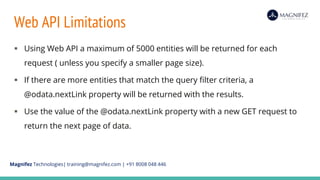
 Using Web API a maximum of 5000 entities will be returned for each
request ( unless you specify a smaller page size).
 If there are more entities that match the query filter criteria, a
@odata.nextLink property will be returned with the results.
 Use the value of the @odata.nextLink property with a new GET request to
return the next page of data.
Magnifez Technologies| training@magnifez.com | +91 8008 048 446
Web API Authentication
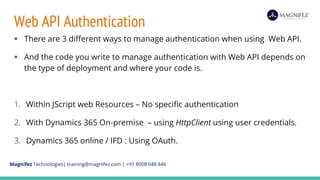
 There are 3 different ways to manage authentication when using Web API.
 And the code you write to manage authentication with Web API depends on
the type of deployment and where your code is.
1. Within JScript web Resources – No specific authentication
2. With Dynamics 365 On-premise – using HttpClient using user credentials.
3. Dynamics 365 online / IFD : Using OAuth.
Magnifez Technologies| training@magnifez.com | +91 8008 048 446
Authentication for CRM Organization Service
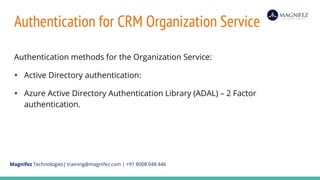
Authentication methods for the Organization Service:
 Active Directory authentication:
 Azure Active Directory Authentication Library (ADAL) – 2 Factor
authentication.
Magnifez Technologies| training@magnifez.com | +91 8008 048 446
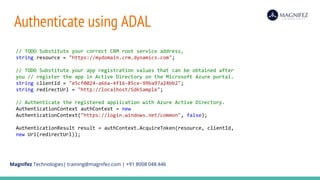
Authenticate using ADAL
// TODO Substitute your correct CRM root service address,
string resource = "https://mydomain.crm.dynamics.com";
// TODO Substitute your app registration values that can be obtained after
you // register the app in Active Directory on the Microsoft Azure portal.
string clientId = "e5cf0024-a66a-4f16-85ce-99ba97a24bb2";
string redirectUrl = "http://localhost/SdkSample";
// Authenticate the registered application with Azure Active Directory.
AuthenticationContext authContext = new
AuthenticationContext("https://login.windows.net/common", false);
AuthenticationResult result = authContext.AcquireToken(resource, clientId,
new Uri(redirectUrl));
Magnifez Technologies| training@magnifez.com | +91 8008 048 446
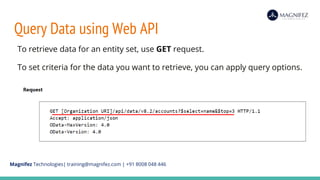
Query Data using Web API
To retrieve data for an entity set, use GET request.
To set criteria for the data you want to retrieve, you can apply query options.
Magnifez Technologies| training@magnifez.com | +91 8008 048 446
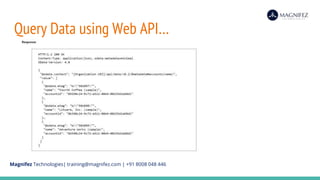
Query Data using Web API…
Magnifez Technologies| training@magnifez.com | +91 8008 048 446
Query Options with Web API
 We can use Query Options to send parameters to Web API Query.
 The first is appended after [?] and subsequent query options are
separated using [&].
 All query options are case-sensitive as shown in the following example.
Magnifez Technologies| training@magnifez.com | +91 8008 048 446
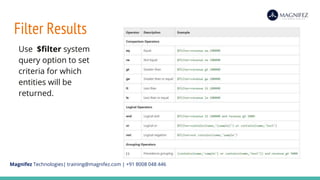
Filter Results
Use $filter system
query option to set
criteria for which
entities will be
returned.
Magnifez Technologies| training@magnifez.com | +91 8008 048 446
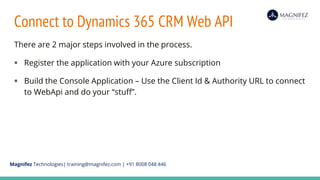
Connect to Dynamics 365 CRM Web API
There are 2 major steps involved in the process.
 Register the application with your Azure subscription
 Build the Console Application – Use the Client Id & Authority URL to connect
to WebApi and do your “stuff”.
Magnifez Technologies| training@magnifez.com | +91 8008 048 446
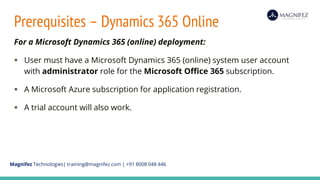
Prerequisites – Dynamics 365 Online
For a Microsoft Dynamics 365 (online) deployment:
 User must have a Microsoft Dynamics 365 (online) system user account
with administrator role for the Microsoft Office 365 subscription.
 A Microsoft Azure subscription for application registration.
 A trial account will also work.
Magnifez Technologies| training@magnifez.com | +91 8008 048 446
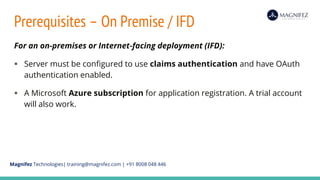
Prerequisites – On Premise / IFD
For an on-premises or Internet-facing deployment (IFD):
 Server must be configured to use claims authentication and have OAuth
authentication enabled.
 A Microsoft Azure subscription for application registration. A trial account
will also work.
Magnifez Technologies| training@magnifez.com | +91 8008 048 446
Register Dynamics 365 app with Azure AD
 Once registered we can connect to Dynamics 365 server, authenticate using
OAuth, and access the web services.
 Your application can access CRM web services using HTTP requests with
Web API or web client proxy classes of the Organization Service.
Magnifez Technologies| training@magnifez.com | +91 8008 048 446
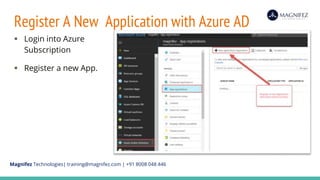
Register A New Application with Azure AD
 Login into Azure
Subscription
 Register a new App.
Magnifez Technologies| training@magnifez.com | +91 8008 048 446
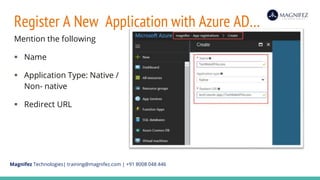
Register A New Application with Azure AD…
Mention the following
 Name
 Application Type: Native /
Non- native
 Redirect URL
Magnifez Technologies| training@magnifez.com | +91 8008 048 446
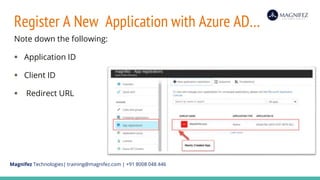
Register A New Application with Azure AD…
Note down the following:
 Application ID
 Client ID
 Redirect URL
Magnifez Technologies| training@magnifez.com | +91 8008 048 446
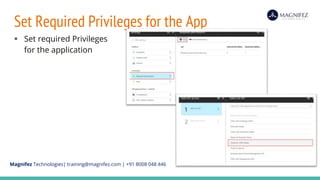
Set Required Privileges for the App
 Set required Privileges
for the application
Magnifez Technologies| training@magnifez.com | +91 8008 048 446
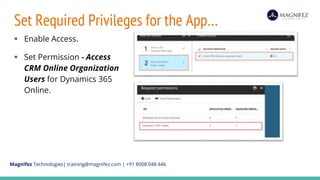
Set Required Privileges for the App…
 Enable Access.
 Set Permission - Access
CRM Online Organization
Users for Dynamics 365
Online.
Magnifez Technologies| training@magnifez.com | +91 8008 048 446
Authentication with JavaScript Web Resources
 When you use Web API with JavaScript you don’t need to include any code
for authentication.
 Within HTML web resources, form scripts, or ribbon commands
 In each of these cases the user is already authenticated by the application
and authentication is managed by the application.
Magnifez Technologies| training@magnifez.com | +91 8008 048 446
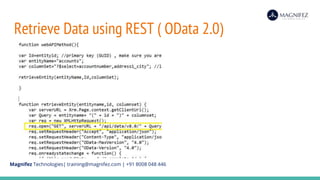
Retrieve Data using REST ( OData 2.0)
 Web API Endpoint is the updated version of REST ( Odata 2.0 ) end
point
 Web API Endpoint URL is bit different from Odata End Point and has
limited functionality.
 accountsSet?$select=accountnumber,address1_city
Magnifez Technologies| training@magnifez.com | +91 8008 048 446
Retrieve Data using REST ( OData 2.0)
Magnifez Technologies| training@magnifez.com | +91 8008 048 446
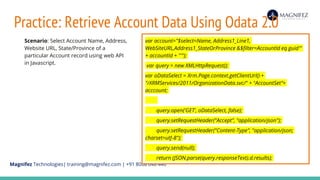
Practice: Retrieve Account Data Using Odata 2.0
var account="$select=Name, Address1_Line1,
WebSiteURL,Address1_StateOrProvince &$filter=AccountId eq guid'"
+ accountId + "'");
var query = new XMLHttpRequest();
var oDataSelect = Xrm.Page.context.getClientUrl() +
"/XRMServices/2011/OrganizationData.svc/" + “AccountSet”+
acccount;
query.open('GET', oDataSelect, false);
query.setRequestHeader("Accept", "application/json");
query.setRequestHeader("Content-Type", "application/json;
charset=utf-8");
query.send(null);
return (JSON.parse(query.responseText).d.results);
Scenario: Select Account Name, Address,
Website URL, State/Province of a
particular Account record using web API
in Javascript.
Magnifez Technologies| training@magnifez.com | +91 8008 048 446
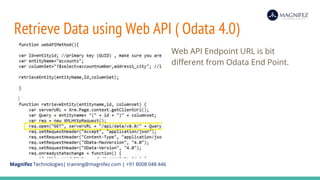
Retrieve Data using Web API ( Odata 4.0)
Web API Endpoint URL is bit
different from Odata End Point.
Magnifez Technologies| training@magnifez.com | +91 8008 048 446

Intro to web api with dynamics 365

  • 1.
  • 2.
    Magnifez Technologies| training@magnifez.com| +91 8008 048 446 Web API Intro  Web API is a new Web Service end-point available to access data and metadata.  Microsoft incorporated Web API in Dynamics 365 release 2.0.  Web API provides a platform agnostic development experience which can be used across a wide variety of programming languages, platforms, and devices.
  • 3.
    Magnifez Technologies| training@magnifez.com| +91 8008 048 446 How Web API is Implemented?  Web API implements OData (Open Data Protocol), version 4.0.  OData is an OASIS standard for building and consuming Restful APIs.  Web API combines functionality of SOAP and REST endpoints which is easy to use regardless of the language used.  Its previous implementation - REST endpoint (Odata 2.0) was limited in functionality – only CRUD operations were possible.
  • 4.
    Magnifez Technologies| training@magnifez.com| +91 8008 048 446 Web API Operations With the help of Web API you can perform following operation.  Create  Update  Delete  Retrieve  Retrieve multiple( using odata query and fetch)  Execute Web API functions  Execute Web API Actions  Execute Web API Query Functions
  • 5.
    Magnifez Technologies| training@magnifez.com| +91 8008 048 446 How to Use Web API  Web API is built on open standards.  Microsoft doesn’t provide assemblies for a specific developer experience.  You can compose HTTP requests for specific operations or use third-party libraries to generate classes for whatever language or platform you want.  You can find a list of libraries that support OData version 4.0 at http://www.odata.org/libraries/.
  • 6.
    Magnifez Technologies| training@magnifez.com| +91 8008 048 446 Web API Limitations  Using Web API a maximum of 5000 entities will be returned for each request ( unless you specify a smaller page size).  If there are more entities that match the query filter criteria, a @odata.nextLink property will be returned with the results.  Use the value of the @odata.nextLink property with a new GET request to return the next page of data.
  • 7.
  • 8.
    Magnifez Technologies| training@magnifez.com| +91 8008 048 446 Web API Authentication  There are 3 different ways to manage authentication when using Web API.  And the code you write to manage authentication with Web API depends on the type of deployment and where your code is. 1. Within JScript web Resources – No specific authentication 2. With Dynamics 365 On-premise – using HttpClient using user credentials. 3. Dynamics 365 online / IFD : Using OAuth.
  • 9.
    Magnifez Technologies| training@magnifez.com| +91 8008 048 446 Authentication for CRM Organization Service Authentication methods for the Organization Service:  Active Directory authentication:  Azure Active Directory Authentication Library (ADAL) – 2 Factor authentication.
  • 10.
    Magnifez Technologies| training@magnifez.com| +91 8008 048 446 Authenticate using ADAL // TODO Substitute your correct CRM root service address, string resource = "https://mydomain.crm.dynamics.com"; // TODO Substitute your app registration values that can be obtained after you // register the app in Active Directory on the Microsoft Azure portal. string clientId = "e5cf0024-a66a-4f16-85ce-99ba97a24bb2"; string redirectUrl = "http://localhost/SdkSample"; // Authenticate the registered application with Azure Active Directory. AuthenticationContext authContext = new AuthenticationContext("https://login.windows.net/common", false); AuthenticationResult result = authContext.AcquireToken(resource, clientId, new Uri(redirectUrl));
  • 11.
  • 12.
    Magnifez Technologies| training@magnifez.com| +91 8008 048 446 Query Data using Web API To retrieve data for an entity set, use GET request. To set criteria for the data you want to retrieve, you can apply query options.
  • 13.
    Magnifez Technologies| training@magnifez.com| +91 8008 048 446 Query Data using Web API…
  • 14.
    Magnifez Technologies| training@magnifez.com| +91 8008 048 446 Query Options with Web API  We can use Query Options to send parameters to Web API Query.  The first is appended after [?] and subsequent query options are separated using [&].  All query options are case-sensitive as shown in the following example.
  • 15.
    Magnifez Technologies| training@magnifez.com| +91 8008 048 446 Filter Results Use $filter system query option to set criteria for which entities will be returned.
  • 16.
  • 17.
    Magnifez Technologies| training@magnifez.com| +91 8008 048 446 Connect to Dynamics 365 CRM Web API There are 2 major steps involved in the process.  Register the application with your Azure subscription  Build the Console Application – Use the Client Id & Authority URL to connect to WebApi and do your “stuff”.
  • 18.
    Magnifez Technologies| training@magnifez.com| +91 8008 048 446 Prerequisites – Dynamics 365 Online For a Microsoft Dynamics 365 (online) deployment:  User must have a Microsoft Dynamics 365 (online) system user account with administrator role for the Microsoft Office 365 subscription.  A Microsoft Azure subscription for application registration.  A trial account will also work.
  • 19.
    Magnifez Technologies| training@magnifez.com| +91 8008 048 446 Prerequisites – On Premise / IFD For an on-premises or Internet-facing deployment (IFD):  Server must be configured to use claims authentication and have OAuth authentication enabled.  A Microsoft Azure subscription for application registration. A trial account will also work.
  • 20.
    Magnifez Technologies| training@magnifez.com| +91 8008 048 446 Register Dynamics 365 app with Azure AD  Once registered we can connect to Dynamics 365 server, authenticate using OAuth, and access the web services.  Your application can access CRM web services using HTTP requests with Web API or web client proxy classes of the Organization Service.
  • 21.
    Magnifez Technologies| training@magnifez.com| +91 8008 048 446 Register A New Application with Azure AD  Login into Azure Subscription  Register a new App.
  • 22.
    Magnifez Technologies| training@magnifez.com| +91 8008 048 446 Register A New Application with Azure AD… Mention the following  Name  Application Type: Native / Non- native  Redirect URL
  • 23.
    Magnifez Technologies| training@magnifez.com| +91 8008 048 446 Register A New Application with Azure AD… Note down the following:  Application ID  Client ID  Redirect URL
  • 24.
    Magnifez Technologies| training@magnifez.com| +91 8008 048 446 Set Required Privileges for the App  Set required Privileges for the application
  • 25.
    Magnifez Technologies| training@magnifez.com| +91 8008 048 446 Set Required Privileges for the App…  Enable Access.  Set Permission - Access CRM Online Organization Users for Dynamics 365 Online.
  • 26.
  • 27.
    Magnifez Technologies| training@magnifez.com| +91 8008 048 446 Authentication with JavaScript Web Resources  When you use Web API with JavaScript you don’t need to include any code for authentication.  Within HTML web resources, form scripts, or ribbon commands  In each of these cases the user is already authenticated by the application and authentication is managed by the application.
  • 28.
    Magnifez Technologies| training@magnifez.com| +91 8008 048 446 Retrieve Data using REST ( OData 2.0)  Web API Endpoint is the updated version of REST ( Odata 2.0 ) end point  Web API Endpoint URL is bit different from Odata End Point and has limited functionality.  accountsSet?$select=accountnumber,address1_city
  • 29.
    Magnifez Technologies| training@magnifez.com| +91 8008 048 446 Retrieve Data using REST ( OData 2.0)
  • 30.
    Magnifez Technologies| training@magnifez.com| +91 8008 048 446 Practice: Retrieve Account Data Using Odata 2.0 var account="$select=Name, Address1_Line1, WebSiteURL,Address1_StateOrProvince &$filter=AccountId eq guid'" + accountId + "'"); var query = new XMLHttpRequest(); var oDataSelect = Xrm.Page.context.getClientUrl() + "/XRMServices/2011/OrganizationData.svc/" + “AccountSet”+ acccount; query.open('GET', oDataSelect, false); query.setRequestHeader("Accept", "application/json"); query.setRequestHeader("Content-Type", "application/json; charset=utf-8"); query.send(null); return (JSON.parse(query.responseText).d.results); Scenario: Select Account Name, Address, Website URL, State/Province of a particular Account record using web API in Javascript.
  • 31.
    Magnifez Technologies| training@magnifez.com| +91 8008 048 446 Retrieve Data using Web API ( Odata 4.0) Web API Endpoint URL is bit different from Odata End Point.
  • 32.