Understanding
Power Platform
Licensing
Ralph Rivas
Principal Consultant/Architect
Collaboration Evangelist
February 29, 2020
2
»Session Goals
› Understand the cost nuances in the various scenarios and combinations
› Try out some scenarios relevant to us (Interactive portion)
› Know where to get more information or keep up with the information
»What Is in Scope
› Power Apps, Power Automate (core)
› Power Virtual Agents (new)
About this session
3
»Ralph Rivas
› Microsoft Aficionado since 198<redacted>
› MCP 1613
› Consultant since 2000, Magenic since 2002
› Accidental SharePoint Guy since 2003
› Solution Architect by Day, Dad/Entertainer by night
› Collaboration Evangelist (read Office 365 Fan)
› On the Mentoring path …
About Your Speaker
4
How about you …?
Some background information helps focus
the session
5
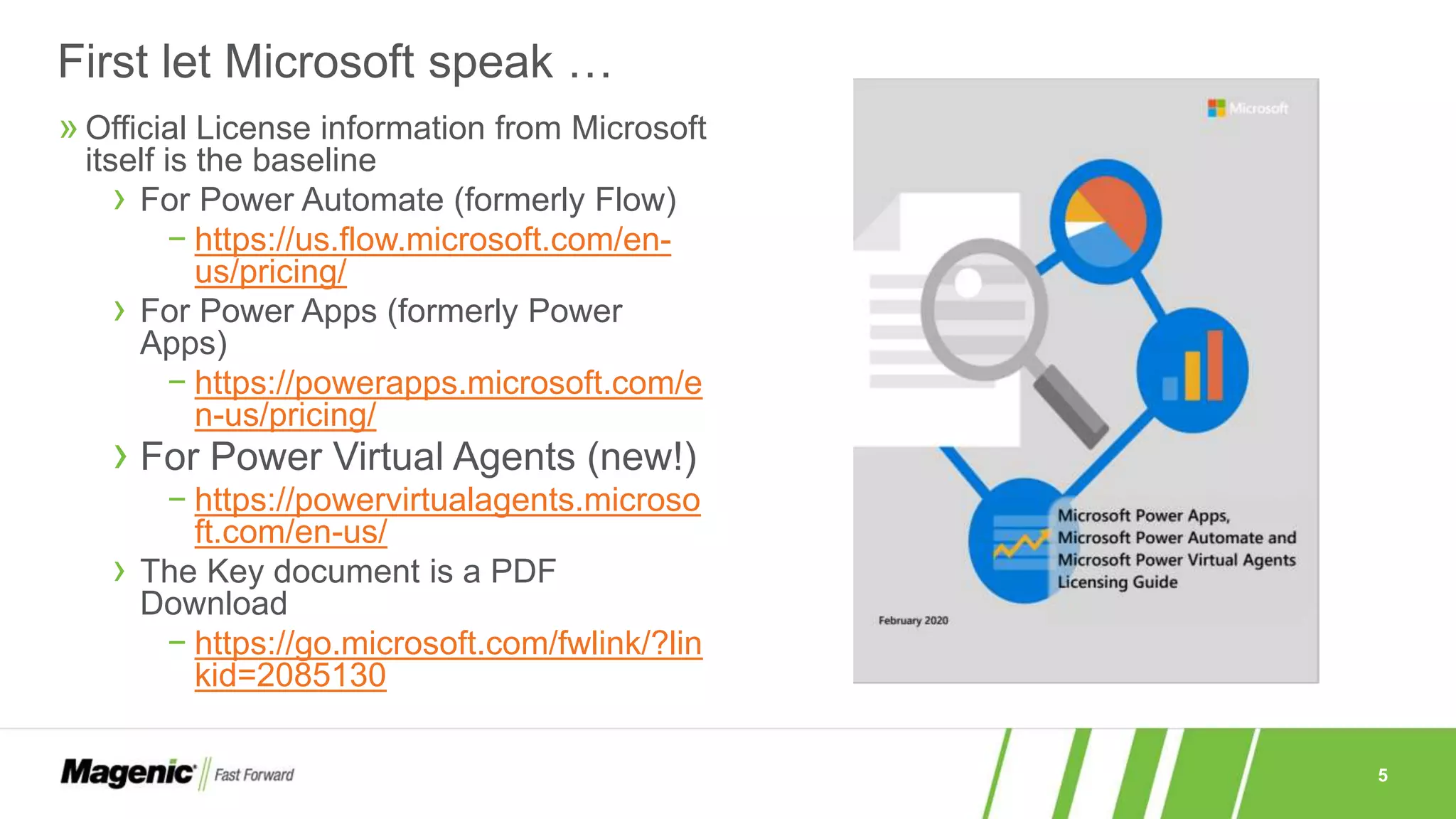
» Official License information from Microsoft
itself is the baseline
› For Power Automate (formerly Flow)
− https://us.flow.microsoft.com/en-
us/pricing/
› For Power Apps (formerly Power
Apps)
− https://powerapps.microsoft.com/e
n-us/pricing/
› For Power Virtual Agents (new!)
− https://powervirtualagents.microso
ft.com/en-us/
› The Key document is a PDF
Download
− https://go.microsoft.com/fwlink/?lin
kid=2085130
First let Microsoft speak …
6
»Pricing is separate from the licensing information
› Not meant to confuse you or force you to look at several places but …
› … allows for pricing to be targeted to its region
»The main pricing links hide the nuances
› … and there are many so understand before selecting
»Pricing can also be found in your Office Admin site
› https://admin.microsoft.com/Adminportal/Home#/catalog (and search “Power”)
› The result may not match the documentation exactly!
− Older plans are represented (for now)
− There may be regional nuances
− Always make sure you check your regular licenses to see what you already have included
About these links and the document
7
»What is your License program or …
»How do you buy Power Platform services?
»Do you know your TAM or Microsoft Rep?
Before diving in, things to look at
8
»Volume
› EA
› EAS
› Service and Cloud Enrollment (SCE)
› Education (EES)
»Other
› MO Government
› MPSA
› MOSPWeb Direct
»Which one are you?
»Who’s your Rep?
Licensing Program Options
9
Power Apps
10
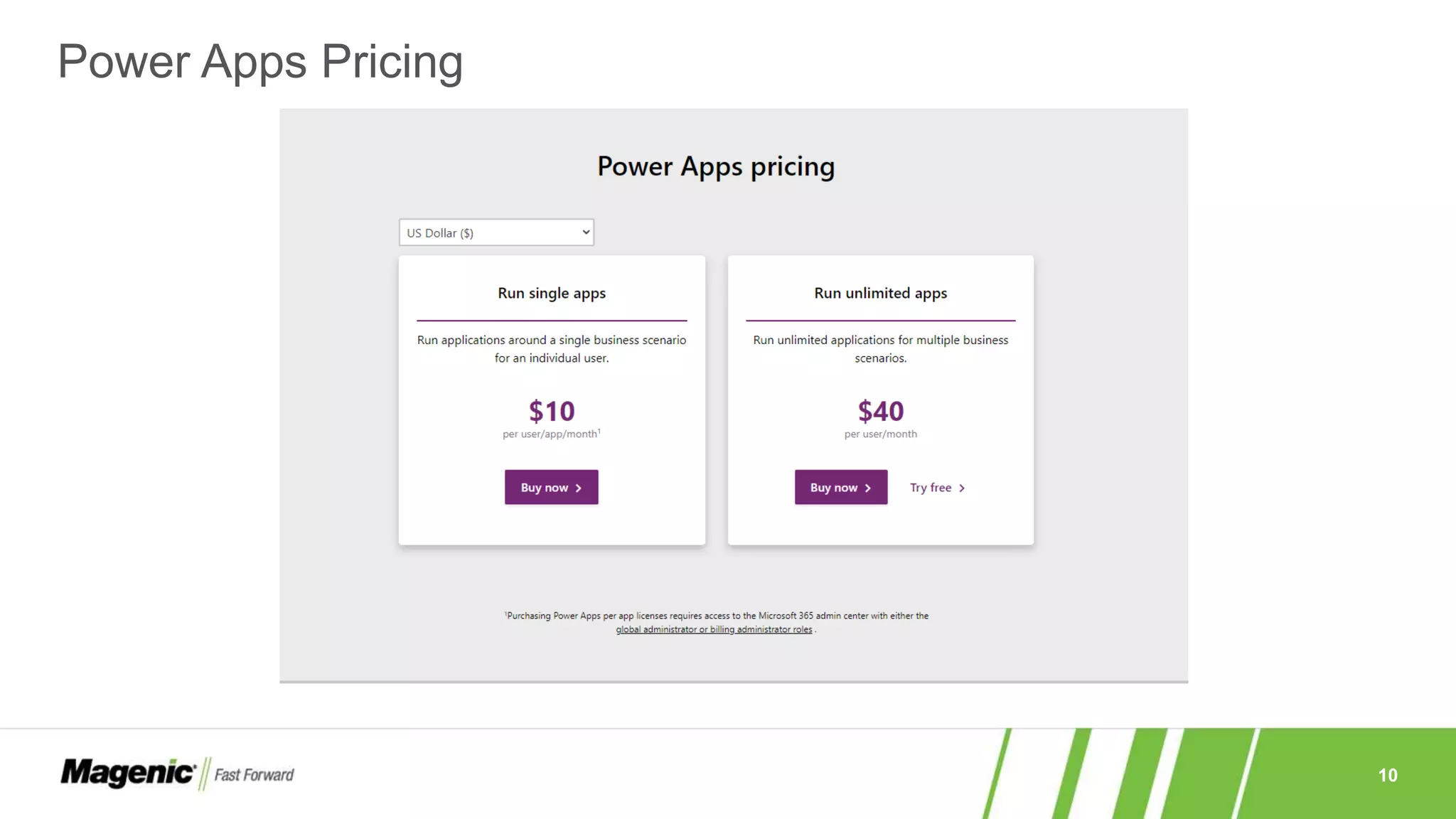
Power Apps Pricing
11
Power Apps – What you get
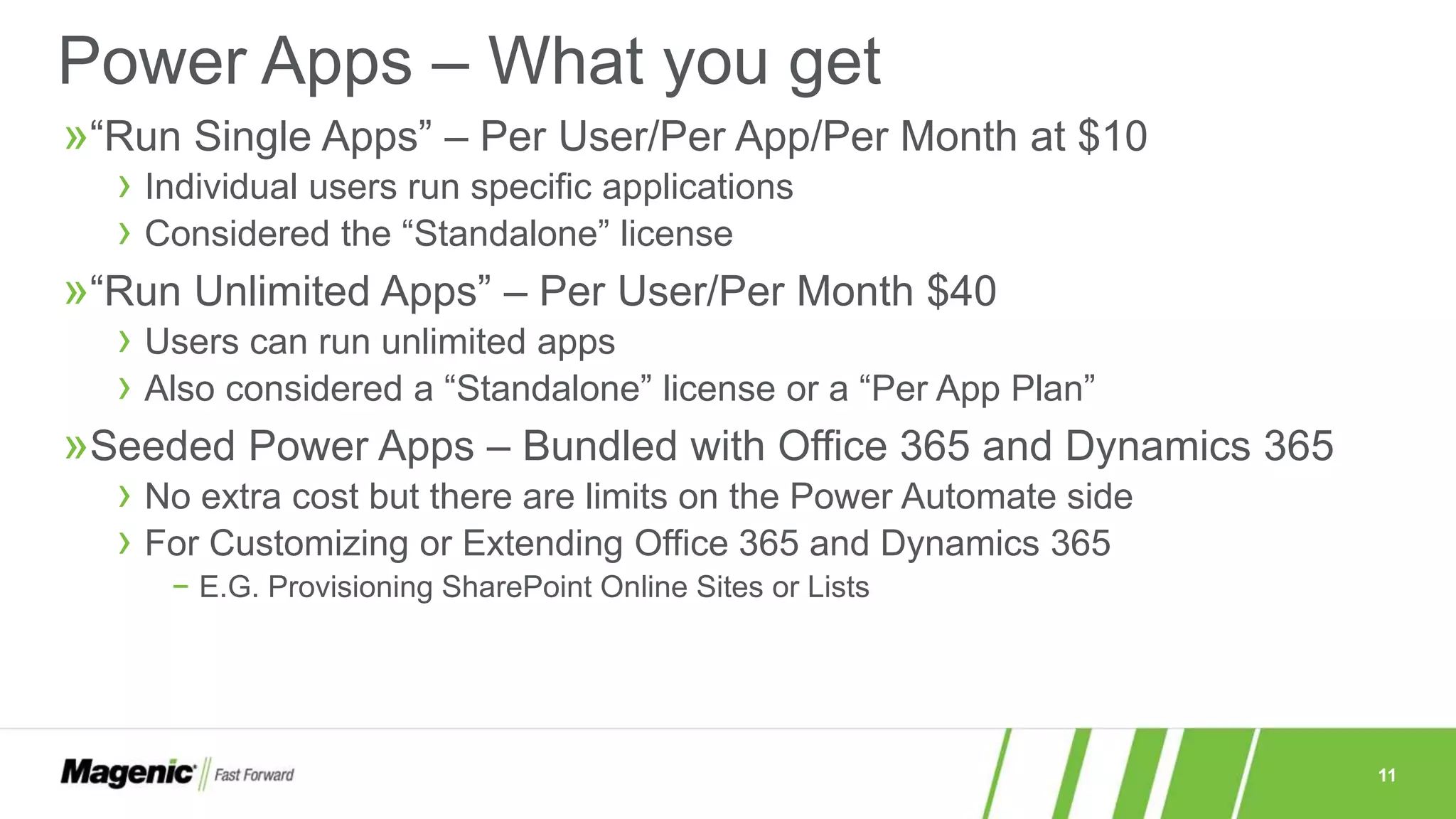
»“Run Single Apps” – Per User/Per App/Per Month at $10
› Individual users run specific applications
› Considered the “Standalone” license
»“Run Unlimited Apps” – Per User/Per Month $40
› Users can run unlimited apps
› Also considered a “Standalone” license or a “Per App Plan”
»Seeded Power Apps – Bundled with Office 365 and Dynamics 365
› No extra cost but there are limits on the Power Automate side
› For Customizing or Extending Office 365 and Dynamics 365
− E.G. Provisioning SharePoint Online Sites or Lists
12
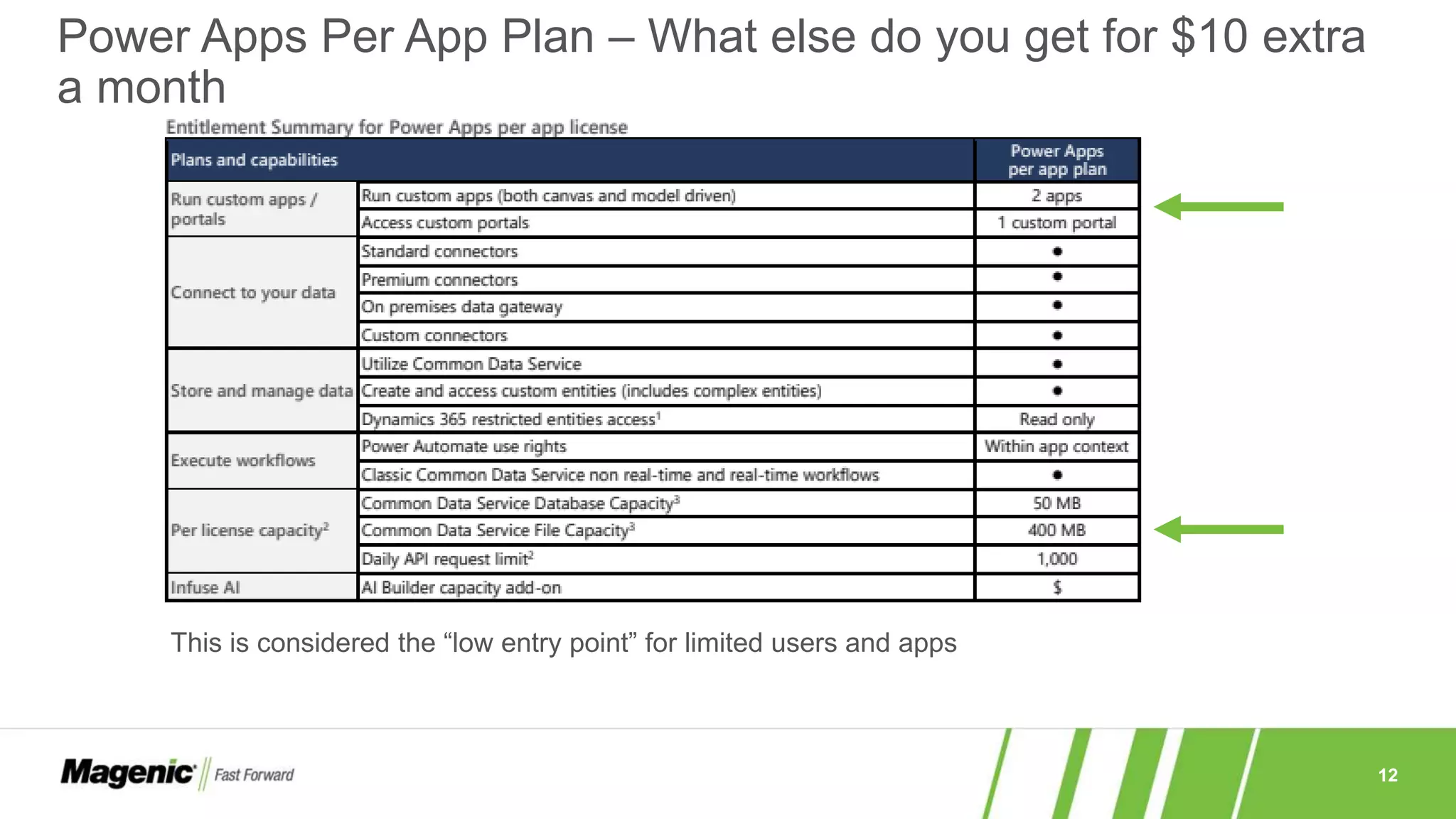
Power Apps Per App Plan – What else do you get for $10 extra
a month
This is considered the “low entry point” for limited users and apps
13
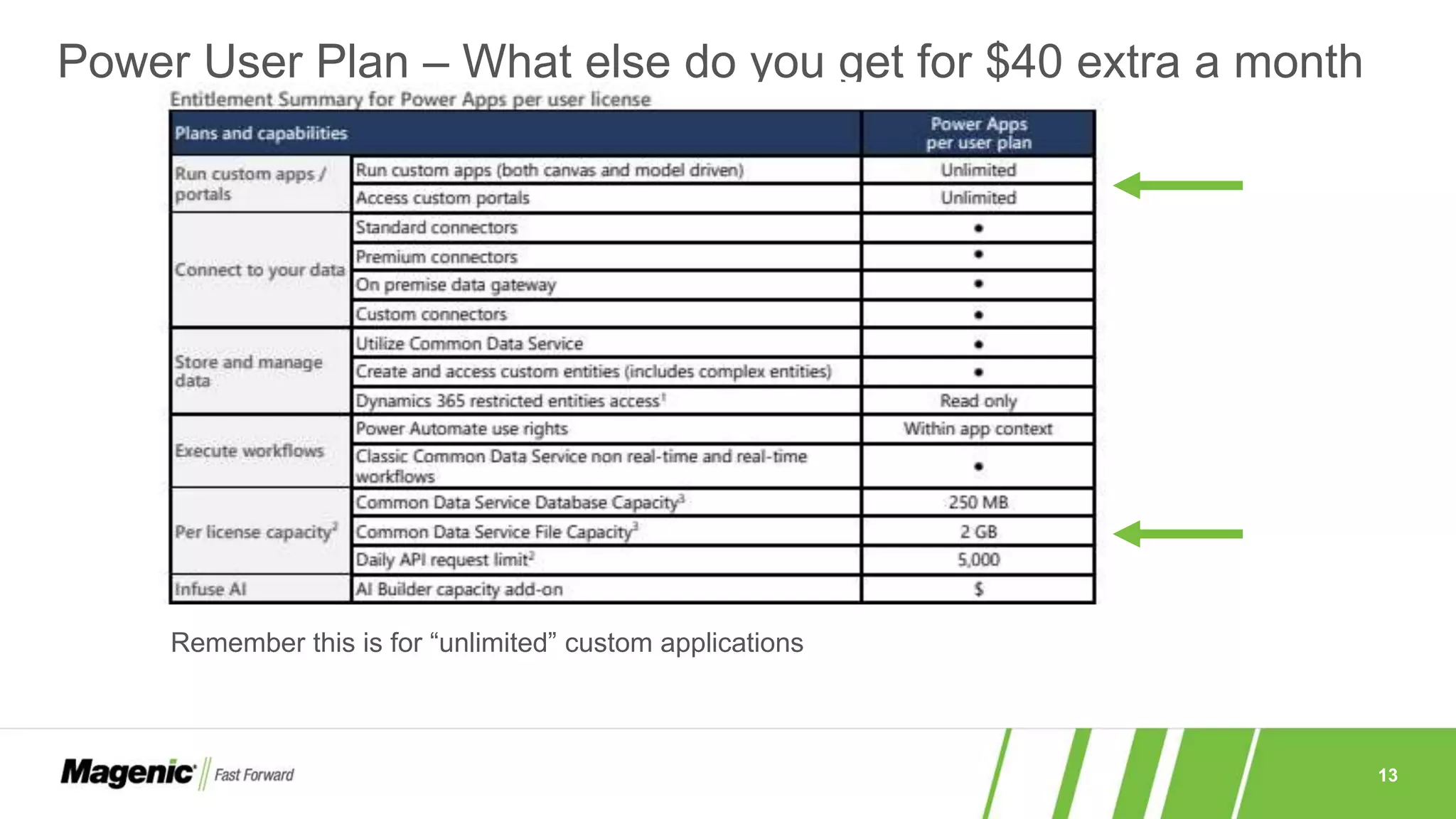
Power User Plan – What else do you get for $40 extra a month
Remember this is for “unlimited” custom applications
14
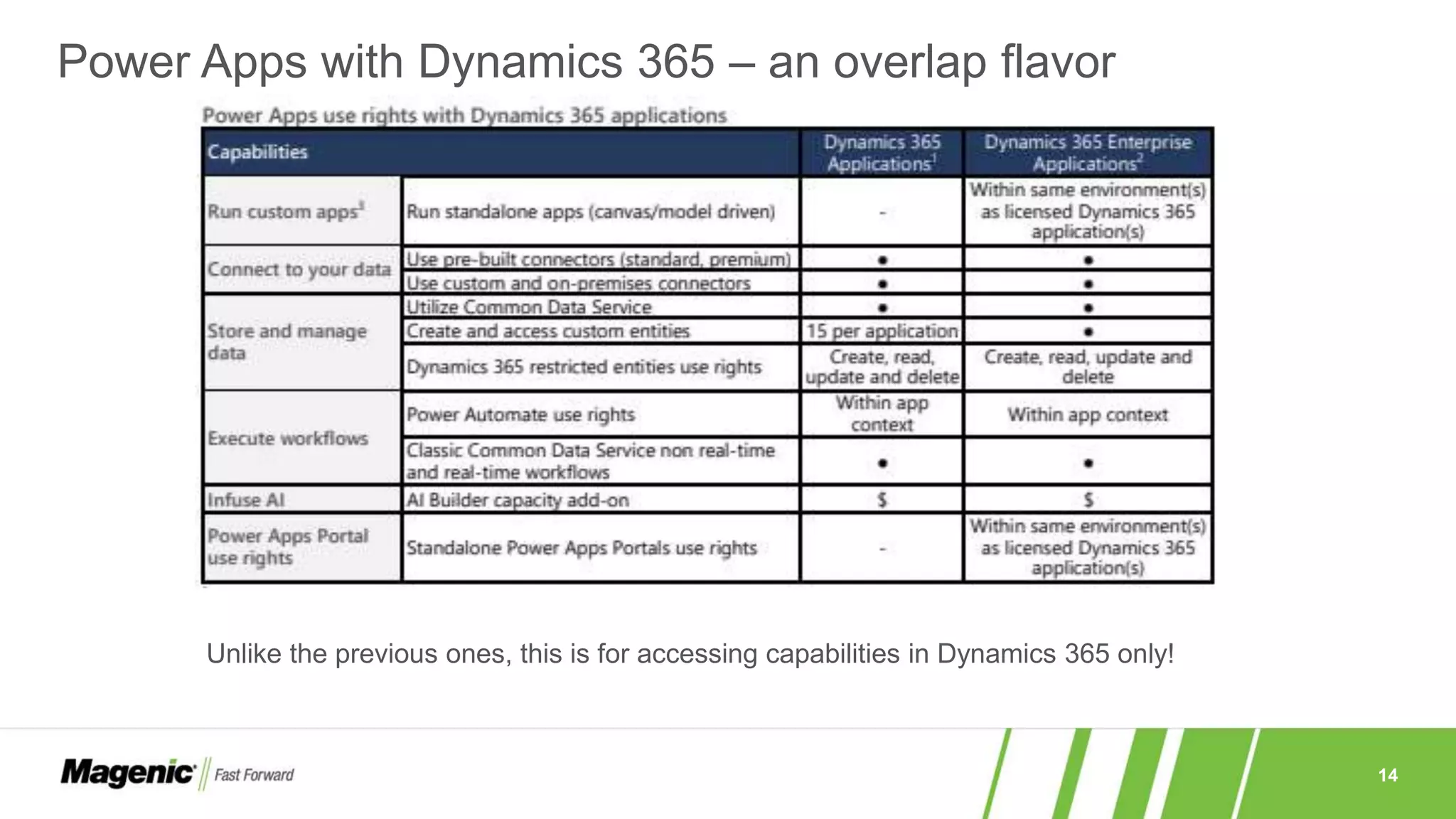
Power Apps with Dynamics 365 – an overlap flavor
Unlike the previous ones, this is for accessing capabilities in Dynamics 365 only!
15
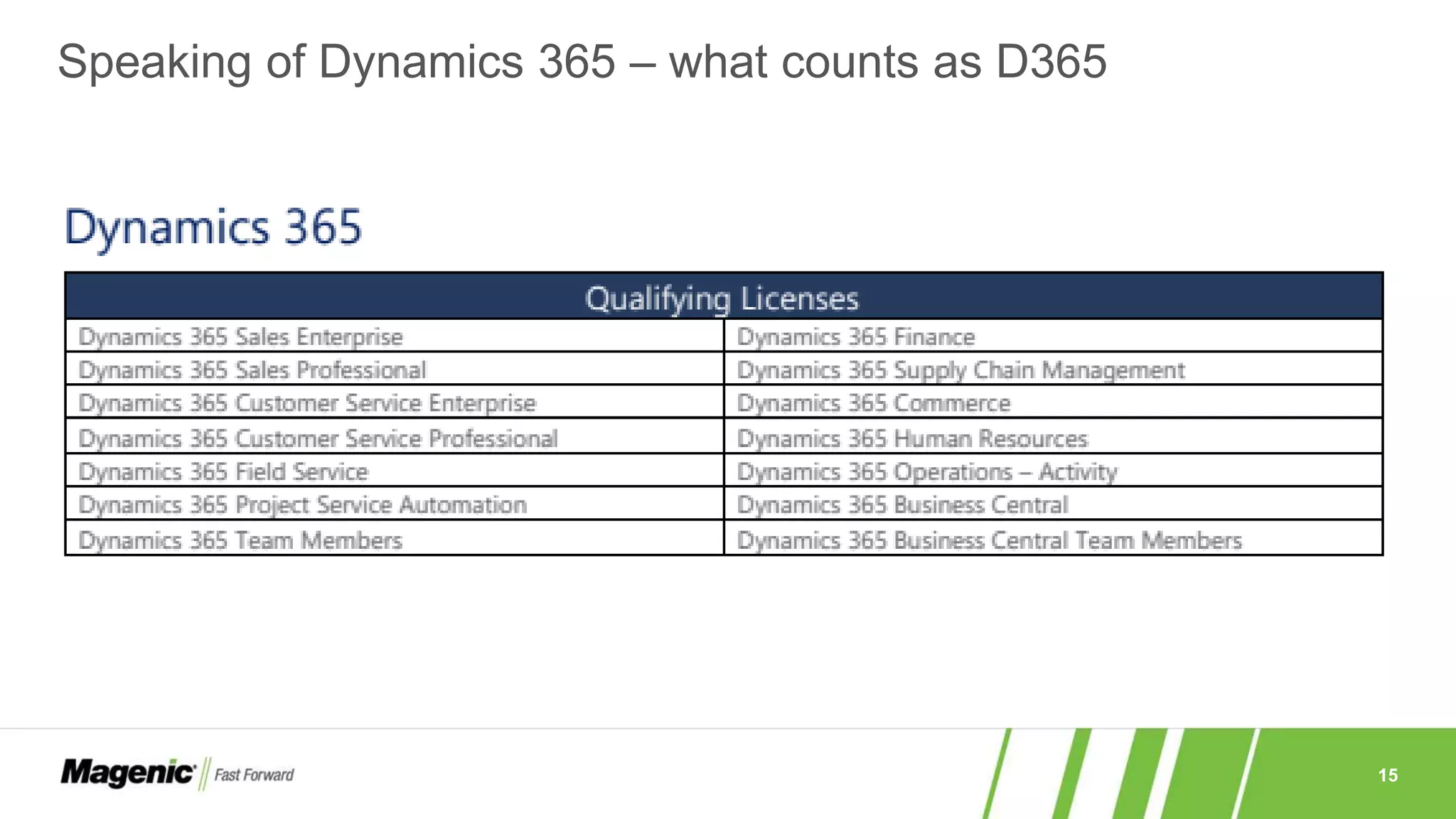
Speaking of Dynamics 365 – what counts as D365
16
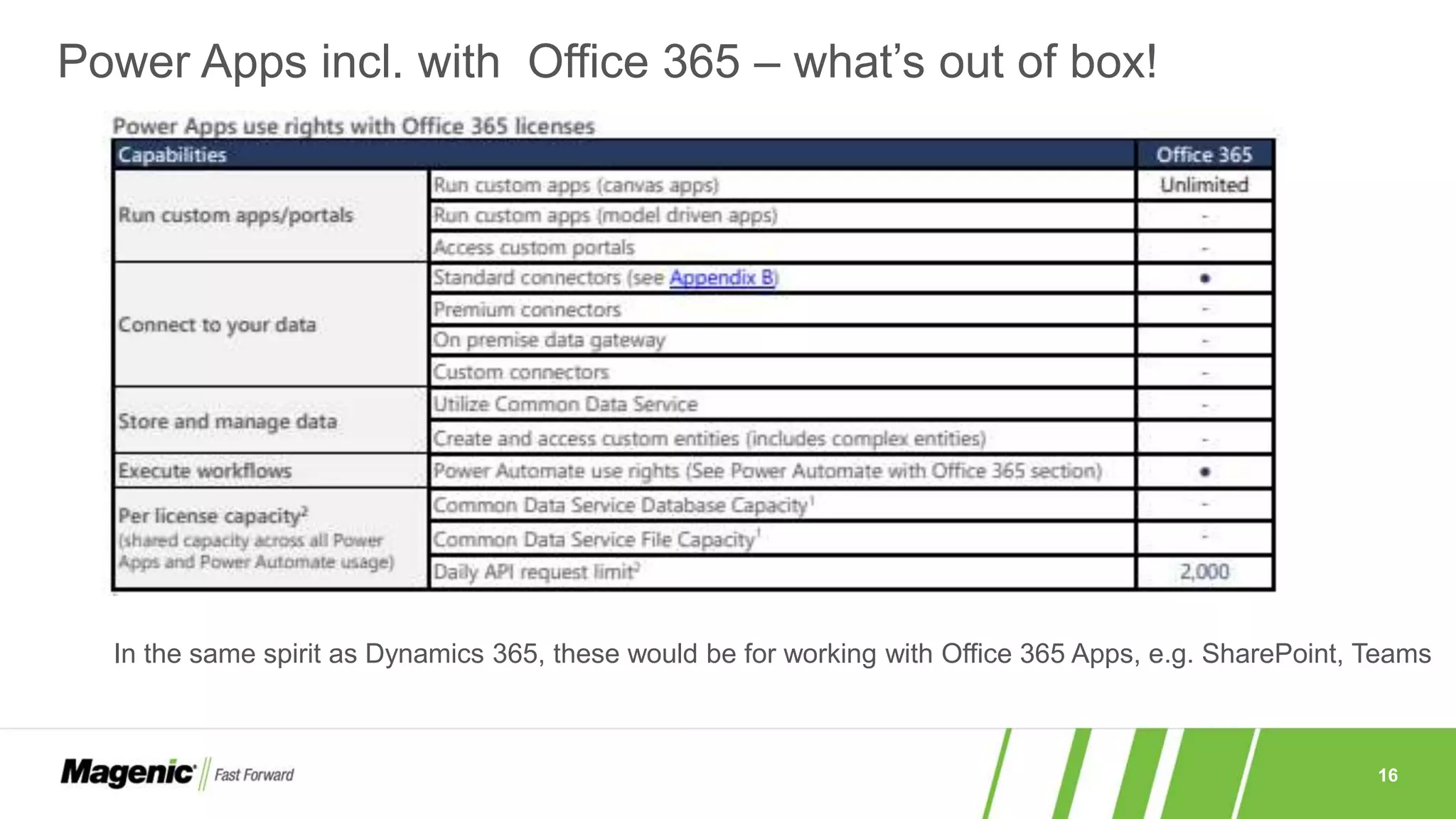
Power Apps incl. with Office 365 – what’s out of box!
In the same spirit as Dynamics 365, these would be for working with Office 365 Apps, e.g. SharePoint, Teams
17
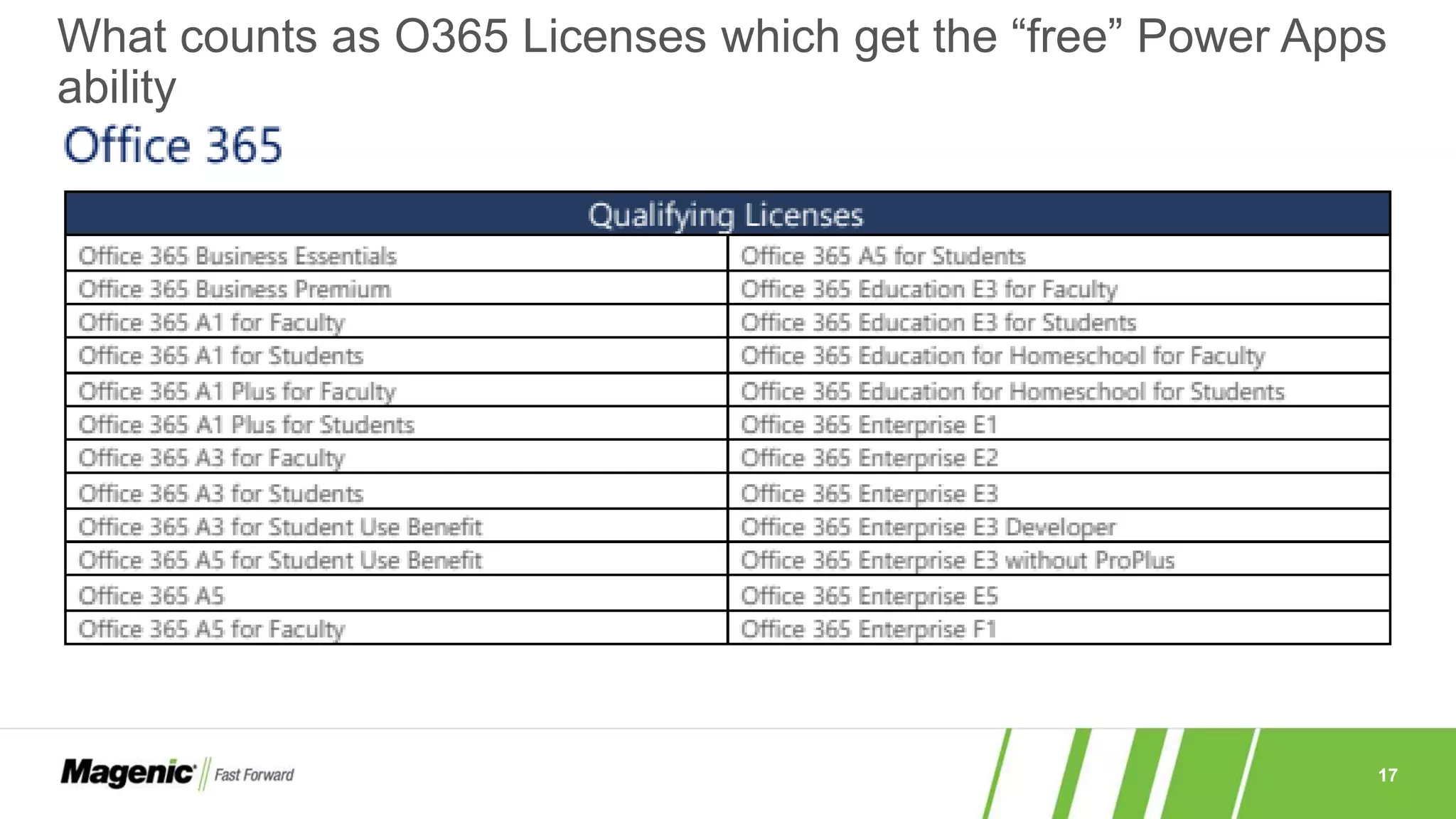
What counts as O365 Licenses which get the “free” Power Apps
ability
18
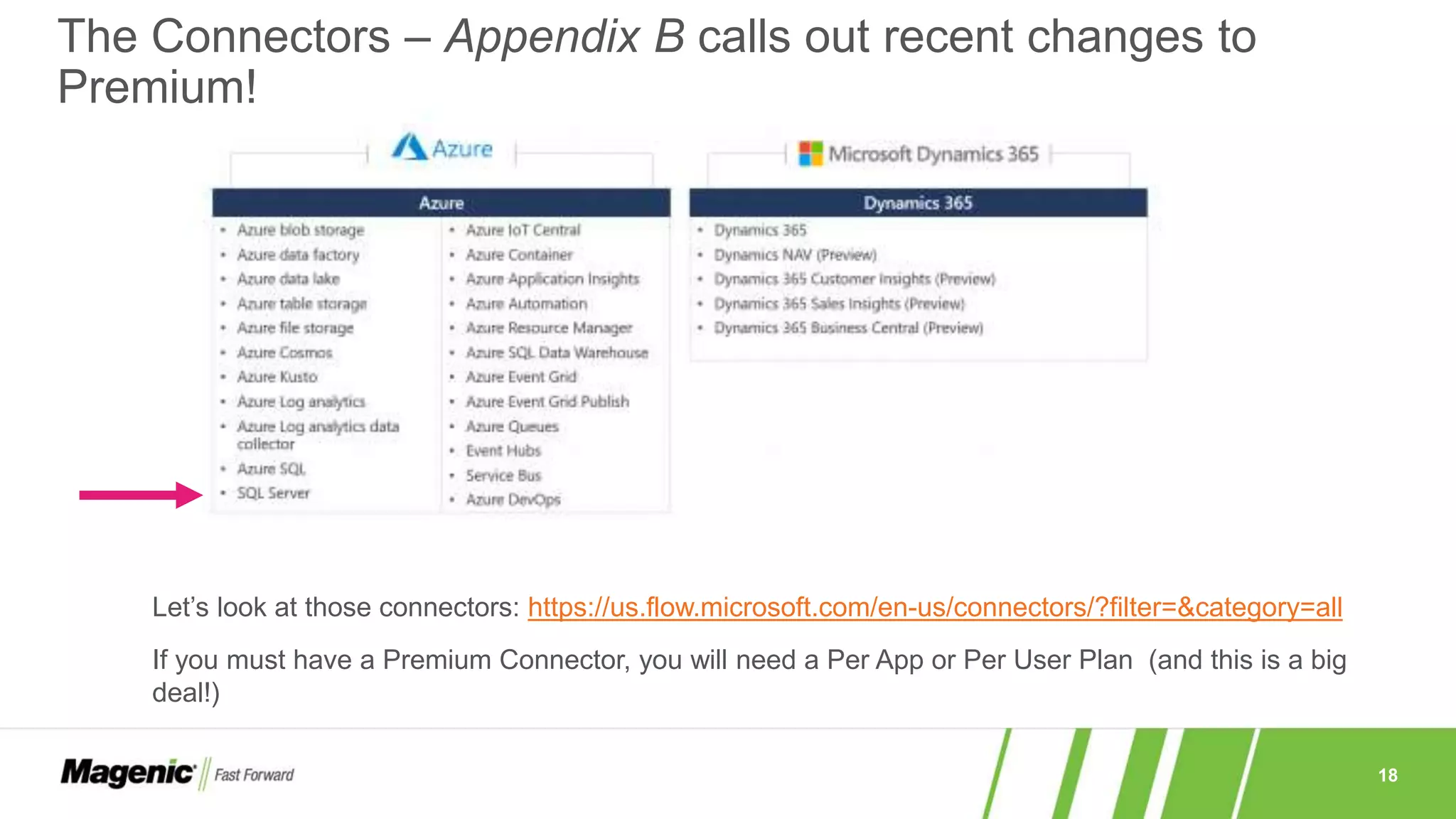
The Connectors – Appendix B calls out recent changes to
Premium!
Let’s look at those connectors: https://us.flow.microsoft.com/en-us/connectors/?filter=&category=all
If you must have a Premium Connector, you will need a Per App or Per User Plan (and this is a big
deal!)
19
»A recent Power App resource with licensing much like a web portal
application
»This is not a SharePoint Web Site and it is its own system
»Quick Survey – do we want to see what you get with this?
› Let’s just see it in the document either here together and quickly discuss or
you can review directly
What about that Power App Portal
20
Questions or Clarifications before moving
on?
21
Power Automate
22
Power Automate Pricing
23
Power Automate – What you get
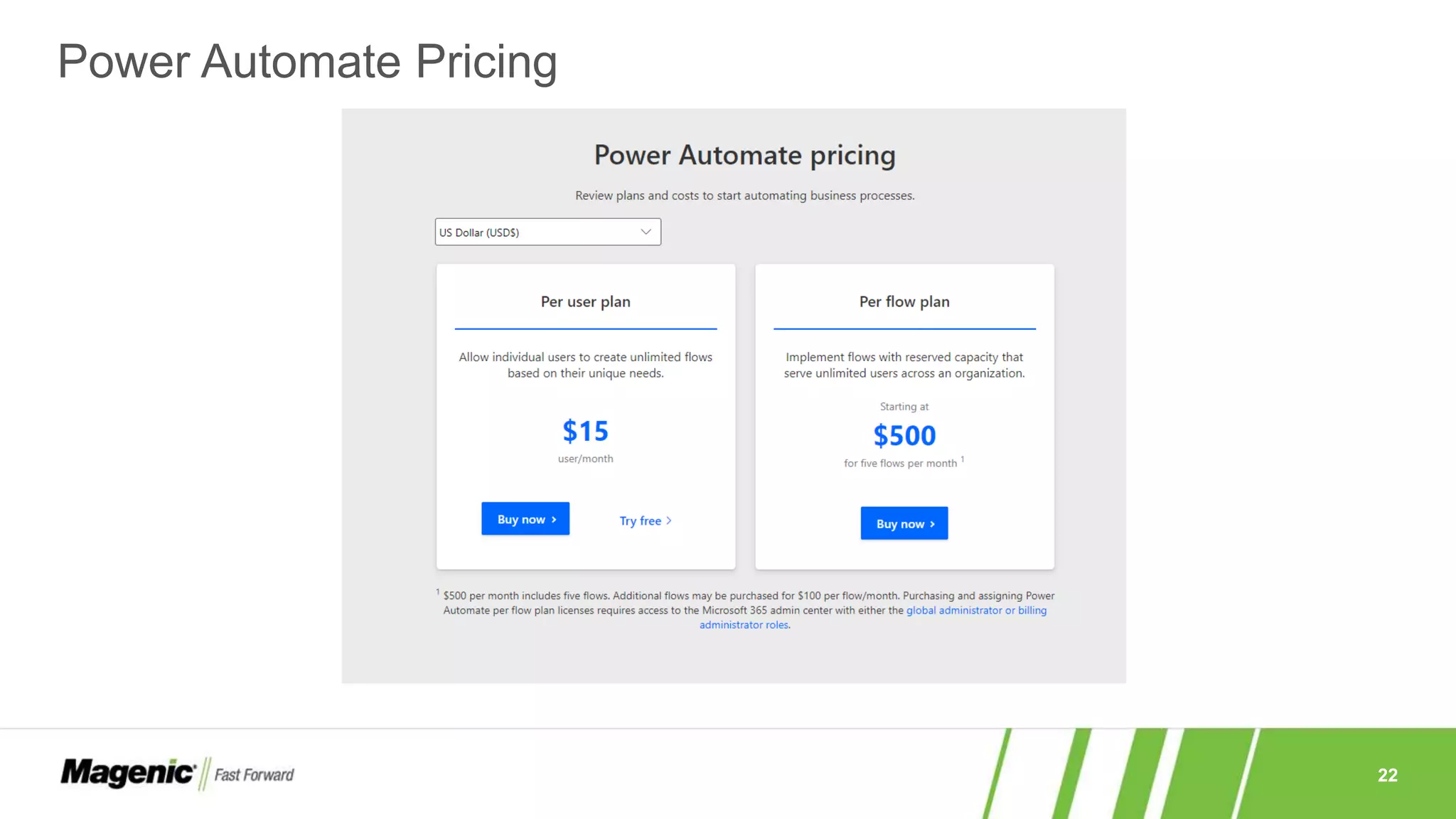
»“Per User Plan” – Per User/Per Month at $15
› Individual users CREATE unlimited flows
› Considered the “Standalone” license
»“Per Flow Plan” – 5 Flows Per Month $500 ($100 for each addl.)
› Implement(!) Flows with “reserved capacity”
› Serve “unlimited users” (this is in bold in the document!)
› Also considered a “Standalone” license or a “Per App Plan”
»Seeded Flow – Bundled with Office 365 and Dynamics 365
› No extra cost but limits discussed previously
› For Customizing or Extending Office 365 and Dynamics 365
− E.G. Provisioning SharePoint Online Sites or Lists
24
»Limits
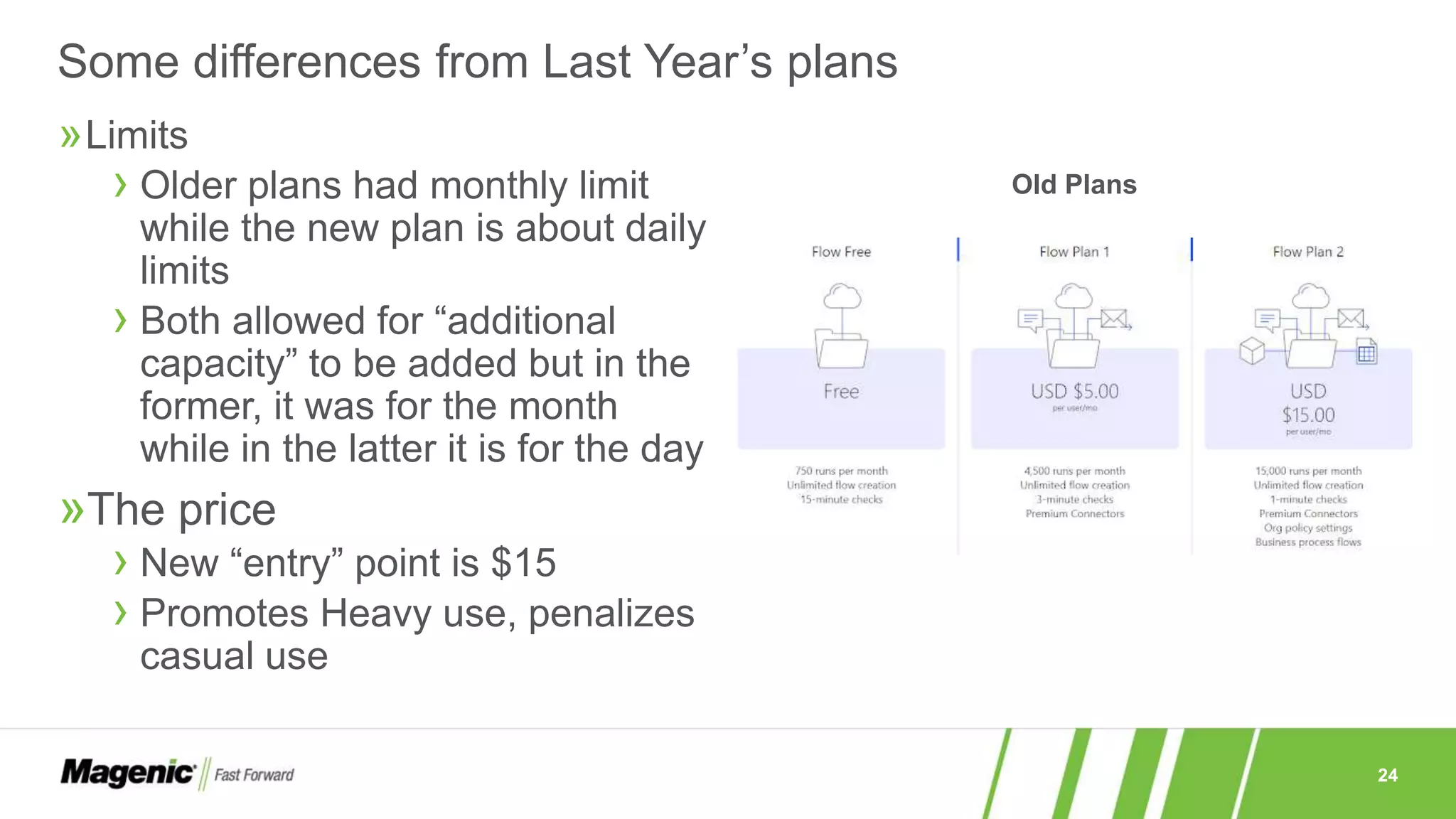
› Older plans had monthly limit
while the new plan is about daily
limits
› Both allowed for “additional
capacity” to be added but in the
former, it was for the month
while in the latter it is for the day
»The price
› New “entry” point is $15
› Promotes Heavy use, penalizes
casual use
Some differences from Last Year’s plans
Old Plans
25
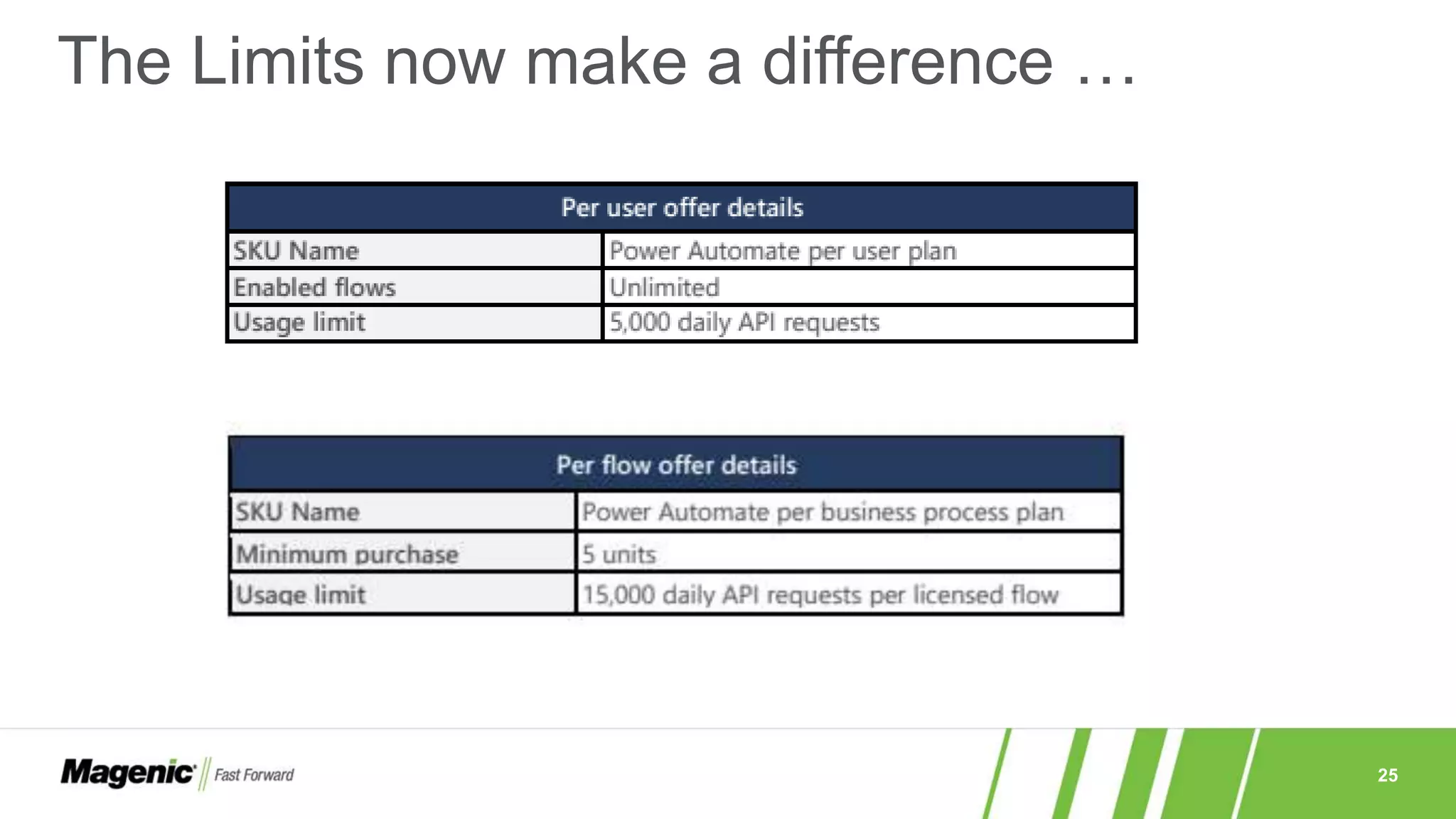
The Limits now make a difference …
26
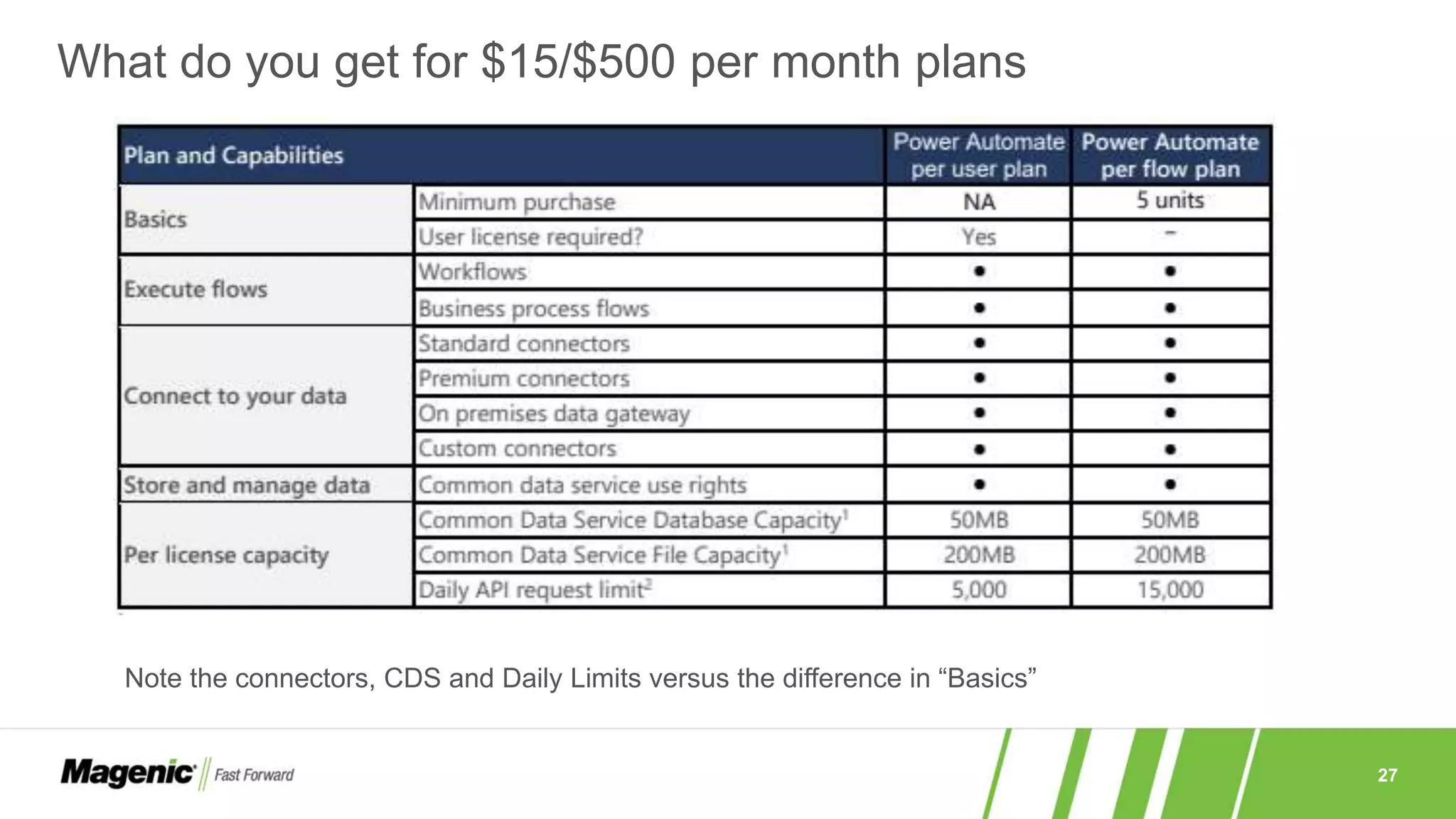
»Important for the Per Flow plan
»Flows that count:
› Scheduled flows
› Automated flows
› Instant flows
› Business process flows
»Remember it is $100 per additional Unit in the Per Flow Plan
»Purchasing “units” is not the same as purchasing capacity” which is
available as an add on cost
»Child Flows are those triggered by another flow does NOT need
additional licenses!
Concept: Enabled Top Level Flows
27
What do you get for $15/$500 per month plans
Note the connectors, CDS and Daily Limits versus the difference in “Basics”
28
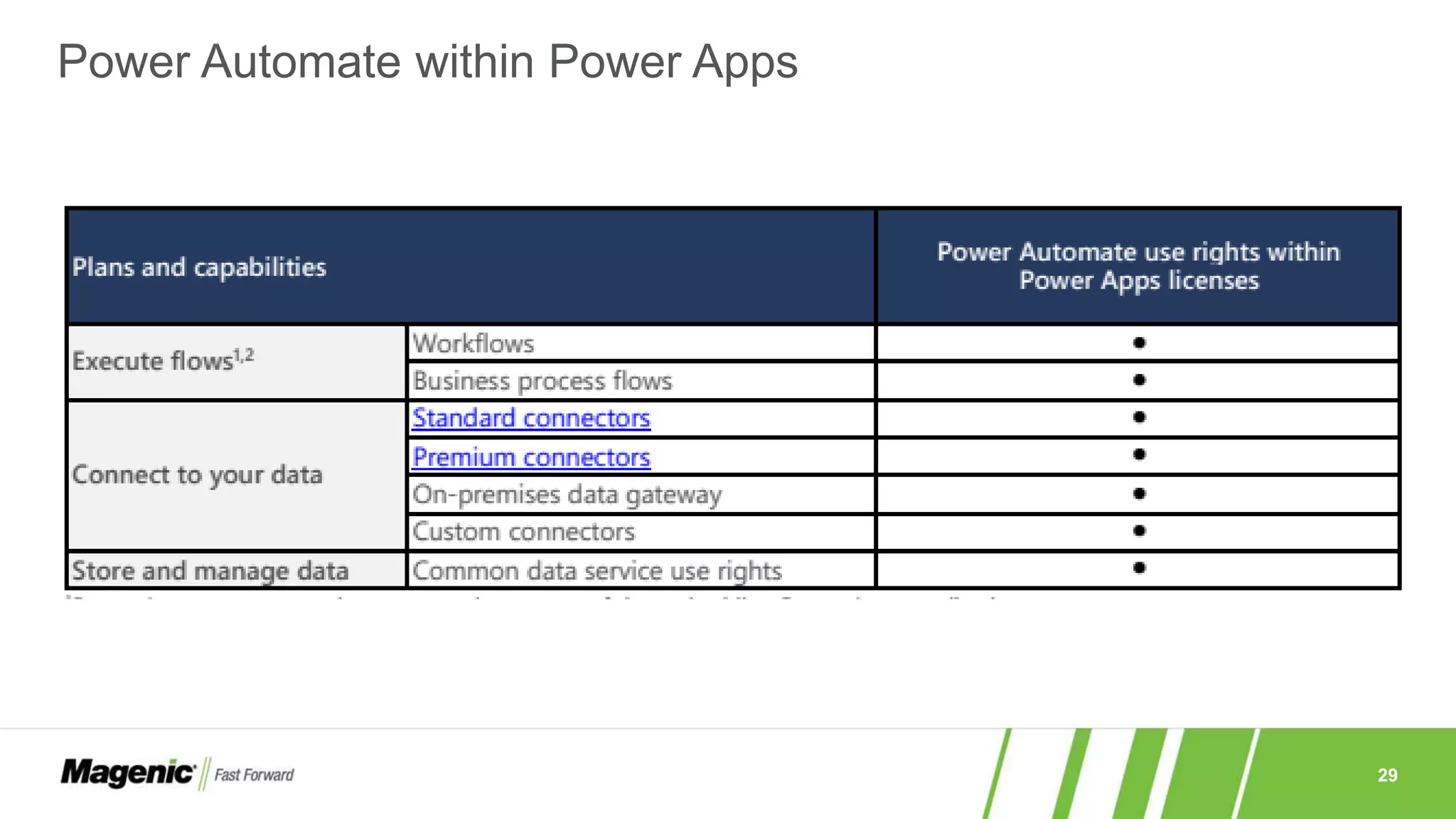
»In the old way, the Power Apps license effectively included the Flow
license though not the other way around. You paid for things “once” if
the starting point is Power Apps
»In the new way, the only “Free” use of Power Automate (flows)
consists of:
› Flows that are limited to the context of the Power App e.g. Built in Power App
Trigger/action to send the app a push notification
› Flows that are completely unrelated to the app (e.g. updates to a DB, does not
talk back to the app, etc.) require the Power Automate license …
− … unless that flow is included in the context of Office 365 or Dynamics
»As long as it runs in the context, a lot can be done
Power Automate with Power Apps
29
Power Automate within Power Apps
30
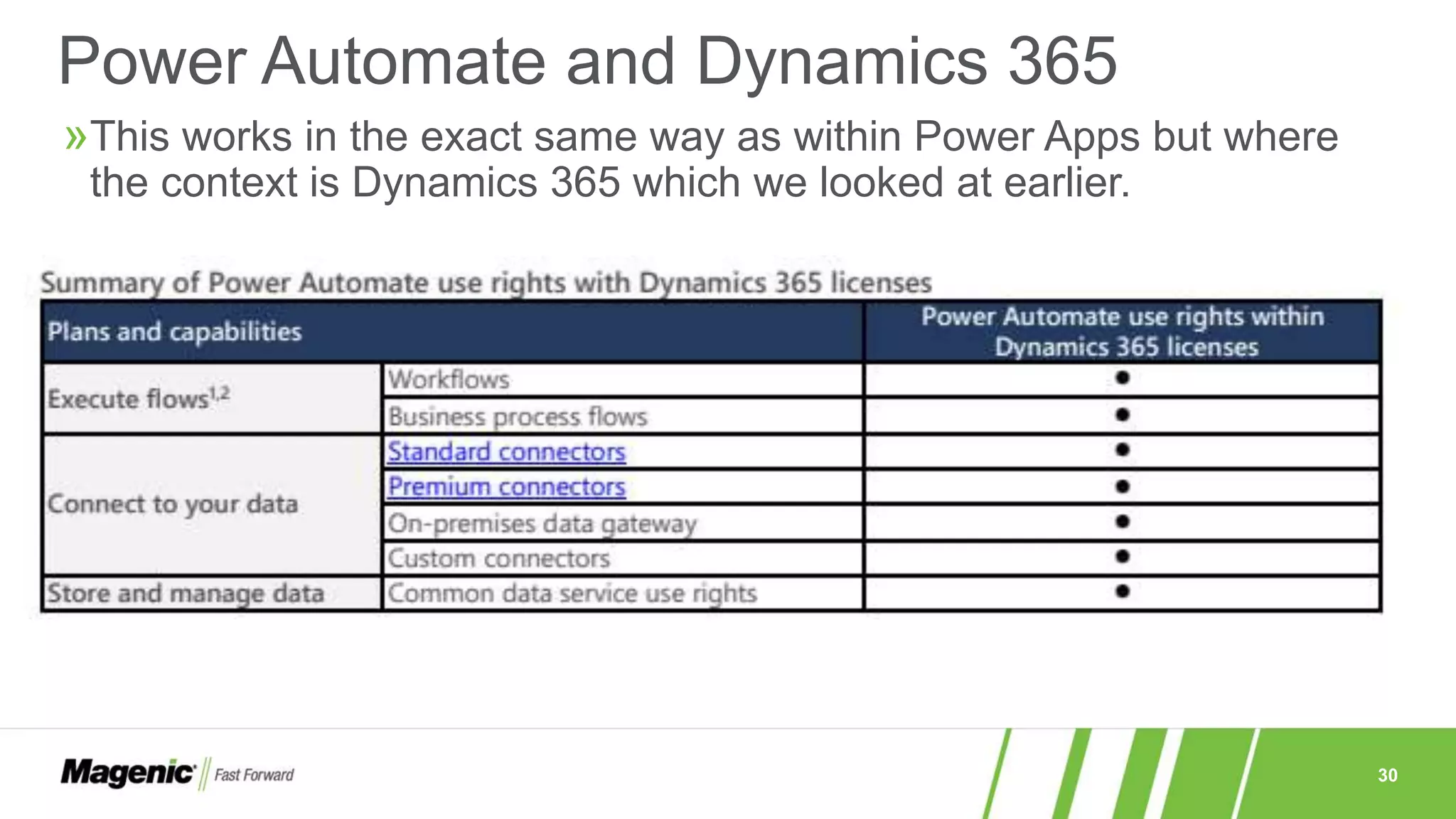
»This works in the exact same way as within Power Apps but where
the context is Dynamics 365 which we looked at earlier.
Power Automate and Dynamics 365
31
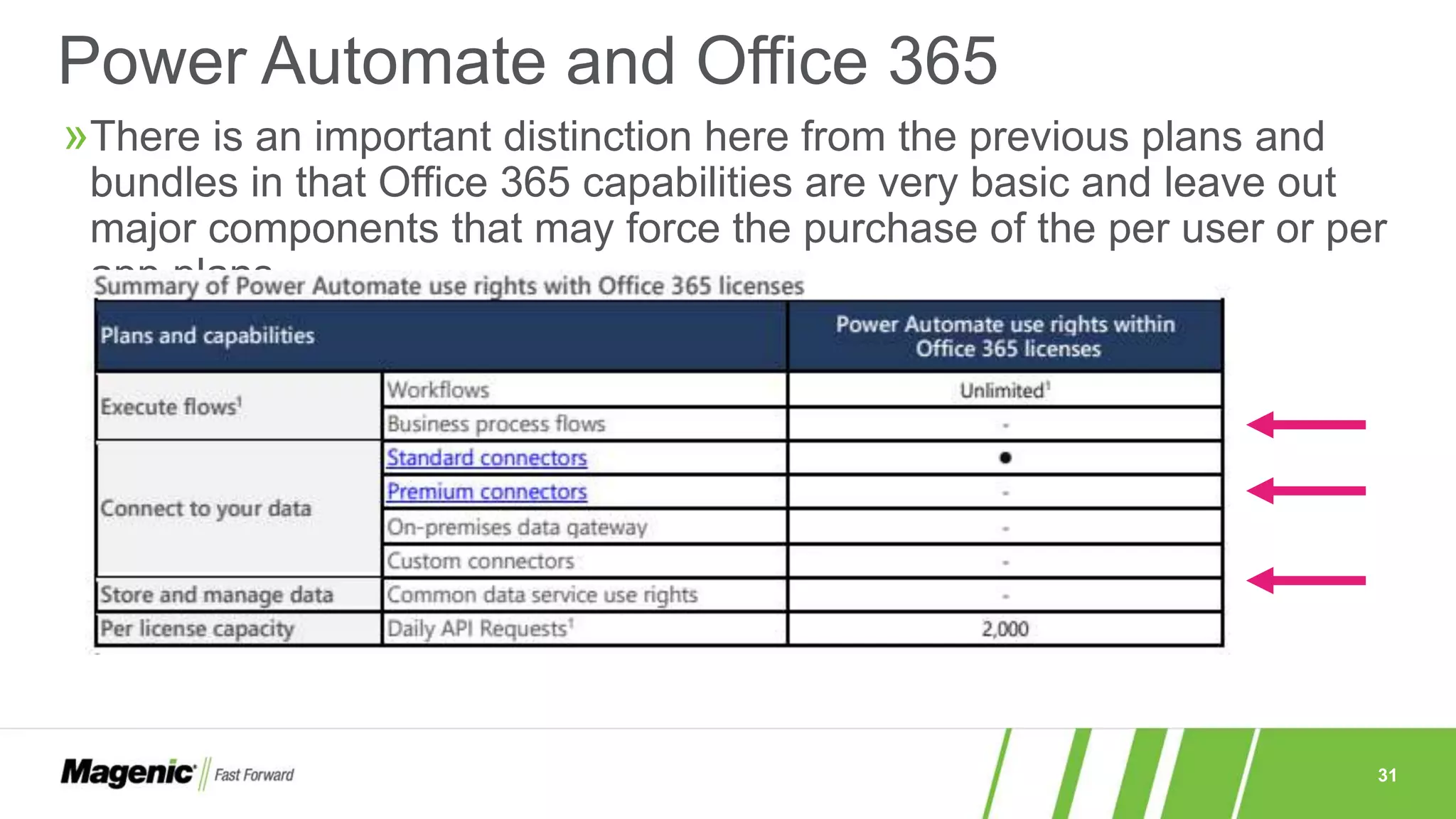
»There is an important distinction here from the previous plans and
bundles in that Office 365 capabilities are very basic and leave out
major components that may force the purchase of the per user or per
app plans
Power Automate and Office 365
32
Questions or Clarifications before moving
on?
33
Power Virtual Agents
34
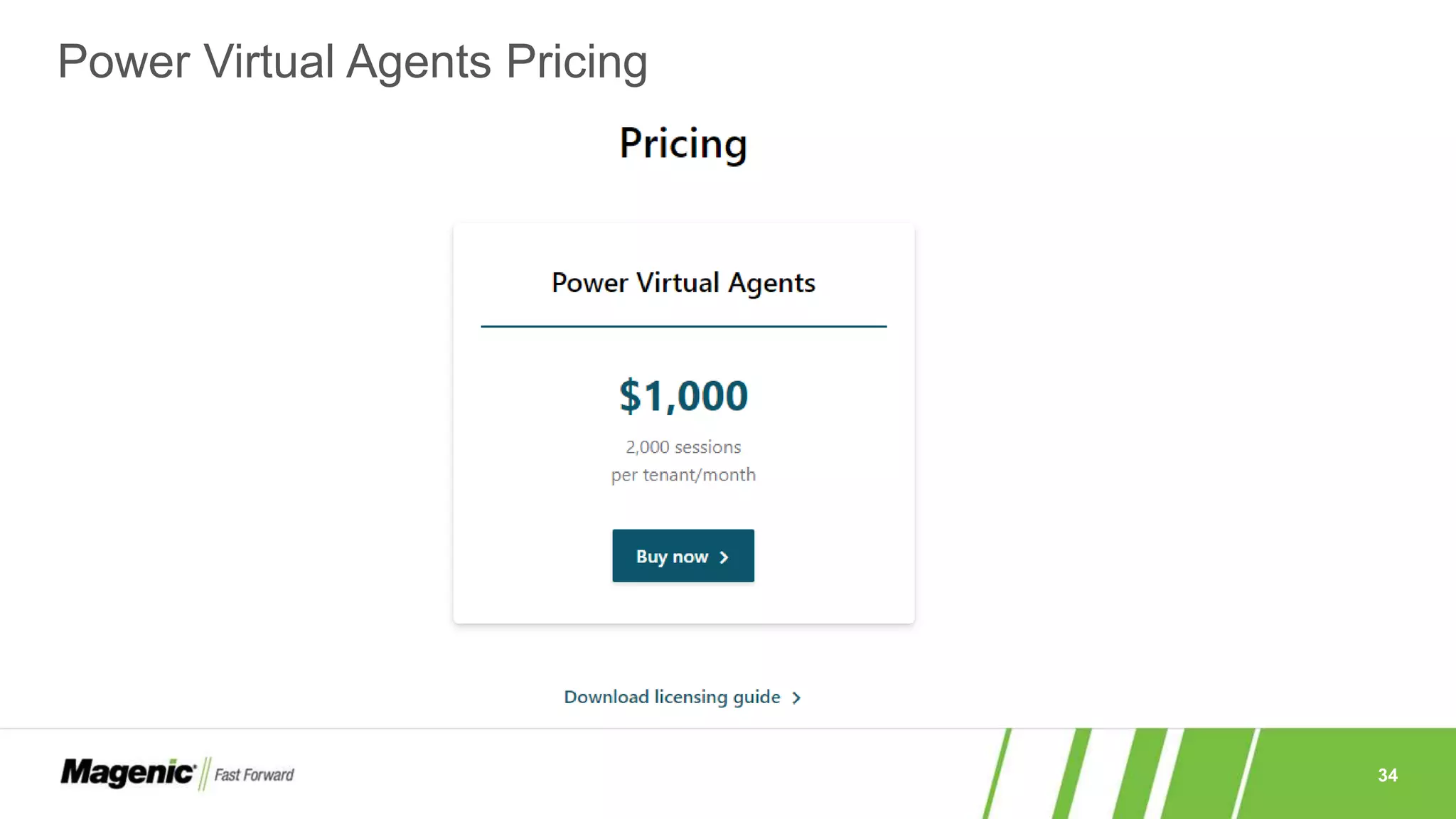
Power Virtual Agents Pricing
35
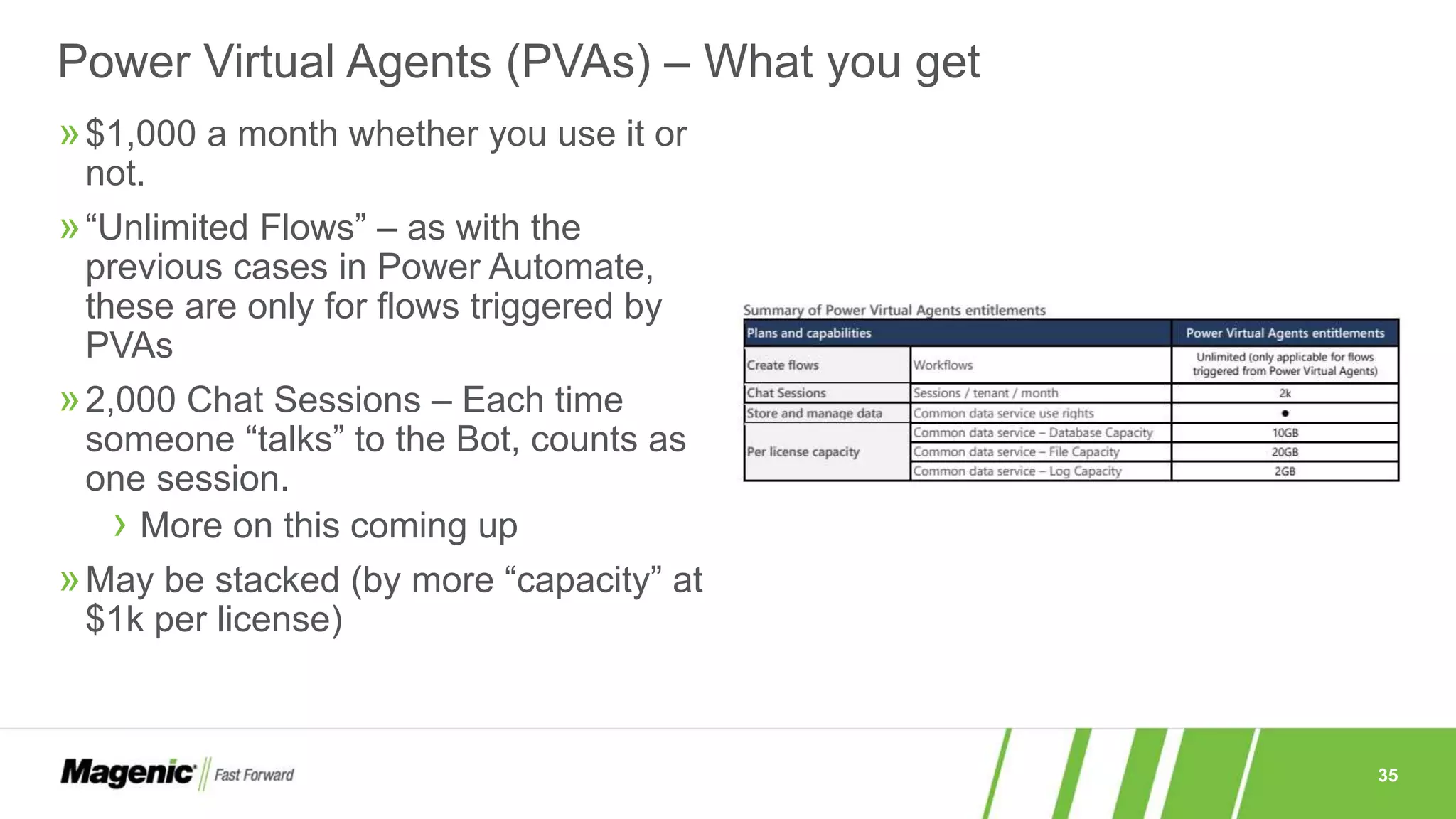
»$1,000 a month whether you use it or
not.
»“Unlimited Flows” – as with the
previous cases in Power Automate,
these are only for flows triggered by
PVAs
»2,000 Chat Sessions – Each time
someone “talks” to the Bot, counts as
one session.
› More on this coming up
»May be stacked (by more “capacity” at
$1k per license)
Power Virtual Agents (PVAs) – What you get
36
»A session is an interaction between the customer and the bot and
represents one unit of consumption.
»The session begins when an authored topic is triggered.
»These sessions are referred to as ‘billed sessions’ in the product.
»Sessions are deducted for both testing and production usage.
»A topic ends in one of the following scenarios:
› When all of the customer's questions are answered
› When a customer intentionally ends or closes a chat session
› When a bot is unable to answer adequately, and the interaction is escalated to
a live agent
What is a Session? (According to the doc …)
37
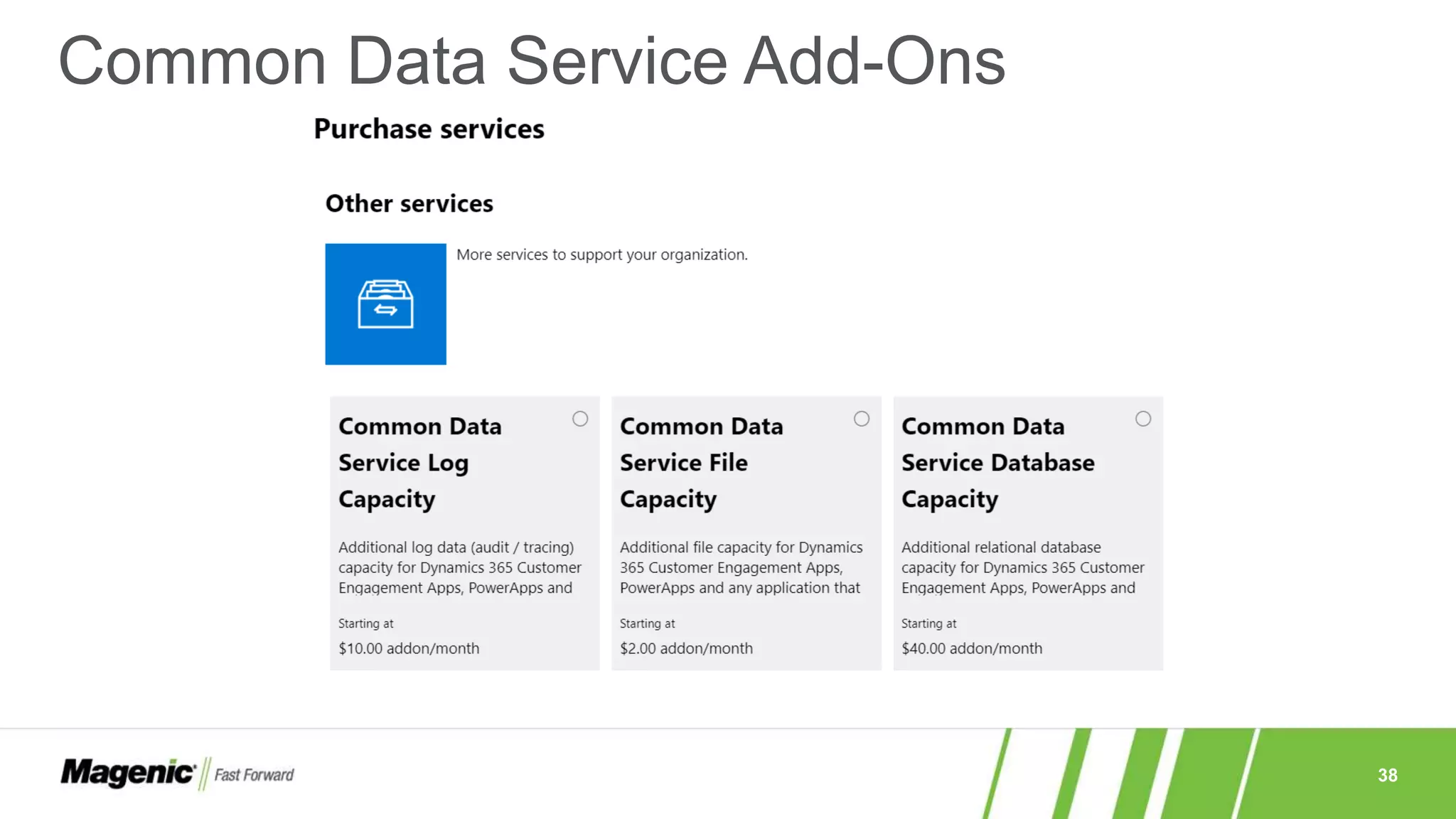
»As discussed earlier, there is the ability to “add on” to gain Capacity.
»For Power Apps
› Portal Login – 100 daily logins per month @ $200
› Portal Page Views – 100,000 Page views per month @ $100
› AI Builder – Each “Unit” at $500 per month
− Unit = 1 million service credits
− Also an Add-on to Power Automate
Add-ons
* Service Credits is a “currency” that is deducted at different rates for various scenarios
(e.g. Forms processing, prediction, etc.) . Without a rate sheet, it is a case of seeing how
much you use during a trial or pilot to determine how many “units” to get
38
Common Data Service Add-Ons
39
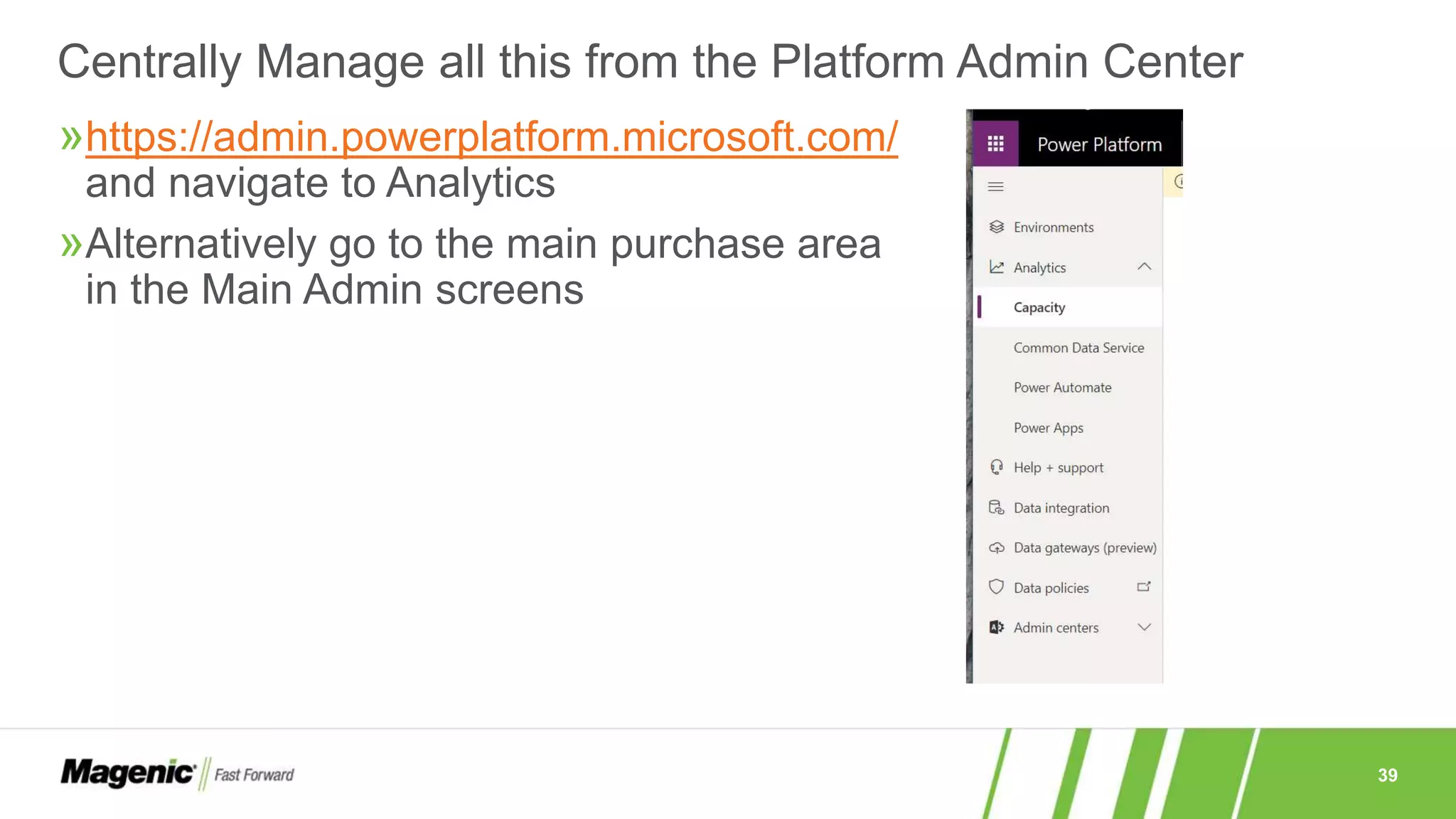
»https://admin.powerplatform.microsoft.com/
and navigate to Analytics
»Alternatively go to the main purchase area
in the Main Admin screens
Centrally Manage all this from the Platform Admin Center
40
Questions or Clarifications before moving
on?
41
Real Life Scenarios
Where the names have been changed to protect the innocent …
42
»Office 365 Freebie
› Last year dozens of people out of a 10k sized org made flows and apps to
their hearts content (power users)
› 100’s of Flows
› Few of them ever ran so never hit the 750 Runs max capacity
› None of the apps where promoted to others in any formal fashion and it is
mostly just personal productivity at the time
Time to look at a scenario
43
»The Flow Runner – critical business application
› Last year had only 3 flows but they ran heavily requiring them to have Plan 2
for capacity
› Would sometimes hit the daily or monthly limit requiring purchase of additional
capacity (but only on peak periods)
› Connected to A SQL Database for updates etc.
› Hundreds of users all over the globe using it daily
How about another scenario
44
»The One App Shop
› Status Reporting App talked to a Database because the creator who is also a
former developer understood SQL better than SharePoint
› Inconsistent use of between 20 and 40 Project managers at any time, once a
week
› 1000 people in the tenant who are mostly unaware that Power Apps or Power
Automate even exist
› Developers use actual Azure AI for bots (PVA just out) in Teams built during
quiet times or special initiatives
»Now let’s look at yours …
One more and then …
877.277.1044 / magenic.com // 45
THANK YOU

Understanding power platform licensing feb 2020

  • 1.
    Understanding Power Platform Licensing Ralph Rivas PrincipalConsultant/Architect Collaboration Evangelist February 29, 2020
  • 2.
    2 »Session Goals › Understandthe cost nuances in the various scenarios and combinations › Try out some scenarios relevant to us (Interactive portion) › Know where to get more information or keep up with the information »What Is in Scope › Power Apps, Power Automate (core) › Power Virtual Agents (new) About this session
  • 3.
    3 »Ralph Rivas › MicrosoftAficionado since 198<redacted> › MCP 1613 › Consultant since 2000, Magenic since 2002 › Accidental SharePoint Guy since 2003 › Solution Architect by Day, Dad/Entertainer by night › Collaboration Evangelist (read Office 365 Fan) › On the Mentoring path … About Your Speaker
  • 4.
    4 How about you…? Some background information helps focus the session
  • 5.
    5 » Official Licenseinformation from Microsoft itself is the baseline › For Power Automate (formerly Flow) − https://us.flow.microsoft.com/en- us/pricing/ › For Power Apps (formerly Power Apps) − https://powerapps.microsoft.com/e n-us/pricing/ › For Power Virtual Agents (new!) − https://powervirtualagents.microso ft.com/en-us/ › The Key document is a PDF Download − https://go.microsoft.com/fwlink/?lin kid=2085130 First let Microsoft speak …
  • 6.
    6 »Pricing is separatefrom the licensing information › Not meant to confuse you or force you to look at several places but … › … allows for pricing to be targeted to its region »The main pricing links hide the nuances › … and there are many so understand before selecting »Pricing can also be found in your Office Admin site › https://admin.microsoft.com/Adminportal/Home#/catalog (and search “Power”) › The result may not match the documentation exactly! − Older plans are represented (for now) − There may be regional nuances − Always make sure you check your regular licenses to see what you already have included About these links and the document
  • 7.
    7 »What is yourLicense program or … »How do you buy Power Platform services? »Do you know your TAM or Microsoft Rep? Before diving in, things to look at
  • 8.
    8 »Volume › EA › EAS ›Service and Cloud Enrollment (SCE) › Education (EES) »Other › MO Government › MPSA › MOSPWeb Direct »Which one are you? »Who’s your Rep? Licensing Program Options
  • 9.
  • 10.
  • 11.
    11 Power Apps –What you get »“Run Single Apps” – Per User/Per App/Per Month at $10 › Individual users run specific applications › Considered the “Standalone” license »“Run Unlimited Apps” – Per User/Per Month $40 › Users can run unlimited apps › Also considered a “Standalone” license or a “Per App Plan” »Seeded Power Apps – Bundled with Office 365 and Dynamics 365 › No extra cost but there are limits on the Power Automate side › For Customizing or Extending Office 365 and Dynamics 365 − E.G. Provisioning SharePoint Online Sites or Lists
  • 12.
    12 Power Apps PerApp Plan – What else do you get for $10 extra a month This is considered the “low entry point” for limited users and apps
  • 13.
    13 Power User Plan– What else do you get for $40 extra a month Remember this is for “unlimited” custom applications
  • 14.
    14 Power Apps withDynamics 365 – an overlap flavor Unlike the previous ones, this is for accessing capabilities in Dynamics 365 only!
  • 15.
    15 Speaking of Dynamics365 – what counts as D365
  • 16.
    16 Power Apps incl.with Office 365 – what’s out of box! In the same spirit as Dynamics 365, these would be for working with Office 365 Apps, e.g. SharePoint, Teams
  • 17.
    17 What counts asO365 Licenses which get the “free” Power Apps ability
  • 18.
    18 The Connectors –Appendix B calls out recent changes to Premium! Let’s look at those connectors: https://us.flow.microsoft.com/en-us/connectors/?filter=&category=all If you must have a Premium Connector, you will need a Per App or Per User Plan (and this is a big deal!)
  • 19.
    19 »A recent PowerApp resource with licensing much like a web portal application »This is not a SharePoint Web Site and it is its own system »Quick Survey – do we want to see what you get with this? › Let’s just see it in the document either here together and quickly discuss or you can review directly What about that Power App Portal
  • 20.
  • 21.
  • 22.
  • 23.
    23 Power Automate –What you get »“Per User Plan” – Per User/Per Month at $15 › Individual users CREATE unlimited flows › Considered the “Standalone” license »“Per Flow Plan” – 5 Flows Per Month $500 ($100 for each addl.) › Implement(!) Flows with “reserved capacity” › Serve “unlimited users” (this is in bold in the document!) › Also considered a “Standalone” license or a “Per App Plan” »Seeded Flow – Bundled with Office 365 and Dynamics 365 › No extra cost but limits discussed previously › For Customizing or Extending Office 365 and Dynamics 365 − E.G. Provisioning SharePoint Online Sites or Lists
  • 24.
    24 »Limits › Older planshad monthly limit while the new plan is about daily limits › Both allowed for “additional capacity” to be added but in the former, it was for the month while in the latter it is for the day »The price › New “entry” point is $15 › Promotes Heavy use, penalizes casual use Some differences from Last Year’s plans Old Plans
  • 25.
    25 The Limits nowmake a difference …
  • 26.
    26 »Important for thePer Flow plan »Flows that count: › Scheduled flows › Automated flows › Instant flows › Business process flows »Remember it is $100 per additional Unit in the Per Flow Plan »Purchasing “units” is not the same as purchasing capacity” which is available as an add on cost »Child Flows are those triggered by another flow does NOT need additional licenses! Concept: Enabled Top Level Flows
  • 27.
    27 What do youget for $15/$500 per month plans Note the connectors, CDS and Daily Limits versus the difference in “Basics”
  • 28.
    28 »In the oldway, the Power Apps license effectively included the Flow license though not the other way around. You paid for things “once” if the starting point is Power Apps »In the new way, the only “Free” use of Power Automate (flows) consists of: › Flows that are limited to the context of the Power App e.g. Built in Power App Trigger/action to send the app a push notification › Flows that are completely unrelated to the app (e.g. updates to a DB, does not talk back to the app, etc.) require the Power Automate license … − … unless that flow is included in the context of Office 365 or Dynamics »As long as it runs in the context, a lot can be done Power Automate with Power Apps
  • 29.
  • 30.
    30 »This works inthe exact same way as within Power Apps but where the context is Dynamics 365 which we looked at earlier. Power Automate and Dynamics 365
  • 31.
    31 »There is animportant distinction here from the previous plans and bundles in that Office 365 capabilities are very basic and leave out major components that may force the purchase of the per user or per app plans Power Automate and Office 365
  • 32.
  • 33.
  • 34.
  • 35.
    35 »$1,000 a monthwhether you use it or not. »“Unlimited Flows” – as with the previous cases in Power Automate, these are only for flows triggered by PVAs »2,000 Chat Sessions – Each time someone “talks” to the Bot, counts as one session. › More on this coming up »May be stacked (by more “capacity” at $1k per license) Power Virtual Agents (PVAs) – What you get
  • 36.
    36 »A session isan interaction between the customer and the bot and represents one unit of consumption. »The session begins when an authored topic is triggered. »These sessions are referred to as ‘billed sessions’ in the product. »Sessions are deducted for both testing and production usage. »A topic ends in one of the following scenarios: › When all of the customer's questions are answered › When a customer intentionally ends or closes a chat session › When a bot is unable to answer adequately, and the interaction is escalated to a live agent What is a Session? (According to the doc …)
  • 37.
    37 »As discussed earlier,there is the ability to “add on” to gain Capacity. »For Power Apps › Portal Login – 100 daily logins per month @ $200 › Portal Page Views – 100,000 Page views per month @ $100 › AI Builder – Each “Unit” at $500 per month − Unit = 1 million service credits − Also an Add-on to Power Automate Add-ons * Service Credits is a “currency” that is deducted at different rates for various scenarios (e.g. Forms processing, prediction, etc.) . Without a rate sheet, it is a case of seeing how much you use during a trial or pilot to determine how many “units” to get
  • 38.
  • 39.
    39 »https://admin.powerplatform.microsoft.com/ and navigate toAnalytics »Alternatively go to the main purchase area in the Main Admin screens Centrally Manage all this from the Platform Admin Center
  • 40.
  • 41.
    41 Real Life Scenarios Wherethe names have been changed to protect the innocent …
  • 42.
    42 »Office 365 Freebie ›Last year dozens of people out of a 10k sized org made flows and apps to their hearts content (power users) › 100’s of Flows › Few of them ever ran so never hit the 750 Runs max capacity › None of the apps where promoted to others in any formal fashion and it is mostly just personal productivity at the time Time to look at a scenario
  • 43.
    43 »The Flow Runner– critical business application › Last year had only 3 flows but they ran heavily requiring them to have Plan 2 for capacity › Would sometimes hit the daily or monthly limit requiring purchase of additional capacity (but only on peak periods) › Connected to A SQL Database for updates etc. › Hundreds of users all over the globe using it daily How about another scenario
  • 44.
    44 »The One AppShop › Status Reporting App talked to a Database because the creator who is also a former developer understood SQL better than SharePoint › Inconsistent use of between 20 and 40 Project managers at any time, once a week › 1000 people in the tenant who are mostly unaware that Power Apps or Power Automate even exist › Developers use actual Azure AI for bots (PVA just out) in Teams built during quiet times or special initiatives »Now let’s look at yours … One more and then …
  • 45.

Editor's Notes

  • #5 Type of company, level of use (power apps, etc.), type of worker (dev, manager, admin, etc.) why did you come to this session, what are you looking for … Use White Board if Available
  • #6 PVA too new to have its own pricing page --- Live Demo to visit these pages and open the document. Note the date of the PDF!
  • #9 The costs could be whole different or potentially capabilities not available. If there is interest, discuss Service Levels (SL’s!!) and Multiplexing issues where some people ask if a flow is scaled out on multiple devices etc. OR if licenses are needed when talking to SQL server, etc. (CALs)
  • #12 Using the varying definitions of things in the document when you see Quotes
  • #13 Take a Moment to explain what the items here are e.g. what is a PORTAL, what is a Canvas versus Model Driven App, What is a Standard versus Premium Connector, What is the Common Data Service and then discuss the “footnotes” 1, 2, 3 1 - An entity within Common Data Service becomes restricted only if the Dynamics 365 application is installed on a given environment 2 - Service limits are published at http://aka.ms/platformlimits – Power Apps and Power Automate capacity add-on can be purchased to increase daily service limits 3 - Common Data Service database and file capacity entitlements are pooled at the tenant level Note: • Embedded canvas apps within a model-driven app will not count towards the two-app limit. • A single user might be covered by multiple ‘per app’ licenses to allow the user to use multiple solutions targeted at various business scenarios, without requiring a per-user license • Once a pool of Power Apps per app licenses are purchased, individual licenses need to be assigned to specific environments and to individual users (i.e. if the same app exists in two environments, a user would require two per app SLs to access both). • The Power Apps Per App plan is available to education customers under faculty and student pricing. Since these licenses are sold as tenant level capacity and not assigned to users in active directory, customers and partners will be responsible for ensuring that student pricing is only being applied to students. This means that when licenses are purchased with student pricing, the number of app licenses assigned to non-students (i.e. faculty) in the product may not exceed the number of faculty licenses purchased as this would indicate that student licenses have been assigned to faculty.
  • #14 1 - An entity within Common Data Service becomes restricted only if the Dynamics 365 application is installed on a given environment 2 - Service limits are published at http://aka.ms/platformlimits – Power Apps and Power Automate capacity add-on can be purchased to increase daily service limits 3 - Common Data Service database and file capacity entitlements are pooled at the tenant level
  • #15 1 - Dynamics 365 Sales Professional, Dynamics 365 Customer Service Professional, Dynamics 365 Team Members, Dynamics 365 Operations – Activity, Dynamics 365 Human Resources Self Service, Dynamics 365 Business Central Team Members 2 - Dynamics 365 Sales Enterprise, Dynamics 365 Customer Service Enterprise, Dynamics 365 Field Service, Dynamics 365 Project Service Automation, Dynamics 365 Finance, Dynamics 365 Supply Chain Management, Dynamics 365 Commerce, Dynamics 365 Human Resources, Dynamics 365 Business Central 3 - Power Apps and Power Automate usage will count against the API request limits provided by the Dynamics 365 license Service limits are published at http://aka.ms/platformlimits – Power Apps and Power Automate capacity add-on can be purchased to increase daily service limits
  • #17 A slide for Appendix B Coming up and stand by because this is what makes it either great or a great pain! Notice all the blanks!! Notice the Model Driven App is NOT included!! No portals, no CDS! 1 - Common Data Service database and file capacity entitlements are pooled at the tenant level 2 - Reference http://aka.ms/platformlimits for more details on usage limits; “Power Apps and Power Automate capacity add-on” can be purchased to increase daily service limits.
  • #19 Calling out SQL server which I see most often used and now will cost Show premium versus standard from the drop down . If you need a premium you MUST get a per app or per user plan!!!!
  • #23 Notice they are calling it “Flow”
  • #24 It’s not a case of running here but the case of CREATING them!
  • #26 Microsoft says the former when applied through the whole org (yikes, $15 additionally for everyone) will mean near zero admin overhead (but headache for the license folks paying) … The latter is where a “power user” is designated to create the flow and “shares” to a designated group such that a regular user could not trigger a flow by accident. The point here is there is a perception that it is “better” in the new way because you have more power daily and you will not hit your limits during the month when you may need it the most. If you are high volume, you would have had to buy extra capacity often.
  • #28 1 - Reference http://aka.ms/platformlimits for more details on usage limits; “Power Apps and Power Automate capacity add-on” can be purchased to increase daily service limits. 2 - Additional Common Data Service Database/File/Log capacity can be purchased in increments of 1GB. Common Data Service Database and File capacity are pooled tenant wide. Note, scheduled flows may be configured to trigger every minute, irrespective of license type. There are no limits on the frequency of flow runs beyond what the connector supports.
  • #30 1 - Power Automate use needs to map to the context of the embedding Power Apps applications 2 - Power Automate usage counts against the service limits associated with the embedding Office 365 license. Please review http://aka.ms/platformlimits for more details on usage limits; “Power Apps and Power Automate capacity add-on” can be purchased to increase daily service limits
  • #32 Note the limitations
  • #35 Notice they are calling it “Flow”
  • #36 It’s not a case of running here but the case of CREATING them!
  • #39 Get these in the Admin Center