Report Number: C4-040R-02


          Router Security
        Configuration Guide
        Principles and guidance for secure configuration of IP routers,
              with detailed instructions for Cisco Systems routers


                 Router Security Guidance Activity
                              of the
            System and Network Attack Center (SNAC)
Authors:
Vanessa Antoine                                                December 15, 2005
Raymond Bongiorni                                                   Version: 1.1c
Anthony Borza
Patricia Bosmajian
Daniel Duesterhaus
Michael Dransfield
Brian Eppinger
Kevin Gallicchio
Stephen Hamilton
James Houser
Andrew Kim
Phyllis Lee
Brian McNamara
Tom Miller
David Opitz
Florence Richburg
Michael Wiacek
Mark Wilson
Neal Ziring

                       National Security Agency
                     9800 Savage Rd. Suite 6704
                     Ft. Meade, MD 20755-6704

                       SNAC.Guides@nsa.gov
Router Security Configuration Guide


                                          Warnings
                This document is only a guide to recommended security settings for Internet Protocol
                (IP) routers, particularly routers running Cisco Systems Internet Operating System
                (IOS) versions 11.3 through 12.4. It cannot replace well-designed policy or sound
                judgment. This guide does not address site-specific configuration issues. Care must
                be taken when implementing the security steps specified in this guide. Ensure that
                all security steps and procedures chosen from this guide are thoroughly tested and
                reviewed prior to imposing them on an operational network.
                SOFTWARE IS PROVIDED "AS IS" AND ANY EXPRESS OR IMPLIED
                WARRANTIES, INCLUDING, BUT NOT LIMITED TO, THE IMPLIED
                WARRANTIES OF MERCHANTABILITY AND FITNESS FOR A PARTICULAR
                PURPOSE ARE EXPRESSLY DISCLAIMED. IN NO EVENT SHALL THE
                CONTRIBUTORS BE LIABLE FOR ANY DIRECT, INDIRECT, INCIDENTAL,
                SPECIAL, EXEMPLARY, OR CONSEQUENTIAL DAMAGES (INCLUDING, BUT
                NOT LIMITED TO, PROCUREMENT OF SUBSTITUTE GOODS OR SERVICES;
                LOSS OF USE, DATA, OR PROFITS; OR BUSINESS INTERRUPTION) HOWEVER
                CAUSED AND ON ANY THEORY OF LIABILITY, WHETHER IN CONTRACT,
                STRICT LIABILITY, OR TORT (INCLUDING NEGLIGENCE OR OTHERWISE)
                ARISING IN ANY WAY OUT OF THE USE OF THIS SOFTWARE, EVEN IF
                ADVISED OF THE POSSIBILITY OF SUCH DAMAGE.
                This document is current as of October, 2005. The most recent version of this
                document may always be obtained through http://www.nsa.gov/.

        Acknowledgements
                The authors would like to acknowledge Daniel Duesterhaus, author of the original
                NSA “Cisco Router Security Configuration Guide,” and the management and staff of
                the Applications and Architectures division for their patience and assistance with the
                initial development of this guide. Special thanks also go to Ray Bongiorni for quality
                assurance and editorial work, and to Julie Martz and Kathy Jones for proof-reading
                assistance. Additional contributors to the guide effort include Andrew Dorsett,
                Charles Hall, Scott McKay, and Jeffrey Thomas. Thanks must also be given to the
                dozens of professionals outside NSA who made suggestions for the improvement of
                this document, especially George Jones, John Stewart, and Joshua Wright.

        Trademark Information
                Cisco, IOS, and CiscoSecure are registered trademarks of Cisco Systems, Inc. in the
                USA and other countries. Windows 2000 and Windows XP are registered trademarks
                of Microsoft Corporation in the USA and other countries. All other names are
                trademarks or registered trademarks of their respective companies.

        Revision History
                1.0          Sep 2000             First complete draft, extensive internal review.
                1.0b         Oct 2000             Revised after review by Ray Bongiorni
                1.0f         Mar 2001             Second release version: second pre-pub review
                1.0g         Apr 2001             Third release version: incorporated external feedback.
                1.0h         Aug 2001             Fourth release version; another QA review.
                1.0j         Nov 2001             Fifth release version.
                1.0k         Mar 2002             Last release of 1.0, another pre-pub review.
                1.1          Sep 2002             Major revision and expansion, another pre-pub review
                1.1b         Dec 2003             Minor revision, corrections, additions, fixed links
                1.1c         Dec 2005             Updated, fixed inconsistencies, checked links


2                                                                                            Version 1.1c
Contents


                                                                Contents

Preface                                                                                                                                  5

1. Introduction                                                                                                                          7
  1.1.    The Roles of Routers in Modern Networks .....................................................................7
  1.2.    Motivations for Providing Router Security Guidance......................................................9
  1.3.    Typographic and Diagrammatic Conventions Used in this Guide .................................10
  1.4.    Structural Overview .......................................................................................................12

2. Background and Review                                                                                                               15
  2.1.    Review of TCP/IP Networking ......................................................................................15
  2.2.    TCP/IP and the OSI Model ............................................................................................17
  2.3.    Review of IP Routing and IP Architectures ...................................................................19
  2.4.    Basic Router Functional Architecture ............................................................................24
  2.5.    Review of Router-Relevant Protocols and Layers .........................................................27
  2.6.    Quick “Review” of Attacks on Routers .........................................................................29
  2.7.    References......................................................................................................................30

3. Router Security Principles and Goals                                                                                                33
  3.1.    Protecting the Router Itself ............................................................................................33
  3.2.    Protecting the Network with the Router.........................................................................35
  3.3.    Managing the Router......................................................................................................43
  3.4.    Security Policy for Routers ............................................................................................46
  3.5.    References......................................................................................................................51

4. Implementing Security on Cisco Routers                                                                                              54
  4.1.    Router Access Security ..................................................................................................55
  4.2.    Router Network Service Security...................................................................................70
  4.3.    Access Control Lists, Filtering, and Rate Limiting........................................................83
  4.4.    Routing and Routing Protocols ....................................................................................102
  4.5.    Audit and Management................................................................................................139
  4.6.    Security for Router Network Access Services .............................................................175
  4.7.    Collected References....................................................................................................202

5. Advanced Security Services                                                                                                        204
  5.1.    Role of the Router in Inter-Network Security ..............................................................204
  5.2.    IP Network Security.....................................................................................................205
  5.3.    Using SSH for Remote Administration Security .........................................................227
  5.4.    Using a Cisco Router as a Firewall ..............................................................................232
  5.5.    Cisco IOS Intrusion Detection .....................................................................................241
  5.6.    References....................................................................................................................247

6. Testing and Security Validation                                                                                                   250


Version 1.1c                                                                                                                                   3
Router Security Configuration Guide


    6.1.   Principles for Router Security Testing .........................................................................250
    6.2.   Testing Tools................................................................................................................250
    6.3.   Testing and Security Analysis Techniques ..................................................................251
    6.4.   Using the Router Audit Tool........................................................................................258
    6.5.   References....................................................................................................................261

7. Additional Issues in Router Security                                                                                                   263
    7.1.   Routing and Switching.................................................................................................263
    7.2.   IPv6 ..............................................................................................................................265
    7.3.   ATM and IP Routing....................................................................................................266
    7.4.   Multi-Protocol Label Switching (MPLS).....................................................................267
    7.5.   IPSec and Dynamic Virtual Private Networks .............................................................268
    7.6.   Tunneling Protocols and Virtual Network Applications ..............................................269
    7.7.   IP Quality of Service (QoS) and RSVP........................................................................270
    7.8.   Secure DNS..................................................................................................................271
    7.9.   References....................................................................................................................272

8. Appendices                                                                                                                             274
    8.1.   Top Ways to Quickly Improve the Security of a Cisco Router....................................274
    8.2.   Application to Ethernet Switches and Related Non-Router Network Hardware..........280
    8.3.   Overview of Cisco IOS Versions and Releases ...........................................................283
    8.4.   Glossary of Router Security-related Terms..................................................................289

9. Additional Resources                                                                                                                   295
    9.1.   Bibliography.................................................................................................................295
    9.2.   Web Site References ....................................................................................................298
    9.3.   Tool References ...........................................................................................................300

Index                                                                                                                                     302


4                                                                                                                                      Version 1.1c
Preface


Preface
        Routers direct and control much of the data flowing across computer networks. This
        guide provides technical guidance intended to help network administrators and
        security officers improve the security of their networks. Using the information
        presented here, you can configure your routers to control access, resist attacks, shield
        other network components, and protect the integrity and confidentiality of network
        traffic.

        This guide was developed in response to numerous questions and requests for
        assistance received by the NSA System and Network Attack Center (SNAC). The
        topics covered in the guide were selected on the basis of customer interest,
        community concensus, and the SNAC’s background in securing networks.

        The goal for this guide is a simple one: improve the security provided by routers in
        US Government operational networks.

Who Should Use This Guide

        Network administrators and network security officers are the primary audience for
        this configuration guide, throughout the text the familiar pronoun “you” is used for
        guidance directed specifically to them. Most network administrators are responsible
        for managing the connections within their networks, and between their network and
        various other networks. Network security officers are usually responsible for
        selecting and deploying the assurance measures applied to their networks. For this
        audience, this guide provides security goals and guidance, along with specific
        examples of configuring Cisco routers to meet those goals.

        Firewall administrators are another intended audience for this guide. Often, firewalls
        are employed in conjunction with filtering routers; the overall perimeter security of
        an enclave benefits when the configurations of the firewall and router are
        complementary. While this guide does not discuss general firewall topics in any
        depth, it does provide information that firewall administrators need to configure their
        routers to actively support their perimeter security policies. Section 5 includes
        information on using the firewall features of the Cisco Integrated Security facility.

        Information System Security Engineers (ISSEs) may also find this guide useful.
        Using it, an ISSE can gain greater familiarity with security services that routers can
        provide, and use that knowledge to incorporate routers more effectively into the
        secure network configurations that they design.

        Sections 4, 5, and 6 of this guide are designed for use with routers made by Cisco
        Systems, and running Cisco’s IOS software. The descriptions and examples in those
        sections were written with the assumption that the reader is familiar with basic Cisco
        router operations and command syntax.


Version 1.1c                                                                                     5
Router Security Configuration Guide


Feedback

        This guide was created by a team of individuals in the System and Network Attack
        Center (SNAC), which is part of the NSA Information Assurance Directorate. The
        editor was Neal Ziring. Comments and feedback about this guide may be directed to
        the SNAC (Attn: Neal Ziring), Suite 6704, National Security Agency, Ft. Meade,
        MD, 20755-6704, or via e-mail to SNAC.Guides@nsa.gov.


6                                                                             Version 1.1c
Introduction


1. Introduction
1.1. The Roles of Routers in Modern Networks
        On a very small computer network, it is feasible to use simple broadcast or sequential
        mechanisms for moving data from point to point. An Ethernet local area network
        (LAN) is essentially a broadcast network. In larger, more complex networks, data
        must be directed specifically to the intended destination. Routers direct network data
        messages, or packets, based on internal addresses and tables of routes, or known
        destinations that serve certain addresses. Directing data between portions of a
        network is the primary purpose of a router.

        Most large computer networks use the TCP/IP protocol suite. See Section 2.3 for a
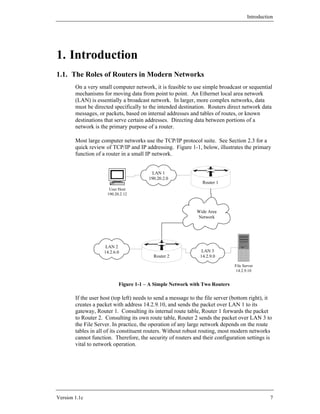
        quick review of TCP/IP and IP addressing. Figure 1-1, below, illustrates the primary
        function of a router in a small IP network.


                                          LAN 1
                                         190.20.2.0
                                                                 Router 1
                       User Host
                      190.20.2.12


                                                              Wide Area
                                                              Network


                      LAN 2
                     14.2.6.0                                   LAN 3
                                           Router 2             14.2.9.0

                                                                                File Server
                                                                                 14.2.9.10


                            Figure 1-1 – A Simple Network with Two Routers

        If the user host (top left) needs to send a message to the file server (bottom right), it
        creates a packet with address 14.2.9.10, and sends the packet over LAN 1 to its
        gateway, Router 1. Consulting its internal route table, Router 1 forwards the packet
        to Router 2. Consulting its own route table, Router 2 sends the packet over LAN 3 to
        the File Server. In practice, the operation of any large network depends on the route
        tables in all of its constituent routers. Without robust routing, most modern networks
        cannot function. Therefore, the security of routers and their configuration settings is
        vital to network operation.


Version 1.1c                                                                                     7
Router Security Configuration Guide


        In addition to directing packets, a router may be responsible for filtering traffic,
        allowing some data packets to pass and rejecting others. Filtering is a very important
        responsibility for routers; it allows them to protect computers and other network
        components from illegitimate or hostile traffic. For more information, consult
        Sections 3, 4, and 5.


8                                                                                 Version 1.1c
Introduction


1.2. Motivations for Providing Router Security Guidance
        Routers provide services that are essential to the correct, secure operation of the
        networks they serve. Compromise of a router can lead to various security problems
        on the network served by that router, or even other networks with which that router
        communicates.

               • Compromise of a router’s route tables can result in reduced performance,
                 denial of network communication services, and exposure of sensitive data.
               • Compromise of a router’s access control can result in exposure of network
                 configuration details or denial of service, and can facilitate attacks against
                 other network components.
               • A poor router filtering configuration can reduce the overall security of an
                 entire enclave, expose internal network components to scans and attacks,
                 and make it easier for attackers to avoid detection.
               • On the other hand, proper use of router cryptographic security features can
                 help protect sensitive data, ensure data integrity, and facilitate secure
                 cooperation between independent enclaves.

        In general, well-configured secure routers can greatly improve the overall security
        posture of a network. Security policy enforced at a router is difficult for negligent or
        malicious end-users to circumvent, thus avoiding a very serious potential source of
        security problems.

        There are substantial security resources available from router vendors. For example,
        Cisco offers extensive on-line documentation and printed books about the security
        features supported by their products. These books and papers are valuable, but they
        are not sufficient. Most vendor-supplied router security documents are focused on
        documenting all of the security features offered by the router, and do not always
        supply security rationale for selecting and applying those features. This guide
        attempts to provide security rationale and concrete security direction, with pertinent
        references at the end of each section identifying the most useful vendor
        documentation. This guide also provides pointers to related books, vendor
        documents, standards, and available software.


Version 1.1c                                                                                     9
Router Security Configuration Guide


1.3. Typographic and Diagrammatic Conventions Used in this Guide
        To help make this guide more practical, most of the sections include extensive
        instructions and examples. The following typographic conventions are used as part
        of presenting the examples.

                • Specific router and host commands are identified in the text using Courier
                  bold typeface: “to list the current routing table, use the command show ip
                  route.” Command arguments are shown in Courier italics: “syntax for a
                  simple IP access list rule is access-list number permit host
                  address.”

                • Sequences of commands to be used in a configuration are shown
                  separately from the text, using Courier typeface. The exclamation point
                  begins a comment line, usually a remark about the line that follows it.
                             ! set the log host IP address and buffer size
                             logging 14.2.9.6
                             logging buffered 16000

                • Transcripts of router sessions are shown separately from the text, using
                  Courier typeface. Input in the transcript is distinguished from output, user
                  input and comments are shown in Courier bold typeface. Elision of long
                  output is denoted by two dots. In some cases, output that would be too
                  wide to fit on the page is shown with some white space removed, to make
                  it narrower.
                             Central> enable
                             Password:
                             Central# ! list interfaces in concise format
                             Central# show ip interface brief
                             Interface         IP Address     OK?   Method
                             Ethernet 0/0      14.2.15.250    YES   NVRAM
                             Ethernet 0/1      14.2.9.250     YES   Manual
                                   .
                                    .
                             Central# exit
                • IP addresses will be shown in the text and in diagrams as A.B.C.D, or as
                  A.B.C.D/N, where N is the number of set bits in the IP netmask. For
                  example, 14.2.9.150/24 has a netmask of 255.255.255.0. (In general, this
                  classless netmask notation will be used where a netmask is relevant.
                  Otherwise, the bare address will be used.)
                • Cisco IOS accepts the shortest unique, unambiguous abbreviation for any
                  command or keyword. For commands that are typed very frequently, this
                  guide uses many abbreviations commonly employed in the Cisco
                  documentation and literature. For example, the interface name ethernet
                  is commonly abbreviated “eth” and the command configure terminal
                  is commonly abbreviated “config t”.


10                                                                                 Version 1.1c
Introduction


               • In a few cases, commands shown in examples are too long to fit on one
                 line; they are shown broken across several lines. The IOS command line
                 interface will not permit this; when attempting to apply these examples,
                 you will need to type the long command on one line.

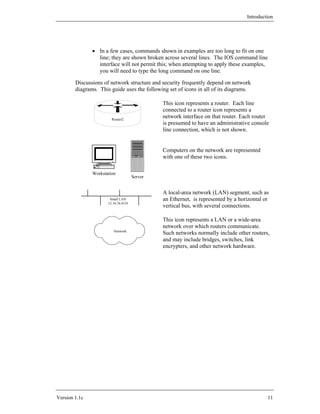
        Discussions of network structure and security frequently depend on network
        diagrams. This guide uses the following set of icons in all of its diagrams.

                                               This icon represents a router. Each line
                                               connected to a router icon represents a
                        Router2
                                               network interface on that router. Each router
                                               is presumed to have an administrative console
                                               line connection, which is not shown.


                                               Computers on the network are represented
                                               with one of these two icons.

               Workstation
                                      Server


                                               A local-area network (LAN) segment, such as
                       Small LAN               an Ethernet, is represented by a horizontal or
                      12.34.56.0/24
                                               vertical bus, with several connections.

                                               This icon represents a LAN or a wide-area
                                               network over which routers communicate.
                         Network
                                               Such networks normally include other routers,
                                               and may include bridges, switches, link
                                               encrypters, and other network hardware.


Version 1.1c                                                                                11
Router Security Configuration Guide


1.4. Structural Overview
        The various parts of this guide are designed to be fairly independent; readers may
        want to skip directly to the sections most immediately useful to them. The list below
        describes the major sections. References are included at the end of each section.

                • Section 2 reviews some background information about TCP/IP networking
                  and network security, and describes some simple network security threats.
                • Section 3 presents a security model for routers, and defines general goals
                  and mechanisms for securing routers. Security mechanisms must be
                  applied in support of security policy; this section describes some areas that
                  a router security policy should address, along with a discussion of
                  relationships between router security and overall network security.
                • Section 4 details the methods and commands for applying security to
                  Cisco routers, using recent versions of the Cisco IOS software. It is
                  divided into six main parts:
                         •   securing access to the router itself,
                         •   securing router network services,
                         •   controlling traffic and filtering using a router,
                         •   configuring routing protocols security,
                         •   security management for routers, and
                         •   network access control for routers.
                • Section 5 describes advanced security services that some routers can
                  provide, with a focus on Cisco routers’ capabilities. The main topics of
                  this section are IP security (IPSec), Secure Shell (SSH), and using a Cisco
                  router as a simple firewall and Intrusion Detection System (IDS).
                • Section 6 presents testing and troubleshooting techniques for router
                  security. It is essential for good security that any router security
                  configuration undergoes testing, and this section presents both vendor-
                  independent and Cisco-specific testing techniques.
                • Section 7 previews some security topics that are not yet crucial for router
                  configuration, but which may become important in the near future.
                • Section 8 consists of four diverse appendices:
                         •   tips for quickly improving the security of a router
                         •   how to apply parts of this guide to LAN switches
                         •   overview of the Cisco IOS software family and versions, and
                         •   a router security glossary.
                • Section 9 provides a list of resources, collected from all the sections of the
                  guide, including pointers to web sites and security tools.


12                                                                                  Version 1.1c
Introduction


        How to Use This Guide
        Several different roles are involved in securing a network, and each may need some
        information about router security. The paragraphs below offer roadmaps for using
        this guide for several different network security roles.

        For network security planners and system security designers, the high-level view of
        router security is more important than the details of Cisco router commands. Read
        the sections listed below if your role is security planner or security designer.
                    •   Section 2 – for a review of TCP/IP, network, and router operational
                        concepts
                    •   Section 3 – for general router security principles
                    •   Section 4.1 through 4.3 – for an idea of what Cisco routers can do for
                        network security
                    •   Section 5 – for information about Cisco router VPN, firewall, and
                        other advanced security capabilities
                    •   Section 7 – for a preview of potential future issues

        For network administrators involved in the daily operation of a network with Cisco
        routers, the detailed instructions for locking down a router are the most important
        part of this guide. Read the sections listed below if your role is network
        administrator.
                    •   Section 2 – for a review, if necessary
                    •   Section 3 – for the security principles behind the advice in Section 4
                    •   Section 4 – for detailed instructions on configuring Cisco routers
                    •   Section 5.1, 5.2 – for instructions on configuring IPSec on Cisco
                        routers
                    •   Section 5.3 – for a quick guide to using SSH for Cisco administration
                    •   Section 8.1 – for advice for quickly securing a Cisco router
                    •   Section 8.2 – for instructions on applying this guide to LAN switches
                    •   Section 8.3 – for information on Cisco IOS versions and upgrades
                    •   Section 9 – for an overview of recommended references and tools

        For network security analysts or administrators trying to improve the security posture
        of a network as quickly as possible, this guide offers detailed advice and direction.
        Read the sections listed below if your goal is to quickly lock down a router.
                    •   Section 8.1 – for quick tips that will greatly improve router security
                    •   Section 4.1 – for explicit directions on router access security
                    •   Section 4.3 – for advice and guidance on setting up filtering
                    •   Section 4.4 – for routing protocol security instructions (unless the
                        routers are using static routes exclusively)


Version 1.1c                                                                                   13
Router Security Configuration Guide


        Before applying any of the guidance in this guide to operational routers, be sure to
        test it thoroughly in a lab or testbed network. Operational networks are complex, and
        applying configuration changes to a router can instantly affect large numbers of
        hosts.

        This guide provides security guidance for a large number of topics. In most cases, it
        is not practical for this document to include full background and technical details.
        Every section includes references to books, web sites, and standards that you can use
        to obtain more information or greater detail.


14                                                                                Version 1.1c
Background and Review


2. Background and Review
        This section reviews some background information about TCP/IP networking, router
        hardware architecture, router software architecture, and network security. In order to
        keep this section brief, it glosses over a lot of issues. To compensate for that
        briefness, the reference list at the end of the section includes a long list of other
        useful sources of background information. Readers with a good grasp of network and
        router fundamentals may want to skip this section, but since it is relatively brief, why
        not humor the author and read on.


2.1. Review of TCP/IP Networking
        As mentioned in Section 1.1, on a small computer network, it is feasible to use
        simple broadcast or sequential (token) mechanisms for moving data from point to
        point. A local area network is composed of a relatively small number of hosts
        connected over a relatively small physical area. “Relatively small” is the important
        phrase here. To give some meaning to the term “relatively,” consider that a 10BaseT
        Ethernet (10 megabit per second using twisted pair cabling) has a usual maximum of
        1024 stations over a maximum cable distance of 2500 meters. For instance, a typical
        office LAN, using 100BaseT Ethernet, might have 100 computers (and printers)
        attached to a switch or set of hubs.

        An Ethernet local area network (LAN) is essentially a (logical) bus based broadcast
        network; though the physical implementation may use hubs (with a physical star
        topology). As one would expect, broadcast LANs must deal with collisions; either by
        preventing them or detecting them and taking appropriate action. Token based LANs
        avoid collisions by only allowing one host at time to transmit (the host that currently
        has the token may transmit).

        Standards that relate to LANs are primarily the IEEE 802.x series. For instance,
        802.3 is the Media Access Control (MAC) standard for CSMA/CD (the Ethernet
        standard); while 802.5 is the MAC standard for Token Ring. Just above the MAC
        level is the Logical Link Control (802.2) standard and above that it the High Level
        Interface (802.1) standard.

        Within a LAN, addressing is done with a MAC address. Between LANs using
        TCP/IP, addressing is done using IP addresses. If you are lost at this point, keep
        reading because much of this will be explained below. If you are still lost at the end
        of Section 2, then consider reading parts of some of the books and/or web pages
        listed at the end of the section.

2.1.1. Purpose of a Router
        In larger, more complex computer networks, data must be directed more carefully. In
        almost all cases, large networks are actually composed of a collection of LANs that
        are interconnected or “internetworked”. This is where routers come in. Routers take


Version 1.1c                                                                                  15
Router Security Configuration Guide


        network data messages from a LAN and convert them into packets suitable for
        transmission beyond the LAN on a wide area network (WAN). The goal is almost
        always to get these packets to another LAN and ultimately to the correct host on that
        LAN. Part of the “conversion” process is to add a packet header. Other routers will
        generally only look at a packet’s header information, not at the contents or data in the
        packet.

        Routers also make decisions about where to send these packets, based on: the
        addresses contained within the packet headers and a table of routes maintained within
        the router. Updating these routing tables and forwarding data packets between
        portions of a network are two of the primary tasks of a router. Building packets and
        unwrapping packets are additional router functions performed by the first and last
        routers, respectively, that a message passes through. In addition to directing packets,
        a router may be responsible for filtering traffic, allowing some packets to pass
        through and rejecting others. Filtering can be a very important function of routers; it
        allows them to help protect computers and other network components. For more
        information about filtering, see Section 3 and Section 4. It is also possible that at the
        destination end a router may have to break large packets up to accommodate the size
        limits of the destination LAN.

        There is no reason that routers cannot be used to send messages between hosts (as
        shown in Figure 1-1) but more typically routers are used to connect LANs to each
        other or to connect a LAN to a WAN.

        Most large computer networks use the TCP/IP protocol suite. In some sense this is
        the lingua franca of the Internet. See Section 2.2 for a quick review of TCP/IP and
        IP addressing.

2.1.2. Route Tables
        As mentioned, one of tasks of a router is to maintain route tables which are used to
        decide where a packet is to go and thus which interface it should be sent out. In the
        past these tables were built and updated by hand and this is referred to as static
        routing. In dynamic routing, the router learns about where various addresses are
        relative to itself and builds up route tables based on this information. There are a
        number of schemes or routing protocols for routers to acquire and share route table
        information. While a thorough treatment of the details is beyond the scope of this
        document, there is a substantial discussion of routing protocols is in Section 4.4.


16                                                                                   Version 1.1c
Background and Review


2.2. TCP/IP and the OSI Model
2.2.1. Origin of TCP/IP
        The Transmission Control Protocol (TCP) and Internet Protocol (IP) comprise what
        is often seen written as TCP/IP. The Defense Advanced Research Projects Agency
        (DARPA) originated TCP/IP. Note that the word “Defense” has been deleted and
        added back over time. ARPA and DARPA are one and the same organization. The
        National Science Foundation (NSF) also contributed to the foundation of the Internet
        by taking the DARPA technology and making it available to universities.

        As stated above, the Internet essentially runs on TCP/IP protocols. The definitive
        source for information on TCP/IP are the RFCs, or “Request for Comments” issued
        by the Internet Engineering Task Force (IETF) as described in Section 2.7.3. Note
        that in addition to TCP/IP there are other protocols such as Novell’s IPX
        (Internetwork Packet eXchange) that can be used with routers. Also, some routers
        can be used to “translate” between different protocols running on either side of
        themselves.

2.2.2. The OSI Model
        After TCP/IP was well-established and other networking protocols, such as DECnet
        and Novell’s IPX were operational, the International Standardization Organization
        (ISO) developed the Open Systems Interconnection (OSI) seven layer reference
        model. These seven layers are described in almost every reference, so in the interest
        of space they are merely enumerated here.
                Layer 7: Application Layer -
                deals with services such as email and file transfer.
                Layer 6: Presentation Layer -
                deals with formatting, encryption, and compression of data.
                Layer 5: Session Layer -
                deals with setup and management of sessions between applications.
                Layer 4: Transport Layer -
                deals with end to end error recovery and delivery of complete messages.
                Layer 3: Network Layer -
                deals with transmission of packets and establishing connections.
                Layer 2: Data Link Layer -
                deals with transmission of packets on one given physical link.
                Layer 1: Physical Layer -
                deals with transmission of a bit stream and definition of physical link.

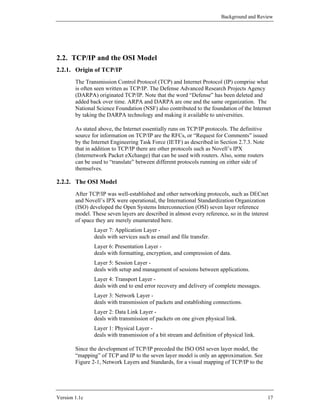
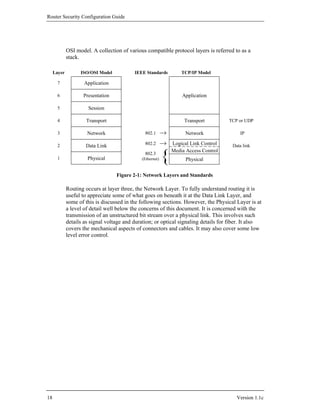
        Since the development of TCP/IP preceded the ISO OSI seven layer model, the
        “mapping” of TCP and IP to the seven layer model is only an approximation. See
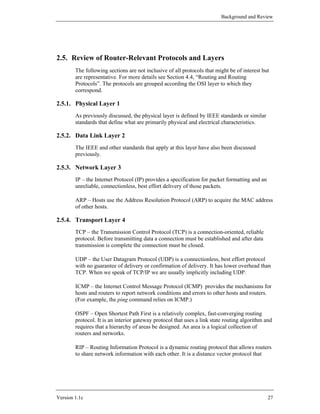
        Figure 2-1, Network Layers and Standards, for a visual mapping of TCP/IP to the


Version 1.1c                                                                                 17
Router Security Configuration Guide


             OSI model. A collection of various compatible protocol layers is referred to as a
             stack.

     Layer         ISO/OSI Model           IEEE Standards          TCP/IP Model

       7             Application

       6            Presentation                                   Application

       5              Session

       4              Transport                                     Transport         TCP or UDP

       3              Network                   802.1                Network              IP

       2             Data Link                  802.2          Logical Link Control    Data link


                                                           {
                                                               Media Access Control
                                                802.3
       1              Physical                (Ethernet)             Physical


                                   Figure 2-1: Network Layers and Standards

             Routing occurs at layer three, the Network Layer. To fully understand routing it is
             useful to appreciate some of what goes on beneath it at the Data Link Layer, and
             some of this is discussed in the following sections. However, the Physical Layer is at
             a level of detail well below the concerns of this document. It is concerned with the
             transmission of an unstructured bit stream over a physical link. This involves such
             details as signal voltage and duration; or optical signaling details for fiber. It also
             covers the mechanical aspects of connectors and cables. It may also cover some low
             level error control.


18                                                                                       Version 1.1c
Background and Review


2.3. Review of IP Routing and IP Architectures
        If one is dealing only with a local area network (LAN), there is generally no need for
        routing, routers, TCP/IP, or IP addresses. Within a LAN everything will be handled
        by Media Access Control (MAC) addresses and by a LAN protocol such as Ethernet.
        At this level, most protocols are defined by Institute of Electrical and Electronics
        Engineers (IEEE) standards. For instance, IEEE 802.3 is the Ethernet (CSMA/CD)
        standard, 802.4 is token bus, and 802.5 is token ring. Above the MAC standards, but
        still within the OSI Data Link Layer, is the IEEE 802.2 Logical Link Control
        standard. The IEEE 802.1 High Level Interface standard corresponds to part of the
        OSI Network Layer. If this seems confusing, do not worry about it; it’s not essential
        to an understanding of routers.

        What is important to keep in mind is that MAC addresses are used within a LAN.
        Each device on the LAN will have a something like a network interface card (NIC)
        which has a unique MAC address. For example, on an Ethernet LAN each device has
        an appropriate Ethernet card which complies with a particular link layer standard,
        such as 100BaseTx, and which was configured with a MAC address. The MAC
        address is appended to the front of the data before it is placed on the LAN. Each
        device on the LAN listens for packets with its address.

        Once a message is destined to leave one LAN bound for a trip across a wide area
        network (WAN) to another LAN, it must use an IP address. While one can envision
        logical connections at various layers in a protocol stack, in reality bits can only move
        from one device to another at the Physical Layer. Thus, data begins at an application
        relatively high up in a protocol stack and works its way down the stack to the
        physical layer. At this point it is transferred to another device and works its way up
        the protocol stack at that point. How far up the stack it goes depends on whether that
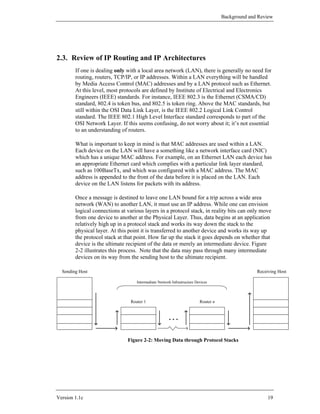
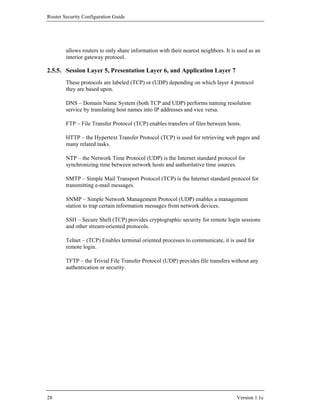
        device is the ultimate recipient of the data or merely an intermediate device. Figure
        2-2 illustrates this process. Note that the data may pass through many intermediate
        devices on its way from the sending host to the ultimate recipient.

  Sending Host                                                                                    Receiving Host

                                   Intermediate Network Infrastructure Devices


                                Router 1                                 Router n


                                                      ...


                               Figure 2-2: Moving Data through Protocol Stacks


Version 1.1c                                                                                           19
Router Security Configuration Guide


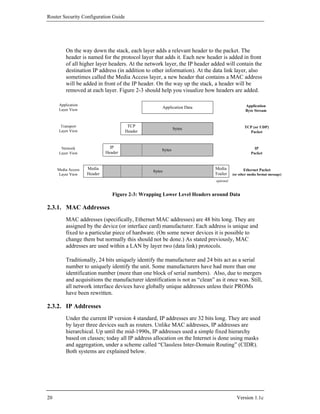
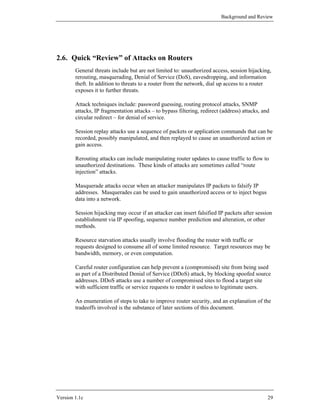
         On the way down the stack, each layer adds a relevant header to the packet. The
         header is named for the protocol layer that adds it. Each new header is added in front
         of all higher layer headers. At the network layer, the IP header added will contain the
         destination IP address (in addition to other information). At the data link layer, also
         sometimes called the Media Access layer, a new header that contains a MAC address
         will be added in front of the IP header. On the way up the stack, a header will be
         removed at each layer. Figure 2-3 should help you visualize how headers are added.

     Application                                                                                Application
                                                    Application Data
     Layer View                                                                                 Byte Stream


      Transport                        TCP                                                     TCP (or UDP)
                                                            bytes
     Layer View                       Header                                                     Packet


      Network                  IP                                                                    IP
                                                    bytes
     Layer View              Header                                                                Packet


     Media Access   Media                                                   Media             Ethernet Packet
                                                bytes
      Layer View    Header                                                  Trailer     (or other media format message)
                                                                             optional


                                Figure 2-3: Wrapping Lower Level Headers around Data

2.3.1. MAC Addresses
         MAC addresses (specifically, Ethernet MAC addresses) are 48 bits long. They are
         assigned by the device (or interface card) manufacturer. Each address is unique and
         fixed to a particular piece of hardware. (On some newer devices it is possible to
         change them but normally this should not be done.) As stated previously, MAC
         addresses are used within a LAN by layer two (data link) protocols.

         Traditionally, 24 bits uniquely identify the manufacturer and 24 bits act as a serial
         number to uniquely identify the unit. Some manufacturers have had more than one
         identification number (more than one block of serial numbers). Also, due to mergers
         and acquisitions the manufacturer identification is not as “clean” as it once was. Still,
         all network interface devices have globally unique addresses unless their PROMs
         have been rewritten.

2.3.2. IP Addresses
         Under the current IP version 4 standard, IP addresses are 32 bits long. They are used
         by layer three devices such as routers. Unlike MAC addresses, IP addresses are
         hierarchical. Up until the mid-1990s, IP addresses used a simple fixed hierarchy
         based on classes; today all IP address allocation on the Internet is done using masks
         and aggregation, under a scheme called “Classless Inter-Domain Routing” (CIDR).
         Both systems are explained below.


20                                                                                        Version 1.1c
Background and Review


2.3.3. Classful IP Addressing
        Under the original IP standards, there are four “classes” of IP addresses, referred to
        as Classes A, B, C, and D. In addition there a number of special addresses. Special
        addresses are used for such things as to broadcast to all hosts on a network or to
        specify a loopback packet which will never leave the host. The class determines how
        much of the 32 bit address is used to specify the network address and how much is
        used to specify the host within that network. The class is determined by the first one
        to four bits of the address. Any address beginning with a zero bit is a Class A
        address. Any address beginning with bits 10 is a Class B address. Any address
        beginning with bits 110 is Class C, and any beginning with bits 1110 is class D.

        For any class, it is also possible to take the host portion of the address and further
        divide that range into two fields, which specify a subnet address and a host address
        respectively. This is done by specifying a parameter called a subnet mask. For a
        fuller discussion of subnetting see Albritton’s book [1] or one of the other references
        listed in Section 2.7.1.

        There are also a set of IP addresses that are reserved for experimental or private
        networks; these addresses should not be used on the Internet or other wide-area
        networks (see Section 4.3).

        In addition to both source and destination addresses, there is a good bit of
        information in an IP header. It should be noted that the first 4 bits of an IP header
        contain a version number so new versions of the protocol can be implemented.
        Moreover the second 4 bits specify the length of the header. Thus it is quite feasible
        to introduce longer IP addresses. For a detailed explanation of TCP/IP packet header
        formats, see Stevens’ book [10].

2.3.4. Classless Inter-Domain Routing (CIDR) and IP Addressing
        As the Internet grew over the 1980s and early 1990s, it encountered two problems
        related to the expanding number of networks and hosts. One was address depletion,
        most notably the exhaustion of Class B networks, and the other was increased route
        table sizes. While many networks have more hosts than a single Class C address can
        accommodate (255 hosts), very few have enough to “fill” a Class B address range
        (65,535 hosts). Allocating an entire Class B network to an organization that only
        needed 1000 addresses would be (and was) terribly wasteful. CIDR avoids this
        problem by eliminating the notion of a ‘class’, and allocating a block of addresses
        using a netmask of the smallest size that satisfies the needs of the recipient. The
        netmask simply specifies the number of bits in the assigned address that designate the
        network portion, the remaining bits are the host (or subnet) portion.

        For example, under CIDR, an organization that needed 1000 addresses would be
        assigned a netmask of 22 bits. (Another way to think of this is that CIDR allocates
        several contiguous Class C addresses to a network. The number of contiguous Class
        C addresses allocated is a function of the size of the network.)


Version 1.1c                                                                                 21
Router Security Configuration Guide


        CIDR also permits address allocation authorities to allocate blocks of addresses
        smaller than a Class C network. For example, if an organization required only 10
        addresses, then they might be assigned a netmask of 28 bits.

        Another important aspect of CIDR is that it is hierarchical. A major allocation
        authority might obtain a block of addresses with a netmask of 8 bits (16777216
        addresses). They might allocate part of that large space as a block with netmask of
        13 bits (524288 addresses) to a large ISP. The ISP might give big customer X a
        block with netmask of 18 bits, and smaller customer Y a block with netmask of 28
        bits. The addresses of customers X and Y would still be within the large block
        ‘owned’ by the major allocation authority. This is illustrated below.

                                                            Regional Authority
                                 16777216 addresses             14.0.0.0/8
                                                         (14.0.0.0 - 14.255.255.255)


                                                                                 Major ISP
                                                        524288 addresses         14.0.0.0/13
                                                                            (14.0.0.0 - 14.7.255.255)


               Customer X                                                                       Customer Y
                                      16384 addresses                        16 addresses      14.3.24.16/28
               14.2.0.0/18
           (14.2.0.0 - 14.2.63.255)                                                         (14.3.24.16-14.3.24.31)


                    Figure 2-4: Hierarchical IP Address Range Assignment under CIDR

        Internet Routing and Aggregation
        As alluded to in Section 2.1.2, any meaningful discussion of routing protocols in
        general and BGP routing in particular is beyond the scope of this Background and
        Review section. For these topics, there is a detailed treatment in Huitema’s book
        [12], or consult RFCs 1771 and 1772. Section 4.4 of this guide covers security issues
        for routing protocols. In general, the definitions of standard routing protocols specify
        many of the details of: how routers keep track of available routes (route tables), how
        routers exchange this information, and how they decide where to forward any given
        packet. The prefixes which specify networks under CIDR vary in length, adding a bit
        more complexity to routing. The network aggregation required by CIDR required the
        development of a revised routing protocol for the Internet: BGP version 4 (BGP-4).

        Aggregation
        To avoid explosive growth in the size of routing tables as the Internet grows it is
        desirable to somehow group or aggregate related network addresses together so that
        they form only one routing table entry. This essentially forms “supernets”, which are
        composed of several related networks which are collectively advertised as only one
        aggregated path to that supernet. This reduces the number of entries required in the


22                                                                                                      Version 1.1c
Background and Review


        route tables of routers which are “far” from a given network. As traffic gets to the
        routers “near” a given supernet more detailed routing information becomes available.
        The aggregation strategy may be based on regions (geography) or providers (network
        topology), so that near and far do not necessarily relate to physical distances.

        Beyond CIDR
        Until IPv6, with its longer addresses, is put into common use these problems will
        continue. In the meantime, CIDR has enabled the Internet community to sidestep the
        Class B exhaustion problem. CIDR and BGP-4 have helped to mitigate the problem
        of route table size explosion.


Version 1.1c                                                                              23
Router Security Configuration Guide


2.4. Basic Router Functional Architecture
2.4.1. Why Have a Special Purpose Router?
        What are some of the motivations for using a dedicated, purpose-built router rather
        than a general purpose machine with a “standard” operating system (OS)? What
        justifies this expense, and what justifies the bother of learning yet another system?
        The answer, in part, concerns performance: a special purpose router can have much
        higher performance than a general purpose computer with routing functionality
        tacked onto it. Also, one can potentially add more network connections to a machine
        designed for that purpose, because it can be designed to support more interface card
        slots. Thus, a special purpose device will probably be a lower cost solution for a
        given level of functionality. But there are also a number of security benefits to a
        special purpose router; in general, consolidating network routing and related
        functions on a dedicated devices restricts access to and limits the exposure of those
        critical functions.

        First, a specialized router operating system, like Cisco’s Internetwork Operating
        System (IOS) can be smaller, better understood, and more thoroughly tested than a
        general purpose OS. (For brevity, the term IOS will be used in this guide to refer the
        router’s operating system and associated software, but hardware other than Cisco
        would run similar software.) This means that it is potentially less vulnerable. Second,
        the mere fact that it is different means that an attacker has one more thing to learn,
        and that known vulnerabilities in other systems are of little help to the router attacker.
        Finally, specialized routing software enables a fuller and more robust implementation
        of filtering. Filtering is useful as a “firewall” technique, and can also be used to
        partition networks and prohibit or restrict access to certain networks or services.
        Using filtering, routing protocols can advertising selected network routes to
        neighbors, thus helping protect parts of your network.

2.4.2. Conceptual Model for Typical Router Hardware
        A router is essentially just another computer. So, similar to any other computer, it has
        a central processor unit (CPU), various kinds of memory, and connections to other
        devices. Typically, a router does not have a hard disk, floppy drive, or CD-ROM
        drive, although it may have other kinds of removable storage such as Flash memory
        cards. CPU speed and memory size are important considerations for both
        performance and capabilities (e.g. some Cisco IOS features require more than the
        default amount of memory, and sophisticated security services usually require
        substantial computation).

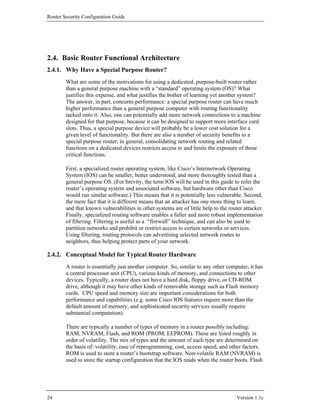
        There are typically a number of types of memory in a router possibly including:
        RAM, NVRAM, Flash, and ROM (PROM, EEPROM). These are listed roughly in
        order of volatility. The mix of types and the amount of each type are determined on
        the basis of: volatility, ease of reprogramming, cost, access speed, and other factors.
        ROM is used to store a router’s bootstrap software. Non-volatile RAM (NVRAM) is
        used to store the startup configuration that the IOS reads when the router boots. Flash


24                                                                                   Version 1.1c
Background and Review


        memory stores the IOS (or other router OS), and if there is enough flash it may store
        more than one version of IOS. Figure 2-5 shows a simple representation of a notional
        router’s hardware structure.


               Network 0             Network 1
                                                                   ...                    Network n


                Interface 0         Interface 1                                           Interface n
                                                                   ...


                                                  Routing Fabric


                                                                         CPU
                                                                                             Configuration

          Router
                                                   Console


                              Figure 2-5: A Notional Router’s Hardware Structure

        Interfaces provide the physical connections from a router to networks. Interface types
        include Ethernet, fast Ethernet, gigibit-Ethernet, token ring, FDDI, low-speed serial,
        fast serial, HSSI, ISDN BRI, etc. Each interface is named and numbered. Interface
        cards fit into slots in a router, and an external cable of the appropriate type is
        connected to the card.

        The CPU, also called the central processor or route processor, provides high-level
        services for management, logging, routing, and control. It loads the configuration of
        the router during boot-up, and manages the operation of the interfaces. When traffic
        is being forwarded from one network to another, it usually does not touch the CPU;
        instead, the packets travel across the routing fabric from the incoming interface to the
        appropriate destination interface. Only management and control traffic for the router
        travel to or from the CPU. This can be important, because the bandwidth of the
        channel to the CPU may be far smaller than the bandwidth of the interfaces.

        In addition to a number of interfaces, almost all routers have a console port providing
        an asynchronous serial connection (RS-232). Also, most routers have an auxiliary
        port, which is frequently used for connecting a modem for router management. [Do
        not confuse the hardware serial ports with the concept of network protocol port
        numbers (e.g. port 23 for Telnet).]


Version 1.1c                                                                                          25
Router Security Configuration Guide


2.4.3. Description of Typical Router Software
        Similar to any other computer, a router will run a control program or operating
        system (OS). Each router vendor supplies their own router OS. In the case of Cisco
        routers, they run Cisco’s Internetwork Operating System (IOS). It is the IOS that
        interprets the access control list (ACL) settings and other commands to the router.

        The startup or backup configuration is stored in NVRAM. It is executed when the
        router boots. As part of the boot process a copy of this configuration is loaded into
        RAM. Changes made to a running configuration are usually made only in RAM and
        generally take effect immediately. If changes to a configuration are written to the
        startup configuration, then they will also take effect on reboot. Changes made only to
        the running configuration will be lost upon reboot.

        An operational router will have a large number of processes executing to support the
        services and protocols that the router must support. All routers support a variety of
        commands that display information about what processes are running and what
        resources, such as CPU time and memory, they are consuming. Unneeded services
        and facilities should be disabled to avoid wasting CPU and memory resources, and to
        avoid giving attackers additional potential avenues for attack.

        Each router should have a unique name to identify it, and each interface should have
        unique network addresses associated with it. Basic security settings should be
        established on any router before it is connected to an operational network. These
        kinds of considerations are discussed in more detail later in this guide.


26                                                                                Version 1.1c
Background and Review


2.5. Review of Router-Relevant Protocols and Layers
        The following sections are not inclusive of all protocols that might be of interest but
        are representative. For more details see Section 4.4, “Routing and Routing
        Protocols”. The protocols are grouped according the OSI layer to which they
        correspond.

2.5.1. Physical Layer 1
        As previously discussed, the physical layer is defined by IEEE standards or similar
        standards that define what are primarily physical and electrical characteristics.

2.5.2. Data Link Layer 2
        The IEEE and other standards that apply at this layer have also been discussed
        previously.

2.5.3. Network Layer 3
        IP – the Internet Protocol (IP) provides a specification for packet formatting and an
        unreliable, connectionless, best effort delivery of those packets.

        ARP – Hosts use the Address Resolution Protocol (ARP) to acquire the MAC address
        of other hosts.

2.5.4. Transport Layer 4
        TCP – the Transmission Control Protocol (TCP) is a connection-oriented, reliable
        protocol. Before transmitting data a connection must be established and after data
        transmission is complete the connection must be closed.

        UDP – the User Datagram Protocol (UDP) is a connectionless, best effort protocol
        with no guarantee of delivery or confirmation of delivery. It has lower overhead than
        TCP. When we speak of TCP/IP we are usually implicitly including UDP.

        ICMP – the Internet Control Message Protocol (ICMP) provides the mechanisms for
        hosts and routers to report network conditions and errors to other hosts and routers.
        (For example, the ping command relies on ICMP.)

        OSPF – Open Shortest Path First is a relatively complex, fast-converging routing
        protocol. It is an interior gateway protocol that uses a link state routing algorithm and
        requires that a hierarchy of areas be designed. An area is a logical collection of
        routers and networks.

        RIP – Routing Information Protocol is a dynamic routing protocol that allows routers
        to share network information with each other. It is a distance vector protocol that


Version 1.1c                                                                                    27
Router Security Configuration Guide


        allows routers to only share information with their nearest neighbors. It is used as an
        interior gateway protocol.

2.5.5. Session Layer 5, Presentation Layer 6, and Application Layer 7
        These protocols are labeled (TCP) or (UDP) depending on which layer 4 protocol
        they are based upon.

        DNS – Domain Name System (both TCP and UDP) performs naming resolution
        service by translating host names into IP addresses and vice versa.

        FTP – File Transfer Protocol (TCP) enables transfers of files between hosts.

        HTTP – the Hypertext Transfer Protocol (TCP) is used for retrieving web pages and
        many related tasks.

        NTP – the Network Time Protocol (UDP) is the Internet standard protocol for
        synchronizing time between network hosts and authoritative time sources.

        SMTP – Simple Mail Transport Protocol (TCP) is the Internet standard protocol for
        transmitting e-mail messages.

        SNMP – Simple Network Management Protocol (UDP) enables a management
        station to trap certain information messages from network devices.

        SSH – Secure Shell (TCP) provides cryptographic security for remote login sessions
        and other stream-oriented protocols.

        Telnet – (TCP) Enables terminal oriented processes to communicate, it is used for
        remote login.

        TFTP – the Trivial File Transfer Protocol (UDP) provides file transfers without any
        authentication or security.


28                                                                                  Version 1.1c
Background and Review


2.6. Quick “Review” of Attacks on Routers
        General threats include but are not limited to: unauthorized access, session hijacking,
        rerouting, masquerading, Denial of Service (DoS), eavesdropping, and information
        theft. In addition to threats to a router from the network, dial up access to a router
        exposes it to further threats.

        Attack techniques include: password guessing, routing protocol attacks, SNMP
        attacks, IP fragmentation attacks – to bypass filtering, redirect (address) attacks, and
        circular redirect – for denial of service.

        Session replay attacks use a sequence of packets or application commands that can be
        recorded, possibly manipulated, and then replayed to cause an unauthorized action or
        gain access.

        Rerouting attacks can include manipulating router updates to cause traffic to flow to
        unauthorized destinations. These kinds of attacks are sometimes called “route
        injection” attacks.

        Masquerade attacks occur when an attacker manipulates IP packets to falsify IP
        addresses. Masquerades can be used to gain unauthorized access or to inject bogus
        data into a network.

        Session hijacking may occur if an attacker can insert falsified IP packets after session
        establishment via IP spoofing, sequence number prediction and alteration, or other
        methods.

        Resource starvation attacks usually involve flooding the router with traffic or
        requests designed to consume all of some limited resource. Target resources may be
        bandwidth, memory, or even computation.

        Careful router configuration can help prevent a (compromised) site from being used
        as part of a Distributed Denial of Service (DDoS) attack, by blocking spoofed source
        addresses. DDoS attacks use a number of compromised sites to flood a target site
        with sufficient traffic or service requests to render it useless to legitimate users.

        An enumeration of steps to take to improve router security, and an explanation of the
        tradeoffs involved is the substance of later sections of this document.


Version 1.1c                                                                                   29
Router Security Configuration Guide


2.7. References
2.7.1. Books
        [1] Albritton, J. Cisco IOS Essentials, McGraw-Hill, 1999.
                An excellent introduction to basic IOS operations, with explanations of many
                of the concepts. If you need more introductory information than this section
                provides, this book is a good source.

        [2] Ballew, S.M., Managing IP Networks with Cisco Routers, O’Reilly Associates,
            1997.
                A practical introduction to the concepts and practices for using Cisco routers.

        [3] Chappell, L. Introduction to Cisco Router Configuration, Cisco Press, 1998.
                A good book for learning the basics, with an emphasis on Cisco IOS.

        [4] Chappell, L. (ed.) Advanced Cisco Router Configuration, Cisco Press, 1999.
                For the network administrator who already has basic familiarity with Cisco
                IOS, this book provides detailed information about a wide variety of topics
                and features.

        [5] Perlman, R., Interconnections: Bridges and Routers, McGraw-Hill, 1992.
                This book offers good explanations of all the underlying concepts, with no
                vendor emphasis.

        [6] Sacket, G., Cisco Router Handbook, McGraw-Hill, 1999.
                This thick book provides a lot of detail on the architecture of Cisco routers
                and their operational concepts.

        [7] Held, G. and Hundley, K., Cisco Security Architectures, McGraw-Hill, 1999.
                For administrators already comfortable with basic operation of a router, this
                book provides concepts and practical advice for using a router securely.

        [8] Tannenbaum, A., Computer Networks, 2nd edition, Prentice-Hall, 1998.
                A “classic”, well written, good background reading, an excellent source for
                understanding all the concepts behind networks, routers, and TCP/IP.

        [9] Stevens, W.R., Unix Network Programming, Prentice-Hall, 1998.
                This book is primarily oriented toward network application programmers, but
                it also provides a great deal of technical background information.


30                                                                                  Version 1.1c
Background and Review


        [10] Stevens, W.R., TCP/IP Illustrated – Volume 1, The Protocols, Prentice-Hall,
             1994.
                 For really deep, technical, bit-by-bit analysis of the TCP/IP protocols, this
                 book is the best source.

        [11] Cisco IOS 12.0 Configuration Fundamentals, Cisco Press, 1999.
                 This book provides a valuable reference for all the basic operation and
                 configuration features, with a great deal of background information, too.

        [12] Huitema, C., Routing in the Internet, 2nd Edition, Addison-Wesley, 1999.
                 A deep and detailed textbook about IP routing technologies, protocols, and
                 how routing works in the Internet.

2.7.2. Papers
        [13] “Internetworking Technology Overview”, Cisco Systems, 1999.
             Available at:
               http://www.cisco.com/univercd/cc/td/doc/cisintwk/ito_doc/
                 A series of introductory-level papers by Cisco, includes coverage of all the
                 topics discussed in this section.

        [14] “OSI: The Network Layer”, Cisco Systems Brochure, Cisco Systems, 1997.
             Available at: http://www.cisco.com/warp/public/535/2.html

        [15] “TCP/IP”, Cisco Product Overview, Cisco Systems, 1997.
             Available at: http://www.cisco.com/warp/public/535/4.html

2.7.3. RFCs
        RFC stands for Request for Comments. As the official documents of the Internet
        Engineering Task Force, these are the definitive sources for information about the
        protocols and architecture of the Internet. All RFCs may be downloaded from
        http://www.ietf.org/rfc.html .

        [16] Postel, J., “User Datagram Protocol (UDP)”, RFC 768, 1980.

        [17] Postel, J., “Internet Protocol (IP)”, RFC 791, 1981.

        [18] Postel, J., “Transmission Control Protocol (TCP)”, RFC 793, 1981.

        [19] Baker, F. (ed.), “Requirements for IP Version 4 Routers”, RFC 1812, 1996.

        [20] Socolofsky, T. and Kale, C., “A TCP/IP Tutorial”, RFC 1180, 1991.

        [21] Malkin, G. and Parker T.L., “Internet User’s Glossary”, RFC 1392, 1993.


Version 1.1c                                                                                     31
Router Security Configuration Guide


        [22] Rekhter, Y. and Li, T., “An Architecture of IP Address Allocation with CIDR”,
             RFC 1518, 1993.

        [23] Fuller, V., Li, T., Varadhan K., and Yu, J., “Classless Inter-Domain Routing
             (CIDR): an Address Assignment and Aggregation Strategy”, RFC 1519, 1993.


32                                                                              Version 1.1c
Router Security Principles and Goals


3. Router Security Principles and Goals
         Routers can play a role in securing networks. This section describes general
         principles for protecting a router itself, protecting a network with a router, and
         managing a router securely. The last part of this section gives some guidance about
         router security policy.

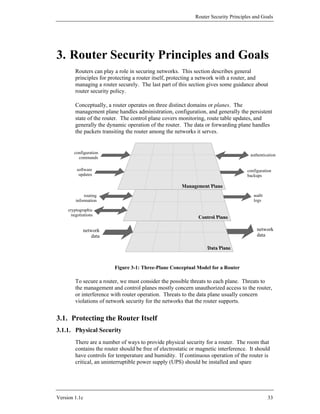
         Conceptually, a router operates on three distinct domains or planes. The
         management plane handles administration, configuration, and generally the persistent
         state of the router. The control plane covers monitoring, route table updates, and
         generally the dynamic operation of the router. The data or forwarding plane handles
         the packets transiting the router among the networks it serves.


        configuration
                                                                                       authentication
          commands

          software                                                                    configuration
           updates                                                                    backups


              routing                                                                    audit
         information                                                                     logs

     cryptographic
       negotiations


             network                                                                       network
                 data                                                                      data


                          Figure 3-1: Three-Plane Conceptual Model for a Router

         To secure a router, we must consider the possible threats to each plane. Threats to
         the management and control planes mostly concern unauthorized access to the router,
         or interference with router operation. Threats to the data plane usually concern
         violations of network security for the networks that the router supports.


3.1. Protecting the Router Itself
3.1.1. Physical Security
         There are a number of ways to provide physical security for a router. The room that
         contains the router should be free of electrostatic or magnetic interference. It should
         have controls for temperature and humidity. If continuous operation of the router is
         critical, an uninterruptible power supply (UPS) should be installed and spare


Version 1.1c                                                                                     33
Router Security Configuration Guide


        components kept on hand. To help protect against some denial of service attacks,
        and to allow it to support the widest range of security services, the router should be
        configured with the maximum amount of memory possible. * Also, the router should
        be placed in a locked room accessible only to authorized personnel. Physical devices
        (e.g., PC cards, modems) used to connect to the router require storage protection.

3.1.2. Operating System
        The operating system for the router is a crucial component. Decide what features the
        network needs, and use the feature list to select the version of the operating system.
        However, the very latest version of any operating system tends not to be the most
        reliable due to its limited exposure in a wide range of network environments. One
        should use the latest stable release of the operating system that meets the feature
        requirements. Section 3.3.2 discusses the management of updates to the operating
        system, and Sections 4 and 8 include information on Cisco’s IOS operating system.

3.1.3. Configuration Hardening
        A router is similar to many computers in that it has many services enabled by default.
        Many of these services are unnecessary and may be used by an attacker for
        information gathering or for exploitation. Unnecessary services should be disabled in
        the router configuration. Section 3.3.2 discusses management of updates to the router
        configuration.


        *
          Some readers might balk at this recommendation; on the grounds that memory costs money and
        therefore a router should be purchased with the minimum amount of memory it needs to supports its
        task. This is a false savings. The incremental cost of extra memory is usually small compared to the
        total cost of a fully configured router, and the added performance and flexibility that the extra memory
        will provide is almost always worthwhile when amortized over the number of users and services that
        depend on the router for connectivity over its service lifetime. Also, adding memory to an operational
        router requires taking that router out of service. In the Internet Service Provider community, for
        example, it is considered an industry best practice to equip every operational router with as much
        memory as it can hold.


34                                                                                                 Version 1.1c
Router Security Principles and Goals


3.2. Protecting the Network with the Router
3.2.1. Roles in Network Operations and Security
        Routers perform many different jobs in modern networks, but for this discussion we
        will examine three fundamental ways in which routers are employed.

        Interior Routers
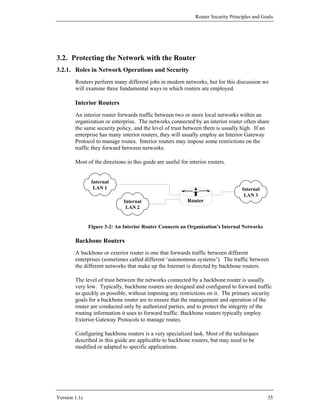
        An interior router forwards traffic between two or more local networks within an
        organization or enterprise. The networks connected by an interior router often share
        the same security policy, and the level of trust between them is usually high. If an
        enterprise has many interior routers, they will usually employ an Interior Gateway
        Protocol to manage routes. Interior routers may impose some restrictions on the
        traffic they forward between networks.

        Most of the directions in this guide are useful for interior routers.


                Internal
                 LAN 1                                                              Internal
                                                                                     LAN 3
                              Internal                     Router
                               LAN 2


               Figure 3-2: An Interior Router Connects an Organization’s Internal Networks

        Backbone Routers
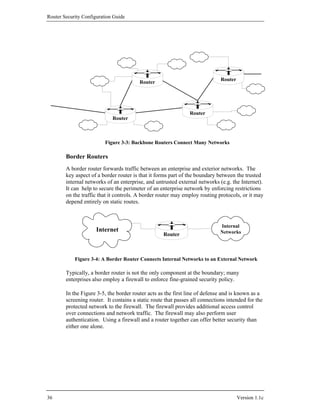
        A backbone or exterior router is one that forwards traffic between different
        enterprises (sometimes called different ‘autonomous systems’). The traffic between
        the different networks that make up the Internet is directed by backbone routers.

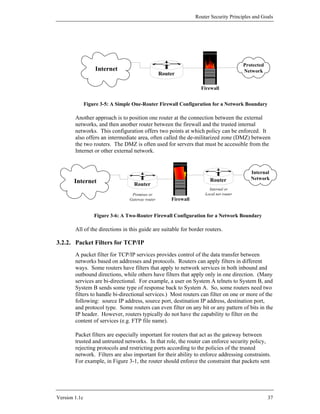
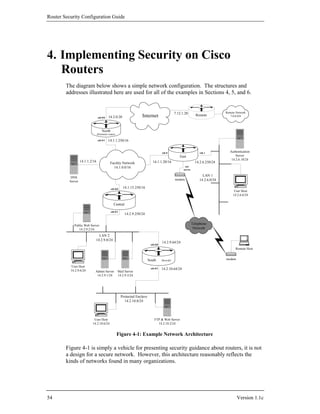
        The level of trust between the networks connected by a backbone router is usually
        very low. Typically, backbone routers are designed and configured to forward traffic
        as quickly as possible, without imposing any restrictions on it. The primary security
        goals for a backbone router are to ensure that the management and operation of the
        router are conducted only by authorized parties, and to protect the integrity of the
        routing information it uses to forward traffic. Backbone routers typically employ
        Exterior Gateway Protocols to manage routes.

        Configuring backbone routers is a very specialized task. Most of the techniques
        described in this guide are applicable to backbone routers, but may need to be
        modified or adapted to specific applications.


Version 1.1c                                                                                    35
Router Security Configuration Guide


                                                                              Router
                                         Router


                                                                Router
                             Router


                          Figure 3-3: Backbone Routers Connect Many Networks

        Border Routers
        A border router forwards traffic between an enterprise and exterior networks. The
        key aspect of a border router is that it forms part of the boundary between the trusted
        internal networks of an enterprise, and untrusted external networks (e.g. the Internet).
        It can help to secure the perimeter of an enterprise network by enforcing restrictions
        on the traffic that it controls. A border router may employ routing protocols, or it may
        depend entirely on static routes.


                                                                             Internal
                      Internet                                               Networks
                                                    Router


            Figure 3-4: A Border Router Connects Internal Networks to an External Network

        Typically, a border router is not the only component at the boundary; many
        enterprises also employ a firewall to enforce fine-grained security policy.

        In the Figure 3-5, the border router acts as the first line of defense and is known as a
        screening router. It contains a static route that passes all connections intended for the
        protected network to the firewall. The firewall provides additional access control
        over connections and network traffic. The firewall may also perform user
        authentication. Using a firewall and a router together can offer better security than
        either one alone.


36                                                                                     Version 1.1c
Router Security Principles and Goals


                                                                                         Protected
                   Internet                                                              Network
                                                   Router

                                                                    Firewall


               Figure 3-5: A Simple One-Router Firewall Configuration for a Network Boundary

        Another approach is to position one router at the connection between the external
        networks, and then another router between the firewall and the trusted internal
        networks. This configuration offers two points at which policy can be enforced. It
        also offers an intermediate area, often called the de-militarized zone (DMZ) between
        the two routers. The DMZ is often used for servers that must be accessible from the
        Internet or other external network.


                                                                                            Internal
                                                                        Router              Network
       Internet                     Router
                                                                        Internal or
                                   Premises or                        Local net router
                                  Gateway router       Firewall


                   Figure 3-6: A Two-Router Firewall Configuration for a Network Boundary

        All of the directions in this guide are suitable for border routers.

3.2.2. Packet Filters for TCP/IP
        A packet filter for TCP/IP services provides control of the data transfer between
        networks based on addresses and protocols. Routers can apply filters in different
        ways. Some routers have filters that apply to network services in both inbound and
        outbound directions, while others have filters that apply only in one direction. (Many
        services are bi-directional. For example, a user on System A telnets to System B, and
        System B sends some type of response back to System A. So, some routers need two
        filters to handle bi-directional services.) Most routers can filter on one or more of the
        following: source IP address, source port, destination IP address, destination port,
        and protocol type. Some routers can even filter on any bit or any pattern of bits in the
        IP header. However, routers typically do not have the capability to filter on the
        content of services (e.g. FTP file name).

        Packet filters are especially important for routers that act as the gateway between
        trusted and untrusted networks. In that role, the router can enforce security policy,
        rejecting protocols and restricting ports according to the policies of the trusted
        network. Filters are also important for their ability to enforce addressing constraints.
        For example, in Figure 3-1, the router should enforce the constraint that packets sent


Version 1.1c                                                                                         37
Router Security Configuration Guide


        from the internal or protected network (right to left) must bear a source address
        within a particular range. This is sometimes called egress filtering. Similarly, the
        router should enforce the constraint that packets arriving from the Internet must bear
        a source address outside the range valid for the protected network. This is a form of
        ingress filtering.

        Two key characteristics of TCP/IP packet filters are length and ordering. A filter
        consists of one or more rules, with each rule either accepting or denying a certain set
        of packets. The number of rules in a filter determines its length. Generally, as the
        length grows the filter becomes more complex and more difficult to troubleshoot.
        The order of the rules in a packet filter is critical. When the router analyzes a packet
        against a filter the packet is effectively compared to each filter rule in sequential
        order. If a match is found then the packet is either permitted or denied and the rest of
        the filter is ignored. If no match is found then the packet is denied due to the implicit
        deny rule at the end of the filter. You must carefully create filter rules in the proper
        order so that all packets are treated according to the intended security policy. One
        method of ordering involves placing those rules that will handle the bulk of the traffic
        as close to the beginning of the filter as possible. Consequently, the length and
        ordering of a packet filter rule set can affect the router’s performance. (Note: This
        discussion is applicable to the packet filtering facilities of Cisco routers, most other
        kinds of routers, and most packet filtering firewalls. Cisco filtering is discussed in
        detail in Section 4.3. If you have a router made by a company other than Cisco
        Systems, consult its documentation for details).

        Applying Packet Filters: Permit Only Required Protocols and Services
        Carefully consider what network services will be allowed through the router
        (outbound and inbound) and to the router. If possible, use the following guideline for
        creating filters: those services that are not explicitly permitted are prohibited.
        This guideline is especially important for border routers. Make a list of the services
        and protocols that must cross the router, and those that the router itself needs for its
        operation. Create a set of filtering rules that permit the traffic identified on the list,
        and prohibits all other traffic.

        In cases where only certain hosts or networks need access to particular services, add a
        filtering rule that permits that service but only for the specific host addresses or
        address ranges. For example, the network firewall host might be the only address
        authorized to initiate web connections (TCP port 80) through the router.

        Applying Packet Filters: Reject Risky Protocols and Services
        Sometimes, it is not possible to follow the strict security guideline discussed above.
        In that case, fall back to prohibiting services that are commonly not needed, or are
        known to be popular vehicles for security compromise. The following two tables
        present common services to restrict because they can be used to gather information
        about the protected network or they have weaknesses that can be exploited against
        the protected network. The first table lists those services that should be completely
        blocked by a typical border router. Unless you have a specific operational need to


38                                                                                    Version 1.1c
Router Security Principles and Goals


        support them, the protocols listed in Table 3-1 should not be allowed across the
        router in either direction.

                      Table 3-1: Services to Block Completely at a Border Router
                              Port (Transport)                         Service
                                1 (TCP & UDP)                   tcpmux
                                7 (TCP & UDP)                   echo
                                9 (TCP & UDP)                   discard
                               11 (TCP)                         systat
                               13 (TCP & UDP)                   daytime
                               15 (TCP)                         netstat
                               19 (TCP & UDP)                   chargen
                               37 (TCP & UDP)                   time
                               43 (TCP)                         whois
                               67 (UDP)                         bootp
                               69 (UDP)                         tftp
                               95 (TCP & UDP)                   supdup
                             111 (TCP & UDP)                    sunrpc
                             135 (TCP & UDP)                    loc-srv
                             137 (TCP & UDP)                    netbios-ns
                             138 (TCP & UDP)                    netbios-dgm
                             139 (TCP & UDP)                    netbios-ssn
                             177 (UDP)                          xdmcp
                             445 (TCP)                          netbios (ds)
                             512 (TCP)                          rexec
                             515 (TCP)                          lpr
                             517 (UDP)                          talk
                             518 (UDP)                          ntalk
                             540 (TCP)                          uucp
                            1434 (UDP)                          Microsoft SQL Server
                         1900, 5000 (TCP & UDP)                 Microsoft UPnP SSDP
                            2049 (UDP)                          NFS
                         6000 - 6063 (TCP)                      X Window System
                            6667 (TCP)                          IRC
                         12345-6 (TCP)                          NetBus
                           31337 (TCP & UDP)                    Back Orifice

        Table 3-2 lists some services on the internal network or on the router itself that
        should not be accessible to connections from the external networks.


Version 1.1c                                                                                   39
Router Security Configuration Guide


                 Table 3-2: Some Services to Block at the Router from External Clients
                               Port (Transport)                       Service
                                79 (TCP)                       finger
                               161 (TCP & UDP)                 snmp
                               162 (TCP & UDP)                 snmp trap
                               513 (TCP)                       rlogin
                               513 (UDP)                       who
                               514 (TCP)                       rsh, rcp, rdist, rdump
                               514 (UDP)                       syslog
                               550 (TCP & UDP)                 new who


        Standard Ports and Protocols
        Some organizations maintain a list of standard ports and protocols that should be
        allowed or supported on their networks. Various organization in the US DOD
        maintain such lists, and the Defense Information System Agency (DISA) is
        attempting to manage the creation of a standard list for the entire DOD.

        For networks that are subject to such lists, it is best to take the first approach,
        allowing only those ports and protocols mandated by the standard list, and rejecting
        all others.

        Address Filtering
        Router filters should also be used to protect against IP address spoofing, especially
        on border routers. In most cases filtering rules should apply both ingress and egress
        filtering, including blocking reserved addresses. The principles to apply on border
        routers are listed below.

                • Reject all traffic from the internal networks that bears a source IP address
                  which does not belong to the internal networks. (Legitimate traffic
                  generated by sources on the internal networks will always bear a source
                  address within the range or ranges assigned to the internal networks; any
                  other traffic is attempting to claim a bogus source address, and is almost
                  certainly erroneous or malicious in nature.)
                • Reject all traffic from the external networks that bears a source address
                  belonging to the internal networks. (Assuming that addresses are assigned
                  correctly, traffic sent from the external networks should always bear a
                  source address from some range other than those assigned to the internal
                  networks. Traffic bearing such spoofed addresses is often part of an
                  attack, and should be dropped by a border router.)
                • Reject all traffic with a source or destination address belonging to any
                  reserved, unroutable, or illegal address range.


40                                                                                  Version 1.1c
Router Security Principles and Goals


3.2.3. Mitigating Denial of Service Attacks
        Loss of service or severely degraded network performance can result from a variety
        of causes. Denial of Service (DoS) refers to willful attempts to cause such
        disruptions. Though DoS attacks can be viewed as tolerable annoyances, they can
        have serious consequences if they occur during a time of crisis. There is no complete
        solution to the DoS problem; as long as the resources of a network are limited and
        openly available they will be vulnerable to attack. There are measures that network
        administrators can take to protect networks from DoS attacks and lessen their effects.
        These measures require some cooperative effort between those who administer hosts,
        network devices, and provider access. To be effective, these measures must be
        planned and in place before an attack occurs.

        At the enterprise level there are three primary strategies for combatting DoS attacks,
        described in detail below.

                1. Prevent malicious traffic from entering the common network from the
                   enterprise network.

                2. Configure and deploy local protective measures, at both border and
                   interior routers.

                3. Coordinate protective measures against distributed DoS attacks with
                   network access providers and/or backbone administrators.

        First, it is important for every network administrator to help reduce the number of
        DoS attack launch platforms. Do not let your network be the origin point for a DoS
        attack; keep hosts secure and eliminate compromised hosts from the network
        immediately. There are several mechanisms available on routers to thwart certain
        kinds of DoS attacks. Many of these attacks require use of invalid or spoofed source
        addresses. For example, invalid addresses are used in SYN flood attacks to ensure
        that the TCP handshake on the target host times out waiting for a response (see
        Section 6.3.2). There are several ways to filter out these improperly-addressed
        packets. Access control lists are a general filtering facility available on all routers
        (see Section 4.3). Black hole routing can also be useful, and works on all routers (see
        Section 4.4.6). Most Cisco routers support a facility called Unicast Reverse-Path
        Forwarding Verification that uses the route table to detect and drop improperly-
        addressed packets (see Section 4.4.7). Where possible, you should log occurences of
        bad packets, logging these violations can help identify compromised hosts that need
        to be removed from your network. Of course, detection will depend on reviewing the
        router logs on a regular basis.

        You can defend against some individual DoS attacks locally by rejecting packets
        with invalid source addresses as they arrive at a border router (see Section 4.3.5).
        Invalid or otherwise untraceable source addresses are often used to hide the actual
        source of an attack. Also, router services that support attacks or attack amplification
        should be disabled (see Section 4.2). Some routers and firewalls offer specialized
        facilities to mitigate TCP SYN flood attacks; on Cisco routers this facility is called


Version 1.1c                                                                                  41
Router Security Configuration Guide


        TCP Intercept (see Section 4.3.3). In some cases, router traffic rate control or quality
        of service facilities can be used to protect critical services from the full effects of
        DoS attacks (see Section 4.3.6). Router facilities may also be supplemented by
        commercial anti-DoS products that provide finer-grained filtering and attack
        detection.

        A border router cannot control the type or overall volume of traffic that is sent to it.
        DoS mitigation necessarily requires cooperative action “upstream,” i.e. from the
        access provider, (possibly from) the transport provider, the source point access
        provider, or even from the administrators of the attacking hosts. For example, as the
        packets of an ICMP flood converge at the uplink, legitimate traffic is crowded out by
        bogus traffic and packets are lost to traffic flow control. Connections and data
        transfers are starved and eventually time out or hang because they are unable to
        resynchronize. If your access provider performs statistical monitoring of traffic, they
        can take steps to block and trace back bad traffic as the attack ramps up. If no such
        quality of service monitoring exists, then the network being attacked will need to
        actively request its access provider filter out offending traffic.

        There is no set of methods that can completely counter all known DoS attacks, and
        certainly there will be novel kinds of DoS attacks discovered in the future. It is still
        prudent to be prepared to handle well-known DoS attacks using facilities already
        available. Routers are a part of the solution, but cautious design, contingency
        planning, and cooperation among network administrators are also necessary.


42                                                                                   Version 1.1c
Router Security Principles and Goals


3.3. Managing the Router
3.3.1. Access Mechanisms for Administrators
        Controlling access to a router by administrators is an important issue. There are two
        types of access: local and remote. Local access usually involves a direct connection
        to a console port on the router with a dumb terminal or a laptop computer. Remote
        access typically involves allowing telnet or SNMP connections to the router from
        some computer on the same subnet or a different subnet. It is recommended to only
        allow local access because during remote access all telnet passwords or SNMP
        community strings are sent in the clear to the router. If an attacker can collect
        network traffic during remote access then he can capture passwords or community
        strings. However, there are some options if remote access is required.

                1. Establish a dedicated management network. The management network
                   should include only identified administration hosts and a spare interface
                   on each router. Figure 3-7 shows an example of this.


                                                                                             LAN 1
         Internet                 Router                                  Router

                                                       Firewall                              LAN 2


                                                             Management
                                                               LAN


                                       Administration Host                Logging Host


                         Figure 3-7: Using a Management LAN for Administration

                2. Another method is to encrypt all traffic between the administrator’s
                   computer and the router. (Section 5.2 shows an example of setting up
                   IPSec encryption with a Cisco router and Windows 2000, Section 5.3
                   shows how to set up a Cisco router to support SSH encryption.)

        In either case, packet filters can be configured to permit only the identified
        administration hosts management access to the router.

        In addition to how administrators access the router, there may be a need to have more
        than one level of administrator, or more than one administrative role. Define clearly
        the capabilities of each level or role in the router security policy. For example, one
        role might be “network manager”, and administrators authorized to assume that role
        may be able to view and modify the configuration settings and interface parameters.
        Another role might be “operators”, administrators authorized to assume that role


Version 1.1c                                                                                         43
Router Security Configuration Guide


        might be authorized only to clear connections and counters. In general, it is best to
        keep the number of fully privileged administrators to a minimum.

3.3.2. Updating the Router
        Periodically the router will require updates to be loaded for either the operating
        system or the configuration file. These updates are necessary for one or more of the
        following reasons: to fix known security vulnerabilities, to improve performance or
        support new features (perhaps some that allow more advanced security policies).
        Before updating, the administrator should complete the following checks. Determine
        the memory required for the update, and if necessary install additional memory. Set
        up and test file transfer capability between the administrator’s host and the router.
        Schedule the required router and network downtime, usually after regular business
        hours, to perform the update.

        After obtaining an update from the router vendor (and verifying its integrity), the
        administrator should follow procedures similar to the following. Shut down or
        disconnect the interfaces on the router. Back up the current operating system and the
        current configuration file to the administrator’s computer. Load the update for either
        the operating system or for the configuration file. Perform tests to confirm that the
        update works properly. If the tests are successful then restore or reconnect the
        interfaces on the router. If the tests are not successful then back out the update.

3.3.3. Logging
        Logging a router’s activities and status offers several benefits. Using the information
        in a log, the administrator can tell whether the router is working properly or whether
        it has been compromised. In some cases, it can show what types of probes or attacks
        are being attempted against the router or the protected network.

        Configuring logging on the router should be done carefully. Send the router logs to a
        designated log host, which is a separate computer whose only job is to accept and
        store logs. The log host should be connected to a trusted or protected network, or an
        isolated and dedicated router interface. Harden the log host by removing all
        unnecessary services and accounts. Set the level of logging on the router to meet the
        needs of your security policy, and expect to modify the log settings as the network
        evolves. The logging level may need to be modified based on how much of the log
        information is useful. Two areas that should be logged are (1) matches to filter rules
        that deny access, and (2) changes to the router configuration.

        The most important thing to remember about logging is that logs must be reviewed
        regularly. By checking over the logs periodically, you can gain a feeling for the
        normal behavior of your network. A sound understanding of normal operation and
        its reflection in the logs will help you to identify abnormal or attack conditions.

        Accurate timestamps are important to logging. All routers are capable of maintaining
        their own time-of-day, but this is usually not sufficient. Instead, direct the router to
        at least two different reliable time servers (via NTP) to ensure accurate and reliable


44                                                                                  Version 1.1c
Router Security Principles and Goals


        of time information. Direct the logging host to reliable time servers. Include a
        timestamp in each log message. This will allow you to trace network attacks more
        credibly. Finally, consider also sending the logs to write-once media or a dedicated
        printer to deal with worst case scenarios (e.g. compromise of the log host).

3.3.4. Operational Security Management
        Maintaining the security of a router over its operational lifetime requires regular
        assessment, testing, and correction.

        Another important aspect of lifetime security is preparing for problems. Keeping up
        to date backups of router configurations and installed IOS releases is essential for
        quick and reliable recovery from security compromises or simple hardware failures.
        Plan your recovery actions, write down the procedures, and then exercise the plan
        periodically so that all the participants understand their roles. Your recovery plan
        must be coordinated with your security policy (see next section).

        In the case of a security compromise, it is highly desirable to preserve the evidence,
        so that it can be used in a forensic investigation or even prosecution. Include the
        steps for capturing the compromised state of a router in your recovery plan.


Version 1.1c                                                                                   45
Router Security Configuration Guide


3.4. Security Policy for Routers
        Routers are an important part of a network, and their security is a vital part of the
        overall security for the networks they serve. What does it mean for a router to be
        secure? One simple way to define the security of a router is this: does the operation,
        configuration, and management of the router satisfy your security policy?

3.4.1. A Conceptual Basis for Router Security Policy
        Figure 3-8, below, shows a layered view of the security of a router. The security of
        each layer depends on the security of the layers inside it.

      Router Security                                               Corresponding Access
              Layers
                                           Physical Integrity       • Physical access
                                             of the Router          • Electrical access


                                      Core Static Configuration     • Administrative access
                                            of the Router           • Software updates

                                      Dynamic Configuration
                                                                    • Routing protocols
                                      and Status of the Router
                                                                    • Access to the network that
                             Network Traffic through the Router       the router serves.


                                Figure 3-8: Layered View of Router Security

        The innermost zone is the physical security of the router. Any router can be
        compromised by an attacker with full physical access; therefore, physical access must
        be controlled to provide a solid foundation for the overall security of the router.
        Most routers offer one or more direct connections, usually called ‘Console’ or
        ‘Control’ ports; these ports usually provide special mechanisms for controlling the
        router. Router security policy should define rules for where and how these ports may
        be used.

        The next innermost zone of the diagram is the stored software and configuration state
        of the router itself. If an attacker can compromise either of these, particularly the
        stored configuration, then he will also gain control of the outer two layers. Some
        important aspects of the stored configuration are the interface addresses, the user
        names and passwords, and the access controls for direct access to the router’s
        command interface. Security policy usually includes strict rules about access to this
        layer, in terms of both administrative roles and network mechanisms.

        The next outermost zone of the diagram is the dynamic configuration of the router.
        The route tables themselves are the most obvious part of this. Other pieces of
        dynamic information, such as interface status, ARP tables, and audit logs, are also
        very important. If an attacker can compromise the dynamic configuration of a


46                                                                                        Version 1.1c
Router Security Principles and Goals


        router, he can compromise the outermost layer as well. Security policy for a router
        should include rules about access to this layer, although it is sometimes overlooked.

        The outer zone of the diagram represents the intra-network and inter-network traffic
        that the router manages. The overall network security policy may include rules
        about this, identifying permitted protocols and services, access mechanisms, and
        administrative roles. The high-level requirements of the network security policy
        must be reflected in the configuration of the router, and probably in the router
        security policy.

3.4.2. Router Security Policy and Overall Network Security Policy
        Typically, the network that a router serves will have a security policy, defining roles,
        permissions, rules of conduct, and responsibilities. The policy for a router must fit
        into the overall framework. The roles defined in the router security policy will
        usually be a subset of those in the network policy. The rules of conduct for
        administering the router should clarify the application of the network rules to the
        router.

        For example, a network security policy might define three roles: administrator,
        operator, and user. The router security policy might include only two: administrator
        and operator. Each of the roles would be granted privileges in the router policy that
        permit them to fulfill their responsibilities as outlined in the network policy. The
        operator, for example, might be held responsible by the network security policy for
        periodic review of the audit logs. The router security policy might grant the operator
        login privileges to the router so that they can access the router logs.

        In other regards, the router policy will involve far more detail than the network
        policy. In some cases, the router enforces network policy, and the router policy must
        reflect this.

        For example, the network security policy might forbid administration of the router
        from anywhere but the local LAN. The router policy might specify the particular
        rules to be enforced by the router to prevent unauthorized remote administration.

3.4.3. Creating a Security Policy for a Router
        There are several important tips to remember when creating the security policy for a
        router:

               • Specify security objectives, not particular commands or mechanisms –
                 When the policy specifies the security results to be achieved, rather than a
                 particular command or mechanism, the policy is more portable across
                 router software versions and between different kinds of routers.
               • Specify policy for all the zones identified in the figure above –
                 Begin with physical security, and work outwards to security for the static
                 configuration, the dynamic configuration, and for traffic flow.


Version 1.1c                                                                                   47
Router Security Configuration Guide


                • Services and protocols that are not explicitly permitted should be denied –
                  When representing the network policy in the router policy, concentrate on
                  services and protocols that have been identified as explicitly needed for
                  network operation; explicitly permit those, and deny everything else.

        In some cases, it may not be practical to identify and list all the services and
        protocols that the router will explicitly permit. A backbone router that must route
        traffic to many other networks cannot always enforce highly tailored policies on the
        traffic flowing through it, due to performance concerns or differences in the security
        policies of the different networks served. In these kinds of cases, the policy should
        clearly state any limitations or restrictions that can be enforced. When drafting a
        policy, keep most of the directives and objectives high-level; avoid specifying the
        particular mechanisms in the policy.

        A security policy must be a living document. Make it part of the security practices of
        your organization to regularly review the network security policy and the router
        security policy. Update the router policy to reflect changes in the network policy, or
        whenever the security objectives for the router change. It may be necessary to revise
        the router security policy whenever there is a major change in the network
        architecture or organizational structure of network administration. In particular,
        examine the router security policy and revise it as needed whenever any of the
        following events occur.

                • New connections made between the local network and outside networks
                • Major changes to administrative practices, procedures, or staff
                • Major changes to the overall network security policy
                • Deployment of substantial new capabilities (e.g. a new VPN) or new
                  network components (e.g. a new firewall)
                • Detection of an attack or serious compromise

        When the router security policy undergoes a revision, notify all individuals
        authorized to administer the router and all individuals authorized for physical access
        to it. Maintaining policy awareness is crucial for policy compliance.

        Finally, some organizations have high-level policies that impose specific
        requirements on the contents of individual network security policies. Carefully check
        your router’s security policy against any applicable high-level policy, to ensure that it
        meets all the requirements.

3.4.4. Router Security Policy Checklist
        The checklist below is designed as an aid for creating router security policy. After
        drafting a policy, step through the list and check that each item is addressed in your
        policy.


48                                                                                   Version 1.1c
Router Security Principles and Goals


        Physical Security
               •   Designates who is authorized to install, de-install, and move the router.
               •   Designates who is authorized to perform hardware maintenance and to change
                    the physical configuration of the router.
               •   Designates who is authorized to make physical connections to the router.
               •   Defines controls on placement and use of console and other direct access port
                    connections.
               •   Defines recovery procedures for the event of physical damage to the router, or
                    evidence of tampering with the router.

        Static Configuration Security
               •   Designates who is authorized to log in directly to the router via the console or
                    other direct access port connections.
               •   Designates who is authorized to assume administrative privileges on the
                    router.
               •   Defines procedures and practices for making changes to the router static
                    configuration (e.g. log book, change recording, review procedures)
               •   Defines the password policy for user/login passwords, and for administrative
                    or privilege passwords. Include a list of conditions that require passwords to
                    be changed (e.g lifetime, staff changes, compromise)
               •   Designates who is authorized to log in to the router remotely.
               •   Designates protocols, procedures, and networks permitted for logging in to
                    the router remotely.
               •   Defines the recovery procedures and identifies individuals responsible for
                    recovery, in the case of compromise of the router’s static configuration.
               •   Defines the audit log policy for the router, including outlining log
                    management practices and procedures and log review responsibilities.
               •   Designates procedures and limits on use of automated remote management
                    and monitoring facilities (e.g. SNMP)
               •   Outlines response procedures or guidelines for detection of an attack against
                    the router itself.
               •   Defines the management policy and update intervals for long-term secrets,
                    such as those for routing protocols, NTP, TACACS+, RADIUS, and SNMP.
               •   Defines the key management policy for long-term cryptographic keys (if any).

        Dynamic Configuration Security
               •   Identifies the dynamic configuration services permitted on the router, and the
                     networks permitted to access those services.


Version 1.1c                                                                                      49
Router Security Configuration Guide


            •   Identifies the routing protocols to be used, and the security features to be
                  employed on each.
            •   Designates mechanisms and policies for setting or automating maintenance of
                 the router’s clock (e.g. manual setting, NTP).
            •   Identifies key agreement and cryptographic algorithms authorized for use in
                 establishing VPN tunnels with other networks (if any).

        Network Service Security
            •   Enumerates protocols, ports, and services to be permitted or filtered by the
                 router, for each interface or connection (e.g. inbound and outbound), and
                 identifies procedures and authorities for authorizing them.
            •   Describes security procedures and roles for interactions with external service
                 providers and maintenance technicians.

        Compromise Response
            •   Enumerates individuals or organizations to be notified in the event of a
                 network compromise.
            •   Identifies relevant configuration information to be captured and retained.
            •   Defines response procedures, authorities, and objectives for response after a
                 successful attack against the network, including provision for preserving
                 evidence and for notification of law enforcement.


50                                                                                   Version 1.1c
Router Security Principles and Goals


3.5. References
3.5.1. Books and Manuals
        [1] Chapman, D.B., Cooper, S., and Zwicky, E.D., Building Internet Firewalls, 2nd
            Edition, O’Reilly & Associates, 2000.
                 A seminal overview of network boundary security concerns and techniques.
                 This revised edition includes all the sound background of the original, with
                 extensive updates for newer technologies.

        [2] Held, G. and Hundley, K., Cisco Security Architectures, McGraw-Hill, 1999.
                 This book includes excellent general advice about router and router-related
                 network security, in addition to its Cisco-specific material.

        [3] Stevens, W.R., TCP/IP Illustrated, Volume 1, Addison-Wesley, 1994.
                 The most comprehensive and readable guide to the TCP/IP protocol suite;
                 great technical background for any network analyst.

        [4] Akin, T., Hardening Cisco Routers, O’Reilly & Associates, 2002.
                 A pragmatic and detailed guide to securing Cisco routers; includes a good
                 section on physical security.

3.5.2. Web Sites and On-Line Resources
        [5] Cisco Internetworking Technology Overview
               http://www.cisco.com/univercd/cc/td/doc/cisintwk/ito_doc/
                 This site contains a set of excellent technical overviews for a wide variety of
                 networking technologies. It is also included on every Cisco documentation
                 CD. The overview “Routing Basics” is a fine introduction to IP routing.

        [6] IANA Port and Protocol Number Assignments
               http://www.iana.org/assignments/port-numbers
               http://www.iana.org/assignments/protocol-numbers
                 IANA houses the many unique parameters and protocol values necessary for
                 the operation of the Internet and its future development. Types of numbers
                 range from unique port assignments to the registration of character sets. In
                 the past, these numbers were documented through the RFC document series,
                 the last of these documents was RFC 1700, which is also now outdated.
                 Since that time, the assignments have been listed in this directory as living
                 documents, constantly updated and revised when new information is
                 available and new assignments are made. The port numbers are divided into
                 three ranges: the Well Known Ports, the Registered Ports, and the Dynamic
                 and/or Private Ports. The ‘port-numbers’ file contains the listing of all
                 registered port numbers.


Version 1.1c                                                                                   51
Router Security Configuration Guide


        [7] The RFC Editor Site
              http://www.rfc-editor.org/
                This is the main site for looking up Internet RFCs. The retrieval service
                supports a variety of keyword searches, as well as straight by-number
                lookup.

        [8] “Network Security Policy: Best Practices White Paper”, Cisco White Paper,
            Cisco Systems, 2000.
             http://www.cisco.com/warp/public/126/secpol.html
                A complex and highly detailed architecture and practices document for
                setting up enterprise networks.

        [9] Naidu, K. “Cisco Checklist”, Security Consensus Operational Readiness
            Evaluation, SANS, 2000.
                A detailed checklist of security and operational conditions to check for in the
                audit of a router; available under: http://www.sans.org/SCORE/.

        [10] “Cisco SAFE: A Security Blueprint for Enterprise Networks”, Cisco White
             Paper, Cisco Systems, 2000.
                This detailed white paper describes a threat model for enterprise networks,
                and presents a network architecture designed to protect against it. This white
                paper, and related ones, are available under the SAFE web page:
                http://www.cisco.com/warp/public/cc/so/cuso/epso/sqfr/.

        [11] Fraser, B. (ed.) “Site Security Handbook”, RFC 2196, September 1997.
                This RFC provides extensive information about network and system security
                policies, especially for systems connected to the Internet.


52                                                                                 Version 1.1c
Router Security Principles and Goals


Version 1.1c                                    53
Router Security Configuration Guide


4. Implementing Security on Cisco
   Routers
        The diagram below shows a simple network configuration. The structures and
        addresses illustrated here are used for all of the examples in Sections 4, 5, and 6.


                                                                                                    7.12.1.20                        Remote Network
                                 eth 0/0    14.2.0.20                 Internet                                       Remote             7.0.0.0/8


                                     North
                                 (Perimeter router)

                                 eth 0/1    14.1.1.250/16


                                                                                       eth 0                            eth 1           Authentication
                                                                                                       East                                 Server
                                                                                                                                         14.2.6.18/24
                   14.1.1.2/16                Facility Network                 14.1.1.20/16                          14.2.6.250/24
                                                14.1.0.0/16                                                net
                                                                                                          access


           DNS
                                                                                                                         LAN 1
                                                                                                    modem              14.2.6.0/24
          Server

                                              eth 0/0    14.1.15.250/16
                                                                                                                                           User Host
                                                                                                                                          14.2.6.6/24

                                                 Central
                                              eth 0/1
                                                           14.2.9.250/24


             Public Web Server                                                                                     Telephone
                14.2.9.2/24                                                                                         Network

                               LAN 2
                             14.2.9.0/24
                                                                                       14.2.9.64/24
                                                                             eth 0/0
                                                                                                                                           Remote Host


                                                                            South      (firewall)                                    modem

           User Host
          14.2.9.6/24
                                                                             eth 0/1   14.2.10.64/24
                             Admin Server             Mail Server
                              14.2.9.1/24             14.2.9.3/24


                                                        Protected Enclave
                                                          14.2.10.0/24


                            User Host                                           FTP & Web Server
                           14.2.10.6/24                                           14.2.10.2/24


                                                      Figure 4-1: Example Network Architecture

        Figure 4-1 is simply a vehicle for presenting security guidance about routers, it is not
        a design for a secure network. However, this architecture reasonably reflects the
        kinds of networks found in many organizations.


54                                                                                                                                           Version 1.1c
Advanced Security Services


4.1. Router Access Security
        This section discusses the various mechanisms used to protect the router itself. These
        include physical access, user account protection, software protection, remote
        administration concerns, and configuration issues. When thinking about the security
        of your network it is important to consider these issues for all your systems, where
        applicable, as well as for your routers.

4.1.1. Physical Security
        Once an individual has physical access to a piece of networking equipment there is
        no way to stop him from modifying the system. This problem is not only confined to
        network devices but is also true of computers and any other electrical or mechanical
        device. It is always a matter of time and effort. There are things that can be done to
        make this more difficult, but a knowledgeable attacker with access can never be
        completely defeated, only slowed down. One of the best additions to the security
        features of a computer network is to limit access. Network infrastructure
        components, like routers, are especially important because they are often used to
        protect segments of the network and can also be used for launching attacks against
        other network segments.

        Network equipment, especially routers and switches, should be located in a limited
        access area. If possible, this area should only be accessible by personnel with
        administrative responsibilities for the router. This area should be under some sort of
        supervision 24 hours a day and 7 days a week. This can be accomplished through the
        use of guards, system personnel, or electronic monitoring. In practice, physical
        security mechanisms and policies must not make access too difficult for authorized
        personnel, or they may find ways to circumvent the physical security precautions.

        If remote administration is used to configure and control routers, then consider ways
        of protecting the machines used for remote administration, and the networks they use
        to communicate with the router. Use access lists to limit remote administration
        access to hosts that enjoy reasonable physical security. If possible, use encryption to
        protect the confidentiality and integrity of the remote administration connection (see
        Sections 5.2 and 5.3).

        To illustrate one reason why physical security is critical to overall router security,
        consider the password recovery procedure for Cisco routers. Using this procedure,
        an individual with physical access can gain full privileged (enable) access to a Cisco
        router without using a password. The details of the procedure varies between router
        models, but always includes the following basic steps. An administrator (or an
        attacker) can simply connect a terminal or computer to the console port and follow
        the procedure below (taken from “Password Recovery Process” in [1]).
                “Step 1 Configure the router to boot up without reading the
                        configuration memory (NVRAM). This is sometimes called
                        the test system mode.


Version 1.1c                                                                                 55
Router Security Configuration Guide


                Step 2 Reboot the system.
                Step 3 Access enable mode (which can be done without a password
                        if you are in test system mode).
                Step 4 View or change the password, or erase the configuration.
                Step 5 Reconfigure the router to boot up and read the NVRAM as it
                        normally does.
                Step 6 Reboot the system.”
        Anyone with experience or training using Cisco routers can parley physical access
        into full privileged administrative access; the procedure takes only a couple of
        minutes. (Note: Step 5 is very important; if you need to use the password recovery
        procedure for any reason, do not neglect to restore the system boot settings after
        regaining access to the router. Failure to do so will usually result in the router
        coming up in an insecure state on subsequent reboots.)

        A second reason for controlling physical access to the router involves flash memory
        cards. Many Cisco router models offer PC-Card slots or CompactFlash slots that can
        hold additional flash memory. Routers equipped with these kinds of slots will give
        preference to memory installed in a slot over memory installed in the chassis. An
        attacker with physical access to a router on your network can install a flash memory
        card, or replace an old one. They could then boot the router with their flash, thus
        causing the router to run their IOS version and configuration. If done carefully and
        well, this kind of attack can be very difficult to detect. The best defense against it is
        good physical security.

        An operational security concern closely related to physical security is physical
        operating environment. Like most networking equipment, routers are sensitive to
        extreme temperature and humidity. If a router is not located in an environmentally
        friendly area then it may operate in unexpected ways and degrade its security. This is
        also a personnel safety issue. A room where routers are located should be free of
        electrostatic and magnetic interference. The area should also be controlled for
        temperature and humidity. If at all possible, all routers should be placed on an
        Uninterruptible Power Supply (UPS), because a short power outage can leave some
        network equipment in undetermined states.

        The console (con) and auxiliary (aux) ports on Cisco routers are used for serial
        connections to the router. Most Cisco routers have both a console and an auxiliary
        port, some of the smallest models have only a console port. The primary difference
        between the two ports is that the password recovery mechanism can be used on the
        console port only. In many cases, the auxiliary port is unused. Some administrators
        connect a modem to the auxiliary port to facilitate remote administration via dial-up.
        Permitting direct dial-in to any vital piece of network infrastructure is potentially
        very risky, and should be set up only when timely access by other means is not
        feasible. In general, the auxiliary port should be disabled (see Section 4.1.3).

        The rest of this section describes configuration steps that you should take to lock
        down your routers. It is important to apply these measures before connecting a new
        router to any potentially hostile network.


56                                                                                   Version 1.1c
Advanced Security Services


4.1.2. Router Software Versions
        Cisco issues new IOS versions and upgrades fairly frequently; making it a significant
        administrative burden to keep all the routers on a large network up to date. Newer
        versions of IOS fix bugs and vulnerabilities that existed in the older versions, and add
        new security features. Keep your IOS as up to date as is practical. A second problem
        is that the early versions of new IOS releases can be less robust than more mature,
        later versions (i.e. 12.0.1 was an early version of IOS Release 12, while 12.0.9 was a
        mature version of Release 12). A good approach to this problem is to maintain
        operational routers with recent, but not cutting-edge, Cisco IOS releases. This will
        allow others to find the bugs in the newer versions (and get them fixed). The
        recommended minimum IOS release is IOS 12.0. The recommended newest release
        would be the most recent “GD” version that is at least a month old (at the time of this
        writing, 12.1.21). To check your IOS version, log in and enter the command show
        version. For more details on IOS upgrades, see Sections 4.5 and 8.3.

4.1.3. Router Configuration and Commands (IOS)
        After connecting to a router and initially logging in, the system is in user mode also
        known as EXEC mode. EXEC mode gives limited access to the command set of the
        router. Access to all the router commands, including the ability to change the
        configuration, is reserved for the privileged EXEC mode. Typing the enable
        command at an EXEC mode prompt will give access to the privileged EXEC mode.
        Privileged EXEC mode is sometimes called ‘enable mode’.

        There are several configuration modes on a Cisco router. To enter the global
        configuration mode (config) type the command configure terminal , commonly
        abbreviated “config t”. In the global configuration mode a wide variety of overall
        router features and settings can be changed: banners, authentication systems, access
        lists, logging, routing protocols, and much more. There are sub-modes which are
        used to configure specific settings for interfaces, lines, routing protocols, etc. The list
        below describes some of the sub-modes.
               • interface (config-if) is used to configure aspects of a particular interface
                 like FastEthernet0, Ethernet 0/1, or Vlan2.
               • line (config-line) is used to set up the console port, auxiliary port and
                 virtual terminal lines.
               • access-list: There are two types of IP named access lists, extended
                 (config-ext-n) and standard (config-std-n), which can be used instead of
                 numbered lists. Access-list mode is used for building named access lists.
               • route (config-route) is where specific parameters can be set and modified
                 for a selected routing protocol.

        In addition to the standard authentication, authorization, and logging router functions,
        Cisco IOS 11.1 and later offer a comprehensive model for authentication,
        authorization, and accounting (AAA), the so-called ‘new model’. See Section 4.1.6
        for a brief description and Section 4.6 for more details.


Version 1.1c                                                                                    57
Router Security Configuration Guide


4.1.4. Router Network Traffic and the Loopback Interface
        The pimary job of a router is forwarding traffic between networks, but routers also
        generate some network traffic. Routers and other network devices communicate
        using various management protocols, such as routing protocols, SNMP, NTP, and
        TFTP. When the router initiates a network connection, that connection must have
        some source address; typically a router will select a source address from one of the
        addresses bound to one of its network interfaces. This can be problematic in several
        ways, mainly because the source address for some services can vary.

        In addition to physical interfaces, Cisco IOS routers have the ability to define internal
        virtual interfaces, called loopback interfaces. It is considered best practice, in
        configuring Cisco routers, to define one loopback interface, and designate it as the
        source interface for most traffic generated by the router itself. Adopting this practice
        yields several benefits for the overall stability and security management of a network,
        because the address of the loopback interface is fixed. When a router is configured to
        use the loopback interface for services, it is possible to configure the security of other
        devices in the network more tightly. (When a service is configured to use the
        loopback interface as its source, we say that the service is bound to that interface. It
        means that IP packets generated by the router will have the loopback interface’s
        address as their source address. Also, the loopback interface’s address does not
        appear in any route-based network maps; hiding administrative aspects of your
        network from potential attackers is usually good practice. For further discussion of
        loopback interfaces, consult [5].)

        To create a loopback interface, simply assign it an IP address. For a border router,
        the loopback’s address usually should be in the range of the internal or DMZ
        network, not the external network. Note that the loopback address cannot be the
        same as the address of any other interface, nor can it be part of the same network as
        any other interface.
            Central# config t
            Enter configuration commands, one per line. End with CNTL/Z.
            Central(config)# interface loopback0
            Central(config-if)# description Main loopback interface
            Central(config-if)# ip address 14.2.11.250 255.255.255.255
            Central(config-if)# end
            Central#

        In general, router network services that can be bound to the loopback interface should
        be. Commands to set source interface bindings are given with the discussion of each
        service in the rest of the guide.

4.1.5. Logins, Privileges, Passwords, and Accounts
        Logins and Banners
        A login banner, which includes a legal notice, should be set up on each operational
        router. A legal notice usually includes a ‘no trespassing’ warning, a statement that all
        use of the device must be authorized by the owning organization, a statement about


58                                                                                   Version 1.1c
Advanced Security Services


        the device being subject to monitoring, and perhaps a statement threatening
        prosecution. A proper legal notice protects the ability of the owning organization to
        pursue legal remedies against an attacker. Consult your organization’s legal staff or
        general counsel for suitable language to use in your legal notice. See also [7] for
        more discussion of banners and their content.

        Do not include any network architecture or device information in the banner
        message. Router model and location information should never be included. Be
        careful not to provide any information in the banner message that should not be
        shared with the general public. To set the router's message-of-the-day banner use the
        command banner motd delimiter message delimiter. The delimiter can
        be any single character.

        The console (con) port is the default location for performing router management and
        configuration. It is okay to leave a connection to the console port attached all the
        time, but that terminal (or computer) should be standalone, and protected from
        unauthorized access. The connection to the console port should not be left logged in.
        Configure the console line to time out EXEC sessions, so that if an administrator
        forgets to log out, the router will log him or her out automatically. The example
        below shows how to set up the console line to enforce a five-minute timeout; the
        command transport input none prevents remote access to the console port via
        reverse-telnet (on IOS 12.0 and earlier only).
               Central# config t
               Enter configuration commands, one per line.         End with CNTL/Z.
               Central(config)# line con 0
               Central(config-line)# transport input none
               Central(config-line)# exec-timeout 5 0
               Central(config-line)# exit
               Central(config)#

        Each authorized user should log in using their own account (for more details, see the
        Accounts sub-section below). Apply the command login local to the console line
        to enforce user log. Note that you must create at least one user account, otherwise
        you will be locked out of the console. If you do not already have users accounts set
        up, then create at least one before setting the console to use local login. The syntax
        for creating a local user is username name privilege level password string.
        The example below shows how to create an account with a password and set console
        login.
               Central(config)# username brian privilege 1 password g00d+pa55w0rd
               Central(config)# line con 0
               Central(config-line)# login local
               Central(config-line)# end
               Central#

        The auxiliary port, if at all possible, should be disabled. Router Central, in the
        sample network diagram (Figure 4-1), has no need for the aux port. The example
        below shows how to disable login on the auxiliary port (login to enable mode first):
               Central# config t
               Enter configuration commands, one per line.         End with CNTL/Z.


Version 1.1c                                                                                   59
Router Security Configuration Guide


            Central(config)# line       aux 0
            Central(config-line)#       transport input none
            Central(config-line)#       login local
            Central(config-line)#       exec-timeout 0 1
            Central(config-line)#       no exec
            Central(config-line)#       exit

        Section 4.1.5 discusses configuration of the auxiliary port if it is required for a
        modem. If the auxiliary port is required for a second local serial connection then
        configure it as shown below.
            Central(config)# line       aux 0
            Central(config-line)#       exec-timeout 5 0
            Central(config-line)#       login local
            Central(config-line)#       transport input none
            Central(config-line)#       exec
            Central(config-line)#       end
            Central#


        VTYs and Remote Administration
        One primary mechanism for remote administration of Cisco routers is logging in via
        Telnet or SSH; these connections are called virtual terminal lines. Login on the
        virtual terminal lines should be disabled if remote administration is not absolutely
        necessary. Remote administration without encryption is inherently dangerous
        because anyone with a network sniffer on the right LAN segment can acquire the
        router passwords and would then be able to take control of the router. To disable
        network virtual terminal connections to the router, create an access list and apply it to
        the virtual terminal lines, or use the command transport input none, as shown
        in the example below. [Note: perform these commands only when connected to the
        aux or console port, do not perform them while logged into the router via Telnet.]
            South# config t
            Enter configuration commands, one per line.              End with CNTL/Z.
            South(config)# no access-list 90
            South(config)# access-list 90 deny any log
            South(config)# line vty 0 4
            South(config-line)# access-class 90 in
            South(config-line)# transport input none
            South(config-line)# login local
            South(config-line)# exec-timeout 0 1
            South(config-line)# no exec
            South(config-line)# end
            South#

        If remote administration is necessary, see Section 4.1.6 for details on configuring
        remote administration, and Sections 5.2 and 5.3 for cryptographic mechanisms for
        protecting the remote administration connections.

        Most versions of IOS have five virtual terminals, numbered 0 through 4. Some IOS
        versions (including the versions designated “Enterprise”) may have 15, 64, or even
        more. It is important to know how many virtual terminals your IOS version has, and


60                                                                                   Version 1.1c
Advanced Security Services


        to explicitly configure all of them securely. If you do not know how many vtys your
        router supports, you can list them using the command show line vty in the
        manner shown below.
               South# show line vty 0 ?
                 <1-935> Last Line range
                 summary Quick line status summary
                 |        Output modifiers
                 <cr>
               South# show line vty 0 935
                 Tty Typ Tx/Rx    A Modem Roty AccO AccI         Uses Noise Overruns Int
                  66 VTY          -    -    -    -    -             0    0     0/0     -
                  67 VTY          -    -    -    -    -             0    0     0/0     -
                  68 VTY          -    -    -    -    -             0    0     0/0     -
                  69 VTY          -    -    -    -    -             0    0     0/0     -
                  70 VTY          -    -    -    -    -             0    0     0/0     -
                  71 VTY          -    -    -    -    -             0    0     0/0     -
                  72 VTY          -    -    -    -    -             0    0     0/0     -
               South#

        The seven lines of output from the ‘show line’ command indicate that the router
        South has seven virtual terminals, two more than the default complement of five.

        Normally, you would configure all of the vtys on the router identically. If the router
        has more vtys than you need, then disable the extra ones, or delete them with the
        configuration mode command no line vty. The transcript below shows how to
        delete the extra two vtys on the router South - simply delete 5, and both 5 and 6 will
        disappear. (Note: on most IOS versions, you cannot delete VTYs 0 through 4.)
               South# config t
               Enter configuration commands, one per line. End with CNTL/Z.
               South(config)# no line vty 5
               South(config)# exit
               South# show line vty 0 935
                 Tty Typ Tx/Rx    A Modem Roty AccO AccI Uses Noise Overruns Int
                  66 VTY          -    -    -    -    -     0    0     0/0     -
                  67 VTY          -    -    -    -    -     0    0     0/0     -
                  68 VTY          -    -    -    -    -     0    0     0/0     -
                  69 VTY          -    -    -    -    -     0    0     0/0     -
                  70 VTY          -    -    -    -    -     0    0     0/0     -
               South#

        Privileges
        Cisco IOS provides for 16 different privilege levels ranging from 0 to 15. Cisco IOS
        comes with 2 predefined user levels. User EXEC mode runs at privilege level 1 and
        “enabled” mode (privileged EXEC mode) runs at level 15. Every IOS command is
        pre-assigned to either level 1 or level 15. If the router is configured with aaa new-
        model then local or remote AAA can be used for user authorization (see Section 4.6
        for more details).

        By default Cisco provides EXEC (level 1) with a few commands which may, in terms
        of security, make more sense being at a higher privilege level. The next example


Version 1.1c                                                                                 61
Router Security Configuration Guide


        shows how to move the commands to the privileged mode, which in most
        configurations should be protected better.
            Central(config)#      privilege exec level 15 connect
            Central(config)#      privilege exec level 15 telnet
            Central(config)#      privilege exec level 15 rlogin
            Central(config)#      privilege exec level 15 show ip access-lists
            Central(config)#      privilege exec level 15 show access-lists
            Central(config)#      privilege exec level 15 show logging
            Central(config)#      ! if SSH is supported..
            Central(config)#      privilege exec level 15 ssh
            Central(config)#      privilege exec level 1 show ip

        The last line is required to move the show command back down to level 1.

        It is also possible to set up intermediate privilege levels. For example, an
        organization might want to set up more than the two levels of administrative access
        on their routers. This could be done by assigning a password to an intermediate
        level, like 5 or 10, and then assigning particular commands to that privilege level.
        Deciding which commands to assign to an intermediate privilege level is beyond the
        scope of this document. But, if an attempt was made to do something like this there
        are a few things to be very careful about. First, do not use the username command
        to set up accounts above level 1, use the enable secret command to set a level
        password instead (see next sub-section). Second, be very careful about moving too
        much access down from level 15, this could cause unexpected security holes in the
        system. Third, be very careful about moving any part of the configure command
        down, once a user has write access they could leverage this to acquire greater access.

        Passwords
        There are two password protection schemes in Cisco IOS. Type 7 uses the Cisco-
        defined encryption algorithm which is known to the commercial security community
        to be weak. Type 5 uses an iterated MD5 hash which is much stronger. Cisco
        recommends using Type 5 encryption instead of Type 7 where possible (see
        “Configuring Passwords and Privileges” in the IOS 12 Security Configuration
        Guide).

        Type 7 encryption is used by the enable password, username, and line
        password commands.

                • To protect the privileged EXEC level as much as possible, do not use the
                  enable password command, only use the enable secret command.
                  Even if the enable secret is set do not set the enable password, it
                  will not be used and may give away a system password.
                      South# config t
                      Enter configuration commands, one per line.         End with    CNTL/Z.
                      South(config)# enable secret 2-mAny-rOUtEs
                      South(config)# no enable password
                      South(config)# end
                      South#


62                                                                                 Version 1.1c
Advanced Security Services


               • Because it is not possible to use Type 5 encryption on the default EXEC
                 login or the username command (prior to IOS 12.3), no user account
                 should be created above privilege level 1. But user accounts should be
                 created for auditing purposes (see Accounts, below). The username
                 command should be used to create individual user accounts at the EXEC
                 level and then the higher privilege levels should be protected with enable
                 secret passwords. Then users with a need to work at higher levels would
                 be given the higher privilege level password.
               • If the login command is used to protect a line then the line password
                 command is the only way to set a password on a line. But if the login
                 local command is used to protect a line then the specified user
                 name/password pair is used. For access and logging reasons the login
                 local method should be used.

        In addition to the above password access mechanisms, AAA mechanisms may be
        used to authenticate, authorize, and audit users (see Section 4.6 for details).

        Good security practice dictates some other rules for passwords. Some of the more
        important rules are provided in the following list.

               • The privileged EXEC secret password should not match any other user
                 password or any other enable secret password. Do not set any user or
                 line password to the same value as any enable secret password.
               • Enable service password-encryption; this will keep passersby from
                 reading your passwords when they are displayed on your screen.
               • Be aware that there are some secret values that service password-
                 encryption does not protect. Never set any of these secret values to the
                 same string as any other password.
                     • SNMP community strings – for more information about SNMP
                        security see Section 4.5.3.
                     • RADIUS keys (in 12.1 and earlier)
                     • TACACS+ keys (in 12.1 and earlier)
                     • NTP authentication keys – for more information about NTP security,
                       see Section 4.5.
                     • Peer router authentication keys (in 12.1 and earlier) – for more
                        information about routing protocol authentication see Section 4.4.
               • Avoid dictionary words, proper names, phone numbers, dates, addresses.
               • Always include at least one of each of the following: lowercase letters,
                 uppercase letters, digits, and special characters.
               • Make all passwords at least eight characters long.
               • Avoid more than 4 digits or same-case letters in a row.


Version 1.1c                                                                                 63
Router Security Configuration Guide


        See [4] for more detailed guidance on selecting good passwords. Note: enable
        secret and username passwords may be up to 25 characters long including
        spaces.

        Accounts
        First, give each administrator their own login user name for the router. When an
        administrator logs in with a user name and changes the configuration, the log
        message that is generated will include the name of the login account which was used.
        The login accounts created with the username command should be assigned
        privilege level 1 (see Passwords, above). In addition, do not create any user accounts
        without passwords! When an administrator no longer needs access to the router,
        remove their account. The example below shows how to create local user accounts
        for users named ‘rsmith’ and ‘bjones’, and remove the local user named ‘brian’.
            Central# config t
            Enter configuration commands, one per line. End with CNTL/Z.
            Central(config)# service password-encryption
            Central(config)# username rsmith password 3d-zirc0nia
            Central(config)# username rsmith privilege 1
            Central(config)# username bjones password 2B-or-3B
            Central(config)# username bjones privilege 1
            Central(config)# no username brian
            Central(config)# end
            Central#


        Only allow accounts that are required on the router and minimize the number of users
        with access to configuration mode on the router. See Section 4.6, which describes
        AAA, for a preferred user account mechanism.

4.1.6. Remote Access
        This document will discuss five connection schemes which can be used for router
        administration.

                1. No Remote – administration is performed on the console only.

                2. Remote Internal only with AAA – administration can be performed on
                   the router from a trusted internal network only, and AAA is used for
                   access control.

                3. Remote Internal only – administration can be performed on the router
                   from the internal network only.

                4. Remote External with AAA – administration can be performed with both
                   internal and external connections and uses AAA for access control.

                5. Remote External – administration can be performed with both internal
                   and external connections.


64                                                                                Version 1.1c
Advanced Security Services


        As discussed in Section 4.1.5, remote administration is inherently dangerous. When
        you use remote administration, anyone with a network sniffer and access to the right
        LAN segment can acquire the router account and password information. This is why
        remote administration security issues center around protecting the paths which the
        session will use to access the router. The five regimes listed above are listed in the
        order that best protects the router and allows for accounting of router activities.
        Section 4.6 describes remote access with AAA. This section will discuss remote
        internal only access without AAA. Remote access over untrusted networks (e.g. the
        Internet) should not be used, with or without AAA, unless the traffic is adequately
        protected, because the user’s password will travel the network in clear text form.

        The security of remote administration can be enhanced by using a protocol that
        provides confidentiality and integrity assurances, such as IPSec or SSH. Setting up
        IPSec for remote administration is covered in Section 5.2. Cisco has added support
        for the Secure Shell (SSH) protocol to many versions of IOS 12.0 and later, and
        nearly all IOS releases in 12.3T, 12.4 and later. Section 5.3 describes how to use
        SSH for secure remote administration, and SSH should always be used instead of
        Telnet whenever possible.

        The Auxiliary Port
        As discussed in Section 4.1.5 the aux port should be disabled. Only if absolutely
        required should a modem be connected to the aux port as a backup or remote access
        method to the router. Attackers using simple war-dialing software will eventually
        find the modem, so it is necessary to apply access controls to the aux port. As
        discussed earlier, all connections to the router should require authentication (using
        individual user accounts) for access. This can be accomplished by using login
        local (see next sub-section for example) or AAA (see Section 4.6). For better
        security, IOS callback features should be used. A detailed discussion on setting up
        modems is beyond the scope of this document. Consult the Cisco IOS Dial Services
        guide [6] for information about connecting modems and configuring callback.

        Network Access
        Remote network connections use the VTY lines to connect to the router. To
        configure the vtys for remote access do the following: bind the telnet service to the
        loopback interface, create and apply an access list explicitly listing the hosts or
        networks from which remote administration will be permitted, and set an exec
        session timeout.
               Central(config)# ip telnet source-interface loopback0
               Central(config)# access-list 99 permit 14.2.9.1 log
               Central(config)# access-list 99 permit 14.2.6.6 log
               Central(config)# access-list 99 deny any log
               Central(config)# line vty 0 4
               Central(config-line)# access-class 99 in
               Central(config-line)# exec-timeout 5 0
               Central(config-line)# transport input telnet
               Central(config-line)# login local
               Central(config-line)# exec


Version 1.1c                                                                                    65
Router Security Configuration Guide


            Central(config-line)# end
            Central#


        The IP access list 99 limits which hosts may connect to the router through the vty
        ports. Additionally, the IP addresses which are allowed to connect must be on an
        internal or trusted network. For more details on access lists see Section 4.3. The
        login local command requires a username and password be used for access to the
        router (this command will be different if you are using AAA with an authentication
        server). Finally, the transport input telnet command restricts the
        management interface to telnet only. This is important because the other supported
        protocols, like rlogin and web, are less secure and should be avoided.

        Cisco IOS supports outgoing telnet as well as incoming; once an administrator or
        attacker has gained telnet access via a VTY, they can establish further telnet sessions
        from the router to other devices. Unless this capability is important for managing
        your network, it should be disabled as shown below.
            Central(config)# line vty 0 4
            Central(config-line)# transport output none
            Central(config-line)# exit


        Lastly, if you are going to permit remote administration via Telnet, enable TCP
        keepalive services. These services will cause the router to generate periodic TCP
        keepalive messages, thus allowing it to detect and drop orphaned (broken) TCP
        connections to/from remote systems. Using this service does not remove the need for
        setting an exec-timeout time as recommended above.
            Central(config)# service tcp-keepalives-in
            Central(config)# service tcp-keepalives-out
            Central(config)# exit
            Central#


4.1.7. Authentication, Authorization, and Accounting (AAA)
        This is Cisco’s new access control facility for controlling access, privileges, and
        logging of user activities on a router. Authentication is the mechanism for
        identifying users before allowing access to a network component. Authorization is
        the method used to describe what a user has the right to do once he has authenticated
        to the router. Accounting is the component that allows for logging and tracking of
        user and traffic activities on the router which can be used later for resource tracking
        or trouble shooting. Section 4.6 contains details on configuring AAA in an example
        network.

4.1.8. Logistics for Configuration Loading and Maintenance
        There are two basic approaches for configuration loading and maintenance: online
        editing and offline editing. They each have advantages and disadvantages. Online
        editing provides for syntax checking but provides limited editing capability and no
        comments. Offline editing provides the ability to add comments, allows for the use


66                                                                                  Version 1.1c
Advanced Security Services


        of better editors, and guarantees all settings will be visible, but provides no syntax
        checking. With the online editing, the show run command will only show those
        configuration settings which are different from the IOS defaults. Cisco configuration
        save utilities will also not save default values. Because each Cisco IOS release
        changes the default values for some of the commands, tracking the configuration can
        become very difficult. But the offline method will leave passwords in the clear. The
        recommended approach is a hybrid of the two, described below.

        It is also important to keep the running configuration and the startup configuration
        synchronized, so that if there is a power failure or some other problem the router will
        restart with the correct configuration. Old and alternative configurations should be
        stored offline; use configuration management to track changes to your configurations.
        In this situation it is only necessary to manage the startup configuration since the
        running configuration is identical. When saving and loading configurations, always
        use the startup configuration to avoid problems. Also, maintain the configuration
        offline by writing it offline (see above). Only save off the running configuration for
        an emergency, because the saving will not include default values and after an IOS
        upgrade you may encounter unexpected configuration problems.

        When managing configuration files offline there are several security issues. First, the
        system where the configuration files are stored should use the local operating
        system’s security mechanisms for restricting access to the files. Only authorized
        router administrators should be given access to the files. Second, if you set
        passwords in an offline configuration file, then they will be stored in the clear and
        transferred in the clear. Instead, it is best to type the passwords while on-line (using
        the console) and then copy the encrypted strings to the offline configuration. This is
        especially true for the enable secret password. Third, with the configuration
        files offline the files must be transferred to the router in the relatively secure method.
        The possible methods for transferring files to a router have increased with newer IOS
        releases. The primary mechanisms available are the console terminal, TFTP, rcp,
        FTP (available for IOS 12.0 and newer), and SCP (available in many releases 12.1
        later that support SSH).

        The example below shows how an encrypted enable secret setting would appear
        in an off-line configuration file. You can obtain the encrypted string by setting the
        password manually on the router console, then displaying the running configuration,
        and then copying and pasting the encrypted string into your offline configuration file.
               ! set the enable secret password using MD5 encryption
               enable secret 5 $1$fIFcs$D.lgcsUnsgtLaWgskteq.8


        Local and Remote Administration
        Section 4.1.3 recommends performing local administration. In this case, using the
        terminal is the best choice for loading a new configuration. The configuration files
        would be stored on the computer attached to the console and the local machine’s
        copy/paste buffer can be used for transferring the configuration to the router. Only a
        few lines should be copied at a time so that you can determine that the entire


Version 1.1c                                                                                   67
Router Security Configuration Guide


        configuration file is transferred successfully. [Note: the default Windows NT 4.0
        serial communication program, Hyperterminal, performs copy/paste very slowly. On
        Windows NT and 2000, use a better communication program, such as TeraTerm Pro,
        if you have one available. On Linux, the minicom program is suitable for Cisco local
        console access. On Solaris, the tip command can be used.]

        If remote administration is being allowed and the router is running an IOS older than
        version 12.0 then using the console connection or a telnet connection is the best
        choice for administration. The file would again be transferred using the host systems
        copy/paste buffer to move the text from a file editor to the terminal emulator.

        If remote administration is allowed and the IOS is newer then version 12.0 then use
        the FTP protocol to transfer the configuration files to and from the router. Set the
        source interface for FTP to the loopback interface if you have defined one; otherwise
        use the interface closest to the FTP server. The following example shows how to
        save the startup configuration to a file.
            Central# copy running-config startup-config
            Central# config t
            Enter configuration commands, one per line. End with CNTL/Z.
            Central(config)# ip ftp username nsmith
            Central(config)# ip ftp password 1pace-4ward
            Central(config)# ip ftp source-interface loopback0
            Central(config)# exit
            Central# copy startup-config ftp:
            Address or name of remote host []? 14.2.9.1
            Destination filename [startup-config]? /rtr-backup/central-config
            Writing central-config !!
            5516 bytes copied in 12.352 secs (459 bytes/sec)
            Central#

        The next example demonstrates how to load a new configuration file into the startup
        configuration.
            Central# config t
            Enter configuration commands, one per line. End with CNTL/Z.
            Central(config)# ip ftp username nsmith
            Central(config)# ip ftp password 1pace-4ward
            Central(config)# ip ftp source-interface loopback0
            Central(config)# exit
            Central# copy /erase ftp: startup-config
            Address or name of remote host []? 14.2.9.1
            Source filename []? /rtr-backup/central-config
            Destination filename [startup-config]?
            Accessing ftp://14.2.9.1/rtr-backup/central-config...
            Erasing the nvram filesystem will remove all files! Continue?
            [confirm] y
            [OK]
            Erase of nvram: complete
            Loading /rtr-backup/central-config !
            [OK - 5516/1024 bytes]
            5516 bytes copied in 4.364 secs
            Central#


68                                                                                Version 1.1c
Advanced Security Services


        The other protocols, such as rcp and TFTP, are less secure than FTP and should not
        be used for loading or saving router configurations. SCP should be used whenver
        possible, because it provides integrity and confidentiality protection. See Section
        4.5.5 for details on using TFTP if required.

4.1.9. References
        [1] Cisco IOS Release 12.0 Security Configuration Guide, Cisco Press, 1999.
                This is the reference manual and guide for major security features in IOS
                12.0. Relevant sections include: Security Overview, Configuring Passwords
                and Privileges, and Traffic Filtering and Firewalls.

        [2] Buckley, A. ed. Cisco IOS 12.0 Configuration Fundamentals, Cisco Press, 1999.
                This is the reference manual and guide for basic IOS configuration tasks.
                Relevant sections include: IOS User Interfaces and File Management.

        [3] Albritton, J. Cisco IOS Essentials, McGraw-Hill, 1999.
                An excellent introduction to basic usage and configuration of IOS routers.

        [4] “Password Usage” Federal Information Processing Standard Publication 112,
            National Institute of Standards and Technology, 1985.
            available at: http://www.itl.nist.gov/fipspubs/fip112.htm
                This federal standard includes some good guidelines on choosing passwords
                that are difficult to guess.

        [5] Greene, B. and Smith, P., Cisco ISP Essentials, 1st Edition, Cisco Press, April
            2002.
                This detailed Cisco guide for Internet Service Providers includes extensive
                discussion of routing protocols (especially BGP), and an in-depth treatment
                of Unicast RPF, all with fully worked-out examples.

        [6] Cisco IOS Dial Services Configuration Guide, Cisco Press, 2000.
                This is the reference manual and guide for serial line, modem, and dial-in
                features. It includes information about configuring logins, vtys, and more.

        [7] Akin, T., Hardening Cisco Routers, O’Reilly & Associates, 2002.
                A pragmatic and detailed guide to securing Cisco routers. The sections about
                passwords and warning banners contain very good information.

        [8] Stewart, J. and Wright, J., Securing Cisco Routers: Step-by-Step, SANS
            Institute, 2002.
                A very specific guide to configuring many IOS features securely, especially
                for initial set-up of a new router.


Version 1.1c                                                                                  69
Router Security Configuration Guide


4.2. Router Network Service Security
        Cisco routers support a large number of network services at layers 2, 3, 4, and 7,
        Some of these services can be restricted or disabled, improving security without
        degrading the operational use of the router. Some of these services are application
        layer protocols that allow users and host processes to connect to the router. Others
        are automatic processes and settings intended to support legacy or specialized
        configurations but which are detrimental to security. As stated in Section 3, general
        security practice for routers should be to support only traffic and protocols the
        network needs; most of the services listed below are not needed.

        Turning off a network service on the router itself does not prevent it from supporting
        a network where that protocol is employed. For example, a router may support a
        network where the bootp protocol is employed, but some other host is acting as the
        bootp server. In this case, the router’s bootp server should be disabled.

        In many cases, Cisco IOS supports turning a service off entirely, or restricting access
        to particular network segments or sets of hosts. If a particular portion of a network
        needs a service but the rest does not, then the restriction features should be employed
        to limit the scope of the service.

        Turning off an automatic network feature usually prevents a certain kind of network
        traffic from being processed by the router or prevents it from traversing the router.
        For example, IP source routing is a little-used feature of IP that can be utilized in
        network attacks. Unless it is required for the network to operate, IP source routing
        should be disabled.

4.2.1. Typical Services, Required Services, and Security Risks
        The table below lists some of the services offered on Cisco IOS 11.3, 12.0, and later
        versions. This list has been kept short by including only those services and features
        that are security-relevant and may need to be disabled.

                        Table 4-1: Overview of IOS Features to Disable or Restrict

           Feature                 Description                Default           Recommendation
      Cisco Discovery      Proprietary layer 2 protocol      Enabled        CDP is almost never
      Protocol (CDP)       between Cisco devices.                           needed, disable it.
      TCP small servers    Standard TCP network            11.3: disabled   This is a legacy feature,
                           services: echo, chargen, etc.   11.2: enabled    disable it explicitly.
      UDP small            Standard UDP network            11.3: disabled   This is a legacy feature,
      servers              services: echo, discard, etc.   11.2: enabled    disable it explicitly.
      Finger               Unix user lookup service,         Enabled        Unauthorized persons
                           allows remote listing of                         don’t need to know this,
                           logged in users.                                 disable it.


70                                                                                        Version 1.1c
Advanced Security Services


           Feature                Description               Default               Recommendation
      HTTP server         Some Cisco IOS devices           Varies by          If not in use, explicitly
                          offer web-based                   device            disable, otherwise restrict
                          configuration.                                      access.
      Bootp server        Service to allow other            Enabled           This is rarely needed and
                          routers to boot from this                           may open a security hole,
                          one.                                                disable it.
      Configuration       Router will attempt to load       Disabled          This is rarely used, disable
      auto-loading        its configuration via TFTP.                         it if it is not in use.
      PAD service         Router will support X.25          Enabled           Disable if not explicitly
                          packet assembler service.                           needed.
      IP source routing   Feature that allows a packet      Enabled           Can be helpful in attacks,
                          to specify its own route.                           disable it.
      Proxy ARP           Router will act as a proxy        Enabled           Disable this service unless
                          for layer 2 address                                 the router is serving as a
                          resolution.                                         LAN bridge.
      IP directed         Packets can identify a target     Enabled           Directed broadcast can be
      broadcast           LAN for broadcasts.             (11.3 & earlier)    used for attacks, disable it.
      IP unreachable      Router will explicitly notify     Enabled           Can aid network mapping,
      notifications       senders of incorrect IP                             disable on interfaces to
                          addresses.                                          untrusted networks.
      IP mask reply       Router will send an               Disabled          Can aid IP address
                          interface’s IP address mask                         mapping; explicitly disable
                          in response to an ICMP                              on interfaces to untrusted
                          mask request.                                       networks.
      IP redirects        Router will send an ICMP          Enabled           Can aid network mapping,
                          redirect message in response                        disable on interfaces to
                          to certain routed IP packets.                       untrusted networks.
      Maintenance         Legacy management                 Enabled           Disable if not explicitly
      Operations          protocol , part of the           (on Ethernet       needed.
                                                            interfaces)
      Protocol (MOP)      DECNet protocol suite.
      NTP service         Router can act as a time          Enabled           If not in use, explicitly
                          server for other devices and      (if NTP is        disable, otherwise restrict
                          hosts.                            configured)       access.
      Simple Network      Routers can support SNMP          Enabled           If not in use, remove
      Mgmt. Protocol      remote query and                                    default community strings
                          configuration.                                      and explicitly disable,
                                                                              otherwise restrict access.
      Domain Name         Routers can perform DNS           Enabled           Set the DNS server
      Service             name resolution.                (broadcast)         addresses explicitly, or
                                                                              disable DNS lookup.


Version 1.1c                                                                                              71
Router Security Configuration Guide


4.2.2. How to Disable Unneeded Features and Services
        Each sub-section below describes how to disable or restrict particular services and
        features under Cisco IOS 11.3 and 12.

        CDP
        The Cisco Discovery Protocol is a proprietary protocol that Cisco devices use to
        identify each other on a LAN segment. It is useful only in specialized situations, and
        is considered deleterious to security. To turn off CDP entirely, use the commands
        shown below in global configuration mode.
            Central# config t
            Enter configuration commands, one per line.            End with CNTL/Z.
            Central(config)# no cdp run
            Central(config)# exit
            Central# show cdp
            % CDP is not enabled
            Central#

        In the unlikely event that CDP is needed for part of a network, it can be enabled and
        disabled for each interface. To enable CDP use the cdp run command in global
        configuration mode, and then disable it on each interface where it is not needed using
        the no cdp enable command in interface configuration mode.

        TCP and UDP Small Servers
        The TCP and UDP protocol standards include a recommended list of simple services
        that hosts should provide. In virtually all cases, it is not necessary for routers to
        support these services, and they should be disabled. The example below shows how
        to test whether the TCP small servers are running, and how to disable the TCP and
        UDP small servers.
            Central# ! if connect succeeds, then tcp-small-servers are enabled
            Central# connect 14.2.9.250 daytime
            Trying 14.2.9.250, 13 ... Open
            Monday, April 3, 2000 11:48:39-EDT
            [Connection to 14.2.9.250 closed by foreign host]
            Central# config t
            Enter configuration commands, one per line. End with CNTL/Z.
            Central(config)# no service tcp-small-servers
            Central(config)# no service udp-small-servers
            Central(config)# exit
            Central# connect 14.2.9.250 daytime
            Trying 14.2.9.250, 13 ...
            % Connection refused by remote host
            Central#


72                                                                                Version 1.1c
Advanced Security Services


        Finger Server
        The IOS finger server supports the Unix ‘finger’ protocol, which is used for querying
        a host about its logged in users. On a Cisco router, the show users command may
        be used to list the logged in users. Typically, users who are not authorized to log in to
        the router have no need to know who is logged in. The example below shows how to
        test and disable the finger server.
               Central# connect 14.2.9.250 finger
               Trying 14.2.9.250, 79 ... Open
               This is the CENTRAL router; access restricted.

                   Line     User      Host(s)            Idle Location
                130 vty 0             14.2.9.6       00:00:00 goldfish
               *131 vty 1             idle           00:00:00 central
               [Connection to 14.2.9.250 closed by foreign host]
               Central# config t
               Enter configuration commands, one per line. End with CNTL/Z.
               Central(config)# no ip finger
               Central(config)# no service finger
               Central(config)# exit
               Central# connect 14.2.9.250 finger
               Trying 14.2.9.250, 79 ...
               % Connection refused by remote host
               Central#


        HTTP Server
        Newer Cisco IOS releases support web-based remote administration using the HTTP
        protocol. While the web access features are fairly rudimentary on most Cisco router
        IOS releases, they are a viable mechanism for monitoring, configuring, and attacking
        a router. If web-based remote administration is not needed, then it should be disabled
        as shown below.
               Central# config t
               Enter configuration commands, one per line.              End with CNTL/Z.
               Central(config)# no ip http server
               Central(config)# exit
               Central# connect 14.2.9.250 www
               Trying 14.2.9.250, 80 ...
               % Connection refused by remote host
               Central#


        Web-based remote administration is useful primarily when intervening routers or
        firewalls prevent use of Telnet for that purpose. However, it is important to note that
        both Telnet and web-based remote administration reveal critical passwords in the
        clear. Further, web-based administration imposes the requirement that users log in at
        full (level 15) privilege. Therefore, web-based remote administration should be
        avoided. If web-based administration is examined and found necessary for network
        operations, then its use should be restricted as follows.


Version 1.1c                                                                                  73
Router Security Configuration Guide


                • Set up usernames and passwords for all administrators, as discussed in
                  Section 4.1. The router’s web server will use HTTP basic authentication
                  to demand a username and password (unfortunately, Cisco IOS does not
                  yet support the superior HTTP digest authentication standard). If possible,
                  use AAA user access control as described in Section 4.6; AAA will give
                  more control and better audit.
                • Create and apply an IP access list to limit access to the web server. Access
                  lists are described in Section 4.3.
                • Configure and enable syslog logging as described in Section 4.5.2.

        The example below illustrates each of these points. Administrators will be allowed
        to connect from the 14.2.9.0 network and the host 14.2.6.18 only.
            Central# config t
            Enter configuration commands, one per line. End with CNTL/Z.
            Central(config)# ! Add web admin users, then turn on http auth
            Central(config)# username nzWeb priv 15 password 0 C5-A1rCarg0
            Central(config)# ip http auth local
            Central(config)# ! Create an IP access list for web access
            Central(config)# no access-list 29
            Central(config)# access-list 29 permit host 14.2.6.18 log
            Central(config)# access-list 29 permit 14.2.9.0 0.0.0.255 log
            Central(config)# access-list 29 deny any log
            Central(config)# ! Apply the access list then start the server
            Central(config)# ip http access-class 29
            Central(config)# ip http server
            Central(config)# exit
            Central#


        If possible, protect the HTTP traffic by setting up IPSec, as described in Section 5.2.
        (Some recent versions of IOS can support SSL (HTTPS) for protecting administrative
        HTTP traffic. HTTPS is better than plain HTTP, but IPSec is preferred. This guide
        does not provide instructions on configuring SSL, consult the Cisco IOS
        documentation.)

        Bootp Server
        Bootp is a datagram protocol that is used by some hosts to load their operating
        system over the network. Cisco routers are capable of acting as bootp servers,
        primarily for other Cisco hardware. This facility is intended to support a deployment
        strategy where one Cisco router acts as the central repository of IOS software for a
        collection of such routers. In practice, bootp is very rarely used, and offers an
        attacker the ability to download a copy of a router’s IOS software. To disable bootp
        service, use the commands shown below.
            Central# config t
            Enter configuration commands, one per line.                End with CNTL/Z.
            Central(config)# no ip bootp server
            Central(config)# exit


74                                                                                 Version 1.1c
Advanced Security Services


        Configuration Auto-Loading
        Cisco routers are capable of loading their startup configuration from local memory or
        from the network. Loading from the network is not secure, and should be considered
        only on a network that is wholly trusted (e.g. a standalone lab network). Explicitly
        disable loading the startup configuration from the network using the commands
        shown below.
               Central# config t
               Enter configuration commands, one per line.               End with CNTL/Z.
               Central(config)# no boot network
               Central(config)# no service config
               Central(config)# exit
               Central#


        PAD Service
        The packet assembler/disassembler (PAD) service supports X.25 links. This service
        is on by default, but it is not needed unless your router is using X.25. Disable it from
        global configuration mode as shown below.
               Central(config)# no service pad
               Central(config)#


        IP Source Routing
        Source routing is a feature of IP whereby individual packets can specify routes. This
        feature is used in several kinds of attacks. Cisco routers normally accept and process
        source routes. Unless a network depends on source routing, it should be disabled on
        all the net’s routers. The example below shows how to disable IP source routing.
               Central(config)# no ip source-route
               Central(config)#


        Proxy ARP
        Network hosts use the Address Resolution Protocol (ARP) to translate network
        addresses into media addresses. Normally, ARP transactions are confined to a
        particular LAN segment. A Cisco router can act as intermediary for ARP,
        responding to ARP queries on selected interfaces and thus enabling transparent
        access between multiple LAN segments. This service is called proxy ARP. Because
        it breaks the LAN security perimeter, effectively extending a LAN at layer 2 across
        multiple segments, proxy ARP should be used only between two LAN segments at
        the same trust level, and only when absolutely necessary to support legacy network
        architectures.

        Cisco routers perform proxy ARP by default on all IP interfaces. Disable it on each
        interface where it is not needed, even on interfaces that are currently idle, using the
        interface configuration command no ip proxy-arp . The example below shows
        how to disable proxy ARP on four Ethernet interfaces.


Version 1.1c                                                                                      75
Router Security Configuration Guide


            Central# show ip interface brief
            Interface        IP-Address     OK? Method Status     Protocol
            Ethernet0/0      14.1.15.250    YES NVRAM up           up
            Ethernet0/1      14.2.9.250     YES NVRAM up           up
            Ethernet0/2      unassigned     YES unset down         down
            Ethernet0/3      unassigned     YES unset down         down
            Central# config t
            Enter configuration commands, one per line. End with CNTL/Z.
            Central(config)# interface eth 0/0
            Central(config-if)# no ip proxy-arp
            Central(config-if)# exit
            Central(config)# interface eth 0/1
            Central(config-if)# no ip proxy-arp
            Central(config-if)# exit
            Central(config)# interface eth 0/2
            Central(config-if)# no ip proxy-arp
            Central(config-if)# exit
            Central(config)# interface eth 0/3
            Central(config-if)# no ip proxy-arp
            Central(config-if)# end
            Central#


        IP Directed Broadcast
        Directed broadcasts permit a host on one LAN segment to initiate a physical
        broadcast on a different LAN segment. This technique was used in some old denial-
        of-service attacks, and the default Cisco IOS configuration is to reject directed
        broadcasts. Explicitly disable directed broadcasts on each interface using the
        interface configuration command no ip directed-broadcast as shown in the
        example in the next subsection.

        IP Unreachables, Redirects, Mask Replies
        The Internet Control Message Protocol (ICMP) supports IP traffic by relaying
        information about paths, routes, and network conditions. Cisco routers automatically
        send ICMP messages under a wide variety of conditions. Three ICMP messages are
        commonly used by attackers for network mapping and diagnosis: ‘Host unreachable’,
        ‘Redirect’, and ‘Mask Reply’. Automatic generation of these messages should be
        disabled on all interfaces, especially interfaces that are connected to untrusted
        networks. The example below shows how to turn them off for an interface.
            Central# config t
            Enter configuration commands, one per line. End with CNTL/Z.
            Central(config)# interface eth 0/0
            Central(config-if)# no ip unreachables
            Central(config-if)# no ip redirects
            Central(config-if)# no ip mask-reply
            Central(config-if)# no ip directed-broadcast
            Central(config-if)# end
            Central#


76                                                                              Version 1.1c
Advanced Security Services


        MOP
        The Maintenance Operations Protocol (MOP) was used for system utility services in
        the DECnet protocol suite. It is enabled by default on Ethernet interfaces in some
        versions of IOS. Disable it on each Ethernet interface as shown below.
               Central(config)# interface eth 0/0
               Central(config-if)# no mop enabled
               Central(config-if)# end


        NTP Service
        Cisco routers and other hosts use the Network Time Protocol (NTP) to keep their
        time-of-day clocks accurate and in synchrony. If possible, configure all routers as
        part of an NTP hierarchy, as described in Section 4.5. If NTP services are not
        available on the network, then disable NTP as shown below.
               North# show ip interface brief
               Interface           IP-Address     OK? Method Status     Protocol
               Ethernet0/0        14.2.10.20      YES NVRAM up             up
               Ethernet1/0        14.1.1.250      YES NVRAM up             up
               North# config t
               Enter configuration commands, one per line. End with CNTL/Z.
               North(config)# interface eth 0/0
               North(config-if)# ntp disable
               North(config-if)# exit
               North(config)# interface eth 1/0
               North(config-if)# ntp disable
               North(config-if)# end
               North#

        Disabling NTP on an interface will not prevent NTP messages from traversing the
        router. To reject all NTP messages at a particular interface, use an access list, as
        discussed in Section 4.3.

        SNMP Services
        The Simple Network Management Protocol (SNMP) is the standard Internet protocol
        for automated remote monitoring and administration. There are several different
        versions of SNMP, with different security properties. If a network has a deployed
        SNMP infrastructure in place for administration, then all routers on that network
        should be configured to securely participate in it. In the absence of a deployed SNMP
        scheme, all SNMP facilities on all routers should be disabled using these steps:

                 • Explicitly unset (erase) all existing community strings.
                 • Disable SNMP system shutdown and trap features.
                 • Disable SNMP system processing.

        The example below shows how to disable SNMP by implementing these
        recommendations. It starts with listing the current configuration to find the SNMP


Version 1.1c                                                                                   77
Router Security Configuration Guide


        community strings; note that SNMP must be enabled in order for the SNMP
        community strings to appear in the configuration listing. The configuration listing is
        often quite long, so you may want to use IOS output filtering to display only the lines
        related to SNMP (under IOS 12.0 and earlier, you must simply list the entire
        configuration and inspect it visually).

            Central# show running-config | include snmp
            Building configuration...
            snmp-server community public RO
            snmp-server community admin RW
            Central#
            Central# config t
            Enter configuration commands, one per line. End with CNTL/Z.
            Central(config)# ! erase old community strings
            Central(config)# no snmp-server community public RO
            Central(config)# no snmp-server community admin RW
            Central(config)#
            Central(config)# ! disable SNMP trap and system-shutdown features
            Central(config)# no snmp-server enable traps
            Central(config)# no snmp-server system-shutdown
            Central(config)# no snmp-server trap-auth
            Central(config)#
            Central(config)# ! disable the SNMP service
            Central(config)# no snmp-server
            Central(config)# end


        The last command in the example, no snmp-server, shuts down all SNMP
        processing on the router. When SNMP processing is shut down, some SNMP
        configuration statements will not appear in any listing of the running configuration,
        but they can still be there! The safest way to ensure that SNMP is really unavailable
        to an attacker, and will remain so, is to list the established SNMP community strings
        and explictly unset them as shown above. For information on setting up and using
        SNMP securely, see Section 4.5.3.

        Router Name and DNS Name Resolution
        Cisco IOS supports looking up host names with DNS. By default, IOS sends DNS
        name queries to the broadcast address 255.255.255.255. If you do not want your
        router to send queries, turn off DNS name resolution as shown below.
            North# config t
            Enter configuration commands, one per line.             End with CNTL/Z.
            North(config)# no ip domain-lookup
            North(config)# end


        If one or more name servers are available on the network, and you want to be able to
        use names in IOS commands, then explicitly set the name server addresses using the
        global configuration command ip name-server addresses. In general, DNS
        name resolution should be enabled on a router only if one or more trustworthy DNS
        servers are available. It is also a very good idea to give the router a name, using the


78                                                                                  Version 1.1c
Advanced Security Services


        command hostname; the name you give to the router will appear in the prompt. The
        example below shows how to set the router name, and set up a main and backup DNS
        server address for the router Central.
               router# config t
               Enter configuration commands, one per line. End with CNTL/Z.
               router(config)# hostname Central
               Central(config)# ip name-server 14.1.1.2 14.2.9.1
               Central(config)# ip domain-lookup
               Central(config)#


        You can also set a default DNS domain name, which will be used as part of the fully-
        qualified host name of the router and any unqualified name lookups. Setting a
        domain name is also necessary for using SSH (see Section 5.3). To set a domain
        name, use the config command ip domain-name domain as shown below.
               Central(config)# ! full name of this router: Central.testnet.gov
               Central(config)# ip domain-name testnet.gov
               Central(config)# end
               Central#


4.2.3. Disable Unused Interfaces
        It is a good idea to explicitly shut down (disable) unused interfaces on your router.
        This helps discourage unauthorized use of extra interfaces, and enforces the need for
        router administration privileges when adding new network connections to a router.
        To disable an interface, use the command shutdown in interface configuration
        mode.
               Central# config t
               Enter configuration commands, one per line.           End with CNTL/Z.
               Central(config)# interface eth0/3
               Central(config-if)# shutdown
               Central(config-if)# end
               Central#


4.2.4. Configuration Example
        The configuration listing below shows the configuration commands for disabling
        typical unneeded services, as described above. This sample is formatted as it would
        appear in a configuration text file stored on a host for download to the router Central.
        For more information about NTP and SNMP security configuration, see Section 4.5.

               ! ----- IP and network services section
               no cdp run
               no ip source-route
               no service tcp-small-serv
               no service udp-small-serv
               no ip finger
               no service finger
               no ip bootp server


Version 1.1c                                                                                  79
Router Security Configuration Guide


            no   service pad
            no   ip http server
            no   ip name-server
            no   ip domain-lookup

            ! ----- Boot control section
            no boot network
            no service config

            ! ----- SNMP Section (for totally disabling SNMP)
            ! disable SNMP trap and system-shutdown features
            no snmp-server enable traps
            no snmp-server system-shutdown
            no snmp-server trap-auth
            ! turn off SNMP altogether
            no snmp-server

            ! ----- Per-interface services section
            interface eth 0/0
              description Outside interface to 14.1.0.0/16 net
              no ip proxy-arp
              no ip directed-broadcast
              no ip unreachable
              no ip redirect
              no mop enabled
              ntp disable

            interface eth 0/1
              description Inside interface to 14.2.9.0/24 net
              no ip proxy-arp
              no ip directed-broadcast
              no ip unreachable
              no ip redirect
              no mop enabled
              ntp disable

            interface eth 0/2
              description Unused interface
              no ip proxy-arp no ip directed-broadcast
              no ip unreachable
              no ip redirect
              no mop enabled
              ntp disable
              shutdown

            interface eth 0/3
              description Unused interface
              no ip proxy-arp no ip directed-broadcast
              no ip unreachable
              no ip redirect
              no mop enabled
              ntp disable
              shutdown

            interface loopback0


80                                                               Version 1.1c
Advanced Security Services


               description Loopback interface for service bindings
               no ip proxy-arp
               no ip directed-broadcast
               no ip unreachable
               no ip redirect
               ntp disable


4.2.5. References
        [1] Eldridge, B. “Building Bastion Routers Using Cisco IOS,” Phrack Magazine,
            Vol. 9 Issue 55, September 1999.
            available at: http://www.phrack.org/show.php?p=55&a=10
                A concise and readable article with practical advice on setting up a router at a
                boundary between a trusted and untrusted network.

        [2] “Cisco IOS Version 12.0 Security Configuration,” National Y2K Information
            Coordination Center, September 1999.
                Short article with some good advice on features to turn off. Can’t seem to
                find it on the web anymore, though.

        [3] “Increasing Security on IP Networks,” , Cisco Internetworking Case Studies,
            Cisco Systems, 1998.
            available under: http://www.cisco.com/univercd/cc/td/doc/cisintwk/ics
                Very helpful article from Cisco, includes common-sense measures to take on
                routers running IOS 11.3. Available from Cisco’s web site.

        [4] Buckley, A. Cisco IOS 12.0 Configuration Fundamentals, Cisco Press, 1999.
                The sections on “Performing Basic System Management” and “Monitoring
                the Router and Network” include valuable advice on how to configure basic
                features and services.

        [5] Cisco IOS Network Protocols Configuration Guide, Part 1, Cisco Press, 1999.
                The section on “IP Addressing and Services” includes information about
                several of the IP services described in this section.

        [6] Held, G. and Hundley, K. Cisco Security Architectures, McGraw-Hill, New
            York, 1999.
                Good overview of Cisco router and TCP/IP architecture, plus excellent
                coverage of access lists.


Version 1.1c                                                                                 81
Router Security Configuration Guide


        [7] Franks, J. et. al. “HTTP Authentication: Basic and Digest Access
            Authentication”, RFC 2617, June 1999.
                The standard for HTTP basic authentication used for access control by Cisco
                IOS web remote administration.

        [8] Baker, F. ed., “Requirements for IP Version 4 Routers”, RFC 1812, June 1995.
                This comprehensive standard describes the services that routers must or may
                provide, including several of the ones discussed in this section.


82                                                                              Version 1.1c
Advanced Security Services


4.3. Access Control Lists, Filtering, and Rate Limiting
        Cisco IOS uses access lists to separate data traffic into that which it will process
        (permitted packets) and that which it will not process (denied packets). Secure
        configuration of Cisco routers makes very heavy use of access lists, for restricting
        access to services on the router itself, and for filtering traffic passing through the
        router, and for other packet identification tasks. This section gives a moderately
        detailed description of access list syntax, with some extensive examples.

4.3.1. Concepts
        Access lists on Cisco routers provide packet selection and filtering capabilities. An
        access list consists of one or more rules. For IP traffic, there are two types of access
        lists available: standard and extended. Standard access lists only allow source IP
        address filtering. Extended access lists can permit or deny packets based on their
        protocols, source or destination IP addresses, source or destination TCP/UDP ports,
        or ICMP or IGMP message types. Extended access lists also support selective
        logging. Both standard and extended IP access lists can be applied to router
        interfaces, vty lines (for remote access), IPSec, routing protocols, and many router
        features. Only standard IP access lists can be applied to SNMP.

        Syntax
        The basic structure for an access list rule is shown below.

                 access-list list-number {deny | permit} condition

        The access list number tells Cisco IOS which access list the rule should be a part of,
        and what kind of access list it is. The condition field, which is different for each kind
        of access list, specifies which packets match the rule. Conditions typically involve
        protocol information and addresses, but do not involve application-level information.

        The following is the syntax for a statement (rule) in a standard IP access list:

                 access-list list-number {deny | permit} source [source-wildcard] [log]
                 where list-number is the number of the access list and can be any decimal
                       number from 1 to 99.
                         deny denies access if the condition is matched.
                         permit permits access if the condition is matched.
                         source is the IP address of the network or host from which the packet
                         is being sent.
                         source-wildcard is the wildcard bits to be applied to the source.


Version 1.1c                                                                                     83
Router Security Configuration Guide


                         The optional keyword log may be applied to log matches to the rule.
                         Note that logging for IP standard access lists is supported only in
                         IOS 12.0 and later.

        The following is simplified syntax for a statement in an extended IP access list:

                access-list list-number {deny | permit} protocol
                    source source-wildcard source-qualifiers
                    destination destination-wildcard destination-qualifiers [ log | log-input]
                where list-number is the number of the access list and can be any decimal
                      number from 100 to 199.
                         deny denies access if the condition is matched.
                         permit permits access if the condition is matched.
                         protocol is the name or number of an IP-related protocol. It can be
                         one of the following keywords: eigrp, gre, icmp, igmp, igrp, ip,
                         ipinip, nos, ospf, tcp or udp. Or it can be an integer in the range 0 to
                         255 representing an IP protocol number. (Some protocols allow
                         further qualifiers: source or destination ports can be specified for tcp
                         or udp, and message types can be specified for icmp or igmp.)
                         source is the IP address of the network or host from which the packet
                         is being sent.
                         source-wildcard is the wildcard bits to be applied to the source. The
                         keyword any can be used in place of source and source-wildcard.
                         source-qualifiers are optional details on the packet source, including
                         port numbers and other protocol-specific information.
                         destination is the IP address of the network or host to which the
                         packet is being sent.
                         destination-wildcard is the IP address wildcard bits to be applied to
                         the destination. The keyword any can be used in place of destination
                         and destination-wildcard.
                         destination-qualifiers are optional details on the packet destination,
                         including port numbers and other protocol-specific information.
                         log, if present, causes a message about the packet that matches the
                         statement to be logged, and log-input causes a message that includes
                         the interface (logging is described in Section 4.5.1).

        Cisco has also created an alternative called named IP access lists for both standard
        and extended lists. This feature allows you to refer to an access list by a descriptive
        name instead of by number. It also provides a convenient way to build lists on-line.
        The syntax for defining an IP access list by name is shown below. After the list is
        defined by name, you can add statements beginning with either the permit or deny


84                                                                                   Version 1.1c
Advanced Security Services


        keyword. After the permit or deny keyword the syntax is the same as defined above
        for either the standard list or the extended list.

                  ip access-list {standard | extended} name
                  where standard specifies a standard IP access list.
                          extended specifies an extended IP access list.
                          name is the name of the access list. The name cannot contain spaces
                          or punctuation and must begin with an alphabetic character.

        Syntax Examples
        The example below shows how to create a small extended IP access list that permits
        DNS traffic to the address 14.1.1.2, and any TCP traffic from the Internet to all hosts
        in the 14.1.0.0/16 network.
               North(config)#   access-list   140   permit   udp   any   host 14.1.1.2 eq 53
               North(config)#   access-list   140   deny     udp   any   any log
               North(config)#   access-list   140   permit   tcp   any   14.1.0.0 0.0.255.255
               North(config)#   access-list   140   deny     ip    any    any log

        The example below shows the same list as a named IP access list.
               North(config)# ip access-list extended border-filter-14
               North(config-ext-nacl)# permit udp any host 14.1.1.2 eq 53
               North(config-ext-nacl)# deny    udp any    any   log
               North(config-ext-nacl)# permit tcp any     14.1.0.0 0.0.255.255
               North(config-ext-nacl)# deny    ip   any   any   log
               North(config-ext-nacl)# exit


        General Recommendations
        Refer to the two tables in Section 3.2.2 that present common services to restrict
        because they can be used to gather information about an internal network or they
        have weaknesses that can be exploited. The first table lists those services that should
        be completely blocked at the router; they should not be allowed across the router in
        either direction or to the router. The second table lists those services on the internal
        network or on the router that should not be accessible by external clients.

        In each access list there must be at least one permit statement. Otherwise, an access
        list with no permit statements will block all network traffic wherever it is applied.

        Note that an access list is applied to packets traveling in one direction only. For any
        connection that requires two-way interaction (e.g., all TCP traffic, some UDP traffic)
        the access list will only affect approximately half the packets. It is possible however
        to apply two access lists (one for each direction) for router interfaces, vty lines and
        routing protocols. The diagram below shows how access lists work when applied to
        router interfaces, using the router East as an example.


Version 1.1c                                                                                    85
Router Security Configuration Guide


                            14.1.0.0/16                  Eth0                            Eth1                       14.2.6.0/24
                                                       14.1.1.20                      14.2.6.250
                                                                      East


                                          Interface Eth0                                           Interface Eth1

                                            Inbound                                                     Inbound


                                                                                                                                  14.2.6.0 network
         14.1.0.0 network


                                                      permit                                 permit
                                             Access                                                      Access
                                              List                                                        List

                                          deny                                                              deny

                                                      Trash                                    Trash

                                           Outbound                 Routing Fabric                     Outbound
                                permit                                                                              permit
                                            Access                                                      Access
                                             List                                                        List


                                                 Figure 4-2: Conceptual Model for Access Lists on Interfaces

        Use the log keyword at the end of each deny statement in each extended access list,
        as shown in the example below. This feature will provide valuable information
        about what types of packets are being denied. Logs of denied packets can be useful
        for detection and analysis of probes and attacks against a network. Log messages
        generated by access lists are at log level 6 ‘Informational’. Access list log messages
        always include the access list number, which is usually sufficient to identify the
        provenance of the traffic. If you might apply the same access list to more than one
        interface, then use the qualifier log-input instead of log.
                            East(config)# access-list 102 permit ip 14.2.6.0 0.0.0.255 any
                            East(config)# access-list 102 deny   ip any any log-input

        Add the following statements at the end of each extended IP access list to deny and to
        log any packets that are not permitted. These statements include the entire port
        ranges for TCP and UDP explicitly. This will guarantee that the router will log the
        values for the source and destination ports for TCP and UDP traffic.
                            East(config)# access-list 100 deny tcp                   any   range 0     65535
                                                                                     any   range 0     65535 log
                            East(config)# access-list 100 deny udp                   any   range 0     65535
                                                                                     any   range 0     65535 log
                            East(config)# access-list 100 deny ip                    any   any log

        Finally, due to limited editing capability on the Cisco router, you cannot easily
        modify access lists. Thus, whenever you need to change an access list, it is best to
        build it offline on a separate computer. When the access list is ready you can cut and
        paste the access list via a connection to the router. Since the original access list is


86                                                                                                                      Version 1.1c
Advanced Security Services


        still on the router, you must purge it before adding the updated access list. Below is
        an example of how to clear an access list.
               East(config)# no access-list 100

        Be careful when clearing and rebuilding an access list that is in use. Most of the
        time, your changes will take place instantly, possibly dropping traffic or even leaving
        the router vulnerable. It is safest to build an access list completely first, then apply it
        to the interface or service where you need it.

4.3.2. Filtering Traffic to the Router Itself
        Access lists are used in a variety of ways to control access to services on the router
        itself. While it is possible to incorporate access controls for these services into the
        access lists placed on interfaces, it is typically easier, more reliable, and more
        efficient to use the specialized facilities that IOS makes available to apply access
        controls directly to the services themselves. For more information about services on
        the router, and how to disable unneeded ones, see Section 4.2.

        Remote Login (Telnet) Service
        There are a number of methods to filter access to the router itself: vty lines, SNMP
        servers and routing protocols. The vty lines are used for remote access to the router.
        Typically, a router administrator telnets to one of the vty lines. The following
        example shows the configuration of an extended IP access list that is applied to the
        vty lines. This simple IP access list allows the hosts with IP addresses 14.2.6.6 and
        14.2.6.18 to connect to the router East via Telnet. The list denies all other
        connections. It also logs all successful and unsuccessful connections.
               East(config)# access-list 105 permit tcp host 14.2.6.6 any eq 23 log
               East(config)# access-list 105 permit tcp host 14.2.6.18 any eq 23 log
               East(config)# access-list 105 deny ip any any log
               East(config)# line vty 0 4
               East(config-line)# access-class 105 in
               East(config-line)# end

        SNMP Service
        A Cisco router can be configured to act as a client for SNMP. When SNMP service
        is enabled on a router, network management tools can use it to gather information
        about the router configuration, route table, traffic load, and more. Versions 1 and 2
        of SNMP are not considered secure due to the lack of strong authentication. Thus,
        SNMP should be used only on internal or protected networks. The following
        example shows the configuration of a standard IP access list that is applied to a snmp
        server. This access list allows the host with IP address 14.2.6.6 to gather SNMP
        information from the router. The list denies all other connections.
               East(config)# access-list 75 permit host 14.2.6.6
               East(config)# access-list 75 deny   any log
               East(config)# snmp-server community N3T-manag3m3nt ro 75

        For more information about SNMP configuration, see Sections 4.2.2 and 4.5.3.


Version 1.1c                                                                                     87
Router Security Configuration Guide


        Routing Service
        Communications between routers for routing table updates involve routing protocols.
        These updates provide directions to a router on which way traffic should be routed.
        You can use access lists to restrict what routes the router will accept (in) or advertise
        (out) via some routing protocols. The distribute-list acl-num out command
        is used to restrict routes that get distributed in routing updates, while the
        distribute-list acl-num in command may be used used to filter routes that
        will be accepted from incoming routing updates.

        The following example shows the configuration of a standard IP access list applied
        with the EIGRP routing protocol. With the access list applied, router South will not
        advertise routes to the 14.2.10.0 network.
            South(config)# access-list 10 deny    14.2.10.0 0.0.0.255
            South(config)# access-list 10 permit any
            South(config)# router eigrp 100
            South(config-router)# distribute-list 10 out
            South(config-router)# end
            South#

        Access lists can be used for general filtering of routing updates with distance-vector
        routing protocols like RIP, EIGRP, and BGP. With link-state routing protocols like
        OSPF, access lists can be used only for some specialized kinds of filtering. For more
        information about this topic, see Section 4.4.

4.3.3. Filtering Traffic through the Router
        The following examples illustrate methods to protect the router or the internal
        network from attacks. Note: these separate examples should not be combined into
        one access list because the result would contain contradictions. In the next section an
        example configuration file is presented that shows one way to combine these
        methods into access lists. Refer to the network diagram in Figure 4-1 to understand
        the example interfaces, their IP addresses and the corresponding access lists.

        IP Address Spoof Protection
        The filtering recommendations in this sub-section are applicable to border routers,
        and most interior routers. With backbone routers, it is not always feasible to define
        ‘inbound’ or ‘outbound’. Additional guidance and recommandations maybe found in
        [6] and [11].

        Inbound Traffic
        Do not allow any inbound IP packet that contains an IP address from the internal
        network (e.g., 14.2.6.0), any local host address (127.0.0.0/8), the link-local DHCP
        default network (169.254.0.0/16), the documentation/test network (192.0.2.0/24), or
        any reserved private addresses (refer to RFC 1918) in the source field. Also, if your
        network does not need multicast traffic, then block the IP multicast address range


88                                                                                   Version 1.1c
Advanced Security Services


        (224.0.0.0/4). Apply this access list to the external interface of the router, as shown
        in the transcript below.
               East(config)# no access-list 100
               East(config)# access-list 100 deny ip 14.2.6.0    0.0.0.255        any        log
               East(config)# access-list 100 deny ip 127.0.0.0   0.255.255.255    any        log
               East(config)# access-list 100 deny ip 10.0.0.0    0.255.255.255    any        log
               East(config)# access-list 100 deny ip   0.0.0.0   0.255.255.255    any        log
               East(config)# access-list 100 deny ip 172.16.0.0 0.15.255.255      any        log
               East(config)# access-list 100 deny ip 192.168.0.0 0.0.255.255      any        log
               East(config)# access-list 100 deny ip 192.0.2.0   0.0.0.255        any        log
               East(config)# access-list 100 deny ip 169.254.0.0 0.0.255.255      any        log
               East(config)# access-list 100 deny ip 224.0.0.0   15.255.255.255 any          log
               East(config)# access-list 100 deny ip host 255.255.255.255         any        log
               East(config)# access-list 100 permit ip any 14.2.6.0 0.0.0.255
               East(config)# access-list 100 deny ip any any log
               East(config)# interface eth0
               East(config-if)# description External interface to 14.1.0.0/16 net
               East(config-if)# ip address 14.1.1.20 255.255.0.0
               East(config-if)# ip access-group 100 in
               East(config-if)# exit
               East(config)# interface eth1
               East(config-if)# description Internal interface to 14.2.6.0/24 net
               East(config-if)# ip address 14.2.6.250 255.255.255.0
               East(config-if)# end


        Outbound Traffic
        Do not allow any outbound IP packet that contains an IP address other than a valid
        internal one in the source field. Apply this access list to the internal interface of the
        router. See example rules below.
               East(config)# no access-list 102
               East(config)# access-list 102 permit ip 14.2.6.0 0.0.0.255 any
               East(config)# access-list 102 deny    ip any               any log
               East(config)# interface eth 0/1
               East(config-if)# description "internal interface"
               East(config-if)# ip address 14.2.6.250 255.255.255.0
               East(config-if)# ip access-group 102 in

        On most Cisco routers, IOS 12 offers another mechanism for IP address spoof
        protection: IP unicast reverse-path forwarding verification. Though specialized, and
        not suitable for all networks, this facility offers good performance and ease of
        maintenance. Section 4.4.7 shows how to set up reverse-path forwarding verification
        on routers that support it.

        Exploits Protection
        This sub-section describes how to use access lists to defeat or discourage several
        common attacks using IOS traffic filtering capabilities.


Version 1.1c                                                                                    89
Router Security Configuration Guide


        TCP SYN Attack
        The TCP SYN Attack involves transmitting a volume of connections that cannot be
        completed at the destination. This attack causes the connection queues to fill up,
        thereby denying service to legitimate TCP users. The following discussion shows
        two different approaches.

        External Access Blocked

        The access list rules shown below will block packets from an external network that
        have only the SYN flag set. Thus, it allows traffic from TCP connections that were
        established from the internal network, and it denies anyone coming from any external
        network from starting any TCP connection.
            East(config)# access-list 106 permit tcp any 14.2.6.0 0.0.0.255 established
            East(config)# access-list 106 deny   ip any any log
            East(config)# interface eth 0/0
            East(config-if)# description External interface
            East(config-if)# ip access-group 106 in


        Limiting External Access with TCP Intercept

        The access list rules shown below will block packets from unreachable hosts using
        the TCP intercept feature; thus, it only allows reachable external hosts to initiate
        connections to a host on the internal network. In intercept mode the router intercepts
        each TCP connection establishment, and determines if the address from which the
        connection is being initiated is reachable. If the host is reachable, the router allows
        the connection to be established; otherwise, it prevents the connection.
            East(config)# ip tcp intercept list 107
            East(config)# access-list 107 permit tcp any 14.2.6.0 0.0.0.255
            East(config)# access-list 107 deny   ip any any log
            East(config)# interface eth0
            East(config-if)# description External ethernet interface to 14.1.0.0 net
            East(config-if)# ip access-group 107 in
            East(config-if)# exit

        TCP intercept is a very effective mechanism for protecting hosts on a network from
        outside TCP SYN attacks, for extensive details consult the Cisco IOS 12 Security
        Configuration Guide [5]. The TCP intercept feature is available in most, but not all,
        Cisco IOS version 12.0 and later releases. Note that TCP intercept, while it can be
        very useful, can also impose significant overhead on router operations. Examine and
        test the performance burden imposed by TCP intercept before using it on an
        operational network.

        Land Attack
        The Land Attack involves sending a packet to the router with the same IP address in
        the source and destination address fields and with the same port number in the source


90                                                                                 Version 1.1c
Advanced Security Services


        port and destination port fields. This attack may cause denial of service or degrade
        the performance of the router. The example below shows how to prevent this attack.
               East(config)# access-list 103 deny ip host 14.1.1.20 host 14.1.1.20 log
               East(config)# access-list 103 permit ip any any
               East(config)# interface eth0
               East(config-if)# description External interface to 14.1.0.0/16
               East(config-if)# ip address 14.1.1.20 255.255.0.0
               East(config-if)# ip access-group 103 in
               East(config-if)# exit

        Smurf Attack
        The Smurf Attack involves sending a large amount of ICMP Echo packets to a
        subnet's broadcast address with a spoofed source IP address from that subnet. If a
        router is positioned to forward broadcast requests to other routers on the protected
        network, then the router should be configured to prevent this forwarding from
        occurring. This blocking can be achieved by denying any packets destined for
        broadcast addresses. The example statements below block all IP traffic from any
        outside host to the possible broadcast addresses (14.2.6.255 and 14.2.6.0) for the
        14.2.6.0/24 subnet.
               East(config)# access-list 110 deny ip any host 14.2.6.255 log
               East(config)# access-list 110 deny ip any host 14.2.6.0 log
               East(config)# interface interface eth0
               East(config-if)# ip access-group 110 in
               East(config-if)# exit


        ICMP Message Types and Traceroute
        There are a variety of ICMP message types. Some are associated with programs. For
        example, the ping program works with message types Echo and Echo Reply. Others
        are used for network management and are automatically generated and interpreted by
        network devices. For inbound ICMP traffic, block the message types Echo and
        Redirect. With Echo packets an attacker can create a map of the subnets and hosts
        behind the router. Also, he can perform a denial of service attack by flooding the
        router or internal hosts with Echo packets. With ICMP Redirect packets the attacker
        can cause changes to a host’s routing tables. Otherwise, the other ICMP message
        types should be allowed inbound. See the example below for inbound ICMP traffic.
               East(config)#   access-list   100   deny icmp any any echo log
               East(config)#   access-list   100   deny icmp any any redirect log
               East(config)#   access-list   100   deny icmp any any mask-request log
               East(config)#   access-list   100   permit icmp any 14.2.6.0 0.0.0.255

        For outbound ICMP traffic, one should allow the message types Echo, Parameter
        Problem, Packet Too Big, and Source Quench and block all other message types.
        With Echo packets users will be able to ping external hosts. Parameter Problem
        packets and Source Quench packets improve connections by informing about
        problems with packet headers and by slowing down traffic when it is necessary.
        Packet Too Big is necessary for Path MTU discovery. The example below shows a
        set of filter rules for outbound ICMP traffic that permit these message types.


Version 1.1c                                                                                   91
Router Security Configuration Guide


            East(config)#   access-list   102   permit   icmp   any   any   echo
            East(config)#   access-list   102   permit   icmp   any   any   parameter-problem
            East(config)#   access-list   102   permit   icmp   any   any   packet-too-big
            East(config)#   access-list   102   permit   icmp   any   any   source-quench
            East(config)#   access-list   102   deny     icmp   any   any   log


        Another program that deals with certain ICMP message types is traceroute.
        Traceroute is a utility that prints the IP addresses of the routers that handle a packet
        as the packet hops along the network from source to destination. On Unix and Linux
        operating systems, traceroute uses UDP packets and causes routers along the path to
        generate ICMP message types ‘Time Exceeded’ and ‘Unreachable’. An attacker can
        use traceroute response to create a map of the subnets and hosts behind the router,
        just as they could do with ping’s ICMP Echo Reply messages. Therefore, block
        naïve inbound traceroute by including a rule in the inbound interface access list, as
        shown in the example below (ports 33400 through 34400 are the UDP ports
        commonly used for traceroute).
            East(config)# access-list 100 deny udp any any range 33400 34400 log


        A router may be configured to allow outbound traceroute by adding a rule to the
        outbound interface access list, as shown in the example below.
            East(config)# access-list 102 permit udp any any range 33400 34400 log


        Distributed Denial of Service (DDoS) Attacks
        Several high-profile DDoS attacks have been observed on the Internet. While routers
        cannot prevent DDoS attacks in general, it is usually sound security practice to
        discourage the activities of specific DDoS agents (a.k.a. zombies) by adding access
        list rules that block their particular ports. The example below shows access list rules
        for blocking several popular DDoS attack tools. [Note that these rules might also
        impose a slight impact on normal users, because they block high-numbered ports that
        legitimate network clients may randomly select. You may choose to apply these
        rules only when an attack has been detected. Otherwise, they would be applied to
        traffic in both directions between an trusted network and an untrusted network.]
            ! the TRINOO DDoS systems
            access-list 170 deny tcp any any eq 27665 log
            access-list 170 deny udp any any eq 31335 log
            access-list 170 deny udp any any eq 27444 log
            ! the Stacheldraht DDoS system
            access-list 170 deny tcp any any eq 16660 log
            access-list 170 deny tcp any any eq 65000 log
            ! the TrinityV3 system
            access-list 170 deny tcp any any eq 33270 log
            access-list 170 deny tcp any any eq 39168 log
            ! the Subseven DDoS system and some variants
            access-list 170 deny tcp any any range 6711 6712 log
            access-list 170 deny tcp any any eq 6776 log
            access-list 170 deny tcp any any eq 6669 log
            access-list 170 deny tcp any any eq 2222 log
            access-list 170 deny tcp any any eq 7000 log


92                                                                                        Version 1.1c
Advanced Security Services


        The Tribe Flood Network (TFN) DDoS system uses ICMP Echo Reply messages,
        which are problematic to block because they are the heart of the ping program.
        Follow the directions in the ICMP sub-section, above, to prevent at least one
        direction of TFN communication.

4.3.4. Example Configuration File
        The configuration file shown below is not a complete configuration file. Rather, it
        provides an example for using access lists on a Cisco router. The diagram below
        shows the topology that this file is based on. The security policy implemented with
        the access lists allows most traffic from the internal network to the external network.
        The policy restricts most traffic from the external network to the internal network.


                      Other                                                          Protected
                     networks                             Router                      network
                                         Interface eth0            Interface eth1
                                                                                     14.2.6.0/24
                                          14.1.1.20/16              14.2.6.250/24
               hostname East
               !
               interface Ethernet0
                  description Outside interface to the 14.1.0.0/16 network
                  ip address 14.1.1.20 255.255.0.0
                  ip access-group 100 in
               !
               interface Ethernet1
                  description Inside interface to the 14.2.6.0/24 network
                  ip address 14.2.6.250 255.255.255.0
                  ip access-group 102 in
               !
               ! access-list 75 applies to hosts allowed to gather SNMP info
               ! from this router
               no access-list 75
               access-list 75 permit host 14.2.6.6
               access-list 75 permit host 14.2.6.18
               !
               ! access-list 100 applies to traffic from external networks
               ! to the internal network or to the router
               no access-list 100
               access-list 100 deny   ip   14.2.6.0   0.0.0.255   any log
               access-list 100 deny   ip   host 14.1.1.20 host 14.1.1.20 log
               access-list 100 deny   ip   127.0.0.0   0.255.255.255 any log
               access-list 100 deny   ip   10.0.0.0    0.255.255.255 any log
               access-list 100 deny   ip    0.0.0.0    0.255.255.255 any log
               access-list 100 deny   ip   172.16.0.0 0.15.255.255 any log
               access-list 100 deny   ip   192.168.0.0 0.0.255.255   any log
               access-list 100 deny   ip   192.0.2.0   0.0.0.255     any log
               access-list 100 deny   ip   169.254.0.0 0.0.255.255   any log
               access-list 100 deny   ip   224.0.0.0   15.255.255.255 any log
               access-list 100 deny   ip   any host 14.2.6.255 log
               access-list 100 deny   ip   any host 14.2.6.0 log
               access-list 100 permit tcp any 14.2.6.0 0.0.0.255 established


Version 1.1c                                                                                          93
Router Security Configuration Guide


            access-list 100 deny   icmp any any echo log
            access-list 100 deny   icmp any any redirect log
            access-list 100 deny   icmp any any mask-request log
            access-list 100 permit icmp any 14.2.6.0 0.0.0.255
            access-list 100 permit ospf 14.1.0.0 0.0.255.255 host 14.1.1.20
            access-list 100 deny   tcp any any range 6000 6063 log
            access-list 100 deny   tcp any any eq 6667 log
            access-list 100 deny   tcp any any range 12345 12346 log
            access-list 100 deny   tcp any any eq 31337 log
            access-list 100 permit tcp any eq 20 14.2.6.0 0.0.0.255 gt 1023
            access-list 100 deny   udp any any eq 2049 log
            access-list 100 deny   udp any any eq 31337 log
            access-list 100 deny   udp any any range 33400 34400 log
            access-list 100 permit udp any eq 53 14.2.6.0 0.0.0.255 gt 1023
            access-list 100 deny tcp any range 0 65535 any range 0 65535 log
            access-list 100 deny udp any range 0 65535 any range 0 65535 log
            access-list 100 deny   ip   any any log
            !
            ! access-list 102 applies to traffic from the internal network
            ! to external networks or to the router itself
            no access-list 102
            access-list 102 deny   ip   host 14.2.6.250 host 14.2.6.250 log
            access-list 102 permit icmp 14.2.6.0 0.0.0.255 any echo
            access-list 102 permit icmp 14.2.6.0 0.0.0.255 any parameter-problem
            access-list 102 permit icmp 14.2.6.0 0.0.0.255 any packet-too-big
            access-list 102 permit icmp 14.2.6.0 0.0.0.255 any source-quench
            access-list 102 deny   tcp any any range 1 19 log
            access-list 102 deny   tcp any any eq 43 log
            access-list 102 deny   tcp any any eq 93 log
            access-list 102 deny   tcp any any range 135 139 log
            access-list 102 deny   tcp any any eq 445 log
            access-list 102 deny   tcp any any range 512 518 log
            access-list 102 deny   tcp any any eq 540 log
            access-list 102 permit tcp 14.2.6.0 0.0.0.255 gt 1023 any lt 1024
            access-list 102 permit udp 14.2.6.0 0.0.0.255 gt 1023 any eq 53
            access-list 102 permit udp 14.2.6.0 0.0.0.255 any range 33400
            34400 log
            access-list 102 deny tcp any range 0 65535 any range 0 65535 log
            access-list 102 deny udp any range 0 65535 any range 0 65535 log
            access-list 102 deny ip   any any log
            !
            ! access-list 150 applies to admin access from specific hosts
            no access-list 150
            access-list 150 permit tcp host 14.2.6.10 host 0.0.0.0 eq 23 log
            access-list 150 permit tcp host 14.2.6.11 host 0.0.0.0 eq 23 log
            access-list 150 permit tcp host 14.2.6.12 host 0.0.0.0 eq 23 log
            access-list 150 deny   ip any any log
            !
            snmp-server community N3T-manag3m3nt ro 75
            !
            line vty 0 4
               access-class 150 in
               password 7 123456789012345678901234
               login
               transport input telnet


94                                                                    Version 1.1c
Advanced Security Services


4.3.5. Turbo Access Control Lists
        Some Cisco router models support compiled access control lists, called “Turbo
        ACLs”, in IOS 12.1(6), and later. Using compiled access control lists can greatly
        reduce the performance impact of long lists. To enable turbo access lists on a router,
        use the configuration mode command access-list compiled. (If your IOS does
        not support compiled access lists, the command will generate a harmless error
        message.) Once this facility is enabled, IOS will automatically compile all suitable
        access lists into fast lookup tables while preserving their matching semantics. Once
        you have enabled turbo access lists, you can view statistics about them using the
        command show access-list compiled. If you use access lists with six or more
        rules on high-speed interfaces, then compiled ACLs can give improved performance.

4.3.6. Rate Limiting with Committed Access Rate
        Committed Access Rate (CAR) is a router service that gives administrators some
        control over the general cross-section of traffic entering and leaving a router. By
        allocating a specific amount of bandwidth to defined traffic aggregates, data passing
        through the router can be manipulated to preserve fragile traffic, eliminate excessive
        traffic, and limit spoofed traffic; however, the most important task that CAR can
        perform is to mitigate the paralyzing effects of DoS attacks and flash crowds.

        You can use CAR to reserve a portion of a link’s bandwidth for vital traffic, or to
        limit the amount of bandwidth consumed by a particular kind of attack. In the latter
        case, it may not be necessary to keep CAR rules in place at all times, but to be ready
        to apply them quickly when you detect an attack in progress. This short section gives
        an overview of CAR, and a few simple examples.

        CAR Command Syntax
        Configuring CAR requires you to apply rate limiting rules to each interface where
        you enforce constraints on traffic or bandwidth usage. Each interface can have a
        separate, ordered set of rules for the in-bound (receiving) and out-bound (sending)
        directions. The general syntax for a CAR rule is shown below, somewhat simplified.

               rate-limit {input | output} [access-group [rate-limit] acl]
                  token-bit-rate burst-normal-size burst-excess-size
                  conform-action action exceed-action action

        To add a rule to an interface, simply type the rule in interface configuration mode, as
        shown in the examples below. To remove a rule, enter it again adding the keyword
        no to the front. To view the CAR rules on all the interfaces, use the command show
        interface rate-limit. The output of the command will show both the rules and
        some traffic statistics about the rate limiting. A sample of the output is included in
        the first example below.

        For more information on CAR commands, consult the “IOS Quality of Service
        Solutions Command Reference” section of the IOS documentation.


Version 1.1c                                                                                 95
Router Security Configuration Guide


        Defining Rules
        Each rate limit rule is made up of 3 parts: the aggregate definition, the token bucket
        parameters, and the action specifications.

                • The aggregate definition section of a rule defines the kind of traffic (or
                  “packet aggregate”) to which the rule applies. The aggregate definition
                  must include the traffic direction, and may also include fine-grained traffic
                  selection specified with an access control list. If the rule is meant to apply
                  to packets entering the router, use the input keyword; for packets leaving
                  the router use the output keyword. If the aggregate definition includes
                  an access-group clause, then the CAR rule will apply only to traffic that
                  is permitted by or matches that access list; if you supply no access-group
                  clause then the rule applies to all traffic. [It is also possible to apply CAR
                  rules to packets by QoS header and other criteria, but that is outside the
                  scope of this brief discussion.] If the keyword rate-limit appears, it
                  indicates that the aggregate is defined by a rate-limit access list, otherwise
                  the access list should be a standard or extended IP access list. Rate-limit
                  access lists define aggregates based on IP precedence or MAC addresses.
                • The second part of the rate-limit command is comprised of the three token
                  bucket parameters. The CAR facility uses a token bucket model to
                  allocate or limit bandwidth of traffic. This model gives you a flexible
                  method to stipulate bounds of traffic behavior for an aggregate. The token
                  bucket model needs three parameters for configuration: the token bit rate,
                  the traffic burst normal size (in bytes), and the traffic burst exccess size.
                  The token bit rate parameter must be specified in bits per second (bps), and
                  must be greater than 8000. It generally describes the allowed rate for the
                  aggregate. The burst normal size, given in bytes, is generally the size of a
                  typical traffic transaction in a single direction. For simple protocols, such
                  as ICMP or DNS, it would simply be the size of a typical message. The
                  burst excess size denotes the upper bound or maximum size expected for
                  traffic bursts, before the aggregate uses up its allocated bandwidth. For a
                  more detailed description of the token bucket model, consult [9].
                • The last section of a rule consists of the two action specifications. The
                  first action instructs the router on how to handle packets when the
                  aggregate conforms to bandwidth allocation, and the second how to handle
                  packets when the aggregate exceeds its bandwidth allocation. Depending
                  on your IOS version, there may be as many as nine possible actions; the
                  most commonly used four are described below.

                             CAR Action Syntax                       Action Performed
                      drop                                 Discard the packet.
                      transmit                             Transmit or forward the packet.
                      continue                             Apply the next rate-limit rule.


96                                                                                  Version 1.1c
Advanced Security Services


                           CAR Action Syntax                      Action Performed
                      set-prec-transmit prec             Set the IP precedence to prec and
                                                         transmit or forward the packet.

        CAR Examples
        In the first example, CAR is used to reserve 10% of a 10Mb Ethernet link for vital
        outgoing SMTP traffic, and to limit outgoing ICMP ‘ping’ traffic to less than 1% of
        the link. The rest of the link’s bandwidth will be usable by excess SMTP traffic and
        all other IP traffic. In practice, you might want to impose both outbound and inbound
        rate limiting to protect the vital SMTP traffic.
               North(config)# no access-list 130
               North(config)# access-list 130 permit tcp any any eq smtp
               North(config)# no access-list 131
               North(config)# access-list 131 permit icmp any any echo
               North(config)# access-list 131 permit icmp any any echo-reply
               North(config)# interface eth0/0
               North(config-if)# rate-limit output access-group 130
                               1000000 25000 50000
                                conform-action transmit exceed-action continue
               North(config-if)# rate-limit output access-group 131
                                16000 8000 8000
                                conform-action continue exceed-action drop
               North(config-if)# rate-limit output 9000000 112000 225000
                                conform-action transmit exceed-action drop
               North(config-if)# end
               North# show interface rate-limit
               Ethernet0/0
                Output
                  matches: access-group 130
                   params: 1000000 bps, 25000 limit, 50000 extended limit
                   conformed 12 packets, 11699 bytes; action: transmit
                   exceeded 0 packets, 0 bytes; action: continue
                   last packet: 2668ms ago, current burst: 0 bytes
                   last cleared 00:02:32 ago, conformed 0 bps, exceeded 0 bps
                  matches: access-group 131
                   params: 16000 bps, 2500 limit, 2500 extended limit
                   conformed 130 packets, 12740 bytes; action: continue
                   exceeded 255 packets, 24990 bytes; action: drop
                   last packet: 7120ms ago, current burst: 2434 bytes
                   last cleared 00:02:04 ago, conformed 0 bps, exceeded 990 bps
                  matches: all traffic
                    params: 9000000 bps, 112000 limit, 225000 extended limit
                    conformed 346 packets, 27074 bytes; action: transmit
                    exceeded 0 packets, 0 bytes; action: drop
                    last packet: 7140ms ago, current burst: 0 bytes
                    last cleared 00:01:40 ago, conformed 2000 bps, exceeded 0 bps
               North#

        In this second example, CAR is being used to throttle a TCP SYN flood attack.
               North(config)#   no access-list 160
               North(config)#   access-list 160 deny tcp any any established
               North(config)#   access-list 160 permit tcp any any syn
               North(config)#   interface eth0/0


Version 1.1c                                                                              97
Router Security Configuration Guide


            North(config-if)# rate-limit input access-group 160
                             64000 8000 8000
                             conform-action transmit exceed-action drop
            North(config-if)# end
            North#

        The CAR rule in this example simply discards excessive TCP SYN packets. In this
        case, legitimate traffic would also be affected. If you knew the general source of the
        attack (perhaps an IP address range) then you could make the defense more selective
        by incorporating the address range into the aggregate definition access list. For
        another example of using CAR to combat a DoS attack, consult [10].

4.3.7. Control Plane Policing (CPP)
        Conceptually, router operations can be abstracted into three planes: forwarding,
        control, and management. The forwarding plane (also called the “data” plane)
        forwards user data packets through the router. The management plane consists of
        traffic for configuring and monitoring router operations. The control plane consists of
        the routing, signaling and link management protocols. Timely and reliable operation
        of the management and control planes are essential for maintaining the flow of traffic
        through the forwarding plane.

        Control Plane Policing (CPP) is a Cisco IOS feature that you can employ to counter
        resource starvation-based DoS attacks that target the central processor of a router
        (control plane and management plane). CPP protects the central processor via
        policies that filter or rate limit traffic directed to the processor. Detailed information
        about CPP may be found in a Cisco white paper [12].

        To implement a CPP policy, all traffic destined for the control plane of a router must
        be categorized into network administrator-defined groups or classes (e.g. the
        “critical,” “normal,” “malicious,” and “default” classes). Then service policies
        should be created and applied that cause traffic classes destined for the route
        processor to be accepted, discarded, or rate limited. Take care when defining and
        applying CPP policy -- it is easy to accidentally restrict the wrong traffic and disrupt
        management or control plane services.

        Before attempting to configure CPP, identify the classes you wish to handle, and
        rough traffic rate limits for each of them. Once you have defined your classes,
        setting up control plane policing on IOS requires four steps.

                1. Create access lists that match (permit) the traffic from members of each
                   class. (If you have a ‘default’ class, do not create an access list for it.)

                2. Define a named class map for each of the access lists you created in step
                   1, using the class-map command.

                3. Create a policy map using the policy-map command. In the map, use
                   the class map-name command to define rate-limiting policy for each


98                                                                                    Version 1.1c
Advanced Security Services


                     named class. Define a default rate-limiting policy using the command
                     class class-default.

                  4. Apply your policy map to the control plane using the commands
                     control-plane and service-policy.

        The example below shows how to configure CPP with three different classes: a
        trusted class for internal and specific external hosts, a malicious class for a known
        hostile host, and a default class for all other addresses. Traffic from hosts in the
        trusted class will have no rate limits. Traffic from the malicious host will be dropped
        entirely. Traffic from all other hosts will be rate-limited to 150 packets per second.
        When planning your CPP rate limits, consider the bandwidth from possibly hostile
        sites, and the bandwidth required to maintain router operations.
               North# config t
               Enter configuration commands, one per line. End with CNTL/Z.
               North(config)# ! define ACL for CPP trusted hosts
               North(config)# access-list 151 permit ip 14.1.0.0 0.0.255.255 any
               North(config)# access-list 151 permit ip 14.2.0.0 0.0.255.255 any
               North(config)# access-list 151 permit ip host 7.12.1.20 any
               North(config)# ! define ACL for known hostile host
               North(config)# access-list 152 permit ip host 1.2.3.4 any
               North(config)# ! define a class mapping for trusted host
               North(config)# class-map match-any cpp-trusted
               North(config-cmap)# match access-group 151
               North(config-cmap)# exit
               North(config)# ! define a class mapping for the malicious host
               North(config)# class-map match-any cpp-malicious
               North(config-cmap)# match access-group 152
               North(config-cmap)# exit
               North(config)# ! define our CPP policy map
               North(config)# policy-map cpp-policy
               North(config-pmap)# class cpp-trusted
               North(config-pmap-c)# ! no action here, allow any rate
               North(config-pmap-c)# exit
               North(config-pmap)# class cpp-malicious
               North(config-pmap-c)# ! drop all traffic in this class
               North(config-pmap-c)# police rate 10 pps
               North(config-pmap-c-police)# conform-action drop
               North(config-pmap-c-police)# exceed-action drop
               North(config-pmap-c-police)# exit
               North(config-pmap-c)# exit
               North(config-pmap)# class class-default
               North(config-pmap-c)# ! rate-limit all other traffic
               North(config-pmap-c)# police rate 150 pps
               North(config-pmap-c-police)# conform-action transmit
               North(config-pmap-c-police)# exceed-action drop
               North(config-pmap-c-police)# exit
               North(config-pmap-c)# exit
               North(config-pmap)# exit
               North(config)# ! apply the policy map for CPP
               North(config)# control-plane
               North(config-cp)# service-policy input cpp-policy
               North(config-cp)# end
               North#


Version 1.1c                                                                                 99
Router Security Configuration Guide


        To view the current CPP policy and traffic statistics, use the command
        show policy-map control-plane.

        To remove a CPP policy, use the command no service-policy command as
        shown below.
            North(config)# control-plane
            North(config-cp)# no service-policy input cpp-policy
            North(config-cp)# end
            North#


4.3.8. References
        [1] Chapman, D. Brent and Zwicky, Elizabeth D., Building Internet Firewalls,
            O’Reilly Associates, 1995.
                This text provides valuable information on how to packet filter many of the
                commonly used services, e.g., SMTP, FTP, Telnet, etc.

        [2] Karrenberg, D., Moskowitz, B. and Rekhter, Y. “Address Allocation for Private
            Internets”, RFC 1918, February 1996.
                This RFC describes the IP address allocation for private intranets. The
                Internet Assigned Numbers Authority has reserved the following three blocks
                of the IP address space for private intranets: 10.0.0.0 - 10.255.255.255,
                172.16.0.0 - 172.31.255.255, and 192.168.0.0 - 192.168.255.255.

        [3] Held, G., and Hundley, K., Cisco Access List Field Guide, McGraw-Hill, 1999.
                This book offers detailed information about access control lists and many
                examples of list syntax and usage.

        [4] Held, G., and Hundley, K., Cisco Security Architectures, McGraw-Hill, 1999
                This book includes a good introduction to router security, and a good primer
                on access lists

        [5] Cisco IOS Release 12.0 Security Configuration Guide, Cisco Press, 1999.
                This is the reference manual and guide for major security features in IOS
                12.0. It includes information on TCP Intercept, reflexive access lists, and
                dynamic access lists.

        [6] Ferguson, P. and Senie, D. “Network Ingress Filtering: Defeating Denial of
            Service Attacks which employ IP Source Address Spoofing”, RFC 2827, 2000.
                This Internet ‘Best Current Practice’ RFC gives a good overview of source
                address filtering.


100                                                                                Version 1.1c
Advanced Security Services


        [7] Greene, B. and Smith, P., Cisco ISP Essentials, 1st Edition, Cisco Press, April
            2002.
                 This detailed Cisco guide for Internet Service Providers includes extensive
                 discussion of routing protocols (especially BGP), and an in-depth treatment
                 of Unicast RPF, all with fully worked-out examples.

        [8] Sedayao, J., Cisco IOS Access Lists, O’Reilly Associates, 2001.
                 A detailed guide to access lists, including coverage of using access lists with
                 routing protocols.

        [9] “Selecting Burst and Extended Burst Values for Class-based Policing”, Cisco
            Tech Note, Cisco Systems, Feb 2002.
            available at:
               http://www.cisco.com/warp/public/105/carburstvalues.html
                 Describes the CAR token bucket model and burst size parameters in some
                 depth; gives guidance on how to select usable values.

        [10] “Using CAR During DOS Attacks”, Cisco Tech Note, Cisco Systems, 2001.
             available at:
               http://www.cisco.com/warp/public/63/car_rate_limit_icmp.pdf
                 Walks through a detailed CAR example related to ICMP flooding.

        [11] Baker, F. and Savola, P., “Ingress Filtering for Multihomed Networks”, RFC
             3704, March 2004.
                 Detailed directions for doing RFC 2827-compliant filtering on networks
                 connected to multiple providers.

        [12] “Deploying Control Plane Policing”, Cisco white paper, Cisco Systems, 2005.
             available under: http://www.cisco.com/en/US/products/
               ps6642/prod_white_papers_list.html
                 This white paper explains the motivations for CPP and provides detailed
                 instructions on how to configure it. It also lists the Cisco IOS releases that
                 support CPP.


Version 1.1c                                                                                  101
Router Security Configuration Guide


4.4. Routing and Routing Protocols
         “A protocol is a formal description of a set of rules and conventions that govern how
        devices on a network exchange information.”[5] This section will discuss two basic
        types of protocols, with a focus on the latter. The two types of protocols are:

                • Routed protocols –
                  These are protocols that can be routed by a router. The routed protocol
                  allows the router to correctly interpret the logical network. Some examples
                  of routed protocols are IP, IPX, AppleTalk, and DECnet.
                • Routing protocols –
                  “A routing protocol gathers information about available networks and the
                  distance, or cost, to reach those networks.”[7] These protocols support
                  routed protocols and are used to maintain routing tables. Some examples
                  of routing protocols are OSPF, RIP, BGP, IS-IS, and EIGRP.

        All of the examples in this section are based on the sample network architecture
        shown in Figure 4-1.

        Routed Protocols
        The most commonly used routed network protocol suite is the TCP/IP suite; its
        foundation is the Internet Protocol (IP). This section will not provide an in-depth
        discussion of this protocol, as that is far beyond the scope of this guide, consult [6]
        for a detailed introduction. ARPA sponsored the development of IP over twenty-five
        years ago under the ARPANET project. Today, it is the basis for the worldwide
        Internet. Its growth and popularity can be attributed to IP’s ability to connect
        different networks regardless of physical environment, and the flexible and open
        nature of the IP network architecture.

        IP is designed for use on large networks; using IP, a connected host anywhere on a
        network can communicate with any other. In practice, host applications almost never
        use raw IP to communicate. Instead, they use one of two transport-layer protocols
        built on top of IP: the Transmission Control Protocol (TCP) or the User Datagram
        Protocol (UDP). Use of TCP or UDP is immaterial to routing, which takes place
        exclusively at the network layer. Each IP host does not need to know a path through
        the network to every other host, instead it only needs to know the address of one or a
        small number of routers. These routers are responsible for directing each IP packet to
        its intended destination.

        In a small network, each router can simply be connected directly to every other
        router. For larger networks, of course, connecting every router to every other would
        be prohibitively expensive. Instead, each router maintains a route table with
        information about how to forward packets to their destination addresses. Correct,
        efficient, and secure operation of any large IP network depends on the integrity of its
        route tables. For a detailed introduction to the concepts of routing, consult [16].


102                                                                                 Version 1.1c
Advanced Security Services


        Route Tables and Routing Protocols

        A router’s primary responsibility is to send a packet of data to the intended
        destination. To accomplish this, each router needs a route table. Each router builds
        its table based on information from the network and from the network administrators.
        The router then uses a set of metrics, depending on the contents of the table and its
        routing algorithm, to compare routes and to determine the ‘best’ path to a destination.

        Routers use four primary mechanisms for building their route tables:

                1. Direct connection: Any LAN segment to which the router is directly
                   connected is automatically added to the route table. For example, the
                   router Central is connected to the LAN segment 14.2.9.0/24.

                2. Static routing. As network administrator, you can manually instruct a
                   router to use a given route to a particular destination. This method
                   usually takes precedence over any other method of routing.

                3. Dynamic routing. Uses router update messages from other routers to
                   create routes. The routing algorithm associated with the particular
                   routing protocol determines the optimal path to a particular destination,
                   and updates the route table. This method is the most flexible because it
                   can automatically adapt to changes in the network.

                4. Default routing. Uses a manually entered route to a specific ‘gateway of
                   last resort’ when route is not known by any other routing mechanism.
                   This method is most useful for border routers and routers that serve as
                   the sole connection between a small LAN and a large network like the
                   Internet. Routers that depend on a single default gateway usually do not
                   use routing protocols.

        Although many different dynamic routing protocols exist, they can be divided into
        two groups: interior and exterior gateway protocols. An interior gateway protocol
        (IGP) is used for exchanging routing information between gateways within an
        autonomous system. An autonomous system is a group of networking components
        under one administrative domain. The gateways within the autonomous system use
        the route information conveyed by the IGP messages to direct IP traffic. An exterior
        gateway protocol (EGP) is used between autonomous systems. It is typical, although
        not universal, that interior gateway protocols are employed on interior routers, and
        exterior gateway protocols on backbone routers. Border routers might use either, or
        both, depending on the network architecture in which they are found. Border
        Gateway Protocol version 4 (BGP-4) is the exterior gateway protocol used for
        conveying route information between autonomous systems on the Internet.

        This section focuses on a small number of widely used routing protocols: RIP, OSPF,
        BGP, IS-IS, and EIGRP. The first three are IETF standards, IS-IS is an ISO
        standard, and the last, EIGRP, is vendor-defined. RIP, the Routing Information
        Protocol, is an example of a distance vector based interior gateway protocol. OSPF,


Version 1.1c                                                                               103
Router Security Configuration Guide


        Open Shortest Path First, and IS-IS, Intermediate-System to Intermediate-System, are
        examples of link state interior gateway protocols. BGP-4, the Border Gateway
        Protocol, version 4, is the IETF standard exterior gateway protocol. EIGRP, the
        Enhanced Interior Gateway Routing Protocol, is a proprietary Cisco IGP that is
        sometimes used in all-Cisco networks. The table below provides a short comparison.

                              Table 4-2 – Five Popular IP Routing Protocols

         RIP         Distance vector protocol: maintains a list of distances to other networks
                     measured in hops, the number of routers a packet must traverse to reach its
                     destination. RIP is suitable only for small networks, partly because the
                     maximum distance is 15 hops. Broadcasts updates every 30 seconds to
                     neighboring RIP routers to maintain integrity. Each update is a full route table.

         OSPF        Link state protocol: uses a link speed-based metric to determine paths to other
                     networks. Each router maintains a simplified map of the entire network.
                     Updates are sent via multicast, and are sent only when the network
                     configuration changes. Each update only includes changes to the network.
                     OSPF is suitable for large networks.

         IS-IS       Link state protocol: uses a cost-based metric by default to determine paths to
                     other networks. Optional metrics are delay, expense and error. Cisco IOS
                     supports only the cost based metric. Routers establish and maintain neighbor
                     adjacencies every 10 seconds by default. A complete link state database is
                     broadcast by a designated router every 10 seconds by default to synchronize
                     neighbor route tables. IS-IS is suitable for large networks.

         EIGRP       Distance vector protocol: maintains a complex set of metrics for the distance to
                     other networks,and incorporates some features of link state protocols.
                     Broadcasts updates every 90 seconds to all EIGRP neighbors. Each update
                     includes only changes to the network. EIGRP is suitable for large networks.

         BGP         A distance vector exterior gateway protocol that employs a sophisticated series
                     of rules to maintain paths to other networks. Updates are sent over TCP
                     connections between specifically identified peers. BGP-4 employs route
                     aggregation to support extremely large networks (e.g. the Internet).

        Another important aspect of a routing protocol scheme is the amount of time it takes
        for network architecture or connectivity changes to be reflected in the route tables of
        all affected routers. This is usually called the rate of convergence. For example, in a
        large network OSPF offers much faster convergence than RIP.

        Configuring routing in IP networks can be a very complex task, and one which is
        outside the scope of this guide. Routing does raise several security issues, and Cisco
        IOS offers several security services for routing; this section discusses some of these
        security issues and describes several of the security services in moderate detail. For
        general guidance on routing protocols, consult the Cisco IOS documentation, or [3].

4.4.1. Common routing hazards
        A question that is often overlooked is “Why do we need to concern ourselves with
        security of the network?” A better question to ask would be “What kind of damage


104                                                                                       Version 1.1c
Advanced Security Services


        could an adversary do to our network?” Section 3 presents some motivations for
        overall router security. This section focuses on security issues related to routing and
        routing protocols. Routing security should be a top priority for network
        administrators who want to:

               • prevent unauthorized access to resources on the network,
               • protect mission information from unauthorized exposure and modification,
               • prevent network failures and interruptions in service.

        An unprotected router or routing domain makes an easy target for any network-savvy
        adversary. For example, an attacker who sends false routing update packets to an
        unprotected router can easily corrupt its route table. By doing this, the attacker can
        re-route network traffic in whatever manner he desires. The key to preventing such
        an attack is to protect the route tables from unauthorized and malicious changes.
        There are two basic approaches available for protecting route table integrity:

                1. Use only static routes –
                   This may work in small networks, but is unsuitable for large networks
                   because it increases administrative overhead and requires administrative
                   response to any failures.

                2. Authenticate route table updates –
                   By using routing protocols with authentication, network administrators
                   can deter attacks based on unauthorized routing changes. Authenticated
                   router updates ensure that the update messages came from legitimate
                   sources, bogus messages are automatically discarded.

        Another form of attack an adversary might attempt against a router is a denial of
        service attack. This can be accomplished in many different ways. For example,
        preventing router update messages from being sent or received will result in bringing
        down parts of a network. To resist denial of service attacks, and recover from them
        quickly, routers need rapid convergence and backup routes.

        A detailed analysis of routing protocol threats and countermeasures may be found in
        a Cisco SAFE white paper [45].

4.4.2. ARP and LANs
        Address Resolution Protocol, or ARP, is the protocol used to map IP addresses to a
        particular MAC or Ethernet address. ARP is described in more detail in RFC 826 and
        Parkhurst [2]. Proxy ARP is a method of routing packets using the Ethernet MAC
        address instead of the IP address to determine the final destination of a packet. For a
        detailed description of Proxy ARP, consult RFC 1027.

        However, because ARP offers no security, neither does Proxy ARP. The fundamental
        security weakness of ARP is that it was not designed to use any form of
        authentication. Anyone on a LAN segment can modify an entry in the ARP cache of


Version 1.1c                                                                                 105
Router Security Configuration Guide


        a router that serves the segment. Therefore, if a host on the network does not use
        default gateways, but instead uses Proxy ARP to handle the routing, it is susceptible
        to bad or malicious routes. In any case, Proxy ARP is generally not used anymore,
        and it should be disabled. The following example illustrates how to do just that.
            Central# config t
            Enter configuration commands, one per line.              End with CNTL/Z.
            Central(config)# interface ethernet0/0
            Central(config-if)# no ip proxy-arp
            Central(config-if)# exit
            Central(config)# interface ethernet0/1
            Central(config-if)# no ip proxy-arp
            Central(config-if)# end
            Central#


4.4.3. Route tables, static routes, and routing protocols
        This section describes how to protect routers from some common routing hazards.
        The main focus of this section is using peer router authentication with interior
        gateway protocols. Section 4.4.5 gives some security guidance for one exterior
        gateway protocol, BGP-4.

        Router Neighbor Authentication
        The primary purpose of router neighbor authentication is to protect the integrity of a
        routing domain. In this case, authentication occurs when two neighboring routers
        exchange routing information. Authentication ensures that the receiving router
        incorporates into its tables only the route information that the trusted sending router
        really intended to send. It prevents a legitimate router from accepting and then
        employing unauthorized, malicious, or corrupted routing updates that would
        compromise the security or availability of a network. Such a compromise might lead
        to re-routing of traffic, a denial of service, or simply giving access to certain packets
        of data to an unauthorized person.

        OSPF Authentication
        Router neighbor authentication is a mechanism that, when applied correctly, can
        prevent many routing attacks. Each router accomplishes authentication by the
        possession of an authentication key. That is, routers connected to the same network
        segment all use a shared secret key. Each sending router then uses this key to ‘sign’
        each route table update message. The receiving router checks the shared secret to
        determine whether the message should be accepted. This sub-section describes the
        implementation of router neighbor authentication in OSPF, because it is a good
        illustration of the basic principle; authentication in RIP version 2 and EIGRP work in
        a similar fashion.

        OSPF uses two types of neighbor authentication: plaintext and message digest
        (MD5). Plaintext authentication uses a shared secret key known to all the routers on
        the network segment. When a sending router builds an OSPF packet, it signs the


106                                                                                  Version 1.1c
Advanced Security Services


        packet by placing the key as plaintext in the OSPF header. The receiving router then
        compares the received key against the key in memory. If the keys match, then the
        router accepts the packet. Otherwise, the router rejects the packet. This method does
        not provide much security because the key is in plaintext in the packet. Using this
        method reveals the secret key to any attacker using a network sniffer on the right
        LAN segments. Once an attacker captures the key, they can pose as a trusted router.

        The second, and more secure method, is message digest authentication. Figure 4-3
        shows our example network with its routing protocols.


                                                             Internet

                            eth0/0


                              North
                            eth0/1   14.1.1.250/16


               OSPF          Facility
                                                                        eth1
                            Network
               Area 0      14.1.0.0/16
                                                      eth0
                                                               East     14.2.6.250/24
                                              14.1.1.20/16


                            eth0/0   14.1.15.250/16                              14.2.6.0/24


                             Central        Autonomous System Border Router (ASBR)
                            eth0/1   14.2.9.250/24


               RIP         Second Floor
                            14.2.9.0/24


                            eth0/0   14.2.9.64/24


                              South
                            eth0/1   14.2.10.64/24

                          14.2.10.0/24

                                Figure 4-3: An Example Routing Architecture

        In this example, routers North, East, and Central all share the same secret key,
        r0utes-4-all, with a Key ID of 1. Each of these routers authenticates to each
        other using the MD5 message digest authentication method, whose cryptographic


Version 1.1c                                                                                    107
Router Security Configuration Guide


        authentication type is denoted by a value of 2. Figure 4-4 shows how East
        authenticates to North. East first builds an OSPF packet, both header and body. It
        then picks a primary key to use on the network segment. In this case, the key is
        r0utes-4-all. The corresponding Key ID, 1, is placed in the header. East also
        places a 32-bit sequence number in the header. This sequence number protects
        against replay attacks so that no two OSPF packets will have the same hash value.
        The sequence number is incremented with every new packet. Finally, the secret key
        is appended to the packet. East runs the cryptographic hash algorithm, MD5, against
        the OSPF packet. The output, 16 bytes, is written over the secret that was appended
        to the packet.

        The receiving router, North, looks at the Key ID to determine which key was used to
        generate the hash, or signature. The router then uses its own key to regenerate the
        hash on the received packet in the same manner as the sending router. If the
        regenerated hash matches the hash that was sent from East, then the North trusts the
        packet. Otherwise, it rejects the packet as being invalid.

            OSPF Version       OSPF pkt type                    OSPF Version       OSPF pkt type
                     OSPF length                                         OSPF length

               Source OSPF Router ID                               Source OSPF Router ID


                    OSPF Area ID                                        OSPF Area ID

                   0 (no checksum)                                     0 (no checksum)
              2 (cryptographic auth type)                         2 (cryptographic auth type)
                           0                                                   0
             1 (Key ID)        16 (MD5 len)                      1 (Key ID)        16 (MD5 len)
                                               MD5 hash
            Cryptographic sequence number                       Cryptographic sequence number
                                               algorithm

                  OSPF packet body                                    OSPF packet body


                                                                            MD5
                    16-byte secret
                                                                        cryptographic
                                                                            hash


                 Figure 4-4: OSPF Calculation of an MD5 Authentication Signature (from [4])

        OSPF Plaintext Authentication

        This method is not recommended, use the superior MD5 method.


108                                                                                      Version 1.1c
Advanced Security Services


        OSPF MD5 Authentication

        The example below illustrates an example of setting up MD5 for OSPF router
        neighbor authentication. The example transcripts below show routers North and East
        receiving the key r0utes-4-all. In practice, all the routers participating in a given
        network should be configured in the same way, using the same key. Using the
        example network shown in Figure 4-1, router Central would also have to be
        configured with MD5 authentication and the same shared key as shown below.
               North# config t
               Enter configuration commands, one per line. End with CNTL/Z.
               North(config)# router ospf 1
               North(config-router)# network 14.1.0.0 0.0.255.255 area 0
               North(config-router)# area 0 authentication message-digest
               North(config-router)# exit
               North(config)# int eth0/1
               North(config-if)# ip ospf message-digest-key 1 md5 r0utes-4-all
               North(config-if)# end
               North#

               East# config t
               Enter configuration commands, one per line. End with CNTL/Z.
               East(config)# router ospf 1
               East(config-router)# area 0 authentication message-digest
               East(config-router)# network 14.1.0.0 0.0.255.255 area 0
               East(config-router)# network 14.2.6.0 0.0.0.255 area 0
               East(config-router)# exit
               East(config)# int eth0
               East(config-if)# ip ospf message-digest-key 1 md5 r0utes-4-all
               East(config-if)# end
               East#


        RIP Authentication
        The RIP routing protocol also supports authentication to prevent routing attacks.
        RIP’s method of authentication is very similar to that of OSPF, although the IOS
        commands are somewhat different. The neighboring RIP routers use shared secret
        keys. Each sending router uses these keys to generate the cryptographic hash
        incorporated into each RIP update message. The receiving router then uses the shared
        secret to check the hash and determine whether the message should be accepted.

        RIP Plaintext Authentication

        This method is not recommended, use the superior MD5 method, below.

        RIP MD5 Authentication

        The example below illustrates an example of setting up MD5 for RIP router neighbor
        authentication. The example transcripts below show routers from Figure 4-3, Central
        and South, receiving the key my-supersecret-key, contained in their respective


Version 1.1c                                                                              109
Router Security Configuration Guide


        key chains. In practice, all the routes connected to a given network must be
        configured in the same way. That is, all of them must possess the same shared key(s).

        Prior to enabling RIP MD5 authentication, each neighboring router must have a
        shared secret key. RIP manages authentication keys by the use of key chains. A key
        chain is a container that holds multiple keys with the associated key IDs and key
        lifetimes. Multiple keys with different lifetimes can exist. However, only one
        authentication packet is sent. The router examines the key numbers in order from
        lowest to highest, and uses the first valid key that is encountered. In the example
        below, Central and South have key chains named CENTRAL-KC and SOUTH-KC.
        Both key chains share the keys my-supersecret-key and my-othersecret-
        key. However, both routers will only use the first valid key. The other key is usually
        used when migrating to different keys.
            Central# config t
            Enter configuration commands, one per line. End with CNTL/Z.
            Central(config)# key chain CENTRAL-KC
            Central(config-keychain)# key 1
            Central(config-keychain-key)# key-string my-supersecret-key
            Central(config-keychain-key)# exit
            Central(config-keychain)# key 2
            Central(config-keychain-key)# key-string my-othersecret-key
            Central(config-keychain-key)# end
            Central#


            South# config t
            Enter configuration commands, one per line. End with CNTL/Z.
            South(config)# key chain SOUTH-KC
            South(config-keychain)# key 1
            South(config-keychain-key)# key-string my-supersecret-key
            South(config-keychain-key)# exit
            South(config-keychain)# key 2
            South(config-keychain-key)# key-string my-othersecret-key
            South(config-keychain-key)# end
            South#


        RIP version 1 did not support authentication. This was a feature that was included in
        RIP version 2. Each RIP router must first be configured to use version 2 in order to
        enable authentication during routing updates. The example below shows how to
        enable version 2 of RIP.
            Central# config t
            Enter configuration commands, one per line.                 End with CNTL/Z.
            Central(config)# router rip
            Central(config-router)# version 2
            Central(config-router)# network 14.0.0.0
            Central(config-router)# end
            Central#

            South# config t
            Enter configuration commands, one per line.                 End with CNTL/Z.


110                                                                               Version 1.1c
Advanced Security Services


               South(config)# router       rip
               South(config-router)#       version 2
               South(config-router)#       network 14.0.0.0
               South(config-router)#       end
               South#


        Finally, the example below shows how to enable authentication for RIP.
        Authentication for RIP is enabled on the interfaces. In the example below, Central
        will be using the key chain CENTRAL-KC that was created earlier and the MD5
        method of authentication.
               Central# config t
               Enter configuration commands, one per line. End with CNTL/Z.
               Central(config)# int ethernet0/1
               Central(config-if)# ip rip authentication key-chain CENTRAL-KC
               Central(config-if)# ip rip authentication mode md5
               Central(config-if)# end
               Central#


               South# config t
               Enter configuration commands, one per line. End with CNTL/Z.
               South(config)# int ethernet0/0
               South(config-if)# ip rip authentication key-chain SOUTH-KC
               South(config-if)# ip rip authentication mode md5
               South(config-if)# end
               South#


        EIGRP Authentication
        EIGRP route authentication is provided through the use of a keyed Message Digest 5
        (MD5) hash. This insures the integrity of routing messages accepted from
        neighboring routers. To configure EIGRP authentication:

                  1. Select the MD5 authentication mode.

                  2. Enable authentication for EIGRP messages.

                  3. Specify the key chain, key number, and key string to be used.

                  4. Configure key management (optional).

        The example below details the steps necessary to configure MD5 authentication on
        two EIGRP peers, North and East. Initially, EIGRP is configured on both routers for
        the 14.1.0.0/16 network. Proceeding into the interface configuration mode, MD5
        authentication is enabled within autonomous system 100 and linked to a particular
        key chain. Router North’s key chain is defined as northkc and router East’s key
        chain is named eastkc. The key chain name is locally significant and neighboring
        routers do not have to be configured with the same name. Finally, the key chain is
        defined within key chain configuration mode consisting of a key name, key number,
        and key string. In this example, Router North has associated key number 1 with the


Version 1.1c                                                                                 111
Router Security Configuration Guide


        key-string ‘secret-key’. Key management is optionally configured with the accept-
        lifetime and send-lifetime commands. In this case, the routers will send updates
        authenticated with the key ‘my-secret-key’ from October 1, 2003 until January 1,
        2004; it will accept updates with that key until January 7, 2004. The examples
        below show how to configure EIGRP authentication and keys.

            North# config t
            Enter configuration commands, one per line.End with CNTL/Z.
            North(config)# router eigrp 100
            North(config-router)# network 14.1.0.0 255.255.0.0
            North(config-router)# exit
            North(config)# interface eth 0/1
            North(config-if)# ip authentication mode eigrp 100 md5
            North(config-if)# ip authentication key-chain eigrp 100 NORTH-KC
            North(config-if)# exit
            North(config)# key chain NORTH-KC
            North(config-keychain)# key 1
            North(config-keychain-key)# key-string my-secret-key
            North(config-keychain-key)# send-lifetime   00:00:00 Oct 1 2003
                                          00:00:00 Jan 1 2004
            North(config-keychain-key)# accept-lifetime 00:00:00 Oct 1 2003
                                          00:00:00 Jan 7 2004
            North(config-keychain-key)# end
            North#


            East# config t
            Enter configuration commands, one per line. End with CNTL/Z.
            East(config)# router eigrp 100
            East(config-router)# network 14.1.0.0 255.255.0.0
            East(config-router)# network 14.2.6.0 255.255.255.0
            East(config-router)# passive-interface eth1
            East(config-router)# exit
            East(config)# interface eth 0
            East(config-if)# ip authentication mode eigrp 100 md5
            East(config-if)# ip authentication key-chain eigrp 100 EAST-KC
            East(config-if)# exit
            East(config)# key chain EAST-KC
            East(config-keychain)# key 1
            East(config-keychain-key)# key-string my-secret-key
            East(config-keychain-key)# send-lifetime    00:00:00 Oct 1 2003
                                           00:00:00 Jan 1 2004
            East(config-keychain-key)# accept-lifetime 00:00:00 Oct 1 2003
                                          00:00:00 Jan 7 2004
            East(config-keychain-key)# end
            East#


        It is important to note that each key string is associated with a specific key number.
        In the example above, the key-string “secret-key” is associated with key number 1.
        Multiple keys and key-strings can be configured on a router, but only one
        authentication packet is sent. The router chooses the first valid key while examining
        the key numbers from lowest to highest.


112                                                                                Version 1.1c
Advanced Security Services


        IS-IS Authentication
        IS-IS provides three methods of authentication to prevent routing attacks: Plaintext
        (or clear text), Enhanced Clear Text and Hashed Message Authentication Code
        Message Digest 5 (HMAC-MD5). Plaintext authentication uses a shared secret key
        known to all the routers on the network segment. This method does not provide much
        security because the key is in plaintext in the packet. Using this method reveals the
        secret key to any attacker using a network sniffer on the associated LAN segments.
        Once an attacker captures the key, they can pose as a trusted router. Enhanced Clear
        Text authentication functions like Plaintext authentication with the exception that the
        authenticating key is encrypted only within the configuration of the router. The final,
        and recommended security practice is to use HMAC-MD5 authentication. This
        method sends a “message digest” instead of the authenticating key itself. The
        message digest is created using a shared secret key and a message, but the key itself
        is not sent, preventing it from being read while it is being transmitted.

        The IS-IS HMAC-MD5 authentication feature adds an HMAC-MD5 digest to each
        IS-IS protocol data unit (PDU) packet before transmitting the packet across the
        network. The digest is used by the receiving router(s) to authenticate each PDU. This
        process prevents unauthorized PDUs from being accepted and used in the IS-IS
        routing domain.

        IS-IS has five PDU packet types: LSP, LAN Hello, Serial Hello CNSP and PSNP.
        The IS-IS HMAC-MD5 authentication can be applied to all five types of PDU. The
        authentication can be enabled on the two different IS-IS Levels (Level 1 and Level 2)
        independently. “The interface-related PDUs (LAN Hello, Serial Hello, CNSP and
        PSNP) can be enabled with authentication on different interfaces, with different
        levels and different passwords.” [26]

        In order to use IS-IS HMAC-MD5 authentication, you must configure the following
        three things:
               1. a key chain,
               2. an IS-IS routing protocol instance, and
               3. HMAC-MD5 authentication.
        The keys on the key chain must be identical on neighboring routers. Each sending
        router uses its keys to generate the cryptographic hash incorporated into IS-IS
        messages. The receiving router then uses its identical set of keys to check the IS-IS
        authentication. The transcripts below show routers from Figure 4-5, North and East,
        being configured with the key my-secret-key, in their respective key chains.
               North# config t
               Enter configuration commands, one per line. End with CNTL/Z.
               North(config)# key chain ISIS-KC
               North(config-keychain)# key 1
               North(config-keychain-key)# key-string my-secret-key
               North(config-keychain-key)# end
               North#


Version 1.1c                                                                               113
Router Security Configuration Guide


            East# config t
            Enter configuration commands, one per line. End with CNTL/Z.
            East(config)# key chain ISIS-KC
            East(config-keychain)# key 1
            East(config-keychain-key)# key-string my-secret-key
            East(config-keychain-key)# end
            East#


                                                                  Internet

                                 eth0/0


                                   North        NET = 49.0001.0000.0000.0001.00
                                 eth0/1   14.1.1.250/16

                                                                   NET = 49.0001.0000.0000.0003.00
                                  Facility
             IS-IS               Network                   eth0
                                                                             eth1

             Area 49.0001       14.1.0.0/16                         East     14.2.6.250/24
                                                   14.1.1.20/16


                                 eth0/0   14.1.15.250/16                              14.2.6.0/24


                                  Central


                                 Figure 4-5: An Example Routing Architecture

        Next, ensure the IS-IS routing protocol process is running on the routers. Then select
        the IS-IS PDU types to authenticate and enable IS-IS HMAC-MD5 authentication on
        the routers. For example, a site’s security policy may require that routers authenticate
        to establish neighbor adjacencies within an area and perhaps it requires that routers
        authenticate before accepting routing database updates within an area. The following
        scripts implement this security policy. Notice that IS-IS HMAC-MD5 authentication
        is applied to the North router’s ethernet interface 0/1 and on the East router’s ethernet
        interface 0 to authenticate neighbor adjacencies (i.e. LAN Level 1: Hello packets).
        Also notice that IS-IS HMAC-MD5 authentication is applied to the IS-IS instance to
        authenticate routing database updates (i.e. Level 1: LSP, CNSP, and PSNP packets):
            North# config t
            Enter configuration commands, one per line. End with CNTL/Z.
            North(config)# router isis secure-network
            North(config-router)# net 49.0001.0000.0000.0001.00
            North(config-router)# is-type level-1
            North(config-router)# authentication mode md5 level-1
            North(config-router)# authentication key-chain ISIS-KC level-1
            North(config-router)# exit
            North(config)# interface ethernet 0/1
            North(config-if)# ip address 14.1.1.250 255.255.0.0
            North(config-if)# ip router isis secure-network


114                                                                                          Version 1.1c
Advanced Security Services


               North(config-if)# isis authentication mode md5 level-1
               North(config-if)# isis authentication key-chain ISIS-KC level-1
               North(config-if)# end
               North#

               East# config t
               Enter configuration commands, one per line. End with CNTL/Z.
               East(config)# router isis secure-network
               East(config-router)# net 49.0001.0000.0000.0003.00
               East(config-router)# is-type level-1
               East(config-router)# authentication mode md5 level-1
               East(config-router)# authentication key-chain ISIS-KC level-1
               East(config-router)# exit
               East(config)# interface ethernet 0
               East(config-if)# ip address 14.1.1.20 255.255.0.0
               East(config-if)# ip router isis secure-network
               East(config-if)# isis authentication mode md5 level-1
               East(config-if)# isis authentication key-chain ISIS-KC level-1
               East(config-if)# end
               East#


        Authentication on Level 2 packets is accomplished by changing the level-1 parameter
        in the example above to level-2.

        IS-IS offers a unique security advantage compared to other IP routing protocols. IS-
        IS packets are encapsulated over the data link and are not carried in IP packets.
        Therefore an attacker has to be physically attached to a router in the IS-IS network to
        maliciously disrupt the IS-IS routing environment. “Other routing protocols, such as
        RIP, OSPF and BGP, are susceptible to attacks from remote IP networks through the
        Internet because routing protocol packets are ultimately embedded in IP packets,
        which makes them susceptible to remote access by intrusive applications.” [27]

        Key Management

        The strength of these methods, RIP, OSPF, IS-IS, and EIGRP routing update
        authentication, depends on two factors: the secrecy of the keys and the quality of the
        keys. A key’s secrecy is intact only if it is known by the trusted routers but hidden
        from any attacker. The best method for distributing keys to trusted routers is to do it
        manually. The other issue with maintaining secrecy is the question of “How many
        keys should be used in the routing domain?” That is, whether one key should be used
        for the entire routing domain, or a separate key for each router neighbor-to-neighbor
        connection. Using a separate key for each router neighbor-to-neighbor connection
        can become an administrative nightmare, so using a common key for the entire
        routing domain is recommended. However, maintaining the secrecy of the key
        becomes much more important, because failure to do so can compromise the entire
        network. Key lifetime is also important. RIP, IS-IS, and EIGRP use Cisco IOS key
        chains, which offer substantial control over key lifetime. OSPF uses single keys; an
        administrator must manually change the keys when their lifetimes expire.


Version 1.1c                                                                                115
Router Security Configuration Guide


        Management of key lifetime is accomplished optionally through the use of the
        keychain accept-lifetime and send-lifetime commands. Both of these are
        configured within the key chain configuration mode, and specify the start-time and
        end-time to accept and send individual keys. These commands apply to keys in a
        keychain, so they can be used for IS-IS, EIGRP, and RIPv2 authentication, but not
        OSPF authentication. The router must be configured to maintain correct time (see
        Section 4.5.2). The number of different keys and the key validity periods should be
        defined in the router security policy.

        The other factor that authentication relies upon is the quality of the keys. The rules
        for generating good passwords apply to generating good keys as well. See Section 4.1
        for a detailed description.

        If you use routing update authentication, then your router security policy should
        define the key management procedures and responsibilities.

        Static Routes

        Static routes are manually configured on the router as the only path to a given
        destination. These routes typically take precedence over routes chosen by dynamic
        routing protocols.

        In one sense, static routes are very secure. They are not vulnerable to spoofing
        attacks because they do not deal with router update packets. Using static routes
        exclusively can make network administration very difficult. Also, configuring a
        large network to use only static routes can make the availability of large pieces of the
        network subject to single points of failure. Static routes cannot easily handle events
        that change the network topology, such as link failures. A dynamic routing protocol,
        such as OSPF, can correctly re-route traffic in the case of a router or link failure.

        In most cases, static routes take precedence over their dynamic counterparts.
        However, if an administrative distance is specified, then that static route can be
        overridden by dynamic information. For example, OSPF-derived routes have a
        default administrative distance of 110. Thus a static route must have an
        administrative distance greater than 110 if the OSPF derived route is to have
        precedence over the static route. Static routes have a default administrative distance
        of 1.

        The following example illustrates how to create a static route with a higher
        administrative distance than OSPF. For more information on the internal workings of
        static routes, consult [7].
            Central# config t
            Enter configuration commands, one per line. End with CNTL/Z.
            Central(config)# ip route 14.2.6.0 255.255.255.0 14.1.1.20 120
            Central(config)# end
            Central#


116                                                                                 Version 1.1c
Advanced Security Services


        The simplest approach for discarding traffic with black-hole routes is to set up static
        routes, as discussed in Section 4.4.6.

        Convergence

        Reducing the convergence time (the time it takes for all routers to learn of a change
        in the network) can improve the level of security. If an attacker creates a spoofed
        route to redirect traffic, then reducing the convergence time will cause that false route
        to die quickly, unless the attacker continues to send routing updates. However,
        constantly sending routing updates will likely expose the identity of the infiltrator. In
        either case, different aspects of network security will be addressed.

        As a cautionary note, reducing convergence time, especially when using RIP, will
        increase network load. The default settings have been selected to provide optimal
        performance.

        The example below illustrates how to reduce convergence on an OSPF and RIP
        network. The timers for OSPF can be viewed by using the show ip ospf pid
        command and the show ip ospf interface interface command.
               Central# show ip ospf 1
               .
                  .
               SPF schedule delay 5 secs, Hold time between two SPFs 10
               secs
               .
                  .
               Central# show ip ospf interface ethernet0/0
               Ethernet0/0 is up, line protocol is up
                 Internet Address 192.168.20.150/24, Area 1
                 Transmit Delay is 1 sec, State DROTHER, Priority 1
               .
                  .
                 Timer intervals configured, Hello 10, Dead 40, Wait 40,
               Retransmit 5
                   Hello due in 00:00:05
               .
                  .

        The output of the show ip ospf pid command shows that OSPF on Central will
        perform an SPF (Shortest Path First) calculation 5 seconds after it receives a topology
        change. If this value is 0, then Central starts an SPF calculation after receiving a
        topology change. It will also wait 10 seconds between two consecutive SPF
        calculations. If this value is 0, then two consecutive SPF calculations can be done
        without any waiting period. Reducing both of these timers causes routing to switch to
        an alternate path more quickly in the event of a failure.

        The output of the show ip ospf interface interface command shows that
        the time between Hello packets on interface ethernet0/0 is 10 seconds. The Dead
        interval, which is 40 seconds in the example, is the time hello packets must not have


Version 1.1c                                                                                 117
Router Security Configuration Guide


        been seen before Central declares its neighbor dead. The Retransmit interval is the
        time between LSA (Link State Advertisement packets sent by OSPF)
        retransmissions. This time, which is 5 seconds, must be greater than the expected
        round trip between Central and any other router on the same network. Otherwise, the
        routers will be sending needless LSA packets. The Transmit Delay is the time in
        seconds that Central will take to transmit a link-state update packet.

        If the Hello-interval and Dead-interval are modified on a router, then all other OSPF
        routers on that network must be changed as well. That is, all routers on that network
        must have the same Hello-interval and Dead-interval.

        The example below shows how to modify OSPF timers. The first modification sets
        the SPF calculation delay to 1 second and the delay between two consecutive SPF
        calculations to 4 seconds. The second modification sets the Hello-interval to 5
        seconds, the Dead-interval to 20 seconds, the Retransmit-interval to 8 seconds, and
        the Transmit-delay to 6 seconds.

            Central# config t
            Central(config)# router ospf 1
            Central(config-router)# timers spf 1 4
            Central(config-router)# end
            Central# show ip ospf
            .
                .
              SPF schedule delay 1 secs, Hold time between two SPFs 4 secs
            .
                .
            Central# config t
            Enter configuration commands, one per line. End with CNTL/Z.
            Central(config)# interface ethernet0/0
            Central(config-if)# ip ospf hello-interval 5
            Central(config-if)# ip ospf dead-interval 20
            Central(config-if)# ip ospf retransmit-interval 8
            Central(config-if)# ip ospf transmit-delay 6
            Central(config-if)# end
            Central# show ip ospf interface ethernet0/0
            Ethernet0/0 is up, line protocol is up
               Internet Address 192.168.20.150/24, Area 1
               Transmit Delay is 6 sec, State DR, Priority 1
            .
                .
               Timer intervals configured, Hello 5, Dead 20, Wait 20,
            Retransmit 8
                 Hello due in 00:00:02
            .
                .

        Similarly, the timers for RIP can be viewed by using the show ip protocols
        command.
            Central# show ip protocols
             .


118                                                                               Version 1.1c
Advanced Security Services


                    .
               Routing Protocol is "rip"
                  Sending updates every 30 seconds, next due in 22 seconds
                  Invalid after 180 seconds, hold down 180, flushed after 240
                .
                    .

        In its current configuration, RIP routing updates are sent every 30 seconds. If no
        update is received within 180 seconds, then the route is declared invalid. The hold
        down time is the time that a route will remain in the routing table before a new route
        is accepted. The flush time is the amount of time that a route will remain in the
        routing table before it is removed if no update to that route is received. The sleep
        time, which is not shown, is the amount of time, measured in milliseconds, an update
        will be delayed before transmission. The example shows how to modify the RIP
        timers.
               Central# config t
               Enter configuration commands, one per line. End with CNTL/Z.
               Central(config)# router rip
               Central(config-router)# timers basic 20 120 150 230 3
               Central(config-router)# end
               Central# show ip protocols
                .
                   .
               Routing Protocol is "rip"
                 Sending updates every 20 seconds, next due in 6 seconds
                 Invalid after 120 seconds, hold down 150, flushed after 230
                .
                   .
               Central#

        In general, OSPF and IS-IS are preferable to RIP. It is also possible to redistribute
        OSPF or IS-IS routes over RIP, and this is preferable to running RIP on an entire
        large network. For details on this topic, consult Chapter 13 of [2].

4.4.4. Disabling unneeded routing-related services
        Passive Interfaces

        The passive-interface command is used to prevent other routers on the network
        from learning about routes dynamically. It can also be used to keep any unnecessary
        parties from learning about the existence of certain routes or routing protocols used.
        It is typically used when the wildcard specification on the network router
        configuration command configures more interfaces than desirable. The example
        below illustrates such a case.
               Router1# show config
               .
                  .
               interface ethernet0
                 description Active routing interface for 14.1.0.0 net
                 ip address 14.1.15.250 255.255.0.0
               !


Version 1.1c                                                                                    119
Router Security Configuration Guide


            interface ethernet1
              description Active routing interface for 14.2.0.0 net
              ip address 14.2.13.150 255.255.0.0
            !
            interface ethernet2
              description Passive interface on the 14.3.0.0 net
              ip address 14.3.90.50 255.255.0.0
            !
            router ospf 1
              network 14.0.0.0 0.0.0.255 area 0
              passive-interface ethernet2
            .
               .
            Router1#


        When used on OSPF, this command blocks routing updates from being sent or
        received on an interface. In the example above, OSPF has been enabled to run on all
        subnets of 14.0.0.0. However, by designating ethernet2 as a passive interface,
        OSPF will run only on interfaces ethernet0 and ethernet1. An alternative method
        to this is to simply not enable OSPF on certain interfaces, as shown below.

            Router1# show config
            .
               .
            interface ethernet0
              ip address 14.1.15.250 255.255.0.0
            !
            interface ethernet1
              ip address 14.2.13.150 255.255.0.0
            !
            interface ethernet2
              ip address 14.3.90.50 255.255.0.0
            !
            router ospf 1
              network 14.1.0.0 0.0.255.255 area 0
              network 14.2.0.0 0.0.255.255 area 0
            .
               .
            Router1#


        This command functions slightly differently on RIP. When used on RIP, this
        command stops routing updates from being sent out on an interface, but routing
        updates will still be received and processed. This command is especially important
        when using RIP version 1, because that version only uses major network numbers. In
        Figure 4-3, enabling RIP on Central will cause RIP broadcasts to be sent out of
        interfaces ethernet0/0 and ethernet0/1. The reason for this is that both interfaces
        appear to have the same Class A internet address, i.e. 14.x.x.x. Thus, although
        ethernet0/0 is part of an OSPF network, RIP broadcasts will be sent through that
        interface. The example below illustrates how to remedy that problem.


120                                                                             Version 1.1c
Advanced Security Services


               Central# config t
               Enter configuration commands, one per line. End with CNTL/Z.
               Central(config)# router rip
               Central(config-router)# passive-interface ethernet0/0
               Central(config-router)# end
               Central#

        The syntax for using this command on OSPF is nearly identical. The example below
        illustrates that, however, since OSPF is not enabled on the interface to the RIP
        network, this step is unnecessary. Therefore, the following example is for illustration
        purposes only.
               Central# config t
               Enter configuration commands, one per line. End with CNTL/Z.
               Central(config)# router ospf 1
               Central(config-router)# passive-interface ethernet0/1
               Central(config-router)# end
               Central#

        Using filters to block routing updates

        The distribute-list command is used to apply access lists on routing protocols.
        This command has two primary functions. To suppress advertisements of particular
        networks in updates, use the distribute-list out command . To filter the
        receipt of network updates, use the distribute-list in command. Each
        command behaves differently with respect to the routing protocol used.

        To apply this command to a routing protocol, you must first create an access list. For
        more information about how to create access lists, see Section 4.3. For illustration
        purposes, an access list with rules filtering out 14.2.10.0/24 will be used.
               Central# config t
               Enter configuration commands, one per line. End with CNTL/Z.
               Central(config)# access-list 55 deny 14.2.10.0 0.0.0.255
               Central(config)# access-list 55 permit any
               Central(config)# end
               Central#

        The OSPF distribute-list in configuration command prevents routes from
        being inserted into the routing table, but it does not stop routes from being sent out in
        the link-state advertisements (LSAs). Thus all downstream routers will learn about
        the networks that were supposed to be filtered in these LSAs. Some authors,
        including Parkhurst [2], advise against using distribute-list in for OSPF.

        The distribute-list out command in OSPF configuration mode stops routes
        from being advertised in updates. However, this restriction only applies to external
        routes, that is, routes from a different autonomous system (AS). The following
        example shows how to prevent Central from advertising the 14.2.10.0 network from
        the RIP routing domain into the OSPF routing domain. With this setting North and
        East would not see a route to the 14.2.10.0 network.


Version 1.1c                                                                                 121
Router Security Configuration Guide


            Central# config t
            Enter configuration commands, one per line. End with CNTL/Z.
            Central(config)# router ospf 1
            Central(config-router)# distribute-list 55 out
            Central(config-router)# end
            Central#

        The RIP distribute-list in command deletes routes from incoming RIP
        updates. Subsequently, all updates sent from that router will not advertise the deleted
        route. The following example shows Central deleting the route to 14.2.10.0 network
        as it comes in from a RIP update from South. Therefore, since Central no longer has
        a route to network 14.2.10.0, it will not advertise this network to other routers. Thus,
        North and East will not see a route to 14.2.10.0.
            Central# config t
            Enter configuration commands, one per line. End with CNTL/Z.
            Central(config)# router rip
            Central(config-router)# distribute-list 55 in
            Central(config-router)# end
            Central#

        The RIP distribute-list out command prevents routes from being advertised in
        updates. Thus, the effect of applying the same filter used in the previous examples to
        South is that North, East and Central will not see routes to the 14.2.10.0 network.
            South# config t
            Enter configuration commands, one per line. End with CNTL/Z.
            South(config)# access-list 55 deny 14.2.10.0 0.0.0.255
            South(config)# access-list 55 permit any
            South(config)# router rip
            South(config-router)# distribute-list 55 out
            South(config-router)# end
            South#

        The examples above essentially accomplish the same task, that is, hosts from the
        14.2.10.0 network are prevented from reaching the Internet. However, the three
        different filters also have unusual side effects. Using the first filter, hosts on the
        14.2.10.0 network can communicate with hosts on the 14.1.0.0 network if the hosts
        on the latter network use Central, instead of North, as their default gateway. This is
        because, while Central is not advertising a route to the 14.2.10.0 network, thereby
        preventing North from learning that route, Central still has the route in its table.

        The second and third filters each fix the problem that was evident with the first filter.
        However, a similar problem arises. Connections from hosts on the 14.2.10.0 network
        can be made with hosts on the 14.2.9.0 network if the hosts on the latter network use
        South, instead of Central, as their default gateway. This is because either Central is
        filtering the routes it receives (second filter) or South filters the routes it advertises
        (third filter). In either case, South still maintains a route to the 14.2.10.0 network
        because it is directly connected to it. (Of course, the easiest way to prevent hosts on
        the 14.2.10.0 network from communicating with hosts on any other subnets is to
        simply turn off interface Ethernet0/1 on South, but that is a drastic approach.)


122                                                                                   Version 1.1c
Advanced Security Services


        Migrating from RIP to OSPF: Security issues and concerns

        Although RIP has withstood the test of time and proven itself to be a reliable routing
        protocol, OSPF is the superior routing protocol. Both protocols are supported by
        virtually every routing vendor, but OSPF offers better scaling and faster convergence.

        If support for RIP is not an essential requirement, then migrating to OSPF is the
        recommended solution. While both protocols support authentication, OSPF offers
        better convergence times, and using OSPF reduces the likelihood of accidentally
        sending out routing update packets on an unintended interface. Migration procedures
        are beyond the scope of this document, see [2] for detailed directions. However, an
        important step to remember is to remove RIP after OSPF has been enabled. Failure to
        do so will not cause a routing failure, but an attacker could then take advantage of
        RIP and insert a malicious route into the routing table. The example below shows
        how to turn off RIP. Remember to turn off RIP on all the routers after migration.
               Central(config)# no router rip
               Central(config)#


        After disabling RIP, check the configured protocols using the command
        show ip protocols.


4.4.5. Exterior Gateway Routing Protocol Security
        Configuring an exterior gateway protocol can be very complex, and is outside the
        scope of this guide. This sub-section presents four security mechanisms that you
        should when using BGP-4: the Generalized Time-to-Live (TTL) Security
        Mechanism, MD5 authentication, prefix list filtering, and route flap damping.
        Control Plane Policing (CPP) can also help protect BGP operations, a brief
        discussion of CPP appears in Section 4.3.7.

        The examples in this sub-section show how to configure the indicated BGP security
        mechanisms, but they do not show how to configure BGP routers in a large network.
        For more information on BGP and BGP Security, consult [15], [17], [18], [21], [23],
        and [30] through [43].

        Figure 4-6 shows the relationship between our example network, and the service
        provider that serves as its connection to the Internet. In this particular case, our
        example network constitutes a single autonomous system, AS number 26625, while
        the service provider gateway router, named ISPCust7, is part of AS 27701.


Version 1.1c                                                                               123
Router Security Configuration Guide


                                                     14.2.0.250
                                                                   ISPCust7
                    14.2.0.20
                                                                                 AS
                           North                         ISP                    27701
                                             Local       Network
                                           Network


                                                              Other autonomous systems of
                                                                       the Internet


                                        AS
                                       26625


                  Figure 4-6: BGP Neighbors and their Autonomous System Numbers

        This sub-section shows how to set up BGP authentication and other security
        measures, it does not address operational issues that arise when deploying BGP
        infrastructure in a large network. For more information on BGP operations, consult
        [15], [17], [21], and [31].

        Generalized TTL Security Mechanism (GTSM)
        The Generalized TTL Security Mechanism (GTSM), documented in RFC 3682 [32]
        and introduced in Cisco IOS 12.0(27)S and 12.3(7)T, utilizes the Time-to-Live (TTL)
        field of the IP header to protect exterior BGP (eBGP) peering sessions from remote
        attacks. This mechanism uses the TTL value in a received packet and compares it to
        an administrator defined hop count. If the received IP packet contains a TTL value
        greater than or equal to the expected TTL value (i.e. 255 minus an administrator
        defined hop count), then the packet is processed. Otherwise, the packet is silently
        discarded. Since remote attacks originate multiple router hops away from an intended
        target, limiting the hop count to the actual number of hops between eBGP peers will
        help prevent attacks initiated on any network that does not lie between the peers.

        The following example shows how to implement the GTSM between routers North
        and ISPCust7 in Figure 4-6. Before enabling GTSM, use the trace command to verify
        that the BGP peers are indeed separated by the expected number of hops. Also,
        coordinate the implementation of GTSM between eBGP peers so that the command
        sequence is issued on both peers during a time interval less than the BGP hold time,
        otherwise the BGP session will terminate. Additional information on GTSM may be
        found in [33].
            North# trace ip 14.2.0.250
            Type escape sequence to abort
            Tracing the route to 14.2.0.250


124                                                                                     Version 1.1c
Advanced Security Services


                 1 14.2.0.250 0 msec * 0 msec
               North# config t
               Enter configuration commands, one per line. End with CNTL/Z.
               North(config)# router bgp 26625
               North(config-router)# neighbor 14.2.0.250 ttl-security hops 1
               North(config-router)# end
               North#


               ISPCust7# trace ip 14.2.0.20
               Type escape sequence to abort
               Tracing the route to 14.2.0.20
                 1 14.2.0.20 0 msec * 0 msec
               ISPCust7# config t
               Enter configuration commands, one per line. End with CNTL/Z.
               ISPCust7(config)# router bgp 27701
               ISPCust7(config-router)# neighbor 14.2.0.20 ttl-security hops 1
               ISPCust7(config-router)# end
               ISPCust7#


        BGP and MD5 Authentication
        BGP peers can be protected from DoS, spoofing, and man-in-the-middle attacks by
        implementing RFC 2385, “Protection of BGP Sessions via the TCP MD5 Signature
        Option” [34]. This security mechanism operates between two BGP peers and requires
        the configuration of a shared key on each of these peers. The shared key is used to
        create and verify the MD5 signature (i.e. one-way hash) for each segment transmitted
        and received during the BGP session respectively. The shared key takes the form of a
        password configured on each peer router. BGP shared keys should follow the
        password guidance specified in section 4.1.5 and in the relevant IOS documentation

        The following two-part example pertains to Figure 4-6. It shows how the network
        administrators of North in AS 26625 and the network administrators of ISPCust7 in
        AS 27701 would use the shared key “r0utes4All” when configuring MD5
        authentication for their peering session.

        The commands below would be performed on North by the local administrator.
               North# config t
               Enter configuration commands, one per line. End with CNTL/Z.
               North (config)# router bgp 26625
               North(config-router)# neighbor 14.2.0.250 remote-as 27701
               North(config-router)# neighbor 14.2.0.250 password r0utes4All
               North(config-router)# end
               North#


        The commands below would have to be performed by the network administrators of
        the ISP router to which North has a BGP peering connection.
               ISPCust7# config t
               Enter configuration commands, one per line. End with CNTL/Z.
               ISPCust7(config)# router bgp 27701


Version 1.1c                                                                             125
Router Security Configuration Guide


            ISPCust7(config-router)# neighbor 14.2.0.20 remote-as 26625
            ISPCust7(config-router)# neighbor 14.2.0.20 password r0utes4All
            ISPCust7(config-router)# end
            ISPCust7#


        Prefix List Filtering
        Prefix list filtering is a common technique used to prevent damage such as DoS,
        traffic redirection, and prefix hijacking caused by malicious prefix advertisements.
        Use prefix list filtering to enforce routing policy by disregarding advertisements and
        withdrawals of specific prefixes. (Prefix filtering may be used to prevent an ISP from
        transiting traffic through a multihomed customer to another ISP.)

        Prefix list filters can be used to filter both inbound and outbound route updates on a
        per-peer basis. Although the use of prefix list filters is not restricted to BGP, prefix
        list filtering is an important technique employed by AS network administrators to
        filter BGP route advertisements.

        There are several general rules that you should consider when developing prefix lists
        and filters for your BGP routers:

            1. AS ingress and egress prefix lists should filter martian address space (i.e.
               address space that should never be propagated through the Internet),
               including both RFC 1918 special use addresses [44] and bogon addresses
               [38] (i.e. address space that IANA has not yet allocated). Team Cymru,
               Cisco, and others maintain bogon address lists; examples appear in [18] and
               [42].

            2. AS ingress prefix lists should prevent internal prefixes from being advertised
               to the AS by some other AS.

            3. ISP egress prefix lists should filter what is advertised to other ISP peers.
               These filters should only permit advertisement of routes to networks that
               have been allocated or assigned to the ISP and its customers.

            4. ISP egress prefix lists should prevent ISP core network prefixes from being
               advertised to any other AS.

            5. ISP ingress prefix lists applied to advertisements from a customer should
               permit only those prefixes that have been assigned or allocated to the
               customer.

            6. ISP ingress prefix lists applied to advertisements from peer ISPs should
               prefixes that are more specific than those assigned by Internet registries (see
               [39] – [41]). At a minimum, ISP ingress prefix lists should deny advertised
               prefixes more specific than /24.


126                                                                                   Version 1.1c
Advanced Security Services


        The following example pertains to Figure 4-6. It shows how to configure and apply
        prefix list filters to prevent a subset of martian addresses, notably private addresses
        (i.e. 10.0.0.0/8, 172.16.0.0/12, and 192.168.0.0/16), from being advertised by router
        North and accepted by router ISPCust7. The explicit permit all prefix list entry with
        sequence number 100000 is used so that after the deny filters are applied, no other
        prefixes will be affected by the implicit deny of the prefix list filter mechanism. The
        sufficiently high sequence number 100000 is chosen so that many new entries can be
        added to the prefix list sequentially prior to the explicit permit all entry. For more
        information on prefix filtering, refer to [35] and [42].
               North# config t
               Enter configuration commands, one per line. End with CNTL/Z.
               North(config)# ip prefix-list NO-MARTIANS seq 60 deny
                  10.0.0.0/8
               North(config)# ip prefix-list NO-MARTIANS seq 70 deny
                  172.16.0.0/12
               North(config)# ip prefix-list NO-MARTIANS seq 80 deny
                  192.168.0.0/16
               North(config)# ip prefix-list NO-MARTIANS seq 100000 permit
                  0.0.0.0/0 le 32
               North(config)# router bgp 26625
               North(config-router)# neighbor 14.2.0.250 prefix-list
                  NO-MARTIANS out
               North(config-router)# end
               North#

               ISPCust7# config t
               Enter configuration commands, one per line. End with CNTL/Z.
               ISPCust7(config)# ip prefix-list NO-MARTIANS seq 60 deny
                  10.0.0.0/8
               ISPCust7(config)# ip prefix-list NO-MARTIANS seq 70 deny
                  172.16.0.0/12
               ISPCust7(config)# ip prefix-list NO-MARTIANS seq 80 deny
                  192.168.0.0/16
               ISPCust7(config)# ip prefix-list NO-MARTIANS seq 100000 permit
                  0.0.0.0/0 le 32
               ISPCust7(config)# router bgp 27701
               ISPCust7(config-router)# neighbor 14.2.0.20 prefix-list
                  NO-MARTIANS in
               ISPCust7(config-router)# end
               ISPCust7#


        Route Flap Damping
        Route flap damping is a method that may be used to provide router CPU and network
        stability while BGP routes are converging. Damping controls the effect of route
        flapping which occurs when a route constantly transitions from an up-to-down or
        down-to-up state. These transitions cause excessive BGP route update messages (i.e.
        add/withdraw routes) to propagate through the network. ISPs and other backbone
        providers may configure BGP damping to mitigate route flapping.


Version 1.1c                                                                                127
Router Security Configuration Guide


        The syntax for the bgp dampening command permits several optional parameters.
        Cisco default parameters are shown below.

                bgp dampening [half-life] [reuse] [suppress-limit] [max-
                   suppress-time]
                • half-life - range is 1-45 minutes; default is 15 minutes.
                • reuse - range is 1-20000; default is 750.
                • suppress-limit - range is 1-20000; default is 2000.
                • max-suppress-time - range is 1-225 minutes; default is 4 times the value of
                  the half-life parameter (e.g. 60 minutes).

        The following example shows the network administrator of ISPCust7 in AS 27701
        enabling route flap damping with default parameter values.

             ISPCust7(config)# router        bgp 27701
             ISPCust7(config-router)#        neighbor 14.2.0.20 remote-as 26625
             ISPCust7(config-router)#        bgp dampening
             ISPCust7(config-router)#        end
             ISPCust7#


        The selection of BGP damping parameters for use in the Internet is not trivial and has
        been the topic of debate for several years. Opinions differ on the usefulness of route
        flap damping and the correct values for damping parameters. Consult the following
        references before implementing route flap damping: [23], [36], [37]. Operational
        experience has shown that vendor defaults may be too aggressive. If you choose to
        use route flap damping, begin by using the defaults, and monitor your network
        carefully to determine the appropriate parameters for your network environment.

        To display the dampened routes with the corresponding suppression time remaining,
        use one of the two commands shown below. The list of dampened paths is useful in
        determining which remote networks are having instability problems.
                North# show ip bgp dampened-paths                    ! 12.2 and earlier
        or
                North# show ip bgp dampening dampened-paths                   ! 12.3


4.4.6. Using Black-Hole Routing
        Many administrators configure their routers to filter connections and drop packets
        using basic and extended access lists. Access lists provide the administrator with a
        high degree of precision in selectively permitting and denying traffic. For example,
        access lists would allow an administrator to block only Telnet (TCP port 23) traffic
        from exiting their network. The fine granuality access lists provide can impose
        significant administrative and performance burdens, depending on the network


128                                                                               Version 1.1c
Advanced Security Services


        architecture, router configuration, and traffic load. Backbone routers, in particular,
        are often too heavily utilized to permit heavy use of access lists.

        An alternative to access lists for traffic control is a technique known as black hole
        routing, or null routing. Null routing sacrifices the fine selectivity of access lists, it
        can be used only to impose a ban on all traffic sharing a specific destination address
        or network. There is no simple way to specify which protocols or types of traffic may
        or may not pass. If an address or network is null routed, ALL traffic sent to it will
        immediately be discarded. Because this type of filtering is done as part of normal
        routing, it imposes little or no performance burden on normal packet flow.

        It is important to note that null routing can only discard traffic based on its addresses
        (usually only the destination). This makes it well-suited to mitigating attack
        situations where ‘bad’ traffic into your network is all directed to one or a small
        number of address ranges. It is also well-suited for discarding data directed to
        unassigned or reserved addresses.

        Configuring Null Routing
        The simple way to configure null routing is to set up a null interface and create a
        static route that directs the undesirable packets to it. For example, to block packets
        with a destination address in the reserved range of 10.0.0.0/8 network, the following
        configuration would work:
               Central# config t
               Enter configuration commands, one per line. End with CNTL/Z.
               Central(config)# interface null0
               Central(config-if)# no ip unreachables
               Central(config-if)# exit
               Central(config)# ip route 10.0.0.0 255.0.0.0 null0
               Central(config)# exit
               Central#

        To null route additional IP addresses in the future, you would simply add additional
        static routes, using ip route statements as shown above.

        It is important to turn off the generation of ICMP unreachable messages on the null0
        interface. Because the null0 interface is a packet sink, packets sent there will never
        reach their intended destination. On a Cisco router, the default behavior when a
        packet cannot be delivered to its intended destination is to send the source address an
        ICMP unreachable message. If an administrator was utilizing null routing to block a
        denial of service attack, this would cause the router trying to block the attack to
        ultimately flood its own upstream with ICMP unreachable messages. For every
        packet that was filtered, the router would send a message back to the host originating
        the attack. This can compound the damage of the initial attack. When you disable
        ICMP unreachable messages, the offending packets will be dropped silently.

        More sophisticated filtering with null routing is possible with more advanced
        techniques. It is possible to use a selective BGP or OSPF neighbor router to distribute


Version 1.1c                                                                                  129
Router Security Configuration Guide


        null routes throughout a network. However, the configuration of such advanced null
        routing is beyond the scope of this guide. Null routing can also be combined with
        filtering to support traceback of some types of DoS attacks, as described in [24].
        Additional practices for null routing are described in [15].

        It is also possible to set up automatically triggered null routing in an entire network.
        Setting up such a capability is beyond the scope of this guide, for a detailed look at
        the topic, consult [45].

4.4.7. Unicast Reverse-Path Forwarding Verification
        Most Cisco routers running IOS 12.0 and later support a routing-based filtering
        feature called IP unicast reverse-path forward (Unicast RPF) verification. When this
        feature is enabled on an interface, the router uses its routing tables to decide whether
        to accept or drop individual packets arriving on the interface. As noted in Section 4.3,
        it is good security practice to reject a packet with a spoofed source address. Unicast
        reverse-path verification supports rejecting such packets, and in some cases it can
        offer significant advantages over using access lists for that purpose. Unicast reverse-
        path verification is not enabled by default; you must explicitly apply it to each
        interface where you want verification to be done. Used correctly, and in situations
        where it applies, unicast RPF verification prevents most forms of IP address
        spoofing.

        How Does Unicast Reverse-Path Verification Work?
        All routers maintain a routing table that lets them decide how to forward packets.
        Unicast reverse-path verification uses the routing table to decide whether a packet
        with a particular source address is valid: if the interface on which the packet with
        address A.B.C.D was received is the one that the router would use to send a packet to
        A.B.C.D, then the packet is considered ‘good’, otherwise it is ‘bad’. Good packets
        are forwarded normally, bad packets are discarded.

        Figure 4-7 shows two packets arriving at the router Central on its ‘inside’ interface,
        Eth0/1. The first packet bears a proper source address, it is from a host behind the
        South router. The second packet bears a spoofed source address, it might have been
        generated by a piece of malicious software secretly installed somewhere on LAN 2.

        For packet 1, the router looks up its source address, 14.2.10.2, in the routing table. It
        finds the interface Eth 0/1, which is the interface on which packet 1 has arrived. This
        is a match, so the router forwards packet 1 normally out interface Eth 0/0. For packet
        2, the router looks up its source address, 7.12.1.20, in the route table. It finds
        interface Eth 0/0, which is not the interface on which packet 2 has arrived. Because
        the packet has arrived on the wrong interface, it fails unicast reverse-path
        verification, and the router discards the packet.


130                                                                                  Version 1.1c
Advanced Security Services


       14.1.0.0/16                   Eth0/0                                      Eth0/1
                                   14.1.15.250                                 14.2.9.250                      14.2.9.0/24
                                                         Central


                                                              t 2
                                                           ke
                                                            c
                                                         Pa
                Interface Eth0/0                                       Trash            Interface Eth0/1

                                                                                                 Packet 1
                      Packet 1                                                                src=14.2.10.2
                                                                                              dest=10.6.5.9
                                           Destination     Gateway     Interface
                                          14.2.9.0/24         --       Eth 0/1
                                          14.2.10.0/24    14.2.9.64    Eth 0/1                   Packet 2
                                          14.2.6.0/24     14.1.1.20    Eth 0/0                src=7.12.1.20
                                          14.1.0.0/16         --       Eth 0/0                dest=7.12.1.20
                                          0.0.0.0/0       14.1.1.250   Eth 0/0

                                                     Routing Table


                                           Figure 4-7: IP Unicast RFP Verification

        Because unicast RPF verification uses the route table, it automatically adjusts to most
        changes in network structure. Access lists, while more broadly applicable, also
        require more maintenance.

        When to Avoid Unicast Reverse-Path Verification
        This facility can be very useful for rejecting packets with improper IP source
        addresses, but only when the network architecture permits it to be used. Avoid
        unicast RPF verification if any of the following conditions apply; use access lists
        instead.

                 • Router uses asymmetric routes –
                   if any of the interfaces on the router participate in asymmetric routes (one
                   interface for sending, and a different one for receiving), then simple
                   unicast RPF verification may not be used. It will incorrectly reject packets
                   arriving on the receive leg of the asymmetric route. Cisco has stated that
                   future IOS versions will perform unicast RPF correctly in these cases [11].
                 • Router does not support CEF –
                   according to the Cisco documentation, unicast reverse-path verification
                   depends on Cisco Express Forwarding. If your router does not or cannot
                   support CEF, then you cannot use unicast RPF.


Version 1.1c                                                                                                        131
Router Security Configuration Guide


        Unicast RPF verification is best suited for routers that act as part of the security
        boundary between two networks (e.g. a filtering router between a LAN and the
        Internet). Used properly, it can provide better performance than an access list for
        ingress and egress address filtering. For more details on how and where to apply
        unicast RPF verification, consult [10].

        Configuring Unicast Reverse-Path Verification
        Unicast RPF verification depends on a particular routing mode called Cisco Express
        Forwarding (CEF). Therefore, to use unicast RPF, first enable CEF, and then enable
        verification on the desired interfaces. The transcript below shows how to enable
        verification on the router Central.
            Central# config t
            Central(config)# ip cef
            Central(config)# interface eth 0/0
            Central(config-if)# ip verify unicast reverse-path
            Central(config-if)# end
            Central#

        Cisco routers equipped with Versatile Interface Processors (VIPs) may require you to
        enable CEF with the command ip cef distributed instead of the simple version
        shown above. Consult [10] for details about CEF requirements. Note that you must
        not turn off CEF while unicast RPF is enabled.

        To check whether unicast RPF is enabled on a particular interface, or to view
        statistics about dropped packets, use show ip interface interface-name. The
        example below shows how the output will look when unicast RPF is enabled in IOS
        12.3. Under 12.2 and earlier, only the lines about drops may appear.
            Central# show ip interface eth0/0
            Ethernet0/0 is up, line protocol is up
              Internet address is 14.1.15.250/16
              Broadcast address is 255.255.255.255
               .
                 .
              IP verify source reachable-via RX, allow default
              0 verification drops
              0 suppressed verification drops
            Central#

        To disable unicast RPF, enter interface configuration mode and use the command
        no ip verify unicast reverse-path (12.0 through 12.2) or no ip verify
        unicast (12.3 and later).

        Unicast Reverse-Path Verification and Access Lists
        Cisco IOS version 12.1 and later include significant enhancements to unicast RPF. In
        particular, access lists may be applied to RPF. When a packet fails reverse-path
        verification, then the access lists are applied. If the access list denies the packet, then
        it is dropped. If the access list permits the packet, then it is forwarded. Thus, the
        access list allows you to create exceptions to unicast RPF’s usual functioning. Also,


132                                                                                   Version 1.1c
Advanced Security Services


        if the access list rule that denies a packet includes the log qualifier (see Section
        4.3.1) then a log message is generated.

        For more information about advanced unicast RPF features, consult [11] and [15].


4.4.8. References
        [1] Albritton, J., Cisco IOS Essentials, McGraw-Hill, 1999.
                An excellent introduction to basic Cisco IOS tasks. Portions of this book that
                are particularly relevant to Routing Protocols are Chapters 2 and 7.

        [2] Parkhurst, W.R., Cisco Router OSPF - Design and Implementation Guide,
            McGraw-Hill, 1998.
                Comprehensive and practical guide to OSPF use. Includes discussion of
                design issues, security, implementation, and deployment.

        [3] Black, U., IP Routing Protocols, Prentice Hall, 2000.
                A very good survey of routing protocols and the technologies behind them.

        [4] Moy, J.T., OSPF – Anatomy of an Internet Routing Protocol, Addison-Wesley,
            1998.
                Detailed analysis of OSPF and MOSPF, with lots of practical advice, too.
                Includes a good section on troubleshooting.

        [5] Thomas, T.M., OSPF Network Design Solutions, Cisco Press, 1998.
                This book offers a good overview of IP routing and related topics, and also
                explains how to configure Cisco routers for OSPF in a variety of situations.

        [6] Stevens, W.R., TCP/IP Illustrated, Volume 1, Addison-Wesley, 1994.
                The most comprehensive and readable guide to the TCP/IP protocol suite;
                great technical background for any network analyst.

        [7] Chappell, Laura, Editor, Advanced Cisco Router Configuration, Cisco Press,
            1999.
                A great reference book for a variety of Cisco configuration topics, including
                routing and routing protocols.

        [8] Rudenko, I., Cisco Routers for IP Routing: Little Black Book, Coriolis Group,
            1999.
                A very practical and pragmatic guide to setting up routing protocols.


Version 1.1c                                                                                   133
Router Security Configuration Guide


        [9] Cisco Systems, “RIP and OSPF Redistribution”, Cisco Internetworking Case
            Studies, Cisco Systems, 2000.
            available under
             http://www.cisco.com/univercd/cc/td/doc/cisintwk/ics/

        [10] “Configuring Unicast Reverse Path Forwarding”, Cisco IOS 12.0 Security
             Configuration Guide, Cisco Systems, 2000.
             available at: http://www.cisco.com/univercd/cc/td/doc/product/
             software/ios120/12cgcr/secur_c/scprt6/scrpf.pdf
                Basic IOS documentation on unicast reverse-path forwarding verification,
                includes a good explanation of the concepts.

        [11] “Unicast Reverse Path Forwarding Enhancements”, Cisco IOS 12.1(2)T Release
             Notes, Cisco Systems, 2000.
             available at: http://www.cisco.com/univercd/cc/td/doc/product/
             software/ios121/121newft/121t/121t2/rpf_plus.htm
                Documentation for new Unicast RPF features that are being integrated into
                IOS 12.1 releases.

        [12] Plummer, D., “An Ethernet Address Resolution Protocol of Converting Network
             Protocol Addresses to 48-bit Ethernet Address for Transmission on Ethernet
             Hardware”, RFC 826, 1982.
                The IETF specification for ARP.

        [13] Smoot, C-M. and Quarterman, J., “Using ARP to Implement Transparent Subnet
             Gateways”, RFC 1027, 1987.
                The IETF specification for Proxy ARP.

        [14] Rybaczyk, P., Cisco Router Troubleshooting Handbook, M&T Books, 2000.
                This pragmatic volume offers good advice for diagnosing and correcting
                problems with routing and routing protocols.

        [15] Greene, B. and Smith, P., Cisco ISP Essentials, 1st Edition, Cisco Press, April
             2002.
                This detailed Cisco guide for Internet Service Providers includes extensive
                discussion of routing protocols (especially BGP), and an in-depth treatment
                of Unicast RPF, all with fully worked-out examples.

        [16] “Routing Basics”, Cisco Internetworking Technology Overview, Cisco Systems,
             2002.
             available at: http://www.cisco.com/univercd/cc/td/doc/cisintwk/
             ito_doc/routing.htm
                As a general overview of routing concepts and terminology, this document
                gives a broad, performance-oriented view of IP routing.


134                                                                               Version 1.1c
Advanced Security Services


        [17] Stewart, J.W., BGP4 - Inter-Domain Routing in the Internet, Addison-Wesley,
             1999.
               Provides a good overview of BGP and practical advice on using it.

        [18] Thomas, R., “Secure BGP Template Version 4.1”, October 2005.
             available at: http://www.cymru.com/Documents/secure-bgp-template.html
               This short but highly prescriptive document gives a detailed example of a
               locked-down configuration for a backbone or border router using BGP-4.

        [19] Doyle, J. Routing TCP/IP - Volume 1, Cisco Press, 1998.
               Provides a basic understanding of routers and routing protocols through a
               thorough inspection of IP interior gateway routing protocols. The
               bookemphasizes techniques for designing efficient networks, an excellent
               reference for network engineers responsible for enterprise design.

        [20] “Enhanced IGRP”, Cisco Internetworking Technology Overview, Cisco
             Systems, 2002.
               A white paper that describes the features and operation of EIGRP.

        [21] Parkhurst, W.R., Cisco BGP-4 Command and Configuration Handbook, Cisco
             Press, 2001.
               A clear, concise resource for Cisco IOS software BGP-4 commands. The
               command guide provides very good configuration, troubleshooting and
               verification guidance.

        [22] Cisco IOS IP Configuration Guide, IOS 12.2, Cisco Press, 2002.
               This volume of the Cisco IOS documentation offers extensive information on
               configuring all of the routing protocols discussed in this section.

        [23] Panigl, Schmitz, Smith, and Vistoli, “RIPE Routing Working Group
             Recommendations for Coordinated Route-flap Damping Parameters”, Version
             2.0, RIPE-229, RIPE, 2001.
             available at: http://www.ripe.net/ripe/docs/ripe-229.html
               This note describes rationale for BGP route flap dampening, and includes
               links to examples for Cisco IOS.

        [24] Morrow, C., “BlackHole Route Server and Tracking Traffic on an IP Network”,
             October 2001.
             available at: http://www.secsup.org/Tracking/
               This terse and technical note describes a technique for using null routing,
               BGP, and access control lists to trace back the sources of some DoS attacks.


Version 1.1c                                                                               135
Router Security Configuration Guide


        [25] “IP Routing Protocol Groups”, Cisco Technologies Documentation, Cisco
             Systems. available under: http://www.cisco.com/en/US/tech/tk365/
             tsd_technology_support_protocol_home.html

                This page offers access to a large number of technical documents and
                examples about IOS-supported routing protocols, organized by protocol.

        [26] “IS-IS HMAC-MD5 Authentication and Enhanced Clear Text Authentication”
             IOS Release Notes for 12.0(21)ST and 12.0(22)S, Cisco Systems, 2001.
                Good reference describing the IOS command set for HMAC-MD5
                authentication.

        [27] Martey, A., IS-IS Network Design Solutions, Cisco Press, 2002.
                The definitive IS-IS reference and design guide.

        [28] “Configuring IS-IS Authentication”, Cisco Technology White Paper, Cisco
             Systems, 2003.
             available at: http://www.cisco.com/warp/public/97/isis_authent.pdf
                Provides a good overview of IS-IS authentication with an emphasis on
                plaintext authentication.

        [29] Shamin, F., Troubleshooting IP Routing Protocols, Cisco Press, 2002.
                A comprehensive hands-on guide for resolving IP routing problems.

        [30] Halabi, S., Internet Routing Architectures - Second Edition, Cisco Press, 2001.
                A thorough presentation of inter-domain routing concepts, issues, and
                scenarios.

        [31] Zhang, R. and Bartell, M., BGP Design and Implementation, Cisco Press, 2004.
                A discussion of advanced BGP topics applicable to both enterprises and
                ISPs, including guidance on multiprotocol extensions.

        [32] Gill, Heasley, and Meyer, “The Generalized TTL Security Mechanism
             (GTSM),” RFC 3682, February 2004.
                The IETF specification for GTSM.

        [33] “BGP Support for TTL Security Check”, Cisco IOS Release Notes for
             12.0(27)S, 12.3(7)T, and 12.2(25)S, Cisco Systems, 2003.
                A reference for IOS configuration of the GTSM, containing command syntax
                and a detailed configuration procedure.

        [34] Heffernan, A., “Protection of BGP Sessions via the TCP MD5 Signature
             Option,” RFC 2385, August 1998.


136                                                                               Version 1.1c
Advanced Security Services


                 The IETF specification for MD5 protection of BGP sessions.

        [35] Greene, B., ISP Security Boot Camp, Cisco course notes, Cisco Systems, 2002.
             available at: ftp://ftp-eng.cisco.com/cons/isp/security/
               Ingress-Prefix-Filter-Templates/Prefix-List-Filtering-Mar-03.pdf

                 A good overview of prefix filtering with examples and references.

        [36] Bush, Griffin, and Mao, “Route Flap Damping: Harmful?” NANOG
             presentation, 2002.
             available at: http://www.nanog.org/mtg-0210/ppt/flap.pdf
                 A conference presentation that questions the value of route flap damping.

        [37] Smith, P., “Flap Damping - Where to now?,” Proceedings of the RIPE50
             Conference, 2005.
             available at: http://www.ripe.net/ripe/meetings/ripe-50/
               presentations/ripe50-plenary-wed-flap-damping.pdf

                 A presentation of flap damping issues and a call for a response to deal with
                 those issues.

        [38] “The Team Cymru Bogon Reference Page”, Team Cymru, 2005.
             available at: http://www.cymru.com/Bogons/
                 An excellent resource about bogons and bogon filtering. This page also
                 provides a well-maintained list of bogon address ranges in a variety of
                 formats.

        [39] “ARIN 2005 Statistics”, ARIN, 2005.
             available at: http://www.arin.net/statistics/index.html#cidr
                 An overview of address space allocated by ARIN, with links to detailed lists
                 and historical data.

        [40] Vegoda, L., “Address Space Managed by the RIPE NCC”, RIPE 349, RIPE,
             2005.
             available at: http://www.ripe.net/ripe/docs/
               ripe-ncc-managed-address-space.html

                 A list of minimum practical allocations by RIPE, for use in prefix list
                 filtering. Also includes some explanatory notes.

        [41] “Allocation sizes within APNIC Address Ranges”, Asia Pacific Network
             Information Center, 2005.
             available at: http://www.apnic.net/db/min-alloc.html
                 A list of minimum practical allocations by APNIC, for use in prefix list
                 filtering.


Version 1.1c                                                                                 137
Router Security Configuration Guide


        [42] Greene, B., “Ingress Prefix Filter Templates”, version 1.4, Cisco Systems, July
             2005.
             available under: ftp://ftp-eng.cisco.com/cons/isp/security/
             Ingress-Prefix-Filter-Templates/

                IOS command templates for ingress prefix filter lists, to be used for filtering
                martians. Maintained as part of the bogon project [38].

        [43] Karrenberg, D., Moskowitz, B. and Rekhter, Y. “Address Allocation for Private
             Internets”, RFC 1918, February 1996.
                This RFC describes the reserved IP address allocations for private intranets.

        [44] “SAFE: Best Practices for Securing Routing Protocols”, Cisco white paper,
             Cisco Systems, 2004.
             available at: http://www.cisco.com/warp/public/cc/so/neso/vpn/
             prodlit/sfblp_wp.pdf

                A recent and detailed paper about threats to routing protocols and means to
                mitigate those threats.

        [45] “Remotely Triggered Black Hole Filtering – Destination Based and Source
             Based”, Cisco white paper, Cisco Systems, 2005.
             available at: http://www.cisco.com/warp/public/732/Tech/security/
             docs/blackhole.pdf

                An in-depth description of how to set up centrally-triggered null routing
                using your internal BGP mesh.


138                                                                                 Version 1.1c
Advanced Security Services


4.5. Audit and Management
4.5.1. Concepts and Mechanisms
        Routers are a critical part of network operations and network security. Careful
        management and diligent audit of router operations can reduce network downtime,
        improve security, and aid in the analysis of suspected security breaches. Cisco
        routers and Cisco IOS are designed to support centralized audit and management.
        This section describes the logging, management, monitoring, and update facilities
        offered in Cisco IOS 11.3, 12.0, and later.

               • Logging –
                 Cisco routers support both on-board and remote logs.
               • Time –
                 Accurate time is important for good audit and management; Cisco routers
                 support the standard time synchronization protocol, NTP.
               • Network Management –
                 The standard protocol for distributed management of network components
                 is the Simple Network Management Protocol (SNMP). SNMP must be
                 disabled or carefully configured for good security.
               • Network Monitoring –
                 Cisco routers support basic facilities for Remote Network Monitoring
                 (RMON). The RMON features depend on SNMP, and must also be
                 disabled or carefully configured.
               • Software Maintenance –
                 Keeping up with new major software releases is important, because new
                 releases include fixes for security vulnerabilities. Installing new Cisco
                 IOS software in a router is not especially difficult.
               • Debugging and Diagnostics –
                 Troubleshooting router problems requires proficiency with Cisco’s
                 diagnostic commands and debugging features.

        The sub-sections below describe recommended configurations for good security.
        Complete details on the commands and features discussed may be found in the Cisco
        IOS documentation, especially the Cisco IOS Configuration Fundamentals Command
        Reference documents for IOS 12.0.

4.5.2. Configuring Logging and Time Services
        Logging is a critical part of router security; good logs can help you find configuration
        errors, understand past intrusions, troubleshoot service disruptions, and react to
        probes and scans of your network. Cisco routers have the ability to log a great deal
        of their status; this section explains the different logging facilities, describes the
        logging configuration commands, and presents some configuration examples.


Version 1.1c                                                                                139
Router Security Configuration Guide


        Keeping the correct time on a router is also important for accurate logs. Cisco
        routers fully support the standard Network Time Protocol (NTP), which is used on
        the Internet and on all major US DOD networks to distribute accurate time.
        Configuration guidance for NTP appears at the end of this sub-section.

        Overview and Motivations for Logging
        Cisco routers can log system errors, changes in network and interface status, login
        failures, access list matches, and many more kinds of events. Some motivations for
        keeping router logs are listed below.

                • Recording router configuration changes and reboots
                • Recording receipt of traffic that violates access lists (see Section 4.3)
                • Recording changes in interface and network status
                • Recording router cryptographic security violations (see Section 5.2)

        There are some events that can be important to security but which Cisco routers
        cannot log. Four such events are: changing EXEC privilege level, changing a
        password, changing the configuration via SNMP, and saving a new configuration to
        the NVRAM.

        Log messages can be directed in five different ways, as discussed below. Messages
        can be sent to all five, or any combination. The most valuable forms of logging are
        forms that are persistent, that can be preserved over time.

                1. Console logging –
                   Log messages are sent to the console line (see Section 4.1.2). This form
                   of logging is not persistent, messages printed to the console are not
                   stored by the router. Console logging is handy for operators when they
                   use the console, but are otherwise of little value unless some other device
                   or piece of software preserves the output.

                2. Terminal Line logging –
                   Any enabled exec session, on any line, can be configured to receive log
                   messages. This form of logging is not persistent. Turning on line
                   logging is useful only for the operator using that line.

                3. Buffered logging –
                   Cisco routers can store log messages in a memory buffer. The buffered
                   data is available only from a router exec or enabled exec session, and it is
                   cleared when the router boots. This form of logging is useful, but does
                   not offer enough long-term protection for the logs.

                4. Syslog logging –
                   Cisco routers can send their log messages to a Unix-style syslog logging
                   service. A syslog service simply accepts messages, and stores them in
                   files or prints them according to a simple configuration file. This form of


140                                                                                  Version 1.1c
Advanced Security Services


                       logging is the best available for Cisco routers, because it can provide
                       protected long-term storage for logs.

                    5. SNMP trap logging –
                       For some kinds of events, Cisco routers can generate Simple Network
                       Management Protocol (SNMP) trap messages. This facility allows
                       routers to be monitored as part of an overall SNMP-based network
                       management infrastructure.

        Cisco IOS messages are categorized by severity level. The lower the severity level
        number, the more critical the message is. The severity levels are described in the
        table below. Note that, when you are using logging levels in commands in IOS 11.3
        and earlier, you must use the level name; in IOS 12.0 you may use the name or the
        number.

                                Table 4-3 – Cisco Log Message Severity Levels

               Level     Level Name                    Description                            Example
                0      emergencies           Router becoming unusable               IOS could not load
                1      alerts                Immediate action needed                Temperature too high
                2      critical              Critical condition                     Unable to allocate memory
                3      errors                Error condition                        Invalid memory size
                4      warnings              Warning condition                      Crypto operation failed
                5      notifications         Normal but important                   Interface changed state, up
                                             event                                  to down, or down to up
                6      informational         Information message                    Packet denied by an access
                                                                                    list on an interface
                7      debugging             Debug message                          Appears only when
                                                                                    debugging is enabled

        For example, the message below appears in the log when a user changes the running
        configuration. It has a severity level of 5, as shown by the numeric field “-5-” in the
        message name.

          Mar 31 9:00:16 EST: %SYS-5-CONFIG_I: Configured from console by vty0 (14.2.9.6)


                                                                                    Message text
                                                  Message name and severity level
                           Time that message was generated


                                  Figure 4-8: Format of a Cisco IOS Log Message


Version 1.1c                                                                                                  141
Router Security Configuration Guide


        For best security, set up syslog logging, buffered logging, and consider use of
        console logging. In a network where SNMP management is already deployed, enable
        SNMP trap logging also. (SNMP is discussed in sub-section 4.5.3, below. RMON is
        a monitoring facility based on SNMP, sub-section 4.5.4 presents RMON
        configuration issues.) The descriptions below recommend logging configuration
        settings, for more information about Cisco logging command and facilities, consult
        the “Troubleshooting Commands” section of the IOS Configuration Fundamentals
        Command Reference.

        First, turn on logging services, as shown below.
            Central# config t
            Enter configuration commands, one per line.              End with CNTL/Z
            Central(config)# logging on


        Setting up Console and Buffered Logging
        To turn on console logging, use the commands shown below. This example sets the
        logging level for the console to level 5.
            Central(config)# ! set console logging to level 5 (notify)
            Central(config)# logging console notification
            Central(config)# exit

        This example sets the console message level to 5, notifications, which means that
        important messages will appear on the console, but access list log messages will not.
        Use the command logging console info to see all non-debug messages
        including access list log messages. Use logging console debug to see ALL
        messages on the console; but be aware that this can place a burden on the router and
        should be used sparingly.

        In general, the logging level at the console should be set to display lots of messages
        only when the console is in use or its output is being displayed or captured. If you
        are not using the console, set the console logging level to 2 using the configuration
        command logging console critical.

        For buffered and other forms of persistent logs, recording the time and date of the
        logged message is very important. Cisco routers have the ability to timestamp their
        messages, but it must be turned on explicitly. As a rule of thumb, your log buffer
        size should be about 16 Kbytes; if your router has more than 16 Mbytes of RAM,
        then you can set the log size to 32 or 64 Kbytes. The example below shows how to
        turn on buffered logging, enable time stamps, and view the buffered log.
            Central# config t
            Enter configuration commands, one per line. End with CNTL/Z
            Central(config)# ! Set a 16K log buffer at information level
            Central(config)# logging buffered 16000 information
            Central(config)# ! turn on time/date stamps in log messages
            Central(config)# service timestamp log date msec local show-timezo
            Central(config)# exit
            Central# show logging


142                                                                                 Version 1.1c
Advanced Security Services


               Syslog logging: enabled (0 messages dropped,1 flushes,0 overruns)
                   Console logging: level critical, 0 messages logged
                   Buffer logging: level informational, 1 messages logged
                   Trap logging: level debugging, 332 message lines logged
                       Logging to 14.2.9.6, 302 message lines logged

               Log Buffer (16000 bytes):

               Mar 28 11:31:22 EST: %SYS-5-CONFIG_I: Configured from console by
               vty0 (14.2.9.6)
                .
                   .
               Central#


        Setting up Terminal Line Logging
        Any terminal or virtual terminal line can act as a log monitor. There are two parts to
        setting up terminal monitor logging. First, set the severity level for terminal line
        monitor log messages; this needs to be done only once. Second, while using a
        particular line, declare it to be a monitor; this needs to be done once per session. The
        example below shows how to set up terminal line monitoring for informational
        severity (level 6) on a telnet session virtual terminal line.
               Central# show users
                   Line     User      Host(s)                  Idle Location
               *130 vty 0    bob      idle                 00:00:00 14.2.9.6
               Central# config t
               Enter configuration commands, one per line. End with CNTL/Z.
               Central(config)# ! set monitor logging level to level 6
               Central(config)# logging monitor information
               Central(config)# exit
               Central# ! make this session receive log messages
               Central# terminal monitor
               Central# config t
               Enter configuration commands, one per line. End with CNTL/Z.
               Central(config)# interface eth 0/1
               Central(config-if)# ! shutdown will log a message, level 5
               Central(config-if)# shutdown
               Central(config-if)#
               Mar 28 15:55:29 EST: %LINK-5-CHANGED: Interface Ethernet0/1,
               changed state to administratively down


        Setting up Syslog Logging
        Syslog logging is the most useful form of logging offered by Cisco routers. It offers
        the network administrator the ability to send log messages from all of the routers (and
        other Cisco equipment) on a network to a central host for examination and storage.
        All Unix and Linux operating system configurations include syslog servers, and
        several free and commercial syslog servers are available for Windows NT/2000/XP.
        For more information consult the tools list in Section 9.3.


Version 1.1c                                                                                 143
Router Security Configuration Guide


        Review of Syslog Concepts
        A syslog server is a network host that accepts messages and processes them. A
        syslog client is a host that generates messages. The diagram below shows a typical
        configuration with syslog in use.


               LAN 1


                Eth 0/0   14.1.15.250
                                    14.2.9.250                                    14.2.9.64                     14.2.10.64
                                    Eth 0/1
                                                              LAN 2                       Eth 0/0               Eth 0/1
                   Central                                                                          South
                                              log messages                 log messages

                                                                    14.2.9.6


                                                                                                              LAN 3
                                                                                 Log message
                                                               Syslog
                                                                                   storage
                                                             server host


                                              Figure 4-9: A Small Syslog Configuration

        There are four things that you must set for syslog logging: the destination host or
        hosts, the log severity level, the syslog facility , and the source interface for the
        messages.

        The destination host may be specified with host name, a DNS name, or an IP address.
        Any number of syslog hosts may be specified, but typically only one or two are
        needed (see below).

        The severity level for syslog messages is usually the same as that for buffered log
        messages. Set the severity level limit for messages sent to syslog using the logging
        trap command.

        The syslog facility is simply the name you’ll use to configure storage of your
        messages on the syslog server. There are several dozen valid syslog facility names,
        but the ones used for routers are typically local0 through local7. Syslog servers also
        support the notion of severity levels, the levels have the same meanings as the Cisco
        severity levels listed in Table 4-3 above; for more information consult any Unix
        syslog.conf(4) manual page or other syslog documentation on the server host.

        The source interface is the network connection from which the syslog messages will
        be sent; use the loopback interface if you have defined one, otherwise use the
        network interface closest to the syslog server.


144                                                                                                   Version 1.1c
Advanced Security Services


        The example below shows how to configure the router Central, shown in the figure
        above, to load informational severity and above (level 6) messages to the syslog
        server, using syslog facility local6 and the loopback interface.
               Central#
               Central# config t
               Enter configuration commands, one per line. End with CNTL/Z.
               Central(config)# logging trap information
               Central(config)# logging 14.2.9.6
               Central(config)# logging facility local6
               Central(config)# logging source-interface loopback0
               Central(config)# exit
               Central# show logging
               Syslog logging: enabled (0 messages dropped, 11 flushes, 0
               overruns)
                   Console logging: level notifications, 35 messages logged
                   Monitor logging: level debugging, 35 messages logged
                   Buffer logging: level informational, 31 messages logged
                       Logging to 14.2.9.6, 28 message lines logged
                 .
                  .
               Central#

        It is important to configure the syslog server to store router messages in their own
        file. Configuration file syntax for syslog servers is uniform for all Unix and Linux
        syslog servers; the configuration file is almost always /etc/syslog.conf. The example
        below shows the syslog configuration line for saving Central’s messages into a file.
               # Save router messages to routers.log
               local6.debug                       /var/log/routers.log


        Additional Issues for Syslog Logging
        For a router whose security is critical, such as a border router on the Internet, it is
        best to designate two independent syslog servers. At least one of the two syslog
        servers’ logs should be backed up to permanent storage (CD-R or tape).

        On a border router, set up access control lists to reject syslog traffic from the outside
        network. Syslog uses UDP port 514. An example access list entry for the router
        Central is shown below (note: it is usually better to set up your access lists to permit
        explicitly required ports and protocols and deny all else, rather than denying specific
        ports as shown here). For more information on access lists, consult Section 4.3.
               access-list 120 deny udp any 14.2.9.0 0.0.0.255 eq syslog
               access-list 120 deny udp any 14.2.10.0 0.0.0.255 eq syslog

        In a situation where a sizable set of routers and other devices are sending messages to
        the same syslog server, separate the devices into 2-5 populations with similar duties.
        Use a separate syslog facility name for each population. For example, local6 for
        border routers, local5 for interior routers, and local4 for LAN switches and other
        network hardware. Save all messages of critical (level 2) severity and above to a
        single special file, and otherwise save messages for each facility into a separate file.
        The syslog configuration lines below illustrate this.


Version 1.1c                                                                                      145
Router Security Configuration Guide


            # Critical and higher messages to critical.log
            local6.crit                             /var/log/net-critical.log
            local5.crit                             /var/log/net-critical.log
            local4.crit                             /var/log/net-critical.log
            # All other router and switch messages to their respective files
            local6.debug                           /var/log/border-routers.log
            local5.debug                           /var/log/inner-routers.log
            local4.debug                           /var/log/other-net-hw.log


        SNMP Trap Logging
        Cisco routers have the ability to report certain events as SNMP traps. While only a
        small subset of all log messages can be reported this way, it may be useful in a
        network that already has SNMP management deployed.

        There are four parts to setting up SNMP trap logging. First, set the trap logging
        level, second, select an SNMP logging host, third, set the SNMP source interface,
        last, enable SNMP traps for syslog logging. The example below shows how to
        configure SNMP trap logging for a receiving host 14.2.9.1.
            Central# config t
            Enter configuration commands, one per line. End with CNTL/Z.
            Central(config)# logging trap information
            Central(config)# snmp-server host 14.2.9.1 traps public
            Central(config)# snmp-server trap-source loopback0
            Central(config)# snmp-server enable traps syslog
            Central(config)# exit
            Central#

        Many of the trap messages sent by a Cisco router will not appear as formatted error
        messages in commercial SNMP viewing tools. It may be necessary to add Cisco-
        specific format specifications to the SNMP tools. However, trap messages about link
        status changes and other typical network hardware events should be interpretable by
        commercial SNMP tools, and may be useful in monitoring the network status. SNMP
        is described in more detail in the next sub-section.

        Time Services, Network Time Synchronization and NTP
        Successful audit of a large network can depend on synchronization of the various
        logs and records maintained for the hosts on that network. All Cisco routers have a
        clock that maintains the time and date, although some older Cisco models may lose
        time when turned off, and no router can keep accurate time by itself over weeks and
        months of operation. It is very important to set the time on a router when it is first
        installed, and then keep the time synchronized while the router is in operational use.

        It is possible to perform manual network time synchronization, adjusting the time on
        each router and host on a network manually on a regular basis. Manual time
        synchronization is tedious, error prone, and unreliable. Cisco routers fully support
        automated network time synchronization based on the standard Network Time


146                                                                                Version 1.1c
Advanced Security Services


        Protocol (NTP). The sub-sections below give some background information on NTP,
        and explain how to configure it on Cisco IOS.

        Setting the Time Manually
        To set the time, follow these three steps: first, check the clock, second, set the
        timezone if necessary, and last set the time. Examine the clock using the show
        clock detail command. If the timezone is not correct, then set the time zone
        using the clock timezone configuration command. If the detail output reports a
        time source of NTP, then do not set the clock manually, see the descriptions of NTP
        below. Otherwise, set the time in privileged EXEC mode by using the clock set
        command, and turn off NTP on each interface using ntp disable.
               Central# show clock detail
               22:26:21.747 UTC Tue Mar 28 2000
               Time source is user configuration
               Central# config t
               Enter configuration commands, one per line. End with CNTL/Z.
               Central(config)# clock timezone EST -5
               Central(config)# interface eth 0/0
               Central(config-if)# ntp disable
               Central(config-if)# end
               Central# clock set 17:27:30 28 March 2000
               Central# show clock
               17:27:34.495 EST Tue Mar 28 2000
               Central#


        If you manage routers spread across several time zones (e.g. US east and west coasts)
        then you should set the router time zone on all your routers to universal time or
        GMT.
               Central# config t
               Enter configuration commands, one per line. End with CNTL/Z.
               Central(config)# clock timezone GMT 0
               Central(config)# exit
               Central#


        Review of NTP Concepts
        NTP is the standard Internet protocol for time synchronization, and it is used on most
        large operational networks. Typical NTP deployment is hierarchical, as shown in
        Figure 4-10: one or more stratum 1 servers get their time from an authoritative
        source, like an atomic clock or GPS. Stratum 2 hosts get their time from stratum 1
        servers, and so on. NTP is designed to make time synchronization automatic and
        efficient. Because having accurate time can be important for security, especially for
        intrusion and forensic analysis, NTP should be used to synchronize all the devices
        and hosts on a network whenever it is available.


Version 1.1c                                                                               147
Router Security Configuration Guide


                         Atomic Clock
                                                                         Stratum 1


                                                                          Stratum 2


                                                                          Stratum 3


                                                                          Stratum 4


                                        Figure 4-10: The NTP Hierarchy

        If an NTP client is configured with several NTP servers, it will select among them
        automatically based on time accuracy and stratum level. Cisco routers (except the
        old 1000-series) are capable of acting at any stratum in the NTP hierarchy except
        stratum 1. As shown in the figure, NTP clients may also have peer associations;
        setting up peer associations is beyond the scope of this guide. For more information
        about NTP configuration, consult the “Performing Basic System Management”
        chapter of the Cisco IOS Configuration Fundamentals Configuration Guide.

        In some cases, a Cisco router may be used as the border router between the Internet
        and an internal, protected network which requires time synchronization from a time
        server on the Internet. In these cases, the router should be configured as an NTP
        client to two or more reliable Internet time servers, and may serve as the NTP server
        to the hosts on the internal network. This configuration will allow the router to block
        general NTP traffic at the boundary. If at all possible, NTP authentication should
        also be used (see below).

        Commercial stratum 1 radio receivers are available that use a broadcast time source
        (e.g. GPS or a time signal from the US Naval Observatory) to offer NTP service. If
        your network has one of these, then you can configure all your routers to get their
        time from it, directly or indirectly. For more information on this topic, see [11].

        For more information about NTP and Internet NTP servers, or to obtain the latest
        NTP server software and tools for a variety of operating systems, visit the main NTP
        site: http://www.ntp.org/. Note that Cisco IOS implements version 3 of the
        NTP protocol, and can be monitored using NTP standard-compliant tools, such as the
        ntpq tool distributed with the open-source NTP package.


148                                                                                   Version 1.1c
Advanced Security Services


        Configuring Basic NTP Service

        To set up a Cisco router to participate in an NTP network, simply designate one or
        more NTP servers. To find out the main NTP servers on the wide-area network you
        plan to join, consult the network administrator.

        There are two steps to configuring a Cisco router to be a simple NTP client: first, set
        the NTP source interface, second, designate one or more NTP servers. The NTP
        source interface is the network connection from which the NTP control messages will
        be sent; use the network interface on the same network as the designated server, or
        the one that is the fewest number of network hops distant from the servers. To add
        an NTP server use the command ntp server. Use the source qualifier to bind
        the NTP service to the loopback interface. The example below shows how to
        configure the router South to use the router Central as its NTP server, and how to
        check that the NTP association is working.
               South# config t
               Enter configuration commands, one per line. End with CNTL/Z.
               South(config)# interface eth0/0
               South(config-if)# no ntp disable
               South(config-if)# exit
               South(config)# ntp server 14.2.9.250 source loopback0
               South(config)# exit
               South#
                     ! wait one minute or so...
               South# show ntp associations
                     address         ref clock st when poll reach delay offset
               *~14.2.9.250        26.15.203.9   9    11   512 377    2.0   -0.25
                * master (synced), # master (unsynced), + selected, - candidate,
                ~configured
               South# show clock detail
               09:30:08.170 EST Wed Mar 29 2000
               Time source is NTP
               South#


        Access restrictions can be imposed on NTP in two ways: interface access lists and
        NTP access lists. If you use NTP, then your interface access lists should be
        configured to permit the NTP protocol (TCP port 123 and UDP port 123) only for
        designated NTP participants. The example below shows access list entries that
        permit NTP traffic between router South’s loopback0 interface and a designated
        address of 14.2.9.250. For more information about access lists consult Section 4.3.
               access-list 120 permit tcp host 14.2.9.250 eq ntp host 14.2.11.141 eq ntp
               access-list 120 permit udp host 14.2.9.250 eq ntp host 14.2.11.141 eq ntp


        NTP access lists can be used to impose fine-grained access control on NTP servers,
        clients, and peers. A full explanation of NTP access control is outside the scope of
        this guide, check the Cisco IOS documentation for details. The example below
        shows how to set up an NTP server, and restrict NTP transactions to that server
        alone.


Version 1.1c                                                                               149
Router Security Configuration Guide


            South# config t
            Enter configuration commands, one per line. End with CNTL/Z.
            South(config)# ntp server 14.2.9.250 source loopback0
            South(config)# access-list 21 permit host 14.2.9.250
            South(config)# access-list 21 deny any
            South(config)# ntp access-group peer 21
            South(config)# exit
            South# show ntp associations
                  address       ref clock st when poll reach delay offset
            *~14.2.9.250      26.15.203.9   9    11   512 377     2.0   -0.25
             * master (synced), # master (unsynced), + selected, - candidate,
             ~configured
            South#

        By default, a Cisco router configured with one or more NTP servers or peers will act
        as an NTP server. Unless your network is responsible for providing time service to
        other networks, you should disable NTP on all external interfaces. The example
        below shows how to disable NTP server facilities on an interface.
            Central# config t
            Enter configuration commands, one per line.           End with CNTL/Z.
            Central(config)# interface eth 0/2
            Central(config-if)# ntp disable
            Central(config-if)# end
            Central#


        Configuring NTP Authentication
        Cisco IOS supports authenticated NTP, which uses pre-placed keys to establish a
        trusted community of NTP servers and peers. Setting up such a community is outside
        the scope of this guide; the description below shows how to set up authentication for
        an Cisco router so that it can use a designated NTP server that uses authentication.
            South# config t
            Enter configuration commands, one per line. End with CNTL/Z.
            South(config)# ntp authenticate
            South(config)# ntp authentication-key 1 md5 router
            South(config)# ntp trusted-key 1
            South(config)# ntp server 14.2.9.250 key 1 source loopback0
            South(config)# exit

        Note that configuring NTP authentication, as shown here, does not prevent a router
        from responding to NTP queries from other network hosts. To restrict the set of
        hosts to which your router will provide NTP service, use an access list.

        Configuration Sample
        The configuration command listing below shows the configuration commands for a
        router with console logging, buffered logging, syslog logging, and authenticated
        network time synchronization. The host receiving the log messages is 14.2.9.6, and
        the time server is 14.2.9.250. This sample is formatted as it would appear in a
        configuration text file stored on a host for download to the router South.


150                                                                              Version 1.1c
Advanced Security Services


               ! turn on timestamps for log entries
               service timestamps log datetime msec localtime show-timezone

               ! setting logging levels and syslog parameters
               logging console notifications
               logging monitor debug
               logging buffered 16000 informational
               logging facility local6
               logging source-interface loopback0
               logging 14.2.9.6
               logging on

               ! a tiny access list to permit access only for Central
               access-list 21 permit 14.2.9.250
               access-list 21 deny any

               ! designate Central as our sole NTP server with authentication
               ntp authentication-key 1 md5 LTGTR-769015
               ntp authenticate
               ntp trusted-key 1
               ntp access-group peer 21
               ntp server 14.2.9.250 key 1 source loopback0


4.5.3. Security for the Simple Network Management Protocol (SNMP)
        The Simple Network Management Protocol (SNMP) supports a connection between
        two entities that communicate with each other: the manager and the managed entity,
        the agent. In the case of Cisco routers, the router is always the agent. A software
        application on a PC or workstation normally acts as the manager. A free and usable
        implementation of an SNMP agent and manager may be obtained from the NET-
        SNMP home page (http://net-snmp.sourceforge.net/ - NET-SNMP is the
        successor to ucd-snmp, the SNMPv3 agent used in the creation of this section).

        An SNMP agent device maintains information and makes it accessible to managers;
        the information on each device is organized in a virtual store called a Management
        Information Base (MIB). SNMP is the transport protocol used to share and change
        information between MIBs.

        A MIB is a hierarchical, tree-like structure used to store a virtual database of network
        management information. Each piece of data, or object, in a MIB is referenced by an
        object identifier (OID). An OID is a unique, dotted, numerical name, where the dots
        separate branches in a MIB tree. When requesting the value of an object, one may use
        the OID or the actual name of each branch (separated by dots). If the referenced
        value is not a bottom leaf of the tree, values for the entire branch are returned. An in
        depth discussion of SNMP data organization is outside the scope of this guide; for
        more information consult [7].

        SNMP may be used to query the status of or set the values of network components.
        SNMP may also be used by an entity on the network to send alerts indicating


Version 1.1c                                                                                151
Router Security Configuration Guide


        problems. There are currently three versions of SNMP: SNMPv1, SNMPv2c and
        SNMPv3. IOS version 11.3 supports SNMPv1 and SNMPv2c. IOS versions 12.0
        and later support all three versions of SNMP.

        This section will give a brief overview of SNMP security and will detail how to
        enable SNMP more securely. Cisco IOS supports a large number of SNMP-related
        commands, those that do not have a direct impact on security are not covered.

        SNMP Security
        When SNMPv1 was developed, it was originally intended to be a short-term solution
        for (remotely) managing networks. As such, it was developed quickly and strong
        security was not a requirement. However, since it was the only network management
        protocol available at the time, it became widely used. Proposals were put forth to
        integrate security (as well as more functionality) into later versions of the protocol.
        Unfortunately, conflict arose between competing proposal advocates and no security
        standard was agreed upon. Consequently strong security was left out of SNMPv2c. In
        the late 1990s, SNMPv3 was developed specifically with strong security in mind.

        SNMPv1 and SNMPv2c have weak security. SNMPv1 uses a community string to
        limit access to the MIB. This string is sent across the network in clear text. SNMPv2
        relies on the same mechanism for access control to the MIB. SNMPv3 defines three
        levels of security. They are described in the table below.

                                       Table 4-4: SNMPv3 Security
                            Security Level             Authentication           Encryption

             SNMPv3       noAuthNoPriv        Username sent in the clear           None

                          authNoPriv          HMAC-MD5 or HMAC-SHA                 None

                          authPriv            HMAC-MD5 or HMAC-SHA              DES (56-bit)

        The Cisco documentation indicates that IOS 12.0 supports all three security levels.
        However, DES 56-bit encryption was not supported in the versions of IOS used for
        preparation of this section (12.0(7) and 12.0(5)).

        SNMP Vulnerability
        In early 2002, serious SNMP vulnerabilities were disclosed that affected Cisco
        routers and many other network devices. If your IOS release is one of the vulnerable
        ones (and virtually every IOS prior to February 2002 is) then you should either
        upgrade your IOS (recommended), disable SNMP altogether, or take other protective
        measures. For more information, consult the Cisco security advisory “Malformed
        SNMP Message-Handling Vulnerabilities” [9].


152                                                                                Version 1.1c
Advanced Security Services


        Configuring SNMP - Getting Started
        In both IOS versions 11 and 12, there are some basic commands you must run to
        enable SNMP. In order to enable SNMP a default community string must be set.
        This string is stored on the router in clear text and will be sent across the network in
        the clear. So, anybody who knows this community string has access to essentially the
        entire MIB. SNMP logging must also be enabled (see section 4.5.1). It is a good idea
        to run the show snmp command to display the SNMP status and statistics, as shown
        below.
                East# config t
                Enter configuration commands, one per line. End with CNTL/Z
                East(config)# snmp-server community publicstring
                East(config)# snmp-server host 14.2.6.6 traps public
                East(config)# exit
                East# show snmp
                Chassis: east
                Contact: John Doe
                Location: Headquarters
                0 SNMP packets input
                    0 Bad SNMP version errors
                    0 Unknown community name
                    0 Illegal operation for community name supplied
                    0 Encoding errors
                    0 Number of requested variables
                    0 Number of altered variables
                    0 Get-request PDUs
                    0 Get-next PDUs
                    0 Set-request PDUs
                0 SNMP packets output
                    0 Too big errors (Maximum packet size 2048)
                    0 No such name errors
                    0 Bad values errors
                    0 General errors
                    0 Response PDUs
                    0 Trap PDUs
                SNMP logging: enabled
                    Logging to 14.2.6.6.162, 0/10, 0 sent, 0 dropped.
                East#

        Running these basic commands by themselves is not very secure. Unfortunately, on
        Cisco IOS version 11.3 (which implements SNMPv1 and SNMPv2c), there is no
        other alternative when enabling SNMP. While there is some mention of enhanced
        security options (for SNMPv2c) in the Cisco documentation, these commands have
        been disabled. However, in version 12.0, SNMPv3 has been implemented and
        provides more security features. The rest of this section focuses on SNMPv3.

        SNMPv3
        A Cisco router capable of running SNMPv3 allows for more security measures to be
        applied. It is a good idea to disable the public community string. Then an access
        control list (see Section 4.3) needs to be created to limit machine access to the router


Version 1.1c                                                                                 153
Router Security Configuration Guide


        (through SNMP). More than one machine may be added on the access-list. Following
        is an example that does this.
                East# config t
                Enter configuration commands, one per line. End with CNTL/Z
                East(config)# no snmp-server community publicstring
                East(config)# ! create access list to use later
                East(config)# access-list 20 permit 14.2.6.6
                East(config)# exit


        After these commands, SNMP is still enabled but no one has access to the MIB
        because the community string, which solely defined access to the MIB, is disabled. A
        better method to allow access to the MIB is to use strict controls. Limited access may
        be given to the MIB by defining groups, users and MIB views. A MIB view defines a
        portion of the MIB that a user or group may see/modify provided they have the
        appropriate credentials. First, a group must be defined by specifying a group name,
        the version of SNMP and the security model desired. A specific SNMP MIB view, as
        well as the access to that view may also be defined. If this MIB view is not specified
        the default is to have access to basically the whole MIB. The second step is to add
        users to the group. Then a MIB view should be defined to either include specific MIB
        branches or exclude specific MIB branches.

        The following example defines a non-privileged user, “jdoe”, who is a member of the
        “publicUser” group. This group has read access to the “sysonly” view, which is the
        “system” branch of the MIB. This branch contains useful information and is
        beneficial for users to have access to. No community string is required; instead
        authentication is based on the user name. This is an example of a noAuthNoPriv
        security model. The following example also introduces two new commands used to
        verify that the new groups and users have been added correctly.
                East# config t
                Enter configuration commands, one per line. End with CNTL/Z
                East(config)# snmp-server group publicUser v3 noauth read
                sysonly
                East(config)# snmp-server user jdoe publicUser v3
                East(config)# snmp-server view sysonly system included
                East(config)# exit
                East#
                East# show snmp group
                groupname: publicUser      security model:v3 noauth
                readview :sysonly          writeview: <no writeview specified>
                notifyview: <no notifyview specified>
                row status: active
                East#
                East# show snmp user
                User name: jdoe
                Engine ID: 00000009020000500F033680
                storage-type: nonvolatile   active
                East#
                East# show snmp view
                sysonly system - included nonvolatile active
                East#


154                                                                               Version 1.1c
Advanced Security Services


        The more secure model implemented is authNoPriv. This security model uses MD5
        or SHA to hash the community string. The steps to support this security model are
        similar to the steps in supporting the noAuthNoPriv model. First, a group must be
        defined. Then users must be added to the group with a password string. This string
        may be hashed using MD5 or SHA. Then the MIB view is defined. A MIB view may
        be defined by more than one included/excluded statement to restrict the view to the
        appropriate MIB branches.

        The following example defines a privileged user, “root” who uses MD5 for
        authentication. This means that when user “root” tries to access/modify MIB data, his
        community string “secret” will be hashed and then sent across the network. This
        makes it harder to compromise the community string. User “root” is a member of the
        “administrator” group. In this example, members of the administrator group have
        restricted read and write access, defined by the view “adminview”, to the MIB. This
        view gives access to all parts of the MIB except the branches that display routing
        information. So, even if the community string is somehow compromised, the routing
        tables are not accessible remotely. Likewise, the routing tables are not permitted to be
        modified remotely. Of course, while not shown, it is always a good idea to use the
        show commands to verify the new settings.
                East# config t
                Enter configuration commands, one per line. End with CNTL/Z
                East(config)# snmp-server group administrator v3 auth read
                adminview write adminview
                East(config)# snmp-server user root administrator v3 auth md5
                “secret” access 20
                East(config)# snmp-server view adminview internet included
                East(config)# snmp-server view adminview ip.ipAddrTable excl
                East(config)# snmp-server view adminview ip.ipRouteTable excl
                East(config)# exit


        The examples above showed some basic rules that should be followed when
        configuring SNMP on a router. Access-lists, users, groups and views must be defined
        to control access to the MIB. While SNMP is helpful because it allows an
        administrator to remotely configure the router, it also provides a potentially
        dangerous conduit into a network.

4.5.4. Security for Remote Monitoring (RMON)
        This sub-section describes RMON and security issues related to it. If you are not
        using RMON, it should be disabled. RMON is based on SNMP, it can be disabled by
        disabling SNMP (see Section 4.2). Otherwise, follow the guidance below.

        Overview of RMON
         Remote Monitoring (RMON), is an extension of SNMP. It provides the capability
        of monitoring and analyzing traffic – data to and from network devices on distributed
        network segments. The RMON standard was originally developed by the Internet
        Engineering Task Force (IETF) to provide proactive monitoring and analysis of


Version 1.1c                                                                                155
Router Security Configuration Guide


        traffic data on distributed LAN segments. The RMON Management Information
        Base (MIB) defined in RFC 1757 is a standard method for monitoring basic
        operations of network devices on LAN segments by providing interoperability
        between SNMP management stations and RMON monitoring agents. Protocol
        analyzers or RMON probes add enhanced monitoring capability of RMON agents by
        passively collecting data packets on the monitored LAN segment. The probe
        communicates the data collected to a Network Management Station via SNMP. On
        the network management station, a network administrator uses applications such as
        NetScout Manager Plus, Optivity LAN, or HP OpenView to process and display the
        RMON results in graphical or report form.

         RMON specifications are defined in the basic RMON standard, RFC 1757, referred
        to as RMON1 and in the extended version, RFC 2021, referred to as RMON2.
        RMON1 is widely implemented in most data communication devices. However,
        RMON1 collects current and historical traffic statistics up to the MAC-layer of the
        OSI model. RMON2 provides traffic-level statistics plus finer granularity of network
        behavior from the network to the application layers of the OSI model.

        Implementation of RMON in Cisco Routers
        The Cisco IOS versions installed in most Cisco routers, beginning with IOS 11.1 on
        up to IOS 12.0, implement a small sub-section of the RMON1 agent standard. IOS
        images ordered with the explicit RMON option, basically RMON1, collect and log
        information in all nine groups, Statistics, History, Alarm, Host, HostTopN, Matrix,
        Filters, Packet Capture, and the Event Groups. If the agent installed on the router
        does not include the explicit RMON option, the RMON agent implements the Alarm
        and Event groups only. Since the RMON option is an add-on enhancement to the
        Cisco router’s IOS, this document covers only those features and security concerns
        applicable to the most common IOS releases.

         In order to enable RMON on the Cisco routers, a Read Only community string is
        required when configuring the standard SNMP agent. As a security precaution, a
        read/write community string is highly discouraged (see Section 4.2). Some network
        monitoring probes may require a read/write community string in order to
        communicate with the agent. In addition, if the network architecture includes a
        deployed SNMP infrastructure and network management station, then enable SNMP
        traps on the router (see Section 4.5.2). The network management station will record
        details about all configured events triggered on the monitored router.

        The basic IOS RMON agent supports the Alarm and Event groups. The configuration
        of the alarm group is dependent on a previously configured RMON event. The alarm
        group periodically samples statistics from variables and compares them to thresholds
        configured on the agent. The configured parameters of an alarm identify a SNMP
        MIB variable to monitor, the polling period, a rising threshold with the associated
        event, and a falling threshold. If a data sample crosses a defined threshold, the
        RMON agent fires an event. The event fired, logs a message or generates a trap and
        transmits it to the Network Management station. The implementation of the rising


156                                                                             Version 1.1c
Advanced Security Services


        and the falling thresholds of an alarm are dependent on the previous configuration of
        an associated event. The basic IOS RMON agent supports the following commands:

                  show rmon alarms              Display information on alarms configured

                  show rmon events              Display information on events configured

                  rmon event number [log]                        Configure an RMON event
                  [trap community]
                  [description string]
                  [owner string]

                  rmon alarm number MIB-object        Configure an RMON alarm
                  interval {delta | absolute}
                  rising-threshold value [event-number]
                  falling-threshold value [event-number] [owner string]

        The first two commands display information on configured RMON facilities. Use
        the rmon event command to provide a description of an event and specifies
        whether a message is logged or a trap is generated. Use the rmon alarm command
        to designate the actual MIB variable monitored on the Cisco router. RMON alarms
        provide an excellent tool for monitoring the network interfaces supported by the
        router. However, there are several limitations on the type of SNMP variables RMON
        is capable of monitoring. Alarms may define any SNMP MIB variable that has an
        elementary data type such as integer, counter, gauge, timeticks, etc. The MIB object
        monitored must also resolve to an ASN.1 notation. It is acceptable to use the Object
        Identifier (OID) or the qualified variable name that resolves to its OID. An important
        requirement that is easily overlooked is the instance number of the monitored
        variable. All monitored objects must include an instance number of the monitored
        variable. Variables included in the SNMP table format will have an instance number
        equivalent to the entry number of the table. All other elementary data variables
        should have an instance number of ‘0’. For example, the following command defines
        an alarm configured on a member of the MIB II interfaces table, ifTable:
               Central# config t
               Enter configuration commands, one per line. End with CNTL/Z.
               Central(config)# rmon alarm 1 ifEntry.13.1 30 delta
                            rising-threshold 40 1 falling-threshold 0 owner rscg
               Central(config)# exit
               Central# show rmon alarms
               Alarm 1 is active, owned by rscg
                Monitors ifEntry.13.1 every 30 second(s)
                Taking delta samples, last value was 3
                Rising threshold is 40, assigned to event 1
                Falling threshold is 0, assigned to event 0
                On startup enable rising or falling alarm
               Alarm 2 is active, owned by config
                 .
                  .
               Central#


Version 1.1c                                                                              157
Router Security Configuration Guide


        The interface entry, ifEntry.13.1, identifies variable ifInDiscards, the number of
        inbound packets discarded. Alarm number 1 defines a sampling period of every 30
        seconds for the number of discarded packets inbound to the Ethernet interface stored
        at table entry 1 or instance 1. The agent monitors increases of forty discarded
        packets or more starting from the last value sampled.

        A router’s RMON agent can be very useful for monitoring the number of checksum,
        input and output errors, input and output discarded packets, unknown or unsupported
        protocols, etc. RMON may be very data intensive depending on the number of
        monitored variables and the length of the sampling period. If the amount of traffic
        generated by RMON seems to be too high, then change the sampling period to a
        longer time (e.g. 30 seconds to 60 seconds).


4.5.5. Performing Cisco IOS Software Updates
        This sub-section outlines the motivations and procedures for upgrading the system
        software on a Cisco router. An upgrade can be beneficial for security, but if done
        improperly it can leave a router vulnerable. It is important to note that most Cisco
        updates can only be accomplished by replacing the IOS software running on the
        router; there is no facility for amending or patching installed IOS software. This
        section also presents information about backing out of an upgrade.

        To determine the current software release running on a router, use the command
        show version, and identify the version and memory size as shown below.
            Central> show version
            IOS(tm) 3600 Software (C3640-I-M), Version 11.3(4)T1, RELEASE (fc1)
            Copyright (c) 1986-1998 by cisco Systems, Inc.
              .
                .
            System image file is "flash:c3640-i-mz.113-4.T1", booted via flash
            cisco 3640 (R4700) processor with 28672K/4096K bytes of memory.
               .
                 .
            8192K bytes of processor board System flash (Read/Write)
               .
                 .
            Central>

        The underlined portions of the transcript are the software version, router model,
        RAM size, and flash memory size, respectively. To compute the total RAM on the
        router, simply add the two parts of the RAM size rating: this router has 32MB of
        RAM. It is important to know the router model and memory sizes before attempting
        to obtain a software upgrade.


158                                                                                Version 1.1c
Advanced Security Services


        Motivations for Updating Router Software
        Installing an IOS update entails inconvenience and the risk of disruption of service.
        Weigh the benefits of upgrading against the risks before you start. The list below
        describes some good reasons for installing an update.

                1. To fix known vulnerabilities –
                   when security vulnerabilities are found in Cisco IOS products, one
                   solution may be to upgrade to a later edition of the IOS software.

                2. To support new features –
                   Cisco has added new operational and security features to each new IOS
                   release. If you need one or more of these features to support your
                   network, or to enforce your local security policy, then it makes sense to
                   upgrade.

                3. To improve performance –
                   you might need an upgrade to support new hardware or hardware
                   features. If the performance benefit is greater than the cost of upgrading,
                   then do the upgrade.

        Software updates entail substantial costs. First, the router must be out of service for
        at least a short time during the installation process; depending on router model and
        other factors, the minimum downtime will range from at least a minute to several
        minutes. Second, some features may not work in a newer release; they might be
        broken or simply unsupported. It is very important to read the release notes for a new
        release and test it carefully before installing it for operational use, to ensure that the
        new software can fully support the router functions your network needs. Third, a
        new release may degrade performance, either by implementing new features or by
        reducing available free memory. If the performance of your router is critical, then
        measure the performance before upgrading, and again afterwards; be prepared to
        back out if the performance has suffered.

        Deciding which update to pick is a complex topic, you must take many factors into
        account: feature availability, release status, cost, router memory size, and bug history.
        For more information about Cisco IOS release types, see Section 8.3.

        Obtaining Updates
        Cisco makes software updates available through a variety of purchase and
        maintenance mechanisms. The logistics of purchasing updates is beyond the scope of
        this document. If you have a maintenance agreement with Cisco, you can download
        updates from the Software Center on the Cisco web site.

        Whenever you download Cisco IOS software (often called an IOS “image”), it is best
        to check the length after downloading. During the software selection and download
        sequence at Cisco’s web site, you will be given the length of the release in bytes.
        Print the summary web page, which will include the length, for the IOS image you’ve


Version 1.1c                                                                                  159
Router Security Configuration Guide


        selected. After downloading the IOS binary file, check the length against the printed
        page. The summary page will also include the MD5 hash value for the IOS image;
        use the md5sum command, or a similar checksum utility, to check the hash value. If
        the length or hash of your file differ from the summary page, discard the file and
        download it again.

        Before You Perform the Update
        Check all the items below before installing a new IOS image on your router.

                1. Ensure that you have enough memory.
                   Cisco routers have two fundamental kinds of memory: RAM and Flash.
                   Every Cisco IOS release has minimum memory requirements. Use the
                   commands show version and show flash to check the amount of
                   memory your router has. Do not install an update unless the router to be
                   upgraded satisfies the memory requirements for both RAM and Flash.
                   (Often, a major upgrade will require more memory, because many Cisco
                   routers are configured with just enough memory to run the IOS version
                   pre-installed at the time of purchase. When possible, it is prudent to
                   configure operational routers with as much memory as they can hold.)

                2. Check your TFTP, RCP, or FTP configuration.
                   Router software updates are usually performed using TFTP or FTP;
                   Cisco IOS 12.0 supports FTP, most earlier releases do not. Make sure
                   that the TFTP or FTP server is correctly set up for both upload and
                   download. Copy the new Cisco IOS software into the server’s download
                   directory. Most newer IOS releases support SCP, a secure file copy
                   protocol based on SSH.
                     If possible, use SCP or FTP for performing Cisco upgrades. (If the
                     router to be upgraded is running IOS 11.3 or earlier, then FTP will
                     probably not be available.) While TFTP is supported by all IOS
                     versions, it is not a secure service, and should not be running in a secure
                     network. Enable TFTP only for the update sequence, then disable it
                     again.
                     To use SCP, you will need to have an SSH server running on a host in
                     your network. For more information, consult [12].
                3. Schedule your downtime.
                   Installing an update imposes a minimum downtime, and may impose
                   much longer downtime (up to half an hour if things go wrong and you
                   have to back out). Schedule your upgrade ahead of time, and inform the
                   user community as needed.

                4. Read the entire upgrade procedure, below.
                   Review the entire procedure before you start. Be sure that you are
                   familiar with all the IOS commands involved.


160                                                                                  Version 1.1c
Advanced Security Services


        If possible, it is safest to replace a router and take it offline for update. If a redundant
        router or a hot spare is available, take advantage of that to perform the update without
        disrupting service.

        Update Procedure
        This section presents a suggested sequence of steps for installing Cisco IOS software.
        The sequence is very conservative, by following it you can avoid mishaps, and ensure
        that you can restore your previous IOS version if necessary. The sequence has three
        phases: backup, install, and test. The backup phase, steps 1-3, involves copying the
        running IOS software and configuration onto the TFTP server host for safekeeping.
        The install phase, step 4, involves loading the new software. The test phase, steps 5-
        6, involves checking that the new software is running the old configuration
        successfully. The steps are described below, followed by a console transcript of a
        successful update.

                0. Log in on the router console, confirm the current IOS and boot version.
                   It is best to perform router updates from the system console rather than
                   from a network login. The console will show important status messages
                   in the later steps of the installation that would not be visible otherwise.
                   Check the current IOS version number and flash contents with the
                   commands show version and show flash, make a record of them.

                     If you are planning to use FTP, set an FTP username and password that
                     will work on your server (otherwise, the router will attempt to log in as
                     user “anonymous”). For example:
                             Central(config)# ip ftp username uploader
                             Central(config)# ip ftp password Y3ti4ttack!
                             Central(config)# end
                1. Enable privileges, and back up the current IOS software.
                   Copy the router’s current IOS image to the server using the copy
                   command as shown below.
                             Central# copy flash: tftp:
                     or
                             Central# copy flash: ftp:
                     You will need to supply a file name and the IP address or host name of
                     the TFTP or FTP server host. If this step fails, do not proceed, abandon
                     the update and check the server configuration before trying again.

                2. Shut down external interfaces.
                   If the router to be upgraded is a border router, then disable the outside
                   network interfaces using the shutdown command.
                             Central# config t
                             Central(config)# interface eth 0/0
                             Central(config-if)# shutdown
                             Central(config-if)# end


Version 1.1c                                                                                    161
Router Security Configuration Guide


                3. Back up the current running configuration.
                   Copy your current startup configuration to your TFTP or FTP server
                   using the copy command as shown below.
                             Central# copy startup-config tftp:
                     or
                             Central# copy startup-config ftp:
                     You must supply the IP address or host name of the server host. If this
                     step fails, do not proceed, abandon the update and check your server
                     configuration before trying again.

                4. Load the new software.
                   Copy the new IOS software from the TFTP or FTP server to the flash
                   memory of the router. On some Cisco routers, the flash will be erased
                   automatically during this step; if asked whether to erase the flash, answer
                   yes. Use the copy command as follows.
                             Central# copy tftp: flash:
                     or
                             Central# copy ftp: flash:
                     On some Cisco routers, it is possible to store several IOS releases in flash
                     memory and select which one to run. (If you have several IOS images in
                     flash, you can specify which one to use at boot using the boot system
                     command.) If this copy succeeds, your router may automatically reboot;
                     if it does not, then reboot it manually using the command reload. If you
                     are performing the update over a network connection, your connection
                     will be broken at this point.
                             Central# reload
                             Proceed with reload? [confirm]               y
                5. Confirm the new IOS version and boot image.
                   Watch the boot messages on the router console to confirm the new IOS
                   software version and boot image. If you performed steps 1 through 4
                   over a network connection, re-establish the connection at this point and
                   check the IOS version and boot image with show version. Then,
                   enable privileges and confirm the configuration status with show
                   running-config. Check the status of the interfaces, and check that the
                   access lists and static routes are still present.
                             Central# show version
                             Cisco Internetwork Operating System Software
                             IOS(tm) 1600 Software (C1600-SY56I-M), Version
                                12.0(9), RELEASE SOFTWARE
                               . . .
                             Central# show ip interface
                               . . .
                             Central# show running-config
                               . . .
                             Central#


162                                                                                  Version 1.1c
Advanced Security Services


                  6. Bring up external interfaces, if necessary.
                     If you shut down your router’s external interfaces in step 2, they should
                     have come back up as part of the reload in step 4. If the second
                     command in step 5 showed that they did not come back up, then bring
                     them back up now using the command no shutdown.
                              Central# config t
                              Central(config)# interface eth 0/0
                              Central(config)# no shutdown
                              Central(config)# end

        Depending on network speed and router model, this procedure may take about 5-20
        minutes. Note that, for some older Cisco router models, additional hardware-specific
        steps may be needed. Consult the release notes for the particular router for details.

        Transcript of a Successful Update Procedure
        The recorded transcript below shows an upgrade of a Cisco 3640 router from IOS
        11.3(4) to 12.0(5).
               South> show version
               Cisco Internetwork Operating System Software
               IOS(tm) 3600 Software (C3640-I-M), Version 11.3(4)T1, RELEASE SOFTWARE (fc1)
                .
                  .
               South>show flash
               System flash directory:
               File Length    Name/status
                  1  3208548 c3640-i-mz.113-4.T1
               [3208612 bytes used, 5179996 available, 8388608 total]
               8192K bytes of processor board System flash (Read/Write)

               South> enable
               Password:
               South# copy flash: tftp
               System flash directory:
               File Length     Name/status
                 1    3208548 c3640-i-mz.113-4.T1
               [3208612 bytes used, 5179996 available, 8388608 total]
               Address or name of remote host [14.2.9.6]? 14.2.9.6
               Source file name? c3640-i-mz.113-4.T1
               Destination file name [c3640-i-mz.113-4.T1]? c3640-i-mz-113-4.T1.bak
               Verifying checksum for 'c3640-i-mz.113-4.T1' (file # 1)... OK
               Copy 'c3640-i-mz.113-4.T1' from Flash to server
                 as 'c3640-i-mz-113-4.T1.bak'? [yes/no]yes
               !!!!!!!!!!!!!!!!!!!!!!!!!!!!!!!!!!!!!!!!!!!!!!!!!!!!!!!!!!!!!!!!!!!!!!!!
               Upload to server done
               Flash device copy took 00:00:19 [hh:mm:ss]
               South# config t
               Enter configuration commands, one per line. End with CNTL/Z.
               South(config)# interface ethernet0/1
               South(config-if)# shutdown
               South(config-if)# exit
               South(config)# exit
               South#


Version 1.1c                                                                                163
Router Security Configuration Guide


            South# copy running-config tftp
            Remote host []? 14.2.9.6
            Name of configuration file to write [south-confg]? south-config.bak
            Write file south-config.bak on host 14.2.9.6? [confirm]
            Building configuration...

            Writing south-config.bak !! [OK]
            South# copy tftp flash
            System flash directory:
            File Length    Name/status
              1   3208548 c3640-i-mz.113-4.T1
            [3208612 bytes used, 5179996 available, 8388608 total]
            Address or name of remote host [255.255.255.255]? 14.2.9.6
            Source file name? c3640-ik2o3s-mz_120-5_T1.bin
            Destination file name [c3640-ik2o3s-mz_120-5_T1.bin]? c3640-ik2o3s-mz_120-
            5_T1.bin
            Accessing file 'c3640-ik2o3s-mz_120-5_T1.bin' on 14.2.9.6...
            Loading c3640-ik2o3s-mz_120-5_T1.bin from 14.2.9.6 (via Ethernet0/0): !
            [OK]
            Erase flash device before writing? [confirm]
            Flash contains files. Are you sure you want to erase? [confirm]
            Copy 'c3640-ik2o3s-mz_120-5_T1.bin' from server
              as 'c3640-ik2o3s-mz_120-5_T1.bin' into Flash WITH erase? [yes/no]yes
            Erasing device... eeeeeeeeeeeeeeeeeeeeeeeeeeeeeeee ...erased
            Loading c3640-ik2o3s-mz_120-5_T1.bin from 14.2.9.6 (via Ethernet0/0):
            !!!!!!!!!!!
            !!!!!!!!!!!!!!!!!!!!!!!!!!!!!!!!!!!!!!!!!!!!!!!!!!!!!!!!!!!!!!!!!!!!
            [OK - 7656076/8388608 bytes]

            Verifying checksum... OK (0xDC3B)
            Flash device copy took 00:00:50 [hh:mm:ss]
            South# reload
            System configuration has been modified. Save? [yes/no]: no
            Proceed with reload? [confirm] y
            %SYS-5-RELOAD: Reload requested
            System Bootstrap, Version 11.1(19)AA, EARLY DEPLOYMENT SOFTWARE (fc1)
            Copyright (c) 1998 by cisco Systems, Inc.
            C3600 processor with 32768 Kbytes of main memory
            Main memory is configured to 64 bit mode with parity disabled
            program load complete, entry point: 0x80008000, size: 0x74d170
            Self decompressing the image :
            ############################################# [OK]
             .
               .
            South>
            South> show ip interface brief
            Interface          IP-Address      OK? Method Status              Protocol
            Ethernet0/0        14.2.9.64       YES NVRAM up                     up
            Ethernet0/1        14.2.10.250     YES NVRAM up                     up
            Ethernet0/2        unassigned      YES NVRAM administratively down down
            Ethernet0/3        unassigned      YES NVRAM administratively down down
            South> enable
            Password:
            South# show running-config
            Building configuration...


164                                                                         Version 1.1c
Advanced Security Services


               Current configuration:
               !
               version 12.0
                 .
                   .
               South# exit

        Backing Out an Update
        If functional testing reveals a problem with your router after an upgrade, you may
        need to return to your old IOS version. Simply follow the procedure described
        above, starting with step 2. In step 3, use a different name than you used during the
        upgrade procedure. In step 4, load the backup copy of the old IOS software. Note
        that, if you have upgraded from one IOS major version to another (e.g. from 11.2 to
        12.0), your stored configuration might not work correctly when you fall back to the
        older version. In that case, restore the backup copy of the configuration that you
        saved during the upgrade procedure step 1.
               Central#   copy tftp flash
                .
                 .
               Central#   reload
                .
                 .
               Central#   ! Optional, restore old configuration
               Central#   copy tftp running-config
                .
                 .

        Additional Security Concerns
        There are several security issues surrounding upgrades, this section attempts to
        address them.

        First, if you follow the installation procedure outlined above, you transmit a copy of
        your router configuration to a TFTP server. Because TFTP provides no security, it is
        critical that you protect the TFTP transaction and server from potential attackers.
        There are several approaches to doing this, but the simplest is to ensure that the TFTP
        traffic does not traverse hostile networks. Also, do not leave TFTP enabled on your
        host; always turn it off immediately after you finish the installation procedure. If the
        router supports SCP, always use it instead of TFTP.

        Second, whenever you make any kind of backup copy of a router configuration, you
        may be exposing your encrypted passwords to disclosure. The simplest approach to
        mitigating this risk is to change the enable secret immediately after installation (see
        Section 4.1) or to use a centralized authentication server (see Section 4.6).

        Third, many default settings differ between various IOS releases. Some of these
        settings can affect your router’s security. Also, some newer versions offer services
        not present in older versions (see Section 8.3).


Version 1.1c                                                                                165
Router Security Configuration Guide


4.5.6. Diagnosing and Debugging Router Operation
        Effective logging and SNMP help an administrator to stay aware of their routers’
        status and operational condition. When a problem occurs, or when a network is
        under attack, Cisco IOS diagnostic and debug facilities can be used to get vital
        information, identify sources and causes, and validate repairs.

        Techniques for troubleshooting and debugging routers could (and do) fill entire
        books. This short sub-section describes some of the most useful techniques for IOS
        11.3 and later. The techniques fall into three groups:

                • Router status and configuration commands –
                  These commands display information about the settings and tables held by
                  the router; some of this information is global to the whole router, and some
                  is particular to each interface.
                • Router throughput and traffic commands –
                  Each interface, and some other facilities, keep input/output statistics.
                  There are IOS commands to display these statistics that can be used to
                  detect problems.
                • Debugging commands –
                  Virtually every IOS facility and protocol has associated debugging
                  commands, and they offer a great deal of visibility into the operation of the
                  router. These commands typically produce a correspondingly great deal of
                  output, so use them sparingly.

        These commands can also be used to help verify that security measures are in force.
        Testing and validation are covered in Section 6.

        Router Status and Configuration Commands
        Each of the items below describes a single status query. There are literally hundreds
        of such queries available, even on the simplest Cisco routers, for a discussion of
        some other useful ones, see [2] and [7]. The ones listed here are commonly used for
        simple troubleshooting, and are useful for understanding a Cisco router’s disposition
        in a typical TCP/IP network.

                1. Viewing the current log –
                   To view the current buffered log messages, use the command show
                   logging. The output consists of two parts: a summary of the current
                   logging configuration, and the log messages. The messages are shown in
                   the order they occurred, so recent messages are at the end of the listing.
                   The buffered log messages are cleared when the router reboots, so the
                   first few messages put into the log reflect startup activity. In the example
                   below, an unauthorized attempt to telnet to the router itself has been
                   logged by access list 131. For more discussion of logging, consult
                   Section 4.5.2.
                         East# show logging


166                                                                                Version 1.1c
Advanced Security Services


                        Syslog logging: enabled (0 messages dropped, 0 flushes)
                        Console logging: level debugging, 56 message lines logged
                        Monitor logging: level debugging, 32 message lines logged
                        Buffer logging: level debugging, 56 message lines logged
                        Trap logging: level informational, 33 message lines logged
                           Logging to 14.2.9.6, 33 message lines logged

                        Log Buffer (16000 bytes):
                        00:00:17: %LINK-3-UPDOWN: Interface Ethernet0, changed
                        state to up
                         .
                          .
                        Mar 3 12:51:52 EST: %SEC-6-IPACCESSLOGP: list 131 denied
                         tcp 172.17.101.250(47746) -> 0.0.0.0(23), 1 packet
                        East#

                   Note: log messages should always include the time of the event. In a
                   router using NTP, the first few log messages will include the time since
                   boot instead of the correct time, because the messages are generated
                   before NTP has synchronized.

               2. Viewing the current route table –
                  To view the current route table, use the command show ip route.
                  Depending on the size of the network and the kinds of routing protocols
                  used, this list may be very large. A very important part of reviewing the
                  route table is checking the route codes and checking the destination
                  gateway. Each route code identifies how one route joined the table; the
                  destination gateway is simply the next hop on that route. Check the route
                  codes to make sure that all the routes joined the table either directly
                  (code C), or were added as static routes (code S), or were added by a
                  configured routing protocol (codes R, O, and others, see Section 4.4).
                  Figure 4-11 shows how to interpret the output of show ip route.
                  Note that the route table listing on an operational router will often be
                  much longer than this sample.
                 Gateway of last resort is 14.1.1.250 to network 0.0.0.0

                 O IA   7.0.0.0/8 [110/12] via 14.1.1.250, 2d18h, Ethernet0/0
                 O IA   7.0.0.0/8 [110/14] via 14.1.1.250, 2d18h, Ethernet0/0
                 O      172.18.0.0/16 [110/11] via 14.1.1.250, 1d13h, Ethernet0/0
                 C      14.1.0.0/16 is directly connected, Ethernet0/0
                 O E2      14.2.6.0 [110/10] via 14.1.1.20, 1d01h, Ethernet0/0
                 C         14.2.9.0 is directly connected, Ethernet0/1
                 R         14.2.10.0 [120/1] via 14.2.9.64, 00:01:05, Ethernet0/1
                 O*E2   0.0.0.0/0 [110/3] via 14.1.1.250, 2d19h, Ethernet 0/0


                             Route codes                       Destination
                                                               gateways

                             Figure 4-11: Interpreting a Route Table Listing


Version 1.1c                                                                             167
Router Security Configuration Guide


                3. Viewing the routing protocols in use –
                   The command show ip protocol gives a verbose listing of the route
                   update mechanisms currently used on the router. The output is different
                   for each kind of protocol. The command show ip protocol
                   summary gives a quick overview. All of the individual routing protocols
                   also have extensive status commands, see Section 4.4 for some
                   recommendations. The example below shows the IP routing protocol
                   summary and (abbreviated) output for a useful OSPF status command.
                         Central# show ip protocol summary
                         Index Process Name
                         0     connected
                         1     static
                         2     ospf 1
                         3     rip
                         Central# show ip ospf neighbor
                         Neighbor ID Pri State      Dead Time Address  Interface
                         14.2.1.20     1   FULL/DR   00:00:33 14.2.1.20   Eth0/0
                         14.2.1.250    1   FULL/DR   00:00:38 14.2.1.250 Eth0/0
                         Central#


                4. Viewing the current ARP table –
                   Extraneous devices, mis-connected devices, and unauthorized devices on
                   a network segment can often be detected by their presence in a router’s
                   address resolution (ARP) table. To display the ARP table, use the
                   command show arp, as in the example below.
                     Central# show arp
                     Protocol Address   Age(min)       Hardware Addr      Type Interface
                     Internet 14.2.9.6    57           0004.acd5.f3f6     ARPA   Eth0/1
                     Internet 14.2.1.20   10           0010.7bf9.127a     ARPA   Eth0/0
                     Internet 14.2.9.64   43           0050.0f03.3680     ARPA   Eth0/1
                     Internet 14.1.1.250 53            0010.7bb6.baa0     ARPA   Eth0/0
                          .
                           .
                     Central#


                5. Viewing the logged in users –
                   The command show users displays a list of users that are currently
                   logged in. In the example output below, there is one user logged in at the
                   console, and two are logged in over the network.
                         Central#     show users
                          Line             User    Host(s) Idle Location
                            0 con     0   jsmith   idle   00:00:56
                          130 vty     0   andrew   idle   00:01:02 14.2.1.20
                         *131 vty     1   neal     idle   00:00:00 14.2.9.6
                         Central#


                6. Viewing host name and name lookup information –
                   Cisco IOS uses two mechanisms for mapping between IP addresses and
                   names: locally defined names, and DNS. Locally defined names take


168                                                                              Version 1.1c
Advanced Security Services


                   precedence over DNS names. Use the command show host to display
                   the DNS configuration and the list of locally defined names.
                       Central# show host
                       Default domain is not set
                       Name/address lookup uses domain service
                       Name servers are 14.1.1.2, 14.2.9.1

                       Host     Flags           Age   Type     Address(es)
                       east    (perm, OK)        4     IP      14.1.1.20
                       central (perm, OK)       **     IP      14.1.15.250
                       south   (perm, OK)       52     IP      14.2.9.64
                       Central#


               7. Viewing interface status and configuration –
                  Use the command show ip interface to view a verbose display of
                  the status and configuration of a router’s network interfaces. For a quick
                  look, use the command show ip interface brief. In all cases, the
                  listing will include both active and inactive interfaces. The example
                  below shows the brief output format, slightly abbreviated.

                       Central# show ip interf brief
                       Interface      IP-Address    OK?         Method   Status    Protocol
                       Ethernet0/0    14.1.15.250   YES         NVRAM    up           up
                       Ethernet0/1    14.2.9.250    YES         NVRAM    up           up
                       Ethernet0/2    unassigned    YES         unset    down         down
                       Ethernet0/3    unassigned    YES         unset    down         down
                       Central#


               8. Viewing line status –
                  Every Cisco router has at least one physical line connection, the console,
                  and typically five virtual line connections, the telnet vty lines. Use the
                  command show line to display a summary of lines available on a
                  router (see Section 4.1.4). To display the full status of a line, use
                  show line name number, for instance, show line aux 0.

               9. Viewing currently open UDP sockets –
                  Use the command show ip socket to list the currently open UDP
                  network service sockets on the router. The output is a little cryptic, but
                  can provide valuable clues to the services that the router is actually
                  providing. The example below shows the output for a router running
                  fairly few services.
                       Central# show ip sockets
                       Proto Remote   Port Local       Port           In Out Stat TTY
                        17 0.0.0.0     520 14.1.15.250 520             0   0   1    0
                        17 14.2.9.1 36269 14.1.15.250 161              0   0   1    0
                        17 0.0.0.0     123 14.1.15.250 123             0   0   1    0
                        17 14.2.9.6    514 14.1.15.250 6082            0   0 10 132
                       Central#


Version 1.1c                                                                              169
Router Security Configuration Guide


                     The first line is the RIP route protocol service (local port 520). The
                     second line is the SNMP service to a host running an SNMP/RMON
                     management tool (local port 161). The third line is the network time
                     service (NTP, port 123). The fourth line is the logging client, sending
                     syslog messages to a Unix host (remote port 514).

                10. Viewing the current configuration –
                    To view the current running IOS configuration, use the command show
                    running. The resulting output will typically be fairly long. To review a
                    configuration in depth, save the command results to a file, print it, and
                    review the hardcopy. To view the saved startup configuration (in
                    NVRAM) use show startup. Normally, these two configurations
                    should be very similar. If the configurations are very large and complex,
                    use a file comparison tool, such as Unix diff or Windows fc, to highlight
                    the differences.
                     Archive a copy of the configuration after any major change, or on a
                     monthly basis. This can help with problems, and also shorten downtime
                     if the router loses its stored configuration. The example below shows
                     how to save an archive copy of a configuration to an FTP server, using
                     IOS 12.0.
                         Central# config t
                         Enter configuration commands, one per line. End with
                          CNTL/Z.
                         Central(config)# ip ftp password 0 r0ut3rQQ
                         Central(config)# ip ftp user rscg
                         Central(config)# exit
                         Central# copy running-config ftp
                         Address or name of remote host []? 14.2.9.1
                         Destination filename [central-confg]? central-config.txt
                         Writing central-config.txt !!
                         5699 bytes copied in 12.716 secs (474 bytes/sec)
                         Central#

                     In IOS 11.3 and earlier, FTP is not supported, but TFTP can be used for
                     making archive copies in a very similar manner (see Section 4.5.5).
                     Because TFTP is insecure, it should be used with care and disabled when
                     not in use. Another way to get an archive copy of the running
                     configuration is to use text logging features of Telnet and terminal
                     emulation applications.

                11. Viewing currently running processes –
                    Many IOS services and facilities run as separate IOS processes. Use the
                    command show process to list the running processes. The output is
                    usually quite long. Check for unwanted processes and services.


170                                                                                Version 1.1c
Advanced Security Services


        Router Throughput and Traffic Commands
        The commands listed below display various traffic statistics that can be useful in
        diagnosing router traffic flow. There are hundreds of traffic and processing status
        commands in Cisco IOS, see [7] for more information about some of them.
        Understanding normal network and link traffic loads can be critical for identifying
        anomalous conditions that are indications of attacks, misconfiguration, or component
        failure. Most of these commands produce voluminous but clearly formatted output.

                1. Viewing the network traffic on a per-interface basis –
                   To view the total traffic for each interface, use the command show
                   interface. This will display a comprehensive report on the traffic
                   through all the interfaces. To view the traffic for a single interface,
                   simply supply that interface name to the command. The example below
                   shows the output format for a single Ethernet interface.
                        Central# show interface eth 0/0
                        Ethernet0/0 is up, line protocol is up
                        Hardware is AmdP2, address is 0050.7357.cbe0
                        Internet address is 14.1.15.250/24
                         . . .
                        Last clearing of "show interface" counters 23:20:53
                         . . .
                        991606 packets input, 103806395 bytes, 0 no buffer
                        Received 800624 broadcasts,0 runts,0 giants,0 throttles
                        0 input errors, 0 CRC, 0 frame, 0 overrun, 0 ignored
                        0 input packets with dribble condition detected
                        480919 packets output, 38371898 bytes, 0 underruns
                        0 output errors, 78 collisions, 1 interface resets
                        0 babbles, 0 late collision, 215 deferred
                        0 lost carrier, 0 no carrier
                        0 output buffer failures, 0 output buffers swapped out
                        Central#

                    If traffic volume monitoring is important for a particular interface, then
                    clear the counters on a periodic basis. Clearing the counters sets the
                    traffic volume record back to zero for both input and output. The
                    example below shows how to clear the counters for a single interface.
                        Central# clear counter Eth 0/0
                        Clear "show interface" counters on this interface
                         [confirm]y

                        Central#


                2. Viewing IP Protocol Statistics –
                   To display a long listing of IP and related protocol traffic statistics, use
                   the command show ip traffic. The output is quite long, but can
                   reveal certain classes of attacks.

                3. Viewing SNMP Protocol Statistics –
                   To display the SNMP messages statistics and configuration, use the very


Version 1.1c                                                                                  171
Router Security Configuration Guide


                     simple command show snmp. If the output shows any SNMP traffic,
                     and the network does not have an SNMP infrastructure deployed, then
                     the router may have been subjected to an SNMP sweep by an attacker.
                     The example below shows the output for a router with a very modest
                     amount of SNMP traffic.
                         Central# show snmp
                         Chassis: Central
                         Contact: Vanessa & Phyl
                         Location: second floor
                         73 SNMP packets input
                            0 Bad SNMP version errors
                            0 Unknown community name
                            0 Illegal operation for community name supplied
                            0 Encoding errors
                            263 Number of requested variables
                            0 Number of altered variables
                            10 Get-request PDUs
                            63 Get-next PDUs
                            0 Set-request PDUs
                         73 SNMP packets output
                            0 Too big errors (Maximum packet size 1500)
                            2 No such name errors
                            0 Bad values errors
                            0 General errors
                            73 Response PDUs
                            0 Trap PDUs
                         SNMP logging: disabled
                         Central#


        The only way to clear these SNMP statistics is to reset the router.

        Router Debug Commands
        Cisco IOS offers a very extensive suite of debugging commands. Each debugging
        command is associated with a particular service, facility, or feature of the router.
        When debugging is enabled for a particular protocol or feature, all activities of that
        protocol or feature will generate log messages at level 7.

        Debug messages, when generated, are sent to all log sources configured to receive
        them. The number of messages generated by debugging can often be quite large.
        Therefore, when using the debug messages for interactive troubleshooting, be sure to
        configure the buffered log and syslog for level 6 (informational). Also, debugging
        can impose a substantial computational burden, and should be used sparingly on
        operational routers. The example below shows how to configure debugging and turn
        on debugging messages for ICMP.
            Central# show users
                Line     User            Host(s)                        Idle Location
            *130 vty 0   rscg            idle                       00:00:00 14.2.9.6

            Central# config t


172                                                                                 Version 1.1c
Advanced Security Services


               Enter configuration commands, one per line. End with CNTL/Z.
               Central(config)# logging console information
               Central(config)# logging monitor debug
               Central(config)# logging buffered information
               Central(config)# logging trap information
               Central(config)# exit
               Central#
               Mar 3 17:01:58.159 EST: %SYS-5-CONFIG_I: Configured from console by
               rscg on vty0 (14.2.9.6)
               Central# terminal monitor
               Central# debug ip icmp
               ICMP packet debugging is on
               Central# ! At this point, “ping central” was performed on 14.2.9.6
               Mar 3 17:02:13 EST: ICMP: echo reply sent, src 14.2.9.250, dst
               14.2.9.6
               Central# no debug ip icmp
               ICMP packet debugging is off
               Central#


        The Cisco documentation set includes a volume with comprehensive information
        about the debug facilities and their behavior, the Cisco IOS Debug Command
        Reference.

4.5.7. References
        [1] Albritton, J. Cisco IOS Essentials, McGraw-Hill, 1999.
                  An excellent introduction to basic IOS operations, including examining the
                  configuration and operation of a Cisco router.

        [2] Cisco IOS 12.0 Configuration Fundamentals, Cisco Press, 1999.
                  The sections on “Performing Basic System Management” and “Monitoring
                  the Router and Network” include valuable advice on how to configure basic
                  features and services. The section on “File Management” provides extensive
                  information on downloading updates.

        [3] Ballew, S.M., Managing IP Networks with Cisco Routers, O’Reilly Associates,
            1997.
                  A practical introduction to the concepts and practices for using Cisco routers.

        [4] Mills, D. “Network Time Protocol (version 3)”, RFC 1305, 1995.
                  The specification for NTP version 3, the version supported by IOS 11 and 12.

        [5] Coulibaly, M.M. Cisco IOS Releases: The Complete Reference, Cisco Press,
            2000.
                  An amazingly detailed book about IOS versions and the IOS release process.
                  Consult this book for information on upgrade paths and compatibility.


Version 1.1c                                                                                 173
Router Security Configuration Guide


        [6] Zeltserman, D., A Practical Guide to SNMPv3 and Network Management,
            Prentice Hall, 1999.
                An in-depth study of SNMPv3 and its use, including good coverage of the
                SNMP basics and SNMPv3 security features.


        [7] McGinnis, E. and Perkins, D., Understanding SNMP MIBs, Prentice-Hall, 1996.
                A detailed exploration of the SNMP management information base,
                including both standard and vendor-specific structures.

        [8] Greene, B. and Smith, P., Cisco ISP Essentials, 1st edition, Cisco Press, April
            2002.
                This Cisco guide for Internet Service Providers includes a good discussion of
                IOS upgrades, as well as examples of router status and diagnostic commands.

        [9] “Malformed SNMP Message-Handling Vulnerabilities”, Cisco Security
            Advisory, Cisco Systems, Feb 2002.
            available at: http://www.cisco.com/en/US/products/
             products_security_advisory09186a00800945b4.shtml
                This Cisco security advisory provides detailed information for dealing with
                the 2002 SNMP vulnerability on Cisco IOS devices.

        [10] Shipley, G., “Getting in Sync: A Look at NTP”, Network Computing,
             January 1999.
             available at: http://www.networkcomputing.com/1002/1002ws1.html
                This magazine article from 1999 gives a clear and readable overview of NTP,
                with some configuration suggestions.

        [11] “Cisco Network Time Protocol - Best Practices White Paper”, Cisco Technical
             White Papers, Cisco Systems, May 2002.
             available at: http://www.cisco.com/warp/public/126/ntpm.html
                This note offers guidance on NTP hierarchy design and tracking performance
                metrics. It also shows how to set up an IOS router as an NTP master.

        [12] Stewart, J. and Wright, J., Securing Cisco Routers: Step-by-Step, SANS
             Institute, 2002.
                A very specific guide to configuring many IOS features securely, especially
                for initial set-up of a new router. Includes guidance on using SCP for
                updates.


174                                                                               Version 1.1c
Advanced Security Services


4.6. Security for Router Network Access Services
        Security for Network Access Services deals primarily with controlling remote users
        who are accessing local resources. An Internet Service Provider would be a good
        example of this. Cisco provides this security with their authentication, authorization,
        and accounting (AAA) services. The sub-section below dealing with dial-in users
        will give an introduction to controlling remote users accessing network resources.
        But the majority of this section will cover using Cisco’s AAA services for controlling
        administrative access to a router and the security server protocols.

4.6.1. Overview, Basic Concepts, and Support Mechanisms
        Cisco’s authentication, authorization, and accounting services provide critical
        security functions necessary for providing remote access to routers and network
        resources. AAA is the mechanism Cisco recommends for access control. AAA is
        designed to allow the administrator to configure its services globally or by line and
        interface. Configuration is performed by using method lists as described further
        below.

        When AAA services are enabled on a Cisco router, the older forms of access control
        are disabled. This means that you can no longer access the commands to configure
        the older protocols (including login local and login commands). Where the
        older access control mechanisms dealt almost solely with user authentication, AAA
        also has the ability to control each user’s access to resources and provides additional
        accounting capabilities beyond the router’s logging facilities. AAA allows you to
        employ, selectively, both network security services and security information local to
        the router. All Cisco IOS releases support the RADIUS and TACACS+ network
        security services, and many releases also support Kerberos. In addition to network
        security services, AAA allows you to base authentication decisions on the router’s
        local user database, enable, and line passwords. RADIUS, TACACS+, and Kerberos
        security services provide the facilities required for AAA, except Kerberos does not
        accept accounting records.

        By using AAA along with a security server you can control access to routers and
        other network services from a centralized location. This allows for easier
        management of user accounts and privileges, and provides additional capabilities for
        auditing of network service usage. Centralized authentication, authorization, and
        accounting are particularly important when your organization has many routers and
        other network devices to manage. Three conditions make using network security
        servers a good choice:

                1. when flexible authorization capabilities are required,

                2. when accounting is required, or

                3. when there a large number of routers so that centralized administration
                   becomes advantageous.


Version 1.1c                                                                                175
Router Security Configuration Guide


        Note: When using the local user database instead of a network security server, AAA
        is very limited in its authorization capabilities and provides no mechanism for
        accounting. Therefore, it is best to use capable and well-managed network security
        services as your primary AAA mechanisms, and configure local user or line
        password support only as fallback mechanisms for when the network security
        services are unavailable. For more information, see the sub-section on “Method
        Lists” below.

        Examples in this section will use a subset of the main network diagram as shown in
        the "Putting It Together" sub-section in 4.6.2. The following sections will discuss the
        three main faculties provided by AAA and their supporting concepts.

        Authentication
        Authentication is the mechanism for identifying users before allowing access to
        network components or services. In other words, authentication controls the ability
        of a user or another network component to access a network device or service. AAA
        authentication provides the means for identifying users through login/password
        dialogs, challenge/response mechanisms, and supported token technologies.
        Although authentication can be configured without using AAA (see Section 4.1), to
        use security server protocols or backup authentication methods you must use AAA
        authentication. For AAA authentication the available methods are RADIUS,
        TACACS+, Kerberos, local username database, line passwords, enable passwords
        and none.

        AAA authentication is set up using method lists. This can be done by a combination
        of named lists and the default list (see the sub-section “Method lists” below for a
        complete listing). Named lists must be applied to the appropriate lines and interfaces.
        The default method list will be automatically applied to all the lines and interfaces for
        which a named list was not applied. The authentication method list defines the types
        of authentication to be performed and the sequence in which to apply them.

        Configuring AAA authentication entails four basic steps:

                1. Enable AAA (new-model).

                2. Configure security server network parameters.

                3. Define one or more method lists for AAA authentication.

                4. Apply the method lists to a particular interface or line (optional).

        When AAA authentication has not been set up the default will use the local username
        information; in this case, if no local usernames are defined then remote
        administration (via Telnet, SSH, etc) will not be possible, but console access will be
        allowed. Section 4.6.2 demonstrates how to set up AAA authentication.


176                                                                                 Version 1.1c
Advanced Security Services


        NOTE: The AAA network security protocols each include mechanisms (more or less
        effective) for protecting the confidentiality of passwords during the exchange
        between the router and the security server. AAA does not protect the confidentiality
        of the password during the trip from the remote administration host (e.g. PC on the
        administrator’s desk) to the router. To prevent passwords from being exposed in the
        clear you must use a secure remote administration with a protocol like SSH or IPSec,
        as discussed in Section 5.

        Authorization
        Authorization controls access to system resources. Authorization is the method used
        to describe what a user has the right to do once they are authenticated to the router.
        Authorization includes one-time authorization, authorization for each service, and
        authorization for each user. Additionally, authorization can only be configured using
        AAA. Authorization method lists can include RADIUS and TACACS+ security
        protocols along with Kerberos Instance Maps, if-authenticated, and local methods.
        (The last two methods, if-authenticated and local, are very limited.)

        As with authentication, method lists define what authorization protocols will be used
        and in what order. There is a special case for the console line, if a user has been
        authenticated when logging into the console line then authorization will not be used
        (even if configured). Default method lists are applied to all lines and interfaces for
        that particular authorization type. But named method lists, other than “default”, must
        be applied to the interface or line to be invoked. AAA authorization types are:

               • exec – which controls the users ability to run an EXEC shell.
               • commands <level> – which controls access to all the commands at the
                 specified privilege level.
               • network – enables authorization for all network related services like: PPP,
                 PPP NCPs, SLIP, and ARA protocols.
               • reverse-access – controls access to all reverse access connections like
                 reverse Telnet.

        Authorization lists are specific to the authorization type which is being defined. If no
        authorization list is defined for the authorization type then no authorization will occur
        for that type.

        Prerequisites for AAA authorization are: enable AAA services, configure AAA
        authentication (since authorization relies on authentication's output), define security
        servers, and define the rights for each user. The RADIUS and TACACS+ security
        servers, as described in Section 4.6.4, use attribute-value pairs to define a user's
        rights. Authorization works by creating a list of attributes which describe what the
        user is allowed to do. After a user logs in and has been identified by authentication,
        then the security server database will be used to control access to various network
        components and services as defined by the stored attributes.


Version 1.1c                                                                                 177
Router Security Configuration Guide


        Section 4.6.2 shows an example of configuring AAA authorization. For more
        detailed information about configuring authorization using AAA, refer to the
        “Configuring Authorization” chapter in the IOS Security Configuration Guide [1].

        Accounting
        AAA accounting is used for logging and tracking the activities of users (people or
        other network components) using a network resource. These logs can be used for
        network management, security analysis, resource usage tracking, and reporting.
        Routers send their accounting records to the security server for storage. Information
        in an accounting record includes the user’s identity, the usage start and stop times,
        number of packets and bytes, and the command that was executed. AAA accounting
        can only use the TACACS+ or RADIUS security servers for record logging.

        As with authentication and authorization, you configure AAA accounting by defining
        a list of accounting methods. If the list was a named list then it must be applied to
        the appropriate lines and interfaces. The list will define the list of accounting
        methods for the indicated accounting type. For an accounting type, if a default list is
        not defined and a named list is not applied to the line then no accounting will occur
        for that type on that line.

        There are several types of accounting which can be enabled and configured
        separately: exec, network, connection, command, system. All types are supported by
        TACACS+, but RADIUS does not support command or system.

                • network accounting – Provides information for PPP, SLIP, and ARAP
                  protocols. The information includes the number of packets and bytes.
                • EXEC accounting – Provides information about user EXEC sessions on
                  the router. The information includes the username, date, start and stop
                  times, IP address of access server, and telephone number the call
                  originated from for dial-in users.
                • connection accounting – Provides information about all outbound
                  connections made from the network access server. This includes telnet,
                  rlogin, etc.
                • command accounting – This applies to commands which are entered in an
                  EXEC shell. This option will apply accounting to all commands issued at
                  the specified privilege level. If accounting is turned on for level 15 and
                  user logged in at enable level 15 runs a level 1 exec command no
                  accounting event will be generated. Account records are generated based
                  upon the level of the command not the level of the user. Accounting
                  records will include the command, date, time, and the user. Cisco IOS
                  does not support command acccounting with RADIUS.
                • system – Provides information about system-level events. This would
                  include information like system reboots, accounting being turned on or off,


178                                                                                Version 1.1c
Advanced Security Services


                   etc. Note that system accounting will only use the default list. Cisco’s
                   implementation of RADIUS does not support system accounting.

        AAA accounting requires that AAA is enabled, security servers are defined, and that
        a security server is specified for each accounting type which is desired. Each
        accounting record is comprised of accounting AV pairs and is stored on the access
        control server. Accounting can also be configured such that a user requested action
        can not occur until an acknowledgement is received from the security server stating
        that the accounting record has been saved.

        Section 4.6.2 gives an example of configuring accounting. For more information
        about AAA accounting, including RADIUS and TACACS+ attributes, see the IOS
        Security Configuration Guide [1].

        Method Lists and Server Groups
        Method lists are used to specify one or more security protocols or mechanisms for
        AAA. Method lists also specify the sequence in which the security mechanisms
        should be used. These lists can be used to provide backup mechanisms for when the
        primary security method is unavailable. For AAA the Cisco IOS software will use
        the first method listed to perform the authentication, authorization, or accounting as
        appropriate. If the Cisco IOS software is unable to complete the task due to failure to
        communicate with the security server or mechanism then the Cisco IOS will try the
        next method in the list. This continues until there is a successful communication with
        a listed method or the list is exhausted. If the list is exhausted then the operation will
        fail. In the case of authentication and authorization the user will be denied access. In
        the case of accounting the auditing event will not occur, except for wait-start
        accounting which will also deny the user access for the service. A negative response
        from a security server will also deny access in the case of authentication and
        authorization and the next method in the list will not be attempted. (Note: the local
        user database is treated as a special case; if the user supplies a username that does
        not exist in the local user database then the next method on the list will be attempted.
        Other mechanisms, like RADIUS, TACACS+, and Kerberos security servers, will
        deny access if the username does not exist.)

        Method lists can be given a specific name or can use the keyword “default”. When a
        method list is specified using the default keyword the list will be applied to all the
        appropriate interfaces and lines automatically. Named method lists can then be
        defined and then applied to particular ports or lines to override the default behavior.
        This also means that a named method list will have no effect on a interface or line
        unless it has been applied to it.

        It is important to choose the right order for the methods on a method list, especially
        for authentication. For AAA login authentication, the first method on the list
        determines whether the user will be prompted for a username. Methods requiring
        only a password (e.g. the “line” method) should never be placed ahead of methods
        requiring a both username and password, because the user will never be prompted for
        a username and the mechanism will always fail.


Version 1.1c                                                                                  179
Router Security Configuration Guide


        The following example shows the syntax, in IOS 11.3 and 12.0, for named and
        default method lists. The name of the first list is “remoteauth”.
            ! AAA method list syntax for IOS 12.0
            aaa authentication login remoteauth krb5 radius local
            aaa authorization exec default tacacs+ radius
            aaa accounting network default start-stop tacacs+ radius


        In IOS 12.1 and later, the syntax for method lists changed slightly with the
        introduction of security server groups. Use of RADIUS or TACACS+ requires the
        keyword group, as shown below.
            ! AAA method list syntax for IOS 12.1 and later
            aaa authentication login remoteauth krb5 group radius local
            aaa authorization exec default group tacacs+ group radius
            aaa accounting network default start-stop group tacacs+

        The definition and use of server groups is mostly outside the scope of this guide;
        there is a small example in the next sub-section. For detailed information about
        server groups, consult the IOS 12.1 Security Configuration Guide. The rest of this
        section uses the IOS 12.0 syntax; if you are using IOS 12.1 or later, simply insert the
        keyword “group” in front of the words “radius” or “tacacs+” when attempting to
        apply any of the examples.

4.6.2. Router Access Control
        The previous section introduced authentication, authorization, and accounting
        mechanisms and how method lists are used to define the security protocol to use for a
        service. This section will cover details of configuring AAA for controlling access to
        the router. Section 4.6.3 briefly covers a dial-in user example. Cisco's ACS Version
        2.3 was used for testing RADIUS and TACACS+ security servers, and the
        FreeRadius server was used for additional RADIUS testing. Section 4.6.4 describes
        security server protocols in more detail.

        In order to use Cisco's AAA mechanisms you must first enable AAA services. the
        command for doing this is:
            north(config)# aaa new-model

        The remainder of this section will deal with configuring the three AAA services by
        giving concrete examples (see Figure 4-10 on page 186) and describing the rationale
        behind the configuration. AAA configuration is a broad subject; this section focuses
        on using AAA for the security of remote administration.

        Authentication
        The AAA authentication commands can be grouped into two areas which correspond
        to how they are applied. First, there is directly controlling authentication to the
        router and then there are commands for providing information about the
        authentication process. The four authentication commands used for controlling
        access to a router are:


180                                                                                 Version 1.1c
Advanced Security Services


               • aaa authentication login {default | list-name} method-list
                 is used to specify login authentication method lists.
               • aaa authentication enable default method-list can be used to
                 control access to enable mode with the authentication mechanism.
               • aaa authentication local-override is used to override all
                 authentication method lists to look at the local database first. This
                 command will also require that all authentication requests to the router
                 include a username as well as a password. (Use with care.)
               • (line): login authentication {default | list-name} is
                 required to apply a named login authentication method list to a line. There
                 is never really a need to use the "default" option but it could be used to be
                 more explicit, and avoid possible default behavior changes in the IOS.

        Four authentication commands are used for giving messages to the user. The
        commands deal with prompts and informational messages. Using these commands in
        your environment may be a useful thing to do. There is an important point to
        remember when setting prompts and messages: do not give away too much
        information! For example, when specifying why an authentication operation failed
        with the aaa authentication fail-message command, it is better to stick to
        generic responses and allow the administrator to look in the audit records for
        debugging purposes. Another bad example would be using an informational banner
        to identify the router as your border router and list the protocols it accepts.

        The authentication commands used for defining messages are:

               • aaa authentication username-prompt text-string changes the
                 username prompt from "Username" to the defined value of text-string.
               • aaa authentication password-prompt text-string changes the
                 password prompt from “Password” to the supplied value of text-string.
               • aaa authentication banner delimiter string delimiter
                 replaces any before system login banners with the value of string.
               • aaa authentication fail-message delimiter string delimiter
                 defines a message to be printed when authentication fails.

        This section will concentrate on the four authentication commands for controlling
        access to the router. For setting a banner on all terminals use the banner motd
        command as suggested earlier in Section 4.1.4.

        In a simple situation only one authentication list is required. This list should be the
        default list, to guarantee all lines are protected. You may choose to include ‘local’ on
        your method list. Including a local method will guarantee that if the security
        server(s) is not available, administrators will still be able to gain remote access by
        using a username and password defined locally on the router. If you use this
        approach, remember to define at least one local user (see Section 4.1.5).


Version 1.1c                                                                                181
Router Security Configuration Guide


        Here is an example of setting up local username and password and AAA default
        login authentication parameters. The default method list designates RADIUS
            Central(config)# username joeadmin password 0 G0oD9pa$8
            Central(config)# aaa authentication login default radius local

        One note about method lists for aaa authentication: whatever method is first in the list
        controls whether the authentication procedure will prompt for a username or not. If
        the first method in the list is line or enable, then any additional method which
        requires a username will automatically fail. When designing your method lists,
        decide whether to use usernames and passwords (preferred) or to use just a password
        (highly discouraged). For accounting purposes you should use the methods which
        allow for usernames and assign each administrator a distinct username.

        In a more complex scenario where a more limited set of administrators have access to
        the console line, first create the default list. The default list should be for the limited
        set of administrators, should apply to the console line only, and should use the local
        user database. Accounting records can still be sent to the security server but the
        security server's authorization capabilities can not be used since no authentication
        records will be sent to the security server. The second list should be a named method
        list and should be applied to the appropriate lines, including VTY lines, to allow
        additional administrators remote access to the router. For the named method list
        which will primarily use the security server, authorization should be used to control
        the larger set of administrators. The following is a recommended configuration for
        using a RADIUS security server and the local user database as described above.
            Central(config)# username annadmin password 0 G%oD9pa$8
            Central(config)# username joeadmin password 0 3MiaB-JKJ
            Central(config)# aaa authentication login default local
            Central(config)# aaa authentication login remotelist radius local
            Central(config)# line vty 0 4
            Central(config-line)# login authentication remotelist
            Central(config-line)# exit
            Central(config)# line aux 0
            Central(config-line)# login authentication remotelist
            Central(config-line)# exit
            Central(config)#

        In general the default list should be the most restrictive authorization list. When
        multiple lists are used it would be a good idea if the default list only used the local
        method and then named lists can be used to override the default list as appropriate.
        Important: when AAA is turned on, then by default, authentication will use the local
        database on all lines. To avoid being locked out of your router, make sure you add an
        administrator account to the local username name database before enabling AAA.

        Do not use the aaa authentication enable default command since the
        security server pass phrase is stored in the clear and the enable secret is well
        protected. Use the enable secret password to protect all higher privilege levels.


182                                                                                   Version 1.1c
Advanced Security Services


        Authorization
        The commands used for AAA authorization are:

                 • aaa authorization {network | exec | commands level |
                   reverse-access} {default | list-name} method-list turns on
                   AAA authorization for the specified type and designates the order in which
                   authorization methods will be applied.
                 • aaa authorization config-commands tells the router to do
                   authorization on all configuration commands (this is the default mode set
                   by the aaa authorization commands level command). The no form
                   of this command will turn off authorization on configuration commands in
                   the EXEC mode.
                 • (line): authorization {arap | commands level | exec |
                   reverse-access} {default | list-name} applies a specific
                   authorization type to a line (note: arap is part of the network authorization
                   type).

        Of the four authorization types, exec and command deal with router access control
        and apply to lines, the other two (network and reverse-access) primarily deal with
        dial-in and dial-out access control and apply to interfaces. Another network type,
        arap, is also applied to lines, and will not be covered. This section will concentrate
        on exec and command authorization, and Section 4.6.3 on Dial-In Users provides an
        overview of network and reverse-access authorization.

        AAA authorization is currently of limited use for controlling access to routers beyond
        the standard authentication mechanisms. There are two primary scenarios where
        authorization is useful. First, if the router is used for dial in access, authorization is
        useful for controlling who can access network services, etc. and who can access and
        configure the router. Second, authorization can control different administrators who
        have access to different privilege levels on the router.

        Scenario 1 – Router with dial-in users, authorization configuration for controlling
        access to the router:
               Central(config)# aaa authorization exec default radius
               Central(config)# aaa authorization network default radius

        Scenario 2 – Router with two levels of users (exec and privileged exec)
               Central(config)# aaa authorization exec default radius
               Central(config)# aaa authorization commands 15 default radius

        In both scenarios there was no need to apply the authorization method lists to lines
        because they are using the default lists. For scenario 1 there would be additional
        considerations as described in the Dial-In Users section. In scenario 2, exec is used
        to control all access to exec shells on the router and commands 15 is used to control
        access to privilege level 15 for a more restrictive set of administrators. The router


Version 1.1c                                                                                  183
Router Security Configuration Guide


        commands turn on the checks to query the security server on the router but the actual
        user to authorization privilege mapping occurs on the security server.

        RADIUS and TACACS+ authorization both define specific rights for users by
        processing attributes, which are stored in a database on the security server. For both,
        RADIUS and TACACS+, attributes are defined on the security server, associated
        with the user, and sent to the network access server where they are applied to the
        user's connection. For a list of supported RADIUS attributes, refer to the "RADIUS
        Attributes" appendix of [1]. For a list of supported TACACS+ A-V pairs, refer to the
        "TACACS+ Attribute-Value Pairs" appendix of [1].

        The local database is populated using the username command. But there are no
        useful parameters to set for access to the router from lines (an exception would be for
        dial-in access). Important: do not use the username name privilege level command
        since the password will be weakly protected. Protect higher levels on the router
        using the enable secret command (see Section 4.1).

        Also, in the examples above if the RADIUS security server is not available no one
        will be able to get an exec shell and in scenario 2 no one will be able to run privilege
        level 15 commands. There is one very important exception to this, AAA
        authorization does not apply to the console line. Even if a named method list is
        created and applied to the console line authorization will be ignored.

        Accounting
        The commands used for AAA accounting are:

                • aaa accounting {system | network | exec | connection |
                   commands level} {default | list-name} {start-stop | wait-
                   start | stop-only | none} method-list turns on AAA's
                   accounting services for the specified accounting type.
                • aaa accounting suppress null-username command prevents
                  accounting records from being generated for those users who do not have
                  usernames associated with them. (NULL usernames can occur because of
                  accounting records on a protocol translation)
                • aaa accounting update {newinfo | periodic number} will allow
                  administrators to specify when accounting records are sent to security
                  servers. Periodic generates more accounting records than newinfo since it
                  will also include interim reports on actions in progress.
                • (line): accounting {arap | commands level | connection |
                  exec} [default | list-name] can be used to apply different
                  accounting services and levels to different lines.
                • show accounting {system | network | exec | commands level}
                  {start-stop | wait-start | stop-only} tacacs+ command can


184                                                                                  Version 1.1c
Advanced Security Services


                    be used to show active connection information. This is not a configuration
                    command but is worth mention.

        AAA allows for four levels of accounting as set by the aaa accounting command:

                 • start-stop accounting sends records when the accounting type starts and
                   stops. This is all done in the background and the user process will
                   continue regardless of the outcome of the accounting attempt.
                 • wait-start accounting sends an accounting record at the start and stop of
                   each specified type. In this case the user process can not continue, and
                   will actually be terminated, if the start accounting record can not be
                   recorded. If the start record is sent and acknowledged the user process can
                   continue and at the end a stop accounting record will also be sent.
                 • stop-only sends an accounting record at the end user process which is of an
                   accountable type.
                 • none specifies that no accounting records will be generated for a particular
                   accounting type.

        Important: if wait-start accounting is specified on an interface or line and no security
        server is available for receiving the accounting record then the user process using that
        interface or line will be locked out. Do not use wait-start in any accounting method
        list intended for the console line! A basic recommendation would be to use wait-start
        for remote users and start-stop for local users. For command accounting stop-only
        will provide the necessary coverage and will greatly reduce the number of accounting
        records.

        As mentioned earlier Cisco's RADIUS implementation does not support system and
        command accounting. If your security policy calls for keeping a record of every
        router command, then you must use TACACS+ accounting.

        There are two basic scenarios for accounting depending upon which security server is
        in use.

        Configuration of TACACS+ accounting:
               Central(config)# aaa accounting system default start-stop tacacs+
               Central(config)# aaa accounting exec default start-stop tacacs+
               Central(config)# aaa accounting exec remoteacc wait-start tacacs+
               Central(config)# aaa accounting commands 15 cmdacc stop-only
               tacacs+
               Central(config)# aaa accounting connection default start-stop
               tacacs+
               Central(config)# line vty 0 4
               Central(config-line)# accounting exec remoteacc
               Central(config-line)# accounting commands 15 cmdacc
               Central(config)# line aux 0
               Central(config-line)# accounting exec remoteacc
               Central(config-line)# accounting commands 15 cmdacc


Version 1.1c                                                                                 185
Router Security Configuration Guide


        Configuration of RADIUS accounting:
            Central(config)# aaa accounting exec default start-stop radius
            Central(config)# aaa accounting exec remoteacc wait-start radius
            Central(config)# aaa accounting connection default start-stop
            radius
            Central(config)# line vty 0 4
            Central(config-line)# accounting exec remoteacc
            Central(config)# line aux 0
            Central(config-line)# accounting exec remoteacc

        Since remote administration is more dangerous than console administration, the
        configurations above add extra accounting to the remote lines. Part of the extra
        protection is requiring that before a remote user can get an exec shell an audit record
        must be recorded into the security server. Note: the aux line configuration is not
        required if the aux line is disabled as suggested in Section 4.6.2. Also, for
        information about RADIUS Attributes and TACACS+ AV Pairs for use in
        accounting, refer to the appendices in the Cisco Security Configuration Guide [1].

        Putting It Together
        This section will put together the AAA mechanisms from earlier in this section and
        will apply them to the configuration of the Central and South Routers. The Central
        router is between the facility backbone and the specific part of the infrastructure. The
        South router acts as the first layer of defense to a well protected enclave.


                                       Facility Network                    eth 0                     eth 1
                                         14.1.0.0/16                                    East
                                                                    14.1.1.20                        14.2.6.250    Authentication
                                                                                                                      Server
                                                                                                                     14.2.6.18

                                                                                                       LAN 1
                                                                                                     14.2.6.0/24

                                  eth 0/0        14.1.15.250


                                       Central
                                  eth 0/1
                                                 14.2.9.250


                                                                eth 0/0

                           LAN 2                         14.2.9.64/24
                                                                                   South
                         14.2.9.0/24
                                                                              eth 0/1   14.2.10.64


                                                                          Protected Enclave
                                                                            14.2.10.0/24


                               Figure 4-12: Routers and their Authentication Server

        Authorization will not be used in these examples since all the administrators in these
        examples need configuration access and there is no dial-in access. For a more


186                                                                                                                     Version 1.1c
Advanced Security Services


        complete example, including authorization and some discussion of dial-in security
        concerns, see Section 4.6.3.

        Central Router Configuration (IOS 12.0):
               Central(config)# enable secret 3rRsd$y
               Central(config)# username fredadmin password d$oyTld1
               Central(config)# username bethadmin password hs0o3TaG
               Central(config)# username johnadmin password an0!h3r(
               Central(config)# service password-encryption
               Central(config)# banner motd ^T
               Legal Notice: Access to this device is restricted.
                .
                   .
               ^T
               Central(config)# radius-server host 14.2.6.18
               Central(config)# radius-server key i*Ma5in@u9p#s5wD
               Central(config)# aaa new-model
               Central(config)# aaa authentication login default radius local
               Central(config)# aaa accounting exec default start-stop radius
               Central(config)# aaa accounting exec remoteacc wait-start radius
               Central(config)# aaa accounting connection default start-stop
               radius
               Central(config)# access-list 91 permit 14.2.9.0 0.0.0.255 log
               Central(config)# access-list 91 deny any log
               Central(config)# line con 0
               Central(config-line)# transport input none
               Central(config-line)# exec-timeout 5 0
               Central(config-line)# login local
               Central(config-line)# exit
               Central(config)# line vty 0 4
               Central(config-line)# access-class 91
               Central(config-line)# exec-timeout 5 0
               Central(config-line)# login local
               Central(config-line)# transport input telnet
               Central(config-line)# accounting exec remoteacc
               Central(config-line)# exit
               Central(config)# line aux 0
               Central(config-line)# transport input none
               Central(config-line)# login local
               Central(config-line)# exec-timeout 0 1
               Central(config-line)# no exec
               Central(config-line)# end

        The first thing to do when configuring access to a router is to setup the local access.
        The enable secret command sets the password on the privileged exec level and
        the username commands setup all the local accounts. Now when AAA is turned on
        the default authorization will not lock out the console.

        The message of the day should be used to provide the legal document for controlling
        access to the device and allowing for monitoring. This message should be generic
        and hopefully the same on all of your routers, firewalls, servers, workstations, etc.


Version 1.1c                                                                                 187
Router Security Configuration Guide


        Next configure the security server and turn on AAA mechanisms. Since the shared
        secret to the RADIUS server is stored in the clear do not use the same shared secret
        for the router with any other device. Since communications to the security server are
        protected and the connection does not go outside the corporate boundary it is
        acceptable to allow communications to the server outside the router.

        With the aaa authentication login command make sure local is in the list as
        described earlier. Also, notice that the default accounting for exec is set to start-stop
        and that a named list was created for wait-start. This way by applying the named list
        to external connections and allowing the default list to automatically apply to console
        you will not be locked out of the router. Use connection accounting to track
        outbound connections generated by users logged onto the router, these should be
        minimal.

        Create and apply an access-list to the VTYs to limit remote access to internal
        networks only and if possible limit the remote hosts by actual host IP addresses
        instead of a network address. Issue the login local command on the console and
        vtys in case AAA services get turned off. This will continue to allow limited remote
        access based upon the local database and will be ignored while AAA mechanisms are
        still running. Also limit remote access to telnet only and limit the connection idle
        time to 5 minutes. The auxiliary port is disabled in this example.

        If a TACACS+ server was used in this example instead of the RADIUS server then
        system accounting would have also been specified. Command level accounting
        could have been applied as well but would probably not be needed here.

        South Router Configuration:
            South(config)# enable secret rI^3r6Ed
            South(config)# username bethadmin password hs0o3TaG
            South(config)# username johnadmin password an0!h3r(
            South(config)# banner motd ^T
            .
               .
            ^T
            South(config)# tacacs-server host 14.2.6.18
            South(config)# tacacs-server key Ir3@1yh8n#w9@swD
            South(config)# aaa new-model
            South(config)# aaa authentication login default tacacs+ local
            South(config)# aaa accounting exec default start-stop tacacs+
            South(config)# aaa accounting exec remoteacc wait-start tacacs+
            South(config)# aaa accounting connection default start-stop
            tacacs+
            South(config)# aaa accounting system default start-stop tacacs+
            South(config)# aaa accounting commands 15 default stop-only
            tacacs+
            South(config)# access-list 91 permit 14.2.9.0 0.0.0.255 log
            South(config)# access-list 91 permit 14.2.10.0 0.0.0.255 log
            South(config)# access-list 91 deny any log
            South(config)# line con 0
            South(config-line)# transport input none


188                                                                                  Version 1.1c
Advanced Security Services


               South(config-line)#   exec-timeout 5 0
               South(config-line)#   login local
               South(config-line)#   exit
               South(config)# line   vty 0 4
               South(config-line)#   access-class 91
               South(config-line)#   exec-timeout 5 0
               South(config-line)#   login local
               South(config-line)#   transport input telnet
               South(config-line)#   login authentication remotelist
               South(config-line)#   accounting exec remoteacc
               South(config-line)#   exit
               South(config)# line   aux 0
               South(config-line)#   transport input none
               South(config-line)#   login local
               South(config-line)#   exec-timeout 0 1
               South(config-line)#   no exec
               South(config-line)#   end

        As in the first example start by setting up local access to the router. The enable
        secret command sets the password on the privileged exec level and the username
        commands setup all the local accounts. In this case there may be fewer local
        accounts since this router is the first lines of defense to a secure enclave. Again,
        when AAA is turned on the default authorization will not lock out the console.

        The Message of the Day should be used to provide the legal document for controlling
        access to the device and allowing for monitoring. This message should be generic
        and hopefully the same on all of your routers, firewalls, servers, workstations, etc.

        Next configure the security server and turn on AAA mechanisms. Since the shared
        secret to the TACACS+ server is stored in the clear do not use the same shared secret
        for the router with any other device. Since communications to the security server are
        protected and the connection does not go outside the corporate boundary it is
        acceptable to allow communications to the server outside the router.

        With the aaa authentication login command make sure local is in the list as
        described earlier. Notice that the default accounting for exec is set to start-stop and
        that a named list was created for wait-start. This way by applying the named list to
        external connections and allowing the default list to automatically apply to console
        you will not be locked out of the router. Use connection accounting to track
        outbound connections generated by users logged onto the router, these should be
        minimal. Also, include system and commands 15 accounting since this router is
        providing protection to a special enclave.

        As before, create and apply an access-list to the vtys to limit remote access to internal
        networks only and if possible limit the remote hosts by actual host IP addresses
        instead of a network address. Issue the login local command on the console and
        vtys in case AAA services get turned off. This will continue to allow limited remote
        access based upon the local database and will be ignored while AAA mechanisms are
        still running. Also limit remote access to telnet only and limit the connection idle
        time to 5 minutes. The auxiliary port is disabled in this example.


Version 1.1c                                                                                 189
Router Security Configuration Guide


        If a RADIUS server was used in this example instead of the TACACS+ server then
        system and command accounting would not be specified.

4.6.3. Dial-In Users
        AAA services were designed with remote network access in mind. This includes
        remote access to routers as well as to network services like PPP. AAA using
        RADIUS is one of the primary means by which this is accomplished by Internet
        Service Providers (ISP's). Controlling access for dial-in users is similar to
        controlling access to the router but there are different protocols that are used.
        Additionally, although it is not shown, it is highly recommended that when dial-in
        access to the network or router is in use, that AAA services should be used in
        conjunction with a one-time password or similar token technology. Some important
        commands for controlling dial-in users are:

                • aaa authentication ppp {default | list-name} <method-list> is
                  used to specify PPP authentication method lists.
                • aaa authorization {network | exec | commands level | reverse-
                  access} {default | list-name} <method-list> turns on AAA
                  authorization for the specified type and designates the order in which
                  authorization methods will be applied. In this case we are particularly
                  interested in turning on network authorization.
                • aaa accounting {system | network | exec | connection |
                   commands level } {default | list-name} {start-stop | wait-
                   start | stop-only | none} method-list turns on AAA's accounting
                   services for the specified accounting type. For dial-in users network needs
                   to be used.
                • aaa processes number command is used to specify the number of
                  background processes to start to handle concurrent authentication and
                  authorization requests.
                • (interface): ppp authentication {pap | chap | pap chap | chap
                   pap} [if-needed] {default | list-name} [call-in] [one-tone]
                   command is used to enable pap, chap, or both forms of authentication on
                   the selected interface.
                • (interface): ppp authorization {default | list-name}
                  command is used to apply a ppp authorization list to the selected interface.
                • (interface): ppp accounting [default | list-name] command is
                  used to apply accounting methods to the PPP service on the selected
                  interface.

        The example below gives one potential application of AAA services for dealing with
        dial-in services (Note: this example is not complete). Figure 4-13 shows the relevant
        portion of the network, and the configuration for East is shown after it.


190                                                                               Version 1.1c
Advanced Security Services


                    Facility Network
                                                                  eth 0                    eth 1        Authentication
                      14.1.0.0/16                                                                           Server
                                                                             East
                                                                                                         14.2.6.18/24
                                                            14.1.1.20/16                14.2.6.250/24
                                                                                net
                                                                               access

                                                                                            LAN 1
                   eth 0/0   14.1.15.250/16
                                                                           modem          14.2.6.0/24


                                                                                                           User Host
                     Central                                                                              14.2.6.6/24
                                                     Telephone
                   eth 0/1
                             14.2.9.250/24            Network


                          LAN 2
                        14.2.9.0/24                                         modem       Remote Host


                                             Figure 4-13: Router East in the Network

               East(config)# enable secret t!tRd-1rZZ
               East(config)# username fredadmin password d$oyTld1
               East(config)# username bethadmin password hs0o3TaG
               East(config)# banner motd ^T
               LEGAL NOTICE: Use of this device restricted to authorized persons.
               This device is subject to monitoring at all times, use of this
               device constitutes consent to monitoring.
               ^T
               East(config)# radius-server host 14.2.6.18
               East(config)# radius-server key i3dRc8sRv(@oeU4)
               East(config)# aaa new-model
               East(config)# aaa authentication login default radius local
               East(config)# aaa authorization exec default radius
               East(config)# aaa authorization network default radius
               East(config)# aaa accounting exec default start-stop radius
               East(config)# aaa accounting exec remoteacc wait-start radius
               East(config)# aaa accounting connection default start-stop radius
               East(config)# aaa accounting network default wait-start radius
               East(config)# access-list 91 permit 14.2.9.0 0.0.0.255 log
               East(config)# access-list 91 permit 14.2.6.0 0.0.0.255 log
               East(config)# access-list 91 deny any log
               East(config)# line con 0
               East(config-line)# transport input none
               East(config-line)# exec-timeout 5 0
               East(config-line)# login local
               East(config-line)# exit
               East(config)# line vty 0 4
               East(config-line)# access-class 91
               East(config-line)# exec-timeout 5 0
               East(config-line)# login local
               East(config-line)# transport input telnet
               East(config-line)# accounting exec remoteacc


Version 1.1c                                                                                                        191
Router Security Configuration Guide


            East(config-line)# exit
            East(config)# interface async 1
            East(config-if)# encapsulation ppp
            East(config-if)# ppp authentication chap
            East(config-if)# end

        In this example there are several items left incomplete: 1) the IPSec tunnel to Central
        has not been configured (see Section 5.2) to carry remote administrator access to the
        router (which is required to protect the username and password traveling across the
        facility backbone in the clear), 2) the terminal server lines have not been configured
        (and will need to have the remoteacc accounting list applied) and, 3) the
        asynchronous interface configuration needs completed (if the aux port is not used as
        an asynchronous interface disable it see Section 4.1.4). The following descriptions
        will only discuss items which are different from the Putting It Together examples in
        the previous section.

        AAA authorization for exec and network was added to separate the privileges for
        network users and router administrators. In addition, accounting was added for
        recording network events. The asynchronous interface contains the commands
        necessary for configuring AAA authentication for the ppp protocol. Also the AAA
        authorization and accounting default commands for network will also apply to the
        ppp traffic as it traverses the line.

        If a TACACS+ server was used in this example instead of the RADIUS server then
        system accounting would have also been specified. Command level accounting
        could have been applied as well but would probably not be needed here.

        This section only provides one example for a possible network access server
        configuration. Configuring dial-in services is far too complex a subject to be dealt
        with in depth in this guide. Consult the Cisco IOS documentation, particularly the
        “Dial Solutions Configuration Guide”, for more details.

4.6.4. Security Server Protocols
        In Cisco routers and network access servers, AAA is the mechanism used to establish
        communications with security servers. Cisco supported security servers are
        RADIUS, TACACS+, and Kerberos. Security servers are important to Cisco
        network gear when centralized administration is required or when authorization and
        accounting services are needed.

        RADIUS
        Remote Authentication Dial In User Service (RADIUS) is an IETF proposed
        standard (RFC 2865) for securing network components. RADIUS is a distributed
        client/server based architecture used to pass security information between access
        points and a centralized server. RADIUS protects the communications using a shared
        secret. RADIUS can be used to provide authentication, authorization, and accounting
        services. RADIUS was designed with Dial In access control in mind and the
        accounting features are very flexible along these lines. However Cisco's RADIUS


192                                                                                Version 1.1c
Advanced Security Services


        client does not support auditing of command or system events on the router or
        network access server.

        As a minimum when setting up a RADIUS server on a Cisco device the host address
        and shared secret must be configured as well as turning on and configuring AAA on
        the device. This is accomplished using the commands listed:

                 • radius-server host {hostname | ip-address} [auth-port
                   port-number] [acct-port port-number] command specifies the
                   radius server's hostname or IP address and the ports to use for
                   authentication (authorization) and accounting.
                 • radius-server key string sets the RADIUS server shared
                   encryption key. The secrecy and quality of this key is critical to the
                   security of your RADIUS installation; users never have to type this string,
                   so make it longer than a typical password. The shared secret key should be
                   at least 16 characters long and follow the other rules for a good password
                   as described in Section 4.1.4.

        Also, the RADIUS service should be bound to the loopback0 interface, if you have
        defined it as described in Section 4.1.4. For a complete list of RADIUS router
        configuration commands see the “RADIUS Commands” section in [1]. The example
        below shows how to set up RADIUS on the router Central.
               Central(config)# ip radius source-interface loopback0
               Central(config)# radius-server host 14.2.6.18
               Central(config)# radius-server key W@t7a8y-2m@K3aKy

        RADIUS servers are freely available and are in extensive use. To perform
        authentication and authorization a RADIUS server uses attributes. These attributes
        can be configured to allow/deny access to various router and network services. For
        more details see the Security Configuration Guide on "Configuring RADIUS" and
        "RADIUS Attributes" sections for more details.

        Some RADIUS servers use the old standard port 1645 for authentication, while
        others use the new standard port of 1812. IOS always uses 1645 unless you specify
        otherwise. Use the auth-port parameter to cause IOS to send RADIUS requests to the
        server on that port.
               East(config)# radius-server host 14.2.6.18 auth-port 1812

        Under IOS 12.1 or later, you can define named groups of RADIUS servers. These
        groups may be useful for large enterprises, where different sets of security servers are
        used for different groups of users or different purposes. To define a server group, use
        the command aaa server group, as shown below.
               ! RADIUS example - a group with one server in it
               Central(config)# aaa server group radius radGroup1
               Central(config-sg)# server 14.2.6.18 auth-port 1812
               Central(config-sg)# server 14.2.6.18 key i*Ma5in@u9p#s5wD
               Central(config-sg)# end
               Central#


Version 1.1c                                                                                193
Router Security Configuration Guide


        To use a server group, name it in a method list instead of the default group ‘radius’.
            Central(config)# aaa authentication login VTlogin group radGroup1


        TACACS+
        Terminal Access Controller Access Control System plus (TACACS+) is the most
        recent Cisco security protocol designed to provide accounting and flexible control of
        authentication and authorization services. TACACS+ is implemented by Cisco using
        the AAA mechanisms and provides for the centralized validation of users using
        routers and network services. TACACS+ protects communications using a shared
        secret key between the network device and central server. TACACS+ was designed
        with Cisco implementations in mind so it offers a wide range of AAA services
        including full auditing of Cisco AAA accounting events.

        The primary commands used for configuring TACACS+ on a Cisco router are:

                • tacacs-server host {hostname | ip-address} [port port-
                  number] [key string] command can be used to specify the host, IP
                  address or DNS name, where the TACACS+ server is running. The [port
                  integer] can be used to specify a new port number. The key string
                  parmeter sets the secret key for this TACACS+ server host overriding the
                  default but should follow same creation rules as the default.
                • tacacs-server key string command sets the default TACACS+
                  shared encryption key. The security of TACACS+ depends on this secret,
                  and users never have to type it, so make it longer than a typical login
                  password. The shared secret key should be at least 16 characters long and
                  follow all the rules for a good password as described in Section 4.1.4.

        For a complete list of TACACS+ router configuration commands see the "TACACS,
        Extended TACACS, and TACACS+ Commands" section in the "Security
        Command Reference". Simple example for Central:
            Central(config)# tacacs-server host 14.2.6.18
            Central(config)# tacacs-server key W@t7a8y-2m@K3aKy

        TACACS+ implementations are available through Cisco Secure ACS and Cisco also
        offers a free implementation as well. TACACS+ uses attribute-value pairs for
        controlling authentication and authorization services. These attribute-value pairs are
        configured on the server and used by the router authorization mechanism to control
        access to network services. For more details on the TACACS+ and attribute-value
        pairs see the Security Configuration Guide sections “Configuring TACACS+” and
        “TACACS+ Attribute-Value Pairs”.

        Under IOS 12.1 or later, you can define named groups of TACACS+ servers. These
        groups may be useful for large enterprises, where different sets of security servers are


194                                                                                 Version 1.1c
Advanced Security Services


        used for different groups of users or different purposes. To define a server group, use
        the command aaa server group, as shown below.
               ! TACACS+ Example - a group with two servers in it
               Central(config)# aaa server group tacacs+ myTacGroup
               Central(config-sg)# server 14.2.6.18 key Gx98-vAR1bv*u
               Central(config-sg)# server 14.2.10.39 key t777+08cdcoWW
               Central(config-sg)# end
               Central#

        When you want to include the servers of a particular group in a method list, simply
        use the group name instead of the default name ‘radius’ or ‘tacacs+’.
               Central(config)# aaa authentication login VTlogin group myTacGroup


        Kerberos
        Kerberos was developed by the Massachusetts Institute of Technology (MIT) and is
        standardized by the IETF as a network authentication system in RFC 1510. Kerberos
        provides strong authentication for client/server applications by using secret-key
        cryptography. This mechanism can verify the identities of two users (i.e. person or
        network component) on unprotected networks. This authentication is performed
        using a trusted third-party service using conventional (secret key) cryptography. In
        this system a client would request the credentials of the party they wish to contact
        from the trusted authentication service. The communications between the router and
        the Kerberos security server are encrypted.

        Kerberos can also be used to perform EXEC shell authorization using Kerberos
        Instance Mapping. After the two parties have been authenticated (in this case, the
        router and the adminstrator), Kerberos can provide very effective confidentiality and
        data integrity services, if your Telnet client supports Kerberos encryption. These two
        topics are outside the scope of the Kerberos coverage in this guide, consult the IOS
        12.1 Security Configuration Guide for more information.

        Kerberos infrastructures are already in wide use. If you already have a Kerberos
        infrastructure in place, then this form of centralized authentication may be a way to
        gain excellent security for remote administration. Note that Kerberos only allows for
        limited authorization capabilities and no accounting. There are free open sources
        versions of Kerberos available as well as commercially supported products. Some
        modern operating systems come with Kerberos built in. Configuration of a Microsoft
        Windows 2000 Server acting as the Kerberos authentication server is covered below.
        Configuration of Kerberos installations based on MIT Kerberos are already explained
        in the Cisco IOS documentation. Host configuration for using MIT Kerberos is not
        covered in this guide, but more details can be found in the IOS documentation [1], as
        well as in RFC 1510 [5] and in Tung’s book [8].

        This section assumes basic familiarity with Kerberos administration and security
        concepts. For a good introduction to these topics, consult [8]. Before attempting
        any of the step below, make sure that the IOS installed on your router supports


Version 1.1c                                                                                195
Router Security Configuration Guide


        Kerberos. (For example, in global config mode type the word kerberos and then
        type a question mark; if you get several choices then your IOS supports Kerberos.)

        A Windows 2000 Server configured to be a Domain Controller automatically has the
        Kerberos Key Distribution Center services installed and running on it. To make it
        work with a Cisco router, perform the following steps on your Windows server:

                1. Install the Kerberos support tools from the Windows 2000 installation
                   media. The tools are found in “supporttoolssetup.exe”.

                2. Update or confirm the DNS entries for the KDC and the router.

                3. Create a user account for the router. Open up the “Active Directory
                   Users and Computers” tool located in the “Control PanelAdministrative
                   Tools” folder, right click on the “Users” folder, and select “New”, then
                   “user”. (Note: this is a Kerberos identity for the router, not for any user.)


                4. If necessary, create the user accounts on the server for administrators that
                   will access the router.


196                                                                                 Version 1.1c
Advanced Security Services


                5. Check the Kerberos settings for logins; use the settings shown below in
                   the column “Effective Setting”. For more information, consult the NSA
                   Guide to Windows 2000 Kerberos Settings [6].


                6. Use the Windows ktpass command, installed in step 1, to create the
                   host’s keytab file, map the router to its account, and set its password.


                7. Install the keytab file on the router. This must be done using the IOS
                   kerberos srvtab command, as shown below.

         Once you are sure that your router supports Kerberos, follow the steps listed below
        in global config mode.

                1. Define the Kerberos realm.
                     kerberos local-realm kerberos-realm
                2. Designate the Kerberos KDC to use in the realm, along with port
                   number.
                     kerberos server kerberos-realm
                          {hostname | ip-address} [port-number]
                3. Map an optional host name or DNS domains to the realm.


Version 1.1c                                                                                  197
Router Security Configuration Guide


                      kerberos realm {dns-domain | host} kerberos-realm
                4. Define the preauthentication method.
                      kerberos preauth authentication-method
                     The recommended method is encrypted-kerberos-timestamp.
                5. Generate a local private DES key. The key-password should be 8
                   randomly-chosen characters.
                      key config-key 1 key-password
                     The key will be used to encrypt the Kerberos secret key in the router’s
                     stored configuration. (This key is stored in the router’s NVRAM, but
                     cannot be recovered or extracted.)
                6. Load the keytab file from a server, link channel, or local file.
                      kerberos srvtab remote { URL             |    host filename }
                     This command supports a wide variety of means for downloading the
                     srvtab file, including TFTP, FTP, and more. TFTP is the default.
                7. Create a login authentication model, specifying Kerberos as the
                   mechanism to use first.
                      aaa authentication login {default | list-name}
                        krb5   [ {other-mechanisms} ]


        The two examples below show two different ways of conveying the Kerberos keytab
        file, generated by the Windows 2000 ktpass command, over to the router. Neither
        approach is perfect -- the ideal approach would be to load the keytab file directly over
        the serial link, but unfortunately that is not supported in any version of IOS that the
        authors of this guide have been able to test.

        Kerberos Example 1: Network Download

        The transcript below shows an example of following the Kerberos setup procedure on
        router Central. In this case, the Kerberos KDC provides service on IP address
        14.2.6.18, and a TFTP server is on IP address 14.2.9.6. (Note: Windows 2000
        installations typically do not include TFTP servers. You will need to use a
        commercial TFTP server, or distribute the file from a Unix system equipped with a
        TFTP server.)
            Central# config t
            Enter configuration commands, one per line. End with CNTL/Z.
            Central(config)# kerberos local-realm KERBEROS.NSA.GOV
            Central(config)# kerberos server KERBEROS.NSA.GOV 14.2.6.18
            Central(config)# kerberos realm kerberos.nsa.gov KERBEROS.NSA.GOV
            Central(config)# kerberos realm .kerberos.nsa.gov KERBEROS.NSA.GOV
            Central(config)# kerberos preauth encrypted-kerberos-timestamp
            Central(config)# key config-key 1 aW.-8(xZ
            Central(config)# kerberos srvtab remote 14.2.9.6 Central.keytab
            Loading Central.keytab from 14.2.9.6 (via Ethernet0/1): !
            [OK - 78/4096 bytes]
            Central(config)#


198                                                                                   Version 1.1c
Advanced Security Services


        The content of the keytab file is very sensitive, because it contains the long-term
        Kerberos secret key that the router will use to communicate with the KDC. In
        general, it is not a good idea to transfer the keytab file from your server to the router
        over TFTP (or FTP, or any other plaintext network protocol). Unless this part of
        your configuration takes place on an isolated lab or management network, do not use
        this method to distribute the keytab file. Instead, use (1) the console serial download
        method described below, or (2) the SCP protocol instead of TFTP (this requires IOS
        support for SCP, and it requires setting up SSH as described in Section 5.5).

        Kerberos Example 2: Console Link Download

        This example shows how to convey the keytab file securely from your server to the
        router over the console serial link using the YModem protocol.
               Central# copy ymodem: flash:central.key
                         **** WARNING ****
                 .
                   .
               Proceed? [confirm]y
               Destination filename [central.key]? central.key
               Erase flash: before copying? [confirm]n
               Max Retry Count [10]: 15
               Perform image validation checks? [confirm]n
               Ymodem download using crc checksumming with NO image validation
               Continue? [confirm]y
               Ready to receive file...........C
               4294967295 bytes copied in 23.692 secs (0 bytes/sec)
               Central#
               Central# config t
               Enter configuration commands, one per line. End with CNTL/Z
               Central(config)# kerberos local-realm KERBEROS.NSA.GOV
               Central(config)# kerberos server KERBEROS.NSA.GOV 14.2.6.18
               Central(config)# kerberos realm kerberos.nsa.gov KERBEROS.NSA.GOV
               Central(config)# kerberos realm .kerberos.nsa.gov KERBEROS.NSA.GOV
               Central(config)# kerberos preauth encrypted-kerberos-timestamp
               Central(config)# key config-key 1 .XT9+se%
               Central(config)# kerberos srvtab remote flash:central.key
               Central(config)# exit
               Central# ! optional steps: wiping the keytab from flash
               Central# delete flash:central.key
               Delete filename [central.key]? central.key
               Delete flash:central.key? [confirm]y
               Central#
               Central# ! the squeeze command may not be supported on all routers
               Central# squeeze flash:
               Squeeze operation may take a while. Continue? [confirm]y
                .
                 .
               Central#


Version 1.1c                                                                                  199
Router Security Configuration Guide


        Kerberos and AAA

        Once you have downloaded the keytab file, you can designate Kerberos as your main
        AAA authentication method.
            Central(config)# aaa new-model
            Central(config)# aaa authentication login default krb5 local
            Central(config)# exit
            Central#

        This section presents only a very cursory look at Kerberos authentication. For more
        information about administering Kerberos networks, consult [6], [7], and [8].


4.6.5. References
        [1] Cisco Systems, Cisco IOS 12.0 Network Security, Cisco Press, 1999.
                This book provides a detailed reference for all the security features in Cisco
                IOS 12. It includes a great deal of information about AAA, including a
                section on configuring Kerberos. The same information is also available in
                the on-line documentation, in the Cisco IOS Security Configuration Guide.

        [2] Cisco System, Cisco IOS 12.0 Dial Solutions, Cisco Press, 1999.
                This documentation volume provides detailed information on setting up
                modems and dial-up networking facilities.

        [3] Rigney C., et. al. “Remote Authentication Dial In User Service (RADIUS)”
            RFC 2865, June 2000.
                This is the Internet RFC that defined the core RADIUS protocol.

        [4] Carrel, D., and Grant, L. “The TACACS+ Protocol Version 1.78”, Cisco
            Systems, January 1997.
            available at: ftp://ftpeng.cisco.com/pub/tacacs/tac-rfc.1.78.txt
                This is the draft RFC that would have standardized the TACACS+ protocol.
                It explains the operation of the protocol in great detail.

        [5] Kohl, J., “The Kerberos Network Authentication Service (V5)”, RFC 1510,
            September 1993.
                This is the Internet RFC that defines the Kerberos authentication protocol.

        [6] Opitz, D. “Guide to Windows 2000 Kerberos Settings” NSA, July 2001.
            available under: http://www.nsa.gov/ia/
                This guide describes prudent Kerberos security settings for Windows 2000.


200                                                                                 Version 1.1c
Advanced Security Services


        [7] “Step-by-Step Guide to Kerberos 5 Interoperability,” Windows 2000 Step-by-
            Step Guides, Microsoft Corporation, 2002.
            available at: http://www.microsoft.com/windows2000/techinfo/
               planning/security/kerbsteps.asp
                 This article describes how to use Windows 2000 Kerberos with other
                 Kerberos implementations.

        [8] Tung, B., Kerberos - A Network Authentication System, Addison-Wesley, 1999.
                 This slim handbook provides a good overview of Kerberos.


Version 1.1c                                                                            201
Router Security Configuration Guide


4.7. Collected References
        The list below describes the major references and sources of information for the
        material presented here in Section 4.

4.7.1. Books and Manuals
        Cisco Systems, IOS 12.0 Configuration Fundamentals, Cisco Press, 1999.
                Basic configuration guide for IOS 12, includes good information on using the
                IOS command interface, basic IOS commands, and much more.

        Cisco Systems, Cisco IOS Network Security, Cisco Press, 1998.
                This book is the security configuration manual and command reference for
                IOS 11.3. It includes extensive coverage of access management, AAA, and
                related topics. Available on the Cisco Documentation CD as two documents:
                the “Security Configuration Guide” and the “Security Command Reference”.

        Cisco Systems, Cisco IOS 12.0 Network Security, Cisco Press, 1999.
                This book is the security configuration manual and command reference
                updated for IOS 12.0. It includes extensive coverage of access management,
                AAA, IPSec, and related topics. Available on the Cisco Documentation CD.

        Akin, T., Hardening Cisco Routers, O’Reilly & Associates, 2002.
                A pragmatic and detailed guide to securing Cisco routers; includes detailed
                examples.

        Held, G. and Hundley, K., Cisco Security Architectures, McGraw-Hill, 1999.
                This book includes excellent general advice about router and router-related
                network security, in addition to its Cisco-specific material.

        Held, G. and Hundley, K., Cisco Access List Field Guide, McGraw-Hill, 1999.
                Access lists are critical to most aspects of Cisco IOS security. This book is a
                detailed, practical guide to creating and understanding access lists.

        Innokenty, R., Cisco Routers for IP Routing: Little Black Book, Coriolis Group,
        1999.
                This practical little book includes great advice on managing routes and
                routing protocols, mostly oriented toward IOS 11.2 and 11.3.

        Chappell, L. editor, Advanced Cisco Router Configuration, Cisco Press, 1999.
                Good coverage of advanced Cisco configuration issues, including extensive
                material on access lists and OSPF.


202                                                                                Version 1.1c
Advanced Security Services


        Coulibaly, M.M., Cisco IOS Release: The Complete Reference, Cisco Press, 2000.
                Unbelievably detailed information on Cisco IOS release versions, the release
                management process, features in releases, and upgrade paths.

        McGinnis, E. and Perkins, D., Understanding SNMP MIBs, Prentice-Hall, 1996.
                A detailed exploration of the SNMP management information base,
                including both standard and vendor-specific structures.

        Huitema, C., Routing in the Internet, 2nd Edition, Addison-Wesley, 1999.
                A deep and detailed textbook about IP routing technologies, protocols, and
                how routing works in the Internet.

4.7.2. Articles and Papers
        Thomas, R., “Secure IOS Template - Version 3.1”, November 2003.
        available at: http://www.cymru.com/Documents/secure-ios-template.html
                This short but highly prescriptive document distills a great deal of Cisco IOS
                security practice into an example configuration.

        “Increasing Security on IP Networks” Cisco Internetworking Case Studies, 1998.
        available at: http://www.cisco.com/univercd/cc/td/doc/cisintwk/ics/
                An old but useful article on using a Cisco router to protect a network
                boundary. Includes some coverage of access lists and passwords.

        “Improving Security on Cisco Routers”, Cisco Security Advisories, 2002.
        available at: http://www.cisco.com/warp/public/707/21.html
                A good overview article on tightening up the security on a typical Cisco
                router running IOS 11.3 or later.

        “Unicast Reverse Path Forwarding”, Cisco IOS 11.1(CC) Release Notes, Cisco
        Systems, 2000.
        available at: http://www.cisco.com/univercd/cc/td/doc/product/
        software/ios111/cc111/uni_rpf.htm
                Initial documentation on unicast reverse-path forwarding verification, it
                includes a good explanation of the concepts.

        Greene, B. and Smith, P., Cisco ISP Essentials, 1st edition, Cisco Press, April 2002.
                This detailed guide explains a great deal about operational use of Cisco
                routers in the Internet Service Provider environment, including good
                coverage of critical security topics. It has also been published as a book,
                available from Cisco Press.


Version 1.1c                                                                                  203
Router Security Configuration Guide


5. Advanced Security Services
        This section describes some Cisco IOS facilities that are not central to the task of
        securing a router. These facilities offer additional security services that can
        contribute to the secure operation of entire networks or communities.


5.1. Role of the Router in Inter-Network Security
        When considering the task of joining IP security with IP router functionality, the
        network administrator or security engineer can be overwhelmed. The vast amount of
        available literature and the technical jargon can cause an administrator to ignore
        available security features altogether. To reduce this daunting task to one which is
        manageable and easily understandable, this section of the guide will focus on the
        concept of “packet protection”. Each packet passing through, or created by the router
        has source addresses and is carrying data which may need some form of protection.
        By focusing on this fundamental building block of IP networking, we can devote our
        energy to providing you with some basic cryptographic concepts, and the specific
        Cisco IOS commands that implement them. These can then be easily incorporated
        into current router configurations to help meet specific security requirements.

        Routers used for supplying packet protection are almost always positioned as
        gateway or border devices. These devices sit between untrusted networks, such as the
        Internet, and local trusted networks. In 1996, Cisco released IOS version 11.2, which
        included the Cisco Encryption Technology (CET). This proprietary solution was a
        stopgap effort for customers until a standards-based solution was in place. While it
        provided some level of packet protection for Cisco-to-Cisco communications, it did
        not allow Cisco products to interoperate with other IP security products. Since the
        adoption of the IETF IP Security (IPSec) standards, both Cisco (in IOS 11.3 and
        above) and other IP product manufacturers have implemented and offered IPSec
        solutions for packet protection to their customers. This standards-based approach
        allows for interoperability between Cisco routers and other IP security products, e.g.
        non-Cisco routers, firewalls, servers, etc. Thus, IPSec tunnels can be constructed
        between two routers’ interfaces using the IPSec protocol framework. This framework
        has been scrutinized by many skilled evaluators in industry and academia. It works in
        conjunction with the standards-based Internet Key Exchange (IKE) protocol to
        provide the users a very solid IP security foundation.


204                                                                                 Version 1.1c
Advanced Security Services


5.2. IP Network Security
        Prior to establishing an IPSec configuration on the router, certain network and current
        router configuration checks should be made to eliminate any router connectivity
        problems. Since IPSec utilizes IP protocols 50 and 51, and the User Datagram
        Protocol (UDP) port 500 in its communications, any access list restrictions on these
        ports or protocols should be removed or changed to allow the IPSec packets to be
        transmitted and received by the participating routers. The example below illustrates
        the ACL rule syntax for permitting incoming IPSec traffic.
               access-list 100 permit 50 host 7.12.1.20 host 14.2.0.20
               access-list 100 permit 51 host 7.12.1.20 host 14.2.0.20
               access-list 100 permit udp host 7.12.1.20 host 14.2.0.20 eq 500

        Also, the routers may be configured using several different modes of operation. For
        the example in this section, we assume the routers have two modes of operation:
        basic mode and privileged EXEC mode. In the basic mode of operation, anyone with
        access to the router can view selected information about the current running
        configuration. In the privileged EXEC mode, the administrator can update and/or
        change the current running configuration. For more information about command
        modes, see Section 4.1.

        The security guidance of this section does not exhaustively cover all IPSec options.
        Rather, it provides a set of options (e.g. which algorithms to use) and the appropriate
        Cisco IOS commands to implement them in an easy-to-follow, step-by-step example
        to help you set up and test IPSec on your network. In the example that follows, the
        external interfaces of the North router, 14.2.0.20, and the Remote router, 7.12.1.20,
        will be used to help demonstrate the concepts (see Figure 4-1).

5.2.1. Building IPSec Tunnels
        Building IPSec tunnels between two Cisco routers will involve entering three sets of
        information into each router’s running configuration files. The sets can be labeled as:

                  1. Establishing a common IKE Authentication Key
                  2. Establishing an IKE Security Policy
                  3. Establishing the IPSec Protection Parameters
        Establishing a Common IKE Authentication Key
        Prior to establishing an IPSec tunnel between two routers, each router authenticates
        the peer IP address with which they are building a tunnel. This authentication
        decision is made in the IPSec framework using the IKE protocol. While IKE has
        several ways it can authenticate the two routers to each other, we will only discuss
        how it uses a jointly held secret value (i.e. a pre-shared key) to do it. However, for
        operational security we HIGHLY recommend that IKE authentication decisions be
        made using IPSec authentication schemes in conjunction with digital certificates.


Version 1.1c                                                                                 205
Router Security Configuration Guide


        Consult the Cisco IOS 12.0 Security Configuration Guide [2] for details on the other
        IKE options.

        (Note: the router used for part of this example is named “Remote”, and that name
        appears in all the prompts. Do not use a remote administration connection to enter
        sensitive IPSec parameters – use a local console connection.)

        To use pre-shared keys for making authentication decisions in IKE, each router must
        possess the same secret key. These keys should be obtained out-of-band by each of
        the routers’ administrators. Once the keys are securely held, the network
        administrators for the North and Remote routers (possibly the same person) should
        enter the key into their routers. For this example, the secret key is “01234abcde”. We
        strongly recommend using difficult-to-guess combinations of characters, numbers,
        and punctuation symbols to build operational pre-shared keys. To enter the keys, use
        the crypto isakmp command in global configuration mode, as shown below.

        The syntax for the crypto isakmp command is: crypto isakmp key key-value
        address destination-ip-address.


              North# config t
              Enter configuration commands, one per line. End with CNTL/Z.
              North(config)# crypto isakmp key 01234abcde address 7.12.1.20
              North(config)# exit
              North#


        and

              Remote# config t
              Enter configuration commands, one per line. End with CNTL/Z.
              Remote(config)# crypto isakmp key 01234abcde address 14.2.0.20
              Remote(config)# exit
              Remote#


        When entering new configuration information into the router it is always a good idea,
        after entering the new information, to check and see if the router has received the
        intended configuration information. One way to verify that the pre-shared keys were
        properly entered is to display the router’s running-configuration and look for the pre-
        shared key entered above. This can be done using the show running-config
        command in privileged EXEC mode.

        Establishing an IKE Security Policy
        Each router contains a list of IKE security polices. In order for two routers to be
        interoperable, there must be at least one policy in common between them. These
        policies capture information needed by the IKE protocol to help build a secure IPSec
        tunnel between the two routers. Each necessary parameter for the policy is listed


206                                                                                Version 1.1c
Advanced Security Services


        below with a short description of its purpose (the default setting is given first in all
        lists of choices):

                 • priority number – a positive integer used to uniquely identify the policy
                   when two or more are contained within the routers configuration file
                   (default: none)
                 • encryption algorithm – for protecting the IKE protocol messages (choices:
                   DES, 3DES in certain IOS versions, e.g. 12.0(3)T). Unless you have a very
                   sound reason to use DES, (e.g. 3DES doesn’t provide the needed
                   performance) always use 3DES. The DES algorithm is not acceptable,
                   however, to protect information between two peers over a hostile,
                   unprotected network (e.g. the Internet), so use 3DES for such cases.
                 • hash algorithm – for providing integrity to IKE protocol messages
                   (choices: SHA, MD5)
                 • authentication method – for identifying the routers attempting to establish
                   a tunnel (choices: Rivest-Shamir-Adelman (RSA) signature, RSA
                   encryption, pre-shared keys)
                 • Diffie-Hellman group – used for computing the encryption key (choices:
                   #1 (768 bit modulus), #2 (1024 bit modulus), #5 (1536 bit modulus)),
                   group #5 should be used where possible, otherwise use group #2
                 • security association lifetime – lifetime, expressed in seconds or in
                   kilobytes transferred, that a tunnel should remain in place before it is
                   automatically rebuilt (default: 86400 (one day))

        The administrators for the North and Remote routers should enter the IKE security
        policy into their routers using the commands shown below.
               North#
               North# config t
               Enter configuration commands, one per line. End with CNTL/Z.
               North(config)# crypto isakmp policy 1
               ! The policy number may be an integer between 1 and 65,536, with
               ! the priority given to lower numbers
               North(crypto-isakmp)# encryption 3des
               ! If the user’s version of the IOS only supports the DES
               ! algorithm, and community of interest data separation is needed,
               ! then use the following command to select DES for encryption
               ! North(crypto-isakmp)# encryption des
               North(crypto-isakmp)# hash sha
               North(crypto-isakmp)# authentication pre-share
               North(crypto-isakmp)# group 2
               North(crypto-isakmp)# lifetime 86400
               North(crypto-isakmp)# exit
               North(config)# exit
               North#


        and


Version 1.1c                                                                                   207
Router Security Configuration Guide


            Remote#
            Remote# config t
            Enter configuration commands, one per line. End with CNTL/Z.
            Remote(config)# crypto isakmp policy 1
            ! The policy number may be an integer between 1 and 65,536, with
            ! the priority given to lower numbers
            Remote(crypto-isakmp)# encryption 3des
            ! If the user’s version of the IOS only supports DES, and
            ! community of interest data separation is needed, then use the
            ! following command to select DES for encryption
            ! Remote(crypto-isakmp)# encryption des
            Remote(crypto-isakmp)# hash sha
            Remote(crypto-isakmp)# authentication pre-share
            Remote(crypto-isakmp)# group 2
            Remote(crypto-isakmp)# lifetime 86400
            Remote(crypto-isakmp)# exit
            Remote(config)# exit
            Remote#


        Using the show crypto isakmp policy command in privileged EXEC mode (on
        the console of Remote or North) should now display the following information:

            North# show crypto isakmp policy
            Protection suite of priority 1
             encryption algorithm: 3DES – Triple Data Encryption Standard (168
            bit keys)
             hash algorithm:        Secure Hash Standard
             authentication method: Pre-Shared Key
             Diffie-Hellman group: #2 (1024 bit)
             lifetime:              86400 seconds, no volume limit
            Default protection suite
             encryption algorithm: DES - Data Encryption Standard (56 bit
            keys)
             hash algorithm:        Secure Hash Standard
             authentication method: Rivest-Shamir-Adleman Signature
             Diffie-Hellman group: #1 (768 bit)
             lifetime:              86400 seconds, no volume limit
            North#


        Establishing the IPSec Protection Parameters
        Using the pre-shared key and the security policy, IKE will determine preliminary
        information needed to create IPSec tunnels. We now need to give the tunnel its
        desired characteristics. This parameter set can be built using the following three
        steps:
        1. Creating the appropriate access lists
        Some administrators will want to create tunnels to protect all protocol data flowing
        between two routers. Others will desire to protect only particular services or a subset
        of the data flow (e.g. all telnet, ftp, and http traffic). The following example displays
        an access list needed to protect ALL protocol information between the North and


208                                                                                   Version 1.1c
Advanced Security Services


        Remote routers. Using the any option (e.g. access-list 161 below) for both the source
        and destination in the access list will force all packets to be IPSec protected.
        Choosing the any option for the source and destination also eliminates the need for
        netmasking in the access list. Access lists can be used to improve the granularity of
        the IPSec tunnels, see Section 4.3 to learn more about access lists.

        The syntax for an access list rule, somewhat simplified, is shown below.
        access-list access-list-number {deny | permit} protocol
           source source-wildcard source-options
           destination destination-wildcard destination-options

        The network administrator for the North and Remote routers should enter the IPSec
        access list into their routers using the following commands in privileged EXEC
        mode:
               North# config t
               Enter configuration commands, one per line. End with CNTL/Z.
               North(config)# access-list 161 permit ip 14.1.0.0 0.0.255.255
                                7.0.0.0 0.255.255.255
               North(config)# access-list 161 permit ip 14.2.0.0 0.0.255.255
                                7.0.0.0 0.255.255.255
               North(config)# access-list 161 permit ip 7.0.0.0 0.255.255.255
                                14.1.0.0 0.0.255.255
               North(config)# access-list 161 permit ip 7.0.0.0 0.255.255.255
                                14.2.0.0 0.0.255.255
               North(config)#

        and

               Remote# config t
               Enter configuration commands, one per line. End with CNTL/Z.
               Remote(config)# access-list 161 permit ip 7.0.0.0 0.255.255.255
                                14.1.0.0 0.0.255.255
               Remote(config)# access-list 161 permit ip 7.0.0.0 0.255.255.255
                                14.2.0.0 0.0.255.255
               Remote(config)# access-list 161 permit ip 14.1.0.0 0.0.255.255
                                7.0.0.0 0.255.255.255
               Remote(config)# access-list 161 permit ip 14.2.0.0 0.0.255.255
                                7.0.0.0 0.255.255.255
               Remote(config)#


        2. Configure the appropriate transform set
        The Cisco transform set identifies the desired protection mechanisms for building the
        IPSec tunnel. If the tunnel needs data authentication protection, then choosing either
        the Authenticated Header (AH) or the Encapsulated Security Payload (ESP) IPSec
        protocols with either hashing algorithms SHA or MD5 will suffice. If the tunnel you
        are setting up needs data confidentiality protection, then choose the ESP protocol
        with either the DES or 3DES encryption algorithms (we highly suggest 3DES). A
        network administrator could argue that data authentication is not really needed for a
        protective tunnel between gateway routers since this property is normally obtained by


Version 1.1c                                                                              209
Router Security Configuration Guide


        an application behind the router which is pushing data through the tunnel, but adding
        it can improve defense in depth. In the following example, the ESP protocol is
        chosen with both data protection and authentication properties applied to all
        information transmitted between the North and Remote routers.
        The transform set also specifies what part of each packet is protected by the IPSec
        tunnel. For a hostile network scenario, the preferred mode is tunnel (which is the
        default). This mode protects both the original data portion of the IP packet and the
        original packet header, and creates a new IP header using the routers’ IP addresses.
        This hides potentially sensitive IP protocol information about the networks and
        applications that are sending data through the tunnel. If the IPSec tunnel is used for
        separating communities of interest over a protected network, then the transport mode
        will be sufficient. This mode protects the original data portion of the IP packet, but
        leaves the original IP header intact. The IPSec standards requires that tunnel mode be
        used when routers are employed as gateway security devices. For more information
        on both the encryption and authentication algorithms, and the tunnel modes, consult
        the Cisco IOS 12.0 Security Configuration Guide [2].
        The command syntax for defining an IPSec transform set is: crypto ipsec
        transform-set transform-set-name transform1 transform2 . . .
        transformN. When you give this command, IOS will enter crypto transform set
        configuration mode, to which you can give a variety of transform-set related
        commands. Use exit to leave transform set configuration mode.

        Configure the IPSec transform sets using the following commands:
              North# config t
              Enter configuration commands, one per line. End with CNTL/Z.
              North(config)# crypto ipsec transform-set set1 esp-3des esp-sha-hmac
              ! The name set1 is an arbitrary name
              North(cfg-crypto-trans)# mode tunnel
              North(cfg-crypto-trans)# end
              North#

        and
              Remote# config t
              Enter configuration commands, one per line. End with CNTL/Z.
              Remote(config)#crypto ipsec transform-set set1 esp-3des esp-sha-hmac
              ! The name set1 is an arbitrary name
              Remote(cfg-crypto-trans)# mode tunnel
              Remote(cfg-crypto-trans)# end
              Remote#


        3. Create the necessary crypto map
        Cisco IOS uses crypto maps to bring together all information needed to create IPSec
        tunnels. This information includes: the access-list to specify what traffic should be
        protected (covered above in section 1), the transform-set used to build the tunnel
        (covered above in section 2), the remote address for the peer end of the IPSec tunnel,
        the security association lifetime for the tunnel (in kilobytes and/or seconds), and


210                                                                                Version 1.1c
Advanced Security Services


        whether to use the IKE protocol in setting up the tunnel. Each crypto map is
        identified by a map-name and a positive integer sequence number (called seq-num
        below). The map-name used can represent one or more crypto maps, while the
        sequence numbers are used to set the priority for two or more crypto maps with the
        same name. If two or more crypto maps with the same name are used, those with
        lower the sequence numbers have higher priority. The following example shows the
        construction of a single crypto map for the North and Remote routers, which combine
        the previously entered configuration information. See “Configuring IPSec Network
        Security” in the Cisco IOS 12.0 Security Configuration Guide to learn more about
        crypto maps. The syntax for the crypto map command is: crypto map map-name
        seq-num ipsec-isakmp.


        Configure the IPSec crypto maps using the following commands:

               North#
               North# config t
               Enter configuration commands, one per line. End with CNTL/Z.
               North(config)# crypto map pipe-1 1 ipsec-isakmp
               ! The name pipe-1 is an arbitrary name
               North(config-crypto-map)# match address 161
               North(config-crypto-map)# set peer 7.12.1.20
               North(config-crypto-map)# set transform-set set1
               ! The following are optional, they limit the length of time and
               ! number of bytes the tunnel is good for data protection before
               ! automatic rekeying occurs
               North(config-crypto-map)# set security-assoc lifetime kilo 80000
               North(config-crypto-map)# set security-assoc lifetime sec 26400
               North(config-crypto-map)# exit
               North(config)# exit
               North#

        and

               Remote#
               Remote# config t
               Enter configuration commands, one per line. End with CNTL/Z.
               Remote(config)# crypto map pipe-1 1 ipsec-isakmp
               ! The name pipe-1 is an arbitrary name
               Remote(config-crypto-map)# match address 161
               Remote(config-crypto-map)# set peer 14.2.0.20
               Remote(config-crypto-map)# set transform-set set1
               ! The following are optional, they limit the length of time and
               ! number of bytes the tunnel is good for data protection before
               ! automatic rekeying occurs
               Remote(config-crypto-map)# set security-assoc lifetime kilo 80000
               Remote(config-crypto-map)# set security-assoc lifetime sec 26400
               Remote(config-crypto-map)# exit
               Remote(config)# exit
               Remote#


Version 1.1c                                                                            211
Router Security Configuration Guide


        The command show crypto map will display the following information on the
        North router (assuming no other crypto maps have been entered):

              North# show crypto map
              Crypto Map "pipe-1" 1 ipsec-isakmp
                 match address 161
                 peer 7.12.1.20
                 set transform-set set1
                 set security-association lifetime kilobytes 80000
                 set security-association lifetime seconds 26400
              North#


        Turning on IPSec at the Appropriate Interface
        Once the previous steps have been completed, we are almost ready to build a tunnel
        between the North and Remote routers. As a quick check (which could potentially
        eliminate many headaches) before turning on IPSec, make sure the two routers are in
        a state where they can communicate (i.e. without an IPSec tunnel). A simple ping
        7.12.1.20 on North should, in all likelihood, give us this answer. Assuming the
        ping was successful, we are now ready to build a tunnel between our routers. If both
        routers are connected to the Internet, as in Figure 4-1, using outside interface eth0/0,
        then the following commands should prepare both routers to establish an IPSec
        tunnel at the first beckoning of an IP packet which matches access lists 161.

              North# config t
              Enter configuration commands, one per line. End with CNTL/Z.
              North(config)# interface ethernet 0/0
              North(config-if)# crypto map pipe-1
              North(config-if)# end
              North#

        and
              Remote# config t
              Enter configuration commands, one per line. End with CNTL/Z.
              Remote(config)# interface ethernet 0/0
              Remote(config-if)# crypto map pipe-1
              Remote(config-if)# end
              Remote#


        If IPSec is no longer needed to protect traffic between two routers, then remove the
        crypto maps from the interfaces which they were applied, as shown below.
              North# config t
              Enter configuration commands, one per line. End with CNTL/Z.
              North(config)# interface ethernet 0/0
              North(config-if)# no crypto map pipe-1
              North(config-if)# end
              North#

        and


212                                                                                 Version 1.1c
Advanced Security Services


               Remote# config t
               Enter configuration commands, one per line. End with CNTL/Z.
               Remote(config)# interface ethernet 0/0
               Remote(config-if)# no crypto map pipe-1
               Remote(config-if)# end
               Remote#


        Testing
        A quick way to test if our IPSec tunnel has been established between the two routers
        is to simply execute a ping from one router to the other. If everything has been set up
        properly, the access lists will have notified the IOS that an IPSec tunnel has been
        requested to protect packet data. This will cause the routers to use the IKE protocol
        (including the IKE authentication key and the IKE security policy information) for
        authenticating the two routers and facilitate the negotiation of the IPSec tunnel’s
        protection algorithms (i.e. the transform set). If the negotiation is successful, the
        tunnel will be established and the ping requests will be protected. Depending on the
        time allotted for a ping echo reply to return to the ping source, the first ping requests
        might time out since the computation time needed for the IKE key exchange / IPSec
        computations varies depending on the size of the router, speed of the network, etc.
        Once the IPSec tunnel has been established, the user should be able to review the
        IPSec tunnel parameters. These parameters can be seen using the show crypto
        ipsec security-association and the show crypto isakmp security-
        association commands.


               North# show crypto isakmp sa
                   dst           src          state                 conn-id      slot
               7.12.1.20    14.2.0.20     QM_IDLE                      1         0

               North# show crypto ipsec sa
               interface: Ethernet0
                   Crypto map tag: pipe-1, local addr. 14.2.0.20

                  local ident (addr/mask/prot/port):
               (14.2.0.20/255.255.255.255/0/0)
                  remote ident (addr/mask/prot/port):
               (7.12.1.20/255.255.255.255/0/0)
                  current_peer: 17.12.1.20
                    PERMIT, flags={origin_is_acl,}
                   #pkts encaps: 5, #pkts encrypt: 5, #pkts digest 5
                   #pkts decaps: 5, #pkts decrypt: 5, #pkts verify 5
                   #send errors 5, #recv errors 0

                   local crypto endpt.: 14.2.0.20
                   remote crypto endpt.: 7.12.1.20
                   path mtu 1500, media mtu 1500
                   current outbound spi: 1B908AE

                   inbound esp sas:
                    spi: 0xEFA038E(251265934)


Version 1.1c                                                                                  213
Router Security Configuration Guide


                      transform: esp-3des esp-sha-hmac ,
                      in use settings ={Tunnel, }
                      slot: 0, conn id: 2, crypto map: pipe-1
                      sa timing: remaining key lifetime (k/sec): (4607999/3459)
                      IV size: 8 bytes
                      replay detection support: Y


                   inbound ah sas:


                   outbound esp sas:
                    spi: 0x1B908AE(28903598)
                      transform: esp-3des esp-sha-hmac ,
                      in use settings ={Tunnel, }
                      slot: 0, conn id: 3, crypto map: pipe-1
                      sa timing: remaining key lifetime (k/sec): (4607999/3459)
                      IV size: 8 bytes
                      replay detection support: Y


                   outbound ah sas:


        Troubleshooting
        Most current IPSec implementations, including Cisco’s, can be very temperamental.
        If any one of many parameters are not set properly, the construction of the IPSec
        tunnel will not succeed. And even when a tunnel is established, a few Cisco IOS
        releases have demonstrated unstable functionality: in some cases packets which
        should be protected by the tunnel are passed in the clear.
        If your routers do not correctly establish the IPSec tunnels that you need, the
        following suggestions will help reset the IPSec relevant router parameters and
        hopefully allow for a tunnel to be constructed.
        1. Re-initialize the IPSec parameters by removing the IPSec and IKE security
           associations
        When an attempt is made to construct an IPSec tunnel between two peers, the IOS
        stores certain information about both of their IPSec configuration files. If the tunnel
        fails to be constructed, this information will reside in IOS memory and hinder future
        attempts at constructing tunnels between these two peers. To remove this information
        and allow the routers to begin a fresh IPSec negotiation of tunnel parameters, several
        things can be done. First, if the crypto maps are removed from the interfaces where
        they were placed (e.g. interface eth0/0 on both North and Remote above), then the
        information will be removed. If the crypto maps are in use by established tunnels,
        then removing them is not a viable option. Hence, several commands may be used to
        collectively remove the unwanted information. The EXEC mode commands clear
        crypto sa or clear crypto isa commands, and the global configuration mode
        command no crypto ipsec sa, all tailored to the specific peer devices involved,
        will remove the unwanted information.


214                                                                                Version 1.1c
Advanced Security Services


        2. Make sure the routers have mirror access lists
        The Cisco IOS IPSec code can get easily confused when the access lists, which are
        engaged by the crypto maps to determine what packets are protected using the IPSec
        tunnel, are not mirror images of each other. In our example above, we can see that the
        access lists used by both North and Remote are mirror images since they both involve
        using the any option to indicate that all protocol packets, with source and destination
        addresses each behind one of the routers, get protected. On the other hand, if we only
        want to protect packets to/from a LAN behind the Remote router (IP address
        7.0.0.1/24) with anyone behind the East router (IP address 14.2.1.20/16), then the
        following access lists on Remote and North would satisfy the mirror access list
        requirement and should allow for the tunnel to be constructed between North and
        Remote.
        On North:
               access-list 101 permit ip 14.2.1.20 0.0.255.255 7.0.0.1 0.0.0.255

        On Remote:
               access-list 102 permit ip 7.0.0.1 0.0.0.255 14.2.1.20 0.0.255.255


        3. Turning on the debug commands to observe the router’s IPSec negotiation
        It can be very helpful to run both the debug crypto ipsec and the debug crypto
        isakmp commands, which can be entered while the router is in privileged EXEC
        mode. (Note: If the routers establishing the IPSec tunnel are not currently
        operational, turning on full debugging using the debug all command supplies even
        more diagnostic information. Full debugging imposes too great a load to be practical
        for operational routers.) The debugging messages will allow the network
        administrator to observe how the local router is processing the remote router’s IPSec
        packets during the tunnel negotiation, and determine exactly where the negotiations
        are failing. Below is a list of the North router’s output when these two debug
        commands were turned on. (Note: These debug options were run at different times,
        but both were on while the IPSec tunnel was being constructed.)

               North# debug crypto isakmp
               Crypto ISAKMP debugging is on

               North# ping 7.12.1.20

               Type escape sequence to abort.
               Sending 5, 100-byte ICMP Echos to 7.12.1.20, timeout is 2 seconds:
               .!!!!
               Success rate is 80 percent (4/5), round-trip min/avg/max =
               32/33/36 ms

               North#
               00:19:35: ISAKMP (1): beginning Quick Mode exchange, M-ID of
               405257172
               00:19:35: ISAKMP (1): sending packet to 7.12.1.29 (I) QM_IDLE
               00:19:35: ISAKMP (1): received packet from 7.12.1.20 (I) QM_IDLE


Version 1.1c                                                                               215
Router Security Configuration Guide


            00:19:35:    ISAKMP (1): processing SA payload. message ID =
            405257172
            00:19:35:    ISAKMP (1): Checking IPSec proposal 1
            00:19:35:    ISAKMP: transform 1, ESP_3DES
            00:19:35:    ISAKMP:   attributes in transform:
            00:19:35:    ISAKMP:      encaps is 1
            00:19:35:    ISAKMP:      SA life type in seconds
            00:19:35:    ISAKMP:      SA life duration (basic) of 3600
            00:19:35:    ISAKMP:      SA life type in kilobytes
            00:19:35:    ISAKMP:      SA life duration (VPI) of 0x0 0x46 0x50
            0x0
            00:19:35:    ISAKMP:      authenticator is HMAC-SHA
            00:19:35:    ISAKMP (1): atts are acceptable.
            00:19:35:    ISAKMP (1): processing NONCE payload. message ID =
            405257172
            00:19:35:    ISAKMP (1): processing ID payload. message ID =
            405257172
            00:19:35:    ISAKMP (1): Creating IPSec SAs
            00:19:35:            inbound SA from 7.12.1.20 to 14.2.0.20
                                 (proxy 7.12.1.20 to 14.2.0.20 )
            00:19:35:            has spi 59056543 and conn_id 4 and flags 4
            00:19:35:            lifetime of 3600 seconds
            00:19:35:            lifetime of 4608000 kilobytes
            00:19:35:            outbound SA from 14.2.0.20 to 7.12.1.20
                                 (proxy 14.2.0.20 to 7.12.1.20 )
            00:19:35:            has spi 595658916 and conn_id 5 and flags 4
            00:19:35:            lifetime of 3600 seconds
            00:19:35:            lifetime of 4608000 kilobytes
            00:19:35:    ISAKMP (1): sending packet to 7.12.1.20 (I) QM_IDLE

            North# no debug all

            North# debug crypto ipsec
            Crypto IPSEC debugging is on

            North# ping 7.12.1.20

            North#
            4w0d: IPSEC(validate_proposal_request): proposal part #1,
              (key eng. msg.) dest= 7.12.1.20, src= 14.2.0.20,
                dest_proxy= 7.12.1.20/255.255.255.255/0/0 (type=1),
                src_proxy= 14.2.0.20/255.255.255.255/0/0 (type=1),
                protocol= ESP, transform= 3esp-des esp-sha-hmac ,
                lifedur= 0s and 0kb,
                spi= 0x0(0), conn_id= 0, keysize= 0, flags= 0x4
            4w0d: IPSEC(key_engine): got a queue event...
            4w0d: IPSEC(spi_response): getting spi 595658916 for SA
                    from 14.2.0.20   to 7.12.1.20    for prot 3
            4w0d: IPSEC(key_engine): got a queue event...
            4w0d: IPSEC(initialize_sas): ,
              (key eng. msg.) dest= 7.12.1.20, src= 14.2.0.20,
                dest_proxy= 7.12.1.20/255.255.255.255/0/0 (type=1),
                src_proxy= 14.2.0.20/255.255.255.255/0/0 (type=1),
                protocol= ESP, transform= 3esp-des esp-sha-hmac ,
                lifedur= 3600s and 4608000kb,


216                                                                        Version 1.1c
Advanced Security Services


                   spi= 0x238108A4(595658916), conn_id=100, keysize=0,flags=0x4
               4w0d: IPSEC(initialize_sas): ,
                 (key eng. msg.) dest= 7.12.1.20, src= 14.2.0.20,
                   dest_proxy= 7.12.1.20/255.255.255.255/0/0 (type=1),
                   src_proxy= 14.2.0.20/255.255.255.255/0/0 (type=1),
                   protocol= ESP, transform= 3esp-des esp-sha-hmac ,
                   lifedur= 3600s and 4608000kb,
                   spi= 0x385219F(59056543), conn_id=101, keysize=0, flags=0x4
               4w0d: IPSEC(create_sa): sa created,
                 (sa) sa_dest= 7.12.1.20, sa_prot= 50,
                   sa_spi= 0x238108A4(595658916),
                   sa_trans= 3esp-des esp-sha-hmac , sa_conn_id= 100
               4w0d: IPSEC(create_sa): sa created,
                 (sa) sa_dest= 7.12.1.20, sa_prot= 50,
                   sa_spi= 0x385219F(59056543),
                   sa_trans= 3esp-des esp-sha-hmac , sa_conn_id= 101

               North# no debug all


        4. Use an IP packet sniffer to observe the contents of each packet in the IPSec
           tunnel negotiation
        This information, like that obtained from running the debug commands on the router,
        is invaluable in diagnosing exactly where the tunnel negotiation is failing, and for
        recovering from failures.


5.2.2. Using IPSec for Secure Remote Administration
        The example used throughout the preceding section was to securely connect two
        networks from their gateways (which were Cisco routers). This could represent
        either connecting widely separated networks, or isolating networks within an
        organization. Another use of IPSec would be to use it to protect the administration of
        a Cisco router. Common ways to perform administration of a Cisco router are to use
        either telnet (which sends the password in the clear) or SNMP. Since both of these
        run over IP, IPSec can be used to encrypt this communication, eliminating the threat
        of a network sniffer seeing passwords or sensitive configuration information.
        In this example, a computer on the desk of the administrator is to be used to
        administer the North router. Let’s say the computer the administrator uses to
        configure the router has IP address 14.2.9.6, which is next to the servers in Figure 4-
        1. The IP address of the North router on the interface closest to the administrator is
        14.2.1.250, so we’ll secure a connection to there. First, we’ll set up the configuration
        on the router, then examine the configuration sequence for a PC running Microsoft
        Windows 2000 or XP.
        Configuring a Cisco Router for IPSec Secure Remote Administration
        On the Cisco router, perform the following steps:
        1. Enter configuration mode:


Version 1.1c                                                                                217
Router Security Configuration Guide


            North# config t
            Enter configuration commands, one per line. End with CNTL/Z.
            North(config)#

        2. Enable telnet access to the router for administration from the administrator’s
        machine. We’ll use access list 12 to list the machines that may to telnet to the router.

            North(config)# no access-list 12
            North(config)# access-list 12 permit 14.2.9.6
            North(config)# line vty 0 4
            North(config-line) access-class 12 in
            North(config-line) exit
            North(config)#

        3. Create an ISAKMP policy. The policy number selected here is 10, which is just an
        arbitrary number to set a priority, if two or more ISAKMP policies exist on North.
        Since the authentication is only between 2 machines, certificates just for this
        probably aren’t warranted, and so pre-shared keys can be used. Pre-shared keys are
        passwords – or better yet a passphrase. However, if some form of a public key
        infrastructure (PKI) is already in place, certificates can be used. The encryption
        options are DES and 3DES. DES has been demonstrated to be weak, and possibly
        not even strong enough to protect passwords, so we recommend 3DES. The key
        exchange size of group 2 is larger than that for group 1, so again we select the
        stronger option. The default hashing algorithm, SHA, is suitable, so we will take the
        default and not enter it. The other option is the lifetime until a key renegotiation is
        required, but again, this does not concern us too much, so we will skip this.

            North(config)# crypto          isakmp policy 10
            North(config-isakmp)#          authentication pre-share
            North(config-isakmp)#          encryption 3des
            North(config-isakmp)#          group 2
            North(config-isakmp)#          exit
            North(config)#

        4. Enter the authentication password. Please do not use anything in the dictionary, or
        anything easily guessed; include letters, numbers, and punctuation (see Section 4.1.5
        for more guidelines on password quality).

            North(config)# crypto isakmp key my4pa$$phra$eHere
               address 14.2.9.6

        5. The transform-set contains the parameters for protecting the actual traffic. Again,
        we want to use 3DES, and SHA. Since we are treating the router as just a host to
        connect to (i.e. it is not forwarding this particular traffic anywhere else), we can use
        transport mode instead of tunnel mode. This choice is also made because currently it
        is easier to configure IPSec in Windows 2000 to use transport mode.

            North(config)# crypto ipsec transform-set
                              3des-sha-xport esp-3des esp-sha-hmac
            North(cfg-crypto-trans)# mode transport
            North(cfg-crypto-trans)# exit
            North(config)#


218                                                                                 Version 1.1c
Advanced Security Services


        6. The IPSec connections must be allowed. We number the access list as 167.

               North(config)# access-list 167 permit ip host 14.1.1.250
                  host 14.2.9.6
               North(config)# access-list 167 permit ip host 14.2.9.6
                  host 14.1.1.250

        7. A crypto map must be created. Any name can be given to this – we use cisco-
        admin. Priority for this crypto map is set to 10. The match address links the desired
        access-lists to the crypto map, so we use the one we entered in the previous step, 167.

               North(config)# crypto map         cisco-admin 10 ipsec-isakmp
               North(config-crypto-map)#         set peer 14.2.9.6
               North(config-crypto-map)#         set transform-set 3des-sha-xport
               North(config-crypto-map)#         match address 167
               North(config-crypto-map)#         exit
               North(config)#

        8. Finally, apply these definitions to the interface (the 14.2.1.250 interface is named
        Ethernet 0/0). When doing so, we’ll ensure that no other crypto maps are still in
        existence before we define this one. Then we exit from configuration mode, and
        IPSec should be running on the Cisco router.

               North(config)# interface ethernet 0/1
               North(config-if)# no crypto map
               North(config-if)# crypto map cisco-admin
               North(config-if)# exit
               North(config)# exit
               North#

        Configuring Windows 2000/XP for Secure Remote Administration
        Once the Cisco router has been set up, the Windows 2000 computer on the desktop of
        the administrator can be prepared. This section assume moderate familiarity with
        Windows 2000 or XP network administration. (The screenshots shown below were
        captured on Windows 2000, but the directions also apply to Windows XP. A few of
        the dialogs may look slightly different.)
        First, run Microsoft Management Console (MMC), either from a command window
        prompt, or by using the “Run” command from the “Start” menu). “Add” the IPSec
        snap-in for the local machine. You can add the snap-in by looking under the
        “Console” menu and selecting “Add/Remove Snap-in”. That will give you a window
        containing the currently added list of snap-ins, initially empty. Click the “Add”
        button and you will see all the possible snap-ins. Scroll down until you see one titled
        “IPSec Policy Management” or “IP Security Policy Management” and select that
        one. It will ask which computer it should manage, and select “Local Computer”,
        click “Finish”, “Close” the list of additional snap-ins, and “OK” the one snap-in that
        you have added. The management console window should now look something like
        the screenshot below.


Version 1.1c                                                                                 219
Router Security Configuration Guide


        Click right on “IP Security Policies on Local Machine” (either the left or right
        window will work) and select “Create IP Security Policy”. A wizard shows up to
        assist you on this quest. Click “Next”. It asks for a name and description for this
        new policy. Any name will do, perhaps something like “Admin to Router”, and you
        aren’t required to fill in a description. Click “Next”. Click so that the default
        response rule is not activated, click “Next”. In this window, ensure that the “Edit
        properties” box is selected, and then hit the “Finish” button. The following window
        should appear.


        Two things must be done in this window. A new rule must be added, for which we
        will use the Add Wizard, which we will do in a second, but before that, we will
        configure the key exchange parameters (which were called by the name isakmp in the


220                                                                              Version 1.1c
Advanced Security Services


        Cisco configuration). In the tabs at the top of this window, select “General”. Under
        that tab at the bottom of the screen is a button for “Key Exchange using these
        settings” with the word “Advanced” written on the button. Click that. The window
        that appears contains the title “Key Exchange Settings”.


        In this window, do not check the “Master key Perfect Forward Secrecy” button, and
        any values for when to rekey are acceptable. To ensure everything is set up the same
        as on the Cisco, click the “Methods” button, under “Protect identities with these
        security methods”. Now you will see the following new window. Use the sideways
        scroll bar to see if a security method exists with the same settings as on the router.
        Those values are IKE negotiation (Cisco calls it ISAKMP, which is actually the name
        of a foundational specification on which IKE is built), 3DES encryption, SHA1
        Integrity (the hashing algorithm), and “Medium (2)” for the Diffie-Hellman size
        (which is Group 2, which is the 1024 bit Diffie-Hellman option, not the 768 bit group
        1). If such a method does not exist, either modify a currently existing method by
        highlighting one and hitting the “Edit” button, or click the “Add” button to create a
        new one. In either case, you probably should click on the correct one (which will
        highlight it), and click the “Move up” button until it is the first option on the list. The
        others can either be deleted or just left there.


Version 1.1c                                                                                   221
Router Security Configuration Guide


        Click “OK”, and then click it again on the next window. You should now be back at
        the window where you selected the “General” tab. Now select the “Rules” tab and
        let’s continue. Click the “Add...” button, which will use a second wizard. When the
        introduction screen for the wizard shows up, click “Next”, which will make the
        following tunnel endpoint window appear.


        Since we selected transport mode when configuring the Cisco router, we do not need
        this tunnel. Continue on without specifying a tunnel. The next screen is about which
        network connections to use.


        The network type “Remote access” is useful if you are using phone lines to connect
        remotely, but in this case, choose either LAN connection, or even better “All network
        connections” can be used. Click “Next”. Now is the time to enter the passphrase.
        Recall that we previously selected “my4pa$$phra$eHere” as our choice when we
        configured the Cisco router.


222                                                                              Version 1.1c
Advanced Security Services


        We enter that in the appropriate box, and click “Next”. The IP Filter List window
        will appear. Initially, it is probably empty. From there, click “Add” and the
        following IP Filter List definition window will appear.


        Now we need to add a filter. Name this filter (Cisco Only Filter, or something like
        that), but before you “Add”, unselect the “Use Add Wizard” option. This third wizard
        is not helpful. If you use the wizard, you get several screens in which you will type
        in the information you can supply to the one screen you see if you do not use the
        wizard. So, unselect the “Use Add Wizard”, click “Add” and you should see the
        following screen.


Version 1.1c                                                                                223
Router Security Configuration Guide


        You want it to have the Source address as “My IP Address” and the Destination
        address as “A specific IP Address” in which you fill in the IP address of the Cisco
        router, 14.2.1.250. Use a subnet address of 255.255.255.255 which permits secure
        connections only to the one router and leaves all other communications unaffected.
        You do need to leave the mirrored option on so filters are defined for traffic going in
        both directions. Click OK, returning you to the filter list window, which you should
        “Close.” Then select that filter (call it “Cisco Router Filter”) from the list of filters
        and click “Next”.

        The next window that appears is the Filter Action window. There are three default
        filters defined, “Permit”, “Request Security” and “Require Security”. Before
        selecting the “Require Security” option, you will want to examine it in a bit more
        detail to be sure that it contains the options you need. Double click on “Require
        Security” to see what options are set. It should look something like this.


224                                                                                   Version 1.1c
Advanced Security Services


        Click on the security method preference order options and edit them to ensure that at
        least one of them contains the cryptographic settings for protecting the actual data
        that was configured in the Cisco. In fact, if you want to delete all but the one offer
        that is used, that would not be bad. For our example, we are using ESP with both
        3DES and SHA, and are not using the AH protocol. The lifetime (until keys are
        renegotiated) is not important, so any settings for that are acceptable. We want to
        select “Negotiate security” here.

        Choose “Accept unsecured communication, but always respond using IPSec”. We do
        not want to select the final two options, “Allow unsecured communications with non
        IPSec aware computer” and “Session key Perfect Forward Secrecy”. The reason we
        don't want to allow unsecured communications is that this IPSec configuration only
        applies to communication with the router, communication to other places is not
        affected and so not IPSec protected. For just this connection, we want to use
        security, so we require it. Perfect Forward Secrecy is a way to do a second key
        exchange, which is mostly used when the initial key exchange is shared. This is not
        the case here. When all these settings are correct, click “OK”. Highlight the
        “Require Security” button, and click “Next”. The only remaining thing to do is to
        click "Finish." The next time you connect to the Cisco router, IPSec will be activated
        automatically, and the traffic will be IPSec protected.

        After following all these steps, you have created an IP Security Policy, and that new
        policy will appear in the management console window. Make sure that the policy is
        actually in effect, typically you must explicitly assign a policy after creating it. Look
        at the third column, “Assigned”, of the policy listing in the management console
        window. If the column contains the word “No”, then right-click on it, and select
        “assign” from the popup menu. The value in the third column should change to
        “Yes” and the policy will be imposed.


Version 1.1c                                                                                 225
Router Security Configuration Guide


        A quick check to ensure that it is working is to ping the router from the Windows
        2000 host. The first attempt should fail and report "Negotiating IP Security". Ping a
        second time, and the router and the Windows 2000 host should have completed their
        key exchange and the ping should succeed. A network sniffer can be used to verify
        that communications between the router and host are encrypted. On the router, use
        the command show crypto ipsec sa to confirm that IPSec is being used.


226                                                                               Version 1.1c
Advanced Security Services


5.3. Using SSH for Remote Administration Security
        An alternative to setting up IPSec for secure remote administration is to configure
        your router to use the secure shell service, commonly called SSH. SSH was
        originally intended to be a secure replacement for classic telnet, rlogin, rsh, and rcp
        services. It utilizes RSA public key cryptography to establish a secure connection
        between a client and a server. Because the connection is encrypted, passwords and
        other sensitive information are not exposed in the clear between the administrator’s
        host and the router. SSH also prevents session hijacking and many other kinds of
        network attacks. For a thorough discussion of SSH, consult [13].

        Only certain Cisco IOS versions are shipped with the SSH feature set. Versions after
        and including 12.0(5)S with IPSec include support for SSH. IOS versions that do not
        support IPSec usually do not support SSH either. For more information about IOS
        versions, see Section 8.3. There are two main versions of the SSH protocol in
        widespread use, SSH versions 1 and 2. Cisco IOS 12.0 through 12.3 are currently
        capable of supporting only SSH version 1. IOS 12.4 can support SSH version 2.

        Before you can configure SSH, there are two important prerequisites to address.
        First, make sure that the router has a local hostname and domain name set.
        Instructions for this can be found in section 4.2.2. With SSH, you must establish
        usernames for people that will be attempting to connect to the router. See Section 4.6
        for detailed information on how to define usernames.

        The detailed example below shows how to configure the router North (14.1.1.250) to
        run the SSH server and accept incoming connections. In this scenario the
        administrator will use an SSH client on the host 14.2.9.1 to connect to the router for
        administrative purposes.

5.3.1. Configuring a Router for Secure Remote Administration with SSH
        While in IOS enable mode, perform the following steps:

        1. Enter configuration mode:
               North# config t
               Enter configuration commands, one per line. End with CNTL/Z.
               North(config)#


        2. Configure an access list permitting access from the administrative host. This
        example uses standard IP access list 12 to identify the hosts that may start SSH
        sessions into router North. For more information about access lists, see Section 4.3.
               North(config)# no access-list 12
               North(config)# access-list 12 permit host 14.2.9.1 log
               North(config)# line vty 0 4
               North(config-line)# access-class 12 in
               North(config-line)# exit


Version 1.1c                                                                                  227
Router Security Configuration Guide


        3. Set up a username that is permitted to connect to the router. If you have already
        created user accounts (with or without AAA), as specified in section 4.6, you may
        skip this step.
            North(config)# username joeadmin password 0 1-g00d-pa$$word
            North(config)# line vty 0 4
            North(config-line)# login local
            North(config-line)# exit
            North(config)#


        To act as an SSH server, the router must possess an RSA key pair. If the router
        already has a key pair, perhaps generated as part of its IPSec configuration, then you
        may use it for SSH. Otherwise, generate a new RSA key pair for this router. If you
        need to remove an old key pair, and you are absolutely sure that the keys are not
        being used, then you may delete them using the command crypto key zeroize
        rsa. To generate a new key pair, use the command crypto key generate as
        shown below. (Note: you must assign a domain name before creating a key; see
        Section 4.2.2 for direction.) Cisco suggests a minimum modulus size of 1024 bits.
            North(config)# crypto key generate rsa
            The name for the keys will be: North.dod.mil
            Choose the size of the key modulus in the range of 360 to
            2048 for your General Purpose Keys. Choosing a key modulus
            greater than 512 may take a few minutes.

            How many bits in the modulus [512]: 2048
            Generating RSA Keys ...
            [OK]
            North(config)#


        If this command succeeds, the SSH server is enabled and running. By default, the
        SSH service will be present on the router whenever an RSA key pair exists, but it will
        not be used until you configure it, as detailed below. If you delete the router’s RSA
        key pair, then the SSH server will stop. Note: check carefully before deleting a key
        pair, because there is no way to recover a private key that has been deleted.

        Below are some useful commands for further configuring the new SSH server.

                • Configure an authentication timeout. This is the number of seconds the
                  server will wait for a client to respond with a password. Once the
                  connection is established, standard vty timeout settings apply. The default
                  authentication timeout is 120 seconds, which is also the maximum allowed
                  value. The recommended value is 90. To change this from the default, do
                  the following.

                         North(config)# ip ssh time-out 90
                         North(config)#


228                                                                                 Version 1.1c
Advanced Security Services


                 • The number of incorrect login attempts that are permitted before the router
                   will drop a remote access connection is also configurable. The default
                   value is 3 attempts, which is a sound choice; the maximum value is 5. Do
                   not set the value higher than three; the example below shows how to set
                   the router to drop the connection at the second failure.

                         North(config)# ip ssh authentication-retries 2
                         North(config)#


        To disable telnet and require SSH, which is recommended, simply leave off use the
        transport input command as shown below. It is also possible to accept both SSH and
        Telnet, but if an IOS router supports SSH then Telnet should not be used.
               North(config)# line vty 0 4
               North(config-line)# transport input ssh
               North(config-line)# exit
               North(config)#


5.3.2. Advanced SSH Commands
        There are a number of commands that will allow you to verify that the SSH server is
        now operational. However, these commands vary between IOS releases. The two
        subsections below describe the commands in detail.

        IOS Version 12.2
        To verify that SSH has been successfully enabled, execute the following command,
        and verify your output states that SSH is enabled.
               North# show ip ssh
               SSH Enabled – version 1.5
               Authentication timeout: 90 secs; Authentication retries: 2
               North#


        To verify that SSH has been successfully enabled and check that your session is
        actually using SSH, connect to the router using your SSH client and type the
        command show ssh. If your session is secure then the output should resemble that
        shown below.
               North# show ssh
               Connection Version         Encryption State                        Username
                  0         1.5              3DES   Session Started               joeadmin
               North#

        IOS Version 12.1
        To verify that SSH has been successfully enabled, execute the following command,
        and verify your output is similar to the following. There may or may not be any
        current connections, depending on how you are connected to your router.
               North# show ip ssh


Version 1.1c                                                                               229
Router Security Configuration Guide


            Connection           Version        Encryption          State        Username
               0                    1.5            3DES                4         joeadmin
            North#

        Diagnosing and Managing SSH
        In the unlikely event that a connection has not properly closed, or that a connection
        must be forcefully closed, there are two ways to go about this. Obtain the connection
        number using one of the two methods shown above, then use of the commands below
        to disconnect the session. This example disconnects session 0, which is in use by
        user joeadmin.
                North# disconnect ssh 0
                North#

                                 - or -
                North# clear line vty 0
                North#


        You can use the IOS command debug ip ssh to diagnose SSH operation. It is
        very important to disable debug messages when you are finished using them.
            North# ! enable debug messages from the SSH service
            North# debug ip ssh

            North# ! disable debug messages from the SSH service
            North# no debug ip ssh


        A Sample SSH Session
        The sample session below shows how to connect from a Unix host to a Cisco router
        using the OpenSSH client.
            % ssh –l joeadmin 14.1.1.250
            joeadmin@14.1.1.250’s password:
            Warning: Remote host denied X11 forwarding

            North> enable
            Password:
            North# show ip ssh
            SSH Enabled – version 1.5
            Authentication timeout: 90 secs; Authentication retries: 2
            North# show ssh
            Connection   Version Encryption   State            Username
             1           1.5     3DES         Session started joeadmin
            North# exit
            Connection to 14.2.1.250 closed.
            %


230                                                                              Version 1.1c
Advanced Security Services


5.3.3. Some Available SSH Clients
        To employ SSH between an administrative host and the router, the host must support
        an SSH client. There are usable clients available for almost every host platform
        (even PDAs), and most Unix and Linux distributions include an SSH client by
        default. Below are some useful clients for common host operating systems.
        Information on where to download these applications can be found in the Tools
        listing, Section 9.3.

               Unix / Linux
                 • OpenSSH (freeware)
                 • SSH Secure Shell (commercial)
               Windows
                 • PuTTY (freeware)
                 • TTSSH Plugin for TeraTerm Pro (freeware)
                 • SecureCRT (commercial)
                 • SSH Techtia client (commercial)
               MacOS
                 • NiftyTelnet 1.1 (freeware)


5.3.4. Security of SSH Versions
        There are several known security weaknesses with the SSH version 1 protocol.
        Attacks that exploit these weaknesses are complex and non-trivial to execute, but
        tools that implement some of them do exist. Even though SSH version 1 may be
        subject to network man-in-the-middle attacks in some circumstance, it is still a much
        more secure choice for remote administration than unprotected Telnet. For more
        information about vulnerabilities in SSH and Cisco IOS, consult [12].

        When your IOS release supports SSH version 2, configure the router to use it
        exclusively as shown below.
               North(config)# ip ssh version ?
                 <1-2> Protocol version

               North(config)# ip ssh version 2
               North(config)# exit
               North# show ip ssh
               SSH Enabled - version 2.0
               Authentication timeout: 90 secs; Authentication retries: 2
               North#


Version 1.1c                                                                              231
Router Security Configuration Guide


5.4. Using a Cisco Router as a Firewall
        This section describes how to use a Cisco router as a modest firewall, if it is running
        a version of IOS that has firewall capabilities. To reach even a moderate level of
        effectiveness as a firewall, the router configuration must include good access lists;
        Section 4.3 describes access lists in detail. (Note: in mid-2000, Cisco renamed the
        IOS Firewall to “Cisco Secure Integrated Software.” Much of the documentation
        still uses the old name, and that is what we will use below. Current product catalogs
        and web pages use the new name.)

5.4.1. Basic Concepts
        A network firewall is a network device that connects a protected internal network to
        some other untrusted, possibly hostile network. As long as all traffic between the
        trusted and the untrusted network pass through the firewall, it can effectively enforce
        a number of network security capabilities. Stateful inspection firewalls do this by
        inspecting each packet for compliance with the specified security policy.

        Because routers connect networks together, many router vendors, including Cisco,
        provide a rudimentary firewall capability in their routers. The Cisco IOS Firewall
        feature set Content-Based Access Control (CBAC) facility allows a router to act as a
        rudimentary stateful inspection firewall. Configured together with good access lists,
        CBAC can provide modest firewall protection for a network without extra hardware.
        Note that CBAC is intended mainly for border routers; it offers you another facility
        for enforcing security policy at the boundary between different networks.

        (Another important feature for firewalls is hiding network addresses and structure.
        Cisco IOS provides full support for Network Address Translation (NAT). Using
        NAT, a router can hide the structure of the trusted network, by transparently
        translating all IP addresses and coalescing distinct IP addresses into a single one.
        This guide does not describe NAT; consult the Cisco IOS documentation for
        information about IOS NAT features.)

5.4.2. Configuring Cisco IOS Content Based Access Control
        The Cisco IOS Firewall feature set is designed to prevent unauthorized, external
        individuals from gaining access to your internal network, and to block attacks on
        your network, while at the same time allowing authorized users on the trusted
        network (the ‘inside’) access to services on the untrusted network (the ‘outside’).
        Potential applications for using a Cisco router as a firewall include: a modest Internet
        firewall, a firewall between two different communities of interest, and a firewall
        between a main network and a restricted enclave.

        The figure below shows the basic structure for a CBAC-based firewall setup. The
        security policy for this setup is to permit users to take advantage of certain network
        services on the untrusted network, but to offer no such services in the other direction.


232                                                                                 Version 1.1c
Advanced Security Services


      Untrusted Network
                                14.2.9.64
                                                      Router


                                                          14.2.10.64


                                                                                     Trusted Network
                                                                                       14.2.10.0/24


                                                        User Host                                                      User Host
                                                        14.2.10.6                                                      14.2.10.7


                                            Figure 5-1: A Simple Router Firewall

        CBAC examines not only network layer and transport layer information, but also
        examines the application layer protocol information (such as FTP information) to
        learn about the state of TCP and UDP connections. CBAC maintains connection state
        information for individual connections. The heart of CBAC is the ability to inspect
        outgoing IP traffic in real-time, maintain state information, and use that information
        to make access decisions. The decisions are enacted when CBAC dynamically adds
        rules to interface access lists to pass permitted traffic. The figure below illustrates
        this. Because CBAC works by modifying access lists, there must be at least one
        access list in place on the path from the untrusted network to the trusted network,
        either an inbound list on the outside interface, or an outbound list on the inside
        interface.

                                                                           untrusted network


          1. Host initiates a web connection to
             web server 7.1.6.20 (port 80) on the                                outside interface
             untrusted network.
                                                                                      2.
          2. CBAC inspects the initial TCP                             inspect                       adjust   access
                                                                                    CBAC
             packet of the connection, and adds a                                                               list
             rule to the inbound access list,                                                                     3.
             permitting data from 7.1.6.20 port 80.             1.
                                                                     Outbound       Router              Inbound
                                                                     request                           response
          3. Response comes back from the web
             server, passes access list.
                                                                                 inside interface


                                                                                                    trusted network

                                                         Host


                                                Figure 5-2: CBAC Overview


Version 1.1c                                                                                                                       233
Router Security Configuration Guide


        Note that CBAC handles only TCP and UDP protocols. It also includes some special
        case handling for multi-port application protocols, like H.323 and FTP. Other IP
        protocols and services, such as ICMP, OSPF, or IPSec, must be separately permitted
        by the interface access lists if you need them.

        Steps in Setting Up a Cisco Router Firewall
        To set up a simple firewall using CBAC, follow these steps:

                1. Check that the router supports CBAC, if it does not, then install an IOS
                   version that does (see Section 4.5.5).
                   Example: IOS 12.0(9) with Firewall Feature Set

                2. Determine the list of services that users or hosts on the trusted network
                   need from the untrusted network. Call this list the desired services list.
                   Example: FTP, Web (HTTP), SMTP, POP3, RealAudio (RTSP)

                3. Set up an outbound access list on the outside interface, prohibiting all
                   traffic that should not leave the trusted network but allowing traffic on
                   the desired services list (see Section 4.3).

                4. Set up an inbound access list on the outside interface, permitting traffic
                   that the router must process, but prohibiting other TCP and UDP traffic
                   including the desired services list. This is the access list that CBAC will
                   be modifying on the fly.

                5. Create a CBAC inspection ruleset supporting the desired services list.

                6. Set the CBAC global timeouts. These timeout values determine the
                   duration of window of accessibility opened back through the firewall in
                   response to a request from the trusted network; values that are too long
                   can leave the trusted network vulnerable.

                7. Apply the CBAC inspection ruleset to an interface, usually the outside
                   interface of a border router.

                8. Test the configuration from a host on the trusted network by running
                   services, and test it from the untrusted network by running a network
                   scanner (see Section 6).

        Step 1. Testing for CBAC Support on the Router

        Examine the router IOS installation to ensure it has the firewall feature set. There is
        no simple, direct way to check whether a router has CBAC capability. The easiest
        way to check is to execute a CBAC-related command, if the command fails, then
        CBAC is not supported. The two examples below show a router without CBAC,
        Central, and a router with CBAC, South.


234                                                                                 Version 1.1c
Advanced Security Services


               Central# show ip inspect all
                                 ^
               % Invalid input detected at ‘^’ marker.
               Central#

        versus
               South# show ip inspect all
               Session audit trail is disabled
               Session alert is enabled
                .
                 .
               South#


        Step 2. Determine the Application Services to Support

        Decide which application-layer protocols to permit using CBAC. Best practice on a
        router is deny all protocols except those identified as needed. CBAC in IOS 12.0
        supports about a dozen application service types; the most commonly used ones are
        listed below.
                 Service               Definition                        Remarks
                Basic TCP     Generic connected TCP         CBAC will support any of these;
                Protocols     protocols, such as HTTP,      select ones to support by permitting
                              POP3, Telnet, SSL, etc.       them through the access list set up
                                                            in Step 3.
                Other UDP     Generic UDP services, such    CBAC will support any of these;
                              as DNS, NTP, TFTP, IKE,       select ones to support by permitting
                              SNMP, etc.                    them through the access list set up
                                                            in Step 3.
                   FTP        Control connection on TCP     CBAC has special support for FTP,
                              port 21, data on TCP port     and watches the FTP authentication
                              >1024.                        exchange. It also prevents use of
                                                            non-standard ports for FTP data.
               Mail (SMTP)    Connect TCP protocol on       CBAC permits only RFC 821
                              port 25.                      standard SMTP commands.
                  H.323       H.323 video conference        Because NetMeeting uses additional
               (NetMeeting)   protocol over UDP.            non-standard ports, generic UDP
                                                            must also be configured to use it.
                RealAudio     Real-Time Streaming           CBAC automatically tracks the
                 (RTSP)       Protocol over UDP or TCP.     RealAudio port assignments.

        For web traffic (HTTP), CBAC has some ability to block Java applets. Because the
        Java blocking capability is very weak, it is not typically employed.

        For example, a reasonable list of desired services for many installations is: DNS,
        NTP, HTTP, FTP, and Telnet, plus SMTP and POP3 to the mail server only.


Version 1.1c                                                                                  235
Router Security Configuration Guide


        Step 3. Set up an Outbound Access List

        Before CBAC can do its work, there must be an access list applied to traffic from the
        trusted net to the untrusted net. This access list must permit the protocols on the
        desired services list. Also, this access list must be an extended IP access list. The
        source address for each rule in the access list should be a network address or address
        range valid for the trusted network; the destination address can be the catch-all any.
        For more information about access lists, see Section 4.3.

        The example below shows an access list for our desired services list. In this example,
        the access list is applied to the outside interface, in the outbound direction; in general,
        this is a safe choice.
            South(config)# ! Create the access list
            South(config)# no access-list 110
            South(config)# ip access-list extended 110
            South(config-ext-nacl)# permit icmp 14.2.10.0 0.0.0.255 any
            South(config-ext-nacl)# permit udp 14.2.10.0 0.0.0.255 any eq ntp
            South(config-ext-nacl)# permit udp 14.2.10.0 0.0.0.255 any eq
            domain
            South(config-ext-nacl)# permit tcp 14.2.10.0 0.0.0.255 any eq www
            South(config-ext-nacl)# permit tcp 14.2.10.0 0.0.0.255 any eq ftp
            South(config-ext-nacl)# permit tcp 14.2.10.0 0.0.0.255 any eq
            telnet
            South(config-ext-nacl)# permit tcp 14.2.10.0 0.0.0.255 host
            14.2.9.3 eq smtp
            South(config-ext-nacl)# permit tcp 14.2.10.0 0.0.0.255 host
            14.2.9.3 eq pop3
            South(config-ext-nacl)# deny ip any any log
            South(config-ext-nacl)# exit
            South(config)# ! Apply the access list to the outside interface
            South(config)# interface eth 0/0
            South(config-if)# ip access-group 110 out
            South(config-if)# exit
            South(config)#


        Step 4. Set up an Inbound Access List

        CBAC works by modifying inbound access lists: it can work with an access list
        applied to the interface on the trusted or untrusted networks, or even both. An
        inbound access list intended for use with a simple CBAC firewall scheme should
        block all TCP and UDP services, even those on the desired services list.

        The example access list below blocks TCP and UDP traffic effectively, permits a
        modest set of useful ICMP messages, and permits the RIP routing protocol (see
        Section 4.3).
            South(config)# ! create inbound access list for CBAC to work on
            South(config)# no access-list 111
            South(config)# ip access-list extended 111
            South(config-ext-nacl)# permit icmp any any echo-reply


236                                                                                   Version 1.1c
Advanced Security Services


               South(config-ext-nacl)# permit icmp any any unreachable
               South(config-ext-nacl)# permit icmp any any ttl-exceeded
               South(config-ext-nacl)# permit icmp any any packet-too-big
               South(config-ext-nacl)# permit udp any any eq rip
               South(config-ext-nacl)# deny ip any any log
               South(config-ext-nacl)# exit
               South(config)# ! apply the access list to the outside interface
               South(config)# interface eth 0/0
               South(config-if)# ip access-group 111 in
               South(config-if)# exit
               South(config)#


        Step 5. Create a CBAC Ruleset

        To create a CBAC ruleset, use the command ip inspect name. The syntax is
        shown below.
               ip inspect name ruleset-name protocol [alert on/off]
               [audit-trail on/off] [timeout override-timeout]

        The alert option controls whether use of that protocol causes a console alert
        message to be generated; similarly, the audit-trail option controls whether use
        of that protocol causes a log message to be generated. Enable the alert and audit-trail
        features to get additional log messages, beyond those generated by interface access
        lists. (In older versions of CBAC, audit trails could only be turned on globally, using
        the command ip inspect audit-trail.)

        The example ruleset below supports the example desired service list. The name of
        the ruleset is “fw1.” Its first rule supports DNS and NTP, and the second rule
        supports web, Telnet, and POP3 email services.

               South(config)#     ip   inspect   name   fw1   udp audit-trail on
               South(config)#     ip   inspect   name   fw1   tcp audit-trail on
               South(config)#     ip   inspect   name   fw1   ftp audit-trail on
               South(config)#     ip   inspect   name   fw1   smtp audit-trail on
               South(config)#


        Step 6. Adjust the CBAC Global Parameters

        When CBAC detects a connection attempt by a client on the trusted network, it adds
        a rule to the inbound access list to permit the expected response. This rule gets
        removed when one of the following conditions are satisfied:

                 • The response does not arrive within the allotted timeout time.
                 • The connection is idle for longer than an allotted idle time.
                 • The connection closes down (TCP only).


Version 1.1c                                                                                237
Router Security Configuration Guide


        The default timeout and idle times in Cisco IOS 12.0 are longer than necessary.
        There are also global CBAC parameters related to half-open TCP session, but these
        can be left at their default values. The table below describes the parameters to
        change.
             Timeout Name                  Description                    Default     Suggested
            Synwait-time      Length of time CBAC waits for a new        30 seconds   15 seconds
                              TCP session to reach established state.
            Finwait-time      Length of time that CBAC continues to      5 seconds     1 second
                              manage a TCP session after it has been
                              closed down by a FIN exchange.
            TCP idle-time     Length of time CBAC continues to             1 hour     30 minutes
                              manage a TCP session with no activity.                  (1800 sec.)
            UDP idle-time     Length of time that CBAC continues to      30 seconds   15 seconds
                              manage a UDP ‘session’ with no
                              activity.

        Of course, these values might need to be increased for a very slow connection (e.g. a
        modem) or on a highly congested network.

        The example below shows how to set the global timeout parameters.
            South# config t
            Enter configuration commands,          one per line. End with CNTL/Z.
            South(config)# ip inspect tcp          synwait-time 15
            South(config)# ip inspect tcp          finwait-time 1
            South(config)# ip inspect tcp          idle-time 1800
            South(config)# ip inspect udp          idle-time 15
            South(config)# exit
            South#


        Step 7. Apply the CBAC Ruleset to the Interface

        CBAC is not in force until a ruleset has been applied to at least one interface. Use
        the interface configuration command ip inspect name to apply a ruleset. The
        example below applies the ruleset from step 5 to the outside (untrusted network)
        interface.
            South# config t
            Enter configuration commands, one per line.                 End with CNTL/Z.
            South(config)# interface eth0/0
            South(config-if)# ip inspect fw1 out
            South(config-if)# end
            South# show ip inspect interface
            Interface Configuration
             Interface Ethernet0/0
               .
                  .
            South#


238                                                                                   Version 1.1c
Advanced Security Services


        After this step, CBAC should be running on the router.

        Step 8. Test the CBAC Configuration

        Perform some simple tests from a host on the trusted network, to see that CBAC is
        working. The test shown here has two parts: first, starting a telnet session from a
        host on the trusted network to a host on the untrusted network, and second,
        confirming that CBAC is managing the session. For more detailed testing
        information, see Section 6.

        The example below shows a Telnet session from a host on the trusted network
        (14.2.10.6) to a host on the untrusted network (14.2.9.250).
               $ telnet 14.2.9.250
               Trying 14.2.9.250...
               Connected to 14.2.9.250.
               Escape character is '^]'.

               This is the CENTRAL router. Access is limited to
               authorized administrators only!

               Username: nziring
               Password:
               Central>

        While the Telnet session is active, check the CBAC session status on the router using
        the command show ip inspect sessions. It should show the telnet session, as
        illustrated in the example below. If the command gives no output, then CBAC is not
        working.
               South# show ip inspect sessions
               Established Sessions
                 Session 6187B230 (14.2.10.189:3175)=>(14.2.9.250:23) tcp
               SIS_OPEN
               South#

        If the CBAC configuration seems to be working, save the router configuration to
        NVRAM at this point with the command copy running startup.

5.4.3. Configuration Sample
        The configuration command listing below shows the configuration commands for a
        firewall router with a simple CBAC configuration. The desired service list for this
        firewall is: DNS, NTP, HTTP, FTP, Telnet, SMTP (to a single host), and POP3 (to a
        single host). This sample is formatted as it would appear in a configuration text file
        stored on a host for download to the router South.
               no access-list 110
               ip access-list extended 110
               permit icmp 14.2.10.0 0.0.0.255 any
               permit udp 14.2.10.0 0.0.0.255 any eq ntp


Version 1.1c                                                                               239
Router Security Configuration Guide


            permit udp 14.2.10.0            0.0.0.255   any eq domain
            permit tcp 14.2.10.0            0.0.0.255   any eq www
            permit tcp 14.2.10.0            0.0.0.255   any eq ftp
            permit tcp 14.2.10.0            0.0.0.255   any eq telnet
            permit tcp 14.2.10.0            0.0.0.255   host 14.2.9.3 eq smtp
            permit tcp 14.2.10.0            0.0.0.255   host 14.2.9.3 eq pop3
            deny ip any any
            exit

            no access-list 111
            ip access-list extended 111
            deny ip 14.2.10.0 0.0.0.255 any log
            ! permit routing updates
            permit udp any any eq rip
            ! permit useful ICMP message types
            permit icmp any any echo-reply
            permit icmp any any unreachable
            permit icmp any any ttl-exceeded
            permit icmp any any packet-too-big
            deny ip any any log
            exit

            ip   inspect    name      fw1   udp audit-trail on
            ip   inspect    name      fw1   tcp audit-trail on
            ip   inspect    name      fw1   ftp audit-trail on
            ip   inspect    name      fw1   smtp audit-trail on

            ip   inspect    tcp   synwait-time 15
            ip   inspect    tcp   finwait-time 1
            ip   inspect    tcp   idle-time 1800
            ip   inspect    udp   idle-time 15

            interface eth 0/0
            ip access-group 110 out
            ip access-group 111 in
            ip inspect fw1 out
            end


240                                                                         Version 1.1c
Advanced Security Services


5.5. Cisco IOS Intrusion Detection
        The Cisco IOS Firewall Intrusion Detection System (IDS) is a real-time IDS
        designed to enhance border router security by detecting, reporting, and terminating
        unauthorized activity. This facility is available in IOS releases for many, but not all,
        Cisco routers. A unique benefit of implementing an IDS on a router, especially a
        border router, is that all network traffic flows through it and may be examined.

        The Intrusion Detection System on the router is a part of the IOS Firewall (CBAC)
        facility (Section 5.4). Both the firewall and IDS features should be enabled together
        for the best security. It is possible to enable them independently on separate
        interfaces. For adequate security, the IDS feature should not be configured as a stand-
        alone protection device.

        When using the IDS facility with other IOS security features, it is important to note
        that a packet is subject to intrusion detection only if the router actually attempts to
        forward it. Packets dropped by an in-bound access list, for example, would not be
        scanned. Also, if a packet is scanned and multiple, different signatures are detected,
        only the first one found is reported by the IDS.

5.5.1. IOS IDS Basic Concepts
        Cisco has identified and incorporated into the IDS software 59 signatures of the most
        common actual and potential network attacks. The signatures were selected from a
        broad cross-section of intrusion detection signatures. These signatures are used to
        match and detect patterns of security violations of the most common network attacks,
        information-gathering scans, or misuse in network traffic. The network administrator
        can then specify a particular action to take when an event signature is detected.
        Although the individual signatures cannot be modified, you can apply access lists to
        filter addresses and protocols from being subject to analysis by any particular
        signature. This feature is helpful in reducing false positives.

        The 59 signatures are divided into two different categories: information signatures
        (“info”) and attack signatures (“attack”). Information signatures detect many
        information-gathering types of activity, such as port scans and echo requests. Attack
        signatures detect intrusions or attacks into the protected network, such as denial-of-
        service attempts or execution of illegal commands during an FTP session.

        The two categories of information or attack signatures are also divided into two other
        categories, which are either atomic or compound signature types. Atomic signatures
        detect simple specific access attempts such as an attempt to access a specific port on
        a specific host. Compound signatures detect more complex patterns, which could be
        a series of probes or access attempts distributed across multiple hosts over a random
        time period.

        The Cisco IOS IDS is an in-line intrusion detection package that can monitor all
        packets and sessions flowing through the router. Each packet is scanned against the


Version 1.1c                                                                                 241
Router Security Configuration Guide


        signature list in order to detect possible attacks or suspicious activity. When an
        attack is detected, depending on how the IDS was configured, the IDS will log an
        alarm to the syslog server or a Cisco Netranger Director, drop the packet, and/or reset
        a TCP session. This section presents only a brief overview of the IDS facility; for
        more details, consult the “Traffic Filtering and Firewalls” section of the Cisco IOS
        12.2 Security Configuration Guide (in the IOS documentation).

5.5.2. Configuring the IOS Intrusion Detection System
        Only those IOS releases marked “Firewall/IDS” support the IDS features described in
        this section. Before attempting to configure the IDS features, make sure that your
        router supports them by attempting to execute a simple IDS command. The first
        example below shows the response to an IDS command from a version of IOS with
        IDS support (South), and the second the response from an IOS without IDS support
        (Central).
            South# show ip audit all
            Event notification through syslog is enabled
            Event notification through Net Director is disabled
             .
                .
            South#

        versus
            Central# show ip audit all
                             ^
            % Invalid input detected at '^' marker.
            Central#


        If your router does not support the Firewall IDS facility, it may be possible for you to
        upgrade your router to a release that does. See Section 4.5 for information on loading
        IOS upgrades, and Section 8.3 for information on IOS versions.

        Once you have determined that a particular router supports the IDS facilities, follow
        the three steps outlined below to configure them. First, initialize the IDS facility.
        Second, initialize the Post Office, the IDS logging facility. Third, configure and
        apply the audit rules. After you’ve configured everything, it is good practice to
        confirm that the IDS facility is working.

        Step 1 - Initialization
        You must initialize the IDS facility before configuring it. One way to initialize the
        facility is to set a parameter on one of the IDS signatures. The IOS documentation
        recommends using the command below.
            South# config t
            Enter configuration commands, one per line.             End with CNTL/Z.
            South(config)# ip audit smtp spam 200


242                                                                                 Version 1.1c
Advanced Security Services


        The value of 200 in this example is the maximum number of recipients that can be in
        an email message before the IDS will designate it as undesirable ‘spam’.

        Next, set the size of the event queue for the Post Office. The default queue size is
        100, which is generally a reasonable setting. If the router has very little RAM (e.g.
        less than 32MB) then you should lower the value to 50.
               South(config)# ip audit po max-events 50
               South(config)#


        Step 2 - Configure the Post Office
        When the IDS facility detects a match to one of its intrusion signatures, it throws an
        alert. Each alert must be logged if it is to be useful; directing alerts is the job of the
        Post Office. If your network supports a Cisco Secure IDS Director, also sometimes
        called a “Netranger director”, then configure the router to send the alerts to it. You
        can also log the alerts to a syslog server (see Section 4.5 for information on syslog
        configuration).

        Setting up the IDS facility to send alerts to an IDS Director requires three commands:

                  1. ip audit notify nr-director
                     This command simply tells the router to use an IDS Director.

                  2. ip audit po local hostid host-id orgid org-id
                     This command sets the host and organization IDs for the Post Office; the
                     host-id must be a unique value for this router, and the org-id must be
                     shared by the Director and all Cisco IDS sensors that send alerts to it.

                  3. ip audit po remote hostid host-id orgid org-id
                     rmtaddress dir-ip-address localaddress local-ip-address
                     This rather complex command specifies the address and settings for
                     sending alerts to the IDS Director. The host-id value must be the host ID
                     of the Director, and the org-id value should be the same as in command
                     2, above. The dir-ip-address should be the IP address of the IDS
                     Director, while the local-ip-address should be the IP address of the
                     router interface closest to the Director. This command can accept
                     additional parameters, see the IOS documentation for details.

        The example below shows how to configure the router South to send alerts to an IDS
        Director at 14.2.10.15.
               South# config t
               Enter configuration commands, one per line. End with CNTL/Z.
               South(config)# ip audit notify nr-director
               South(config)# ip audit po local hostid 141 orgid 2
               South(config)# ip audit po remote hostid 1 orgid 2
                   rmtaddress 14.2.10.15 localaddress 14.2.10.64
               South(config)#


Version 1.1c                                                                                    243
Router Security Configuration Guide


        Note that, after you have configured the router to send alerts to an IDS Director, you
        must also configure the Director to accept alerts from the router. If you forget to do
        this, the Director will not record the alerts sent by the router.

        If the network does not have a Cisco IDS Director available, you should configure
        the IDS facility to send alerts as normal IOS log messages using the command shown
        below.
            South(config)# ! send IDS alerts to syslog and buffered log
            South(config)# ip audit notify log

        After setting or changing any Post Office parameters, you must save the running
        configuration and reboot the router.
            South# copy running-config startup-config
            Building configuration..
            South# reload
            Proceed with reload? [confirm] y
             .
                .


5.5.3. Configuring and Applying Audit Rules
        Once you have initialized the IDS and set up the Post Office, you are ready to define
        audit rules and apply them to specific interfaces. You define an audit rules by
        choosing a name, and then adding one or more specific items to the rule. An item
        must be based on either the “info” or “attack” signature classes, and may use standard
        IP access lists to limit the addresses to which the signatures are applied (see Section
        4.3 for more information on access lists).

        For each part of an audit rule, you can designate any or all of three possible actions to
        be performed when a signature is matched by traffic.

                • drop - discard the packet that triggered the alert
                • alarm - log an alert to the Post Office and/or syslog
                • reset - cut off the TCP session that matched the signature (TCP only)

        Use the config commands ip audit name to add items to an audit rule. The
        example below shows how to define a rule named IDR1 containing both info and
        attack signatures.
            South# config t
            Enter configuration commands, one per line. End with CNTL/Z.
            South(config)# ip audit name IDR1 info   action alarm
            South(config)# ip audit name IDR1 attack action alarm drop reset
            South(config)#

        It is also possible to limit the application of a rule item with a standard IP access list,
        although this will raise the performance burden imposed by IDS scanning. Using an
        access list, you can restrict the detection of an event, or the actions taken. Because


244                                                                                    Version 1.1c
Advanced Security Services


        only standard IP access lists may be used, you can only restrict scanning by source IP
        address. This makes the facility most useful for reducing false positives caused by
        specific trusted hosts (e.g. a security audit host used to perform test scans). For
        details, consult the IOS documentation.

        It is also possible to disable and restrict particular IDS signatures. The example
        below shows how to disable two signatures related to common ICMP packet types.
               South(config)#   ! don’t alert on ICMP source-quench
               South(config)#   ip audit signature 2002 disable
               South(config)#   ! don’t alert on ICMP time-exceeded
               South(config)#   ip audit signature 2005 disable
               South(config)#

        You can apply a named audit rule on any interface, in either the in-bound or out-
        bound directions. Applying the rule in-bound will yield more complete scanning,
        because all traffic received on that interface will be scanned. Applying the rule out-
        bound will reduce false positives, because only packets which have been permitted
        by any in-bound ACLs on other interfaces will be scanned. The example below
        shows how to apply our IDR1 rule for traffic coming into the 14.2.10.0 network.
               South(config)# interface eth0/0
               South(config-if)# description External interface, with IDS
               South(config-if)# ip audit IDR1 in
               South(config-if)# end
               South#

        Detection Sample
        The transcript below shows the log messages that the IOS Firewall IDS generates and
        statistics it records. This session was captured during a small TCP port scan, similar
        to the one described in Section 6.3.1. Note that, for this case, the router IDS was
        configured to send alarms to normal IOS logging rather than to an IDS Director.
               South#
               Oct 10 20:01:13.752 GMT: %IDS-4-ICMP_ECHO_SIG: Sig:2004:ICMP Echo
               Request - from 14.1.1.6 to 14.2.10.0
               Oct 10 20:01:15.696 GMT: %IDS-4-TCP_SYN_ATTACK_SIG: Sig:3050:Half-Open
               Syn Flood - from 14.1.1.6 to 14.2.10.0
               Oct 10 20:01:30.192 GMT: %FW-4-ALERT_ON: getting aggressive, count
               (51/500) current 1-min rate: 501
                 . . .
               Oct 10 20:02:19.644 GMT: %FW-4-ALERT_OFF: calming down, count (0/400)
               current 1-min rate: 0
               South#
               South# show ip audit statistics
               Signature audit statistics [process switch:fast switch]
                 signature 2001 packets audited: [3123:6246]
                 signature 2004 packets audited: [4:8]
                 signature 3050 packets audited: [902:0]
               Interfaces configured for audit 1
               Session creations since subsystem startup or last reset 1193
               Current session counts (estab/half-open/terminating) [0:0:0]
               Maxever session counts (estab/half-open/terminating) [0:51:0]
               Last session created 00:01:50
               Last statistic reset never
               Post Office is not enabled - No connections are active
               South#


Version 1.1c                                                                                245
Router Security Configuration Guide


5.5.4. Security Considerations for Using IOS Firewall IDS
        Before an intruder can successfully penetrate a network, they must have information
        about it. Many tools and technique exist to help attackers gain this information (e.g.
        nmap, discussed in Section 6.3.1) The IOS Firewall IDS facility can help detect and
        track analysis of your network by remote parties, and possibly help you understand
        threats to your network more quickly.

        The IDS can report intrusions to a given host's syslog, the router console, and/or a
        Cisco Secure Director. Without the Director, it is difficult to monitor an attack
        against the network because both the syslog and the router console do not lend
        themselves to instant reporting - the syslog writes a textfile, while the console is
        usually in a secure facility. By default, both require a human to actively monitor
        them to provide real time information, which is critical in cases of intrusion.

        Special Note: Because it is performed as part of packet routing, Cisco IOS IDS
        cannot monitor internal traffic; that is, if a packet does not need to be routed, it is not
        analyzed. Thus, you cannot use this facility to detect attacks from one host to another
        on the same LAN. Keep this in mind when planning intrusion detection for your
        network, because internal network misuse is not uncommon and potentially as
        detrimental as an external penetration.


        Recommendations
        The Cisco IOS Intrusion Detection System does not provide comprehensive intrusion
        detection as a stand-alone feature, nor was it designed for this purpose. Despite its
        speed and excellent location (no forwarded packet can avoid being scanned) the
        small signature database and inability to correlate different events prevent the IDS
        from being effective against many realistic attacks, such as distributed scans, buffer
        overflows, and attempted root logins.

        The IOS IDS cannot stand alone as a complete network defense package. It is best
        used to supplement more complete intrusion detection packages. This can be most
        efficiently accomplished by installing the IOS IDS at a border point with the firewall
        configured. This will provide simple ID at the edge of a protected network and stop
        simple attacks. With common attacks stopped and logged, one or more dedicated
        IDS should be deployed on internal networks to provide more comprehensive
        coverage and analysis.


246                                                                                   Version 1.1c
Advanced Security Services


5.6. References
        [1] Chapman, D.B., Cooper, S., and Zwicky, E.D. Building Internet Firewalls, 2nd
            Edition, O’Reilly Associates, 2000.
                 A seminal reference for understanding firewalls and the principles for
                 building them.

        [2] Cisco IOS 12.0 Network Security, Cisco Press, Indianapolis, IN, 1999.
                 Authoritative source for in-depth descriptions of security-related IOS
                 facilities, including IPSec, CBAC, and related configuration commands.

        [3] Doraswamy, N. and Harkins, D. IPSec: The New Security Standard for the
            Internet, Intranets, and Virtual Private Networks, Prentice-Hall, 1999.
                 Contains a good overview of IPSec, plus and technical detail about IKE and
                 VPN design.

        [4] Kent, S. and Atkinson, R., “Security Architecture for the Internet Protocol,”
            RFC 2401, 1998.
                 The master document for IPSec, includes extensive remarks about VPN
                 architecture.

        [5] Tiller, J. A Technical Guide to IPSec Virtual Private Networks, Auerbach
            Publications, 2001.
                 This highly technical book provides detailed explanations and pragmatic
                 advice about IPSec.

        [6] “Cisco IOS Firewall Configuration Examples and TechNotes”, Cisco Product
            Support Documentation, Cisco Systems, 2004.
            available at http://www.cisco.com/en/US/products/sw/secursw/
               ps1018/prod_configuration_examples_list.html
                 This page offers several CBAC documents and configuration examples.

        [7] “Cisco Secure VPN Client Solutions Guide”, Cisco Internetworking Solutions
            Guides, Cisco Systems, 2004.
            available at: http://www.cisco.com/en/US/products/sw/secursw/
               ps2138/products_maintenance_guide_book09186a008007da16.html
                 Detailed information on configuring Cisco VPN client software.

        [8] “How to Configure IPSec Tunneling in Windows 2000”, Article No. 252735,
            Microsoft Knowledge Base, Microsoft Corporation, 2000.
            available at:
               http://support.microsoft.com/default.aspx?scid=kb;en-us;252735
                 Contains detailed information about setting up IPSec in Windows 2000.


Version 1.1c                                                                                247
Router Security Configuration Guide


        [9]    “Overview of Secure IP Communication with IPSec in Windows 2000”, Article
              No. 231585, Microsoft Knowledge Base, Microsoft Corporation, 2000.
              available at:
              http://support.microsoft.com/default.aspx?scid=kb;en-us;231585
                 A good overview of IPSec features in Windows 2000.

        [10] “An Introduction to IP Security (IPSec) Encryption”, Cisco Technical Notes,
             Cisco Systems, May 2003.
             available at: http://www.cisco.com/warp/public/105/IPSECpart1.pdf
                 This tech note offers detailed information about Cisco IPSec support. For
                 more documents and examples about IPSec, visit: http://www.cisco.com/
                 pcgi-bin/Support/browse/psp_view.pl?p=Technologies:IPSec .

        [11] “IP Security Troubleshooting − Understanding and Using debug Commands”,
             Cisco Technical Notes, Cisco Systems, May 2003.
             available at: http://www.cisco.com/warp/public/707/ipsec_debug.pdf
                 Provides detailed information on using error messages and debug facilities to
                 track down problems in IPSec configuration.

        [12] “Secure Shell Version 1 Support”, IOS 12.1 release notes, Cisco Systems, 2000.
             available at: http://www.cisco.com/univercd/cc/td/doc/product/
              software/ios121/121newft/121t/121t1/sshv1.htm
                 A short overview of SSH features in IOS 12.1(1)T, with examples.

        [13] “Cisco Security Advisory: Multiple SSH Vulnerabilities”, Revision 1.6, Cisco
             Systems, November 2001.
             available at http://www.cisco.com/warp/public/707/SSH-multiple-
              pub.html
                 An overview of SSH vulnerabilities and IOS versions to which they apply.

        [14] Barrett, D.J. and Silverman, R.E. SSH The Secure Shell – The Definitive Guide,
             O’Reilly Associates, 2001.
                 Provides broad and detailed coverage of SSH features, software, and usage.

        [15] “Cisco IOS Firewall Intrusion Detection System”, IOS 12.0(5)T release notes,
             Cisco Systems, 1999.
             available at http://www.cisco.com/univercd/cc/td/doc/product/
              software/ios120/120newft/120t/120t5/iosfw2/ios_ids.pdf
                 A detailed overview of the IOS Firewall IDS facility, including a list of the
                 supported information and attack signatures.

        [16] Escamilla, T., Intrusion Detection, Wiley, 1998.
                 A good introduction to intrusion detection concepts and techniques.


248                                                                                 Version 1.1c
Advanced Security Services


Version 1.1c                         249
Router Security Configuration Guide


6. Testing and Security Validation
6.1. Principles for Router Security Testing
        The border router is often the first line of defense when protecting against malicious
        network attack. Routers provide many services that can have severe security
        implications if improperly configured. Some of these services are enabled by default
        whereas other services are frequently enabled by users. Security testing provides a
        means of verifying that security functions are compatible with system operations and
        that they are configured in a secure manner.

        Ideally, testing should be performed at initial deployment of a router, and whenever
        major changes have been made to any part of the configuration of a router.


6.2. Testing Tools
        There are a variety of tools available for testing purposes. Scanners such as Fyodor’s
        nmap program can be used to scan for open TCP and UDP ports on a router
        interface. Packet sniffer programs are used to monitor traffic passing through the
        network and steal unencrypted passwords and SNMP community strings; this
        information can then be used to formulate specific attacks against the router. Attack
        scripts are readily available on the Internet for numerous well-known exploits;
        several denial of service (DOS) attacks and the newer distributed denial of service
        (DDoS) attacks have been highly successful against network devices, including some
        versions of IOS.

        Additional tools are listed in the Tools Reference, Section 9.3.


250                                                                               Version 1.1c
Testing and Security Validation


6.3. Testing and Security Analysis Techniques
6.3.1. Functional Tests
        Functional testing provides assurance that the implemented configuration is the
        intended one. Access lists should be tested thoroughly once assigned to an interface
        both to be certain that necessary traffic is permitted and unwanted traffic is denied.
        Additionally, some services depend on other services in order to function. For
        example, DNS must be available for any operation referencing a host by name to
        succeed (e.g. Telnet). Testing all allowed services will identify these dependencies.

        To view the current operational configuration, use the EXEC mode command show
        running-config. A serious known problem with Cisco IOS is that some default
        settings are not displayed as part of the router configuration listing. The above
        command would not, for example, show the ‘udp-small-servers’ or the ‘tcp-small-
        servers’ in the configuration. The default settings for these services depend upon the
        IOS version; for IOS v.11.2, the default is enabled, but for IOS v.11.3, the default is
        disabled. To verify the entire configuration, run a port scan against the router. The
        nmap scanning program is a good tool for this purpose. The examples below show
        nmap running under Linux. (Note: if IP unreachable messages have been disabled, as
        advised in Section 4.3, temporarily re-enable them before performing your UDP port
        scan by using the interface configuration command ip unreachable.)

        TCP Scan:
        The following command will perform a TCP scan against router North (IP address
        14.2.1.250):

               # nmap –sT 14.2.1.250 –p 1-65535
               Starting nmap v. 2.12 by Fyodor (fyodor@dhp.com)
               Interesting ports on (14.2.1.250):
               Port     State    Protocol Service

        If VTY (Telnet) access is not allowed, there shouldn’t be any ports open. Otherwise,
        cross-check the ports that nmap reports open against the services that the router is
        supposed to be running.

        UDP Scan:
        The following command will perform a UDP scan against router North (14.2.1.250):
               # nmap –sU -p 1-65535 14.2.1.250
               Warning: -sU is now UDP scan; for TCP FIN use -sF
               Starting nmap v. 2.12 by Fyodor (fyodor@dhp.com)
               Interesting ports on (14.2.1.250):
               Port     State    Protocol Service


Version 1.1c                                                                                 251
Router Security Configuration Guide


6.3.2. Attack Tests
        Attack testing can provide some assessment of the router’s robustness, i.e., how the
        router will perform under the stress of an attack.

        WARNING: RUNNING ATTACK SCRIPTS AGAINST AN OPERATIONAL ROUTER MAY
        DEGRADE ROUTER PERFORMANCE, OR EVEN CAUSE THE ROUTER TO CRASH!
        If the filters are improperly configured, or not applied to the interface, some of these
        attack tests can have the same effect as a “real” attack from a malicious source.
        DO NOT perform attack testing against an operational router without first considering
        the possible consequences and having a recovery plan. Perform testing in a lab or
        testbed environment before testing in the operational environment. When you do
        perform testing on the operational network, make sure that all attack testing is
        coordinated with those responsible for the network and choose a test time when the
        network usage is likely to be low. DO NOT perform attack testing against any
        network until you have received organizational and legal approval to do so.

        Connecting to an outside network exposes the internal network and the perimeter
        router to many potential risks. One of the most important security concerns is access
        to the router itself. Physical security of the router should provide protection from
        close-in (non-network) access. On the network, remote access must be limited using
        authenticated logins or, if possible, remote logins should be disabled. To test the
        remote availability, telnet to the router. The router should either refuse the request or
        prompt for a password. For a more detailed discussion of Cisco router access security
        and remote administration, consult Section 4.1, and the Cisco whitepaper “Improving
        Security on Cisco Routers” [1].

        Once access to the router has been secured, the network is still at risk of attack.
        Some of the most common attacks on the internet are denial of service (DoS) attacks.
        DoS attacks are typically based on high-bandwidth packet floods or other repetitive
        packet streams. The easy availability and effectiveness of DoS scripts on the internet
        make these attacks a favorite among hackers, particularly those without the skill to
        create their own tools. For a general overview of DoS, visit the CERT site:
        http://www.cert.org/tech_tips/denial_of_service.html. For more
        information on the effects of DoS attacks, including recent developments and links to
        specific DoS advisories, visit: http://www.cert.org/summaries/.

        One popular DoS attack is the ‘smurf’ attack. This attack has at least two victims – a
        target system and one or more reflector systems. The attacker sends a continuous
        stream of ICMP echo requests (‘pings’) to the broadcast address of a reflector subnet.
        The source address in these packets is falsified to be the address of the ultimate
        target. Each packet generates a response from all hosts on the reflector subnet,
        flooding the target and wasting bandwidth for both victims. The reflector networks
        receiving these echo requests can block the attack at their routers by using the
        interface configuration command no ip directed-broadcast (see Section 4.2).
        For a detailed discussion of the smurf attack, read Craig Huegen’s paper [9].


252                                                                                  Version 1.1c
Testing and Security Validation


        Enhanced denial of service tools have recently become available on the Internet.
        These distributed denial of service tools (DDoS) pose a major threat to networked
        systems and have the potential to severely impact normal business activities. Unlike
        a “typical” smurf attack, which uses a limited number of reflector systems, these
        tools employ many compromised systems to simultaneously attack a single target.
        The real attacker is able to amplify the DoS flooding while being removed from the
        attacking machines; tracking the attacker is extremely difficult. There are many
        such tools in circulation, four historically popular ones are called Tribal Flood
        Network (TFN), Trin00, Tribal Flood Network 2000 (TFN2K) and Stacheldraht.
        Cisco routers can help prevent the system behind the router from being an unwitting
        participant in a DDoS attack by using the ip verify unicast reverse-path
        interface command (Section 4.4.7). This feature checks each packet arriving at the
        router; if the source IP address does not have a route in the CEF tables pointing back
        to the same interface on which the packet arrived, the packet is dropped.
        Asymmetric routing will not work with this feature, and it is only available in IOS
        v12.0; similar protection can be achieved by filtering for IP spoofing, described
        below. More information about DDoS attacks is available from references [3], [4],
        [5], and [8].

        Another common DoS attack, the SYN flood, takes advantage of the TCP three-way
        handshake procedure to deny service to the victim. In a normal TCP connection
        request, the requesting client sends a SYN packet to the server. The server responds
        with a SYN/ACK packet, adds an entry in the connection queue and starts a timer.
        The requester then completes the handshake with an ACK packet; the queue entry is
        removed, the timer is reset and the connection is established. In a SYN flood, an
        attacker sends a TCP connection request (SYN) packet with an unreachable, spoofed
        source address to an open port on the target. The victim responds with a SYN/ACK
        to the unreachable host and waits for the ACK; the ACK doesn’t arrive and the TCP
        handshake never completes. The attacker continues to send these forged SYN
        packets at a rapid rate until the victim’s connection queue is filled with half-open
        requests. The effect of this attack is to deny TCP services such as e-mail, file transfer
        or web traffic to legitimate users. Blocking access to the service under attack is
        usually not feasible and would accomplish precisely what the attacker set out to do.
        However, victims of a SYN flood do have some options. The host could increase the
        size of the connection queue, requiring the attacker to send more phony packets to
        flood the service. The host could also decrease the wait time for completion of the
        three-way handshake, thus emptying the queue of half-open connections more
        quickly. For more options, Cisco provides a paper titled “Defining Strategies to
        Protect Against TCP SYN Denial of Service Attacks” [4].

        An integral part of DoS and DDoS attacks is IP spoofing, i.e., changing the source IP
        address to hide the true source of the packet. For Cisco routers running IOS v.11.2 or
        11.3, filters can be used to prevent IP spoofing in a manner similar to the ip verify
        unicast reverse-path feature discussed above. Access lists should check that no
        packets arriving from the outside network contain a source address of either the
        internal network or the well-known, non-routable, reserved addresses (defined in
        RFC1918). Also, arriving packets should not have source addresses of all 0’s or all
        1’s or the loopback address (127.0.0.0). Additionally, packets arriving at the router


Version 1.1c                                                                                  253
Router Security Configuration Guide


        from the internal network should not have a source address that is not one of the
        legitimate internal addresses. (Note that the internal network may be using one of the
        RFC1918 reserved addresses with NAT performed at the router; in this case, the
        access list on the internal interface will recognize such an address as legitimate. The
        goal here is to catch packets with a source address of an external network or a
        reserved address that is not being used by the internal network.) This check will
        prevent the internal network from being used as a launch point for a source IP
        spoofing attack. To verify the anti-spoofing configuration, send a series of packets
        with modified source addresses to the external interface. The packets should test the
        ability of the router to detect both internal addresses and reserved addresses that
        should not arrive at an external port. The router should drop these packets at the
        perimeter and log the events. To verify outbound anti-spoofing, send packets to the
        router’s internal interface with source addresses that are not legitimate internal
        addresses; the router should again drop the packets and log the events. RFC 2267
        discusses network ingress filtering and defeating DoS attacks which employ IP
        source address spoofing. For an in-depth discussion of TCP flooding and IP spoofing,
        consult [7].

        There is a Cisco syslog vulnerability that may cause the IOS software to crash if an
        invalid user datagram protocol (UDP) packet is received on the syslog port (port
        514). This vulnerability affects unpatched versions of IOS 11.3AA, 11.3DB and
        early (non-GD) releases of 12.0. Some vulnerable IOS devices will “hang” and must
        be manually restarted by reset or power cycle; it might require an administrator to
        physically visit the attacked device to restore service. At least one commonly
        available vulnerability scanner can generate these UDP packets. By sending such
        packets continuously, an attacker might be able to completely disable a Cisco IOS
        device until the affected device is reconfigured to drop the attack traffic. This
        problem can be prevented by applying the appropriate input access list to all
        interfaces that might receive these packets. This input access list must block traffic
        destined for UDP port 514 at any of the Cisco IOS device’s own IP addresses, as well
        as at any broadcast or multicast addresses on which the device may be listening. If a
        specific interface is not expected to forward legitimate syslog traffic, an alternative
        fix would be to deny all syslog traffic arriving on that interface. The following
        example shows an access list to block the port 514 UDP traffic.
            ! Deny all multicasts and all unspecified broadcasts to port 514
            access-list 101 deny udp any 224.0.0.0 31.255.255.255 eq 514
            ! Deny old-style unspecified net broadcasts
            access-list 101 deny udp any host 0.0.0.0 eq 514
            ! Deny network-specific broadcasts to the 14.2.0.0 net
            access-list 101 deny udp any 14.2.0.255 0.0.255.0 eq 514
            access-list 101 deny udp any 14.2.0.0     0.0.255.0 eq 514
            ! Deny packets addressed to router interface
            access-list 101 deny udp any host 14.2.0.20 eq 514
            ! Apply to input interface of router North
            interface eth0
            ip access-group 101 in


254                                                                                Version 1.1c
Testing and Security Validation


        This vulnerability can be tested by sending a UDP packet to the router’s port 514.
        However, if the router is running a vulnerable version of the IOS software and the
        access list is not properly configured or not applied, the router could crash or hang!

        As mentioned above, running DoS attack scripts against the router can have very
        serious and undesirable consequences. If, after careful consideration, planning and
        coordination, the decision is made to go forward with this testing, the attack scripts
        are readily available from many sources on the internet. At the time of this writing,
        Packetstorm Security has several DoS exploits, available under
        http://packetstormsecurity.nl/exploits/DoS/ and
        http://packetstormsecurity.nl/spoof/.

        Other sites for exploit information and code are listed at the end of this section.

6.3.3. Mechanisms for Automated Testing
        There are a number of products available to automate the testing process. CyberCop
        Scanner from Network Associates and Internet Scanner from ISS are two popular
        commercial products. The Security Administrator’s Integrated Network Tool
        (SAINT) and the Security Administrator Tool for Analyzing Networks (SATAN) are
        publicly available tools.

        WARNING: RUNNING AUTOMATED ATTACK TOOLS ENTAILS SIGNIFICANT RISK!
        It is easy to accidentally auto-scan more systems than you intended, or to touch
        systems for which you have no legal authority. Exercise caution when using
        tools like CyberCop, SAINT, or SATAN; always double-check the addresses to
        be scanned, and monitor the tools closely while they are operating.

        CyberCop Scanner performs comprehensive evaluations of intranets, web servers,
        firewalls and screening routers by scanning them and performing extensive tests to
        identify known vulnerabilities. CyberCop generates reports from scan results that
        include information about detected vulnerabilities: a description of the vulnerability,
        security concerns, level of risk and suggestions for fixing/mitigating the
        vulnerability. CyberCop offers monthly updates consisting of new modules and
        security hotfixes for new and evolving vulnerabilities. For more information, visit:
        http://www.pgp.com/products/cybercop-scanner/default.asp.

        Internet Scanner is also a network vulnerability analysis and risk assessment product.
        Internet Scanner probes the network’s communication services, operating systems,
        key applications and routers for those vulnerabilities frequently used by malicious
        users to investigate and attack networks. Internet Scanner includes nearly 600 total
        tests, and updates containing the latest tests and security checks are available for
        download daily. Internet Scanner analyzes the scan data and provides reports
        containing vulnerabilities identified along with recommended corrective actions. The
        latest version of Internet Scanner (6.01) now contains tests to find hosts infected by
        DDoS agents. For more information, visit the IIS web site, assessment page:
        http://www.iss.net/find_products/vulnerability_assessment.php.


Version 1.1c                                                                                  255
Router Security Configuration Guide


        SAINT gathers information about remote hosts and networks by examining network
        services such as finger, NFS, NIS, ftp, tftp, rsh commands and other services. The
        initial data collection can then be used to investigate any potential security problems.
        SAINT can also be configured to examine trust and dependency relationships in the
        target network; this feature exposes the real security implications inherent in network
        trust and services. For more information, including a FAQ, a tutorial and the latest
        version of SAINT, visit: http://www.saintcorporation.com/.

        SATAN was designed to help system administrators responsible for the security
        posture of their systems; it is a tool for investigating the vulnerabilities of remote
        systems. SATAN systematically proceeds through a target network probing for
        common networking-related weaknesses and security problems. The vulnerabilities
        discovered are then reported to the user without actually exploiting them. For each
        problem found, SATAN offers a tutorial that explains the problem and the potential
        impact. SATAN also provides corrective actions including configuration changes,
        installing vendor hotfixes, or possibly disabling services. To download a copy of
        SATAN, visit ftp://ftp.porcupine.org/pub/security/.

6.3.4. Detecting Attacks
        As mentioned in section 6.3.2 above, denial of service attacks are very common on
        the internet. IOS access lists can be used to characterize the different packet types
        and to tentatively identify DoS attacks. Assume the following access list is applied to
        interface 14.2.0.20 of router North:
            access-list 102 permit           icmp any any echo log-input
            access-list 102 permit           icmp any any echo-reply log-input
            access-list 102 permit           tcp any any established
            access-list 102 permit           tcp any any log-input
            access-list 102 permit           ip any any
            interface serial 0
            ip access-group 102 in

        This access list does not filter out any traffic but does separate the traffic by types.
        An analysis of the packets arriving on the serial interface can identify the specific
        attack being used, a necessary first step in countering DoS attacks. To see the
        number of matches for each line in the access list, use the command show access-
        list 102. For more information about access lists, consult Section 4.3.

        The signature of a smurf attack where router North is the ultimate target would show
        most of the packets as ICMP echo replies. If the incoming traffic consists mostly of
        ICMP echo requests, the attack is probably a smurf attack where North is a reflector.
        In a typical smurf attack, the source addresses in the echo reply packets are limited to
        a few networks; these are the addresses of the reflector sites.

        The third and fourth lines of access list 102 characterize TCP traffic. The keyword
        established in the third line matches any TCP traffic with the ACK bit set, that is, any
        TCP traffic that is not a connection request. The fourth line therefore matches only
        packets that are connection requests, the TCP SYN packets. In normal operations,


256                                                                                  Version 1.1c
Testing and Security Validation


        TCP SYN packets account for a third or less of the total TCP traffic. In a SYN flood,
        these SYN packets typically outnumber other TCP packets many times over. Also,
        SYN floods usually contain packets with invalid source addresses; logging such
        traffic (as recommended in Section 4.3) will let the administrator determine if such
        source addresses are present.

        There is a paper available on the Cisco web site titled “Characterizing and Tracing
        Packet Floods Using Cisco Routers”. This paper gives an overview of denial of
        service attacks and a detailed discussion of using access lists to categorize packets.
        The paper also describes how to trace DoS attacks and the complications inherent in
        packet tracing [2].

6.3.5. Attack Reaction Options
        It is difficult for the ultimate target of denial of service attacks to stop or even blunt
        an active attack. First, if it can be determined that the originators of the attack are
        limited to a few addresses, it may be possible to apply specific filters at the external
        interface of the border router. Second, if filtering is not possible, or not sufficient to
        stop the attack, the only response may be to contact the reflector sites to reconfigure
        their networks to shut down the attack. In a distributed attack, the ultimate target
        cannot filter out the attacking addresses. In this case, the upstream provider to the
        victim may be able to filter out all ICMP echo replies to the target network; this filter
        should only be in place temporarily and only as a stopgap measure.

        It is almost impossible to protect a network from denial of service attacks. The best
        advice is to configure the router to check for IP spoofing, both inbound and
        outbound, and to only allow services that are needed (see Sections 4.2 and 4.3). An
        on-going problem is that new attacks can appear so fast on the internet that
        countermeasures are not immediately available. Still, the only defense is to be
        vigilant about security and to keep up with that latest security news by regularly
        checking a site such as CERT (www.cert.org) and implementing the latest patches
        from the vendors.


Version 1.1c                                                                                   257
Router Security Configuration Guide


6.4. Using the Router Audit Tool
        The Router Audit Tool (RAT) tests whether a Cisco IOS router configuration
        complies with a set of community consensus security rules, and generates HTML
        reports detailing which rules the configuration passes and fails. RAT is not difficult
        to use, and it provides a means for an administrator to quickly check whether their
        router meets an IOS security ‘benchmark’ designed by a panel of industry and
        government security experts. The default rules that RAT applies for Cisco IOS
        routers are in close agreement with the material presented in Section 4 of this guide.

        The Center for Internet Security (CIS) maintains RAT, and sponsors the working
        group that defines the default RAT rules. To download RAT visit the Internet web
        site www.cisecurity.org and select the “Cisco IOS Router” link. As of
        September 2005, the current version of RAT was 2.2P.

        RAT is written in Perl, and requires a Perl installation to run on Unix or Linux. It
        will run on any Unix or Linux platform supporting Perl 5.6.1 or later. On Windows
        platforms, convenient native binaries of RAT are available, although ActiveState’s
        ActivePerl may also be used. The procedure for installing RAT varies between
        platforms, consult the download notes at the CIS web site for details.

        Once you have RAT installed, the procedure for running it is fairly simple. First, you
        must run the command ncat_config to customize the rules to your particular
        router(s). Ncat_config will ask you a series of questions about the router’s role, its
        interfaces, access lists, services, time and logging configuration. Second, run the
        rat command itself, providing the IOS configuration of the router as input. The rat
        program can take the configuration input in two ways. If you supply the address of
        the router, and a username and passwords, rat has the ability to log in to the router via
        Telnet and obtain the configuration directly. RAT uses its own utility called ‘snarf’ to
        do this. This option involves supplying an administrator login name, password, and
        router enable password on the RAT command line, which should only be done on a
        completely trusted host and network. The RAT program can also accept the router
        configuration as a text file. Using this approach, you gather one or more router
        configurations by other means (e.g., via the console port on each router, or via FTP)
        and place the files into the directory where the rat command will execute. For more
        information, consult the RAT documentation.

        The rat program itself produces four output files for each router configuration tested.

                • An ASCII file that lists all the raw results for the configuration in a
                  compact text format. (e.g. routerconf-1.ncat_out.txt)
                • A formatted text version of the report. (e.g. routerconf-1.ncat_report.txt)
                • An HTML version of the report. (e.g. routerconf-1.html)


258                                                                                  Version 1.1c
Testing and Security Validation


                 • A text file that contains IOS command to fix the problems identified in the
                   report. (e.g. routerconf-1.ncat_fix.txt)

        RAT Example
        The transcript below shows a small RAT session (version 2.1) run on Windows.
               D:routeradmin> set PATH=c:CISRATbin;%PATH%
               D:routeradmin> ncat_config
               ncat_config: Select configuration type [cisco-ios] ? cisco-ios
               ncat_config: Applying rules from:
               ncat_config:   c:CISRAT/etc/configs/cisco-ios/common.conf
               ncat_config:   c:CISRAT/etc/configs/cisco-ios/cis-level-1.conf
               ncat_config:   c:CISRAT/etc/configs/cisco-ios/cis-level-2.conf
               ncat_config: Apply some or all of the rules that are selectable [Yes]!
               ncat_config:   Apply some or all of CIS level 1 rules [Yes] ? yes
               ncat_config:     Check rules and data related to system management
               [Yes] !
               ncat_config:       Use local authentication [Yes] ? yes
                .
                  .
                    .
               ncat_config:     Check rules and data related to data flow [Yes] !
               ncat_config:       Apply standard routing protections [Yes] ? yes
               ncat_config:         Forbid directed broadcasts (on IOS 11) [yes] !
               ncat_config:         Forbid directed broadcasts (on IOS 12) [yes] !
               ncat_config:         Forbid IP source routing [yes] !
               ncat_config:   Apply some or all of CIS Level 2 rules [No] ? no

               D:routeradmin> rat northconf-2aug02
               auditing northconf-2aug03...
               Parsing: /c:CISRAT/etc/configs/cisco-ios/common.conf/
               Parsing: /c:CISRAT/etc/configs/cisco-ios/cis-level-1.conf/
               Parsing: /c:CISRAT/etc/configs/cisco-ios/cis-level-2.conf/
               Parsing: /c:CISRAT/etc/configs/cisco-ios/local.conf/
               Checking: northconf-2aug03
               done checking northconf-2aug03.
               Parsing: /c:CISRAT/etc/configs/cisco-ios/common.conf/
               Parsing: /c:CISRAT/etc/configs/cisco-ios/cis-level-1.conf/
               Parsing: /c:CISRAT/etc/configs/cisco-ios/cis-level-2.conf/
               Parsing: /c:CISRAT/etc/configs/cisco-ios/local.conf/
               ncat_report: writing northconf-2aug03.ncat_fix.txt.
               ncat_report: writing northconf-2aug03.ncat_report.txt.
               ncat_report: writing northconf-2aug03.html.
               ncat_report: writing rules.html (cisco-ios-benchmark.html).
               ncat_report: writing all.ncat_fix.txt.
               ncat_report: writing all.ncat_report.txt.
               ncat_report: writing all.html.

               D:routeradmin>


        Note that this example does not show all of the questions posed by ncat_config.


Version 1.1c                                                                                259
Router Security Configuration Guide


        RAT Caveats
        Use the RAT benchmark reports as an aid in securing your routers, do not follow
        them blindly. Examine each rule failure that RAT reports, treat it as a potential issue,
        and check the router settings related to the rule carefully. In the end, your router
        must meet your local security policy; RAT is simply a useful tool to help you find
        problems and areas for improvement.


260                                                                                 Version 1.1c
Testing and Security Validation


6.5. References
        Web Sites and On-Line Resources
        [1] “Improving Security on Cisco Routers”, Cisco Technical Tips,
            Cisco Systems, 2002.
            available at: http://www.cisco.com/warp/public/707/21.html
               A good summary of basic IOS router security practices; also includes a
               reference to the Cisco IOS Output Interpreter, a web-based tool that
               registered Cisco customers can use for a cursory security analysis of their
               IOS configurations.

        [2] “Characterizing and Tracing Packet Floods Using Cisco Routers”,
            Cisco Technical Tips, Cisco Systems, 2000.
            available at: http://www.cisco.com/warp/public/707/22.html
               Detailed guidance on tracing certain kinds of DoS attacks.

        [3] “Strategies to Protect Against Distributed Denial of Service (DDoS) Attacks”,
            Cisco White Papers, Cisco Systems, 2000.
            available at: http://www.cisco.com/warp/public/707/newsflash.html

        [4] “Defining Strategies to Protect Against TCP SYN Denial of Service Attacks”,
            Cisco White Papers, Cisco Systems, 1999.
            available at: http://www.cisco.com/warp/public/707/4.html

        [5] “Denial of Service Attacks”, CERT Coordination Center, Software Engineering
            Institute, 1997.
            available at: http://www.cert.org/tech_tips/denial_of_service.html
               A good overview of DoS attack principles.

        [6] “Distributed Denial of Service Tools”, CERT Incident Note IN-99-07, CERT
            Coordination Center, Software Engineering Institute, 1999.
            available at: http://www.cert.org/incident_notes/IN-99-07.html

        [7] “Topic: TCP SYN Flooding and IP Spoofing Attacks”, CERT Advisory
            CA96.21, CERT Coordination Center, Software Engineering Institute, 1996.
            available at: http://www.cert.org/advisories/CA-1996-21.html

        [8] “Distributed Attack Tools”, Packet Storm, Securify Inc, 2000.
            available at: http://packetstormsecurity.nl/distributed/

        [9] Huegens, C. “The Latest in Denial of Service Attacks: Smurfing”, 2000.
            available at: http://www.governmentsecurity.org/archive/t1497.html


Version 1.1c                                                                                 261
Router Security Configuration Guide


        [10] Wolfgang, M. “Exploiting Cisco Routers (Part One)”, 2003.
             available from: http://www.securityfocus.com/infocus/1734


        Additional Exploit-Related Pages:
                http://packetstormsecurity.nl/exploits/DoS
                http://packetstormsecurity.nl/spoof/

        Additional General Exploit Information Sites:
                http://www.hackers.com/
                http://www.securityfocus.com/

        Automated security scanning and testing tool sites:
                RAT -
                http://www.cisecurity.org/bench_cisco.html

                ISS Internet Scanner -
                http://www.iss.net/find_products/vulnerability_assessment.php

                SAINT -
                http://www.saintcorporation.com/products/saint_engine.html

                SATAN - http://www.porcupine.org/satan

                NESSUS - http://www.nessus.org/


262                                                                      Version 1.1c
Additional Issues in Router Security


7. Additional Issues in Router Security
        This section describes a few areas of network technology that will probably have an
        effect on router and network security in the near future. The list is not
        comprehensive, the topics described below are merely a select few of the many
        technologies that network security administrators will have to incorporate into their
        security plans and policies in the next few years.


7.1. Routing and Switching
        As network bandwidth demands continue to increase, IP routing will increasingly be
        replaced by layer 2 switching in high-performance applications. The security
        concerns for switched networks and switches correspond directly to those for routed
        networks and routers.

               • Protecting physical access to the switch itself
               • Controlling virtual access to the switch, including user authentication and
                 authorization
               • Updating the operating system when necessary to fix known
                 vulnerabilities
               • Preventing unauthorized modification of the switch configuration
               • Disabling unneeded services and features

        Switching imposes new risks, while removing the ability to impose some security
        restrictions. For example, routers can supply critical protection at network
        boundaries by filtering traffic (see Section 4.3). Switches typically have limited or
        negligible filtering capabilities. Therefore, in a network environment that is
        predominantly based on switching, each individual host and device must be
        configured securely rather than relying on protection at their LAN boundaries.

        One feature of switched environments that might be usable to improve security is
        Virtual LAN switching. Many Ethernet switches have the ability to maintain one or
        more separate virtual LANs over the same physical cables and switches. The
        diagram below shows how virtual LANs can be set up to emulate two physical LANs
        spread across two switches. Note that some switches can act as routers between their
        separate VLANs, while others require a real router.


Version 1.1c                                                                                  263
Router Security Configuration Guide


                                                                         Internet


                     Host A (14.2.3.2)                                                                                Host X (14.2.4.6)

                                           LAN 1                                                  LAN 2
 Virtual View                            14.2.3.0/24
                                                                         Router                 14.2.4.0/24
                     Host B (14.2.3.3)                                                                                Host Y (14.2.4.7)


                     Host C (14.2.3.4)                                                                                 Host Z (14.2.4.8)


                                                                                     Internet

                                                       Router
 Real Construction

                                                LAN Switch 1                                               LAN Switch 2


                       Host A (14.2.3.2) Host X (14.2.4.6) Host Y (14.2.4.7)        Host B (14.2.3.3) Host C (14.2.3.4) Host Z (14.2.4.8)


                                             Figure 7-1: Virtual LAN Switching

        More investigation is needed to determine the security roles and policies for
        configuring VLANs, but it is clear that VLAN security will grow in importance in the
        next few years.


264                                                                                                               Version 1.1c
Additional Issues in Router Security


7.2. IPv6
        The Internet was built using version 4 of the Internet protocol (IPv4). In the mid-
        1990s, it became clear that the Internet would eventually outgrow the address space
        and capabilities of IPv4, and the IETF initiated efforts to standardize a successor. IP
        version 6 (IPv6) was first standardized in 1995, and the standard revised to its current
        form in 1998.

        The Internet community is gradually migrating from IPv4 to v6. The US government
        and US DOD have set ambitious goals to complete substantial migration by 2008.
        By mid-2005, hundreds of IPv6 address blocks had already been allocated to network
        carriers and enterprises all over the world. During the transition period, it is expected
        that many routers will have to support both IPv4 and IPv6 (so-called “dual stack”
        operation) as well as supporting transition mechanisms like encapsulation and
        translation.

        The table below gives a few comparisons between IPv4 and IPv6.
                    Property                          IPv4                          IPv6

           Address size                   32 bits                        128 bits
           Network mask size              varies, 8-30 bits              usually fixed, 64 bits
           Packet header size             20-60 bytes                    40 bytes (fixed)
           Packet-level extensions        limited number of small        unlimited number of
                                          IP options                     IPv6 extension headers
           Fragmentation                  sender or any intermediate     only sender may
                                          router allowed to fragment     fragment
           Control protocols              mixture of non-IP (ARP),       all control protocols
                                          ICMP, and other protocols      based on ICMPv6
           Minimum allowed MTU            576 bytes                      1280 bytes
           Path MTU discovery             optional, not widely used      mandatory

        Cisco IOS routers support IPv6 in IOS versions 12.2T, 12.3, and later. Security best
        practices for IPv6 are not yet well-established, although some recommendations exist
        (see [15]). Defining best practices and configuration guidelines for routers handling
        IPv4 and IPv6 may be complicated, due use of transition mechanisms and
        interactions between IPv4 and IPv6 features.

        For more information, consult any good book on IPv6, such as [16]. At the time of
        this writing, an IPv6 supplement to this guide is in preparation, and should be
        published by mid-2006. The supplement will be available from www.nsa.gov/ia.


Version 1.1c                                                                                  265
Router Security Configuration Guide


7.3. ATM and IP Routing
        Asynchronous transfer mode (ATM) switched networks are popular for backbones
        and long-haul high-speed network links. ATM is a very big topic, most of which is
        out of the scope of this guide. Sometimes, the boundary between switched ATM and
        routed IP will be a switch or router with one or more ATM interfaces and one or
        more traditional LAN or WAN interfaces (e.g. Ethernet, Frame Relay).

        Cisco routers support three mechanisms for sending IP traffic over ATM switched
        networks.

                1. Classical IP –
                   This is the oldest technique, and offers very simple configuration at the
                   cost of flexibility and performance.

                2. LANE –
                   LAN Emulation (LANE) is a fairly general, standardized technique for
                   extending an IP LAN over an ATM switched network. It offers a great
                   deal of flexibility, but requires a great deal of configuration to deploy.

                3. MPOA –
                   Multi-Protocol Over ATM (MPOA) is a highly flexible set of
                   mechanisms for transporting IP and other protocols over ATM switched
                   networks. Used with LANE, MPOA allows routers and other network
                   devices to take advantages of advanced ATM facilities (like ATM
                   quality-of-service).

        The security implications of choosing one of these modes over another are not yet
        entirely clear.


266                                                                                Version 1.1c
Additional Issues in Router Security


7.4. Multi-Protocol Label Switching (MPLS)
        MPLS is an emerging high speed switching protocol typically deployed in the
        network core of a large enterprise such as an ISP. MPLS uses label switch
        technology to simplify routing and enhance overall network performance. MPLS
        enhances the services that can be provided by IP networks, offering traffic
        engineering (TE) , Quality of Service (QOS), and Virtual Private Networks (VPN)
        capabilities.

        Label switching allows routers to make forwarding decisions based on the contents of
        a simple label, rather than by performing a route table lookup based on destination IP
        address. In an MPLS network, incoming packets are assigned a label by a label edge
        router (LER). Packets are forwarded along a label switch path (LSP). Each label
        switch router (LSR) makes forwarding decisions based only on the contents of the
        label. At each hop, the LSR removes the existing label and applies a new label which
        tells the next hop how to forward the packet.

        MPLS is defined and specified by the IETF; the current version is described in
        RFC 2547 and RFC 3031.


Version 1.1c                                                                                267
Router Security Configuration Guide


7.5. IPSec and Dynamic Virtual Private Networks
        Section 5.2 explains some of the basic features of IPSec. However, IPSec and
        Virtual Private Network (VPN) configuration are complex topics. As deployment of
        VPNs becomes more common, the simple configurations described in Section 5.2
        probably will not scale well enough to satisfy users’ needs. To achieve scalability,
        VPNs will need to be dynamic, employing public keys and public key certificates to
        set up IPSec-protected links on the fly

        Security configuration issues are likely to be important in deployment of large
        dynamic VPNs are listed below.

                • PKI enrollment and obtaining certificates –
                  To participate in a dynamic VPN based on Public Key Infrastructure
                  (PKI), a router or any other device must possess a copy of the correct root
                  and authority certificates, and it must have its own certified public key and
                  private key. Installing certificates and setting up authorities on Cisco
                  routers is complex but well-documented. There are also trust issues in any
                  large VPN deployment: are all members of the VPN trusted equally? In
                  general, IPSec is most useful for integrity and confidentiality assurance,
                  but not for authorization or access control.
                • Certificate revocation –
                  In any large-scale PKI, removing certified principals from the trusted
                  community is very important. PKI standards define various data formats
                  and protocols for defining revocations and for checking certification status,
                  including X.509 Certificate Revocation Lists (CRLs) and the Online
                  Certificate Status Protocol (OCSP). It may be necessary to configure
                  revocation checking on routers participating in dynamic VPNs.
                • Cryptographic issues –
                  Selection of uniform key sizes and cryptographic algorithms will be a
                  contentious issue in VPN deployment. Cisco routers currently support
                  only a small complement of algorithms, depending on the installed IOS
                  version and feature set.
                • Designating traffic to be encrypted –
                  Cisco routers, and most other VPN systems, support the ability to protect
                  certain traffic based on its protocol and port numbers. Currently, there are
                  no uniform guidelines for selecting traffic to protect.

        For complete information on the IPSec and dynamic VPN capabilities of Cisco IOS
        12.0, consult Cisco IOS 12.0 Network Security [2].


268                                                                                Version 1.1c
Additional Issues in Router Security


7.6. Tunneling Protocols and Virtual Network Applications
         As VPNs become more popular and widespread, expect a corresponding increase in
         mobile users and addressable devices expecting to join home base networks, VPNs,
         and protected networks from remote sites. Standard protocols exist for tunneling
         layer 2 protocols, such as Ethernet or PPP, over IP networks; the primary such
         protocol used today is called the Layer 2 Tunneling Protocol (L2TP). Use of such
         tunneling protocols allows remote users to join a LAN, and actually use their home
         base LAN address, from a remote part of the network. There are several approaches
         to doing this, each of which has different security issues.

7.6.1. Virtual Private Dialup Networking
         Cisco routers support tunneling dial-up protocols, like PPP, over IP from a remote
         router or network access server to a central router. This kind of tunneling
         architecture is called Virtual Private Dial-up Networking (VPDN), and it is illustrated
         in the figure below.

                                Virtual Private Dial-up Networking configured between these two devices


           Access Server                                  Internet                                  home base router
            126.19.4.29


                      dial-up
                                                                                                                           File Server
                                                                                                                            14.2.9.10

                                                                                                           Inside LAN
                  modem                                                                                    14.2.9.0/24

                                                   Virtual Connection

    Remote User
     14.2.9.185


                                   Figure 7-2: Overview of Virtual Private Dial-up Networking

         In general, the security for a VPDN service depends on use of IPSec between the two
         ends of the tunnel: the remote network access server and the central router. This is an
         area that needs further study, but it seems possible that small deployments could use
         static IPSec tunnels as described in Section 5.2.


Version 1.1c                                                                                                             269
Router Security Configuration Guide


7.7. IP Quality of Service (QoS) and RSVP
        The Resource reSerVation Protocol (RSVP) is the Internet standard protocol for
        setting up Quality-of-Service (QoS) parameters for traffic in routed IP networks.
        Many releases of Cisco IOS 12.0 and later support RSVP and QoS features. As
        bandwidth-hungry network clients, such as IP video-conferencing systems, begin to
        gain wide acceptance, users will begin to demand quality-of-service assurances.

        Quality-of-service support offers the potential for substantial denial-of-service
        attacks, by providing mechanisms for denying bandwidth to authorized users. On
        routers that support RSVP but that do not need to provide any QoS guarantees, all
        RSVP messages should be denied on external interfaces using IP access-lists. For
        more information about access lists, consult Section 4.3.

        In general, RSVP configuration will probably be a contentious issue, and configuring
        it securely will be challenging. While the RSVP protocol itself includes provisions
        for authentication and authorization, key management and deployment issues for
        RSVP security have not been resolved. Also, Cisco IOS 12.1 and later support
        centralized application of RSVP policies, but the security issues associated with this
        facility have not yet been explored. Extensive guidance already exists for integrating
        IP QoS (RSVP) with ATM QoS, but the security issues involved in that integration
        have not been explored.


270                                                                               Version 1.1c
Additional Issues in Router Security


7.8. Secure DNS
        The Domain Name System (DNS) used on the Internet and other major networks
        provides the mapping between names (like central.mydomain.com) to IP addresses
        (like 14.2.9.250). The basic DNS protocol offers no authentication or integrity
        assurance.

        The DNS Security Extensions standard defines comprehensive integrity and
        authentication facilities for DNS. In a network with secure DNS, the mapping
        between names and addresses is fully authenticated and integrity assured. These
        security services are supported by the latest versions of the primary Internet DNS
        server implementation, Bind. Given the negligible deployment that secure DNS has
        enjoyed in the first couple of years that it has been widely available, it seems unlikely
        that it will become ubiquitous.

        Cisco routers do not yet support acting as a secure DNS client (in other words, the
        domain name resolver in Cisco IOS cannot recognize or check DNS security
        extensions). In a network with secure DNS, it would be possible to gain some of the
        security benefits by configuring the router name server (configuration command ip
        name-server) to be a local secure DNS server. The local secure DNS server would
        have to be configured to perform secure DNS requests on behalf of its non-security
        capable clients like the router. It could then perform the security checks on remote
        DNS requests, and pass along only validated results.


Version 1.1c                                                                                  271
Router Security Configuration Guide


7.9. References
        [1] Sacket, G.C. Cisco Router Handbook, McGraw-Hill, New York, NY, 2000.
                Contains a good overview of Cisco ATM facilities.

        [2] Cisco IOS 12.0 Network Security, Cisco Press, Indianapolis, IN, 1999.
                Authoritative source for in-depth descriptions of security-related IOS
                facilities, including IPSec and related configuration commands.

        [3] Cisco IOS 12.0 Switching Services, Cisco Press, Indianapolis, IN, 1999.
                This documentation volume includes extensive configuration information for
                Cisco ATM switching and LANE.

        [4] Doraswamy, N. and Harkins, D. IPSec: The New Security Standard for the
            Internet, Intranets, and Virtual Private Networks, Prentice-Hall, Upper Saddle
            River, NJ, 1999.
                Contains a good overview and substantial technical detail about IPSec and
                related topics.

        [5] Kent, S. and Atkinson, R. “Security Architecture for the Internet Protocol,” RFC
            2401, 1998.
                The master document for IPSec, includes extensive remarks about VPN
                architecture.

        [6] Eastlake, D. “Domain Name System Security Extensions,” RFC 2535, 1999.
                The updated standard for secure DNS, includes extensive discussion and
                examples.

        [7] Braden, Z,, Berson, H., and Jamin, “Resource reSerVation Protocol (RSVP) –
            Version 1 Functional Specification,” RFC 2205, 1997.
                The basic standard for RSVP, defines the protocol structure and intent.

        [8] Baker, Lindell, and Talwar, RFC 2747, “RSVP Cryptographic Authentication”,
            2000.
                Describes the message authentication service to be used with RSVP.

        [9] Laubach, M. and Halpern, J. “Classical IP and ARP over ATM”, RFC 2225,
            1998.
                The definition of Classical IP over ATM; also good background reading for
                understanding the issues of hosting IP over ATM.


272                                                                               Version 1.1c
Additional Issues in Router Security


        [10] Townsley, V., Rubens, P., Zorn, P., “Layer Two Tunneling Protocol (L2TP),”
             RFC 2661, 1999.
                 Definition of the Internet standard tunneling protocol, including discussion of
                 the relationships of IP, PPP, and L2TP.

        [11] Black, U., PPP and L2TP, Prentice-Hall, 2000.
                 A very detailed overview of remote access and layer 2 tunneling, including
                 some coverage of security options.

        [12] Shea, R., L2TP Implementation and Operation, Addison-Wesley, 2000.
                 An in-depth treatment of L2TP itself, with some analysis of its security.

        [13] Cisco System, “MPLS/Tag Switching”, Internetworking Technologies
             Handbook, 2002.
             available at: http://www.cisco.com/univercd/cc/td/doc/cisintwk/
               ito_doc/mpls_tsw.pdf
                 A short paper offering an overview of MPLS and a comparison with
                 traditional routing.

        [14] Guichard, Jim and Pepelnjak, Ivan., MPLS and VPN Architectures: A practical
             guide to understanding, designing and deploying MPLS and MPLS-enable
             VPNs, Cisco Press, 2001.
                 A highly detailed guide to setting up MPLS networks.

        [15] Convery, S. and Miller, D., “IPv6 and IPv4 Threat Comparison and Best-
             Practice Evaluation”, version 1.0, Cisco Systems, March 2004.
             available at: http://www.cisco.com/security_services/ciag/
               documents/v6-v4-threats.pdf
                 A seminal analysis of network risks posed by IPv6, and comparison with
                 risks posed by IPv4. It also includes some security guidance for configuring
                 Cisco routers.

        [16] Desmeules, R., Cisco Self-Study: Implementing Cisco IPv6 Networks, Cisco
             Press, 2003.
                 A very detailed overview of IPv6, written from a network-oriented
                 viewpoint. Provides detailed instructions for configuring IPv6 functionality
                 on Cisco routers


Version 1.1c                                                                                  273
Router Security Configuration Guide


8. Appendices
        The sections below offer ancillary material and supplemental guidance for network
        and security administrators.


8.1. Top Ways to Quickly Improve the Security of a Cisco Router
        This appendix describes the most important and effective ways to tighten the security
        of a Cisco router, along with some important general principles for maintaining good
        router security. The descriptions here are terse, for more details consult the
        corresponding parts of Section 4. References to appropriate parts of Section 4 appear
        at the end of each recommendation.

        General Recommendations
        Comment and organize offline editions of each router configuration file! This sounds
        fluffy despite being a big security win. Keep the offline copy of each router
        configuration in sync with the actual configuration running on the router, and keep all
        it and all old versions under configuration management. This is invaluable for
        diagnosing suspected attacks or problems and recovering from them. [Section 4.1]

        Implement access list filters by permitting only those protocols and services that the
        network users really need, and explicitly denying everything else. Trying to deny just
        the ‘bad things’ is a losing proposition. [Section 4.3]

        Run the latest available General Deployment (GD) IOS version. [Sections 4.5.5, 8.3]

        Specific Recommendations
                1. Shut down unneeded services - things that aren’t running can’t break,
                   and save memory and processor slots too. Start by running the show
                   proc command on the router, then turn off clearly unneeded facilities
                   and services. Some services that should almost always be turned off are
                   listed below.
                         • CDP - Cisco Discovery Protocol is used almost exclusively by
                           Cisco RMON; CDP sends packets from your router once a minute
                           or so identifying your router. Use the no cdp run command to
                           kill the process and disable CDP globally. To leave CDP running
                           but disable it for certain network connections, apply the command
                           no cdp enable to the appropriate interfaces. [Section 4.2]
                         • Small services - miscellaneous UDP (echo, discard, chargen) and
                           TCP (echo, discard, chargen, daytime) based services. One of
                           these is the UDP echo which is used in the ‘fraggle’ attack. Use
                           the commands no service udp-small-servers and no
                           service tcp-small-servers to turn these off. [Section 4.2]


274                                                                                Version 1.1c
Appendices


                       • Finger - the finger daemon. Use the command no service
                         finger (IOS 11.2 and earlier) or no ip finger (IOS 11.3 and
                         later). [Section 4.2]
                       • NTP - the Network Time Protocol. If NTP is not being employed
                         for time synchronization, turn it off with no ntp server. NTP
                         can also be disabled for only a specific interface with the ntp
                         disable command. [Sections 4.2, 4.5]
                       • BOOTP – the IP bootp server. Turn off this little-used server with
                         the command no ip bootp server. [Section 4.2]
               2. Don't be a Smurf buddy! While the Smurf attack doesn't usually attack
                  the router itself, a Smurf attack can let an attacker use your network to
                  launch denial of service raids on other sites; the attacks will appear to
                  come from you. To prevent this, use the command no ip directed-
                  broadcast on all interfaces. This may be the default on some recent
                  versions of IOS, but include it in your configuration explicitly anyway.
                  [Section 4.2]
                       Central(config)# interface eth 0/0
                       Central(config-if)# no ip directed-broadcast
               3. Shut down unused interfaces using the shutdown command. Check
                  them with the show ip interface brief command. If the router has
                  an auxiliary console port (aux port) and it is not in use, shut it down as
                  shown below. [Section 4.1]
                       Central(config)# interface eth 0/3
                       Central(config-if)# shutdown
                       Central(config-if)# exit
                       Central(config)# line aux 0
                       Central(config-line)# no exec
                       Central(config-line)# transport input none
                       Central(config-line)# exit

               4. Always start an access-list definition with the command no access-
                  list nnn to make sure it starts out clean. [Section 4.3]
                       East(config)# no access-list 51
                       East(config)# access-list 51 permit host 14.2.9.6
                       East(config)# access-list 51 deny any log

               5. Log access list port messages properly. For reasons of efficiency, Cisco
                  IOS doesn't look at an entire packet header unless it has to. If packets are
                  rejected by an access list filter for other reasons, the log message will
                  often list the packet as using “port 0”. To prevent this from happening,
                  instead of the usual logging access list command (such as access-list
                  106 deny ip any any log), use the special port range arguments
                  shown below.
               no access-list 106
               access-list 106 deny udp any range 0 65535 any range 0 65535 log


Version 1.1c                                                                              275
Router Security Configuration Guide


                access-list 106 deny tcp any range 0 65535 any range 0 65535 log
                access-list 106 deny ip any any log

                     The last line is necessary to ensure that rejected packets of protocols
                     other than TCP and UDP are properly logged. [Section 4.3]
                6. Password and access protect the Telnet VTYs. By default, virtual
                   terminals (telnet) are unprotected. To set a password, use the password
                   command. To control access, use an access list and the access-class
                   command. If only specific methods of attaching to the VTY, such as
                   Telnet or SSH, are permitted, use the transport input command to
                   enable only those methods. [Section 4.1]
                         South(config)# line vty 0 4
                         South(config-line)# login
                         South(config-line)# password Soda-4-J1MMY
                         South(config-line)# access-class 2 in
                         South(config-line)# transport input telnet
                         South(config-line)# exit
                         South(config)# no access-list 92
                         South(config)# access-list 92 permit 14.2.10.0 0.0.0.255

                     Controlling authentication for login to the router is an extremely
                     important topic, consult Sections 4.1 and 4.6 for guidance.
                7. Unless the network is one of those very rare setups that needs to allow
                   source routed packets, the source routing facility should be disabled with
                   the command no ip source-route. [Section 4.2]
                         Central(config)# no ip source-route

                8. Turn off SNMP trap authentication to prevent a remote SNMP system
                   shutdown request. In IOS 11.2 and later use the global configuration
                   command no snmp-server enable traps. If SNMP is not being
                   used on the router, turn it off with the command no snmp-server.
                   [Sections 4.2, 4.5.3]
                         South(config)# no snmp-server enable traps
                         South(config)# no snmp-server

                9. Make sure that the router enable password is encrypted using the strong
                   MD5-based algorithm by using the enable secret command rather
                   than the enable password command. [Section 4.1]
                         South(config)# enable secret 2Many-Routes-4-U
                         South(config)#

                10. Allow only internal addresses to enter the router from the internal
                    interfaces, enforce this using access lists. Block illegal addresses at the
                    outgoing interfaces. Besides preventing an attacker from using the router
                    to attack other sites, it helps identify mis-configured internal hosts and


276                                                                                  Version 1.1c
Appendices


                      networks. This approach may not be feasible for very complicated
                      networks. [Section 4.3]
                  East(config)# no access-list 101
                  East(config)# access-list 101 permit ip 14.2.6.0 0.0.0.255 any
                  East(config)# access-list 101 deny udp any range 1 65535 any log
                  East(config)# access-list 101 deny tcp any range 1 65535 any log
                  East(config)# access-list 101 deny ip any any log
                  East(config)# interface eth 1
                  East(config-if)# ip access-group 101 in
                  East(config-if)# exit
                  East(config)# interface eth 0
                  East(config-if)# ip access-group 101 out
                  East(config-if)# end


                  11. Turn on the router’s logging capability, and use it to log errors and
                      blocked packets to an internal (trusted) syslog host. Make sure that the
                      router blocks syslog traffic from untrusted networks. [Section 4.5]
                          Central(config)#      logging    buffered
                          Central(config)#      logging    trap info
                          Central(config)#      logging    facility local1
                          Central(config)#      logging    14.2.9.6


                  12. Block packets coming from the outside (untrusted network) that are
                      obviously fake or are commonly used for attacks. This protection should
                      be part of the overall design for traffic filtering at the router interface
                      attached to the external, untrusted network. [Section 4.3]
                          • Block packets that claim to have a source address of any internal
                            (trusted) networks. This impedes some TCP sequence number
                            guessing attacks and related attacks. Incorporate this protection
                            into the access lists applied to interfaces connected to any
                            untrusted networks.
                          • Block incoming loopback packets (address 127.0.0.1). These
                            packets cannot be real.
                          • If the network does not need IP multicast then block it.
                          • Block broadcast packets. (Note that this may block DHCP and
                            BOOTP services, but these services should not be used on
                            external interfaces.)
                          • A number of remote attacks use ICMP redirects, block them. (A
                            superior but more difficult approach is to permit only necessary
                            ICMP packet types.)
                      The example below shows how to enforce these rules on router North.
               North(config)#   no access-list 107
               North(config)#   ! block internal addresses coming from outside
               North(config)#   access-list 107 deny ip 14.2.0.0 0.0.255.255 any log
               North(config)#   access-list 107 deny ip 14.1.0.0 0.0.255.255 any log
               North(config)#   ! block bogus loopback addresses
               North(config)#   access-list 107 deny ip 127.0.0.1 0.0.0.255 any log


Version 1.1c                                                                                 277
Router Security Configuration Guide


            North(config)# ! block multicast
            North(config)# access-list 107 deny ip 224.0.0.0 0.0.255.255 any
            North(config)# ! block broadcast
            North(config)# access-list 107 deny ip host 0.0.0.0 any log
            North(config)# ! block ICMP redirects
            North(config)# access-list 107 deny icmp any any redirect log
                      .
                         .
            North(config)# interface eth 0/0
            North(config-if)# ip access-group 107 in


                13. Block incoming packets that claim to have the same destination and
                    source address (i.e. a ‘Land’ attack on the router itself). Incorporate this
                    protection into the access list used to restrict incoming traffic into each
                    interface, using a rule like the one shown below (part of the
                    configuration file for router East). [Section 4.3]
                         no access-list 102
                         access-list 102 deny ip host 14.2.6.250
                                               host 14.2.6.250 log
                         access-list 102 permit ip any any

                         interface Eth 0/0
                         ip address 14.2.6.250 255.255.255.0
                         ip access-group 102 in


                14. Turn on TCP keepalive packets for administrative telnet sessions, using
                    the command service tcp-keepalives-in. [Section 4.1]

                15. Proxy ARP is used to set up routes on the fly for internal hosts or subnets
                    and may reveal internal addresses. Disable it by applying the command
                    no proxy-arp to each external interface. If proxy ARP is not needed,
                    disable it on all interfaces. [Section 4.2]
                         Central(config)# interface eth 0/0
                         Central(config-if)# no proxy-arp

                16. Except on the rarely-seen Cisco 1000 series routers, the HTTP server is
                    off by default. To be safe, however, include the command no ip
                    http server in all router configurations. [Section 4.2]

                17. So that the complete date and time are stamped onto entries in the routers
                    buffered log, use the global configuration command service
                    timestamps as shown in the example below. [Section 4.5]
                         East(config)# service timestamps log date 
                                       msec local show-timezone
                         East(config)#


                18. Unless the router absolutely needs to autoload its startup configuration
                    from a TFTP host, disable network autoloading with the command no
                    service config. [Section 4.2]


278                                                                                  Version 1.1c
Appendices


               19. Turn on password encryption, so that regular passwords are stored and
                   displayed in scrambled form. This provides some security against casual
                   ‘over-the-shoulder’ attacks. [Section 4.1]
                       East(config)# service password-encryption

               20. Update your IOS image to the latest General Deployment (GD) release.
                   It is not necessary to install each and every new IOS release, but it is a
                   good idea to keep your router up to date. In general, newer releases will
                   include fixes for security bugs, and will provide new security features.
                   Installing an update normally imposes some downtime, so plan your
                   updates carefully. [Section 4.5]


        For more information about testing router security, and defending against common
        attacks, see Section 6.


Version 1.1c                                                                              279
Router Security Configuration Guide


8.2. Application to Ethernet Switches and Related Non-Router
     Network Hardware
        This appendix identifies specific topical areas and recommendations from the main
        body of this guide that apply to Ethernet switches, managed hubs, access servers, and
        other network hardware components that are not IP routers. Prior to the 1990s,
        routers were the only LAN components with sufficient flexibility to need security
        configuration. Since the mid-1990s, hubs, switches, access servers, and other LAN
        components have acquired substantial capabilities; many of them are as flexible and
        configurable as a router. Such devices almost always support remote administration
        and management, and are therefore subject to compromise over the network.
        Because they are vital to network operations and because they can be used as a
        staging area for additional attacks, it is important to configure them securely.

        The discussion below focuses mainly on media-level network components: switches,
        managed hubs, and bridges. These devices are characterized by participation in the
        network itself by forwarding and switching traffic based on a media layer address
        (e.g. an Ethernet MAC address). Because they cannot perform network layer or
        transport layer traffic filtering, switches and hubs cannot generally enforce security
        policies on network traffic. The focus for security for these devices is protecting
        their own configuration, and preventing their use by unauthorized individuals and
        attackers.

        The NSA “Cisco IOS Switch Security Configuration Guide” [2] provides a great deal
        more information on the secure configuration of Cisco Ethernet switches. It can be
        downloaded from http://www.nsa.gov/ia.

8.2.1. Security Principles and Goals
        The general security goals for a switch or smart hub are similar to those for a router,
        but simpler because such a network component does not act as a boundary device
        between different networks. The security goals for a switch or hub are listed below.

                • preventing unauthorized examination of device state and configuration
                • preventing unauthorized changes to the device state and configuration
                • preventing use of the device for attacking the local network
                • preventing unauthorized remote management/monitoring of the device

        To achieve these goals, the device must be configured to strictly limit all forms of
        access: physical, local connections, and remote network connections. If possible, it is
        best to create a security checklist for LAN switches. Follow the general form of the
        security checklist given at the end of Section 3. More information is available in [4].


280                                                                                 Version 1.1c
Appendices


8.2.2. Application to Cisco IOS-based LAN Equipment
        Cisco makes several kinds of network switches, but they can be divided into two
        broad groups: those that use Cisco IOS or a derivative (e.g. 2900 series) and those
        that do not use IOS (e.g. Catalyst 5000 series). While the command syntax and
        command interface structure differ between Cisco IOS-based and other equipment,
        the same general principles apply to all of them. The syntax shown in Section 4 will
        work for IOS-based switches, but will not generally work on other devices.

        Much of the security guidance given in Section 4 that can be applied to IOS-based
        Cisco switches, and even some smart Ethernet hubs. Before attempting to apply the
        detailed instructions from Section 4, check whether the particular switch is running
        IOS or some other operating system. If you do not have the switch documentation
        handy, login to the switch and use the show version command to display the
        operating system name; the operating system name and version are underlined in the
        examples below.

                    IOS-based Catalyst 2900                              Non-IOS Catalyst 5500
         sw20c# show version                                    Cat5k# show version
         Cisco Internetwork Operating System Software           WS-C5505 Software, Version McpSW: 4.5(1)
         IOS (tm) C2900XL Software (C2900XL-H-M),               NmpSW: 4.5(1)
         Version 11.2(8)SA, RELEASE SOFTWARE (fc1)               .
          .                                                       .
           .                                                    System Bootstrap Version 5.1(2)
         sw20c uptime is 6 days, 3 hours, 9 minutes              .
          .                                                       .
           .                                                    Uptime is 45 days, 3 hours, 51 minutes
         sw20c#                                                 Cat5k#


        The table below describes how to apply the guidance in each part of Section 4 to
        IOS-based LAN switches.

               Table 8-1: Router Security Guidance Sections Applicable to IOS-based Switches

          Section          Topic                          Application to Switches
              4.1     Access security   All of this section applies to switches: setting up users and
                                        passwords, remote access restrictions, and configuration
                                        loading and maintenance.

              4.2     Network service   Most of the recommendations in this section apply to
                      security          switches; any network service that is related to routing
                                        usually is not supported on a switch, and thus does not need
                                        to be configured. Especially important for 2900 switches is
                                        restricting access to the HTTP server. In addition, all ports
                                        should be configured to block traffic to unknown addresses
                                        using the port block interface configuration command.


Version 1.1c                                                                                        281
Router Security Configuration Guide


          Section        Topic                          Application to Switches
           4.3      Access lists      IOS-based switches support IP access lists, but do not use
                                      them for as many different purposes as a router does.
                                      Basically, on a switch, access lists are used for limiting
                                      access to services on the switch itself, but not for filtering
                                      traffic passing through the switch.

           4.4      Routing           This section is not usually applicable to switches, although
                    protocols         some Cisco switches can act as routers, too.
                                      [Note: some Catalyst 5000 and higher series switches are
                                      equipped with a ‘Route Switch Module’. This module is
                                      essentially a 4700-series IOS router attached to the switch.
                                      It should be configured using Section 4 like any other
                                      router.]

           4.5      Audit and         Almost all of this section applies to IOS-based switches;
                    Management        some switch IOS versions do not support NTP, and must
                                      have their time set manually. All switches support RMON
                                      and SNMP; these services should be disabled if not in use,
                                      or access to them should be restricted.

           4.6      Access control    All of this section is applicable to IOS-based switches, if
                    with AAA          they support AAA (IOS 11.2 and later).


        Note that Cisco switch-resident routing hardware (e.g. Catalyst 5000 series Route
        Switch Modules) can and should be configured using the guidance in Section 4, after
        careful consideration of its role in the network security policy.

        Most of the security testing guidance given in Section 6 also applies to LAN
        switches. Consult [2] for more detailed guidance and specific examples.

8.2.3. References
        [1] Turner, A., “Network Insecurity with Switches”, GIAC Paper, December 2000.
            available at: http://www.synfin.net/papers/switch_security.pdf
                 An examination of the security (and lack of it) provided by separating traffic
                 with Ethernet switches; includes several good references. Many of the issues
                 discussed in the paper have since been fixed, but the discussion is still
                 valuable.

        [2] Borza, Duesterhaus, et al. “Cisco IOS Switch Configuration Guide”, NSA, June
            2004.
            available under: http://www.nsa.gov/ia/
                 This highly detailed guide covers general switch security, VLAN
                 configuration, port management, and more.


282                                                                                       Version 1.1c
Appendices


8.3. Overview of Cisco IOS Versions and Releases
        Cisco provides a very large number of software releases for their routers and other
        products. This appendix provides an overview of the major release levels, and the
        release naming scheme. It is intended to help with upgrade strategies and version
        selection. In general, operational routers should kept up to date with the newest
        stable release that provides all the needed features. Often it will not be practical to
        install all the updates that Cisco makes available, especially during the flurry of bug
        fix releases that tends to follow a major change. Devise a consistent upgrade strategy
        that matches the needs of your network, and then follow it; use this appendix and the
        materials listed in the references, to understand what Cisco provides.

8.3.1. Release Levels and Names
        Cisco follows strict naming schemes for IOS releases. Unfortunately, the format has
        changed several times since IOS was first introduced in the mid-1990s. The current
        format for a Cisco IOS release name is shown below.


               VV.N.M RR                                             Examples:

                                    Release identifier               12.0.3          Release = 12.0
                                                                                     Revision = 3
                             Maintenance revision number
                                                                     11.3.5T         Release = 11.3
                             Minor release number
                                                                                     Revision = 5
                             IOS Major release                                       Identifier = T
                             number: 10, 11, 12


                                         Figure 8-1 – Cisco IOS Release Naming

        In general, release number and release identifiers tell what features could be
        available, and the revision number tells how many times the release has undergone
        fixes to correct problems. Cisco releases may be broadly divided into kinds: regular
        shipping releases (general or limited) and early releases. A regular release will
        almost always have a simple number with no release identifier, such as 12.0.8. An
        early release will usually include an identifier, and may also include a number in
        parentheses. For example, the release “12.1.3T” is IOS version 12.1, revision 3,
        identifier T. The ‘T’ identifier designates an early release of new technology
        features. For operational purposes, it is usually best to avoid early release software,
        unless it has some required, critical feature. There is a complex naming scheme for
        early releases that is beyond the scope of this guide; consult [1] for complete details.
        Some of the suffixes that you might see on special-purpose releases include “XA”,
        “HA”, “F”. You might also see maintenance revision numbers in parentheses,
        usually for ED releases; for example, 11.2(9)XA.


Version 1.1c                                                                                  283
Router Security Configuration Guide


        Every Cisco IOS release has a release type. The table below describes the types.
              Type                      Description                              Remarks

               ED      Early Deployment – a pre-shipping release that    This could be considered
                       supports new features, protocols, or hardware.    the ‘beta’ release for an
                                                                         IOS version.

               LD      Limited Deployment – this is the status of a      LD releases are usually
                       release when it is first shipped to customers     stable, but have not
                       (FCS). Releases at this level are sometimes       undergone the extensive
                       pre-installed on routers sold by Cisco.           customer shakedown and
                                                                         bug fixes of a GD release.

               GD      General Deployment – a stable shipping release    The most stable type of
                       suitable for general use. Most Cisco routers      release, a GD has usually
                       sold come with a GD release pre-installed.        been subject to several
                                                                         rounds of bug fixes since
                                                                         first shipping.

               DF      Deferred Release – a release that was built and   DF releases are not
                       named, but later retracted.                       available to customers.

        The revision numbers for a given release run sequentially, even as the release status
        moves from ED to GD. As an example, look at IOS 12.0: for the 3640 router, 12.0.1
        was ED, 12.0.4 was LD, and 12.0.8 was GD.

        Releases, Features, and the Cisco IOS Upgrade Planner
        Every Cisco IOS release is built with a variety of feature sets. The feature sets have
        names that are roughly evocative of what the features are; two common names are
        “IP PLUS” and “ENTERPRISE/APPN”. All feature sets support basic IP routing and
        filtering, but some also support firewall or IPSec functions (see Section 5) or
        mainframe protocols, or telephony. IOS versions with more features require more
        memory, so it is generally a good idea to use the simplest feature set that satisfies all
        of the network’s operational and security needs. Some commercial organizations
        customarily purchase routers with the maximum memory capacity pre-installed, to
        give the greatest latitude for future expansion.

        The Cisco web site provides a “Software Center” where authorized customers can
        download software products, including Cisco IOS releases. The part of the software
        center that contains the IOS releases is called the “Cisco IOS Upgrade Planner.”
        Registered Cisco customers with software maintenance contracts may download IOS
        releases via the Upgrade Planner; it supports choosing versions in a very flexible
        way. It presents the different available releases in a friendly tabular arrangement, and
        allows you to select items of interest (hardware mode, feature set, release number) in
        any order.

        When you use the IOS Upgrade Planner to select a particular IOS software release, it
        supplies the hardware and memory requirements for that release before permitting
        you to download it. Be very careful to check these requirements against the router on


284                                                                                     Version 1.1c
Glossary


        which you hope to run the software. Ensure that amounts of installed memory meet
        or exceed the requirements before attempting to load the IOS release.

        Cisco also offers a hardware/software compatibility matrix checker, freely available
        on their web site. Using this tool [3], you can check what IOS releases are supported
        on your router model.

8.3.2. Major Releases and their Features
        There are at least five major releases of Cisco IOS software currently in use in
        operational environments: 11.3, 12.0, 12.1, 12.2, and 12.3. The lists below describe
        some of the major features introduced into IOS in each of these releases, with
        emphasis on security-relevant features.

        All earlier Cisco IOS releases, 11.2, 11.1, and earlier, are now mostly unsupported by
        Cisco, although some of them are still available for download.

        IOS 11.1
        The 11.1 release was the last IOS release to use the old ‘classic’ or monolithic
        architecture. While exceedingly stable and robust, it did not offer extensive security
        features. IOS 11.1 was first deployed in 1996, and engineering development for it
        was dropped in 1999. Some of the important features

               • RIPv2 (see Section 4.5)
               • The IOS web server and web browser management interface
                 [IOS 11.1(5) and later]
               • RADIUS support (as part of AAA, see Section 4.6)
               • RMON support (see Section 4.5)
               • Lock-and-Key dynamic access lists

        IOS 11.1 is available as a GD release for all older Cisco routers, but is not available
        for some of the popular newer models (e.g. 7500, 1605, 3660).

        IOS 11.2
        The 11.2 release was the first IOS version to fully implement Cisco’s modular
        architecture for router software. A great many new features were added to IOS over
        the lifetime of 11.2, a few of them are listed below.

               • Named access control lists (See Section 4.3)
               • Network address translation (NAT)
               • Support for RSVP and IP Quality-of-Service (see Section 7.5)
               • Various OSPF and BGP4 enhancements


Version 1.1c                                                                                 285
Router Security Configuration Guide


                • Initial support for TCP Intercept (IOS 11.2F only)
                • Early (pre-IPSec) VPN support
                • Early versions of the IOS Firewall feature set and CBAC (see Section 5.4)

        IOS 11.2 is available as a GD release for many older Cisco router models.

        IOS 11.3
        11.3 was used to introduce a large number of new features into IOS, but it was never
        officially shipped as a GD release. Some of the features introduced in 11.3 are listed
        below.

                • Initial implementations of IPSec (11.3T)
                • Cisco Encryption Technology (CET) VPNs
                • Enhancements to AAA (See Section 4.7)
                • Full IOS firewall feature set and CBAC (11.3T)
                • Reflexive access lists
                • TCP Intercept (full availability)
                • Initial support for VLAN routing
                • Enhanced IOS filesystem and initial support for FTP
                • HTTP authentication for the IOS web server

        IOS 11.3 is available for almost all Cisco router models, but only at the ED and LD
        release levels.

        IOS 12.0
        The 12.0 and 12.0T releases brought together a wide variety of features that had
        previously been available only in selected LD and ED releases of IOS 11. 12.0 was
        designed to be the basis for future router software releases, and to help eliminate the
        confusion of specialized releases that plagued 11.1 through 11.3. Some of the
        security-relevant features introduced or consolidated in 12.0 are listed below.

                • Full support for the Firewall feature set and CBAC
                • Initial version of IOS Intrusion Detection (IDS)
                • Full support for IPSec
                • Commented IP access list entries
                • Full support for the Layer 2 Tunneling Protocol (L2TP)


286                                                                                 Version 1.1c
Glossary


               • SNMP version 3 (See Section 4.6)
               • Time-based access lists
               • General availability of IP unicast reverse-path verification [Section 4.4]

        IOS 12.0 is available in both LD and GD forms for almost all supported Cisco router
        platforms, and many other Cisco hardware products.

        IOS 12.1
        The 12.1 release is an incremental step forward from 12.0. As of the summer of
        2003, it was the latest release available at GD status for some devices. Some of the
        security features that appeared in 12.1 are listed below.

               • Enhanced IPSec certificate management and AAA integration
               • AAA enhancements: server groups, more accounting features
               • Unicast reverse path forwarding security enhancements
               • Initial broad support for Secure Shell (SSH Version 1) server

        IOS 12.2
        The 12.2 release adds some new features to 12.1, as well as enhancements to some
        core security features. IOS 12.2 reached GD status in 2002. A few of the many
        enhancements in 12.2 are listed below.

               • Improved support for IP Quality-of-Service and RSVP
               • Multi-Protocol Label Switching (MPLS) support
               • Enhancements to SSH support
               • Enhancements to IPSec and IKE
               • Turbo Access Lists (some router models)
               • Better application of service password-encryption

        IOS 12.3
        The 12.3 release added several substantial new security features, and also expanded
        the availability of some features. As of summer 2005, IOS 12.3 had not yet reached
        GD status. Some of the security updates in 12.3 are listed below.

               • Secure Shell Version 1.5 (SSHv1) supported in nearly all IOS editions
               • Cisco Auto Secure feature added, simplifies basic secure configuration
               • New features added for password and authentication controls


Version 1.1c                                                                                  287
Router Security Configuration Guide


                • SSL support added for the IOS web server (some IOS editions)
                • Improvements in PKI and firewall support
                • Introduced Control Plane Policing (some IOS editions)

        IOS 12.4
        The 12.4 release adds additional security features and many new protocols and
        functions to IOS. A few of the new security features are listed below.

                • Secure Shell Version 2 (SSHv2) supported, client and server.
                • Improvements to protocol inspection for the IOS firewall
                • Control plane traffic policing (some IOS editions)
                • Many improvements to PKI and certificate support
                • Added login password control features: retry delay, retry lockout

        Finding Features in IOS Releases
        Cisco’s web site offers a useful service called the ‘Feature Navigator’ that supports
        searching for features by name or release number. The service is available to
        registered customers at http://tools.cisco.com/ITDIT/CFN/jsp/index.jsp.

8.3.3. References
        [1] Coulibaly, M.M., Cisco IOS Releases: The Complete Reference, Cisco Press,
            2000.
                This highly specialized book covers the Cisco IOS release system and release
                history in painstaking detail. However, it only covers up through IOS 12.0.

        [2] “Cisco IOS Reference Guide”, Cisco White Papers, Cisco Systems, 2004.
            available at: http://www.cisco.com/warp/public/620/1.html
                This detailed web page explains the IOS release naming scheme, decribes
                features in IOS 12.3, and includes a map of releases up through 12.2.

        [3] “Hardware/Software Compatibility Matrix”, part of the Cisco Software Advisor,
            Cisco Systems, 2001.
            available at:
             http://www.cisco.com/pcgi-bin/front.x/Support/HWSWmatrix/hwswmatrix.cgi

                This interactive web page allows you to find IOS releases compatible with
                particular router models. (Note: may be available to registered users only.)

        [4] Bollapragada, V., Murphy, C., White, R., Inside IOS Software Architecture,
            CCIE Professional Development Series, Cisco Press, 2000.
                A very detailed examination of IOS, focused on packet handling and routing.


288                                                                                Version 1.1c
Glossary


8.4. Glossary of Router Security-related Terms


      AAA           Authentication, Authorization, and Accounting –
                    The advanced user access control and auditing facility in Cisco IOS
                    11 and 12. (See also RADIUS and TACACS+)

      ACL           Access Control List - See Access List

      Access List   A set of rules that identify, permit, or restrict network traffic,
                    usually based on addresses and other information from the packet
                    headers. Cisco IOS depends heavily on access lists for traffic
                    filtering, access to router services, IPSec configuration, and more.

      AH            Authentication Header – a part of IPSec, the packet format and
                    protocol for IP integrity assurance services. (see IPSec, IKE, ESP)

      ARP           Address Resolution Protocol – link-layer protocol used for mapping
                    from IP addresses to MAC addresses. ARP is standardized in RFC
                    826. (See also MAC Address, LAN, Proxy-ARP)

      ATM           Asynchronous Transfer Mode – virtual-circuit oriented link layer
                    protocol, used for network backbones, LANs, and
                    telecommunications facilities. (See also LANE)

      BGP           Border Gateway Protocol – an advanced exterior gateway routing
                    protocol mostly used on backbone routers. BGP version 4 is
                    standardized in RFC 1771.

      CAR           Committed Access Rate – a traffic bandwidth control facility usable
                    for simple quality-of-service and traffic shaping tasks.

      CBAC          Content-Based Access Control – packet inspection system used for
                    application firewall functionality in Cisco routers.

      CDP           Cisco Discovery Protocol – a proprietary link layer protocol that
                    Cisco routers use to identify each other on a network. Not
                    commonly used today.

      CEF           Cisco Express Forwarding – a proprietary packet transfer
                    technology used inside most Cisco router models.

      CIDR          Classless Inter-Domain Routing - the present standard for network
                    address allocation and network route aggregation on the Internet.
                    CIDR replaced the old class-based IP addressing scheme. CIDR is
                    standardized by RFC 1518.


Version 1.1c                                                                            289
Router Security Configuration Guide


      CPP                Control Plane Policing – a security mechanism that applies rate
                         limiting to traffic into and out of the router’s central processor.

      DHCP               Dynamic Host Configuration Protocol – UDP-based protocol for
                         assigning host network attributes, like IP addresses and gateways,
                         on the fly. DHCP is standardized in RFC 2131.

      DNS                Domain Name System – hierarchical naming scheme used for host
                         and network names on most IP networks, including the Internet.
                         DNS is also the name for the protocol used to transmit and relay
                         name information. DNS is standardized in RFCs 1034 and 1035.

      DoS                Denial of Service – this abbreviation is often used for network
                         attacks that prevent a network component from providing its
                         operational functions, or that crash it.

      DDoS               Distributed Denial of Service – This abbreviation is used for DoS
                         attacks that use multiple (usually hundreds or more) coordinated
                         network data sources to attack a single victim.

      EGP                Exterior Gateway Protocol – routing protocol designed for
                         managing route updates between different autonomous systems.
                         The main EGP in use today is BGP version 4.

      EIGRP              Extended Interior Gateway Routing Protocol – A Cisco proprietary
                         routing protocol that includes peer authentication features. (see
                         also OSPF).

      Enable mode        A slang expression for a privileged EXEC session on a Cisco IOS
                         router, derived from the command used to request privileged EXEC
                         mode: enable.

      ESP                Encapsulated Security Payload – a part of IPSec, the packet format
                         and protocol for IP confidentiality services (see also IPSec, IKE,
                         AH)

      FTP                File Transfer Protocol – widely-used TCP-based file transfer and
                         file management protocol. Typically, FTP control messages are
                         passed on TCP port 21. FTP is standardized in RFC 959.

      GTSM               Generalized TTL Security Mechanism – a simple spoof rejection
                         mechanism that uses the TTL field of the IP header to detect illicit
                         packets. GTSM is standardized in RFC 3682.

      ICMP               Internet Control Message Protocol – a support protocol used along
                         with IP for control and status message. ICMP is a network layer
                         protocol that provides error messages and management capabilities
                         in IP networks. ICMP is standardized in RFC 792.


290                                                                                  Version 1.1c
Glossary


      IETF       Internet Engineering Task Force – the technical and consultative
                 body that defines standards for the Internet. IETF standards are
                 published by RFC number, the list of current standards (STD 1) is
                 RFC 3700.

      IGP        Interior Gateway Protocol – a routing protocol used among the
                 routers in an autonomous system. Currently popular IGPs include
                 OSPF, RIP, EIGRP, and IS-IS.

      IKE        Internet Key Exchange – the standard security negotiation and key
                 management protocol used with IPSec. IKE is standardized in RFC
                 2409.

      IOS        Internet Operating System – Cisco’s name for the modular software
                 system that runs on their routers and many other network devices.

      IP         Internet Protocol version 4 – The network-layer protocol on which
                 the Internet is built. There are two extant versions of IP: IPv4 and
                 IPv6. IPv4 is standardized in RFCs 791 and 1883. [Note: this
                 guide covers security only for IPv4.]

      IPv6       Internet Protocol version 6 – The new network-layer protocol for
                 the future of the Internet. I is standardized in RFC 2460. [Note:
                 security recommendations for IPv6 will be provided in a separate
                 supplement to this guide.]

      IPSec      Internet Protocol Security – a set of standards that define
                 confidentiality and integrity protection for IP traffic. IPSec is
                 standardized by a set of RFCs including RFC 2401.

      IS-IS      Intermediate System to Intermediate System – an OSI standard
                 interior gateway protocol based on a link state model. IS-IS is
                 standardized in ISO-10589 and RFC 1195.

      ISAKMP     Internet Security Association Key Management Protocol – one of
                 the precursors of IKE (see also IKE, IPSec).

      Kerberos   Kerberos was developed by the Massachusetts Institute of
                 Technology as a network authentication system, and it provides
                 strong authentication for client/server applications by using secret-
                 key cryptography. Kerberos is standardized in RFC 1510 (see also
                 RADIUS and TACACS+).

      LAN        Local Area Network – general term for a single-segment or
                 switched network of limited physical/organizational extent.

      LANE       LAN Emulation – A standard mechanism for routing IP packets
                 over ATM.


Version 1.1c                                                                         291
Router Security Configuration Guide


      L2TP               Layer 2 Tunnel Protocol – A standard protocol for forwarding low-
                         level protocols over IP networks. L2TP is standardized in RFC
                         2661.

      MAC Address        Media Access Control address – the link layer address of a network
                         interface, especially Ethernet interfaces. An Ethernet MAC address
                         is 48 bits long.

      MD5                Message Digest algorithm 5 – a widely-used cryptographic
                         checksum algorithm, standardized in RFC 1321.

      MIB                Management Information Base – the hierarchical data organization
                         used by SNMP. (See also SNMP)

      MPLS               Multi-Protocol Label Switching – a standard mechanism for
                         transferring packets over backbone networks by tagging them with
                         labels, standardized in RFC 3031.

      MPOA               Multi-Protocol Over ATM – A proposed standard mechanism for
                         hosting network protocols (such as IP) over ATM.

      Multicast          An operational feature of IP, in which packets can be broadcast to
                         particular recipients based on address. In IPv4, addresses from
                         224.0.0.0 to 225.255.255.255 are usually multicast group addresses.

      NNTP               Network News Transfer Protocol – a TCP-based application
                         protocol that usually runs on port 119.

      NTP                Network Time Protocol – the standard network time
                         synchronization protocol, can use UDP or TCP, but usually uses
                         UDP, port 123. NTP is standardized in RFC 1305.

      NVRAM              Non-volatile RAM – device memory that can hold data even when
                         unpowered; Cisco routers use NVRAM to hold their startup
                         configuration.

      OSPF               Open Shortest Path First – an IP routing protocol that uses a link-
                         state distance metric. OSPF is standardized in RFC 2328. (See
                         also RIP, IGP, EIGRP)

      PKI                Public Key Infrastructure – mechanisms and components for
                         management of keys, certificates, and enrollment.

      Proxy              An application that acts as an intermediary in the network
                         exchanges between applications or services. Proxy servers are
                         often employed to moderate exchanges through a firewall.


292                                                                                 Version 1.1c
Glossary


      Proxy-ARP   A facility offered by some routers where a router responds to ARP
                  queries from a connected LAN on behalf of hosts on other LANs.
                  Proxy ARP is rarely used.

      RADIUS      The Remote Authentication Dial-In User Service (RADIUS) is
                  specified by the IETF RFC 2058. RADIUS support centralized
                  authentication and accounting. RADIUS normally uses UDP ports
                  1645, 1646, and/or 1812.

      RFC         Request For Comments – a document describing an Internet
                  standard, proposed standard, or information related to or supports a
                  standard. (See IETF)

      RIP         Router Information Protocol – a simple inter-gateway routing
                  protocol that uses hop count as its distance metric. RIP is
                  standardized by RFCs 1088, 1388, and 1723. (See also OSPF)

      RMON        Remote MONitoring – facilities for remote performance and traffic
                  monitoring of network devices, based on SNMP.

      Routing     Direction and management of paths through a multi-segment
                  network. (See also RIP, OSPF, BGP)

      RSVP        Resource reSerVation Protocol –standard protocol for requesting
                  quality-of-service guarantees in IP networks. RSVP is standardized
                  in RFC 2205.

      SCP         Secure Copy Protocol – a file transfer protocol based on SSH.
                  (see SSH)

      SMTP        Simple Mail Transfer Protocol – a TCP-based protocol for sending
                  and relaying e-mail messages. SMTP is standardized in RFC 821.

      SNMP        Simple Network Management Protocol – datagram protocol used
                  for monitoring and configuring network devices. SNMP uses UDP
                  ports 161 and 162. SNMP is standardized in RFC 1157 and other
                  RFCs. (See also RMON);

      SSH         Secure Shell – a remote access protocol that provides end-to-end
                  confidentiality and integrity services. Use SSH instead of Telnet
                  whenever possible.

      Syslog      A simple UDP protocol used for logging by Unix systems and
                  Cisco routers. Syslog usually uses UDP port 514.

      TACACS+     Terminal Access Controller Access Control System Plus – a
                  security protocol to provide centralized authentication,
                  authorization, and accounting of users accessing a router or access
                  server. TACACS+ is defined by Cisco.


Version 1.1c                                                                          293
Router Security Configuration Guide


      TCP                Transmission Control Protocol – connection-oriented data protocol
                         used with IP. TCP supports a large number of application layer
                         network services, including Telnet, web, FTP, and e-mail.

      Telnet             A simple TCP-based protocol for remote login, usually on port 23.
                         Also used to refer to client applications that support the protocol.

      TFTP               Trivial File Transfer Protocol – simple UDP file transfer protocol,
                         with no authetication features. TFTP normally uses UDP port 69; it
                         is standardized in RFC 1350.

      UDP                User Datagram Protocol – message-oriented data protocol used
                         with IP. UDP is the basis for many core network services,
                         including DNS, RIP, and NTP. UDP is standardized in RFC 768.

      VLAN               Virtual LAN – a link layer communication domain that spans
                         several link layer switches; commonly used with Ethernet switches.

      VPDN               Virtual Private Dialup Network – an application of VPN
                         technology to secure remote-dialup connections, giving a remote
                         user secure connectivity to their ‘home base’ network. (see also
                         VPN)

      VPN                Virtual Private Network – a closed network of computers or LANs,
                         using the public network as the transport. Usually, traffic between
                         members of the VPN is protected by IPSec during transit over the
                         public network.

      VTY                Virtual TeletYpe – an interface on a host or router that provides the
                         interactive services of a terminal. Cisco routers use VTY lines to
                         host Telnet sessions (see Telnet).

        Cisco offers a large glossary of networking terms and acronyms at their web site:
        http://www.cisco.com/univercd/cc/td/doc/cisintwk/ita/.

        Information about a wide variety of protocols may be found at
        http://www.protocols.com/.

        Internet RFCs are available from http://www.rfc-editor.org/.


294                                                                                Version 1.1c
Additional Resources


9. Additional Resources
        The references below can be useful in designing secure network configurations, and
        in understanding and maintaining router security.


9.1. Bibliography
        The list below consists of books that are useful for router configuration and security,
        collected from the reference lists throughout this guide.

        Akin, T. Hardening Cisco Routers, O’Reilly Associates, 2002.
                A very good prescriptive guide to securing Cisco IOS routers.

        Albritton, J. Cisco IOS Essentials, McGraw-Hill, 1999.
                An excellent introduction to basic usage and configuration of IOS routers.

        Ballew, S.M., Managing IP Networks with Cisco Routers, O’Reilly Associates, 1997.
                A practical introduction to the concepts and practices for using Cisco routers,
                with lots of pragmatic examples.

        Baker, F. ed. “Requirements for IP Version 4 Routers”, RFC 1812, June 1995.
                A comprehensive introduction to the facilities that an IP router must provide
                to support the Internet.

        Black, U. IP Routing Protocols, Prentice Hall, 2000.
                A very good survey of routing protocols and the technologies behind them,
                with some discussion of applications.

        Buckley, A. ed. Cisco IOS 12.0 Configuration Fundamentals, Cisco Press, 1999.
                This is the reference manual and guide for basic configuration tasks in IOS
                12.0. Sections particularly relevant to Router Access Security include: IOS
                User Interfaces and File Management.

        Chapman, D.B., Cooper, S., and Zwicky, E.D., Building Internet Firewalls, 2nd
        Edition, O’Reilly & Associates, 2000.
                A seminal overview of network boundary security concerns and techniques.
                This revised edition includes extensive updates for newer technologies.

        Chappell, Laura, Editor, Advanced Cisco Router Configuration, Cisco Press, 1999.
                Great reference book for a variety of Cisco configuration topics, including
                routing and routing protocols.


Version 1.1c                                                                                 295
Router Security Configuration Guide


        Cisco IOS 12.0 Configuration Fundamentals, Cisco Press, 1999.
                The configuration fundamentals guide and reference in book form; handy to
                have, but the documentation CD is usually easier to use.

        Cisco IOS Release 12.0 Security Configuration Guide, Cisco Press, 1999.
                This is the reference manual and guide for major security features in IOS
                12.0, along with many examples.

        Desmeules, R., Cisco Self-Study: Implementing Cisco IPv6 Networks, Cisco Press,
        2003.
                A sound introduction to IPv6 concepts and protocols, with directions for
                configuring Cisco IOS routers.

        Doraswamy, N. and Harkins, D. IPSec: The New Security Standard for the Internet,
        Intranets, and Virtual Private Networks, Prentice-Hall, 1999.
                Contains a good overview and substantial technical detail about IPSec and
                related topics.

        Doyle. J., Routing TCP/IP - Volume 1, Cisco Press, 1998.
                Offers a very detailed examination of routing protocols and design of
                efficient networks.

        Held, G., and Hundley, K., Cisco Access List Field Guide, McGraw-Hill, 1999.
                This book offers detailed information and examples on access list syntax and
                usage.

        Held, G. and Hundley, K., Cisco Security Architectures, McGraw-Hill, 1999.
                This book includes excellent general advice about router and router-related
                network security, in addition to its Cisco-specific material.

        Huitema, C. Routing in the Internet, 2nd Edition, Addison-Wesley, 1999.
                A deep and detailed textbook about IP routing technologies, protocols, and
                how routing works in the Internet

        Moy, J.T. OSPF – Anatomy of an Internet Routing Protocol, Addison-Wesley, 1998.
                Detailed analysis of OSPF, with lots of practical advice, too. Includes a good
                section on troubleshooting.

        Parkhurst, W.R. Cisco Router OSPF - Design and Implementation Guide,
        McGraw-Hill, 1998.
                Comprehensive and practical guide to OSPF use. Includes discussion of
                design issues, security, implementation, and deployment.


296                                                                               Version 1.1c
Additional Resources


        Rybaczyk, P., Cisco Router Troubleshooting Handbook, M&T Books, 2000
                A very practical book, oriented toward finding and correcting problems with
                router connectivity and routing protocols.

        Sedayao, J., Cisco IOS Access Lists, O’Reilly Associates, 2001.
                Provides detailed information on constructing and using access lists.

        Shamin, F. Troubleshooting IP Routing Protocols, Cisco Press, 2002.
                A comprehensive hands-on guide for resolving IP routing problems

        Stevens, W.R., TCP/IP Illustrated, Volume 1, Addison-Wesley, 1994.
                The most comprehensive and readable guide to the TCP/IP protocol suite;
                great technical background for any network analyst.

        Thomas, T.M. OSPF Network Design Solutions, Cisco Press, 1998.
                This book starts with a good overview of IP routing and related technologies,
                then goes on to explain how to configure Cisco routers for OSPF in a wide
                variety of situations.


Version 1.1c                                                                              297
Router Security Configuration Guide


9.2. Web Site References
        The list below consists of pointers to web sites that provide useful information about
        routers, network security, and vulnerabilities.

        CERT
        http://www.cert.org/
                The Carnegie-Mellon University Computer Emergency Response Team
                (CERT) maintains a web site about network vulnerabilities. Many of the
                incident reports, advisories, and tips are relevant to router security.

        Cisco Documentation
        http://www.cisco.com/univercd/home/home.htm
                This is the root of the Cisco documentation tree. From this page, you can
                find IOS software documentation, tutorials, case studies, and more.

        Cisco Press
        http://www.ciscopress.com/
                At the web site of Cisco’s publishing arm, you can order a wide variety of
                books about Cisco routers and related networking technologies.

        Cisco Technology Support: Security and VPN
        http://www.cisco.com/en/US/tech/tk583/
        tsd_technology_support_category_home.html
                This page is the root of Cisco’s security technology support area. From here,
                you can find papers about a wide variety of security products and protocols.

        IETF
        http://www.ietf.org/
        http://www.rfc-editor.org/
                The IETF is the standards body that defines and maintains the protocol
                standards for the Internet. Use these sites to look up protocol standards and
                track emerging technologies that are becoming standards.

        Microsoft
        http://www.microsoft.com/
        http://support.microsoft.com/support/
                Microsoft’s site offers extensive information about networking their
                products, and about product vulnerabilities. This information can often be
                helpful in configuring routers that protect Microsoft-based networks.


298                                                                                Version 1.1c
Additional Resources


        Packet Storm
        http://packetstormsecurity.nl/
               This site is a good resource for network security news, vulnerability
               announcements, and especially testing and attack tools.

        Protocols.com
        http://www.protocols.com/
               This commercial web site offers descriptions and links to information about a
               very wide range of protocols and telecommunication data formats, as well as
               a pretty good glossary.

        Security Focus
        http://www.securityfocus.com/
               Security Focus is a good site for security news and vulnerabilities. Although
               it doesn’t usually have much information about routers, it sometimes gives
               advice on how to forestall certain attacks by using your routers.


Version 1.1c                                                                             299
Router Security Configuration Guide


9.3. Tool References
        The list below describes some available commercial and non-commercial tools that
        may be helpful in router administration and improving network security.

        Ethereal
        http://www.ethereal.com/
                 Ethereal is an effective “sniffer”, a network traffic capture and analysis tool.
                 Tools like Ethereal are valuable for diagnosing and testing router and
                 network security.

        FreeRADIUS
        http://www.freeradius.org/
                 The FreeRADIUS server is a highly configurable open-source RADIUS
                 server implementation. The current version is 0.9.1, earlier versions should
                 not be upgraded.

        Kiwi Syslog
        http://www.kiwisyslog.com/
                 A syslog server is necessary to capture and preserve log messages from
                 Cisco routers and many other network devices. The Kiwi Syslog is one of
                 several freely available syslog servers for Windows operating systems.

        Minicom
        http://www.pp.clinet.fi/~walker/minicom.html
                 Minicom is a small, effective terminal emulation tool for Linux and Unix.
                 While it has no fancy GUI, minicom is fast, efficient, flexible, and can serve
                 as an effective Cisco router console application on Linux.

        Nessus
        http://www.nessus.org/
                 The Nessus security scanner is a handy tool for getting a quick idea of the
                 security vulnerabilities present on a network. While Nessus is primarily
                 oriented toward scanning host computers, it may also be used to scan routers.

        NET-SNMP
        http://net-snmp.sourceforge.net/
                 NET-SNMP is a free software toolkit for SNMP, originally created and
                 distributed by the University of California at Davis. It was formerly called
                 “ucd-snmp”.


300                                                                                   Version 1.1c
Additional Resources


        Nmap
        http://www.insecure.org/nmap/
        http://www.eeye.com/html/Databases/Software/nmapnt.html
                This is the most widely used port-scanning tool for Linux and Unix systems.
                It can perform TCP, UDP, and address scans in a variety of ways, and is an
                invaluable tool for confirming filtering configurations. A version is also
                available for Windows NT/2000 systems.

        OpenSSH
        http://www.openssh.com/
                The OpenSSH project offers a free, usable implementation of the SSH
                security protocol for a wide variety of platforms.

        RANCID
        http://www.shrubbery.net/rancid/
                This open source tool provides a variety of services for managing operational
                routers: configuration difference checking, configuration change tracking,
                mass application of commands, and more.

        RAT
        http://www.cisecurity.org/
                RAT is a tool for checking network device configurations, with benchmark
                rules specifically targeted to checking Cisco IOS routers. The included rule
                sets may be used, or extended with rules that enforce your local security
                policy. Version 2.1 was the latest available at the time this guide edition was
                published. RAT is provided by the Center for Internet Security.

        SAINT
        http://www.saintcorporation.com/products/saint_engine.html
                The Security Administrator’s Integrated Network Tool (SAINT) is an
                advanced derivative of SATAN. It can provide valuable security scanning
                services for hosts, routers, and networks.

        SATAN
        http://www.fish.com/~zen/satan/satan.html
                The Security Administrator’s Tool for Analyzing Networks (SATAN) is
                primarily oriented toward network security assessment of traditional host
                computers, but it can also identify security vulnerabilities of routers and the
                network boundary protection they provide.

        TeraTerm Pro
        http://hp.vector.co.jp/authors/VA002416/teraterm.html
                TeraTerm is a freely available terminal emulator and telnet application for
                Windows operating systems. It makes an effective Cisco router console
                application.


Version 1.1c                                                                                 301
Router Security Configuration Guide


Index
                                      BGP, 22                         policy-map, 98
               A                        AS numbers, 123               radius-server, 193
                                        prefix filtering, 126         rate-limit, 95
AAA, 66, 175–200
                                        route flap damping, 127       rmon, 157
  accounting, 178, 184
                                        TTL Security, 124             router bgp, 125
  authentication, 176, 180
                                      Black Hole Routing. See         router eigrp, 112
  authorization, 177, 183
                                         Routing, Null routing        router isis, 114
  Kerberos, 195–200
                                                                      router ospf, 109
  method lists, 179
                                                     C                router rip, 110
  RADIUS, 192
                                                                      service config, 75
  server groups, 180, 193, 195        CBAC, 239                       service pad, 75
  TACACS+, 194                          and access lists, 236         service tcp-keepalives-in, 66
Abbreviations, 10                       global parameters, 237        service tcp-small-servers, 72
Access Control Lists, 83–93,            testing, 239                  service udp-small-servers, 72
  276                                 CDP, 72                         service-policy, 99
  and VTYs, 60                        CEF, 131                        show crypto, 212
  CAR rules, 96                       CIDR, 21                        show flash, 160
  CBAC and, 236                                                       show ip, 117, 168
                                      Commands
  compiled, 95                                                        show line, 61
                                        aaa accounting, 184
  extended, 84                                                        show logging, 142, 145, 166
                                        aaa authentication, 181
  IPSec and, 209                                                      show rmon, 157
                                        aaa authorization, 183
  Logging and, 145                                                    show running, 67
                                        aaa new-model, 180
  mirror, for IPSec, 215                                              show snmp, 154
                                        aaa server group, 193
  named, 84                                                           show version, 57, 160, 163
                                        access-class, 60
  standard, 83                                                        shutdown, 79, 161
                                        access-list, 83
  URPF and, 132                                                       snmp-server, 154
                                        banner, 59
Accounting. See also AAA                bgp dampening, 128            tacacs-server, 194
Accounts. See Users                     cdp, 72                       terminal, 143
Address                                 class-map, 98                 trace ip, 125
  CIDR allocation, 22                   clock, 147                    transport, 60
  IP, 15                                config t, 57                  username, 59
  MAC address, 15                       connect, 72                 Committed Access Rate
  martian, 126                          control-plane, 99             (CAR), 95
  spoofing, 88                          copy, 68, 161               Configurations
Application Layer, 28, 233              crypto, 206–11, 228           auto-loading, 75
ARP, 105, 265                           debug, 173                    copying, 68
  proxy ARP, 75, 278                    distribute-list, 88           examples, 79, 93, 150, 187, 239
  table, 168                            enable secret, 62             viewing current, 170
ATM, 266                                encryption, 207             Console, 25, 56, 67
Attack Tests, 252                       exec-timeout, 60              configuring, 59
                                        hostname, 79                  logging, 140
Attacks, 29
                                        ip audit, 242               Control plane policing, 98
  DDoS, 253
                                        ip cef, 132                 Conventions, 10
  Denial of Service, 41, 252
                                        ip ftp, 161
  Land attack, 90                                                   CPU, 25, 98
                                        ip http, 73
  password sniffing, 60                                             Cryptography, 50, 195, 206,
                                        ip inspect, 237
  reacting to, 257                                                    228
                                        ip name-server, 79
  smurf Attack, 91, 252, 275                                          crypto maps, 211
                                        ip ospf, 109
  SYN flood, 97, 253
                                        ip prefix-list, 127
  testing with, 252
                                        ip rip, 111                               D
Audit. See Logging                      ip ssh, 228                 Dampening. See BGP route
Authentication                          ip verify, 132
  for IKE/IPSec, 208                                                  flap damping
                                        isis authentication, 115
  retries, 229                                                      Data Link Layer, 18
                                        kerberos, 198
  servers. See AAA                      key chain, 110, 112         Debugging, 172, 215
  timeout for SSH, 228                  line, 59, 60                DMZ, 37
Authorization. See AAA                  logging, 142–45             Domain name service
Auxiliary port, 60                      login authentication, 181     Kerberos and, 196
                                        login local, 60               resolution, 78
               B                        mop enabled, 77               Secure DNS, 271
                                        ntp, 77, 150                  SSH and, 227
Backbone Router, 35, 127
                                        passive-interface, 119
Banners, 58


302                                                                                     Version 1.1c
Index


                   E                    release numbering, 283           MPLS, 267
                                        role of, 24
EGP, 103                                updating, 158, 284                                N
EIGRP, 88, 104                          versions, 160, 229, 279, 283,
   authentication for, 112                  285–88                       NAT, 232
Encryption, 43                          viewing processes, 170           Network Layer, 27
   CET, 204                        IP                                    NTP
   for IPSec, 207                       Addresses, 15                       authentication, 150
   of passwords, 63                     Architecture, 19                    configuring, 149
Ethernet, 7, 15, 18                     compare to IPv6, 265                disabling, 77
   address, 20                          directed broadcast, 76           NVRAM, 24
   MAC address, 15                      redirects, 76
EXEC                                    source routing, 75                                O
   mode, 57                        IPSec, 205–17                         OSI Model, 17
   timeout, 59                          dynamic, 268                        Layers, 27
                                        for administration, 217             Network Layer, 18
                   F                    testing, 213                     OSPF, 88, 104
Filtering, 38, 88–93, 276          IPv6, 265                                authentication, 106
   address, 40                     IS-IS, 104                               migration to, 123
   route advertisements, 121            authentication for, 113             timers, 118
   strategies, 38
Filters. See Access Control List                     K                                    P
Firewall, 5, 232–40                Kerberos. See AAA                     Passwords, 62
FTP, 68, 160, 235                  Key chains. See Keys                     encrypting, 63, 279
   setting username, 161           Keys, 49                                 rules for, 63
                                        and RIP, 109                     Physical Layer, 18
                 G                      for IKE, 205                     Physical Security, 33, 46, 55
Group                                   for OSPF, 108                    Prefix lists, 126
   SNMP, 154                            for RADIUS, 193                  Privileges, 61
                                        for SSH, 228                     Protocols
GTSM, 124                               for TACACS+, 194
                                                                            by port number, 39
                                        key management, 115
                 H                      NTP authentication, 150
                                                                            exterior gateway, 103, 123
                                                                            IKE, 204
H.323, 234                                                                  interior gateway, 103
HTTP, 28, 71, 235                                    L                      mop, 77
   disabling, 73                   LAN, 7, 16                               RADIUS, 192
   over SSL, 74                         addresses, 19                       routing protocols, 102, 168
                                        Ethernet, 15                        SMTP, 97, 235
                   I                    icon for, 11                        TACACS+, 194
IANA, 51                                switches, IOS and, 281
ICMP, 76, 91, 256, 265                  virtual, 264                                      Q
Icons, 11                          Legal notice, 59                      Quality of service, 270
IGP, 103                           Logging, 44, 139–46
IKE. See IPSec                          destinations for, 140                             R
                                        IDS Post Office, 243
Interfaces                              Message severity levels, 141     RADIUS. See AAA
   ACLs on, 85                                                           RAM. See Memory
                                        SNMP trap logging, 146
   binding, 58                                                           Remote Administration, 67
                                        Syslog host configuration, 145
   CBAC and, 238                                                            dial-in, 190
                                        Syslog logging, 144, 145
   IPSec and, 212                                                           IPSec for, 217
                                        timestamps in, 151
   loopback, 58                                                             rules for, 64
                                        viewing logs, 142, 166
   null, 129                                                                SSH for, 227
   passive (routing), 120
                                   loopback
                                        address, 253, 277                RFC, 17
   unused, disabling, 79, 275
                                        interface, 58                       1027, 105
   viewing status, 169
                                                                            1700, 51
Intrusion Detection (IDS),                          M                       1757, 156
   241–46                                                                   1918, 88
   Director, 243                   MD5, 109, 111, 125, 207                  2267, 254
IOS                                Memory, 24, 160                          2865, 192
   AAA and versions, 180                FLASH, 56                           3031, 267
   and switches, 281                    RAM, 142                            3682, 124
   command modes, 57               MIB. See SNMP                            826, 105
   Firewall. See CBAC              Modes                                 RIP, 104
   message format, 141                  IOS modes. See IOS                  distribute lists, 122


Version 1.1c                                                                                              303
Router Security Configuration Guide


   migration from, 123                Software Updates, 44, 158       RAT, 258
   version command, 110                  procedure for, 161           SAINT, 256
RMON, 155–58                             security concerns, 165       SATAN, 256
Route Table, 7, 16, 103, 106             transcript of, 163           SSH clients, 231
   unicast RPF and, 130               SSH, 227                        TeraTerm, 68
   viewing, 167                          availability, 287            testing, 250
Router                                   clients, 231               Transport Layer, 27
   Audit Tool (RAT), 258                 diagnosing, 230            Turbo ACLs, 95
   diagnostic commands, 166–73        Switches, 280
   management of, 43                  Switching, 263                               U
   neighbor authentication, 106          CEF, 132                   UDP, 27
   role of, 24, 35, 204                  MPLS, 267                    and CBAC, 235, 238
   security policy for, 46            Syslog. See Logging             IKE port, 205
   security testing, 250              System and Network Attack       in access lists, 84
Routing, 102–30                         Center (SNAC), 1, 5, 6        logging port numbers, 86
   default, 103                                                       nmap scan, 251
   distribute lists, 88, 121                           T              NTP port, 149
   dynamic, 103                                                       open sockets, 169
   null routing, 129                  TACACS+. See AAA                port numbers, 39
   passive interfaces, 119            TCP                             small servers, 70, 72
   prefix list filtering, 126            and CAR, 97                  syslog port, 145, 254
   static routes, 106                    and CBAC, 233                traceroute, 92
   URPF Verification, 130                handshake, 41              Unicast RPF, 130, 253
RSA, 207, 228                            in access lists, 85          configuring, 132
RSVP, 270                                intercept, 90
                                                                    Unix
                                         keepalives, 66
                                                                      finger protocol, 73
                   S                     logging port numbers, 86
                                                                      syslog, 140, 145
                                         nmap scan, 251
Scanning, 251                                                         using SSH on, 230
                                         port numbers, 39
SCP, 67, 69                              small servers, 70, 72      Unreachables, 76, 129, 251
Security for the Simple                  SYN attack, 90             Users, 64
  Network Management                  TCP/IP, 17                      defining local, 59
                                         filters for, 37              dial-in, 190
  Protocol (SNMP), 151–55
                                         Review of, 15                passwords, 62
Security Policy, 9, 46, 47, 116                                       viewing logged in, 168
   Checklist, 48                      Telnet, 28, 65
Services                                 reverse telnet, 59
                                         VTY line. See VTY
                                                                                   V
   bootp, 74
   CDP, 72                            Testing, 250–57               VLANs, 263
   directed broadcast, 76                attack, 252                VPN. See IPSec
   disabling, 70, 274                    automated, 255             VTY, 60
   finger, 73                            functional, 251              ACLs on, 87
   HTTP, 73                           TFTP, 160                       log messages on, 143
   NTP, 77                            Time, 146–50                    number of, 60
   pad, 75                               time zone, 147               protecting, 276
   SNMP, 77                           Timeouts                        viewing status, 169
   source routing, 75                    for CBAC, 238
   TCP small servers, 72                 for EXEC, 59                             W
   timestamps, 278                       for SSH, 228               Wide-Area Network (WAN),
   UDP small servers, 72              Tools                           16
SHA.1, 210, 221                          CyberCop, 255              Windows
SNMP, 171, 276                           for NTP, 148                 IPSec and, 219
   ACLs on, 87                           list of, 300                 Kerberos and, 196
   configuring, 153                      minicom, 68                  SSH clients, 231
   RMON. See RMON                        nmap, 251
   v3 security levels, 152               ntpq, 148
   vulnerability in, 152                 RANCID, 301


304                                                                                    Version 1.1c

C4 040 r-02

  • 1.
    Report Number: C4-040R-02 Router Security Configuration Guide Principles and guidance for secure configuration of IP routers, with detailed instructions for Cisco Systems routers Router Security Guidance Activity of the System and Network Attack Center (SNAC) Authors: Vanessa Antoine December 15, 2005 Raymond Bongiorni Version: 1.1c Anthony Borza Patricia Bosmajian Daniel Duesterhaus Michael Dransfield Brian Eppinger Kevin Gallicchio Stephen Hamilton James Houser Andrew Kim Phyllis Lee Brian McNamara Tom Miller David Opitz Florence Richburg Michael Wiacek Mark Wilson Neal Ziring National Security Agency 9800 Savage Rd. Suite 6704 Ft. Meade, MD 20755-6704 SNAC.Guides@nsa.gov
  • 2.
    Router Security ConfigurationGuide Warnings This document is only a guide to recommended security settings for Internet Protocol (IP) routers, particularly routers running Cisco Systems Internet Operating System (IOS) versions 11.3 through 12.4. It cannot replace well-designed policy or sound judgment. This guide does not address site-specific configuration issues. Care must be taken when implementing the security steps specified in this guide. Ensure that all security steps and procedures chosen from this guide are thoroughly tested and reviewed prior to imposing them on an operational network. SOFTWARE IS PROVIDED "AS IS" AND ANY EXPRESS OR IMPLIED WARRANTIES, INCLUDING, BUT NOT LIMITED TO, THE IMPLIED WARRANTIES OF MERCHANTABILITY AND FITNESS FOR A PARTICULAR PURPOSE ARE EXPRESSLY DISCLAIMED. IN NO EVENT SHALL THE CONTRIBUTORS BE LIABLE FOR ANY DIRECT, INDIRECT, INCIDENTAL, SPECIAL, EXEMPLARY, OR CONSEQUENTIAL DAMAGES (INCLUDING, BUT NOT LIMITED TO, PROCUREMENT OF SUBSTITUTE GOODS OR SERVICES; LOSS OF USE, DATA, OR PROFITS; OR BUSINESS INTERRUPTION) HOWEVER CAUSED AND ON ANY THEORY OF LIABILITY, WHETHER IN CONTRACT, STRICT LIABILITY, OR TORT (INCLUDING NEGLIGENCE OR OTHERWISE) ARISING IN ANY WAY OUT OF THE USE OF THIS SOFTWARE, EVEN IF ADVISED OF THE POSSIBILITY OF SUCH DAMAGE. This document is current as of October, 2005. The most recent version of this document may always be obtained through http://www.nsa.gov/. Acknowledgements The authors would like to acknowledge Daniel Duesterhaus, author of the original NSA “Cisco Router Security Configuration Guide,” and the management and staff of the Applications and Architectures division for their patience and assistance with the initial development of this guide. Special thanks also go to Ray Bongiorni for quality assurance and editorial work, and to Julie Martz and Kathy Jones for proof-reading assistance. Additional contributors to the guide effort include Andrew Dorsett, Charles Hall, Scott McKay, and Jeffrey Thomas. Thanks must also be given to the dozens of professionals outside NSA who made suggestions for the improvement of this document, especially George Jones, John Stewart, and Joshua Wright. Trademark Information Cisco, IOS, and CiscoSecure are registered trademarks of Cisco Systems, Inc. in the USA and other countries. Windows 2000 and Windows XP are registered trademarks of Microsoft Corporation in the USA and other countries. All other names are trademarks or registered trademarks of their respective companies. Revision History 1.0 Sep 2000 First complete draft, extensive internal review. 1.0b Oct 2000 Revised after review by Ray Bongiorni 1.0f Mar 2001 Second release version: second pre-pub review 1.0g Apr 2001 Third release version: incorporated external feedback. 1.0h Aug 2001 Fourth release version; another QA review. 1.0j Nov 2001 Fifth release version. 1.0k Mar 2002 Last release of 1.0, another pre-pub review. 1.1 Sep 2002 Major revision and expansion, another pre-pub review 1.1b Dec 2003 Minor revision, corrections, additions, fixed links 1.1c Dec 2005 Updated, fixed inconsistencies, checked links 2 Version 1.1c
  • 3.
    Contents Contents Preface 5 1. Introduction 7 1.1. The Roles of Routers in Modern Networks .....................................................................7 1.2. Motivations for Providing Router Security Guidance......................................................9 1.3. Typographic and Diagrammatic Conventions Used in this Guide .................................10 1.4. Structural Overview .......................................................................................................12 2. Background and Review 15 2.1. Review of TCP/IP Networking ......................................................................................15 2.2. TCP/IP and the OSI Model ............................................................................................17 2.3. Review of IP Routing and IP Architectures ...................................................................19 2.4. Basic Router Functional Architecture ............................................................................24 2.5. Review of Router-Relevant Protocols and Layers .........................................................27 2.6. Quick “Review” of Attacks on Routers .........................................................................29 2.7. References......................................................................................................................30 3. Router Security Principles and Goals 33 3.1. Protecting the Router Itself ............................................................................................33 3.2. Protecting the Network with the Router.........................................................................35 3.3. Managing the Router......................................................................................................43 3.4. Security Policy for Routers ............................................................................................46 3.5. References......................................................................................................................51 4. Implementing Security on Cisco Routers 54 4.1. Router Access Security ..................................................................................................55 4.2. Router Network Service Security...................................................................................70 4.3. Access Control Lists, Filtering, and Rate Limiting........................................................83 4.4. Routing and Routing Protocols ....................................................................................102 4.5. Audit and Management................................................................................................139 4.6. Security for Router Network Access Services .............................................................175 4.7. Collected References....................................................................................................202 5. Advanced Security Services 204 5.1. Role of the Router in Inter-Network Security ..............................................................204 5.2. IP Network Security.....................................................................................................205 5.3. Using SSH for Remote Administration Security .........................................................227 5.4. Using a Cisco Router as a Firewall ..............................................................................232 5.5. Cisco IOS Intrusion Detection .....................................................................................241 5.6. References....................................................................................................................247 6. Testing and Security Validation 250 Version 1.1c 3
  • 4.
    Router Security ConfigurationGuide 6.1. Principles for Router Security Testing .........................................................................250 6.2. Testing Tools................................................................................................................250 6.3. Testing and Security Analysis Techniques ..................................................................251 6.4. Using the Router Audit Tool........................................................................................258 6.5. References....................................................................................................................261 7. Additional Issues in Router Security 263 7.1. Routing and Switching.................................................................................................263 7.2. IPv6 ..............................................................................................................................265 7.3. ATM and IP Routing....................................................................................................266 7.4. Multi-Protocol Label Switching (MPLS).....................................................................267 7.5. IPSec and Dynamic Virtual Private Networks .............................................................268 7.6. Tunneling Protocols and Virtual Network Applications ..............................................269 7.7. IP Quality of Service (QoS) and RSVP........................................................................270 7.8. Secure DNS..................................................................................................................271 7.9. References....................................................................................................................272 8. Appendices 274 8.1. Top Ways to Quickly Improve the Security of a Cisco Router....................................274 8.2. Application to Ethernet Switches and Related Non-Router Network Hardware..........280 8.3. Overview of Cisco IOS Versions and Releases ...........................................................283 8.4. Glossary of Router Security-related Terms..................................................................289 9. Additional Resources 295 9.1. Bibliography.................................................................................................................295 9.2. Web Site References ....................................................................................................298 9.3. Tool References ...........................................................................................................300 Index 302 4 Version 1.1c
  • 5.
    Preface Preface Routers direct and control much of the data flowing across computer networks. This guide provides technical guidance intended to help network administrators and security officers improve the security of their networks. Using the information presented here, you can configure your routers to control access, resist attacks, shield other network components, and protect the integrity and confidentiality of network traffic. This guide was developed in response to numerous questions and requests for assistance received by the NSA System and Network Attack Center (SNAC). The topics covered in the guide were selected on the basis of customer interest, community concensus, and the SNAC’s background in securing networks. The goal for this guide is a simple one: improve the security provided by routers in US Government operational networks. Who Should Use This Guide Network administrators and network security officers are the primary audience for this configuration guide, throughout the text the familiar pronoun “you” is used for guidance directed specifically to them. Most network administrators are responsible for managing the connections within their networks, and between their network and various other networks. Network security officers are usually responsible for selecting and deploying the assurance measures applied to their networks. For this audience, this guide provides security goals and guidance, along with specific examples of configuring Cisco routers to meet those goals. Firewall administrators are another intended audience for this guide. Often, firewalls are employed in conjunction with filtering routers; the overall perimeter security of an enclave benefits when the configurations of the firewall and router are complementary. While this guide does not discuss general firewall topics in any depth, it does provide information that firewall administrators need to configure their routers to actively support their perimeter security policies. Section 5 includes information on using the firewall features of the Cisco Integrated Security facility. Information System Security Engineers (ISSEs) may also find this guide useful. Using it, an ISSE can gain greater familiarity with security services that routers can provide, and use that knowledge to incorporate routers more effectively into the secure network configurations that they design. Sections 4, 5, and 6 of this guide are designed for use with routers made by Cisco Systems, and running Cisco’s IOS software. The descriptions and examples in those sections were written with the assumption that the reader is familiar with basic Cisco router operations and command syntax. Version 1.1c 5
  • 6.
    Router Security ConfigurationGuide Feedback This guide was created by a team of individuals in the System and Network Attack Center (SNAC), which is part of the NSA Information Assurance Directorate. The editor was Neal Ziring. Comments and feedback about this guide may be directed to the SNAC (Attn: Neal Ziring), Suite 6704, National Security Agency, Ft. Meade, MD, 20755-6704, or via e-mail to SNAC.Guides@nsa.gov. 6 Version 1.1c
  • 7.
    Introduction 1. Introduction 1.1. TheRoles of Routers in Modern Networks On a very small computer network, it is feasible to use simple broadcast or sequential mechanisms for moving data from point to point. An Ethernet local area network (LAN) is essentially a broadcast network. In larger, more complex networks, data must be directed specifically to the intended destination. Routers direct network data messages, or packets, based on internal addresses and tables of routes, or known destinations that serve certain addresses. Directing data between portions of a network is the primary purpose of a router. Most large computer networks use the TCP/IP protocol suite. See Section 2.3 for a quick review of TCP/IP and IP addressing. Figure 1-1, below, illustrates the primary function of a router in a small IP network. LAN 1 190.20.2.0 Router 1 User Host 190.20.2.12 Wide Area Network LAN 2 14.2.6.0 LAN 3 Router 2 14.2.9.0 File Server 14.2.9.10 Figure 1-1 – A Simple Network with Two Routers If the user host (top left) needs to send a message to the file server (bottom right), it creates a packet with address 14.2.9.10, and sends the packet over LAN 1 to its gateway, Router 1. Consulting its internal route table, Router 1 forwards the packet to Router 2. Consulting its own route table, Router 2 sends the packet over LAN 3 to the File Server. In practice, the operation of any large network depends on the route tables in all of its constituent routers. Without robust routing, most modern networks cannot function. Therefore, the security of routers and their configuration settings is vital to network operation. Version 1.1c 7
  • 8.
    Router Security ConfigurationGuide In addition to directing packets, a router may be responsible for filtering traffic, allowing some data packets to pass and rejecting others. Filtering is a very important responsibility for routers; it allows them to protect computers and other network components from illegitimate or hostile traffic. For more information, consult Sections 3, 4, and 5. 8 Version 1.1c
  • 9.
    Introduction 1.2. Motivations forProviding Router Security Guidance Routers provide services that are essential to the correct, secure operation of the networks they serve. Compromise of a router can lead to various security problems on the network served by that router, or even other networks with which that router communicates. • Compromise of a router’s route tables can result in reduced performance, denial of network communication services, and exposure of sensitive data. • Compromise of a router’s access control can result in exposure of network configuration details or denial of service, and can facilitate attacks against other network components. • A poor router filtering configuration can reduce the overall security of an entire enclave, expose internal network components to scans and attacks, and make it easier for attackers to avoid detection. • On the other hand, proper use of router cryptographic security features can help protect sensitive data, ensure data integrity, and facilitate secure cooperation between independent enclaves. In general, well-configured secure routers can greatly improve the overall security posture of a network. Security policy enforced at a router is difficult for negligent or malicious end-users to circumvent, thus avoiding a very serious potential source of security problems. There are substantial security resources available from router vendors. For example, Cisco offers extensive on-line documentation and printed books about the security features supported by their products. These books and papers are valuable, but they are not sufficient. Most vendor-supplied router security documents are focused on documenting all of the security features offered by the router, and do not always supply security rationale for selecting and applying those features. This guide attempts to provide security rationale and concrete security direction, with pertinent references at the end of each section identifying the most useful vendor documentation. This guide also provides pointers to related books, vendor documents, standards, and available software. Version 1.1c 9
  • 10.
    Router Security ConfigurationGuide 1.3. Typographic and Diagrammatic Conventions Used in this Guide To help make this guide more practical, most of the sections include extensive instructions and examples. The following typographic conventions are used as part of presenting the examples. • Specific router and host commands are identified in the text using Courier bold typeface: “to list the current routing table, use the command show ip route.” Command arguments are shown in Courier italics: “syntax for a simple IP access list rule is access-list number permit host address.” • Sequences of commands to be used in a configuration are shown separately from the text, using Courier typeface. The exclamation point begins a comment line, usually a remark about the line that follows it. ! set the log host IP address and buffer size logging 14.2.9.6 logging buffered 16000 • Transcripts of router sessions are shown separately from the text, using Courier typeface. Input in the transcript is distinguished from output, user input and comments are shown in Courier bold typeface. Elision of long output is denoted by two dots. In some cases, output that would be too wide to fit on the page is shown with some white space removed, to make it narrower. Central> enable Password: Central# ! list interfaces in concise format Central# show ip interface brief Interface IP Address OK? Method Ethernet 0/0 14.2.15.250 YES NVRAM Ethernet 0/1 14.2.9.250 YES Manual . . Central# exit • IP addresses will be shown in the text and in diagrams as A.B.C.D, or as A.B.C.D/N, where N is the number of set bits in the IP netmask. For example, 14.2.9.150/24 has a netmask of 255.255.255.0. (In general, this classless netmask notation will be used where a netmask is relevant. Otherwise, the bare address will be used.) • Cisco IOS accepts the shortest unique, unambiguous abbreviation for any command or keyword. For commands that are typed very frequently, this guide uses many abbreviations commonly employed in the Cisco documentation and literature. For example, the interface name ethernet is commonly abbreviated “eth” and the command configure terminal is commonly abbreviated “config t”. 10 Version 1.1c
  • 11.
    Introduction • In a few cases, commands shown in examples are too long to fit on one line; they are shown broken across several lines. The IOS command line interface will not permit this; when attempting to apply these examples, you will need to type the long command on one line. Discussions of network structure and security frequently depend on network diagrams. This guide uses the following set of icons in all of its diagrams. This icon represents a router. Each line connected to a router icon represents a Router2 network interface on that router. Each router is presumed to have an administrative console line connection, which is not shown. Computers on the network are represented with one of these two icons. Workstation Server A local-area network (LAN) segment, such as Small LAN an Ethernet, is represented by a horizontal or 12.34.56.0/24 vertical bus, with several connections. This icon represents a LAN or a wide-area network over which routers communicate. Network Such networks normally include other routers, and may include bridges, switches, link encrypters, and other network hardware. Version 1.1c 11
  • 12.
    Router Security ConfigurationGuide 1.4. Structural Overview The various parts of this guide are designed to be fairly independent; readers may want to skip directly to the sections most immediately useful to them. The list below describes the major sections. References are included at the end of each section. • Section 2 reviews some background information about TCP/IP networking and network security, and describes some simple network security threats. • Section 3 presents a security model for routers, and defines general goals and mechanisms for securing routers. Security mechanisms must be applied in support of security policy; this section describes some areas that a router security policy should address, along with a discussion of relationships between router security and overall network security. • Section 4 details the methods and commands for applying security to Cisco routers, using recent versions of the Cisco IOS software. It is divided into six main parts: • securing access to the router itself, • securing router network services, • controlling traffic and filtering using a router, • configuring routing protocols security, • security management for routers, and • network access control for routers. • Section 5 describes advanced security services that some routers can provide, with a focus on Cisco routers’ capabilities. The main topics of this section are IP security (IPSec), Secure Shell (SSH), and using a Cisco router as a simple firewall and Intrusion Detection System (IDS). • Section 6 presents testing and troubleshooting techniques for router security. It is essential for good security that any router security configuration undergoes testing, and this section presents both vendor- independent and Cisco-specific testing techniques. • Section 7 previews some security topics that are not yet crucial for router configuration, but which may become important in the near future. • Section 8 consists of four diverse appendices: • tips for quickly improving the security of a router • how to apply parts of this guide to LAN switches • overview of the Cisco IOS software family and versions, and • a router security glossary. • Section 9 provides a list of resources, collected from all the sections of the guide, including pointers to web sites and security tools. 12 Version 1.1c
  • 13.
    Introduction How to Use This Guide Several different roles are involved in securing a network, and each may need some information about router security. The paragraphs below offer roadmaps for using this guide for several different network security roles. For network security planners and system security designers, the high-level view of router security is more important than the details of Cisco router commands. Read the sections listed below if your role is security planner or security designer. • Section 2 – for a review of TCP/IP, network, and router operational concepts • Section 3 – for general router security principles • Section 4.1 through 4.3 – for an idea of what Cisco routers can do for network security • Section 5 – for information about Cisco router VPN, firewall, and other advanced security capabilities • Section 7 – for a preview of potential future issues For network administrators involved in the daily operation of a network with Cisco routers, the detailed instructions for locking down a router are the most important part of this guide. Read the sections listed below if your role is network administrator. • Section 2 – for a review, if necessary • Section 3 – for the security principles behind the advice in Section 4 • Section 4 – for detailed instructions on configuring Cisco routers • Section 5.1, 5.2 – for instructions on configuring IPSec on Cisco routers • Section 5.3 – for a quick guide to using SSH for Cisco administration • Section 8.1 – for advice for quickly securing a Cisco router • Section 8.2 – for instructions on applying this guide to LAN switches • Section 8.3 – for information on Cisco IOS versions and upgrades • Section 9 – for an overview of recommended references and tools For network security analysts or administrators trying to improve the security posture of a network as quickly as possible, this guide offers detailed advice and direction. Read the sections listed below if your goal is to quickly lock down a router. • Section 8.1 – for quick tips that will greatly improve router security • Section 4.1 – for explicit directions on router access security • Section 4.3 – for advice and guidance on setting up filtering • Section 4.4 – for routing protocol security instructions (unless the routers are using static routes exclusively) Version 1.1c 13
  • 14.
    Router Security ConfigurationGuide Before applying any of the guidance in this guide to operational routers, be sure to test it thoroughly in a lab or testbed network. Operational networks are complex, and applying configuration changes to a router can instantly affect large numbers of hosts. This guide provides security guidance for a large number of topics. In most cases, it is not practical for this document to include full background and technical details. Every section includes references to books, web sites, and standards that you can use to obtain more information or greater detail. 14 Version 1.1c
  • 15.
    Background and Review 2.Background and Review This section reviews some background information about TCP/IP networking, router hardware architecture, router software architecture, and network security. In order to keep this section brief, it glosses over a lot of issues. To compensate for that briefness, the reference list at the end of the section includes a long list of other useful sources of background information. Readers with a good grasp of network and router fundamentals may want to skip this section, but since it is relatively brief, why not humor the author and read on. 2.1. Review of TCP/IP Networking As mentioned in Section 1.1, on a small computer network, it is feasible to use simple broadcast or sequential (token) mechanisms for moving data from point to point. A local area network is composed of a relatively small number of hosts connected over a relatively small physical area. “Relatively small” is the important phrase here. To give some meaning to the term “relatively,” consider that a 10BaseT Ethernet (10 megabit per second using twisted pair cabling) has a usual maximum of 1024 stations over a maximum cable distance of 2500 meters. For instance, a typical office LAN, using 100BaseT Ethernet, might have 100 computers (and printers) attached to a switch or set of hubs. An Ethernet local area network (LAN) is essentially a (logical) bus based broadcast network; though the physical implementation may use hubs (with a physical star topology). As one would expect, broadcast LANs must deal with collisions; either by preventing them or detecting them and taking appropriate action. Token based LANs avoid collisions by only allowing one host at time to transmit (the host that currently has the token may transmit). Standards that relate to LANs are primarily the IEEE 802.x series. For instance, 802.3 is the Media Access Control (MAC) standard for CSMA/CD (the Ethernet standard); while 802.5 is the MAC standard for Token Ring. Just above the MAC level is the Logical Link Control (802.2) standard and above that it the High Level Interface (802.1) standard. Within a LAN, addressing is done with a MAC address. Between LANs using TCP/IP, addressing is done using IP addresses. If you are lost at this point, keep reading because much of this will be explained below. If you are still lost at the end of Section 2, then consider reading parts of some of the books and/or web pages listed at the end of the section. 2.1.1. Purpose of a Router In larger, more complex computer networks, data must be directed more carefully. In almost all cases, large networks are actually composed of a collection of LANs that are interconnected or “internetworked”. This is where routers come in. Routers take Version 1.1c 15
  • 16.
    Router Security ConfigurationGuide network data messages from a LAN and convert them into packets suitable for transmission beyond the LAN on a wide area network (WAN). The goal is almost always to get these packets to another LAN and ultimately to the correct host on that LAN. Part of the “conversion” process is to add a packet header. Other routers will generally only look at a packet’s header information, not at the contents or data in the packet. Routers also make decisions about where to send these packets, based on: the addresses contained within the packet headers and a table of routes maintained within the router. Updating these routing tables and forwarding data packets between portions of a network are two of the primary tasks of a router. Building packets and unwrapping packets are additional router functions performed by the first and last routers, respectively, that a message passes through. In addition to directing packets, a router may be responsible for filtering traffic, allowing some packets to pass through and rejecting others. Filtering can be a very important function of routers; it allows them to help protect computers and other network components. For more information about filtering, see Section 3 and Section 4. It is also possible that at the destination end a router may have to break large packets up to accommodate the size limits of the destination LAN. There is no reason that routers cannot be used to send messages between hosts (as shown in Figure 1-1) but more typically routers are used to connect LANs to each other or to connect a LAN to a WAN. Most large computer networks use the TCP/IP protocol suite. In some sense this is the lingua franca of the Internet. See Section 2.2 for a quick review of TCP/IP and IP addressing. 2.1.2. Route Tables As mentioned, one of tasks of a router is to maintain route tables which are used to decide where a packet is to go and thus which interface it should be sent out. In the past these tables were built and updated by hand and this is referred to as static routing. In dynamic routing, the router learns about where various addresses are relative to itself and builds up route tables based on this information. There are a number of schemes or routing protocols for routers to acquire and share route table information. While a thorough treatment of the details is beyond the scope of this document, there is a substantial discussion of routing protocols is in Section 4.4. 16 Version 1.1c
  • 17.
    Background and Review 2.2.TCP/IP and the OSI Model 2.2.1. Origin of TCP/IP The Transmission Control Protocol (TCP) and Internet Protocol (IP) comprise what is often seen written as TCP/IP. The Defense Advanced Research Projects Agency (DARPA) originated TCP/IP. Note that the word “Defense” has been deleted and added back over time. ARPA and DARPA are one and the same organization. The National Science Foundation (NSF) also contributed to the foundation of the Internet by taking the DARPA technology and making it available to universities. As stated above, the Internet essentially runs on TCP/IP protocols. The definitive source for information on TCP/IP are the RFCs, or “Request for Comments” issued by the Internet Engineering Task Force (IETF) as described in Section 2.7.3. Note that in addition to TCP/IP there are other protocols such as Novell’s IPX (Internetwork Packet eXchange) that can be used with routers. Also, some routers can be used to “translate” between different protocols running on either side of themselves. 2.2.2. The OSI Model After TCP/IP was well-established and other networking protocols, such as DECnet and Novell’s IPX were operational, the International Standardization Organization (ISO) developed the Open Systems Interconnection (OSI) seven layer reference model. These seven layers are described in almost every reference, so in the interest of space they are merely enumerated here. Layer 7: Application Layer - deals with services such as email and file transfer. Layer 6: Presentation Layer - deals with formatting, encryption, and compression of data. Layer 5: Session Layer - deals with setup and management of sessions between applications. Layer 4: Transport Layer - deals with end to end error recovery and delivery of complete messages. Layer 3: Network Layer - deals with transmission of packets and establishing connections. Layer 2: Data Link Layer - deals with transmission of packets on one given physical link. Layer 1: Physical Layer - deals with transmission of a bit stream and definition of physical link. Since the development of TCP/IP preceded the ISO OSI seven layer model, the “mapping” of TCP and IP to the seven layer model is only an approximation. See Figure 2-1, Network Layers and Standards, for a visual mapping of TCP/IP to the Version 1.1c 17
  • 18.
    Router Security ConfigurationGuide OSI model. A collection of various compatible protocol layers is referred to as a stack. Layer ISO/OSI Model IEEE Standards TCP/IP Model 7 Application 6 Presentation Application 5 Session 4 Transport Transport TCP or UDP 3 Network 802.1 Network IP 2 Data Link 802.2 Logical Link Control Data link { Media Access Control 802.3 1 Physical (Ethernet) Physical Figure 2-1: Network Layers and Standards Routing occurs at layer three, the Network Layer. To fully understand routing it is useful to appreciate some of what goes on beneath it at the Data Link Layer, and some of this is discussed in the following sections. However, the Physical Layer is at a level of detail well below the concerns of this document. It is concerned with the transmission of an unstructured bit stream over a physical link. This involves such details as signal voltage and duration; or optical signaling details for fiber. It also covers the mechanical aspects of connectors and cables. It may also cover some low level error control. 18 Version 1.1c
  • 19.
    Background and Review 2.3.Review of IP Routing and IP Architectures If one is dealing only with a local area network (LAN), there is generally no need for routing, routers, TCP/IP, or IP addresses. Within a LAN everything will be handled by Media Access Control (MAC) addresses and by a LAN protocol such as Ethernet. At this level, most protocols are defined by Institute of Electrical and Electronics Engineers (IEEE) standards. For instance, IEEE 802.3 is the Ethernet (CSMA/CD) standard, 802.4 is token bus, and 802.5 is token ring. Above the MAC standards, but still within the OSI Data Link Layer, is the IEEE 802.2 Logical Link Control standard. The IEEE 802.1 High Level Interface standard corresponds to part of the OSI Network Layer. If this seems confusing, do not worry about it; it’s not essential to an understanding of routers. What is important to keep in mind is that MAC addresses are used within a LAN. Each device on the LAN will have a something like a network interface card (NIC) which has a unique MAC address. For example, on an Ethernet LAN each device has an appropriate Ethernet card which complies with a particular link layer standard, such as 100BaseTx, and which was configured with a MAC address. The MAC address is appended to the front of the data before it is placed on the LAN. Each device on the LAN listens for packets with its address. Once a message is destined to leave one LAN bound for a trip across a wide area network (WAN) to another LAN, it must use an IP address. While one can envision logical connections at various layers in a protocol stack, in reality bits can only move from one device to another at the Physical Layer. Thus, data begins at an application relatively high up in a protocol stack and works its way down the stack to the physical layer. At this point it is transferred to another device and works its way up the protocol stack at that point. How far up the stack it goes depends on whether that device is the ultimate recipient of the data or merely an intermediate device. Figure 2-2 illustrates this process. Note that the data may pass through many intermediate devices on its way from the sending host to the ultimate recipient. Sending Host Receiving Host Intermediate Network Infrastructure Devices Router 1 Router n ... Figure 2-2: Moving Data through Protocol Stacks Version 1.1c 19
  • 20.
    Router Security ConfigurationGuide On the way down the stack, each layer adds a relevant header to the packet. The header is named for the protocol layer that adds it. Each new header is added in front of all higher layer headers. At the network layer, the IP header added will contain the destination IP address (in addition to other information). At the data link layer, also sometimes called the Media Access layer, a new header that contains a MAC address will be added in front of the IP header. On the way up the stack, a header will be removed at each layer. Figure 2-3 should help you visualize how headers are added. Application Application Application Data Layer View Byte Stream Transport TCP TCP (or UDP) bytes Layer View Header Packet Network IP IP bytes Layer View Header Packet Media Access Media Media Ethernet Packet bytes Layer View Header Trailer (or other media format message) optional Figure 2-3: Wrapping Lower Level Headers around Data 2.3.1. MAC Addresses MAC addresses (specifically, Ethernet MAC addresses) are 48 bits long. They are assigned by the device (or interface card) manufacturer. Each address is unique and fixed to a particular piece of hardware. (On some newer devices it is possible to change them but normally this should not be done.) As stated previously, MAC addresses are used within a LAN by layer two (data link) protocols. Traditionally, 24 bits uniquely identify the manufacturer and 24 bits act as a serial number to uniquely identify the unit. Some manufacturers have had more than one identification number (more than one block of serial numbers). Also, due to mergers and acquisitions the manufacturer identification is not as “clean” as it once was. Still, all network interface devices have globally unique addresses unless their PROMs have been rewritten. 2.3.2. IP Addresses Under the current IP version 4 standard, IP addresses are 32 bits long. They are used by layer three devices such as routers. Unlike MAC addresses, IP addresses are hierarchical. Up until the mid-1990s, IP addresses used a simple fixed hierarchy based on classes; today all IP address allocation on the Internet is done using masks and aggregation, under a scheme called “Classless Inter-Domain Routing” (CIDR). Both systems are explained below. 20 Version 1.1c
  • 21.
    Background and Review 2.3.3.Classful IP Addressing Under the original IP standards, there are four “classes” of IP addresses, referred to as Classes A, B, C, and D. In addition there a number of special addresses. Special addresses are used for such things as to broadcast to all hosts on a network or to specify a loopback packet which will never leave the host. The class determines how much of the 32 bit address is used to specify the network address and how much is used to specify the host within that network. The class is determined by the first one to four bits of the address. Any address beginning with a zero bit is a Class A address. Any address beginning with bits 10 is a Class B address. Any address beginning with bits 110 is Class C, and any beginning with bits 1110 is class D. For any class, it is also possible to take the host portion of the address and further divide that range into two fields, which specify a subnet address and a host address respectively. This is done by specifying a parameter called a subnet mask. For a fuller discussion of subnetting see Albritton’s book [1] or one of the other references listed in Section 2.7.1. There are also a set of IP addresses that are reserved for experimental or private networks; these addresses should not be used on the Internet or other wide-area networks (see Section 4.3). In addition to both source and destination addresses, there is a good bit of information in an IP header. It should be noted that the first 4 bits of an IP header contain a version number so new versions of the protocol can be implemented. Moreover the second 4 bits specify the length of the header. Thus it is quite feasible to introduce longer IP addresses. For a detailed explanation of TCP/IP packet header formats, see Stevens’ book [10]. 2.3.4. Classless Inter-Domain Routing (CIDR) and IP Addressing As the Internet grew over the 1980s and early 1990s, it encountered two problems related to the expanding number of networks and hosts. One was address depletion, most notably the exhaustion of Class B networks, and the other was increased route table sizes. While many networks have more hosts than a single Class C address can accommodate (255 hosts), very few have enough to “fill” a Class B address range (65,535 hosts). Allocating an entire Class B network to an organization that only needed 1000 addresses would be (and was) terribly wasteful. CIDR avoids this problem by eliminating the notion of a ‘class’, and allocating a block of addresses using a netmask of the smallest size that satisfies the needs of the recipient. The netmask simply specifies the number of bits in the assigned address that designate the network portion, the remaining bits are the host (or subnet) portion. For example, under CIDR, an organization that needed 1000 addresses would be assigned a netmask of 22 bits. (Another way to think of this is that CIDR allocates several contiguous Class C addresses to a network. The number of contiguous Class C addresses allocated is a function of the size of the network.) Version 1.1c 21
  • 22.
    Router Security ConfigurationGuide CIDR also permits address allocation authorities to allocate blocks of addresses smaller than a Class C network. For example, if an organization required only 10 addresses, then they might be assigned a netmask of 28 bits. Another important aspect of CIDR is that it is hierarchical. A major allocation authority might obtain a block of addresses with a netmask of 8 bits (16777216 addresses). They might allocate part of that large space as a block with netmask of 13 bits (524288 addresses) to a large ISP. The ISP might give big customer X a block with netmask of 18 bits, and smaller customer Y a block with netmask of 28 bits. The addresses of customers X and Y would still be within the large block ‘owned’ by the major allocation authority. This is illustrated below. Regional Authority 16777216 addresses 14.0.0.0/8 (14.0.0.0 - 14.255.255.255) Major ISP 524288 addresses 14.0.0.0/13 (14.0.0.0 - 14.7.255.255) Customer X Customer Y 16384 addresses 16 addresses 14.3.24.16/28 14.2.0.0/18 (14.2.0.0 - 14.2.63.255) (14.3.24.16-14.3.24.31) Figure 2-4: Hierarchical IP Address Range Assignment under CIDR Internet Routing and Aggregation As alluded to in Section 2.1.2, any meaningful discussion of routing protocols in general and BGP routing in particular is beyond the scope of this Background and Review section. For these topics, there is a detailed treatment in Huitema’s book [12], or consult RFCs 1771 and 1772. Section 4.4 of this guide covers security issues for routing protocols. In general, the definitions of standard routing protocols specify many of the details of: how routers keep track of available routes (route tables), how routers exchange this information, and how they decide where to forward any given packet. The prefixes which specify networks under CIDR vary in length, adding a bit more complexity to routing. The network aggregation required by CIDR required the development of a revised routing protocol for the Internet: BGP version 4 (BGP-4). Aggregation To avoid explosive growth in the size of routing tables as the Internet grows it is desirable to somehow group or aggregate related network addresses together so that they form only one routing table entry. This essentially forms “supernets”, which are composed of several related networks which are collectively advertised as only one aggregated path to that supernet. This reduces the number of entries required in the 22 Version 1.1c
  • 23.
    Background and Review route tables of routers which are “far” from a given network. As traffic gets to the routers “near” a given supernet more detailed routing information becomes available. The aggregation strategy may be based on regions (geography) or providers (network topology), so that near and far do not necessarily relate to physical distances. Beyond CIDR Until IPv6, with its longer addresses, is put into common use these problems will continue. In the meantime, CIDR has enabled the Internet community to sidestep the Class B exhaustion problem. CIDR and BGP-4 have helped to mitigate the problem of route table size explosion. Version 1.1c 23
  • 24.
    Router Security ConfigurationGuide 2.4. Basic Router Functional Architecture 2.4.1. Why Have a Special Purpose Router? What are some of the motivations for using a dedicated, purpose-built router rather than a general purpose machine with a “standard” operating system (OS)? What justifies this expense, and what justifies the bother of learning yet another system? The answer, in part, concerns performance: a special purpose router can have much higher performance than a general purpose computer with routing functionality tacked onto it. Also, one can potentially add more network connections to a machine designed for that purpose, because it can be designed to support more interface card slots. Thus, a special purpose device will probably be a lower cost solution for a given level of functionality. But there are also a number of security benefits to a special purpose router; in general, consolidating network routing and related functions on a dedicated devices restricts access to and limits the exposure of those critical functions. First, a specialized router operating system, like Cisco’s Internetwork Operating System (IOS) can be smaller, better understood, and more thoroughly tested than a general purpose OS. (For brevity, the term IOS will be used in this guide to refer the router’s operating system and associated software, but hardware other than Cisco would run similar software.) This means that it is potentially less vulnerable. Second, the mere fact that it is different means that an attacker has one more thing to learn, and that known vulnerabilities in other systems are of little help to the router attacker. Finally, specialized routing software enables a fuller and more robust implementation of filtering. Filtering is useful as a “firewall” technique, and can also be used to partition networks and prohibit or restrict access to certain networks or services. Using filtering, routing protocols can advertising selected network routes to neighbors, thus helping protect parts of your network. 2.4.2. Conceptual Model for Typical Router Hardware A router is essentially just another computer. So, similar to any other computer, it has a central processor unit (CPU), various kinds of memory, and connections to other devices. Typically, a router does not have a hard disk, floppy drive, or CD-ROM drive, although it may have other kinds of removable storage such as Flash memory cards. CPU speed and memory size are important considerations for both performance and capabilities (e.g. some Cisco IOS features require more than the default amount of memory, and sophisticated security services usually require substantial computation). There are typically a number of types of memory in a router possibly including: RAM, NVRAM, Flash, and ROM (PROM, EEPROM). These are listed roughly in order of volatility. The mix of types and the amount of each type are determined on the basis of: volatility, ease of reprogramming, cost, access speed, and other factors. ROM is used to store a router’s bootstrap software. Non-volatile RAM (NVRAM) is used to store the startup configuration that the IOS reads when the router boots. Flash 24 Version 1.1c
  • 25.
    Background and Review memory stores the IOS (or other router OS), and if there is enough flash it may store more than one version of IOS. Figure 2-5 shows a simple representation of a notional router’s hardware structure. Network 0 Network 1 ... Network n Interface 0 Interface 1 Interface n ... Routing Fabric CPU Configuration Router Console Figure 2-5: A Notional Router’s Hardware Structure Interfaces provide the physical connections from a router to networks. Interface types include Ethernet, fast Ethernet, gigibit-Ethernet, token ring, FDDI, low-speed serial, fast serial, HSSI, ISDN BRI, etc. Each interface is named and numbered. Interface cards fit into slots in a router, and an external cable of the appropriate type is connected to the card. The CPU, also called the central processor or route processor, provides high-level services for management, logging, routing, and control. It loads the configuration of the router during boot-up, and manages the operation of the interfaces. When traffic is being forwarded from one network to another, it usually does not touch the CPU; instead, the packets travel across the routing fabric from the incoming interface to the appropriate destination interface. Only management and control traffic for the router travel to or from the CPU. This can be important, because the bandwidth of the channel to the CPU may be far smaller than the bandwidth of the interfaces. In addition to a number of interfaces, almost all routers have a console port providing an asynchronous serial connection (RS-232). Also, most routers have an auxiliary port, which is frequently used for connecting a modem for router management. [Do not confuse the hardware serial ports with the concept of network protocol port numbers (e.g. port 23 for Telnet).] Version 1.1c 25
  • 26.
    Router Security ConfigurationGuide 2.4.3. Description of Typical Router Software Similar to any other computer, a router will run a control program or operating system (OS). Each router vendor supplies their own router OS. In the case of Cisco routers, they run Cisco’s Internetwork Operating System (IOS). It is the IOS that interprets the access control list (ACL) settings and other commands to the router. The startup or backup configuration is stored in NVRAM. It is executed when the router boots. As part of the boot process a copy of this configuration is loaded into RAM. Changes made to a running configuration are usually made only in RAM and generally take effect immediately. If changes to a configuration are written to the startup configuration, then they will also take effect on reboot. Changes made only to the running configuration will be lost upon reboot. An operational router will have a large number of processes executing to support the services and protocols that the router must support. All routers support a variety of commands that display information about what processes are running and what resources, such as CPU time and memory, they are consuming. Unneeded services and facilities should be disabled to avoid wasting CPU and memory resources, and to avoid giving attackers additional potential avenues for attack. Each router should have a unique name to identify it, and each interface should have unique network addresses associated with it. Basic security settings should be established on any router before it is connected to an operational network. These kinds of considerations are discussed in more detail later in this guide. 26 Version 1.1c
  • 27.
    Background and Review 2.5.Review of Router-Relevant Protocols and Layers The following sections are not inclusive of all protocols that might be of interest but are representative. For more details see Section 4.4, “Routing and Routing Protocols”. The protocols are grouped according the OSI layer to which they correspond. 2.5.1. Physical Layer 1 As previously discussed, the physical layer is defined by IEEE standards or similar standards that define what are primarily physical and electrical characteristics. 2.5.2. Data Link Layer 2 The IEEE and other standards that apply at this layer have also been discussed previously. 2.5.3. Network Layer 3 IP – the Internet Protocol (IP) provides a specification for packet formatting and an unreliable, connectionless, best effort delivery of those packets. ARP – Hosts use the Address Resolution Protocol (ARP) to acquire the MAC address of other hosts. 2.5.4. Transport Layer 4 TCP – the Transmission Control Protocol (TCP) is a connection-oriented, reliable protocol. Before transmitting data a connection must be established and after data transmission is complete the connection must be closed. UDP – the User Datagram Protocol (UDP) is a connectionless, best effort protocol with no guarantee of delivery or confirmation of delivery. It has lower overhead than TCP. When we speak of TCP/IP we are usually implicitly including UDP. ICMP – the Internet Control Message Protocol (ICMP) provides the mechanisms for hosts and routers to report network conditions and errors to other hosts and routers. (For example, the ping command relies on ICMP.) OSPF – Open Shortest Path First is a relatively complex, fast-converging routing protocol. It is an interior gateway protocol that uses a link state routing algorithm and requires that a hierarchy of areas be designed. An area is a logical collection of routers and networks. RIP – Routing Information Protocol is a dynamic routing protocol that allows routers to share network information with each other. It is a distance vector protocol that Version 1.1c 27
  • 28.
    Router Security ConfigurationGuide allows routers to only share information with their nearest neighbors. It is used as an interior gateway protocol. 2.5.5. Session Layer 5, Presentation Layer 6, and Application Layer 7 These protocols are labeled (TCP) or (UDP) depending on which layer 4 protocol they are based upon. DNS – Domain Name System (both TCP and UDP) performs naming resolution service by translating host names into IP addresses and vice versa. FTP – File Transfer Protocol (TCP) enables transfers of files between hosts. HTTP – the Hypertext Transfer Protocol (TCP) is used for retrieving web pages and many related tasks. NTP – the Network Time Protocol (UDP) is the Internet standard protocol for synchronizing time between network hosts and authoritative time sources. SMTP – Simple Mail Transport Protocol (TCP) is the Internet standard protocol for transmitting e-mail messages. SNMP – Simple Network Management Protocol (UDP) enables a management station to trap certain information messages from network devices. SSH – Secure Shell (TCP) provides cryptographic security for remote login sessions and other stream-oriented protocols. Telnet – (TCP) Enables terminal oriented processes to communicate, it is used for remote login. TFTP – the Trivial File Transfer Protocol (UDP) provides file transfers without any authentication or security. 28 Version 1.1c
  • 29.
    Background and Review 2.6.Quick “Review” of Attacks on Routers General threats include but are not limited to: unauthorized access, session hijacking, rerouting, masquerading, Denial of Service (DoS), eavesdropping, and information theft. In addition to threats to a router from the network, dial up access to a router exposes it to further threats. Attack techniques include: password guessing, routing protocol attacks, SNMP attacks, IP fragmentation attacks – to bypass filtering, redirect (address) attacks, and circular redirect – for denial of service. Session replay attacks use a sequence of packets or application commands that can be recorded, possibly manipulated, and then replayed to cause an unauthorized action or gain access. Rerouting attacks can include manipulating router updates to cause traffic to flow to unauthorized destinations. These kinds of attacks are sometimes called “route injection” attacks. Masquerade attacks occur when an attacker manipulates IP packets to falsify IP addresses. Masquerades can be used to gain unauthorized access or to inject bogus data into a network. Session hijacking may occur if an attacker can insert falsified IP packets after session establishment via IP spoofing, sequence number prediction and alteration, or other methods. Resource starvation attacks usually involve flooding the router with traffic or requests designed to consume all of some limited resource. Target resources may be bandwidth, memory, or even computation. Careful router configuration can help prevent a (compromised) site from being used as part of a Distributed Denial of Service (DDoS) attack, by blocking spoofed source addresses. DDoS attacks use a number of compromised sites to flood a target site with sufficient traffic or service requests to render it useless to legitimate users. An enumeration of steps to take to improve router security, and an explanation of the tradeoffs involved is the substance of later sections of this document. Version 1.1c 29
  • 30.
    Router Security ConfigurationGuide 2.7. References 2.7.1. Books [1] Albritton, J. Cisco IOS Essentials, McGraw-Hill, 1999. An excellent introduction to basic IOS operations, with explanations of many of the concepts. If you need more introductory information than this section provides, this book is a good source. [2] Ballew, S.M., Managing IP Networks with Cisco Routers, O’Reilly Associates, 1997. A practical introduction to the concepts and practices for using Cisco routers. [3] Chappell, L. Introduction to Cisco Router Configuration, Cisco Press, 1998. A good book for learning the basics, with an emphasis on Cisco IOS. [4] Chappell, L. (ed.) Advanced Cisco Router Configuration, Cisco Press, 1999. For the network administrator who already has basic familiarity with Cisco IOS, this book provides detailed information about a wide variety of topics and features. [5] Perlman, R., Interconnections: Bridges and Routers, McGraw-Hill, 1992. This book offers good explanations of all the underlying concepts, with no vendor emphasis. [6] Sacket, G., Cisco Router Handbook, McGraw-Hill, 1999. This thick book provides a lot of detail on the architecture of Cisco routers and their operational concepts. [7] Held, G. and Hundley, K., Cisco Security Architectures, McGraw-Hill, 1999. For administrators already comfortable with basic operation of a router, this book provides concepts and practical advice for using a router securely. [8] Tannenbaum, A., Computer Networks, 2nd edition, Prentice-Hall, 1998. A “classic”, well written, good background reading, an excellent source for understanding all the concepts behind networks, routers, and TCP/IP. [9] Stevens, W.R., Unix Network Programming, Prentice-Hall, 1998. This book is primarily oriented toward network application programmers, but it also provides a great deal of technical background information. 30 Version 1.1c
  • 31.
    Background and Review [10] Stevens, W.R., TCP/IP Illustrated – Volume 1, The Protocols, Prentice-Hall, 1994. For really deep, technical, bit-by-bit analysis of the TCP/IP protocols, this book is the best source. [11] Cisco IOS 12.0 Configuration Fundamentals, Cisco Press, 1999. This book provides a valuable reference for all the basic operation and configuration features, with a great deal of background information, too. [12] Huitema, C., Routing in the Internet, 2nd Edition, Addison-Wesley, 1999. A deep and detailed textbook about IP routing technologies, protocols, and how routing works in the Internet. 2.7.2. Papers [13] “Internetworking Technology Overview”, Cisco Systems, 1999. Available at: http://www.cisco.com/univercd/cc/td/doc/cisintwk/ito_doc/ A series of introductory-level papers by Cisco, includes coverage of all the topics discussed in this section. [14] “OSI: The Network Layer”, Cisco Systems Brochure, Cisco Systems, 1997. Available at: http://www.cisco.com/warp/public/535/2.html [15] “TCP/IP”, Cisco Product Overview, Cisco Systems, 1997. Available at: http://www.cisco.com/warp/public/535/4.html 2.7.3. RFCs RFC stands for Request for Comments. As the official documents of the Internet Engineering Task Force, these are the definitive sources for information about the protocols and architecture of the Internet. All RFCs may be downloaded from http://www.ietf.org/rfc.html . [16] Postel, J., “User Datagram Protocol (UDP)”, RFC 768, 1980. [17] Postel, J., “Internet Protocol (IP)”, RFC 791, 1981. [18] Postel, J., “Transmission Control Protocol (TCP)”, RFC 793, 1981. [19] Baker, F. (ed.), “Requirements for IP Version 4 Routers”, RFC 1812, 1996. [20] Socolofsky, T. and Kale, C., “A TCP/IP Tutorial”, RFC 1180, 1991. [21] Malkin, G. and Parker T.L., “Internet User’s Glossary”, RFC 1392, 1993. Version 1.1c 31
  • 32.
    Router Security ConfigurationGuide [22] Rekhter, Y. and Li, T., “An Architecture of IP Address Allocation with CIDR”, RFC 1518, 1993. [23] Fuller, V., Li, T., Varadhan K., and Yu, J., “Classless Inter-Domain Routing (CIDR): an Address Assignment and Aggregation Strategy”, RFC 1519, 1993. 32 Version 1.1c
  • 33.
    Router Security Principlesand Goals 3. Router Security Principles and Goals Routers can play a role in securing networks. This section describes general principles for protecting a router itself, protecting a network with a router, and managing a router securely. The last part of this section gives some guidance about router security policy. Conceptually, a router operates on three distinct domains or planes. The management plane handles administration, configuration, and generally the persistent state of the router. The control plane covers monitoring, route table updates, and generally the dynamic operation of the router. The data or forwarding plane handles the packets transiting the router among the networks it serves. configuration authentication commands software configuration updates backups routing audit information logs cryptographic negotiations network network data data Figure 3-1: Three-Plane Conceptual Model for a Router To secure a router, we must consider the possible threats to each plane. Threats to the management and control planes mostly concern unauthorized access to the router, or interference with router operation. Threats to the data plane usually concern violations of network security for the networks that the router supports. 3.1. Protecting the Router Itself 3.1.1. Physical Security There are a number of ways to provide physical security for a router. The room that contains the router should be free of electrostatic or magnetic interference. It should have controls for temperature and humidity. If continuous operation of the router is critical, an uninterruptible power supply (UPS) should be installed and spare Version 1.1c 33
  • 34.
    Router Security ConfigurationGuide components kept on hand. To help protect against some denial of service attacks, and to allow it to support the widest range of security services, the router should be configured with the maximum amount of memory possible. * Also, the router should be placed in a locked room accessible only to authorized personnel. Physical devices (e.g., PC cards, modems) used to connect to the router require storage protection. 3.1.2. Operating System The operating system for the router is a crucial component. Decide what features the network needs, and use the feature list to select the version of the operating system. However, the very latest version of any operating system tends not to be the most reliable due to its limited exposure in a wide range of network environments. One should use the latest stable release of the operating system that meets the feature requirements. Section 3.3.2 discusses the management of updates to the operating system, and Sections 4 and 8 include information on Cisco’s IOS operating system. 3.1.3. Configuration Hardening A router is similar to many computers in that it has many services enabled by default. Many of these services are unnecessary and may be used by an attacker for information gathering or for exploitation. Unnecessary services should be disabled in the router configuration. Section 3.3.2 discusses management of updates to the router configuration. * Some readers might balk at this recommendation; on the grounds that memory costs money and therefore a router should be purchased with the minimum amount of memory it needs to supports its task. This is a false savings. The incremental cost of extra memory is usually small compared to the total cost of a fully configured router, and the added performance and flexibility that the extra memory will provide is almost always worthwhile when amortized over the number of users and services that depend on the router for connectivity over its service lifetime. Also, adding memory to an operational router requires taking that router out of service. In the Internet Service Provider community, for example, it is considered an industry best practice to equip every operational router with as much memory as it can hold. 34 Version 1.1c
  • 35.
    Router Security Principlesand Goals 3.2. Protecting the Network with the Router 3.2.1. Roles in Network Operations and Security Routers perform many different jobs in modern networks, but for this discussion we will examine three fundamental ways in which routers are employed. Interior Routers An interior router forwards traffic between two or more local networks within an organization or enterprise. The networks connected by an interior router often share the same security policy, and the level of trust between them is usually high. If an enterprise has many interior routers, they will usually employ an Interior Gateway Protocol to manage routes. Interior routers may impose some restrictions on the traffic they forward between networks. Most of the directions in this guide are useful for interior routers. Internal LAN 1 Internal LAN 3 Internal Router LAN 2 Figure 3-2: An Interior Router Connects an Organization’s Internal Networks Backbone Routers A backbone or exterior router is one that forwards traffic between different enterprises (sometimes called different ‘autonomous systems’). The traffic between the different networks that make up the Internet is directed by backbone routers. The level of trust between the networks connected by a backbone router is usually very low. Typically, backbone routers are designed and configured to forward traffic as quickly as possible, without imposing any restrictions on it. The primary security goals for a backbone router are to ensure that the management and operation of the router are conducted only by authorized parties, and to protect the integrity of the routing information it uses to forward traffic. Backbone routers typically employ Exterior Gateway Protocols to manage routes. Configuring backbone routers is a very specialized task. Most of the techniques described in this guide are applicable to backbone routers, but may need to be modified or adapted to specific applications. Version 1.1c 35
  • 36.
    Router Security ConfigurationGuide Router Router Router Router Figure 3-3: Backbone Routers Connect Many Networks Border Routers A border router forwards traffic between an enterprise and exterior networks. The key aspect of a border router is that it forms part of the boundary between the trusted internal networks of an enterprise, and untrusted external networks (e.g. the Internet). It can help to secure the perimeter of an enterprise network by enforcing restrictions on the traffic that it controls. A border router may employ routing protocols, or it may depend entirely on static routes. Internal Internet Networks Router Figure 3-4: A Border Router Connects Internal Networks to an External Network Typically, a border router is not the only component at the boundary; many enterprises also employ a firewall to enforce fine-grained security policy. In the Figure 3-5, the border router acts as the first line of defense and is known as a screening router. It contains a static route that passes all connections intended for the protected network to the firewall. The firewall provides additional access control over connections and network traffic. The firewall may also perform user authentication. Using a firewall and a router together can offer better security than either one alone. 36 Version 1.1c
  • 37.
    Router Security Principlesand Goals Protected Internet Network Router Firewall Figure 3-5: A Simple One-Router Firewall Configuration for a Network Boundary Another approach is to position one router at the connection between the external networks, and then another router between the firewall and the trusted internal networks. This configuration offers two points at which policy can be enforced. It also offers an intermediate area, often called the de-militarized zone (DMZ) between the two routers. The DMZ is often used for servers that must be accessible from the Internet or other external network. Internal Router Network Internet Router Internal or Premises or Local net router Gateway router Firewall Figure 3-6: A Two-Router Firewall Configuration for a Network Boundary All of the directions in this guide are suitable for border routers. 3.2.2. Packet Filters for TCP/IP A packet filter for TCP/IP services provides control of the data transfer between networks based on addresses and protocols. Routers can apply filters in different ways. Some routers have filters that apply to network services in both inbound and outbound directions, while others have filters that apply only in one direction. (Many services are bi-directional. For example, a user on System A telnets to System B, and System B sends some type of response back to System A. So, some routers need two filters to handle bi-directional services.) Most routers can filter on one or more of the following: source IP address, source port, destination IP address, destination port, and protocol type. Some routers can even filter on any bit or any pattern of bits in the IP header. However, routers typically do not have the capability to filter on the content of services (e.g. FTP file name). Packet filters are especially important for routers that act as the gateway between trusted and untrusted networks. In that role, the router can enforce security policy, rejecting protocols and restricting ports according to the policies of the trusted network. Filters are also important for their ability to enforce addressing constraints. For example, in Figure 3-1, the router should enforce the constraint that packets sent Version 1.1c 37
  • 38.
    Router Security ConfigurationGuide from the internal or protected network (right to left) must bear a source address within a particular range. This is sometimes called egress filtering. Similarly, the router should enforce the constraint that packets arriving from the Internet must bear a source address outside the range valid for the protected network. This is a form of ingress filtering. Two key characteristics of TCP/IP packet filters are length and ordering. A filter consists of one or more rules, with each rule either accepting or denying a certain set of packets. The number of rules in a filter determines its length. Generally, as the length grows the filter becomes more complex and more difficult to troubleshoot. The order of the rules in a packet filter is critical. When the router analyzes a packet against a filter the packet is effectively compared to each filter rule in sequential order. If a match is found then the packet is either permitted or denied and the rest of the filter is ignored. If no match is found then the packet is denied due to the implicit deny rule at the end of the filter. You must carefully create filter rules in the proper order so that all packets are treated according to the intended security policy. One method of ordering involves placing those rules that will handle the bulk of the traffic as close to the beginning of the filter as possible. Consequently, the length and ordering of a packet filter rule set can affect the router’s performance. (Note: This discussion is applicable to the packet filtering facilities of Cisco routers, most other kinds of routers, and most packet filtering firewalls. Cisco filtering is discussed in detail in Section 4.3. If you have a router made by a company other than Cisco Systems, consult its documentation for details). Applying Packet Filters: Permit Only Required Protocols and Services Carefully consider what network services will be allowed through the router (outbound and inbound) and to the router. If possible, use the following guideline for creating filters: those services that are not explicitly permitted are prohibited. This guideline is especially important for border routers. Make a list of the services and protocols that must cross the router, and those that the router itself needs for its operation. Create a set of filtering rules that permit the traffic identified on the list, and prohibits all other traffic. In cases where only certain hosts or networks need access to particular services, add a filtering rule that permits that service but only for the specific host addresses or address ranges. For example, the network firewall host might be the only address authorized to initiate web connections (TCP port 80) through the router. Applying Packet Filters: Reject Risky Protocols and Services Sometimes, it is not possible to follow the strict security guideline discussed above. In that case, fall back to prohibiting services that are commonly not needed, or are known to be popular vehicles for security compromise. The following two tables present common services to restrict because they can be used to gather information about the protected network or they have weaknesses that can be exploited against the protected network. The first table lists those services that should be completely blocked by a typical border router. Unless you have a specific operational need to 38 Version 1.1c
  • 39.
    Router Security Principlesand Goals support them, the protocols listed in Table 3-1 should not be allowed across the router in either direction. Table 3-1: Services to Block Completely at a Border Router Port (Transport) Service 1 (TCP & UDP) tcpmux 7 (TCP & UDP) echo 9 (TCP & UDP) discard 11 (TCP) systat 13 (TCP & UDP) daytime 15 (TCP) netstat 19 (TCP & UDP) chargen 37 (TCP & UDP) time 43 (TCP) whois 67 (UDP) bootp 69 (UDP) tftp 95 (TCP & UDP) supdup 111 (TCP & UDP) sunrpc 135 (TCP & UDP) loc-srv 137 (TCP & UDP) netbios-ns 138 (TCP & UDP) netbios-dgm 139 (TCP & UDP) netbios-ssn 177 (UDP) xdmcp 445 (TCP) netbios (ds) 512 (TCP) rexec 515 (TCP) lpr 517 (UDP) talk 518 (UDP) ntalk 540 (TCP) uucp 1434 (UDP) Microsoft SQL Server 1900, 5000 (TCP & UDP) Microsoft UPnP SSDP 2049 (UDP) NFS 6000 - 6063 (TCP) X Window System 6667 (TCP) IRC 12345-6 (TCP) NetBus 31337 (TCP & UDP) Back Orifice Table 3-2 lists some services on the internal network or on the router itself that should not be accessible to connections from the external networks. Version 1.1c 39
  • 40.
    Router Security ConfigurationGuide Table 3-2: Some Services to Block at the Router from External Clients Port (Transport) Service 79 (TCP) finger 161 (TCP & UDP) snmp 162 (TCP & UDP) snmp trap 513 (TCP) rlogin 513 (UDP) who 514 (TCP) rsh, rcp, rdist, rdump 514 (UDP) syslog 550 (TCP & UDP) new who Standard Ports and Protocols Some organizations maintain a list of standard ports and protocols that should be allowed or supported on their networks. Various organization in the US DOD maintain such lists, and the Defense Information System Agency (DISA) is attempting to manage the creation of a standard list for the entire DOD. For networks that are subject to such lists, it is best to take the first approach, allowing only those ports and protocols mandated by the standard list, and rejecting all others. Address Filtering Router filters should also be used to protect against IP address spoofing, especially on border routers. In most cases filtering rules should apply both ingress and egress filtering, including blocking reserved addresses. The principles to apply on border routers are listed below. • Reject all traffic from the internal networks that bears a source IP address which does not belong to the internal networks. (Legitimate traffic generated by sources on the internal networks will always bear a source address within the range or ranges assigned to the internal networks; any other traffic is attempting to claim a bogus source address, and is almost certainly erroneous or malicious in nature.) • Reject all traffic from the external networks that bears a source address belonging to the internal networks. (Assuming that addresses are assigned correctly, traffic sent from the external networks should always bear a source address from some range other than those assigned to the internal networks. Traffic bearing such spoofed addresses is often part of an attack, and should be dropped by a border router.) • Reject all traffic with a source or destination address belonging to any reserved, unroutable, or illegal address range. 40 Version 1.1c
  • 41.
    Router Security Principlesand Goals 3.2.3. Mitigating Denial of Service Attacks Loss of service or severely degraded network performance can result from a variety of causes. Denial of Service (DoS) refers to willful attempts to cause such disruptions. Though DoS attacks can be viewed as tolerable annoyances, they can have serious consequences if they occur during a time of crisis. There is no complete solution to the DoS problem; as long as the resources of a network are limited and openly available they will be vulnerable to attack. There are measures that network administrators can take to protect networks from DoS attacks and lessen their effects. These measures require some cooperative effort between those who administer hosts, network devices, and provider access. To be effective, these measures must be planned and in place before an attack occurs. At the enterprise level there are three primary strategies for combatting DoS attacks, described in detail below. 1. Prevent malicious traffic from entering the common network from the enterprise network. 2. Configure and deploy local protective measures, at both border and interior routers. 3. Coordinate protective measures against distributed DoS attacks with network access providers and/or backbone administrators. First, it is important for every network administrator to help reduce the number of DoS attack launch platforms. Do not let your network be the origin point for a DoS attack; keep hosts secure and eliminate compromised hosts from the network immediately. There are several mechanisms available on routers to thwart certain kinds of DoS attacks. Many of these attacks require use of invalid or spoofed source addresses. For example, invalid addresses are used in SYN flood attacks to ensure that the TCP handshake on the target host times out waiting for a response (see Section 6.3.2). There are several ways to filter out these improperly-addressed packets. Access control lists are a general filtering facility available on all routers (see Section 4.3). Black hole routing can also be useful, and works on all routers (see Section 4.4.6). Most Cisco routers support a facility called Unicast Reverse-Path Forwarding Verification that uses the route table to detect and drop improperly- addressed packets (see Section 4.4.7). Where possible, you should log occurences of bad packets, logging these violations can help identify compromised hosts that need to be removed from your network. Of course, detection will depend on reviewing the router logs on a regular basis. You can defend against some individual DoS attacks locally by rejecting packets with invalid source addresses as they arrive at a border router (see Section 4.3.5). Invalid or otherwise untraceable source addresses are often used to hide the actual source of an attack. Also, router services that support attacks or attack amplification should be disabled (see Section 4.2). Some routers and firewalls offer specialized facilities to mitigate TCP SYN flood attacks; on Cisco routers this facility is called Version 1.1c 41
  • 42.
    Router Security ConfigurationGuide TCP Intercept (see Section 4.3.3). In some cases, router traffic rate control or quality of service facilities can be used to protect critical services from the full effects of DoS attacks (see Section 4.3.6). Router facilities may also be supplemented by commercial anti-DoS products that provide finer-grained filtering and attack detection. A border router cannot control the type or overall volume of traffic that is sent to it. DoS mitigation necessarily requires cooperative action “upstream,” i.e. from the access provider, (possibly from) the transport provider, the source point access provider, or even from the administrators of the attacking hosts. For example, as the packets of an ICMP flood converge at the uplink, legitimate traffic is crowded out by bogus traffic and packets are lost to traffic flow control. Connections and data transfers are starved and eventually time out or hang because they are unable to resynchronize. If your access provider performs statistical monitoring of traffic, they can take steps to block and trace back bad traffic as the attack ramps up. If no such quality of service monitoring exists, then the network being attacked will need to actively request its access provider filter out offending traffic. There is no set of methods that can completely counter all known DoS attacks, and certainly there will be novel kinds of DoS attacks discovered in the future. It is still prudent to be prepared to handle well-known DoS attacks using facilities already available. Routers are a part of the solution, but cautious design, contingency planning, and cooperation among network administrators are also necessary. 42 Version 1.1c
  • 43.
    Router Security Principlesand Goals 3.3. Managing the Router 3.3.1. Access Mechanisms for Administrators Controlling access to a router by administrators is an important issue. There are two types of access: local and remote. Local access usually involves a direct connection to a console port on the router with a dumb terminal or a laptop computer. Remote access typically involves allowing telnet or SNMP connections to the router from some computer on the same subnet or a different subnet. It is recommended to only allow local access because during remote access all telnet passwords or SNMP community strings are sent in the clear to the router. If an attacker can collect network traffic during remote access then he can capture passwords or community strings. However, there are some options if remote access is required. 1. Establish a dedicated management network. The management network should include only identified administration hosts and a spare interface on each router. Figure 3-7 shows an example of this. LAN 1 Internet Router Router Firewall LAN 2 Management LAN Administration Host Logging Host Figure 3-7: Using a Management LAN for Administration 2. Another method is to encrypt all traffic between the administrator’s computer and the router. (Section 5.2 shows an example of setting up IPSec encryption with a Cisco router and Windows 2000, Section 5.3 shows how to set up a Cisco router to support SSH encryption.) In either case, packet filters can be configured to permit only the identified administration hosts management access to the router. In addition to how administrators access the router, there may be a need to have more than one level of administrator, or more than one administrative role. Define clearly the capabilities of each level or role in the router security policy. For example, one role might be “network manager”, and administrators authorized to assume that role may be able to view and modify the configuration settings and interface parameters. Another role might be “operators”, administrators authorized to assume that role Version 1.1c 43
  • 44.
    Router Security ConfigurationGuide might be authorized only to clear connections and counters. In general, it is best to keep the number of fully privileged administrators to a minimum. 3.3.2. Updating the Router Periodically the router will require updates to be loaded for either the operating system or the configuration file. These updates are necessary for one or more of the following reasons: to fix known security vulnerabilities, to improve performance or support new features (perhaps some that allow more advanced security policies). Before updating, the administrator should complete the following checks. Determine the memory required for the update, and if necessary install additional memory. Set up and test file transfer capability between the administrator’s host and the router. Schedule the required router and network downtime, usually after regular business hours, to perform the update. After obtaining an update from the router vendor (and verifying its integrity), the administrator should follow procedures similar to the following. Shut down or disconnect the interfaces on the router. Back up the current operating system and the current configuration file to the administrator’s computer. Load the update for either the operating system or for the configuration file. Perform tests to confirm that the update works properly. If the tests are successful then restore or reconnect the interfaces on the router. If the tests are not successful then back out the update. 3.3.3. Logging Logging a router’s activities and status offers several benefits. Using the information in a log, the administrator can tell whether the router is working properly or whether it has been compromised. In some cases, it can show what types of probes or attacks are being attempted against the router or the protected network. Configuring logging on the router should be done carefully. Send the router logs to a designated log host, which is a separate computer whose only job is to accept and store logs. The log host should be connected to a trusted or protected network, or an isolated and dedicated router interface. Harden the log host by removing all unnecessary services and accounts. Set the level of logging on the router to meet the needs of your security policy, and expect to modify the log settings as the network evolves. The logging level may need to be modified based on how much of the log information is useful. Two areas that should be logged are (1) matches to filter rules that deny access, and (2) changes to the router configuration. The most important thing to remember about logging is that logs must be reviewed regularly. By checking over the logs periodically, you can gain a feeling for the normal behavior of your network. A sound understanding of normal operation and its reflection in the logs will help you to identify abnormal or attack conditions. Accurate timestamps are important to logging. All routers are capable of maintaining their own time-of-day, but this is usually not sufficient. Instead, direct the router to at least two different reliable time servers (via NTP) to ensure accurate and reliable 44 Version 1.1c
  • 45.
    Router Security Principlesand Goals of time information. Direct the logging host to reliable time servers. Include a timestamp in each log message. This will allow you to trace network attacks more credibly. Finally, consider also sending the logs to write-once media or a dedicated printer to deal with worst case scenarios (e.g. compromise of the log host). 3.3.4. Operational Security Management Maintaining the security of a router over its operational lifetime requires regular assessment, testing, and correction. Another important aspect of lifetime security is preparing for problems. Keeping up to date backups of router configurations and installed IOS releases is essential for quick and reliable recovery from security compromises or simple hardware failures. Plan your recovery actions, write down the procedures, and then exercise the plan periodically so that all the participants understand their roles. Your recovery plan must be coordinated with your security policy (see next section). In the case of a security compromise, it is highly desirable to preserve the evidence, so that it can be used in a forensic investigation or even prosecution. Include the steps for capturing the compromised state of a router in your recovery plan. Version 1.1c 45
  • 46.
    Router Security ConfigurationGuide 3.4. Security Policy for Routers Routers are an important part of a network, and their security is a vital part of the overall security for the networks they serve. What does it mean for a router to be secure? One simple way to define the security of a router is this: does the operation, configuration, and management of the router satisfy your security policy? 3.4.1. A Conceptual Basis for Router Security Policy Figure 3-8, below, shows a layered view of the security of a router. The security of each layer depends on the security of the layers inside it. Router Security Corresponding Access Layers Physical Integrity • Physical access of the Router • Electrical access Core Static Configuration • Administrative access of the Router • Software updates Dynamic Configuration • Routing protocols and Status of the Router • Access to the network that Network Traffic through the Router the router serves. Figure 3-8: Layered View of Router Security The innermost zone is the physical security of the router. Any router can be compromised by an attacker with full physical access; therefore, physical access must be controlled to provide a solid foundation for the overall security of the router. Most routers offer one or more direct connections, usually called ‘Console’ or ‘Control’ ports; these ports usually provide special mechanisms for controlling the router. Router security policy should define rules for where and how these ports may be used. The next innermost zone of the diagram is the stored software and configuration state of the router itself. If an attacker can compromise either of these, particularly the stored configuration, then he will also gain control of the outer two layers. Some important aspects of the stored configuration are the interface addresses, the user names and passwords, and the access controls for direct access to the router’s command interface. Security policy usually includes strict rules about access to this layer, in terms of both administrative roles and network mechanisms. The next outermost zone of the diagram is the dynamic configuration of the router. The route tables themselves are the most obvious part of this. Other pieces of dynamic information, such as interface status, ARP tables, and audit logs, are also very important. If an attacker can compromise the dynamic configuration of a 46 Version 1.1c
  • 47.
    Router Security Principlesand Goals router, he can compromise the outermost layer as well. Security policy for a router should include rules about access to this layer, although it is sometimes overlooked. The outer zone of the diagram represents the intra-network and inter-network traffic that the router manages. The overall network security policy may include rules about this, identifying permitted protocols and services, access mechanisms, and administrative roles. The high-level requirements of the network security policy must be reflected in the configuration of the router, and probably in the router security policy. 3.4.2. Router Security Policy and Overall Network Security Policy Typically, the network that a router serves will have a security policy, defining roles, permissions, rules of conduct, and responsibilities. The policy for a router must fit into the overall framework. The roles defined in the router security policy will usually be a subset of those in the network policy. The rules of conduct for administering the router should clarify the application of the network rules to the router. For example, a network security policy might define three roles: administrator, operator, and user. The router security policy might include only two: administrator and operator. Each of the roles would be granted privileges in the router policy that permit them to fulfill their responsibilities as outlined in the network policy. The operator, for example, might be held responsible by the network security policy for periodic review of the audit logs. The router security policy might grant the operator login privileges to the router so that they can access the router logs. In other regards, the router policy will involve far more detail than the network policy. In some cases, the router enforces network policy, and the router policy must reflect this. For example, the network security policy might forbid administration of the router from anywhere but the local LAN. The router policy might specify the particular rules to be enforced by the router to prevent unauthorized remote administration. 3.4.3. Creating a Security Policy for a Router There are several important tips to remember when creating the security policy for a router: • Specify security objectives, not particular commands or mechanisms – When the policy specifies the security results to be achieved, rather than a particular command or mechanism, the policy is more portable across router software versions and between different kinds of routers. • Specify policy for all the zones identified in the figure above – Begin with physical security, and work outwards to security for the static configuration, the dynamic configuration, and for traffic flow. Version 1.1c 47
  • 48.
    Router Security ConfigurationGuide • Services and protocols that are not explicitly permitted should be denied – When representing the network policy in the router policy, concentrate on services and protocols that have been identified as explicitly needed for network operation; explicitly permit those, and deny everything else. In some cases, it may not be practical to identify and list all the services and protocols that the router will explicitly permit. A backbone router that must route traffic to many other networks cannot always enforce highly tailored policies on the traffic flowing through it, due to performance concerns or differences in the security policies of the different networks served. In these kinds of cases, the policy should clearly state any limitations or restrictions that can be enforced. When drafting a policy, keep most of the directives and objectives high-level; avoid specifying the particular mechanisms in the policy. A security policy must be a living document. Make it part of the security practices of your organization to regularly review the network security policy and the router security policy. Update the router policy to reflect changes in the network policy, or whenever the security objectives for the router change. It may be necessary to revise the router security policy whenever there is a major change in the network architecture or organizational structure of network administration. In particular, examine the router security policy and revise it as needed whenever any of the following events occur. • New connections made between the local network and outside networks • Major changes to administrative practices, procedures, or staff • Major changes to the overall network security policy • Deployment of substantial new capabilities (e.g. a new VPN) or new network components (e.g. a new firewall) • Detection of an attack or serious compromise When the router security policy undergoes a revision, notify all individuals authorized to administer the router and all individuals authorized for physical access to it. Maintaining policy awareness is crucial for policy compliance. Finally, some organizations have high-level policies that impose specific requirements on the contents of individual network security policies. Carefully check your router’s security policy against any applicable high-level policy, to ensure that it meets all the requirements. 3.4.4. Router Security Policy Checklist The checklist below is designed as an aid for creating router security policy. After drafting a policy, step through the list and check that each item is addressed in your policy. 48 Version 1.1c
  • 49.
    Router Security Principlesand Goals Physical Security • Designates who is authorized to install, de-install, and move the router. • Designates who is authorized to perform hardware maintenance and to change the physical configuration of the router. • Designates who is authorized to make physical connections to the router. • Defines controls on placement and use of console and other direct access port connections. • Defines recovery procedures for the event of physical damage to the router, or evidence of tampering with the router. Static Configuration Security • Designates who is authorized to log in directly to the router via the console or other direct access port connections. • Designates who is authorized to assume administrative privileges on the router. • Defines procedures and practices for making changes to the router static configuration (e.g. log book, change recording, review procedures) • Defines the password policy for user/login passwords, and for administrative or privilege passwords. Include a list of conditions that require passwords to be changed (e.g lifetime, staff changes, compromise) • Designates who is authorized to log in to the router remotely. • Designates protocols, procedures, and networks permitted for logging in to the router remotely. • Defines the recovery procedures and identifies individuals responsible for recovery, in the case of compromise of the router’s static configuration. • Defines the audit log policy for the router, including outlining log management practices and procedures and log review responsibilities. • Designates procedures and limits on use of automated remote management and monitoring facilities (e.g. SNMP) • Outlines response procedures or guidelines for detection of an attack against the router itself. • Defines the management policy and update intervals for long-term secrets, such as those for routing protocols, NTP, TACACS+, RADIUS, and SNMP. • Defines the key management policy for long-term cryptographic keys (if any). Dynamic Configuration Security • Identifies the dynamic configuration services permitted on the router, and the networks permitted to access those services. Version 1.1c 49
  • 50.
    Router Security ConfigurationGuide • Identifies the routing protocols to be used, and the security features to be employed on each. • Designates mechanisms and policies for setting or automating maintenance of the router’s clock (e.g. manual setting, NTP). • Identifies key agreement and cryptographic algorithms authorized for use in establishing VPN tunnels with other networks (if any). Network Service Security • Enumerates protocols, ports, and services to be permitted or filtered by the router, for each interface or connection (e.g. inbound and outbound), and identifies procedures and authorities for authorizing them. • Describes security procedures and roles for interactions with external service providers and maintenance technicians. Compromise Response • Enumerates individuals or organizations to be notified in the event of a network compromise. • Identifies relevant configuration information to be captured and retained. • Defines response procedures, authorities, and objectives for response after a successful attack against the network, including provision for preserving evidence and for notification of law enforcement. 50 Version 1.1c
  • 51.
    Router Security Principlesand Goals 3.5. References 3.5.1. Books and Manuals [1] Chapman, D.B., Cooper, S., and Zwicky, E.D., Building Internet Firewalls, 2nd Edition, O’Reilly & Associates, 2000. A seminal overview of network boundary security concerns and techniques. This revised edition includes all the sound background of the original, with extensive updates for newer technologies. [2] Held, G. and Hundley, K., Cisco Security Architectures, McGraw-Hill, 1999. This book includes excellent general advice about router and router-related network security, in addition to its Cisco-specific material. [3] Stevens, W.R., TCP/IP Illustrated, Volume 1, Addison-Wesley, 1994. The most comprehensive and readable guide to the TCP/IP protocol suite; great technical background for any network analyst. [4] Akin, T., Hardening Cisco Routers, O’Reilly & Associates, 2002. A pragmatic and detailed guide to securing Cisco routers; includes a good section on physical security. 3.5.2. Web Sites and On-Line Resources [5] Cisco Internetworking Technology Overview http://www.cisco.com/univercd/cc/td/doc/cisintwk/ito_doc/ This site contains a set of excellent technical overviews for a wide variety of networking technologies. It is also included on every Cisco documentation CD. The overview “Routing Basics” is a fine introduction to IP routing. [6] IANA Port and Protocol Number Assignments http://www.iana.org/assignments/port-numbers http://www.iana.org/assignments/protocol-numbers IANA houses the many unique parameters and protocol values necessary for the operation of the Internet and its future development. Types of numbers range from unique port assignments to the registration of character sets. In the past, these numbers were documented through the RFC document series, the last of these documents was RFC 1700, which is also now outdated. Since that time, the assignments have been listed in this directory as living documents, constantly updated and revised when new information is available and new assignments are made. The port numbers are divided into three ranges: the Well Known Ports, the Registered Ports, and the Dynamic and/or Private Ports. The ‘port-numbers’ file contains the listing of all registered port numbers. Version 1.1c 51
  • 52.
    Router Security ConfigurationGuide [7] The RFC Editor Site http://www.rfc-editor.org/ This is the main site for looking up Internet RFCs. The retrieval service supports a variety of keyword searches, as well as straight by-number lookup. [8] “Network Security Policy: Best Practices White Paper”, Cisco White Paper, Cisco Systems, 2000. http://www.cisco.com/warp/public/126/secpol.html A complex and highly detailed architecture and practices document for setting up enterprise networks. [9] Naidu, K. “Cisco Checklist”, Security Consensus Operational Readiness Evaluation, SANS, 2000. A detailed checklist of security and operational conditions to check for in the audit of a router; available under: http://www.sans.org/SCORE/. [10] “Cisco SAFE: A Security Blueprint for Enterprise Networks”, Cisco White Paper, Cisco Systems, 2000. This detailed white paper describes a threat model for enterprise networks, and presents a network architecture designed to protect against it. This white paper, and related ones, are available under the SAFE web page: http://www.cisco.com/warp/public/cc/so/cuso/epso/sqfr/. [11] Fraser, B. (ed.) “Site Security Handbook”, RFC 2196, September 1997. This RFC provides extensive information about network and system security policies, especially for systems connected to the Internet. 52 Version 1.1c
  • 53.
    Router Security Principlesand Goals Version 1.1c 53
  • 54.
    Router Security ConfigurationGuide 4. Implementing Security on Cisco Routers The diagram below shows a simple network configuration. The structures and addresses illustrated here are used for all of the examples in Sections 4, 5, and 6. 7.12.1.20 Remote Network eth 0/0 14.2.0.20 Internet Remote 7.0.0.0/8 North (Perimeter router) eth 0/1 14.1.1.250/16 eth 0 eth 1 Authentication East Server 14.2.6.18/24 14.1.1.2/16 Facility Network 14.1.1.20/16 14.2.6.250/24 14.1.0.0/16 net access DNS LAN 1 modem 14.2.6.0/24 Server eth 0/0 14.1.15.250/16 User Host 14.2.6.6/24 Central eth 0/1 14.2.9.250/24 Public Web Server Telephone 14.2.9.2/24 Network LAN 2 14.2.9.0/24 14.2.9.64/24 eth 0/0 Remote Host South (firewall) modem User Host 14.2.9.6/24 eth 0/1 14.2.10.64/24 Admin Server Mail Server 14.2.9.1/24 14.2.9.3/24 Protected Enclave 14.2.10.0/24 User Host FTP & Web Server 14.2.10.6/24 14.2.10.2/24 Figure 4-1: Example Network Architecture Figure 4-1 is simply a vehicle for presenting security guidance about routers, it is not a design for a secure network. However, this architecture reasonably reflects the kinds of networks found in many organizations. 54 Version 1.1c
  • 55.
    Advanced Security Services 4.1.Router Access Security This section discusses the various mechanisms used to protect the router itself. These include physical access, user account protection, software protection, remote administration concerns, and configuration issues. When thinking about the security of your network it is important to consider these issues for all your systems, where applicable, as well as for your routers. 4.1.1. Physical Security Once an individual has physical access to a piece of networking equipment there is no way to stop him from modifying the system. This problem is not only confined to network devices but is also true of computers and any other electrical or mechanical device. It is always a matter of time and effort. There are things that can be done to make this more difficult, but a knowledgeable attacker with access can never be completely defeated, only slowed down. One of the best additions to the security features of a computer network is to limit access. Network infrastructure components, like routers, are especially important because they are often used to protect segments of the network and can also be used for launching attacks against other network segments. Network equipment, especially routers and switches, should be located in a limited access area. If possible, this area should only be accessible by personnel with administrative responsibilities for the router. This area should be under some sort of supervision 24 hours a day and 7 days a week. This can be accomplished through the use of guards, system personnel, or electronic monitoring. In practice, physical security mechanisms and policies must not make access too difficult for authorized personnel, or they may find ways to circumvent the physical security precautions. If remote administration is used to configure and control routers, then consider ways of protecting the machines used for remote administration, and the networks they use to communicate with the router. Use access lists to limit remote administration access to hosts that enjoy reasonable physical security. If possible, use encryption to protect the confidentiality and integrity of the remote administration connection (see Sections 5.2 and 5.3). To illustrate one reason why physical security is critical to overall router security, consider the password recovery procedure for Cisco routers. Using this procedure, an individual with physical access can gain full privileged (enable) access to a Cisco router without using a password. The details of the procedure varies between router models, but always includes the following basic steps. An administrator (or an attacker) can simply connect a terminal or computer to the console port and follow the procedure below (taken from “Password Recovery Process” in [1]). “Step 1 Configure the router to boot up without reading the configuration memory (NVRAM). This is sometimes called the test system mode. Version 1.1c 55
  • 56.
    Router Security ConfigurationGuide Step 2 Reboot the system. Step 3 Access enable mode (which can be done without a password if you are in test system mode). Step 4 View or change the password, or erase the configuration. Step 5 Reconfigure the router to boot up and read the NVRAM as it normally does. Step 6 Reboot the system.” Anyone with experience or training using Cisco routers can parley physical access into full privileged administrative access; the procedure takes only a couple of minutes. (Note: Step 5 is very important; if you need to use the password recovery procedure for any reason, do not neglect to restore the system boot settings after regaining access to the router. Failure to do so will usually result in the router coming up in an insecure state on subsequent reboots.) A second reason for controlling physical access to the router involves flash memory cards. Many Cisco router models offer PC-Card slots or CompactFlash slots that can hold additional flash memory. Routers equipped with these kinds of slots will give preference to memory installed in a slot over memory installed in the chassis. An attacker with physical access to a router on your network can install a flash memory card, or replace an old one. They could then boot the router with their flash, thus causing the router to run their IOS version and configuration. If done carefully and well, this kind of attack can be very difficult to detect. The best defense against it is good physical security. An operational security concern closely related to physical security is physical operating environment. Like most networking equipment, routers are sensitive to extreme temperature and humidity. If a router is not located in an environmentally friendly area then it may operate in unexpected ways and degrade its security. This is also a personnel safety issue. A room where routers are located should be free of electrostatic and magnetic interference. The area should also be controlled for temperature and humidity. If at all possible, all routers should be placed on an Uninterruptible Power Supply (UPS), because a short power outage can leave some network equipment in undetermined states. The console (con) and auxiliary (aux) ports on Cisco routers are used for serial connections to the router. Most Cisco routers have both a console and an auxiliary port, some of the smallest models have only a console port. The primary difference between the two ports is that the password recovery mechanism can be used on the console port only. In many cases, the auxiliary port is unused. Some administrators connect a modem to the auxiliary port to facilitate remote administration via dial-up. Permitting direct dial-in to any vital piece of network infrastructure is potentially very risky, and should be set up only when timely access by other means is not feasible. In general, the auxiliary port should be disabled (see Section 4.1.3). The rest of this section describes configuration steps that you should take to lock down your routers. It is important to apply these measures before connecting a new router to any potentially hostile network. 56 Version 1.1c
  • 57.
    Advanced Security Services 4.1.2.Router Software Versions Cisco issues new IOS versions and upgrades fairly frequently; making it a significant administrative burden to keep all the routers on a large network up to date. Newer versions of IOS fix bugs and vulnerabilities that existed in the older versions, and add new security features. Keep your IOS as up to date as is practical. A second problem is that the early versions of new IOS releases can be less robust than more mature, later versions (i.e. 12.0.1 was an early version of IOS Release 12, while 12.0.9 was a mature version of Release 12). A good approach to this problem is to maintain operational routers with recent, but not cutting-edge, Cisco IOS releases. This will allow others to find the bugs in the newer versions (and get them fixed). The recommended minimum IOS release is IOS 12.0. The recommended newest release would be the most recent “GD” version that is at least a month old (at the time of this writing, 12.1.21). To check your IOS version, log in and enter the command show version. For more details on IOS upgrades, see Sections 4.5 and 8.3. 4.1.3. Router Configuration and Commands (IOS) After connecting to a router and initially logging in, the system is in user mode also known as EXEC mode. EXEC mode gives limited access to the command set of the router. Access to all the router commands, including the ability to change the configuration, is reserved for the privileged EXEC mode. Typing the enable command at an EXEC mode prompt will give access to the privileged EXEC mode. Privileged EXEC mode is sometimes called ‘enable mode’. There are several configuration modes on a Cisco router. To enter the global configuration mode (config) type the command configure terminal , commonly abbreviated “config t”. In the global configuration mode a wide variety of overall router features and settings can be changed: banners, authentication systems, access lists, logging, routing protocols, and much more. There are sub-modes which are used to configure specific settings for interfaces, lines, routing protocols, etc. The list below describes some of the sub-modes. • interface (config-if) is used to configure aspects of a particular interface like FastEthernet0, Ethernet 0/1, or Vlan2. • line (config-line) is used to set up the console port, auxiliary port and virtual terminal lines. • access-list: There are two types of IP named access lists, extended (config-ext-n) and standard (config-std-n), which can be used instead of numbered lists. Access-list mode is used for building named access lists. • route (config-route) is where specific parameters can be set and modified for a selected routing protocol. In addition to the standard authentication, authorization, and logging router functions, Cisco IOS 11.1 and later offer a comprehensive model for authentication, authorization, and accounting (AAA), the so-called ‘new model’. See Section 4.1.6 for a brief description and Section 4.6 for more details. Version 1.1c 57
  • 58.
    Router Security ConfigurationGuide 4.1.4. Router Network Traffic and the Loopback Interface The pimary job of a router is forwarding traffic between networks, but routers also generate some network traffic. Routers and other network devices communicate using various management protocols, such as routing protocols, SNMP, NTP, and TFTP. When the router initiates a network connection, that connection must have some source address; typically a router will select a source address from one of the addresses bound to one of its network interfaces. This can be problematic in several ways, mainly because the source address for some services can vary. In addition to physical interfaces, Cisco IOS routers have the ability to define internal virtual interfaces, called loopback interfaces. It is considered best practice, in configuring Cisco routers, to define one loopback interface, and designate it as the source interface for most traffic generated by the router itself. Adopting this practice yields several benefits for the overall stability and security management of a network, because the address of the loopback interface is fixed. When a router is configured to use the loopback interface for services, it is possible to configure the security of other devices in the network more tightly. (When a service is configured to use the loopback interface as its source, we say that the service is bound to that interface. It means that IP packets generated by the router will have the loopback interface’s address as their source address. Also, the loopback interface’s address does not appear in any route-based network maps; hiding administrative aspects of your network from potential attackers is usually good practice. For further discussion of loopback interfaces, consult [5].) To create a loopback interface, simply assign it an IP address. For a border router, the loopback’s address usually should be in the range of the internal or DMZ network, not the external network. Note that the loopback address cannot be the same as the address of any other interface, nor can it be part of the same network as any other interface. Central# config t Enter configuration commands, one per line. End with CNTL/Z. Central(config)# interface loopback0 Central(config-if)# description Main loopback interface Central(config-if)# ip address 14.2.11.250 255.255.255.255 Central(config-if)# end Central# In general, router network services that can be bound to the loopback interface should be. Commands to set source interface bindings are given with the discussion of each service in the rest of the guide. 4.1.5. Logins, Privileges, Passwords, and Accounts Logins and Banners A login banner, which includes a legal notice, should be set up on each operational router. A legal notice usually includes a ‘no trespassing’ warning, a statement that all use of the device must be authorized by the owning organization, a statement about 58 Version 1.1c
  • 59.
    Advanced Security Services the device being subject to monitoring, and perhaps a statement threatening prosecution. A proper legal notice protects the ability of the owning organization to pursue legal remedies against an attacker. Consult your organization’s legal staff or general counsel for suitable language to use in your legal notice. See also [7] for more discussion of banners and their content. Do not include any network architecture or device information in the banner message. Router model and location information should never be included. Be careful not to provide any information in the banner message that should not be shared with the general public. To set the router's message-of-the-day banner use the command banner motd delimiter message delimiter. The delimiter can be any single character. The console (con) port is the default location for performing router management and configuration. It is okay to leave a connection to the console port attached all the time, but that terminal (or computer) should be standalone, and protected from unauthorized access. The connection to the console port should not be left logged in. Configure the console line to time out EXEC sessions, so that if an administrator forgets to log out, the router will log him or her out automatically. The example below shows how to set up the console line to enforce a five-minute timeout; the command transport input none prevents remote access to the console port via reverse-telnet (on IOS 12.0 and earlier only). Central# config t Enter configuration commands, one per line. End with CNTL/Z. Central(config)# line con 0 Central(config-line)# transport input none Central(config-line)# exec-timeout 5 0 Central(config-line)# exit Central(config)# Each authorized user should log in using their own account (for more details, see the Accounts sub-section below). Apply the command login local to the console line to enforce user log. Note that you must create at least one user account, otherwise you will be locked out of the console. If you do not already have users accounts set up, then create at least one before setting the console to use local login. The syntax for creating a local user is username name privilege level password string. The example below shows how to create an account with a password and set console login. Central(config)# username brian privilege 1 password g00d+pa55w0rd Central(config)# line con 0 Central(config-line)# login local Central(config-line)# end Central# The auxiliary port, if at all possible, should be disabled. Router Central, in the sample network diagram (Figure 4-1), has no need for the aux port. The example below shows how to disable login on the auxiliary port (login to enable mode first): Central# config t Enter configuration commands, one per line. End with CNTL/Z. Version 1.1c 59
  • 60.
    Router Security ConfigurationGuide Central(config)# line aux 0 Central(config-line)# transport input none Central(config-line)# login local Central(config-line)# exec-timeout 0 1 Central(config-line)# no exec Central(config-line)# exit Section 4.1.5 discusses configuration of the auxiliary port if it is required for a modem. If the auxiliary port is required for a second local serial connection then configure it as shown below. Central(config)# line aux 0 Central(config-line)# exec-timeout 5 0 Central(config-line)# login local Central(config-line)# transport input none Central(config-line)# exec Central(config-line)# end Central# VTYs and Remote Administration One primary mechanism for remote administration of Cisco routers is logging in via Telnet or SSH; these connections are called virtual terminal lines. Login on the virtual terminal lines should be disabled if remote administration is not absolutely necessary. Remote administration without encryption is inherently dangerous because anyone with a network sniffer on the right LAN segment can acquire the router passwords and would then be able to take control of the router. To disable network virtual terminal connections to the router, create an access list and apply it to the virtual terminal lines, or use the command transport input none, as shown in the example below. [Note: perform these commands only when connected to the aux or console port, do not perform them while logged into the router via Telnet.] South# config t Enter configuration commands, one per line. End with CNTL/Z. South(config)# no access-list 90 South(config)# access-list 90 deny any log South(config)# line vty 0 4 South(config-line)# access-class 90 in South(config-line)# transport input none South(config-line)# login local South(config-line)# exec-timeout 0 1 South(config-line)# no exec South(config-line)# end South# If remote administration is necessary, see Section 4.1.6 for details on configuring remote administration, and Sections 5.2 and 5.3 for cryptographic mechanisms for protecting the remote administration connections. Most versions of IOS have five virtual terminals, numbered 0 through 4. Some IOS versions (including the versions designated “Enterprise”) may have 15, 64, or even more. It is important to know how many virtual terminals your IOS version has, and 60 Version 1.1c
  • 61.
    Advanced Security Services to explicitly configure all of them securely. If you do not know how many vtys your router supports, you can list them using the command show line vty in the manner shown below. South# show line vty 0 ? <1-935> Last Line range summary Quick line status summary | Output modifiers <cr> South# show line vty 0 935 Tty Typ Tx/Rx A Modem Roty AccO AccI Uses Noise Overruns Int 66 VTY - - - - - 0 0 0/0 - 67 VTY - - - - - 0 0 0/0 - 68 VTY - - - - - 0 0 0/0 - 69 VTY - - - - - 0 0 0/0 - 70 VTY - - - - - 0 0 0/0 - 71 VTY - - - - - 0 0 0/0 - 72 VTY - - - - - 0 0 0/0 - South# The seven lines of output from the ‘show line’ command indicate that the router South has seven virtual terminals, two more than the default complement of five. Normally, you would configure all of the vtys on the router identically. If the router has more vtys than you need, then disable the extra ones, or delete them with the configuration mode command no line vty. The transcript below shows how to delete the extra two vtys on the router South - simply delete 5, and both 5 and 6 will disappear. (Note: on most IOS versions, you cannot delete VTYs 0 through 4.) South# config t Enter configuration commands, one per line. End with CNTL/Z. South(config)# no line vty 5 South(config)# exit South# show line vty 0 935 Tty Typ Tx/Rx A Modem Roty AccO AccI Uses Noise Overruns Int 66 VTY - - - - - 0 0 0/0 - 67 VTY - - - - - 0 0 0/0 - 68 VTY - - - - - 0 0 0/0 - 69 VTY - - - - - 0 0 0/0 - 70 VTY - - - - - 0 0 0/0 - South# Privileges Cisco IOS provides for 16 different privilege levels ranging from 0 to 15. Cisco IOS comes with 2 predefined user levels. User EXEC mode runs at privilege level 1 and “enabled” mode (privileged EXEC mode) runs at level 15. Every IOS command is pre-assigned to either level 1 or level 15. If the router is configured with aaa new- model then local or remote AAA can be used for user authorization (see Section 4.6 for more details). By default Cisco provides EXEC (level 1) with a few commands which may, in terms of security, make more sense being at a higher privilege level. The next example Version 1.1c 61
  • 62.
    Router Security ConfigurationGuide shows how to move the commands to the privileged mode, which in most configurations should be protected better. Central(config)# privilege exec level 15 connect Central(config)# privilege exec level 15 telnet Central(config)# privilege exec level 15 rlogin Central(config)# privilege exec level 15 show ip access-lists Central(config)# privilege exec level 15 show access-lists Central(config)# privilege exec level 15 show logging Central(config)# ! if SSH is supported.. Central(config)# privilege exec level 15 ssh Central(config)# privilege exec level 1 show ip The last line is required to move the show command back down to level 1. It is also possible to set up intermediate privilege levels. For example, an organization might want to set up more than the two levels of administrative access on their routers. This could be done by assigning a password to an intermediate level, like 5 or 10, and then assigning particular commands to that privilege level. Deciding which commands to assign to an intermediate privilege level is beyond the scope of this document. But, if an attempt was made to do something like this there are a few things to be very careful about. First, do not use the username command to set up accounts above level 1, use the enable secret command to set a level password instead (see next sub-section). Second, be very careful about moving too much access down from level 15, this could cause unexpected security holes in the system. Third, be very careful about moving any part of the configure command down, once a user has write access they could leverage this to acquire greater access. Passwords There are two password protection schemes in Cisco IOS. Type 7 uses the Cisco- defined encryption algorithm which is known to the commercial security community to be weak. Type 5 uses an iterated MD5 hash which is much stronger. Cisco recommends using Type 5 encryption instead of Type 7 where possible (see “Configuring Passwords and Privileges” in the IOS 12 Security Configuration Guide). Type 7 encryption is used by the enable password, username, and line password commands. • To protect the privileged EXEC level as much as possible, do not use the enable password command, only use the enable secret command. Even if the enable secret is set do not set the enable password, it will not be used and may give away a system password. South# config t Enter configuration commands, one per line. End with CNTL/Z. South(config)# enable secret 2-mAny-rOUtEs South(config)# no enable password South(config)# end South# 62 Version 1.1c
  • 63.
    Advanced Security Services • Because it is not possible to use Type 5 encryption on the default EXEC login or the username command (prior to IOS 12.3), no user account should be created above privilege level 1. But user accounts should be created for auditing purposes (see Accounts, below). The username command should be used to create individual user accounts at the EXEC level and then the higher privilege levels should be protected with enable secret passwords. Then users with a need to work at higher levels would be given the higher privilege level password. • If the login command is used to protect a line then the line password command is the only way to set a password on a line. But if the login local command is used to protect a line then the specified user name/password pair is used. For access and logging reasons the login local method should be used. In addition to the above password access mechanisms, AAA mechanisms may be used to authenticate, authorize, and audit users (see Section 4.6 for details). Good security practice dictates some other rules for passwords. Some of the more important rules are provided in the following list. • The privileged EXEC secret password should not match any other user password or any other enable secret password. Do not set any user or line password to the same value as any enable secret password. • Enable service password-encryption; this will keep passersby from reading your passwords when they are displayed on your screen. • Be aware that there are some secret values that service password- encryption does not protect. Never set any of these secret values to the same string as any other password. • SNMP community strings – for more information about SNMP security see Section 4.5.3. • RADIUS keys (in 12.1 and earlier) • TACACS+ keys (in 12.1 and earlier) • NTP authentication keys – for more information about NTP security, see Section 4.5. • Peer router authentication keys (in 12.1 and earlier) – for more information about routing protocol authentication see Section 4.4. • Avoid dictionary words, proper names, phone numbers, dates, addresses. • Always include at least one of each of the following: lowercase letters, uppercase letters, digits, and special characters. • Make all passwords at least eight characters long. • Avoid more than 4 digits or same-case letters in a row. Version 1.1c 63
  • 64.
    Router Security ConfigurationGuide See [4] for more detailed guidance on selecting good passwords. Note: enable secret and username passwords may be up to 25 characters long including spaces. Accounts First, give each administrator their own login user name for the router. When an administrator logs in with a user name and changes the configuration, the log message that is generated will include the name of the login account which was used. The login accounts created with the username command should be assigned privilege level 1 (see Passwords, above). In addition, do not create any user accounts without passwords! When an administrator no longer needs access to the router, remove their account. The example below shows how to create local user accounts for users named ‘rsmith’ and ‘bjones’, and remove the local user named ‘brian’. Central# config t Enter configuration commands, one per line. End with CNTL/Z. Central(config)# service password-encryption Central(config)# username rsmith password 3d-zirc0nia Central(config)# username rsmith privilege 1 Central(config)# username bjones password 2B-or-3B Central(config)# username bjones privilege 1 Central(config)# no username brian Central(config)# end Central# Only allow accounts that are required on the router and minimize the number of users with access to configuration mode on the router. See Section 4.6, which describes AAA, for a preferred user account mechanism. 4.1.6. Remote Access This document will discuss five connection schemes which can be used for router administration. 1. No Remote – administration is performed on the console only. 2. Remote Internal only with AAA – administration can be performed on the router from a trusted internal network only, and AAA is used for access control. 3. Remote Internal only – administration can be performed on the router from the internal network only. 4. Remote External with AAA – administration can be performed with both internal and external connections and uses AAA for access control. 5. Remote External – administration can be performed with both internal and external connections. 64 Version 1.1c
  • 65.
    Advanced Security Services As discussed in Section 4.1.5, remote administration is inherently dangerous. When you use remote administration, anyone with a network sniffer and access to the right LAN segment can acquire the router account and password information. This is why remote administration security issues center around protecting the paths which the session will use to access the router. The five regimes listed above are listed in the order that best protects the router and allows for accounting of router activities. Section 4.6 describes remote access with AAA. This section will discuss remote internal only access without AAA. Remote access over untrusted networks (e.g. the Internet) should not be used, with or without AAA, unless the traffic is adequately protected, because the user’s password will travel the network in clear text form. The security of remote administration can be enhanced by using a protocol that provides confidentiality and integrity assurances, such as IPSec or SSH. Setting up IPSec for remote administration is covered in Section 5.2. Cisco has added support for the Secure Shell (SSH) protocol to many versions of IOS 12.0 and later, and nearly all IOS releases in 12.3T, 12.4 and later. Section 5.3 describes how to use SSH for secure remote administration, and SSH should always be used instead of Telnet whenever possible. The Auxiliary Port As discussed in Section 4.1.5 the aux port should be disabled. Only if absolutely required should a modem be connected to the aux port as a backup or remote access method to the router. Attackers using simple war-dialing software will eventually find the modem, so it is necessary to apply access controls to the aux port. As discussed earlier, all connections to the router should require authentication (using individual user accounts) for access. This can be accomplished by using login local (see next sub-section for example) or AAA (see Section 4.6). For better security, IOS callback features should be used. A detailed discussion on setting up modems is beyond the scope of this document. Consult the Cisco IOS Dial Services guide [6] for information about connecting modems and configuring callback. Network Access Remote network connections use the VTY lines to connect to the router. To configure the vtys for remote access do the following: bind the telnet service to the loopback interface, create and apply an access list explicitly listing the hosts or networks from which remote administration will be permitted, and set an exec session timeout. Central(config)# ip telnet source-interface loopback0 Central(config)# access-list 99 permit 14.2.9.1 log Central(config)# access-list 99 permit 14.2.6.6 log Central(config)# access-list 99 deny any log Central(config)# line vty 0 4 Central(config-line)# access-class 99 in Central(config-line)# exec-timeout 5 0 Central(config-line)# transport input telnet Central(config-line)# login local Central(config-line)# exec Version 1.1c 65
  • 66.
    Router Security ConfigurationGuide Central(config-line)# end Central# The IP access list 99 limits which hosts may connect to the router through the vty ports. Additionally, the IP addresses which are allowed to connect must be on an internal or trusted network. For more details on access lists see Section 4.3. The login local command requires a username and password be used for access to the router (this command will be different if you are using AAA with an authentication server). Finally, the transport input telnet command restricts the management interface to telnet only. This is important because the other supported protocols, like rlogin and web, are less secure and should be avoided. Cisco IOS supports outgoing telnet as well as incoming; once an administrator or attacker has gained telnet access via a VTY, they can establish further telnet sessions from the router to other devices. Unless this capability is important for managing your network, it should be disabled as shown below. Central(config)# line vty 0 4 Central(config-line)# transport output none Central(config-line)# exit Lastly, if you are going to permit remote administration via Telnet, enable TCP keepalive services. These services will cause the router to generate periodic TCP keepalive messages, thus allowing it to detect and drop orphaned (broken) TCP connections to/from remote systems. Using this service does not remove the need for setting an exec-timeout time as recommended above. Central(config)# service tcp-keepalives-in Central(config)# service tcp-keepalives-out Central(config)# exit Central# 4.1.7. Authentication, Authorization, and Accounting (AAA) This is Cisco’s new access control facility for controlling access, privileges, and logging of user activities on a router. Authentication is the mechanism for identifying users before allowing access to a network component. Authorization is the method used to describe what a user has the right to do once he has authenticated to the router. Accounting is the component that allows for logging and tracking of user and traffic activities on the router which can be used later for resource tracking or trouble shooting. Section 4.6 contains details on configuring AAA in an example network. 4.1.8. Logistics for Configuration Loading and Maintenance There are two basic approaches for configuration loading and maintenance: online editing and offline editing. They each have advantages and disadvantages. Online editing provides for syntax checking but provides limited editing capability and no comments. Offline editing provides the ability to add comments, allows for the use 66 Version 1.1c
  • 67.
    Advanced Security Services of better editors, and guarantees all settings will be visible, but provides no syntax checking. With the online editing, the show run command will only show those configuration settings which are different from the IOS defaults. Cisco configuration save utilities will also not save default values. Because each Cisco IOS release changes the default values for some of the commands, tracking the configuration can become very difficult. But the offline method will leave passwords in the clear. The recommended approach is a hybrid of the two, described below. It is also important to keep the running configuration and the startup configuration synchronized, so that if there is a power failure or some other problem the router will restart with the correct configuration. Old and alternative configurations should be stored offline; use configuration management to track changes to your configurations. In this situation it is only necessary to manage the startup configuration since the running configuration is identical. When saving and loading configurations, always use the startup configuration to avoid problems. Also, maintain the configuration offline by writing it offline (see above). Only save off the running configuration for an emergency, because the saving will not include default values and after an IOS upgrade you may encounter unexpected configuration problems. When managing configuration files offline there are several security issues. First, the system where the configuration files are stored should use the local operating system’s security mechanisms for restricting access to the files. Only authorized router administrators should be given access to the files. Second, if you set passwords in an offline configuration file, then they will be stored in the clear and transferred in the clear. Instead, it is best to type the passwords while on-line (using the console) and then copy the encrypted strings to the offline configuration. This is especially true for the enable secret password. Third, with the configuration files offline the files must be transferred to the router in the relatively secure method. The possible methods for transferring files to a router have increased with newer IOS releases. The primary mechanisms available are the console terminal, TFTP, rcp, FTP (available for IOS 12.0 and newer), and SCP (available in many releases 12.1 later that support SSH). The example below shows how an encrypted enable secret setting would appear in an off-line configuration file. You can obtain the encrypted string by setting the password manually on the router console, then displaying the running configuration, and then copying and pasting the encrypted string into your offline configuration file. ! set the enable secret password using MD5 encryption enable secret 5 $1$fIFcs$D.lgcsUnsgtLaWgskteq.8 Local and Remote Administration Section 4.1.3 recommends performing local administration. In this case, using the terminal is the best choice for loading a new configuration. The configuration files would be stored on the computer attached to the console and the local machine’s copy/paste buffer can be used for transferring the configuration to the router. Only a few lines should be copied at a time so that you can determine that the entire Version 1.1c 67
  • 68.
    Router Security ConfigurationGuide configuration file is transferred successfully. [Note: the default Windows NT 4.0 serial communication program, Hyperterminal, performs copy/paste very slowly. On Windows NT and 2000, use a better communication program, such as TeraTerm Pro, if you have one available. On Linux, the minicom program is suitable for Cisco local console access. On Solaris, the tip command can be used.] If remote administration is being allowed and the router is running an IOS older than version 12.0 then using the console connection or a telnet connection is the best choice for administration. The file would again be transferred using the host systems copy/paste buffer to move the text from a file editor to the terminal emulator. If remote administration is allowed and the IOS is newer then version 12.0 then use the FTP protocol to transfer the configuration files to and from the router. Set the source interface for FTP to the loopback interface if you have defined one; otherwise use the interface closest to the FTP server. The following example shows how to save the startup configuration to a file. Central# copy running-config startup-config Central# config t Enter configuration commands, one per line. End with CNTL/Z. Central(config)# ip ftp username nsmith Central(config)# ip ftp password 1pace-4ward Central(config)# ip ftp source-interface loopback0 Central(config)# exit Central# copy startup-config ftp: Address or name of remote host []? 14.2.9.1 Destination filename [startup-config]? /rtr-backup/central-config Writing central-config !! 5516 bytes copied in 12.352 secs (459 bytes/sec) Central# The next example demonstrates how to load a new configuration file into the startup configuration. Central# config t Enter configuration commands, one per line. End with CNTL/Z. Central(config)# ip ftp username nsmith Central(config)# ip ftp password 1pace-4ward Central(config)# ip ftp source-interface loopback0 Central(config)# exit Central# copy /erase ftp: startup-config Address or name of remote host []? 14.2.9.1 Source filename []? /rtr-backup/central-config Destination filename [startup-config]? Accessing ftp://14.2.9.1/rtr-backup/central-config... Erasing the nvram filesystem will remove all files! Continue? [confirm] y [OK] Erase of nvram: complete Loading /rtr-backup/central-config ! [OK - 5516/1024 bytes] 5516 bytes copied in 4.364 secs Central# 68 Version 1.1c
  • 69.
    Advanced Security Services The other protocols, such as rcp and TFTP, are less secure than FTP and should not be used for loading or saving router configurations. SCP should be used whenver possible, because it provides integrity and confidentiality protection. See Section 4.5.5 for details on using TFTP if required. 4.1.9. References [1] Cisco IOS Release 12.0 Security Configuration Guide, Cisco Press, 1999. This is the reference manual and guide for major security features in IOS 12.0. Relevant sections include: Security Overview, Configuring Passwords and Privileges, and Traffic Filtering and Firewalls. [2] Buckley, A. ed. Cisco IOS 12.0 Configuration Fundamentals, Cisco Press, 1999. This is the reference manual and guide for basic IOS configuration tasks. Relevant sections include: IOS User Interfaces and File Management. [3] Albritton, J. Cisco IOS Essentials, McGraw-Hill, 1999. An excellent introduction to basic usage and configuration of IOS routers. [4] “Password Usage” Federal Information Processing Standard Publication 112, National Institute of Standards and Technology, 1985. available at: http://www.itl.nist.gov/fipspubs/fip112.htm This federal standard includes some good guidelines on choosing passwords that are difficult to guess. [5] Greene, B. and Smith, P., Cisco ISP Essentials, 1st Edition, Cisco Press, April 2002. This detailed Cisco guide for Internet Service Providers includes extensive discussion of routing protocols (especially BGP), and an in-depth treatment of Unicast RPF, all with fully worked-out examples. [6] Cisco IOS Dial Services Configuration Guide, Cisco Press, 2000. This is the reference manual and guide for serial line, modem, and dial-in features. It includes information about configuring logins, vtys, and more. [7] Akin, T., Hardening Cisco Routers, O’Reilly & Associates, 2002. A pragmatic and detailed guide to securing Cisco routers. The sections about passwords and warning banners contain very good information. [8] Stewart, J. and Wright, J., Securing Cisco Routers: Step-by-Step, SANS Institute, 2002. A very specific guide to configuring many IOS features securely, especially for initial set-up of a new router. Version 1.1c 69
  • 70.
    Router Security ConfigurationGuide 4.2. Router Network Service Security Cisco routers support a large number of network services at layers 2, 3, 4, and 7, Some of these services can be restricted or disabled, improving security without degrading the operational use of the router. Some of these services are application layer protocols that allow users and host processes to connect to the router. Others are automatic processes and settings intended to support legacy or specialized configurations but which are detrimental to security. As stated in Section 3, general security practice for routers should be to support only traffic and protocols the network needs; most of the services listed below are not needed. Turning off a network service on the router itself does not prevent it from supporting a network where that protocol is employed. For example, a router may support a network where the bootp protocol is employed, but some other host is acting as the bootp server. In this case, the router’s bootp server should be disabled. In many cases, Cisco IOS supports turning a service off entirely, or restricting access to particular network segments or sets of hosts. If a particular portion of a network needs a service but the rest does not, then the restriction features should be employed to limit the scope of the service. Turning off an automatic network feature usually prevents a certain kind of network traffic from being processed by the router or prevents it from traversing the router. For example, IP source routing is a little-used feature of IP that can be utilized in network attacks. Unless it is required for the network to operate, IP source routing should be disabled. 4.2.1. Typical Services, Required Services, and Security Risks The table below lists some of the services offered on Cisco IOS 11.3, 12.0, and later versions. This list has been kept short by including only those services and features that are security-relevant and may need to be disabled. Table 4-1: Overview of IOS Features to Disable or Restrict Feature Description Default Recommendation Cisco Discovery Proprietary layer 2 protocol Enabled CDP is almost never Protocol (CDP) between Cisco devices. needed, disable it. TCP small servers Standard TCP network 11.3: disabled This is a legacy feature, services: echo, chargen, etc. 11.2: enabled disable it explicitly. UDP small Standard UDP network 11.3: disabled This is a legacy feature, servers services: echo, discard, etc. 11.2: enabled disable it explicitly. Finger Unix user lookup service, Enabled Unauthorized persons allows remote listing of don’t need to know this, logged in users. disable it. 70 Version 1.1c
  • 71.
    Advanced Security Services Feature Description Default Recommendation HTTP server Some Cisco IOS devices Varies by If not in use, explicitly offer web-based device disable, otherwise restrict configuration. access. Bootp server Service to allow other Enabled This is rarely needed and routers to boot from this may open a security hole, one. disable it. Configuration Router will attempt to load Disabled This is rarely used, disable auto-loading its configuration via TFTP. it if it is not in use. PAD service Router will support X.25 Enabled Disable if not explicitly packet assembler service. needed. IP source routing Feature that allows a packet Enabled Can be helpful in attacks, to specify its own route. disable it. Proxy ARP Router will act as a proxy Enabled Disable this service unless for layer 2 address the router is serving as a resolution. LAN bridge. IP directed Packets can identify a target Enabled Directed broadcast can be broadcast LAN for broadcasts. (11.3 & earlier) used for attacks, disable it. IP unreachable Router will explicitly notify Enabled Can aid network mapping, notifications senders of incorrect IP disable on interfaces to addresses. untrusted networks. IP mask reply Router will send an Disabled Can aid IP address interface’s IP address mask mapping; explicitly disable in response to an ICMP on interfaces to untrusted mask request. networks. IP redirects Router will send an ICMP Enabled Can aid network mapping, redirect message in response disable on interfaces to to certain routed IP packets. untrusted networks. Maintenance Legacy management Enabled Disable if not explicitly Operations protocol , part of the (on Ethernet needed. interfaces) Protocol (MOP) DECNet protocol suite. NTP service Router can act as a time Enabled If not in use, explicitly server for other devices and (if NTP is disable, otherwise restrict hosts. configured) access. Simple Network Routers can support SNMP Enabled If not in use, remove Mgmt. Protocol remote query and default community strings configuration. and explicitly disable, otherwise restrict access. Domain Name Routers can perform DNS Enabled Set the DNS server Service name resolution. (broadcast) addresses explicitly, or disable DNS lookup. Version 1.1c 71
  • 72.
    Router Security ConfigurationGuide 4.2.2. How to Disable Unneeded Features and Services Each sub-section below describes how to disable or restrict particular services and features under Cisco IOS 11.3 and 12. CDP The Cisco Discovery Protocol is a proprietary protocol that Cisco devices use to identify each other on a LAN segment. It is useful only in specialized situations, and is considered deleterious to security. To turn off CDP entirely, use the commands shown below in global configuration mode. Central# config t Enter configuration commands, one per line. End with CNTL/Z. Central(config)# no cdp run Central(config)# exit Central# show cdp % CDP is not enabled Central# In the unlikely event that CDP is needed for part of a network, it can be enabled and disabled for each interface. To enable CDP use the cdp run command in global configuration mode, and then disable it on each interface where it is not needed using the no cdp enable command in interface configuration mode. TCP and UDP Small Servers The TCP and UDP protocol standards include a recommended list of simple services that hosts should provide. In virtually all cases, it is not necessary for routers to support these services, and they should be disabled. The example below shows how to test whether the TCP small servers are running, and how to disable the TCP and UDP small servers. Central# ! if connect succeeds, then tcp-small-servers are enabled Central# connect 14.2.9.250 daytime Trying 14.2.9.250, 13 ... Open Monday, April 3, 2000 11:48:39-EDT [Connection to 14.2.9.250 closed by foreign host] Central# config t Enter configuration commands, one per line. End with CNTL/Z. Central(config)# no service tcp-small-servers Central(config)# no service udp-small-servers Central(config)# exit Central# connect 14.2.9.250 daytime Trying 14.2.9.250, 13 ... % Connection refused by remote host Central# 72 Version 1.1c
  • 73.
    Advanced Security Services Finger Server The IOS finger server supports the Unix ‘finger’ protocol, which is used for querying a host about its logged in users. On a Cisco router, the show users command may be used to list the logged in users. Typically, users who are not authorized to log in to the router have no need to know who is logged in. The example below shows how to test and disable the finger server. Central# connect 14.2.9.250 finger Trying 14.2.9.250, 79 ... Open This is the CENTRAL router; access restricted. Line User Host(s) Idle Location 130 vty 0 14.2.9.6 00:00:00 goldfish *131 vty 1 idle 00:00:00 central [Connection to 14.2.9.250 closed by foreign host] Central# config t Enter configuration commands, one per line. End with CNTL/Z. Central(config)# no ip finger Central(config)# no service finger Central(config)# exit Central# connect 14.2.9.250 finger Trying 14.2.9.250, 79 ... % Connection refused by remote host Central# HTTP Server Newer Cisco IOS releases support web-based remote administration using the HTTP protocol. While the web access features are fairly rudimentary on most Cisco router IOS releases, they are a viable mechanism for monitoring, configuring, and attacking a router. If web-based remote administration is not needed, then it should be disabled as shown below. Central# config t Enter configuration commands, one per line. End with CNTL/Z. Central(config)# no ip http server Central(config)# exit Central# connect 14.2.9.250 www Trying 14.2.9.250, 80 ... % Connection refused by remote host Central# Web-based remote administration is useful primarily when intervening routers or firewalls prevent use of Telnet for that purpose. However, it is important to note that both Telnet and web-based remote administration reveal critical passwords in the clear. Further, web-based administration imposes the requirement that users log in at full (level 15) privilege. Therefore, web-based remote administration should be avoided. If web-based administration is examined and found necessary for network operations, then its use should be restricted as follows. Version 1.1c 73
  • 74.
    Router Security ConfigurationGuide • Set up usernames and passwords for all administrators, as discussed in Section 4.1. The router’s web server will use HTTP basic authentication to demand a username and password (unfortunately, Cisco IOS does not yet support the superior HTTP digest authentication standard). If possible, use AAA user access control as described in Section 4.6; AAA will give more control and better audit. • Create and apply an IP access list to limit access to the web server. Access lists are described in Section 4.3. • Configure and enable syslog logging as described in Section 4.5.2. The example below illustrates each of these points. Administrators will be allowed to connect from the 14.2.9.0 network and the host 14.2.6.18 only. Central# config t Enter configuration commands, one per line. End with CNTL/Z. Central(config)# ! Add web admin users, then turn on http auth Central(config)# username nzWeb priv 15 password 0 C5-A1rCarg0 Central(config)# ip http auth local Central(config)# ! Create an IP access list for web access Central(config)# no access-list 29 Central(config)# access-list 29 permit host 14.2.6.18 log Central(config)# access-list 29 permit 14.2.9.0 0.0.0.255 log Central(config)# access-list 29 deny any log Central(config)# ! Apply the access list then start the server Central(config)# ip http access-class 29 Central(config)# ip http server Central(config)# exit Central# If possible, protect the HTTP traffic by setting up IPSec, as described in Section 5.2. (Some recent versions of IOS can support SSL (HTTPS) for protecting administrative HTTP traffic. HTTPS is better than plain HTTP, but IPSec is preferred. This guide does not provide instructions on configuring SSL, consult the Cisco IOS documentation.) Bootp Server Bootp is a datagram protocol that is used by some hosts to load their operating system over the network. Cisco routers are capable of acting as bootp servers, primarily for other Cisco hardware. This facility is intended to support a deployment strategy where one Cisco router acts as the central repository of IOS software for a collection of such routers. In practice, bootp is very rarely used, and offers an attacker the ability to download a copy of a router’s IOS software. To disable bootp service, use the commands shown below. Central# config t Enter configuration commands, one per line. End with CNTL/Z. Central(config)# no ip bootp server Central(config)# exit 74 Version 1.1c
  • 75.
    Advanced Security Services Configuration Auto-Loading Cisco routers are capable of loading their startup configuration from local memory or from the network. Loading from the network is not secure, and should be considered only on a network that is wholly trusted (e.g. a standalone lab network). Explicitly disable loading the startup configuration from the network using the commands shown below. Central# config t Enter configuration commands, one per line. End with CNTL/Z. Central(config)# no boot network Central(config)# no service config Central(config)# exit Central# PAD Service The packet assembler/disassembler (PAD) service supports X.25 links. This service is on by default, but it is not needed unless your router is using X.25. Disable it from global configuration mode as shown below. Central(config)# no service pad Central(config)# IP Source Routing Source routing is a feature of IP whereby individual packets can specify routes. This feature is used in several kinds of attacks. Cisco routers normally accept and process source routes. Unless a network depends on source routing, it should be disabled on all the net’s routers. The example below shows how to disable IP source routing. Central(config)# no ip source-route Central(config)# Proxy ARP Network hosts use the Address Resolution Protocol (ARP) to translate network addresses into media addresses. Normally, ARP transactions are confined to a particular LAN segment. A Cisco router can act as intermediary for ARP, responding to ARP queries on selected interfaces and thus enabling transparent access between multiple LAN segments. This service is called proxy ARP. Because it breaks the LAN security perimeter, effectively extending a LAN at layer 2 across multiple segments, proxy ARP should be used only between two LAN segments at the same trust level, and only when absolutely necessary to support legacy network architectures. Cisco routers perform proxy ARP by default on all IP interfaces. Disable it on each interface where it is not needed, even on interfaces that are currently idle, using the interface configuration command no ip proxy-arp . The example below shows how to disable proxy ARP on four Ethernet interfaces. Version 1.1c 75
  • 76.
    Router Security ConfigurationGuide Central# show ip interface brief Interface IP-Address OK? Method Status Protocol Ethernet0/0 14.1.15.250 YES NVRAM up up Ethernet0/1 14.2.9.250 YES NVRAM up up Ethernet0/2 unassigned YES unset down down Ethernet0/3 unassigned YES unset down down Central# config t Enter configuration commands, one per line. End with CNTL/Z. Central(config)# interface eth 0/0 Central(config-if)# no ip proxy-arp Central(config-if)# exit Central(config)# interface eth 0/1 Central(config-if)# no ip proxy-arp Central(config-if)# exit Central(config)# interface eth 0/2 Central(config-if)# no ip proxy-arp Central(config-if)# exit Central(config)# interface eth 0/3 Central(config-if)# no ip proxy-arp Central(config-if)# end Central# IP Directed Broadcast Directed broadcasts permit a host on one LAN segment to initiate a physical broadcast on a different LAN segment. This technique was used in some old denial- of-service attacks, and the default Cisco IOS configuration is to reject directed broadcasts. Explicitly disable directed broadcasts on each interface using the interface configuration command no ip directed-broadcast as shown in the example in the next subsection. IP Unreachables, Redirects, Mask Replies The Internet Control Message Protocol (ICMP) supports IP traffic by relaying information about paths, routes, and network conditions. Cisco routers automatically send ICMP messages under a wide variety of conditions. Three ICMP messages are commonly used by attackers for network mapping and diagnosis: ‘Host unreachable’, ‘Redirect’, and ‘Mask Reply’. Automatic generation of these messages should be disabled on all interfaces, especially interfaces that are connected to untrusted networks. The example below shows how to turn them off for an interface. Central# config t Enter configuration commands, one per line. End with CNTL/Z. Central(config)# interface eth 0/0 Central(config-if)# no ip unreachables Central(config-if)# no ip redirects Central(config-if)# no ip mask-reply Central(config-if)# no ip directed-broadcast Central(config-if)# end Central# 76 Version 1.1c
  • 77.
    Advanced Security Services MOP The Maintenance Operations Protocol (MOP) was used for system utility services in the DECnet protocol suite. It is enabled by default on Ethernet interfaces in some versions of IOS. Disable it on each Ethernet interface as shown below. Central(config)# interface eth 0/0 Central(config-if)# no mop enabled Central(config-if)# end NTP Service Cisco routers and other hosts use the Network Time Protocol (NTP) to keep their time-of-day clocks accurate and in synchrony. If possible, configure all routers as part of an NTP hierarchy, as described in Section 4.5. If NTP services are not available on the network, then disable NTP as shown below. North# show ip interface brief Interface IP-Address OK? Method Status Protocol Ethernet0/0 14.2.10.20 YES NVRAM up up Ethernet1/0 14.1.1.250 YES NVRAM up up North# config t Enter configuration commands, one per line. End with CNTL/Z. North(config)# interface eth 0/0 North(config-if)# ntp disable North(config-if)# exit North(config)# interface eth 1/0 North(config-if)# ntp disable North(config-if)# end North# Disabling NTP on an interface will not prevent NTP messages from traversing the router. To reject all NTP messages at a particular interface, use an access list, as discussed in Section 4.3. SNMP Services The Simple Network Management Protocol (SNMP) is the standard Internet protocol for automated remote monitoring and administration. There are several different versions of SNMP, with different security properties. If a network has a deployed SNMP infrastructure in place for administration, then all routers on that network should be configured to securely participate in it. In the absence of a deployed SNMP scheme, all SNMP facilities on all routers should be disabled using these steps: • Explicitly unset (erase) all existing community strings. • Disable SNMP system shutdown and trap features. • Disable SNMP system processing. The example below shows how to disable SNMP by implementing these recommendations. It starts with listing the current configuration to find the SNMP Version 1.1c 77
  • 78.
    Router Security ConfigurationGuide community strings; note that SNMP must be enabled in order for the SNMP community strings to appear in the configuration listing. The configuration listing is often quite long, so you may want to use IOS output filtering to display only the lines related to SNMP (under IOS 12.0 and earlier, you must simply list the entire configuration and inspect it visually). Central# show running-config | include snmp Building configuration... snmp-server community public RO snmp-server community admin RW Central# Central# config t Enter configuration commands, one per line. End with CNTL/Z. Central(config)# ! erase old community strings Central(config)# no snmp-server community public RO Central(config)# no snmp-server community admin RW Central(config)# Central(config)# ! disable SNMP trap and system-shutdown features Central(config)# no snmp-server enable traps Central(config)# no snmp-server system-shutdown Central(config)# no snmp-server trap-auth Central(config)# Central(config)# ! disable the SNMP service Central(config)# no snmp-server Central(config)# end The last command in the example, no snmp-server, shuts down all SNMP processing on the router. When SNMP processing is shut down, some SNMP configuration statements will not appear in any listing of the running configuration, but they can still be there! The safest way to ensure that SNMP is really unavailable to an attacker, and will remain so, is to list the established SNMP community strings and explictly unset them as shown above. For information on setting up and using SNMP securely, see Section 4.5.3. Router Name and DNS Name Resolution Cisco IOS supports looking up host names with DNS. By default, IOS sends DNS name queries to the broadcast address 255.255.255.255. If you do not want your router to send queries, turn off DNS name resolution as shown below. North# config t Enter configuration commands, one per line. End with CNTL/Z. North(config)# no ip domain-lookup North(config)# end If one or more name servers are available on the network, and you want to be able to use names in IOS commands, then explicitly set the name server addresses using the global configuration command ip name-server addresses. In general, DNS name resolution should be enabled on a router only if one or more trustworthy DNS servers are available. It is also a very good idea to give the router a name, using the 78 Version 1.1c
  • 79.
    Advanced Security Services command hostname; the name you give to the router will appear in the prompt. The example below shows how to set the router name, and set up a main and backup DNS server address for the router Central. router# config t Enter configuration commands, one per line. End with CNTL/Z. router(config)# hostname Central Central(config)# ip name-server 14.1.1.2 14.2.9.1 Central(config)# ip domain-lookup Central(config)# You can also set a default DNS domain name, which will be used as part of the fully- qualified host name of the router and any unqualified name lookups. Setting a domain name is also necessary for using SSH (see Section 5.3). To set a domain name, use the config command ip domain-name domain as shown below. Central(config)# ! full name of this router: Central.testnet.gov Central(config)# ip domain-name testnet.gov Central(config)# end Central# 4.2.3. Disable Unused Interfaces It is a good idea to explicitly shut down (disable) unused interfaces on your router. This helps discourage unauthorized use of extra interfaces, and enforces the need for router administration privileges when adding new network connections to a router. To disable an interface, use the command shutdown in interface configuration mode. Central# config t Enter configuration commands, one per line. End with CNTL/Z. Central(config)# interface eth0/3 Central(config-if)# shutdown Central(config-if)# end Central# 4.2.4. Configuration Example The configuration listing below shows the configuration commands for disabling typical unneeded services, as described above. This sample is formatted as it would appear in a configuration text file stored on a host for download to the router Central. For more information about NTP and SNMP security configuration, see Section 4.5. ! ----- IP and network services section no cdp run no ip source-route no service tcp-small-serv no service udp-small-serv no ip finger no service finger no ip bootp server Version 1.1c 79
  • 80.
    Router Security ConfigurationGuide no service pad no ip http server no ip name-server no ip domain-lookup ! ----- Boot control section no boot network no service config ! ----- SNMP Section (for totally disabling SNMP) ! disable SNMP trap and system-shutdown features no snmp-server enable traps no snmp-server system-shutdown no snmp-server trap-auth ! turn off SNMP altogether no snmp-server ! ----- Per-interface services section interface eth 0/0 description Outside interface to 14.1.0.0/16 net no ip proxy-arp no ip directed-broadcast no ip unreachable no ip redirect no mop enabled ntp disable interface eth 0/1 description Inside interface to 14.2.9.0/24 net no ip proxy-arp no ip directed-broadcast no ip unreachable no ip redirect no mop enabled ntp disable interface eth 0/2 description Unused interface no ip proxy-arp no ip directed-broadcast no ip unreachable no ip redirect no mop enabled ntp disable shutdown interface eth 0/3 description Unused interface no ip proxy-arp no ip directed-broadcast no ip unreachable no ip redirect no mop enabled ntp disable shutdown interface loopback0 80 Version 1.1c
  • 81.
    Advanced Security Services description Loopback interface for service bindings no ip proxy-arp no ip directed-broadcast no ip unreachable no ip redirect ntp disable 4.2.5. References [1] Eldridge, B. “Building Bastion Routers Using Cisco IOS,” Phrack Magazine, Vol. 9 Issue 55, September 1999. available at: http://www.phrack.org/show.php?p=55&a=10 A concise and readable article with practical advice on setting up a router at a boundary between a trusted and untrusted network. [2] “Cisco IOS Version 12.0 Security Configuration,” National Y2K Information Coordination Center, September 1999. Short article with some good advice on features to turn off. Can’t seem to find it on the web anymore, though. [3] “Increasing Security on IP Networks,” , Cisco Internetworking Case Studies, Cisco Systems, 1998. available under: http://www.cisco.com/univercd/cc/td/doc/cisintwk/ics Very helpful article from Cisco, includes common-sense measures to take on routers running IOS 11.3. Available from Cisco’s web site. [4] Buckley, A. Cisco IOS 12.0 Configuration Fundamentals, Cisco Press, 1999. The sections on “Performing Basic System Management” and “Monitoring the Router and Network” include valuable advice on how to configure basic features and services. [5] Cisco IOS Network Protocols Configuration Guide, Part 1, Cisco Press, 1999. The section on “IP Addressing and Services” includes information about several of the IP services described in this section. [6] Held, G. and Hundley, K. Cisco Security Architectures, McGraw-Hill, New York, 1999. Good overview of Cisco router and TCP/IP architecture, plus excellent coverage of access lists. Version 1.1c 81
  • 82.
    Router Security ConfigurationGuide [7] Franks, J. et. al. “HTTP Authentication: Basic and Digest Access Authentication”, RFC 2617, June 1999. The standard for HTTP basic authentication used for access control by Cisco IOS web remote administration. [8] Baker, F. ed., “Requirements for IP Version 4 Routers”, RFC 1812, June 1995. This comprehensive standard describes the services that routers must or may provide, including several of the ones discussed in this section. 82 Version 1.1c
  • 83.
    Advanced Security Services 4.3.Access Control Lists, Filtering, and Rate Limiting Cisco IOS uses access lists to separate data traffic into that which it will process (permitted packets) and that which it will not process (denied packets). Secure configuration of Cisco routers makes very heavy use of access lists, for restricting access to services on the router itself, and for filtering traffic passing through the router, and for other packet identification tasks. This section gives a moderately detailed description of access list syntax, with some extensive examples. 4.3.1. Concepts Access lists on Cisco routers provide packet selection and filtering capabilities. An access list consists of one or more rules. For IP traffic, there are two types of access lists available: standard and extended. Standard access lists only allow source IP address filtering. Extended access lists can permit or deny packets based on their protocols, source or destination IP addresses, source or destination TCP/UDP ports, or ICMP or IGMP message types. Extended access lists also support selective logging. Both standard and extended IP access lists can be applied to router interfaces, vty lines (for remote access), IPSec, routing protocols, and many router features. Only standard IP access lists can be applied to SNMP. Syntax The basic structure for an access list rule is shown below. access-list list-number {deny | permit} condition The access list number tells Cisco IOS which access list the rule should be a part of, and what kind of access list it is. The condition field, which is different for each kind of access list, specifies which packets match the rule. Conditions typically involve protocol information and addresses, but do not involve application-level information. The following is the syntax for a statement (rule) in a standard IP access list: access-list list-number {deny | permit} source [source-wildcard] [log] where list-number is the number of the access list and can be any decimal number from 1 to 99. deny denies access if the condition is matched. permit permits access if the condition is matched. source is the IP address of the network or host from which the packet is being sent. source-wildcard is the wildcard bits to be applied to the source. Version 1.1c 83
  • 84.
    Router Security ConfigurationGuide The optional keyword log may be applied to log matches to the rule. Note that logging for IP standard access lists is supported only in IOS 12.0 and later. The following is simplified syntax for a statement in an extended IP access list: access-list list-number {deny | permit} protocol source source-wildcard source-qualifiers destination destination-wildcard destination-qualifiers [ log | log-input] where list-number is the number of the access list and can be any decimal number from 100 to 199. deny denies access if the condition is matched. permit permits access if the condition is matched. protocol is the name or number of an IP-related protocol. It can be one of the following keywords: eigrp, gre, icmp, igmp, igrp, ip, ipinip, nos, ospf, tcp or udp. Or it can be an integer in the range 0 to 255 representing an IP protocol number. (Some protocols allow further qualifiers: source or destination ports can be specified for tcp or udp, and message types can be specified for icmp or igmp.) source is the IP address of the network or host from which the packet is being sent. source-wildcard is the wildcard bits to be applied to the source. The keyword any can be used in place of source and source-wildcard. source-qualifiers are optional details on the packet source, including port numbers and other protocol-specific information. destination is the IP address of the network or host to which the packet is being sent. destination-wildcard is the IP address wildcard bits to be applied to the destination. The keyword any can be used in place of destination and destination-wildcard. destination-qualifiers are optional details on the packet destination, including port numbers and other protocol-specific information. log, if present, causes a message about the packet that matches the statement to be logged, and log-input causes a message that includes the interface (logging is described in Section 4.5.1). Cisco has also created an alternative called named IP access lists for both standard and extended lists. This feature allows you to refer to an access list by a descriptive name instead of by number. It also provides a convenient way to build lists on-line. The syntax for defining an IP access list by name is shown below. After the list is defined by name, you can add statements beginning with either the permit or deny 84 Version 1.1c
  • 85.
    Advanced Security Services keyword. After the permit or deny keyword the syntax is the same as defined above for either the standard list or the extended list. ip access-list {standard | extended} name where standard specifies a standard IP access list. extended specifies an extended IP access list. name is the name of the access list. The name cannot contain spaces or punctuation and must begin with an alphabetic character. Syntax Examples The example below shows how to create a small extended IP access list that permits DNS traffic to the address 14.1.1.2, and any TCP traffic from the Internet to all hosts in the 14.1.0.0/16 network. North(config)# access-list 140 permit udp any host 14.1.1.2 eq 53 North(config)# access-list 140 deny udp any any log North(config)# access-list 140 permit tcp any 14.1.0.0 0.0.255.255 North(config)# access-list 140 deny ip any any log The example below shows the same list as a named IP access list. North(config)# ip access-list extended border-filter-14 North(config-ext-nacl)# permit udp any host 14.1.1.2 eq 53 North(config-ext-nacl)# deny udp any any log North(config-ext-nacl)# permit tcp any 14.1.0.0 0.0.255.255 North(config-ext-nacl)# deny ip any any log North(config-ext-nacl)# exit General Recommendations Refer to the two tables in Section 3.2.2 that present common services to restrict because they can be used to gather information about an internal network or they have weaknesses that can be exploited. The first table lists those services that should be completely blocked at the router; they should not be allowed across the router in either direction or to the router. The second table lists those services on the internal network or on the router that should not be accessible by external clients. In each access list there must be at least one permit statement. Otherwise, an access list with no permit statements will block all network traffic wherever it is applied. Note that an access list is applied to packets traveling in one direction only. For any connection that requires two-way interaction (e.g., all TCP traffic, some UDP traffic) the access list will only affect approximately half the packets. It is possible however to apply two access lists (one for each direction) for router interfaces, vty lines and routing protocols. The diagram below shows how access lists work when applied to router interfaces, using the router East as an example. Version 1.1c 85
  • 86.
    Router Security ConfigurationGuide 14.1.0.0/16 Eth0 Eth1 14.2.6.0/24 14.1.1.20 14.2.6.250 East Interface Eth0 Interface Eth1 Inbound Inbound 14.2.6.0 network 14.1.0.0 network permit permit Access Access List List deny deny Trash Trash Outbound Routing Fabric Outbound permit permit Access Access List List Figure 4-2: Conceptual Model for Access Lists on Interfaces Use the log keyword at the end of each deny statement in each extended access list, as shown in the example below. This feature will provide valuable information about what types of packets are being denied. Logs of denied packets can be useful for detection and analysis of probes and attacks against a network. Log messages generated by access lists are at log level 6 ‘Informational’. Access list log messages always include the access list number, which is usually sufficient to identify the provenance of the traffic. If you might apply the same access list to more than one interface, then use the qualifier log-input instead of log. East(config)# access-list 102 permit ip 14.2.6.0 0.0.0.255 any East(config)# access-list 102 deny ip any any log-input Add the following statements at the end of each extended IP access list to deny and to log any packets that are not permitted. These statements include the entire port ranges for TCP and UDP explicitly. This will guarantee that the router will log the values for the source and destination ports for TCP and UDP traffic. East(config)# access-list 100 deny tcp any range 0 65535 any range 0 65535 log East(config)# access-list 100 deny udp any range 0 65535 any range 0 65535 log East(config)# access-list 100 deny ip any any log Finally, due to limited editing capability on the Cisco router, you cannot easily modify access lists. Thus, whenever you need to change an access list, it is best to build it offline on a separate computer. When the access list is ready you can cut and paste the access list via a connection to the router. Since the original access list is 86 Version 1.1c
  • 87.
    Advanced Security Services still on the router, you must purge it before adding the updated access list. Below is an example of how to clear an access list. East(config)# no access-list 100 Be careful when clearing and rebuilding an access list that is in use. Most of the time, your changes will take place instantly, possibly dropping traffic or even leaving the router vulnerable. It is safest to build an access list completely first, then apply it to the interface or service where you need it. 4.3.2. Filtering Traffic to the Router Itself Access lists are used in a variety of ways to control access to services on the router itself. While it is possible to incorporate access controls for these services into the access lists placed on interfaces, it is typically easier, more reliable, and more efficient to use the specialized facilities that IOS makes available to apply access controls directly to the services themselves. For more information about services on the router, and how to disable unneeded ones, see Section 4.2. Remote Login (Telnet) Service There are a number of methods to filter access to the router itself: vty lines, SNMP servers and routing protocols. The vty lines are used for remote access to the router. Typically, a router administrator telnets to one of the vty lines. The following example shows the configuration of an extended IP access list that is applied to the vty lines. This simple IP access list allows the hosts with IP addresses 14.2.6.6 and 14.2.6.18 to connect to the router East via Telnet. The list denies all other connections. It also logs all successful and unsuccessful connections. East(config)# access-list 105 permit tcp host 14.2.6.6 any eq 23 log East(config)# access-list 105 permit tcp host 14.2.6.18 any eq 23 log East(config)# access-list 105 deny ip any any log East(config)# line vty 0 4 East(config-line)# access-class 105 in East(config-line)# end SNMP Service A Cisco router can be configured to act as a client for SNMP. When SNMP service is enabled on a router, network management tools can use it to gather information about the router configuration, route table, traffic load, and more. Versions 1 and 2 of SNMP are not considered secure due to the lack of strong authentication. Thus, SNMP should be used only on internal or protected networks. The following example shows the configuration of a standard IP access list that is applied to a snmp server. This access list allows the host with IP address 14.2.6.6 to gather SNMP information from the router. The list denies all other connections. East(config)# access-list 75 permit host 14.2.6.6 East(config)# access-list 75 deny any log East(config)# snmp-server community N3T-manag3m3nt ro 75 For more information about SNMP configuration, see Sections 4.2.2 and 4.5.3. Version 1.1c 87
  • 88.
    Router Security ConfigurationGuide Routing Service Communications between routers for routing table updates involve routing protocols. These updates provide directions to a router on which way traffic should be routed. You can use access lists to restrict what routes the router will accept (in) or advertise (out) via some routing protocols. The distribute-list acl-num out command is used to restrict routes that get distributed in routing updates, while the distribute-list acl-num in command may be used used to filter routes that will be accepted from incoming routing updates. The following example shows the configuration of a standard IP access list applied with the EIGRP routing protocol. With the access list applied, router South will not advertise routes to the 14.2.10.0 network. South(config)# access-list 10 deny 14.2.10.0 0.0.0.255 South(config)# access-list 10 permit any South(config)# router eigrp 100 South(config-router)# distribute-list 10 out South(config-router)# end South# Access lists can be used for general filtering of routing updates with distance-vector routing protocols like RIP, EIGRP, and BGP. With link-state routing protocols like OSPF, access lists can be used only for some specialized kinds of filtering. For more information about this topic, see Section 4.4. 4.3.3. Filtering Traffic through the Router The following examples illustrate methods to protect the router or the internal network from attacks. Note: these separate examples should not be combined into one access list because the result would contain contradictions. In the next section an example configuration file is presented that shows one way to combine these methods into access lists. Refer to the network diagram in Figure 4-1 to understand the example interfaces, their IP addresses and the corresponding access lists. IP Address Spoof Protection The filtering recommendations in this sub-section are applicable to border routers, and most interior routers. With backbone routers, it is not always feasible to define ‘inbound’ or ‘outbound’. Additional guidance and recommandations maybe found in [6] and [11]. Inbound Traffic Do not allow any inbound IP packet that contains an IP address from the internal network (e.g., 14.2.6.0), any local host address (127.0.0.0/8), the link-local DHCP default network (169.254.0.0/16), the documentation/test network (192.0.2.0/24), or any reserved private addresses (refer to RFC 1918) in the source field. Also, if your network does not need multicast traffic, then block the IP multicast address range 88 Version 1.1c
  • 89.
    Advanced Security Services (224.0.0.0/4). Apply this access list to the external interface of the router, as shown in the transcript below. East(config)# no access-list 100 East(config)# access-list 100 deny ip 14.2.6.0 0.0.0.255 any log East(config)# access-list 100 deny ip 127.0.0.0 0.255.255.255 any log East(config)# access-list 100 deny ip 10.0.0.0 0.255.255.255 any log East(config)# access-list 100 deny ip 0.0.0.0 0.255.255.255 any log East(config)# access-list 100 deny ip 172.16.0.0 0.15.255.255 any log East(config)# access-list 100 deny ip 192.168.0.0 0.0.255.255 any log East(config)# access-list 100 deny ip 192.0.2.0 0.0.0.255 any log East(config)# access-list 100 deny ip 169.254.0.0 0.0.255.255 any log East(config)# access-list 100 deny ip 224.0.0.0 15.255.255.255 any log East(config)# access-list 100 deny ip host 255.255.255.255 any log East(config)# access-list 100 permit ip any 14.2.6.0 0.0.0.255 East(config)# access-list 100 deny ip any any log East(config)# interface eth0 East(config-if)# description External interface to 14.1.0.0/16 net East(config-if)# ip address 14.1.1.20 255.255.0.0 East(config-if)# ip access-group 100 in East(config-if)# exit East(config)# interface eth1 East(config-if)# description Internal interface to 14.2.6.0/24 net East(config-if)# ip address 14.2.6.250 255.255.255.0 East(config-if)# end Outbound Traffic Do not allow any outbound IP packet that contains an IP address other than a valid internal one in the source field. Apply this access list to the internal interface of the router. See example rules below. East(config)# no access-list 102 East(config)# access-list 102 permit ip 14.2.6.0 0.0.0.255 any East(config)# access-list 102 deny ip any any log East(config)# interface eth 0/1 East(config-if)# description "internal interface" East(config-if)# ip address 14.2.6.250 255.255.255.0 East(config-if)# ip access-group 102 in On most Cisco routers, IOS 12 offers another mechanism for IP address spoof protection: IP unicast reverse-path forwarding verification. Though specialized, and not suitable for all networks, this facility offers good performance and ease of maintenance. Section 4.4.7 shows how to set up reverse-path forwarding verification on routers that support it. Exploits Protection This sub-section describes how to use access lists to defeat or discourage several common attacks using IOS traffic filtering capabilities. Version 1.1c 89
  • 90.
    Router Security ConfigurationGuide TCP SYN Attack The TCP SYN Attack involves transmitting a volume of connections that cannot be completed at the destination. This attack causes the connection queues to fill up, thereby denying service to legitimate TCP users. The following discussion shows two different approaches. External Access Blocked The access list rules shown below will block packets from an external network that have only the SYN flag set. Thus, it allows traffic from TCP connections that were established from the internal network, and it denies anyone coming from any external network from starting any TCP connection. East(config)# access-list 106 permit tcp any 14.2.6.0 0.0.0.255 established East(config)# access-list 106 deny ip any any log East(config)# interface eth 0/0 East(config-if)# description External interface East(config-if)# ip access-group 106 in Limiting External Access with TCP Intercept The access list rules shown below will block packets from unreachable hosts using the TCP intercept feature; thus, it only allows reachable external hosts to initiate connections to a host on the internal network. In intercept mode the router intercepts each TCP connection establishment, and determines if the address from which the connection is being initiated is reachable. If the host is reachable, the router allows the connection to be established; otherwise, it prevents the connection. East(config)# ip tcp intercept list 107 East(config)# access-list 107 permit tcp any 14.2.6.0 0.0.0.255 East(config)# access-list 107 deny ip any any log East(config)# interface eth0 East(config-if)# description External ethernet interface to 14.1.0.0 net East(config-if)# ip access-group 107 in East(config-if)# exit TCP intercept is a very effective mechanism for protecting hosts on a network from outside TCP SYN attacks, for extensive details consult the Cisco IOS 12 Security Configuration Guide [5]. The TCP intercept feature is available in most, but not all, Cisco IOS version 12.0 and later releases. Note that TCP intercept, while it can be very useful, can also impose significant overhead on router operations. Examine and test the performance burden imposed by TCP intercept before using it on an operational network. Land Attack The Land Attack involves sending a packet to the router with the same IP address in the source and destination address fields and with the same port number in the source 90 Version 1.1c
  • 91.
    Advanced Security Services port and destination port fields. This attack may cause denial of service or degrade the performance of the router. The example below shows how to prevent this attack. East(config)# access-list 103 deny ip host 14.1.1.20 host 14.1.1.20 log East(config)# access-list 103 permit ip any any East(config)# interface eth0 East(config-if)# description External interface to 14.1.0.0/16 East(config-if)# ip address 14.1.1.20 255.255.0.0 East(config-if)# ip access-group 103 in East(config-if)# exit Smurf Attack The Smurf Attack involves sending a large amount of ICMP Echo packets to a subnet's broadcast address with a spoofed source IP address from that subnet. If a router is positioned to forward broadcast requests to other routers on the protected network, then the router should be configured to prevent this forwarding from occurring. This blocking can be achieved by denying any packets destined for broadcast addresses. The example statements below block all IP traffic from any outside host to the possible broadcast addresses (14.2.6.255 and 14.2.6.0) for the 14.2.6.0/24 subnet. East(config)# access-list 110 deny ip any host 14.2.6.255 log East(config)# access-list 110 deny ip any host 14.2.6.0 log East(config)# interface interface eth0 East(config-if)# ip access-group 110 in East(config-if)# exit ICMP Message Types and Traceroute There are a variety of ICMP message types. Some are associated with programs. For example, the ping program works with message types Echo and Echo Reply. Others are used for network management and are automatically generated and interpreted by network devices. For inbound ICMP traffic, block the message types Echo and Redirect. With Echo packets an attacker can create a map of the subnets and hosts behind the router. Also, he can perform a denial of service attack by flooding the router or internal hosts with Echo packets. With ICMP Redirect packets the attacker can cause changes to a host’s routing tables. Otherwise, the other ICMP message types should be allowed inbound. See the example below for inbound ICMP traffic. East(config)# access-list 100 deny icmp any any echo log East(config)# access-list 100 deny icmp any any redirect log East(config)# access-list 100 deny icmp any any mask-request log East(config)# access-list 100 permit icmp any 14.2.6.0 0.0.0.255 For outbound ICMP traffic, one should allow the message types Echo, Parameter Problem, Packet Too Big, and Source Quench and block all other message types. With Echo packets users will be able to ping external hosts. Parameter Problem packets and Source Quench packets improve connections by informing about problems with packet headers and by slowing down traffic when it is necessary. Packet Too Big is necessary for Path MTU discovery. The example below shows a set of filter rules for outbound ICMP traffic that permit these message types. Version 1.1c 91
  • 92.
    Router Security ConfigurationGuide East(config)# access-list 102 permit icmp any any echo East(config)# access-list 102 permit icmp any any parameter-problem East(config)# access-list 102 permit icmp any any packet-too-big East(config)# access-list 102 permit icmp any any source-quench East(config)# access-list 102 deny icmp any any log Another program that deals with certain ICMP message types is traceroute. Traceroute is a utility that prints the IP addresses of the routers that handle a packet as the packet hops along the network from source to destination. On Unix and Linux operating systems, traceroute uses UDP packets and causes routers along the path to generate ICMP message types ‘Time Exceeded’ and ‘Unreachable’. An attacker can use traceroute response to create a map of the subnets and hosts behind the router, just as they could do with ping’s ICMP Echo Reply messages. Therefore, block naïve inbound traceroute by including a rule in the inbound interface access list, as shown in the example below (ports 33400 through 34400 are the UDP ports commonly used for traceroute). East(config)# access-list 100 deny udp any any range 33400 34400 log A router may be configured to allow outbound traceroute by adding a rule to the outbound interface access list, as shown in the example below. East(config)# access-list 102 permit udp any any range 33400 34400 log Distributed Denial of Service (DDoS) Attacks Several high-profile DDoS attacks have been observed on the Internet. While routers cannot prevent DDoS attacks in general, it is usually sound security practice to discourage the activities of specific DDoS agents (a.k.a. zombies) by adding access list rules that block their particular ports. The example below shows access list rules for blocking several popular DDoS attack tools. [Note that these rules might also impose a slight impact on normal users, because they block high-numbered ports that legitimate network clients may randomly select. You may choose to apply these rules only when an attack has been detected. Otherwise, they would be applied to traffic in both directions between an trusted network and an untrusted network.] ! the TRINOO DDoS systems access-list 170 deny tcp any any eq 27665 log access-list 170 deny udp any any eq 31335 log access-list 170 deny udp any any eq 27444 log ! the Stacheldraht DDoS system access-list 170 deny tcp any any eq 16660 log access-list 170 deny tcp any any eq 65000 log ! the TrinityV3 system access-list 170 deny tcp any any eq 33270 log access-list 170 deny tcp any any eq 39168 log ! the Subseven DDoS system and some variants access-list 170 deny tcp any any range 6711 6712 log access-list 170 deny tcp any any eq 6776 log access-list 170 deny tcp any any eq 6669 log access-list 170 deny tcp any any eq 2222 log access-list 170 deny tcp any any eq 7000 log 92 Version 1.1c
  • 93.
    Advanced Security Services The Tribe Flood Network (TFN) DDoS system uses ICMP Echo Reply messages, which are problematic to block because they are the heart of the ping program. Follow the directions in the ICMP sub-section, above, to prevent at least one direction of TFN communication. 4.3.4. Example Configuration File The configuration file shown below is not a complete configuration file. Rather, it provides an example for using access lists on a Cisco router. The diagram below shows the topology that this file is based on. The security policy implemented with the access lists allows most traffic from the internal network to the external network. The policy restricts most traffic from the external network to the internal network. Other Protected networks Router network Interface eth0 Interface eth1 14.2.6.0/24 14.1.1.20/16 14.2.6.250/24 hostname East ! interface Ethernet0 description Outside interface to the 14.1.0.0/16 network ip address 14.1.1.20 255.255.0.0 ip access-group 100 in ! interface Ethernet1 description Inside interface to the 14.2.6.0/24 network ip address 14.2.6.250 255.255.255.0 ip access-group 102 in ! ! access-list 75 applies to hosts allowed to gather SNMP info ! from this router no access-list 75 access-list 75 permit host 14.2.6.6 access-list 75 permit host 14.2.6.18 ! ! access-list 100 applies to traffic from external networks ! to the internal network or to the router no access-list 100 access-list 100 deny ip 14.2.6.0 0.0.0.255 any log access-list 100 deny ip host 14.1.1.20 host 14.1.1.20 log access-list 100 deny ip 127.0.0.0 0.255.255.255 any log access-list 100 deny ip 10.0.0.0 0.255.255.255 any log access-list 100 deny ip 0.0.0.0 0.255.255.255 any log access-list 100 deny ip 172.16.0.0 0.15.255.255 any log access-list 100 deny ip 192.168.0.0 0.0.255.255 any log access-list 100 deny ip 192.0.2.0 0.0.0.255 any log access-list 100 deny ip 169.254.0.0 0.0.255.255 any log access-list 100 deny ip 224.0.0.0 15.255.255.255 any log access-list 100 deny ip any host 14.2.6.255 log access-list 100 deny ip any host 14.2.6.0 log access-list 100 permit tcp any 14.2.6.0 0.0.0.255 established Version 1.1c 93
  • 94.
    Router Security ConfigurationGuide access-list 100 deny icmp any any echo log access-list 100 deny icmp any any redirect log access-list 100 deny icmp any any mask-request log access-list 100 permit icmp any 14.2.6.0 0.0.0.255 access-list 100 permit ospf 14.1.0.0 0.0.255.255 host 14.1.1.20 access-list 100 deny tcp any any range 6000 6063 log access-list 100 deny tcp any any eq 6667 log access-list 100 deny tcp any any range 12345 12346 log access-list 100 deny tcp any any eq 31337 log access-list 100 permit tcp any eq 20 14.2.6.0 0.0.0.255 gt 1023 access-list 100 deny udp any any eq 2049 log access-list 100 deny udp any any eq 31337 log access-list 100 deny udp any any range 33400 34400 log access-list 100 permit udp any eq 53 14.2.6.0 0.0.0.255 gt 1023 access-list 100 deny tcp any range 0 65535 any range 0 65535 log access-list 100 deny udp any range 0 65535 any range 0 65535 log access-list 100 deny ip any any log ! ! access-list 102 applies to traffic from the internal network ! to external networks or to the router itself no access-list 102 access-list 102 deny ip host 14.2.6.250 host 14.2.6.250 log access-list 102 permit icmp 14.2.6.0 0.0.0.255 any echo access-list 102 permit icmp 14.2.6.0 0.0.0.255 any parameter-problem access-list 102 permit icmp 14.2.6.0 0.0.0.255 any packet-too-big access-list 102 permit icmp 14.2.6.0 0.0.0.255 any source-quench access-list 102 deny tcp any any range 1 19 log access-list 102 deny tcp any any eq 43 log access-list 102 deny tcp any any eq 93 log access-list 102 deny tcp any any range 135 139 log access-list 102 deny tcp any any eq 445 log access-list 102 deny tcp any any range 512 518 log access-list 102 deny tcp any any eq 540 log access-list 102 permit tcp 14.2.6.0 0.0.0.255 gt 1023 any lt 1024 access-list 102 permit udp 14.2.6.0 0.0.0.255 gt 1023 any eq 53 access-list 102 permit udp 14.2.6.0 0.0.0.255 any range 33400 34400 log access-list 102 deny tcp any range 0 65535 any range 0 65535 log access-list 102 deny udp any range 0 65535 any range 0 65535 log access-list 102 deny ip any any log ! ! access-list 150 applies to admin access from specific hosts no access-list 150 access-list 150 permit tcp host 14.2.6.10 host 0.0.0.0 eq 23 log access-list 150 permit tcp host 14.2.6.11 host 0.0.0.0 eq 23 log access-list 150 permit tcp host 14.2.6.12 host 0.0.0.0 eq 23 log access-list 150 deny ip any any log ! snmp-server community N3T-manag3m3nt ro 75 ! line vty 0 4 access-class 150 in password 7 123456789012345678901234 login transport input telnet 94 Version 1.1c
  • 95.
    Advanced Security Services 4.3.5.Turbo Access Control Lists Some Cisco router models support compiled access control lists, called “Turbo ACLs”, in IOS 12.1(6), and later. Using compiled access control lists can greatly reduce the performance impact of long lists. To enable turbo access lists on a router, use the configuration mode command access-list compiled. (If your IOS does not support compiled access lists, the command will generate a harmless error message.) Once this facility is enabled, IOS will automatically compile all suitable access lists into fast lookup tables while preserving their matching semantics. Once you have enabled turbo access lists, you can view statistics about them using the command show access-list compiled. If you use access lists with six or more rules on high-speed interfaces, then compiled ACLs can give improved performance. 4.3.6. Rate Limiting with Committed Access Rate Committed Access Rate (CAR) is a router service that gives administrators some control over the general cross-section of traffic entering and leaving a router. By allocating a specific amount of bandwidth to defined traffic aggregates, data passing through the router can be manipulated to preserve fragile traffic, eliminate excessive traffic, and limit spoofed traffic; however, the most important task that CAR can perform is to mitigate the paralyzing effects of DoS attacks and flash crowds. You can use CAR to reserve a portion of a link’s bandwidth for vital traffic, or to limit the amount of bandwidth consumed by a particular kind of attack. In the latter case, it may not be necessary to keep CAR rules in place at all times, but to be ready to apply them quickly when you detect an attack in progress. This short section gives an overview of CAR, and a few simple examples. CAR Command Syntax Configuring CAR requires you to apply rate limiting rules to each interface where you enforce constraints on traffic or bandwidth usage. Each interface can have a separate, ordered set of rules for the in-bound (receiving) and out-bound (sending) directions. The general syntax for a CAR rule is shown below, somewhat simplified. rate-limit {input | output} [access-group [rate-limit] acl] token-bit-rate burst-normal-size burst-excess-size conform-action action exceed-action action To add a rule to an interface, simply type the rule in interface configuration mode, as shown in the examples below. To remove a rule, enter it again adding the keyword no to the front. To view the CAR rules on all the interfaces, use the command show interface rate-limit. The output of the command will show both the rules and some traffic statistics about the rate limiting. A sample of the output is included in the first example below. For more information on CAR commands, consult the “IOS Quality of Service Solutions Command Reference” section of the IOS documentation. Version 1.1c 95
  • 96.
    Router Security ConfigurationGuide Defining Rules Each rate limit rule is made up of 3 parts: the aggregate definition, the token bucket parameters, and the action specifications. • The aggregate definition section of a rule defines the kind of traffic (or “packet aggregate”) to which the rule applies. The aggregate definition must include the traffic direction, and may also include fine-grained traffic selection specified with an access control list. If the rule is meant to apply to packets entering the router, use the input keyword; for packets leaving the router use the output keyword. If the aggregate definition includes an access-group clause, then the CAR rule will apply only to traffic that is permitted by or matches that access list; if you supply no access-group clause then the rule applies to all traffic. [It is also possible to apply CAR rules to packets by QoS header and other criteria, but that is outside the scope of this brief discussion.] If the keyword rate-limit appears, it indicates that the aggregate is defined by a rate-limit access list, otherwise the access list should be a standard or extended IP access list. Rate-limit access lists define aggregates based on IP precedence or MAC addresses. • The second part of the rate-limit command is comprised of the three token bucket parameters. The CAR facility uses a token bucket model to allocate or limit bandwidth of traffic. This model gives you a flexible method to stipulate bounds of traffic behavior for an aggregate. The token bucket model needs three parameters for configuration: the token bit rate, the traffic burst normal size (in bytes), and the traffic burst exccess size. The token bit rate parameter must be specified in bits per second (bps), and must be greater than 8000. It generally describes the allowed rate for the aggregate. The burst normal size, given in bytes, is generally the size of a typical traffic transaction in a single direction. For simple protocols, such as ICMP or DNS, it would simply be the size of a typical message. The burst excess size denotes the upper bound or maximum size expected for traffic bursts, before the aggregate uses up its allocated bandwidth. For a more detailed description of the token bucket model, consult [9]. • The last section of a rule consists of the two action specifications. The first action instructs the router on how to handle packets when the aggregate conforms to bandwidth allocation, and the second how to handle packets when the aggregate exceeds its bandwidth allocation. Depending on your IOS version, there may be as many as nine possible actions; the most commonly used four are described below. CAR Action Syntax Action Performed drop Discard the packet. transmit Transmit or forward the packet. continue Apply the next rate-limit rule. 96 Version 1.1c
  • 97.
    Advanced Security Services CAR Action Syntax Action Performed set-prec-transmit prec Set the IP precedence to prec and transmit or forward the packet. CAR Examples In the first example, CAR is used to reserve 10% of a 10Mb Ethernet link for vital outgoing SMTP traffic, and to limit outgoing ICMP ‘ping’ traffic to less than 1% of the link. The rest of the link’s bandwidth will be usable by excess SMTP traffic and all other IP traffic. In practice, you might want to impose both outbound and inbound rate limiting to protect the vital SMTP traffic. North(config)# no access-list 130 North(config)# access-list 130 permit tcp any any eq smtp North(config)# no access-list 131 North(config)# access-list 131 permit icmp any any echo North(config)# access-list 131 permit icmp any any echo-reply North(config)# interface eth0/0 North(config-if)# rate-limit output access-group 130 1000000 25000 50000 conform-action transmit exceed-action continue North(config-if)# rate-limit output access-group 131 16000 8000 8000 conform-action continue exceed-action drop North(config-if)# rate-limit output 9000000 112000 225000 conform-action transmit exceed-action drop North(config-if)# end North# show interface rate-limit Ethernet0/0 Output matches: access-group 130 params: 1000000 bps, 25000 limit, 50000 extended limit conformed 12 packets, 11699 bytes; action: transmit exceeded 0 packets, 0 bytes; action: continue last packet: 2668ms ago, current burst: 0 bytes last cleared 00:02:32 ago, conformed 0 bps, exceeded 0 bps matches: access-group 131 params: 16000 bps, 2500 limit, 2500 extended limit conformed 130 packets, 12740 bytes; action: continue exceeded 255 packets, 24990 bytes; action: drop last packet: 7120ms ago, current burst: 2434 bytes last cleared 00:02:04 ago, conformed 0 bps, exceeded 990 bps matches: all traffic params: 9000000 bps, 112000 limit, 225000 extended limit conformed 346 packets, 27074 bytes; action: transmit exceeded 0 packets, 0 bytes; action: drop last packet: 7140ms ago, current burst: 0 bytes last cleared 00:01:40 ago, conformed 2000 bps, exceeded 0 bps North# In this second example, CAR is being used to throttle a TCP SYN flood attack. North(config)# no access-list 160 North(config)# access-list 160 deny tcp any any established North(config)# access-list 160 permit tcp any any syn North(config)# interface eth0/0 Version 1.1c 97
  • 98.
    Router Security ConfigurationGuide North(config-if)# rate-limit input access-group 160 64000 8000 8000 conform-action transmit exceed-action drop North(config-if)# end North# The CAR rule in this example simply discards excessive TCP SYN packets. In this case, legitimate traffic would also be affected. If you knew the general source of the attack (perhaps an IP address range) then you could make the defense more selective by incorporating the address range into the aggregate definition access list. For another example of using CAR to combat a DoS attack, consult [10]. 4.3.7. Control Plane Policing (CPP) Conceptually, router operations can be abstracted into three planes: forwarding, control, and management. The forwarding plane (also called the “data” plane) forwards user data packets through the router. The management plane consists of traffic for configuring and monitoring router operations. The control plane consists of the routing, signaling and link management protocols. Timely and reliable operation of the management and control planes are essential for maintaining the flow of traffic through the forwarding plane. Control Plane Policing (CPP) is a Cisco IOS feature that you can employ to counter resource starvation-based DoS attacks that target the central processor of a router (control plane and management plane). CPP protects the central processor via policies that filter or rate limit traffic directed to the processor. Detailed information about CPP may be found in a Cisco white paper [12]. To implement a CPP policy, all traffic destined for the control plane of a router must be categorized into network administrator-defined groups or classes (e.g. the “critical,” “normal,” “malicious,” and “default” classes). Then service policies should be created and applied that cause traffic classes destined for the route processor to be accepted, discarded, or rate limited. Take care when defining and applying CPP policy -- it is easy to accidentally restrict the wrong traffic and disrupt management or control plane services. Before attempting to configure CPP, identify the classes you wish to handle, and rough traffic rate limits for each of them. Once you have defined your classes, setting up control plane policing on IOS requires four steps. 1. Create access lists that match (permit) the traffic from members of each class. (If you have a ‘default’ class, do not create an access list for it.) 2. Define a named class map for each of the access lists you created in step 1, using the class-map command. 3. Create a policy map using the policy-map command. In the map, use the class map-name command to define rate-limiting policy for each 98 Version 1.1c
  • 99.
    Advanced Security Services named class. Define a default rate-limiting policy using the command class class-default. 4. Apply your policy map to the control plane using the commands control-plane and service-policy. The example below shows how to configure CPP with three different classes: a trusted class for internal and specific external hosts, a malicious class for a known hostile host, and a default class for all other addresses. Traffic from hosts in the trusted class will have no rate limits. Traffic from the malicious host will be dropped entirely. Traffic from all other hosts will be rate-limited to 150 packets per second. When planning your CPP rate limits, consider the bandwidth from possibly hostile sites, and the bandwidth required to maintain router operations. North# config t Enter configuration commands, one per line. End with CNTL/Z. North(config)# ! define ACL for CPP trusted hosts North(config)# access-list 151 permit ip 14.1.0.0 0.0.255.255 any North(config)# access-list 151 permit ip 14.2.0.0 0.0.255.255 any North(config)# access-list 151 permit ip host 7.12.1.20 any North(config)# ! define ACL for known hostile host North(config)# access-list 152 permit ip host 1.2.3.4 any North(config)# ! define a class mapping for trusted host North(config)# class-map match-any cpp-trusted North(config-cmap)# match access-group 151 North(config-cmap)# exit North(config)# ! define a class mapping for the malicious host North(config)# class-map match-any cpp-malicious North(config-cmap)# match access-group 152 North(config-cmap)# exit North(config)# ! define our CPP policy map North(config)# policy-map cpp-policy North(config-pmap)# class cpp-trusted North(config-pmap-c)# ! no action here, allow any rate North(config-pmap-c)# exit North(config-pmap)# class cpp-malicious North(config-pmap-c)# ! drop all traffic in this class North(config-pmap-c)# police rate 10 pps North(config-pmap-c-police)# conform-action drop North(config-pmap-c-police)# exceed-action drop North(config-pmap-c-police)# exit North(config-pmap-c)# exit North(config-pmap)# class class-default North(config-pmap-c)# ! rate-limit all other traffic North(config-pmap-c)# police rate 150 pps North(config-pmap-c-police)# conform-action transmit North(config-pmap-c-police)# exceed-action drop North(config-pmap-c-police)# exit North(config-pmap-c)# exit North(config-pmap)# exit North(config)# ! apply the policy map for CPP North(config)# control-plane North(config-cp)# service-policy input cpp-policy North(config-cp)# end North# Version 1.1c 99
  • 100.
    Router Security ConfigurationGuide To view the current CPP policy and traffic statistics, use the command show policy-map control-plane. To remove a CPP policy, use the command no service-policy command as shown below. North(config)# control-plane North(config-cp)# no service-policy input cpp-policy North(config-cp)# end North# 4.3.8. References [1] Chapman, D. Brent and Zwicky, Elizabeth D., Building Internet Firewalls, O’Reilly Associates, 1995. This text provides valuable information on how to packet filter many of the commonly used services, e.g., SMTP, FTP, Telnet, etc. [2] Karrenberg, D., Moskowitz, B. and Rekhter, Y. “Address Allocation for Private Internets”, RFC 1918, February 1996. This RFC describes the IP address allocation for private intranets. The Internet Assigned Numbers Authority has reserved the following three blocks of the IP address space for private intranets: 10.0.0.0 - 10.255.255.255, 172.16.0.0 - 172.31.255.255, and 192.168.0.0 - 192.168.255.255. [3] Held, G., and Hundley, K., Cisco Access List Field Guide, McGraw-Hill, 1999. This book offers detailed information about access control lists and many examples of list syntax and usage. [4] Held, G., and Hundley, K., Cisco Security Architectures, McGraw-Hill, 1999 This book includes a good introduction to router security, and a good primer on access lists [5] Cisco IOS Release 12.0 Security Configuration Guide, Cisco Press, 1999. This is the reference manual and guide for major security features in IOS 12.0. It includes information on TCP Intercept, reflexive access lists, and dynamic access lists. [6] Ferguson, P. and Senie, D. “Network Ingress Filtering: Defeating Denial of Service Attacks which employ IP Source Address Spoofing”, RFC 2827, 2000. This Internet ‘Best Current Practice’ RFC gives a good overview of source address filtering. 100 Version 1.1c
  • 101.
    Advanced Security Services [7] Greene, B. and Smith, P., Cisco ISP Essentials, 1st Edition, Cisco Press, April 2002. This detailed Cisco guide for Internet Service Providers includes extensive discussion of routing protocols (especially BGP), and an in-depth treatment of Unicast RPF, all with fully worked-out examples. [8] Sedayao, J., Cisco IOS Access Lists, O’Reilly Associates, 2001. A detailed guide to access lists, including coverage of using access lists with routing protocols. [9] “Selecting Burst and Extended Burst Values for Class-based Policing”, Cisco Tech Note, Cisco Systems, Feb 2002. available at: http://www.cisco.com/warp/public/105/carburstvalues.html Describes the CAR token bucket model and burst size parameters in some depth; gives guidance on how to select usable values. [10] “Using CAR During DOS Attacks”, Cisco Tech Note, Cisco Systems, 2001. available at: http://www.cisco.com/warp/public/63/car_rate_limit_icmp.pdf Walks through a detailed CAR example related to ICMP flooding. [11] Baker, F. and Savola, P., “Ingress Filtering for Multihomed Networks”, RFC 3704, March 2004. Detailed directions for doing RFC 2827-compliant filtering on networks connected to multiple providers. [12] “Deploying Control Plane Policing”, Cisco white paper, Cisco Systems, 2005. available under: http://www.cisco.com/en/US/products/ ps6642/prod_white_papers_list.html This white paper explains the motivations for CPP and provides detailed instructions on how to configure it. It also lists the Cisco IOS releases that support CPP. Version 1.1c 101
  • 102.
    Router Security ConfigurationGuide 4.4. Routing and Routing Protocols “A protocol is a formal description of a set of rules and conventions that govern how devices on a network exchange information.”[5] This section will discuss two basic types of protocols, with a focus on the latter. The two types of protocols are: • Routed protocols – These are protocols that can be routed by a router. The routed protocol allows the router to correctly interpret the logical network. Some examples of routed protocols are IP, IPX, AppleTalk, and DECnet. • Routing protocols – “A routing protocol gathers information about available networks and the distance, or cost, to reach those networks.”[7] These protocols support routed protocols and are used to maintain routing tables. Some examples of routing protocols are OSPF, RIP, BGP, IS-IS, and EIGRP. All of the examples in this section are based on the sample network architecture shown in Figure 4-1. Routed Protocols The most commonly used routed network protocol suite is the TCP/IP suite; its foundation is the Internet Protocol (IP). This section will not provide an in-depth discussion of this protocol, as that is far beyond the scope of this guide, consult [6] for a detailed introduction. ARPA sponsored the development of IP over twenty-five years ago under the ARPANET project. Today, it is the basis for the worldwide Internet. Its growth and popularity can be attributed to IP’s ability to connect different networks regardless of physical environment, and the flexible and open nature of the IP network architecture. IP is designed for use on large networks; using IP, a connected host anywhere on a network can communicate with any other. In practice, host applications almost never use raw IP to communicate. Instead, they use one of two transport-layer protocols built on top of IP: the Transmission Control Protocol (TCP) or the User Datagram Protocol (UDP). Use of TCP or UDP is immaterial to routing, which takes place exclusively at the network layer. Each IP host does not need to know a path through the network to every other host, instead it only needs to know the address of one or a small number of routers. These routers are responsible for directing each IP packet to its intended destination. In a small network, each router can simply be connected directly to every other router. For larger networks, of course, connecting every router to every other would be prohibitively expensive. Instead, each router maintains a route table with information about how to forward packets to their destination addresses. Correct, efficient, and secure operation of any large IP network depends on the integrity of its route tables. For a detailed introduction to the concepts of routing, consult [16]. 102 Version 1.1c
  • 103.
    Advanced Security Services Route Tables and Routing Protocols A router’s primary responsibility is to send a packet of data to the intended destination. To accomplish this, each router needs a route table. Each router builds its table based on information from the network and from the network administrators. The router then uses a set of metrics, depending on the contents of the table and its routing algorithm, to compare routes and to determine the ‘best’ path to a destination. Routers use four primary mechanisms for building their route tables: 1. Direct connection: Any LAN segment to which the router is directly connected is automatically added to the route table. For example, the router Central is connected to the LAN segment 14.2.9.0/24. 2. Static routing. As network administrator, you can manually instruct a router to use a given route to a particular destination. This method usually takes precedence over any other method of routing. 3. Dynamic routing. Uses router update messages from other routers to create routes. The routing algorithm associated with the particular routing protocol determines the optimal path to a particular destination, and updates the route table. This method is the most flexible because it can automatically adapt to changes in the network. 4. Default routing. Uses a manually entered route to a specific ‘gateway of last resort’ when route is not known by any other routing mechanism. This method is most useful for border routers and routers that serve as the sole connection between a small LAN and a large network like the Internet. Routers that depend on a single default gateway usually do not use routing protocols. Although many different dynamic routing protocols exist, they can be divided into two groups: interior and exterior gateway protocols. An interior gateway protocol (IGP) is used for exchanging routing information between gateways within an autonomous system. An autonomous system is a group of networking components under one administrative domain. The gateways within the autonomous system use the route information conveyed by the IGP messages to direct IP traffic. An exterior gateway protocol (EGP) is used between autonomous systems. It is typical, although not universal, that interior gateway protocols are employed on interior routers, and exterior gateway protocols on backbone routers. Border routers might use either, or both, depending on the network architecture in which they are found. Border Gateway Protocol version 4 (BGP-4) is the exterior gateway protocol used for conveying route information between autonomous systems on the Internet. This section focuses on a small number of widely used routing protocols: RIP, OSPF, BGP, IS-IS, and EIGRP. The first three are IETF standards, IS-IS is an ISO standard, and the last, EIGRP, is vendor-defined. RIP, the Routing Information Protocol, is an example of a distance vector based interior gateway protocol. OSPF, Version 1.1c 103
  • 104.
    Router Security ConfigurationGuide Open Shortest Path First, and IS-IS, Intermediate-System to Intermediate-System, are examples of link state interior gateway protocols. BGP-4, the Border Gateway Protocol, version 4, is the IETF standard exterior gateway protocol. EIGRP, the Enhanced Interior Gateway Routing Protocol, is a proprietary Cisco IGP that is sometimes used in all-Cisco networks. The table below provides a short comparison. Table 4-2 – Five Popular IP Routing Protocols RIP Distance vector protocol: maintains a list of distances to other networks measured in hops, the number of routers a packet must traverse to reach its destination. RIP is suitable only for small networks, partly because the maximum distance is 15 hops. Broadcasts updates every 30 seconds to neighboring RIP routers to maintain integrity. Each update is a full route table. OSPF Link state protocol: uses a link speed-based metric to determine paths to other networks. Each router maintains a simplified map of the entire network. Updates are sent via multicast, and are sent only when the network configuration changes. Each update only includes changes to the network. OSPF is suitable for large networks. IS-IS Link state protocol: uses a cost-based metric by default to determine paths to other networks. Optional metrics are delay, expense and error. Cisco IOS supports only the cost based metric. Routers establish and maintain neighbor adjacencies every 10 seconds by default. A complete link state database is broadcast by a designated router every 10 seconds by default to synchronize neighbor route tables. IS-IS is suitable for large networks. EIGRP Distance vector protocol: maintains a complex set of metrics for the distance to other networks,and incorporates some features of link state protocols. Broadcasts updates every 90 seconds to all EIGRP neighbors. Each update includes only changes to the network. EIGRP is suitable for large networks. BGP A distance vector exterior gateway protocol that employs a sophisticated series of rules to maintain paths to other networks. Updates are sent over TCP connections between specifically identified peers. BGP-4 employs route aggregation to support extremely large networks (e.g. the Internet). Another important aspect of a routing protocol scheme is the amount of time it takes for network architecture or connectivity changes to be reflected in the route tables of all affected routers. This is usually called the rate of convergence. For example, in a large network OSPF offers much faster convergence than RIP. Configuring routing in IP networks can be a very complex task, and one which is outside the scope of this guide. Routing does raise several security issues, and Cisco IOS offers several security services for routing; this section discusses some of these security issues and describes several of the security services in moderate detail. For general guidance on routing protocols, consult the Cisco IOS documentation, or [3]. 4.4.1. Common routing hazards A question that is often overlooked is “Why do we need to concern ourselves with security of the network?” A better question to ask would be “What kind of damage 104 Version 1.1c
  • 105.
    Advanced Security Services could an adversary do to our network?” Section 3 presents some motivations for overall router security. This section focuses on security issues related to routing and routing protocols. Routing security should be a top priority for network administrators who want to: • prevent unauthorized access to resources on the network, • protect mission information from unauthorized exposure and modification, • prevent network failures and interruptions in service. An unprotected router or routing domain makes an easy target for any network-savvy adversary. For example, an attacker who sends false routing update packets to an unprotected router can easily corrupt its route table. By doing this, the attacker can re-route network traffic in whatever manner he desires. The key to preventing such an attack is to protect the route tables from unauthorized and malicious changes. There are two basic approaches available for protecting route table integrity: 1. Use only static routes – This may work in small networks, but is unsuitable for large networks because it increases administrative overhead and requires administrative response to any failures. 2. Authenticate route table updates – By using routing protocols with authentication, network administrators can deter attacks based on unauthorized routing changes. Authenticated router updates ensure that the update messages came from legitimate sources, bogus messages are automatically discarded. Another form of attack an adversary might attempt against a router is a denial of service attack. This can be accomplished in many different ways. For example, preventing router update messages from being sent or received will result in bringing down parts of a network. To resist denial of service attacks, and recover from them quickly, routers need rapid convergence and backup routes. A detailed analysis of routing protocol threats and countermeasures may be found in a Cisco SAFE white paper [45]. 4.4.2. ARP and LANs Address Resolution Protocol, or ARP, is the protocol used to map IP addresses to a particular MAC or Ethernet address. ARP is described in more detail in RFC 826 and Parkhurst [2]. Proxy ARP is a method of routing packets using the Ethernet MAC address instead of the IP address to determine the final destination of a packet. For a detailed description of Proxy ARP, consult RFC 1027. However, because ARP offers no security, neither does Proxy ARP. The fundamental security weakness of ARP is that it was not designed to use any form of authentication. Anyone on a LAN segment can modify an entry in the ARP cache of Version 1.1c 105
  • 106.
    Router Security ConfigurationGuide a router that serves the segment. Therefore, if a host on the network does not use default gateways, but instead uses Proxy ARP to handle the routing, it is susceptible to bad or malicious routes. In any case, Proxy ARP is generally not used anymore, and it should be disabled. The following example illustrates how to do just that. Central# config t Enter configuration commands, one per line. End with CNTL/Z. Central(config)# interface ethernet0/0 Central(config-if)# no ip proxy-arp Central(config-if)# exit Central(config)# interface ethernet0/1 Central(config-if)# no ip proxy-arp Central(config-if)# end Central# 4.4.3. Route tables, static routes, and routing protocols This section describes how to protect routers from some common routing hazards. The main focus of this section is using peer router authentication with interior gateway protocols. Section 4.4.5 gives some security guidance for one exterior gateway protocol, BGP-4. Router Neighbor Authentication The primary purpose of router neighbor authentication is to protect the integrity of a routing domain. In this case, authentication occurs when two neighboring routers exchange routing information. Authentication ensures that the receiving router incorporates into its tables only the route information that the trusted sending router really intended to send. It prevents a legitimate router from accepting and then employing unauthorized, malicious, or corrupted routing updates that would compromise the security or availability of a network. Such a compromise might lead to re-routing of traffic, a denial of service, or simply giving access to certain packets of data to an unauthorized person. OSPF Authentication Router neighbor authentication is a mechanism that, when applied correctly, can prevent many routing attacks. Each router accomplishes authentication by the possession of an authentication key. That is, routers connected to the same network segment all use a shared secret key. Each sending router then uses this key to ‘sign’ each route table update message. The receiving router checks the shared secret to determine whether the message should be accepted. This sub-section describes the implementation of router neighbor authentication in OSPF, because it is a good illustration of the basic principle; authentication in RIP version 2 and EIGRP work in a similar fashion. OSPF uses two types of neighbor authentication: plaintext and message digest (MD5). Plaintext authentication uses a shared secret key known to all the routers on the network segment. When a sending router builds an OSPF packet, it signs the 106 Version 1.1c
  • 107.
    Advanced Security Services packet by placing the key as plaintext in the OSPF header. The receiving router then compares the received key against the key in memory. If the keys match, then the router accepts the packet. Otherwise, the router rejects the packet. This method does not provide much security because the key is in plaintext in the packet. Using this method reveals the secret key to any attacker using a network sniffer on the right LAN segments. Once an attacker captures the key, they can pose as a trusted router. The second, and more secure method, is message digest authentication. Figure 4-3 shows our example network with its routing protocols. Internet eth0/0 North eth0/1 14.1.1.250/16 OSPF Facility eth1 Network Area 0 14.1.0.0/16 eth0 East 14.2.6.250/24 14.1.1.20/16 eth0/0 14.1.15.250/16 14.2.6.0/24 Central Autonomous System Border Router (ASBR) eth0/1 14.2.9.250/24 RIP Second Floor 14.2.9.0/24 eth0/0 14.2.9.64/24 South eth0/1 14.2.10.64/24 14.2.10.0/24 Figure 4-3: An Example Routing Architecture In this example, routers North, East, and Central all share the same secret key, r0utes-4-all, with a Key ID of 1. Each of these routers authenticates to each other using the MD5 message digest authentication method, whose cryptographic Version 1.1c 107
  • 108.
    Router Security ConfigurationGuide authentication type is denoted by a value of 2. Figure 4-4 shows how East authenticates to North. East first builds an OSPF packet, both header and body. It then picks a primary key to use on the network segment. In this case, the key is r0utes-4-all. The corresponding Key ID, 1, is placed in the header. East also places a 32-bit sequence number in the header. This sequence number protects against replay attacks so that no two OSPF packets will have the same hash value. The sequence number is incremented with every new packet. Finally, the secret key is appended to the packet. East runs the cryptographic hash algorithm, MD5, against the OSPF packet. The output, 16 bytes, is written over the secret that was appended to the packet. The receiving router, North, looks at the Key ID to determine which key was used to generate the hash, or signature. The router then uses its own key to regenerate the hash on the received packet in the same manner as the sending router. If the regenerated hash matches the hash that was sent from East, then the North trusts the packet. Otherwise, it rejects the packet as being invalid. OSPF Version OSPF pkt type OSPF Version OSPF pkt type OSPF length OSPF length Source OSPF Router ID Source OSPF Router ID OSPF Area ID OSPF Area ID 0 (no checksum) 0 (no checksum) 2 (cryptographic auth type) 2 (cryptographic auth type) 0 0 1 (Key ID) 16 (MD5 len) 1 (Key ID) 16 (MD5 len) MD5 hash Cryptographic sequence number Cryptographic sequence number algorithm OSPF packet body OSPF packet body MD5 16-byte secret cryptographic hash Figure 4-4: OSPF Calculation of an MD5 Authentication Signature (from [4]) OSPF Plaintext Authentication This method is not recommended, use the superior MD5 method. 108 Version 1.1c
  • 109.
    Advanced Security Services OSPF MD5 Authentication The example below illustrates an example of setting up MD5 for OSPF router neighbor authentication. The example transcripts below show routers North and East receiving the key r0utes-4-all. In practice, all the routers participating in a given network should be configured in the same way, using the same key. Using the example network shown in Figure 4-1, router Central would also have to be configured with MD5 authentication and the same shared key as shown below. North# config t Enter configuration commands, one per line. End with CNTL/Z. North(config)# router ospf 1 North(config-router)# network 14.1.0.0 0.0.255.255 area 0 North(config-router)# area 0 authentication message-digest North(config-router)# exit North(config)# int eth0/1 North(config-if)# ip ospf message-digest-key 1 md5 r0utes-4-all North(config-if)# end North# East# config t Enter configuration commands, one per line. End with CNTL/Z. East(config)# router ospf 1 East(config-router)# area 0 authentication message-digest East(config-router)# network 14.1.0.0 0.0.255.255 area 0 East(config-router)# network 14.2.6.0 0.0.0.255 area 0 East(config-router)# exit East(config)# int eth0 East(config-if)# ip ospf message-digest-key 1 md5 r0utes-4-all East(config-if)# end East# RIP Authentication The RIP routing protocol also supports authentication to prevent routing attacks. RIP’s method of authentication is very similar to that of OSPF, although the IOS commands are somewhat different. The neighboring RIP routers use shared secret keys. Each sending router uses these keys to generate the cryptographic hash incorporated into each RIP update message. The receiving router then uses the shared secret to check the hash and determine whether the message should be accepted. RIP Plaintext Authentication This method is not recommended, use the superior MD5 method, below. RIP MD5 Authentication The example below illustrates an example of setting up MD5 for RIP router neighbor authentication. The example transcripts below show routers from Figure 4-3, Central and South, receiving the key my-supersecret-key, contained in their respective Version 1.1c 109
  • 110.
    Router Security ConfigurationGuide key chains. In practice, all the routes connected to a given network must be configured in the same way. That is, all of them must possess the same shared key(s). Prior to enabling RIP MD5 authentication, each neighboring router must have a shared secret key. RIP manages authentication keys by the use of key chains. A key chain is a container that holds multiple keys with the associated key IDs and key lifetimes. Multiple keys with different lifetimes can exist. However, only one authentication packet is sent. The router examines the key numbers in order from lowest to highest, and uses the first valid key that is encountered. In the example below, Central and South have key chains named CENTRAL-KC and SOUTH-KC. Both key chains share the keys my-supersecret-key and my-othersecret- key. However, both routers will only use the first valid key. The other key is usually used when migrating to different keys. Central# config t Enter configuration commands, one per line. End with CNTL/Z. Central(config)# key chain CENTRAL-KC Central(config-keychain)# key 1 Central(config-keychain-key)# key-string my-supersecret-key Central(config-keychain-key)# exit Central(config-keychain)# key 2 Central(config-keychain-key)# key-string my-othersecret-key Central(config-keychain-key)# end Central# South# config t Enter configuration commands, one per line. End with CNTL/Z. South(config)# key chain SOUTH-KC South(config-keychain)# key 1 South(config-keychain-key)# key-string my-supersecret-key South(config-keychain-key)# exit South(config-keychain)# key 2 South(config-keychain-key)# key-string my-othersecret-key South(config-keychain-key)# end South# RIP version 1 did not support authentication. This was a feature that was included in RIP version 2. Each RIP router must first be configured to use version 2 in order to enable authentication during routing updates. The example below shows how to enable version 2 of RIP. Central# config t Enter configuration commands, one per line. End with CNTL/Z. Central(config)# router rip Central(config-router)# version 2 Central(config-router)# network 14.0.0.0 Central(config-router)# end Central# South# config t Enter configuration commands, one per line. End with CNTL/Z. 110 Version 1.1c
  • 111.
    Advanced Security Services South(config)# router rip South(config-router)# version 2 South(config-router)# network 14.0.0.0 South(config-router)# end South# Finally, the example below shows how to enable authentication for RIP. Authentication for RIP is enabled on the interfaces. In the example below, Central will be using the key chain CENTRAL-KC that was created earlier and the MD5 method of authentication. Central# config t Enter configuration commands, one per line. End with CNTL/Z. Central(config)# int ethernet0/1 Central(config-if)# ip rip authentication key-chain CENTRAL-KC Central(config-if)# ip rip authentication mode md5 Central(config-if)# end Central# South# config t Enter configuration commands, one per line. End with CNTL/Z. South(config)# int ethernet0/0 South(config-if)# ip rip authentication key-chain SOUTH-KC South(config-if)# ip rip authentication mode md5 South(config-if)# end South# EIGRP Authentication EIGRP route authentication is provided through the use of a keyed Message Digest 5 (MD5) hash. This insures the integrity of routing messages accepted from neighboring routers. To configure EIGRP authentication: 1. Select the MD5 authentication mode. 2. Enable authentication for EIGRP messages. 3. Specify the key chain, key number, and key string to be used. 4. Configure key management (optional). The example below details the steps necessary to configure MD5 authentication on two EIGRP peers, North and East. Initially, EIGRP is configured on both routers for the 14.1.0.0/16 network. Proceeding into the interface configuration mode, MD5 authentication is enabled within autonomous system 100 and linked to a particular key chain. Router North’s key chain is defined as northkc and router East’s key chain is named eastkc. The key chain name is locally significant and neighboring routers do not have to be configured with the same name. Finally, the key chain is defined within key chain configuration mode consisting of a key name, key number, and key string. In this example, Router North has associated key number 1 with the Version 1.1c 111
  • 112.
    Router Security ConfigurationGuide key-string ‘secret-key’. Key management is optionally configured with the accept- lifetime and send-lifetime commands. In this case, the routers will send updates authenticated with the key ‘my-secret-key’ from October 1, 2003 until January 1, 2004; it will accept updates with that key until January 7, 2004. The examples below show how to configure EIGRP authentication and keys. North# config t Enter configuration commands, one per line.End with CNTL/Z. North(config)# router eigrp 100 North(config-router)# network 14.1.0.0 255.255.0.0 North(config-router)# exit North(config)# interface eth 0/1 North(config-if)# ip authentication mode eigrp 100 md5 North(config-if)# ip authentication key-chain eigrp 100 NORTH-KC North(config-if)# exit North(config)# key chain NORTH-KC North(config-keychain)# key 1 North(config-keychain-key)# key-string my-secret-key North(config-keychain-key)# send-lifetime 00:00:00 Oct 1 2003 00:00:00 Jan 1 2004 North(config-keychain-key)# accept-lifetime 00:00:00 Oct 1 2003 00:00:00 Jan 7 2004 North(config-keychain-key)# end North# East# config t Enter configuration commands, one per line. End with CNTL/Z. East(config)# router eigrp 100 East(config-router)# network 14.1.0.0 255.255.0.0 East(config-router)# network 14.2.6.0 255.255.255.0 East(config-router)# passive-interface eth1 East(config-router)# exit East(config)# interface eth 0 East(config-if)# ip authentication mode eigrp 100 md5 East(config-if)# ip authentication key-chain eigrp 100 EAST-KC East(config-if)# exit East(config)# key chain EAST-KC East(config-keychain)# key 1 East(config-keychain-key)# key-string my-secret-key East(config-keychain-key)# send-lifetime 00:00:00 Oct 1 2003 00:00:00 Jan 1 2004 East(config-keychain-key)# accept-lifetime 00:00:00 Oct 1 2003 00:00:00 Jan 7 2004 East(config-keychain-key)# end East# It is important to note that each key string is associated with a specific key number. In the example above, the key-string “secret-key” is associated with key number 1. Multiple keys and key-strings can be configured on a router, but only one authentication packet is sent. The router chooses the first valid key while examining the key numbers from lowest to highest. 112 Version 1.1c
  • 113.
    Advanced Security Services IS-IS Authentication IS-IS provides three methods of authentication to prevent routing attacks: Plaintext (or clear text), Enhanced Clear Text and Hashed Message Authentication Code Message Digest 5 (HMAC-MD5). Plaintext authentication uses a shared secret key known to all the routers on the network segment. This method does not provide much security because the key is in plaintext in the packet. Using this method reveals the secret key to any attacker using a network sniffer on the associated LAN segments. Once an attacker captures the key, they can pose as a trusted router. Enhanced Clear Text authentication functions like Plaintext authentication with the exception that the authenticating key is encrypted only within the configuration of the router. The final, and recommended security practice is to use HMAC-MD5 authentication. This method sends a “message digest” instead of the authenticating key itself. The message digest is created using a shared secret key and a message, but the key itself is not sent, preventing it from being read while it is being transmitted. The IS-IS HMAC-MD5 authentication feature adds an HMAC-MD5 digest to each IS-IS protocol data unit (PDU) packet before transmitting the packet across the network. The digest is used by the receiving router(s) to authenticate each PDU. This process prevents unauthorized PDUs from being accepted and used in the IS-IS routing domain. IS-IS has five PDU packet types: LSP, LAN Hello, Serial Hello CNSP and PSNP. The IS-IS HMAC-MD5 authentication can be applied to all five types of PDU. The authentication can be enabled on the two different IS-IS Levels (Level 1 and Level 2) independently. “The interface-related PDUs (LAN Hello, Serial Hello, CNSP and PSNP) can be enabled with authentication on different interfaces, with different levels and different passwords.” [26] In order to use IS-IS HMAC-MD5 authentication, you must configure the following three things: 1. a key chain, 2. an IS-IS routing protocol instance, and 3. HMAC-MD5 authentication. The keys on the key chain must be identical on neighboring routers. Each sending router uses its keys to generate the cryptographic hash incorporated into IS-IS messages. The receiving router then uses its identical set of keys to check the IS-IS authentication. The transcripts below show routers from Figure 4-5, North and East, being configured with the key my-secret-key, in their respective key chains. North# config t Enter configuration commands, one per line. End with CNTL/Z. North(config)# key chain ISIS-KC North(config-keychain)# key 1 North(config-keychain-key)# key-string my-secret-key North(config-keychain-key)# end North# Version 1.1c 113
  • 114.
    Router Security ConfigurationGuide East# config t Enter configuration commands, one per line. End with CNTL/Z. East(config)# key chain ISIS-KC East(config-keychain)# key 1 East(config-keychain-key)# key-string my-secret-key East(config-keychain-key)# end East# Internet eth0/0 North NET = 49.0001.0000.0000.0001.00 eth0/1 14.1.1.250/16 NET = 49.0001.0000.0000.0003.00 Facility IS-IS Network eth0 eth1 Area 49.0001 14.1.0.0/16 East 14.2.6.250/24 14.1.1.20/16 eth0/0 14.1.15.250/16 14.2.6.0/24 Central Figure 4-5: An Example Routing Architecture Next, ensure the IS-IS routing protocol process is running on the routers. Then select the IS-IS PDU types to authenticate and enable IS-IS HMAC-MD5 authentication on the routers. For example, a site’s security policy may require that routers authenticate to establish neighbor adjacencies within an area and perhaps it requires that routers authenticate before accepting routing database updates within an area. The following scripts implement this security policy. Notice that IS-IS HMAC-MD5 authentication is applied to the North router’s ethernet interface 0/1 and on the East router’s ethernet interface 0 to authenticate neighbor adjacencies (i.e. LAN Level 1: Hello packets). Also notice that IS-IS HMAC-MD5 authentication is applied to the IS-IS instance to authenticate routing database updates (i.e. Level 1: LSP, CNSP, and PSNP packets): North# config t Enter configuration commands, one per line. End with CNTL/Z. North(config)# router isis secure-network North(config-router)# net 49.0001.0000.0000.0001.00 North(config-router)# is-type level-1 North(config-router)# authentication mode md5 level-1 North(config-router)# authentication key-chain ISIS-KC level-1 North(config-router)# exit North(config)# interface ethernet 0/1 North(config-if)# ip address 14.1.1.250 255.255.0.0 North(config-if)# ip router isis secure-network 114 Version 1.1c
  • 115.
    Advanced Security Services North(config-if)# isis authentication mode md5 level-1 North(config-if)# isis authentication key-chain ISIS-KC level-1 North(config-if)# end North# East# config t Enter configuration commands, one per line. End with CNTL/Z. East(config)# router isis secure-network East(config-router)# net 49.0001.0000.0000.0003.00 East(config-router)# is-type level-1 East(config-router)# authentication mode md5 level-1 East(config-router)# authentication key-chain ISIS-KC level-1 East(config-router)# exit East(config)# interface ethernet 0 East(config-if)# ip address 14.1.1.20 255.255.0.0 East(config-if)# ip router isis secure-network East(config-if)# isis authentication mode md5 level-1 East(config-if)# isis authentication key-chain ISIS-KC level-1 East(config-if)# end East# Authentication on Level 2 packets is accomplished by changing the level-1 parameter in the example above to level-2. IS-IS offers a unique security advantage compared to other IP routing protocols. IS- IS packets are encapsulated over the data link and are not carried in IP packets. Therefore an attacker has to be physically attached to a router in the IS-IS network to maliciously disrupt the IS-IS routing environment. “Other routing protocols, such as RIP, OSPF and BGP, are susceptible to attacks from remote IP networks through the Internet because routing protocol packets are ultimately embedded in IP packets, which makes them susceptible to remote access by intrusive applications.” [27] Key Management The strength of these methods, RIP, OSPF, IS-IS, and EIGRP routing update authentication, depends on two factors: the secrecy of the keys and the quality of the keys. A key’s secrecy is intact only if it is known by the trusted routers but hidden from any attacker. The best method for distributing keys to trusted routers is to do it manually. The other issue with maintaining secrecy is the question of “How many keys should be used in the routing domain?” That is, whether one key should be used for the entire routing domain, or a separate key for each router neighbor-to-neighbor connection. Using a separate key for each router neighbor-to-neighbor connection can become an administrative nightmare, so using a common key for the entire routing domain is recommended. However, maintaining the secrecy of the key becomes much more important, because failure to do so can compromise the entire network. Key lifetime is also important. RIP, IS-IS, and EIGRP use Cisco IOS key chains, which offer substantial control over key lifetime. OSPF uses single keys; an administrator must manually change the keys when their lifetimes expire. Version 1.1c 115
  • 116.
    Router Security ConfigurationGuide Management of key lifetime is accomplished optionally through the use of the keychain accept-lifetime and send-lifetime commands. Both of these are configured within the key chain configuration mode, and specify the start-time and end-time to accept and send individual keys. These commands apply to keys in a keychain, so they can be used for IS-IS, EIGRP, and RIPv2 authentication, but not OSPF authentication. The router must be configured to maintain correct time (see Section 4.5.2). The number of different keys and the key validity periods should be defined in the router security policy. The other factor that authentication relies upon is the quality of the keys. The rules for generating good passwords apply to generating good keys as well. See Section 4.1 for a detailed description. If you use routing update authentication, then your router security policy should define the key management procedures and responsibilities. Static Routes Static routes are manually configured on the router as the only path to a given destination. These routes typically take precedence over routes chosen by dynamic routing protocols. In one sense, static routes are very secure. They are not vulnerable to spoofing attacks because they do not deal with router update packets. Using static routes exclusively can make network administration very difficult. Also, configuring a large network to use only static routes can make the availability of large pieces of the network subject to single points of failure. Static routes cannot easily handle events that change the network topology, such as link failures. A dynamic routing protocol, such as OSPF, can correctly re-route traffic in the case of a router or link failure. In most cases, static routes take precedence over their dynamic counterparts. However, if an administrative distance is specified, then that static route can be overridden by dynamic information. For example, OSPF-derived routes have a default administrative distance of 110. Thus a static route must have an administrative distance greater than 110 if the OSPF derived route is to have precedence over the static route. Static routes have a default administrative distance of 1. The following example illustrates how to create a static route with a higher administrative distance than OSPF. For more information on the internal workings of static routes, consult [7]. Central# config t Enter configuration commands, one per line. End with CNTL/Z. Central(config)# ip route 14.2.6.0 255.255.255.0 14.1.1.20 120 Central(config)# end Central# 116 Version 1.1c
  • 117.
    Advanced Security Services The simplest approach for discarding traffic with black-hole routes is to set up static routes, as discussed in Section 4.4.6. Convergence Reducing the convergence time (the time it takes for all routers to learn of a change in the network) can improve the level of security. If an attacker creates a spoofed route to redirect traffic, then reducing the convergence time will cause that false route to die quickly, unless the attacker continues to send routing updates. However, constantly sending routing updates will likely expose the identity of the infiltrator. In either case, different aspects of network security will be addressed. As a cautionary note, reducing convergence time, especially when using RIP, will increase network load. The default settings have been selected to provide optimal performance. The example below illustrates how to reduce convergence on an OSPF and RIP network. The timers for OSPF can be viewed by using the show ip ospf pid command and the show ip ospf interface interface command. Central# show ip ospf 1 . . SPF schedule delay 5 secs, Hold time between two SPFs 10 secs . . Central# show ip ospf interface ethernet0/0 Ethernet0/0 is up, line protocol is up Internet Address 192.168.20.150/24, Area 1 Transmit Delay is 1 sec, State DROTHER, Priority 1 . . Timer intervals configured, Hello 10, Dead 40, Wait 40, Retransmit 5 Hello due in 00:00:05 . . The output of the show ip ospf pid command shows that OSPF on Central will perform an SPF (Shortest Path First) calculation 5 seconds after it receives a topology change. If this value is 0, then Central starts an SPF calculation after receiving a topology change. It will also wait 10 seconds between two consecutive SPF calculations. If this value is 0, then two consecutive SPF calculations can be done without any waiting period. Reducing both of these timers causes routing to switch to an alternate path more quickly in the event of a failure. The output of the show ip ospf interface interface command shows that the time between Hello packets on interface ethernet0/0 is 10 seconds. The Dead interval, which is 40 seconds in the example, is the time hello packets must not have Version 1.1c 117
  • 118.
    Router Security ConfigurationGuide been seen before Central declares its neighbor dead. The Retransmit interval is the time between LSA (Link State Advertisement packets sent by OSPF) retransmissions. This time, which is 5 seconds, must be greater than the expected round trip between Central and any other router on the same network. Otherwise, the routers will be sending needless LSA packets. The Transmit Delay is the time in seconds that Central will take to transmit a link-state update packet. If the Hello-interval and Dead-interval are modified on a router, then all other OSPF routers on that network must be changed as well. That is, all routers on that network must have the same Hello-interval and Dead-interval. The example below shows how to modify OSPF timers. The first modification sets the SPF calculation delay to 1 second and the delay between two consecutive SPF calculations to 4 seconds. The second modification sets the Hello-interval to 5 seconds, the Dead-interval to 20 seconds, the Retransmit-interval to 8 seconds, and the Transmit-delay to 6 seconds. Central# config t Central(config)# router ospf 1 Central(config-router)# timers spf 1 4 Central(config-router)# end Central# show ip ospf . . SPF schedule delay 1 secs, Hold time between two SPFs 4 secs . . Central# config t Enter configuration commands, one per line. End with CNTL/Z. Central(config)# interface ethernet0/0 Central(config-if)# ip ospf hello-interval 5 Central(config-if)# ip ospf dead-interval 20 Central(config-if)# ip ospf retransmit-interval 8 Central(config-if)# ip ospf transmit-delay 6 Central(config-if)# end Central# show ip ospf interface ethernet0/0 Ethernet0/0 is up, line protocol is up Internet Address 192.168.20.150/24, Area 1 Transmit Delay is 6 sec, State DR, Priority 1 . . Timer intervals configured, Hello 5, Dead 20, Wait 20, Retransmit 8 Hello due in 00:00:02 . . Similarly, the timers for RIP can be viewed by using the show ip protocols command. Central# show ip protocols . 118 Version 1.1c
  • 119.
    Advanced Security Services . Routing Protocol is "rip" Sending updates every 30 seconds, next due in 22 seconds Invalid after 180 seconds, hold down 180, flushed after 240 . . In its current configuration, RIP routing updates are sent every 30 seconds. If no update is received within 180 seconds, then the route is declared invalid. The hold down time is the time that a route will remain in the routing table before a new route is accepted. The flush time is the amount of time that a route will remain in the routing table before it is removed if no update to that route is received. The sleep time, which is not shown, is the amount of time, measured in milliseconds, an update will be delayed before transmission. The example shows how to modify the RIP timers. Central# config t Enter configuration commands, one per line. End with CNTL/Z. Central(config)# router rip Central(config-router)# timers basic 20 120 150 230 3 Central(config-router)# end Central# show ip protocols . . Routing Protocol is "rip" Sending updates every 20 seconds, next due in 6 seconds Invalid after 120 seconds, hold down 150, flushed after 230 . . Central# In general, OSPF and IS-IS are preferable to RIP. It is also possible to redistribute OSPF or IS-IS routes over RIP, and this is preferable to running RIP on an entire large network. For details on this topic, consult Chapter 13 of [2]. 4.4.4. Disabling unneeded routing-related services Passive Interfaces The passive-interface command is used to prevent other routers on the network from learning about routes dynamically. It can also be used to keep any unnecessary parties from learning about the existence of certain routes or routing protocols used. It is typically used when the wildcard specification on the network router configuration command configures more interfaces than desirable. The example below illustrates such a case. Router1# show config . . interface ethernet0 description Active routing interface for 14.1.0.0 net ip address 14.1.15.250 255.255.0.0 ! Version 1.1c 119
  • 120.
    Router Security ConfigurationGuide interface ethernet1 description Active routing interface for 14.2.0.0 net ip address 14.2.13.150 255.255.0.0 ! interface ethernet2 description Passive interface on the 14.3.0.0 net ip address 14.3.90.50 255.255.0.0 ! router ospf 1 network 14.0.0.0 0.0.0.255 area 0 passive-interface ethernet2 . . Router1# When used on OSPF, this command blocks routing updates from being sent or received on an interface. In the example above, OSPF has been enabled to run on all subnets of 14.0.0.0. However, by designating ethernet2 as a passive interface, OSPF will run only on interfaces ethernet0 and ethernet1. An alternative method to this is to simply not enable OSPF on certain interfaces, as shown below. Router1# show config . . interface ethernet0 ip address 14.1.15.250 255.255.0.0 ! interface ethernet1 ip address 14.2.13.150 255.255.0.0 ! interface ethernet2 ip address 14.3.90.50 255.255.0.0 ! router ospf 1 network 14.1.0.0 0.0.255.255 area 0 network 14.2.0.0 0.0.255.255 area 0 . . Router1# This command functions slightly differently on RIP. When used on RIP, this command stops routing updates from being sent out on an interface, but routing updates will still be received and processed. This command is especially important when using RIP version 1, because that version only uses major network numbers. In Figure 4-3, enabling RIP on Central will cause RIP broadcasts to be sent out of interfaces ethernet0/0 and ethernet0/1. The reason for this is that both interfaces appear to have the same Class A internet address, i.e. 14.x.x.x. Thus, although ethernet0/0 is part of an OSPF network, RIP broadcasts will be sent through that interface. The example below illustrates how to remedy that problem. 120 Version 1.1c
  • 121.
    Advanced Security Services Central# config t Enter configuration commands, one per line. End with CNTL/Z. Central(config)# router rip Central(config-router)# passive-interface ethernet0/0 Central(config-router)# end Central# The syntax for using this command on OSPF is nearly identical. The example below illustrates that, however, since OSPF is not enabled on the interface to the RIP network, this step is unnecessary. Therefore, the following example is for illustration purposes only. Central# config t Enter configuration commands, one per line. End with CNTL/Z. Central(config)# router ospf 1 Central(config-router)# passive-interface ethernet0/1 Central(config-router)# end Central# Using filters to block routing updates The distribute-list command is used to apply access lists on routing protocols. This command has two primary functions. To suppress advertisements of particular networks in updates, use the distribute-list out command . To filter the receipt of network updates, use the distribute-list in command. Each command behaves differently with respect to the routing protocol used. To apply this command to a routing protocol, you must first create an access list. For more information about how to create access lists, see Section 4.3. For illustration purposes, an access list with rules filtering out 14.2.10.0/24 will be used. Central# config t Enter configuration commands, one per line. End with CNTL/Z. Central(config)# access-list 55 deny 14.2.10.0 0.0.0.255 Central(config)# access-list 55 permit any Central(config)# end Central# The OSPF distribute-list in configuration command prevents routes from being inserted into the routing table, but it does not stop routes from being sent out in the link-state advertisements (LSAs). Thus all downstream routers will learn about the networks that were supposed to be filtered in these LSAs. Some authors, including Parkhurst [2], advise against using distribute-list in for OSPF. The distribute-list out command in OSPF configuration mode stops routes from being advertised in updates. However, this restriction only applies to external routes, that is, routes from a different autonomous system (AS). The following example shows how to prevent Central from advertising the 14.2.10.0 network from the RIP routing domain into the OSPF routing domain. With this setting North and East would not see a route to the 14.2.10.0 network. Version 1.1c 121
  • 122.
    Router Security ConfigurationGuide Central# config t Enter configuration commands, one per line. End with CNTL/Z. Central(config)# router ospf 1 Central(config-router)# distribute-list 55 out Central(config-router)# end Central# The RIP distribute-list in command deletes routes from incoming RIP updates. Subsequently, all updates sent from that router will not advertise the deleted route. The following example shows Central deleting the route to 14.2.10.0 network as it comes in from a RIP update from South. Therefore, since Central no longer has a route to network 14.2.10.0, it will not advertise this network to other routers. Thus, North and East will not see a route to 14.2.10.0. Central# config t Enter configuration commands, one per line. End with CNTL/Z. Central(config)# router rip Central(config-router)# distribute-list 55 in Central(config-router)# end Central# The RIP distribute-list out command prevents routes from being advertised in updates. Thus, the effect of applying the same filter used in the previous examples to South is that North, East and Central will not see routes to the 14.2.10.0 network. South# config t Enter configuration commands, one per line. End with CNTL/Z. South(config)# access-list 55 deny 14.2.10.0 0.0.0.255 South(config)# access-list 55 permit any South(config)# router rip South(config-router)# distribute-list 55 out South(config-router)# end South# The examples above essentially accomplish the same task, that is, hosts from the 14.2.10.0 network are prevented from reaching the Internet. However, the three different filters also have unusual side effects. Using the first filter, hosts on the 14.2.10.0 network can communicate with hosts on the 14.1.0.0 network if the hosts on the latter network use Central, instead of North, as their default gateway. This is because, while Central is not advertising a route to the 14.2.10.0 network, thereby preventing North from learning that route, Central still has the route in its table. The second and third filters each fix the problem that was evident with the first filter. However, a similar problem arises. Connections from hosts on the 14.2.10.0 network can be made with hosts on the 14.2.9.0 network if the hosts on the latter network use South, instead of Central, as their default gateway. This is because either Central is filtering the routes it receives (second filter) or South filters the routes it advertises (third filter). In either case, South still maintains a route to the 14.2.10.0 network because it is directly connected to it. (Of course, the easiest way to prevent hosts on the 14.2.10.0 network from communicating with hosts on any other subnets is to simply turn off interface Ethernet0/1 on South, but that is a drastic approach.) 122 Version 1.1c
  • 123.
    Advanced Security Services Migrating from RIP to OSPF: Security issues and concerns Although RIP has withstood the test of time and proven itself to be a reliable routing protocol, OSPF is the superior routing protocol. Both protocols are supported by virtually every routing vendor, but OSPF offers better scaling and faster convergence. If support for RIP is not an essential requirement, then migrating to OSPF is the recommended solution. While both protocols support authentication, OSPF offers better convergence times, and using OSPF reduces the likelihood of accidentally sending out routing update packets on an unintended interface. Migration procedures are beyond the scope of this document, see [2] for detailed directions. However, an important step to remember is to remove RIP after OSPF has been enabled. Failure to do so will not cause a routing failure, but an attacker could then take advantage of RIP and insert a malicious route into the routing table. The example below shows how to turn off RIP. Remember to turn off RIP on all the routers after migration. Central(config)# no router rip Central(config)# After disabling RIP, check the configured protocols using the command show ip protocols. 4.4.5. Exterior Gateway Routing Protocol Security Configuring an exterior gateway protocol can be very complex, and is outside the scope of this guide. This sub-section presents four security mechanisms that you should when using BGP-4: the Generalized Time-to-Live (TTL) Security Mechanism, MD5 authentication, prefix list filtering, and route flap damping. Control Plane Policing (CPP) can also help protect BGP operations, a brief discussion of CPP appears in Section 4.3.7. The examples in this sub-section show how to configure the indicated BGP security mechanisms, but they do not show how to configure BGP routers in a large network. For more information on BGP and BGP Security, consult [15], [17], [18], [21], [23], and [30] through [43]. Figure 4-6 shows the relationship between our example network, and the service provider that serves as its connection to the Internet. In this particular case, our example network constitutes a single autonomous system, AS number 26625, while the service provider gateway router, named ISPCust7, is part of AS 27701. Version 1.1c 123
  • 124.
    Router Security ConfigurationGuide 14.2.0.250 ISPCust7 14.2.0.20 AS North ISP 27701 Local Network Network Other autonomous systems of the Internet AS 26625 Figure 4-6: BGP Neighbors and their Autonomous System Numbers This sub-section shows how to set up BGP authentication and other security measures, it does not address operational issues that arise when deploying BGP infrastructure in a large network. For more information on BGP operations, consult [15], [17], [21], and [31]. Generalized TTL Security Mechanism (GTSM) The Generalized TTL Security Mechanism (GTSM), documented in RFC 3682 [32] and introduced in Cisco IOS 12.0(27)S and 12.3(7)T, utilizes the Time-to-Live (TTL) field of the IP header to protect exterior BGP (eBGP) peering sessions from remote attacks. This mechanism uses the TTL value in a received packet and compares it to an administrator defined hop count. If the received IP packet contains a TTL value greater than or equal to the expected TTL value (i.e. 255 minus an administrator defined hop count), then the packet is processed. Otherwise, the packet is silently discarded. Since remote attacks originate multiple router hops away from an intended target, limiting the hop count to the actual number of hops between eBGP peers will help prevent attacks initiated on any network that does not lie between the peers. The following example shows how to implement the GTSM between routers North and ISPCust7 in Figure 4-6. Before enabling GTSM, use the trace command to verify that the BGP peers are indeed separated by the expected number of hops. Also, coordinate the implementation of GTSM between eBGP peers so that the command sequence is issued on both peers during a time interval less than the BGP hold time, otherwise the BGP session will terminate. Additional information on GTSM may be found in [33]. North# trace ip 14.2.0.250 Type escape sequence to abort Tracing the route to 14.2.0.250 124 Version 1.1c
  • 125.
    Advanced Security Services 1 14.2.0.250 0 msec * 0 msec North# config t Enter configuration commands, one per line. End with CNTL/Z. North(config)# router bgp 26625 North(config-router)# neighbor 14.2.0.250 ttl-security hops 1 North(config-router)# end North# ISPCust7# trace ip 14.2.0.20 Type escape sequence to abort Tracing the route to 14.2.0.20 1 14.2.0.20 0 msec * 0 msec ISPCust7# config t Enter configuration commands, one per line. End with CNTL/Z. ISPCust7(config)# router bgp 27701 ISPCust7(config-router)# neighbor 14.2.0.20 ttl-security hops 1 ISPCust7(config-router)# end ISPCust7# BGP and MD5 Authentication BGP peers can be protected from DoS, spoofing, and man-in-the-middle attacks by implementing RFC 2385, “Protection of BGP Sessions via the TCP MD5 Signature Option” [34]. This security mechanism operates between two BGP peers and requires the configuration of a shared key on each of these peers. The shared key is used to create and verify the MD5 signature (i.e. one-way hash) for each segment transmitted and received during the BGP session respectively. The shared key takes the form of a password configured on each peer router. BGP shared keys should follow the password guidance specified in section 4.1.5 and in the relevant IOS documentation The following two-part example pertains to Figure 4-6. It shows how the network administrators of North in AS 26625 and the network administrators of ISPCust7 in AS 27701 would use the shared key “r0utes4All” when configuring MD5 authentication for their peering session. The commands below would be performed on North by the local administrator. North# config t Enter configuration commands, one per line. End with CNTL/Z. North (config)# router bgp 26625 North(config-router)# neighbor 14.2.0.250 remote-as 27701 North(config-router)# neighbor 14.2.0.250 password r0utes4All North(config-router)# end North# The commands below would have to be performed by the network administrators of the ISP router to which North has a BGP peering connection. ISPCust7# config t Enter configuration commands, one per line. End with CNTL/Z. ISPCust7(config)# router bgp 27701 Version 1.1c 125
  • 126.
    Router Security ConfigurationGuide ISPCust7(config-router)# neighbor 14.2.0.20 remote-as 26625 ISPCust7(config-router)# neighbor 14.2.0.20 password r0utes4All ISPCust7(config-router)# end ISPCust7# Prefix List Filtering Prefix list filtering is a common technique used to prevent damage such as DoS, traffic redirection, and prefix hijacking caused by malicious prefix advertisements. Use prefix list filtering to enforce routing policy by disregarding advertisements and withdrawals of specific prefixes. (Prefix filtering may be used to prevent an ISP from transiting traffic through a multihomed customer to another ISP.) Prefix list filters can be used to filter both inbound and outbound route updates on a per-peer basis. Although the use of prefix list filters is not restricted to BGP, prefix list filtering is an important technique employed by AS network administrators to filter BGP route advertisements. There are several general rules that you should consider when developing prefix lists and filters for your BGP routers: 1. AS ingress and egress prefix lists should filter martian address space (i.e. address space that should never be propagated through the Internet), including both RFC 1918 special use addresses [44] and bogon addresses [38] (i.e. address space that IANA has not yet allocated). Team Cymru, Cisco, and others maintain bogon address lists; examples appear in [18] and [42]. 2. AS ingress prefix lists should prevent internal prefixes from being advertised to the AS by some other AS. 3. ISP egress prefix lists should filter what is advertised to other ISP peers. These filters should only permit advertisement of routes to networks that have been allocated or assigned to the ISP and its customers. 4. ISP egress prefix lists should prevent ISP core network prefixes from being advertised to any other AS. 5. ISP ingress prefix lists applied to advertisements from a customer should permit only those prefixes that have been assigned or allocated to the customer. 6. ISP ingress prefix lists applied to advertisements from peer ISPs should prefixes that are more specific than those assigned by Internet registries (see [39] – [41]). At a minimum, ISP ingress prefix lists should deny advertised prefixes more specific than /24. 126 Version 1.1c
  • 127.
    Advanced Security Services The following example pertains to Figure 4-6. It shows how to configure and apply prefix list filters to prevent a subset of martian addresses, notably private addresses (i.e. 10.0.0.0/8, 172.16.0.0/12, and 192.168.0.0/16), from being advertised by router North and accepted by router ISPCust7. The explicit permit all prefix list entry with sequence number 100000 is used so that after the deny filters are applied, no other prefixes will be affected by the implicit deny of the prefix list filter mechanism. The sufficiently high sequence number 100000 is chosen so that many new entries can be added to the prefix list sequentially prior to the explicit permit all entry. For more information on prefix filtering, refer to [35] and [42]. North# config t Enter configuration commands, one per line. End with CNTL/Z. North(config)# ip prefix-list NO-MARTIANS seq 60 deny 10.0.0.0/8 North(config)# ip prefix-list NO-MARTIANS seq 70 deny 172.16.0.0/12 North(config)# ip prefix-list NO-MARTIANS seq 80 deny 192.168.0.0/16 North(config)# ip prefix-list NO-MARTIANS seq 100000 permit 0.0.0.0/0 le 32 North(config)# router bgp 26625 North(config-router)# neighbor 14.2.0.250 prefix-list NO-MARTIANS out North(config-router)# end North# ISPCust7# config t Enter configuration commands, one per line. End with CNTL/Z. ISPCust7(config)# ip prefix-list NO-MARTIANS seq 60 deny 10.0.0.0/8 ISPCust7(config)# ip prefix-list NO-MARTIANS seq 70 deny 172.16.0.0/12 ISPCust7(config)# ip prefix-list NO-MARTIANS seq 80 deny 192.168.0.0/16 ISPCust7(config)# ip prefix-list NO-MARTIANS seq 100000 permit 0.0.0.0/0 le 32 ISPCust7(config)# router bgp 27701 ISPCust7(config-router)# neighbor 14.2.0.20 prefix-list NO-MARTIANS in ISPCust7(config-router)# end ISPCust7# Route Flap Damping Route flap damping is a method that may be used to provide router CPU and network stability while BGP routes are converging. Damping controls the effect of route flapping which occurs when a route constantly transitions from an up-to-down or down-to-up state. These transitions cause excessive BGP route update messages (i.e. add/withdraw routes) to propagate through the network. ISPs and other backbone providers may configure BGP damping to mitigate route flapping. Version 1.1c 127
  • 128.
    Router Security ConfigurationGuide The syntax for the bgp dampening command permits several optional parameters. Cisco default parameters are shown below. bgp dampening [half-life] [reuse] [suppress-limit] [max- suppress-time] • half-life - range is 1-45 minutes; default is 15 minutes. • reuse - range is 1-20000; default is 750. • suppress-limit - range is 1-20000; default is 2000. • max-suppress-time - range is 1-225 minutes; default is 4 times the value of the half-life parameter (e.g. 60 minutes). The following example shows the network administrator of ISPCust7 in AS 27701 enabling route flap damping with default parameter values. ISPCust7(config)# router bgp 27701 ISPCust7(config-router)# neighbor 14.2.0.20 remote-as 26625 ISPCust7(config-router)# bgp dampening ISPCust7(config-router)# end ISPCust7# The selection of BGP damping parameters for use in the Internet is not trivial and has been the topic of debate for several years. Opinions differ on the usefulness of route flap damping and the correct values for damping parameters. Consult the following references before implementing route flap damping: [23], [36], [37]. Operational experience has shown that vendor defaults may be too aggressive. If you choose to use route flap damping, begin by using the defaults, and monitor your network carefully to determine the appropriate parameters for your network environment. To display the dampened routes with the corresponding suppression time remaining, use one of the two commands shown below. The list of dampened paths is useful in determining which remote networks are having instability problems. North# show ip bgp dampened-paths ! 12.2 and earlier or North# show ip bgp dampening dampened-paths ! 12.3 4.4.6. Using Black-Hole Routing Many administrators configure their routers to filter connections and drop packets using basic and extended access lists. Access lists provide the administrator with a high degree of precision in selectively permitting and denying traffic. For example, access lists would allow an administrator to block only Telnet (TCP port 23) traffic from exiting their network. The fine granuality access lists provide can impose significant administrative and performance burdens, depending on the network 128 Version 1.1c
  • 129.
    Advanced Security Services architecture, router configuration, and traffic load. Backbone routers, in particular, are often too heavily utilized to permit heavy use of access lists. An alternative to access lists for traffic control is a technique known as black hole routing, or null routing. Null routing sacrifices the fine selectivity of access lists, it can be used only to impose a ban on all traffic sharing a specific destination address or network. There is no simple way to specify which protocols or types of traffic may or may not pass. If an address or network is null routed, ALL traffic sent to it will immediately be discarded. Because this type of filtering is done as part of normal routing, it imposes little or no performance burden on normal packet flow. It is important to note that null routing can only discard traffic based on its addresses (usually only the destination). This makes it well-suited to mitigating attack situations where ‘bad’ traffic into your network is all directed to one or a small number of address ranges. It is also well-suited for discarding data directed to unassigned or reserved addresses. Configuring Null Routing The simple way to configure null routing is to set up a null interface and create a static route that directs the undesirable packets to it. For example, to block packets with a destination address in the reserved range of 10.0.0.0/8 network, the following configuration would work: Central# config t Enter configuration commands, one per line. End with CNTL/Z. Central(config)# interface null0 Central(config-if)# no ip unreachables Central(config-if)# exit Central(config)# ip route 10.0.0.0 255.0.0.0 null0 Central(config)# exit Central# To null route additional IP addresses in the future, you would simply add additional static routes, using ip route statements as shown above. It is important to turn off the generation of ICMP unreachable messages on the null0 interface. Because the null0 interface is a packet sink, packets sent there will never reach their intended destination. On a Cisco router, the default behavior when a packet cannot be delivered to its intended destination is to send the source address an ICMP unreachable message. If an administrator was utilizing null routing to block a denial of service attack, this would cause the router trying to block the attack to ultimately flood its own upstream with ICMP unreachable messages. For every packet that was filtered, the router would send a message back to the host originating the attack. This can compound the damage of the initial attack. When you disable ICMP unreachable messages, the offending packets will be dropped silently. More sophisticated filtering with null routing is possible with more advanced techniques. It is possible to use a selective BGP or OSPF neighbor router to distribute Version 1.1c 129
  • 130.
    Router Security ConfigurationGuide null routes throughout a network. However, the configuration of such advanced null routing is beyond the scope of this guide. Null routing can also be combined with filtering to support traceback of some types of DoS attacks, as described in [24]. Additional practices for null routing are described in [15]. It is also possible to set up automatically triggered null routing in an entire network. Setting up such a capability is beyond the scope of this guide, for a detailed look at the topic, consult [45]. 4.4.7. Unicast Reverse-Path Forwarding Verification Most Cisco routers running IOS 12.0 and later support a routing-based filtering feature called IP unicast reverse-path forward (Unicast RPF) verification. When this feature is enabled on an interface, the router uses its routing tables to decide whether to accept or drop individual packets arriving on the interface. As noted in Section 4.3, it is good security practice to reject a packet with a spoofed source address. Unicast reverse-path verification supports rejecting such packets, and in some cases it can offer significant advantages over using access lists for that purpose. Unicast reverse- path verification is not enabled by default; you must explicitly apply it to each interface where you want verification to be done. Used correctly, and in situations where it applies, unicast RPF verification prevents most forms of IP address spoofing. How Does Unicast Reverse-Path Verification Work? All routers maintain a routing table that lets them decide how to forward packets. Unicast reverse-path verification uses the routing table to decide whether a packet with a particular source address is valid: if the interface on which the packet with address A.B.C.D was received is the one that the router would use to send a packet to A.B.C.D, then the packet is considered ‘good’, otherwise it is ‘bad’. Good packets are forwarded normally, bad packets are discarded. Figure 4-7 shows two packets arriving at the router Central on its ‘inside’ interface, Eth0/1. The first packet bears a proper source address, it is from a host behind the South router. The second packet bears a spoofed source address, it might have been generated by a piece of malicious software secretly installed somewhere on LAN 2. For packet 1, the router looks up its source address, 14.2.10.2, in the routing table. It finds the interface Eth 0/1, which is the interface on which packet 1 has arrived. This is a match, so the router forwards packet 1 normally out interface Eth 0/0. For packet 2, the router looks up its source address, 7.12.1.20, in the route table. It finds interface Eth 0/0, which is not the interface on which packet 2 has arrived. Because the packet has arrived on the wrong interface, it fails unicast reverse-path verification, and the router discards the packet. 130 Version 1.1c
  • 131.
    Advanced Security Services 14.1.0.0/16 Eth0/0 Eth0/1 14.1.15.250 14.2.9.250 14.2.9.0/24 Central t 2 ke c Pa Interface Eth0/0 Trash Interface Eth0/1 Packet 1 Packet 1 src=14.2.10.2 dest=10.6.5.9 Destination Gateway Interface 14.2.9.0/24 -- Eth 0/1 14.2.10.0/24 14.2.9.64 Eth 0/1 Packet 2 14.2.6.0/24 14.1.1.20 Eth 0/0 src=7.12.1.20 14.1.0.0/16 -- Eth 0/0 dest=7.12.1.20 0.0.0.0/0 14.1.1.250 Eth 0/0 Routing Table Figure 4-7: IP Unicast RFP Verification Because unicast RPF verification uses the route table, it automatically adjusts to most changes in network structure. Access lists, while more broadly applicable, also require more maintenance. When to Avoid Unicast Reverse-Path Verification This facility can be very useful for rejecting packets with improper IP source addresses, but only when the network architecture permits it to be used. Avoid unicast RPF verification if any of the following conditions apply; use access lists instead. • Router uses asymmetric routes – if any of the interfaces on the router participate in asymmetric routes (one interface for sending, and a different one for receiving), then simple unicast RPF verification may not be used. It will incorrectly reject packets arriving on the receive leg of the asymmetric route. Cisco has stated that future IOS versions will perform unicast RPF correctly in these cases [11]. • Router does not support CEF – according to the Cisco documentation, unicast reverse-path verification depends on Cisco Express Forwarding. If your router does not or cannot support CEF, then you cannot use unicast RPF. Version 1.1c 131
  • 132.
    Router Security ConfigurationGuide Unicast RPF verification is best suited for routers that act as part of the security boundary between two networks (e.g. a filtering router between a LAN and the Internet). Used properly, it can provide better performance than an access list for ingress and egress address filtering. For more details on how and where to apply unicast RPF verification, consult [10]. Configuring Unicast Reverse-Path Verification Unicast RPF verification depends on a particular routing mode called Cisco Express Forwarding (CEF). Therefore, to use unicast RPF, first enable CEF, and then enable verification on the desired interfaces. The transcript below shows how to enable verification on the router Central. Central# config t Central(config)# ip cef Central(config)# interface eth 0/0 Central(config-if)# ip verify unicast reverse-path Central(config-if)# end Central# Cisco routers equipped with Versatile Interface Processors (VIPs) may require you to enable CEF with the command ip cef distributed instead of the simple version shown above. Consult [10] for details about CEF requirements. Note that you must not turn off CEF while unicast RPF is enabled. To check whether unicast RPF is enabled on a particular interface, or to view statistics about dropped packets, use show ip interface interface-name. The example below shows how the output will look when unicast RPF is enabled in IOS 12.3. Under 12.2 and earlier, only the lines about drops may appear. Central# show ip interface eth0/0 Ethernet0/0 is up, line protocol is up Internet address is 14.1.15.250/16 Broadcast address is 255.255.255.255 . . IP verify source reachable-via RX, allow default 0 verification drops 0 suppressed verification drops Central# To disable unicast RPF, enter interface configuration mode and use the command no ip verify unicast reverse-path (12.0 through 12.2) or no ip verify unicast (12.3 and later). Unicast Reverse-Path Verification and Access Lists Cisco IOS version 12.1 and later include significant enhancements to unicast RPF. In particular, access lists may be applied to RPF. When a packet fails reverse-path verification, then the access lists are applied. If the access list denies the packet, then it is dropped. If the access list permits the packet, then it is forwarded. Thus, the access list allows you to create exceptions to unicast RPF’s usual functioning. Also, 132 Version 1.1c
  • 133.
    Advanced Security Services if the access list rule that denies a packet includes the log qualifier (see Section 4.3.1) then a log message is generated. For more information about advanced unicast RPF features, consult [11] and [15]. 4.4.8. References [1] Albritton, J., Cisco IOS Essentials, McGraw-Hill, 1999. An excellent introduction to basic Cisco IOS tasks. Portions of this book that are particularly relevant to Routing Protocols are Chapters 2 and 7. [2] Parkhurst, W.R., Cisco Router OSPF - Design and Implementation Guide, McGraw-Hill, 1998. Comprehensive and practical guide to OSPF use. Includes discussion of design issues, security, implementation, and deployment. [3] Black, U., IP Routing Protocols, Prentice Hall, 2000. A very good survey of routing protocols and the technologies behind them. [4] Moy, J.T., OSPF – Anatomy of an Internet Routing Protocol, Addison-Wesley, 1998. Detailed analysis of OSPF and MOSPF, with lots of practical advice, too. Includes a good section on troubleshooting. [5] Thomas, T.M., OSPF Network Design Solutions, Cisco Press, 1998. This book offers a good overview of IP routing and related topics, and also explains how to configure Cisco routers for OSPF in a variety of situations. [6] Stevens, W.R., TCP/IP Illustrated, Volume 1, Addison-Wesley, 1994. The most comprehensive and readable guide to the TCP/IP protocol suite; great technical background for any network analyst. [7] Chappell, Laura, Editor, Advanced Cisco Router Configuration, Cisco Press, 1999. A great reference book for a variety of Cisco configuration topics, including routing and routing protocols. [8] Rudenko, I., Cisco Routers for IP Routing: Little Black Book, Coriolis Group, 1999. A very practical and pragmatic guide to setting up routing protocols. Version 1.1c 133
  • 134.
    Router Security ConfigurationGuide [9] Cisco Systems, “RIP and OSPF Redistribution”, Cisco Internetworking Case Studies, Cisco Systems, 2000. available under http://www.cisco.com/univercd/cc/td/doc/cisintwk/ics/ [10] “Configuring Unicast Reverse Path Forwarding”, Cisco IOS 12.0 Security Configuration Guide, Cisco Systems, 2000. available at: http://www.cisco.com/univercd/cc/td/doc/product/ software/ios120/12cgcr/secur_c/scprt6/scrpf.pdf Basic IOS documentation on unicast reverse-path forwarding verification, includes a good explanation of the concepts. [11] “Unicast Reverse Path Forwarding Enhancements”, Cisco IOS 12.1(2)T Release Notes, Cisco Systems, 2000. available at: http://www.cisco.com/univercd/cc/td/doc/product/ software/ios121/121newft/121t/121t2/rpf_plus.htm Documentation for new Unicast RPF features that are being integrated into IOS 12.1 releases. [12] Plummer, D., “An Ethernet Address Resolution Protocol of Converting Network Protocol Addresses to 48-bit Ethernet Address for Transmission on Ethernet Hardware”, RFC 826, 1982. The IETF specification for ARP. [13] Smoot, C-M. and Quarterman, J., “Using ARP to Implement Transparent Subnet Gateways”, RFC 1027, 1987. The IETF specification for Proxy ARP. [14] Rybaczyk, P., Cisco Router Troubleshooting Handbook, M&T Books, 2000. This pragmatic volume offers good advice for diagnosing and correcting problems with routing and routing protocols. [15] Greene, B. and Smith, P., Cisco ISP Essentials, 1st Edition, Cisco Press, April 2002. This detailed Cisco guide for Internet Service Providers includes extensive discussion of routing protocols (especially BGP), and an in-depth treatment of Unicast RPF, all with fully worked-out examples. [16] “Routing Basics”, Cisco Internetworking Technology Overview, Cisco Systems, 2002. available at: http://www.cisco.com/univercd/cc/td/doc/cisintwk/ ito_doc/routing.htm As a general overview of routing concepts and terminology, this document gives a broad, performance-oriented view of IP routing. 134 Version 1.1c
  • 135.
    Advanced Security Services [17] Stewart, J.W., BGP4 - Inter-Domain Routing in the Internet, Addison-Wesley, 1999. Provides a good overview of BGP and practical advice on using it. [18] Thomas, R., “Secure BGP Template Version 4.1”, October 2005. available at: http://www.cymru.com/Documents/secure-bgp-template.html This short but highly prescriptive document gives a detailed example of a locked-down configuration for a backbone or border router using BGP-4. [19] Doyle, J. Routing TCP/IP - Volume 1, Cisco Press, 1998. Provides a basic understanding of routers and routing protocols through a thorough inspection of IP interior gateway routing protocols. The bookemphasizes techniques for designing efficient networks, an excellent reference for network engineers responsible for enterprise design. [20] “Enhanced IGRP”, Cisco Internetworking Technology Overview, Cisco Systems, 2002. A white paper that describes the features and operation of EIGRP. [21] Parkhurst, W.R., Cisco BGP-4 Command and Configuration Handbook, Cisco Press, 2001. A clear, concise resource for Cisco IOS software BGP-4 commands. The command guide provides very good configuration, troubleshooting and verification guidance. [22] Cisco IOS IP Configuration Guide, IOS 12.2, Cisco Press, 2002. This volume of the Cisco IOS documentation offers extensive information on configuring all of the routing protocols discussed in this section. [23] Panigl, Schmitz, Smith, and Vistoli, “RIPE Routing Working Group Recommendations for Coordinated Route-flap Damping Parameters”, Version 2.0, RIPE-229, RIPE, 2001. available at: http://www.ripe.net/ripe/docs/ripe-229.html This note describes rationale for BGP route flap dampening, and includes links to examples for Cisco IOS. [24] Morrow, C., “BlackHole Route Server and Tracking Traffic on an IP Network”, October 2001. available at: http://www.secsup.org/Tracking/ This terse and technical note describes a technique for using null routing, BGP, and access control lists to trace back the sources of some DoS attacks. Version 1.1c 135
  • 136.
    Router Security ConfigurationGuide [25] “IP Routing Protocol Groups”, Cisco Technologies Documentation, Cisco Systems. available under: http://www.cisco.com/en/US/tech/tk365/ tsd_technology_support_protocol_home.html This page offers access to a large number of technical documents and examples about IOS-supported routing protocols, organized by protocol. [26] “IS-IS HMAC-MD5 Authentication and Enhanced Clear Text Authentication” IOS Release Notes for 12.0(21)ST and 12.0(22)S, Cisco Systems, 2001. Good reference describing the IOS command set for HMAC-MD5 authentication. [27] Martey, A., IS-IS Network Design Solutions, Cisco Press, 2002. The definitive IS-IS reference and design guide. [28] “Configuring IS-IS Authentication”, Cisco Technology White Paper, Cisco Systems, 2003. available at: http://www.cisco.com/warp/public/97/isis_authent.pdf Provides a good overview of IS-IS authentication with an emphasis on plaintext authentication. [29] Shamin, F., Troubleshooting IP Routing Protocols, Cisco Press, 2002. A comprehensive hands-on guide for resolving IP routing problems. [30] Halabi, S., Internet Routing Architectures - Second Edition, Cisco Press, 2001. A thorough presentation of inter-domain routing concepts, issues, and scenarios. [31] Zhang, R. and Bartell, M., BGP Design and Implementation, Cisco Press, 2004. A discussion of advanced BGP topics applicable to both enterprises and ISPs, including guidance on multiprotocol extensions. [32] Gill, Heasley, and Meyer, “The Generalized TTL Security Mechanism (GTSM),” RFC 3682, February 2004. The IETF specification for GTSM. [33] “BGP Support for TTL Security Check”, Cisco IOS Release Notes for 12.0(27)S, 12.3(7)T, and 12.2(25)S, Cisco Systems, 2003. A reference for IOS configuration of the GTSM, containing command syntax and a detailed configuration procedure. [34] Heffernan, A., “Protection of BGP Sessions via the TCP MD5 Signature Option,” RFC 2385, August 1998. 136 Version 1.1c
  • 137.
    Advanced Security Services The IETF specification for MD5 protection of BGP sessions. [35] Greene, B., ISP Security Boot Camp, Cisco course notes, Cisco Systems, 2002. available at: ftp://ftp-eng.cisco.com/cons/isp/security/ Ingress-Prefix-Filter-Templates/Prefix-List-Filtering-Mar-03.pdf A good overview of prefix filtering with examples and references. [36] Bush, Griffin, and Mao, “Route Flap Damping: Harmful?” NANOG presentation, 2002. available at: http://www.nanog.org/mtg-0210/ppt/flap.pdf A conference presentation that questions the value of route flap damping. [37] Smith, P., “Flap Damping - Where to now?,” Proceedings of the RIPE50 Conference, 2005. available at: http://www.ripe.net/ripe/meetings/ripe-50/ presentations/ripe50-plenary-wed-flap-damping.pdf A presentation of flap damping issues and a call for a response to deal with those issues. [38] “The Team Cymru Bogon Reference Page”, Team Cymru, 2005. available at: http://www.cymru.com/Bogons/ An excellent resource about bogons and bogon filtering. This page also provides a well-maintained list of bogon address ranges in a variety of formats. [39] “ARIN 2005 Statistics”, ARIN, 2005. available at: http://www.arin.net/statistics/index.html#cidr An overview of address space allocated by ARIN, with links to detailed lists and historical data. [40] Vegoda, L., “Address Space Managed by the RIPE NCC”, RIPE 349, RIPE, 2005. available at: http://www.ripe.net/ripe/docs/ ripe-ncc-managed-address-space.html A list of minimum practical allocations by RIPE, for use in prefix list filtering. Also includes some explanatory notes. [41] “Allocation sizes within APNIC Address Ranges”, Asia Pacific Network Information Center, 2005. available at: http://www.apnic.net/db/min-alloc.html A list of minimum practical allocations by APNIC, for use in prefix list filtering. Version 1.1c 137
  • 138.
    Router Security ConfigurationGuide [42] Greene, B., “Ingress Prefix Filter Templates”, version 1.4, Cisco Systems, July 2005. available under: ftp://ftp-eng.cisco.com/cons/isp/security/ Ingress-Prefix-Filter-Templates/ IOS command templates for ingress prefix filter lists, to be used for filtering martians. Maintained as part of the bogon project [38]. [43] Karrenberg, D., Moskowitz, B. and Rekhter, Y. “Address Allocation for Private Internets”, RFC 1918, February 1996. This RFC describes the reserved IP address allocations for private intranets. [44] “SAFE: Best Practices for Securing Routing Protocols”, Cisco white paper, Cisco Systems, 2004. available at: http://www.cisco.com/warp/public/cc/so/neso/vpn/ prodlit/sfblp_wp.pdf A recent and detailed paper about threats to routing protocols and means to mitigate those threats. [45] “Remotely Triggered Black Hole Filtering – Destination Based and Source Based”, Cisco white paper, Cisco Systems, 2005. available at: http://www.cisco.com/warp/public/732/Tech/security/ docs/blackhole.pdf An in-depth description of how to set up centrally-triggered null routing using your internal BGP mesh. 138 Version 1.1c
  • 139.
    Advanced Security Services 4.5.Audit and Management 4.5.1. Concepts and Mechanisms Routers are a critical part of network operations and network security. Careful management and diligent audit of router operations can reduce network downtime, improve security, and aid in the analysis of suspected security breaches. Cisco routers and Cisco IOS are designed to support centralized audit and management. This section describes the logging, management, monitoring, and update facilities offered in Cisco IOS 11.3, 12.0, and later. • Logging – Cisco routers support both on-board and remote logs. • Time – Accurate time is important for good audit and management; Cisco routers support the standard time synchronization protocol, NTP. • Network Management – The standard protocol for distributed management of network components is the Simple Network Management Protocol (SNMP). SNMP must be disabled or carefully configured for good security. • Network Monitoring – Cisco routers support basic facilities for Remote Network Monitoring (RMON). The RMON features depend on SNMP, and must also be disabled or carefully configured. • Software Maintenance – Keeping up with new major software releases is important, because new releases include fixes for security vulnerabilities. Installing new Cisco IOS software in a router is not especially difficult. • Debugging and Diagnostics – Troubleshooting router problems requires proficiency with Cisco’s diagnostic commands and debugging features. The sub-sections below describe recommended configurations for good security. Complete details on the commands and features discussed may be found in the Cisco IOS documentation, especially the Cisco IOS Configuration Fundamentals Command Reference documents for IOS 12.0. 4.5.2. Configuring Logging and Time Services Logging is a critical part of router security; good logs can help you find configuration errors, understand past intrusions, troubleshoot service disruptions, and react to probes and scans of your network. Cisco routers have the ability to log a great deal of their status; this section explains the different logging facilities, describes the logging configuration commands, and presents some configuration examples. Version 1.1c 139
  • 140.
    Router Security ConfigurationGuide Keeping the correct time on a router is also important for accurate logs. Cisco routers fully support the standard Network Time Protocol (NTP), which is used on the Internet and on all major US DOD networks to distribute accurate time. Configuration guidance for NTP appears at the end of this sub-section. Overview and Motivations for Logging Cisco routers can log system errors, changes in network and interface status, login failures, access list matches, and many more kinds of events. Some motivations for keeping router logs are listed below. • Recording router configuration changes and reboots • Recording receipt of traffic that violates access lists (see Section 4.3) • Recording changes in interface and network status • Recording router cryptographic security violations (see Section 5.2) There are some events that can be important to security but which Cisco routers cannot log. Four such events are: changing EXEC privilege level, changing a password, changing the configuration via SNMP, and saving a new configuration to the NVRAM. Log messages can be directed in five different ways, as discussed below. Messages can be sent to all five, or any combination. The most valuable forms of logging are forms that are persistent, that can be preserved over time. 1. Console logging – Log messages are sent to the console line (see Section 4.1.2). This form of logging is not persistent, messages printed to the console are not stored by the router. Console logging is handy for operators when they use the console, but are otherwise of little value unless some other device or piece of software preserves the output. 2. Terminal Line logging – Any enabled exec session, on any line, can be configured to receive log messages. This form of logging is not persistent. Turning on line logging is useful only for the operator using that line. 3. Buffered logging – Cisco routers can store log messages in a memory buffer. The buffered data is available only from a router exec or enabled exec session, and it is cleared when the router boots. This form of logging is useful, but does not offer enough long-term protection for the logs. 4. Syslog logging – Cisco routers can send their log messages to a Unix-style syslog logging service. A syslog service simply accepts messages, and stores them in files or prints them according to a simple configuration file. This form of 140 Version 1.1c
  • 141.
    Advanced Security Services logging is the best available for Cisco routers, because it can provide protected long-term storage for logs. 5. SNMP trap logging – For some kinds of events, Cisco routers can generate Simple Network Management Protocol (SNMP) trap messages. This facility allows routers to be monitored as part of an overall SNMP-based network management infrastructure. Cisco IOS messages are categorized by severity level. The lower the severity level number, the more critical the message is. The severity levels are described in the table below. Note that, when you are using logging levels in commands in IOS 11.3 and earlier, you must use the level name; in IOS 12.0 you may use the name or the number. Table 4-3 – Cisco Log Message Severity Levels Level Level Name Description Example 0 emergencies Router becoming unusable IOS could not load 1 alerts Immediate action needed Temperature too high 2 critical Critical condition Unable to allocate memory 3 errors Error condition Invalid memory size 4 warnings Warning condition Crypto operation failed 5 notifications Normal but important Interface changed state, up event to down, or down to up 6 informational Information message Packet denied by an access list on an interface 7 debugging Debug message Appears only when debugging is enabled For example, the message below appears in the log when a user changes the running configuration. It has a severity level of 5, as shown by the numeric field “-5-” in the message name. Mar 31 9:00:16 EST: %SYS-5-CONFIG_I: Configured from console by vty0 (14.2.9.6) Message text Message name and severity level Time that message was generated Figure 4-8: Format of a Cisco IOS Log Message Version 1.1c 141
  • 142.
    Router Security ConfigurationGuide For best security, set up syslog logging, buffered logging, and consider use of console logging. In a network where SNMP management is already deployed, enable SNMP trap logging also. (SNMP is discussed in sub-section 4.5.3, below. RMON is a monitoring facility based on SNMP, sub-section 4.5.4 presents RMON configuration issues.) The descriptions below recommend logging configuration settings, for more information about Cisco logging command and facilities, consult the “Troubleshooting Commands” section of the IOS Configuration Fundamentals Command Reference. First, turn on logging services, as shown below. Central# config t Enter configuration commands, one per line. End with CNTL/Z Central(config)# logging on Setting up Console and Buffered Logging To turn on console logging, use the commands shown below. This example sets the logging level for the console to level 5. Central(config)# ! set console logging to level 5 (notify) Central(config)# logging console notification Central(config)# exit This example sets the console message level to 5, notifications, which means that important messages will appear on the console, but access list log messages will not. Use the command logging console info to see all non-debug messages including access list log messages. Use logging console debug to see ALL messages on the console; but be aware that this can place a burden on the router and should be used sparingly. In general, the logging level at the console should be set to display lots of messages only when the console is in use or its output is being displayed or captured. If you are not using the console, set the console logging level to 2 using the configuration command logging console critical. For buffered and other forms of persistent logs, recording the time and date of the logged message is very important. Cisco routers have the ability to timestamp their messages, but it must be turned on explicitly. As a rule of thumb, your log buffer size should be about 16 Kbytes; if your router has more than 16 Mbytes of RAM, then you can set the log size to 32 or 64 Kbytes. The example below shows how to turn on buffered logging, enable time stamps, and view the buffered log. Central# config t Enter configuration commands, one per line. End with CNTL/Z Central(config)# ! Set a 16K log buffer at information level Central(config)# logging buffered 16000 information Central(config)# ! turn on time/date stamps in log messages Central(config)# service timestamp log date msec local show-timezo Central(config)# exit Central# show logging 142 Version 1.1c
  • 143.
    Advanced Security Services Syslog logging: enabled (0 messages dropped,1 flushes,0 overruns) Console logging: level critical, 0 messages logged Buffer logging: level informational, 1 messages logged Trap logging: level debugging, 332 message lines logged Logging to 14.2.9.6, 302 message lines logged Log Buffer (16000 bytes): Mar 28 11:31:22 EST: %SYS-5-CONFIG_I: Configured from console by vty0 (14.2.9.6) . . Central# Setting up Terminal Line Logging Any terminal or virtual terminal line can act as a log monitor. There are two parts to setting up terminal monitor logging. First, set the severity level for terminal line monitor log messages; this needs to be done only once. Second, while using a particular line, declare it to be a monitor; this needs to be done once per session. The example below shows how to set up terminal line monitoring for informational severity (level 6) on a telnet session virtual terminal line. Central# show users Line User Host(s) Idle Location *130 vty 0 bob idle 00:00:00 14.2.9.6 Central# config t Enter configuration commands, one per line. End with CNTL/Z. Central(config)# ! set monitor logging level to level 6 Central(config)# logging monitor information Central(config)# exit Central# ! make this session receive log messages Central# terminal monitor Central# config t Enter configuration commands, one per line. End with CNTL/Z. Central(config)# interface eth 0/1 Central(config-if)# ! shutdown will log a message, level 5 Central(config-if)# shutdown Central(config-if)# Mar 28 15:55:29 EST: %LINK-5-CHANGED: Interface Ethernet0/1, changed state to administratively down Setting up Syslog Logging Syslog logging is the most useful form of logging offered by Cisco routers. It offers the network administrator the ability to send log messages from all of the routers (and other Cisco equipment) on a network to a central host for examination and storage. All Unix and Linux operating system configurations include syslog servers, and several free and commercial syslog servers are available for Windows NT/2000/XP. For more information consult the tools list in Section 9.3. Version 1.1c 143
  • 144.
    Router Security ConfigurationGuide Review of Syslog Concepts A syslog server is a network host that accepts messages and processes them. A syslog client is a host that generates messages. The diagram below shows a typical configuration with syslog in use. LAN 1 Eth 0/0 14.1.15.250 14.2.9.250 14.2.9.64 14.2.10.64 Eth 0/1 LAN 2 Eth 0/0 Eth 0/1 Central South log messages log messages 14.2.9.6 LAN 3 Log message Syslog storage server host Figure 4-9: A Small Syslog Configuration There are four things that you must set for syslog logging: the destination host or hosts, the log severity level, the syslog facility , and the source interface for the messages. The destination host may be specified with host name, a DNS name, or an IP address. Any number of syslog hosts may be specified, but typically only one or two are needed (see below). The severity level for syslog messages is usually the same as that for buffered log messages. Set the severity level limit for messages sent to syslog using the logging trap command. The syslog facility is simply the name you’ll use to configure storage of your messages on the syslog server. There are several dozen valid syslog facility names, but the ones used for routers are typically local0 through local7. Syslog servers also support the notion of severity levels, the levels have the same meanings as the Cisco severity levels listed in Table 4-3 above; for more information consult any Unix syslog.conf(4) manual page or other syslog documentation on the server host. The source interface is the network connection from which the syslog messages will be sent; use the loopback interface if you have defined one, otherwise use the network interface closest to the syslog server. 144 Version 1.1c
  • 145.
    Advanced Security Services The example below shows how to configure the router Central, shown in the figure above, to load informational severity and above (level 6) messages to the syslog server, using syslog facility local6 and the loopback interface. Central# Central# config t Enter configuration commands, one per line. End with CNTL/Z. Central(config)# logging trap information Central(config)# logging 14.2.9.6 Central(config)# logging facility local6 Central(config)# logging source-interface loopback0 Central(config)# exit Central# show logging Syslog logging: enabled (0 messages dropped, 11 flushes, 0 overruns) Console logging: level notifications, 35 messages logged Monitor logging: level debugging, 35 messages logged Buffer logging: level informational, 31 messages logged Logging to 14.2.9.6, 28 message lines logged . . Central# It is important to configure the syslog server to store router messages in their own file. Configuration file syntax for syslog servers is uniform for all Unix and Linux syslog servers; the configuration file is almost always /etc/syslog.conf. The example below shows the syslog configuration line for saving Central’s messages into a file. # Save router messages to routers.log local6.debug /var/log/routers.log Additional Issues for Syslog Logging For a router whose security is critical, such as a border router on the Internet, it is best to designate two independent syslog servers. At least one of the two syslog servers’ logs should be backed up to permanent storage (CD-R or tape). On a border router, set up access control lists to reject syslog traffic from the outside network. Syslog uses UDP port 514. An example access list entry for the router Central is shown below (note: it is usually better to set up your access lists to permit explicitly required ports and protocols and deny all else, rather than denying specific ports as shown here). For more information on access lists, consult Section 4.3. access-list 120 deny udp any 14.2.9.0 0.0.0.255 eq syslog access-list 120 deny udp any 14.2.10.0 0.0.0.255 eq syslog In a situation where a sizable set of routers and other devices are sending messages to the same syslog server, separate the devices into 2-5 populations with similar duties. Use a separate syslog facility name for each population. For example, local6 for border routers, local5 for interior routers, and local4 for LAN switches and other network hardware. Save all messages of critical (level 2) severity and above to a single special file, and otherwise save messages for each facility into a separate file. The syslog configuration lines below illustrate this. Version 1.1c 145
  • 146.
    Router Security ConfigurationGuide # Critical and higher messages to critical.log local6.crit /var/log/net-critical.log local5.crit /var/log/net-critical.log local4.crit /var/log/net-critical.log # All other router and switch messages to their respective files local6.debug /var/log/border-routers.log local5.debug /var/log/inner-routers.log local4.debug /var/log/other-net-hw.log SNMP Trap Logging Cisco routers have the ability to report certain events as SNMP traps. While only a small subset of all log messages can be reported this way, it may be useful in a network that already has SNMP management deployed. There are four parts to setting up SNMP trap logging. First, set the trap logging level, second, select an SNMP logging host, third, set the SNMP source interface, last, enable SNMP traps for syslog logging. The example below shows how to configure SNMP trap logging for a receiving host 14.2.9.1. Central# config t Enter configuration commands, one per line. End with CNTL/Z. Central(config)# logging trap information Central(config)# snmp-server host 14.2.9.1 traps public Central(config)# snmp-server trap-source loopback0 Central(config)# snmp-server enable traps syslog Central(config)# exit Central# Many of the trap messages sent by a Cisco router will not appear as formatted error messages in commercial SNMP viewing tools. It may be necessary to add Cisco- specific format specifications to the SNMP tools. However, trap messages about link status changes and other typical network hardware events should be interpretable by commercial SNMP tools, and may be useful in monitoring the network status. SNMP is described in more detail in the next sub-section. Time Services, Network Time Synchronization and NTP Successful audit of a large network can depend on synchronization of the various logs and records maintained for the hosts on that network. All Cisco routers have a clock that maintains the time and date, although some older Cisco models may lose time when turned off, and no router can keep accurate time by itself over weeks and months of operation. It is very important to set the time on a router when it is first installed, and then keep the time synchronized while the router is in operational use. It is possible to perform manual network time synchronization, adjusting the time on each router and host on a network manually on a regular basis. Manual time synchronization is tedious, error prone, and unreliable. Cisco routers fully support automated network time synchronization based on the standard Network Time 146 Version 1.1c
  • 147.
    Advanced Security Services Protocol (NTP). The sub-sections below give some background information on NTP, and explain how to configure it on Cisco IOS. Setting the Time Manually To set the time, follow these three steps: first, check the clock, second, set the timezone if necessary, and last set the time. Examine the clock using the show clock detail command. If the timezone is not correct, then set the time zone using the clock timezone configuration command. If the detail output reports a time source of NTP, then do not set the clock manually, see the descriptions of NTP below. Otherwise, set the time in privileged EXEC mode by using the clock set command, and turn off NTP on each interface using ntp disable. Central# show clock detail 22:26:21.747 UTC Tue Mar 28 2000 Time source is user configuration Central# config t Enter configuration commands, one per line. End with CNTL/Z. Central(config)# clock timezone EST -5 Central(config)# interface eth 0/0 Central(config-if)# ntp disable Central(config-if)# end Central# clock set 17:27:30 28 March 2000 Central# show clock 17:27:34.495 EST Tue Mar 28 2000 Central# If you manage routers spread across several time zones (e.g. US east and west coasts) then you should set the router time zone on all your routers to universal time or GMT. Central# config t Enter configuration commands, one per line. End with CNTL/Z. Central(config)# clock timezone GMT 0 Central(config)# exit Central# Review of NTP Concepts NTP is the standard Internet protocol for time synchronization, and it is used on most large operational networks. Typical NTP deployment is hierarchical, as shown in Figure 4-10: one or more stratum 1 servers get their time from an authoritative source, like an atomic clock or GPS. Stratum 2 hosts get their time from stratum 1 servers, and so on. NTP is designed to make time synchronization automatic and efficient. Because having accurate time can be important for security, especially for intrusion and forensic analysis, NTP should be used to synchronize all the devices and hosts on a network whenever it is available. Version 1.1c 147
  • 148.
    Router Security ConfigurationGuide Atomic Clock Stratum 1 Stratum 2 Stratum 3 Stratum 4 Figure 4-10: The NTP Hierarchy If an NTP client is configured with several NTP servers, it will select among them automatically based on time accuracy and stratum level. Cisco routers (except the old 1000-series) are capable of acting at any stratum in the NTP hierarchy except stratum 1. As shown in the figure, NTP clients may also have peer associations; setting up peer associations is beyond the scope of this guide. For more information about NTP configuration, consult the “Performing Basic System Management” chapter of the Cisco IOS Configuration Fundamentals Configuration Guide. In some cases, a Cisco router may be used as the border router between the Internet and an internal, protected network which requires time synchronization from a time server on the Internet. In these cases, the router should be configured as an NTP client to two or more reliable Internet time servers, and may serve as the NTP server to the hosts on the internal network. This configuration will allow the router to block general NTP traffic at the boundary. If at all possible, NTP authentication should also be used (see below). Commercial stratum 1 radio receivers are available that use a broadcast time source (e.g. GPS or a time signal from the US Naval Observatory) to offer NTP service. If your network has one of these, then you can configure all your routers to get their time from it, directly or indirectly. For more information on this topic, see [11]. For more information about NTP and Internet NTP servers, or to obtain the latest NTP server software and tools for a variety of operating systems, visit the main NTP site: http://www.ntp.org/. Note that Cisco IOS implements version 3 of the NTP protocol, and can be monitored using NTP standard-compliant tools, such as the ntpq tool distributed with the open-source NTP package. 148 Version 1.1c
  • 149.
    Advanced Security Services Configuring Basic NTP Service To set up a Cisco router to participate in an NTP network, simply designate one or more NTP servers. To find out the main NTP servers on the wide-area network you plan to join, consult the network administrator. There are two steps to configuring a Cisco router to be a simple NTP client: first, set the NTP source interface, second, designate one or more NTP servers. The NTP source interface is the network connection from which the NTP control messages will be sent; use the network interface on the same network as the designated server, or the one that is the fewest number of network hops distant from the servers. To add an NTP server use the command ntp server. Use the source qualifier to bind the NTP service to the loopback interface. The example below shows how to configure the router South to use the router Central as its NTP server, and how to check that the NTP association is working. South# config t Enter configuration commands, one per line. End with CNTL/Z. South(config)# interface eth0/0 South(config-if)# no ntp disable South(config-if)# exit South(config)# ntp server 14.2.9.250 source loopback0 South(config)# exit South# ! wait one minute or so... South# show ntp associations address ref clock st when poll reach delay offset *~14.2.9.250 26.15.203.9 9 11 512 377 2.0 -0.25 * master (synced), # master (unsynced), + selected, - candidate, ~configured South# show clock detail 09:30:08.170 EST Wed Mar 29 2000 Time source is NTP South# Access restrictions can be imposed on NTP in two ways: interface access lists and NTP access lists. If you use NTP, then your interface access lists should be configured to permit the NTP protocol (TCP port 123 and UDP port 123) only for designated NTP participants. The example below shows access list entries that permit NTP traffic between router South’s loopback0 interface and a designated address of 14.2.9.250. For more information about access lists consult Section 4.3. access-list 120 permit tcp host 14.2.9.250 eq ntp host 14.2.11.141 eq ntp access-list 120 permit udp host 14.2.9.250 eq ntp host 14.2.11.141 eq ntp NTP access lists can be used to impose fine-grained access control on NTP servers, clients, and peers. A full explanation of NTP access control is outside the scope of this guide, check the Cisco IOS documentation for details. The example below shows how to set up an NTP server, and restrict NTP transactions to that server alone. Version 1.1c 149
  • 150.
    Router Security ConfigurationGuide South# config t Enter configuration commands, one per line. End with CNTL/Z. South(config)# ntp server 14.2.9.250 source loopback0 South(config)# access-list 21 permit host 14.2.9.250 South(config)# access-list 21 deny any South(config)# ntp access-group peer 21 South(config)# exit South# show ntp associations address ref clock st when poll reach delay offset *~14.2.9.250 26.15.203.9 9 11 512 377 2.0 -0.25 * master (synced), # master (unsynced), + selected, - candidate, ~configured South# By default, a Cisco router configured with one or more NTP servers or peers will act as an NTP server. Unless your network is responsible for providing time service to other networks, you should disable NTP on all external interfaces. The example below shows how to disable NTP server facilities on an interface. Central# config t Enter configuration commands, one per line. End with CNTL/Z. Central(config)# interface eth 0/2 Central(config-if)# ntp disable Central(config-if)# end Central# Configuring NTP Authentication Cisco IOS supports authenticated NTP, which uses pre-placed keys to establish a trusted community of NTP servers and peers. Setting up such a community is outside the scope of this guide; the description below shows how to set up authentication for an Cisco router so that it can use a designated NTP server that uses authentication. South# config t Enter configuration commands, one per line. End with CNTL/Z. South(config)# ntp authenticate South(config)# ntp authentication-key 1 md5 router South(config)# ntp trusted-key 1 South(config)# ntp server 14.2.9.250 key 1 source loopback0 South(config)# exit Note that configuring NTP authentication, as shown here, does not prevent a router from responding to NTP queries from other network hosts. To restrict the set of hosts to which your router will provide NTP service, use an access list. Configuration Sample The configuration command listing below shows the configuration commands for a router with console logging, buffered logging, syslog logging, and authenticated network time synchronization. The host receiving the log messages is 14.2.9.6, and the time server is 14.2.9.250. This sample is formatted as it would appear in a configuration text file stored on a host for download to the router South. 150 Version 1.1c
  • 151.
    Advanced Security Services ! turn on timestamps for log entries service timestamps log datetime msec localtime show-timezone ! setting logging levels and syslog parameters logging console notifications logging monitor debug logging buffered 16000 informational logging facility local6 logging source-interface loopback0 logging 14.2.9.6 logging on ! a tiny access list to permit access only for Central access-list 21 permit 14.2.9.250 access-list 21 deny any ! designate Central as our sole NTP server with authentication ntp authentication-key 1 md5 LTGTR-769015 ntp authenticate ntp trusted-key 1 ntp access-group peer 21 ntp server 14.2.9.250 key 1 source loopback0 4.5.3. Security for the Simple Network Management Protocol (SNMP) The Simple Network Management Protocol (SNMP) supports a connection between two entities that communicate with each other: the manager and the managed entity, the agent. In the case of Cisco routers, the router is always the agent. A software application on a PC or workstation normally acts as the manager. A free and usable implementation of an SNMP agent and manager may be obtained from the NET- SNMP home page (http://net-snmp.sourceforge.net/ - NET-SNMP is the successor to ucd-snmp, the SNMPv3 agent used in the creation of this section). An SNMP agent device maintains information and makes it accessible to managers; the information on each device is organized in a virtual store called a Management Information Base (MIB). SNMP is the transport protocol used to share and change information between MIBs. A MIB is a hierarchical, tree-like structure used to store a virtual database of network management information. Each piece of data, or object, in a MIB is referenced by an object identifier (OID). An OID is a unique, dotted, numerical name, where the dots separate branches in a MIB tree. When requesting the value of an object, one may use the OID or the actual name of each branch (separated by dots). If the referenced value is not a bottom leaf of the tree, values for the entire branch are returned. An in depth discussion of SNMP data organization is outside the scope of this guide; for more information consult [7]. SNMP may be used to query the status of or set the values of network components. SNMP may also be used by an entity on the network to send alerts indicating Version 1.1c 151
  • 152.
    Router Security ConfigurationGuide problems. There are currently three versions of SNMP: SNMPv1, SNMPv2c and SNMPv3. IOS version 11.3 supports SNMPv1 and SNMPv2c. IOS versions 12.0 and later support all three versions of SNMP. This section will give a brief overview of SNMP security and will detail how to enable SNMP more securely. Cisco IOS supports a large number of SNMP-related commands, those that do not have a direct impact on security are not covered. SNMP Security When SNMPv1 was developed, it was originally intended to be a short-term solution for (remotely) managing networks. As such, it was developed quickly and strong security was not a requirement. However, since it was the only network management protocol available at the time, it became widely used. Proposals were put forth to integrate security (as well as more functionality) into later versions of the protocol. Unfortunately, conflict arose between competing proposal advocates and no security standard was agreed upon. Consequently strong security was left out of SNMPv2c. In the late 1990s, SNMPv3 was developed specifically with strong security in mind. SNMPv1 and SNMPv2c have weak security. SNMPv1 uses a community string to limit access to the MIB. This string is sent across the network in clear text. SNMPv2 relies on the same mechanism for access control to the MIB. SNMPv3 defines three levels of security. They are described in the table below. Table 4-4: SNMPv3 Security Security Level Authentication Encryption SNMPv3 noAuthNoPriv Username sent in the clear None authNoPriv HMAC-MD5 or HMAC-SHA None authPriv HMAC-MD5 or HMAC-SHA DES (56-bit) The Cisco documentation indicates that IOS 12.0 supports all three security levels. However, DES 56-bit encryption was not supported in the versions of IOS used for preparation of this section (12.0(7) and 12.0(5)). SNMP Vulnerability In early 2002, serious SNMP vulnerabilities were disclosed that affected Cisco routers and many other network devices. If your IOS release is one of the vulnerable ones (and virtually every IOS prior to February 2002 is) then you should either upgrade your IOS (recommended), disable SNMP altogether, or take other protective measures. For more information, consult the Cisco security advisory “Malformed SNMP Message-Handling Vulnerabilities” [9]. 152 Version 1.1c
  • 153.
    Advanced Security Services Configuring SNMP - Getting Started In both IOS versions 11 and 12, there are some basic commands you must run to enable SNMP. In order to enable SNMP a default community string must be set. This string is stored on the router in clear text and will be sent across the network in the clear. So, anybody who knows this community string has access to essentially the entire MIB. SNMP logging must also be enabled (see section 4.5.1). It is a good idea to run the show snmp command to display the SNMP status and statistics, as shown below. East# config t Enter configuration commands, one per line. End with CNTL/Z East(config)# snmp-server community publicstring East(config)# snmp-server host 14.2.6.6 traps public East(config)# exit East# show snmp Chassis: east Contact: John Doe Location: Headquarters 0 SNMP packets input 0 Bad SNMP version errors 0 Unknown community name 0 Illegal operation for community name supplied 0 Encoding errors 0 Number of requested variables 0 Number of altered variables 0 Get-request PDUs 0 Get-next PDUs 0 Set-request PDUs 0 SNMP packets output 0 Too big errors (Maximum packet size 2048) 0 No such name errors 0 Bad values errors 0 General errors 0 Response PDUs 0 Trap PDUs SNMP logging: enabled Logging to 14.2.6.6.162, 0/10, 0 sent, 0 dropped. East# Running these basic commands by themselves is not very secure. Unfortunately, on Cisco IOS version 11.3 (which implements SNMPv1 and SNMPv2c), there is no other alternative when enabling SNMP. While there is some mention of enhanced security options (for SNMPv2c) in the Cisco documentation, these commands have been disabled. However, in version 12.0, SNMPv3 has been implemented and provides more security features. The rest of this section focuses on SNMPv3. SNMPv3 A Cisco router capable of running SNMPv3 allows for more security measures to be applied. It is a good idea to disable the public community string. Then an access control list (see Section 4.3) needs to be created to limit machine access to the router Version 1.1c 153
  • 154.
    Router Security ConfigurationGuide (through SNMP). More than one machine may be added on the access-list. Following is an example that does this. East# config t Enter configuration commands, one per line. End with CNTL/Z East(config)# no snmp-server community publicstring East(config)# ! create access list to use later East(config)# access-list 20 permit 14.2.6.6 East(config)# exit After these commands, SNMP is still enabled but no one has access to the MIB because the community string, which solely defined access to the MIB, is disabled. A better method to allow access to the MIB is to use strict controls. Limited access may be given to the MIB by defining groups, users and MIB views. A MIB view defines a portion of the MIB that a user or group may see/modify provided they have the appropriate credentials. First, a group must be defined by specifying a group name, the version of SNMP and the security model desired. A specific SNMP MIB view, as well as the access to that view may also be defined. If this MIB view is not specified the default is to have access to basically the whole MIB. The second step is to add users to the group. Then a MIB view should be defined to either include specific MIB branches or exclude specific MIB branches. The following example defines a non-privileged user, “jdoe”, who is a member of the “publicUser” group. This group has read access to the “sysonly” view, which is the “system” branch of the MIB. This branch contains useful information and is beneficial for users to have access to. No community string is required; instead authentication is based on the user name. This is an example of a noAuthNoPriv security model. The following example also introduces two new commands used to verify that the new groups and users have been added correctly. East# config t Enter configuration commands, one per line. End with CNTL/Z East(config)# snmp-server group publicUser v3 noauth read sysonly East(config)# snmp-server user jdoe publicUser v3 East(config)# snmp-server view sysonly system included East(config)# exit East# East# show snmp group groupname: publicUser security model:v3 noauth readview :sysonly writeview: <no writeview specified> notifyview: <no notifyview specified> row status: active East# East# show snmp user User name: jdoe Engine ID: 00000009020000500F033680 storage-type: nonvolatile active East# East# show snmp view sysonly system - included nonvolatile active East# 154 Version 1.1c
  • 155.
    Advanced Security Services The more secure model implemented is authNoPriv. This security model uses MD5 or SHA to hash the community string. The steps to support this security model are similar to the steps in supporting the noAuthNoPriv model. First, a group must be defined. Then users must be added to the group with a password string. This string may be hashed using MD5 or SHA. Then the MIB view is defined. A MIB view may be defined by more than one included/excluded statement to restrict the view to the appropriate MIB branches. The following example defines a privileged user, “root” who uses MD5 for authentication. This means that when user “root” tries to access/modify MIB data, his community string “secret” will be hashed and then sent across the network. This makes it harder to compromise the community string. User “root” is a member of the “administrator” group. In this example, members of the administrator group have restricted read and write access, defined by the view “adminview”, to the MIB. This view gives access to all parts of the MIB except the branches that display routing information. So, even if the community string is somehow compromised, the routing tables are not accessible remotely. Likewise, the routing tables are not permitted to be modified remotely. Of course, while not shown, it is always a good idea to use the show commands to verify the new settings. East# config t Enter configuration commands, one per line. End with CNTL/Z East(config)# snmp-server group administrator v3 auth read adminview write adminview East(config)# snmp-server user root administrator v3 auth md5 “secret” access 20 East(config)# snmp-server view adminview internet included East(config)# snmp-server view adminview ip.ipAddrTable excl East(config)# snmp-server view adminview ip.ipRouteTable excl East(config)# exit The examples above showed some basic rules that should be followed when configuring SNMP on a router. Access-lists, users, groups and views must be defined to control access to the MIB. While SNMP is helpful because it allows an administrator to remotely configure the router, it also provides a potentially dangerous conduit into a network. 4.5.4. Security for Remote Monitoring (RMON) This sub-section describes RMON and security issues related to it. If you are not using RMON, it should be disabled. RMON is based on SNMP, it can be disabled by disabling SNMP (see Section 4.2). Otherwise, follow the guidance below. Overview of RMON Remote Monitoring (RMON), is an extension of SNMP. It provides the capability of monitoring and analyzing traffic – data to and from network devices on distributed network segments. The RMON standard was originally developed by the Internet Engineering Task Force (IETF) to provide proactive monitoring and analysis of Version 1.1c 155
  • 156.
    Router Security ConfigurationGuide traffic data on distributed LAN segments. The RMON Management Information Base (MIB) defined in RFC 1757 is a standard method for monitoring basic operations of network devices on LAN segments by providing interoperability between SNMP management stations and RMON monitoring agents. Protocol analyzers or RMON probes add enhanced monitoring capability of RMON agents by passively collecting data packets on the monitored LAN segment. The probe communicates the data collected to a Network Management Station via SNMP. On the network management station, a network administrator uses applications such as NetScout Manager Plus, Optivity LAN, or HP OpenView to process and display the RMON results in graphical or report form. RMON specifications are defined in the basic RMON standard, RFC 1757, referred to as RMON1 and in the extended version, RFC 2021, referred to as RMON2. RMON1 is widely implemented in most data communication devices. However, RMON1 collects current and historical traffic statistics up to the MAC-layer of the OSI model. RMON2 provides traffic-level statistics plus finer granularity of network behavior from the network to the application layers of the OSI model. Implementation of RMON in Cisco Routers The Cisco IOS versions installed in most Cisco routers, beginning with IOS 11.1 on up to IOS 12.0, implement a small sub-section of the RMON1 agent standard. IOS images ordered with the explicit RMON option, basically RMON1, collect and log information in all nine groups, Statistics, History, Alarm, Host, HostTopN, Matrix, Filters, Packet Capture, and the Event Groups. If the agent installed on the router does not include the explicit RMON option, the RMON agent implements the Alarm and Event groups only. Since the RMON option is an add-on enhancement to the Cisco router’s IOS, this document covers only those features and security concerns applicable to the most common IOS releases. In order to enable RMON on the Cisco routers, a Read Only community string is required when configuring the standard SNMP agent. As a security precaution, a read/write community string is highly discouraged (see Section 4.2). Some network monitoring probes may require a read/write community string in order to communicate with the agent. In addition, if the network architecture includes a deployed SNMP infrastructure and network management station, then enable SNMP traps on the router (see Section 4.5.2). The network management station will record details about all configured events triggered on the monitored router. The basic IOS RMON agent supports the Alarm and Event groups. The configuration of the alarm group is dependent on a previously configured RMON event. The alarm group periodically samples statistics from variables and compares them to thresholds configured on the agent. The configured parameters of an alarm identify a SNMP MIB variable to monitor, the polling period, a rising threshold with the associated event, and a falling threshold. If a data sample crosses a defined threshold, the RMON agent fires an event. The event fired, logs a message or generates a trap and transmits it to the Network Management station. The implementation of the rising 156 Version 1.1c
  • 157.
    Advanced Security Services and the falling thresholds of an alarm are dependent on the previous configuration of an associated event. The basic IOS RMON agent supports the following commands: show rmon alarms Display information on alarms configured show rmon events Display information on events configured rmon event number [log] Configure an RMON event [trap community] [description string] [owner string] rmon alarm number MIB-object Configure an RMON alarm interval {delta | absolute} rising-threshold value [event-number] falling-threshold value [event-number] [owner string] The first two commands display information on configured RMON facilities. Use the rmon event command to provide a description of an event and specifies whether a message is logged or a trap is generated. Use the rmon alarm command to designate the actual MIB variable monitored on the Cisco router. RMON alarms provide an excellent tool for monitoring the network interfaces supported by the router. However, there are several limitations on the type of SNMP variables RMON is capable of monitoring. Alarms may define any SNMP MIB variable that has an elementary data type such as integer, counter, gauge, timeticks, etc. The MIB object monitored must also resolve to an ASN.1 notation. It is acceptable to use the Object Identifier (OID) or the qualified variable name that resolves to its OID. An important requirement that is easily overlooked is the instance number of the monitored variable. All monitored objects must include an instance number of the monitored variable. Variables included in the SNMP table format will have an instance number equivalent to the entry number of the table. All other elementary data variables should have an instance number of ‘0’. For example, the following command defines an alarm configured on a member of the MIB II interfaces table, ifTable: Central# config t Enter configuration commands, one per line. End with CNTL/Z. Central(config)# rmon alarm 1 ifEntry.13.1 30 delta rising-threshold 40 1 falling-threshold 0 owner rscg Central(config)# exit Central# show rmon alarms Alarm 1 is active, owned by rscg Monitors ifEntry.13.1 every 30 second(s) Taking delta samples, last value was 3 Rising threshold is 40, assigned to event 1 Falling threshold is 0, assigned to event 0 On startup enable rising or falling alarm Alarm 2 is active, owned by config . . Central# Version 1.1c 157
  • 158.
    Router Security ConfigurationGuide The interface entry, ifEntry.13.1, identifies variable ifInDiscards, the number of inbound packets discarded. Alarm number 1 defines a sampling period of every 30 seconds for the number of discarded packets inbound to the Ethernet interface stored at table entry 1 or instance 1. The agent monitors increases of forty discarded packets or more starting from the last value sampled. A router’s RMON agent can be very useful for monitoring the number of checksum, input and output errors, input and output discarded packets, unknown or unsupported protocols, etc. RMON may be very data intensive depending on the number of monitored variables and the length of the sampling period. If the amount of traffic generated by RMON seems to be too high, then change the sampling period to a longer time (e.g. 30 seconds to 60 seconds). 4.5.5. Performing Cisco IOS Software Updates This sub-section outlines the motivations and procedures for upgrading the system software on a Cisco router. An upgrade can be beneficial for security, but if done improperly it can leave a router vulnerable. It is important to note that most Cisco updates can only be accomplished by replacing the IOS software running on the router; there is no facility for amending or patching installed IOS software. This section also presents information about backing out of an upgrade. To determine the current software release running on a router, use the command show version, and identify the version and memory size as shown below. Central> show version IOS(tm) 3600 Software (C3640-I-M), Version 11.3(4)T1, RELEASE (fc1) Copyright (c) 1986-1998 by cisco Systems, Inc. . . System image file is "flash:c3640-i-mz.113-4.T1", booted via flash cisco 3640 (R4700) processor with 28672K/4096K bytes of memory. . . 8192K bytes of processor board System flash (Read/Write) . . Central> The underlined portions of the transcript are the software version, router model, RAM size, and flash memory size, respectively. To compute the total RAM on the router, simply add the two parts of the RAM size rating: this router has 32MB of RAM. It is important to know the router model and memory sizes before attempting to obtain a software upgrade. 158 Version 1.1c
  • 159.
    Advanced Security Services Motivations for Updating Router Software Installing an IOS update entails inconvenience and the risk of disruption of service. Weigh the benefits of upgrading against the risks before you start. The list below describes some good reasons for installing an update. 1. To fix known vulnerabilities – when security vulnerabilities are found in Cisco IOS products, one solution may be to upgrade to a later edition of the IOS software. 2. To support new features – Cisco has added new operational and security features to each new IOS release. If you need one or more of these features to support your network, or to enforce your local security policy, then it makes sense to upgrade. 3. To improve performance – you might need an upgrade to support new hardware or hardware features. If the performance benefit is greater than the cost of upgrading, then do the upgrade. Software updates entail substantial costs. First, the router must be out of service for at least a short time during the installation process; depending on router model and other factors, the minimum downtime will range from at least a minute to several minutes. Second, some features may not work in a newer release; they might be broken or simply unsupported. It is very important to read the release notes for a new release and test it carefully before installing it for operational use, to ensure that the new software can fully support the router functions your network needs. Third, a new release may degrade performance, either by implementing new features or by reducing available free memory. If the performance of your router is critical, then measure the performance before upgrading, and again afterwards; be prepared to back out if the performance has suffered. Deciding which update to pick is a complex topic, you must take many factors into account: feature availability, release status, cost, router memory size, and bug history. For more information about Cisco IOS release types, see Section 8.3. Obtaining Updates Cisco makes software updates available through a variety of purchase and maintenance mechanisms. The logistics of purchasing updates is beyond the scope of this document. If you have a maintenance agreement with Cisco, you can download updates from the Software Center on the Cisco web site. Whenever you download Cisco IOS software (often called an IOS “image”), it is best to check the length after downloading. During the software selection and download sequence at Cisco’s web site, you will be given the length of the release in bytes. Print the summary web page, which will include the length, for the IOS image you’ve Version 1.1c 159
  • 160.
    Router Security ConfigurationGuide selected. After downloading the IOS binary file, check the length against the printed page. The summary page will also include the MD5 hash value for the IOS image; use the md5sum command, or a similar checksum utility, to check the hash value. If the length or hash of your file differ from the summary page, discard the file and download it again. Before You Perform the Update Check all the items below before installing a new IOS image on your router. 1. Ensure that you have enough memory. Cisco routers have two fundamental kinds of memory: RAM and Flash. Every Cisco IOS release has minimum memory requirements. Use the commands show version and show flash to check the amount of memory your router has. Do not install an update unless the router to be upgraded satisfies the memory requirements for both RAM and Flash. (Often, a major upgrade will require more memory, because many Cisco routers are configured with just enough memory to run the IOS version pre-installed at the time of purchase. When possible, it is prudent to configure operational routers with as much memory as they can hold.) 2. Check your TFTP, RCP, or FTP configuration. Router software updates are usually performed using TFTP or FTP; Cisco IOS 12.0 supports FTP, most earlier releases do not. Make sure that the TFTP or FTP server is correctly set up for both upload and download. Copy the new Cisco IOS software into the server’s download directory. Most newer IOS releases support SCP, a secure file copy protocol based on SSH. If possible, use SCP or FTP for performing Cisco upgrades. (If the router to be upgraded is running IOS 11.3 or earlier, then FTP will probably not be available.) While TFTP is supported by all IOS versions, it is not a secure service, and should not be running in a secure network. Enable TFTP only for the update sequence, then disable it again. To use SCP, you will need to have an SSH server running on a host in your network. For more information, consult [12]. 3. Schedule your downtime. Installing an update imposes a minimum downtime, and may impose much longer downtime (up to half an hour if things go wrong and you have to back out). Schedule your upgrade ahead of time, and inform the user community as needed. 4. Read the entire upgrade procedure, below. Review the entire procedure before you start. Be sure that you are familiar with all the IOS commands involved. 160 Version 1.1c
  • 161.
    Advanced Security Services If possible, it is safest to replace a router and take it offline for update. If a redundant router or a hot spare is available, take advantage of that to perform the update without disrupting service. Update Procedure This section presents a suggested sequence of steps for installing Cisco IOS software. The sequence is very conservative, by following it you can avoid mishaps, and ensure that you can restore your previous IOS version if necessary. The sequence has three phases: backup, install, and test. The backup phase, steps 1-3, involves copying the running IOS software and configuration onto the TFTP server host for safekeeping. The install phase, step 4, involves loading the new software. The test phase, steps 5- 6, involves checking that the new software is running the old configuration successfully. The steps are described below, followed by a console transcript of a successful update. 0. Log in on the router console, confirm the current IOS and boot version. It is best to perform router updates from the system console rather than from a network login. The console will show important status messages in the later steps of the installation that would not be visible otherwise. Check the current IOS version number and flash contents with the commands show version and show flash, make a record of them. If you are planning to use FTP, set an FTP username and password that will work on your server (otherwise, the router will attempt to log in as user “anonymous”). For example: Central(config)# ip ftp username uploader Central(config)# ip ftp password Y3ti4ttack! Central(config)# end 1. Enable privileges, and back up the current IOS software. Copy the router’s current IOS image to the server using the copy command as shown below. Central# copy flash: tftp: or Central# copy flash: ftp: You will need to supply a file name and the IP address or host name of the TFTP or FTP server host. If this step fails, do not proceed, abandon the update and check the server configuration before trying again. 2. Shut down external interfaces. If the router to be upgraded is a border router, then disable the outside network interfaces using the shutdown command. Central# config t Central(config)# interface eth 0/0 Central(config-if)# shutdown Central(config-if)# end Version 1.1c 161
  • 162.
    Router Security ConfigurationGuide 3. Back up the current running configuration. Copy your current startup configuration to your TFTP or FTP server using the copy command as shown below. Central# copy startup-config tftp: or Central# copy startup-config ftp: You must supply the IP address or host name of the server host. If this step fails, do not proceed, abandon the update and check your server configuration before trying again. 4. Load the new software. Copy the new IOS software from the TFTP or FTP server to the flash memory of the router. On some Cisco routers, the flash will be erased automatically during this step; if asked whether to erase the flash, answer yes. Use the copy command as follows. Central# copy tftp: flash: or Central# copy ftp: flash: On some Cisco routers, it is possible to store several IOS releases in flash memory and select which one to run. (If you have several IOS images in flash, you can specify which one to use at boot using the boot system command.) If this copy succeeds, your router may automatically reboot; if it does not, then reboot it manually using the command reload. If you are performing the update over a network connection, your connection will be broken at this point. Central# reload Proceed with reload? [confirm] y 5. Confirm the new IOS version and boot image. Watch the boot messages on the router console to confirm the new IOS software version and boot image. If you performed steps 1 through 4 over a network connection, re-establish the connection at this point and check the IOS version and boot image with show version. Then, enable privileges and confirm the configuration status with show running-config. Check the status of the interfaces, and check that the access lists and static routes are still present. Central# show version Cisco Internetwork Operating System Software IOS(tm) 1600 Software (C1600-SY56I-M), Version 12.0(9), RELEASE SOFTWARE . . . Central# show ip interface . . . Central# show running-config . . . Central# 162 Version 1.1c
  • 163.
    Advanced Security Services 6. Bring up external interfaces, if necessary. If you shut down your router’s external interfaces in step 2, they should have come back up as part of the reload in step 4. If the second command in step 5 showed that they did not come back up, then bring them back up now using the command no shutdown. Central# config t Central(config)# interface eth 0/0 Central(config)# no shutdown Central(config)# end Depending on network speed and router model, this procedure may take about 5-20 minutes. Note that, for some older Cisco router models, additional hardware-specific steps may be needed. Consult the release notes for the particular router for details. Transcript of a Successful Update Procedure The recorded transcript below shows an upgrade of a Cisco 3640 router from IOS 11.3(4) to 12.0(5). South> show version Cisco Internetwork Operating System Software IOS(tm) 3600 Software (C3640-I-M), Version 11.3(4)T1, RELEASE SOFTWARE (fc1) . . South>show flash System flash directory: File Length Name/status 1 3208548 c3640-i-mz.113-4.T1 [3208612 bytes used, 5179996 available, 8388608 total] 8192K bytes of processor board System flash (Read/Write) South> enable Password: South# copy flash: tftp System flash directory: File Length Name/status 1 3208548 c3640-i-mz.113-4.T1 [3208612 bytes used, 5179996 available, 8388608 total] Address or name of remote host [14.2.9.6]? 14.2.9.6 Source file name? c3640-i-mz.113-4.T1 Destination file name [c3640-i-mz.113-4.T1]? c3640-i-mz-113-4.T1.bak Verifying checksum for 'c3640-i-mz.113-4.T1' (file # 1)... OK Copy 'c3640-i-mz.113-4.T1' from Flash to server as 'c3640-i-mz-113-4.T1.bak'? [yes/no]yes !!!!!!!!!!!!!!!!!!!!!!!!!!!!!!!!!!!!!!!!!!!!!!!!!!!!!!!!!!!!!!!!!!!!!!!! Upload to server done Flash device copy took 00:00:19 [hh:mm:ss] South# config t Enter configuration commands, one per line. End with CNTL/Z. South(config)# interface ethernet0/1 South(config-if)# shutdown South(config-if)# exit South(config)# exit South# Version 1.1c 163
  • 164.
    Router Security ConfigurationGuide South# copy running-config tftp Remote host []? 14.2.9.6 Name of configuration file to write [south-confg]? south-config.bak Write file south-config.bak on host 14.2.9.6? [confirm] Building configuration... Writing south-config.bak !! [OK] South# copy tftp flash System flash directory: File Length Name/status 1 3208548 c3640-i-mz.113-4.T1 [3208612 bytes used, 5179996 available, 8388608 total] Address or name of remote host [255.255.255.255]? 14.2.9.6 Source file name? c3640-ik2o3s-mz_120-5_T1.bin Destination file name [c3640-ik2o3s-mz_120-5_T1.bin]? c3640-ik2o3s-mz_120- 5_T1.bin Accessing file 'c3640-ik2o3s-mz_120-5_T1.bin' on 14.2.9.6... Loading c3640-ik2o3s-mz_120-5_T1.bin from 14.2.9.6 (via Ethernet0/0): ! [OK] Erase flash device before writing? [confirm] Flash contains files. Are you sure you want to erase? [confirm] Copy 'c3640-ik2o3s-mz_120-5_T1.bin' from server as 'c3640-ik2o3s-mz_120-5_T1.bin' into Flash WITH erase? [yes/no]yes Erasing device... eeeeeeeeeeeeeeeeeeeeeeeeeeeeeeee ...erased Loading c3640-ik2o3s-mz_120-5_T1.bin from 14.2.9.6 (via Ethernet0/0): !!!!!!!!!!! !!!!!!!!!!!!!!!!!!!!!!!!!!!!!!!!!!!!!!!!!!!!!!!!!!!!!!!!!!!!!!!!!!!! [OK - 7656076/8388608 bytes] Verifying checksum... OK (0xDC3B) Flash device copy took 00:00:50 [hh:mm:ss] South# reload System configuration has been modified. Save? [yes/no]: no Proceed with reload? [confirm] y %SYS-5-RELOAD: Reload requested System Bootstrap, Version 11.1(19)AA, EARLY DEPLOYMENT SOFTWARE (fc1) Copyright (c) 1998 by cisco Systems, Inc. C3600 processor with 32768 Kbytes of main memory Main memory is configured to 64 bit mode with parity disabled program load complete, entry point: 0x80008000, size: 0x74d170 Self decompressing the image : ############################################# [OK] . . South> South> show ip interface brief Interface IP-Address OK? Method Status Protocol Ethernet0/0 14.2.9.64 YES NVRAM up up Ethernet0/1 14.2.10.250 YES NVRAM up up Ethernet0/2 unassigned YES NVRAM administratively down down Ethernet0/3 unassigned YES NVRAM administratively down down South> enable Password: South# show running-config Building configuration... 164 Version 1.1c
  • 165.
    Advanced Security Services Current configuration: ! version 12.0 . . South# exit Backing Out an Update If functional testing reveals a problem with your router after an upgrade, you may need to return to your old IOS version. Simply follow the procedure described above, starting with step 2. In step 3, use a different name than you used during the upgrade procedure. In step 4, load the backup copy of the old IOS software. Note that, if you have upgraded from one IOS major version to another (e.g. from 11.2 to 12.0), your stored configuration might not work correctly when you fall back to the older version. In that case, restore the backup copy of the configuration that you saved during the upgrade procedure step 1. Central# copy tftp flash . . Central# reload . . Central# ! Optional, restore old configuration Central# copy tftp running-config . . Additional Security Concerns There are several security issues surrounding upgrades, this section attempts to address them. First, if you follow the installation procedure outlined above, you transmit a copy of your router configuration to a TFTP server. Because TFTP provides no security, it is critical that you protect the TFTP transaction and server from potential attackers. There are several approaches to doing this, but the simplest is to ensure that the TFTP traffic does not traverse hostile networks. Also, do not leave TFTP enabled on your host; always turn it off immediately after you finish the installation procedure. If the router supports SCP, always use it instead of TFTP. Second, whenever you make any kind of backup copy of a router configuration, you may be exposing your encrypted passwords to disclosure. The simplest approach to mitigating this risk is to change the enable secret immediately after installation (see Section 4.1) or to use a centralized authentication server (see Section 4.6). Third, many default settings differ between various IOS releases. Some of these settings can affect your router’s security. Also, some newer versions offer services not present in older versions (see Section 8.3). Version 1.1c 165
  • 166.
    Router Security ConfigurationGuide 4.5.6. Diagnosing and Debugging Router Operation Effective logging and SNMP help an administrator to stay aware of their routers’ status and operational condition. When a problem occurs, or when a network is under attack, Cisco IOS diagnostic and debug facilities can be used to get vital information, identify sources and causes, and validate repairs. Techniques for troubleshooting and debugging routers could (and do) fill entire books. This short sub-section describes some of the most useful techniques for IOS 11.3 and later. The techniques fall into three groups: • Router status and configuration commands – These commands display information about the settings and tables held by the router; some of this information is global to the whole router, and some is particular to each interface. • Router throughput and traffic commands – Each interface, and some other facilities, keep input/output statistics. There are IOS commands to display these statistics that can be used to detect problems. • Debugging commands – Virtually every IOS facility and protocol has associated debugging commands, and they offer a great deal of visibility into the operation of the router. These commands typically produce a correspondingly great deal of output, so use them sparingly. These commands can also be used to help verify that security measures are in force. Testing and validation are covered in Section 6. Router Status and Configuration Commands Each of the items below describes a single status query. There are literally hundreds of such queries available, even on the simplest Cisco routers, for a discussion of some other useful ones, see [2] and [7]. The ones listed here are commonly used for simple troubleshooting, and are useful for understanding a Cisco router’s disposition in a typical TCP/IP network. 1. Viewing the current log – To view the current buffered log messages, use the command show logging. The output consists of two parts: a summary of the current logging configuration, and the log messages. The messages are shown in the order they occurred, so recent messages are at the end of the listing. The buffered log messages are cleared when the router reboots, so the first few messages put into the log reflect startup activity. In the example below, an unauthorized attempt to telnet to the router itself has been logged by access list 131. For more discussion of logging, consult Section 4.5.2. East# show logging 166 Version 1.1c
  • 167.
    Advanced Security Services Syslog logging: enabled (0 messages dropped, 0 flushes) Console logging: level debugging, 56 message lines logged Monitor logging: level debugging, 32 message lines logged Buffer logging: level debugging, 56 message lines logged Trap logging: level informational, 33 message lines logged Logging to 14.2.9.6, 33 message lines logged Log Buffer (16000 bytes): 00:00:17: %LINK-3-UPDOWN: Interface Ethernet0, changed state to up . . Mar 3 12:51:52 EST: %SEC-6-IPACCESSLOGP: list 131 denied tcp 172.17.101.250(47746) -> 0.0.0.0(23), 1 packet East# Note: log messages should always include the time of the event. In a router using NTP, the first few log messages will include the time since boot instead of the correct time, because the messages are generated before NTP has synchronized. 2. Viewing the current route table – To view the current route table, use the command show ip route. Depending on the size of the network and the kinds of routing protocols used, this list may be very large. A very important part of reviewing the route table is checking the route codes and checking the destination gateway. Each route code identifies how one route joined the table; the destination gateway is simply the next hop on that route. Check the route codes to make sure that all the routes joined the table either directly (code C), or were added as static routes (code S), or were added by a configured routing protocol (codes R, O, and others, see Section 4.4). Figure 4-11 shows how to interpret the output of show ip route. Note that the route table listing on an operational router will often be much longer than this sample. Gateway of last resort is 14.1.1.250 to network 0.0.0.0 O IA 7.0.0.0/8 [110/12] via 14.1.1.250, 2d18h, Ethernet0/0 O IA 7.0.0.0/8 [110/14] via 14.1.1.250, 2d18h, Ethernet0/0 O 172.18.0.0/16 [110/11] via 14.1.1.250, 1d13h, Ethernet0/0 C 14.1.0.0/16 is directly connected, Ethernet0/0 O E2 14.2.6.0 [110/10] via 14.1.1.20, 1d01h, Ethernet0/0 C 14.2.9.0 is directly connected, Ethernet0/1 R 14.2.10.0 [120/1] via 14.2.9.64, 00:01:05, Ethernet0/1 O*E2 0.0.0.0/0 [110/3] via 14.1.1.250, 2d19h, Ethernet 0/0 Route codes Destination gateways Figure 4-11: Interpreting a Route Table Listing Version 1.1c 167
  • 168.
    Router Security ConfigurationGuide 3. Viewing the routing protocols in use – The command show ip protocol gives a verbose listing of the route update mechanisms currently used on the router. The output is different for each kind of protocol. The command show ip protocol summary gives a quick overview. All of the individual routing protocols also have extensive status commands, see Section 4.4 for some recommendations. The example below shows the IP routing protocol summary and (abbreviated) output for a useful OSPF status command. Central# show ip protocol summary Index Process Name 0 connected 1 static 2 ospf 1 3 rip Central# show ip ospf neighbor Neighbor ID Pri State Dead Time Address Interface 14.2.1.20 1 FULL/DR 00:00:33 14.2.1.20 Eth0/0 14.2.1.250 1 FULL/DR 00:00:38 14.2.1.250 Eth0/0 Central# 4. Viewing the current ARP table – Extraneous devices, mis-connected devices, and unauthorized devices on a network segment can often be detected by their presence in a router’s address resolution (ARP) table. To display the ARP table, use the command show arp, as in the example below. Central# show arp Protocol Address Age(min) Hardware Addr Type Interface Internet 14.2.9.6 57 0004.acd5.f3f6 ARPA Eth0/1 Internet 14.2.1.20 10 0010.7bf9.127a ARPA Eth0/0 Internet 14.2.9.64 43 0050.0f03.3680 ARPA Eth0/1 Internet 14.1.1.250 53 0010.7bb6.baa0 ARPA Eth0/0 . . Central# 5. Viewing the logged in users – The command show users displays a list of users that are currently logged in. In the example output below, there is one user logged in at the console, and two are logged in over the network. Central# show users Line User Host(s) Idle Location 0 con 0 jsmith idle 00:00:56 130 vty 0 andrew idle 00:01:02 14.2.1.20 *131 vty 1 neal idle 00:00:00 14.2.9.6 Central# 6. Viewing host name and name lookup information – Cisco IOS uses two mechanisms for mapping between IP addresses and names: locally defined names, and DNS. Locally defined names take 168 Version 1.1c
  • 169.
    Advanced Security Services precedence over DNS names. Use the command show host to display the DNS configuration and the list of locally defined names. Central# show host Default domain is not set Name/address lookup uses domain service Name servers are 14.1.1.2, 14.2.9.1 Host Flags Age Type Address(es) east (perm, OK) 4 IP 14.1.1.20 central (perm, OK) ** IP 14.1.15.250 south (perm, OK) 52 IP 14.2.9.64 Central# 7. Viewing interface status and configuration – Use the command show ip interface to view a verbose display of the status and configuration of a router’s network interfaces. For a quick look, use the command show ip interface brief. In all cases, the listing will include both active and inactive interfaces. The example below shows the brief output format, slightly abbreviated. Central# show ip interf brief Interface IP-Address OK? Method Status Protocol Ethernet0/0 14.1.15.250 YES NVRAM up up Ethernet0/1 14.2.9.250 YES NVRAM up up Ethernet0/2 unassigned YES unset down down Ethernet0/3 unassigned YES unset down down Central# 8. Viewing line status – Every Cisco router has at least one physical line connection, the console, and typically five virtual line connections, the telnet vty lines. Use the command show line to display a summary of lines available on a router (see Section 4.1.4). To display the full status of a line, use show line name number, for instance, show line aux 0. 9. Viewing currently open UDP sockets – Use the command show ip socket to list the currently open UDP network service sockets on the router. The output is a little cryptic, but can provide valuable clues to the services that the router is actually providing. The example below shows the output for a router running fairly few services. Central# show ip sockets Proto Remote Port Local Port In Out Stat TTY 17 0.0.0.0 520 14.1.15.250 520 0 0 1 0 17 14.2.9.1 36269 14.1.15.250 161 0 0 1 0 17 0.0.0.0 123 14.1.15.250 123 0 0 1 0 17 14.2.9.6 514 14.1.15.250 6082 0 0 10 132 Central# Version 1.1c 169
  • 170.
    Router Security ConfigurationGuide The first line is the RIP route protocol service (local port 520). The second line is the SNMP service to a host running an SNMP/RMON management tool (local port 161). The third line is the network time service (NTP, port 123). The fourth line is the logging client, sending syslog messages to a Unix host (remote port 514). 10. Viewing the current configuration – To view the current running IOS configuration, use the command show running. The resulting output will typically be fairly long. To review a configuration in depth, save the command results to a file, print it, and review the hardcopy. To view the saved startup configuration (in NVRAM) use show startup. Normally, these two configurations should be very similar. If the configurations are very large and complex, use a file comparison tool, such as Unix diff or Windows fc, to highlight the differences. Archive a copy of the configuration after any major change, or on a monthly basis. This can help with problems, and also shorten downtime if the router loses its stored configuration. The example below shows how to save an archive copy of a configuration to an FTP server, using IOS 12.0. Central# config t Enter configuration commands, one per line. End with CNTL/Z. Central(config)# ip ftp password 0 r0ut3rQQ Central(config)# ip ftp user rscg Central(config)# exit Central# copy running-config ftp Address or name of remote host []? 14.2.9.1 Destination filename [central-confg]? central-config.txt Writing central-config.txt !! 5699 bytes copied in 12.716 secs (474 bytes/sec) Central# In IOS 11.3 and earlier, FTP is not supported, but TFTP can be used for making archive copies in a very similar manner (see Section 4.5.5). Because TFTP is insecure, it should be used with care and disabled when not in use. Another way to get an archive copy of the running configuration is to use text logging features of Telnet and terminal emulation applications. 11. Viewing currently running processes – Many IOS services and facilities run as separate IOS processes. Use the command show process to list the running processes. The output is usually quite long. Check for unwanted processes and services. 170 Version 1.1c
  • 171.
    Advanced Security Services Router Throughput and Traffic Commands The commands listed below display various traffic statistics that can be useful in diagnosing router traffic flow. There are hundreds of traffic and processing status commands in Cisco IOS, see [7] for more information about some of them. Understanding normal network and link traffic loads can be critical for identifying anomalous conditions that are indications of attacks, misconfiguration, or component failure. Most of these commands produce voluminous but clearly formatted output. 1. Viewing the network traffic on a per-interface basis – To view the total traffic for each interface, use the command show interface. This will display a comprehensive report on the traffic through all the interfaces. To view the traffic for a single interface, simply supply that interface name to the command. The example below shows the output format for a single Ethernet interface. Central# show interface eth 0/0 Ethernet0/0 is up, line protocol is up Hardware is AmdP2, address is 0050.7357.cbe0 Internet address is 14.1.15.250/24 . . . Last clearing of "show interface" counters 23:20:53 . . . 991606 packets input, 103806395 bytes, 0 no buffer Received 800624 broadcasts,0 runts,0 giants,0 throttles 0 input errors, 0 CRC, 0 frame, 0 overrun, 0 ignored 0 input packets with dribble condition detected 480919 packets output, 38371898 bytes, 0 underruns 0 output errors, 78 collisions, 1 interface resets 0 babbles, 0 late collision, 215 deferred 0 lost carrier, 0 no carrier 0 output buffer failures, 0 output buffers swapped out Central# If traffic volume monitoring is important for a particular interface, then clear the counters on a periodic basis. Clearing the counters sets the traffic volume record back to zero for both input and output. The example below shows how to clear the counters for a single interface. Central# clear counter Eth 0/0 Clear "show interface" counters on this interface [confirm]y Central# 2. Viewing IP Protocol Statistics – To display a long listing of IP and related protocol traffic statistics, use the command show ip traffic. The output is quite long, but can reveal certain classes of attacks. 3. Viewing SNMP Protocol Statistics – To display the SNMP messages statistics and configuration, use the very Version 1.1c 171
  • 172.
    Router Security ConfigurationGuide simple command show snmp. If the output shows any SNMP traffic, and the network does not have an SNMP infrastructure deployed, then the router may have been subjected to an SNMP sweep by an attacker. The example below shows the output for a router with a very modest amount of SNMP traffic. Central# show snmp Chassis: Central Contact: Vanessa & Phyl Location: second floor 73 SNMP packets input 0 Bad SNMP version errors 0 Unknown community name 0 Illegal operation for community name supplied 0 Encoding errors 263 Number of requested variables 0 Number of altered variables 10 Get-request PDUs 63 Get-next PDUs 0 Set-request PDUs 73 SNMP packets output 0 Too big errors (Maximum packet size 1500) 2 No such name errors 0 Bad values errors 0 General errors 73 Response PDUs 0 Trap PDUs SNMP logging: disabled Central# The only way to clear these SNMP statistics is to reset the router. Router Debug Commands Cisco IOS offers a very extensive suite of debugging commands. Each debugging command is associated with a particular service, facility, or feature of the router. When debugging is enabled for a particular protocol or feature, all activities of that protocol or feature will generate log messages at level 7. Debug messages, when generated, are sent to all log sources configured to receive them. The number of messages generated by debugging can often be quite large. Therefore, when using the debug messages for interactive troubleshooting, be sure to configure the buffered log and syslog for level 6 (informational). Also, debugging can impose a substantial computational burden, and should be used sparingly on operational routers. The example below shows how to configure debugging and turn on debugging messages for ICMP. Central# show users Line User Host(s) Idle Location *130 vty 0 rscg idle 00:00:00 14.2.9.6 Central# config t 172 Version 1.1c
  • 173.
    Advanced Security Services Enter configuration commands, one per line. End with CNTL/Z. Central(config)# logging console information Central(config)# logging monitor debug Central(config)# logging buffered information Central(config)# logging trap information Central(config)# exit Central# Mar 3 17:01:58.159 EST: %SYS-5-CONFIG_I: Configured from console by rscg on vty0 (14.2.9.6) Central# terminal monitor Central# debug ip icmp ICMP packet debugging is on Central# ! At this point, “ping central” was performed on 14.2.9.6 Mar 3 17:02:13 EST: ICMP: echo reply sent, src 14.2.9.250, dst 14.2.9.6 Central# no debug ip icmp ICMP packet debugging is off Central# The Cisco documentation set includes a volume with comprehensive information about the debug facilities and their behavior, the Cisco IOS Debug Command Reference. 4.5.7. References [1] Albritton, J. Cisco IOS Essentials, McGraw-Hill, 1999. An excellent introduction to basic IOS operations, including examining the configuration and operation of a Cisco router. [2] Cisco IOS 12.0 Configuration Fundamentals, Cisco Press, 1999. The sections on “Performing Basic System Management” and “Monitoring the Router and Network” include valuable advice on how to configure basic features and services. The section on “File Management” provides extensive information on downloading updates. [3] Ballew, S.M., Managing IP Networks with Cisco Routers, O’Reilly Associates, 1997. A practical introduction to the concepts and practices for using Cisco routers. [4] Mills, D. “Network Time Protocol (version 3)”, RFC 1305, 1995. The specification for NTP version 3, the version supported by IOS 11 and 12. [5] Coulibaly, M.M. Cisco IOS Releases: The Complete Reference, Cisco Press, 2000. An amazingly detailed book about IOS versions and the IOS release process. Consult this book for information on upgrade paths and compatibility. Version 1.1c 173
  • 174.
    Router Security ConfigurationGuide [6] Zeltserman, D., A Practical Guide to SNMPv3 and Network Management, Prentice Hall, 1999. An in-depth study of SNMPv3 and its use, including good coverage of the SNMP basics and SNMPv3 security features. [7] McGinnis, E. and Perkins, D., Understanding SNMP MIBs, Prentice-Hall, 1996. A detailed exploration of the SNMP management information base, including both standard and vendor-specific structures. [8] Greene, B. and Smith, P., Cisco ISP Essentials, 1st edition, Cisco Press, April 2002. This Cisco guide for Internet Service Providers includes a good discussion of IOS upgrades, as well as examples of router status and diagnostic commands. [9] “Malformed SNMP Message-Handling Vulnerabilities”, Cisco Security Advisory, Cisco Systems, Feb 2002. available at: http://www.cisco.com/en/US/products/ products_security_advisory09186a00800945b4.shtml This Cisco security advisory provides detailed information for dealing with the 2002 SNMP vulnerability on Cisco IOS devices. [10] Shipley, G., “Getting in Sync: A Look at NTP”, Network Computing, January 1999. available at: http://www.networkcomputing.com/1002/1002ws1.html This magazine article from 1999 gives a clear and readable overview of NTP, with some configuration suggestions. [11] “Cisco Network Time Protocol - Best Practices White Paper”, Cisco Technical White Papers, Cisco Systems, May 2002. available at: http://www.cisco.com/warp/public/126/ntpm.html This note offers guidance on NTP hierarchy design and tracking performance metrics. It also shows how to set up an IOS router as an NTP master. [12] Stewart, J. and Wright, J., Securing Cisco Routers: Step-by-Step, SANS Institute, 2002. A very specific guide to configuring many IOS features securely, especially for initial set-up of a new router. Includes guidance on using SCP for updates. 174 Version 1.1c
  • 175.
    Advanced Security Services 4.6.Security for Router Network Access Services Security for Network Access Services deals primarily with controlling remote users who are accessing local resources. An Internet Service Provider would be a good example of this. Cisco provides this security with their authentication, authorization, and accounting (AAA) services. The sub-section below dealing with dial-in users will give an introduction to controlling remote users accessing network resources. But the majority of this section will cover using Cisco’s AAA services for controlling administrative access to a router and the security server protocols. 4.6.1. Overview, Basic Concepts, and Support Mechanisms Cisco’s authentication, authorization, and accounting services provide critical security functions necessary for providing remote access to routers and network resources. AAA is the mechanism Cisco recommends for access control. AAA is designed to allow the administrator to configure its services globally or by line and interface. Configuration is performed by using method lists as described further below. When AAA services are enabled on a Cisco router, the older forms of access control are disabled. This means that you can no longer access the commands to configure the older protocols (including login local and login commands). Where the older access control mechanisms dealt almost solely with user authentication, AAA also has the ability to control each user’s access to resources and provides additional accounting capabilities beyond the router’s logging facilities. AAA allows you to employ, selectively, both network security services and security information local to the router. All Cisco IOS releases support the RADIUS and TACACS+ network security services, and many releases also support Kerberos. In addition to network security services, AAA allows you to base authentication decisions on the router’s local user database, enable, and line passwords. RADIUS, TACACS+, and Kerberos security services provide the facilities required for AAA, except Kerberos does not accept accounting records. By using AAA along with a security server you can control access to routers and other network services from a centralized location. This allows for easier management of user accounts and privileges, and provides additional capabilities for auditing of network service usage. Centralized authentication, authorization, and accounting are particularly important when your organization has many routers and other network devices to manage. Three conditions make using network security servers a good choice: 1. when flexible authorization capabilities are required, 2. when accounting is required, or 3. when there a large number of routers so that centralized administration becomes advantageous. Version 1.1c 175
  • 176.
    Router Security ConfigurationGuide Note: When using the local user database instead of a network security server, AAA is very limited in its authorization capabilities and provides no mechanism for accounting. Therefore, it is best to use capable and well-managed network security services as your primary AAA mechanisms, and configure local user or line password support only as fallback mechanisms for when the network security services are unavailable. For more information, see the sub-section on “Method Lists” below. Examples in this section will use a subset of the main network diagram as shown in the "Putting It Together" sub-section in 4.6.2. The following sections will discuss the three main faculties provided by AAA and their supporting concepts. Authentication Authentication is the mechanism for identifying users before allowing access to network components or services. In other words, authentication controls the ability of a user or another network component to access a network device or service. AAA authentication provides the means for identifying users through login/password dialogs, challenge/response mechanisms, and supported token technologies. Although authentication can be configured without using AAA (see Section 4.1), to use security server protocols or backup authentication methods you must use AAA authentication. For AAA authentication the available methods are RADIUS, TACACS+, Kerberos, local username database, line passwords, enable passwords and none. AAA authentication is set up using method lists. This can be done by a combination of named lists and the default list (see the sub-section “Method lists” below for a complete listing). Named lists must be applied to the appropriate lines and interfaces. The default method list will be automatically applied to all the lines and interfaces for which a named list was not applied. The authentication method list defines the types of authentication to be performed and the sequence in which to apply them. Configuring AAA authentication entails four basic steps: 1. Enable AAA (new-model). 2. Configure security server network parameters. 3. Define one or more method lists for AAA authentication. 4. Apply the method lists to a particular interface or line (optional). When AAA authentication has not been set up the default will use the local username information; in this case, if no local usernames are defined then remote administration (via Telnet, SSH, etc) will not be possible, but console access will be allowed. Section 4.6.2 demonstrates how to set up AAA authentication. 176 Version 1.1c
  • 177.
    Advanced Security Services NOTE: The AAA network security protocols each include mechanisms (more or less effective) for protecting the confidentiality of passwords during the exchange between the router and the security server. AAA does not protect the confidentiality of the password during the trip from the remote administration host (e.g. PC on the administrator’s desk) to the router. To prevent passwords from being exposed in the clear you must use a secure remote administration with a protocol like SSH or IPSec, as discussed in Section 5. Authorization Authorization controls access to system resources. Authorization is the method used to describe what a user has the right to do once they are authenticated to the router. Authorization includes one-time authorization, authorization for each service, and authorization for each user. Additionally, authorization can only be configured using AAA. Authorization method lists can include RADIUS and TACACS+ security protocols along with Kerberos Instance Maps, if-authenticated, and local methods. (The last two methods, if-authenticated and local, are very limited.) As with authentication, method lists define what authorization protocols will be used and in what order. There is a special case for the console line, if a user has been authenticated when logging into the console line then authorization will not be used (even if configured). Default method lists are applied to all lines and interfaces for that particular authorization type. But named method lists, other than “default”, must be applied to the interface or line to be invoked. AAA authorization types are: • exec – which controls the users ability to run an EXEC shell. • commands <level> – which controls access to all the commands at the specified privilege level. • network – enables authorization for all network related services like: PPP, PPP NCPs, SLIP, and ARA protocols. • reverse-access – controls access to all reverse access connections like reverse Telnet. Authorization lists are specific to the authorization type which is being defined. If no authorization list is defined for the authorization type then no authorization will occur for that type. Prerequisites for AAA authorization are: enable AAA services, configure AAA authentication (since authorization relies on authentication's output), define security servers, and define the rights for each user. The RADIUS and TACACS+ security servers, as described in Section 4.6.4, use attribute-value pairs to define a user's rights. Authorization works by creating a list of attributes which describe what the user is allowed to do. After a user logs in and has been identified by authentication, then the security server database will be used to control access to various network components and services as defined by the stored attributes. Version 1.1c 177
  • 178.
    Router Security ConfigurationGuide Section 4.6.2 shows an example of configuring AAA authorization. For more detailed information about configuring authorization using AAA, refer to the “Configuring Authorization” chapter in the IOS Security Configuration Guide [1]. Accounting AAA accounting is used for logging and tracking the activities of users (people or other network components) using a network resource. These logs can be used for network management, security analysis, resource usage tracking, and reporting. Routers send their accounting records to the security server for storage. Information in an accounting record includes the user’s identity, the usage start and stop times, number of packets and bytes, and the command that was executed. AAA accounting can only use the TACACS+ or RADIUS security servers for record logging. As with authentication and authorization, you configure AAA accounting by defining a list of accounting methods. If the list was a named list then it must be applied to the appropriate lines and interfaces. The list will define the list of accounting methods for the indicated accounting type. For an accounting type, if a default list is not defined and a named list is not applied to the line then no accounting will occur for that type on that line. There are several types of accounting which can be enabled and configured separately: exec, network, connection, command, system. All types are supported by TACACS+, but RADIUS does not support command or system. • network accounting – Provides information for PPP, SLIP, and ARAP protocols. The information includes the number of packets and bytes. • EXEC accounting – Provides information about user EXEC sessions on the router. The information includes the username, date, start and stop times, IP address of access server, and telephone number the call originated from for dial-in users. • connection accounting – Provides information about all outbound connections made from the network access server. This includes telnet, rlogin, etc. • command accounting – This applies to commands which are entered in an EXEC shell. This option will apply accounting to all commands issued at the specified privilege level. If accounting is turned on for level 15 and user logged in at enable level 15 runs a level 1 exec command no accounting event will be generated. Account records are generated based upon the level of the command not the level of the user. Accounting records will include the command, date, time, and the user. Cisco IOS does not support command acccounting with RADIUS. • system – Provides information about system-level events. This would include information like system reboots, accounting being turned on or off, 178 Version 1.1c
  • 179.
    Advanced Security Services etc. Note that system accounting will only use the default list. Cisco’s implementation of RADIUS does not support system accounting. AAA accounting requires that AAA is enabled, security servers are defined, and that a security server is specified for each accounting type which is desired. Each accounting record is comprised of accounting AV pairs and is stored on the access control server. Accounting can also be configured such that a user requested action can not occur until an acknowledgement is received from the security server stating that the accounting record has been saved. Section 4.6.2 gives an example of configuring accounting. For more information about AAA accounting, including RADIUS and TACACS+ attributes, see the IOS Security Configuration Guide [1]. Method Lists and Server Groups Method lists are used to specify one or more security protocols or mechanisms for AAA. Method lists also specify the sequence in which the security mechanisms should be used. These lists can be used to provide backup mechanisms for when the primary security method is unavailable. For AAA the Cisco IOS software will use the first method listed to perform the authentication, authorization, or accounting as appropriate. If the Cisco IOS software is unable to complete the task due to failure to communicate with the security server or mechanism then the Cisco IOS will try the next method in the list. This continues until there is a successful communication with a listed method or the list is exhausted. If the list is exhausted then the operation will fail. In the case of authentication and authorization the user will be denied access. In the case of accounting the auditing event will not occur, except for wait-start accounting which will also deny the user access for the service. A negative response from a security server will also deny access in the case of authentication and authorization and the next method in the list will not be attempted. (Note: the local user database is treated as a special case; if the user supplies a username that does not exist in the local user database then the next method on the list will be attempted. Other mechanisms, like RADIUS, TACACS+, and Kerberos security servers, will deny access if the username does not exist.) Method lists can be given a specific name or can use the keyword “default”. When a method list is specified using the default keyword the list will be applied to all the appropriate interfaces and lines automatically. Named method lists can then be defined and then applied to particular ports or lines to override the default behavior. This also means that a named method list will have no effect on a interface or line unless it has been applied to it. It is important to choose the right order for the methods on a method list, especially for authentication. For AAA login authentication, the first method on the list determines whether the user will be prompted for a username. Methods requiring only a password (e.g. the “line” method) should never be placed ahead of methods requiring a both username and password, because the user will never be prompted for a username and the mechanism will always fail. Version 1.1c 179
  • 180.
    Router Security ConfigurationGuide The following example shows the syntax, in IOS 11.3 and 12.0, for named and default method lists. The name of the first list is “remoteauth”. ! AAA method list syntax for IOS 12.0 aaa authentication login remoteauth krb5 radius local aaa authorization exec default tacacs+ radius aaa accounting network default start-stop tacacs+ radius In IOS 12.1 and later, the syntax for method lists changed slightly with the introduction of security server groups. Use of RADIUS or TACACS+ requires the keyword group, as shown below. ! AAA method list syntax for IOS 12.1 and later aaa authentication login remoteauth krb5 group radius local aaa authorization exec default group tacacs+ group radius aaa accounting network default start-stop group tacacs+ The definition and use of server groups is mostly outside the scope of this guide; there is a small example in the next sub-section. For detailed information about server groups, consult the IOS 12.1 Security Configuration Guide. The rest of this section uses the IOS 12.0 syntax; if you are using IOS 12.1 or later, simply insert the keyword “group” in front of the words “radius” or “tacacs+” when attempting to apply any of the examples. 4.6.2. Router Access Control The previous section introduced authentication, authorization, and accounting mechanisms and how method lists are used to define the security protocol to use for a service. This section will cover details of configuring AAA for controlling access to the router. Section 4.6.3 briefly covers a dial-in user example. Cisco's ACS Version 2.3 was used for testing RADIUS and TACACS+ security servers, and the FreeRadius server was used for additional RADIUS testing. Section 4.6.4 describes security server protocols in more detail. In order to use Cisco's AAA mechanisms you must first enable AAA services. the command for doing this is: north(config)# aaa new-model The remainder of this section will deal with configuring the three AAA services by giving concrete examples (see Figure 4-10 on page 186) and describing the rationale behind the configuration. AAA configuration is a broad subject; this section focuses on using AAA for the security of remote administration. Authentication The AAA authentication commands can be grouped into two areas which correspond to how they are applied. First, there is directly controlling authentication to the router and then there are commands for providing information about the authentication process. The four authentication commands used for controlling access to a router are: 180 Version 1.1c
  • 181.
    Advanced Security Services • aaa authentication login {default | list-name} method-list is used to specify login authentication method lists. • aaa authentication enable default method-list can be used to control access to enable mode with the authentication mechanism. • aaa authentication local-override is used to override all authentication method lists to look at the local database first. This command will also require that all authentication requests to the router include a username as well as a password. (Use with care.) • (line): login authentication {default | list-name} is required to apply a named login authentication method list to a line. There is never really a need to use the "default" option but it could be used to be more explicit, and avoid possible default behavior changes in the IOS. Four authentication commands are used for giving messages to the user. The commands deal with prompts and informational messages. Using these commands in your environment may be a useful thing to do. There is an important point to remember when setting prompts and messages: do not give away too much information! For example, when specifying why an authentication operation failed with the aaa authentication fail-message command, it is better to stick to generic responses and allow the administrator to look in the audit records for debugging purposes. Another bad example would be using an informational banner to identify the router as your border router and list the protocols it accepts. The authentication commands used for defining messages are: • aaa authentication username-prompt text-string changes the username prompt from "Username" to the defined value of text-string. • aaa authentication password-prompt text-string changes the password prompt from “Password” to the supplied value of text-string. • aaa authentication banner delimiter string delimiter replaces any before system login banners with the value of string. • aaa authentication fail-message delimiter string delimiter defines a message to be printed when authentication fails. This section will concentrate on the four authentication commands for controlling access to the router. For setting a banner on all terminals use the banner motd command as suggested earlier in Section 4.1.4. In a simple situation only one authentication list is required. This list should be the default list, to guarantee all lines are protected. You may choose to include ‘local’ on your method list. Including a local method will guarantee that if the security server(s) is not available, administrators will still be able to gain remote access by using a username and password defined locally on the router. If you use this approach, remember to define at least one local user (see Section 4.1.5). Version 1.1c 181
  • 182.
    Router Security ConfigurationGuide Here is an example of setting up local username and password and AAA default login authentication parameters. The default method list designates RADIUS Central(config)# username joeadmin password 0 G0oD9pa$8 Central(config)# aaa authentication login default radius local One note about method lists for aaa authentication: whatever method is first in the list controls whether the authentication procedure will prompt for a username or not. If the first method in the list is line or enable, then any additional method which requires a username will automatically fail. When designing your method lists, decide whether to use usernames and passwords (preferred) or to use just a password (highly discouraged). For accounting purposes you should use the methods which allow for usernames and assign each administrator a distinct username. In a more complex scenario where a more limited set of administrators have access to the console line, first create the default list. The default list should be for the limited set of administrators, should apply to the console line only, and should use the local user database. Accounting records can still be sent to the security server but the security server's authorization capabilities can not be used since no authentication records will be sent to the security server. The second list should be a named method list and should be applied to the appropriate lines, including VTY lines, to allow additional administrators remote access to the router. For the named method list which will primarily use the security server, authorization should be used to control the larger set of administrators. The following is a recommended configuration for using a RADIUS security server and the local user database as described above. Central(config)# username annadmin password 0 G%oD9pa$8 Central(config)# username joeadmin password 0 3MiaB-JKJ Central(config)# aaa authentication login default local Central(config)# aaa authentication login remotelist radius local Central(config)# line vty 0 4 Central(config-line)# login authentication remotelist Central(config-line)# exit Central(config)# line aux 0 Central(config-line)# login authentication remotelist Central(config-line)# exit Central(config)# In general the default list should be the most restrictive authorization list. When multiple lists are used it would be a good idea if the default list only used the local method and then named lists can be used to override the default list as appropriate. Important: when AAA is turned on, then by default, authentication will use the local database on all lines. To avoid being locked out of your router, make sure you add an administrator account to the local username name database before enabling AAA. Do not use the aaa authentication enable default command since the security server pass phrase is stored in the clear and the enable secret is well protected. Use the enable secret password to protect all higher privilege levels. 182 Version 1.1c
  • 183.
    Advanced Security Services Authorization The commands used for AAA authorization are: • aaa authorization {network | exec | commands level | reverse-access} {default | list-name} method-list turns on AAA authorization for the specified type and designates the order in which authorization methods will be applied. • aaa authorization config-commands tells the router to do authorization on all configuration commands (this is the default mode set by the aaa authorization commands level command). The no form of this command will turn off authorization on configuration commands in the EXEC mode. • (line): authorization {arap | commands level | exec | reverse-access} {default | list-name} applies a specific authorization type to a line (note: arap is part of the network authorization type). Of the four authorization types, exec and command deal with router access control and apply to lines, the other two (network and reverse-access) primarily deal with dial-in and dial-out access control and apply to interfaces. Another network type, arap, is also applied to lines, and will not be covered. This section will concentrate on exec and command authorization, and Section 4.6.3 on Dial-In Users provides an overview of network and reverse-access authorization. AAA authorization is currently of limited use for controlling access to routers beyond the standard authentication mechanisms. There are two primary scenarios where authorization is useful. First, if the router is used for dial in access, authorization is useful for controlling who can access network services, etc. and who can access and configure the router. Second, authorization can control different administrators who have access to different privilege levels on the router. Scenario 1 – Router with dial-in users, authorization configuration for controlling access to the router: Central(config)# aaa authorization exec default radius Central(config)# aaa authorization network default radius Scenario 2 – Router with two levels of users (exec and privileged exec) Central(config)# aaa authorization exec default radius Central(config)# aaa authorization commands 15 default radius In both scenarios there was no need to apply the authorization method lists to lines because they are using the default lists. For scenario 1 there would be additional considerations as described in the Dial-In Users section. In scenario 2, exec is used to control all access to exec shells on the router and commands 15 is used to control access to privilege level 15 for a more restrictive set of administrators. The router Version 1.1c 183
  • 184.
    Router Security ConfigurationGuide commands turn on the checks to query the security server on the router but the actual user to authorization privilege mapping occurs on the security server. RADIUS and TACACS+ authorization both define specific rights for users by processing attributes, which are stored in a database on the security server. For both, RADIUS and TACACS+, attributes are defined on the security server, associated with the user, and sent to the network access server where they are applied to the user's connection. For a list of supported RADIUS attributes, refer to the "RADIUS Attributes" appendix of [1]. For a list of supported TACACS+ A-V pairs, refer to the "TACACS+ Attribute-Value Pairs" appendix of [1]. The local database is populated using the username command. But there are no useful parameters to set for access to the router from lines (an exception would be for dial-in access). Important: do not use the username name privilege level command since the password will be weakly protected. Protect higher levels on the router using the enable secret command (see Section 4.1). Also, in the examples above if the RADIUS security server is not available no one will be able to get an exec shell and in scenario 2 no one will be able to run privilege level 15 commands. There is one very important exception to this, AAA authorization does not apply to the console line. Even if a named method list is created and applied to the console line authorization will be ignored. Accounting The commands used for AAA accounting are: • aaa accounting {system | network | exec | connection | commands level} {default | list-name} {start-stop | wait- start | stop-only | none} method-list turns on AAA's accounting services for the specified accounting type. • aaa accounting suppress null-username command prevents accounting records from being generated for those users who do not have usernames associated with them. (NULL usernames can occur because of accounting records on a protocol translation) • aaa accounting update {newinfo | periodic number} will allow administrators to specify when accounting records are sent to security servers. Periodic generates more accounting records than newinfo since it will also include interim reports on actions in progress. • (line): accounting {arap | commands level | connection | exec} [default | list-name] can be used to apply different accounting services and levels to different lines. • show accounting {system | network | exec | commands level} {start-stop | wait-start | stop-only} tacacs+ command can 184 Version 1.1c
  • 185.
    Advanced Security Services be used to show active connection information. This is not a configuration command but is worth mention. AAA allows for four levels of accounting as set by the aaa accounting command: • start-stop accounting sends records when the accounting type starts and stops. This is all done in the background and the user process will continue regardless of the outcome of the accounting attempt. • wait-start accounting sends an accounting record at the start and stop of each specified type. In this case the user process can not continue, and will actually be terminated, if the start accounting record can not be recorded. If the start record is sent and acknowledged the user process can continue and at the end a stop accounting record will also be sent. • stop-only sends an accounting record at the end user process which is of an accountable type. • none specifies that no accounting records will be generated for a particular accounting type. Important: if wait-start accounting is specified on an interface or line and no security server is available for receiving the accounting record then the user process using that interface or line will be locked out. Do not use wait-start in any accounting method list intended for the console line! A basic recommendation would be to use wait-start for remote users and start-stop for local users. For command accounting stop-only will provide the necessary coverage and will greatly reduce the number of accounting records. As mentioned earlier Cisco's RADIUS implementation does not support system and command accounting. If your security policy calls for keeping a record of every router command, then you must use TACACS+ accounting. There are two basic scenarios for accounting depending upon which security server is in use. Configuration of TACACS+ accounting: Central(config)# aaa accounting system default start-stop tacacs+ Central(config)# aaa accounting exec default start-stop tacacs+ Central(config)# aaa accounting exec remoteacc wait-start tacacs+ Central(config)# aaa accounting commands 15 cmdacc stop-only tacacs+ Central(config)# aaa accounting connection default start-stop tacacs+ Central(config)# line vty 0 4 Central(config-line)# accounting exec remoteacc Central(config-line)# accounting commands 15 cmdacc Central(config)# line aux 0 Central(config-line)# accounting exec remoteacc Central(config-line)# accounting commands 15 cmdacc Version 1.1c 185
  • 186.
    Router Security ConfigurationGuide Configuration of RADIUS accounting: Central(config)# aaa accounting exec default start-stop radius Central(config)# aaa accounting exec remoteacc wait-start radius Central(config)# aaa accounting connection default start-stop radius Central(config)# line vty 0 4 Central(config-line)# accounting exec remoteacc Central(config)# line aux 0 Central(config-line)# accounting exec remoteacc Since remote administration is more dangerous than console administration, the configurations above add extra accounting to the remote lines. Part of the extra protection is requiring that before a remote user can get an exec shell an audit record must be recorded into the security server. Note: the aux line configuration is not required if the aux line is disabled as suggested in Section 4.6.2. Also, for information about RADIUS Attributes and TACACS+ AV Pairs for use in accounting, refer to the appendices in the Cisco Security Configuration Guide [1]. Putting It Together This section will put together the AAA mechanisms from earlier in this section and will apply them to the configuration of the Central and South Routers. The Central router is between the facility backbone and the specific part of the infrastructure. The South router acts as the first layer of defense to a well protected enclave. Facility Network eth 0 eth 1 14.1.0.0/16 East 14.1.1.20 14.2.6.250 Authentication Server 14.2.6.18 LAN 1 14.2.6.0/24 eth 0/0 14.1.15.250 Central eth 0/1 14.2.9.250 eth 0/0 LAN 2 14.2.9.64/24 South 14.2.9.0/24 eth 0/1 14.2.10.64 Protected Enclave 14.2.10.0/24 Figure 4-12: Routers and their Authentication Server Authorization will not be used in these examples since all the administrators in these examples need configuration access and there is no dial-in access. For a more 186 Version 1.1c
  • 187.
    Advanced Security Services complete example, including authorization and some discussion of dial-in security concerns, see Section 4.6.3. Central Router Configuration (IOS 12.0): Central(config)# enable secret 3rRsd$y Central(config)# username fredadmin password d$oyTld1 Central(config)# username bethadmin password hs0o3TaG Central(config)# username johnadmin password an0!h3r( Central(config)# service password-encryption Central(config)# banner motd ^T Legal Notice: Access to this device is restricted. . . ^T Central(config)# radius-server host 14.2.6.18 Central(config)# radius-server key i*Ma5in@u9p#s5wD Central(config)# aaa new-model Central(config)# aaa authentication login default radius local Central(config)# aaa accounting exec default start-stop radius Central(config)# aaa accounting exec remoteacc wait-start radius Central(config)# aaa accounting connection default start-stop radius Central(config)# access-list 91 permit 14.2.9.0 0.0.0.255 log Central(config)# access-list 91 deny any log Central(config)# line con 0 Central(config-line)# transport input none Central(config-line)# exec-timeout 5 0 Central(config-line)# login local Central(config-line)# exit Central(config)# line vty 0 4 Central(config-line)# access-class 91 Central(config-line)# exec-timeout 5 0 Central(config-line)# login local Central(config-line)# transport input telnet Central(config-line)# accounting exec remoteacc Central(config-line)# exit Central(config)# line aux 0 Central(config-line)# transport input none Central(config-line)# login local Central(config-line)# exec-timeout 0 1 Central(config-line)# no exec Central(config-line)# end The first thing to do when configuring access to a router is to setup the local access. The enable secret command sets the password on the privileged exec level and the username commands setup all the local accounts. Now when AAA is turned on the default authorization will not lock out the console. The message of the day should be used to provide the legal document for controlling access to the device and allowing for monitoring. This message should be generic and hopefully the same on all of your routers, firewalls, servers, workstations, etc. Version 1.1c 187
  • 188.
    Router Security ConfigurationGuide Next configure the security server and turn on AAA mechanisms. Since the shared secret to the RADIUS server is stored in the clear do not use the same shared secret for the router with any other device. Since communications to the security server are protected and the connection does not go outside the corporate boundary it is acceptable to allow communications to the server outside the router. With the aaa authentication login command make sure local is in the list as described earlier. Also, notice that the default accounting for exec is set to start-stop and that a named list was created for wait-start. This way by applying the named list to external connections and allowing the default list to automatically apply to console you will not be locked out of the router. Use connection accounting to track outbound connections generated by users logged onto the router, these should be minimal. Create and apply an access-list to the VTYs to limit remote access to internal networks only and if possible limit the remote hosts by actual host IP addresses instead of a network address. Issue the login local command on the console and vtys in case AAA services get turned off. This will continue to allow limited remote access based upon the local database and will be ignored while AAA mechanisms are still running. Also limit remote access to telnet only and limit the connection idle time to 5 minutes. The auxiliary port is disabled in this example. If a TACACS+ server was used in this example instead of the RADIUS server then system accounting would have also been specified. Command level accounting could have been applied as well but would probably not be needed here. South Router Configuration: South(config)# enable secret rI^3r6Ed South(config)# username bethadmin password hs0o3TaG South(config)# username johnadmin password an0!h3r( South(config)# banner motd ^T . . ^T South(config)# tacacs-server host 14.2.6.18 South(config)# tacacs-server key Ir3@1yh8n#w9@swD South(config)# aaa new-model South(config)# aaa authentication login default tacacs+ local South(config)# aaa accounting exec default start-stop tacacs+ South(config)# aaa accounting exec remoteacc wait-start tacacs+ South(config)# aaa accounting connection default start-stop tacacs+ South(config)# aaa accounting system default start-stop tacacs+ South(config)# aaa accounting commands 15 default stop-only tacacs+ South(config)# access-list 91 permit 14.2.9.0 0.0.0.255 log South(config)# access-list 91 permit 14.2.10.0 0.0.0.255 log South(config)# access-list 91 deny any log South(config)# line con 0 South(config-line)# transport input none 188 Version 1.1c
  • 189.
    Advanced Security Services South(config-line)# exec-timeout 5 0 South(config-line)# login local South(config-line)# exit South(config)# line vty 0 4 South(config-line)# access-class 91 South(config-line)# exec-timeout 5 0 South(config-line)# login local South(config-line)# transport input telnet South(config-line)# login authentication remotelist South(config-line)# accounting exec remoteacc South(config-line)# exit South(config)# line aux 0 South(config-line)# transport input none South(config-line)# login local South(config-line)# exec-timeout 0 1 South(config-line)# no exec South(config-line)# end As in the first example start by setting up local access to the router. The enable secret command sets the password on the privileged exec level and the username commands setup all the local accounts. In this case there may be fewer local accounts since this router is the first lines of defense to a secure enclave. Again, when AAA is turned on the default authorization will not lock out the console. The Message of the Day should be used to provide the legal document for controlling access to the device and allowing for monitoring. This message should be generic and hopefully the same on all of your routers, firewalls, servers, workstations, etc. Next configure the security server and turn on AAA mechanisms. Since the shared secret to the TACACS+ server is stored in the clear do not use the same shared secret for the router with any other device. Since communications to the security server are protected and the connection does not go outside the corporate boundary it is acceptable to allow communications to the server outside the router. With the aaa authentication login command make sure local is in the list as described earlier. Notice that the default accounting for exec is set to start-stop and that a named list was created for wait-start. This way by applying the named list to external connections and allowing the default list to automatically apply to console you will not be locked out of the router. Use connection accounting to track outbound connections generated by users logged onto the router, these should be minimal. Also, include system and commands 15 accounting since this router is providing protection to a special enclave. As before, create and apply an access-list to the vtys to limit remote access to internal networks only and if possible limit the remote hosts by actual host IP addresses instead of a network address. Issue the login local command on the console and vtys in case AAA services get turned off. This will continue to allow limited remote access based upon the local database and will be ignored while AAA mechanisms are still running. Also limit remote access to telnet only and limit the connection idle time to 5 minutes. The auxiliary port is disabled in this example. Version 1.1c 189
  • 190.
    Router Security ConfigurationGuide If a RADIUS server was used in this example instead of the TACACS+ server then system and command accounting would not be specified. 4.6.3. Dial-In Users AAA services were designed with remote network access in mind. This includes remote access to routers as well as to network services like PPP. AAA using RADIUS is one of the primary means by which this is accomplished by Internet Service Providers (ISP's). Controlling access for dial-in users is similar to controlling access to the router but there are different protocols that are used. Additionally, although it is not shown, it is highly recommended that when dial-in access to the network or router is in use, that AAA services should be used in conjunction with a one-time password or similar token technology. Some important commands for controlling dial-in users are: • aaa authentication ppp {default | list-name} <method-list> is used to specify PPP authentication method lists. • aaa authorization {network | exec | commands level | reverse- access} {default | list-name} <method-list> turns on AAA authorization for the specified type and designates the order in which authorization methods will be applied. In this case we are particularly interested in turning on network authorization. • aaa accounting {system | network | exec | connection | commands level } {default | list-name} {start-stop | wait- start | stop-only | none} method-list turns on AAA's accounting services for the specified accounting type. For dial-in users network needs to be used. • aaa processes number command is used to specify the number of background processes to start to handle concurrent authentication and authorization requests. • (interface): ppp authentication {pap | chap | pap chap | chap pap} [if-needed] {default | list-name} [call-in] [one-tone] command is used to enable pap, chap, or both forms of authentication on the selected interface. • (interface): ppp authorization {default | list-name} command is used to apply a ppp authorization list to the selected interface. • (interface): ppp accounting [default | list-name] command is used to apply accounting methods to the PPP service on the selected interface. The example below gives one potential application of AAA services for dealing with dial-in services (Note: this example is not complete). Figure 4-13 shows the relevant portion of the network, and the configuration for East is shown after it. 190 Version 1.1c
  • 191.
    Advanced Security Services Facility Network eth 0 eth 1 Authentication 14.1.0.0/16 Server East 14.2.6.18/24 14.1.1.20/16 14.2.6.250/24 net access LAN 1 eth 0/0 14.1.15.250/16 modem 14.2.6.0/24 User Host Central 14.2.6.6/24 Telephone eth 0/1 14.2.9.250/24 Network LAN 2 14.2.9.0/24 modem Remote Host Figure 4-13: Router East in the Network East(config)# enable secret t!tRd-1rZZ East(config)# username fredadmin password d$oyTld1 East(config)# username bethadmin password hs0o3TaG East(config)# banner motd ^T LEGAL NOTICE: Use of this device restricted to authorized persons. This device is subject to monitoring at all times, use of this device constitutes consent to monitoring. ^T East(config)# radius-server host 14.2.6.18 East(config)# radius-server key i3dRc8sRv(@oeU4) East(config)# aaa new-model East(config)# aaa authentication login default radius local East(config)# aaa authorization exec default radius East(config)# aaa authorization network default radius East(config)# aaa accounting exec default start-stop radius East(config)# aaa accounting exec remoteacc wait-start radius East(config)# aaa accounting connection default start-stop radius East(config)# aaa accounting network default wait-start radius East(config)# access-list 91 permit 14.2.9.0 0.0.0.255 log East(config)# access-list 91 permit 14.2.6.0 0.0.0.255 log East(config)# access-list 91 deny any log East(config)# line con 0 East(config-line)# transport input none East(config-line)# exec-timeout 5 0 East(config-line)# login local East(config-line)# exit East(config)# line vty 0 4 East(config-line)# access-class 91 East(config-line)# exec-timeout 5 0 East(config-line)# login local East(config-line)# transport input telnet East(config-line)# accounting exec remoteacc Version 1.1c 191
  • 192.
    Router Security ConfigurationGuide East(config-line)# exit East(config)# interface async 1 East(config-if)# encapsulation ppp East(config-if)# ppp authentication chap East(config-if)# end In this example there are several items left incomplete: 1) the IPSec tunnel to Central has not been configured (see Section 5.2) to carry remote administrator access to the router (which is required to protect the username and password traveling across the facility backbone in the clear), 2) the terminal server lines have not been configured (and will need to have the remoteacc accounting list applied) and, 3) the asynchronous interface configuration needs completed (if the aux port is not used as an asynchronous interface disable it see Section 4.1.4). The following descriptions will only discuss items which are different from the Putting It Together examples in the previous section. AAA authorization for exec and network was added to separate the privileges for network users and router administrators. In addition, accounting was added for recording network events. The asynchronous interface contains the commands necessary for configuring AAA authentication for the ppp protocol. Also the AAA authorization and accounting default commands for network will also apply to the ppp traffic as it traverses the line. If a TACACS+ server was used in this example instead of the RADIUS server then system accounting would have also been specified. Command level accounting could have been applied as well but would probably not be needed here. This section only provides one example for a possible network access server configuration. Configuring dial-in services is far too complex a subject to be dealt with in depth in this guide. Consult the Cisco IOS documentation, particularly the “Dial Solutions Configuration Guide”, for more details. 4.6.4. Security Server Protocols In Cisco routers and network access servers, AAA is the mechanism used to establish communications with security servers. Cisco supported security servers are RADIUS, TACACS+, and Kerberos. Security servers are important to Cisco network gear when centralized administration is required or when authorization and accounting services are needed. RADIUS Remote Authentication Dial In User Service (RADIUS) is an IETF proposed standard (RFC 2865) for securing network components. RADIUS is a distributed client/server based architecture used to pass security information between access points and a centralized server. RADIUS protects the communications using a shared secret. RADIUS can be used to provide authentication, authorization, and accounting services. RADIUS was designed with Dial In access control in mind and the accounting features are very flexible along these lines. However Cisco's RADIUS 192 Version 1.1c
  • 193.
    Advanced Security Services client does not support auditing of command or system events on the router or network access server. As a minimum when setting up a RADIUS server on a Cisco device the host address and shared secret must be configured as well as turning on and configuring AAA on the device. This is accomplished using the commands listed: • radius-server host {hostname | ip-address} [auth-port port-number] [acct-port port-number] command specifies the radius server's hostname or IP address and the ports to use for authentication (authorization) and accounting. • radius-server key string sets the RADIUS server shared encryption key. The secrecy and quality of this key is critical to the security of your RADIUS installation; users never have to type this string, so make it longer than a typical password. The shared secret key should be at least 16 characters long and follow the other rules for a good password as described in Section 4.1.4. Also, the RADIUS service should be bound to the loopback0 interface, if you have defined it as described in Section 4.1.4. For a complete list of RADIUS router configuration commands see the “RADIUS Commands” section in [1]. The example below shows how to set up RADIUS on the router Central. Central(config)# ip radius source-interface loopback0 Central(config)# radius-server host 14.2.6.18 Central(config)# radius-server key W@t7a8y-2m@K3aKy RADIUS servers are freely available and are in extensive use. To perform authentication and authorization a RADIUS server uses attributes. These attributes can be configured to allow/deny access to various router and network services. For more details see the Security Configuration Guide on "Configuring RADIUS" and "RADIUS Attributes" sections for more details. Some RADIUS servers use the old standard port 1645 for authentication, while others use the new standard port of 1812. IOS always uses 1645 unless you specify otherwise. Use the auth-port parameter to cause IOS to send RADIUS requests to the server on that port. East(config)# radius-server host 14.2.6.18 auth-port 1812 Under IOS 12.1 or later, you can define named groups of RADIUS servers. These groups may be useful for large enterprises, where different sets of security servers are used for different groups of users or different purposes. To define a server group, use the command aaa server group, as shown below. ! RADIUS example - a group with one server in it Central(config)# aaa server group radius radGroup1 Central(config-sg)# server 14.2.6.18 auth-port 1812 Central(config-sg)# server 14.2.6.18 key i*Ma5in@u9p#s5wD Central(config-sg)# end Central# Version 1.1c 193
  • 194.
    Router Security ConfigurationGuide To use a server group, name it in a method list instead of the default group ‘radius’. Central(config)# aaa authentication login VTlogin group radGroup1 TACACS+ Terminal Access Controller Access Control System plus (TACACS+) is the most recent Cisco security protocol designed to provide accounting and flexible control of authentication and authorization services. TACACS+ is implemented by Cisco using the AAA mechanisms and provides for the centralized validation of users using routers and network services. TACACS+ protects communications using a shared secret key between the network device and central server. TACACS+ was designed with Cisco implementations in mind so it offers a wide range of AAA services including full auditing of Cisco AAA accounting events. The primary commands used for configuring TACACS+ on a Cisco router are: • tacacs-server host {hostname | ip-address} [port port- number] [key string] command can be used to specify the host, IP address or DNS name, where the TACACS+ server is running. The [port integer] can be used to specify a new port number. The key string parmeter sets the secret key for this TACACS+ server host overriding the default but should follow same creation rules as the default. • tacacs-server key string command sets the default TACACS+ shared encryption key. The security of TACACS+ depends on this secret, and users never have to type it, so make it longer than a typical login password. The shared secret key should be at least 16 characters long and follow all the rules for a good password as described in Section 4.1.4. For a complete list of TACACS+ router configuration commands see the "TACACS, Extended TACACS, and TACACS+ Commands" section in the "Security Command Reference". Simple example for Central: Central(config)# tacacs-server host 14.2.6.18 Central(config)# tacacs-server key W@t7a8y-2m@K3aKy TACACS+ implementations are available through Cisco Secure ACS and Cisco also offers a free implementation as well. TACACS+ uses attribute-value pairs for controlling authentication and authorization services. These attribute-value pairs are configured on the server and used by the router authorization mechanism to control access to network services. For more details on the TACACS+ and attribute-value pairs see the Security Configuration Guide sections “Configuring TACACS+” and “TACACS+ Attribute-Value Pairs”. Under IOS 12.1 or later, you can define named groups of TACACS+ servers. These groups may be useful for large enterprises, where different sets of security servers are 194 Version 1.1c
  • 195.
    Advanced Security Services used for different groups of users or different purposes. To define a server group, use the command aaa server group, as shown below. ! TACACS+ Example - a group with two servers in it Central(config)# aaa server group tacacs+ myTacGroup Central(config-sg)# server 14.2.6.18 key Gx98-vAR1bv*u Central(config-sg)# server 14.2.10.39 key t777+08cdcoWW Central(config-sg)# end Central# When you want to include the servers of a particular group in a method list, simply use the group name instead of the default name ‘radius’ or ‘tacacs+’. Central(config)# aaa authentication login VTlogin group myTacGroup Kerberos Kerberos was developed by the Massachusetts Institute of Technology (MIT) and is standardized by the IETF as a network authentication system in RFC 1510. Kerberos provides strong authentication for client/server applications by using secret-key cryptography. This mechanism can verify the identities of two users (i.e. person or network component) on unprotected networks. This authentication is performed using a trusted third-party service using conventional (secret key) cryptography. In this system a client would request the credentials of the party they wish to contact from the trusted authentication service. The communications between the router and the Kerberos security server are encrypted. Kerberos can also be used to perform EXEC shell authorization using Kerberos Instance Mapping. After the two parties have been authenticated (in this case, the router and the adminstrator), Kerberos can provide very effective confidentiality and data integrity services, if your Telnet client supports Kerberos encryption. These two topics are outside the scope of the Kerberos coverage in this guide, consult the IOS 12.1 Security Configuration Guide for more information. Kerberos infrastructures are already in wide use. If you already have a Kerberos infrastructure in place, then this form of centralized authentication may be a way to gain excellent security for remote administration. Note that Kerberos only allows for limited authorization capabilities and no accounting. There are free open sources versions of Kerberos available as well as commercially supported products. Some modern operating systems come with Kerberos built in. Configuration of a Microsoft Windows 2000 Server acting as the Kerberos authentication server is covered below. Configuration of Kerberos installations based on MIT Kerberos are already explained in the Cisco IOS documentation. Host configuration for using MIT Kerberos is not covered in this guide, but more details can be found in the IOS documentation [1], as well as in RFC 1510 [5] and in Tung’s book [8]. This section assumes basic familiarity with Kerberos administration and security concepts. For a good introduction to these topics, consult [8]. Before attempting any of the step below, make sure that the IOS installed on your router supports Version 1.1c 195
  • 196.
    Router Security ConfigurationGuide Kerberos. (For example, in global config mode type the word kerberos and then type a question mark; if you get several choices then your IOS supports Kerberos.) A Windows 2000 Server configured to be a Domain Controller automatically has the Kerberos Key Distribution Center services installed and running on it. To make it work with a Cisco router, perform the following steps on your Windows server: 1. Install the Kerberos support tools from the Windows 2000 installation media. The tools are found in “supporttoolssetup.exe”. 2. Update or confirm the DNS entries for the KDC and the router. 3. Create a user account for the router. Open up the “Active Directory Users and Computers” tool located in the “Control PanelAdministrative Tools” folder, right click on the “Users” folder, and select “New”, then “user”. (Note: this is a Kerberos identity for the router, not for any user.) 4. If necessary, create the user accounts on the server for administrators that will access the router. 196 Version 1.1c
  • 197.
    Advanced Security Services 5. Check the Kerberos settings for logins; use the settings shown below in the column “Effective Setting”. For more information, consult the NSA Guide to Windows 2000 Kerberos Settings [6]. 6. Use the Windows ktpass command, installed in step 1, to create the host’s keytab file, map the router to its account, and set its password. 7. Install the keytab file on the router. This must be done using the IOS kerberos srvtab command, as shown below. Once you are sure that your router supports Kerberos, follow the steps listed below in global config mode. 1. Define the Kerberos realm. kerberos local-realm kerberos-realm 2. Designate the Kerberos KDC to use in the realm, along with port number. kerberos server kerberos-realm {hostname | ip-address} [port-number] 3. Map an optional host name or DNS domains to the realm. Version 1.1c 197
  • 198.
    Router Security ConfigurationGuide kerberos realm {dns-domain | host} kerberos-realm 4. Define the preauthentication method. kerberos preauth authentication-method The recommended method is encrypted-kerberos-timestamp. 5. Generate a local private DES key. The key-password should be 8 randomly-chosen characters. key config-key 1 key-password The key will be used to encrypt the Kerberos secret key in the router’s stored configuration. (This key is stored in the router’s NVRAM, but cannot be recovered or extracted.) 6. Load the keytab file from a server, link channel, or local file. kerberos srvtab remote { URL | host filename } This command supports a wide variety of means for downloading the srvtab file, including TFTP, FTP, and more. TFTP is the default. 7. Create a login authentication model, specifying Kerberos as the mechanism to use first. aaa authentication login {default | list-name} krb5 [ {other-mechanisms} ] The two examples below show two different ways of conveying the Kerberos keytab file, generated by the Windows 2000 ktpass command, over to the router. Neither approach is perfect -- the ideal approach would be to load the keytab file directly over the serial link, but unfortunately that is not supported in any version of IOS that the authors of this guide have been able to test. Kerberos Example 1: Network Download The transcript below shows an example of following the Kerberos setup procedure on router Central. In this case, the Kerberos KDC provides service on IP address 14.2.6.18, and a TFTP server is on IP address 14.2.9.6. (Note: Windows 2000 installations typically do not include TFTP servers. You will need to use a commercial TFTP server, or distribute the file from a Unix system equipped with a TFTP server.) Central# config t Enter configuration commands, one per line. End with CNTL/Z. Central(config)# kerberos local-realm KERBEROS.NSA.GOV Central(config)# kerberos server KERBEROS.NSA.GOV 14.2.6.18 Central(config)# kerberos realm kerberos.nsa.gov KERBEROS.NSA.GOV Central(config)# kerberos realm .kerberos.nsa.gov KERBEROS.NSA.GOV Central(config)# kerberos preauth encrypted-kerberos-timestamp Central(config)# key config-key 1 aW.-8(xZ Central(config)# kerberos srvtab remote 14.2.9.6 Central.keytab Loading Central.keytab from 14.2.9.6 (via Ethernet0/1): ! [OK - 78/4096 bytes] Central(config)# 198 Version 1.1c
  • 199.
    Advanced Security Services The content of the keytab file is very sensitive, because it contains the long-term Kerberos secret key that the router will use to communicate with the KDC. In general, it is not a good idea to transfer the keytab file from your server to the router over TFTP (or FTP, or any other plaintext network protocol). Unless this part of your configuration takes place on an isolated lab or management network, do not use this method to distribute the keytab file. Instead, use (1) the console serial download method described below, or (2) the SCP protocol instead of TFTP (this requires IOS support for SCP, and it requires setting up SSH as described in Section 5.5). Kerberos Example 2: Console Link Download This example shows how to convey the keytab file securely from your server to the router over the console serial link using the YModem protocol. Central# copy ymodem: flash:central.key **** WARNING **** . . Proceed? [confirm]y Destination filename [central.key]? central.key Erase flash: before copying? [confirm]n Max Retry Count [10]: 15 Perform image validation checks? [confirm]n Ymodem download using crc checksumming with NO image validation Continue? [confirm]y Ready to receive file...........C 4294967295 bytes copied in 23.692 secs (0 bytes/sec) Central# Central# config t Enter configuration commands, one per line. End with CNTL/Z Central(config)# kerberos local-realm KERBEROS.NSA.GOV Central(config)# kerberos server KERBEROS.NSA.GOV 14.2.6.18 Central(config)# kerberos realm kerberos.nsa.gov KERBEROS.NSA.GOV Central(config)# kerberos realm .kerberos.nsa.gov KERBEROS.NSA.GOV Central(config)# kerberos preauth encrypted-kerberos-timestamp Central(config)# key config-key 1 .XT9+se% Central(config)# kerberos srvtab remote flash:central.key Central(config)# exit Central# ! optional steps: wiping the keytab from flash Central# delete flash:central.key Delete filename [central.key]? central.key Delete flash:central.key? [confirm]y Central# Central# ! the squeeze command may not be supported on all routers Central# squeeze flash: Squeeze operation may take a while. Continue? [confirm]y . . Central# Version 1.1c 199
  • 200.
    Router Security ConfigurationGuide Kerberos and AAA Once you have downloaded the keytab file, you can designate Kerberos as your main AAA authentication method. Central(config)# aaa new-model Central(config)# aaa authentication login default krb5 local Central(config)# exit Central# This section presents only a very cursory look at Kerberos authentication. For more information about administering Kerberos networks, consult [6], [7], and [8]. 4.6.5. References [1] Cisco Systems, Cisco IOS 12.0 Network Security, Cisco Press, 1999. This book provides a detailed reference for all the security features in Cisco IOS 12. It includes a great deal of information about AAA, including a section on configuring Kerberos. The same information is also available in the on-line documentation, in the Cisco IOS Security Configuration Guide. [2] Cisco System, Cisco IOS 12.0 Dial Solutions, Cisco Press, 1999. This documentation volume provides detailed information on setting up modems and dial-up networking facilities. [3] Rigney C., et. al. “Remote Authentication Dial In User Service (RADIUS)” RFC 2865, June 2000. This is the Internet RFC that defined the core RADIUS protocol. [4] Carrel, D., and Grant, L. “The TACACS+ Protocol Version 1.78”, Cisco Systems, January 1997. available at: ftp://ftpeng.cisco.com/pub/tacacs/tac-rfc.1.78.txt This is the draft RFC that would have standardized the TACACS+ protocol. It explains the operation of the protocol in great detail. [5] Kohl, J., “The Kerberos Network Authentication Service (V5)”, RFC 1510, September 1993. This is the Internet RFC that defines the Kerberos authentication protocol. [6] Opitz, D. “Guide to Windows 2000 Kerberos Settings” NSA, July 2001. available under: http://www.nsa.gov/ia/ This guide describes prudent Kerberos security settings for Windows 2000. 200 Version 1.1c
  • 201.
    Advanced Security Services [7] “Step-by-Step Guide to Kerberos 5 Interoperability,” Windows 2000 Step-by- Step Guides, Microsoft Corporation, 2002. available at: http://www.microsoft.com/windows2000/techinfo/ planning/security/kerbsteps.asp This article describes how to use Windows 2000 Kerberos with other Kerberos implementations. [8] Tung, B., Kerberos - A Network Authentication System, Addison-Wesley, 1999. This slim handbook provides a good overview of Kerberos. Version 1.1c 201
  • 202.
    Router Security ConfigurationGuide 4.7. Collected References The list below describes the major references and sources of information for the material presented here in Section 4. 4.7.1. Books and Manuals Cisco Systems, IOS 12.0 Configuration Fundamentals, Cisco Press, 1999. Basic configuration guide for IOS 12, includes good information on using the IOS command interface, basic IOS commands, and much more. Cisco Systems, Cisco IOS Network Security, Cisco Press, 1998. This book is the security configuration manual and command reference for IOS 11.3. It includes extensive coverage of access management, AAA, and related topics. Available on the Cisco Documentation CD as two documents: the “Security Configuration Guide” and the “Security Command Reference”. Cisco Systems, Cisco IOS 12.0 Network Security, Cisco Press, 1999. This book is the security configuration manual and command reference updated for IOS 12.0. It includes extensive coverage of access management, AAA, IPSec, and related topics. Available on the Cisco Documentation CD. Akin, T., Hardening Cisco Routers, O’Reilly & Associates, 2002. A pragmatic and detailed guide to securing Cisco routers; includes detailed examples. Held, G. and Hundley, K., Cisco Security Architectures, McGraw-Hill, 1999. This book includes excellent general advice about router and router-related network security, in addition to its Cisco-specific material. Held, G. and Hundley, K., Cisco Access List Field Guide, McGraw-Hill, 1999. Access lists are critical to most aspects of Cisco IOS security. This book is a detailed, practical guide to creating and understanding access lists. Innokenty, R., Cisco Routers for IP Routing: Little Black Book, Coriolis Group, 1999. This practical little book includes great advice on managing routes and routing protocols, mostly oriented toward IOS 11.2 and 11.3. Chappell, L. editor, Advanced Cisco Router Configuration, Cisco Press, 1999. Good coverage of advanced Cisco configuration issues, including extensive material on access lists and OSPF. 202 Version 1.1c
  • 203.
    Advanced Security Services Coulibaly, M.M., Cisco IOS Release: The Complete Reference, Cisco Press, 2000. Unbelievably detailed information on Cisco IOS release versions, the release management process, features in releases, and upgrade paths. McGinnis, E. and Perkins, D., Understanding SNMP MIBs, Prentice-Hall, 1996. A detailed exploration of the SNMP management information base, including both standard and vendor-specific structures. Huitema, C., Routing in the Internet, 2nd Edition, Addison-Wesley, 1999. A deep and detailed textbook about IP routing technologies, protocols, and how routing works in the Internet. 4.7.2. Articles and Papers Thomas, R., “Secure IOS Template - Version 3.1”, November 2003. available at: http://www.cymru.com/Documents/secure-ios-template.html This short but highly prescriptive document distills a great deal of Cisco IOS security practice into an example configuration. “Increasing Security on IP Networks” Cisco Internetworking Case Studies, 1998. available at: http://www.cisco.com/univercd/cc/td/doc/cisintwk/ics/ An old but useful article on using a Cisco router to protect a network boundary. Includes some coverage of access lists and passwords. “Improving Security on Cisco Routers”, Cisco Security Advisories, 2002. available at: http://www.cisco.com/warp/public/707/21.html A good overview article on tightening up the security on a typical Cisco router running IOS 11.3 or later. “Unicast Reverse Path Forwarding”, Cisco IOS 11.1(CC) Release Notes, Cisco Systems, 2000. available at: http://www.cisco.com/univercd/cc/td/doc/product/ software/ios111/cc111/uni_rpf.htm Initial documentation on unicast reverse-path forwarding verification, it includes a good explanation of the concepts. Greene, B. and Smith, P., Cisco ISP Essentials, 1st edition, Cisco Press, April 2002. This detailed guide explains a great deal about operational use of Cisco routers in the Internet Service Provider environment, including good coverage of critical security topics. It has also been published as a book, available from Cisco Press. Version 1.1c 203
  • 204.
    Router Security ConfigurationGuide 5. Advanced Security Services This section describes some Cisco IOS facilities that are not central to the task of securing a router. These facilities offer additional security services that can contribute to the secure operation of entire networks or communities. 5.1. Role of the Router in Inter-Network Security When considering the task of joining IP security with IP router functionality, the network administrator or security engineer can be overwhelmed. The vast amount of available literature and the technical jargon can cause an administrator to ignore available security features altogether. To reduce this daunting task to one which is manageable and easily understandable, this section of the guide will focus on the concept of “packet protection”. Each packet passing through, or created by the router has source addresses and is carrying data which may need some form of protection. By focusing on this fundamental building block of IP networking, we can devote our energy to providing you with some basic cryptographic concepts, and the specific Cisco IOS commands that implement them. These can then be easily incorporated into current router configurations to help meet specific security requirements. Routers used for supplying packet protection are almost always positioned as gateway or border devices. These devices sit between untrusted networks, such as the Internet, and local trusted networks. In 1996, Cisco released IOS version 11.2, which included the Cisco Encryption Technology (CET). This proprietary solution was a stopgap effort for customers until a standards-based solution was in place. While it provided some level of packet protection for Cisco-to-Cisco communications, it did not allow Cisco products to interoperate with other IP security products. Since the adoption of the IETF IP Security (IPSec) standards, both Cisco (in IOS 11.3 and above) and other IP product manufacturers have implemented and offered IPSec solutions for packet protection to their customers. This standards-based approach allows for interoperability between Cisco routers and other IP security products, e.g. non-Cisco routers, firewalls, servers, etc. Thus, IPSec tunnels can be constructed between two routers’ interfaces using the IPSec protocol framework. This framework has been scrutinized by many skilled evaluators in industry and academia. It works in conjunction with the standards-based Internet Key Exchange (IKE) protocol to provide the users a very solid IP security foundation. 204 Version 1.1c
  • 205.
    Advanced Security Services 5.2.IP Network Security Prior to establishing an IPSec configuration on the router, certain network and current router configuration checks should be made to eliminate any router connectivity problems. Since IPSec utilizes IP protocols 50 and 51, and the User Datagram Protocol (UDP) port 500 in its communications, any access list restrictions on these ports or protocols should be removed or changed to allow the IPSec packets to be transmitted and received by the participating routers. The example below illustrates the ACL rule syntax for permitting incoming IPSec traffic. access-list 100 permit 50 host 7.12.1.20 host 14.2.0.20 access-list 100 permit 51 host 7.12.1.20 host 14.2.0.20 access-list 100 permit udp host 7.12.1.20 host 14.2.0.20 eq 500 Also, the routers may be configured using several different modes of operation. For the example in this section, we assume the routers have two modes of operation: basic mode and privileged EXEC mode. In the basic mode of operation, anyone with access to the router can view selected information about the current running configuration. In the privileged EXEC mode, the administrator can update and/or change the current running configuration. For more information about command modes, see Section 4.1. The security guidance of this section does not exhaustively cover all IPSec options. Rather, it provides a set of options (e.g. which algorithms to use) and the appropriate Cisco IOS commands to implement them in an easy-to-follow, step-by-step example to help you set up and test IPSec on your network. In the example that follows, the external interfaces of the North router, 14.2.0.20, and the Remote router, 7.12.1.20, will be used to help demonstrate the concepts (see Figure 4-1). 5.2.1. Building IPSec Tunnels Building IPSec tunnels between two Cisco routers will involve entering three sets of information into each router’s running configuration files. The sets can be labeled as: 1. Establishing a common IKE Authentication Key 2. Establishing an IKE Security Policy 3. Establishing the IPSec Protection Parameters Establishing a Common IKE Authentication Key Prior to establishing an IPSec tunnel between two routers, each router authenticates the peer IP address with which they are building a tunnel. This authentication decision is made in the IPSec framework using the IKE protocol. While IKE has several ways it can authenticate the two routers to each other, we will only discuss how it uses a jointly held secret value (i.e. a pre-shared key) to do it. However, for operational security we HIGHLY recommend that IKE authentication decisions be made using IPSec authentication schemes in conjunction with digital certificates. Version 1.1c 205
  • 206.
    Router Security ConfigurationGuide Consult the Cisco IOS 12.0 Security Configuration Guide [2] for details on the other IKE options. (Note: the router used for part of this example is named “Remote”, and that name appears in all the prompts. Do not use a remote administration connection to enter sensitive IPSec parameters – use a local console connection.) To use pre-shared keys for making authentication decisions in IKE, each router must possess the same secret key. These keys should be obtained out-of-band by each of the routers’ administrators. Once the keys are securely held, the network administrators for the North and Remote routers (possibly the same person) should enter the key into their routers. For this example, the secret key is “01234abcde”. We strongly recommend using difficult-to-guess combinations of characters, numbers, and punctuation symbols to build operational pre-shared keys. To enter the keys, use the crypto isakmp command in global configuration mode, as shown below. The syntax for the crypto isakmp command is: crypto isakmp key key-value address destination-ip-address. North# config t Enter configuration commands, one per line. End with CNTL/Z. North(config)# crypto isakmp key 01234abcde address 7.12.1.20 North(config)# exit North# and Remote# config t Enter configuration commands, one per line. End with CNTL/Z. Remote(config)# crypto isakmp key 01234abcde address 14.2.0.20 Remote(config)# exit Remote# When entering new configuration information into the router it is always a good idea, after entering the new information, to check and see if the router has received the intended configuration information. One way to verify that the pre-shared keys were properly entered is to display the router’s running-configuration and look for the pre- shared key entered above. This can be done using the show running-config command in privileged EXEC mode. Establishing an IKE Security Policy Each router contains a list of IKE security polices. In order for two routers to be interoperable, there must be at least one policy in common between them. These policies capture information needed by the IKE protocol to help build a secure IPSec tunnel between the two routers. Each necessary parameter for the policy is listed 206 Version 1.1c
  • 207.
    Advanced Security Services below with a short description of its purpose (the default setting is given first in all lists of choices): • priority number – a positive integer used to uniquely identify the policy when two or more are contained within the routers configuration file (default: none) • encryption algorithm – for protecting the IKE protocol messages (choices: DES, 3DES in certain IOS versions, e.g. 12.0(3)T). Unless you have a very sound reason to use DES, (e.g. 3DES doesn’t provide the needed performance) always use 3DES. The DES algorithm is not acceptable, however, to protect information between two peers over a hostile, unprotected network (e.g. the Internet), so use 3DES for such cases. • hash algorithm – for providing integrity to IKE protocol messages (choices: SHA, MD5) • authentication method – for identifying the routers attempting to establish a tunnel (choices: Rivest-Shamir-Adelman (RSA) signature, RSA encryption, pre-shared keys) • Diffie-Hellman group – used for computing the encryption key (choices: #1 (768 bit modulus), #2 (1024 bit modulus), #5 (1536 bit modulus)), group #5 should be used where possible, otherwise use group #2 • security association lifetime – lifetime, expressed in seconds or in kilobytes transferred, that a tunnel should remain in place before it is automatically rebuilt (default: 86400 (one day)) The administrators for the North and Remote routers should enter the IKE security policy into their routers using the commands shown below. North# North# config t Enter configuration commands, one per line. End with CNTL/Z. North(config)# crypto isakmp policy 1 ! The policy number may be an integer between 1 and 65,536, with ! the priority given to lower numbers North(crypto-isakmp)# encryption 3des ! If the user’s version of the IOS only supports the DES ! algorithm, and community of interest data separation is needed, ! then use the following command to select DES for encryption ! North(crypto-isakmp)# encryption des North(crypto-isakmp)# hash sha North(crypto-isakmp)# authentication pre-share North(crypto-isakmp)# group 2 North(crypto-isakmp)# lifetime 86400 North(crypto-isakmp)# exit North(config)# exit North# and Version 1.1c 207
  • 208.
    Router Security ConfigurationGuide Remote# Remote# config t Enter configuration commands, one per line. End with CNTL/Z. Remote(config)# crypto isakmp policy 1 ! The policy number may be an integer between 1 and 65,536, with ! the priority given to lower numbers Remote(crypto-isakmp)# encryption 3des ! If the user’s version of the IOS only supports DES, and ! community of interest data separation is needed, then use the ! following command to select DES for encryption ! Remote(crypto-isakmp)# encryption des Remote(crypto-isakmp)# hash sha Remote(crypto-isakmp)# authentication pre-share Remote(crypto-isakmp)# group 2 Remote(crypto-isakmp)# lifetime 86400 Remote(crypto-isakmp)# exit Remote(config)# exit Remote# Using the show crypto isakmp policy command in privileged EXEC mode (on the console of Remote or North) should now display the following information: North# show crypto isakmp policy Protection suite of priority 1 encryption algorithm: 3DES – Triple Data Encryption Standard (168 bit keys) hash algorithm: Secure Hash Standard authentication method: Pre-Shared Key Diffie-Hellman group: #2 (1024 bit) lifetime: 86400 seconds, no volume limit Default protection suite encryption algorithm: DES - Data Encryption Standard (56 bit keys) hash algorithm: Secure Hash Standard authentication method: Rivest-Shamir-Adleman Signature Diffie-Hellman group: #1 (768 bit) lifetime: 86400 seconds, no volume limit North# Establishing the IPSec Protection Parameters Using the pre-shared key and the security policy, IKE will determine preliminary information needed to create IPSec tunnels. We now need to give the tunnel its desired characteristics. This parameter set can be built using the following three steps: 1. Creating the appropriate access lists Some administrators will want to create tunnels to protect all protocol data flowing between two routers. Others will desire to protect only particular services or a subset of the data flow (e.g. all telnet, ftp, and http traffic). The following example displays an access list needed to protect ALL protocol information between the North and 208 Version 1.1c
  • 209.
    Advanced Security Services Remote routers. Using the any option (e.g. access-list 161 below) for both the source and destination in the access list will force all packets to be IPSec protected. Choosing the any option for the source and destination also eliminates the need for netmasking in the access list. Access lists can be used to improve the granularity of the IPSec tunnels, see Section 4.3 to learn more about access lists. The syntax for an access list rule, somewhat simplified, is shown below. access-list access-list-number {deny | permit} protocol source source-wildcard source-options destination destination-wildcard destination-options The network administrator for the North and Remote routers should enter the IPSec access list into their routers using the following commands in privileged EXEC mode: North# config t Enter configuration commands, one per line. End with CNTL/Z. North(config)# access-list 161 permit ip 14.1.0.0 0.0.255.255 7.0.0.0 0.255.255.255 North(config)# access-list 161 permit ip 14.2.0.0 0.0.255.255 7.0.0.0 0.255.255.255 North(config)# access-list 161 permit ip 7.0.0.0 0.255.255.255 14.1.0.0 0.0.255.255 North(config)# access-list 161 permit ip 7.0.0.0 0.255.255.255 14.2.0.0 0.0.255.255 North(config)# and Remote# config t Enter configuration commands, one per line. End with CNTL/Z. Remote(config)# access-list 161 permit ip 7.0.0.0 0.255.255.255 14.1.0.0 0.0.255.255 Remote(config)# access-list 161 permit ip 7.0.0.0 0.255.255.255 14.2.0.0 0.0.255.255 Remote(config)# access-list 161 permit ip 14.1.0.0 0.0.255.255 7.0.0.0 0.255.255.255 Remote(config)# access-list 161 permit ip 14.2.0.0 0.0.255.255 7.0.0.0 0.255.255.255 Remote(config)# 2. Configure the appropriate transform set The Cisco transform set identifies the desired protection mechanisms for building the IPSec tunnel. If the tunnel needs data authentication protection, then choosing either the Authenticated Header (AH) or the Encapsulated Security Payload (ESP) IPSec protocols with either hashing algorithms SHA or MD5 will suffice. If the tunnel you are setting up needs data confidentiality protection, then choose the ESP protocol with either the DES or 3DES encryption algorithms (we highly suggest 3DES). A network administrator could argue that data authentication is not really needed for a protective tunnel between gateway routers since this property is normally obtained by Version 1.1c 209
  • 210.
    Router Security ConfigurationGuide an application behind the router which is pushing data through the tunnel, but adding it can improve defense in depth. In the following example, the ESP protocol is chosen with both data protection and authentication properties applied to all information transmitted between the North and Remote routers. The transform set also specifies what part of each packet is protected by the IPSec tunnel. For a hostile network scenario, the preferred mode is tunnel (which is the default). This mode protects both the original data portion of the IP packet and the original packet header, and creates a new IP header using the routers’ IP addresses. This hides potentially sensitive IP protocol information about the networks and applications that are sending data through the tunnel. If the IPSec tunnel is used for separating communities of interest over a protected network, then the transport mode will be sufficient. This mode protects the original data portion of the IP packet, but leaves the original IP header intact. The IPSec standards requires that tunnel mode be used when routers are employed as gateway security devices. For more information on both the encryption and authentication algorithms, and the tunnel modes, consult the Cisco IOS 12.0 Security Configuration Guide [2]. The command syntax for defining an IPSec transform set is: crypto ipsec transform-set transform-set-name transform1 transform2 . . . transformN. When you give this command, IOS will enter crypto transform set configuration mode, to which you can give a variety of transform-set related commands. Use exit to leave transform set configuration mode. Configure the IPSec transform sets using the following commands: North# config t Enter configuration commands, one per line. End with CNTL/Z. North(config)# crypto ipsec transform-set set1 esp-3des esp-sha-hmac ! The name set1 is an arbitrary name North(cfg-crypto-trans)# mode tunnel North(cfg-crypto-trans)# end North# and Remote# config t Enter configuration commands, one per line. End with CNTL/Z. Remote(config)#crypto ipsec transform-set set1 esp-3des esp-sha-hmac ! The name set1 is an arbitrary name Remote(cfg-crypto-trans)# mode tunnel Remote(cfg-crypto-trans)# end Remote# 3. Create the necessary crypto map Cisco IOS uses crypto maps to bring together all information needed to create IPSec tunnels. This information includes: the access-list to specify what traffic should be protected (covered above in section 1), the transform-set used to build the tunnel (covered above in section 2), the remote address for the peer end of the IPSec tunnel, the security association lifetime for the tunnel (in kilobytes and/or seconds), and 210 Version 1.1c
  • 211.
    Advanced Security Services whether to use the IKE protocol in setting up the tunnel. Each crypto map is identified by a map-name and a positive integer sequence number (called seq-num below). The map-name used can represent one or more crypto maps, while the sequence numbers are used to set the priority for two or more crypto maps with the same name. If two or more crypto maps with the same name are used, those with lower the sequence numbers have higher priority. The following example shows the construction of a single crypto map for the North and Remote routers, which combine the previously entered configuration information. See “Configuring IPSec Network Security” in the Cisco IOS 12.0 Security Configuration Guide to learn more about crypto maps. The syntax for the crypto map command is: crypto map map-name seq-num ipsec-isakmp. Configure the IPSec crypto maps using the following commands: North# North# config t Enter configuration commands, one per line. End with CNTL/Z. North(config)# crypto map pipe-1 1 ipsec-isakmp ! The name pipe-1 is an arbitrary name North(config-crypto-map)# match address 161 North(config-crypto-map)# set peer 7.12.1.20 North(config-crypto-map)# set transform-set set1 ! The following are optional, they limit the length of time and ! number of bytes the tunnel is good for data protection before ! automatic rekeying occurs North(config-crypto-map)# set security-assoc lifetime kilo 80000 North(config-crypto-map)# set security-assoc lifetime sec 26400 North(config-crypto-map)# exit North(config)# exit North# and Remote# Remote# config t Enter configuration commands, one per line. End with CNTL/Z. Remote(config)# crypto map pipe-1 1 ipsec-isakmp ! The name pipe-1 is an arbitrary name Remote(config-crypto-map)# match address 161 Remote(config-crypto-map)# set peer 14.2.0.20 Remote(config-crypto-map)# set transform-set set1 ! The following are optional, they limit the length of time and ! number of bytes the tunnel is good for data protection before ! automatic rekeying occurs Remote(config-crypto-map)# set security-assoc lifetime kilo 80000 Remote(config-crypto-map)# set security-assoc lifetime sec 26400 Remote(config-crypto-map)# exit Remote(config)# exit Remote# Version 1.1c 211
  • 212.
    Router Security ConfigurationGuide The command show crypto map will display the following information on the North router (assuming no other crypto maps have been entered): North# show crypto map Crypto Map "pipe-1" 1 ipsec-isakmp match address 161 peer 7.12.1.20 set transform-set set1 set security-association lifetime kilobytes 80000 set security-association lifetime seconds 26400 North# Turning on IPSec at the Appropriate Interface Once the previous steps have been completed, we are almost ready to build a tunnel between the North and Remote routers. As a quick check (which could potentially eliminate many headaches) before turning on IPSec, make sure the two routers are in a state where they can communicate (i.e. without an IPSec tunnel). A simple ping 7.12.1.20 on North should, in all likelihood, give us this answer. Assuming the ping was successful, we are now ready to build a tunnel between our routers. If both routers are connected to the Internet, as in Figure 4-1, using outside interface eth0/0, then the following commands should prepare both routers to establish an IPSec tunnel at the first beckoning of an IP packet which matches access lists 161. North# config t Enter configuration commands, one per line. End with CNTL/Z. North(config)# interface ethernet 0/0 North(config-if)# crypto map pipe-1 North(config-if)# end North# and Remote# config t Enter configuration commands, one per line. End with CNTL/Z. Remote(config)# interface ethernet 0/0 Remote(config-if)# crypto map pipe-1 Remote(config-if)# end Remote# If IPSec is no longer needed to protect traffic between two routers, then remove the crypto maps from the interfaces which they were applied, as shown below. North# config t Enter configuration commands, one per line. End with CNTL/Z. North(config)# interface ethernet 0/0 North(config-if)# no crypto map pipe-1 North(config-if)# end North# and 212 Version 1.1c
  • 213.
    Advanced Security Services Remote# config t Enter configuration commands, one per line. End with CNTL/Z. Remote(config)# interface ethernet 0/0 Remote(config-if)# no crypto map pipe-1 Remote(config-if)# end Remote# Testing A quick way to test if our IPSec tunnel has been established between the two routers is to simply execute a ping from one router to the other. If everything has been set up properly, the access lists will have notified the IOS that an IPSec tunnel has been requested to protect packet data. This will cause the routers to use the IKE protocol (including the IKE authentication key and the IKE security policy information) for authenticating the two routers and facilitate the negotiation of the IPSec tunnel’s protection algorithms (i.e. the transform set). If the negotiation is successful, the tunnel will be established and the ping requests will be protected. Depending on the time allotted for a ping echo reply to return to the ping source, the first ping requests might time out since the computation time needed for the IKE key exchange / IPSec computations varies depending on the size of the router, speed of the network, etc. Once the IPSec tunnel has been established, the user should be able to review the IPSec tunnel parameters. These parameters can be seen using the show crypto ipsec security-association and the show crypto isakmp security- association commands. North# show crypto isakmp sa dst src state conn-id slot 7.12.1.20 14.2.0.20 QM_IDLE 1 0 North# show crypto ipsec sa interface: Ethernet0 Crypto map tag: pipe-1, local addr. 14.2.0.20 local ident (addr/mask/prot/port): (14.2.0.20/255.255.255.255/0/0) remote ident (addr/mask/prot/port): (7.12.1.20/255.255.255.255/0/0) current_peer: 17.12.1.20 PERMIT, flags={origin_is_acl,} #pkts encaps: 5, #pkts encrypt: 5, #pkts digest 5 #pkts decaps: 5, #pkts decrypt: 5, #pkts verify 5 #send errors 5, #recv errors 0 local crypto endpt.: 14.2.0.20 remote crypto endpt.: 7.12.1.20 path mtu 1500, media mtu 1500 current outbound spi: 1B908AE inbound esp sas: spi: 0xEFA038E(251265934) Version 1.1c 213
  • 214.
    Router Security ConfigurationGuide transform: esp-3des esp-sha-hmac , in use settings ={Tunnel, } slot: 0, conn id: 2, crypto map: pipe-1 sa timing: remaining key lifetime (k/sec): (4607999/3459) IV size: 8 bytes replay detection support: Y inbound ah sas: outbound esp sas: spi: 0x1B908AE(28903598) transform: esp-3des esp-sha-hmac , in use settings ={Tunnel, } slot: 0, conn id: 3, crypto map: pipe-1 sa timing: remaining key lifetime (k/sec): (4607999/3459) IV size: 8 bytes replay detection support: Y outbound ah sas: Troubleshooting Most current IPSec implementations, including Cisco’s, can be very temperamental. If any one of many parameters are not set properly, the construction of the IPSec tunnel will not succeed. And even when a tunnel is established, a few Cisco IOS releases have demonstrated unstable functionality: in some cases packets which should be protected by the tunnel are passed in the clear. If your routers do not correctly establish the IPSec tunnels that you need, the following suggestions will help reset the IPSec relevant router parameters and hopefully allow for a tunnel to be constructed. 1. Re-initialize the IPSec parameters by removing the IPSec and IKE security associations When an attempt is made to construct an IPSec tunnel between two peers, the IOS stores certain information about both of their IPSec configuration files. If the tunnel fails to be constructed, this information will reside in IOS memory and hinder future attempts at constructing tunnels between these two peers. To remove this information and allow the routers to begin a fresh IPSec negotiation of tunnel parameters, several things can be done. First, if the crypto maps are removed from the interfaces where they were placed (e.g. interface eth0/0 on both North and Remote above), then the information will be removed. If the crypto maps are in use by established tunnels, then removing them is not a viable option. Hence, several commands may be used to collectively remove the unwanted information. The EXEC mode commands clear crypto sa or clear crypto isa commands, and the global configuration mode command no crypto ipsec sa, all tailored to the specific peer devices involved, will remove the unwanted information. 214 Version 1.1c
  • 215.
    Advanced Security Services 2. Make sure the routers have mirror access lists The Cisco IOS IPSec code can get easily confused when the access lists, which are engaged by the crypto maps to determine what packets are protected using the IPSec tunnel, are not mirror images of each other. In our example above, we can see that the access lists used by both North and Remote are mirror images since they both involve using the any option to indicate that all protocol packets, with source and destination addresses each behind one of the routers, get protected. On the other hand, if we only want to protect packets to/from a LAN behind the Remote router (IP address 7.0.0.1/24) with anyone behind the East router (IP address 14.2.1.20/16), then the following access lists on Remote and North would satisfy the mirror access list requirement and should allow for the tunnel to be constructed between North and Remote. On North: access-list 101 permit ip 14.2.1.20 0.0.255.255 7.0.0.1 0.0.0.255 On Remote: access-list 102 permit ip 7.0.0.1 0.0.0.255 14.2.1.20 0.0.255.255 3. Turning on the debug commands to observe the router’s IPSec negotiation It can be very helpful to run both the debug crypto ipsec and the debug crypto isakmp commands, which can be entered while the router is in privileged EXEC mode. (Note: If the routers establishing the IPSec tunnel are not currently operational, turning on full debugging using the debug all command supplies even more diagnostic information. Full debugging imposes too great a load to be practical for operational routers.) The debugging messages will allow the network administrator to observe how the local router is processing the remote router’s IPSec packets during the tunnel negotiation, and determine exactly where the negotiations are failing. Below is a list of the North router’s output when these two debug commands were turned on. (Note: These debug options were run at different times, but both were on while the IPSec tunnel was being constructed.) North# debug crypto isakmp Crypto ISAKMP debugging is on North# ping 7.12.1.20 Type escape sequence to abort. Sending 5, 100-byte ICMP Echos to 7.12.1.20, timeout is 2 seconds: .!!!! Success rate is 80 percent (4/5), round-trip min/avg/max = 32/33/36 ms North# 00:19:35: ISAKMP (1): beginning Quick Mode exchange, M-ID of 405257172 00:19:35: ISAKMP (1): sending packet to 7.12.1.29 (I) QM_IDLE 00:19:35: ISAKMP (1): received packet from 7.12.1.20 (I) QM_IDLE Version 1.1c 215
  • 216.
    Router Security ConfigurationGuide 00:19:35: ISAKMP (1): processing SA payload. message ID = 405257172 00:19:35: ISAKMP (1): Checking IPSec proposal 1 00:19:35: ISAKMP: transform 1, ESP_3DES 00:19:35: ISAKMP: attributes in transform: 00:19:35: ISAKMP: encaps is 1 00:19:35: ISAKMP: SA life type in seconds 00:19:35: ISAKMP: SA life duration (basic) of 3600 00:19:35: ISAKMP: SA life type in kilobytes 00:19:35: ISAKMP: SA life duration (VPI) of 0x0 0x46 0x50 0x0 00:19:35: ISAKMP: authenticator is HMAC-SHA 00:19:35: ISAKMP (1): atts are acceptable. 00:19:35: ISAKMP (1): processing NONCE payload. message ID = 405257172 00:19:35: ISAKMP (1): processing ID payload. message ID = 405257172 00:19:35: ISAKMP (1): Creating IPSec SAs 00:19:35: inbound SA from 7.12.1.20 to 14.2.0.20 (proxy 7.12.1.20 to 14.2.0.20 ) 00:19:35: has spi 59056543 and conn_id 4 and flags 4 00:19:35: lifetime of 3600 seconds 00:19:35: lifetime of 4608000 kilobytes 00:19:35: outbound SA from 14.2.0.20 to 7.12.1.20 (proxy 14.2.0.20 to 7.12.1.20 ) 00:19:35: has spi 595658916 and conn_id 5 and flags 4 00:19:35: lifetime of 3600 seconds 00:19:35: lifetime of 4608000 kilobytes 00:19:35: ISAKMP (1): sending packet to 7.12.1.20 (I) QM_IDLE North# no debug all North# debug crypto ipsec Crypto IPSEC debugging is on North# ping 7.12.1.20 North# 4w0d: IPSEC(validate_proposal_request): proposal part #1, (key eng. msg.) dest= 7.12.1.20, src= 14.2.0.20, dest_proxy= 7.12.1.20/255.255.255.255/0/0 (type=1), src_proxy= 14.2.0.20/255.255.255.255/0/0 (type=1), protocol= ESP, transform= 3esp-des esp-sha-hmac , lifedur= 0s and 0kb, spi= 0x0(0), conn_id= 0, keysize= 0, flags= 0x4 4w0d: IPSEC(key_engine): got a queue event... 4w0d: IPSEC(spi_response): getting spi 595658916 for SA from 14.2.0.20 to 7.12.1.20 for prot 3 4w0d: IPSEC(key_engine): got a queue event... 4w0d: IPSEC(initialize_sas): , (key eng. msg.) dest= 7.12.1.20, src= 14.2.0.20, dest_proxy= 7.12.1.20/255.255.255.255/0/0 (type=1), src_proxy= 14.2.0.20/255.255.255.255/0/0 (type=1), protocol= ESP, transform= 3esp-des esp-sha-hmac , lifedur= 3600s and 4608000kb, 216 Version 1.1c
  • 217.
    Advanced Security Services spi= 0x238108A4(595658916), conn_id=100, keysize=0,flags=0x4 4w0d: IPSEC(initialize_sas): , (key eng. msg.) dest= 7.12.1.20, src= 14.2.0.20, dest_proxy= 7.12.1.20/255.255.255.255/0/0 (type=1), src_proxy= 14.2.0.20/255.255.255.255/0/0 (type=1), protocol= ESP, transform= 3esp-des esp-sha-hmac , lifedur= 3600s and 4608000kb, spi= 0x385219F(59056543), conn_id=101, keysize=0, flags=0x4 4w0d: IPSEC(create_sa): sa created, (sa) sa_dest= 7.12.1.20, sa_prot= 50, sa_spi= 0x238108A4(595658916), sa_trans= 3esp-des esp-sha-hmac , sa_conn_id= 100 4w0d: IPSEC(create_sa): sa created, (sa) sa_dest= 7.12.1.20, sa_prot= 50, sa_spi= 0x385219F(59056543), sa_trans= 3esp-des esp-sha-hmac , sa_conn_id= 101 North# no debug all 4. Use an IP packet sniffer to observe the contents of each packet in the IPSec tunnel negotiation This information, like that obtained from running the debug commands on the router, is invaluable in diagnosing exactly where the tunnel negotiation is failing, and for recovering from failures. 5.2.2. Using IPSec for Secure Remote Administration The example used throughout the preceding section was to securely connect two networks from their gateways (which were Cisco routers). This could represent either connecting widely separated networks, or isolating networks within an organization. Another use of IPSec would be to use it to protect the administration of a Cisco router. Common ways to perform administration of a Cisco router are to use either telnet (which sends the password in the clear) or SNMP. Since both of these run over IP, IPSec can be used to encrypt this communication, eliminating the threat of a network sniffer seeing passwords or sensitive configuration information. In this example, a computer on the desk of the administrator is to be used to administer the North router. Let’s say the computer the administrator uses to configure the router has IP address 14.2.9.6, which is next to the servers in Figure 4- 1. The IP address of the North router on the interface closest to the administrator is 14.2.1.250, so we’ll secure a connection to there. First, we’ll set up the configuration on the router, then examine the configuration sequence for a PC running Microsoft Windows 2000 or XP. Configuring a Cisco Router for IPSec Secure Remote Administration On the Cisco router, perform the following steps: 1. Enter configuration mode: Version 1.1c 217
  • 218.
    Router Security ConfigurationGuide North# config t Enter configuration commands, one per line. End with CNTL/Z. North(config)# 2. Enable telnet access to the router for administration from the administrator’s machine. We’ll use access list 12 to list the machines that may to telnet to the router. North(config)# no access-list 12 North(config)# access-list 12 permit 14.2.9.6 North(config)# line vty 0 4 North(config-line) access-class 12 in North(config-line) exit North(config)# 3. Create an ISAKMP policy. The policy number selected here is 10, which is just an arbitrary number to set a priority, if two or more ISAKMP policies exist on North. Since the authentication is only between 2 machines, certificates just for this probably aren’t warranted, and so pre-shared keys can be used. Pre-shared keys are passwords – or better yet a passphrase. However, if some form of a public key infrastructure (PKI) is already in place, certificates can be used. The encryption options are DES and 3DES. DES has been demonstrated to be weak, and possibly not even strong enough to protect passwords, so we recommend 3DES. The key exchange size of group 2 is larger than that for group 1, so again we select the stronger option. The default hashing algorithm, SHA, is suitable, so we will take the default and not enter it. The other option is the lifetime until a key renegotiation is required, but again, this does not concern us too much, so we will skip this. North(config)# crypto isakmp policy 10 North(config-isakmp)# authentication pre-share North(config-isakmp)# encryption 3des North(config-isakmp)# group 2 North(config-isakmp)# exit North(config)# 4. Enter the authentication password. Please do not use anything in the dictionary, or anything easily guessed; include letters, numbers, and punctuation (see Section 4.1.5 for more guidelines on password quality). North(config)# crypto isakmp key my4pa$$phra$eHere address 14.2.9.6 5. The transform-set contains the parameters for protecting the actual traffic. Again, we want to use 3DES, and SHA. Since we are treating the router as just a host to connect to (i.e. it is not forwarding this particular traffic anywhere else), we can use transport mode instead of tunnel mode. This choice is also made because currently it is easier to configure IPSec in Windows 2000 to use transport mode. North(config)# crypto ipsec transform-set 3des-sha-xport esp-3des esp-sha-hmac North(cfg-crypto-trans)# mode transport North(cfg-crypto-trans)# exit North(config)# 218 Version 1.1c
  • 219.
    Advanced Security Services 6. The IPSec connections must be allowed. We number the access list as 167. North(config)# access-list 167 permit ip host 14.1.1.250 host 14.2.9.6 North(config)# access-list 167 permit ip host 14.2.9.6 host 14.1.1.250 7. A crypto map must be created. Any name can be given to this – we use cisco- admin. Priority for this crypto map is set to 10. The match address links the desired access-lists to the crypto map, so we use the one we entered in the previous step, 167. North(config)# crypto map cisco-admin 10 ipsec-isakmp North(config-crypto-map)# set peer 14.2.9.6 North(config-crypto-map)# set transform-set 3des-sha-xport North(config-crypto-map)# match address 167 North(config-crypto-map)# exit North(config)# 8. Finally, apply these definitions to the interface (the 14.2.1.250 interface is named Ethernet 0/0). When doing so, we’ll ensure that no other crypto maps are still in existence before we define this one. Then we exit from configuration mode, and IPSec should be running on the Cisco router. North(config)# interface ethernet 0/1 North(config-if)# no crypto map North(config-if)# crypto map cisco-admin North(config-if)# exit North(config)# exit North# Configuring Windows 2000/XP for Secure Remote Administration Once the Cisco router has been set up, the Windows 2000 computer on the desktop of the administrator can be prepared. This section assume moderate familiarity with Windows 2000 or XP network administration. (The screenshots shown below were captured on Windows 2000, but the directions also apply to Windows XP. A few of the dialogs may look slightly different.) First, run Microsoft Management Console (MMC), either from a command window prompt, or by using the “Run” command from the “Start” menu). “Add” the IPSec snap-in for the local machine. You can add the snap-in by looking under the “Console” menu and selecting “Add/Remove Snap-in”. That will give you a window containing the currently added list of snap-ins, initially empty. Click the “Add” button and you will see all the possible snap-ins. Scroll down until you see one titled “IPSec Policy Management” or “IP Security Policy Management” and select that one. It will ask which computer it should manage, and select “Local Computer”, click “Finish”, “Close” the list of additional snap-ins, and “OK” the one snap-in that you have added. The management console window should now look something like the screenshot below. Version 1.1c 219
  • 220.
    Router Security ConfigurationGuide Click right on “IP Security Policies on Local Machine” (either the left or right window will work) and select “Create IP Security Policy”. A wizard shows up to assist you on this quest. Click “Next”. It asks for a name and description for this new policy. Any name will do, perhaps something like “Admin to Router”, and you aren’t required to fill in a description. Click “Next”. Click so that the default response rule is not activated, click “Next”. In this window, ensure that the “Edit properties” box is selected, and then hit the “Finish” button. The following window should appear. Two things must be done in this window. A new rule must be added, for which we will use the Add Wizard, which we will do in a second, but before that, we will configure the key exchange parameters (which were called by the name isakmp in the 220 Version 1.1c
  • 221.
    Advanced Security Services Cisco configuration). In the tabs at the top of this window, select “General”. Under that tab at the bottom of the screen is a button for “Key Exchange using these settings” with the word “Advanced” written on the button. Click that. The window that appears contains the title “Key Exchange Settings”. In this window, do not check the “Master key Perfect Forward Secrecy” button, and any values for when to rekey are acceptable. To ensure everything is set up the same as on the Cisco, click the “Methods” button, under “Protect identities with these security methods”. Now you will see the following new window. Use the sideways scroll bar to see if a security method exists with the same settings as on the router. Those values are IKE negotiation (Cisco calls it ISAKMP, which is actually the name of a foundational specification on which IKE is built), 3DES encryption, SHA1 Integrity (the hashing algorithm), and “Medium (2)” for the Diffie-Hellman size (which is Group 2, which is the 1024 bit Diffie-Hellman option, not the 768 bit group 1). If such a method does not exist, either modify a currently existing method by highlighting one and hitting the “Edit” button, or click the “Add” button to create a new one. In either case, you probably should click on the correct one (which will highlight it), and click the “Move up” button until it is the first option on the list. The others can either be deleted or just left there. Version 1.1c 221
  • 222.
    Router Security ConfigurationGuide Click “OK”, and then click it again on the next window. You should now be back at the window where you selected the “General” tab. Now select the “Rules” tab and let’s continue. Click the “Add...” button, which will use a second wizard. When the introduction screen for the wizard shows up, click “Next”, which will make the following tunnel endpoint window appear. Since we selected transport mode when configuring the Cisco router, we do not need this tunnel. Continue on without specifying a tunnel. The next screen is about which network connections to use. The network type “Remote access” is useful if you are using phone lines to connect remotely, but in this case, choose either LAN connection, or even better “All network connections” can be used. Click “Next”. Now is the time to enter the passphrase. Recall that we previously selected “my4pa$$phra$eHere” as our choice when we configured the Cisco router. 222 Version 1.1c
  • 223.
    Advanced Security Services We enter that in the appropriate box, and click “Next”. The IP Filter List window will appear. Initially, it is probably empty. From there, click “Add” and the following IP Filter List definition window will appear. Now we need to add a filter. Name this filter (Cisco Only Filter, or something like that), but before you “Add”, unselect the “Use Add Wizard” option. This third wizard is not helpful. If you use the wizard, you get several screens in which you will type in the information you can supply to the one screen you see if you do not use the wizard. So, unselect the “Use Add Wizard”, click “Add” and you should see the following screen. Version 1.1c 223
  • 224.
    Router Security ConfigurationGuide You want it to have the Source address as “My IP Address” and the Destination address as “A specific IP Address” in which you fill in the IP address of the Cisco router, 14.2.1.250. Use a subnet address of 255.255.255.255 which permits secure connections only to the one router and leaves all other communications unaffected. You do need to leave the mirrored option on so filters are defined for traffic going in both directions. Click OK, returning you to the filter list window, which you should “Close.” Then select that filter (call it “Cisco Router Filter”) from the list of filters and click “Next”. The next window that appears is the Filter Action window. There are three default filters defined, “Permit”, “Request Security” and “Require Security”. Before selecting the “Require Security” option, you will want to examine it in a bit more detail to be sure that it contains the options you need. Double click on “Require Security” to see what options are set. It should look something like this. 224 Version 1.1c
  • 225.
    Advanced Security Services Click on the security method preference order options and edit them to ensure that at least one of them contains the cryptographic settings for protecting the actual data that was configured in the Cisco. In fact, if you want to delete all but the one offer that is used, that would not be bad. For our example, we are using ESP with both 3DES and SHA, and are not using the AH protocol. The lifetime (until keys are renegotiated) is not important, so any settings for that are acceptable. We want to select “Negotiate security” here. Choose “Accept unsecured communication, but always respond using IPSec”. We do not want to select the final two options, “Allow unsecured communications with non IPSec aware computer” and “Session key Perfect Forward Secrecy”. The reason we don't want to allow unsecured communications is that this IPSec configuration only applies to communication with the router, communication to other places is not affected and so not IPSec protected. For just this connection, we want to use security, so we require it. Perfect Forward Secrecy is a way to do a second key exchange, which is mostly used when the initial key exchange is shared. This is not the case here. When all these settings are correct, click “OK”. Highlight the “Require Security” button, and click “Next”. The only remaining thing to do is to click "Finish." The next time you connect to the Cisco router, IPSec will be activated automatically, and the traffic will be IPSec protected. After following all these steps, you have created an IP Security Policy, and that new policy will appear in the management console window. Make sure that the policy is actually in effect, typically you must explicitly assign a policy after creating it. Look at the third column, “Assigned”, of the policy listing in the management console window. If the column contains the word “No”, then right-click on it, and select “assign” from the popup menu. The value in the third column should change to “Yes” and the policy will be imposed. Version 1.1c 225
  • 226.
    Router Security ConfigurationGuide A quick check to ensure that it is working is to ping the router from the Windows 2000 host. The first attempt should fail and report "Negotiating IP Security". Ping a second time, and the router and the Windows 2000 host should have completed their key exchange and the ping should succeed. A network sniffer can be used to verify that communications between the router and host are encrypted. On the router, use the command show crypto ipsec sa to confirm that IPSec is being used. 226 Version 1.1c
  • 227.
    Advanced Security Services 5.3.Using SSH for Remote Administration Security An alternative to setting up IPSec for secure remote administration is to configure your router to use the secure shell service, commonly called SSH. SSH was originally intended to be a secure replacement for classic telnet, rlogin, rsh, and rcp services. It utilizes RSA public key cryptography to establish a secure connection between a client and a server. Because the connection is encrypted, passwords and other sensitive information are not exposed in the clear between the administrator’s host and the router. SSH also prevents session hijacking and many other kinds of network attacks. For a thorough discussion of SSH, consult [13]. Only certain Cisco IOS versions are shipped with the SSH feature set. Versions after and including 12.0(5)S with IPSec include support for SSH. IOS versions that do not support IPSec usually do not support SSH either. For more information about IOS versions, see Section 8.3. There are two main versions of the SSH protocol in widespread use, SSH versions 1 and 2. Cisco IOS 12.0 through 12.3 are currently capable of supporting only SSH version 1. IOS 12.4 can support SSH version 2. Before you can configure SSH, there are two important prerequisites to address. First, make sure that the router has a local hostname and domain name set. Instructions for this can be found in section 4.2.2. With SSH, you must establish usernames for people that will be attempting to connect to the router. See Section 4.6 for detailed information on how to define usernames. The detailed example below shows how to configure the router North (14.1.1.250) to run the SSH server and accept incoming connections. In this scenario the administrator will use an SSH client on the host 14.2.9.1 to connect to the router for administrative purposes. 5.3.1. Configuring a Router for Secure Remote Administration with SSH While in IOS enable mode, perform the following steps: 1. Enter configuration mode: North# config t Enter configuration commands, one per line. End with CNTL/Z. North(config)# 2. Configure an access list permitting access from the administrative host. This example uses standard IP access list 12 to identify the hosts that may start SSH sessions into router North. For more information about access lists, see Section 4.3. North(config)# no access-list 12 North(config)# access-list 12 permit host 14.2.9.1 log North(config)# line vty 0 4 North(config-line)# access-class 12 in North(config-line)# exit Version 1.1c 227
  • 228.
    Router Security ConfigurationGuide 3. Set up a username that is permitted to connect to the router. If you have already created user accounts (with or without AAA), as specified in section 4.6, you may skip this step. North(config)# username joeadmin password 0 1-g00d-pa$$word North(config)# line vty 0 4 North(config-line)# login local North(config-line)# exit North(config)# To act as an SSH server, the router must possess an RSA key pair. If the router already has a key pair, perhaps generated as part of its IPSec configuration, then you may use it for SSH. Otherwise, generate a new RSA key pair for this router. If you need to remove an old key pair, and you are absolutely sure that the keys are not being used, then you may delete them using the command crypto key zeroize rsa. To generate a new key pair, use the command crypto key generate as shown below. (Note: you must assign a domain name before creating a key; see Section 4.2.2 for direction.) Cisco suggests a minimum modulus size of 1024 bits. North(config)# crypto key generate rsa The name for the keys will be: North.dod.mil Choose the size of the key modulus in the range of 360 to 2048 for your General Purpose Keys. Choosing a key modulus greater than 512 may take a few minutes. How many bits in the modulus [512]: 2048 Generating RSA Keys ... [OK] North(config)# If this command succeeds, the SSH server is enabled and running. By default, the SSH service will be present on the router whenever an RSA key pair exists, but it will not be used until you configure it, as detailed below. If you delete the router’s RSA key pair, then the SSH server will stop. Note: check carefully before deleting a key pair, because there is no way to recover a private key that has been deleted. Below are some useful commands for further configuring the new SSH server. • Configure an authentication timeout. This is the number of seconds the server will wait for a client to respond with a password. Once the connection is established, standard vty timeout settings apply. The default authentication timeout is 120 seconds, which is also the maximum allowed value. The recommended value is 90. To change this from the default, do the following. North(config)# ip ssh time-out 90 North(config)# 228 Version 1.1c
  • 229.
    Advanced Security Services • The number of incorrect login attempts that are permitted before the router will drop a remote access connection is also configurable. The default value is 3 attempts, which is a sound choice; the maximum value is 5. Do not set the value higher than three; the example below shows how to set the router to drop the connection at the second failure. North(config)# ip ssh authentication-retries 2 North(config)# To disable telnet and require SSH, which is recommended, simply leave off use the transport input command as shown below. It is also possible to accept both SSH and Telnet, but if an IOS router supports SSH then Telnet should not be used. North(config)# line vty 0 4 North(config-line)# transport input ssh North(config-line)# exit North(config)# 5.3.2. Advanced SSH Commands There are a number of commands that will allow you to verify that the SSH server is now operational. However, these commands vary between IOS releases. The two subsections below describe the commands in detail. IOS Version 12.2 To verify that SSH has been successfully enabled, execute the following command, and verify your output states that SSH is enabled. North# show ip ssh SSH Enabled – version 1.5 Authentication timeout: 90 secs; Authentication retries: 2 North# To verify that SSH has been successfully enabled and check that your session is actually using SSH, connect to the router using your SSH client and type the command show ssh. If your session is secure then the output should resemble that shown below. North# show ssh Connection Version Encryption State Username 0 1.5 3DES Session Started joeadmin North# IOS Version 12.1 To verify that SSH has been successfully enabled, execute the following command, and verify your output is similar to the following. There may or may not be any current connections, depending on how you are connected to your router. North# show ip ssh Version 1.1c 229
  • 230.
    Router Security ConfigurationGuide Connection Version Encryption State Username 0 1.5 3DES 4 joeadmin North# Diagnosing and Managing SSH In the unlikely event that a connection has not properly closed, or that a connection must be forcefully closed, there are two ways to go about this. Obtain the connection number using one of the two methods shown above, then use of the commands below to disconnect the session. This example disconnects session 0, which is in use by user joeadmin. North# disconnect ssh 0 North# - or - North# clear line vty 0 North# You can use the IOS command debug ip ssh to diagnose SSH operation. It is very important to disable debug messages when you are finished using them. North# ! enable debug messages from the SSH service North# debug ip ssh North# ! disable debug messages from the SSH service North# no debug ip ssh A Sample SSH Session The sample session below shows how to connect from a Unix host to a Cisco router using the OpenSSH client. % ssh –l joeadmin 14.1.1.250 joeadmin@14.1.1.250’s password: Warning: Remote host denied X11 forwarding North> enable Password: North# show ip ssh SSH Enabled – version 1.5 Authentication timeout: 90 secs; Authentication retries: 2 North# show ssh Connection Version Encryption State Username 1 1.5 3DES Session started joeadmin North# exit Connection to 14.2.1.250 closed. % 230 Version 1.1c
  • 231.
    Advanced Security Services 5.3.3.Some Available SSH Clients To employ SSH between an administrative host and the router, the host must support an SSH client. There are usable clients available for almost every host platform (even PDAs), and most Unix and Linux distributions include an SSH client by default. Below are some useful clients for common host operating systems. Information on where to download these applications can be found in the Tools listing, Section 9.3. Unix / Linux • OpenSSH (freeware) • SSH Secure Shell (commercial) Windows • PuTTY (freeware) • TTSSH Plugin for TeraTerm Pro (freeware) • SecureCRT (commercial) • SSH Techtia client (commercial) MacOS • NiftyTelnet 1.1 (freeware) 5.3.4. Security of SSH Versions There are several known security weaknesses with the SSH version 1 protocol. Attacks that exploit these weaknesses are complex and non-trivial to execute, but tools that implement some of them do exist. Even though SSH version 1 may be subject to network man-in-the-middle attacks in some circumstance, it is still a much more secure choice for remote administration than unprotected Telnet. For more information about vulnerabilities in SSH and Cisco IOS, consult [12]. When your IOS release supports SSH version 2, configure the router to use it exclusively as shown below. North(config)# ip ssh version ? <1-2> Protocol version North(config)# ip ssh version 2 North(config)# exit North# show ip ssh SSH Enabled - version 2.0 Authentication timeout: 90 secs; Authentication retries: 2 North# Version 1.1c 231
  • 232.
    Router Security ConfigurationGuide 5.4. Using a Cisco Router as a Firewall This section describes how to use a Cisco router as a modest firewall, if it is running a version of IOS that has firewall capabilities. To reach even a moderate level of effectiveness as a firewall, the router configuration must include good access lists; Section 4.3 describes access lists in detail. (Note: in mid-2000, Cisco renamed the IOS Firewall to “Cisco Secure Integrated Software.” Much of the documentation still uses the old name, and that is what we will use below. Current product catalogs and web pages use the new name.) 5.4.1. Basic Concepts A network firewall is a network device that connects a protected internal network to some other untrusted, possibly hostile network. As long as all traffic between the trusted and the untrusted network pass through the firewall, it can effectively enforce a number of network security capabilities. Stateful inspection firewalls do this by inspecting each packet for compliance with the specified security policy. Because routers connect networks together, many router vendors, including Cisco, provide a rudimentary firewall capability in their routers. The Cisco IOS Firewall feature set Content-Based Access Control (CBAC) facility allows a router to act as a rudimentary stateful inspection firewall. Configured together with good access lists, CBAC can provide modest firewall protection for a network without extra hardware. Note that CBAC is intended mainly for border routers; it offers you another facility for enforcing security policy at the boundary between different networks. (Another important feature for firewalls is hiding network addresses and structure. Cisco IOS provides full support for Network Address Translation (NAT). Using NAT, a router can hide the structure of the trusted network, by transparently translating all IP addresses and coalescing distinct IP addresses into a single one. This guide does not describe NAT; consult the Cisco IOS documentation for information about IOS NAT features.) 5.4.2. Configuring Cisco IOS Content Based Access Control The Cisco IOS Firewall feature set is designed to prevent unauthorized, external individuals from gaining access to your internal network, and to block attacks on your network, while at the same time allowing authorized users on the trusted network (the ‘inside’) access to services on the untrusted network (the ‘outside’). Potential applications for using a Cisco router as a firewall include: a modest Internet firewall, a firewall between two different communities of interest, and a firewall between a main network and a restricted enclave. The figure below shows the basic structure for a CBAC-based firewall setup. The security policy for this setup is to permit users to take advantage of certain network services on the untrusted network, but to offer no such services in the other direction. 232 Version 1.1c
  • 233.
    Advanced Security Services Untrusted Network 14.2.9.64 Router 14.2.10.64 Trusted Network 14.2.10.0/24 User Host User Host 14.2.10.6 14.2.10.7 Figure 5-1: A Simple Router Firewall CBAC examines not only network layer and transport layer information, but also examines the application layer protocol information (such as FTP information) to learn about the state of TCP and UDP connections. CBAC maintains connection state information for individual connections. The heart of CBAC is the ability to inspect outgoing IP traffic in real-time, maintain state information, and use that information to make access decisions. The decisions are enacted when CBAC dynamically adds rules to interface access lists to pass permitted traffic. The figure below illustrates this. Because CBAC works by modifying access lists, there must be at least one access list in place on the path from the untrusted network to the trusted network, either an inbound list on the outside interface, or an outbound list on the inside interface. untrusted network 1. Host initiates a web connection to web server 7.1.6.20 (port 80) on the outside interface untrusted network. 2. 2. CBAC inspects the initial TCP inspect adjust access CBAC packet of the connection, and adds a list rule to the inbound access list, 3. permitting data from 7.1.6.20 port 80. 1. Outbound Router Inbound request response 3. Response comes back from the web server, passes access list. inside interface trusted network Host Figure 5-2: CBAC Overview Version 1.1c 233
  • 234.
    Router Security ConfigurationGuide Note that CBAC handles only TCP and UDP protocols. It also includes some special case handling for multi-port application protocols, like H.323 and FTP. Other IP protocols and services, such as ICMP, OSPF, or IPSec, must be separately permitted by the interface access lists if you need them. Steps in Setting Up a Cisco Router Firewall To set up a simple firewall using CBAC, follow these steps: 1. Check that the router supports CBAC, if it does not, then install an IOS version that does (see Section 4.5.5). Example: IOS 12.0(9) with Firewall Feature Set 2. Determine the list of services that users or hosts on the trusted network need from the untrusted network. Call this list the desired services list. Example: FTP, Web (HTTP), SMTP, POP3, RealAudio (RTSP) 3. Set up an outbound access list on the outside interface, prohibiting all traffic that should not leave the trusted network but allowing traffic on the desired services list (see Section 4.3). 4. Set up an inbound access list on the outside interface, permitting traffic that the router must process, but prohibiting other TCP and UDP traffic including the desired services list. This is the access list that CBAC will be modifying on the fly. 5. Create a CBAC inspection ruleset supporting the desired services list. 6. Set the CBAC global timeouts. These timeout values determine the duration of window of accessibility opened back through the firewall in response to a request from the trusted network; values that are too long can leave the trusted network vulnerable. 7. Apply the CBAC inspection ruleset to an interface, usually the outside interface of a border router. 8. Test the configuration from a host on the trusted network by running services, and test it from the untrusted network by running a network scanner (see Section 6). Step 1. Testing for CBAC Support on the Router Examine the router IOS installation to ensure it has the firewall feature set. There is no simple, direct way to check whether a router has CBAC capability. The easiest way to check is to execute a CBAC-related command, if the command fails, then CBAC is not supported. The two examples below show a router without CBAC, Central, and a router with CBAC, South. 234 Version 1.1c
  • 235.
    Advanced Security Services Central# show ip inspect all ^ % Invalid input detected at ‘^’ marker. Central# versus South# show ip inspect all Session audit trail is disabled Session alert is enabled . . South# Step 2. Determine the Application Services to Support Decide which application-layer protocols to permit using CBAC. Best practice on a router is deny all protocols except those identified as needed. CBAC in IOS 12.0 supports about a dozen application service types; the most commonly used ones are listed below. Service Definition Remarks Basic TCP Generic connected TCP CBAC will support any of these; Protocols protocols, such as HTTP, select ones to support by permitting POP3, Telnet, SSL, etc. them through the access list set up in Step 3. Other UDP Generic UDP services, such CBAC will support any of these; as DNS, NTP, TFTP, IKE, select ones to support by permitting SNMP, etc. them through the access list set up in Step 3. FTP Control connection on TCP CBAC has special support for FTP, port 21, data on TCP port and watches the FTP authentication >1024. exchange. It also prevents use of non-standard ports for FTP data. Mail (SMTP) Connect TCP protocol on CBAC permits only RFC 821 port 25. standard SMTP commands. H.323 H.323 video conference Because NetMeeting uses additional (NetMeeting) protocol over UDP. non-standard ports, generic UDP must also be configured to use it. RealAudio Real-Time Streaming CBAC automatically tracks the (RTSP) Protocol over UDP or TCP. RealAudio port assignments. For web traffic (HTTP), CBAC has some ability to block Java applets. Because the Java blocking capability is very weak, it is not typically employed. For example, a reasonable list of desired services for many installations is: DNS, NTP, HTTP, FTP, and Telnet, plus SMTP and POP3 to the mail server only. Version 1.1c 235
  • 236.
    Router Security ConfigurationGuide Step 3. Set up an Outbound Access List Before CBAC can do its work, there must be an access list applied to traffic from the trusted net to the untrusted net. This access list must permit the protocols on the desired services list. Also, this access list must be an extended IP access list. The source address for each rule in the access list should be a network address or address range valid for the trusted network; the destination address can be the catch-all any. For more information about access lists, see Section 4.3. The example below shows an access list for our desired services list. In this example, the access list is applied to the outside interface, in the outbound direction; in general, this is a safe choice. South(config)# ! Create the access list South(config)# no access-list 110 South(config)# ip access-list extended 110 South(config-ext-nacl)# permit icmp 14.2.10.0 0.0.0.255 any South(config-ext-nacl)# permit udp 14.2.10.0 0.0.0.255 any eq ntp South(config-ext-nacl)# permit udp 14.2.10.0 0.0.0.255 any eq domain South(config-ext-nacl)# permit tcp 14.2.10.0 0.0.0.255 any eq www South(config-ext-nacl)# permit tcp 14.2.10.0 0.0.0.255 any eq ftp South(config-ext-nacl)# permit tcp 14.2.10.0 0.0.0.255 any eq telnet South(config-ext-nacl)# permit tcp 14.2.10.0 0.0.0.255 host 14.2.9.3 eq smtp South(config-ext-nacl)# permit tcp 14.2.10.0 0.0.0.255 host 14.2.9.3 eq pop3 South(config-ext-nacl)# deny ip any any log South(config-ext-nacl)# exit South(config)# ! Apply the access list to the outside interface South(config)# interface eth 0/0 South(config-if)# ip access-group 110 out South(config-if)# exit South(config)# Step 4. Set up an Inbound Access List CBAC works by modifying inbound access lists: it can work with an access list applied to the interface on the trusted or untrusted networks, or even both. An inbound access list intended for use with a simple CBAC firewall scheme should block all TCP and UDP services, even those on the desired services list. The example access list below blocks TCP and UDP traffic effectively, permits a modest set of useful ICMP messages, and permits the RIP routing protocol (see Section 4.3). South(config)# ! create inbound access list for CBAC to work on South(config)# no access-list 111 South(config)# ip access-list extended 111 South(config-ext-nacl)# permit icmp any any echo-reply 236 Version 1.1c
  • 237.
    Advanced Security Services South(config-ext-nacl)# permit icmp any any unreachable South(config-ext-nacl)# permit icmp any any ttl-exceeded South(config-ext-nacl)# permit icmp any any packet-too-big South(config-ext-nacl)# permit udp any any eq rip South(config-ext-nacl)# deny ip any any log South(config-ext-nacl)# exit South(config)# ! apply the access list to the outside interface South(config)# interface eth 0/0 South(config-if)# ip access-group 111 in South(config-if)# exit South(config)# Step 5. Create a CBAC Ruleset To create a CBAC ruleset, use the command ip inspect name. The syntax is shown below. ip inspect name ruleset-name protocol [alert on/off] [audit-trail on/off] [timeout override-timeout] The alert option controls whether use of that protocol causes a console alert message to be generated; similarly, the audit-trail option controls whether use of that protocol causes a log message to be generated. Enable the alert and audit-trail features to get additional log messages, beyond those generated by interface access lists. (In older versions of CBAC, audit trails could only be turned on globally, using the command ip inspect audit-trail.) The example ruleset below supports the example desired service list. The name of the ruleset is “fw1.” Its first rule supports DNS and NTP, and the second rule supports web, Telnet, and POP3 email services. South(config)# ip inspect name fw1 udp audit-trail on South(config)# ip inspect name fw1 tcp audit-trail on South(config)# ip inspect name fw1 ftp audit-trail on South(config)# ip inspect name fw1 smtp audit-trail on South(config)# Step 6. Adjust the CBAC Global Parameters When CBAC detects a connection attempt by a client on the trusted network, it adds a rule to the inbound access list to permit the expected response. This rule gets removed when one of the following conditions are satisfied: • The response does not arrive within the allotted timeout time. • The connection is idle for longer than an allotted idle time. • The connection closes down (TCP only). Version 1.1c 237
  • 238.
    Router Security ConfigurationGuide The default timeout and idle times in Cisco IOS 12.0 are longer than necessary. There are also global CBAC parameters related to half-open TCP session, but these can be left at their default values. The table below describes the parameters to change. Timeout Name Description Default Suggested Synwait-time Length of time CBAC waits for a new 30 seconds 15 seconds TCP session to reach established state. Finwait-time Length of time that CBAC continues to 5 seconds 1 second manage a TCP session after it has been closed down by a FIN exchange. TCP idle-time Length of time CBAC continues to 1 hour 30 minutes manage a TCP session with no activity. (1800 sec.) UDP idle-time Length of time that CBAC continues to 30 seconds 15 seconds manage a UDP ‘session’ with no activity. Of course, these values might need to be increased for a very slow connection (e.g. a modem) or on a highly congested network. The example below shows how to set the global timeout parameters. South# config t Enter configuration commands, one per line. End with CNTL/Z. South(config)# ip inspect tcp synwait-time 15 South(config)# ip inspect tcp finwait-time 1 South(config)# ip inspect tcp idle-time 1800 South(config)# ip inspect udp idle-time 15 South(config)# exit South# Step 7. Apply the CBAC Ruleset to the Interface CBAC is not in force until a ruleset has been applied to at least one interface. Use the interface configuration command ip inspect name to apply a ruleset. The example below applies the ruleset from step 5 to the outside (untrusted network) interface. South# config t Enter configuration commands, one per line. End with CNTL/Z. South(config)# interface eth0/0 South(config-if)# ip inspect fw1 out South(config-if)# end South# show ip inspect interface Interface Configuration Interface Ethernet0/0 . . South# 238 Version 1.1c
  • 239.
    Advanced Security Services After this step, CBAC should be running on the router. Step 8. Test the CBAC Configuration Perform some simple tests from a host on the trusted network, to see that CBAC is working. The test shown here has two parts: first, starting a telnet session from a host on the trusted network to a host on the untrusted network, and second, confirming that CBAC is managing the session. For more detailed testing information, see Section 6. The example below shows a Telnet session from a host on the trusted network (14.2.10.6) to a host on the untrusted network (14.2.9.250). $ telnet 14.2.9.250 Trying 14.2.9.250... Connected to 14.2.9.250. Escape character is '^]'. This is the CENTRAL router. Access is limited to authorized administrators only! Username: nziring Password: Central> While the Telnet session is active, check the CBAC session status on the router using the command show ip inspect sessions. It should show the telnet session, as illustrated in the example below. If the command gives no output, then CBAC is not working. South# show ip inspect sessions Established Sessions Session 6187B230 (14.2.10.189:3175)=>(14.2.9.250:23) tcp SIS_OPEN South# If the CBAC configuration seems to be working, save the router configuration to NVRAM at this point with the command copy running startup. 5.4.3. Configuration Sample The configuration command listing below shows the configuration commands for a firewall router with a simple CBAC configuration. The desired service list for this firewall is: DNS, NTP, HTTP, FTP, Telnet, SMTP (to a single host), and POP3 (to a single host). This sample is formatted as it would appear in a configuration text file stored on a host for download to the router South. no access-list 110 ip access-list extended 110 permit icmp 14.2.10.0 0.0.0.255 any permit udp 14.2.10.0 0.0.0.255 any eq ntp Version 1.1c 239
  • 240.
    Router Security ConfigurationGuide permit udp 14.2.10.0 0.0.0.255 any eq domain permit tcp 14.2.10.0 0.0.0.255 any eq www permit tcp 14.2.10.0 0.0.0.255 any eq ftp permit tcp 14.2.10.0 0.0.0.255 any eq telnet permit tcp 14.2.10.0 0.0.0.255 host 14.2.9.3 eq smtp permit tcp 14.2.10.0 0.0.0.255 host 14.2.9.3 eq pop3 deny ip any any exit no access-list 111 ip access-list extended 111 deny ip 14.2.10.0 0.0.0.255 any log ! permit routing updates permit udp any any eq rip ! permit useful ICMP message types permit icmp any any echo-reply permit icmp any any unreachable permit icmp any any ttl-exceeded permit icmp any any packet-too-big deny ip any any log exit ip inspect name fw1 udp audit-trail on ip inspect name fw1 tcp audit-trail on ip inspect name fw1 ftp audit-trail on ip inspect name fw1 smtp audit-trail on ip inspect tcp synwait-time 15 ip inspect tcp finwait-time 1 ip inspect tcp idle-time 1800 ip inspect udp idle-time 15 interface eth 0/0 ip access-group 110 out ip access-group 111 in ip inspect fw1 out end 240 Version 1.1c
  • 241.
    Advanced Security Services 5.5.Cisco IOS Intrusion Detection The Cisco IOS Firewall Intrusion Detection System (IDS) is a real-time IDS designed to enhance border router security by detecting, reporting, and terminating unauthorized activity. This facility is available in IOS releases for many, but not all, Cisco routers. A unique benefit of implementing an IDS on a router, especially a border router, is that all network traffic flows through it and may be examined. The Intrusion Detection System on the router is a part of the IOS Firewall (CBAC) facility (Section 5.4). Both the firewall and IDS features should be enabled together for the best security. It is possible to enable them independently on separate interfaces. For adequate security, the IDS feature should not be configured as a stand- alone protection device. When using the IDS facility with other IOS security features, it is important to note that a packet is subject to intrusion detection only if the router actually attempts to forward it. Packets dropped by an in-bound access list, for example, would not be scanned. Also, if a packet is scanned and multiple, different signatures are detected, only the first one found is reported by the IDS. 5.5.1. IOS IDS Basic Concepts Cisco has identified and incorporated into the IDS software 59 signatures of the most common actual and potential network attacks. The signatures were selected from a broad cross-section of intrusion detection signatures. These signatures are used to match and detect patterns of security violations of the most common network attacks, information-gathering scans, or misuse in network traffic. The network administrator can then specify a particular action to take when an event signature is detected. Although the individual signatures cannot be modified, you can apply access lists to filter addresses and protocols from being subject to analysis by any particular signature. This feature is helpful in reducing false positives. The 59 signatures are divided into two different categories: information signatures (“info”) and attack signatures (“attack”). Information signatures detect many information-gathering types of activity, such as port scans and echo requests. Attack signatures detect intrusions or attacks into the protected network, such as denial-of- service attempts or execution of illegal commands during an FTP session. The two categories of information or attack signatures are also divided into two other categories, which are either atomic or compound signature types. Atomic signatures detect simple specific access attempts such as an attempt to access a specific port on a specific host. Compound signatures detect more complex patterns, which could be a series of probes or access attempts distributed across multiple hosts over a random time period. The Cisco IOS IDS is an in-line intrusion detection package that can monitor all packets and sessions flowing through the router. Each packet is scanned against the Version 1.1c 241
  • 242.
    Router Security ConfigurationGuide signature list in order to detect possible attacks or suspicious activity. When an attack is detected, depending on how the IDS was configured, the IDS will log an alarm to the syslog server or a Cisco Netranger Director, drop the packet, and/or reset a TCP session. This section presents only a brief overview of the IDS facility; for more details, consult the “Traffic Filtering and Firewalls” section of the Cisco IOS 12.2 Security Configuration Guide (in the IOS documentation). 5.5.2. Configuring the IOS Intrusion Detection System Only those IOS releases marked “Firewall/IDS” support the IDS features described in this section. Before attempting to configure the IDS features, make sure that your router supports them by attempting to execute a simple IDS command. The first example below shows the response to an IDS command from a version of IOS with IDS support (South), and the second the response from an IOS without IDS support (Central). South# show ip audit all Event notification through syslog is enabled Event notification through Net Director is disabled . . South# versus Central# show ip audit all ^ % Invalid input detected at '^' marker. Central# If your router does not support the Firewall IDS facility, it may be possible for you to upgrade your router to a release that does. See Section 4.5 for information on loading IOS upgrades, and Section 8.3 for information on IOS versions. Once you have determined that a particular router supports the IDS facilities, follow the three steps outlined below to configure them. First, initialize the IDS facility. Second, initialize the Post Office, the IDS logging facility. Third, configure and apply the audit rules. After you’ve configured everything, it is good practice to confirm that the IDS facility is working. Step 1 - Initialization You must initialize the IDS facility before configuring it. One way to initialize the facility is to set a parameter on one of the IDS signatures. The IOS documentation recommends using the command below. South# config t Enter configuration commands, one per line. End with CNTL/Z. South(config)# ip audit smtp spam 200 242 Version 1.1c
  • 243.
    Advanced Security Services The value of 200 in this example is the maximum number of recipients that can be in an email message before the IDS will designate it as undesirable ‘spam’. Next, set the size of the event queue for the Post Office. The default queue size is 100, which is generally a reasonable setting. If the router has very little RAM (e.g. less than 32MB) then you should lower the value to 50. South(config)# ip audit po max-events 50 South(config)# Step 2 - Configure the Post Office When the IDS facility detects a match to one of its intrusion signatures, it throws an alert. Each alert must be logged if it is to be useful; directing alerts is the job of the Post Office. If your network supports a Cisco Secure IDS Director, also sometimes called a “Netranger director”, then configure the router to send the alerts to it. You can also log the alerts to a syslog server (see Section 4.5 for information on syslog configuration). Setting up the IDS facility to send alerts to an IDS Director requires three commands: 1. ip audit notify nr-director This command simply tells the router to use an IDS Director. 2. ip audit po local hostid host-id orgid org-id This command sets the host and organization IDs for the Post Office; the host-id must be a unique value for this router, and the org-id must be shared by the Director and all Cisco IDS sensors that send alerts to it. 3. ip audit po remote hostid host-id orgid org-id rmtaddress dir-ip-address localaddress local-ip-address This rather complex command specifies the address and settings for sending alerts to the IDS Director. The host-id value must be the host ID of the Director, and the org-id value should be the same as in command 2, above. The dir-ip-address should be the IP address of the IDS Director, while the local-ip-address should be the IP address of the router interface closest to the Director. This command can accept additional parameters, see the IOS documentation for details. The example below shows how to configure the router South to send alerts to an IDS Director at 14.2.10.15. South# config t Enter configuration commands, one per line. End with CNTL/Z. South(config)# ip audit notify nr-director South(config)# ip audit po local hostid 141 orgid 2 South(config)# ip audit po remote hostid 1 orgid 2 rmtaddress 14.2.10.15 localaddress 14.2.10.64 South(config)# Version 1.1c 243
  • 244.
    Router Security ConfigurationGuide Note that, after you have configured the router to send alerts to an IDS Director, you must also configure the Director to accept alerts from the router. If you forget to do this, the Director will not record the alerts sent by the router. If the network does not have a Cisco IDS Director available, you should configure the IDS facility to send alerts as normal IOS log messages using the command shown below. South(config)# ! send IDS alerts to syslog and buffered log South(config)# ip audit notify log After setting or changing any Post Office parameters, you must save the running configuration and reboot the router. South# copy running-config startup-config Building configuration.. South# reload Proceed with reload? [confirm] y . . 5.5.3. Configuring and Applying Audit Rules Once you have initialized the IDS and set up the Post Office, you are ready to define audit rules and apply them to specific interfaces. You define an audit rules by choosing a name, and then adding one or more specific items to the rule. An item must be based on either the “info” or “attack” signature classes, and may use standard IP access lists to limit the addresses to which the signatures are applied (see Section 4.3 for more information on access lists). For each part of an audit rule, you can designate any or all of three possible actions to be performed when a signature is matched by traffic. • drop - discard the packet that triggered the alert • alarm - log an alert to the Post Office and/or syslog • reset - cut off the TCP session that matched the signature (TCP only) Use the config commands ip audit name to add items to an audit rule. The example below shows how to define a rule named IDR1 containing both info and attack signatures. South# config t Enter configuration commands, one per line. End with CNTL/Z. South(config)# ip audit name IDR1 info action alarm South(config)# ip audit name IDR1 attack action alarm drop reset South(config)# It is also possible to limit the application of a rule item with a standard IP access list, although this will raise the performance burden imposed by IDS scanning. Using an access list, you can restrict the detection of an event, or the actions taken. Because 244 Version 1.1c
  • 245.
    Advanced Security Services only standard IP access lists may be used, you can only restrict scanning by source IP address. This makes the facility most useful for reducing false positives caused by specific trusted hosts (e.g. a security audit host used to perform test scans). For details, consult the IOS documentation. It is also possible to disable and restrict particular IDS signatures. The example below shows how to disable two signatures related to common ICMP packet types. South(config)# ! don’t alert on ICMP source-quench South(config)# ip audit signature 2002 disable South(config)# ! don’t alert on ICMP time-exceeded South(config)# ip audit signature 2005 disable South(config)# You can apply a named audit rule on any interface, in either the in-bound or out- bound directions. Applying the rule in-bound will yield more complete scanning, because all traffic received on that interface will be scanned. Applying the rule out- bound will reduce false positives, because only packets which have been permitted by any in-bound ACLs on other interfaces will be scanned. The example below shows how to apply our IDR1 rule for traffic coming into the 14.2.10.0 network. South(config)# interface eth0/0 South(config-if)# description External interface, with IDS South(config-if)# ip audit IDR1 in South(config-if)# end South# Detection Sample The transcript below shows the log messages that the IOS Firewall IDS generates and statistics it records. This session was captured during a small TCP port scan, similar to the one described in Section 6.3.1. Note that, for this case, the router IDS was configured to send alarms to normal IOS logging rather than to an IDS Director. South# Oct 10 20:01:13.752 GMT: %IDS-4-ICMP_ECHO_SIG: Sig:2004:ICMP Echo Request - from 14.1.1.6 to 14.2.10.0 Oct 10 20:01:15.696 GMT: %IDS-4-TCP_SYN_ATTACK_SIG: Sig:3050:Half-Open Syn Flood - from 14.1.1.6 to 14.2.10.0 Oct 10 20:01:30.192 GMT: %FW-4-ALERT_ON: getting aggressive, count (51/500) current 1-min rate: 501 . . . Oct 10 20:02:19.644 GMT: %FW-4-ALERT_OFF: calming down, count (0/400) current 1-min rate: 0 South# South# show ip audit statistics Signature audit statistics [process switch:fast switch] signature 2001 packets audited: [3123:6246] signature 2004 packets audited: [4:8] signature 3050 packets audited: [902:0] Interfaces configured for audit 1 Session creations since subsystem startup or last reset 1193 Current session counts (estab/half-open/terminating) [0:0:0] Maxever session counts (estab/half-open/terminating) [0:51:0] Last session created 00:01:50 Last statistic reset never Post Office is not enabled - No connections are active South# Version 1.1c 245
  • 246.
    Router Security ConfigurationGuide 5.5.4. Security Considerations for Using IOS Firewall IDS Before an intruder can successfully penetrate a network, they must have information about it. Many tools and technique exist to help attackers gain this information (e.g. nmap, discussed in Section 6.3.1) The IOS Firewall IDS facility can help detect and track analysis of your network by remote parties, and possibly help you understand threats to your network more quickly. The IDS can report intrusions to a given host's syslog, the router console, and/or a Cisco Secure Director. Without the Director, it is difficult to monitor an attack against the network because both the syslog and the router console do not lend themselves to instant reporting - the syslog writes a textfile, while the console is usually in a secure facility. By default, both require a human to actively monitor them to provide real time information, which is critical in cases of intrusion. Special Note: Because it is performed as part of packet routing, Cisco IOS IDS cannot monitor internal traffic; that is, if a packet does not need to be routed, it is not analyzed. Thus, you cannot use this facility to detect attacks from one host to another on the same LAN. Keep this in mind when planning intrusion detection for your network, because internal network misuse is not uncommon and potentially as detrimental as an external penetration. Recommendations The Cisco IOS Intrusion Detection System does not provide comprehensive intrusion detection as a stand-alone feature, nor was it designed for this purpose. Despite its speed and excellent location (no forwarded packet can avoid being scanned) the small signature database and inability to correlate different events prevent the IDS from being effective against many realistic attacks, such as distributed scans, buffer overflows, and attempted root logins. The IOS IDS cannot stand alone as a complete network defense package. It is best used to supplement more complete intrusion detection packages. This can be most efficiently accomplished by installing the IOS IDS at a border point with the firewall configured. This will provide simple ID at the edge of a protected network and stop simple attacks. With common attacks stopped and logged, one or more dedicated IDS should be deployed on internal networks to provide more comprehensive coverage and analysis. 246 Version 1.1c
  • 247.
    Advanced Security Services 5.6.References [1] Chapman, D.B., Cooper, S., and Zwicky, E.D. Building Internet Firewalls, 2nd Edition, O’Reilly Associates, 2000. A seminal reference for understanding firewalls and the principles for building them. [2] Cisco IOS 12.0 Network Security, Cisco Press, Indianapolis, IN, 1999. Authoritative source for in-depth descriptions of security-related IOS facilities, including IPSec, CBAC, and related configuration commands. [3] Doraswamy, N. and Harkins, D. IPSec: The New Security Standard for the Internet, Intranets, and Virtual Private Networks, Prentice-Hall, 1999. Contains a good overview of IPSec, plus and technical detail about IKE and VPN design. [4] Kent, S. and Atkinson, R., “Security Architecture for the Internet Protocol,” RFC 2401, 1998. The master document for IPSec, includes extensive remarks about VPN architecture. [5] Tiller, J. A Technical Guide to IPSec Virtual Private Networks, Auerbach Publications, 2001. This highly technical book provides detailed explanations and pragmatic advice about IPSec. [6] “Cisco IOS Firewall Configuration Examples and TechNotes”, Cisco Product Support Documentation, Cisco Systems, 2004. available at http://www.cisco.com/en/US/products/sw/secursw/ ps1018/prod_configuration_examples_list.html This page offers several CBAC documents and configuration examples. [7] “Cisco Secure VPN Client Solutions Guide”, Cisco Internetworking Solutions Guides, Cisco Systems, 2004. available at: http://www.cisco.com/en/US/products/sw/secursw/ ps2138/products_maintenance_guide_book09186a008007da16.html Detailed information on configuring Cisco VPN client software. [8] “How to Configure IPSec Tunneling in Windows 2000”, Article No. 252735, Microsoft Knowledge Base, Microsoft Corporation, 2000. available at: http://support.microsoft.com/default.aspx?scid=kb;en-us;252735 Contains detailed information about setting up IPSec in Windows 2000. Version 1.1c 247
  • 248.
    Router Security ConfigurationGuide [9] “Overview of Secure IP Communication with IPSec in Windows 2000”, Article No. 231585, Microsoft Knowledge Base, Microsoft Corporation, 2000. available at: http://support.microsoft.com/default.aspx?scid=kb;en-us;231585 A good overview of IPSec features in Windows 2000. [10] “An Introduction to IP Security (IPSec) Encryption”, Cisco Technical Notes, Cisco Systems, May 2003. available at: http://www.cisco.com/warp/public/105/IPSECpart1.pdf This tech note offers detailed information about Cisco IPSec support. For more documents and examples about IPSec, visit: http://www.cisco.com/ pcgi-bin/Support/browse/psp_view.pl?p=Technologies:IPSec . [11] “IP Security Troubleshooting − Understanding and Using debug Commands”, Cisco Technical Notes, Cisco Systems, May 2003. available at: http://www.cisco.com/warp/public/707/ipsec_debug.pdf Provides detailed information on using error messages and debug facilities to track down problems in IPSec configuration. [12] “Secure Shell Version 1 Support”, IOS 12.1 release notes, Cisco Systems, 2000. available at: http://www.cisco.com/univercd/cc/td/doc/product/ software/ios121/121newft/121t/121t1/sshv1.htm A short overview of SSH features in IOS 12.1(1)T, with examples. [13] “Cisco Security Advisory: Multiple SSH Vulnerabilities”, Revision 1.6, Cisco Systems, November 2001. available at http://www.cisco.com/warp/public/707/SSH-multiple- pub.html An overview of SSH vulnerabilities and IOS versions to which they apply. [14] Barrett, D.J. and Silverman, R.E. SSH The Secure Shell – The Definitive Guide, O’Reilly Associates, 2001. Provides broad and detailed coverage of SSH features, software, and usage. [15] “Cisco IOS Firewall Intrusion Detection System”, IOS 12.0(5)T release notes, Cisco Systems, 1999. available at http://www.cisco.com/univercd/cc/td/doc/product/ software/ios120/120newft/120t/120t5/iosfw2/ios_ids.pdf A detailed overview of the IOS Firewall IDS facility, including a list of the supported information and attack signatures. [16] Escamilla, T., Intrusion Detection, Wiley, 1998. A good introduction to intrusion detection concepts and techniques. 248 Version 1.1c
  • 249.
  • 250.
    Router Security ConfigurationGuide 6. Testing and Security Validation 6.1. Principles for Router Security Testing The border router is often the first line of defense when protecting against malicious network attack. Routers provide many services that can have severe security implications if improperly configured. Some of these services are enabled by default whereas other services are frequently enabled by users. Security testing provides a means of verifying that security functions are compatible with system operations and that they are configured in a secure manner. Ideally, testing should be performed at initial deployment of a router, and whenever major changes have been made to any part of the configuration of a router. 6.2. Testing Tools There are a variety of tools available for testing purposes. Scanners such as Fyodor’s nmap program can be used to scan for open TCP and UDP ports on a router interface. Packet sniffer programs are used to monitor traffic passing through the network and steal unencrypted passwords and SNMP community strings; this information can then be used to formulate specific attacks against the router. Attack scripts are readily available on the Internet for numerous well-known exploits; several denial of service (DOS) attacks and the newer distributed denial of service (DDoS) attacks have been highly successful against network devices, including some versions of IOS. Additional tools are listed in the Tools Reference, Section 9.3. 250 Version 1.1c
  • 251.
    Testing and SecurityValidation 6.3. Testing and Security Analysis Techniques 6.3.1. Functional Tests Functional testing provides assurance that the implemented configuration is the intended one. Access lists should be tested thoroughly once assigned to an interface both to be certain that necessary traffic is permitted and unwanted traffic is denied. Additionally, some services depend on other services in order to function. For example, DNS must be available for any operation referencing a host by name to succeed (e.g. Telnet). Testing all allowed services will identify these dependencies. To view the current operational configuration, use the EXEC mode command show running-config. A serious known problem with Cisco IOS is that some default settings are not displayed as part of the router configuration listing. The above command would not, for example, show the ‘udp-small-servers’ or the ‘tcp-small- servers’ in the configuration. The default settings for these services depend upon the IOS version; for IOS v.11.2, the default is enabled, but for IOS v.11.3, the default is disabled. To verify the entire configuration, run a port scan against the router. The nmap scanning program is a good tool for this purpose. The examples below show nmap running under Linux. (Note: if IP unreachable messages have been disabled, as advised in Section 4.3, temporarily re-enable them before performing your UDP port scan by using the interface configuration command ip unreachable.) TCP Scan: The following command will perform a TCP scan against router North (IP address 14.2.1.250): # nmap –sT 14.2.1.250 –p 1-65535 Starting nmap v. 2.12 by Fyodor (fyodor@dhp.com) Interesting ports on (14.2.1.250): Port State Protocol Service If VTY (Telnet) access is not allowed, there shouldn’t be any ports open. Otherwise, cross-check the ports that nmap reports open against the services that the router is supposed to be running. UDP Scan: The following command will perform a UDP scan against router North (14.2.1.250): # nmap –sU -p 1-65535 14.2.1.250 Warning: -sU is now UDP scan; for TCP FIN use -sF Starting nmap v. 2.12 by Fyodor (fyodor@dhp.com) Interesting ports on (14.2.1.250): Port State Protocol Service Version 1.1c 251
  • 252.
    Router Security ConfigurationGuide 6.3.2. Attack Tests Attack testing can provide some assessment of the router’s robustness, i.e., how the router will perform under the stress of an attack. WARNING: RUNNING ATTACK SCRIPTS AGAINST AN OPERATIONAL ROUTER MAY DEGRADE ROUTER PERFORMANCE, OR EVEN CAUSE THE ROUTER TO CRASH! If the filters are improperly configured, or not applied to the interface, some of these attack tests can have the same effect as a “real” attack from a malicious source. DO NOT perform attack testing against an operational router without first considering the possible consequences and having a recovery plan. Perform testing in a lab or testbed environment before testing in the operational environment. When you do perform testing on the operational network, make sure that all attack testing is coordinated with those responsible for the network and choose a test time when the network usage is likely to be low. DO NOT perform attack testing against any network until you have received organizational and legal approval to do so. Connecting to an outside network exposes the internal network and the perimeter router to many potential risks. One of the most important security concerns is access to the router itself. Physical security of the router should provide protection from close-in (non-network) access. On the network, remote access must be limited using authenticated logins or, if possible, remote logins should be disabled. To test the remote availability, telnet to the router. The router should either refuse the request or prompt for a password. For a more detailed discussion of Cisco router access security and remote administration, consult Section 4.1, and the Cisco whitepaper “Improving Security on Cisco Routers” [1]. Once access to the router has been secured, the network is still at risk of attack. Some of the most common attacks on the internet are denial of service (DoS) attacks. DoS attacks are typically based on high-bandwidth packet floods or other repetitive packet streams. The easy availability and effectiveness of DoS scripts on the internet make these attacks a favorite among hackers, particularly those without the skill to create their own tools. For a general overview of DoS, visit the CERT site: http://www.cert.org/tech_tips/denial_of_service.html. For more information on the effects of DoS attacks, including recent developments and links to specific DoS advisories, visit: http://www.cert.org/summaries/. One popular DoS attack is the ‘smurf’ attack. This attack has at least two victims – a target system and one or more reflector systems. The attacker sends a continuous stream of ICMP echo requests (‘pings’) to the broadcast address of a reflector subnet. The source address in these packets is falsified to be the address of the ultimate target. Each packet generates a response from all hosts on the reflector subnet, flooding the target and wasting bandwidth for both victims. The reflector networks receiving these echo requests can block the attack at their routers by using the interface configuration command no ip directed-broadcast (see Section 4.2). For a detailed discussion of the smurf attack, read Craig Huegen’s paper [9]. 252 Version 1.1c
  • 253.
    Testing and SecurityValidation Enhanced denial of service tools have recently become available on the Internet. These distributed denial of service tools (DDoS) pose a major threat to networked systems and have the potential to severely impact normal business activities. Unlike a “typical” smurf attack, which uses a limited number of reflector systems, these tools employ many compromised systems to simultaneously attack a single target. The real attacker is able to amplify the DoS flooding while being removed from the attacking machines; tracking the attacker is extremely difficult. There are many such tools in circulation, four historically popular ones are called Tribal Flood Network (TFN), Trin00, Tribal Flood Network 2000 (TFN2K) and Stacheldraht. Cisco routers can help prevent the system behind the router from being an unwitting participant in a DDoS attack by using the ip verify unicast reverse-path interface command (Section 4.4.7). This feature checks each packet arriving at the router; if the source IP address does not have a route in the CEF tables pointing back to the same interface on which the packet arrived, the packet is dropped. Asymmetric routing will not work with this feature, and it is only available in IOS v12.0; similar protection can be achieved by filtering for IP spoofing, described below. More information about DDoS attacks is available from references [3], [4], [5], and [8]. Another common DoS attack, the SYN flood, takes advantage of the TCP three-way handshake procedure to deny service to the victim. In a normal TCP connection request, the requesting client sends a SYN packet to the server. The server responds with a SYN/ACK packet, adds an entry in the connection queue and starts a timer. The requester then completes the handshake with an ACK packet; the queue entry is removed, the timer is reset and the connection is established. In a SYN flood, an attacker sends a TCP connection request (SYN) packet with an unreachable, spoofed source address to an open port on the target. The victim responds with a SYN/ACK to the unreachable host and waits for the ACK; the ACK doesn’t arrive and the TCP handshake never completes. The attacker continues to send these forged SYN packets at a rapid rate until the victim’s connection queue is filled with half-open requests. The effect of this attack is to deny TCP services such as e-mail, file transfer or web traffic to legitimate users. Blocking access to the service under attack is usually not feasible and would accomplish precisely what the attacker set out to do. However, victims of a SYN flood do have some options. The host could increase the size of the connection queue, requiring the attacker to send more phony packets to flood the service. The host could also decrease the wait time for completion of the three-way handshake, thus emptying the queue of half-open connections more quickly. For more options, Cisco provides a paper titled “Defining Strategies to Protect Against TCP SYN Denial of Service Attacks” [4]. An integral part of DoS and DDoS attacks is IP spoofing, i.e., changing the source IP address to hide the true source of the packet. For Cisco routers running IOS v.11.2 or 11.3, filters can be used to prevent IP spoofing in a manner similar to the ip verify unicast reverse-path feature discussed above. Access lists should check that no packets arriving from the outside network contain a source address of either the internal network or the well-known, non-routable, reserved addresses (defined in RFC1918). Also, arriving packets should not have source addresses of all 0’s or all 1’s or the loopback address (127.0.0.0). Additionally, packets arriving at the router Version 1.1c 253
  • 254.
    Router Security ConfigurationGuide from the internal network should not have a source address that is not one of the legitimate internal addresses. (Note that the internal network may be using one of the RFC1918 reserved addresses with NAT performed at the router; in this case, the access list on the internal interface will recognize such an address as legitimate. The goal here is to catch packets with a source address of an external network or a reserved address that is not being used by the internal network.) This check will prevent the internal network from being used as a launch point for a source IP spoofing attack. To verify the anti-spoofing configuration, send a series of packets with modified source addresses to the external interface. The packets should test the ability of the router to detect both internal addresses and reserved addresses that should not arrive at an external port. The router should drop these packets at the perimeter and log the events. To verify outbound anti-spoofing, send packets to the router’s internal interface with source addresses that are not legitimate internal addresses; the router should again drop the packets and log the events. RFC 2267 discusses network ingress filtering and defeating DoS attacks which employ IP source address spoofing. For an in-depth discussion of TCP flooding and IP spoofing, consult [7]. There is a Cisco syslog vulnerability that may cause the IOS software to crash if an invalid user datagram protocol (UDP) packet is received on the syslog port (port 514). This vulnerability affects unpatched versions of IOS 11.3AA, 11.3DB and early (non-GD) releases of 12.0. Some vulnerable IOS devices will “hang” and must be manually restarted by reset or power cycle; it might require an administrator to physically visit the attacked device to restore service. At least one commonly available vulnerability scanner can generate these UDP packets. By sending such packets continuously, an attacker might be able to completely disable a Cisco IOS device until the affected device is reconfigured to drop the attack traffic. This problem can be prevented by applying the appropriate input access list to all interfaces that might receive these packets. This input access list must block traffic destined for UDP port 514 at any of the Cisco IOS device’s own IP addresses, as well as at any broadcast or multicast addresses on which the device may be listening. If a specific interface is not expected to forward legitimate syslog traffic, an alternative fix would be to deny all syslog traffic arriving on that interface. The following example shows an access list to block the port 514 UDP traffic. ! Deny all multicasts and all unspecified broadcasts to port 514 access-list 101 deny udp any 224.0.0.0 31.255.255.255 eq 514 ! Deny old-style unspecified net broadcasts access-list 101 deny udp any host 0.0.0.0 eq 514 ! Deny network-specific broadcasts to the 14.2.0.0 net access-list 101 deny udp any 14.2.0.255 0.0.255.0 eq 514 access-list 101 deny udp any 14.2.0.0 0.0.255.0 eq 514 ! Deny packets addressed to router interface access-list 101 deny udp any host 14.2.0.20 eq 514 ! Apply to input interface of router North interface eth0 ip access-group 101 in 254 Version 1.1c
  • 255.
    Testing and SecurityValidation This vulnerability can be tested by sending a UDP packet to the router’s port 514. However, if the router is running a vulnerable version of the IOS software and the access list is not properly configured or not applied, the router could crash or hang! As mentioned above, running DoS attack scripts against the router can have very serious and undesirable consequences. If, after careful consideration, planning and coordination, the decision is made to go forward with this testing, the attack scripts are readily available from many sources on the internet. At the time of this writing, Packetstorm Security has several DoS exploits, available under http://packetstormsecurity.nl/exploits/DoS/ and http://packetstormsecurity.nl/spoof/. Other sites for exploit information and code are listed at the end of this section. 6.3.3. Mechanisms for Automated Testing There are a number of products available to automate the testing process. CyberCop Scanner from Network Associates and Internet Scanner from ISS are two popular commercial products. The Security Administrator’s Integrated Network Tool (SAINT) and the Security Administrator Tool for Analyzing Networks (SATAN) are publicly available tools. WARNING: RUNNING AUTOMATED ATTACK TOOLS ENTAILS SIGNIFICANT RISK! It is easy to accidentally auto-scan more systems than you intended, or to touch systems for which you have no legal authority. Exercise caution when using tools like CyberCop, SAINT, or SATAN; always double-check the addresses to be scanned, and monitor the tools closely while they are operating. CyberCop Scanner performs comprehensive evaluations of intranets, web servers, firewalls and screening routers by scanning them and performing extensive tests to identify known vulnerabilities. CyberCop generates reports from scan results that include information about detected vulnerabilities: a description of the vulnerability, security concerns, level of risk and suggestions for fixing/mitigating the vulnerability. CyberCop offers monthly updates consisting of new modules and security hotfixes for new and evolving vulnerabilities. For more information, visit: http://www.pgp.com/products/cybercop-scanner/default.asp. Internet Scanner is also a network vulnerability analysis and risk assessment product. Internet Scanner probes the network’s communication services, operating systems, key applications and routers for those vulnerabilities frequently used by malicious users to investigate and attack networks. Internet Scanner includes nearly 600 total tests, and updates containing the latest tests and security checks are available for download daily. Internet Scanner analyzes the scan data and provides reports containing vulnerabilities identified along with recommended corrective actions. The latest version of Internet Scanner (6.01) now contains tests to find hosts infected by DDoS agents. For more information, visit the IIS web site, assessment page: http://www.iss.net/find_products/vulnerability_assessment.php. Version 1.1c 255
  • 256.
    Router Security ConfigurationGuide SAINT gathers information about remote hosts and networks by examining network services such as finger, NFS, NIS, ftp, tftp, rsh commands and other services. The initial data collection can then be used to investigate any potential security problems. SAINT can also be configured to examine trust and dependency relationships in the target network; this feature exposes the real security implications inherent in network trust and services. For more information, including a FAQ, a tutorial and the latest version of SAINT, visit: http://www.saintcorporation.com/. SATAN was designed to help system administrators responsible for the security posture of their systems; it is a tool for investigating the vulnerabilities of remote systems. SATAN systematically proceeds through a target network probing for common networking-related weaknesses and security problems. The vulnerabilities discovered are then reported to the user without actually exploiting them. For each problem found, SATAN offers a tutorial that explains the problem and the potential impact. SATAN also provides corrective actions including configuration changes, installing vendor hotfixes, or possibly disabling services. To download a copy of SATAN, visit ftp://ftp.porcupine.org/pub/security/. 6.3.4. Detecting Attacks As mentioned in section 6.3.2 above, denial of service attacks are very common on the internet. IOS access lists can be used to characterize the different packet types and to tentatively identify DoS attacks. Assume the following access list is applied to interface 14.2.0.20 of router North: access-list 102 permit icmp any any echo log-input access-list 102 permit icmp any any echo-reply log-input access-list 102 permit tcp any any established access-list 102 permit tcp any any log-input access-list 102 permit ip any any interface serial 0 ip access-group 102 in This access list does not filter out any traffic but does separate the traffic by types. An analysis of the packets arriving on the serial interface can identify the specific attack being used, a necessary first step in countering DoS attacks. To see the number of matches for each line in the access list, use the command show access- list 102. For more information about access lists, consult Section 4.3. The signature of a smurf attack where router North is the ultimate target would show most of the packets as ICMP echo replies. If the incoming traffic consists mostly of ICMP echo requests, the attack is probably a smurf attack where North is a reflector. In a typical smurf attack, the source addresses in the echo reply packets are limited to a few networks; these are the addresses of the reflector sites. The third and fourth lines of access list 102 characterize TCP traffic. The keyword established in the third line matches any TCP traffic with the ACK bit set, that is, any TCP traffic that is not a connection request. The fourth line therefore matches only packets that are connection requests, the TCP SYN packets. In normal operations, 256 Version 1.1c
  • 257.
    Testing and SecurityValidation TCP SYN packets account for a third or less of the total TCP traffic. In a SYN flood, these SYN packets typically outnumber other TCP packets many times over. Also, SYN floods usually contain packets with invalid source addresses; logging such traffic (as recommended in Section 4.3) will let the administrator determine if such source addresses are present. There is a paper available on the Cisco web site titled “Characterizing and Tracing Packet Floods Using Cisco Routers”. This paper gives an overview of denial of service attacks and a detailed discussion of using access lists to categorize packets. The paper also describes how to trace DoS attacks and the complications inherent in packet tracing [2]. 6.3.5. Attack Reaction Options It is difficult for the ultimate target of denial of service attacks to stop or even blunt an active attack. First, if it can be determined that the originators of the attack are limited to a few addresses, it may be possible to apply specific filters at the external interface of the border router. Second, if filtering is not possible, or not sufficient to stop the attack, the only response may be to contact the reflector sites to reconfigure their networks to shut down the attack. In a distributed attack, the ultimate target cannot filter out the attacking addresses. In this case, the upstream provider to the victim may be able to filter out all ICMP echo replies to the target network; this filter should only be in place temporarily and only as a stopgap measure. It is almost impossible to protect a network from denial of service attacks. The best advice is to configure the router to check for IP spoofing, both inbound and outbound, and to only allow services that are needed (see Sections 4.2 and 4.3). An on-going problem is that new attacks can appear so fast on the internet that countermeasures are not immediately available. Still, the only defense is to be vigilant about security and to keep up with that latest security news by regularly checking a site such as CERT (www.cert.org) and implementing the latest patches from the vendors. Version 1.1c 257
  • 258.
    Router Security ConfigurationGuide 6.4. Using the Router Audit Tool The Router Audit Tool (RAT) tests whether a Cisco IOS router configuration complies with a set of community consensus security rules, and generates HTML reports detailing which rules the configuration passes and fails. RAT is not difficult to use, and it provides a means for an administrator to quickly check whether their router meets an IOS security ‘benchmark’ designed by a panel of industry and government security experts. The default rules that RAT applies for Cisco IOS routers are in close agreement with the material presented in Section 4 of this guide. The Center for Internet Security (CIS) maintains RAT, and sponsors the working group that defines the default RAT rules. To download RAT visit the Internet web site www.cisecurity.org and select the “Cisco IOS Router” link. As of September 2005, the current version of RAT was 2.2P. RAT is written in Perl, and requires a Perl installation to run on Unix or Linux. It will run on any Unix or Linux platform supporting Perl 5.6.1 or later. On Windows platforms, convenient native binaries of RAT are available, although ActiveState’s ActivePerl may also be used. The procedure for installing RAT varies between platforms, consult the download notes at the CIS web site for details. Once you have RAT installed, the procedure for running it is fairly simple. First, you must run the command ncat_config to customize the rules to your particular router(s). Ncat_config will ask you a series of questions about the router’s role, its interfaces, access lists, services, time and logging configuration. Second, run the rat command itself, providing the IOS configuration of the router as input. The rat program can take the configuration input in two ways. If you supply the address of the router, and a username and passwords, rat has the ability to log in to the router via Telnet and obtain the configuration directly. RAT uses its own utility called ‘snarf’ to do this. This option involves supplying an administrator login name, password, and router enable password on the RAT command line, which should only be done on a completely trusted host and network. The RAT program can also accept the router configuration as a text file. Using this approach, you gather one or more router configurations by other means (e.g., via the console port on each router, or via FTP) and place the files into the directory where the rat command will execute. For more information, consult the RAT documentation. The rat program itself produces four output files for each router configuration tested. • An ASCII file that lists all the raw results for the configuration in a compact text format. (e.g. routerconf-1.ncat_out.txt) • A formatted text version of the report. (e.g. routerconf-1.ncat_report.txt) • An HTML version of the report. (e.g. routerconf-1.html) 258 Version 1.1c
  • 259.
    Testing and SecurityValidation • A text file that contains IOS command to fix the problems identified in the report. (e.g. routerconf-1.ncat_fix.txt) RAT Example The transcript below shows a small RAT session (version 2.1) run on Windows. D:routeradmin> set PATH=c:CISRATbin;%PATH% D:routeradmin> ncat_config ncat_config: Select configuration type [cisco-ios] ? cisco-ios ncat_config: Applying rules from: ncat_config: c:CISRAT/etc/configs/cisco-ios/common.conf ncat_config: c:CISRAT/etc/configs/cisco-ios/cis-level-1.conf ncat_config: c:CISRAT/etc/configs/cisco-ios/cis-level-2.conf ncat_config: Apply some or all of the rules that are selectable [Yes]! ncat_config: Apply some or all of CIS level 1 rules [Yes] ? yes ncat_config: Check rules and data related to system management [Yes] ! ncat_config: Use local authentication [Yes] ? yes . . . ncat_config: Check rules and data related to data flow [Yes] ! ncat_config: Apply standard routing protections [Yes] ? yes ncat_config: Forbid directed broadcasts (on IOS 11) [yes] ! ncat_config: Forbid directed broadcasts (on IOS 12) [yes] ! ncat_config: Forbid IP source routing [yes] ! ncat_config: Apply some or all of CIS Level 2 rules [No] ? no D:routeradmin> rat northconf-2aug02 auditing northconf-2aug03... Parsing: /c:CISRAT/etc/configs/cisco-ios/common.conf/ Parsing: /c:CISRAT/etc/configs/cisco-ios/cis-level-1.conf/ Parsing: /c:CISRAT/etc/configs/cisco-ios/cis-level-2.conf/ Parsing: /c:CISRAT/etc/configs/cisco-ios/local.conf/ Checking: northconf-2aug03 done checking northconf-2aug03. Parsing: /c:CISRAT/etc/configs/cisco-ios/common.conf/ Parsing: /c:CISRAT/etc/configs/cisco-ios/cis-level-1.conf/ Parsing: /c:CISRAT/etc/configs/cisco-ios/cis-level-2.conf/ Parsing: /c:CISRAT/etc/configs/cisco-ios/local.conf/ ncat_report: writing northconf-2aug03.ncat_fix.txt. ncat_report: writing northconf-2aug03.ncat_report.txt. ncat_report: writing northconf-2aug03.html. ncat_report: writing rules.html (cisco-ios-benchmark.html). ncat_report: writing all.ncat_fix.txt. ncat_report: writing all.ncat_report.txt. ncat_report: writing all.html. D:routeradmin> Note that this example does not show all of the questions posed by ncat_config. Version 1.1c 259
  • 260.
    Router Security ConfigurationGuide RAT Caveats Use the RAT benchmark reports as an aid in securing your routers, do not follow them blindly. Examine each rule failure that RAT reports, treat it as a potential issue, and check the router settings related to the rule carefully. In the end, your router must meet your local security policy; RAT is simply a useful tool to help you find problems and areas for improvement. 260 Version 1.1c
  • 261.
    Testing and SecurityValidation 6.5. References Web Sites and On-Line Resources [1] “Improving Security on Cisco Routers”, Cisco Technical Tips, Cisco Systems, 2002. available at: http://www.cisco.com/warp/public/707/21.html A good summary of basic IOS router security practices; also includes a reference to the Cisco IOS Output Interpreter, a web-based tool that registered Cisco customers can use for a cursory security analysis of their IOS configurations. [2] “Characterizing and Tracing Packet Floods Using Cisco Routers”, Cisco Technical Tips, Cisco Systems, 2000. available at: http://www.cisco.com/warp/public/707/22.html Detailed guidance on tracing certain kinds of DoS attacks. [3] “Strategies to Protect Against Distributed Denial of Service (DDoS) Attacks”, Cisco White Papers, Cisco Systems, 2000. available at: http://www.cisco.com/warp/public/707/newsflash.html [4] “Defining Strategies to Protect Against TCP SYN Denial of Service Attacks”, Cisco White Papers, Cisco Systems, 1999. available at: http://www.cisco.com/warp/public/707/4.html [5] “Denial of Service Attacks”, CERT Coordination Center, Software Engineering Institute, 1997. available at: http://www.cert.org/tech_tips/denial_of_service.html A good overview of DoS attack principles. [6] “Distributed Denial of Service Tools”, CERT Incident Note IN-99-07, CERT Coordination Center, Software Engineering Institute, 1999. available at: http://www.cert.org/incident_notes/IN-99-07.html [7] “Topic: TCP SYN Flooding and IP Spoofing Attacks”, CERT Advisory CA96.21, CERT Coordination Center, Software Engineering Institute, 1996. available at: http://www.cert.org/advisories/CA-1996-21.html [8] “Distributed Attack Tools”, Packet Storm, Securify Inc, 2000. available at: http://packetstormsecurity.nl/distributed/ [9] Huegens, C. “The Latest in Denial of Service Attacks: Smurfing”, 2000. available at: http://www.governmentsecurity.org/archive/t1497.html Version 1.1c 261
  • 262.
    Router Security ConfigurationGuide [10] Wolfgang, M. “Exploiting Cisco Routers (Part One)”, 2003. available from: http://www.securityfocus.com/infocus/1734 Additional Exploit-Related Pages: http://packetstormsecurity.nl/exploits/DoS http://packetstormsecurity.nl/spoof/ Additional General Exploit Information Sites: http://www.hackers.com/ http://www.securityfocus.com/ Automated security scanning and testing tool sites: RAT - http://www.cisecurity.org/bench_cisco.html ISS Internet Scanner - http://www.iss.net/find_products/vulnerability_assessment.php SAINT - http://www.saintcorporation.com/products/saint_engine.html SATAN - http://www.porcupine.org/satan NESSUS - http://www.nessus.org/ 262 Version 1.1c
  • 263.
    Additional Issues inRouter Security 7. Additional Issues in Router Security This section describes a few areas of network technology that will probably have an effect on router and network security in the near future. The list is not comprehensive, the topics described below are merely a select few of the many technologies that network security administrators will have to incorporate into their security plans and policies in the next few years. 7.1. Routing and Switching As network bandwidth demands continue to increase, IP routing will increasingly be replaced by layer 2 switching in high-performance applications. The security concerns for switched networks and switches correspond directly to those for routed networks and routers. • Protecting physical access to the switch itself • Controlling virtual access to the switch, including user authentication and authorization • Updating the operating system when necessary to fix known vulnerabilities • Preventing unauthorized modification of the switch configuration • Disabling unneeded services and features Switching imposes new risks, while removing the ability to impose some security restrictions. For example, routers can supply critical protection at network boundaries by filtering traffic (see Section 4.3). Switches typically have limited or negligible filtering capabilities. Therefore, in a network environment that is predominantly based on switching, each individual host and device must be configured securely rather than relying on protection at their LAN boundaries. One feature of switched environments that might be usable to improve security is Virtual LAN switching. Many Ethernet switches have the ability to maintain one or more separate virtual LANs over the same physical cables and switches. The diagram below shows how virtual LANs can be set up to emulate two physical LANs spread across two switches. Note that some switches can act as routers between their separate VLANs, while others require a real router. Version 1.1c 263
  • 264.
    Router Security ConfigurationGuide Internet Host A (14.2.3.2) Host X (14.2.4.6) LAN 1 LAN 2 Virtual View 14.2.3.0/24 Router 14.2.4.0/24 Host B (14.2.3.3) Host Y (14.2.4.7) Host C (14.2.3.4) Host Z (14.2.4.8) Internet Router Real Construction LAN Switch 1 LAN Switch 2 Host A (14.2.3.2) Host X (14.2.4.6) Host Y (14.2.4.7) Host B (14.2.3.3) Host C (14.2.3.4) Host Z (14.2.4.8) Figure 7-1: Virtual LAN Switching More investigation is needed to determine the security roles and policies for configuring VLANs, but it is clear that VLAN security will grow in importance in the next few years. 264 Version 1.1c
  • 265.
    Additional Issues inRouter Security 7.2. IPv6 The Internet was built using version 4 of the Internet protocol (IPv4). In the mid- 1990s, it became clear that the Internet would eventually outgrow the address space and capabilities of IPv4, and the IETF initiated efforts to standardize a successor. IP version 6 (IPv6) was first standardized in 1995, and the standard revised to its current form in 1998. The Internet community is gradually migrating from IPv4 to v6. The US government and US DOD have set ambitious goals to complete substantial migration by 2008. By mid-2005, hundreds of IPv6 address blocks had already been allocated to network carriers and enterprises all over the world. During the transition period, it is expected that many routers will have to support both IPv4 and IPv6 (so-called “dual stack” operation) as well as supporting transition mechanisms like encapsulation and translation. The table below gives a few comparisons between IPv4 and IPv6. Property IPv4 IPv6 Address size 32 bits 128 bits Network mask size varies, 8-30 bits usually fixed, 64 bits Packet header size 20-60 bytes 40 bytes (fixed) Packet-level extensions limited number of small unlimited number of IP options IPv6 extension headers Fragmentation sender or any intermediate only sender may router allowed to fragment fragment Control protocols mixture of non-IP (ARP), all control protocols ICMP, and other protocols based on ICMPv6 Minimum allowed MTU 576 bytes 1280 bytes Path MTU discovery optional, not widely used mandatory Cisco IOS routers support IPv6 in IOS versions 12.2T, 12.3, and later. Security best practices for IPv6 are not yet well-established, although some recommendations exist (see [15]). Defining best practices and configuration guidelines for routers handling IPv4 and IPv6 may be complicated, due use of transition mechanisms and interactions between IPv4 and IPv6 features. For more information, consult any good book on IPv6, such as [16]. At the time of this writing, an IPv6 supplement to this guide is in preparation, and should be published by mid-2006. The supplement will be available from www.nsa.gov/ia. Version 1.1c 265
  • 266.
    Router Security ConfigurationGuide 7.3. ATM and IP Routing Asynchronous transfer mode (ATM) switched networks are popular for backbones and long-haul high-speed network links. ATM is a very big topic, most of which is out of the scope of this guide. Sometimes, the boundary between switched ATM and routed IP will be a switch or router with one or more ATM interfaces and one or more traditional LAN or WAN interfaces (e.g. Ethernet, Frame Relay). Cisco routers support three mechanisms for sending IP traffic over ATM switched networks. 1. Classical IP – This is the oldest technique, and offers very simple configuration at the cost of flexibility and performance. 2. LANE – LAN Emulation (LANE) is a fairly general, standardized technique for extending an IP LAN over an ATM switched network. It offers a great deal of flexibility, but requires a great deal of configuration to deploy. 3. MPOA – Multi-Protocol Over ATM (MPOA) is a highly flexible set of mechanisms for transporting IP and other protocols over ATM switched networks. Used with LANE, MPOA allows routers and other network devices to take advantages of advanced ATM facilities (like ATM quality-of-service). The security implications of choosing one of these modes over another are not yet entirely clear. 266 Version 1.1c
  • 267.
    Additional Issues inRouter Security 7.4. Multi-Protocol Label Switching (MPLS) MPLS is an emerging high speed switching protocol typically deployed in the network core of a large enterprise such as an ISP. MPLS uses label switch technology to simplify routing and enhance overall network performance. MPLS enhances the services that can be provided by IP networks, offering traffic engineering (TE) , Quality of Service (QOS), and Virtual Private Networks (VPN) capabilities. Label switching allows routers to make forwarding decisions based on the contents of a simple label, rather than by performing a route table lookup based on destination IP address. In an MPLS network, incoming packets are assigned a label by a label edge router (LER). Packets are forwarded along a label switch path (LSP). Each label switch router (LSR) makes forwarding decisions based only on the contents of the label. At each hop, the LSR removes the existing label and applies a new label which tells the next hop how to forward the packet. MPLS is defined and specified by the IETF; the current version is described in RFC 2547 and RFC 3031. Version 1.1c 267
  • 268.
    Router Security ConfigurationGuide 7.5. IPSec and Dynamic Virtual Private Networks Section 5.2 explains some of the basic features of IPSec. However, IPSec and Virtual Private Network (VPN) configuration are complex topics. As deployment of VPNs becomes more common, the simple configurations described in Section 5.2 probably will not scale well enough to satisfy users’ needs. To achieve scalability, VPNs will need to be dynamic, employing public keys and public key certificates to set up IPSec-protected links on the fly Security configuration issues are likely to be important in deployment of large dynamic VPNs are listed below. • PKI enrollment and obtaining certificates – To participate in a dynamic VPN based on Public Key Infrastructure (PKI), a router or any other device must possess a copy of the correct root and authority certificates, and it must have its own certified public key and private key. Installing certificates and setting up authorities on Cisco routers is complex but well-documented. There are also trust issues in any large VPN deployment: are all members of the VPN trusted equally? In general, IPSec is most useful for integrity and confidentiality assurance, but not for authorization or access control. • Certificate revocation – In any large-scale PKI, removing certified principals from the trusted community is very important. PKI standards define various data formats and protocols for defining revocations and for checking certification status, including X.509 Certificate Revocation Lists (CRLs) and the Online Certificate Status Protocol (OCSP). It may be necessary to configure revocation checking on routers participating in dynamic VPNs. • Cryptographic issues – Selection of uniform key sizes and cryptographic algorithms will be a contentious issue in VPN deployment. Cisco routers currently support only a small complement of algorithms, depending on the installed IOS version and feature set. • Designating traffic to be encrypted – Cisco routers, and most other VPN systems, support the ability to protect certain traffic based on its protocol and port numbers. Currently, there are no uniform guidelines for selecting traffic to protect. For complete information on the IPSec and dynamic VPN capabilities of Cisco IOS 12.0, consult Cisco IOS 12.0 Network Security [2]. 268 Version 1.1c
  • 269.
    Additional Issues inRouter Security 7.6. Tunneling Protocols and Virtual Network Applications As VPNs become more popular and widespread, expect a corresponding increase in mobile users and addressable devices expecting to join home base networks, VPNs, and protected networks from remote sites. Standard protocols exist for tunneling layer 2 protocols, such as Ethernet or PPP, over IP networks; the primary such protocol used today is called the Layer 2 Tunneling Protocol (L2TP). Use of such tunneling protocols allows remote users to join a LAN, and actually use their home base LAN address, from a remote part of the network. There are several approaches to doing this, each of which has different security issues. 7.6.1. Virtual Private Dialup Networking Cisco routers support tunneling dial-up protocols, like PPP, over IP from a remote router or network access server to a central router. This kind of tunneling architecture is called Virtual Private Dial-up Networking (VPDN), and it is illustrated in the figure below. Virtual Private Dial-up Networking configured between these two devices Access Server Internet home base router 126.19.4.29 dial-up File Server 14.2.9.10 Inside LAN modem 14.2.9.0/24 Virtual Connection Remote User 14.2.9.185 Figure 7-2: Overview of Virtual Private Dial-up Networking In general, the security for a VPDN service depends on use of IPSec between the two ends of the tunnel: the remote network access server and the central router. This is an area that needs further study, but it seems possible that small deployments could use static IPSec tunnels as described in Section 5.2. Version 1.1c 269
  • 270.
    Router Security ConfigurationGuide 7.7. IP Quality of Service (QoS) and RSVP The Resource reSerVation Protocol (RSVP) is the Internet standard protocol for setting up Quality-of-Service (QoS) parameters for traffic in routed IP networks. Many releases of Cisco IOS 12.0 and later support RSVP and QoS features. As bandwidth-hungry network clients, such as IP video-conferencing systems, begin to gain wide acceptance, users will begin to demand quality-of-service assurances. Quality-of-service support offers the potential for substantial denial-of-service attacks, by providing mechanisms for denying bandwidth to authorized users. On routers that support RSVP but that do not need to provide any QoS guarantees, all RSVP messages should be denied on external interfaces using IP access-lists. For more information about access lists, consult Section 4.3. In general, RSVP configuration will probably be a contentious issue, and configuring it securely will be challenging. While the RSVP protocol itself includes provisions for authentication and authorization, key management and deployment issues for RSVP security have not been resolved. Also, Cisco IOS 12.1 and later support centralized application of RSVP policies, but the security issues associated with this facility have not yet been explored. Extensive guidance already exists for integrating IP QoS (RSVP) with ATM QoS, but the security issues involved in that integration have not been explored. 270 Version 1.1c
  • 271.
    Additional Issues inRouter Security 7.8. Secure DNS The Domain Name System (DNS) used on the Internet and other major networks provides the mapping between names (like central.mydomain.com) to IP addresses (like 14.2.9.250). The basic DNS protocol offers no authentication or integrity assurance. The DNS Security Extensions standard defines comprehensive integrity and authentication facilities for DNS. In a network with secure DNS, the mapping between names and addresses is fully authenticated and integrity assured. These security services are supported by the latest versions of the primary Internet DNS server implementation, Bind. Given the negligible deployment that secure DNS has enjoyed in the first couple of years that it has been widely available, it seems unlikely that it will become ubiquitous. Cisco routers do not yet support acting as a secure DNS client (in other words, the domain name resolver in Cisco IOS cannot recognize or check DNS security extensions). In a network with secure DNS, it would be possible to gain some of the security benefits by configuring the router name server (configuration command ip name-server) to be a local secure DNS server. The local secure DNS server would have to be configured to perform secure DNS requests on behalf of its non-security capable clients like the router. It could then perform the security checks on remote DNS requests, and pass along only validated results. Version 1.1c 271
  • 272.
    Router Security ConfigurationGuide 7.9. References [1] Sacket, G.C. Cisco Router Handbook, McGraw-Hill, New York, NY, 2000. Contains a good overview of Cisco ATM facilities. [2] Cisco IOS 12.0 Network Security, Cisco Press, Indianapolis, IN, 1999. Authoritative source for in-depth descriptions of security-related IOS facilities, including IPSec and related configuration commands. [3] Cisco IOS 12.0 Switching Services, Cisco Press, Indianapolis, IN, 1999. This documentation volume includes extensive configuration information for Cisco ATM switching and LANE. [4] Doraswamy, N. and Harkins, D. IPSec: The New Security Standard for the Internet, Intranets, and Virtual Private Networks, Prentice-Hall, Upper Saddle River, NJ, 1999. Contains a good overview and substantial technical detail about IPSec and related topics. [5] Kent, S. and Atkinson, R. “Security Architecture for the Internet Protocol,” RFC 2401, 1998. The master document for IPSec, includes extensive remarks about VPN architecture. [6] Eastlake, D. “Domain Name System Security Extensions,” RFC 2535, 1999. The updated standard for secure DNS, includes extensive discussion and examples. [7] Braden, Z,, Berson, H., and Jamin, “Resource reSerVation Protocol (RSVP) – Version 1 Functional Specification,” RFC 2205, 1997. The basic standard for RSVP, defines the protocol structure and intent. [8] Baker, Lindell, and Talwar, RFC 2747, “RSVP Cryptographic Authentication”, 2000. Describes the message authentication service to be used with RSVP. [9] Laubach, M. and Halpern, J. “Classical IP and ARP over ATM”, RFC 2225, 1998. The definition of Classical IP over ATM; also good background reading for understanding the issues of hosting IP over ATM. 272 Version 1.1c
  • 273.
    Additional Issues inRouter Security [10] Townsley, V., Rubens, P., Zorn, P., “Layer Two Tunneling Protocol (L2TP),” RFC 2661, 1999. Definition of the Internet standard tunneling protocol, including discussion of the relationships of IP, PPP, and L2TP. [11] Black, U., PPP and L2TP, Prentice-Hall, 2000. A very detailed overview of remote access and layer 2 tunneling, including some coverage of security options. [12] Shea, R., L2TP Implementation and Operation, Addison-Wesley, 2000. An in-depth treatment of L2TP itself, with some analysis of its security. [13] Cisco System, “MPLS/Tag Switching”, Internetworking Technologies Handbook, 2002. available at: http://www.cisco.com/univercd/cc/td/doc/cisintwk/ ito_doc/mpls_tsw.pdf A short paper offering an overview of MPLS and a comparison with traditional routing. [14] Guichard, Jim and Pepelnjak, Ivan., MPLS and VPN Architectures: A practical guide to understanding, designing and deploying MPLS and MPLS-enable VPNs, Cisco Press, 2001. A highly detailed guide to setting up MPLS networks. [15] Convery, S. and Miller, D., “IPv6 and IPv4 Threat Comparison and Best- Practice Evaluation”, version 1.0, Cisco Systems, March 2004. available at: http://www.cisco.com/security_services/ciag/ documents/v6-v4-threats.pdf A seminal analysis of network risks posed by IPv6, and comparison with risks posed by IPv4. It also includes some security guidance for configuring Cisco routers. [16] Desmeules, R., Cisco Self-Study: Implementing Cisco IPv6 Networks, Cisco Press, 2003. A very detailed overview of IPv6, written from a network-oriented viewpoint. Provides detailed instructions for configuring IPv6 functionality on Cisco routers Version 1.1c 273
  • 274.
    Router Security ConfigurationGuide 8. Appendices The sections below offer ancillary material and supplemental guidance for network and security administrators. 8.1. Top Ways to Quickly Improve the Security of a Cisco Router This appendix describes the most important and effective ways to tighten the security of a Cisco router, along with some important general principles for maintaining good router security. The descriptions here are terse, for more details consult the corresponding parts of Section 4. References to appropriate parts of Section 4 appear at the end of each recommendation. General Recommendations Comment and organize offline editions of each router configuration file! This sounds fluffy despite being a big security win. Keep the offline copy of each router configuration in sync with the actual configuration running on the router, and keep all it and all old versions under configuration management. This is invaluable for diagnosing suspected attacks or problems and recovering from them. [Section 4.1] Implement access list filters by permitting only those protocols and services that the network users really need, and explicitly denying everything else. Trying to deny just the ‘bad things’ is a losing proposition. [Section 4.3] Run the latest available General Deployment (GD) IOS version. [Sections 4.5.5, 8.3] Specific Recommendations 1. Shut down unneeded services - things that aren’t running can’t break, and save memory and processor slots too. Start by running the show proc command on the router, then turn off clearly unneeded facilities and services. Some services that should almost always be turned off are listed below. • CDP - Cisco Discovery Protocol is used almost exclusively by Cisco RMON; CDP sends packets from your router once a minute or so identifying your router. Use the no cdp run command to kill the process and disable CDP globally. To leave CDP running but disable it for certain network connections, apply the command no cdp enable to the appropriate interfaces. [Section 4.2] • Small services - miscellaneous UDP (echo, discard, chargen) and TCP (echo, discard, chargen, daytime) based services. One of these is the UDP echo which is used in the ‘fraggle’ attack. Use the commands no service udp-small-servers and no service tcp-small-servers to turn these off. [Section 4.2] 274 Version 1.1c
  • 275.
    Appendices • Finger - the finger daemon. Use the command no service finger (IOS 11.2 and earlier) or no ip finger (IOS 11.3 and later). [Section 4.2] • NTP - the Network Time Protocol. If NTP is not being employed for time synchronization, turn it off with no ntp server. NTP can also be disabled for only a specific interface with the ntp disable command. [Sections 4.2, 4.5] • BOOTP – the IP bootp server. Turn off this little-used server with the command no ip bootp server. [Section 4.2] 2. Don't be a Smurf buddy! While the Smurf attack doesn't usually attack the router itself, a Smurf attack can let an attacker use your network to launch denial of service raids on other sites; the attacks will appear to come from you. To prevent this, use the command no ip directed- broadcast on all interfaces. This may be the default on some recent versions of IOS, but include it in your configuration explicitly anyway. [Section 4.2] Central(config)# interface eth 0/0 Central(config-if)# no ip directed-broadcast 3. Shut down unused interfaces using the shutdown command. Check them with the show ip interface brief command. If the router has an auxiliary console port (aux port) and it is not in use, shut it down as shown below. [Section 4.1] Central(config)# interface eth 0/3 Central(config-if)# shutdown Central(config-if)# exit Central(config)# line aux 0 Central(config-line)# no exec Central(config-line)# transport input none Central(config-line)# exit 4. Always start an access-list definition with the command no access- list nnn to make sure it starts out clean. [Section 4.3] East(config)# no access-list 51 East(config)# access-list 51 permit host 14.2.9.6 East(config)# access-list 51 deny any log 5. Log access list port messages properly. For reasons of efficiency, Cisco IOS doesn't look at an entire packet header unless it has to. If packets are rejected by an access list filter for other reasons, the log message will often list the packet as using “port 0”. To prevent this from happening, instead of the usual logging access list command (such as access-list 106 deny ip any any log), use the special port range arguments shown below. no access-list 106 access-list 106 deny udp any range 0 65535 any range 0 65535 log Version 1.1c 275
  • 276.
    Router Security ConfigurationGuide access-list 106 deny tcp any range 0 65535 any range 0 65535 log access-list 106 deny ip any any log The last line is necessary to ensure that rejected packets of protocols other than TCP and UDP are properly logged. [Section 4.3] 6. Password and access protect the Telnet VTYs. By default, virtual terminals (telnet) are unprotected. To set a password, use the password command. To control access, use an access list and the access-class command. If only specific methods of attaching to the VTY, such as Telnet or SSH, are permitted, use the transport input command to enable only those methods. [Section 4.1] South(config)# line vty 0 4 South(config-line)# login South(config-line)# password Soda-4-J1MMY South(config-line)# access-class 2 in South(config-line)# transport input telnet South(config-line)# exit South(config)# no access-list 92 South(config)# access-list 92 permit 14.2.10.0 0.0.0.255 Controlling authentication for login to the router is an extremely important topic, consult Sections 4.1 and 4.6 for guidance. 7. Unless the network is one of those very rare setups that needs to allow source routed packets, the source routing facility should be disabled with the command no ip source-route. [Section 4.2] Central(config)# no ip source-route 8. Turn off SNMP trap authentication to prevent a remote SNMP system shutdown request. In IOS 11.2 and later use the global configuration command no snmp-server enable traps. If SNMP is not being used on the router, turn it off with the command no snmp-server. [Sections 4.2, 4.5.3] South(config)# no snmp-server enable traps South(config)# no snmp-server 9. Make sure that the router enable password is encrypted using the strong MD5-based algorithm by using the enable secret command rather than the enable password command. [Section 4.1] South(config)# enable secret 2Many-Routes-4-U South(config)# 10. Allow only internal addresses to enter the router from the internal interfaces, enforce this using access lists. Block illegal addresses at the outgoing interfaces. Besides preventing an attacker from using the router to attack other sites, it helps identify mis-configured internal hosts and 276 Version 1.1c
  • 277.
    Appendices networks. This approach may not be feasible for very complicated networks. [Section 4.3] East(config)# no access-list 101 East(config)# access-list 101 permit ip 14.2.6.0 0.0.0.255 any East(config)# access-list 101 deny udp any range 1 65535 any log East(config)# access-list 101 deny tcp any range 1 65535 any log East(config)# access-list 101 deny ip any any log East(config)# interface eth 1 East(config-if)# ip access-group 101 in East(config-if)# exit East(config)# interface eth 0 East(config-if)# ip access-group 101 out East(config-if)# end 11. Turn on the router’s logging capability, and use it to log errors and blocked packets to an internal (trusted) syslog host. Make sure that the router blocks syslog traffic from untrusted networks. [Section 4.5] Central(config)# logging buffered Central(config)# logging trap info Central(config)# logging facility local1 Central(config)# logging 14.2.9.6 12. Block packets coming from the outside (untrusted network) that are obviously fake or are commonly used for attacks. This protection should be part of the overall design for traffic filtering at the router interface attached to the external, untrusted network. [Section 4.3] • Block packets that claim to have a source address of any internal (trusted) networks. This impedes some TCP sequence number guessing attacks and related attacks. Incorporate this protection into the access lists applied to interfaces connected to any untrusted networks. • Block incoming loopback packets (address 127.0.0.1). These packets cannot be real. • If the network does not need IP multicast then block it. • Block broadcast packets. (Note that this may block DHCP and BOOTP services, but these services should not be used on external interfaces.) • A number of remote attacks use ICMP redirects, block them. (A superior but more difficult approach is to permit only necessary ICMP packet types.) The example below shows how to enforce these rules on router North. North(config)# no access-list 107 North(config)# ! block internal addresses coming from outside North(config)# access-list 107 deny ip 14.2.0.0 0.0.255.255 any log North(config)# access-list 107 deny ip 14.1.0.0 0.0.255.255 any log North(config)# ! block bogus loopback addresses North(config)# access-list 107 deny ip 127.0.0.1 0.0.0.255 any log Version 1.1c 277
  • 278.
    Router Security ConfigurationGuide North(config)# ! block multicast North(config)# access-list 107 deny ip 224.0.0.0 0.0.255.255 any North(config)# ! block broadcast North(config)# access-list 107 deny ip host 0.0.0.0 any log North(config)# ! block ICMP redirects North(config)# access-list 107 deny icmp any any redirect log . . North(config)# interface eth 0/0 North(config-if)# ip access-group 107 in 13. Block incoming packets that claim to have the same destination and source address (i.e. a ‘Land’ attack on the router itself). Incorporate this protection into the access list used to restrict incoming traffic into each interface, using a rule like the one shown below (part of the configuration file for router East). [Section 4.3] no access-list 102 access-list 102 deny ip host 14.2.6.250 host 14.2.6.250 log access-list 102 permit ip any any interface Eth 0/0 ip address 14.2.6.250 255.255.255.0 ip access-group 102 in 14. Turn on TCP keepalive packets for administrative telnet sessions, using the command service tcp-keepalives-in. [Section 4.1] 15. Proxy ARP is used to set up routes on the fly for internal hosts or subnets and may reveal internal addresses. Disable it by applying the command no proxy-arp to each external interface. If proxy ARP is not needed, disable it on all interfaces. [Section 4.2] Central(config)# interface eth 0/0 Central(config-if)# no proxy-arp 16. Except on the rarely-seen Cisco 1000 series routers, the HTTP server is off by default. To be safe, however, include the command no ip http server in all router configurations. [Section 4.2] 17. So that the complete date and time are stamped onto entries in the routers buffered log, use the global configuration command service timestamps as shown in the example below. [Section 4.5] East(config)# service timestamps log date msec local show-timezone East(config)# 18. Unless the router absolutely needs to autoload its startup configuration from a TFTP host, disable network autoloading with the command no service config. [Section 4.2] 278 Version 1.1c
  • 279.
    Appendices 19. Turn on password encryption, so that regular passwords are stored and displayed in scrambled form. This provides some security against casual ‘over-the-shoulder’ attacks. [Section 4.1] East(config)# service password-encryption 20. Update your IOS image to the latest General Deployment (GD) release. It is not necessary to install each and every new IOS release, but it is a good idea to keep your router up to date. In general, newer releases will include fixes for security bugs, and will provide new security features. Installing an update normally imposes some downtime, so plan your updates carefully. [Section 4.5] For more information about testing router security, and defending against common attacks, see Section 6. Version 1.1c 279
  • 280.
    Router Security ConfigurationGuide 8.2. Application to Ethernet Switches and Related Non-Router Network Hardware This appendix identifies specific topical areas and recommendations from the main body of this guide that apply to Ethernet switches, managed hubs, access servers, and other network hardware components that are not IP routers. Prior to the 1990s, routers were the only LAN components with sufficient flexibility to need security configuration. Since the mid-1990s, hubs, switches, access servers, and other LAN components have acquired substantial capabilities; many of them are as flexible and configurable as a router. Such devices almost always support remote administration and management, and are therefore subject to compromise over the network. Because they are vital to network operations and because they can be used as a staging area for additional attacks, it is important to configure them securely. The discussion below focuses mainly on media-level network components: switches, managed hubs, and bridges. These devices are characterized by participation in the network itself by forwarding and switching traffic based on a media layer address (e.g. an Ethernet MAC address). Because they cannot perform network layer or transport layer traffic filtering, switches and hubs cannot generally enforce security policies on network traffic. The focus for security for these devices is protecting their own configuration, and preventing their use by unauthorized individuals and attackers. The NSA “Cisco IOS Switch Security Configuration Guide” [2] provides a great deal more information on the secure configuration of Cisco Ethernet switches. It can be downloaded from http://www.nsa.gov/ia. 8.2.1. Security Principles and Goals The general security goals for a switch or smart hub are similar to those for a router, but simpler because such a network component does not act as a boundary device between different networks. The security goals for a switch or hub are listed below. • preventing unauthorized examination of device state and configuration • preventing unauthorized changes to the device state and configuration • preventing use of the device for attacking the local network • preventing unauthorized remote management/monitoring of the device To achieve these goals, the device must be configured to strictly limit all forms of access: physical, local connections, and remote network connections. If possible, it is best to create a security checklist for LAN switches. Follow the general form of the security checklist given at the end of Section 3. More information is available in [4]. 280 Version 1.1c
  • 281.
    Appendices 8.2.2. Application toCisco IOS-based LAN Equipment Cisco makes several kinds of network switches, but they can be divided into two broad groups: those that use Cisco IOS or a derivative (e.g. 2900 series) and those that do not use IOS (e.g. Catalyst 5000 series). While the command syntax and command interface structure differ between Cisco IOS-based and other equipment, the same general principles apply to all of them. The syntax shown in Section 4 will work for IOS-based switches, but will not generally work on other devices. Much of the security guidance given in Section 4 that can be applied to IOS-based Cisco switches, and even some smart Ethernet hubs. Before attempting to apply the detailed instructions from Section 4, check whether the particular switch is running IOS or some other operating system. If you do not have the switch documentation handy, login to the switch and use the show version command to display the operating system name; the operating system name and version are underlined in the examples below. IOS-based Catalyst 2900 Non-IOS Catalyst 5500 sw20c# show version Cat5k# show version Cisco Internetwork Operating System Software WS-C5505 Software, Version McpSW: 4.5(1) IOS (tm) C2900XL Software (C2900XL-H-M), NmpSW: 4.5(1) Version 11.2(8)SA, RELEASE SOFTWARE (fc1) . . . . System Bootstrap Version 5.1(2) sw20c uptime is 6 days, 3 hours, 9 minutes . . . . Uptime is 45 days, 3 hours, 51 minutes sw20c# Cat5k# The table below describes how to apply the guidance in each part of Section 4 to IOS-based LAN switches. Table 8-1: Router Security Guidance Sections Applicable to IOS-based Switches Section Topic Application to Switches 4.1 Access security All of this section applies to switches: setting up users and passwords, remote access restrictions, and configuration loading and maintenance. 4.2 Network service Most of the recommendations in this section apply to security switches; any network service that is related to routing usually is not supported on a switch, and thus does not need to be configured. Especially important for 2900 switches is restricting access to the HTTP server. In addition, all ports should be configured to block traffic to unknown addresses using the port block interface configuration command. Version 1.1c 281
  • 282.
    Router Security ConfigurationGuide Section Topic Application to Switches 4.3 Access lists IOS-based switches support IP access lists, but do not use them for as many different purposes as a router does. Basically, on a switch, access lists are used for limiting access to services on the switch itself, but not for filtering traffic passing through the switch. 4.4 Routing This section is not usually applicable to switches, although protocols some Cisco switches can act as routers, too. [Note: some Catalyst 5000 and higher series switches are equipped with a ‘Route Switch Module’. This module is essentially a 4700-series IOS router attached to the switch. It should be configured using Section 4 like any other router.] 4.5 Audit and Almost all of this section applies to IOS-based switches; Management some switch IOS versions do not support NTP, and must have their time set manually. All switches support RMON and SNMP; these services should be disabled if not in use, or access to them should be restricted. 4.6 Access control All of this section is applicable to IOS-based switches, if with AAA they support AAA (IOS 11.2 and later). Note that Cisco switch-resident routing hardware (e.g. Catalyst 5000 series Route Switch Modules) can and should be configured using the guidance in Section 4, after careful consideration of its role in the network security policy. Most of the security testing guidance given in Section 6 also applies to LAN switches. Consult [2] for more detailed guidance and specific examples. 8.2.3. References [1] Turner, A., “Network Insecurity with Switches”, GIAC Paper, December 2000. available at: http://www.synfin.net/papers/switch_security.pdf An examination of the security (and lack of it) provided by separating traffic with Ethernet switches; includes several good references. Many of the issues discussed in the paper have since been fixed, but the discussion is still valuable. [2] Borza, Duesterhaus, et al. “Cisco IOS Switch Configuration Guide”, NSA, June 2004. available under: http://www.nsa.gov/ia/ This highly detailed guide covers general switch security, VLAN configuration, port management, and more. 282 Version 1.1c
  • 283.
    Appendices 8.3. Overview ofCisco IOS Versions and Releases Cisco provides a very large number of software releases for their routers and other products. This appendix provides an overview of the major release levels, and the release naming scheme. It is intended to help with upgrade strategies and version selection. In general, operational routers should kept up to date with the newest stable release that provides all the needed features. Often it will not be practical to install all the updates that Cisco makes available, especially during the flurry of bug fix releases that tends to follow a major change. Devise a consistent upgrade strategy that matches the needs of your network, and then follow it; use this appendix and the materials listed in the references, to understand what Cisco provides. 8.3.1. Release Levels and Names Cisco follows strict naming schemes for IOS releases. Unfortunately, the format has changed several times since IOS was first introduced in the mid-1990s. The current format for a Cisco IOS release name is shown below. VV.N.M RR Examples: Release identifier 12.0.3 Release = 12.0 Revision = 3 Maintenance revision number 11.3.5T Release = 11.3 Minor release number Revision = 5 IOS Major release Identifier = T number: 10, 11, 12 Figure 8-1 – Cisco IOS Release Naming In general, release number and release identifiers tell what features could be available, and the revision number tells how many times the release has undergone fixes to correct problems. Cisco releases may be broadly divided into kinds: regular shipping releases (general or limited) and early releases. A regular release will almost always have a simple number with no release identifier, such as 12.0.8. An early release will usually include an identifier, and may also include a number in parentheses. For example, the release “12.1.3T” is IOS version 12.1, revision 3, identifier T. The ‘T’ identifier designates an early release of new technology features. For operational purposes, it is usually best to avoid early release software, unless it has some required, critical feature. There is a complex naming scheme for early releases that is beyond the scope of this guide; consult [1] for complete details. Some of the suffixes that you might see on special-purpose releases include “XA”, “HA”, “F”. You might also see maintenance revision numbers in parentheses, usually for ED releases; for example, 11.2(9)XA. Version 1.1c 283
  • 284.
    Router Security ConfigurationGuide Every Cisco IOS release has a release type. The table below describes the types. Type Description Remarks ED Early Deployment – a pre-shipping release that This could be considered supports new features, protocols, or hardware. the ‘beta’ release for an IOS version. LD Limited Deployment – this is the status of a LD releases are usually release when it is first shipped to customers stable, but have not (FCS). Releases at this level are sometimes undergone the extensive pre-installed on routers sold by Cisco. customer shakedown and bug fixes of a GD release. GD General Deployment – a stable shipping release The most stable type of suitable for general use. Most Cisco routers release, a GD has usually sold come with a GD release pre-installed. been subject to several rounds of bug fixes since first shipping. DF Deferred Release – a release that was built and DF releases are not named, but later retracted. available to customers. The revision numbers for a given release run sequentially, even as the release status moves from ED to GD. As an example, look at IOS 12.0: for the 3640 router, 12.0.1 was ED, 12.0.4 was LD, and 12.0.8 was GD. Releases, Features, and the Cisco IOS Upgrade Planner Every Cisco IOS release is built with a variety of feature sets. The feature sets have names that are roughly evocative of what the features are; two common names are “IP PLUS” and “ENTERPRISE/APPN”. All feature sets support basic IP routing and filtering, but some also support firewall or IPSec functions (see Section 5) or mainframe protocols, or telephony. IOS versions with more features require more memory, so it is generally a good idea to use the simplest feature set that satisfies all of the network’s operational and security needs. Some commercial organizations customarily purchase routers with the maximum memory capacity pre-installed, to give the greatest latitude for future expansion. The Cisco web site provides a “Software Center” where authorized customers can download software products, including Cisco IOS releases. The part of the software center that contains the IOS releases is called the “Cisco IOS Upgrade Planner.” Registered Cisco customers with software maintenance contracts may download IOS releases via the Upgrade Planner; it supports choosing versions in a very flexible way. It presents the different available releases in a friendly tabular arrangement, and allows you to select items of interest (hardware mode, feature set, release number) in any order. When you use the IOS Upgrade Planner to select a particular IOS software release, it supplies the hardware and memory requirements for that release before permitting you to download it. Be very careful to check these requirements against the router on 284 Version 1.1c
  • 285.
    Glossary which you hope to run the software. Ensure that amounts of installed memory meet or exceed the requirements before attempting to load the IOS release. Cisco also offers a hardware/software compatibility matrix checker, freely available on their web site. Using this tool [3], you can check what IOS releases are supported on your router model. 8.3.2. Major Releases and their Features There are at least five major releases of Cisco IOS software currently in use in operational environments: 11.3, 12.0, 12.1, 12.2, and 12.3. The lists below describe some of the major features introduced into IOS in each of these releases, with emphasis on security-relevant features. All earlier Cisco IOS releases, 11.2, 11.1, and earlier, are now mostly unsupported by Cisco, although some of them are still available for download. IOS 11.1 The 11.1 release was the last IOS release to use the old ‘classic’ or monolithic architecture. While exceedingly stable and robust, it did not offer extensive security features. IOS 11.1 was first deployed in 1996, and engineering development for it was dropped in 1999. Some of the important features • RIPv2 (see Section 4.5) • The IOS web server and web browser management interface [IOS 11.1(5) and later] • RADIUS support (as part of AAA, see Section 4.6) • RMON support (see Section 4.5) • Lock-and-Key dynamic access lists IOS 11.1 is available as a GD release for all older Cisco routers, but is not available for some of the popular newer models (e.g. 7500, 1605, 3660). IOS 11.2 The 11.2 release was the first IOS version to fully implement Cisco’s modular architecture for router software. A great many new features were added to IOS over the lifetime of 11.2, a few of them are listed below. • Named access control lists (See Section 4.3) • Network address translation (NAT) • Support for RSVP and IP Quality-of-Service (see Section 7.5) • Various OSPF and BGP4 enhancements Version 1.1c 285
  • 286.
    Router Security ConfigurationGuide • Initial support for TCP Intercept (IOS 11.2F only) • Early (pre-IPSec) VPN support • Early versions of the IOS Firewall feature set and CBAC (see Section 5.4) IOS 11.2 is available as a GD release for many older Cisco router models. IOS 11.3 11.3 was used to introduce a large number of new features into IOS, but it was never officially shipped as a GD release. Some of the features introduced in 11.3 are listed below. • Initial implementations of IPSec (11.3T) • Cisco Encryption Technology (CET) VPNs • Enhancements to AAA (See Section 4.7) • Full IOS firewall feature set and CBAC (11.3T) • Reflexive access lists • TCP Intercept (full availability) • Initial support for VLAN routing • Enhanced IOS filesystem and initial support for FTP • HTTP authentication for the IOS web server IOS 11.3 is available for almost all Cisco router models, but only at the ED and LD release levels. IOS 12.0 The 12.0 and 12.0T releases brought together a wide variety of features that had previously been available only in selected LD and ED releases of IOS 11. 12.0 was designed to be the basis for future router software releases, and to help eliminate the confusion of specialized releases that plagued 11.1 through 11.3. Some of the security-relevant features introduced or consolidated in 12.0 are listed below. • Full support for the Firewall feature set and CBAC • Initial version of IOS Intrusion Detection (IDS) • Full support for IPSec • Commented IP access list entries • Full support for the Layer 2 Tunneling Protocol (L2TP) 286 Version 1.1c
  • 287.
    Glossary • SNMP version 3 (See Section 4.6) • Time-based access lists • General availability of IP unicast reverse-path verification [Section 4.4] IOS 12.0 is available in both LD and GD forms for almost all supported Cisco router platforms, and many other Cisco hardware products. IOS 12.1 The 12.1 release is an incremental step forward from 12.0. As of the summer of 2003, it was the latest release available at GD status for some devices. Some of the security features that appeared in 12.1 are listed below. • Enhanced IPSec certificate management and AAA integration • AAA enhancements: server groups, more accounting features • Unicast reverse path forwarding security enhancements • Initial broad support for Secure Shell (SSH Version 1) server IOS 12.2 The 12.2 release adds some new features to 12.1, as well as enhancements to some core security features. IOS 12.2 reached GD status in 2002. A few of the many enhancements in 12.2 are listed below. • Improved support for IP Quality-of-Service and RSVP • Multi-Protocol Label Switching (MPLS) support • Enhancements to SSH support • Enhancements to IPSec and IKE • Turbo Access Lists (some router models) • Better application of service password-encryption IOS 12.3 The 12.3 release added several substantial new security features, and also expanded the availability of some features. As of summer 2005, IOS 12.3 had not yet reached GD status. Some of the security updates in 12.3 are listed below. • Secure Shell Version 1.5 (SSHv1) supported in nearly all IOS editions • Cisco Auto Secure feature added, simplifies basic secure configuration • New features added for password and authentication controls Version 1.1c 287
  • 288.
    Router Security ConfigurationGuide • SSL support added for the IOS web server (some IOS editions) • Improvements in PKI and firewall support • Introduced Control Plane Policing (some IOS editions) IOS 12.4 The 12.4 release adds additional security features and many new protocols and functions to IOS. A few of the new security features are listed below. • Secure Shell Version 2 (SSHv2) supported, client and server. • Improvements to protocol inspection for the IOS firewall • Control plane traffic policing (some IOS editions) • Many improvements to PKI and certificate support • Added login password control features: retry delay, retry lockout Finding Features in IOS Releases Cisco’s web site offers a useful service called the ‘Feature Navigator’ that supports searching for features by name or release number. The service is available to registered customers at http://tools.cisco.com/ITDIT/CFN/jsp/index.jsp. 8.3.3. References [1] Coulibaly, M.M., Cisco IOS Releases: The Complete Reference, Cisco Press, 2000. This highly specialized book covers the Cisco IOS release system and release history in painstaking detail. However, it only covers up through IOS 12.0. [2] “Cisco IOS Reference Guide”, Cisco White Papers, Cisco Systems, 2004. available at: http://www.cisco.com/warp/public/620/1.html This detailed web page explains the IOS release naming scheme, decribes features in IOS 12.3, and includes a map of releases up through 12.2. [3] “Hardware/Software Compatibility Matrix”, part of the Cisco Software Advisor, Cisco Systems, 2001. available at: http://www.cisco.com/pcgi-bin/front.x/Support/HWSWmatrix/hwswmatrix.cgi This interactive web page allows you to find IOS releases compatible with particular router models. (Note: may be available to registered users only.) [4] Bollapragada, V., Murphy, C., White, R., Inside IOS Software Architecture, CCIE Professional Development Series, Cisco Press, 2000. A very detailed examination of IOS, focused on packet handling and routing. 288 Version 1.1c
  • 289.
    Glossary 8.4. Glossary ofRouter Security-related Terms AAA Authentication, Authorization, and Accounting – The advanced user access control and auditing facility in Cisco IOS 11 and 12. (See also RADIUS and TACACS+) ACL Access Control List - See Access List Access List A set of rules that identify, permit, or restrict network traffic, usually based on addresses and other information from the packet headers. Cisco IOS depends heavily on access lists for traffic filtering, access to router services, IPSec configuration, and more. AH Authentication Header – a part of IPSec, the packet format and protocol for IP integrity assurance services. (see IPSec, IKE, ESP) ARP Address Resolution Protocol – link-layer protocol used for mapping from IP addresses to MAC addresses. ARP is standardized in RFC 826. (See also MAC Address, LAN, Proxy-ARP) ATM Asynchronous Transfer Mode – virtual-circuit oriented link layer protocol, used for network backbones, LANs, and telecommunications facilities. (See also LANE) BGP Border Gateway Protocol – an advanced exterior gateway routing protocol mostly used on backbone routers. BGP version 4 is standardized in RFC 1771. CAR Committed Access Rate – a traffic bandwidth control facility usable for simple quality-of-service and traffic shaping tasks. CBAC Content-Based Access Control – packet inspection system used for application firewall functionality in Cisco routers. CDP Cisco Discovery Protocol – a proprietary link layer protocol that Cisco routers use to identify each other on a network. Not commonly used today. CEF Cisco Express Forwarding – a proprietary packet transfer technology used inside most Cisco router models. CIDR Classless Inter-Domain Routing - the present standard for network address allocation and network route aggregation on the Internet. CIDR replaced the old class-based IP addressing scheme. CIDR is standardized by RFC 1518. Version 1.1c 289
  • 290.
    Router Security ConfigurationGuide CPP Control Plane Policing – a security mechanism that applies rate limiting to traffic into and out of the router’s central processor. DHCP Dynamic Host Configuration Protocol – UDP-based protocol for assigning host network attributes, like IP addresses and gateways, on the fly. DHCP is standardized in RFC 2131. DNS Domain Name System – hierarchical naming scheme used for host and network names on most IP networks, including the Internet. DNS is also the name for the protocol used to transmit and relay name information. DNS is standardized in RFCs 1034 and 1035. DoS Denial of Service – this abbreviation is often used for network attacks that prevent a network component from providing its operational functions, or that crash it. DDoS Distributed Denial of Service – This abbreviation is used for DoS attacks that use multiple (usually hundreds or more) coordinated network data sources to attack a single victim. EGP Exterior Gateway Protocol – routing protocol designed for managing route updates between different autonomous systems. The main EGP in use today is BGP version 4. EIGRP Extended Interior Gateway Routing Protocol – A Cisco proprietary routing protocol that includes peer authentication features. (see also OSPF). Enable mode A slang expression for a privileged EXEC session on a Cisco IOS router, derived from the command used to request privileged EXEC mode: enable. ESP Encapsulated Security Payload – a part of IPSec, the packet format and protocol for IP confidentiality services (see also IPSec, IKE, AH) FTP File Transfer Protocol – widely-used TCP-based file transfer and file management protocol. Typically, FTP control messages are passed on TCP port 21. FTP is standardized in RFC 959. GTSM Generalized TTL Security Mechanism – a simple spoof rejection mechanism that uses the TTL field of the IP header to detect illicit packets. GTSM is standardized in RFC 3682. ICMP Internet Control Message Protocol – a support protocol used along with IP for control and status message. ICMP is a network layer protocol that provides error messages and management capabilities in IP networks. ICMP is standardized in RFC 792. 290 Version 1.1c
  • 291.
    Glossary IETF Internet Engineering Task Force – the technical and consultative body that defines standards for the Internet. IETF standards are published by RFC number, the list of current standards (STD 1) is RFC 3700. IGP Interior Gateway Protocol – a routing protocol used among the routers in an autonomous system. Currently popular IGPs include OSPF, RIP, EIGRP, and IS-IS. IKE Internet Key Exchange – the standard security negotiation and key management protocol used with IPSec. IKE is standardized in RFC 2409. IOS Internet Operating System – Cisco’s name for the modular software system that runs on their routers and many other network devices. IP Internet Protocol version 4 – The network-layer protocol on which the Internet is built. There are two extant versions of IP: IPv4 and IPv6. IPv4 is standardized in RFCs 791 and 1883. [Note: this guide covers security only for IPv4.] IPv6 Internet Protocol version 6 – The new network-layer protocol for the future of the Internet. I is standardized in RFC 2460. [Note: security recommendations for IPv6 will be provided in a separate supplement to this guide.] IPSec Internet Protocol Security – a set of standards that define confidentiality and integrity protection for IP traffic. IPSec is standardized by a set of RFCs including RFC 2401. IS-IS Intermediate System to Intermediate System – an OSI standard interior gateway protocol based on a link state model. IS-IS is standardized in ISO-10589 and RFC 1195. ISAKMP Internet Security Association Key Management Protocol – one of the precursors of IKE (see also IKE, IPSec). Kerberos Kerberos was developed by the Massachusetts Institute of Technology as a network authentication system, and it provides strong authentication for client/server applications by using secret- key cryptography. Kerberos is standardized in RFC 1510 (see also RADIUS and TACACS+). LAN Local Area Network – general term for a single-segment or switched network of limited physical/organizational extent. LANE LAN Emulation – A standard mechanism for routing IP packets over ATM. Version 1.1c 291
  • 292.
    Router Security ConfigurationGuide L2TP Layer 2 Tunnel Protocol – A standard protocol for forwarding low- level protocols over IP networks. L2TP is standardized in RFC 2661. MAC Address Media Access Control address – the link layer address of a network interface, especially Ethernet interfaces. An Ethernet MAC address is 48 bits long. MD5 Message Digest algorithm 5 – a widely-used cryptographic checksum algorithm, standardized in RFC 1321. MIB Management Information Base – the hierarchical data organization used by SNMP. (See also SNMP) MPLS Multi-Protocol Label Switching – a standard mechanism for transferring packets over backbone networks by tagging them with labels, standardized in RFC 3031. MPOA Multi-Protocol Over ATM – A proposed standard mechanism for hosting network protocols (such as IP) over ATM. Multicast An operational feature of IP, in which packets can be broadcast to particular recipients based on address. In IPv4, addresses from 224.0.0.0 to 225.255.255.255 are usually multicast group addresses. NNTP Network News Transfer Protocol – a TCP-based application protocol that usually runs on port 119. NTP Network Time Protocol – the standard network time synchronization protocol, can use UDP or TCP, but usually uses UDP, port 123. NTP is standardized in RFC 1305. NVRAM Non-volatile RAM – device memory that can hold data even when unpowered; Cisco routers use NVRAM to hold their startup configuration. OSPF Open Shortest Path First – an IP routing protocol that uses a link- state distance metric. OSPF is standardized in RFC 2328. (See also RIP, IGP, EIGRP) PKI Public Key Infrastructure – mechanisms and components for management of keys, certificates, and enrollment. Proxy An application that acts as an intermediary in the network exchanges between applications or services. Proxy servers are often employed to moderate exchanges through a firewall. 292 Version 1.1c
  • 293.
    Glossary Proxy-ARP A facility offered by some routers where a router responds to ARP queries from a connected LAN on behalf of hosts on other LANs. Proxy ARP is rarely used. RADIUS The Remote Authentication Dial-In User Service (RADIUS) is specified by the IETF RFC 2058. RADIUS support centralized authentication and accounting. RADIUS normally uses UDP ports 1645, 1646, and/or 1812. RFC Request For Comments – a document describing an Internet standard, proposed standard, or information related to or supports a standard. (See IETF) RIP Router Information Protocol – a simple inter-gateway routing protocol that uses hop count as its distance metric. RIP is standardized by RFCs 1088, 1388, and 1723. (See also OSPF) RMON Remote MONitoring – facilities for remote performance and traffic monitoring of network devices, based on SNMP. Routing Direction and management of paths through a multi-segment network. (See also RIP, OSPF, BGP) RSVP Resource reSerVation Protocol –standard protocol for requesting quality-of-service guarantees in IP networks. RSVP is standardized in RFC 2205. SCP Secure Copy Protocol – a file transfer protocol based on SSH. (see SSH) SMTP Simple Mail Transfer Protocol – a TCP-based protocol for sending and relaying e-mail messages. SMTP is standardized in RFC 821. SNMP Simple Network Management Protocol – datagram protocol used for monitoring and configuring network devices. SNMP uses UDP ports 161 and 162. SNMP is standardized in RFC 1157 and other RFCs. (See also RMON); SSH Secure Shell – a remote access protocol that provides end-to-end confidentiality and integrity services. Use SSH instead of Telnet whenever possible. Syslog A simple UDP protocol used for logging by Unix systems and Cisco routers. Syslog usually uses UDP port 514. TACACS+ Terminal Access Controller Access Control System Plus – a security protocol to provide centralized authentication, authorization, and accounting of users accessing a router or access server. TACACS+ is defined by Cisco. Version 1.1c 293
  • 294.
    Router Security ConfigurationGuide TCP Transmission Control Protocol – connection-oriented data protocol used with IP. TCP supports a large number of application layer network services, including Telnet, web, FTP, and e-mail. Telnet A simple TCP-based protocol for remote login, usually on port 23. Also used to refer to client applications that support the protocol. TFTP Trivial File Transfer Protocol – simple UDP file transfer protocol, with no authetication features. TFTP normally uses UDP port 69; it is standardized in RFC 1350. UDP User Datagram Protocol – message-oriented data protocol used with IP. UDP is the basis for many core network services, including DNS, RIP, and NTP. UDP is standardized in RFC 768. VLAN Virtual LAN – a link layer communication domain that spans several link layer switches; commonly used with Ethernet switches. VPDN Virtual Private Dialup Network – an application of VPN technology to secure remote-dialup connections, giving a remote user secure connectivity to their ‘home base’ network. (see also VPN) VPN Virtual Private Network – a closed network of computers or LANs, using the public network as the transport. Usually, traffic between members of the VPN is protected by IPSec during transit over the public network. VTY Virtual TeletYpe – an interface on a host or router that provides the interactive services of a terminal. Cisco routers use VTY lines to host Telnet sessions (see Telnet). Cisco offers a large glossary of networking terms and acronyms at their web site: http://www.cisco.com/univercd/cc/td/doc/cisintwk/ita/. Information about a wide variety of protocols may be found at http://www.protocols.com/. Internet RFCs are available from http://www.rfc-editor.org/. 294 Version 1.1c
  • 295.
    Additional Resources 9. AdditionalResources The references below can be useful in designing secure network configurations, and in understanding and maintaining router security. 9.1. Bibliography The list below consists of books that are useful for router configuration and security, collected from the reference lists throughout this guide. Akin, T. Hardening Cisco Routers, O’Reilly Associates, 2002. A very good prescriptive guide to securing Cisco IOS routers. Albritton, J. Cisco IOS Essentials, McGraw-Hill, 1999. An excellent introduction to basic usage and configuration of IOS routers. Ballew, S.M., Managing IP Networks with Cisco Routers, O’Reilly Associates, 1997. A practical introduction to the concepts and practices for using Cisco routers, with lots of pragmatic examples. Baker, F. ed. “Requirements for IP Version 4 Routers”, RFC 1812, June 1995. A comprehensive introduction to the facilities that an IP router must provide to support the Internet. Black, U. IP Routing Protocols, Prentice Hall, 2000. A very good survey of routing protocols and the technologies behind them, with some discussion of applications. Buckley, A. ed. Cisco IOS 12.0 Configuration Fundamentals, Cisco Press, 1999. This is the reference manual and guide for basic configuration tasks in IOS 12.0. Sections particularly relevant to Router Access Security include: IOS User Interfaces and File Management. Chapman, D.B., Cooper, S., and Zwicky, E.D., Building Internet Firewalls, 2nd Edition, O’Reilly & Associates, 2000. A seminal overview of network boundary security concerns and techniques. This revised edition includes extensive updates for newer technologies. Chappell, Laura, Editor, Advanced Cisco Router Configuration, Cisco Press, 1999. Great reference book for a variety of Cisco configuration topics, including routing and routing protocols. Version 1.1c 295
  • 296.
    Router Security ConfigurationGuide Cisco IOS 12.0 Configuration Fundamentals, Cisco Press, 1999. The configuration fundamentals guide and reference in book form; handy to have, but the documentation CD is usually easier to use. Cisco IOS Release 12.0 Security Configuration Guide, Cisco Press, 1999. This is the reference manual and guide for major security features in IOS 12.0, along with many examples. Desmeules, R., Cisco Self-Study: Implementing Cisco IPv6 Networks, Cisco Press, 2003. A sound introduction to IPv6 concepts and protocols, with directions for configuring Cisco IOS routers. Doraswamy, N. and Harkins, D. IPSec: The New Security Standard for the Internet, Intranets, and Virtual Private Networks, Prentice-Hall, 1999. Contains a good overview and substantial technical detail about IPSec and related topics. Doyle. J., Routing TCP/IP - Volume 1, Cisco Press, 1998. Offers a very detailed examination of routing protocols and design of efficient networks. Held, G., and Hundley, K., Cisco Access List Field Guide, McGraw-Hill, 1999. This book offers detailed information and examples on access list syntax and usage. Held, G. and Hundley, K., Cisco Security Architectures, McGraw-Hill, 1999. This book includes excellent general advice about router and router-related network security, in addition to its Cisco-specific material. Huitema, C. Routing in the Internet, 2nd Edition, Addison-Wesley, 1999. A deep and detailed textbook about IP routing technologies, protocols, and how routing works in the Internet Moy, J.T. OSPF – Anatomy of an Internet Routing Protocol, Addison-Wesley, 1998. Detailed analysis of OSPF, with lots of practical advice, too. Includes a good section on troubleshooting. Parkhurst, W.R. Cisco Router OSPF - Design and Implementation Guide, McGraw-Hill, 1998. Comprehensive and practical guide to OSPF use. Includes discussion of design issues, security, implementation, and deployment. 296 Version 1.1c
  • 297.
    Additional Resources Rybaczyk, P., Cisco Router Troubleshooting Handbook, M&T Books, 2000 A very practical book, oriented toward finding and correcting problems with router connectivity and routing protocols. Sedayao, J., Cisco IOS Access Lists, O’Reilly Associates, 2001. Provides detailed information on constructing and using access lists. Shamin, F. Troubleshooting IP Routing Protocols, Cisco Press, 2002. A comprehensive hands-on guide for resolving IP routing problems Stevens, W.R., TCP/IP Illustrated, Volume 1, Addison-Wesley, 1994. The most comprehensive and readable guide to the TCP/IP protocol suite; great technical background for any network analyst. Thomas, T.M. OSPF Network Design Solutions, Cisco Press, 1998. This book starts with a good overview of IP routing and related technologies, then goes on to explain how to configure Cisco routers for OSPF in a wide variety of situations. Version 1.1c 297
  • 298.
    Router Security ConfigurationGuide 9.2. Web Site References The list below consists of pointers to web sites that provide useful information about routers, network security, and vulnerabilities. CERT http://www.cert.org/ The Carnegie-Mellon University Computer Emergency Response Team (CERT) maintains a web site about network vulnerabilities. Many of the incident reports, advisories, and tips are relevant to router security. Cisco Documentation http://www.cisco.com/univercd/home/home.htm This is the root of the Cisco documentation tree. From this page, you can find IOS software documentation, tutorials, case studies, and more. Cisco Press http://www.ciscopress.com/ At the web site of Cisco’s publishing arm, you can order a wide variety of books about Cisco routers and related networking technologies. Cisco Technology Support: Security and VPN http://www.cisco.com/en/US/tech/tk583/ tsd_technology_support_category_home.html This page is the root of Cisco’s security technology support area. From here, you can find papers about a wide variety of security products and protocols. IETF http://www.ietf.org/ http://www.rfc-editor.org/ The IETF is the standards body that defines and maintains the protocol standards for the Internet. Use these sites to look up protocol standards and track emerging technologies that are becoming standards. Microsoft http://www.microsoft.com/ http://support.microsoft.com/support/ Microsoft’s site offers extensive information about networking their products, and about product vulnerabilities. This information can often be helpful in configuring routers that protect Microsoft-based networks. 298 Version 1.1c
  • 299.
    Additional Resources Packet Storm http://packetstormsecurity.nl/ This site is a good resource for network security news, vulnerability announcements, and especially testing and attack tools. Protocols.com http://www.protocols.com/ This commercial web site offers descriptions and links to information about a very wide range of protocols and telecommunication data formats, as well as a pretty good glossary. Security Focus http://www.securityfocus.com/ Security Focus is a good site for security news and vulnerabilities. Although it doesn’t usually have much information about routers, it sometimes gives advice on how to forestall certain attacks by using your routers. Version 1.1c 299
  • 300.
    Router Security ConfigurationGuide 9.3. Tool References The list below describes some available commercial and non-commercial tools that may be helpful in router administration and improving network security. Ethereal http://www.ethereal.com/ Ethereal is an effective “sniffer”, a network traffic capture and analysis tool. Tools like Ethereal are valuable for diagnosing and testing router and network security. FreeRADIUS http://www.freeradius.org/ The FreeRADIUS server is a highly configurable open-source RADIUS server implementation. The current version is 0.9.1, earlier versions should not be upgraded. Kiwi Syslog http://www.kiwisyslog.com/ A syslog server is necessary to capture and preserve log messages from Cisco routers and many other network devices. The Kiwi Syslog is one of several freely available syslog servers for Windows operating systems. Minicom http://www.pp.clinet.fi/~walker/minicom.html Minicom is a small, effective terminal emulation tool for Linux and Unix. While it has no fancy GUI, minicom is fast, efficient, flexible, and can serve as an effective Cisco router console application on Linux. Nessus http://www.nessus.org/ The Nessus security scanner is a handy tool for getting a quick idea of the security vulnerabilities present on a network. While Nessus is primarily oriented toward scanning host computers, it may also be used to scan routers. NET-SNMP http://net-snmp.sourceforge.net/ NET-SNMP is a free software toolkit for SNMP, originally created and distributed by the University of California at Davis. It was formerly called “ucd-snmp”. 300 Version 1.1c
  • 301.
    Additional Resources Nmap http://www.insecure.org/nmap/ http://www.eeye.com/html/Databases/Software/nmapnt.html This is the most widely used port-scanning tool for Linux and Unix systems. It can perform TCP, UDP, and address scans in a variety of ways, and is an invaluable tool for confirming filtering configurations. A version is also available for Windows NT/2000 systems. OpenSSH http://www.openssh.com/ The OpenSSH project offers a free, usable implementation of the SSH security protocol for a wide variety of platforms. RANCID http://www.shrubbery.net/rancid/ This open source tool provides a variety of services for managing operational routers: configuration difference checking, configuration change tracking, mass application of commands, and more. RAT http://www.cisecurity.org/ RAT is a tool for checking network device configurations, with benchmark rules specifically targeted to checking Cisco IOS routers. The included rule sets may be used, or extended with rules that enforce your local security policy. Version 2.1 was the latest available at the time this guide edition was published. RAT is provided by the Center for Internet Security. SAINT http://www.saintcorporation.com/products/saint_engine.html The Security Administrator’s Integrated Network Tool (SAINT) is an advanced derivative of SATAN. It can provide valuable security scanning services for hosts, routers, and networks. SATAN http://www.fish.com/~zen/satan/satan.html The Security Administrator’s Tool for Analyzing Networks (SATAN) is primarily oriented toward network security assessment of traditional host computers, but it can also identify security vulnerabilities of routers and the network boundary protection they provide. TeraTerm Pro http://hp.vector.co.jp/authors/VA002416/teraterm.html TeraTerm is a freely available terminal emulator and telnet application for Windows operating systems. It makes an effective Cisco router console application. Version 1.1c 301
  • 302.
    Router Security ConfigurationGuide Index BGP, 22 policy-map, 98 A AS numbers, 123 radius-server, 193 prefix filtering, 126 rate-limit, 95 AAA, 66, 175–200 route flap damping, 127 rmon, 157 accounting, 178, 184 TTL Security, 124 router bgp, 125 authentication, 176, 180 Black Hole Routing. See router eigrp, 112 authorization, 177, 183 Routing, Null routing router isis, 114 Kerberos, 195–200 router ospf, 109 method lists, 179 C router rip, 110 RADIUS, 192 service config, 75 server groups, 180, 193, 195 CBAC, 239 service pad, 75 TACACS+, 194 and access lists, 236 service tcp-keepalives-in, 66 Abbreviations, 10 global parameters, 237 service tcp-small-servers, 72 Access Control Lists, 83–93, testing, 239 service udp-small-servers, 72 276 CDP, 72 service-policy, 99 and VTYs, 60 CEF, 131 show crypto, 212 CAR rules, 96 CIDR, 21 show flash, 160 CBAC and, 236 show ip, 117, 168 Commands compiled, 95 show line, 61 aaa accounting, 184 extended, 84 show logging, 142, 145, 166 aaa authentication, 181 IPSec and, 209 show rmon, 157 aaa authorization, 183 Logging and, 145 show running, 67 aaa new-model, 180 mirror, for IPSec, 215 show snmp, 154 aaa server group, 193 named, 84 show version, 57, 160, 163 access-class, 60 standard, 83 shutdown, 79, 161 access-list, 83 URPF and, 132 snmp-server, 154 banner, 59 Accounting. See also AAA bgp dampening, 128 tacacs-server, 194 Accounts. See Users cdp, 72 terminal, 143 Address class-map, 98 trace ip, 125 CIDR allocation, 22 clock, 147 transport, 60 IP, 15 config t, 57 username, 59 MAC address, 15 connect, 72 Committed Access Rate martian, 126 control-plane, 99 (CAR), 95 spoofing, 88 copy, 68, 161 Configurations Application Layer, 28, 233 crypto, 206–11, 228 auto-loading, 75 ARP, 105, 265 debug, 173 copying, 68 proxy ARP, 75, 278 distribute-list, 88 examples, 79, 93, 150, 187, 239 table, 168 enable secret, 62 viewing current, 170 ATM, 266 encryption, 207 Console, 25, 56, 67 Attack Tests, 252 exec-timeout, 60 configuring, 59 hostname, 79 logging, 140 Attacks, 29 ip audit, 242 Control plane policing, 98 DDoS, 253 ip cef, 132 Conventions, 10 Denial of Service, 41, 252 ip ftp, 161 Land attack, 90 CPU, 25, 98 ip http, 73 password sniffing, 60 Cryptography, 50, 195, 206, ip inspect, 237 reacting to, 257 228 ip name-server, 79 smurf Attack, 91, 252, 275 crypto maps, 211 ip ospf, 109 SYN flood, 97, 253 ip prefix-list, 127 testing with, 252 ip rip, 111 D Audit. See Logging ip ssh, 228 Dampening. See BGP route Authentication ip verify, 132 for IKE/IPSec, 208 flap damping isis authentication, 115 retries, 229 Data Link Layer, 18 kerberos, 198 servers. See AAA key chain, 110, 112 Debugging, 172, 215 timeout for SSH, 228 line, 59, 60 DMZ, 37 Authorization. See AAA logging, 142–45 Domain name service Auxiliary port, 60 login authentication, 181 Kerberos and, 196 login local, 60 resolution, 78 B mop enabled, 77 Secure DNS, 271 ntp, 77, 150 SSH and, 227 Backbone Router, 35, 127 passive-interface, 119 Banners, 58 302 Version 1.1c
  • 303.
    Index E release numbering, 283 MPLS, 267 role of, 24 EGP, 103 updating, 158, 284 N EIGRP, 88, 104 versions, 160, 229, 279, 283, authentication for, 112 285–88 NAT, 232 Encryption, 43 viewing processes, 170 Network Layer, 27 CET, 204 IP NTP for IPSec, 207 Addresses, 15 authentication, 150 of passwords, 63 Architecture, 19 configuring, 149 Ethernet, 7, 15, 18 compare to IPv6, 265 disabling, 77 address, 20 directed broadcast, 76 NVRAM, 24 MAC address, 15 redirects, 76 EXEC source routing, 75 O mode, 57 IPSec, 205–17 OSI Model, 17 timeout, 59 dynamic, 268 Layers, 27 for administration, 217 Network Layer, 18 F testing, 213 OSPF, 88, 104 Filtering, 38, 88–93, 276 IPv6, 265 authentication, 106 address, 40 IS-IS, 104 migration to, 123 route advertisements, 121 authentication for, 113 timers, 118 strategies, 38 Filters. See Access Control List K P Firewall, 5, 232–40 Kerberos. See AAA Passwords, 62 FTP, 68, 160, 235 Key chains. See Keys encrypting, 63, 279 setting username, 161 Keys, 49 rules for, 63 and RIP, 109 Physical Layer, 18 G for IKE, 205 Physical Security, 33, 46, 55 Group for OSPF, 108 Prefix lists, 126 SNMP, 154 for RADIUS, 193 Privileges, 61 for SSH, 228 Protocols GTSM, 124 for TACACS+, 194 by port number, 39 key management, 115 H NTP authentication, 150 exterior gateway, 103, 123 IKE, 204 H.323, 234 interior gateway, 103 HTTP, 28, 71, 235 L mop, 77 disabling, 73 LAN, 7, 16 RADIUS, 192 over SSL, 74 addresses, 19 routing protocols, 102, 168 Ethernet, 15 SMTP, 97, 235 I icon for, 11 TACACS+, 194 IANA, 51 switches, IOS and, 281 ICMP, 76, 91, 256, 265 virtual, 264 Q Icons, 11 Legal notice, 59 Quality of service, 270 IGP, 103 Logging, 44, 139–46 IKE. See IPSec destinations for, 140 R IDS Post Office, 243 Interfaces Message severity levels, 141 RADIUS. See AAA ACLs on, 85 RAM. See Memory SNMP trap logging, 146 binding, 58 Remote Administration, 67 Syslog host configuration, 145 CBAC and, 238 dial-in, 190 Syslog logging, 144, 145 IPSec and, 212 IPSec for, 217 timestamps in, 151 loopback, 58 rules for, 64 viewing logs, 142, 166 null, 129 SSH for, 227 passive (routing), 120 loopback address, 253, 277 RFC, 17 unused, disabling, 79, 275 interface, 58 1027, 105 viewing status, 169 1700, 51 Intrusion Detection (IDS), M 1757, 156 241–46 1918, 88 Director, 243 MD5, 109, 111, 125, 207 2267, 254 IOS Memory, 24, 160 2865, 192 AAA and versions, 180 FLASH, 56 3031, 267 and switches, 281 RAM, 142 3682, 124 command modes, 57 MIB. See SNMP 826, 105 Firewall. See CBAC Modes RIP, 104 message format, 141 IOS modes. See IOS distribute lists, 122 Version 1.1c 303
  • 304.
    Router Security ConfigurationGuide migration from, 123 Software Updates, 44, 158 RAT, 258 version command, 110 procedure for, 161 SAINT, 256 RMON, 155–58 security concerns, 165 SATAN, 256 Route Table, 7, 16, 103, 106 transcript of, 163 SSH clients, 231 unicast RPF and, 130 SSH, 227 TeraTerm, 68 viewing, 167 availability, 287 testing, 250 Router clients, 231 Transport Layer, 27 Audit Tool (RAT), 258 diagnosing, 230 Turbo ACLs, 95 diagnostic commands, 166–73 Switches, 280 management of, 43 Switching, 263 U neighbor authentication, 106 CEF, 132 UDP, 27 role of, 24, 35, 204 MPLS, 267 and CBAC, 235, 238 security policy for, 46 Syslog. See Logging IKE port, 205 security testing, 250 System and Network Attack in access lists, 84 Routing, 102–30 Center (SNAC), 1, 5, 6 logging port numbers, 86 default, 103 nmap scan, 251 distribute lists, 88, 121 T NTP port, 149 dynamic, 103 open sockets, 169 null routing, 129 TACACS+. See AAA port numbers, 39 passive interfaces, 119 TCP small servers, 70, 72 prefix list filtering, 126 and CAR, 97 syslog port, 145, 254 static routes, 106 and CBAC, 233 traceroute, 92 URPF Verification, 130 handshake, 41 Unicast RPF, 130, 253 RSA, 207, 228 in access lists, 85 configuring, 132 RSVP, 270 intercept, 90 Unix keepalives, 66 finger protocol, 73 S logging port numbers, 86 syslog, 140, 145 nmap scan, 251 Scanning, 251 using SSH on, 230 port numbers, 39 SCP, 67, 69 small servers, 70, 72 Unreachables, 76, 129, 251 Security for the Simple SYN attack, 90 Users, 64 Network Management TCP/IP, 17 defining local, 59 filters for, 37 dial-in, 190 Protocol (SNMP), 151–55 Review of, 15 passwords, 62 Security Policy, 9, 46, 47, 116 viewing logged in, 168 Checklist, 48 Telnet, 28, 65 Services reverse telnet, 59 VTY line. See VTY V bootp, 74 CDP, 72 Testing, 250–57 VLANs, 263 directed broadcast, 76 attack, 252 VPN. See IPSec disabling, 70, 274 automated, 255 VTY, 60 finger, 73 functional, 251 ACLs on, 87 HTTP, 73 TFTP, 160 log messages on, 143 NTP, 77 Time, 146–50 number of, 60 pad, 75 time zone, 147 protecting, 276 SNMP, 77 Timeouts viewing status, 169 source routing, 75 for CBAC, 238 TCP small servers, 72 for EXEC, 59 W timestamps, 278 for SSH, 228 Wide-Area Network (WAN), UDP small servers, 72 Tools 16 SHA.1, 210, 221 CyberCop, 255 Windows SNMP, 171, 276 for NTP, 148 IPSec and, 219 ACLs on, 87 list of, 300 Kerberos and, 196 configuring, 153 minicom, 68 SSH clients, 231 RMON. See RMON nmap, 251 v3 security levels, 152 ntpq, 148 vulnerability in, 152 RANCID, 301 304 Version 1.1c