Docker
https://docs.docker.com/docker-for-windows/install/
1
Slide by Hao-Chun Chang
Virtual Machines
2
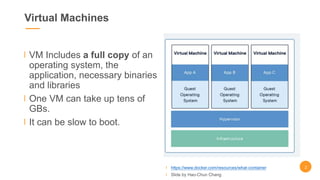
VM Includes a full copy of an
operating system, the
application, necessary binaries
and libraries
One VM can take up tens of
GBs.
It can be slow to boot.
https://www.docker.com/resources/what-container
Slide by Hao-Chun Chang
Why docker?
3
https://www.docker.com/resources/what-container
Slide by Hao-Chun Chang
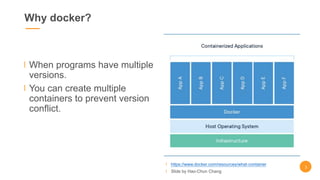
When programs have multiple
versions.
You can create multiple
containers to prevent version
conflict.
Why docker?
4
https://www.docker.com/resources/what-container
Slide by Hao-Chun Chang
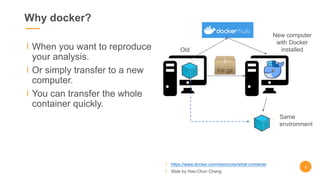
When you want to reproduce
your analysis.
Or simply transfer to a new
computer.
You can transfer the whole
container quickly.
Old
New computer
with Docker
installed
Same
environment
Workflow
https://docs.docker.com/
Slide by Hao-Chun Chang
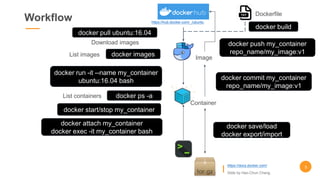
docker pull ubuntu:16.04
docker images
docker run -it --name my_container
ubuntu:16.04 bash
docker start/stop my_container
https://hub.docker.com/_/ubuntu
docker ps -a
docker attach my_container
docker exec -it my_container bash
Image
Container
docker save/load
docker export/import
Dockerfile
docker build
Download images
List images
List containers
docker commit my_container
repo_name/my_image:v1
docker push my_container
repo_name/my_image:v1
5
Docker run
https://docs.docker.com/
Slide by Hao-Chun Chang
docker run -it 
-p 8888:1234  # [host port]:[container port]
-v d:/data:/data  # [host path]:[container path]
--name my_container 
ubuntu:16.04 bash
#<container id> <command>
Image:
ubuntu:16.04
/data(:ro)
d:/data
Port: 8888Port: 1234
my_container
Host
--interactive , -i 開啟互動模式,可以在容器裡面輸入指令。
--tty , -t 在容器裡面開啟新的terminal。
--volume , -v 將Host資料夾映射到容器裡面。
--name 幫容器取名,預設是隨機的名稱。
--publish , -p 開啟容器的port給Host。
More in https://docs.docker.com/engine/reference/commandline/run/
WARNING !!
Delete files in /data also
delete them in d:/data.
Can add :ro for read-only
-p
-v
-it
6
Docker attach
Image:
ubuntu:16.04
Main
my_container
Host
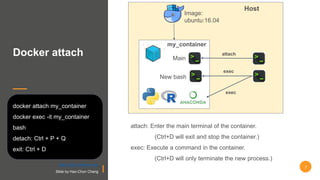
attach: Enter the main terminal of the container.
(Ctrl+D will exit and stop the container.)
exec: Execute a command in the container.
(Ctrl+D will only terminate the new process.)
attach
docker attach my_container
docker exec -it my_container
bash
detach: Ctrl + P + Q
exit: Ctrl + D
New bash
exec
exec
7
https://docs.docker.com/
Slide by Hao-Chun Chang
Example:
Connect to
remote IDE
# In local computer
ssh -N -f -L
9487:localhost:8888
remoteUser@140.112.xx.xx
# Open browser and type
localhost:9487
# Paste TOKEN
Image:
ubuntu:16.04
/data(:ro)
d:/data
Port: 8888Port: 1234
my_container
Remote
Server
-p
-v
-it
Local
Port: 9487
140.112.xx.xx
# In remote server
> docker pull python:3.6
> docker run -it -v d:/data:/data -p 8888:1234 --name my_container
python:3.6 bash
[Press Enter to display tty in docker]
root@a57272174288:/# pip3 install jupyterlab
root@a57272174288:/# jupyter lab --allow-root --ip=0.0.0.0 --port=1234
# Copy TOKEN in …:1234/?token=“TOKEN”
8
https://docs.docker.com/
Slide by Hao-Chun Chang
Save v.s. export
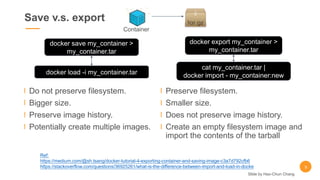
Do not preserve filesystem.
Bigger size.
Preserve image history.
Potentially create multiple images.
Preserve filesystem.
Smaller size.
Does not preserve image history.
Create an empty filesystem image and
import the contents of the tarball
Container
docker export my_container >
my_container.tar
cat my_container.tar |
docker import - my_container:new
docker save my_container >
my_container.tar
docker load -i my_container.tar
Ref:
https://medium.com/@sh.tsang/docker-tutorial-4-exporting-container-and-saving-image-c3a7d792cfb6
https://stackoverflow.com/questions/36925261/what-is-the-difference-between-import-and-load-in-docke 9
Slide by Hao-Chun Chang
Cheatsheet
10
Save container into images:
docker export <container name/id> >
<filename>.tar
docker commit <container name/id>
<repo>/<image name>:<tag>
Upload images to DockerHub:
docker push <container name/id>
<repo>/<image name>:<tag>
Remove:
docker rm <container name/id>
docker rmi <image name/id>
Monitor process:
docker top <container name/id>
Download images from DockerHub:
docker pull <repository>/<image name>:tag>
Run container from image:
docker run -v [host folder path]:[container folder
path] --name <container name> <image_id>
<starting command>
List images / containers:
docker images / docker ps -a
Use running containers:
docker start/stop/restart <container name/id>
docker attach <container name/id>
docker exec -it <container name/id> <command>
Slide by Hao-Chun Chang
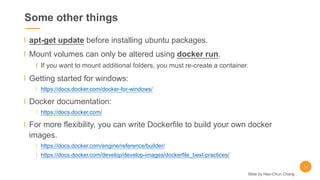
Some other things
apt-get update before installing ubuntu packages.
Mount volumes can only be altered using docker run.
If you want to mount additional folders, you must re-create a container.
Getting started for windows:
https://docs.docker.com/docker-for-windows/
Docker documentation:
https://docs.docker.com/
For more flexibility, you can write Dockerfile to build your own docker
images.
https://docs.docker.com/engine/reference/builder/
https://docs.docker.com/develop/develop-images/dockerfile_best-practices/
11
Slide by Hao-Chun Chang

Introduction to Docker

  • 1.
  • 2.
    Virtual Machines 2 VM Includesa full copy of an operating system, the application, necessary binaries and libraries One VM can take up tens of GBs. It can be slow to boot. https://www.docker.com/resources/what-container Slide by Hao-Chun Chang
  • 3.
    Why docker? 3 https://www.docker.com/resources/what-container Slide byHao-Chun Chang When programs have multiple versions. You can create multiple containers to prevent version conflict.
  • 4.
    Why docker? 4 https://www.docker.com/resources/what-container Slide byHao-Chun Chang When you want to reproduce your analysis. Or simply transfer to a new computer. You can transfer the whole container quickly. Old New computer with Docker installed Same environment
  • 5.
    Workflow https://docs.docker.com/ Slide by Hao-ChunChang docker pull ubuntu:16.04 docker images docker run -it --name my_container ubuntu:16.04 bash docker start/stop my_container https://hub.docker.com/_/ubuntu docker ps -a docker attach my_container docker exec -it my_container bash Image Container docker save/load docker export/import Dockerfile docker build Download images List images List containers docker commit my_container repo_name/my_image:v1 docker push my_container repo_name/my_image:v1 5
  • 6.
    Docker run https://docs.docker.com/ Slide byHao-Chun Chang docker run -it -p 8888:1234 # [host port]:[container port] -v d:/data:/data # [host path]:[container path] --name my_container ubuntu:16.04 bash #<container id> <command> Image: ubuntu:16.04 /data(:ro) d:/data Port: 8888Port: 1234 my_container Host --interactive , -i 開啟互動模式,可以在容器裡面輸入指令。 --tty , -t 在容器裡面開啟新的terminal。 --volume , -v 將Host資料夾映射到容器裡面。 --name 幫容器取名,預設是隨機的名稱。 --publish , -p 開啟容器的port給Host。 More in https://docs.docker.com/engine/reference/commandline/run/ WARNING !! Delete files in /data also delete them in d:/data. Can add :ro for read-only -p -v -it 6
  • 7.
    Docker attach Image: ubuntu:16.04 Main my_container Host attach: Enterthe main terminal of the container. (Ctrl+D will exit and stop the container.) exec: Execute a command in the container. (Ctrl+D will only terminate the new process.) attach docker attach my_container docker exec -it my_container bash detach: Ctrl + P + Q exit: Ctrl + D New bash exec exec 7 https://docs.docker.com/ Slide by Hao-Chun Chang
  • 8.
    Example: Connect to remote IDE #In local computer ssh -N -f -L 9487:localhost:8888 remoteUser@140.112.xx.xx # Open browser and type localhost:9487 # Paste TOKEN Image: ubuntu:16.04 /data(:ro) d:/data Port: 8888Port: 1234 my_container Remote Server -p -v -it Local Port: 9487 140.112.xx.xx # In remote server > docker pull python:3.6 > docker run -it -v d:/data:/data -p 8888:1234 --name my_container python:3.6 bash [Press Enter to display tty in docker] root@a57272174288:/# pip3 install jupyterlab root@a57272174288:/# jupyter lab --allow-root --ip=0.0.0.0 --port=1234 # Copy TOKEN in …:1234/?token=“TOKEN” 8 https://docs.docker.com/ Slide by Hao-Chun Chang
  • 9.
    Save v.s. export Donot preserve filesystem. Bigger size. Preserve image history. Potentially create multiple images. Preserve filesystem. Smaller size. Does not preserve image history. Create an empty filesystem image and import the contents of the tarball Container docker export my_container > my_container.tar cat my_container.tar | docker import - my_container:new docker save my_container > my_container.tar docker load -i my_container.tar Ref: https://medium.com/@sh.tsang/docker-tutorial-4-exporting-container-and-saving-image-c3a7d792cfb6 https://stackoverflow.com/questions/36925261/what-is-the-difference-between-import-and-load-in-docke 9 Slide by Hao-Chun Chang
  • 10.
    Cheatsheet 10 Save container intoimages: docker export <container name/id> > <filename>.tar docker commit <container name/id> <repo>/<image name>:<tag> Upload images to DockerHub: docker push <container name/id> <repo>/<image name>:<tag> Remove: docker rm <container name/id> docker rmi <image name/id> Monitor process: docker top <container name/id> Download images from DockerHub: docker pull <repository>/<image name>:tag> Run container from image: docker run -v [host folder path]:[container folder path] --name <container name> <image_id> <starting command> List images / containers: docker images / docker ps -a Use running containers: docker start/stop/restart <container name/id> docker attach <container name/id> docker exec -it <container name/id> <command> Slide by Hao-Chun Chang
  • 11.
    Some other things apt-getupdate before installing ubuntu packages. Mount volumes can only be altered using docker run. If you want to mount additional folders, you must re-create a container. Getting started for windows: https://docs.docker.com/docker-for-windows/ Docker documentation: https://docs.docker.com/ For more flexibility, you can write Dockerfile to build your own docker images. https://docs.docker.com/engine/reference/builder/ https://docs.docker.com/develop/develop-images/dockerfile_best-practices/ 11 Slide by Hao-Chun Chang