

Regional Call Centre
Intranet (Hiring Module)
11th
Jul 2012
Login Page
Login:
ID: <employee ID>
Password: ‘Default’
http://128.236.57.171/login.asp
New candidate
• Search for the candidate based on Reference Number or IC Number. IC Number
is the best.
• Reference Number here is the JobStreet ID or other ID assigned by Agencies
• If there is no record for such candidate, create a new one.
New application
• Enter candidate’s IC Number, Name, Source, Status and Date
• If Reference Number (Jobstreet or Agency provided) available, can enter for reference
• Click update
New Application
• New entry will be reflected
• Logout
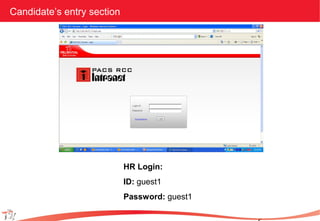
Candidate’s entry section
HR Login:
ID: guest1
Password: guest1
Candidate’s entry section
• Candidate enter’s his/her IC Number, position applied for and source
• Note: Probably we should remove ‘source’
• If candidate has applied for the same position within the past _____ years,
Notification Screen should appear informing candidate to get in touch with HR
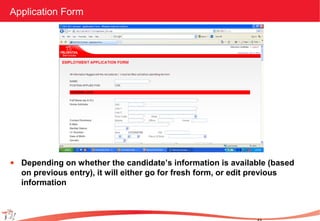
Application Form
• Depending on whether the candidate’s information is available (based
on previous entry), it will either go for fresh form, or edit previous
information
Online Test
• Once candidate clicks ‘Submit’, takes him/her to online test.
• To start with, we will replicate current test.
Printing and updating status
• Once candidate completes the test, HR / RCC Manager is able to print
– Employment Application Form as per current format
– Test details with calculated score
• Candidate can then sign on the Employment Application Form
• Once the interview is over, Manager is able to update the status
(accepted/declined/etc)
• As and when candidate responds, the same can be tracked as well
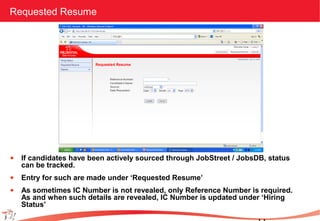
Requested Resume
• If candidates have been actively sourced through JobStreet / JobsDB, status
can be tracked.
• Entry for such are made under ‘Requested Resume’
• As sometimes IC Number is not revealed, only Reference Number is required.
As and when such details are revealed, IC Number is updated under ‘Hiring
Status’
Reports
• Status of hiring can be checked under reports
• Displaying the same in graphs is underway
Intranet (hiring module)

Intranet (hiring module)

  • 1.
    Regional Call Centre Intranet(Hiring Module) 11th Jul 2012
  • 2.
    Login Page Login: ID: <employeeID> Password: ‘Default’ http://128.236.57.171/login.asp
  • 3.
    New candidate • Searchfor the candidate based on Reference Number or IC Number. IC Number is the best. • Reference Number here is the JobStreet ID or other ID assigned by Agencies • If there is no record for such candidate, create a new one.
  • 4.
    New application • Entercandidate’s IC Number, Name, Source, Status and Date • If Reference Number (Jobstreet or Agency provided) available, can enter for reference • Click update
  • 5.
    New Application • Newentry will be reflected • Logout
  • 6.
    Candidate’s entry section HRLogin: ID: guest1 Password: guest1
  • 7.
    Candidate’s entry section •Candidate enter’s his/her IC Number, position applied for and source • Note: Probably we should remove ‘source’ • If candidate has applied for the same position within the past _____ years, Notification Screen should appear informing candidate to get in touch with HR
  • 8.
    Application Form • Dependingon whether the candidate’s information is available (based on previous entry), it will either go for fresh form, or edit previous information
  • 9.
    Online Test • Oncecandidate clicks ‘Submit’, takes him/her to online test. • To start with, we will replicate current test.
  • 10.
    Printing and updatingstatus • Once candidate completes the test, HR / RCC Manager is able to print – Employment Application Form as per current format – Test details with calculated score • Candidate can then sign on the Employment Application Form • Once the interview is over, Manager is able to update the status (accepted/declined/etc) • As and when candidate responds, the same can be tracked as well
  • 11.
    Requested Resume • Ifcandidates have been actively sourced through JobStreet / JobsDB, status can be tracked. • Entry for such are made under ‘Requested Resume’ • As sometimes IC Number is not revealed, only Reference Number is required. As and when such details are revealed, IC Number is updated under ‘Hiring Status’
  • 12.
    Reports • Status ofhiring can be checked under reports • Displaying the same in graphs is underway