Regional Call Centre
Intranet (Attendance Module)
19th
Dec 2012
Login Page
Login:
ID: <employee ID>
Password: <your pass>
http://128.236.57.171/login.asp
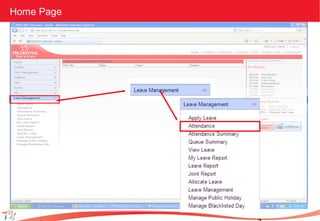
Home Page
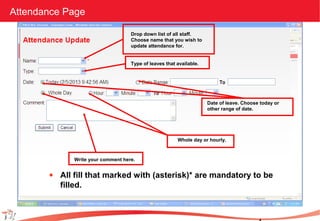
Attendance Page
Drop down list of all staff.
Choose name that you wish to
update attendance for.
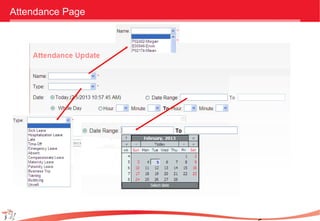
Type of leaves that available.
Date of leave. Choose today or
other range of date.
Whole day or hourly.
Write your comment here.
• All fill that marked with (asterisk)* are mandatory to be
filled.
Attendance Page
Example page with data
•This is an example for the page filled with data.
•Click submit button to update the attendance.
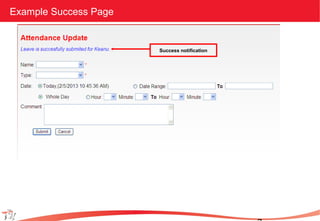
•After submit, a successful notification will appear at the top of the form.
Example Success Page
Success notification
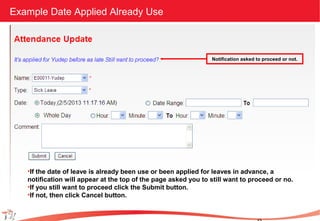
Example Date Applied Already Use
•If the date of leave is already been use or been applied for leaves in advance, a
notification will appear at the top of the page asked you to still want to proceed or no.
•If you still want to proceed click the Submit button.
•If not, then click Cancel button.
Notification asked to proceed or not.
Intranet (attendance module)

Intranet (attendance module)

  • 1.
    Regional Call Centre Intranet(Attendance Module) 19th Dec 2012
  • 2.
    Login Page Login: ID: <employeeID> Password: <your pass> http://128.236.57.171/login.asp
  • 3.
  • 4.
    Attendance Page Drop downlist of all staff. Choose name that you wish to update attendance for. Type of leaves that available. Date of leave. Choose today or other range of date. Whole day or hourly. Write your comment here. • All fill that marked with (asterisk)* are mandatory to be filled.
  • 5.
  • 6.
    Example page withdata •This is an example for the page filled with data. •Click submit button to update the attendance. •After submit, a successful notification will appear at the top of the form.
  • 7.
  • 8.
    Example Date AppliedAlready Use •If the date of leave is already been use or been applied for leaves in advance, a notification will appear at the top of the page asked you to still want to proceed or no. •If you still want to proceed click the Submit button. •If not, then click Cancel button. Notification asked to proceed or not.