E-banking securityImanRahmanianNooreTouba University – IranAdvisor: Dr SekhavatiDec 2010
eBanking Security – Quo Vadis?Is eBanking still safe?What are the security trends in eBanking?What can we learn from eBanking trends for other online applications?
agendaeBanking AttacksSecurity MeasuresSecure CommunicationImplementationsOutlook / Thesis
eBanking Attacks
Target of AttacksPhishing Attacks Trojan AttacksPharmingDNS SpoofingNetwork InterceptionWeb Application AttacksAttacking Server
Client AttacksMost promising attack on the client:PhishingMotivate user to enter confidential information on fake web siteSimple Trojans Limited to a handful of eBanking applications
 Steal username, password and one time password
 Steals session information and URL and sends it to attacker
 Attacker imports information into his browser to access the same accountGeneric Trojans In the wild since 2007, but still in development
 Can attack any eBanking (and any web application)
 New configuration is downloaded continouslyGeneric TrojansInfection of client with user interaction Email attachments (ZIP, Exe, etc.)
 Email with link to malicious web site
 Links in social networks
 Integrated in popular software (downloads)
 File transfer of instant messaging/VoIP/file sharing
 CD-ROM/USB StickInfection of client without user interaction Malicious web sites (drive by) Infection of trusted, popular web sites (IFRAME …) Misusing software update functionality (like Bundestrojaner) Attacks on vulnerable, exposed computer (network/wireless)Note: About 1% of Google search query results point to a web site that can lead to a drive by attack.
Generic TrojansFeatures of Generic Trojans Hide from security tools (anti-virus/personal firewall) Inject code in running processes / drivers / operating system Capture/Redirect/Send data  Download new configuration / functionality Remote control browser instance
Generic Trojans(cont)Features useful for eBanking attacks Send web pages of unknown eBanking to attacker Download new patterns of eBanking transaction forms Modify transaction in the background (on the fly) Collect financial information
Generic Trojans(cont)Tips and Tricks Every Trojan binary is unique (packed differently) Not detectable by Anti Virus Patterns Trojan code is injected into other files or other processes Personal Firewall can not block communication Installs in Kernel Full privileges on system  InvisibleBot Networks
Traded GoodsSymantec Internet Security Threat Report July-December 2007http://eval.symantec.com/mktginfo/enterprise/white_papers/b-whitepaper_exec_summary_internet_security_threat_report_xiii_04-2008.en-us.pdf
Security Measures
Security MeasuresAttack Detection Second Channel / Secured Channel Secure ClientSecond ChannelSecured Channel Secure ClientAttack Detection
Attack Detection Detect session hijacking attacks Monitor and compare request parameters Identify SSL Session and IP address changes Transaction verification / user profiling Statistic about normal user behaviour Compare transaction with normal user behaviour White list target accounts Limits on transaction amount
Security Measures(cont)Second Channel Send verification using another channel Another application on the client computer Another medium like mobile phones (SMS)Secured Channel Enter data on an external device External device can not be controlled by TrojanExternel device contains a secret key
Security MeasuresSecure Platform A computer that is only used for eBanking Bootable CD-ROM, Bootable USB Stick Virtual MachineeBanking LaptopSecure Environment Start an application (eg Browser) that protects itself from TrojansDownstripped Browser Proprietary Application (fat client) Verify environment before login is possible
Security TrendsCurrent client security approaches:A) Secured Application/Virtualization Hardened Browser on USB stick Application to secure the client Virtual operating system on host system Bootable CD-ROM/USB stickB) Transaction Signing Transaction details and unlock code on mobile (SMS) External device with SmartCard Read information from screen and decrypt on external device
A) Secured Application/VirtualizationSolutions (some examples): Portable Apps, Thinstall CLX Stick, KobilmIdentity Browser Appliance (egVMWare, VirtualPC, etc.)
B) Transaction SigningDevices (some examples): Mobile phones IBM ZTIC, EVM CAP, AxsionicsTricipher
Security Trends
Secure CommunicationMost Internet shopping sites use usernames and passwords to authenticate its users, so called 'password authentication'. They are typically more concerned with the validity of the credit card than the identity of the user. This will be our starting point.
Password authenticationIn our fictiousexample we have a user Alice who wishes to login to her bank. We also have a vicious attacker Eve who is trying to steal Alice's hard-earned money. The bank is using a username and password to protectAlice's account but no encryption. This scheme is obviously vulnerable to a snooping attack as illustrated in below Figure. One way to improve security is by employing One-time Passwords.
One-time PasswordsOne-time passwords (OTPs) are, like the name suggests, passwords that are used only once.A code scratch card with OTPs
OTP implementationThe OTPs can be implemented using a hash-chain.
SSLSSL is an abbreviation of Secure Socket Layer and is a protocol designed to provide security and data integrity.SSL supports a wide range of algorithms, some very strong and some weak. For example Handelsbanken, a Swedish bank, uses SHA-1 for signing and RSA for encryption.
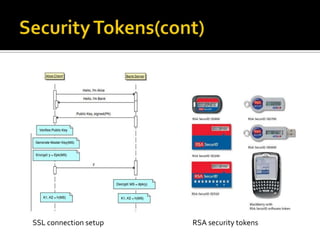
Security Tokenswe saw how OTPs are constructed and used.We can further enhance the security by a PIN-code.This two-factor authentication makes it more dificultto gain access to an account.
Security Tokens(cont)
Security Tokens(cont)SSL connection setupRSA security tokens
Implementations
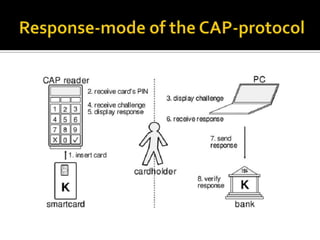
Chip Authentication Program (CAP)CAP is a relatively new protocol based on the older EMV standard.It was developed by MasterCard and is based on digitally signing transactions.CAP can operate in three modes: identify, respond and sign.
RSA SecurIDThis scheme basically works very similar to the identify-mode of CAP.The 6 to 8-digit response of the SecurID tokens is computed over the PIN,thepresent time and a 128 bit key, which is unique to every token, using a variant of the AES algorithm.
Open Authentication (OATH)The open authentication initiative is an attempt at developing an open standard for 2-factor authentication which should provide means for federated authentication systems like OpenID.The core of OATH is the HOTP-algorithm, which provides the OTP component.

E banking security

  • 1.
    E-banking securityImanRahmanianNooreTouba University– IranAdvisor: Dr SekhavatiDec 2010
  • 2.
    eBanking Security –Quo Vadis?Is eBanking still safe?What are the security trends in eBanking?What can we learn from eBanking trends for other online applications?
  • 3.
    agendaeBanking AttacksSecurity MeasuresSecureCommunicationImplementationsOutlook / Thesis
  • 4.
  • 5.
    Target of AttacksPhishingAttacks Trojan AttacksPharmingDNS SpoofingNetwork InterceptionWeb Application AttacksAttacking Server
  • 6.
    Client AttacksMost promisingattack on the client:PhishingMotivate user to enter confidential information on fake web siteSimple Trojans Limited to a handful of eBanking applications
  • 7.
    Steal username,password and one time password
  • 8.
    Steals sessioninformation and URL and sends it to attacker
  • 9.
    Attacker importsinformation into his browser to access the same accountGeneric Trojans In the wild since 2007, but still in development
  • 10.
    Can attackany eBanking (and any web application)
  • 11.
    New configurationis downloaded continouslyGeneric TrojansInfection of client with user interaction Email attachments (ZIP, Exe, etc.)
  • 12.
    Email withlink to malicious web site
  • 13.
    Links insocial networks
  • 14.
    Integrated inpopular software (downloads)
  • 15.
    File transferof instant messaging/VoIP/file sharing
  • 16.
    CD-ROM/USB StickInfectionof client without user interaction Malicious web sites (drive by) Infection of trusted, popular web sites (IFRAME …) Misusing software update functionality (like Bundestrojaner) Attacks on vulnerable, exposed computer (network/wireless)Note: About 1% of Google search query results point to a web site that can lead to a drive by attack.
  • 17.
    Generic TrojansFeatures ofGeneric Trojans Hide from security tools (anti-virus/personal firewall) Inject code in running processes / drivers / operating system Capture/Redirect/Send data Download new configuration / functionality Remote control browser instance
  • 18.
    Generic Trojans(cont)Features usefulfor eBanking attacks Send web pages of unknown eBanking to attacker Download new patterns of eBanking transaction forms Modify transaction in the background (on the fly) Collect financial information
  • 19.
    Generic Trojans(cont)Tips andTricks Every Trojan binary is unique (packed differently) Not detectable by Anti Virus Patterns Trojan code is injected into other files or other processes Personal Firewall can not block communication Installs in Kernel Full privileges on system InvisibleBot Networks
  • 20.
    Traded GoodsSymantec InternetSecurity Threat Report July-December 2007http://eval.symantec.com/mktginfo/enterprise/white_papers/b-whitepaper_exec_summary_internet_security_threat_report_xiii_04-2008.en-us.pdf
  • 21.
  • 22.
    Security MeasuresAttack DetectionSecond Channel / Secured Channel Secure ClientSecond ChannelSecured Channel Secure ClientAttack Detection
  • 23.
    Attack Detection Detectsession hijacking attacks Monitor and compare request parameters Identify SSL Session and IP address changes Transaction verification / user profiling Statistic about normal user behaviour Compare transaction with normal user behaviour White list target accounts Limits on transaction amount
  • 24.
    Security Measures(cont)Second ChannelSend verification using another channel Another application on the client computer Another medium like mobile phones (SMS)Secured Channel Enter data on an external device External device can not be controlled by TrojanExternel device contains a secret key
  • 25.
    Security MeasuresSecure PlatformA computer that is only used for eBanking Bootable CD-ROM, Bootable USB Stick Virtual MachineeBanking LaptopSecure Environment Start an application (eg Browser) that protects itself from TrojansDownstripped Browser Proprietary Application (fat client) Verify environment before login is possible
  • 26.
    Security TrendsCurrent clientsecurity approaches:A) Secured Application/Virtualization Hardened Browser on USB stick Application to secure the client Virtual operating system on host system Bootable CD-ROM/USB stickB) Transaction Signing Transaction details and unlock code on mobile (SMS) External device with SmartCard Read information from screen and decrypt on external device
  • 27.
    A) Secured Application/VirtualizationSolutions(some examples): Portable Apps, Thinstall CLX Stick, KobilmIdentity Browser Appliance (egVMWare, VirtualPC, etc.)
  • 28.
    B) Transaction SigningDevices(some examples): Mobile phones IBM ZTIC, EVM CAP, AxsionicsTricipher
  • 29.
  • 30.
    Secure CommunicationMost Internetshopping sites use usernames and passwords to authenticate its users, so called 'password authentication'. They are typically more concerned with the validity of the credit card than the identity of the user. This will be our starting point.
  • 31.
    Password authenticationIn ourfictiousexample we have a user Alice who wishes to login to her bank. We also have a vicious attacker Eve who is trying to steal Alice's hard-earned money. The bank is using a username and password to protectAlice's account but no encryption. This scheme is obviously vulnerable to a snooping attack as illustrated in below Figure. One way to improve security is by employing One-time Passwords.
  • 32.
    One-time PasswordsOne-time passwords(OTPs) are, like the name suggests, passwords that are used only once.A code scratch card with OTPs
  • 33.
    OTP implementationThe OTPscan be implemented using a hash-chain.
  • 34.
    SSLSSL is anabbreviation of Secure Socket Layer and is a protocol designed to provide security and data integrity.SSL supports a wide range of algorithms, some very strong and some weak. For example Handelsbanken, a Swedish bank, uses SHA-1 for signing and RSA for encryption.
  • 35.
    Security Tokenswe sawhow OTPs are constructed and used.We can further enhance the security by a PIN-code.This two-factor authentication makes it more dificultto gain access to an account.
  • 36.
  • 37.
    Security Tokens(cont)SSL connectionsetupRSA security tokens
  • 38.
  • 39.
    Chip Authentication Program(CAP)CAP is a relatively new protocol based on the older EMV standard.It was developed by MasterCard and is based on digitally signing transactions.CAP can operate in three modes: identify, respond and sign.
  • 40.
    RSA SecurIDThis schemebasically works very similar to the identify-mode of CAP.The 6 to 8-digit response of the SecurID tokens is computed over the PIN,thepresent time and a 128 bit key, which is unique to every token, using a variant of the AES algorithm.
  • 41.
    Open Authentication (OATH)Theopen authentication initiative is an attempt at developing an open standard for 2-factor authentication which should provide means for federated authentication systems like OpenID.The core of OATH is the HOTP-algorithm, which provides the OTP component.