Interactive
Multimedia and It’s
Types
Presented By:
• Aashbin Sunar
• Bishal Karki
• Kiran Bastola
• Roshan Gurung
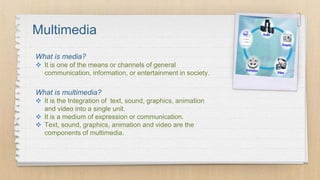
Multimedia
What is multimedia?
 It is the Integration of text, sound, graphics, animation
and video into a single unit.
 It is a medium of expression or communication.
 Text, sound, graphics, animation and video are the
components of multimedia.
What is media?
 It is one of the means or channels of general
communication, information, or entertainment in society.
Types Of Multimedia
Non-Interactive
 Non-Interactive media
are also called as
Traditional or Old or
Conventional media.
 Example of these media
are Television, Radio,
Books, Newspaper,
Magazines, Movies, etc.
Interactive
 Interactive media are
also called as New or
Digital media.
 Example of these media
are Websites, Apps,
Social networks,
Streaming music, Blogs,
etc.
Non-Interactive Multimedia
 It is also known as traditional media.
 User has no control over flow of information and is just
an observer.
 It is passive form of entertainment.
 It needs longer publishing time.
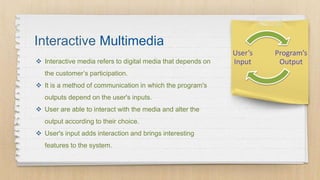
Interactive Multimedia
Program’s
Output
User’s
Input Interactive media refers to digital media that depends on
the customer’s participation.
 It is a method of communication in which the program's
outputs depend on the user's inputs.
 User are able to interact with the media and alter the
output according to their choice.
 User's input adds interaction and brings interesting
features to the system.
Interactive Multimedia
 Interactive multimedia is also known as hybrid technology.
 In our technology driven world interactive media surrounds everything we do.
 The most common interactive multimedia applications include education and
training programs, video games, electronic encyclopedias, and travel guides.
Unlike traditional media, interactive media is meant to enhance a user's
experience. These are the elements of Interactive multimedia:
 Moving images and graphics
 Animation
 Digital Text
 Video
 Audio
A user can participate by manipulating one or more of these elements
during his or her experience, something traditional media does not offer.
Elements of Interactive Media
Some Examples of Interactive Multimedia
 Websites
 Apps
 Email
 Smartphones
 Streaming videos
 Social networks
 Blogs
 E-books
Types of Interactive
Multimedia
 Interactive Video
 Interactive Audio
 Interactive Application
 Interactive Cinema
 Social Networking Websites
 Role Playing Games
 Virtual Reality Simulation
 Interactive Art and Advertisement
 Educational Website
 Quizzes & Polls
Interactive Video
 It is a type of digital video that supports user interaction.
 Users can click, drag, scroll, hover, gesture and complete other digital actions to
interact with the video’s content.
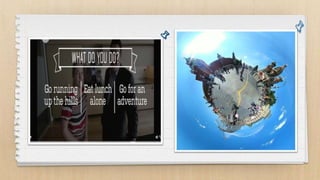
 These videos play like normal video but they have clickable spots called “Hotspots”
that perform action when you click on them.
 These videos may also support 360 degree view for a user to drag the screen within a
video frame to see in all directions.
Interactive Audio
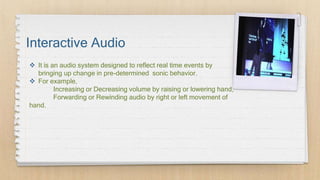
 It is an audio system designed to reflect real time events by
bringing up change in pre-determined sonic behavior.
 For example,
Increasing or Decreasing volume by raising or lowering hand,
Forwarding or Rewinding audio by right or left movement of
hand.
Interactive Media
Application
 An interactive media application uses
multimedia to interact with user.
 An interactive application customizes the user
experience on your website by putting the
visitor in control.
 Example E-Books, Route finding systems,
Interactive weather map.
Interactive Cinema
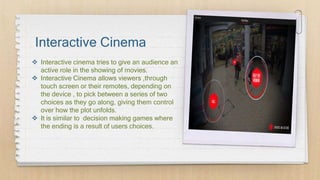
 Interactive cinema tries to give an audience an
active role in the showing of movies.
 Interactive Cinema allows viewers ,through
touch screen or their remotes, depending on
the device , to pick between a series of two
choices as they go along, giving them control
over how the plot unfolds.
 It is similar to decision making games where
the ending is a result of users choices.
Social Networking
Websites
 A social networking site is an online platform
that allows users to create a public profile and
interact with other users on the website.
 Social Networks have become one of most
popular form of communication.
 Users can upload pictures ,videos, animations
etc., share opinions and ideas in social
networking sites.
Social Networking
Websites
 Users can like, comment on ,react, retweet
,favorite etc. and interact with other users.
 These websites have easy and simple user
interface that can be used by most people.
Role Playing Games
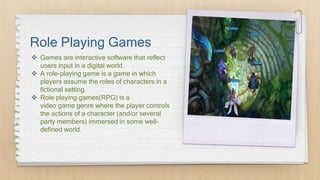
 Games are interactive software that reflect
users input in a digital world.
 A role-playing game is a game in which
players assume the roles of characters in a
fictional setting.
 Role playing games(RPG) is a
video game genre where the player controls
the actions of a character (and/or several
party members) immersed in some well-
defined world.
Virtual Reality
Simulation
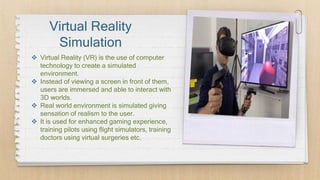
 Virtual Reality (VR) is the use of computer
technology to create a simulated
environment.
 Instead of viewing a screen in front of them,
users are immersed and able to interact with
3D worlds.
 Real world environment is simulated giving
sensation of realism to the user.
 It is used for enhanced gaming experience,
training pilots using flight simulators, training
doctors using virtual surgeries etc.
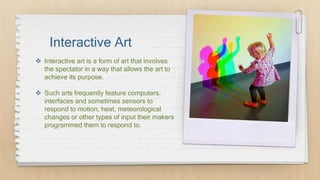
Interactive Art
 Interactive art is a form of art that involves
the spectator in a way that allows the art to
achieve its purpose.
 Such arts frequently feature computers,
interfaces and sometimes sensors to
respond to motion, heat, meteorological
changes or other types of input their makers
programmed them to respond to.
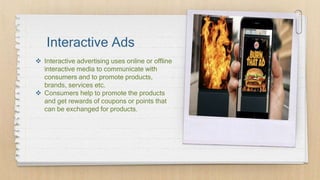
Interactive Ads
 Interactive advertising uses online or offline
interactive media to communicate with
consumers and to promote products,
brands, services etc.
 Consumers help to promote the products
and get rewards of coupons or points that
can be exchanged for products.
Educational Websites
 Educational websites can include websites that have games, videos or topic
related resources that act as tools to enhance learning and supplement
classroom teaching.
 These websites help make the process of learning entertaining and attractive to
the student, especially in today's age.
 They allow user to take quizzes & mock exams to test their knowledge.
Quizzes & Polls
 Interactive quizzes ask a series of interactive
questions to students that assess how much they
know on a particular topic.
 The answers come with instant feedback and remarks
that are valuable.
 A poll is an election, or a survey of people's opinions.
 When people go to poll ,they vote.
Advantages of
Interactive Multimedia
 It makes the user more active.
 It is more flexible than traditional media.
 User interaction help to get exact information about users need.
 Since output depends on users input user is more satisfied with the output.
 It encourages learning with a interactive environment.
😉
Thank You!!
Any Questions?

Interactive multimedia and its Type

  • 1.
    Interactive Multimedia and It’s Types PresentedBy: • Aashbin Sunar • Bishal Karki • Kiran Bastola • Roshan Gurung
  • 2.
    Multimedia What is multimedia? It is the Integration of text, sound, graphics, animation and video into a single unit.  It is a medium of expression or communication.  Text, sound, graphics, animation and video are the components of multimedia. What is media?  It is one of the means or channels of general communication, information, or entertainment in society.
  • 3.
    Types Of Multimedia Non-Interactive Non-Interactive media are also called as Traditional or Old or Conventional media.  Example of these media are Television, Radio, Books, Newspaper, Magazines, Movies, etc. Interactive  Interactive media are also called as New or Digital media.  Example of these media are Websites, Apps, Social networks, Streaming music, Blogs, etc.
  • 4.
    Non-Interactive Multimedia  Itis also known as traditional media.  User has no control over flow of information and is just an observer.  It is passive form of entertainment.  It needs longer publishing time.
  • 5.
    Interactive Multimedia Program’s Output User’s Input Interactivemedia refers to digital media that depends on the customer’s participation.  It is a method of communication in which the program's outputs depend on the user's inputs.  User are able to interact with the media and alter the output according to their choice.  User's input adds interaction and brings interesting features to the system.
  • 6.
    Interactive Multimedia  Interactivemultimedia is also known as hybrid technology.  In our technology driven world interactive media surrounds everything we do.  The most common interactive multimedia applications include education and training programs, video games, electronic encyclopedias, and travel guides.
  • 7.
    Unlike traditional media,interactive media is meant to enhance a user's experience. These are the elements of Interactive multimedia:  Moving images and graphics  Animation  Digital Text  Video  Audio A user can participate by manipulating one or more of these elements during his or her experience, something traditional media does not offer. Elements of Interactive Media
  • 8.
    Some Examples ofInteractive Multimedia  Websites  Apps  Email  Smartphones  Streaming videos  Social networks  Blogs  E-books
  • 9.
    Types of Interactive Multimedia Interactive Video  Interactive Audio  Interactive Application  Interactive Cinema  Social Networking Websites  Role Playing Games  Virtual Reality Simulation  Interactive Art and Advertisement  Educational Website  Quizzes & Polls
  • 10.
    Interactive Video  Itis a type of digital video that supports user interaction.  Users can click, drag, scroll, hover, gesture and complete other digital actions to interact with the video’s content.  These videos play like normal video but they have clickable spots called “Hotspots” that perform action when you click on them.  These videos may also support 360 degree view for a user to drag the screen within a video frame to see in all directions.
  • 12.
    Interactive Audio  Itis an audio system designed to reflect real time events by bringing up change in pre-determined sonic behavior.  For example, Increasing or Decreasing volume by raising or lowering hand, Forwarding or Rewinding audio by right or left movement of hand.
  • 13.
    Interactive Media Application  Aninteractive media application uses multimedia to interact with user.  An interactive application customizes the user experience on your website by putting the visitor in control.  Example E-Books, Route finding systems, Interactive weather map.
  • 14.
    Interactive Cinema  Interactivecinema tries to give an audience an active role in the showing of movies.  Interactive Cinema allows viewers ,through touch screen or their remotes, depending on the device , to pick between a series of two choices as they go along, giving them control over how the plot unfolds.  It is similar to decision making games where the ending is a result of users choices.
  • 15.
    Social Networking Websites  Asocial networking site is an online platform that allows users to create a public profile and interact with other users on the website.  Social Networks have become one of most popular form of communication.  Users can upload pictures ,videos, animations etc., share opinions and ideas in social networking sites.
  • 16.
    Social Networking Websites  Userscan like, comment on ,react, retweet ,favorite etc. and interact with other users.  These websites have easy and simple user interface that can be used by most people.
  • 17.
    Role Playing Games Games are interactive software that reflect users input in a digital world.  A role-playing game is a game in which players assume the roles of characters in a fictional setting.  Role playing games(RPG) is a video game genre where the player controls the actions of a character (and/or several party members) immersed in some well- defined world.
  • 18.
    Virtual Reality Simulation  VirtualReality (VR) is the use of computer technology to create a simulated environment.  Instead of viewing a screen in front of them, users are immersed and able to interact with 3D worlds.  Real world environment is simulated giving sensation of realism to the user.  It is used for enhanced gaming experience, training pilots using flight simulators, training doctors using virtual surgeries etc.
  • 19.
    Interactive Art  Interactiveart is a form of art that involves the spectator in a way that allows the art to achieve its purpose.  Such arts frequently feature computers, interfaces and sometimes sensors to respond to motion, heat, meteorological changes or other types of input their makers programmed them to respond to.
  • 20.
    Interactive Ads  Interactiveadvertising uses online or offline interactive media to communicate with consumers and to promote products, brands, services etc.  Consumers help to promote the products and get rewards of coupons or points that can be exchanged for products.
  • 21.
    Educational Websites  Educationalwebsites can include websites that have games, videos or topic related resources that act as tools to enhance learning and supplement classroom teaching.  These websites help make the process of learning entertaining and attractive to the student, especially in today's age.  They allow user to take quizzes & mock exams to test their knowledge.
  • 23.
    Quizzes & Polls Interactive quizzes ask a series of interactive questions to students that assess how much they know on a particular topic.  The answers come with instant feedback and remarks that are valuable.  A poll is an election, or a survey of people's opinions.  When people go to poll ,they vote.
  • 24.
    Advantages of Interactive Multimedia It makes the user more active.  It is more flexible than traditional media.  User interaction help to get exact information about users need.  Since output depends on users input user is more satisfied with the output.  It encourages learning with a interactive environment.
  • 25.

Editor's Notes

  • #7 Because its is able to combine storage capacities of computers & a digital databases with an advanced tool for viewing & manipulating these materials. If you unlock your phone interactive media is likely to be the first thing you see onyour screen. You go on gaming app which is the perfect example of interactive media at your fingertips.
  • #11 For example- when you click on a hotspot, the video may display information about the object you clicked on, jump to a different part of the video, or open another video file.
  • #12 Left-hotspot Right -360
  • #13 For example, Increasing or decreasing volume by raising or lowering hand, Fast forwarding or rewinding audio with respect to right or left movement of hand.