
Match for NetSuite
Intelligent 3 Way
A PA L E T T E G U I D E T O A U T O M AT I O N
AN ECHOVERA GUIDE TO AUTOMATION
Most companies do some form of
matching of vendor invoices to purchase
orders and/or goods receipts. This is
called a two or three way match.
The process can require a great deal of manual effort,
particularly if the invoiced items have to be matched
at the line level.
Once an invoice is entered into an ERP it is assigned
a “match/no match” status. If for any reason there are
price differences or problems with the goods receipt,
the invoice cannot be processed by the ERP.
Users or knowledge workers typically have to cancel
the transaction, and then perform time-consuming
manual work to clear the exception. This usually
involves the purchaser, the receiver and sometimes
the vendor.
ERPs do not have an automated way of handling
these exceptions and in many cases staff members
may spend days trying to clear up the differences
between purchase orders, invoices, and goods
receipts.
echovera.ca
Procurement software companies claim they can
“automatically match” these documents – but what
makes that possible? As mentioned above ERPs do
not have an automated way of handling these
exceptions.
The Solution
That’s where Intelligent 3 Way Match makes a
difference—especially when exceptions occur.
Intelligent 3 Way Match Handles Two or Three Way
Matching, Non-PO Invoices and Exceptions
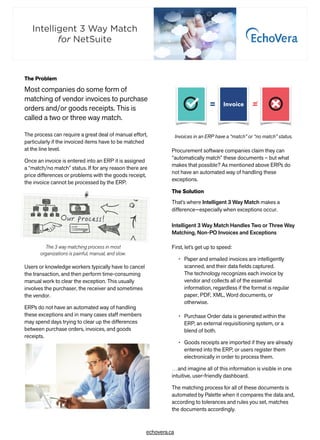
The 3 way matching process in most
organizations is painful, manual, and slow.
Invoice= =
Invoices in an ERP have a “match” or “no match” status.
First, let’s get up to speed:
• Paper and emailed invoices are intelligently
scanned, and their data fields captured.

The technology recognizes each invoice by
vendor and collects all of the essential
information, regardless if the format is regular
paper, PDF, XML, Word documents, or
otherwise.
• Purchase Order data is generated within the
ERP, an external requisitioning system, or a
blend of both.
• Goods receipts are imported if they are already
entered into the ERP, or users register them
electronically in order to process them.
…and imagine all of this information is visible in one
intuitive, user-friendly dashboard.
The matching process for all of these documents is
automated by Palette when it compares the data and,
according to tolerances and rules you set, matches
the documents accordingly.
The Problem
Intelligent 3 Way Match
for NetSuite
Matching at the Line Level
Where an invoice has lines (as in an itemized invoice),
Intelligent 3 Way Match matches it at the line level.
Invoice lines may come into the system as part of an
e-invoice, scanned with line interpretation from a
paper invoice, or entered manually.
An invoice line is matched in full if it matches a
purchase order line within the permitted tolerances
set in defined rules. If the invoice lines match
purchase order lines, they inherit the account
postings and authorization from the P.O.
Matching at Total Level
If no lines are detected on the invoice (a non-itemized
invoice), matching is attempted at the total level. If
there is a purchase order linked to the invoice, the
system matches the amount on the invoice and the
purchase order amount to check that they are a
match within the permitted variances that have
already been established.
Handling Exceptions–Exceptionally Well
In most companies accounts payable staff do not
have the data or knowledge of the purchase to be
able to clear an exception.
This is where the manual process slows things down.
Whereas the AP staff member might not have the
information at hand, Intelligent 3 Way Match isolates
the problem that is preventing a proper match.
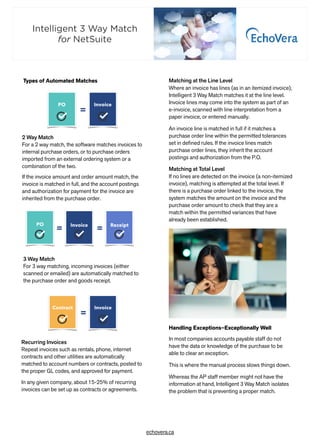
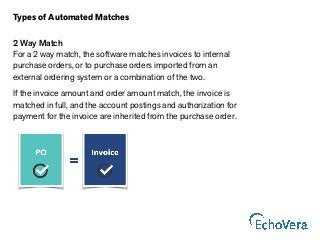
2 Way Match
For a 2 way match, the software matches invoices to
internal purchase orders, or to purchase orders
imported from an external ordering system or a
combination of the two.
If the invoice amount and order amount match, the
invoice is matched in full, and the account postings
and authorization for payment for the invoice are
inherited from the purchase order.
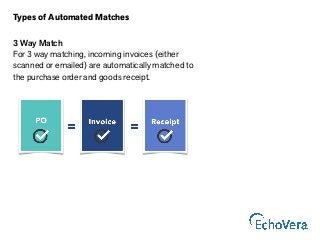
3 Way Match
For 3 way matching, incoming invoices (either
scanned or emailed) are automatically matched to
the purchase order and goods receipt.
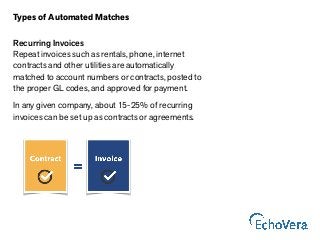
Recurring Invoices
Repeat invoices such as rentals, phone, internet
contracts and other utilities are automatically
matched to account numbers or contracts, posted to
the proper GL codes, and approved for payment.
In any given company, about 15-25% of recurring
invoices can be set up as contracts or agreements.
Types of Automated Matches
Intelligent 3 Way Match
for NetSuite
echovera.ca
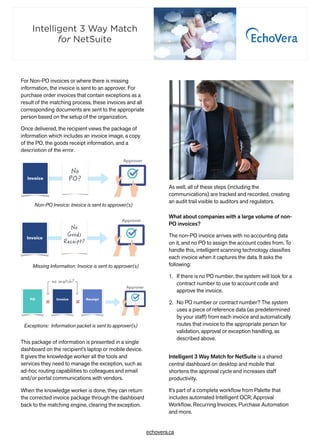
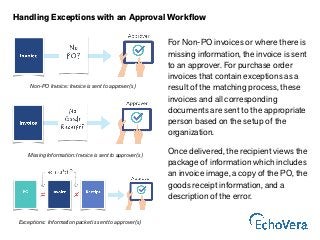
For Non-PO invoices or where there is missing
information, the invoice is sent to an approver. For
purchase order invoices that contain exceptions as a
result of the matching process, these invoices and all
corresponding documents are sent to the appropriate
person based on the setup of the organization.
Once delivered, the recipient views the package of
information which includes an invoice image, a copy
of the PO, the goods receipt information, and a
description of the error.
This package of information is presented in a single
dashboard on the recipient’s laptop or mobile device.
It gives the knowledge worker all the tools and
services they need to manage the exception, such as
ad-hoc routing capabilities to colleagues and email
and/or portal communications with vendors.
When the knowledge worker is done, they can return
the corrected invoice package through the dashboard
back to the matching engine, clearing the exception.
Missing Information: Invoice is sent to approver(s)
Non-PO Invoice: Invoice is sent to approver(s) 

Exceptions: Information packet is sent to approver(s) 

As well, all of these steps (including the
communications) are tracked and recorded, creating
an audit trail visible to auditors and regulators.
What about companies with a large volume of non-
PO invoices? 
The non-PO invoice arrives with no accounting data
on it, and no PO to assign the account codes from. To
handle this, intelligent scanning technology classifies
each invoice when it captures the data. It asks the
following:
1. If there is no PO number, the system will look for a
contract number to use to account code and
approve the invoice.
2. No PO number or contract number? The system
uses a piece of reference data (as predetermined
by your staff) from each invoice and automatically
routes that invoice to the appropriate person for
validation, approval or exception handling, as
described above.
Intelligent 3 Way Match for NetSuite is a shared
central dashboard on desktop and mobile that
shortens the approval cycle and increases staff
productivity.
It’s part of a complete workflow from Palette that
includes automated Intelligent OCR, Approval
Workflow, Recurring Invoices, Purchase Automation
and more.
Intelligent 3 Way Match
for NetSuite
echovera.ca
For more information about Intelligent 3 Way Match

for NetSuite and how it can empower your organization, visit

echovera.ca/3waymatchnetsuite
For information about the 

NetSuite Integrator for Palette software, visit

echover.ca/netsuiteintegrator
EchoVera Inc. provides Intelligent OCR, AP Automation, Purchase
Automation and Spend Management solutions to organizations looking to
reduce costs and increase the efficiency of their financial operations.
EchoVera brings over 30 years experience to clients worldwide.
Schedule a Demo of Intelligent 3 Way Match
Intelligent 3 Way Match
for NetSuite
Intelligent 3 Way Match for NetSuite

Intelligent 3 Way Match for NetSuite

  • 1.
    Match for NetSuite Intelligent3 Way A PA L E T T E G U I D E T O A U T O M AT I O N AN ECHOVERA GUIDE TO AUTOMATION
  • 2.
    Most companies dosome form of matching of vendor invoices to purchase orders and/or goods receipts. This is called a two or three way match. The process can require a great deal of manual effort, particularly if the invoiced items have to be matched at the line level. Once an invoice is entered into an ERP it is assigned a “match/no match” status. If for any reason there are price differences or problems with the goods receipt, the invoice cannot be processed by the ERP. Users or knowledge workers typically have to cancel the transaction, and then perform time-consuming manual work to clear the exception. This usually involves the purchaser, the receiver and sometimes the vendor. ERPs do not have an automated way of handling these exceptions and in many cases staff members may spend days trying to clear up the differences between purchase orders, invoices, and goods receipts. echovera.ca Procurement software companies claim they can “automatically match” these documents – but what makes that possible? As mentioned above ERPs do not have an automated way of handling these exceptions. The Solution That’s where Intelligent 3 Way Match makes a difference—especially when exceptions occur. Intelligent 3 Way Match Handles Two or Three Way Matching, Non-PO Invoices and Exceptions The 3 way matching process in most organizations is painful, manual, and slow. Invoice= = Invoices in an ERP have a “match” or “no match” status. First, let’s get up to speed: • Paper and emailed invoices are intelligently scanned, and their data fields captured.
 The technology recognizes each invoice by vendor and collects all of the essential information, regardless if the format is regular paper, PDF, XML, Word documents, or otherwise. • Purchase Order data is generated within the ERP, an external requisitioning system, or a blend of both. • Goods receipts are imported if they are already entered into the ERP, or users register them electronically in order to process them. …and imagine all of this information is visible in one intuitive, user-friendly dashboard. The matching process for all of these documents is automated by Palette when it compares the data and, according to tolerances and rules you set, matches the documents accordingly. The Problem Intelligent 3 Way Match for NetSuite
  • 3.
    Matching at theLine Level Where an invoice has lines (as in an itemized invoice), Intelligent 3 Way Match matches it at the line level. Invoice lines may come into the system as part of an e-invoice, scanned with line interpretation from a paper invoice, or entered manually. An invoice line is matched in full if it matches a purchase order line within the permitted tolerances set in defined rules. If the invoice lines match purchase order lines, they inherit the account postings and authorization from the P.O. Matching at Total Level If no lines are detected on the invoice (a non-itemized invoice), matching is attempted at the total level. If there is a purchase order linked to the invoice, the system matches the amount on the invoice and the purchase order amount to check that they are a match within the permitted variances that have already been established. Handling Exceptions–Exceptionally Well In most companies accounts payable staff do not have the data or knowledge of the purchase to be able to clear an exception. This is where the manual process slows things down. Whereas the AP staff member might not have the information at hand, Intelligent 3 Way Match isolates the problem that is preventing a proper match. 2 Way Match For a 2 way match, the software matches invoices to internal purchase orders, or to purchase orders imported from an external ordering system or a combination of the two. If the invoice amount and order amount match, the invoice is matched in full, and the account postings and authorization for payment for the invoice are inherited from the purchase order. 3 Way Match For 3 way matching, incoming invoices (either scanned or emailed) are automatically matched to the purchase order and goods receipt. Recurring Invoices Repeat invoices such as rentals, phone, internet contracts and other utilities are automatically matched to account numbers or contracts, posted to the proper GL codes, and approved for payment. In any given company, about 15-25% of recurring invoices can be set up as contracts or agreements. Types of Automated Matches Intelligent 3 Way Match for NetSuite echovera.ca
  • 4.
    For Non-PO invoicesor where there is missing information, the invoice is sent to an approver. For purchase order invoices that contain exceptions as a result of the matching process, these invoices and all corresponding documents are sent to the appropriate person based on the setup of the organization. Once delivered, the recipient views the package of information which includes an invoice image, a copy of the PO, the goods receipt information, and a description of the error. This package of information is presented in a single dashboard on the recipient’s laptop or mobile device. It gives the knowledge worker all the tools and services they need to manage the exception, such as ad-hoc routing capabilities to colleagues and email and/or portal communications with vendors. When the knowledge worker is done, they can return the corrected invoice package through the dashboard back to the matching engine, clearing the exception. Missing Information: Invoice is sent to approver(s) Non-PO Invoice: Invoice is sent to approver(s) 
 Exceptions: Information packet is sent to approver(s) 
 As well, all of these steps (including the communications) are tracked and recorded, creating an audit trail visible to auditors and regulators. What about companies with a large volume of non- PO invoices?  The non-PO invoice arrives with no accounting data on it, and no PO to assign the account codes from. To handle this, intelligent scanning technology classifies each invoice when it captures the data. It asks the following: 1. If there is no PO number, the system will look for a contract number to use to account code and approve the invoice. 2. No PO number or contract number? The system uses a piece of reference data (as predetermined by your staff) from each invoice and automatically routes that invoice to the appropriate person for validation, approval or exception handling, as described above. Intelligent 3 Way Match for NetSuite is a shared central dashboard on desktop and mobile that shortens the approval cycle and increases staff productivity. It’s part of a complete workflow from Palette that includes automated Intelligent OCR, Approval Workflow, Recurring Invoices, Purchase Automation and more. Intelligent 3 Way Match for NetSuite echovera.ca
  • 5.
    For more informationabout Intelligent 3 Way Match
 for NetSuite and how it can empower your organization, visit
 echovera.ca/3waymatchnetsuite For information about the 
 NetSuite Integrator for Palette software, visit
 echover.ca/netsuiteintegrator EchoVera Inc. provides Intelligent OCR, AP Automation, Purchase Automation and Spend Management solutions to organizations looking to reduce costs and increase the efficiency of their financial operations. EchoVera brings over 30 years experience to clients worldwide. Schedule a Demo of Intelligent 3 Way Match Intelligent 3 Way Match for NetSuite