VestaDigital
DESIGN SPECIFICATIONS
224 Datura Street, Suite 609
West Palm Beach, FL 33401
Phone: 1-866-855-0966
Fax:      1-866-582-8126
Email:    support@vestadigital.com
Website: http://www.vestadigital.com
IntelBuilder
                                                                                                                       TM


                                                                                       WEBSITE PLATFORM


          Table of Contents
          Introduction............................................................................................3
          Web.2.0.Guidelines.................................................................................3
               Design Concept
               Web 2.0 Design
               Contemporary Web Design

          Web.2.0.Elements. ..................................................................................4
                          .
               Simplicity
               Centralized Contents
               Navigation
               Backgrounds & Gradients
               Round Corners
               Syndication
               Bookmarking
               Bigger Text
               Bright Colors
               Badges
               Videos
               Columns
               Separate Top Sections
               Solid Areas of Screen Real-Estate
               Bold Logos
               Rich Surfaces
               Reflection
               Icons

          Template.Requirements. .......................................................................21
                               .
               Adobe Fireworks
               Grid
               Dimensions
               Edges & Lines

          Widgets.................................................................................................25
          Reference..............................................................................................31
               Definition Resources
               Learning Resources
               Design Elements
               Icons Directory
               Stock Images
               Logos


© 2010 Vesta Digital, LLC. All Right Reserved. IntelBuilder™ is a product and service of Vesta Digital, LLC.            2
IntelBuilder
                                                                                                                   TM


                                                                                       WEBSITE PLATFORM


          Introduction
          Vesta Digital would like to help make people’s experience on the web as good as it can be. Based
          on our own experience designing, building, and testing many software products, we are offering
          suggestions for creating web 2.0 designs that are intuitive and effective.


          Web 2.0 Guidelines
          Design Concept
          Web 2.0 is the next version of web sites; the world is going to change their websites to be more
          attractive, simple, usable, scalable, bright and sharable by designing it with Web 2.0 standards.
          Web 2.0 is not changing the web design concept; it’s also changing the web marketing, program-
          ming and usability concepts.

          Web 2.0 Design
          One trend in contemporary web design is using the “Web 2.0 style” in web site design. In this
          style, web design uses the concept of the Internet as a platform for delivering information and
          experiences to the end user. Tim O’Reilly, founder of O’Reilly Media and inventor of the term Web
          2.0, notes that Google is a perfect example of what is meant by Web 2.0.
               “Google, by contrast, began its life as a native web application, never sold or
               packaged, but delivered as a service, with customers paying, directly or indi-
               rectly, for the use of that service.”


          Contemporary Web Design
          The key feature of modern web design is simplicity. Contemporary design or modern design relies
          on clean lines, smooth and polished surfaces, and few intricate details. It is not stark and cold, but
          contemporary design is comfortable and spacious, without clutter.

          Web design involves coding a web page in a programming language that makes it visually ap-
          pealing and functional for the user. Vesta Digital focuses on how the contemporary design of a
          website’s functions changes with new developments in web technology and services, offering the
          user more applications. Since the audience of web users continues to grow worldwide, what it
          means to design a website in a contemporary style evolves every day.


© 2010 Vesta Digital, LLC. All Right Reserved. IntelBuilder™ is a product and service of Vesta Digital, LLC.        3
IntelBuilder
                                                                                                               TM


                                                                                       WEBSITE PLATFORM


          Web 2.0 Elements
          Simplicity
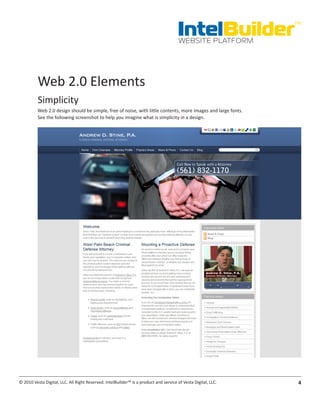
          Web 2.0 design should be simple, free of noise, with little contents, more images and large fonts.
          See the following screenshot to help you imagine what is simplicity in a design.


© 2010 Vesta Digital, LLC. All Right Reserved. IntelBuilder™ is a product and service of Vesta Digital, LLC.    4
IntelBuilder
                                                                                                                 TM


                                                                                       WEBSITE PLATFORM


          Centralized Contents
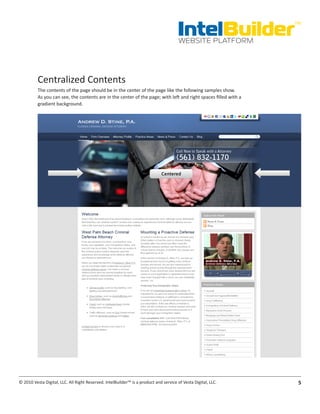
          The contents of the page should be in the center of the page like the following samples show.
          As you can see, the contents are in the center of the page; with left and right spaces filled with a
          gradient background.


© 2010 Vesta Digital, LLC. All Right Reserved. IntelBuilder™ is a product and service of Vesta Digital, LLC.      5
IntelBuilder
                                                                                                                 TM


                                                                                       WEBSITE PLATFORM


          Navigation
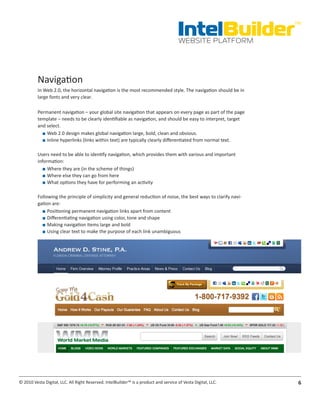
          In Web 2.0, the horizontal navigation is the most recommended style. The navigation should be in
          large fonts and very clear.

          Permanent navigation – your global site navigation that appears on every page as part of the page
          template – needs to be clearly identifiable as navigation, and should be easy to interpret, target
          and select.
            ■■ Web 2.0 design makes global navigation large, bold, clean and obvious.
            ■■ Inline hyperlinks (links within text) are typically clearly differentiated from normal text.

          Users need to be able to identify navigation, which provides them with various and important
          information:
             ■■ Where they are (in the scheme of things)
             ■■ Where else they can go from here
             ■■ What options they have for performing an activity

          Following the principle of simplicity and general reduction of noise, the best ways to clarify navi-
          gation are:
            ■■ Positioning permanent navigation links apart from content
            ■■ Differentiating navigation using color, tone and shape
            ■■ Making navigation items large and bold
            ■■ Using clear text to make the purpose of each link unambiguous


© 2010 Vesta Digital, LLC. All Right Reserved. IntelBuilder™ is a product and service of Vesta Digital, LLC.      6
IntelBuilder
                                                                                                               TM


                                                                                       WEBSITE PLATFORM


          Backgrounds & Gradients
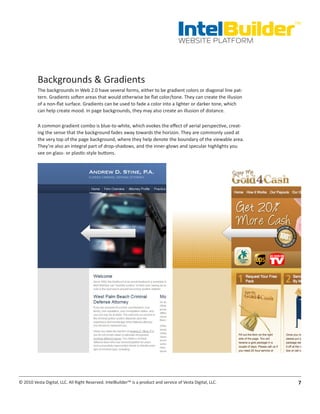
          The backgrounds in Web 2.0 have several forms, either to be gradient colors or diagonal line pat-
          tern. Gradients soften areas that would otherwise be flat color/tone. They can create the illusion
          of a non-flat surface. Gradients can be used to fade a color into a lighter or darker tone, which
          can help create mood. In page backgrounds, they may also create an illusion of distance.

          A common gradient combo is blue-to-white, which evokes the effect of aerial perspective, creat-
          ing the sense that the background fades away towards the horizon. They are commonly used at
          the very top of the page background, where they help denote the boundary of the viewable area.
          They’re also an integral part of drop-shadows, and the inner-glows and specular highlights you
          see on glass- or plastic-style buttons.


© 2010 Vesta Digital, LLC. All Right Reserved. IntelBuilder™ is a product and service of Vesta Digital, LLC.    7
IntelBuilder
                                                                                                               TM


                                                                                       WEBSITE PLATFORM


          Round Corners
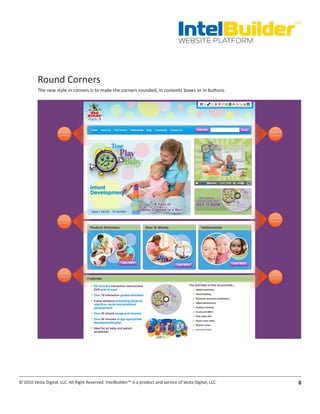
          The new style in corners is to make the corners rounded, in contents boxes or in buttons.


© 2010 Vesta Digital, LLC. All Right Reserved. IntelBuilder™ is a product and service of Vesta Digital, LLC.    8
IntelBuilder
                                                                                                               TM


                                                                                       WEBSITE PLATFORM


          Syndication
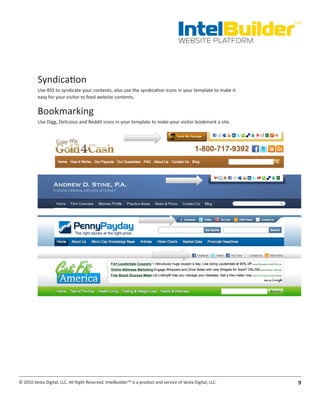
          Use RSS to syndicate your contents, also use the syndication icons in your template to make it
          easy for your visitor to feed website contents.

          Bookmarking
          Use Digg, Delicious and Reddit icons in your template to make your visitor bookmark a site.


© 2010 Vesta Digital, LLC. All Right Reserved. IntelBuilder™ is a product and service of Vesta Digital, LLC.    9
IntelBuilder
                                                                                                               TM


                                                                                       WEBSITE PLATFORM


          Bigger Text
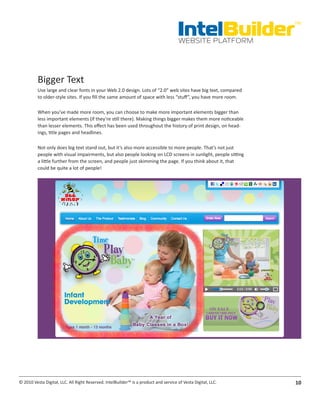
          Use large and clear fonts in your Web 2.0 design. Lots of “2.0” web sites have big text, compared
          to older-style sites. If you fill the same amount of space with less “stuff”, you have more room.

          When you’ve made more room, you can choose to make more important elements bigger than
          less important elements (if they’re still there). Making things bigger makes them more noticeable
          than lesser elements. This effect has been used throughout the history of print design, on head-
          ings, title pages and headlines.

          Not only does big text stand out, but it’s also more accessible to more people. That’s not just
          people with visual impairments, but also people looking on LCD screens in sunlight, people sitting
          a little further from the screen, and people just skimming the page. If you think about it, that
          could be quite a lot of people!


© 2010 Vesta Digital, LLC. All Right Reserved. IntelBuilder™ is a product and service of Vesta Digital, LLC.   10
IntelBuilder
                                                                                                                TM


                                                                                       WEBSITE PLATFORM


          Bright Colors
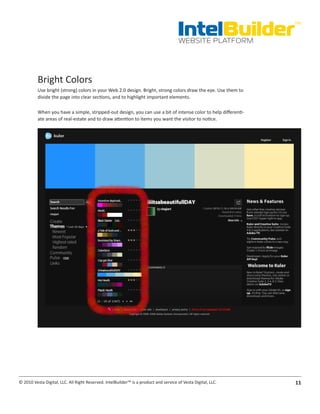
          Use bright (strong) colors in your Web 2.0 design. Bright, strong colors draw the eye. Use them to
          divide the page into clear sections, and to highlight important elements.

          When you have a simple, stripped-out design, you can use a bit of intense color to help differenti-
          ate areas of real-estate and to draw attention to items you want the visitor to notice.


© 2010 Vesta Digital, LLC. All Right Reserved. IntelBuilder™ is a product and service of Vesta Digital, LLC.    11
IntelBuilder
                                                                                                                  TM


                                                                                       WEBSITE PLATFORM


          Badges
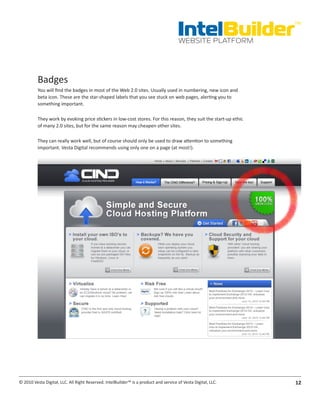
          You will find the badges in most of the Web 2.0 sites. Usually used in numbering, new icon and
          beta icon. These are the star-shaped labels that you see stuck on web pages, alerting you to
          something important.

          They work by evoking price stickers in low-cost stores. For this reason, they suit the start-up ethic
          of many 2.0 sites, but for the same reason may cheapen other sites.

          They can really work well, but of course should only be used to draw attention to something
          important. Vesta Digital recommends using only one on a page (at most!).


© 2010 Vesta Digital, LLC. All Right Reserved. IntelBuilder™ is a product and service of Vesta Digital, LLC.      12
IntelBuilder
                                                                                                               TM


                                                                                       WEBSITE PLATFORM


          Videos
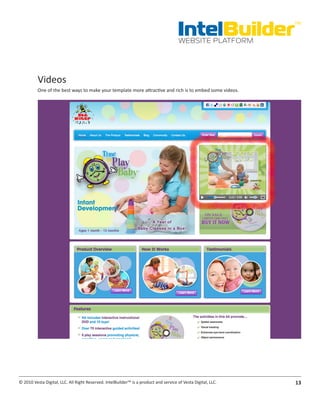
          One of the best ways to make your template more attractive and rich is to embed some videos.


© 2010 Vesta Digital, LLC. All Right Reserved. IntelBuilder™ is a product and service of Vesta Digital, LLC.   13
IntelBuilder
                                                                                                               TM


                                                                                       WEBSITE PLATFORM


          Columns
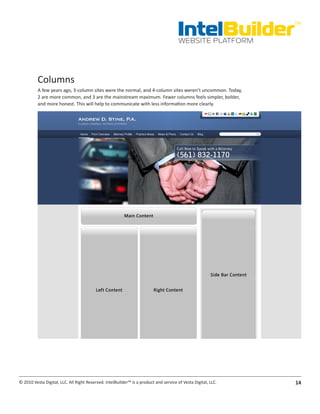
          A few years ago, 3-column sites were the normal, and 4-column sites weren’t uncommon. Today,
          2 are more common, and 3 are the mainstream maximum. Fewer columns feels simpler, bolder,
          and more honest. This will help to communicate with less information more clearly.


© 2010 Vesta Digital, LLC. All Right Reserved. IntelBuilder™ is a product and service of Vesta Digital, LLC.   14
IntelBuilder
                                                                                                                    TM


                                                                                       WEBSITE PLATFORM


          Separate Top Sections
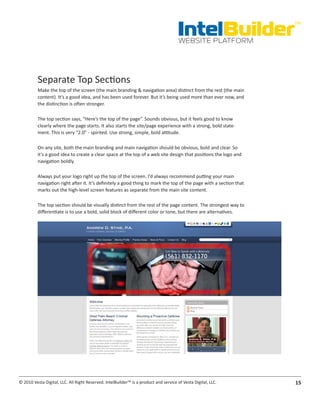
          Make the top of the screen (the main branding & navigation area) distinct from the rest (the main
          content). It’s a good idea, and has been used forever. But it’s being used more than ever now, and
          the distinction is often stronger.

          The top section says, “Here’s the top of the page”. Sounds obvious, but it feels good to know
          clearly where the page starts. It also starts the site/page experience with a strong, bold state-
          ment. This is very “2.0” - spirited. Use strong, simple, bold attitude.

          On any site, both the main branding and main navigation should be obvious, bold and clear. So
          it’s a good idea to create a clear space at the top of a web site design that positions the logo and
          navigation boldly.

          Always put your logo right up the top of the screen. I’d always recommend putting your main
          navigation right after it. It’s definitely a good thing to mark the top of the page with a section that
          marks out the high-level screen features as separate from the main site content.

          The top section should be visually distinct from the rest of the page content. The strongest way to
          differentiate is to use a bold, solid block of different color or tone, but there are alternatives.


© 2010 Vesta Digital, LLC. All Right Reserved. IntelBuilder™ is a product and service of Vesta Digital, LLC.        15
IntelBuilder
                                                                                                                   TM


                                                                                       WEBSITE PLATFORM


          Solid Areas of Screen Real-Estate
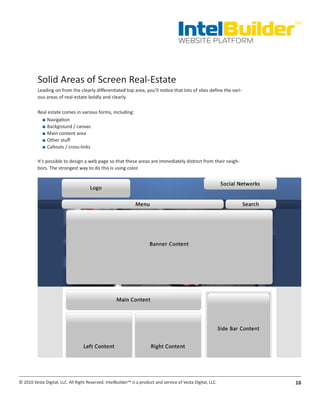
          Leading on from the clearly differentiated top area, you’ll notice that lots of sites define the vari-
          ous areas of real-estate boldly and clearly.

          Real estate comes in various forms, including:
            ■■ Navigation
            ■■ Background / canvas
            ■■ Main content area
            ■■ Other stuff
            ■■ Callouts / cross-links

          It’s possible to design a web page so that these areas are immediately distinct from their neigh-
          bors. The strongest way to do this is using color.


© 2010 Vesta Digital, LLC. All Right Reserved. IntelBuilder™ is a product and service of Vesta Digital, LLC.       16
IntelBuilder
                                                                                                                TM


                                                                                       WEBSITE PLATFORM


          Bold Logos
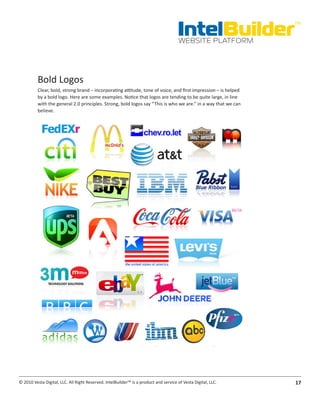
          Clear, bold, strong brand – incorporating attitude, tone of voice, and first impression – is helped
          by a bold logo. Here are some examples. Notice that logos are tending to be quite large, in line
          with the general 2.0 principles. Strong, bold logos say “This is who we are.” in a way that we can
          believe.


© 2010 Vesta Digital, LLC. All Right Reserved. IntelBuilder™ is a product and service of Vesta Digital, LLC.    17
IntelBuilder
                                                                                                                  TM


                                                                                       WEBSITE PLATFORM


          Rich Surfaces
          Most 2.0-style sites use subtle 3D effects, sparingly, to enhance the qualitative feel of the design.
          These little touches just feel nice, but we may not know why.

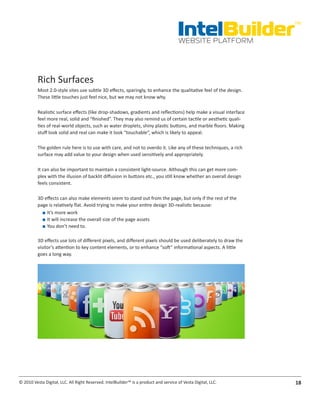
          Realistic surface effects (like drop-shadows, gradients and reflections) help make a visual interface
          feel more real, solid and “finished”. They may also remind us of certain tactile or aesthetic quali-
          ties of real-world objects, such as water droplets, shiny plastic buttons, and marble floors. Making
          stuff look solid and real can make it look “touchable”, which is likely to appeal.

          The golden rule here is to use with care, and not to overdo it. Like any of these techniques, a rich
          surface may add value to your design when used sensitively and appropriately.

          It can also be important to maintain a consistent light-source. Although this can get more com-
          plex with the illusion of backlit diffusion in buttons etc., you still know whether an overall design
          feels consistent.

          3D effects can also make elements seem to stand out from the page, but only if the rest of the
          page is relatively flat. Avoid trying to make your entire design 3D-realistic because:
            ■■ It’s more work
            ■■ It will increase the overall size of the page assets
            ■■ You don’t need to.

          3D effects use lots of different pixels, and different pixels should be used deliberately to draw the
          visitor’s attention to key content elements, or to enhance “soft” informational aspects. A little
          goes a long way.


© 2010 Vesta Digital, LLC. All Right Reserved. IntelBuilder™ is a product and service of Vesta Digital, LLC.      18
IntelBuilder
                                                                                                                 TM


                                                                                       WEBSITE PLATFORM


          Reflection
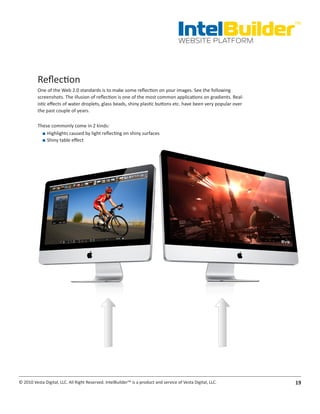
          One of the Web 2.0 standards is to make some reflection on your images. See the following
          screenshots. The illusion of reflection is one of the most common applications on gradients. Real-
          istic effects of water droplets, glass beads, shiny plastic buttons etc. have been very popular over
          the past couple of years.

          These commonly come in 2 kinds:
            ■■ Highlights caused by light reflecting on shiny surfaces
            ■■ Shiny table effect


© 2010 Vesta Digital, LLC. All Right Reserved. IntelBuilder™ is a product and service of Vesta Digital, LLC.     19
IntelBuilder
                                                                                                                  TM


                                                                                       WEBSITE PLATFORM


          Icons
          Icons play an important role in Web 2.0 design. Today we use fewer, better icons that carry more
          meaning. Icons can be useful when they’re easily recognisable and carry a clear meaning. In lots
          of other cases, a simple word is more effective.

          In the old days, icons were sometimes overused. It seemed that everyone wanted an icon for
          every navigation link or tab. Now, we use clear text more extensively, and are less ready to litter a
          page with icons.

          Where 2.0 designers do employ icons, they are reserved for higher-value spots where simpler,
          more spacious designs demand less attention and allow for richer icons.


© 2010 Vesta Digital, LLC. All Right Reserved. IntelBuilder™ is a product and service of Vesta Digital, LLC.      20
IntelBuilder
                                                                                                               TM


                                                                                       WEBSITE PLATFORM


          Template Requirements
          Adobe Fireworks
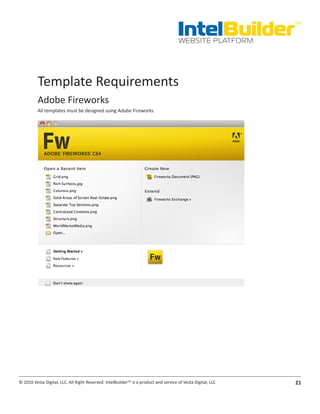
          All templates must be designed using Adobe Fireworks.


© 2010 Vesta Digital, LLC. All Right Reserved. IntelBuilder™ is a product and service of Vesta Digital, LLC.   21
IntelBuilder
                                                                                                               TM


                                                                                       WEBSITE PLATFORM


          Grid
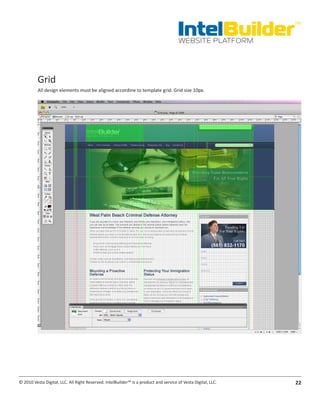
          All design elements must be aligned accordine to template grid. Grid size 10px.


© 2010 Vesta Digital, LLC. All Right Reserved. IntelBuilder™ is a product and service of Vesta Digital, LLC.   22
IntelBuilder
                                                                                                               TM


                                                                                       WEBSITE PLATFORM


          Dimensions
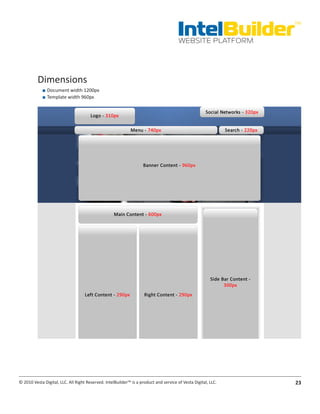
            ■■ Document width 1200px
            ■■ Template width 960px


© 2010 Vesta Digital, LLC. All Right Reserved. IntelBuilder™ is a product and service of Vesta Digital, LLC.   23
IntelBuilder
                                                                                                               TM


                                                                                       WEBSITE PLATFORM


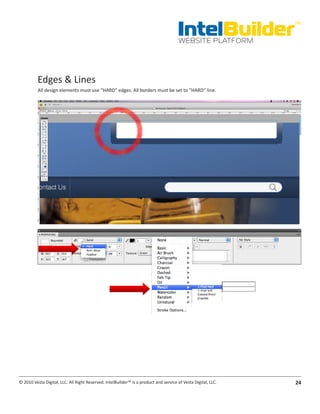
          Edges & Lines
          All design elements must use “HARD” edges. All borders must be set to “HARD” line.


© 2010 Vesta Digital, LLC. All Right Reserved. IntelBuilder™ is a product and service of Vesta Digital, LLC.   24
IntelBuilder
                                                                                                               TM


                                                                                       WEBSITE PLATFORM


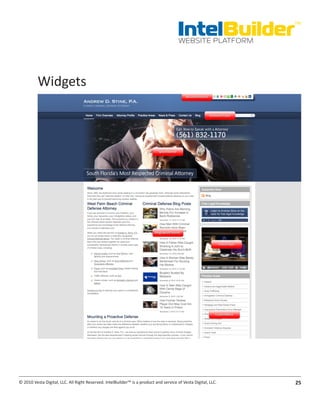
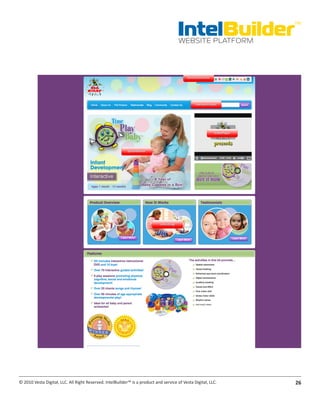
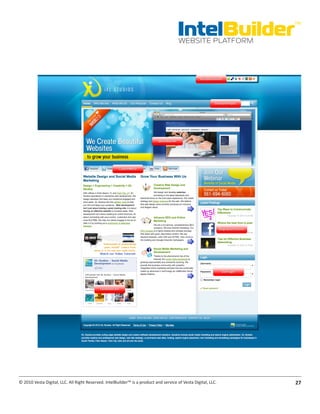
          Widgets


© 2010 Vesta Digital, LLC. All Right Reserved. IntelBuilder™ is a product and service of Vesta Digital, LLC.   25
IntelBuilder
                                                                                                               TM


                                                                                       WEBSITE PLATFORM


© 2010 Vesta Digital, LLC. All Right Reserved. IntelBuilder™ is a product and service of Vesta Digital, LLC.   26
IntelBuilder
                                                                                                               TM


                                                                                       WEBSITE PLATFORM


© 2010 Vesta Digital, LLC. All Right Reserved. IntelBuilder™ is a product and service of Vesta Digital, LLC.   27
IntelBuilder
                                                                                                               TM


                                                                                       WEBSITE PLATFORM


© 2010 Vesta Digital, LLC. All Right Reserved. IntelBuilder™ is a product and service of Vesta Digital, LLC.   28
IntelBuilder
                                                                                                               TM


                                                                                       WEBSITE PLATFORM


© 2010 Vesta Digital, LLC. All Right Reserved. IntelBuilder™ is a product and service of Vesta Digital, LLC.   29
IntelBuilder
                                                                                                               TM


                                                                                       WEBSITE PLATFORM


© 2010 Vesta Digital, LLC. All Right Reserved. IntelBuilder™ is a product and service of Vesta Digital, LLC.   30
IntelBuilder
                                                                                                               TM


                                                                                       WEBSITE PLATFORM


          Reference
          Definition Resources
          What.is.Web.Design?
            ■■ http://en.wikipedia.org/wiki/Web_Design
          What.is.Web.2.0?
            ■■ http://en.wikipedia.org/wiki/Web_2.0
          What.is.User.Interface.Design?
            ■■ http://en.wikipedia.org/wiki/User_interface_design
          What.is.Icon.Design?
            ■■ http://en.wikipedia.org/wiki/Icon_design

          Learning Resources
          10.Reasons.why.I.prefer.Fireworks.CS4.to.Photoshop.for.Web.Design
            ■■ http://boagworld.com/design/fireworks-vs-photoshop
          Fireworks.vs.Photoshop.Compression
            ■■ http://www.webdesignerwall.com/general/fireworks-vs-photoshop-compression
          Fireworks:.How.Does.It.Fit.in.Your.Workflow?
            ■■ http://www.adobe.dougwinnie.com/2009/01/15/fireworks-how-does-it-fit-in-your-work-
               flow/


© 2010 Vesta Digital, LLC. All Right Reserved. IntelBuilder™ is a product and service of Vesta Digital, LLC.   31
IntelBuilder
                                                                                                               TM


                                                                                       WEBSITE PLATFORM


          Design Elements
          77.Vector.Buttons.hot.off.the.press
            ■■ http://www.gosquared.com/liquidicity/archives/96
          Ultimate.Source.for.tiled.background.patterns
            ■■ http://www.designshard.com/freebies/ultimate-source-for-tiled-background-patterns/
          Fireworks.textures.package
            ■■ http://textures.z7server.com/save_all_textures.php
          Free.Vector.Art.&.Graphics
            ■■ http://www.freevectors.net
          Vector.Backgrounds
            ■■ http://www.vectorportal.com
          Website.Elements
            ■■ http://www.easyvectors.com/browse/computer-website-elements
          Vector.Ornaments
            ■■ http://cameronmoll.com/archives/2008/05/25_resources_ornaments_fleurons/
          Fireworks.Textures
            ■■ http://www.cgtextures.com
          40+.Free.Vector.Graphics.and.Photoshop.Brushes.For.Commercial.Use
            ■■ http://blog.qbrushes.net/25-free-vector-icons-and-graphics-for-commercial-use
          Abstract.Brushes
            ■■ http://qbrushes.net/photoshop-abstract-brushes/line-brushes
          Quality.Free.Vector.Graphics
            ■■ http://qvectors.net


© 2010 Vesta Digital, LLC. All Right Reserved. IntelBuilder™ is a product and service of Vesta Digital, LLC.   32
IntelBuilder
                                                                                                               TM


                                                                                       WEBSITE PLATFORM


          Icons Directory
          Icons.Search.Engine
            ■■ http://www.iconfinder.com
          Mini.Pixel.Icons
            ■■ http://www.devwebpro.com/over-thousand-mini-pixel-icons-all-free/152/
          Icon.Sets
            ■■ http://sixrevisions.com/resources/40-beautiful-free-icon-sets
            ■■ http://www.smashingmagazine.com/2009/02/16/50-beautiful-useful-and-free-icon-sets

          Stock Images
          Stock.XCHNG
            ■■ http://www.sxc.hu
          Flickr.Creative.Commons
            ■■ http://www.flickr.com/creativecommons/by-2.0/
          Webshots
            ■■ http://www.webshots.com

          Logos
          LogoPond.-.Identity.Inspiration
            ■■ http://www.logopond.com
          The.Design.Inspiration.-.Daily.Logo.Designs
            ■■ http://www.thedesigninspiration.com


© 2010 Vesta Digital, LLC. All Right Reserved. IntelBuilder™ is a product and service of Vesta Digital, LLC.   33

Intel Builder Design Specifications

  • 1.
    VestaDigital DESIGN SPECIFICATIONS 224 DaturaStreet, Suite 609 West Palm Beach, FL 33401 Phone: 1-866-855-0966 Fax: 1-866-582-8126 Email: support@vestadigital.com Website: http://www.vestadigital.com
  • 2.
    IntelBuilder TM WEBSITE PLATFORM Table of Contents Introduction............................................................................................3 Web.2.0.Guidelines.................................................................................3 Design Concept Web 2.0 Design Contemporary Web Design Web.2.0.Elements. ..................................................................................4 . Simplicity Centralized Contents Navigation Backgrounds & Gradients Round Corners Syndication Bookmarking Bigger Text Bright Colors Badges Videos Columns Separate Top Sections Solid Areas of Screen Real-Estate Bold Logos Rich Surfaces Reflection Icons Template.Requirements. .......................................................................21 . Adobe Fireworks Grid Dimensions Edges & Lines Widgets.................................................................................................25 Reference..............................................................................................31 Definition Resources Learning Resources Design Elements Icons Directory Stock Images Logos © 2010 Vesta Digital, LLC. All Right Reserved. IntelBuilder™ is a product and service of Vesta Digital, LLC. 2
  • 3.
    IntelBuilder TM WEBSITE PLATFORM Introduction Vesta Digital would like to help make people’s experience on the web as good as it can be. Based on our own experience designing, building, and testing many software products, we are offering suggestions for creating web 2.0 designs that are intuitive and effective. Web 2.0 Guidelines Design Concept Web 2.0 is the next version of web sites; the world is going to change their websites to be more attractive, simple, usable, scalable, bright and sharable by designing it with Web 2.0 standards. Web 2.0 is not changing the web design concept; it’s also changing the web marketing, program- ming and usability concepts. Web 2.0 Design One trend in contemporary web design is using the “Web 2.0 style” in web site design. In this style, web design uses the concept of the Internet as a platform for delivering information and experiences to the end user. Tim O’Reilly, founder of O’Reilly Media and inventor of the term Web 2.0, notes that Google is a perfect example of what is meant by Web 2.0. “Google, by contrast, began its life as a native web application, never sold or packaged, but delivered as a service, with customers paying, directly or indi- rectly, for the use of that service.” Contemporary Web Design The key feature of modern web design is simplicity. Contemporary design or modern design relies on clean lines, smooth and polished surfaces, and few intricate details. It is not stark and cold, but contemporary design is comfortable and spacious, without clutter. Web design involves coding a web page in a programming language that makes it visually ap- pealing and functional for the user. Vesta Digital focuses on how the contemporary design of a website’s functions changes with new developments in web technology and services, offering the user more applications. Since the audience of web users continues to grow worldwide, what it means to design a website in a contemporary style evolves every day. © 2010 Vesta Digital, LLC. All Right Reserved. IntelBuilder™ is a product and service of Vesta Digital, LLC. 3
  • 4.
    IntelBuilder TM WEBSITE PLATFORM Web 2.0 Elements Simplicity Web 2.0 design should be simple, free of noise, with little contents, more images and large fonts. See the following screenshot to help you imagine what is simplicity in a design. © 2010 Vesta Digital, LLC. All Right Reserved. IntelBuilder™ is a product and service of Vesta Digital, LLC. 4
  • 5.
    IntelBuilder TM WEBSITE PLATFORM Centralized Contents The contents of the page should be in the center of the page like the following samples show. As you can see, the contents are in the center of the page; with left and right spaces filled with a gradient background. © 2010 Vesta Digital, LLC. All Right Reserved. IntelBuilder™ is a product and service of Vesta Digital, LLC. 5
  • 6.
    IntelBuilder TM WEBSITE PLATFORM Navigation In Web 2.0, the horizontal navigation is the most recommended style. The navigation should be in large fonts and very clear. Permanent navigation – your global site navigation that appears on every page as part of the page template – needs to be clearly identifiable as navigation, and should be easy to interpret, target and select. ■■ Web 2.0 design makes global navigation large, bold, clean and obvious. ■■ Inline hyperlinks (links within text) are typically clearly differentiated from normal text. Users need to be able to identify navigation, which provides them with various and important information: ■■ Where they are (in the scheme of things) ■■ Where else they can go from here ■■ What options they have for performing an activity Following the principle of simplicity and general reduction of noise, the best ways to clarify navi- gation are: ■■ Positioning permanent navigation links apart from content ■■ Differentiating navigation using color, tone and shape ■■ Making navigation items large and bold ■■ Using clear text to make the purpose of each link unambiguous © 2010 Vesta Digital, LLC. All Right Reserved. IntelBuilder™ is a product and service of Vesta Digital, LLC. 6
  • 7.
    IntelBuilder TM WEBSITE PLATFORM Backgrounds & Gradients The backgrounds in Web 2.0 have several forms, either to be gradient colors or diagonal line pat- tern. Gradients soften areas that would otherwise be flat color/tone. They can create the illusion of a non-flat surface. Gradients can be used to fade a color into a lighter or darker tone, which can help create mood. In page backgrounds, they may also create an illusion of distance. A common gradient combo is blue-to-white, which evokes the effect of aerial perspective, creat- ing the sense that the background fades away towards the horizon. They are commonly used at the very top of the page background, where they help denote the boundary of the viewable area. They’re also an integral part of drop-shadows, and the inner-glows and specular highlights you see on glass- or plastic-style buttons. © 2010 Vesta Digital, LLC. All Right Reserved. IntelBuilder™ is a product and service of Vesta Digital, LLC. 7
  • 8.
    IntelBuilder TM WEBSITE PLATFORM Round Corners The new style in corners is to make the corners rounded, in contents boxes or in buttons. © 2010 Vesta Digital, LLC. All Right Reserved. IntelBuilder™ is a product and service of Vesta Digital, LLC. 8
  • 9.
    IntelBuilder TM WEBSITE PLATFORM Syndication Use RSS to syndicate your contents, also use the syndication icons in your template to make it easy for your visitor to feed website contents. Bookmarking Use Digg, Delicious and Reddit icons in your template to make your visitor bookmark a site. © 2010 Vesta Digital, LLC. All Right Reserved. IntelBuilder™ is a product and service of Vesta Digital, LLC. 9
  • 10.
    IntelBuilder TM WEBSITE PLATFORM Bigger Text Use large and clear fonts in your Web 2.0 design. Lots of “2.0” web sites have big text, compared to older-style sites. If you fill the same amount of space with less “stuff”, you have more room. When you’ve made more room, you can choose to make more important elements bigger than less important elements (if they’re still there). Making things bigger makes them more noticeable than lesser elements. This effect has been used throughout the history of print design, on head- ings, title pages and headlines. Not only does big text stand out, but it’s also more accessible to more people. That’s not just people with visual impairments, but also people looking on LCD screens in sunlight, people sitting a little further from the screen, and people just skimming the page. If you think about it, that could be quite a lot of people! © 2010 Vesta Digital, LLC. All Right Reserved. IntelBuilder™ is a product and service of Vesta Digital, LLC. 10
  • 11.
    IntelBuilder TM WEBSITE PLATFORM Bright Colors Use bright (strong) colors in your Web 2.0 design. Bright, strong colors draw the eye. Use them to divide the page into clear sections, and to highlight important elements. When you have a simple, stripped-out design, you can use a bit of intense color to help differenti- ate areas of real-estate and to draw attention to items you want the visitor to notice. © 2010 Vesta Digital, LLC. All Right Reserved. IntelBuilder™ is a product and service of Vesta Digital, LLC. 11
  • 12.
    IntelBuilder TM WEBSITE PLATFORM Badges You will find the badges in most of the Web 2.0 sites. Usually used in numbering, new icon and beta icon. These are the star-shaped labels that you see stuck on web pages, alerting you to something important. They work by evoking price stickers in low-cost stores. For this reason, they suit the start-up ethic of many 2.0 sites, but for the same reason may cheapen other sites. They can really work well, but of course should only be used to draw attention to something important. Vesta Digital recommends using only one on a page (at most!). © 2010 Vesta Digital, LLC. All Right Reserved. IntelBuilder™ is a product and service of Vesta Digital, LLC. 12
  • 13.
    IntelBuilder TM WEBSITE PLATFORM Videos One of the best ways to make your template more attractive and rich is to embed some videos. © 2010 Vesta Digital, LLC. All Right Reserved. IntelBuilder™ is a product and service of Vesta Digital, LLC. 13
  • 14.
    IntelBuilder TM WEBSITE PLATFORM Columns A few years ago, 3-column sites were the normal, and 4-column sites weren’t uncommon. Today, 2 are more common, and 3 are the mainstream maximum. Fewer columns feels simpler, bolder, and more honest. This will help to communicate with less information more clearly. © 2010 Vesta Digital, LLC. All Right Reserved. IntelBuilder™ is a product and service of Vesta Digital, LLC. 14
  • 15.
    IntelBuilder TM WEBSITE PLATFORM Separate Top Sections Make the top of the screen (the main branding & navigation area) distinct from the rest (the main content). It’s a good idea, and has been used forever. But it’s being used more than ever now, and the distinction is often stronger. The top section says, “Here’s the top of the page”. Sounds obvious, but it feels good to know clearly where the page starts. It also starts the site/page experience with a strong, bold state- ment. This is very “2.0” - spirited. Use strong, simple, bold attitude. On any site, both the main branding and main navigation should be obvious, bold and clear. So it’s a good idea to create a clear space at the top of a web site design that positions the logo and navigation boldly. Always put your logo right up the top of the screen. I’d always recommend putting your main navigation right after it. It’s definitely a good thing to mark the top of the page with a section that marks out the high-level screen features as separate from the main site content. The top section should be visually distinct from the rest of the page content. The strongest way to differentiate is to use a bold, solid block of different color or tone, but there are alternatives. © 2010 Vesta Digital, LLC. All Right Reserved. IntelBuilder™ is a product and service of Vesta Digital, LLC. 15
  • 16.
    IntelBuilder TM WEBSITE PLATFORM Solid Areas of Screen Real-Estate Leading on from the clearly differentiated top area, you’ll notice that lots of sites define the vari- ous areas of real-estate boldly and clearly. Real estate comes in various forms, including: ■■ Navigation ■■ Background / canvas ■■ Main content area ■■ Other stuff ■■ Callouts / cross-links It’s possible to design a web page so that these areas are immediately distinct from their neigh- bors. The strongest way to do this is using color. © 2010 Vesta Digital, LLC. All Right Reserved. IntelBuilder™ is a product and service of Vesta Digital, LLC. 16
  • 17.
    IntelBuilder TM WEBSITE PLATFORM Bold Logos Clear, bold, strong brand – incorporating attitude, tone of voice, and first impression – is helped by a bold logo. Here are some examples. Notice that logos are tending to be quite large, in line with the general 2.0 principles. Strong, bold logos say “This is who we are.” in a way that we can believe. © 2010 Vesta Digital, LLC. All Right Reserved. IntelBuilder™ is a product and service of Vesta Digital, LLC. 17
  • 18.
    IntelBuilder TM WEBSITE PLATFORM Rich Surfaces Most 2.0-style sites use subtle 3D effects, sparingly, to enhance the qualitative feel of the design. These little touches just feel nice, but we may not know why. Realistic surface effects (like drop-shadows, gradients and reflections) help make a visual interface feel more real, solid and “finished”. They may also remind us of certain tactile or aesthetic quali- ties of real-world objects, such as water droplets, shiny plastic buttons, and marble floors. Making stuff look solid and real can make it look “touchable”, which is likely to appeal. The golden rule here is to use with care, and not to overdo it. Like any of these techniques, a rich surface may add value to your design when used sensitively and appropriately. It can also be important to maintain a consistent light-source. Although this can get more com- plex with the illusion of backlit diffusion in buttons etc., you still know whether an overall design feels consistent. 3D effects can also make elements seem to stand out from the page, but only if the rest of the page is relatively flat. Avoid trying to make your entire design 3D-realistic because: ■■ It’s more work ■■ It will increase the overall size of the page assets ■■ You don’t need to. 3D effects use lots of different pixels, and different pixels should be used deliberately to draw the visitor’s attention to key content elements, or to enhance “soft” informational aspects. A little goes a long way. © 2010 Vesta Digital, LLC. All Right Reserved. IntelBuilder™ is a product and service of Vesta Digital, LLC. 18
  • 19.
    IntelBuilder TM WEBSITE PLATFORM Reflection One of the Web 2.0 standards is to make some reflection on your images. See the following screenshots. The illusion of reflection is one of the most common applications on gradients. Real- istic effects of water droplets, glass beads, shiny plastic buttons etc. have been very popular over the past couple of years. These commonly come in 2 kinds: ■■ Highlights caused by light reflecting on shiny surfaces ■■ Shiny table effect © 2010 Vesta Digital, LLC. All Right Reserved. IntelBuilder™ is a product and service of Vesta Digital, LLC. 19
  • 20.
    IntelBuilder TM WEBSITE PLATFORM Icons Icons play an important role in Web 2.0 design. Today we use fewer, better icons that carry more meaning. Icons can be useful when they’re easily recognisable and carry a clear meaning. In lots of other cases, a simple word is more effective. In the old days, icons were sometimes overused. It seemed that everyone wanted an icon for every navigation link or tab. Now, we use clear text more extensively, and are less ready to litter a page with icons. Where 2.0 designers do employ icons, they are reserved for higher-value spots where simpler, more spacious designs demand less attention and allow for richer icons. © 2010 Vesta Digital, LLC. All Right Reserved. IntelBuilder™ is a product and service of Vesta Digital, LLC. 20
  • 21.
    IntelBuilder TM WEBSITE PLATFORM Template Requirements Adobe Fireworks All templates must be designed using Adobe Fireworks. © 2010 Vesta Digital, LLC. All Right Reserved. IntelBuilder™ is a product and service of Vesta Digital, LLC. 21
  • 22.
    IntelBuilder TM WEBSITE PLATFORM Grid All design elements must be aligned accordine to template grid. Grid size 10px. © 2010 Vesta Digital, LLC. All Right Reserved. IntelBuilder™ is a product and service of Vesta Digital, LLC. 22
  • 23.
    IntelBuilder TM WEBSITE PLATFORM Dimensions ■■ Document width 1200px ■■ Template width 960px © 2010 Vesta Digital, LLC. All Right Reserved. IntelBuilder™ is a product and service of Vesta Digital, LLC. 23
  • 24.
    IntelBuilder TM WEBSITE PLATFORM Edges & Lines All design elements must use “HARD” edges. All borders must be set to “HARD” line. © 2010 Vesta Digital, LLC. All Right Reserved. IntelBuilder™ is a product and service of Vesta Digital, LLC. 24
  • 25.
    IntelBuilder TM WEBSITE PLATFORM Widgets © 2010 Vesta Digital, LLC. All Right Reserved. IntelBuilder™ is a product and service of Vesta Digital, LLC. 25
  • 26.
    IntelBuilder TM WEBSITE PLATFORM © 2010 Vesta Digital, LLC. All Right Reserved. IntelBuilder™ is a product and service of Vesta Digital, LLC. 26
  • 27.
    IntelBuilder TM WEBSITE PLATFORM © 2010 Vesta Digital, LLC. All Right Reserved. IntelBuilder™ is a product and service of Vesta Digital, LLC. 27
  • 28.
    IntelBuilder TM WEBSITE PLATFORM © 2010 Vesta Digital, LLC. All Right Reserved. IntelBuilder™ is a product and service of Vesta Digital, LLC. 28
  • 29.
    IntelBuilder TM WEBSITE PLATFORM © 2010 Vesta Digital, LLC. All Right Reserved. IntelBuilder™ is a product and service of Vesta Digital, LLC. 29
  • 30.
    IntelBuilder TM WEBSITE PLATFORM © 2010 Vesta Digital, LLC. All Right Reserved. IntelBuilder™ is a product and service of Vesta Digital, LLC. 30
  • 31.
    IntelBuilder TM WEBSITE PLATFORM Reference Definition Resources What.is.Web.Design? ■■ http://en.wikipedia.org/wiki/Web_Design What.is.Web.2.0? ■■ http://en.wikipedia.org/wiki/Web_2.0 What.is.User.Interface.Design? ■■ http://en.wikipedia.org/wiki/User_interface_design What.is.Icon.Design? ■■ http://en.wikipedia.org/wiki/Icon_design Learning Resources 10.Reasons.why.I.prefer.Fireworks.CS4.to.Photoshop.for.Web.Design ■■ http://boagworld.com/design/fireworks-vs-photoshop Fireworks.vs.Photoshop.Compression ■■ http://www.webdesignerwall.com/general/fireworks-vs-photoshop-compression Fireworks:.How.Does.It.Fit.in.Your.Workflow? ■■ http://www.adobe.dougwinnie.com/2009/01/15/fireworks-how-does-it-fit-in-your-work- flow/ © 2010 Vesta Digital, LLC. All Right Reserved. IntelBuilder™ is a product and service of Vesta Digital, LLC. 31
  • 32.
    IntelBuilder TM WEBSITE PLATFORM Design Elements 77.Vector.Buttons.hot.off.the.press ■■ http://www.gosquared.com/liquidicity/archives/96 Ultimate.Source.for.tiled.background.patterns ■■ http://www.designshard.com/freebies/ultimate-source-for-tiled-background-patterns/ Fireworks.textures.package ■■ http://textures.z7server.com/save_all_textures.php Free.Vector.Art.&.Graphics ■■ http://www.freevectors.net Vector.Backgrounds ■■ http://www.vectorportal.com Website.Elements ■■ http://www.easyvectors.com/browse/computer-website-elements Vector.Ornaments ■■ http://cameronmoll.com/archives/2008/05/25_resources_ornaments_fleurons/ Fireworks.Textures ■■ http://www.cgtextures.com 40+.Free.Vector.Graphics.and.Photoshop.Brushes.For.Commercial.Use ■■ http://blog.qbrushes.net/25-free-vector-icons-and-graphics-for-commercial-use Abstract.Brushes ■■ http://qbrushes.net/photoshop-abstract-brushes/line-brushes Quality.Free.Vector.Graphics ■■ http://qvectors.net © 2010 Vesta Digital, LLC. All Right Reserved. IntelBuilder™ is a product and service of Vesta Digital, LLC. 32
  • 33.
    IntelBuilder TM WEBSITE PLATFORM Icons Directory Icons.Search.Engine ■■ http://www.iconfinder.com Mini.Pixel.Icons ■■ http://www.devwebpro.com/over-thousand-mini-pixel-icons-all-free/152/ Icon.Sets ■■ http://sixrevisions.com/resources/40-beautiful-free-icon-sets ■■ http://www.smashingmagazine.com/2009/02/16/50-beautiful-useful-and-free-icon-sets Stock Images Stock.XCHNG ■■ http://www.sxc.hu Flickr.Creative.Commons ■■ http://www.flickr.com/creativecommons/by-2.0/ Webshots ■■ http://www.webshots.com Logos LogoPond.-.Identity.Inspiration ■■ http://www.logopond.com The.Design.Inspiration.-.Daily.Logo.Designs ■■ http://www.thedesigninspiration.com © 2010 Vesta Digital, LLC. All Right Reserved. IntelBuilder™ is a product and service of Vesta Digital, LLC. 33