INSTALL MAST &
ACCESSORIES
30’ Wireless Mast – Self Install
What is mast in electrical?
•A mast, which is outside on your
roof or at your meter, feeds
power to your home from
overhead lines. It typically
resembles a metal pipe or tube.
To ensure power is flowing to
your house, take a look at your
mast, but because it's energized,
never touch it.
HOW TO INSTALL
UBIQUITI
SERVICE ON A 30’
MAST
UBNT UniFi is an ecosystem of
wireless access points, routers,
switches, security cameras,
controller devices,VoIP phones
and access control products. It
exists between businesses and
cheap home network
equipment.
Ubiquiti devices offer broadband
connection with fast speeds. UniFi
Controller is a wireless network
management software solution
from Ubiquiti Networks™. It
allows you to manage multiple
wireless networks using a web
browser or a software application.
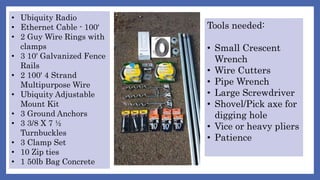
• Ubiquity Radio
• Ethernet Cable - 100‘
• 2 Guy Wire Rings with
clamps
• 3 10' Galvanized Fence
Rails
• 2 100' 4 Strand
Multipurpose Wire
• Ubiquity Adjustable
Mount Kit
• 3 Ground Anchors
• 3 3/8 X 7 ½
Turnbuckles
• 3 Clamp Set
• 10 Zip ties
• 1 50lb Bag Concrete
Tools needed:
• Small Crescent
Wrench
• Wire Cutters
• Pipe Wrench
• Large Screwdriver
• Shovel/Pick axe for
digging hole
• Vice or heavy pliers
• Patience
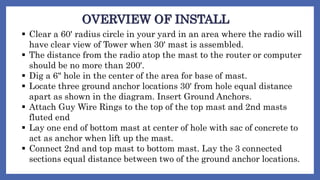
OVERVIEW OF INSTALL
 Clear a 60' radius circle in your yard in an area where the radio will
have clear view of Tower when 30' mast is assembled.
 The distance from the radio atop the mast to the router or computer
should be no more than 200'.
 Dig a 6" hole in the center of the area for base of mast.
 Locate three ground anchor locations 30' from hole equal distance
apart as shown in the diagram. Insert Ground Anchors.
 Attach Guy Wire Rings to the top of the top mast and 2nd masts
fluted end
 Lay one end of bottom mast at center of hole with sac of concrete to
act as anchor when lift up the mast.
 Connect 2nd and top mast to bottom mast. Lay the 3 connected
sections equal distance between two of the ground anchor locations.
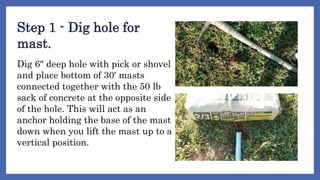
Step 1 - Dig hole for
mast.
Dig 6" deep hole with pick or shovel
and place bottom of 30' masts
connected together with the 50 lb
sack of concrete at the opposite side
of the hole. This will act as an
anchor holding the base of the mast
down when you lift the mast up to a
vertical position.
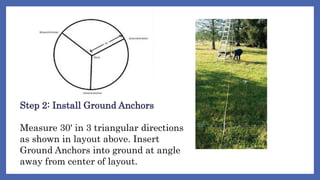
Step 2: Install Ground Anchors
Measure 30' in 3 triangular directions
as shown in layout above. Insert
Ground Anchors into ground at angle
away from center of layout.
Insert Ground Anchors into
ground by screwing them in.
If the ground is hard you may
need to use a heavy
screwdriver or pipe wrench.
Don't turn to hard as triangle
top may break.
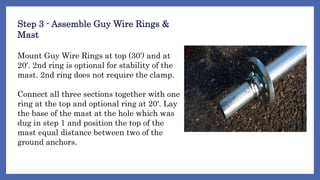
Step 3 - Assemble Guy Wire Rings &
Mast
Mount Guy Wire Rings at top (30') and at
20'. 2nd ring is optional for stability of the
mast. 2nd ring does not require the clamp.
Connect all three sections together with one
ring at the top and optional ring at 20'. Lay
the base of the mast at the hole which was
dug in step 1 and position the top of the
mast equal distance between two of the
ground anchors.
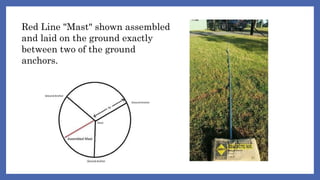
Red Line "Mast" shown assembled
and laid on the ground exactly
between two of the ground
anchors.
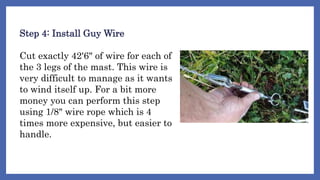
Step 4: Install Guy Wire
Cut exactly 42'6" of wire for each of
the 3 legs of the mast. This wire is
very difficult to manage as it wants
to wind itself up. For a bit more
money you can perform this step
using 1/8" wire rope which is 4
times more expensive, but easier to
handle.
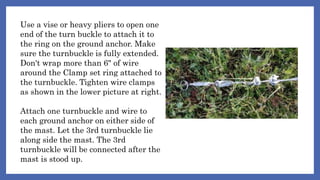
Use a vise or heavy pliers to open one
end of the turn buckle to attach it to
the ring on the ground anchor. Make
sure the turnbuckle is fully extended.
Don't wrap more than 6" of wire
around the Clamp set ring attached to
the turnbuckle. Tighten wire clamps
as shown in the lower picture at right.
Attach one turnbuckle and wire to
each ground anchor on either side of
the mast. Let the 3rd turnbuckle lie
along side the mast. The 3rd
turnbuckle will be connected after the
mast is stood up.
Step 5: Attach Wires to Ring
Attach the opposite ends of the guy wire from each ground
anchor to the Guy Wire Ring at the top of the mast. Two wires
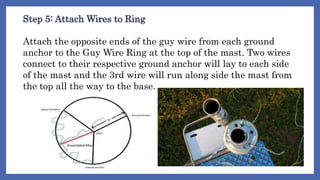
connect to their respective ground anchor will lay to each side
of the mast and the 3rd wire will run along side the mast from
the top all the way to the base.
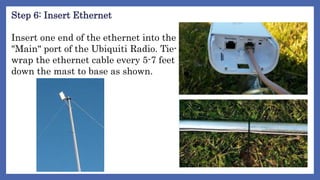
Step 6: Insert Ethernet
Insert one end of the ethernet into the
"Main" port of the Ubiquiti Radio. Tie-
wrap the ethernet cable every 5-7 feet
down the mast to base as shown.
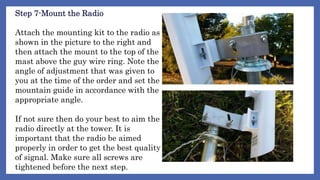
Step 7-Mount the Radio
Attach the mounting kit to the radio as
shown in the picture to the right and
then attach the mount to the top of the
mast above the guy wire ring. Note the
angle of adjustment that was given to
you at the time of the order and set the
mountain guide in accordance with the
appropriate angle.
If not sure then do your best to aim the
radio directly at the tower. It is
important that the radio be aimed
properly in order to get the best quality
of signal. Make sure all screws are
tightened before the next step.
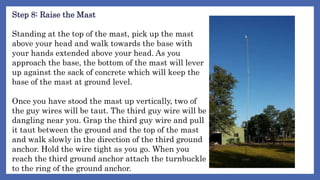
Step 8: Raise the Mast
Standing at the top of the mast, pick up the mast
above your head and walk towards the base with
your hands extended above your head. As you
approach the base, the bottom of the mast will lever
up against the sack of concrete which will keep the
base of the mast at ground level.
Once you have stood the mast up vertically, two of
the guy wires will be taut. The third guy wire will be
dangling near you. Grap the third guy wire and pull
it taut between the ground and the top of the mast
and walk slowly in the direction of the third ground
anchor. Hold the wire tight as you go. When you
reach the third ground anchor attach the turnbuckle
to the ring of the ground anchor.
At this point you can adjust the tightness
of the guy wires by turning the turn
buckles. The mast may not be perfectly
straight which may require you attach
guy wires to the 2nd ring installed in
Step 3. If necessary reverse the
procedure in this step to let the mast
down to the ground, then attach the
additional wire from the 2nd ring to the
two ground anchors as done before and
repeat the step to raise the mast again
with the two loose guy wires for the 3rd
ground anchor. Once in place the mast
can be turned to point the radio towards
the remote tower.
Step 9-Connect to POE
Connect the cable from the Radio to the
Ubiquiti Power over Ethernet (POE)
adapter as shown in the diagrams here.
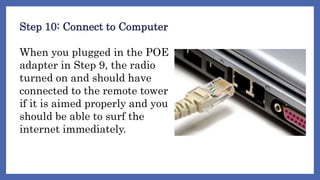
Step 10: Connect to Computer
When you plugged in the POE
adapter in Step 9, the radio
turned on and should have
connected to the remote tower
if it is aimed properly and you
should be able to surf the
internet immediately.
THAT’S ALL,
THANKYOU!
GROUP REPORTERS:
1. Regulacion, Gerald
2. Rosales, Russel Angelo
3. Sagadal, Amelita
4. Salvador, Ma. Gesille
5. Capales, Shairen
BTLED 3

Install-mast-accessories.pptx

  • 1.
    INSTALL MAST & ACCESSORIES 30’Wireless Mast – Self Install
  • 2.
    What is mastin electrical? •A mast, which is outside on your roof or at your meter, feeds power to your home from overhead lines. It typically resembles a metal pipe or tube. To ensure power is flowing to your house, take a look at your mast, but because it's energized, never touch it.
  • 3.
  • 4.
    UBNT UniFi isan ecosystem of wireless access points, routers, switches, security cameras, controller devices,VoIP phones and access control products. It exists between businesses and cheap home network equipment.
  • 5.
    Ubiquiti devices offerbroadband connection with fast speeds. UniFi Controller is a wireless network management software solution from Ubiquiti Networks™. It allows you to manage multiple wireless networks using a web browser or a software application.
  • 6.
    • Ubiquity Radio •Ethernet Cable - 100‘ • 2 Guy Wire Rings with clamps • 3 10' Galvanized Fence Rails • 2 100' 4 Strand Multipurpose Wire • Ubiquity Adjustable Mount Kit • 3 Ground Anchors • 3 3/8 X 7 ½ Turnbuckles • 3 Clamp Set • 10 Zip ties • 1 50lb Bag Concrete Tools needed: • Small Crescent Wrench • Wire Cutters • Pipe Wrench • Large Screwdriver • Shovel/Pick axe for digging hole • Vice or heavy pliers • Patience
  • 7.
    OVERVIEW OF INSTALL Clear a 60' radius circle in your yard in an area where the radio will have clear view of Tower when 30' mast is assembled.  The distance from the radio atop the mast to the router or computer should be no more than 200'.  Dig a 6" hole in the center of the area for base of mast.  Locate three ground anchor locations 30' from hole equal distance apart as shown in the diagram. Insert Ground Anchors.  Attach Guy Wire Rings to the top of the top mast and 2nd masts fluted end  Lay one end of bottom mast at center of hole with sac of concrete to act as anchor when lift up the mast.  Connect 2nd and top mast to bottom mast. Lay the 3 connected sections equal distance between two of the ground anchor locations.
  • 9.
    Step 1 -Dig hole for mast. Dig 6" deep hole with pick or shovel and place bottom of 30' masts connected together with the 50 lb sack of concrete at the opposite side of the hole. This will act as an anchor holding the base of the mast down when you lift the mast up to a vertical position.
  • 10.
    Step 2: InstallGround Anchors Measure 30' in 3 triangular directions as shown in layout above. Insert Ground Anchors into ground at angle away from center of layout.
  • 11.
    Insert Ground Anchorsinto ground by screwing them in. If the ground is hard you may need to use a heavy screwdriver or pipe wrench. Don't turn to hard as triangle top may break.
  • 12.
    Step 3 -Assemble Guy Wire Rings & Mast Mount Guy Wire Rings at top (30') and at 20'. 2nd ring is optional for stability of the mast. 2nd ring does not require the clamp. Connect all three sections together with one ring at the top and optional ring at 20'. Lay the base of the mast at the hole which was dug in step 1 and position the top of the mast equal distance between two of the ground anchors.
  • 13.
    Red Line "Mast"shown assembled and laid on the ground exactly between two of the ground anchors.
  • 14.
    Step 4: InstallGuy Wire Cut exactly 42'6" of wire for each of the 3 legs of the mast. This wire is very difficult to manage as it wants to wind itself up. For a bit more money you can perform this step using 1/8" wire rope which is 4 times more expensive, but easier to handle.
  • 15.
    Use a viseor heavy pliers to open one end of the turn buckle to attach it to the ring on the ground anchor. Make sure the turnbuckle is fully extended. Don't wrap more than 6" of wire around the Clamp set ring attached to the turnbuckle. Tighten wire clamps as shown in the lower picture at right. Attach one turnbuckle and wire to each ground anchor on either side of the mast. Let the 3rd turnbuckle lie along side the mast. The 3rd turnbuckle will be connected after the mast is stood up.
  • 16.
    Step 5: AttachWires to Ring Attach the opposite ends of the guy wire from each ground anchor to the Guy Wire Ring at the top of the mast. Two wires connect to their respective ground anchor will lay to each side of the mast and the 3rd wire will run along side the mast from the top all the way to the base.
  • 17.
    Step 6: InsertEthernet Insert one end of the ethernet into the "Main" port of the Ubiquiti Radio. Tie- wrap the ethernet cable every 5-7 feet down the mast to base as shown.
  • 18.
    Step 7-Mount theRadio Attach the mounting kit to the radio as shown in the picture to the right and then attach the mount to the top of the mast above the guy wire ring. Note the angle of adjustment that was given to you at the time of the order and set the mountain guide in accordance with the appropriate angle. If not sure then do your best to aim the radio directly at the tower. It is important that the radio be aimed properly in order to get the best quality of signal. Make sure all screws are tightened before the next step.
  • 19.
    Step 8: Raisethe Mast Standing at the top of the mast, pick up the mast above your head and walk towards the base with your hands extended above your head. As you approach the base, the bottom of the mast will lever up against the sack of concrete which will keep the base of the mast at ground level. Once you have stood the mast up vertically, two of the guy wires will be taut. The third guy wire will be dangling near you. Grap the third guy wire and pull it taut between the ground and the top of the mast and walk slowly in the direction of the third ground anchor. Hold the wire tight as you go. When you reach the third ground anchor attach the turnbuckle to the ring of the ground anchor.
  • 20.
    At this pointyou can adjust the tightness of the guy wires by turning the turn buckles. The mast may not be perfectly straight which may require you attach guy wires to the 2nd ring installed in Step 3. If necessary reverse the procedure in this step to let the mast down to the ground, then attach the additional wire from the 2nd ring to the two ground anchors as done before and repeat the step to raise the mast again with the two loose guy wires for the 3rd ground anchor. Once in place the mast can be turned to point the radio towards the remote tower.
  • 21.
    Step 9-Connect toPOE Connect the cable from the Radio to the Ubiquiti Power over Ethernet (POE) adapter as shown in the diagrams here.
  • 22.
    Step 10: Connectto Computer When you plugged in the POE adapter in Step 9, the radio turned on and should have connected to the remote tower if it is aimed properly and you should be able to surf the internet immediately.
  • 23.
  • 24.
    GROUP REPORTERS: 1. Regulacion,Gerald 2. Rosales, Russel Angelo 3. Sagadal, Amelita 4. Salvador, Ma. Gesille 5. Capales, Shairen BTLED 3

Editor's Notes

  • #2 Are your classroom colors different than what you see in this template? That’s OK! Click on Design -> Variants (the down arrow) -> Pick the color scheme that works for you! Feel free to change any “You will…” and “I will…” statements to ensure they align with your classroom procedures and rules!