

Copyright © 2019, Oracle and/or its affiliates. All rights reserved. | Confidential – Oracle Internal/Restricted/Highly Restricted
Redis on Oracle Linux
Johan Louwers
Chief Customer Architect @ Oracle
Quick Installation guide
Copyright © 2019, Oracle and/or its affiliates. All rights reserved. |
Safe Harbor Statement
The following is intended to outline our general product direction. It is intended for
information purposes only, and may not be incorporated into any contract. It is not a
commitment to deliver any material, code, or functionality, and should not be relied upon
in making purchasing decisions. The development, release, timing, and pricing of any
features or functionality described for Oracle’s products may change and remains at the
sole discretion of Oracle Corporation.
2Johan Louwers
Copyright © 2019, Oracle and/or its affiliates. All rights reserved. | Johan Louwers 3
FN Project Quick Installation Guide
Slide-Deck intention
Slide-deck Intention :
• This presentation is intended to
provide a quick guide to install Redis
on Oracle Linux for Development and
personal use.
• This presentation is a part of a wider
workshop deck and shared as a stand-
alone example for ease of sharing.
• The code and examples should only
be used as an educational example
and is not intended to be included in
any real-world application and/or
deployment.
Contact details :
Johan Louwers - Chief Enterprise Architect
@johanlouwers
Johan.louwers@oracle.com
github.com/louwersj
Johanlouwers.blogspot.com
Copyright © 2019, Oracle and/or its affiliates. All rights reserved. | 4
Redis
Introduction
• Redis is an open source (BSD licensed), in-memory data
structure store, used as a database, cache and message
broker. It supports data structures such as strings, hashes,
lists, sets, sorted sets with range queries, bitmaps,
hyperloglogs, geospatial indexes with radius queries and
streams. Redis has built-in replication, Lua scripting, LRU
eviction, transactions and different levels of on-disk
persistence, and provides high availability via Redis
Sentinel and automatic partitioning with Redis Cluster.
Johan Louwers
Redis (Replicated)
server(s)
Redis Server
redis-cli redis Java
Client
redis Ruby
Client
Redis protocol
Redis (Replicated)
server(s)
Copyright © 2019, Oracle and/or its affiliates. All rights reserved. | 5
Oracle Linux
Introduction
Johan Louwers
• The Oracle Linux operating system is engineered for open
cloud infrastructure. It delivers leading performance,
scalability, reliability and security for enterprise SaaS and
PaaS workloads as well as traditional enterprise
applications. Oracle Linux Support offers access to award-
winning Oracle support resources and Linux support
specialists, zero-downtime updates using Ksplice,
additional management tools such as Oracle Enterprise
Manager and lifetime support, all at a low cost. Unlike
many other commercial Linux distributions, Oracle Linux is
easy to download and completely free to use, distribute
and update.
Copyright © 2019, Oracle and/or its affiliates. All rights reserved. | 6
Oracle Linux
Introduction
Johan Louwers
Key Features
• Free to use, free to distribute, free to update
• Zero-downtime kernel and user space updates
with Ksplice
• Comprehensive kernel and application tracing
with DTrace
• Linux management and high availability
included at no additional charge for Oracle
Linux Support customers
• Optimized for Oracle, including Oracle
Database and Oracle Applications
Key Benefits
• Lower costs by only paying for support on the
systems you want supported
• Increase security by applying patches sooner
and minimizing time spent troubleshooting
and updating
• Improve performance of Oracle software and
hardware
• Proven performance and reliability in Oracle
Engineered Systems and Oracle Cloud
Copyright © 2019, Oracle and/or its affiliates. All rights reserved. | 7
Install Redis on Oracle Linux
Oracle Linux – base operating system
[root@fnproject ~]# uname -a
Linux fnproject 4.1.12-61.1.28.el7uek.x86_64 #2 SMP Thu Feb 23 19:55:12 PST 2017 x86_64 x86_64 x86_64 GNU/Linux
[root@fnproject ~]#
Operating system:
• This guide assumes that you run Oracle Linux 7
• Visit linux.oracle.com for download instructions.
• Check your Oracle Linux version with the uname
-a command
Johan Louwers
Copyright © 2019, Oracle and/or its affiliates. All rights reserved. | 8
[root@localhost ~]# ifconfig
eth0: flags=4163<UP,BROADCAST,RUNNING,MULTICAST> mtu 1500
inet 10.0.2.15 netmask 255.255.255.0 broadcast 10.0.2.255
inet6 fe80::a00:27ff:fe7f:f81b prefixlen 64 scopeid 0x20<link>
ether 08:00:27:7f:f8:1b txqueuelen 1000 (Ethernet)
RX packets 1315 bytes 151457 (147.9 KiB)
RX errors 0 dropped 0 overruns 0 frame 0
TX packets 897 bytes 156866 (153.1 KiB)
TX errors 0 dropped 0 overruns 0 carrier 0 collisions 0
eth1: flags=4163<UP,BROADCAST,RUNNING,MULTICAST> mtu 1500
inet 192.168.33.12 netmask 255.255.255.0 broadcast 192.168.33.255
inet6 fe80::a00:27ff:fe6f:a214 prefixlen 64 scopeid 0x20<link>
ether 08:00:27:6f:a2:14 txqueuelen 1000 (Ethernet)
RX packets 0 bytes 0 (0.0 B)
RX errors 0 dropped 0 overruns 0 frame 0
TX packets 14 bytes 1008 (1008.0 B)
TX errors 0 dropped 0 overruns 0 carrier 0 collisions 0
lo: flags=73<UP,LOOPBACK,RUNNING> mtu 65536
inet 127.0.0.1 netmask 255.0.0.0
inet6 ::1 prefixlen 128 scopeid 0x10<host>
loop txqueuelen 0 (Local Loopback)
RX packets 64 bytes 5440 (5.3 KiB)
RX errors 0 dropped 0 overruns 0 frame 0
TX packets 64 bytes 5440 (5.3 KiB)
TX errors 0 dropped 0 overruns 0 carrier 0 collisions 0
[root@localhost ~]#
Install Redis on Oracle Linux
Oracle Linux – Network settings
Network settings:
• This guide assumes that you have both a eth0
and a eth1 network interface.
• Having a different set of network interfaces will
not hinder you from using Redis.
Johan Louwers
Copyright © 2019, Oracle and/or its affiliates. All rights reserved. | 9
[root@localhost ~]# rpm -ivh https://dl.fedoraproject.org/pub/epel/epel-release-latest-7.noarch.rpm
Retrieving https://dl.fedoraproject.org/pub/epel/epel-release-latest-7.noarch.rpm
warning: /var/tmp/rpm-tmp.quGXAX: Header V3 RSA/SHA256 Signature, key ID 352c64e5: NOKEY
Preparing... ################################# [100%]
Updating / installing...
1:epel-release-7-11 ################################# [100%]
[root@localhost ~]#
[root@localhost ~]#
Install Redis on Oracle Linux
Oracle Linux – Set the correct yum repo
Yum settings:
• Ensure you have the EPEL repository configured
in your yum config.
• To install the EPEL repo you can use the following
command:
rpm -ivh
https://dl.fedoraproject.org/pub/epe
l/epel-release-latest-7.noarch.rpm
• Check the enabled repositories with yum
repolist command this now should list:
epel/x86_64 Extra Packages for
Enterprise Linux 7 - x86_64
Johan Louwers
Copyright © 2019, Oracle and/or its affiliates. All rights reserved. | 10
[root@localhost ~]# yum install -y redis
Resolving Dependencies
--> Running transaction check
---> Package redis.x86_64 0:3.2.12-2.el7 will be installed
--> Processing Dependency: libjemalloc.so.1()(64bit) for package: redis-3.2.12-2.el7.x86_64
--> Running transaction check
---> Package jemalloc.x86_64 0:3.6.0-1.el7 will be installed
From : /etc/pki/rpm-gpg/RPM-GPG-KEY-EPEL-7
Running transaction check
Running transaction test
Transaction test succeeded
Running transaction
Installing : jemalloc-3.6.0-1.el7.x86_64 1/2
Installing : redis-3.2.12-2.el7.x86_64 2/2
Verifying : redis-3.2.12-2.el7.x86_64 1/2
Verifying : jemalloc-3.6.0-1.el7.x86_64 2/2
Installed:
redis.x86_64 0:3.2.12-2.el7
Dependency Installed:
jemalloc.x86_64 0:3.6.0-1.el7
Complete!
[root@localhost ~]#
Install Redis:
• Ensure you install Redis with the following
command:
yum install –y redis
Johan Louwers
Install Redis on Oracle Linux
Install Redis using yum
Copyright © 2019, Oracle and/or its affiliates. All rights reserved. | 11
[root@localhost ~]# systemctl start redis
[root@localhost ~]# systemctl enable redis
Created symlink from /etc/systemd/system/multi-user.target.wants/redis.service to
/usr/lib/systemd/system/redis.service.
[root@localhost ~]# systemctl status redis
● redis.service - Redis persistent key-value database
Loaded: loaded (/usr/lib/systemd/system/redis.service; enabled; vendor preset: disabled)
Drop-In: /etc/systemd/system/redis.service.d
└─limit.conf
Active: active (running) since Tue 2019-05-07 18:49:48 UTC; 58s ago
Main PID: 2797 (redis-server)
CGroup: /system.slice/redis.service
└─2797 /usr/bin/redis-server 127.0.0.1:6379
May 07 18:49:48 localhost.localdomain systemd[1]: Starting Redis persistent key-value database...
May 07 18:49:48 localhost.localdomain systemd[1]: Started Redis persistent key-value database.
[root@localhost ~]#
Start Redis:
• Ensure you start Reduis with the following
command:
systemctl start redis
• Ensure you enable the redis service with the
following command:
systemctl enable redis
• You can check the status with the following
command:
systemctl status redis
Johan Louwers
Install Redis on Oracle Linux
Start Redis as a Service
Copyright © 2019, Oracle and/or its affiliates. All rights reserved. | 12
[root@localhost ~]# redis-cli ping
PONG
[root@localhost ~]#
Check if Redis is working:
• You can use the redis-cli to do a ping, if the
response is PONG your service is up and running
Johan Louwers
Install Redis on Oracle Linux
Ping Redis
Copyright © 2019, Oracle and/or its affiliates. All rights reserved. | 13
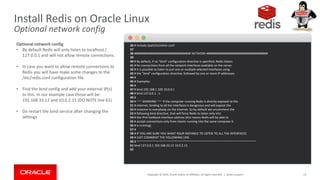
36 # include /path/to/other.conf
37
38 ################################## NETWORK #####################################
39
40 # By default, if no "bind" configuration directive is specified, Redis listens
41 # for connections from all the network interfaces available on the server.
42 # It is possible to listen to just one or multiple selected interfaces using
43 # the "bind" configuration directive, followed by one or more IP addresses.
44 #
45 # Examples:
46 #
47 # bind 192.168.1.100 10.0.0.1
48 # bind 127.0.0.1 ::1
49 #
50 # ~~~ WARNING ~~~ If the computer running Redis is directly exposed to the
51 # internet, binding to all the interfaces is dangerous and will expose the
52 # instance to everybody on the internet. So by default we uncomment the
53 # following bind directive, that will force Redis to listen only into
54 # the IPv4 lookback interface address (this means Redis will be able to
55 # accept connections only from clients running into the same computer it
56 # is running).
57 #
58 # IF YOU ARE SURE YOU WANT YOUR INSTANCE TO LISTEN TO ALL THE INTERFACES
59 # JUST COMMENT THE FOLLOWING LINE.
60 # ~~~~~~~~~~~~~~~~~~~~~~~~~~~~~~~~~~~~~~~~~~~~~~~~~~~~~~~~~~~~~~~~~~~~~~~~
61 bind 127.0.0.1 192.168.33.12 10.0.2.15
62
Install Redis on Oracle Linux
Optional network config
• By default Redis will only listen to localhost /
127.0.0.1 and will not allow remote connections.
• In case you want to allow remote connections to
Redis you will have make some changes to the
/etc/redis.conf configuration file.
• Find the bind config and add your external IP(s)
to this. In our example case those will be:
192.168.33.12 and 10.0.2.15 (DO NOTE line 61)
• Do restart the bind service after changing the
settings
Johan Louwers
Copyright © 2019, Oracle and/or its affiliates. All rights reserved. | 14
[root@localhost ~]# netstat -antup | grep -i 6379
tcp 0 0 10.0.2.15:6379 0.0.0.0:* LISTEN 2865/redis-server 1
tcp 0 0 192.168.33.12:6379 0.0.0.0:* LISTEN 2865/redis-server 1
tcp 0 0 127.0.0.1:6379 0.0.0.0:* LISTEN 2865/redis-server 1
tcp 0 0 127.0.0.1:6379 127.0.0.1:36796 TIME_WAIT -
tcp 0 0 127.0.0.1:6379 127.0.0.1:36795 TIME_WAIT -
[root@localhost ~]#
Install Redis on Oracle Linux
Optional network config
Verify Redis is listening
• You can verify if Redis is listening now on all NIC
as it should be by invoking a netstat command.
• This should have given you a working Redis
server for your development work.
Johan Louwers
Copyright © 2019, Oracle and/or its affiliates. All rights reserved. | 15
Redis on Oracle Linux
More information
• https://linux.oracle.com
• https://redis.io/
Johan Louwers
Install Redis on Oracle Linux

Install Redis on Oracle Linux

  • 1.
    Copyright © 2019,Oracle and/or its affiliates. All rights reserved. | Confidential – Oracle Internal/Restricted/Highly Restricted Redis on Oracle Linux Johan Louwers Chief Customer Architect @ Oracle Quick Installation guide
  • 2.
    Copyright © 2019,Oracle and/or its affiliates. All rights reserved. | Safe Harbor Statement The following is intended to outline our general product direction. It is intended for information purposes only, and may not be incorporated into any contract. It is not a commitment to deliver any material, code, or functionality, and should not be relied upon in making purchasing decisions. The development, release, timing, and pricing of any features or functionality described for Oracle’s products may change and remains at the sole discretion of Oracle Corporation. 2Johan Louwers
  • 3.
    Copyright © 2019,Oracle and/or its affiliates. All rights reserved. | Johan Louwers 3 FN Project Quick Installation Guide Slide-Deck intention Slide-deck Intention : • This presentation is intended to provide a quick guide to install Redis on Oracle Linux for Development and personal use. • This presentation is a part of a wider workshop deck and shared as a stand- alone example for ease of sharing. • The code and examples should only be used as an educational example and is not intended to be included in any real-world application and/or deployment. Contact details : Johan Louwers - Chief Enterprise Architect @johanlouwers Johan.louwers@oracle.com github.com/louwersj Johanlouwers.blogspot.com
  • 4.
    Copyright © 2019,Oracle and/or its affiliates. All rights reserved. | 4 Redis Introduction • Redis is an open source (BSD licensed), in-memory data structure store, used as a database, cache and message broker. It supports data structures such as strings, hashes, lists, sets, sorted sets with range queries, bitmaps, hyperloglogs, geospatial indexes with radius queries and streams. Redis has built-in replication, Lua scripting, LRU eviction, transactions and different levels of on-disk persistence, and provides high availability via Redis Sentinel and automatic partitioning with Redis Cluster. Johan Louwers Redis (Replicated) server(s) Redis Server redis-cli redis Java Client redis Ruby Client Redis protocol Redis (Replicated) server(s)
  • 5.
    Copyright © 2019,Oracle and/or its affiliates. All rights reserved. | 5 Oracle Linux Introduction Johan Louwers • The Oracle Linux operating system is engineered for open cloud infrastructure. It delivers leading performance, scalability, reliability and security for enterprise SaaS and PaaS workloads as well as traditional enterprise applications. Oracle Linux Support offers access to award- winning Oracle support resources and Linux support specialists, zero-downtime updates using Ksplice, additional management tools such as Oracle Enterprise Manager and lifetime support, all at a low cost. Unlike many other commercial Linux distributions, Oracle Linux is easy to download and completely free to use, distribute and update.
  • 6.
    Copyright © 2019,Oracle and/or its affiliates. All rights reserved. | 6 Oracle Linux Introduction Johan Louwers Key Features • Free to use, free to distribute, free to update • Zero-downtime kernel and user space updates with Ksplice • Comprehensive kernel and application tracing with DTrace • Linux management and high availability included at no additional charge for Oracle Linux Support customers • Optimized for Oracle, including Oracle Database and Oracle Applications Key Benefits • Lower costs by only paying for support on the systems you want supported • Increase security by applying patches sooner and minimizing time spent troubleshooting and updating • Improve performance of Oracle software and hardware • Proven performance and reliability in Oracle Engineered Systems and Oracle Cloud
  • 7.
    Copyright © 2019,Oracle and/or its affiliates. All rights reserved. | 7 Install Redis on Oracle Linux Oracle Linux – base operating system [root@fnproject ~]# uname -a Linux fnproject 4.1.12-61.1.28.el7uek.x86_64 #2 SMP Thu Feb 23 19:55:12 PST 2017 x86_64 x86_64 x86_64 GNU/Linux [root@fnproject ~]# Operating system: • This guide assumes that you run Oracle Linux 7 • Visit linux.oracle.com for download instructions. • Check your Oracle Linux version with the uname -a command Johan Louwers
  • 8.
    Copyright © 2019,Oracle and/or its affiliates. All rights reserved. | 8 [root@localhost ~]# ifconfig eth0: flags=4163<UP,BROADCAST,RUNNING,MULTICAST> mtu 1500 inet 10.0.2.15 netmask 255.255.255.0 broadcast 10.0.2.255 inet6 fe80::a00:27ff:fe7f:f81b prefixlen 64 scopeid 0x20<link> ether 08:00:27:7f:f8:1b txqueuelen 1000 (Ethernet) RX packets 1315 bytes 151457 (147.9 KiB) RX errors 0 dropped 0 overruns 0 frame 0 TX packets 897 bytes 156866 (153.1 KiB) TX errors 0 dropped 0 overruns 0 carrier 0 collisions 0 eth1: flags=4163<UP,BROADCAST,RUNNING,MULTICAST> mtu 1500 inet 192.168.33.12 netmask 255.255.255.0 broadcast 192.168.33.255 inet6 fe80::a00:27ff:fe6f:a214 prefixlen 64 scopeid 0x20<link> ether 08:00:27:6f:a2:14 txqueuelen 1000 (Ethernet) RX packets 0 bytes 0 (0.0 B) RX errors 0 dropped 0 overruns 0 frame 0 TX packets 14 bytes 1008 (1008.0 B) TX errors 0 dropped 0 overruns 0 carrier 0 collisions 0 lo: flags=73<UP,LOOPBACK,RUNNING> mtu 65536 inet 127.0.0.1 netmask 255.0.0.0 inet6 ::1 prefixlen 128 scopeid 0x10<host> loop txqueuelen 0 (Local Loopback) RX packets 64 bytes 5440 (5.3 KiB) RX errors 0 dropped 0 overruns 0 frame 0 TX packets 64 bytes 5440 (5.3 KiB) TX errors 0 dropped 0 overruns 0 carrier 0 collisions 0 [root@localhost ~]# Install Redis on Oracle Linux Oracle Linux – Network settings Network settings: • This guide assumes that you have both a eth0 and a eth1 network interface. • Having a different set of network interfaces will not hinder you from using Redis. Johan Louwers
  • 9.
    Copyright © 2019,Oracle and/or its affiliates. All rights reserved. | 9 [root@localhost ~]# rpm -ivh https://dl.fedoraproject.org/pub/epel/epel-release-latest-7.noarch.rpm Retrieving https://dl.fedoraproject.org/pub/epel/epel-release-latest-7.noarch.rpm warning: /var/tmp/rpm-tmp.quGXAX: Header V3 RSA/SHA256 Signature, key ID 352c64e5: NOKEY Preparing... ################################# [100%] Updating / installing... 1:epel-release-7-11 ################################# [100%] [root@localhost ~]# [root@localhost ~]# Install Redis on Oracle Linux Oracle Linux – Set the correct yum repo Yum settings: • Ensure you have the EPEL repository configured in your yum config. • To install the EPEL repo you can use the following command: rpm -ivh https://dl.fedoraproject.org/pub/epe l/epel-release-latest-7.noarch.rpm • Check the enabled repositories with yum repolist command this now should list: epel/x86_64 Extra Packages for Enterprise Linux 7 - x86_64 Johan Louwers
  • 10.
    Copyright © 2019,Oracle and/or its affiliates. All rights reserved. | 10 [root@localhost ~]# yum install -y redis Resolving Dependencies --> Running transaction check ---> Package redis.x86_64 0:3.2.12-2.el7 will be installed --> Processing Dependency: libjemalloc.so.1()(64bit) for package: redis-3.2.12-2.el7.x86_64 --> Running transaction check ---> Package jemalloc.x86_64 0:3.6.0-1.el7 will be installed From : /etc/pki/rpm-gpg/RPM-GPG-KEY-EPEL-7 Running transaction check Running transaction test Transaction test succeeded Running transaction Installing : jemalloc-3.6.0-1.el7.x86_64 1/2 Installing : redis-3.2.12-2.el7.x86_64 2/2 Verifying : redis-3.2.12-2.el7.x86_64 1/2 Verifying : jemalloc-3.6.0-1.el7.x86_64 2/2 Installed: redis.x86_64 0:3.2.12-2.el7 Dependency Installed: jemalloc.x86_64 0:3.6.0-1.el7 Complete! [root@localhost ~]# Install Redis: • Ensure you install Redis with the following command: yum install –y redis Johan Louwers Install Redis on Oracle Linux Install Redis using yum
  • 11.
    Copyright © 2019,Oracle and/or its affiliates. All rights reserved. | 11 [root@localhost ~]# systemctl start redis [root@localhost ~]# systemctl enable redis Created symlink from /etc/systemd/system/multi-user.target.wants/redis.service to /usr/lib/systemd/system/redis.service. [root@localhost ~]# systemctl status redis ● redis.service - Redis persistent key-value database Loaded: loaded (/usr/lib/systemd/system/redis.service; enabled; vendor preset: disabled) Drop-In: /etc/systemd/system/redis.service.d └─limit.conf Active: active (running) since Tue 2019-05-07 18:49:48 UTC; 58s ago Main PID: 2797 (redis-server) CGroup: /system.slice/redis.service └─2797 /usr/bin/redis-server 127.0.0.1:6379 May 07 18:49:48 localhost.localdomain systemd[1]: Starting Redis persistent key-value database... May 07 18:49:48 localhost.localdomain systemd[1]: Started Redis persistent key-value database. [root@localhost ~]# Start Redis: • Ensure you start Reduis with the following command: systemctl start redis • Ensure you enable the redis service with the following command: systemctl enable redis • You can check the status with the following command: systemctl status redis Johan Louwers Install Redis on Oracle Linux Start Redis as a Service
  • 12.
    Copyright © 2019,Oracle and/or its affiliates. All rights reserved. | 12 [root@localhost ~]# redis-cli ping PONG [root@localhost ~]# Check if Redis is working: • You can use the redis-cli to do a ping, if the response is PONG your service is up and running Johan Louwers Install Redis on Oracle Linux Ping Redis
  • 13.
    Copyright © 2019,Oracle and/or its affiliates. All rights reserved. | 13 36 # include /path/to/other.conf 37 38 ################################## NETWORK ##################################### 39 40 # By default, if no "bind" configuration directive is specified, Redis listens 41 # for connections from all the network interfaces available on the server. 42 # It is possible to listen to just one or multiple selected interfaces using 43 # the "bind" configuration directive, followed by one or more IP addresses. 44 # 45 # Examples: 46 # 47 # bind 192.168.1.100 10.0.0.1 48 # bind 127.0.0.1 ::1 49 # 50 # ~~~ WARNING ~~~ If the computer running Redis is directly exposed to the 51 # internet, binding to all the interfaces is dangerous and will expose the 52 # instance to everybody on the internet. So by default we uncomment the 53 # following bind directive, that will force Redis to listen only into 54 # the IPv4 lookback interface address (this means Redis will be able to 55 # accept connections only from clients running into the same computer it 56 # is running). 57 # 58 # IF YOU ARE SURE YOU WANT YOUR INSTANCE TO LISTEN TO ALL THE INTERFACES 59 # JUST COMMENT THE FOLLOWING LINE. 60 # ~~~~~~~~~~~~~~~~~~~~~~~~~~~~~~~~~~~~~~~~~~~~~~~~~~~~~~~~~~~~~~~~~~~~~~~~ 61 bind 127.0.0.1 192.168.33.12 10.0.2.15 62 Install Redis on Oracle Linux Optional network config Optional network config • By default Redis will only listen to localhost / 127.0.0.1 and will not allow remote connections. • In case you want to allow remote connections to Redis you will have make some changes to the /etc/redis.conf configuration file. • Find the bind config and add your external IP(s) to this. In our example case those will be: 192.168.33.12 and 10.0.2.15 (DO NOTE line 61) • Do restart the bind service after changing the settings Johan Louwers
  • 14.
    Copyright © 2019,Oracle and/or its affiliates. All rights reserved. | 14 [root@localhost ~]# netstat -antup | grep -i 6379 tcp 0 0 10.0.2.15:6379 0.0.0.0:* LISTEN 2865/redis-server 1 tcp 0 0 192.168.33.12:6379 0.0.0.0:* LISTEN 2865/redis-server 1 tcp 0 0 127.0.0.1:6379 0.0.0.0:* LISTEN 2865/redis-server 1 tcp 0 0 127.0.0.1:6379 127.0.0.1:36796 TIME_WAIT - tcp 0 0 127.0.0.1:6379 127.0.0.1:36795 TIME_WAIT - [root@localhost ~]# Install Redis on Oracle Linux Optional network config Verify Redis is listening • You can verify if Redis is listening now on all NIC as it should be by invoking a netstat command. • This should have given you a working Redis server for your development work. Johan Louwers
  • 15.
    Copyright © 2019,Oracle and/or its affiliates. All rights reserved. | 15 Redis on Oracle Linux More information • https://linux.oracle.com • https://redis.io/ Johan Louwers