RAC Best Practices on Linux Kirk McGowan Technical Director – RAC Pack Server Technologies Oracle Corporation Session id: 40136 Roland Knapp Principal Member Technical Staff – RAC Pack Server Technologies Oracle Corporation
Agenda Planning Best Practices Architecture Expectation setting Objectives and success criteria Project plan Implementation Best Practices Infrastructure considerations Installation/configuration Database creation Application considerations Operational Best Practices Backup & Recovery Performance Monitoring and Tuning Production Migration
Planning Understand the Architecture Cluster terminology Functional basics HA by eliminating node & Oracle as SPOFs Scalability by making additional processing capacity available incrementally Hardware components Private interconnect/network switch Shared storage/concurrent access/storage switch Software components OS, Cluster Manager, DBMS/RAC, Application Differences between cluster managers
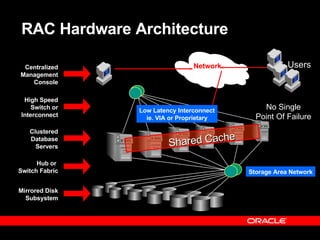
RAC Hardware Architecture Clustered Database Servers Mirrored Disk Subsystem High Speed Switch or Interconnect Hub or  Switch Fabric Network Centralized Management Console Storage Area Network Low Latency Interconnect ie. VIA or Proprietary Users No Single Point Of Failure Shared Cache
RAC Software Architecture Shared Disk Database Shared Data Model Shared Memory/Global Area shared  SQL log  buffer . . . .  .  . Shared Memory/Global Area shared  SQL log  buffer Shared Memory/Global Area shared  SQL log  buffer Shared Memory/Global Area shared  SQL log  buffer GES&GCS GES&GCS GES&GCS GES&GCS
RAC on Linux  HW & SW Components public network Node1a shared storage redo log instance 1 … redo log instance 2 … control files database files Node2a cluster interconnect cache to  cache N3 N4 Nn concurrent access from every node =  “scale out” more nodes = higher availability Unbreakable Linux Unbreakable Linux ORACM ORACM Oracle 9 i  RAC instance 1 Oracle 9 i  RAC instance 2 DB cache DB cache
Linux Cluster Hardware Cluster interconnects  FastEthernet, Gigabit Ethernet  Public networks  Ethernet, FastEthernet, Gigabit Ethernet  Memory, swap & CPU Recommendations Each server should have a minimum of 512Mb of memory, at least 1Gb swap space, and two CPUs.  Fiber Channel, SCSI, or NAS storage connectivity
Unbreakable Linux Distributions Red Hat Enterprise Linux AS and ES  United Linux 1.0 SuSE Linux Enterprise Server 8 (SuSE Linux AG) Conectiva Linux Enterprise Edition (Conectiva S.A.) SCO Linux Server 4.0 (The SCO Group) Turbolinux Enterprise Server 8 (Turbolinux)  Oracle will support Oracle products running with other distributions but will not support the operating system.
RAC Certification for Unbreakable Linux Certification  Enterprise class OS distribution (e.g. RH AS, United Linux 1.0) Clusterware (Oracle Cluster Manager only) Network Attached Storage (e.g. Network Appliance filers) Most SCSI and SAN storage are compatible  32 bit and 64 bit Itanium 2 Intel based servers are certified. For more details on software certification:  http://technet.oracle.com/support/metalink/content.html Discuss hardware configuration with your HW vendor
Linux IA64 requirements Operating System Requirements  Red Hat Linux Advanced Server 2.1 operating system with kernel 2.4.18-e.14.ia64.rpm  glibc 2.2.4-29  Gnu gcc 2.96.0 release  Linux Header Patch 2.4.18 (available from Intel)  asynch libraries libaio-0.3.92-1  (Oracle9i Release Notes  Release 2 (9.2.0.2.0) for Linux Intel on Itanium (64-bit)  Part No. B10567-02 )
Set Expectations Appropriately If your application will scale transparently on SMP, then it is realistic to expect it to scale well on RAC, without having to make any changes to the application code. RAC eliminates the database instance, and the node itself, as a single point of failure, and ensures database integrity in the case of such failures
Planning: Define Objectives Objectives need to be quantified/measurable HA objectives Planned vs unplanned Technology failures vs site failures vs human errors Scalability Objectives Speedup vs scaleup Response time, throughput, other measurements Server/Consolidation Objectives Often tied to TCO Often subjective
Build your Project Plan Partner with your vendors Multiple stakeholders, shared success Build detailed test plans Confirm application scalability on SMP before going to RAC    optimize first for single instance Address knowledge gaps and training Clusters, RAC, HA, Scalability, systems management Leverage external resources as required Establish strict System and Application Change control Apply changes to one system element at a time Apply changes to first to test environment Monitor impact of application changes on underlying system components Define Support mechanisms and escalation procedures
Agenda Planning Best Practices Architecture Expectation setting Objectives and success criteria Project plan Implementation Best Practices Infrastructure considerations Installation/configuration Database creation Application considerations Operational Best Practices Backup & Recovery Performance Monitoring and Tuning Production Migration
Infrastructure Considerations Architecture/Design Eliminate SPOFs (Single Points of Failure) Workload Distribution (load balancing) strategy Systems management framework for monitoring and managing to SLAs Hardware/Software Processing nodes – sufficient CPU to accommodate failure Scalable I/O Subsystem Use S.A.M.E. Private Interconnect Gige, UDP, switched Patch levels and certification
Impementation Flowchart Configure HW  Configure private  interconnect Install Unbreakable Linux Install cluster manager 9.2.0.1 Install Oracle 9.2.0.1 Install 9.2.0.3 cluster manager Install Oracle 9.2.0.3 Create database Configure storage and install  OCFS
Installation Flowchart for Red Hat Linux AS 2.1 Boot Choose Language Select Keyboard  & Mouse Choose – Advanced  Server Option Use DRUID for  Partition Setup Select Boot  Loader Configure  Network Configure  Timezone Account  Configuration Select Graphic  Mode Boot Floppy  Creation Installation  Complete / Reboot
Install tips for Red Hat Linux AS 2.1 As documented in: “ Tips and Techniques: Install and Configure Oracle9i on Red Hat Linux Advanced Server” by Deepak Patel, Oracle  http://otn.oracle.com/tech/linux/pdf/installtips_final.pdf Boot options  Always use Advanced Server install. As needed install required packages. CD 1 to 3 has all rpm packages. CD 3 and 4 has source packages. CD 5 includes docs.  Memory Based on physical memory on machine smp or enterprise kernel is installed. ( <= 4 GB smp kernel and > 4 GB enterprise kernel ) Post Installation Add users, configure network and other administrative tasks after installation.
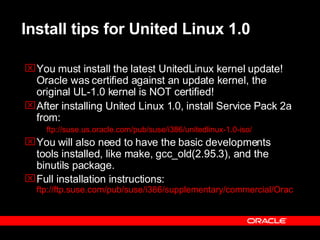
Install tips for United Linux 1.0 You must install the latest UnitedLinux kernel update! Oracle was certified against an update kernel, the original UL-1.0 kernel is NOT certified! After installing United Linux 1.0, install Service Pack 2a from:  ftp://suse.us.oracle.com/pub/suse/i386/unitedlinux-1.0-iso/ You will also need to have the basic developments tools installed, like make, gcc_old(2.95.3), and the binutils package.  Full installation instructions:  ftp://ftp.suse.com/pub/suse/i386/supplementary/commercial/Oracle/docs/920_sles8_install.pdf
Install tips for United Linux 1.0 Install the orarun.rpm package from either the SP2 CD  <mountpoint>/UnitedLinux/i586/orarun-1.8-18.i586.rpm or from   ftp://ftp.suse.com/pub/suse/i386/supplementary/commercial/Oracle/sles-8/orarun.rpm orarun.rpm update kernel (ie. shmmax, shmmin) UDP settings (256K) Installs and configures hangcheck-timer
Prepare Linux Environment Follow these steps on EACH node of the cluster Set Kernel parameters in /etc/sysctl.conf Add hostnames to /etc/hosts file Establish file system or location for ORACLE_HOME (writable for oracle userid) Setup host equivalence for oracle userid (.rhosts)
Installation Flowchart for OCFS Install the rpm’s on all nodes Run ocfstool as root (configures /etc/ocfs.conf) on all nodes Run load_ocfs (insmod will load ocfs.o) on all nodes Create partition on the  primary node Run ocfstool to format and mount your new filesystem Mount the new filesystem on all nodes Edit rc.local or equivalent add load_ocfs and ‘mount –t  ocfs <device> <mountpoint’ Download the latest  OCFS rpm’s from  www. ocfs .org
OCFS and Unbreakable Linux Redhat currently ships 4 flavors of the AS 2.1 kernel, viz., UP, SMP, Enterprise and Summit (IBM x440) Oracle provides a separate OCFS module for each of the kernel flavors  Minor revisions of the kernel do not need a fresh build of ocfs e.g., ocfs built for e.12 will work for e.16, e.18, etc.  United Linux United Linux ships 3 flavors of its kernel, for the 2.4.19-64GB-SMP , the 2.4.19-4GB and the 2.4.19-4GB-SMP kernel OCFS 1.0.9 is supported on UL 1.0 Service Pack 2a or higher OCFS build is not currently upward compatible with kernel (pre SP3)    must ensure OCFS build exists for each new Kernel version prior to upgrading kernel
OCFS and RAC Maintains cache coherency across nodes for the filesystem metadata only Does not synchronize the data cache buffers across nodes, lets RAC handle that OCFS journals filesystem metadata changes only Filedata changes are journalled by RAC (log files) Overcomes some limitations of raw devices on Linux No limit on number of files Allows for very large files (max 2TB) Max volume size 32G (4K block) to 8T (1M block) Oracle DB performance is comparable to raw kernel e.25 is strongly recommended for use with OCFS 1.0.9  (remove old kernel tuning parameters)
Install Tips for OCFS Ensure OCFS rpm corresponds to kernel version uname –r (i.e. 2.4.19-4GB) Remember to also download rpm’s for OCFS “Support Tools” and “Additional Tools” Download the dd/tar/cp rpm that supports o_direct Use rpm –Uv to install all 4 rpm’s on all nodes Use OCFS for Oracle DB files only, not Oracle binaries (OCFS 1.0.x was not designed as a general purpose filesystem).
Installation Flowchart for oracm and Oracle  Install the oracm from  the 9.2.0.1 CD-ROM Configure ocmargs.ora and cmcfg.ora Load the softdog and start  with ./ocmstart.sh the cluster  manager on both nodes Install 9.2.0.1 software with the RAC option Kill the oracm and  watchdog process modify ocmargs.ora and cmcfg.ora  (remove watchdog) Load the hangcheck-timer module with lsmod Install the oracm from  the 9.2.0.3 patchset Start with ./ocmstart.sh  the cluster manager Install the 9.2.0.3 patchset Configure private  interconnect and  quorum device Fix empty directory bug
Hangcheck NM, and CM Flow (After V9.2.0.2) Oracle Instance  Cluster Manager (including Node Monitor) Hangcheck-timer User-mode Kernel-mode Oracm maintains both, node status view and instance status view. The hangcheck-timer monitors the kernel for hangs, and resets the node if needed.
Post Installation  To enable asynchronous I/O must re-link Oracle to use skgaioi.o  Adjust UDP send / receive buffer size to 256K Larger Buffer Cache Create an in-memory file system on the /dev/shm  (mount -t shm shmfs -o size=8g /dev/shm) To enable the extended buffer cache feature, set the init.ora paramter USE_INDIRECT_DATA_BUFFERS = true Increasing Address Space  Default 1.7 GB of address space for its SGA. See Metalink Note: 200266.1 for details and a sample program.
Create RAC database using DBCA Create Database Use DBCA to simplify DB creation Start gsd ( global services daemon ) on all nodes, if it is not already running. Set MAXINSTANCES, MAXLOGFILES, MAXLOGMEMBERS, MAXLOGHISTORY, MAXDATAFILES (auto with DBCA) Create tablespaces as locally Managed (auto with DBCA) Create all tablespaces with ASSM (auto with DBCA) Configure automatic UNDO management (auto with DBCA) Use SPFILE instead of multiple init.ora’s (auto with DBCA)
Validate RAC Configuration Instances running on all nodes SQL> select * from gv$instance RAC communicating over the private Interconnect SQL> oradebug setmypid  SQL> oradebug ipc SQL> oradebug tracefile_name /home/oracle/admin/RAC92_1/udump/rac92_1_ora_1343841.trc   Check trace file in the user_dump_dest: SSKGXPT 0x2ab25bc flags  info for network 0 socket no 10  IP  204.152.65.33   UDP 49197 sflags SSKGXPT_UP info for network 1 socket no 0  IP 0.0.0.0  UDP 0 sflags SSKGXPT_DOWN RAC is using desired IPC protocol: Check Alert.log ...  cluster interconnect IPC version:Oracle  UDP/IP  IPC Vendor 1 proto 2 Version 1.0  PMON started with pid=2  ...   Use cluster_interconnects only if necessary
Configure srvconfig / srvctl  SRVCTL uses information from srvconfig Reads $ORACLE_HOME/srvm/config /srvConfig.loc information File can be a RAW Device or OCFS file Srvconfig -init  gsd must be running Add ORACLE_HOME $ srvctl add database -d db_name -o oracle_home [-m domain_name] [-s spfile] Add instances (for each instance enter the command) $ srvctl add instance -d db_name -i sid -n node
Application Deployment Same guidelines as single instance SQL Tuning Sequence Caching Partition large objects Use different block sizes Tune instance recovery Avoid DDL Use LMT’s and ASSM as noted earlier
Agenda Planning Best Practices Architecture Expectation setting Objectives and success criteria Project plan Implementation Best Practices Infrastructure considerations Installation/configuration Database creation Application considerations Operational Best Practices Backup & Recovery Performance Monitoring and Tuning Production Migration
Operations Same DBA procedures as single instance, with some minor, mostly mechanical differences. Managing the Oracle environment Starting/stopping cluster services (ocmstart.sh) Starting/stopping gsd Managing multiple redo log threads  Startup and shutdown of the database Use srvctl Backup and recovery Performance Monitoring and Tuning Production migration
Operations:  srvconfig / srvctl  Use SRVCTL to administer your RAC database environment.  OEM and the Oracle Intelligent Agent use the configuration information that SRVCTL generates to discover and monitor nodes in your cluster.  Global Services Daemon (GSD) receives requests from SRVCTL to execute administrative job tasks, such as startup or shutdown.  GSD must be started on all the nodes in your RAC environment so that the manageability features and tools operate properly. (GSDCTL)
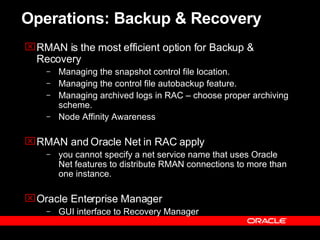
Operations: Backup & Recovery RMAN is the most efficient option for Backup & Recovery Managing the snapshot control file location. Managing the control file autobackup feature. Managing archived logs in RAC – choose proper archiving scheme.  Node Affinity Awareness RMAN and Oracle Net in RAC  apply you cannot specify a net service name that uses Oracle Net features to distribute RMAN connections to more than one instance.   Oracle Enterprise Manager GUI interface to Recovery Manager
Performance Monitoring and Tuning Tune first for single instance 9i Use Statspack:  Separate 1 GB tablespace for Statspack snapshots at 10-20 min intervals during stress testing, hourly during normal operations Run on all instances, staggered  Supplement with scripts/tracing  Monitor V$SESSION_WAIT to see which blocks are involved in wait events Trace events like 10046/8 can provide additional wait event details Monitor Alert logs and trace files, as on single instance Oracle Performance Manager RAC-specific views Supplement with System-level monitoring CPU utilization never 100% I/O service times never > acceptable thresholds CPU run queues at optimal levels
Performance Monitoring and Tuning Obvious application deficiency on a single node can’t be solved by multiple nodes. Single points of contention.  Not scalable on SMP I/O bound on single instance DB Tuning on single instance DB to ensure applications scalable first Identify/tune contention using v$segment_statistics to identify objects involved Concentrate on the top 5 Statspack timed events if majority of time is spent waiting Concentrate on bad SQL if CPU bound Maintain a balanced load on underlying systems (DB, OS, storage subsystem, etc. ) Excessive load on individual components can invoke aberrant behaviour.
Performance Monitoring and Tuning Deciding if RAC is the performance bottleneck Amount of Cross Instance Traffic Type of requests Type of blocks Latency  Block receive time  buffer size factor bandwidth factor
Production Migration Adhere to strong Systems Life Cycle Disciplines Comprehensive test plans (functional and stress) Rehearsed production migration plan Change Control Separate environments for Dev, Test, QA/UAT, Production System AND application change control Log changes to spfile Backup and recovery procedures Security controls Support Procedures
Next Steps…. Recommended sessions List 1 or 2 sessions that complement this session Recommended demos and/or hands-on labs List of or two demos or labs that will let them see this product in action. See Your Business in Our Software Visit the DEMOgrounds for a customized architectural review, see a customized demo with Solutions Factory, or receive a personalized proposal.  Visit the DEMOgrounds for more information. Relevant web sites to visit for more information List urls here.
Reminder –  please complete the OracleWorld online session survey Thank you.
 
Resources RedHat Linux http://www.redhat.com/oracle/ Linux Center - Technical White Papers & Documentation http://otn.oracle.com/tech/linux/tech_wp.html “ Tips and Techniques: Install and Configure Oracle9i on Red Hat Linux Advanced Server ” by Deepak Patel, Oracle Corporation  http://otn.oracle.com/tech/linux/pdf/installtips_final.pdf “ Tips and Techniques: Install and Configure Oracle9i on SLES8 / United Linux 1.0 http://www.suse.com/en/business/certifications/certified_software/oracle/db/9iR2_sles8.html
United Linux 1.0 Resources United Linux http://www.unitedlinux.com SuSE http://www.suse.com/us/business/products/server/sles/index.html Connectiva http://www.connectiva.com SCO Group (Formerly Caldera System)    -   http://www.ebizenterprises.com/page1.asp?p=463 TurboLinux http://www.turbolinux.com/
Recommended one-off patches Bug 2820871   - ORA-29740 NODE EVICTION DESIGN ALGORITHM AND ABRUPT TIME CHANGE ARU: 9.2.0.3 ARU 4161735 completed for LINUX Intel  Bug 2420930  - GET ORA-600 [KSXPMPRP1] DURING STARTUP IN RAC MODE WITH LARGER BUFFERS.  This was mysteriously included in 9.2.0.2, but not in 9.2.0.3.  Bug 2875050 was opened for this issue.  ARU: 9.2.0.3 ARU 4202164completed for LINUX Intel   Bug 2420930  - GET ORA-600 [KSXPMPRP1] DURING STARTUP IN RAC MODE WITH LARGER BUFFERS  Bug 2922471  – Fractured block found during crash/instance recovery.  Not an Oracle bug.  Do not use ‘intr’ for the mount option.
Recommended one-off patches Bug:2844009 -  MISSING LIBCXA.SO.3 LIBRARY ISSUE IN PSR 9203.  ARU: 9.2.0.3 ARU 4046387 completed for LINUX Intel  Bug 2779294  – node_list does not populated into oraInventory/ContentsXML/inventory.xml.  opatch install will only apply to local node.  Workaround is editing inventory.xml documented in bug 2742686.    Bug 2646914, 2675090, 2706220 and 2695783  - ORA-600 [KCCSBCK_FIRST], [2] on linux and W2K platform after installing 9.2.0.2.  Very important patch, missing from 9.2.0.3 ARU: 9.2.0.3 ARU 4110670 completed for LINUX Intel ·       
Hangcheck-timer and Oracle Cluster Manager Download Patch 2594820 from Metalink #rpm -ivh <hangcheck-timer RPM name> Detaching watchdogd from the Cluster Manager (Bug 2495915)  The removal of the watchdogd  ORACLE_HOME/oracm/admin/cmcfg.ora  WatchdogTimerMargin  WatchdogSafetyMargin  KernelModuleName=hangcheck-timer CMDiskFile from optional to mandatory CM quorum partition of  cluster participation.
Hangcheck-timer and Oracle Cluster Manager remove or comment out from the /etc/rc.local file: /sbin/insmod softdog nowayout=0 soft_noboot=1 soft_margin=60 ADD to rc.local, execute as root to load /sbin/insmod hangcheck-timer.o hangcheck_tick=30 hangcheck_margin=180
Hangcheck-timer and Oracle Cluster Manager inclusion of the hangcheck-timer kernel module  Parameter   Service   Value -----------------  -----------------  --------------- hangcheck_tick   hangcheck-timer   30 seconds hangcheck_margin  hangcheck-timer   180 seconds KernelModuleName  oracm   hangcheck-timer MissCount   oracm   > hangcheck_tick  hangcheck_margin  (> 210 seconds)
Hangcheck-timer and Oracle Cluster Manager cmcfg.ora example HeartBeat=15000 ClusterName=Oracle Cluster Manager, version 9i KernelModuleName=hangcheck-timer PollInterval=1000 MissCount=215 PrivateNodeNames=int-node1 int-node2 PublicNodeNames=node1 node2 ServicePort=9998 CmDiskFile=/ocfsdisk1/quorum/quorumfile HostName=int-node1
Hangcheck-timer and Oracle Cluster Manager Parameters for ocmargs.ora oracm norestart 1800
Linux Monitoring and Configuration Tools Overall tools   sar, vmstat CPU   /proc/cpuinfo, mpstat, top Memory   /proc/meminfo, /proc/slabinfo, free Disk I/O   iostat Network   /proc/net/dev, netstat, mii-tool  Kernel Version and Rel. cat /proc/version  Types of I/O Cards  lspci –vv Kernel Modules Loaded lsmod, cat /proc/modules  List all PCI devices (HW) lspci –v Startup changes /etc/sysctl.conf, /etc/rc.local  Kernel messages /var/log/messages, /var/log/dmesg  OS error codes /usr/src/linux/include/asm/errno.h OS calls /usr/sbin/strace-p
Post Installation Increasing Address Space   Default 1.7 GB of address space for its SGA.   Shutdown all instances of Oracle  cd $ORACLE_HOME/lib  cp -a libserver9.a libserver9.a.org  to make a backup copy  cd $ORACLE_HOME/rdbms/lib  genksms -s 0x15000000 >ksms.s  lower SGA base to 0x15000000  make -f ins_rdbms.mk ksms.o  compile in new SGA base address  make -f ins_rdbms.mk ioracle (relink)
Post Installation Increasing Address Space Cont.   sysctl –w kernel.shmmax=3000000000 Lower process base  Find out the pid of the process (shell) from where oracle will be started using ps (Oracle - echo $$) changing /proc/$pid/mapped_base to 0x10000000 and restarting oracle Metalink Note: 200266.1
Post Installation Variable SGA Reserved for kernel DB Buffers (SGA) Default Code, etc. 0xFFFFFFFF 0xC0000000 0x50000000 0x40000000 0x00000000 Variable SGA Reserved for kernel DB Buffers (SGA) After Relink Code, etc. 0xFFFFFFFF 0xC0000000 0x15000000 0x10000000 0x00000000 mapped_base (/proc/<pid>/mapped_base) sga_base (relink Oracle) Lowering of mapped base
Post Installation Larger Buffer Cache  does buffer cache increase with larger SGA Create an in-memory file system  on the /dev/shm  mount -t shm shmfs -o size=8g /dev/shm To enable the extended buffer cache feature, set the init.ora paramter USE_INDIRECT_DATA_BUFFERS = true Don’t Use  dynamic cache parameters  DB_CACHE_SIZE DB_#K_CACHE_SIZE Limitations apply to the extended buffer cache feature on Linux: You cannot change the size of the buffer cache while the instance is running. You cannot create or use tablespaces with non-standard block sizes.
Post Installation Adjust send / receive buffer size to 256K  Tuning the default and maximum window sizes: /proc/sys/net/core/rmem_default  - default receive window /proc/sys/net/core/rmem_max  - maximum receive window /proc/sys/net/core/wmem_default  - default send window  /proc/sys/net/core/wmem_max  - maximum send window   sysctl -w net.core.rmem_max=262144  sysctl -w net.core.wmem_max=262144  sysctl -w net.core.rmem_default=262144 sysctl -w net.core.wmem_default=262144
Post Installation  To enable asynchronous I/O must re-link Oracle to use skgaioi.o  cd to $ORACLE_HOME/rdbms/lib make -f ins_rdbms.mk async_on  make -f ins_rdbms.mk ioracle  set 'disk_asynch_io=true' (default value is true)  set 'filesystemio_options=asynch‘ (RAW Only)

RAC - Test

  • 1.
    RAC Best Practiceson Linux Kirk McGowan Technical Director – RAC Pack Server Technologies Oracle Corporation Session id: 40136 Roland Knapp Principal Member Technical Staff – RAC Pack Server Technologies Oracle Corporation
  • 2.
    Agenda Planning BestPractices Architecture Expectation setting Objectives and success criteria Project plan Implementation Best Practices Infrastructure considerations Installation/configuration Database creation Application considerations Operational Best Practices Backup & Recovery Performance Monitoring and Tuning Production Migration
  • 3.
    Planning Understand theArchitecture Cluster terminology Functional basics HA by eliminating node & Oracle as SPOFs Scalability by making additional processing capacity available incrementally Hardware components Private interconnect/network switch Shared storage/concurrent access/storage switch Software components OS, Cluster Manager, DBMS/RAC, Application Differences between cluster managers
  • 4.
    RAC Hardware ArchitectureClustered Database Servers Mirrored Disk Subsystem High Speed Switch or Interconnect Hub or Switch Fabric Network Centralized Management Console Storage Area Network Low Latency Interconnect ie. VIA or Proprietary Users No Single Point Of Failure Shared Cache
  • 5.
    RAC Software ArchitectureShared Disk Database Shared Data Model Shared Memory/Global Area shared SQL log buffer . . . . . . Shared Memory/Global Area shared SQL log buffer Shared Memory/Global Area shared SQL log buffer Shared Memory/Global Area shared SQL log buffer GES&GCS GES&GCS GES&GCS GES&GCS
  • 6.
    RAC on Linux HW & SW Components public network Node1a shared storage redo log instance 1 … redo log instance 2 … control files database files Node2a cluster interconnect cache to cache N3 N4 Nn concurrent access from every node = “scale out” more nodes = higher availability Unbreakable Linux Unbreakable Linux ORACM ORACM Oracle 9 i RAC instance 1 Oracle 9 i RAC instance 2 DB cache DB cache
  • 7.
    Linux Cluster HardwareCluster interconnects FastEthernet, Gigabit Ethernet Public networks Ethernet, FastEthernet, Gigabit Ethernet Memory, swap & CPU Recommendations Each server should have a minimum of 512Mb of memory, at least 1Gb swap space, and two CPUs. Fiber Channel, SCSI, or NAS storage connectivity
  • 8.
    Unbreakable Linux DistributionsRed Hat Enterprise Linux AS and ES United Linux 1.0 SuSE Linux Enterprise Server 8 (SuSE Linux AG) Conectiva Linux Enterprise Edition (Conectiva S.A.) SCO Linux Server 4.0 (The SCO Group) Turbolinux Enterprise Server 8 (Turbolinux) Oracle will support Oracle products running with other distributions but will not support the operating system.
  • 9.
    RAC Certification forUnbreakable Linux Certification Enterprise class OS distribution (e.g. RH AS, United Linux 1.0) Clusterware (Oracle Cluster Manager only) Network Attached Storage (e.g. Network Appliance filers) Most SCSI and SAN storage are compatible 32 bit and 64 bit Itanium 2 Intel based servers are certified. For more details on software certification: http://technet.oracle.com/support/metalink/content.html Discuss hardware configuration with your HW vendor
  • 10.
    Linux IA64 requirementsOperating System Requirements Red Hat Linux Advanced Server 2.1 operating system with kernel 2.4.18-e.14.ia64.rpm glibc 2.2.4-29 Gnu gcc 2.96.0 release Linux Header Patch 2.4.18 (available from Intel) asynch libraries libaio-0.3.92-1 (Oracle9i Release Notes Release 2 (9.2.0.2.0) for Linux Intel on Itanium (64-bit) Part No. B10567-02 )
  • 11.
    Set Expectations AppropriatelyIf your application will scale transparently on SMP, then it is realistic to expect it to scale well on RAC, without having to make any changes to the application code. RAC eliminates the database instance, and the node itself, as a single point of failure, and ensures database integrity in the case of such failures
  • 12.
    Planning: Define ObjectivesObjectives need to be quantified/measurable HA objectives Planned vs unplanned Technology failures vs site failures vs human errors Scalability Objectives Speedup vs scaleup Response time, throughput, other measurements Server/Consolidation Objectives Often tied to TCO Often subjective
  • 13.
    Build your ProjectPlan Partner with your vendors Multiple stakeholders, shared success Build detailed test plans Confirm application scalability on SMP before going to RAC  optimize first for single instance Address knowledge gaps and training Clusters, RAC, HA, Scalability, systems management Leverage external resources as required Establish strict System and Application Change control Apply changes to one system element at a time Apply changes to first to test environment Monitor impact of application changes on underlying system components Define Support mechanisms and escalation procedures
  • 14.
    Agenda Planning BestPractices Architecture Expectation setting Objectives and success criteria Project plan Implementation Best Practices Infrastructure considerations Installation/configuration Database creation Application considerations Operational Best Practices Backup & Recovery Performance Monitoring and Tuning Production Migration
  • 15.
    Infrastructure Considerations Architecture/DesignEliminate SPOFs (Single Points of Failure) Workload Distribution (load balancing) strategy Systems management framework for monitoring and managing to SLAs Hardware/Software Processing nodes – sufficient CPU to accommodate failure Scalable I/O Subsystem Use S.A.M.E. Private Interconnect Gige, UDP, switched Patch levels and certification
  • 16.
    Impementation Flowchart ConfigureHW Configure private interconnect Install Unbreakable Linux Install cluster manager 9.2.0.1 Install Oracle 9.2.0.1 Install 9.2.0.3 cluster manager Install Oracle 9.2.0.3 Create database Configure storage and install OCFS
  • 17.
    Installation Flowchart forRed Hat Linux AS 2.1 Boot Choose Language Select Keyboard & Mouse Choose – Advanced Server Option Use DRUID for Partition Setup Select Boot Loader Configure Network Configure Timezone Account Configuration Select Graphic Mode Boot Floppy Creation Installation Complete / Reboot
  • 18.
    Install tips forRed Hat Linux AS 2.1 As documented in: “ Tips and Techniques: Install and Configure Oracle9i on Red Hat Linux Advanced Server” by Deepak Patel, Oracle http://otn.oracle.com/tech/linux/pdf/installtips_final.pdf Boot options Always use Advanced Server install. As needed install required packages. CD 1 to 3 has all rpm packages. CD 3 and 4 has source packages. CD 5 includes docs. Memory Based on physical memory on machine smp or enterprise kernel is installed. ( <= 4 GB smp kernel and > 4 GB enterprise kernel ) Post Installation Add users, configure network and other administrative tasks after installation.
  • 19.
    Install tips forUnited Linux 1.0 You must install the latest UnitedLinux kernel update! Oracle was certified against an update kernel, the original UL-1.0 kernel is NOT certified! After installing United Linux 1.0, install Service Pack 2a from: ftp://suse.us.oracle.com/pub/suse/i386/unitedlinux-1.0-iso/ You will also need to have the basic developments tools installed, like make, gcc_old(2.95.3), and the binutils package. Full installation instructions: ftp://ftp.suse.com/pub/suse/i386/supplementary/commercial/Oracle/docs/920_sles8_install.pdf
  • 20.
    Install tips forUnited Linux 1.0 Install the orarun.rpm package from either the SP2 CD <mountpoint>/UnitedLinux/i586/orarun-1.8-18.i586.rpm or from ftp://ftp.suse.com/pub/suse/i386/supplementary/commercial/Oracle/sles-8/orarun.rpm orarun.rpm update kernel (ie. shmmax, shmmin) UDP settings (256K) Installs and configures hangcheck-timer
  • 21.
    Prepare Linux EnvironmentFollow these steps on EACH node of the cluster Set Kernel parameters in /etc/sysctl.conf Add hostnames to /etc/hosts file Establish file system or location for ORACLE_HOME (writable for oracle userid) Setup host equivalence for oracle userid (.rhosts)
  • 22.
    Installation Flowchart forOCFS Install the rpm’s on all nodes Run ocfstool as root (configures /etc/ocfs.conf) on all nodes Run load_ocfs (insmod will load ocfs.o) on all nodes Create partition on the primary node Run ocfstool to format and mount your new filesystem Mount the new filesystem on all nodes Edit rc.local or equivalent add load_ocfs and ‘mount –t ocfs <device> <mountpoint’ Download the latest OCFS rpm’s from www. ocfs .org
  • 23.
    OCFS and UnbreakableLinux Redhat currently ships 4 flavors of the AS 2.1 kernel, viz., UP, SMP, Enterprise and Summit (IBM x440) Oracle provides a separate OCFS module for each of the kernel flavors Minor revisions of the kernel do not need a fresh build of ocfs e.g., ocfs built for e.12 will work for e.16, e.18, etc. United Linux United Linux ships 3 flavors of its kernel, for the 2.4.19-64GB-SMP , the 2.4.19-4GB and the 2.4.19-4GB-SMP kernel OCFS 1.0.9 is supported on UL 1.0 Service Pack 2a or higher OCFS build is not currently upward compatible with kernel (pre SP3)  must ensure OCFS build exists for each new Kernel version prior to upgrading kernel
  • 24.
    OCFS and RACMaintains cache coherency across nodes for the filesystem metadata only Does not synchronize the data cache buffers across nodes, lets RAC handle that OCFS journals filesystem metadata changes only Filedata changes are journalled by RAC (log files) Overcomes some limitations of raw devices on Linux No limit on number of files Allows for very large files (max 2TB) Max volume size 32G (4K block) to 8T (1M block) Oracle DB performance is comparable to raw kernel e.25 is strongly recommended for use with OCFS 1.0.9 (remove old kernel tuning parameters)
  • 25.
    Install Tips forOCFS Ensure OCFS rpm corresponds to kernel version uname –r (i.e. 2.4.19-4GB) Remember to also download rpm’s for OCFS “Support Tools” and “Additional Tools” Download the dd/tar/cp rpm that supports o_direct Use rpm –Uv to install all 4 rpm’s on all nodes Use OCFS for Oracle DB files only, not Oracle binaries (OCFS 1.0.x was not designed as a general purpose filesystem).
  • 26.
    Installation Flowchart fororacm and Oracle Install the oracm from the 9.2.0.1 CD-ROM Configure ocmargs.ora and cmcfg.ora Load the softdog and start with ./ocmstart.sh the cluster manager on both nodes Install 9.2.0.1 software with the RAC option Kill the oracm and watchdog process modify ocmargs.ora and cmcfg.ora (remove watchdog) Load the hangcheck-timer module with lsmod Install the oracm from the 9.2.0.3 patchset Start with ./ocmstart.sh the cluster manager Install the 9.2.0.3 patchset Configure private interconnect and quorum device Fix empty directory bug
  • 27.
    Hangcheck NM, andCM Flow (After V9.2.0.2) Oracle Instance Cluster Manager (including Node Monitor) Hangcheck-timer User-mode Kernel-mode Oracm maintains both, node status view and instance status view. The hangcheck-timer monitors the kernel for hangs, and resets the node if needed.
  • 28.
    Post Installation To enable asynchronous I/O must re-link Oracle to use skgaioi.o Adjust UDP send / receive buffer size to 256K Larger Buffer Cache Create an in-memory file system on the /dev/shm (mount -t shm shmfs -o size=8g /dev/shm) To enable the extended buffer cache feature, set the init.ora paramter USE_INDIRECT_DATA_BUFFERS = true Increasing Address Space Default 1.7 GB of address space for its SGA. See Metalink Note: 200266.1 for details and a sample program.
  • 29.
    Create RAC databaseusing DBCA Create Database Use DBCA to simplify DB creation Start gsd ( global services daemon ) on all nodes, if it is not already running. Set MAXINSTANCES, MAXLOGFILES, MAXLOGMEMBERS, MAXLOGHISTORY, MAXDATAFILES (auto with DBCA) Create tablespaces as locally Managed (auto with DBCA) Create all tablespaces with ASSM (auto with DBCA) Configure automatic UNDO management (auto with DBCA) Use SPFILE instead of multiple init.ora’s (auto with DBCA)
  • 30.
    Validate RAC ConfigurationInstances running on all nodes SQL> select * from gv$instance RAC communicating over the private Interconnect SQL> oradebug setmypid SQL> oradebug ipc SQL> oradebug tracefile_name /home/oracle/admin/RAC92_1/udump/rac92_1_ora_1343841.trc Check trace file in the user_dump_dest: SSKGXPT 0x2ab25bc flags info for network 0 socket no 10 IP 204.152.65.33 UDP 49197 sflags SSKGXPT_UP info for network 1 socket no 0 IP 0.0.0.0 UDP 0 sflags SSKGXPT_DOWN RAC is using desired IPC protocol: Check Alert.log ... cluster interconnect IPC version:Oracle UDP/IP IPC Vendor 1 proto 2 Version 1.0 PMON started with pid=2 ... Use cluster_interconnects only if necessary
  • 31.
    Configure srvconfig /srvctl SRVCTL uses information from srvconfig Reads $ORACLE_HOME/srvm/config /srvConfig.loc information File can be a RAW Device or OCFS file Srvconfig -init gsd must be running Add ORACLE_HOME $ srvctl add database -d db_name -o oracle_home [-m domain_name] [-s spfile] Add instances (for each instance enter the command) $ srvctl add instance -d db_name -i sid -n node
  • 32.
    Application Deployment Sameguidelines as single instance SQL Tuning Sequence Caching Partition large objects Use different block sizes Tune instance recovery Avoid DDL Use LMT’s and ASSM as noted earlier
  • 33.
    Agenda Planning BestPractices Architecture Expectation setting Objectives and success criteria Project plan Implementation Best Practices Infrastructure considerations Installation/configuration Database creation Application considerations Operational Best Practices Backup & Recovery Performance Monitoring and Tuning Production Migration
  • 34.
    Operations Same DBAprocedures as single instance, with some minor, mostly mechanical differences. Managing the Oracle environment Starting/stopping cluster services (ocmstart.sh) Starting/stopping gsd Managing multiple redo log threads Startup and shutdown of the database Use srvctl Backup and recovery Performance Monitoring and Tuning Production migration
  • 35.
    Operations: srvconfig/ srvctl Use SRVCTL to administer your RAC database environment. OEM and the Oracle Intelligent Agent use the configuration information that SRVCTL generates to discover and monitor nodes in your cluster. Global Services Daemon (GSD) receives requests from SRVCTL to execute administrative job tasks, such as startup or shutdown. GSD must be started on all the nodes in your RAC environment so that the manageability features and tools operate properly. (GSDCTL)
  • 36.
    Operations: Backup &Recovery RMAN is the most efficient option for Backup & Recovery Managing the snapshot control file location. Managing the control file autobackup feature. Managing archived logs in RAC – choose proper archiving scheme. Node Affinity Awareness RMAN and Oracle Net in RAC apply you cannot specify a net service name that uses Oracle Net features to distribute RMAN connections to more than one instance. Oracle Enterprise Manager GUI interface to Recovery Manager
  • 37.
    Performance Monitoring andTuning Tune first for single instance 9i Use Statspack: Separate 1 GB tablespace for Statspack snapshots at 10-20 min intervals during stress testing, hourly during normal operations Run on all instances, staggered Supplement with scripts/tracing Monitor V$SESSION_WAIT to see which blocks are involved in wait events Trace events like 10046/8 can provide additional wait event details Monitor Alert logs and trace files, as on single instance Oracle Performance Manager RAC-specific views Supplement with System-level monitoring CPU utilization never 100% I/O service times never > acceptable thresholds CPU run queues at optimal levels
  • 38.
    Performance Monitoring andTuning Obvious application deficiency on a single node can’t be solved by multiple nodes. Single points of contention. Not scalable on SMP I/O bound on single instance DB Tuning on single instance DB to ensure applications scalable first Identify/tune contention using v$segment_statistics to identify objects involved Concentrate on the top 5 Statspack timed events if majority of time is spent waiting Concentrate on bad SQL if CPU bound Maintain a balanced load on underlying systems (DB, OS, storage subsystem, etc. ) Excessive load on individual components can invoke aberrant behaviour.
  • 39.
    Performance Monitoring andTuning Deciding if RAC is the performance bottleneck Amount of Cross Instance Traffic Type of requests Type of blocks Latency Block receive time buffer size factor bandwidth factor
  • 40.
    Production Migration Adhereto strong Systems Life Cycle Disciplines Comprehensive test plans (functional and stress) Rehearsed production migration plan Change Control Separate environments for Dev, Test, QA/UAT, Production System AND application change control Log changes to spfile Backup and recovery procedures Security controls Support Procedures
  • 41.
    Next Steps…. Recommendedsessions List 1 or 2 sessions that complement this session Recommended demos and/or hands-on labs List of or two demos or labs that will let them see this product in action. See Your Business in Our Software Visit the DEMOgrounds for a customized architectural review, see a customized demo with Solutions Factory, or receive a personalized proposal. Visit the DEMOgrounds for more information. Relevant web sites to visit for more information List urls here.
  • 42.
    Reminder – please complete the OracleWorld online session survey Thank you.
  • 43.
  • 44.
    Resources RedHat Linuxhttp://www.redhat.com/oracle/ Linux Center - Technical White Papers & Documentation http://otn.oracle.com/tech/linux/tech_wp.html “ Tips and Techniques: Install and Configure Oracle9i on Red Hat Linux Advanced Server ” by Deepak Patel, Oracle Corporation http://otn.oracle.com/tech/linux/pdf/installtips_final.pdf “ Tips and Techniques: Install and Configure Oracle9i on SLES8 / United Linux 1.0 http://www.suse.com/en/business/certifications/certified_software/oracle/db/9iR2_sles8.html
  • 45.
    United Linux 1.0Resources United Linux http://www.unitedlinux.com SuSE http://www.suse.com/us/business/products/server/sles/index.html Connectiva http://www.connectiva.com SCO Group (Formerly Caldera System) - http://www.ebizenterprises.com/page1.asp?p=463 TurboLinux http://www.turbolinux.com/
  • 46.
    Recommended one-off patchesBug 2820871 - ORA-29740 NODE EVICTION DESIGN ALGORITHM AND ABRUPT TIME CHANGE ARU: 9.2.0.3 ARU 4161735 completed for LINUX Intel  Bug 2420930 - GET ORA-600 [KSXPMPRP1] DURING STARTUP IN RAC MODE WITH LARGER BUFFERS. This was mysteriously included in 9.2.0.2, but not in 9.2.0.3. Bug 2875050 was opened for this issue. ARU: 9.2.0.3 ARU 4202164completed for LINUX Intel   Bug 2420930 - GET ORA-600 [KSXPMPRP1] DURING STARTUP IN RAC MODE WITH LARGER BUFFERS  Bug 2922471 – Fractured block found during crash/instance recovery. Not an Oracle bug. Do not use ‘intr’ for the mount option.
  • 47.
    Recommended one-off patchesBug:2844009 - MISSING LIBCXA.SO.3 LIBRARY ISSUE IN PSR 9203. ARU: 9.2.0.3 ARU 4046387 completed for LINUX Intel  Bug 2779294 – node_list does not populated into oraInventory/ContentsXML/inventory.xml. opatch install will only apply to local node. Workaround is editing inventory.xml documented in bug 2742686.   Bug 2646914, 2675090, 2706220 and 2695783 - ORA-600 [KCCSBCK_FIRST], [2] on linux and W2K platform after installing 9.2.0.2. Very important patch, missing from 9.2.0.3 ARU: 9.2.0.3 ARU 4110670 completed for LINUX Intel ·       
  • 48.
    Hangcheck-timer and OracleCluster Manager Download Patch 2594820 from Metalink #rpm -ivh <hangcheck-timer RPM name> Detaching watchdogd from the Cluster Manager (Bug 2495915) The removal of the watchdogd ORACLE_HOME/oracm/admin/cmcfg.ora WatchdogTimerMargin WatchdogSafetyMargin KernelModuleName=hangcheck-timer CMDiskFile from optional to mandatory CM quorum partition of cluster participation.
  • 49.
    Hangcheck-timer and OracleCluster Manager remove or comment out from the /etc/rc.local file: /sbin/insmod softdog nowayout=0 soft_noboot=1 soft_margin=60 ADD to rc.local, execute as root to load /sbin/insmod hangcheck-timer.o hangcheck_tick=30 hangcheck_margin=180
  • 50.
    Hangcheck-timer and OracleCluster Manager inclusion of the hangcheck-timer kernel module Parameter Service Value ----------------- ----------------- --------------- hangcheck_tick hangcheck-timer 30 seconds hangcheck_margin hangcheck-timer 180 seconds KernelModuleName oracm hangcheck-timer MissCount oracm > hangcheck_tick hangcheck_margin (> 210 seconds)
  • 51.
    Hangcheck-timer and OracleCluster Manager cmcfg.ora example HeartBeat=15000 ClusterName=Oracle Cluster Manager, version 9i KernelModuleName=hangcheck-timer PollInterval=1000 MissCount=215 PrivateNodeNames=int-node1 int-node2 PublicNodeNames=node1 node2 ServicePort=9998 CmDiskFile=/ocfsdisk1/quorum/quorumfile HostName=int-node1
  • 52.
    Hangcheck-timer and OracleCluster Manager Parameters for ocmargs.ora oracm norestart 1800
  • 53.
    Linux Monitoring andConfiguration Tools Overall tools sar, vmstat CPU /proc/cpuinfo, mpstat, top Memory /proc/meminfo, /proc/slabinfo, free Disk I/O iostat Network /proc/net/dev, netstat, mii-tool Kernel Version and Rel. cat /proc/version Types of I/O Cards lspci –vv Kernel Modules Loaded lsmod, cat /proc/modules List all PCI devices (HW) lspci –v Startup changes /etc/sysctl.conf, /etc/rc.local Kernel messages /var/log/messages, /var/log/dmesg OS error codes /usr/src/linux/include/asm/errno.h OS calls /usr/sbin/strace-p
  • 54.
    Post Installation IncreasingAddress Space Default 1.7 GB of address space for its SGA. Shutdown all instances of Oracle cd $ORACLE_HOME/lib cp -a libserver9.a libserver9.a.org to make a backup copy cd $ORACLE_HOME/rdbms/lib genksms -s 0x15000000 >ksms.s lower SGA base to 0x15000000 make -f ins_rdbms.mk ksms.o compile in new SGA base address make -f ins_rdbms.mk ioracle (relink)
  • 55.
    Post Installation IncreasingAddress Space Cont. sysctl –w kernel.shmmax=3000000000 Lower process base Find out the pid of the process (shell) from where oracle will be started using ps (Oracle - echo $$) changing /proc/$pid/mapped_base to 0x10000000 and restarting oracle Metalink Note: 200266.1
  • 56.
    Post Installation VariableSGA Reserved for kernel DB Buffers (SGA) Default Code, etc. 0xFFFFFFFF 0xC0000000 0x50000000 0x40000000 0x00000000 Variable SGA Reserved for kernel DB Buffers (SGA) After Relink Code, etc. 0xFFFFFFFF 0xC0000000 0x15000000 0x10000000 0x00000000 mapped_base (/proc/<pid>/mapped_base) sga_base (relink Oracle) Lowering of mapped base
  • 57.
    Post Installation LargerBuffer Cache does buffer cache increase with larger SGA Create an in-memory file system on the /dev/shm mount -t shm shmfs -o size=8g /dev/shm To enable the extended buffer cache feature, set the init.ora paramter USE_INDIRECT_DATA_BUFFERS = true Don’t Use dynamic cache parameters DB_CACHE_SIZE DB_#K_CACHE_SIZE Limitations apply to the extended buffer cache feature on Linux: You cannot change the size of the buffer cache while the instance is running. You cannot create or use tablespaces with non-standard block sizes.
  • 58.
    Post Installation Adjustsend / receive buffer size to 256K Tuning the default and maximum window sizes: /proc/sys/net/core/rmem_default - default receive window /proc/sys/net/core/rmem_max - maximum receive window /proc/sys/net/core/wmem_default - default send window /proc/sys/net/core/wmem_max - maximum send window   sysctl -w net.core.rmem_max=262144 sysctl -w net.core.wmem_max=262144 sysctl -w net.core.rmem_default=262144 sysctl -w net.core.wmem_default=262144
  • 59.
    Post Installation To enable asynchronous I/O must re-link Oracle to use skgaioi.o cd to $ORACLE_HOME/rdbms/lib make -f ins_rdbms.mk async_on make -f ins_rdbms.mk ioracle set 'disk_asynch_io=true' (default value is true) set 'filesystemio_options=asynch‘ (RAW Only)