Copyright © 2019, Oracle and/or its affiliates. All rights reserved. | Confidential – Oracle Internal/Restricted/Highly Restricted
FN Project
Johan Louwers
Chief Customer Architect @ Oracle
V0.6
Quick Installation guide
Copyright © 2019, Oracle and/or its affiliates. All rights reserved. |
Safe Harbor Statement
The following is intended to outline our general product direction. It is intended for
information purposes only, and may not be incorporated into any contract. It is not a
commitment to deliver any material, code, or functionality, and should not be relied upon
in making purchasing decisions. The development, release, timing, and pricing of any
features or functionality described for Oracle’s products may change and remains at the
sole discretion of Oracle Corporation.
2Johan Louwers
Copyright © 2019, Oracle and/or its affiliates. All rights reserved. | Johan Louwers 3
FN Project Quick Installation Guide
Slide-Deck intention
Slide-deck Intention :
• This presentation is intended to
provide a quick introduction into FN
Project installation
• This presentation is a part of a wider
workshop deck and shared as a stand-
alone example for ease of sharing.
• The code and examples should only
be used as an educational example
and is not intended to be included in
any real-world application and/or
code.
• This guide is NOT an official Oracle
installation guide for FN Project
Contact details :
Johan Louwers - Chief Enterprise Architect
@johanlouwers
Johan.louwers@oracle.com
github.com/louwersj
Johanlouwers.blogspot.com
Copyright © 2019, Oracle and/or its affiliates. All rights reserved. | 4
FN Project
Introduction
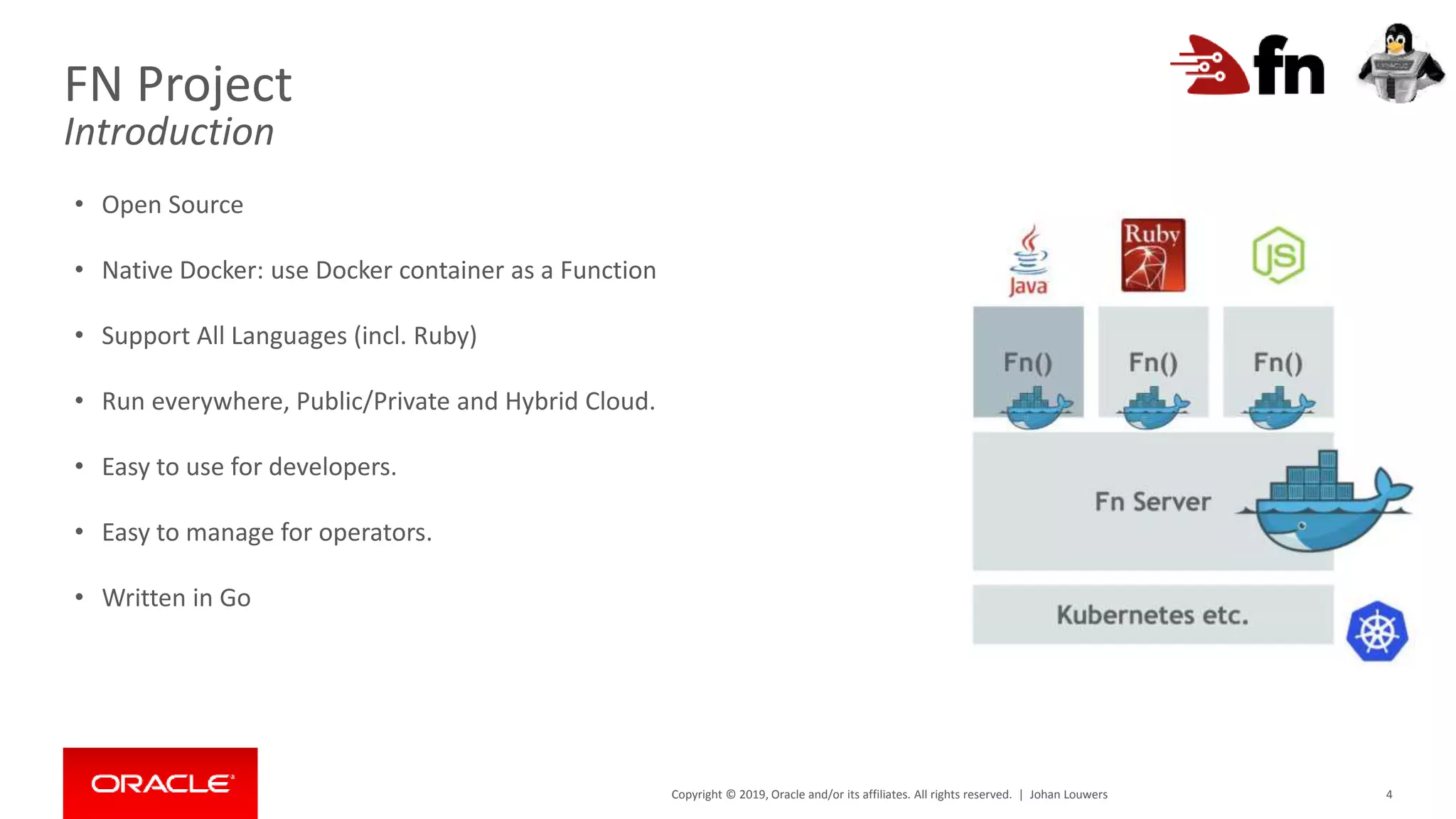
• Open Source
• Native Docker: use Docker container as a Function
• Support All Languages (incl. Ruby)
• Run everywhere, Public/Private and Hybrid Cloud.
• Easy to use for developers.
• Easy to manage for operators.
• Written in Go
Johan Louwers
Copyright © 2019, Oracle and/or its affiliates. All rights reserved. | 5
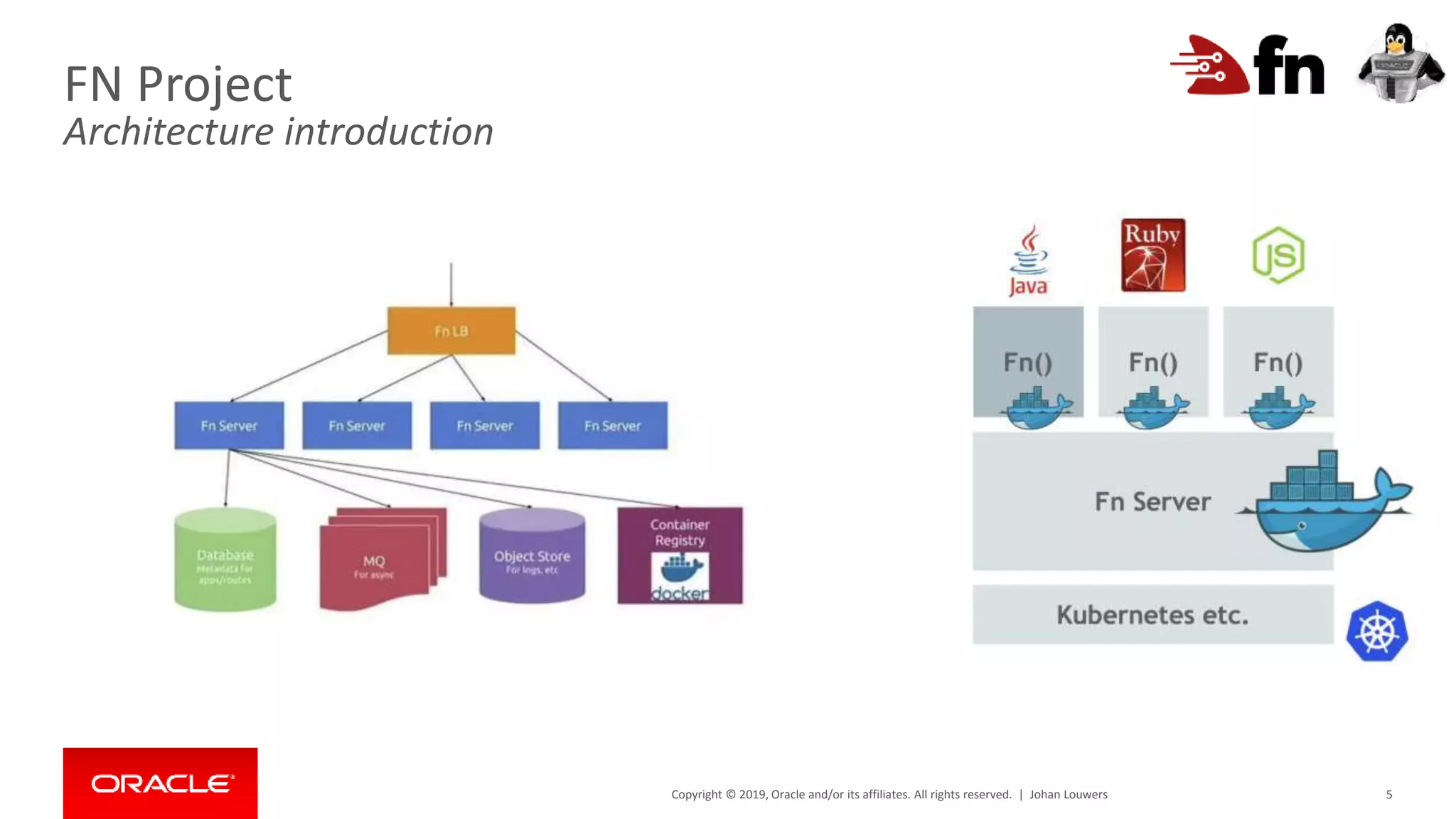
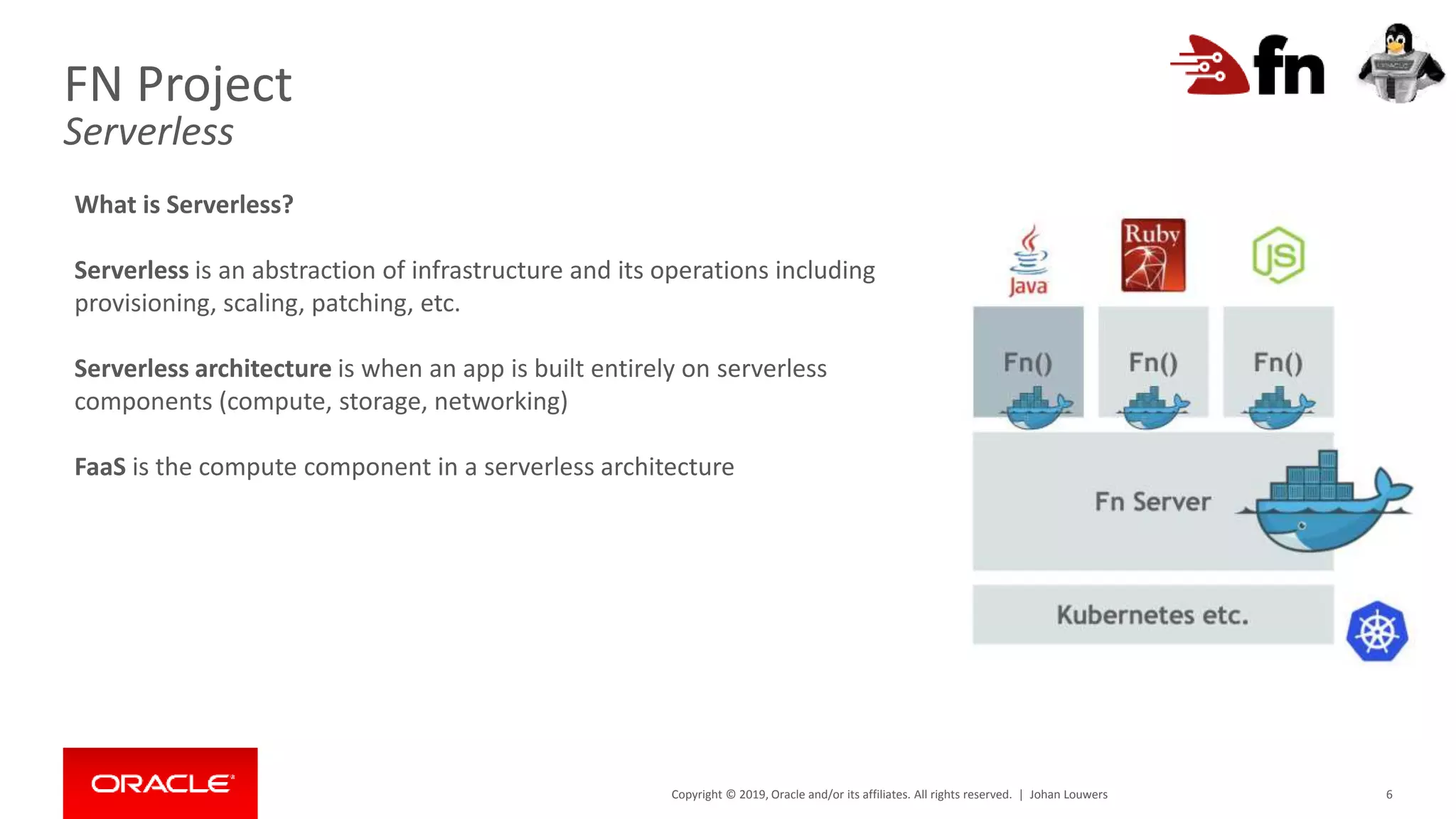
FN Project
Architecture introduction
Johan Louwers
Copyright © 2019, Oracle and/or its affiliates. All rights reserved. | 6
FN Project
Serverless
What is Serverless?
Serverless is an abstraction of infrastructure and its operations including
provisioning, scaling, patching, etc.
Serverless architecture is when an app is built entirely on serverless
components (compute, storage, networking)
FaaS is the compute component in a serverless architecture
Johan Louwers
Copyright © 2019, Oracle and/or its affiliates. All rights reserved. | 7
FN Project Quick Installation Guide
Oracle Linux – base operating system
[root@fnproject ~]# uname -a
Linux fnproject 4.1.12-61.1.28.el7uek.x86_64 #2 SMP Thu Feb 23 19:55:12 PST 2017 x86_64 x86_64 x86_64 GNU/Linux
[root@fnproject ~]#
Operating system:
• This guide assumes that you run Oracle Linux 7
• Visit linux.oracle.com for download instructions.
• Check your Oracle Linux version with the uname
-a command
Johan Louwers
Copyright © 2019, Oracle and/or its affiliates. All rights reserved. | 8
[root@fnproject ~]# ifconfig
eth0: flags=4163<UP,BROADCAST,RUNNING,MULTICAST> mtu 1500
inet 10.0.2.15 netmask 255.255.255.0 broadcast 10.0.2.255
inet6 fe80::a00:27ff:fe7f:f81b prefixlen 64 scopeid 0x20<link>
ether 08:00:27:7f:f8:1b txqueuelen 1000 (Ethernet)
RX packets 658 bytes 77605 (75.7 KiB)
RX errors 0 dropped 0 overruns 0 frame 0
TX packets 476 bytes 84825 (82.8 KiB)
TX errors 0 dropped 0 overruns 0 carrier 0 collisions 0
eth1: flags=4163<UP,BROADCAST,RUNNING,MULTICAST> mtu 1500
inet 192.168.33.11 netmask 255.255.255.0 broadcast 192.168.33.255
inet6 fe80::a00:27ff:fe25:4520 prefixlen 64 scopeid 0x20<link>
ether 08:00:27:25:45:20 txqueuelen 1000 (Ethernet)
RX packets 0 bytes 0 (0.0 B)
RX errors 0 dropped 0 overruns 0 frame 0
TX packets 31 bytes 2294 (2.2 KiB)
TX errors 0 dropped 0 overruns 0 carrier 0 collisions 0
lo: flags=73<UP,LOOPBACK,RUNNING> mtu 65536
inet 127.0.0.1 netmask 255.0.0.0
inet6 ::1 prefixlen 128 scopeid 0x10<host>
loop txqueuelen 0 (Local Loopback)
RX packets 0 bytes 0 (0.0 B)
RX errors 0 dropped 0 overruns 0 frame 0
TX packets 0 bytes 0 (0.0 B)
TX errors 0 dropped 0 overruns 0 carrier 0 collisions 0
[root@fnproject ~]#
FN Project Quick Installation Guide
Oracle Linux – Network settings
Network settings:
• This guide assumes that you have both a eth0
and a eth1 network interface.
• Having a different set of network interfaces will
not hinder you from using FN Project in any way.
Johan Louwers
Copyright © 2019, Oracle and/or its affiliates. All rights reserved. | 9
[root@fnproject ~]# yum repolist
repo id repo name
ol7_UEKR4/x86_64 Latest Unbreakable Enterprise Kernel Release 4 for Oracle Linux 7Server (x86_64)
ol7_addons/x86_64 Oracle Linux 7Server Add ons (x86_64)
ol7_latest/x86_64 Oracle Linux 7Server Latest (x86_64)
[root@fnproject ~]#
FN Project Quick Installation Guide
Oracle Linux – Set the correct yum repo
Yum settings:
• Ensure you have ol7_UEKR4, ol7_addons and
ol7_latest enabled in
/etc/yum.repos.d/public-yum-
ol7.repo
• Check the enabled repositories with yum
repolist command
Johan Louwers
Copyright © 2019, Oracle and/or its affiliates. All rights reserved. | 10
[root@fnproject ~]# yum -y install docker-engine
Resolving Dependencies
--> Running transaction check
---> Package docker-engine.x86_64 0:18.09.1.ol-1.0.5.el7 will be installed
--> Processing Dependency: container-selinux >= 2:2.77 for package: docker-engine-18.09.1.ol-1.0.5.el7.x86_64
--> Processing Dependency: libseccomp >= 2.3 for package: docker-engine-18.09.1.ol-1.0.5.el7.x86_64
--> Processing Dependency: libcgroup for package: docker-engine-18.09.1.ol-1.0.5.el7.x86_64
--> Processing Dependency: containerd for package: docker-engine-18.09.1.ol-1.0.5.el7.x86_64
--> Processing Dependency: docker-cli for package: docker-engine-18.09.1.ol-1.0.5.el7.x86_64
--> Processing Dependency: runc for package: docker-engine-18.09.1.ol-1.0.5.el7.x86_64
--> Processing Dependency: libseccomp.so.2()(64bit) for package: docker-engine-18.09.1.ol-1.0.5.el7.x86_64
--> Running transaction check
Dependency Updated:
audit-libs.x86_64 0:2.8.4-4.el7 libselinux.x86_64 0:2.5-14.1.el7
libselinux-python.x86_64 0:2.5-14.1.el7 libselinux-utils.x86_64 0:2.5-14.1.el7
libsemanage.x86_64 0:2.5-14.el7 libsepol.x86_64 0:2.5-10.el7
policycoreutils.x86_64 0:2.5-29.0.1.el7_6.1 selinux-policy.noarch 0:3.13.1-229.0.3.el7_6.12
selinux-policy-targeted.noarch 0:3.13.1-229.0.3.el7_6.12
Complete!
[root@fnproject ~]#
FN Project Quick Installation Guide
Oracle Linux – install Docker
Install Docker:
• Ensure you install docker with the following
command:
yum -y install docker-engine
Johan Louwers
Copyright © 2019, Oracle and/or its affiliates. All rights reserved. | 11
[root@fnproject ~]# # systemctl start docker
[root@fnproject ~]#
[root@fnproject ~]# systemctl enable docker
Created symlink from /etc/systemd/system/multi-user.target.wants/docker.service to
/usr/lib/systemd/system/docker.service.
[root@fnproject ~]#
[root@fnproject ~]# systemctl status docker
● docker.service - Docker Application Container Engine
Loaded: loaded (/usr/lib/systemd/system/docker.service; enabled; vendor preset: disabled)
Drop-In: /etc/systemd/system/docker.service.d
└─docker-sysconfig.conf
Active: inactive (dead)
Docs: https://docs.docker.com
Apr 25 12:18:30 fnproject systemd[1]: [/usr/lib/systemd/system/docker.service:38] Unknown lvalue 'TasksMax' in section
'Service'
Apr 25 12:18:30 fnproject systemd[1]: [/usr/lib/systemd/system/docker.service:38] Unknown lvalue 'TasksMax' in section
'Service'
Apr 25 12:25:37 fnproject systemd[1]: [/usr/lib/systemd/system/docker.service:38] Unknown lvalue 'TasksMax' in section
'Service'
[root@fnproject ~]#
FN Project Quick Installation Guide
Oracle Linux – Enable Docker service
Start Docker:
• Ensure you start docker with the following
command:
systemctl start docker
• Ensure you enable the docker service with the
following command:
systemctl enable docker
• You can check the status with the following
command:
systemctl status docker
Johan Louwers
Copyright © 2019, Oracle and/or its affiliates. All rights reserved. | 12
[root@fnproject ~]# curl -LSs https://raw.githubusercontent.com/fnproject/cli/master/install | sh
fn version 0.5.75
______
/ ____/___
/ /_ / __ 
/ __/ / / / /
/_/ /_/ /_/`
[root@fnproject ~]#
FN Project Quick Installation Guide
Oracle Linux – Install FN Project
Install FN Project:
• Install FN Project with the single command
(shown in the example) by downloading and
executing the install script.
Johan Louwers
Copyright © 2019, Oracle and/or its affiliates. All rights reserved. | 13
[root@fnproject ~]# fn start
Unable to find image 'fnproject/fnserver:latest' locally
Trying to pull repository docker.io/fnproject/fnserver ...
latest: Pulling from docker.io/fnproject/fnserver
ff3a5c916c92: Pull complete
1a649ea86bca: Pull complete
ce35f4d5f86a: Pull complete
b6206661264b: Pull complete
b8b71dba24d3: Pull complete
3873004a68ee: Pull complete
f4205b132661: Pull complete
91a85eeeb257: Pull complete
93c96d032b32: Pull complete
bb761748d6e1: Pull complete
time="2019-04-25T12:29:20Z" level=info msg="ram reservations" avail_memory=1289383936
time="2019-04-25T12:29:20Z" level=info msg="available cpu" avail_cpu=2000 total_cpu=2000
time="2019-04-25T12:29:20Z" level=info msg="cpu reservations" cpu=2000
time="2019-04-25T12:29:20Z" level=info msg="n ______n / ____/___n / /_ / __ n / __/ / / /
/n /_/ /_/ /_/n"
time="2019-04-25T12:29:20Z" level=info msg="Fn serving on `:8080`" type=full version=0.3.698
FN Project Quick Installation Guide
Oracle Linux – Start FN project
Start FN Project:
• Start FN with the following command:
fn start
Johan Louwers
Copyright © 2019, Oracle and/or its affiliates. All rights reserved. | 14
FN Project Quick Installation Guide
More information
• https://fnproject.io
• https://linux.oracle.com
• https://blogs.oracle.com/virtualization/install-docker-on-oracle-linux-7-v2
Johan Louwers
Fn project quick installation guide

Fn project quick installation guide

  • 1.
    Copyright © 2019,Oracle and/or its affiliates. All rights reserved. | Confidential – Oracle Internal/Restricted/Highly Restricted FN Project Johan Louwers Chief Customer Architect @ Oracle V0.6 Quick Installation guide
  • 2.
    Copyright © 2019,Oracle and/or its affiliates. All rights reserved. | Safe Harbor Statement The following is intended to outline our general product direction. It is intended for information purposes only, and may not be incorporated into any contract. It is not a commitment to deliver any material, code, or functionality, and should not be relied upon in making purchasing decisions. The development, release, timing, and pricing of any features or functionality described for Oracle’s products may change and remains at the sole discretion of Oracle Corporation. 2Johan Louwers
  • 3.
    Copyright © 2019,Oracle and/or its affiliates. All rights reserved. | Johan Louwers 3 FN Project Quick Installation Guide Slide-Deck intention Slide-deck Intention : • This presentation is intended to provide a quick introduction into FN Project installation • This presentation is a part of a wider workshop deck and shared as a stand- alone example for ease of sharing. • The code and examples should only be used as an educational example and is not intended to be included in any real-world application and/or code. • This guide is NOT an official Oracle installation guide for FN Project Contact details : Johan Louwers - Chief Enterprise Architect @johanlouwers Johan.louwers@oracle.com github.com/louwersj Johanlouwers.blogspot.com
  • 4.
    Copyright © 2019,Oracle and/or its affiliates. All rights reserved. | 4 FN Project Introduction • Open Source • Native Docker: use Docker container as a Function • Support All Languages (incl. Ruby) • Run everywhere, Public/Private and Hybrid Cloud. • Easy to use for developers. • Easy to manage for operators. • Written in Go Johan Louwers
  • 5.
    Copyright © 2019,Oracle and/or its affiliates. All rights reserved. | 5 FN Project Architecture introduction Johan Louwers
  • 6.
    Copyright © 2019,Oracle and/or its affiliates. All rights reserved. | 6 FN Project Serverless What is Serverless? Serverless is an abstraction of infrastructure and its operations including provisioning, scaling, patching, etc. Serverless architecture is when an app is built entirely on serverless components (compute, storage, networking) FaaS is the compute component in a serverless architecture Johan Louwers
  • 7.
    Copyright © 2019,Oracle and/or its affiliates. All rights reserved. | 7 FN Project Quick Installation Guide Oracle Linux – base operating system [root@fnproject ~]# uname -a Linux fnproject 4.1.12-61.1.28.el7uek.x86_64 #2 SMP Thu Feb 23 19:55:12 PST 2017 x86_64 x86_64 x86_64 GNU/Linux [root@fnproject ~]# Operating system: • This guide assumes that you run Oracle Linux 7 • Visit linux.oracle.com for download instructions. • Check your Oracle Linux version with the uname -a command Johan Louwers
  • 8.
    Copyright © 2019,Oracle and/or its affiliates. All rights reserved. | 8 [root@fnproject ~]# ifconfig eth0: flags=4163<UP,BROADCAST,RUNNING,MULTICAST> mtu 1500 inet 10.0.2.15 netmask 255.255.255.0 broadcast 10.0.2.255 inet6 fe80::a00:27ff:fe7f:f81b prefixlen 64 scopeid 0x20<link> ether 08:00:27:7f:f8:1b txqueuelen 1000 (Ethernet) RX packets 658 bytes 77605 (75.7 KiB) RX errors 0 dropped 0 overruns 0 frame 0 TX packets 476 bytes 84825 (82.8 KiB) TX errors 0 dropped 0 overruns 0 carrier 0 collisions 0 eth1: flags=4163<UP,BROADCAST,RUNNING,MULTICAST> mtu 1500 inet 192.168.33.11 netmask 255.255.255.0 broadcast 192.168.33.255 inet6 fe80::a00:27ff:fe25:4520 prefixlen 64 scopeid 0x20<link> ether 08:00:27:25:45:20 txqueuelen 1000 (Ethernet) RX packets 0 bytes 0 (0.0 B) RX errors 0 dropped 0 overruns 0 frame 0 TX packets 31 bytes 2294 (2.2 KiB) TX errors 0 dropped 0 overruns 0 carrier 0 collisions 0 lo: flags=73<UP,LOOPBACK,RUNNING> mtu 65536 inet 127.0.0.1 netmask 255.0.0.0 inet6 ::1 prefixlen 128 scopeid 0x10<host> loop txqueuelen 0 (Local Loopback) RX packets 0 bytes 0 (0.0 B) RX errors 0 dropped 0 overruns 0 frame 0 TX packets 0 bytes 0 (0.0 B) TX errors 0 dropped 0 overruns 0 carrier 0 collisions 0 [root@fnproject ~]# FN Project Quick Installation Guide Oracle Linux – Network settings Network settings: • This guide assumes that you have both a eth0 and a eth1 network interface. • Having a different set of network interfaces will not hinder you from using FN Project in any way. Johan Louwers
  • 9.
    Copyright © 2019,Oracle and/or its affiliates. All rights reserved. | 9 [root@fnproject ~]# yum repolist repo id repo name ol7_UEKR4/x86_64 Latest Unbreakable Enterprise Kernel Release 4 for Oracle Linux 7Server (x86_64) ol7_addons/x86_64 Oracle Linux 7Server Add ons (x86_64) ol7_latest/x86_64 Oracle Linux 7Server Latest (x86_64) [root@fnproject ~]# FN Project Quick Installation Guide Oracle Linux – Set the correct yum repo Yum settings: • Ensure you have ol7_UEKR4, ol7_addons and ol7_latest enabled in /etc/yum.repos.d/public-yum- ol7.repo • Check the enabled repositories with yum repolist command Johan Louwers
  • 10.
    Copyright © 2019,Oracle and/or its affiliates. All rights reserved. | 10 [root@fnproject ~]# yum -y install docker-engine Resolving Dependencies --> Running transaction check ---> Package docker-engine.x86_64 0:18.09.1.ol-1.0.5.el7 will be installed --> Processing Dependency: container-selinux >= 2:2.77 for package: docker-engine-18.09.1.ol-1.0.5.el7.x86_64 --> Processing Dependency: libseccomp >= 2.3 for package: docker-engine-18.09.1.ol-1.0.5.el7.x86_64 --> Processing Dependency: libcgroup for package: docker-engine-18.09.1.ol-1.0.5.el7.x86_64 --> Processing Dependency: containerd for package: docker-engine-18.09.1.ol-1.0.5.el7.x86_64 --> Processing Dependency: docker-cli for package: docker-engine-18.09.1.ol-1.0.5.el7.x86_64 --> Processing Dependency: runc for package: docker-engine-18.09.1.ol-1.0.5.el7.x86_64 --> Processing Dependency: libseccomp.so.2()(64bit) for package: docker-engine-18.09.1.ol-1.0.5.el7.x86_64 --> Running transaction check Dependency Updated: audit-libs.x86_64 0:2.8.4-4.el7 libselinux.x86_64 0:2.5-14.1.el7 libselinux-python.x86_64 0:2.5-14.1.el7 libselinux-utils.x86_64 0:2.5-14.1.el7 libsemanage.x86_64 0:2.5-14.el7 libsepol.x86_64 0:2.5-10.el7 policycoreutils.x86_64 0:2.5-29.0.1.el7_6.1 selinux-policy.noarch 0:3.13.1-229.0.3.el7_6.12 selinux-policy-targeted.noarch 0:3.13.1-229.0.3.el7_6.12 Complete! [root@fnproject ~]# FN Project Quick Installation Guide Oracle Linux – install Docker Install Docker: • Ensure you install docker with the following command: yum -y install docker-engine Johan Louwers
  • 11.
    Copyright © 2019,Oracle and/or its affiliates. All rights reserved. | 11 [root@fnproject ~]# # systemctl start docker [root@fnproject ~]# [root@fnproject ~]# systemctl enable docker Created symlink from /etc/systemd/system/multi-user.target.wants/docker.service to /usr/lib/systemd/system/docker.service. [root@fnproject ~]# [root@fnproject ~]# systemctl status docker ● docker.service - Docker Application Container Engine Loaded: loaded (/usr/lib/systemd/system/docker.service; enabled; vendor preset: disabled) Drop-In: /etc/systemd/system/docker.service.d └─docker-sysconfig.conf Active: inactive (dead) Docs: https://docs.docker.com Apr 25 12:18:30 fnproject systemd[1]: [/usr/lib/systemd/system/docker.service:38] Unknown lvalue 'TasksMax' in section 'Service' Apr 25 12:18:30 fnproject systemd[1]: [/usr/lib/systemd/system/docker.service:38] Unknown lvalue 'TasksMax' in section 'Service' Apr 25 12:25:37 fnproject systemd[1]: [/usr/lib/systemd/system/docker.service:38] Unknown lvalue 'TasksMax' in section 'Service' [root@fnproject ~]# FN Project Quick Installation Guide Oracle Linux – Enable Docker service Start Docker: • Ensure you start docker with the following command: systemctl start docker • Ensure you enable the docker service with the following command: systemctl enable docker • You can check the status with the following command: systemctl status docker Johan Louwers
  • 12.
    Copyright © 2019,Oracle and/or its affiliates. All rights reserved. | 12 [root@fnproject ~]# curl -LSs https://raw.githubusercontent.com/fnproject/cli/master/install | sh fn version 0.5.75 ______ / ____/___ / /_ / __ / __/ / / / / /_/ /_/ /_/` [root@fnproject ~]# FN Project Quick Installation Guide Oracle Linux – Install FN Project Install FN Project: • Install FN Project with the single command (shown in the example) by downloading and executing the install script. Johan Louwers
  • 13.
    Copyright © 2019,Oracle and/or its affiliates. All rights reserved. | 13 [root@fnproject ~]# fn start Unable to find image 'fnproject/fnserver:latest' locally Trying to pull repository docker.io/fnproject/fnserver ... latest: Pulling from docker.io/fnproject/fnserver ff3a5c916c92: Pull complete 1a649ea86bca: Pull complete ce35f4d5f86a: Pull complete b6206661264b: Pull complete b8b71dba24d3: Pull complete 3873004a68ee: Pull complete f4205b132661: Pull complete 91a85eeeb257: Pull complete 93c96d032b32: Pull complete bb761748d6e1: Pull complete time="2019-04-25T12:29:20Z" level=info msg="ram reservations" avail_memory=1289383936 time="2019-04-25T12:29:20Z" level=info msg="available cpu" avail_cpu=2000 total_cpu=2000 time="2019-04-25T12:29:20Z" level=info msg="cpu reservations" cpu=2000 time="2019-04-25T12:29:20Z" level=info msg="n ______n / ____/___n / /_ / __ n / __/ / / / /n /_/ /_/ /_/n" time="2019-04-25T12:29:20Z" level=info msg="Fn serving on `:8080`" type=full version=0.3.698 FN Project Quick Installation Guide Oracle Linux – Start FN project Start FN Project: • Start FN with the following command: fn start Johan Louwers
  • 14.
    Copyright © 2019,Oracle and/or its affiliates. All rights reserved. | 14 FN Project Quick Installation Guide More information • https://fnproject.io • https://linux.oracle.com • https://blogs.oracle.com/virtualization/install-docker-on-oracle-linux-7-v2 Johan Louwers