INFT11/71-132
     Web Applications


Internet Concepts
      Dr Michael Rees
School of Information Technology

      mrees@bond.edu.au
The Internet

• The Internet is a global, wide area network (WAN) of
  computers

• Composed of millions of smaller local area networks
  (LANs) all connected together

• All computers support Internet Protocol (IP)

• Each computer must have a unique IP address: a unique
  32 bit value made up of 4 numbers (each 0-255)

• Example IP Address:
          – Binary: 11101110.00010001.10011111.00000100
          – Decimal: 238.17.159.4

© 2009 Michael Rees                  Web Applications     2
Internet Protocol

• Transfer data from source device to destination device
  (computers today but any device in future – the Internet
  of Things)
• IP source software creates a packet representing the data:
   – About 1500 characters
   – Header: source and destination IP addresses, length of
      data, and so on
   – Data itself
   – Checksum used to test data integrity and correct
      transmission
• If destination is on another LAN, packet is sent to a
  gateway or router that connects one network to another

© 2009 Michael Rees                 Web Applications         3
Packet switched network


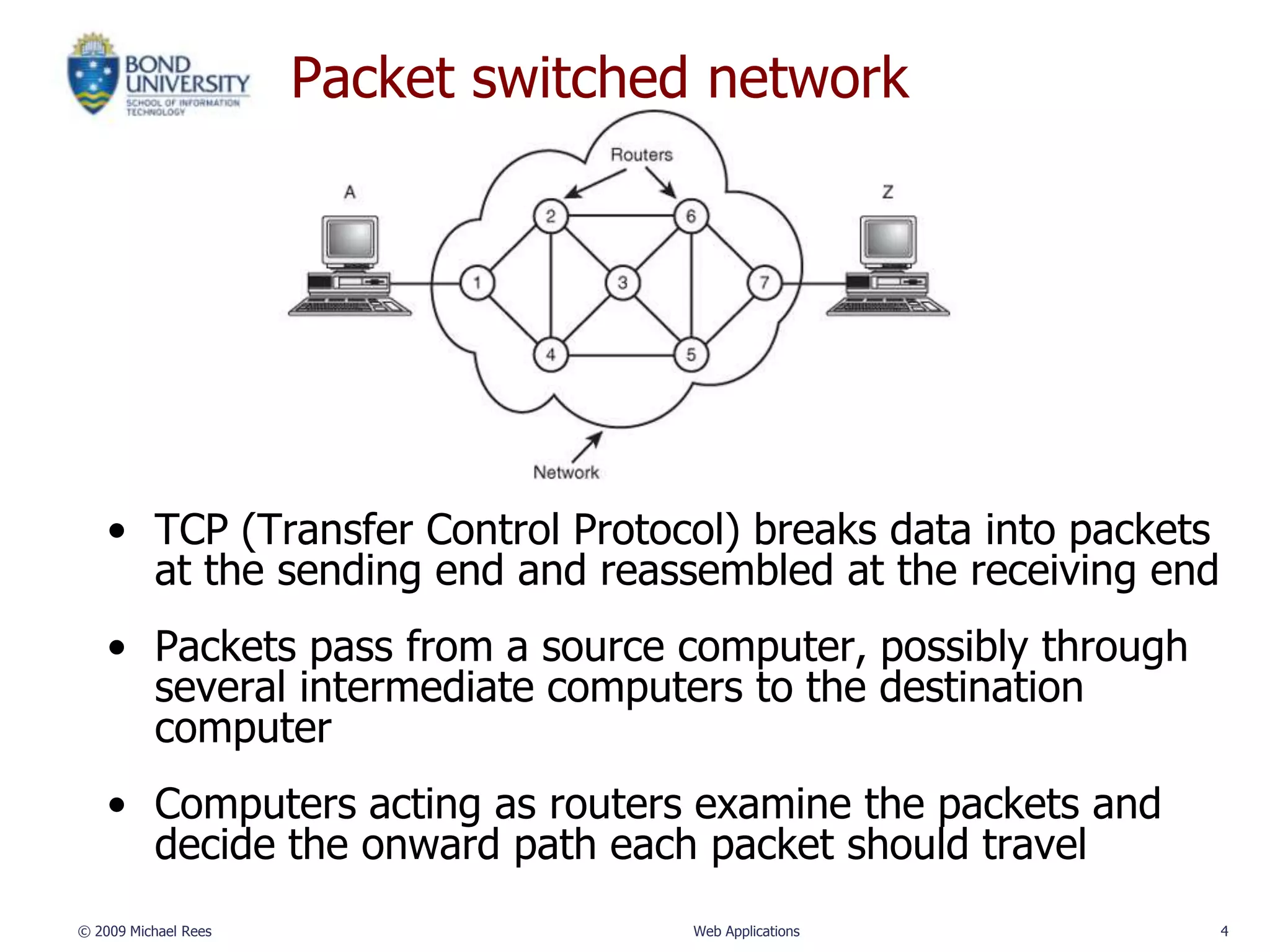
    • TCP (Transfer Control Protocol) breaks data into packets
      at the sending end and reassembled at the receiving end
    • Packets pass from a source computer, possibly through
      several intermediate computers to the destination
      computer
    • Computers acting as routers examine the packets and
      decide the onward path each packet should travel
© 2009 Michael Rees                 Web Applications             4
Transmission Control Protocol

• TCP overcomes the limitations of IP:
   – No guarantee of packet delivery (packets can be
     dropped)
   – Communication is one-way (source to destination)

• TCP adds concept of a connection on top of IP:
   – Provides guarantee that packets are delivered
   – Provide two-way (full duplex) communication


© 2009 Michael Rees                 Web Applications    5
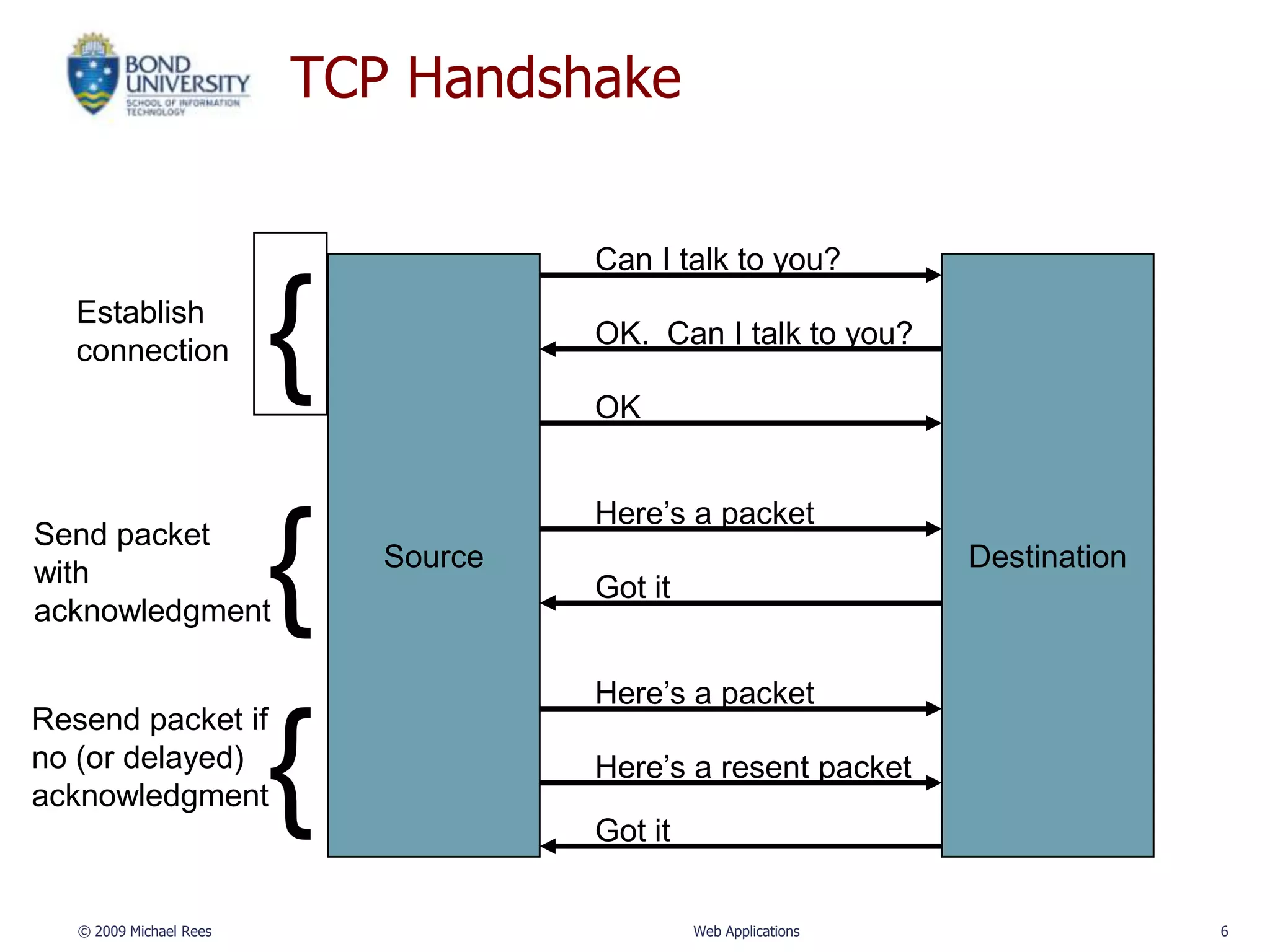
TCP Handshake


                                      Can I talk to you?
   Establish
   connection            {            OK. Can I talk to you?

                                      OK


                                      Here’s a packet
Send packet
with
acknowledgment           {   Source
                                      Got it
                                                                  Destination


                                      Here’s a packet
Resend packet if
no (or delayed)
acknowledgment           {            Here’s a resent packet
                                      Got it

   © 2009 Michael Rees                         Web Applications                 6
TCP Ports

• TCP also adds concept of a port

• TCP header contains port number representing an
  application program on the destination computer

• Some port numbers have standard meanings

• Other port numbers are available first-come-first
  served to any application


© 2009 Michael Rees               Web Applications    7
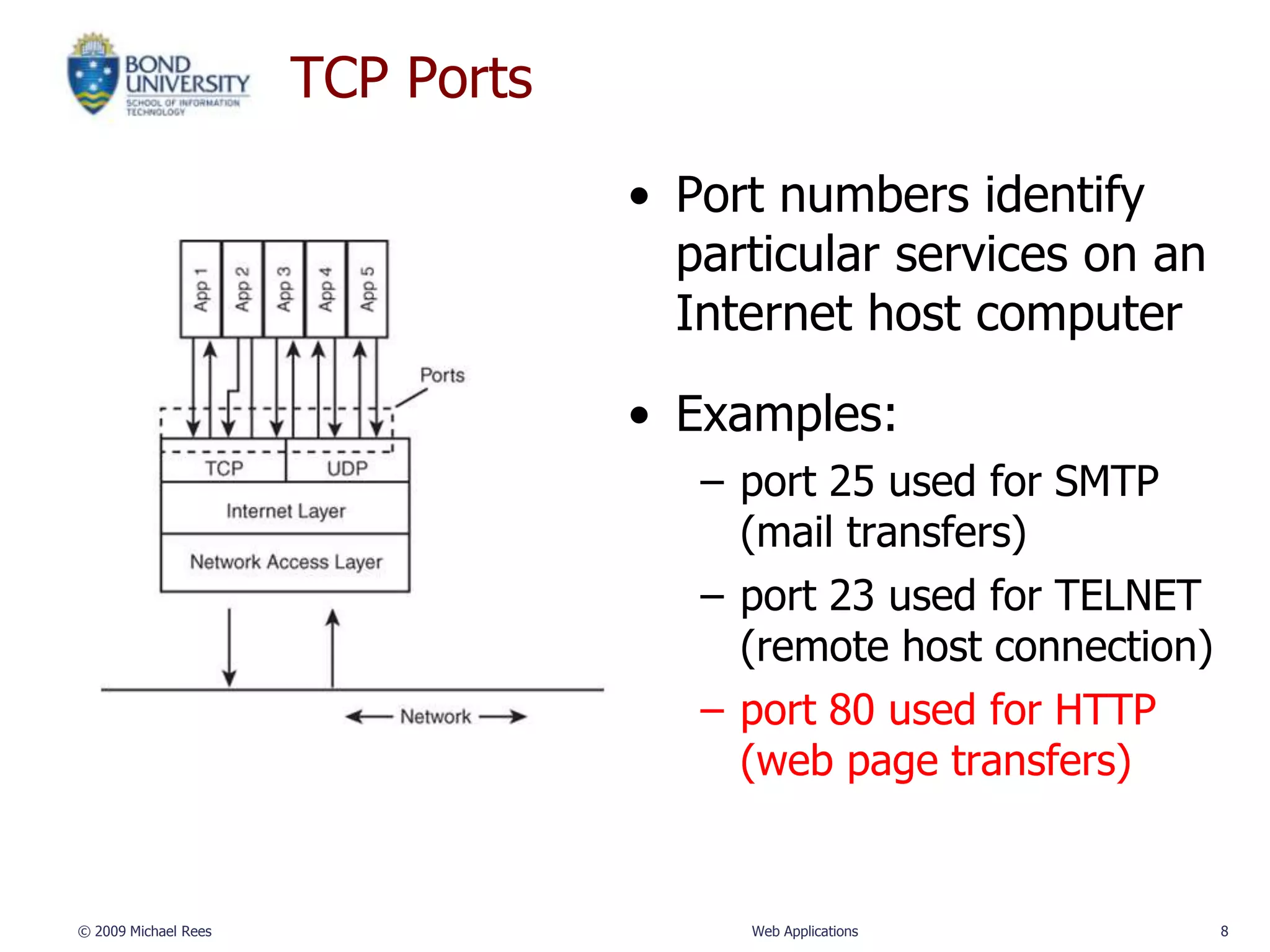
TCP Ports

                                  • Port numbers identify
                                    particular services on an
                                    Internet host computer

                                  • Examples:
                                     – port 25 used for SMTP
                                       (mail transfers)
                                     – port 23 used for TELNET
                                       (remote host connection)
                                     – port 80 used for HTTP
                                       (web page transfers)


© 2009 Michael Rees                    Web Applications           8
User Datagram Protocol - UDP

• Like TCP in that:
   – Builds on IP
   – Provides port concept

• Unlike TCP in that:
   – No connection concept
   – No transmission guarantee

• Advantage of UDP vs. TCP:
   – Lightweight, so faster for one-time messages


© 2009 Michael Rees                Web Applications   9
Domain Name Service - DNS

• DNS RFC

• DNS is the “phone book” for the Internet
   – Map between host names and IP addresses
   – DNS often uses UDP for communication

• Host names
   – Labels separated by dots:
      • www.example.org
   – Final label is a top-level domain
      • Generic: .com, .org, .tv, .name
      • Country-code: .au, .us, .il
© 2009 Michael Rees               Web Applications   10
Domain Name System
• Allows human-readable domain names to map to IP
  addresses (try: nslookup www.google.com)

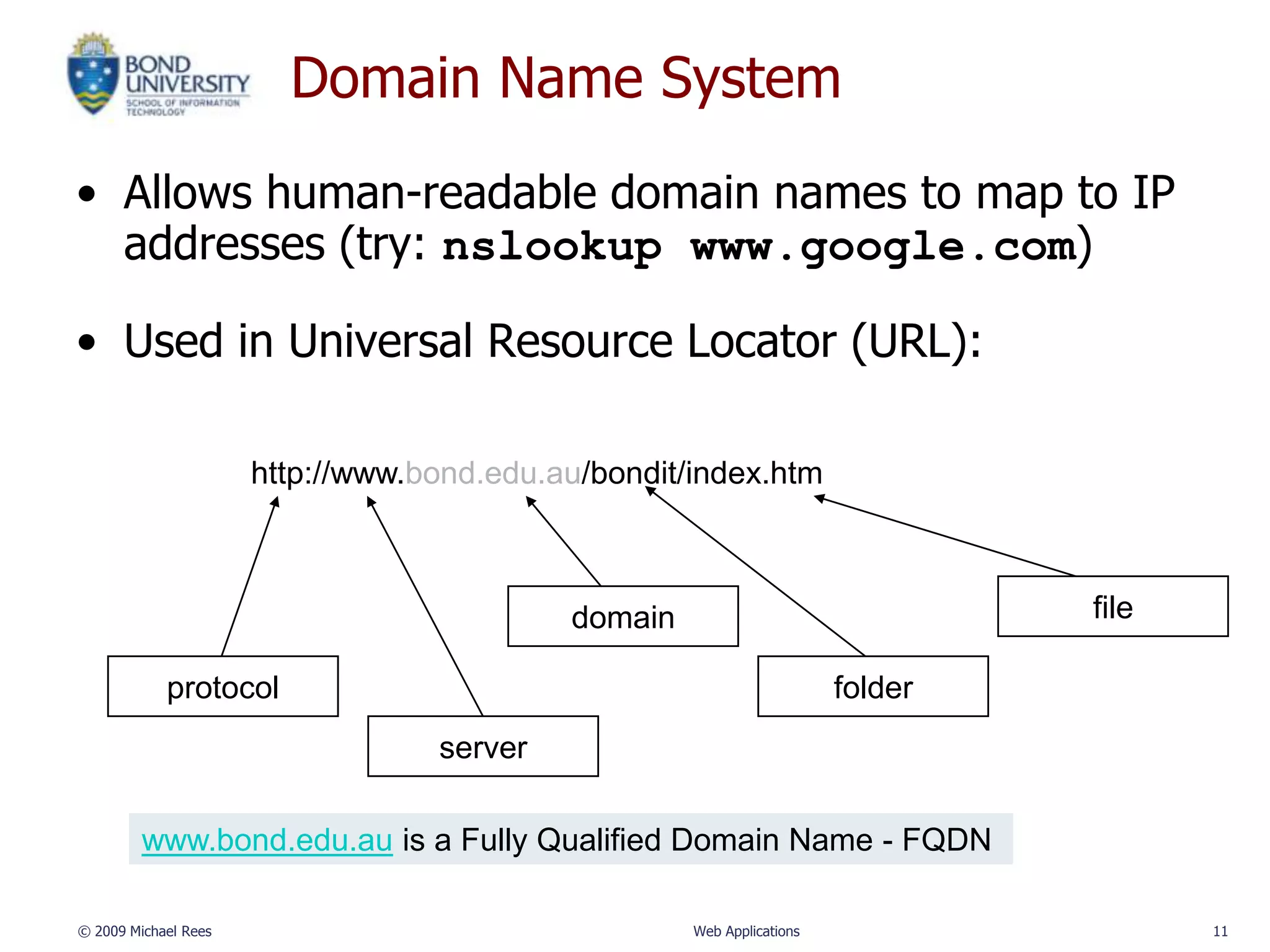
• Used in Universal Resource Locator (URL):

                      http://www.bond.edu.au/bondit/index.htm


                                           domain                               file

            protocol                                                   folder
                                  server

         www.bond.edu.au is a Fully Qualified Domain Name - FQDN

© 2009 Michael Rees                                 Web Applications                   11
So, who runs the Internet?

• ISOC (The Internet Society)
   – Is a non profit central organization for the groups
     that are responsible for the standards for internet
     structure
   – http://www.isoc.org
• ICANN (Internet Corporation for Assigned Names and
  Numbers)
   – http://www.icann.org
• W3C (World Wide Web Consortium)
   – develops standards for the web
   – http://www.w3.org
© 2009 Michael Rees                 Web Applications       12

INFT132 093 02 Internet Concepts

  • 1.
    INFT11/71-132 Web Applications Internet Concepts Dr Michael Rees School of Information Technology mrees@bond.edu.au
  • 2.
    The Internet • TheInternet is a global, wide area network (WAN) of computers • Composed of millions of smaller local area networks (LANs) all connected together • All computers support Internet Protocol (IP) • Each computer must have a unique IP address: a unique 32 bit value made up of 4 numbers (each 0-255) • Example IP Address: – Binary: 11101110.00010001.10011111.00000100 – Decimal: 238.17.159.4 © 2009 Michael Rees Web Applications 2
  • 3.
    Internet Protocol • Transferdata from source device to destination device (computers today but any device in future – the Internet of Things) • IP source software creates a packet representing the data: – About 1500 characters – Header: source and destination IP addresses, length of data, and so on – Data itself – Checksum used to test data integrity and correct transmission • If destination is on another LAN, packet is sent to a gateway or router that connects one network to another © 2009 Michael Rees Web Applications 3
  • 4.
    Packet switched network • TCP (Transfer Control Protocol) breaks data into packets at the sending end and reassembled at the receiving end • Packets pass from a source computer, possibly through several intermediate computers to the destination computer • Computers acting as routers examine the packets and decide the onward path each packet should travel © 2009 Michael Rees Web Applications 4
  • 5.
    Transmission Control Protocol •TCP overcomes the limitations of IP: – No guarantee of packet delivery (packets can be dropped) – Communication is one-way (source to destination) • TCP adds concept of a connection on top of IP: – Provides guarantee that packets are delivered – Provide two-way (full duplex) communication © 2009 Michael Rees Web Applications 5
  • 6.
    TCP Handshake Can I talk to you? Establish connection { OK. Can I talk to you? OK Here’s a packet Send packet with acknowledgment { Source Got it Destination Here’s a packet Resend packet if no (or delayed) acknowledgment { Here’s a resent packet Got it © 2009 Michael Rees Web Applications 6
  • 7.
    TCP Ports • TCPalso adds concept of a port • TCP header contains port number representing an application program on the destination computer • Some port numbers have standard meanings • Other port numbers are available first-come-first served to any application © 2009 Michael Rees Web Applications 7
  • 8.
    TCP Ports • Port numbers identify particular services on an Internet host computer • Examples: – port 25 used for SMTP (mail transfers) – port 23 used for TELNET (remote host connection) – port 80 used for HTTP (web page transfers) © 2009 Michael Rees Web Applications 8
  • 9.
    User Datagram Protocol- UDP • Like TCP in that: – Builds on IP – Provides port concept • Unlike TCP in that: – No connection concept – No transmission guarantee • Advantage of UDP vs. TCP: – Lightweight, so faster for one-time messages © 2009 Michael Rees Web Applications 9
  • 10.
    Domain Name Service- DNS • DNS RFC • DNS is the “phone book” for the Internet – Map between host names and IP addresses – DNS often uses UDP for communication • Host names – Labels separated by dots: • www.example.org – Final label is a top-level domain • Generic: .com, .org, .tv, .name • Country-code: .au, .us, .il © 2009 Michael Rees Web Applications 10
  • 11.
    Domain Name System •Allows human-readable domain names to map to IP addresses (try: nslookup www.google.com) • Used in Universal Resource Locator (URL): http://www.bond.edu.au/bondit/index.htm domain file protocol folder server www.bond.edu.au is a Fully Qualified Domain Name - FQDN © 2009 Michael Rees Web Applications 11
  • 12.
    So, who runsthe Internet? • ISOC (The Internet Society) – Is a non profit central organization for the groups that are responsible for the standards for internet structure – http://www.isoc.org • ICANN (Internet Corporation for Assigned Names and Numbers) – http://www.icann.org • W3C (World Wide Web Consortium) – develops standards for the web – http://www.w3.org © 2009 Michael Rees Web Applications 12