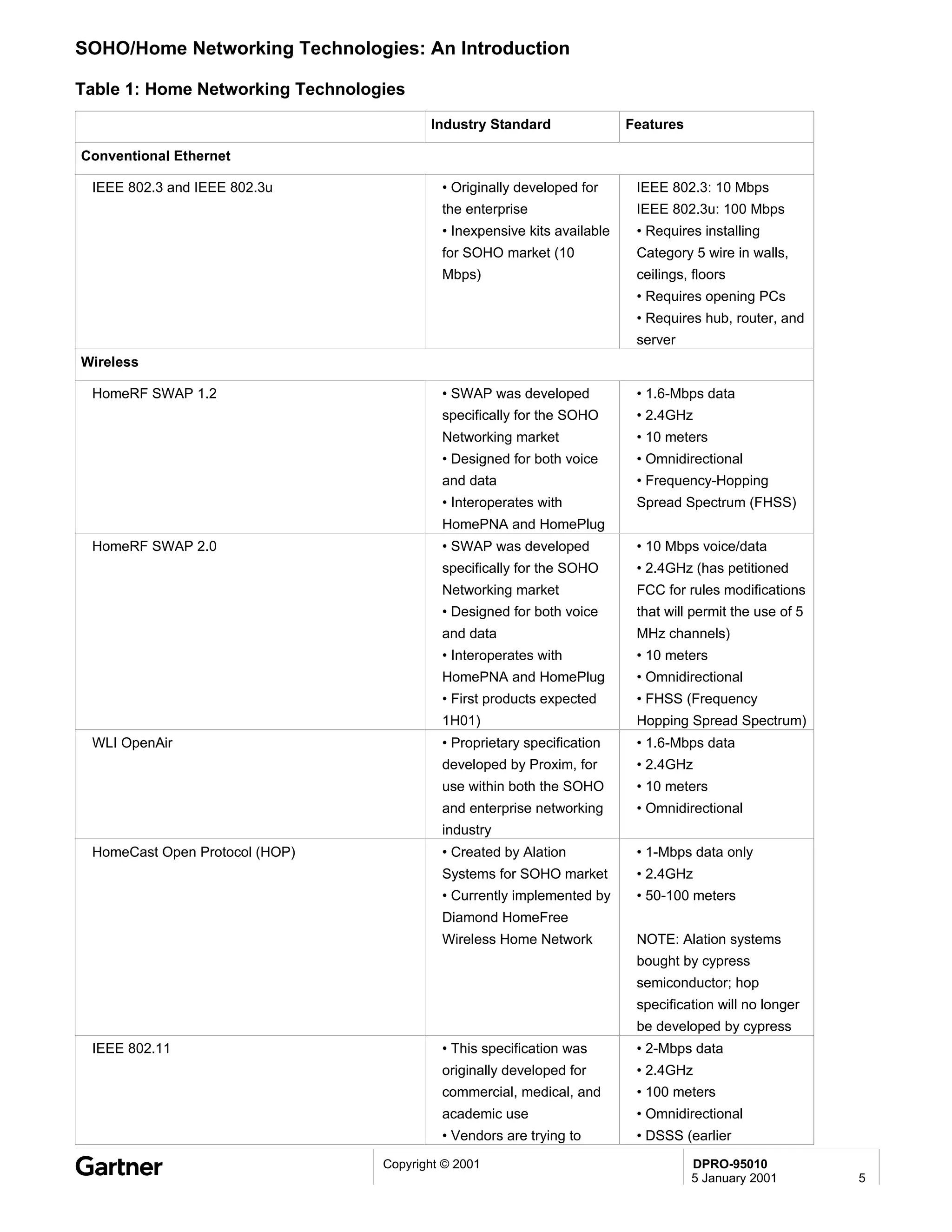
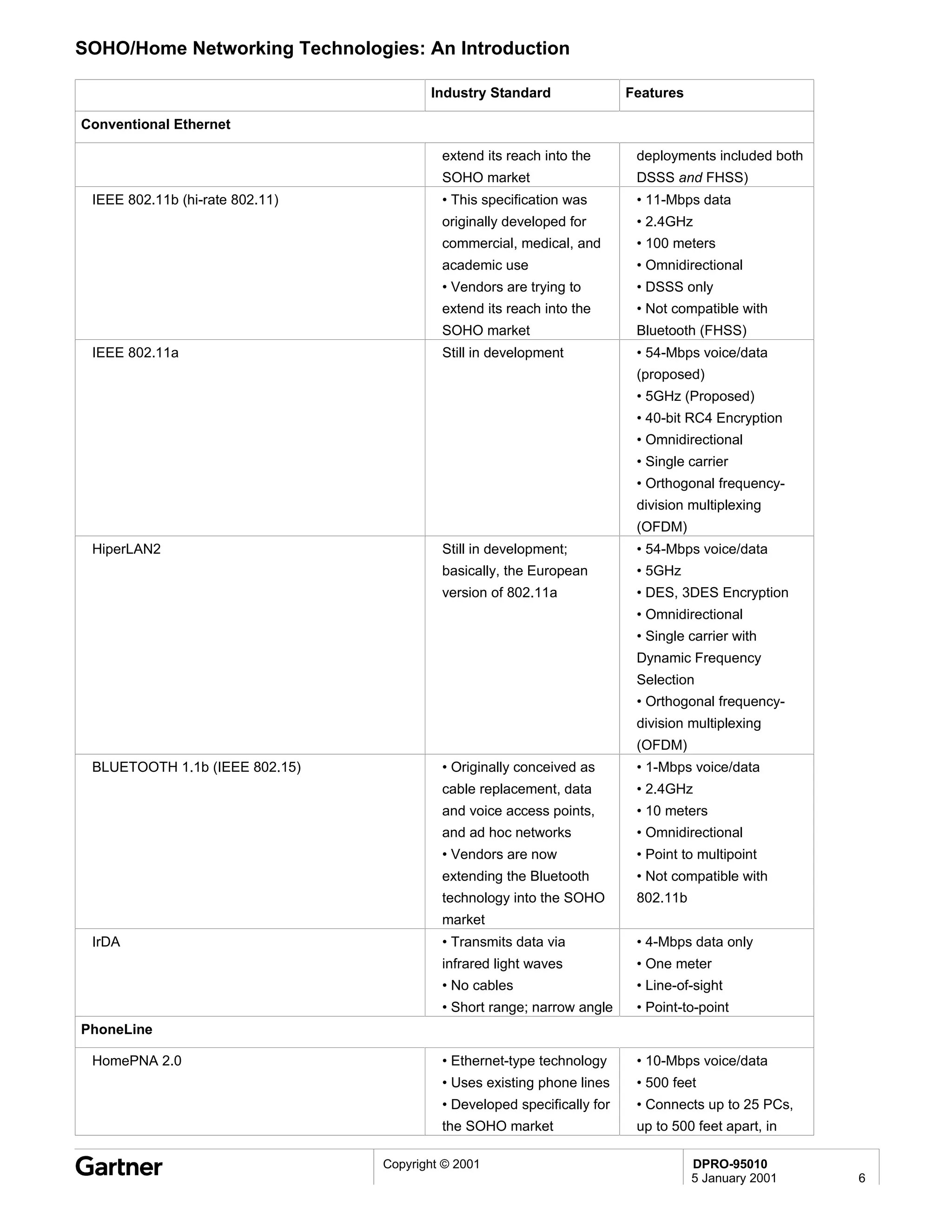
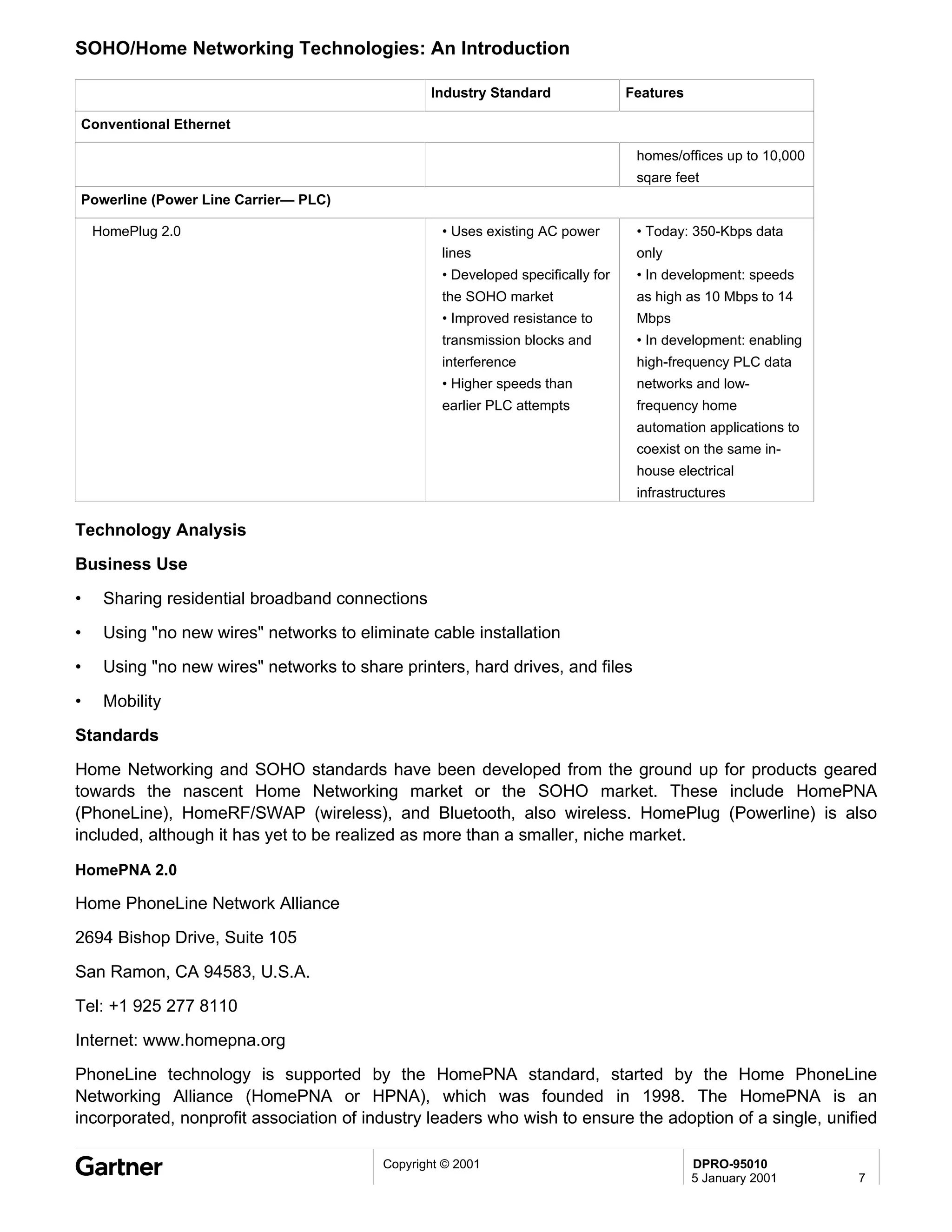
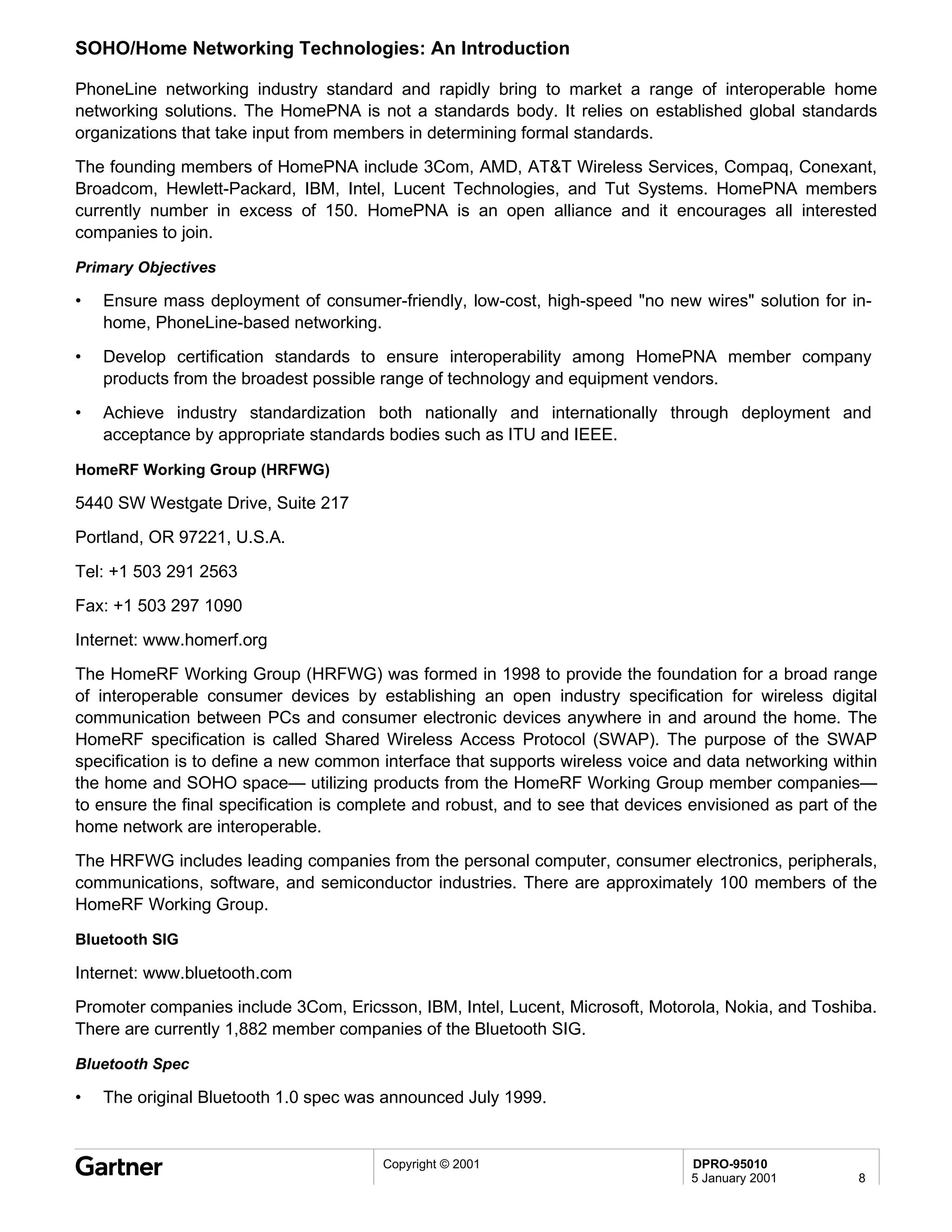
DPRO-91115                                                                                      Technology Overview
                                                                                        Serena Lambiase                                                                                      25 January 2001


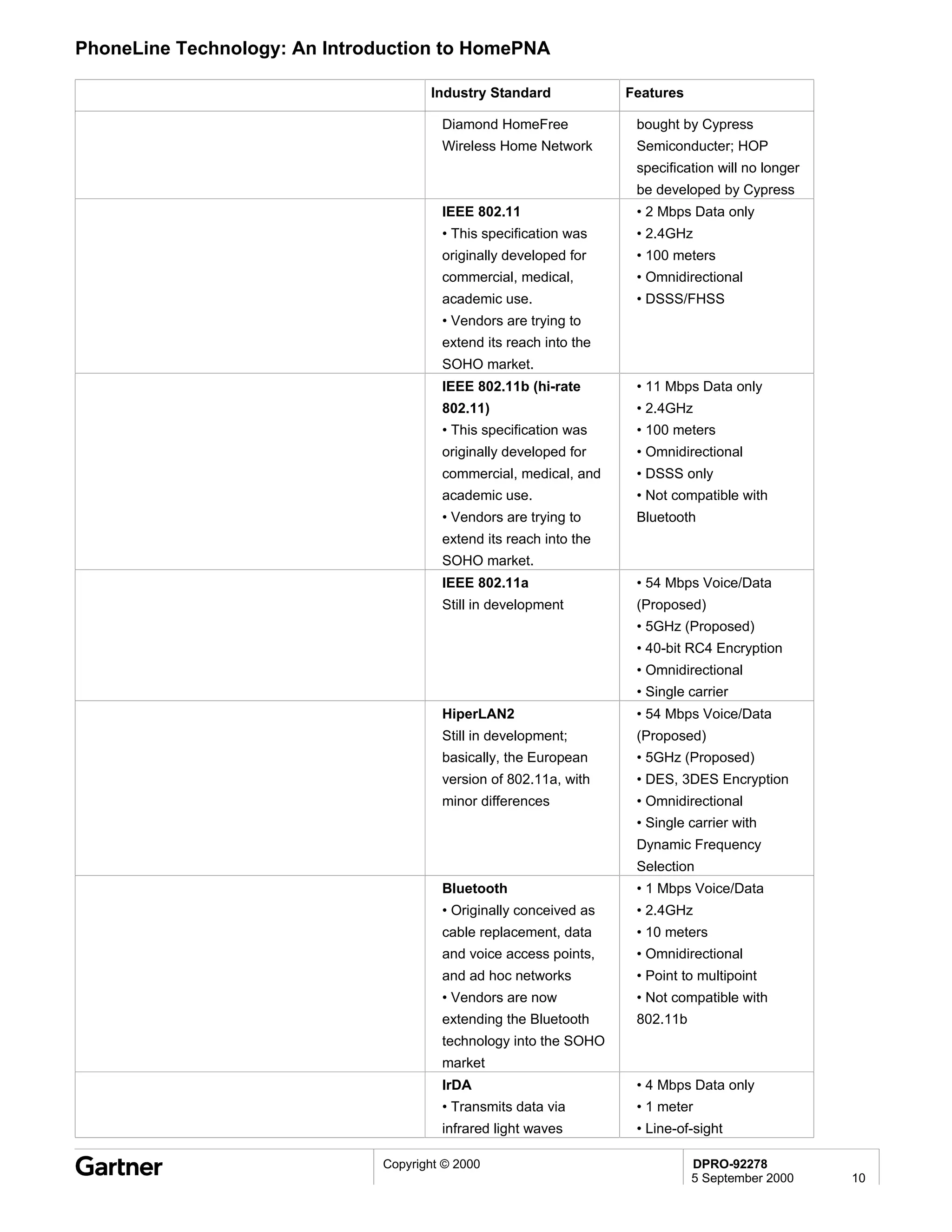
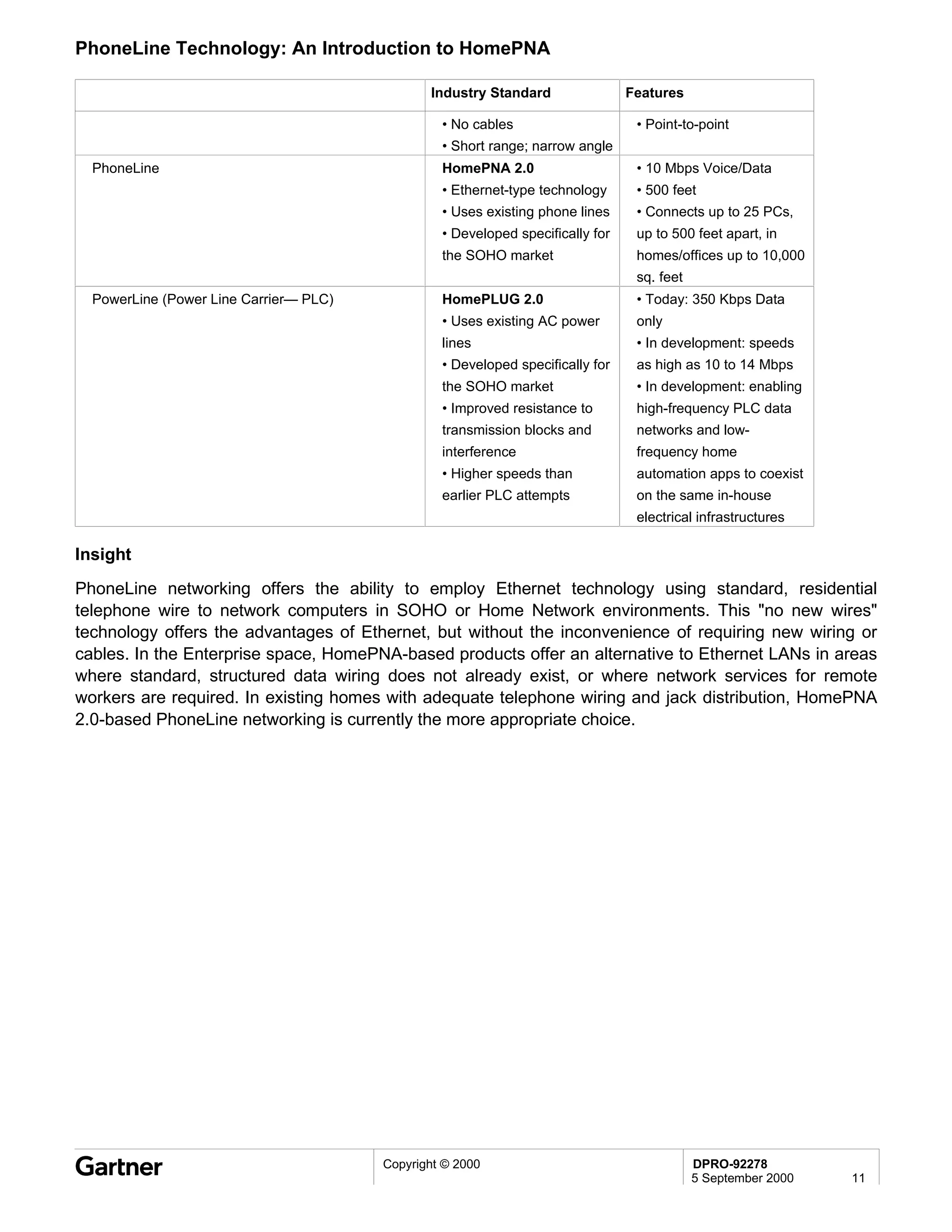
Bluetooth Wireless Technology: An Introduction


Summary
Named after the 10th century Danish King Harald, Bluetooth is the English translation of his last name
"Blatand." Just as King Harald was famous for uniting the kingdoms of Denmark and Norway and for his
extensive travels, Bluetooth technology unites separate entities (peripherals, laptops, PDAs, palmtops,
cell phones) and simplifies life for people on the move. This wireless, low-cost radio solution enables
small devices to communicate between each other and to the Internet and can also be extended to the
desktop so that printers or scanners can communicate with PCs at short range without wires. The concept
has been termed Personal-Area Network or PAN. Bluetooth operates in the 2.4GHz radio frequency
band, offers 721Kb data rates, and has a range of 10 meters.

Table of Contents
               Technology Basics
               Bluetooth: How It Works
               Technology Analysis
               Business Use
               Benefits and Risks
               Standards
               Technology Leaders
               Technology Alternatives
               Insight

List Of Figures
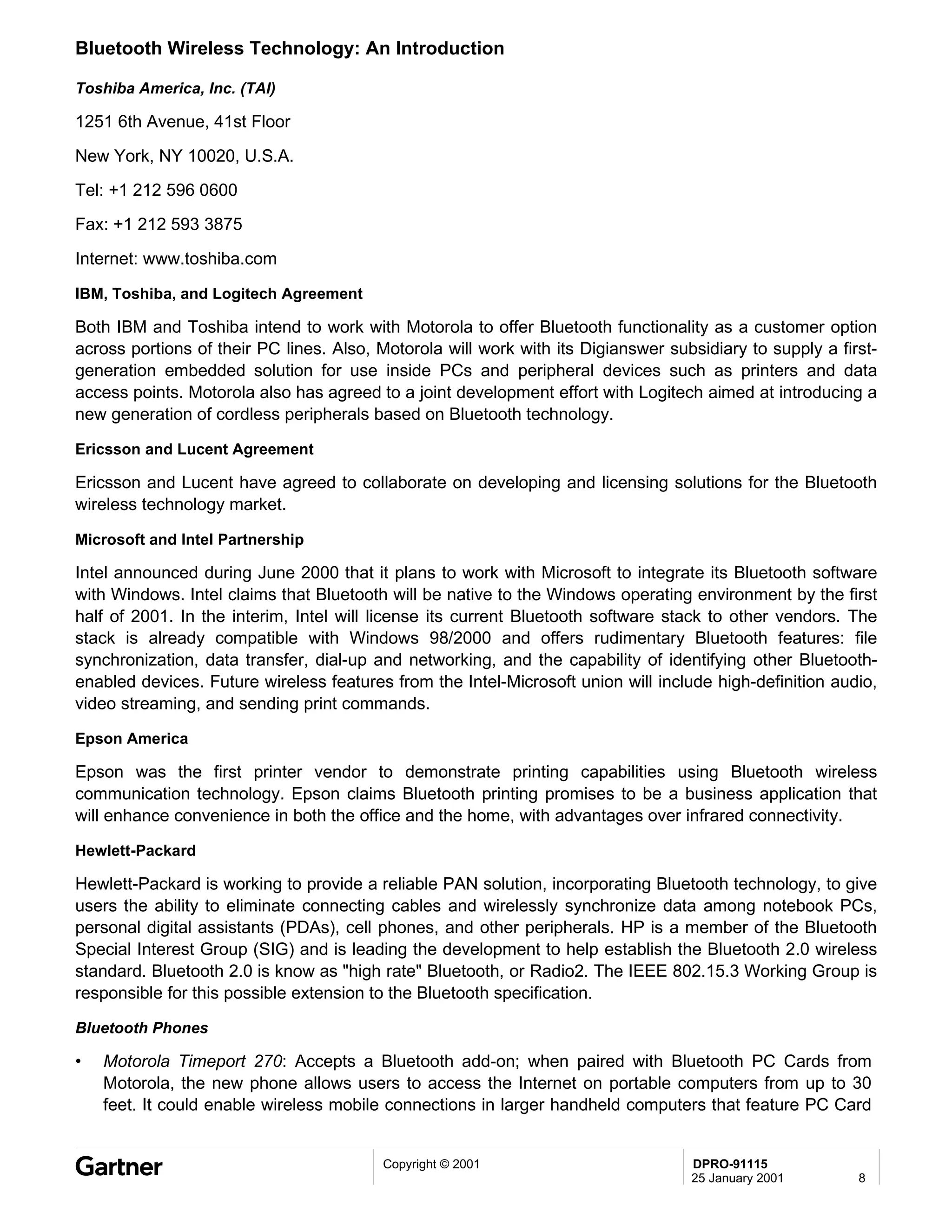
               Figure 1: IEEE 802.15 Bluetooth WPAN


Entire contents © 2001 by Gartner Group, Inc. All rights reserved. Reproduction of this publication in any form without prior written permission is forbidden. The information contained herein has been obtained from sources believed
to be reliable. Gartner disclaims all warranties as to the accuracy, completeness or adequacy of such information. Gartner shall have no liability for errors, omissions or inadequacies in the information contained herein or for
interpretations thereof. The reader assumes sole responsibility for the selection of these materials to achieve its intended results. The opinions expressed herein are subject to change without notice.
Bluetooth Wireless Technology: An Introduction


Technology Basics

Introduction

The use of mobile computing gadgets is growing exponentially— according to Gartner's Dataquest,
annual shipments of mobile phones and handheld computers will reach 900 million within five years.
However, most users are aggravated by the difficulties they endure when attempting to have their mobile
equipment exchange information: schedules, phone numbers, files, and information with other people's
equipment. Besides resolving these issues, Bluetooth-enabled PCs and laptops will be capable of cable-
free connectivity to peripherals, such as on-the-fly cable-free printing and wireless headsets for cell
phones.
Bluetooth: How It Works
Bluetooth wireless technology is a specification designed to enable wireless communication between
small, mobile devices. The original idea behind the technology was to eliminate the need for proprietary
cables, which are currently required to enable device connectivity. A typical example would be connecting
a digital camera to a PC without cables. Expanding that idea to include all handheld mobile electronic
devices is what Bluetooth is all about.

Bluetooth Lineage

Although the Bluetooth specification contains many unique features, it has borrowed heavily from several
existing wireless standards. These include Motorola's Piano, IrDA, IEEE 802.11, and Digital Enhanced
Cordless Telecommunications (DECT).
•   Motorola's Piano was developed with the concept of forming ad hoc "Personal-Area Networks," which
    was adopted by the Bluetooth SIG to expand the capabilities of the original Bluetooth concept beyond
    simple cable replacement.
•   Bluetooth voice data transmission capabilities are derived from the DECT specification.
•   Object exchange capabilities are derived from the IrDA specifications.
•   Bluetooth inherits the 2.4GHz ISM band, frequency-hopping spread spectrum (FHSS), authentication,
    privacy, power management, and LAN capabilities from the IEEE 802.11 specification.

Bluetooth Wireless Components

There are four major components in any Bluetooth wireless technology system: a radio unit, a baseband
unit, a software stack, and application software.
The radio unit is the actual radio transceiver that enables the wireless link between Bluetooth devices.
Bluetooth currently can have a maximum of 1 milliwatt (mw) of transmitter power, which allows operation
over distances of up to 10 meters; however, the Bluetooth specification permits increasing transmitter
power up to 10 mw in the future.
The baseband unit is hardware, consisting of flash memory and a CPU, which interfaces with the radio
unit and the host device electronics at the hardware level. The baseband hardware provides all required
functionality to establish and maintain a Bluetooth wireless connection between devices. Another name
for the Bluetooth baseband is "Link Control Unit." The baseband protocol supports both circuit-switched
and packet-switched communications using frequency-hopping spread-spectrum (FHSS) technology.
Bluetooth FHSS operates from 2.402GHz to 2.480GHz, dividing this frequency range into 79 1MHz

                                         Copyright © 2001                        DPRO-91115
                                                                                 25 January 2001      2
Bluetooth Wireless Technology: An Introduction

subchannels and hopping from channel to channel at a rate of 1,600 hops per second. Transmitting and
receiving devices must synchronize on the same hop sequence to communicate.
Compared with other wireless technologies that operate in the ISM frequency band, Bluetooth uses
shorter data packets and a higher hop rate. This makes Bluetooth devices more immune to interference
from microwave ovens and other sources of radio frequency (FR) energy, and limits interference between
users. Another advantage of FHSS is that it gives users the flexibility of roaming between access devices
in different physical areas.
Bluetooth wireless devices can link to a wired network, such as a corporate Ethernet LAN, through an
"access point," which includes a Bluetooth transceiver and baseband controller, the circuitry to convert
information from the Blue Bluetooth format to Ethernet format, and interface circuitry to connect the
access point to the wired network through a cable. As long as users remain in range of an access device,
they can roam about and still use the wired network resources.
Communications between Bluetooth devices are normally peer to peer, with each device being equal.
However, when two or more devices link into a small ad hoc network called a piconet, one device acts as
the master, and the others are slaves for the duration of the piconet connection. All devices in the piconet
are synchronized to the master’s clock and hopping sequence. The Bluetooth specification supports up to
10 piconets in a coverage area, with up to eight devices per piconet. Initially, Bluetooth networks are likely
to be limited to two piconets because of software restrictions. Each piconet is identified by a different
frequency-hopping scheme.
•   Bluetooth Piconet example: several individuals with Bluetooth-enabled portable computers share a
    database in a meeting. With automatic synchronization enabled, everyone in the meeting can see
    any changes made in the shared database on his or her own computer.
•   Bluetooth Scatternet: Bluetooth supports point-to-point and point-to-multipoint connections;
    piconets can be linked together into scatternets. A scatternet consists of two or more piconets linked
    together by one device in each piconet acting as a bridge between the piconets.

Security

The Bluetooth specification defines three security modes: nonsecure, service-level security, and link-level
security. The device does not initiate any kind of security procedure in the nonsecure mode. Service-level
security offers more flexibility in application access. In the link-level security mode, the device sets up
security procedures before the link setup is completed; this allows knowledge of "who" is at the other end
of the link and provides authentication, authorization, and encryption services. In spite of these three
security modes, current Bluetooth qualification processes do not yet enforce effective security
implementation, which opens up end users to security risks.

Bluetooth Products: Finally Here

Since its announcement in 1998, Bluetooth has been the subject of marketing histrionics and hype:
wireless headsets, "Smart Cars," wireless Web surfing with Bluetooth-enabled cell phones and Bluetooth-
enabled laptops or handhelds, and inexpensive wireless computer networking are just a few of the uses
Bluetooth vendors have claimed will be available through this still emerging technology.
Unfortunately, Bluetooth products, other than components and chips, have primarily been the province of
vaporware; however, a small group of Bluetooth-based products are finally becoming available, with many
more products expected in the immediate future. Bluetooth-enabled PC Cards from 3Com, IBM, and
Toshiba; headsets from Ericsson and GN Netcom; and phones from Motorola and Ericsson are among
the first Bluetooth products that are currently hitting the market.
                                          Copyright © 2001                          DPRO-91115
                                                                                    25 January 2001        3
Bluetooth Wireless Technology: An Introduction

There are several reasons Bluetooth-enabled products have been slow to reach the market: expensive
pricing, an extremely rigorous qualification process, insufficient amounts of Bluetooth chips and testing
equipment. In addition, there are still software and security issues and a lack of interoperability testing.
However, testing equipment and chips are now more readily available, and pricing for the chips has
started to drop, which is key to the widespread deployment of Bluetooth-enabled products. Until recently,
Bluetooth chips were averaging US$35; prices are currently averaging closer to US$25 and are expected
to drop to US$12 by the fourth quarter of 2001. However, for Bluetooth connectivity products to truly
become ubiquitous, pricing for the chips will need to drop even further. When Bluetooth chips drop to the
US$1 level, Bluetooth can replace cables for battery-operated devices.
Technology Analysis
Business Use
•   Create wireless PANs (WPANs).
•   Wirelessly share presentations, files, or contacts between laptops.
•   Synchronize contact information contained on a phone with the contact information on a PDA,
    notebook, and desktop wirelessly.
•   Automatically synchronize notebooks and desktops when users walk into a room.

•   Send pages of information to a Bluetooth-enabled printer without the use of cables.
•   Replace the cabling now used to connect a handheld device to a PC.
•   Have wireless headsets that allow users to leave their mobile phones in their briefcases and make
    hands-free, wire-free phone calls.
•   Enable notebooks or PDAs to automatically access the Internet through the nearest Bluetooth-
    enabled device.
Benefits and Risks

Benefits

•   It replaces cables within Wireless PANs (PCs, laptops, printers, etc.).
•   It provides on-the-fly printing (aim a Bluetooth-enabled laptop or handheld device at any Bluetooth-
    enabled printer; no cables or drivers are required).
•   Users do not want to employ a single, not-so-great product that purports to do everything; using
    different best-of-class products geared to the individual situations and needs, and having those best
    of class products work seamlessly, is preferable. Bluetooth offers this possibility.
•   Point-to-multipoint capability will allow users to "roam" while performing various applications without
    worrying about line of sight or distance.
Risks

•   Information could by intercepted by other devices.
•   There is the possibility of interference in highly congested areas.
•   Interoperability issues will have to be resolved before wide acceptance.


                                          Copyright © 2001                        DPRO-91115
                                                                                  25 January 2001        4
Bluetooth Wireless Technology: An Introduction

Standards

The Bluetooth SIG

www.bluetooth.com
The Bluetooth SIG was formed to promote Bluetooth technology. Formed in 1998, the Bluetooth SIG has
created a network of Bluetooth component vendors to supply equipment manufacturers, from antenna
suppliers to coaxial cable vendors. Ericsson, Intel, Microsoft, IBM, and Toshiba were the original
developers of the Bluetooth technology and Bluetooth special interest group (SIG); currently, there are
nine promoter companies of the SIG— 3Com, Ericsson, IBM, Intel, Lucent, Microsoft, Motorola, Nokia,
and Toshiba. There are also currently just over 2,000 member companies that are developing Bluetooth
products.
The original Bluetooth 1.0 specification was announced in July 1999. The current Bluetooth spec is now
1.0B. Ratified in May 2000, it had interoperability problems, forcing Bluetooth developers back to the
drawing board. A new version, 1.1, is expected to be approved in the immediate future. The upcoming 1.1
specification is expected to be the new standard for gauging interoperability. Next on the drawing board is
the possible extension of the Bluetooth specification to the Radio2, or High Rate (HR) Bluetooth
specification. Rates somewhere between 2 and 12 Mbps, or possibly higher, are being considered by the
IEEE 802.15.3 Working Group.

The IEEE and the IEEE 802.15 WG for WPANs (Bluetooth)

http://grouper.ieee.org/groups/802/15/
The Institute of Electrical and Electronics Engineers (IEEE), in existence since 1884, helps advance
global prosperity by promoting the engineering process of creating, developing, integrating, sharing, and
applying knowledge about electrical and information technologies and sciences for the benefit of humanity
and the profession. The IEEE Working Group for WPANs (Bluetooth) is the IEEE 802.15 WG.
The IEEE 802.15.1 Task Group 1 is licensed to create a derivative work from the Bluetooth Specification
v1.x and convert it to IEEE Format.
•   802.15.1 (Standard)
    •   Bluetooth derivative that is a formalization of the original spec

•   802.15.2 (Recommended Practice)
    •   Coexistence MAC and PHY Modeling
•   802.15.3 (Standard)
    •   WPAN-HR, High Rate >20 Mbps
•   802.15.4 (Standard)
    •   WPAN-LR, Low Rate 2 Kbps to 200 Kbps

Figure 1: IEEE 802.15 Bluetooth WPAN


                                           Copyright © 2001                       DPRO-91115
                                                                                  25 January 2001       5
Bluetooth Wireless Technology: An Introduction


Source: IEEE 802.15.1 WG for WPANs.

Technology Leaders

3Com

5400 Bayfront Plaza
Santa Clara, CA 95052, U.S.A.

Tel: +1 408 326 5000
Fax: +1 408 326 5001
Internet: www.3com.com

Ericsson Microelectronics

Telefonaktiebolaget LM Ericsson
Telefonplan
S-126 25 Stockholm, Sweden
Tel: +46 8 719 00 00
Internet: www.ericsson.com

IBM (International Business Machines Corporation)

New Orchard Road
Armonk, NY 10504, U.S.A.

Tel: +1 914 499 1900


                                       Copyright © 2001   DPRO-91115
                                                          25 January 2001   6
Bluetooth Wireless Technology: An Introduction

Fax: +1 914 765 7382

Internet: www.ibm.com

Intel Corporation (Santa Clara No. 4)

2625 Walsh Avenue

Santa Clara, CA 95052-8119, U.S.A.
Tel: +1 408 765 8080
Fax: +1 408 765 9904

Internet: www.intel.com

Lucent Technologies, Inc.

600 Mountain Avenue
Murray Hill, NJ 07974, U.S.A.
Tel: +1 908 582 8500
Internet: www.lucent.com

Microsoft Corporation

One Microsoft Way
Redmond, WA 98052, U.S.A.

Tel: +1 425 882 8080
Fax: +1 425 936 7329
Internet: www.microsoft.com

Motorola, Inc.

1303 East Algonquin Road
Schaumburg, IL 60196, U.S.A.

Tel: +1 847 576 5000
Internet: www.motorola.com

Nokia Corporation

Keilalahdentie 4
PO Box 226
FIN-00045 Espoo, Finland
Tel: +358 9 180 71
Fax: +358 9 652 409
Internet: www.nokia.com

                                        Copyright © 2001   DPRO-91115
                                                           25 January 2001   7
Bluetooth Wireless Technology: An Introduction

Toshiba America, Inc. (TAI)

1251 6th Avenue, 41st Floor

New York, NY 10020, U.S.A.
Tel: +1 212 596 0600
Fax: +1 212 593 3875

Internet: www.toshiba.com

IBM, Toshiba, and Logitech Agreement

Both IBM and Toshiba intend to work with Motorola to offer Bluetooth functionality as a customer option
across portions of their PC lines. Also, Motorola will work with its Digianswer subsidiary to supply a first-
generation embedded solution for use inside PCs and peripheral devices such as printers and data
access points. Motorola also has agreed to a joint development effort with Logitech aimed at introducing a
new generation of cordless peripherals based on Bluetooth technology.

Ericsson and Lucent Agreement

Ericsson and Lucent have agreed to collaborate on developing and licensing solutions for the Bluetooth
wireless technology market.

Microsoft and Intel Partnership

Intel announced during June 2000 that it plans to work with Microsoft to integrate its Bluetooth software
with Windows. Intel claims that Bluetooth will be native to the Windows operating environment by the first
half of 2001. In the interim, Intel will license its current Bluetooth software stack to other vendors. The
stack is already compatible with Windows 98/2000 and offers rudimentary Bluetooth features: file
synchronization, data transfer, dial-up and networking, and the capability of identifying other Bluetooth-
enabled devices. Future wireless features from the Intel-Microsoft union will include high-definition audio,
video streaming, and sending print commands.

Epson America

Epson was the first printer vendor to demonstrate printing capabilities using Bluetooth wireless
communication technology. Epson claims Bluetooth printing promises to be a business application that
will enhance convenience in both the office and the home, with advantages over infrared connectivity.

Hewlett-Packard

Hewlett-Packard is working to provide a reliable PAN solution, incorporating Bluetooth technology, to give
users the ability to eliminate connecting cables and wirelessly synchronize data among notebook PCs,
personal digital assistants (PDAs), cell phones, and other peripherals. HP is a member of the Bluetooth
Special Interest Group (SIG) and is leading the development to help establish the Bluetooth 2.0 wireless
standard. Bluetooth 2.0 is know as "high rate" Bluetooth, or Radio2. The IEEE 802.15.3 Working Group is
responsible for this possible extension to the Bluetooth specification.

Bluetooth Phones

•   Motorola Timeport 270: Accepts a Bluetooth add-on; when paired with Bluetooth PC Cards from
    Motorola, the new phone allows users to access the Internet on portable computers from up to 30
    feet. It could enable wireless mobile connections in larger handheld computers that feature PC Card


                                         Copyright © 2001                          DPRO-91115
                                                                                   25 January 2001        8
Bluetooth Wireless Technology: An Introduction

    slots. In addition, the Motorola phone could be paired with Compaq Computer Corp.’s Pocket PC-
    based iPaq and its PC Card expansion jacket. Availability: 1H01.
•   Ericsson R520m: The R520m is a triple-band mobile phone featuring WAP, GPRS, high-speed data,
    and Bluetooth wireless technology. It is expected to ship in volume in the first quarter of 2001.

Bluetooth Headsets

Bluetooth headsets connect to mobile phones by a radio link instead of a cable. The phone can be up to
10 meters (30 feet) away, in briefcases, coat pockets, or in other rooms.
•   GN Netcom's GN 9000 Bluetooth Headset requires Bluetooth host devices to operate (GN Netcom
    base station, Bluetooth card, or PDA) at a range of up to 30 feet. The GN Netcom 9000 began
    shipping during October 2000.
•   Ericsson's Bluetooth Headset has a built-in Bluetooth radio chip that acts as a connector between the
    headset and the Bluetooth plug on the Ericsson phone. When the phone rings, the user can answer
    by pressing a key on the headset. The Global launch was in December 2000, except for the U.S.,
    where it is expected to launch by the end of January 2001. This is the first consumer product from
    Ericsson that utilizes Bluetooth.

Bluetooth PC Cards

•   3Com Bluetooth PC Card: the antenna pops in and out for better wear. 3Com OEMs its Bluetooth PC
    Card to Hewlett-Packard. In addition to the PC Card, 3Com has also announced a Bluetooth Access
    Point and USB adapter; the access point could be used in offices, airports, or other networked public
    places. Many users could get wireless access to networks through a single Access Point; the Access
    Point increases Bluetooth's range from 10 meters to 100 meters. Delivery is expected in the first half
    of 2001 for all three products.
•   IBM Bluetooth PC Card: currently shipping as of 29 December 2000.
•   Toshiba Bluetooth PC Card: currently shipping in the U.S. since mid-September and in Japan since
    August 2000.

Upcoming: Bluetooth Printing

•   Epson expects to be able to use a full line of its printers already on the market in conjunction with its
    Epson Bluetooth Print Adapter; the adapter is expected to be available by the end of the first quarter
    of 2001.
•   Lexmark and Axis Communications recently demonstrated a wireless printing solution using a
    Toshiba laptop computer equipped with a Toshiba Bluetooth PC Card and a Lexmark laser printer
    equipped with an Axis Bluetooth print device.
•   Xerox and Compaq held a joint demonstration of wireless printing at Comdex 2000; the
    demonstration linked a Compaq Armada notebook computer with a Xerox DocuPrint P1210 personal
    laser printer using a Bluetooth PC-Card that communicates with the printer's parallel port. Xerox
    expects its first Bluetooth-enabled products within the next 12-18 months.

Bluetooth and Section 508 of the Americans with Disabilities Act

Bluetooth technology may soon enable workplaces to make document devices, such as printers,
accessible to disabled workers. Section 508 of the Americans With Disabilities Act, issued 7 August 2000,
requires all U.S. government offices to make information technology accessible to all employees.

                                          Copyright © 2001                          DPRO-91115
                                                                                    25 January 2001        9
Bluetooth Wireless Technology: An Introduction

According to Xerox, the long list of necessary modifications could prohibitively increase the cost of the
devices; however, Bluetooth adapters could be added to the devices, which could be controlled by using a
wide variety of user interfaces designed to compensate for specific disabilities.
Technology Alternatives
All of the technologies below are often mentioned as wireless alternatives to Bluetooth. However,
Bluetooth was initially developed specifically for use as a Wireless PAN; its key use will largely be as a
cable replacement for WPANs and pervasive computing.

IrDA

•   IrDA requires line of sight and is limited to point-to-point communication; Bluetooth offers point to
    multipoint, and line of sight is not necessary.
•   IrDA is already built into many notebook PCs, printers, and some cell phones, but has a poor user
    interface and is unable to penetrate walls; Bluetooth can penetrate walls.

HomeRF

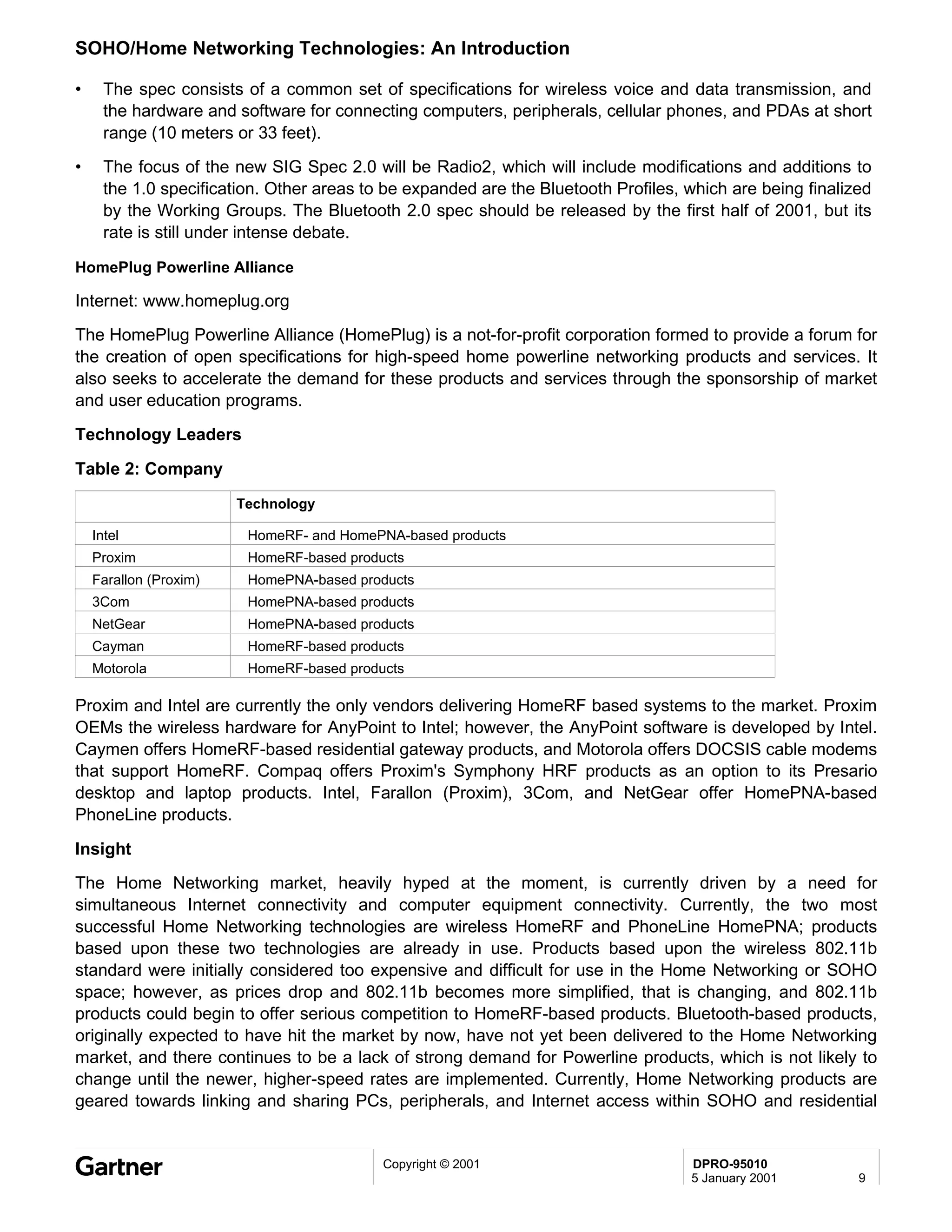
•   HomeRF is intended for longer-range links to 2 Mbps and is geared towards a home-LAN approach,
    linking PCs; DSL routers; or printers, refrigerators, TVs, and other "smart" appliances to PCs.
•   HomeRF is specifically geared towards the SOHO market. Bluetooth is geared more towards a
    business environment, such as a personal area network (PAN), and shorter ranges; however, its
    makers claim that Bluetooth could also be extended for use within the SOHO market.

802.11b

•   802.11 connections can range in transmission rates from 2 Mbps to 11 Mbps and at distances from
    50 to several hundred feet. Bluetooth requires less power and is meant for transmitting small
    amounts of data at 1 Mbps over short distances (up to 10 meters). The Bluetooth spec has a higher
    power option that gives it about the same range as 802.11, although that is not expected to be the
    primary usage of the technology.
•   Bluetooth provides persistent, wireless connections between different kinds of devices, but it uses the
    2.4GHz radio frequency, the same used by wireless LANs based on the 802.11 standard. When a
    Bluetooth connection collides with a wireless LAN connection, either or both connections can jam,
    resulting in a transmission error.
Insight
The key application for Bluetooth technology in the foreseeable future is cable replacement and Wireless
Personal-Area Networks (PANs). However, in order for Bluetooth to truly become ubiquitous,
manufacturers need to start delivering more products to the marketplace, the pricing for the chips must
become substantially less expensive, the software must be improved, and there must be more
interoperability and interference testing. However, Bluetooth is still an emerging technology, and
eventually these issues will be resolved. When that happens, the number of Bluetooth-enabled products
will grow exponentially.


                                         Copyright © 2001                         DPRO-91115
                                                                                  25 January 2001       10
DPRO-91113                                                                                      Technology Overview
                                                                                        Serena Lambiase                                                                                         8 March 2001


Web-to-Host Software: An Introduction


Summary
Web-to-host software uses Internet browser technology to allow large numbers of users access to
information contained within corporate mainframes and promises to strengthen a company’s e-business
strategy by shortening time-to-market. Until recently, most mainframe usage was accessed with fat-client
terminal emulation connectivity and provided only the proverbial "green screen" interface. The lengthy
learning and training curve, software maintenance and user management resulted in steep costs. Web-to-
host software changes this scenario— it offers the alluring promise of cutting costs and gaining a
competitive edge. Expensive fat-client connectivity is replaced with a user-friendly GUI, centralized
access management, faster responsiveness to business requirements and increased user productivity.

Table of Contents
               Technology Basics
               Web-to-Host Components
               Technology Analysis
               Business Use
               Benefits and Risks
               Standards
               Price vs. Performance
               Selection Guidelines
               Technology Leaders
               Technology Alternatives
               Insight

List Of Tables
               Table 1: Features and Functions: Web-to-Host Software Products
               Table 2: Features and Functions: Web-to-Host Software Products
               Table 3: PC-to-Host-Connectivity


Entire contents © 2001 by Gartner Group, Inc. All rights reserved. Reproduction of this publication in any form without prior written permission is forbidden. The information contained herein has been obtained from sources believed
to be reliable. Gartner disclaims all warranties as to the accuracy, completeness or adequacy of such information. Gartner shall have no liability for errors, omissions or inadequacies in the information contained herein or for
interpretations thereof. The reader assumes sole responsibility for the selection of these materials to achieve its intended results. The opinions expressed herein are subject to change without notice.
Web-to-Host Software: An Introduction


Technology Basics

Introduction

Despite the rise of client/server and network computing, along with Windows NT Server, most mission-
critical data still resides on corporate mainframes and midrange computers. A few years ago, industry
pundits predicted the demise of corporate mainframes; instead, "Big Iron" sales have actually increased.
Why? One reason is the explosive growth of Internet technologies and the promise of e-business. Serving
extranet and Internet clients and a growing mobile work force with host data is potentially the foundation
for an enterprise’s World Wide Web presence.

What Is Web-to-Host?

Web-to-host is connectivity software that enables secure browser-based access to information that
resides on mainframes and other host computer systems. Web-to-host software is designed to turn any
Java-enabled Web browser into a secure workstation. Mainframe and other host applications can be
enabled for Web-to-host access without changing source code. The user accesses commercial
information by using a Web browser. The browser communicates on the Internet by using the Hypertext
Transfer Protocol (HTTP). Access to proprietary host applications is achieved by using Java applets
embedded within the HTTP code, which are automatically downloaded to the browser client. Some of the
more important features touted by most Web-to-host vendors include centralized access management,
faster time-to-market for custom e-business applications, improved user productivity and reduced costs.

Web-to-Host Components
Java Applets and ActiveX Controls: Web-to-host products employ Java applets or ActiveX controls—
miniprograms designed to be executed from within a Web browser— which either the emulation server
has to download for three-tier architectures or for two-tier architectures, the Web Server has to download
if the Web browser is to talk to the host. The larger the size of the applet or control, the longer the
download takes; applets can be locally stored or cached to eliminate future downloading for products and
can be downloaded to either the browser or hard drive. The majority of Web-to-host vendors use only
Java applets; however, some offer a choice of either Java applets or ActiveX controls.
•   Java: Java applets are inherently safer than ActiveX controls— unlike ActiveX, Java applets do not
    make changes to the system configuration and cannot touch the hard disk or Registry; this makes
    them more secure. Java applets have a smaller footprint than ActiveX, which can mean a shorter-
    download time; this is especially important for remote access users. They are also cross-platform
    compatible; this is important for enterprises that have a heterogeneous mix of platforms to support.
    Java-enabled Web-to-host products are a good choice for enterprises that employ cross-platform
    interactive Web sites.
•   ActiveX: ActiveX controls have full access to the Windows operating system and can be written to
    any file on the hard drive, not just within the Web browser. This gives them more robust functionality
    than Java applets, but can make them less secure. Also, ActiveX controls are currently limited to
    Windows environments, as opposed to Java applets, which can be written to run on all platforms.
    ActiveX-enabled Web-to-host products are a good choice for Enterprises that are Windows-centric or
    maintain Web sites that are highly interactive and application laden.
Architecture: Web-to-Host vendors take either a two-tier or a three-tier approach. With two tiers (client-
host), the applet communicates directly with the gateway in front of the host. With three tiers (additional
server), all traffic passes through, or via, the emulation server. In the two-tier model, there is no chance of

                                          Copyright © 2001                           DPRO-91113
                                                                                     8 March 2001           2
Web-to-Host Software: An Introduction

the emulation server acting as a bottleneck, since traffic does not travel through it— therefore, two-tier
architecture can be a good choice in situations that require quicker runtime for remote users. In the three-
tier scheme, the emulation server could slow things down; however, three-tier provides better scalability.
Impact of Architecture on Security: One thing often overlooked when discussing security issues is the
impact of the architecture (two-tier versus three-tier) on security. Two-tier solutions send the entire host
data stream to the client— even if the client runs some customization which masks the display of sensitive
data, the data still resides in memory on the client, which could create a security exposure. However, if
the customers are using their own Web-to-host software for trusted users to remote sites, the quicker
runtime the customer receives from the two-tier, direct-connect model might be the better choice.
Security and Encryption: Web-to-host software exposes the mainframe to the rest of the world, so
security is extremely important. All Web-to-host vendors offer elementary password authentication
features, and most offer SSL encryption to protect legacy data passing through the network (RUMBA
2000 being the exception). Since there is sometimes a performance penalty to encryption and decryption,
it is best to offer a variety of methods and strengths. Sensitive data can use the highest level of
encryption, and more public information can be passed along with less encryption.
Web-to-Host Security Methods: A detailed discussion of the security methods employed by Web-to-host
vendors and how they work is beyond the scope of this introductory report. The following list contains a
brief discussion of security methods for Web-to-host software.
•   RACF, ACF and TopSecret are legacy security methods and still command the lion's share of the
    high-end security market. Resource Access Control Facility (RACF) was developed 21 years ago by
    IBM and lends itself well to the distributed environment; ACF and TopSecret were developed by
    Computer Associates. Virtually all Web-to-host products support RACF, ACF and TopSecret.
•   Secure Socket Layer (SSL) is the de facto standard for Web-to-host security. Transport Layer
    Security (TLS) extends SSL v3 slightly and incorporates it into the Internet's open standards process;
    WRQ is currently the only vendor deploying TLS. SSL works by using a private key to encrypt data
    that is transferred over the SSL connection. Web pages that require an SSL connection start with
    https: instead of http:. Currently, all Web-to-host vendors that employ SSL use server-side
    authentication, but more recently, some have started to add SSL client-slide authentication for further
    security.
•   Public Key Infrastructure (PKI): a system of digital certificates, Certificate Authorities and other
    registration authorities that verify and authenticate the validity of each party involved in an Internet
    transaction.
•   Digital/x.509 Certificates: A digital certificate is an attachment to an electronic message used for
    security purposes; the most widely used standard for digital certificates is X.509.
•   Lightweight Directory Access Protocol (LDAP): In addition to its strong directory capabilities,
    LDAP is increasingly being used by Web-to-host vendors to obtain e-mail addresses and Public
    Keys, thereby strengthening security.
•   Virtual Private Network (VPN): These systems use encryption and other security mechanisms to
    ensure that only authorized users can access the network and that the data cannot be intercepted.
    Some Web-to-host vendors have started to add VPN support to their software.
•   Proxy Servers: For increased security, some Web-to-host venders use proxy servers to sit between
    the Web browser and server, in order to filter requests.


                                         Copyright © 2001                          DPRO-91113
                                                                                   8 March 2001           3
Web-to-Host Software: An Introduction

Gateways: With Web-to-host software, an SNA gateway strips off the IP encapsulation at the host end.
Some vendors package this component with their software; others say their products are designed to talk
to third-party gateways, specifically, the SNA Gateway from Microsoft or NetWare for SAA from Novell.
Management Support
•   LDAP: Directories based on LDAP will eventually play a large role in the deployment and
    management of remote clients. Several Web-to-host vendors have started to support LDAP for their
    products, because of its strong group and user-management features.
•   Browser-Based Management: Most of the major Web-to-host vendors offer browser-based
    management capabilities; it gives administrators the greatest flexibility in managing, configuring and
    deploying clients, without having to physically manage from one centralized server. This feature
    alone is often enough to justify moving to Web-to-host technology for many companies, because of
    the cost-savings that central management brings.
Application Server Compatibility: Compatibility with Web application servers (i.e., Netdynamics from
Sun and Kiva Enterprise Server from Netscape) can effect the overall response time by reducing the
number of times a client has to go to the host to access legacy data by caching data locally. Most of the
major Web-to-host vendors support Web application servers.
Application Development and GUI Screen Rejuvenation: Prospective Web-to-host customers should
query the vendor about the inclusion of HACL, and whether such features as open APIs and VB Script
and Jscript are supported for customization of applications. Also, most Web-to-host vendors support a
feature that allows the "green screen" to be automatically changed to a more user-friendly, GUI-like
screen; this is referred to as an "on-the-fly" GUI. Vendors offer varying degrees of support for this feature,
and a minority does not yet offer it at all.
Printing Support: The majority of Web-to-host vendors support the capability to print host-based screens
to a local printer and copy-and-paste features. However, due to the inherent weakness of Java for printing
support, the printing features for Web-to-host products that employ Java applets are not as robust as the
printing features available with fat-client computing. For instance, Java does not support graphics
printing— ActiveX and fat-client PC emulators do. IBM HOD and Persoft Persona 4.3 are currently the
only Web-to-host products that offer improved printing solutions, including PDF capability.
Platform Support: Since Java is supposed to be cross-platform, technically any Java-enabled Web-to-
host product could be considered platform independent. Indeed, that is what most Web-to-host vendors
claim. If that is the case, why do we see a detailed list of platforms listed for some vendors, while other
vendors simply claim their software will work on any Java-enabled machine?
It is not enough for Web-to-host vendors to claim that since their software is Java-enabled, the Web-to-
host software will work on any Java-enabled machine running in a standard browser. Despite the hype,
the "write once, run anywhere" promise of Java has not yet fully materialized. There are minor differences
between the different JVM, some of which can affect product function or performance or both. When a
user is evaluating a particular vendor's Web-to-host software for an environment that is fairly
heterogeneous, the user should question the vendor as to whether the Web-to-host software has been
previously tested with the user's various platforms and whether the vendor will guarantee that its Web-to-
host software will work with those platforms.
Emulation Support: Terminal emulation drivers enable PCs to emulate a particular type of terminal so
that users can logon to a mainframe. All of the Web-to-host products in this class include emulation
support for mainframe, AS/400 and VT (DEC) emulations; however, some offer a very limited number of

                                          Copyright © 2001                          DPRO-91113
                                                                                    8 March 2001           4
Web-to-Host Software: An Introduction

VT emulation levels. Other emulations supported by some, but not all, are for HP, CICS, Linux and WYSE
50/60.
Technology Analysis

Business Use
•   Corporate intranets/extranets: host access for employees, business partners and remote workers
    or sales forces.
•   Custom e-business Applications: custom applications for e-business can be quickly deployed
    without changing code.
•   Wireless Web-to-Host: some vendors are designing Web-to-host products for use on personal
    digital assistants (PDAs) and mobile phones to enable business transactions. These Java-based
    products connect mobile wireless users and business partners to a host.
•   Financial Industry: Web-to-host vendors claim users can securely access account information,
    investment performance and execute trades from their Web browser.
•   Colleges/Universities: students can access grades, registration, admissions, etc; this enables
    schools to reduce overhead and improve service.
•   Manufacturing: browser-based access to host information lowers operational costs, expands profit
    margins and fulfills customer's needs. Companies can quickly match buyers with sellers.
Benefits and Risks
Risks
•   GUI front-ends are not always an improvement over "green screen" interfaces, particularly for
    massive data entry or complex application navigation. Switching over entirely to Web-to-host
    technology in this instance could pose the risk of slowing down production. These types of
    enterprises may want to incorporate Web-to-host technology for their remote users and casual users,
    along-side their standard PC-to-host and fat-client technologies.
•   In spite of the many obvious benefits that come with Web-to-host technology, there are security risks
    to consider when providing access to legacy applications to business partners, suppliers, customers
    and employees. Some users may need to support both Web-to-host and PC-to-host concurrently;
    however, as the security methods used for Web-to-host continue to evolve and improve, this will
    eventually change.

Benefits

•   The time and expense required to train employees and business partners on traditional terminal
    screens is eliminated with the more user-friendly GUI that most people are already familiar with; costs
    are lowered even further with the central administration of applications formerly on fat-client PCs and
    simplified maintenance.
•   Now that the expenditures and time spent on Y2K issues are over, many corporations are looking for
    ways to quickly and inexpensively put legacy business systems and data on end-user desktops,
    hoping to expedite their e-business strategies.
•   Web-to-host computing reduces or eliminates the challenges of remote backup and data security;
    since all data remains on the central server, backup of data from remote laptops and PCs is not
    required.
                                         Copyright © 2001                         DPRO-91113
                                                                                  8 March 2001           5
Web-to-Host Software: An Introduction

Standards

Open Host Interface Objects (OHIO)

Although Web-to-host vendors incorporate very similar technologies and features within their products,
there has yet to emerge a common, nonproprietary Web-to-host connectivity standard. IBM and
Attachmate hope to change this situation with the proposed "OHIO" Web-to-host standard. IBM and
Attachmate jointly collaborated on the development of the "OHIO" Web-to-host standard which was
submitted for review to the Internet Engineering Task Force (IETF) during 1998.
HLLAPI has been for many years the de facto standard for writing applications that access host data.
OHIO is a set of object classes that defines a new open-programming interface for accessing host data,
especially via the Internet, which will enable e-business applications to access either mainframe or
AS/400 data. The open APIs, which are based on tn3270 and tn5250 protocols, will work with Web
graphical user interfaces and business applications, such as CICS, that need access to legacy data.
Security, service location, response time and session balancing are a few of the issues that could be
standardized by the OHIO standard. Incorporating the OHIO standard would allow Web-to-host
developers to create e-business applications that do not require proprietary solutions.
Price vs. Performance
According to Gartner, the Total Cost of Ownership (TCO) for Web-to-host software versus traditional
terminal emulation software is a 25 percent savings:
•   Technical Support: (includes training users and tech support staff, software distribution and
    inventory reviews): 15 percent savings
•   Administration: 45 percent savings (reflects reductions in desktop security tasks, policy
    administration and formal audits of desktop computer equipment)
•   Capital Costs (equipment): 9 percent savings
•   Total Cost of Ownership: 25 percent savings
Selection Guidelines
•   Java Versus ActiveX: Java-enabled Web-to-host products are a good choice for Enterprises that
    employ cross-platform interactive Web sites. ActiveX-enabled Web-to-host products are a good
    choice for Enterprises that are Windows-centric or maintain Web sites that are highly interactive and
    application laden.
•   Management: Users should question Web-to-host vendors about LDAP support for more robust
    management needs.
•   Printing Capability: The printing capabilities of Java-enabled Web-to-host products are somewhat
    limited for Mainframe and AS/400 and lack graphics-printing capability. Users that require graphics
    printing may want to consider Web-to-host products that offer ActiveX. If extensive printing features
    are a must, users should consider a Web-to-host product that offers an improved printing solution for
    Java-enabled Web-to-host software.
•   Platform Support: Web-to-host vendors should be questioned as to whether their Web-to-host
    software has been previously tested with the user's various platforms— users should not rely solely
    on Java's cross-platform capabilities.


                                        Copyright © 2001                         DPRO-91113
                                                                                 8 March 2001          6
Web-to-Host Software: An Introduction

•   Emulation Support: Web-to-host Vendors should be questioned as to whether their Web-to-host
    software will meet the user's emulation requirements. All of the Web-to-host products in this class
    include support for mainframe, AS/400 and VT emulations; however, some offer a very limited
    number of VT emulation levels. Other emulations supported by some, but not all, are for HP, CICS,
    Linux and WYSE 50/60.
Technology Leaders

Attachmate Corp.

P.O. Box 90026
Bellevue, WA 98009-9026, U.S.A.

Tel: +1 425 644 4010; +1 800 426 6283
Fax: +1 425 747 9924
Internet: www.attachmate.com

support@attachmate.com

Attachmate e-Vantage Host Access Server

Attachmate e-Vantage Host Access Server is geared towards companies who need to extend their
enterprise information using Internet technologies. Host Access Server differs from its competitors in the
way it has been designed as part of an extremely modular architecture and licensing scenario. For
companies which require basic Web-to-host technology for occasional users, the "Standard Viewer" part
of Host Access Server is usually all they will need. For companies that require more robust capabilities for
intensive users, the "Enterprise Viewer" part of Host Access Server provides full-featured desktop
emulation, plus licenses for both Java-based technology and ActiveX thin-client applets. This makes
Attachmate a good choice for companies that are currently using thick-client PC-to-host connectivity and
are looking to upgrade or to add Web-to-host connectivity.
Attachmate eVantage Host Access Server offers an easy-to-use interface and strong platform support; it
also includes the capability of loading both Java and ActiveX clients locally. The eVantage Management
Console component of Host Access Server is its strongest feature. Other features include support for
LDAP and the major directory services for group and user management. However, eVantage offers only
one level of Virtual Terminal (VT) support, VT420, and lacks HP emulation support. Also, FTP from the
AS/400 requires ActiveX, which limits its use to Windows clients. Enterprises looking to move their
business to the Web will want to evaluate Attachmate eVantage Host Access Server.

Esker, Inc.

Persoft, an Esker Co.
465 Science Drive
P.O. Box 44953
Madison, WI 53744-4953, U.S.A.
Tel: +1 608 273 6000
Fax: +1 608 273 8227
Internet: www.persoft.com
                                         Copyright © 2001                         DPRO-91113
                                                                                  8 March 2001           7
Web-to-Host Software: An Introduction

Persoft Persona 4.3
Esker, Inc., acquired Persoft during July 1999. All Esker and Persoft Web-to-host software products are
controlled from Persoft’s Madison, Wisconsin, corporate facility. Persoft is now referred to as "Persoft, an
Esker company." The Esker Web-to-host product line includes TunPLUS, Esker Corridor for Active Server
and the Persoft Persona family of Web-to-host products.
Persona 4.3 offers users Web-based, inexpensive, public plumbing; remote access; three-tier capability
and robust security features. This makes it ideal for secure remote access through the Internet (three-
tier). When the user’s fundamental need is to replace PC-based terminal emulation with an intranet
solution, TunPLUS is recommended. Corridor for Active Server is a three-tier HTML conversion solution
for Internet/extranet environments geared towards Web commerce.

IBM

New Orchard Road

Armonk, NY 10504, U.S.A.
Tel: +1 914 499 1900
Internet: www.ibm.com

IBM WebSphere Host On-Demand, Version 5.0

IBM WebSphere Host On-Demand 5.0 supports direct (two-tier) connections, excellent security features,
including SSL 3.0 on both the client and server side and triple DES centrally administered sessions and
LDAP support, "on-the-fly" GUI screen rejuvenation, XML scripting, built-in application development
support and the broadest amount of platform support among its competitors. (IBM is currently the only
vendor that is using both client-side and server-side SSL). However, WebSphere HOD lacks built-in
import capability for NT user databases and does not support HP and higher-end DEC VT terminal
emulations.
WebSphere HOD is part of the overall IBM Host Integration Solution; because of this, an enterprise’s
entire portfolio of connection types can be incorporated into the per-user license fee. Also, the importance
of the Cisco/IBM agreement should not be overlooked: On 23 February 2000, IBM announced that it had
joined with Cisco Systems to provide Cisco customers with IBM’s host integration products, which
includes IBM WebSphere Host On-Demand. According to IBM, WebSphere Host On-Demand is the only
Web-to-host product that Cisco intends to actively recommend to its customers. Companies that want to
replace their existing thick-client terminal-emulation software or increase the range of users that can gain
access to their legacy applications will want to evaluate WebSphere Host On-Demand.

NetManage, Inc.

10725 North De Anza Boulevard
Cupertino, CA 95014, U.S.A.
Tel: +1 408 973 7171
Fax: +1 408 257 6405
Internet: www.netmanage.com
NetManage RUMBA 2000 4.0


                                         Copyright © 2001                         DPRO-91113
                                                                                  8 March 2001           8
Web-to-Host Software: An Introduction

RUMBA 2000 4.0 offers fast, simple deployment through a browser, with Java tools for installation and
robust emulation support. It is designed to provide Java or ActiveX connectivity to mainframes, Unix and
VAX systems through VT terminal emulation, AS/400 and HP3000. Among its competitors, RUMBA 2000
supports the largest number of emulation choices. RUMBA 2000 offers a strong migration path for
customers who are already using PC-to-host technology and want to switch to Web-to-host connectivity or
who require mainframe or AS/400 compatibility. However, it lacks LDAP support and product-level
security (no SSL), making it a poor choice for use outside the firewall. In its efforts to become an industry
leader and a single-source provider of Web-to-host, PC-to-host and Web integration solutions,
NetManage has acquired several companies with both similar and disparate products. Its challenge will
be to assimilate these products as quickly as possible and to do so without losing existing customer
bases.

OpenConnect Systems, Inc.

2711 Lyndon B. Johnson Highway, #80
Dallas, TX 75234, U.S.A.
Tel: 1+ 972 484 5200
Fax: 1+ 972 484 6100
Internet: www.openconnect.com

OC://WebConnect Pro 4.4

OC://WebConnect Pro provides the capability to automatically rejuvenate user interfaces ("on-the-fly" GUI
implementation), optimize performance through applet caching and provide users quick access to host
information (mainframes, AS/400, etc.) via a Web browser. It offers robust security features, such as DES,
triple-DES (168-bit) and 40- or 128-bit RC4 out to their applets. It also supports all legacy security such as
RACF, TopSecret and ACF2 and a patented technology that extends SNA session control over the
Internet; however, it lacks HP and higher-end VT terminal emulation. OC://WebConnect Pro is best suited
for customers who need to integrate mainframe access into their existing Web application environment,
and it is geared towards extranets in the business-to-business class. OC://WebConnect Pro contains
above average features within the Web-to-host product class, and it would make a good evaluation choice
for users wishing to Web-enable their sites and enter the age of e-business.

SEAGULL

3340 Peachtree Road, N.E., Suite 900
Atlanta, GA 30326 U.S.A.
Tel: 1 + 404 760 1560
Fax: 1 + 404 760 0061
SEAGULL was founded in the Netherlands in 1990, and initially focused its expertise in developing and
implementing customized, integrated software solutions for customized client requirements in the AS/400
market. During 1998, SEAGULL expanded into the mainframe market with the announcement of WinJA,
which is geared towards rapid e-business enablement. More recently, SEAGULL has also expended into
using wireless technology to leverage legacy data (wireless-to-host). SEAGULL’s Web-to-Host product is
WinJa, whose main strength is using Java to connect to mainframe data.

WRQ, Inc.

                                          Copyright © 2001                          DPRO-91113
                                                                                    8 March 2001           9
Web-to-Host Software: An Introduction

1500 Dexter Avenue, N.

Seattle, WA 98109, U.S.A.
Tel: 1+ 206 217 7500
Fax: 1+ 206 217 7509

Internet: www.wrq.com
Reflection for the Web 4.1 offers top-notch security and data encryption: SSL/TLS, triple DES and
optional security proxy server and VPN support. Currently, it is the only Web-to-host vendor that supports
TLS security. It also offers broad terminal-type support and with the Professional Edition, "on-the-fly"
green-screen to GUI features. It is a highly scalable product— the number of possible users is not tied to
the server's capability since their applets are used to bypass the Web Server. However, platform support
is limited to Windows 95/98/NT and Mac, and the direct-connect model means that application
development will be somewhat limited. Reflection for the Web provides secure Web-based host access
across enterprises and beyond the firewall, and it is a competitively priced product. Companies that are
looking to Web-enable their enterprise for e-business will want to evaluate Reflection for the Web.
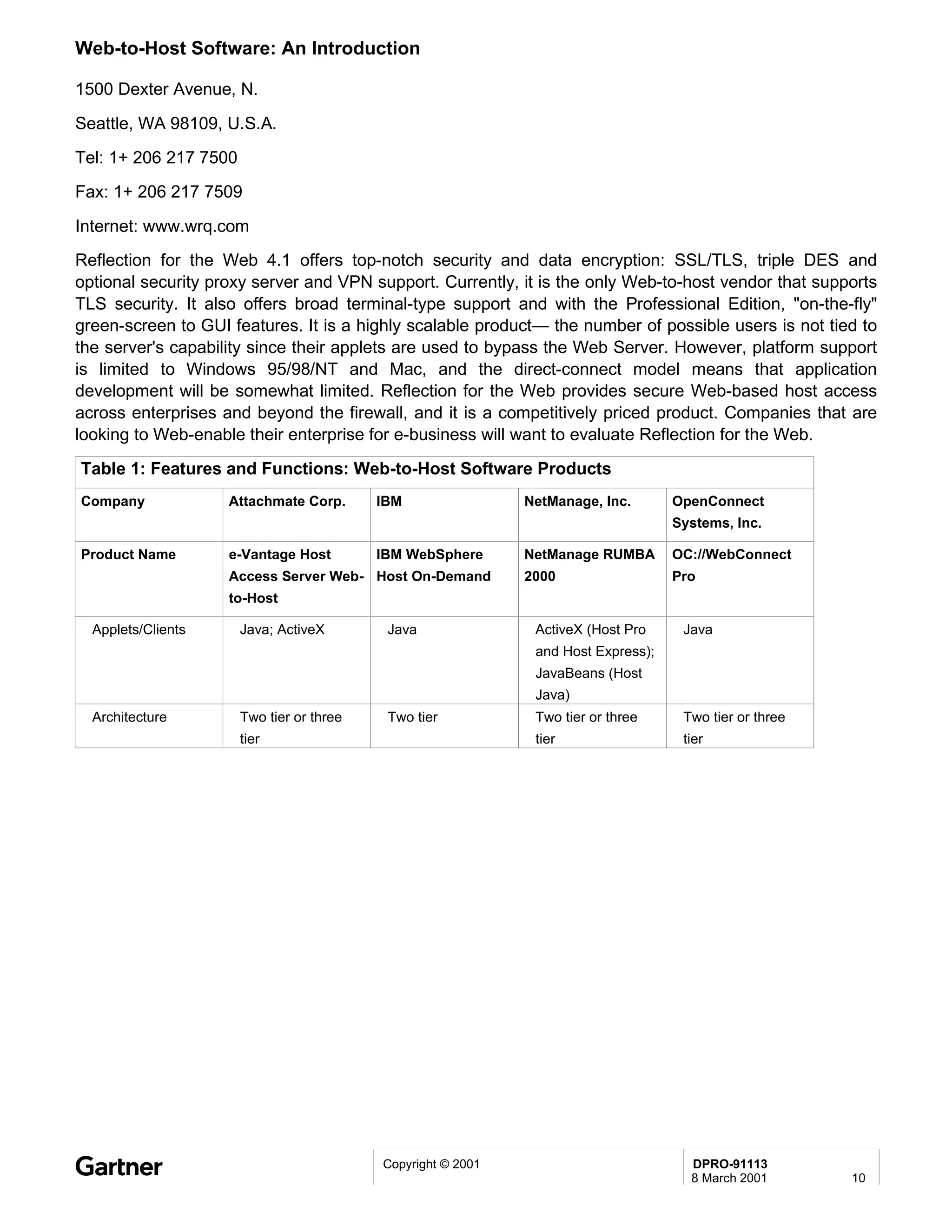
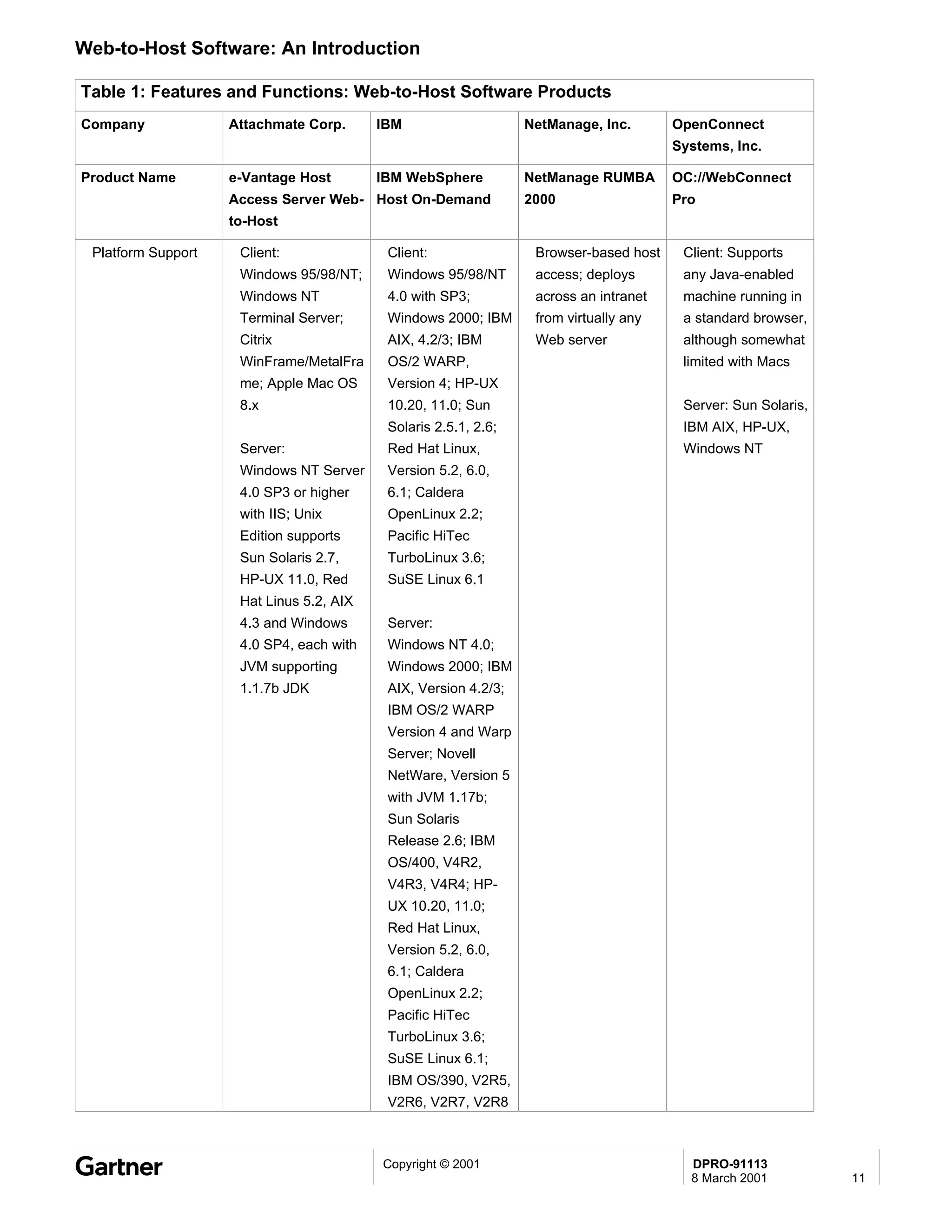
Table 1: Features and Functions: Web-to-Host Software Products
Company             Attachmate Corp.       IBM                NetManage, Inc.       OpenConnect
                                                                                    Systems, Inc.

Product Name        e-Vantage Host         IBM WebSphere      NetManage RUMBA       OC://WebConnect
                    Access Server Web- Host On-Demand         2000                  Pro
                    to-Host

  Applets/Clients      Java; ActiveX        Java               ActiveX (Host Pro     Java
                                                               and Host Express);
                                                               JavaBeans (Host
                                                               Java)
  Architecture         Two tier or three    Two tier           Two tier or three     Two tier or three
                       tier                                    tier                  tier


                                           Copyright © 2001                           DPRO-91113
                                                                                      8 March 2001       10
Web-to-Host Software: An Introduction

Table 1: Features and Functions: Web-to-Host Software Products
Company             Attachmate Corp.      IBM                    NetManage, Inc.       OpenConnect
                                                                                       Systems, Inc.

Product Name        e-Vantage Host        IBM WebSphere          NetManage RUMBA       OC://WebConnect
                    Access Server Web- Host On-Demand            2000                  Pro
                    to-Host

 Platform Support    Client:               Client:                Browser-based host    Client: Supports
                     Windows 95/98/NT;     Windows 95/98/NT       access; deploys       any Java-enabled
                     Windows NT            4.0 with SP3;          across an intranet    machine running in
                     Terminal Server;      Windows 2000; IBM      from virtually any    a standard browser,
                     Citrix                AIX, 4.2/3; IBM        Web server            although somewhat
                     WinFrame/MetalFra     OS/2 WARP,                                   limited with Macs
                     me; Apple Mac OS      Version 4; HP-UX
                     8.x                   10.20, 11.0; Sun                             Server: Sun Solaris,
                                           Solaris 2.5.1, 2.6;                          IBM AIX, HP-UX,
                     Server:               Red Hat Linux,                               Windows NT
                     Windows NT Server     Version 5.2, 6.0,
                     4.0 SP3 or higher     6.1; Caldera
                     with IIS; Unix        OpenLinux 2.2;
                     Edition supports      Pacific HiTec
                     Sun Solaris 2.7,      TurboLinux 3.6;
                     HP-UX 11.0, Red       SuSE Linux 6.1
                     Hat Linus 5.2, AIX
                     4.3 and Windows       Server:
                     4.0 SP4, each with    Windows NT 4.0;
                     JVM supporting        Windows 2000; IBM
                     1.1.7b JDK            AIX, Version 4.2/3;
                                           IBM OS/2 WARP
                                           Version 4 and Warp
                                           Server; Novell
                                           NetWare, Version 5
                                           with JVM 1.17b;
                                           Sun Solaris
                                           Release 2.6; IBM
                                           OS/400, V4R2,
                                           V4R3, V4R4; HP-
                                           UX 10.20, 11.0;
                                           Red Hat Linux,
                                           Version 5.2, 6.0,
                                           6.1; Caldera
                                           OpenLinux 2.2;
                                           Pacific HiTec
                                           TurboLinux 3.6;
                                           SuSE Linux 6.1;
                                           IBM OS/390, V2R5,
                                           V2R6, V2R7, V2R8


                                          Copyright © 2001                               DPRO-91113
                                                                                         8 March 2001          11
Web-to-Host Software: An Introduction

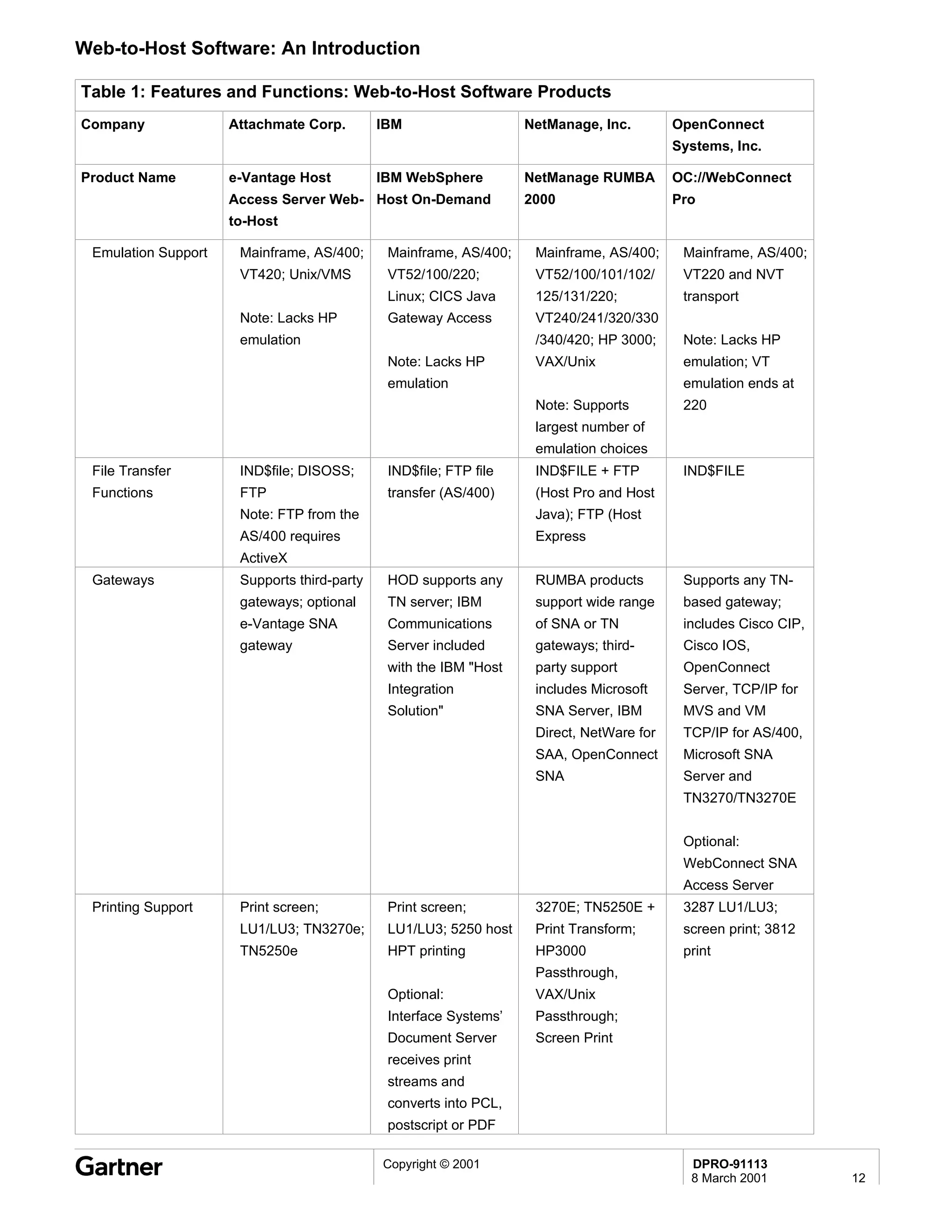
Table 1: Features and Functions: Web-to-Host Software Products
Company              Attachmate Corp.        IBM                   NetManage, Inc.        OpenConnect
                                                                                          Systems, Inc.

Product Name         e-Vantage Host          IBM WebSphere         NetManage RUMBA        OC://WebConnect
                     Access Server Web- Host On-Demand             2000                   Pro
                     to-Host

 Emulation Support    Mainframe, AS/400;      Mainframe, AS/400;    Mainframe, AS/400;     Mainframe, AS/400;
                      VT420; Unix/VMS         VT52/100/220;         VT52/100/101/102/      VT220 and NVT
                                              Linux; CICS Java      125/131/220;           transport
                      Note: Lacks HP          Gateway Access        VT240/241/320/330
                      emulation                                     /340/420; HP 3000;     Note: Lacks HP
                                              Note: Lacks HP        VAX/Unix               emulation; VT
                                              emulation                                    emulation ends at
                                                                    Note: Supports         220
                                                                    largest number of
                                                                    emulation choices
 File Transfer        IND$file; DISOSS;       IND$file; FTP file    IND$FILE + FTP         IND$FILE
 Functions            FTP                     transfer (AS/400)     (Host Pro and Host
                      Note: FTP from the                            Java); FTP (Host
                      AS/400 requires                               Express
                      ActiveX
 Gateways             Supports third-party    HOD supports any      RUMBA products         Supports any TN-
                      gateways; optional      TN server; IBM        support wide range     based gateway;
                      e-Vantage SNA           Communications        of SNA or TN           includes Cisco CIP,
                      gateway                 Server included       gateways; third-       Cisco IOS,
                                              with the IBM "Host    party support          OpenConnect
                                              Integration           includes Microsoft     Server, TCP/IP for
                                              Solution"             SNA Server, IBM        MVS and VM
                                                                    Direct, NetWare for    TCP/IP for AS/400,
                                                                    SAA, OpenConnect       Microsoft SNA
                                                                    SNA                    Server and
                                                                                           TN3270/TN3270E


                                                                                           Optional:
                                                                                           WebConnect SNA
                                                                                           Access Server
 Printing Support     Print screen;           Print screen;         3270E; TN5250E +       3287 LU1/LU3;
                      LU1/LU3; TN3270e;       LU1/LU3; 5250 host    Print Transform;       screen print; 3812
                      TN5250e                 HPT printing          HP3000                 print
                                                                    Passthrough,
                                              Optional:             VAX/Unix
                                              Interface Systems’    Passthrough;
                                              Document Server       Screen Print
                                              receives print
                                              streams and
                                              converts into PCL,
                                              postscript or PDF

                                             Copyright © 2001                               DPRO-91113
                                                                                            8 March 2001         12
Web-to-Host Software: An Introduction

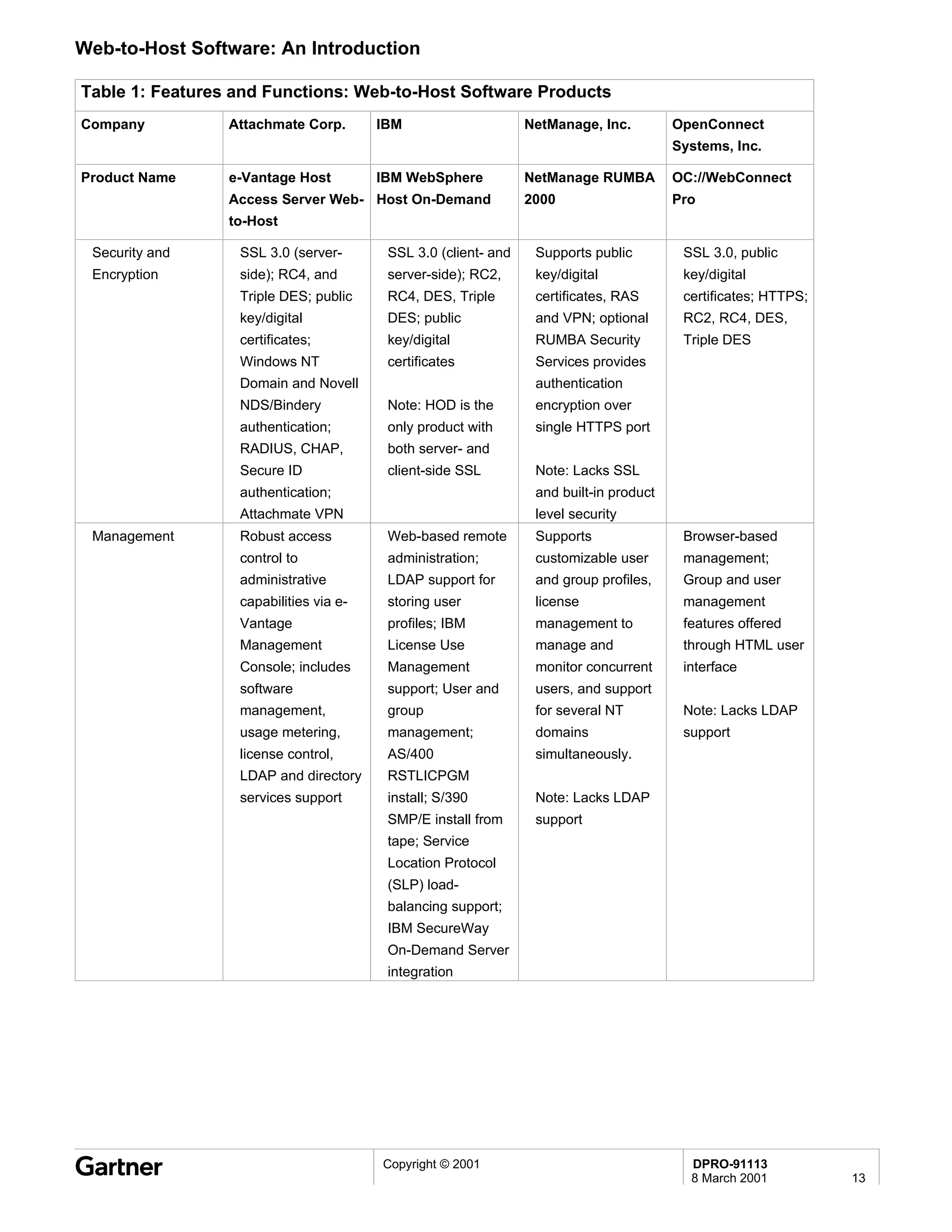
Table 1: Features and Functions: Web-to-Host Software Products
Company          Attachmate Corp.       IBM                     NetManage, Inc.         OpenConnect
                                                                                        Systems, Inc.

Product Name     e-Vantage Host         IBM WebSphere           NetManage RUMBA         OC://WebConnect
                 Access Server Web- Host On-Demand              2000                    Pro
                 to-Host

 Security and     SSL 3.0 (server-       SSL 3.0 (client- and    Supports public         SSL 3.0, public
 Encryption       side); RC4, and        server-side); RC2,      key/digital             key/digital
                  Triple DES; public     RC4, DES, Triple        certificates, RAS       certificates; HTTPS;
                  key/digital            DES; public             and VPN; optional       RC2, RC4, DES,
                  certificates;          key/digital             RUMBA Security          Triple DES
                  Windows NT             certificates            Services provides
                  Domain and Novell                              authentication
                  NDS/Bindery            Note: HOD is the        encryption over
                  authentication;        only product with       single HTTPS port
                  RADIUS, CHAP,          both server- and
                  Secure ID              client-side SSL         Note: Lacks SSL
                  authentication;                                and built-in product
                  Attachmate VPN                                 level security
 Management       Robust access          Web-based remote        Supports                Browser-based
                  control to             administration;         customizable user       management;
                  administrative         LDAP support for        and group profiles,     Group and user
                  capabilities via e-    storing user            license                 management
                  Vantage                profiles; IBM           management to           features offered
                  Management             License Use             manage and              through HTML user
                  Console; includes      Management              monitor concurrent      interface
                  software               support; User and       users, and support
                  management,            group                   for several NT          Note: Lacks LDAP
                  usage metering,        management;             domains                 support
                  license control,       AS/400                  simultaneously.
                  LDAP and directory     RSTLICPGM
                  services support       install; S/390          Note: Lacks LDAP
                                         SMP/E install from      support
                                         tape; Service
                                         Location Protocol
                                         (SLP) load-
                                         balancing support;
                                         IBM SecureWay
                                         On-Demand Server
                                         integration


                                        Copyright © 2001                                  DPRO-91113
                                                                                          8 March 2001          13
Web-to-Host Software: An Introduction

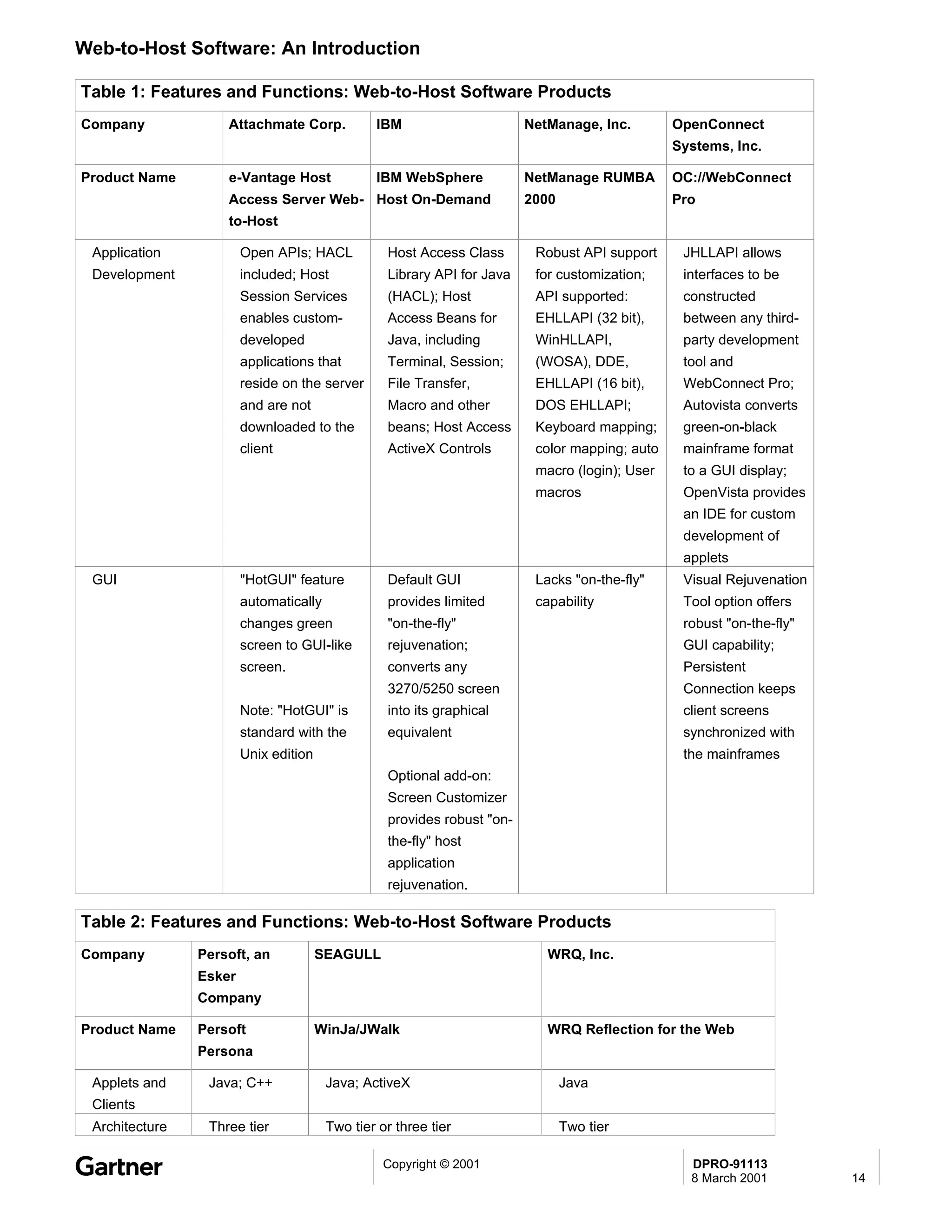
Table 1: Features and Functions: Web-to-Host Software Products
Company             Attachmate Corp.            IBM                      NetManage, Inc.        OpenConnect
                                                                                                Systems, Inc.

Product Name        e-Vantage Host              IBM WebSphere            NetManage RUMBA        OC://WebConnect
                    Access Server Web- Host On-Demand                    2000                   Pro
                    to-Host

 Application            Open APIs; HACL           Host Access Class       Robust API support     JHLLAPI allows
 Development            included; Host            Library API for Java    for customization;     interfaces to be
                        Session Services          (HACL); Host            API supported:         constructed
                        enables custom-           Access Beans for        EHLLAPI (32 bit),      between any third-
                        developed                 Java, including         WinHLLAPI,             party development
                        applications that         Terminal, Session;      (WOSA), DDE,           tool and
                        reside on the server      File Transfer,          EHLLAPI (16 bit),      WebConnect Pro;
                        and are not               Macro and other         DOS EHLLAPI;           Autovista converts
                        downloaded to the         beans; Host Access      Keyboard mapping;      green-on-black
                        client                    ActiveX Controls        color mapping; auto    mainframe format
                                                                          macro (login); User    to a GUI display;
                                                                          macros                 OpenVista provides
                                                                                                 an IDE for custom
                                                                                                 development of
                                                                                                 applets
 GUI                    "HotGUI" feature          Default GUI             Lacks "on-the-fly"     Visual Rejuvenation
                        automatically             provides limited        capability             Tool option offers
                        changes green             "on-the-fly"                                   robust "on-the-fly"
                        screen to GUI-like        rejuvenation;                                  GUI capability;
                        screen.                   converts any                                   Persistent
                                                  3270/5250 screen                               Connection keeps
                        Note: "HotGUI" is         into its graphical                             client screens
                        standard with the         equivalent                                     synchronized with
                        Unix edition                                                             the mainframes
                                                  Optional add-on:
                                                  Screen Customizer
                                                  provides robust "on-
                                                  the-fly" host
                                                  application
                                                  rejuvenation.

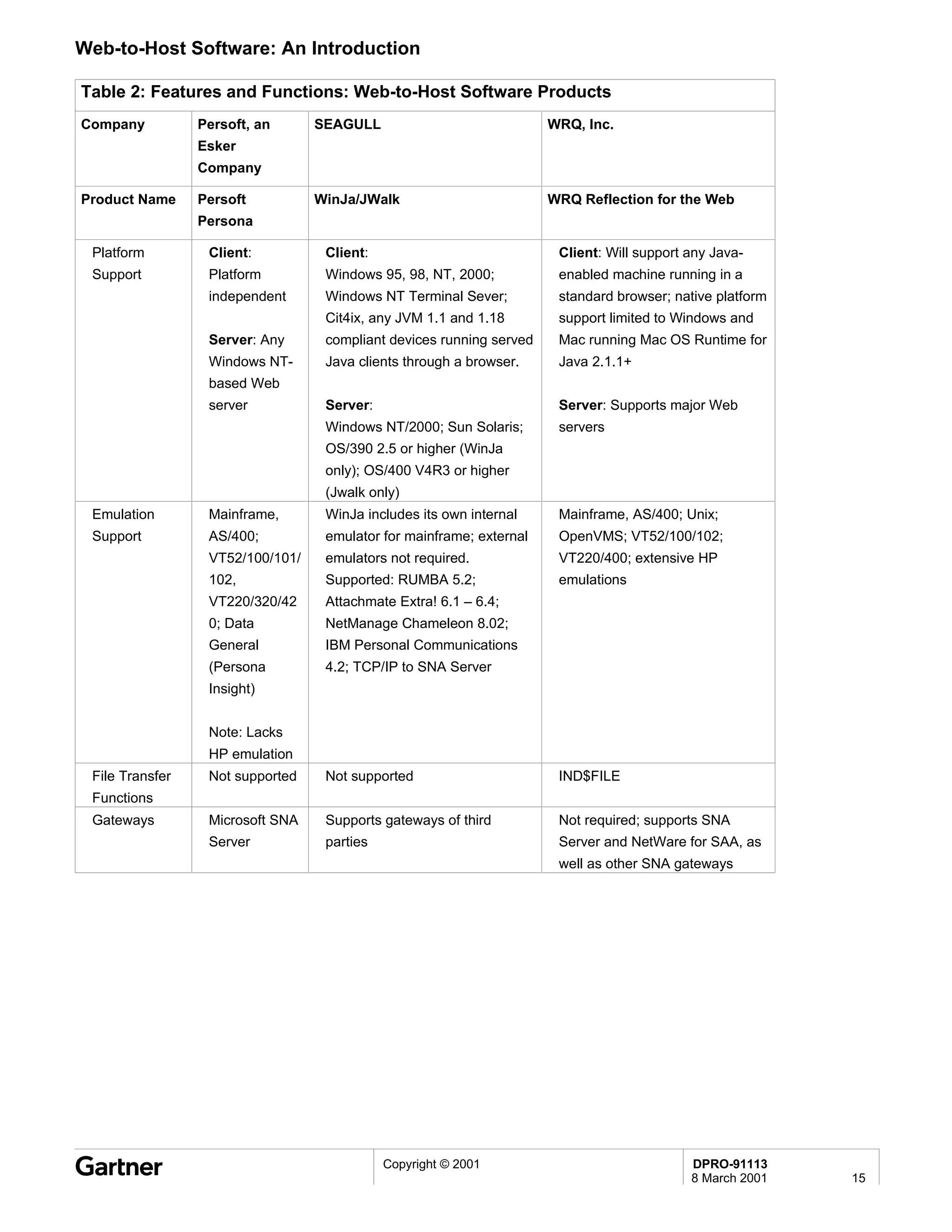
Table 2: Features and Functions: Web-to-Host Software Products
Company         Persoft, an            SEAGULL                              WRQ, Inc.
                Esker
                Company

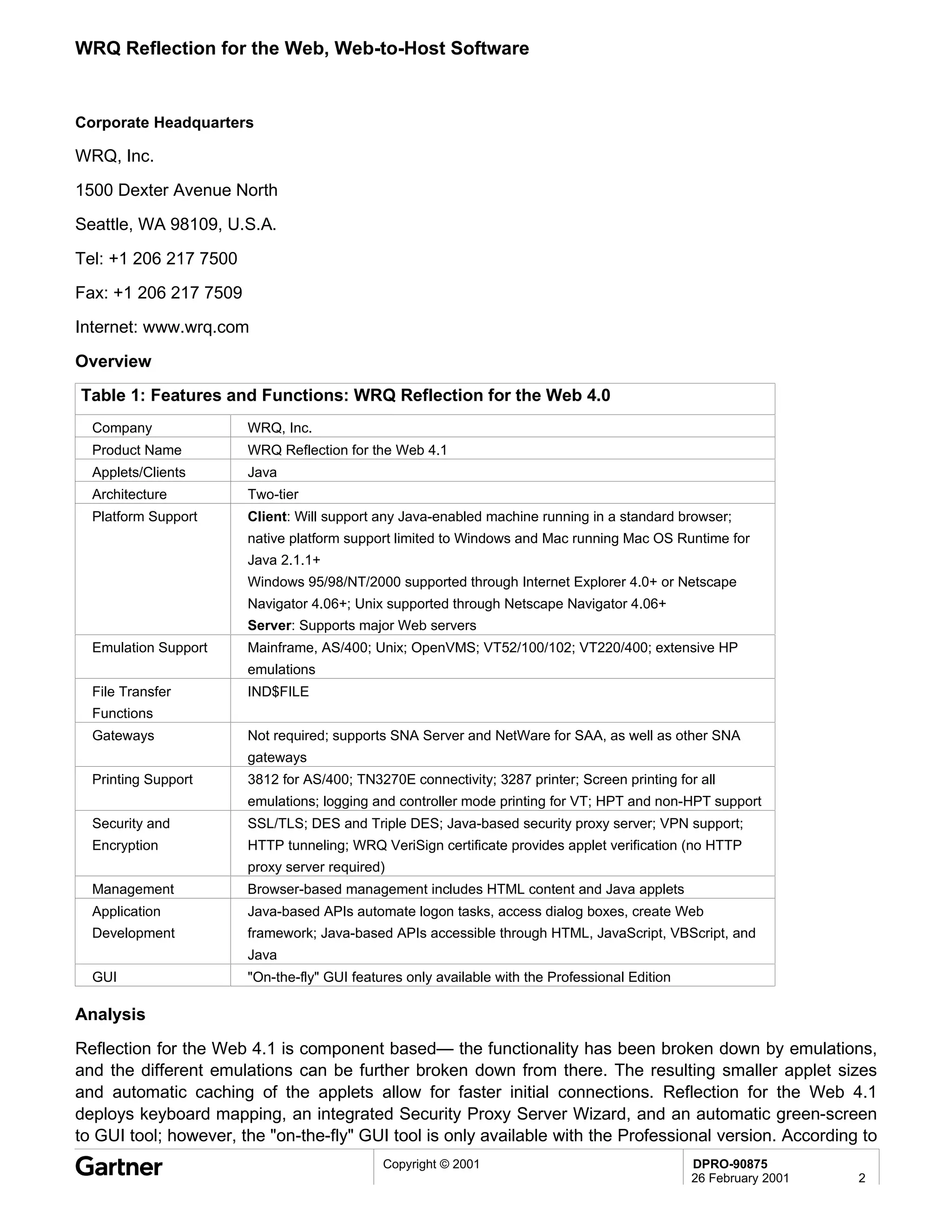
Product Name    Persoft                WinJa/JWalk                          WRQ Reflection for the Web
                Persona

 Applets and     Java; C++              Java; ActiveX                           Java
 Clients
 Architecture    Three tier             Two tier or three tier                  Two tier

                                                  Copyright © 2001                                DPRO-91113
                                                                                                  8 March 2001         14
Web-to-Host Software: An Introduction

Table 2: Features and Functions: Web-to-Host Software Products
Company          Persoft, an      SEAGULL                             WRQ, Inc.
                 Esker
                 Company

Product Name     Persoft          WinJa/JWalk                         WRQ Reflection for the Web
                 Persona

 Platform         Client:          Client:                             Client: Will support any Java-
 Support          Platform         Windows 95, 98, NT, 2000;           enabled machine running in a
                  independent      Windows NT Terminal Sever;          standard browser; native platform
                                   Cit4ix, any JVM 1.1 and 1.18        support limited to Windows and
                  Server: Any      compliant devices running served    Mac running Mac OS Runtime for
                  Windows NT-      Java clients through a browser.     Java 2.1.1+
                  based Web
                  server           Server:                             Server: Supports major Web
                                   Windows NT/2000; Sun Solaris;       servers
                                   OS/390 2.5 or higher (WinJa
                                   only); OS/400 V4R3 or higher
                                   (Jwalk only)
 Emulation        Mainframe,       WinJa includes its own internal     Mainframe, AS/400; Unix;
 Support          AS/400;          emulator for mainframe; external    OpenVMS; VT52/100/102;
                  VT52/100/101/    emulators not required.             VT220/400; extensive HP
                  102,             Supported: RUMBA 5.2;               emulations
                  VT220/320/42     Attachmate Extra! 6.1 – 6.4;
                  0; Data          NetManage Chameleon 8.02;
                  General          IBM Personal Communications
                  (Persona         4.2; TCP/IP to SNA Server
                  Insight)


                  Note: Lacks
                  HP emulation
 File Transfer    Not supported    Not supported                       IND$FILE
 Functions
 Gateways         Microsoft SNA    Supports gateways of third          Not required; supports SNA
                  Server           parties                             Server and NetWare for SAA, as
                                                                       well as other SNA gateways


                                             Copyright © 2001                               DPRO-91113
                                                                                            8 March 2001   15
Web-to-Host Software: An Introduction

Table 2: Features and Functions: Web-to-Host Software Products
Company         Persoft, an        SEAGULL                              WRQ, Inc.
                Esker
                Company

Product Name    Persoft            WinJa/JWalk                          WRQ Reflection for the Web
                Persona

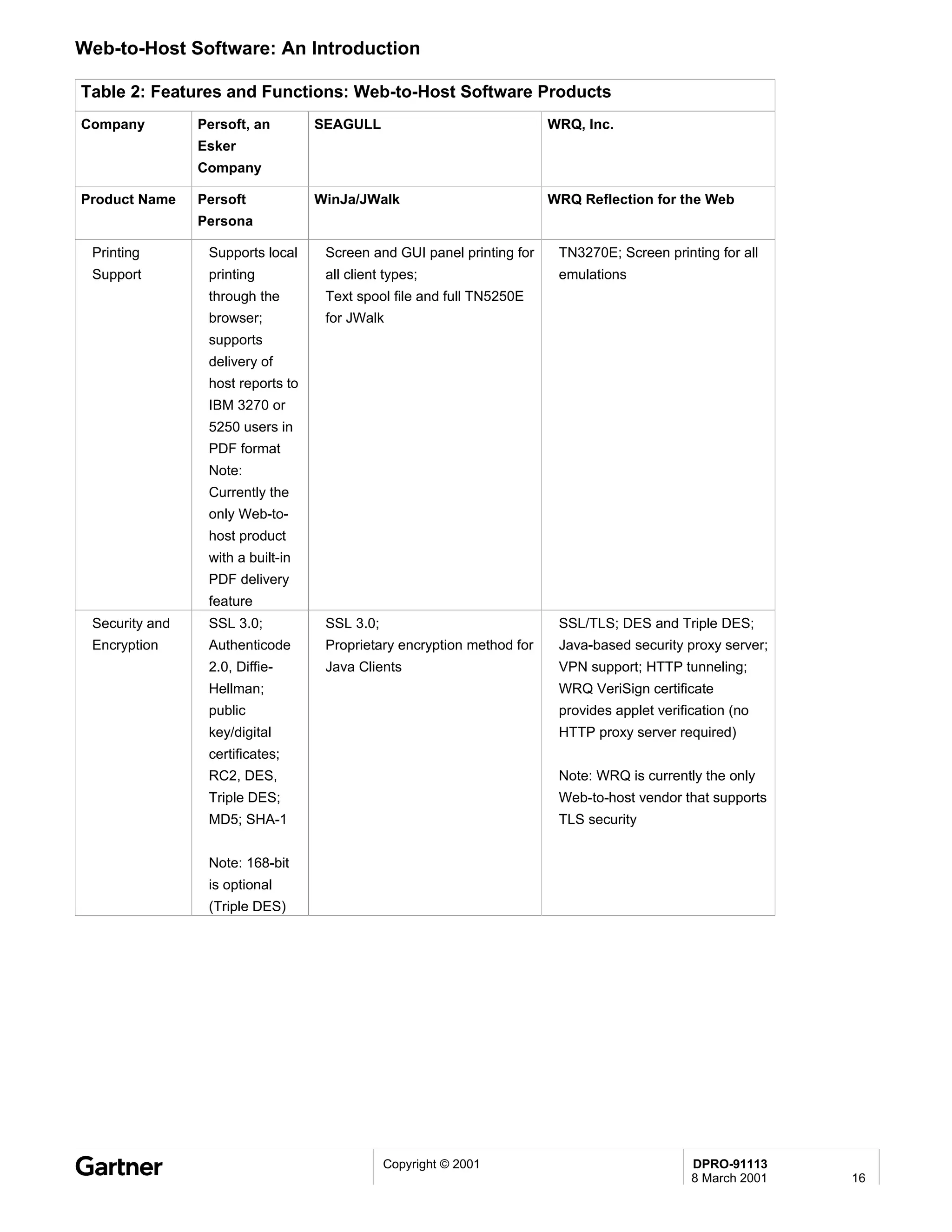
 Printing        Supports local     Screen and GUI panel printing for    TN3270E; Screen printing for all
 Support         printing           all client types;                    emulations
                 through the        Text spool file and full TN5250E
                 browser;           for JWalk
                 supports
                 delivery of
                 host reports to
                 IBM 3270 or
                 5250 users in
                 PDF format
                 Note:
                 Currently the
                 only Web-to-
                 host product
                 with a built-in
                 PDF delivery
                 feature
 Security and    SSL 3.0;           SSL 3.0;                             SSL/TLS; DES and Triple DES;
 Encryption      Authenticode       Proprietary encryption method for    Java-based security proxy server;
                 2.0, Diffie-       Java Clients                         VPN support; HTTP tunneling;
                 Hellman;                                                WRQ VeriSign certificate
                 public                                                  provides applet verification (no
                 key/digital                                             HTTP proxy server required)
                 certificates;
                 RC2, DES,                                               Note: WRQ is currently the only
                 Triple DES;                                             Web-to-host vendor that supports
                 MD5; SHA-1                                              TLS security


                 Note: 168-bit
                 is optional
                 (Triple DES)


                                               Copyright © 2001                                DPRO-91113
                                                                                               8 March 2001   16
Web-to-Host Software: An Introduction

Table 2: Features and Functions: Web-to-Host Software Products
Company            Persoft, an         SEAGULL                                WRQ, Inc.
                   Esker
                   Company

Product Name       Persoft             WinJa/JWalk                            WRQ Reflection for the Web
                   Persona

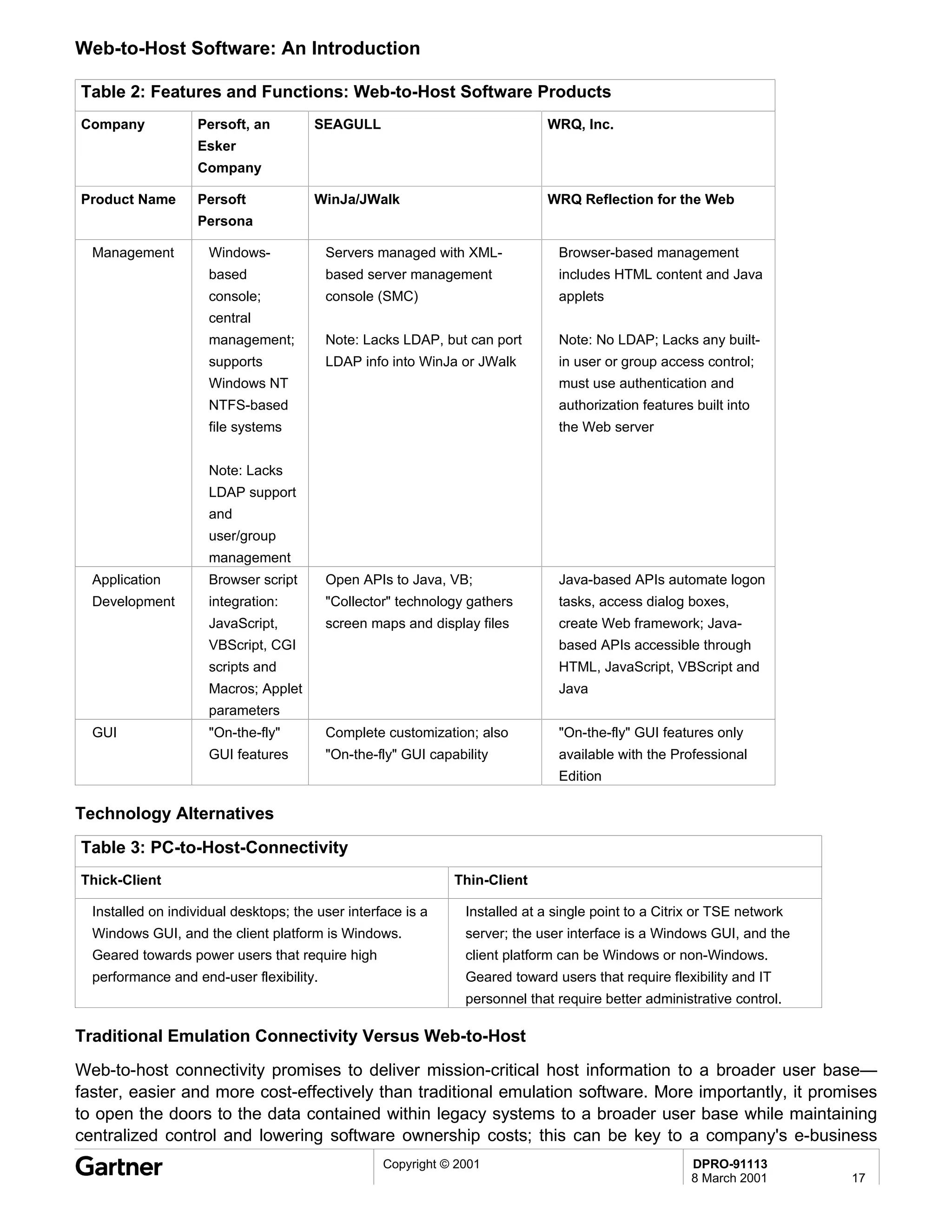
  Management         Windows-             Servers managed with XML-             Browser-based management
                     based                based server management               includes HTML content and Java
                     console;             console (SMC)                         applets
                     central
                     management;          Note: Lacks LDAP, but can port        Note: No LDAP; Lacks any built-
                     supports             LDAP info into WinJa or JWalk         in user or group access control;
                     Windows NT                                                 must use authentication and
                     NTFS-based                                                 authorization features built into
                     file systems                                               the Web server


                     Note: Lacks
                     LDAP support
                     and
                     user/group
                     management
  Application        Browser script       Open APIs to Java, VB;                Java-based APIs automate logon
  Development        integration:         "Collector" technology gathers        tasks, access dialog boxes,
                     JavaScript,          screen maps and display files         create Web framework; Java-
                     VBScript, CGI                                              based APIs accessible through
                     scripts and                                                HTML, JavaScript, VBScript and
                     Macros; Applet                                             Java
                     parameters
  GUI                "On-the-fly"         Complete customization; also          "On-the-fly" GUI features only
                     GUI features         "On-the-fly" GUI capability           available with the Professional
                                                                                Edition

Technology Alternatives
Table 3: PC-to-Host-Connectivity
Thick-Client                                                   Thin-Client

  Installed on individual desktops; the user interface is a      Installed at a single point to a Citrix or TSE network
  Windows GUI, and the client platform is Windows.               server; the user interface is a Windows GUI, and the
  Geared towards power users that require high                   client platform can be Windows or non-Windows.
  performance and end-user flexibility.                          Geared toward users that require flexibility and IT
                                                                 personnel that require better administrative control.

Traditional Emulation Connectivity Versus Web-to-Host
Web-to-host connectivity promises to deliver mission-critical host information to a broader user base—
faster, easier and more cost-effectively than traditional emulation software. More importantly, it promises
to open the doors to the data contained within legacy systems to a broader user base while maintaining
centralized control and lowering software ownership costs; this can be key to a company's e-business
                                                   Copyright © 2001                                    DPRO-91113
                                                                                                       8 March 2001       17
Web-to-Host Software: An Introduction

strategy. Does this mean that companies should switch to Web-to-host? Not quite; process-intensive
types will probably want to continue using their traditional tools. Many companies will find they need to
incorporate Web-to-host alongside thick-client and thin-client PC-to-host technologies.
Insight
Web-to-host furnishes point-and-click access to the proprietary information contained within corporate
mainframes quicker, easier and cheaper than traditional PC-to-host connectivity methods— users can
simply link their Java-enabled Web browsers to the "big iron". Downloading a thin-client terminal
emulation applet to establish sessions can free management from administering and maintaining
traditional client terminal emulation software on each PC; this adds up to considerable savings.
Additionally, the cost of Web-to-host software is substantially cheaper than traditional terminal emulation
software for PCs. More importantly, Web-to-host can enable companies to implement e-business
strategies more quickly. However, there are still security concerns, and for some process-intensive types,
Web-to-host may not be enough. On the other hand, Web-to-host is still evolving; as vendors continue to
add more robust security and customization features, even larger numbers of users will be able to employ
Web-to-host technology.
Web-to-Host Glossary
ActiveX Control: A local resident control based on Microsoft’s Component Object Model (COM) that loads within a
Web browser providing host-access capability.

Applet: A Java program that is run from inside a Web browser.

Certificate: A digital document that contains information about a person or organization, including the identity and
public keys.

Client: The computer that displays the Web page that contains an applet.

Data Encryption Standard (DES): An algorithm for encoding messages by breaking them into logical blocks and
encrypting each one.

Diffie-Helman: A key agreement protocol allowing two entities to agree upon and exchange public keys prior to
combination with private keys.

Host Access Class Library (HACL): A core set of classes and methods that allow development of platform-
independent application that can access host information at the data-stream level.

Host: The mainframe or midrange computer to which the PC connects.

Hypertext Markup Language (HTML): An application of SGML that uses tags to mark text and graphics in a
document. Web browsers use the tags to structure and format Web pages.

Hypertext Transfer Protocol (HTTP): A client/server protocol that allows information exchange between Web servers
and browsers.

Proxy: A server that works in conjunction with a firewall to provide network security.

Secure Sockets Layer (SSL): The de facto security standard used with most Web-to-host software; a group of
protocols based on public-key cryptography and digital certificate for encrypting private information.

Transmission Control Protocol/Internet Protocol (TCP/IP): A set of communication protocols that allow
communication between computers on a local network or the Internet.

Terminal Emulation: The capability of personal computers to act as if they were a particular type of terminal and
communicate with another computer, such as a Unix system or a mainframe.

Telnet: A protocol that allows a user to access a remote computer on a TCP/IP network as if the user were using a
text-based terminal, such as a 3270 terminal.


                                             Copyright © 2001                              DPRO-91113
                                                                                           8 March 2001            18
Web-to-Host Software: An Introduction

Transport Layer Security (TLS): A group of protocols incorporating the specifications used in other security
protocols, including SSL for encrypting private information.

TN3270 and TN5250: Protocols used by an IBM mainframe or AS/400 to communicate with other devices, including
PCs.

VT Emulation: The use of software that enables a client to emulate Digital Equipment Corp. (DEC) terminals such
as the VT52, VT100, VT200 and VT220. VT emulation is widely used with Unix systems.


                                            Copyright © 2001                             DPRO-91113
                                                                                         8 March 2001          19
DPRO-97205                                                                                         Technology Overview
                                                                                          Serena Lambiase                                                                                             5 April 2001


Peer-to-Peer Computing Technologies: An Introduction


Summary
The newly updated peer-to-peer networking model is currently being referred to by many in the industry
(most notably Intel) as a paradigm that is about to change IT in much the same way the Internet has.
What is peer-to-peer computing, why is there so much industry hype concerning it, what are the benefits
and risks, and are there viable business uses?

Table of Contents
                Technology Basics
                Technology Analysis
                Business Use
                Benefits and Risks
                Standards
                Technology Leaders
                Insight

List Of Tables
                Table 1: Peer-to-Peer Companies and Categories


Entire contents © 2001 by Gartner, Inc. All rights reserved. Reproduction of this publication in any form without prior written permission is forbidden. The information contained herein has been obtained from sources believed to be
reliable. Gartner disclaims all warranties as to the accuracy, completeness or adequacy of such information. Gartner shall have no liability for errors, omissions or inadequacies in the information contained herein or for interpretations
thereof. The reader assumes sole responsibility for the selection of these materials to achieve its intended results. The opinions expressed herein are subject to change without notice.
Peer-to-Peer Computing Technologies: An Introduction


Technology Basics
Since peer-to-peer computing has existed from the very beginnings of PC computing, why has it recently
become so popular, and what are the implications for businesses and enterprises? How was the "old"
model of peer-to-peer computing implemented, and what has suddenly caused this model of networking
to be resurrected into new uses?

Peer-to-Peer Networking versus Client/Server Networking

The original PC networks were based on file-sharing peer-to-peer architectures. In a peer-to-peer
network, each workstation has equivalent capabilities and responsibilities; this differs from today’s
client/server architectures, in which some computers are dedicated to serving the others. Peer-to-peer
networks were simpler to implement, but they did not offer robust performance under heavy loads. In the
1990s, PC LAN computing evolved because the capacity of the file sharing was strained as the number of
online users grew (it can only satisfy about 12 users simultaneously) and graphical user interfaces (GUIs)
became popular. As a result of the limitations of file-sharing architectures and the faster speeds that
became available through technologies such as Ethernet, the client/server architecture for networking
became the preferred model of business networking, where every computer on a client/server network is
either a client or a server.

The Impact of Recent Industry Changes on Peer-to-Peer Development

Over the past few years, the sheer number of PCs has increased exponentially. At the same time, the
computing capabilities of PCs have become more powerful; in fact, most PCs today are more powerful
than earlier servers. Broadband has become more readily available, and PCs have also become both
more powerful and affordable. During this same time frame, Internet technologies have drastically
improved; the increasing availability of broadband, together with more powerful PCs, has led to new
business uses for Internet technology (intranets, extranets, using browsers to gain access to mainframe
data, etc.).
During 2000, file-sharing peer-to-peer networks such as Napster became extremely popular. Napster
allows users to utilize the worldwide reach of the Internet to share music files stored on their local hard
disks. Although the Napster program initially gained notoriety because of its music-pirating ability, the real
news here is the importance of its very powerful distribution platform and search engine that Napster
provides. This simultaneous occurrence of the changes and improvements within the PC industry,
including the newer Internet technologies, and the wildly popular Napster phenomenon has given rise to
the possibility of an entirely new type of peer-to-peer (P2P) business model for computing.

The New Peer-to-Peer Computing Models

The new peer-to-peer model abandons the networking notions of separate clients and servers and
instead allows every networked machine to connect to another machine. New peer-to-peer applications
will enable people to search for information stored on an individual user's hard drive via the Internet— the
original P2P networks worked by exchanging information directly between computers. This would not be
possible if PCs had not become ubiquitous, more powerful, and had more broadband available. The new
P2P models can be implemented in a pure peer-to-peer fashion as totally server-free implementations
that directly connect desktops over an IP network, or Napster-style, using servers to direct traffic. Peer-to-
peer proponents claim that new Internet-based standards and protocols will make P2P computing easier
to implement and believe it will soon become practical for many businesses. Many universities and


                                                                                    DPRO-97205
Copyright 2001                                                                      5 April 2001           2
Peer-to-Peer Computing Technologies: An Introduction

research organizations have been using P2P models for years; now these technologies are being
developed for the enterprise space.
Peer-to-peer technology allows enterprises to leverage their computing resources by enabling a direct
exchange of services between computers. This includes exchanging data, processing cycles, cache
storage, and disk storage. This past year has seen a plethora of start-up companies materialize that are
geared towards utilizing P2P computing. Distributed computing (reducing computation costs), file sharing
(protected content distribution), collaboration (secure file sharing in ad hoc groups), intelligent agents
(cooperative search engines), and distributed storage sharing (reduce the need for file servers; migrate
files to area of use) are examples of the ways P2P is being developed by these companies.

Technology Analysis
Business Use

Peer-to-Peer Distributed Computing and Cycle Sharing

The Boeing Aerospace company, oil company Amerada Hess, and Intel claim they have been able to
reduce the need to buy high-end computer systems, including mainframes, by using P2P networking to
tap into the processing power that is already available on their companies’ desktop PCs. Enterprise
managers can use existing resources for storage and computing from every computer on the network on
a global basis. Companies that stand to benefit from P2P Distributed Computing are in the following
industries: biotech, search engines, computer-aided design, film animation, and financial services.

Peer-to-Peer Collaboration

Peer-to-peer collaboration applications can be used for real-time meetings and communications and
secure file sharing in ad hoc groups. Business groups can form and dissolve self-organized webs for
collaboration on projects. Peer-to-peer collaboration can also be used to speed the development of new
products and to decrease the cost and time involved in developing manufactured products, as exemplified
by Oculus Technologies, Inc. Several companies are currently developing P2P collaboration applications
geared towards the investment management industry. They claim the more simplified and automated
workflow process will allow participants in the financial services community to connect directly with
investment managers without going through an intermediary, currently represented by the B2B
exchanges; this could have significant impact on B2B exchanges. NextPage is an example of this type of
company.

Peer-to-Peer File Sharing and Superdistribution

Peer-to-peer can also be used to disseminate the latest security measures in real-time, including antivirus
and personal firewall updates to an entire enterprise. Another use for the new P2P model would be the
authorized peer-to-peer sharing of music or book files, giving retailers and consumers the ability to pass
content to multiple recipients; this would be geared towards companies in the media industries.
Benefits and Risks

Benefits

Peer-to-peer tools can save time and money by lessening the need for corporate IT to expand some of
their services, such as Web servers, backup storage, and replacing outdated documents. Peer-to-peer
computing also has the potential to allow a certain amount of network traffic to move from the corporate
backbone to less expensive infrastructure, such as switches, hubs, and routers.


                                                                                  DPRO-97205
Copyright 2001                                                                    5 April 2001          3
Peer-to-Peer Computing Technologies: An Introduction

Many corporations have stretched their resources for the server layer to the limits, while their network of
underutilized client PCs sit idly by. This represents an enormous untapped resource for storage. Large
companies might be able to utilize their client layer in order to offer as much as 10 terabytes of spare
storage (2,000 clients x 5GB/client) with trillions of operations per second of spare processing power
available for intense calculations performed over the network without placing additional strain on the
backbone.
Peer-to-peer computing can extend computing to the "edges" of the Internet, allowing every computer to
serve as an "edge server" to those computers around it. Intracompany training is one of many business
applications that could benefit from this benefit. One of the key inhibitors to the use of multimedia
audio/video files for the purposes of intracompany training is their typically enormous size; since so many
companies are now global and need to distribute files to trans-Atlantic locations, they have been held
back by trans-Atlantic bandwidth constraints. Peer-to-peer could allow every computer to act as an edge
server to those computers around it. After the first employee downloads a file, the second employee’s
system automatically recognizes that there is a local version of the file within the overseas office and
begins a direct exchange between the computers, as opposed to accessing the file over a trans-Atlantic
line. From that point on, every subsequent employee is able to access the file over a 10/100 Mbps
network.
Cycle sharing allows workstations on the network to access the computing resources of underutilized
machines. Design teams that require massive computing resources can leverage the machines from other
groups who are not currently using their machines for heavy computations. This would lessen the time to
market for the development and manufacturing of new products.
Other benefits include substantially faster transaction times for the financial and brokerage industries and
downloading important files, such as updated antivirus and firewalls, in real-time on a company-wide
basis.

Risks

Peer-to-peer applications enable other people to search for information stored on an individual user’s hard
drive via the Internet; this can lead to security problems. Therefore, software needs to be developed that
will enable users to restrict the peer-to-peer applications access rights to only those areas specified by the
user.
Since P2P computing is not centralized, managing P2P within a corporation is problematical. The lack of
centralization also poses a problem for search engines.
Most enterprises do not have enough Internet bandwidth to sustain a flood of large file transfers that could
be caused by the unauthorized use of P2P programs by their employees; enterprises will need to restrict
the unauthorized use of P2P applications by their employees.
The still nascent peer-to-peer industry needs to develop common protocols and improve scalability,
security and management, and standards for interoperability.
Standards
Without the timely development of effective standards for interoperability and security, the much hyped
expectations for P2P will not come to fruition. To expedite P2P’s adoption, the following groups are laying
the groundwork for standardization.

The Peer-to-Peer Working Group

http://peer-to-peerwg.org
                                                                                    DPRO-97205
Copyright 2001                                                                      5 April 2001           4
Peer-to-Peer Computing Technologies: An Introduction

The "Peer-to-Peer Working Group" is a consortium for the advancement of infrastructure standards for
peer-to-peer computing and the sharing of computer resources and services by direct exchange. The
stated charter for the Peer-to-Peer WG is to determine areas for standardization, rapidly develop
specifications, and promote adoption of these specifications as standards throughout the computer
industry.
•   Peer-to-Peer Working Group Member Companies: Alliance Computing; BIAP Systems Inc.; Bright
    Station PLC; CenterSpan; Endeavors Technology; Entropia, Inc.; Fujitsu PC Corporation; Global
    Network Computers; Information Architects, Intel Corporation; J.D. Edwards, NetMount; NextPage,
    Inc.; OpenDesign, Inc.; Proksim Software, Inc.; Science Communications, Inc.; United Devices.
•   Peer-to-Peer Working Group Supportive Companies: AppleSoup; Applied MetaComputing;
    Distributed Science; Dotcast; Enfish Technology; Engenia Software; Groove Networks; HP; IBM;
    Kalepa; MangoSoft; Static; Structural Analysis Tech, Inc.; Thinkstream, Inc.; Uprizer; Vtel.

Global Grid Forum (Global GF)

www.globalgridforum.com
The "Global Grid Forum" (Global GF) is a community-initiated forum of individual researchers and
practitioners from industry and academia working on distributed computing or "grid" technologies (peer-to-
peer). The Global GF focuses on the promotion and development of Grid technologies and applications
via the development and documentation of "best practices," implementation guidelines, and standards.
The Global GF efforts are also aimed at the development of a broadly based "Integrated Grid
Architecture" that can serve to guide the research, development, and deployment activities of the
emerging Grid communities.
•   Global Grid Forum Registered Participants: The majority of the registered participants consists
    largely of universities and National Science Labs, along with a smaller group of companies. A partial
    list includes the following: Argonne National Laboratory, Centrata, CERN, Compaq, CSC-NASA
    Ames Research Center, Entropia, Fujitsu America, GE Corporate R&D Center, IBM, Intel, Jet
    Propulsion Laboratory, Lawrence Berkeley National Laboratory, Microsoft Research, MIT, NASA,
    Sandia National Laboratories, Sun Labs and Sun Microsystems.

The New Productivity Initiative (NPI)

www.newproductivity.org/npi_in.html
A small group of companies, which include Hewlett-Packard, Compaq, and SGI, have formed an alliance
to take advantage of the growth of distributed computing. The purpose of the New Productivity Initiative
(NPI) is to define and develop a reference model and a set of open APIs to enable the sharing of
distributed computing resources regardless of platform. It is also the goal of the NPI to create a distributed
resource management (DRM) standard that will allow software from different vendors running on different
hardware platforms to work in concert.
According to the NPI, distributed resource management is key to P2P because it enables users and
applications to interact as if they are using a very large, single, virtual distributed computer. DRM provides
a way of sharing processing cycles with other computers, automatically finding the best computer in the
network to run the desired application, and distributes processing in a secure and reliable manner without
user or application intervention. DRM itself operates as a central service that may be implemented by
either hybrid or pure P2P technologies.

Universal Description, Discovery, and Integration (UDDI) Project

                                                                                    DPRO-97205
Copyright 2001                                                                      5 April 2001           5
Peer-to-Peer Computing Technologies: An Introduction

www.uddi.org
On 6 September 2000, Ariba, IBM, and Microsoft announced the Universal Description, Discovery and
Integration (UDDI) Project, designed to create a standard format with which enterprises engaged in e-
commerce can describe themselves and their method of conducting e-business transactions. The
specification defines a platform-independent, open framework for describing services, discovering
businesses, and integrating business services using the Internet.
Many design problems associated with directory services, communication protocols, and message
formats are being addressed by P2P applications in a proprietary manner; UDDI and other Internet-
derived standards are expected to reduce the complexity and amount of effort required to create P2P
applications.

Peer-to-Peer Trusted Library (PtPTL)

Intel has recently developed security software code that other companies can use when developing P2P
applications. The Peer-to-Peer Trusted Library (PtPTL) includes full API documentation and provides
support for peer authentication, secure storage, encryption, and digital signatures. Intel has made the API
freely available to developers online; it is Intel’s hope that releasing the PtPTL will aid innovation in the
peer-to-peer security market.
The Peer-to-Peer Trusted Library (PtPTL) allows software developers to add the element of "trust" to their
peer-to-peer applications. It provides support for digital certificates, peer authentication, secure storage,
public key encryption, digital signatures, and symmetric key encryption. The library also provides simple
support for networking and some operating system primitives, such as threads and locks, to ease the
development of applications that are portable to both Win32 and Linux.

Sun Microsystems’ Juxtapose (JXTA)

On 15 February 2001, Sun Microsystems Inc. announced that the company is developing a Web-based
programming language called Juxtapose for use by companies looking to build distributed peer-to-peer
computing applications. In April, the company plans to host an online conference related to JXTA, at
which time it will release the specifications for the technology.
According to Sun, security mechanisms in JXTA will be a priority for Sun. The language is expected to
contain some monitoring features and to support collaborative development capabilities. There are four
mechanisms planned for JXTA: the ability to connect peers, group them together logically, monitor and
control what they do, and add a security layer.
Technology Leaders

Intel and Cycle Sharing: NetBatch

Intel was the initial founder of the Peer-to-Peer Working Group and has been extremely vocal in its
support of P2P technology. According to Patrick P. Gelsinger, Vice President and Chief Technology
Officer of the Intel Architecture Group, peer-to-peer computing will spark the next wave of Internet
innovation much as the Mosaic browser did for the last. "Intel sees peer-to-peer computing as a natural
complement to the infrastructure that we’ve been building."
Intel has developed a P2P program called NetBatch, which allows Intel’s design engineers to leverage the
idle computing resources in any of Intel’s global facilities. Simulation jobs submitted to NetBatch are
assigned to one of the many resources (computers) comprising the NetBatch queue across Intel’s global
computing network. Intel claims that by using NetBatch, resources that would otherwise be utilized 50
percent or less are deployed on Intel’s most mission-critical computing tasks. NetBatch now processes
                                                                                   DPRO-97205
Copyright 2001                                                                     5 April 2001           6
Peer-to-Peer Computing Technologies: An Introduction

2.7 million jobs on a monthly basis. Mr. Gelsinger claims that during the 10 years that Intel has been using
NetBatch, the company has increased the utilization of its aggregate computing capacity from 35 percent
to over 80 percent. Mr. Gelsinger claims that Intel was able to accelerate its validation process by eight
weeks on a recent chip project and delivered the chip ahead of schedule. Intel claims that NetBatch has
saved them greater than a half-billion dollars.
Intel is also responsible for the development of the new Peer-to-Peer Trusted Library (PtPTL) security
code, which was discussed in the above "Standards" section of this report.

Microsoft and the .NET Initiative

New services are being developed by several companies, which will allow users to synchronize messages
from all their devices and retrieve them from a central Web site. This new way of using data utilizes the
Internet itself as an operating system, thereby eliminating problems created by conflicting formats and
allowing users to store data safely on the Internet and access it from any personal computer, cell phone,
or Web appliance. Microsoft is expected to aid the creation of such online applications through its .NET
initiative. On 22 June 2000, Microsoft announced what it calls a new generation of software, Microsoft
.NET, which they claim will enable every developer, business, and consumer to benefit from the new
Internet devices and programmable Web services that characterize the Next Generation Internet.
Microsoft also plans to incorporate new P2P features into future versions of Windows. To provide Internet-
based security features for P2P applications, Microsoft is considering opening its Passport user directory
in order to authenticate a wide range of P2P applications; Microsoft is also considering using Windows to
enable P2P services in the background. File-sharing and printer-sharing features have been embedded
into Windows for years, and Microsoft Office 10 will incorporate MSN Messenger Service for person-to-
person collaboration.

IBM: EMMS and Superdistribution

The IBM Electronic Media Management System’s (EMMS) upcoming superdistribution capability will allow
the authorized peer-to-peer sharing of music or book files, giving retailers and consumers the ability to
pass content to multiple recipients. EMMS’s new feature set is intended to address the music industry’s
immediate need for a solution to create e-commerce and a viable business model around consumers’
growing affinity for sharing music files over the Internet. Along with superdistribution, EMMS also provides
support for the MusicMatch Jukebox digital music software and the RealNetworks, Inc. RealJukebox.

Groove Networks, Inc. and Groove

Amongst the new P2P start-ups, the company that has probably attained the most attention is Groove
Networks, Inc. This is because its founder and CEO is Ray Ozzie, the creator of Lotus Notes. Groove
proposes software infrastructure that will allow groups of coworkers, regardless of location, to share
documents, collaborate on them, and converse about them over VoIP links. The software enables
coworkers to use whatever communication channel is open to them. The initial release of the software
was a 10MB client that includes browser, instant messaging, and other tools.
Groove hides the complexity of dealing with firewalls, encryption, and other security issues. Groove runs
on each user’s computer and handles all communication functions. To establish communication with
another person, the user sends an invitation via e-mail. Groove is intelligent and detects the connection;
when modem users are not using Groove, it puts itself into a low priority to free up bandwidth. Also,
Groove can detect if the connection is internal or external. The platform works through firewalls by routing
all traffic through port 80, the HTTP port used by Web browsers; connections are fully encrypted, as is the
shared space, which takes place on a router at Groove’s data center. Groove is an open-architecture

                                                                                   DPRO-97205
Copyright 2001                                                                     5 April 2001          7
Peer-to-Peer Computing Technologies: An Introduction

platform with full support for standard data formats, protocols, APIs, and development tools. According to
Groove, any business process that requires dynamic communication and collaboration can be enhanced
and extended. Examples of these business processes include purchasing, inventory control, distribution,
exchanges and auctions, channel and partner relationship management, and customer care and support.
In addition to being a P2P application for interactivity among business individuals, Groove is also a peer
computing platform which can be used by an e-business or a solution developer. As a platform, Groove
includes the ability to integrate edge-based functionality with centralized systems and business
processes, which can be extended outside the corporate firewall to external partners and customers. It
also provides users with the ability to add functionality and additional members "on the fly." The
underlying peer services include security, local XML object storage, and XML object routing services.

Other Companies and Initiatives That Are Peer-to-Peer Influencers

The SETI@home Project, or ET Call Home

Napster may be the most notorious and well-known example of P2P, but SETI@home is arguably a close
second in fame. SETI@home began distributing its P2P software in May 1999, just a few months after
Napster was released. SETI@home allows individuals, or "volunteers," to donate unused processing
cycles on their PCs to a worldwide "grid" of approximately 2.6 million computers, turning it into the most
powerful supercomputer on the planet. The goal of the SETI@home project is to search for extraterrestrial
intelligence (SETI) using radio telescopes. At a glance, SETI@home looks like a screensaver; in order to
participate in the project, volunteers download a small program to their PC. The program then downloads
a batch of data and processes it while the PC is idle. When the batch is complete, the program connects
to the SETI@home server over the Internet, returning the results and obtaining the next batch of data.

Porivo Technologies, Inc. and PEER

Porivo Technologies’ PEER enables users to contribute the spare capacity of their PCs to large-scale
computing projects across the Internet, while turning their PC’s otherwise wasted resources into
sweepstakes entries for cash and prizes. Users that download and install the Porivo PEER will help test
the performance of high-volume Web sites while they earn sweepstakes entries. Using otherwise wasted
CPU and bandwidth resources, each Porivo PEER autonomously tests the performance of Web sites,
returning valuable performance data that companies can use to optimize their Web site design, content
distribution strategies, and technical infrastructures.
Porivo has formed a partnership with The Daily Jolt, a network of college-specific Web sites at 105
campuses, to promote its Porivo PEER technology to college students nationwide. The Daily Jolt network
reaches more than 1.2 million students daily. Each Daily Jolt site is built and maintained by students on
campus and driven by those who use it each day. Porivo will be The Daily Jolt’s exclusive partner in the
peer-to-peer computing space.

NextPage and NXT 3

NextPage is currently using P2P content networks to create a secure exchange of business-critical
information, where users have integrated access to relevant data that is distributed on the Internet,
intranets, partner’s databases, commercial publishers, or other resources through a Web browser.
According to NextPage, the company was first to employ P2P technology to enable businesses to
manage, access, and exchange distributed content from partners, suppliers, customers, and employees
in real time. In other words, enterprises can use their P2P software, NXT 3, not just within their own
companies, but also outside of their companies. NXT 3 is geared towards information-intensive industries,
such as high-tech financial services and professional services. According to a company spokesperson,

                                                                                 DPRO-97205
Copyright 2001                                                                   5 April 2001          8
Peer-to-Peer Computing Technologies: An Introduction

NXT 3 was developed to be able to create access on a business-to-business framework and enables
distributed access to corporate information content, from e-mail, to documents, to slides.

Oculus Technologies, Inc. and CO

Utilizing P2P to speed the development of new products, P2P computing applications can be used to
decrease the cost and time involved in developing manufactured products. Start-up Oculus Technologies
Inc. lets companies link engineering applications and share information about product design among
departments, workgroups, and partners that play a role in bringing manufactured goods to market. Its
software, CO, routes shared data directly from PC to PC. The company claims the application eliminates
the phone calls, faxes, and meetings that ordinarily take place when changes to a design are requested
and also may encourage innovation by making it easier and faster to evaluate design options.
The application is meant to enhance existing enterprise resource planning, computer-aided design, and
product data management applications. Once users download CO from the Web, they can create links to
documents, such as a CAD file, and send those links to others over an IP network. CO also lets users
make just a single field of a document accessible, rather than the entire file, to protect intellectual property
and minimize network traffic.

DataSynapse

DataSynapse is attempting to bring distributed computing to the marketplace by creating a network of
home computers that will serve as a virtual supercomputer for DataSynapse’s clients. Individual computer
owners download proprietary software; when the computer is idle, the software retrieves a portion of the
task from the DataSynapse server, performs the calculation, and returns the results to the company. The
individual computer owner is paid a small fee for processing time.
DataSynapse has targeted the financial services industry as its first market. Since speed is crucial in this
sector, DataSynapse believes large financial services firms will pay a premium for access to its networked
computing power. According to the DataSynapse CEO, its clients now have the ability to perform in
seconds or minutes calculations that could require five to 10 hours using their usual installed software
applications. Critical decisions about pricing, risk assessment, and other matters involving complex
calculations can now be made in real time.

myCIO.com

Rumor, distributed by myCIO, a subsidiary of Network Associates, is a distribution system for antivirus
patches. Rumor enables users at a customer site to share the ASP’s latest security measures in real-time,
including antivirus and personal firewall updates. A typical example would be: instead of 10 users at a
customer site separately downloading an antivirus update, one person would do it, and other users would
get the update transparently from a "peer" on the LAN. Digital signatures ensure the update originates
with myCIO.com.
Table 1: Peer-to-Peer Companies and Categories
Peer-to-Peer               Peer-to-Peer Categories
Companies

  2AM                       Distributed Computing, Gaming, Superdistribution
  3Path                     Superdistribution, Messaging
  Aimster                   File Sharing, Instant Messaging, Messaging Infrastructure
  Alibre (Alibre Design)    Collaboration


                                                                                        DPRO-97205
Copyright 2001                                                                          5 April 2001         9
Peer-to-Peer Computing Technologies: An Introduction

Table 1: Peer-to-Peer Companies and Categories
Peer-to-Peer            Peer-to-Peer Categories
Companies

  Applied                Distributed Computing, Internet Operating System
  MetaComputing
  Aviatis (LiveDoc)      Collaboration
  Bad Blue               File Sharing
  BearShare              Search Engines, File Sharing
  Biz2Peer               Development, Infrastructure, Portal, Platform
  Technologies
  Buzzpad, Inc.          Gaming
  CenterSpan             Gaming, Messaging
  Centrata               Distributed Computing
  Clip2                  Develops and provides technical data and research for the Gnutella developer and
                         end user communities.


                         Search Engines, File Sharing
  Consilient, Inc.       Infrastructure
  CuteMX.Com             File Sharing
  (GlobalScape, Inc.)
  Datasynapse            Distributed Computing
  Distributed.net        Distributed Computing
  Distributed Science    Distributed Computing
  eMikolo                Licensed Media File Sharing
  Endeavors              Magi P2P technology.
  Technology, Inc.
                         Web Publishing, Wireless
  Engenia Software       Engenia’s Unity is XML-based Web-enabled software for managing corporate and
                         personal data.


                         Collaboration, Messaging
  Entropia               Distributed Computing
  Everything             Collaboration, Web Publishing
  eZ                     Real-time shared whiteboard and real-time chat.


                         Collaboration, Messaging
  File Navigator         Finds media files on Open Napster (Open-Nap) networks.


                         File Sharing
  File Rouge, Inc.       File Sharing
  Filetopia              Search Engines, File Sharing
  Flycode                Napster cofounder Bill Bales’ project to create a video version of Napster’s music-
                         swapping software; originally named AppleSoup.


                         Licensed Media Distribution
  Freenet                File Sharing, Superdistribution


                                                                                                 DPRO-97205
Copyright 2001                                                                                   5 April 2001   10
Peer-to-Peer Computing Technologies: An Introduction

Table 1: Peer-to-Peer Companies and Categories
Peer-to-Peer            Peer-to-Peer Categories
Companies

  Frontcode              File Sharing
  Technologies
  Gnutella               Gnutella is an open-source project with several clients registered under the GNU
                         License.


                         File Sharing
  gonesilent.com (aka    Based on the Gnutella technology, InfraSearch was built by Gene Kan and other
  InfraSearch)           Gnutella developers.


                         Search Engines
  Groove Networks        Developed by Ray Ozzie, creator of Lotus Notes; Groove’s "Transceiver" provides
                         robust file-sharing and collaboration capabilities for businesses.


                         Collaboration, Messaging, File Sharing
  grub.org               Search Engines
  IBM EMMS               IBM Electronic Media Management System (EMMS).


                         Superdistribution
  Hotline                File Sharing
  Communications Ltd.
  Ikimbo, Inc.           Collaboration
  iMaestro               iMaestro is focused on e-commerce applications of P2P technology.


                         File Sharing, Messaging, Infrastructure
  iMesh Ltd.             File Sharing
  Infobot                Perl-based online fact-gathering service that relies on the Internet Relay Chat (IRC)
                         protocol. The fact-gathering involves factoids, an online research tool.


                         Search Engine
  Interbind              Collaboration
  Jabber                 Instant Messaging, Messaging Frameworks
  Jabberzilla            This site is devoted to Jabberzilla, a Jabber client that installs into Mozilla-based
                         browsers.


                         Instant Messaging
  Jungle Monkey          Unix-based file-sharing service developed by the Electrical Engineering and
                         Computer Science Department University of Michigan.


                         File Sharing
  Kalepa Networks,       Provider of Internet content delivery infrastructure. Individual investors include
  Inc.                   executives at Excite@Home and Ziff Davis.


                         Licensed Media Distribution
  KaZaA                  Search Engines, File Sharing

                                                                                                     DPRO-97205
Copyright 2001                                                                                       5 April 2001   11
Peer-to-Peer Computing Technologies: An Introduction

Table 1: Peer-to-Peer Companies and Categories
Peer-to-Peer             Peer-to-Peer Categories
Companies

  MangoSoft               File Sharing
  Manila                  Manila Example: Editthispage.com.


                          Web Publishing
  Microsoft.NET           Microsoft’s .NET consists of a "set of building block services as well as services for
                          file storage, user preference management, calendar management, and other tasks."


                          Infrastructure, Distributed Storage
  Mithral                 Infrastructure
  Communications &
  Design Inc.
  Mojo Nation             System designed to enable publishing and sharing of any kind of data; each
  (Autonomous Zone        transaction costs some "Mojo," and as user’s credit limits are reached, cash or
  Industries)             resources must be contributed to the "community."


                          File Sharing
  myCIO.com (Rumor)       Rumor enables antivirus and personal firewall updates.


                          File Sharing
  Napster                 The most famous peer-to-peer file sharing service; its success has drawn attention
                          to the power and capability of peer-to-peer computing.


                          File Sharing
  NextPage (NXT 3)        Collaboration, File Sharing, Messaging
  Ohaha                   File Sharing
  OnSystems, Inc.         Formerly named "InterFriendly"; develops Virtual Internet Networks (VINs) that allow
  (InterFriendly)         people to create virtual networks between PCs over the Internet.


                          File Sharing, Infrastructure
  OpenCOLA                Search Engine, Distributed Computing
  OpenNap                 OpenNap is an open source effort to create a version of the proprietary Napster
                          server.


                          File Sharing
  Parabon                 Distributed Computing
  Computation
  Phoenix Integration     Collaboration
  (Model Center)
  Plebio                  Search Engines
  Pointera                File Sharing, Search Engine, Infrastructure
  Popular Power           Distributed Computing
  Porivo Technologies,    Distributed Computing
  Inc.


                                                                                                    DPRO-97205
Copyright 2001                                                                                      5 April 2001   12
Peer-to-Peer Computing Technologies: An Introduction

Table 1: Peer-to-Peer Companies and Categories
Peer-to-Peer             Peer-to-Peer Categories
Companies

  Proksim Software        Infrastructure, Gaming, File Sharing
  (NetZ 1.0)
  Publius                 File Sharing
  Radio Userland          A "personal radio station" that acts as a music organizer and player that allows
                          users to program music for themselves, and share their creations with others, over
                          the Internet, also works as an HTTP server.


                          Web Publishing
  RightsMarket Inc.       Licensed Media Distribution
  Sandia National         National security laboratory operated for the U.S. Department of Energy by
  Laboratories            Lockheed Martin; has a technology that allows multiple agents to form a cooperative
                          aimed at network security.


                          Infrastructure
  Scour Exchange          Video Swapping
  SETI@home: The          Distributed Computing
  Search for
  Extraterrestrial
  Intelligence
  Spinfrenzy.com          File Sharing
  Splooge, Inc.           File Sharing
  Swapoo                  Game Swapping
  The Free Haven          File Sharing
  Project
  Toadnode.com, LLC       File Sharing
  Tripnosis, Inc.         File Sharing
  United Devices, Inc.    Distributed Computing
  vTrails                 Superdistribution, Bandwidth Balancing
  WebDAV                  Web Publishing
  WebV2                   WebV2 provides an application platform and network infrastructure to enable
                          commercial peer-to-peer applications.


                          Infrastructure, Search Engine
  Wiki Wiki Web           Web Publishing
  WorldOS                 Development, Infrastructure
  Corporation
  WorldStreet             Collaboration
  Yo!nk                   Messaging, Media Distribution
  Zion Technologies       Development, Infrastructure

Insight
Peer-to-peer technology extends computing to the "edges" of the Internet, which allows every computer to
act as an edge server, thereby unlocking idle end-user computer resources (i.e., PCs). As the availability
of broadband connections and more powerful PCs continues to grow, and if standards for security and
                                                                                                   DPRO-97205
Copyright 2001                                                                                     5 April 2001   13
Peer-to-Peer Computing Technologies: An Introduction

interoperability are quickly developed, the business uses of P2P architecture will expand. Peer-to-peer
technology not only promises to answer the constantly growing demand for more types of information, it
also promises faster access to that information. Because of this, P2P technology stands to fundamentally
change many business models.


                                                                               DPRO-97205
Copyright 2001                                                                 5 April 2001         14
DPRO-95097                                                                                                    Product Report
                                                                                        Serena Lambiase                                                                                                9 January 2001


IBM’s WebSphere Wireless Web-to-Host Solution


Summary
IBM’s Wireless Web-to-Host Solution provides mobile access to mainframe and host information. IBM
accomplishes this by combining two stand-alone products, WebSphere Host Publisher (WHP) and
WebSphere Transcoding Publisher (WTP). Together, these products are used to extend the reach of host
data applications beyond the Web to pervasive technologies; e.g., SmartPhones, cell phones, PDAs, and
Palm Pilots. Host Publisher offers Web-to-host connectivity and high-end HTML formatting to users
requiring Internet publishing; Transcoding Publisher transforms traditional Web content for wireless
environments. WTP also transforms Host content for wireless environments when used with Host
Publisher. Together, these two products become "IBM’s Wireless Web-to-Host Solution."
Note
This report focuses on IBM’s "Wireless Web-to-Host Solution" and therefore covers only the features and
capabilities of WHP and WTP that allow wireless, mobile connectivity to mainframe and host information,
using the various Web technologies.

Table of Contents
               Overview
               Analysis
               Pricing
               Competitors
               Strengths
               Limitations
               Insight

List Of Tables
               Table 1: IBM WebSphere Transcoding Publishing 3.5 Features and Functions
               Table 2: IBM WebSphere Host Publisher Features and Functions

List Of Figures
               Figure 1: IBM’s Wireless Web-to-Host Solution


Entire contents © 2001 by Gartner Group, Inc. All rights reserved. Reproduction of this publication in any form without prior written permission is forbidden. The information contained herein has been obtained from sources believed
to be reliable. Gartner disclaims all warranties as to the accuracy, completeness or adequacy of such information. Gartner shall have no liability for errors, omissions or inadequacies in the information contained herein or for
interpretations thereof. The reader assumes sole responsibility for the selection of these materials to achieve its intended results. The opinions expressed herein are subject to change without notice.
IBM’s WebSphere Wireless Web-to-Host Solution


Corporate Headquarters

International Business Machines Corp.
New Orchard Road
Armonk, NY 10504, U.S.A.

Tel: +1 914 499 1900
Internet: www.ibm.com
Overview

Table 1: IBM WebSphere Transcoding Publishing 3.5 Features and Functions
  Content Sources        • HTML, GIF, JPEG, XML
  Output Formats         • HDML, HTML, GIF, iMode (a variant of cHTML), JPEG, wireless bitmap, WML,
                         XML
  Devices Supported      • WAP devices, PCs, HDML, iMode, PDAs with wireless/browser capability, any
                         device with a standard HTTP browser
  Server Operating       • AIX, Linux, Solaris, Windows NT 4.0, 2000
  Systems Supported
  Other Platform         • Support for JDK 1.2.2
  Requirements
  Special Platform       • Load Balancing and Cache Exploitation with WebSphere Edge Server
  Features               • Key component of IBM WebSphere Everyplace Suite
                         • Support for SyncML
  Special User           • No effort required by end user on client. Customizes content by user-agent field in
  Features               device
  Profile                • Ships with several device profiles
  Management/Person      • Wizard-based profile creation tool
  alization
  Session                • Yes
  Management
  (automatic reconnect
  to disconnected
  session)
  Single (Global) Log-   • Supported if user signs on via cookies-based user ID and password, and if the
  In                     user's browser supports cookies
  Voice                  • WTP must be used with IBM WebSphere Voice Server to enable voice-data
  Transformation         integration
  Interactive Voice      • No
  Response (IVR)
  Development Tools      • SDK, Java based. JavaBeans. Open APIs. Request Viewer. Transform Tool.
                         Samples and documentation.
  Admin./Management      • Centralized administration via LDAP
  Tools                  • Remote site monitoring. Wizards for adding transcoders, style-sheet association,
                         and device profiles
  Security               • In servlet: Supports SSL and transforms content before encryption


                                                Copyright © 2001                                  DPRO-95097
                                                                                                  9 January 2001   2
IBM’s WebSphere Wireless Web-to-Host Solution

 Comments            • Four deployment configurations: servlet, proxy, reverse proxy, or as JavaBeans.
                     Pluggable framework. Supports image transcoding.
 Support             • Services and training classes available through IBM, which provides a wide variety
                     of software support and services to help install and maintain the product
 International       • Support for 10 languages, including Japanese and Chinese
 Language Support

Table 2: IBM WebSphere Host Publisher Features and Functions
 Backend Data        • Support applications written for 3270, 5250, VT52, VT100, VT220, Java classes,
 Sources             and JDBC-enabled databases
 Performance and     • Load balancing and failover are provided by IBM Network Dispatcher, which runs
 Scalability         on AIX, Windows NT, Windows 2000, Linux, and Solaris operating environments
                     • WebSphere Host Publisher applications run unchanged on any supported server
                     platform, allowing users to move their application to a higher-capacity platform as
                     demand increases
                     • Pages are precompiled into Java servlets and rerun anytime a user requests the
                     same Web page
                     • Connection pools improve response time during runtime through connected,
                     logged-on, and ready connections
                     • Object chaining provides flexibility and performance
 Compatibility and   • Includes IBM WebSphere Application Server, Standard Edition
 Usability           • Integrates IBM WebSphere Studio, Professional Edition for developing advanced
                     e-business applications
                     • Enables access to other IBM connectors, such as MQSeries
                     • Enables users to create HTML pages, which can be enhanced using industry-
                     standard HTML editors
                     • Lets users generate reusable Integration Objects, which can be used by
                     WebSphere Host Publisher applications and standard Java IDEs
                     • Provides access to Host Publisher Integration Objects from remote Java
                     applications or applets
                     • Enables import of Java classes created outside WebSphere Host Publisher to
                     WebSphere Host Publisher applications
                     • Allows users to encapsulate the interaction and data retrieval with host
                     applications, using GUI point-and-click customization tools
                     • Provides a load-and-go HTML emulator for 3270 and 5250
                     • Extends 3270 and 5250 application data in XML format
 Security            • 128-bit data encryption (RC/2, RC/4, DES, and Triple DES)
                     • SSL 3.0 support (X.509 certificate)
 Memory and          • Host Publisher Studio runs on Windows 95, Windows 98, Windows NT Ver 4, and
 Software            Windows 2000
                     • Requires at least an Intel Pentium 166 processor, 128MB of RAM, and 90MB of
                     available disk space
                     • Host Publisher Server runs on several platforms
                     • Requires at least 256MB of RAM
                     • 512MB of RAM recommended
                     • OS/390, Version 2 Release 7, or higher, requires WebSphere Application Server,
                     Standard Edition, Version 1. 2, running on a machine with at least 512MB of RAM
                     • OS/400, Version 4 Release 4, or higher, running on a machine with at least 512MB

                                            Copyright © 2001                                  DPRO-95097
                                                                                              9 January 2001   3
IBM’s WebSphere Wireless Web-to-Host Solution

                       of RAM
                       • AIX, Version 4.3.2, or higher, running on a machine with at least 256MB of RAM
                       • Solaris operating environment, Version 2.6 or 2.7 SPARC, with the Native Threads
                       package, running on a machine with at least 256MB of RAM
                       • Windows NT, Version 4 requires Service Pack 4, or higher, running on a machine
                       with at least 256MB of RAM
                       • Windows 2000 Server or Advanced Server, running on a machine with at least
                       256MB of RAM

Analysis
IBM’s "Wireless Web-to-Host Solution" allows mobile users to connect to corporate or commercial
mainframes and retrieve data. This can be accomplished by using the various pervasive technologies
available today; e.g., SmartPhones, cell phones, PDAs, Palm Pilots, and laptops. This solution consists of
the following components:
•   IBM WebSphere Host Publisher—high-end HTML formatting for customers requiring Internet
    publishing.
•   IBM WebSphere Transcoding Publisher— Filters, enhances, converts, or reformats data (e.g., Host
    and Web content).

Figure 1: IBM’s Wireless Web-to-Host Solution

Extending Legacy Application Reach to Mobile Users


Source: IBM

IBM’s Wireless Web-to-Host Solution: How It Works

                                            Copyright © 2001                                 DPRO-95097
                                                                                             9 January 2001   4
IBM’s WebSphere Wireless Web-to-Host Solution

IBM uses WebSphere Host Publisher to "pull" Host screen data and change it into HTML format. Then,
WebSphere Transcoding Publisher "transcodes" that data and makes it readable for any pervasive
device; e.g., SmartPhones, cell phones, PDAs, and Palm Pilots.

Possible Wireless Web-to-Host Customer Scenario Example

•   Host Publisher: Company A, a bottled soft-drink distributor, deploys IBM WebSphere Host Publisher
    to extend the company's legacy purchasing and inventory management system to their retail
    Business Partners. Retailers are able to place inventory refill orders directly over the Internet and
    receive immediate status as to stock-on-hand to fulfill the order. This solution makes purchase order
    status information available 24 hours a day, 7 days a week.
•   Transoding Publisher: Company A also has a large mobile workforce in the form of the drivers who
    deliver its products to the retailers. The drivers are equipped with small tablet devices on which their
    daily delivery schedules are downloaded, but have no way to address requests for back-order status
    or available inventory information while making their daily deliveries— the drivers need access to the
    purchasing application, but do not have a PC or Web browser available to them. Transcoding
    Publisher can take the output of Host Publisher, transform the output to fit the small form factor of the
    tablets, and manage the wireless protocol used by the tablet devices to provide real-time access the
    purchase order application.
•   IBM's WebSphere Wireless Web-to-Host Solution: IBM WebSphere Host Publisher is deployed by
    Company A to extend legacy applications to Web users in an HTML format; then, in combination with
    Transcoding Publisher, Company A extends legacy application access to an even broader range of
    new users.

Back-end Data Sources and Supported Devices

The two most important requirements for products that supply mobile, wireless access to mainframes are
the ability to interface with and interact with any back-end data source, and the ability to render the data to
any device. Within IBM's "Wireless Web-to-Host Solution" scenario, WebSphere Host Publisher takes
care of the back-end sources, and WTP can render the data to wireless devices:
•   Supports applications written for 3270, 5250, VT52, VT100, VT220, Java classes, and JDBC-enabled
    databases.
•   Supports WAP devices, PCs, HDML, iMode, PDAs with wireless/browser capability, any device with
    a standard HTTP browser.

Platform Support

IBM's "Wireless Web-to-Host Solution" is highly scalable and includes extensive platform support. Server
operating systems supported include AIC, Linux, Solaris, Windows NT 4.0, and Windows 2000. By way of
WebSphere Host Publisher, IBM's "Wireless Web-to-Host Solution" allows applications to run unchanged
on any supported server platform; users can move their applications to a higher-capacity platform as
demand increases.

Performance

Connection pools improve response time during runtime through connected, logged-on, and ready
connections, thereby shortening the connection time. Additionally, WTP transforms data before sending,
further reducing connection time; however, the downside is that this can cause a heavier footprint, as
much as 256 Mb RAM. Response time is also enhanced by precompiling pages into Java servlets, which


                                          Copyright © 2001                           DPRO-95097
                                                                                     9 January 2001         5
IBM’s WebSphere Wireless Web-to-Host Solution

can be rerun anytime a user requests the same Web page. Additionally, object chaining is supported,
which provides flexibility. Load balancing and failover are provided with IBM Network Dispatcher.

Image Transcoders

IBM’s "Wireless Web-to-Host Solution" allows data to be dynamically modified to new environments;
HTML content can be transcoded "on the fly" to WML, iMode, and HDML; and XML can be transformed to
XML variants through the use of XSL style sheets. In addition to the ability to transcode data, IBM’s
"Wireless Web-to-Host Solution" can transcode image content to mobile devices. Specifically, JPEG and
GIF images can be transformed to mobile devices:

•   JPEG to GIF
•   GIF to JPEG
•   JPEG or GIF to WBMP (Wireless Bitmap)

Server Operating Systems Support

IBM's "Wireless Web-to-Host Solution" is highly scalable and includes extensive platform support. Server
operating systems supported include AIC, Linux, Solaris, Windows NT 4.0, and Windows 2000.

SyncML

One feature of particular note is IBM's support for SyncML. This emerging mobile synchronization
standard enables WTP to interoperate with other synchronization products which also support SyncML.
As the use of pervasive devices grows, the ability to synchronize a large number of different devices, and
to do so both effectively and in the background (invisible to the user), becomes increasingly more
important. The successful deployment of SyncML will help to accomplish this.

Management

•   Remote site monitoring is supported.
•   LDAP: IBM's "Wireless Web-to-Host Solution" deploys centralized administration through its LDAP
    support (when used in conjunction with the new 3.5 version of WTP). Session Management is also
    supported— sessions are automatically reconnected if disconnection occurs.
•   Global log-in: Web server administrators can manage the configurations of multiple copies of WTP
    from a single, central location through LDAP. However, global log-in for users is available only if they
    use a cookies-based user-ID and password process, and if their handheld browser supports cookies.

Development Tools

Development tools include a Java-based SDK, JavaBeans, Open APIs, a "Request Viewer," transform
tool, samples, and documentation. Wizards for adding transcoders, style-sheet association, and device
profiles are included.

Security

IBM's "Wireless Web-to-Host Solution" includes robust security support, including SSL, which is
supported within the servlets. One security feature of particular note is that the content is transformed
before the encryption.
Pricing

WebSphere Transcoding Publisher
                                           Copyright © 2001                        DPRO-95097
                                                                                   9 January 2001         6
IBM’s WebSphere Wireless Web-to-Host Solution

The price of WebSphere Transcoding Publisher Version 3.5 is based on the number of processors in the
system executing all or any part of WebSphere Transcoding Publisher. In the case of a symmetric
multiprocessor (SMP) system, the user must also acquire the "one processor install entitlement." The
following example illustrates the pricing methodology: Two 4-way SMPs, for stand-alone systems in a
larger system, would require the WebSphere Transcoding Publisher Version 3.5 program package and
seven "one processor install entitlements."
•   WebSphere Transcoding Publisher is priced at US$30,000 per processor.

Host Publisher

Host Publisher pricing is based upon the number of sessions or connections needed to the legacy system
applications, an example of a session being a TN5250 session between HostPub and an AS/400
application. There is a charge for the base server and the usage pack that are purchased to support
greater numbers of sessions:
•   Price of HostPub server for AS/400 is $10,000 and includes up to 25 sessions. Additional usage
    packs cost $5,000 and provide an additional 25 sessions, buy as many as needed.
•   Price of HostPub server for AIX, NT, Solaris is $15,000 and includes 50 sessions. Additional usage
    packs cost $10,000 and provide an additional 50 sessions, buy as many as needed.
•   No additional charge for use of the Host Publisher Studio, included within above pricing; customer
    can use as many as needed to support their environment.

GSA Pricing

Yes.
Competitors
•   Attachmate PalmFrame
•   Eicon Technology: Aviva Web-to-Host Server and Aviva for Java
•   Esker Corridor Wireless
•   NetManage OnWeb
•   ResQNet.com: ResQ/Me

•   Seagull: Seagull Wireless-to-Host
Strengths
•   HTML can be dynamically transcoded to WML, iMode, and HDML.

•   JPEG and GIF images transform to mobile devices "on the fly."
•   Is highly scalable and has extensive platform support.
•   Session Pooling reduces connection time.

•   Transforms data before sending— reduces connection time.
Limitations
•   Transforms data before sending— downside is larger footprint.

                                         Copyright © 2001                      DPRO-95097
                                                                               9 January 2001       7
IBM’s WebSphere Wireless Web-to-Host Solution

•   Limited Single (global) log-in support.

•   Voice/data integration requires separate add-on (WebSphere Voice Server).
Insight
Transcoding technology is still an emerging and evolving technology. Because of this, any wireless Web-
to-host solution will not be perfect. However, as this technology improves, so will products based upon its
use. The biggest plus to IBM's "Wireless Web-to-Host Solution" is IBM itself. It's difficult to compete with
the worldwide consulting and professional services offered by IBM. IBM's "Wireless Web-to-Host
Solution" allows companies to create one Web site and deploy its content to many devices. Its plug-in
architecture allows developers to configure the server for a wide variety of devices, including handheld
PDAs and smart phones, and the modular architecture is a plus for developers. Companies looking to
grow their e-business or to improve their business-to-business abilities will want to evaluate the "IBM
Wireless Web-to-Host Solution."


                                          Copyright © 2001                        DPRO-95097
                                                                                  9 January 2001         8
DPRO-92278                                                                                      Technology Overview
                                                                                        Serena Lambiase                                                                                     5 September 2000


PhoneLine Technology: An Introduction to HomePNA


Summary
PhoneLine technology is essentially Ethernet technology modified for Home Networking use, replacing
conventional Ethernet cables with existing telephone wiring, using standard telephone wiring to pass data
between PCs in a home, small office, or MDU (Multiple Dwelling Unit). It’s inexpensive (less than US$100
per node), and simple to install— it does not require cables to be strung within walls and floors. Users can
share one broadband modem for access to the Internet, using a single ISP account. Using only one
telephone line, up to 25 computers can share peripherals, files, and drives at the rated speed of 10 Mbps.
In addition to these features, PhoneLine technology satisfies the "no new wires" requirement for the
successful growth of the nascent Home Networking industry.

Table of Contents
               Technology Basics
               Technology Analysis
               Business Use
               Benefits and Risks
               Standards
               Technology Leaders
               Technology Alternatives
               Insight

List Of Tables
               Table 1: Home Networking Technologies


Entire contents © 2000 by Gartner Group, Inc. All rights reserved. Reproduction of this publication in any form without prior written permission is forbidden. The information contained herein has been obtained from sources believed
to be reliable. Gartner disclaims all warranties as to the accuracy, completeness or adequacy of such information. Gartner shall have no liability for errors, omissions or inadequacies in the information contained herein or for
interpretations thereof. The reader assumes sole responsibility for the selection of these materials to achieve its intended results. The opinions expressed herein are subject to change without notice.
PhoneLine Technology: An Introduction to HomePNA


Technology Basics

PhoneLine Technology: An Introduction

PhoneLine technology is supported by the HomePNA standard, started by the Home PhoneLine
Networking Alliance (HomePNA or HPNA). The HomePNA is an incorporated, nonprofit association of
industry leaders who wish to ensure the adoption of a single, unified PhoneLine networking industry
standard and rapidly bring to market a range of interoperable home networking solutions.
PhoneLine technology is essentially Ethernet technology that has been modified for Small Office/Home
Office (SOHO) and Home Networking use, replacing conventional Ethernet cables with existing telephone
wiring. PhoneLine networks use telephone wiring to pass data between PCs in a home, small office, or
MDU (Multiple Dwelling Unit). The PhoneLine network communicates at a different frequency from other
communication services within the home, so it can coexist with voice calls, fax machines, modems, and
data: standard voice occupies the range from 20Hz to 3.4kHz in the U.S. (slightly higher internationally);
xDSL services occupy the frequency range from 25kHz to 1.1MHz; HomePNA base PhoneLine
networking can operate in a frequency range above 2MHz.
Using the same phone line, users can talk on the phone and share peripherals; they can also share one
Internet connection simultaneously. The only exception is if a dial-up modem is used instead of DSL or
cable modems; in that case, users can still share peripherals, files, and applications, but would not be
able to talk on the phone at the same time the dial-up modem is in use.

PhoneLine Technology

Initially, the Home PhoneLine Networking Alliance adopted Tut Systems’ 1 Mbps technology as its first-
generation networking standard, HomePNA 1.0. This standard uses Ethernet technology with a few
modifications for the home environment, using standard residential telephone wiring instead of Ethernet
cabling. HPNA-based PhoneLine technology supports distances up to 500 feet between adapters, and
housing structures up to 10,000 square feet; installation is "plug-and-play." Up to 25 PCs can be
connected to an HPNA network.
The second-generation HomePNA standard, HomePNA 2.0, was developed by the Epigram Division of
Broadcom. Currently, HomePNA PhoneLine technology operates at 10 Mbps; within a year, PhoneLine
silicon is expected to be developed to the limits of the HPNA 2.0 specification, 32 Mbps. Additionally, a
future version of the HPNA technology will be capable of ramping up to speeds as high as 100 Mbps.
PhoneLine technology uses Frequency Division Multiplexing (FDM) to simultaneously operate multiple
services over a single pair of wires. Consumers can simultaneously use the phone or send a fax, and
access the Internet via an "always-on" broadband connection, such as xDSL or cable.
PhoneLine technology was designed to ensure compatibility with other communications services within
the home or SOHO environment, such as voice, ISDN, and xDSL data services. The technology occupies
the passband frequency range between 5.5MHz and 9.5MHz. Passband filters attenuate frequencies
below 5.5MHz very rapidly, so there is no interference with the xDSL services or traditional phones.
PhoneLine technology is deployed using IEEE 802.3 CSMA/CD (Carrier Sense Multiple Access/Collision
Detect) methods for multiple access to a common communication's medium— the basis of Ethernet.
Therefore, PhoneLine technology is essentially Ethernet over phone lines. This is what allows HomePNA
networks to leverage the huge amount of Ethernet-compatible software, applications, and existing
hardware in the market today.

                                        Copyright © 2000                         DPRO-92278
                                                                                 5 September 2000      2
PhoneLine Technology: An Introduction to HomePNA

How Is PhoneLine Technology Deployed?

A typical PhoneLine network consists of PhoneLine adapters and a choice of interfaces: USB port, PCI
card, or parallel port. Standard telephone wire is connected from the adapters to the interfaces, and from
the adapters to any standard telephone jack.

Typical PhoneLine Hardware

•   Users with newer equipment who wish to avoid opening up the insides of their PC or laptop should
    choose USB models— they can simply connect the PhoneLine adapter to a USB port. The
    PhoneLine USB models work only with Windows 98.
•   PCI Card PhoneLine adapters will work with either Windows 95 or 98. Also, users who often have
    very large file transfers or use streaming, full-motion video might want to consider PCI Card
    PhoneLine products— they operate at a higher speed than most USB models. Users will be required
    to open up their PCs to install a circuit board.
•   Users with legacy equipment, such as a 486 machine and Windows 3.x, should consider a parallel
    port PhoneLine adapter; however, these usually run at the slower, HomePNA 1.0 speed of 1 Mbps.
    The adapter for a PhoneLine parallel port model plugs into a PC's Parallel port.

Typical PhoneLine Software

HomePNA networks can connect multiple PCs to the Internet simultaneously while sharing only one ISP
account and one modem— the modem can be broadband (DSL/cable) or dial-up. This ability, in addition
to not requiring any "new" wiring or cabling, is currently the main driver behind PhoneLine networking.
This feature requires Internet-sharing software; all PhoneLine networks include some form of Internet-
sharing software. Some vendors include their own or third-party software for this purpose; others depend
on the Internet-sharing capability that is included with Microsoft 98 SE (Second Edition). If users choose a
vendor that deploys Windows 98 SE for Internet sharing, they will be required to upgrade if they are using
an earlier version of Windows.
There is one drawback to this scenario. The "main" or "server" computer, which is the one with the
modem (usually broadband), must always be turned on in order for the other PCs to share the Internet.
However, some vendors have recently started to offer gateways to resolve this problem. A gateway is a
type of network hub, to which the PhoneLine adapters can be connected, along with the broadband or
dial-up modem— this alleviates the need to have one computer turned on at all times. Gateways also
offer firewall software for improved security.
Another key component of the software typically included with PhoneLine networks is how the software
handles connecting to a corporate network. Remote employees, regardless of whether they are full-time
telecommuters or occasionally bring their laptops home from the office, normally require a VPN to gain
access to their corporate mail or intranet. Some PhoneLine vendors use software that allows users to set
up profiles, and then switch between the normal PhoneLine network and the corporate network
automatically, but a user cannot be in the VPN-accessed network and the PhoneLine network at the same
time. Other vendors allow use of a VPN for corporate access without the need to exit the PhoneLine
network. Users who regularly require corporate access should question the PhoneLine vendor about this
feature.
There will also be sharing and mapping software to set up access to drives, files, and peripherals on the
PhoneLine network, and installation software. Some PhoneLine vendors have software that installs
automatically; others require manual installation and setup. Automatic installation is definitely a plus;
however, users should inquire as to whether the network setups and profiles are installed separately from

                                         Copyright © 2000                         DPRO-92278
                                                                                  5 September 2000       3
PhoneLine Technology: An Introduction to HomePNA

the Internet-sharing software. Since PhoneLine technology is standards based, users can mix and match
different HomePNA products from different vendors on the same network; however, there are often
problems when trying to install conflicting Internet sharing software from different vendors. If there is
already Internet-sharing software installed, it is not necessary to add another vendor’s version of this
software to the mix, only the software drivers for the adapters.

Pricing

The average cost of connecting each HomePNA-enabled device is less than US$100 per node. A typical
two-node network kit retails under US$200. Additional NICs and adapters can be purchased for under
US$100.
Technology Analysis
Business Use

Current Uses

•   Internet Sharing
•   Peripheral Sharing
•   File and Application Sharing

Next Stage Developement

•   Environmental control and security systems
•   Voice and Video over IP
Benefits and Risks

Benefits

SOHO and Home Networking

•   Simultaneous Internet sharing on LAN, using a single ISP account
•   Shares resources (peripherals, files, applications, drives)
•   Inexpensive
•   Simple to install

Enterprise

•   Offers an economical alternative to expensive, Ethernet LANs for enterprises that require LANs in
    areas where standard, structured data wiring does not already exist
•   Economical alternative for enterprises that need to provide network services for remote workers

Risks

•   HPNA devices cannot be controlled by physical monitoring; this could be problematical for enterprise
    use, or for SOHOs with shared wiring, such as an apartment complex or office suite.
•   Although the HomePNA technology allows for wireless products to interoperate on the same network
    with PhoneLine, none of the PhoneLine products currently on the market allow this. Upcoming
    "gateway" products will be required to alleviate this problem.
                                          Copyright © 2000                       DPRO-92278
                                                                                 5 September 2000     4
PhoneLine Technology: An Introduction to HomePNA

•   As the speed of the connection increases, the link can become more susceptible to radio
    transmissions, especially from amateur and police radios.
Standards

Home Phoneline Network Alliance
2694 Bishop Drive, Suite 105
San Ramon, CA 94583, U.S.A.

Tel: +1 925 277 8110
Internet: www.homepna.org

HomePNA 2.0

PhoneLine technology is supported by the HomePNA standard, started by the Home PhoneLine
Networking Alliance (HomePNA or HPNA), which was founded in 1998. The HomePNA is an
incorporated, nonprofit association of industry leaders who wish to ensure the adoption of a single, unified
PhoneLine networking industry standard and rapidly bring to market a range of interoperable home
networking solutions. The HomePNA is not a standards body. It relies on established global standards
organizations that take input from members in determining formal standards.
The founding members of HomePNA include 3Com, AMD, AT&T Wireless Services, Compaq, Conexant,
Broadcom, Hewlett-Packard, IBM, Intel, Lucent Technologies, and Tut Systems. HomePNA members
currently number in excess of 150. HomePNA is an open alliance and it encourages all interested
companies to join.
According to the HomePNA, their primary objectives are:
•   Ensure mass deployment of consumer-friendly, low-cost, high-speed "no-new-wires" solution for in-
    home, PhoneLine-based networking.
•   Develop certification standards to ensure interoperability among HomePNA member company
    products from the broadest possible range of technology and equipment vendors.
•   Achieve industry standardization both nationally and internationally through deployment and
    acceptance by appropriate standards bodies such as ITU and IEEE.
Technology Leaders

Intel AnyPoint Home Network

Intel offers both USB and PCI card options for 10 Mbps networking (PhonePNA 2.0), plus a parallel port
option for legacy computers, backed by the older PhonePNA 1.0 standard. Access to corporate networks
via a VPN is accomplished by using Intel's included "Network Switching Software": users set up a profile,
and then can switch back and forth between the AnyPoint network and the corporate network. Intel
includes its own software for Internet sharing, called "Internet Sharing Software." In addition to automatic
installation from the included CD, AnyPoint products also include a manual and quick-start setup chart.

3Com Home Connect

3Com offers a 10 Mbps PCI solution, the 3Com HomeConnect Home Network Phoneline Kit, but it does
not offer a USB option. 3Com has recently announced a Home Network Gateway, which will allow the
PhoneLine network to be an "always-on" network, without tying up one of the computers for the purpose

                                         Copyright © 2000                         DPRO-92278
                                                                                  5 September 2000       5
PhoneLine Technology: An Introduction to HomePNA

of Internet sharing. 3Com uses HomeClick software from Microsoft to enable users to set up profiles, so
that users can switch between their corporate network (using a VPN) and the 3Com HomeConnect
Network automatically. A hard-copy manual is included.

Diamond Multimedia (S3) HomeFree Phoneline 10 Mbps

Diamond Multimedia offers USB and PCI 10 Mbps PhoneLine products. The CD that ships with S3’s
products has an application called AlterNet. This application allows the user to boot into different network
configurations. Once it’s configured, the computer will ask the users which network profile they want to
use; i.e., "Home" or "Office." This allows users to take the computer back and forth between home and
office without having to constantly make manual changes to their network settings. Diamond also offers
the HomeFree Residential Gateway, which acts as a bridge between Ethernet and HomePNA products.

Farallon HomeLINE (Proxim)

Unlike its competitors, Farallon’s PhoneLine products are based on the older HomePNA 1.0 standard,
which operates at 1 Mbps, as opposed to the current HomePNA rated speed of 10 Mbps. However, they
are currently the vendor offering PhoneLine products that interoperate with both Windows and Mac.
Farallon, recently acquired by Proxim, offers both USB and PCI card PhoneLine configurations, and an
Ethernet-to-Phoneline adapter. Customers that use a VPN to connect to their corporate network do not
need to switch back and forth between the Farallon HomeLINE Network and the corporate network.
Corporate users can access their company e-mail using a VPN without leaving or switching out of the
PhoneLine network— currently, this is the only PhoneLine product with this software ability. Farallon will
also be offering the NetLine Broadband Gateway, an Ethernet-to-HomePNA bridge, by Fall 2000.

NetGear Phoneline 10X

NetGear offers both USB and PCI card options. NetGear's software does not currently have the ability to
automatically switch the Windows settings from the corporate network (i.e., using a VPN) to the home
network. According to a company spokesperson, this ability will be available in the near future. An
Ethernet-to-PhoneLine Bridge will be available in October which will support a 10 Mbps HomePNA 2.0
port with a built-in splitter and a 10/100 auto-negotiating Ethernet port. NetGear also offers a Broadband
Gateway, which, when combined with the NetGear Phoneline 10X, allows customers to share their high-
speed DSL or cable modem connection.

D-Link 10 Mbps Home PhoneLine Adapter/Network in a Box

D-Link offers both USB and PCI card options, either as single add-on adapters or as complete kits.
Currently, it also offers a Residential Gateway that can be configured for use with a HomePNA network,
but only if the computers with the HomePNA PCI cards also have a separate Ethernet NIC installed.

Technology Alternatives

Home Networking Technologies

PhoneLine technology is geared toward the Home Networking market, and supports the HomePNA
industry standard. Home Networking technologies, including HomePNA PhoneLine, HomeRF SWAP
(wireless), and HomePLUG (PowerLine) are geared specifically for SOHO (Small Office/Home Office)
networking and home networking.
There are four technologies that compete for the Home Networking space: conventional Ethernet,
wireless, PhoneLine, and PowerLine. Of these, only Ethernet requires new wiring. PhoneLine uses
existing telephone wiring and jacks, and PowerLine uses the existing AC power lines— Wireless does not
require any wiring at all.
                                         Copyright © 2000                         DPRO-92278
                                                                                  5 September 2000       6
PhoneLine Technology: An Introduction to HomePNA

Wireless Alternatives

Currently, wireless technologies are either inexpensive but much slower than HomePNA 2.0 kits (i.e.,
HomeRF), or about the same speed but significantly more expensive— typically $200 to $300 per PC
(i.e., 802.11b).

Home RF SWAP

Wireless products, based upon the HomeRF SWAP (Shared Wireless Access Protocol) wireless industry
standard operates in the 2.4GHz Radio Frequency band, can currently support 10Mbps transmission
(voice and data), and a range of 10 meters (33 feet). HomeRF was designed specifically for the SOHO
Home Networking market; it is intended for long-range links, and is geared towards a home-LAN
approach, linking PCs, DSL routers, printers, refrigerators, TVs, and other "smart" appliances to PCs.
Currently, wireless products that are based on the HomeRF standard can only offer a maximum speed of
1.6 Mbps, even though the HomeRF technology allows for up to 10 Mbps. The HomeRF Working Group
has applied to the FCC for permission to deploy the maximum speed of 10 Mbps in products that support
the HomeRF standard.
HomeRF is not an "end-of-the-line" technology— in other words, it is still evolving. For instance, the
HomeRF Working Group has petitioned the FCC for rules modifications that will permit the use of 5MHz
channels, instead of the current 2.4GHz radio frequency band. This is important, since there are
competing technologies (802.11b, Bluetooth) which use the same 2.4GHz band, thereby possibly causing
interference. It is also entirely possible that future products utilizing the HomeRF technology will be able to
employ even higher transmission speeds than the pending 10 Mbps— speeds as fast as 50 Mbps or
faster may be available by 2001. As the Home Network market expands to include streaming video, PC
telephony, entertainment networks, and Internet appliances, these higher speeds will become necessary.

IEEE 802.11b

This "wireless Ethernet" specification was originally geared towards corporate use, and could become
HomePNA and HomeRF's stiffest technology competitor for the emerging Home Networking market.
Wireless products based on 802.11b share the same 2.4GHz spectrum as HomeRF, but supports the
faster transmission speeds of 11 Mbps at distances from 50 to several hundred feet, and is already in
place within many corporations.
Supporters of this specification claim that employees who work at companies already employing IEEE
802.11b will want to use these products in their home offices when they bring their laptops home; they
also claim there is only room for one wireless standard for both the enterprise and home networking
wireless space. HomeRF supporters claim that although 802.11b works well for sharing peripherals, files,
and Internet access, HomeRF will provide the better fit for future Home Networking requirements:
telephony (802.11b is data only), entertainment systems, universal remote controls, and other consumer-
oriented devices. HomePNA was also designed from the ground up as a Home Networking standard, and
supports both voice and data.
Unlike HomeRF, IEEE 802.11b may require access points, and the radio design itself is more expensive
than HomeRF designs. HomeRF is also less complicated to use, and supports both voice and data;
802.11b supports data only. HomeRF systems are also more immune to interference from other devices
operating in the 2.4GHz band, and have the potential of consuming less power compared to competing
802.11b systems. Future products utilizing the HomeRF technology may be able to employ even higher
transmission speeds than the pending 10 Mbps— speeds as fast as 50 Mbps or higher.


                                          Copyright © 2000                           DPRO-92278
                                                                                     5 September 2000       7
PhoneLine Technology: An Introduction to HomePNA

HomeRF-based systems are considered to be more secure than 802.11b; this is because HomeRF uses
a frequency-hopping modulation spread spectrum, as opposed to the direct-sequence spread spectrum
that 802.11b uses. The frequency-hopping spread spectrum (FHSS) technology is considered to be more
secure than direct-sequence spread spectrum (DSSS).

HomeCast Open Protocol (HOP)

HOP is the only wireless industry standard, besides HomeRF, which was developed specifically for the
SOHO/Home Networking market, and has a 1 Mbps transmission rate. HOP was created by Alation
Systems, and is a semiproprietary standard— it does not have the wide industry support that HomeRF
has.
Alation was recently acquired by Cypress Semiconductor Corp. According to a Cypress spokesperson,
Cypress acquired Alation to be combined with Radiocom into a Bluetooth-focused business unit within the
Cypress Interface products Division.
Going forward, Cypress will not be creating any new products using HOP, but will use the expertise and
knowledge of the team gained from working on HOP to create Bluetooth solutions. The HOP technology
is currently implemented by the Diamond Multimedia (S3) HomeFree Wireless product line.

OpenAIR

OpenAir is a proprietary wireless standard developed by Proxim for use in both the corporate and SOHO
environments, with capabilities that are similar to HomeRF. OpenAir supports data only; HomeRF
supports voice and data. Being able to use one technology to support both voice and data will become
extremely important as more products are developed for the Home Networking market. Proxim's Wireless
SOHO product line, Symphony Cordless, supports the OpenAir standard. Proxim's next-generation
wireless SOHO product line, Symphony HRF, will support HomeRF.

Bluetooth

Bluetooth is a relatively new wireless technology— the original Bluetooth 1.0 specification was announced
in July 1999. The specification consists of a common set of specifications for wireless voice and data
transmission, the hardware and software for connecting computers, peripherals, cellular phones, and
PDAs at short range (10 meters or 33 feet). The Bluetooth 2.0 specification is currently expected to be
released by the end of this year, but its rate is still under intense debate.
Bluetooth was originally conceived as a way to connect devices, such as laptops, PDAs, and cell phones,
without requiring cables. Vendors are now trying to extend the Bluetooth technology into the Home
Networking space; however, as of the date of this report, there are still no Bluetooth-enabled end products
that have been shipped. Also, the initial Bluetooth-enabled products to reach the market will be items
such as wireless headsets for cell phones, and various Bluetooth-enabled automobile kits.

PowerLine

PowerLine technology uses existing AC power lines, and was developed specifically for the SOHO
market. PowerLine products with speeds as high as 10-14 Mbps are in development; however, products
currently shipping are only capable of speeds of 350 Kbps. PowerLine technologies, such as Intelogis'
PassPort, connect directly to AC outlets and use a home's wiring system to transfer data between PCs.
However, these products are currently subject to higher rates of transmission interference than HomePNA
products. Although PowerLine-based products cost slightly less per PC than HomePNA 2.0 solutions and
don't require direct cabling between computers, the current low data rate will limit its deployment until the
higher speed products in development are available.

                                         Copyright © 2000                          DPRO-92278
                                                                                   5 September 2000       8
PhoneLine Technology: An Introduction to HomePNA

Conventional Ethernet

Developed for enterprise use, conventional 802.3 Ethernet kits have been available for the SOHO and
Home Networking market for several years. The kits are inexpensive; however, they can be difficult to
implement, and require installing cables within walls.
The "Home Networking Technologies" table includes the industry standards and features for the four
competing SOHO technologies: conventional Ethernet, PhoneLine, PowerLine, and wireless.
Table 1: Home Networking Technologies
                                             Industry Standard                Features

  Conventional Ethernet                        IEEE 802.3 and IEEE             IEEE 802.3: 10 Mbps
                                               802.3u                          IEEE 802.3u: 100 Mbps
                                               • Originally developed for      • Requires installing
                                               Enterprise                      Category 5 wire in walls,
                                               • Inexpensive kits available    ceilings, floors
                                               for SOHO market (10             • Requires opening PCs
                                               Mbps)                           • Requires hub, router,
                                                                               server
  Wireless                                     HomeRF SWAP 1.2                 • 1.6 Mbps Data
                                               • SWAP was developed            • 2.4GHz
                                               specifically for the SOHO       • 10 meters
                                               Networking market               • Non line-of-sight
                                               • Designed for both voice       • FHSS (Frequency
                                               and data                        Hopping Spread Spectrum)
                                               • Interoperates with
                                               HomePNA and
                                               HomePLUG
                                               HomeRF SWAP 2.0                 • 10 Mbps Voice/Data
                                               (proposed)                      • 2.4GHz (has petitioned
                                               • SWAP was developed            FCC for rules modifications
                                               specifically for the SOHO       that will permit the use of
                                               Networking market               5MHz channels)
                                               • Designed for both voice       • 10 meters
                                               and data                        • Omnidirectional
                                               • Interoperates with            • FHSS (Frequency
                                               HomePNA and                     Hopping Spread Spectrum)
                                               HomePLUG
                                               WLI OpenAir                     • 1.6 Mbps Data
                                               • Proprietary specification     • 2.4GHz
                                               developed by Proxim, for        • 10 meters
                                               use within both the SOHO        • Omnidirectional
                                               and Enterprise networking
                                               industry
                                               HomeCast Open Protocol          • 1 Mbps Data only
                                               (HOP)                           • 2.4GHz
                                               • Created by Alation            • 50 to 100 meters
                                               Systems for SOHO market
                                               • Currently implemented by      Note: Alation systems

                                      Copyright © 2000                                   DPRO-92278
                                                                                         5 September 2000    9
PhoneLine Technology: An Introduction to HomePNA

                                      Industry Standard             Features

                                        Diamond HomeFree             bought by Cypress
                                        Wireless Home Network        Semiconducter; HOP
                                                                     specification will no longer
                                                                     be developed by Cypress
                                        IEEE 802.11                  • 2 Mbps Data only
                                        • This specification was     • 2.4GHz
                                        originally developed for     • 100 meters
                                        commercial, medical,         • Omnidirectional
                                        academic use.                • DSSS/FHSS
                                        • Vendors are trying to
                                        extend its reach into the
                                        SOHO market.
                                        IEEE 802.11b (hi-rate        • 11 Mbps Data only
                                        802.11)                      • 2.4GHz
                                        • This specification was     • 100 meters
                                        originally developed for     • Omnidirectional
                                        commercial, medical, and     • DSSS only
                                        academic use.                • Not compatible with
                                        • Vendors are trying to      Bluetooth
                                        extend its reach into the
                                        SOHO market.
                                        IEEE 802.11a                 • 54 Mbps Voice/Data
                                        Still in development         (Proposed)
                                                                     • 5GHz (Proposed)
                                                                     • 40-bit RC4 Encryption
                                                                     • Omnidirectional
                                                                     • Single carrier
                                        HiperLAN2                    • 54 Mbps Voice/Data
                                        Still in development;        (Proposed)
                                        basically, the European      • 5GHz (Proposed)
                                        version of 802.11a, with     • DES, 3DES Encryption
                                        minor differences            • Omnidirectional
                                                                     • Single carrier with
                                                                     Dynamic Frequency
                                                                     Selection
                                        Bluetooth                    • 1 Mbps Voice/Data
                                        • Originally conceived as    • 2.4GHz
                                        cable replacement, data      • 10 meters
                                        and voice access points,     • Omnidirectional
                                        and ad hoc networks          • Point to multipoint
                                        • Vendors are now            • Not compatible with
                                        extending the Bluetooth      802.11b
                                        technology into the SOHO
                                        market
                                        IrDA                         • 4 Mbps Data only
                                        • Transmits data via         • 1 meter
                                        infrared light waves         • Line-of-sight

                               Copyright © 2000                                DPRO-92278
                                                                               5 September 2000     10
PhoneLine Technology: An Introduction to HomePNA

                                               Industry Standard                Features

                                                 • No cables                     • Point-to-point
                                                 • Short range; narrow angle
  PhoneLine                                      HomePNA 2.0                     • 10 Mbps Voice/Data
                                                 • Ethernet-type technology      • 500 feet
                                                 • Uses existing phone lines     • Connects up to 25 PCs,
                                                 • Developed specifically for    up to 500 feet apart, in
                                                 the SOHO market                 homes/offices up to 10,000
                                                                                 sq. feet
  PowerLine (Power Line Carrier— PLC)            HomePLUG 2.0                    • Today: 350 Kbps Data
                                                 • Uses existing AC power        only
                                                 lines                           • In development: speeds
                                                 • Developed specifically for    as high as 10 to 14 Mbps
                                                 the SOHO market                 • In development: enabling
                                                 • Improved resistance to        high-frequency PLC data
                                                 transmission blocks and         networks and low-
                                                 interference                    frequency home
                                                 • Higher speeds than            automation apps to coexist
                                                 earlier PLC attempts            on the same in-house
                                                                                 electrical infrastructures

Insight
PhoneLine networking offers the ability to employ Ethernet technology using standard, residential
telephone wire to network computers in SOHO or Home Network environments. This "no new wires"
technology offers the advantages of Ethernet, but without the inconvenience of requiring new wiring or
cables. In the Enterprise space, HomePNA-based products offer an alternative to Ethernet LANs in areas
where standard, structured data wiring does not already exist, or where network services for remote
workers are required. In existing homes with adequate telephone wiring and jack distribution, HomePNA
2.0-based PhoneLine networking is currently the more appropriate choice.


                                        Copyright © 2000                                    DPRO-92278
                                                                                            5 September 2000   11
DPRO-96846                                                                                                    Product Report
                                                                                        Serena Lambiase                                                                                                21 March 2001


Proxim Harmony Wireless LAN Product Line


Summary
Supporting multiple technologies and standards, the Proxim Harmony Wireless LAN includes wireless
LAN (WLAN) cards and access points (APs) based on the IEEE 802.11b standard or Proxim’s proprietary
OpenAir standard. The Proxim Harmony WLAN is unique in its use of an AP controller; the controller is
radio-independent and can simultaneously manage access points and WLAN cards based on IEEE
802.11b, OpenAir, upcoming 10 Mbps frequency hopping, and future 5GHz technologies. Proxim
Harmony is geared towards the enterprise and university sectors for customers who require either indoor
or campus-style wireless mobile computing; however, because of its flexibility, it can also be used by
small business users.

Table of Contents
               Overview
               Analysis
               Pricing
               Competitors
               Strengths
               Limitations
               Insight

List Of Tables
               Table 1: Harmony Product Line Overview: 802.11b APs and WLAN Cards
               Table 2: Harmony Product Line Overview: OpenAir APs and WLAN Cards
               Table 3: Harmony Product Line Overview: AP Controller
               Table 4: Harmony Product Line Overview: Harmony Power System
               Table 5: Price List: Proxim Harmony Wireless LAN Product Line

List Of Figures
               Figure 1: Proxim Harmony WLAN Architecture
               Figure 2: Proxim Harmony WLAN


Entire contents © 2001 by Gartner Group, Inc. All rights reserved. Reproduction of this publication in any form without prior written permission is forbidden. The information contained herein has been obtained from sources believed
to be reliable. Gartner disclaims all warranties as to the accuracy, completeness or adequacy of such information. Gartner shall have no liability for errors, omissions or inadequacies in the information contained herein or for
interpretations thereof. The reader assumes sole responsibility for the selection of these materials to achieve its intended results. The opinions expressed herein are subject to change without notice.
Proxim Harmony Wireless LAN Product Line


Corporate Headquarters

Proxim, Inc.
510 DeGuigne Drive
Sunnyvale, CA 94085, U.S.A.

Tel: +1 800-229-1630
Tel: +1 408-731-2700
Internet: www.proxim.com

Overview
Table 1: Harmony Product Line Overview: 802.11b APs and WLAN Cards
  Vendor          Proxim, Inc.       Proxim, Inc.                   Proxim, Inc.
  Product         Harmony            Harmony 8432 802.11b PC Card   Harmony 8110 802.11b PCI Card
                  8550/8551
                  802.11b
                  Access Point
  Frequency       2.4GHz             2.4GHz                         2.4GHz
  Modulation      DSSS               DSSS                           DSSS
  Standards       IEEE 802.11b       IEEE 802.11b, Wi-Fi            IEEE 802.11b
  Compliance
  Semiconductor   Intersil           Intersil                       Intersil
  Type
  Data Rates      1, 2, 5.5, and     1, 2, 5.5, and 11 Mbps         1, 2, 5.5, and 11 Mbps
  (Throughput)    11 Mbps
  Antennas        8550:              Integrated antenna             Patch antenna with 6’ cord for
  Supported       Integrated                                        best placement
                  diversity
                  antenna
                  8551: Dual
                  RTNC
                  connectors
                  support a
                  variety of high-
                  gain antenna
                  options
  Number of       With AP            Does not apply                 Does not apply
  Client Users    Controller:
  Supported       10,000
                  In stand-alone
                  mode: 512
  Typical Range   1,300 ft.          1,300 ft.                      1,300 ft.
  at 1 Mbps       (400 m.)           (400 m.)                       (400 m.)
  (indoors)


                                                 Copyright © 2001                        DPRO-96846
                                                                                         21 March 2001   2
Proxim Harmony Wireless LAN Product Line

Table 1: Harmony Product Line Overview: 802.11b APs and WLAN Cards
 Typical Range   890 ft.           890 ft.                              890 ft.
 at 2 Mbps       (270 m.)          (270 m.)                             (270 m.)
 (indoors)
 Typical Range   660 ft.           660 ft.                              660 ft.
 at 5.5 Mbps     (200 m.)          (200 m.)                             (200 m.)
 (indoors)
 Typical Range   500 ft.           500 ft.                              500 ft.
 at 11 Mbps      (140 m.)          (140 m.)                             (140 m.)
 (indoors)
 Wired LAN       10BaseT,          Does not apply                       Does not apply
 Interfaces      100BaseT
                 when used in
                 conjunction
                 with the
                 Harmony AP
                 Controller
 Security        40- or 128-bit    40- or 128-bit WEP                   40- or 128-bit WEP
                 Wired
                 Equivalent
                 Privacy (WEP)
                 Network ID;
                 Enterprise
                 class 10,000
                 node MAC
                 address
                 authorization
                 table via AP
                 Controller
 Power Over      Yes               Not Applicable                       Not Applicable
 Ethernet
 Capability
 Roaming         APs can be        Yes                                  Yes
 Across          placed on any
 Subnets         subnet
 Diagnostic      Ethernet, radio   Radio and link statistics via site   Radio and link statistics via site
 Support         and link          survey tool                          survey tool
                 statistics via
                 AP Controller
 Remote          Automatic IP      Does not apply                       Does not apply
 Configuration   address
                 assignment via
                 DHCP. All
                 other
                 parameters via
                 Web-browser.


                                              Copyright © 2001                                 DPRO-96846
                                                                                               21 March 2001   3
Proxim Harmony Wireless LAN Product Line

Table 1: Harmony Product Line Overview: 802.11b APs and WLAN Cards
 Auto            Yes, via AP        All other parameters via included    All other parameters via included
 Configuration   Controller         configuration utility                configuration utility
                 using
                 SmartAttach
 Operating       Does not apply     Windows 95/98/2000/ME/CE/NT          Windows 95/98/2000/ME/NT
 Systems                            Mac OS
 Supported
 Additional      Ships with         Ships with graphical site survey     Ships with graphical site survey
 Software        graphical site     tool                                 tool
                 survey tool
 Management      Via HTTP and       Client statistics available via AP   Client statistics available via AP
 Access          SNMP               Controller                           Controller
 Warranty        1 year parts       1 year parts and labor               1 year parts and labor
                 and labor

Table 2: Harmony Product Line Overview: OpenAir APs and WLAN Cards
 Vendor          Proxim, Inc.       Proxim, Inc.                         Proxim, Inc.
 Product         Harmony 7550       Harmony 7431/32 OpenAir PC           Harmony 7630 OpenAir
                 OpenAir            Card                                 CompactFlash Card
                 Access Point
 Frequency       2.4GHz             2.4GHz                               2.4GHz
 Modulation      FHSS               FHSS                                 FHSS
 Standards       OpenAir            OpenAir & HomeRF                     OpenAir & HomeRF
 Compliance
 Semiconductor   Proxim             Proxim                               Proxim
 Type
 Data Rates      800 Kbps, 1.6      800 Kbps, 1.6 Mbps                   800 Kbps, 1.6 Mbps
 (Throughput)    Mbps
 Antennas        Ships with 1       7431: Dipole antenna                 Snap-on antenna
 Supported       dBi dipole         7432: Snap-on antenna
                 antenna.
                 RTNC
                 connector
                 supports a
                 variety of high-
                 gain antenna
                 options.
 Number of       10,000 via AP      Does not apply                       Does not apply
 Client Users    Controller
 Supported
 Typical Range   1,000 ft.          1,000 ft.                            1,000 ft.
 Outdoors        (305 m.)           (305 m.)                             (305 m.)
 Typical Range   500 ft.            500 ft.                              500 ft.
 Indoors         (150 m.)           (150 m.)                             (150 m.)


                                                Copyright © 2001                                 DPRO-96846
                                                                                                 21 March 2001   4
Proxim Harmony Wireless LAN Product Line

Table 2: Harmony Product Line Overview: OpenAir APs and WLAN Cards
 Wired LAN       10BaseT,          Does not apply                       Does not apply
 Interfaces      100BaseT
                 when used in
                 conjunction
                 with the
                 Harmony AP
                 Controller
 Security        Scrambled         Scrambled security ID                Scrambled security ID
                 security ID;
                 Enterprise
                 class 10,000
                 node MAC
                 address
                 authorization
                 table via AP
                 Controller
 Power Over      Yes               Does not apply                       Does not apply
 Ethernet
 Capability
 Roaming         APs can be        Yes                                  Yes
 Across          placed on any
 Subnets         subnet
 Diagnostic      Ethernet, radio   Radio and link statistics via site   Radio and link statistics via site
 Support         and link          survey tool                          survey tool
                 statistics via
                 AP Controller
 Remote          Automatic IP      Automatic IP address assignment      Automatic IP address assignment
 Configuration   address           via DHCP for Win 98 and 2000         via DHCP for Win 98 and 2000
                 assignment via
                 DHCP. All
                 other
                 parameters via
                 Web-browser.
 Auto            Yes, via AP       All parameters via included          All parameters via included
 Configuration   Controller        configuration utility                configuration utility
                 using
                 SmartAttach
 Operating       Does not apply    Windows 95/98/2000/ME/CE/NT          Pocket PC (Windows CE 3.0)
 Systems
 Supported
 Additional      Does not apply    Ships with graphical site survey     Ships with graphical site survey
 Software                          tool                                 tool
 Management      Via HTTP and      Client statistics available via AP   Client statistics available via AP
 Access          SNMP              Controller                           Controller
 Warranty        1 year parts      1 year parts and labor               1 year parts and labor
                 and labor


                                             Copyright © 2001                                   DPRO-96846
                                                                                                21 March 2001   5
Proxim Harmony Wireless LAN Product Line

Table 3: Harmony Product Line Overview: AP Controller
  Vendor               Proxim
  Product              Harmony 7550 AP Controller
  Wired LAN            10/100BaseT
  Interfaces
  Radio Independence   • Supports Harmony IEEE 802.11b and Harmony OpenAir Access Points
                       • Supports any radio standard
                       • Supports multiple Access Point types simultaneously
  APs per AP           • Up to 10 Harmony 802.11b Access Points
  Controller           • Dependent upon traffic utilization
  Auto AP              Yes
  Configuration
  Security             Password protected Web-interface. Enterprise class 10,000 node MAC address-
                       based access control list (Harmony Acess Points and PC/PCI cards support WEP).
  Automatic Network    Yes
  Map Generation
  IP Address           DHCP
  Assignment
  Management Access    HTTP, SNMP
  Firmware Upgrade     Via HTTP or serial connection. One click updates all APs and AP Controllers in the
                       system.
  Warranty             1 year parts and labor

Table 4: Harmony Product Line Overview: Harmony Power System
  Vendor               Proxim, Inc.
  Product              Harmony 7562 Power System
  Number of Access     6
  Points
  Simultaneously
  Powered
  Compatibility        Powers both Harmony 802.11b Access Points and OpenAir Access Points
  Port Type            10/100BaseT
  Input Power          Universal 100-240 VAC, 50/60 Hz
  AP Distance from     Up to maximum Ethernet cabling length, 100 m.
  Power System
  Auto-Sensing         Yes, senses whether device supports power over Ethernet
  Auto-Shutoff         Yes, will automatically turn off power over Ethernet to non-supported devices
  Warranty             1 year parts and labor

Analysis
The Proxim Harmony Wireless LAN was announced in June 2000, and shipping began in October 2000.
The complete Proxim Harmony WLAN product line consists of the Harmony Access Point "Controller,"
IEEE 802.11b-based Access Points, PC and PCI cards; an OpenAir-based Access Point and PC card;
and the optional Harmony Power System. The Harmony Access Point controller is the strong point of this
WLAN product line.

Proxim Harmony AP Controller


                                             Copyright © 2001                                 DPRO-96846
                                                                                              21 March 2001   6
Proxim Harmony Wireless LAN Product Line

Proxim engineers approach the typical WLAN topology differently than its competitors. In addition to the
usual mix of WLAN access points and PC cards, Proxim Harmony includes a WLAN access point
"controller." The Harmony Access Point Controller is radio-independent and can simultaneously manage
APs and WLAN cards based on IEEE 802.11b, OpenAir, upcoming 10 Mbps frequency hopping, and
future 5GHz technologies.
Wireless access points (APs) typically contain two components, a network management component and a
radio. When users need to switch to WLAN products that use different standards (i.e., from OpenAir to
IEEE 802.11b, or from IEEE 802.11b to the upcoming IEEE 802.11a), they must either remove the old PC
card and replace it with the new card or, if the AP has two slots, add a second PC Card. This method can
be problematical; the various radio technologies do not have the same coverage patterns, and users
would eventually need to reconfigure their access point placement. Proxim has devised a unique way of
solving this problem with its AP Controller.
Proxim Harmony separates the network management and radio components that are typically contained
within APs. The Harmony AP Controller deploys the network management functions, and the Harmony
APs handle the radio functions. The radio-independent AP controller can manage up to 10 access points
using any type of radio on the same network.

Figure 1: Proxim Harmony WLAN Architecture


Source: Proxim, Inc.

Proxim Harmony Access Points

Harmony access points may be placed anywhere within the network. Since all configuration and
management is deployed through the controller, the Harmony AP architecture is simplified, which allows
the APs to be less expensive and easier to manage than traditional APs which require individual
administration. Smaller networks can be used without the AP controller, which can be added at a later
time when the user wishes to upgrade system capabilities.

Proxim Harmony IEEE 802.11b and Harmony OpenAir PC Cards


                                       Copyright © 2001                        DPRO-96846
                                                                               21 March 2001         7
Proxim Harmony Wireless LAN Product Line

Proxim Harmony offers a choice of PC and PCI cards based on either the IEEE 802.11b standard or
Proxim’s proprietary OpenAir standard. The IEEE 802.11b cards can offer speeds up to 11 Mbps and
supports the WEP security standard; the OpenAir PC card offers throughput up to 1.6 Mbps, and 20-
character alphanumeric encrypted security ID.
In spite of the higher throughput offered by IEEE 802.11b-enabled WLANs, there are very specific
scenarios where the OpenAir PC card might be preferred. The OpenAir technology offers the longest
battery life amongst the current radio designs; this could be particularly important for individuals that need
to transmit data for extensive periods of time. Also, because OpenAir uses frequency-hopping technology,
instead of the direct sequence technology employed by IEEE 803.11b, it works particularly well in "dense"
wireless network environments.
Emergency rooms in hospitals, stock exchanges and classroom auditoriums are examples of the type of
environments where OpenAir is more successful due to its capability to handle large numbers of clients
within small physical spaces. Additionally, the OpenAir standard supports the Digital Enhanced Cordless
Telecommunications protocol (DECT) for voice; upcoming mobile telephone handsets based on the
DECT standard interoperate with OpenAir based Radios and can be deployed by doctors and radiology
personnel.

Proxim Harmony Power System

The optional Proxim Harmony Power System distributes power to up to six access points over Ethernet at
distances of up to 300 feet. This eliminates the need for electrician services where power cabling for the
access point does not exist.

Figure 2: Proxim Harmony WLAN

Deploying Proxim Harmony with multiple radio types.


Source: Proxim, Inc.

Installation


                                           Copyright © 2001                         DPRO-96846
                                                                                    21 March 2001          8
Proxim Harmony Wireless LAN Product Line

Proxim Harmony supports the automatic installation and configuration of APs and automatic network map
generation through their "SmartAttach" software; automatic IP address assignment of all components of
the wireless solution is also supported. DHCP is built-in; the Harmony AP controller, APs, and PC Cards
support IP address assignment from a DHCP server. IT managers can also assign a static address if they
would like to, or the AP Controller can function as the DHCP server for the APs. New access points are
automatically found and configured; also, the 10/100 Ethernet autosensing interface allows for simplified
integration into standard wired-networking infrastructures.
Proxim Harmony also supports power over Ethernet. The optional Harmony Power System eliminates the
requirement for separate AC wiring for access points; it can also be used as a redundant power source in
combination with an AC/DC adapter for access points.

Management and Security

The Proxim Harmony AP controller supports standard enterprise SNMP management packages;
additionally, Harmony’s "SmartArchitecture" management system provides all the necessary filtering,
management, and security functions for the various radios on the WLAN:
•    Software upgrades for the APs and AP Controller are obtained by deploying a one-click method
     through any Web browser. Firmware upgrades are automatically distributed to all or any set of APs
     and AP Controllers in the system.
•    Harmony supports any type of traffic over Ethernet, including PPPoE, Ipsec and PPPtP.
•    Harmony supports WEP encryption, client authentication and authorization. Automatic system-wide
     security updates are available in the event of a lost or stolen PC card.
•    Proxim Harmony supports IEEE 802.11b, OpenAir, 10 Mbps frequency hopping and emerging 5-GHz
     standards; all of these radio types can be managed simultaneously, enabling migration to new
     technologies using the same management interface, without disturbing an existing installation.

The Wireless Ethernet Compatibility Alliance and Wi-Fi Certification

Proxim has recently joined the Wireless Ethernet Compatibility Alliance (WECA); this means Proxim can
now request Wi-Fi certification for their 802.11b products. Currently, the Harmony Access Point is Wi-Fi
certified; certification for the Harmony PC and PCI cards is still pending. This certification is important, as
it guarantees that Proxim's Harmony IEEE 802.11b-based products can interoperate with IEEE 802.11b
products from different vendors. Proxim is the largest vendor of frequency-hopping products and was the
last of the major wireless LAN vendors to support IEEE 802.11b.
Pricing
Table 5: Price List: Proxim Harmony Wireless LAN Product Line
Product                                                      List Price (US$)

    Proxim Harmony Access Point Controller                        1495
    Proxim Harmony Power Server                                   695
    Proxim Harmony IEEE 802.11b Access Point                      599
    Proxim Harmony IEEE 802.11b PC card                           199
    Proxim Harmony IEEE 802.11b PCI card                          249
    Proxim Harmony OpenAir Access Point                           499
    Proxim Harmony OpenAir PC card                                199

GSA Pricing
                                               Copyright © 2001                      DPRO-96846
                                                                                     21 March 2001          9
Proxim Harmony Wireless LAN Product Line

Yes.

Competitors
Proxim’s Harmony Wireless LAN product line is geared towards the enterprise and university sectors for
customers who require either indoors or campus-style wireless mobile computing. Within this same
sector, Proxim’s competitors are as follows:

•   Cisco Aironet
•   Lucent ORiNOCO
•   Enterasys RoamAbout

•   Nortel Networks e-mobility
Strengths
•   Protects current and future WLAN investments by supporting all current and forthcoming wireless
    LAN standards.
•   "SmartArchitecture" system provides simplified, system-wide security updates and remote office
    infrastructure management through a single interface.
•   Web-based interface provides customizable network maps and traffic statistics.
•   Where power cabling for APs does not exist, the Harmony Power System delivers power for up to six
    access points over Ethernet at distances of up to 300 feet.
•   Proxim recently joined the Wireless Ethernet Compatibility Alliance (WECA); this means Proxim's
    802.11b products can now be Wi-Fi certified.
Limitations
•   No Client support for systems with ISA or USB interfaces.
•   Only the Harmony Access Point is Wi-Fi certified; Wi-Fi certification for the Harmony PC and PCI
    cards is still pending.
Insight
The Proxim Harmony WLAN product line's approach to the WLAN topology allows enterprises to
somewhat "future-proof" their WLANs. Instead of throwing away equipment when standards change or
speed requirements increase, users can simply add new PC cards and access points. Enterprises that
need to deploy WLANs within a variety of different environments where using different radios may be
required or who want to be able to upgrade to future 5-GHz technologies, will want to evaluate the Proxim
Harmony Wireless LAN.


                                        Copyright © 2001                        DPRO-96846
                                                                                21 March 2001        10
DPRO-95010                                                                                      Technology Overview
                                                                                        Serena Lambiase                                                                                       5 January 2001


SOHO/Home Networking Technologies: An Introduction


Summary
The growth of multiple PC penetration, at the same time that broadband access is starting to become
widely available, has created the ideal scenario for the much-hyped and long-awaited "Home Networking"
technology explosion. There are four technologies that compete for the nascent Home Networking space:
PhoneLine, wireless, Powerline, and conventional Ethernet. Of these, only Ethernet requires new wiring;
PhoneLine uses existing telephone wiring and jacks; Powerline uses the existing AC power lines; and
wireless does not require any wiring at all. Additionally, broadband access devices are beginning to
integrate these technologies directly into their products. Gartner focuses on the role of the newer "no new
wires" technologies: HomePNA-based PhoneLine, HomeRF and Bluetooth-based wireless, and
Powerline.
Table of Contents
               Technology Basics
               Technology Analysis
               Business Use
               Standards
               Technology Leaders
               Insight

List Of Tables
               Table 1: Home Networking Technologies
               Table 2: Company


Entire contents © 2001 by Gartner Group, Inc. All rights reserved. Reproduction of this publication in any form without prior written permission is forbidden. The information contained herein has been obtained from sources believed
to be reliable. Gartner disclaims all warranties as to the accuracy, completeness or adequacy of such information. Gartner shall have no liability for errors, omissions or inadequacies in the information contained herein or for
interpretations thereof. The reader assumes sole responsibility for the selection of these materials to achieve its intended results. The opinions expressed herein are subject to change without notice.
SOHO/Home Networking Technologies: An Introduction


Technology Basics
The new SOHO/Home Networking "no new wires" technologies offer mobility, ease of deployment, and
affordability. These technologies include:

•   PhoneLine (HomePNA)
•   HomeRF
•   IEEE 802.11a

•   IEEE 802.11b
•   Bluetooth
•   Powerline

•   Conventional Ethernet

PhoneLine (HomePNA)

PhoneLine technology is essentially Ethernet technology modified for Home Networking use, replacing
conventional Ethernet cables with existing telephone wiring and using standard telephone wiring to pass
data between PCs in a home, small office, or Multiple Dwelling Unit (MDU). It is inexpensive (less than
US$100 per node) and simple to install— it does not require cables to be strung within walls and floors.
Users can share one broadband modem for access to the Internet using a single ISP account. Using only
one telephone line, up to 25 computers can share peripherals, files, and drives at the rated speed of 10
Mbps. In addition to these features, PhoneLine technology satisfies the "no new wires" requirement for
the successful growth of the nascent Home Networking industry.
PhoneLine technology is supported by the HomePNA standard, started by the Home PhoneLine
Networking Alliance (HomePNA or HPNA). The HomePNA is an incorporated, nonprofit association of
industry leaders who wish to ensure the adoption of a single, unified PhoneLine networking industry
standard and rapidly bring to market a range of interoperable home networking solutions. HPNA-based
PhoneLine technology supports distances up to 500 feet between adapters and up to 10,000 square feet
for housing structures; installation is "plug-and-play." Up to 25 PCs can be connected to a HPNA network.
The Epigram Division of Broadcom developed the second-generation HomePNA standard, HomePNA
2.0. Currently, HomePNA PhoneLine technology operates at 10 Mbps; within a year, PhoneLine silicon is
expected to be developed to the limits of the HPNA 2.0 specification, 32 Mbps. Additionally, a future
version of the HPNA technology will be capable of ramping up to speeds as high as 100 Mbps.
PhoneLine technology uses Frequency Division Multiplexing (FDM) to simultaneously operate multiple
services over a single pair of wires. Consumers can simultaneously use the phone or send a fax, and
access the Internet via an "always-on" broadband connection, such as xDSL or cable. Using the same
phone line, users can talk on the phone and share peripherals; they can also share one Internet
connection simultaneously. The only exception is if a dial-up modem is used instead of DSL or cable
modems; in that case, users can still share peripherals, files, and applications, but would not be able to
talk on the phone at the same time the dial-up modem is in use.
The average cost of connecting each HomePNA-enabled device is less than US$100 per node. A typical
two-node network kit retails under US$200. Additional NICs and adapters can be purchased for under
US$100.

                                        Copyright © 2001                         DPRO-95010
                                                                                 5 January 2001        2
SOHO/Home Networking Technologies: An Introduction

Wireless Networking with HomeRF SWAP

HomeRF Shared Wireless Access Protocol (SWAP)is an industry standard designed specifically for
wireless products aimed at the nascent SOHO and Home Networking market. It is intended for long-range
links and is geared towards a wireless home-LAN approach, linking PCs, DSL routers, and printers.
Eventually, it will also be used to wirelessly network refrigerators, TVs, and other "smart" appliances to
PCs.
The HomeRF SWAP standard operates in the 2.4GHz Radio Frequency band, supports an aggregate
throughput of 10-Mbps transmission for voice and data, and has a range of 150 feet at the maximum
transmission speed. It combines elements of the existing Digital Enhanced Cordless Telecommunications
(DECT) and the IEEE 802.11 standards. The protocol architecture closely resembles the IEEE 802.11
wireless LAN standards in the physical layer and extends the Medium Access Control (MAC) layer with
the addition of a subset of the DECT standard to provide both data-oriented services, such as TCP/IP,
and the DECT/GAP protocols for voice. HomeRF uses FHSS transmission. A single connection point can
support both voice services via Time Division Multiple Access (TDMA) and data services via CSMA/CA.
Quality of Service has been built into the HomeRF standard. Approval for the QOS extension is expected
by year-end 2001.
Wireless products based on the HomeRF standard that are currently shipping only offer a maximum
speed of 1.6 Mbps; however, faster products are on the way. The HomeRF Working Group petitioned the
FCC for permission to deploy the maximum speed of 10 Mbps in products that support the HomeRF
standard; this request was approved on 31 August 2000. New HomeRF wireless products that reflect the
faster 10-Mbps speed are expected to be available by the first half of 2001. The new products will be
backward-compatible; however, the older products will still operate at the original 1.6-Mbps speed.

IEEE 802.11b

This "wireless Ethernet" specification was originally geared towards corporate use, and is HomeRF’s
strongest wireless competitor for the nascent Home Networking market. Wireless products based on
802.11b share the same 2.4GHz spectrum as HomeRF, but support the faster transmission speeds of 11-
Mbps at distances from 50 to several hundred feet. 802.11b uses Direct Sequence Spread Spectrum
(DSSS) and works by spreading the signal over a wide range of the 900MHz or 2.4GHz frequency band.
802.11b is already in place within many corporations.
Supporters of this specification claim that employees who work at companies already employing IEEE
802.11b will want to use these products in their home offices when they bring their laptops home; they
also claim there is only room for one wireless standard for both the enterprise and home networking
wireless space. HomeRF supporters claim that although 802.11b works well for sharing peripherals, files,
and Internet access, products based upon HomeRF will provide the better fit for future wireless Home
Networking requirements such as telephony, entertainment systems, universal remote controls, and other
consumer-oriented devices.

IEEE 802.11a

Higher performance integration with personal-area networks (PANs) and wide-area networks (WANs),
along with both data and inherent voice capability, are the key drivers for 802.11a and its European
cousin, HiperLAN2. These wireless standards both operate at the 5GHz channel, as opposed to 2.4GHz
for HomeRF and 802.11b, with data rates ranging from 6 Mbps to 54 Mbps. However, products based
upon the 802.11a standard are not expected to reach the United States Home Networking market before
2002.

Bluetooth
                                        Copyright © 2001                         DPRO-95010
                                                                                 5 January 2001        3
SOHO/Home Networking Technologies: An Introduction

Bluetooth is a wireless, low-cost radio solution that enables small devices such as PDAs, cell phones, and
palm tops to communicate with each other and the Internet. The original idea behind the technology was
the concept to eliminate the need for proprietary cables, which are currently required to enable device
connectivity— a typical example would be using a Bluetooth enabled laptop, PDA, or Palm device to
connect to a Bluetooth-enabled printer without cables. Expanding that idea to include all handheld mobile
electronic devices is what Bluetooth is all about. The concept has been termed Personal-Area Network
(PAN). Bluetooth operates in the 2.4GHz Radio Frequency band, offers 712Kb data rates, and has a
range of 10 meters (33 feet).
The use of mobile computing gadgets is growing exponentially— according to Gartner's Dataquest, there
will be 900 million mobile phones and handheld computers within five years. However, most users are
aggravated by the difficulties they endure when attempting to have their mobile equipment exchange
information— schedules, phone numbers, and files— with other people's equipment. Besides resolving
these issues, Bluetooth-enabled PCs and laptops will be capable of cable-free connectivity to peripherals;
another use will be wireless headsets for cell phones.
Bluetooth wireless devices can link to a wired network, such as a corporate Ethernet LAN through an
"access point," which includes a Bluetooth transceiver and baseband controller, the circuitry to convert
information from the Blue Bluetooth format to Ethernet format, and interface circuitry to connect the
access point to the wired network through a cable. As long as users remain in range of an access device,
they can roam about and still use the wired network resources.

Powerline

Powerline technology uses existing AC power lines and was developed specifically for the SOHO market.
Powerline products with speeds as high as 10 Mbps to 14 Mbps are in development; however, products
currently shipping are only capable of speeds of 350 Kbps. Powerline products, such as Intelogis's
PassPort, connect directly to AC outlets and use a home's electrical wiring system to transfer data
between PCs. However, these products are currently subject to higher rates of transmission interference
than HomePNA products. Although Powerline-based products cost slightly less per PC than HomePNA
2.0 solutions and do not require direct cabling between computers, the current low data rate will limit its
deployment until the higher-speed products in development are available.

Conventional Ethernet

Originally developed for enterprise use, conventional 802.3 Ethernet kits (10 Mbps) have been available
for the SOHO and Home Networking market for several years. Although the kits are inexpensive, they can
be difficult to implement and require installing cables within walls.

Residential Gateways

One drawback to networking using the above technologies is that the "main" or "server" computer, which
is the one with the modem (usually broadband), must always be turned on in order for the other PCs to
share the Internet. However, some vendors have recently started to offer residential gateways to resolve
this problem. A "residential gateway" is a type of network hub to which the wireless, PhoneLine, or
Powerline adapters can be connected, along with the broadband or dial-up modem. This alleviates the
need to have one computer turned on at all times. Gateways also offer firewall software for improved
security.


                                         Copyright © 2001                         DPRO-95010
                                                                                  5 January 2001        4
SOHO/Home Networking Technologies: An Introduction

Table 1: Home Networking Technologies
                                         Industry Standard                Features

Conventional Ethernet

 IEEE 802.3 and IEEE 802.3u                • Originally developed for      IEEE 802.3: 10 Mbps
                                           the enterprise                  IEEE 802.3u: 100 Mbps
                                           • Inexpensive kits available    • Requires installing
                                           for SOHO market (10             Category 5 wire in walls,
                                           Mbps)                           ceilings, floors
                                                                           • Requires opening PCs
                                                                           • Requires hub, router, and
                                                                           server
Wireless

 HomeRF SWAP 1.2                           • SWAP was developed            • 1.6-Mbps data
                                           specifically for the SOHO       • 2.4GHz
                                           Networking market               • 10 meters
                                           • Designed for both voice       • Omnidirectional
                                           and data                        • Frequency-Hopping
                                           • Interoperates with            Spread Spectrum (FHSS)
                                           HomePNA and HomePlug
 HomeRF SWAP 2.0                           • SWAP was developed            • 10 Mbps voice/data
                                           specifically for the SOHO       • 2.4GHz (has petitioned
                                           Networking market               FCC for rules modifications
                                           • Designed for both voice       that will permit the use of 5
                                           and data                        MHz channels)
                                           • Interoperates with            • 10 meters
                                           HomePNA and HomePlug            • Omnidirectional
                                           • First products expected       • FHSS (Frequency
                                           1H01)                           Hopping Spread Spectrum)
 WLI OpenAir                               • Proprietary specification     • 1.6-Mbps data
                                           developed by Proxim, for        • 2.4GHz
                                           use within both the SOHO        • 10 meters
                                           and enterprise networking       • Omnidirectional
                                           industry
 HomeCast Open Protocol (HOP)              • Created by Alation            • 1-Mbps data only
                                           Systems for SOHO market         • 2.4GHz
                                           • Currently implemented by      • 50-100 meters
                                           Diamond HomeFree
                                           Wireless Home Network           NOTE: Alation systems
                                                                           bought by cypress
                                                                           semiconductor; hop
                                                                           specification will no longer
                                                                           be developed by cypress
 IEEE 802.11                               • This specification was        • 2-Mbps data
                                           originally developed for        • 2.4GHz
                                           commercial, medical, and        • 100 meters
                                           academic use                    • Omnidirectional
                                           • Vendors are trying to         • DSSS (earlier
                                  Copyright © 2001                                   DPRO-95010
                                                                                     5 January 2001        5
SOHO/Home Networking Technologies: An Introduction

                                        Industry Standard                Features

Conventional Ethernet

                                          extend its reach into the       deployments included both
                                          SOHO market                     DSSS and FHSS)
 IEEE 802.11b (hi-rate 802.11)            • This specification was        • 11-Mbps data
                                          originally developed for        • 2.4GHz
                                          commercial, medical, and        • 100 meters
                                          academic use                    • Omnidirectional
                                          • Vendors are trying to         • DSSS only
                                          extend its reach into the       • Not compatible with
                                          SOHO market                     Bluetooth (FHSS)
 IEEE 802.11a                             Still in development            • 54-Mbps voice/data
                                                                          (proposed)
                                                                          • 5GHz (Proposed)
                                                                          • 40-bit RC4 Encryption
                                                                          • Omnidirectional
                                                                          • Single carrier
                                                                          • Orthogonal frequency-
                                                                          division multiplexing
                                                                          (OFDM)
 HiperLAN2                                Still in development;           • 54-Mbps voice/data
                                          basically, the European         • 5GHz
                                          version of 802.11a              • DES, 3DES Encryption
                                                                          • Omnidirectional
                                                                          • Single carrier with
                                                                          Dynamic Frequency
                                                                          Selection
                                                                          • Orthogonal frequency-
                                                                          division multiplexing
                                                                          (OFDM)
 BLUETOOTH 1.1b (IEEE 802.15)             • Originally conceived as       • 1-Mbps voice/data
                                          cable replacement, data         • 2.4GHz
                                          and voice access points,        • 10 meters
                                          and ad hoc networks             • Omnidirectional
                                          • Vendors are now               • Point to multipoint
                                          extending the Bluetooth         • Not compatible with
                                          technology into the SOHO        802.11b
                                          market
 IrDA                                     • Transmits data via            • 4-Mbps data only
                                          infrared light waves            • One meter
                                          • No cables                     • Line-of-sight
                                          • Short range; narrow angle     • Point-to-point
PhoneLine

 HomePNA 2.0                              • Ethernet-type technology      • 10-Mbps voice/data
                                          • Uses existing phone lines     • 500 feet
                                          • Developed specifically for    • Connects up to 25 PCs,
                                          the SOHO market                 up to 500 feet apart, in

                                 Copyright © 2001                                   DPRO-95010
                                                                                    5 January 2001    6
SOHO/Home Networking Technologies: An Introduction

                                                 Industry Standard                Features

Conventional Ethernet

                                                                                   homes/offices up to 10,000
                                                                                   sqare feet
Powerline (Power Line Carrier— PLC)

    HomePlug 2.0                                   • Uses existing AC power        • Today: 350-Kbps data
                                                   lines                           only
                                                   • Developed specifically for    • In development: speeds
                                                   the SOHO market                 as high as 10 Mbps to 14
                                                   • Improved resistance to        Mbps
                                                   transmission blocks and         • In development: enabling
                                                   interference                    high-frequency PLC data
                                                   • Higher speeds than            networks and low-
                                                   earlier PLC attempts            frequency home
                                                                                   automation applications to
                                                                                   coexist on the same in-
                                                                                   house electrical
                                                                                   infrastructures

Technology Analysis
Business Use

•    Sharing residential broadband connections
•    Using "no new wires" networks to eliminate cable installation
•    Using "no new wires" networks to share printers, hard drives, and files

•    Mobility
Standards
Home Networking and SOHO standards have been developed from the ground up for products geared
towards the nascent Home Networking market or the SOHO market. These include HomePNA
(PhoneLine), HomeRF/SWAP (wireless), and Bluetooth, also wireless. HomePlug (Powerline) is also
included, although it has yet to be realized as more than a smaller, niche market.

HomePNA 2.0

Home PhoneLine Network Alliance
2694 Bishop Drive, Suite 105

San Ramon, CA 94583, U.S.A.
Tel: +1 925 277 8110
Internet: www.homepna.org
PhoneLine technology is supported by the HomePNA standard, started by the Home PhoneLine
Networking Alliance (HomePNA or HPNA), which was founded in 1998. The HomePNA is an
incorporated, nonprofit association of industry leaders who wish to ensure the adoption of a single, unified

                                          Copyright © 2001                                   DPRO-95010
                                                                                             5 January 2001     7
SOHO/Home Networking Technologies: An Introduction

PhoneLine networking industry standard and rapidly bring to market a range of interoperable home
networking solutions. The HomePNA is not a standards body. It relies on established global standards
organizations that take input from members in determining formal standards.
The founding members of HomePNA include 3Com, AMD, AT&T Wireless Services, Compaq, Conexant,
Broadcom, Hewlett-Packard, IBM, Intel, Lucent Technologies, and Tut Systems. HomePNA members
currently number in excess of 150. HomePNA is an open alliance and it encourages all interested
companies to join.

Primary Objectives

•   Ensure mass deployment of consumer-friendly, low-cost, high-speed "no new wires" solution for in-
    home, PhoneLine-based networking.
•   Develop certification standards to ensure interoperability among HomePNA member company
    products from the broadest possible range of technology and equipment vendors.
•   Achieve industry standardization both nationally and internationally through deployment and
    acceptance by appropriate standards bodies such as ITU and IEEE.

HomeRF Working Group (HRFWG)

5440 SW Westgate Drive, Suite 217
Portland, OR 97221, U.S.A.

Tel: +1 503 291 2563
Fax: +1 503 297 1090
Internet: www.homerf.org
The HomeRF Working Group (HRFWG) was formed in 1998 to provide the foundation for a broad range
of interoperable consumer devices by establishing an open industry specification for wireless digital
communication between PCs and consumer electronic devices anywhere in and around the home. The
HomeRF specification is called Shared Wireless Access Protocol (SWAP). The purpose of the SWAP
specification is to define a new common interface that supports wireless voice and data networking within
the home and SOHO space— utilizing products from the HomeRF Working Group member companies—
to ensure the final specification is complete and robust, and to see that devices envisioned as part of the
home network are interoperable.
The HRFWG includes leading companies from the personal computer, consumer electronics, peripherals,
communications, software, and semiconductor industries. There are approximately 100 members of the
HomeRF Working Group.

Bluetooth SIG

Internet: www.bluetooth.com
Promoter companies include 3Com, Ericsson, IBM, Intel, Lucent, Microsoft, Motorola, Nokia, and Toshiba.
There are currently 1,882 member companies of the Bluetooth SIG.

Bluetooth Spec

•   The original Bluetooth 1.0 spec was announced July 1999.


                                         Copyright © 2001                         DPRO-95010
                                                                                  5 January 2001        8
SOHO/Home Networking Technologies: An Introduction

•     The spec consists of a common set of specifications for wireless voice and data transmission, and
      the hardware and software for connecting computers, peripherals, cellular phones, and PDAs at short
      range (10 meters or 33 feet).
•     The focus of the new SIG Spec 2.0 will be Radio2, which will include modifications and additions to
      the 1.0 specification. Other areas to be expanded are the Bluetooth Profiles, which are being finalized
      by the Working Groups. The Bluetooth 2.0 spec should be released by the first half of 2001, but its
      rate is still under intense debate.

HomePlug Powerline Alliance

Internet: www.homeplug.org
The HomePlug Powerline Alliance (HomePlug) is a not-for-profit corporation formed to provide a forum for
the creation of open specifications for high-speed home powerline networking products and services. It
also seeks to accelerate the demand for these products and services through the sponsorship of market
and user education programs.
Technology Leaders

Table 2: Company
                        Technology

    Intel                HomeRF- and HomePNA-based products
    Proxim               HomeRF-based products
    Farallon (Proxim)    HomePNA-based products
    3Com                 HomePNA-based products
    NetGear              HomePNA-based products
    Cayman               HomeRF-based products
    Motorola             HomeRF-based products

Proxim and Intel are currently the only vendors delivering HomeRF based systems to the market. Proxim
OEMs the wireless hardware for AnyPoint to Intel; however, the AnyPoint software is developed by Intel.
Caymen offers HomeRF-based residential gateway products, and Motorola offers DOCSIS cable modems
that support HomeRF. Compaq offers Proxim's Symphony HRF products as an option to its Presario
desktop and laptop products. Intel, Farallon (Proxim), 3Com, and NetGear offer HomePNA-based
PhoneLine products.
Insight
The Home Networking market, heavily hyped at the moment, is currently driven by a need for
simultaneous Internet connectivity and computer equipment connectivity. Currently, the two most
successful Home Networking technologies are wireless HomeRF and PhoneLine HomePNA; products
based upon these two technologies are already in use. Products based upon the wireless 802.11b
standard were initially considered too expensive and difficult for use in the Home Networking or SOHO
space; however, as prices drop and 802.11b becomes more simplified, that is changing, and 802.11b
products could begin to offer serious competition to HomeRF-based products. Bluetooth-based products,
originally expected to have hit the market by now, have not yet been delivered to the Home Networking
market, and there continues to be a lack of strong demand for Powerline products, which is not likely to
change until the newer, higher-speed rates are implemented. Currently, Home Networking products are
geared towards linking and sharing PCs, peripherals, and Internet access within SOHO and residential


                                           Copyright © 2001                         DPRO-95010
                                                                                    5 January 2001         9
SOHO/Home Networking Technologies: An Introduction

environments. The next step will be linking computers, Internet appliances, TVs, and other digital devices
together.


                                        Copyright © 2001                         DPRO-95010
                                                                                 5 January 2001       10
DPRO-90875                                                                                                  Product Report
                                                                                        Serena Lambiase                                                                                            26 February 2001


WRQ Reflection for the Web, Web-to-Host Software


Summary
WRQ’s Reflection for the Web 4.1 is a Java-based, Web-to-host solution geared toward trusted users
across intranet or extranet and remote mobile workers. It uses a direct-connect (two-tier) architecture and
provides secure Web-based host access across the enterprise and beyond the firewall. Its security
features are above the industry standard for this class of products and include the emerging TLS standard
(Transport Layer Protocol), an optional security proxy, VPN support, and triple DES. Reflection for the
Web is component-based, allowing users to download only the functionality they require.
Note
An incremental update of Reflection for the Web, Version 4.1, was released on 1 November 2000. This
release adds fully localized versions of Reflection for the Web in German, French and Japanese. In
addition, WRQ added the capability for users to display a customizable toolbar and has redesigned its
keyboard-mapping utility to address user feedback regarding usability.

Table of Contents
               Overview
               Analysis
               WRQ Reflection for the Web Components
               Pricing
               Competitors
               Strengths
               Limitations
               Insight

List Of Tables
               Table 1: Features and Functions: WRQ Reflection for the Web 4.0

List Of Figures
               Figure 1: WRQ Reflection for the Web


Entire contents © 2001 by Gartner Group, Inc. All rights reserved. Reproduction of this publication in any form without prior written permission is forbidden. The information contained herein has been obtained from sources believed
to be reliable. Gartner disclaims all warranties as to the accuracy, completeness or adequacy of such information. Gartner shall have no liability for errors, omissions or inadequacies in the information contained herein or for
interpretations thereof. The reader assumes sole responsibility for the selection of these materials to achieve its intended results. The opinions expressed herein are subject to change without notice.
WRQ Reflection for the Web, Web-to-Host Software


Corporate Headquarters

WRQ, Inc.
1500 Dexter Avenue North
Seattle, WA 98109, U.S.A.

Tel: +1 206 217 7500
Fax: +1 206 217 7509
Internet: www.wrq.com

Overview
Table 1: Features and Functions: WRQ Reflection for the Web 4.0
  Company              WRQ, Inc.
  Product Name         WRQ Reflection for the Web 4.1
  Applets/Clients      Java
  Architecture         Two-tier
  Platform Support     Client: Will support any Java-enabled machine running in a standard browser;
                       native platform support limited to Windows and Mac running Mac OS Runtime for
                       Java 2.1.1+
                       Windows 95/98/NT/2000 supported through Internet Explorer 4.0+ or Netscape
                       Navigator 4.06+; Unix supported through Netscape Navigator 4.06+
                       Server: Supports major Web servers
  Emulation Support    Mainframe, AS/400; Unix; OpenVMS; VT52/100/102; VT220/400; extensive HP
                       emulations
  File Transfer        IND$FILE
  Functions
  Gateways             Not required; supports SNA Server and NetWare for SAA, as well as other SNA
                       gateways
  Printing Support     3812 for AS/400; TN3270E connectivity; 3287 printer; Screen printing for all
                       emulations; logging and controller mode printing for VT; HPT and non-HPT support
  Security and         SSL/TLS; DES and Triple DES; Java-based security proxy server; VPN support;
  Encryption           HTTP tunneling; WRQ VeriSign certificate provides applet verification (no HTTP
                       proxy server required)
  Management           Browser-based management includes HTML content and Java applets
  Application          Java-based APIs automate logon tasks, access dialog boxes, create Web
  Development          framework; Java-based APIs accessible through HTML, JavaScript, VBScript, and
                       Java
  GUI                  "On-the-fly" GUI features only available with the Professional Edition

Analysis
Reflection for the Web 4.1 is component based— the functionality has been broken down by emulations,
and the different emulations can be further broken down from there. The resulting smaller applet sizes
and automatic caching of the applets allow for faster initial connections. Reflection for the Web 4.1
deploys keyboard mapping, an integrated Security Proxy Server Wizard, and an automatic green-screen
to GUI tool; however, the "on-the-fly" GUI tool is only available with the Professional version. According to
                                             Copyright © 2001                                   DPRO-90875
                                                                                                26 February 2001   2
WRQ Reflection for the Web, Web-to-Host Software

WRQ, their component-based architecture enables remote access users to download only the features
they need, resulting in faster start-up times.
WRQ Reflection for the Web Components
Java Applets and ActiveX Controls: Java Applets and ActiveX Controls: Web-to-host products
employ Java applets or ActiveX controls— miniprograms designed to be executed from within a Web
browser— which either the emulation server has to download for three-tier architectures or for two-tier
architectures, the Web Server has to download if the Web browser is to talk to the host. The larger the
size of the applet or control, the longer the download takes; applets can be locally stored or cached to
eliminate future downloading for products and can be downloaded to either the browser or hard drive. The
majority of Web-to-host vendors use only Java applets; however, some offer a choice of either Java
applets or ActiveX controls. Reflection for the Web employs Java applets.
•   Component-based architecture: WRQ Reflection for the Web uses "Java components" that are
    downloaded on demand by the user and then stored locally to the hard drive on the user's machine.
    At the initial connection, users receive applets as little as 200KB or as large as 1MB. After the initial
    connection, only a 40KB manager applet is downloaded, along with any additional functionality users
    may require. This "automatic applet caching" feature enables the terminal emulation components to
    be stored locally and updated automatically and should reduce the time it takes to get connected.
•   Using applets to bypass the Web Server: Users can choose between enabling the optional
    security, which links browser users to a mainframe host through a proxy server or having the applet
    connect directly with the host instead of through a Web server. Clients download a Java applet from
    the corporate Web server; the applet then resides in the user's cache. A manager applet checks to
    see if the emulation applet needs to be updated; if an update is needed, only the manager applet will
    connect to the Web server. Some users may prefer to bypass the Web server, since the number of
    possible users is not tied to the server's capability, which means greater scalability.
Gateways: With Web-to-host software, an SNA gateway strips off the IP encapsulation at the host end.
Some vendors package this component with their software; others say their products are designed to talk
to third-party gateways, specifically, the SNA Gateway from Microsoft or NetWare for SAA from Novell.
WRQ Reflection for the Web is a direct-connect, Java-based terminal emulation applet. According to the
vendor, a gateway or any intermediary between the client and the host system is not required. WRQ
Reflection for the Web supports SNA Server and NetWare for SAA, as well as other SNA gateways.
Architecture: Web-to-host vendors take either a two-tier or a three-tier approach. With two-tier (client-
host), the applet communicates directly with the gateway in front of the host. With three-tier (additional
server), all traffic passes through or via the emulation server. In the two-tier model, there is no chance of
the emulation server acting as a bottleneck, since traffic does not travel through it— therefore, two-tier
architecture can be a good choice in situations that require quicker runtime for remote users. In the three-
tier scheme, the emulation server could slow things down; however, three-tier provides better scalability.
WRQ Reflection for the Web was an early supporter of two-tier architecture (direct-connect model).
According to the vendor, this choice was made based on its large enterprise customers' desire for
scalability (additional servers are not required to add users) and to reduce server bottleneck and single
point of failure.
Security and Encryption: Web-to-host software exposes the mainframe to the rest of the world, so
security is extremely important. All Web-to-host vendors offer elementary password authentication
features and most offer SSL encryption to protect legacy data passing through the network. Since there
sometimes is a performance penalty to encryption and decryption, it is best to offer a variety of methods
                                          Copyright © 2001                          DPRO-90875
                                                                                    26 February 2001       3
WRQ Reflection for the Web, Web-to-Host Software

and strengths. Sensitive data can use the highest level of encryption, and more public information can be
passed along with less encryption.
Most of the major Web-to-host vendors use SSL, but SSL does not define the user datagram protocol
(UDP) port on the Web server that should be used for the encrypted session, which can result in
incompatibility when multiple products are used. The transaction layer security protocol (TLS), which
comes out of the IETF, specifies telnet port 23 for encrypted traffic and helps to resolve this security hole.
Reflection for the Web’s security is based on the TLS standard, and WRQ is the only Web-to-host vendor
that currently supports it. Triple DES (168-bit) encryption is supported, and the TLS protocol is backward
compatible to SSL; a 56-bit version for some export-restricted markets is also available. Secure server
authentication and HTTP tunneling are included; also, VPN support and an optional security proxy server
are included. Additionally, Reflection for the Web includes a security "Wizard."
The direct-connection model that Reflection for the Web uses does not require a dedicated server, but
connecting to a host through a corporate firewall can be more difficult with a direct-connect model.
Specifically, it is more difficult to connect external users than internal ones. WRQ deals with this by
including a proxy server; the proxy server allows remote clients to pass safely through the firewall,
authenticate on the proxy, and then access the host computer. This feature, along with the triple DES,
TLS and VPN support, makes Reflection for the Web a good evaluation choice for Web-to-host users that
require the best possible security solutions.
Impact of Architecture on Security: One thing often overlooked when discussing security issues is the
impact of the architecture (two-tier versus three-tier) on security. Two-tier solutions send the entire host
data stream to the client— even if the client runs some customization which masks the display of sensitive
data, the data still resides in memory on the client which could create a security exposure. However, if the
customer is using his or her Web-to-host software for trusted users to remote sites, the quicker runtime
the customer receives from the two-tier, direct-connect model might be the better choice.
WRQ Reflection for the Web uses a two-tier, direct-connect model. According to WRQ, the two-tier model
is best suited for trusted users, in spite of the security issues, because it is the best-performing and most
scalable architecture. The security issues stem from the fact that the entire data stream is sent to the
workstation, and the user has direct access to the host. However, the majority of production/knowledge
workers where performance is a primary concern are trusted users; they need immediate and complete
responses from the host. For these types of customers, the simplicity and scalability benefits of a two-tier
solution outweigh the security risks. For customers that require better application development,
customization and the three-tier architecture, WRQ offers its Verastream Host Integrator solution.
Management Support: Most of the major Web-to-host vendors offer browser-based management
capabilities; it gives administrators the greatest flexibility in managing, configuring and deploying clients,
without having to physically manage from one centralized server. This feature alone is often enough to
justify moving to Web-to-host technology for many companies, because of the cost-savings central
management brings.
Reflection for the Web's management and administration infrastructure is browser based, with HTML
content and Java applets to walk the users through the deployment and management process. However,
Reflection for the Web does not have user/group-based management built into the product. To deploy
user/group management, the administrator can use the authentication and authorization features built into
the Web server. Since all Reflection for the Web host sessions are deployed through Web pages, the
administrator can create different pages for different groups and use the Web server to control access to
the appropriate Web page depending on what group the user is in.


                                          Copyright © 2001                          DPRO-90875
                                                                                    26 February 2001       4
WRQ Reflection for the Web, Web-to-Host Software

Directories based on Lightweight Directory Access Protocol (LDAP) will eventually play a large role in the
deployment and management of remote clients, and several Web-to-host vendors have started to support
LDAP for their products, because of its strong group and user-management features. WRQ does not offer
LDAP support with the current 4.0 version of Reflection for the Web.
•   Administrative WebStation— A self-contained Web site containing all the information and tools
    needed to configure Reflection terminal sessions and create Reflection Web pages.
•   Deployment Director— The set of utilities included in the Administrative WebStation; guides the
    user through the steps for creating Web-based host sessions and uploading the files to the Web
    server.
•   Usage metering— Java-based tools for auditing and controlling access to Reflection for the Web-
    host sessions.
•   Security proxy server— An optional, Java-based proxy server that provides encrypted data
    connections to host computers from Reflection for the Web sessions. The Reflection security proxy
    server includes a Security Proxy Server Wizard that helps the user set up the server and generates
    the required security certificates automatically.
Application Server Compatibility: Most of the major Web-to-host vendors support Web-application
servers; WRQ supports any HTTP 1.0-compliant Web server, including Microsoft Internet Information
Server, Netscape Enterprise Server, and Apache Web Server.
Printing Support: The majority of Web-to-host vendors support the capability to print host-based screens
to a local printer and copy-and-paste features. However, due to the inherent weakness of Java for printing
support, the printing features for Web-to-host products that employ Java applets are not as robust as the
printing features available with fat-client computing. For instance, Java does not support graphics
printing— ActiveX and fat-client PC emulators do.
WRQ Reflection for the Web supports screen-printing for all emulations; this allows users to quickly get a
hard copy of their current screen. Reflection for the Web also supports 3287 printing for IBM mainframes.
Additional printing capabilities include 3812 printing for AS/400 and logging and controller mode printing
for VT emulation users; also, AS/400 users can format and scale print jobs that allow printing to a file,
local printer or a networked printer. Support for Host Print Transform (HPT) and non-HPT devices is also
included.
Emulation Support: Terminal emulation drivers enable PCs to emulate a particular type of terminal so
users can log-on to a mainframe. All of the Web-to-host products in this class include emulation support
for mainframe, AS/400, and VT (DEC) emulations; however, some offer a very limited number of VT
emulation levels. Other emulations supported by some, but not all, are for HP, CICS, Linux and WYSE
50/60.
WRQ Reflection for the Web offers an extensive list of emulations. IBM mainframe support includes
TN3270 and TN3270E; IBM AS/400 support includes TN5250 connectivity. Unix and OpenVMS emulation
includes Telnet connectivity, VT 220 with VT 400 extensions, VT 102, VT 100, and VT 52 (DEC). HP
emulation includes HP 700/92, HP 700/94, HP 700/96, HP 700/98 and HP 239A. WRQ also offers an
extensive list of HP emulations, in addition to the usual Web-to-host offerings for IBM mainframe, Digital
minicomputers, Unix systems, and AS/400 support. Additionally, the terminal emulation sessions run
under a browser but retain the look of a standard-host connection.
Platform Support:


                                        Copyright © 2001                         DPRO-90875
                                                                                 26 February 2001      5
WRQ Reflection for the Web, Web-to-Host Software

•   Server: Major Web servers:
•   Client (desktop): Will support any Java-enabled machine running in a standard browser, although
    somewhat limited with Macs; can also support thin-client network terminals. Windows 95/98/NT and
    2000 are supported through the use of either Internet Explorer version 4.0 or higher or Netscape
    Navigator/Communicator version 4.6 or higher. Unix users are supported through Netscape
    Navigator.
The Relationship Between Platform Support and Java: Since Java is supposed to be cross platform,
technically any Java-enabled Web-to-host product could be considered platform independent. Indeed,
that is what most Web-to-host vendors claim, including WRQ. Despite the hype, the "write once, run
anywhere" promise of Java has not yet fully materialized. There are minor differences between the
different JVM, some of which can affect product function or performance or both. When prospective
customers are evaluating a particular vendor's Web-to-host software for an environment that is fairly
heterogeneous, the Web-to-host vendor should be questioned as to whether the software has been
previously tested with the user's various platforms.
Application Development and GUI Screen Rejuvenation: Prospective Web-to-host customers should
query the vendor about the inclusion of HACL and whether such features as open APIs and VB Script and
Jscript are supported for customization of applications. Also, most Web-to-host vendors support a feature
that allows the "green screen" to be automatically changed to a more user friendly, GUI-like screen; this is
referred to as an "on-the-fly" GUI. Vendors offer varying degrees of support for this feature.
WRQ Reflection offers several customization host-access options for users who require or prefer a GUI-
type browser interface, as opposed to the typical mainframe "green-screen." Macro recording support is
also included:
•   WRQ Reflection for the Web: Features Java-based APIs to automate logon tasks, access dialog
    boxes, and create a Web framework to improve usability of legacy applications. The Java-based APIs
    are accessible through the standard Web languages of HTML, JavaScript, VBScript and Java. The
    macro recorder function automates routine tasks, which allows capture and playback actions
    performed each day with Reflection for the Web. This feature can be used to eliminate several steps
    from a user's host log-in process.
•   WRQ Reflection for the Web, Professional Edition: Includes the same features as the standard
    edition, but also offers tools to automatically generate ("on-the-fly") Web-style graphical interfaces
    from traditional "green-screen" IBM host applications and transform them into a graphical interface
    form— WRQ calls this process "rejuvenation." The Professional Edition also includes the capability to
    deploy a GUI interface to the application with thousands of screens, without screen by screen
    reengineering. The author mode and the context sensitive help are geared towards aiding navigation
    for IBM Mainframe and AS/400 users.

Differentiators: Reflection for the Web 4.1; Reflection for the Web 4.1 Professional Edition; Verastream Host
Integrator

The only difference between Reflection for the Web and Reflection for the Web PE is that the
"Professional Edition" supports the auto rejuvenation of IBM Mainframe and AS/400 screens (green-
screen to GUI). Both products have the same architecture and security and are geared towards trusted
users over either an intranet or extranet. For example, one WRQ customer has 40,000 resellers using
emulation on the extranet for catalog access. For customers that require more robust application
development and customization, and a three-tier architecture, WRQ offers its Verastream Host Integrator


                                          Copyright © 2001                          DPRO-90875
                                                                                    26 February 2001       6
WRQ Reflection for the Web, Web-to-Host Software

solution, application-integration software for the mining and dynamic reuse of host information in e-
business systems.

Figure 1: WRQ Reflection for the Web

Reflection for the Web is downloaded from a Web server to the desktop browser on demand— providing direct
connections to IBM, HP, Unix and OpenVMS hosts.


Source: WRQ, Inc.

Pricing

WRQ Reflection for the Web 4.1

•   One concurrent license: $199
•   Per user: $115

WRQ Reflection for the Web 4.1, Professional Edition

•   One concurrent license: $239
•   Per user: $138
Volume pricing available.

GSA Pricing

Yes.
Competitors

•   Attachmate: e-Vantage Host Access Server

                                          Copyright © 2001                           DPRO-90875
                                                                                     26 February 2001       7
WRQ Reflection for the Web, Web-to-Host Software

•   IBM: WebSphere Host On-Demand

•   NetManage: RUMBA 2000, Web-to-Host
•   OpenConnect: OC://WebConnect Pro
•   Persoft, an Esker Co.: Persona Entry/Insight

Strengths
•   Strong security and data encryption:
    •   (Transaction layer security TLS): WRQ is the only Web-to-host vendor with TLS

    •   Triple DES
    •   Optional proxy server
    •   VPN support
•   Broad terminal-type support for Digital Equipment Corp., IBM, Hewlett-Packard and Unix hosts.
•   Simple, Web-based administration tools.
•   Usage metering tool.

•   Proxy server eases host access through a corporate firewall.
•   40K initial downloads enables faster remote access.
Limitations
•   User/group management not integrated within the product and depends on the Web server.
•   No LDAP support.
Insight
Reflection for the Web 4.1 offers top-notch security and data encryption: SSL/TSL; triple DES; and
optional security proxy server and VPN support. WRQ's emulation support is broad and extensive;
compared to its competitors'. WRQ offers the longest list of supported emulations. It is a highly scalable
product— the number of possible users is not tied to the server's capability since its applets are used to
bypass the Web Server. Additionally, Reflection for the Web includes enhanced printing features for
AS/400 users; however, Reflection lacks LDAP support. Reflection for the Web provides secure Web-
based host access across enterprises and beyond the firewall and is a competitively priced product.
Companies that are looking to Web-enable their enterprise for e-business will want to evaluate Reflection
for the Web.


                                           Copyright © 2001                      DPRO-90875
                                                                                 26 February 2001      8

IT WRITING SAMPLES PORTFOLIO

  • 1.
    DPRO-91115 Technology Overview Serena Lambiase 25 January 2001 Bluetooth Wireless Technology: An Introduction Summary Named after the 10th century Danish King Harald, Bluetooth is the English translation of his last name "Blatand." Just as King Harald was famous for uniting the kingdoms of Denmark and Norway and for his extensive travels, Bluetooth technology unites separate entities (peripherals, laptops, PDAs, palmtops, cell phones) and simplifies life for people on the move. This wireless, low-cost radio solution enables small devices to communicate between each other and to the Internet and can also be extended to the desktop so that printers or scanners can communicate with PCs at short range without wires. The concept has been termed Personal-Area Network or PAN. Bluetooth operates in the 2.4GHz radio frequency band, offers 721Kb data rates, and has a range of 10 meters. Table of Contents Technology Basics Bluetooth: How It Works Technology Analysis Business Use Benefits and Risks Standards Technology Leaders Technology Alternatives Insight List Of Figures Figure 1: IEEE 802.15 Bluetooth WPAN Entire contents © 2001 by Gartner Group, Inc. All rights reserved. Reproduction of this publication in any form without prior written permission is forbidden. The information contained herein has been obtained from sources believed to be reliable. Gartner disclaims all warranties as to the accuracy, completeness or adequacy of such information. Gartner shall have no liability for errors, omissions or inadequacies in the information contained herein or for interpretations thereof. The reader assumes sole responsibility for the selection of these materials to achieve its intended results. The opinions expressed herein are subject to change without notice.
  • 2.
    Bluetooth Wireless Technology:An Introduction Technology Basics Introduction The use of mobile computing gadgets is growing exponentially— according to Gartner's Dataquest, annual shipments of mobile phones and handheld computers will reach 900 million within five years. However, most users are aggravated by the difficulties they endure when attempting to have their mobile equipment exchange information: schedules, phone numbers, files, and information with other people's equipment. Besides resolving these issues, Bluetooth-enabled PCs and laptops will be capable of cable- free connectivity to peripherals, such as on-the-fly cable-free printing and wireless headsets for cell phones. Bluetooth: How It Works Bluetooth wireless technology is a specification designed to enable wireless communication between small, mobile devices. The original idea behind the technology was to eliminate the need for proprietary cables, which are currently required to enable device connectivity. A typical example would be connecting a digital camera to a PC without cables. Expanding that idea to include all handheld mobile electronic devices is what Bluetooth is all about. Bluetooth Lineage Although the Bluetooth specification contains many unique features, it has borrowed heavily from several existing wireless standards. These include Motorola's Piano, IrDA, IEEE 802.11, and Digital Enhanced Cordless Telecommunications (DECT). • Motorola's Piano was developed with the concept of forming ad hoc "Personal-Area Networks," which was adopted by the Bluetooth SIG to expand the capabilities of the original Bluetooth concept beyond simple cable replacement. • Bluetooth voice data transmission capabilities are derived from the DECT specification. • Object exchange capabilities are derived from the IrDA specifications. • Bluetooth inherits the 2.4GHz ISM band, frequency-hopping spread spectrum (FHSS), authentication, privacy, power management, and LAN capabilities from the IEEE 802.11 specification. Bluetooth Wireless Components There are four major components in any Bluetooth wireless technology system: a radio unit, a baseband unit, a software stack, and application software. The radio unit is the actual radio transceiver that enables the wireless link between Bluetooth devices. Bluetooth currently can have a maximum of 1 milliwatt (mw) of transmitter power, which allows operation over distances of up to 10 meters; however, the Bluetooth specification permits increasing transmitter power up to 10 mw in the future. The baseband unit is hardware, consisting of flash memory and a CPU, which interfaces with the radio unit and the host device electronics at the hardware level. The baseband hardware provides all required functionality to establish and maintain a Bluetooth wireless connection between devices. Another name for the Bluetooth baseband is "Link Control Unit." The baseband protocol supports both circuit-switched and packet-switched communications using frequency-hopping spread-spectrum (FHSS) technology. Bluetooth FHSS operates from 2.402GHz to 2.480GHz, dividing this frequency range into 79 1MHz Copyright © 2001 DPRO-91115 25 January 2001 2
  • 3.
    Bluetooth Wireless Technology:An Introduction subchannels and hopping from channel to channel at a rate of 1,600 hops per second. Transmitting and receiving devices must synchronize on the same hop sequence to communicate. Compared with other wireless technologies that operate in the ISM frequency band, Bluetooth uses shorter data packets and a higher hop rate. This makes Bluetooth devices more immune to interference from microwave ovens and other sources of radio frequency (FR) energy, and limits interference between users. Another advantage of FHSS is that it gives users the flexibility of roaming between access devices in different physical areas. Bluetooth wireless devices can link to a wired network, such as a corporate Ethernet LAN, through an "access point," which includes a Bluetooth transceiver and baseband controller, the circuitry to convert information from the Blue Bluetooth format to Ethernet format, and interface circuitry to connect the access point to the wired network through a cable. As long as users remain in range of an access device, they can roam about and still use the wired network resources. Communications between Bluetooth devices are normally peer to peer, with each device being equal. However, when two or more devices link into a small ad hoc network called a piconet, one device acts as the master, and the others are slaves for the duration of the piconet connection. All devices in the piconet are synchronized to the master’s clock and hopping sequence. The Bluetooth specification supports up to 10 piconets in a coverage area, with up to eight devices per piconet. Initially, Bluetooth networks are likely to be limited to two piconets because of software restrictions. Each piconet is identified by a different frequency-hopping scheme. • Bluetooth Piconet example: several individuals with Bluetooth-enabled portable computers share a database in a meeting. With automatic synchronization enabled, everyone in the meeting can see any changes made in the shared database on his or her own computer. • Bluetooth Scatternet: Bluetooth supports point-to-point and point-to-multipoint connections; piconets can be linked together into scatternets. A scatternet consists of two or more piconets linked together by one device in each piconet acting as a bridge between the piconets. Security The Bluetooth specification defines three security modes: nonsecure, service-level security, and link-level security. The device does not initiate any kind of security procedure in the nonsecure mode. Service-level security offers more flexibility in application access. In the link-level security mode, the device sets up security procedures before the link setup is completed; this allows knowledge of "who" is at the other end of the link and provides authentication, authorization, and encryption services. In spite of these three security modes, current Bluetooth qualification processes do not yet enforce effective security implementation, which opens up end users to security risks. Bluetooth Products: Finally Here Since its announcement in 1998, Bluetooth has been the subject of marketing histrionics and hype: wireless headsets, "Smart Cars," wireless Web surfing with Bluetooth-enabled cell phones and Bluetooth- enabled laptops or handhelds, and inexpensive wireless computer networking are just a few of the uses Bluetooth vendors have claimed will be available through this still emerging technology. Unfortunately, Bluetooth products, other than components and chips, have primarily been the province of vaporware; however, a small group of Bluetooth-based products are finally becoming available, with many more products expected in the immediate future. Bluetooth-enabled PC Cards from 3Com, IBM, and Toshiba; headsets from Ericsson and GN Netcom; and phones from Motorola and Ericsson are among the first Bluetooth products that are currently hitting the market. Copyright © 2001 DPRO-91115 25 January 2001 3
  • 4.
    Bluetooth Wireless Technology:An Introduction There are several reasons Bluetooth-enabled products have been slow to reach the market: expensive pricing, an extremely rigorous qualification process, insufficient amounts of Bluetooth chips and testing equipment. In addition, there are still software and security issues and a lack of interoperability testing. However, testing equipment and chips are now more readily available, and pricing for the chips has started to drop, which is key to the widespread deployment of Bluetooth-enabled products. Until recently, Bluetooth chips were averaging US$35; prices are currently averaging closer to US$25 and are expected to drop to US$12 by the fourth quarter of 2001. However, for Bluetooth connectivity products to truly become ubiquitous, pricing for the chips will need to drop even further. When Bluetooth chips drop to the US$1 level, Bluetooth can replace cables for battery-operated devices. Technology Analysis Business Use • Create wireless PANs (WPANs). • Wirelessly share presentations, files, or contacts between laptops. • Synchronize contact information contained on a phone with the contact information on a PDA, notebook, and desktop wirelessly. • Automatically synchronize notebooks and desktops when users walk into a room. • Send pages of information to a Bluetooth-enabled printer without the use of cables. • Replace the cabling now used to connect a handheld device to a PC. • Have wireless headsets that allow users to leave their mobile phones in their briefcases and make hands-free, wire-free phone calls. • Enable notebooks or PDAs to automatically access the Internet through the nearest Bluetooth- enabled device. Benefits and Risks Benefits • It replaces cables within Wireless PANs (PCs, laptops, printers, etc.). • It provides on-the-fly printing (aim a Bluetooth-enabled laptop or handheld device at any Bluetooth- enabled printer; no cables or drivers are required). • Users do not want to employ a single, not-so-great product that purports to do everything; using different best-of-class products geared to the individual situations and needs, and having those best of class products work seamlessly, is preferable. Bluetooth offers this possibility. • Point-to-multipoint capability will allow users to "roam" while performing various applications without worrying about line of sight or distance. Risks • Information could by intercepted by other devices. • There is the possibility of interference in highly congested areas. • Interoperability issues will have to be resolved before wide acceptance. Copyright © 2001 DPRO-91115 25 January 2001 4
  • 5.
    Bluetooth Wireless Technology:An Introduction Standards The Bluetooth SIG www.bluetooth.com The Bluetooth SIG was formed to promote Bluetooth technology. Formed in 1998, the Bluetooth SIG has created a network of Bluetooth component vendors to supply equipment manufacturers, from antenna suppliers to coaxial cable vendors. Ericsson, Intel, Microsoft, IBM, and Toshiba were the original developers of the Bluetooth technology and Bluetooth special interest group (SIG); currently, there are nine promoter companies of the SIG— 3Com, Ericsson, IBM, Intel, Lucent, Microsoft, Motorola, Nokia, and Toshiba. There are also currently just over 2,000 member companies that are developing Bluetooth products. The original Bluetooth 1.0 specification was announced in July 1999. The current Bluetooth spec is now 1.0B. Ratified in May 2000, it had interoperability problems, forcing Bluetooth developers back to the drawing board. A new version, 1.1, is expected to be approved in the immediate future. The upcoming 1.1 specification is expected to be the new standard for gauging interoperability. Next on the drawing board is the possible extension of the Bluetooth specification to the Radio2, or High Rate (HR) Bluetooth specification. Rates somewhere between 2 and 12 Mbps, or possibly higher, are being considered by the IEEE 802.15.3 Working Group. The IEEE and the IEEE 802.15 WG for WPANs (Bluetooth) http://grouper.ieee.org/groups/802/15/ The Institute of Electrical and Electronics Engineers (IEEE), in existence since 1884, helps advance global prosperity by promoting the engineering process of creating, developing, integrating, sharing, and applying knowledge about electrical and information technologies and sciences for the benefit of humanity and the profession. The IEEE Working Group for WPANs (Bluetooth) is the IEEE 802.15 WG. The IEEE 802.15.1 Task Group 1 is licensed to create a derivative work from the Bluetooth Specification v1.x and convert it to IEEE Format. • 802.15.1 (Standard) • Bluetooth derivative that is a formalization of the original spec • 802.15.2 (Recommended Practice) • Coexistence MAC and PHY Modeling • 802.15.3 (Standard) • WPAN-HR, High Rate >20 Mbps • 802.15.4 (Standard) • WPAN-LR, Low Rate 2 Kbps to 200 Kbps Figure 1: IEEE 802.15 Bluetooth WPAN Copyright © 2001 DPRO-91115 25 January 2001 5
  • 6.
    Bluetooth Wireless Technology:An Introduction Source: IEEE 802.15.1 WG for WPANs. Technology Leaders 3Com 5400 Bayfront Plaza Santa Clara, CA 95052, U.S.A. Tel: +1 408 326 5000 Fax: +1 408 326 5001 Internet: www.3com.com Ericsson Microelectronics Telefonaktiebolaget LM Ericsson Telefonplan S-126 25 Stockholm, Sweden Tel: +46 8 719 00 00 Internet: www.ericsson.com IBM (International Business Machines Corporation) New Orchard Road Armonk, NY 10504, U.S.A. Tel: +1 914 499 1900 Copyright © 2001 DPRO-91115 25 January 2001 6
  • 7.
    Bluetooth Wireless Technology:An Introduction Fax: +1 914 765 7382 Internet: www.ibm.com Intel Corporation (Santa Clara No. 4) 2625 Walsh Avenue Santa Clara, CA 95052-8119, U.S.A. Tel: +1 408 765 8080 Fax: +1 408 765 9904 Internet: www.intel.com Lucent Technologies, Inc. 600 Mountain Avenue Murray Hill, NJ 07974, U.S.A. Tel: +1 908 582 8500 Internet: www.lucent.com Microsoft Corporation One Microsoft Way Redmond, WA 98052, U.S.A. Tel: +1 425 882 8080 Fax: +1 425 936 7329 Internet: www.microsoft.com Motorola, Inc. 1303 East Algonquin Road Schaumburg, IL 60196, U.S.A. Tel: +1 847 576 5000 Internet: www.motorola.com Nokia Corporation Keilalahdentie 4 PO Box 226 FIN-00045 Espoo, Finland Tel: +358 9 180 71 Fax: +358 9 652 409 Internet: www.nokia.com Copyright © 2001 DPRO-91115 25 January 2001 7
  • 8.
    Bluetooth Wireless Technology:An Introduction Toshiba America, Inc. (TAI) 1251 6th Avenue, 41st Floor New York, NY 10020, U.S.A. Tel: +1 212 596 0600 Fax: +1 212 593 3875 Internet: www.toshiba.com IBM, Toshiba, and Logitech Agreement Both IBM and Toshiba intend to work with Motorola to offer Bluetooth functionality as a customer option across portions of their PC lines. Also, Motorola will work with its Digianswer subsidiary to supply a first- generation embedded solution for use inside PCs and peripheral devices such as printers and data access points. Motorola also has agreed to a joint development effort with Logitech aimed at introducing a new generation of cordless peripherals based on Bluetooth technology. Ericsson and Lucent Agreement Ericsson and Lucent have agreed to collaborate on developing and licensing solutions for the Bluetooth wireless technology market. Microsoft and Intel Partnership Intel announced during June 2000 that it plans to work with Microsoft to integrate its Bluetooth software with Windows. Intel claims that Bluetooth will be native to the Windows operating environment by the first half of 2001. In the interim, Intel will license its current Bluetooth software stack to other vendors. The stack is already compatible with Windows 98/2000 and offers rudimentary Bluetooth features: file synchronization, data transfer, dial-up and networking, and the capability of identifying other Bluetooth- enabled devices. Future wireless features from the Intel-Microsoft union will include high-definition audio, video streaming, and sending print commands. Epson America Epson was the first printer vendor to demonstrate printing capabilities using Bluetooth wireless communication technology. Epson claims Bluetooth printing promises to be a business application that will enhance convenience in both the office and the home, with advantages over infrared connectivity. Hewlett-Packard Hewlett-Packard is working to provide a reliable PAN solution, incorporating Bluetooth technology, to give users the ability to eliminate connecting cables and wirelessly synchronize data among notebook PCs, personal digital assistants (PDAs), cell phones, and other peripherals. HP is a member of the Bluetooth Special Interest Group (SIG) and is leading the development to help establish the Bluetooth 2.0 wireless standard. Bluetooth 2.0 is know as "high rate" Bluetooth, or Radio2. The IEEE 802.15.3 Working Group is responsible for this possible extension to the Bluetooth specification. Bluetooth Phones • Motorola Timeport 270: Accepts a Bluetooth add-on; when paired with Bluetooth PC Cards from Motorola, the new phone allows users to access the Internet on portable computers from up to 30 feet. It could enable wireless mobile connections in larger handheld computers that feature PC Card Copyright © 2001 DPRO-91115 25 January 2001 8
  • 9.
    Bluetooth Wireless Technology:An Introduction slots. In addition, the Motorola phone could be paired with Compaq Computer Corp.’s Pocket PC- based iPaq and its PC Card expansion jacket. Availability: 1H01. • Ericsson R520m: The R520m is a triple-band mobile phone featuring WAP, GPRS, high-speed data, and Bluetooth wireless technology. It is expected to ship in volume in the first quarter of 2001. Bluetooth Headsets Bluetooth headsets connect to mobile phones by a radio link instead of a cable. The phone can be up to 10 meters (30 feet) away, in briefcases, coat pockets, or in other rooms. • GN Netcom's GN 9000 Bluetooth Headset requires Bluetooth host devices to operate (GN Netcom base station, Bluetooth card, or PDA) at a range of up to 30 feet. The GN Netcom 9000 began shipping during October 2000. • Ericsson's Bluetooth Headset has a built-in Bluetooth radio chip that acts as a connector between the headset and the Bluetooth plug on the Ericsson phone. When the phone rings, the user can answer by pressing a key on the headset. The Global launch was in December 2000, except for the U.S., where it is expected to launch by the end of January 2001. This is the first consumer product from Ericsson that utilizes Bluetooth. Bluetooth PC Cards • 3Com Bluetooth PC Card: the antenna pops in and out for better wear. 3Com OEMs its Bluetooth PC Card to Hewlett-Packard. In addition to the PC Card, 3Com has also announced a Bluetooth Access Point and USB adapter; the access point could be used in offices, airports, or other networked public places. Many users could get wireless access to networks through a single Access Point; the Access Point increases Bluetooth's range from 10 meters to 100 meters. Delivery is expected in the first half of 2001 for all three products. • IBM Bluetooth PC Card: currently shipping as of 29 December 2000. • Toshiba Bluetooth PC Card: currently shipping in the U.S. since mid-September and in Japan since August 2000. Upcoming: Bluetooth Printing • Epson expects to be able to use a full line of its printers already on the market in conjunction with its Epson Bluetooth Print Adapter; the adapter is expected to be available by the end of the first quarter of 2001. • Lexmark and Axis Communications recently demonstrated a wireless printing solution using a Toshiba laptop computer equipped with a Toshiba Bluetooth PC Card and a Lexmark laser printer equipped with an Axis Bluetooth print device. • Xerox and Compaq held a joint demonstration of wireless printing at Comdex 2000; the demonstration linked a Compaq Armada notebook computer with a Xerox DocuPrint P1210 personal laser printer using a Bluetooth PC-Card that communicates with the printer's parallel port. Xerox expects its first Bluetooth-enabled products within the next 12-18 months. Bluetooth and Section 508 of the Americans with Disabilities Act Bluetooth technology may soon enable workplaces to make document devices, such as printers, accessible to disabled workers. Section 508 of the Americans With Disabilities Act, issued 7 August 2000, requires all U.S. government offices to make information technology accessible to all employees. Copyright © 2001 DPRO-91115 25 January 2001 9
  • 10.
    Bluetooth Wireless Technology:An Introduction According to Xerox, the long list of necessary modifications could prohibitively increase the cost of the devices; however, Bluetooth adapters could be added to the devices, which could be controlled by using a wide variety of user interfaces designed to compensate for specific disabilities. Technology Alternatives All of the technologies below are often mentioned as wireless alternatives to Bluetooth. However, Bluetooth was initially developed specifically for use as a Wireless PAN; its key use will largely be as a cable replacement for WPANs and pervasive computing. IrDA • IrDA requires line of sight and is limited to point-to-point communication; Bluetooth offers point to multipoint, and line of sight is not necessary. • IrDA is already built into many notebook PCs, printers, and some cell phones, but has a poor user interface and is unable to penetrate walls; Bluetooth can penetrate walls. HomeRF • HomeRF is intended for longer-range links to 2 Mbps and is geared towards a home-LAN approach, linking PCs; DSL routers; or printers, refrigerators, TVs, and other "smart" appliances to PCs. • HomeRF is specifically geared towards the SOHO market. Bluetooth is geared more towards a business environment, such as a personal area network (PAN), and shorter ranges; however, its makers claim that Bluetooth could also be extended for use within the SOHO market. 802.11b • 802.11 connections can range in transmission rates from 2 Mbps to 11 Mbps and at distances from 50 to several hundred feet. Bluetooth requires less power and is meant for transmitting small amounts of data at 1 Mbps over short distances (up to 10 meters). The Bluetooth spec has a higher power option that gives it about the same range as 802.11, although that is not expected to be the primary usage of the technology. • Bluetooth provides persistent, wireless connections between different kinds of devices, but it uses the 2.4GHz radio frequency, the same used by wireless LANs based on the 802.11 standard. When a Bluetooth connection collides with a wireless LAN connection, either or both connections can jam, resulting in a transmission error. Insight The key application for Bluetooth technology in the foreseeable future is cable replacement and Wireless Personal-Area Networks (PANs). However, in order for Bluetooth to truly become ubiquitous, manufacturers need to start delivering more products to the marketplace, the pricing for the chips must become substantially less expensive, the software must be improved, and there must be more interoperability and interference testing. However, Bluetooth is still an emerging technology, and eventually these issues will be resolved. When that happens, the number of Bluetooth-enabled products will grow exponentially. Copyright © 2001 DPRO-91115 25 January 2001 10
  • 11.
    DPRO-91113 Technology Overview Serena Lambiase 8 March 2001 Web-to-Host Software: An Introduction Summary Web-to-host software uses Internet browser technology to allow large numbers of users access to information contained within corporate mainframes and promises to strengthen a company’s e-business strategy by shortening time-to-market. Until recently, most mainframe usage was accessed with fat-client terminal emulation connectivity and provided only the proverbial "green screen" interface. The lengthy learning and training curve, software maintenance and user management resulted in steep costs. Web-to- host software changes this scenario— it offers the alluring promise of cutting costs and gaining a competitive edge. Expensive fat-client connectivity is replaced with a user-friendly GUI, centralized access management, faster responsiveness to business requirements and increased user productivity. Table of Contents Technology Basics Web-to-Host Components Technology Analysis Business Use Benefits and Risks Standards Price vs. Performance Selection Guidelines Technology Leaders Technology Alternatives Insight List Of Tables Table 1: Features and Functions: Web-to-Host Software Products Table 2: Features and Functions: Web-to-Host Software Products Table 3: PC-to-Host-Connectivity Entire contents © 2001 by Gartner Group, Inc. All rights reserved. Reproduction of this publication in any form without prior written permission is forbidden. The information contained herein has been obtained from sources believed to be reliable. Gartner disclaims all warranties as to the accuracy, completeness or adequacy of such information. Gartner shall have no liability for errors, omissions or inadequacies in the information contained herein or for interpretations thereof. The reader assumes sole responsibility for the selection of these materials to achieve its intended results. The opinions expressed herein are subject to change without notice.
  • 12.
    Web-to-Host Software: AnIntroduction Technology Basics Introduction Despite the rise of client/server and network computing, along with Windows NT Server, most mission- critical data still resides on corporate mainframes and midrange computers. A few years ago, industry pundits predicted the demise of corporate mainframes; instead, "Big Iron" sales have actually increased. Why? One reason is the explosive growth of Internet technologies and the promise of e-business. Serving extranet and Internet clients and a growing mobile work force with host data is potentially the foundation for an enterprise’s World Wide Web presence. What Is Web-to-Host? Web-to-host is connectivity software that enables secure browser-based access to information that resides on mainframes and other host computer systems. Web-to-host software is designed to turn any Java-enabled Web browser into a secure workstation. Mainframe and other host applications can be enabled for Web-to-host access without changing source code. The user accesses commercial information by using a Web browser. The browser communicates on the Internet by using the Hypertext Transfer Protocol (HTTP). Access to proprietary host applications is achieved by using Java applets embedded within the HTTP code, which are automatically downloaded to the browser client. Some of the more important features touted by most Web-to-host vendors include centralized access management, faster time-to-market for custom e-business applications, improved user productivity and reduced costs. Web-to-Host Components Java Applets and ActiveX Controls: Web-to-host products employ Java applets or ActiveX controls— miniprograms designed to be executed from within a Web browser— which either the emulation server has to download for three-tier architectures or for two-tier architectures, the Web Server has to download if the Web browser is to talk to the host. The larger the size of the applet or control, the longer the download takes; applets can be locally stored or cached to eliminate future downloading for products and can be downloaded to either the browser or hard drive. The majority of Web-to-host vendors use only Java applets; however, some offer a choice of either Java applets or ActiveX controls. • Java: Java applets are inherently safer than ActiveX controls— unlike ActiveX, Java applets do not make changes to the system configuration and cannot touch the hard disk or Registry; this makes them more secure. Java applets have a smaller footprint than ActiveX, which can mean a shorter- download time; this is especially important for remote access users. They are also cross-platform compatible; this is important for enterprises that have a heterogeneous mix of platforms to support. Java-enabled Web-to-host products are a good choice for enterprises that employ cross-platform interactive Web sites. • ActiveX: ActiveX controls have full access to the Windows operating system and can be written to any file on the hard drive, not just within the Web browser. This gives them more robust functionality than Java applets, but can make them less secure. Also, ActiveX controls are currently limited to Windows environments, as opposed to Java applets, which can be written to run on all platforms. ActiveX-enabled Web-to-host products are a good choice for Enterprises that are Windows-centric or maintain Web sites that are highly interactive and application laden. Architecture: Web-to-Host vendors take either a two-tier or a three-tier approach. With two tiers (client- host), the applet communicates directly with the gateway in front of the host. With three tiers (additional server), all traffic passes through, or via, the emulation server. In the two-tier model, there is no chance of Copyright © 2001 DPRO-91113 8 March 2001 2
  • 13.
    Web-to-Host Software: AnIntroduction the emulation server acting as a bottleneck, since traffic does not travel through it— therefore, two-tier architecture can be a good choice in situations that require quicker runtime for remote users. In the three- tier scheme, the emulation server could slow things down; however, three-tier provides better scalability. Impact of Architecture on Security: One thing often overlooked when discussing security issues is the impact of the architecture (two-tier versus three-tier) on security. Two-tier solutions send the entire host data stream to the client— even if the client runs some customization which masks the display of sensitive data, the data still resides in memory on the client, which could create a security exposure. However, if the customers are using their own Web-to-host software for trusted users to remote sites, the quicker runtime the customer receives from the two-tier, direct-connect model might be the better choice. Security and Encryption: Web-to-host software exposes the mainframe to the rest of the world, so security is extremely important. All Web-to-host vendors offer elementary password authentication features, and most offer SSL encryption to protect legacy data passing through the network (RUMBA 2000 being the exception). Since there is sometimes a performance penalty to encryption and decryption, it is best to offer a variety of methods and strengths. Sensitive data can use the highest level of encryption, and more public information can be passed along with less encryption. Web-to-Host Security Methods: A detailed discussion of the security methods employed by Web-to-host vendors and how they work is beyond the scope of this introductory report. The following list contains a brief discussion of security methods for Web-to-host software. • RACF, ACF and TopSecret are legacy security methods and still command the lion's share of the high-end security market. Resource Access Control Facility (RACF) was developed 21 years ago by IBM and lends itself well to the distributed environment; ACF and TopSecret were developed by Computer Associates. Virtually all Web-to-host products support RACF, ACF and TopSecret. • Secure Socket Layer (SSL) is the de facto standard for Web-to-host security. Transport Layer Security (TLS) extends SSL v3 slightly and incorporates it into the Internet's open standards process; WRQ is currently the only vendor deploying TLS. SSL works by using a private key to encrypt data that is transferred over the SSL connection. Web pages that require an SSL connection start with https: instead of http:. Currently, all Web-to-host vendors that employ SSL use server-side authentication, but more recently, some have started to add SSL client-slide authentication for further security. • Public Key Infrastructure (PKI): a system of digital certificates, Certificate Authorities and other registration authorities that verify and authenticate the validity of each party involved in an Internet transaction. • Digital/x.509 Certificates: A digital certificate is an attachment to an electronic message used for security purposes; the most widely used standard for digital certificates is X.509. • Lightweight Directory Access Protocol (LDAP): In addition to its strong directory capabilities, LDAP is increasingly being used by Web-to-host vendors to obtain e-mail addresses and Public Keys, thereby strengthening security. • Virtual Private Network (VPN): These systems use encryption and other security mechanisms to ensure that only authorized users can access the network and that the data cannot be intercepted. Some Web-to-host vendors have started to add VPN support to their software. • Proxy Servers: For increased security, some Web-to-host venders use proxy servers to sit between the Web browser and server, in order to filter requests. Copyright © 2001 DPRO-91113 8 March 2001 3
  • 14.
    Web-to-Host Software: AnIntroduction Gateways: With Web-to-host software, an SNA gateway strips off the IP encapsulation at the host end. Some vendors package this component with their software; others say their products are designed to talk to third-party gateways, specifically, the SNA Gateway from Microsoft or NetWare for SAA from Novell. Management Support • LDAP: Directories based on LDAP will eventually play a large role in the deployment and management of remote clients. Several Web-to-host vendors have started to support LDAP for their products, because of its strong group and user-management features. • Browser-Based Management: Most of the major Web-to-host vendors offer browser-based management capabilities; it gives administrators the greatest flexibility in managing, configuring and deploying clients, without having to physically manage from one centralized server. This feature alone is often enough to justify moving to Web-to-host technology for many companies, because of the cost-savings that central management brings. Application Server Compatibility: Compatibility with Web application servers (i.e., Netdynamics from Sun and Kiva Enterprise Server from Netscape) can effect the overall response time by reducing the number of times a client has to go to the host to access legacy data by caching data locally. Most of the major Web-to-host vendors support Web application servers. Application Development and GUI Screen Rejuvenation: Prospective Web-to-host customers should query the vendor about the inclusion of HACL, and whether such features as open APIs and VB Script and Jscript are supported for customization of applications. Also, most Web-to-host vendors support a feature that allows the "green screen" to be automatically changed to a more user-friendly, GUI-like screen; this is referred to as an "on-the-fly" GUI. Vendors offer varying degrees of support for this feature, and a minority does not yet offer it at all. Printing Support: The majority of Web-to-host vendors support the capability to print host-based screens to a local printer and copy-and-paste features. However, due to the inherent weakness of Java for printing support, the printing features for Web-to-host products that employ Java applets are not as robust as the printing features available with fat-client computing. For instance, Java does not support graphics printing— ActiveX and fat-client PC emulators do. IBM HOD and Persoft Persona 4.3 are currently the only Web-to-host products that offer improved printing solutions, including PDF capability. Platform Support: Since Java is supposed to be cross-platform, technically any Java-enabled Web-to- host product could be considered platform independent. Indeed, that is what most Web-to-host vendors claim. If that is the case, why do we see a detailed list of platforms listed for some vendors, while other vendors simply claim their software will work on any Java-enabled machine? It is not enough for Web-to-host vendors to claim that since their software is Java-enabled, the Web-to- host software will work on any Java-enabled machine running in a standard browser. Despite the hype, the "write once, run anywhere" promise of Java has not yet fully materialized. There are minor differences between the different JVM, some of which can affect product function or performance or both. When a user is evaluating a particular vendor's Web-to-host software for an environment that is fairly heterogeneous, the user should question the vendor as to whether the Web-to-host software has been previously tested with the user's various platforms and whether the vendor will guarantee that its Web-to- host software will work with those platforms. Emulation Support: Terminal emulation drivers enable PCs to emulate a particular type of terminal so that users can logon to a mainframe. All of the Web-to-host products in this class include emulation support for mainframe, AS/400 and VT (DEC) emulations; however, some offer a very limited number of Copyright © 2001 DPRO-91113 8 March 2001 4
  • 15.
    Web-to-Host Software: AnIntroduction VT emulation levels. Other emulations supported by some, but not all, are for HP, CICS, Linux and WYSE 50/60. Technology Analysis Business Use • Corporate intranets/extranets: host access for employees, business partners and remote workers or sales forces. • Custom e-business Applications: custom applications for e-business can be quickly deployed without changing code. • Wireless Web-to-Host: some vendors are designing Web-to-host products for use on personal digital assistants (PDAs) and mobile phones to enable business transactions. These Java-based products connect mobile wireless users and business partners to a host. • Financial Industry: Web-to-host vendors claim users can securely access account information, investment performance and execute trades from their Web browser. • Colleges/Universities: students can access grades, registration, admissions, etc; this enables schools to reduce overhead and improve service. • Manufacturing: browser-based access to host information lowers operational costs, expands profit margins and fulfills customer's needs. Companies can quickly match buyers with sellers. Benefits and Risks Risks • GUI front-ends are not always an improvement over "green screen" interfaces, particularly for massive data entry or complex application navigation. Switching over entirely to Web-to-host technology in this instance could pose the risk of slowing down production. These types of enterprises may want to incorporate Web-to-host technology for their remote users and casual users, along-side their standard PC-to-host and fat-client technologies. • In spite of the many obvious benefits that come with Web-to-host technology, there are security risks to consider when providing access to legacy applications to business partners, suppliers, customers and employees. Some users may need to support both Web-to-host and PC-to-host concurrently; however, as the security methods used for Web-to-host continue to evolve and improve, this will eventually change. Benefits • The time and expense required to train employees and business partners on traditional terminal screens is eliminated with the more user-friendly GUI that most people are already familiar with; costs are lowered even further with the central administration of applications formerly on fat-client PCs and simplified maintenance. • Now that the expenditures and time spent on Y2K issues are over, many corporations are looking for ways to quickly and inexpensively put legacy business systems and data on end-user desktops, hoping to expedite their e-business strategies. • Web-to-host computing reduces or eliminates the challenges of remote backup and data security; since all data remains on the central server, backup of data from remote laptops and PCs is not required. Copyright © 2001 DPRO-91113 8 March 2001 5
  • 16.
    Web-to-Host Software: AnIntroduction Standards Open Host Interface Objects (OHIO) Although Web-to-host vendors incorporate very similar technologies and features within their products, there has yet to emerge a common, nonproprietary Web-to-host connectivity standard. IBM and Attachmate hope to change this situation with the proposed "OHIO" Web-to-host standard. IBM and Attachmate jointly collaborated on the development of the "OHIO" Web-to-host standard which was submitted for review to the Internet Engineering Task Force (IETF) during 1998. HLLAPI has been for many years the de facto standard for writing applications that access host data. OHIO is a set of object classes that defines a new open-programming interface for accessing host data, especially via the Internet, which will enable e-business applications to access either mainframe or AS/400 data. The open APIs, which are based on tn3270 and tn5250 protocols, will work with Web graphical user interfaces and business applications, such as CICS, that need access to legacy data. Security, service location, response time and session balancing are a few of the issues that could be standardized by the OHIO standard. Incorporating the OHIO standard would allow Web-to-host developers to create e-business applications that do not require proprietary solutions. Price vs. Performance According to Gartner, the Total Cost of Ownership (TCO) for Web-to-host software versus traditional terminal emulation software is a 25 percent savings: • Technical Support: (includes training users and tech support staff, software distribution and inventory reviews): 15 percent savings • Administration: 45 percent savings (reflects reductions in desktop security tasks, policy administration and formal audits of desktop computer equipment) • Capital Costs (equipment): 9 percent savings • Total Cost of Ownership: 25 percent savings Selection Guidelines • Java Versus ActiveX: Java-enabled Web-to-host products are a good choice for Enterprises that employ cross-platform interactive Web sites. ActiveX-enabled Web-to-host products are a good choice for Enterprises that are Windows-centric or maintain Web sites that are highly interactive and application laden. • Management: Users should question Web-to-host vendors about LDAP support for more robust management needs. • Printing Capability: The printing capabilities of Java-enabled Web-to-host products are somewhat limited for Mainframe and AS/400 and lack graphics-printing capability. Users that require graphics printing may want to consider Web-to-host products that offer ActiveX. If extensive printing features are a must, users should consider a Web-to-host product that offers an improved printing solution for Java-enabled Web-to-host software. • Platform Support: Web-to-host vendors should be questioned as to whether their Web-to-host software has been previously tested with the user's various platforms— users should not rely solely on Java's cross-platform capabilities. Copyright © 2001 DPRO-91113 8 March 2001 6
  • 17.
    Web-to-Host Software: AnIntroduction • Emulation Support: Web-to-host Vendors should be questioned as to whether their Web-to-host software will meet the user's emulation requirements. All of the Web-to-host products in this class include support for mainframe, AS/400 and VT emulations; however, some offer a very limited number of VT emulation levels. Other emulations supported by some, but not all, are for HP, CICS, Linux and WYSE 50/60. Technology Leaders Attachmate Corp. P.O. Box 90026 Bellevue, WA 98009-9026, U.S.A. Tel: +1 425 644 4010; +1 800 426 6283 Fax: +1 425 747 9924 Internet: www.attachmate.com support@attachmate.com Attachmate e-Vantage Host Access Server Attachmate e-Vantage Host Access Server is geared towards companies who need to extend their enterprise information using Internet technologies. Host Access Server differs from its competitors in the way it has been designed as part of an extremely modular architecture and licensing scenario. For companies which require basic Web-to-host technology for occasional users, the "Standard Viewer" part of Host Access Server is usually all they will need. For companies that require more robust capabilities for intensive users, the "Enterprise Viewer" part of Host Access Server provides full-featured desktop emulation, plus licenses for both Java-based technology and ActiveX thin-client applets. This makes Attachmate a good choice for companies that are currently using thick-client PC-to-host connectivity and are looking to upgrade or to add Web-to-host connectivity. Attachmate eVantage Host Access Server offers an easy-to-use interface and strong platform support; it also includes the capability of loading both Java and ActiveX clients locally. The eVantage Management Console component of Host Access Server is its strongest feature. Other features include support for LDAP and the major directory services for group and user management. However, eVantage offers only one level of Virtual Terminal (VT) support, VT420, and lacks HP emulation support. Also, FTP from the AS/400 requires ActiveX, which limits its use to Windows clients. Enterprises looking to move their business to the Web will want to evaluate Attachmate eVantage Host Access Server. Esker, Inc. Persoft, an Esker Co. 465 Science Drive P.O. Box 44953 Madison, WI 53744-4953, U.S.A. Tel: +1 608 273 6000 Fax: +1 608 273 8227 Internet: www.persoft.com Copyright © 2001 DPRO-91113 8 March 2001 7
  • 18.
    Web-to-Host Software: AnIntroduction Persoft Persona 4.3 Esker, Inc., acquired Persoft during July 1999. All Esker and Persoft Web-to-host software products are controlled from Persoft’s Madison, Wisconsin, corporate facility. Persoft is now referred to as "Persoft, an Esker company." The Esker Web-to-host product line includes TunPLUS, Esker Corridor for Active Server and the Persoft Persona family of Web-to-host products. Persona 4.3 offers users Web-based, inexpensive, public plumbing; remote access; three-tier capability and robust security features. This makes it ideal for secure remote access through the Internet (three- tier). When the user’s fundamental need is to replace PC-based terminal emulation with an intranet solution, TunPLUS is recommended. Corridor for Active Server is a three-tier HTML conversion solution for Internet/extranet environments geared towards Web commerce. IBM New Orchard Road Armonk, NY 10504, U.S.A. Tel: +1 914 499 1900 Internet: www.ibm.com IBM WebSphere Host On-Demand, Version 5.0 IBM WebSphere Host On-Demand 5.0 supports direct (two-tier) connections, excellent security features, including SSL 3.0 on both the client and server side and triple DES centrally administered sessions and LDAP support, "on-the-fly" GUI screen rejuvenation, XML scripting, built-in application development support and the broadest amount of platform support among its competitors. (IBM is currently the only vendor that is using both client-side and server-side SSL). However, WebSphere HOD lacks built-in import capability for NT user databases and does not support HP and higher-end DEC VT terminal emulations. WebSphere HOD is part of the overall IBM Host Integration Solution; because of this, an enterprise’s entire portfolio of connection types can be incorporated into the per-user license fee. Also, the importance of the Cisco/IBM agreement should not be overlooked: On 23 February 2000, IBM announced that it had joined with Cisco Systems to provide Cisco customers with IBM’s host integration products, which includes IBM WebSphere Host On-Demand. According to IBM, WebSphere Host On-Demand is the only Web-to-host product that Cisco intends to actively recommend to its customers. Companies that want to replace their existing thick-client terminal-emulation software or increase the range of users that can gain access to their legacy applications will want to evaluate WebSphere Host On-Demand. NetManage, Inc. 10725 North De Anza Boulevard Cupertino, CA 95014, U.S.A. Tel: +1 408 973 7171 Fax: +1 408 257 6405 Internet: www.netmanage.com NetManage RUMBA 2000 4.0 Copyright © 2001 DPRO-91113 8 March 2001 8
  • 19.
    Web-to-Host Software: AnIntroduction RUMBA 2000 4.0 offers fast, simple deployment through a browser, with Java tools for installation and robust emulation support. It is designed to provide Java or ActiveX connectivity to mainframes, Unix and VAX systems through VT terminal emulation, AS/400 and HP3000. Among its competitors, RUMBA 2000 supports the largest number of emulation choices. RUMBA 2000 offers a strong migration path for customers who are already using PC-to-host technology and want to switch to Web-to-host connectivity or who require mainframe or AS/400 compatibility. However, it lacks LDAP support and product-level security (no SSL), making it a poor choice for use outside the firewall. In its efforts to become an industry leader and a single-source provider of Web-to-host, PC-to-host and Web integration solutions, NetManage has acquired several companies with both similar and disparate products. Its challenge will be to assimilate these products as quickly as possible and to do so without losing existing customer bases. OpenConnect Systems, Inc. 2711 Lyndon B. Johnson Highway, #80 Dallas, TX 75234, U.S.A. Tel: 1+ 972 484 5200 Fax: 1+ 972 484 6100 Internet: www.openconnect.com OC://WebConnect Pro 4.4 OC://WebConnect Pro provides the capability to automatically rejuvenate user interfaces ("on-the-fly" GUI implementation), optimize performance through applet caching and provide users quick access to host information (mainframes, AS/400, etc.) via a Web browser. It offers robust security features, such as DES, triple-DES (168-bit) and 40- or 128-bit RC4 out to their applets. It also supports all legacy security such as RACF, TopSecret and ACF2 and a patented technology that extends SNA session control over the Internet; however, it lacks HP and higher-end VT terminal emulation. OC://WebConnect Pro is best suited for customers who need to integrate mainframe access into their existing Web application environment, and it is geared towards extranets in the business-to-business class. OC://WebConnect Pro contains above average features within the Web-to-host product class, and it would make a good evaluation choice for users wishing to Web-enable their sites and enter the age of e-business. SEAGULL 3340 Peachtree Road, N.E., Suite 900 Atlanta, GA 30326 U.S.A. Tel: 1 + 404 760 1560 Fax: 1 + 404 760 0061 SEAGULL was founded in the Netherlands in 1990, and initially focused its expertise in developing and implementing customized, integrated software solutions for customized client requirements in the AS/400 market. During 1998, SEAGULL expanded into the mainframe market with the announcement of WinJA, which is geared towards rapid e-business enablement. More recently, SEAGULL has also expended into using wireless technology to leverage legacy data (wireless-to-host). SEAGULL’s Web-to-Host product is WinJa, whose main strength is using Java to connect to mainframe data. WRQ, Inc. Copyright © 2001 DPRO-91113 8 March 2001 9
  • 20.
    Web-to-Host Software: AnIntroduction 1500 Dexter Avenue, N. Seattle, WA 98109, U.S.A. Tel: 1+ 206 217 7500 Fax: 1+ 206 217 7509 Internet: www.wrq.com Reflection for the Web 4.1 offers top-notch security and data encryption: SSL/TLS, triple DES and optional security proxy server and VPN support. Currently, it is the only Web-to-host vendor that supports TLS security. It also offers broad terminal-type support and with the Professional Edition, "on-the-fly" green-screen to GUI features. It is a highly scalable product— the number of possible users is not tied to the server's capability since their applets are used to bypass the Web Server. However, platform support is limited to Windows 95/98/NT and Mac, and the direct-connect model means that application development will be somewhat limited. Reflection for the Web provides secure Web-based host access across enterprises and beyond the firewall, and it is a competitively priced product. Companies that are looking to Web-enable their enterprise for e-business will want to evaluate Reflection for the Web. Table 1: Features and Functions: Web-to-Host Software Products Company Attachmate Corp. IBM NetManage, Inc. OpenConnect Systems, Inc. Product Name e-Vantage Host IBM WebSphere NetManage RUMBA OC://WebConnect Access Server Web- Host On-Demand 2000 Pro to-Host Applets/Clients Java; ActiveX Java ActiveX (Host Pro Java and Host Express); JavaBeans (Host Java) Architecture Two tier or three Two tier Two tier or three Two tier or three tier tier tier Copyright © 2001 DPRO-91113 8 March 2001 10
  • 21.
    Web-to-Host Software: AnIntroduction Table 1: Features and Functions: Web-to-Host Software Products Company Attachmate Corp. IBM NetManage, Inc. OpenConnect Systems, Inc. Product Name e-Vantage Host IBM WebSphere NetManage RUMBA OC://WebConnect Access Server Web- Host On-Demand 2000 Pro to-Host Platform Support Client: Client: Browser-based host Client: Supports Windows 95/98/NT; Windows 95/98/NT access; deploys any Java-enabled Windows NT 4.0 with SP3; across an intranet machine running in Terminal Server; Windows 2000; IBM from virtually any a standard browser, Citrix AIX, 4.2/3; IBM Web server although somewhat WinFrame/MetalFra OS/2 WARP, limited with Macs me; Apple Mac OS Version 4; HP-UX 8.x 10.20, 11.0; Sun Server: Sun Solaris, Solaris 2.5.1, 2.6; IBM AIX, HP-UX, Server: Red Hat Linux, Windows NT Windows NT Server Version 5.2, 6.0, 4.0 SP3 or higher 6.1; Caldera with IIS; Unix OpenLinux 2.2; Edition supports Pacific HiTec Sun Solaris 2.7, TurboLinux 3.6; HP-UX 11.0, Red SuSE Linux 6.1 Hat Linus 5.2, AIX 4.3 and Windows Server: 4.0 SP4, each with Windows NT 4.0; JVM supporting Windows 2000; IBM 1.1.7b JDK AIX, Version 4.2/3; IBM OS/2 WARP Version 4 and Warp Server; Novell NetWare, Version 5 with JVM 1.17b; Sun Solaris Release 2.6; IBM OS/400, V4R2, V4R3, V4R4; HP- UX 10.20, 11.0; Red Hat Linux, Version 5.2, 6.0, 6.1; Caldera OpenLinux 2.2; Pacific HiTec TurboLinux 3.6; SuSE Linux 6.1; IBM OS/390, V2R5, V2R6, V2R7, V2R8 Copyright © 2001 DPRO-91113 8 March 2001 11
  • 22.
    Web-to-Host Software: AnIntroduction Table 1: Features and Functions: Web-to-Host Software Products Company Attachmate Corp. IBM NetManage, Inc. OpenConnect Systems, Inc. Product Name e-Vantage Host IBM WebSphere NetManage RUMBA OC://WebConnect Access Server Web- Host On-Demand 2000 Pro to-Host Emulation Support Mainframe, AS/400; Mainframe, AS/400; Mainframe, AS/400; Mainframe, AS/400; VT420; Unix/VMS VT52/100/220; VT52/100/101/102/ VT220 and NVT Linux; CICS Java 125/131/220; transport Note: Lacks HP Gateway Access VT240/241/320/330 emulation /340/420; HP 3000; Note: Lacks HP Note: Lacks HP VAX/Unix emulation; VT emulation emulation ends at Note: Supports 220 largest number of emulation choices File Transfer IND$file; DISOSS; IND$file; FTP file IND$FILE + FTP IND$FILE Functions FTP transfer (AS/400) (Host Pro and Host Note: FTP from the Java); FTP (Host AS/400 requires Express ActiveX Gateways Supports third-party HOD supports any RUMBA products Supports any TN- gateways; optional TN server; IBM support wide range based gateway; e-Vantage SNA Communications of SNA or TN includes Cisco CIP, gateway Server included gateways; third- Cisco IOS, with the IBM "Host party support OpenConnect Integration includes Microsoft Server, TCP/IP for Solution" SNA Server, IBM MVS and VM Direct, NetWare for TCP/IP for AS/400, SAA, OpenConnect Microsoft SNA SNA Server and TN3270/TN3270E Optional: WebConnect SNA Access Server Printing Support Print screen; Print screen; 3270E; TN5250E + 3287 LU1/LU3; LU1/LU3; TN3270e; LU1/LU3; 5250 host Print Transform; screen print; 3812 TN5250e HPT printing HP3000 print Passthrough, Optional: VAX/Unix Interface Systems’ Passthrough; Document Server Screen Print receives print streams and converts into PCL, postscript or PDF Copyright © 2001 DPRO-91113 8 March 2001 12
  • 23.
    Web-to-Host Software: AnIntroduction Table 1: Features and Functions: Web-to-Host Software Products Company Attachmate Corp. IBM NetManage, Inc. OpenConnect Systems, Inc. Product Name e-Vantage Host IBM WebSphere NetManage RUMBA OC://WebConnect Access Server Web- Host On-Demand 2000 Pro to-Host Security and SSL 3.0 (server- SSL 3.0 (client- and Supports public SSL 3.0, public Encryption side); RC4, and server-side); RC2, key/digital key/digital Triple DES; public RC4, DES, Triple certificates, RAS certificates; HTTPS; key/digital DES; public and VPN; optional RC2, RC4, DES, certificates; key/digital RUMBA Security Triple DES Windows NT certificates Services provides Domain and Novell authentication NDS/Bindery Note: HOD is the encryption over authentication; only product with single HTTPS port RADIUS, CHAP, both server- and Secure ID client-side SSL Note: Lacks SSL authentication; and built-in product Attachmate VPN level security Management Robust access Web-based remote Supports Browser-based control to administration; customizable user management; administrative LDAP support for and group profiles, Group and user capabilities via e- storing user license management Vantage profiles; IBM management to features offered Management License Use manage and through HTML user Console; includes Management monitor concurrent interface software support; User and users, and support management, group for several NT Note: Lacks LDAP usage metering, management; domains support license control, AS/400 simultaneously. LDAP and directory RSTLICPGM services support install; S/390 Note: Lacks LDAP SMP/E install from support tape; Service Location Protocol (SLP) load- balancing support; IBM SecureWay On-Demand Server integration Copyright © 2001 DPRO-91113 8 March 2001 13
  • 24.
    Web-to-Host Software: AnIntroduction Table 1: Features and Functions: Web-to-Host Software Products Company Attachmate Corp. IBM NetManage, Inc. OpenConnect Systems, Inc. Product Name e-Vantage Host IBM WebSphere NetManage RUMBA OC://WebConnect Access Server Web- Host On-Demand 2000 Pro to-Host Application Open APIs; HACL Host Access Class Robust API support JHLLAPI allows Development included; Host Library API for Java for customization; interfaces to be Session Services (HACL); Host API supported: constructed enables custom- Access Beans for EHLLAPI (32 bit), between any third- developed Java, including WinHLLAPI, party development applications that Terminal, Session; (WOSA), DDE, tool and reside on the server File Transfer, EHLLAPI (16 bit), WebConnect Pro; and are not Macro and other DOS EHLLAPI; Autovista converts downloaded to the beans; Host Access Keyboard mapping; green-on-black client ActiveX Controls color mapping; auto mainframe format macro (login); User to a GUI display; macros OpenVista provides an IDE for custom development of applets GUI "HotGUI" feature Default GUI Lacks "on-the-fly" Visual Rejuvenation automatically provides limited capability Tool option offers changes green "on-the-fly" robust "on-the-fly" screen to GUI-like rejuvenation; GUI capability; screen. converts any Persistent 3270/5250 screen Connection keeps Note: "HotGUI" is into its graphical client screens standard with the equivalent synchronized with Unix edition the mainframes Optional add-on: Screen Customizer provides robust "on- the-fly" host application rejuvenation. Table 2: Features and Functions: Web-to-Host Software Products Company Persoft, an SEAGULL WRQ, Inc. Esker Company Product Name Persoft WinJa/JWalk WRQ Reflection for the Web Persona Applets and Java; C++ Java; ActiveX Java Clients Architecture Three tier Two tier or three tier Two tier Copyright © 2001 DPRO-91113 8 March 2001 14
  • 25.
    Web-to-Host Software: AnIntroduction Table 2: Features and Functions: Web-to-Host Software Products Company Persoft, an SEAGULL WRQ, Inc. Esker Company Product Name Persoft WinJa/JWalk WRQ Reflection for the Web Persona Platform Client: Client: Client: Will support any Java- Support Platform Windows 95, 98, NT, 2000; enabled machine running in a independent Windows NT Terminal Sever; standard browser; native platform Cit4ix, any JVM 1.1 and 1.18 support limited to Windows and Server: Any compliant devices running served Mac running Mac OS Runtime for Windows NT- Java clients through a browser. Java 2.1.1+ based Web server Server: Server: Supports major Web Windows NT/2000; Sun Solaris; servers OS/390 2.5 or higher (WinJa only); OS/400 V4R3 or higher (Jwalk only) Emulation Mainframe, WinJa includes its own internal Mainframe, AS/400; Unix; Support AS/400; emulator for mainframe; external OpenVMS; VT52/100/102; VT52/100/101/ emulators not required. VT220/400; extensive HP 102, Supported: RUMBA 5.2; emulations VT220/320/42 Attachmate Extra! 6.1 – 6.4; 0; Data NetManage Chameleon 8.02; General IBM Personal Communications (Persona 4.2; TCP/IP to SNA Server Insight) Note: Lacks HP emulation File Transfer Not supported Not supported IND$FILE Functions Gateways Microsoft SNA Supports gateways of third Not required; supports SNA Server parties Server and NetWare for SAA, as well as other SNA gateways Copyright © 2001 DPRO-91113 8 March 2001 15
  • 26.
    Web-to-Host Software: AnIntroduction Table 2: Features and Functions: Web-to-Host Software Products Company Persoft, an SEAGULL WRQ, Inc. Esker Company Product Name Persoft WinJa/JWalk WRQ Reflection for the Web Persona Printing Supports local Screen and GUI panel printing for TN3270E; Screen printing for all Support printing all client types; emulations through the Text spool file and full TN5250E browser; for JWalk supports delivery of host reports to IBM 3270 or 5250 users in PDF format Note: Currently the only Web-to- host product with a built-in PDF delivery feature Security and SSL 3.0; SSL 3.0; SSL/TLS; DES and Triple DES; Encryption Authenticode Proprietary encryption method for Java-based security proxy server; 2.0, Diffie- Java Clients VPN support; HTTP tunneling; Hellman; WRQ VeriSign certificate public provides applet verification (no key/digital HTTP proxy server required) certificates; RC2, DES, Note: WRQ is currently the only Triple DES; Web-to-host vendor that supports MD5; SHA-1 TLS security Note: 168-bit is optional (Triple DES) Copyright © 2001 DPRO-91113 8 March 2001 16
  • 27.
    Web-to-Host Software: AnIntroduction Table 2: Features and Functions: Web-to-Host Software Products Company Persoft, an SEAGULL WRQ, Inc. Esker Company Product Name Persoft WinJa/JWalk WRQ Reflection for the Web Persona Management Windows- Servers managed with XML- Browser-based management based based server management includes HTML content and Java console; console (SMC) applets central management; Note: Lacks LDAP, but can port Note: No LDAP; Lacks any built- supports LDAP info into WinJa or JWalk in user or group access control; Windows NT must use authentication and NTFS-based authorization features built into file systems the Web server Note: Lacks LDAP support and user/group management Application Browser script Open APIs to Java, VB; Java-based APIs automate logon Development integration: "Collector" technology gathers tasks, access dialog boxes, JavaScript, screen maps and display files create Web framework; Java- VBScript, CGI based APIs accessible through scripts and HTML, JavaScript, VBScript and Macros; Applet Java parameters GUI "On-the-fly" Complete customization; also "On-the-fly" GUI features only GUI features "On-the-fly" GUI capability available with the Professional Edition Technology Alternatives Table 3: PC-to-Host-Connectivity Thick-Client Thin-Client Installed on individual desktops; the user interface is a Installed at a single point to a Citrix or TSE network Windows GUI, and the client platform is Windows. server; the user interface is a Windows GUI, and the Geared towards power users that require high client platform can be Windows or non-Windows. performance and end-user flexibility. Geared toward users that require flexibility and IT personnel that require better administrative control. Traditional Emulation Connectivity Versus Web-to-Host Web-to-host connectivity promises to deliver mission-critical host information to a broader user base— faster, easier and more cost-effectively than traditional emulation software. More importantly, it promises to open the doors to the data contained within legacy systems to a broader user base while maintaining centralized control and lowering software ownership costs; this can be key to a company's e-business Copyright © 2001 DPRO-91113 8 March 2001 17
  • 28.
    Web-to-Host Software: AnIntroduction strategy. Does this mean that companies should switch to Web-to-host? Not quite; process-intensive types will probably want to continue using their traditional tools. Many companies will find they need to incorporate Web-to-host alongside thick-client and thin-client PC-to-host technologies. Insight Web-to-host furnishes point-and-click access to the proprietary information contained within corporate mainframes quicker, easier and cheaper than traditional PC-to-host connectivity methods— users can simply link their Java-enabled Web browsers to the "big iron". Downloading a thin-client terminal emulation applet to establish sessions can free management from administering and maintaining traditional client terminal emulation software on each PC; this adds up to considerable savings. Additionally, the cost of Web-to-host software is substantially cheaper than traditional terminal emulation software for PCs. More importantly, Web-to-host can enable companies to implement e-business strategies more quickly. However, there are still security concerns, and for some process-intensive types, Web-to-host may not be enough. On the other hand, Web-to-host is still evolving; as vendors continue to add more robust security and customization features, even larger numbers of users will be able to employ Web-to-host technology. Web-to-Host Glossary ActiveX Control: A local resident control based on Microsoft’s Component Object Model (COM) that loads within a Web browser providing host-access capability. Applet: A Java program that is run from inside a Web browser. Certificate: A digital document that contains information about a person or organization, including the identity and public keys. Client: The computer that displays the Web page that contains an applet. Data Encryption Standard (DES): An algorithm for encoding messages by breaking them into logical blocks and encrypting each one. Diffie-Helman: A key agreement protocol allowing two entities to agree upon and exchange public keys prior to combination with private keys. Host Access Class Library (HACL): A core set of classes and methods that allow development of platform- independent application that can access host information at the data-stream level. Host: The mainframe or midrange computer to which the PC connects. Hypertext Markup Language (HTML): An application of SGML that uses tags to mark text and graphics in a document. Web browsers use the tags to structure and format Web pages. Hypertext Transfer Protocol (HTTP): A client/server protocol that allows information exchange between Web servers and browsers. Proxy: A server that works in conjunction with a firewall to provide network security. Secure Sockets Layer (SSL): The de facto security standard used with most Web-to-host software; a group of protocols based on public-key cryptography and digital certificate for encrypting private information. Transmission Control Protocol/Internet Protocol (TCP/IP): A set of communication protocols that allow communication between computers on a local network or the Internet. Terminal Emulation: The capability of personal computers to act as if they were a particular type of terminal and communicate with another computer, such as a Unix system or a mainframe. Telnet: A protocol that allows a user to access a remote computer on a TCP/IP network as if the user were using a text-based terminal, such as a 3270 terminal. Copyright © 2001 DPRO-91113 8 March 2001 18
  • 29.
    Web-to-Host Software: AnIntroduction Transport Layer Security (TLS): A group of protocols incorporating the specifications used in other security protocols, including SSL for encrypting private information. TN3270 and TN5250: Protocols used by an IBM mainframe or AS/400 to communicate with other devices, including PCs. VT Emulation: The use of software that enables a client to emulate Digital Equipment Corp. (DEC) terminals such as the VT52, VT100, VT200 and VT220. VT emulation is widely used with Unix systems. Copyright © 2001 DPRO-91113 8 March 2001 19
  • 30.
    DPRO-97205 Technology Overview Serena Lambiase 5 April 2001 Peer-to-Peer Computing Technologies: An Introduction Summary The newly updated peer-to-peer networking model is currently being referred to by many in the industry (most notably Intel) as a paradigm that is about to change IT in much the same way the Internet has. What is peer-to-peer computing, why is there so much industry hype concerning it, what are the benefits and risks, and are there viable business uses? Table of Contents Technology Basics Technology Analysis Business Use Benefits and Risks Standards Technology Leaders Insight List Of Tables Table 1: Peer-to-Peer Companies and Categories Entire contents © 2001 by Gartner, Inc. All rights reserved. Reproduction of this publication in any form without prior written permission is forbidden. The information contained herein has been obtained from sources believed to be reliable. Gartner disclaims all warranties as to the accuracy, completeness or adequacy of such information. Gartner shall have no liability for errors, omissions or inadequacies in the information contained herein or for interpretations thereof. The reader assumes sole responsibility for the selection of these materials to achieve its intended results. The opinions expressed herein are subject to change without notice.
  • 31.
    Peer-to-Peer Computing Technologies:An Introduction Technology Basics Since peer-to-peer computing has existed from the very beginnings of PC computing, why has it recently become so popular, and what are the implications for businesses and enterprises? How was the "old" model of peer-to-peer computing implemented, and what has suddenly caused this model of networking to be resurrected into new uses? Peer-to-Peer Networking versus Client/Server Networking The original PC networks were based on file-sharing peer-to-peer architectures. In a peer-to-peer network, each workstation has equivalent capabilities and responsibilities; this differs from today’s client/server architectures, in which some computers are dedicated to serving the others. Peer-to-peer networks were simpler to implement, but they did not offer robust performance under heavy loads. In the 1990s, PC LAN computing evolved because the capacity of the file sharing was strained as the number of online users grew (it can only satisfy about 12 users simultaneously) and graphical user interfaces (GUIs) became popular. As a result of the limitations of file-sharing architectures and the faster speeds that became available through technologies such as Ethernet, the client/server architecture for networking became the preferred model of business networking, where every computer on a client/server network is either a client or a server. The Impact of Recent Industry Changes on Peer-to-Peer Development Over the past few years, the sheer number of PCs has increased exponentially. At the same time, the computing capabilities of PCs have become more powerful; in fact, most PCs today are more powerful than earlier servers. Broadband has become more readily available, and PCs have also become both more powerful and affordable. During this same time frame, Internet technologies have drastically improved; the increasing availability of broadband, together with more powerful PCs, has led to new business uses for Internet technology (intranets, extranets, using browsers to gain access to mainframe data, etc.). During 2000, file-sharing peer-to-peer networks such as Napster became extremely popular. Napster allows users to utilize the worldwide reach of the Internet to share music files stored on their local hard disks. Although the Napster program initially gained notoriety because of its music-pirating ability, the real news here is the importance of its very powerful distribution platform and search engine that Napster provides. This simultaneous occurrence of the changes and improvements within the PC industry, including the newer Internet technologies, and the wildly popular Napster phenomenon has given rise to the possibility of an entirely new type of peer-to-peer (P2P) business model for computing. The New Peer-to-Peer Computing Models The new peer-to-peer model abandons the networking notions of separate clients and servers and instead allows every networked machine to connect to another machine. New peer-to-peer applications will enable people to search for information stored on an individual user's hard drive via the Internet— the original P2P networks worked by exchanging information directly between computers. This would not be possible if PCs had not become ubiquitous, more powerful, and had more broadband available. The new P2P models can be implemented in a pure peer-to-peer fashion as totally server-free implementations that directly connect desktops over an IP network, or Napster-style, using servers to direct traffic. Peer-to- peer proponents claim that new Internet-based standards and protocols will make P2P computing easier to implement and believe it will soon become practical for many businesses. Many universities and DPRO-97205 Copyright 2001 5 April 2001 2
  • 32.
    Peer-to-Peer Computing Technologies:An Introduction research organizations have been using P2P models for years; now these technologies are being developed for the enterprise space. Peer-to-peer technology allows enterprises to leverage their computing resources by enabling a direct exchange of services between computers. This includes exchanging data, processing cycles, cache storage, and disk storage. This past year has seen a plethora of start-up companies materialize that are geared towards utilizing P2P computing. Distributed computing (reducing computation costs), file sharing (protected content distribution), collaboration (secure file sharing in ad hoc groups), intelligent agents (cooperative search engines), and distributed storage sharing (reduce the need for file servers; migrate files to area of use) are examples of the ways P2P is being developed by these companies. Technology Analysis Business Use Peer-to-Peer Distributed Computing and Cycle Sharing The Boeing Aerospace company, oil company Amerada Hess, and Intel claim they have been able to reduce the need to buy high-end computer systems, including mainframes, by using P2P networking to tap into the processing power that is already available on their companies’ desktop PCs. Enterprise managers can use existing resources for storage and computing from every computer on the network on a global basis. Companies that stand to benefit from P2P Distributed Computing are in the following industries: biotech, search engines, computer-aided design, film animation, and financial services. Peer-to-Peer Collaboration Peer-to-peer collaboration applications can be used for real-time meetings and communications and secure file sharing in ad hoc groups. Business groups can form and dissolve self-organized webs for collaboration on projects. Peer-to-peer collaboration can also be used to speed the development of new products and to decrease the cost and time involved in developing manufactured products, as exemplified by Oculus Technologies, Inc. Several companies are currently developing P2P collaboration applications geared towards the investment management industry. They claim the more simplified and automated workflow process will allow participants in the financial services community to connect directly with investment managers without going through an intermediary, currently represented by the B2B exchanges; this could have significant impact on B2B exchanges. NextPage is an example of this type of company. Peer-to-Peer File Sharing and Superdistribution Peer-to-peer can also be used to disseminate the latest security measures in real-time, including antivirus and personal firewall updates to an entire enterprise. Another use for the new P2P model would be the authorized peer-to-peer sharing of music or book files, giving retailers and consumers the ability to pass content to multiple recipients; this would be geared towards companies in the media industries. Benefits and Risks Benefits Peer-to-peer tools can save time and money by lessening the need for corporate IT to expand some of their services, such as Web servers, backup storage, and replacing outdated documents. Peer-to-peer computing also has the potential to allow a certain amount of network traffic to move from the corporate backbone to less expensive infrastructure, such as switches, hubs, and routers. DPRO-97205 Copyright 2001 5 April 2001 3
  • 33.
    Peer-to-Peer Computing Technologies:An Introduction Many corporations have stretched their resources for the server layer to the limits, while their network of underutilized client PCs sit idly by. This represents an enormous untapped resource for storage. Large companies might be able to utilize their client layer in order to offer as much as 10 terabytes of spare storage (2,000 clients x 5GB/client) with trillions of operations per second of spare processing power available for intense calculations performed over the network without placing additional strain on the backbone. Peer-to-peer computing can extend computing to the "edges" of the Internet, allowing every computer to serve as an "edge server" to those computers around it. Intracompany training is one of many business applications that could benefit from this benefit. One of the key inhibitors to the use of multimedia audio/video files for the purposes of intracompany training is their typically enormous size; since so many companies are now global and need to distribute files to trans-Atlantic locations, they have been held back by trans-Atlantic bandwidth constraints. Peer-to-peer could allow every computer to act as an edge server to those computers around it. After the first employee downloads a file, the second employee’s system automatically recognizes that there is a local version of the file within the overseas office and begins a direct exchange between the computers, as opposed to accessing the file over a trans-Atlantic line. From that point on, every subsequent employee is able to access the file over a 10/100 Mbps network. Cycle sharing allows workstations on the network to access the computing resources of underutilized machines. Design teams that require massive computing resources can leverage the machines from other groups who are not currently using their machines for heavy computations. This would lessen the time to market for the development and manufacturing of new products. Other benefits include substantially faster transaction times for the financial and brokerage industries and downloading important files, such as updated antivirus and firewalls, in real-time on a company-wide basis. Risks Peer-to-peer applications enable other people to search for information stored on an individual user’s hard drive via the Internet; this can lead to security problems. Therefore, software needs to be developed that will enable users to restrict the peer-to-peer applications access rights to only those areas specified by the user. Since P2P computing is not centralized, managing P2P within a corporation is problematical. The lack of centralization also poses a problem for search engines. Most enterprises do not have enough Internet bandwidth to sustain a flood of large file transfers that could be caused by the unauthorized use of P2P programs by their employees; enterprises will need to restrict the unauthorized use of P2P applications by their employees. The still nascent peer-to-peer industry needs to develop common protocols and improve scalability, security and management, and standards for interoperability. Standards Without the timely development of effective standards for interoperability and security, the much hyped expectations for P2P will not come to fruition. To expedite P2P’s adoption, the following groups are laying the groundwork for standardization. The Peer-to-Peer Working Group http://peer-to-peerwg.org DPRO-97205 Copyright 2001 5 April 2001 4
  • 34.
    Peer-to-Peer Computing Technologies:An Introduction The "Peer-to-Peer Working Group" is a consortium for the advancement of infrastructure standards for peer-to-peer computing and the sharing of computer resources and services by direct exchange. The stated charter for the Peer-to-Peer WG is to determine areas for standardization, rapidly develop specifications, and promote adoption of these specifications as standards throughout the computer industry. • Peer-to-Peer Working Group Member Companies: Alliance Computing; BIAP Systems Inc.; Bright Station PLC; CenterSpan; Endeavors Technology; Entropia, Inc.; Fujitsu PC Corporation; Global Network Computers; Information Architects, Intel Corporation; J.D. Edwards, NetMount; NextPage, Inc.; OpenDesign, Inc.; Proksim Software, Inc.; Science Communications, Inc.; United Devices. • Peer-to-Peer Working Group Supportive Companies: AppleSoup; Applied MetaComputing; Distributed Science; Dotcast; Enfish Technology; Engenia Software; Groove Networks; HP; IBM; Kalepa; MangoSoft; Static; Structural Analysis Tech, Inc.; Thinkstream, Inc.; Uprizer; Vtel. Global Grid Forum (Global GF) www.globalgridforum.com The "Global Grid Forum" (Global GF) is a community-initiated forum of individual researchers and practitioners from industry and academia working on distributed computing or "grid" technologies (peer-to- peer). The Global GF focuses on the promotion and development of Grid technologies and applications via the development and documentation of "best practices," implementation guidelines, and standards. The Global GF efforts are also aimed at the development of a broadly based "Integrated Grid Architecture" that can serve to guide the research, development, and deployment activities of the emerging Grid communities. • Global Grid Forum Registered Participants: The majority of the registered participants consists largely of universities and National Science Labs, along with a smaller group of companies. A partial list includes the following: Argonne National Laboratory, Centrata, CERN, Compaq, CSC-NASA Ames Research Center, Entropia, Fujitsu America, GE Corporate R&D Center, IBM, Intel, Jet Propulsion Laboratory, Lawrence Berkeley National Laboratory, Microsoft Research, MIT, NASA, Sandia National Laboratories, Sun Labs and Sun Microsystems. The New Productivity Initiative (NPI) www.newproductivity.org/npi_in.html A small group of companies, which include Hewlett-Packard, Compaq, and SGI, have formed an alliance to take advantage of the growth of distributed computing. The purpose of the New Productivity Initiative (NPI) is to define and develop a reference model and a set of open APIs to enable the sharing of distributed computing resources regardless of platform. It is also the goal of the NPI to create a distributed resource management (DRM) standard that will allow software from different vendors running on different hardware platforms to work in concert. According to the NPI, distributed resource management is key to P2P because it enables users and applications to interact as if they are using a very large, single, virtual distributed computer. DRM provides a way of sharing processing cycles with other computers, automatically finding the best computer in the network to run the desired application, and distributes processing in a secure and reliable manner without user or application intervention. DRM itself operates as a central service that may be implemented by either hybrid or pure P2P technologies. Universal Description, Discovery, and Integration (UDDI) Project DPRO-97205 Copyright 2001 5 April 2001 5
  • 35.
    Peer-to-Peer Computing Technologies:An Introduction www.uddi.org On 6 September 2000, Ariba, IBM, and Microsoft announced the Universal Description, Discovery and Integration (UDDI) Project, designed to create a standard format with which enterprises engaged in e- commerce can describe themselves and their method of conducting e-business transactions. The specification defines a platform-independent, open framework for describing services, discovering businesses, and integrating business services using the Internet. Many design problems associated with directory services, communication protocols, and message formats are being addressed by P2P applications in a proprietary manner; UDDI and other Internet- derived standards are expected to reduce the complexity and amount of effort required to create P2P applications. Peer-to-Peer Trusted Library (PtPTL) Intel has recently developed security software code that other companies can use when developing P2P applications. The Peer-to-Peer Trusted Library (PtPTL) includes full API documentation and provides support for peer authentication, secure storage, encryption, and digital signatures. Intel has made the API freely available to developers online; it is Intel’s hope that releasing the PtPTL will aid innovation in the peer-to-peer security market. The Peer-to-Peer Trusted Library (PtPTL) allows software developers to add the element of "trust" to their peer-to-peer applications. It provides support for digital certificates, peer authentication, secure storage, public key encryption, digital signatures, and symmetric key encryption. The library also provides simple support for networking and some operating system primitives, such as threads and locks, to ease the development of applications that are portable to both Win32 and Linux. Sun Microsystems’ Juxtapose (JXTA) On 15 February 2001, Sun Microsystems Inc. announced that the company is developing a Web-based programming language called Juxtapose for use by companies looking to build distributed peer-to-peer computing applications. In April, the company plans to host an online conference related to JXTA, at which time it will release the specifications for the technology. According to Sun, security mechanisms in JXTA will be a priority for Sun. The language is expected to contain some monitoring features and to support collaborative development capabilities. There are four mechanisms planned for JXTA: the ability to connect peers, group them together logically, monitor and control what they do, and add a security layer. Technology Leaders Intel and Cycle Sharing: NetBatch Intel was the initial founder of the Peer-to-Peer Working Group and has been extremely vocal in its support of P2P technology. According to Patrick P. Gelsinger, Vice President and Chief Technology Officer of the Intel Architecture Group, peer-to-peer computing will spark the next wave of Internet innovation much as the Mosaic browser did for the last. "Intel sees peer-to-peer computing as a natural complement to the infrastructure that we’ve been building." Intel has developed a P2P program called NetBatch, which allows Intel’s design engineers to leverage the idle computing resources in any of Intel’s global facilities. Simulation jobs submitted to NetBatch are assigned to one of the many resources (computers) comprising the NetBatch queue across Intel’s global computing network. Intel claims that by using NetBatch, resources that would otherwise be utilized 50 percent or less are deployed on Intel’s most mission-critical computing tasks. NetBatch now processes DPRO-97205 Copyright 2001 5 April 2001 6
  • 36.
    Peer-to-Peer Computing Technologies:An Introduction 2.7 million jobs on a monthly basis. Mr. Gelsinger claims that during the 10 years that Intel has been using NetBatch, the company has increased the utilization of its aggregate computing capacity from 35 percent to over 80 percent. Mr. Gelsinger claims that Intel was able to accelerate its validation process by eight weeks on a recent chip project and delivered the chip ahead of schedule. Intel claims that NetBatch has saved them greater than a half-billion dollars. Intel is also responsible for the development of the new Peer-to-Peer Trusted Library (PtPTL) security code, which was discussed in the above "Standards" section of this report. Microsoft and the .NET Initiative New services are being developed by several companies, which will allow users to synchronize messages from all their devices and retrieve them from a central Web site. This new way of using data utilizes the Internet itself as an operating system, thereby eliminating problems created by conflicting formats and allowing users to store data safely on the Internet and access it from any personal computer, cell phone, or Web appliance. Microsoft is expected to aid the creation of such online applications through its .NET initiative. On 22 June 2000, Microsoft announced what it calls a new generation of software, Microsoft .NET, which they claim will enable every developer, business, and consumer to benefit from the new Internet devices and programmable Web services that characterize the Next Generation Internet. Microsoft also plans to incorporate new P2P features into future versions of Windows. To provide Internet- based security features for P2P applications, Microsoft is considering opening its Passport user directory in order to authenticate a wide range of P2P applications; Microsoft is also considering using Windows to enable P2P services in the background. File-sharing and printer-sharing features have been embedded into Windows for years, and Microsoft Office 10 will incorporate MSN Messenger Service for person-to- person collaboration. IBM: EMMS and Superdistribution The IBM Electronic Media Management System’s (EMMS) upcoming superdistribution capability will allow the authorized peer-to-peer sharing of music or book files, giving retailers and consumers the ability to pass content to multiple recipients. EMMS’s new feature set is intended to address the music industry’s immediate need for a solution to create e-commerce and a viable business model around consumers’ growing affinity for sharing music files over the Internet. Along with superdistribution, EMMS also provides support for the MusicMatch Jukebox digital music software and the RealNetworks, Inc. RealJukebox. Groove Networks, Inc. and Groove Amongst the new P2P start-ups, the company that has probably attained the most attention is Groove Networks, Inc. This is because its founder and CEO is Ray Ozzie, the creator of Lotus Notes. Groove proposes software infrastructure that will allow groups of coworkers, regardless of location, to share documents, collaborate on them, and converse about them over VoIP links. The software enables coworkers to use whatever communication channel is open to them. The initial release of the software was a 10MB client that includes browser, instant messaging, and other tools. Groove hides the complexity of dealing with firewalls, encryption, and other security issues. Groove runs on each user’s computer and handles all communication functions. To establish communication with another person, the user sends an invitation via e-mail. Groove is intelligent and detects the connection; when modem users are not using Groove, it puts itself into a low priority to free up bandwidth. Also, Groove can detect if the connection is internal or external. The platform works through firewalls by routing all traffic through port 80, the HTTP port used by Web browsers; connections are fully encrypted, as is the shared space, which takes place on a router at Groove’s data center. Groove is an open-architecture DPRO-97205 Copyright 2001 5 April 2001 7
  • 37.
    Peer-to-Peer Computing Technologies:An Introduction platform with full support for standard data formats, protocols, APIs, and development tools. According to Groove, any business process that requires dynamic communication and collaboration can be enhanced and extended. Examples of these business processes include purchasing, inventory control, distribution, exchanges and auctions, channel and partner relationship management, and customer care and support. In addition to being a P2P application for interactivity among business individuals, Groove is also a peer computing platform which can be used by an e-business or a solution developer. As a platform, Groove includes the ability to integrate edge-based functionality with centralized systems and business processes, which can be extended outside the corporate firewall to external partners and customers. It also provides users with the ability to add functionality and additional members "on the fly." The underlying peer services include security, local XML object storage, and XML object routing services. Other Companies and Initiatives That Are Peer-to-Peer Influencers The SETI@home Project, or ET Call Home Napster may be the most notorious and well-known example of P2P, but SETI@home is arguably a close second in fame. SETI@home began distributing its P2P software in May 1999, just a few months after Napster was released. SETI@home allows individuals, or "volunteers," to donate unused processing cycles on their PCs to a worldwide "grid" of approximately 2.6 million computers, turning it into the most powerful supercomputer on the planet. The goal of the SETI@home project is to search for extraterrestrial intelligence (SETI) using radio telescopes. At a glance, SETI@home looks like a screensaver; in order to participate in the project, volunteers download a small program to their PC. The program then downloads a batch of data and processes it while the PC is idle. When the batch is complete, the program connects to the SETI@home server over the Internet, returning the results and obtaining the next batch of data. Porivo Technologies, Inc. and PEER Porivo Technologies’ PEER enables users to contribute the spare capacity of their PCs to large-scale computing projects across the Internet, while turning their PC’s otherwise wasted resources into sweepstakes entries for cash and prizes. Users that download and install the Porivo PEER will help test the performance of high-volume Web sites while they earn sweepstakes entries. Using otherwise wasted CPU and bandwidth resources, each Porivo PEER autonomously tests the performance of Web sites, returning valuable performance data that companies can use to optimize their Web site design, content distribution strategies, and technical infrastructures. Porivo has formed a partnership with The Daily Jolt, a network of college-specific Web sites at 105 campuses, to promote its Porivo PEER technology to college students nationwide. The Daily Jolt network reaches more than 1.2 million students daily. Each Daily Jolt site is built and maintained by students on campus and driven by those who use it each day. Porivo will be The Daily Jolt’s exclusive partner in the peer-to-peer computing space. NextPage and NXT 3 NextPage is currently using P2P content networks to create a secure exchange of business-critical information, where users have integrated access to relevant data that is distributed on the Internet, intranets, partner’s databases, commercial publishers, or other resources through a Web browser. According to NextPage, the company was first to employ P2P technology to enable businesses to manage, access, and exchange distributed content from partners, suppliers, customers, and employees in real time. In other words, enterprises can use their P2P software, NXT 3, not just within their own companies, but also outside of their companies. NXT 3 is geared towards information-intensive industries, such as high-tech financial services and professional services. According to a company spokesperson, DPRO-97205 Copyright 2001 5 April 2001 8
  • 38.
    Peer-to-Peer Computing Technologies:An Introduction NXT 3 was developed to be able to create access on a business-to-business framework and enables distributed access to corporate information content, from e-mail, to documents, to slides. Oculus Technologies, Inc. and CO Utilizing P2P to speed the development of new products, P2P computing applications can be used to decrease the cost and time involved in developing manufactured products. Start-up Oculus Technologies Inc. lets companies link engineering applications and share information about product design among departments, workgroups, and partners that play a role in bringing manufactured goods to market. Its software, CO, routes shared data directly from PC to PC. The company claims the application eliminates the phone calls, faxes, and meetings that ordinarily take place when changes to a design are requested and also may encourage innovation by making it easier and faster to evaluate design options. The application is meant to enhance existing enterprise resource planning, computer-aided design, and product data management applications. Once users download CO from the Web, they can create links to documents, such as a CAD file, and send those links to others over an IP network. CO also lets users make just a single field of a document accessible, rather than the entire file, to protect intellectual property and minimize network traffic. DataSynapse DataSynapse is attempting to bring distributed computing to the marketplace by creating a network of home computers that will serve as a virtual supercomputer for DataSynapse’s clients. Individual computer owners download proprietary software; when the computer is idle, the software retrieves a portion of the task from the DataSynapse server, performs the calculation, and returns the results to the company. The individual computer owner is paid a small fee for processing time. DataSynapse has targeted the financial services industry as its first market. Since speed is crucial in this sector, DataSynapse believes large financial services firms will pay a premium for access to its networked computing power. According to the DataSynapse CEO, its clients now have the ability to perform in seconds or minutes calculations that could require five to 10 hours using their usual installed software applications. Critical decisions about pricing, risk assessment, and other matters involving complex calculations can now be made in real time. myCIO.com Rumor, distributed by myCIO, a subsidiary of Network Associates, is a distribution system for antivirus patches. Rumor enables users at a customer site to share the ASP’s latest security measures in real-time, including antivirus and personal firewall updates. A typical example would be: instead of 10 users at a customer site separately downloading an antivirus update, one person would do it, and other users would get the update transparently from a "peer" on the LAN. Digital signatures ensure the update originates with myCIO.com. Table 1: Peer-to-Peer Companies and Categories Peer-to-Peer Peer-to-Peer Categories Companies 2AM Distributed Computing, Gaming, Superdistribution 3Path Superdistribution, Messaging Aimster File Sharing, Instant Messaging, Messaging Infrastructure Alibre (Alibre Design) Collaboration DPRO-97205 Copyright 2001 5 April 2001 9
  • 39.
    Peer-to-Peer Computing Technologies:An Introduction Table 1: Peer-to-Peer Companies and Categories Peer-to-Peer Peer-to-Peer Categories Companies Applied Distributed Computing, Internet Operating System MetaComputing Aviatis (LiveDoc) Collaboration Bad Blue File Sharing BearShare Search Engines, File Sharing Biz2Peer Development, Infrastructure, Portal, Platform Technologies Buzzpad, Inc. Gaming CenterSpan Gaming, Messaging Centrata Distributed Computing Clip2 Develops and provides technical data and research for the Gnutella developer and end user communities. Search Engines, File Sharing Consilient, Inc. Infrastructure CuteMX.Com File Sharing (GlobalScape, Inc.) Datasynapse Distributed Computing Distributed.net Distributed Computing Distributed Science Distributed Computing eMikolo Licensed Media File Sharing Endeavors Magi P2P technology. Technology, Inc. Web Publishing, Wireless Engenia Software Engenia’s Unity is XML-based Web-enabled software for managing corporate and personal data. Collaboration, Messaging Entropia Distributed Computing Everything Collaboration, Web Publishing eZ Real-time shared whiteboard and real-time chat. Collaboration, Messaging File Navigator Finds media files on Open Napster (Open-Nap) networks. File Sharing File Rouge, Inc. File Sharing Filetopia Search Engines, File Sharing Flycode Napster cofounder Bill Bales’ project to create a video version of Napster’s music- swapping software; originally named AppleSoup. Licensed Media Distribution Freenet File Sharing, Superdistribution DPRO-97205 Copyright 2001 5 April 2001 10
  • 40.
    Peer-to-Peer Computing Technologies:An Introduction Table 1: Peer-to-Peer Companies and Categories Peer-to-Peer Peer-to-Peer Categories Companies Frontcode File Sharing Technologies Gnutella Gnutella is an open-source project with several clients registered under the GNU License. File Sharing gonesilent.com (aka Based on the Gnutella technology, InfraSearch was built by Gene Kan and other InfraSearch) Gnutella developers. Search Engines Groove Networks Developed by Ray Ozzie, creator of Lotus Notes; Groove’s "Transceiver" provides robust file-sharing and collaboration capabilities for businesses. Collaboration, Messaging, File Sharing grub.org Search Engines IBM EMMS IBM Electronic Media Management System (EMMS). Superdistribution Hotline File Sharing Communications Ltd. Ikimbo, Inc. Collaboration iMaestro iMaestro is focused on e-commerce applications of P2P technology. File Sharing, Messaging, Infrastructure iMesh Ltd. File Sharing Infobot Perl-based online fact-gathering service that relies on the Internet Relay Chat (IRC) protocol. The fact-gathering involves factoids, an online research tool. Search Engine Interbind Collaboration Jabber Instant Messaging, Messaging Frameworks Jabberzilla This site is devoted to Jabberzilla, a Jabber client that installs into Mozilla-based browsers. Instant Messaging Jungle Monkey Unix-based file-sharing service developed by the Electrical Engineering and Computer Science Department University of Michigan. File Sharing Kalepa Networks, Provider of Internet content delivery infrastructure. Individual investors include Inc. executives at Excite@Home and Ziff Davis. Licensed Media Distribution KaZaA Search Engines, File Sharing DPRO-97205 Copyright 2001 5 April 2001 11
  • 41.
    Peer-to-Peer Computing Technologies:An Introduction Table 1: Peer-to-Peer Companies and Categories Peer-to-Peer Peer-to-Peer Categories Companies MangoSoft File Sharing Manila Manila Example: Editthispage.com. Web Publishing Microsoft.NET Microsoft’s .NET consists of a "set of building block services as well as services for file storage, user preference management, calendar management, and other tasks." Infrastructure, Distributed Storage Mithral Infrastructure Communications & Design Inc. Mojo Nation System designed to enable publishing and sharing of any kind of data; each (Autonomous Zone transaction costs some "Mojo," and as user’s credit limits are reached, cash or Industries) resources must be contributed to the "community." File Sharing myCIO.com (Rumor) Rumor enables antivirus and personal firewall updates. File Sharing Napster The most famous peer-to-peer file sharing service; its success has drawn attention to the power and capability of peer-to-peer computing. File Sharing NextPage (NXT 3) Collaboration, File Sharing, Messaging Ohaha File Sharing OnSystems, Inc. Formerly named "InterFriendly"; develops Virtual Internet Networks (VINs) that allow (InterFriendly) people to create virtual networks between PCs over the Internet. File Sharing, Infrastructure OpenCOLA Search Engine, Distributed Computing OpenNap OpenNap is an open source effort to create a version of the proprietary Napster server. File Sharing Parabon Distributed Computing Computation Phoenix Integration Collaboration (Model Center) Plebio Search Engines Pointera File Sharing, Search Engine, Infrastructure Popular Power Distributed Computing Porivo Technologies, Distributed Computing Inc. DPRO-97205 Copyright 2001 5 April 2001 12
  • 42.
    Peer-to-Peer Computing Technologies:An Introduction Table 1: Peer-to-Peer Companies and Categories Peer-to-Peer Peer-to-Peer Categories Companies Proksim Software Infrastructure, Gaming, File Sharing (NetZ 1.0) Publius File Sharing Radio Userland A "personal radio station" that acts as a music organizer and player that allows users to program music for themselves, and share their creations with others, over the Internet, also works as an HTTP server. Web Publishing RightsMarket Inc. Licensed Media Distribution Sandia National National security laboratory operated for the U.S. Department of Energy by Laboratories Lockheed Martin; has a technology that allows multiple agents to form a cooperative aimed at network security. Infrastructure Scour Exchange Video Swapping SETI@home: The Distributed Computing Search for Extraterrestrial Intelligence Spinfrenzy.com File Sharing Splooge, Inc. File Sharing Swapoo Game Swapping The Free Haven File Sharing Project Toadnode.com, LLC File Sharing Tripnosis, Inc. File Sharing United Devices, Inc. Distributed Computing vTrails Superdistribution, Bandwidth Balancing WebDAV Web Publishing WebV2 WebV2 provides an application platform and network infrastructure to enable commercial peer-to-peer applications. Infrastructure, Search Engine Wiki Wiki Web Web Publishing WorldOS Development, Infrastructure Corporation WorldStreet Collaboration Yo!nk Messaging, Media Distribution Zion Technologies Development, Infrastructure Insight Peer-to-peer technology extends computing to the "edges" of the Internet, which allows every computer to act as an edge server, thereby unlocking idle end-user computer resources (i.e., PCs). As the availability of broadband connections and more powerful PCs continues to grow, and if standards for security and DPRO-97205 Copyright 2001 5 April 2001 13
  • 43.
    Peer-to-Peer Computing Technologies:An Introduction interoperability are quickly developed, the business uses of P2P architecture will expand. Peer-to-peer technology not only promises to answer the constantly growing demand for more types of information, it also promises faster access to that information. Because of this, P2P technology stands to fundamentally change many business models. DPRO-97205 Copyright 2001 5 April 2001 14
  • 44.
    DPRO-95097 Product Report Serena Lambiase 9 January 2001 IBM’s WebSphere Wireless Web-to-Host Solution Summary IBM’s Wireless Web-to-Host Solution provides mobile access to mainframe and host information. IBM accomplishes this by combining two stand-alone products, WebSphere Host Publisher (WHP) and WebSphere Transcoding Publisher (WTP). Together, these products are used to extend the reach of host data applications beyond the Web to pervasive technologies; e.g., SmartPhones, cell phones, PDAs, and Palm Pilots. Host Publisher offers Web-to-host connectivity and high-end HTML formatting to users requiring Internet publishing; Transcoding Publisher transforms traditional Web content for wireless environments. WTP also transforms Host content for wireless environments when used with Host Publisher. Together, these two products become "IBM’s Wireless Web-to-Host Solution." Note This report focuses on IBM’s "Wireless Web-to-Host Solution" and therefore covers only the features and capabilities of WHP and WTP that allow wireless, mobile connectivity to mainframe and host information, using the various Web technologies. Table of Contents Overview Analysis Pricing Competitors Strengths Limitations Insight List Of Tables Table 1: IBM WebSphere Transcoding Publishing 3.5 Features and Functions Table 2: IBM WebSphere Host Publisher Features and Functions List Of Figures Figure 1: IBM’s Wireless Web-to-Host Solution Entire contents © 2001 by Gartner Group, Inc. All rights reserved. Reproduction of this publication in any form without prior written permission is forbidden. The information contained herein has been obtained from sources believed to be reliable. Gartner disclaims all warranties as to the accuracy, completeness or adequacy of such information. Gartner shall have no liability for errors, omissions or inadequacies in the information contained herein or for interpretations thereof. The reader assumes sole responsibility for the selection of these materials to achieve its intended results. The opinions expressed herein are subject to change without notice.
  • 45.
    IBM’s WebSphere WirelessWeb-to-Host Solution Corporate Headquarters International Business Machines Corp. New Orchard Road Armonk, NY 10504, U.S.A. Tel: +1 914 499 1900 Internet: www.ibm.com Overview Table 1: IBM WebSphere Transcoding Publishing 3.5 Features and Functions Content Sources • HTML, GIF, JPEG, XML Output Formats • HDML, HTML, GIF, iMode (a variant of cHTML), JPEG, wireless bitmap, WML, XML Devices Supported • WAP devices, PCs, HDML, iMode, PDAs with wireless/browser capability, any device with a standard HTTP browser Server Operating • AIX, Linux, Solaris, Windows NT 4.0, 2000 Systems Supported Other Platform • Support for JDK 1.2.2 Requirements Special Platform • Load Balancing and Cache Exploitation with WebSphere Edge Server Features • Key component of IBM WebSphere Everyplace Suite • Support for SyncML Special User • No effort required by end user on client. Customizes content by user-agent field in Features device Profile • Ships with several device profiles Management/Person • Wizard-based profile creation tool alization Session • Yes Management (automatic reconnect to disconnected session) Single (Global) Log- • Supported if user signs on via cookies-based user ID and password, and if the In user's browser supports cookies Voice • WTP must be used with IBM WebSphere Voice Server to enable voice-data Transformation integration Interactive Voice • No Response (IVR) Development Tools • SDK, Java based. JavaBeans. Open APIs. Request Viewer. Transform Tool. Samples and documentation. Admin./Management • Centralized administration via LDAP Tools • Remote site monitoring. Wizards for adding transcoders, style-sheet association, and device profiles Security • In servlet: Supports SSL and transforms content before encryption Copyright © 2001 DPRO-95097 9 January 2001 2
  • 46.
    IBM’s WebSphere WirelessWeb-to-Host Solution Comments • Four deployment configurations: servlet, proxy, reverse proxy, or as JavaBeans. Pluggable framework. Supports image transcoding. Support • Services and training classes available through IBM, which provides a wide variety of software support and services to help install and maintain the product International • Support for 10 languages, including Japanese and Chinese Language Support Table 2: IBM WebSphere Host Publisher Features and Functions Backend Data • Support applications written for 3270, 5250, VT52, VT100, VT220, Java classes, Sources and JDBC-enabled databases Performance and • Load balancing and failover are provided by IBM Network Dispatcher, which runs Scalability on AIX, Windows NT, Windows 2000, Linux, and Solaris operating environments • WebSphere Host Publisher applications run unchanged on any supported server platform, allowing users to move their application to a higher-capacity platform as demand increases • Pages are precompiled into Java servlets and rerun anytime a user requests the same Web page • Connection pools improve response time during runtime through connected, logged-on, and ready connections • Object chaining provides flexibility and performance Compatibility and • Includes IBM WebSphere Application Server, Standard Edition Usability • Integrates IBM WebSphere Studio, Professional Edition for developing advanced e-business applications • Enables access to other IBM connectors, such as MQSeries • Enables users to create HTML pages, which can be enhanced using industry- standard HTML editors • Lets users generate reusable Integration Objects, which can be used by WebSphere Host Publisher applications and standard Java IDEs • Provides access to Host Publisher Integration Objects from remote Java applications or applets • Enables import of Java classes created outside WebSphere Host Publisher to WebSphere Host Publisher applications • Allows users to encapsulate the interaction and data retrieval with host applications, using GUI point-and-click customization tools • Provides a load-and-go HTML emulator for 3270 and 5250 • Extends 3270 and 5250 application data in XML format Security • 128-bit data encryption (RC/2, RC/4, DES, and Triple DES) • SSL 3.0 support (X.509 certificate) Memory and • Host Publisher Studio runs on Windows 95, Windows 98, Windows NT Ver 4, and Software Windows 2000 • Requires at least an Intel Pentium 166 processor, 128MB of RAM, and 90MB of available disk space • Host Publisher Server runs on several platforms • Requires at least 256MB of RAM • 512MB of RAM recommended • OS/390, Version 2 Release 7, or higher, requires WebSphere Application Server, Standard Edition, Version 1. 2, running on a machine with at least 512MB of RAM • OS/400, Version 4 Release 4, or higher, running on a machine with at least 512MB Copyright © 2001 DPRO-95097 9 January 2001 3
  • 47.
    IBM’s WebSphere WirelessWeb-to-Host Solution of RAM • AIX, Version 4.3.2, or higher, running on a machine with at least 256MB of RAM • Solaris operating environment, Version 2.6 or 2.7 SPARC, with the Native Threads package, running on a machine with at least 256MB of RAM • Windows NT, Version 4 requires Service Pack 4, or higher, running on a machine with at least 256MB of RAM • Windows 2000 Server or Advanced Server, running on a machine with at least 256MB of RAM Analysis IBM’s "Wireless Web-to-Host Solution" allows mobile users to connect to corporate or commercial mainframes and retrieve data. This can be accomplished by using the various pervasive technologies available today; e.g., SmartPhones, cell phones, PDAs, Palm Pilots, and laptops. This solution consists of the following components: • IBM WebSphere Host Publisher—high-end HTML formatting for customers requiring Internet publishing. • IBM WebSphere Transcoding Publisher— Filters, enhances, converts, or reformats data (e.g., Host and Web content). Figure 1: IBM’s Wireless Web-to-Host Solution Extending Legacy Application Reach to Mobile Users Source: IBM IBM’s Wireless Web-to-Host Solution: How It Works Copyright © 2001 DPRO-95097 9 January 2001 4
  • 48.
    IBM’s WebSphere WirelessWeb-to-Host Solution IBM uses WebSphere Host Publisher to "pull" Host screen data and change it into HTML format. Then, WebSphere Transcoding Publisher "transcodes" that data and makes it readable for any pervasive device; e.g., SmartPhones, cell phones, PDAs, and Palm Pilots. Possible Wireless Web-to-Host Customer Scenario Example • Host Publisher: Company A, a bottled soft-drink distributor, deploys IBM WebSphere Host Publisher to extend the company's legacy purchasing and inventory management system to their retail Business Partners. Retailers are able to place inventory refill orders directly over the Internet and receive immediate status as to stock-on-hand to fulfill the order. This solution makes purchase order status information available 24 hours a day, 7 days a week. • Transoding Publisher: Company A also has a large mobile workforce in the form of the drivers who deliver its products to the retailers. The drivers are equipped with small tablet devices on which their daily delivery schedules are downloaded, but have no way to address requests for back-order status or available inventory information while making their daily deliveries— the drivers need access to the purchasing application, but do not have a PC or Web browser available to them. Transcoding Publisher can take the output of Host Publisher, transform the output to fit the small form factor of the tablets, and manage the wireless protocol used by the tablet devices to provide real-time access the purchase order application. • IBM's WebSphere Wireless Web-to-Host Solution: IBM WebSphere Host Publisher is deployed by Company A to extend legacy applications to Web users in an HTML format; then, in combination with Transcoding Publisher, Company A extends legacy application access to an even broader range of new users. Back-end Data Sources and Supported Devices The two most important requirements for products that supply mobile, wireless access to mainframes are the ability to interface with and interact with any back-end data source, and the ability to render the data to any device. Within IBM's "Wireless Web-to-Host Solution" scenario, WebSphere Host Publisher takes care of the back-end sources, and WTP can render the data to wireless devices: • Supports applications written for 3270, 5250, VT52, VT100, VT220, Java classes, and JDBC-enabled databases. • Supports WAP devices, PCs, HDML, iMode, PDAs with wireless/browser capability, any device with a standard HTTP browser. Platform Support IBM's "Wireless Web-to-Host Solution" is highly scalable and includes extensive platform support. Server operating systems supported include AIC, Linux, Solaris, Windows NT 4.0, and Windows 2000. By way of WebSphere Host Publisher, IBM's "Wireless Web-to-Host Solution" allows applications to run unchanged on any supported server platform; users can move their applications to a higher-capacity platform as demand increases. Performance Connection pools improve response time during runtime through connected, logged-on, and ready connections, thereby shortening the connection time. Additionally, WTP transforms data before sending, further reducing connection time; however, the downside is that this can cause a heavier footprint, as much as 256 Mb RAM. Response time is also enhanced by precompiling pages into Java servlets, which Copyright © 2001 DPRO-95097 9 January 2001 5
  • 49.
    IBM’s WebSphere WirelessWeb-to-Host Solution can be rerun anytime a user requests the same Web page. Additionally, object chaining is supported, which provides flexibility. Load balancing and failover are provided with IBM Network Dispatcher. Image Transcoders IBM’s "Wireless Web-to-Host Solution" allows data to be dynamically modified to new environments; HTML content can be transcoded "on the fly" to WML, iMode, and HDML; and XML can be transformed to XML variants through the use of XSL style sheets. In addition to the ability to transcode data, IBM’s "Wireless Web-to-Host Solution" can transcode image content to mobile devices. Specifically, JPEG and GIF images can be transformed to mobile devices: • JPEG to GIF • GIF to JPEG • JPEG or GIF to WBMP (Wireless Bitmap) Server Operating Systems Support IBM's "Wireless Web-to-Host Solution" is highly scalable and includes extensive platform support. Server operating systems supported include AIC, Linux, Solaris, Windows NT 4.0, and Windows 2000. SyncML One feature of particular note is IBM's support for SyncML. This emerging mobile synchronization standard enables WTP to interoperate with other synchronization products which also support SyncML. As the use of pervasive devices grows, the ability to synchronize a large number of different devices, and to do so both effectively and in the background (invisible to the user), becomes increasingly more important. The successful deployment of SyncML will help to accomplish this. Management • Remote site monitoring is supported. • LDAP: IBM's "Wireless Web-to-Host Solution" deploys centralized administration through its LDAP support (when used in conjunction with the new 3.5 version of WTP). Session Management is also supported— sessions are automatically reconnected if disconnection occurs. • Global log-in: Web server administrators can manage the configurations of multiple copies of WTP from a single, central location through LDAP. However, global log-in for users is available only if they use a cookies-based user-ID and password process, and if their handheld browser supports cookies. Development Tools Development tools include a Java-based SDK, JavaBeans, Open APIs, a "Request Viewer," transform tool, samples, and documentation. Wizards for adding transcoders, style-sheet association, and device profiles are included. Security IBM's "Wireless Web-to-Host Solution" includes robust security support, including SSL, which is supported within the servlets. One security feature of particular note is that the content is transformed before the encryption. Pricing WebSphere Transcoding Publisher Copyright © 2001 DPRO-95097 9 January 2001 6
  • 50.
    IBM’s WebSphere WirelessWeb-to-Host Solution The price of WebSphere Transcoding Publisher Version 3.5 is based on the number of processors in the system executing all or any part of WebSphere Transcoding Publisher. In the case of a symmetric multiprocessor (SMP) system, the user must also acquire the "one processor install entitlement." The following example illustrates the pricing methodology: Two 4-way SMPs, for stand-alone systems in a larger system, would require the WebSphere Transcoding Publisher Version 3.5 program package and seven "one processor install entitlements." • WebSphere Transcoding Publisher is priced at US$30,000 per processor. Host Publisher Host Publisher pricing is based upon the number of sessions or connections needed to the legacy system applications, an example of a session being a TN5250 session between HostPub and an AS/400 application. There is a charge for the base server and the usage pack that are purchased to support greater numbers of sessions: • Price of HostPub server for AS/400 is $10,000 and includes up to 25 sessions. Additional usage packs cost $5,000 and provide an additional 25 sessions, buy as many as needed. • Price of HostPub server for AIX, NT, Solaris is $15,000 and includes 50 sessions. Additional usage packs cost $10,000 and provide an additional 50 sessions, buy as many as needed. • No additional charge for use of the Host Publisher Studio, included within above pricing; customer can use as many as needed to support their environment. GSA Pricing Yes. Competitors • Attachmate PalmFrame • Eicon Technology: Aviva Web-to-Host Server and Aviva for Java • Esker Corridor Wireless • NetManage OnWeb • ResQNet.com: ResQ/Me • Seagull: Seagull Wireless-to-Host Strengths • HTML can be dynamically transcoded to WML, iMode, and HDML. • JPEG and GIF images transform to mobile devices "on the fly." • Is highly scalable and has extensive platform support. • Session Pooling reduces connection time. • Transforms data before sending— reduces connection time. Limitations • Transforms data before sending— downside is larger footprint. Copyright © 2001 DPRO-95097 9 January 2001 7
  • 51.
    IBM’s WebSphere WirelessWeb-to-Host Solution • Limited Single (global) log-in support. • Voice/data integration requires separate add-on (WebSphere Voice Server). Insight Transcoding technology is still an emerging and evolving technology. Because of this, any wireless Web- to-host solution will not be perfect. However, as this technology improves, so will products based upon its use. The biggest plus to IBM's "Wireless Web-to-Host Solution" is IBM itself. It's difficult to compete with the worldwide consulting and professional services offered by IBM. IBM's "Wireless Web-to-Host Solution" allows companies to create one Web site and deploy its content to many devices. Its plug-in architecture allows developers to configure the server for a wide variety of devices, including handheld PDAs and smart phones, and the modular architecture is a plus for developers. Companies looking to grow their e-business or to improve their business-to-business abilities will want to evaluate the "IBM Wireless Web-to-Host Solution." Copyright © 2001 DPRO-95097 9 January 2001 8
  • 52.
    DPRO-92278 Technology Overview Serena Lambiase 5 September 2000 PhoneLine Technology: An Introduction to HomePNA Summary PhoneLine technology is essentially Ethernet technology modified for Home Networking use, replacing conventional Ethernet cables with existing telephone wiring, using standard telephone wiring to pass data between PCs in a home, small office, or MDU (Multiple Dwelling Unit). It’s inexpensive (less than US$100 per node), and simple to install— it does not require cables to be strung within walls and floors. Users can share one broadband modem for access to the Internet, using a single ISP account. Using only one telephone line, up to 25 computers can share peripherals, files, and drives at the rated speed of 10 Mbps. In addition to these features, PhoneLine technology satisfies the "no new wires" requirement for the successful growth of the nascent Home Networking industry. Table of Contents Technology Basics Technology Analysis Business Use Benefits and Risks Standards Technology Leaders Technology Alternatives Insight List Of Tables Table 1: Home Networking Technologies Entire contents © 2000 by Gartner Group, Inc. All rights reserved. Reproduction of this publication in any form without prior written permission is forbidden. The information contained herein has been obtained from sources believed to be reliable. Gartner disclaims all warranties as to the accuracy, completeness or adequacy of such information. Gartner shall have no liability for errors, omissions or inadequacies in the information contained herein or for interpretations thereof. The reader assumes sole responsibility for the selection of these materials to achieve its intended results. The opinions expressed herein are subject to change without notice.
  • 53.
    PhoneLine Technology: AnIntroduction to HomePNA Technology Basics PhoneLine Technology: An Introduction PhoneLine technology is supported by the HomePNA standard, started by the Home PhoneLine Networking Alliance (HomePNA or HPNA). The HomePNA is an incorporated, nonprofit association of industry leaders who wish to ensure the adoption of a single, unified PhoneLine networking industry standard and rapidly bring to market a range of interoperable home networking solutions. PhoneLine technology is essentially Ethernet technology that has been modified for Small Office/Home Office (SOHO) and Home Networking use, replacing conventional Ethernet cables with existing telephone wiring. PhoneLine networks use telephone wiring to pass data between PCs in a home, small office, or MDU (Multiple Dwelling Unit). The PhoneLine network communicates at a different frequency from other communication services within the home, so it can coexist with voice calls, fax machines, modems, and data: standard voice occupies the range from 20Hz to 3.4kHz in the U.S. (slightly higher internationally); xDSL services occupy the frequency range from 25kHz to 1.1MHz; HomePNA base PhoneLine networking can operate in a frequency range above 2MHz. Using the same phone line, users can talk on the phone and share peripherals; they can also share one Internet connection simultaneously. The only exception is if a dial-up modem is used instead of DSL or cable modems; in that case, users can still share peripherals, files, and applications, but would not be able to talk on the phone at the same time the dial-up modem is in use. PhoneLine Technology Initially, the Home PhoneLine Networking Alliance adopted Tut Systems’ 1 Mbps technology as its first- generation networking standard, HomePNA 1.0. This standard uses Ethernet technology with a few modifications for the home environment, using standard residential telephone wiring instead of Ethernet cabling. HPNA-based PhoneLine technology supports distances up to 500 feet between adapters, and housing structures up to 10,000 square feet; installation is "plug-and-play." Up to 25 PCs can be connected to an HPNA network. The second-generation HomePNA standard, HomePNA 2.0, was developed by the Epigram Division of Broadcom. Currently, HomePNA PhoneLine technology operates at 10 Mbps; within a year, PhoneLine silicon is expected to be developed to the limits of the HPNA 2.0 specification, 32 Mbps. Additionally, a future version of the HPNA technology will be capable of ramping up to speeds as high as 100 Mbps. PhoneLine technology uses Frequency Division Multiplexing (FDM) to simultaneously operate multiple services over a single pair of wires. Consumers can simultaneously use the phone or send a fax, and access the Internet via an "always-on" broadband connection, such as xDSL or cable. PhoneLine technology was designed to ensure compatibility with other communications services within the home or SOHO environment, such as voice, ISDN, and xDSL data services. The technology occupies the passband frequency range between 5.5MHz and 9.5MHz. Passband filters attenuate frequencies below 5.5MHz very rapidly, so there is no interference with the xDSL services or traditional phones. PhoneLine technology is deployed using IEEE 802.3 CSMA/CD (Carrier Sense Multiple Access/Collision Detect) methods for multiple access to a common communication's medium— the basis of Ethernet. Therefore, PhoneLine technology is essentially Ethernet over phone lines. This is what allows HomePNA networks to leverage the huge amount of Ethernet-compatible software, applications, and existing hardware in the market today. Copyright © 2000 DPRO-92278 5 September 2000 2
  • 54.
    PhoneLine Technology: AnIntroduction to HomePNA How Is PhoneLine Technology Deployed? A typical PhoneLine network consists of PhoneLine adapters and a choice of interfaces: USB port, PCI card, or parallel port. Standard telephone wire is connected from the adapters to the interfaces, and from the adapters to any standard telephone jack. Typical PhoneLine Hardware • Users with newer equipment who wish to avoid opening up the insides of their PC or laptop should choose USB models— they can simply connect the PhoneLine adapter to a USB port. The PhoneLine USB models work only with Windows 98. • PCI Card PhoneLine adapters will work with either Windows 95 or 98. Also, users who often have very large file transfers or use streaming, full-motion video might want to consider PCI Card PhoneLine products— they operate at a higher speed than most USB models. Users will be required to open up their PCs to install a circuit board. • Users with legacy equipment, such as a 486 machine and Windows 3.x, should consider a parallel port PhoneLine adapter; however, these usually run at the slower, HomePNA 1.0 speed of 1 Mbps. The adapter for a PhoneLine parallel port model plugs into a PC's Parallel port. Typical PhoneLine Software HomePNA networks can connect multiple PCs to the Internet simultaneously while sharing only one ISP account and one modem— the modem can be broadband (DSL/cable) or dial-up. This ability, in addition to not requiring any "new" wiring or cabling, is currently the main driver behind PhoneLine networking. This feature requires Internet-sharing software; all PhoneLine networks include some form of Internet- sharing software. Some vendors include their own or third-party software for this purpose; others depend on the Internet-sharing capability that is included with Microsoft 98 SE (Second Edition). If users choose a vendor that deploys Windows 98 SE for Internet sharing, they will be required to upgrade if they are using an earlier version of Windows. There is one drawback to this scenario. The "main" or "server" computer, which is the one with the modem (usually broadband), must always be turned on in order for the other PCs to share the Internet. However, some vendors have recently started to offer gateways to resolve this problem. A gateway is a type of network hub, to which the PhoneLine adapters can be connected, along with the broadband or dial-up modem— this alleviates the need to have one computer turned on at all times. Gateways also offer firewall software for improved security. Another key component of the software typically included with PhoneLine networks is how the software handles connecting to a corporate network. Remote employees, regardless of whether they are full-time telecommuters or occasionally bring their laptops home from the office, normally require a VPN to gain access to their corporate mail or intranet. Some PhoneLine vendors use software that allows users to set up profiles, and then switch between the normal PhoneLine network and the corporate network automatically, but a user cannot be in the VPN-accessed network and the PhoneLine network at the same time. Other vendors allow use of a VPN for corporate access without the need to exit the PhoneLine network. Users who regularly require corporate access should question the PhoneLine vendor about this feature. There will also be sharing and mapping software to set up access to drives, files, and peripherals on the PhoneLine network, and installation software. Some PhoneLine vendors have software that installs automatically; others require manual installation and setup. Automatic installation is definitely a plus; however, users should inquire as to whether the network setups and profiles are installed separately from Copyright © 2000 DPRO-92278 5 September 2000 3
  • 55.
    PhoneLine Technology: AnIntroduction to HomePNA the Internet-sharing software. Since PhoneLine technology is standards based, users can mix and match different HomePNA products from different vendors on the same network; however, there are often problems when trying to install conflicting Internet sharing software from different vendors. If there is already Internet-sharing software installed, it is not necessary to add another vendor’s version of this software to the mix, only the software drivers for the adapters. Pricing The average cost of connecting each HomePNA-enabled device is less than US$100 per node. A typical two-node network kit retails under US$200. Additional NICs and adapters can be purchased for under US$100. Technology Analysis Business Use Current Uses • Internet Sharing • Peripheral Sharing • File and Application Sharing Next Stage Developement • Environmental control and security systems • Voice and Video over IP Benefits and Risks Benefits SOHO and Home Networking • Simultaneous Internet sharing on LAN, using a single ISP account • Shares resources (peripherals, files, applications, drives) • Inexpensive • Simple to install Enterprise • Offers an economical alternative to expensive, Ethernet LANs for enterprises that require LANs in areas where standard, structured data wiring does not already exist • Economical alternative for enterprises that need to provide network services for remote workers Risks • HPNA devices cannot be controlled by physical monitoring; this could be problematical for enterprise use, or for SOHOs with shared wiring, such as an apartment complex or office suite. • Although the HomePNA technology allows for wireless products to interoperate on the same network with PhoneLine, none of the PhoneLine products currently on the market allow this. Upcoming "gateway" products will be required to alleviate this problem. Copyright © 2000 DPRO-92278 5 September 2000 4
  • 56.
    PhoneLine Technology: AnIntroduction to HomePNA • As the speed of the connection increases, the link can become more susceptible to radio transmissions, especially from amateur and police radios. Standards Home Phoneline Network Alliance 2694 Bishop Drive, Suite 105 San Ramon, CA 94583, U.S.A. Tel: +1 925 277 8110 Internet: www.homepna.org HomePNA 2.0 PhoneLine technology is supported by the HomePNA standard, started by the Home PhoneLine Networking Alliance (HomePNA or HPNA), which was founded in 1998. The HomePNA is an incorporated, nonprofit association of industry leaders who wish to ensure the adoption of a single, unified PhoneLine networking industry standard and rapidly bring to market a range of interoperable home networking solutions. The HomePNA is not a standards body. It relies on established global standards organizations that take input from members in determining formal standards. The founding members of HomePNA include 3Com, AMD, AT&T Wireless Services, Compaq, Conexant, Broadcom, Hewlett-Packard, IBM, Intel, Lucent Technologies, and Tut Systems. HomePNA members currently number in excess of 150. HomePNA is an open alliance and it encourages all interested companies to join. According to the HomePNA, their primary objectives are: • Ensure mass deployment of consumer-friendly, low-cost, high-speed "no-new-wires" solution for in- home, PhoneLine-based networking. • Develop certification standards to ensure interoperability among HomePNA member company products from the broadest possible range of technology and equipment vendors. • Achieve industry standardization both nationally and internationally through deployment and acceptance by appropriate standards bodies such as ITU and IEEE. Technology Leaders Intel AnyPoint Home Network Intel offers both USB and PCI card options for 10 Mbps networking (PhonePNA 2.0), plus a parallel port option for legacy computers, backed by the older PhonePNA 1.0 standard. Access to corporate networks via a VPN is accomplished by using Intel's included "Network Switching Software": users set up a profile, and then can switch back and forth between the AnyPoint network and the corporate network. Intel includes its own software for Internet sharing, called "Internet Sharing Software." In addition to automatic installation from the included CD, AnyPoint products also include a manual and quick-start setup chart. 3Com Home Connect 3Com offers a 10 Mbps PCI solution, the 3Com HomeConnect Home Network Phoneline Kit, but it does not offer a USB option. 3Com has recently announced a Home Network Gateway, which will allow the PhoneLine network to be an "always-on" network, without tying up one of the computers for the purpose Copyright © 2000 DPRO-92278 5 September 2000 5
  • 57.
    PhoneLine Technology: AnIntroduction to HomePNA of Internet sharing. 3Com uses HomeClick software from Microsoft to enable users to set up profiles, so that users can switch between their corporate network (using a VPN) and the 3Com HomeConnect Network automatically. A hard-copy manual is included. Diamond Multimedia (S3) HomeFree Phoneline 10 Mbps Diamond Multimedia offers USB and PCI 10 Mbps PhoneLine products. The CD that ships with S3’s products has an application called AlterNet. This application allows the user to boot into different network configurations. Once it’s configured, the computer will ask the users which network profile they want to use; i.e., "Home" or "Office." This allows users to take the computer back and forth between home and office without having to constantly make manual changes to their network settings. Diamond also offers the HomeFree Residential Gateway, which acts as a bridge between Ethernet and HomePNA products. Farallon HomeLINE (Proxim) Unlike its competitors, Farallon’s PhoneLine products are based on the older HomePNA 1.0 standard, which operates at 1 Mbps, as opposed to the current HomePNA rated speed of 10 Mbps. However, they are currently the vendor offering PhoneLine products that interoperate with both Windows and Mac. Farallon, recently acquired by Proxim, offers both USB and PCI card PhoneLine configurations, and an Ethernet-to-Phoneline adapter. Customers that use a VPN to connect to their corporate network do not need to switch back and forth between the Farallon HomeLINE Network and the corporate network. Corporate users can access their company e-mail using a VPN without leaving or switching out of the PhoneLine network— currently, this is the only PhoneLine product with this software ability. Farallon will also be offering the NetLine Broadband Gateway, an Ethernet-to-HomePNA bridge, by Fall 2000. NetGear Phoneline 10X NetGear offers both USB and PCI card options. NetGear's software does not currently have the ability to automatically switch the Windows settings from the corporate network (i.e., using a VPN) to the home network. According to a company spokesperson, this ability will be available in the near future. An Ethernet-to-PhoneLine Bridge will be available in October which will support a 10 Mbps HomePNA 2.0 port with a built-in splitter and a 10/100 auto-negotiating Ethernet port. NetGear also offers a Broadband Gateway, which, when combined with the NetGear Phoneline 10X, allows customers to share their high- speed DSL or cable modem connection. D-Link 10 Mbps Home PhoneLine Adapter/Network in a Box D-Link offers both USB and PCI card options, either as single add-on adapters or as complete kits. Currently, it also offers a Residential Gateway that can be configured for use with a HomePNA network, but only if the computers with the HomePNA PCI cards also have a separate Ethernet NIC installed. Technology Alternatives Home Networking Technologies PhoneLine technology is geared toward the Home Networking market, and supports the HomePNA industry standard. Home Networking technologies, including HomePNA PhoneLine, HomeRF SWAP (wireless), and HomePLUG (PowerLine) are geared specifically for SOHO (Small Office/Home Office) networking and home networking. There are four technologies that compete for the Home Networking space: conventional Ethernet, wireless, PhoneLine, and PowerLine. Of these, only Ethernet requires new wiring. PhoneLine uses existing telephone wiring and jacks, and PowerLine uses the existing AC power lines— Wireless does not require any wiring at all. Copyright © 2000 DPRO-92278 5 September 2000 6
  • 58.
    PhoneLine Technology: AnIntroduction to HomePNA Wireless Alternatives Currently, wireless technologies are either inexpensive but much slower than HomePNA 2.0 kits (i.e., HomeRF), or about the same speed but significantly more expensive— typically $200 to $300 per PC (i.e., 802.11b). Home RF SWAP Wireless products, based upon the HomeRF SWAP (Shared Wireless Access Protocol) wireless industry standard operates in the 2.4GHz Radio Frequency band, can currently support 10Mbps transmission (voice and data), and a range of 10 meters (33 feet). HomeRF was designed specifically for the SOHO Home Networking market; it is intended for long-range links, and is geared towards a home-LAN approach, linking PCs, DSL routers, printers, refrigerators, TVs, and other "smart" appliances to PCs. Currently, wireless products that are based on the HomeRF standard can only offer a maximum speed of 1.6 Mbps, even though the HomeRF technology allows for up to 10 Mbps. The HomeRF Working Group has applied to the FCC for permission to deploy the maximum speed of 10 Mbps in products that support the HomeRF standard. HomeRF is not an "end-of-the-line" technology— in other words, it is still evolving. For instance, the HomeRF Working Group has petitioned the FCC for rules modifications that will permit the use of 5MHz channels, instead of the current 2.4GHz radio frequency band. This is important, since there are competing technologies (802.11b, Bluetooth) which use the same 2.4GHz band, thereby possibly causing interference. It is also entirely possible that future products utilizing the HomeRF technology will be able to employ even higher transmission speeds than the pending 10 Mbps— speeds as fast as 50 Mbps or faster may be available by 2001. As the Home Network market expands to include streaming video, PC telephony, entertainment networks, and Internet appliances, these higher speeds will become necessary. IEEE 802.11b This "wireless Ethernet" specification was originally geared towards corporate use, and could become HomePNA and HomeRF's stiffest technology competitor for the emerging Home Networking market. Wireless products based on 802.11b share the same 2.4GHz spectrum as HomeRF, but supports the faster transmission speeds of 11 Mbps at distances from 50 to several hundred feet, and is already in place within many corporations. Supporters of this specification claim that employees who work at companies already employing IEEE 802.11b will want to use these products in their home offices when they bring their laptops home; they also claim there is only room for one wireless standard for both the enterprise and home networking wireless space. HomeRF supporters claim that although 802.11b works well for sharing peripherals, files, and Internet access, HomeRF will provide the better fit for future Home Networking requirements: telephony (802.11b is data only), entertainment systems, universal remote controls, and other consumer- oriented devices. HomePNA was also designed from the ground up as a Home Networking standard, and supports both voice and data. Unlike HomeRF, IEEE 802.11b may require access points, and the radio design itself is more expensive than HomeRF designs. HomeRF is also less complicated to use, and supports both voice and data; 802.11b supports data only. HomeRF systems are also more immune to interference from other devices operating in the 2.4GHz band, and have the potential of consuming less power compared to competing 802.11b systems. Future products utilizing the HomeRF technology may be able to employ even higher transmission speeds than the pending 10 Mbps— speeds as fast as 50 Mbps or higher. Copyright © 2000 DPRO-92278 5 September 2000 7
  • 59.
    PhoneLine Technology: AnIntroduction to HomePNA HomeRF-based systems are considered to be more secure than 802.11b; this is because HomeRF uses a frequency-hopping modulation spread spectrum, as opposed to the direct-sequence spread spectrum that 802.11b uses. The frequency-hopping spread spectrum (FHSS) technology is considered to be more secure than direct-sequence spread spectrum (DSSS). HomeCast Open Protocol (HOP) HOP is the only wireless industry standard, besides HomeRF, which was developed specifically for the SOHO/Home Networking market, and has a 1 Mbps transmission rate. HOP was created by Alation Systems, and is a semiproprietary standard— it does not have the wide industry support that HomeRF has. Alation was recently acquired by Cypress Semiconductor Corp. According to a Cypress spokesperson, Cypress acquired Alation to be combined with Radiocom into a Bluetooth-focused business unit within the Cypress Interface products Division. Going forward, Cypress will not be creating any new products using HOP, but will use the expertise and knowledge of the team gained from working on HOP to create Bluetooth solutions. The HOP technology is currently implemented by the Diamond Multimedia (S3) HomeFree Wireless product line. OpenAIR OpenAir is a proprietary wireless standard developed by Proxim for use in both the corporate and SOHO environments, with capabilities that are similar to HomeRF. OpenAir supports data only; HomeRF supports voice and data. Being able to use one technology to support both voice and data will become extremely important as more products are developed for the Home Networking market. Proxim's Wireless SOHO product line, Symphony Cordless, supports the OpenAir standard. Proxim's next-generation wireless SOHO product line, Symphony HRF, will support HomeRF. Bluetooth Bluetooth is a relatively new wireless technology— the original Bluetooth 1.0 specification was announced in July 1999. The specification consists of a common set of specifications for wireless voice and data transmission, the hardware and software for connecting computers, peripherals, cellular phones, and PDAs at short range (10 meters or 33 feet). The Bluetooth 2.0 specification is currently expected to be released by the end of this year, but its rate is still under intense debate. Bluetooth was originally conceived as a way to connect devices, such as laptops, PDAs, and cell phones, without requiring cables. Vendors are now trying to extend the Bluetooth technology into the Home Networking space; however, as of the date of this report, there are still no Bluetooth-enabled end products that have been shipped. Also, the initial Bluetooth-enabled products to reach the market will be items such as wireless headsets for cell phones, and various Bluetooth-enabled automobile kits. PowerLine PowerLine technology uses existing AC power lines, and was developed specifically for the SOHO market. PowerLine products with speeds as high as 10-14 Mbps are in development; however, products currently shipping are only capable of speeds of 350 Kbps. PowerLine technologies, such as Intelogis' PassPort, connect directly to AC outlets and use a home's wiring system to transfer data between PCs. However, these products are currently subject to higher rates of transmission interference than HomePNA products. Although PowerLine-based products cost slightly less per PC than HomePNA 2.0 solutions and don't require direct cabling between computers, the current low data rate will limit its deployment until the higher speed products in development are available. Copyright © 2000 DPRO-92278 5 September 2000 8
  • 60.
    PhoneLine Technology: AnIntroduction to HomePNA Conventional Ethernet Developed for enterprise use, conventional 802.3 Ethernet kits have been available for the SOHO and Home Networking market for several years. The kits are inexpensive; however, they can be difficult to implement, and require installing cables within walls. The "Home Networking Technologies" table includes the industry standards and features for the four competing SOHO technologies: conventional Ethernet, PhoneLine, PowerLine, and wireless. Table 1: Home Networking Technologies Industry Standard Features Conventional Ethernet IEEE 802.3 and IEEE IEEE 802.3: 10 Mbps 802.3u IEEE 802.3u: 100 Mbps • Originally developed for • Requires installing Enterprise Category 5 wire in walls, • Inexpensive kits available ceilings, floors for SOHO market (10 • Requires opening PCs Mbps) • Requires hub, router, server Wireless HomeRF SWAP 1.2 • 1.6 Mbps Data • SWAP was developed • 2.4GHz specifically for the SOHO • 10 meters Networking market • Non line-of-sight • Designed for both voice • FHSS (Frequency and data Hopping Spread Spectrum) • Interoperates with HomePNA and HomePLUG HomeRF SWAP 2.0 • 10 Mbps Voice/Data (proposed) • 2.4GHz (has petitioned • SWAP was developed FCC for rules modifications specifically for the SOHO that will permit the use of Networking market 5MHz channels) • Designed for both voice • 10 meters and data • Omnidirectional • Interoperates with • FHSS (Frequency HomePNA and Hopping Spread Spectrum) HomePLUG WLI OpenAir • 1.6 Mbps Data • Proprietary specification • 2.4GHz developed by Proxim, for • 10 meters use within both the SOHO • Omnidirectional and Enterprise networking industry HomeCast Open Protocol • 1 Mbps Data only (HOP) • 2.4GHz • Created by Alation • 50 to 100 meters Systems for SOHO market • Currently implemented by Note: Alation systems Copyright © 2000 DPRO-92278 5 September 2000 9
  • 61.
    PhoneLine Technology: AnIntroduction to HomePNA Industry Standard Features Diamond HomeFree bought by Cypress Wireless Home Network Semiconducter; HOP specification will no longer be developed by Cypress IEEE 802.11 • 2 Mbps Data only • This specification was • 2.4GHz originally developed for • 100 meters commercial, medical, • Omnidirectional academic use. • DSSS/FHSS • Vendors are trying to extend its reach into the SOHO market. IEEE 802.11b (hi-rate • 11 Mbps Data only 802.11) • 2.4GHz • This specification was • 100 meters originally developed for • Omnidirectional commercial, medical, and • DSSS only academic use. • Not compatible with • Vendors are trying to Bluetooth extend its reach into the SOHO market. IEEE 802.11a • 54 Mbps Voice/Data Still in development (Proposed) • 5GHz (Proposed) • 40-bit RC4 Encryption • Omnidirectional • Single carrier HiperLAN2 • 54 Mbps Voice/Data Still in development; (Proposed) basically, the European • 5GHz (Proposed) version of 802.11a, with • DES, 3DES Encryption minor differences • Omnidirectional • Single carrier with Dynamic Frequency Selection Bluetooth • 1 Mbps Voice/Data • Originally conceived as • 2.4GHz cable replacement, data • 10 meters and voice access points, • Omnidirectional and ad hoc networks • Point to multipoint • Vendors are now • Not compatible with extending the Bluetooth 802.11b technology into the SOHO market IrDA • 4 Mbps Data only • Transmits data via • 1 meter infrared light waves • Line-of-sight Copyright © 2000 DPRO-92278 5 September 2000 10
  • 62.
    PhoneLine Technology: AnIntroduction to HomePNA Industry Standard Features • No cables • Point-to-point • Short range; narrow angle PhoneLine HomePNA 2.0 • 10 Mbps Voice/Data • Ethernet-type technology • 500 feet • Uses existing phone lines • Connects up to 25 PCs, • Developed specifically for up to 500 feet apart, in the SOHO market homes/offices up to 10,000 sq. feet PowerLine (Power Line Carrier— PLC) HomePLUG 2.0 • Today: 350 Kbps Data • Uses existing AC power only lines • In development: speeds • Developed specifically for as high as 10 to 14 Mbps the SOHO market • In development: enabling • Improved resistance to high-frequency PLC data transmission blocks and networks and low- interference frequency home • Higher speeds than automation apps to coexist earlier PLC attempts on the same in-house electrical infrastructures Insight PhoneLine networking offers the ability to employ Ethernet technology using standard, residential telephone wire to network computers in SOHO or Home Network environments. This "no new wires" technology offers the advantages of Ethernet, but without the inconvenience of requiring new wiring or cables. In the Enterprise space, HomePNA-based products offer an alternative to Ethernet LANs in areas where standard, structured data wiring does not already exist, or where network services for remote workers are required. In existing homes with adequate telephone wiring and jack distribution, HomePNA 2.0-based PhoneLine networking is currently the more appropriate choice. Copyright © 2000 DPRO-92278 5 September 2000 11
  • 63.
    DPRO-96846 Product Report Serena Lambiase 21 March 2001 Proxim Harmony Wireless LAN Product Line Summary Supporting multiple technologies and standards, the Proxim Harmony Wireless LAN includes wireless LAN (WLAN) cards and access points (APs) based on the IEEE 802.11b standard or Proxim’s proprietary OpenAir standard. The Proxim Harmony WLAN is unique in its use of an AP controller; the controller is radio-independent and can simultaneously manage access points and WLAN cards based on IEEE 802.11b, OpenAir, upcoming 10 Mbps frequency hopping, and future 5GHz technologies. Proxim Harmony is geared towards the enterprise and university sectors for customers who require either indoor or campus-style wireless mobile computing; however, because of its flexibility, it can also be used by small business users. Table of Contents Overview Analysis Pricing Competitors Strengths Limitations Insight List Of Tables Table 1: Harmony Product Line Overview: 802.11b APs and WLAN Cards Table 2: Harmony Product Line Overview: OpenAir APs and WLAN Cards Table 3: Harmony Product Line Overview: AP Controller Table 4: Harmony Product Line Overview: Harmony Power System Table 5: Price List: Proxim Harmony Wireless LAN Product Line List Of Figures Figure 1: Proxim Harmony WLAN Architecture Figure 2: Proxim Harmony WLAN Entire contents © 2001 by Gartner Group, Inc. All rights reserved. Reproduction of this publication in any form without prior written permission is forbidden. The information contained herein has been obtained from sources believed to be reliable. Gartner disclaims all warranties as to the accuracy, completeness or adequacy of such information. Gartner shall have no liability for errors, omissions or inadequacies in the information contained herein or for interpretations thereof. The reader assumes sole responsibility for the selection of these materials to achieve its intended results. The opinions expressed herein are subject to change without notice.
  • 64.
    Proxim Harmony WirelessLAN Product Line Corporate Headquarters Proxim, Inc. 510 DeGuigne Drive Sunnyvale, CA 94085, U.S.A. Tel: +1 800-229-1630 Tel: +1 408-731-2700 Internet: www.proxim.com Overview Table 1: Harmony Product Line Overview: 802.11b APs and WLAN Cards Vendor Proxim, Inc. Proxim, Inc. Proxim, Inc. Product Harmony Harmony 8432 802.11b PC Card Harmony 8110 802.11b PCI Card 8550/8551 802.11b Access Point Frequency 2.4GHz 2.4GHz 2.4GHz Modulation DSSS DSSS DSSS Standards IEEE 802.11b IEEE 802.11b, Wi-Fi IEEE 802.11b Compliance Semiconductor Intersil Intersil Intersil Type Data Rates 1, 2, 5.5, and 1, 2, 5.5, and 11 Mbps 1, 2, 5.5, and 11 Mbps (Throughput) 11 Mbps Antennas 8550: Integrated antenna Patch antenna with 6’ cord for Supported Integrated best placement diversity antenna 8551: Dual RTNC connectors support a variety of high- gain antenna options Number of With AP Does not apply Does not apply Client Users Controller: Supported 10,000 In stand-alone mode: 512 Typical Range 1,300 ft. 1,300 ft. 1,300 ft. at 1 Mbps (400 m.) (400 m.) (400 m.) (indoors) Copyright © 2001 DPRO-96846 21 March 2001 2
  • 65.
    Proxim Harmony WirelessLAN Product Line Table 1: Harmony Product Line Overview: 802.11b APs and WLAN Cards Typical Range 890 ft. 890 ft. 890 ft. at 2 Mbps (270 m.) (270 m.) (270 m.) (indoors) Typical Range 660 ft. 660 ft. 660 ft. at 5.5 Mbps (200 m.) (200 m.) (200 m.) (indoors) Typical Range 500 ft. 500 ft. 500 ft. at 11 Mbps (140 m.) (140 m.) (140 m.) (indoors) Wired LAN 10BaseT, Does not apply Does not apply Interfaces 100BaseT when used in conjunction with the Harmony AP Controller Security 40- or 128-bit 40- or 128-bit WEP 40- or 128-bit WEP Wired Equivalent Privacy (WEP) Network ID; Enterprise class 10,000 node MAC address authorization table via AP Controller Power Over Yes Not Applicable Not Applicable Ethernet Capability Roaming APs can be Yes Yes Across placed on any Subnets subnet Diagnostic Ethernet, radio Radio and link statistics via site Radio and link statistics via site Support and link survey tool survey tool statistics via AP Controller Remote Automatic IP Does not apply Does not apply Configuration address assignment via DHCP. All other parameters via Web-browser. Copyright © 2001 DPRO-96846 21 March 2001 3
  • 66.
    Proxim Harmony WirelessLAN Product Line Table 1: Harmony Product Line Overview: 802.11b APs and WLAN Cards Auto Yes, via AP All other parameters via included All other parameters via included Configuration Controller configuration utility configuration utility using SmartAttach Operating Does not apply Windows 95/98/2000/ME/CE/NT Windows 95/98/2000/ME/NT Systems Mac OS Supported Additional Ships with Ships with graphical site survey Ships with graphical site survey Software graphical site tool tool survey tool Management Via HTTP and Client statistics available via AP Client statistics available via AP Access SNMP Controller Controller Warranty 1 year parts 1 year parts and labor 1 year parts and labor and labor Table 2: Harmony Product Line Overview: OpenAir APs and WLAN Cards Vendor Proxim, Inc. Proxim, Inc. Proxim, Inc. Product Harmony 7550 Harmony 7431/32 OpenAir PC Harmony 7630 OpenAir OpenAir Card CompactFlash Card Access Point Frequency 2.4GHz 2.4GHz 2.4GHz Modulation FHSS FHSS FHSS Standards OpenAir OpenAir & HomeRF OpenAir & HomeRF Compliance Semiconductor Proxim Proxim Proxim Type Data Rates 800 Kbps, 1.6 800 Kbps, 1.6 Mbps 800 Kbps, 1.6 Mbps (Throughput) Mbps Antennas Ships with 1 7431: Dipole antenna Snap-on antenna Supported dBi dipole 7432: Snap-on antenna antenna. RTNC connector supports a variety of high- gain antenna options. Number of 10,000 via AP Does not apply Does not apply Client Users Controller Supported Typical Range 1,000 ft. 1,000 ft. 1,000 ft. Outdoors (305 m.) (305 m.) (305 m.) Typical Range 500 ft. 500 ft. 500 ft. Indoors (150 m.) (150 m.) (150 m.) Copyright © 2001 DPRO-96846 21 March 2001 4
  • 67.
    Proxim Harmony WirelessLAN Product Line Table 2: Harmony Product Line Overview: OpenAir APs and WLAN Cards Wired LAN 10BaseT, Does not apply Does not apply Interfaces 100BaseT when used in conjunction with the Harmony AP Controller Security Scrambled Scrambled security ID Scrambled security ID security ID; Enterprise class 10,000 node MAC address authorization table via AP Controller Power Over Yes Does not apply Does not apply Ethernet Capability Roaming APs can be Yes Yes Across placed on any Subnets subnet Diagnostic Ethernet, radio Radio and link statistics via site Radio and link statistics via site Support and link survey tool survey tool statistics via AP Controller Remote Automatic IP Automatic IP address assignment Automatic IP address assignment Configuration address via DHCP for Win 98 and 2000 via DHCP for Win 98 and 2000 assignment via DHCP. All other parameters via Web-browser. Auto Yes, via AP All parameters via included All parameters via included Configuration Controller configuration utility configuration utility using SmartAttach Operating Does not apply Windows 95/98/2000/ME/CE/NT Pocket PC (Windows CE 3.0) Systems Supported Additional Does not apply Ships with graphical site survey Ships with graphical site survey Software tool tool Management Via HTTP and Client statistics available via AP Client statistics available via AP Access SNMP Controller Controller Warranty 1 year parts 1 year parts and labor 1 year parts and labor and labor Copyright © 2001 DPRO-96846 21 March 2001 5
  • 68.
    Proxim Harmony WirelessLAN Product Line Table 3: Harmony Product Line Overview: AP Controller Vendor Proxim Product Harmony 7550 AP Controller Wired LAN 10/100BaseT Interfaces Radio Independence • Supports Harmony IEEE 802.11b and Harmony OpenAir Access Points • Supports any radio standard • Supports multiple Access Point types simultaneously APs per AP • Up to 10 Harmony 802.11b Access Points Controller • Dependent upon traffic utilization Auto AP Yes Configuration Security Password protected Web-interface. Enterprise class 10,000 node MAC address- based access control list (Harmony Acess Points and PC/PCI cards support WEP). Automatic Network Yes Map Generation IP Address DHCP Assignment Management Access HTTP, SNMP Firmware Upgrade Via HTTP or serial connection. One click updates all APs and AP Controllers in the system. Warranty 1 year parts and labor Table 4: Harmony Product Line Overview: Harmony Power System Vendor Proxim, Inc. Product Harmony 7562 Power System Number of Access 6 Points Simultaneously Powered Compatibility Powers both Harmony 802.11b Access Points and OpenAir Access Points Port Type 10/100BaseT Input Power Universal 100-240 VAC, 50/60 Hz AP Distance from Up to maximum Ethernet cabling length, 100 m. Power System Auto-Sensing Yes, senses whether device supports power over Ethernet Auto-Shutoff Yes, will automatically turn off power over Ethernet to non-supported devices Warranty 1 year parts and labor Analysis The Proxim Harmony Wireless LAN was announced in June 2000, and shipping began in October 2000. The complete Proxim Harmony WLAN product line consists of the Harmony Access Point "Controller," IEEE 802.11b-based Access Points, PC and PCI cards; an OpenAir-based Access Point and PC card; and the optional Harmony Power System. The Harmony Access Point controller is the strong point of this WLAN product line. Proxim Harmony AP Controller Copyright © 2001 DPRO-96846 21 March 2001 6
  • 69.
    Proxim Harmony WirelessLAN Product Line Proxim engineers approach the typical WLAN topology differently than its competitors. In addition to the usual mix of WLAN access points and PC cards, Proxim Harmony includes a WLAN access point "controller." The Harmony Access Point Controller is radio-independent and can simultaneously manage APs and WLAN cards based on IEEE 802.11b, OpenAir, upcoming 10 Mbps frequency hopping, and future 5GHz technologies. Wireless access points (APs) typically contain two components, a network management component and a radio. When users need to switch to WLAN products that use different standards (i.e., from OpenAir to IEEE 802.11b, or from IEEE 802.11b to the upcoming IEEE 802.11a), they must either remove the old PC card and replace it with the new card or, if the AP has two slots, add a second PC Card. This method can be problematical; the various radio technologies do not have the same coverage patterns, and users would eventually need to reconfigure their access point placement. Proxim has devised a unique way of solving this problem with its AP Controller. Proxim Harmony separates the network management and radio components that are typically contained within APs. The Harmony AP Controller deploys the network management functions, and the Harmony APs handle the radio functions. The radio-independent AP controller can manage up to 10 access points using any type of radio on the same network. Figure 1: Proxim Harmony WLAN Architecture Source: Proxim, Inc. Proxim Harmony Access Points Harmony access points may be placed anywhere within the network. Since all configuration and management is deployed through the controller, the Harmony AP architecture is simplified, which allows the APs to be less expensive and easier to manage than traditional APs which require individual administration. Smaller networks can be used without the AP controller, which can be added at a later time when the user wishes to upgrade system capabilities. Proxim Harmony IEEE 802.11b and Harmony OpenAir PC Cards Copyright © 2001 DPRO-96846 21 March 2001 7
  • 70.
    Proxim Harmony WirelessLAN Product Line Proxim Harmony offers a choice of PC and PCI cards based on either the IEEE 802.11b standard or Proxim’s proprietary OpenAir standard. The IEEE 802.11b cards can offer speeds up to 11 Mbps and supports the WEP security standard; the OpenAir PC card offers throughput up to 1.6 Mbps, and 20- character alphanumeric encrypted security ID. In spite of the higher throughput offered by IEEE 802.11b-enabled WLANs, there are very specific scenarios where the OpenAir PC card might be preferred. The OpenAir technology offers the longest battery life amongst the current radio designs; this could be particularly important for individuals that need to transmit data for extensive periods of time. Also, because OpenAir uses frequency-hopping technology, instead of the direct sequence technology employed by IEEE 803.11b, it works particularly well in "dense" wireless network environments. Emergency rooms in hospitals, stock exchanges and classroom auditoriums are examples of the type of environments where OpenAir is more successful due to its capability to handle large numbers of clients within small physical spaces. Additionally, the OpenAir standard supports the Digital Enhanced Cordless Telecommunications protocol (DECT) for voice; upcoming mobile telephone handsets based on the DECT standard interoperate with OpenAir based Radios and can be deployed by doctors and radiology personnel. Proxim Harmony Power System The optional Proxim Harmony Power System distributes power to up to six access points over Ethernet at distances of up to 300 feet. This eliminates the need for electrician services where power cabling for the access point does not exist. Figure 2: Proxim Harmony WLAN Deploying Proxim Harmony with multiple radio types. Source: Proxim, Inc. Installation Copyright © 2001 DPRO-96846 21 March 2001 8
  • 71.
    Proxim Harmony WirelessLAN Product Line Proxim Harmony supports the automatic installation and configuration of APs and automatic network map generation through their "SmartAttach" software; automatic IP address assignment of all components of the wireless solution is also supported. DHCP is built-in; the Harmony AP controller, APs, and PC Cards support IP address assignment from a DHCP server. IT managers can also assign a static address if they would like to, or the AP Controller can function as the DHCP server for the APs. New access points are automatically found and configured; also, the 10/100 Ethernet autosensing interface allows for simplified integration into standard wired-networking infrastructures. Proxim Harmony also supports power over Ethernet. The optional Harmony Power System eliminates the requirement for separate AC wiring for access points; it can also be used as a redundant power source in combination with an AC/DC adapter for access points. Management and Security The Proxim Harmony AP controller supports standard enterprise SNMP management packages; additionally, Harmony’s "SmartArchitecture" management system provides all the necessary filtering, management, and security functions for the various radios on the WLAN: • Software upgrades for the APs and AP Controller are obtained by deploying a one-click method through any Web browser. Firmware upgrades are automatically distributed to all or any set of APs and AP Controllers in the system. • Harmony supports any type of traffic over Ethernet, including PPPoE, Ipsec and PPPtP. • Harmony supports WEP encryption, client authentication and authorization. Automatic system-wide security updates are available in the event of a lost or stolen PC card. • Proxim Harmony supports IEEE 802.11b, OpenAir, 10 Mbps frequency hopping and emerging 5-GHz standards; all of these radio types can be managed simultaneously, enabling migration to new technologies using the same management interface, without disturbing an existing installation. The Wireless Ethernet Compatibility Alliance and Wi-Fi Certification Proxim has recently joined the Wireless Ethernet Compatibility Alliance (WECA); this means Proxim can now request Wi-Fi certification for their 802.11b products. Currently, the Harmony Access Point is Wi-Fi certified; certification for the Harmony PC and PCI cards is still pending. This certification is important, as it guarantees that Proxim's Harmony IEEE 802.11b-based products can interoperate with IEEE 802.11b products from different vendors. Proxim is the largest vendor of frequency-hopping products and was the last of the major wireless LAN vendors to support IEEE 802.11b. Pricing Table 5: Price List: Proxim Harmony Wireless LAN Product Line Product List Price (US$) Proxim Harmony Access Point Controller 1495 Proxim Harmony Power Server 695 Proxim Harmony IEEE 802.11b Access Point 599 Proxim Harmony IEEE 802.11b PC card 199 Proxim Harmony IEEE 802.11b PCI card 249 Proxim Harmony OpenAir Access Point 499 Proxim Harmony OpenAir PC card 199 GSA Pricing Copyright © 2001 DPRO-96846 21 March 2001 9
  • 72.
    Proxim Harmony WirelessLAN Product Line Yes. Competitors Proxim’s Harmony Wireless LAN product line is geared towards the enterprise and university sectors for customers who require either indoors or campus-style wireless mobile computing. Within this same sector, Proxim’s competitors are as follows: • Cisco Aironet • Lucent ORiNOCO • Enterasys RoamAbout • Nortel Networks e-mobility Strengths • Protects current and future WLAN investments by supporting all current and forthcoming wireless LAN standards. • "SmartArchitecture" system provides simplified, system-wide security updates and remote office infrastructure management through a single interface. • Web-based interface provides customizable network maps and traffic statistics. • Where power cabling for APs does not exist, the Harmony Power System delivers power for up to six access points over Ethernet at distances of up to 300 feet. • Proxim recently joined the Wireless Ethernet Compatibility Alliance (WECA); this means Proxim's 802.11b products can now be Wi-Fi certified. Limitations • No Client support for systems with ISA or USB interfaces. • Only the Harmony Access Point is Wi-Fi certified; Wi-Fi certification for the Harmony PC and PCI cards is still pending. Insight The Proxim Harmony WLAN product line's approach to the WLAN topology allows enterprises to somewhat "future-proof" their WLANs. Instead of throwing away equipment when standards change or speed requirements increase, users can simply add new PC cards and access points. Enterprises that need to deploy WLANs within a variety of different environments where using different radios may be required or who want to be able to upgrade to future 5-GHz technologies, will want to evaluate the Proxim Harmony Wireless LAN. Copyright © 2001 DPRO-96846 21 March 2001 10
  • 73.
    DPRO-95010 Technology Overview Serena Lambiase 5 January 2001 SOHO/Home Networking Technologies: An Introduction Summary The growth of multiple PC penetration, at the same time that broadband access is starting to become widely available, has created the ideal scenario for the much-hyped and long-awaited "Home Networking" technology explosion. There are four technologies that compete for the nascent Home Networking space: PhoneLine, wireless, Powerline, and conventional Ethernet. Of these, only Ethernet requires new wiring; PhoneLine uses existing telephone wiring and jacks; Powerline uses the existing AC power lines; and wireless does not require any wiring at all. Additionally, broadband access devices are beginning to integrate these technologies directly into their products. Gartner focuses on the role of the newer "no new wires" technologies: HomePNA-based PhoneLine, HomeRF and Bluetooth-based wireless, and Powerline. Table of Contents Technology Basics Technology Analysis Business Use Standards Technology Leaders Insight List Of Tables Table 1: Home Networking Technologies Table 2: Company Entire contents © 2001 by Gartner Group, Inc. All rights reserved. Reproduction of this publication in any form without prior written permission is forbidden. The information contained herein has been obtained from sources believed to be reliable. Gartner disclaims all warranties as to the accuracy, completeness or adequacy of such information. Gartner shall have no liability for errors, omissions or inadequacies in the information contained herein or for interpretations thereof. The reader assumes sole responsibility for the selection of these materials to achieve its intended results. The opinions expressed herein are subject to change without notice.
  • 74.
    SOHO/Home Networking Technologies:An Introduction Technology Basics The new SOHO/Home Networking "no new wires" technologies offer mobility, ease of deployment, and affordability. These technologies include: • PhoneLine (HomePNA) • HomeRF • IEEE 802.11a • IEEE 802.11b • Bluetooth • Powerline • Conventional Ethernet PhoneLine (HomePNA) PhoneLine technology is essentially Ethernet technology modified for Home Networking use, replacing conventional Ethernet cables with existing telephone wiring and using standard telephone wiring to pass data between PCs in a home, small office, or Multiple Dwelling Unit (MDU). It is inexpensive (less than US$100 per node) and simple to install— it does not require cables to be strung within walls and floors. Users can share one broadband modem for access to the Internet using a single ISP account. Using only one telephone line, up to 25 computers can share peripherals, files, and drives at the rated speed of 10 Mbps. In addition to these features, PhoneLine technology satisfies the "no new wires" requirement for the successful growth of the nascent Home Networking industry. PhoneLine technology is supported by the HomePNA standard, started by the Home PhoneLine Networking Alliance (HomePNA or HPNA). The HomePNA is an incorporated, nonprofit association of industry leaders who wish to ensure the adoption of a single, unified PhoneLine networking industry standard and rapidly bring to market a range of interoperable home networking solutions. HPNA-based PhoneLine technology supports distances up to 500 feet between adapters and up to 10,000 square feet for housing structures; installation is "plug-and-play." Up to 25 PCs can be connected to a HPNA network. The Epigram Division of Broadcom developed the second-generation HomePNA standard, HomePNA 2.0. Currently, HomePNA PhoneLine technology operates at 10 Mbps; within a year, PhoneLine silicon is expected to be developed to the limits of the HPNA 2.0 specification, 32 Mbps. Additionally, a future version of the HPNA technology will be capable of ramping up to speeds as high as 100 Mbps. PhoneLine technology uses Frequency Division Multiplexing (FDM) to simultaneously operate multiple services over a single pair of wires. Consumers can simultaneously use the phone or send a fax, and access the Internet via an "always-on" broadband connection, such as xDSL or cable. Using the same phone line, users can talk on the phone and share peripherals; they can also share one Internet connection simultaneously. The only exception is if a dial-up modem is used instead of DSL or cable modems; in that case, users can still share peripherals, files, and applications, but would not be able to talk on the phone at the same time the dial-up modem is in use. The average cost of connecting each HomePNA-enabled device is less than US$100 per node. A typical two-node network kit retails under US$200. Additional NICs and adapters can be purchased for under US$100. Copyright © 2001 DPRO-95010 5 January 2001 2
  • 75.
    SOHO/Home Networking Technologies:An Introduction Wireless Networking with HomeRF SWAP HomeRF Shared Wireless Access Protocol (SWAP)is an industry standard designed specifically for wireless products aimed at the nascent SOHO and Home Networking market. It is intended for long-range links and is geared towards a wireless home-LAN approach, linking PCs, DSL routers, and printers. Eventually, it will also be used to wirelessly network refrigerators, TVs, and other "smart" appliances to PCs. The HomeRF SWAP standard operates in the 2.4GHz Radio Frequency band, supports an aggregate throughput of 10-Mbps transmission for voice and data, and has a range of 150 feet at the maximum transmission speed. It combines elements of the existing Digital Enhanced Cordless Telecommunications (DECT) and the IEEE 802.11 standards. The protocol architecture closely resembles the IEEE 802.11 wireless LAN standards in the physical layer and extends the Medium Access Control (MAC) layer with the addition of a subset of the DECT standard to provide both data-oriented services, such as TCP/IP, and the DECT/GAP protocols for voice. HomeRF uses FHSS transmission. A single connection point can support both voice services via Time Division Multiple Access (TDMA) and data services via CSMA/CA. Quality of Service has been built into the HomeRF standard. Approval for the QOS extension is expected by year-end 2001. Wireless products based on the HomeRF standard that are currently shipping only offer a maximum speed of 1.6 Mbps; however, faster products are on the way. The HomeRF Working Group petitioned the FCC for permission to deploy the maximum speed of 10 Mbps in products that support the HomeRF standard; this request was approved on 31 August 2000. New HomeRF wireless products that reflect the faster 10-Mbps speed are expected to be available by the first half of 2001. The new products will be backward-compatible; however, the older products will still operate at the original 1.6-Mbps speed. IEEE 802.11b This "wireless Ethernet" specification was originally geared towards corporate use, and is HomeRF’s strongest wireless competitor for the nascent Home Networking market. Wireless products based on 802.11b share the same 2.4GHz spectrum as HomeRF, but support the faster transmission speeds of 11- Mbps at distances from 50 to several hundred feet. 802.11b uses Direct Sequence Spread Spectrum (DSSS) and works by spreading the signal over a wide range of the 900MHz or 2.4GHz frequency band. 802.11b is already in place within many corporations. Supporters of this specification claim that employees who work at companies already employing IEEE 802.11b will want to use these products in their home offices when they bring their laptops home; they also claim there is only room for one wireless standard for both the enterprise and home networking wireless space. HomeRF supporters claim that although 802.11b works well for sharing peripherals, files, and Internet access, products based upon HomeRF will provide the better fit for future wireless Home Networking requirements such as telephony, entertainment systems, universal remote controls, and other consumer-oriented devices. IEEE 802.11a Higher performance integration with personal-area networks (PANs) and wide-area networks (WANs), along with both data and inherent voice capability, are the key drivers for 802.11a and its European cousin, HiperLAN2. These wireless standards both operate at the 5GHz channel, as opposed to 2.4GHz for HomeRF and 802.11b, with data rates ranging from 6 Mbps to 54 Mbps. However, products based upon the 802.11a standard are not expected to reach the United States Home Networking market before 2002. Bluetooth Copyright © 2001 DPRO-95010 5 January 2001 3
  • 76.
    SOHO/Home Networking Technologies:An Introduction Bluetooth is a wireless, low-cost radio solution that enables small devices such as PDAs, cell phones, and palm tops to communicate with each other and the Internet. The original idea behind the technology was the concept to eliminate the need for proprietary cables, which are currently required to enable device connectivity— a typical example would be using a Bluetooth enabled laptop, PDA, or Palm device to connect to a Bluetooth-enabled printer without cables. Expanding that idea to include all handheld mobile electronic devices is what Bluetooth is all about. The concept has been termed Personal-Area Network (PAN). Bluetooth operates in the 2.4GHz Radio Frequency band, offers 712Kb data rates, and has a range of 10 meters (33 feet). The use of mobile computing gadgets is growing exponentially— according to Gartner's Dataquest, there will be 900 million mobile phones and handheld computers within five years. However, most users are aggravated by the difficulties they endure when attempting to have their mobile equipment exchange information— schedules, phone numbers, and files— with other people's equipment. Besides resolving these issues, Bluetooth-enabled PCs and laptops will be capable of cable-free connectivity to peripherals; another use will be wireless headsets for cell phones. Bluetooth wireless devices can link to a wired network, such as a corporate Ethernet LAN through an "access point," which includes a Bluetooth transceiver and baseband controller, the circuitry to convert information from the Blue Bluetooth format to Ethernet format, and interface circuitry to connect the access point to the wired network through a cable. As long as users remain in range of an access device, they can roam about and still use the wired network resources. Powerline Powerline technology uses existing AC power lines and was developed specifically for the SOHO market. Powerline products with speeds as high as 10 Mbps to 14 Mbps are in development; however, products currently shipping are only capable of speeds of 350 Kbps. Powerline products, such as Intelogis's PassPort, connect directly to AC outlets and use a home's electrical wiring system to transfer data between PCs. However, these products are currently subject to higher rates of transmission interference than HomePNA products. Although Powerline-based products cost slightly less per PC than HomePNA 2.0 solutions and do not require direct cabling between computers, the current low data rate will limit its deployment until the higher-speed products in development are available. Conventional Ethernet Originally developed for enterprise use, conventional 802.3 Ethernet kits (10 Mbps) have been available for the SOHO and Home Networking market for several years. Although the kits are inexpensive, they can be difficult to implement and require installing cables within walls. Residential Gateways One drawback to networking using the above technologies is that the "main" or "server" computer, which is the one with the modem (usually broadband), must always be turned on in order for the other PCs to share the Internet. However, some vendors have recently started to offer residential gateways to resolve this problem. A "residential gateway" is a type of network hub to which the wireless, PhoneLine, or Powerline adapters can be connected, along with the broadband or dial-up modem. This alleviates the need to have one computer turned on at all times. Gateways also offer firewall software for improved security. Copyright © 2001 DPRO-95010 5 January 2001 4
  • 77.
    SOHO/Home Networking Technologies:An Introduction Table 1: Home Networking Technologies Industry Standard Features Conventional Ethernet IEEE 802.3 and IEEE 802.3u • Originally developed for IEEE 802.3: 10 Mbps the enterprise IEEE 802.3u: 100 Mbps • Inexpensive kits available • Requires installing for SOHO market (10 Category 5 wire in walls, Mbps) ceilings, floors • Requires opening PCs • Requires hub, router, and server Wireless HomeRF SWAP 1.2 • SWAP was developed • 1.6-Mbps data specifically for the SOHO • 2.4GHz Networking market • 10 meters • Designed for both voice • Omnidirectional and data • Frequency-Hopping • Interoperates with Spread Spectrum (FHSS) HomePNA and HomePlug HomeRF SWAP 2.0 • SWAP was developed • 10 Mbps voice/data specifically for the SOHO • 2.4GHz (has petitioned Networking market FCC for rules modifications • Designed for both voice that will permit the use of 5 and data MHz channels) • Interoperates with • 10 meters HomePNA and HomePlug • Omnidirectional • First products expected • FHSS (Frequency 1H01) Hopping Spread Spectrum) WLI OpenAir • Proprietary specification • 1.6-Mbps data developed by Proxim, for • 2.4GHz use within both the SOHO • 10 meters and enterprise networking • Omnidirectional industry HomeCast Open Protocol (HOP) • Created by Alation • 1-Mbps data only Systems for SOHO market • 2.4GHz • Currently implemented by • 50-100 meters Diamond HomeFree Wireless Home Network NOTE: Alation systems bought by cypress semiconductor; hop specification will no longer be developed by cypress IEEE 802.11 • This specification was • 2-Mbps data originally developed for • 2.4GHz commercial, medical, and • 100 meters academic use • Omnidirectional • Vendors are trying to • DSSS (earlier Copyright © 2001 DPRO-95010 5 January 2001 5
  • 78.
    SOHO/Home Networking Technologies:An Introduction Industry Standard Features Conventional Ethernet extend its reach into the deployments included both SOHO market DSSS and FHSS) IEEE 802.11b (hi-rate 802.11) • This specification was • 11-Mbps data originally developed for • 2.4GHz commercial, medical, and • 100 meters academic use • Omnidirectional • Vendors are trying to • DSSS only extend its reach into the • Not compatible with SOHO market Bluetooth (FHSS) IEEE 802.11a Still in development • 54-Mbps voice/data (proposed) • 5GHz (Proposed) • 40-bit RC4 Encryption • Omnidirectional • Single carrier • Orthogonal frequency- division multiplexing (OFDM) HiperLAN2 Still in development; • 54-Mbps voice/data basically, the European • 5GHz version of 802.11a • DES, 3DES Encryption • Omnidirectional • Single carrier with Dynamic Frequency Selection • Orthogonal frequency- division multiplexing (OFDM) BLUETOOTH 1.1b (IEEE 802.15) • Originally conceived as • 1-Mbps voice/data cable replacement, data • 2.4GHz and voice access points, • 10 meters and ad hoc networks • Omnidirectional • Vendors are now • Point to multipoint extending the Bluetooth • Not compatible with technology into the SOHO 802.11b market IrDA • Transmits data via • 4-Mbps data only infrared light waves • One meter • No cables • Line-of-sight • Short range; narrow angle • Point-to-point PhoneLine HomePNA 2.0 • Ethernet-type technology • 10-Mbps voice/data • Uses existing phone lines • 500 feet • Developed specifically for • Connects up to 25 PCs, the SOHO market up to 500 feet apart, in Copyright © 2001 DPRO-95010 5 January 2001 6
  • 79.
    SOHO/Home Networking Technologies:An Introduction Industry Standard Features Conventional Ethernet homes/offices up to 10,000 sqare feet Powerline (Power Line Carrier— PLC) HomePlug 2.0 • Uses existing AC power • Today: 350-Kbps data lines only • Developed specifically for • In development: speeds the SOHO market as high as 10 Mbps to 14 • Improved resistance to Mbps transmission blocks and • In development: enabling interference high-frequency PLC data • Higher speeds than networks and low- earlier PLC attempts frequency home automation applications to coexist on the same in- house electrical infrastructures Technology Analysis Business Use • Sharing residential broadband connections • Using "no new wires" networks to eliminate cable installation • Using "no new wires" networks to share printers, hard drives, and files • Mobility Standards Home Networking and SOHO standards have been developed from the ground up for products geared towards the nascent Home Networking market or the SOHO market. These include HomePNA (PhoneLine), HomeRF/SWAP (wireless), and Bluetooth, also wireless. HomePlug (Powerline) is also included, although it has yet to be realized as more than a smaller, niche market. HomePNA 2.0 Home PhoneLine Network Alliance 2694 Bishop Drive, Suite 105 San Ramon, CA 94583, U.S.A. Tel: +1 925 277 8110 Internet: www.homepna.org PhoneLine technology is supported by the HomePNA standard, started by the Home PhoneLine Networking Alliance (HomePNA or HPNA), which was founded in 1998. The HomePNA is an incorporated, nonprofit association of industry leaders who wish to ensure the adoption of a single, unified Copyright © 2001 DPRO-95010 5 January 2001 7
  • 80.
    SOHO/Home Networking Technologies:An Introduction PhoneLine networking industry standard and rapidly bring to market a range of interoperable home networking solutions. The HomePNA is not a standards body. It relies on established global standards organizations that take input from members in determining formal standards. The founding members of HomePNA include 3Com, AMD, AT&T Wireless Services, Compaq, Conexant, Broadcom, Hewlett-Packard, IBM, Intel, Lucent Technologies, and Tut Systems. HomePNA members currently number in excess of 150. HomePNA is an open alliance and it encourages all interested companies to join. Primary Objectives • Ensure mass deployment of consumer-friendly, low-cost, high-speed "no new wires" solution for in- home, PhoneLine-based networking. • Develop certification standards to ensure interoperability among HomePNA member company products from the broadest possible range of technology and equipment vendors. • Achieve industry standardization both nationally and internationally through deployment and acceptance by appropriate standards bodies such as ITU and IEEE. HomeRF Working Group (HRFWG) 5440 SW Westgate Drive, Suite 217 Portland, OR 97221, U.S.A. Tel: +1 503 291 2563 Fax: +1 503 297 1090 Internet: www.homerf.org The HomeRF Working Group (HRFWG) was formed in 1998 to provide the foundation for a broad range of interoperable consumer devices by establishing an open industry specification for wireless digital communication between PCs and consumer electronic devices anywhere in and around the home. The HomeRF specification is called Shared Wireless Access Protocol (SWAP). The purpose of the SWAP specification is to define a new common interface that supports wireless voice and data networking within the home and SOHO space— utilizing products from the HomeRF Working Group member companies— to ensure the final specification is complete and robust, and to see that devices envisioned as part of the home network are interoperable. The HRFWG includes leading companies from the personal computer, consumer electronics, peripherals, communications, software, and semiconductor industries. There are approximately 100 members of the HomeRF Working Group. Bluetooth SIG Internet: www.bluetooth.com Promoter companies include 3Com, Ericsson, IBM, Intel, Lucent, Microsoft, Motorola, Nokia, and Toshiba. There are currently 1,882 member companies of the Bluetooth SIG. Bluetooth Spec • The original Bluetooth 1.0 spec was announced July 1999. Copyright © 2001 DPRO-95010 5 January 2001 8
  • 81.
    SOHO/Home Networking Technologies:An Introduction • The spec consists of a common set of specifications for wireless voice and data transmission, and the hardware and software for connecting computers, peripherals, cellular phones, and PDAs at short range (10 meters or 33 feet). • The focus of the new SIG Spec 2.0 will be Radio2, which will include modifications and additions to the 1.0 specification. Other areas to be expanded are the Bluetooth Profiles, which are being finalized by the Working Groups. The Bluetooth 2.0 spec should be released by the first half of 2001, but its rate is still under intense debate. HomePlug Powerline Alliance Internet: www.homeplug.org The HomePlug Powerline Alliance (HomePlug) is a not-for-profit corporation formed to provide a forum for the creation of open specifications for high-speed home powerline networking products and services. It also seeks to accelerate the demand for these products and services through the sponsorship of market and user education programs. Technology Leaders Table 2: Company Technology Intel HomeRF- and HomePNA-based products Proxim HomeRF-based products Farallon (Proxim) HomePNA-based products 3Com HomePNA-based products NetGear HomePNA-based products Cayman HomeRF-based products Motorola HomeRF-based products Proxim and Intel are currently the only vendors delivering HomeRF based systems to the market. Proxim OEMs the wireless hardware for AnyPoint to Intel; however, the AnyPoint software is developed by Intel. Caymen offers HomeRF-based residential gateway products, and Motorola offers DOCSIS cable modems that support HomeRF. Compaq offers Proxim's Symphony HRF products as an option to its Presario desktop and laptop products. Intel, Farallon (Proxim), 3Com, and NetGear offer HomePNA-based PhoneLine products. Insight The Home Networking market, heavily hyped at the moment, is currently driven by a need for simultaneous Internet connectivity and computer equipment connectivity. Currently, the two most successful Home Networking technologies are wireless HomeRF and PhoneLine HomePNA; products based upon these two technologies are already in use. Products based upon the wireless 802.11b standard were initially considered too expensive and difficult for use in the Home Networking or SOHO space; however, as prices drop and 802.11b becomes more simplified, that is changing, and 802.11b products could begin to offer serious competition to HomeRF-based products. Bluetooth-based products, originally expected to have hit the market by now, have not yet been delivered to the Home Networking market, and there continues to be a lack of strong demand for Powerline products, which is not likely to change until the newer, higher-speed rates are implemented. Currently, Home Networking products are geared towards linking and sharing PCs, peripherals, and Internet access within SOHO and residential Copyright © 2001 DPRO-95010 5 January 2001 9
  • 82.
    SOHO/Home Networking Technologies:An Introduction environments. The next step will be linking computers, Internet appliances, TVs, and other digital devices together. Copyright © 2001 DPRO-95010 5 January 2001 10
  • 83.
    DPRO-90875 Product Report Serena Lambiase 26 February 2001 WRQ Reflection for the Web, Web-to-Host Software Summary WRQ’s Reflection for the Web 4.1 is a Java-based, Web-to-host solution geared toward trusted users across intranet or extranet and remote mobile workers. It uses a direct-connect (two-tier) architecture and provides secure Web-based host access across the enterprise and beyond the firewall. Its security features are above the industry standard for this class of products and include the emerging TLS standard (Transport Layer Protocol), an optional security proxy, VPN support, and triple DES. Reflection for the Web is component-based, allowing users to download only the functionality they require. Note An incremental update of Reflection for the Web, Version 4.1, was released on 1 November 2000. This release adds fully localized versions of Reflection for the Web in German, French and Japanese. In addition, WRQ added the capability for users to display a customizable toolbar and has redesigned its keyboard-mapping utility to address user feedback regarding usability. Table of Contents Overview Analysis WRQ Reflection for the Web Components Pricing Competitors Strengths Limitations Insight List Of Tables Table 1: Features and Functions: WRQ Reflection for the Web 4.0 List Of Figures Figure 1: WRQ Reflection for the Web Entire contents © 2001 by Gartner Group, Inc. All rights reserved. Reproduction of this publication in any form without prior written permission is forbidden. The information contained herein has been obtained from sources believed to be reliable. Gartner disclaims all warranties as to the accuracy, completeness or adequacy of such information. Gartner shall have no liability for errors, omissions or inadequacies in the information contained herein or for interpretations thereof. The reader assumes sole responsibility for the selection of these materials to achieve its intended results. The opinions expressed herein are subject to change without notice.
  • 84.
    WRQ Reflection forthe Web, Web-to-Host Software Corporate Headquarters WRQ, Inc. 1500 Dexter Avenue North Seattle, WA 98109, U.S.A. Tel: +1 206 217 7500 Fax: +1 206 217 7509 Internet: www.wrq.com Overview Table 1: Features and Functions: WRQ Reflection for the Web 4.0 Company WRQ, Inc. Product Name WRQ Reflection for the Web 4.1 Applets/Clients Java Architecture Two-tier Platform Support Client: Will support any Java-enabled machine running in a standard browser; native platform support limited to Windows and Mac running Mac OS Runtime for Java 2.1.1+ Windows 95/98/NT/2000 supported through Internet Explorer 4.0+ or Netscape Navigator 4.06+; Unix supported through Netscape Navigator 4.06+ Server: Supports major Web servers Emulation Support Mainframe, AS/400; Unix; OpenVMS; VT52/100/102; VT220/400; extensive HP emulations File Transfer IND$FILE Functions Gateways Not required; supports SNA Server and NetWare for SAA, as well as other SNA gateways Printing Support 3812 for AS/400; TN3270E connectivity; 3287 printer; Screen printing for all emulations; logging and controller mode printing for VT; HPT and non-HPT support Security and SSL/TLS; DES and Triple DES; Java-based security proxy server; VPN support; Encryption HTTP tunneling; WRQ VeriSign certificate provides applet verification (no HTTP proxy server required) Management Browser-based management includes HTML content and Java applets Application Java-based APIs automate logon tasks, access dialog boxes, create Web Development framework; Java-based APIs accessible through HTML, JavaScript, VBScript, and Java GUI "On-the-fly" GUI features only available with the Professional Edition Analysis Reflection for the Web 4.1 is component based— the functionality has been broken down by emulations, and the different emulations can be further broken down from there. The resulting smaller applet sizes and automatic caching of the applets allow for faster initial connections. Reflection for the Web 4.1 deploys keyboard mapping, an integrated Security Proxy Server Wizard, and an automatic green-screen to GUI tool; however, the "on-the-fly" GUI tool is only available with the Professional version. According to Copyright © 2001 DPRO-90875 26 February 2001 2
  • 85.
    WRQ Reflection forthe Web, Web-to-Host Software WRQ, their component-based architecture enables remote access users to download only the features they need, resulting in faster start-up times. WRQ Reflection for the Web Components Java Applets and ActiveX Controls: Java Applets and ActiveX Controls: Web-to-host products employ Java applets or ActiveX controls— miniprograms designed to be executed from within a Web browser— which either the emulation server has to download for three-tier architectures or for two-tier architectures, the Web Server has to download if the Web browser is to talk to the host. The larger the size of the applet or control, the longer the download takes; applets can be locally stored or cached to eliminate future downloading for products and can be downloaded to either the browser or hard drive. The majority of Web-to-host vendors use only Java applets; however, some offer a choice of either Java applets or ActiveX controls. Reflection for the Web employs Java applets. • Component-based architecture: WRQ Reflection for the Web uses "Java components" that are downloaded on demand by the user and then stored locally to the hard drive on the user's machine. At the initial connection, users receive applets as little as 200KB or as large as 1MB. After the initial connection, only a 40KB manager applet is downloaded, along with any additional functionality users may require. This "automatic applet caching" feature enables the terminal emulation components to be stored locally and updated automatically and should reduce the time it takes to get connected. • Using applets to bypass the Web Server: Users can choose between enabling the optional security, which links browser users to a mainframe host through a proxy server or having the applet connect directly with the host instead of through a Web server. Clients download a Java applet from the corporate Web server; the applet then resides in the user's cache. A manager applet checks to see if the emulation applet needs to be updated; if an update is needed, only the manager applet will connect to the Web server. Some users may prefer to bypass the Web server, since the number of possible users is not tied to the server's capability, which means greater scalability. Gateways: With Web-to-host software, an SNA gateway strips off the IP encapsulation at the host end. Some vendors package this component with their software; others say their products are designed to talk to third-party gateways, specifically, the SNA Gateway from Microsoft or NetWare for SAA from Novell. WRQ Reflection for the Web is a direct-connect, Java-based terminal emulation applet. According to the vendor, a gateway or any intermediary between the client and the host system is not required. WRQ Reflection for the Web supports SNA Server and NetWare for SAA, as well as other SNA gateways. Architecture: Web-to-host vendors take either a two-tier or a three-tier approach. With two-tier (client- host), the applet communicates directly with the gateway in front of the host. With three-tier (additional server), all traffic passes through or via the emulation server. In the two-tier model, there is no chance of the emulation server acting as a bottleneck, since traffic does not travel through it— therefore, two-tier architecture can be a good choice in situations that require quicker runtime for remote users. In the three- tier scheme, the emulation server could slow things down; however, three-tier provides better scalability. WRQ Reflection for the Web was an early supporter of two-tier architecture (direct-connect model). According to the vendor, this choice was made based on its large enterprise customers' desire for scalability (additional servers are not required to add users) and to reduce server bottleneck and single point of failure. Security and Encryption: Web-to-host software exposes the mainframe to the rest of the world, so security is extremely important. All Web-to-host vendors offer elementary password authentication features and most offer SSL encryption to protect legacy data passing through the network. Since there sometimes is a performance penalty to encryption and decryption, it is best to offer a variety of methods Copyright © 2001 DPRO-90875 26 February 2001 3
  • 86.
    WRQ Reflection forthe Web, Web-to-Host Software and strengths. Sensitive data can use the highest level of encryption, and more public information can be passed along with less encryption. Most of the major Web-to-host vendors use SSL, but SSL does not define the user datagram protocol (UDP) port on the Web server that should be used for the encrypted session, which can result in incompatibility when multiple products are used. The transaction layer security protocol (TLS), which comes out of the IETF, specifies telnet port 23 for encrypted traffic and helps to resolve this security hole. Reflection for the Web’s security is based on the TLS standard, and WRQ is the only Web-to-host vendor that currently supports it. Triple DES (168-bit) encryption is supported, and the TLS protocol is backward compatible to SSL; a 56-bit version for some export-restricted markets is also available. Secure server authentication and HTTP tunneling are included; also, VPN support and an optional security proxy server are included. Additionally, Reflection for the Web includes a security "Wizard." The direct-connection model that Reflection for the Web uses does not require a dedicated server, but connecting to a host through a corporate firewall can be more difficult with a direct-connect model. Specifically, it is more difficult to connect external users than internal ones. WRQ deals with this by including a proxy server; the proxy server allows remote clients to pass safely through the firewall, authenticate on the proxy, and then access the host computer. This feature, along with the triple DES, TLS and VPN support, makes Reflection for the Web a good evaluation choice for Web-to-host users that require the best possible security solutions. Impact of Architecture on Security: One thing often overlooked when discussing security issues is the impact of the architecture (two-tier versus three-tier) on security. Two-tier solutions send the entire host data stream to the client— even if the client runs some customization which masks the display of sensitive data, the data still resides in memory on the client which could create a security exposure. However, if the customer is using his or her Web-to-host software for trusted users to remote sites, the quicker runtime the customer receives from the two-tier, direct-connect model might be the better choice. WRQ Reflection for the Web uses a two-tier, direct-connect model. According to WRQ, the two-tier model is best suited for trusted users, in spite of the security issues, because it is the best-performing and most scalable architecture. The security issues stem from the fact that the entire data stream is sent to the workstation, and the user has direct access to the host. However, the majority of production/knowledge workers where performance is a primary concern are trusted users; they need immediate and complete responses from the host. For these types of customers, the simplicity and scalability benefits of a two-tier solution outweigh the security risks. For customers that require better application development, customization and the three-tier architecture, WRQ offers its Verastream Host Integrator solution. Management Support: Most of the major Web-to-host vendors offer browser-based management capabilities; it gives administrators the greatest flexibility in managing, configuring and deploying clients, without having to physically manage from one centralized server. This feature alone is often enough to justify moving to Web-to-host technology for many companies, because of the cost-savings central management brings. Reflection for the Web's management and administration infrastructure is browser based, with HTML content and Java applets to walk the users through the deployment and management process. However, Reflection for the Web does not have user/group-based management built into the product. To deploy user/group management, the administrator can use the authentication and authorization features built into the Web server. Since all Reflection for the Web host sessions are deployed through Web pages, the administrator can create different pages for different groups and use the Web server to control access to the appropriate Web page depending on what group the user is in. Copyright © 2001 DPRO-90875 26 February 2001 4
  • 87.
    WRQ Reflection forthe Web, Web-to-Host Software Directories based on Lightweight Directory Access Protocol (LDAP) will eventually play a large role in the deployment and management of remote clients, and several Web-to-host vendors have started to support LDAP for their products, because of its strong group and user-management features. WRQ does not offer LDAP support with the current 4.0 version of Reflection for the Web. • Administrative WebStation— A self-contained Web site containing all the information and tools needed to configure Reflection terminal sessions and create Reflection Web pages. • Deployment Director— The set of utilities included in the Administrative WebStation; guides the user through the steps for creating Web-based host sessions and uploading the files to the Web server. • Usage metering— Java-based tools for auditing and controlling access to Reflection for the Web- host sessions. • Security proxy server— An optional, Java-based proxy server that provides encrypted data connections to host computers from Reflection for the Web sessions. The Reflection security proxy server includes a Security Proxy Server Wizard that helps the user set up the server and generates the required security certificates automatically. Application Server Compatibility: Most of the major Web-to-host vendors support Web-application servers; WRQ supports any HTTP 1.0-compliant Web server, including Microsoft Internet Information Server, Netscape Enterprise Server, and Apache Web Server. Printing Support: The majority of Web-to-host vendors support the capability to print host-based screens to a local printer and copy-and-paste features. However, due to the inherent weakness of Java for printing support, the printing features for Web-to-host products that employ Java applets are not as robust as the printing features available with fat-client computing. For instance, Java does not support graphics printing— ActiveX and fat-client PC emulators do. WRQ Reflection for the Web supports screen-printing for all emulations; this allows users to quickly get a hard copy of their current screen. Reflection for the Web also supports 3287 printing for IBM mainframes. Additional printing capabilities include 3812 printing for AS/400 and logging and controller mode printing for VT emulation users; also, AS/400 users can format and scale print jobs that allow printing to a file, local printer or a networked printer. Support for Host Print Transform (HPT) and non-HPT devices is also included. Emulation Support: Terminal emulation drivers enable PCs to emulate a particular type of terminal so users can log-on to a mainframe. All of the Web-to-host products in this class include emulation support for mainframe, AS/400, and VT (DEC) emulations; however, some offer a very limited number of VT emulation levels. Other emulations supported by some, but not all, are for HP, CICS, Linux and WYSE 50/60. WRQ Reflection for the Web offers an extensive list of emulations. IBM mainframe support includes TN3270 and TN3270E; IBM AS/400 support includes TN5250 connectivity. Unix and OpenVMS emulation includes Telnet connectivity, VT 220 with VT 400 extensions, VT 102, VT 100, and VT 52 (DEC). HP emulation includes HP 700/92, HP 700/94, HP 700/96, HP 700/98 and HP 239A. WRQ also offers an extensive list of HP emulations, in addition to the usual Web-to-host offerings for IBM mainframe, Digital minicomputers, Unix systems, and AS/400 support. Additionally, the terminal emulation sessions run under a browser but retain the look of a standard-host connection. Platform Support: Copyright © 2001 DPRO-90875 26 February 2001 5
  • 88.
    WRQ Reflection forthe Web, Web-to-Host Software • Server: Major Web servers: • Client (desktop): Will support any Java-enabled machine running in a standard browser, although somewhat limited with Macs; can also support thin-client network terminals. Windows 95/98/NT and 2000 are supported through the use of either Internet Explorer version 4.0 or higher or Netscape Navigator/Communicator version 4.6 or higher. Unix users are supported through Netscape Navigator. The Relationship Between Platform Support and Java: Since Java is supposed to be cross platform, technically any Java-enabled Web-to-host product could be considered platform independent. Indeed, that is what most Web-to-host vendors claim, including WRQ. Despite the hype, the "write once, run anywhere" promise of Java has not yet fully materialized. There are minor differences between the different JVM, some of which can affect product function or performance or both. When prospective customers are evaluating a particular vendor's Web-to-host software for an environment that is fairly heterogeneous, the Web-to-host vendor should be questioned as to whether the software has been previously tested with the user's various platforms. Application Development and GUI Screen Rejuvenation: Prospective Web-to-host customers should query the vendor about the inclusion of HACL and whether such features as open APIs and VB Script and Jscript are supported for customization of applications. Also, most Web-to-host vendors support a feature that allows the "green screen" to be automatically changed to a more user friendly, GUI-like screen; this is referred to as an "on-the-fly" GUI. Vendors offer varying degrees of support for this feature. WRQ Reflection offers several customization host-access options for users who require or prefer a GUI- type browser interface, as opposed to the typical mainframe "green-screen." Macro recording support is also included: • WRQ Reflection for the Web: Features Java-based APIs to automate logon tasks, access dialog boxes, and create a Web framework to improve usability of legacy applications. The Java-based APIs are accessible through the standard Web languages of HTML, JavaScript, VBScript and Java. The macro recorder function automates routine tasks, which allows capture and playback actions performed each day with Reflection for the Web. This feature can be used to eliminate several steps from a user's host log-in process. • WRQ Reflection for the Web, Professional Edition: Includes the same features as the standard edition, but also offers tools to automatically generate ("on-the-fly") Web-style graphical interfaces from traditional "green-screen" IBM host applications and transform them into a graphical interface form— WRQ calls this process "rejuvenation." The Professional Edition also includes the capability to deploy a GUI interface to the application with thousands of screens, without screen by screen reengineering. The author mode and the context sensitive help are geared towards aiding navigation for IBM Mainframe and AS/400 users. Differentiators: Reflection for the Web 4.1; Reflection for the Web 4.1 Professional Edition; Verastream Host Integrator The only difference between Reflection for the Web and Reflection for the Web PE is that the "Professional Edition" supports the auto rejuvenation of IBM Mainframe and AS/400 screens (green- screen to GUI). Both products have the same architecture and security and are geared towards trusted users over either an intranet or extranet. For example, one WRQ customer has 40,000 resellers using emulation on the extranet for catalog access. For customers that require more robust application development and customization, and a three-tier architecture, WRQ offers its Verastream Host Integrator Copyright © 2001 DPRO-90875 26 February 2001 6
  • 89.
    WRQ Reflection forthe Web, Web-to-Host Software solution, application-integration software for the mining and dynamic reuse of host information in e- business systems. Figure 1: WRQ Reflection for the Web Reflection for the Web is downloaded from a Web server to the desktop browser on demand— providing direct connections to IBM, HP, Unix and OpenVMS hosts. Source: WRQ, Inc. Pricing WRQ Reflection for the Web 4.1 • One concurrent license: $199 • Per user: $115 WRQ Reflection for the Web 4.1, Professional Edition • One concurrent license: $239 • Per user: $138 Volume pricing available. GSA Pricing Yes. Competitors • Attachmate: e-Vantage Host Access Server Copyright © 2001 DPRO-90875 26 February 2001 7
  • 90.
    WRQ Reflection forthe Web, Web-to-Host Software • IBM: WebSphere Host On-Demand • NetManage: RUMBA 2000, Web-to-Host • OpenConnect: OC://WebConnect Pro • Persoft, an Esker Co.: Persona Entry/Insight Strengths • Strong security and data encryption: • (Transaction layer security TLS): WRQ is the only Web-to-host vendor with TLS • Triple DES • Optional proxy server • VPN support • Broad terminal-type support for Digital Equipment Corp., IBM, Hewlett-Packard and Unix hosts. • Simple, Web-based administration tools. • Usage metering tool. • Proxy server eases host access through a corporate firewall. • 40K initial downloads enables faster remote access. Limitations • User/group management not integrated within the product and depends on the Web server. • No LDAP support. Insight Reflection for the Web 4.1 offers top-notch security and data encryption: SSL/TSL; triple DES; and optional security proxy server and VPN support. WRQ's emulation support is broad and extensive; compared to its competitors'. WRQ offers the longest list of supported emulations. It is a highly scalable product— the number of possible users is not tied to the server's capability since its applets are used to bypass the Web Server. Additionally, Reflection for the Web includes enhanced printing features for AS/400 users; however, Reflection lacks LDAP support. Reflection for the Web provides secure Web- based host access across enterprises and beyond the firewall and is a competitively priced product. Companies that are looking to Web-enable their enterprise for e-business will want to evaluate Reflection for the Web. Copyright © 2001 DPRO-90875 26 February 2001 8