Presented

 By
 Karunvir singh
 Collage kcl-imt
 Jal. Punjab
Intoduction

 Bluetooth
 Implementation
 Communication and connection
 Bluetooth profiles
 List of application
 Devices
 Computer requirements
 Specification and features
BLUETOOTH


Bluetooth is a proprietary open wireless technology standard for exchanging
data over short distances (using short-wavelength radio transmissions in
the ISM band from 2400–2480 MHz) from fixed and mobile devices,
creating personal area networks (PANs) with high levels of security. Created by
telecoms vendor Ericsson in 1994,it was originally conceived as a wireless
alternative to RS-232 data cables. It can connect several devices.
Implementation
 Bluetooth uses a radio technology called frequency-
  hopping spread spectrum, which chops up the data
  being sent and transmits chunks of it on up to 79
  bands (1 MHz each; centered from 2402 to
  2480 MHz) in the range 2,400–2,483.5 MHz
  (allowing for guard bands). This range is in the
  globally unlicensed Industrial, Scientific and Medical
  (ISM) 2.4 GHz short-range radio frequency band. It
  usually performs 800 hops per second, with AFH
  enabled.
Communication and connection

 A master Bluetooth device can communicate
  with a maximum of seven devices in
  a piconet (an ad-hoc computer network using
  Bluetooth technology), though not all devices
  reach this maximum. The devices can switch
  roles, by agreement, and the slave can become
  the master (for example, a headset initiating a
  connection to a phone will necessarily begin as
  master, as initiator of the connection; but may
  subsequently prefer to be slave.
Bluetooth profiles
   To use Bluetooth wireless technology, a device
    has to be able to interpret certain Bluetooth
    profiles, which are definitions of possible
    applications and specify general behaviors that
    Bluetooth enabled devices use to communicate
    with other Bluetooth devices. These profiles
    include settings to control the communication
    from start. Adherence to profiles saves the time
    for transmitting the parameters a new before
    the bi-directional link becomes effective. There
    are a wide range of Bluetooth profiles that
    describe many different types of applications
    or use cases for devices.
List of applications

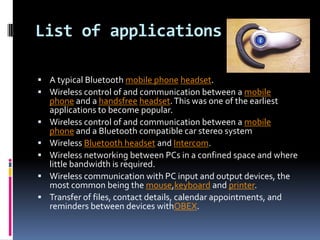
 A typical Bluetooth mobile phone headset.
 Wireless control of and communication between a mobile
    phone and a handsfree headset. This was one of the earliest
    applications to become popular.
   Wireless control of and communication between a mobile
    phone and a Bluetooth compatible car stereo system
   Wireless Bluetooth headset and Intercom.
   Wireless networking between PCs in a confined space and where
    little bandwidth is required.
   Wireless communication with PC input and output devices, the
    most common being the mouse,keyboard and printer.
   Transfer of files, contact details, calendar appointments, and
    reminders between devices withOBEX.
Devices
 Bluetooth exists in many products, such as telephones,
  tablets, media players, Lego Mindstorms PlayStation PSP
  Go, the and some high definition headsets, modems, and
  watches.[The technology is useful when transferring
  information between two or more devices that are near
  each other in low-bandwidth situations. Bluetooth is
  commonly used to transfer sound data with telephones
  (i.e., with a Bluetooth headset) or byte data with hand-held
  computers (transferring files).
 Bluetooth protocols simplify the discovery and setup of
  services between devices.Bluetooth devices can advertise
  all of the services they provide.This makes using services
  easier because more of the security, network address and
  permission configuration can be automated than with
  many other network types.
Computer requirements

 A personal computer that does not have embedded
  Bluetooth can be used with a Bluetooth adapter that
  will enable the PC to communicate with other
  Bluetooth devices (such as mobile
  phones, miceand keyboards). While some desktop
  computers and most recent laptops come with a
  built-in Bluetooth radio, others will require an
  external one in the form of a dongle.
 Unlike its predecessor, IrDA, which requires a
  separate adapter for each device, Bluetooth allows
  multiple devices to communicate with a computer
  over a single adapter.
Specifications and features

 The Bluetooth specification was developed as a
  cable replacement in 1994 by Jaap Haartsen and
  Sven Mattisson, who were working for Ericsson
  in Lund, Sweden.The specification is based
  on frequency-hopping spread spectrum technology.
 The specifications were formalized by the Bluetooth
  Special Interest Group (SIG). The SIG was formally
  announced on May 20, 1998. Today it has a
  membership of over 16,000 companies worldwide. It
  was established by IBM, Intel, Toshiba and Nokia,
  and later joined by many other companies.
Bluetooth v1.1

 Ratified as IEEE Standard 802.15.1-2002
 Many errors found in the 1.0B specifications
  were fixed.
 Added possibility of non-encrypted channels.
 Received Signal Strength Indicator (RSSI).
Thank you

Bluetooth

  • 1.
    Presented  By  Karunvirsingh  Collage kcl-imt  Jal. Punjab
  • 2.
    Intoduction  Bluetooth  Implementation Communication and connection  Bluetooth profiles  List of application  Devices  Computer requirements  Specification and features
  • 3.
    BLUETOOTH Bluetooth is aproprietary open wireless technology standard for exchanging data over short distances (using short-wavelength radio transmissions in the ISM band from 2400–2480 MHz) from fixed and mobile devices, creating personal area networks (PANs) with high levels of security. Created by telecoms vendor Ericsson in 1994,it was originally conceived as a wireless alternative to RS-232 data cables. It can connect several devices.
  • 4.
    Implementation  Bluetooth usesa radio technology called frequency- hopping spread spectrum, which chops up the data being sent and transmits chunks of it on up to 79 bands (1 MHz each; centered from 2402 to 2480 MHz) in the range 2,400–2,483.5 MHz (allowing for guard bands). This range is in the globally unlicensed Industrial, Scientific and Medical (ISM) 2.4 GHz short-range radio frequency band. It usually performs 800 hops per second, with AFH enabled.
  • 5.
    Communication and connection A master Bluetooth device can communicate with a maximum of seven devices in a piconet (an ad-hoc computer network using Bluetooth technology), though not all devices reach this maximum. The devices can switch roles, by agreement, and the slave can become the master (for example, a headset initiating a connection to a phone will necessarily begin as master, as initiator of the connection; but may subsequently prefer to be slave.
  • 6.
    Bluetooth profiles  To use Bluetooth wireless technology, a device has to be able to interpret certain Bluetooth profiles, which are definitions of possible applications and specify general behaviors that Bluetooth enabled devices use to communicate with other Bluetooth devices. These profiles include settings to control the communication from start. Adherence to profiles saves the time for transmitting the parameters a new before the bi-directional link becomes effective. There are a wide range of Bluetooth profiles that describe many different types of applications or use cases for devices.
  • 7.
    List of applications A typical Bluetooth mobile phone headset.  Wireless control of and communication between a mobile phone and a handsfree headset. This was one of the earliest applications to become popular.  Wireless control of and communication between a mobile phone and a Bluetooth compatible car stereo system  Wireless Bluetooth headset and Intercom.  Wireless networking between PCs in a confined space and where little bandwidth is required.  Wireless communication with PC input and output devices, the most common being the mouse,keyboard and printer.  Transfer of files, contact details, calendar appointments, and reminders between devices withOBEX.
  • 8.
    Devices  Bluetooth existsin many products, such as telephones, tablets, media players, Lego Mindstorms PlayStation PSP Go, the and some high definition headsets, modems, and watches.[The technology is useful when transferring information between two or more devices that are near each other in low-bandwidth situations. Bluetooth is commonly used to transfer sound data with telephones (i.e., with a Bluetooth headset) or byte data with hand-held computers (transferring files).  Bluetooth protocols simplify the discovery and setup of services between devices.Bluetooth devices can advertise all of the services they provide.This makes using services easier because more of the security, network address and permission configuration can be automated than with many other network types.
  • 9.
    Computer requirements  Apersonal computer that does not have embedded Bluetooth can be used with a Bluetooth adapter that will enable the PC to communicate with other Bluetooth devices (such as mobile phones, miceand keyboards). While some desktop computers and most recent laptops come with a built-in Bluetooth radio, others will require an external one in the form of a dongle.  Unlike its predecessor, IrDA, which requires a separate adapter for each device, Bluetooth allows multiple devices to communicate with a computer over a single adapter.
  • 10.
    Specifications and features The Bluetooth specification was developed as a cable replacement in 1994 by Jaap Haartsen and Sven Mattisson, who were working for Ericsson in Lund, Sweden.The specification is based on frequency-hopping spread spectrum technology.  The specifications were formalized by the Bluetooth Special Interest Group (SIG). The SIG was formally announced on May 20, 1998. Today it has a membership of over 16,000 companies worldwide. It was established by IBM, Intel, Toshiba and Nokia, and later joined by many other companies.
  • 11.
    Bluetooth v1.1  Ratifiedas IEEE Standard 802.15.1-2002  Many errors found in the 1.0B specifications were fixed.  Added possibility of non-encrypted channels.  Received Signal Strength Indicator (RSSI).
  • 12.