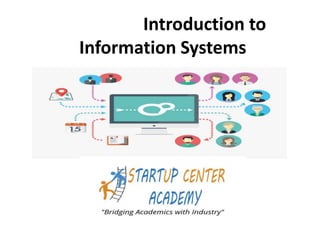
Introduction to
Information Systems
Background
The introduction to Information Systems is designed for non technology oriented
Managers to understand the implication of Information Technology and
Information Systems in their organization so that they equip themselves with the
necessary knowhow to cope with both embracing technology in their department
and also get ready for the next wave of Information Systems – Artificial
Intelligence and Machine Learning which is getting deeply embedded in the day
to day Information Systems in the organization
This is also useful for Management Students ( PGDM and MBA) who don’t have
background in Technology to make their foundation for both Technology related
courses in Management and get them ready for the new technology job market
The style of writing this book is deliberately made in bullet point concepts
approach so that students can understand the concepts with one reading .
• Topic :
• Data
• Information
• Knowledge
• Wisdom
• DIKW Model Pyramid
• Corporate Pyramid
• Information Systems Pyramid
• Decision Making Types Pyramid
Chapter 1 – Data to DIKW Model
Understanding Data
• 230975 is Data
• 23/09/75 is Data – It could be anyone’s DOB
• DOB 23/09/76 Suresh – Data – Could be any
Suresh in the world
• DOB 23/09/76 Suresh s/o of Ramesh – Data –
could be any Suresh s/o of Ramesh
• DOB 23/09/76 Suresh s/o Ramesh R/o of …….
is Information as now there is “Context “ to Data
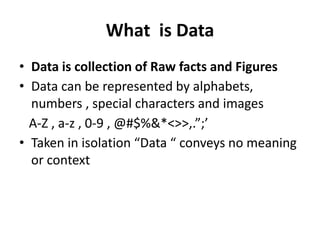
What is Data
• Data is collection of Raw facts and Figures
• Data can be represented by alphabets,
numbers , special characters and images
A-Z , a-z , 0-9 , @#$%&*<>>,.”;’
• Taken in isolation “Data “ conveys no meaning
or context
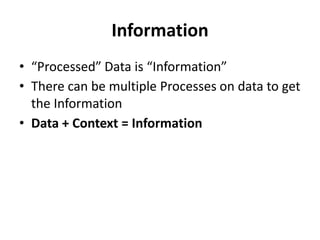
Information
• “Processed” Data is “Information”
• There can be multiple Processes on data to get
the Information
• Data + Context = Information
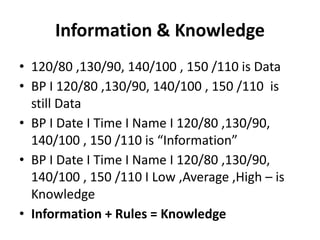
Information & Knowledge
• 120/80 ,130/90, 140/100 , 150 /110 is Data
• BP I 120/80 ,130/90, 140/100 , 150 /110 is
still Data
• BP I Date I Time I Name I 120/80 ,130/90,
140/100 , 150 /110 is “Information”
• BP I Date I Time I Name I 120/80 ,130/90,
140/100 , 150 /110 I Low ,Average ,High – is
Knowledge
• Information + Rules = Knowledge
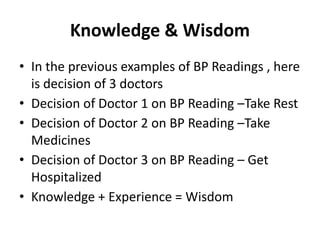
Knowledge & Wisdom
• In the previous examples of BP Readings , here
is decision of 3 doctors
• Decision of Doctor 1 on BP Reading –Take Rest
• Decision of Doctor 2 on BP Reading –Take
Medicines
• Decision of Doctor 3 on BP Reading – Get
Hospitalized
• Knowledge + Experience = Wisdom
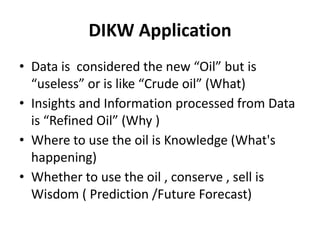
DIKW Application
• Data is considered the new “Oil” but is
“useless” or is like “Crude oil” (What)
• Insights and Information processed from Data
is “Refined Oil” (Why )
• Where to use the oil is Knowledge (What's
happening)
• Whether to use the oil , conserve , sell is
Wisdom ( Prediction /Future Forecast)
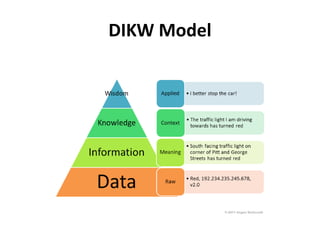
DIKW Model
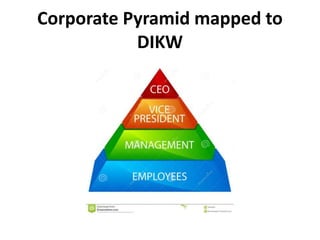
Corporate Pyramid mapped to
DIKW
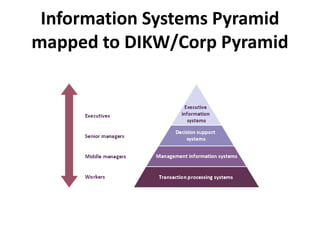
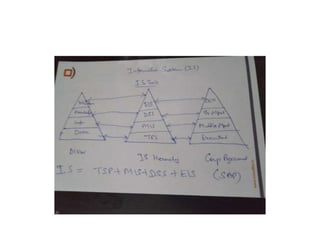
Information Systems Pyramid
mapped to DIKW/Corp Pyramid
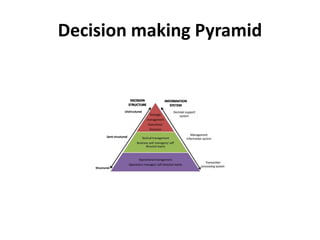
Decision making Pyramid
What is “System”
• Definition of “System” - A system is a set of
rules, an arrangement of things, or a group of
related things that work toward a common
goal
• System is a general set of parts, steps, or
components that are connected to form a
more complex whole.
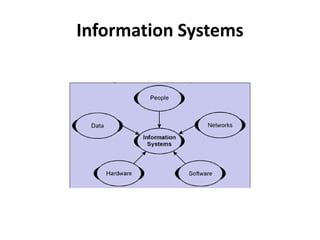
5 Components of IS –Information
System
• Hardware – Physical devices –computers ,
tablets , mobile phones
• Software – Tells the hardware what to do
• Data –Information manipulated by Software
• People –Users , Programmers ,Analysts , IT
Dep't
• Process- steps to accomplish a goal
• Telecommunications /Networking
Information Systems
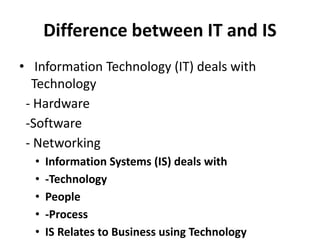
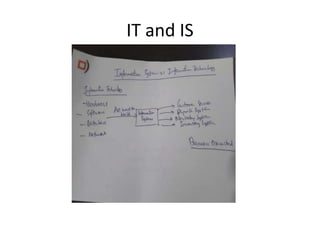
Difference between IT and IS
• Information Technology (IT) deals with
Technology
- Hardware
-Software
- Networking
• Information Systems (IS) deals with
• -Technology
• People
• -Process
• IS Relates to Business using Technology
• The next slide shows the relationship between
Information Technology and Information
System
IT and IS
Chapter 2 – Types of Information
Systems
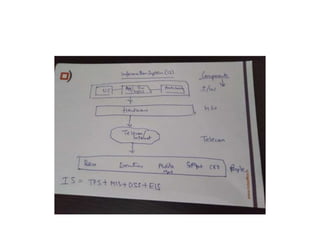
Information Systems can be broadly divided
into following four categories:
1. TPS – Transaction Processing System
2. MIS – Management Information System
3. DSS – Decision Support System
4. EIS – Executive Information System
Types of Business Information
Systems
• Operations Support – Provided by TPS
• Management Support – Provided by MIS , DSS
& EIS
• Other Business Support Systems
- GDSS ( Group Decision Support System )-
Communications (Chat/Mail ) , Conferencing (
Audio/Video Conferencing ) and Collaboration
( Workflow)
- Knowledge Management
-Expert Systems
Transaction Processing System
(TPS)
• Captures daily transactions like POS (Point of
Sale ) data in Store
• Helps in Operational Level of Management (
lower Management)
• Online (POS) or Batch Processing
• Pre defined transactions
• No decision making
• Structured problems
• Follows ACID Mode
ACID Principle of TPS
• All TPS model follow ACID Principle
• A – Atomicity – Transaction is Full or None
• C – Consistency – All transactions within
defined boundary ex ATM limit of 10K cash
withdraw per transaction
• I – Integrity – All Credits and Debits will be
done simultaneously
• D- Durability – Maintain Log Reports of who
used the system , when
TPS Classifier -ACID Test for TPS
• A – Atomicity- TPS is complete in full or not
• C-Consistency- set of operating rules and
constraints of Database Mgmt.
• I – Isolation – Each TPS is different even if they
are at same time
• D –Durability – TPS once done cannot be
undone
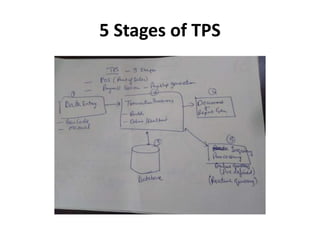
• There are 5 Stages in Transaction Processing
System
• The next slide shows the graphical layout of 5
stages of TPS
5 Stages of TPS
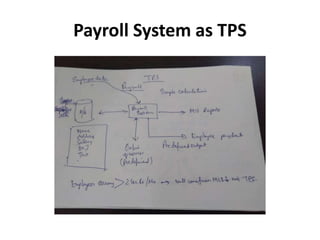
• The 5 stages in Payroll system with context to
TPS is shown in details in next slide
Payroll System as TPS
Management Information System
(MIS)
• Captures data from TPS
• Summarizes TPS Data
• Provides “Organization Performance Reports”
• Mostly Structured –Pre Defined decision
making
• Little Analytics
• Example : Grade Sheet of Class Term Result is
MIS (Performance of Class)
4 Types of MIS Reports
1. Periodic and Scheduled Reports – provided on
regular basis – daily
/weekly/fortnightly/monthly ex Sales Reports
,Production & Inventory Reports
2. Exceptional Reports – Only in exceptional
conditions , may be periodic and non periodic.
Periodic to decrease info overload , non
periodic ex exceeding Credit limit
3.Demand and Response –Available on demand
– Customized Reports , Web Based , RDBMS
Decision Support System (DSS)
• Non Routine Decisions
• Semi Structured Decisions – 50/50
• 2 Categories
-Model Based
- Data Based
• Used infrequently only when problems
/opportunity analysis
Types of Decisions
• Structured – Inventory Re order Decision
• Semi Structured – Which product lines to add
in next 1 year
• Structured – Which business to be in next 5
years
DSS
• Model Based – Use of Statistical Models –
result is know , arrive at correlation between 2
variables – ex behavioural analysis – Cross and
Up Sell in E Commerce
• Data Based – Use Data from TPS /MIS to slice
/dice/ consolidate /replicate and arrive at new
knowledge which was not known
ex Yield Management System ( Dynamic ticket
pricing of Airlines ) based on optimization
model
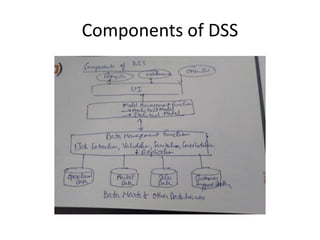
• Now lets examine the components of DSS in
next slide
Components of DSS
Executive Information System (EIS)
• Decisions taken at Top level
• Totally unstructured decisions based on data ,
insights, intuition and experience
• Data is 2 types
- Internal Data – From DSS
- External Data – Sensex , Standard and Poor
type reports , Govt Policies , Industry Reports
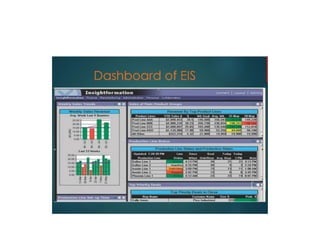
• Dashboard is Graphical /Charts
Topics:
• Understand concept of Knowledge
• Hierarchy of Knowledge
• Types of Knowledge – Explicit & Tacit
• Knowledge Types conversions
• Value of Knowledge
• Organizational Knowledge – Single & Double loop
• Use of Information Technology in Knowledge
• Introduction to AI – Expert Systems
• Expert Systems – Forward and Backward Chaining
Chapter 3 – Knowledge Management &
Expert Systems
What is Knowledge
• Knowledge is
- Knowhow
- Applied Information
- Information with Judgment
- Capacity for effective action
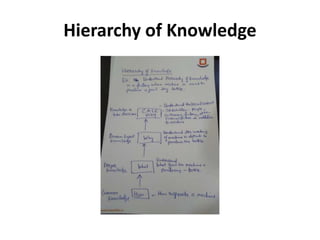
• Lets understand the Hierarchy of Knowledge
with reference to manufacturing of some
product using a machine in factory
• Here each level of personnel has a different
knowledge know how with context to his role
Hierarchy of Knowledge
Types of Knowledge
Knowledge basically is of two types
1 . Explicit Knowledge – Can be expressed in
words and figures , essentially this knowledge
can be documented
2.Tacit – This knowledge cannot be documented
For organization to grow by continuous
innovation, Tacit knowledge has to be
continuously converted to Explicit knowledge
Knowledge Types Conversions
• Tacit to Explicit – for continuous innovation ,
Ex Expert Systems
• Explicit to Tacit – Ex PhD Research –Start with
Literature review , find gaps and to tacit
research for further innovation
• Explicit – Explicit – Organizations copy best
knowledge practices from each other , ex use
of same type of Payroll System
• Tacit –Tacit –Two subject matter experts talk
to each other to increase the Tacit knowledge
Value of Knowledge
• In knowledge economy , Knowledge has
“money “ value – Valuations of Startups in
determined by their Innovation
(Knowledge).This knowledge has to be
continuously stored in Knowledge
Management System
• Newspapers /Websites provide information
and not knowledge .They in turn earn money
from “ Ads” which is giving someone else’s
information
Organizational Knowledge
• Organizational Learning Strategy is different
for different organizations .It creates new
standards for operating processes
• There are two types of Organizational learning
1. Single Loop – Get into deeper understanding
of “Cause” in the “Cause and Effect “ theory.Ex
Earthquakes kill people .Here you will get into
understanding of Cause of Earthquake and
find solution
2.Double loop –You challenge the “ Cause “ . Ex
Information Technology in
Knowledge Management
• Technology is used in Knowledge
Management in 4 ways
1. Create Knowledge – Use simulation and
design tools like CAD/CAM software , Virtual
Reality
2.Capture & Codify (Automate ) knowledge by
using Artificial Intelligence (AI) like Expert
Systems
3. Share Knowledge – Use of GDSS ( Groupware
Software ) to share and increase knowledge
4.Distribute Knowledge – Using Office
Automation Systems , Intranets etc
Points 3 & 4 are part of all Information Systems
Point 1 & 2 are specific to Knowledge
Management Information System
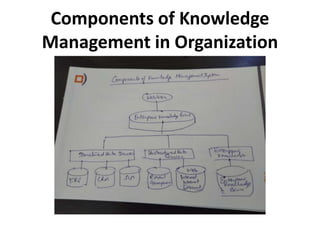
• Lets examine the components of Knowledge
Management System in an organization
Components of Knowledge
Management in Organization
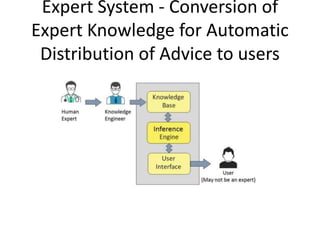
Expert System – AI
• The process of transfer of human expert
knowledge to a computer and thereafter
taking inputs of the expert advice from the
computer is called Expert System
• The components of Expert System as
described in next slides are
- Knowledge Base
- Inference Engine
- User Interface
Expert System - Conversion of
Expert Knowledge for Automatic
Distribution of Advice to users
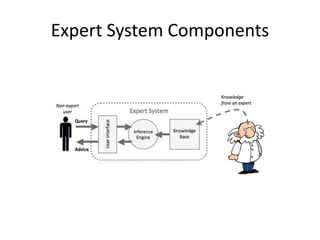
Expert System Components
Organizations using Expert System
• Medical Diagnosis – ex WebMD ,
www.easydiagnosis.com
• Games –Chess /Cards – www.chess.com
• Coding
• Filing Income Tax Returns
Components of Expert Systems
• Inference Engine – Use of “Rules “ , “ What if
Analysis “ – This is “brain” of Expert System.
Apart from Rules , its other function is to
“Search “ the Knowledge Base.
• Knowledge Base – Domain Experts (ex Doctor)
provides knowledge to Knowledge (Data)
Engineer who codifies the knowledge in
Knowledge Base
• UI – Uses web , Text to Speech and Speech to
Text to get the expert advice to non expert
Forward and Backward Chaining in
Inference Engine
• Inference Engine uses Forward and Backward
Chaining techniques for framing Rules and
Search from Knowledge Base
• Forward Engine – Starts with known facts and
asserts new facts
• Backward Chaining – Starts with goals and
works backwards to determine what facts
must be asserted so that goals can be
achieved . It essentially does hypothesis
testing
Forward and Backward Chaining
Example
• A is initial condition – No one is in
Management Institute today
• A->B ( A implies B ) – Rule – If no one is in
Institute today , it must be holiday
• B (Result ) – It is holiday today
Forward Chaining – Given A and A->B , find B
Backward Chaining – Given B and A->B , find A

Information System Concepts

  • 1.
  • 2.
    Background The introduction toInformation Systems is designed for non technology oriented Managers to understand the implication of Information Technology and Information Systems in their organization so that they equip themselves with the necessary knowhow to cope with both embracing technology in their department and also get ready for the next wave of Information Systems – Artificial Intelligence and Machine Learning which is getting deeply embedded in the day to day Information Systems in the organization This is also useful for Management Students ( PGDM and MBA) who don’t have background in Technology to make their foundation for both Technology related courses in Management and get them ready for the new technology job market The style of writing this book is deliberately made in bullet point concepts approach so that students can understand the concepts with one reading .
  • 3.
    • Topic : •Data • Information • Knowledge • Wisdom • DIKW Model Pyramid • Corporate Pyramid • Information Systems Pyramid • Decision Making Types Pyramid Chapter 1 – Data to DIKW Model
  • 4.
    Understanding Data • 230975is Data • 23/09/75 is Data – It could be anyone’s DOB • DOB 23/09/76 Suresh – Data – Could be any Suresh in the world • DOB 23/09/76 Suresh s/o of Ramesh – Data – could be any Suresh s/o of Ramesh • DOB 23/09/76 Suresh s/o Ramesh R/o of ……. is Information as now there is “Context “ to Data
  • 5.
    What is Data •Data is collection of Raw facts and Figures • Data can be represented by alphabets, numbers , special characters and images A-Z , a-z , 0-9 , @#$%&*<>>,.”;’ • Taken in isolation “Data “ conveys no meaning or context
  • 6.
    Information • “Processed” Datais “Information” • There can be multiple Processes on data to get the Information • Data + Context = Information
  • 7.
    Information & Knowledge •120/80 ,130/90, 140/100 , 150 /110 is Data • BP I 120/80 ,130/90, 140/100 , 150 /110 is still Data • BP I Date I Time I Name I 120/80 ,130/90, 140/100 , 150 /110 is “Information” • BP I Date I Time I Name I 120/80 ,130/90, 140/100 , 150 /110 I Low ,Average ,High – is Knowledge • Information + Rules = Knowledge
  • 8.
    Knowledge & Wisdom •In the previous examples of BP Readings , here is decision of 3 doctors • Decision of Doctor 1 on BP Reading –Take Rest • Decision of Doctor 2 on BP Reading –Take Medicines • Decision of Doctor 3 on BP Reading – Get Hospitalized • Knowledge + Experience = Wisdom
  • 9.
    DIKW Application • Datais considered the new “Oil” but is “useless” or is like “Crude oil” (What) • Insights and Information processed from Data is “Refined Oil” (Why ) • Where to use the oil is Knowledge (What's happening) • Whether to use the oil , conserve , sell is Wisdom ( Prediction /Future Forecast)
  • 10.
  • 11.
  • 12.
  • 14.
  • 15.
    What is “System” •Definition of “System” - A system is a set of rules, an arrangement of things, or a group of related things that work toward a common goal • System is a general set of parts, steps, or components that are connected to form a more complex whole.
  • 16.
    5 Components ofIS –Information System • Hardware – Physical devices –computers , tablets , mobile phones • Software – Tells the hardware what to do • Data –Information manipulated by Software • People –Users , Programmers ,Analysts , IT Dep't • Process- steps to accomplish a goal • Telecommunications /Networking
  • 17.
  • 19.
    Difference between ITand IS • Information Technology (IT) deals with Technology - Hardware -Software - Networking • Information Systems (IS) deals with • -Technology • People • -Process • IS Relates to Business using Technology
  • 20.
    • The nextslide shows the relationship between Information Technology and Information System
  • 21.
  • 22.
    Chapter 2 –Types of Information Systems Information Systems can be broadly divided into following four categories: 1. TPS – Transaction Processing System 2. MIS – Management Information System 3. DSS – Decision Support System 4. EIS – Executive Information System
  • 23.
    Types of BusinessInformation Systems • Operations Support – Provided by TPS • Management Support – Provided by MIS , DSS & EIS • Other Business Support Systems - GDSS ( Group Decision Support System )- Communications (Chat/Mail ) , Conferencing ( Audio/Video Conferencing ) and Collaboration ( Workflow) - Knowledge Management -Expert Systems
  • 24.
    Transaction Processing System (TPS) •Captures daily transactions like POS (Point of Sale ) data in Store • Helps in Operational Level of Management ( lower Management) • Online (POS) or Batch Processing • Pre defined transactions • No decision making • Structured problems • Follows ACID Mode
  • 25.
    ACID Principle ofTPS • All TPS model follow ACID Principle • A – Atomicity – Transaction is Full or None • C – Consistency – All transactions within defined boundary ex ATM limit of 10K cash withdraw per transaction • I – Integrity – All Credits and Debits will be done simultaneously • D- Durability – Maintain Log Reports of who used the system , when
  • 26.
    TPS Classifier -ACIDTest for TPS • A – Atomicity- TPS is complete in full or not • C-Consistency- set of operating rules and constraints of Database Mgmt. • I – Isolation – Each TPS is different even if they are at same time • D –Durability – TPS once done cannot be undone
  • 27.
    • There are5 Stages in Transaction Processing System • The next slide shows the graphical layout of 5 stages of TPS
  • 28.
  • 29.
    • The 5stages in Payroll system with context to TPS is shown in details in next slide
  • 30.
  • 31.
    Management Information System (MIS) •Captures data from TPS • Summarizes TPS Data • Provides “Organization Performance Reports” • Mostly Structured –Pre Defined decision making • Little Analytics • Example : Grade Sheet of Class Term Result is MIS (Performance of Class)
  • 32.
    4 Types ofMIS Reports 1. Periodic and Scheduled Reports – provided on regular basis – daily /weekly/fortnightly/monthly ex Sales Reports ,Production & Inventory Reports 2. Exceptional Reports – Only in exceptional conditions , may be periodic and non periodic. Periodic to decrease info overload , non periodic ex exceeding Credit limit 3.Demand and Response –Available on demand – Customized Reports , Web Based , RDBMS
  • 33.
    Decision Support System(DSS) • Non Routine Decisions • Semi Structured Decisions – 50/50 • 2 Categories -Model Based - Data Based • Used infrequently only when problems /opportunity analysis
  • 34.
    Types of Decisions •Structured – Inventory Re order Decision • Semi Structured – Which product lines to add in next 1 year • Structured – Which business to be in next 5 years
  • 35.
    DSS • Model Based– Use of Statistical Models – result is know , arrive at correlation between 2 variables – ex behavioural analysis – Cross and Up Sell in E Commerce • Data Based – Use Data from TPS /MIS to slice /dice/ consolidate /replicate and arrive at new knowledge which was not known ex Yield Management System ( Dynamic ticket pricing of Airlines ) based on optimization model
  • 36.
    • Now letsexamine the components of DSS in next slide
  • 37.
  • 38.
    Executive Information System(EIS) • Decisions taken at Top level • Totally unstructured decisions based on data , insights, intuition and experience • Data is 2 types - Internal Data – From DSS - External Data – Sensex , Standard and Poor type reports , Govt Policies , Industry Reports • Dashboard is Graphical /Charts
  • 40.
    Topics: • Understand conceptof Knowledge • Hierarchy of Knowledge • Types of Knowledge – Explicit & Tacit • Knowledge Types conversions • Value of Knowledge • Organizational Knowledge – Single & Double loop • Use of Information Technology in Knowledge • Introduction to AI – Expert Systems • Expert Systems – Forward and Backward Chaining Chapter 3 – Knowledge Management & Expert Systems
  • 41.
    What is Knowledge •Knowledge is - Knowhow - Applied Information - Information with Judgment - Capacity for effective action
  • 42.
    • Lets understandthe Hierarchy of Knowledge with reference to manufacturing of some product using a machine in factory • Here each level of personnel has a different knowledge know how with context to his role
  • 43.
  • 44.
    Types of Knowledge Knowledgebasically is of two types 1 . Explicit Knowledge – Can be expressed in words and figures , essentially this knowledge can be documented 2.Tacit – This knowledge cannot be documented For organization to grow by continuous innovation, Tacit knowledge has to be continuously converted to Explicit knowledge
  • 45.
    Knowledge Types Conversions •Tacit to Explicit – for continuous innovation , Ex Expert Systems • Explicit to Tacit – Ex PhD Research –Start with Literature review , find gaps and to tacit research for further innovation • Explicit – Explicit – Organizations copy best knowledge practices from each other , ex use of same type of Payroll System • Tacit –Tacit –Two subject matter experts talk to each other to increase the Tacit knowledge
  • 46.
    Value of Knowledge •In knowledge economy , Knowledge has “money “ value – Valuations of Startups in determined by their Innovation (Knowledge).This knowledge has to be continuously stored in Knowledge Management System • Newspapers /Websites provide information and not knowledge .They in turn earn money from “ Ads” which is giving someone else’s information
  • 47.
    Organizational Knowledge • OrganizationalLearning Strategy is different for different organizations .It creates new standards for operating processes • There are two types of Organizational learning 1. Single Loop – Get into deeper understanding of “Cause” in the “Cause and Effect “ theory.Ex Earthquakes kill people .Here you will get into understanding of Cause of Earthquake and find solution 2.Double loop –You challenge the “ Cause “ . Ex
  • 48.
    Information Technology in KnowledgeManagement • Technology is used in Knowledge Management in 4 ways 1. Create Knowledge – Use simulation and design tools like CAD/CAM software , Virtual Reality 2.Capture & Codify (Automate ) knowledge by using Artificial Intelligence (AI) like Expert Systems
  • 49.
    3. Share Knowledge– Use of GDSS ( Groupware Software ) to share and increase knowledge 4.Distribute Knowledge – Using Office Automation Systems , Intranets etc Points 3 & 4 are part of all Information Systems Point 1 & 2 are specific to Knowledge Management Information System
  • 50.
    • Lets examinethe components of Knowledge Management System in an organization
  • 51.
  • 52.
    Expert System –AI • The process of transfer of human expert knowledge to a computer and thereafter taking inputs of the expert advice from the computer is called Expert System • The components of Expert System as described in next slides are - Knowledge Base - Inference Engine - User Interface
  • 53.
    Expert System -Conversion of Expert Knowledge for Automatic Distribution of Advice to users
  • 54.
  • 55.
    Organizations using ExpertSystem • Medical Diagnosis – ex WebMD , www.easydiagnosis.com • Games –Chess /Cards – www.chess.com • Coding • Filing Income Tax Returns
  • 56.
    Components of ExpertSystems • Inference Engine – Use of “Rules “ , “ What if Analysis “ – This is “brain” of Expert System. Apart from Rules , its other function is to “Search “ the Knowledge Base. • Knowledge Base – Domain Experts (ex Doctor) provides knowledge to Knowledge (Data) Engineer who codifies the knowledge in Knowledge Base • UI – Uses web , Text to Speech and Speech to Text to get the expert advice to non expert
  • 57.
    Forward and BackwardChaining in Inference Engine • Inference Engine uses Forward and Backward Chaining techniques for framing Rules and Search from Knowledge Base • Forward Engine – Starts with known facts and asserts new facts • Backward Chaining – Starts with goals and works backwards to determine what facts must be asserted so that goals can be achieved . It essentially does hypothesis testing
  • 58.
    Forward and BackwardChaining Example • A is initial condition – No one is in Management Institute today • A->B ( A implies B ) – Rule – If no one is in Institute today , it must be holiday • B (Result ) – It is holiday today Forward Chaining – Given A and A->B , find B Backward Chaining – Given B and A->B , find A