Command Line Reference


Informatica® PowerCenter®
(Version 8.5.1)
Informatica PowerCenter Command Line Reference

Version 8.5.1
December 2007

Copyright (c) 1998–2007 Informatica Corporation. All rights reserved.

This software and documentation contain proprietary information of Informatica Corporation and are provided under a license agreement containing
restrictions on use and disclosure and are also protected by copyright law. Reverse engineering of the software is prohibited. No part of this document may be
reproduced or transmitted in any form, by any means (electronic, photocopying, recording or otherwise) without prior consent of Informatica Corporation. This
Software is protected by U.S. and/or international Patents and other Patents Pending.

Use, duplication, or disclosure of the Software by the U.S. Government is subject to the restrictions set forth in the applicable software license agreement and as
provided in DFARS 227.7202-1(a) and 227.7702-3(a) (1995), DFARS 252.227-7013(c)(1)(ii) (OCT 1988), FAR 12.212(a) (1995), FAR 52.227-19, or FAR
52.227-14 (ALT III), as applicable.

The information in this product or documentation is subject to change without notice. If you find any problems in this product or documentation, please report
them to us in writing.

Informatica, PowerCenter, PowerCenterRT, PowerCenter Connect, PowerCenter Data Analyzer, PowerExchange, PowerMart, Metadata Manager, Informatica
Data Quality, Informatica Data Explorer, Informatica Complex Data Exchange and Informatica On Demand Data Replicator are trademarks or registered
trademarks of Informatica Corporation in the United States and in jurisdictions throughout the world. All other company and product names may be trade
names or trademarks of their respective owners.

Portions of this software and/or documentation are subject to copyright held by third parties, including without limitation: Copyright DataDirect Technologies.
All rights reserved. Copyright © 2007 Adobe Systems Incorporated. All rights reserved. Copyright © Sun Microsystems. All rights reserved. Copyright © RSA
Security Inc. All Rights Reserved. Copyright © Ordinal Technology Corp. All rights reserved. Copyright © Platon Data Technology GmbH. All rights reserved.
Copyright © Melissa Data Corporation. All rights reserved. Copyright © Aandacht c.v. All rights reserved. Copyright 1996-2007 ComponentSource®. All
rights reserved. Copyright Genivia, Inc. All rights reserved. Copyright 2007 Isomorphic Software. All rights reserved. Copyright © Meta Integration
Technology, Inc. All rights reserved. Copyright © MySQL AB. All rights reserved. Copyright © Microsoft. All rights reserved. Copyright © Oracle. All rights
reserved. Copyright © AKS-Labs. All rights reserved. Copyright © Quovadx, Inc. All rights reserved. Copyright © SAP All rights reserved. Copyright 2003,
                                                                                                                         .
2007 Instantiations, Inc. All rights reserved.

This product includes software developed by the Apache Software Foundation (http://www.apache.org/), software copyright 2004-2005 Open Symphony (all
rights reserved) and other software which is licensed under the Apache License, Version 2.0 (the “License”). You may obtain a copy of the License at http://
www.apache.org/licenses/LICENSE-2.0. Unless required by applicable law or agreed to in writing, software distributed under the License is distributed on an
“AS IS” BASIS, WITHOUT WARRANTIES OR CONDITIONS OF ANY KIND, either express or implied. See the License for the specific language
governing permissions and limitations under the License.

This product includes software which was developed by Mozilla (http://www.mozilla.org/), software copyright The JBoss Group, LLC, all rights reserved;
software copyright, Red Hat Middleware, LLC, all rights reserved; software copyright © 1999-2006 by Bruno Lowagie and Paulo Soares and other software
which is licensed under the GNU Lesser General Public License Agreement, which may be found at http://www.gnu.org/licenses/lgpl.html. The materials are
provided free of charge by Informatica, “as-is”, without warranty of any kind, either express or implied, including but not limited to the implied warranties of
merchantability and fitness for a particular purpose.

The product includes ACE(TM) and TAO(TM) software copyrighted by Douglas C. Schmidt and his research group at Washington University, University of
California, Irvine, and Vanderbilt University, Copyright (c) 1993-2006, all rights reserved.

This product includes software copyright (c) 2003-2007, Terence Parr. All rights reserved. Your right to use such materials is set forth in the license which may
be found at http://www.antlr.org/license.html. The materials are provided free of charge by Informatica, “as-is”, without warranty of any kind, either express or
implied, including but not limited to the implied warranties of merchantability and fitness for a particular purpose.

This product includes software developed by the OpenSSL Project for use in the OpenSSL Toolkit (copyright The OpenSSL Project. All Rights Reserved) and
redistribution of this software is subject to terms available at http://www.openssl.org.

This product includes Curl software which is Copyright 1996-2007, Daniel Stenberg, <daniel@haxx.se>. All Rights Reserved. Permissions and limitations
regarding this software are subject to terms available at http://curl.haxx.se/docs/copyright.html. Permission to use, copy, modify, and distribute this software for
any purpose with or without fee is hereby granted, provided that the above copyright notice and this permission notice appear in all copies.

The product includes software copyright 2001-2005 (C) MetaStuff, Ltd. All Rights Reserved. Permissions and limitations regarding this software are subject to
terms available at http://www.dom4j.org/license.html.

The product includes software copyright (c) 2004-2007, The Dojo Foundation. All Rights Reserved. Permissions and limitations regarding this software are
subject to terms available at http://svn.dojotoolkit.org/dojo/trunk/LICENSE.

This product includes ICU software which is copyright (c) 1995-2003 International Business Machines Corporation and others. All rights reserved. Permissions
and limitations regarding this software are subject to terms available at http://www-306.ibm.com/software/globalization/icu/license.jsp

This product includes software copyright (C) 1996-2006 Per Bothner. All rights reserved. Your right to use such materials is set forth in the license which may be
found at http://www.gnu.org/software/kawa/Software-License.html.

This product includes OSSP UUID software which is Copyright (c) 2002 Ralf S. Engelschall, Copyright (c) 2002 The OSSP Project Copyright (c) 2002 Cable
& Wireless Deutschland. Permissions and limitations regarding this software are subject to terms available at http://www.opensource.org/licenses/mit-
license.php.
This product includes software developed by Boost (http://www.boost.org/). Permissions and limitations regarding this software are subject to terms available at
http://www.boost.org/LICENSE_1_0.txt.

This product includes software copyright © 1997-2007 University of Cambridge. Permissions and limitations regarding this software are subject to terms
available at http://www.pcre.org/license.txt.

This product includes software copyright (c) 2007 The Eclipse Foundation. All Rights Reserved. Permissions and limitations regarding this software are subject
to terms available at http://www.eclipse.org/org/documents/epl-v10.php.

The product includes the zlib library copyright (c) 1995-2005 Jean-loup Gailly and Mark Adler.

This product includes software licensed under the terms at http://www.tcl.tk/software/tcltk/license.html.

This product includes software licensed under the terms at http://www.bosrup.com/web/overlib/?License.
This product includes software licensed under the terms at http://www.stlport.org/doc/license.html.

This product includes software licensed under the Academic Free License (http://www.opensource.org/licenses/afl-3.0.php.)

This product includes software developed by the Indiana University Extreme! Lab. For further information please visit http://www.extreme.indiana.edu/.
This Software is protected by U.S. Patent Numbers 6,208,990; 6,044,374; 6,014,670; 6,032,158; 5,794,246; 6,339,775; 6,850,947; 6,895,471 and other U.S.
Patents Pending.

DISCLAIMER: Informatica Corporation provides this documentation “as is” without warranty of any kind, either express or implied, including, but not limited
to, the implied warranties of non-infringement, merchantability, or use for a particular purpose. Informatica Corporation does not warrant that this software or
documentation is error free. The information provided in this software or documentation may include technical inaccuracies or typographical errors. The
information in this software and documentation is subject to change at any time without notice.


Part Number: PC-CLR-85100-0001
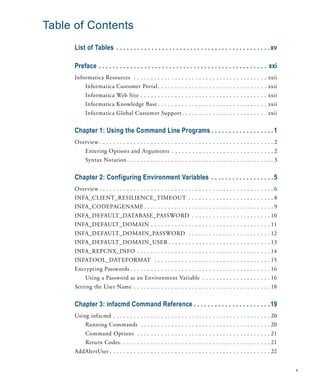
Table of Contents
     List of Tables . . . . . . . . . . . . . . . . . . . . . . . . . . . . . . . . . . . . . . . . . . . . xv

     Preface . . . . . . . . . . . . . . . . . . . . . . . . . . . . . . . . . . . . . . . . . . . . . . . . xxi
     Informatica Resources . . . . . . . . . . . . . . . . . . . . . . . . . . . . . . . . . . . . . . . xxii
          Informatica Customer Portal . . . . . . . . . . . . . . . . . . . . . . . . . . . . . . . . xxii
          Informatica Web Site . . . . . . . . . . . . . . . . . . . . . . . . . . . . . . . . . . . . . xxii
          Informatica Knowledge Base . . . . . . . . . . . . . . . . . . . . . . . . . . . . . . . . xxii
          Informatica Global Customer Support . . . . . . . . . . . . . . . . . . . . . . . . . xxii


     Chapter 1: Using the Command Line Programs . . . . . . . . . . . . . . . . . . 1
     Overview . . . . . . . . . . . . . . . . . . . . . . . . . . . . . . . . . . . . . . . . . . . . . . . . . . . 2
          Entering Options and Arguments . . . . . . . . . . . . . . . . . . . . . . . . . . . . . . 2
          Syntax Notation . . . . . . . . . . . . . . . . . . . . . . . . . . . . . . . . . . . . . . . . . . . 3


     Chapter 2: Configuring Environment Variables . . . . . . . . . . . . . . . . . . 5
     Overview . . . . . . . . . . . . . . . . . . . . . . . . . . . . . . . . . . . . . . . . . . . . . . . . . . . 6
     INFA_CLIENT_RESILIENCE_TIMEOUT . . . . . . . . . . . . . . . . . . . . . . . . . 8
     INFA_CODEPAGENAME . . . . . . . . . . . . . . . . . . . . . . . . . . . . . . . . . . . . . . 9
     INFA_DEFAULT_DATABASE_PASSWORD . . . . . . . . . . . . . . . . . . . . . . . 10
     INFA_DEFAULT_DOMAIN . . . . . . . . . . . . . . . . . . . . . . . . . . . . . . . . . . . 11
     INFA_DEFAULT_DOMAIN_PASSWORD . . . . . . . . . . . . . . . . . . . . . . . . 12
     INFA_DEFAULT_DOMAIN_USER . . . . . . . . . . . . . . . . . . . . . . . . . . . . . . 13
     INFA_REPCNX_INFO . . . . . . . . . . . . . . . . . . . . . . . . . . . . . . . . . . . . . . . 14
     INFATOOL_DATEFORMAT . . . . . . . . . . . . . . . . . . . . . . . . . . . . . . . . . . 15
     Encrypting Passwords . . . . . . . . . . . . . . . . . . . . . . . . . . . . . . . . . . . . . . . . . 16
          Using a Password as an Environment Variable . . . . . . . . . . . . . . . . . . . . 16
     Setting the User Name . . . . . . . . . . . . . . . . . . . . . . . . . . . . . . . . . . . . . . . . 18


     Chapter 3: infacmd Command Reference . . . . . . . . . . . . . . . . . . . . . . 19
     Using infacmd . . . . . . . . . . . . . . . . . . . . . . . . . . . . . . . . . . . . . . . . . . . . . . 20
          Running Commands . . . . . . . . . . . . . . . . . . . . . . . . . . . . . . . . . . . . . . 20
          Command Options . . . . . . . . . . . . . . . . . . . . . . . . . . . . . . . . . . . . . . . 21
          Return Codes. . . . . . . . . . . . . . . . . . . . . . . . . . . . . . . . . . . . . . . . . . . . 21
     AddAlertUser . . . . . . . . . . . . . . . . . . . . . . . . . . . . . . . . . . . . . . . . . . . . . . . 22


                                                                                                                        v
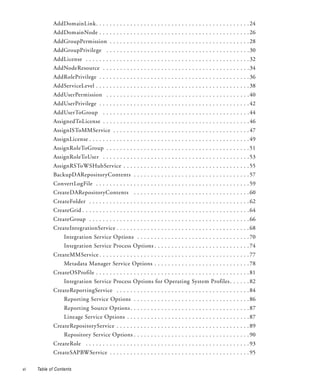
AddDomainLink. . . . . . . . . . . . . . . . . . . . . . . . . . . . . . . . . . . . . . . . . . . . . 24
             AddDomainNode . . . . . . . . . . . . . . . . . . . . . . . . . . . . . . . . . . . . . . . . . . . . 26
             AddGroupPermission . . . . . . . . . . . . . . . . . . . . . . . . . . . . . . . . . . . . . . . . . 28
             AddGroupPrivilege . . . . . . . . . . . . . . . . . . . . . . . . . . . . . . . . . . . . . . . . . . 30
             AddLicense . . . . . . . . . . . . . . . . . . . . . . . . . . . . . . . . . . . . . . . . . . . . . . . . 32
             AddNodeResource . . . . . . . . . . . . . . . . . . . . . . . . . . . . . . . . . . . . . . . . . . . 34
             AddRolePrivilege . . . . . . . . . . . . . . . . . . . . . . . . . . . . . . . . . . . . . . . . . . . . 36
             AddServiceLevel . . . . . . . . . . . . . . . . . . . . . . . . . . . . . . . . . . . . . . . . . . . . . 38
             AddUserPermission . . . . . . . . . . . . . . . . . . . . . . . . . . . . . . . . . . . . . . . . . . 40
             AddUserPrivilege . . . . . . . . . . . . . . . . . . . . . . . . . . . . . . . . . . . . . . . . . . . . 42
             AddUserToGroup . . . . . . . . . . . . . . . . . . . . . . . . . . . . . . . . . . . . . . . . . . . 44
             AssignedToLicense . . . . . . . . . . . . . . . . . . . . . . . . . . . . . . . . . . . . . . . . . . . 46
             AssignISToMMService . . . . . . . . . . . . . . . . . . . . . . . . . . . . . . . . . . . . . . . . 47
             AssignLicense . . . . . . . . . . . . . . . . . . . . . . . . . . . . . . . . . . . . . . . . . . . . . . . 49
             AssignRoleToGroup . . . . . . . . . . . . . . . . . . . . . . . . . . . . . . . . . . . . . . . . . . 51
             AssignRoleToUser . . . . . . . . . . . . . . . . . . . . . . . . . . . . . . . . . . . . . . . . . . . 53
             AssignRSToWSHubService . . . . . . . . . . . . . . . . . . . . . . . . . . . . . . . . . . . . . 55
             BackupDARepositoryContents . . . . . . . . . . . . . . . . . . . . . . . . . . . . . . . . . . 57
             ConvertLogFile . . . . . . . . . . . . . . . . . . . . . . . . . . . . . . . . . . . . . . . . . . . . . 59
             CreateDARepositoryContents . . . . . . . . . . . . . . . . . . . . . . . . . . . . . . . . . . 60
             CreateFolder . . . . . . . . . . . . . . . . . . . . . . . . . . . . . . . . . . . . . . . . . . . . . . . 62
             CreateGrid . . . . . . . . . . . . . . . . . . . . . . . . . . . . . . . . . . . . . . . . . . . . . . . . . 64
             CreateGroup . . . . . . . . . . . . . . . . . . . . . . . . . . . . . . . . . . . . . . . . . . . . . . . 66
             CreateIntegrationService . . . . . . . . . . . . . . . . . . . . . . . . . . . . . . . . . . . . . . . 68
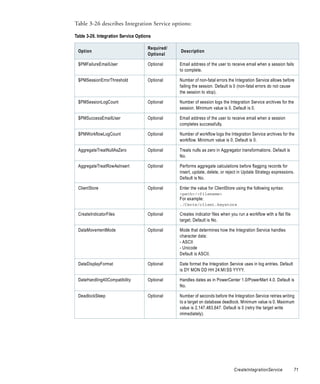
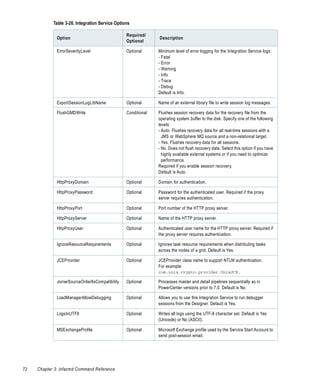
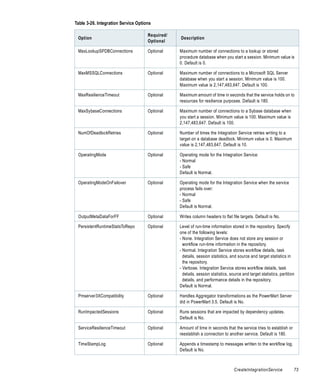
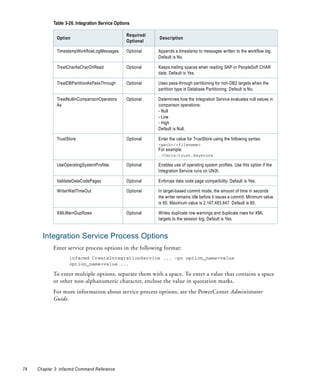
                  Integration Service Options . . . . . . . . . . . . . . . . . . . . . . . . . . . . . . . . . 70
                  Integration Service Process Options . . . . . . . . . . . . . . . . . . . . . . . . . . . . 74
             CreateMMService . . . . . . . . . . . . . . . . . . . . . . . . . . . . . . . . . . . . . . . . . . . . 77
                  Metadata Manager Service Options . . . . . . . . . . . . . . . . . . . . . . . . . . . . 78
             CreateOSProfile . . . . . . . . . . . . . . . . . . . . . . . . . . . . . . . . . . . . . . . . . . . . . 81
                  Integration Service Process Options for Operating System Profiles . . . . . . 82
             CreateReportingService . . . . . . . . . . . . . . . . . . . . . . . . . . . . . . . . . . . . . . . 84
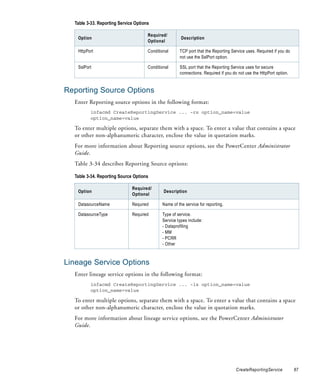
                  Reporting Service Options . . . . . . . . . . . . . . . . . . . . . . . . . . . . . . . . . . 86
                  Reporting Source Options . . . . . . . . . . . . . . . . . . . . . . . . . . . . . . . . . . . 87
                  Lineage Service Options . . . . . . . . . . . . . . . . . . . . . . . . . . . . . . . . . . . . 87
             CreateRepositoryService . . . . . . . . . . . . . . . . . . . . . . . . . . . . . . . . . . . . . . . 89
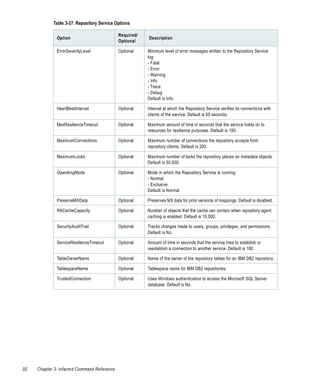
                  Repository Service Options . . . . . . . . . . . . . . . . . . . . . . . . . . . . . . . . . . 90
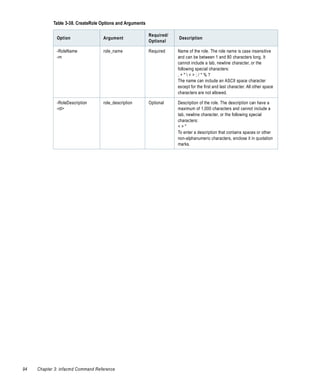
             CreateRole . . . . . . . . . . . . . . . . . . . . . . . . . . . . . . . . . . . . . . . . . . . . . . . . 93
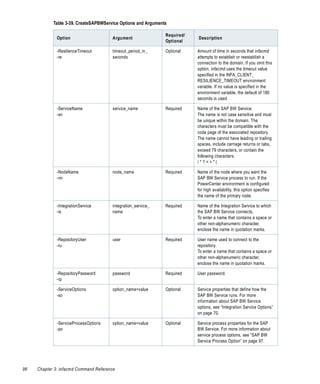
             CreateSAPBWService . . . . . . . . . . . . . . . . . . . . . . . . . . . . . . . . . . . . . . . . . 95

vi   Table of Contents
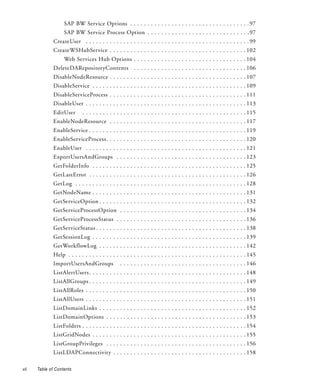
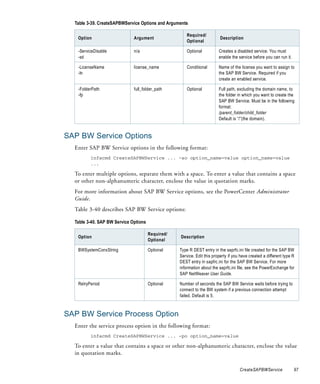
SAP BW Service Options . . . . . . . . . . . . . . . . . . . . . . . . . . . . . . . . . . . 97
                   SAP BW Service Process Option . . . . . . . . . . . . . . . . . . . . . . . . . . . . . . 97
              CreateUser . . . . . . . . . . . . . . . . . . . . . . . . . . . . . . . . . . . . . . . . . . . . . . . . 99
              CreateWSHubService . . . . . . . . . . . . . . . . . . . . . . . . . . . . . . . . . . . . . . . . 102
                   Web Services Hub Options . . . . . . . . . . . . . . . . . . . . . . . . . . . . . . . . . 104
              DeleteDARepositoryContents . . . . . . . . . . . . . . . . . . . . . . . . . . . . . . . . . 106
              DisableNodeResource . . . . . . . . . . . . . . . . . . . . . . . . . . . . . . . . . . . . . . . . 107
              DisableService . . . . . . . . . . . . . . . . . . . . . . . . . . . . . . . . . . . . . . . . . . . . . 109
              DisableServiceProcess . . . . . . . . . . . . . . . . . . . . . . . . . . . . . . . . . . . . . . . . 111
              DisableUser . . . . . . . . . . . . . . . . . . . . . . . . . . . . . . . . . . . . . . . . . . . . . . . 113
              EditUser        . . . . . . . . . . . . . . . . . . . . . . . . . . . . . . . . . . . . . . . . . . . . . . . . 115
              EnableNodeResource . . . . . . . . . . . . . . . . . . . . . . . . . . . . . . . . . . . . . . . . 117
              EnableService . . . . . . . . . . . . . . . . . . . . . . . . . . . . . . . . . . . . . . . . . . . . . . 119
              EnableServiceProcess. . . . . . . . . . . . . . . . . . . . . . . . . . . . . . . . . . . . . . . . . 120
              EnableUser . . . . . . . . . . . . . . . . . . . . . . . . . . . . . . . . . . . . . . . . . . . . . . . 121
              ExportUsersAndGroups . . . . . . . . . . . . . . . . . . . . . . . . . . . . . . . . . . . . . . 123
              GetFolderInfo . . . . . . . . . . . . . . . . . . . . . . . . . . . . . . . . . . . . . . . . . . . . . 125
              GetLastError . . . . . . . . . . . . . . . . . . . . . . . . . . . . . . . . . . . . . . . . . . . . . . 126
              GetLog . . . . . . . . . . . . . . . . . . . . . . . . . . . . . . . . . . . . . . . . . . . . . . . . . . 128
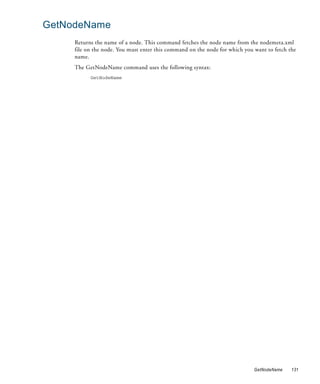
              GetNodeName . . . . . . . . . . . . . . . . . . . . . . . . . . . . . . . . . . . . . . . . . . . . . 131
              GetServiceOption . . . . . . . . . . . . . . . . . . . . . . . . . . . . . . . . . . . . . . . . . . . 132
              GetServiceProcessOption . . . . . . . . . . . . . . . . . . . . . . . . . . . . . . . . . . . . . 134
              GetServiceProcessStatus . . . . . . . . . . . . . . . . . . . . . . . . . . . . . . . . . . . . . . 136
              GetServiceStatus . . . . . . . . . . . . . . . . . . . . . . . . . . . . . . . . . . . . . . . . . . . . 138
              GetSessionLog . . . . . . . . . . . . . . . . . . . . . . . . . . . . . . . . . . . . . . . . . . . . . 139
              GetWorkflowLog . . . . . . . . . . . . . . . . . . . . . . . . . . . . . . . . . . . . . . . . . . . 142
              Help . . . . . . . . . . . . . . . . . . . . . . . . . . . . . . . . . . . . . . . . . . . . . . . . . . . . 145
              ImportUsersAndGroups                 . . . . . . . . . . . . . . . . . . . . . . . . . . . . . . . . . . . . . 146
              ListAlertUsers . . . . . . . . . . . . . . . . . . . . . . . . . . . . . . . . . . . . . . . . . . . . . . 148
              ListAllGroups . . . . . . . . . . . . . . . . . . . . . . . . . . . . . . . . . . . . . . . . . . . . . . 149
              ListAllRoles . . . . . . . . . . . . . . . . . . . . . . . . . . . . . . . . . . . . . . . . . . . . . . . 150
              ListAllUsers . . . . . . . . . . . . . . . . . . . . . . . . . . . . . . . . . . . . . . . . . . . . . . . 151
              ListDomainLinks . . . . . . . . . . . . . . . . . . . . . . . . . . . . . . . . . . . . . . . . . . . 152
              ListDomainOptions . . . . . . . . . . . . . . . . . . . . . . . . . . . . . . . . . . . . . . . . . 153
              ListFolders . . . . . . . . . . . . . . . . . . . . . . . . . . . . . . . . . . . . . . . . . . . . . . . . 154
              ListGridNodes . . . . . . . . . . . . . . . . . . . . . . . . . . . . . . . . . . . . . . . . . . . . . 155
              ListGroupPrivileges . . . . . . . . . . . . . . . . . . . . . . . . . . . . . . . . . . . . . . . . . 156
              ListLDAPConnectivity . . . . . . . . . . . . . . . . . . . . . . . . . . . . . . . . . . . . . . . 158

vii   Table of Contents
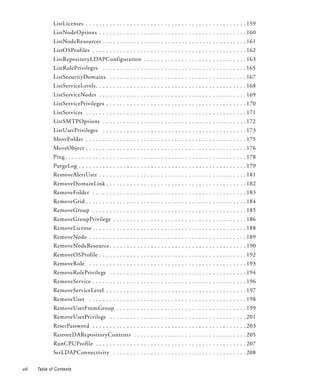
ListLicenses . . . . . . . . . . . . . . . . . . . . . . . . . . . . . . . . . . . . . . . . . . . . . . . 159
               ListNodeOptions . . . . . . . . . . . . . . . . . . . . . . . . . . . . . . . . . . . . . . . . . . . 160
               ListNodeResources . . . . . . . . . . . . . . . . . . . . . . . . . . . . . . . . . . . . . . . . . . 161
               ListOSProfiles . . . . . . . . . . . . . . . . . . . . . . . . . . . . . . . . . . . . . . . . . . . . . 162
               ListRepositoryLDAPConfiguration . . . . . . . . . . . . . . . . . . . . . . . . . . . . . . 163
               ListRolePrivileges . . . . . . . . . . . . . . . . . . . . . . . . . . . . . . . . . . . . . . . . . . 165
               ListSecurityDomains . . . . . . . . . . . . . . . . . . . . . . . . . . . . . . . . . . . . . . . . . 167
               ListServiceLevels . . . . . . . . . . . . . . . . . . . . . . . . . . . . . . . . . . . . . . . . . . . . 168
               ListServiceNodes . . . . . . . . . . . . . . . . . . . . . . . . . . . . . . . . . . . . . . . . . . . 169
               ListServicePrivileges . . . . . . . . . . . . . . . . . . . . . . . . . . . . . . . . . . . . . . . . . 170
               ListServices . . . . . . . . . . . . . . . . . . . . . . . . . . . . . . . . . . . . . . . . . . . . . . . 171
               ListSMTPOptions . . . . . . . . . . . . . . . . . . . . . . . . . . . . . . . . . . . . . . . . . . 172
               ListUserPrivileges . . . . . . . . . . . . . . . . . . . . . . . . . . . . . . . . . . . . . . . . . . 173
               MoveFolder . . . . . . . . . . . . . . . . . . . . . . . . . . . . . . . . . . . . . . . . . . . . . . . 175
               MoveObject . . . . . . . . . . . . . . . . . . . . . . . . . . . . . . . . . . . . . . . . . . . . . . . 176
               Ping . . . . . . . . . . . . . . . . . . . . . . . . . . . . . . . . . . . . . . . . . . . . . . . . . . . . . 178
               PurgeLog . . . . . . . . . . . . . . . . . . . . . . . . . . . . . . . . . . . . . . . . . . . . . . . . . 179
               RemoveAlertUser . . . . . . . . . . . . . . . . . . . . . . . . . . . . . . . . . . . . . . . . . . . 181
               RemoveDomainLink . . . . . . . . . . . . . . . . . . . . . . . . . . . . . . . . . . . . . . . . . 182
               RemoveFolder . . . . . . . . . . . . . . . . . . . . . . . . . . . . . . . . . . . . . . . . . . . . . 183
               RemoveGrid . . . . . . . . . . . . . . . . . . . . . . . . . . . . . . . . . . . . . . . . . . . . . . . 184
               RemoveGroup . . . . . . . . . . . . . . . . . . . . . . . . . . . . . . . . . . . . . . . . . . . . . 185
               RemoveGroupPrivilege . . . . . . . . . . . . . . . . . . . . . . . . . . . . . . . . . . . . . . . 186
               RemoveLicense . . . . . . . . . . . . . . . . . . . . . . . . . . . . . . . . . . . . . . . . . . . . . 188
               RemoveNode . . . . . . . . . . . . . . . . . . . . . . . . . . . . . . . . . . . . . . . . . . . . . . 189
               RemoveNodeResource . . . . . . . . . . . . . . . . . . . . . . . . . . . . . . . . . . . . . . . . 190
               RemoveOSProfile . . . . . . . . . . . . . . . . . . . . . . . . . . . . . . . . . . . . . . . . . . . 192
               RemoveRole . . . . . . . . . . . . . . . . . . . . . . . . . . . . . . . . . . . . . . . . . . . . . . 193
               RemoveRolePrivilege . . . . . . . . . . . . . . . . . . . . . . . . . . . . . . . . . . . . . . . . 194
               RemoveService . . . . . . . . . . . . . . . . . . . . . . . . . . . . . . . . . . . . . . . . . . . . . 196
               RemoveServiceLevel . . . . . . . . . . . . . . . . . . . . . . . . . . . . . . . . . . . . . . . . . 197
               RemoveUser . . . . . . . . . . . . . . . . . . . . . . . . . . . . . . . . . . . . . . . . . . . . . . 198
               RemoveUserFromGroup . . . . . . . . . . . . . . . . . . . . . . . . . . . . . . . . . . . . . . 199
               RemoveUserPrivilege . . . . . . . . . . . . . . . . . . . . . . . . . . . . . . . . . . . . . . . . 201
               ResetPassword . . . . . . . . . . . . . . . . . . . . . . . . . . . . . . . . . . . . . . . . . . . . . 203
               RestoreDARepositoryContents . . . . . . . . . . . . . . . . . . . . . . . . . . . . . . . . . 205
               RunCPUProfile . . . . . . . . . . . . . . . . . . . . . . . . . . . . . . . . . . . . . . . . . . . . 207
               SetLDAPConnectivity . . . . . . . . . . . . . . . . . . . . . . . . . . . . . . . . . . . . . . . 208

viii   Table of Contents
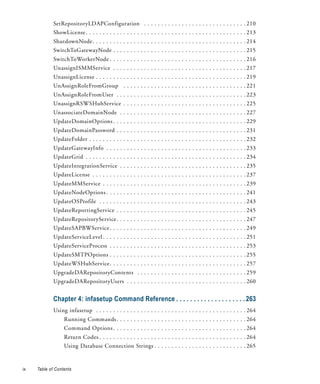
SetRepositoryLDAPConfiguration . . . . . . . . . . . . . . . . . . . . . . . . . . . . . . 210
             ShowLicense . . . . . . . . . . . . . . . . . . . . . . . . . . . . . . . . . . . . . . . . . . . . . . . 213
             ShutdownNode. . . . . . . . . . . . . . . . . . . . . . . . . . . . . . . . . . . . . . . . . . . . . 214
             SwitchToGatewayNode . . . . . . . . . . . . . . . . . . . . . . . . . . . . . . . . . . . . . . . 215
             SwitchToWorkerNode . . . . . . . . . . . . . . . . . . . . . . . . . . . . . . . . . . . . . . . . 216
             UnassignISMMService . . . . . . . . . . . . . . . . . . . . . . . . . . . . . . . . . . . . . . . 217
             UnassignLicense . . . . . . . . . . . . . . . . . . . . . . . . . . . . . . . . . . . . . . . . . . . . 219
             UnAssignRoleFromGroup . . . . . . . . . . . . . . . . . . . . . . . . . . . . . . . . . . . . 221
             UnAssignRoleFromUser . . . . . . . . . . . . . . . . . . . . . . . . . . . . . . . . . . . . . . 223
             UnassignRSWSHubService . . . . . . . . . . . . . . . . . . . . . . . . . . . . . . . . . . . . 225
             UnassociateDomainNode . . . . . . . . . . . . . . . . . . . . . . . . . . . . . . . . . . . . . 227
             UpdateDomainOptions . . . . . . . . . . . . . . . . . . . . . . . . . . . . . . . . . . . . . . . 229
             UpdateDomainPassword . . . . . . . . . . . . . . . . . . . . . . . . . . . . . . . . . . . . . . 231
             UpdateFolder . . . . . . . . . . . . . . . . . . . . . . . . . . . . . . . . . . . . . . . . . . . . . . 232
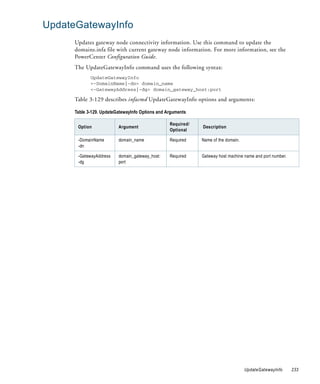
             UpdateGatewayInfo . . . . . . . . . . . . . . . . . . . . . . . . . . . . . . . . . . . . . . . . . 233
             UpdateGrid . . . . . . . . . . . . . . . . . . . . . . . . . . . . . . . . . . . . . . . . . . . . . . . 234
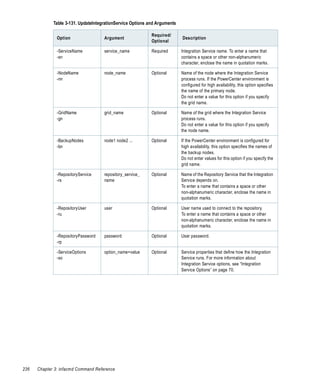
             UpdateIntegrationService . . . . . . . . . . . . . . . . . . . . . . . . . . . . . . . . . . . . . 235
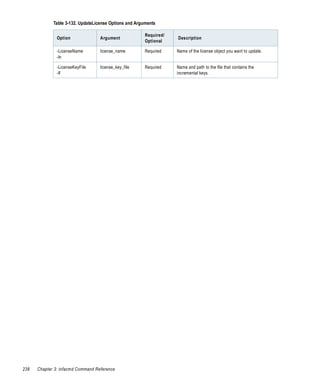
             UpdateLicense . . . . . . . . . . . . . . . . . . . . . . . . . . . . . . . . . . . . . . . . . . . . . 237
             UpdateMMService . . . . . . . . . . . . . . . . . . . . . . . . . . . . . . . . . . . . . . . . . . 239
             UpdateNodeOptions . . . . . . . . . . . . . . . . . . . . . . . . . . . . . . . . . . . . . . . . . 241
             UpdateOSProfile . . . . . . . . . . . . . . . . . . . . . . . . . . . . . . . . . . . . . . . . . . . 243
             UpdateReportingService . . . . . . . . . . . . . . . . . . . . . . . . . . . . . . . . . . . . . . 245
             UpdateRepositoryService . . . . . . . . . . . . . . . . . . . . . . . . . . . . . . . . . . . . . . 247
             UpdateSAPBWService . . . . . . . . . . . . . . . . . . . . . . . . . . . . . . . . . . . . . . . . 249
             UpdateServiceLevel . . . . . . . . . . . . . . . . . . . . . . . . . . . . . . . . . . . . . . . . . . 251
             UpdateServiceProcess . . . . . . . . . . . . . . . . . . . . . . . . . . . . . . . . . . . . . . . . 253
             UpdateSMTPOptions . . . . . . . . . . . . . . . . . . . . . . . . . . . . . . . . . . . . . . . . 255
             UpdateWSHubService . . . . . . . . . . . . . . . . . . . . . . . . . . . . . . . . . . . . . . . . 257
             UpgradeDARepositoryContents . . . . . . . . . . . . . . . . . . . . . . . . . . . . . . . . 259
             UpgradeDARepositoryUsers . . . . . . . . . . . . . . . . . . . . . . . . . . . . . . . . . . . 260


             Chapter 4: infasetup Command Reference . . . . . . . . . . . . . . . . . . . . 263
             Using infasetup . . . . . . . . . . . . . . . . . . . . . . . . . . . . . . . . . . . . . . . . . . . . 264
                  Running Commands . . . . . . . . . . . . . . . . . . . . . . . . . . . . . . . . . . . . . . 264
                  Command Options . . . . . . . . . . . . . . . . . . . . . . . . . . . . . . . . . . . . . . . 264
                  Return Codes . . . . . . . . . . . . . . . . . . . . . . . . . . . . . . . . . . . . . . . . . . . 264
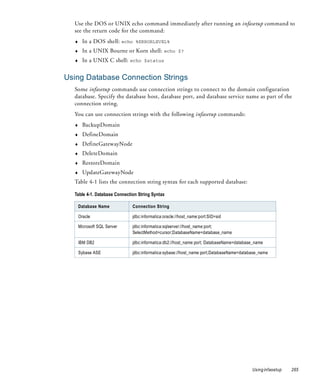
                  Using Database Connection Strings . . . . . . . . . . . . . . . . . . . . . . . . . . . 265


ix   Table of Contents
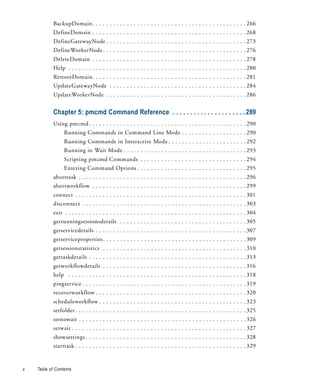
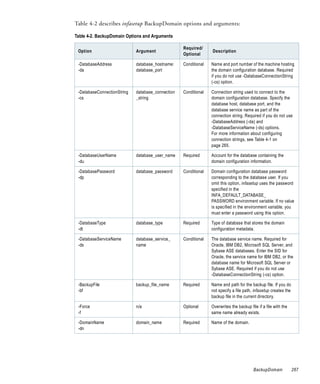
BackupDomain . . . . . . . . . . . . . . . . . . . . . . . . . . . . . . . . . . . . . . . . . . . . . 266
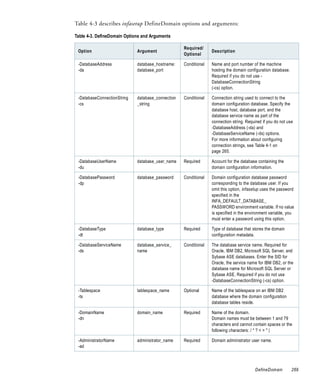
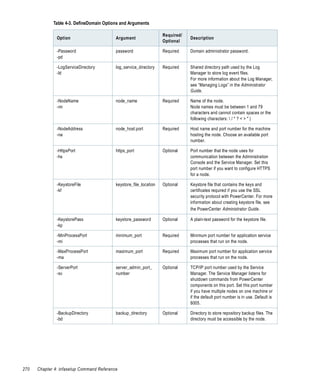
            DefineDomain . . . . . . . . . . . . . . . . . . . . . . . . . . . . . . . . . . . . . . . . . . . . . 268
            DefineGatewayNode . . . . . . . . . . . . . . . . . . . . . . . . . . . . . . . . . . . . . . . . . 273
            DefineWorkerNode . . . . . . . . . . . . . . . . . . . . . . . . . . . . . . . . . . . . . . . . . . 276
            DeleteDomain . . . . . . . . . . . . . . . . . . . . . . . . . . . . . . . . . . . . . . . . . . . . . 278
            Help . . . . . . . . . . . . . . . . . . . . . . . . . . . . . . . . . . . . . . . . . . . . . . . . . . . . 280
            RestoreDomain. . . . . . . . . . . . . . . . . . . . . . . . . . . . . . . . . . . . . . . . . . . . . 281
            UpdateGatewayNode . . . . . . . . . . . . . . . . . . . . . . . . . . . . . . . . . . . . . . . . 284
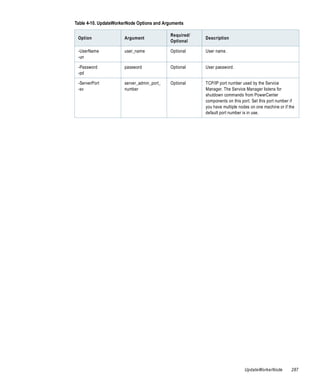
            UpdateWorkerNode . . . . . . . . . . . . . . . . . . . . . . . . . . . . . . . . . . . . . . . . . 286


            Chapter 5: pmcmd Command Reference . . . . . . . . . . . . . . . . . . . . . 289
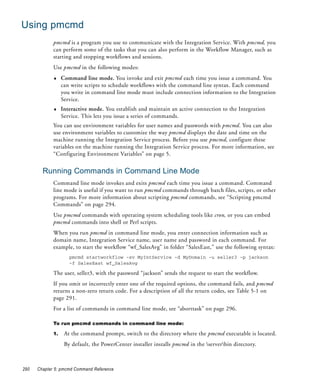
            Using pmcmd . . . . . . . . . . . . . . . . . . . . . . . . . . . . . . . . . . . . . . . . . . . . . . 290
                  Running Commands in Command Line Mode . . . . . . . . . . . . . . . . . . . 290
                  Running Commands in Interactive Mode . . . . . . . . . . . . . . . . . . . . . . . 292
                  Running in Wait Mode . . . . . . . . . . . . . . . . . . . . . . . . . . . . . . . . . . . . 293
                  Scripting pmcmd Commands . . . . . . . . . . . . . . . . . . . . . . . . . . . . . . . 294
                  Entering Command Options . . . . . . . . . . . . . . . . . . . . . . . . . . . . . . . . 295
            aborttask . . . . . . . . . . . . . . . . . . . . . . . . . . . . . . . . . . . . . . . . . . . . . . . . . 296
            abortworkflow . . . . . . . . . . . . . . . . . . . . . . . . . . . . . . . . . . . . . . . . . . . . . 299
            connect . . . . . . . . . . . . . . . . . . . . . . . . . . . . . . . . . . . . . . . . . . . . . . . . . . 301
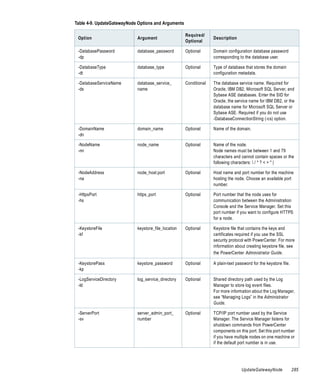
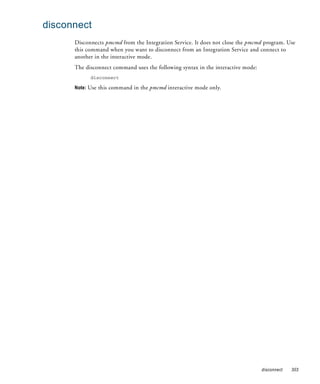
            disconnect . . . . . . . . . . . . . . . . . . . . . . . . . . . . . . . . . . . . . . . . . . . . . . . . 303
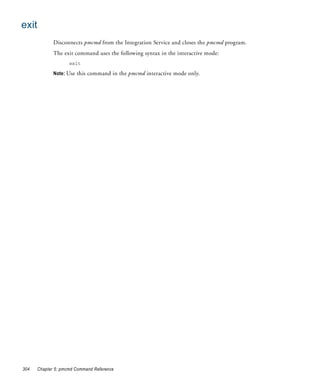
            exit . . . . . . . . . . . . . . . . . . . . . . . . . . . . . . . . . . . . . . . . . . . . . . . . . . . . . 304
            getrunningsessionsdetails . . . . . . . . . . . . . . . . . . . . . . . . . . . . . . . . . . . . . 305
            getservicedetails . . . . . . . . . . . . . . . . . . . . . . . . . . . . . . . . . . . . . . . . . . . . 307
            getserviceproperties . . . . . . . . . . . . . . . . . . . . . . . . . . . . . . . . . . . . . . . . . . 309
            getsessionstatistics . . . . . . . . . . . . . . . . . . . . . . . . . . . . . . . . . . . . . . . . . . 310
            gettaskdetails . . . . . . . . . . . . . . . . . . . . . . . . . . . . . . . . . . . . . . . . . . . . . . 313
            getworkflowdetails . . . . . . . . . . . . . . . . . . . . . . . . . . . . . . . . . . . . . . . . . . 316
            help . . . . . . . . . . . . . . . . . . . . . . . . . . . . . . . . . . . . . . . . . . . . . . . . . . . . 318
            pingservice . . . . . . . . . . . . . . . . . . . . . . . . . . . . . . . . . . . . . . . . . . . . . . . . 319
            recoverworkflow . . . . . . . . . . . . . . . . . . . . . . . . . . . . . . . . . . . . . . . . . . . . 320
            scheduleworkflow . . . . . . . . . . . . . . . . . . . . . . . . . . . . . . . . . . . . . . . . . . . 323
            setfolder . . . . . . . . . . . . . . . . . . . . . . . . . . . . . . . . . . . . . . . . . . . . . . . . . . 325
            setnowait . . . . . . . . . . . . . . . . . . . . . . . . . . . . . . . . . . . . . . . . . . . . . . . . . 326
            setwait . . . . . . . . . . . . . . . . . . . . . . . . . . . . . . . . . . . . . . . . . . . . . . . . . . . 327
            showsettings . . . . . . . . . . . . . . . . . . . . . . . . . . . . . . . . . . . . . . . . . . . . . . . 328
            starttask . . . . . . . . . . . . . . . . . . . . . . . . . . . . . . . . . . . . . . . . . . . . . . . . . . 329


x   Table of Contents
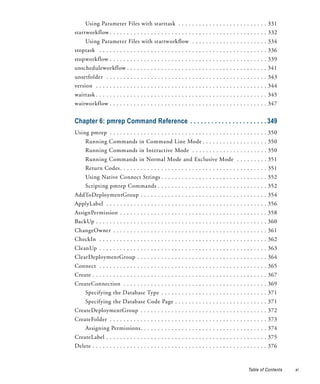
Using Parameter Files with starttask . . . . . . . . . . . . . . . . . . . . . . . . . . 331
startworkflow . . . . . . . . . . . . . . . . . . . . . . . . . . . . . . . . . . . . . . . . . . . . . . 332
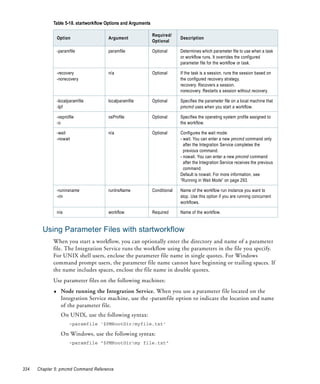
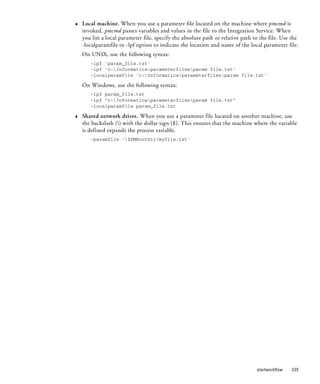
     Using Parameter Files with startworkflow . . . . . . . . . . . . . . . . . . . . . . 334
stoptask . . . . . . . . . . . . . . . . . . . . . . . . . . . . . . . . . . . . . . . . . . . . . . . . . 336
stopworkflow . . . . . . . . . . . . . . . . . . . . . . . . . . . . . . . . . . . . . . . . . . . . . . 339
unscheduleworkflow . . . . . . . . . . . . . . . . . . . . . . . . . . . . . . . . . . . . . . . . . 341
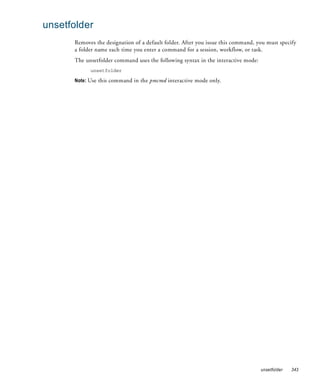
unsetfolder . . . . . . . . . . . . . . . . . . . . . . . . . . . . . . . . . . . . . . . . . . . . . . . 343
version . . . . . . . . . . . . . . . . . . . . . . . . . . . . . . . . . . . . . . . . . . . . . . . . . . 344
waittask . . . . . . . . . . . . . . . . . . . . . . . . . . . . . . . . . . . . . . . . . . . . . . . . . . 345
waitworkflow . . . . . . . . . . . . . . . . . . . . . . . . . . . . . . . . . . . . . . . . . . . . . . 347


Chapter 6: pmrep Command Reference . . . . . . . . . . . . . . . . . . . . . . 349
Using pmrep . . . . . . . . . . . . . . . . . . . . . . . . . . . . . . . . . . . . . . . . . . . . . . 350
     Running Commands in Command Line Mode . . . . . . . . . . . . . . . . . . . 350
     Running Commands in Interactive Mode . . . . . . . . . . . . . . . . . . . . . . 350
     Running Commands in Normal Mode and Exclusive Mode . . . . . . . . . 351
     Return Codes. . . . . . . . . . . . . . . . . . . . . . . . . . . . . . . . . . . . . . . . . . . 351
     Using Native Connect Strings . . . . . . . . . . . . . . . . . . . . . . . . . . . . . . . 352
     Scripting pmrep Commands . . . . . . . . . . . . . . . . . . . . . . . . . . . . . . . . 352
AddToDeploymentGroup . . . . . . . . . . . . . . . . . . . . . . . . . . . . . . . . . . . . . 354
ApplyLabel . . . . . . . . . . . . . . . . . . . . . . . . . . . . . . . . . . . . . . . . . . . . . . . 356
AssignPermission . . . . . . . . . . . . . . . . . . . . . . . . . . . . . . . . . . . . . . . . . . . 358
BackUp . . . . . . . . . . . . . . . . . . . . . . . . . . . . . . . . . . . . . . . . . . . . . . . . . . 360
ChangeOwner . . . . . . . . . . . . . . . . . . . . . . . . . . . . . . . . . . . . . . . . . . . . . 361
CheckIn . . . . . . . . . . . . . . . . . . . . . . . . . . . . . . . . . . . . . . . . . . . . . . . . . 362
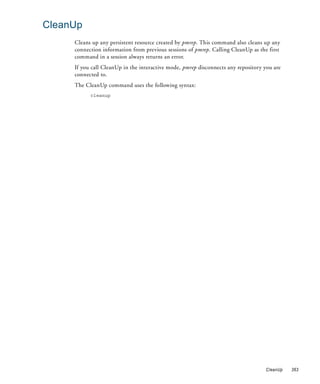
CleanUp . . . . . . . . . . . . . . . . . . . . . . . . . . . . . . . . . . . . . . . . . . . . . . . . . 363
ClearDeploymentGroup . . . . . . . . . . . . . . . . . . . . . . . . . . . . . . . . . . . . . . 364
Connect . . . . . . . . . . . . . . . . . . . . . . . . . . . . . . . . . . . . . . . . . . . . . . . . . 365
Create . . . . . . . . . . . . . . . . . . . . . . . . . . . . . . . . . . . . . . . . . . . . . . . . . . . 367
CreateConnection . . . . . . . . . . . . . . . . . . . . . . . . . . . . . . . . . . . . . . . . . . 369
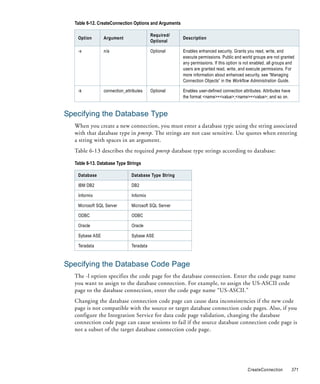
     Specifying the Database Type . . . . . . . . . . . . . . . . . . . . . . . . . . . . . . . 371
     Specifying the Database Code Page . . . . . . . . . . . . . . . . . . . . . . . . . . . 371
CreateDeploymentGroup . . . . . . . . . . . . . . . . . . . . . . . . . . . . . . . . . . . . . 372
CreateFolder . . . . . . . . . . . . . . . . . . . . . . . . . . . . . . . . . . . . . . . . . . . . . . 373
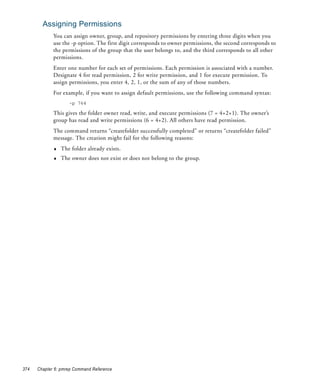
     Assigning Permissions. . . . . . . . . . . . . . . . . . . . . . . . . . . . . . . . . . . . . 374
CreateLabel . . . . . . . . . . . . . . . . . . . . . . . . . . . . . . . . . . . . . . . . . . . . . . . 375
Delete . . . . . . . . . . . . . . . . . . . . . . . . . . . . . . . . . . . . . . . . . . . . . . . . . . . 376


                                                                                                Table of Contents   xi
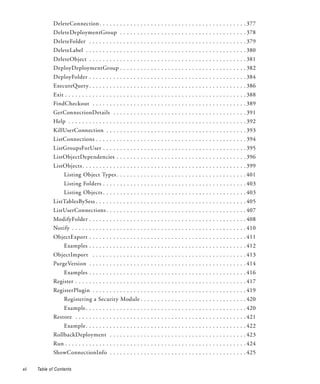
DeleteConnection . . . . . . . . . . . . . . . . . . . . . . . . . . . . . . . . . . . . . . . . . . . 377
              DeleteDeploymentGroup . . . . . . . . . . . . . . . . . . . . . . . . . . . . . . . . . . . . . 378
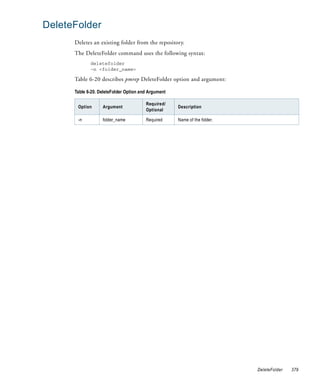
              DeleteFolder . . . . . . . . . . . . . . . . . . . . . . . . . . . . . . . . . . . . . . . . . . . . . . 379
              DeleteLabel . . . . . . . . . . . . . . . . . . . . . . . . . . . . . . . . . . . . . . . . . . . . . . . 380
              DeleteObject . . . . . . . . . . . . . . . . . . . . . . . . . . . . . . . . . . . . . . . . . . . . . . 381
              DeployDeploymentGroup . . . . . . . . . . . . . . . . . . . . . . . . . . . . . . . . . . . . . 382
              DeployFolder . . . . . . . . . . . . . . . . . . . . . . . . . . . . . . . . . . . . . . . . . . . . . . 384
              ExecuteQuery . . . . . . . . . . . . . . . . . . . . . . . . . . . . . . . . . . . . . . . . . . . . . . 386
              Exit . . . . . . . . . . . . . . . . . . . . . . . . . . . . . . . . . . . . . . . . . . . . . . . . . . . . . 388
              FindCheckout . . . . . . . . . . . . . . . . . . . . . . . . . . . . . . . . . . . . . . . . . . . . . 389
              GetConnectionDetails . . . . . . . . . . . . . . . . . . . . . . . . . . . . . . . . . . . . . . . 391
              Help . . . . . . . . . . . . . . . . . . . . . . . . . . . . . . . . . . . . . . . . . . . . . . . . . . . . 392
              KillUserConnection . . . . . . . . . . . . . . . . . . . . . . . . . . . . . . . . . . . . . . . . . 393
              ListConnections . . . . . . . . . . . . . . . . . . . . . . . . . . . . . . . . . . . . . . . . . . . . 394
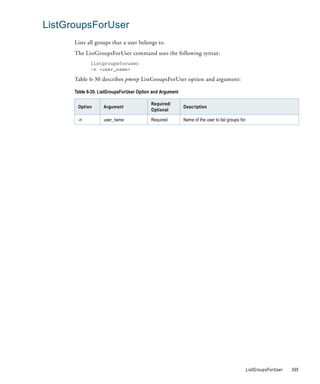
              ListGroupsForUser . . . . . . . . . . . . . . . . . . . . . . . . . . . . . . . . . . . . . . . . . . 395
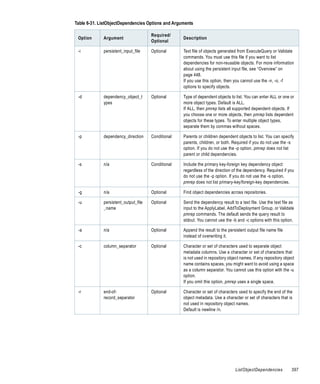
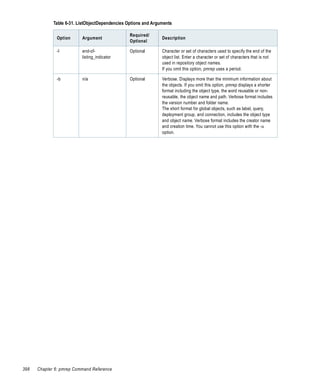
              ListObjectDependencies . . . . . . . . . . . . . . . . . . . . . . . . . . . . . . . . . . . . . . 396
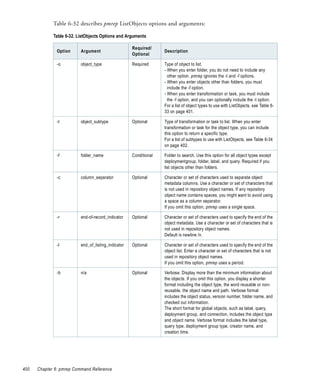
              ListObjects . . . . . . . . . . . . . . . . . . . . . . . . . . . . . . . . . . . . . . . . . . . . . . . . 399
                    Listing Object Types . . . . . . . . . . . . . . . . . . . . . . . . . . . . . . . . . . . . . . 401
                    Listing Folders . . . . . . . . . . . . . . . . . . . . . . . . . . . . . . . . . . . . . . . . . . 403
                    Listing Objects . . . . . . . . . . . . . . . . . . . . . . . . . . . . . . . . . . . . . . . . . . 403
              ListTablesBySess . . . . . . . . . . . . . . . . . . . . . . . . . . . . . . . . . . . . . . . . . . . . 405
              ListUserConnections . . . . . . . . . . . . . . . . . . . . . . . . . . . . . . . . . . . . . . . . . 407
              ModifyFolder . . . . . . . . . . . . . . . . . . . . . . . . . . . . . . . . . . . . . . . . . . . . . . 408
              Notify . . . . . . . . . . . . . . . . . . . . . . . . . . . . . . . . . . . . . . . . . . . . . . . . . . . 410
              ObjectExport . . . . . . . . . . . . . . . . . . . . . . . . . . . . . . . . . . . . . . . . . . . . . . 411
                    Examples . . . . . . . . . . . . . . . . . . . . . . . . . . . . . . . . . . . . . . . . . . . . . . 412
              ObjectImport . . . . . . . . . . . . . . . . . . . . . . . . . . . . . . . . . . . . . . . . . . . . . 413
              PurgeVersion . . . . . . . . . . . . . . . . . . . . . . . . . . . . . . . . . . . . . . . . . . . . . . 414
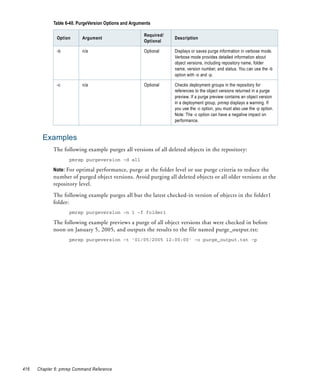
                    Examples . . . . . . . . . . . . . . . . . . . . . . . . . . . . . . . . . . . . . . . . . . . . . . 416
              Register . . . . . . . . . . . . . . . . . . . . . . . . . . . . . . . . . . . . . . . . . . . . . . . . . . 417
              RegisterPlugin . . . . . . . . . . . . . . . . . . . . . . . . . . . . . . . . . . . . . . . . . . . . . 419
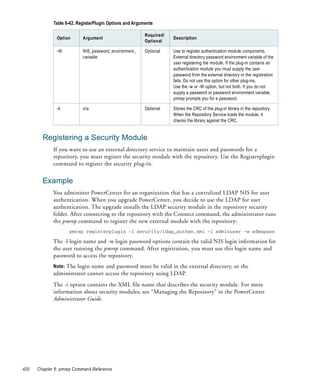
                    Registering a Security Module . . . . . . . . . . . . . . . . . . . . . . . . . . . . . . . 420
                    Example . . . . . . . . . . . . . . . . . . . . . . . . . . . . . . . . . . . . . . . . . . . . . . . 420
              Restore . . . . . . . . . . . . . . . . . . . . . . . . . . . . . . . . . . . . . . . . . . . . . . . . . . 421
                    Example . . . . . . . . . . . . . . . . . . . . . . . . . . . . . . . . . . . . . . . . . . . . . . . 422
              RollbackDeployment . . . . . . . . . . . . . . . . . . . . . . . . . . . . . . . . . . . . . . . . 423
              Run . . . . . . . . . . . . . . . . . . . . . . . . . . . . . . . . . . . . . . . . . . . . . . . . . . . . . 424
              ShowConnectionInfo . . . . . . . . . . . . . . . . . . . . . . . . . . . . . . . . . . . . . . . . 425

xii   Table of Contents
SwitchConnection . . . . . . . . . . . . . . . . . . . . . . . . . . . . . . . . . . . . . . . . . . 426
TruncateLog . . . . . . . . . . . . . . . . . . . . . . . . . . . . . . . . . . . . . . . . . . . . . . 427
UndoCheckout . . . . . . . . . . . . . . . . . . . . . . . . . . . . . . . . . . . . . . . . . . . . 428
Unregister . . . . . . . . . . . . . . . . . . . . . . . . . . . . . . . . . . . . . . . . . . . . . . . . 429
UnregisterPlugin . . . . . . . . . . . . . . . . . . . . . . . . . . . . . . . . . . . . . . . . . . . 431
     Unregistering an External Security Module . . . . . . . . . . . . . . . . . . . . . 432
     Example . . . . . . . . . . . . . . . . . . . . . . . . . . . . . . . . . . . . . . . . . . . . . . 432
UpdateConnection . . . . . . . . . . . . . . . . . . . . . . . . . . . . . . . . . . . . . . . . . . 433
UpdateEmailAddr . . . . . . . . . . . . . . . . . . . . . . . . . . . . . . . . . . . . . . . . . . 435
UpdateSeqGenVals . . . . . . . . . . . . . . . . . . . . . . . . . . . . . . . . . . . . . . . . . . 436
UpdateSrcPrefix . . . . . . . . . . . . . . . . . . . . . . . . . . . . . . . . . . . . . . . . . . . . 438
UpdateStatistics . . . . . . . . . . . . . . . . . . . . . . . . . . . . . . . . . . . . . . . . . . . 439
UpdateTargPrefix . . . . . . . . . . . . . . . . . . . . . . . . . . . . . . . . . . . . . . . . . . . 440
Upgrade. . . . . . . . . . . . . . . . . . . . . . . . . . . . . . . . . . . . . . . . . . . . . . . . . . 441
Validate . . . . . . . . . . . . . . . . . . . . . . . . . . . . . . . . . . . . . . . . . . . . . . . . . . 442
Version . . . . . . . . . . . . . . . . . . . . . . . . . . . . . . . . . . . . . . . . . . . . . . . . . . 445


Chapter 7: Working with pmrep Files . . . . . . . . . . . . . . . . . . . . . . . . 447
Overview . . . . . . . . . . . . . . . . . . . . . . . . . . . . . . . . . . . . . . . . . . . . . . . . . 448
Using the Persistent Input File . . . . . . . . . . . . . . . . . . . . . . . . . . . . . . . . . 449
     Creating a Persistent Input File with pmrep . . . . . . . . . . . . . . . . . . . . . 449
     Creating a Persistent Input File Manually . . . . . . . . . . . . . . . . . . . . . . 450
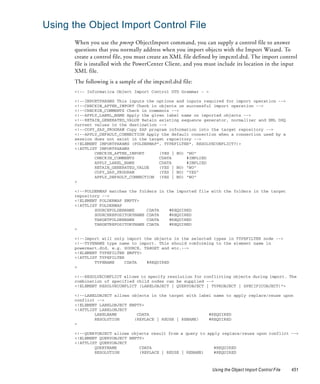
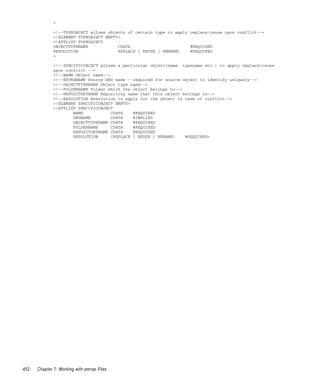
Using the Object Import Control File . . . . . . . . . . . . . . . . . . . . . . . . . . . . 451
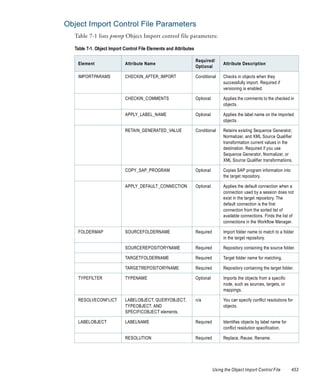
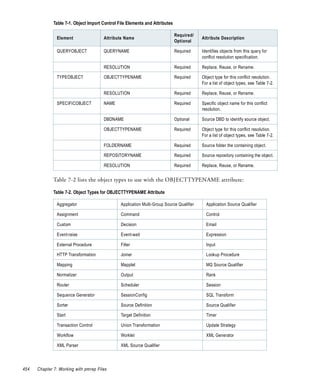
     Object Import Control File Parameters . . . . . . . . . . . . . . . . . . . . . . . . 453
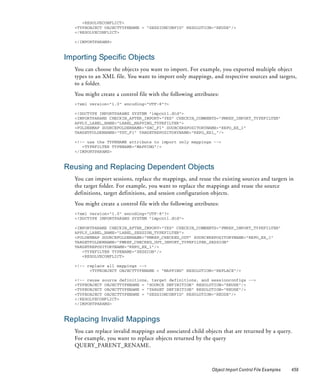
Object Import Control File Examples . . . . . . . . . . . . . . . . . . . . . . . . . . . . 455
     Importing Source Objects . . . . . . . . . . . . . . . . . . . . . . . . . . . . . . . . . . 456
     Importing Multiple Objects into a Folder . . . . . . . . . . . . . . . . . . . . . . 456
     Checking In and Labeling Imported Objects . . . . . . . . . . . . . . . . . . . . 457
     Retaining Sequence Generator and Normalizer Values . . . . . . . . . . . . . 457
     Importing Objects and Local Shortcut Objects to the Same Repository . 457
     Importing Shortcut Objects from Another Repository . . . . . . . . . . . . . 458
     Importing Objects to Multiple Folders . . . . . . . . . . . . . . . . . . . . . . . . 458
     Importing Specific Objects . . . . . . . . . . . . . . . . . . . . . . . . . . . . . . . . . 459
     Reusing and Replacing Dependent Objects . . . . . . . . . . . . . . . . . . . . . 459
     Replacing Invalid Mappings . . . . . . . . . . . . . . . . . . . . . . . . . . . . . . . . 459
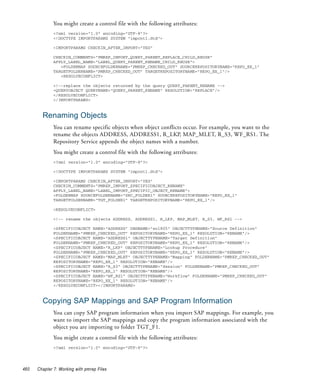
     Renaming Objects . . . . . . . . . . . . . . . . . . . . . . . . . . . . . . . . . . . . . . . 460
     Copying SAP Mappings and SAP Program Information . . . . . . . . . . . . 460


                                                                                                Table of Contents   xiii
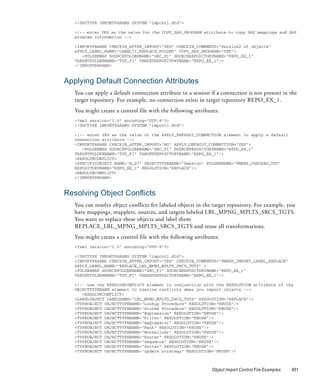
Applying Default Connection Attributes . . . . . . . . . . . . . . . . . . . . . . . 461
                    Resolving Object Conflicts . . . . . . . . . . . . . . . . . . . . . . . . . . . . . . . . . 461
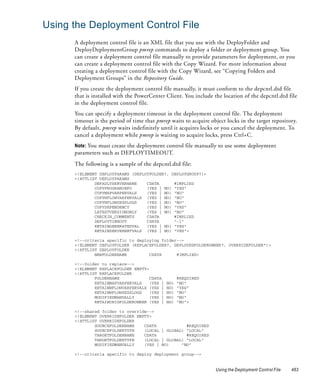
              Using the Deployment Control File . . . . . . . . . . . . . . . . . . . . . . . . . . . . . . 463
                    Deployment Control File Parameters . . . . . . . . . . . . . . . . . . . . . . . . . . 464
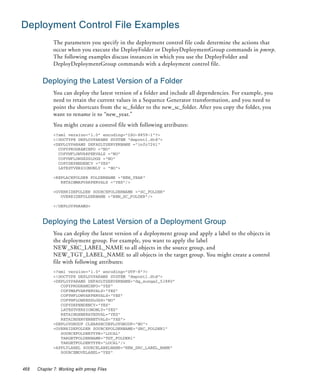
              Deployment Control File Examples . . . . . . . . . . . . . . . . . . . . . . . . . . . . . . 468
                    Deploying the Latest Version of a Folder . . . . . . . . . . . . . . . . . . . . . . . 468
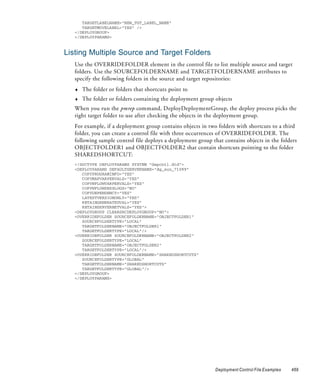
                    Deploying the Latest Version of a Deployment Group . . . . . . . . . . . . . 468
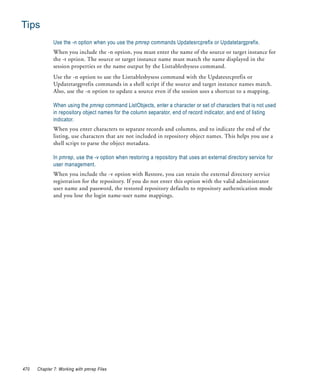
                    Listing Multiple Source and Target Folders . . . . . . . . . . . . . . . . . . . . . 469
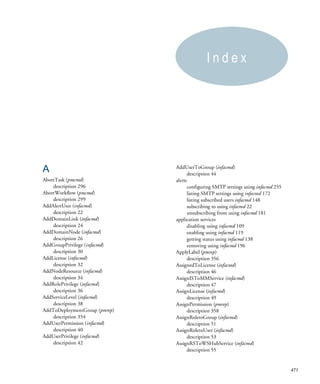
              Tips . . . . . . . . . . . . . . . . . . . . . . . . . . . . . . . . . . . . . . . . . . . . . . . . . . . . . 470


              Index . . . . . . . . . . . . . . . . . . . . . . . . . . . . . . . . . . . . . . . . . . . . . . . . . . 471


xiv   Table of Contents
List of Tables
    Table   1-1. Syntax Notation. . . . . . . . . . . . . . . . . . . . . . . . . . . . . . . . . . . . . .   .   ..   .   .   ..   .   ..   .   .   . 3
    Table   2-1. Environment Variables . . . . . . . . . . . . . . . . . . . . . . . . . . . . . . . . .      .   ..   .   .   ..   .   ..   .   .   . 6
    Table   2-2. pmpasswd Options and Arguments . . . . . . . . . . . . . . . . . . . . . . . .               .   ..   .   .   ..   .   ..   .   .    16
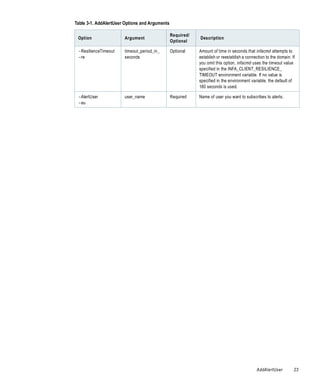
    Table   3-1. AddAlertUser Options and Arguments . . . . . . . . . . . . . . . . . . . . .                 .   ..   .   .   ..   .   ..   .   .    22
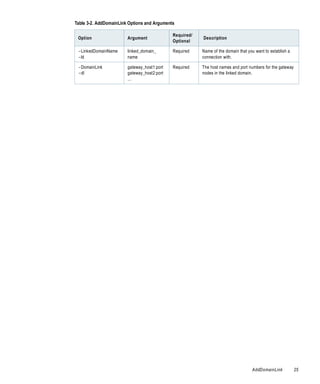
    Table   3-2. AddDomainLink Options and Arguments . . . . . . . . . . . . . . . . . . .                    .   ..   .   .   ..   .   ..   .   .    24
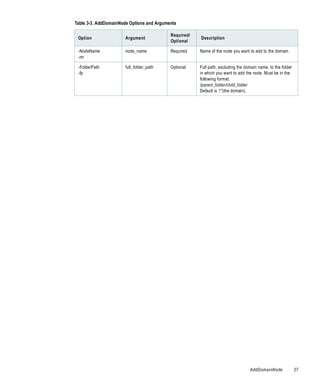
    Table   3-3. AddDomainNode Options and Arguments . . . . . . . . . . . . . . . . . .                      .   ..   .   .   ..   .   ..   .   .    26
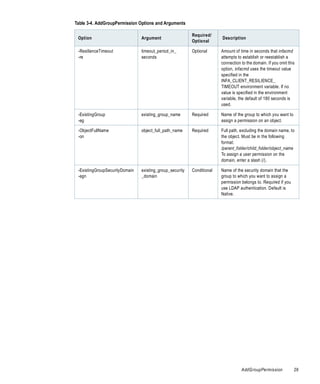
    Table   3-4. AddGroupPermission Options and Arguments . . . . . . . . . . . . . . . .                     .   ..   .   .   ..   .   ..   .   .    28
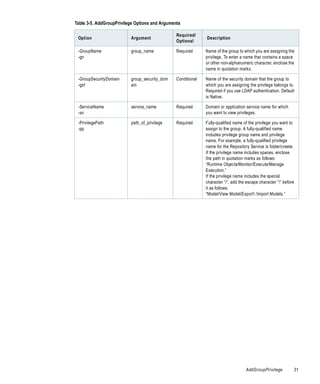
    Table   3-5. AddGroupPrivilege Options and Arguments . . . . . . . . . . . . . . . . .                    .   ..   .   .   ..   .   ..   .   .    30
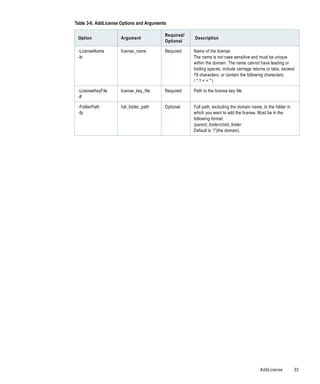
    Table   3-6. AddLicense Options and Arguments . . . . . . . . . . . . . . . . . . . . . . .               .   ..   .   .   ..   .   ..   .   .    32
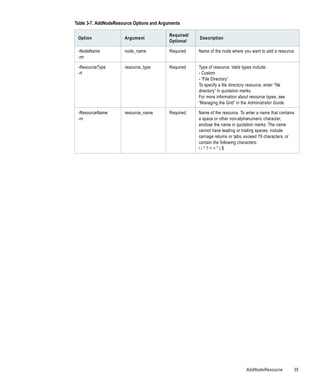
    Table   3-7. AddNodeResource Options and Arguments . . . . . . . . . . . . . . . . . .                    .   ..   .   .   ..   .   ..   .   .    34
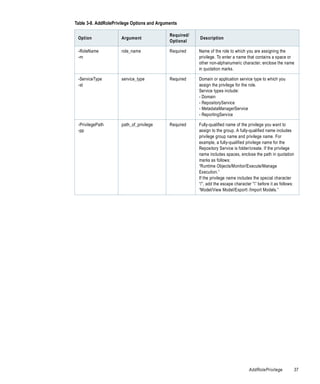
    Table   3-8. AddRolePrivilege Options and Arguments . . . . . . . . . . . . . . . . . . .                 .   ..   .   .   ..   .   ..   .   .    36
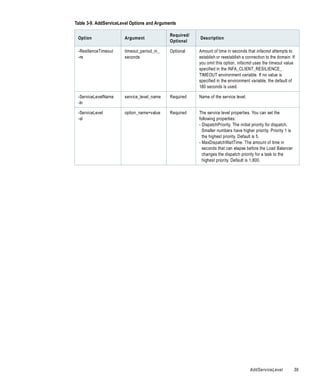
    Table   3-9. AddServiceLevel Options and Arguments . . . . . . . . . . . . . . . . . . .                  .   ..   .   .   ..   .   ..   .   .    38
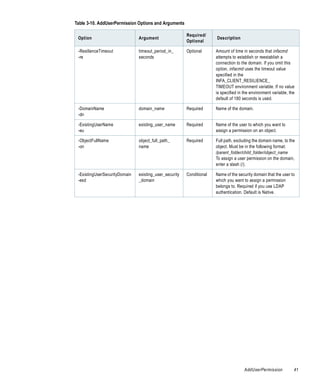
    Table   3-10. AddUserPermission Options and Arguments . . . . . . . . . . . . . . . .                     .   ..   .   .   ..   .   ..   .   .    40
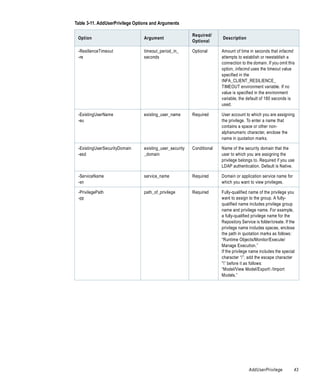
    Table   3-11. AddUserPrivilege Options and Arguments . . . . . . . . . . . . . . . . . .                  .   ..   .   .   ..   .   ..   .   .    42
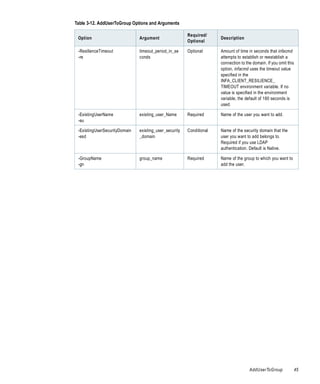
    Table   3-12. AddUserToGroup Options and Arguments . . . . . . . . . . . . . . . . .                      .   ..   .   .   ..   .   ..   .   .    44
    Table   3-13. AssignedToLicense Options and Arguments . . . . . . . . . . . . . . . . .                   .   ..   .   .   ..   .   ..   .   .    46
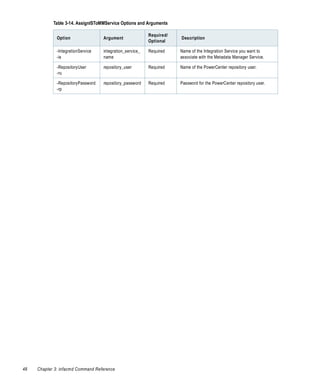
    Table   3-14. AssignISToMMService Options and Arguments . . . . . . . . . . . . . .                       .   ..   .   .   ..   .   ..   .   .    47
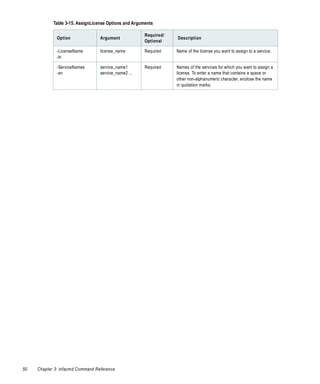
    Table   3-15. AssignLicense Options and Arguments . . . . . . . . . . . . . . . . . . . .                 .   ..   .   .   ..   .   ..   .   .    49
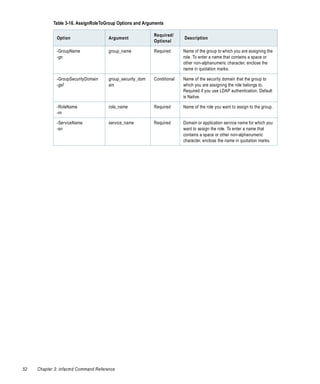
    Table   3-16. AssignRoleToGroup Options and Arguments . . . . . . . . . . . . . . . .                     .   ..   .   .   ..   .   ..   .   .    51
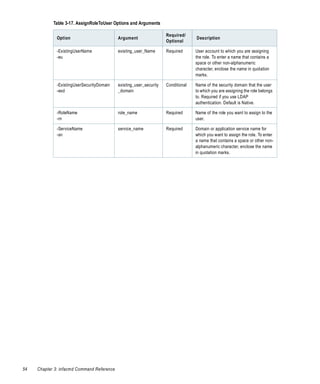
    Table   3-17. AssignRoleToUser Options and Arguments . . . . . . . . . . . . . . . . .                    .   ..   .   .   ..   .   ..   .   .    53
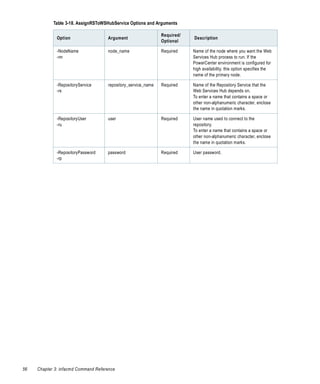
    Table   3-18. AssignRSToWSHubService Options and Arguments . . . . . . . . . .                            .   ..   .   .   ..   .   ..   .   .    55
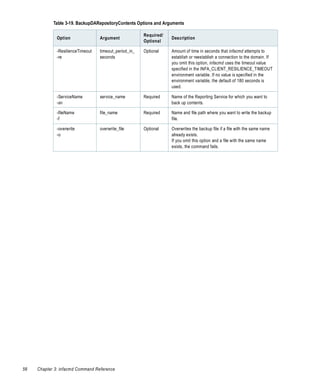
    Table   3-19. BackupDARepositoryContents Options and Arguments . . . . . . . .                            .   ..   .   .   ..   .   ..   .   .    57
    Table   3-20. ConvertLogFile Options and Arguments . . . . . . . . . . . . . . . . . . .                  .   ..   .   .   ..   .   ..   .   .    59
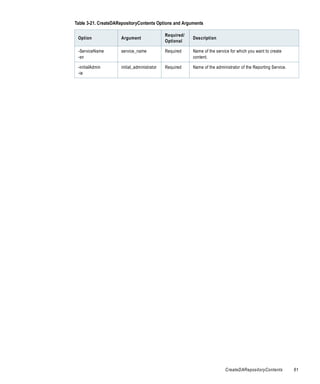
    Table   3-21. CreateDARepositoryContents Options and Arguments . . . . . . . . .                          .   ..   .   .   ..   .   ..   .   .    60
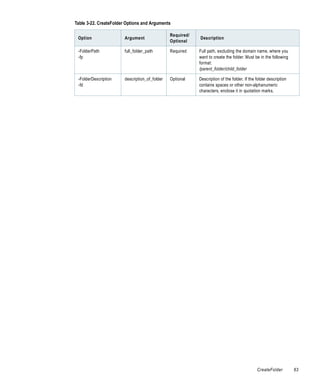
    Table   3-22. CreateFolder Options and Arguments . . . . . . . . . . . . . . . . . . . . .                .   ..   .   .   ..   .   ..   .   .    62
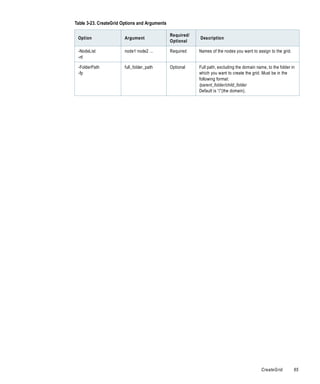
    Table   3-23. CreateGrid Options and Arguments . . . . . . . . . . . . . . . . . . . . . .                .   ..   .   .   ..   .   ..   .   .    64
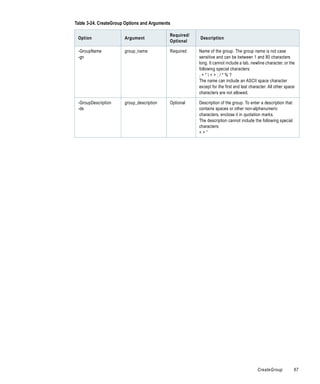
    Table   3-24. CreateGroup Options and Arguments . . . . . . . . . . . . . . . . . . . . .                 .   ..   .   .   ..   .   ..   .   .    66
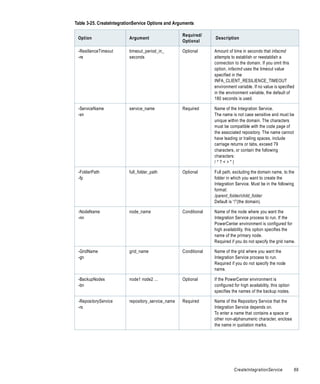
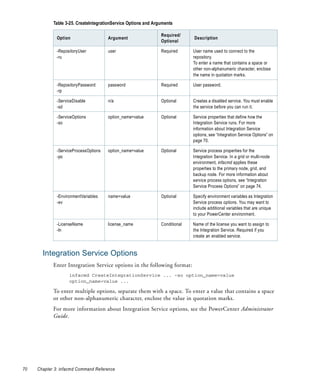
    Table   3-25. CreateIntegrationService Options and Arguments . . . . . . . . . . . .                      .   ..   .   .   ..   .   ..   .   .    68
    Table   3-26. Integration Service Options . . . . . . . . . . . . . . . . . . . . . . . . . . . .         .   ..   .   .   ..   .   ..   .   .    71
    Table   3-27. Integration Service Process Options . . . . . . . . . . . . . . . . . . . . . .             .   ..   .   .   ..   .   ..   .   .    75
    Table   3-28. CreateMMService Options and Arguments . . . . . . . . . . . . . . . . .                     .   ..   .   .   ..   .   ..   .   .    77
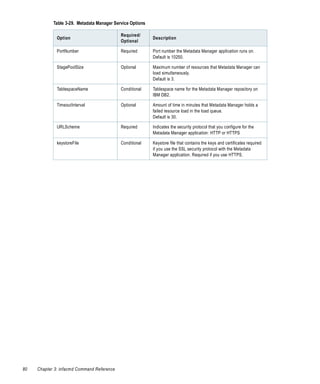
    Table   3-29. Metadata Manager Service Options . . . . . . . . . . . . . . . . . . . . . . .              .   ..   .   .   ..   .   ..   .   .    78
    Table   3-30. CreateOSProfile Options and Arguments . . . . . . . . . . . . . . . . . .                   .   ..   .   .   ..   .   ..   .   .    81
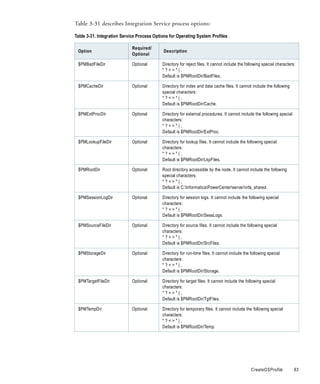
    Table   3-31. Integration Service Process Options for Operating System Profiles                           .   ..   .   .   ..   .   ..   .   .    83
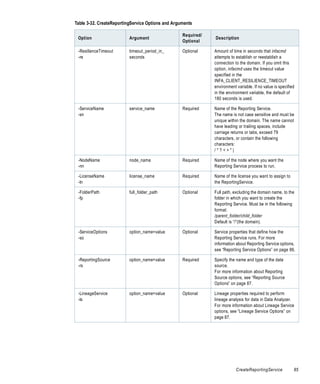
    Table   3-32. CreateReportingService Options and Arguments . . . . . . . . . . . . .                      .   ..   .   .   ..   .   ..   .   .    84
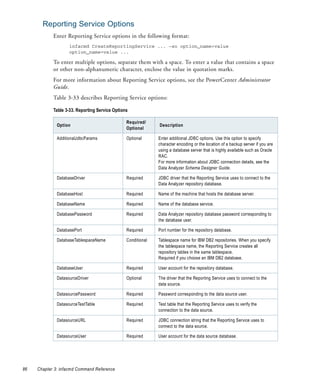
    Table   3-33. Reporting Service Options . . . . . . . . . . . . . . . . . . . . . . . . . . . . .         .   ..   .   .   ..   .   ..   .   .    86
    Table   3-34. Reporting Source Options . . . . . . . . . . . . . . . . . . . . . . . . . . . . .          .   ..   .   .   ..   .   ..   .   .    87
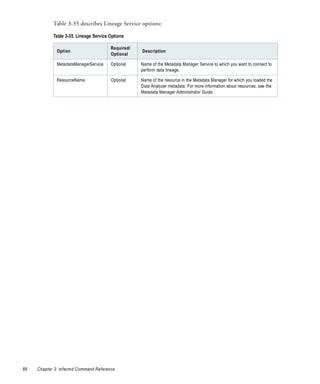
    Table   3-35. Lineage Service Options . . . . . . . . . . . . . . . . . . . . . . . . . . . . . . .       .   ..   .   .   ..   .   ..   .   .    88
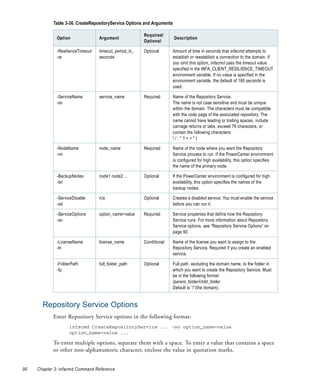
    Table   3-36. CreateRepositoryService Options and Arguments . . . . . . . . . . . . .                     .   ..   .   .   ..   .   ..   .   .    89
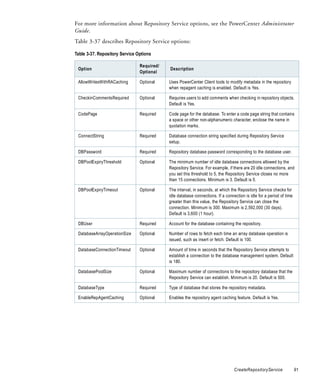
    Table   3-37. Repository Service Options . . . . . . . . . . . . . . . . . . . . . . . . . . . . .        .   ..   .   .   ..   .   ..   .   .    91


                                                                                                                           List of Tables                  xv
Table   3-38.   CreateRole Options and Arguments . . . . . . . . . . .         .   ..   .   .   ..   .   ..   .   .   ..   .   .   ..   .   ..   .   . 93
        Table   3-39.   CreateSAPBWService Options and Arguments . . . .               .   ..   .   .   ..   .   ..   .   .   ..   .   .   ..   .   ..   .   . 95
        Table   3-40.   SAP BW Service Options . . . . . . . . . . . . . . . . . . .   .   ..   .   .   ..   .   ..   .   .   ..   .   .   ..   .   ..   .   . 97
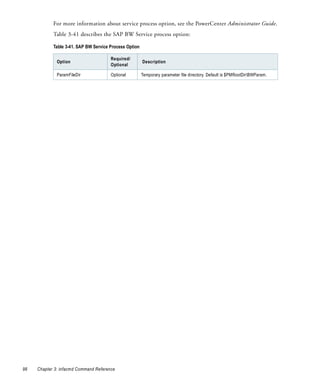
        Table   3-41.   SAP BW Service Process Option . . . . . . . . . . . . . .      .   ..   .   .   ..   .   ..   .   .   ..   .   .   ..   .   ..   .   . 98
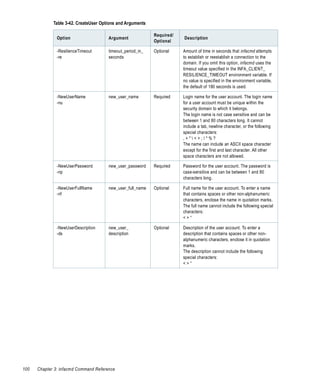
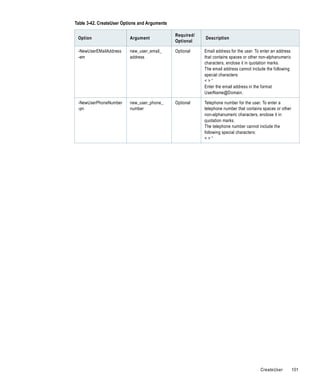
        Table   3-42.   CreateUser Options and Arguments . . . . . . . . . . .         .   ..   .   .   ..   .   ..   .   .   ..   .   .   ..   .   ..   .   . 99
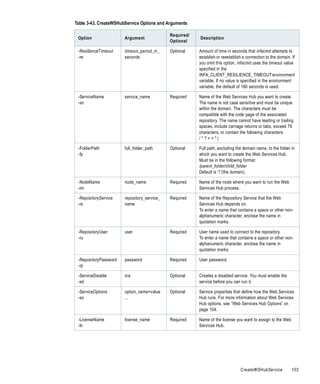
        Table   3-43.   CreateWSHubService Options and Arguments . . . .               .   ..   .   .   ..   .   ..   .   .   ..   .   .   ..   .   ..   .   .102
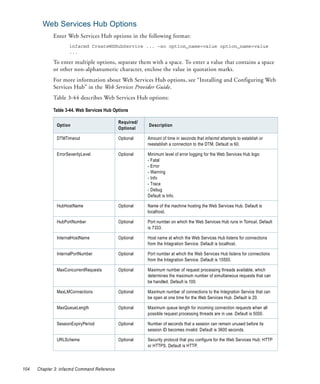
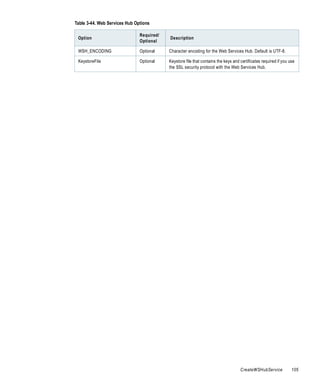
        Table   3-44.   Web Services Hub Options . . . . . . . . . . . . . . . . . .   .   ..   .   .   ..   .   ..   .   .   ..   .   .   ..   .   ..   .   .104
        Table   3-45.   DeleteDARepositoryUsers Options and Arguments                  .   ..   .   .   ..   .   ..   .   .   ..   .   .   ..   .   ..   .   .106
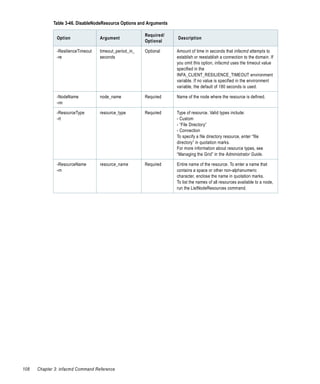
        Table   3-46.   DisableNodeResource Options and Arguments . . .                .   ..   .   .   ..   .   ..   .   .   ..   .   .   ..   .   ..   .   .107
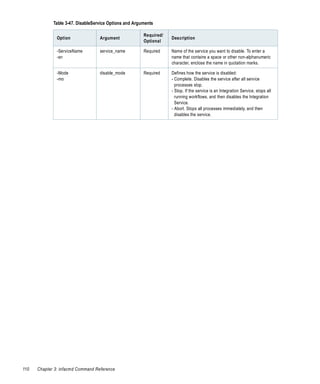
        Table   3-47.   DisableService Options and Arguments . . . . . . . . .         .   ..   .   .   ..   .   ..   .   .   ..   .   .   ..   .   ..   .   .109
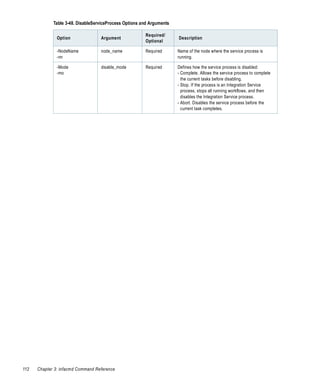
        Table   3-48.   DisableServiceProcess Options and Arguments . . .              .   ..   .   .   ..   .   ..   .   .   ..   .   .   ..   .   ..   .   .111
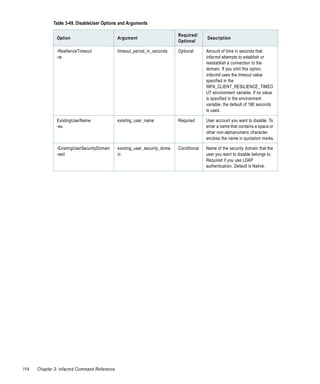
        Table   3-49.   DisableUser Options and Arguments . . . . . . . . . . .        .   ..   .   .   ..   .   ..   .   .   ..   .   .   ..   .   ..   .   .113
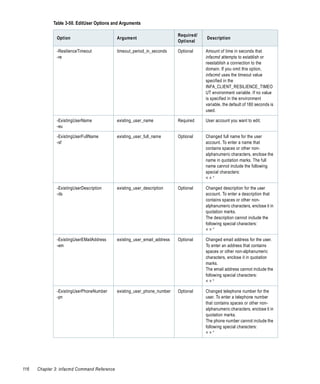
        Table   3-50.   EditUser Options and Arguments . . . . . . . . . . . . .       .   ..   .   .   ..   .   ..   .   .   ..   .   .   ..   .   ..   .   .115
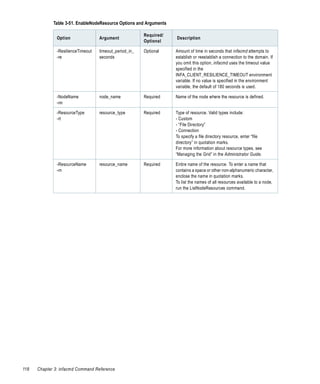
        Table   3-51.   EnableNodeResource Options and Arguments . . . .               .   ..   .   .   ..   .   ..   .   .   ..   .   .   ..   .   ..   .   .117
        Table   3-52.   EnableService Options and Arguments . . . . . . . . .          .   ..   .   .   ..   .   ..   .   .   ..   .   .   ..   .   ..   .   .119
        Table   3-53.   EnableServiceProcess Options and Arguments . . . .             .   ..   .   .   ..   .   ..   .   .   ..   .   .   ..   .   ..   .   .120
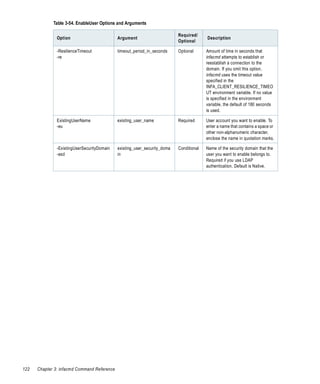
        Table   3-54.   EnableUser Options and Arguments . . . . . . . . . . .         .   ..   .   .   ..   .   ..   .   .   ..   .   .   ..   .   ..   .   .121
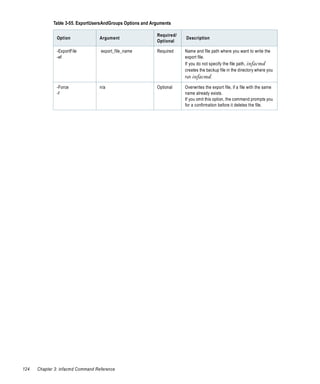
        Table   3-55.   ExportUsersAndGroups Options and Arguments . .                 .   ..   .   .   ..   .   ..   .   .   ..   .   .   ..   .   ..   .   .123
        Table   3-56.   GetFolderInfo Options and Arguments . . . . . . . . .          .   ..   .   .   ..   .   ..   .   .   ..   .   .   ..   .   ..   .   .125
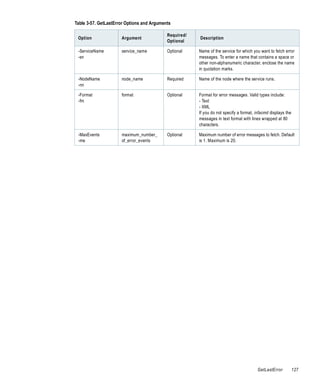
        Table   3-57.   GetLastError Options and Arguments . . . . . . . . . .         .   ..   .   .   ..   .   ..   .   .   ..   .   .   ..   .   ..   .   .126
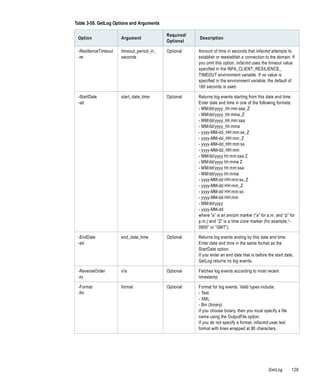
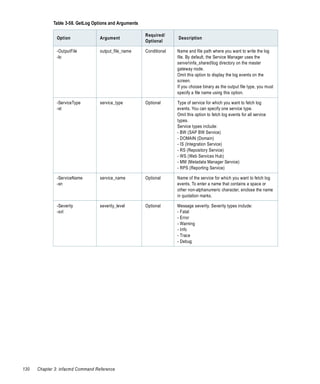
        Table   3-58.   GetLog Options and Arguments . . . . . . . . . . . . . .       .   ..   .   .   ..   .   ..   .   .   ..   .   .   ..   .   ..   .   .128
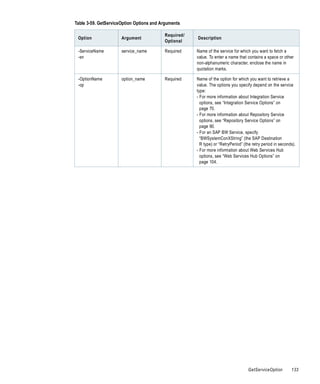
        Table   3-59.   GetServiceOption Options and Arguments . . . . . .             .   ..   .   .   ..   .   ..   .   .   ..   .   .   ..   .   ..   .   .132
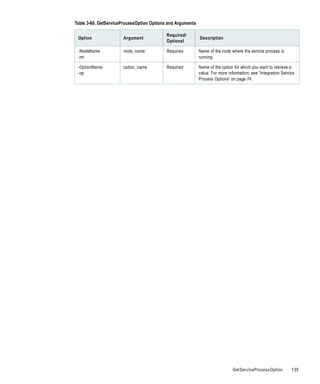
        Table   3-60.   GetServiceProcessOption Options and Arguments .                .   ..   .   .   ..   .   ..   .   .   ..   .   .   ..   .   ..   .   .134
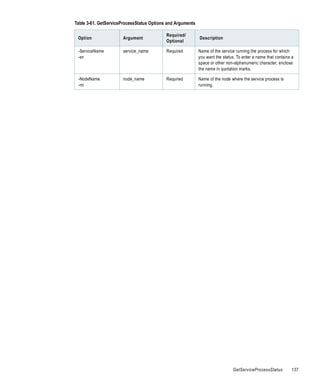
        Table   3-61.   GetServiceProcessStatus Options and Arguments . .              .   ..   .   .   ..   .   ..   .   .   ..   .   .   ..   .   ..   .   .136
        Table   3-62.   GetServiceStatus Options and Arguments . . . . . . .           .   ..   .   .   ..   .   ..   .   .   ..   .   .   ..   .   ..   .   .138
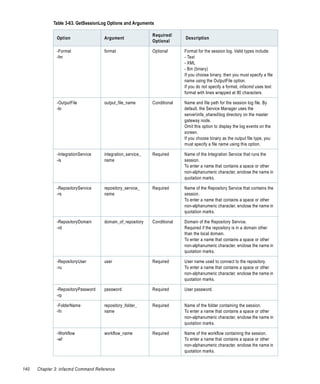
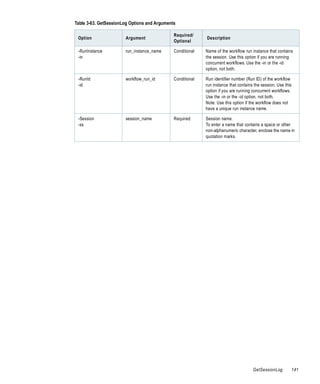
        Table   3-63.   GetSessionLog Options and Arguments . . . . . . . . .          .   ..   .   .   ..   .   ..   .   .   ..   .   .   ..   .   ..   .   .139
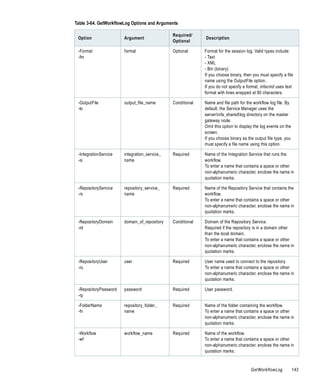
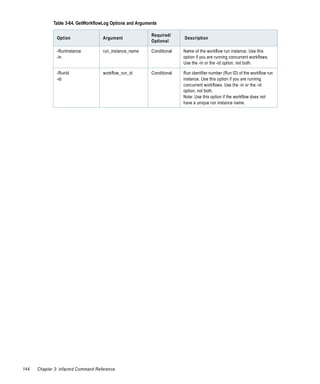
        Table   3-64.   GetWorkflowLog Options and Arguments . . . . . . .             .   ..   .   .   ..   .   ..   .   .   ..   .   .   ..   .   ..   .   .142
        Table   3-65.   Help Option and Argument . . . . . . . . . . . . . . . . .     .   ..   .   .   ..   .   ..   .   .   ..   .   .   ..   .   ..   .   .145
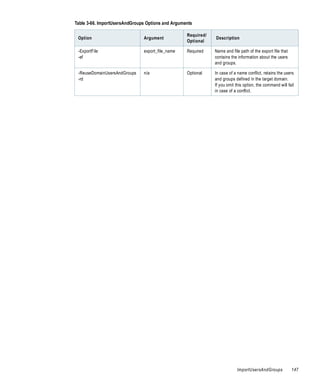
        Table   3-66.   ImportUsersAndGroups Options and Arguments . .                 .   ..   .   .   ..   .   ..   .   .   ..   .   .   ..   .   ..   .   .146
        Table   3-67.   ListAlertUsers Options and Arguments . . . . . . . . .         .   ..   .   .   ..   .   ..   .   .   ..   .   .   ..   .   ..   .   .148
        Table   3-68.   ListAllGroups Options and Arguments . . . . . . . . .          .   ..   .   .   ..   .   ..   .   .   ..   .   .   ..   .   ..   .   .149
        Table   3-69.   ListAllRoles Options and Arguments . . . . . . . . . . .       .   ..   .   .   ..   .   ..   .   .   ..   .   .   ..   .   ..   .   .150
        Table   3-70.   ListAllUsers Options and Arguments . . . . . . . . . . .       .   ..   .   .   ..   .   ..   .   .   ..   .   .   ..   .   ..   .   .151
        Table   3-71.   ListDomainLinks Options and Arguments . . . . . . .            .   ..   .   .   ..   .   ..   .   .   ..   .   .   ..   .   ..   .   .152
        Table   3-72.   ListDomainOptions Options and Arguments . . . . .              .   ..   .   .   ..   .   ..   .   .   ..   .   .   ..   .   ..   .   .153
        Table   3-73.   ListFolders Options and Arguments . . . . . . . . . . .        .   ..   .   .   ..   .   ..   .   .   ..   .   .   ..   .   ..   .   .154
        Table   3-74.   ListGridNodes Options and Arguments . . . . . . . . .          .   ..   .   .   ..   .   ..   .   .   ..   .   .   ..   .   ..   .   .155
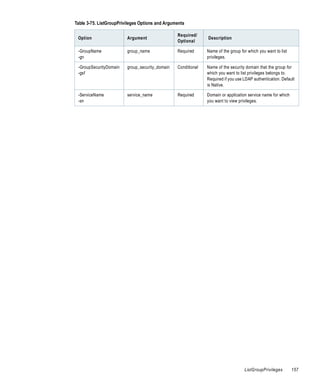
        Table   3-75.   ListGroupPrivileges Options and Arguments . . . . .            .   ..   .   .   ..   .   ..   .   .   ..   .   .   ..   .   ..   .   .156
        Table   3-76.   ListLDAPConnectivity Options and Arguments . . .               .   ..   .   .   ..   .   ..   .   .   ..   .   .   ..   .   ..   .   .158
        Table   3-77.   ListLicenses Options and Arguments . . . . . . . . . . .       .   ..   .   .   ..   .   ..   .   .   ..   .   .   ..   .   ..   .   .159
        Table   3-78.   ListNodeOptions Options and Arguments . . . . . . .            .   ..   .   .   ..   .   ..   .   .   ..   .   .   ..   .   ..   .   .160
        Table   3-79.   ListNodeResources Options and Arguments . . . . .              .   ..   .   .   ..   .   ..   .   .   ..   .   .   ..   .   ..   .   .161
        Table   3-80.   ListOSProfile Options and Arguments . . . . . . . . .          .   ..   .   .   ..   .   ..   .   .   ..   .   .   ..   .   ..   .   .162


xvi   List of Tables
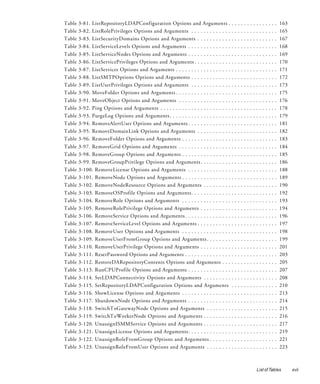
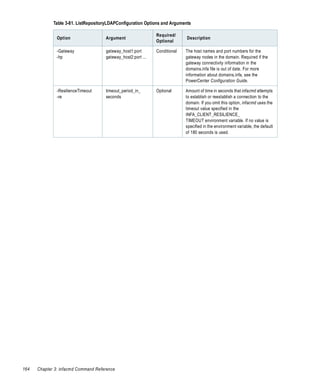
Table   3-81. ListRepositoryLDAPConfiguration Options and Arguments .                    .   .   ..   .   ..   .   .   ..   .   ..   .   163
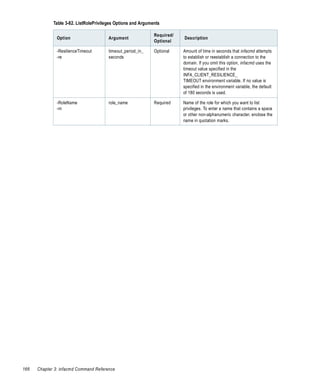
Table   3-82. ListRolePrivileges Options and Arguments . . . . . . . . . . . . .         .   .   ..   .   ..   .   .   ..   .   ..   .   165
Table   3-83. ListSecurityDomains Options and Arguments . . . . . . . . . . .            .   .   ..   .   ..   .   .   ..   .   ..   .   167
Table   3-84. ListServiceLevels Options and Arguments . . . . . . . . . . . . . .        .   .   ..   .   ..   .   .   ..   .   ..   .   168
Table   3-85. ListServiceNodes Options and Arguments . . . . . . . . . . . . . .         .   .   ..   .   ..   .   .   ..   .   ..   .   169
Table   3-86. ListServicePrivileges Options and Arguments . . . . . . . . . . . .        .   .   ..   .   ..   .   .   ..   .   ..   .   170
Table   3-87. ListServices Options and Arguments . . . . . . . . . . . . . . . . . .     .   .   ..   .   ..   .   .   ..   .   ..   .   171
Table   3-88. ListSMTPOptions Options and Arguments . . . . . . . . . . . . .            .   .   ..   .   ..   .   .   ..   .   ..   .   172
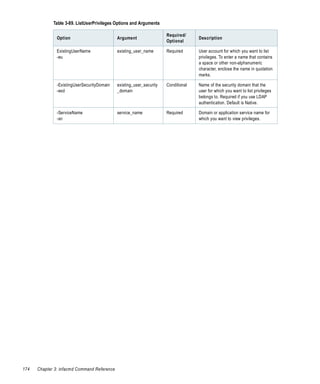
Table   3-89. ListUserPrivileges Options and Arguments . . . . . . . . . . . . .         .   .   ..   .   ..   .   .   ..   .   ..   .   173
Table   3-90. MoveFolder Options and Arguments . . . . . . . . . . . . . . . . . .       .   .   ..   .   ..   .   .   ..   .   ..   .   175
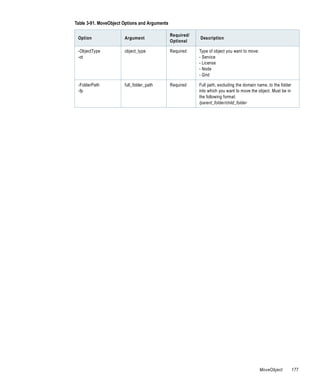
Table   3-91. MoveObject Options and Arguments . . . . . . . . . . . . . . . . .         .   .   ..   .   ..   .   .   ..   .   ..   .   176
Table   3-92. Ping Options and Arguments . . . . . . . . . . . . . . . . . . . . . . .   .   .   ..   .   ..   .   .   ..   .   ..   .   178
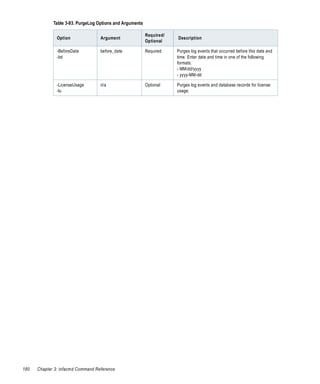
Table   3-93. PurgeLog Options and Arguments . . . . . . . . . . . . . . . . . . . .     .   .   ..   .   ..   .   .   ..   .   ..   .   179
Table   3-94. RemoveAlertUser Options and Arguments . . . . . . . . . . . . . .          .   .   ..   .   ..   .   .   ..   .   ..   .   181
Table   3-95. RemoveDomainLink Options and Arguments . . . . . . . . . . .               .   .   ..   .   ..   .   .   ..   .   ..   .   182
Table   3-96. RemoveFolder Options and Arguments . . . . . . . . . . . . . . . .         .   .   ..   .   ..   .   .   ..   .   ..   .   183
Table   3-97. RemoveGrid Options and Arguments . . . . . . . . . . . . . . . . .         .   .   ..   .   ..   .   .   ..   .   ..   .   184
Table   3-98. RemoveGroup Options and Arguments . . . . . . . . . . . . . . . .          .   .   ..   .   ..   .   .   ..   .   ..   .   185
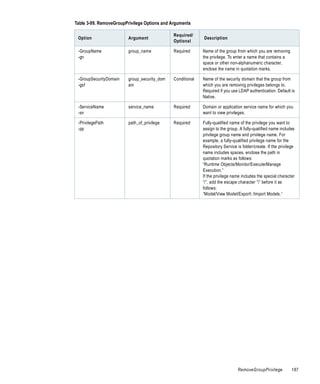
Table   3-99. RemoveGroupPrivilege Options and Arguments . . . . . . . . . .             .   .   ..   .   ..   .   .   ..   .   ..   .   186
Table   3-100. RemoveLicense Options and Arguments . . . . . . . . . . . . . .           .   .   ..   .   ..   .   .   ..   .   ..   .   188
Table   3-101. RemoveNode Options and Arguments . . . . . . . . . . . . . . . .          .   .   ..   .   ..   .   .   ..   .   ..   .   189
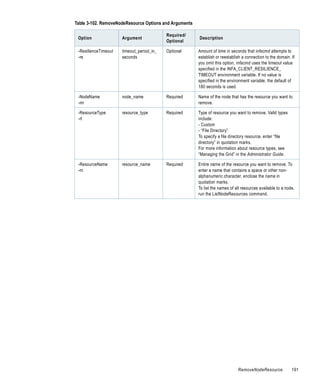
Table   3-102. RemoveNodeResource Options and Arguments . . . . . . . . .                .   .   ..   .   ..   .   .   ..   .   ..   .   190
Table   3-103. RemoveOSProfile Options and Arguments . . . . . . . . . . . . .           .   .   ..   .   ..   .   .   ..   .   ..   .   192
Table   3-104. RemoveRole Options and Arguments . . . . . . . . . . . . . . . .          .   .   ..   .   ..   .   .   ..   .   ..   .   193
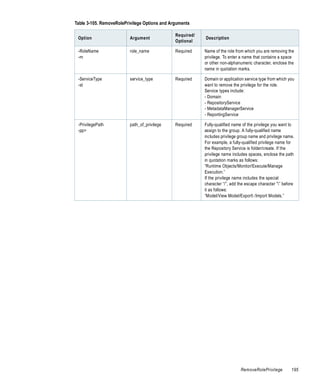
Table   3-105. RemoveRolePrivilege Options and Arguments . . . . . . . . . .             .   .   ..   .   ..   .   .   ..   .   ..   .   194
Table   3-106. RemoveService Options and Arguments . . . . . . . . . . . . . . .         .   .   ..   .   ..   .   .   ..   .   ..   .   196
Table   3-107. RemoveServiceLevel Options and Arguments . . . . . . . . . . .            .   .   ..   .   ..   .   .   ..   .   ..   .   197
Table   3-108. RemoveUser Options and Arguments . . . . . . . . . . . . . . . .          .   .   ..   .   ..   .   .   ..   .   ..   .   198
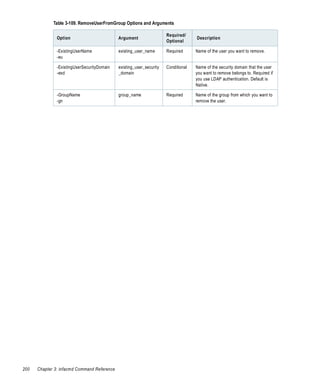
Table   3-109. RemoveUserFromGroup Options and Arguments . . . . . . . .                 .   .   ..   .   ..   .   .   ..   .   ..   .   199
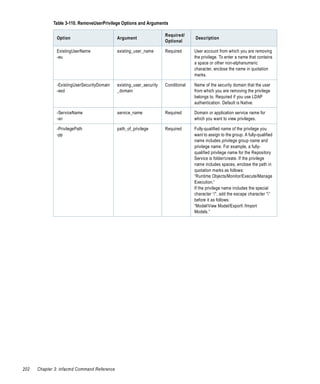
Table   3-110. RemoveUserPrivilege Options and Arguments . . . . . . . . . .             .   .   ..   .   ..   .   .   ..   .   ..   .   201
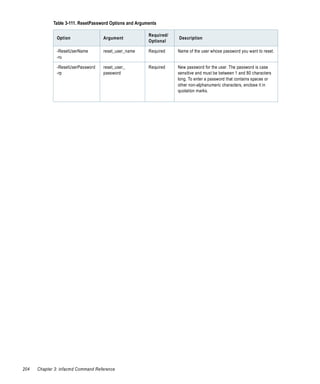
Table   3-111. ResetPassword Options and Arguments . . . . . . . . . . . . . . .         .   .   ..   .   ..   .   .   ..   .   ..   .   203
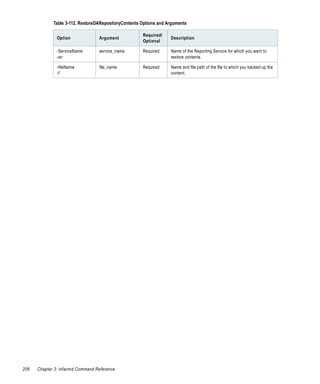
Table   3-112. RestoreDARepositoryContents Options and Arguments . . .                   .   .   ..   .   ..   .   .   ..   .   ..   .   205
Table   3-113. RunCPUProfile Options and Arguments . . . . . . . . . . . . . .           .   .   ..   .   ..   .   .   ..   .   ..   .   207
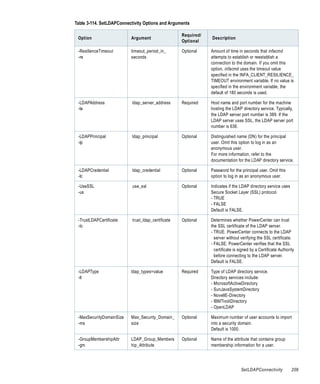
Table   3-114. SetLDAPConnectivity Options and Arguments . . . . . . . . .               .   .   ..   .   ..   .   .   ..   .   ..   .   208
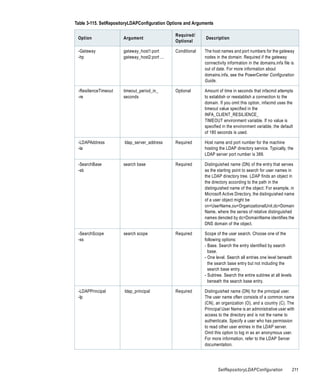
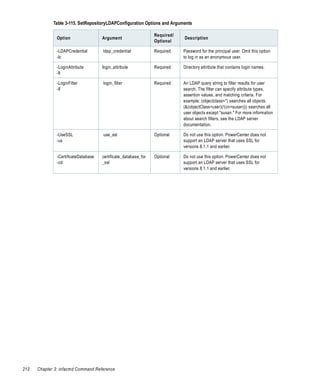
Table   3-115. SetRepositoryLDAPConfiguration Options and Arguments                      .   .   ..   .   ..   .   .   ..   .   ..   .   210
Table   3-116. ShowLicense Options and Arguments . . . . . . . . . . . . . . . .         .   .   ..   .   ..   .   .   ..   .   ..   .   213
Table   3-117. ShutdownNode Options and Arguments . . . . . . . . . . . . . .            .   .   ..   .   ..   .   .   ..   .   ..   .   214
Table   3-118. SwitchToGatewayNode Options and Arguments . . . . . . . .                 .   .   ..   .   ..   .   .   ..   .   ..   .   215
Table   3-119. SwitchToWorkerNode Options and Arguments . . . . . . . . .                .   .   ..   .   ..   .   .   ..   .   ..   .   216
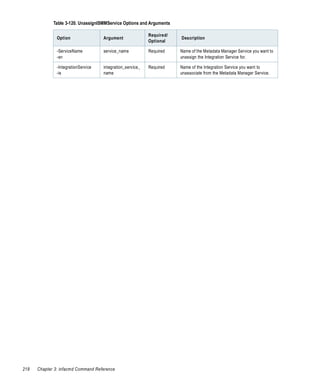
Table   3-120. UnassignISMMService Options and Arguments . . . . . . . . .               .   .   ..   .   ..   .   .   ..   .   ..   .   217
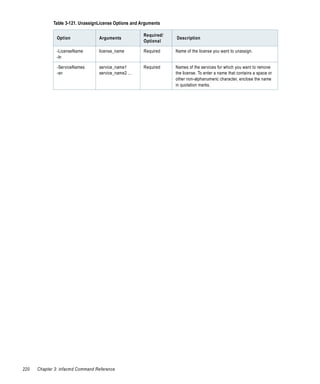
Table   3-121. UnassignLicense Options and Arguments . . . . . . . . . . . . . .         .   .   ..   .   ..   .   .   ..   .   ..   .   219
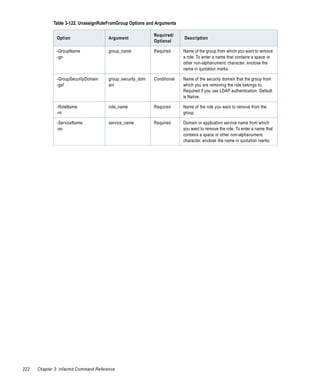
Table   3-122. UnassignRoleFromGroup Options and Arguments . . . . . . .                 .   .   ..   .   ..   .   .   ..   .   ..   .   221
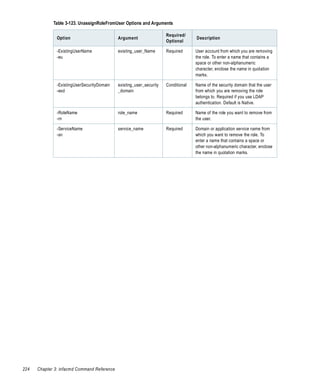
Table   3-123. UnassignRoleFromUser Options and Arguments . . . . . . . .                .   .   ..   .   ..   .   .   ..   .   ..   .   223


                                                                                                                   List of Tables              xvii
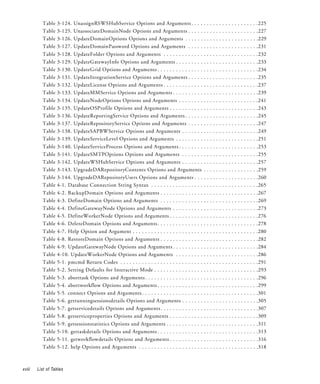
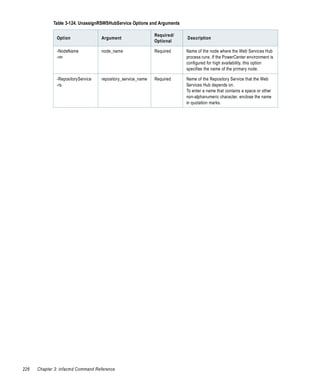
Table   3-124. UnassignRSWSHubService Options and Arguments . . . . . . . . . . . . . . . . . . . . . .225
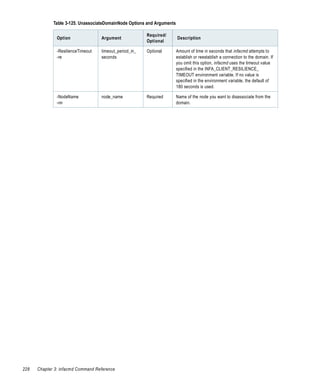
          Table   3-125. UnassociateDomainNode Options and Arguments . . . . . . . . . . . . . . . . . . . . . . .227
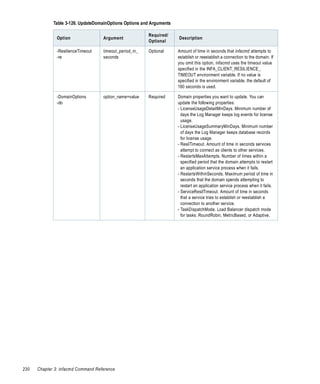
          Table   3-126. UpdateDomainOptions Options and Arguments . . . . . . . . . . . . . . . . . . . . . . . .229
          Table   3-127. UpdateDomainPassword Options and Arguments . . . . . . . . . . . . . . . . . . . . . . .231
          Table   3-128. UpdateFolder Options and Arguments . . . . . . . . . . . . . . . . . . . . . . . . . . . . . . .232
          Table   3-129. UpdateGatewayInfo Options and Arguments . . . . . . . . . . . . . . . . . . . . . . . . . . .233
          Table   3-130. UpdateGrid Options and Arguments . . . . . . . . . . . . . . . . . . . . . . . . . . . . . . . . .234
          Table   3-131. UpdateIntegrationService Options and Arguments . . . . . . . . . . . . . . . . . . . . . . .235
          Table   3-132. UpdateLicense Options and Arguments . . . . . . . . . . . . . . . . . . . . . . . . . . . . . . .237
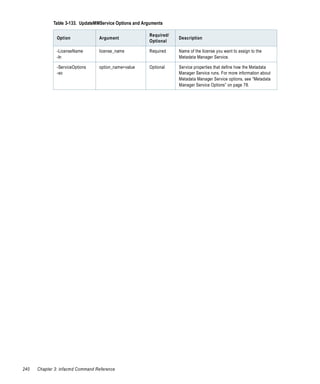
          Table   3-133. UpdateMMService Options and Arguments . . . . . . . . . . . . . . . . . . . . . . . . . . . .239
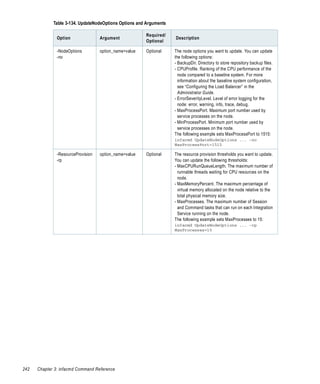
          Table   3-134. UpdateNodeOptions Options and Arguments . . . . . . . . . . . . . . . . . . . . . . . . . .241
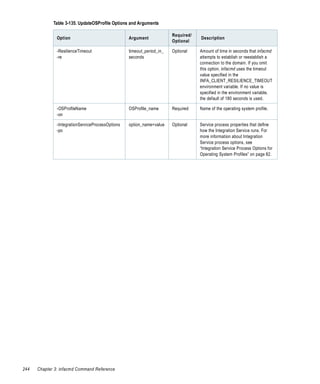
          Table   3-135. UpdateOSProfile Options and Arguments . . . . . . . . . . . . . . . . . . . . . . . . . . . . .243
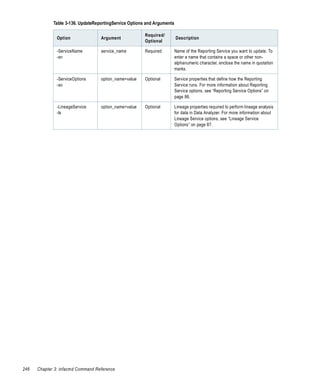
          Table   3-136. UpdateReportingService Options and Arguments . . . . . . . . . . . . . . . . . . . . . . . .245
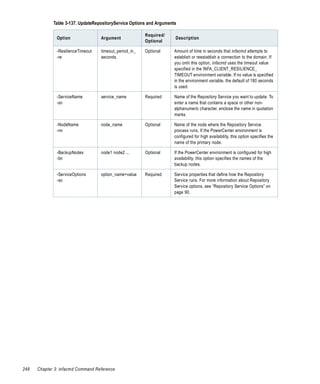
          Table   3-137. UpdateRepositoryService Options and Arguments . . . . . . . . . . . . . . . . . . . . . . .247
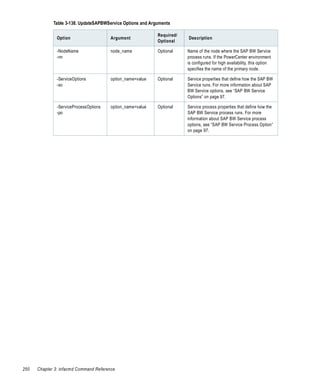
          Table   3-138. UpdateSAPBWService Options and Arguments . . . . . . . . . . . . . . . . . . . . . . . . .249
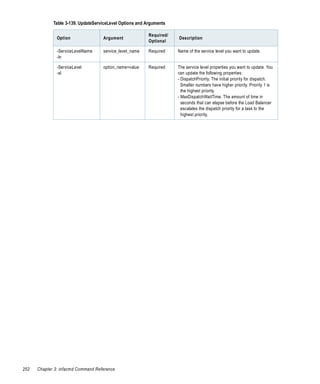
          Table   3-139. UpdateServiceLevel Options and Arguments . . . . . . . . . . . . . . . . . . . . . . . . . . .251
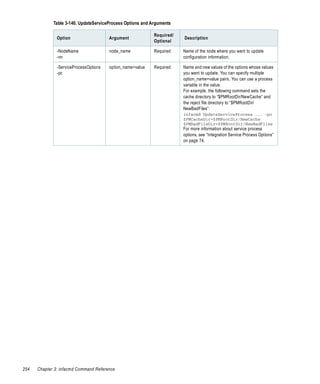
          Table   3-140. UpdateServiceProcess Options and Arguments . . . . . . . . . . . . . . . . . . . . . . . . . .253
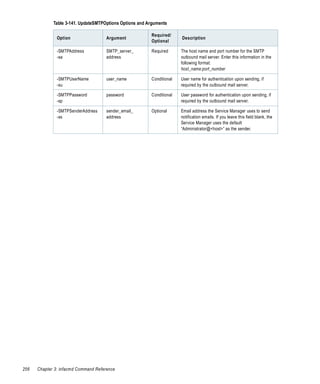
          Table   3-141. UpdateSMTPOptions Options and Arguments . . . . . . . . . . . . . . . . . . . . . . . . .255
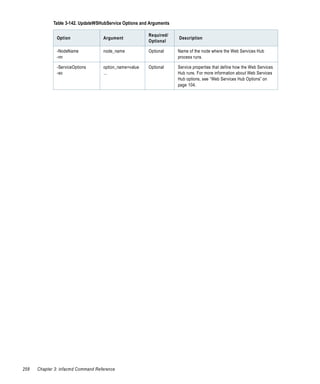
          Table   3-142. UpdateWSHubService Options and Arguments . . . . . . . . . . . . . . . . . . . . . . . . .257
          Table   3-143. UpgradeDARepositoryContents Options and Arguments . . . . . . . . . . . . . . . . . .259
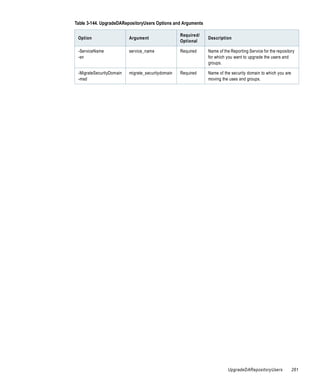
          Table   3-144. UpgradeDARepositoryUsers Options and Arguments . . . . . . . . . . . . . . . . . . . . .260
          Table   4-1. Database Connection String Syntax . . . . . . . . . . . . . . . . . . . . . . . . . . . . . . . . . . .265
          Table   4-2. BackupDomain Options and Arguments . . . . . . . . . . . . . . . . . . . . . . . . . . . . . . . .267
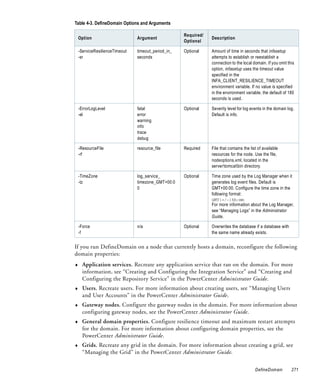
          Table   4-3. DefineDomain Options and Arguments . . . . . . . . . . . . . . . . . . . . . . . . . . . . . . . .269
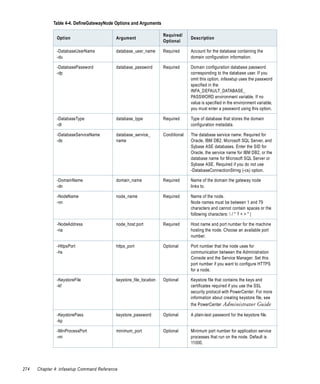
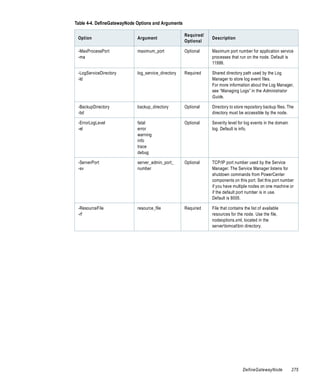
          Table   4-4. DefineGatewayNode Options and Arguments . . . . . . . . . . . . . . . . . . . . . . . . . . . .273
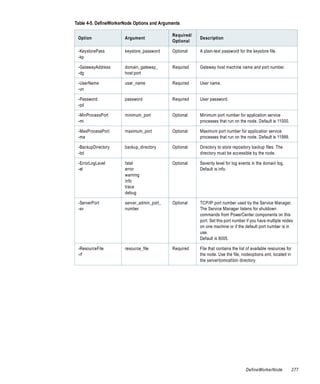
          Table   4-5. DefineWorkerNode Options and Arguments . . . . . . . . . . . . . . . . . . . . . . . . . . . . .276
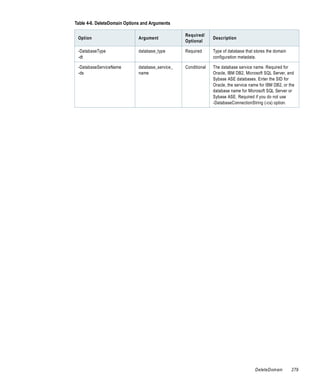
          Table   4-6. DeleteDomain Options and Arguments . . . . . . . . . . . . . . . . . . . . . . . . . . . . . . . . .278
          Table   4-7. Help Option and Argument . . . . . . . . . . . . . . . . . . . . . . . . . . . . . . . . . . . . . . . . .280
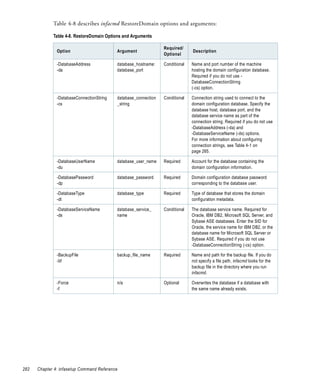
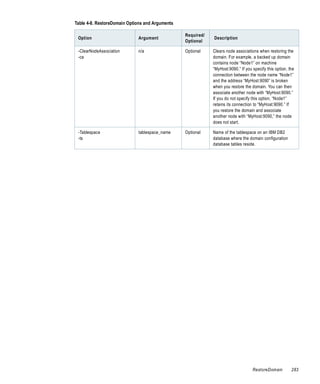
          Table   4-8. RestoreDomain Options and Arguments . . . . . . . . . . . . . . . . . . . . . . . . . . . . . . . .282
          Table   4-9. UpdateGatewayNode Options and Arguments . . . . . . . . . . . . . . . . . . . . . . . . . . . .284
          Table   4-10. UpdateWorkerNode Options and Arguments . . . . . . . . . . . . . . . . . . . . . . . . . . .286
          Table   5-1. pmcmd Return Codes . . . . . . . . . . . . . . . . . . . . . . . . . . . . . . . . . . . . . . . . . . . . .291
          Table   5-2. Setting Defaults for Interactive Mode . . . . . . . . . . . . . . . . . . . . . . . . . . . . . . . . . .293
          Table   5-3. aborttask Options and Arguments . . . . . . . . . . . . . . . . . . . . . . . . . . . . . . . . . . . . .296
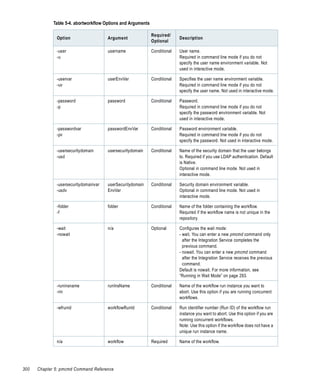
          Table   5-4. abortworkflow Options and Arguments . . . . . . . . . . . . . . . . . . . . . . . . . . . . . . . . .299
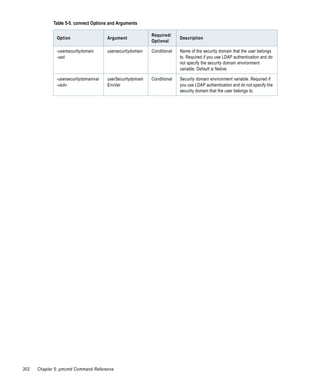
          Table   5-5. connect Options and Arguments . . . . . . . . . . . . . . . . . . . . . . . . . . . . . . . . . . . . . .301
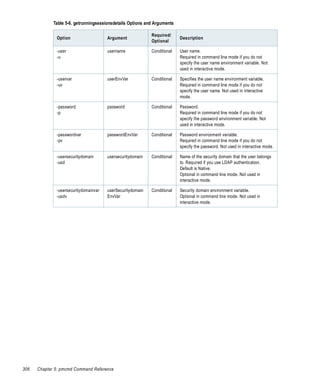
          Table   5-6. getrunningsessionsdetails Options and Arguments . . . . . . . . . . . . . . . . . . . . . . . . .305
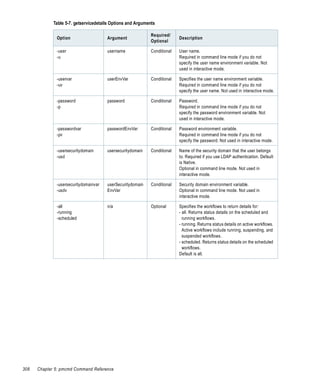
          Table   5-7. getservicedetails Options and Arguments . . . . . . . . . . . . . . . . . . . . . . . . . . . . . . . .307
          Table   5-8. getserviceproperties Options and Arguments . . . . . . . . . . . . . . . . . . . . . . . . . . . . .309
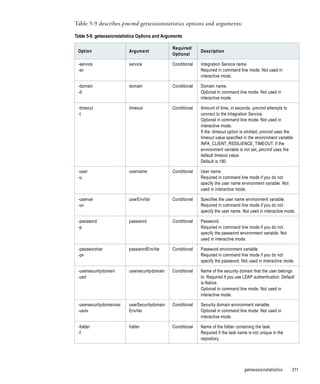
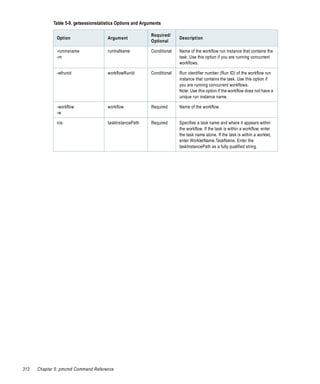
          Table   5-9. getsessionstatistics Options and Arguments . . . . . . . . . . . . . . . . . . . . . . . . . . . . . .311
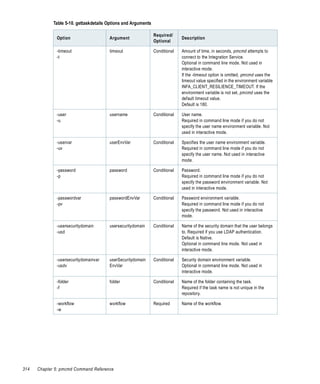
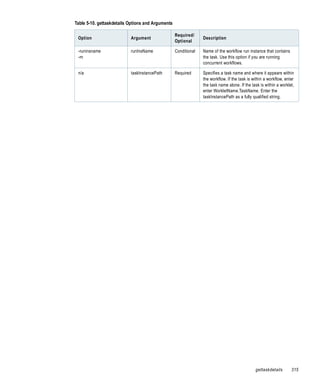
          Table   5-10. gettaskdetails Options and Arguments . . . . . . . . . . . . . . . . . . . . . . . . . . . . . . . . .313
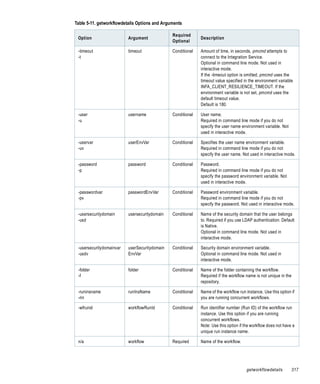
          Table   5-11. getworkflowdetails Options and Arguments . . . . . . . . . . . . . . . . . . . . . . . . . . . . .316
          Table   5-12. help Options and Arguments . . . . . . . . . . . . . . . . . . . . . . . . . . . . . . . . . . . . . . .318


xviii   List of Tables
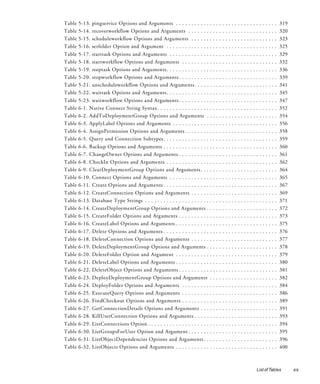
Table   5-13. pingservice Options and Arguments . . . . . . . . . . . . . . .           .   ..   .   .   ..   .   ..   .   .   ..   .   ..   .   319
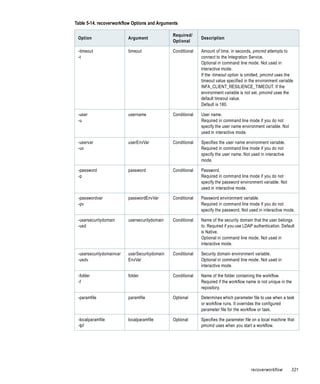
Table   5-14. recoverworkflow Options and Arguments . . . . . . . . . . .               .   ..   .   .   ..   .   ..   .   .   ..   .   ..   .   320
Table   5-15. scheduleworkflow Options and Arguments . . . . . . . . . .                .   ..   .   .   ..   .   ..   .   .   ..   .   ..   .   323
Table   5-16. setfolder Option and Argument . . . . . . . . . . . . . . . . . .         .   ..   .   .   ..   .   ..   .   .   ..   .   ..   .   325
Table   5-17. starttask Options and Arguments . . . . . . . . . . . . . . . . .         .   ..   .   .   ..   .   ..   .   .   ..   .   ..   .   329
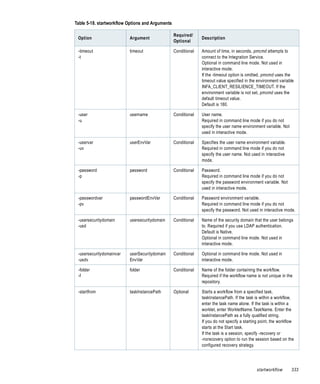
Table   5-18. startworkflow Options and Arguments . . . . . . . . . . . . .             .   ..   .   .   ..   .   ..   .   .   ..   .   ..   .   332
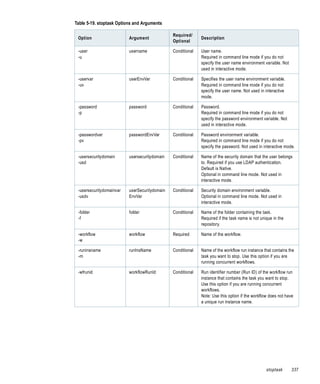
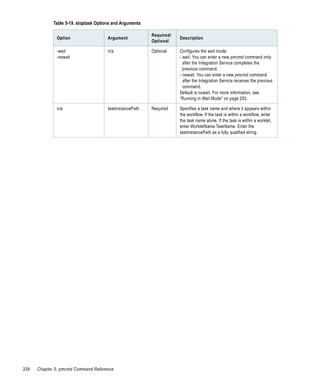
Table   5-19. stoptask Options and Arguments . . . . . . . . . . . . . . . . . .        .   ..   .   .   ..   .   ..   .   .   ..   .   ..   .   336
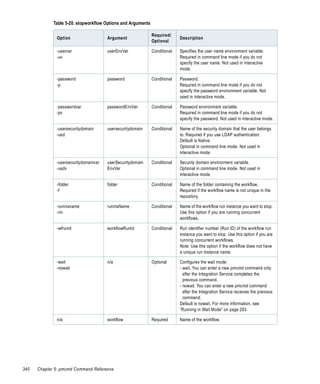
Table   5-20. stopworkflow Options and Arguments . . . . . . . . . . . . . .            .   ..   .   .   ..   .   ..   .   .   ..   .   ..   .   339
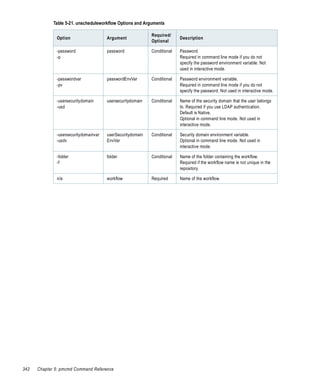
Table   5-21. unscheduleworkflow Options and Arguments . . . . . . . . .                .   ..   .   .   ..   .   ..   .   .   ..   .   ..   .   341
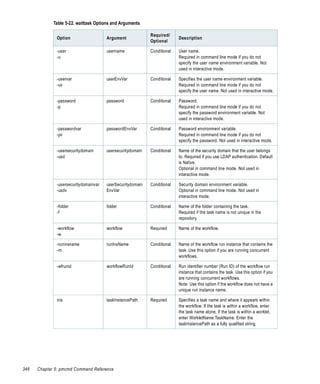
Table   5-22. waittask Options and Arguments . . . . . . . . . . . . . . . . . .        .   ..   .   .   ..   .   ..   .   .   ..   .   ..   .   345
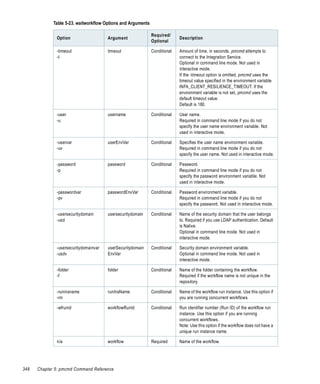
Table   5-23. waitworkflow Options and Arguments . . . . . . . . . . . . . .            .   ..   .   .   ..   .   ..   .   .   ..   .   ..   .   347
Table   6-1. Native Connect String Syntax . . . . . . . . . . . . . . . . . . . . .     .   ..   .   .   ..   .   ..   .   .   ..   .   ..   .   352
Table   6-2. AddToDeploymentGroup Options and Arguments . . . . .                       .   ..   .   .   ..   .   ..   .   .   ..   .   ..   .   354
Table   6-3. ApplyLabel Options and Arguments . . . . . . . . . . . . . . . .           .   ..   .   .   ..   .   ..   .   .   ..   .   ..   .   356
Table   6-4. AssignPermission Options and Arguments . . . . . . . . . . . .             .   ..   .   .   ..   .   ..   .   .   ..   .   ..   .   358
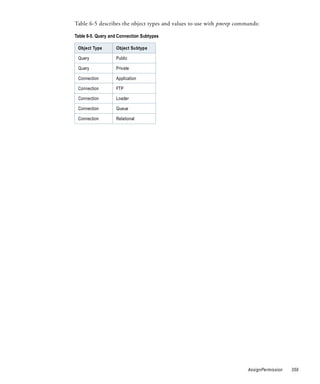
Table   6-5. Query and Connection Subtypes . . . . . . . . . . . . . . . . . . .        .   ..   .   .   ..   .   ..   .   .   ..   .   ..   .   359
Table   6-6. Backup Options and Arguments . . . . . . . . . . . . . . . . . . .         .   ..   .   .   ..   .   ..   .   .   ..   .   ..   .   360
Table   6-7. ChangeOwner Options and Arguments . . . . . . . . . . . . . .              .   ..   .   .   ..   .   ..   .   .   ..   .   ..   .   361
Table   6-8. CheckIn Options and Arguments . . . . . . . . . . . . . . . . . .          .   ..   .   .   ..   .   ..   .   .   ..   .   ..   .   362
Table   6-9. ClearDeploymentGroup Options and Arguments . . . . . . .                   .   ..   .   .   ..   .   ..   .   .   ..   .   ..   .   364
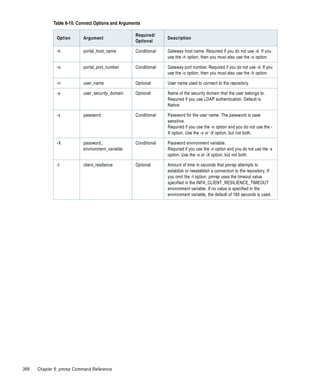
Table   6-10. Connect Options and Arguments . . . . . . . . . . . . . . . . .           .   ..   .   .   ..   .   ..   .   .   ..   .   ..   .   365
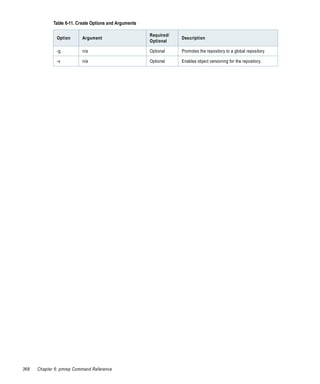
Table   6-11. Create Options and Arguments . . . . . . . . . . . . . . . . . . .        .   ..   .   .   ..   .   ..   .   .   ..   .   ..   .   367
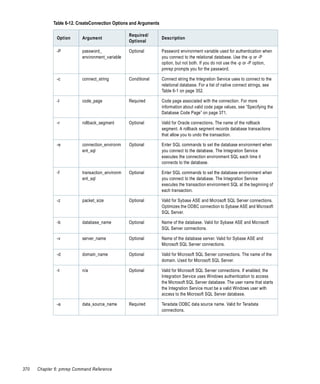
Table   6-12. CreateConnection Options and Arguments . . . . . . . . . .                .   ..   .   .   ..   .   ..   .   .   ..   .   ..   .   369
Table   6-13. Database Type Strings . . . . . . . . . . . . . . . . . . . . . . . . .   .   ..   .   .   ..   .   ..   .   .   ..   .   ..   .   371
Table   6-14. CreateDeploymentGroup Options and Arguments . . . . .                     .   ..   .   .   ..   .   ..   .   .   ..   .   ..   .   372
Table   6-15. CreateFolder Options and Arguments . . . . . . . . . . . . . .            .   ..   .   .   ..   .   ..   .   .   ..   .   ..   .   373
Table   6-16. CreateLabel Options and Arguments . . . . . . . . . . . . . . .           .   ..   .   .   ..   .   ..   .   .   ..   .   ..   .   375
Table   6-17. Delete Options and Arguments . . . . . . . . . . . . . . . . . . .        .   ..   .   .   ..   .   ..   .   .   ..   .   ..   .   376
Table   6-18. DeleteConnection Options and Arguments . . . . . . . . . .                .   ..   .   .   ..   .   ..   .   .   ..   .   ..   .   377
Table   6-19. DeleteDeploymentGroup Options and Arguments . . . . .                     .   ..   .   .   ..   .   ..   .   .   ..   .   ..   .   378
Table   6-20. DeleteFolder Option and Argument . . . . . . . . . . . . . . .            .   ..   .   .   ..   .   ..   .   .   ..   .   ..   .   379
Table   6-21. DeleteLabel Options and Arguments . . . . . . . . . . . . . . .           .   ..   .   .   ..   .   ..   .   .   ..   .   ..   .   380
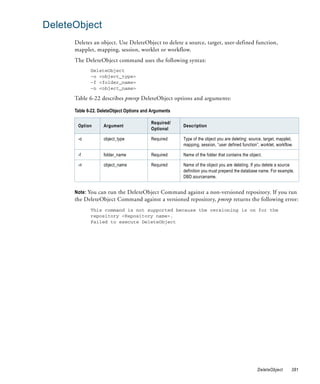
Table   6-22. DeleteObject Options and Arguments . . . . . . . . . . . . . .            .   ..   .   .   ..   .   ..   .   .   ..   .   ..   .   381
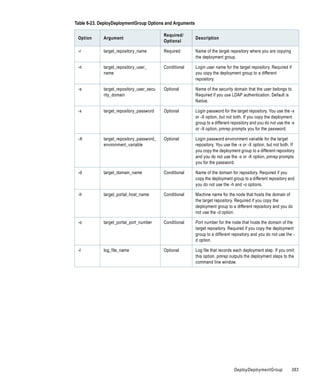
Table   6-23. DeployDeploymentGroup Options and Arguments . . . .                       .   ..   .   .   ..   .   ..   .   .   ..   .   ..   .   382
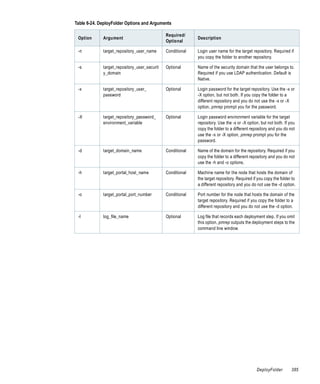
Table   6-24. DeployFolder Options and Arguments . . . . . . . . . . . . .              .   ..   .   .   ..   .   ..   .   .   ..   .   ..   .   384
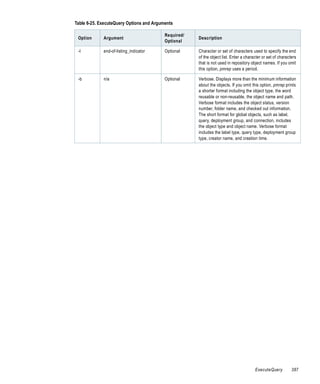
Table   6-25. ExecuteQuery Options and Arguments . . . . . . . . . . . . .              .   ..   .   .   ..   .   ..   .   .   ..   .   ..   .   386
Table   6-26. FindCheckout Options and Arguments . . . . . . . . . . . . .              .   ..   .   .   ..   .   ..   .   .   ..   .   ..   .   389
Table   6-27. GetConnectionDetails Options and Arguments . . . . . . .                  .   ..   .   .   ..   .   ..   .   .   ..   .   ..   .   391
Table   6-28. KillUserConnection Options and Arguments . . . . . . . . .                .   ..   .   .   ..   .   ..   .   .   ..   .   ..   .   393
Table   6-29. ListConnections Option . . . . . . . . . . . . . . . . . . . . . . . .    .   ..   .   .   ..   .   ..   .   .   ..   .   ..   .   394
Table   6-30. ListGroupsForUser Option and Argument . . . . . . . . . . .               .   ..   .   .   ..   .   ..   .   .   ..   .   ..   .   395
Table   6-31. ListObjectDependencies Options and Arguments . . . . . .                  .   ..   .   .   ..   .   ..   .   .   ..   .   ..   .   396
Table   6-32. ListObjects Options and Arguments . . . . . . . . . . . . . . .           .   ..   .   .   ..   .   ..   .   .   ..   .   ..   .   400


                                                                                                                           List of Tables              xix
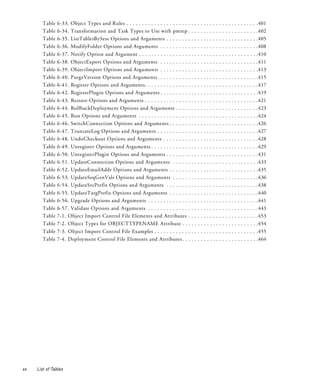
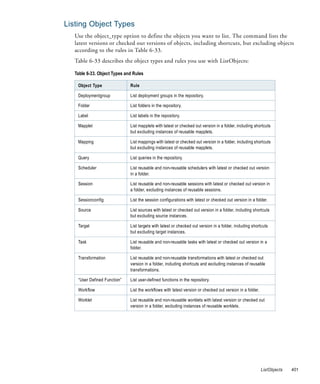
Table   6-33. Object Types and Rules . . . . . . . . . . . . . . . . . . . . . . . . . . . . . . . . . . . . . . . . . . .401
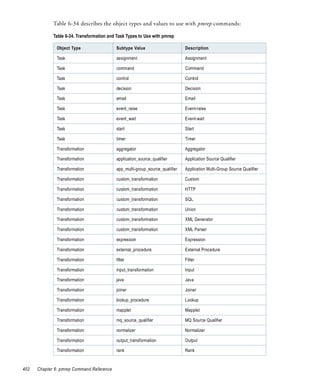
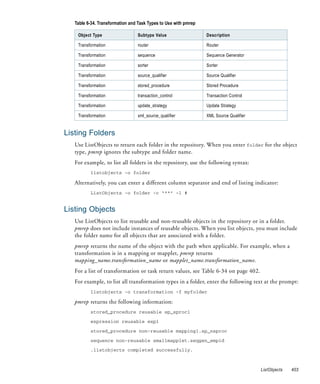
       Table   6-34. Transformation and Task Types to Use with pmrep . . . . . . . . . . . . . . . . . . . . . . .402
       Table   6-35. ListTablesBySess Options and Arguments . . . . . . . . . . . . . . . . . . . . . . . . . . . . . .405
       Table   6-36. ModifyFolder Options and Arguments . . . . . . . . . . . . . . . . . . . . . . . . . . . . . . . .408
       Table   6-37. Notify Option and Argument . . . . . . . . . . . . . . . . . . . . . . . . . . . . . . . . . . . . . . .410
       Table   6-38. ObjectExport Options and Arguments . . . . . . . . . . . . . . . . . . . . . . . . . . . . . . . .411
       Table   6-39. ObjectImport Options and Arguments . . . . . . . . . . . . . . . . . . . . . . . . . . . . . . . .413
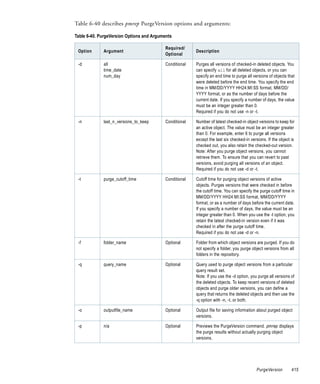
       Table   6-40. PurgeVersion Options and Arguments . . . . . . . . . . . . . . . . . . . . . . . . . . . . . . . . .415
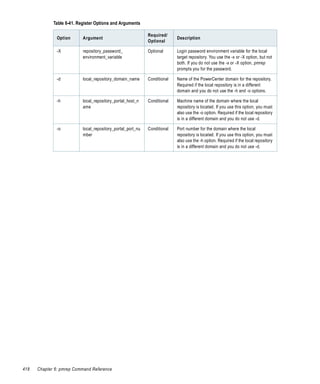
       Table   6-41. Register Options and Arguments . . . . . . . . . . . . . . . . . . . . . . . . . . . . . . . . . . . . .417
       Table   6-42. RegisterPlugin Options and Arguments . . . . . . . . . . . . . . . . . . . . . . . . . . . . . . . .419
       Table   6-43. Restore Options and Arguments . . . . . . . . . . . . . . . . . . . . . . . . . . . . . . . . . . . . .421
       Table   6-44. RollbackDeployment Options and Arguments . . . . . . . . . . . . . . . . . . . . . . . . . . .423
       Table   6-45. Run Options and Arguments . . . . . . . . . . . . . . . . . . . . . . . . . . . . . . . . . . . . . . .424
       Table   6-46. SwitchConnection Options and Arguments . . . . . . . . . . . . . . . . . . . . . . . . . . . . .426
       Table   6-47. TruncateLog Options and Arguments . . . . . . . . . . . . . . . . . . . . . . . . . . . . . . . . .427
       Table   6-48. UndoCheckout Options and Arguments . . . . . . . . . . . . . . . . . . . . . . . . . . . . . . .428
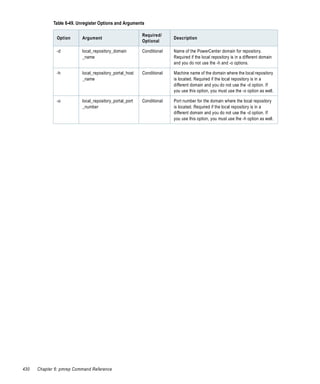
       Table   6-49. Unregister Options and Arguments . . . . . . . . . . . . . . . . . . . . . . . . . . . . . . . . . . .429
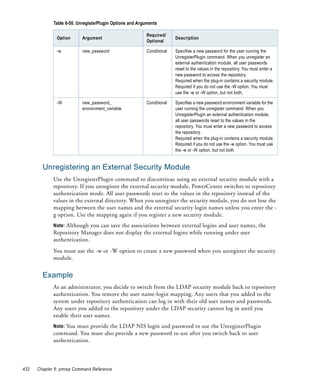
       Table   6-50. UnregisterPlugin Options and Arguments . . . . . . . . . . . . . . . . . . . . . . . . . . . . . .431
       Table   6-51. UpdateConnection Options and Arguments . . . . . . . . . . . . . . . . . . . . . . . . . . . .433
       Table   6-52. UpdateEmailAddr Options and Arguments . . . . . . . . . . . . . . . . . . . . . . . . . . . . .435
       Table   6-53. UpdateSeqGenVals Options and Arguments . . . . . . . . . . . . . . . . . . . . . . . . . . . .436
       Table   6-54. UpdateSrcPrefix Options and Arguments . . . . . . . . . . . . . . . . . . . . . . . . . . . . . .438
       Table   6-55. UpdateTargPrefix Options and Arguments . . . . . . . . . . . . . . . . . . . . . . . . . . . . .440
       Table   6-56. Upgrade Options and Arguments . . . . . . . . . . . . . . . . . . . . . . . . . . . . . . . . . . . .441
       Table   6-57. Validate Options and Arguments . . . . . . . . . . . . . . . . . . . . . . . . . . . . . . . . . . . .443
       Table   7-1. Object Import Control File Elements and Attributes . . . . . . . . . . . . . . . . . . . . . . .453
       Table   7-2. Object Types for OBJECTTYPENAME Attribute . . . . . . . . . . . . . . . . . . . . . . . . .454
       Table   7-3. Object Import Control File Examples . . . . . . . . . . . . . . . . . . . . . . . . . . . . . . . . . .455
       Table   7-4. Deployment Control File Elements and Attributes . . . . . . . . . . . . . . . . . . . . . . . . .464


xx   List of Tables
Preface


   The Command Line Reference is written for PowerCenter administrators and developers who
   manage the repositories and administer the domain and services. This guide assumes you have
   knowledge of the operating systems in your environment. This guide also assumes you are
   familiar with the interface requirements for the supporting applications.


                                                                                            xxi
Informatica Resources
         Informatica Customer Portal
                 As an Informatica customer, you can access the Informatica Customer Portal site at
                 http://my.informatica.com. The site contains product information, user group information,
                 newsletters, access to the Informatica customer support case management system (ATLAS),
                 the Informatica Knowledge Base, Informatica Documentation Center, and access to the
                 Informatica user community.


         Informatica Web Site
                 You can access the Informatica corporate web site at http://www.informatica.com. The site
                 contains information about Informatica, its background, upcoming events, and sales offices.
                 You will also find product and partner information. The services area of the site includes
                 important information about technical support, training and education, and implementation
                 services.


         Informatica Knowledge Base
                 As an Informatica customer, you can access the Informatica Knowledge Base at
                 http://my.informatica.com. Use the Knowledge Base to search for documented solutions to
                 known technical issues about Informatica products. You can also find answers to frequently
                 asked questions, technical white papers, and technical tips.


         Informatica Global Customer Support
                 There are many ways to access Informatica Global Customer Support. You can contact a
                 Customer Support Center through telephone, email, or the WebSupport Service.
                 Use the following email addresses to contact Informatica Global Customer Support:
                 ♦   support@informatica.com for technical inquiries
                 ♦   support_admin@informatica.com for general customer service requests
                 WebSupport requires a user name and password. You can request a user name and password at
                 http://my.informatica.com.


xxii   Preface
Use the following telephone numbers to contact Informatica Global Customer Support:

 North America / South America    Europe / Middle East / Africa      Asia / Australia


 Informatica Corporation          Informatica Software Ltd.          Informatica Business Solutions
 Headquarters                     6 Waltham Park                     Pvt. Ltd.
 100 Cardinal Way                 Waltham Road, White Waltham        Diamond District
 Redwood City, California         Maidenhead, Berkshire              Tower B, 3rd Floor
 94063                            SL6 3TN                            150 Airport Road
 United States                    United Kingdom                     Bangalore 560 008
                                                                     India

 Toll Free                        Toll Free                          Toll Free
 +1 877 463 2435                  00 800 4632 4357                   Australia: 1 800 151 830
                                                                     Singapore: 001 800 4632 4357

 Standard Rate                    Standard Rate                      Standard Rate
 United States: +1 650 385 5800   Belgium: +32 15 281 702            India: +91 80 4112 5738
                                  France: +33 1 41 38 92 26
                                  Germany: +49 1805 702 702
                                  Netherlands: +31 306 022 797
                                  United Kingdom: +44 1628 511 445


                                                                                         Preface      xxiii
xxiv   Preface
Chapter 1


Using the Command Line
Programs
   This chapter includes the following topic:
   ♦   Overview, 2


                                                            1
Overview
           PowerCenter includes command line programs that you use to perform tasks from any
           machine in the PowerCenter environment. The command line programs allow you to run a
           subset of tasks that you can complete in the Administration Console. For example, you can
           enable or disable a Repository Service from the Administration Console or the command line
           program, infacmd.
           PowerCenter includes the following command line programs:
           ♦   infacmd. Use infacmd to access the PowerCenter application services. For more
               information about infacmd, see “infacmd Command Reference” on page 19.
           ♦   infasetup. Use infasetup to perform installation tasks such as defining a node or a domain.
               For more information about infasetup, “infasetup Command Reference” on page 263.
           ♦   pmcmd. Use pmcmd to manage workflows. You can start, stop, schedule, and monitor
               workflows using pmcmd. For more information about pmcmd, see “pmcmd Command
               Reference” on page 289.
           ♦   pmrep. Use pmrep to perform repository administration tasks such as listing repository
               objects, creating and editing groups, and restoring and deleting repositories. For more
               information about pmrep, see “pmrep Command Reference” on page 349.
           To run command line programs on UNIX, you may need to set the library path environment
           variable to the location of the PowerCenter utilities.
           For ease of use, you can configure environment variables that apply each time you run the
           command line programs. For example, you can set an environment variable for the default
           domain name, user, and password to avoid typing the options at the command line. For more
           information about environment variables, see “Configuring Environment Variables” on
           page 5.


      Entering Options and Arguments
           Each command line program requires a set of options and arguments. These include user
           name, password, domain name, and connection information.
           Use the following rules when you enter command options and arguments:
           ♦   To enter options, type a hyphen followed by one letter, two letters, or a word, depending
               on the command line program syntax.
               For example, the pmrep Connect command uses a single letter option for the repository
               name:
                   connect -r <repository_name>

           ♦   Enter options in any order.
           ♦   The first word after the option is the argument.
           ♦   Most options require arguments. You must separate options from arguments with a single
               space when using pmcmd or infacmd. You do not have to separate options from arguments
               when using pmrep.

2   Chapter 1: Using the Command Line Programs
♦        If any argument contains more than one word, enclose the argument in double quotes. For
           pmcmd, you can also use single quotes. The command line programs ignore quotes that do
           not enclose an argument. Unmatched quotes result in an error.


Syntax Notation
  Table 1-1 describes the notation used in this book to show the syntax for all PowerCenter
  command line programs:

  Table 1-1. Syntax Notation

      Convention                 Description

      -x                         Option placed before a argument. This designates the parameter you enter. For
                                 example, to enter the user name for pmcmd, type -u or -user followed by the user name.

      <x>                        Required option. If you omit a required option, the command line program returns an
                                 error message.

      <x | y >                   Select between required options. For the command to run, you must select from the
                                 listed options. If you omit a required option, the command line program returns an error
                                 message.
      {x | y}                    In pmrep, curly brackets denote groupings of required options, as in the following
                                 example:
                                   killuserconnection
                                   {-i <connection_id> |
                                   -n <user_name> |
                                   -a (kill all)}
                                 If a pipe symbol ( | ) separates options, you must specify exactly one option. If options
                                 are not separated by pipe symbols, you must specify all the options.

      [x]                        Optional parameter. The command runs whether or not you enter optional parameters.
                                 For example, the help command has the following syntax:
                                 Help [Command]
                                 If you enter a command, the command line program returns information on that
                                 command only. If you omit the command name, the command line program returns a list
                                 of all commands.

      [x|y]                      Select between optional parameters. For example, many commands in pmcmd run in
                                 either the wait or nowait mode.
                                 [-wait|-nowait]
                                 If you specify a mode, the command runs in the specified mode.
                                 The command runs whether or not you enter the optional parameter. If you do not
                                 specify a mode, pmcmd runs the command in the default nowait mode.

      << x | y>| <a | b>>        When a set contains subsets, the superset is indicated with bold brackets < >. A bold
                                 pipe symbol (|) separates the subsets.

      (text)                     In pmrep, parentheses surround descriptive text, such as the list of the possible values
                                 for an argument or an explanation for an option that does not take an argument.


                                                                                                         Overview            3
4   Chapter 1: Using the Command Line Programs
Chapter 2


Configuring Environment
Variables
   This chapter includes the following topics:
   ♦   Overview, 6
   ♦   INFA_CLIENT_RESILIENCE_TIMEOUT, 8
   ♦   INFA_CODEPAGENAME, 9
   ♦   INFA_DEFAULT_DATABASE_PASSWORD, 10
   ♦   INFA_DEFAULT_DOMAIN, 11
   ♦   INFA_DEFAULT_DOMAIN_PASSWORD, 12
   ♦   INFA_DEFAULT_DOMAIN_USER, 13
   ♦   INFA_REPCNX_INFO, 14
   ♦   INFATOOL_DATEFORMAT, 15
   ♦   Encrypting Passwords, 16
   ♦   Setting the User Name, 18


                                                             5
Overview
            You can configure environment variables for the command line programs. For example, you
            can set environment variables to encrypt passwords, configure time and date display options,
            or store the default login information for a domain. The environment variables you configure
            are all optional. If you are running pmcmd or pmrep in interactive mode, you must exit from
            the command line program and then reconnect to use changed environment variables.
            On Windows, you can configure these environment variables as either user or system
            variables. For information about setting environment variables on Windows, consult the
            Windows documentation.
            Table 2-1 describes environment variables you can configure to use with the command line
            programs:

            Table 2-1. Environment Variables

                                                   Command
             Environment Variable                  Line        Description
                                                   Programs

             INFA_CLIENT_RESILIENCE_TIMEOUT        infacmd     Limits the number of seconds you want the command
                                                   pmcmd       line programs to spend establishing a connection to the
                                                   pmrep       domain or service. For more information, see
                                                               “INFA_CLIENT_RESILIENCE_TIMEOUT” on page 8.

             INFA_CODEPAGENAME                     pmcmd       Configures the character set pmcmd and pmrep use.
                                                   pmrep       For more information, see “INFA_CODEPAGENAME”
                                                               on page 9.

             INFA_DEFAULT_DATABASE_PASSWORD        infasetup   Stores the default user name password for the domain
                                                               configuration database. For more information, see
                                                               “INFA_DEFAULT_DATABASE_PASSWORD” on
                                                               page 10.

             INFA_DEFAULT_DOMAIN                   infacmd     Stores the default domain name. For more information,
                                                   pmcmd       see “INFA_DEFAULT_DOMAIN” on page 11.
                                                   pmrep

             INFA_DEFAULT_DOMAIN_PASSWORD          infacmd     Stores the default user name password for the domain.
                                                               For more information, see
                                                               “INFA_DEFAULT_DOMAIN_PASSWORD” on page 12.

             INFA_DEFAULT_DOMAIN_USER              infacmd     Stores the default user name for the domain. For more
                                                               information, see “INFA_DEFAULT_DOMAIN_USER” on
                                                               page 13.

             INFA_REPCNX_INFO                      pmrep       Stores the name of the repository connection file. For
                                                               more information, see “INFA_REPCNX_INFO” on
                                                               page 14.

             INFATOOL_DATEFORMAT                   pmcmd       Configures the way pmcmd displays the date and time.
                                                               For more information, see “INFATOOL_DATEFORMAT”
                                                               on page 15.


6   Chapter 2: Configuring Environment Variables
Table 2-1. Environment Variables

                                    Command
 Environment Variable               Line       Description
                                    Programs

 <Password_Environment_Variable>    pmcmd      Encrypts and stores the password. For more
                                    pmrep      information, see “Encrypting Passwords” on page 16.

 <User_Name_Environment_Variable>   pmcmd      Stores the user name. For more information, see
                                    pmrep      “Setting the User Name” on page 18.


                                                                                    Overview         7
INFA_CLIENT_RESILIENCE_TIMEOUT
                   Command Line Programs:
                   infacmd
                   pmcmd
                   pmrep


            You can set the environment variable INFA_CLIENT_RESILIENCE_TIMEOUT to limit
            the number of seconds the command line programs spend establishing connections to the
            domain or service. The default time is 180 seconds if you do not set this environment
            variable.

            To configure INFA_CLIENT_RESILIENCE_TIMEOUT on UNIX:

                 In a UNIX C shell environment, type:
                    setenv INFA_CLIENT_RESILIENCE_TIMEOUT <number of seconds>

                 In a UNIX Bourne shell environment, type:
                    INFA_CLIENT_RESILIENCE_TIMEOUT = <number of seconds>

                    export INFA_CLIENT_RESILIENCE_TIMEOUT


            To configure INFA_CLIENT_RESILIENCE_TIMEOUT on Windows:

                 Enter the environment variable INFA_CLIENT_RESILIENCE_TIMEOUT, and set the
                 value to the number of seconds you want the command line programs to spend
                 establishing a connection to the domain or service.
                 For information about setting environment variables on Windows, consult the Windows
                 documentation.


8   Chapter 2: Configuring Environment Variables
INFA_CODEPAGENAME
         Command Line Programs:
         pmcmd
         pmrep


    pmcmd and pmrep send commands in Unicode and use the code page of the host machine
    unless you set the code page environment variable, INFA_CODEPAGENAME, to override
    it. If you set INFA_CODEPAGENAME for pmcmd, the code page must be compatible with
    the Integration Service code page. If you set INFA_CODEPAGENAME for pmrep, the code
    page name must be compatible with the repository code page. If you set
    INFA_CODEPAGENAME on the machine where you run pmcmd and pmrep, the code page
    must be compatible with the Integration Service and the repository code pages.
    If the code pages are not compatible, the command might fail. For more information about
    code page compatibility, see the PowerCenter Administrator Guide.

    To configure INFA_CODEPAGENAME on UNIX:

        In a UNIX C shell environment, type:
          setenv INFA_CODEPAGENAME <code page name>

        In a UNIX Bourne shell environment, type:
          INFA_CODEPAGENAME = <code page name>

          export INFA_CODEPAGENAME


    To configure INFA_CODEPAGENAME on Windows:

        Enter the environment variable INFA_CODEPAGENAME, and set the value to the
        code page name.
        For information about setting environment variables on Windows, consult the Windows
        documentation.


                                                                    INFA_CODEPAGENAME          9
INFA_DEFAULT_DATABASE_PASSWORD
                    Command Line Program:
                    infasetup


             Some infasetup commands require a domain configuration database password. You can
             provide this password as an option with infasetup, or you can store it as the environment
             variable INFA_DEFAULT_DATABASE_PASSWORD.
             Use the following steps as a guideline to use an encrypted password as an environment
             variable:
             1.   Use the command line program pmpasswd to encrypt the database user password.
                  pmpasswd generates and displays the encrypted password. For example, if you enter the
                  password “monday,” it encrypts to f/wRb5PZsZnqESTDPeos7Q==.
             2.   Configure the password environment variable to set the encrypted value.

             To configure INFA_DEFAULT_DATABASE_PASSWORD on UNIX:

             1.   At the command line, type:
                     pmpasswd <database password>

                  pmpasswd returns the encrypted password.
             2.   In a UNIX C shell environment, type:
                     setenv INFA_DEFAULT_DATABASE_PASSWORD <encrypted password>

                  In a UNIX Bourne shell environment, type:
                     INFA_DEFAULT_DATABASE_PASSWORD = <encrypted password>

                     export INFA_DEFAULT_DATABASE_PASSWORD


             To configure INFA_DEFAULT_DATABASE_PASSWORD on Windows:

             1.   At the command line, type:
                     pmpasswd <database password>

                  pmpasswd returns the encrypted password.
             2.   Enter the environment variable INFA_DEFAULT_DATABASE_PASSWORD, and set
                  the value to the encrypted password.
                  For information about setting environment variables on Windows, consult the Windows
                  documentation.


10   Chapter 2: Configuring Environment Variables
INFA_DEFAULT_DOMAIN
          Command Line Programs:
          infacmd
          pmcmd
          pmrep


     The command line programs require a domain name. You can provide the domain name as an
     option with the command line programs, or you can store it as the environment variable
     INFA_DEFAULT_DOMAIN. If you have more than one domain, choose a default domain.

     To configure INFA_DEFAULT_DOMAIN on UNIX:

         In a UNIX C shell environment, type:
           setenv INFA_DEFAULT_DOMAIN <domain name>

         In a UNIX Bourne shell environment, type:
           INFA_DEFAULT_DOMAIN = <domain name>

           export INFA_DEFAULT_DOMAIN


     To configure INFA_DEFAULT_DOMAIN on Windows:

         Enter the environment variable INFA_DEFAULT_DOMAIN, and set the value to the
         domain name.
         For information about setting environment variables on Windows, consult the Windows
         documentation.


                                                                  INFA_DEFAULT_DOMAIN     11
INFA_DEFAULT_DOMAIN_PASSWORD
                    Command Line Program:
                    infacmd


             Most infacmd commands require a user password. You can provide a user password as an
             option with infacmd, or you can store it as the environment variable
             INFA_DEFAULT_DOMAIN_PASSWORD.
             Use the following steps as a guideline to use an encrypted password as an environment
             variable:
             1.   Use the command line program pmpasswd to encrypt the user password.
                  pmpasswd generates and displays the encrypted password. For example, if you enter the
                  password “monday,” it encrypts to f/wRb5PZsZnqESTDPeos7Q==.
             2.   Configure the password environment variable to set the encrypted value.

             To configure INFA_DEFAULT_DOMAIN_PASSWORD on UNIX:

             1.   At the command line, type:
                     pmpasswd <password>

                  pmpasswd returns the encrypted password.
             2.   In a UNIX C shell environment, type:
                     setenv INFA_DEFAULT_DOMAIN_PASSWORD <encrypted password>

                  In a UNIX Bourne shell environment, type:
                     INFA_DEFAULT_DOMAIN_PASSWORD = <encrypted password>

                     export INFA_DEFAULT_DOMAIN_PASSWORD


             To configure INFA_DEFAULT_DOMAIN_PASSWORD on Windows:

             1.   At the command line, type:
                     pmpasswd <password>

                  pmpasswd returns the encrypted password.
             2.   Enter the environment variable INFA_DEFAULT_DOMAIN_PASSWORD, and set
                  the value to the encrypted password.
                  For information about setting environment variables on Windows, consult the Windows
                  documentation.


12   Chapter 2: Configuring Environment Variables
INFA_DEFAULT_DOMAIN_USER
         Command Line Program:
         infacmd


    Most infacmd commands require a user name. You can provide a user name as an option with
    infacmd, or you can store it as the environment variable
    INFA_DEFAULT_DOMAIN_USER.

    To configure INFA_DEFAULT_DOMAIN_USER on UNIX:

        In a UNIX C shell environment, type:
          setenv INFA_DEFAULT_DOMAIN_USER <user name>

        In a UNIX Bourne shell environment, type:
          INFA_DEFAULT_DOMAIN_USER = <user name>

          export INFA_DEFAULT_DOMAIN_USER


    To configure INFA_DEFAULT_DOMAIN_USER on Windows:

        Enter the environment variable INFA_DEFAULT_DOMAIN_USER, and set the value
        to the default user name.
        For information about setting environment variables on Windows, consult the Windows
        documentation.


                                                            INFA_DEFAULT_DOMAIN_USER      13
INFA_REPCNX_INFO
                    Command Line Program:
                    pmrep


             When you run pmrep in command line mode or from a script, it stores repository connection
             information in a file, pmrep.cnx. pmrep uses the information in this file to reconnect to the
             repository. The INFA_REPCNX_INFO environment variable stores the file name and file
             path for the repository connection file.
             Use this variable when scripts that issue pmrep commands run simultaneously, and the scripts
             connect to different repositories. In each shell, specify a different repository connection file.
             This prevents a script from overwriting the connection information used by another script.
             If you do not set this variable, pmrep stores connection information in pmrep.cnx in the
             directory where you start pmrep.

             To configure INFA_REPCNX_INFO on UNIX:

                  In a UNIX C shell environment, type:
                     setenv INFA_REPCNX_INFO <file name>

                  In a UNIX Bourne shell environment, type:
                     INFA_REPCNX_INFO = <file name>

                     export INFA_REPCNX_INFO


             To configure INFA_REPCNX_INFO on Windows:

                  In a DOS shell, type:
                     set INFA_REPCNX_INFO = <file name>

                  Note: If you run multiple pmrep scripts, set this environment variable for the DOS shell,
                  not for the machine.


14   Chapter 2: Configuring Environment Variables
INFATOOL_DATEFORMAT
          Command Line Program:
          pmcmd


    Use this environment variable to customize the way pmcmd displays the date and time. Enter
    the date format string in DY MON DD HH24:MI:SS YYYY format. pmcmd verifies that the
    string is a valid format. If the format string is not valid, the Integration Service generates a
    warning message and displays the date in the format DY MON DD HH24:MI:SS YYYY.

    To configure INFATOOL_DATEFORMAT on UNIX:

        In a UNIX C shell environment, type:
          setenv INFATOOL_DATEFORMAT <date/time format string>

        In a UNIX Bourne shell environment, type:
          INFATOOL_DATEFORMAT = <date/time format string>

          export INFATOOL_DATEFORMAT


    To configure INFATOOL_DATEFORMAT on Windows:

        Enter the environment variable INFATOOL_DATEFORMAT, and set the value to the
        display format string.
        For information about setting environment variables on Windows, consult the Windows
        documentation.


                                                                       INFATOOL_DATEFORMAT        15
Encrypting Passwords
                     Command Line Programs:
                     pmcmd
                     pmrep


             You can encrypt passwords to create an environment variable to use with pmcmd and pmrep or
             to define a password in a parameter file. For example, you can encrypt the repository and
             database passwords for pmrep to maintain security when using pmrep in scripts. Then you can
             create an environment variable to store the encrypted password. Or, you can define a
             password for a relational database connection object in a parameter file.
             Use the command line program pmpasswd to encrypt passwords. The pmpasswd utility uses
             the following syntax:
                      pmpasswd <password> [-e (CRYPT_DATA | CRYPT_SYSTEM)]

             Table 2-2 describes pmpasswd options and arguments:

             Table 2-2. pmpasswd Options and Arguments

                                                         Required/
              Option                  Argument                       Description
                                                         Optional

              n/a                     password           Required    The password to encrypt.

              -e                      CRYPT_DATA,        Optional    Encryption type:
                                      CRYPT_SYSTEM                   - CRYPT_DATA. Use to encrypt connection object
                                                                       passwords that you define in a parameter file.
                                                                     - CRYPT_SYSTEM. Use for all other passwords.
                                                                     Default is CRYPT_SYSTEM.


       Using a Password as an Environment Variable
             Use the following steps as a guideline to use an encrypted password as an environment
             variable:
             1.     Use the command line program pmpasswd to encrypt the password.
                    pmpasswd generates and displays the encrypted password. For example, if you enter the
                    password “monday,” the password encrypts to f/wRb5PZsZnqESTDPeos7Q==.
             2.     Configure the password environment variable to set the encrypted value.

             To configure a password as an environment variable on UNIX:

             1.     At the command line, type:
                      pmpasswd <password>

                    pmpasswd returns the encrypted password.
             2.     In a UNIX C shell environment, type:
                      setenv <Password_Environment_Variable> <encrypted password>


16   Chapter 2: Configuring Environment Variables
In a UNIX Bourne shell environment, type:
       <Password_Environment_Variable> = <encrypted password>

       export <Password_Environment_Variable>

     You can assign the environment variable any valid UNIX name.

To configure a password as an environment variable on Windows:

1.   At the command line, type:
       pmpasswd <password>

     pmpasswd returns the encrypted password.
2.   Enter the password environment variable in the Variable field. Enter the encrypted
     password in the Value field.
     For information about setting environment variables on Windows, consult the Windows
     documentation.


                                                                     Encrypting Passwords   17
Setting the User Name
                    Command Line Programs:
                    pmcmd
                    pmrep


             For pmcmd and pmrep, you can create an environment variable to store the user name.

             To configure a user name as an environment variable on UNIX:

                  In a UNIX C shell environment, type:
                     setenv <User_Name_Environment_Variable> <user name>

                  In a UNIX Bourne shell environment, type:
                     <User_Name_Environment_Variable> = <user name>

                     export <User_Name_Environment_Variable>

                  You can assign the environment variable any valid UNIX name.

             To configure a user name as an environment variable on Windows:

                  Enter the user name environment variable in the Variable field. Enter the user name in
                  the Value field.
                  For information about setting environment variables on Windows, consult the Windows
                  documentation.


18   Chapter 2: Configuring Environment Variables
Chapter 3


infacmd Command
Reference
   This chapter includes the following topics:
   ♦   Using infacmd, 20


                                                             19
Using infacmd
            infacmd is a command line program that allows you to administer PowerCenter domains,
            users, and services. Use infacmd to administer the following objects and services:
            ♦    Application services and processes. Create, enable, disable, remove, and get the status of
                 application services and the associated service processes. Ping services. List services and the
                 nodes that run them. Update service processes and service process options.
            ♦    Domains. Link domains and remove domain links. Change the domain administrator
                 password. Update domain options. Add and remove service levels.
            ♦    Users. Create and remove users. Reset user passwords. Subscribe to and unsubscribe users
                 from alerts. Assign users permission on objects.
            ♦    Domain gateway. Update the gateway node connectivity information.
            ♦    Folders. Create, move, list, update, and remove folders. Move objects between folders.
            ♦    Nodes. Update, ping, shut down, and remove nodes. List node names and options. Add,
                 enable, list, disable, and remove node resources. Change a node from a gateway node to a
                 worker node or from a worker node to a gateway node. Calculate the CPU profile for a
                 node.
            ♦    Grids. Create and remove grids. List nodes in a grid.
            ♦    Licenses. Add, remove, assign, unassign, and list licenses. Show license information.
            ♦    Log events. Get and purge log events. Get session and workflow logs. Convert log files
                 from binary to text format.


       Running Commands
            You invoke infacmd from the command line. You can issue commands directly or from a
            script, batch file, or other program.

            To run infacmd commands:

            1.    At the command prompt, switch to the directory where the infacmd executable is located.
                  By default, infacmd installs in the serverbin directory. You can also install infacmd from
                  the PowerCenter Installation DVD. For more information about the installation DVD,
                  see the PowerCenter Installation Guide.
            2.    Enter infacmd on Windows or infacmd.sh on UNIX followed by the command name
                  and its required options and arguments. The command names are not case sensitive.
                  For example:
                    infacmd(.sh) command_name [-option1] argument_1 [-option2] argument_2...


20   Chapter 3: infacmd Command Reference
Command Options
  When you run infacmd, you enter options for each command, followed by the required
  arguments. For example, most commands require that you enter the domain name, user
  name, and password using command options. Command options are preceded with a hyphen
  and are not case sensitive. Arguments follow the option. To enter an argument that contains a
  space or other non-alphanumeric character, enclose the argument in quotation marks.
  For example, the following command adds file/directory resource “BackupDir” to node
  “Node1” in domain “MyDomain” on Windows:
         infacmd AddNodeResource -dn MyDomain -un AdminUser -pd password -nn Node1
         -rt "File Directory" -rn BkupDir

  On UNIX, the same command is as follows:
         infacmd.sh AddNodeResource -dn MyDomain -un AdminUser -pd password -nn
         Node1 -rt "File Directory" -rn BkupDir

  If you omit or incorrectly enter one of the required options, the command fails and infacmd
  returns an error message. For a description of infacmd error messages, see the Troubleshooting
  Guide.
  You can use environment variables for some command options with infacmd. For example,
  you can store the default user name and password for a domain as environment variables so
  that you do not have to enter them using command options. Configure these variables before
  you use infacmd. For more information about configuring environment variables to use with
  infacmd, see “Configuring Environment Variables” on page 5.


Return Codes
  infacmd indicates the success or failure of a command with a return code. Return code “0”
  indicates that the command succeeded. Return code “ -1” indicates that the command failed.
  Use the DOS or UNIX echo command immediately after running an infacmd command to
  see the return code for the command:
  ♦   In a DOS shell: echo %ERRORLEVEL%
  ♦   In a UNIX Bourne or Korn shell: echo $?
  ♦   In a UNIX C shell: echo $status


                                                                              Using infacmd   21
AddAlertUser
            Subscribes a user to alert notification emails. When you subscribe to alerts, you receive
            domain and service notification emails for the objects on which you have permission.
            Before you can subscribe any user to alerts, you must configure SMTP settings for the
            outgoing mail server. For more information, see “UpdateSMTPOptions” on page 255.
            You can run the AddAlertUser command for your user. You can also run the AddAlertUser
            command for another user.
            The AddAlertUser command uses the following syntax:
                    AddAlertUser
                    <-DomainName|-dn> domain_name
                    <-UserName|-un> user_name
                    [<-SecurityDomain|-sdn> security_domain]
                    <-Password|-pd> password
                    [<-Gateway|-hp> gateway_host1:port gateway_host2:port...]
                    [<-ResilienceTimeout|-re> timeout_period_in_seconds]
                    <-AlertUser|-au> user_name

            Table 3-1 describes infacmd AddAlertUser options and arguments:

            Table 3-1. AddAlertUser Options and Arguments

                                                            Required/
              Option               Argument                               Description
                                                            Optional

              -DomainName          domain_name              Required      Name of the domain.
              -dn

              -UserName            user_name                Required      User name used to connect to the domain.
              -un

              -Password            password                 Required      Password for the user name. The password is case
              -pd                                                         sensitive.

              -SecurityDomain      security_domain          Conditional   Name of the security domain that the user belongs to.
              -sdn                                                        Required if you use LDAP authentication. Default is
                                                                          Native.

              -Gateway             gateway_host1:port       Conditional   The host names and port numbers for the gateway
              -hp                  gateway_host2:port                     nodes in the domain. Required if the gateway
                                   ...                                    connectivity information in the domains.infa file is out
                                                                          of date. For more information about domains.infa,
                                                                          see the PowerCenter Configuration Guide.


22   Chapter 3: infacmd Command Reference
Table 3-1. AddAlertUser Options and Arguments

                                                Required/
 Option                Argument                             Description
                                                Optional

 -ResilienceTimeout    timeout_period_in_       Optional    Amount of time in seconds that infacmd attempts to
 -re                   seconds                              establish or reestablish a connection to the domain. If
                                                            you omit this option, infacmd uses the timeout value
                                                            specified in the INFA_CLIENT_RESILIENCE_
                                                            TIMEOUT environment variable. If no value is
                                                            specified in the environment variable, the default of
                                                            180 seconds is used.

 -AlertUser            user_name                Required    Name of user you want to subscribes to alerts.
 -au


                                                                                             AddAlertUser         23
AddDomainLink
            Records connection properties to a remote, or linked, domain so that you can exchange
            repository metadata between the local domain and the linked domain. You may want to add a
            link to a domain if you need to access a Repository Service in that domain.
            You can add a link to another PowerCenter domain when you register or unregister a local
            repository with a global repository in another PowerCenter domain. For more information
            about working with multiple domains, see the PowerCenter Administrator Guide.
            The AddDomainLink command uses the following syntax:
                    AddDomainLink
                    <-DomainName|-dn> domain_name
                    <-UserName|-un> user_name
                    <-Password|-pd> password
                    [<-SecurityDomain|-sdn> security_domain]
                    [<-Gateway|-hp> gateway_host1:port gateway_host2:port...]
                    [<-ResilienceTimeout|-re> timeout_period_in_seconds]
                    <-LinkedDomainName|-ld> linked_domain_name
                    <-DomainLink|-dl> domain_host1:port domain_host2:port...

            Table 3-2 describes infacmd AddDomainLink options and arguments:

            Table 3-2. AddDomainLink Options and Arguments

                                                          Required/
              Option                 Argument                           Description
                                                          Optional

              -DomainName            domain_name          Required      Name of the local domain.
              -dn

              -UserName              user_name            Required      User name used to connect to the local domain.
              -un

              -Password              password             Required      Password for the local user name. The password is
              -pd                                                       case sensitive.

              -SecurityDomain        security_domain      Conditional   Name of the security domain that the user belongs
              -sdn                                                      to. Required if you use LDAP authentication.
                                                                        Default is Native.

              -Gateway               gateway_host1:port   Conditional   The host names and port numbers for the gateway
              -hp                    gateway_host2:port                 nodes in the local domain. Required if the gateway
                                     ...                                connectivity information in the domains.infa file is
                                                                        out of date. For more information about
                                                                        domains.infa, see the PowerCenter Configuration
                                                                        Guide.

              -ResilienceTimeout     timeout_period_in_   Optional      Amount of time in seconds that infacmd attempts to
              -re                    seconds                            establish or reestablish a connection to the local
                                                                        domain. If you omit this option, infacmd uses the
                                                                        timeout value specified in the
                                                                        INFA_CLIENT_RESILIENCE_TIMEOUT
                                                                        environment variable. If no value is specified in the
                                                                        environment variable, the default of 180 seconds is
                                                                        used.


24   Chapter 3: infacmd Command Reference
Table 3-2. AddDomainLink Options and Arguments

                                             Required/
 Option                 Argument                         Description
                                             Optional

 -LinkedDomainName      linked_domain_       Required    Name of the domain that you want to establish a
 -ld                    name                             connection with.

 -DomainLink            gateway_host1:port   Required    The host names and port numbers for the gateway
 -dl                    gateway_host2:port               nodes in the linked domain.
                        ...


                                                                                   AddDomainLink           25
AddDomainNode
            Adds a node to a domain. Before you can start the node, you must define it by running the
            infasetup DefineGatewayNode or DefineWorkerNode command on the node. For more
            information about these commands, see “DefineGatewayNode” on page 273 and
            “DefineWorkerNode” on page 276.
            The AddDomainNode command uses the following syntax:
                    AddDomainNode
                    <-DomainName|-dn> domain_name
                    <-UserName|-un> user_name
                    <-Password|-pd> password
                    [<-SecurityDomain|-sdn> security_domain]
                    [<-Gateway|-hp> gateway_host1:port gateway_host2:port...]
                    [<-ResilienceTimeout|-re> timeout_period_in_seconds]
                    <-NodeName|-nn> node_name
                    [<-FolderPath|-fp> full_folder_path]

            Table 3-3 describes infacmd AddDomainNode options and arguments:

            Table 3-3. AddDomainNode Options and Arguments

                                                         Required/
              Option                Argument                           Description
                                                         Optional

              -DomainName           domain_name          Required      Name of the domain.
              -dn

              -UserName             user_name            Required      User name used to connect to the domain.
              -un

              -Password             password             Required      Password for the user name. The password is case
              -pd                                                      sensitive.

              -SecurityDomain       security_domain      Conditional   Name of the security domain that the user belongs
              -sdn                                                     to. Required if you use LDAP authentication. Default
                                                                       is Native.

              -Gateway              gateway_host1:port   Conditional   The host names and port numbers for the gateway
              -hp                   gateway_host2:port                 nodes in the domain. Required if the gateway
                                    ...                                connectivity information in the domains.infa file is
                                                                       out of date. For more information about
                                                                       domains.infa, see the PowerCenter Configuration
                                                                       Guide.

              -ResilienceTimeout    timeout_period_in_   Optional      Amount of time in seconds that infacmd attempts to
              -re                   seconds                            establish or reestablish a connection to the domain.
                                                                       If you omit this option, infacmd uses the timeout
                                                                       value specified in the INFA_CLIENT_RESILIENCE_
                                                                       TIMEOUT environment variable. If no value is
                                                                       specified in the environment variable, the default of
                                                                       180 seconds is used.


26   Chapter 3: infacmd Command Reference
Table 3-3. AddDomainNode Options and Arguments

                                           Required/
 Option                Argument                        Description
                                           Optional

 -NodeName             node_name           Required    Name of the node you want to add to the domain.
 -nn

 -FolderPath           full_folder_path    Optional    Full path, excluding the domain name, to the folder
 -fp                                                   in which you want to add the node. Must be in the
                                                       following format:
                                                       /parent_folder/child_folder
                                                       Default is “/”(the domain).


                                                                                  AddDomainNode              27
AddGroupPermission
            Assigns a group permission on an object.
            Permissions allow a group to access objects in a domain. Objects include the domain, folders,
            nodes, grids, licenses, and application services. For example, if you assign a group permission
            on a folder, the group inherits permission on all objects in the folder.
            For more information about managing permissions, see the PowerCenter Administrator
            Guide.
            AddGroupPermission uses the following syntax:
                    addGroupPermission
                    <-DomainName|-dn> domain_name
                    <-UserName|-un> user_name
                    <-Password|-pd> password
                    [<-SecurityDomain|-sdn> security_domain]
                    [<-Gateway|-hp> gateway_host1:port gateway_host2:port...]
                    [<-ResilienceTimeout|-re> timeout_period_in_seconds]
                    <-ExistingGroup|-eg> existing_group_name
                    <-ObjectFullName|-on> object_full_path_name
                    [<-ExistingGroupSecurityDomain|-egn> existing_group_security_domain]

            Table 3-4 describes infacmd AddGroupPermission options and arguments:

            Table 3-4. AddGroupPermission Options and Arguments

                                                                     Required/
              Option                        Argument                               Description
                                                                     Optional

              -DomainName                   domain_name              Required      Name of the domain.
              -dn

              -UserName                     user_name                Required      User name used to connect to the
              -un                                                                  domain.

              -Password                     password                 Required      Password for the user name. The
              -pd                                                                  password is case sensitive.

              -SecurityDomain               security_domain          Conditional   Name of the security domain that the
              -sdn                                                                 user belongs to. Required if you use
                                                                                   LDAP authentication. Default is Native.

              -Gateway                      gateway_host1:port       Conditional   The host names and port numbers for
              -hp                           gateway_host2:port ...                 the gateway nodes in the domain.
                                                                                   Required if the gateway connectivity
                                                                                   information in the domains.infa file is out
                                                                                   of date. For more information about
                                                                                   domains.infa, see the PowerCenter
                                                                                   Configuration Guide.


28   Chapter 3: infacmd Command Reference
Table 3-4. AddGroupPermission Options and Arguments

                                                          Required/
 Option                         Argument                                Description
                                                          Optional

 -ResilienceTimeout             timeout_period_in_        Optional      Amount of time in seconds that infacmd
 -re                            seconds                                 attempts to establish or reestablish a
                                                                        connection to the domain. If you omit this
                                                                        option, infacmd uses the timeout value
                                                                        specified in the
                                                                        INFA_CLIENT_RESILIENCE_
                                                                        TIMEOUT environment variable. If no
                                                                        value is specified in the environment
                                                                        variable, the default of 180 seconds is
                                                                        used.

 -ExistingGroup                 existing_group_name       Required      Name of the group to which you want to
 -eg                                                                    assign a permission on an object.

 -ObjectFullName                object_full_path_name     Required      Full path, excluding the domain name, to
 -on                                                                    the object. Must be in the following
                                                                        format:
                                                                        /parent_folder/child_folder/object_name
                                                                        To assign a user permission on the
                                                                        domain, enter a slash (/).

 -ExistingGroupSecurityDomain   existing_group_security   Conditional   Name of the security domain that the
 -egn                           _domain                                 group to which you want to assign a
                                                                        permission belongs to. Required if you
                                                                        use LDAP authentication. Default is
                                                                        Native.


                                                                                   AddGroupPermission            29
AddGroupPrivilege
            Assigns a privilege to a group in a PowerCenter domain.
            You can assign privileges to a group for the domain and for each application service in the
            domain. For more information about privileges, see the PowerCenter Administrator Guide.
            AddGroupPrivilege uses the following syntax:
                    addGroupPrivilege
                    <-DomainName|-dn> domain_name
                    <-UserName|-un> user_name
                    <-Password|-pd> password
                    [<-SecurityDomain|-sdn> security_domain]
                    <-Gateway|-hp> gateway_host1:port gateway_host2:port...]
                    [<-ResilienceTimeout|-re> timeout_period_in_seconds]
                    <-GroupName|-gn> group_name
                    [<-GroupSecurityDomain|-gsf> group_security_domain]
                    <-ServiceName|-sn> service_name
                    <-PrivilegePath|-pp> path_of_privilege

            Table 3-5 describes infacmd AddGroupPrivilege options and arguments:

            Table 3-5. AddGroupPrivilege Options and Arguments

                                                            Required/
              Option                  Argument                            Description
                                                            Optional

              -DomainName             domain_name           Required      Name of the domain.
              -dn

              -UserName               user_name             Required      User name used to connect to the domain.
              -un

              -Password               password              Required      Password for the user name. The password is
              -pd                                                         case sensitive.

              -SecurityDomain         security_domain       Conditional   Name of the security domain that the user
              -sdn                                                        belongs to. Required if you use LDAP
                                                                          authentication. Default is Native.

              -Gateway                gateway_host1:port    Conditional   The host names and port numbers for the
              -hp                     gateway_host2:port                  gateway nodes in the domain. Required if the
                                      ...                                 gateway connectivity information in the
                                                                          domains.infa file is out of date. For more
                                                                          information about domains.infa, see the
                                                                          PowerCenter Configuration Guide.

              -ResilienceTimeout      timeout_period_in_    Optional      Amount of time in seconds that infacmd attempts
              -re                     seconds                             to establish or reestablish a connection to the
                                                                          domain. If you omit this option, infacmd uses the
                                                                          timeout value specified in the
                                                                          INFA_CLIENT_RESILIENCE_
                                                                          TIMEOUT environment variable. If no value is
                                                                          specified in the environment variable, the default
                                                                          of 180 seconds is used.


30   Chapter 3: infacmd Command Reference
Table 3-5. AddGroupPrivilege Options and Arguments

                                                Required/
 Option                   Argument                            Description
                                                Optional

 -GroupName               group_name            Required      Name of the group to which you are assigning the
 -gn                                                          privilege. To enter a name that contains a space
                                                              or other non-alphanumeric character, enclose the
                                                              name in quotation marks.

 -GroupSecurityDomain     group_security_dom    Conditional   Name of the security domain that the group to
 -gsf                     ain                                 which you are assigning the privilege belongs to.
                                                              Required if you use LDAP authentication. Default
                                                              is Native.

 -ServiceName             service_name          Required      Domain or application service name for which
 -sn                                                          you want to view privileges.

 -PrivilegePath           path_of_privilege     Required      Fully-qualified name of the privilege you want to
 -pp                                                          assign to the group. A fully-qualified name
                                                              includes privilege group name and privilege
                                                              name. For example, a fully-qualified privilege
                                                              name for the Repository Service is folder/create.
                                                              If the privilege name includes spaces, enclose
                                                              the path in quotation marks as follows:
                                                              “Runtime Objects/Monitor/Execute/Manage
                                                              Execution.”
                                                              If the privilege name includes the special
                                                              character “/”, add the escape character ”” before
                                                              it as follows:
                                                              “Model/View Model/Export /Import Models.”


                                                                                    AddGroupPrivilege          31
AddLicense
            Adds a license to a domain. After you add the license, you can assign it to an application
            service using the AssignLicense command. You must assign a license to a service before you
            can use the service.
            The AddLicense command uses the following syntax:
                    AddLicense
                    <-DomainName|-dn> domain_name
                    <-UserName|-un> user_name
                    <-Password|-pd> password
                    [<-SecurityDomain|-sdn> securitydomain]
                    [<-Gateway|-hp> gateway_host1:port gateway_host2:port...]
                    [<-ResilienceTimeout|-re> timeout_period_in_seconds]
                    <-LicenseName|-ln> license_name
                    <-LicenseKeyFile|-lf> license_key_file
                    [<-FolderPath|-fp> full_folder_path]

            Table 3-6 describes infacmd AddLicense options and arguments:

            Table 3-6. AddLicense Options and Arguments

                                                        Required/
              Option               Argument                           Description
                                                        Optional

              -DomainName          domain_name          Required      Name of the domain.
              -dn

              -UserName            user_name            Required      User name used to connect to the domain.
              -un

              -Password            password             Required      Password for the user name. The password is case
              -pd                                                     sensitive.

              -SecurityDomain      security_domain      Conditional   Name of the security domain that the user belongs to.
              -sdn                                                    Required if you use LDAP authentication. Default is
                                                                      Native.

              -Gateway             gateway_host1:port   Conditional   The host names and port numbers for the gateway
              -hp                  gateway_host2:port                 nodes in the domain. Required if the gateway
                                   ...                                connectivity information in the domains.infa file is out of
                                                                      date. For more information about domains.infa, see the
                                                                      PowerCenter Configuration Guide.

              -ResilienceTimeout   timeout_period_in_   Optional      Amount of time in seconds that infacmd attempts to
              -re                  seconds                            establish or reestablish a connection to the domain. If
                                                                      you omit this option, infacmd uses the timeout value
                                                                      specified in the INFA_CLIENT_RESILIENCE_TIMEOUT
                                                                      environment variable. If no value is specified in the
                                                                      environment variable, the default of 180 seconds is
                                                                      used.


32   Chapter 3: infacmd Command Reference
Table 3-6. AddLicense Options and Arguments

                                          Required/
 Option              Argument                         Description
                                          Optional

 -LicenseName        license_name         Required    Name of the license.
 -ln                                                  The name is not case sensitive and must be unique
                                                      within the domain. The name cannot have leading or
                                                      trailing spaces, include carriage returns or tabs, exceed
                                                      79 characters, or contain the following characters:
                                                      /*?<>"|

 -LicenseKeyFile     license_key_file     Required    Path to the license key file.
 -lf

 -FolderPath         full_folder_path     Optional    Full path, excluding the domain name, to the folder in
 -fp                                                  which you want to add the license. Must be in the
                                                      following format:
                                                      /parent_folder/child_folder
                                                      Default is “/”(the domain).


                                                                                           AddLicense          33
AddNodeResource
            Adds a custom or file/directory resource to a node.
            When an Integration Service runs on a grid, the Load Balancer can use resources to distribute
            Session, Command, and predefined Event-Wait tasks. If the Integration Service is configured
            to check resources, the Load Balancer distributes tasks to nodes where the resources are added
            and enabled. For information about configuring the Integration Service to check resources,
            see “Integration Service Options” on page 70.
            The AddNodeResource command uses the following syntax:
                    AddNodeResource
                    <-DomainName|-dn> domain_name
                    <-UserName|-un> user_name
                    <-Password|-pd> password
                    [<-SecurityDomain|-sdn> security_domain]
                    [<-Gateway|-hp> gateway_host1:port gateway_host2:port...]
                    [<-ResilienceTimeout|-re> timeout_period_in_seconds]
                    <-NodeName|-nn> node_name
                    <-ResourceType|-rt> resource_type("Custom", "File Directory")
                    <-ResourceName|-rn> resource_name

            Table 3-7 describes infacmd AddNodeResource options and arguments:

            Table 3-7. AddNodeResource Options and Arguments

                                                        Required/
              Option               Argument                           Description
                                                        Optional

              -DomainName          domain_name          Required      Name of the domain.
              -dn

              -UserName            user_name            Required      User name used to connect to the domain.
              -un

              -Password            password             Required      Password for the user name. The password is case
              -pd                                                     sensitive.

              -SecurityDomain      security_domain      Conditional   Name of the security domain that the user belongs to.
              -sdn                                                    Required if you use LDAP authentication. Default is
                                                                      Native.

              -Gateway             gateway_host1:port   Conditional   The host names and port numbers for the gateway
              -hp                  gateway_host2:port                 nodes in the domain. Required if the gateway
                                   ...                                connectivity information in the domains.infa file is out
                                                                      of date. For more information about domains.infa, see
                                                                      PowerCenter Configuration Guide.

              -ResilienceTimeout   timeout_period_in_   Optional      Amount of time in seconds that infacmd attempts to
              -re                  seconds                            establish or reestablish a connection to the domain. If
                                                                      you omit this option, infacmd uses the timeout value
                                                                      specified in the
                                                                      INFA_CLIENT_RESILIENCE_TIMEOUT environment
                                                                      variable. If no value is specified in the environment
                                                                      variable, the default of 180 seconds is used.


34   Chapter 3: infacmd Command Reference
Table 3-7. AddNodeResource Options and Arguments

                                           Required/
 Option               Argument                         Description
                                           Optional

 -NodeName            node_name            Required    Name of the node where you want to add a resource.
 -nn

 -ResourceType        resource_type        Required    Type of resource. Valid types include:
 -rt                                                   - Custom
                                                       - “File Directory”
                                                       To specify a file directory resource, enter “file
                                                       directory” in quotation marks.
                                                       For more information about resource types, see
                                                       “Managing the Grid” in the Administrator Guide.

 -ResourceName        resource_name        Required    Name of the resource. To enter a name that contains
 -rn                                                   a space or other non-alphanumeric character,
                                                       enclose the name in quotation marks. The name
                                                       cannot have leading or trailing spaces, include
                                                       carriage returns or tabs, exceed 79 characters, or
                                                       contain the following characters:
                                                       /*?<>"|$


                                                                                  AddNodeResource          35
AddRolePrivilege
            Assigns a privilege to a role in a PowerCenter domain.
            You can assign privileges to a role for the domain and for each application service type in the
            domain. For more information about adding privileges, see the PowerCenter Administrator
            Guide.
            AddRolePrivilege uses the following syntax:
                    addRolePrivilege
                    <-DomainName|-dn> domain_name
                    <-UserName|-un> user_name
                    <-Password|-pd> password
                    [<-SecurityDomain|-sdn> securitydomain]
                    [<-Gateway|-hp> gateway_host1:port gateway_host2:port...]
                    [<-ResilienceTimeout|-re> timeout_period_in_seconds]
                    <-RoleName|-rn> role_name
                    <-ServiceType|-st> service_type
                    <-PrivilegePath|-pp> path_of_privilege

            Table 3-8 describes infacmd AddRolePrivilege options and arguments:

            Table 3-8. AddRolePrivilege Options and Arguments

                                                            Required/
              Option               Argument                               Description
                                                            Optional

              -DomainName          domain_name              Required      Name of the domain.
              -dn

              -UserName            user_name                Required      User name used to connect to the domain.
              -un

              -Password            password                 Required      Password for the user name. The password is case
              -pd                                                         sensitive.

              -SecurityDomain      security_domain          Conditional   Name of the security domain that the user belongs to.
              -sdn                                                        Required if you use LDAP authentication. Default is
                                                                          Native.

              -Gateway             gateway_host1:port       Conditional   The host names and port numbers for the gateway
              -hp                  gateway_host2:port ...                 nodes in the domain. Required if the gateway
                                                                          connectivity information in the domains.infa file is out
                                                                          of date. For more information about domains.infa,
                                                                          see the PowerCenter Configuration Guide.

              -ResilienceTimeout   timeout_period_in_       Optional      Amount of time in seconds that infacmd attempts to
              -re                  seconds                                establish or reestablish a connection to the domain. If
                                                                          you omit this option, infacmd uses the timeout value
                                                                          specified in the INFA_CLIENT_RESILIENCE_
                                                                          TIMEOUT environment variable. If no value is
                                                                          specified in the environment variable, the default of
                                                                          180 seconds is used.


36   Chapter 3: infacmd Command Reference
Table 3-8. AddRolePrivilege Options and Arguments

                                             Required/
 Option               Argument                           Description
                                             Optional

 -RoleName            role_name              Required    Name of the role to which you are assigning the
 -rn                                                     privilege. To enter a name that contains a space or
                                                         other non-alphanumeric character, enclose the name
                                                         in quotation marks.

 -ServiceType         service_type           Required    Domain or application service type to which you
 -st                                                     assign the privilege for the role.
                                                         Service types include:
                                                         - Domain
                                                         - RepositoryService
                                                         - MetadataManagerService
                                                         - ReportingService

 -PrivilegePath       path_of_privilege      Required    Fully-qualified name of the privilege you want to
 -pp                                                     assign to the group. A fully-qualified name includes
                                                         privilege group name and privilege name. For
                                                         example, a fully-qualified privilege name for the
                                                         Repository Service is folder/create. If the privilege
                                                         name includes spaces, enclose the path in quotation
                                                         marks as follows:
                                                         “Runtime Objects/Monitor/Execute/Manage
                                                         Execution.”
                                                         If the privilege name includes the special character
                                                         “/”, add the escape character ”” before it as follows:
                                                         “Model/View Model/Export /Import Models.”


                                                                                     AddRolePrivilege          37
AddServiceLevel
            Adds a service level. Service levels establish priority among tasks that are waiting to be
            dispatched. You can create different service levels that a task developer can assign to
            workflows.
            Each service level you create has a name, dispatch priority, and maximum dispatch wait time.
            The dispatch priority is a number that establishes the priority for dispatch. The Load
            Balancer dispatches high priority tasks before low priority tasks. The maximum dispatch wait
            time specifies the amount of time the Load Balancer waits before it changes the dispatch
            priority for a task to the highest priority.
            The AddServiceLevel command uses the following syntax:
                    AddServiceLevel
                    <-DomainName|-dn> domain_name
                    <-UserName|-un> user_name
                    <-Password|-pd> password
                    [<-SecurityDomain|-sdn> securitydomain]
                    [<-Gateway|-hp> gateway_host1:port gateway_host2:port...]
                    [<-ResilienceTimeout|-re> timeout_period_in_seconds]
                    <-ServiceLevelName|-ln> service_level_name
                    <-ServiceLevel|-sl> option_name=value ...

            Table 3-9 describes infacmd AddServiceLevel options and arguments:

            Table 3-9. AddServiceLevel Options and Arguments

                                                         Required/
              Option               Argument                            Description
                                                         Optional

              -DomainName          domain_name           Required      Name of the domain.
              -dn

              -UserName            user_name             Required      User name used to connect to the domain.
              -un

              -Password            password              Required      Password for the user name. The password is case
              -pd                                                      sensitive.

              -SecurityDomain      security_domain       Conditional   Name of the security domain that the user belongs to.
              -sdn                                                     Required if you use LDAP authentication. Default is
                                                                       Native.

              -Gateway             gateway_host1:port    Conditional   The host names and port numbers for the gateway
              -hp                  gateway_host2:port                  nodes in the domain. Required if the gateway
                                   ...                                 connectivity information in the domains.infa file is out
                                                                       of date. For more information about domains.infa,
                                                                       see the PowerCenter Configuration Guide.


38   Chapter 3: infacmd Command Reference
Table 3-9. AddServiceLevel Options and Arguments

                                             Required/
 Option                Argument                          Description
                                             Optional

 -ResilienceTimeout    timeout_period_in_    Optional    Amount of time in seconds that infacmd attempts to
 -re                   seconds                           establish or reestablish a connection to the domain. If
                                                         you omit this option, infacmd uses the timeout value
                                                         specified in the INFA_CLIENT_RESILIENCE_
                                                         TIMEOUT environment variable. If no value is
                                                         specified in the environment variable, the default of
                                                         180 seconds is used.

 -ServiceLevelName     service_level_name    Required    Name of the service level.
 -ln

 -ServiceLevel         option_name=value     Required    The service level properties. You can set the
 -sl                                                     following properties:
                                                         - DispatchPriority. The initial priority for dispatch.
                                                           Smaller numbers have higher priority. Priority 1 is
                                                           the highest priority. Default is 5.
                                                         - MaxDispatchWaitTime. The amount of time in
                                                           seconds that can elapse before the Load Balancer
                                                           changes the dispatch priority for a task to the
                                                           highest priority. Default is 1,800.


                                                                                      AddServiceLevel             39
AddUserPermission
            Assigns a user permission on an object.
            Permissions allow a user to access objects in a domain. Objects include the domain, folders,
            nodes, grids, licenses, and application services. For example, if you assign a user permission
            on a folder, the user inherits permission on all objects in the folder.
            For more information about managing permissions, see the PowerCenter Administrator
            Guide.
            The AddUserPermission command uses the following syntax:
                    AddUserPermission
                    <-DomainName|-dn> domain_name
                    <-UserName|-un> user_name
                    <-Password|-pd> password
                    [<-SecurityDomain|-sdn> security_domain]
                    [<-Gateway|-hp> gateway_host1:port gateway_host2:port...]
                    [<-ResilienceTimeout|-re> timeout_period_in_seconds]
                    <-ExistingUserName|-eu> existing_user_name
                    <-ObjectFullName|-on> object_full_path_name
                    <-ExistingUserSecurityDomain|-esd> existing_user_security_domain

            Table 3-10 describes infacmd AddUserPermission options and arguments:

            Table 3-10. AddUserPermission Options and Arguments

                                                                     Required/
              Option                        Argument                               Description
                                                                     Optional

              -DomainName                   domain_name              Required      Name of the domain.
              -dn

              -UserName                     user_name                Required      User name for the user that assigns
              -un                                                                  permission.

              -Password                     password                 Required      Password for the user name. The password
              -pd                                                                  is case sensitive.

              -SecurityDomain               security_domain          Conditional   Name of the security domain that the user
              -sdn                                                                 belongs to. Required if you use LDAP
                                                                                   authentication. Default is Native.

              -Gateway                      gateway_host1:port       Conditional   The host names and port numbers for the
              -hp                           gateway_host2:port ...                 gateway nodes in the domain. Required if
                                                                                   the gateway connectivity information in the
                                                                                   domains.infa file is out of date. For more
                                                                                   information about domains.infa, see the
                                                                                   PowerCenter Configuration Guide.


40   Chapter 3: infacmd Command Reference
Table 3-10. AddUserPermission Options and Arguments

                                                        Required/
 Option                        Argument                               Description
                                                        Optional

 -ResilienceTimeout            timeout_period_in_       Optional      Amount of time in seconds that infacmd
 -re                           seconds                                attempts to establish or reestablish a
                                                                      connection to the domain. If you omit this
                                                                      option, infacmd uses the timeout value
                                                                      specified in the
                                                                      INFA_CLIENT_RESILIENCE_
                                                                      TIMEOUT environment variable. If no value
                                                                      is specified in the environment variable, the
                                                                      default of 180 seconds is used.

 -DomainName                   domain_name              Required      Name of the domain.
 -dn

 -ExistingUserName             existing_user_name       Required      Name of the user to which you want to
 -eu                                                                  assign a permission on an object.

 -ObjectFullName               object_full_path_        Required      Full path, excluding the domain name, to the
 -on                           name                                   object. Must be in the following format:
                                                                      /parent_folder/child_folder/object_name
                                                                      To assign a user permission on the domain,
                                                                      enter a slash (/).

 -ExistingUserSecurityDomain   existing_user_security   Conditional   Name of the security domain that the user to
 -esd                          _domain                                which you want to assign a permission
                                                                      belongs to. Required if you use LDAP
                                                                      authentication. Default is Native.


                                                                                      AddUserPermission           41
AddUserPrivilege
            Assigns a privilege to a user in a PowerCenter domain.
            You can assign privileges to a user for the domain and for each application service in the
            domain. For more information about privileges, see the PowerCenter Administrator Guide.
            AddUserPrivilege uses the following syntax:
                    addUserPrivilege
                    <-DomainName|-dn> domain_name
                    <-UserName|-un> user_name
                    <-Password|-pd> password
                    [<-SecurityDomain|-sdn> security_domain]
                    [<-Gateway|-hp> gateway_host1:port gateway_host2:port...]
                    [<-ResilienceTimeout|-re> timeout_period_in_seconds]
                    <-ExistingUserName|-eu> existing_user_Name
                    [<-ExistingUserSecurityDomain|-esd> existing_user_security_domain]
                    <-ServiceName|-sn> service_name
                    <-PrivilegePath|-pp> path_of_privilege

            Table 3-11 describes infacmd AddUserPrivilege options and arguments:

            Table 3-11. AddUserPrivilege Options and Arguments

                                                                      Required/
              Option                         Argument                               Description
                                                                      Optional

              -DomainName                    domain_name              Required      Name of the domain.
              -dn

              -UserName                      user_name                Required      User name used to connect to the
              -un                                                                   domain.

              -Password                      password                 Required      Password for the user name. The
              -pd                                                                   password is case sensitive.

              -SecurityDomain                security_domain          Conditional   Name of the security domain that the
              -sdn                                                                  user belongs to. Required if you use
                                                                                    LDAP authentication. Default is Native.

              -Gateway                       gateway_host1:port       Conditional   The host names and port numbers for
              -hp                            gateway_host2:port ...                 the gateway nodes in the domain.
                                                                                    Required if the gateway connectivity
                                                                                    information in the domains.infa file is out
                                                                                    of date. For more information about
                                                                                    domains.infa, see the PowerCenter
                                                                                    Configuration Guide.


42   Chapter 3: infacmd Command Reference
Table 3-11. AddUserPrivilege Options and Arguments

                                                          Required/
 Option                          Argument                               Description
                                                          Optional

 -ResilienceTimeout              timeout_period_in_       Optional      Amount of time in seconds that infacmd
 -re                             seconds                                attempts to establish or reestablish a
                                                                        connection to the domain. If you omit this
                                                                        option, infacmd uses the timeout value
                                                                        specified in the
                                                                        INFA_CLIENT_RESILIENCE_
                                                                        TIMEOUT environment variable. If no
                                                                        value is specified in the environment
                                                                        variable, the default of 180 seconds is
                                                                        used.

 -ExistingUserName               existing_user_name       Required      User account to which you are assigning
 -eu                                                                    the privilege. To enter a name that
                                                                        contains a space or other non-
                                                                        alphanumeric character, enclose the
                                                                        name in quotation marks.

 -ExistingUserSecurityDomain     existing_user_security   Conditional   Name of the security domain that the
 -esd                            _domain                                user to which you are assigning the
                                                                        privilege belongs to. Required if you use
                                                                        LDAP authentication. Default is Native.

 -ServiceName                    service_name             Required      Domain or application service name for
 -sn                                                                    which you want to view privileges.

 -PrivilegePath                  path_of_privilege        Required      Fully-qualified name of the privilege you
 -pp                                                                    want to assign to the group. A fully-
                                                                        qualified name includes privilege group
                                                                        name and privilege name. For example,
                                                                        a fully-qualified privilege name for the
                                                                        Repository Service is folder/create. If the
                                                                        privilege name includes spaces, enclose
                                                                        the path in quotation marks as follows:
                                                                        “Runtime Objects/Monitor/Execute/
                                                                        Manage Execution.”
                                                                        If the privilege name includes the special
                                                                        character “/”, add the escape character
                                                                        ”” before it as follows:
                                                                        “Model/View Model/Export /Import
                                                                        Models.”


                                                                                        AddUserPrivilege          43
AddUserToGroup
            Adds a native or LDAP user to a native group in a domain. The user inherits all of the
            permissions and privileges associated with the group.
            For more information about managing users and groups, see the PowerCenter Administrator
            Guide.
            The AddUserToGroup command uses the following syntax:
                    addUserToGroup
                    <-DomainName|-dn> domain_name
                    <-UserName|-un> user_name
                    <-Password|-pd> password
                    [<-SecurityDomain|-sdn> security_domain]
                    [<-Gateway|-hp> gateway_host1:port gateway_host2:port...]
                    [<-ResilienceTimeout|-re> timeout_period_in_seconds]
                    <-ExistingUserName|-eu> existing_user_Name
                    [<-ExistingUserSecurityDomain|-esd> existing_user_security_domain]
                    <-GroupName|-gn> group_name

            Table 3-12 describes infacmd AddUserToGroup options and arguments:

            Table 3-12. AddUserToGroup Options and Arguments

                                                                 Required/
              Option                        Argument                           Description
                                                                 Optional

              -DomainName                   domain_name          Required      Name of the domain.
              -dn

              -UserName                     user_name            Required      User name used to connect to the
              -un                                                              domain.

              -Password                     password             Required      Password for the user name. The
              -pd                                                              password is case sensitive.

              -SecurityDomain               security_domain      Conditional   Name of the security domain that the
              -sdn                                                             user belongs to. Required if you use
                                                                               LDAP authentication. Default is Native.

              -Gateway                      gateway_host1:port   Optional      The host names and port numbers for
              -hp                           gateway_host2:port                 the gateway nodes in the domain.
                                            ...                                Required if the gateway connectivity
                                                                               information in the domains.infa file is out
                                                                               of date. For more information about
                                                                               domains.infa, see the PowerCenter
                                                                               Configuration Guide.


44   Chapter 3: infacmd Command Reference
Table 3-12. AddUserToGroup Options and Arguments

                                                        Required/
 Option                        Argument                               Description
                                                        Optional

 -ResilienceTimeout            timeout_period_in_se     Optional      Amount of time in seconds that infacmd
 -re                           conds                                  attempts to establish or reestablish a
                                                                      connection to the domain. If you omit this
                                                                      option, infacmd uses the timeout value
                                                                      specified in the
                                                                      INFA_CLIENT_RESILIENCE_
                                                                      TIMEOUT environment variable. If no
                                                                      value is specified in the environment
                                                                      variable, the default of 180 seconds is
                                                                      used.

 -ExistingUserName             existing_user_Name       Required      Name of the user you want to add.
 -eu

 -ExistingUserSecurityDomain   existing_user_security   Conditional   Name of the security domain that the
 -esd                          _domain                                user you want to add belongs to.
                                                                      Required if you use LDAP
                                                                      authentication. Default is Native.

 -GroupName                    group_name               Required      Name of the group to which you want to
 -gn                                                                  add the user.


                                                                                      AddUserToGroup           45
AssignedToLicense
            Lists the services assigned to a license. You assign a license to each application service. Use
            this command to view the services currently assigned to a license.
            The AssignedToLicense command uses the following syntax:
                    AssignedToLicense
                    <-DomainName|-dn> domain_name
                    <-UserName|-un> user_name
                    <-Password|-pd> password
                    [<-SecurityDomain|-sdn> security_domain]
                    [<-Gateway|-hp> gateway_host1:port gateway_host2:port...]
                    [<-ResilienceTimeout|-re> timeout_period_in_seconds]
                    <-LicenseName|-ln> license_name

            Table 3-13 describes infacmd AssignedToLicense options and arguments:

            Table 3-13. AssignedToLicense Options and Arguments

                                                        Required/
              Option               Argument                           Description
                                                        Optional

              -DomainName          domain_name          Required      Name of the domain.
              -dn

              -UserName            user_name            Required      User name used to connect to the domain.
              -un

              -Password            password             Required      Password for the user name. The password is case
              -pd                                                     sensitive.

              -SecurityDomain      security_domain      Conditional   Name of the security domain that the user belongs to.
              -sdn                                                    Required if you use LDAP authentication. Default is
                                                                      Native.

              -Gateway             gateway_host1:port   Conditional   The host names and port numbers for the gateway
              -hp                  gateway_host2:port                 nodes in the domain. Required if the gateway
                                   ...                                connectivity information in the domains.infa file is out
                                                                      of date. For more information about domains.infa, see
                                                                      the PowerCenter Configuration Guide.

              -ResilienceTimeout   timeout_period_in_   Optional      Amount of time in seconds that infacmd attempts to
              -re                  seconds                            establish or reestablish a connection to the domain. If
                                                                      you omit this option, infacmd uses the timeout value
                                                                      specified in the
                                                                      INFA_CLIENT_RESILIENCE_TIMEOUT environment
                                                                      variable. If no value is specified in the environment
                                                                      variable, the default of 180 seconds is used.

              -LicenseName         license_name         Required      Name of the license.
              -ln


46   Chapter 3: infacmd Command Reference
AssignISToMMService
     Assigns the associated Integration Service for a Metadata Manager Service.
     The AssignISToMMService command uses the following syntax:
            AssignISToMMService
            <-DomainName|-dn> domain_name
            <-UserName|-un> user_name
            <-Password|-pd> password
            [<-SecurityDomain|-sdn> securitydomain]
            [<-Gateway|-hp> gateway_host1:port gateway_host2:port...]
            [<-ResilienceTimeout|-re> timeout_period_in_seconds]
            <-ServiceName|-sn> service_name
            <-IntegrationService|-is> integration_service_name
            <-RepositoryUser|-ru> repository_user
            <-RepositoryPassword|-rp> repository_password

     Table 3-14 describes infacmd AssignISToMMService options and arguments:

     Table 3-14. AssignISToMMService Options and Arguments

                                                 Required/
      Option                Argument                           Description
                                                 Optional

      -DomainName           domain_name          Required      Name of the domain.
      -dn

      -UserName             user_name            Required      User name used to connect to the domain.
      -un

      -Password             password             Required      Password for the user name. The password is case
      -pd                                                      sensitive.

      -SecurityDomain       security_domain      Conditional   Name of the security domain that the user belongs
      -sdn                                                     to. Required if you use LDAP authentication. Default
                                                               is Native.

      -Gateway              gateway_host1:port   Conditional   The host names and port numbers for the gateway
      -hp                   gateway_host2:port                 nodes in the domain. Required if the gateway
                            ...                                connectivity information in the domains.infa file is
                                                               out of date. For more information about
                                                               domains.infa, see the PowerCenter Configuration
                                                               Guide.

      -ResilienceTimeout    timeout_period_in_   Optional      Amount of time in seconds that infacmd attempts to
      -re                   seconds                            establish or reestablish a connection to the domain.
                                                               If you omit this option, infacmd uses the timeout
                                                               value specified in the
                                                               INFA_CLIENT_RESILIENCE_TIMEOUT
                                                               environment variable. If no value is specified in the
                                                               environment variable, the default of 180 seconds is
                                                               used.

      -ServiceName          service_name         Required      Name of the Metadata Manager Service to which
      -sn                                                      you want to assign the Integration Service.


                                                                                    AssignISToMMService               47
Table 3-14. AssignISToMMService Options and Arguments

                                                           Required/
              Option                Argument                           Description
                                                           Optional

              -IntegrationService   integration_service_   Required    Name of the Integration Service you want to
              -is                   name                               associate with the Metadata Manager Service.

              -RepositoryUser       repository_user        Required    Name of the PowerCenter repository user.
              -ru

              -RepositoryPassword   repository_password    Required    Password for the PowerCenter repository user.
              -rp


48   Chapter 3: infacmd Command Reference
AssignLicense
      Assigns a license to an application service. You must assign a license to an application service
      before you can enable the service.
      Note: You cannot assign a license to a service if the service is assigned to another license. To
      assign a different license to a service, use the RemoveLicense command to remove the existing
      license from the service, and then assign the new license to the service.
      The AssignLicense command uses the following syntax:
             AssignLicense
             <-DomainName|-dn> domain_name
             <-UserName|-un> user_name
             <-Password|-pd> password
             [<-SecurityDomain|-sdn> security_domain]
             [<-Gateway|-hp> gateway_host1:port gateway_host2:port...]
             [<-ResilienceTimeout|-re> timeout_period_in_seconds]
             <-LicenseName|-ln> license_name
             <-ServiceNames|-sn> service1_name service2_name ...

      Table 3-15 describes infacmd AssignLicense options and arguments:

      Table 3-15. AssignLicense Options and Arguments

                                                 Required/
       Option               Argument                           Description
                                                 Optional

       -DomainName          domain_name          Required      Name of the domain.
       -dn

       -UserName            user_name            Required      User name used to connect to the domain.
       -un

       -Password            password             Required      Password for the user name. The password is case
       -pd                                                     sensitive.

       -SecurityDomain      security_domain      Conditional   Name of the security domain that the user belongs to.
       -sdn                                                    Required if you use LDAP authentication. Default is
                                                               Native.

       -Gateway             gateway_host1:port   Conditional   The host names and port numbers for the gateway
       -hp                  gateway_host2:port                 nodes in the domain. Required if the gateway
                            ...                                connectivity information in the domains.infa file is out
                                                               of date. For more information about domains.infa, see
                                                               the PowerCenter Configuration Guide.

       -ResilienceTimeout   timeout_period_in_   Optional      Amount of time in seconds that infacmd attempts to
       -re                  seconds                            establish or reestablish a connection to the domain. If
                                                               you omit this option, infacmd uses the timeout value
                                                               specified in the
                                                               INFA_CLIENT_RESILIENCE_TIMEOUT environment
                                                               variable. If no value is specified in the environment
                                                               variable, the default of 180 seconds is used.


                                                                                               AssignLicense          49
Table 3-15. AssignLicense Options and Arguments

                                                       Required/
              Option              Argument                         Description
                                                       Optional

              -LicenseName        license_name         Required    Name of the license you want to assign to a service.
              -ln

              -ServiceNames       service_name1        Required    Names of the services for which you want to assign a
              -sn                 service_name2 ...                license. To enter a name that contains a space or
                                                                   other non-alphanumeric character, enclose the name
                                                                   in quotation marks.


50   Chapter 3: infacmd Command Reference
AssignRoleToGroup
     Assigns a role to a group for a domain or application service.
     For more information about roles, see the PowerCenter Administrator Guide.
     AssignRoleToGroup uses the following syntax:
            assignRoleToGroup
            <-DomainName|-dn> domain_name
            <-UserName|-un> user_name
            <-Password|-pd> password
            [<-SecurityDomain|-sdn> security_domain]
            [<-Gateway|-hp> gateway_host1:port gateway_host2:port...]
            [<-ResilienceTimeout|-re> timeout_period_in_seconds]
            <-GroupName|-gn> group_name
            [<-GroupSecurityDomain|-gsf> group_security_domain]
            <-RoleName|-rn> role_name
            <-ServiceName|-sn> service_name

     Table 3-16 describes infacmd AssignRoleToGroup options and arguments:

     Table 3-16. AssignRoleToGroup Options and Arguments

                                                   Required/
      Option                  Argument                           Description
                                                   Optional

      -DomainName             domain_name          Required      Name of the domain.
      -dn

      -UserName               user_name            Required      User name used to connect to the domain.
      -un

      -Password               password             Required      Password for the user name. The password is
      -pd                                                        case sensitive.

      -SecurityDomain         security_domain      Conditional   Name of the security domain that the user belongs
      -sdn                                                       to. Required if you use LDAP authentication.
                                                                 Default is Native.

      -Gateway                gateway_host1:port   Conditional   The host names and port numbers for the gateway
      -hp                     gateway_host2:port                 nodes in the domain. Required if the gateway
                              ...                                connectivity information in the domains.infa file is
                                                                 out of date. For more information about
                                                                 domains.infa, see the PowerCenter Configuration
                                                                 Guide.

      -ResilienceTimeout      timeout_period_in_   Optional      Amount of time in seconds that infacmd attempts
      -re                     seconds                            to establish or reestablish a connection to the
                                                                 domain. If you omit this option, infacmd uses the
                                                                 timeout value specified in the
                                                                 INFA_CLIENT_RESILIENCE_
                                                                 TIMEOUT environment variable. If no value is
                                                                 specified in the environment variable, the default
                                                                 of 180 seconds is used.


                                                                                        AssignRoleToGroup             51
Table 3-16. AssignRoleToGroup Options and Arguments

                                                           Required/
              Option                  Argument                           Description
                                                           Optional

              -GroupName              group_name           Required      Name of the group to which you are assigning the
              -gn                                                        role. To enter a name that contains a space or
                                                                         other non-alphanumeric character, enclose the
                                                                         name in quotation marks.

              -GroupSecurityDomain    group_security_dom   Conditional   Name of the security domain that the group to
              -gsf                    ain                                which you are assigning the role belongs to.
                                                                         Required if you use LDAP authentication. Default
                                                                         is Native.

              -RoleName               role_name            Required      Name of the role you want to assign to the group.
              -rn

              -ServiceName            service_name         Required      Domain or application service name for which you
              -sn                                                        want to assign the role. To enter a name that
                                                                         contains a space or other non-alphanumeric
                                                                         character, enclose the name in quotation marks.


52   Chapter 3: infacmd Command Reference
AssignRoleToUser
      Assigns a role to a user for a domain or an application service.
      For more information about roles, see the PowerCenter Administrator Guide.
      AssignRoleToUser uses the following syntax:
             assignRoleToUser
             <-DomainName|-dn> domain_name
             <-UserName|-un> user_name
             <-Password|-pd> password
             [<-SecurityDomain|-sdn> security_domain]
             [<-Gateway|-hp> gateway_host1:port gateway_host2:port...]
             [<-ResilienceTimeout|-re> timeout_period_in_seconds]
             <-ExistingUserName|-eu> existing_user_Name
             [<-ExistingUserSecurityDomain|-esd> existing_user_security_domain]
             <-RoleName|-rn> role_name
             <-ServiceName|-sn> service_name

      Table 3-17 describes infacmd AssignRoleToUser options and arguments:

      Table 3-17. AssignRoleToUser Options and Arguments

                                                             Required/
       Option                       Argument                               Description
                                                             Optional

       -DomainName                  domain_name              Required      Name of the domain.
       -dn

       -UserName                    user_name                Required      User name used to connect to the domain.
       -un

       -Password                    password                 Required      Password for the user name. The
       -pd                                                                 password is case sensitive.

       -SecurityDomain              security_domain          Conditional   Name of the security domain that the user
       -sdn                                                                belongs to. Required if you use LDAP
                                                                           authentication. Default is Native.

       -Gateway                     gateway_host1:port       Conditional   The host names and port numbers for the
       -hp                          gateway_host2:port ...                 gateway nodes in the domain. Required if
                                                                           the gateway connectivity information in the
                                                                           domains.infa file is out of date. For more
                                                                           information about domains.infa, see the
                                                                           PowerCenter Configuration Guide.

       -ResilienceTimeout           timeout_period_in_       Optional      Amount of time in seconds that infacmd
       -re                          seconds                                attempts to establish or reestablish a
                                                                           connection to the domain. If you omit this
                                                                           option, infacmd uses the timeout value
                                                                           specified in the
                                                                           INFA_CLIENT_RESILIENCE_
                                                                           TIMEOUT environment variable. If no
                                                                           value is specified in the environment
                                                                           variable, the default of 180 seconds is
                                                                           used.


                                                                                            AssignRoleToUser             53
Table 3-17. AssignRoleToUser Options and Arguments

                                                                     Required/
              Option                        Argument                               Description
                                                                     Optional

              -ExistingUserName             existing_user_Name       Required      User account to which you are assigning
              -eu                                                                  the role. To enter a name that contains a
                                                                                   space or other non-alphanumeric
                                                                                   character, enclose the name in quotation
                                                                                   marks.

              -ExistingUserSecurityDomain   existing_user_security   Conditional   Name of the security domain that the user
              -esd                          _domain                                to which you are assigning the role belongs
                                                                                   to. Required if you use LDAP
                                                                                   authentication. Default is Native.

              -RoleName                     role_name                Required      Name of the role you want to assign to the
              -rn                                                                  user.

              -ServiceName                  service_name             Required      Domain or application service name for
              -sn                                                                  which you want to assign the role. To enter
                                                                                   a name that contains a space or other non-
                                                                                   alphanumeric character, enclose the name
                                                                                   in quotation marks.


54   Chapter 3: infacmd Command Reference
AssignRSToWSHubService
     Associates a repository with a Web Services Hub in a domain.
     The AssignRSToWSHubService command uses the following syntax:
            AssignRSToWSHubService
            <-DomainName|-dn> domain_name
            <-UserName|-un> user_name
            <-Password|-pd> password
            [<-SecurityDomain|-sdn> security_domain]
            [<-Gateway|-hp> gateway_host1:port gateway_host2:port...]
            [<-ResilienceTimeout|-re> timeout_period_in_seconds]
            <-ServiceName|-sn> service_name
            <-NodeName|-nn> node_name
            <-RepositoryService|-rs> repository_service_name
            <-RepositoryUser|-ru> user
            <-RepositoryPassword|-rp> password

     Table 3-18 describes infacmd AssignRSToWSHubService options and arguments:

     Table 3-18. AssignRSToWSHubService Options and Arguments

                                                     Required/
      Option                 Argument                              Description
                                                     Optional

      -DomainName            domain_name             Required      Name of the domain.
      -dn

      -UserName              user_name               Required      User name used to connect to the domain.
      -un

      -Password              password                Required      Password for the user name. The password
      -pd                                                          is case sensitive.

      -SecurityDomain        security_domain         Conditional   Name of the security domain that the user
      -sdn                                                         belongs to. Required if you use LDAP
                                                                   authentication. Default is Native.

      -Gateway               gateway_host1:port      Conditional   The host names and port numbers for the
      -hp                    gateway_host2:port                    gateway nodes in the domain. Required if
                             ...                                   the gateway connectivity information in the
                                                                   domains.infa file is out of date. For more
                                                                   information about domains.infa, see the
                                                                   PowerCenter Configuration Guide.

      -ResilienceTimeout     timeout_period_in_      Optional      Amount of time in seconds that infacmd
      -re                    seconds                               attempts to establish or reestablish a
                                                                   connection to the domain. If you omit this
                                                                   option, infacmd uses the timeout value
                                                                   specified in the
                                                                   INFA_CLIENT_RESILIENCE_TIMEOUT
                                                                   environment variable. If no value is specified
                                                                   in the environment variable, the default of
                                                                   180 seconds is used.

      -ServiceName           service_name            Required      Name of the Web Services Hub with which
      -sn                                                          you want to associate a repository.


                                                                            AssignRSToWSHubService               55
Table 3-18. AssignRSToWSHubService Options and Arguments

                                                               Required/
              Option                 Argument                              Description
                                                               Optional

              -NodeName              node_name                 Required    Name of the node where you want the Web
              -nn                                                          Services Hub process to run. If the
                                                                           PowerCenter environment is configured for
                                                                           high availability, this option specifies the
                                                                           name of the primary node.

              -RepositoryService     repository_service_name   Required    Name of the Repository Service that the
              -rs                                                          Web Services Hub depends on.
                                                                           To enter a name that contains a space or
                                                                           other non-alphanumeric character, enclose
                                                                           the name in quotation marks.

              -RepositoryUser        user                      Required    User name used to connect to the
              -ru                                                          repository.
                                                                           To enter a name that contains a space or
                                                                           other non-alphanumeric character, enclose
                                                                           the name in quotation marks.

              -RepositoryPassword    password                  Required    User password.
              -rp


56   Chapter 3: infacmd Command Reference
BackupDARepositoryContents
      Backs up content for a Data Analyzer repository to a binary file. You can back up the contents
      of a Data Analyzer repository to prevent data loss due to hardware or software problems.
      When you back up, the Reporting Service saves the Data Analyzer repository to a binary file,
      including the repository objects, connection information, and code page information.
      Use infacmd RestoreDARepositoryContents to restore the content of the repository from the
      binary file. For more information about backing up a Reporting Service, see the PowerCenter
      Administrator Guide.
      The BackupDARepositoryContents command uses the following syntax:
             backupDARepositoryContents
             <-DomainName|-dn> domain_name
             <-UserName|-un> user_name
             <-Password|-pd> password
             [<-SecurityDomain|-sdn> security_domain]
             [<-Gateway|-hp> gateway_host1:port gateway_host2:port...]
             [<-ResilienceTimeout|-re> timeout_period_in_seconds]
             <-ServiceName|-sn> service_name
             <-fileName|-f> file_name
             <-overwrite|-o> overwrite_file

      Table 3-19 describes infacmd BackupDARepositoryContents options and arguments:

      Table 3-19. BackupDARepositoryContents Options and Arguments

                                                Required/
       Option              Argument                           Description
                                                Optional

       -DomainName         domain_name          Required      Name of the domain.
       -dn

       -UserName           user_name            Required      User name used to connect to the domain.
       -un

       -Password           password             Required      Password for the user name. The password is case
       -pd                                                    sensitive.

       -SecurityDomain     security_domain      Conditional   Name of the security domain that the user belongs to.
       -sdn                                                   Required if you use LDAP authentication. Default is
                                                              Native.

       -Gateway            gateway_host1:port   Conditional   The host names and port numbers for the gateway
       -hp                 gateway_host2:port                 nodes in the domain. Required if the gateway
                           ...                                connectivity information in the domains.infa file is out of
                                                              date. For more information about domains.infa, see the
                                                              PowerCenter Configuration Guide.


                                                                                BackupDARepositoryContents                  57
Table 3-19. BackupDARepositoryContents Options and Arguments

                                                        Required/
              Option               Argument                         Description
                                                        Optional

              -ResilienceTimeout   timeout_period_in_   Optional    Amount of time in seconds that infacmd attempts to
              -re                  seconds                          establish or reestablish a connection to the domain. If
                                                                    you omit this option, infacmd uses the timeout value
                                                                    specified in the INFA_CLIENT_RESILIENCE_TIMEOUT
                                                                    environment variable. If no value is specified in the
                                                                    environment variable, the default of 180 seconds is
                                                                    used.

              -ServiceName         service_name         Required    Name of the Reporting Service for which you want to
              -sn                                                   back up contents.

              -fileName            file_name            Required    Name and file path where you want to write the backup
              -f                                                    file.

              -overwrite           overwrite_file       Optional    Overwrites the backup file if a file with the same name
              -o                                                    already exists.
                                                                    If you omit this option and a file with the same name
                                                                    exists, the command fails.


58   Chapter 3: infacmd Command Reference
ConvertLogFile
      Converts binary log files to text files, XML files, or readable text on the screen.
      The ConvertLogFile command uses the following syntax:
              ConvertLogFile
              <-InputFile|-in> input_file_name
              [<-Format|-fm> format_TEXT_XML]
              [<-OutputFile|-lo> output_file_name]

      Table 3-20 describes infacmd ConvertLogFile options and arguments:

      Table 3-20. ConvertLogFile Options and Arguments

                                            Required/
       Option          Argument                          Description
                                            Optional

       -InputFile      input_file_name      Required     Name and path for the log file you want to convert.
       -in                                               By default, the Service Manager writes log files to the
                                                         serverinfa_sharedlog directory on the master gateway
                                                         node.

       -Format         format               Optional     Output file format. Valid types include:
       -fm                                               - Text
                                                         - XML
                                                         If you do not specify a format, infacmd uses text format with
                                                         lines wrapped at 80 characters.

       -OutputFile     output_file_name     Optional     Name and file path for the output file.
       -lo                                               If you do not specify an output file name, infacmd displays
                                                         the log events on the screen.


                                                                                              ConvertLogFile           59
CreateDARepositoryContents
            Creates content for a Data Analyzer repository.
            Add repository content after you create the Reporting Service or if you deleted the repository
            content. You cannot create content for a repository that already includes content.
            For more information about creating a Reporting Service, see the PowerCenter Administrator
            Guide.
            The CreateDARepositoryContents command uses the following syntax:
                    CreateDARepositoryContents
                    <-DomainName|-dn> domain_name
                    <-UserName|-un> user_name
                    <-Password|-pd> password
                    [<-SecurityDomain|-sdn> security_domain]
                    [<-Gateway|-hp> gateway_host1:port gateway_host2:port...]
                    [<-ResilienceTimeout|-re> timeout_period_in_seconds]
                    <-ServiceName|-sn> service_name
                    <-initialAdmin|-ia> initial_administrator

            Table 3-21 describes infacmd CreateDARepositoryContents options and arguments:

            Table 3-21. CreateDARepositoryContents Options and Arguments

                                                        Required/
              Option               Argument                           Description
                                                        Optional

              -DomainName          domain_name          Required      Name of the domain.
              -dn

              -UserName            user_name            Required      User name used to connect to the domain.
              -un

              -Password            password             Required      Password for the user name. The password is case
              -pd                                                     sensitive.

              -SecurityDomain      security_domain      Conditional   Name of the security domain that the user belongs to.
              -sdn                                                    Required if you use LDAP authentication. Default is
                                                                      Native.

              -Gateway             gateway_host1:port   Conditional   The host names and port numbers for the gateway
              -hp                  gateway_host2:port                 nodes in the domain. Required if the gateway
                                   ...                                connectivity information in the domains.infa file is out of
                                                                      date. For more information about domains.infa, see the
                                                                      PowerCenter Configuration Guide.

              -ResilienceTimeout   timeout_period_in_   Optional      Amount of time in seconds that infacmd attempts to
              -re                  seconds                            establish or reestablish a connection to the domain. If
                                                                      you omit this option, infacmd uses the timeout value
                                                                      specified in the INFA_CLIENT_RESILIENCE_TIMEOUT
                                                                      environment variable. If no value is specified in the
                                                                      environment variable, the default of 180 seconds is
                                                                      used.


60   Chapter 3: infacmd Command Reference
Table 3-21. CreateDARepositoryContents Options and Arguments

                                             Required/
 Option              Argument                            Description
                                             Optional

 -ServiceName        service_name            Required    Name of the service for which you want to create
 -sn                                                     content.

 -initialAdmin       initial_administrator   Required    Name of the administrator of the Reporting Service.
 -ia


                                                                          CreateDARepositoryContents           61
CreateFolder
            Creates a folder in the domain. You can use folders to organize objects and to manage
            security. Folders can contain nodes, services, grids, licenses, and other folders. When you
            create a folder, infacmd creates the new folder in the domain or folder you specify.
            The CreateFolder command uses the following syntax:
                    CreateFolder
                    <-DomainName|-dn> domain_name
                    <-UserName|-un> user_name
                    <-Password|-pd> password
                    [<-SecurityDomain|-sdn> security_domain]
                    [<-Gateway|-hp> gateway_host1:port gateway_host2:port...]
                    [<-ResilienceTimeout|-re> timeout_period_in_seconds]
                    <-FolderName|-fn> folder_name
                    <-FolderPath|-fp> full_folder_path
                    [<-FolderDescription|-fd> description_of_folder]

            Table 3-22 describes infacmd CreateFolder options and arguments:

            Table 3-22. CreateFolder Options and Arguments

                                                         Required/
              Option                Argument                           Description
                                                         Optional

              -DomainName           domain_name          Required      Name of the domain.
              -dn

              -UserName             user_name            Required      User name used to connect to the domain.
              -un

              -Password             password             Required      Password for the user name. The password is case
              -pd                                                      sensitive.

              -SecurityDomain       security_domain      Conditional   Name of the security domain that the user belongs to.
              -sdn                                                     Required if you use LDAP authentication. Default is
                                                                       Native.

              -Gateway              gateway_host1:port   Conditional   The host names and port numbers for the gateway
              -hp                   gateway_host2:port                 nodes in the domain. Required if the gateway
                                    ...                                connectivity information in the domains.infa file is out
                                                                       of date. For more information about domains.infa,
                                                                       see the PowerCenter Configuration Guide.

              -ResilienceTimeout    timeout_period_in_   Optional      Amount of time in seconds that infacmd attempts to
              -re                   seconds                            establish or reestablish a connection to the domain. If
                                                                       you omit this option, infacmd uses the timeout value
                                                                       specified in the INFA_CLIENT_RESILIENCE_
                                                                       TIMEOUT environment variable. If no value is
                                                                       specified in the environment variable, the default of
                                                                       180 seconds is used.

              -FolderName           folder_name          Required      Name of the folder. Folder names must be unique
              -fn                                                      within a folder or the domain. It cannot contain
                                                                       spaces or exceed 79 characters in length.


62   Chapter 3: infacmd Command Reference
Table 3-22. CreateFolder Options and Arguments

                                                Required/
 Option                 Argument                            Description
                                                Optional

 -FolderPath            full_folder_path        Required    Full path, excluding the domain name, where you
 -fp                                                        want to create the folder. Must be in the following
                                                            format:
                                                            /parent_folder/child_folder

 -FolderDescription     description_of_folder   Optional    Description of the folder. If the folder description
 -fd                                                        contains spaces or other non-alphanumeric
                                                            characters, enclose it in quotation marks.


                                                                                              CreateFolder         63
CreateGrid
            Creates a grid in a domain and assigns nodes to the grid. Create a grid to distribute Session
            and Command tasks or Session threads to service processes running on nodes in the grid. For
            more information about creating grids, see the PowerCenter Administrator Guide.
            The CreateGrid command uses the following syntax:
                    CreateGrid
                    <-DomainName|-dn> domain_name
                    <-UserName|-un> user_name
                    <-Password|-pd> password
                    [<-SecurityDomain|-sdn> security_domain]
                    [<-Gateway|-hp> gateway_host1:port gateway_host2:port...]
                    [<-ResilienceTimeout|-re> timeout_period_in_seconds]
                    <-GridName|-gn> grid_name
                    <-NodeList|-nl> node1 node2 ...
                    [<-FolderPath|-fp> full_folder_path]

            Table 3-23 describes infacmd CreateGrid options and arguments:

            Table 3-23. CreateGrid Options and Arguments

                                                           Required/
              Option                Argument                             Description
                                                           Optional

              -DomainName           domain_name            Required      Name of the domain.
              -dn

              -UserName             user_name              Required      User name used to connect to the domain.
              -un

              -Password             password               Required      Password for the user name. The password is case
              -pd                                                        sensitive.

              -SecurityDomain       security_domain        Conditional   Name of the security domain that the user belongs to.
              -sdn                                                       Required if you use LDAP authentication. Default is
                                                                         Native.

              -Gateway              gateway_host1:port     Conditional   The host names and port numbers for the gateway
              -hp                   gateway_host2:port                   nodes in the domain. Required if the gateway
                                    ...                                  connectivity information in the domains.infa file is out
                                                                         of date. For more information about domains.infa,
                                                                         see the PowerCenter Configuration Guide.

              -ResilienceTimeout    timeout_period_in_     Optional      Amount of time in seconds that infacmd attempts to
              -re                   seconds                              establish or reestablish a connection to the domain. If
                                                                         you omit this option, infacmd uses the timeout value
                                                                         specified in the
                                                                         INFA_CLIENT_RESILIENCE_TIMEOUT environment
                                                                         variable. If no value is specified in the environment
                                                                         variable, the default of 180 seconds is used.

              -GridName             grid_name              Required      Name of the grid.
              -gn


64   Chapter 3: infacmd Command Reference
Table 3-23. CreateGrid Options and Arguments

                                               Required/
 Option                 Argument                           Description
                                               Optional

 -NodeList              node1 node2 ...        Required    Names of the nodes you want to assign to the grid.
 -nl

 -FolderPath            full_folder_path       Optional    Full path, excluding the domain name, to the folder in
 -fp                                                       which you want to create the grid. Must be in the
                                                           following format:
                                                           /parent_folder/child_folder
                                                           Default is “/”(the domain).


                                                                                              CreateGrid        65
CreateGroup
            Creates a group in the native security domain.
            You can assign roles, permissions, and privileges to a group in the native or an LDAP security
            domain. The roles, permissions, and privileges assigned to the group determines the tasks that
            users in the group can perform within the PowerCenter domain.
            For more information about creating and managing groups, see the PowerCenter
            Administrator Guide.
            The CreateGroup command uses the following syntax:
                    createGroup
                    <-DomainName|-dn> domain_name
                    <-UserName|-un> user_name
                    <-Password|-pd> password
                    [<-SecurityDomain|-sdn> security_domain]
                    [<-Gateway|-hp> gateway_host1:port gateway_host2:port...]
                    [<-ResilienceTimeout|-re> timeout_period_in_seconds]
                    <-GroupName|-gn> group_name
                    [<-GroupDescription|-ds> group_description]

            Table 3-24 describes infacmd CreateGroup options and arguments:

            Table 3-24. CreateGroup Options and Arguments

                                                        Required/
              Option               Argument                           Description
                                                        Optional

              -DomainName          domain_name          Required      Name of the domain.
              -dn

              -UserName            user_name            Required      User name used to connect to the domain.
              -un

              -Password            password             Required      Password for the user name. The password is case
              -pd                                                     sensitive.

              -SecurityDomain      security_domain      Conditional   Name of the security domain that the user belongs to.
              -sdn                                                    Required if you use LDAP authentication. Default is
                                                                      Native.

              -Gateway             gateway_host1:port   Conditional   The host names and port numbers for the gateway
              -hp                  gateway_host2:port                 nodes in the domain. Required if the gateway
                                   ...                                connectivity information in the domains.infa file is out
                                                                      of date. For more information about domains.infa,
                                                                      see the PowerCenter Configuration Guide.

              -ResilienceTimeout   timeout_period_in_   Optional      Amount of time in seconds that infacmd attempts to
              -re                  seconds                            establish or reestablish a connection to the domain. If
                                                                      you omit this option, infacmd uses the timeout value
                                                                      specified in the INFA_CLIENT_RESILIENCE_
                                                                      TIMEOUT environment variable. If no value is
                                                                      specified in the environment variable, the default of
                                                                      180 seconds is used.


66   Chapter 3: infacmd Command Reference
Table 3-24. CreateGroup Options and Arguments

                                            Required/
 Option                Argument                         Description
                                            Optional

 -GroupName            group_name           Required    Name of the group. The group name is not case
 -gn                                                    sensitive and can be between 1 and 80 characters
                                                        long. It cannot include a tab, newline character, or the
                                                        following special characters:
                                                        ,+"<>;/*%?
                                                        The name can include an ASCII space character
                                                        except for the first and last character. All other space
                                                        characters are not allowed.

 -GroupDescription     group_description    Optional    Description of the group. To enter a description that
 -ds                                                    contains spaces or other non-alphanumeric
                                                        characters, enclose it in quotation marks.
                                                        The description cannot include the following special
                                                        characters:
                                                        <>“


                                                                                          CreateGroup           67
CreateIntegrationService
            Creates an Integration Service in a domain. By default, the Integration Service is enabled
            when you create it.
            The CreateIntegrationService command uses the following syntax:
                    CreateIntegrationService
                    <-DomainName|-dn> domain_name
                    <-UserName|-un> user_name
                    <-Password|-pd> password
                    [<-SecurityDomain|-sdn> security_domain]
                    [<-Gateway|-hp> gateway_host1:port gateway_host2:port...]
                    [<-ResilienceTimeout|-re> timeout_period_in_seconds]
                    <-ServiceName|-sn> service_name
                    [<-FolderPath|-fp> full_folder_path]
                    <-NodeName|-nn> node_name|<-GridName|-gn> grid_name>
                    [<-BackupNodes|-bn> node1 node2 ...]
                    <-RepositoryService|-rs> repository_service_name
                    <-RepositoryUser|-ru> user
                    <-RepositoryPassword|-rp> password
                    [<-ServiceDisable|-sd>]
                    [<-ServiceOptions|-so> option_name=value ...]
                    [<-ServiceProcessOptions|-po> option_name=value ...]
                    [<-EnvironmentVariables|-ev> name=value ...]
                    [<-LicenseName|-ln> license_name]

            Table 3-25 describes infacmd CreateIntegrationService options and arguments:

            Table 3-25. CreateIntegrationService Options and Arguments

                                                                Required/
              Option                  Argument                                Description
                                                                Optional

              -DomainName             domain_name               Required      Name of the domain.
              -dn

              -UserName               user_name                 Required      User name used to connect to the domain.
              -un

              -Password               password                  Required      Password for the user name. The password
              -pd                                                             is case sensitive.

              -SecurityDomain         security_domain           Conditional   Name of the security domain that the user
              -sdn                                                            belongs to. Required if you use LDAP
                                                                              authentication. Default is Native.

              -Gateway                gateway_host1:port        Conditional   The host names and port numbers for the
              -hp                     gateway_host2:port                      gateway nodes in the domain. Required if
                                      ...                                     the gateway connectivity information in the
                                                                              domains.infa file is out of date. For more
                                                                              information about domains.infa, see the
                                                                              PowerCenter Configuration Guide.


68   Chapter 3: infacmd Command Reference
Table 3-25. CreateIntegrationService Options and Arguments

                                                    Required/
 Option                   Argument                                Description
                                                    Optional

 -ResilienceTimeout       timeout_period_in_        Optional      Amount of time in seconds that infacmd
 -re                      seconds                                 attempts to establish or reestablish a
                                                                  connection to the domain. If you omit this
                                                                  option, infacmd uses the timeout value
                                                                  specified in the
                                                                  INFA_CLIENT_RESILIENCE_TIMEOUT
                                                                  environment variable. If no value is specified
                                                                  in the environment variable, the default of
                                                                  180 seconds is used.

 -ServiceName             service_name              Required      Name of the Integration Service.
 -sn                                                              The name is not case sensitive and must be
                                                                  unique within the domain. The characters
                                                                  must be compatible with the code page of
                                                                  the associated repository. The name cannot
                                                                  have leading or trailing spaces, include
                                                                  carriage returns or tabs, exceed 79
                                                                  characters, or contain the following
                                                                  characters:
                                                                  /*?<>"|

 -FolderPath              full_folder_path          Optional      Full path, excluding the domain name, to the
 -fp                                                              folder in which you want to create the
                                                                  Integration Service. Must be in the following
                                                                  format:
                                                                  /parent_folder/child_folder
                                                                  Default is “/”(the domain).

 -NodeName                node_name                 Conditional   Name of the node where you want the
 -nn                                                              Integration Service process to run. If the
                                                                  PowerCenter environment is configured for
                                                                  high availability, this option specifies the
                                                                  name of the primary node.
                                                                  Required if you do not specify the grid name.

 -GridName                grid_name                 Conditional   Name of the grid where you want the
 -gn                                                              Integration Service process to run.
                                                                  Required if you do not specify the node
                                                                  name.

 -BackupNodes             node1 node2 ...           Optional      If the PowerCenter environment is
 -bn                                                              configured for high availability, this option
                                                                  specifies the names of the backup nodes.

 -RepositoryService       repository_service_name   Required      Name of the Repository Service that the
 -rs                                                              Integration Service depends on.
                                                                  To enter a name that contains a space or
                                                                  other non-alphanumeric character, enclose
                                                                  the name in quotation marks.


                                                                             CreateIntegrationService             69
Table 3-25. CreateIntegrationService Options and Arguments

                                                                Required/
              Option                   Argument                               Description
                                                                Optional

              -RepositoryUser          user                     Required      User name used to connect to the
              -ru                                                             repository.
                                                                              To enter a name that contains a space or
                                                                              other non-alphanumeric character, enclose
                                                                              the name in quotation marks.

              -RepositoryPassword      password                 Required      User password.
              -rp

              -ServiceDisable          n/a                      Optional      Creates a disabled service. You must enable
              -sd                                                             the service before you can run it.

              -ServiceOptions          option_name=value        Optional      Service properties that define how the
              -so                                                             Integration Service runs. For more
                                                                              information about Integration Service
                                                                              options, see “Integration Service Options” on
                                                                              page 70.

              -ServiceProcessOptions   option_name=value        Optional      Service process properties for the
              -po                                                             Integration Service. In a grid or multi-node
                                                                              environment, infacmd applies these
                                                                              properties to the primary node, grid, and
                                                                              backup node. For more information about
                                                                              service process options, see “Integration
                                                                              Service Process Options” on page 74.

              -EnvironmentVariables    name=value               Optional      Specify environment variables as Integration
              -ev                                                             Service process options. You may want to
                                                                              include additional variables that are unique
                                                                              to your PowerCenter environment.

              -LicenseName             license_name             Conditional   Name of the license you want to assign to
              -ln                                                             the Integration Service. Required if you
                                                                              create an enabled service.


       Integration Service Options
            Enter Integration Service options in the following format:
                    infacmd CreateIntegrationService ... -so option_name=value
                    option_name=value ...

            To enter multiple options, separate them with a space. To enter a value that contains a space
            or other non-alphanumeric character, enclose the value in quotation marks.
            For more information about Integration Service options, see the PowerCenter Administrator
            Guide.


70   Chapter 3: infacmd Command Reference
Table 3-26 describes Integration Service options:

Table 3-26. Integration Service Options

                                     Required/
 Option                                          Description
                                     Optional

 $PMFailureEmailUser                 Optional    Email address of the user to receive email when a session fails
                                                 to complete.

 $PMSessionErrorThreshold            Optional    Number of non-fatal errors the Integration Service allows before
                                                 failing the session. Default is 0 (non-fatal errors do not cause
                                                 the session to stop).

 $PMSessionLogCount                  Optional    Number of session logs the Integration Service archives for the
                                                 session. Minimum value is 0. Default is 0.

 $PMSuccessEmailUser                 Optional    Email address of the user to receive email when a session
                                                 completes successfully.

 $PMWorkflowLogCount                 Optional    Number of workflow logs the Integration Service archives for the
                                                 workflow. Minimum value is 0. Default is 0.

 AggregateTreatNullAsZero            Optional    Treats nulls as zero in Aggregator transformations. Default is
                                                 No.

 AggregateTreatRowAsInsert           Optional    Performs aggregate calculations before flagging records for
                                                 insert, update, delete, or reject in Update Strategy expressions.
                                                 Default is No.

 ClientStore                         Optional    Enter the value for ClientStore using the following syntax:
                                                 <path>/<filename>
                                                 For example:
                                                 ./Certs/client.keystore

 CreateIndicatorFiles                Optional    Creates indicator files when you run a workflow with a flat file
                                                 target. Default is No.

 DataMovementMode                    Optional    Mode that determines how the Integration Service handles
                                                 character data:
                                                 - ASCII
                                                 - Unicode
                                                 Default is ASCII.

 DateDisplayFormat                   Optional    Date format the Integration Service uses in log entries. Default
                                                 is DY MON DD HH 24:MI:SS YYYY.

 DateHandling40Compatibility         Optional    Handles dates as in PowerCenter 1.0/PowerMart 4.0. Default is
                                                 No.

 DeadlockSleep                       Optional    Number of seconds before the Integration Service retries writing
                                                 to a target on database deadlock. Minimum value is 0. Maximum
                                                 value is 2,147,483,647. Default is 0 (retry the target write
                                                 immediately).


                                                                                CreateIntegrationService            71
Table 3-26. Integration Service Options

                                                 Required/
              Option                                           Description
                                                 Optional

              ErrorSeverityLevel                 Optional      Minimum level of error logging for the Integration Service logs:
                                                               - Fatal
                                                               - Error
                                                               - Warning
                                                               - Info
                                                               - Trace
                                                               - Debug
                                                               Default is Info.

              ExportSessionLogLibName            Optional      Name of an external library file to write session log messages.

              FlushGMDWrite                      Conditional   Flushes session recovery data for the recovery file from the
                                                               operating system buffer to the disk. Specify one of the following
                                                               levels:
                                                               - Auto. Flushes recovery data for all real-time sessions with a
                                                                 JMS or WebSphere MQ source and a non-relational target.
                                                               - Yes. Flushes recovery data for all sessions.
                                                               - No. Does not flush recovery data. Select this option if you have
                                                                 highly available external systems or if you need to optimize
                                                                 performance.
                                                               Required if you enable session recovery.
                                                               Default is Auto.

              HttpProxyDomain                    Optional      Domain for authentication.

              HttpProxyPassword                  Optional      Password for the authenticated user. Required if the proxy
                                                               server requires authentication.

              HttpProxyPort                      Optional      Port number of the HTTP proxy server.

              HttpProxyServer                    Optional      Name of the HTTP proxy server.

              HttpProxyUser                      Optional      Authenticated user name for the HTTP proxy server. Required if
                                                               the proxy server requires authentication.

              IgnoreResourceRequirements         Optional      Ignores task resource requirements when distributing tasks
                                                               across the nodes of a grid. Default is Yes.

              JCEProvider                        Optional      JCEProvider class name to support NTLM authentication.
                                                               For example:
                                                               com.unix.crypto.provider.UnixJCE.

              JoinerSourceOrder6xCompatibility   Optional      Processes master and detail pipelines sequentially as in
                                                               PowerCenter versions prior to 7.0. Default is No.

              LoadManagerAllowDebugging          Optional      Allows you to use this Integration Service to run debugger
                                                               sessions from the Designer. Default is Yes.

              LogsInUTF8                         Optional      Writes all logs using the UTF-8 character set. Default is Yes
                                                               (Unicode) or No (ASCII).

              MSExchangeProfile                  Optional      Microsoft Exchange profile used by the Service Start Account to
                                                               send post-session email.


72   Chapter 3: infacmd Command Reference
Table 3-26. Integration Service Options

                                     Required/
 Option                                          Description
                                     Optional

 MaxLookupSPDBConnections            Optional    Maximum number of connections to a lookup or stored
                                                 procedure database when you start a session. Minimum value is
                                                 0. Default is 0.

 MaxMSSQLConnections                 Optional    Maximum number of connections to a Microsoft SQL Server
                                                 database when you start a session. Minimum value is 100.
                                                 Maximum value is 2,147,483,647. Default is 100.

 MaxResilienceTimeout                Optional    Maximum amount of time in seconds that the service holds on to
                                                 resources for resilience purposes. Default is 180.

 MaxSybaseConnections                Optional    Maximum number of connections to a Sybase database when
                                                 you start a session. Minimum value is 100. Maximum value is
                                                 2,147,483,647. Default is 100.

 NumOfDeadlockRetries                Optional    Number of times the Integration Service retries writing to a
                                                 target on a database deadlock. Minimum value is 0. Maximum
                                                 value is 2,147,483,647. Default is 10.

 OperatingMode                       Optional    Operating mode for the Integration Service:
                                                 - Normal
                                                 - Safe
                                                 Default is Normal.

 OperatingModeOnFailover             Optional    Operating mode for the Integration Service when the service
                                                 process fails over:
                                                 - Normal
                                                 - Safe
                                                 Default is Normal.

 OutputMetaDataForFF                 Optional    Writes column headers to flat file targets. Default is No.

 PersistentRuntimeStatsToRepo        Optional    Level of run-time information stored in the repository. Specify
                                                 one of the following levels:
                                                 - None. Integration Service does not store any session or
                                                   workflow run-time information in the repository.
                                                 - Normal. Integration Service stores workflow details, task
                                                   details, session statistics, and source and target statistics in
                                                   the repository.
                                                 - Verbose. Integration Service stores workflow details, task
                                                   details, session statistics, source and target statistics, partition
                                                   details, and performance details in the repository.
                                                 Default is Normal.

 Pmserver3XCompatibility             Optional    Handles Aggregator transformations as the PowerMart Server
                                                 did in PowerMart 3.5. Default is No.

 RunImpactedSessions                 Optional    Runs sessions that are impacted by dependency updates.
                                                 Default is No.

 ServiceResilienceTimeout            Optional    Amount of time in seconds that the service tries to establish or
                                                 reestablish a connection to another service. Default is 180.

 TimeStampLog                        Optional    Appends a timestamp to messages written to the workflow log.
                                                 Default is No.


                                                                                  CreateIntegrationService            73
Table 3-26. Integration Service Options

                                                 Required/
              Option                                         Description
                                                 Optional

              TimestampWorkflowLogMessages       Optional    Appends a timestamp to messages written to the workflow log.
                                                             Default is No.

              TreatCharAsCharOnRead              Optional    Keeps trailing spaces when reading SAP or PeopleSoft CHAR
                                                             data. Default is Yes.

              TreatDBPartitionAsPassThrough      Optional    Uses pass-through partitioning for non-DB2 targets when the
                                                             partition type is Database Partitioning. Default is No.

              TreatNullInComparisonOperators     Optional    Determines how the Integration Service evaluates null values in
              As                                             comparison operations:
                                                             - Null
                                                             - Low
                                                             - High
                                                             Default is Null.

              TrustStore                         Optional    Enter the value for TrustStore using the following syntax:
                                                             <path>/<filename>
                                                             For example:
                                                             ./Certs/trust.keystore

              UseOperatingSystemProfiles         Optional    Enables use of operating system profiles. Use this option if the
                                                             Integration Service runs on UNIX.

              ValidateDataCodePages              Optional    Enforces data code page compatibility. Default is Yes.

              WriterWaitTimeOut                  Optional    In target-based commit mode, the amount of time in seconds
                                                             the writer remains idle before it issues a commit. Minimum value
                                                             is 60. Maximum value is 2,147,483,647. Default is 60.

              XMLWarnDupRows                     Optional    Writes duplicate row warnings and duplicate rows for XML
                                                             targets to the session log. Default is Yes.


       Integration Service Process Options
            Enter service process options in the following format:
                    infacmd CreateIntegrationService ... -po option_name=value
                    option_name=value ...

            To enter multiple options, separate them with a space. To enter a value that contains a space
            or other non-alphanumeric character, enclose the value in quotation marks.
            For more information about service process options, see the PowerCenter Administrator
            Guide.


74   Chapter 3: infacmd Command Reference
Table 3-27 describes Integration Service process options:

Table 3-27. Integration Service Process Options

                            Required/
 Option                                     Description
                            Optional

 $PMBadFileDir              Optional        Default directory for reject files. It cannot include the following special
                                            characters:
                                            *?<>"|,
                                            Default is $PMRootDir/BadFiles.

 $PMCacheDir                Optional        Default directory for index and data cache files. It cannot include the
                                            following special characters:
                                            *?<>"|,
                                            Default is $PMRootDir/Cache.

 $PMExtProcDir              Optional        Default directory for external procedures. It cannot include the following
                                            special characters:
                                            *?<>"|,
                                            Default is $PMRootDir/ExtProc.

 $PMLookupFileDir           Optional        Default directory for lookup files. It cannot include the following special
                                            characters:
                                            *?<>"|,
                                            Default is $PMRootDir/LkpFiles.

 $PMRootDir                 Optional        Root directory accessible by the node. It cannot include the following
                                            special characters:
                                            *?<>"|,
                                            Default is C:InformaticaPowerCenter8.5serverinfa_shared.

 $PMSessionLogDir           Optional        Default directory for session logs. It cannot include the following special
                                            characters:
                                            *?<>"|,
                                            Default is $PMRootDir/SessLogs.

 $PMSourceFileDir           Optional        Default directory for source files. It cannot include the following special
                                            characters:
                                            *?<>"|,
                                            Default is $PMRootDir/SrcFiles.

 $PMStorageDir              Optional        Default directory for run-time files. It cannot include the following special
                                            characters:
                                            *?<>"|,
                                            Default is $PMRootDir/Storage.

 $PMTargetFileDir           Optional        Default directory for target files. It cannot include the following special
                                            characters:
                                            *?<>"|,
                                            Default is $PMRootDir/TgtFiles.

 $PMTempDir                 Optional        Default directory for temporary files. It cannot include the following special
                                            characters:
                                            *?<>"|,
                                            Default is $PMRootDir/Temp.


                                                                                      CreateIntegrationService              75
Table 3-27. Integration Service Process Options

                                        Required/
              Option                                    Description
                                        Optional

              $PMWorkflowLogDir         Optional        Default directory for workflow logs. It cannot include the following special
                                                        characters:
                                                        *?<>"|,
                                                        Default is $PMRootDir/WorkflowLogs.

              Codepage_ID               Required        Code page ID number for the Integration Service process.
                                                        For more information about code page ID numbers, see “Code Pages” in
                                                        the Administrator Guide.

              JVMClassPath              Optional        Java SDK classpath.

              JVMMaxMemory              Optional        Maximum amount of memory the Java SDK uses during a PowerCenter
                                                        session. Default is 64 MB.

              JVMMinMemory              Optional        Minimum amount of memory the Java SDK uses during a PowerCenter
                                                        session. Default is 32 MB.


76   Chapter 3: infacmd Command Reference
CreateMMService
     Creates a Metadata Manager Service in a domain. By default, the Metadata Manager Service
     is disabled when you create it.
     The CreateMMService command uses the following syntax:
            CreateMMService
            <-DomainName|-dn> domain_name
            <-UserName|-un> user_name
            <-Password|-pd> password
            [<-SecurityDomain|-sdn> security_domain]
            [<-Gateway|-hp> gateway_host1:port gateway_host2:port...]
            [<-ResilienceTimeout|-re> timeout_period_in_seconds]
            <-ServiceName|-sn> service_name
            <-NodeName|-nn> node_name
            <-ServiceOptions|-so> option_name=value ...>
            [<-LicenseName|-ln> license_name]
            [<-FolderPath|-fp> full_folder_path]

     Table 3-28 describes infacmd CreateMMService options and arguments:

     Table 3-28. CreateMMService Options and Arguments

                                                 Required/
      Option               Argument                            Description
                                                 Optional

      -DomainName          domain_name           Required      Name of the domain.
      -dn

      -UserName            user_name             Required      User name used to connect to the domain.
      -un

      -Password            password              Required      Password for the user name. The password is case
      -pd                                                      sensitive.

      -SecurityDomain      security_domain       Conditional   Name of the security domain that the user belongs
      -sdn                                                     to. Required if you use LDAP authentication. Default
                                                               is Native.

      -Gateway             gateway_host1:port    Conditional   The host names and port numbers for the gateway
      -hp                  gateway_host2:port                  nodes in the domain. Required if the gateway
                           ...                                 connectivity information in the domains.infa file is
                                                               out of date. For more information about
                                                               domains.infa, see the PowerCenter Configuration
                                                               Guide.

      -ResilienceTimeout   timeout_period_in_    Optional      Amount of time in seconds that infacmd attempts to
      -re                  seconds                             establish or reestablish a connection to the domain.
                                                               If you omit this option, infacmd uses the timeout
                                                               value specified in the
                                                               INFA_CLIENT_RESILIENCE_TIMEOUT
                                                               environment variable. If no value is specified in the
                                                               environment variable, the default of 180 seconds is
                                                               used.


                                                                                          CreateMMService              77
Table 3-28. CreateMMService Options and Arguments

                                                           Required/
              Option              Argument                                Description
                                                           Optional

              -ServiceName        service_name             Required       Name of the Metadata Manager Service.
              -sn                                                         The name is not case sensitive and must be unique
                                                                          within the domain. The name cannot have contain
                                                                          spaces, include carriage returns or tabs, exceed 79
                                                                          characters, or contain the following characters:
                                                                          /*?<>"|

              -NodeName           node_name                Required       Name of the node where you want the Metadata
              -nn                                                         Manager application to run.

              -ServiceOptions     option_name=value        Optional       Service properties that define how the Metadata
              -so                                                         Manager Service runs. For more information about
                                                                          Metadata Manager Service options, see “Metadata
                                                                          Manager Service Options” on page 78.

              -LicenseName        license_name             Required       Name of the license you want to assign to the
              -ln                                                         Metadata Manager Service.

              -FolderPath         full_folder_path         Optional       Full path, excluding the domain name, to the folder
              -fp                                                         in which you want to create the Metadata Manager
                                                                          Service. Must be in the following format:
                                                                          /parent_folder/child_folder
                                                                          Default is “/”(the domain).


       Metadata Manager Service Options
            Enter Metadata Manager Service options in the following format:
                    infacmd CreateMMService ... -so option_name=value option_name=value ...

            To enter multiple options, separate them with a space. To enter a value that contains a space
            or other non-alphanumeric character, enclose the value in quotation marks.
            For more information about Metadata Manager options, see the PowerCenter Administrator
            Guide.
            Table 3-29 describes the Metadata Manager Service options:

            Table 3-29. Metadata Manager Service Options

                                              Required/
              Option                                        Description
                                              Optional

              AgentPort                       Required      Port number for the Metadata Manager Agent. The agent
                                                            uses this port to communicate with metadata source
                                                            repositories. Default is 10251.

              CodePage                        Required      Metadata Manager repository code page.

              ConnectString                   Required      Native connect string for the Metadata Manager repository
                                                            database.

              DBUser                          Required      User account for the Metadata Manager repository database.


78   Chapter 3: infacmd Command Reference
Table 3-29. Metadata Manager Service Options

                                Required/
 Option                                        Description
                                Optional

 DBPassword                     Required       Password for the Metadata Manager repository database
                                               user.

 DatabaseHostname               Required       Host name for the Metadata Manager repository database.

 DatabaseName                   Required       The service name for Oracle and IBM DB2 databases or the
                                               database name for Microsoft SQL Server or Sybase ASE
                                               databases.

 DatabasePort                   Required       Port number for the Metadata Manager repository database.

 Database Type                  Required       Type of database for the Metadata Manager repository.

 ErrorSeverityLevel             Optional       Level of error messages written to the Metadata Manager
                                               Service log.
                                               Default is ERROR.

 FileLocation                   Required       Location of the files used by the Metadata Manager
                                               application.

 MaxConcurrentRequests          Optional       Maximum number of request processing threads available,
                                               which determines the maximum number of client requests
                                               that Metadata Manager can handle simultaneously.
                                               Default is 100.

 MaxHeapSize                    Optional       Amount of RAM in megabytes allocated to the Java Virtual
                                               Manager (JVM) that runs Metadata Manager.
                                               Default is 512.

 MaxQueueLength                 Optional       Maximum queue length for incoming connection requests
                                               when all possible request processing threads are in use by
                                               the Metadata Manager application.
                                               Default is 500.

 MaximumActiveConnections       Optional       Number of active connections to the Metadata Manager
                                               repository database available. The Metadata Manager
                                               application maintains a connection pool for connections to
                                               the repository database.
                                               Default is 20.

 MaximumWaitTime                Optional       Amount of time in seconds that Metadata Manager holds
                                               database connection requests in the connection pool.
                                               Default is 180.

 MetadataTreeMaxFolderChilds    Optional       Number of child objects that appear in the Metadata Manager
                                               metadata catalog for any parent object.
                                               Default is 100.

 ODBCConnectionMode             Conditional    Connection mode the Integration Service uses to connect to
                                               metadata sources and the Metadata Manager repository
                                               when loading resources. Value can be true or false.
                                               You must set this property to True if the Integration Service
                                               runs on a UNIX machine and you want to load metadata from
                                               a Microsoft SQL Server database or if you use a Microsoft
                                               SQL Server database for the Metadata Manager repository.


                                                                                        CreateMMService        79
Table 3-29. Metadata Manager Service Options

                                            Required/
              Option                                       Description
                                            Optional

              PortNumber                    Required       Port number the Metadata Manager application runs on.
                                                           Default is 10250.

              StagePoolSize                 Optional       Maximum number of resources that Metadata Manager can
                                                           load simultaneously.
                                                           Default is 3.

              TablespaceName                Conditional    Tablespace name for the Metadata Manager repository on
                                                           IBM DB2.

              TimeoutInterval               Optional       Amount of time in minutes that Metadata Manager holds a
                                                           failed resource load in the load queue.
                                                           Default is 30.

              URLScheme                     Required       Indicates the security protocol that you configure for the
                                                           Metadata Manager application: HTTP or HTTPS

              keystoreFile                  Conditional    Keystore file that contains the keys and certificates required
                                                           if you use the SSL security protocol with the Metadata
                                                           Manager application. Required if you use HTTPS.


80   Chapter 3: infacmd Command Reference
CreateOSProfile
      Creates an operating system profile in a domain.
      Before you run workflows that use operating system profiles, you must configure the
      Integration Service to use operating system profiles. For more information about configuring
      the Integration Service, see “Integration Service Options” on page 70.
      For more information about operating system profiles, see the PowerCenter Administrator
      Guide.
      The CreateOSProfile command uses the following syntax:
             createOSProfile
             <-DomainName|-dn> domain_name
             <-UserName|-un> user_name
             <-Password|-pd> password
             [<-SecurityDomain|-sdn> security_domain]
             [<-Gateway|-hp> gateway_host1:port gateway_host2:port...]
             [<-ResilienceTimeout|-re> timeout_period_in_seconds]
             <-OSProfileName|-on> OSProfile_name
             <-SystemName|-sn> system_username
             [<-IntegrationServiceProcessOptions|-po> option_name=value ...
             [<-EnvironmentVariables|-ev> name=value ...]

      Table 3-30 describes infacmd CreateOSProfile options and arguments:

      Table 3-30. CreateOSProfile Options and Arguments

                                                            Required/
       Option                             Argument                        Description
                                                            Optional

       -DomainName                        domain_name       Required      Name of the domain.
       -dn

       -UserName                          user_name         Required      User name used to connect to the domain.
       -un

       -Password                          password          Required      Password for the user name. The password
       -pd                                                                is case sensitive.

       -SecurityDomain                    security_domain   Conditional   Name of the security domain that the user
       -sdn                                                               belongs to. Required if you use LDAP
                                                                          authentication. Default is Native.

       -Gateway                           gateway_host1:    Conditional   The host names and port numbers for the
       -hp                                port                            gateway nodes in the domain. Required if
                                          gateway_host2:                  the gateway connectivity information in the
                                          port ...                        domains.infa file is out of date. For more
                                                                          information about domains.infa, see the
                                                                          PowerCenter Configuration Guide.


                                                                                             CreateOSProfile            81
Table 3-30. CreateOSProfile Options and Arguments

                                                                    Required/
              Option                              Argument                      Description
                                                                    Optional

              -ResilienceTimeout                  timeout_period_   Optional    Amount of time in seconds that infacmd
              -re                                 in_                           attempts to establish or reestablish a
                                                  seconds                       connection to the domain. If you omit this
                                                                                option, infacmd uses the timeout value
                                                                                specified in the
                                                                                INFA_CLIENT_RESILIENCE_TIMEOUT
                                                                                environment variable. If no value is
                                                                                specified in the environment variable, the
                                                                                default of 180 seconds is used.

              -OSProfileName                      OSProfile_name    Required    Name of the operating system profile. The
              -on                                                               operating system profile name can be up to
                                                                                80 characters. It cannot include spaces or
                                                                                the following special characters:  / : * ? " <
                                                                                >|[]=+;,

              -SystemName                         system_userna     Required    Name of an operating system user that
              -sn                                 me                            exists on the machines where the
                                                                                Integration Service runs. The Integration
                                                                                Service runs workflows using the system
                                                                                access of the system user defined for the
                                                                                operating system profile.

              -IntegrationServiceProcessOptions   option_name=va    Optional    Service process properties that define how
              -po                                 lue                           the Integration Service runs. For more
                                                                                information about Integration Service
                                                                                options, see “Integration Service Process
                                                                                Options for Operating System Profiles” on
                                                                                page 82.

              -EnvironmentVariables               name=value        Optional    Name and value of environment variables
              -ev                                                               used by the Integration Service at run time.


       Integration Service Process Options for Operating System Profiles
            Enter Integration Service process options in the following format:
                    infacmd CreateOSProfile ... -po option_name=value option_name=value ...

            To enter multiple options, separate them with a space. To enter a value that contains a space
            or other non-alphanumeric character, enclose the value in quotation marks.
            For more information about Integration Service parameters, see the PowerCenter
            Administrator Guide.


82   Chapter 3: infacmd Command Reference
Table 3-31 describes Integration Service process options:

Table 3-31. Integration Service Process Options for Operating System Profiles

                            Required/
 Option                                     Description
                            Optional

 $PMBadFileDir              Optional        Directory for reject files. It cannot include the following special characters:
                                            *?<>"|,
                                            Default is $PMRootDir/BadFiles.

 $PMCacheDir                Optional        Directory for index and data cache files. It cannot include the following
                                            special characters:
                                            *?<>"|,
                                            Default is $PMRootDir/Cache.

 $PMExtProcDir              Optional        Directory for external procedures. It cannot include the following special
                                            characters:
                                            *?<>"|,
                                            Default is $PMRootDir/ExtProc.

 $PMLookupFileDir           Optional        Directory for lookup files. It cannot include the following special
                                            characters:
                                            *?<>"|,
                                            Default is $PMRootDir/LkpFiles.

 $PMRootDir                 Optional        Root directory accessible by the node. It cannot include the following
                                            special characters:
                                            *?<>"|,
                                            Default is C:InformaticaPowerCenterserverinfa_shared.

 $PMSessionLogDir           Optional        Directory for session logs. It cannot include the following special
                                            characters:
                                            *?<>"|,
                                            Default is $PMRootDir/SessLogs.

 $PMSourceFileDir           Optional        Directory for source files. It cannot include the following special
                                            characters:
                                            *?<>"|,
                                            Default is $PMRootDir/SrcFiles.

 $PMStorageDir              Optional        Directory for run-time files. It cannot include the following special
                                            characters:
                                            *?<>"|,
                                            Default is $PMRootDir/Storage.

 $PMTargetFileDir           Optional        Directory for target files. It cannot include the following special
                                            characters:
                                            *?<>"|,
                                            Default is $PMRootDir/TgtFiles.

 $PMTempDir                 Optional        Directory for temporary files. It cannot include the following special
                                            characters:
                                            *?<>"|,
                                            Default is $PMRootDir/Temp.


                                                                                                CreateOSProfile           83
CreateReportingService
            Creates a Reporting Service in a PowerCenter domain.
            Use infacmd EnableService to enable the Reporting Service.For more information about
            creating a Reporting Service, see the PowerCenter Administrator Guide.
            The CreateReportingService command uses the following syntax:
                    createReportingService
                    <-DomainName|-dn> domain_name
                    <-UserName|-un> user_name
                    <-Password|-pd> password
                    [<-SecurityDomain|-sdn> security_domain]
                    [<-Gateway|-hp> gateway_host1:port gateway_host2:port...]
                    [<-ResilienceTimeout|-re> timeout_period_in_seconds]
                    <-ServiceName|-sn> service_name
                    <-NodeName|-nn> node_name
                    <-LicenseName|-ln> license_name
                    [<-FolderPath|-fp> full_folder_path]
                    <-ServiceOptions|-so> option_name=value ...
                    <-ReportingSource|-rs> option_name=value ...
                    [<-LineageService|-ls> option_name=value ...]

            Table 3-32 describes infacmd CreateReportingService options and arguments:

            Table 3-32. CreateReportingService Options and Arguments

                                                               Required/
              Option                  Argument                               Description
                                                               Optional

              -DomainName             domain_name              Required      Name of the domain.
              -dn

              -UserName               user_name                Required      User name used to connect to the domain.
              -un

              -Password               password                 Required      Password for the user name. The password
              -pd                                                            is case sensitive.

              -SecurityDomain         security_domain          Conditional   Name of the security domain that the user
              -sdn                                                           belongs to. Required if you use LDAP
                                                                             authentication. Default is Native.

              -Gateway                gateway_host1:port       Conditional   The host names and port numbers for the
              -hp                     gateway_host2:port                     gateway nodes in the domain. Required if
                                      ...                                    the gateway connectivity information in the
                                                                             domains.infa file is out of date. For more
                                                                             information about domains.infa, see the
                                                                             PowerCenter Configuration Guide.


84   Chapter 3: infacmd Command Reference
Table 3-32. CreateReportingService Options and Arguments

                                                   Required/
 Option                   Argument                             Description
                                                   Optional

 -ResilienceTimeout       timeout_period_in_       Optional    Amount of time in seconds that infacmd
 -re                      seconds                              attempts to establish or reestablish a
                                                               connection to the domain. If you omit this
                                                               option, infacmd uses the timeout value
                                                               specified in the
                                                               INFA_CLIENT_RESILIENCE_TIMEOUT
                                                               environment variable. If no value is specified
                                                               in the environment variable, the default of
                                                               180 seconds is used.

 -ServiceName             service_name             Required    Name of the Reporting Service.
 -sn                                                           The name is not case sensitive and must be
                                                               unique within the domain. The name cannot
                                                               have leading or trailing spaces, include
                                                               carriage returns or tabs, exceed 79
                                                               characters, or contain the following
                                                               characters:
                                                               /*?<>"|

 -NodeName                node_name                Required    Name of the node where you want the
 -nn                                                           Reporting Service process to run.

 -LicenseName             license_name             Required    Name of the license you want to assign to
 -ln                                                           the ReportingService.

 -FolderPath              full_folder_path         Optional    Full path, excluding the domain name, to the
 -fp                                                           folder in which you want to create the
                                                               Reporting Service. Must be in the following
                                                               format:
                                                               /parent_folder/child_folder
                                                               Default is “/”(the domain).

 -ServiceOptions          option_name=value        Optional    Service properties that define how the
 -so                                                           Reporting Service runs. For more
                                                               information about Reporting Service options,
                                                               see “Reporting Service Options” on page 86.

 -ReportingSource         option_name=value        Required    Specify the name and type of the data
 -rs                                                           source.
                                                               For more information about Reporting
                                                               Source options, see “Reporting Source
                                                               Options” on page 87.

 -LineageService          option_name=value        Optional    Lineage properties required to perform
 -ls                                                           lineage analysis for data in Data Analyzer.
                                                               For more information about Lineage Service
                                                               options, see “Lineage Service Options” on
                                                               page 87.


                                                                           CreateReportingService           85
Reporting Service Options
            Enter Reporting Service options in the following format:
                    infacmd CreateReportingService ... -so option_name=value
                    option_name=value ...

            To enter multiple options, separate them with a space. To enter a value that contains a space
            or other non-alphanumeric character, enclose the value in quotation marks.
            For more information about Reporting Service options, see the PowerCenter Administrator
            Guide.
            Table 3-33 describes Reporting Service options:

            Table 3-33. Reporting Service Options

                                                Required/
              Option                                          Description
                                                Optional

              AdditionalJdbcParams              Optional      Enter additional JDBC options. Use this option to specify
                                                              character encoding or the location of a backup server if you are
                                                              using a database server that is highly available such as Oracle
                                                              RAC.
                                                              For more information about JDBC connection details, see the
                                                              Data Analyzer Schema Designer Guide.

              DatabaseDriver                    Required      JDBC driver that the Reporting Service uses to connect to the
                                                              Data Analyzer repository database.

              DatabaseHost                      Required      Name of the machine that hosts the database server.

              DatabaseName                      Required      Name of the database service.

              DatabasePassword                  Required      Data Analyzer repository database password corresponding to
                                                              the database user.

              DatabasePort                      Required      Port number for the repository database.

              DatabaseTablespaceName            Conditional   Tablespace name for IBM DB2 repositories. When you specify
                                                              the tablespace name, the Reporting Service creates all
                                                              repository tables in the same tablespace.
                                                              Required if you choose an IBM DB2 database.

              DatabaseUser                      Required      User account for the repository database.

              DatasourceDriver                  Optional      The driver that the Reporting Service uses to connect to the
                                                              data source.

              DatasourcePassword                Required      Password corresponding to the data source user.

              DatasourceTestTable               Required      Test table that the Reporting Service uses to verify the
                                                              connection to the data source.

              DatasourceURL                     Required      JDBC connection string that the Reporting Service uses to
                                                              connect to the data source.

              DatasourceUser                    Required      User account for the data source database.


86   Chapter 3: infacmd Command Reference
Table 3-33. Reporting Service Options

                                      Required/
   Option                                              Description
                                      Optional

   HttpPort                           Conditional     TCP port that the Reporting Service uses. Required if you do
                                                      not use the SslPort option.

   SslPort                            Conditional     SSL port that the Reporting Service uses for secure
                                                      connections. Required if you do not use the HttpPort option.


Reporting Source Options
  Enter Reporting source options in the following format:
         infacmd CreateReportingService ... -rs option_name=value
         option_name=value

  To enter multiple options, separate them with a space. To enter a value that contains a space
  or other non-alphanumeric character, enclose the value in quotation marks.
  For more information about Reporting source options, see the PowerCenter Administrator
  Guide.
  Table 3-34 describes Reporting Source options:

  Table 3-34. Reporting Source Options

                              Required/
   Option                                     Description
                              Optional

   DatasourceName             Required       Name of the service for reporting.

   DatasourceType             Required       Type of service.
                                             Service types include:
                                             - Dataprofiling
                                             - MM
                                             - PCRR
                                             - Other


Lineage Service Options
  Enter lineage service options in the following format:
         infacmd CreateReportingService ... -ls option_name=value
         option_name=value

  To enter multiple options, separate them with a space. To enter a value that contains a space
  or other non-alphanumeric character, enclose the value in quotation marks.
  For more information about lineage service options, see the PowerCenter Administrator
  Guide.


                                                                                     CreateReportingService          87
Table 3-35 describes Lineage Service options:

            Table 3-35. Lineage Service Options

                                        Required/
              Option                                Description
                                        Optional

              MetadataManagerService    Optional    Name of the Metadata Manager Service to which you want to connect to
                                                    perform data lineage.

              ResourceName              Optional    Name of the resource in the Metadata Manager for which you loaded the
                                                    Data Analyzer metadata. For more information about resources, see the
                                                    Metadata Manager Administrator Guide.


88   Chapter 3: infacmd Command Reference
CreateRepositoryService
      Creates a Repository Service in a domain. By default, the Repository Service is enabled when
      you create it.
      A Repository Service manages one repository. It performs all metadata transactions between
      the repository and repository clients.
      The CreateRepositoryService command uses the following syntax:
             CreateRepositoryService
             <-DomainName|-dn> domain_name
             <-UserName|-un> user_name
             <-Password|-pd> password
             [<-SecurityDomain|-sdn> security_domain]
             [<-Gateway|-hp> gateway_host1:port gateway_host2:port...]
             [<-ResilienceTimeout|-re> timeout_period_in_seconds]
             <-ServiceName|-sn> service_name
             <-NodeName|-nn> node_name
             [<-BackupNodes|-bn> node1 node2 ...]
             [<-ServiceDisable|-sd>]
             <-ServiceOptions|-so> option_name=value ...
             [<-LicenseName|-ln> license_name]
             [<-FolderPath|-fp> full_folder_path]

      Table 3-36 describes infacmd CreateRepositoryService options and arguments:

      Table 3-36. CreateRepositoryService Options and Arguments

                                                 Required/
       Option              Argument                               Description
                                                 Optional

       -DomainName         domain_name           Required         Name of the domain.
       -dn

       -UserName           user_name             Required         User name used to connect to the domain.
       -un

       -Password           password              Required         Password for the user name. The password is case
       -pd                                                        sensitive.

       -SecurityDomain     security_domain       Conditional      Name of the security domain that the user belongs to.
       -sdn                                                       Required if you use LDAP authentication. Default is
                                                                  Native.

       -Gateway            gateway_host1:port    Conditional      The host names and port numbers for the gateway
       -hp                 gateway_host2:port                     nodes in the domain. Required if the gateway
                           ...                                    connectivity information in the domains.infa file is out of
                                                                  date. For more information about domains.infa, see the
                                                                  PowerCenter Configuration Guide.


                                                                                         CreateRepositoryService            89
Table 3-36. CreateRepositoryService Options and Arguments

                                                        Required/
              Option               Argument                             Description
                                                        Optional

              -ResilienceTimeout   timeout_period_in_   Optional        Amount of time in seconds that infacmd attempts to
              -re                  seconds                              establish or reestablish a connection to the domain. If
                                                                        you omit this option, infacmd uses the timeout value
                                                                        specified in the INFA_CLIENT_RESILIENCE_TIMEOUT
                                                                        environment variable. If no value is specified in the
                                                                        environment variable, the default of 180 seconds is
                                                                        used.

              -ServiceName         service_name         Required        Name of the Repository Service.
              -sn                                                       The name is not case sensitive and must be unique
                                                                        within the domain. The characters must be compatible
                                                                        with the code page of the associated repository. The
                                                                        name cannot have leading or trailing spaces, include
                                                                        carriage returns or tabs, exceed 79 characters, or
                                                                        contain the following characters:
                                                                        /:*?<>"|

              -NodeName            node_name            Required        Name of the node where you want the Repository
              -nn                                                       Service process to run. If the PowerCenter environment
                                                                        is configured for high availability, this option specifies
                                                                        the name of the primary node.

              -BackupNodes         node1 node2 ...      Optional        If the PowerCenter environment is configured for high
              -bn                                                       availability, this option specifies the names of the
                                                                        backup nodes.

              -ServiceDisable      n/a                  Optional        Creates a disabled service. You must enable the service
              -sd                                                       before you can run it.

              -ServiceOptions      option_name=value    Required        Service properties that define how the Repository
              -so                                                       Service runs. For more information about Repository
                                                                        Service options, see “Repository Service Options” on
                                                                        page 90.

              -LicenseName         license_name         Conditional     Name of the license you want to assign to the
              -ln                                                       Repository Service. Required if you create an enabled
                                                                        service.

              -FolderPath          full_folder_path     Optional        Full path, excluding the domain name, to the folder in
              -fp                                                       which you want to create the Repository Service. Must
                                                                        be in the following format:
                                                                        /parent_folder/child_folder
                                                                        Default is “/”(the domain).


       Repository Service Options
            Enter Repository Service options in the following format:
                    infacmd CreateRepositoryService ... -so option_name=value
                    option_name=value ...

            To enter multiple options, separate them with a space. To enter a value that contains a space
            or other non-alphanumeric character, enclose the value in quotation marks.


90   Chapter 3: infacmd Command Reference
For more information about Repository Service options, see the PowerCenter Administrator
Guide.
Table 3-37 describes Repository Service options:

Table 3-37. Repository Service Options

                                Required/
 Option                                     Description
                                Optional

 AllowWritesWithRACaching       Optional    Uses PowerCenter Client tools to modify metadata in the repository
                                            when repagent caching is enabled. Default is Yes.

 CheckinCommentsRequired        Optional    Requires users to add comments when checking in repository objects.
                                            Default is Yes.

 CodePage                       Required    Code page for the database. To enter a code page string that contains
                                            a space or other non-alphanumeric character, enclose the name in
                                            quotation marks.

 ConnectString                  Required    Database connection string specified during Repository Service
                                            setup.

 DBPassword                     Required    Repository database password corresponding to the database user.

 DBPoolExpiryThreshold          Optional    The minimum number of idle database connections allowed by the
                                            Repository Service. For example, if there are 20 idle connections, and
                                            you set this threshold to 5, the Repository Service closes no more
                                            than 15 connections. Minimum is 3. Default is 5.

 DBPoolExpiryTimeout            Optional    The interval, in seconds, at which the Repository Service checks for
                                            idle database connections. If a connection is idle for a period of time
                                            greater than this value, the Repository Service can close the
                                            connection. Minimum is 300. Maximum is 2,592,000 (30 days).
                                            Default is 3,600 (1 hour).

 DBUser                         Required    Account for the database containing the repository.

 DatabaseArrayOperationSize     Optional    Number of rows to fetch each time an array database operation is
                                            issued, such as insert or fetch. Default is 100.

 DatabaseConnectionTimeout      Optional    Amount of time in seconds that the Repository Service attempts to
                                            establish a connection to the database management system. Default
                                            is 180.

 DatabasePoolSize               Optional    Maximum number of connections to the repository database that the
                                            Repository Service can establish. Minimum is 20. Default is 500.

 DatabaseType                   Required    Type of database that stores the repository metadata.

 EnableRepAgentCaching          Optional    Enables the repository agent caching feature. Default is Yes.


                                                                                 CreateRepositoryService              91
Table 3-37. Repository Service Options

                                            Required/
              Option                                    Description
                                            Optional

              ErrorSeverityLevel            Optional    Minimum level of error messages written to the Repository Service
                                                        log:
                                                        - Fatal
                                                        - Error
                                                        - Warning
                                                        - Info
                                                        - Trace
                                                        - Debug
                                                        Default is Info.

              HeartBeatInterval             Optional    Interval at which the Repository Service verifies its connections with
                                                        clients of the service. Default is 60 seconds.

              MaxResilienceTimeout          Optional    Maximum amount of time in seconds that the service holds on to
                                                        resources for resilience purposes. Default is 180.

              MaximumConnections            Optional    Maximum number of connections the repository accepts from
                                                        repository clients. Default is 200.

              MaximumLocks                  Optional    Maximum number of locks the repository places on metadata objects.
                                                        Default is 50,000.

              OperatingMode                 Optional    Mode in which the Repository Service is running:
                                                        - Normal
                                                        - Exclusive
                                                        Default is Normal.

              PreserveMXData                Optional    Preserves MX data for prior versions of mappings. Default is disabled.

              RACacheCapacity               Optional    Number of objects that the cache can contain when repository agent
                                                        caching is enabled. Default is 10,000.

              SecurityAuditTrail            Optional    Tracks changes made to users, groups, privileges, and permissions.
                                                        Default is No.

              ServiceResilienceTimeout      Optional    Amount of time in seconds that the service tries to establish or
                                                        reestablish a connection to another service. Default is 180.

              TableOwnerName                Optional    Name of the owner of the repository tables for an IBM DB2 repository.

              TablespaceName                Optional    Tablespace name for IBM DB2 repositories.

              TrustedConnection             Optional    Uses Windows authentication to access the Microsoft SQL Server
                                                        database. Default is No.


92   Chapter 3: infacmd Command Reference
CreateRole
      Creates a custom role in a domain.
      You can then assign privileges to the role for the domain or for an application service type.
      You cannot create system-defined roles.
      For more information about roles, see the PowerCenter Administrator Guide.
      The CreateRole command uses the following syntax:
             createRole
             <-DomainName|-dn> domain_name
             <-UserName|-un> user_name
             [<-SecurityDomain|-sdn> securitydomain]
             <-Password|-pd> password
             [<-Gateway|-hp> gateway_host1:port gateway_host2:port...]
             [<-ResilienceTimeout|-re> timeout_period_in_seconds]
             <-RoleName|-rn> role_name
             [<-RoleDescription|-rd> role_description]

      Table 3-38 describes infacmd CreateRole options and arguments:

      Table 3-38. CreateRole Options and Arguments

                                                     Required/
       Option                Argument                              Description
                                                     Optional

       -DomainName           domain_name             Required      Name of the domain.
       -dn

       -UserName             user_name               Required      User name used to connect to the domain.
       -un

       -Password             password                Required      Password for the user name. The password is case
       -pd                                                         sensitive.

       -SecurityDomain       security_domain         Conditional   Name of the security domain that the user belongs to.
       -sdn                                                        Required if you use LDAP authentication. Default is
                                                                   Native.

       -Gateway              gateway_host1:port      Conditional   The host names and port numbers for the gateway
       -hp                   gateway_host2:port                    nodes in the domain. Required if the gateway
                             ...                                   connectivity information in the domains.infa file is out
                                                                   of date. For more information about domains.infa,
                                                                   see the PowerCenter Configuration Guide.

       -ResilienceTimeout    timeout_period_in_      Optional      Amount of time in seconds that infacmd attempts to
       -re                   seconds                               establish or reestablish a connection to the domain. If
                                                                   you omit this option, infacmd uses the timeout value
                                                                   specified in the INFA_CLIENT_RESILIENCE_
                                                                   TIMEOUT environment variable. If no value is
                                                                   specified in the environment variable, the default of
                                                                   180 seconds is used.


                                                                                                       CreateRole         93
Table 3-38. CreateRole Options and Arguments

                                                           Required/
              Option               Argument                            Description
                                                           Optional

              -RoleName            role_name               Required    Name of the role. The role name is case insensitive
              -rn                                                      and can be between 1 and 80 characters long. It
                                                                       cannot include a tab, newline character, or the
                                                                       following special characters:
                                                                       ,+"<>;/*%?
                                                                       The name can include an ASCII space character
                                                                       except for the first and last character. All other space
                                                                       characters are not allowed.

              -RoleDescription     role_description        Optional    Description of the role. The description can have a
              -rd>                                                     maximum of 1,000 characters and cannot include a
                                                                       tab, newline character, or the following special
                                                                       characters:
                                                                       <>"
                                                                       To enter a description that contains spaces or other
                                                                       non-alphanumeric characters, enclose it in quotation
                                                                       marks.


94   Chapter 3: infacmd Command Reference
CreateSAPBWService
     Creates an SAP BW Service in a domain. By default, the SAP BW Service is enabled when
     you create it.
     The CreateSAPBWService command uses the following syntax:
            CreateSAPBWService
            <-DomainName|-dn> domain_name
            <-UserName|-un> user_name
            <-Password|-pd> password
            [<-SecurityDomain|-sdn> security_domain]
            [<-Gateway|-hp> gateway_host1:port gateway_host2:port...]
            [<-ResilienceTimeout|-re> timeout_period_in_seconds]
            <-ServiceName|-sn> service_name
            <-NodeName|-nn> node_name
            <-IntegrationService|-is> integration_service_name
            <-RepositoryUser|-ru> user
            <-RepositoryPassword|-rp> password
            [<-ServiceOptions|-so> option_name=value ...]
            [<-ServiceProcessOptions|-po> option_name=value ...]
            [<-ServiceDisable|-sd>]
            [<-LicenseName|-ln> license_name]
            [<-FolderPath|-fp> full_folder_path]

     Table 3-39 describes infacmd CreateSAPBWService options and arguments:

     Table 3-39. CreateSAPBWService Options and Arguments

                                                        Required/
      Option                    Argument                              Description
                                                        Optional

      -DomainName               domain_name             Required      Name of the domain.
      -dn

      -UserName                 user_name               Required      User name used to connect to the domain.
      -un

      -Password                 password                Required      Password for the user name. The
      -pd                                                             password is case sensitive.

      -SecurityDomain           security_domain         Conditional   Name of the security domain that the user
      -sdn                                                            belongs to. Required if you use LDAP
                                                                      authentication. Default is Native.

      -Gateway                  gateway_host1:port      Conditional   The host names and port numbers for the
      -hp                       gateway_host2:port                    gateway nodes in the domain. Required if
                                ...                                   the gateway connectivity information in the
                                                                      domains.infa file is out of date. For more
                                                                      information about domains.infa, see the
                                                                      PowerCenter Configuration Guide.


                                                                                 CreateSAPBWService             95
Table 3-39. CreateSAPBWService Options and Arguments

                                                               Required/
              Option                    Argument                           Description
                                                               Optional

              -ResilienceTimeout        timeout_period_in_     Optional    Amount of time in seconds that infacmd
              -re                       seconds                            attempts to establish or reestablish a
                                                                           connection to the domain. If you omit this
                                                                           option, infacmd uses the timeout value
                                                                           specified in the INFA_CLIENT_
                                                                           RESILIENCE_TIMEOUT environment
                                                                           variable. If no value is specified in the
                                                                           environment variable, the default of 180
                                                                           seconds is used.

              -ServiceName              service_name           Required    Name of the SAP BW Service.
              -sn                                                          The name is not case sensitive and must
                                                                           be unique within the domain. The
                                                                           characters must be compatible with the
                                                                           code page of the associated repository.
                                                                           The name cannot have leading or trailing
                                                                           spaces, include carriage returns or tabs,
                                                                           exceed 79 characters, or contain the
                                                                           following characters:
                                                                           /*?<>"|

              -NodeName                 node_name              Required    Name of the node where you want the
              -nn                                                          SAP BW Service process to run. If the
                                                                           PowerCenter environment is configured
                                                                           for high availability, this option specifies
                                                                           the name of the primary node.

              -IntegrationService       integration_service_   Required    Name of the Integration Service to which
              -is                       name                               the SAP BW Service connects.
                                                                           To enter a name that contains a space or
                                                                           other non-alphanumeric character,
                                                                           enclose the name in quotation marks.

              -RepositoryUser           user                   Required    User name used to connect to the
              -ru                                                          repository.
                                                                           To enter a name that contains a space or
                                                                           other non-alphanumeric character,
                                                                           enclose the name in quotation marks.

              -RepositoryPassword       password               Required    User password.
              -rp

              -ServiceOptions           option_name=value      Optional    Service properties that define how the
              -so                                                          SAP BW Service runs. For more
                                                                           information about SAP BW Service
                                                                           options, see “Integration Service Options”
                                                                           on page 70.

              -ServiceProcessOptions    option_name=value      Optional    Service process properties for the SAP
              -po                                                          BW Service. For more information about
                                                                           service process options, see “SAP BW
                                                                           Service Process Option” on page 97.


96   Chapter 3: infacmd Command Reference
Table 3-39. CreateSAPBWService Options and Arguments

                                                       Required/
   Option                     Argument                                    Description
                                                       Optional

   -ServiceDisable            n/a                      Optional          Creates a disabled service. You must
   -sd                                                                   enable the service before you can run it.

   -LicenseName               license_name             Conditional       Name of the license you want to assign to
   -ln                                                                   the SAP BW Service. Required if you
                                                                         create an enabled service.

   -FolderPath                full_folder_path         Optional          Full path, excluding the domain name, to
   -fp                                                                   the folder in which you want to create the
                                                                         SAP BW Service. Must be in the following
                                                                         format:
                                                                         /parent_folder/child_folder
                                                                         Default is “/”(the domain).


SAP BW Service Options
  Enter SAP BW Service options in the following format:
         infacmd CreateSAPBWService ... -so option_name=value option_name=value
         ...

  To enter multiple options, separate them with a space. To enter a value that contains a space
  or other non-alphanumeric character, enclose the value in quotation marks.
  For more information about SAP BW Service options, see the PowerCenter Administrator
  Guide.
  Table 3-40 describes SAP BW Service options:

  Table 3-40. SAP BW Service Options

                                       Required/
   Option                                          Description
                                       Optional

   BWSystemConxString                  Optional    Type R DEST entry in the saprfc.ini file created for the SAP BW
                                                   Service. Edit this property if you have created a different type R
                                                   DEST entry in sapfrc.ini for the SAP BW Service. For more
                                                   information about the saprfc.ini file, see the PowerExchange for
                                                   SAP NetWeaver User Guide.

   RetryPeriod                         Optional    Number of seconds the SAP BW Service waits before trying to
                                                   connect to the BW system if a previous connection attempt
                                                   failed. Default is 5.


SAP BW Service Process Option
  Enter the service process option in the following format:
         infacmd CreateSAPBWService ... -po option_name=value

  To enter a value that contains a space or other non-alphanumeric character, enclose the value
  in quotation marks.

                                                                                     CreateSAPBWService              97
For more information about service process option, see the PowerCenter Administrator Guide.
            Table 3-41 describes the SAP BW Service process option:

            Table 3-41. SAP BW Service Process Option

                                       Required/
              Option                                    Description
                                       Optional

              ParamFileDir             Optional         Temporary parameter file directory. Default is $PMRootDirBWParam.


98   Chapter 3: infacmd Command Reference
CreateUser
      Creates a user account in the native security domain.
      You can then assign roles, permissions, and privileges to a user account. The roles,
      permissions, and privileges assigned to the user determine the tasks the user can perform
      within the PowerCenter domain.
      For more information about assigning roles, permissions, and privileges to users, see the
      PowerCenter Administrator Guide.
      The CreateUser command uses the following syntax:
             createUser
             <-DomainName|-dn> domain_name
             <-UserName|-un> user_name
             <-Password|-pd> password
             [<-SecurityDomain|-sdn> security_domain]
             [<-Gateway|-hp> gateway_host1:port gateway_host2:port...]
             [<-ResilienceTimeout|-re> timeout_period_in_seconds]
             <-NewUserName|-nu> new_user_name
             <-NewUserPassword|-np> new_user_password
             [<-NewUserFullName|-nf> new_user_full_name]
             [<-NewUserDescription|-ds> new_user_description]
             [<-NewUserEMailAddress|-em> new_user_email_address]
             [<-NewUserPhoneNumber|-pn> new_user_phone_number]

      Table 3-42 describes infacmd CreateUser options and arguments:

      Table 3-42. CreateUser Options and Arguments

                                                     Required/
       Option                   Argument                           Description
                                                     Optional

       -DomainName              domain_name          Required      Name of the domain.
       -dn

       -UserName                user_name            Required      User name for the user that creates the new user.
       -un

       -Password                password             Required      Password for the user name. The password is
       -pd                                                         case sensitive.

       -SecurityDomain          security_domain      Conditional   Name of the security domain that the user belongs
       -sdn                                                        to. Required if you use LDAP authentication.
                                                                   Default is Native.

       -Gateway                 gateway_host1:port   Conditional   The host names and port numbers for the gateway
       -hp                      gateway_host2:port                 nodes in the domain. Required if the gateway
                                ...                                connectivity information in the domains.infa file is
                                                                   out of date. For more information about
                                                                   domains.infa, see the PowerCenter Configuration
                                                                   Guide.


                                                                                                   CreateUser         99
Table 3-42. CreateUser Options and Arguments

                                                            Required/
               Option                  Argument                         Description
                                                            Optional

               -ResilienceTimeout      timeout_period_in_   Optional    Amount of time in seconds that infacmd attempts
               -re                     seconds                          to establish or reestablish a connection to the
                                                                        domain. If you omit this option, infacmd uses the
                                                                        timeout value specified in the INFA_CLIENT_
                                                                        RESILIENCE_TIMEOUT environment variable. If
                                                                        no value is specified in the environment variable,
                                                                        the default of 180 seconds is used.

               -NewUserName            new_user_name        Required    Login name for the user account. The login name
               -nu                                                      for a user account must be unique within the
                                                                        security domain to which it belongs.
                                                                        The login name is not case sensitive and can be
                                                                        between 1 and 80 characters long. It cannot
                                                                        include a tab, newline character, or the following
                                                                        special characters:
                                                                        ,+"<>;/*%?
                                                                        The name can include an ASCII space character
                                                                        except for the first and last character. All other
                                                                        space characters are not allowed.

               -NewUserPassword        new_user_password    Required    Password for the user account. The password is
               -np                                                      case-sensitive and can be between 1 and 80
                                                                        characters long.

               -NewUserFullName        new_user_full_name   Optional    Full name for the user account. To enter a name
               -nf                                                      that contains spaces or other non-alphanumeric
                                                                        characters, enclose the name in quotation marks.
                                                                        The full name cannot include the following special
                                                                        characters:
                                                                        <>“

               -NewUserDescription     new_user_            Optional    Description of the user account. To enter a
               -ds                     description                      description that contains spaces or other non-
                                                                        alphanumeric characters, enclose it in quotation
                                                                        marks.
                                                                        The description cannot include the following
                                                                        special characters:
                                                                        <>“


100   Chapter 3: infacmd Command Reference
Table 3-42. CreateUser Options and Arguments

                                               Required/
 Option                   Argument                         Description
                                               Optional

 -NewUserEMailAddress     new_user_email_      Optional    Email address for the user. To enter an address
 -em                      address                          that contains spaces or other non-alphanumeric
                                                           characters, enclose it in quotation marks.
                                                           The email address cannot include the following
                                                           special characters:
                                                           <>“
                                                           Enter the email address in the format
                                                           UserName@Domain.

 -NewUserPhoneNumber      new_user_phone_      Optional    Telephone number for the user. To enter a
 -pn                      number                           telephone number that contains spaces or other
                                                           non-alphanumeric characters, enclose it in
                                                           quotation marks.
                                                           The telephone number cannot include the
                                                           following special characters:
                                                           <>“


                                                                                         CreateUser          101
CreateWSHubService
             Creates a Web Services Hub in a domain. By default, the Web Services Hub is enabled when
             you create it. For more information about Web Services Hub, see the Web Services Provider
             Guide.
             The CreateWSHubService command uses the following syntax:
                     CreateWSHubService
                     <-DomainName|-dn> domain_name
                     <-UserName|-un> user_name
                     <-Password|-pd> password
                     [<-SecurityDomain|-sdn> security_domain]
                     [<-Gateway|-hp> gateway_host1:port gateway_host2:port...]
                     [<-ResilienceTimeout|-re> timeout_period_in_seconds]
                     <-ServiceName|-sn> service_name
                     [<-FolderPath|-fp> full_folder_path]
                     <-NodeName|-nn> node_name
                     <-RepositoryService|-rs> repository_service_name
                     <-RepositoryUser|-ru> user
                     <-RepositoryPassword|-rp> password
                     [<-ServiceDisable|-sd>]
                     [<-ServiceOptions|-so> option_name=value ...
                     <-LicenseName|-ln> license_name

             Table 3-43 describes infacmd CreateWSHubService options and arguments:

             Table 3-43. CreateWSHubService Options and Arguments

                                                         Required/
               Option               Argument                           Description
                                                         Optional

               -DomainName          domain_name          Required      Name of the domain.
               -dn

               -UserName            user_name            Required      User name used to connect to the domain.
               -un

               -Password            password             Required      Password for the user name. The password is case
               -pd                                                     sensitive.

               -SecurityDomain      security_domain      Conditional   Name of the security domain that the user belongs to.
               -sdn                                                    Required if you use LDAP authentication. Default is
                                                                       Native.

               -Gateway             gateway_host1:port   Conditional   The host names and port numbers for the gateway
               -hp                  gateway_host2:port                 nodes in the domain. Required if the gateway
                                    ...                                connectivity information in the domains.infa file is out
                                                                       of date. For more information about domains.infa,
                                                                       see the PowerCenter Configuration Guide.


102   Chapter 3: infacmd Command Reference
Table 3-43. CreateWSHubService Options and Arguments

                                             Required/
 Option                Argument                          Description
                                             Optional

 -ResilienceTimeout    timeout_period_in_    Optional    Amount of time in seconds that infacmd attempts to
 -re                   seconds                           establish or reestablish a connection to the domain. If
                                                         you omit this option, infacmd uses the timeout value
                                                         specified in the
                                                         INFA_CLIENT_RESILIENCE_TIMEOUT environment
                                                         variable. If no value is specified in the environment
                                                         variable, the default of 180 seconds is used.

 -ServiceName          service_name          Required    Name of the Web Services Hub you want to create.
 -sn                                                     The name is not case sensitive and must be unique
                                                         within the domain. The characters must be
                                                         compatible with the code page of the associated
                                                         repository. The name cannot have leading or trailing
                                                         spaces, include carriage returns or tabs, exceed 79
                                                         characters, or contain the following characters:
                                                         /*?<>"|

 -FolderPath           full_folder_path      Optional    Full path, excluding the domain name, to the folder in
 -fp                                                     which you want to create the Web Services Hub.
                                                         Must be in the following format:
                                                         /parent_folder/child_folder
                                                         Default is “/”(the domain).

 -NodeName             node_name             Required    Name of the node where you want to run the Web
 -nn                                                     Services Hub process.

 -RepositoryService    repository_service_   Required    Name of the Repository Service that the Web
 -rs                   name                              Services Hub depends on.
                                                         To enter a name that contains a space or other non-
                                                         alphanumeric character, enclose the name in
                                                         quotation marks.

 -RepositoryUser       user                  Required    User name used to connect to the repository.
 -ru                                                     To enter a name that contains a space or other non-
                                                         alphanumeric character, enclose the name in
                                                         quotation marks.

 -RepositoryPassword   password              Required    User password.
 -rp

 -ServiceDisable       n/a                   Optional    Creates a disabled service. You must enable the
 -sd                                                     service before you can run it.

 -ServiceOptions       option_name=value     Optional    Service properties that define how the Web Services
 -so                   ...                               Hub runs. For more information about Web Services
                                                         Hub options, see “Web Services Hub Options” on
                                                         page 104.

 -LicenseName          license_name          Required    Name of the license you want to assign to the Web
 -ln                                                     Services Hub.


                                                                                CreateWSHubService            103
Web Services Hub Options
             Enter Web Services Hub options in the following format:
                     infacmd CreateWSHubService ... -so option_name=value option_name=value
                     ...

             To enter multiple options, separate them with a space. To enter a value that contains a space
             or other non-alphanumeric character, enclose the value in quotation marks.
             For more information about Web Services Hub options, see “Installing and Configuring Web
             Services Hub” in the Web Services Provider Guide.
             Table 3-44 describes Web Services Hub options:

             Table 3-44. Web Services Hub Options

                                             Required/
               Option                                    Description
                                             Optional

               DTMTimeout                    Optional    Amount of time in seconds that infacmd attempts to establish or
                                                         reestablish a connection to the DTM. Default is 60.

               ErrorSeverityLevel            Optional    Minimum level of error logging for the Web Services Hub logs:
                                                         - Fatal
                                                         - Error
                                                         - Warning
                                                         - Info
                                                         - Trace
                                                         - Debug
                                                         Default is Info.

               HubHostName                   Optional    Name of the machine hosting the Web Services Hub. Default is
                                                         localhost.

               HubPortNumber                 Optional    Port number on which the Web Services Hub runs in Tomcat. Default
                                                         is 7333.

               InternalHostName              Optional    Host name at which the Web Services Hub listens for connections
                                                         from the Integration Service. Default is localhost.

               InternalPortNumber            Optional    Port number at which the Web Services Hub listens for connections
                                                         from the Integration Service. Default is 15555.

               MaxConcurrentRequests         Optional    Maximum number of request processing threads available, which
                                                         determines the maximum number of simultaneous requests that can
                                                         be handled. Default is 100.

               MaxLMConnections              Optional    Maximum number of connections to the Integration Service that can
                                                         be open at one time for the Web Services Hub. Default is 20.

               MaxQueueLength                Optional    Maximum queue length for incoming connection requests when all
                                                         possible request processing threads are in use. Default is 5000.

               SessionExpiryPeriod           Optional    Number of seconds that a session can remain unused before its
                                                         session ID becomes invalid. Default is 3600 seconds.

               URLScheme                     Optional    Security protocol that you configure for the Web Services Hub: HTTP
                                                         or HTTPS. Default is HTTP.


104   Chapter 3: infacmd Command Reference
Table 3-44. Web Services Hub Options

                               Required/
 Option                                    Description
                               Optional

 WSH_ENCODING                  Optional    Character encoding for the Web Services Hub. Default is UTF-8.

 KeystoreFile                  Optional    Keystore file that contains the keys and certificates required if you use
                                           the SSL security protocol with the Web Services Hub.


                                                                                    CreateWSHubService            105
DeleteDARepositoryContents
             Deletes repository content from a Data Analyzer repository.
             When you delete repository content, you also delete all privileges and roles assigned to users
             for the Reporting Service.
             For more information about deleting a Reporting Service, see the PowerCenter Administrator
             Guide.
                     DeleteDARepositoryContents
                     <-DomainName|-dn> domain_name
                     <-UserName|-un> user_name
                     <-Password|-pd> password
                     [<-SecurityDomain|-sdn> security_domain]
                     [<-Gateway|-hp> gateway_host1:port gateway_host2:port...]
                     [<-ResilienceTimeout|-re> timeout_period_in_seconds]
                     <-ServiceName|-sn> service_name

             Table 3-45 describes infacmd DeleteDARepositoryUsers options and arguments:

             Table 3-45. DeleteDARepositoryUsers Options and Arguments

                                                               Required/
               Option                 Argument                               Description
                                                               Optional

               -DomainName            domain_name              Required      Name of the domain.
               -dn

               -UserName              user_name                Required      User name used to connect to the domain.
               -un

               -Password              password                 Required      Password for the user name. The password is
               -pd                                                           case sensitive.

               -SecurityDomain        security_domain          Conditional   Name of the security domain that the user
               -sdn                                                          belongs to. Required if you use LDAP
                                                                             authentication. Default is Native.

               -Gateway               gateway_host1:port       Conditional   The host names and port numbers for the
               -hp                    gateway_host2:port ...                 gateway nodes in the domain. Required if the
                                                                             gateway connectivity information in the
                                                                             domains.infa file is out of date. For more
                                                                             information about domains.infa, see the
                                                                             PowerCenter Configuration Guide.

               -ResilienceTimeout     timeout_period_in_       Optional      Amount of time in seconds that infacmd
               -re                    seconds                                attempts to establish or reestablish a connection
                                                                             to the domain. If you omit this option, infacmd
                                                                             uses the timeout value specified in the
                                                                             INFA_CLIENT_RESILIENCE_TIMEOUT
                                                                             environment variable. If no value is specified in
                                                                             the environment variable, the default of 180
                                                                             seconds is used.

               -ServiceName           service_name             Required      Name of the Reporting Service for which you
               -sn                                                           want to delete contents.


106   Chapter 3: infacmd Command Reference
DisableNodeResource
     Disables a PowerCenter resource. You can disable file/directory, custom, and connection
     resources.
     When an Integration Service runs on a grid, the Load Balancer can use resources to distribute
     Session, Command, and predefined Event-Wait tasks. If the Integration Service is configured
     to check resources, the Load Balancer distributes tasks to nodes where the required resources
     are available. For information about configuring the Integration Service to check resources,
     see “Integration Service Options” on page 70.
     By default, all connection resources are enabled on a node. Disable the resources that are not
     available to prevent the Load Balancer from dispatching a task to a node that does not have
     the required resources.
     The DisableNodeResource command uses the following syntax:
            DisableNodeResource
            <-DomainName|-dn> domain_name
            <-UserName|-un> user_name
            <-Password|-pd> password
            [<-SecurityDomain|-sdn> security_domain]
            [<-Gateway|-hp> gateway_host1:port gateway_host2:port...]
            [<-ResilienceTimeout|-re> timeout_period_in_seconds]
            <-NodeName|-nn> node_name
            <-ResourceType|-rt> resource_type
                ("Custom", "File Directory", "Connection")
            <-ResourceName|-rn> resource_name

     Table 3-46 describes infacmd DisableNodeResource options and arguments:

     Table 3-46. DisableNodeResource Options and Arguments

                                               Required/
      Option              Argument                           Description
                                               Optional

      -DomainName         domain_name          Required      Name of the domain.
      -dn

      -UserName           user_name            Required      User name used to connect to the domain.
      -un

      -Password           password             Required      Password for the user name. The password is case
      -pd                                                    sensitive.

      -SecurityDomain     security_domain      Conditional   Name of the security domain that the user belongs to.
      -sdn                                                   Required if you use LDAP authentication. Default is
                                                             Native.

      -Gateway            gateway_host1:port   Conditional   The host names and port numbers for the gateway
      -hp                 gateway_host2:port                 nodes in the domain. Required if the gateway
                          ...                                connectivity information in the domains.infa file is out
                                                             of date. For more information about domains.infa, see
                                                             the PowerCenter Configuration Guide.


                                                                                    DisableNodeResource            107
Table 3-46. DisableNodeResource Options and Arguments

                                                         Required/
               Option               Argument                         Description
                                                         Optional

               -ResilienceTimeout   timeout_period_in_   Optional    Amount of time in seconds that infacmd attempts to
               -re                  seconds                          establish or reestablish a connection to the domain. If
                                                                     you omit this option, infacmd uses the timeout value
                                                                     specified in the
                                                                     INFA_CLIENT_RESILIENCE_TIMEOUT environment
                                                                     variable. If no value is specified in the environment
                                                                     variable, the default of 180 seconds is used.

               -NodeName            node_name            Required    Name of the node where the resource is defined.
               -nn

               -ResourceType        resource_type        Required    Type of resource. Valid types include:
               -rt                                                   - Custom
                                                                     - “File Directory”
                                                                     - Connection
                                                                     To specify a file directory resource, enter “file
                                                                     directory” in quotation marks.
                                                                     For more information about resource types, see
                                                                     “Managing the Grid” in the Administrator Guide.

               -ResourceName        resource_name        Required    Entire name of the resource. To enter a name that
               -rn                                                   contains a space or other non-alphanumeric
                                                                     character, enclose the name in quotation marks.
                                                                     To list the names of all resources available to a node,
                                                                     run the ListNodeResources command.


108   Chapter 3: infacmd Command Reference
DisableService
      Disables the application service corresponding to the service name. Use this command to
      disable a Repository Service, Integration Service, Web Services Hub, or SAP BW Service.
      When you disable a service, all service processes stop.
      The DisableService command uses the following syntax:
             DisableService
             <-DomainName|-dn> domain_name
             <-UserName|-un> user_name
             <-Password|-pd> password
             [<-SecurityDomain|-sdn> security_domain]
             [<-Gateway|-hp> gateway_host1:port gateway_host2:port...]
             [<-ResilienceTimeout|-re> timeout_period_in_seconds]
             <-ServiceName|-sn> service_name
             <-Mode|-mo> disable_mode

      Table 3-47 describes infacmd DisableService options and arguments:

      Table 3-47. DisableService Options and Arguments

                                                 Required/
       Option               Argument                           Description
                                                 Optional

       -DomainName          domain_name          Required      Name of the domain.
       -dn

       -UserName            user_name            Required      User name used to connect to the domain.
       -un

       -Password            password             Required      Password for the user name. The password is case
       -pd                                                     sensitive.

       -SecurityDomain      security_domain      Conditional   Name of the security domain that the user belongs to.
       -sdn                                                    Required if you use LDAP authentication. Default is
                                                               Native.

       -Gateway             gateway_host1:port   Conditional   The host names and port numbers for the gateway
       -hp                  gateway_host2:port                 nodes in the domain. Required if the gateway
                            ...                                connectivity information in the domains.infa file is out of
                                                               date. For more information about domains.infa, see the
                                                               PowerCenter Configuration Guide.

       -ResilienceTimeout   timeout_period_in_   Optional      Amount of time in seconds that infacmd attempts to
       -re                  seconds                            establish or reestablish a connection to the domain. If
                                                               you omit this option, infacmd uses the timeout value
                                                               specified in the INFA_CLIENT_RESILIENCE_TIMEOUT
                                                               environment variable. If no value is specified in the
                                                               environment variable, the default of 180 seconds is
                                                               used.


                                                                                                  DisableService        109
Table 3-47. DisableService Options and Arguments

                                                        Required/
               Option              Argument                         Description
                                                        Optional

               -ServiceName        service_name         Required    Name of the service you want to disable. To enter a
               -sn                                                  name that contains a space or other non-alphanumeric
                                                                    character, enclose the name in quotation marks.

               -Mode               disable_mode         Required    Defines how the service is disabled:
               -mo                                                  - Complete. Disables the service after all service
                                                                      processes stop.
                                                                    - Stop. If the service is an Integration Service, stops all
                                                                      running workflows, and then disables the Integration
                                                                      Service.
                                                                    - Abort. Stops all processes immediately, and then
                                                                      disables the service.


110   Chapter 3: infacmd Command Reference
DisableServiceProcess
      Disables the service process on a specified node. You can disable a service process on a
      specified node if the node requires maintenance.
      The DisableServiceProcess command uses the following syntax:
             DisableServiceProcess
             <-DomainName|-dn> domain_name
             <-UserName|-un> user_name
             <-Password|-pd> password
             [<-SecurityDomain|-sdn> security_domain]
             [<-Gateway|-hp> gateway_host1:port gateway_host2:port...]
             [<-ResilienceTimeout|-re> timeout_period_in_seconds]
             <-ServiceName|-sn> service_name
             <-NodeName|-nn> node_name
             <-Mode|-mo> disable_mode

      Table 3-48 describes infacmd DisableServiceProcess options and arguments:

      Table 3-48. DisableServiceProcess Options and Arguments

                                                 Required/
       Option               Argument                            Description
                                                 Optional

       -DomainName          domain_name          Required       Name of the domain.
       -dn

       -UserName            user_name            Required       User name used to connect to the domain.
       -un

       -Password            password             Required       Password for the user name. The password is case
       -pd                                                      sensitive.

       -SecurityDomain      security_domain      Conditional    Name of the security domain that the user belongs to.
       -sdn                                                     Required if you use LDAP authentication. Default is
                                                                Native.

       -Gateway             gateway_host1:port   Conditional    The host names and port numbers for the gateway
       -hp                  gateway_host2:port                  nodes in the domain. Required if the gateway
                            ...                                 connectivity information in the domains.infa file is out
                                                                of date. For more information about domains.infa,
                                                                see the PowerCenter Configuration Guide.

       -ResilienceTimeout   timeout_period_in_   Optional       Amount of time in seconds that infacmd attempts to
       -re                  seconds                             establish or reestablish a connection to the domain. If
                                                                you omit this option, infacmd uses the timeout value
                                                                specified in the
                                                                INFA_CLIENT_RESILIENCE_TIMEOUT environment
                                                                variable. If no value is specified in the environment
                                                                variable, the default of 180 seconds is used.

       -ServiceName         service_name         Required       Name of the service associated with the process you
       -sn                                                      want to disable. To enter a name that contains a
                                                                space or other non-alphanumeric character, enclose
                                                                the name in quotation marks.


                                                                                      DisableServiceProcess           111
Table 3-48. DisableServiceProcess Options and Arguments

                                                        Required/
               Option              Argument                            Description
                                                        Optional

               -NodeName           node_name            Required       Name of the node where the service process is
               -nn                                                     running.

               -Mode               disable_mode         Required       Defines how the service process is disabled:
               -mo                                                     - Complete. Allows the service process to complete
                                                                         the current tasks before disabling.
                                                                       - Stop. If the process is an Integration Service
                                                                         process, stops all running workflows, and then
                                                                         disables the Integration Service process.
                                                                       - Abort. Disables the service process before the
                                                                         current task completes.


112   Chapter 3: infacmd Command Reference
DisableUser
      Disables a user account in a PowerCenter domain. If you do not want a user to access
      PowerCenter temporarily, you can disable the user account. When you disable a user account,
      the user cannot log in to the PowerCenter applications.
      For more information about enabling and disabling users, see the PowerCenter Administrator
      Guide.
      The DisableUser command uses the following syntax:
             disableUser
             <-DomainName|-dn> domain_name
             <-UserName|-un> user_name
             <-Password|-pd> password
             [<-SecurityDomain|-sdn> security_domain]
             [<-Gateway|-hp> gateway_host1:port gateway_host2:port...]
             [<-ResilienceTimeout|-re> timeout_period_in_seconds]
             <-ExistingUserName|-eu> existing_user_Name
             [<-ExistingUserSecurityDomain|-esd> existing_user_security_domain]

      Table 3-49 describes infacmd DisableUser options and arguments:

      Table 3-49. DisableUser Options and Arguments

                                                             Required/
       Option                       Argument                               Description
                                                             Optional

       -DomainName                  domain_name              Required      Name of the domain.
       -dn

       -UserName                    user_name                Required      User name used to connect to the
       -un                                                                 domain.

       -Password                    password                 Required      Password for the user name. The
       -pd                                                                 password is case sensitive.

       -SecurityDomain              security_domain          Conditional   Name of the security domain that the
       -sdn                                                                user belongs to. Required if you use
                                                                           LDAP authentication. Default is
                                                                           Native.

       -Gateway                     gateway_host1:port       Conditional   The host names and port numbers for
       -hp                          gateway_host2:port ...                 the gateway nodes in the domain.
                                                                           Required if the gateway connectivity
                                                                           information in the domains.infa file is
                                                                           out of date. For more information
                                                                           about domains.infa, see the
                                                                           PowerCenter Configuration Guide.


                                                                                             DisableUser        113
Table 3-49. DisableUser Options and Arguments

                                                                           Required/
               Option                        Argument                                    Description
                                                                           Optional

               -ResilienceTimeout            timeout_period_in_seconds     Optional      Amount of time in seconds that
               -re                                                                       infacmd attempts to establish or
                                                                                         reestablish a connection to the
                                                                                         domain. If you omit this option,
                                                                                         infacmd uses the timeout value
                                                                                         specified in the
                                                                                         INFA_CLIENT_RESILIENCE_TIMEO
                                                                                         UT environment variable. If no value
                                                                                         is specified in the environment
                                                                                         variable, the default of 180 seconds
                                                                                         is used.

               ExistingUserName              existing_user_name            Required      User account you want to disable. To
               -eu                                                                       enter a name that contains a space or
                                                                                         other non-alphanumeric character,
                                                                                         enclose the name in quotation marks.

               -ExistingUserSecurityDomain   existing_user_security_doma   Conditional   Name of the security domain that the
               -esd                          in                                          user you want to disable belongs to.
                                                                                         Required if you use LDAP
                                                                                         authentication. Default is Native.


114   Chapter 3: infacmd Command Reference
EditUser
      Edits the general properties for a user account in the native security domain. You cannot
      modify the properties of user accounts in the LDAP security domains.
      You cannot change the login name of a native user. You can change the password and other
      details for the user.
      For more information about managing users, see the PowerCenter Administrator Guide.
      The EditUser command uses the following syntax:
             editUser
             <-DomainName|-dn> domain_name
             <-UserName|-un> user_name
             <-Password|-pd> password
             [<-SecurityDomain|-sdn> security_domain]
             [<-Gateway|-hp> gateway_host1:port gateway_host2:port...]
             [<-ResilienceTimeout|-re> timeout_period_in_seconds]
             <-ExistingUserName|-eu> existing_user_Name
             [<-ExistingUserFullName|-ef> Existing_user_full_name]
             [<-ExistingUserDescription|-ds> Existing_user_description]
             [<-ExistingUserEMailAddress|-em> Existing_user_email_address]
             [<-ExistingUserPhoneNumber|-pn> Existing_user_phone_number]

      Table 3-50 describes infacmd EditUser options and arguments:

      Table 3-50. EditUser Options and Arguments

                                                             Required/
       Option                       Argument                               Description
                                                             Optional

       -DomainName                  domain_name              Required      Name of the domain.
       -dn

       -UserName                    user_name                Required      User name used to connect to the
       -un                                                                 domain.

       -Password                    password                 Required      Password for the user name. The
       -pd                                                                 password is case sensitive.

       -SecurityDomain              security_domain          Conditional   Name of the security domain that the
       -sdn                                                                user belongs to. Required if you use
                                                                           LDAP authentication. Default is
                                                                           Native.

       -Gateway                     gateway_host1:port       Conditional   The host names and port numbers for
       -hp                          gateway_host2:port ...                 the gateway nodes in the domain.
                                                                           Required if the gateway connectivity
                                                                           information in the domains.infa file is
                                                                           out of date. For more information
                                                                           about domains.infa, see the
                                                                           PowerCenter Configuration Guide.


                                                                                                 EditUser       115
Table 3-50. EditUser Options and Arguments

                                                                           Required/
               Option                        Argument                                  Description
                                                                           Optional

               -ResilienceTimeout            timeout_period_in_seconds     Optional    Amount of time in seconds that
               -re                                                                     infacmd attempts to establish or
                                                                                       reestablish a connection to the
                                                                                       domain. If you omit this option,
                                                                                       infacmd uses the timeout value
                                                                                       specified in the
                                                                                       INFA_CLIENT_RESILIENCE_TIMEO
                                                                                       UT environment variable. If no value
                                                                                       is specified in the environment
                                                                                       variable, the default of 180 seconds is
                                                                                       used.

               -ExistingUserName             existing_user_name            Required    User account you want to edit.
               -eu

               -ExistingUserFullName         existing_user_full_name       Optional    Changed full name for the user
               -sf                                                                     account. To enter a name that
                                                                                       contains spaces or other non-
                                                                                       alphanumeric characters, enclose the
                                                                                       name in quotation marks. The full
                                                                                       name cannot include the following
                                                                                       special characters:
                                                                                       <>“

               -ExistingUserDescription      existing_user_description     Optional    Changed description for the user
               -ds                                                                     account. To enter a description that
                                                                                       contains spaces or other non-
                                                                                       alphanumeric characters, enclose it in
                                                                                       quotation marks.
                                                                                       The description cannot include the
                                                                                       following special characters:
                                                                                       <>“

               -ExistingUserEMailAddress     existing_user_email_address   Optional    Changed email address for the user.
               -em                                                                     To enter an address that contains
                                                                                       spaces or other non-alphanumeric
                                                                                       characters, enclose it in quotation
                                                                                       marks.
                                                                                       The email address cannot include the
                                                                                       following special characters:
                                                                                       <>“

               -ExistingUserPhoneNumber      existing_user_phone_number    Optional    Changed telephone number for the
               -pn                                                                     user. To enter a telephone number
                                                                                       that contains spaces or other non-
                                                                                       alphanumeric characters, enclose it in
                                                                                       quotation marks.
                                                                                       The phone number cannot include the
                                                                                       following special characters:
                                                                                       <>“


116   Chapter 3: infacmd Command Reference
EnableNodeResource
     Enables a PowerCenter resource. You can enable file/directory, custom, and connection
     resources.
     When an Integration Service runs on a grid, the Load Balancer can use resources to distribute
     Session, Command, and predefined Event-Wait tasks. If the Integration Service is configured
     to check resources, the Load Balancer distributes tasks to nodes where the resources are added
     and enabled. When you enable a resource on a node, you allow the Load Balancer to
     distribute tasks that require the resource to that node.
     For information about configuring the Integration Service to check resources, see
     “Integration Service Options” on page 70.
     The EnableNodeResource command uses the following syntax:
            EnableNodeResource
            <-DomainName|-dn> domain_name
            <-UserName|-un> user_name
            <-Password|-pd> password
            [<-SecurityDomain|-sdn> security_domain]
            [<-Gateway|-hp> gateway_host1:port gateway_host2:port...]
            [<-ResilienceTimeout|-re> timeout_period_in_seconds]
            <-NodeName|-nn> node_name
            <-ResourceType|-rt> resource_type
                ("Custom", "File Directory", "Connection")
            <-ResourceName|-rn> resource_name

     Table 3-51 describes infacmd EnableNodeResource options and arguments:

     Table 3-51. EnableNodeResource Options and Arguments

                                               Required/
      Option              Argument                           Description
                                               Optional

      -DomainName         domain_name          Required      Name of the domain.
      -dn

      -UserName           user_name            Required      User name used to connect to the domain.
      -un

      -Password           password             Required      Password for the user name. The password is case
      -pd                                                    sensitive.

      -SecurityDomain     security_domain      Conditional   Name of the security domain that the user belongs to.
      -sdn                                                   Required if you use LDAP authentication. Default is
                                                             Native.

      -Gateway            gateway_host1:port   Conditional   The host names and port numbers for the gateway
      -hp                 gateway_host2:port                 nodes in the domain. Required if the gateway
                          ...                                connectivity information in the domains.infa file is out
                                                             of date. For more information about domains.infa, see
                                                             the PowerCenter Configuration Guide.


                                                                                     EnableNodeResource            117
Table 3-51. EnableNodeResource Options and Arguments

                                                         Required/
               Option               Argument                         Description
                                                         Optional

               -ResilienceTimeout   timeout_period_in_   Optional    Amount of time in seconds that infacmd attempts to
               -re                  seconds                          establish or reestablish a connection to the domain. If
                                                                     you omit this option, infacmd uses the timeout value
                                                                     specified in the
                                                                     INFA_CLIENT_RESILIENCE_TIMEOUT environment
                                                                     variable. If no value is specified in the environment
                                                                     variable, the default of 180 seconds is used.

               -NodeName            node_name            Required    Name of the node where the resource is defined.
               -nn

               -ResourceType        resource_type        Required    Type of resource. Valid types include:
               -rt                                                   - Custom
                                                                     - “File Directory”
                                                                     - Connection
                                                                     To specify a file directory resource, enter “file
                                                                     directory” in quotation marks.
                                                                     For more information about resource types, see
                                                                     “Managing the Grid” in the Administrator Guide.

               -ResourceName        resource_name        Required    Entire name of the resource. To enter a name that
               -rn                                                   contains a space or other non-alphanumeric character,
                                                                     enclose the name in quotation marks.
                                                                     To list the names of all resources available to a node,
                                                                     run the ListNodeResources command.


118   Chapter 3: infacmd Command Reference
EnableService
      Enables the application service corresponding to the service name. Use this command to
      enable a Repository Service, Integration Service, Web Services Hub, SAP BW Service, or
      Reporting Service.
      The EnableService command uses the following syntax:
             EnableService
             <-DomainName|-dn> domain_name
             <-UserName|-un> user_name
             <-Password|-pd> password
             [<-SecurityDomain|-sdn> security_domain]
             [<-Gateway|-hp> gateway_host1:port gateway_host2:port...]
             [<-ResilienceTimeout|-re> timeout_period_in_seconds]
             <-ServiceName|-sn> service_name

      Table 3-52 describes infacmd EnableService options and arguments:

      Table 3-52. EnableService Options and Arguments

                                                 Required/
       Option               Argument                           Description
                                                 Optional

       -DomainName          domain_name          Required      Name of the domain.
       -dn

       -UserName            user_name            Required      User name used to connect to the domain.
       -un

       -Password            password             Required      Password for the user name. The password is case
       -pd                                                     sensitive.

       -SecurityDomain      security_domain      Conditional   Name of the security domain that the user belongs to.
       -sdn                                                    Required if you use LDAP authentication. Default is
                                                               Native.

       -Gateway             gateway_host1:port   Conditional   The host names and port numbers for the gateway
       -hp                  gateway_host2:port                 nodes in the domain. Required if the gateway
                            ...                                connectivity information in the domains.infa file is out
                                                               of date. For more information about domains.infa, see
                                                               the PowerCenter Configuration Guide.

       -ResilienceTimeout   timeout_period_in_   Optional      Amount of time in seconds that infacmd attempts to
       -re                  seconds                            establish or reestablish a connection to the domain. If
                                                               you omit this option, infacmd uses the timeout value
                                                               specified in the
                                                               INFA_CLIENT_RESILIENCE_TIMEOUT environment
                                                               variable. If no value is specified in the environment
                                                               variable, the default of 180 seconds is used.

       -ServiceName         service_name         Required      Name of the service you want to enable. To enter a
       -sn                                                     name that contains a space or other non-alphanumeric
                                                               character, enclose the name in quotation marks.


                                                                                                EnableService        119
EnableServiceProcess
             Enables a service process on a specified node.
             The EnableServiceProcess command uses the following syntax:
                     EnableServiceProcess
                     <-DomainName|-dn> domain_name
                     <-UserName|-un> user_name
                     <-Password|-pd> password
                     [<-SecurityDomain|-sdn> security_domain]
                     [<-Gateway|-hp> gateway_host1:port gateway_host2:port...]
                     [<-ResilienceTimeout|-re> timeout_period_in_seconds]
                     <-ServiceName|-sn> service_name
                     <-NodeName|-nn> node_name

             Table 3-53 describes infacmd EnableServiceProcess options and arguments:

             Table 3-53. EnableServiceProcess Options and Arguments

                                                         Required/
               Option               Argument                           Description
                                                         Optional

               -DomainName          domain_name          Required      Name of the domain.
               -dn

               -UserName            user_name            Required      User name used to connect to the domain.
               -un

               -Password            password             Required      Password for the user name. The password is case
               -pd                                                     sensitive.

               -SecurityDomain      security_domain      Conditional   Name of the security domain that the user belongs to.
               -sdn                                                    Required if you use LDAP authentication. Default is
                                                                       Native.

               -Gateway             gateway_host1:port   Conditional   The host names and port numbers for the gateway
               -hp                  gateway_host2:port                 nodes in the domain. Required if the gateway
                                    ...                                connectivity information in the domains.infa file is out
                                                                       of date. For more information about domains.infa, see
                                                                       the PowerCenter Configuration Guide.

               -ResilienceTimeout   timeout_period_in_   Optional      Amount of time in seconds that infacmd attempts to
               -re                  seconds                            establish or reestablish a connection to the domain. If
                                                                       you omit this option, infacmd uses the timeout value
                                                                       specified in the INFA_CLIENT_RESILIENCE
                                                                       _TIMEOUT environment variable. If no value is
                                                                       specified in the environment variable, the default of
                                                                       180 seconds is used.

               -ServiceName         service_name         Required      Name of the service associated with the process you
               -sn                                                     want to enable. To enter a name that contains a space
                                                                       or other non-alphanumeric character, enclose the
                                                                       name in quotation marks.

               -NodeName            node_name            Required      Name of the node where you want to enable a service
               -nn                                                     process.


120   Chapter 3: infacmd Command Reference
EnableUser
     Enables a user account in a PowerCenter domain.
     For more information about enabling and disabling users, see the PowerCenter Administrator
     Guide.
     The EnableUser command uses the following syntax:
            enableUser
            <-DomainName|-dn> domain_name
            <-UserName|-un> user_name
            <-Password|-pd> password
            [<-SecurityDomain|-sdn> security_domain]
            [<-Gateway|-hp> gateway_host1:port gateway_host2:port...]
            [<-ResilienceTimeout|-re> timeout_period_in_seconds]
            <-ExistingUserName|-eu> existing_user_Name
            [<-ExistingUserSecurityDomain|-esd> existing_user_security_domain]

     Table 3-54 describes infacmd EnableUser options and arguments:

     Table 3-54. EnableUser Options and Arguments

                                                            Required/
      Option                       Argument                               Description
                                                            Optional

      -DomainName                  domain_name              Required      Name of the domain.
      -dn

      -UserName                    user_name                Required      User name used to connect to the
      -un                                                                 domain.

      -Password                    password                 Required      Password for the user name. The
      -pd                                                                 password is case sensitive.

      -SecurityDomain              security_domain          Conditional   Name of the security domain that the
      -sdn                                                                user belongs to. Required if you use
                                                                          LDAP authentication. Default is
                                                                          Native.

      -Gateway                     gateway_host1:port       Conditional   The host names and port numbers for
      -hp                          gateway_host2:port ...                 the gateway nodes in the domain.
                                                                          Required if the gateway connectivity
                                                                          information in the domains.infa file is
                                                                          out of date. For more information
                                                                          about domains.infa, see the
                                                                          PowerCenter Configuration Guide.


                                                                                            EnableUser         121
Table 3-54. EnableUser Options and Arguments

                                                                           Required/
               Option                        Argument                                    Description
                                                                           Optional

               -ResilienceTimeout            timeout_period_in_seconds     Optional      Amount of time in seconds that
               -re                                                                       infacmd attempts to establish or
                                                                                         reestablish a connection to the
                                                                                         domain. If you omit this option,
                                                                                         infacmd uses the timeout value
                                                                                         specified in the
                                                                                         INFA_CLIENT_RESILIENCE_TIMEO
                                                                                         UT environment variable. If no value
                                                                                         is specified in the environment
                                                                                         variable, the default of 180 seconds
                                                                                         is used.

               ExistingUserName              existing_user_name            Required      User account you want to enable. To
               -eu                                                                       enter a name that contains a space or
                                                                                         other non-alphanumeric character,
                                                                                         enclose the name in quotation marks.

               -ExistingUserSecurityDomain   existing_user_security_doma   Conditional   Name of the security domain that the
               -esd                          in                                          user you want to enable belongs to.
                                                                                         Required if you use LDAP
                                                                                         authentication. Default is Native.


122   Chapter 3: infacmd Command Reference
ExportUsersAndGroups
     Exports native users and groups in a PowerCenter domain to a file.
     Use infacmd ImportUsersAndGroups to import the users and groups from the XML file to a
     different PowerCenter domain. For more information about importing users and groups, see
     “ImportUsersAndGroups” on page 146.
     The ExportUsersAndGroups command uses the following syntax:
            exportUsersAndGroups
            <-DomainName|-dn> domain_name
            <-UserName|-un> user_name
            <-Password|-pd> password
            [<-SecurityDomain|-sdn> security_domain]
            [<-Gateway|-hp> gateway_host1:port gateway_host2:port...]
            [<-ResilienceTimeout|-re> timeout_period_in_seconds]
            <-ExportFile|-ef> export_file_name
            [<-Force|-f>]

     Table 3-55 describes infacmd ExportUsersAndGroups options and arguments:

     Table 3-55. ExportUsersAndGroups Options and Arguments

                                                       Required/
      Option               Argument                                  Description
                                                       Optional

      -DomainName          domain_name                 Required      Name of the domain.
      -dn

      -UserName            user_name                   Required      User name used to connect to the domain.
      -un

      -Password            password                    Required      Password for the user name. The password is
      -pd                                                            case sensitive.

      -SecurityDomain      security_domain             Conditional   Name of the security domain that the user
      -sdn                                                           belongs to. Required if you use LDAP
                                                                     authentication. Default is Native.

      -Gateway             gateway_host1:port          Conditional   The host names and port numbers for the
      -hp                  gateway_host2:port ...                    gateway nodes in the domain. Required if the
                                                                     gateway connectivity information in the
                                                                     domains.infa file is out of date. For more
                                                                     information about domains.infa, see the
                                                                     PowerCenter Configuration Guide.

      -ResilienceTimeout   timeout_period_in_seconds   Optional      Amount of time in seconds that infacmd attempts
      -re                                                            to establish or reestablish a connection to the
                                                                     domain. If you omit this option, infacmd uses the
                                                                     timeout value specified in the
                                                                     INFA_CLIENT_RESILIENCE_TIMEOUT
                                                                     environment variable. If no value is specified in
                                                                     the environment variable, the default of 180
                                                                     seconds is used.


                                                                                      ExportUsersAndGroups          123
Table 3-55. ExportUsersAndGroups Options and Arguments

                                                            Required/
               Option             Argument                              Description
                                                            Optional

               -ExportFile         export_file_name         Required    Name and file path where you want to write the
               -ef                                                      export file.
                                                                        If you do not specify the file path, infacmd
                                                                        creates the backup file in the directory where you
                                                                        run infacmd .

               -Force             n/a                       Optional    Overwrites the export file, if a file with the same
               -f                                                       name already exists.
                                                                        If you omit this option, the command prompts you
                                                                        for a confirmation before it deletes the file.


124   Chapter 3: infacmd Command Reference
GetFolderInfo
      Lists folder properties such as folder path, name, and description.
      To run the GetFolderInfo command, you must have permission on the folder.
      The GetFolderInfo command uses the following syntax:
             GetFolderInfo
             <-DomainName|-dn> domain_name
             <-UserName|-un> user_name
             <-Password|-pd> password
             [<-SecurityDomain|-sdn> security_domain]
             [<-Gateway|-hp> gateway_host1:port gateway_host2:port...]
             [<-ResilienceTimeout|-re> timeout_period_in_seconds]
             <-FolderPath|-fp> full_folder_path

      Table 3-56 describes infacmd GetFolderInfo options and arguments:

      Table 3-56. GetFolderInfo Options and Arguments

                                                   Required/
       Option                 Argument                           Description
                                                   Optional

       -DomainName            domain_name          Required      Name of the domain.
       -dn

       -UserName              user_name            Required      User name used to connect to the domain.
       -un

       -Password              password             Required      Password for the user name. The password is case
       -pd                                                       sensitive.

       -SecurityDomain        security_domain      Conditional   Name of the security domain that the user belongs to.
       -sdn                                                      Required if you use LDAP authentication. Default is
                                                                 Native.

       -Gateway               gateway_host1:port   Conditional   The host names and port numbers for the gateway
       -hp                    gateway_host2:port                 nodes in the domain. Required if the gateway
                              ...                                connectivity information in the domains.infa file is out
                                                                 of date. For more information about domains.infa,
                                                                 see the PowerCenter Configuration Guide.

       -ResilienceTimeout     timeout_period_in_   Optional      Amount of time in seconds that infacmd attempts to
       -re                    seconds                            establish or reestablish a connection to the domain. If
                                                                 you omit this option, infacmd uses the timeout value
                                                                 specified in the INFA_CLIENT_RESILIENCE_
                                                                 TIMEOUT environment variable. If no value is
                                                                 specified in the environment variable, the default of
                                                                 180 seconds is used.

       -FolderPath            full_folder_path     Required      Full path, excluding the domain name, to the folder.
       -fp                                                       Must be in the format:
                                                                 /parent_folder/child_folder


                                                                                                  GetFolderInfo        125
GetLastError
             Fetches the most recent error messages for an application service running on a node. The
             error messages are log events that have a severity level of error or fatal. This command does
             not return errors that occurred before Informatica Services were last started.
             You can fetch error messages in a file or display them on the screen.
             The GetLastError command uses the following syntax:
                     GetLastError
                     <-DomainName|-dn> domain_name
                     <-UserName|-un> user_name
                     <-Password|-pd> password
                     [<-SecurityDomain|-sdn> security_domain]
                     [<-Gateway|-hp> gateway_host1:port gateway_host2:port...]
                     [<-ResilienceTimeout|-re> timeout_period_in_seconds]
                     <-ServiceName|-sn> service_name
                     <-NodeName|-nn> node_name
                     [<-Format|-fm> format_TEXT_XML]
                     [<-MaxEvents|-me> maximum_number_of_error_events]

             Table 3-57 describes infacmd GetLastError options and arguments:

             Table 3-57. GetLastError Options and Arguments

                                                         Required/
               Option               Argument                           Description
                                                         Optional

               -DomainName          domain_name          Required      Name of the domain.
               -dn

               -UserName            user_name            Required      User name used to connect to the domain.
               -un

               -Password            password             Required      Password for the user name. The password is case
               -pd                                                     sensitive.

               -SecurityDomain      security_domain      Conditional   Name of the security domain that the user belongs to.
               -sdn                                                    Required if you use LDAP authentication. Default is
                                                                       Native.

               -Gateway             gateway_host1:port   Conditional   The host names and port numbers for the gateway
               -hp                  gateway_host2:port                 nodes in the domain. Required if the gateway
                                    ...                                connectivity information in the domains.infa file is out
                                                                       of date. For more information about domains.infa,
                                                                       see the PowerCenter Configuration Guide.

               -ResilienceTimeout   timeout_period_in_   Optional      Amount of time in seconds that infacmd attempts to
               -re                  seconds                            establish or reestablish a connection to the domain. If
                                                                       you omit this option, infacmd uses the timeout value
                                                                       specified in the
                                                                       INFA_CLIENT_RESILIENCE_TIMEOUT environment
                                                                       variable. If no value is specified in the environment
                                                                       variable, the default of 180 seconds is used.


126   Chapter 3: infacmd Command Reference
Table 3-57. GetLastError Options and Arguments

                                            Required/
 Option               Argument                          Description
                                            Optional

 -ServiceName         service_name          Optional    Name of the service for which you want to fetch error
 -sn                                                    messages. To enter a name that contains a space or
                                                        other non-alphanumeric character, enclose the name
                                                        in quotation marks.

 -NodeName            node_name             Required    Name of the node where the service runs.
 -nn

 -Format              format                Optional    Format for error messages. Valid types include:
 -fm                                                    - Text
                                                        - XML
                                                        If you do not specify a format, infacmd displays the
                                                        messages in text format with lines wrapped at 80
                                                        characters.

 -MaxEvents           maximum_number_       Optional    Maximum number of error messages to fetch. Default
 -me                  of_error_events                   is 1. Maximum is 20.


                                                                                         GetLastError          127
GetLog
             Fetches log events based on the criteria you provide. You can fetch log events for a domain,
             Repository Service, Integration Service, Web Services Hub, SAP BW Service, Metadata
             Manager Service, or Reporting Service. You can write log events to a file or display them on
             the screen.
             To fetch log events for a domain, you must have permission on the domain. To fetch log
             events for a service, you must have permission on the service.
             The GetLog command uses the following syntax:
                     GetLog
                     <-DomainName|-dn> domain_name
                     <-UserName|-un> user_name
                     <-Password|-pd> password
                     [<-SecurityDomain|-sdn> security_domain]
                     [<-Gateway|-hp> gateway_host1:port gateway_host2:port...]
                     [<-ResilienceTimeout|-re> timeout_period_in_seconds]
                     [<-StartDate|-sd> start_date_time]
                     [<-EndDate|-ed> end_date_time]
                     [<-ReverseOrder|-ro>]
                     [<-Format|-fm> format_TEXT_XML_BIN]
                     [<-OutputFile|-lo> output_file_name]
                     [<-ServiceType|-st> service_type_IS_RS_WS_BW_DOMAIN_MM_RPS]
                     [<-ServiceName|-sn> service_name]
                     [<-Severity|-svt> FATAL_ERROR_WARNING_INFO_TRACE_DEBUG]

             Table 3-58 describes infacmd GetLog options and arguments:

             Table 3-58. GetLog Options and Arguments

                                                        Required/
               Option              Argument                           Description
                                                        Optional

               -DomainName         domain_name          Required      Name of the domain.
               -dn

               -UserName           user_name            Required      User name used to connect to the domain.
               -un

               -Password           password             Required      Password for the user name. The password is case
               -pd                                                    sensitive.

               -SecurityDomain     security_domain      Conditional   Name of the security domain that the user belongs to.
               -sdn                                                   Required if you use LDAP authentication. Default is
                                                                      Native.

               -Gateway            gateway_host1:port   Conditional   The host names and port numbers for the gateway
               -hp                 gateway_host2:port                 nodes in the domain. Required if the gateway
                                   ...                                connectivity information in the domains.infa file is out
                                                                      of date. For more information about domains.infa, see
                                                                      the PowerCenter Configuration Guide.


128   Chapter 3: infacmd Command Reference
Table 3-58. GetLog Options and Arguments

                                           Required/
 Option               Argument                         Description
                                           Optional

 -ResilienceTimeout   timeout_period_in_   Optional    Amount of time in seconds that infacmd attempts to
 -re                  seconds                          establish or reestablish a connection to the domain. If
                                                       you omit this option, infacmd uses the timeout value
                                                       specified in the INFA_CLIENT_RESILIENCE_
                                                       TIMEOUT environment variable. If no value is
                                                       specified in the environment variable, the default of
                                                       180 seconds is used.

 -StartDate           start_date_time      Optional    Returns log events starting from this date and time.
 -sd                                                   Enter date and time in one of the following formats:
                                                       - MM/dd/yyyy_hh:mm:ssa_Z
                                                       - MM/dd/yyyy_hh:mma_Z
                                                       - MM/dd/yyyy_hh:mm:ssa
                                                       - MM/dd/yyyy_hh:mma
                                                       - yyyy-MM-dd_HH:mm:ss_Z
                                                       - yyyy-MM-dd_HH:mm_Z
                                                       - yyyy-MM-dd_HH:mm:ss
                                                       - yyyy-MM-dd_HH:mm
                                                       - MM/dd/yyyy hh:mm:ssa Z
                                                       - MM/dd/yyyy hh:mma Z
                                                       - MM/dd/yyyy hh:mm:ssa
                                                       - MM/dd/yyyy hh:mma
                                                       - yyyy-MM-dd HH:mm:ss_Z
                                                       - yyyy-MM-dd HH:mm_Z
                                                       - yyyy-MM-dd HH:mm:ss
                                                       - yyyy-MM-dd HH:mm
                                                       - MM/dd/yyyy
                                                       - yyyy-MM-dd
                                                       where “a” is an am/pm marker (“a” for a.m. and “p” for
                                                       p.m.) and “Z” is a time zone marker (for example,“-
                                                       0800” or “GMT”).

 -EndDate             end_date_time        Optional    Returns log events ending by this date and time.
 -ed                                                   Enter date and time in the same format as the
                                                       StartDate option.
                                                       If you enter an end date that is before the start date,
                                                       GetLog returns no log events.

 -ReverseOrder        n/a                  Optional    Fetches log events according to most recent
 -ro                                                   timestamp.

 -Format              format               Optional    Format for log events. Valid types include:
 -fm                                                   - Text
                                                       - XML
                                                       - Bin (binary)
                                                       If you choose binary, then you must specify a file
                                                       name using the OutputFile option.
                                                       If you do not specify a format, infacmd uses text
                                                       format with lines wrapped at 80 characters.


                                                                                               GetLog       129
Table 3-58. GetLog Options and Arguments

                                                        Required/
               Option              Argument                           Description
                                                        Optional

               -OutputFile         output_file_name     Conditional   Name and file path where you want to write the log
               -lo                                                    file. By default, the Service Manager uses the
                                                                      serverinfa_sharedlog directory on the master
                                                                      gateway node.
                                                                      Omit this option to display the log events on the
                                                                      screen.
                                                                      If you choose binary as the output file type, you must
                                                                      specify a file name using this option.

               -ServiceType        service_type         Optional      Type of service for which you want to fetch log
               -st                                                    events. You can specify one service type.
                                                                      Omit this option to fetch log events for all service
                                                                      types.
                                                                      Service types include:
                                                                      - BW (SAP BW Service)
                                                                      - DOMAIN (Domain)
                                                                      - IS (Integration Service)
                                                                      - RS (Repository Service)
                                                                      - WS (Web Services Hub)
                                                                      - MM (Metadata Manager Service)
                                                                      - RPS (Reporting Service)

               -ServiceName        service_name         Optional      Name of the service for which you want to fetch log
               -sn                                                    events. To enter a name that contains a space or
                                                                      other non-alphanumeric character, enclose the name
                                                                      in quotation marks.

               -Severity           severity_level       Optional      Message severity. Severity types include:
               -svt                                                   - Fatal
                                                                      - Error
                                                                      - Warning
                                                                      - Info
                                                                      - Trace
                                                                      - Debug


130   Chapter 3: infacmd Command Reference
GetNodeName
     Returns the name of a node. This command fetches the node name from the nodemeta.xml
     file on the node. You must enter this command on the node for which you want to fetch the
     name.
     The GetNodeName command uses the following syntax:
           GetNodeName


                                                                             GetNodeName    131
GetServiceOption
             Fetches the value of a service property for an Integration Service, Repository Service, SAP BW
             Service, or Web Services Hub. For example, you can retrieve the repository database type.
             The GetServiceOption command uses the following syntax:
                     GetServiceOption
                     <-DomainName|-dn> domain_name
                     <-UserName|-un> user_name
                     <-Password|-pd> password
                     [<-SecurityDomain|-sdn> security_domain]
                     [<-Gateway|-hp> gateway_host1:port gateway_host2:port...]
                     [<-ResilienceTimeout|-re> timeout_period_in_seconds]
                     <-ServiceName|-sn> service_name
                     <-OptionName|-op> option_name

             Table 3-59 describes infacmd GetServiceOption options and arguments:

             Table 3-59. GetServiceOption Options and Arguments

                                                         Required/
               Option               Argument                           Description
                                                         Optional

               -DomainName          domain_name          Required      Name of the domain.
               -dn

               -UserName            user_name            Required      User name used to connect to the domain.
               -un

               -Password            password             Required      Password for the user name. The password is case
               -pd                                                     sensitive.

               -SecurityDomain      security_domain      Conditional   Name of the security domain that the user belongs to.
               -sdn                                                    Required if you use LDAP authentication. Default is
                                                                       Native.

               -Gateway             gateway_host1:port   Conditional   The host names and port numbers for the gateway
               -hp                  gateway_host2:port                 nodes in the domain. Required if the gateway
                                    ...                                connectivity information in the domains.infa file is out
                                                                       of date. For more information about domains.infa, see
                                                                       the PowerCenter Configuration Guide.

               -ResilienceTimeout   timeout_period_in_   Optional      Amount of time in seconds that infacmd attempts to
               -re                  seconds                            establish or reestablish a connection to the domain. If
                                                                       you omit this option, infacmd uses the timeout value
                                                                       specified in the INFA_CLIENT_RESILIENCE_
                                                                       TIMEOUT environment variable. If no value is
                                                                       specified in the environment variable, the default of
                                                                       180 seconds is used.


132   Chapter 3: infacmd Command Reference
Table 3-59. GetServiceOption Options and Arguments

                                          Required/
 Option               Argument                        Description
                                          Optional

 -ServiceName         service_name        Required    Name of the service for which you want to fetch a
 -sn                                                  value. To enter a name that contains a space or other
                                                      non-alphanumeric character, enclose the name in
                                                      quotation marks.

 -OptionName          option_name         Required    Name of the option for which you want to retrieve a
 -op                                                  value. The options you specify depend on the service
                                                      type:
                                                      - For more information about Integration Service
                                                        options, see “Integration Service Options” on
                                                        page 70.
                                                      - For more information about Repository Service
                                                        options, see “Repository Service Options” on
                                                        page 90.
                                                      - For an SAP BW Service, specify
                                                        “BWSystemConXString” (the SAP Destination
                                                        R type) or “RetryPeriod” (the retry period in seconds).
                                                      - For more information about Web Services Hub
                                                        options, see “Web Services Hub Options” on
                                                        page 104.


                                                                                   GetServiceOption         133
GetServiceProcessOption
             Returns the value of an Integration Service process property running on a node.
             The GetServiceProcessOption command uses the following syntax:
                     GetServiceProcessOption
                     <-DomainName|-dn> domain_name
                     <-UserName|-un> user_name
                     <-Password|-pd> password
                     [<-SecurityDomain|-sdn> security_domain]
                     [<-Gateway|-hp> gateway_host1:port gateway_host2:port...]
                     [<-ResilienceTimeout|-re> timeout_period_in_seconds]
                     <-ServiceName|-sn> service_name
                     <-NodeName|-nn> node_name
                     <-OptionName|-op> option_name

             Table 3-60 describes infacmd GetServiceProcessOption options and arguments:

             Table 3-60. GetServiceProcessOption Options and Arguments

                                                         Required/
               Option               Argument                             Description
                                                         Optional

               -DomainName          domain_name          Required        Name of the domain.
               -dn

               -UserName            user_name            Required        User name used to connect to the domain.
               -un

               -Password            password             Required        Password for the user name. The password is case
               -pd                                                       sensitive.

               -SecurityDomain      security_domain      Conditional     Name of the security domain that the user belongs to.
               -sdn                                                      Required if you use LDAP authentication. Default is
                                                                         Native.

               -Gateway             gateway_host1:port   Conditional     The host names and port numbers for the gateway
               -hp                  gateway_host2:port                   nodes in the domain. Required if the gateway
                                    ...                                  connectivity information in the domains.infa file is out
                                                                         of date. For more information about domains.infa, see
                                                                         the PowerCenter Configuration Guide.

               -ResilienceTimeout   timeout_period_in_   Optional        Amount of time in seconds that infacmd attempts to
               -re                  seconds                              establish or reestablish a connection to the domain. If
                                                                         you omit this option, infacmd uses the timeout value
                                                                         specified in the INFA_CLIENT_RESILIENCE_
                                                                         TIMEOUT environment variable. If no value is
                                                                         specified in the environment variable, the default of
                                                                         180 seconds is used.

               -ServiceName         service_name         Required        Name of the service for which you want to fetch a
               -sn                                                       value. To enter a name that contains a space or other
                                                                         non-alphanumeric character, enclose the name in
                                                                         quotation marks.


134   Chapter 3: infacmd Command Reference
Table 3-60. GetServiceProcessOption Options and Arguments

                                           Required/
 Option               Argument                              Description
                                           Optional

 -NodeName            node_name            Required         Name of the node where the service process is
 -nn                                                        running.

 -OptionName          option_name          Required         Name of the option for which you want to retrieve a
 -op                                                        value. For more information, see “Integration Service
                                                            Process Options” on page 74.


                                                                              GetServiceProcessOption          135
GetServiceProcessStatus
             Returns the status of an application service process on a node. You can fetch the status of a
             Repository Service process, Integration Service process, Web Services Hub process, or SAP
             BW Service process on a node. A service process can be enabled or disabled.
             The GetServiceProcessStatus command uses the following syntax:
                     GetServiceProcessStatus
                     <-DomainName|-dn> domain_name
                     <-UserName|-un> user_name
                     <-Password|-pd> password
                     [<-SecurityDomain|-sdn> security_domain]
                     [<-Gateway|-hp> gateway_host1:port gateway_host2:port...]
                     [<-ResilienceTimeout|-re> timeout_period_in_seconds]
                     <-ServiceName|-sn> service_name
                     <-NodeName|-nn> node_name

             Table 3-61 describes infacmd GetServiceProcessStatus options and arguments:

             Table 3-61. GetServiceProcessStatus Options and Arguments

                                                         Required/
               Option               Argument                             Description
                                                         Optional

               -DomainName          domain_name          Required        Name of the domain.
               -dn

               -UserName            user_name            Required        User name used to connect to the domain.
               -un

               -Password            password             Required        Password for the user name. The password is case
               -pd                                                       sensitive.

               -SecurityDomain      security_domain      Conditional     Name of the security domain that the user belongs to.
               -sdn                                                      Required if you use LDAP authentication. Default is
                                                                         Native.

               -Gateway             gateway_host1:port   Conditional     The host names and port numbers for the gateway
               -hp                  gateway_host2:port                   nodes in the domain. Required if the gateway
                                    ...                                  connectivity information in the domains.infa file is out
                                                                         of date. For more information about domains.infa, see
                                                                         the PowerCenter Configuration Guide.

               -ResilienceTimeout   timeout_period_in_   Optional        Amount of time in seconds that infacmd attempts to
               -re                  seconds                              establish or reestablish a connection to the domain. If
                                                                         you omit this option, infacmd uses the timeout value
                                                                         specified in the INFA_CLIENT_RESILIENCE_
                                                                         TIMEOUT environment variable. If no value is
                                                                         specified in the environment variable, the default of
                                                                         180 seconds is used.


136   Chapter 3: infacmd Command Reference
Table 3-61. GetServiceProcessStatus Options and Arguments

                                           Required/
 Option               Argument                              Description
                                           Optional

 -ServiceName         service_name         Required         Name of the service running the process for which
 -sn                                                        you want the status. To enter a name that contains a
                                                            space or other non-alphanumeric character, enclose
                                                            the name in quotation marks.

 -NodeName            node_name            Required         Name of the node where the service process is
 -nn                                                        running.


                                                                              GetServiceProcessStatus         137
GetServiceStatus
             Returns the status of an application service. You can fetch the status of a Repository Service,
             Integration Service, Web Services Hub, or SAP BW Service. A service can be enabled or
             disabled.
             The GetServiceStatus command uses the following syntax:
                     GetServiceStatus
                     <-DomainName|-dn> domain_name
                     <-UserName|-un> user_name
                     <-Password|-pd> password
                     [<-SecurityDomain|-sdn> security_domain]
                     [<-Gateway|-hp> gateway_host1:port gateway_host2:port...]
                     [<-ResilienceTimeout|-re> timeout_period_in_seconds]
                     <-ServiceName|-sn> service_name

             Table 3-62 describes infacmd GetServiceStatus options and arguments:

             Table 3-62. GetServiceStatus Options and Arguments

                                                         Required/
               Option               Argument                           Description
                                                         Optional

               -DomainName          domain_name          Required      Name of the domain.
               -dn

               -UserName            user_name            Required      User name used to connect to the domain.
               -un

               -Password            password             Required      Password for the user name. The password is case
               -pd                                                     sensitive.

               -SecurityDomain      security_domain      Conditional   Name of the security domain that the user belongs to.
               -sdn                                                    Required if you use LDAP authentication. Default is
                                                                       Native.

               -Gateway             gateway_host1:port   Conditional   The host names and port numbers for the gateway
               -hp                  gateway_host2:port                 nodes in the domain. Required if the gateway
                                    ...                                connectivity information in the domains.infa file is out
                                                                       of date. For more information about domains.infa, see
                                                                       the PowerCenter Configuration Guide.

               -ResilienceTimeout   timeout_period_in_   Optional      Amount of time in seconds that infacmd attempts to
               -re                  seconds                            establish or reestablish a connection to the domain. If
                                                                       you omit this option, infacmd uses the timeout value
                                                                       specified in the
                                                                       INFA_CLIENT_RESILIENCE_TIMEOUT environment
                                                                       variable. If no value is specified in the environment
                                                                       variable, the default of 180 seconds is used.

               -ServiceName         service_name         Required      Name of the service for which you want the status. To
               -sn                                                     enter a name that contains a space or other non-
                                                                       alphanumeric character, enclose the name in
                                                                       quotation marks.


138   Chapter 3: infacmd Command Reference
GetSessionLog
     Fetches log events for the most recent run of a session.
     Note: The Repository Service must be running when you run this command.

     The GetSessionLog command uses the following syntax:
            GetSessionLog
            <-DomainName|-dn> domain_name
            [<-SecurityDomain|-sdn> security_domain]
            [<-Gateway|-hp> gateway_host1:port gateway_host2:port...]
            [<-ResilienceTimeout|-re> timeout_period_in_seconds]
            [<-Format|-fm> format_TEXT_XML_BIN]
            [<-OutputFile|-lo> output_file_name]
            <-IntegrationService|-is> integration_service_name
            <-RepositoryService|-rs> repository_service_name
            [<-RepositoryDomain|-rd> domain_of_repository]
            <-RepositoryUser|-ru> user
            <-RepositoryPassword|-rp> password
            <-FolderName|-fn> repository_folder_name
            <-Workflow|-wf> workflow_name
            [<-RunInstance|-in> run_instance_name]
            [<-RunId|-id> workflow_run_id]
            <-Session|-ss> session_name

     Table 3-63 describes infacmd GetSessionLog options and arguments:

     Table 3-63. GetSessionLog Options and Arguments

                                                   Required/
      Option                Argument                             Description
                                                   Optional

      -DomainName           domain_name            Required      Name of the domain.
      -dn

      -SecurityDomain       security_domain        Conditional   Name of the security domain that the user
      -sdn                                                       belongs to. Required if you use LDAP
                                                                 authentication. Default is Native.

      -Gateway              gateway_host1:port     Conditional   The host names and port numbers for the
      -hp                   gateway_host2:port                   gateway nodes in the domain. Required if the
                            ...                                  gateway connectivity information in the
                                                                 domains.infa file is out of date. For more
                                                                 information about domains.infa, see the
                                                                 PowerCenter Configuration Guide.

      -ResilienceTimeout    timeout_period_in_     Optional      Amount of time in seconds that infacmd attempts
      -re                   seconds                              to establish or reestablish a connection to the
                                                                 domain. If you omit this option, infacmd uses the
                                                                 timeout value specified in the
                                                                 INFA_CLIENT_RESILIENCE_TIMEOUT
                                                                 environment variable. If no value is specified in
                                                                 the environment variable, the default of 180
                                                                 seconds is used.


                                                                                           GetSessionLog        139
Table 3-63. GetSessionLog Options and Arguments

                                                            Required/
               Option                Argument                             Description
                                                            Optional

               -Format               format                 Optional      Format for the session log. Valid types include:
               -fm                                                        - Text
                                                                          - XML
                                                                          - Bin (binary)
                                                                          If you choose binary, then you must specify a file
                                                                          name using the OutputFile option.
                                                                          If you do not specify a format, infacmd uses text
                                                                          format with lines wrapped at 80 characters.

               -OutputFile           output_file_name       Conditional   Name and file path for the session log file. By
               -lo                                                        default, the Service Manager uses the
                                                                          serverinfa_sharedlog directory on the master
                                                                          gateway node.
                                                                          Omit this option to display the log events on the
                                                                          screen.
                                                                          If you choose binary as the output file type, you
                                                                          must specify a file name using this option.

               -IntegrationService   integration_service_   Required      Name of the Integration Service that runs the
               -is                   name                                 session.
                                                                          To enter a name that contains a space or other
                                                                          non-alphanumeric character, enclose the name in
                                                                          quotation marks.

               -RepositoryService    repository_service_    Required      Name of the Repository Service that contains the
               -rs                   name                                 session.
                                                                          To enter a name that contains a space or other
                                                                          non-alphanumeric character, enclose the name in
                                                                          quotation marks.

               -RepositoryDomain     domain_of_repository   Conditional   Domain of the Repository Service.
               -rd                                                        Required if the repository is in a domain other
                                                                          than the local domain.
                                                                          To enter a name that contains a space or other
                                                                          non-alphanumeric character, enclose the name in
                                                                          quotation marks.

               -RepositoryUser       user                   Required      User name used to connect to the repository.
               -ru                                                        To enter a name that contains a space or other
                                                                          non-alphanumeric character, enclose the name in
                                                                          quotation marks.

               -RepositoryPassword   password               Required      User password.
               -rp

               -FolderName           repository_folder_     Required      Name of the folder containing the session.
               -fn                   name                                 To enter a name that contains a space or other
                                                                          non-alphanumeric character, enclose the name in
                                                                          quotation marks.

               -Workflow             workflow_name          Required      Name of the workflow containing the session.
               -wf                                                        To enter a name that contains a space or other
                                                                          non-alphanumeric character, enclose the name in
                                                                          quotation marks.


140   Chapter 3: infacmd Command Reference
Table 3-63. GetSessionLog Options and Arguments

                                              Required/
 Option                Argument                             Description
                                              Optional

 -RunInstance          run_instance_name      Conditional   Name of the workflow run instance that contains
 -in                                                        the session. Use this option if you are running
                                                            concurrent workflows. Use the -in or the -id
                                                            option, not both.

 -RunId                workflow_run_id        Conditional   Run identifier number (Run ID) of the workflow
 -id                                                        run instance that contains the session. Use this
                                                            option if you are running concurrent workflows.
                                                            Use the -in or the -id option, not both.
                                                            Note: Use this option if the workflow does not
                                                            have a unique run instance name.

 -Session              session_name           Required      Session name.
 -ss                                                        To enter a name that contains a space or other
                                                            non-alphanumeric character, enclose the name in
                                                            quotation marks.


                                                                                      GetSessionLog        141
GetWorkflowLog
             Fetches log events for the most recent run of a workflow.
             Note: The Repository Service must be running when you run this command.

             The GetWorkflowLog command uses the following syntax:
                     GetWorkflowLog
                     <-DomainName|-dn> domain_name
                     [<-SecurityDomain|-sdn> security_domain]
                     [<-Gateway|-hp> gateway_host1:port gateway_host2:port...]
                     [<-ResilienceTimeout|-re> timeout_period_in_seconds]
                     [<-Format|-fm> format_TEXT_XML_BIN]
                     [<-OutputFile|-lo> output_file_name]
                     <-IntegrationService|-is> integration_service_name
                     <-RepositoryService|-rs> repository_service_name
                     [<-RepositoryDomain|-rd> domain_of_repository]
                     <-RepositoryUser|-ru> user
                     <-RepositoryPassword|-rp> password
                     <-FolderName|-fn> repository_folder_name
                     <-Workflow|-wf> workflow_name
                     [<-RunInstance|-in> run_instance_name]
                     [<-RunId|-id> workflow_run_id]

             Table 3-64 describes infacmd GetWorkflowLog options and arguments:

             Table 3-64. GetWorkflowLog Options and Arguments

                                                          Required/
               Option               Argument                            Description
                                                          Optional

               -DomainName          domain_name           Required      Name of the domain.
               -dn

               -SecurityDomain      security_domain       Conditional   Name of the security domain that the user
               -sdn                                                     belongs to. Required if you use LDAP
                                                                        authentication. Default is Native.

               -Gateway             gateway_host1:port    Conditional   The host names and port numbers for the
               -hp                  gateway_host2:port                  gateway nodes in the domain. Required if the
                                    ...                                 gateway connectivity information in the
                                                                        domains.infa file is out of date. For more
                                                                        information about domains.infa, see the
                                                                        PowerCenter Configuration Guide.

               -ResilienceTimeout   timeout_period_in_    Optional      Amount of time in seconds that infacmd attempts
               -re                  seconds                             to establish or reestablish a connection to the
                                                                        domain. If you omit this option, infacmd uses the
                                                                        timeout value specified in the
                                                                        INFA_CLIENT_RESILIENCE_
                                                                        TIMEOUT environment variable. If no value is
                                                                        specified in the environment variable, the default
                                                                        of 180 seconds is used.


142   Chapter 3: infacmd Command Reference
Table 3-64. GetWorkflowLog Options and Arguments

                                              Required/
 Option                Argument                             Description
                                              Optional

 -Format               format                 Optional      Format for the session log. Valid types include:
 -fm                                                        - Text
                                                            - XML
                                                            - Bin (binary)
                                                            If you choose binary, then you must specify a file
                                                            name using the OutputFile option.
                                                            If you do not specify a format, infacmd uses text
                                                            format with lines wrapped at 80 characters.

 -OutputFile           output_file_name       Conditional   Name and file path for the workflow log file. By
 -lo                                                        default, the Service Manager uses the
                                                            serverinfa_sharedlog directory on the master
                                                            gateway node.
                                                            Omit this option to display the log events on the
                                                            screen.
                                                            If you choose binary as the output file type, you
                                                            must specify a file name using this option.

 -IntegrationService   integration_service_   Required      Name of the Integration Service that runs the
 -is                   name                                 workflow.
                                                            To enter a name that contains a space or other
                                                            non-alphanumeric character, enclose the name in
                                                            quotation marks.

 -RepositoryService    repository_service_    Required      Name of the Repository Service that contains the
 -rs                   name                                 workflow.
                                                            To enter a name that contains a space or other
                                                            non-alphanumeric character, enclose the name in
                                                            quotation marks.

 -RepositoryDomain     domain_of_repository   Conditional   Domain of the Repository Service.
 -rd                                                        Required if the repository is in a domain other
                                                            than the local domain.
                                                            To enter a name that contains a space or other
                                                            non-alphanumeric character, enclose the name in
                                                            quotation marks.

 -RepositoryUser       user                   Required      User name used to connect to the repository.
 -ru                                                        To enter a name that contains a space or other
                                                            non-alphanumeric character, enclose the name in
                                                            quotation marks.

 -RepositoryPassword   password               Required      User password.
 -rp

 -FolderName           repository_folder_     Required      Name of the folder containing the workflow.
 -fn                   name                                 To enter a name that contains a space or other
                                                            non-alphanumeric character, enclose the name in
                                                            quotation marks.

 -Workflow             workflow_name          Required      Name of the workflow.
 -wf                                                        To enter a name that contains a space or other
                                                            non-alphanumeric character, enclose the name in
                                                            quotation marks.


                                                                                      GetWorkflowLog            143
Table 3-64. GetWorkflowLog Options and Arguments

                                                          Required/
               Option               Argument                            Description
                                                          Optional

               -RunInstance         run_instance_name     Conditional   Name of the workflow run instance. Use this
               -in                                                      option if you are running concurrent workflows.
                                                                        Use the -in or the -id option, not both.

               -RunId               workflow_run_id       Conditional   Run identifier number (Run ID) of the workflow run
               -id                                                      instance. Use this option if you are running
                                                                        concurrent workflows. Use the -in or the -id
                                                                        option, not both.
                                                                        Note: Use this option if the workflow does not
                                                                        have a unique run instance name.


144   Chapter 3: infacmd Command Reference
Help
       The Help command displays the options and arguments for a command. If you omit the
       command name, infacmd lists all commands.
       The Help command uses the following syntax:
              Help [command]

       For example, if you type infacmd Help GetServiceStatus, infacmd returns the following
       options and arguments for the GetServiceStatus command:
              Usage:
                GetServiceStatus <-DomainName|-dn> domain_name
                                 <-UserName|-un> user_name
                                 <-Password|-pd> password
                                 [<-Gateway|-hp> gateway_host1:port
                                                 gateway_host2:port...]
                                 [<-ResilienceTimeout|-re> timeout_period_in_seconds]
                                 <-ServiceName|-sn> service_name

       Table 3-65 describes the infacmd Help option and argument:

       Table 3-65. Help Option and Argument

                                              Required/
        Option              Argument                      Description
                                              Optional

        n/a                 command           Optional    Name of command. If you omit the command name,
                                                          infacmd lists all commands.


                                                                                                 Help      145
ImportUsersAndGroups
             Imports native users and groups into a PowerCenter domain.
             Use infacmd ExportUsersAndGroups to export the users and groups to a file. For more
             information about exporting users and groups, see “ExportUsersAndGroups” on page 123.
             The ImportUsersAndGroups command uses the following syntax:
                     ImportUsersAndGroups
                     <-DomainName|-dn> domain_name
                     <-UserName|-un> user_name
                     <-Password|-pd> password
                     [<-SecurityDomain|-sdn> security_domain]
                     [<-Gateway|-hp> gateway_host1:port gateway_host2:port...]
                     [<-ResilienceTimeout|-re> timeout_period_in_seconds]
                     <-ExportFile|-ef> export_file_name
                     [<-ReuseDomainUsersAndGroups|-rd>]

             Table 3-66 describes infacmd ImportUsersAndGroups options and arguments:

             Table 3-66. ImportUsersAndGroups Options and Arguments

                                                                  Required/
               Option                        Argument                           Description
                                                                  Optional

               -DomainName                   domain_name          Required      Name of the domain.
               -dn

               -UserName                     user_name            Required      User name used to connect to the domain.
               -un

               -Password                     password             Required      Password for the user name. The password
               -pd                                                              is case sensitive.

               -SecurityDomain               security_domain      Conditional   Name of the security domain that the user
               -sdn                                                             belongs to. Required if you use LDAP
                                                                                authentication. Default is Native.

               -Gateway                      gateway_host1:port   Conditional   The host names and port numbers for the
               -hp                           gateway_host2:port                 gateway nodes in the domain. Required if
                                             ...                                the gateway connectivity information in the
                                                                                domains.infa file is out of date. For more
                                                                                information about domains.infa, see the
                                                                                PowerCenter Configuration Guide.

               -ResilienceTimeout            timeout_period_in_   Optional      Amount of time in seconds that infacmd
               -re                           seconds                            attempts to establish or reestablish a
                                                                                connection to the domain. If you omit this
                                                                                option, infacmd uses the timeout value
                                                                                specified in the
                                                                                INFA_CLIENT_RESILIENCE_TIMEOUT
                                                                                environment variable. If no value is
                                                                                specified in the environment variable, the
                                                                                default of 180 seconds is used.


146   Chapter 3: infacmd Command Reference
Table 3-66. ImportUsersAndGroups Options and Arguments

                                                   Required/
 Option                        Argument                        Description
                                                   Optional

 -ExportFile                   export_file_name    Required    Name and file path of the export file that
 -ef                                                           contains the information about the users
                                                               and groups.

 -ReuseDomainUsersAndGroups    n/a                 Optional    In case of a name conflict, retains the users
 -rd                                                           and groups defined in the target domain.
                                                               If you omit this option, the command will fail
                                                               in case of a conflict.


                                                                           ImportUsersAndGroups             147
ListAlertUsers
             Lists users that subscribe to alerts.
             The ListAlertUsers command uses the following syntax:
                     ListAlertUsers
                     <-DomainName|-dn> domain_name
                     <-UserName|-un> user_name
                     <-Password|-pd> password
                     [<-SecurityDomain|-sdn> security_domain]
                     [<-Gateway|-hp> gateway_host1:port gateway_host2:port...]
                     [<-ResilienceTimeout|-re> timeout_period_in_seconds]

             Table 3-67 describes infacmd ListAlertUsers options and arguments:

             Table 3-67. ListAlertUsers Options and Arguments

                                                           Required/
               Option                Argument                            Description
                                                           Optional

               -DomainName           domain_name           Required      Name of the domain.
               -dn

               -UserName             user_name             Required      User name used to connect to the domain.
               -un

               -Password             password              Required      Password for the user name. The password is case
               -pd                                                       sensitive.

               -SecurityDomain       security_domain       Conditional   Name of the security domain that the user belongs to.
               -sdn                                                      Required if you use LDAP authentication. Default is
                                                                         Native.

               -Gateway              gateway_host1:port    Conditional   The host names and port numbers for the gateway
               -hp                   gateway_host2:port                  nodes in the domain. Required if the gateway
                                     ...                                 connectivity information in the domains.infa file is out
                                                                         of date. For more information about domains.infa,
                                                                         see the PowerCenter Configuration Guide.

               -ResilienceTimeout    timeout_period_in_    Optional      Amount of time in seconds that infacmd attempts to
               -re                   seconds                             establish or reestablish a connection to the domain. If
                                                                         you omit this option, infacmd uses the timeout value
                                                                         specified in the INFA_CLIENT_RESILIENCE_
                                                                         TIMEOUT environment variable. If no value is
                                                                         specified in the environment variable, the default of
                                                                         180 seconds is used.


148   Chapter 3: infacmd Command Reference
ListAllGroups
      Lists all the groups in the native security domain.
      For more information about managing groups, see the PowerCenter Administrator Guide.
      The ListAllGroups command uses the following syntax:
             listAllGroups
             <-DomainName|-dn> domain_name
             <-UserName|-un> user_name
             <-Password|-pd> password
             [<-SecurityDomain|-sdn> security_domain]
             [<-Gateway|-hp> gateway_host1:port gateway_host2:port...]
             [<-ResilienceTimeout|-re> timeout_period_in_seconds]

      Table 3-68 describes the infacmd ListAllGroups options and arguments:

      Table 3-68. ListAllGroups Options and Arguments

                                                    Required/
       Option               Argument                              Description
                                                    Optional

       -DomainName          domain_name             Required      Name of the domain.
       -dn

       -UserName            user_name               Required      User name used to connect to the domain.
       -un

       -Password            password                Required      Password for the user name. The password is case
       -pd                                                        sensitive.

       -SecurityDomain      security_domain         Conditional   Name of the security domain that the user belongs
       -sdn                                                       to. Required if you use LDAP authentication. Default
                                                                  is Native.

       -Gateway             gateway_host1:port      Optional      The host names and port numbers for the gateway
       -hp                  gateway_host2:port...                 nodes in the domain. Required if the gateway
                                                                  connectivity information in the domains.infa file is
                                                                  out of date. For more information about
                                                                  domains.infa, see the PowerCenter Configuration
                                                                  Guide.

       -ResilienceTimeout   timeout_period_in_se    Optional      Amount of time in seconds that infacmd attempts to
       -re                  conds                                 establish or reestablish a connection to the domain.
                                                                  If you omit this option, infacmd uses the timeout
                                                                  value specified in the INFA_CLIENT_RESILIENCE_
                                                                  TIMEOUT environment variable. If no value is
                                                                  specified in the environment variable, the default of
                                                                  180 seconds is used.


                                                                                                 ListAllGroups       149
ListAllRoles
             Lists all the roles in a PowerCenter domain.
             The ListAllRoles command uses the following syntax:
                     listAllRoles
                     <-DomainName|-dn> domain_name
                     <-UserName|-un> user_name
                     <-Password|-pd> password
                     [<-SecurityDomain|-sdn> security_domain]
                     [<-Gateway|-hp> gateway_host1:port gateway_host2:port...]
                     [<-ResilienceTimeout|-re> timeout_period_in_seconds]

             Table 3-69 describes the infacmd ListAllRoles options and arguments:

             Table 3-69. ListAllRoles Options and Arguments

                                                            Required/
               Option               Argument                              Description
                                                            Optional

               -DomainName          domain_name             Required      Name of the domain.
               -dn

               -UserName            user_name               Required      User name used to connect to the domain.
               -un

               -Password            password                Required      Password for the user name. The password is case
               -pd                                                        sensitive.

               -SecurityDomain      security_domain         Conditional   Name of the security domain that the user belongs
               -sdn                                                       to. Required if you use LDAP authentication. Default
                                                                          is Native.

               -Gateway             gateway_host1:port      Optional      The host names and port numbers for the gateway
               -hp                  gateway_host2:port...                 nodes in the domain. Required if the gateway
                                                                          connectivity information in the domains.infa file is
                                                                          out of date. For more information about
                                                                          domains.infa, see the PowerCenter Configuration
                                                                          Guide.

               -ResilienceTimeout   timeout_period_in_se    Optional      Amount of time in seconds that infacmd attempts to
               -re                  conds                                 establish or reestablish a connection to the domain.
                                                                          If you omit this option, infacmd uses the timeout
                                                                          value specified in the INFA_CLIENT_RESILIENCE_
                                                                          TIMEOUT environment variable. If no value is
                                                                          specified in the environment variable, the default of
                                                                          180 seconds is used.


150   Chapter 3: infacmd Command Reference
ListAllUsers
       Lists all the user accounts in a PowerCenter domain.
       The ListAllUsers command uses the following syntax:
              listAllUsers
              <-DomainName|-dn> domain_name
              <-UserName|-un> user_name
              <-Password|-pd> password
              [<-SecurityDomain|-sdn> security_domain]
              [<-Gateway|-hp> gateway_host1:port gateway_host2:port...]
              [<-ResilienceTimeout|-re> timeout_period_in_seconds]

       Table 3-70 describes the infacmd ListAllUsers options and arguments:

       Table 3-70. ListAllUsers Options and Arguments

                                                         Required/
        Option               Argument                                  Description
                                                         Optional

        -DomainName          domain_name                 Required      Name of the domain.
        -dn

        -UserName            user_name                   Required      User name used to connect to the domain.
        -un

        -Password            password                    Required      Password for the user name. The password is
        -pd                                                            case sensitive.

        -SecurityDomain      security_domain             Conditional   Name of the security domain that the user
        -sdn                                                           belongs to. Required if you use LDAP
                                                                       authentication. Default is Native.

        -Gateway             gateway_host1:port          Optional      The host names and port numbers for the
        -hp                  gateway_host2:port...                     gateway nodes in the domain. Required if the
                                                                       gateway connectivity information in the
                                                                       domains.infa file is out of date. For more
                                                                       information about domains.infa, see the
                                                                       PowerCenter Configuration Guide.

        -ResilienceTimeout   timeout_period_in_seconds   Optional      Amount of time in seconds that infacmd
        -re                                                            attempts to establish or reestablish a
                                                                       connection to the domain. If you omit this
                                                                       option, infacmd uses the timeout value
                                                                       specified in the INFA_CLIENT_RESILIENCE_
                                                                       TIMEOUT environment variable. If no value is
                                                                       specified in the environment variable, the
                                                                       default of 180 seconds is used.


                                                                                                 ListAllUsers      151
ListDomainLinks
             Lists the domains that the local domain can connect to. You establish links between two
             domains so that you can exchange repository metadata between them. For more information
             about working with multiple domains, see the PowerCenter Administrator Guide.
             The ListDomainLinks command uses the following syntax:
                     ListDomainLinks
                     <-DomainName|-dn> domain_name
                     <-UserName|-un> user_name
                     <-Password|-pd> password
                     [<-SecurityDomain|-sdn> security_domain]
                     [<-Gateway|-hp> gateway_host1:port gateway_host2:port...]
                     [<-ResilienceTimeout|-re> timeout_period_in_seconds]

             Table 3-71 describes infacmd ListDomainLinks options and arguments:

             Table 3-71. ListDomainLinks Options and Arguments

                                                          Required/
               Option               Argument                            Description
                                                          Optional

               -DomainName          domain_name           Required      Name of the local domain.
               -dn

               -UserName            user_name             Required      User name used to connect to the local domain.
               -un

               -Password            password              Required      Password for the local user name.
               -pd

               -SecurityDomain      security_domain       Conditional   Name of the security domain that the user belongs to.
               -sdn                                                     Required if you use LDAP authentication. Default is
                                                                        Native.

               -Gateway             gateway_host1:port    Conditional   The host names and port numbers for the gateway
               -hp                  gateway_host2:port                  nodes in the local domain. Required if the gateway
                                    ...                                 connectivity information in the domains.infa file is out
                                                                        of date. For more information about domains.infa,
                                                                        see the PowerCenter Configuration Guide.

               -ResilienceTimeout   timeout_period_in_    Optional      Amount of time in seconds that infacmd attempts to
               -re                  seconds                             establish or reestablish a connection to the local
                                                                        domain. If you omit this option, infacmd uses the
                                                                        timeout value specified in the
                                                                        INFA_CLIENT_RESILIENCE_TIMEOUT environment
                                                                        variable. If no value is specified in the environment
                                                                        variable, the default of 180 seconds is used.


152   Chapter 3: infacmd Command Reference
ListDomainOptions
      Lists domain general properties such as resilience timeout, limit on resilience timeouts,
      maximum restart attempts, restart period, and dispatch mode.
      To run the ListDomainOptions command, you must have permission on the domain.
      The ListDomainOptions command uses the following syntax:
             ListDomainOptions
             <-DomainName|-dn> domain_name
             <-UserName|-un> user_name
             <-Password|-pd> password
             [<-SecurityDomain|-sdn> security_domain]
             [<-Gateway|-hp> gateway_host1:port gateway_host2:port...]
             [<-ResilienceTimeout|-re> timeout_period_in_seconds]

      Table 3-72 describes infacmd ListDomainOptions options and arguments:

      Table 3-72. ListDomainOptions Options and Arguments

                                                  Required/
       Option                Argument                           Description
                                                  Optional

       -DomainName           domain_name          Required      Name of the domain.
       -dn

       -UserName             user_name            Required      User name used to connect to the domain.
       -un

       -Password             password             Required      Password for the user name. The password is case
       -pd                                                      sensitive.

       -SecurityDomain       security_domain      Conditional   Name of the security domain that the user belongs to.
       -sdn                                                     Required if you use LDAP authentication. Default is
                                                                Native.

       -Gateway              gateway_host1:port   Conditional   The host names and port numbers for the gateway
       -hp                   gateway_host2:port                 nodes in the domain. Required if the gateway
                             ...                                connectivity information in the domains.infa file is out
                                                                of date. For more information about domains.infa,
                                                                see the PowerCenter Configuration Guide

       -ResilienceTimeout    timeout_period_in_   Optional      Amount of time in seconds that infacmd attempts to
       -re                   seconds                            establish or reestablish a connection to the domain. If
                                                                you omit this option, infacmd uses the timeout value
                                                                specified in the INFA_CLIENT_RESILIENCE_
                                                                TIMEOUT environment variable. If no value is
                                                                specified in the environment variable, the default of
                                                                180 seconds is used.


                                                                                           ListDomainOptions          153
ListFolders
             Lists the folders in the domain.
             The ListFolders command uses the following syntax:
                     ListFolders
                     <-DomainName|-dn> domain_name
                     <-UserName|-un> user_name
                     <-Password|-pd> password
                     [<-SecurityDomain|-sdn> security_domain]
                     [<-Gateway|-hp> gateway_host1:port gateway_host2:port...]
                     [<-ResilienceTimeout|-re> timeout_period_in_seconds]

             Table 3-73 describes infacmd ListFolders options and arguments:

             Table 3-73. ListFolders Options and Arguments

                                                             Required/
               Option                Argument                              Description
                                                             Optional

               -DomainName           domain_name             Required      Name of the domain.
               -dn

               -UserName             user_name               Required      User name used to connect to the domain.
               -un

               -Password             password                Required      Password for the user name. The password is case
               -pd                                                         sensitive.

               -SecurityDomain       security_domain         Conditional   Name of the security domain that the user belongs to.
               -sdn                                                        Required if you use LDAP authentication. Default is
                                                                           Native.

               -Gateway              gateway_host1:port      Conditional   The host names and port numbers for the gateway
               -hp                   gateway_host2:port                    nodes in the domain. Required if the gateway
                                     ...                                   connectivity information in the domains.infa file is out
                                                                           of date. For more information about domains.infa,
                                                                           see the PowerCenter Configuration Guide.

               -ResilienceTimeout    timeout_period_in_      Optional      Amount of time in seconds that infacmd attempts to
               -re                   seconds                               establish or reestablish a connection to the domain. If
                                                                           you omit this option, infacmd uses the timeout value
                                                                           specified in the INFA_CLIENT_RESILIENCE_
                                                                           TIMEOUT environment variable. If no value is
                                                                           specified in the environment variable, the default of
                                                                           180 seconds is used.


154   Chapter 3: infacmd Command Reference
ListGridNodes
      Lists the nodes assigned to a grid.
      To run the ListGridNodes command, you must have permission on the grid.
      The ListGridNodes command uses the following syntax:
             ListGridNodes
             <-DomainName|-dn> domain_name
             <-UserName|-un> user_name
             <-Password|-pd> password
             [<-SecurityDomain|-sdn> security_domain]
             [<-Gateway|-hp> gateway_host1:port gateway_host2:port...]
             [<-ResilienceTimeout|-re> timeout_period_in_seconds]
             <-GridName|-gn> grid_name

      Table 3-74 describes infacmd ListGridNodes options and arguments:

      Table 3-74. ListGridNodes Options and Arguments

                                                   Required/
       Option                Argument                            Description
                                                   Optional

       -DomainName           domain_name           Required      Name of the domain.
       -dn

       -UserName             user_name             Required      User name used to connect to the domain.
       -un

       -Password             password              Required      Password for the user name. The password is case
       -pd                                                       sensitive.

       -SecurityDomain       security_domain       Conditional   Name of the security domain that the user belongs to.
       -sdn                                                      Required if you use LDAP authentication. Default is
                                                                 Native.

       -Gateway              gateway_host1:port    Conditional   The host names and port numbers for the gateway
       -hp                   gateway_host2:port                  nodes in the domain. Required if the gateway
                             ...                                 connectivity information in the domains.infa file is out
                                                                 of date. For more information about domains.infa,
                                                                 see the PowerCenter Configuration Guide.

       -ResilienceTimeout    timeout_period_in_    Optional      Amount of time in seconds that infacmd attempts to
       -re                   seconds                             establish or reestablish a connection to the domain. If
                                                                 you omit this option, infacmd uses the timeout value
                                                                 specified in the INFA_CLIENT_RESILIENCE_
                                                                 TIMEOUT environment variable. If no value is
                                                                 specified in the environment variable, the default of
                                                                 180 seconds is used.

       -GridName             grid_name             Required      Name of the grid.
       -gn


                                                                                                 ListGridNodes         155
ListGroupPrivileges
             Lists privileges assigned to a group in a PowerCenter domain.
             You can list privileges assigned to a group for the domain and for each application service in
             the domain. For more information about privileges, see the PowerCenter Administrator
             Guide.
             The ListGroupPrivileges command uses the following syntax:
                     listGroupPrivileges
                     <-DomainName|-dn> domain_name
                     <-UserName|-un> user_name
                     <-Password|-pd> password
                     [<-SecurityDomain|-sdn> security_domain]
                     [<-Gateway|-hp> gateway_host1:port gateway_host2:port...]
                     [<-ResilienceTimeout|-re> timeout_period_in_seconds]
                     <-GroupName|-gn> group_name
                     [<-GroupSecurityDomain|-gsf> group_security_domain]
                     <-ServiceName|-sn> service_name

             Table 3-75 describes infacmd ListGroupPrivileges options and arguments:

             Table 3-75. ListGroupPrivileges Options and Arguments

                                                               Required/
               Option                 Argument                               Description
                                                               Optional

               -DomainName            domain_name              Required      Name of the domain.
               -dn

               -UserName              user_name                Required      User name used to connect to the domain.
               -un

               -Password              password                 Required      Password for the user name. The password is
               -pd                                                           case sensitive.

               -SecurityDomain        security_domain          Conditional   Name of the security domain that the user
               -sdn                                                          belongs to. Required if you use LDAP
                                                                             authentication. Default is Native.

               -Gateway               gateway_host1:port       Conditional   The host names and port numbers for the
               -hp                    gateway_host2:port ...                 gateway nodes in the domain. Required if the
                                                                             gateway connectivity information in the
                                                                             domains.infa file is out of date. For more
                                                                             information about domains.infa, see the
                                                                             PowerCenter Configuration Guide.

               -ResilienceTimeout     timeout_period_in_       Optional      Amount of time in seconds that infacmd attempts
               -re                    seconds                                to establish or reestablish a connection to the
                                                                             domain. If you omit this option, infacmd uses the
                                                                             timeout value specified in the
                                                                             INFA_CLIENT_RESILIENCE_
                                                                             TIMEOUT environment variable. If no value is
                                                                             specified in the environment variable, the default
                                                                             of 180 seconds is used.


156   Chapter 3: infacmd Command Reference
Table 3-75. ListGroupPrivileges Options and Arguments

                                                 Required/
 Option                  Argument                              Description
                                                 Optional

 -GroupName              group_name              Required      Name of the group for which you want to list
 -gn                                                           privileges.

 -GroupSecurityDomain    group_security_domain   Conditional   Name of the security domain that the group for
 -gsf                                                          which you want to list privileges belongs to.
                                                               Required if you use LDAP authentication. Default
                                                               is Native.

 -ServiceName            service_name            Required      Domain or application service name for which
 -sn                                                           you want to view privileges.


                                                                                   ListGroupPrivileges        157
ListLDAPConnectivity
             Lists the connection information for an LDAP server.
             For more information about setting up LDAP authentication, see the Administrator Guide.
             The ListLDAPConnectivity command uses the following syntax:
                     listLDAPConnectivity
                     <-DomainName|-dn> domain_name
                     <-UserName|-un> user_name
                     <-Password|-pd> password
                     [<-SecurityDomain|-sdn> security_domain]
                     [<-Gateway|-hp> gateway_host1:port gateway_host2:port...]
                     [<-ResilienceTimeout|-re> timeout_period_in_seconds]

             Table 3-76 describes infacmd ListLDAPConnectivity options and arguments:

             Table 3-76. ListLDAPConnectivity Options and Arguments

                                                               Required/
               Option                 Argument                               Description
                                                               Optional

               -DomainName            domain_name              Required      Name of the domain.
               -dn

               -UserName              user_name                Required      User name used to connect to the domain.
               -un

               -Password              password                 Required      Password for the user name. The password is
               -pd                                                           case sensitive.

               -SecurityDomain        security_domain          Conditional   Name of the security domain that the user
               -sdn                                                          belongs to. Required if you use LDAP
                                                                             authentication. Default is Native.

               -Gateway               gateway_host1:port       Conditional   The host names and port numbers for the
               -hp                    gateway_host2:port ...                 gateway nodes in the domain. Required if the
                                                                             gateway connectivity information in the
                                                                             domains.infa file is out of date. For more
                                                                             information about domains.infa, see the
                                                                             PowerCenter Configuration Guide.

               -ResilienceTimeout     timeout_period_in_       Optional      Amount of time in seconds that infacmd attempts
               -re                    seconds                                to establish or reestablish a connection to the
                                                                             domain. If you omit this option, infacmd uses the
                                                                             timeout value specified in the
                                                                             INFA_CLIENT_RESILIENCE_
                                                                             TIMEOUT environment variable. If no value is
                                                                             specified in the environment variable, the default
                                                                             of 180 seconds is used.


158   Chapter 3: infacmd Command Reference
ListLicenses
      Lists the licenses in a domain. For each license, infacmd displays the license name and serial
      number.
      To run the ListLicenses command, you must have permission on the licenses.
      The ListLicenses command uses the following syntax:
             ListLicenses
             <-DomainName|-dn> domain_name
             <-UserName|-un> user_name
             <-Password|-pd> password
             [<-SecurityDomain|-sdn> security_domain]
             [<-Gateway|-hp> gateway_host1:port gateway_host2:port ...]
             [<-ResilienceTimeout|-re> timeout_period_in_seconds]

      Table 3-77 describes infacmd ListLicenses options and arguments:

      Table 3-77. ListLicenses Options and Arguments

                                                 Required/
       Option               Argument                           Description
                                                 Optional

       -DomainName          domain_name          Required      Name of the domain.
       -dn

       -UserName            user_name            Required      User name used to connect to the domain.
       -un

       -Password            password             Required      Password for the user name. The password is case
       -pd                                                     sensitive.

       -SecurityDomain      security_domain      Conditional   Name of the security domain that the user belongs to.
       -sdn                                                    Required if you use LDAP authentication. Default is
                                                               Native.

       -Gateway             gateway_host1:port   Conditional   The host names and port numbers for the gateway
       -hp                  gateway_host2:port                 nodes in the domain. Required if the gateway
                            ...                                connectivity information in the domains.infa file is out
                                                               of date. For more information about domains.infa, see
                                                               the PowerCenter Configuration Guide.

       -ResilienceTimeout   timeout_period_in_   Optional      Amount of time in seconds that infacmd attempts to
       -re                  seconds                            establish or reestablish a connection to the domain. If
                                                               you omit this option, infacmd uses the timeout value
                                                               specified in the INFA_CLIENT_RESILIENCE_
                                                               TIMEOUT environment variable. If no value is
                                                               specified in the environment variable, the default of
                                                               180 seconds is used.


                                                                                                  ListLicenses       159
ListNodeOptions
             Lists the general properties for a node such as backup directory, CPU profile, error severity
             level, maximum and minimum process ports, and resource provision thresholds.
             To run the ListNodeOptions command, you must have permission on the node.
             The ListNodeOptions command uses the following syntax:
                     ListNodeOptions
                     <-DomainName|-dn> domain_name
                     <-UserName|-un> user_name
                     <-Password|-pd> password
                     [<-SecurityDomain|-sdn> security_domain]
                     [<-Gateway|-hp> gateway_host1:port gateway_host2:port...]
                     [<-ResilienceTimeout|-re> timeout_period_in_seconds]
                     <-NodeName|-nn> node_name

             Table 3-78 describes infacmd ListNodeOptions options and arguments:

             Table 3-78. ListNodeOptions Options and Arguments

                                                          Required/
               Option               Argument                            Description
                                                          Optional

               -DomainName          domain_name           Required      Name of the domain.
               -dn

               -UserName            user_name             Required      User name used to connect to the domain.
               -un

               -Password            password              Required      Password for the user name. The password is case
               -pd                                                      sensitive.

               -SecurityDomain      security_domain       Conditional   Name of the security domain that the user belongs to.
               -sdn                                                     Required if you use LDAP authentication. Default is
                                                                        Native.

               -Gateway             gateway_host1:port    Conditional   The host names and port numbers for the gateway
               -hp                  gateway_host2:port                  nodes in the domain. Required if the gateway
                                    ...                                 connectivity information in the domains.infa file is out
                                                                        of date. For more information about domains.infa,
                                                                        see the PowerCenter Configuration Guide.

               -ResilienceTimeout   timeout_period_in_    Optional      Amount of time in seconds that infacmd attempts to
               -re                  seconds                             establish or reestablish a connection to the domain. If
                                                                        you omit this option, infacmd uses the timeout value
                                                                        specified in the INFA_CLIENT_RESILIENCE_
                                                                        TIMEOUT environment variable. If no value is
                                                                        specified in the environment variable, the default of
                                                                        180 seconds is used.

               -NodeName            node_name             Required      Name of the node for which you want to list the
               -nn                                                      options.


160   Chapter 3: infacmd Command Reference
ListNodeResources
      Lists all PowerCenter resources defined for a node. For each resource, this command returns
      the resource type and whether the resource is available.
      To run the ListNodeResources command, you must have permission on the node.
      The ListNodeResources command uses the following syntax:
             ListNodeResources
             <-DomainName|-dn> domain_name
             <-UserName|-un> user_name
             <-Password|-pd> password
             [<-SecurityDomain|-sdn> security_domain]
             [<-Gateway|-hp> gateway_host1:port gateway_host2:port...]
             [<-ResilienceTimeout|-re> timeout_period_in_seconds]
             <-NodeName|-nn> node_name

      Table 3-79 describes infacmd ListNodeResources options and arguments:

      Table 3-79. ListNodeResources Options and Arguments

                                                 Required/
       Option               Argument                           Description
                                                 Optional

       -DomainName          domain_name          Required      Name of the domain.
       -dn

       -UserName            user_name            Required      User name used to connect to the domain.
       -un

       -Password            password             Required      Password for the user name. The password is case
       -pd                                                     sensitive.

       -SecurityDomain      security_domain      Conditional   Name of the security domain that the user belongs to.
       -sdn                                                    Required if you use LDAP authentication. Default is
                                                               Native.

       -Gateway             gateway_host1:port   Conditional   The host names and port numbers for the gateway
       -hp                  gateway_host2:port                 nodes in the domain. Required if the gateway
                            ...                                connectivity information in the domains.infa file is out
                                                               of date. For more information about domains.infa, see
                                                               the PowerCenter Configuration Guide.

       -ResilienceTimeout   timeout_period_in_   Optional      Amount of time in seconds that infacmd attempts to
       -re                  seconds                            establish or reestablish a connection to the domain. If
                                                               you omit this option, infacmd uses the timeout value
                                                               specified in the INFA_CLIENT_RESILIENCE_
                                                               TIMEOUT environment variable. If no value is
                                                               specified in the environment variable, the default of
                                                               180 seconds is used.

       -NodeName            node_name            Required      Name of the node for which you want to list the
       -nn                                                     resources.


                                                                                         ListNodeResources           161
ListOSProfiles
             Lists the operating system profiles in a domain.
             For more information about operating system profiles, see the PowerCenter Administrator
             Guide.
             The ListOSProfile uses the following syntax:
                     ListOSProfiles
                     <-DomainName|-dn> domain_name
                     <-UserName|-un> user_name
                     <-Password|-pd> password
                     [<-SecurityDomain|-sdn> security_domain]
                     [<-Gateway|-hp> gateway_host1:port gateway_host2:port...]
                     [<-ResilienceTimeout|-re> timeout_period_in_seconds]

             Table 3-80 describes infacmd ListOSProfile options and arguments:

             Table 3-80. ListOSProfile Options and Arguments

                                                         Required/
               Option               Argument                           Description
                                                         Optional

               -DomainName          domain_name          Required      Name of the domain.
               -dn

               -UserName            user_name            Required      User name used to connect to the domain.
               -un

               -Password            password             Required      Password for the user name. The password is case
               -pd                                                     sensitive.

               -SecurityDomain      security_domain      Conditional   Name of the security domain that the user belongs to.
               -sdn                                                    Required if you use LDAP authentication. Default is
                                                                       Native.

               -Gateway             gateway_host1:port   Conditional   The host names and port numbers for the gateway
               -hp                  gateway_host2:port                 nodes in the domain. Required if the gateway
                                    ...                                connectivity information in the domains.infa file is out of
                                                                       date. For more information about domains.infa, see the
                                                                       PowerCenter Configuration Guide.

               -ResilienceTimeout   timeout_period_in_   Optional      Amount of time in seconds that infacmd attempts to
               -re                  seconds                            establish or reestablish a connection to the domain. If
                                                                       you omit this option, infacmd uses the timeout value
                                                                       specified in the INFA_CLIENT_RESILIENCE_TIMEOUT
                                                                       environment variable. If no value is specified in the
                                                                       environment variable, the default of 180 seconds is
                                                                       used.


162   Chapter 3: infacmd Command Reference
ListRepositoryLDAPConfiguration
      Lists the LDAP server configuration options such as LDAP server address, search scope, and
      login attributes.
      Use this command after you install PowerCenter to verify the connection between the
      domain and the LDAP external directory service.
      Use infacmd SetRepositoryLDAPConfiguration to update the LDAP server configuration
      options for a PowerCenter domain. You use this command when you upgrade from
      PowerCenter version 8.1.x and earlier to PowerCenter 8.5 repository that uses LDAP
      authentication.
      For more information about upgrading a PowerCenter repository, see the PowerCenter
      Configuration Guide.
      The ListRepositoryLDAPConfiguration command uses the following syntax:
             listRepositoryLDAPConfiguration
             <-DomainName|-dn> domain_name
             <-UserName|-un> user_name
             <-Password|-pd> password
             [<-SecurityDomain|-sdn> security_domain]
             [<-Gateway|-hp> gateway_host1:port gateway_host2:port...]
             [<-ResilienceTimeout|-re> timeout_period_in_seconds]

      Table 3-81 describes infacmd ListRepositoryLDAPConfiguration options and arguments:

      Table 3-81. ListRepositoryLDAPConfiguration Options and Arguments

                                                      Required/
       Option                 Argument                               Description
                                                      Optional

       -DomainName            domain_name             Required      Name of the domain.
       -dn

       -UserName              user_name               Required      User name used to connect to the domain.
       -un

       -Password              password                Required      Password for the user name. The password is
       -pd                                                          case sensitive.

       -SecurityDomain        security_domain         Conditional   Name of the security domain that the user
       -sdn                                                         belongs to. Required if you use LDAP
                                                                    authentication. Default is Native.


                                                                          ListRepositoryLDAPConfiguration         163
Table 3-81. ListRepositoryLDAPConfiguration Options and Arguments

                                                              Required/
               Option                Argument                               Description
                                                              Optional

               -Gateway              gateway_host1:port       Conditional   The host names and port numbers for the
               -hp                   gateway_host2:port ...                 gateway nodes in the domain. Required if the
                                                                            gateway connectivity information in the
                                                                            domains.infa file is out of date. For more
                                                                            information about domains.infa, see the
                                                                            PowerCenter Configuration Guide.

               -ResilienceTimeout    timeout_period_in_       Optional      Amount of time in seconds that infacmd attempts
               -re                   seconds                                to establish or reestablish a connection to the
                                                                            domain. If you omit this option, infacmd uses the
                                                                            timeout value specified in the
                                                                            INFA_CLIENT_RESILIENCE_
                                                                            TIMEOUT environment variable. If no value is
                                                                            specified in the environment variable, the default
                                                                            of 180 seconds is used.


164   Chapter 3: infacmd Command Reference
ListRolePrivileges
       Lists privileges assigned to a role in a PowerCenter domain.
       You can list privileges assigned to a role for the domain and for each application service type
       in the domain. For more information about privileges, see the PowerCenter Administrator
       Guide.
       ListRolePrivileges uses the following syntax:
              listRolePrivileges
              <-DomainName|-dn> domain_name
              <-UserName|-un> user_name
              <-Password|-pd> password
              [<-SecurityDomain|-sdn> security_domain]
              [<-Gateway|-hp> gateway_host1:port gateway_host2:port...]
              [<-ResilienceTimeout|-re> timeout_period_in_seconds]
              <-RoleName|-rn> role_name

       Table 3-82 describes infacmd ListRolePrivileges options and arguments:

       Table 3-82. ListRolePrivileges Options and Arguments

                                                        Required/
        Option                    Argument                            Description
                                                        Optional

        -DomainName               domain_name           Required      Name of the domain.
        -dn

        -UserName                 user_name             Required      User name used to connect to the domain.
        -un

        -Password                 password              Required      Password for the user name. The password is
        -pd                                                           case sensitive.

        -SecurityDomain           security_domain       Conditional   Name of the security domain that the user belongs
        -sdn                                                          to. Required if you use LDAP authentication.
                                                                      Default is Native.

        -Gateway                  gateway_host1:port    Conditional   The host names and port numbers for the gateway
        -hp                       gateway_host2:port                  nodes in the domain. Required if the gateway
                                  ...                                 connectivity information in the domains.infa file is
                                                                      out of date. For more information about
                                                                      domains.infa, see the PowerCenter Configuration
                                                                      Guide.


                                                                                              ListRolePrivileges        165
Table 3-82. ListRolePrivileges Options and Arguments

                                                              Required/
               Option                   Argument                          Description
                                                              Optional

               -ResilienceTimeout       timeout_period_in_    Optional    Amount of time in seconds that infacmd attempts
               -re                      seconds                           to establish or reestablish a connection to the
                                                                          domain. If you omit this option, infacmd uses the
                                                                          timeout value specified in the
                                                                          INFA_CLIENT_RESILIENCE_
                                                                          TIMEOUT environment variable. If no value is
                                                                          specified in the environment variable, the default
                                                                          of 180 seconds is used.

               -RoleName                role_name             Required    Name of the role for which you want to list
               -rn                                                        privileges. To enter a name that contains a space
                                                                          or other non-alphanumeric character, enclose the
                                                                          name in quotation marks.


166   Chapter 3: infacmd Command Reference
ListSecurityDomains
      Lists the native and LDAP security domains in a PowerCenter domain.
             listSecurityDomains
             <-DomainName|-dn> domain_name
             <-UserName|-un> user_name
             <-Password|-pd> password
             [<-SecurityDomain|-sdn> security_domain]
             [<-Gateway|-hp> gateway_host1:port gateway_host2:port...]
             [<-ResilienceTimeout|-re> timeout_period_in_seconds]

      Table 3-83 describes the infacmd ListSecurityDomains options and arguments:

      Table 3-83. ListSecurityDomains Options and Arguments

                                                    Required/
       Option               Argument                              Description
                                                    Optional

       -DomainName          domain_name             Required      Name of the domain.
       -dn

       -UserName            user_name               Required      User name used to connect to the domain.
       -un

       -Password            password                Required      Password for the user name. The password is case
       -pd                                                        sensitive.

       -SecurityDomain      security_domain         Conditional   Name of the security domain that the user belongs
       -sdn                                                       to. Required if you use LDAP authentication.
                                                                  Default is Native.

       -Gateway             gateway_host1:port      Optional      The host names and port numbers for the gateway
       -hp                  gateway_host2:port...                 nodes in the domain. Required if the gateway
                                                                  connectivity information in the domains.infa file is
                                                                  out of date. For more information about
                                                                  domains.infa, see the PowerCenter Configuration
                                                                  Guide.

       -ResilienceTimeout   timeout_period_in_se    Optional      Amount of time in seconds that infacmd attempts to
       -re                  conds                                 establish or reestablish a connection to the domain.
                                                                  If you omit this option, infacmd uses the timeout
                                                                  value specified in the INFA_CLIENT_RESILIENCE_
                                                                  TIMEOUT environment variable. If no value is
                                                                  specified in the environment variable, the default of
                                                                  180 seconds is used.


                                                                                          ListSecurityDomains        167
ListServiceLevels
             Lists the service levels defined for the domain. This command displays the name, dispatch
             priority, and maximum dispatch wait time for each service level.
             The ListServiceLevels command uses the following syntax:
                     ListServiceLevels
                     <-DomainName|-dn> domain_name
                     <-UserName|-un> user_name
                     <-Password|-pd> password
                     [<-SecurityDomain|-sdn> security_domain]
                     [<-Gateway|-hp> gateway_host1:port gateway_host2:port...]
                     [<-ResilienceTimeout|-re> timeout_period_in_seconds]

             Table 3-84 describes infacmd ListServiceLevels options and arguments:

             Table 3-84. ListServiceLevels Options and Arguments

                                                           Required/
               Option                Argument                            Description
                                                           Optional

               -DomainName           domain_name           Required      Name of the domain.
               -dn

               -UserName             user_name             Required      User name used to connect to the domain.
               -un

               -Password             password              Required      Password for the user name. The password is case
               -pd                                                       sensitive.

               -SecurityDomain       security_domain       Conditional   Name of the security domain that the user belongs to.
               -sdn                                                      Required if you use LDAP authentication. Default is
                                                                         Native.

               -Gateway              gateway_host1:port    Conditional   The host names and port numbers for the gateway
               -hp                   gateway_host2:port                  nodes in the domain. Required if the gateway
                                     ...                                 connectivity information in the domains.infa file is out
                                                                         of date. For more information about domains.infa,
                                                                         see the PowerCenter Configuration Guide.

               -ResilienceTimeout    timeout_period_in_    Optional      Amount of time in seconds that infacmd attempts to
               -re                   seconds                             establish or reestablish a connection to the domain. If
                                                                         you omit this option, infacmd uses the timeout value
                                                                         specified in the INFA_CLIENT_RESILIENCE_
                                                                         TIMEOUT environment variable. If no value is
                                                                         specified in the environment variable, the default of
                                                                         180 seconds is used.


168   Chapter 3: infacmd Command Reference
ListServiceNodes
      Lists the nodes or grid assigned to a service. If this command returns a grid name, you can run
      the ListGridNodes command to list the nodes in the grid. For more information, see
      “ListGridNodes” on page 155.
      To run the ListServiceNodes command, you must have permission on the service.
      The ListServiceNodes command uses the following syntax:
             ListServiceNodes
             <-DomainName|-dn> domain_name
             <-UserName|-un> user_name
             <-Password|-pd> password
             [<-SecurityDomain|-sdn> security_domain]
             [<-Gateway|-hp> gateway_host1:port gateway_host2:port...]
             [<-ResilienceTimeout|-re> timeout_period_in_seconds]
             <-ServiceName|-sn> service_name

      Table 3-85 describes infacmd ListServiceNodes options and arguments:

      Table 3-85. ListServiceNodes Options and Arguments

                                                   Required/
       Option                Argument                            Description
                                                   Optional

       -DomainName           domain_name           Required      Name of the domain.
       -dn

       -UserName             user_name             Required      User name used to connect to the domain.
       -un

       -Password             password              Required      Password for the user name. The password is case
       -pd                                                       sensitive.

       -SecurityDomain       security_domain       Conditional   Name of the security domain that the user belongs to.
       -sdn                                                      Required if you use LDAP authentication. Default is
                                                                 Native.

       -Gateway              gateway_host1:port    Conditional   The host names and port numbers for the gateway
       -hp                   gateway_host2:port                  nodes in the domain. Required if the gateway
                             ...                                 connectivity information in the domains.infa file is out
                                                                 of date. For more information about domains.infa,
                                                                 see the PowerCenter Configuration Guide.

       -ResilienceTimeout    timeout_period_in_    Optional      Amount of time in seconds that infacmd attempts to
       -re                   seconds                             establish or reestablish a connection to the domain. If
                                                                 you omit this option, infacmd uses the timeout value
                                                                 specified in the INFA_CLIENT_RESILIENCE_
                                                                 TIMEOUT environment variable. If no value is
                                                                 specified in the environment variable, the default of
                                                                 180 seconds is used.

       -ServiceName          service_name          Required      Name of the service.
       -sn


                                                                                              ListServiceNodes         169
ListServicePrivileges
             Lists the privileges for a domain or application service type.
             For more information about privileges, see the PowerCenter Administrator Guide.
             The ListServicePrivileges command uses the following syntax:
                     listServicePrivileges
                     <-DomainName|-dn> domain_name
                     <-UserName|-un> user_name
                     <-Password|-pd> password
                     [<-SecurityDomain|-sdn> security_domain]
                     <-Gateway|-hp> gateway_host1:port gateway_host2:port...]
                     [<-ResilienceTimeout|-re> timeout_period_in_seconds]
                     [<-ServiceType|-st> service_type]

             Table 3-86 describes infacmd ListServicePrivileges options and arguments:

             Table 3-86. ListServicePrivileges Options and Arguments

                                                           Required/
               Option                Argument                            Description
                                                           Optional

               -DomainName           domain_name           Required      Name of the domain.
               -dn

               -UserName             user_name             Required      User name used to connect to the domain.
               -un

               -Password             password              Required      Password for the user name. The password is case
               -pd                                                       sensitive.

               -SecurityDomain       security_domain       Conditional   Name of the security domain that the user belongs to.
               -sdn                                                      Required if you use LDAP authentication. Default is
                                                                         Native.

               -Gateway              gateway_host1:port    Conditional   The host names and port numbers for the gateway
               -hp                   gateway_host2:port                  nodes in the domain. Required if the gateway
                                     ...                                 connectivity information in the domains.infa file is out
                                                                         of date. For more information about domains.infa,
                                                                         see the PowerCenter Configuration Guide.

               -ResilienceTimeout    timeout_period_in_    Optional      Amount of time in seconds that infacmd attempts to
               -re                   seconds                             establish or reestablish a connection to the domain. If
                                                                         you omit this option, infacmd uses the timeout value
                                                                         specified in the INFA_CLIENT_RESILIENCE_
                                                                         TIMEOUT environment variable. If no value is
                                                                         specified in the environment variable, the default of
                                                                         180 seconds is used.

               -ServiceType          service_type          Optional      Domain or application service type for which you
               -st                                                       want to view privileges.
                                                                         Service types include:
                                                                         - Domain
                                                                         - RepositoryService
                                                                         - MetadataManagerService
                                                                         - ReportingService


170   Chapter 3: infacmd Command Reference
ListServices
      Lists the services in a domain.
      The ListServices command uses the following syntax:
             ListServices
             <-DomainName|-dn> domain_name
             [<-SecurityDomain|-sdn> security_domain]
             [<-Gateway|-hp> gateway_host1:port gateway_host2:port...]
             [<-ResilienceTimeout|-re> timeout_period_in_seconds]
             [<-ServiceType|-st> service_type_IS_RS_WS_BW]

      Table 3-87 describes infacmd ListServices options and arguments:

      Table 3-87. ListServices Options and Arguments

                                                 Required/
       Option               Argument                           Description
                                                 Optional

       -DomainName          domain_name          Required      Name of the domain.
       -dn

       -SecurityDomain      security_domain      Conditional   Name of the security domain that the user belongs to.
       -sdn                                                    Required if you use LDAP authentication. Default is
                                                               Native.

       -Gateway             gateway_host1:port   Conditional   The host names and port numbers for the gateway nodes
       -hp                  gateway_host2:port                 in the domain. Required if the gateway connectivity
                            ...                                information in the domains.infa file is out of date. For
                                                               more information about domains.infa, see the
                                                               PowerCenter Configuration Guide.

       -ResilienceTimeout   timeout_period_in_   Optional      Amount of time in seconds that infacmd attempts to
       -re                  seconds                            establish or reestablish a connection to the domain. If
                                                               you omit this option, infacmd uses the timeout value
                                                               specified in the INFA_CLIENT_RESILIENCE_
                                                               TIMEOUT environment variable. If no value is specified
                                                               in the environment variable, the default of 180 seconds is
                                                               used.

       -ServiceType         service_type         Optional      List all services of a specific type:
       -st                                                     - IS. Lists all Integration Services in the domain
                                                               - MM. Lists Metadata Manager Services in the domain.
                                                               - RPS. Lists all Reporting Services in the domain.
                                                               - RS. Lists all Repository Services in the domain.
                                                               - WS. Lists all Web Service Hubs in the domain.
                                                               - BW. Lists all SAP BW Services in the domain.


                                                                                                     ListServices      171
ListSMTPOptions
             Lists SMTP settings for the outgoing mail server. You must configure SMTP settings to
             enable users to subscribe to alerts. For more information about configuring the SMTP
             settings, see “UpdateSMTPOptions” on page 255.
             The ListSMTPOptions command uses the following syntax:
                     ListSMTPOptions
                     <-DomainName|-dn> domain_name
                     <-UserName|-un> user_name
                     <-Password|-pd> password
                     [<-SecurityDomain|-sdn> security_domain]
                     [<-Gateway|-hp> gateway_host1:port gateway_host2:port...]
                     [<-ResilienceTimeout|-re> timeout_period_in_seconds]

             Table 3-88 describes infacmd ListSMTPOptions options and arguments:

             Table 3-88. ListSMTPOptions Options and Arguments

                                                         Required/
               Option               Argument                           Description
                                                         Optional

               -DomainName          domain_name          Required      Name of the domain.
               -dn

               -UserName            user_name            Required      User name used to connect to the domain.
               -un

               -Password            password             Required      Password for the user name. The password is case
               -pd                                                     sensitive.

               -SecurityDomain      security_domain      Conditional   Name of the security domain that the user belongs to.
               -sdn                                                    Required if you use LDAP authentication. Default is
                                                                       Native.

               -Gateway             gateway_host1:port   Conditional   The host names and port numbers for the gateway
               -hp                  gateway_host2:port                 nodes in the domain. Required if the gateway
                                    ...                                connectivity information in the domains.infa file is out
                                                                       of date. For more information about domains.infa,
                                                                       see the PowerCenter Configuration Guide.

               -ResilienceTimeout   timeout_period_in_   Optional      Amount of time in seconds that infacmd attempts to
               -re                  seconds                            establish or reestablish a connection to the domain. If
                                                                       you omit this option, infacmd uses the timeout value
                                                                       specified in the INFA_CLIENT_RESILIENCE_
                                                                       TIMEOUT environment variable. If no value is
                                                                       specified in the environment variable, the default of
                                                                       180 seconds is used.


172   Chapter 3: infacmd Command Reference
ListUserPrivileges
       Lists privileges assigned to a user in a PowerCenter domain.
       You can list privileges assigned to a user for the domain and for each application service in the
       domain. For more information about privileges, see the PowerCenter Administrator Guide.
       The ListUserPrivileges command uses the following syntax:
              listUserPrivileges
              <-DomainName|-dn> domain_name
              <-UserName|-un> user_name
              <-Password|-pd> password
              [<-SecurityDomain|-sdn> security_domain]
              [<-Gateway|-hp> gateway_host1:port gateway_host2:port...]
              [<-ResilienceTimeout|-re> timeout_period_in_seconds]
              <-ExistingUserName|-eu> existing_user_Name
              [<-ExistingUserSecurityDomain|-esd> existing_user_security_domain]
              <-ServiceName|-sn> service_name

       Table 3-89 describes the infacmd ListUserPrivileges options and arguments:

       Table 3-89. ListUserPrivileges Options and Arguments

                                                              Required/
        Option                        Argument                              Description
                                                              Optional

        -DomainName                   domain_name             Required      Name of the domain.
        -dn

        -UserName                     user_name               Required      User name used to connect to the
        -un                                                                 domain.

        -Password                     password                Required      Password for the user name. The
        -pd                                                                 password is case sensitive.

        -SecurityDomain               security_domain         Conditional   Name of the security domain that the
        -sdn                                                                user belongs to. Required if you use
                                                                            LDAP authentication. Default is Native.

        -Gateway                      gateway_host1:port      Conditional   The host names and port numbers for the
        -hp                           gateway_host2:port...                 gateway nodes in the domain. Required if
                                                                            the gateway connectivity information in
                                                                            the domains.infa file is out of date. For
                                                                            more information about domains.infa, see
                                                                            the PowerCenter Configuration Guide.

        -ResilienceTimeout            timeout_period_in_sec   Optional      Amount of time in seconds that infacmd
        -re                           onds                                  attempts to establish or reestablish a
                                                                            connection to the domain. If you omit this
                                                                            option, infacmd uses the timeout value
                                                                            specified in the
                                                                            INFA_CLIENT_RESILIENCE_
                                                                            TIMEOUT environment variable. If no
                                                                            value is specified in the environment
                                                                            variable, the default of 180 seconds is
                                                                            used.


                                                                                           ListUserPrivileges         173
Table 3-89. ListUserPrivileges Options and Arguments

                                                                      Required/
               Option                        Argument                               Description
                                                                      Optional

               ExistingUserName              existing_user_name       Required      User account for which you want to list
               -eu                                                                  privileges. To enter a name that contains
                                                                                    a space or other non-alphanumeric
                                                                                    character, enclose the name in quotation
                                                                                    marks.

               -ExistingUserSecurityDomain   existing_user_security   Conditional   Name of the security domain that the
               -esd                          _domain                                user for which you want to list privileges
                                                                                    belongs to. Required if you use LDAP
                                                                                    authentication. Default is Native.

               -ServiceName                  service_name             Required      Domain or application service name for
               -sn                                                                  which you want to view privileges.


174   Chapter 3: infacmd Command Reference
MoveFolder
     Moves a folder.
     The MoveFolder command uses the following syntax:
            MoveFolder
            <-DomainName|-dn> domain_name
            <-UserName|-un> user_name
            <-Password|-pd> password
            [<-SecurityDomain|-sdn> security_domain]
            [<-Gateway|-hp> gateway_host1:port gateway_host2:port...]
            [<-ResilienceTimeout|-re> timeout_period_in_seconds]
            <-OriginalPath|-op> original_folder_path
            <-FolderPath|-fp> full_folder_path

     Table 3-90 describes infacmd MoveFolder options and arguments:

     Table 3-90. MoveFolder Options and Arguments

                                                    Required/
      Option                Argument                              Description
                                                    Optional

      -DomainName           domain_name             Required      Name of the domain.
      -dn

      -UserName             user_name               Required      User name used to connect to the domain.
      -un

      -Password             password                Required      Password for the user name. The password is case
      -pd                                                         sensitive.

      -SecurityDomain       security_domain         Conditional   Name of the security domain that the user belongs to.
      -sdn                                                        Required if you use LDAP authentication. Default is
                                                                  Native.

      -Gateway              gateway_host1:port      Conditional   The host names and port numbers for the gateway
      -hp                   gateway_host2:port                    nodes in the domain. Required if the gateway
                            ...                                   connectivity information in the domains.infa file is out
                                                                  of date. For more information about domains.infa,
                                                                  see the PowerCenter Configuration Guide.

      -ResilienceTimeout    timeout_period_in_      Optional      Amount of time in seconds that infacmd attempts to
      -re                   seconds                               establish or reestablish a connection to the domain. If
                                                                  you omit this option, infacmd uses the timeout value
                                                                  specified in the INFA_CLIENT_RESILIENCE_
                                                                  TIMEOUT environment variable. If no value is
                                                                  specified in the environment variable, the default of
                                                                  180 seconds is used.

      -OriginalPath         original_folder_path    Required      Full path, excluding the domain name, to the folder
      -op                                                         you want to move. Must be in the following format:
                                                                  /parent_folder/child_folder

      -FolderPath           full_folder_path        Required      Full path, excluding the domain name, to the target
      -fp                                                         folder location. Must be in the following format:
                                                                  /parent_folder/child_folder


                                                                                                     MoveFolder         175
MoveObject
             Moves an object from one folder to another.
             The MoveObject command uses the following syntax:
                     MoveObject
                     <-DomainName|-dn> domain_name
                     <-UserName|-un> user_name
                     <-Password|-pd> password
                     [<-SecurityDomain|-sdn> security_domain]
                     [<-Gateway|-hp> gateway_host1:port gateway_host2:port...]
                     [<-ResilienceTimeout|-re> timeout_period_in_seconds]
                     <-ObjectName|-on> object_name
                     <-ObjectType|-ot> object_type_SERVICE_LICENSE_NODE_GRID
                     <-FolderPath|-fp> full_folder_path

             Table 3-91 describes infacmd MoveObject options and arguments:

             Table 3-91. MoveObject Options and Arguments

                                                            Required/
               Option               Argument                              Description
                                                            Optional

               -DomainName          domain_name             Required      Name of the domain.
               -dn

               -UserName            user_name               Required      User name used to connect to the domain.
               -un

               -Password            password                Required      Password for the user name. The password is case
               -pd                                                        sensitive.

               -SecurityDomain      security_domain         Conditional   Name of the security domain that the user belongs to.
               -sdn                                                       Required if you use LDAP authentication. Default is
                                                                          Native.

               -Gateway             gateway_host1:port      Conditional   The host names and port numbers for the gateway
               -hp                  gateway_host2:port                    nodes in the domain. Required if the gateway
                                    ...                                   connectivity information in the domains.infa file is out
                                                                          of date. For more information about domains.infa,
                                                                          see the PowerCenter Configuration Guide.

               -ResilienceTimeout   timeout_period_in_      Optional      Amount of time in seconds that infacmd attempts to
               -re                  seconds                               establish or reestablish a connection to the domain. If
                                                                          you omit this option, infacmd uses the timeout value
                                                                          specified in the INFA_CLIENT_RESILIENCE_
                                                                          TIMEOUT environment variable. If no value is
                                                                          specified in the environment variable, the default of
                                                                          180 seconds is used.

               -ObjectName          object_name             Required      Name of the object you want to move.
               -on


176   Chapter 3: infacmd Command Reference
Table 3-91. MoveObject Options and Arguments

                                               Required/
 Option                Argument                            Description
                                               Optional

 -ObjectType           object_type             Required    Type of object you want to move:
 -ot                                                       - Service
                                                           - License
                                                           - Node
                                                           - Grid

 -FolderPath           full_folder_path        Required    Full path, excluding the domain name, to the folder
 -fp                                                       into which you want to move the object. Must be in
                                                           the following format:
                                                           /parent_folder/child_folder


                                                                                              MoveObject         177
Ping
             Pings a domain, service, domain gateway host, or node. If the object is available, infacmd
             displays a message saying that the object is alive at a specific port on the gateway host
             machine. If the object is unavailable, infacmd displays a message saying that it failed to receive
             a response from the object. The Ping command does not display results for individual service
             processes.
             Use this command to troubleshoot network connections.
             To run the Ping command, you must have permission on the object you want to ping.
             The Ping command uses the following syntax:
                     Ping
                     [<-DomainName|-dn> domain_name]
                     [<-ServiceName|-sn> service_name]
                     [<-GatewayAddress|-dg> domain_gateway_host:port]
                     [<-NodeName|-nn> node_name]
                     [<-ResilienceTimeout|-re> timeout_period_in_seconds]

             Table 3-92 describes infacmd Ping options and arguments:

             Table 3-92. Ping Options and Arguments

                                                          Required/
               Option               Argument                            Description
                                                          Optional

               -DomainName          domain_name           Conditional   Name of the domain.
               -dn                                                      Required if you do not specify the -GatewayAddress
                                                                        (-dg) option.
               -ServiceName         service_name          Optional      Name of the service you want to ping. To enter a
               -sn                                                      name that contains a space or other non-
                                                                        alphanumeric character, enclose the name in
                                                                        quotation marks.

               -GatewayAddress      domain_gateway_host   Conditional   Gateway host machine name and port number.
               -dg                  :port                               Required if you do not specify the -DomainName(-dn)
                                                                        option, or if you need to ping another domain.

               -NodeName            node_name             Optional      Name of the node.
               -nn

               -ResilienceTimeout   timeout_period_in_    Optional      Amount of time in seconds that infacmd attempts to
               -re                  seconds                             establish or reestablish a connection to the domain. If
                                                                        you omit this option, infacmd uses the timeout value
                                                                        specified in the INFA_CLIENT_RESILIENCE_
                                                                        TIMEOUT environment variable. If no value is
                                                                        specified in the environment variable, the default of
                                                                        180 seconds is used.


178   Chapter 3: infacmd Command Reference
PurgeLog
     Purges log events based on criteria you provide. You can purge log events for a domain,
     Repository Service, Integration Service, Web Services Hub, or SAP BW Service.
     The PurgeLog command uses the following syntax:
            PurgeLog
            <-DomainName|-dn> domain_name
            <-UserName|-un> user_name
            <-Password|-pd> password
            [<-SecurityDomain|-sdn> security_domain]
            [<-Gateway|-hp> gateway_host1:port gateway_host2:port...]
            [<-ResilienceTimeout|-re> timeout_period_in_seconds]
            <-BeforeDate|-bd> before_date
            [<-LicenseUsage|-lu>]

     Table 3-93 describes infacmd PurgeLog options and arguments:

     Table 3-93. PurgeLog Options and Arguments

                                                  Required/
      Option               Argument                             Description
                                                  Optional

      -DomainName          domain_name            Required      Name of the domain.
      -dn

      -UserName            user_name              Required      User name used to connect to the domain.
      -un

      -Password            password               Required      Password for the user name. The password is case
      -pd                                                       sensitive.

      -SecurityDomain      security_domain        Conditional   Name of the security domain that the user belongs to.
      -sdn                                                      Required if you use LDAP authentication. Default is
                                                                Native.

      -Gateway             gateway_host1:port     Conditional   The host names and port numbers for the gateway
      -hp                  gateway_host2:port                   nodes in the domain. Required if the gateway
                           ...                                  connectivity information in the domains.infa file is out
                                                                of date. For more information about domains.infa, see
                                                                the PowerCenter Configuration Guide.

      -ResilienceTimeout   timeout_period_in_     Optional      Amount of time in seconds that infacmd attempts to
      -re                  seconds                              establish or reestablish a connection to the domain. If
                                                                you omit this option, infacmd uses the timeout value
                                                                specified in the INFA_CLIENT_RESILIENCE_
                                                                TIMEOUT environment variable. If no value is
                                                                specified in the environment variable, the default of
                                                                180 seconds is used.


                                                                                                      PurgeLog        179
Table 3-93. PurgeLog Options and Arguments

                                                          Required/
               Option              Argument                           Description
                                                          Optional

               -BeforeDate         before_date            Required    Purges log events that occurred before this date and
               -bd                                                    time. Enter date and time in one of the following
                                                                      formats:
                                                                      - MM/dd/yyyy
                                                                      - yyyy-MM-dd

               -LicenseUsage       n/a                    Optional    Purges log events and database records for license
               -lu                                                    usage.


180   Chapter 3: infacmd Command Reference
RemoveAlertUser
     Unsubscribes a user from alert notification emails.
     You can run the RemoveAlertUser command for your user. You can also run it for another
     user.
     The RemoveAlertUser command uses the following syntax:
            RemoveAlertUser
            <-DomainName|-dn> domain_name
            <-UserName|-un> user_name
            <-Password|-pd> password
            [<-SecurityDomain|-sdn> security_domain]
            [<-Gateway|-hp> gateway_host1:port gateway_host2:port...]
            [<-ResilienceTimeout|-re> timeout_period_in_seconds]
            <-AlertUser|-au> user_name

     Table 3-94 describes infacmd RemoveAlertUser options and arguments:

     Table 3-94. RemoveAlertUser Options and Arguments

                                                 Required/
      Option                Argument                           Description
                                                 Optional

      -DomainName           domain_name          Required      Name of the domain.
      -dn

      -UserName             user_name            Required      User name used to connect to the domain.
      -un

      -Password             password             Required      Password for the user name. The password is case
      -pd                                                      sensitive.

      -SecurityDomain       security_domain      Conditional   Name of the security domain that the user belongs to.
      -sdn                                                     Required if you use LDAP authentication. Default is
                                                               Native.

      -Gateway              gateway_host1:port   Conditional   The host names and port numbers for the gateway
      -hp                   gateway_host2:port                 nodes in the domain. Required if the gateway
                            ...                                connectivity information in the domains.infa file is out
                                                               of date. For more information about domains.infa,
                                                               see the PowerCenter Configuration Guide.

      -ResilienceTimeout    timeout_period_in_   Optional      Amount of time in seconds that infacmd attempts to
      -re                   seconds                            establish or reestablish a connection to the domain. If
                                                               you omit this option, infacmd uses the timeout value
                                                               specified in the INFA_CLIENT_RESILIENCE_
                                                               TIMEOUT environment variable. If no value is
                                                               specified in the environment variable, the default of
                                                               180 seconds is used.

      -AlertUser            user_name            Required      Name of user you want to unsubscribes from alerts.
      -au


                                                                                           RemoveAlertUser           181
RemoveDomainLink
             Removes connection information for the linked domain so that you can no longer exchange
             repository metadata between the local and linked domains. You may want to do this if you no
             longer need to access a Repository Service in another PowerCenter domain.
             For more information about working with multiple domains, see the Administrator Guide.
             The RemoveDomainLink command uses the following syntax:
                     RemoveDomainLink
                     <-DomainName|-dn> domain_name
                     <-UserName|-un> user_name
                     <-Password|-pd> password
                     [<-SecurityDomain|-sdn> security_domain]
                     [<-Gateway|-hp> gateway_host1:port gateway_host2:port...]
                     [<-ResilienceTimeout|-re> timeout_period_in_seconds]
                     <-LinkedDomainName|-ld> linked_domain_name

             Table 3-95 describes infacmd RemoveDomainLink options and arguments:

             Table 3-95. RemoveDomainLink Options and Arguments

                                                         Required/
               Option               Argument                           Description
                                                         Optional

               -DomainName          domain_name          Required      Name of the local domain.
               -dn

               -UserName            user_name            Required      User name used to connect to the local domain.
               -un

               -Password            password             Required      Password for the local user name.
               -pd

               -SecurityDomain      security_domain      Conditional   Name of the security domain that the user belongs to.
               -sdn                                                    Required if you use LDAP authentication. Default is
                                                                       Native.

               -Gateway             gateway_host1:port   Conditional   The host names and port numbers for the gateway
               -hp                  gateway_host2:port                 nodes in the local domain. Required if the gateway
                                    ...                                connectivity information in the domains.infa file is out
                                                                       of date. For more information about domains.infa,
                                                                       see the PowerCenter Configuration Guide.

               -ResilienceTimeout   timeout_period_in_   Optional      Amount of time in seconds that infacmd attempts to
               -re                  seconds                            establish or reestablish a connection to the local
                                                                       domain. If you omit this option, infacmd uses the
                                                                       timeout value specified in the INFA_CLIENT_
                                                                       RESILIENCE_TIMEOUT environment variable. If no
                                                                       value is specified in the environment variable, the
                                                                       default of 180 seconds is used.

               -LinkedDomainName    linked_domain_       Required      Name of the domain from which you want to remove
               -ld                  name                               a connection.


182   Chapter 3: infacmd Command Reference
RemoveFolder
     Removes a folder from the domain. The folder must be empty.
     The RemoveFolder command uses the following syntax:
            RemoveFolder
            <-DomainName|-dn> domain_name
            <-UserName|-un> user_name
            <-Password|-pd> password
            [<-SecurityDomain|-sdn> security_domain]
            [<-Gateway|-hp> gateway_host1:port gateway_host2:port...]
            [<-ResilienceTimeout|-re> timeout_period_in_seconds]
            <-FolderPath|-fp> full_folder_path

     Table 3-96 describes infacmd RemoveFolder options and arguments:

     Table 3-96. RemoveFolder Options and Arguments

                                                 Required/
      Option                Argument                           Description
                                                 Optional

      -DomainName           domain_name          Required      Name of the domain.
      -dn

      -UserName             user_name            Required      User name used to connect to the domain.
      -un

      -Password             password             Required      Password for the user name. The password is case
      -pd                                                      sensitive.

      -SecurityDomain       security_domain      Conditional   Name of the security domain that the user belongs to.
      -sdn                                                     Required if you use LDAP authentication. Default is
                                                               Native.

      -Gateway              gateway_host1:port   Conditional   The host names and port numbers for the gateway
      -hp                   gateway_host2:port                 nodes in the domain. Required if the gateway
                            ...                                connectivity information in the domains.infa file is out
                                                               of date. For more information about domains.infa,
                                                               see the PowerCenter Configuration Guide.

      -ResilienceTimeout    timeout_period_in_   Optional      Amount of time in seconds that infacmd attempts to
      -re                   seconds                            establish or reestablish a connection to the domain. If
                                                               you omit this option, infacmd uses the timeout value
                                                               specified in the INFA_CLIENT_RESILIENCE_
                                                               TIMEOUT environment variable. If no value is
                                                               specified in the environment variable, the default of
                                                               180 seconds is used.

      -FolderPath           full_folder_path     Required      Full path, excluding the domain name, to the folder
      -fp                                                      you want to remove. Must be in the following format:
                                                               /parent_folder/child_folder


                                                                                               RemoveFolder          183
RemoveGrid
             Removes a grid from a domain. Before you can remove a grid, you must unassign the grid
             from the Integration Service. For more information, see “Managing the Grid” in the
             Administrator Guide.
             The RemoveGrid command uses the following syntax:
                     RemoveGrid
                     <-DomainName|-dn> domain_name
                     <-UserName|-un> user_name
                     <-Password|-pd> password
                     [<-SecurityDomain|-sdn> security_domain]
                     [<-Gateway|-hp> gateway_host1:port gateway_host2:port...]
                     [<-ResilienceTimeout|-re> timeout_period_in_seconds]
                     <-GridName|-gn> grid_name

             Table 3-97 describes infacmd RemoveGrid options and arguments:

             Table 3-97. RemoveGrid Options and Arguments

                                                            Required/
               Option               Argument                              Description
                                                            Optional

               -DomainName          domain_name             Required      Name of the domain.
               -dn

               -UserName            user_name               Required      User name used to connect to the domain.
               -un

               -Password            password                Required      Password for the user name. The password is case
               -pd                                                        sensitive.

               -SecurityDomain      security_domain         Conditional   Name of the security domain that the user belongs to.
               -sdn                                                       Required if you use LDAP authentication. Default is
                                                                          Native.

               -Gateway             gateway_host1:port      Conditional   The host names and port numbers for the gateway
               -hp                  gateway_host2:port                    nodes in the domain. Required if the gateway
                                    ...                                   connectivity information in the domains.infa file is out
                                                                          of date. For more information about domains.infa,
                                                                          see the PowerCenter Configuration Guide.

               -ResilienceTimeout   timeout_period_in_      Optional      Amount of time in seconds that infacmd attempts to
               -re                  seconds                               establish or reestablish a connection to the domain. If
                                                                          you omit this option, infacmd uses the timeout value
                                                                          specified in the INFA_CLIENT_RESILIENCE_
                                                                          TIMEOUT environment variable. If no value is
                                                                          specified in the environment variable, the default of
                                                                          180 seconds is used.

               -GridName            grid_name               Required      Name of the grid you want to remove.
               -gn


184   Chapter 3: infacmd Command Reference
RemoveGroup
     Removes a group from the native security domain.
     For more information about managing groups, see the PowerCenter Administrator Guide.
     The RemoveGroup command uses the following syntax:
            removeGroup
            <-DomainName|-dn> domain_name
            <-UserName|-un> user_name
            <-Password|-pd> password
            [<-SecurityDomain|-sdn> security_domain]
            [<-Gateway|-hp> gateway_host1:port gateway_host2:port...]
            [<-ResilienceTimeout|-re> timeout_period_in_seconds]
            <-GroupName|-gn> group_name

     Table 3-98 describes infacmd RemoveGroup options and arguments:

     Table 3-98. RemoveGroup Options and Arguments

                                                Required/
      Option               Argument                           Description
                                                Optional

      -DomainName          domain_name          Required      Name of the domain.
      -dn

      -UserName            user_name            Required      User name used to connect to the domain.
      -un

      -Password            password             Required      Password for the user name. The password is case
      -pd                                                     sensitive.

      -SecurityDomain      security_domain      Conditional   Name of the security domain that the user belongs to.
      -sdn                                                    Required if you use LDAP authentication. Default is
                                                              Native.

      -Gateway             gateway_host1:port   Conditional   The host names and port numbers for the gateway
      -hp                  gateway_host2:port                 nodes in the domain. Required if the gateway
                           ...                                connectivity information in the domains.infa file is out
                                                              of date. For more information about domains.infa,
                                                              see the PowerCenter Configuration Guide.

      -ResilienceTimeout   timeout_period_in_   Optional      Amount of time in seconds that infacmd attempts to
      -re                  seconds                            establish or reestablish a connection to the domain. If
                                                              you omit this option, infacmd uses the timeout value
                                                              specified in the INFA_CLIENT_RESILIENCE_
                                                              TIMEOUT environment variable. If no value is
                                                              specified in the environment variable, the default of
                                                              180 seconds is used.

      -GroupName           group_name           Required      Name of the group you want to remove.
      -gn


                                                                                              RemoveGroup           185
RemoveGroupPrivilege
             Removes a privilege from a group in a PowerCenter domain.
             You can remove a privilege from a group for the domain or an application service in the
             domain. For more information about privileges, see the PowerCenter Administrator Guide.
             The RemoveGroupPrivilege command uses the following syntax:
                     removeGroupPrivilege
                     <-DomainName|-dn> domain_name
                     <-UserName|-un> user_name
                     <-Password|-pd> password
                     [<-SecurityDomain|-sdn> security_domain]
                     [<-Gateway|-hp> gateway_host1:port gateway_host2:port...]
                     [<-ResilienceTimeout|-re> timeout_period_in_seconds]
                     <-GroupName|-gn> group_name
                     [<-GroupSecurityDomain|-gsf> group_security_domain]
                     <-ServiceName|-sn> service_name
                     <-PrivilegePath|-pp> path_of_privilege

             Table 3-99 describes infacmd RemoveGroupPrivilege options and arguments:

             Table 3-99. RemoveGroupPrivilege Options and Arguments

                                                           Required/
               Option                 Argument                           Description
                                                           Optional

               -DomainName            domain_name          Required      Name of the domain.
               -dn

               -UserName              user_name            Required      User name used to connect to the domain.
               -un

               -Password              password             Required      Password for the user name. The password is case
               -pd                                                       sensitive.

               -SecurityDomain        security_domain      Conditional   Name of the security domain that the user belongs
               -sdn                                                      to. Required if you use LDAP authentication.
                                                                         Default is Native.

               -Gateway               gateway_host1:port   Conditional   The host names and port numbers for the gateway
               -hp                    gateway_host2:port                 nodes in the domain. Required if the gateway
                                      ...                                connectivity information in the domains.infa file is
                                                                         out of date. For more information about
                                                                         domains.infa, see the PowerCenter Configuration
                                                                         Guide.

               -ResilienceTimeout     timeout_period_in_   Optional      Amount of time in seconds that infacmd attempts to
               -re                    seconds                            establish or reestablish a connection to the domain.
                                                                         If you omit this option, infacmd uses the timeout
                                                                         value specified in the
                                                                         INFA_CLIENT_RESILIENCE_
                                                                         TIMEOUT environment variable. If no value is
                                                                         specified in the environment variable, the default of
                                                                         180 seconds is used.


186   Chapter 3: infacmd Command Reference
Table 3-99. RemoveGroupPrivilege Options and Arguments

                                              Required/
 Option                  Argument                           Description
                                              Optional

 -GroupName              group_name           Required      Name of the group from which you are removing
 -gn                                                        the privilege. To enter a name that contains a
                                                            space or other non-alphanumeric character,
                                                            enclose the name in quotation marks.

 -GroupSecurityDomain    group_security_dom   Conditional   Name of the security domain that the group from
 -gsf                    ain                                which you are removing privileges belongs to.
                                                            Required if you use LDAP authentication. Default is
                                                            Native.

 -ServiceName            service_name         Required      Domain or application service name for which you
 -sn                                                        want to view privileges.

 -PrivilegePath          path_of_privilege    Required      Fully-qualified name of the privilege you want to
 -pp                                                        assign to the group. A fully-qualified name includes
                                                            privilege group name and privilege name. For
                                                            example, a fully-qualified privilege name for the
                                                            Repository Service is folder/create. If the privilege
                                                            name includes spaces, enclose the path in
                                                            quotation marks as follows:
                                                            “Runtime Objects/Monitor/Execute/Manage
                                                            Execution.”
                                                            If the privilege name includes the special character
                                                            “/”, add the escape character ”” before it as
                                                            follows:
                                                            “Model/View Model/Export /Import Models.”


                                                                                RemoveGroupPrivilege           187
RemoveLicense
             Removes a license from a domain. You remove a license from a domain when it expires or
             when you want to move the license to another domain.
             Before you run this command, you must first disable the services assigned to the license and
             then remove the license from the services. For more information about disabling a service, see
             “DisableService” on page 109. For more information about removing a license from a service,
             see “UnassignLicense” on page 219.
             The RemoveLicense command uses the following syntax:
                     RemoveLicense
                     <-DomainName|-dn> domain_name
                     <-UserName|-un> user_name
                     <-Password|-pd> password
                     [<-SecurityDomain|-sdn> security_domain]
                     [<-Gateway|-hp> gateway_host1:port gateway_host2:port...]
                     [<-ResilienceTimeout|-re> timeout_period_in_seconds]
                     <-LicenseName|-ln> license_name

             Table 3-100 describes infacmd RemoveLicense options and arguments:

             Table 3-100. RemoveLicense Options and Arguments

                                                         Required/
               Option               Argument                           Description
                                                         Optional

               -DomainName          domain_name          Required      Name of the domain.
               -dn

               -UserName            user_name            Required      User name used to connect to the domain.
               -un

               -Password            password             Required      Password for the user name. The password is case
               -pd                                                     sensitive.

               -SecurityDomain      security_domain      Conditional   Name of the security domain that the user belongs to.
               -sdn                                                    Required if you use LDAP authentication. Default is
                                                                       Native.

               -Gateway             gateway_host1:port   Conditional   The host names and port numbers for the gateway
               -hp                  gateway_host2:port                 nodes in the domain. Required if the gateway
                                    ...                                connectivity information in the domains.infa file is out
                                                                       of date. For more information about domains.infa, see
                                                                       the PowerCenter Configuration Guide.

               -ResilienceTimeout   timeout_period_in_   Optional      Amount of time in seconds that infacmd attempts to
               -re                  seconds                            establish or reestablish a connection to the domain. If
                                                                       you omit this option, infacmd uses the timeout value
                                                                       specified in the INFA_CLIENT_RESILIENCE_
                                                                       TIMEOUT environment variable. If no value is
                                                                       specified in the environment variable, the default of
                                                                       180 seconds is used.

               -LicenseName         license_name         Required      Name of the license you want to remove.
               -ln


188   Chapter 3: infacmd Command Reference
RemoveNode
     Removes a node from a domain. If the node is running, you must shut it down before you can
     remove it.
     The RemoveNode command uses the following syntax:
            RemoveNode
            <-DomainName|-dn> domain_name
            <-UserName|-un> user_name
            <-Password|-pd> password
            [<-SecurityDomain|-sdn> security_domain]
            [<-Gateway|-hp> gateway_host1:port gateway_host2:port...]
            [<-ResilienceTimeout|-re> timeout_period_in_seconds]
            <-NodeName|-nn> node_name

     Table 3-101 describes infacmd RemoveNode options and arguments:

     Table 3-101. RemoveNode Options and Arguments

                                                Required/
      Option               Argument                           Description
                                                Optional

      -DomainName          domain_name          Required      Name of the domain.
      -dn

      -UserName            user_name            Required      User name used to connect to the domain.
      -un

      -Password            password             Required      Password for the user name. The password is case
      -pd                                                     sensitive.

      -SecurityDomain      security_domain      Conditional   Name of the security domain that the user belongs to.
      -sdn                                                    Required if you use LDAP authentication. Default is
                                                              Native.

      -Gateway             gateway_host1:port   Conditional   The host names and port numbers for the gateway
      -hp                  gateway_host2:port                 nodes in the domain. Required if the gateway
                           ...                                connectivity information in the domains.infa file is out
                                                              of date. For more information about domains.infa, see
                                                              the PowerCenter Configuration Guide.

      -ResilienceTimeout   timeout_period_in_   Optional      Amount of time in seconds that infacmd attempts to
      -re                  seconds                            establish or reestablish a connection to the domain. If
                                                              you omit this option, infacmd uses the timeout value
                                                              specified in the
                                                              INFA_CLIENT_RESILIENCE_TIMEOUT environment
                                                              variable. If no value is specified in the environment
                                                              variable, the default of 180 seconds is used.

      -NodeName            node_name            Required      Name of the node you want to remove.
      -nn


                                                                                               RemoveNode           189
RemoveNodeResource
             Removes a resource from a node.
             When an Integration Service runs on a grid, the Load Balancer can use resources to distribute
             Session, Command, and predefined Event-Wait tasks. If the Integration Service is configured
             to check resources, the Load Balancer distributes tasks to nodes where the resources are added
             and enabled. If you remove a resource that is required by the Session or Command task, the
             task can no longer run on that node.
             For information about configuring the Integration Service to check resources, see
             “Integration Service Options” on page 70.
             You can remove a custom or file/directory resource from a node. You cannot remove a
             connection resource from a node.
             The RemoveNodeResource command uses the following syntax:
                     RemoveNodeResource
                     <-DomainName|-dn> domain_name
                     <-UserName|-un> user_name
                     <-Password|-pd> password
                     [<-SecurityDomain|-sdn> security_domain]
                     [<-Gateway|-hp> gateway_host1:port gateway_host2:port...]
                     [<-ResilienceTimeout|-re> timeout_period_in_seconds]
                     <-NodeName|-nn> node_name
                     <-ResourceType|-rt> resource_type("Custom", "File Directory")
                     <-ResourceName|-rn> resource_name

             Table 3-102 describes infacmd RemoveNodeResource options and arguments:

             Table 3-102. RemoveNodeResource Options and Arguments

                                                        Required/
               Option              Argument                           Description
                                                        Optional

               -DomainName         domain_name          Required      Name of the domain.
               -dn

               -UserName           user_name            Required      User name used to connect to the domain.
               -un

               -Password           password             Required      Password for the user name. The password is case
               -pd                                                    sensitive.

               -SecurityDomain     security_domain      Conditional   Name of the security domain that the user belongs to.
               -sdn                                                   Required if you use LDAP authentication. Default is
                                                                      Native.

               -Gateway            gateway_host1:port   Conditional   The host names and port numbers for the gateway
               -hp                 gateway_host2:port                 nodes in the domain. Required if the gateway
                                   ...                                connectivity information in the domains.infa file is out
                                                                      of date. For more information about domains.infa, see
                                                                      the PowerCenter Configuration Guide.


190   Chapter 3: infacmd Command Reference
Table 3-102. RemoveNodeResource Options and Arguments

                                           Required/
 Option               Argument                          Description
                                           Optional

 -ResilienceTimeout   timeout_period_in_   Optional     Amount of time in seconds that infacmd attempts to
 -re                  seconds                           establish or reestablish a connection to the domain. If
                                                        you omit this option, infacmd uses the timeout value
                                                        specified in the INFA_CLIENT_RESILIENCE_
                                                        TIMEOUT environment variable. If no value is
                                                        specified in the environment variable, the default of
                                                        180 seconds is used.

 -NodeName            node_name            Required     Name of the node that has the resource you want to
 -nn                                                    remove.

 -ResourceType        resource_type        Required     Type of resource you want to remove. Valid types
 -rt                                                    include:
                                                        - Custom
                                                        - “File Directory”
                                                        To specify a file directory resource, enter “file
                                                        directory” in quotation marks.
                                                        For more information about resource types, see
                                                        “Managing the Grid” in the Administrator Guide.

 -ResourceName        resource_name        Required     Entire name of the resource you want to remove. To
 -rn                                                    enter a name that contains a space or other non-
                                                        alphanumeric character, enclose the name in
                                                        quotation marks.
                                                        To list the names of all resources available to a node,
                                                        run the ListNodeResources command.


                                                                              RemoveNodeResource             191
RemoveOSProfile
             Removes an operating system profile from a domain.
             For more information about operating system profiles, see the PowerCenter Administrator
             Guide.
             The RemoveOSProfile uses the following syntax:
                     removeOSProfile
                     <-DomainName|-dn> domain_name
                     <-UserName|-un> user_name
                     <-Password|-pd> password
                     [<-SecurityDomain|-sdn> security_domain]
                     [<-Gateway|-hp> gateway_host1:port gateway_host2:port...]
                     [<-ResilienceTimeout|-re> timeout_period_in_seconds]
                     <-OSProfileName|-on> OSProfile_name

             Table 3-103 describes infacmd RemoveOSProfile options and arguments:

             Table 3-103. RemoveOSProfile Options and Arguments

                                                         Required/
               Option               Argument                           Description
                                                         Optional

               -DomainName          domain_name          Required      Name of the domain.
               -dn

               -UserName            user_name            Required      User name used to connect to the domain.
               -un

               -Password            password             Required      Password for the user name. The password is case
               -pd                                                     sensitive.

               -SecurityDomain      security_domain      Conditional   Name of the security domain that the user belongs to.
               -sdn                                                    Required if you use LDAP authentication. Default is
                                                                       Native.

               -Gateway             gateway_host1:port   Conditional   The host names and port numbers for the gateway
               -hp                  gateway_host2:port                 nodes in the domain. Required if the gateway
                                    ...                                connectivity information in the domains.infa file is out of
                                                                       date. For more information about domains.infa, see the
                                                                       PowerCenter Configuration Guide.

               -ResilienceTimeout   timeout_period_in_   Optional      Amount of time in seconds that infacmd attempts to
               -re                  seconds                            establish or reestablish a connection to the domain. If
                                                                       you omit this option, infacmd uses the timeout value
                                                                       specified in the INFA_CLIENT_RESILIENCE_TIMEOUT
                                                                       environment variable. If no value is specified in the
                                                                       environment variable, the default of 180 seconds is
                                                                       used.

               -OSProfileName       OSProfile_name       Required      Name of the operating system profile you want to
               -on                                                     remove.


192   Chapter 3: infacmd Command Reference
RemoveRole
     Removes a custom role from a domain. When you remove a custom role, the custom role and
     all privileges that it included are removed from any user or group assigned the role.
     For more information about roles, see the PowerCenter Administrator Guide.
     The RemoveRole uses the following syntax:
            removeRole
            <-DomainName|-dn> domain_name
            <-UserName|-un> user_name
            <-Password|-pd> password
            [<-SecurityDomain|-sdn> security_domain]
            [<-Gateway|-hp> gateway_host1:port gateway_host2:port...]
            [<-ResilienceTimeout|-re> timeout_period_in_seconds]
            <-RoleName|-rn> role_name

     Table 3-104 describes infacmd RemoveRole options and arguments:

     Table 3-104. RemoveRole Options and Arguments

                                                Required/
      Option               Argument                           Description
                                                Optional

      -DomainName          domain_name          Required      Name of the domain.
      -dn

      -UserName            user_name            Required      User name used to connect to the domain.
      -un

      -Password            password             Required      Password for the user name. The password is case
      -pd                                                     sensitive.

      -SecurityDomain      security_domain      Conditional   Name of the security domain that the user belongs to.
      -sdn                                                    Required if you use LDAP authentication. Default is
                                                              Native.

      -Gateway             gateway_host1:port   Conditional   The host names and port numbers for the gateway
      -hp                  gateway_host2:port                 nodes in the domain. Required if the gateway
                           ...                                connectivity information in the domains.infa file is out of
                                                              date. For more information about domains.infa, see the
                                                              PowerCenter Configuration Guide.

      -ResilienceTimeout   timeout_period_in_   Optional      Amount of time in seconds that infacmd attempts to
      -re                  seconds                            establish or reestablish a connection to the domain. If
                                                              you omit this option, infacmd uses the timeout value
                                                              specified in the INFA_CLIENT_RESILIENCE_TIMEOUT
                                                              environment variable. If no value is specified in the
                                                              environment variable, the default of 180 seconds is
                                                              used.

      -RoleName            role_name            Required      Name of the role you want to remove.
      -rn


                                                                                                   RemoveRole          193
RemoveRolePrivilege
             Removes a privilege from a role in a PowerCenter domain.
             You can remove a privilege from a role for the domain or an application service type in the
             domain. For more information about privileges, see the PowerCenter Administrator Guide.
             RemoveRolePrivilege uses the following syntax:
                     RemoveRolePrivileges
                     <-DomainName|-dn> domain_name
                     <-UserName|-un> user_name
                     <-Password|-pd> password
                     [<-SecurityDomain|-sdn> security_domain]
                     [<-Gateway|-hp> gateway_host1:port gateway_host2:port...]
                     [<-ResilienceTimeout|-re> timeout_period_in_seconds]
                     <-RoleName|-rn> role_name
                     <-ServiceType|-st> service_type
                     <-PrivilegePath|-pp> path_of_privilege

             Table 3-105 describes infacmd RemoveRolePrivilege options and arguments:

             Table 3-105. RemoveRolePrivilege Options and Arguments

                                                            Required/
               Option                  Argument                           Description
                                                            Optional

               -DomainName             domain_name          Required      Name of the domain.
               -dn

               -UserName               user_name            Required      User name used to connect to the domain.
               -un

               -Password               password             Required      Password for the user name. The password is
               -pd                                                        case sensitive.

               -SecurityDomain         security_domain      Conditional   Name of the security domain that the user belongs
               -sdn                                                       to. Required if you use LDAP authentication.
                                                                          Default is Native.

               -Gateway                gateway_host1:port   Conditional   The host names and port numbers for the gateway
               -hp                     gateway_host2:port                 nodes in the domain. Required if the gateway
                                       ...                                connectivity information in the domains.infa file is
                                                                          out of date. For more information about
                                                                          domains.infa, see the PowerCenter Configuration
                                                                          Guide.

               -ResilienceTimeout      timeout_period_in_   Optional      Amount of time in seconds that infacmd attempts
               -re                     seconds                            to establish or reestablish a connection to the
                                                                          domain. If you omit this option, infacmd uses the
                                                                          timeout value specified in the
                                                                          INFA_CLIENT_RESILIENCE_
                                                                          TIMEOUT environment variable. If no value is
                                                                          specified in the environment variable, the default
                                                                          of 180 seconds is used.


194   Chapter 3: infacmd Command Reference
Table 3-105. RemoveRolePrivilege Options and Arguments

                                               Required/
 Option                  Argument                          Description
                                               Optional

 -RoleName               role_name             Required    Name of the role from which you are removing the
 -rn                                                       privilege. To enter a name that contains a space
                                                           or other non-alphanumeric character, enclose the
                                                           name in quotation marks.

 -ServiceType            service_type          Required    Domain or application service type from which you
 -st                                                       want to remove the privilege for the role.
                                                           Service types include:
                                                           - Domain
                                                           - RepositoryService
                                                           - MetadataManagerService
                                                           - ReportingService

 -PrivilegePath          path_of_privilege     Required    Fully-qualified name of the privilege you want to
 -pp>                                                      assign to the group. A fully-qualified name
                                                           includes privilege group name and privilege name.
                                                           For example, a fully-qualified privilege name for
                                                           the Repository Service is folder/create. If the
                                                           privilege name includes spaces, enclose the path
                                                           in quotation marks as follows:
                                                           “Runtime Objects/Monitor/Execute/Manage
                                                           Execution.”
                                                           If the privilege name includes the special
                                                           character “/”, add the escape character ”” before
                                                           it as follows:
                                                           “Model/View Model/Export /Import Models.”


                                                                               RemoveRolePrivilege         195
RemoveService
             Removes an application service from a domain. Use this command to remove a Repository
             Service, Integration Service, Web Services Hub, or SAP BW Service. Before you remove a
             service, you must disable it.
             The RemoveService command uses the following syntax:
                     RemoveService
                     <-DomainName|-dn> domain_name
                     <-UserName|-un> user_name
                     <-Password|-pd> password
                     [<-SecurityDomain|-sdn> security_domain]
                     [<-Gateway|-hp> gateway_host1:port gateway_host2:port...]
                     [<-ResilienceTimeout|-re> timeout_period_in_seconds]
                     <-ServiceName|-sn> service_name

             Table 3-106 describes infacmd RemoveService options and arguments:

             Table 3-106. RemoveService Options and Arguments

                                                         Required/
               Option               Argument                           Description
                                                         Optional

               -DomainName          domain_name          Required      Name of the domain.
               -dn

               -UserName            user_name            Required      User name used to connect to the domain.
               -un

               -Password            password             Required      Password for the user name. The password is case
               -pd                                                     sensitive.

               -SecurityDomain      security_domain      Conditional   Name of the security domain that the user belongs to.
               -sdn                                                    Required if you use LDAP authentication. Default is
                                                                       Native.

               -Gateway             gateway_host1:port   Conditional   The host names and port numbers for the gateway
               -hp                  gateway_host2:port                 nodes in the domain. Required if the gateway
                                    ...                                connectivity information in the domains.infa file is out
                                                                       of date. For more information about domains.infa, see
                                                                       the PowerCenter Configuration Guide.

               -ResilienceTimeout   timeout_period_in_   Optional      Amount of time in seconds that infacmd attempts to
               -re                  seconds                            establish or reestablish a connection to the domain. If
                                                                       you omit this option, infacmd uses the timeout value
                                                                       specified in the INFA_CLIENT_RESILIENCE_
                                                                       TIMEOUT environment variable. If no value is
                                                                       specified in the environment variable, the default of
                                                                       180 seconds is used.

               -ServiceName         service_name         Required      Name of service you want to remove. To enter a name
               -sn                                                     that contains a space or other non-alphanumeric
                                                                       character, enclose the name in quotation marks.


196   Chapter 3: infacmd Command Reference
RemoveServiceLevel
     Removes a service level. When you remove a service level, the Workflow Manager does not
     update tasks that use the service level. If a workflow service level does not exist in the domain,
     the Load Balancer dispatches the tasks with the default service level. For information about
     changing service levels for a workflow, see “Working with the Load Balancer” in the Workflow
     Administration Guide.
     The RemoveServiceLevel command uses the following syntax:
            RemoveServiceLevel
            <-DomainName|-dn> domain_name
            <-UserName|-un> user_name
            <-Password|-pd> password
            [<-SecurityDomain|-sdn> security_domain]
            [<-Gateway|-hp> gateway_host1:port gateway_host2:port...]
            [<-ResilienceTimeout|-re> timeout_period_in_seconds]
            <-ServiceLevelName|-ln> service_level_name

     Table 3-107 describes infacmd RemoveServiceLevel options and arguments:

     Table 3-107. RemoveServiceLevel Options and Arguments

                                                 Required/
      Option                Argument                           Description
                                                 Optional

      -DomainName           domain_name          Required      Name of the domain.
      -dn

      -UserName             user_name            Required      User name used to connect to the domain.
      -un

      -Password             password             Required      Password for the user name. The password is case
      -pd                                                      sensitive.

      -SecurityDomain       security_domain      Conditional   Name of the security domain that the user belongs to.
      -sdn                                                     Required if you use LDAP authentication. Default is
                                                               Native.

      -Gateway              gateway_host1:port   Conditional   The host names and port numbers for the gateway
      -hp                   gateway_host2:port                 nodes in the domain. Required if the gateway
                            ...                                connectivity information in the domains.infa file is out
                                                               of date. For more information about domains.infa,
                                                               see the PowerCenter Configuration Guide.

      -ResilienceTimeout    timeout_period_in_   Optional      Amount of time in seconds that infacmd attempts to
      -re                   seconds                            establish or reestablish a connection to the domain. If
                                                               you omit this option, infacmd uses the timeout value
                                                               specified in the INFA_CLIENT_RESILIENCE_
                                                               TIMEOUT environment variable. If no value is
                                                               specified in the environment variable, the default of
                                                               180 seconds is used.

      -ServiceLevelName     service_level_name   Required      Name of the service level you want to remove.
      -ln


                                                                                       RemoveServiceLevel            197
RemoveUser
             Removes a user account from the native security domain. You cannot delete user accounts in
             the LDAP security domains.
             For more information about managing native users, see the PowerCenter Administrator
             Guide.
             The RemoveUser command uses the following syntax:
                     RemoveUser
                     <-DomainName|-dn> domain_name
                     <-UserName|-un> user_name
                     <-Password|-pd> password
                     [<-SecurityDomain|-sdn> security_domain]
                     [<-Gateway|-hp> gateway_host1:port gateway_host2:port...]
                     [<-ResilienceTimeout|-re> timeout_period_in_seconds]
                     <-ExistingUserName|-eu> existing_user_name

             Table 3-108 describes infacmd RemoveUser options and arguments:

             Table 3-108. RemoveUser Options and Arguments

                                                         Required/
               Option               Argument                           Description
                                                         Optional

               -DomainName          domain_name          Required      Name of the domain.
               -dn

               -UserName            user_name            Required      User name of the user that removes a user.
               -un

               -Password            password             Required      Password for the user name. The password is case
               -pd                                                     sensitive.

               -SecurityDomain      security_domain      Conditional   Name of the security domain that the user belongs to.
               -sdn                                                    Required if you use LDAP authentication. Default is
                                                                       Native.

               -Gateway             gateway_host1:port   Conditional   The host names and port numbers for the gateway
               -hp                  gateway_host2:port                 nodes in the domain. Required if the gateway
                                    ...                                connectivity information in the domains.infa file is out
                                                                       of date. For more information, see the PowerCenter
                                                                       Configuration Guide.

               -ResilienceTimeout   timeout_period_in_   Optional      Amount of time in seconds that infacmd attempts to
               -re                  seconds                            establish or reestablish a connection to the domain. If
                                                                       you omit this option, infacmd uses the timeout value
                                                                       specified in the INFA_CLIENT_RESILIENCE_
                                                                       TIMEOUT environment variable. If no value is
                                                                       specified in the environment variable, the default of
                                                                       180 seconds is used.

               -ExistingUserName    existing_user_name   Required      User account you want to remove.
               -eu


198   Chapter 3: infacmd Command Reference
RemoveUserFromGroup
     Removes a native or LDAP user from a native group in a domain.
     For more information about managing users and groups, see the PowerCenter Administrator
     Guide.
     The RemoveUserFromGroup command uses the following syntax:
            removeUserFromGroup
            <-DomainName|-dn> domain_name
            <-UserName|-un> user_name
            <-Password|-pd> password
            [<-SecurityDomain|-sdn> security_domain]
            [<-Gateway|-hp> gateway_host1:port gateway_host2:port...]
            [<-ResilienceTimeout|-re> timeout_period_in_seconds]
            <-ExistingUserName|-eu> existing_user_name
            [<-ExistingUserSecurityDomain|-esd> existing_user_security_domain]
            <-GroupName|-gn> group_name

     Table 3-109 describes infacmd RemoveUserFromGroup options and arguments:

     Table 3-109. RemoveUserFromGroup Options and Arguments

                                                           Required/
      Option                      Argument                               Description
                                                           Optional

      -DomainName                 domain_name              Required      Name of the domain.
      -dn

      -UserName                   user_name                Required      User name for the user that removes a
      -un                                                                user.

      -Password                   password                 Required      Password for the user name. The password
      -pd                                                                is case sensitive.

      -SecurityDomain             security_domain          Conditional   Name of the security domain that the user
      -sdn                                                               belongs to. Required if you use LDAP
                                                                         authentication. Default is Native.

      -Gateway                    gateway_host1:port       Conditional   The host names and port numbers for the
      -hp                         gateway_host2:port ...                 gateway nodes in the domain. Required if
                                                                         the gateway connectivity information in the
                                                                         domains.infa file is out of date. For more
                                                                         information about domains.infa, see the
                                                                         PowerCenter Configuration Guide.

      -ResilienceTimeout          timeout_period_in_       Optional      Amount of time in seconds that infacmd
      -re                         seconds                                attempts to establish or reestablish a
                                                                         connection to the domain. If you omit this
                                                                         option, infacmd uses the timeout value
                                                                         specified in the
                                                                         INFA_CLIENT_RESILIENCE_
                                                                         TIMEOUT environment variable. If no value
                                                                         is specified in the environment variable, the
                                                                         default of 180 seconds is used.


                                                                                   RemoveUserFromGroup              199
Table 3-109. RemoveUserFromGroup Options and Arguments

                                                                      Required/
               Option                        Argument                               Description
                                                                      Optional

               -ExistingUserName             existing_user_name       Required      Name of the user you want to remove.
               -eu

               -ExistingUserSecurityDomain   existing_user_security   Conditional   Name of the security domain that the user
               -esd                          _domain                                you want to remove belongs to. Required if
                                                                                    you use LDAP authentication. Default is
                                                                                    Native.

               -GroupName                    group_name               Required      Name of the group from which you want to
               -gn                                                                  remove the user.


200   Chapter 3: infacmd Command Reference
RemoveUserPrivilege
      Removes a privilege from a user in a PowerCenter domain.
      You can remove a privilege from a user for the domain or an application service in the
      domain. For more information about privileges, see the PowerCenter Administrator Guide.
      RemoveUserPrivilege uses the following syntax:
             removeUserPrivilege
             <-DomainName|-dn> domain_name
             <-UserName|-un> user_name
             <-Password|-pd> password
             [<-SecurityDomain|-sdn> security_domain]
             [<-Gateway|-hp> gateway_host1:port gateway_host2:port...]
             [<-ResilienceTimeout|-re> timeout_period_in_seconds]
             <-ExistingUserName|-eu> existing_user_Name
             [<-ExistingUserSecurityDomain|-esd> existing_user_security
             <-ServiceName|-sn> service_name
             <-PrivilegePath|-pp> path_of_privilege

      Table 3-110 describes infacmd RemoveUserPrivilege options and arguments:

      Table 3-110. RemoveUserPrivilege Options and Arguments

                                                             Required/
       Option                       Argument                               Description
                                                             Optional

       -DomainName                  domain_name              Required      Name of the domain.
       -dn

       -UserName                    user_name                Required      User name used to connect to the domain.
       -un

       -Password                    password                 Required      Password for the user name. The password
       -pd                                                                 is case sensitive.

       -SecurityDomain              security_domain          Conditional   Name of the security domain that the user
       -sdn                                                                belongs to. Required if you use LDAP
                                                                           authentication. Default is Native.

       -Gateway                     gateway_host1:port       Conditional   The host names and port numbers for the
       -hp                          gateway_host2:port ...                 gateway nodes in the domain. Required if
                                                                           the gateway connectivity information in the
                                                                           domains.infa file is out of date. For more
                                                                           information about domains.infa, see the
                                                                           PowerCenter Configuration Guide.

       -ResilienceTimeout           timeout_period_in_       Optional      Amount of time in seconds that infacmd
       -re                          seconds                                attempts to establish or reestablish a
                                                                           connection to the domain. If you omit this
                                                                           option, infacmd uses the timeout value
                                                                           specified in the
                                                                           INFA_CLIENT_RESILIENCE_
                                                                           TIMEOUT environment variable. If no value
                                                                           is specified in the environment variable, the
                                                                           default of 180 seconds is used.


                                                                                         RemoveUserPrivilege          201
Table 3-110. RemoveUserPrivilege Options and Arguments

                                                                      Required/
               Option                        Argument                               Description
                                                                      Optional

               ExistingUserName              existing_user_name       Required      User account from which you are removing
               -eu                                                                  the privilege. To enter a name that contains
                                                                                    a space or other non-alphanumeric
                                                                                    character, enclose the name in quotation
                                                                                    marks.

               -ExistingUserSecurityDomain   existing_user_security   Conditional   Name of the security domain that the user
               -esd                          _domain                                from which you are removing the privilege
                                                                                    belongs to. Required if you use LDAP
                                                                                    authentication. Default is Native.

               -ServiceName                  service_name             Required      Domain or application service name for
               -sn                                                                  which you want to view privileges.

               -PrivilegePath                path_of_privilege        Required      Fully-qualified name of the privilege you
               -pp                                                                  want to assign to the group. A fully-qualified
                                                                                    name includes privilege group name and
                                                                                    privilege name. For example, a fully-
                                                                                    qualified privilege name for the Repository
                                                                                    Service is folder/create. If the privilege
                                                                                    name includes spaces, enclose the path in
                                                                                    quotation marks as follows:
                                                                                    “Runtime Objects/Monitor/Execute/Manage
                                                                                    Execution.”
                                                                                    If the privilege name includes the special
                                                                                    character “/”, add the escape character ””
                                                                                    before it as follows:
                                                                                    “Model/View Model/Export /Import
                                                                                    Models.”


202   Chapter 3: infacmd Command Reference
ResetPassword
     Resets the password for a user in a domain.
     The ResetPassword command uses the following syntax:
            ResetPassword
            <-DomainName|-dn> domain_name
            <-UserName|-un> user_name
            <-Password|-pd> password
            [<-SecurityDomain|-sdn> security_domain]
            [<-Gateway|-hp> gateway_host1:port gateway_host2:port...]
            [<-ResilienceTimeout|-re> timeout_period_in_seconds]
            <-ResetUserName|-ru> reset_user_name
            <-ResetUserPassword|-rp> reset_user_password

     Table 3-111 describes infacmd ResetPassword options and arguments:

     Table 3-111. ResetPassword Options and Arguments

                                                 Required/
      Option                Argument                           Description
                                                 Optional

      -DomainName           domain_name          Required      Name of the domain.
      -dn

      -UserName             user_name            Required      User name for the user that resets the password.
      -un

      -Password             password             Required      Password for the user name. The password is case
      -pd                                                      sensitive.

      -SecurityDomain       security_domain      Conditional   Name of the security domain that the user belongs to.
      -sdn                                                     Required if you use LDAP authentication. Default is
                                                               Native.

      -Gateway              gateway_host1:port   Conditional   The host names and port numbers for the gateway
      -hp                   gateway_host2:port                 nodes in the domain. Required if the gateway
                            ...                                connectivity information in the domains.infa file is out
                                                               of date. For more information about domains.infa,
                                                               see the PowerCenter Configuration Guide.

      -ResilienceTimeout    timeout_period_in_   Optional      Amount of time in seconds that infacmd attempts to
      -re                   seconds                            establish or reestablish a connection to the domain. If
                                                               you omit this option, infacmd uses the timeout value
                                                               specified in the INFA_CLIENT_RESILIENCE_
                                                               TIMEOUT environment variable. If no value is
                                                               specified in the environment variable, the default of
                                                               180 seconds is used.


                                                                                              ResetPassword          203
Table 3-111. ResetPassword Options and Arguments

                                                         Required/
               Option               Argument                         Description
                                                         Optional

               -ResetUserName       reset_user_name      Required    Name of the user whose password you want to reset.
               -ru

               -ResetUserPassword   reset_user_          Required    New password for the user. The password is case
               -rp                  password                         sensitive and must be between 1 and 80 characters
                                                                     long. To enter a password that contains spaces or
                                                                     other non-alphanumeric characters, enclose it in
                                                                     quotation marks.


204   Chapter 3: infacmd Command Reference
RestoreDARepositoryContents
      Restores content for a Data Analyzer repository from a binary file.
      You can restore metadata from a repository backup file to a database. If you restore the
      backup file on an existing database, you overwrite the existing contents.
      For more information about restoring content for a Reporting Service, see the Administrator
      Guide.
      The RestoreDARepositoryContents command uses the following syntax:
             RestoreDARepositoryContents
             <-DomainName|-dn> domain_name
             <-UserName|-un> user_name
             <-Password|-pd> password
             [<-SecurityDomain|-sdn> security_domain]
             [<-Gateway|-hp> gateway_host1:port gateway_host2:port...]
             [<-ResilienceTimeout|-re> timeout_period_in_seconds]
             <-ServiceName|-sn> service_name
             <-fileName|-f> file_name

      Table 3-112 describes infacmd RestoreDARepositoryContents options and arguments:

      Table 3-112. RestoreDARepositoryContents Options and Arguments

                                                 Required/
       Option               Argument                           Description
                                                 Optional

       -DomainName          domain_name          Required      Name of the domain.
       -dn

       -UserName            user_name            Required      User name used to connect to the domain.
       -un

       -Password            password             Required      Password for the user name. The password is case
       -pd                                                     sensitive.

       -SecurityDomain      security_domain      Conditional   Name of the security domain that the user belongs to.
       -sdn                                                    Required if you use LDAP authentication. Default is
                                                               Native.

       -Gateway             gateway_host1:port   Conditional   The host names and port numbers for the gateway nodes
       -hp                  gateway_host2:port                 in the domain. Required if the gateway connectivity
                            ...                                information in the domains.infa file is out of date. For
                                                               more information about domains.infa, see the
                                                               PowerCenter Configuration Guide.

       -ResilienceTimeout   timeout_period_in_   Optional      Amount of time in seconds that infacmd attempts to
       -re                  seconds                            establish or reestablish a connection to the domain. If
                                                               you omit this option, infacmd uses the timeout value
                                                               specified in the INFA_CLIENT_RESILIENCE_TIMEOUT
                                                               environment variable. If no value is specified in the
                                                               environment variable, the default of 180 seconds is used.


                                                                                RestoreDARepositoryContents            205
Table 3-112. RestoreDARepositoryContents Options and Arguments

                                                      Required/
               Option             Argument                         Description
                                                      Optional

               -ServiceName       service_name        Required     Name of the Reporting Service for which you want to
               -sn                                                 restore contents.

               -fileName          file_name           Required     Name and file path of the file to which you backed up the
               -f                                                  content.


206   Chapter 3: infacmd Command Reference
RunCPUProfile
     Calculates the CPU profile for a node.
     Note: This command takes approximately five minutes and uses 100% of one CPU on the
     machine.
     The RunCPUProfile command uses the following syntax:
            RunCPUProfile
            <-DomainName|-dn> domain_name
            <-UserName|-un> user_name
            <-Password|-pd> password
            [<-SecurityDomain|-sdn> security_domain]
            [<-Gateway|-hp> gateway_host1:port gateway_host2:port...]
            [<-ResilienceTimeout|-re> timeout_period_in_seconds]
            <-NodeName|-nn> node_name

     Table 3-113 describes infacmd RunCPUProfile options and arguments:

     Table 3-113. RunCPUProfile Options and Arguments

                                                 Required/
      Option                Argument                           Description
                                                 Optional

      -DomainName           domain_name          Required      Name of the domain.
      -dn

      -UserName             user_name            Required      User name used to connect to the domain.
      -un

      -Password             password             Required      Password for the user name. The password is case
      -pd                                                      sensitive.

      -SecurityDomain       security_domain      Conditional   Name of the security domain that the user belongs to.
      -sdn                                                     Required if you use LDAP authentication. Default is
                                                               Native.

      -Gateway              gateway_host1:port   Conditional   The host names and port numbers for the gateway
      -hp                   gateway_host2:port                 nodes in the domain. Required if the gateway
                            ...                                connectivity information in the domains.infa file is out
                                                               of date. For more information about domains.infa,
                                                               see the PowerCenter Configuration Guide.

      -ResilienceTimeout    timeout_period_in_   Optional      Amount of time in seconds that infacmd attempts to
      -re                   seconds                            establish or reestablish a connection to the domain. If
                                                               you omit this option, infacmd uses the timeout value
                                                               specified in the INFA_CLIENT_RESILIENCE_
                                                               TIMEOUT environment variable. If no value is
                                                               specified in the environment variable, the default of
                                                               180 seconds is used.

      -NodeName             node_name            Required      Name of the node for which you want to calculate the
      -nn                                                      CPU profile.


                                                                                              RunCPUProfile          207
SetLDAPConnectivity
             Sets up the connection to an LDAP server.
             When you set up a connection to an LDAP server, the Service Manager imports the user
             accounts of all LDAP security domains from the LDAP server. For more information about
             setting up LDAP authentication, see the Administrator Guide.
             The SetLDAPConnectivity command uses the following syntax:
                     setLDAPConnectivity
                     <-DomainName|-dn> domain_name
                     <-UserName|-un> user_name
                     <-Password|-pd> password
                     [<-SecurityDomain|-sdn> security_domain]
                     [<-Gateway|-hp> gateway_host1:port gateway_host2:port...]
                     [<-ResilienceTimeout|-re> timeout_period_in_seconds]
                     <-LDAPAddress|-la> ldap_server_address
                     [<-LDAPPrincipal|-lp> ldap_principal]
                     [<-LDAPCredential|-lc> ldap_credential]
                     [<-UseSSL|-us> use_ssl]
                     [<-TrustLDAPCertificate|-tc> trust_ldap_certificate]
                     <-LDAPType|-lt> ldap_types=MicrosoftActiveDirectory,
                     SunJavaSystemDirectory, NovellE-Directory, IBMTivoliDirectory, OpenLDAP
                     [<-MaxSecurityDomainSize|-ms> Max_Security_Domain_size]
                     [<-GroupMembershipAttr|-gm> LDAP_Group_Membership_Attribute]

             Table 3-114 describes infacmd SetLDAPConnectivity options and arguments:

             Table 3-114. SetLDAPConnectivity Options and Arguments

                                                                Required/
               Option                  Argument                               Description
                                                                Optional

               -DomainName             domain_name              Required      Name of the domain.
               -dn

               -UserName               user_name                Required      User name used to connect to the domain.
               -un

               -Password               password                 Required      Password for the user name. The password is
               -pd                                                            case sensitive.

               -SecurityDomain         security_domain          Conditional   Name of the security domain that the user
               -sdn                                                           belongs to. Required if you use LDAP
                                                                              authentication. Default is Native.

               -Gateway                gateway_host1:port       Conditional   The host names and port numbers for the
               -hp                     gateway_host2:port ...                 gateway nodes in the domain. Required if the
                                                                              gateway connectivity information in the
                                                                              domains.infa file is out of date. For more
                                                                              information about domains.infa, see the
                                                                              PowerCenter Configuration Guide.


208   Chapter 3: infacmd Command Reference
Table 3-114. SetLDAPConnectivity Options and Arguments

                                                    Required/
 Option                   Argument                              Description
                                                    Optional

 -ResilienceTimeout       timeout_period_in_        Optional    Amount of time in seconds that infacmd
 -re                      seconds                               attempts to establish or reestablish a
                                                                connection to the domain. If you omit this
                                                                option, infacmd uses the timeout value
                                                                specified in the INFA_CLIENT_RESILIENCE_
                                                                TIMEOUT environment variable. If no value is
                                                                specified in the environment variable, the
                                                                default of 180 seconds is used.

 -LDAPAddress              ldap_server_address      Required    Host name and port number for the machine
 -la                                                            hosting the LDAP directory service. Typically,
                                                                the LDAP server port number is 389. If the
                                                                LDAP server uses SSL, the LDAP server port
                                                                number is 636.

 -LDAPPrincipal            ldap_principal           Optional    Distinguished name (DN) for the principal
 -lp                                                            user. Omit this option to log in as an
                                                                anonymous user.
                                                                For more information, refer to the
                                                                documentation for the LDAP directory service.

 -LDAPCredential           ldap_credential          Optional    Password for the principal user. Omit this
 -lc                                                            option to log in as an anonymous user.

 -UseSSL                   use_ssl                  Optional    Indicates if the LDAP directory service uses
 -us                                                            Secure Socket Layer (SSL) protocol.
                                                                - TRUE
                                                                - FALSE
                                                                Default is FALSE.

 -TrustLDAPCertificate     trust_ldap_certificate   Optional    Determines whether PowerCenter can trust
 -tc                                                            the SSL certificate of the LDAP server.
                                                                - TRUE. PowerCenter connects to the LDAP
                                                                  server without verifying the SSL certificate.
                                                                - FALSE. PowerCenter verifies that the SSL
                                                                  certificate is signed by a Certificate Authority
                                                                  before connecting to the LDAP server.
                                                                Default is FALSE.

 -LDAPType                ldap_types=value          Required    Type of LDAP directory service.
 -lt                                                            Directory services include:
                                                                - MicrosoftActiveDirectory
                                                                - SunJavaSystemDirectory
                                                                - NovellE-Directory
                                                                - IBMTivoliDirectory
                                                                - OpenLDAP

 -MaxSecurityDomainSize   Max_Security_Domain_      Optional    Maximum number of user accounts to import
 -ms                      size                                  into a security domain.
                                                                Default is 1000.

 -GroupMembershipAttr     LDAP_Group_Members        Optional    Name of the attribute that contains group
 -gm                      hip_Attribute                         membership information for a user.


                                                                                  SetLDAPConnectivity           209
SetRepositoryLDAPConfiguration
             Updates the LDAP server configuration options for a PowerCenter repository.
             Use this command when you upgrade from PowerCenter version 8.1.x and earlier to
             PowerCenter 8.5 repository that uses LDAP authentication. You may need to update the
             connection information between the repository and the LDAP external directory service after
             you install PowerCenter 8.5.
             For more information about upgrading a PowerCenter repository, see the PowerCenter
             Configuration Guide.
             Use infacmd ListRepositoryLDAPConfiguration to view the current values for LDAP server
             configuration options.
             The SetRepositoryLDAPConfiguration command uses the following syntax:
                     setRepositoryLDAPConfiguration
                     <-DomainName|-dn> domain_name
                     <-UserName|-un> user_name
                     <-Password|-pd> password
                     [<-SecurityDomain|-sdn> security_domain]
                     [<-Gateway|-hp> gateway_host1:port gateway_host2:port...]
                     [<-ResilienceTimeout|-re> timeout_period_in_seconds]
                     <-LDAPAddress|-la> ldap_server_address
                     <-SearchBase|-sb> search base
                     <-SearchScope|-ss> search scope
                     <-LDAPPrincipal|-lp> ldap_principal
                     <-LDAPCredential|-lc> ldap_credential
                     <-LoginAttribute|-lt> login attribute
                     <-LoginFilter|-lf> login filter
                     [<-UseSSL|-us> use_ssl]
                     [<-CertificateDatabase|-cd> certificate database for ssl]

             Table 3-115 describes infacmd SetRepositoryLDAPConfiguration options and arguments:

             Table 3-115. SetRepositoryLDAPConfiguration Options and Arguments

                                                            Required/
               Option               Argument                              Description
                                                            Optional

               -DomainName          domain_name             Required      Name of the domain.
               -dn

               -UserName            user_name               Required      User name used to connect to the domain.
               -un

               -Password            password                Required      Password for the user name. The password is
               -pd                                                        case sensitive.

               -SecurityDomain      security_domain         Conditional   Name of the security domain that the user belongs
               -sdn                                                       to. Required if you use LDAP authentication.
                                                                          Default is Native.


210   Chapter 3: infacmd Command Reference
Table 3-115. SetRepositoryLDAPConfiguration Options and Arguments

                                               Required/
 Option               Argument                               Description
                                               Optional

 -Gateway             gateway_host1:port       Conditional   The host names and port numbers for the gateway
 -hp                  gateway_host2:port ...                 nodes in the domain. Required if the gateway
                                                             connectivity information in the domains.infa file is
                                                             out of date. For more information about
                                                             domains.infa, see the PowerCenter Configuration
                                                             Guide.

 -ResilienceTimeout   timeout_period_in_       Optional      Amount of time in seconds that infacmd attempts
 -re                  seconds                                to establish or reestablish a connection to the
                                                             domain. If you omit this option, infacmd uses the
                                                             timeout value specified in the
                                                             INFA_CLIENT_RESILIENCE_
                                                             TIMEOUT environment variable. If no value is
                                                             specified in the environment variable, the default
                                                             of 180 seconds is used.

 -LDAPAddress          ldap_server_address     Required      Host name and port number for the machine
 -la                                                         hosting the LDAP directory service. Typically, the
                                                             LDAP server port number is 389.

 -SearchBase          search base              Required      Distinguished name (DN) of the entry that serves
 -sb                                                         as the starting point to search for user names in
                                                             the LDAP directory tree. LDAP finds an object in
                                                             the directory according to the path in the
                                                             distinguished name of the object. For example, in
                                                             Microsoft Active Directory, the distinguished name
                                                             of a user object might be
                                                             cn=UserName,ou=OrganizationalUnit,dc=Domain
                                                             Name, where the series of relative distinguished
                                                             names denoted by dc=DomainName identifies the
                                                             DNS domain of the object.

 -SearchScope         search scope             Required      Scope of the user search. Choose one of the
 -ss                                                         following options:
                                                             - Base. Search the entry identified by search
                                                               base.
                                                             - One level. Search all entries one level beneath
                                                               the search base entry but not including the
                                                               search base entry.
                                                             - Subtree. Search the entire subtree at all levels
                                                               beneath the search base entry.

 -LDAPPrincipal        ldap_principal          Required      Distinguished name (DN) for the principal user.
 -lp                                                         The user name often consists of a common name
                                                             (CN), an organization (O), and a country (C). The
                                                             Principal User Name is an administrative user with
                                                             access to the directory and is not the name to
                                                             authenticate. Specify a user who has permission
                                                             to read other user entries in the LDAP server.
                                                             Omit this option to log in as an anonymous user.
                                                             For more information, refer to the LDAP Server
                                                             documentation.


                                                                    SetRepositoryLDAPConfiguration             211
Table 3-115. SetRepositoryLDAPConfiguration Options and Arguments

                                                                 Required/
               Option                 Argument                               Description
                                                                 Optional

               -LDAPCredential        ldap_credential            Required    Password for the principal user. Omit this option
               -lc                                                           to log in as an anonymous user.

               -LoginAttribute        login_attribute            Required    Directory attribute that contains login names.
               -lt

               -LoginFilter           login_filter               Required    An LDAP query string to filter results for user
               -lf                                                           search. The filter can specify attribute types,
                                                                             assertion values, and matching criteria. For
                                                                             example: (objectclass=*) searches all objects.
                                                                             (&(objectClass=user)(!(cn=susan))) searches all
                                                                             user objects except "susan." For more information
                                                                             about search filters, see the LDAP server
                                                                             documentation.

               -UseSSL                use_ssl                    Optional    Do not use this option. PowerCenter does not
               -us                                                           support an LDAP server that uses SSL for
                                                                             versions 8.1.1 and earlier.

               -CertificateDatabase   certificate_database_for   Optional    Do not use this option. PowerCenter does not
               -cd                    _ssl                                   support an LDAP server that uses SSL for
                                                                             versions 8.1.1 and earlier.


212   Chapter 3: infacmd Command Reference
ShowLicense
     Displays license details. The license details you see are a cumulative result of all license keys
     applied. The Service Manager updates the existing license details when you add an
     incremental key to the license.
     To run the ShowLicense command, you must have permission on the license.
     The ShowLicense command uses the following syntax:
            ShowLicense
            <-DomainName|-dn> domain_name
            <-UserName|-un> user_name
            <-Password|-pd> password
            [<-SecurityDomain|-sdn> security_domain]
            [<-Gateway|-hp> gateway_host1:port gateway_host2:port...]
            [<-ResilienceTimeout|-re> timeout_period_in_seconds]
            <-LicenseName|-ln> license_name

     Table 3-116 describes infacmd ShowLicense options and arguments:

     Table 3-116. ShowLicense Options and Arguments

                                                Required/
      Option               Argument                           Description
                                                Optional

      -DomainName          domain_name          Required      Name of the domain.
      -dn

      -UserName            user_name            Required      User name used to connect to the domain.
      -un

      -Password            password             Required      Password for the user name. The password is case
      -pd                                                     sensitive.

      -SecurityDomain      security_domain      Conditional   Name of the security domain that the user belongs to.
      -sdn                                                    Required if you use LDAP authentication. Default is
                                                              Native.

      -Gateway             gateway_host1:port   Conditional   The host names and port numbers for the gateway
      -hp                  gateway_host2:port                 nodes in the domain. Required if the gateway
                           ...                                connectivity information in the domains.infa file is out
                                                              of date. For more information about domains.infa, see
                                                              the PowerCenter Configuration Guide.

      -ResilienceTimeout   timeout_period_in_   Optional      Amount of time in seconds that infacmd attempts to
      -re                  seconds                            establish or reestablish a connection to the domain. If
                                                              you omit this option, infacmd uses the timeout value
                                                              specified in the INFA_CLIENT_RESILIENCE_
                                                              TIMEOUT environment variable. If no value is
                                                              specified in the environment variable, the default of
                                                              180 seconds is used.

      -LicenseName         license_name         Required      Name of the license.
      -ln


                                                                                                ShowLicense         213
ShutdownNode
             Shuts down a node.
             After you shut down a node, you can restart the node by starting the Informatica Service on
             the machine. You cannot restart a node using infacmd.
             The ShutdownNode command uses the following syntax:
                     ShutdownNode
                     <-DomainName|-dn> domain_name
                     <-UserName|-un> user_name
                     <-Password|-pd> password
                     [<-SecurityDomain|-sdn> security_domain]
                     [<-Gateway|-hp> gateway_host1:port gateway_host2:port...]
                     [<-ResilienceTimeout|-re> timeout_period_in_seconds]
                     <-NodeName|-nn> node_name

             Table 3-117 describes infacmd ShutdownNode options and arguments:

             Table 3-117. ShutdownNode Options and Arguments

                                                         Required/
               Option               Argument                           Description
                                                         Optional

               -DomainName          domain_name          Required      Name of the domain.
               -dn

               -UserName            user_name            Required      User name used to connect to the domain.
               -un

               -Password            password             Required      Password for the user name. The password is case
               -pd                                                     sensitive.

               -SecurityDomain      security_domain      Conditional   Name of the security domain that the user belongs to.
               -sdn                                                    Required if you use LDAP authentication. Default is
                                                                       Native.

               -Gateway             gateway_host1:port   Conditional   The host names and port numbers for the gateway
               -hp                  gateway_host2:port                 nodes in the domain. Required if the gateway
                                    ...                                connectivity information in the domains.infa file is out of
                                                                       date. For more information about domains.infa, see the
                                                                       PowerCenter Configuration Guide.

               -ResilienceTimeout   timeout_period_in_   Optional      Amount of time in seconds that infacmd attempts to
               -re                  seconds                            establish or reestablish a connection to the domain. If
                                                                       you omit this option, infacmd uses the timeout value
                                                                       specified in the
                                                                       INFA_CLIENT_RESILIENCE_TIMEOUT environment
                                                                       variable. If no value is specified in the environment
                                                                       variable, the default of 180 seconds is used.

               -NodeName            node_name            Required      Name of the node you want to shut down.
               -nn


214   Chapter 3: infacmd Command Reference
SwitchToGatewayNode
     Converts an existing worker node to a gateway node.
     The SwitchToGatewayNode command uses the following syntax:
            SwitchToGatewayNode
            <-DomainName|-dn> domain_name
            <-UserName|-un> user_name
            <-Password|-pd> password
            [<-SecurityDomain|-sdn> security_domain]
            [<-Gateway|-hp> gateway_host1:port gateway_host2:port...]
            [<-ResilienceTimeout|-re> timeout_period_in_seconds]
            <-NodeName|-nn> node_name
            <-LogServiceDirectory|-ld> log_service_directory

     Table 3-118 describes infacmd SwitchToGatewayNode options and arguments:

     Table 3-118. SwitchToGatewayNode Options and Arguments

                                                  Required/
      Option                 Argument                           Description
                                                  Optional

      -DomainName            domain_name          Required      Name of the domain.
      -dn

      -UserName              user_name            Required      User name used to connect to the domain.
      -un

      -Password              password             Required      Password for the user name. The password is case
      -pd                                                       sensitive.

      -SecurityDomain        security_domain      Conditional   Name of the security domain that the user belongs to.
      -sdn                                                      Required if you use LDAP authentication. Default is
                                                                Native.

      -Gateway               gateway_host1:port   Conditional   The host names and port numbers for the gateway
      -hp                    gateway_host2:port                 nodes in the domain. Required if the gateway
                             ...                                connectivity information in the domains.infa file is out
                                                                of date. For more information about domains.infa,
                                                                see the PowerCenter Configuration Guide.

      -ResilienceTimeout     timeout_period_in_   Optional      Amount of time in seconds that infacmd attempts to
      -re                    seconds                            establish or reestablish a connection to the domain. If
                                                                you omit this option, infacmd uses the timeout value
                                                                specified in the INFA_CLIENT_RESILIENCE_
                                                                TIMEOUT environment variable. If no value is
                                                                specified in the environment variable, the default of
                                                                180 seconds is used.

      -NodeName              node_name            Required      Name of the node you want to make a gateway node.
      -nn

      -LogServiceDirectory   log_service_         Required      Shared directory path used by the Log Manager to
      -ld                    directory                          store log event files.
                                                                For more information about the Log Manager, see
                                                                “Managing Logs” in the Administrator Guide.


                                                                                      SwitchToGatewayNode             215
SwitchToWorkerNode
             Converts an existing gateway node to a worker node. If the node is serving as the master
             gateway node, it remains as the master gateway until it is shut down. When the node is shut
             down, the Service Managers on the other gateway nodes elect a new master gateway.
             You cannot run this command if the node you want to switch is the only gateway node in the
             domain.
             The SwitchToWorkerNode command uses the following syntax:
                     SwitchToWorkerNode
                     <-DomainName|-dn> domain_name
                     <-UserName|-un> user_name
                     <-Password|-pd> password
                     [<-SecurityDomain|-sdn> security_domain]
                     [<-Gateway|-hp> gateway_host1:port gateway_host2:port...]
                     [<-ResilienceTimeout|-re> timeout_period_in_seconds]
                     <-NodeName|-nn> node_name

             Table 3-119 describes infacmd SwitchToWorkerNode options and arguments:

             Table 3-119. SwitchToWorkerNode Options and Arguments

                                                         Required/
               Option               Argument                           Description
                                                         Optional

               -DomainName          domain_name          Required      Name of the domain.
               -dn

               -UserName            user_name            Required      User name used to connect to the domain.
               -un

               -Password            password             Required      Password for the user name. The password is case
               -pd                                                     sensitive.

               -SecurityDomain      security_domain      Conditional   Name of the security domain that the user belongs to.
               -sdn                                                    Required if you use LDAP authentication. Default is
                                                                       Native.

               -Gateway             gateway_host1:port   Conditional   The host names and port numbers for the gateway
               -hp                  gateway_host2:port                 nodes in the domain. Required if the gateway
                                    ...                                connectivity information in the domains.infa file is out
                                                                       of date. For more information about domains.infa,
                                                                       see the PowerCenter Configuration Guide.

               -ResilienceTimeout   timeout_period_in_   Optional      Amount of time in seconds that infacmd attempts to
               -re                  seconds                            establish or reestablish a connection to the domain. If
                                                                       you omit this option, infacmd uses the timeout value
                                                                       specified in the INFA_CLIENT_RESILIENCE_
                                                                       TIMEOUT environment variable. If no value is
                                                                       specified in the environment variable, the default of
                                                                       180 seconds is used.

               -NodeName            node_name            Required      Name of the node you want to make a worker node.
               -nn


216   Chapter 3: infacmd Command Reference
UnassignISMMService
     Disassociates an Integration Service from a Metadata Manager Service. If you remove an
     Integration Service, you must associate another Integration Services before you load
     resources.
     The UnassignISMMService command uses the following syntax:
            AssignISMMService
            <-DomainName|-dn> domain_name
            <-UserName|-un> user_name
            <-Password|-pd> password
            [<-SecurityDomain|-sdn> securitydomain]
            [<-Gateway|-hp> gateway_host1:port gateway_host2:port...]
            [<-ResilienceTimeout|-re> timeout_period_in_seconds]
            <-ServiceName|-sn> service_name
            <-IntegrationService|-is> integration_service_name

     Table 3-120 describes infacmd UnssignISMMService options and arguments:

     Table 3-120. UnassignISMMService Options and Arguments

                                                 Required/
      Option                Argument                           Description
                                                 Optional

      -DomainName           domain_name          Required      Name of the domain.
      -dn

      -UserName             user_name            Required      User name used to connect to the domain.
      -un

      -Password             password             Required      Password for the user name. The password is case
      -pd                                                      sensitive.

      -SecurityDomain       security_domain      Conditional   Name of the security domain that the user belongs
      -sdn                                                     to. Required if you use LDAP authentication. Default
                                                               is Native.

      -Gateway              gateway_host1:port   Conditional   The host names and port numbers for the gateway
      -hp                   gateway_host2:port                 nodes in the domain. Required if the gateway
                            ...                                connectivity information in the domains.infa file is
                                                               out of date. For more information about
                                                               domains.infa, see the PowerCenter Configuration
                                                               Guide.

      -ResilienceTimeout    timeout_period_in_   Optional      Amount of time in seconds that infacmd attempts to
      -re                   seconds                            establish or reestablish a connection to the domain.
                                                               If you omit this option, infacmd uses the timeout
                                                               value specified in the
                                                               INFA_CLIENT_RESILIENCE_TIMEOUT
                                                               environment variable. If no value is specified in the
                                                               environment variable, the default of 180 seconds is
                                                               used.


                                                                                    UnassignISMMService           217
Table 3-120. UnassignISMMService Options and Arguments

                                                            Required/
               Option                Argument                           Description
                                                            Optional

               -ServiceName          service_name           Required    Name of the Metadata Manager Service you want to
               -sn                                                      unassign the Integration Service for.

               -IntegrationService   integration_service_   Required    Name of the Integration Service you want to
               -is                   name                               unassociate from the Metadata Manager Service.


218   Chapter 3: infacmd Command Reference
UnassignLicense
      Removes a license from an application service. The service must be stopped. You might need
      to remove a license from a service if the service or the license becomes obsolete. After you
      remove the license from the service, you cannot enable the service. You must assign a valid
      license to the service to re-enable it.
      The UnassignLicense command uses the following syntax:
             UnassignLicense
             <-DomainName|-dn> domain_name
             <-UserName|-un> user_name
             <-Password|-pd> password
             [<-SecurityDomain|-sdn> security_domain]
             [<-Gateway|-hp> gateway_host1:port gateway_host2:port...]
             [<-ResilienceTimeout|-re> timeout_period_in_seconds]
             <-LicenseName|-ln> license_name
             <-ServiceNames|-sn> service1_name service2_name ...

      Table 3-121 describes infacmd UnassignLicense options and arguments:

      Table 3-121. UnassignLicense Options and Arguments

                                                 Required/
       Option               Arguments                          Description
                                                 Optional

       -DomainName          domain_name          Required      Name of the domain.
       -dn

       -UserName            user_name            Required      User name used to connect to the domain.
       -un

       -Password            password             Required      Password for the user name. The password is case
       -pd                                                     sensitive.

       -SecurityDomain      security_domain      Conditional   Name of the security domain that the user belongs to.
       -sdn                                                    Required if you use LDAP authentication. Default is
                                                               Native.

       -Gateway             gateway_host1:port   Conditional   The host names and port numbers for the gateway
       -hp                  gateway_host2:port                 nodes in the domain. Required if the gateway
                            ...                                connectivity information in the domains.infa file is out
                                                               of date. For more information about domains.infa, see
                                                               the PowerCenter Configuration Guide.

       -ResilienceTimeout   timeout_period_in_   Optional      Amount of time in seconds that infacmd attempts to
       -re                  seconds                            establish or reestablish a connection to the domain. If
                                                               you omit this option, infacmd uses the timeout value
                                                               specified in the INFA_CLIENT_RESILIENCE_
                                                               TIMEOUT environment variable. If no value is
                                                               specified in the environment variable, the default of
                                                               180 seconds is used.


                                                                                             UnassignLicense         219
Table 3-121. UnassignLicense Options and Arguments

                                                       Required/
               Option             Arguments                        Description
                                                       Optional

               -LicenseName       license_name         Required    Name of the license you want to unassign.
               -ln

               -ServiceNames      service_name1        Required    Names of the services for which you want to remove
               -sn                service_name2 ...                the license. To enter a name that contains a space or
                                                                   other non-alphanumeric character, enclose the name
                                                                   in quotation marks.


220   Chapter 3: infacmd Command Reference
UnAssignRoleFromGroup
     Removes a role from a group for a domain or an application service.
     For more information about roles, see the PowerCenter Administrator Guide.
     UnassignRoleFromGroup uses the following syntax:
            unassignRoleFromGroup
            <-DomainName|-dn> domain_name
            <-UserName|-un> user_name
            <-Password|-pd> password
            [<-SecurityDomain|-sdn> security_domain]
            [<-Gateway|-hp> gateway_host1:port gateway_host2:port...]
            [<-ResilienceTimeout|-re> timeout_period_in_seconds]
            <-GroupName|-gn> group_name
            [<-GroupSecurityDomain|-gsf> group_security_domain]
            <-RoleName|-rn> role_name
            <-ServiceName|-sn> service_name

     Table 3-122 describes infacmd UnassignRoleFromGroup options and arguments:

     Table 3-122. UnassignRoleFromGroup Options and Arguments

                                                   Required/
      Option                  Argument                           Description
                                                   Optional

      -DomainName             domain_name          Required      Name of the domain.
      -dn

      -UserName               user_name            Required      User name used to connect to the domain.
      -un

      -Password               password             Required      Password for the user name. The password is
      -pd                                                        case sensitive.

      -SecurityDomain         security_domain      Conditional   Name of the security domain that the user belongs
      -sdn                                                       to. Required if you use LDAP authentication.
                                                                 Default is Native.

      -Gateway                gateway_host1:port   Conditional   The host names and port numbers for the gateway
      -hp                     gateway_host2:port                 nodes in the domain. Required if the gateway
                              ...                                connectivity information in the domains.infa file is
                                                                 out of date. For more information about
                                                                 domains.infa, see the PowerCenter Configuration
                                                                 Guide.

      -ResilienceTimeout      timeout_period_in_   Optional      Amount of time in seconds that infacmd attempts
      -re                     seconds                            to establish or reestablish a connection to the
                                                                 domain. If you omit this option, infacmd uses the
                                                                 timeout value specified in the
                                                                 INFA_CLIENT_RESILIENCE_
                                                                 TIMEOUT environment variable. If no value is
                                                                 specified in the environment variable, the default
                                                                 of 180 seconds is used.


                                                                                 UnAssignRoleFromGroup             221
Table 3-122. UnassignRoleFromGroup Options and Arguments

                                                            Required/
               Option                  Argument                           Description
                                                            Optional

               -GroupName              group_name           Required      Name of the group from which you want to remove
               -gn                                                        a role. To enter a name that contains a space or
                                                                          other non-alphanumeric character, enclose the
                                                                          name in quotation marks.

               -GroupSecurityDomain    group_security_dom   Conditional   Name of the security domain that the group from
               -gsf                    ain                                which you are removing the role belongs to.
                                                                          Required if you use LDAP authentication. Default
                                                                          is Native.

               -RoleName               role_name            Required      Name of the role you want to remove from the
               -rn                                                        group.

               -ServiceName            service_name         Required      Domain or application service name from which
               -sn                                                        you want to remove the role. To enter a name that
                                                                          contains a space or other non-alphanumeric
                                                                          character, enclose the name in quotation marks.


222   Chapter 3: infacmd Command Reference
UnAssignRoleFromUser
     Removes a role from a user for a domain or an application service.
     For more information about roles, see the PowerCenter Administrator Guide.
     UnassignRoleFromUser uses the following syntax:
            unassignRoleFromUser
            <-DomainName|-dn> domain_name
            <-UserName|-un> user_name
            <-Password|-pd> password
            [<-SecurityDomain|-sdn> security_domain]
            [<-Gateway|-hp> gateway_host1:port gateway_host2:port...]
            [<-ResilienceTimeout|-re> timeout_period_in_seconds]
            <-ExistingUserName|-eu> existing_user_Name
            [<-ExistingUserSecurityDomain|-esd> existing_user_securit
            <-RoleName|-rn> role_name
            <-ServiceName|-sn> service_name

     Table 3-123 describes infacmd UnassignRoleFromUser options and arguments:

     Table 3-123. UnassignRoleFromUser Options and Arguments

                                                           Required/
      Option                      Argument                               Description
                                                           Optional

      -DomainName                 domain_name              Required      Name of the domain.
      -dn

      -UserName                   user_name                Required      User name used to connect to the domain.
      -un

      -Password                   password                 Required      Password for the user name. The
      -pd                                                                password is case sensitive.

      -SecurityDomain             security_domain          Conditional   Name of the security domain that the user
      -sdn                                                               belongs to. Required if you use LDAP
                                                                         authentication. Default is Native.

      -Gateway                    gateway_host1:port       Conditional   The host names and port numbers for the
      -hp                         gateway_host2:port ...                 gateway nodes in the domain. Required if
                                                                         the gateway connectivity information in the
                                                                         domains.infa file is out of date. For more
                                                                         information about domains.infa, see the
                                                                         PowerCenter Configuration Guide.

      -ResilienceTimeout          timeout_period_in_       Optional      Amount of time in seconds that infacmd
      -re                         seconds                                attempts to establish or reestablish a
                                                                         connection to the domain. If you omit this
                                                                         option, infacmd uses the timeout value
                                                                         specified in the
                                                                         INFA_CLIENT_RESILIENCE_
                                                                         TIMEOUT environment variable. If no
                                                                         value is specified in the environment
                                                                         variable, the default of 180 seconds is
                                                                         used.


                                                                                   UnAssignRoleFromUser               223
Table 3-123. UnassignRoleFromUser Options and Arguments

                                                                      Required/
               Option                        Argument                               Description
                                                                      Optional

               -ExistingUserName             existing_user_Name       Required      User account from which you are removing
               -eu                                                                  the role. To enter a name that contains a
                                                                                    space or other non-alphanumeric
                                                                                    character, enclose the name in quotation
                                                                                    marks.

               -ExistingUserSecurityDomain   existing_user_security   Conditional   Name of the security domain that the user
               -esd                          _domain                                from which you are removing the role
                                                                                    belongs to. Required if you use LDAP
                                                                                    authentication. Default is Native.

               -RoleName                     role_name                Required      Name of the role you want to remove from
               -rn                                                                  the user.

               -ServiceName                  service_name             Required      Domain or application service name from
               -sn                                                                  which you want to remove the role. To
                                                                                    enter a name that contains a space or
                                                                                    other non-alphanumeric character, enclose
                                                                                    the name in quotation marks.


224   Chapter 3: infacmd Command Reference
UnassignRSWSHubService
     Disassociates a repository from a Web Services Hub in a domain.
     The UnassignRSWSHubService command uses the following syntax:
            UnassignRSWSHubService
            <-DomainName|-dn> domain_name
            <-UserName|-un> user_name
            <-Password|-pd> password
            [<-SecurityDomain|-sdn> security_domain]
            [<-Gateway|-hp> gateway_host1:port gateway_host2:port...]
            [<-ResilienceTimeout|-re> timeout_period_in_seconds]
            <-ServiceName|-sn> service_name
            <-NodeName|-nn> node_name
            <-RepositoryService|-rs> repository_service_name

     Table 3-124 describes infacmd UnassignRSWSHubService options and arguments:

     Table 3-124. UnassignRSWSHubService Options and Arguments

                                                  Required/
      Option               Argument                              Description
                                                  Optional

      -DomainName          domain_name            Required       Name of the domain.
      -dn

      -UserName            user_name              Required       User name used to connect to the domain.
      -un

      -Password            password               Required       Password for the user name. The password is
      -pd                                                        case sensitive.

      -SecurityDomain      security_domain        Conditional    Name of the security domain that the user
      -sdn                                                       belongs to. Required if you use LDAP
                                                                 authentication. Default is Native.

      -Gateway             gateway_host1:port     Conditional    The host names and port numbers for the
      -hp                  gateway_host2:port                    gateway nodes in the domain. Required if the
                           ...                                   gateway connectivity information in the
                                                                 domains.infa file is out of date. For more
                                                                 information about domains.infa, see the
                                                                 PowerCenter Configuration Guide.

      -ResilienceTimeout   timeout_period_in_     Optional       Amount of time in seconds that infacmd attempts
      -re                  seconds                               to establish or reestablish a connection to the
                                                                 domain. If you omit this option, infacmd uses the
                                                                 timeout value specified in the INFA_CLIENT_
                                                                 RESILIENCE_TIMEOUT environment variable. If
                                                                 no value is specified in the environment variable,
                                                                 the default of 180 seconds is used.

      -ServiceName         service_name           Required       Name of the Web Services Hub from which you
      -sn                                                        want to disassociate a repository.


                                                                             UnassignRSWSHubService              225
Table 3-124. UnassignRSWSHubService Options and Arguments

                                                              Required/
               Option               Argument                              Description
                                                              Optional

               -NodeName            node_name                 Required    Name of the node where the Web Services Hub
               -nn                                                        process runs. If the PowerCenter environment is
                                                                          configured for high availability, this option
                                                                          specifies the name of the primary node.

               -RepositoryService   repository_service_name   Required    Name of the Repository Service that the Web
               -rs                                                        Services Hub depends on.
                                                                          To enter a name that contains a space or other
                                                                          non-alphanumeric character, enclose the name
                                                                          in quotation marks.


226   Chapter 3: infacmd Command Reference
UnassociateDomainNode
     Disassociates a node in a domain from its address. When you run this command, the node
     name remains part of the domain, but the node has no physical address.
     For example, in a domain, “Node1” is associated with machine “MyHost:9090.” When you
     run this command, the connection between the name “Node1” and the host address
     “MyHost:9090” is removed. You can then associate “Node1” with a new host. You must run
     the infasetup DefineGatewayNode or DefineWorkerNode command on the new host to
     define “Node1” on that machine. For more information about these commands, see
     “DefineGatewayNode” on page 273 and “DefineWorkerNode” on page 276.
     The UnassociateDomainNode command uses the following syntax:
            UnassociateDomainNode
            <-DomainName|-dn> domain_name
            <-UserName|-un> user_name
            <-Password|-pd> password
            [<-SecurityDomain|-sdn> security_domain]
            [<-Gateway|-hp> gateway_host1:port gateway_host2:port...]
            [<-ResilienceTimeout|-re> timeout_period_in_seconds]
            <-NodeName|-nn> node_name

     Table 3-125 describes infacmd UnassociateDomainNode options and arguments:

     Table 3-125. UnassociateDomainNode Options and Arguments

                                                Required/
      Option               Argument                             Description
                                                Optional

      -DomainName          domain_name          Required        Name of the domain.
      -dn

      -UserName            user_name            Required        User name used to connect to the domain.
      -un

      -Password            password             Required        Password for the user name. The password is case
      -pd                                                       sensitive.

      -SecurityDomain      security_domain      Conditional     Name of the security domain that the user belongs to.
      -sdn                                                      Required if you use LDAP authentication. Default is
                                                                Native.

      -Gateway             gateway_host1:port   Conditional     The host names and port numbers for the gateway
      -hp                  gateway_host2:port                   nodes in the domain. Required if the gateway
                           ...                                  connectivity information in the domains.infa file is out
                                                                of date. For more information about domains.infa, see
                                                                the PowerCenter Configuration Guide.


                                                                                    UnassociateDomainNode             227
Table 3-125. UnassociateDomainNode Options and Arguments

                                                         Required/
               Option               Argument                            Description
                                                         Optional

               -ResilienceTimeout   timeout_period_in_   Optional       Amount of time in seconds that infacmd attempts to
               -re                  seconds                             establish or reestablish a connection to the domain. If
                                                                        you omit this option, infacmd uses the timeout value
                                                                        specified in the INFA_CLIENT_RESILIENCE_
                                                                        TIMEOUT environment variable. If no value is
                                                                        specified in the environment variable, the default of
                                                                        180 seconds is used.

               -NodeName            node_name            Required       Name of the node you want to disassociate from the
               -nn                                                      domain.


228   Chapter 3: infacmd Command Reference
UpdateDomainOptions
     Updates domain general properties such as resilience timeout, limit on resilience timeouts,
     maximum restart attempts, restart period, and dispatch mode.
     The UpdateDomainOptions command uses the following syntax:
            UpdateDomainOptions
            <-DomainName|-dn> domain_name
            <-UserName|-un> user_name
            <-Password|-pd> password
            [<-SecurityDomain|-sdn> security_domain]
            [<-Gateway|-hp> gateway_host1:port gateway_host2:port...]
            [<-ResilienceTimeout|-re> timeout_period_in_seconds]
            <-DomainOptions|-do> option_name=value ...

     Table 3-126 describes infacmd UpdateDomainOptions options and arguments:

     Table 3-126. UpdateDomainOptions Options and Arguments

                                                 Required/
      Option                Argument                           Description
                                                 Optional

      -DomainName           domain_name          Required      Name of the domain.
      -dn

      -UserName             user_name            Required      User name used to connect to the domain.
      -un

      -Password             password             Required      Password for the user name. The password is case
      -pd                                                      sensitive.

      -SecurityDomain       security_domain      Conditional   Name of the security domain that the user belongs to.
      -sdn                                                     Required if you use LDAP authentication. Default is
                                                               Native.

      -Gateway              gateway_host1:port   Conditional   The host names and port numbers for the gateway
      -hp                   gateway_host2:port                 nodes in the domain. Required if the gateway
                            ...                                connectivity information in the domains.infa file is out
                                                               of date. For more information about domains.infa,
                                                               see the PowerCenter Configuration Guide.


                                                                                      UpdateDomainOptions            229
Table 3-126. UpdateDomainOptions Options and Arguments

                                                         Required/
               Option               Argument                          Description
                                                         Optional

               -ResilienceTimeout   timeout_period_in_   Optional     Amount of time in seconds that infacmd attempts to
               -re                  seconds                           establish or reestablish a connection to the domain. If
                                                                      you omit this option, infacmd uses the timeout value
                                                                      specified in the INFA_CLIENT_RESILIENCE_
                                                                      TIMEOUT environment variable. If no value is
                                                                      specified in the environment variable, the default of
                                                                      180 seconds is used.

               -DomainOptions       option_name=value    Required     Domain properties you want to update. You can
               -do                                                    update the following properties:
                                                                      - LicenseUsageDetailMinDays. Minimum number of
                                                                        days the Log Manager keeps log events for license
                                                                        usage.
                                                                      - LicenseUsageSummaryMinDays. Minimum number
                                                                        of days the Log Manager keeps database records
                                                                        for license usage.
                                                                      - ResilTimeout. Amount of time in seconds services
                                                                        attempt to connect as clients to other services.
                                                                      - RestartsMaxAttempts. Number of times within a
                                                                        specified period that the domain attempts to restart
                                                                        an application service process when it fails.
                                                                      - RestartsWithinSeconds. Maximum period of time in
                                                                        seconds that the domain spends attempting to
                                                                        restart an application service process when it fails.
                                                                      - ServiceResilTimeout. Amount of time in seconds
                                                                        that a service tries to establish or reestablish a
                                                                        connection to another service.
                                                                      - TaskDispatchMode. Load Balancer dispatch mode
                                                                        for tasks: RoundRobin, MetricBased, or Adaptive.


230   Chapter 3: infacmd Command Reference
UpdateDomainPassword
     Updates the domain administrator password.
     The UpdateDomainPassword command uses the following syntax:
            UpdateDomainPassword
            <-DomainName|-dn> domain_name
            <-UserName|-un> user_name
            <-Password|-pd> password
            [<-SecurityDomain|-sdn> security_domain]
            [<-Gateway|-hp> gateway_host1:port gateway_host2:port...]
            [<-ResilienceTimeout|-re> timeout_period_in_seconds]
            <-NewPassword|-np> new_password

     Table 3-127 describes infacmd UpdateDomainPassword options and arguments:

     Table 3-127. UpdateDomainPassword Options and Arguments

                                                Required/
      Option               Argument                            Description
                                                Optional

      -DomainName          domain_name          Required       Name of the domain.
      -dn

      -UserName            user_name            Required       Administrator name used to connect to the domain.
      -un

      -Password            password             Required       Password for the domain administrator.
      -pd

      -SecurityDomain      security_domain      Conditional    Name of the security domain that the user belongs to.
      -sdn                                                     Required if you use LDAP authentication. Default is
                                                               Native.

      -Gateway             gateway_host1:port   Conditional    The host names and port numbers for the gateway
      -hp                  gateway_host2:port                  nodes in the domain. Required if the gateway
                           ...                                 connectivity information in the domains.infa file is out
                                                               of date. For more information about domains.infa, see
                                                               the PowerCenter Configuration Guide.

      -ResilienceTimeout   timeout_period_in_   Optional       Amount of time in seconds that infacmd attempts to
      -re                  seconds                             establish or reestablish a connection to the domain. If
                                                               you omit this option, infacmd uses the timeout value
                                                               specified in the INFA_CLIENT_RESILIENCE_
                                                               TIMEOUT environment variable. If no value is
                                                               specified in the environment variable, the default of
                                                               180 seconds is used.

      -NewPassword         new_password         Required       New password for the domain administrator.
      -np


                                                                                    UpdateDomainPassword             231
UpdateFolder
             Updates the folder description.
             The UpdateFolder command uses the following syntax:
                     UpdateFolder
                     <-DomainName|-dn> domain_name
                     <-UserName|-un> user_name
                     <-Password|-pd> password
                     [<-SecurityDomain|-sdn> security_domain]
                     [<-Gateway|-hp> gateway_host1:port gateway_host2:port...]
                     [<-ResilienceTimeout|-re> timeout_period_in_seconds]
                     <-FolderPath|-fp> full_folder_path
                     <-FolderDescription|-fd> description_of_folder

             Table 3-128 describes infacmd UpdateFolder options and arguments:

             Table 3-128. UpdateFolder Options and Arguments

                                                            Required/
               Option               Argument                              Description
                                                            Optional

               -DomainName          domain_name             Required      Name of the domain.
               -dn

               -UserName            user_name               Required      User name used to connect to the domain.
               -un

               -Password            password                Required      Password for the user name. The password is case
               -pd                                                        sensitive.

               -Gateway             gateway_host1:port      Conditional   The host names and port numbers for the gateway
               -hp                  gateway_host2:port                    nodes in the domain. Required if the gateway
                                    ...                                   connectivity information in the domains.infa file is out
                                                                          of date. For more information about domains.infa,
                                                                          see the PowerCenter Configuration Guide.

               -SecurityDomain      security_domain         Conditional   Name of the security domain that the user belongs to.
               -sdn                                                       Required if you use LDAP authentication. Default is
                                                                          Native.

               -ResilienceTimeout   timeout_period_in_      Optional      Amount of time in seconds that infacmd attempts to
               -re                  seconds                               establish or reestablish a connection to the domain. If
                                                                          you omit this option, infacmd uses the timeout value
                                                                          specified in the INFA_CLIENT_RESILIENCE_
                                                                          TIMEOUT environment variable. If no value is
                                                                          specified in the environment variable, the default of
                                                                          180 seconds is used.

               -FolderPath          full_folder_path        Required      Full path, excluding the domain name, to the folder
               -fp                                                        you want to update. Must be in the following format:
                                                                          /parent_folder/child_folder

               -FolderDescription   description_of_folder   Required      Description of the folder.
               -fd


232   Chapter 3: infacmd Command Reference
UpdateGatewayInfo
      Updates gateway node connectivity information. Use this command to update the
      domains.infa file with current gateway node information. For more information, see the
      PowerCenter Configuration Guide.
      The UpdateGatewayInfo command uses the following syntax:
             UpdateGatewayInfo
             <-DomainName|-dn> domain_name
             <-GatewayAddress|-dg> domain_gateway_host:port

      Table 3-129 describes infacmd UpdateGatewayInfo options and arguments:

      Table 3-129. UpdateGatewayInfo Options and Arguments

                                                  Required/
       Option             Argument                            Description
                                                  Optional

       -DomainName        domain_name             Required    Name of the domain.
       -dn

       -GatewayAddress    domain_gateway_host:    Required    Gateway host machine name and port number.
       -dg                port


                                                                                    UpdateGatewayInfo      233
UpdateGrid
             Updates the list of nodes assigned to a grid.
             The UpdateGrid command uses the following syntax:
                     UpdateGrid
                     <-DomainName|-dn> domain_name
                     <-UserName|-un> user_name
                     <-Password|-pd> password
                     [<-SecurityDomain|-sdn> security_domain]
                     [<-Gateway|-hp> gateway_host1:port gateway_host2:port...]
                     [<-ResilienceTimeout|-re> timeout_period_in_seconds]
                     <-GridName|-gn> grid_name
                     <-NodeList|-nl> node1 node2 ...

             Table 3-130 describes infacmd UpdateGrid options and arguments:

             Table 3-130. UpdateGrid Options and Arguments

                                                             Required/
               Option               Argument                               Description
                                                             Optional

               -DomainName          domain_name              Required      Name of the domain.
               -dn

               -UserName            user_name                Required      User name used to connect to the domain.
               -un

               -Password            password                 Required      Password for the user name. The password is case
               -pd                                                         sensitive.

               -SecurityDomain      security_domain          Conditional   Name of the security domain that the user belongs to.
               -sdn                                                        Required if you use LDAP authentication. Default is
                                                                           Native.

               -Gateway             gateway_host1:port       Conditional   The host names and port numbers for the gateway
               -hp                  gateway_host2:port                     nodes in the domain. Required if the gateway
                                    ...                                    connectivity information in the domains.infa file is out
                                                                           of date. For more information about domains.infa,
                                                                           see the PowerCenter Configuration Guide

               -ResilienceTimeout   timeout_period_in_       Optional      Amount of time in seconds that infacmd attempts to
               -re                  seconds                                establish or reestablish a connection to the domain. If
                                                                           you omit this option, infacmd uses the timeout value
                                                                           specified in the INFA_CLIENT_RESILIENCE_
                                                                           TIMEOUT environment variable. If no value is
                                                                           specified in the environment variable, the default of
                                                                           180 seconds is used.

               -GridName            grid_name                Required      Name of the grid.
               -gn

               -NodeList            node1 node2 ...          Required      Names of the nodes you want to assign to the grid.
               -nl                                                         This list of nodes replaces the list of nodes previously
                                                                           assigned to the grid.


234   Chapter 3: infacmd Command Reference
UpdateIntegrationService
      Updates the configuration properties for the Integration Service.
      The UpdateIntegrationService command uses the following syntax:
             UpdateIntegrationService
             <-DomainName|-dn> domain_name
             <-UserName|-un> user_name
             <-Password|-pd> password
             [<-SecurityDomain|-sdn> security_domain]
             [<-Gateway|-hp> gateway_host1:port gateway_host2:port...]
             [<-ResilienceTimeout|-re> timeout_period_in_seconds]
             <-ServiceName|-sn> service_name
             [<-NodeName|-nn> node_name|<-GridName|-gn> grid_name]
             [<-BackupNodes|-bn> node1 node2 ...]
             [<-RepositoryService|-rs> repository_service_name]
             [<-RepositoryUser|-ru> user]
             [<-RepositoryPassword|-rp> password]
             [<-ServiceOptions|-so> option_name=value ...]

      Table 3-131 describes infacmd UpdateIntegrationService options and arguments:

      Table 3-131. UpdateIntegrationService Options and Arguments

                                                     Required/
       Option                 Argument                              Description
                                                     Optional

       -DomainName            domain_name            Required       Name of the domain.
       -dn

       -UserName              user_name              Required       User name used to connect to the domain.
       -un

       -Password              password               Required       Password for the user name. The password is case
       -pd                                                          sensitive.

       -SecurityDomain        security_domain        Conditional    Name of the security domain that the user belongs
       -sdn                                                         to. Required if you use LDAP authentication.
                                                                    Default is Native.

       -Gateway               gateway_host1:port     Conditional    The host names and port numbers for the gateway
       -hp                    gateway_host2:port                    nodes in the domain. Required if the gateway
                              ...                                   connectivity information in the domains.infa file is
                                                                    out of date. For more information about
                                                                    domains.infa, see the PowerCenter Configuration
                                                                    Guide.

       -ResilienceTimeout     timeout_period_in_     Optional       Amount of time in seconds that infacmd attempts to
       -re                    seconds                               establish or reestablish a connection to the domain.
                                                                    If you omit this option, infacmd uses the timeout
                                                                    value specified in the
                                                                    INFA_CLIENT_RESILIENCE_TIMEOUT
                                                                    environment variable. If no value is specified in the
                                                                    environment variable, the default of 180 seconds is
                                                                    used.


                                                                                     UpdateIntegrationService          235
Table 3-131. UpdateIntegrationService Options and Arguments

                                                            Required/
               Option                Argument                              Description
                                                            Optional

               -ServiceName          service_name           Required       Integration Service name. To enter a name that
               -sn                                                         contains a space or other non-alphanumeric
                                                                           character, enclose the name in quotation marks.

               -NodeName             node_name              Optional       Name of the node where the Integration Service
               -nn                                                         process runs. If the PowerCenter environment is
                                                                           configured for high availability, this option specifies
                                                                           the name of the primary node.
                                                                           Do not enter a value for this option if you specify
                                                                           the grid name.

               -GridName             grid_name              Optional       Name of the grid where the Integration Service
               -gn                                                         process runs.
                                                                           Do not enter a value for this option if you specify
                                                                           the node name.

               -BackupNodes          node1 node2 ...        Optional       If the PowerCenter environment is configured for
               -bn                                                         high availability, this option specifies the names of
                                                                           the backup nodes.
                                                                           Do not enter values for this option if you specify the
                                                                           grid name.

               -RepositoryService    repository_service_    Optional       Name of the Repository Service that the Integration
               -rs                   name                                  Service depends on.
                                                                           To enter a name that contains a space or other
                                                                           non-alphanumeric character, enclose the name in
                                                                           quotation marks.

               -RepositoryUser       user                   Optional       User name used to connect to the repository.
               -ru                                                         To enter a name that contains a space or other
                                                                           non-alphanumeric character, enclose the name in
                                                                           quotation marks.

               -RepositoryPassword   password               Optional       User password.
               -rp

               -ServiceOptions       option_name=value      Optional       Service properties that define how the Integration
               -so                                                         Service runs. For more information about
                                                                           Integration Service options, see “Integration
                                                                           Service Options” on page 70.


236   Chapter 3: infacmd Command Reference
UpdateLicense
      Updates license information for a domain. Use this command to upgrade your license using
      an incremental license key. You use the key to add or remove licensed options. When you add
      an incremental key to a license, the Service Manager updates the license expiration date if the
      expiration date on the incremental key is later than the original key.
      The UpdateLicense command uses the following syntax:
             UpdateLicense
             <-DomainName|-dn> domain_name
             <-UserName|-un> user_name
             <-Password|-pd> password
             [<-SecurityDomain|-sdn> security_domain]
             [<-Gateway|-hp> gateway_host1:port gateway_host2:port...]
             [<-ResilienceTimeout|-re> timeout_period_in_seconds]
             <-LicenseName|-ln> license_name
             <-LicenseKeyFile|-lf> license_key_file

      Table 3-132 describes infacmd UpdateLicense options and arguments:

      Table 3-132. UpdateLicense Options and Arguments

                                                 Required/
       Option               Argument                           Description
                                                 Optional

       -DomainName          domain_name          Required      Name of the domain.
       -dn

       -UserName            user_name            Required      User name used to connect to the domain.
       -un

       -Password            password             Required      Password for the user name. The password is case
       -pd                                                     sensitive.

       -SecurityDomain      security_domain      Conditional   Name of the security domain that the user belongs to.
       -sdn                                                    Required if you use LDAP authentication. Default is
                                                               Native.

       -Gateway             gateway_host1:port   Conditional   The host names and port numbers for the gateway
       -hp                  gateway_host2:port                 nodes in the domain. Required if the gateway
                            ...                                connectivity information in the domains.infa file is out
                                                               of date. For more information about domains.infa, see
                                                               the PowerCenter Configuration Guide.

       -ResilienceTimeout   timeout_period_in_   Optional      Amount of time in seconds that infacmd attempts to
       -re                  seconds                            establish or reestablish a connection to the domain. If
                                                               you omit this option, infacmd uses the timeout value
                                                               specified in the INFA_CLIENT_RESILIENCE_
                                                               TIMEOUT environment variable. If no value is
                                                               specified in the environment variable, the default of
                                                               180 seconds is used.


                                                                                               UpdateLicense         237
Table 3-132. UpdateLicense Options and Arguments

                                                        Required/
               Option              Argument                         Description
                                                        Optional

               -LicenseName        license_name         Required    Name of the license object you want to update.
               -ln

               -LicenseKeyFile     license_key_file     Required    Name and path to the file that contains the
               -lf                                                  incremental keys.


238   Chapter 3: infacmd Command Reference
UpdateMMService
     Updates the service options for a Metadata Manager Service. Use this command to update or
     create service options for a Metadata Manager Service. To update or create the service
     options, disable the Metadata Manager Service, update the options, and re-enable the service.
     The UpdateMMService command uses the following syntax:
            UpdateMMService
            <-DomainName|-dn> domain_name
            <-UserName|-un> user_name
            <-Password|-pd> password
            [<-SecurityDomain|-sdn> security_domain]
            [<-Gateway|-hp> gateway_host1:port gateway_host2:port...]
            [<-ResilienceTimeout|-re> timeout_period_in_seconds]
            <-ServiceName|-sn> service_name
            [<-LicenseName|-ln> license_name]
            <-ServiceOptions|-so> option_name=value ...>

     Table 3-133 describes infacmd UpdateMMService options and arguments:

     Table 3-133. UpdateMMService Options and Arguments

                                                Required/
      Option               Argument                           Description
                                                Optional

      -DomainName          domain_name          Required      Name of the domain.
      -dn

      -UserName            user_name            Required      User name used to connect to the domain.
      -un

      -Password            password             Required      Password for the user name. The password is case
      -pd                                                     sensitive.

      -SecurityDomain      security_domain      Conditional   Name of the security domain that the user belongs
      -sdn                                                    to. Required if you use LDAP authentication. Default
                                                              is Native.

      -Gateway             gateway_host1:port   Conditional   The host names and port numbers for the gateway
      -hp                  gateway_host2:port                 nodes in the domain. Required if the gateway
                           ...                                connectivity information in the domains.infa file is
                                                              out of date. For more information about
                                                              domains.infa, see the PowerCenter Configuration
                                                              Guide.

      -ResilienceTimeout   timeout_period_in_   Optional      Amount of time in seconds that infacmd attempts to
      -re                  seconds                            establish or reestablish a connection to the domain.
                                                              If you omit this option, infacmd uses the timeout
                                                              value specified in the
                                                              INFA_CLIENT_RESILIENCE_TIMEOUT
                                                              environment variable. If no value is specified in the
                                                              environment variable, the default of 180 seconds is
                                                              used.

      -ServiceName         service_name         Required      Name of the Metadata Manager Service you want to
      -sn                                                     update.


                                                                                        UpdateMMService          239
Table 3-133. UpdateMMService Options and Arguments

                                                        Required/
               Option             Argument                          Description
                                                        Optional

               -LicenseName       license_name          Required    Name of the license you want to assign to the
               -ln                                                  Metadata Manager Service.

               -ServiceOptions    option_name=value     Optional    Service properties that define how the Metadata
               -so                                                  Manager Service runs. For more information about
                                                                    Metadata Manager Service options, see “Metadata
                                                                    Manager Service Options” on page 78.


240   Chapter 3: infacmd Command Reference
UpdateNodeOptions
     Updates node general properties such as backup directory, CPU profile, error severity level,
     service process ports, and resource provision thresholds.
     The UpdateNodeOptions command uses the following syntax:
            UpdateNodeOptions
            <-DomainName|-dn> domain_name
            <-UserName|-un> user_name
            <-Password|-pd> password
            [<-SecurityDomain|-sdn> security_domain]
            [<-Gateway|-hp> gateway_host1:port gateway_host2:port...]
            [<-ResilienceTimeout|-re> timeout_period_in_seconds]
            <-NodeName|-nn> node_name
            [<-NodeOptions|-no> option_name=value ...]
            [<-ResourceProvision|-rp> option_name=value ...]

     Table 3-134 describes infacmd UpdateNodeOptions options and arguments:

     Table 3-134. UpdateNodeOptions Options and Arguments

                                                Required/
      Option               Argument                           Description
                                                Optional

      -DomainName          domain_name          Required      Name of the domain.
      -dn

      -UserName            user_name            Required      User name used to connect to the domain.
      -un

      -Password            password             Required      Password for the user name. The password is case
      -pd                                                     sensitive.

      -SecurityDomain      security_domain      Conditional   Name of the security domain that the user belongs to.
      -sdn                                                    Required if you use LDAP authentication. Default is
                                                              Native.

      -Gateway             gateway_host1:port   Conditional   The host names and port numbers for the gateway
      -hp                  gateway_host2:port                 nodes in the domain. Required if the gateway
                           ...                                connectivity information in the domains.infa file is out
                                                              of date. For more information about domains.infa, see
                                                              the PowerCenter Configuration Guide

      -ResilienceTimeout   timeout_period_in_   Optional      Amount of time in seconds that infacmd attempts to
      -re                  seconds                            establish or reestablish a connection to the domain. If
                                                              you omit this option, infacmd uses the timeout value
                                                              specified in the INFA_CLIENT_RESILIENCE_
                                                              TIMEOUT environment variable. If no value is
                                                              specified in the environment variable, the default of
                                                              180 seconds is used.

      -NodeName            node_name            Optional      Name of the node whose resource provision thresholds
      -nn                                                     you want to update.


                                                                                         UpdateNodeOptions          241
Table 3-134. UpdateNodeOptions Options and Arguments

                                                        Required/
               Option               Argument                        Description
                                                        Optional

               -NodeOptions         option_name=value   Optional    The node options you want to update. You can update
               -no                                                  the following options:
                                                                    - BackupDir. Directory to store repository backup files.
                                                                    - CPUProfile. Ranking of the CPU performance of the
                                                                      node compared to a baseline system. For more
                                                                      information about the baseline system configuration,
                                                                      see “Configuring the Load Balancer” in the
                                                                      Administrator Guide.
                                                                    - ErrorSeverityLevel. Level of error logging for the
                                                                      node: error, warning, info, trace, debug.
                                                                    - MaxProcessPort. Maximum port number used by
                                                                      service processes on the node.
                                                                    - MinProcessPort. Minimum port number used by
                                                                      service processes on the node.
                                                                    The following example sets MaxProcessPort to 1515:
                                                                    infacmd UpdateNodeOptions ... -no
                                                                    MaxProcessPort=1515

               -ResourceProvision   option_name=value   Optional    The resource provision thresholds you want to update.
               -rp                                                  You can update the following thresholds:
                                                                    - MaxCPURunQueueLength. The maximum number of
                                                                      runnable threads waiting for CPU resources on the
                                                                      node.
                                                                    - MaxMemoryPercent. The maximum percentage of
                                                                      virtual memory allocated on the node relative to the
                                                                      total physical memory size.
                                                                    - MaxProcesses. The maximum number of Session
                                                                      and Command tasks that can run on each Integration
                                                                      Service running on the node.
                                                                    The following example sets MaxProcesses to 15:
                                                                    infacmd UpdateNodeOptions ... -rp
                                                                    MaxProcesses=15


242   Chapter 3: infacmd Command Reference
UpdateOSProfile
      Updates properties for an operating system profile in a domain.
      Note: To run workflows that use operating system profiles, you must have the operating
      system profiles option.
      For more information about operating system profiles, see the PowerCenter Administrator
      Guide.
      The UpdateOSProfile uses the following syntax:
             updateOSProfile
             <-DomainName|-dn> domain_name
             <-UserName|-un> user_name
             <-Password|-pd> password
             [<-SecurityDomain|-sdn> security_domain]
             [<-Gateway|-hp> gateway_host1:port gateway_host2:port...]
             [<-ResilienceTimeout|-re> timeout_period_in_seconds]
             <-OSProfileName|-on> OSProfile_name
             [<-IntegrationServiceProcessOptions|-po> option_name=value ...

      Table 3-135 describes infacmd UpdateOSProfile options and arguments:

      Table 3-135. UpdateOSProfile Options and Arguments

                                                              Required/
       Option                            Argument                           Description
                                                              Optional

       -DomainName                       domain_name          Required      Name of the domain.
       -dn

       -UserName                         user_name            Required      User name used to connect to the
       -un                                                                  domain.

       -Password                         password             Required      Password for the user name. The
       -pd                                                                  password is case sensitive.

       -SecurityDomain                   security_domain      Conditional   Name of the security domain that the
       -sdn                                                                 user belongs to. Required if you use
                                                                            LDAP authentication. Default is Native.

       -Gateway                          gateway_host1:port   Conditional   The host names and port numbers for
       -hp                               gateway_host2:port                 the gateway nodes in the domain.
                                         ...                                Required if the gateway connectivity
                                                                            information in the domains.infa file is out
                                                                            of date. For more information about
                                                                            domains.infa, see the PowerCenter
                                                                            Configuration Guide.


                                                                                             UpdateOSProfile         243
Table 3-135. UpdateOSProfile Options and Arguments

                                                                        Required/
               Option                              Argument                         Description
                                                                        Optional

               -ResilienceTimeout                  timeout_period_in_   Optional    Amount of time in seconds that infacmd
               -re                                 seconds                          attempts to establish or reestablish a
                                                                                    connection to the domain. If you omit
                                                                                    this option, infacmd uses the timeout
                                                                                    value specified in the
                                                                                    INFA_CLIENT_RESILIENCE_TIMEOUT
                                                                                    environment variable. If no value is
                                                                                    specified in the environment variable,
                                                                                    the default of 180 seconds is used.

               -OSProfileName                      OSProfile_name       Required    Name of the operating system profile.
               -on

               -IntegrationServiceProcessOptions   option_name=value    Optional    Service process properties that define
               -po                                                                  how the Integration Service runs. For
                                                                                    more information about Integration
                                                                                    Service process options, see
                                                                                    “Integration Service Process Options for
                                                                                    Operating System Profiles” on page 82.


244   Chapter 3: infacmd Command Reference
UpdateReportingService
      Updates the service and lineage options for the Reporting Service. Use this command to
      create or update service and lineage options for the Reporting Service.
      For more information about updating a Reporting Service, see the PowerCenter
      Administrator Guide.
      The UpdateReportingService command uses the following syntax:
             updateReportingService
             <-DomainName|-dn> domain_name
             <-UserName|-un> user_name
             <-Password|-pd> password
             [<-SecurityDomain|-sdn> security_domain]
             [<-Gateway|-hp> gateway_host1:port gateway_host2:port...]
             [<-ResilienceTimeout|-re> timeout_period_in_seconds]
             <-ServiceName|-sn> service_name
             [<-ServiceOptions|-so> option_name=value]
             [<-LineageService|-ls> option_name=value ]

      Table 3-136 describes infacmd UpdateReportingService options and arguments:

      Table 3-136. UpdateReportingService Options and Arguments

                                                 Required/
       Option               Argument                              Description
                                                 Optional

       -DomainName          domain_name          Required         Name of the domain.
       -dn

       -UserName            user_name            Required         User name used to connect to the domain.
       -un

       -Password            password             Required         Password for the user name. The password is case
       -pd                                                        sensitive.

       -SecurityDomain      security_domain      Conditional      Name of the security domain that the user belongs to.
       -sdn                                                       Required if you use LDAP authentication. Default is
                                                                  Native.

       -Gateway             gateway_host1:port   Conditional      The host names and port numbers for the gateway
       -hp                  gateway_host2:port                    nodes in the domain. Required if the gateway
                            ...                                   connectivity information in the domains.infa file is out of
                                                                  date. For more information about domains.infa, see the
                                                                  PowerCenter Configuration Guide

       -ResilienceTimeout   timeout_period_in_   Optional         Amount of time in seconds that infacmd attempts to
       -re                  seconds                               establish or reestablish a connection to the domain. If
                                                                  you omit this option, infacmd uses the timeout value
                                                                  specified in the INFA_CLIENT_RESILIENCE_
                                                                  TIMEOUT environment variable. If no value is specified
                                                                  in the environment variable, the default of 180 seconds
                                                                  is used.


                                                                                         UpdateReportingService            245
Table 3-136. UpdateReportingService Options and Arguments

                                                        Required/
               Option              Argument                              Description
                                                        Optional

               -ServiceName        service_name         Required         Name of the Reporting Service you want to update. To
               -sn                                                       enter a name that contains a space or other non-
                                                                         alphanumeric character, enclose the name in quotation
                                                                         marks.

               -ServiceOptions     option_name=value    Optional         Service properties that define how the Reporting
               -so                                                       Service runs. For more information about Reporting
                                                                         Service options, see “Reporting Service Options” on
                                                                         page 86.

               -LineageService     option_name=value    Optional         Lineage properties required to perform lineage analysis
               -ls                                                       for data in Data Analyzer. For more information about
                                                                         Lineage Service options, see “Lineage Service
                                                                         Options” on page 87.


246   Chapter 3: infacmd Command Reference
UpdateRepositoryService
      Updates the service options for the Repository Service. Use this command to update or create
      service options for the Repository Service. For example, you can update the Repository
      Service operating mode, which you can set to normal or exclusive. Normal mode allows
      multiple users to access the Repository Service and update repository contents. Exclusive
      mode allows a single user to access the Repository Service and update repository contents. Set
      the operating mode to exclusive when you perform administrative tasks that require a single
      user to log in and update the configuration. To update the Repository Service operating
      mode, disable the Repository Service, update the operating mode, and then re-enable the
      Repository Service.
      The UpdateRepositoryService command uses the following syntax:
             UpdateRepositoryService
             <-DomainName|-dn> domain_name
             <-UserName|-un> user_name
             <-Password|-pd> password
             [<-SecurityDomain|-sdn> security_domain]
             [<-Gateway|-hp> gateway_host1:port gateway_host2:port...]
             [<-ResilienceTimeout|-re> timeout_period_in_seconds]
             <-ServiceName|-sn> service_name
             [<-NodeName|-nn> node_name]
             [<-BackupNodes|-bn> node1 node2 ...]
             [<-ServiceOptions|-so> option_name=value

      Table 3-137 describes infacmd UpdateRepositoryService options and arguments:

      Table 3-137. UpdateRepositoryService Options and Arguments

                                                 Required/
       Option               Argument                           Description
                                                 Optional

       -DomainName          domain_name          Required      Name of the domain.
       -dn

       -UserName            user_name            Required      User name used to connect to the domain.
       -un

       -Password            password             Required      Password for the user name. The password is case
       -pd                                                     sensitive.

       -SecurityDomain      security_domain      Conditional   Name of the security domain that the user belongs to.
       -sdn                                                    Required if you use LDAP authentication. Default is
                                                               Native.

       -Gateway             gateway_host1:port   Conditional   The host names and port numbers for the gateway
       -hp                  gateway_host2:port                 nodes in the domain. Required if the gateway
                            ...                                connectivity information in the domains.infa file is out of
                                                               date. For more information about domains.infa, see the
                                                               PowerCenter Configuration Guide


                                                                                     UpdateRepositoryService            247
Table 3-137. UpdateRepositoryService Options and Arguments

                                                         Required/
               Option               Argument                          Description
                                                         Optional

               -ResilienceTimeout   timeout_period_in_   Optional     Amount of time in seconds that infacmd attempts to
               -re                  seconds                           establish or reestablish a connection to the domain. If
                                                                      you omit this option, infacmd uses the timeout value
                                                                      specified in the INFA_CLIENT_RESILIENCE_
                                                                      TIMEOUT environment variable. If no value is specified
                                                                      in the environment variable, the default of 180 seconds
                                                                      is used.

               -ServiceName         service_name         Required     Name of the Repository Service you want to update. To
               -sn                                                    enter a name that contains a space or other non-
                                                                      alphanumeric character, enclose the name in quotation
                                                                      marks.

               -NodeName            node_name            Optional     Name of the node where the Repository Service
               -nn                                                    process runs. If the PowerCenter environment is
                                                                      configured for high availability, this option specifies the
                                                                      name of the primary node.

               -BackupNodes         node1 node2 ...      Optional     If the PowerCenter environment is configured for high
               -bn                                                    availability, this option specifies the names of the
                                                                      backup nodes.

               -ServiceOptions      option_name=value    Required     Service properties that define how the Repository
               -so                                                    Service runs. For more information about Repository
                                                                      Service options, see “Repository Service Options” on
                                                                      page 90.


248   Chapter 3: infacmd Command Reference
UpdateSAPBWService
     Updates the service and service process options for the SAP BW Service.
     The UpdateSAPBWService command uses the following syntax:
            UpdateSAPBWService
            <-DomainName|-dn> domain_name
            <-UserName|-un> user_name
            <-Password|-pd> password
            [<-SecurityDomain|-sdn> security_domain]
            [<-Gateway|-hp> gateway_host1:port gateway_host2:port...]
            [<-ResilienceTimeout|-re> timeout_period_in_seconds]
            <-ServiceName|-sn> service_name
            [<-NodeName|-nn> node_name]
            [<-ServiceOptions|-so> option_name=value ...]
            [<-ServiceProcessOptions|-po> option_name=value ...]

     Table 3-138 describes infacmd UpdateSAPBWService options and arguments:

     Table 3-138. UpdateSAPBWService Options and Arguments

                                                    Required/
      Option                   Argument                           Description
                                                    Optional

      -DomainName              domain_name          Required      Name of the domain.
      -dn

      -UserName                user_name            Required      User name used to connect to the domain.
      -un

      -Password                password             Required      Password for the user name. The password is
      -pd                                                         case sensitive.

      -SecurityDomain          security_domain      Conditional   Name of the security domain that the user
      -sdn                                                        belongs to. Required if you use LDAP
                                                                  authentication. Default is Native.

      -Gateway                 gateway_host1:port   Conditional   The host names and port numbers for the
      -hp                      gateway_host2:port                 gateway nodes in the domain. Required if the
                               ...                                gateway connectivity information in the
                                                                  domains.infa file is out of date. For more
                                                                  information about domains.infa, see the
                                                                  PowerCenter Configuration Guide.

      -ResilienceTimeout       timeout_period_in_   Optional      Amount of time in seconds that infacmd
      -re                      seconds                            attempts to establish or reestablish a
                                                                  connection to the domain. If you omit this
                                                                  option, infacmd uses the timeout value specified
                                                                  in the INFA_CLIENT_RESILIENCE_TIMEOUT
                                                                  environment variable. If no value is specified in
                                                                  the environment variable, the default of 180
                                                                  seconds is used.

      -ServiceName             service_name         Required      SAP BW Service name. To enter a name that
      -sn                                                         contains a space or other non-alphanumeric
                                                                  character, enclose the name in quotation
                                                                  marks.


                                                                                   UpdateSAPBWService            249
Table 3-138. UpdateSAPBWService Options and Arguments

                                                            Required/
               Option                   Argument                        Description
                                                            Optional

               -NodeName                node_name           Optional    Name of the node where the SAP BW Service
               -nn                                                      process runs. If the PowerCenter environment
                                                                        is configured for high availability, this option
                                                                        specifies the name of the primary node.

               -ServiceOptions          option_name=value   Optional    Service properties that define how the SAP BW
               -so                                                      Service runs. For more information about SAP
                                                                        BW Service options, see “SAP BW Service
                                                                        Options” on page 97.

               -ServiceProcessOptions   option_name=value   Optional    Service process properties that define how the
               -po                                                      SAP BW Service process runs. For more
                                                                        information about SAP BW Service process
                                                                        options, see “SAP BW Service Process Option”
                                                                        on page 97.


250   Chapter 3: infacmd Command Reference
UpdateServiceLevel
      Updates service level properties. You can update the dispatch priority and maximum dispatch
      wait time.
      The UpdateServiceLevel command uses the following syntax:
             UpdateServiceLevel
             <-DomainName|-dn> domain_name
             <-UserName|-un> user_name
             <-Password|-pd> password
             [<-SecurityDomain|-sdn> security_domain]
             [<-Gateway|-hp> gateway_host1:port gateway_host2:port...]
             [<-ResilienceTimeout|-re> timeout_period_in_seconds]
             <-ServiceLevelName|-ln> service_level_name
             <-ServiceLevel|-sl> option_name=value ...

      Table 3-139 describes infacmd UpdateServiceLevel options and arguments:

      Table 3-139. UpdateServiceLevel Options and Arguments

                                                   Required/
       Option                Argument                            Description
                                                   Optional

       -DomainName           domain_name           Required      Name of the domain.
       -dn

       -UserName             user_name             Required      User name used to connect to the domain.
       -un

       -Password             password              Required      Password for the user name. The password is case
       -pd                                                       sensitive.

       -SecurityDomain       security_domain       Conditional   Name of the security domain that the user belongs to.
       -sdn                                                      Required if you use LDAP authentication. Default is
                                                                 Native.

       -Gateway              gateway_host1:port    Conditional   The host names and port numbers for the gateway
       -hp                   gateway_host2:port                  nodes in the domain. Required if the gateway
                             ...                                 connectivity information in the domains.infa file is out
                                                                 of date. For more information about domains.infa,
                                                                 see the PowerCenter Configuration Guide.

       -ResilienceTimeout    timeout_period_in_    Optional      Amount of time in seconds that infacmd attempts to
       -re                   seconds                             establish or reestablish a connection to the domain. If
                                                                 you omit this option, infacmd uses the timeout value
                                                                 specified in the INFA_CLIENT_RESILIENCE_
                                                                 TIMEOUT environment variable. If no value is
                                                                 specified in the environment variable, the default of
                                                                 180 seconds is used.


                                                                                           UpdateServiceLevel          251
Table 3-139. UpdateServiceLevel Options and Arguments

                                                          Required/
               Option               Argument                          Description
                                                          Optional

               -ServiceLevelName    service_level_name    Required    Name of the service level you want to update.
               -ln

               -ServiceLevel        option_name=value     Required    The service level properties you want to update. You
               -sl                                                    can update the following properties:
                                                                      - DispatchPriority. The initial priority for dispatch.
                                                                        Smaller numbers have higher priority. Priority 1 is
                                                                        the highest priority.
                                                                      - MaxDispatchWaitTime. The amount of time in
                                                                        seconds that can elapse before the Load Balancer
                                                                        escalates the dispatch priority for a task to the
                                                                        highest priority.


252   Chapter 3: infacmd Command Reference
UpdateServiceProcess
      Updates the values of Integration Service process options.
      The UpdateServiceProcess command uses the following syntax:
             UpdateServiceProcess
             <-DomainName|-dn> domain_name
             <-UserName|-un> user_name
             <-Password|-pd> password
             [<-SecurityDomain|-sdn> security_domain]
             [<-Gateway|-hp> gateway_host1:port gateway_host2:port...]
             [<-ResilienceTimeout|-re> timeout_period_in_seconds]
             <-ServiceName|-sn> service_name
             <-NodeName|-nn> node_name
             <-ServiceProcessOptions|-po> option_name=value

      Table 3-140 describes infacmd UpdateServiceProcess options and arguments:

      Table 3-140. UpdateServiceProcess Options and Arguments

                                                     Required/
       Option                   Argument                           Description
                                                     Optional

       -DomainName              domain_name          Required      Name of the domain.
       -dn

       -UserName                user_name            Required      User name used to connect to the domain.
       -un

       -Password                password             Required      Password for the user name. The password is
       -pd                                                         case sensitive.

       -SecurityDomain          security_domain      Conditional   Name of the security domain that the user belongs
       -sdn                                                        to. Required if you use LDAP authentication.
                                                                   Default is Native.

       -Gateway                 gateway_host1:port   Conditional   The host names and port numbers for the gateway
       -hp                      gateway_host2:port                 nodes in the domain. Required if the gateway
                                ...                                connectivity information in the domains.infa file is
                                                                   out of date. For more information about
                                                                   domains.infa, see the PowerCenter Configuration
                                                                   Guide.

       -ResilienceTimeout       timeout_period_in_   Optional      Amount of time in seconds that infacmd attempts
       -re                      seconds                            to establish or reestablish a connection to the
                                                                   domain. If you omit this option, infacmd uses the
                                                                   timeout value specified in the INFA_CLIENT_
                                                                   RESILIENCE_TIMEOUT environment variable. If
                                                                   no value is specified in the environment variable,
                                                                   the default of 180 seconds is used.

       -ServiceName             service_name         Required      Name of the service. To enter a name that
       -sn                                                         contains a space or other non-alphanumeric
                                                                   character, enclose the name in quotation marks.


                                                                                      UpdateServiceProcess           253
Table 3-140. UpdateServiceProcess Options and Arguments

                                                            Required/
               Option                   Argument                        Description
                                                            Optional

               -NodeName                node_name           Required    Name of the node where you want to update
               -nn                                                      configuration information.

               -ServiceProcessOptions   option_name=value   Required    Name and new values of the options whose values
               -pc                                                      you want to update. You can specify multiple
                                                                        option_name=value pairs. You can use a process
                                                                        variable in the value.
                                                                        For example, the following command sets the
                                                                        cache directory to “$PMRootDir/NewCache” and
                                                                        the reject file directory to “$PMRootDir/
                                                                        NewBadFiles”:
                                                                        infacmd UpdateServiceProcess ... -po
                                                                        $PMCacheDir=$PMRootDir/NewCache
                                                                        $PMBadFileDir=$PMRootDir/NewBadFiles
                                                                        For more information about service process
                                                                        options, see “Integration Service Process Options”
                                                                        on page 74.


254   Chapter 3: infacmd Command Reference
UpdateSMTPOptions
     Configures SMTP settings for the outgoing mail server to enable a user to subscribe to alerts.
     After you configure the SMTP settings, you must subscribe the user to alerts using the
     AddAlertUser command. For more information, see “AddAlertUser” on page 22.
     The UpdateSMTPOptions command uses the following syntax:
            UpdateSMTPOptions
            <-DomainName|-dn> domain_name
            <-UserName|-un> user_name
            <-Password|-pd> password
            [<-SecurityDomain|-sdn> security_domain]
            [<-Gateway|-hp> gateway_host1:port gateway_host2:port...]
            [<-ResilienceTimeout|-re> timeout_period_in_seconds]
            <-SMTPAddress|-sa> smtp_server_address
            [<-SMTPUsername|-su> user_name]
            [<-SMTPPassword|-sp> password]
            [<-SMTPSenderAddress|-ss> sender_email_address]

     Table 3-141 describes infacmd UpdateSMTPOptions options and arguments:

     Table 3-141. UpdateSMTPOptions Options and Arguments

                                                  Required/
      Option                 Argument                           Description
                                                  Optional

      -DomainName            domain_name          Required      Name of the domain.
      -dn

      -UserName              user_name            Required      User name used to connect to the domain.
      -un

      -Password              password             Required      Password for the user name. The password is case
      -pd                                                       sensitive.

      -SecurityDomain        security_domain      Conditional   Name of the security domain that the user belongs
      -sdn                                                      to. Required if you use LDAP authentication.
                                                                Default is Native.

      -Gateway               gateway_host1:port   Conditional   The host names and port numbers for the gateway
      -hp                    gateway_host2:port                 nodes in the domain. Required if the gateway
                             ...                                connectivity information in the domains.infa file is
                                                                out of date. For more information about
                                                                domains.infa, see the PowerCenter Configuration
                                                                Guide.

      -ResilienceTimeout     timeout_period_in_   Optional      Amount of time in seconds that infacmd attempts to
      -re                    seconds                            establish or reestablish a connection to the domain.
                                                                If you omit this option, infacmd uses the timeout
                                                                value specified in the
                                                                INFA_CLIENT_RESILIENCE_
                                                                TIMEOUT environment variable. If no value is
                                                                specified in the environment variable, the default of
                                                                180 seconds is used.


                                                                                      UpdateSMTPOptions            255
Table 3-141. UpdateSMTPOptions Options and Arguments

                                                         Required/
               Option                 Argument                         Description
                                                         Optional

               -SMTPAddress           SMTP_server_       Required      The host name and port number for the SMTP
               -sa                    address                          outbound mail server. Enter this information in the
                                                                       following format:
                                                                       host_name:port_number

               -SMTPUserName          user_name          Conditional   User name for authentication upon sending, if
               -su                                                     required by the outbound mail server.

               -SMTPPassword          password           Conditional   User password for authentication upon sending, if
               -sp                                                     required by the outbound mail server.

               -SMTPSenderAddress     sender_email_      Optional      Email address the Service Manager uses to send
               -ss                    address                          notification emails. If you leave this field blank, the
                                                                       Service Manager uses the default
                                                                       “Administrator@<host>” as the sender.


256   Chapter 3: infacmd Command Reference
UpdateWSHubService
     Updates a Web Services Hub in a domain. For more information about Web Services Hub,
     see the Web Services Provider Guide.
     The UpdateWSHubService command uses the following syntax:
            UpdateWSHubService
            <-DomainName|-dn> domain_name
            <-UserName|-un> user_name
            <-Password|-pd> password
            [<-SecurityDomain|-sdn> security_domain]
            [<-Gateway|-hp> gateway_host1:port gateway_host2:port...]
            [<-ResilienceTimeout|-re> timeout_period_in_seconds]
            <-ServiceName|-sn> service_name
            [<-NodeName|-nn> node_name]
            [<-ServiceOptions|-so> option_name=value ...]

     Table 3-142 describes infacmd UpdateWSHubService options and arguments:

     Table 3-142. UpdateWSHubService Options and Arguments

                                                Required/
      Option               Argument                           Description
                                                Optional

      -DomainName          domain_name          Required      Name of the domain.
      -dn

      -UserName            user_name            Required      User name used to connect to the domain.
      -un

      -Password            password             Required      Password for the user name. The password is case
      -pd                                                     sensitive.

      -SecurityDomain      security_domain      Conditional   Name of the security domain that the user belongs to.
      -sdn                                                    Required if you use LDAP authentication. Default is
                                                              Native.

      -Gateway             gateway_host1:port   Conditional   The host names and port numbers for the gateway
      -hp                  gateway_host2:port                 nodes in the domain. Required if the gateway
                           ...                                connectivity information in the domains.infa file is out
                                                              of date. For more information about domains.infa,
                                                              see the PowerCenter Configuration Guide.

      -ResilienceTimeout   timeout_period_in_   Optional      Amount of time in seconds that infacmd attempts to
      -re                  seconds                            establish or reestablish a connection to the domain. If
                                                              you omit this option, infacmd uses the timeout value
                                                              specified in the INFA_CLIENT_RESILIENCE_
                                                              TIMEOUT environment variable. If no value is
                                                              specified in the environment variable, the default of
                                                              180 seconds is used.

      -ServiceName         service_name         Required      Name of the Web Services Hub you want to update.
      -sn


                                                                                     UpdateWSHubService             257
Table 3-142. UpdateWSHubService Options and Arguments

                                                        Required/
               Option               Argument                         Description
                                                        Optional

               -NodeName            node_name           Optional     Name of the node where the Web Services Hub
               -nn                                                   process runs.

               -ServiceOptions      option_name=value   Optional     Service properties that define how the Web Services
               -so                  ...                              Hub runs. For more information about Web Services
                                                                     Hub options, see “Web Services Hub Options” on
                                                                     page 104.


258   Chapter 3: infacmd Command Reference
UpgradeDARepositoryContents
      Upgrades content for a Data Analyzer repository.
      You upgrade the contents of the repository to ensure that the metadata in a previous version
      of the Data Analyzer repository is compatible with the Reporting Service.
      For more information about upgrading the contents of the Data Analyzer repository, see the
      PowerCenter Configuration Guide.
      The UpgradeDARepositoryContents command uses the following syntax:
             upgradeReportingServiceContents
             <-DomainName|-dn> domain_name
             <-UserName|-un> user_name
             <-Password|-pd> password
             [<-SecurityDomain|-sdn> security_domain]
             [<-Gateway|-hp> gateway_host1:port gateway_host2:port...]
             [<-ResilienceTimeout|-re> timeout_period_in_seconds]
             <-ServiceName|-sn> service_name

      Table 3-143 describes infacmd UpgradeDARepositoryContents options and arguments:

      Table 3-143. UpgradeDARepositoryContents Options and Arguments

                                                 Required/
       Option               Argument                           Description
                                                 Optional

       -DomainName          domain_name          Required      Name of the domain.
       -dn

       -UserName            user_name            Required      User name used to connect to the domain.
       -un

       -Password            password             Required      Password for the user name. The password is case
       -pd                                                     sensitive.

       -SecurityDomain      security_domain      Conditional   Name of the security domain that the user belongs to.
       -sdn                                                    Required if you use LDAP authentication. Default is
                                                               Native.

       -Gateway             gateway_host1:port   Conditional   The host names and port numbers for the gateway
       -hp                  gateway_host2:port                 nodes in the domain. Required if the gateway
                            ...                                connectivity information in the domains.infa file is out of
                                                               date. For more information about domains.infa, see the
                                                               PowerCenter Configuration Guide.

       -ResilienceTimeout   timeout_period_in_   Optional      Amount of time in seconds that infacmd attempts to
       -re                  seconds                            establish or reestablish a connection to the domain. If
                                                               you omit this option, infacmd uses the timeout value
                                                               specified in the INFA_CLIENT_RESILIENCE_TIMEOUT
                                                               environment variable. If no value is specified in the
                                                               environment variable, the default of 180 seconds is
                                                               used.

       -ServiceName         service_name         Required      Name of the Reporting Service for which you want to
       -sn                                                     upgrade contents.


                                                                               UpgradeDARepositoryContents              259
UpgradeDARepositoryUsers
             Upgrades users and groups in a Data Analyzer repository.
             When you upgrade the users and groups in the Data Analyzer repository, the Service Manager
             moves them to the PowerCenter domain.
             For more information about upgrading users and groups, see the PowerCenter Configuration
             Guide.
             The UpgradeDARepositoryUsers command uses the following syntax:
                     UpgradeDARepositoryUsers
                     <-DomainName|-dn> domain_name
                     <-UserName|-un> user_name
                     <-Password|-pd> password
                     [<-SecurityDomain|-sdn> security_domain]
                     [<-Gateway|-hp> gateway_host1:port gateway_host2:port...]
                     [<-ResilienceTimeout|-re> timeout_period_in_seconds]
                     <-ServiceName|-sn> service_name
                     <-MigrateSecurityDomain|-msd> migrate_securitydomain

             Table 3-144 describes infacmd UpgradeDARepositoryUsers options and arguments:

             Table 3-144. UpgradeDARepositoryUsers Options and Arguments

                                                               Required/
               Option                 Argument                               Description
                                                               Optional

               -DomainName            domain_name              Required      Name of the domain.
               -dn

               -UserName              user_name                Required      User name used to connect to the domain.
               -un

               -Password              password                 Required      Password for the user name. The password is
               -pd                                                           case sensitive.

               -SecurityDomain        security_domain          Conditional   Name of the security domain that the user
               -sdn                                                          belongs to. Required if you use LDAP
                                                                             authentication. Default is Native.

               -Gateway               gateway_host1:port       Conditional   The host names and port numbers for the
               -hp                    gateway_host2:port ...                 gateway nodes in the domain. Required if the
                                                                             gateway connectivity information in the
                                                                             domains.infa file is out of date. For more
                                                                             information about domains.infa, see the
                                                                             PowerCenter Configuration Guide.

               -ResilienceTimeout     timeout_period_in_       Optional      Amount of time in seconds that infacmd
               -re                    seconds                                attempts to establish or reestablish a connection
                                                                             to the domain. If you omit this option, infacmd
                                                                             uses the timeout value specified in the
                                                                             INFA_CLIENT_RESILIENCE_TIMEOUT
                                                                             environment variable. If no value is specified in
                                                                             the environment variable, the default of 180
                                                                             seconds is used.


260   Chapter 3: infacmd Command Reference
Table 3-144. UpgradeDARepositoryUsers Options and Arguments

                                                   Required/
 Option                   Argument                             Description
                                                   Optional

 -ServiceName             service_name             Required    Name of the Reporting Service for the repository
 -sn                                                           for which you want to upgrade the users and
                                                               groups.

 -MigrateSecurityDomain   migrate_securitydomain   Required    Name of the security domain to which you are
 -msd                                                          moving the uses and groups.


                                                                          UpgradeDARepositoryUsers            261
262   Chapter 3: infacmd Command Reference
Chapter 4


infasetup Command
Reference
   This chapter contains the following topics:
   ♦   Using infasetup, 264


                                                             263
Using infasetup
             infasetup is a command line program that you use to administer PowerCenter domains and
             nodes. Use infasetup to modify domain and node properties after you install PowerCenter
             Services with the PowerCenter installation program. For example, you can use infasetup to
             change the port number for a node after you install PowerCenter Services.
             You can use infasetup to back up, restore, define, and delete domains, and to define and
             update nodes. For more information, see “BackupDomain” on page 266.


        Running Commands
             You invoke infasetup from the command line. You can issue commands directly or from a
             script, batch file, or other program. On Windows, infasetup is a batch file with a .bat
             extension. On UNIX, infasetup is a script file with a .sh extension.

             To run infasetup commands:

             1.   At the command prompt, switch to the directory where the infasetup executable is
                  located.
                  By default, infasetup installs in the server directory.
             2.   Enter infasetup on Windows or infasetup.sh on UNIX followed by the command
                  name and its required options and arguments. The command names are not case
                  sensitive.
                  For example:
                     infasetup(.sh) command_name [-option1] argument_1 [-option2]
                     argument_2...


        Command Options
             When you run infasetup, you enter options for each command, followed by the required
             arguments. Command options are preceded by a hyphen and are not case sensitive.
             Arguments follow the option.
             For example, the following command updates a worker node with the name “Node1” and the
             address “Host1:9090”:
                     infasetup UpdateWorkerNode -nn Node1 -na Host1:9090

             If you omit or incorrectly enter one of the required options, the command fails, and infasetup
             returns an error message.


        Return Codes
             infasetup indicates the success or failure of a command with a return code. Return code (0)
             indicates that the command succeeded. Return code (-1) indicates that the command failed.


264   Chapter 4: infasetup Command Reference
Use the DOS or UNIX echo command immediately after running an infasetup command to
  see the return code for the command:
  ♦     In a DOS shell: echo %ERRORLEVEL%
  ♦     In a UNIX Bourne or Korn shell: echo $?
  ♦     In a UNIX C shell: echo $status


Using Database Connection Strings
  Some infasetup commands use connection strings to connect to the domain configuration
  database. Specify the database host, database port, and database service name as part of the
  connection string.
  You can use connection strings with the following infasetup commands:
  ♦     BackupDomain
  ♦     DefineDomain
  ♦     DefineGatewayNode
  ♦     DeleteDomain
  ♦     RestoreDomain
  ♦     UpdateGatewayNode
  Table 4-1 lists the connection string syntax for each supported database:

  Table 4-1. Database Connection String Syntax

      Database Name           Connection String

      Oracle                  jdbc:informatica:oracle://host_name:port:SID=sid

      Microsoft SQL Server    jdbc:informatica:sqlserver://host_name:port;
                              SelectMethod=cursor;DatabaseName=database_name

      IBM DB2                 jdbc:informatica:db2://host_name:port; DatabaseName=database_name

      Sybase ASE              jdbc:informatica:sybase://host_name:port;DatabaseName=database_name


                                                                                         Using infasetup   265
BackupDomain
             Backs up the configuration metadata for the domain. infasetup stores the backup domain
             metadata in an XML file.
             When you run this command, infasetup backs up the following domain configuration
             database tables:
             ♦   PCSF_DOMAIN
             ♦   PCSF_DOMAIN_GROUP_PRIVILEGE
             ♦   PCSF_DOMAIN_USER_PRIVILEGE
             ♦   PCSF_GROUP
             ♦   PCSF_ROLE
             ♦   PCSF_USER
             If you want to restore the domain into a new database, you must back up the following tables
             manually:
             ♦   PCSF_CPU_USAGE_SUMMARY
             ♦   PCSF_REPO_USAGE_SUMMARY
             ♦   PCSF_RUN_LOG
             For more information about backing up a domain, see the PowerCenter Administrator Guide.
             The BackupDomain command uses the following syntax:
                     BackupDomain
                     <<-DatabaseAddress|-da> database_hostname:database_port|
                     <-DatabaseConnectionString|-cs> database_connection_string>
                     <-DatabaseUserName|-du> database_user_name
                     <-DatabasePassword|-dp> database_password
                     <-DatabaseType|-dt> database_type
                     [<-DatabaseServiceName|-ds> database_service_name]
                     <-BackupFile|-bf> backup_file_name
                     [<-Force|-f>]
                     <-DomainName|-dn> domain_name


266   Chapter 4: infasetup Command Reference
Table 4-2 describes infasetup BackupDomain options and arguments:

Table 4-2. BackupDomain Options and Arguments

                                                   Required/
 Option                      Argument                            Description
                                                   Optional

 -DatabaseAddress            database_hostname:    Conditional   Name and port number of the machine hosting
 -da                         database_port                       the domain configuration database. Required
                                                                 if you do not use -DatabaseConnectionString
                                                                 (-cs) option.

 -DatabaseConnectionString   database_connection   Conditional   Connection string used to connect to the
 -cs                         _string                             domain configuration database. Specify the
                                                                 database host, database port, and the
                                                                 database service name as part of the
                                                                 connection string. Required if you do not use
                                                                 -DatabaseAddress (-da) and
                                                                 -DatabaseServiceName (-ds) options.
                                                                 For more information about configuring
                                                                 connection strings, see Table 4-1 on
                                                                 page 265.

 -DatabaseUserName           database_user_name    Required      Account for the database containing the
 -du                                                             domain configuration information.

 -DatabasePassword           database_password     Conditional   Domain configuration database password
 -dp                                                             corresponding to the database user. If you
                                                                 omit this option, infasetup uses the password
                                                                 specified in the
                                                                 INFA_DEFAULT_DATABASE_
                                                                 PASSWORD environment variable. If no value
                                                                 is specified in the environment variable, you
                                                                 must enter a password using this option.

 -DatabaseType               database_type         Required      Type of database that stores the domain
 -dt                                                             configuration metadata.

 -DatabaseServiceName        database_service_     Conditional   The database service name. Required for
 -ds                         name                                Oracle, IBM DB2, Microsoft SQL Server, and
                                                                 Sybase ASE databases. Enter the SID for
                                                                 Oracle, the service name for IBM DB2, or the
                                                                 database name for Microsoft SQL Server or
                                                                 Sybase ASE. Required if you do not use
                                                                 -DatabaseConnectionString (-cs) option.

 -BackupFile                 backup_file_name      Required      Name and path for the backup file. If you do
 -bf                                                             not specify a file path, infasetup creates the
                                                                 backup file in the current directory.

 -Force                      n/a                   Optional      Overwrites the backup file if a file with the
 -f                                                              same name already exists.

 -DomainName                 domain_name           Required      Name of the domain.
 -dn


                                                                                         BackupDomain             267
DefineDomain
             Creates a domain on the current machine.
             If you define a domain on a machine that currently hosts a domain, you must first stop the
             Informatica Services on the machine. When you run this command, infasetup removes the
             existing domain and node settings. After you define the new domain, restart the Informatica
             Services.
             To create a domain on a Windows machine, you must first open the host port or disable the
             firewall.
             Note: On IBM DB2, the domain configuration database requires a primary tablespace with a
             default page size of 16K.
             The DefineDomain command uses the following syntax:
                     DefineDomain
                     <<-DatabaseAddress|-da> database_hostname:database_port|
                     <-DatabaseConnectionString|-cs> database_connection_string>
                     <-DatabaseUserName|-du> database_user_name
                     <-DatabasePassword|-dp> database_password
                     <-DatabaseType|-dt> database_type
                     [<-DatabaseServiceName|-ds> database_service_name]
                     [<-Tablespace|-ts> tablespace_name]
                     <-DomainName|-dn> domain_name
                     <-AdministratorName|-ad> administrator_name
                     <-Password|-pd> password
                     <-LogServiceDirectory|-ld> log_service_directory
                     <-NodeName|-nn> node_name
                     <-NodeAddress|-na> node_host:port
                     [<-HttpsPort|-hs> https_port]
                     [<-KeystoreFile|-kf> keystore_file_location]
                     [<-KeystorePass|-kp> keystore_password]
                     <-MinProcessPort|-mi> minimum_port
                     <-MaxProcessPort|-ma> maximum_port
                     [<-ServerPort|-sv> server_admin_port_number]
                     [<-BackupDirectory|-bd> backup_directory]
                     [<-ServiceResilienceTimeout|-sr> timeout_period_in_seconds]
                     [<-ErrorLogLevel|-el> FATAL_ERROR_WARNING_INFO_TRACE_DEBUG]
                     <-ResourceFile|-rf> resource_file
                     [<-Timezone|-tz> log_service_timezone_GMT+00:00]
                     [<-Force|-f>]


268   Chapter 4: infasetup Command Reference
Table 4-3 describes infasetup DefineDomain options and arguments:

Table 4-3. DefineDomain Options and Arguments

                                                   Required/
 Option                      Argument                            Description
                                                   Optional

 -DatabaseAddress            database_hostname:    Conditional   Name and port number of the machine
 -da                         database_port                       hosting the domain configuration database.
                                                                 Required if you do not use -
                                                                 DatabaseConnectionString
                                                                 (-cs) option.

 -DatabaseConnectionString   database_connection   Conditional   Connection string used to connect to the
 -cs                         _string                             domain configuration database. Specify the
                                                                 database host, database port, and the
                                                                 database service name as part of the
                                                                 connection string. Required if you do not use
                                                                 -DatabaseAddress (-da) and
                                                                 -DatabaseServiceName (-ds) options.
                                                                 For more information about configuring
                                                                 connection strings, see Table 4-1 on
                                                                 page 265.

 -DatabaseUserName           database_user_name    Required      Account for the database containing the
 -du                                                             domain configuration information.

 -DatabasePassword           database_password     Conditional   Domain configuration database password
 -dp                                                             corresponding to the database user. If you
                                                                 omit this option, infasetup uses the password
                                                                 specified in the
                                                                 INFA_DEFAULT_DATABASE_
                                                                 PASSWORD environment variable. If no value
                                                                 is specified in the environment variable, you
                                                                 must enter a password using this option.

 -DatabaseType               database_type         Required      Type of database that stores the domain
 -dt                                                             configuration metadata.

 -DatabaseServiceName        database_service_     Conditional   The database service name. Required for
 -ds                         name                                Oracle, IBM DB2, Microsoft SQL Server, and
                                                                 Sybase ASE databases. Enter the SID for
                                                                 Oracle, the service name for IBM DB2, or the
                                                                 database name for Microsoft SQL Server or
                                                                 Sybase ASE. Required if you do not use
                                                                 -DatabaseConnectionString (-cs) option.

 -Tablespace                 tablespace_name       Optional      Name of the tablespace on an IBM DB2
 -ts                                                             database where the domain configuration
                                                                 database tables reside.

 -DomainName                 domain_name           Required      Name of the domain.
 -dn                                                             Domain names must be between 1 and 79
                                                                 characters and cannot contain spaces or the
                                                                 following characters: / * ? < > " |

 -AdministratorName          administrator_name    Required      Domain administrator user name.
 -ad


                                                                                         DefineDomain         269
Table 4-3. DefineDomain Options and Arguments

                                                                    Required/
               Option                      Argument                             Description
                                                                    Optional

               -Password                   password                 Required    Domain administrator password.
               -pd

               -LogServiceDirectory        log_service_directory    Required    Shared directory path used by the Log
               -ld                                                              Manager to store log event files.
                                                                                For more information about the Log Manager,
                                                                                see “Managing Logs” in the Administrator
                                                                                Guide.

               -NodeName                   node_name                Required    Name of the node.
               -nn                                                              Node names must be between 1 and 79
                                                                                characters and cannot contain spaces or the
                                                                                following characters:  / * ? < > " |

               -NodeAddress                node_host:port           Required    Host name and port number for the machine
               -na                                                              hosting the node. Choose an available port
                                                                                number.

               -HttpsPort                  https_port               Optional    Port number that the node uses for
               -hs                                                              communication between the Administration
                                                                                Console and the Service Manager. Set this
                                                                                port number if you want to configure HTTPS
                                                                                for a node.

               -KeystoreFile               keystore_file_location   Optional    Keystore file that contains the keys and
               -kf                                                              certificates required if you use the SSL
                                                                                security protocol with PowerCenter. For more
                                                                                information about creating keystore file, see
                                                                                the PowerCenter Administrator Guide.

               -KeystorePass               keystore_password        Optional    A plain-text password for the keystore file.
               -kp

               -MinProcessPort             minimum_port             Required    Minimum port number for application service
               -mi                                                              processes that run on the node.

               -MaxProcessPort             maximum_port             Required    Maximum port number for application service
               -ma                                                              processes that run on the node.

               -ServerPort                 server_admin_port_       Optional    TCP/IP port number used by the Service
               -sv                         number                               Manager. The Service Manager listens for
                                                                                shutdown commands from PowerCenter
                                                                                components on this port. Set this port number
                                                                                if you have multiple nodes on one machine or
                                                                                if the default port number is in use. Default is
                                                                                8005.

               -BackupDirectory            backup_directory         Optional    Directory to store repository backup files. The
               -bd                                                              directory must be accessible by the node.


270   Chapter 4: infasetup Command Reference
Table 4-3. DefineDomain Options and Arguments

                                                     Required/
    Option                      Argument                         Description
                                                     Optional

    -ServiceResilienceTimeout   timeout_period_in_   Optional    Amount of time in seconds that infasetup
    -sr                         seconds                          attempts to establish or reestablish a
                                                                 connection to the local domain. If you omit this
                                                                 option, infasetup uses the timeout value
                                                                 specified in the
                                                                 INFA_CLIENT_RESILIENCE_TIMEOUT
                                                                 environment variable. If no value is specified
                                                                 in the environment variable, the default of 180
                                                                 seconds is used.

    -ErrorLogLevel              fatal                Optional    Severity level for log events in the domain log.
    -el                         error                            Default is info.
                                warning
                                info
                                trace
                                debug

    -ResourceFile               resource_file        Required    File that contains the list of available
    -rf                                                          resources for the node. Use the file,
                                                                 nodeoptions.xml, located in the
                                                                 servertomcatbin directory.

    -TimeZone                   log_service_         Optional    Time zone used by the Log Manager when it
    -tz                         timezone_GMT+00:0                generates log event files. Default is
                                0                                GMT+00:00. Configure the time zone in the
                                                                 following format:
                                                                 GMT(+/-)hh:mm
                                                                 For more information about the Log Manager,
                                                                 see “Managing Logs” in the Administrator
                                                                 Guide.

    -Force                      n/a                  Optional    Overwrites the database if a database with
    -f                                                           the same name already exists.


If you run DefineDomain on a node that currently hosts a domain, reconfigure the following
domain properties:
♦     Application services. Recreate any application service that ran on the domain. For more
      information, see “Creating and Configuring the Integration Service” and “Creating and
      Configuring the Repository Service” in the PowerCenter Administrator Guide.
♦     Users. Recreate users. For more information about creating users, see “Managing Users
      and User Accounts” in the PowerCenter Administrator Guide.
♦     Gateway nodes. Configure the gateway nodes in the domain. For more information about
      configuring gateway nodes, see the PowerCenter Administrator Guide.
♦     General domain properties. Configure resilience timeout and maximum restart attempts
      for the domain. For more information about configuring domain properties, see the
      PowerCenter Administrator Guide.
♦     Grids. Recreate any grid in the domain. For more information about creating a grid, see
      “Managing the Grid” in the PowerCenter Administrator Guide.

                                                                                           DefineDomain        271
♦   LDAP authentication. Configure LDAP authentication for the domain. For more
                 information about LDAP authentication, see “Managing Security” in the PowerCenter
                 Administrator Guide.
             ♦   Log Manager properties. Configure the Log Manager shared directory path, purge
                 properties, and time zone. For more information about configuring the Log Manager, see
                 “Managing Logs” in the PowerCenter Administrator Guide.
             If you change the gateway node host name or port number, you must also add each node to
             the domain using the infacmd AddDomainNode command. For more information, see
             “AddDomainNode” on page 26.


272   Chapter 4: infasetup Command Reference
DefineGatewayNode
     Defines a gateway node on the current machine. This command overwrites the nodemeta.xml
     file that stores the configuration metadata for the node.
     After you define the node, you must add it to the domain using the infacmd
     AddDomainNode command. For more information, see “AddDomainNode” on page 26.
     The DefineGatewayNode command uses the following syntax:
            DefineGatewayNode
            <<-DatabaseAddress|-da> database_hostname:database_port|
            <-DatabaseConnectionString|-cs> database_connection_string>
            <-DatabaseUserName|-du> database_user_name
            <-DatabasePassword|-dp> database_password
            <-DatabaseType|-dt> database_type
            [<-DatabaseServiceName|-ds> database_service_name]
            <-DomainName|-dn> domain_name
            <-NodeName|-nn> node_name
            <-NodeAddress|-na> node_host:port
            [<-HttpsPort|-hs> https_port]
            [<-KeystoreFile|-kf> keystore_file_location]
            [<-KeystorePass|-kp> keystore_password]
            [<-MinProcessPort|-mi> minimum_port]
            [<-MaxProcessPort|-ma> maximum_port]
            <-LogServiceDirectory|-ld> log_service_directory
            [<-BackupDirectory|-bd> backup_directory]
            [<-ErrorLogLevel|-el> FATAL_ERROR_WARNING_INFO_TRACE_DEBUG]
            [<-ServerPort|-sv> server_admin_port_number]
            <-ResourceFile|-rf> resource_file

     Table 4-4 describes infasetup DefineGatewayNode options and arguments:

     Table 4-4. DefineGatewayNode Options and Arguments

                                                          Required/
      Option                      Argument                              Description
                                                          Optional

      -DatabaseAddress            database_hostname:      Conditional   Name and port number of the machine
      -da                         database_port                         hosting the domain configuration database.
                                                                        Required if you do not use -
                                                                        DatabaseConnectionString
                                                                        (-cs) option.

      -DatabaseConnectionString   database_connection     Conditional   Connection string used to connect to the
      -cs                         _string                               domain configuration database. Specify the
                                                                        database host, database port, and the
                                                                        database service name as part of the
                                                                        connection string. Required if you do not use
                                                                        -DatabaseAddress (-da) and
                                                                        -DatabaseServiceName (-ds) options.
                                                                        For more information about configuring
                                                                        connection strings, see Table 4-1 on
                                                                        page 265.


                                                                                        DefineGatewayNode            273
Table 4-4. DefineGatewayNode Options and Arguments

                                                                    Required/
               Option                      Argument                               Description
                                                                    Optional

               -DatabaseUserName           database_user_name       Required      Account for the database containing the
               -du                                                                domain configuration information.

               -DatabasePassword           database_password        Required      Domain configuration database password
               -dp                                                                corresponding to the database user. If you
                                                                                  omit this option, infasetup uses the password
                                                                                  specified in the
                                                                                  INFA_DEFAULT_DATABASE_
                                                                                  PASSWORD environment variable. If no
                                                                                  value is specified in the environment variable,
                                                                                  you must enter a password using this option.

               -DatabaseType               database_type            Required      Type of database that stores the domain
               -dt                                                                configuration metadata.

               -DatabaseServiceName        database_service_        Conditional   The database service name. Required for
               -ds                         name                                   Oracle, IBM DB2, Microsoft SQL Server, and
                                                                                  Sybase ASE databases. Enter the SID for
                                                                                  Oracle, the service name for IBM DB2, or the
                                                                                  database name for Microsoft SQL Server or
                                                                                  Sybase ASE. Required if you do not use
                                                                                  -DatabaseConnectionString (-cs) option.

               -DomainName                 domain_name              Required      Name of the domain the gateway node
               -dn                                                                links to.

               -NodeName                   node_name                Required      Name of the node.
               -nn                                                                Node names must be between 1 and 79
                                                                                  characters and cannot contain spaces or the
                                                                                  following characters:  / * ? < > " |

               -NodeAddress                node_host:port           Required      Host name and port number for the machine
               -na                                                                hosting the node. Choose an available port
                                                                                  number.

               -HttpsPort                  https_port               Optional      Port number that the node uses for
               -hs                                                                communication between the Administration
                                                                                  Console and the Service Manager. Set this
                                                                                  port number if you want to configure HTTPS
                                                                                  for a node.

               -KeystoreFile               keystore_file_location   Optional      Keystore file that contains the keys and
               -kf                                                                certificates required if you use the SSL
                                                                                  security protocol with PowerCenter. For more
                                                                                  information about creating keystore file, see
                                                                                  the PowerCenter Administrator Guide

               -KeystorePass               keystore_password        Optional      A plain-text password for the keystore file.
               -kp

               -MinProcessPort             minimum_port             Optional      Minimum port number for application service
               -mi                                                                processes that run on the node. Default is
                                                                                  11000.


274   Chapter 4: infasetup Command Reference
Table 4-4. DefineGatewayNode Options and Arguments

                                                     Required/
 Option                      Argument                            Description
                                                     Optional

 -MaxProcessPort             maximum_port            Optional    Maximum port number for application service
 -ma                                                             processes that run on the node. Default is
                                                                 11999.

 -LogServiceDirectory        log_service_directory   Required    Shared directory path used by the Log
 -ld                                                             Manager to store log event files.
                                                                 For more information about the Log Manager,
                                                                 see “Managing Logs” in the Administrator
                                                                 Guide.

 -BackupDirectory            backup_directory        Optional    Directory to store repository backup files. The
 -bd                                                             directory must be accessible by the node.

 -ErrorLogLevel              fatal                   Optional    Severity level for log events in the domain
 -el                         error                               log. Default is info.
                             warning
                             info
                             trace
                             debug

 -ServerPort                 server_admin_port_      Optional    TCP/IP port number used by the Service
 -sv                         number                              Manager. The Service Manager listens for
                                                                 shutdown commands from PowerCenter
                                                                 components on this port. Set this port number
                                                                 if you have multiple nodes on one machine or
                                                                 if the default port number is in use.
                                                                 Default is 8005.

 -ResourceFile               resource_file           Required    File that contains the list of available
 -rf                                                             resources for the node. Use the file,
                                                                 nodeoptions.xml, located in the
                                                                 servertomcatbin directory.


                                                                                   DefineGatewayNode           275
DefineWorkerNode
             Defines a worker node on the current machine. If you define a new worker node, this
             command creates the nodemeta.xml file that stores the configuration metadata for the node.
             If you run this command on an existing node, it overwrites the node configuration metadata.
             After you define the node, you must add it to the domain using the infacmd
             AddDomainNode command. For more information, see “AddDomainNode” on page 26.
             The DefineWorkerNode command uses the following syntax:
                     DefineWorkerNode
                     <-DomainName|-dn> domain_name
                     <-NodeName|-nn> node_name
                     <-NodeAddress|-na> node_host:port
                     [<-HttpsPort|-hs> https_port]
                     [<-KeystoreFile|-kf> keystore_file_location]
                     [<-KeystorePass|-kp> keystore_password]
                     <-GatewayAddress|-dg> domain_gateway_host:port
                     <-UserName|-un> user_name
                     <-Password|-pd> password
                     [<-MinProcessPort|-mi> minimum_port]
                     [<-MaxProcessPort|-ma> maximum_port]
                     [<-BackupDirectory|-bd> backup_directory]
                     [<-ErrorLogLevel|-el> FATAL_ERROR_WARNING_INFO_TRACE_DEBUG]
                     [<-ServerPort|-sv> server_admin_port_number]
                     <-ResourceFile|-rf> resource_file

             Table 4-5 describes infasetup DefineWorkerNode options and arguments:

             Table 4-5. DefineWorkerNode Options and Arguments

                                                              Required/
               Option                Argument                             Description
                                                              Optional

               -DomainName           domain_name              Required    Name of the domain the worker node links to.
               -dn

               -NodeName             node_name                Required    Name of the node.
               -nn                                                        Node names must be between 1 and 79 characters
                                                                          and cannot contain spaces or the following
                                                                          characters:  / * ? < > " |

               -NodeAddress          node_host:port           Required    Host name and port number for the machine hosting
               -na                                                        the node. Choose an available port number.

               -HttpsPort            https_port               Optional    Port number that the node uses for communication
               -hs                                                        between the Administration Console and the
                                                                          Service Manager. Set this port number if you want
                                                                          to configure HTTPS for a node.

               -KeystoreFile         keystore_file_location   Optional    Keystore file that contains the keys and certificates
               -kf                                                        required if you use the SSL security protocol with
                                                                          PowerCenter. For more information about creating
                                                                          keystore file, see the PowerCenter Administrator
                                                                          Guide.


276   Chapter 4: infasetup Command Reference
Table 4-5. DefineWorkerNode Options and Arguments

                                             Required/
 Option                Argument                          Description
                                             Optional

 -KeystorePass         keystore_password     Optional    A plain-text password for the keystore file.
 -kp

 -GatewayAddress       domain_gateway_       Required    Gateway host machine name and port number.
 -dg                   host:port

 -UserName             user_name             Required    User name.
 -un

 -Password             password              Required    User password.
 -pd

 -MinProcessPort       minimum_port          Optional    Minimum port number for application service
 -mi                                                     processes that run on the node. Default is 11000.

 -MaxProcessPort       maximum_port          Optional    Maximum port number for application service
 -ma                                                     processes that run on the node. Default is 11999.

 -BackupDirectory      backup_directory      Optional    Directory to store repository backup files. The
 -bd                                                     directory must be accessible by the node.

 -ErrorLogLevel        fatal                 Optional    Severity level for log events in the domain log.
 -el                   error                             Default is info.
                       warning
                       info
                       trace
                       debug

 -ServerPort           server_admin_port_    Optional    TCP/IP port number used by the Service Manager.
 -sv                   number                            The Service Manager listens for shutdown
                                                         commands from PowerCenter components on this
                                                         port. Set this port number if you have multiple nodes
                                                         on one machine or if the default port number is in
                                                         use.
                                                         Default is 8005.

 -ResourceFile         resource_file         Required    File that contains the list of available resources for
 -rf                                                     the node. Use the file, nodeoptions.xml, located in
                                                         the servertomcatbin directory.


                                                                                    DefineWorkerNode              277
DeleteDomain
             Deletes domain metadata tables.
             Before you run this command, you must first stop the Informatica Services on the machine.
             To delete a domain on a Windows machine, you must also open the host port or disable the
             firewall.
             The DeleteDomain command uses the following syntax:
                     DeleteDomain
                     <<-DatabaseAddress|-da> database_hostname:database_port|
                     <-DatabaseConnectionString|-cs> database_connection_string>
                     <-DatabaseUserName|-du> database_user_name
                     <-DatabasePassword|-dp> database_password
                     <-DatabaseType|-dt> database_type
                     [<-DatabaseServiceName|-ds> database_service_name]

             Table 4-6 describes infasetup DeleteDomain options and arguments:

             Table 4-6. DeleteDomain Options and Arguments

                                                                 Required/
               Option                      Argument                            Description
                                                                 Optional

               -DatabaseAddress            database_hostname:    Conditional   Name and port number of the machine
               -da                         database_port                       hosting the domain configuration database.
                                                                               Required if you do not use -
                                                                               DatabaseConnectionString
                                                                               (-cs) option.

               -DatabaseConnectionString   database_connection   Conditional   Connection string used to connect to the
               -cs                         _string                             domain configuration database. Specify the
                                                                               database host, database port, and the
                                                                               database service name as part of the
                                                                               connection string. Required if you do not use
                                                                               -DatabaseAddress (-da) and
                                                                               -DatabaseServiceName (-ds) options.
                                                                               For more information about configuring
                                                                               connection strings, see Table 4-1 on
                                                                               page 265.

               -DatabaseUserName           database_user_name    Required      Account for the database containing the
               -du                                                             domain configuration information.

               -DatabasePassword           database_password     Conditional   Domain configuration database password
               -dp                                                             corresponding to the database user.


278   Chapter 4: infasetup Command Reference
Table 4-6. DeleteDomain Options and Arguments

                                                  Required/
 Option                       Argument                          Description
                                                  Optional

 -DatabaseType                database_type       Required      Type of database that stores the domain
 -dt                                                            configuration metadata.

 -DatabaseServiceName         database_service_   Conditional   The database service name. Required for
 -ds                          name                              Oracle, IBM DB2, Microsoft SQL Server, and
                                                                Sybase ASE databases. Enter the SID for
                                                                Oracle, the service name for IBM DB2, or the
                                                                database name for Microsoft SQL Server or
                                                                Sybase ASE. Required if you do not use
                                                                -DatabaseConnectionString (-cs) option.


                                                                                      DeleteDomain        279
Help
             The Help command displays the options and arguments for a command. If you omit the
             command name, infasetup lists all commands.
             The Help command uses the following syntax:
                     Help [command]

             For example, if you type infasetup Help UpdateWorkerNode, infasetup returns the following
             options and arguments for the UpdateWorkerNode command:
                     Usage:
                       UpdateWorkerNode [<-DomainName|-dn> domain_name]
                                        [<-NodeName|-nn> node_name]
                                        [<-NodeAddress|-na> node_host:port]
                                        [<-GatewayAddress|-dg> domain_gateway_host:port]
                                        [<-UserName|-un> user_name]
                                        [<-Password|-pd> password]
                                        [<-ServerPort|-sv> server_admin_port_number]

             Table 4-7 describes the infasetup Help option and argument:

             Table 4-7. Help Option and Argument

                                                   Required/
               Option             Argument                     Description
                                                   Optional

               n/a                command          Optional    Name of command. If you omit the command name,
                                                               infasetup lists all commands.


280   Chapter 4: infasetup Command Reference
RestoreDomain
     Restores the configuration metadata for the domain from a backup XML file. You must shut
     down the domain before you run this command.
     PowerCenter restores the domain from the current version. If you have a backup file from an
     earlier version of PowerCenter, you must use the earlier version to restore the domain.
     When you run this command, infasetup restores the following domain configuration database
     tables:
     ♦   PCSF_DOMAIN
     ♦   PCSF_DOMAIN_GROUP_PRIVILEGE
     ♦   PCSF_DOMAIN_USER_PRIVILEGE
     ♦   PCSF_GROUP
     ♦   PCSF_ROLE
     ♦   PCSF_USER
     If you restore the domain into a database other than the original backup database, you must
     restore the following tables manually:
     ♦   PCSF_CPU_USAGE_SUMMARY
     ♦   PCSF_REPO_USAGE_SUMMARY
     ♦   PCSF_RUN_LOG
     For more information about backing up and restoring domains, see the PowerCenter
     Administrator Guide.
     The RestoreDomain command uses the following syntax:
           RestoreDomain
           <<-DatabaseAddress|-da> database_hostname:database_port|
           <-DatabaseConnectionString|-cs> database_connection_string>
           <-DatabaseUserName|-du> database_user_name
           <-DatabasePassword|-dp> database_password
           <-DatabaseType|-dt> database_type
           [<-DatabaseServiceName|-ds> database_service_name]
           <-BackupFile|-bf> backup_file_name
           [<-Force|-f>]
           [<-ClearNodeAssociation|-ca>]
           [<-Tablespace|-ts> tablespace_name]


                                                                              RestoreDomain   281
Table 4-8 describes infacmd RestoreDomain options and arguments:

             Table 4-8. RestoreDomain Options and Arguments

                                                                 Required/
               Option                      Argument                            Description
                                                                 Optional

               -DatabaseAddress            database_hostname:    Conditional   Name and port number of the machine
               -da                         database_port                       hosting the domain configuration database.
                                                                               Required if you do not use -
                                                                               DatabaseConnectionString
                                                                               (-cs) option.

               -DatabaseConnectionString   database_connection   Conditional   Connection string used to connect to the
               -cs                         _string                             domain configuration database. Specify the
                                                                               database host, database port, and the
                                                                               database service name as part of the
                                                                               connection string. Required if you do not use
                                                                               -DatabaseAddress (-da) and
                                                                               -DatabaseServiceName (-ds) options.
                                                                               For more information about configuring
                                                                               connection strings, see Table 4-1 on
                                                                               page 265.

               -DatabaseUserName           database_user_name    Required      Account for the database containing the
               -du                                                             domain configuration information.

               -DatabasePassword           database_password     Required      Domain configuration database password
               -dp                                                             corresponding to the database user.

               -DatabaseType               database_type         Required      Type of database that stores the domain
               -dt                                                             configuration metadata.

               -DatabaseServiceName        database_service_     Conditional   The database service name. Required for
               -ds                         name                                Oracle, IBM DB2, Microsoft SQL Server, and
                                                                               Sybase ASE databases. Enter the SID for
                                                                               Oracle, the service name for IBM DB2, or the
                                                                               database name for Microsoft SQL Server or
                                                                               Sybase ASE. Required if you do not use
                                                                               -DatabaseConnectionString (-cs) option.

               -BackupFile                 backup_file_name      Required      Name and path for the backup file. If you do
               -bf                                                             not specify a file path, infacmd looks for the
                                                                               backup file in the directory where you run
                                                                               infacmd.

               -Force                      n/a                   Optional      Overwrites the database if a database with
               -f                                                              the same name already exists.


282   Chapter 4: infasetup Command Reference
Table 4-8. RestoreDomain Options and Arguments

                                                 Required/
 Option                      Argument                        Description
                                                 Optional

 -ClearNodeAssociation       n/a                 Optional    Clears node associations when restoring the
 -ca                                                         domain. For example, a backed up domain
                                                             contains node “Node1” on machine
                                                             “MyHost:9090.” If you specify this option, the
                                                             connection between the node name “Node1”
                                                             and the address “MyHost:9090” is broken
                                                             when you restore the domain. You can then
                                                             associate another node with “MyHost:9090.”
                                                             If you do not specify this option, “Node1”
                                                             retains its connection to “MyHost:9090.” If
                                                             you restore the domain and associate
                                                             another node with “MyHost:9090,” the node
                                                             does not start.

 -Tablespace                 tablespace_name     Optional    Name of the tablespace on an IBM DB2
 -ts                                                         database where the domain configuration
                                                             database tables reside.


                                                                                   RestoreDomain         283
UpdateGatewayNode
             Updates connectivity information for a gateway node on the current machine. To run this
             command, you must first shut down the node.
             Warning: If the domain contains a single gateway node, and you update the node address using
             this command, the Service Manager will not be able to communicate with the node when you
             restart the node. If this happens, back up the domain, update the node address in the backup
             file, and restore the database.
             The UpdateGatewayNode command uses the following syntax:
                     UpdateGatewayNode
                     [<-DatabaseAddress|-da> database_hostname:database_port
                     <-DatabaseConnectionString|-cs> database_connection_string]
                     [<-DatabaseUserName|-du> database_user_name]
                     [<-DatabasePassword|-dp> database_password]
                     [<-DatabaseType|-dt> database_type]
                     [<-DatabaseServiceName|-ds> database_service_name]
                     [<-DomainName|-dn> domain_name]
                     [<-NodeName|-nn> node_name]
                     [<-NodeAddress|-na> node_host:port]
                     [<-HttpsPort|-hs> https_port]
                     [<-KeystoreFile|-kf> keystore_file_location]
                     [<-KeystorePass|-kp> keystore_password]
                     [<-LogServiceDirectory|-ld> log_service_directory]
                     [<-ServerPort|-sv> server_admin_port_number]

             Table 4-9 describes infasetup UpdateGatewayNode options and arguments:

             Table 4-9. UpdateGatewayNode Options and Arguments

                                                                  Required/
               Option                      Argument                             Description
                                                                  Optional

               -DatabaseAddress            database_hostname:     Conditional   Name and port number of the machine
               -da                         database_port                        hosting the domain configuration database.
                                                                                Required if you do not use -
                                                                                DatabaseConnectionString
                                                                                (-cs) option.

               -DatabaseConnectionString   database_connection    Conditional   Connection string used to connect to the
               -cs                         _string                              domain configuration database. Specify the
                                                                                database host, database port, and the
                                                                                database service name as part of the
                                                                                connection string. Required if you do not use
                                                                                -DatabaseAddress (-da) and
                                                                                -DatabaseServiceName (-ds) options.
                                                                                For more information about configuring
                                                                                connection strings, see Table 4-1 on
                                                                                page 265.

               -DatabaseUserName           database_user_name     Optional      Account for the database containing the
               -du                                                              domain configuration information.


284   Chapter 4: infasetup Command Reference
Table 4-9. UpdateGatewayNode Options and Arguments

                                                     Required/
 Option                     Argument                               Description
                                                     Optional

 -DatabasePassword          database_password        Optional      Domain configuration database password
 -dp                                                               corresponding to the database user.

 -DatabaseType              database_type            Optional      Type of database that stores the domain
 -dt                                                               configuration metadata.

 -DatabaseServiceName       database_service_        Conditional   The database service name. Required for
 -ds                        name                                   Oracle, IBM DB2, Microsoft SQL Server, and
                                                                   Sybase ASE databases. Enter the SID for
                                                                   Oracle, the service name for IBM DB2, or the
                                                                   database name for Microsoft SQL Server or
                                                                   Sybase ASE. Required if you do not use
                                                                   -DatabaseConnectionString (-cs) option.

 -DomainName                domain_name              Optional      Name of the domain.
 -dn

 -NodeName                  node_name                Optional      Name of the node.
 -nn                                                               Node names must be between 1 and 79
                                                                   characters and cannot contain spaces or the
                                                                   following characters:  / * ? < > " |

 -NodeAddress               node_host:port           Optional      Host name and port number for the machine
 -na                                                               hosting the node. Choose an available port
                                                                   number.

 -HttpsPort                 https_port               Optional      Port number that the node uses for
 -hs                                                               communication between the Administration
                                                                   Console and the Service Manager. Set this
                                                                   port number if you want to configure HTTPS
                                                                   for a node.

 -KeystoreFile              keystore_file_location   Optional      Keystore file that contains the keys and
 -kf                                                               certificates required if you use the SSL
                                                                   security protocol with PowerCenter. For more
                                                                   information about creating keystore file, see
                                                                   the PowerCenter Administrator Guide.

 -KeystorePass              keystore_password        Optional      A plain-text password for the keystore file.
 -kp

 -LogServiceDirectory       log_service_directory    Optional      Shared directory path used by the Log
 -ld                                                               Manager to store log event files.
                                                                   For more information about the Log Manager,
                                                                   see “Managing Logs” in the Administrator
                                                                   Guide.

 -ServerPort                server_admin_port_       Optional      TCP/IP port number used by the Service
 -sv                        number                                 Manager. The Service Manager listens for
                                                                   shutdown commands from PowerCenter
                                                                   components on this port. Set this port number
                                                                   if you have multiple nodes on one machine or
                                                                   if the default port number is in use.


                                                                                   UpdateGatewayNode              285
UpdateWorkerNode
             Updates connectivity information for a worker node on the current machine. To run this
             command, you must first shut down the node.
             The UpdateWorkerNode command uses the following syntax:
                     UpdateWorkerNode
                     [<-DomainName|-dn> domain_name]
                     [<-NodeName|-nn> node_name]
                     [<-NodeAddress|-na> node_host:port]
                     [<-HttpsPort|-hs> https_port]
                     [<-KeystoreFile|-kf> keystore_file_location]
                     [<-KeystorePass|-kp> keystore_password]
                     [<-GatewayAddress|-dg> domain_gateway_host:port]
                     [<-UserName|-un> user_name]
                     [<-Password|-pd> password]
                     [<-ServerPort|-sv> server_admin_port_number]

             Table 4-10 describes infasetup UpdateWorkerNode options and arguments:

             Table 4-10. UpdateWorkerNode Options and Arguments

                                                             Required/
               Option                Argument                            Description
                                                             Optional

               -DomainName           domain_name             Optional    Name of the domain.
               -dn

               -NodeName             node_name               Optional    Name of the node.
               -nn                                                       Node names must be between 1 and 79
                                                                         characters and cannot contain spaces or the
                                                                         following characters:  / * ? < > " |

               -NodeAddress          node_host:port          Optional    Host name and port number for the machine
               -na                                                       hosting the node. Choose an available port
                                                                         number.

               -HttpsPort            https_port              Optional    Port number that the node uses for
               -hs                                                       communication between the Administration
                                                                         Console and the Service Manager. Set this port
                                                                         number if you want to configure HTTPS for a
                                                                         node.

               -KeystoreFile         keystore_file_locatio   Optional    Keystore file that contains the keys and
               -kf                   n                                   certificates required if you use the SSL security
                                                                         protocol with PowerCenter. For more information
                                                                         about creating keystore file, see the PowerCenter
                                                                         Administrator Guide.

               -KeystorePass         keystore_password       Optional    A plain-text password for the keystore file.
               -kp

               -GatewayAddress       domain_gateway_         Optional    Gateway host machine name and port number.
               -dg                   host:port


286   Chapter 4: infasetup Command Reference
Table 4-10. UpdateWorkerNode Options and Arguments

                                            Required/
 Option               Argument                          Description
                                            Optional

 -UserName            user_name             Optional    User name.
 -un

 -Password            password              Optional    User password.
 -pd

 -ServerPort          server_admin_port_    Optional    TCP/IP port number used by the Service
 -sv                  number                            Manager. The Service Manager listens for
                                                        shutdown commands from PowerCenter
                                                        components on this port. Set this port number if
                                                        you have multiple nodes on one machine or if the
                                                        default port number is in use.


                                                                             UpdateWorkerNode         287
288   Chapter 4: infasetup Command Reference
Chapter 5


pmcmd Command
Reference
  This chapter includes the following topics:
  ♦   Using pmcmd, 290


                                                            289
Using pmcmd
             pmcmd is a program you use to communicate with the Integration Service. With pmcmd, you
             can perform some of the tasks that you can also perform in the Workflow Manager, such as
             starting and stopping workflows and sessions.
             Use pmcmd in the following modes:
             ♦    Command line mode. You invoke and exit pmcmd each time you issue a command. You
                  can write scripts to schedule workflows with the command line syntax. Each command
                  you write in command line mode must include connection information to the Integration
                  Service.
             ♦    Interactive mode. You establish and maintain an active connection to the Integration
                  Service. This lets you issue a series of commands.
             You can use environment variables for user names and passwords with pmcmd. You can also
             use environment variables to customize the way pmcmd displays the date and time on the
             machine running the Integration Service process. Before you use pmcmd, configure these
             variables on the machine running the Integration Service process. For more information, see
             “Configuring Environment Variables” on page 5.


        Running Commands in Command Line Mode
             Command line mode invokes and exits pmcmd each time you issue a command. Command
             line mode is useful if you want to run pmcmd commands through batch files, scripts, or other
             programs. For more information about scripting pmcmd commands, see “Scripting pmcmd
             Commands” on page 294.
             Use pmcmd commands with operating system scheduling tools like cron, or you can embed
             pmcmd commands into shell or Perl scripts.
             When you run pmcmd in command line mode, you enter connection information such as
             domain name, Integration Service name, user name and password in each command. For
             example, to start the workflow “wf_SalesAvg” in folder “SalesEast,” use the following syntax:
                     pmcmd startworkflow -sv MyIntService -d MyDomain -u seller3 -p jackson
                     -f SalesEast wf_SalesAvg

             The user, seller3, with the password “jackson” sends the request to start the workflow.
             If you omit or incorrectly enter one of the required options, the command fails, and pmcmd
             returns a non-zero return code. For a description of all the return codes, see Table 5-1 on
             page 291.
             For a list of commands in command line mode, see “aborttask” on page 296.

             To run pmcmd commands in command line mode:

             1.    At the command prompt, switch to the directory where the pmcmd executable is located.
                   By default, the PowerCenter installer installs pmcmd in the serverbin directory.


290   Chapter 5: pmcmd Command Reference
2.       Enter pmcmd followed by the command name and its required options and arguments:
           pmcmd command_name [-option1] argument_1 [-option2] argument_2...


Return Codes
In command line mode, pmcmd indicates the success or failure of a command with a return
code. Return code “0” indicates that the command succeeded. Any other return code
indicates that the command failed.
Use the DOS or UNIX echo command immediately after running a pmcmd command to see
the return code for the command:
♦       In a DOS shell: echo %ERRORLEVEL%
♦       In a UNIX Bourne or Korn shell: echo $?
♦       In a UNIX C shell: echo $status
Table 5-1 describes the return codes for pmcmd:

Table 5-1. pmcmd Return Codes

    Code       Description

    0          For all commands, a return value of zero indicates that the command ran successfully. You can issue the
               following commands in the wait or nowait mode: starttask, startworkflow, aborttask, and abortworkflow. If
               you issue a command in the wait mode, a return value of zero indicates the command ran successfully. If
               you issue a command in the nowait mode, a return value of zero indicates that the request was successfully
               transmitted to the Integration Service, and it acknowledged the request.

    1          Integration Service is not available, or pmcmd cannot connect to the Integration Service. There is a problem
               with the TCP/IP host name or port number or with the network.

    2          Task name, workflow name, or folder name does not exist.

    3          An error occurred starting or running the workflow or task.

    4          Usage error. You passed the wrong options to pmcmd.

    5          An internal pmcmd error occurred. Contact Informatica Global Customer Support.

    7          You used an invalid user name or password.

    8          You do not have the appropriate permissions or privileges to perform this task.

    9          Connection to the Integration Service timed out while sending the request.

    12         Integration Service cannot start recovery because the session or workflow is scheduled, waiting for an
               event, waiting, initializing, aborting, stopping, disabled, or running.

    13         User name environment variable is set to an empty value.

    14         Password environment variable is set to an empty value.

    15         User name environment variable is missing.

    16         Password environment variable is missing.

    17         Parameter file does not exist.


                                                                                                     Using pmcmd         291
Table 5-1. pmcmd Return Codes

              Code        Description

              18          Integration Service found the parameter file, but it did not have the initial values for the session parameters,
                          such as $input or $output.

              19          Integration Service cannot resume the session because the workflow is configured to run continuously.

              20          A repository error has occurred. Make sure that the Repository Service and the database are running and
                          the number of connections to the database is not exceeded.

              21          Integration Service is shutting down and it is not accepting new requests.

              22          Integration Service cannot find a unique instance of the workflow/session you specified. Enter the command
                          again with the folder name and workflow name.

              23          There is no data available for the request.

              24          Out of memory.

              25          Command is cancelled.


        Running Commands in Interactive Mode
             Use pmcmd in interactive mode to start and stop workflows and sessions without writing a
             script. When you use the interactive mode, you enter connection information such as domain
             name, Integration Service name, user name, and password. You can run subsequent
             commands without entering the connection information for each command.
             For example, the following commands invoke the interactive mode, establish a connection to
             Integration Service “MyIntService,” and start workflows “wf_SalesAvg” and “wf_SalesTotal”
             in folder “SalesEast”:
                     pmcmd

                     pmcmd> connect -sv MyIntService -d MyDomain -u seller3 -p jackson

                     pmcmd> setfolder SalesEast

                     pmcmd> startworkflow wf_SalesAvg

                     pmcmd> startworkflow wf_SalesTotal

             For a list of commands available in interactive mode, see “aborttask” on page 296.

             To run pmcmd commands in interactive mode:

             1.    At the command prompt, switch to the directory where the pmcmd executable is located.
                   By default, the PowerCenter installer installs pmcmd in the serverbin directory.
             2.    At the command prompt, type pmcmd.
                   This starts pmcmd in interactive mode and displays the pmcmd> prompt. You do not have
                   to type pmcmd before each command in interactive mode.
             3.    Enter connection information for the domain and Integration Service. For example:
                     connect -sv MyIntService -d MyDomain -u seller3 -p jackson


292   Chapter 5: pmcmd Command Reference
4.   Type a command and its options and arguments in the following format:
          command_name [-option1] argument_1 [-option2] argument_2...

       pmcmd runs the command and displays the prompt again.
  5.   Type exit to end an interactive session.

  Setting Defaults
  After you connect to an Integration Service using pmcmd, you can designate default folders or
  conditions to use each time the Integration Service executes a command. For example, if you
  want to issue a series of commands or tasks in the same folder, specify the name of the folder
  with the setfolder command. All subsequent commands use that folder as the default.
  Table 5-2 describes the commands that you use to set defaults for subsequent commands:

  Table 5-2. Setting Defaults for Interactive Mode

   Command             Description

   setfolder           Designates a folder as the default folder in which to execute all subsequent commands.

   setnowait           Executes subsequent commands in the nowait mode. The pmcmd prompt is available after the
                       Integration Service receives the previous command. The nowait mode is the default mode.

   setwait             Executes subsequent commands in the wait mode. The pmcmd prompt is available after the
                       Integration Service completes the previous command.

   unsetfolder         Reverses the setfolder command.


  You can use the showsettings command to display the default settings. For more information
  about the showsettings command, see “showsettings” on page 328.


Running in Wait Mode
  You can run pmcmd in wait or nowait mode. In wait mode, pmcmd returns to the shell or
  command prompt after the command completes. You cannot run subsequent commands
  until the previous command completes.
  For example, if you enter the following command, pmcmd starts the workflow “wf_SalesAvg”
  and does not return to the prompt until the workflow completes:
          pmcmd startworkflow -sv MyIntService -d MyDomain -u seller3 -p jackson
          -f SalesEast -wait wf_SalesAvg

  In nowait mode, pmcmd returns to the shell or command prompt immediately. You do not
  have to wait for one command to complete before running the next command.
  For example, if you enter the following commands, pmcmd starts workflow “wf_SalesTotal”
  even if workflow “wf_SalesAvg” is still running:
          pmcmd startworkflow -sv MyIntService -d MyDomain -u seller3 -p jackson
          -f SalesEast wf_SalesAvg

          pmcmd startworkflow -sv MyIntService -d MyDomain -u seller3 -p jackson
          -f SalesEast wf_SalesTotal


                                                                                                   Using pmcmd    293
By default, pmcmd executes commands in nowait mode.
             You can configure the wait mode when you run in command line or interactive mode. In
             command line mode, use the -wait option to run a command in wait mode. In interactive
             mode, use the setwait or setnowait command before entering subsequent commands.


        Scripting pmcmd Commands
             When you use pmcmd, you might use some commands with specific options and arguments
             on a regular basis. For example, you might use pmcmd to check the status of the Integration
             Service. In this case, you can create a script or batch file to call one or more pmcmd
             commands including its options and arguments.
             You can run scripts in command line mode. You cannot run pmcmd scripts in interactive
             mode.
             For example, the following UNIX shell script checks the status of Integration Service
             “testService,” and if it is running, gets details for session “s_testSessionTask”:
                    #!/usr/bin/bash

                    # Sample pmcmd script

                    # Check if the service is alive
                    pmcmd pingservice -sv testService -d testDomain

                    if [ "$?" != 0 ]; then
                        # handle error
                        echo "Could not ping service"
                        exit
                    fi

                    # Get service properties
                    pmcmd getserviceproperties      -sv testService -d testDomain

                    if [ "$?" != 0 ]; then
                        # handle error
                        echo "Could not get service properties"
                        exit
                    fi

                    # Get task details for session task "s_testSessionTask" of workflow
                    # "wf_test_workflow" in folder "testFolder"
                    pmcmd gettaskdetails -sv testService -d testDomain -u Administrator -p
                    adminPass -folder testFolder -workflow wf_test_workflow s_testSessionTask

                    if [ "$?" != 0 ]; then
                        # handle error
                        echo "Could not get details for task s_testSessionTask"
                        exit
                    fi


294   Chapter 5: pmcmd Command Reference
Entering Command Options
  pmcmd provides multiple ways to enter some of the command options and arguments. For
  example, to enter a password, use the following syntax:
        <<-password|-p> password|<-passwordvar|-pv> passwordEnvVar>

  To enter a password, precede the password with the -password or -p option:
        -password ThePassword

        or

        -p ThePassword

  If you use a password environment variable, precede the variable name with the -pv or
  -passwordvar option:
        -passwordvar PASSWORD

        or

        -pv PASSWORD

  If a command option contains spaces, use single or double quotation marks to enclose the
  option. For example, use single quotes in the following syntax to enclose the folder name:
        abortworkflow -sv MyIntService -d MyDomain -u seller3 -p jackson
        -f 'quarterly sales' -wait wf_MyWorkflow

  To denote an empty string, use two single quotes ('') or two double quotes ("").


                                                                               Using pmcmd     295
aborttask
             Aborts a task. Issue this command only if the Integration Service fails to stop the task when
             you issue the stoptask command. For more information about stopping and aborting tasks,
             see “Working with Workflows” in the Workflow Administration Guide.
             The aborttask command uses the following syntax in the command line mode:
                    pmcmd aborttask
                    <<-service|-sv> service [<-domain|-d> domain] [<-timeout|-t> timeout]>
                    <<-user|-u> username|<-uservar|-uv> userEnvVar>
                    <<-password|-p> password|<-passwordvar|-pv> passwordEnvVar>
                    [<<-usersecuritydomain|-usd> usersecuritydomain|<-usersecuritydomainvar|-
                    usdv> userSecuritydomainEnvVar>]
                    [<-folder|-f> folder]
                    <-workflow|-w> workflow
                    [<-runinsname|-rin> runInsName]
                    [-wfrunid workflowRunId]
                    [-wait|-nowait]
                    taskInstancePath

             The aborttask command uses the following syntax in the interactive mode:
                    aborttask
                    [<-folder|-f> folder]
                    <-workflow|-w> workflow
                    [<-runinsname|-rin> runInsName]
                    [-wfrunid workflowRunId]
                    [-wait|-nowait]
                    taskInstancePath

             Table 5-3 describes pmcmd aborttask options and arguments:

             Table 5-3. aborttask Options and Arguments

                                                          Required/
              Option                   Argument                         Description
                                                          Optional

              -service                 service            Conditional   Integration Service name.
              -sv                                                       Required in command line mode. Not used in
                                                                        interactive mode.

              -domain                  domain             Conditional   Domain name.
              -d                                                        Optional in command line mode. Not used in
                                                                        interactive mode.

              -timeout                 timeout            Conditional   Amount of time, in seconds, pmcmd attempts to
              -t                                                        connect to the Integration Service.
                                                                        Optional in command line mode. Not used in
                                                                        interactive mode.
                                                                        If the -timeout option is omitted, pmcmd uses the
                                                                        timeout value specified in the environment variable
                                                                        INFA_CLIENT_RESILIENCE_TIMEOUT. If the
                                                                        environment variable is not set, pmcmd uses the
                                                                        default timeout value.
                                                                        Default is 180.


296   Chapter 5: pmcmd Command Reference
Table 5-3. aborttask Options and Arguments

                                               Required/
 Option                   Argument                           Description
                                               Optional

 -user                    username             Conditional   User name.
 -u                                                          Required in command line mode if you do not
                                                             specify the user name environment variable. Not
                                                             used in interactive mode.

 -uservar                 userEnvVar           Conditional   Specifies the user name environment variable.
 -uv                                                         Required in command line mode if you do not
                                                             specify the user name. Not used in interactive mode.

 -password                password             Conditional   Password.
 -p                                                          Required in command line mode if you do not
                                                             specify the password environment variable. Not
                                                             used in interactive mode.

 -passwordvar             passwordEnvVar       Conditional   Password environment variable.
 -pv                                                         Required in command line mode if you do not
                                                             specify the password. Not used in interactive mode.

 -usersecuritydomain      usersecuritydomain   Conditional   Name of the security domain that the user belongs
 -usd                                                        to. Required if you use LDAP authentication. Default
                                                             is Native.
                                                             Optional in command line mode. Not used in
                                                             interactive mode.

 -usersecuritydomainvar   userSecuritydomain   Conditional   Security domain environment variable.
 -usdv                    EnvVar                             Optional in command line mode. Not used in
                                                             interactive mode.

 -folder                  folder               Conditional   Name of the folder containing the task.
 -f                                                          Required if the task name is not unique in the
                                                             repository.

 -workflow                workflow             Required      Name of the workflow.
 -w

 -wait                    n/a                  Optional      Configures the wait mode:
 -nowait                                                     - wait. You can enter a new pmcmd command only
                                                               after the Integration Service completes the
                                                               previous command.
                                                             - nowait. You can enter a new pmcmd command
                                                               after the Integration Service receives the previous
                                                               command.
                                                             Default is nowait. For more information, see
                                                             “Running in Wait Mode” on page 293.

 -runinsname              runInsName           Conditional   Name of the workflow run instance that contains the
 -rn                                                         task you want to abort. Use this option if you are
                                                             running concurrent workflows.


                                                                                                 aborttask      297
Table 5-3. aborttask Options and Arguments

                                                          Required/
              Option                   Argument                         Description
                                                          Optional

              -wfrunid                 workflowRunId      Conditional   Run identifier number (Run ID) of the workflow run
                                                                        instance that contains the task you want to abort.
                                                                        Use this option if you are running concurrent
                                                                        workflows.
                                                                        Note: Use this option if the workflow does not have a
                                                                        unique run instance name.

              n/a                      taskInstancePath   Required      Specifies a task name and where it appears within
                                                                        the workflow. If the task is within a workflow, enter
                                                                        the task name alone. If the task is within a worklet,
                                                                        enter WorkletName.TaskName. Enter the
                                                                        taskInstancePath as a fully qualified string.


298   Chapter 5: pmcmd Command Reference
abortworkflow
      Aborts a workflow. Issue this command only if the Integration Service fails to stop the
      workflow when you issue the stopworkflow command. For more information about how the
      Integration Service aborts and stops workflows, see “Working with Workflows” in the
      Workflow Administration Guide.
      The abortworkflow command uses the following syntax in the command line mode:
             pmcmd abortworkflow
             <<-service|-sv> service [<-domain|-d> domain] [<-timeout|-t> timeout]>
             <<-user|-u> username|<-uservar|-uv> userEnvVar>
             <<-password|-p> password|<-passwordvar|-pv> passwordEnvVar>
             [<<-usersecuritydomain|-usd> usersecuritydomain|<-usersecuritydomainvar|-
             usdv> userSecuritydomainEnvVar>]
             [<-folder|-f> folder]
             [-wait|-nowait]
             [<-runinsname|-rin> runInsName]
             [-wfrunid workflowRunId]
             workflow

      The abortworkflow command uses the following syntax in the interactive mode:
             abortworkflow
             [<-folder|-f> folder]
             [-wait|-nowait]
             [<-runinsname|-rin> runInsName]
             [-wfrunid workflowRunId]
             workflow

      Table 5-4 describes pmcmd abortworkflow options and arguments:

      Table 5-4. abortworkflow Options and Arguments

                                                       Required/
       Option                   Argument                             Description
                                                       Optional

       -service                 service                Conditional   Integration Service name.
       -sv                                                           Required in command line mode. Not used in
                                                                     interactive mode.

       -domain                  domain                 Conditional   Domain name.
       -d                                                            Optional in command line mode. Not used in
                                                                     interactive mode.

       -timeout                 timeout                Conditional   Amount of time, in seconds, pmcmd attempts to
       -t                                                            connect to the Integration Service.
                                                                     Optional in command line mode. Not used in
                                                                     interactive mode.
                                                                     If the -timeout option is omitted, pmcmd uses the
                                                                     timeout value specified in the environment variable
                                                                     INFA_CLIENT_RESILIENCE_TIMEOUT. If the
                                                                     environment variable is not set, pmcmd uses the
                                                                     default timeout value.
                                                                     Default is 180.


                                                                                                   abortworkflow       299
Table 5-4. abortworkflow Options and Arguments

                                                              Required/
              Option                   Argument                             Description
                                                              Optional

              -user                    username               Conditional   User name.
              -u                                                            Required in command line mode if you do not
                                                                            specify the user name environment variable. Not
                                                                            used in interactive mode.

              -uservar                 userEnvVar             Conditional   Specifies the user name environment variable.
              -uv                                                           Required in command line mode if you do not
                                                                            specify the user name. Not used in interactive mode.

              -password                password               Conditional   Password.
              -p                                                            Required in command line mode if you do not
                                                                            specify the password environment variable. Not
                                                                            used in interactive mode.

              -passwordvar             passwordEnvVar         Conditional   Password environment variable.
              -pv                                                           Required in command line mode if you do not
                                                                            specify the password. Not used in interactive mode.

              -usersecuritydomain      usersecuritydomain     Conditional   Name of the security domain that the user belongs
              -usd                                                          to. Required if you use LDAP authentication. Default
                                                                            is Native.
                                                                            Optional in command line mode. Not used in
                                                                            interactive mode.

              -usersecuritydomainvar   userSecuritydomain     Conditional   Security domain environment variable.
              -usdv                    EnvVar                               Optional in command line mode. Not used in
                                                                            interactive mode.

              -folder                  folder                 Conditional   Name of the folder containing the workflow.
              -f                                                            Required if the workflow name is not unique in the
                                                                            repository.

              -wait                    n/a                    Optional      Configures the wait mode:
              -nowait                                                       - wait. You can enter a new pmcmd command only
                                                                              after the Integration Service completes the
                                                                              previous command.
                                                                            - nowait. You can enter a new pmcmd command
                                                                              after the Integration Service receives the previous
                                                                              command.
                                                                            Default is nowait. For more information, see
                                                                            “Running in Wait Mode” on page 293.

              -runinsname              runInsName             Conditional   Name of the workflow run instance you want to
              -rin                                                          abort. Use this option if you are running concurrent
                                                                            workflows.

              -wfrunid                 workflowRunId          Conditional   Run identifier number (Run ID) of the workflow run
                                                                            instance you want to abort. Use this option if you are
                                                                            running concurrent workflows.
                                                                            Note: Use this option if the workflow does not have a
                                                                            unique run instance name.

              n/a                      workflow               Required      Name of the workflow.


300   Chapter 5: pmcmd Command Reference
connect
      Connects the pmcmd program to the Integration Service in the interactive mode. If you omit
      connection information, pmcmd prompts you to enter the correct information. Once pmcmd
      successfully connects, you can issue commands without reentering the connection
      information.
               connect
               <<-service|-sv> service [<-domain|-d> domain] [<-timeout|-t> timeout]>
               <<-user|-u> username|<-uservar|-uv> userEnvVar>
               <<-password|-p> password|<-passwordvar|-pv> passwordEnvVar>
               [<<-usersecuritydomain|-usd> usersecuritydomain|<-usersecuritydomainvar|-
               usdv> userSecuritydomainEnvVar>]

      Note: Use this command in the pmcmd interactive mode only.

      Table 5-5 describes pmcmd connect options and arguments:

      Table 5-5. connect Options and Arguments

                                                 Required/
       Option                  Argument                        Description
                                                 Optional

       -service                service           Required      Integration Service name.
       -sv

       -domain                 domain            Optional      Domain name.
       -d

       -timeout                timeout           Optional      Amount of time, in seconds, pmcmd attempts to
       -t                                                      connect to the Integration Service.
                                                               If the -timeout option is omitted, pmcmd uses the
                                                               timeout value specified in the environment variable
                                                               INFA_CLIENT_RESILIENCE_TIMEOUT. If the
                                                               environment variable is not set, pmcmd uses the
                                                               default timeout value.
                                                               Default is 180.

       -user                   username          Conditional   User name.
       -u                                                      Required if you do not specify the user name
                                                               environment variable.

       -uservar                userEnvVar        Conditional   Specifies the user name environment variable.
       -uv                                                     Required if you do not specify the user name.

       -password               password          Conditional   Password.
       -p                                                      Required if you do not specify the password
                                                               environment variable.

       -passwordvar            passwordEnvVar    Conditional   Password environment variable.
       -pv                                                     Required if you do not specify the password.


                                                                                                   connect       301
Table 5-5. connect Options and Arguments

                                                            Required/
              Option                   Argument                           Description
                                                            Optional

              -usersecuritydomain      usersecuritydomain   Conditional   Name of the security domain that the user belongs
              -usd                                                        to. Required if you use LDAP authentication and do
                                                                          not specify the security domain environment
                                                                          variable. Default is Native.

              -usersecuritydomainvar   userSecuritydomain   Conditional   Security domain environment variable. Required if
              -usdv                    EnvVar                             you use LDAP authentication and do not specify the
                                                                          security domain that the user belongs to.


302   Chapter 5: pmcmd Command Reference
disconnect
      Disconnects pmcmd from the Integration Service. It does not close the pmcmd program. Use
      this command when you want to disconnect from an Integration Service and connect to
      another in the interactive mode.
      The disconnect command uses the following syntax in the interactive mode:
            disconnect

      Note: Use this command in the pmcmd interactive mode only.


                                                                                  disconnect   303
exit
              Disconnects pmcmd from the Integration Service and closes the pmcmd program.
              The exit command uses the following syntax in the interactive mode:
                     exit

              Note: Use this command in the pmcmd interactive mode only.


304    Chapter 5: pmcmd Command Reference
getrunningsessionsdetails
      Returns the following details for all sessions currently running on an Integration Service:
      ♦     Integration Service status, startup time, and current time
      ♦     Folder and workflow name
      ♦     Worklet and session instance
      ♦     For each running session: task type, start time, run status, first error code, associated
            Integration Service, run mode, and node name
      ♦     For the mapping in a running session: mapping name, session log file, first error code and
            error message, number of source and target success and failed rows, and number of
            transformation error messages
      ♦     Number of sessions running on the Integration Service
      The getrunningsessionsdetails command uses the following syntax in the command line
      mode:
                pmcmd getrunningsessionsdetails
                <<-service|-sv> service [<-domain|-d> domain] [<-timeout|-t> timeout]>
                <<-user|-u> username|<-uservar|-uv> userEnvVar>
                <<-password|-p> password|<-passwordvar|-pv> passwordEnvVar>
                [<<-usersecuritydomain|-usd> usersecuritydomain|<-usersecuritydomainvar|-
                usdv> userSecuritydomainEnvVar>]

      The getrunningsessionsdetails command uses the following syntax in the interactive mode:
                getrunningsessionsdetails

      Table 5-6 describes pmcmd getrunningsessionsdetails options and arguments:

      Table 5-6. getrunningsessionsdetails Options and Arguments

                                                     Required/
          Option                Argument                           Description
                                                     Optional

          -service              service              Conditional   Integration Service name.
          -sv                                                      Required in command line mode. Not used in
                                                                   interactive mode.

          -domain               domain               Conditional   Domain name.
          -d                                                       Optional in command line mode. Not used in
                                                                   interactive mode.

          -timeout              timeout              Conditional   Amount of time, in seconds, pmcmd attempts to
          -t                                                       connect to the Integration Service.
                                                                   Optional in command line mode. Not used in
                                                                   interactive mode.
                                                                   If the -timeout option is omitted, pmcmd uses the
                                                                   timeout value specified in the environment variable
                                                                   INFA_CLIENT_RESILIENCE_TIMEOUT. If the
                                                                   environment variable is not set, pmcmd uses the
                                                                   default timeout value.
                                                                   Default is 180.


                                                                                    getrunningsessionsdetails        305
Table 5-6. getrunningsessionsdetails Options and Arguments

                                                            Required/
              Option                   Argument                           Description
                                                            Optional

              -user                    username             Conditional   User name.
              -u                                                          Required in command line mode if you do not
                                                                          specify the user name environment variable. Not
                                                                          used in interactive mode.

              -uservar                 userEnvVar           Conditional   Specifies the user name environment variable.
              -uv                                                         Required in command line mode if you do not
                                                                          specify the user name. Not used in interactive
                                                                          mode.

              -password                password             Conditional   Password.
              -p                                                          Required in command line mode if you do not
                                                                          specify the password environment variable. Not
                                                                          used in interactive mode.

              -passwordvar             passwordEnvVar       Conditional   Password environment variable.
              -pv                                                         Required in command line mode if you do not
                                                                          specify the password. Not used in interactive mode.

              -usersecuritydomain      usersecuritydomain   Conditional   Name of the security domain that the user belongs
              -usd                                                        to. Required if you use LDAP authentication.
                                                                          Default is Native.
                                                                          Optional in command line mode. Not used in
                                                                          interactive mode.

              -usersecuritydomainvar   userSecuritydomain   Conditional   Security domain environment variable.
              -usdv                    EnvVar                             Optional in command line mode. Not used in
                                                                          interactive mode.


306   Chapter 5: pmcmd Command Reference
getservicedetails
       Returns the following details about an Integration Service:
       ♦     Integration Service name, status, startup time, and current time
       ♦     For each active workflow: folder name, workflow name, version, run status, first error
             code, start time, log file, run type, user that runs the workflow
       ♦     For each active task: folder name, workflow name and version, task instance name and
             version, task type, start and end time, run status, first error code, error message, associated
             Integration Service, run mode, names of nodes where the task runs
       ♦     Number of scheduled, active, and waiting workflows and sessions
       The getservicedetails command uses the following syntax in the command line mode:
                 pmcmd getservicedetails
                 <<-service|-sv> service [<-domain|-d> domain] [<-timeout|-t> timeout]>
                 <<-user|-u> username|<-uservar|-uv> userEnvVar>
                 <<-password|-p> password|<-passwordvar|-pv> passwordEnvVar>
                 [<<-usersecuritydomain|-usd> usersecuritydomain|<-usersecuritydomainvar|-
                 usdv> userSecuritydomainEnvVar>]
                 [-all|-running|-scheduled]

       The getservicedetails command uses the following syntax in the interactive mode:
                 getservicedetails
                 [-all|-running|-scheduled]

       Table 5-7 describes pmcmd getservicedetails options and arguments:

       Table 5-7. getservicedetails Options and Arguments

                                                       Required/
           Option                Argument                            Description
                                                       Optional

           -service              service               Conditional   Integration Service name.
           -sv                                                       Required in command line mode. Not used in
                                                                     interactive mode.

           -domain               domain                Conditional   Domain name.
           -d                                                        Optional in command line mode. Not used in
                                                                     interactive mode.

           -timeout              timeout               Conditional   Amount of time, in seconds, pmcmd attempts to
           -t                                                        connect to the Integration Service.
                                                                     Optional in command line mode. Not used in
                                                                     interactive mode.
                                                                     If the -timeout option is omitted, pmcmd uses the
                                                                     timeout value specified in the environment variable
                                                                     INFA_CLIENT_RESILIENCE_TIMEOUT. If the
                                                                     environment variable is not set, pmcmd uses the
                                                                     default timeout value.
                                                                     Default is 180.


                                                                                                getservicedetails      307
Table 5-7. getservicedetails Options and Arguments

                                                             Required/
              Option                   Argument                            Description
                                                             Optional

              -user                    username              Conditional   User name.
              -u                                                           Required in command line mode if you do not
                                                                           specify the user name environment variable. Not
                                                                           used in interactive mode.

              -uservar                 userEnvVar            Conditional   Specifies the user name environment variable.
              -uv                                                          Required in command line mode if you do not
                                                                           specify the user name. Not used in interactive mode.

              -password                password              Conditional   Password.
              -p                                                           Required in command line mode if you do not
                                                                           specify the password environment variable. Not
                                                                           used in interactive mode.

              -passwordvar             passwordEnvVar        Conditional   Password environment variable.
              -pv                                                          Required in command line mode if you do not
                                                                           specify the password. Not used in interactive mode.

              -usersecuritydomain      usersecuritydomain    Conditional   Name of the security domain that the user belongs
              -usd                                                         to. Required if you use LDAP authentication. Default
                                                                           is Native.
                                                                           Optional in command line mode. Not used in
                                                                           interactive mode.

              -usersecuritydomainvar   userSecuritydomain    Conditional   Security domain environment variable.
              -usdv                    EnvVar                              Optional in command line mode. Not used in
                                                                           interactive mode.

              -all                     n/a                   Optional      Specifies the workflows to return details for:
              -running                                                     - all. Returns status details on the scheduled and
              -scheduled                                                     running workflows.
                                                                           - running. Returns status details on active workflows.
                                                                             Active workflows include running, suspending, and
                                                                             suspended workflows.
                                                                           - scheduled. Returns status details on the scheduled
                                                                             workflows.
                                                                           Default is all.


308   Chapter 5: pmcmd Command Reference
getserviceproperties
      Returns the following information about the Integration Service:
      ♦     Domain in which the Integration Service runs
      ♦     Integration Service name and version
      ♦     Whether the Integration Service allows running debug mappings
      ♦     Data movement mode
      ♦     Associated repository service
      ♦     Current timestamp and startup time
      ♦     Server grid name
      ♦     Names, nodes, and code pages for the associated Integration Service processes
      ♦     Operating mode for the Integration Service
      The getserviceproperties command uses the following syntax in the command line mode:
                pmcmd getserviceproperties
                <<-service|-sv> service [<-domain|-d> domain] [<-timeout|-t> timeout]>

      The getserviceproperties command uses the following syntax in the interactive mode:
                getserviceproperties

      Table 5-8 describes pmcmd getserviceproperties options and arguments:

      Table 5-8. getserviceproperties Options and Arguments

                                             Required/
          Option          Argument                            Description
                                             Optional

          -service        service            Conditional      Integration Service name.
          -sv                                                 Required in command line mode. Not used in interactive
                                                              mode.

          -domain         domain             Conditional      Domain name.
          -d                                                  Optional in command line mode. Not used in interactive
                                                              mode.

          -timeout        timeout            Conditional      Amount of time, in seconds, pmcmd attempts to connect to
          -t                                                  the Integration Service.
                                                              Optional in command line mode. Not used in interactive
                                                              mode.
                                                              If the -timeout option is omitted, pmcmd uses the timeout
                                                              value specified in the environment variable
                                                              INFA_CLIENT_RESILIENCE_TIMEOUT. If the environment
                                                              variable is not set, pmcmd uses the default timeout value.
                                                              Default is 180.


                                                                                             getserviceproperties      309
getsessionstatistics
             Returns session details and statistics. The command returns the following information:
             ♦   Folder name, workflow name, worklet or session instance, and mapping name
             ♦   Session log file name and location
             ♦   Number of source and target success and failure rows
             ♦   Number of transformation errors
             ♦   First error code and error message
             ♦   Task run status
             ♦   Name of associated Integration Service
             ♦   Grid and node names where the session runs
             The command also returns the following information for each partition:
             ♦   Partition name
             ♦   For each transformation within a partition: transformation instance, transformation name,
                 number of applied, affected, and rejected rows, throughput, last error code, start and end
                 time
             The getsessionstatistics command uses the following syntax in the command line mode:
                    pmcmd getsessionstatistics
                    <<-service|-sv> service [<-domain|-d> domain] [<-timeout|-t> timeout]>
                    <<-user|-u> username|<-uservar|-uv> userEnvVar>
                    <<-password|-p> password|<-passwordvar|-pv> passwordEnvVar>
                    [<<-usersecuritydomain|-usd> usersecuritydomain|<-usersecuritydomainvar|-
                    usdv> userSecuritydomainEnvVar>]
                    [<-folder|-f> folder]
                    [<-runinsname|-rin> runInsName]
                    [-wfrunid workflowRunId]
                    <-workflow|-w> workflow
                    taskInstancePath

             The getsessionstatistics command uses the following syntax in the interactive mode:
                    getsessionstatistics
                    [<-folder|-f> folder]
                    [<-runinsname|-rin> runInsName]
                    [-wfrunid workflowRunId]
                    <-workflow|-w> workflow
                    taskInstancePath


310   Chapter 5: pmcmd Command Reference
Table 5-9 describes pmcmd getsessionstatistics options and arguments:

Table 5-9. getsessionstatistics Options and Arguments

                                                Required/
 Option                   Argument                            Description
                                                Optional

 -service                 service               Conditional   Integration Service name.
 -sv                                                          Required in command line mode. Not used in
                                                              interactive mode.

 -domain                  domain                Conditional   Domain name.
 -d                                                           Optional in command line mode. Not used in
                                                              interactive mode.

 -timeout                 timeout               Conditional   Amount of time, in seconds, pmcmd attempts to
 -t                                                           connect to the Integration Service.
                                                              Optional in command line mode. Not used in
                                                              interactive mode.
                                                              If the -timeout option is omitted, pmcmd uses the
                                                              timeout value specified in the environment variable
                                                              INFA_CLIENT_RESILIENCE_TIMEOUT. If the
                                                              environment variable is not set, pmcmd uses the
                                                              default timeout value.
                                                              Default is 180.

 -user                    username              Conditional   User name.
 -u                                                           Required in command line mode if you do not
                                                              specify the user name environment variable. Not
                                                              used in interactive mode.

 -uservar                 userEnvVar            Conditional   Specifies the user name environment variable.
 -uv                                                          Required in command line mode if you do not
                                                              specify the user name. Not used in interactive mode.

 -password                password              Conditional   Password.
 -p                                                           Required in command line mode if you do not
                                                              specify the password environment variable. Not
                                                              used in interactive mode.

 -passwordvar             passwordEnvVar        Conditional   Password environment variable.
 -pv                                                          Required in command line mode if you do not
                                                              specify the password. Not used in interactive mode.

 -usersecuritydomain      usersecuritydomain    Conditional   Name of the security domain that the user belongs
 -usd                                                         to. Required if you use LDAP authentication. Default
                                                              is Native.
                                                              Optional in command line mode. Not used in
                                                              interactive mode.

 -usersecuritydomainvar   userSecuritydomain    Conditional   Security domain environment variable.
 -usdv                    EnvVar                              Optional in command line mode. Not used in
                                                              interactive mode.

 -folder                  folder                Conditional   Name of the folder containing the task.
 -f                                                           Required if the task name is not unique in the
                                                              repository.


                                                                                      getsessionstatistics      311
Table 5-9. getsessionstatistics Options and Arguments

                                                             Required/
              Option                   Argument                            Description
                                                             Optional

              -runinsname              runInsName            Conditional   Name of the workflow run instance that contains the
              -rn                                                          task. Use this option if you are running concurrent
                                                                           workflows.

              -wfrunid                 workflowRunId         Conditional   Run identifier number (Run ID) of the workflow run
                                                                           instance that contains the task. Use this option if
                                                                           you are running concurrent workflows.
                                                                           Note: Use this option if the workflow does not have a
                                                                           unique run instance name.

              -workflow                workflow              Required      Name of the workflow.
              -w

              n/a                      taskInstancePath      Required      Specifies a task name and where it appears within
                                                                           the workflow. If the task is within a workflow, enter
                                                                           the task name alone. If the task is within a worklet,
                                                                           enter WorkletName.TaskName. Enter the
                                                                           taskInstancePath as a fully qualified string.


312   Chapter 5: pmcmd Command Reference
gettaskdetails
       Returns the following information about a task:
       ♦     Folder name, workflow name, task instance name, and task type
       ♦     Last execution start and complete time
       ♦     Task run status, first error code, and error message
       ♦     Grid and node names where the task runs
       ♦     Name of associated Integration Service
       ♦     Task run mode
       If the task is a session, the command also returns the following details:
       ♦     Mapping and session log file name
       ♦     First error code and message
       ♦     Source and target success and failed rows
       ♦     Number of transformation errors
       The gettaskdetails command uses the following syntax in the command line mode:
                 pmcmd gettaskdetails
                 <<-service|-sv> service [<-domain|-d> domain] [<-timeout|-t> timeout]>
                 <<-user|-u> username|<-uservar|-uv> userEnvVar>
                 <<-password|-p> password|<-passwordvar|-pv> passwordEnvVar>
                 [<<-usersecuritydomain|-usd> usersecuritydomain|<-usersecuritydomainvar|-
                 usdv> userSecuritydomainEnvVar>]
                 [<-folder|-f> folder]
                 <-workflow|-w> workflow
                 [<-runinsname|-rin> runInsName]
                 taskInstancePath

       The gettaskdetails command uses the following syntax in the interactive mode:
                 gettaskdetails
                 [<-folder|-f> folder]
                 <-workflow|-w> workflow
                 [<-runinsname|-rin> runInsName]
                 taskInstancePath

       Table 5-10 describes pmcmd gettaskdetails options and arguments:

       Table 5-10. gettaskdetails Options and Arguments

                                                          Required/
           Option                 Argument                              Description
                                                          Optional

           -service               service                 Conditional   Integration Service name.
           -sv                                                          Required in command line mode. Not used in
                                                                        interactive mode.

           -domain                domain                  Conditional   Domain name.
           -d                                                           Optional in command line mode. Not used in
                                                                        interactive mode.


                                                                                                   gettaskdetails    313
Table 5-10. gettaskdetails Options and Arguments

                                                                Required/
              Option                    Argument                              Description
                                                                Optional

              -timeout                  timeout                 Conditional   Amount of time, in seconds, pmcmd attempts to
              -t                                                              connect to the Integration Service.
                                                                              Optional in command line mode. Not used in
                                                                              interactive mode.
                                                                              If the -timeout option is omitted, pmcmd uses the
                                                                              timeout value specified in the environment variable
                                                                              INFA_CLIENT_RESILIENCE_TIMEOUT. If the
                                                                              environment variable is not set, pmcmd uses the
                                                                              default timeout value.
                                                                              Default is 180.

              -user                     username                Conditional   User name.
              -u                                                              Required in command line mode if you do not
                                                                              specify the user name environment variable. Not
                                                                              used in interactive mode.

              -uservar                  userEnvVar              Conditional   Specifies the user name environment variable.
              -uv                                                             Required in command line mode if you do not
                                                                              specify the user name. Not used in interactive
                                                                              mode.

              -password                 password                Conditional   Password.
              -p                                                              Required in command line mode if you do not
                                                                              specify the password environment variable. Not
                                                                              used in interactive mode.

              -passwordvar              passwordEnvVar          Conditional   Password environment variable.
              -pv                                                             Required in command line mode if you do not
                                                                              specify the password. Not used in interactive
                                                                              mode.

              -usersecuritydomain       usersecuritydomain      Conditional   Name of the security domain that the user belongs
              -usd                                                            to. Required if you use LDAP authentication.
                                                                              Default is Native.
                                                                              Optional in command line mode. Not used in
                                                                              interactive mode.

              -usersecuritydomainvar    userSecuritydomain      Conditional   Security domain environment variable.
              -usdv                     EnvVar                                Optional in command line mode. Not used in
                                                                              interactive mode.

              -folder                   folder                  Conditional   Name of the folder containing the task.
              -f                                                              Required if the task name is not unique in the
                                                                              repository.

              -workflow                 workflow                Required      Name of the workflow.
              -w


314   Chapter 5: pmcmd Command Reference
Table 5-10. gettaskdetails Options and Arguments

                                                   Required/
 Option                    Argument                              Description
                                                   Optional

 -runinsname               runInsName              Conditional   Name of the workflow run instance that contains
 -rn                                                             the task. Use this option if you are running
                                                                 concurrent workflows.

 n/a                       taskInstancePath        Required      Specifies a task name and where it appears within
                                                                 the workflow. If the task is within a workflow, enter
                                                                 the task name alone. If the task is within a worklet,
                                                                 enter WorkletName.TaskName. Enter the
                                                                 taskInstancePath as a fully qualified string.


                                                                                               gettaskdetails       315
getworkflowdetails
             Returns the following information about a workflow:
             ♦     Folder and workflow names
             ♦     Workflow run status
             ♦     First error code and error message
             ♦     Start and end times
             ♦     Log file name
             ♦     Workflow run type
             ♦     Name of user that last ran the workflow
             ♦     Name of associated Integration Service
             The getworkflowdetails command uses the following syntax in the command line mode:
                       pmcmd getworkflowdetails
                       <<-service|-sv> service [<-domain|-d> domain] [<-timeout|-t> timeout]>
                       <<-user|-u> username|<-uservar|-uv> userEnvVar>
                       <<-password|-p> password|<-passwordvar|-pv> passwordEnvVar>
                       [<<-usersecuritydomain|-usd> usersecuritydomain|<-usersecuritydomainvar|-
                       usdv> userSecuritydomainEnvVar>]
                       [<-folder|-f> folder]
                       [<-runinsname|-rin> runInsName]
                       [-wfrunid workflowRunId]
                       workflow

             The getworkflowdetails command uses the following syntax in the interactive mode:
                       getworkflowdetails
                       [<-folder|-f> folder]
                       [<-runinsname|-rin> runInsName]
                       [-wfrunid workflowRunId]
                       workflow

             Table 5-11 describes pmcmd getworkflowdetails options and arguments:

             Table 5-11. getworkflowdetails Options and Arguments

                                                            Required
                 Option                Argument                           Description
                                                            Optional

                 -service              service              Conditional   Integration Service name.
                 -sv                                                      Required in command line mode. Not used in
                                                                          interactive mode.

                 -domain               domain               Conditional   Domain name.
                 -d                                                       Optional in command line mode. Not used in
                                                                          interactive mode.


316   Chapter 5: pmcmd Command Reference
Table 5-11. getworkflowdetails Options and Arguments

                                               Required
 Option                   Argument                           Description
                                               Optional

 -timeout                 timeout              Conditional   Amount of time, in seconds, pmcmd attempts to
 -t                                                          connect to the Integration Service.
                                                             Optional in command line mode. Not used in
                                                             interactive mode.
                                                             If the -timeout option is omitted, pmcmd uses the
                                                             timeout value specified in the environment variable
                                                             INFA_CLIENT_RESILIENCE_TIMEOUT. If the
                                                             environment variable is not set, pmcmd uses the
                                                             default timeout value.
                                                             Default is 180.

 -user                    username             Conditional   User name.
 -u                                                          Required in command line mode if you do not
                                                             specify the user name environment variable. Not
                                                             used in interactive mode.

 -uservar                 userEnvVar           Conditional   Specifies the user name environment variable.
 -uv                                                         Required in command line mode if you do not
                                                             specify the user name. Not used in interactive mode.

 -password                password             Conditional   Password.
 -p                                                          Required in command line mode if you do not
                                                             specify the password environment variable. Not
                                                             used in interactive mode.

 -passwordvar             passwordEnvVar       Conditional   Password environment variable.
 -pv                                                         Required in command line mode if you do not
                                                             specify the password. Not used in interactive mode.

 -usersecuritydomain      usersecuritydomain   Conditional   Name of the security domain that the user belongs
 -usd                                                        to. Required if you use LDAP authentication. Default
                                                             is Native.
                                                             Optional in command line mode. Not used in
                                                             interactive mode.

 -usersecuritydomainvar   userSecuritydomain   Conditional   Security domain environment variable.
 -usdv                    EnvVar                             Optional in command line mode. Not used in
                                                             interactive mode.

 -folder                  folder               Conditional   Name of the folder containing the workflow.
 -f                                                          Required if the workflow name is not unique in the
                                                             repository.

 -runinsname              runInsName           Conditional   Name of the workflow run instance. Use this option if
 -rin                                                        you are running concurrent workflows.

 -wfrunid                 workflowRunId        Conditional   Run identifier number (Run ID) of the workflow run
                                                             instance. Use this option if you are running
                                                             concurrent workflows.
                                                             Note: Use this option if the workflow does not have a
                                                             unique run instance name.

 n/a                      workflow             Required      Name of the workflow.


                                                                                      getworkflowdetails          317
help
             Returns the syntax for the command you specify. If you omit the command name, pmcmd
             lists all commands and their syntax.
             The help command uses the following syntax in the command line mode:
                    pmcmd help [command]

             The help command uses the following syntax in the interactive mode:
                    help [command]

             Table 5-12 describes the pmcmd help option and argument:

             Table 5-12. help Options and Arguments

                                                      Required/
              Option             Argument                         Description
                                                      Optional

              n/a                command              Optional    Name of command. If you omit the command name, pmcmd
                                                                  lists all commands and their syntax.


318   Chapter 5: pmcmd Command Reference
pingservice
      Verifies that the Integration Service is running.
      The pingservice command uses the following syntax in the command line mode:
             pmcmd pingservice
             <<-service|-sv> service [<-domain|-d> domain] [<-timeout|-t> timeout]>

      The pingservice command uses the following syntax in the interactive mode:
             pingservice

      Table 5-13 describes pmcmd pingservice options and arguments:

      Table 5-13. pingservice Options and Arguments

                                             Required/
       Option             Argument                         Description
                                             Optional

       -service           service            Conditional   Integration Service name.
       -sv                                                 Required in command line mode. Not used in interactive
                                                           mode.

       -domain            domain             Conditional   Domain name.
       -d                                                  Optional in command line mode. Not used in interactive
                                                           mode.

       -timeout           timeout            Conditional   Amount of time, in seconds, pmcmd attempts to connect to
       -t                                                  the Integration Service.
                                                           Optional in command line mode. Not used in interactive
                                                           mode.
                                                           If the -timeout option is omitted, pmcmd uses the timeout
                                                           value specified in the environment variable
                                                           INFA_CLIENT_RESILIENCE_TIMEOUT. If the environment
                                                           variable is not set, pmcmd uses the default timeout value.
                                                           Default is 180.


                                                                                                    pingservice     319
recoverworkflow
             Recovers suspended workflows. To recover a workflow, specify the folder and workflow
             name. The Integration Service recovers the workflow from all suspended and failed worklets
             and all suspended and failed Command, Email, and Session tasks.
             The recoverworkflow command uses the following syntax in the command line mode:
                    pmcmd recoverworkflow
                    <<-service|-sv> service [<-domain|-d> domain] [<-timeout|-t> timeout]>
                    <<-user|-u> username|<-uservar|-uv> userEnvVar>
                    <<-password|-p> password|<-passwordvar|-pv> passwordEnvVar>
                    [<<-usersecuritydomain|-usd> usersecuritydomain|<-usersecuritydomainvar|-
                    usdv> userSecuritydomainEnvVar>]
                    [<-folder|-f> folder]
                    [<-paramfile> paramfile]
                    [<-localparamfile|-lpf> localparamfile]
                    [-wait|-nowait]
                    [<-runinsname|-rin> runInsName]
                    [-wfrunid workflowRunId]
                    workflow

             The recoverworkflow command uses the following syntax in the interactive mode:
                    recoverworkflow
                    [<-folder|-f> folder]
                    [<-paramfile> paramfile]
                    [<-localparamfile|-lpf> localparamfile]
                    [-wait|-nowait]
                    [<-runinsname|-rin> runInsName]
                    [-wfrunid workflowRunId]
                    workflow

             Table 5-14 describes pmcmd recoverworkflow options and arguments:

             Table 5-14. recoverworkflow Options and Arguments

                                                           Required/
              Option                  Argument                           Description
                                                           Optional

              -service                service              Conditional   Integration Service name.
              -sv                                                        Required in command line mode. Not used in
                                                                         interactive mode.

              -domain                 domain               Conditional   Domain name.
              -d                                                         Optional in command line mode. Not used in
                                                                         interactive mode.


320   Chapter 5: pmcmd Command Reference
Table 5-14. recoverworkflow Options and Arguments

                                               Required/
 Option                   Argument                           Description
                                               Optional

 -timeout                 timeout              Conditional   Amount of time, in seconds, pmcmd attempts to
 -t                                                          connect to the Integration Service.
                                                             Optional in command line mode. Not used in
                                                             interactive mode.
                                                             If the -timeout option is omitted, pmcmd uses the
                                                             timeout value specified in the environment variable
                                                             INFA_CLIENT_RESILIENCE_TIMEOUT. If the
                                                             environment variable is not set, pmcmd uses the
                                                             default timeout value.
                                                             Default is 180.

 -user                    username             Conditional   User name.
 -u                                                          Required in command line mode if you do not
                                                             specify the user name environment variable. Not
                                                             used in interactive mode.

 -uservar                 userEnvVar           Conditional   Specifies the user name environment variable.
 -uv                                                         Required in command line mode if you do not
                                                             specify the user name. Not used in interactive
                                                             mode.

 -password                password             Conditional   Password.
 -p                                                          Required in command line mode if you do not
                                                             specify the password environment variable. Not
                                                             used in interactive mode.

 -passwordvar             passwordEnvVar       Conditional   Password environment variable.
 -pv                                                         Required in command line mode if you do not
                                                             specify the password. Not used in interactive mode.

 -usersecuritydomain      usersecuritydomain   Conditional   Name of the security domain that the user belongs
 -usd                                                        to. Required if you use LDAP authentication. Default
                                                             is Native.
                                                             Optional in command line mode. Not used in
                                                             interactive mode.

 -usersecuritydomainvar   userSecuritydomain   Conditional   Security domain environment variable.
 -usdv                    EnvVar                             Optional in command line mode. Not used in
                                                             interactive mode.

 -folder                  folder               Conditional   Name of the folder containing the workflow.
 -f                                                          Required if the workflow name is not unique in the
                                                             repository.

 -paramfile               paramfile            Optional      Determines which parameter file to use when a task
                                                             or workflow runs. It overrides the configured
                                                             parameter file for the workflow or task.

 -localparamfile          localparamfile       Optional      Specifies the parameter file on a local machine that
 -lpf                                                        pmcmd uses when you start a workflow.


                                                                                        recoverworkflow        321
Table 5-14. recoverworkflow Options and Arguments

                                                           Required/
              Option                  Argument                           Description
                                                           Optional

              -wait                   n/a                  Optional      Configures the wait mode:
              -nowait                                                    - wait. You can enter a new pmcmd command only
                                                                           after the Integration Service completes the
                                                                           previous command.
                                                                         - nowait. You can enter a new pmcmd command
                                                                           after the Integration Service receives the previous
                                                                           command.
                                                                         Default is nowait. For more information, see
                                                                         “Running in Wait Mode” on page 293.

              -runinsname             runInsName           Conditional   Name of the workflow run instance you want to
              -rin                                                       recover. Use this option if you are running
                                                                         concurrent workflows.

              -wfrunid                workflowRunId        Conditional   Run identifier number (Run ID) of the workflow run
                                                                         instance you want to recover. Use this option if you
                                                                         are running concurrent workflows.
                                                                         Note: Use this option if the workflow does not have
                                                                         a unique run instance name.

              n/a                     workflow             Required      Name of the workflow.


322   Chapter 5: pmcmd Command Reference
scheduleworkflow
      Instructs the Integration Service to schedule a workflow. Use this command to reschedule a
      workflow that has been removed from the schedule.
      The scheduleworkflow command uses the following syntax in the command line mode:
               pmcmd scheduleworkflow
               <<-service|-sv> service [<-domain|-d> domain] [<-timeout|-t> timeout]>
               <<-user|-u> username|<-uservar|-uv> userEnvVar>
               <<-password|-p> password|<-passwordvar|-pv> passwordEnvVar>
               [<<-usersecuritydomain|-usd> usersecuritydomain|<-usersecuritydomainvar|-
               usdv> userSecuritydomainEnvVar>]
               [<-folder|-f> folder]
               workflow

      The scheduleworkflow command uses the following syntax in the interactive mode:
               scheduleworkflow
               [<-folder|-f> folder]
               workflow

      Table 5-15 describes pmcmd scheduleworkflow options and arguments:

      Table 5-15. scheduleworkflow Options and Arguments

                                                   Required/
       Option                  Argument                          Description
                                                   Optional

       -service                service             Conditional   Integration Service name.
       -sv                                                       Required in command line mode. Not used in
                                                                 interactive mode.

       -domain                 domain              Conditional   Domain name.
       -d                                                        Optional in command line mode. Not used in
                                                                 interactive mode.

       -timeout                timeout             Conditional   Amount of time, in seconds, pmcmd attempts to
       -t                                                        connect to the Integration Service.
                                                                 Optional in command line mode. Not used in
                                                                 interactive mode.
                                                                 If the -timeout option is omitted, pmcmd uses the
                                                                 timeout value specified in the environment variable
                                                                 INFA_CLIENT_RESILIENCE_TIMEOUT. If the
                                                                 environment variable is not set, pmcmd uses the
                                                                 default timeout value.
                                                                 Default is 180.

       -user                   username            Conditional   User name.
       -u                                                        Required in command line mode if you do not
                                                                 specify the user name environment variable. Not
                                                                 used in interactive mode.

       -uservar                userEnvVar          Conditional   Specifies the user name environment variable.
       -uv                                                       Required in command line mode if you do not
                                                                 specify the user name. Not used in interactive mode.


                                                                                           scheduleworkflow        323
Table 5-15. scheduleworkflow Options and Arguments

                                                            Required/
              Option                   Argument                           Description
                                                            Optional

              -password                password             Conditional   Password.
              -p                                                          Required in command line mode if you do not
                                                                          specify the password environment variable. Not
                                                                          used in interactive mode.

              -passwordvar             passwordEnvVar       Conditional   Password environment variable.
              -pv                                                         Required in command line mode if you do not
                                                                          specify the password. Not used in interactive mode.

              -usersecuritydomain      usersecuritydomain   Conditional   Name of the security domain that the user belongs
              -usd                                                        to. Required if you use LDAP authentication. Default
                                                                          is Native.
                                                                          Optional in command line mode. Not used in
                                                                          interactive mode.

              -usersecuritydomainvar   userSecuritydomain   Conditional   Security domain environment variable.
              -usdv                    EnvVar                             Optional in command line mode. Not used in
                                                                          interactive mode.

              -folder                  folder               Conditional   Name of the folder containing the workflow.
              -f                                                          Required if the workflow name is not unique in the
                                                                          repository.

              n/a                      workflow             Required      Name of the workflow.


324   Chapter 5: pmcmd Command Reference
setfolder
       Designates a folder as the default folder in which to execute all subsequent commands. After
       issuing this command, you do not need to enter a folder name for workflow, task, and session
       commands. If you enter a folder name in a command after the setfolder command, that folder
       name overrides the default folder name for that command only.
       The setfolder command uses the following syntax in the interactive mode:
              setfolder folder

       Note: Use this command in the pmcmd interactive mode only.

       Table 5-16 describes pmcmd setfolder option and argument:

       Table 5-16. setfolder Option and Argument

                                               Required/
        Option             Argument                        Description
                                               Optional

        n/a                folder              Required    Name of the folder.


                                                                                      setfolder   325
setnowait
             You can run pmcmd in wait or nowait mode. In wait mode, pmcmd returns to the shell or
             command prompt after the command completes. You cannot run subsequent commands
             until the previous command completes. In nowait mode, pmcmd returns to the shell or
             command prompt immediately. You do not have to wait for one command to complete
             before running the next command. For more information about wait and nowait modes, see
             “Running in Wait Mode” on page 293.
             The setnowait command runs pmcmd in nowait mode. The nowait mode is the default mode.
             The setnowait command uses the following syntax in the interactive mode:
                    setnowait

             When you set nowait mode, use the pmcmd prompt after the Integration Service executes the
             previous command.
             Note: Use this command in the pmcmd interactive mode only.


326   Chapter 5: pmcmd Command Reference
setwait
          You can run pmcmd in wait or nowait mode. In wait mode, pmcmd returns to the shell or
          command prompt after the command completes. You cannot run subsequent commands
          until the previous command completes. In nowait mode, pmcmd returns to the shell or
          command prompt immediately. You do not have to wait for one command to complete
          before running the next command. For more information about wait and nowait modes, see
          “Running in Wait Mode” on page 293.
          The setwait command runs pmcmd in wait mode. The pmcmd prompt is available after the
          Integration Service completes the previous command.
          The setwait command uses the following syntax in the interactive mode:
                setwait

          Note: Use this command in the pmcmd interactive mode only.


                                                                                     setwait     327
showsettings
             Returns the name of the domain, Integration Service, and repository to which pmcmd is
             connected. It displays the user name, wait mode, and default folder.
             The showsettings command uses the following syntax in the interactive mode:
                    showsettings

             Note: Use this command in the pmcmd interactive mode only.


328   Chapter 5: pmcmd Command Reference
starttask
       Starts a task.
       The starttask command uses the following syntax in the command line mode:
              pmcmd starttask
              <<-service|-sv> service [<-domain|-d> domain] [<-timeout|-t> timeout]>
              <<-user|-u> username|<-uservar|-uv> userEnvVar>
              <<-password|-p> password|<-passwordvar|-pv> passwordEnvVar>
              [<<-usersecuritydomain|-usd> usersecuritydomain|<-usersecuritydomainvar|-
              usdv> userSecuritydomainEnvVar>]
              [<-folder|-f> folder]
              <-workflow|-w> workflow
              [<-paramfile> paramfile]
              [-wait|-nowait]
              [<-recovery|-norecovery>]
              [<-runinsname|-rin> runInsName]
              taskInstancePath

       The starttask command uses the following syntax in the interactive mode:
              pmcmd starttask
              [<-folder|-f> folder]
              <-workflow|-w> workflow
              <-paramfile> paramfile]
              [-wait|-nowait]
              [<-recovery|-norecovery>]
              [<-runinsname|-rin> runInsName]
              taskInstancePath

       Table 5-17 describes pmcmd starttask options and arguments:

       Table 5-17. starttask Options and Arguments

                                                     Required/
        Option                   Argument                          Description
                                                     Optional

        -service                 service             Conditional   Integration Service name.
        -sv                                                        Required in command line mode. Not used in
                                                                   interactive mode.

        -domain                  domain              Conditional   Domain name.
        -d                                                         Optional in command line mode. Not used in
                                                                   interactive mode.

        -timeout                 timeout             Conditional   Amount of time, in seconds, pmcmd attempts to
        -t                                                         connect to the Integration Service.
                                                                   Optional in command line mode. Not used in
                                                                   interactive mode.
                                                                   If the -timeout option is omitted, pmcmd uses the
                                                                   timeout value specified in the environment variable
                                                                   INFA_CLIENT_RESILIENCE_TIMEOUT. If the
                                                                   environment variable is not set, pmcmd uses the
                                                                   default timeout value.
                                                                   Default is 180.


                                                                                                      starttask     329
Table 5-17. starttask Options and Arguments

                                                            Required/
              Option                   Argument                           Description
                                                            Optional

              -user                    username             Conditional   User name.
              -u                                                          Required in command line mode if you do not
                                                                          specify the user name environment variable. Not
                                                                          used in interactive mode.

              -uservar                 userEnvVar           Conditional   Specifies the user name environment variable.
              -uv                                                         Required in command line mode if you do not
                                                                          specify the user name. Not used in interactive
                                                                          mode.

              -password                password             Conditional   Password.
              -p                                                          Required in command line mode if you do not
                                                                          specify the password environment variable. Not
                                                                          used in interactive mode.

              -passwordvar             passwordEnvVar       Conditional   Password environment variable.
              -pv                                                         Required in command line mode if you do not
                                                                          specify the password. Not used in interactive mode.

              -usersecuritydomain      usersecuritydomain   Conditional   Name of the security domain that the user belongs
              -usd                                                        to. Required if you use LDAP authentication.
                                                                          Default is Native.
                                                                          Optional in command line mode. Not used in
                                                                          interactive mode.

              -usersecuritydomainvar   userSecuritydomain   Conditional   Security domain environment variable.
              -usdv                    EnvVar                             Optional in command line mode. Not used in
                                                                          interactive mode.

              -folder                  folder               Conditional   Name of the folder containing the task.
              -f                                                          Required if the task name is not unique in the
                                                                          repository.

              -workflow                workflow             Required      Name of the workflow.
              -w

              -paramfile               paramfile            Optional      Determines which parameter file to use when a task
                                                                          or workflow runs. It overrides the configured
                                                                          parameter file for the workflow or task.

              -wait                    n/a                  Optional      Configures the wait mode:
              -nowait                                                     - wait. You can enter a new pmcmd command only
                                                                            after the Integration Service completes the
                                                                            previous command.
                                                                          - nowait. You can enter a new pmcmd command
                                                                            after the Integration Service receives the previous
                                                                            command.
                                                                          Default is nowait. For more information, see
                                                                          “Running in Wait Mode” on page 293.

              -recovery                n/a                  Optional      If the task is a session, runs the session based on
              -norecovery                                                 the configured recovery strategy.
                                                                          - recovery. Recovers a session.
                                                                          - norecovery. Restarts a session without recovery.


330   Chapter 5: pmcmd Command Reference
Table 5-17. starttask Options and Arguments

                                                 Required/
    Option                   Argument                          Description
                                                 Optional

    -runinsname              runInsName          Conditional   Name of the workflow run instance that contains the
    -rn                                                        task you want to start. Use this option if you are
                                                               running concurrent workflows.

    n/a                      taskInstancePath    Required      Specifies a task name and where it appears within
                                                               the workflow. If the task is within a workflow, enter
                                                               the task name alone. If the task is within a worklet,
                                                               enter WorkletName.TaskName. Enter the
                                                               taskInstancePath as a fully qualified string.


Using Parameter Files with starttask
   When you start a task, you can optionally enter the directory and name of a parameter file.
   The Integration Service runs the task using the parameters in the file you specify.
   For UNIX shell users, enclose the parameter file name in single quotes:
          -paramfile '$PMRootDir/myfile.txt'

   For Windows command prompt users, the parameter file name cannot have beginning or
   trailing spaces. If the name includes spaces, enclose the file name in double quotes:
          -paramfile "$PMRootDirmy file.txt"

   When you write a pmcmd command that includes a parameter file located on another
   machine, use the backslash () with the dollar sign ($). This ensures that the machine where
   the variable is defined expands the process variable.
          pmcmd starttask -sv MyIntService -d MyDomain -uv USERNAME -pv PASSWORD
          -f east -w wSalesAvg -paramfile '$PMRootDir/myfile.txt' taskA


                                                                                                    starttask      331
startworkflow
             Starts a workflow.
             The startworkflow command uses the following syntax in the command line mode:
                    pmcmd startworkflow
                    <<-service|-sv> service [<-domain|-d> domain] [<-timeout|-t> timeout]>
                    <<-user|-u> username|<-uservar|-uv> userEnvVar>
                    <<-password|-p> password|<-passwordvar|-pv> passwordEnvVar>
                    [<<-usersecuritydomain|-usd> usersecuritydomain|<-usersecuritydomainvar|-
                    usdv> userSecuritydomainEnvVar>]
                    [<-folder|-f> folder]
                    [<-startfrom> taskInstancePath
                    [<-recovery|-norecovery>]]
                    [<-paramfile> paramfile]
                    [<-localparamfile|-lpf> localparamfile]
                    [<-osprofile|-o> OSUser]
                    [-wait|-nowait]
                    [<-runinsname|-rin> runInsName]
                    workflow

             The startworkflow command uses the following syntax in the interactive mode:
                    pmcmd startworkflow
                    [<-folder|-f> folder]
                    [<-startfrom> taskInstancePath [<-recovery|-norecovery>]]
                    [<-paramfile> paramfile]
                    [<-localparamfile|-lpf> localparamfile]
                    [<-osprofile|-o> osProfile]
                    [-wait|-nowait]
                    [<-runinsname|-rin> runInsName]
                    workflow

             Table 5-18 describes pmcmd startworkflow options and arguments:

             Table 5-18. startworkflow Options and Arguments

                                                               Required/
              Option                   Argument                              Description
                                                               Optional

              -service                 service                 Conditional   Integration Service name.
              -sv                                                            Required in command line mode. Not used in
                                                                             interactive mode.

              -domain                  domain                  Conditional   Domain name.
              -d                                                             Optional in command line mode. Not used in
                                                                             interactive mode.


332   Chapter 5: pmcmd Command Reference
Table 5-18. startworkflow Options and Arguments

                                                  Required/
 Option                   Argument                              Description
                                                  Optional

 -timeout                 timeout                 Conditional   Amount of time, in seconds, pmcmd attempts to
 -t                                                             connect to the Integration Service.
                                                                Optional in command line mode. Not used in
                                                                interactive mode.
                                                                If the -timeout option is omitted, pmcmd uses the
                                                                timeout value specified in the environment variable
                                                                INFA_CLIENT_RESILIENCE_TIMEOUT. If the
                                                                environment variable is not set, pmcmd uses the
                                                                default timeout value.
                                                                Default is 180.

 -user                    username                Conditional   User name.
 -u                                                             Required in command line mode if you do not
                                                                specify the user name environment variable. Not
                                                                used in interactive mode.

 -uservar                 userEnvVar              Conditional   Specifies the user name environment variable.
 -uv                                                            Required in command line mode if you do not
                                                                specify the user name. Not used in interactive
                                                                mode.

 -password                password                Conditional   Password.
 -p                                                             Required in command line mode if you do not
                                                                specify the password environment variable. Not
                                                                used in interactive mode.

 -passwordvar             passwordEnvVar          Conditional   Password environment variable.
 -pv                                                            Required in command line mode if you do not
                                                                specify the password. Not used in interactive mode.

 -usersecuritydomain      usersecuritydomain      Conditional   Name of the security domain that the user belongs
 -usd                                                           to. Required if you use LDAP authentication.
                                                                Default is Native.
                                                                Optional in command line mode. Not used in
                                                                interactive mode.

 -usersecuritydomainvar   userSecuritydomain      Conditional   Optional in command line mode. Not used in
 -usdv                    EnvVar                                interactive mode.

 -folder                  folder                  Conditional   Name of the folder containing the workflow.
 -f                                                             Required if the workflow name is not unique in the
                                                                repository.

 -startfrom               taskInstancePath        Optional      Starts a workflow from a specified task,
                                                                taskInstancePath. If the task is within a workflow,
                                                                enter the task name alone. If the task is within a
                                                                worklet, enter WorkletName.TaskName. Enter the
                                                                taskInstancePath as a fully qualified string.
                                                                If you do not specify a starting point, the workflow
                                                                starts at the Start task.
                                                                If the task is a session, specify -recovery or
                                                                -norecovery option to run the session based on the
                                                                configured recovery strategy.


                                                                                               startworkflow      333
Table 5-18. startworkflow Options and Arguments

                                                               Required/
                 Option                Argument                              Description
                                                               Optional

                 -paramfile            paramfile               Optional      Determines which parameter file to use when a task
                                                                             or workflow runs. It overrides the configured
                                                                             parameter file for the workflow or task.

                 -recovery             n/a                     Optional      If the task is a session, runs the session based on
                 -norecovery                                                 the configured recovery strategy.
                                                                             recovery. Recovers a session.
                                                                             norecovery. Restarts a session without recovery.

                 -localparamfile       localparamfile          Optional      Specifies the parameter file on a local machine that
                 -lpf                                                        pmcmd uses when you start a workflow.

                 -osprofile            osProfile               Optional      Specifies the operating system profile assigned to
                 -o                                                          the workflow.

                 -wait                 n/a                     Optional      Configures the wait mode:
                 -nowait                                                     - wait. You can enter a new pmcmd command only
                                                                               after the Integration Service completes the
                                                                               previous command.
                                                                             - nowait. You can enter a new pmcmd command
                                                                               after the Integration Service receives the previous
                                                                               command.
                                                                             Default is nowait. For more information, see
                                                                             “Running in Wait Mode” on page 293.

                 -runinsname           runInsName              Conditional   Name of the workflow run instance you want to
                 -rin                                                        stop. Use this option if you are running concurrent
                                                                             workflows.

                 n/a                   workflow                Required      Name of the workflow.


        Using Parameter Files with startworkflow
             When you start a workflow, you can optionally enter the directory and name of a parameter
             file. The Integration Service runs the workflow using the parameters in the file you specify.
             For UNIX shell users, enclose the parameter file name in single quotes. For Windows
             command prompt users, the parameter file name cannot have beginning or trailing spaces. If
             the name includes spaces, enclose the file name in double quotes.
             Use parameter files on the following machines:
             ♦     Node running the Integration Service. When you use a parameter file located on the
                   Integration Service machine, use the -paramfile option to indicate the location and name
                   of the parameter file.
                   On UNIX, use the following syntax:
                        -paramfile '$PMRootDir/myfile.txt'

                   On Windows, use the following syntax:
                        -paramfile "$PMRootDirmy file.txt"


334   Chapter 5: pmcmd Command Reference
♦   Local machine. When you use a parameter file located on the machine where pmcmd is
    invoked, pmcmd passes variables and values in the file to the Integration Service. When
    you list a local parameter file, specify the absolute path or relative path to the file. Use the
    -localparamfile or -lpf option to indicate the location and name of the local parameter file.
    On UNIX, use the following syntax:
       -lpf 'param_file.txt'
       -lpf 'c:Informaticaparameterfilesparam file.txt'
       -localparamfile 'c:Informaticaparameterfilesparam file.txt'

    On Windows, use the following syntax:
       -lpf param_file.txt
       -lpf "c:Informaticaparameterfilesparam file.txt”
       -localparamfile param_file.txt

♦   Shared network drives. When you use a parameter file located on another machine, use
    the backslash () with the dollar sign ($). This ensures that the machine where the variable
    is defined expands the process variable.
       -paramfile '$PMRootDir/myfile.txt'


                                                                                 startworkflow   335
stoptask
             Stops a task.
             The stoptask command uses the following syntax in the command line mode:
                    pmcmd stoptask
                    <<-service|-sv> service [<-domain|-d> domain] [<-timeout|-t> timeout]>
                    <<-user|-u> username|<-uservar|-uv> userEnvVar>
                    <<-password|-p> password|<-passwordvar|-pv> passwordEnvVar>
                    [<<-usersecuritydomain|-usd> usersecuritydomain|<-usersecuritydomainvar|-
                    usdv> userSecuritydomainEnvVar>]
                    [<-folder|-f> folder]
                    [<-runinsname|-rin> runInsName]
                    [-wfrunid workflowRunId]
                    [-wait|-nowait]
                    taskInstancePath

             The stoptask command uses the following syntax in the interactive mode:
                    pmcmd stoptask
                    [<-folder|-f> folder]
                    <-workflow|-w> workflow
                    [<-runinsname|-rin> runInsName]
                    [-wfrunid workflowRunId]
                    [-wait|-nowait]
                    taskInstancePath

             Table 5-19 describes pmcmd stoptask options and arguments:

             Table 5-19. stoptask Options and Arguments

                                                          Required/
              Option                   Argument                         Description
                                                          Optional

              -service                 service            Conditional   Integration Service name.
              -sv                                                       Required in command line mode. Not used in
                                                                        interactive mode.

              -domain                  domain             Conditional   Domain name.
              -d                                                        Optional in command line mode. Not used in
                                                                        interactive mode.

              -timeout                 timeout            Conditional   Amount of time, in seconds, pmcmd attempts to
              -t                                                        connect to the Integration Service.
                                                                        Optional in command line mode. Not used in
                                                                        interactive mode.
                                                                        If the -timeout option is omitted, pmcmd uses the
                                                                        timeout value specified in the environment variable
                                                                        INFA_CLIENT_RESILIENCE_TIMEOUT. If the
                                                                        environment variable is not set, pmcmd uses the
                                                                        default timeout value.
                                                                        Default is 180.


336   Chapter 5: pmcmd Command Reference
Table 5-19. stoptask Options and Arguments

                                               Required/
 Option                   Argument                           Description
                                               Optional

 -user                    username             Conditional   User name.
 -u                                                          Required in command line mode if you do not
                                                             specify the user name environment variable. Not
                                                             used in interactive mode.

 -uservar                 userEnvVar           Conditional   Specifies the user name environment variable.
 -uv                                                         Required in command line mode if you do not
                                                             specify the user name. Not used in interactive
                                                             mode.

 -password                password             Conditional   Password.
 -p                                                          Required in command line mode if you do not
                                                             specify the password environment variable. Not
                                                             used in interactive mode.

 -passwordvar             passwordEnvVar       Conditional   Password environment variable.
 -pv                                                         Required in command line mode if you do not
                                                             specify the password. Not used in interactive mode.

 -usersecuritydomain      usersecuritydomain   Conditional   Name of the security domain that the user belongs
 -usd                                                        to. Required if you use LDAP authentication.
                                                             Default is Native.
                                                             Optional in command line mode. Not used in
                                                             interactive mode.

 -usersecuritydomainvar   userSecuritydomain   Conditional   Security domain environment variable.
 -usdv                    EnvVar                             Optional in command line mode. Not used in
                                                             interactive mode.

 -folder                  folder               Conditional   Name of the folder containing the task.
 -f                                                          Required if the task name is not unique in the
                                                             repository.

 -workflow                workflow             Required      Name of the workflow.
 -w

 -runinsname              runInsName           Conditional   Name of the workflow run instance that contains the
 -rn                                                         task you want to stop. Use this option if you are
                                                             running concurrent workflows.

 -wfrunid                 workflowRunId        Conditional   Run identifier number (Run ID) of the workflow run
                                                             instance that contains the task you want to stop.
                                                             Use this option if you are running concurrent
                                                             workflows.
                                                             Note: Use this option if the workflow does not have
                                                             a unique run instance name.


                                                                                                 stoptask      337
Table 5-19. stoptask Options and Arguments

                                                          Required/
              Option                   Argument                       Description
                                                          Optional

              -wait                    n/a                Optional    Configures the wait mode:
              -nowait                                                 - wait. You can enter a new pmcmd command only
                                                                        after the Integration Service completes the
                                                                        previous command.
                                                                      - nowait. You can enter a new pmcmd command
                                                                        after the Integration Service receives the previous
                                                                        command.
                                                                      Default is nowait. For more information, see
                                                                      “Running in Wait Mode” on page 293.

              n/a                      taskInstancePath   Required    Specifies a task name and where it appears within
                                                                      the workflow. If the task is within a workflow, enter
                                                                      the task name alone. If the task is within a worklet,
                                                                      enter WorkletName.TaskName. Enter the
                                                                      taskInstancePath as a fully qualified string.


338   Chapter 5: pmcmd Command Reference
stopworkflow
      Stops a workflow.
      The stopworkflow command uses the following syntax in the command line mode:
               pmcmd stopworkflow
               <<-service|-sv> service [<-domain|-d> domain] [<-timeout|-t> timeout]>
               <<-user|-u> username|<-uservar|-uv> userEnvVar>
               <<-password|-p> password|<-passwordvar|-pv> passwordEnvVar>
               [<<-usersecuritydomain|-usd> usersecuritydomain|<-usersecuritydomainvar|-
               usdv> userSecuritydomainEnvVar>]
               [<-folder|-f> folder]
               [<-runinsname|-rin> runInsName]
               [-wfrunid workflowRunId]
               [-wait|-nowait]
               workflow

      The stopworkflow command uses the following syntax in the interactive mode:
               pmcmd stopworkflow
               [<-folder|-f> folder]
               [<-runinsname|-rin> runInsName]
               [-wfrunid workflowRunId]
               [-wait|-nowait]
               workflow

      Table 5-20 describes pmcmd stopworkflow options and arguments:

      Table 5-20. stopworkflow Options and Arguments

                                                       Required/
       Option                  Argument                              Description
                                                       Optional

       -service                service                 Conditional   Integration Service name.
       -sv                                                           Required in command line mode. Not used in
                                                                     interactive mode.

       -domain                 domain                  Conditional   Domain name.
       -d                                                            Optional in command line mode. Not used in
                                                                     interactive mode.

       -timeout                timeout                 Conditional   Amount of time, in seconds, pmcmd attempts to
       -t                                                            connect to the Integration Service.
                                                                     Optional in command line mode. Not used in
                                                                     interactive mode.
                                                                     If the -timeout option is omitted, pmcmd uses the
                                                                     timeout value specified in the environment variable
                                                                     INFA_CLIENT_RESILIENCE_TIMEOUT. If the
                                                                     environment variable is not set, pmcmd uses the
                                                                     default timeout value.
                                                                     Default is 180.

       -user                   username                Conditional   User name.
       -u                                                            Required in command line mode if you do not
                                                                     specify the user name environment variable. Not
                                                                     used in interactive mode.


                                                                                                    stopworkflow       339
Table 5-20. stopworkflow Options and Arguments

                                                              Required/
              Option                   Argument                             Description
                                                              Optional

              -uservar                 userEnvVar             Conditional   Specifies the user name environment variable.
              -uv                                                           Required in command line mode if you do not
                                                                            specify the user name. Not used in interactive
                                                                            mode.

              -password                password               Conditional   Password.
              -p                                                            Required in command line mode if you do not
                                                                            specify the password environment variable. Not
                                                                            used in interactive mode.

              -passwordvar             passwordEnvVar         Conditional   Password environment variable.
              -pv                                                           Required in command line mode if you do not
                                                                            specify the password. Not used in interactive mode.

              -usersecuritydomain      usersecuritydomain     Conditional   Name of the security domain that the user belongs
              -usd                                                          to. Required if you use LDAP authentication.
                                                                            Default is Native.
                                                                            Optional in command line mode. Not used in
                                                                            interactive mode.

              -usersecuritydomainvar   userSecuritydomain     Conditional   Security domain environment variable.
              -usdv                    EnvVar                               Optional in command line mode. Not used in
                                                                            interactive mode.

              -folder                  folder                 Conditional   Name of the folder containing the workflow.
              -f                                                            Required if the workflow name is not unique in the
                                                                            repository.

              -runinsname              runInsName             Conditional   Name of the workflow run instance you want to stop.
              -rin                                                          Use this option if you are running concurrent
                                                                            workflows.

              -wfrunid                 workflowRunId          Conditional   Run identifier number (Run ID) of the workflow run
                                                                            instance you want to stop. Use this option if you are
                                                                            running concurrent workflows.
                                                                            Note: Use this option if the workflow does not have
                                                                            a unique run instance name.

              -wait                    n/a                    Optional      Configures the wait mode:
              -nowait                                                       - wait. You can enter a new pmcmd command only
                                                                              after the Integration Service completes the
                                                                              previous command.
                                                                            - nowait. You can enter a new pmcmd command
                                                                              after the Integration Service receives the previous
                                                                              command.
                                                                            Default is nowait. For more information, see
                                                                            “Running in Wait Mode” on page 293.

              n/a                      workflow               Required      Name of the workflow.


340   Chapter 5: pmcmd Command Reference
unscheduleworkflow
      Removes a workflow from a schedule.
      The unscheduleworkflow command uses the following syntax in the command line mode:
               pmcmd unscheduleworkflow
               <<-service|-sv> service [<-domain|-d> domain] [<-timeout|-t> timeout]>
               <<-user|-u> username|<-uservar|-uv> userEnvVar>
               <<-password|-p> password|<-passwordvar|-pv> passwordEnvVar>
               [<<-usersecuritydomain|-usd> usersecuritydomain|<-usersecuritydomainvar|-
               usdv> userSecuritydomainEnvVar>]
               [<-folder|-f> folder]
               workflow

      The unscheduleworkflow command uses the following syntax in the interactive mode:
               unscheduleworkflow
               [<-folder|-f> folder]
               workflow

      Table 5-21 describes pmcmd unscheduleworkflow options and arguments:

      Table 5-21. unscheduleworkflow Options and Arguments

                                                   Required/
       Option                  Argument                          Description
                                                   Optional

       -service                service             Conditional   Integration Service name.
       -sv                                                       Required in command line mode. Not used in
                                                                 interactive mode.

       -domain                 domain              Conditional   Domain name.
       -d                                                        Optional in command line mode. Not used in
                                                                 interactive mode.

       -timeout                timeout             Conditional   Amount of time, in seconds, pmcmd attempts to
       -t                                                        connect to the Integration Service.
                                                                 Optional in command line mode. Not used in
                                                                 interactive mode.
                                                                 If the -timeout option is omitted, pmcmd uses the
                                                                 timeout value specified in the environment variable
                                                                 INFA_CLIENT_RESILIENCE_TIMEOUT. If the
                                                                 environment variable is not set, pmcmd uses the
                                                                 default timeout value.
                                                                 Default is 180.

       -user                   username            Conditional   User name.
       -u                                                        Required in command line mode if you do not
                                                                 specify the user name environment variable. Not
                                                                 used in interactive mode.

       -uservar                userEnvVar          Conditional   Specifies the user name environment variable.
       -uv                                                       Required in command line mode if you do not
                                                                 specify the user name. Not used in interactive
                                                                 mode.


                                                                                        unscheduleworkflow         341
Table 5-21. unscheduleworkflow Options and Arguments

                                                            Required/
              Option                   Argument                           Description
                                                            Optional

              -password                password             Conditional   Password.
              -p                                                          Required in command line mode if you do not
                                                                          specify the password environment variable. Not
                                                                          used in interactive mode.

              -passwordvar             passwordEnvVar       Conditional   Password environment variable.
              -pv                                                         Required in command line mode if you do not
                                                                          specify the password. Not used in interactive mode.

              -usersecuritydomain      usersecuritydomain   Conditional   Name of the security domain that the user belongs
              -usd                                                        to. Required if you use LDAP authentication.
                                                                          Default is Native.
                                                                          Optional in command line mode. Not used in
                                                                          interactive mode.

              -usersecuritydomainvar   userSecuritydomain   Conditional   Security domain environment variable.
              -usdv                    EnvVar                             Optional in command line mode. Not used in
                                                                          interactive mode.

              -folder                  folder               Conditional   Name of the folder containing the workflow.
              -f                                                          Required if the workflow name is not unique in the
                                                                          repository.

              n/a                      workflow             Required      Name of the workflow.


342   Chapter 5: pmcmd Command Reference
unsetfolder
      Removes the designation of a default folder. After you issue this command, you must specify
      a folder name each time you enter a command for a session, workflow, or task.
      The unsetfolder command uses the following syntax in the interactive mode:
            unsetfolder

      Note: Use this command in the pmcmd interactive mode only.


                                                                                   unsetfolder   343
version
             Displays the PowerCenter version and Informatica trademark and copyright information.
             The version command uses the following syntax in the command line mode:
                    pmcmd version

             The version command uses the following syntax in the interactive mode:
                    version


344   Chapter 5: pmcmd Command Reference
waittask
      Instructs the Integration Service to complete the task before returning the pmcmd prompt to
      the command prompt or shell.
      The waittask command uses the following syntax in the command line mode:
             pmcmd waittask
             <<-service|-sv> service [<-domain|-d> domain] [<-timeout|-t> timeout]>
             <<-user|-u> username|<-uservar|-uv> userEnvVar>
             <<-password|-p> password|<-passwordvar|-pv> passwordEnvVar>
             [<<-usersecuritydomain|-usd> usersecuritydomain|<-usersecuritydomainvar|-
             usdv> userSecuritydomainEnvVar>]
             [<-folder|-f> folder]
             <-workflow|-w> workflow
             [<-runinsname|-rin> runInsName]
             [-wfrunid workflowRunId]
             taskInstancePath

      The waittask command uses the following syntax in the interactive mode:
             waittask
             [<-folder|-f> folder]
             <-workflow|-w> workflow
             [<-runinsname|-rin> runInsName]
             [-wfrunid workflowRunId]
             taskInstancePath

      Table 5-22 describes pmcmd waittask options and arguments:

      Table 5-22. waittask Options and Arguments

                                                   Required/
       Option                  Argument                          Description
                                                   Optional

       -service                service             Conditional   Integration Service name.
       -sv                                                       Required in command line mode. Not used in
                                                                 interactive mode.

       -domain                 domain              Conditional   Domain name.
       -d                                                        Optional in command line mode. Not used in
                                                                 interactive mode.

       -timeout                timeout             Conditional   Amount of time, in seconds, pmcmd attempts to
       -t                                                        connect to the Integration Service.
                                                                 Optional in command line mode. Not used in
                                                                 interactive mode.
                                                                 If the -timeout option is omitted, pmcmd uses the
                                                                 timeout value specified in the environment variable
                                                                 INFA_CLIENT_RESILIENCE_TIMEOUT. If the
                                                                 environment variable is not set, pmcmd uses the
                                                                 default timeout value.
                                                                 Default is 180.


                                                                                                      waittask     345
Table 5-22. waittask Options and Arguments

                                                            Required/
              Option                   Argument                           Description
                                                            Optional

              -user                    username             Conditional   User name.
              -u                                                          Required in command line mode if you do not
                                                                          specify the user name environment variable. Not
                                                                          used in interactive mode.

              -uservar                 userEnvVar           Conditional   Specifies the user name environment variable.
              -uv                                                         Required in command line mode if you do not
                                                                          specify the user name. Not used in interactive mode.

              -password                password             Conditional   Password.
              -p                                                          Required in command line mode if you do not
                                                                          specify the password environment variable. Not
                                                                          used in interactive mode.

              -passwordvar             passwordEnvVar       Conditional   Password environment variable.
              -pv                                                         Required in command line mode if you do not
                                                                          specify the password. Not used in interactive mode.

              -usersecuritydomain      usersecuritydomain   Conditional   Name of the security domain that the user belongs
              -usd                                                        to. Required if you use LDAP authentication. Default
                                                                          is Native.
                                                                          Optional in command line mode. Not used in
                                                                          interactive mode.

              -usersecuritydomainvar   userSecuritydomain   Conditional   Security domain environment variable.
              -usdv                    EnvVar                             Optional in command line mode. Not used in
                                                                          interactive mode.

              -folder                  folder               Conditional   Name of the folder containing the task.
              -f                                                          Required if the task name is not unique in the
                                                                          repository.

              -workflow                workflow             Required      Name of the workflow.
              -w

              -runinsname              runInsName           Conditional   Name of the workflow run instance that contains the
              -rn                                                         task. Use this option if you are running concurrent
                                                                          workflows.

              -wfrunid                 workflowRunId        Conditional   Run identifier number (Run ID) of the workflow run
                                                                          instance that contains the task. Use this option if you
                                                                          are running concurrent workflows.
                                                                          Note: Use this option if the workflow does not have a
                                                                          unique run instance name.

              n/a                      taskInstancePath     Required      Specifies a task name and where it appears within
                                                                          the workflow. If the task is within a workflow, enter
                                                                          the task name alone. If the task is within a worklet,
                                                                          enter WorkletName.TaskName. Enter the
                                                                          taskInstancePath as a fully qualified string.


346   Chapter 5: pmcmd Command Reference
waitworkflow
      Causes pmcmd to wait for a workflow to complete before it executes subsequent commands.
      Use this command in conjunction with the return code when you run pmcmd from a script.
      For example, you may want to check the status of a critical workflow before starting another
      workflow. Use the waitworkflow command to wait for the critical workflow to complete, and
      then check the pmcmd return code. If the return code is 0 (successful), start the next
      workflow. For more information about pmcmd return codes, see “Return Codes” on
      page 291.
      The waitworkflow command returns the prompt when a workflow completes.
      The waitworkflow command uses the following syntax in the command line mode:
             pmcmd waitworkflow
             <<-service|-sv> service [<-domain|-d> domain] [<-timeout|-t> timeout]>
             <<-user|-u> username|<-uservar|-uv> userEnvVar>
             <<-password|-p> password|<-passwordvar|-pv> passwordEnvVar>
             [<<-usersecuritydomain|-usd> usersecuritydomain|<-usersecuritydomainvar|-
             usdv> userSecuritydomainEnvVar>]
             [<-folder|-f> folder]
             [<-runinsname|-rin> runInsName]
             [-wfrunid workflowRunId]
             workflow

      The waitworkflow command uses the following syntax in the interactive mode:
             waitworkflow
             [<-folder|-f> folder]
             [<-runinsname|-rin> runInsName]
             [-wfrunid workflowRunId]
             workflow

      Table 5-23 describes pmcmd waitworkflow options and arguments:

      Table 5-23. waitworkflow Options and Arguments

                                                       Required/
       Option                   Argument                             Description
                                                       Optional

       -service                 service                Conditional   Integration Service name.
       -sv                                                           Required in command line mode. Not used in
                                                                     interactive mode.

       -domain                  domain                 Conditional   Domain name.
       -d                                                            Optional in command line mode. Not used in
                                                                     interactive mode.


                                                                                                  waitworkflow    347
Table 5-23. waitworkflow Options and Arguments

                                                              Required/
              Option                   Argument                             Description
                                                              Optional

              -timeout                 timeout                Conditional   Amount of time, in seconds, pmcmd attempts to
              -t                                                            connect to the Integration Service.
                                                                            Optional in command line mode. Not used in
                                                                            interactive mode.
                                                                            If the -timeout option is omitted, pmcmd uses the
                                                                            timeout value specified in the environment variable
                                                                            INFA_CLIENT_RESILIENCE_TIMEOUT. If the
                                                                            environment variable is not set, pmcmd uses the
                                                                            default timeout value.
                                                                            Default is 180.

              -user                    username               Conditional   User name.
              -u                                                            Required in command line mode if you do not
                                                                            specify the user name environment variable. Not
                                                                            used in interactive mode.

              -uservar                 userEnvVar             Conditional   Specifies the user name environment variable.
              -uv                                                           Required in command line mode if you do not
                                                                            specify the user name. Not used in interactive mode.

              -password                password               Conditional   Password.
              -p                                                            Required in command line mode if you do not
                                                                            specify the password environment variable. Not
                                                                            used in interactive mode.

              -passwordvar             passwordEnvVar         Conditional   Password environment variable.
              -pv                                                           Required in command line mode if you do not
                                                                            specify the password. Not used in interactive mode.

              -usersecuritydomain      usersecuritydomain     Conditional   Name of the security domain that the user belongs
              -usd                                                          to. Required if you use LDAP authentication. Default
                                                                            is Native.
                                                                            Optional in command line mode. Not used in
                                                                            interactive mode.

              -usersecuritydomainvar   userSecuritydomain     Conditional   Security domain environment variable.
              -usdv                    EnvVar                               Optional in command line mode. Not used in
                                                                            interactive mode.

              -folder                  folder                 Conditional   Name of the folder containing the workflow.
              -f                                                            Required if the workflow name is not unique in the
                                                                            repository.

              -runinsname              runInsName             Conditional   Name of the workflow run instance. Use this option if
              -rin                                                          you are running concurrent workflows.

              -wfrunid                 workflowRunId          Conditional   Run identifier number (Run ID) of the workflow run
                                                                            instance. Use this option if you are running
                                                                            concurrent workflows.
                                                                            Note: Use this option if the workflow does not have a
                                                                            unique run instance name.

              n/a                      workflow               Required      Name of the workflow.


348   Chapter 5: pmcmd Command Reference
Chapter 6


pmrep Command
Reference
   This chapter includes the following topics:
   ♦   Using pmrep, 350


                                                             349
Using pmrep
             pmrep is a command line program that you use to update repository information and perform
             repository functions. pmrep is installed in the PowerCenter Client and PowerCenter Services
             bin directories.
             Use pmrep to perform repository administration tasks such as listing repository objects,
             creating and editing groups, restoring and deleting repositories, and updating session-related
             parameters and security information in the PowerCenter repository.
             When you use pmrep, you can enter commands in the following modes:
             ♦    Command line mode. You can issue pmrep commands directly from the system command
                  line. Use command line mode to script pmrep commands.
             ♦    Interactive mode. You can issue pmrep commands from an interactive prompt. pmrep does
                  not exit after it completes a command.
             You can use environment variables to set user names and passwords for pmrep. Before you use
             pmrep, configure these variables. For more information, see “Configuring Environment
             Variables” on page 5.
             All pmrep commands require a connection to the repository except for the following
             commands:
             ♦    Help
             ♦    ListAllPrivileges
             Use the pmrep Connect command to connect to the repository before using other pmrep
             commands.


        Running Commands in Command Line Mode
             Command line mode invokes and exits pmrep each time you issue a command. Command
             line mode is useful if you want to run pmrep commands through batch files, scripts, or other
             programs. For more information about scripting pmrep commands, see “Scripting pmrep
             Commands” on page 352.

             To run pmrep commands in command line mode:

             1.    At the command prompt, change to the directory where the pmrep executable is located.
             2.    Enter pmrep followed by the command name and its options and arguments:
                     pmrep command_name [-option1] argument_1 [-option2] argument_2...


        Running Commands in Interactive Mode
             Interactive mode invokes pmrep. You can issue a series of commands from a pmrep prompt
             without exiting after each command.


350   Chapter 6: pmrep Command Reference
To run pmrep commands in interactive mode:

  1.    At the command prompt, enter pmrep to invoke interactive mode.
        This starts pmrep in interactive mode and displays a pmrep> prompt. You do not have to
        type pmrep before each command in interactive mode.
  2.    Enter a command and its options and arguments.
        At the prompt, enter:
          command_name [-option1] argument_1 [-option2] argument_2...

        pmrep runs the command and displays the prompt again.
  3.    Type exit to end an interactive session.


Running Commands in Normal Mode and Exclusive Mode
  The Repository Service runs in normal or exclusive mode. Run the Repository Service in
  exclusive mode to perform tasks that permit only one user connection to the repository.
  Run the Repository Service in exclusive mode to use the following pmrep commands:
  ♦    Create
  ♦    Delete
  ♦    Register
  ♦    RegisterPlugin
  ♦    Unregister
  ♦    UnregisterPlugin
  You can use the Administration Console or infacmd to run the Repository Service in exclusive
  mode.
  For more information about configuring the Repository Service, see “Managing the
  Repository” in the PowerCenter Administrator Guide. For more information about updating
  the Repository Service with infacmd, see “UpdateRepositoryService” on page 247.


Return Codes
  pmrep indicates the success or failure of a command with a return code. Return code “0”
  indicates that the command succeeded. Return code “1” indicates that the command failed.
  Some commands perform multiple operations. For example, addToDeploymentgroup adds
  multiple objects to a deployment group. In these cases, a Return code “0” indicates that the
  command was executed successfully even if only some of the objects were deployed
  successfully.
  Enter one of the following DOS or UNIX echo commands immediately after running the
  pmrep command:
  ♦    In a DOS shell, enter echo %ERRORLEVEL%
  ♦    In a UNIX Bourne or Korn shell, enter echo $?


                                                                              Using pmrep   351
♦     In a UNIX C shell, enter echo $status


        Using Native Connect Strings
             Some pmrep commands, such as CreateConnection and Restore, require a native connect
             string.
             Table 6-1 describes the native connect string syntax for each supported repository database:

             Table 6-1. Native Connect String Syntax

                 Database               Connect String Syntax                   Example

                 IBM DB2                dbname                                  mydatabase

                 Microsoft SQL Server   servername@dbname                       sqlserver@mydatabase

                 Oracle                 dbname.world (same as TNSNAMES entry)   oracle.world

                 Sybase ASE             servername@dbname                       sambrown@mydatabase


        Scripting pmrep Commands
             When you use pmrep, you might use some commands with specific options and arguments on
             a regular basis. For example, you might use pmrep to perform a daily backup of a production
             repository. In this case, you can create a script file to call one or more pmrep commands
             including its options and arguments.
             For example, the following Windows batch file, backupproduction.bat, connects to and
             backs up a repository called Production:
                          backupproduction.bat

                          REM This batch file uses pmrep to connect to and back up the repository
                          Production on the server ServerName

                          @echo off

                          echo Connecting to repository Production...
                          c:PowerCenterpmreppmrep connect -r Production -n Administrator -x
                          Adminpwd -d MyDomain -h Machine -o 8080

                          echo Backing up repository Production...

                          c:PowerCenterpmreppmrep backup -o c:backupProduction_backup.rep

             You can run script files from the command interface. You cannot run pmrep batch files in
             interactive mode.


352   Chapter 6: pmrep Command Reference
Tips
Use the following tips when you create and run pmrep scripts:
♦   Include a Connect command as the first command called by the script file. This helps
    ensure that you perform tasks on the correct repository.
♦   To run pmrep scripts that connect to different repositories simultaneously, set the
    INFA_REPCNX_INFO environment variable in each environment to store the name and
    file path for the repository connection file. This prevents a script from overwriting the
    connection information used by another script. For more information, see
    “INFA_REPCNX_INFO” on page 14.


                                                                            Using pmrep    353
AddToDeploymentGroup
             Adds objects to a deployment group. Use AddToDeploymentGroup to add source, target,
             transformation, mapping, session, worklet, workflow, scheduler, session configuration, and
             task objects.
             You cannot add checked out objects to a deployment group. You can specify objects using
             command options or you can use a persistent input file. If you use a persistent input file, you
             can enter the deployment group name option.
             Use AddToDeploymentGroup to add reusable input objects. If you want to add non-reusable
             input objects, you must use a persistent input file that contains encoded object IDs. For more
             information about using a persistent input file, see “Using the Persistent Input File” on
             page 449.
             If AddToDeploymentGroup runs successfully, it either sends back no status information, or it
             returns a list of objects that are already in the deployment group. If the command fails, it
             displays the reason for failure.
             For more information about adding to a deployment group, see “Working with Versioned
             Objects” in the Repository Guide.
             The AddToDeploymentGroup command uses the following syntax:
                    addtodeploymentgroup
                    -p <deployment_group_name>
                    {{-n <object_name>
                      -o <object_type>
                      -t <object_subtype>]
                      [-v <version_number]
                      [-f <folder_name>]} |
                      [-i <persistent_input_file>]}
                    [-d <dependency_types (all, "non-reusable", or none)>]

             Table 6-2 describes pmrep AddToDeploymentGroup options and arguments:

             Table 6-2. AddToDeploymentGroup Options and Arguments

                                                   Required/
              Option      Argument                               Description
                                                   Optional

              -p          deployment_group_name    Required      Name of the deployment group to add objects to.

              -n          object_name              Conditional   Name of the object you are adding to the deployment
                                                                 group. You must use this parameter when you add a
                                                                 specific object. You cannot enter the name of a checked
                                                                 out object. You cannot use the -n option if you use the -i
                                                                 option.

              -o          object_type              Conditional   Type of object you are adding. You can specify source,
                                                                 target, transformation, mapping, session, worklet,
                                                                 workflow, scheduler, session configuration, task, cube,
                                                                 and dimension. Required when adding a specific object.


354   Chapter 6: pmrep Command Reference
Table 6-2. AddToDeploymentGroup Options and Arguments

                                      Required/
 Option      Argument                               Description
                                      Optional

 -t          object_subtype           Conditional   Type of task or transformation you are adding. Required
                                                    when using valid subtypes, see Table 6-34 on page 402.

 -v          version_number           Optional      Version of the object to add. The default is to add the
                                                    latest version of the object to the deployment group.

 -f          folder_name              Conditional   Folder that contains the object you are adding. Required
                                                    when you enter an object name.

 -i          persistent_input_file    Conditional   A text file generated from ExecuteQuery, Validate, or
                                                    ListObjectDependencies that contains a list of object
                                                    records with encoded IDs. If you use this parameter,
                                                    pmrep does not allow the -n, -o, and -f options. For more
                                                    information about using a persistent input file, see
                                                    “Overview” on page 448.

 -d          dependency_types         Optional      Dependent objects to add to the deployment group with
                                                    the object. Enter one of the following:
                                                    - all. pmrep adds the objects and all dependent objects,
                                                      reusable and non-reusable, to the deployment group.
                                                    - “non-reusable”. pmrep adds the objects and the
                                                      corresponding non-reusable dependent objects to the
                                                      deployment group.
                                                    - none. pmrep does not add dependent objects to the
                                                      deployment group.
                                                    If you omit this parameter, pmrep adds the objects and all
                                                    dependent objects to the deployment group.
                                                    Note: Use double quotes around arguments that contain
                                                    spaces or non-alphanumeric characters.


                                                                             AddToDeploymentGroup             355
ApplyLabel
             Applies a label to an object or a set of objects in a folder. If you enter a folder name, all the
             objects in the folder receive the label. You can apply the label to dependent objects. If you use
             the dependency_object_types option, pmrep labels all dependent objects. To apply a label to
             selected dependent objects, separate each object type name by a comma with no spaces
             between them on the command line.
             Use ApplyLabel to label reusable input objects. If you want to label non-reusable input
             objects, you must use a persistent input file that contains encoded object IDs. For more
             information about using a persistent input file, see “Using the Persistent Input File” on
             page 449.
             If ApplyLabel succeeds, pmrep displays either no status information or a list of objects that
             already have the label. If the command fails, pmrep displays the reason for the failure.
             For more information about applying labels, see “Working with Versioned Objects” in the
             Repository Guide.
             The ApplyLabel command uses the following syntax:
                    applylabel
                    -a <label_name>
                    {{-n <object_name>
                      -o <object_type>
                      [-t <object_subtype>]
                      [-v <version_number]
                      [-f <folder_name>] } |
                      -i <persistent_input_file>}
                    [-d <dependency_object_types>]
                    [-p <dependency_direction (children, parents, or both)>]
                    [-s (include pk-fk dependency)]
                    [-g (across repositories)]
                    [-m (move label)]
                    [-c <comments>]

             Table 6-3 describes pmrep ApplyLabel options and arguments:

             Table 6-3. ApplyLabel Options and Arguments

                                                     Required/
              Option      Argument                                 Description
                                                     Optional

              -a          label_name                 Required      Label name to apply to the object.

              -n          object_name                Conditional   Name of the object to receive the label. Required if you
                                                                   are updating a specific object. You cannot enter object
                                                                   names if you use the -i option.

              -o          object_type                Conditional   Type of object to apply the label to. You can specify
                                                                   source, target, transformation, mapping, session,
                                                                   worklet, workflow, scheduler, session config, task,
                                                                   cube, or dimension. Required when applying a label to
                                                                   a specific object.


356   Chapter 6: pmrep Command Reference
Table 6-3. ApplyLabel Options and Arguments

                                        Required/
 Option      Argument                               Description
                                        Optional

 -t          object_subtype             Required    Type of task or transformation you are labeling. pmrep
                                                    ignores other object types. For valid subtypes, see
                                                    Table 6-34 on page 402.

 -v          version_number             Optional    Version of the object to apply the label to. The
                                                    command fails if the version is checked out. Applies the
                                                    label to the latest version of the object by default.

 -f          folder_name                Optional    Folder that contains the objects. If you enter a folder
                                                    name but no object name, pmrep applies the label to all
                                                    objects in the folder. If you enter a folder name with an
                                                    object name, pmrep searches the folder for the object.
                                                    You cannot use the -f option if you use the -i option.

 -i          persistent_input_file      Optional    Name of a text file generated from ExecuteQuery,
                                                    ListObjectDependency, or Validate. Contains a list of
                                                    objects to receive the label. If you use this option, do
                                                    not use the object name, object type, or folder name to
                                                    specify objects. For more information about using the
                                                    persistent input file, see “Overview” on page 448.

 -d          dependency_object_types    Optional    Dependent object types to label. Valid dependent
                                                    object types include shortcuts, mappings, mapplets,
                                                    sessions, workflows, worklets, target definitions, source
                                                    definitions, and foreign key dependencies.
                                                    Use this option with option -p. If you enter an object
                                                    type, the label applies to dependent objects of that
                                                    object type.

 -p          dependency_direction       Optional    Dependent parents or children to apply the label to. You
                                                    can specify parents, children, or both. If you do not
                                                    enter option -d, all dependent objects receive the label.
                                                    If you do not enter this option, the label applies to the
                                                    specified object.

 -s          n/a                        Optional    Include the primary key-foreign key dependency
                                                    objects regardless of the direction of the dependency.

 -g          n/a                        Optional    Find object dependencies across repositories.

 -m          n/a                        Optional    Move a label from the current version to the latest
                                                    version of an object. Use this argument when the label
                                                    type is one_per_object. For more information, see
                                                    “CreateLabel” on page 375.

 -c          comments                   Optional    Comments about the label.


                                                                                         ApplyLabel        357
AssignPermission
             Assigns permissions on a global object.
             Note: Only the administrator or the current owner of the object can assign permissions on the
             object.
             The AssignPermission command uses the following syntax:
                    AssignPermission
                    -o <object_type>
                    [-t <object_subtype>]
                    -n <object_name>
                    {-u <user_name> | -g <group_name>}
                    [-s <security_domain>]
                    -p <permission>

             Table 6-4 describes pmrep AssignPermission options and arguments:

             Table 6-4. AssignPermission Options and Arguments

                                             Required/
              Option      Argument                          Description
                                             Optional

              -o          object_type        Required       Type of the object for which you want to assign the permission.
                                                            You can specify folder, label, deploymentgroup, query, or
                                                            connection.

              -t          object_subtype     Optional       Type of connection object or query. Not required for other object
                                                            types.
                                                            For list of valid subtypes to use, see Table 6-5 on page 359.

              -n          object_name        Required       Name of the object on which you are assigning the permission.

              -u          user_name          Conditional    Name of the user to whom you want to assign permissions.
                                                            Required if you do not use the -g option. Use the -u or -g option,
                                                            not both.

              -g          group_name         Conditional    Name of the group to which you want to assign permissions. Use
                                                            the -u or -g option, but not both.

              -s          security_domain    Optional       Name of the security domain that the user or group belongs to.
                                                            Required if you use LDAP authentication. Default is Native.

              -p          permission         Required       Permissions you want to assign. You assign read, write and
                                                            execute permission on a global object . Use the characters r, w,
                                                            and x to assign read, write, and execute permissions.
                                                            For example, to assign only read permission, use the following
                                                            syntax:
                                                            -p r
                                                            To assign read and write permission, use the following syntax:
                                                            -p rw


358   Chapter 6: pmrep Command Reference
Table 6-5 describes the object types and values to use with pmrep commands:

Table 6-5. Query and Connection Subtypes

 Object Type       Object Subtype

 Query             Public

 Query             Private

 Connection        Application

 Connection        FTP

 Connection        Loader

 Connection        Queue

 Connection        Relational


                                                                      AssignPermission   359
BackUp
             Backs up the repository to the file specified with the -o option. You must provide the backup
             file name. Use this command when the repository is running. You must be connected to a
             repository to use this command.
             The BackUp command uses the following syntax:
                    backup
                    -o <output_file_name>
                    [-d <description>]
                    [-f (overwrite existing output file)]
                    [-b (skip workflow and session logs)]
                    [-j (skip deploy group history)]
                    [-q (skip MX data)]
                    [-v (skip task statistics)]

             Table 6-6 describes pmrep BackUp options and arguments:

             Table 6-6. Backup Options and Arguments

                                              Required/
              Option       Argument                       Description
                                              Optional

              -o           output_file_name   Required    Name and path of the file for the repository backup.

              -d           description        Optional    Creates a description of the backup file based on the string that
                                                          follows the option. The backup process truncates any character
                                                          beyond 2,000.

              -f           n/a                Optional    Overwrites an existing file with the same name.

              -b           n/a                Optional    Skips tables related to workflow and session logs during
                                                          backup.

              -j           n/a                Optional    Skips deployment group history during backup.

              -q           n/a                Optional    Skips tables related to MX data during backup.

              -v           n/a                Optional    Skips task statistics during backup.


             To restore the backup file, use the Administration Console, or use the pmrep Restore
             command. For more information about the pmrep Restore command, see “Restore” on
             page 421.


360   Chapter 6: pmrep Command Reference
ChangeOwner
     Changes the owner name for a global object.
     Note: Only the administrator or current owner of the object have the permission to change
     ownership for an object.
     The ChangeOwner command uses the following syntax:
            ChangeOwner
            -o <object_type>
            [-t <object_subtype>]
            -n <object_name>
            -u <new_owner_name>
            [-s <security_domain>]

     Table 6-7 describes pmrep ChangeOwner options and arguments:

     Table 6-7. ChangeOwner Options and Arguments

                                      Required/
      Option      Argument                          Description
                                      Optional

      -o          object_type         Required      Type of the object. You can specify folder, label,
                                                    deploymentgroup, query, or connection.

      -t          object_subtype      Optional      Type of object query or connection object. Not required for other
                                                    object types.
                                                    For list of valid subtypes to use, see Table 6-5 on page 359.

      -n          object_name         Required      Name of the object.

      -u          new_owner_name      Required      Name of the changed owner. The changed owner name must be
                                                    a valid user account in the domain.

      -s          security_domain     Optional      Name of the security domain that the new owner belongs to.
                                                    Required if you use LDAP authentication. Default is Native.


                                                                                               ChangeOwner         361
CheckIn
             Checks in an object that you have checked out. When you check in an object, the repository
             creates a new version of the object and assigns it a version number. The version number is one
             number greater than the version number of the last checked-in version.
             For more information about checking in objects, see “Working with Versioned Objects” in
             the Repository Guide.
             The CheckIn command uses the following syntax:
                    checkin
                    -o <object_type>
                    [-t <object_subtype>]
                    -n <object_name>
                    -f <folder_name>
                    [-c <comments>]

             Table 6-8 describes pmrep CheckIn options and arguments:

             Table 6-8. CheckIn Options and Arguments

                                                        Required/
              Option      Argument                                  Description
                                                        Optional

              -o          object_type                   Required    Type of object you are checking in: source, target,
                                                                    transformation, mapping, session, worklet, workflow,
                                                                    scheduler, session config, task, cube, or dimension.

              -t          object_subtype                Optional    Type of task or transformation to check in. Not required for
                                                                    other object types. For valid subtypes, see Table 6-34 on
                                                                    page 402.

              -n          object_name                   Required    Name of the object that you are checking in.

              -f          folder_name                   Required    Folder to contain the new object version.

              -c          comments                      Optional    Comments about the check in.


362   Chapter 6: pmrep Command Reference
CleanUp
     Cleans up any persistent resource created by pmrep. This command also cleans up any
     connection information from previous sessions of pmrep. Calling CleanUp as the first
     command in a session always returns an error.
     If you call CleanUp in the interactive mode, pmrep disconnects any repository you are
     connected to.
     The CleanUp command uses the following syntax:
           cleanup


                                                                                   CleanUp   363
ClearDeploymentGroup
             Clears all objects from a deployment group. Use this command to retain the deployment
             group but remove the objects.
             The ClearDeploymentGroup command uses the following syntax:
                    cleardeploymentgroup
                    -p <deployment_group_name>
                    [-f (force clear)]

             Table 6-9 describes pmrep ClearDeploymentGroup options and arguments:

             Table 6-9. ClearDeploymentGroup Options and Arguments

                                                     Required/
              Option      Argument                                   Description
                                                     Optional

              -p          deployment_group_name      Required        Name of the deployment group that you want to clear.

              -f          n/a                        Optional        Remove objects without confirmation. If you omit this
                                                                     argument, the command prompts you for a confirmation
                                                                     before it clears the objects.


364   Chapter 6: pmrep Command Reference
Connect
     Connects to a repository. The first time you use pmrep in either command line or interactive
     mode, you must use the Connect command. All commands require a connection to the
     repository except for the following commands:
     ♦        Exit
     ♦        Help
     ♦        ListAllPrivileges
     In the command line mode, pmrep uses the information specified by the last call to connect to
     the repository. If pmrep is called without a successful connection, it returns an error. In
     command line mode, pmrep connects to and disconnects from the repository with every
     command.
     To use pmrep to perform tasks in multiple repositories in a single session, you must issue the
     Connect command each time you want to switch to a different repository. In the interactive
     mode, pmrep retains the connection until you exit pmrep or connect again. If you call Connect
     again, pmrep disconnects from the first repository and then connects to the second repository.
     If the second connection fails, the previous connection remains disconnected and you will not
     be connected to any repository. If you issue a command that requires a connection to the
     repository, and you are not connected to that repository, pmrep uses the connection
     information specified in the last successful connection made to the repository from any
     previous session of pmrep. pmrep retains information from the last successful connection until
     you use the Cleanup command.
     The Connect command uses the following syntax:
                 connect
                 -r <repository_name>
                 {-d <domain_name> |
                  {-h <portal_host_name>
                   -o <portal_port_number>}}
                 [-n <user_name>
                 [-s <user_security_domain>]
                 [-x <password> |
                  -X <password_environment_variable>]]
                 [-t <client_resilience>]

     Table 6-10 describes pmrep Connect options and arguments:

     Table 6-10. Connect Options and Arguments

                                           Required/
         Option         Argument                         Description
                                           Optional

         -r             repository_name    Required      Name of the repository you want to connect to.

         -d             domain_name        Conditional   Name of the domain for the repository. Required if you do
                                                         not use -h and -o. If you use the -d option, do not use the -
                                                         h and -o options.


                                                                                                     Connect        365
Table 6-10. Connect Options and Arguments

                                                   Required/
              Option       Argument                              Description
                                                   Optional

              -h           portal_host_name        Conditional   Gateway host name. Required if you do not use -d. If you
                                                                 use the -h option, then you must also use the -o option.

              -o           portal_port_number      Conditional   Gateway port number. Required if you do not use -d. If you
                                                                 use the -o option, then you must also use the -h option.

              -n           user_name               Optional      User name used to connect to the repository.

              -s           user_security_domain    Optional      Name of the security domain that the user belongs to.
                                                                 Required if you use LDAP authentication. Default is
                                                                 Native.

              -x           password                Conditional   Password for the user name. The password is case
                                                                 sensitive.
                                                                 Required if you use the -n option and you do not use the -
                                                                 X option. Use the -x or -X option, but not both.

              -X           password_               Conditional   Password environment variable.
                           environment_variable                  Required if you use the -n option and you do not use the -x
                                                                 option. Use the -x or -X option, but not both.

              -t           client_resilience       Optional      Amount of time in seconds that pmrep attempts to
                                                                 establish or reestablish a connection to the repository. If
                                                                 you omit the -t option, pmrep uses the timeout value
                                                                 specified in the INFA_CLIENT_RESILIENCE_TIMEOUT
                                                                 environment variable. If no value is specified in the
                                                                 environment variable, the default of 180 seconds is used.


366   Chapter 6: pmrep Command Reference
Create
         Creates the repository tables in the database. Before you can create the repository tables, you
         must complete these tasks:
         ♦        Create and configure the database to contain the repository. For more information about
                  creating repositories, see “Creating and Configuring the Repository Service” in the
                  PowerCenter Administrator Guide.
         ♦        Create the Repository Service in either the Administration Console or infacmd. For more
                  information about creating a Repository Service using infacmd, see
                  “CreateRepositoryService” on page 89.
         ♦        Run the Repository Service in exclusive mode in either the Administration Console or
                  infacmd. For more information about changing the operating mode of a Repository
                  Service, see “UpdateRepositoryService” on page 247.
         ♦        Connect to the repository in pmrep. For more information about using the Connect
                  command, see “Connect” on page 365.
         You cannot use the Create command if the repository database already contains repository
         tables.
         To use the Create command, you must have permission on the Repository Service in the
         domain.
         The Create command uses the following syntax:
                     create
                     -u <domain_user_name>
                     [-s <domain_user_security_domain>]
                     [-p <domain_password> |
                      -P <domain_password_environment_variable>]
                     [-g (create global repository)]
                     [-v (enable object versioning)]

         Table 6-11 describes pmrep Create options and arguments:

         Table 6-11. Create Options and Arguments

                                                        Required/
             Option       Argument                                  Description
                                                        Optional

             -u           domain_user_name              Required    User name.

             -s           domain_user_security_domain   Optional    Name of the security domain that the user belongs
                                                                    to. Required if you use LDAP authentication.
                                                                    Default is Native.

             -p           domain_password               Optional    Password. Use either the -p or -P option, but not
                                                                    both. If you do not use either the -p or -P option,
                                                                    pmrep prompts you to enter the password.

             -P           domain_password_              Optional    Password environment variable. Use either the -p
                          environment_variable                      or -P option, but not both. If you do not use either
                                                                    the -p or -P option, pmrep prompts you to enter the
                                                                    password.


                                                                                                          Create          367
Table 6-11. Create Options and Arguments

                                                        Required/
              Option      Argument                                  Description
                                                        Optional

              -g          n/a                           Optional    Promotes the repository to a global repository.

              -v          n/a                           Optional    Enables object versioning for the repository.


368   Chapter 6: pmrep Command Reference
CreateConnection
      Creates a source or target connection in the repository. The connection can be a relational or
      application connection. Relational database connections for each relational subtype require a
      subset of all CreateConnection options and arguments. For example, Oracle connections do
      not accept the -z, -d, or -t options.
      Use the -k option to specify attributes for application connections. The CreateConnection
      command uses the following syntax:
             createconnection
             -s <connection_type>
             -n <connection_name>
             -u <user_name>
             [-p <password> |
             -P <password_environment_variable>]
             [-c <connect string> (required for Oracle, Informix, DB2, and ODBC)]
             -l <code_page>
             [-r <rollback_segment> (valid for Oracle connection only)]
             [-e <connection_environment_SQL>]
             [-f <transaction_environment_SQL>]
             [-z <packet_size> (valid for Sybase ASE and MS SQL Server connection)]
             [-b <database_name> (valid for Sybase ASE, Teradata and MS SQL Server
             connection)]
             [-v <server_name> (valid for Sybase ASE and MS SQL Server connection)]
             [-d <domain name> (valid for MS SQL Server connection only)]
             [-t (enable_trusted_connection, valid for MS SQL Server connection only)]
             [-a <data_source_name> (valid for Teradata connection only)]
             [-x (enable advanced security, lets users give Read, Write and Execute
               permissions only for themselves.)]
             [-k <connection_attributes> (attributes have the format
                  name=value;name=value; and so on)]

      Table 6-12 describes pmrep CreateConnection options and arguments:

      Table 6-12. CreateConnection Options and Arguments

                                         Required/
       Option      Argument                                Description
                                         Optional

       -s          connection_type       Required          Type of connection. For a list of valid database types, see
                                                           Table 6-13 on page 371.

       -n          connection_name       Required          Name of the connection.

       -u          user_name             Required          User name used for authentication when you connect to the
                                                           relational database.

       -p          password              Optional          Password used for authentication when you connect to the
                                                           relational database. Use the -p or -P option, but not both. If
                                                           you do not use the -p or -P option, pmrep prompts you for the
                                                           password.


                                                                                               CreateConnection          369
Table 6-12. CreateConnection Options and Arguments

                                                 Required/
              Option      Argument                                Description
                                                 Optional

              -P          password_              Optional         Password environment variable used for authentication when
                          environment_variable                    you connect to the relational database. Use the -p or -P
                                                                  option, but not both. If you do not use the -p or -P option,
                                                                  pmrep prompts you for the password.

              -c          connect_string         Conditional      Connect string the Integration Service uses to connect to the
                                                                  relational database. For a list of native connect strings, see
                                                                  Table 6-1 on page 352.

              -l          code_page              Required         Code page associated with the connection. For more
                                                                  information about valid code page values, see “Specifying the
                                                                  Database Code Page” on page 371.

              -r          rollback_segment       Optional         Valid for Oracle connections. The name of the rollback
                                                                  segment. A rollback segment records database transactions
                                                                  that allow you to undo the transaction.

              -e          connection_environm    Optional         Enter SQL commands to set the database environment when
                          ent_sql                                 you connect to the database. The Integration Service
                                                                  executes the connection environment SQL each time it
                                                                  connects to the database.

              -f          transaction_environm   Optional         Enter SQL commands to set the database environment when
                          ent_sql                                 you connect to the database. The Integration Service
                                                                  executes the transaction environment SQL at the beginning of
                                                                  each transaction.

              -z          packet_size            Optional         Valid for Sybase ASE and Microsoft SQL Server connections.
                                                                  Optimizes the ODBC connection to Sybase ASE and Microsoft
                                                                  SQL Server.

              -b          database_name          Optional         Name of the database. Valid for Sybase ASE and Microsoft
                                                                  SQL Server connections.

              -v          server_name            Optional         Name of the database server. Valid for Sybase ASE and
                                                                  Microsoft SQL Server connections.

              -d          domain_name            Optional         Valid for Microsoft SQL Server connections. The name of the
                                                                  domain. Used for Microsoft SQL Server.

              -t          n/a                    Optional         Valid for Microsoft SQL Server connections. If enabled, the
                                                                  Integration Service uses Windows authentication to access
                                                                  the Microsoft SQL Server database. The user name that starts
                                                                  the Integration Service must be a valid Windows user with
                                                                  access to the Microsoft SQL Server database.

              -a          data_source_name       Required         Teradata ODBC data source name. Valid for Teradata
                                                                  connections.


370   Chapter 6: pmrep Command Reference
Table 6-12. CreateConnection Options and Arguments

                                          Required/
   Option       Argument                               Description
                                          Optional

   -x           n/a                       Optional     Enables enhanced security. Grants you read, write, and
                                                       execute permissions. Public and world groups are not granted
                                                       any permissions. If this option is not enabled, all groups and
                                                       users are granted read, write, and execute permissions. For
                                                       more information about enhanced security, see “Managing
                                                       Connection Objects” in the Workflow Administration Guide.

   -k           connection_attributes     Optional     Enables user-defined connection attributes. Attributes have
                                                       the format <name>=<value>;<name>=<value>; and so on.


Specifying the Database Type
  When you create a new connection, you must enter a database type using the string associated
  with that database type in pmrep. The strings are not case sensitive. Use quotes when entering
  a string with spaces in an argument.
  Table 6-13 describes the required pmrep database type strings according to database:

  Table 6-13. Database Type Strings

   Database                    Database Type String

   IBM DB2                     DB2

   Informix                    Informix

   Microsoft SQL Server        Microsoft SQL Server

   ODBC                        ODBC

   Oracle                      Oracle

   Sybase ASE                  Sybase ASE

   Teradata                    Teradata


Specifying the Database Code Page
  The -l option specifies the code page for the database connection. Enter the code page name
  you want to assign to the database connection. For example, to assign the US-ASCII code
  page to the database connection, enter the code page name “US-ASCII.”
  Changing the database connection code page can cause data inconsistencies if the new code
  page is not compatible with the source or target database connection code pages. Also, if you
  configure the Integration Service for data code page validation, changing the database
  connection code page can cause sessions to fail if the source database connection code page is
  not a subset of the target database connection code page.


                                                                                           CreateConnection          371
CreateDeploymentGroup
             Creates a deployment group. You can create a dynamic or static deployment group. To create
             a dynamic deployment group, you must supply a query name, and indicate whether the query
             is private or public.
             For more information about creating deployment groups, see “Working with Versioned
             Objects” in the Repository Guide.
             The CreateDeploymentGroup command uses the following syntax:
                    createdeploymentgroup
                    -p <deployment_group_name>
                    [-t <deployment_group_type (static or dynamic)>]
                    [-q <query_name>]
                    [-u <query_type (shared or personal)>]
                    [-c <comments>]

             Table 6-14 describes pmrep CreateDeploymentGroup options and arguments:

             Table 6-14. CreateDeploymentGroup Options and Arguments

                                                     Required/
              Option      Argument                                     Description
                                                     Optional

              -p          deployment_group_name      Required          Name of the deployment group to create.

              -t          deployment_group_type      Optional          Create a static group or use a query to dynamically
                                                                       create the group. You can specify static or dynamic.
                                                                       Default is static.

              -q          query_name                 Conditional       Name of the query associated with the deployment
                                                                       group. Required if the deployment group is dynamic,
                                                                       but ignored if the group is static.

              -u          query_type                 Conditional       Type of query to create a deployment group. You can
                                                                       specify shared or personal. Required if the deployment
                                                                       group is dynamic, but ignored if the group is static.

              -c          comments                   Optional          Comments about the new deployment group.


372   Chapter 6: pmrep Command Reference
CreateFolder
      Creates a new folder in the repository. You cannot create a folder in a non-versioned
      repository.
      The CreateFolder command uses the following syntax:
             createfolder
             -n <folder_name>
             [-d <folder_description>]
             [-o <owner_name>]
             [-a <owner_security_domain>]
             [-g <group_name>]
             [-s (shared_folder)]
             [-p <permissions>]
             [-f <active | frozendeploy | frozennodeploy>]

      Table 6-15 describes pmrep CreateFolder options and arguments:

      Table 6-15. CreateFolder Options and Arguments

                                        Required/
       Option      Argument                            Description
                                        Optional

       -n          folder_name          Required       New folder name.

       -d          folder_description   Optional       Description of the folder that displays in the Repository Manager.
                                                       If the folder description contains spaces or other non-
                                                       alphanumeric characters, enclose it in quotation marks.

       -o          owner_name           Optional       Owner of the folder. Any user in the repository can be the folder
                                                       owner. Default owner is the user creating the folder.

       -a          owner_security_do    Optional       Name of the security domain that the owner belongs to. Required
                   main                                if you use LDAP authentication. Default is Native.

       -g          group_name           Optional       User group to receive Owner’s Group permissions. Groups to
                                                       which the owner belongs can be selected.

       -s          n/a                  Optional       Makes the folder shared.

       -p          permissions          Optional       Access rights for the folder. If omitted, the Repository Service
                                                       assigns default permissions.

       -f          active               Optional       Changes the folder status to one of the following statuses:
                   frozendeploy                        - active. This status allows users to check out versioned objects
                   frozennodeploy                        in the folder.
                                                       - frozendeploy (Frozen, Allow Deploy to Replace). This status
                                                         prevents users from checking out objects in the folder.
                                                         Deployment into the folder creates new versions of the objects.
                                                       - frozennodeploy (Frozen, Do Not Allow Deploy to Replace). This
                                                         status prevents users from checking out objects in the folder.
                                                         You cannot deploy objects into this folder.


                                                                                                    CreateFolder          373
Assigning Permissions
             You can assign owner, group, and repository permissions by entering three digits when you
             use the -p option. The first digit corresponds to owner permissions, the second corresponds to
             the permissions of the group that the user belongs to, and the third corresponds to all other
             permissions.
             Enter one number for each set of permissions. Each permission is associated with a number.
             Designate 4 for read permission, 2 for write permission, and 1 for execute permission. To
             assign permissions, you enter 4, 2, 1, or the sum of any of those numbers.
             For example, if you want to assign default permissions, use the following command syntax:
                    -p 764

             This gives the folder owner read, write, and execute permissions (7 = 4+2+1). The owner’s
             group has read and write permissions (6 = 4+2). All others have read permission.
             The command returns “createfolder successfully completed” or returns “createfolder failed”
             message. The creation might fail for the following reasons:
             ♦   The folder already exists.
             ♦   The owner does not exist or does not belong to the group.


374   Chapter 6: pmrep Command Reference
CreateLabel
      Creates a label that you use to associate groups of objects during development. You can
      associate a label with any versioned object or group of objects in a repository. For more
      information about creating labels, see “Working with Versioned Objects” in the Repository
      Guide.
      The CreateLabel command uses the following syntax:
             createlabel
             -a <label_name>
             [-c <comments>]

      Table 6-16 describes pmrep CreateLabel options and arguments:

      Table 6-16. CreateLabel Options and Arguments

                                        Required/
       Option      Argument                           Description
                                        Optional

       -a          label_name           Required      Name of the label you are creating.

       -c          comments             Optional      Comments about the label.


                                                                                            CreateLabel   375
Delete
             Deletes the repository tables from the repository database. For more information about
             deleting a repository, see “Managing the Repository” in the PowerCenter Administrator Guide.
             Before you use the Delete command, you must connect to the repository and provide a user
             name and password or password environment variable. For more information about using the
             Connect command, see “Connect” on page 365.
             When you use the Delete command, the Repository Service must be running in exclusive
             mode. You can configure the Repository Service to run in exclusive mode in the
             Administration Console or you can use the infacmd UpdateRepositoryService command. For
             more information about configuring the Repository Service, see “Managing the Repository”
             in the PowerCenter Administrator Guide. For more information about infacmd, see
             “UpdateRepositoryService” on page 247.
             The Delete command uses the following syntax:
                    delete
                    [-x <repository_password_for_confirmation> |
                     -X <repository_password_environment_variable_for_confirmation>]
                    [-f (forceful delete: unregisters local repositories and deletes)]

             Table 6-17 describes pmrep Delete options and arguments:

             Table 6-17. Delete Options and Arguments

                                                        Required/
              Option       Argument                                 Description
                                                        Optional

              -x           repository_password_for_     Optional    Password. You can use the -x or -X option, but not both. If
                           confirmation                             you do not use the -x or -X option, pmrep prompts you to
                                                                    enter the password for confirmation.

              -X           repository_password_         Optional    Password environment variable. You can use the -x or -X
                           environment_variable_for_                option, but not both. If you do not use the -x or -X option,
                           confirmation                             pmrep prompts you to enter the password for
                                                                    confirmation.

              -f           n/a                          Optional    Deletes a global repository and unregisters local
                                                                    repositories. All registered local repositories must be
                                                                    running.


376   Chapter 6: pmrep Command Reference
DeleteConnection
      Deletes a relational connection from the repository.
      The DeleteConnection command uses the following syntax:
             deleteconnection
             -n <connection_name>
             [-f (force delete)]
             [ -s <connection type application, relational, ftp, loader or queue > ]

      Table 6-18 describes pmrep DeleteConnection options and arguments:

      Table 6-18. DeleteConnection Options and Arguments

                                                   Required/
       Option       Argument                                   Description
                                                   Optional

       -n           connection_name                Required    Name of the connection to delete.

       -f           n/a                            Optional    Connection will be deleted without further
                                                               confirmation.

       -s           connection type application,   Optional    Type of connection. A connection can be one of the
                    relational, ftp, loader or                 following types:
                    queue                                      - Application
                                                               - FTP
                                                               - Loader
                                                               - Queue
                                                               - Relational
                                                               Default is relational.


                                                                                          DeleteConnection          377
DeleteDeploymentGroup
             Deletes a deployment group. If you delete a static deployment group, you also remove all
             objects from the deployment group.
             For more information about deleting deployment groups, see “Working with Versioned
             Objects” in the Repository Guide.
             The DeleteDeploymentGroup command uses the following syntax:
                    deletedeploymentgroup
                    -p <deployment_group_name>
                    [-f (force delete)]

             Table 6-19 describes pmrep DeleteDeploymentGroup options and arguments:

             Table 6-19. DeleteDeploymentGroup Options and Arguments

                                                     Required/
              Option      Argument                                     Description
                                                     Optional

              -p          deployment_group_name      Required          Name of the deployment group to delete.

              -f          n/a                        Optional          Deletes the deployment group without confirmation. If
                                                                       you omit this argument, pmrep prompts you for a
                                                                       confirmation before it deletes the deployment group.


378   Chapter 6: pmrep Command Reference
DeleteFolder
      Deletes an existing folder from the repository.
      The DeleteFolder command uses the following syntax:
             deletefolder
             -n <folder_name>

      Table 6-20 describes pmrep DeleteFolder option and argument:

      Table 6-20. DeleteFolder Option and Argument

                                        Required/
       Option      Argument                          Description
                                        Optional

       -n          folder_name          Required     Name of the folder.


                                                                           DeleteFolder   379
DeleteLabel
             Deletes a label and removes the label from all objects that use it. If the label is locked, the
             delete fails. For more information about deleting labels, see “Working with Versioned
             Objects” in the Repository Guide.
             The DeleteLabel command uses the following syntax:
                    deletelabel
                    -a <label_name>
                    [-f (force delete)]

             Table 6-21 describes pmrep DeleteLabel options and arguments:

             Table 6-21. DeleteLabel Options and Arguments

                                               Required/
              Option      Argument                           Description
                                               Optional

              -a          label_name           Required      Name of the label to delete.

              -f          n/a                  Optional      Delete the label without confirmation. If you omit this argument,
                                                             the command prompts you for a confirmation before it deletes
                                                             the label.


380   Chapter 6: pmrep Command Reference
DeleteObject
      Deletes an object. Use DeleteObject to delete a source, target, user-defined function,
      mapplet, mapping, session, worklet or workflow.
      The DeleteObject command uses the following syntax:
             DeleteObject
             -o <object_type>
             -f <folder_name>
             -n <object_name>

      Table 6-22 describes pmrep DeleteObject options and arguments:

      Table 6-22. DeleteObject Options and Arguments

                                          Required/
       Option      Argument                            Description
                                          Optional

       -o          object_type            Required     Type of the object you are deleting: source, target, mapplet,
                                                       mapping, session, “user defined function”, worklet, workflow.

       -f          folder_name            Required     Name of the folder that contains the object.

       -n          object_name            Required     Name of the object you are deleting. If you delete a source
                                                       definition you must prepend the database name. For example,
                                                       DBD.sourcename.


      Note: You can run the DeleteObject Command against a non-versioned repository. If you run
      the DeleteObject Command against a versioned repository, pmrep returns the following error:
             This command is not supported because the versioning is on for the
             repository <Repository name>.
             Failed to execute DeleteObject


                                                                                                DeleteObject       381
DeployDeploymentGroup
             Deploys a deployment group. You can use this command to copy a deployment group within
             a repository or to a different repository.
             To use this command, you must create a control file with all the specifications that the Copy
             Wizard requires. The control file is an XML file defined by the depcntl.dtd file. For more
             information about the control file, see “Using the Deployment Control File” on page 463.
             If pmrep cannot immediately acquire object locks in the target repository, by default it waits
             indefinitely to acquire the locks.
             You can use the deployment control file parameters to specify a deployment timeout. The
             deployment timeout is the period of time (in seconds) that pmrep waits to acquire locks. A
             value of 0 fails the deployment if pmrep cannot immediately acquire locks. The default value
             is -1, which instructs pmrep to wait indefinitely to acquire the locks. For more information
             about specifying a deployment timeout, see “Deployment Control File Parameters” on
             page 464.
             Press Ctrl+C to cancel the deployment during the deployment operation or while pmrep is
             waiting to acquire object locks.
             For more information about deploying a deployment group, see “Copying Folders and
             Deployment Groups” in the Repository Guide.
             The DeployDeploymentGroup command uses the following syntax:
                    deploydeploymentgroup
                    -p <deployment_group_name>
                    -c <control_file_name>
                    -r <target_repository_name>
                    [-n <target_repository_user_name>
                    [-s <target_repository_user_security_domain>]
                      [-x <target_repository_password> |
                       -X <target_repository_password_environment_variable>]
                      [-d <target_domain_name> |
                       {-h <target_portal_host_name>
                        -o <target_portal_port_number>}]] (only if target is in a different
                                                           domain)
                    [-l <log_file_name>]

             Table 6-23 describes pmrep DeployDeploymentGroup options and arguments:

             Table 6-23. DeployDeploymentGroup Options and Arguments

                                                     Required/
              Option      Argument                                     Description
                                                     Optional

              -p          deployment_group_name      Required          Name of the group to deploy.

              -c          control_file_name          Required          Name of the XML file containing the Copy Wizard
                                                                       specifications. The control file is required. For more
                                                                       information about using the control file, see “Using the
                                                                       Deployment Control File” on page 463.


382   Chapter 6: pmrep Command Reference
Table 6-23. DeployDeploymentGroup Options and Arguments

                                           Required/
 Option      Argument                                     Description
                                           Optional

 -r          target_repository_name        Required       Name of the target repository where you are copying
                                                          the deployment group.

 -n          target_repository_user_       Conditional    Login user name for the target repository. Required if
             name                                         you copy the deployment group to a different
                                                          repository.

 -s          target_repository_user_secu   Optional       Name of the security domain that the user belongs to.
             rity_domain                                  Required if you use LDAP authentication. Default is
                                                          Native.

 -x          target_repository_password    Optional       Login password for the target repository. You use the -x
                                                          or -X option, but not both. If you copy the deployment
                                                          group to a different repository and you do not use the -x
                                                          or -X option, pmrep prompts you for the password.

 -X          target_repository_password_   Optional       Login password environment variable for the target
             environment_variable                         repository. You use the -x or -X option, but not both. If
                                                          you copy the deployment group to a different repository
                                                          and you do not use the -x or -X option, pmrep prompts
                                                          you for the password.

 -d          target_domain_name            Conditional    Name of the domain for repository. Required if you
                                                          copy the deployment group to a different repository and
                                                          you do not use the -h and -o options.

 -h          target_portal_host_name       Conditional    Machine name for the node that hosts the domain of
                                                          the target repository. Required if you copy the
                                                          deployment group to a different repository and you do
                                                          not use the -d option.

 -o          target_portal_port_number     Conditional    Port number for the node that hosts the domain of the
                                                          target repository. Required if you copy the deployment
                                                          group to a different repository and you do not use the -
                                                          d option.

 -l          log_file_name                 Optional       Log file that records each deployment step. If you omit
                                                          this option, pmrep outputs the deployment steps to the
                                                          command line window.


                                                                                DeployDeploymentGroup            383
DeployFolder
             Deploys a folder. You can use this command to copy a folder within a repository or to a
             different repository.
             To use this command, you must create a control file with all the specifications that the Copy
             Wizard requires. The control file is an XML file defined by the depcntl.dtd file. For more
             information about the control file, see “Using the Deployment Control File” on page 463.
             If pmrep cannot immediately acquire object locks in the target repository, by default it waits
             indefinitely to acquire the locks.
             You can use the deployment control file parameters to specify a deployment timeout. The
             deployment timeout is the period of time (in seconds) that pmrep waits to acquire locks. A
             value of 0 fails the deployment if pmrep cannot immediately acquire locks. The default value
             is -1, which instructs pmrep to wait indefinitely to acquire the locks. For more information
             about specifying a deployment timeout and check-in comments, see “Deployment Control
             File Parameters” on page 464.
             Press Ctrl+C to cancel the deployment during the deployment operation or while pmrep is
             waiting to acquire object locks.
             The DeployFolder command uses the following syntax:
                    deployfolder
                    -f <folder_name>
                    -c <control_file_name>
                    -r <target_repository_name>
                    [-n <target_repository_user_name>
                    [-s <target_repository_user_security_domain>]
                     [-x <target_repository_password> |
                      -X <target_repository_password_environment_variable>]
                     [-d <target_domain_name> |
                       {-h <target_portal_host_name>
                        -o <target_portal_port_number>}]] (only if target is in a different
                                                           domain)
                    [-l <log_file_name>]

             Table 6-24 describes pmrep DeployFolder options and arguments:

             Table 6-24. DeployFolder Options and Arguments

                                                        Required/
              Option      Argument                                  Description
                                                        Optional

              -f          folder_name                   Required    Name of the folder to deploy.

              -c          control_file_name             Required    Name of the XML file containing the Copy Wizard
                                                                    specifications. For more information about the control
                                                                    file, see “Using the Deployment Control File” on
                                                                    page 463.

              -r          target_repository_name        Required    Name of the target repository you are copying the
                                                                    folder to.


384   Chapter 6: pmrep Command Reference
Table 6-24. DeployFolder Options and Arguments

                                              Required/
 Option      Argument                                       Description
                                              Optional

 -n          target_repository_user_name      Conditional   Login user name for the target repository. Required if
                                                            you copy the folder to another repository.

 -s          target_repository_user_securit   Optional      Name of the security domain that the user belongs to.
             y_domain                                       Required if you use LDAP authentication. Default is
                                                            Native.

 -x          target_repository_user_          Optional      Login password for the target repository. Use the -x or
             password                                       -X option, but not both. If you copy the folder to a
                                                            different repository and you do not use the -x or -X
                                                            option, pmrep prompt you for the password.

 -X          target_repository_password_      Optional      Login password environment variable for the target
             environment_variable                           repository. Use the -x or -X option, but not both. If you
                                                            copy the folder to a different repository and you do not
                                                            use the -x or -X option, pmrep prompt you for the
                                                            password.

 -d          target_domain_name               Conditional   Name of the domain for the repository. Required if you
                                                            copy the folder to a different repository and you do not
                                                            use the -h and -o options.

 -h          target_portal_host_name          Conditional   Machine name for the node that hosts the domain of
                                                            the target repository. Required if you copy the folder to
                                                            a different repository and you do not use the -d option.

 -o          target_portal_port_number        Conditional   Port number for the node that hosts the domain of the
                                                            target repository. Required if you copy the folder to a
                                                            different repository and you do not use the -d option.

 -l          log_file_name                    Optional      Log file that records each deployment step. If you omit
                                                            this option, pmrep outputs the deployment steps to the
                                                            command line window.


                                                                                              DeployFolder         385
ExecuteQuery
             Runs a query. You can choose to display the result or write the result to a persistent input file.
             If the query is successful, it returns the total number of qualifying records.
             Use this file as input to the ApplyLabel, AddToDeploymentGroup, and Validate commands.
             For more information about using a persistent input file, see “Using the Persistent Input File”
             on page 449.
             The ExecuteQuery command uses the following syntax:
                    executequery
                    -q <query_name>
                    [-t <query_type (shared or personal)>]
                    [-u <output_persistent_file_name>]
                    [-a (append)]
                    [-c <column_separator]
                    [-r <end-of-record_separator>]
                    [-l <end-of-listing_indicator>]
                    [-b (verbose)]

             Table 6-25 describes pmrep ExecuteQuery options and arguments:

             Table 6-25. ExecuteQuery Options and Arguments

                                                        Required/
              Option      Argument                                  Description
                                                        Optional

              -q           query_name                   Required    Name of the query to run.

              -t           query_type                   Optional    Type of query to run. You can specify public or private.
                                                                    If not specified, pmrep searches all the private queries
                                                                    first to find the matching query name. Then it searches
                                                                    the public queries.

              -u          persistent_output_file_name   Optional    Send the query result to a text file. If you do not enter
                                                                    a file name, the query result goes to stdout.

              -a          n/a                           Optional    Appends the query results to the persistent output file.
                                                                    If you do not enter this option, pmrep overwrites the
                                                                    file content.

              -c          column_separator              Optional    Character or set of characters used to separate object
                                                                    metadata columns. Use a character or set of
                                                                    characters that is not used in repository object names.
                                                                    If any repository object name contains spaces, you
                                                                    might want to avoid using a space as a column
                                                                    separator.
                                                                    If you omit this option, pmrep uses a single space.

              -r          end-of-record_separator       Optional    Character or set of characters used to specify the end
                                                                    of the object metadata. Use a character or set of
                                                                    characters that is not used in repository object names.
                                                                    If you omit this option, pmrep uses a new line.


386   Chapter 6: pmrep Command Reference
Table 6-25. ExecuteQuery Options and Arguments

                                          Required/
 Option      Argument                                 Description
                                          Optional

 -l          end-of-listing_indicator     Optional    Character or set of characters used to specify the end
                                                      of the object list. Enter a character or set of characters
                                                      that is not used in repository object names. If you omit
                                                      this option, pmrep uses a period.

 -b          n/a                          Optional    Verbose. Displays more than the minimum information
                                                      about the objects. If you omit this option, pmrep prints
                                                      a shorter format including the object type, the word
                                                      reusable or non-reusable, the object name and path.
                                                      Verbose format includes the object status, version
                                                      number, folder name, and checked out information.
                                                      The short format for global objects, such as label,
                                                      query, deployment group, and connection, includes
                                                      the object type and object name. Verbose format
                                                      includes the label type, query type, deployment group
                                                      type, creator name, and creation time.


                                                                                       ExecuteQuery          387
Exit
             Exits from the pmrep interactive mode.
             The command line mode invokes and exits pmrep each time you issue a command.
             The Exit command uses the following syntax:
                    exit


388   Chapter 6: pmrep Command Reference
FindCheckout
      Displays a list of checked out objects in the repository. The listing contains the checked-out
      items unless you enter “all users.”
      If you choose an object type, then you can list checked-out objects in a specific folder or
      across all folders. If you do not specify an object type, pmrep returns all the checked-out
      objects in the repository.
      The FindCheckout command uses the following syntax:
             findcheckout
             [-o <object_type>]
             [-f <folder_name>]
             [-u (all_users)]
             [-c <column_separator]
             [-r <end-of-record_separator>]
             [-l <end-of-listing_indicator>]
             [-b (verbose)]

      Table 6-26 describes pmrep FindCheckout options and arguments:

      Table 6-26. FindCheckout Options and Arguments

                                              Required/
       Option      Argument                                 Description
                                              Optional

       -o          object_type                Conditional   Object type you want to list. You can specify source,
                                                            target, transformation, mapping, session, worklet,
                                                            workflow, scheduler, session config, task, cube, or
                                                            dimension. If you do not use this option, pmrep ignores
                                                            the -f and -u options and the command returns all
                                                            checked-out objects in the repository.

       -f          folder_name                Conditional   Return a list of checked out objects for the object type
                                                            in the specified folder. The default is to list objects for
                                                            the object type across folders. The folder name is
                                                            optional if you specify an object type.

       -u          n/a                        Optional      List the checked out objects by all users. The default is
                                                            to list checked out objects by the current user.

       -c          column_separator           Optional      Character or set of characters used to separate object
                                                            metadata columns.
                                                            Use a character or set of characters that is not used in
                                                            repository object names. If any repository object name
                                                            contains spaces, you might want to avoid using a space
                                                            as a column separator.
                                                            If you omit this option, pmrep uses a single space.

       -r          end-of-record_separator    Optional      Character or set of characters used to specify the end
                                                            of the object metadata. Use a character or set of
                                                            characters that is not used in repository object names.
                                                            Default is newline /n.


                                                                                                 FindCheckout         389
Table 6-26. FindCheckout Options and Arguments

                                                     Required/
              Option      Argument                               Description
                                                     Optional

              -l          end-of-listing_indicator   Optional    Character or set of characters used to specify the end
                                                                 of the object list. Use a character or set of characters
                                                                 that is not used in repository object names. If you omit
                                                                 this option, pmrep uses a period.

              -b          n/a                        Optional    Verbose. Displays more than the minimum information
                                                                 about the objects. If you omit this option, pmrep prints a
                                                                 shorter format including the object type, the word
                                                                 reusable or non-reusable, the object name and path.
                                                                 Verbose format includes the version number and folder
                                                                 name.
                                                                 The short format for global objects such as label, query,
                                                                 deployment group, and connection, includes the object
                                                                 type and object name. Verbose format includes the
                                                                 creator name and creation time.


390   Chapter 6: pmrep Command Reference
GetConnectionDetails
      Lists the properties and attributes of a connection object as name-value pairs.
      To use the GetConnectionDetails command, you need read permission on the connection
      object.
      The GetConnectionDetails command uses the following syntax:
             getconnectiondetails
             -n <connection_name>
             -t <connection_type>

      Table 6-27 describes pmrep GetConnectionDetails options and arguments:

      Table 6-27. GetConnectionDetails Options and Arguments

                                          Required/
       Option      Argument                              Description
                                          Optional

       -n          connection_name        Required       Name of the connection to list details for.

       -t          connection_type        Required       Type of connection. A connection can be one of the following
                                                         types:
                                                         - Application
                                                         - FTP
                                                         - Loader
                                                         - Queue
                                                         - Relational


                                                                                         GetConnectionDetails      391
Help
             Returns the syntax for the command you specify. If you do not specify a command, then
             syntax for all of the pmrep commands is displayed.
             The Help command uses the following syntax:
                    help [command]

             -or-
                    -help [command]


392   Chapter 6: pmrep Command Reference
KillUserConnection
      Terminates user connections to the repository. You can terminate user connections based on
      the user name or connection ID. You can also terminate all user connections to the repository.
      The KillUserConnection command uses the following syntax:
             killuserconnection
             {-i <connection_id> |
             -n <user_name> |
             -a (kill all)}

      Table 6-28 describes pmrep KillUserConnection options and arguments:

      Table 6-28. KillUserConnection Options and Arguments

                                        Required/
       Option      Argument                           Description
                                        Optional

       -i          connection_id        Conditional   Repository connection ID.

       -n          user_name            Conditional   User name.

       -a          n/a                  Conditional   Terminates all connections.


                                                                                    KillUserConnection   393
ListConnections
             Lists all connection objects in the repository and their respective connection types. A
             connection can be one of the following types:
             ♦        Application
             ♦        FTP
             ♦        Loader
             ♦        Queue
             ♦        Relational
             The ListConnections command uses the following syntax:
                         listconnections
                         [-t (output includes connection subtype)]

             Table 6-29 describes the pmrep ListConnections option:

             Table 6-29. ListConnections Option

                                                  Required/
                 Option        Argument                       Description
                                                  Optional

                 -t            n/a                Optional    Displays the connection subtype. For example, for a
                                                              Relational connection, connection subtypes include Oracle,
                                                              Sybase, and Microsoft SQL Server. You can only view the
                                                              subtype for connections that you have read permission on.


394   Chapter 6: pmrep Command Reference
ListGroupsForUser
      Lists all groups that a user belongs to.
      The ListGroupsForUser command uses the following syntax:
             listgroupsforuser
             -n <user_name>

      Table 6-30 describes pmrep ListGroupsForUser option and argument:

      Table 6-30. ListGroupsForUser Option and Argument

                                          Required/
       Option      Argument                               Description
                                          Optional

       -n          user_name              Required        Name of the user to list groups for.


                                                                                             ListGroupsForUser   395
ListObjectDependencies
             Lists dependency objects for reusable and non-reusable objects. If you want to list
             dependencies for non-reusable objects, you must use a persistent input file containing object
             IDs. You can create this file by running a query and choosing to create a text file.
             ListObjectDependencies accepts a persistent input file and it can create a persistent output
             file. These files are the same format. If you create an output file, use it as input to the
             ApplyLabel, AddToDeployment Group, or Validate pmrep commands. For more information
             about using a persistent input file, see “Using the Persistent Input File” on page 449.
             ListObjectDependencies returns the number of records if the command runs successfully.
             The ListObjectDependencies command uses the following syntax:
                    listobjectdependencies
                    {{-n <object_name>
                      -o <object_type>
                      [-t <object_subtype>]
                      [-v <version_number]
                      [-f <folder_name>] } |
                       -i <persistent_input_file>}
                    [-d <dependency_object_types>]
                    [-p <dependency_direction (children, parents, or both)>]
                    [-s (include pk-fk dependency)]
                    [-g (across repositories)]
                    [-u <persistent_output_file_name>
                      [-a (append)]]
                    [-c <column_separator]
                    [-r <end-of-record_separator>]
                    [-l <end-of-listing_indicator>]
                    [-b (verbose)]

             Table 6-31 describes pmrep ListObjectDependencies options and arguments:

             Table 6-31. ListObjectDependencies Options and Arguments

                                                 Required/
              Option      Argument                              Description
                                                 Optional

              -n          object_name            Required       Name of a specific object to list dependencies for.

              -o          object_type            Required       Object type to list dependencies for. You can specify source,
                                                                target, transformation, mapping, session, worklet, workflow,
                                                                scheduler, session, session config, task, cube, and
                                                                dimension.

              -t          object_subtype         Conditional    Type of transformation or task. Ignored for other object types.
                                                                For valid subtypes, see Table 6-34 on page 402.

              -v          version_number         Optional       List dependent objects for an object version other than the
                                                                latest version.

              -f          folder_name            Conditional    Folder containing object name. Folder is required if you do not
                                                                use the -i option.


396   Chapter 6: pmrep Command Reference
Table 6-31. ListObjectDependencies Options and Arguments

                                      Required/
 Option      Argument                               Description
                                      Optional

 -i          persistent_input_file    Optional      Text file of objects generated from ExecuteQuery or Validate
                                                    commands. You must use this file if you want to list
                                                    dependencies for non-reusable objects. For more information
                                                    about using the persistent input file, see “Overview” on
                                                    page 448.
                                                    If you use this option, then you cannot use the -n, -o, -f
                                                    options to specify objects.

 -d          dependency_object_t      Optional      Type of dependent objects to list. You can enter ALL or one or
             ypes                                   more object types. Default is ALL.
                                                    If ALL, then pmrep lists all supported dependent objects. If
                                                    you choose one or more objects, then pmrep lists dependent
                                                    objects for these types. To enter multiple object types,
                                                    separate them by commas without spaces.

 -p          dependency_direction     Conditional   Parents or children dependent objects to list. You can specify
                                                    parents, children, or both. Required if you do not use the -s
                                                    option. If you do not use the -p option, pmrep does not list
                                                    parent or child dependencies.

 -s          n/a                      Conditional   Include the primary key-foreign key dependency object
                                                    regardless of the direction of the dependency. Required if you
                                                    do not use the -p option. If you do not use the -s option,
                                                    pmrep does not list primary-key/foreign-key dependencies.

 -g          n/a                      Optional      Find object dependencies across repositories.

 -u          persistent_output_file   Optional      Send the dependency result to a text file. Use the text file as
             _name                                  input to the ApplyLabel, AddToDeployment Group, or Validate
                                                    pmrep commands. The default sends the query result to
                                                    stdout. You cannot use the -b and -c options with this option.

 -a          n/a                      Optional      Append the result to the persistent output file name file
                                                    instead of overwriting it.

 -c          column_separator         Optional      Character or set of characters used to separate object
                                                    metadata columns. Use a character or set of characters that
                                                    is not used in repository object names. If any repository object
                                                    name contains spaces, you might want to avoid using a space
                                                    as a column separator. You cannot use this option with the -u
                                                    option.
                                                    If you omit this option, pmrep uses a single space.

 -r          end-of-                  Optional      Character or set of characters used to specify the end of the
             record_separator                       object metadata. Use a character or set of characters that is
                                                    not used in repository object names.
                                                    Default is newline /n.


                                                                                  ListObjectDependencies          397
Table 6-31. ListObjectDependencies Options and Arguments

                                                 Required/
              Option      Argument                              Description
                                                 Optional

              -l          end-of-                Optional       Character or set of characters used to specify the end of the
                          listing_indicator                     object list. Enter a character or set of characters that is not
                                                                used in repository object names.
                                                                If you omit this option, pmrep uses a period.

              -b          n/a                    Optional       Verbose. Displays more than the minimum information about
                                                                the objects. If you omit this option, pmrep displays a shorter
                                                                format including the object type, the word reusable or non-
                                                                reusable, the object name and path. Verbose format includes
                                                                the version number and folder name.
                                                                The short format for global objects, such as label, query,
                                                                deployment group, and connection, includes the object type
                                                                and object name. Verbose format includes the creator name
                                                                and creation time. You cannot use this option with the -u
                                                                option.


398   Chapter 6: pmrep Command Reference
ListObjects
      Returns a list of objects in the repository. When you list objects, pmrep returns object
      metadata. Use the following list operations:
      ♦   List object types. Define the objects you want to list. For more information about listing
          object types, see “Listing Object Types” on page 401.
      ♦   List folders. List all the folders in the repository. For more information about listing
          folders, including proper syntax, see “Listing Folders” on page 403.
      ♦   List objects. List reusable and non-reusable objects in the repository or in a folder. Fore
          more information about listing objects, see “Listing Objects” on page 403.
      Use ListObjects in a shell script to return the object metadata, parse the metadata, and then
      use the parsed data in another pmrep command.
      For example, use ListObjects to list all Sequence Generator transformations in the repository.
      Create a shell script that uses ListObjects to return Sequence Generator transformation
      information, parse the data ListObjects returns, and use UpdateSeqGenVals to update the
      sequence values.
      pmrep returns each object in a record and returns the metadata of each object in a column. It
      separates records by a new line by default. You can enter the characters to use to separate
      records and columns. You can also enter the characters to indicate the end of the listing.
      Tip: When you enter characters to separate records and columns and to indicate the end of the
      listing, use characters that are not used in repository object names. This helps you use a shell
      script to parse the object metadata.
      The ListObjects command uses the following syntax:
             listobjects
             -o <object_type>
             [-t <object_subtype>]
             [-f <folder_name>]
             [-c <column_separator>]
             [-r <end-of-record_indicator>]
             [-l <end-of-listing_indicator>]
             [-b (verbose)]

      Do not use the -f option if the object type you list is not associated with a folder. The
      deployment group, folder, label, and query object types are not associated with folders. All
      other object types require the -f option.


                                                                                       ListObjects   399
Table 6-32 describes pmrep ListObjects options and arguments:

             Table 6-32. ListObjects Options and Arguments

                                                     Required/
              Option      Argument                                 Description
                                                     Optional

              -o          object_type                Required      Type of object to list.
                                                                   - When you enter folder, you do not need to include any
                                                                     other option. pmrep ignores the -t and -f options.
                                                                   - When you enter objects other than folders, you must
                                                                     include the -f option.
                                                                   - When you enter transformation or task, you must include
                                                                     the -f option, and you can optionally include the -t option.
                                                                   For a list of object types to use with ListObjects, see Table 6-
                                                                   33 on page 401.

              -t          object_subtype             Optional      Type of transformation or task to list. When you enter
                                                                   transformation or task for the object type, you can include
                                                                   this option to return a specific type.
                                                                   For a list of subtypes to use with ListObjects, see Table 6-34
                                                                   on page 402.

              -f          folder_name                Conditional   Folder to search. Use this option for all object types except
                                                                   deploymentgroup, folder, label, and query. Required if you
                                                                   list objects other than folders.

              -c          column_separator           Optional      Character or set of characters used to separate object
                                                                   metadata columns. Use a character or set of characters that
                                                                   is not used in repository object names. If any repository
                                                                   object name contains spaces, you might want to avoid using
                                                                   a space as a column separator.
                                                                   If you omit this option, pmrep uses a single space.

              -r          end-of-record_indicator    Optional      Character or set of characters used to specify the end of the
                                                                   object metadata. Use a character or set of characters that is
                                                                   not used in repository object names.
                                                                   Default is newline /n.

              -l          end_of_listing_indicator   Optional      Character or set of characters used to specify the end of the
                                                                   object list. Enter a character or set of characters that is not
                                                                   used in repository object names.
                                                                   If you omit this option, pmrep uses a period.

              -b          n/a                        Optional      Verbose. Display more than the minimum information about
                                                                   the objects. If you omit this option, you display a shorter
                                                                   format including the object type, the word reusable or non-
                                                                   reusable, the object name and path. Verbose format
                                                                   includes the object status, version number, folder name, and
                                                                   checked out information.
                                                                   The short format for global objects, such as label, query,
                                                                   deployment group, and connection, includes the object type
                                                                   and object name. Verbose format includes the label type,
                                                                   query type, deployment group type, creator name, and
                                                                   creation time.


400   Chapter 6: pmrep Command Reference
Listing Object Types
   Use the object_type option to define the objects you want to list. The command lists the
   latest versions or checked out versions of objects, including shortcuts, but excluding objects
   according to the rules in Table 6-33.
   Table 6-33 describes the object types and rules you use with ListObjects:

   Table 6-33. Object Types and Rules

    Object Type               Rule

    Deploymentgroup           List deployment groups in the repository.

    Folder                    List folders in the repository.

    Label                     List labels in the repository.

    Mapplet                   List mapplets with latest or checked out version in a folder, including shortcuts
                              but excluding instances of reusable mapplets.

    Mapping                   List mappings with latest or checked out version in a folder, including shortcuts
                              but excluding instances of reusable mapplets.

    Query                     List queries in the repository.

    Scheduler                 List reusable and non-reusable schedulers with latest or checked out version
                              in a folder.

    Session                   List reusable and non-reusable sessions with latest or checked out version in
                              a folder, excluding instances of reusable sessions.

    Sessionconfig             List the session configurations with latest or checked out version in a folder.

    Source                    List sources with latest or checked out version in a folder, including shortcuts
                              but excluding source instances.

    Target                    List targets with latest or checked out version in a folder, including shortcuts
                              but excluding target instances.

    Task                      List reusable and non-reusable tasks with latest or checked out version in a
                              folder.

    Transformation            List reusable and non-reusable transformations with latest or checked out
                              version in a folder, including shortcuts and excluding instances of reusable
                              transformations.

    “User Defined Function”   List user-defined functions in the repository.

    Workflow                  List the workflows with latest version or checked out version in a folder.

    Worklet                   List reusable and non-reusable worklets with latest version or checked out
                              version in a folder, excluding instances of reusable worklets.


                                                                                                           ListObjects   401
Table 6-34 describes the object types and values to use with pmrep commands:

             Table 6-34. Transformation and Task Types to Use with pmrep

              Object Type                  Subtype Value                      Description

              Task                         assignment                         Assignment

              Task                         command                            Command

              Task                         control                            Control

              Task                         decision                           Decision

              Task                         email                              Email

              Task                         event_raise                        Event-raise

              Task                         event_wait                         Event-wait

              Task                         start                              Start

              Task                         timer                              Timer

              Transformation               aggregator                         Aggregator

              Transformation               application_source_qualifier       Application Source Qualifier

              Transformation               app_multi-group_source_qualifier   Application Multi-Group Source Qualifier

              Transformation               custom_transformation              Custom

              Transformation               custom_transformation              HTTP

              Transformation               custom_transformation              SQL

              Transformation               custom_transformation              Union

              Transformation               custom_transformation              XML Generator

              Transformation               custom_transformation              XML Parser

              Transformation               expression                         Expression

              Transformation               external_procedure                 External Procedure

              Transformation               filter                             Filter

              Transformation               input_transformation               Input

              Transformation               java                               Java

              Transformation               joiner                             Joiner

              Transformation               lookup_procedure                   Lookup

              Transformation               mapplet                            Mapplet

              Transformation               mq_source_qualifier                MQ Source Qualifier

              Transformation               normalizer                         Normalizer

              Transformation               output_transformation              Output

              Transformation               rank                               Rank


402   Chapter 6: pmrep Command Reference
Table 6-34. Transformation and Task Types to Use with pmrep

    Object Type                  Subtype Value                   Description

    Transformation               router                          Router

    Transformation               sequence                        Sequence Generator

    Transformation               sorter                          Sorter

    Transformation               source_qualifier                Source Qualifier

    Transformation               stored_procedure                Stored Procedure

    Transformation               transaction_control             Transaction Control

    Transformation               update_strategy                 Update Strategy

    Transformation               xml_source_qualifier            XML Source Qualifier


Listing Folders
   Use ListObjects to return each folder in the repository. When you enter folder for the object
   type, pmrep ignores the subtype and folder name.
   For example, to list all folders in the repository, use the following syntax:
          listobjects -o folder

   Alternatively, you can enter a different column separator and end of listing indicator:
          ListObjects -o folder -c “**” -l #


Listing Objects
   Use ListObjects to list reusable and non-reusable objects in the repository or in a folder.
   pmrep does not include instances of reusable objects. When you list objects, you must include
   the folder name for all objects that are associated with a folder.
   pmrep returns the name of the object with the path when applicable. For example, when a
   transformation is in a mapping or mapplet, pmrep returns
   mapping_name.transformation_name or mapplet_name.transformation_name.
   For a list of transformation or task return values, see Table 6-34 on page 402.
   For example, to list all transformation types in a folder, enter the following text at the prompt:
          listobjects -o transformation -f myfolder

   pmrep returns the following information:
          stored_procedure reusable sp_sproc1

          expression reusable exp1

          stored_procedure non-reusable mapping1.sp_nsproc

          sequence non-reusable smallmapplet.seqgen_empid

          .listobjects completed successfully.


                                                                                        ListObjects   403
To list all Stored Procedure transformations in a folder, enter the following text at the prompt:
                    listobjects -o transformation -t stored_procedure -f myfolder

             pmrep returns the following information:
                    stored_procedure reusable sp_sproc1

                    stored_procedure non-reusable mapping1.sp_nsproc
                    .listobjects completed successfully.

             To list all sessions in a folder, enter the following text at the prompt:
                    listobjects -o session -f myfolder

             pmrep returns the following information:
                    session reusable s_sales_by_CUSTID

                    session non-reusable wf_sales.s_sales_Q3

                    session non-reusable wf_orders.wl_shirt_orders.s_shirt_orders

                    .listobjects completed successfully.


404   Chapter 6: pmrep Command Reference
ListTablesBySess
      Returns a list of sources or targets used in a session. When you list sources or targets, pmrep
      returns source or target instance names to the window. Use ListTablesBySess in a shell script
      with other pmrep commands. For example, you can create a shell script that uses
      ListTablesBySess to return source instance names and uses Updatesrcprefix to update the
      source owner name.
      When you use ListTablesBySess, pmrep returns source and target instance names as they
      appear in the session properties. For example, if the mapping contains a mapplet with a
      source, pmrep returns the source instance name in the following format:
             mapplet_name.source_name

      The ListTablesBySess command uses the following syntax:
             listtablesbysess
             -f <folder_name>
             -s [<qualifying_path>.]<session_name>
             -t <object_type_listed> (source or target)

      Table 6-35 describes pmrep ListTablesBySess options and arguments:

      Table 6-35. ListTablesBySess Options and Arguments

                                        Required/
       Option      Argument                           Description
                                        Optional

       -f          folder_name          Required      Name of the folder containing the session.

       -s          session_name         Required      Name of the session containing the sources or targets. You can
                                                      enter a reusable or non-reusable session name. However, you
                                                      cannot enter an instance of a reusable session name.
                                                      To enter a non-reusable session name in a workflow, enter the
                                                      workflow name and the session name as
                                                      workflow_name.session_name.

       -t          object_type_listed   Required      Enter source to list sources, or enter target to list targets.


      For example, to list all sources in a reusable session, enter the following text at the prompt:
             listtablesbysess -f myfolder -s s_reus_sess1 -t source

      pmrep returns the following information:
             ITEMS

             mapplet1.ORDERS

             Shortcut_To_ITEM_ID

             listtablesbysess completed successfully.

      When the mapping contains a mapplet with a source, pmrep includes the mapplet name with
      the source, such as mapplet1.ORDERS.
      For example, you can list all targets in a non-reusable session in a workflow:


                                                                                                 ListTablesBySess      405
listtablesbysess -f myfolder -s wf_workkflow1.s_nrsess1 -t target

             pmrep returns the following information:
                    target1_inst

                    ORDERS_BY_CUSTID
                    Shortcut_To_tgt2_inst

                    listtablesbysess completed successfully.


406   Chapter 6: pmrep Command Reference
ListUserConnections
      Lists information for each user connected to the repository.
      The ListUserConnections command uses the following syntax:
            listuserconnections


                                                                     ListUserConnections   407
ModifyFolder
             Modifies folder properties. You modify a folder in a non-versioned repository.
             The command returns “ModifyFolder successfully completed” or returns “ModifyFolder
             Failed” message. The modification might fail for the following reasons:
             ♦        The folder does not exist.
             ♦        The new owner does not exist or does not belong to the group.
             ♦        A folder with the new folder name already exists.
             The ModifyFolder command uses the following syntax:
                         modifyFolder
                         -n <folder_name>
                         [-d <folder_description>]
                         [-o <owner_name>]
                         [-a <owner_security_domain>]
                         [-s (shared folder)]
                         [-p <permissions>]
                         [-r <new_folder_name>]
                         [-f <folder_status> (active, frozendeploy, or frozennodeploy)]
                         [-u <os_profile>]

             Table 6-36 describes the pmrep ModifyFolder options and arguments:

             Table 6-36. ModifyFolder Options and Arguments

                                                       Required/
                 Option        Argument                            Description
                                                       Optional

                 -n            folder_name             Required    New folder name.

                 -d            folder_description      Optional    Description of the folder that displays in the Repository
                                                                   Manager.

                 -o            owner_name              Optional    Current owner of the folder. Any user in the repository can
                                                                   be the folder owner. Default owner is the current user.

                 -a            owner_security_domain   Optional    Name of the security domain that the owner belongs to.
                                                                   Required if you use LDAP authentication. Default is Native.

                 -s            shared_folder           Optional    Makes the folder shared.

                 -p            permissions             Optional    Access rights for the folder. If omitted, the Repository
                                                                   Service uses existing permissions. For more information
                                                                   about assigning permissions, see “Assigning Permissions”
                                                                   on page 374.

                 -r            new_folder_name         Optional    New name of the folder.


408   Chapter 6: pmrep Command Reference
Table 6-36. ModifyFolder Options and Arguments

                                      Required/
 Option       Argument                            Description
                                      Optional

 -f           folder_status           Optional    Change the folder status to one of the following status:
                                                  - active. This status allows users to check out versioned
                                                    objects in the folder.
                                                  - frozendeploy (Frozen, Allow Deploy to Replace). This
                                                    status prevents users from checking out objects in the
                                                    folder. Deployment into the folder creates new versions of
                                                    the objects.
                                                  - frozennodeploy (Frozen, Do Not Allow Deploy to
                                                    Replace). This status prevents users from checking out
                                                    objects in the folder. You cannot deploy objects into this
                                                    folder.

 -u           os_profile              Optional    Assigns an operating system profile to the folder.


                                                                                         ModifyFolder       409
Notify
             Sends notification messages to users connected to a repository or users connected to all
             repositories managed by a Repository Service.
             The Notify command uses the following syntax:
                      notify
                      -m <message>

             Table 6-37 describes pmrep Notify option and argument:

             Table 6-37. Notify Option and Argument

                                                Required/
                 Option    Argument                         Description
                                                Optional

                 -m        message              Required    Message you want to send.


             The command returns “notify successfully completed” or returns “failed to execute notify”
             message. The notification might fail for the following reasons:
             ♦    The message you entered is invalid.
             ♦    You failed to connect to the Repository Service.
             ♦    The Repository Service failed to notify users.


410   Chapter 6: pmrep Command Reference
ObjectExport
      Exports objects to an XML file defined by the powrmart.dtd file. You export an object by
      name. If you enter an object, you must enter the name of the folder that contains it. If you do
      not enter a version number, you export the latest version of the object.
      Use a persistent input file to specify different objects to export at one time. You can create this
      file by using the ExecuteQuery, Validate, or ListObjectDependencies pmrep commands. If you
      use the persistent input file, do not use the other parameters to specify objects. For more
      information about using the persistent input file, see “Using the Persistent Input File” on
      page 449.
      If you export a mapping, by default PowerCenter exports the mapping and its instances. If
      you want to include dependent objects, you must add the appropriate pmrep options. You can
      optionally include reusable and non-reusable dependent objects, objects referenced by
      shortcuts, and related objects in a primary key-foreign key relationship.
      To export mapping dependencies, you must use the -b and -r options.
      The ObjectExport command uses the following syntax:
             objectexport
             {{-n <object_name>
              -o <object_type>
              [-t <object_subtype>]
              [-v <version_number]
              [-f <folder_name>]} |
              -i <persistent_input_file>}
             [-m (export pk-fk dependency)]
             [-s (export objects referred by shortcut)]
             [-b (export non-reusable dependents)]
             [-r (export reusable dependents)]
             -u <xml_output_file_name>
             [-l <log_file_name>]

      Table 6-38 describes pmrep ObjectExport options and arguments:

      Table 6-38. ObjectExport Options and Arguments

                                         Required/
       Option      Argument                            Description
                                         Optional

       -n          object_name           Conditional   Name of a specific object to export. If you do not enter this
                                                       option, pmrep exports all the latest or checked out objects in
                                                       the folder. Required if you do not use the -i option. Use the -n
                                                       option or the -i option, but not both.

       -o          object_type           Conditional   Object type of the object name. You can specify source, target,
                                                       transformation, mapping, session, worklet, workflow,
                                                       scheduler, session config, or task. If you use this option, you
                                                       cannot use the -i option.

       -t          object_subtype        Optional      Type of transformation or task. This argument is ignored for
                                                       other object types. For valid subtypes, see Table 6-34 on
                                                       page 402.


                                                                                                  ObjectExport        411
Table 6-38. ObjectExport Options and Arguments

                                                  Required/
              Option      Argument                              Description
                                                  Optional

              -v          version_number          Optional      Exports the version of the object that you enter.

              -f          folder_name             Conditional   Name of the folder containing the object to export. If you do not
                                                                enter an object name, pmrep exports all the objects in this
                                                                folder. If you use this option, you cannot use the -i option.

              -i          persistent_input_file   Conditional   Text file list of objects generated from ExecuteQuery, Validate,
                                                                or ListObjectDependencies. It contains object records with
                                                                encoded IDs. Required if you do not use the -n option. If you
                                                                use this parameter, you cannot use the -n, -o, or -f options.

              -m          n/a                     Conditional   Exports primary key table definitions when you export sources
                                                                or targets with foreign keys. Required to export dependent
                                                                objects.

              -s          n/a                     Conditional   Exports the original object referenced by the shortcut.
                                                                Required to export dependent objects.

              -b          n/a                     Conditional   Exports non-reusable objects used by the object. Required to
                                                                export dependent objects.

              -r          n/a                     Conditional   Exports reusable objects used by the object. Required to
                                                                export dependent objects.

              -u          xml_output_file_        Required      Name of the XML file to contain the object information.
                          name

              -l          log_file_name           Optional      Log file that records each export step. If you omit this option,
                                                                status messages output to the window.


        Examples
             The following example exports a mapping named “map,” which is located in folder1, to a file
             named map.xml:
                    objectexport          -n map -o mapping -f folder1 -u map.xml

             The following example exports the objects identified in a persistent input file named
             persistent_input.xml to a file named map.xml:
                    objectexport          -i persistent_input.txt -u map.xml


412   Chapter 6: pmrep Command Reference
ObjectImport
      Imports objects from an XML file. This command requires a control file to specify the objects
      to import and how to resolve conflicts. The control file is an XML file defined by the
      impcntl.dtd file. For more information about the control file, see “Using the Object Import
      Control File” on page 451.
      For more information about importing objects, see “Exporting and Importing Objects” in the
      Repository Guide.
      The ObjectImport command uses the following syntax:
             objectimport
             -i <input_xml_file_name>
             -c <control_file_name>
             [-l <log_file_name>]
             [-p (retain persistent value)]

      Table 6-39 describes pmrep ObjectImport options and arguments:

      Table 6-39. ObjectImport Options and Arguments

                                                 Required/
       Option      Argument                                  Description
                                                 Optional

       -i          input_XML_file_name           Required    Name of the XML file to import.

       -c          control_file_name             Required    Name of the control file that defines import options. For
                                                             more information, see “Using the Object Import Control
                                                             File” on page 451.

       -l          log_file_name                 Optional    Log file that records each export step. If you omit this
                                                             option, status messages output to the window.

       -p          n/a                           Optional    Retains persistent values for mapping variables.


      Note: The ObjectImport command does not create a folder if the folder name you enter does
      not exist in the repository.


                                                                                                ObjectImport        413
PurgeVersion
             Purges object versions from the repository database. You can purge versions of deleted objects
             and active objects. An object is a deleted object if the latest version is checked in and it has the
             version status Deleted. Other objects are active objects.
             When you purge versions of deleted objects, you purge all versions. The deleted objects must
             be checked in. You can purge versions for all deleted objects or for objects deleted before a
             specified end time. You can specify the end time as a date and time, a date only, or a number
             of days before the current date.
             When you purge versions of active objects, you can specify purge criteria. You can specify the
             number of versions to keep and purge the previous versions, and you can purge versions that
             are older than a specified purge cutoff time. You cannot purge a checked-out version or the
             latest checked-in version.
             If you purge versions of a composite object, you need to consider which versions of the
             dependent objects are purged. For more information about purging composite objects, see
             “Working with Versioned Objects” in the Repository Guide.
             The PurgeVersion command uses the following syntax:
                    purgeversion
                      {-d <all | time_date | num_day> |
                        {-n <last_n_versions_to_keep> |
                        -t <time_date | num_day>}}
                    [-f <folder_name>]
                    [-q <query_name>]
                    [-o <output_file_name>]
                    [-p (preview purged objects only)]
                    [-b (verbose)]
                    [-c (check deployment group reference)]

             Note: You can use the -n option and the -t option together. They are not mutually exclusive.


414   Chapter 6: pmrep Command Reference
Table 6-40 describes pmrep PurgeVersion options and arguments:

Table 6-40. PurgeVersion Options and Arguments

                                           Required/
 Option      Argument                                    Description
                                           Optional

 -d          all                           Conditional   Purges all versions of checked-in deleted objects. You
             time_date                                   can specify all for all deleted objects, or you can
             num_day                                     specify an end time to purge all versions of objects that
                                                         were deleted before the end time. You specify the end
                                                         time in MM/DD/YYYY HH24:MI:SS format, MM/DD/
                                                         YYYY format, or as the number of days before the
                                                         current date. If you specify a number of days, the value
                                                         must be an integer greater than 0.
                                                         Required if you do not use -n or -t.

 -n          last_n_versions_to_keep       Conditional   Number of latest checked-in object versions to keep for
                                                         an active object. The value must be an integer greater
                                                         than 0. For example, enter 6 to purge all versions
                                                         except the last six checked-in versions. If the object is
                                                         checked out, you also retain the checked-out version.
                                                         Note: After you purge object versions, you cannot
                                                         retrieve them. To ensure that you can revert to past
                                                         versions, avoid purging all versions of an object.
                                                         Required if you do not use -d or -t.

 -t          purge_cutoff_time             Conditional   Cutoff time for purging object versions of active
                                                         objects. Purges versions that were checked in before
                                                         the cutoff time. You can specify the purge cutoff time in
                                                         MM/DD/YYYY HH24:MI:SS format, MM/DD/YYYY
                                                         format, or as a number of days before the current date.
                                                         If you specify a number of days, the value must be an
                                                         integer greater than 0. When you use the -t option, you
                                                         retain the latest checked-in version even if it was
                                                         checked in after the purge cutoff time.
                                                         Required if you do not use -d or -n.

 -f          folder_name                   Optional      Folder from which object versions are purged. If you do
                                                         not specify a folder, you purge object versions from all
                                                         folders in the repository.

 -q          query_name                    Optional      Query used to purge object versions from a particular
                                                         query result set.
                                                         Note: If you use the -d option, you purge all versions of
                                                         the deleted objects. To keep recent versions of deleted
                                                         objects and purge older versions, you can define a
                                                         query that returns the deleted objects and then use the
                                                         -q option with -n, -t, or both.

 -o          outputfile_name               Optional      Output file for saving information about purged object
                                                         versions.

 -p          n/a                           Optional      Previews the PurgeVersion command. pmrep displays
                                                         the purge results without actually purging object
                                                         versions.


                                                                                            PurgeVersion        415
Table 6-40. PurgeVersion Options and Arguments

                                                        Required/
              Option      Argument                                  Description
                                                        Optional

              -b          n/a                           Optional    Displays or saves purge information in verbose mode.
                                                                    Verbose mode provides detailed information about
                                                                    object versions, including repository name, folder
                                                                    name, version number, and status. You can use the -b
                                                                    option with -o and -p.

              -c          n/a                           Optional    Checks deployment groups in the repository for
                                                                    references to the object versions returned in a purge
                                                                    preview. If a purge preview contains an object version
                                                                    in a deployment group, pmrep displays a warning. If
                                                                    you use the -c option, you must also use the -p option.
                                                                    Note: The -c option can have a negative impact on
                                                                    performance.


        Examples
             The following example purges all versions of all deleted objects in the repository:
                    pmrep purgeversion -d all

             Note: For optimal performance, purge at the folder level or use purge criteria to reduce the
             number of purged object versions. Avoid purging all deleted objects or all older versions at the
             repository level.
             The following example purges all but the latest checked-in version of objects in the folder1
             folder:
                    pmrep purgeversion -n 1 -f folder1

             The following example previews a purge of all object versions that were checked in before
             noon on January 5, 2005, and outputs the results to the file named purge_output.txt:
                    pmrep purgeversion -t '01/05/2005 12:00:00' -o purge_output.txt -p


416   Chapter 6: pmrep Command Reference
Register
      Registers a local repository with a connected global repository. You must connect to the global
      repository before you register the local repository.
      Also, you must run the Repository Service for the local repository in exclusive mode. You can
      configure the Repository Service to run in exclusive mode in the Administration Console or
      you can use the infacmd UpdateRepositoryService command. For more information about
      configuring the Repository Service, see “Managing the Repository” in the PowerCenter
      Administrator Guide. For more information about infacmd, see “UpdateRepositoryService” on
      page 247.
      The command returns “register successfully completed” or returns “failed to execute register”
      message. The registration might fail for the following reasons:
      ♦        You failed to connect to the Repository Service.
      ♦        The local repository is not running in exclusive mode.
      ♦        The Repository Service failed to initialize information about the global repository.
      ♦        The Repository Service failed to register the local repository with the global repository.
      The Register command uses the following syntax:
                  register
                  -r <local_repository_name>
                  -n <local_repository_user_name>
                  [-s <local_repository_user_security_domain>]
                  [-x <local_repository_password> |
                  -X <local_repository_password_environment_variable>]
                  [-d <local_repository_domain_name> |
                  {-h <local_repository_portal_host_name>
                  -o <local_repository_portal_port_number>}] (only if local repository is
                  in a different domain)

      Table 6-41 describes pmrep Register options and arguments:

      Table 6-41. Register Options and Arguments

                                                          Required/
          Option        Argument                                      Description
                                                          Optional

          -r            local_repository_name             Required    Name of the local repository to register.

          -n            local_repository_user_name        Required    Local user name.

          -s            local_repository_user_security_   Optional    Name of the security domain that the user belongs to.
                        domain                                        Required if you use LDAP authentication. Default is
                                                                      Native.

          -x            local_repository_password         Optional    Login password for the local target repository. You
                                                                      use the -x or -X option, but not both. If you do not use
                                                                      the -x or -X option, pmrep prompts you for the
                                                                      password.


                                                                                                             Register       417
Table 6-41. Register Options and Arguments

                                                             Required/
              Option       Argument                                        Description
                                                             Optional

              -X           repository_password_              Optional      Login password environment variable for the local
                           environment_variable                            target repository. You use the -x or -X option, but not
                                                                           both. If you do not use the -x or -X option, pmrep
                                                                           prompts you for the password.

              -d           local_repository_domain_name      Conditional   Name of the PowerCenter domain for the repository.
                                                                           Required if the local repository is in a different
                                                                           domain and you do not use the -h and -o options.

              -h           local_repository_portal_host_n    Conditional   Machine name of the domain where the local
                           ame                                             repository is located. If you use this option, you must
                                                                           also use the -o option. Required if the local repository
                                                                           is in a different domain and you do not use -d.

              -o           local_repository_portal_port_nu   Conditional   Port number for the domain where the local
                           mber                                            repository is located. If you use this option, you must
                                                                           also use the -h option. Required if the local repository
                                                                           is in a different domain and you do not use -d.


418   Chapter 6: pmrep Command Reference
RegisterPlugin
      Registers an external plug-in to a repository. Registering a plug-in adds its functionality to the
      repository. Use the RegisterPlugin command to update existing plug-ins. For more
      information about registering a plug-in, see “Managing the Repository” in the PowerCenter
      Administrator Guide.
      When you use this command, the Repository Service must be running in exclusive mode. You
      can configure the Repository Service to run in exclusive mode in the Administration Console
      or you can use the infacmd UpdateRepositoryService command. For more information about
      configuring the Repository Service, see “Managing the Repository” in the PowerCenter
      Administrator Guide. For more information about infacmd, see “UpdateRepositoryService” on
      page 247.
      The RegisterPlugin command uses the following syntax:
             registerplugin
             -i <input_registration_file_name_or_path>
             [-e (update plug-in)]
             [-l <NIS_login>
               {-w <NIS_password> |
               -W <NIS_password_environment_variable>}
               [-k (CRC check on security library)]]

      Table 6-42 describes pmrep RegisterPlugin options and arguments:

      Table 6-42. RegisterPlugin Options and Arguments

                                                    Required/
       Option       Argument                                    Description
                                                    Optional

       -i           input_registration_file_name_   Required    Name or path of the registration file for the plug-in.
                    or_path

       -e           n/a                             Optional    Update an existing plug-in. Not applicable for
                                                                authentication modules.

       -l           NIS login                       Optional    Registers security module components. Provide the NIS
                                                                login of the user registering an external security
                                                                module. If the plug-in contains an authentication
                                                                module, you must supply the external login name, or the
                                                                registration fails. This login becomes the administrator
                                                                user name in the repository. Do not use this option for
                                                                other plug-ins.

       -w           NIS password                    Optional    Use to register authentication module components.
                                                                External directory password of the user registering the
                                                                module. If the plug-in contains an authentication
                                                                module, you must supply the user password from the
                                                                external directory or the registration fails. Do not use
                                                                this option for other plug-ins.
                                                                Use the -w or -W option, but not both. If you do not
                                                                supply a password or password environment variable,
                                                                pmrep prompts you for a password.


                                                                                                   RegisterPlugin        419
Table 6-42. RegisterPlugin Options and Arguments

                                                         Required/
              Option       Argument                                  Description
                                                         Optional

              -W           NIS_password_environment_     Optional    Use to register authentication module components.
                           variable                                  External directory password environment variable of the
                                                                     user registering the module. If the plug-in contains an
                                                                     authentication module you must supply the user
                                                                     password from the external directory or the registration
                                                                     fails. Do not use this option for other plug-ins.
                                                                     Use the -w or -W option, but not both. If you do not
                                                                     supply a password or password environment variable,
                                                                     pmrep prompts you for a password.

              -k           n/a                           Optional    Stores the CRC of the plug-in library in the repository.
                                                                     When the Repository Service loads the module, it
                                                                     checks the library against the CRC.


        Registering a Security Module
             If you want to use an external directory service to maintain users and passwords for a
             repository, you must register the security module with the repository. Use the Registerplugin
             command to register the security plug-in.


        Example
             You administer PowerCenter for an organization that has a centralized LDAP NIS for user
             authentication. When you upgrade PowerCenter, you decide to use the LDAP for user
             authentication. The upgrade installs the LDAP security module in the repository security
             folder. After connecting to the repository with the Connect command, the administrator runs
             the pmrep command to register the new external module with the repository:
                    pmrep registerplugin -i security/ldap_authen.xml -l adminuser -w admnpass

             The -l login name and -w login password options contain the valid NIS login information for
             the user running the pmrep command. After registration, you must use this login name and
             password to access the repository.
             Note: The login name and password must be valid in the external directory, or the
             administrator cannot access the repository using LDAP.
             The -i option contains the XML file name that describes the security module. For more
             information about security modules, see “Managing the Repository” in the PowerCenter
             Administrator Guide.


420   Chapter 6: pmrep Command Reference
Restore
      Restores a repository backup file to a database. The target database must be empty.
      For more information about restoring a repository, see “Managing the Repository” in the
      PowerCenter Administrator Guide.
      The pmrep Restore command uses the following syntax:
             restore
             -u <domain_user_name>
             [-s <domain_user_security_domain>]
             [-p <domain_password> |
              -P <domain_password_environment_variable>]
             -i <input_file_name>
             [-g (create global repository)]
             [-y (enable object versioning)]
             [-b (skip workflow and session logs)]
             [-j (skip deployment group history)]
             [-q (skip MX data)]
             [-f (skip task statistics)]
             [-a (as new repository)]
             [-e (exit if domain name in the binary file is different from current
             domain name)]

      Table 6-43 describes pmrep Restore options and arguments:

      Table 6-43. Restore Options and Arguments

                                                  Required/
       Option      Argument                                   Description
                                                  Optional

       -u          domain_user_name               Required    User name.

       -s          domain_user_security_domain    Optional    Name of the security domain that the user belongs to.
                                                              Required if you use LDAP authentication. Default is
                                                              Native.

       -p          domain_password                Optional    Password. You can use the -p or -P option, but not
                                                              both. If you do not use the -p or -P option, pmrep
                                                              prompts you for the password.

       -P          domain_password_environment    Optional    Password environment variable. You can use the -p or
                   _variable                                  -P option, but not both. If you do not use the -p or -P
                                                              option, pmrep prompts you for the password.

       -i          input_file_name                Required    Name of the repository backup file. Use a file name and
                                                              path local to the Repository Service.

       -g          n/a                            Optional    Promotes the repository to a global repository.

       -y          n/a                            Optional    Enables object versioning for the repository.

       -b          n/a                            Optional    Skips tables related to workflow and session logs
                                                              during restore.

       -j          n/a                            Optional    Skips deployment group history during restore.


                                                                                                      Restore      421
Table 6-43. Restore Options and Arguments

                                                         Required/
              Option      Argument                                   Description
                                                         Optional

              -q          n/a                            Optional    Skips tables related to MX data during restore.

              -f          n/a                            Optional    Skips task statistics during restore.

              -a          n/a                            Optional    Creates new internal folder IDs for folders in the
                                                                     restored repository. This enables you to copy folders
                                                                     and deployment groups between the original repository
                                                                     and the restored repository. If you do not use -a, you
                                                                     cannot copy folders and deployment groups between
                                                                     the original and restored repositories.

              -e          n/a                            Optional    Exits if domain name in the binary file is different from
                                                                     current domain name


        Example
             The following example restores a repository as a versioned repository and specifies the
             administrator user name and password to retain the LDAP security module registration.
                    restore -u administrator -p password -i repository1_backup.rep -y


422   Chapter 6: pmrep Command Reference
RollbackDeployment
      Rolls back a deployment to purge a deployed version from the target repository or folder and
      revert objects to a previous version of deployment. Use this command to roll back all the
      objects in a deployment group that you deployed at a specific date and time. You cannot roll
      back part of the deployment. To roll back, you must connect to the target repository.
      To initiate a rollback, you must roll back the latest version of each object.
      For more information about rolling back a deployment, see “Working with Deployment
      Groups” in the Repository Guide.
      The RollbackDeployment command uses the following syntax:
             rollbackdeployment
             -p <deployment_group_name> -t <nth_latest_deploy_run>

      Table 6-44 describes the pmrep RollbackDeployment options and arguments:

      Table 6-44. RollbackDeployment Options and Arguments

                                            Required/
       Option      Argument                              Description
                                            Optional

       -p          deployment_group_name    Required     Name of the deployment group to roll back.

       -t          nth_latest_deploy_run    Required     The version of deployment you want to roll back.


      For example, you have a deployment with five versions and want to rollback the last two
      versions. You must first roll back the latest deployment. Enter the following text at the
      prompt to roll back once to purge the last deployment:
             rollbackdeployment -p Deploy_sales -t 1

      Next, enter the following text to roll back the next to last deployment:
             rollbackdeployment -p Deploy_sales -t 2


                                                                                        RollbackDeployment   423
Run
             Opens a script file containing multiple pmrep commands, reads each command, and runs
             them. If the script file is UTF-8 encoded, you must use the -u option and the repository code
             page must be UTF-8. If you run a UTF-8 encoded script file that includes the Connect
             command against a repository that does not have a UTF-8 code page, the Run command will
             fail.
             If the script file is not UTF-8 encoded, omit the -u option. If you use the -o option and the
             -u option, pmrep generates the output file in UTF-8. If you use the -o option and omit the -u
             option, pmrep generates the output file based on the system locale of the machine where you
             run pmrep.
             The command returns “run successfully completed” or returns “run failed” message. The run
             might fail if the Repository Service cannot open the script file or output file.
             The Run command uses the following syntax:
                    run
                    -f <script_file_name>
                    [-o <output_file_name>]
                    [-e (echo commands)]
                    [-s (stop at first error)]
                    [-u (UTF-8 encoded script file and output file)]

             Table 6-45 describes pmrep Run options and arguments:

             Table 6-45. Run Options and Arguments

                                                     Required/
              Option      Argument                               Description
                                                     Optional

              -f          script file name           Required    Name of the script file.

              -o          output file name           Optional    Name of the output file. This option writes all messages
                                                                 generated by the commands in the script file into the
                                                                 output file. If you use the -u option and the -o option,
                                                                 pmrep generates a UTF-8 encoded output file. If you use
                                                                 the -o option without the -u option, pmrep encodes the
                                                                 output file based on the system locale of the machine
                                                                 running pmrep.

              -e          n/a                        Optional    Commands are echoed back to the script.

              -s          n/a                        Optional    Stops running the script after the first error.

              -u          n/a                        Optional    Encodes the output file in UTF-8 format. If you use the -u
                                                                 option and the -o option, pmrep also encodes the output
                                                                 file in UTF-8 format. Use this option only if the repository
                                                                 code page is UTF-8.


424   Chapter 6: pmrep Command Reference
ShowConnectionInfo
      Returns the repository name and user information for the current connection.
      Use the ShowConnectionInfo command in interactive mode. When you connect to a
      repository in interactive mode, pmrep keeps the connection information in memory until you
      exit the repository or connect to a different repository.
      When you use the ShowConnectionInfo command in command line mode, a message
      indicating failure to execute the command is given. pmrep does not keep connection
      information in command line mode. The ShowConnectionInfo command does not connect
      to the repository. For more information about connections in command line mode and
      interactive mode, see “Connect” on page 365.
      The ShowConnectionInfo command uses the following syntax:
            showconnectioninfo

      It returns information similar to the following:
            Connected to Repository MyRepository in MyDomain as user MyUserName


                                                                          ShowConnectionInfo   425
SwitchConnection
             Changes the name of an existing connection. When you use SwitchConnection, the
             Repository Service replaces the relational database connections for all sessions using the
             connection in one of the following locations:
             ♦        Source connection
             ♦        Target connection
             ♦        Connection Information property in Lookup transformations
             ♦        Connection Information property in Stored Procedure transformations
             ♦        $Source Connection Value session property
             ♦        $Target Connection Value session property
             If the repository contains both relational and application connections with the same name
             and you specified the connection type as relational in all locations in the repository, the
             Repository Service replaces the relational connection.
             For example, you have a relational and an application source, each called ITEMS. In a session,
             you specified the name ITEMS for a relational source connection instead of
             Relational:ITEMS. When you use SwitchConnection to replace the relational connection
             ITEMS with another relational connection, pmrep does not replace any relational connection
             in the repository because it cannot determine the connection type for the source connection
             entered as ITEMS.
             The SwitchConnection command uses the following syntax:
                         switchconnection
                         -o <old_connection_name>
                         -n <new_connection_name>

             Table 6-46 describes pmrep SwitchConnection options and arguments:

             Table 6-46. SwitchConnection Options and Arguments

                                                       Required/
                 Option       Argument                             Description
                                                       Optional

                 -o           old_connection_name      Required    Name of the existing connection you want to change.

                 -n           new_connection_name      Required    New connection name.


426   Chapter 6: pmrep Command Reference
TruncateLog
      Deletes details from the repository. You can delete all logs, or delete logs for a folder or
      workflow. You can also enter a date and delete all logs older than that date.
      The command returns “truncatelog completed successfully” or returns “Failed to execute
      truncatelog” message. The truncate operation might fail for the following reasons:
      ♦        The folder name is invalid.
      ♦        The workflow does not exist in the given folder.
      ♦        You specified a workflow, but no folder name.
      The TruncateLog command uses the following syntax:
                  truncatelog
                  -t <logs_truncated (all or up to end time in MM/DD/YYYY HH24:MI:SS format
                                       or as number of days before current date)>
                  [-f <folder_name>]
                  [-w <workflow_name>]

      Table 6-47 describes pmrep TruncateLog options and arguments:

      Table 6-47. TruncateLog Options and Arguments

                                                      Required/
          Option       Argument                                   Description
                                                      Optional

          -t           logs_truncated                 Required    Use “all” to delete all logs, or enter an end time.
                                                                  pmrep deletes all logs older than the end time. You
                                                                  can enter the end time with the format MM/DD/
                                                                  YYYY HH24:MI:SS, or you can specify the number
                                                                  of days before the current date. If you specify the
                                                                  number of days, the end time must be an integer
                                                                  greater than 0.

          -f           folder_name                    Optional    Deletes logs associated with the folder. If you do
                                                                  not give both the folder name and the workflow
                                                                  name, then pmrep deletes all logs from the
                                                                  repository.

          -w           workflow_name                  Optional    Deletes logs associated with the workflow. The
                                                                  Repository Service deletes all logs from the
                                                                  repository if you do not give both the folder name
                                                                  and the workflow name. If you give both the folder
                                                                  name and workflow name, the Repository Service
                                                                  deletes logs associated with the workflow. If you
                                                                  enter the workflow name, you must also provide
                                                                  the folder name.


                                                                                                TruncateLog        427
UndoCheckout
             Reverses the checkout of an object. When you undo a checkout, the repository releases the
             write-intent lock on the object and reverts to the most recently checked in version of the
             object. If you want to modify the object again, you must check it out.
             For more information about undoing a checkout, see “Working with Versioned Objects” in
             the Repository Guide.
             The UndoCheckout command uses the following syntax:
                    undocheckout
                    -o <object_type>
                    [-t <object_subtype>]
                    -n <object_name>
                    -f <folder_name>

             Table 6-48 describes pmrep UndoCheckout options and arguments:

             Table 6-48. UndoCheckout Options and Arguments

                                            Required/
              Option      Argument                            Description
                                            Optional

              -o          object_type       Required          Type of object. You can specify source, target, transformation,
                                                              mapping, session, worklet, workflow, scheduler, session config,
                                                              task, cube, and dimension.

              -t          object_subtype    Optional          Type of transformation or task. Ignored for other object types. For
                                                              valid subtypes, see Table 6-34 on page 402.

              -n          object_name       Required          Name of the checked out object.

              -f          folder_name       Required          Name of the folder containing the object.


428   Chapter 6: pmrep Command Reference
Unregister
      Unregisters a local repository from a connected global repository.
      To use this command, you must run the Repository Service for the local repository in
      exclusive mode. You can configure the Repository Service to run in exclusive mode in the
      Administration Console or you can use the infacmd UpdateRepositoryService command. For
      more information about configuring the Repository Service, see “Managing the Repository”
      in the PowerCenter Administrator Guide. For more information about infacmd, see
      “UpdateRepositoryService” on page 247.
      The command returns “unregister successfully completed” or returns “failed to execute
      unregister” message. The registration might fail for the following reasons:
      ♦        The Repository Service for the local repository is not running in exclusive mode.
      ♦        The Repository Service failed to initialize information about the global repository.
      ♦        You failed to connect to the Repository Service.
      The Unregister command uses the following syntax:
                  unregister
                  -r <local_repository_name>
                  -n <local_repository_user_name>
                  [-s <local_repository_user_security_domain>]
                  [-x <local_repository_password> |
                   -X <repository_password_environment_variable>]
                  [-d <local_repository_domain_name> |
                  {-h <local_repository_portal_host_name>
                  -o <local_repository_portal_port_number>}] (only if local repository is
                  in a different domain)

      Table 6-49 describes pmrep Unregister options and arguments:

      Table 6-49. Unregister Options and Arguments

                                                       Required/
          Option        Argument                                     Description
                                                       Optional

          -r            local_repository_name          Required      Name of the local repository to unregister.

          -n            local_repository_user_name     Required      Local user name.

          -s            local_repository_user_securi   Optional      Name of the security domain that the user belongs to.
                        ty_domain                                    Required if you use LDAP authentication. Default is
                                                                     Native.

          -x            local_repository_password      Required      Login password for the local target repository.
                                                                     Required if you do not use the -X option. You must use
                                                                     the -x or -X option, but not both.

          -X            local_repository_password_     Conditional   Login password environment variable for the local
                        environment_variable                         target repository.
                                                                     Required if you do not use the -x option. You must use
                                                                     the -x or -X option, but not both.


                                                                                                           Unregister    429
Table 6-49. Unregister Options and Arguments

                                                          Required/
              Option       Argument                                     Description
                                                          Optional

              -d           local_repository_domain        Conditional   Name of the PowerCenter domain for repository.
                           _name                                        Required if the local repository is in a different domain
                                                                        and you do not use the -h and -o options.

              -h           local_repository_portal_host   Conditional   Machine name of the domain where the local repository
                           _name                                        is located. Required if the local repository is in a
                                                                        different domain and you do not use the -d option. If
                                                                        you use this option, you must use the -o option as well.

              -o           local_repository_portal_port   Conditional   Port number for the domain where the local repository
                           _number                                      is located. Required if the local repository is in a
                                                                        different domain and you do not use the -d option. If
                                                                        you use this option, you must use the -h option as well.


430   Chapter 6: pmrep Command Reference
UnregisterPlugin
      Removes a plug-in from a repository. You can add and remove plug-ins to extend system
      functionality. A plug-in is a software module that introduces new repository metadata. For
      more information about unregistering plug-ins, see “Managing the Repository” in the
      PowerCenter Administrator Guide.
      When you use this command, the Repository Service must be running in exclusive mode. You
      can configure the Repository Service to run in exclusive mode in the Administration Console
      or you can use the infacmd UpdateRepositoryService command. For more information about
      configuring the Repository Service, see “Managing the Repository” in the PowerCenter
      Administrator Guide. For more information about the UpdateRepositoryService infacmd
      command, see “UpdateRepositoryService” on page 247.
      The UnregisterPlugin command uses the following syntax:
             unregisterplugin
             -v <vendor_id>
             -l <plug-in_id>
             [-s (is security module)
              [-g (remove user-name-login mapping)]
              {-w <new_password> |
               -W <new_password_environment_variable>}]

      Table 6-50 describes pmrep UnregisterPlugin options and arguments:

      Table 6-50. UnregisterPlugin Options and Arguments

                                                  Required/
       Option      Argument                                   Description
                                                  Optional

       -v          vendor_id                      Required    Identifies the security plug-in by vendor identification
                                                              number. You define this number when you register the
                                                              plug-in.

       -l          plug-in_id                     Required    Identifies the plug-in by identification number. You
                                                              define this identification number when you register the
                                                              plug-in.

       -s          n/a                            Optional    Indicates whether the module is an external security
                                                              module. For more information about registering
                                                              external security modules, see “Managing the
                                                              Repository” in the Administrator Guide.

       -g          n/a                            Optional    Applicable when registering an external security
                                                              module.
                                                              Removes the association between user names and
                                                              login names in the repository when you unregister an
                                                              external security module. If you omit this option, you
                                                              retain the association in the repository, but the
                                                              Repository Manager does not display it anywhere.
                                                              Use this option when you are unregistering a security
                                                              module.


                                                                                            UnregisterPlugin         431
Table 6-50. UnregisterPlugin Options and Arguments

                                                         Required/
              Option      Argument                                     Description
                                                         Optional

              -w          new_password                   Conditional   Specifies a new password for the user running the
                                                                       UnregisterPlugin command. When you unregister an
                                                                       external authentication module, all user passwords
                                                                       reset to the values in the repository. You must enter a
                                                                       new password to access the repository.
                                                                       Required when the plug-in contains a security module.
                                                                       Required if you do not use the -W option. You must
                                                                       use the -w or -W option, but not both.

              -W          new_password_                  Conditional   Specifies a new password environment variable for the
                          environment_variable                         user running the unregister command. When you
                                                                       UnregisterPlugin an external authentication module,
                                                                       all user passwords reset to the values in the
                                                                       repository. You must enter a new password to access
                                                                       the repository.
                                                                       Required when the plug-in contains a security module.
                                                                       Required if you do not use the -w option. You must use
                                                                       the -w or -W option, but not both.


        Unregistering an External Security Module
             Use the UnregisterPlugin command to discontinue using an external security module with a
             repository. If you unregister the external security module, PowerCenter switches to repository
             authentication mode. All user passwords reset to the values in the repository instead of the
             values in the external directory. When you unregister the security module, you do not lose the
             mapping between the user names and the external security login names unless you enter the -
             g option. Use the mapping again if you register a new security module.
             Note: Although you can save the associations between external logins and user names, the
             Repository Manager does not display the external logins while running under user
             authentication.
             You must use the -w or -W option to create a new password when you unregister the security
             module.


        Example
             As an administrator, you decide to switch from the LDAP security module back to repository
             authentication. You remove the user name-login mapping. Any users that you added to the
             system under repository authentication can log in with their old user names and passwords.
             Any users you added to the repository under the LDAP security cannot log in until you
             enable their user names.
             Note: You must provide the LDAP NIS login and password to use the UnregisterPlugin
             command. You must also provide a new password to use after you switch back to user
             authentication.


432   Chapter 6: pmrep Command Reference
UpdateConnection
      Updates the user name, password, connect string, and attributes for a database connection.
      The command returns an “operation successfully completed” or returns “operation failed”
      message. A failure might occur for the following reasons:
      ♦        The database type is not supported.
      ♦        The connection object does not exist.
      ♦        pmrep cannot acquire a lock on the object.
      ♦        One of the required parameters is missing.
      The UpdateConnection command uses the following syntax:
                  updateconnection
                  -t <connection_subtype >
                  -d <connection_name>
                  [-u <new_user_name>]
                  [-p <new_password>|-P <new_password_environment_variable>]
                  [-c <new_connection_string>]
                  [-a <attribute_name>
                  -v <new_attribute_value>]
                  [ -s <connection type application, relational, ftp, loader or queue > ]
                  [-l <code page>]

      Table 6-51 describes pmrep UpdateConnection options and arguments:

      Table 6-51. UpdateConnection Options and Arguments

                                              Required/
          Option      Argument                            Description
                                              Optional

          -t          connection_subtype      Required    Type of relational connection. For a list of valid database types,
                                                          see Table 6-13 on page 371.

          -d          connection_name         Required    Database connection name.

          -u          new_user_name           Optional    User name used for authentication when you connect to the
                                                          relational database.

          -p          new_password            Optional    Password used for authentication when you connect to the
                                                          relational database. Use the -p or -P option, but not both. If you
                                                          do not use the -p or -P option, pmrep prompts you for the
                                                          password.

          -P          new_password_           Optional    Password environment variable used for authentication when
                      environment_variable                you connect to the relational database. Use the -p or -P option,
                                                          but not both. If you do not use the -p or -P option, pmrep prompts
                                                          you for the password.

          -c          new_connection_string   Optional    Connect string the Integration Service uses to connect to the
                                                          relational database. For a list of native connect strings, see
                                                          Table 6-10 on page 365.

          -a          attribute_name          Optional    Name of the attribute.


                                                                                                 UpdateConnection          433
Table 6-51. UpdateConnection Options and Arguments

                                                   Required/
              Option    Argument                                 Description
                                                   Optional

              -v        new_attribute_value        Conditional   New attribute value of the connection. Required if you use the -a
                                                                 option. Enter “yes” to enable new attributes, and “no” to disable
                                                                 new attributes.

              -s        connection type            Optional      Type of connection. A connection can be one of the following
                        application, relational,                 types:
                        ftp, loader or queue                     - Application
                                                                 - FTP
                                                                 - Loader
                                                                 - Queue
                                                                 - Relational

              -l         code page                 Optional      Code page associated with the connection. For more information
                                                                 about valid code page values, see “Specifying the Database
                                                                 Code Page” on page 371.


434   Chapter 6: pmrep Command Reference
UpdateEmailAddr
     Updates the session notification email addresses associated with the Email tasks assigned to
     the session. If you did not previously enter a success or failure Email task for the session, the
     command does not update the email addresses. You can update the email notification
     addresses for a non-reusable session with a unique name in the folder. You can enter different
     addresses to receive either success or failure notifications. This command requires you to
     connect to a repository.
     The UpdateEmailAddr command uses the following syntax:
            updateemailaddr
            -d <folder_name>
            -s <session_name>
            -u <success_email_address>
            -f <failure_email_address>

     Table 6-52 describes pmrep UpdateEmailAddr options and arguments:

     Table 6-52. UpdateEmailAddr Options and Arguments

                                        Required/
      Option    Argument                                 Description
                                        Optional

      -d        folder_name             Required         Name of the session folder.

      -s        session_name            Required         Name of the session.

      -u        success_email_address   Required         Email address to send session success notifications.

      -f        failure_email_address   Required         Email address to send session failure notifications.


                                                                                                UpdateEmailAddr   435
UpdateSeqGenVals
             Updates one or more of the following properties for the specified Sequence Generator
             transformation:
             ♦        Start Value
             ♦        End Value
             ♦        Increment By
             ♦        Current Value
             You might want to update sequence values when you move a mapping from a development
             environment to a production environment. Use the UpdateSeqGenVals command to update
             reusable and non-reusable Sequence Generator transformations. However, you cannot update
             values for instances of reusable Sequence Generator transformations or shortcuts to Sequence
             Generator transformations.
             For more information about configuring Sequence Generator transformations, see “Sequence
             Generator Transformation” in the Transformation Guide.
             The UpdateSeqGenVals command uses the following syntax:
                         updateseqgenvals
                         -f <folder_name>
                         [-m <mapping_name>]
                         -t <sequence_generator_name>
                         [-s <start_value>]
                         [-e <end_value>]
                         [-i <increment_by>]
                         [-c <current_value>]

             Table 6-53 describes pmrep UpdateSeqGenVals options and arguments:

             Table 6-53. UpdateSeqGenVals Options and Arguments

                                                        Required/
                 Option       Argument                                Description
                                                        Optional

                 -f           folder_name               Required      Folder name.

                 -m           mapping_name              Conditional   Mapping name. When you update values for a non-
                                                                      reusable Sequence Generator transformation, you must
                                                                      include the mapping name.

                 -t           sequence_generator_name   Required      Sequence Generator transformation name.

                 -s           start_value               Optional      Start value of the generated sequence you want the
                                                                      Integration Service to use if the Sequence Generator
                                                                      transformation uses the Cycle property. If you select
                                                                      Cycle in the transformation properties, the Integration
                                                                      Service cycles back to this value when it reaches the end
                                                                      value.
                                                                      If you designate an invalid value, pmrep gives an error
                                                                      message and does not update the Sequence Generator
                                                                      transformation.


436   Chapter 6: pmrep Command Reference
Table 6-53. UpdateSeqGenVals Options and Arguments

                                        Required/
 Option     Argument                                 Description
                                        Optional

 -e         end_value                   Optional     Maximum value the Integration Service generates. If the
                                                     Integration Service reaches this value during the session
                                                     and the sequence is not configured to cycle, it fails the
                                                     session.
                                                     If you designate an invalid value, pmrep displays an error
                                                     message and does not update the Sequence Generator
                                                     transformation.

 -i         increment_by                Optional     Difference between two consecutive values from the
                                                     NEXTVAL port.
                                                     If you designate an invalid value, pmrep displays an error
                                                     message and does not update the Sequence Generator
                                                     transformation.

 -c         current_value               Optional     Current value of the sequence. Enter the value you want
                                                     the Integration Service to use as the first value in the
                                                     sequence. If you want to cycle through a series of
                                                     values, the current value must be greater than or equal
                                                     to the start value and less than the end value.
                                                     If you designate an invalid value, pmrep gives an error
                                                     message and does not update the Sequence Generator
                                                     transformation.


                                                                                  UpdateSeqGenVals           437
UpdateSrcPrefix
             Updates the owner name for session source tables. You can update the owner name for one or
             all sources in a session. Updatesrcprefix updates the owner name for source tables at the
             session level.
             pmrep updates source table owner names if you previously edited the source table name in the
             session properties.
             The UpdateSrcPrefix command uses the following syntax:
                    updatesrcprefix
                    -f <folder_name>
                    -s [<qualifying_path>.]<session_name>
                    [-t <source_name>]
                    -p <prefix_name>
                    [-n (use source instance name; not using -n gives old, deprecated
                         behavior)]

             Table 6-54 describes the pmrep UpdateSrcPrefix options and arguments:

             Table 6-54. UpdateSrcPrefix Options and Arguments

                                               Required/
              Option      Argument                               Description
                                               Optional

              -f          folder_name          Required          Name of the folder containing the session.

              -s          session_name         Required          Name of the session containing the sources to update.
                                                                 For reusable sessions, enter the session name.
                                                                 For non-reusable sessions, you must also enter the session
                                                                 path, such as worklet_name.session_name or
                                                                 workflow_name.session_name.

              -t          source_name          Optional          Name of the source to update.
                                                                 If you omit this option, pmrep updates all source table owner
                                                                 names in the session.
                                                                 When you include the -n option, you enter the name of the
                                                                 source instance as displayed in the session properties or as
                                                                 output by the ListTablesBySess command.
                                                                 Although the UpdateSrcPrefix command will run without the -n
                                                                 option, include the -n option to use the source instance name.
                                                                 If you omit the -n option, you must enter the dbd name and the
                                                                 source table name as dbd_name.source_name. You can find the
                                                                 source dbd name in the Designer Navigator. The Designer
                                                                 generates the dbd name from the source type or data source
                                                                 name when you create a source definition in the repository.

              -p          prefix_name          Required          Owner name you want to update in the source table.

              -n          n/a                  Optional          Matches the source_name argument with source instance
                                                                 names.
                                                                 Although the UpdateSrcPrefix command will run without the -n
                                                                 option, include the -n option to use the source instance name.
                                                                 When you do not include this option, pmrep matches the
                                                                 source_name argument with the source table names.


438   Chapter 6: pmrep Command Reference
UpdateStatistics
      Updates statistics for repository tables and indexes.
      The command returns “updatestatistics completed successfully” or returns “updatestatistics
      failed” message.
      For more information about updating statistics, see “Managing the Repository” in the
      PowerCenter Administrator Guide.
      The UpdateStatistics command uses the following syntax:
            updatestatistics


                                                                              UpdateStatistics   439
UpdateTargPrefix
             Updates the table name prefix for session target tables. The table name prefix specifies the
             owner of the table in the database. You can update the owner name for one or all targets
             specified in a session. UpdateTargPrefix updates the target table name prefix at the session
             level.
             pmrep updates table name prefixes if you previously edited the table name prefix at the session
             level.
             The UpdateTargPrefix command uses the following syntax:
                    updatetargprefix
                    -f <folder_name>
                    -s [<qualifying_path>.]<session_name>
                    [-t <target_name>]
                    -p <prefix_name>
                    [-n (use target instance name; not using -n gives old, deprecated
                        behavior)]

             Table 6-55 describes the pmrep UpdateTargPrefix options and arguments:

             Table 6-55. UpdateTargPrefix Options and Arguments

                                               Required/
              Option      Argument                            Description
                                               Optional

              -f          folder_name          Required       Name of the folder containing the session.

              -s          session_name         Required       Name of the session containing the targets to update.
                                                              For reusable sessions, enter the session name.
                                                              For non-reusable sessions, enter the session name and session
                                                              path, such as worklet_name.session_name or
                                                              workflow_name.session_name.

              -t          target_name          Optional       Name of the target to update.
                                                              If you omit this option, pmrep updates all target table name
                                                              prefixes in the session.
                                                              When you include the -n option, you can enter the name of the
                                                              target instance as displayed in the session properties or as
                                                              output by the ListTablesBySess command.
                                                              Although the UpdateTargPrefix command will run without the -n
                                                              option, include the -n option to use the target instance name.
                                                              When you omit the -n option, you must enter the target table
                                                              name instead of the target instance name.

              -p          prefix_name          Required       Table name prefix you want to update in the target table.

              -n          n/a                  Optional       Matches the target name argument with target instance names.
                                                              Although the UpdateTargPrefix command will run without the -n
                                                              option, include the -n option to use the target instance name.
                                                              When you omit this option, pmrep matches the target name
                                                              argument with the target table names.


440   Chapter 6: pmrep Command Reference
Upgrade
     Upgrades a repository to the latest version. For more information about upgrading
     repositories, see the PowerCenter Configuration Guide.
     The Upgrade command uses the following syntax:
            upgrade
            [-x <repository_password_for_confirmation> |
             -X <repository_password_environment_variable_for_confirmation>]

     Table 6-56 describes pmrep Upgrade options and arguments:

     Table 6-56. Upgrade Options and Arguments

                                            Required/
      Option      Argument                                Description
                                            Optional

      -x          repository_ password_     Optional      Password. You can use the -x or -X option, but not both. If
                  for_confirmation                        you do not use the -x or -X option, pmrep prompts you to
                                                          enter the password for confirmation.

      -X          repository_password_      Conditional   Password environment variable.
                  environment_variable_                   Required if you do not use the -x option. You must use the
                  for_confirmation                        -x or -X option, but not both.


                                                                                                      Upgrade       441
Validate
             Validates objects. You can output the results to a persistent output file or standard output.
             It also displays a validation summary to stdout. The summary includes the number of valid
             objects, invalid objects, and skipped objects. The persistent output file contains standard
             information, encoded IDs, and a CRC check. You can save and check in the objects that
             change from invalid to valid.
             You can validate the following types of objects:
             ♦   Mappings
             ♦   Mapplets
             ♦   Sessions
             ♦   Workflows
             ♦   Worklet objects
             If you use another type of object in the input parameter, pmrep returns an error. If you use the
             wrong type of object in a persistent input file, pmrep reports an error and skips the object.
             Note: The pmrep Validate command does not validate shortcuts.

             When you run Validate, you can output information about object status:
             ♦   valid. Objects successfully validated.
             ♦   saved. Objects saved after validation.
             ♦   skipped. Shortcuts and object types that do not require validation.
             ♦   save_failed. Objects that did not save because of lock conflicts or they were checked out by
                 another user.
             ♦   invalid_before. Objects invalid before the validation check.
             ♦   invalid_after. Objects invalid after the validation check.
             The Validate command uses the following syntax:
                    validate
                    {{-n <object_name>
                     -o <object_type (mapplet, mapping, session, worklet, workflow)>
                     [-v <version_number>]
                     [-f <folder_name>]} |
                    -i <persistent_input_file>}
                    [-s (save upon valid)
                     [-k (check in upon valid)
                       [-m <check_in_comments>]]]
                    [-p <output_option_types (valid, saved, skipped, save_failed,
                    invalid_before, invalid_after, or all)>
                    [-u <persistent_output_file_name>]
                    [-a (append)]
                    [-c <column_separator>]
                    [-r <end-of-record_separator>]
                    [-l <end-of-listing_indicator>]
                    [-b (verbose)]


442   Chapter 6: pmrep Command Reference
Table 6-57 describes pmrep Validate options and arguments:

Table 6-57. Validate Options and Arguments

                                             Required/
 Option       Argument                                     Description
                                             Optional

 -n           object_name                    Required      Name of the object to validate. Do not use this option if
                                                           you use the -i argument.

 -o           object_type                    Conditional   Type of object to validate. You can specify source,
                                                           target, transformation, mapping, session, worklet,
                                                           workflow, scheduler, session config, task, cube,
                                                           dimension. Required if you are not using a persistent
                                                           input file.

 -v           version_number                 Optional      Version of the object to validate. Default is the latest or
                                                           checked out version of the object.

 -f           folder_name                    Required      Name of the folder containing the object.

 -i           persistent_input_file          Optional      Text file from ExecuteQuery, Validate, or
                                                           ListObjectDependencies commands. Contains a list of
                                                           object records. You cannot use this file if you specify
                                                           objects using the -n, -o, or -f arguments.

 -s           n/a                            Optional      Save objects that change from invalid to valid to the
                                                           repository.

 -k           n/a                            Conditional   Check in saved objects. Required if you use -s.

 -m           check_in_comments              Conditional   Add comments when you check in an object. Required
                                                           if you use the -k option, and the current repository
                                                           requires checkin comments.

 -p           output_option_types            Conditional   Type of object you want to output to the persistent
                                                           output file or stdout after validation. You can specify
                                                           valid, saved, skipped, save_failed, invalid_before, or
                                                           invalid_after. To enter one or more options, separate
                                                           them by commas. Required if you use the -u
                                                           argument.

 -u           persistent_output_file_name    Conditional   Name of an output text file. If you enter a file name,
                                                           the query writes the results to a file. Use this option if
                                                           you use the - p argument.

 -a           append                         Optional      Append the results to the persistent output file instead
                                                           of overwriting it.

 -c           column_separator               Optional      Character or set of characters used to separate object
                                                           metadata columns.
                                                           Use a character or set of characters that is not used in
                                                           repository object names. If any repository object name
                                                           contains spaces, you might want to avoid using a
                                                           space as a column separator.
                                                           If you omit this option, pmrep uses a single space.


                                                                                                     Validate        443
Table 6-57. Validate Options and Arguments

                                                          Required/
              Option       Argument                                   Description
                                                          Optional

              -r           end-of-record_separator        Optional    Character or set of characters used to specify the end
                                                                      of the object metadata.
                                                                      Use a character or set of characters that is not used in
                                                                      repository object names.
                                                                      Default is newline /n.

              -l           end-of-listing_indicator       Optional    Character or set of characters used to specify the end
                                                                      of the object list. Enter a character or set of characters
                                                                      that is not used in repository object names.
                                                                      If you omit this option, pmrep uses a period.

              -b           n/a                            Optional    Verbose. Displays more than the minimum information
                                                                      about the objects. If you omit this option, pmrep
                                                                      displays a shorter format including the object type, the
                                                                      word reusable or non-reusable, the object name and
                                                                      path. Verbose format includes the version number and
                                                                      folder name.
                                                                      The short format for global objects such as label,
                                                                      query, deployment group, and connection, includes
                                                                      the object type and object name. Verbose format
                                                                      includes the creator name and creation time.


444   Chapter 6: pmrep Command Reference
Version
      Displays the PowerCenter version and Informatica trademark and copyright information.
      The Version command uses the following syntax:
            version


                                                                                  Version     445
446   Chapter 6: pmrep Command Reference
Chapter 7


Working with pmrep Files


   This chapter includes the following topics:
   ♦   Overview, 448
   ♦   Using the Persistent Input File, 449
   ♦   Using the Object Import Control File, 451
   ♦   Object Import Control File Examples, 455
   ♦   Using the Deployment Control File, 463
   ♦   Deployment Control File Examples, 468
   ♦   Tips, 470


                                                               447
Overview
              pmrep includes a set of control files that you use to define how to import objects into the
              repository. The control file parameters use the same parameters in the control file that you
              use in the PowerCenter Client. You can use the following control files:
              ♦   Persistent input file. Use a persistent input file to specify repository objects that you want
                  to process. For more information about the persistent input file, see “Using the Persistent
                  Input File” on page 449.
              ♦   Object import control file. Use the object import control file and specify a set of questions
                  to help define how objects are imported. For more information about the object import
                  control file, see “Using the Object Import Control File” on page 451.
              ♦   Deployment control file. You can copy the objects in a dynamic or static deployment
                  group to multiple target folders in the target repository. The deployment operation creates
                  new versions of existing objects in target folders. For more information about deployment
                  control files, see “Using the Deployment Control File” on page 463.


448   Chapter 7: Working with pmrep Files
Using the Persistent Input File
       When you run pmrep with some tasks, use a persistent input file to specify repository objects
       that you want to process. The persistent input file represents objects already in the repository.
       You can create a persistent input file manually or by using pmrep.
       Use a persistent input file with the following pmrep commands:
       ♦   AddToDeploymentGroup. Add objects to a deployment group.
       ♦   ApplyLabel. Label objects.
       ♦   ExecuteQuery. Run a query to create a persistent input file. Use the file for other pmrep
           commands.
       ♦   ListObjectDependencies. List dependency objects. This command can use a persistent
           input file for processing, and it can create one.
       ♦   ObjectExport. Export objects to an XML file.
       ♦   Validate. Validate objects. This command can use a persistent input file for processing,
           and it can create one.
       The persistent input file uses the following format:
              encoded ID, foldername, object_name, object_type, object_subtype,
              version_number, resusable|non-reusable


    Creating a Persistent Input File with pmrep
       You can create a persistent input file using the pmrep ExecuteQuery, Validate, or
       ListObjectDependencies commands. These commands create files that contain a list of
       objects with encoded IDs and a cyclic redundancy check (CRC) value. It also contains an
       encrypted repository GID. This ID identifies which repository the record comes from and
       prevents you from misusing the file and corrupting a repository. For more information about
       the CRC value, see “Exporting and Importing Objects” in the Repository Guide.
       The pmrep commands that use a persistent input file get object information from the encoded
       IDs. The encoded IDs enable pmrep to process the input file quickly.
       When you create a persistent input file with pmrep, it creates the file in the pmrep installation
       directory. You can specify a different path.
       The following is a sample persistent input file:
       2072670638:57bfc2ff-df64-40fc-9cd4-
       a15cb489bab8:3538944199885:138608640183285:1376256153425:131072168215:65536142655:0288235:
       088154:65536122855,EXPORT,M_ITEMS,mapping,none,2
       1995857227:57bfc2ff-df64-40fc-9cd4-
       a15cb489bab8:3538944135065:13867417666804:1376256233835:19660880104:65536271545:0319425:01
       7154:6553644164,EXPORT,M_ITEMS_2,mapping,none,3
       1828891977:57bfc2ff-df64-40fc-9cd4-
       a15cb489bab8:3538944279765:138739712184505:137625613474:65536221345:65536133675:091734:090
       53:65536156675,EXPORT,M_NIELSEN,mapping,none,1
       3267622055:57bfc2ff-df64-40fc-9cd4-
       a15cb489bab8:353894462954:138805248300075:1376256151365:6553675414:65536174015:0273455:024
       1435:65536261685,EXPORT,M_OS1,mapping,none,1


                                                                       Using the Persistent Input File   449
Example
              You can use the ExecuteQuery command to create a persistent input file of objects to process
              in another pmrep command. For example, you want to export all logically deleted objects
              from the repository. You might create a query called find_deleted_objects. When you run the
              query with pmrep, as shown here, it finds all the deleted objects in the repository and outputs
              the results to a persistent input file:
                      ExecuteQuery -q find_deleted_objects -t private -u deletes_workfile

              You can then use deletes_workfile as the persistent input file to ObjectExport:
                      ObjectExport -i deletes_workfile -u exported_del_file

              ObjectExport exports all the referenced objects to an XML file called exported_del_file.


        Creating a Persistent Input File Manually
              If you manually create a persistent input file, you must enter the word “none” in place of the
              encoded ID. The pmrep commands get the object information from the other arguments in
              the records. You must put the arguments in the correct order.
              pmrep requires you to enter all the column arguments, except for the last column. Use the
              “reusable or non-reusable” column for object types that can be reusable or non-reusable, such
              as transformations, sessions, worklets, and tasks.
              Object_subtype is the type of transformation or task. If the object is not a transformation or
              task, put the word “none” in the object_subtype argument. For information about valid
              transformations and task types, see Table 6-36onpage 402.
              This is an example from a manually created file:
                      none, myfolder,Oracle.newsrc,source,none,2

              The object is a reusable source object. It includes the database definition as a prefix. The
              record has the word “none” in place of the encoded ID, and the record does not require the
              reusable argument. The value 2 indicates the version number.


450   Chapter 7: Working with pmrep Files
Using the Object Import Control File
       When you use the pmrep ObjectImport command, you can supply a control file to answer
       questions that you normally address when you import objects with the Import Wizard. To
       create a control file, you must create an XML file defined by impcntl.dtd. The import control
       file is installed with the PowerCenter Client, and you must include its location in the input
       XML file.
       The following is a sample of the impcntl.dtd file:
       <!-- Informatica Object Import Control DTD Grammar - >

       <!--IMPORTPARAMS This inputs the options and inputs required for import operation -->
       <!--CHECKIN_AFTER_IMPORT Check in objects on successful import operation -->
       <!--CHECKIN_COMMENTS Check in comments -->
       <!--APPLY_LABEL_NAME Apply the given label name on imported objects -->
       <!--RETAIN_GENERATED_VALUE Retain existing sequence generator, normalizer and XML DSQ
       current values in the destination -->
       <!--COPY_SAP_PROGRAM Copy SAP program information into the target repository -->
       <!--APPLY_DEFAULT_CONNECTION Apply the default connection when a connection used by a
       session does not exist in the target repository -->
       <!ELEMENT IMPORTPARAMS (FOLDERMAP*, TYPEFILTER*, RESOLVECONFLICT?)>
       <!ATTLIST IMPORTPARAMS
               CHECKIN_AFTER_IMPORT      (YES | NO) "NO"
               CHECKIN_COMMENTS          CDATA      #IMPLIED
               APPLY_LABEL_NAME          CDATA      #IMPLIED
               RETAIN_GENERATED_VALUE    (YES | NO) "NO"
               COPY_SAP_PROGRAM          (YES | NO) "YES"
               APPLY_DEFAULT_CONNECTION (YES | NO) "NO"
       >

       <!--FOLDERMAP matches the folders in the imported file with the folders in the target
       repository -->
       <!ELEMENT FOLDERMAP EMPTY>
       <!ATTLIST FOLDERMAP
               SOURCEFOLDERNAME     CDATA    #REQUIRED
               SOURCEREPOSITORYNAME CDATA    #REQUIRED
               TARGETFOLDERNAME     CDATA    #REQUIRED
               TARGETREPOSITORYNAME CDATA    #REQUIRED
       >

       <!--Import will only import the objects in the selected types in TYPEFILTER node -->
       <!--TYPENAME type name to import. This should comforming to the element name in
       powermart.dtd, e.g. SOURCE, TARGET and etc.-->
       <!ELEMENT TYPEFILTER EMPTY>
       <!ATTLIST TYPEFILTER
               TYPENAME    CDATA    #REQUIRED
       >

       <!--RESOLVECONFLICT allows to specify resolution for conflicting objects during import. The
       combination of specified child nodes can be supplied -->
       <!ELEMENT RESOLVECONFLICT (LABELOBJECT | QUERYOBJECT | TYPEOBJECT | SPECIFICOBJECT)*>

       <!--LABELOBJECT allows objects in the target with label name to apply replace/reuse upon
       conflict -->
       <!ELEMENT LABELOBJECT EMPTY>
       <!ATTLIST LABELOBJECT
               LABELNAME        CDATA                        #REQUIRED
               RESOLUTION      (REPLACE | REUSE | RENAME)    #REQUIRED
       >

       <!--QUERYOBJECT allows objects result from a query to apply replace/reuse upon conflict -->
       <!ELEMENT QUERYOBJECT EMPTY>
       <!ATTLIST QUERYOBJECT
               QUERYNAME         CDATA                          #REQUIRED
               RESOLUTION        (REPLACE | REUSE | RENAME)     #REQUIRED


                                                                Using the Object Import Control File   451
>

              <!--TYPEOBJECT allows objects of certain type to apply replace/reuse upon conflict-->
              <!ELEMENT TYPEOBJECT EMPTY>
              <!ATTLIST TYPEOBJECT
              OBJECTTYPENAME            CDATA                        #REQUIRED
              RESOLUTION                REPLACE | REUSE | RENAME)    #REQUIRED
              >

              <!--SPECIFICOBJECT allows a particular object(name, typename etc.) to apply replace/reuse
              upon conflict -->
              <!--NAME Object name-->
              <!--EXTRANAME Source DBD name - required for source object to identify uniquely-->
              <!--OBJECTTYPENAME Object type name-->
              <!--FOLDERNAME Folder which the object belongs to-->
              <!--REPOSITORYNAME Repository name that this object belongs to-->
              <!--RESOLUTION Resolution to apply for the object in case of conflict-->
              <!ELEMENT SPECIFICOBJECT EMPTY>
              <!ATTLIST SPECIFICOBJECT
                      NAME            CDATA    #REQUIRED
                      DBDNAME         CDATA    #IMPLIED
                      OBJECTTYPENAME CDATA     #REQUIRED
                      FOLDERNAME      CDATA    #REQUIRED
                      REPOSITORYNAME CDATA     #REQUIRED
                      RESOLUTION      (REPLACE | REUSE | RENAME)   #REQUIRED>


452   Chapter 7: Working with pmrep Files
Object Import Control File Parameters
  Table 7-1 lists pmrep Object Import control file parameters:

  Table 7-1. Object Import Control File Elements and Attributes

                                                                  Required/
   Element                 Attribute Name                                         Attribute Description
                                                                  Optional

   IMPORTPARAMS            CHECKIN_AFTER_IMPORT                   Conditional     Checks in objects when they
                                                                                  successfully import. Required if
                                                                                  versioning is enabled.

                           CHECKIN_COMMENTS                       Optional        Applies the comments to the checked in
                                                                                  objects.

                           APPLY_LABEL_NAME                       Optional        Applies the label name on the imported
                                                                                  objects.

                           RETAIN_GENERATED_VALUE                 Conditional     Retains existing Sequence Generator,
                                                                                  Normalizer, and XML Source Qualifier
                                                                                  transformation current values in the
                                                                                  destination. Required if you use
                                                                                  Sequence Generator, Normalizer, or
                                                                                  XML Source Qualifier transformations.

                           COPY_SAP_PROGRAM                       Optional        Copies SAP program information into
                                                                                  the target repository.

                           APPLY_DEFAULT_CONNECTION               Optional        Applies the default connection when a
                                                                                  connection used by a session does not
                                                                                  exist in the target repository. The
                                                                                  default connection is the first
                                                                                  connection from the sorted list of
                                                                                  available connections. Finds the list of
                                                                                  connections in the Workflow Manager.

   FOLDERMAP               SOURCEFOLDERNAME                       Required        Import folder name to match to a folder
                                                                                  in the target repository.

                           SOURCEREPOSITORYNAME                   Required        Repository containing the source folder.

                           TARGETFOLDERNAME                       Required        Target folder name for matching.

                           TARGETREPOSITORYNAME                   Required        Repository containing the target folder.

   TYPEFILTER              TYPENAME                               Optional        Imports the objects from a specific
                                                                                  node, such as sources, targets, or
                                                                                  mappings.

   RESOLVECONFLICT         LABELOBJECT, QUERYOBJECT,              n/a             You can specify conflict resolutions for
                           TYPEOBJECT, AND                                        objects.
                           SPECIFICOBJECT elements.

   LABELOBJECT             LABELNAME                              Required        Identifies objects by label name for
                                                                                  conflict resolution specification.

                           RESOLUTION                             Required        Replace, Reuse, Rename.


                                                                             Using the Object Import Control File        453
Table 7-1. Object Import Control File Elements and Attributes

                                                                              Required/
               Element                 Attribute Name                                      Attribute Description
                                                                              Optional

               QUERYOBJECT             QUERYNAME                              Required     Identifies objects from this query for
                                                                                           conflict resolution specification.

                                       RESOLUTION                             Required     Replace, Reuse, or Rename.

               TYPEOBJECT              OBJECTTYPENAME                         Required     Object type for this conflict resolution.
                                                                                           For a list of object types, see Table 7-2.

                                       RESOLUTION                             Required     Replace, Reuse, or Rename.

               SPECIFICOBJECT          NAME                                   Required     Specific object name for this conflict
                                                                                           resolution.

                                       DBDNAME                                Optional     Source DBD to identify source object.

                                       OBJECTTYPENAME                         Required     Object type for this conflict resolution.
                                                                                           For a list of object types, see Table 7-2.

                                       FOLDERNAME                             Required     Source folder the containing object.

                                       REPOSITORYNAME                         Required     Source repository containing the object.

                                       RESOLUTION                             Required     Replace, Reuse, or Rename.


              Table 7-2 lists the object types to use with the OBJECTTYPENAME attribute:

              Table 7-2. Object Types for OBJECTTYPENAME Attribute

               Aggregator                       Application Multi-Group Source Qualifier     Application Source Qualifier

               Assignment                       Command                                      Control

               Custom                           Decision                                     Email

               Event-raise                      Event-wait                                   Expression

               External Procedure               Filter                                       Input

               HTTP Transformation              Joiner                                       Lookup Procedure

               Mapping                          Mapplet                                      MQ Source Qualifier

               Normalizer                       Output                                       Rank

               Router                           Scheduler                                    Session

               Sequence Generator               SessionConfig                                SQL Transform

               Sorter                           Source Definition                            Source Qualifier

               Start                            Target Definition                            Timer

               Transaction Control              Union Transformation                         Update Strategy

               Workflow                         Worklet                                      XML Generator

               XML Parser                       XML Source Qualifier


454   Chapter 7: Working with pmrep Files
Object Import Control File Examples
      The parameters you specify in the control file code determine the actions that take place when
      you run the ObjectImport command in pmrep. The following examples discuss instances in
      which you use the ObjectImport command with a control file to import repository objects.
      The elements and attribute names that are key to performing the described tasks are
      designated with comments in the code.
      Table 7-3 provides a description of sample object import control files:

      Table 7-3. Object Import Control File Examples

       Function                                           Description

       Import source objects.                             Use the TYPEFILTER element to import only source objects. For
                                                          more information, see “Importing Source Objects” on page 456.

       Import multiple objects into a folder.             Use the IMPORTPARAMS and FOLDERMAP elements to import
                                                          multiple objects. For more information, see “Importing Multiple
                                                          Objects into a Folder” on page 456.

       Check in and label imported objects.               Use the CHECKIN_AFTER_IMPORT and APPLY_LABEL_NAME
                                                          attributes of the IMPORTPARAMS element to label imported
                                                          objects. For more information, see “Checking In and Labeling
                                                          Imported Objects” on page 457.

       Retain Sequence Generator and Normalizer           Use the RETAIN_GENERATED_VALUE attribute of the
       transformation values.                             IMPORTPARAMS element to retain Sequence Generator and
                                                          Normalizer values when you import objects. For more information,
                                                          see “Retaining Sequence Generator and Normalizer Values” on
                                                          page 457.

       Import objects and local shortcut objects to the   Use all attributes of the FOLDERMAP element to import objects and
       same repository.                                   local shortcut objects that reference the objects. For more
                                                          information, see “Importing Objects and Local Shortcut Objects to
                                                          the Same Repository” on page 457.

       Import shortcut objects from another               Use all attributes of the FOLDERMAP element to import shortcut
       repository.                                        objects from another repository. For more information, see
                                                          “Importing Shortcut Objects from Another Repository” on page 458.

       Import objects to multiple folders.                Use all attributes of the FOLDERMAP element to import objects to
                                                          multiple folders. For more information, see “Importing Objects to
                                                          Multiple Folders” on page 458.

       Import specific objects.                           Use the TYPEFILTER element to import specific objects. For more
                                                          information, see “Importing Specific Objects” on page 459.

       Reuse and replace dependent objects.               Use the OBJECTTYPENAME and RESOLUTION attributes of the
                                                          TYPEOBJECT element to reuse and replace dependent objects. For
                                                          more information, see “Reusing and Replacing Dependent Objects”
                                                          on page 459.

       Replace invalid mappings.                          Use the QUERYOBJECT element to replace invalid mappings. For
                                                          more information, see “Replacing Invalid Mappings” on page 459.


                                                                                Object Import Control File Examples           455
Table 7-3. Object Import Control File Examples

               Function                                        Description

               Rename objects.                                 Use the RESOLUTION attribute of the SPECIFICOBJECT element
                                                               to rename objects. For more information, see “Renaming Objects”
                                                               on page 460.

               Copy SAP mappings and SAP program               Use the COPY_SAP_PROGRAM attribute of the IMPORTPARAMS
               information.                                    element to copy SAP mappings and SAP program information. For
                                                               more information, see “Copying SAP Mappings and SAP Program
                                                               Information” on page 460.

               Apply default connection attributes.            Use the APPLY_DEFAULT_CONNECTION attribute of the
                                                               IMPORTPARAMS element to apply default connection attributes.
                                                               For more information, see “Applying Default Connection Attributes”
                                                               on page 461.

               Resolve object conflicts.                       Use the RESOLVECONFLICT element to resolve object conflicts.
                                                               For more information, see “Resolving Object Conflicts” on page 461.


        Importing Source Objects
              You can import source objects. For example, you want to replace all the duplicate objects
              labeled “Monthend” in the target folder. However, you want to rename conflicting source
              objects that contain “Yr_End” in the object name. You have a query called “yr_end_qry” that
              finds these objects.
              You might create a control file with the following attributes:
              <?xml version="1.0" encoding="ISO-8859-1"?>
              <!DOCTYPE IMPORTPARAMS SYSTEM "impcntl.dtd">
              <IMPORTPARAMS CHECKIN_AFTER_IMPORT ="NO">
              <FOLDERMAP SOURCEFOLDERNAME ="OLD_ACCOUNTING"
                 SOURCEREPOSITORYNAME ="OLD_REPOS"
                 TARGETFOLDERNAME ="NEW_ACCOUNTING"
                 TARGETREPOSITORYNAME ="NEW_REPOS"/>

              <!-- use the TYPEFILTER element to import only source objects -->
              <TYPEFILTER TYPENAME ="SOURCE"/>
              <RESOLVECONFLICT>
               <LABELOBJECT LABELNAME ="Monthend"
                  RESOLUTION = "REPLACE"/>
              <QUERYOBJECT QUERYNAME ="yr_end_qry"
                  RESOLUTION ="RENAME"/>
              </RESOLVECONFLICT>
              </IMPORTPARAMS>


        Importing Multiple Objects into a Folder
              You can import multiple objects into a folder, check them in, and label them. For example,
              you want to import the objects to folder SRC_F1 and apply the label
              LABEL_IMPORT_NEW to the objects.
              You might create a control file with the following attributes:
              <xml version="1.0" encoding="UTF-8"?>
              <!DOCTYPE IMPORTPARAMS SYSTEM "impcntl.dtd">
              <!--apply label name LABEL_IMPORT_NEW to imported objects-->


456   Chapter 7: Working with pmrep Files
<IMPORTPARAMS CHECKIN_AFTER_IMPORT="YES" CHECKIN_COMMENTS="NEWOBJECTS"
  APPLY_LABEL_NAME="LABEL_IMPORT_NEW">
  <FOLDERMAP SOURCEFOLDERNAME="SRC_F1" SOURCEREPOSITORYNAME="SRC_REPO1"
  TARGETFOLDERNAME="TGT_F1" TARGETREPOSITORYNAME="TGT_REPO1"/>
  </IMPORTPARAMS>


Checking In and Labeling Imported Objects
  You can import objects into a folder, check them in, label them, and resolve the conflict
  between session configuration objects. For example, you want to export the objects from
  folder SRC_F1 and import them into folder TGT_F1. The Repository Service creates a
  session configuration in the target folder by default. You include the APPLY_LABEL_NAME
  attribute in the IMPORTPARAMS element to label the imported objects, and the
  RESOLVECONFLICT element in the control file to resolve the conflict.
  You might create a control file with the following attributes:
  <?xml version="1.0" encoding="UTF-8"?>

  <!DOCTYPE IMPORTPARAMS SYSTEM "impcntl.dtd">
  <!--enter VERSION1 as the comment for the object you check in-->
  <!--apply label name LABEL_IMPORT_NEW to imported objects-->

  <IMPORTPARAMS CHECKIN_AFTER_IMPORT="YES" CHECKIN_COMMENTS="VERSION1"
  APPLY_LABEL_NAME="LABEL_IMPORT_NEW">
  <FOLDERMAP SOURCEFOLDERNAME="SRC_F1" SOURCEREPOSITORYNAME="SRC_REPO1"
  TARGETFOLDERNAME="TGT_F1" TARGETREPOSITORYNAME="TGT_REPO1"/>
  <RESOLVECONFLICT>
  <TYPEOBJECT OBJECTTYPENAME="SessionConfig" RESOLUTION="REUSE"/>
  </RESOLVECONFLICT>
  </IMPORTPARAMS>


Retaining Sequence Generator and Normalizer Values
  You can retain the values of Sequence Generator and Normalizer transformations when you
  import objects and replace all objects in the target folder.
  You might create a control file with the following attributes:
  <?xml version="1.0" encoding="UTF-8"?>

  <!DOCTYPE IMPORTPARAMS SYSTEM "impcntl.dtd">
  <!--enter YES as the value for the RETAIN_GENERATED_VALUE attribute -->
  <IMPORTPARAMS CHECKIN_AFTER_IMPORT="YES" CHECKIN_COMMENTS="VERSION1"
  APPLY_LABEL_NAME="LABEL_IMPORT_NEW" RETAIN_GENERATED_VALUE="YES">w
  <FOLDERMAP SOURCEFOLDERNAME="SRC_F1" SOURCEREPOSITORYNAME="SRC_REPO1"
  TARGETFOLDERNAME="TGT_F1" TARGETREPOSITORYNAME="TGT_REPO1"/>
  <RESOLVECONFLICT>
  <TYPEOBJECT OBJECTTYPENAME="ALL" RESOLUTION="REPLACE"/>
  </RESOLVECONFLICT>
  </IMPORTPARAMS>


Importing Objects and Local Shortcut Objects to the Same
Repository
  You can import objects and their respective local shortcut objects to the same repository. For
  example, you have folders named SRC_SHARED_F1 and SRC_NONSHARED_F1. The
  SRC_NONSHARED_F1 folder is not shared and contains local shortcut objects that
  reference objects in the SRC_SHARED_F1 folder. You want to import the objects to

                                                             Object Import Control File Examples   457
different folders in the target repository, and you want the shortcut objects in folder
              TGT_NONSHARED_F1 to point to the objects in TGT_SHARED_F1.
              You might create a control file with the following attributes:
              <?xml version="1.0" encoding="UTF-8"?>

              <!DOCTYPE IMPORTPARAMS SYSTEM "impcntl.dtd">
              <IMPORTPARAMS CHECKIN_AFTER_IMPORT="NO">

              <!-- import objects from SRC_SHARED_F1 to TGT_SHARED_F1, and shortcut objects from
              SRC_NONSHARED_F1 to TGT_NONSHARED_F1-->
              <FOLDERMAP SOURCEFOLDERNAME="SRC_SHARED_F1" SOURCEREPOSITORYNAME="SRC__REPO1"
              TARGETFOLDERNAME="TGT_SHARED_F1" TARGETREPOSITORYNAME="TGT_REPO1"/>
              <FOLDERMAP SOURCEFOLDERNAME="SRC_NONSHARED_F1" SOURCEREPOSITORYNAME="SRC_REPO1"
              TARGETFOLDERNAME="TGT_NONSHARED_F1" TARGETREPOSITORYNAME="TGT_REPO1"/>
              </IMPORTPARAMS>


        Importing Shortcut Objects from Another Repository
              You can import objects from other repositories. For example, you have folders in a local
              repository that contain shortcuts to objects in a global repository. You want to import the
              global shortcut objects to a repository that is registered to the global repository and maintain
              shortcuts to the original objects in the global repository.
              You might create a control file with the following attributes:
              <?xml version="1.0" encoding="UTF-8"?>
              <!DOCTYPE IMPORTPARAMS SYSTEM "impcntl.dtd">
              <IMPORTPARAMS CHECKIN_AFTER_IMPORT="YES" CHECKIN_COMMENTS="global objects"
              APPLY_LABEL_NAME="LABEL_IMPORT_GLOBAL_SHORTCUT">

              <!--import the shortcut objects from source folder SRC_SHARED_F1 in source repository
              SRC_GDR_REPO1 to source folder SRC_SHARED_F1 in target repository SRC_GDR_REPO2 -->

              <FOLDERMAP SOURCEFOLDERNAME="SRC_SHARED_F1" SOURCEREPOSITORYNAME="SRC_GDR_REPO1"
              TARGETFOLDERNAME="SRC_SHARED_F1" TARGETREPOSITORYNAME="SRC_GDR_REPO2"/>
              <FOLDERMAP SOURCEFOLDERNAME="SRC_NONSHARED_F1" SOURCEREPOSITORYNAME="SRC_LDR_REPO1"
              TARGETFOLDERNAME="TGT_NONSHARED_F1" TARGETREPOSITORYNAME="SRC_LDR_REPO2"/>
              </IMPORTPARAMS>


        Importing Objects to Multiple Folders
              You can import objects to multiple folders that were exported from multiple folders. For
              example, you exported objects from folders SRC_F1, SRC_F2, and SRC_F3, and you want
              to import them to target folders TGT_F1, TGT_F2, TGT_F3 in repository TGT_REPO1.
              You might create a control file with the following attributes:
              <?xml version="1.0" encoding="UTF-8"?>

              <!DOCTYPE IMPORTPARAMS SYSTEM "impcntl.dtd">
              <IMPORTPARAMS CHECKIN_AFTER_IMPORT="YES" CHECKIN_COMMENTS="mulfolders"
              APPLY_LABEL_NAME="L1">

              <!-- import objects from source folders SRC_F1, SRC_F2, and SRC_F3 to target folders
              TGT_F1, TGT_F2, and TGT_F3 in repository TGT_REPO1 -->
              <FOLDERMAP SOURCEFOLDERNAME="SRC_F1" SOURCEREPOSITORYNAME="SRC_REPO1"
              TARGETFOLDERNAME="TGT_F1 TARGETREPOSITORYNAME="TGT_REPO1"/>
              <FOLDERMAP SOURCEFOLDERNAME="SRC_F2" SOURCEREPOSITORYNAME="SRC_REPO2"
              TARGETFOLDERNAME="TGT_F2" TARGETREPOSITORYNAME="TGT_REPO1"/>
              <FOLDERMAP SOURCEFOLDERNAME="SRC_F3" SOURCEREPOSITORYNAME="SRC_REPO3"
              TARGETFOLDERNAME="TGT_F3" TARGETREPOSITORYNAME="TGT_REPO1"/>


458   Chapter 7: Working with pmrep Files
<RESOLVECONFLICT>
   <TYPEOBJECT OBJECTTYPENAME = "SESSIONCONFIG" RESOLUTION="REUSE"/>
   </RESOLVECONFLICT>

   </IMPORTPARAMS>


Importing Specific Objects
   You can choose the objects you want to import. For example, you exported multiple object
   types to an XML file. You want to import only mappings, and respective sources and targets,
   to a folder.
   You might create a control file with the following attributes:
   <?xml version="1.0" encoding="UTF-8"?>

   <!DOCTYPE IMPORTPARAMS SYSTEM "impcntl.dtd">
   <IMPORTPARAMS CHECKIN_AFTER_IMPORT="YES" CHECKIN_COMMENTS="PMREP_IMPORT_TYPEFILTER"
   APPLY_LABEL_NAME="LABEL_MAPPING_TYPEFILTER">
   <FOLDERMAP SOURCEFOLDERNAME="SRC_F1" SOURCEREPOSITORYNAME="REPO_EX_1"
   TARGETFOLDERNAME="TGT_F1" TARGETREPOSITORYNAME="REPO_EX1_"/>

   <!-- use the TYPENAME attribute to import only mappings -->
      <TYPEFILTER TYPENAME="MAPPING"/>
   </IMPORTPARAMS>


Reusing and Replacing Dependent Objects
   You can import sessions, replace the mappings, and reuse the existing sources and targets in
   the target folder. For example, you want to replace the mappings and reuse the source
   definitions, target definitions, and session configuration objects.
   You might create a control file with the following attributes:
   <?xml version="1.0" encoding="UTF-8"?>
   <!DOCTYPE IMPORTPARAMS SYSTEM "impcntl.dtd">

   <IMPORTPARAMS CHECKIN_AFTER_IMPORT="YES" CHECKIN_COMMENTS="PMREP_IMPORT_TYPEFILTER"
   APPLY_LABEL_NAME="LABEL_SESSION_TYPEFILTER">
   <FOLDERMAP SOURCEFOLDERNAME="PMREP_CHECKED_OUT" SOURCEREPOSITORYNAME="REPO_EX_1"
   TARGETFOLDERNAME="PMREP_CHECKED_OUT_IMPORT_TYPEFILTER_SESSION"
   TARGETREPOSITORYNAME="REPO_EX_1"/>
      <TYPEFILTER TYPENAME="SESSION"/>
      <RESOLVECONFLICT>

   <!-- replace all mappings -->
         <TYPEOBJECT OBJECTTYPENAME = "MAPPING" RESOLUTION="REPLACE"/>

   <!-- reuse source definitions, target definitions, and sessionconfigs -->
   <TYPEOBJECT OBJECTTYPENAME = "SOURCE DEFINITION" RESOLUTION="REUSE"/>
   <TYPEOBJECT OBJECTTYPENAME = "TARGET DEFINITION" RESOLUTION="REUSE"/>
   <TYPEOBJECT OBJECTTYPENAME = "SESSIONCONFIG" RESOLUTION="REUSE"/>
   </RESOLVECONFLICT>
   </IMPORTPARAMS>


Replacing Invalid Mappings
   You can replace invalid mappings and associated child objects that are returned by a query.
   For example, you want to replace objects returned by the query
   QUERY_PARENT_RENAME.


                                                              Object Import Control File Examples   459
You might create a control file with the following attributes:
              <?xml version="1.0" encoding="UTF-8"?>
              <!DOCTYPE IMPORTPARAMS SYSTEM "impcntl.dtd">

              <IMPORTPARAMS CHECKIN_AFTER_IMPORT="YES"

              CHECKIN_COMMENTS="PMREP_IMPORT_QUERY_PARENT_REPLACE_CHILD_REUSE"
              APPLY_LABEL_NAME="LABEL_QUERY_PARENT_RENAME_CHILD_REUSE">
                 <FOLDERMAP SOURCEFOLDERNAME="PMREP_CHECKED_OUT" SOURCEREPOSITORYNAME="REPO_EX_1"
              TARGETFOLDERNAME="PMREP_CHECKED_OUT" TARGETREPOSITORYNAME="REPO_EX_1"/>
                 <RESOLVECONFLICT>

              <!--replace the objects returned by the query QUERY_PARENT_RENAME -->
              <QUERYOBJECT QUERYNAME="QUERY_PARENT_RENAME" RESOLUTION="REPLACE"/>
              </RESOLVECONFLICT>
              </IMPORTPARAMS>


        Renaming Objects
              You can rename specific objects when object conflicts occur. For example, you want to the
              rename the objects ADDRESS, ADDRESS1, R_LKP, MAP_MLET, R_S3, WF_RS1. The
              Repository Service appends the object names with a number.
              You might create a control file with the following attributes:
              <?xml version="1.0" encoding="UTF-8"?>

              <!DOCTYPE IMPORTPARAMS SYSTEM "impcntl.dtd">

              <IMPORTPARAMS CHECKIN_AFTER_IMPORT="YES"
              CHECKIN_COMMENTS="PMREP_IMPORT_SPECIFICOBJECT_RENAME"
              APPLY_LABEL_NAME="LABEL_IMPORT_SPECIFIC_OBJECT_RENAME">
              <FOLDERMAP SOURCEFOLDERNAME="SRC_FOLDER1" SOURCEREPOSITORYNAME="REPO_EX_1"
              TARGETFOLDERNAME="TGT_FOLDER1" TARGETREPOSITORYNAME="REPO_EX_1"/>

              <RESOLVECONFLICT>

              <!-- rename the objects ADDRESS, ADDRESS1, R_LKP, MAP_MLET, R_S3, WF_RS1 -->

              <SPECIFICOBJECT NAME="ADDRESS" DBDNAME="sol805" OBJECTTYPENAME="Source Definition"
              FOLDERNAME="PMREP_CHECKED_OUT" REPOSITORYNAME="REPO_EX_1" RESOLUTION="RENAME"/>
              <SPECIFICOBJECT NAME="ADDRESS1" OBJECTTYPENAME="Target Definition"
              FOLDERNAME="PMREP_CHECKED_OUT" REPOSITORYNAME="REPO_EX_1" RESOLUTION="RENAME"/>
              <SPECIFICOBJECT NAME="R_LKP" OBJECTTYPENAME="Lookup Procedure"
              FOLDERNAME="PMREP_CHECKED_OUT" REPOSITORYNAME="REPO_EX_1" RESOLUTION="RENAME"/>
              <SPECIFICOBJECT NAME="MAP_MLET" OBJECTTYPENAME="Mapping" FOLDERNAME="PMREP_CHECKED_OUT"
              REPOSITORYNAME="REPO_EX_1" RESOLUTION="RENAME"/>
              <SPECIFICOBJECT NAME="R_S3" OBJECTTYPENAME="Session" FOLDERNAME="PMREP_CHECKED_OUT"
              REPOSITORYNAME="REPO_EX_1" RESOLUTION="RENAME"/>
              <SPECIFICOBJECT NAME="WF_RS1" OBJECTTYPENAME="Workflow" FOLDERNAME="PMREP_CHECKED_OUT"
              REPOSITORYNAME="REPO_EX_1" RESOLUTION="RENAME"/>
              </RESOLVECONFLICT></IMPORTPARAMS>


        Copying SAP Mappings and SAP Program Information
              You can copy SAP program information when you import SAP mappings. For example, you
              want to import the SAP mappings and copy the program information associated with the
              object you are importing to folder TGT_F1.
              You might create a control file with the following attributes:
              <?xml version="1.0" encoding="UTF-8"?>


460   Chapter 7: Working with pmrep Files
<!DOCTYPE IMPORTPARAMS SYSTEM "impcntl.dtd">

   <!-- enter YES as the value for the COPY_SAP_PROGRAM attribute to copy SAP mappings and SAP
   program information -->

   <IMPORTPARAMS CHECKIN_AFTER_IMPORT="YES" CHECKIN_COMMENTS="Version2 of objects"
   APPLY_LABEL_NAME="LABEL71_REPLACE_FOLDER" COPY_SAP_PROGRAM="YES">
      <FOLDERMAP SOURCEFOLDERNAME="SRC_F1" SOURCEREPOSITORYNAME="REPO_EX_1"
   TARGETFOLDERNAME="TGT_F1" TARGETREPOSITORYNAME="REPO_EX_1"/>
   </IMPORTPARAMS>


Applying Default Connection Attributes
   You can apply a default connection attribute to a session if a connection is not present in the
   target repository. For example, no connection exists in target repository REPO_EX_1.
   You might create a control file with the following attributes:
   <?xml version="1.0" encoding="UTF-8"?>
   <!DOCTYPE IMPORTPARAMS SYSTEM "impcntl.dtd">

   <!-- enter YES as the value of the APPLY_DEFAULT_CONNECTION element to apply a default
   connection attribute -->
   <IMPORTPARAMS CHECKIN_AFTER_IMPORT="NO" APPLY_DEFAULT_CONNECTION="YES">
      <FOLDERMAP SOURCEFOLDERNAME="SRC_F1" SOURCEREPOSITORYNAME="REPO_EX_1"
   TARGETFOLDERNAME="TGT_F1" TARGETREPOSITORYNAME="REPO_EX_1"/>
   <RESOLVECONFLICT>
   <SPECIFICOBJECT NAME="R_S3" OBJECTTYPENAME="Session" FOLDERNAME="PMREP_CHECKED_OUT"
   REPOSITORYNAME="REPO_EX_1" RESOLUTION="REPLACE"/>
   <RESOLVECONFLICT>
   </IMPORTPARAMS>


Resolving Object Conflicts
   You can resolve object conflicts for labeled objects in the target repository. For example, you
   have mappings, mapplets, sources, and targets labeled LBL_MPNG_MPLTS_SRCS_TGTS.
   You want to replace these objects and label them
   REPLACE_LBL_MPNG_MPLTS_SRCS_TGTS and reuse all transformations.
   You might create a control file with the following attributes:
   <?xml version="1.0" encoding="UTF-8"?>

   <!DOCTYPE IMPORTPARAMS SYSTEM "impcntl.dtd">
   <IMPORTPARAMS CHECKIN_AFTER_IMPORT="YES" CHECKIN_COMMENTS="PMREP_IMPORT_LABEL_REPLACE"
   APPLY_LABEL_NAME="REPLACE_LBL_MPNG_MPLTS_SRCS_TGTS" >
   <FOLDERMAP SOURCEFOLDERNAME="SRC_F1" SOURCEREPOSITORYNAME="REPO_EX_1"
   TARGETFOLDERNAME="TGT_F1" TARGETREPOSITORYNAME="REPO_EX_1"/>

   <!-- use the RESOLVECONFLICT element in conjunction with the RESOLUTION attribute of the
   OBJECTTYPENAME element to resolve conflicts when you import objects -->
      <RESOLVECONFLICT>
   <LABELOBJECT LABELNAME="LBL_MPNG_MPLTS_SRCS_TGTS" RESOLUTION="REPLACE"/>
   <TYPEOBJECT OBJECTTYPENAME="Lookup Procedure" RESOLUTION="REUSE"/>
   <TYPEOBJECT OBJECTTYPENAME="Stored Procedure" RESOLUTION="REUSE"/>
   <TYPEOBJECT OBJECTTYPENAME="Expression" RESOLUTION="REUSE"/>
   <TYPEOBJECT OBJECTTYPENAME="Filter" RESOLUTION="REUSE"/>
   <TYPEOBJECT OBJECTTYPENAME="Aggregator" RESOLUTION="REUSE"/>
   <TYPEOBJECT OBJECTTYPENAME="Rank" RESOLUTION="REUSE"/>
   <TYPEOBJECT OBJECTTYPENAME="Normalizer" RESOLUTION="REUSE"/>
   <TYPEOBJECT OBJECTTYPENAME="Router" RESOLUTION="REUSE"/>
   <TYPEOBJECT OBJECTTYPENAME="Sequence" RESOLUTION="REUSE"/>
   <TYPEOBJECT OBJECTTYPENAME="Sorter" RESOLUTION="REUSE"/>
   <TYPEOBJECT OBJECTTYPENAME="update strategy" RESOLUTION="REUSE"/>


                                                              Object Import Control File Examples   461
<TYPEOBJECT OBJECTTYPENAME="Custom Transformation" RESOLUTION="REUSE"/>
              <TYPEOBJECT OBJECTTYPENAME="Transaction control" RESOLUTION="REUSE"/>
              <TYPEOBJECT OBJECTTYPENAME="External Procedure" RESOLUTION="REUSE"/>
              <TYPEOBJECT OBJECTTYPENAME="Joiner" RESOLUTION="REUSE"/>
              <TYPEOBJECT OBJECTTYPENAME="SessionConfig" RESOLUTION="REUSE"/>
              </RESOLVECONFLICT>

              </IMPORTPARAMS>


462   Chapter 7: Working with pmrep Files
Using the Deployment Control File
      A deployment control file is an XML file that you use with the DeployFolder and
      DeployDeploymentGroup pmrep commands to deploy a folder or deployment group. You
      can create a deployment control file manually to provide parameters for deployment, or you
      can create a deployment control file with the Copy Wizard. For more information about
      creating a deployment control file with the Copy Wizard, see “Copying Folders and
      Deployment Groups” in the Repository Guide.
      If you create the deployment control file manually, it must conform to the depcntl.dtd file
      that is installed with the PowerCenter Client. You include the location of the depcntl.dtd file
      in the deployment control file.
      You can specify a deployment timeout in the deployment control file. The deployment
      timeout is the period of time that pmrep waits to acquire object locks in the target repository.
      By default, pmrep waits indefinitely until it acquires locks or you cancel the deployment. To
      cancel a deployment while pmrep is waiting to acquire locks, press Ctrl+C.
      Note: You must create the deployment control file manually to use some deployment
      parameters such as DEPLOYTIMEOUT.
      The following is a sample of the depcntl.dtd file:
      <!ELEMENT DEPLOYPARAMS (DEPLOYFOLDER?, DEPLOYGROUP?)>
      <!ATTLIST DEPLOYPARAMS
              DEFAULTSERVERNAME    CDATA      #IMPLIED
              COPYPROGRAMINFO      (YES | NO) "YES"
              COPYMAPVARPERVALS    (YES | NO) "NO"
              COPYWFLOWVARPERVALS (YES | NO) "NO"
              COPYWFLOWSESSLOGS    (YES | NO) "NO"
              COPYDEPENDENCY       (YES | NO) "YES"
              LATESTVERSIONONLY    (YES | NO) "NO"
              CHECKIN_COMMENTS     CDATA      #IMPLIED
              DEPLOYTIMEOUT        CDATA      "-1"
              RETAINGENERATEDVAL   (YES | NO) "YES"
              RETAINSERVERNETVALS (YES | NO) "YES">

      <!--criteria specific to deploying folder-->
      <!ELEMENT DEPLOYFOLDER (REPLACEFOLDER?, DEPLOYEDFOLDEROWNER?, OVERRIDEFOLDER*)>
      <!ATTLIST DEPLOYFOLDER
              NEWFOLDERNAME         CDATA      #IMPLIED>

      <!--folder to replace-->
      <!ELEMENT REPLACEFOLDER EMPTY>
      <!ATTLIST REPLACEFOLDER
              FOLDERNAME             CDATA          #REQUIRED
              RETAINMAPVARPERVALS    (YES |   NO)   "NO"
              RETAINWFLOWVARPERVALS (YES |    NO)   "YES"
              RETAINWFLOWSESSLOGS    (YES |   NO)   "NO"
              MODIFIEDMANUALLY       (YES |   NO)   "NO"
              RETAINORIGFOLDEROWNER (YES |    NO)   "NO">

      <!--shared folder to override-->
      <!ELEMENT OVERRIDEFOLDER EMPTY>
      <!ATTLIST OVERRIDEFOLDER
              SOURCEFOLDERNAME    CDATA            #REQUIRED
              SOURCEFOLDERTYPE    (LOCAL | GLOBAL) "LOCAL"
              TARGETFOLDERNAME    CDATA            #REQUIRED
              TARGETFOLDERTYPE    (LOCAL | GLOBAL) "LOCAL"
              MODIFIEDMANUALLY    (YES | NO)     "NO"

      <!--criteria specific to deploy deployment group-->


                                                                  Using the Deployment Control File   463
<!ELEMENT DEPLOYGROUP (OVERRIDEFOLDER*, APPLYLABEL?)>
              <!ATTLIST DEPLOYGROUP
                      CLEARSRCDEPLOYGROUP (YES | NO) "NO">

              <!--labels used to apply on       the src objects and deployed objects-->
              <!ELEMENT APPLYLABEL EMPTY>
              <!ATTLIST APPLYLABEL
                      SOURCELABELNAME           CDATA                #IMPLIED
                      SOURCEMOVELABEL           (YES | NO)              "NO"
                      TARGETLABELNAME           CDATA                #IMPLIED
                      TARGETMOVELABEL           (YES | NO)              "NO">

              <!-- new owners of deployed folders -->
              <!ELEMENT DEPLOYEDFOLDEROWNER EMPTY>
              <!ATTLIST DEPLOYEDFOLDEROWNER
                      USERNAME         CDATA        #IMPLIED
                      SECURITYDOMAIN   CDATA        #IMPLIED
                      GROUPNAME        CDATA        #IMPLIED>


        Deployment Control File Parameters
              Table 7-4 lists pmrep deployment control file parameters:

              Table 7-4. Deployment Control File Elements and Attributes

                                                                            Required/
               Element                        Attribute Name                            Attribute Description
                                                                            Optional

               DEPLOYPARAMS                   DEFAULTSERVERNAME             Optional    Integration Service registered in
               (Use with DeployFolder and                                               the target repository to run
               DeployDeploymentGroup)                                                   workflows. For any deployment,
                                                                                        you can specify one default server
                                                                                        name.

                                              COPYPROGRAMINFO               Optional    Copies SAP installed ABAP
                                                                                        program.

                                              COPYMAPVARPERVALS             Optional    Copies mapping variable persistent
                                                                                        values.

                                              COPYWFLOWVARPERVALS           Optional    Copies workflow variable
                                                                                        persistent values.

                                              COPYWFLOWSESSLOGS             Optional    Copies workflow logs.

                                              COPYDEPENDENCY                Optional    Copies dependency information for
                                                                                        objects in mappings.

                                              LATESTVERSIONONLY             Optional    Copies the latest version.

                                              CHECKIN_COMMENTS              Optional    Overrides the default comment and
                                                                                        adds a comment in the target
                                                                                        repository when you copy or
                                                                                        deploy an object. You must set
                                                                                        LATESTVERSIONONLY to true to
                                                                                        use this attribute.


464   Chapter 7: Working with pmrep Files
Table 7-4. Deployment Control File Elements and Attributes

                                                             Required/
 Element                        Attribute Name                            Attribute Description
                                                             Optional

                                DEPLOYTIMEOUT                Optional     Period of time (in seconds) that
                                                                          pmrep attempts to acquire locks on
                                                                          objects in the target repository. A
                                                                          value of 0 fails the copy operation
                                                                          immediately if pmrep cannot obtain
                                                                          a lock. A value of -1 instructs
                                                                          pmrep to wait indefinitely until it
                                                                          acquires locks or the user cancels
                                                                          the operation. Default is -1.

                                RETAINGENERATEDVAL           Optional     Keeps the current value for
                                                                          Sequence Generator or Normalizer
                                                                          transformations.

                                RETAINSERVERNETVALS          Optional     Retains server-network-related
                                                                          values in tasks.

 DEPLOYFOLDER                   NEWFOLDERNAME                Optional     Creates a new folder with this
 (Use with DeployFolder)                                                  name.

 REPLACEFOLDER                  FOLDERNAME                   Required     Names the folder after replacing it.
 (Use with DeployFolder)

                                RETAINMAPVARPERVALS          Optional     Retains mapping variable
                                                                          persistent values in the target.

                                RETAINFLOWVARPERVALS         Optional     Retains workflow variable
                                                                          persistent values.

                                RETAINWFLOWSESSLOGS          Optional     Retains workflow session logs in
                                                                          the target.

                                MODIFIEDMANUALLY             Optional     Compares folders if objects in the
                                                                          target folder have been created or
                                                                          modified since the previous
                                                                          deployment.

                                RETAINORIGFOLDEROWNER        Optional     Retains the existing folder owner.
                                                                          pmrep ignores any information
                                                                          provided in the
                                                                          DEPLOYEDFOLDEROWNER
                                                                          element.

 OVERRIDEFOLDER                 SOURCEFOLDERNAME             Required     If deploying a folder, specifies the
 (Use with DeployFolder and                                               current folder that shortcuts point
 DeployDeploymentGroup)                                                   to.
                                                                          If deploying a deployment group,
                                                                          specifies the following folders:
                                                                          - Folder or folders that shortcuts
                                                                            point to
                                                                          - Folder or folders containing the
                                                                            deployment group objects


                                                                  Using the Deployment Control File          465
Table 7-4. Deployment Control File Elements and Attributes

                                                                           Required/
               Element                        Attribute Name                           Attribute Description
                                                                           Optional

                                              SOURCEFOLDERTYPE             Optional    If deploying a folder, specifies the
                                                                                       type of folder that shortcuts point
                                                                                       to. Use local or global shortcuts.

                                              TARGETFOLDERNAME             Required    If deploying a folder, specifies the
                                                                                       folder that shortcuts point to.
                                                                                       If deploying a deployment group,
                                                                                       specifies the following folders:
                                                                                       - Folder or folders that shortcuts
                                                                                         point to
                                                                                       - Folder or folders containing the
                                                                                         deployment group objects

                                              TARGETFOLDERTYPE             Optional    If deploying a folder, specifies the
                                                                                       type of folder that shortcuts point
                                                                                       to. Use local or global shortcuts.

                                              MODIFIEDMANUALLY             Optional    Compares folders if objects in the
                                                                                       target folder have been created or
                                                                                       modified since the previous
                                                                                       deployment. Use this attribute only
                                                                                       with the DeployDeploymentGroup
                                                                                       command.

               DEPLOYGROUP                    CLEARSRCDEPLOYGROUP          Optional    Removes objects from the source
               (Use with                                                               group after deploying.
               DeployDeploymentGroup)

               APPLYLABEL                     SOURCELABELNAME              Optional    Applies a label to all the objects in
               (Use with                                                               the source group.
               DeployDeploymentGroup)

                                              SOURCEMOVELABEL              Optional    Moves the label from a different
                                                                                       version of the object in the source
                                                                                       group to the deployment group
                                                                                       version of the object. If the
                                                                                       Repository Agent detects the label
                                                                                       is applied to another version of the
                                                                                       same object, you can choose to
                                                                                       move the label to the selected
                                                                                       version of the object.

                                              TARGETLABELNAME              Optional    Applies a label to all the objects
                                                                                       deployed to the target repository.

                                              TARGETMOVELABEL              Optional    Moves the label from a different
                                                                                       version of the object in the target
                                                                                       group to the deployment group
                                                                                       version of the object. If the
                                                                                       Repository Agent detects the label
                                                                                       is applied to another version of the
                                                                                       same object, you can choose to
                                                                                       move the label to the latest version
                                                                                       of the object.


466   Chapter 7: Working with pmrep Files
Table 7-4. Deployment Control File Elements and Attributes

                                                             Required/
 Element                        Attribute Name                            Attribute Description
                                                             Optional

 DEPLOYEDFOLDEROWNER            USERNAME                     Optional     Owner of the deployed folder or
 (Use with DeployFolder and                                               deployment group in the target
 DeployDeploymentGroup)                                                   repository.

                                SECURITYDOMAIN               Optional     Name of the security domain that
                                                                          the owner of the deployed folder or
                                                                          deployment group belongs to.

                                GROUPNAME                    Optional     Group owner of the deployed folder
                                                                          or deployment group in the target
                                                                          repository.


                                                                  Using the Deployment Control File         467
Deployment Control File Examples
              The parameters you specify in the deployment control file code determine the actions that
              occur when you execute the DeployFolder or DeployDeploymentGroup commands in pmrep.
              The following examples discuss instances in which you use the DeployFolder and
              DeployDeploymentGroup commands with a deployment control file.


        Deploying the Latest Version of a Folder
              You can deploy the latest version of a folder and include all dependencies. For example, you
              need to retain the current values in a Sequence Generator transformation, and you need to
              point the shortcuts from the sc_folder to the new_sc_folder. After you copy the folder, you
              want to rename it to “new_year.”
              You might create a control file with following attributes:
              <?xml version="1.0" encoding="ISO-8859-1"?>
              <!DOCTYPE DEPLOYPARAMS SYSTEM "depcntl.dtd">
              <DEPLOYPARAMS DEFAULTSERVERNAME ="info7261"
                COPYPROGRAMINFO ="NO"
                COPYWFLOWVARPERVALS ="NO"
                COPYWFLOWSESSLOGS ="NO"
                COPYDEPENDENCY ="YES"
                LATESTVERSIONONLY = "NO">

              <REPLACEFOLDER FOLDERNAME ="NEW_YEAR"
                 RETAINMAPVARPERVALS ="YES"/>

              <OVERRIDEFOLDER SOURCEFOLDERNAME ="SC_FOLDER"
                 OVERRIDEFOLDERNAME ="NEW_SC_FOLDER"/>

              </DEPLOYPARAMS>


        Deploying the Latest Version of a Deployment Group
              You can deploy the latest version of a deployment group and apply a label to the objects in
              the deployment group. For example, you want to apply the label
              NEW_SRC_LABEL_NAME to all objects in the source group, and
              NEW_TGT_LABEL_NAME to all objects in the target group. You might create a control
              file with following attributes:
              <?xml version="1.0" encoding="UTF-8"?>
              <!DOCTYPE DEPLOYPARAMS SYSTEM "depcntl.dtd">
              <DEPLOYPARAMS DEFAULTSERVERNAME="dg_sunqa2_51880"
                 COPYPROGRAMINFO="YES"
                 COPYMAPVARPERVALS="YES"
                 COPYWFLOWVARPERVALS="YES"
                 COPYWFLOWSESSLOGS="NO"
                 COPYDEPENDENCY="YES"
                 LATESTVERSIONONLY="YES"
                 RETAINGENERATEDVAL="YES"
                 RETAINSERVERNETVALS="YES">
              <DEPLOYGROUP CLEARSRCDEPLOYGROUP="NO">
              <OVERRIDEFOLDER SOURCEFOLDERNAME="SRC_FOLDER1"
                 SOURCEFOLDERTYPE="LOCAL"
                 TARGETFOLDERNAME="TGT_FOLDER1"
                 TARGETFOLDERTYPE="LOCAL"/>
              <APPLYLABEL SOURCELABELNAME="NEW_SRC_LABEL_NAME"
                 SOURCEMOVELABEL="YES"


468   Chapter 7: Working with pmrep Files
TARGETLABELNAME="NEW_TGT_LABEL_NAME"
      TARGETMOVELABEL="YES" />
   </DEPLOYGROUP>
   </DEPLOYPARAMS>


Listing Multiple Source and Target Folders
   Use the OVERRIDEFOLDER element in the control file to list multiple source and target
   folders. Use the SOURCEFOLDERNAME and TARGETFOLDERNAME attributes to
   specify the following folders in the source and target repositories:
   ♦   The folder or folders that shortcuts point to
   ♦   The folder or folders containing the deployment group objects
   When you run the pmrep command, DeployDeploymentGroup, the deploy process picks the
   right target folder to use after checking the objects in the deployment group.
   For example, if a deployment group contains objects in two folders with shortcuts to a third
   folder, you can create a control file with three occurrences of OVERRIDEFOLDER. The
   following sample control file deploys a deployment group that contains objects in the folders
   OBJECTFOLDER1 and OBJECTFOLDER2 that contain shortcuts pointing to the folder
   SHAREDSHORTCUT:
   <!DOCTYPE DEPLOYPARAMS SYSTEM "depcntl.dtd">
   <DEPLOYPARAMS DEFAULTSERVERNAME="dg_sun_71099"
      COPYPROGRAMINFO="YES"
      COPYMAPVARPERVALS="YES"
      COPYWFLOWVARPERVALS="YES"
      COPYWFLOWSESSLOGS="NO"
      COPYDEPENDENCY="YES"
      LATESTVERSIONONLY="YES"
      RETAINGENERATEDVAL="YES"
      RETAINSERVERNETVALS="YES">
   <DEPLOYGROUP CLEARSRCDEPLOYGROUP="NO">
   <OVERRIDEFOLDER SOURCEFOLDERNAME="OBJECTFOLDER1"
      SOURCEFOLDERTYPE="LOCAL"
      TARGETFOLDERNAME="OBJECTFOLDER1"
      TARGETFOLDERTYPE="LOCAL"/>
   <OVERRIDEFOLDER SOURCEFOLDERNAME="OBJECTFOLDER2"
      SOURCEFOLDERTYPE="LOCAL"
      TARGETFOLDERNAME="OBJECTFOLDER2"
      TARGETFOLDERTYPE="LOCAL"/>
   <OVERRIDEFOLDER SOURCEFOLDERNAME="SHAREDSHORTCUTS"
      SOURCEFOLDERTYPE="GLOBAL"
      TARGETFOLDERNAME="SHAREDSHORTCUTS"
      TARGETFOLDERTYPE="GLOBAL"/>
   </DEPLOYGROUP>
   </DEPLOYPARAMS>


                                                             Deployment Control File Examples   469
Tips
              Use the -n option when you use the pmrep commands Updatesrcprefix or Updatetargprefix.
              When you include the -n option, you must enter the name of the source or target instance for
              the -t option. The source or target instance name must match the name displayed in the
              session properties or the name output by the Listtablesbysess command.
              Use the -n option to use the Listtablesbysess command with the Updatesrcprefix or
              Updatetargprefix commands in a shell script if the source and target instance names match.
              Also, use the -n option to update a source even if the session uses a shortcut to a mapping.

              When using the pmrep command ListObjects, enter a character or set of characters that is not used
              in repository object names for the column separator, end of record indicator, and end of listing
              indicator.
              When you enter characters to separate records and columns, and to indicate the end of the
              listing, use characters that are not included in repository object names. This helps you use a
              shell script to parse the object metadata.

              In pmrep, use the -v option when restoring a repository that uses an external directory service for
              user management.
              When you include the -v option with Restore, you can retain the external directory service
              registration for the repository. If you do not enter this option with the valid administrator
              user name and password, the restored repository defaults to repository authentication mode
              and you lose the login name-user name mappings.


470   Chapter 7: Working with pmrep Files
Index


A                              AddUserToGroup (infacmd)
                                      description 44
AbortTask (pmcmd)              alerts
    description 296                   configuring SMTP settings using infacmd 255
AbortWorkflow (pmcmd)                 listing SMTP settings using infacmd 172
    description 299                   listing subscribed users infacmd 148
AddAlertUser (infacmd)                subscribing to using infacmd 22
    description 22                    unsubscribing from using infacmd 181
AddDomainLink (infacmd)        application services
    description 24                    disabling using infacmd 109
AddDomainNode (infacmd)               enabling using infacmd 119
    description 26                    getting status using infacmd 138
AddGroupPrivilege (infacmd)           removing using infacmd 196
    description 30             ApplyLabel (pmrep)
AddLicense (infacmd)                  description 356
    description 32             AssignedToLicense (infacmd)
AddNodeResource (infacmd)             description 46
    description 34             AssignISToMMService (infacmd)
AddRolePrivilege (infacmd)            description 47
    description 36             AssignLicense (infacmd)
AddServiceLevel (infacmd)             description 49
    description 38             AssignPermission (pmrep)
AddToDeploymentGroup (pmrep)          description 358
    description 354            AssignRoletoGroup (infacmd)
AddUserPermission (infacmd)           description 51
    description 40             AssignRoletoUser (infacmd)
AddUserPrivilege (infacmd)            description 53
    description 42             AssignRSToWSHubService (infacmd)
                                      description 55


                                                                                    471
B                                      CreateGrid (infacmd)
                                            description 64
BackUp (pmrep)                         CreateGroup (infacmd)
    description 360                         description 66
BackupDARepositoryContents (infacmd)   CreateGroup (pmrep)
    description 57                          description 375
BackupDomain (infasetup)               CreateIntegrationService (infacmd)
    description 266                         description 68
                                       CreateLabel (pmrep)
                                            description 375
C                                      CreateMMService (infacmd)
ChangeOwner (pmrep)                         description 77
     description 361                   CreateOSProfile (infacmd)
CheckIn (pmrep)                             description 81
     description 362                   CreateReportingService (infacmd)
CleanUp (pmrep)                             description 84, 89
     description 363                   CreateRole (infacmd)
ClearDeploymentGroup (pmrep)                description 93
     description 364                   CreateSAPBWService (infacmd)
command line mode for pmcmd                 description 95
     connecting 290                    CreateUser (infacmd)
Connect (pmcmd)                             description 99
     description 301                   CreateWSHubService (infacmd)
Connect (pmrep)                             description 102
     description 365
connect string
     examples 352                      D
     syntax 352                        Data Analyzer repository
connectivity                                backing up contents using infacmd 57
     connect string examples 352            creating contents using infacmd 60
control file                                deleting contents using infacmd 106
     deployment 463                         restoring contents using infacmd 205
     object import 451                      upgrading contents using infacmd 259
     ObjectImport XML example 455           upgrading users and groups using infacmd 260
ConvertLogFile (infacmd)               DB2
     description 59                         See IBM DB2
CPU profile                            DefineDomain (infasetup)
     calculating using infacmd 207          description 268
Create (pmrep)                         DefineGatewayNode (infasetup)
     description 367                        description 273
CreateConnection (pmrep)               DefineWorkerNode (infasetup)
     description 369                        description 276
CreateDARepositoryContents (infacmd)   Delete (pmrep)
     description 60                         description 376
CreateDeploymentGroup (pmrep)          DeleteConnection (pmrep)
     description 372                        description 377
CreateFolder (infacmd)                 DeleteDARepositoryContents (infacmd)
     description 62                         description 106
CreateFolder (pmrep)                   DeleteDeploymentGroup (pmrep)
     description 373                        description 378


472   Index
DeleteDomain (infasetup)                        EnableServiceProcess (infacmd)
     description 278                                  description 120
DeleteFolder (pmrep)                            EnableUser (infacmd)
     description 379                                  description 121
DeleteLabel (pmrep)                             environment variables
     description 380                                  INFA_CLIENT_RESILIENCE_TIMEOUT 8
DeleteObject (pmrep)                                  INFA_CODEPAGENAME 9
     description 381                                  INFA_DEFAULT_DATABASE_PASSWORD 10
depcntl.dtd                                           INFA_DEFAULT_DOMAIN 11
     listing 463                                      INFA_DEFAULT_DOMAIN_PASSWORD 12
DeployDeploymentGroup (pmrep)                         INFA_DEFAULT_DOMAIN_USER 13
     description 382                                  INFA_REPCNX_INFO 14
DeployFolder (pmrep)                                  INFATOOL_DATEFORMAT 15
     description 384                            error messages
deploying objects                                     fetching using infacmd 126
     depcntl.dtd 463                            ExecuteQuery (pmrep)
deployment groups                                     description 386
     listing multiple folders 469               Exit (pmrep)
DisableNodeResource (infacmd)                         description 388
     description 107                            ExportUsersAndGroups (infacmd)
DisableService (infacmd)                              description 123
     description 109                            external security modules
DisableServiceProcess (infacmd)                       registering 420
     description 111                                  unregistering 432
DisableUser (infacmd)
     description 113
Disconnect (pmcmd)                              F
     description 303
                                                FindCheckout (pmrep)
domains
                                                     description 389
     backing up using infasetup 266
                                                folders
     creating using infasetup 268
                                                     creating using infacmd 62
     deleting using infasetup 278
                                                     deleting 379
     linking using infacmd 24
                                                     deploying 384
     listing linked domains using infacmd 152
                                                     getting information about using infacmd 125
     listing properties using infacmd 153
                                                     listing using infacmd 154
     removing links using infacmd 182
                                                     modifying 408
     restoring using infasetup 281
                                                     moving objects between using infacmd 176
     updating properties using infacmd 229
                                                     moving using infacmd 175
DTD file
                                                     removing using infacmd 183
     plug-in template 420
                                                     updating description using infacmd 232


E                                               G
EditUser (infacmd)
                                                gateway
    description 115
                                                     updating information using infacmd 233
EditUser (pmrep)
                                                GetConnectionDetails (pmrep)
    description 386
                                                     description 391
EnableNodeResource (infacmd)
                                                GetFolderInfo (infacmd)
    description 117
                                                     description 125
EnableService (infacmd)
    description 119


                                                                                              Index   473
GetLastError (infacmd)
      description 126
                                                  I
GetLog (infacmd)                                  IBM DB2
      description 128                                  connect string example 352
GetNodeName (infacmd)                             importing objects
      description 131                                  impcntl.dtd 451
GetRunningSessionsDetails (pmcmd)                      ObjectImport XML example 455
      description 305                             ImportUsersAndGroups (infacmd)
GetServiceDetails (pmcmd)                              description 146
      description 307                             INFA_CLIENT_RESILIENCE_TIMEOUT
GetServiceOption (infacmd)                             configuring 8
      description 132                             INFA_CODEPAGENAME
GetServiceProcessOption (infacmd)                      configuring 9
      description 134                             INFA_DEFAULT_DATABASE_PASSWORD
GetServiceProcessStatus (infacmd)                      configuring 10
      description 136                             INFA_DEFAULT_DOMAIN
GetServiceProperties (pmcmd)                           configuring 11
      description 309                             INFA_DEFAULT_DOMAIN_PASSWORD
GetServiceStatus (infacmd)                             configuring 12
      description 138                             INFA_DEFAULT_DOMAIN_USER
GetSessionLog (infacmd)                                configuring 13
      description 139                             INFA_REPCNX_INFO
GetSessionStatistics (pmcmd)                           configuring 14
      description 310                             infacmd
GetTaskDetails (pmcmd)                                 alerts, configuring SMTP settings 255
      description 313                                  alerts, listing SMTP settings 172
GetWorkflowDetails (pmcmd)                             alerts, listing subscribed users 148
      description 316                                  alerts, subscribing to 22
GetWorkflowLog (infacmd)                               alerts, unsubscribing from 181
      description 142                                  CPU profile, calculating 207
grids                                                  creating Metadata Manager Service using infacmd 77
      creating using infacmd 64                        Data Analyzer repository, backing up contents 57
      listing nodes using infacmd 155                  Data Analyzer repository, creating contents 60
      removing using infacmd 184                       Data Analyzer repository, deleting contents 106
      updating assigned nodes using infacmd 234        Data Analyzer repository, restoring contents 205
groups                                                 Data Analyzer repository, upgrading contents 259
      creating using infacmd 66                        Data Analyzer repository, upgrading users and groups
      exporting using infacmd 123                            260
      importing using infacmd 146                      disassociating Metadata Manager Service 217
      listing using infacmd 149                        domains, linking 24
      removing using infacmd 185                       domains, listing linked domains 152
                                                       domains, listing properties 153
                                                       domains, removing links 182
H                                                      domains, updating properties 229
                                                       error messages, fetching 126
Help (infacmd)
                                                       folders, creating 62
    description 145
                                                       folders, getting information about 125
Help (pmcmd)
                                                       folders, listing 154
    description 318
                                                       folders, moving 175
Help (pmrep)
                                                       folders, moving objects between 176
    description 392
                                                       folders, removing 183


474    Index
folders, updating description 232                   pinging objects 178
gateway information, updating 233                   Reporting Service, creating 84, 89
grids, creating 64                                  Reporting Service, updating 245
grids, listing nodes 155                            Repository Service options 90
grids, removing 184                                 Repository Services, updating 247
grids, updating assigned nodes 234                  resources, adding to nodes 34
groups, assigning privileges to 30                  resources, disabling on nodes 107
groups, creating 66                                 resources, enabling on nodes 117
groups, listing 149                                 resources, listing for nodes 161
groups, listing privileges for 156                  resources, removing from nodes 190
groups, removing 185                                return codes 21
groups, removing privileges from 186                roles, adding privileges to 36
help 145                                            roles, assigning to a group 51
Integration Service for Metadata Manager Service,   roles, assigning to a user 53
      configuring 47                                roles, creating 93
Integration Service options 70, 86                  roles, listing 150
Integration Services, creating 68                   roles, listing privileges for 165
Integration Services, updating 235                  roles, removing 193
LDAP authentication, setting up 208                 roles, removing from a group 221
LDAP connection, listing 158                        roles, removing from user 223
LDAP server configuration, listing 163              roles, removing privileges from 194
LDAP server configuration, updating 210             SAP BW Service options 97
licenses, adding 32                                 SAP BW service process options 97
licenses, assigning to services 49                  SAP BW Services, creating 95
licenses, displaying information 213                SAP BW Services, updating 249
licenses, listing 159                               security domains, listing 167
licenses, listing services 46                       service levels, adding 38
licenses, removing 188                              service levels, listing 168
licenses, unassigning 219                           service levels, removing 197
licenses, updating 237                              service levels, updating 251
log events, fetching 128                            service options 78
log events, purging 179                             service options, fetching 132
log files, converting to binary 59                  service process options 74
Metadata Manager Service properties, updating 239   service process options, fetching 134
node names, fetching 131                            service process status, fetching 136
nodes, adding to domains 26                         service processes, disabling 111
nodes, disassociating from domains 227              service processes, enabling 120
nodes, listing 169                                  service processes, updating 253
nodes, listing options 160                          service status, fetching 138
nodes, removing 189                                 services, disabling 109
nodes, shutting down 214                            services, enabling 119
nodes, switching from gateway to worker 216         services, listing 171
nodes, switching from worker to gateway 215         services, listing privileges for 170
nodes, updating 241                                 services, removing 196
operating system profile, creating 81               session logs, fetching 139
operating system profile, listing 162               users and groups, exporting 123
operating system profile, removing 192              users and groups, importing 146
operating system profile, updating 243              users, adding privileges to 42
passwords, resetting user passwords 203             users, adding to a group 44
passwords, updating 231                             users, creating 99
permissions, assigning to a user 40                 users, disabling 113


                                                                                            Index   475
users, editing 115                                  LDAP server configuration
      users, enabling 121                                       listing using infacmd 163
      users, listing 151                                        updating using infacmd 210
      users, listing privileges for 173                   licenses
      users, removing 198                                       adding using infacmd 32
      users, removing from a group 199                          assigning using infacmd 49
      users, removing privileges from 201                       displaying using infacmd 213
      Web Services Hub service options 104                      listing services using infacmd 46
      Web Services Hub, associating a repository 55             listing using infacmd 159
      Web Services Hub, creating 102                            removing using infacmd 188
      Web Services Hub, disassociating a repository 225         unassigning using infacmd 219
      Web Services Hub, updating 257                            updating using infacmd 237
      workflow logs, fetching 142                         ListAlertUsers (infacmd)
infasetup                                                       description 148
      domains, backing up 266                             ListAllGroups (infacmd)
      domains, defining 268                                     description 149
      domains, deleting 278                               ListAllRoles (infacmd)
      domains, restoring 281                                    description 150
      gateway nodes, defining 273                         ListAllUsers (infacmd)
      gateway nodes, updating 284                               description 151
      return codes 264                                    ListAllUsers (pmrep)
      worker nodes, defining 276                                description 395
      worker nodes, updating 286                          ListConnections (pmrep)
INFATOOL_DATEFORMAT                                             description 394
      configuring 15                                      ListDomainLinks (infacmd)
Integration Service                                             description 152
      creating using infacmd 68                           ListDomainOptions (infacmd)
      disabling using infacmd 109                               description 153
      enabling using infacmd 119                          ListFolders (infacmd)
      getting status using infacmd 138                          description 154
      removing using infacmd 196                          ListGridNodes (infacmd)
      updating using infacmd 235                                description 155
interactive mode for pmcmd                                ListGroupPrivileges (infacmd)
      connecting 292                                            description 156
      setting defaults 292                                ListGroupsForUser (pmrep)
                                                                description 395
                                                          ListLicenses (infacmd)
K                                                               description 159
                                                          ListNodeOptions (infacmd)
KillUserConnection (pmrep)
                                                                description 160
     description 393
                                                          ListNodeResources (infacmd)
                                                                description 161
L                                                         ListObjectDependencies (pmrep)
                                                                description 396
labels                                                    ListObjects (pmrep)
      creating 375                                              description 399
      deleting 380                                              listing folders 403
LDAP authentication                                             transformation types 402
      setting up using infacmd 208                        ListOSProfiles (infacmd)
LDAP connection                                                 description 162
      listing using infacmd 158


476    Index
ListRepositoryLDAPConfiguration (infacmd)        defining worker using infasetup 276
      description 163                            disassociating from domains infacmd 227
ListRolePrivileges (infacmd)                     fetching names using infacmd 131
      description 165                            listing options using infacmd 160
ListSecurityDomains (infacmd)                    listing using infacmd 169
      description 167                            switching from gateway to worker infacmd 216
ListServiceLevels (infacmd)                      switching from worker to gateway infacmd 215
      description 168                            updating gateway using infasetup 284
ListServiceNodes (infacmd)                       updating worker using infasetup 286
      description 169                       Notify (pmrep)
ListServicePrivileges (infacmd)                  description 410
      description 170
ListServices (infacmd)
      description 171                       O
ListSMTPOptions (infacmd)
                                            ObjectExport (pmrep)
      description 172
                                                 description 411
ListTablesBySess (pmrep)
                                            ObjectImport (pmrep)
      description 405
                                                 description 413
ListtLDAPConnectivity (infacmd)
                                            objects
      description 158
                                                 checking in 362
ListUserConnections (pmrep)
                                                 deleting 381
      description 407
                                                 exporting 411
ListUserPrivileges (infacmd)
                                                 importing 413
      description 173
                                            operating system profile
local parameter files
                                                 creating using infacmd 81
      using with pmcmd StartWorkflow 334
                                                 listing using infacmd 162
log events
                                                 removing using infacmd 192
      converting using infacmd 59
                                                 updating using infacmd 243
      fetching using infacmd 128
                                            Oracle
      purging using infacmd 179
                                                 connect string syntax 352
      truncating using pmrep 427
                                            OVERRIDEFOLDER
                                                 sample control file 469
M
Microsoft SQL Server                        P
    connect string syntax 352
                                            parameter files
ModifyFolder (pmrep)
                                                  using with pmcmd StartTask 331
    description 408
                                                  using with pmcmd StartWorkflow 334
MoveFolder (infacmd)
                                            passwords
    description 175
                                                  changing using infacmd 231
MoveObject (infacmd)
                                                  encrypting 16
    description 176
                                                  resetting user passwords using infacmd 203
                                            permissions
N                                                 assigning to a user using infacmd 40
                                                  assigning using pmrep 358
native connect string                       persistent input file
     See connect string                           creating with pmrep 449
nodes                                       Ping (infacmd)
     adding to domains using infacmd 26           description 178
     defining gateway using infasetup 273


                                                                                          Index   477
PingService (pmcmd)                                      deployment control parameters 464
     description 319                                     deployment groups, adding objects to 354
plug-ins                                                 deployment groups, clearing objects from 364
     XML templates 420                                   deployment groups, creating 372
pmcmd                                                    deployment groups, deleting 378
     command line mode 290                               deployment groups, deploying 382
     folders, designating for executing commands 325     deployment, rolling back 423
     folders, designating no default folder 343          email addresses, updating 435
     help 318                                            folder properties, modifying 408
     Integration Service, connecting to 301              folders, creating 373
     Integration Service, disconnecting from 303         folders, deleting 379
     Integration Service, getting properties 309         folders, deploying 384
     Integration Service, pinging 319                    folders, listing 403
     interactive mode 292                                folders, modifying properties 408
     interactive mode, exiting from 304                  groups, creating 375
     nowait mode, setting 326                            groups, listing for user 395
     parameter files 331, 334                            help 392
     return codes 291                                    interactive mode 350
     script files 294                                    interactive mode, exiting 388
     service settings, getting 328                       interactive mode, exiting from 388
     session statistics, getting 310                     labels, applying 356
     sessions, getting details about 305                 labels, creating 375
     tasks, aborting 296                                 labels, deleting 380
     tasks, completing before returning the prompt 345   logs, deleting 427
     tasks, getting details about 307, 313               notification messages, sending 410
     tasks, starting 329                                 object dependencies, listing 396
     tasks, stopping 336                                 object import control parameters 453
     version, displaying 344                             object versions, purging 414
     wait mode, setting 327                              objects, changing ownership 361
     workflows, aborting 299                             objects, checking in 362
     workflows, determining if running 347               objects, deleting 381
     workflows, getting details about 307, 316           objects, exporting 411
     workflows, recovering 320                           objects, importing 413
     workflows, removing from a schedule 341             objects, listing 399
     workflows, scheduling 323                           objects, validating 442
     workflows, starting 332                             overview 350
     workflows, stopping 339                             permission, assigning 358
pmpasswd                                                 persistent input files, creating 449
     encrypting passwords 16                             plug-ins, registering 419
     syntax 16                                           plug-ins, unregistering 431
pmrep                                                    queries, executing 386
     checked-out objects, listing 389                    repositories, backing up 360
     checkouts, undoing 428                              repositories, connecting to 365
     command line mode 350                               repositories, creating 367
     connection details, listing 391                     repositories, deleting 376
     connection information, showing 425                 repositories, registering 417
     connection name, changing 426                       repositories, restoring 421
     connections, creating 369                           repositories, unregistering 429
     connections, deleting 377                           repositories, upgrading 441
     connections, listing 394                            repository connection file, specifying 14
     connections, updating 433                           repository statistics, updating 439


478    Index
resources, cleaning up 363                 RemoveDomainLink (infacmd)
      script files 352                                description 182
      scripts, running 424                       RemoveFolder (infacmd)
      sequence values, updating 436                   description 183
      table owner names, updating 438            RemoveGrid (infacmd)
      tables, listing by session 405                  description 184
      target table name prefixes, updating 440   RemoveGroup (infacmd)
      user connections, listing 407                   description 185
      user connections, terminating 393          RemoveGroupPrivilege (infacmd)
      user properties, editing 386                    description 186
      users, listing 395                         RemoveLicense (infacmd)
      version information, displaying 445             description 188
post-session email                               RemoveNode (infacmd)
      updating addresses with pmrep 435               description 189
privileges                                       RemoveNodeResource (infacmd)
      See also Administrator Guide                    description 190
      adding to groups using infacmd 30          RemoveOSProfile (infacmd)
      adding to roles using infacmd 36                description 192
      assigning to users using infacmd 42        RemoveRole (infacmd)
      listing for a group using infacmd 156           description 193
      listing for a role using infacmd 165       RemoveRolePrivilege (infacmd)
      listing for a user using infacmd 173            description 194
      listing for services using infacmd 170     RemoveService (infacmd)
      removing from a group using infacmd 186         description 196
      removing from a role using infacmd 194     RemoveServiceLevel (infacmd)
      removing from a user using infacmd 201          description 197
PurgeLog (infacmd)                               RemoveUser (infacmd)
      description 179                                 description 198
PurgeVersion (pmrep)                             RemoveUserFromGroup (infacmd)
      description 414                                 description 199
                                                 RemoveUserPrivilege (infacmd)
                                                      description 201
Q                                                Reporting Service
                                                      creating using infacmd 84, 89
queries
                                                      updating using infacmd 245
     executing 386
                                                 repositories
                                                      backing up using pmrep 360
R                                                     creating relational 369
                                                      deleting details from 427
RecoverWorkflow (pmcmd)                               registering 417
      description 320                                 unregistering 429
Register (pmrep)                                 Repository Service
      description 417                                 disabling using infacmd 109
registering                                           enabling using infacmd 119
      plug-in using pmrep 419                         getting status using infacmd 138
      security module using pmrep 420                 removing using infacmd 196
RegisterPlugin (pmrep)                                updating using infacmd 247
      description 419                            ResetPassword (infacmd)
RemoveAlertUser (infacmd)                             description 203
      description 181                            resources
                                                      defining using infacmd 34


                                                                                         Index   479
disabling using infacmd 107               services
      enabling using infacmd 117                      listing using infacmd 171
      removing using infacmd 190                session logs
      viewing using infacmd 161                       fetching using infacmd 139
Restore (pmrep)                                 SetFolder (pmcmd)
      description 421                                 description 325
RestoreDARepositoryContents (infacmd)           SetLDAPConnectivity (infacmd)
      description 205                                 description 208
RestoreDomain (infasetup)                       SetNoWait (pmcmd)
      description 281                                 description 326
restoring                                       SetRepositoryLDAPConfiguration (infacmd)
      repositories using pmrep Restore 421            description 210
return codes                                    SetWait (pmcmd)
      infacmd 21                                      description 327
      infasetup 264                             ShowConnectionInfo (pmrep)
      pmcmd 291                                       description 425
roles                                           ShowLicense (infacmd)
      assigning to a group using infacmd 51           description 213
      assigning to a user using infacmd 53      ShowSettings (pmcmd)
      creating using infacmd 93                       description 328
      listing using infacmd 150                 ShutdownNode (infacmd)
      removing from a group using infacmd 221         description 214
      removing from a user using infacmd 223    StartTask (pmcmd)
      removing using infacmd 193                      description 329
RollbackDeployment (pmrep)                            using a parameter file 331
      description 423                           StartWorkflow (pmcmd)
Run (pmrep)                                           description 332
      description 424                                 using a parameter file 334
RunCPUProfile (infacmd)                         statistics
      description 207                                 updating repository 439
                                                StopTask (pmcmd)
                                                      description 336
S                                               StopWorkflow (pmcmd)
                                                      description 339
SAP BW Service
                                                SwitchConnection (pmrep)
      creating using infacmd 95
                                                      description 426
      updating using infacmd 249
                                                SwitchToGatewayNode (infacmd)
ScheduleWorkflow (pmcmd)
                                                      description 215
      description 323
                                                SwitchToWorkerNode (infacmd)
script files
                                                      description 216
      running 424
                                                syntax
security domains
                                                      command line programs 3
      listing using infacmd 167
service levels
      adding using infacmd 38
      listing using infacmd 168
                                                T
      removing using infacmd 197                table owner name
      updating using infacmd 251                      updating with pmrep 438
service options                                 TruncateLog (pmrep)
      fetching using infacmd 132                      description 427
service process options
      fetching using infacmd 134


480    Index
U                                    UpdateReportingService (infacmd)
                                           description 245
UnassignISMMService (infacmd)        UpdateRepositoryService (infacmd)
     description 217                       description 247
UnassignLicense (infacmd)            UpdateSAPBWService (infacmd)
     description 219                       description 249
UnAssignRoleFromGroup (infacmd)      UpdateSeqGenVals (pmrep)
     description 221                       description 436
unassignRoleFromUser (infacmd)       UpdateServiceLevel (infacmd)
     description 223                       description 251
UnassignRSWSHubService (infacmd)     UpdateServiceProcess (infacmd)
     description 225                       description 253
UnassociateDomainNode (infacmd)      UpdateSMTPOptions (infacmd)
     description 227                       description 255
UndoCheckout (pmrep)                 UpdateSrcPrefix (pmrep)
     description 428                       description 438
Unregister (pmrep)                         updating non-reusable sessions 438
     description 429                 UpdateStatistics (pmrep)
UnregisterPlugin (pmrep)                   description 439
     description 431                 UpdateTargetPrefix (pmrep)
UnscheduleWorkflow (pmcmd)                 description 440
     description 341                       updating non-reusable sessions 440
UnsetFolder (pmcmd)                  UpdateWorkerNode (infasetup)
     description 343                       description 286
UpdateConnection (pmrep)             UpdateWSHubService (infacmd)
     description 433                       description 257
UpdateDomainOptions (infacmd)        Upgrade (pmrep)
     description 229                       description 441
UpdateDomainPassword (infacmd)       UpgradeDARepositoryContents (infacmd)
     description 231                       description 259
UpdateEmailAddr (pmrep)              UpgradeDARepositoryUsers (infacmd)
     description 435                       description 260
UpdateFolder (infacmd)               users
     description 232                       adding to a group using infacmd 44
UpdateGatewayInfo (infacmd)                creating using infacmd 99
     description 233                       disabling using infacmd 113
UpdateGatewayNode (infasetup)              editing using infacmd 115
     description 284                       enabling using infacmd 121
UpdateGrid (infacmd)                       exporting using infacmd 123
     description 234                       importing using infacmd 146
UpdateIntegrationService (infacmd)         listing using infacmd 151
     description 235                       removing from a group using infacmd 199
UpdateLicense (infacmd)                    removing using infacmd 198
     description 237
UpdateMMService (infacmd)
     description 239                 V
UpdateNodeOptions (infacmd)
                                     Validate (pmrep)
     description 241
                                          description 442
UpdateOSProfile (infacmd)
                                     validating objects
     description 243
                                          with pmrep 442


                                                                                 Index   481
Version (pmcmd)
     description 344
Version (pmrep)
     description 445


W
WaitTask (pmcmd)
    description 345
WaitWorkflow (pmcmd)
    description 347
Web Services Hub
    associating a repository using infacmd 55
    creating using infacmd 102
    disassociating a repository using infacmd 225
    updating using infacmd 257
workflow logs
    fetching using infacmd 142
workflows
    recovering using pmcmd syntax 320


X
XML file
   plug-in templates 420


482    Index

Informatica Command Line Statements

  • 1.
    Command Line Reference Informatica®PowerCenter® (Version 8.5.1)
  • 2.
    Informatica PowerCenter CommandLine Reference Version 8.5.1 December 2007 Copyright (c) 1998–2007 Informatica Corporation. All rights reserved. This software and documentation contain proprietary information of Informatica Corporation and are provided under a license agreement containing restrictions on use and disclosure and are also protected by copyright law. Reverse engineering of the software is prohibited. No part of this document may be reproduced or transmitted in any form, by any means (electronic, photocopying, recording or otherwise) without prior consent of Informatica Corporation. This Software is protected by U.S. and/or international Patents and other Patents Pending. Use, duplication, or disclosure of the Software by the U.S. Government is subject to the restrictions set forth in the applicable software license agreement and as provided in DFARS 227.7202-1(a) and 227.7702-3(a) (1995), DFARS 252.227-7013(c)(1)(ii) (OCT 1988), FAR 12.212(a) (1995), FAR 52.227-19, or FAR 52.227-14 (ALT III), as applicable. The information in this product or documentation is subject to change without notice. If you find any problems in this product or documentation, please report them to us in writing. Informatica, PowerCenter, PowerCenterRT, PowerCenter Connect, PowerCenter Data Analyzer, PowerExchange, PowerMart, Metadata Manager, Informatica Data Quality, Informatica Data Explorer, Informatica Complex Data Exchange and Informatica On Demand Data Replicator are trademarks or registered trademarks of Informatica Corporation in the United States and in jurisdictions throughout the world. All other company and product names may be trade names or trademarks of their respective owners. Portions of this software and/or documentation are subject to copyright held by third parties, including without limitation: Copyright DataDirect Technologies. All rights reserved. Copyright © 2007 Adobe Systems Incorporated. All rights reserved. Copyright © Sun Microsystems. All rights reserved. Copyright © RSA Security Inc. All Rights Reserved. Copyright © Ordinal Technology Corp. All rights reserved. Copyright © Platon Data Technology GmbH. All rights reserved. Copyright © Melissa Data Corporation. All rights reserved. Copyright © Aandacht c.v. All rights reserved. Copyright 1996-2007 ComponentSource®. All rights reserved. Copyright Genivia, Inc. All rights reserved. Copyright 2007 Isomorphic Software. All rights reserved. Copyright © Meta Integration Technology, Inc. All rights reserved. Copyright © MySQL AB. All rights reserved. Copyright © Microsoft. All rights reserved. Copyright © Oracle. All rights reserved. Copyright © AKS-Labs. All rights reserved. Copyright © Quovadx, Inc. All rights reserved. Copyright © SAP All rights reserved. Copyright 2003, . 2007 Instantiations, Inc. All rights reserved. This product includes software developed by the Apache Software Foundation (http://www.apache.org/), software copyright 2004-2005 Open Symphony (all rights reserved) and other software which is licensed under the Apache License, Version 2.0 (the “License”). You may obtain a copy of the License at http:// www.apache.org/licenses/LICENSE-2.0. Unless required by applicable law or agreed to in writing, software distributed under the License is distributed on an “AS IS” BASIS, WITHOUT WARRANTIES OR CONDITIONS OF ANY KIND, either express or implied. See the License for the specific language governing permissions and limitations under the License. This product includes software which was developed by Mozilla (http://www.mozilla.org/), software copyright The JBoss Group, LLC, all rights reserved; software copyright, Red Hat Middleware, LLC, all rights reserved; software copyright © 1999-2006 by Bruno Lowagie and Paulo Soares and other software which is licensed under the GNU Lesser General Public License Agreement, which may be found at http://www.gnu.org/licenses/lgpl.html. The materials are provided free of charge by Informatica, “as-is”, without warranty of any kind, either express or implied, including but not limited to the implied warranties of merchantability and fitness for a particular purpose. The product includes ACE(TM) and TAO(TM) software copyrighted by Douglas C. Schmidt and his research group at Washington University, University of California, Irvine, and Vanderbilt University, Copyright (c) 1993-2006, all rights reserved. This product includes software copyright (c) 2003-2007, Terence Parr. All rights reserved. Your right to use such materials is set forth in the license which may be found at http://www.antlr.org/license.html. The materials are provided free of charge by Informatica, “as-is”, without warranty of any kind, either express or implied, including but not limited to the implied warranties of merchantability and fitness for a particular purpose. This product includes software developed by the OpenSSL Project for use in the OpenSSL Toolkit (copyright The OpenSSL Project. All Rights Reserved) and redistribution of this software is subject to terms available at http://www.openssl.org. This product includes Curl software which is Copyright 1996-2007, Daniel Stenberg, <daniel@haxx.se>. All Rights Reserved. Permissions and limitations regarding this software are subject to terms available at http://curl.haxx.se/docs/copyright.html. Permission to use, copy, modify, and distribute this software for any purpose with or without fee is hereby granted, provided that the above copyright notice and this permission notice appear in all copies. The product includes software copyright 2001-2005 (C) MetaStuff, Ltd. All Rights Reserved. Permissions and limitations regarding this software are subject to terms available at http://www.dom4j.org/license.html. The product includes software copyright (c) 2004-2007, The Dojo Foundation. All Rights Reserved. Permissions and limitations regarding this software are subject to terms available at http://svn.dojotoolkit.org/dojo/trunk/LICENSE. This product includes ICU software which is copyright (c) 1995-2003 International Business Machines Corporation and others. All rights reserved. Permissions and limitations regarding this software are subject to terms available at http://www-306.ibm.com/software/globalization/icu/license.jsp This product includes software copyright (C) 1996-2006 Per Bothner. All rights reserved. Your right to use such materials is set forth in the license which may be found at http://www.gnu.org/software/kawa/Software-License.html. This product includes OSSP UUID software which is Copyright (c) 2002 Ralf S. Engelschall, Copyright (c) 2002 The OSSP Project Copyright (c) 2002 Cable & Wireless Deutschland. Permissions and limitations regarding this software are subject to terms available at http://www.opensource.org/licenses/mit- license.php.
  • 3.
    This product includessoftware developed by Boost (http://www.boost.org/). Permissions and limitations regarding this software are subject to terms available at http://www.boost.org/LICENSE_1_0.txt. This product includes software copyright © 1997-2007 University of Cambridge. Permissions and limitations regarding this software are subject to terms available at http://www.pcre.org/license.txt. This product includes software copyright (c) 2007 The Eclipse Foundation. All Rights Reserved. Permissions and limitations regarding this software are subject to terms available at http://www.eclipse.org/org/documents/epl-v10.php. The product includes the zlib library copyright (c) 1995-2005 Jean-loup Gailly and Mark Adler. This product includes software licensed under the terms at http://www.tcl.tk/software/tcltk/license.html. This product includes software licensed under the terms at http://www.bosrup.com/web/overlib/?License. This product includes software licensed under the terms at http://www.stlport.org/doc/license.html. This product includes software licensed under the Academic Free License (http://www.opensource.org/licenses/afl-3.0.php.) This product includes software developed by the Indiana University Extreme! Lab. For further information please visit http://www.extreme.indiana.edu/. This Software is protected by U.S. Patent Numbers 6,208,990; 6,044,374; 6,014,670; 6,032,158; 5,794,246; 6,339,775; 6,850,947; 6,895,471 and other U.S. Patents Pending. DISCLAIMER: Informatica Corporation provides this documentation “as is” without warranty of any kind, either express or implied, including, but not limited to, the implied warranties of non-infringement, merchantability, or use for a particular purpose. Informatica Corporation does not warrant that this software or documentation is error free. The information provided in this software or documentation may include technical inaccuracies or typographical errors. The information in this software and documentation is subject to change at any time without notice. Part Number: PC-CLR-85100-0001
  • 5.
    Table of Contents List of Tables . . . . . . . . . . . . . . . . . . . . . . . . . . . . . . . . . . . . . . . . . . . . xv Preface . . . . . . . . . . . . . . . . . . . . . . . . . . . . . . . . . . . . . . . . . . . . . . . . xxi Informatica Resources . . . . . . . . . . . . . . . . . . . . . . . . . . . . . . . . . . . . . . . xxii Informatica Customer Portal . . . . . . . . . . . . . . . . . . . . . . . . . . . . . . . . xxii Informatica Web Site . . . . . . . . . . . . . . . . . . . . . . . . . . . . . . . . . . . . . xxii Informatica Knowledge Base . . . . . . . . . . . . . . . . . . . . . . . . . . . . . . . . xxii Informatica Global Customer Support . . . . . . . . . . . . . . . . . . . . . . . . . xxii Chapter 1: Using the Command Line Programs . . . . . . . . . . . . . . . . . . 1 Overview . . . . . . . . . . . . . . . . . . . . . . . . . . . . . . . . . . . . . . . . . . . . . . . . . . . 2 Entering Options and Arguments . . . . . . . . . . . . . . . . . . . . . . . . . . . . . . 2 Syntax Notation . . . . . . . . . . . . . . . . . . . . . . . . . . . . . . . . . . . . . . . . . . . 3 Chapter 2: Configuring Environment Variables . . . . . . . . . . . . . . . . . . 5 Overview . . . . . . . . . . . . . . . . . . . . . . . . . . . . . . . . . . . . . . . . . . . . . . . . . . . 6 INFA_CLIENT_RESILIENCE_TIMEOUT . . . . . . . . . . . . . . . . . . . . . . . . . 8 INFA_CODEPAGENAME . . . . . . . . . . . . . . . . . . . . . . . . . . . . . . . . . . . . . . 9 INFA_DEFAULT_DATABASE_PASSWORD . . . . . . . . . . . . . . . . . . . . . . . 10 INFA_DEFAULT_DOMAIN . . . . . . . . . . . . . . . . . . . . . . . . . . . . . . . . . . . 11 INFA_DEFAULT_DOMAIN_PASSWORD . . . . . . . . . . . . . . . . . . . . . . . . 12 INFA_DEFAULT_DOMAIN_USER . . . . . . . . . . . . . . . . . . . . . . . . . . . . . . 13 INFA_REPCNX_INFO . . . . . . . . . . . . . . . . . . . . . . . . . . . . . . . . . . . . . . . 14 INFATOOL_DATEFORMAT . . . . . . . . . . . . . . . . . . . . . . . . . . . . . . . . . . 15 Encrypting Passwords . . . . . . . . . . . . . . . . . . . . . . . . . . . . . . . . . . . . . . . . . 16 Using a Password as an Environment Variable . . . . . . . . . . . . . . . . . . . . 16 Setting the User Name . . . . . . . . . . . . . . . . . . . . . . . . . . . . . . . . . . . . . . . . 18 Chapter 3: infacmd Command Reference . . . . . . . . . . . . . . . . . . . . . . 19 Using infacmd . . . . . . . . . . . . . . . . . . . . . . . . . . . . . . . . . . . . . . . . . . . . . . 20 Running Commands . . . . . . . . . . . . . . . . . . . . . . . . . . . . . . . . . . . . . . 20 Command Options . . . . . . . . . . . . . . . . . . . . . . . . . . . . . . . . . . . . . . . 21 Return Codes. . . . . . . . . . . . . . . . . . . . . . . . . . . . . . . . . . . . . . . . . . . . 21 AddAlertUser . . . . . . . . . . . . . . . . . . . . . . . . . . . . . . . . . . . . . . . . . . . . . . . 22 v
  • 6.
    AddDomainLink. . .. . . . . . . . . . . . . . . . . . . . . . . . . . . . . . . . . . . . . . . . . . 24 AddDomainNode . . . . . . . . . . . . . . . . . . . . . . . . . . . . . . . . . . . . . . . . . . . . 26 AddGroupPermission . . . . . . . . . . . . . . . . . . . . . . . . . . . . . . . . . . . . . . . . . 28 AddGroupPrivilege . . . . . . . . . . . . . . . . . . . . . . . . . . . . . . . . . . . . . . . . . . 30 AddLicense . . . . . . . . . . . . . . . . . . . . . . . . . . . . . . . . . . . . . . . . . . . . . . . . 32 AddNodeResource . . . . . . . . . . . . . . . . . . . . . . . . . . . . . . . . . . . . . . . . . . . 34 AddRolePrivilege . . . . . . . . . . . . . . . . . . . . . . . . . . . . . . . . . . . . . . . . . . . . 36 AddServiceLevel . . . . . . . . . . . . . . . . . . . . . . . . . . . . . . . . . . . . . . . . . . . . . 38 AddUserPermission . . . . . . . . . . . . . . . . . . . . . . . . . . . . . . . . . . . . . . . . . . 40 AddUserPrivilege . . . . . . . . . . . . . . . . . . . . . . . . . . . . . . . . . . . . . . . . . . . . 42 AddUserToGroup . . . . . . . . . . . . . . . . . . . . . . . . . . . . . . . . . . . . . . . . . . . 44 AssignedToLicense . . . . . . . . . . . . . . . . . . . . . . . . . . . . . . . . . . . . . . . . . . . 46 AssignISToMMService . . . . . . . . . . . . . . . . . . . . . . . . . . . . . . . . . . . . . . . . 47 AssignLicense . . . . . . . . . . . . . . . . . . . . . . . . . . . . . . . . . . . . . . . . . . . . . . . 49 AssignRoleToGroup . . . . . . . . . . . . . . . . . . . . . . . . . . . . . . . . . . . . . . . . . . 51 AssignRoleToUser . . . . . . . . . . . . . . . . . . . . . . . . . . . . . . . . . . . . . . . . . . . 53 AssignRSToWSHubService . . . . . . . . . . . . . . . . . . . . . . . . . . . . . . . . . . . . . 55 BackupDARepositoryContents . . . . . . . . . . . . . . . . . . . . . . . . . . . . . . . . . . 57 ConvertLogFile . . . . . . . . . . . . . . . . . . . . . . . . . . . . . . . . . . . . . . . . . . . . . 59 CreateDARepositoryContents . . . . . . . . . . . . . . . . . . . . . . . . . . . . . . . . . . 60 CreateFolder . . . . . . . . . . . . . . . . . . . . . . . . . . . . . . . . . . . . . . . . . . . . . . . 62 CreateGrid . . . . . . . . . . . . . . . . . . . . . . . . . . . . . . . . . . . . . . . . . . . . . . . . . 64 CreateGroup . . . . . . . . . . . . . . . . . . . . . . . . . . . . . . . . . . . . . . . . . . . . . . . 66 CreateIntegrationService . . . . . . . . . . . . . . . . . . . . . . . . . . . . . . . . . . . . . . . 68 Integration Service Options . . . . . . . . . . . . . . . . . . . . . . . . . . . . . . . . . 70 Integration Service Process Options . . . . . . . . . . . . . . . . . . . . . . . . . . . . 74 CreateMMService . . . . . . . . . . . . . . . . . . . . . . . . . . . . . . . . . . . . . . . . . . . . 77 Metadata Manager Service Options . . . . . . . . . . . . . . . . . . . . . . . . . . . . 78 CreateOSProfile . . . . . . . . . . . . . . . . . . . . . . . . . . . . . . . . . . . . . . . . . . . . . 81 Integration Service Process Options for Operating System Profiles . . . . . . 82 CreateReportingService . . . . . . . . . . . . . . . . . . . . . . . . . . . . . . . . . . . . . . . 84 Reporting Service Options . . . . . . . . . . . . . . . . . . . . . . . . . . . . . . . . . . 86 Reporting Source Options . . . . . . . . . . . . . . . . . . . . . . . . . . . . . . . . . . . 87 Lineage Service Options . . . . . . . . . . . . . . . . . . . . . . . . . . . . . . . . . . . . 87 CreateRepositoryService . . . . . . . . . . . . . . . . . . . . . . . . . . . . . . . . . . . . . . . 89 Repository Service Options . . . . . . . . . . . . . . . . . . . . . . . . . . . . . . . . . . 90 CreateRole . . . . . . . . . . . . . . . . . . . . . . . . . . . . . . . . . . . . . . . . . . . . . . . . 93 CreateSAPBWService . . . . . . . . . . . . . . . . . . . . . . . . . . . . . . . . . . . . . . . . . 95 vi Table of Contents
  • 7.
    SAP BW ServiceOptions . . . . . . . . . . . . . . . . . . . . . . . . . . . . . . . . . . . 97 SAP BW Service Process Option . . . . . . . . . . . . . . . . . . . . . . . . . . . . . . 97 CreateUser . . . . . . . . . . . . . . . . . . . . . . . . . . . . . . . . . . . . . . . . . . . . . . . . 99 CreateWSHubService . . . . . . . . . . . . . . . . . . . . . . . . . . . . . . . . . . . . . . . . 102 Web Services Hub Options . . . . . . . . . . . . . . . . . . . . . . . . . . . . . . . . . 104 DeleteDARepositoryContents . . . . . . . . . . . . . . . . . . . . . . . . . . . . . . . . . 106 DisableNodeResource . . . . . . . . . . . . . . . . . . . . . . . . . . . . . . . . . . . . . . . . 107 DisableService . . . . . . . . . . . . . . . . . . . . . . . . . . . . . . . . . . . . . . . . . . . . . 109 DisableServiceProcess . . . . . . . . . . . . . . . . . . . . . . . . . . . . . . . . . . . . . . . . 111 DisableUser . . . . . . . . . . . . . . . . . . . . . . . . . . . . . . . . . . . . . . . . . . . . . . . 113 EditUser . . . . . . . . . . . . . . . . . . . . . . . . . . . . . . . . . . . . . . . . . . . . . . . . 115 EnableNodeResource . . . . . . . . . . . . . . . . . . . . . . . . . . . . . . . . . . . . . . . . 117 EnableService . . . . . . . . . . . . . . . . . . . . . . . . . . . . . . . . . . . . . . . . . . . . . . 119 EnableServiceProcess. . . . . . . . . . . . . . . . . . . . . . . . . . . . . . . . . . . . . . . . . 120 EnableUser . . . . . . . . . . . . . . . . . . . . . . . . . . . . . . . . . . . . . . . . . . . . . . . 121 ExportUsersAndGroups . . . . . . . . . . . . . . . . . . . . . . . . . . . . . . . . . . . . . . 123 GetFolderInfo . . . . . . . . . . . . . . . . . . . . . . . . . . . . . . . . . . . . . . . . . . . . . 125 GetLastError . . . . . . . . . . . . . . . . . . . . . . . . . . . . . . . . . . . . . . . . . . . . . . 126 GetLog . . . . . . . . . . . . . . . . . . . . . . . . . . . . . . . . . . . . . . . . . . . . . . . . . . 128 GetNodeName . . . . . . . . . . . . . . . . . . . . . . . . . . . . . . . . . . . . . . . . . . . . . 131 GetServiceOption . . . . . . . . . . . . . . . . . . . . . . . . . . . . . . . . . . . . . . . . . . . 132 GetServiceProcessOption . . . . . . . . . . . . . . . . . . . . . . . . . . . . . . . . . . . . . 134 GetServiceProcessStatus . . . . . . . . . . . . . . . . . . . . . . . . . . . . . . . . . . . . . . 136 GetServiceStatus . . . . . . . . . . . . . . . . . . . . . . . . . . . . . . . . . . . . . . . . . . . . 138 GetSessionLog . . . . . . . . . . . . . . . . . . . . . . . . . . . . . . . . . . . . . . . . . . . . . 139 GetWorkflowLog . . . . . . . . . . . . . . . . . . . . . . . . . . . . . . . . . . . . . . . . . . . 142 Help . . . . . . . . . . . . . . . . . . . . . . . . . . . . . . . . . . . . . . . . . . . . . . . . . . . . 145 ImportUsersAndGroups . . . . . . . . . . . . . . . . . . . . . . . . . . . . . . . . . . . . . 146 ListAlertUsers . . . . . . . . . . . . . . . . . . . . . . . . . . . . . . . . . . . . . . . . . . . . . . 148 ListAllGroups . . . . . . . . . . . . . . . . . . . . . . . . . . . . . . . . . . . . . . . . . . . . . . 149 ListAllRoles . . . . . . . . . . . . . . . . . . . . . . . . . . . . . . . . . . . . . . . . . . . . . . . 150 ListAllUsers . . . . . . . . . . . . . . . . . . . . . . . . . . . . . . . . . . . . . . . . . . . . . . . 151 ListDomainLinks . . . . . . . . . . . . . . . . . . . . . . . . . . . . . . . . . . . . . . . . . . . 152 ListDomainOptions . . . . . . . . . . . . . . . . . . . . . . . . . . . . . . . . . . . . . . . . . 153 ListFolders . . . . . . . . . . . . . . . . . . . . . . . . . . . . . . . . . . . . . . . . . . . . . . . . 154 ListGridNodes . . . . . . . . . . . . . . . . . . . . . . . . . . . . . . . . . . . . . . . . . . . . . 155 ListGroupPrivileges . . . . . . . . . . . . . . . . . . . . . . . . . . . . . . . . . . . . . . . . . 156 ListLDAPConnectivity . . . . . . . . . . . . . . . . . . . . . . . . . . . . . . . . . . . . . . . 158 vii Table of Contents
  • 8.
    ListLicenses . .. . . . . . . . . . . . . . . . . . . . . . . . . . . . . . . . . . . . . . . . . . . . . 159 ListNodeOptions . . . . . . . . . . . . . . . . . . . . . . . . . . . . . . . . . . . . . . . . . . . 160 ListNodeResources . . . . . . . . . . . . . . . . . . . . . . . . . . . . . . . . . . . . . . . . . . 161 ListOSProfiles . . . . . . . . . . . . . . . . . . . . . . . . . . . . . . . . . . . . . . . . . . . . . 162 ListRepositoryLDAPConfiguration . . . . . . . . . . . . . . . . . . . . . . . . . . . . . . 163 ListRolePrivileges . . . . . . . . . . . . . . . . . . . . . . . . . . . . . . . . . . . . . . . . . . 165 ListSecurityDomains . . . . . . . . . . . . . . . . . . . . . . . . . . . . . . . . . . . . . . . . . 167 ListServiceLevels . . . . . . . . . . . . . . . . . . . . . . . . . . . . . . . . . . . . . . . . . . . . 168 ListServiceNodes . . . . . . . . . . . . . . . . . . . . . . . . . . . . . . . . . . . . . . . . . . . 169 ListServicePrivileges . . . . . . . . . . . . . . . . . . . . . . . . . . . . . . . . . . . . . . . . . 170 ListServices . . . . . . . . . . . . . . . . . . . . . . . . . . . . . . . . . . . . . . . . . . . . . . . 171 ListSMTPOptions . . . . . . . . . . . . . . . . . . . . . . . . . . . . . . . . . . . . . . . . . . 172 ListUserPrivileges . . . . . . . . . . . . . . . . . . . . . . . . . . . . . . . . . . . . . . . . . . 173 MoveFolder . . . . . . . . . . . . . . . . . . . . . . . . . . . . . . . . . . . . . . . . . . . . . . . 175 MoveObject . . . . . . . . . . . . . . . . . . . . . . . . . . . . . . . . . . . . . . . . . . . . . . . 176 Ping . . . . . . . . . . . . . . . . . . . . . . . . . . . . . . . . . . . . . . . . . . . . . . . . . . . . . 178 PurgeLog . . . . . . . . . . . . . . . . . . . . . . . . . . . . . . . . . . . . . . . . . . . . . . . . . 179 RemoveAlertUser . . . . . . . . . . . . . . . . . . . . . . . . . . . . . . . . . . . . . . . . . . . 181 RemoveDomainLink . . . . . . . . . . . . . . . . . . . . . . . . . . . . . . . . . . . . . . . . . 182 RemoveFolder . . . . . . . . . . . . . . . . . . . . . . . . . . . . . . . . . . . . . . . . . . . . . 183 RemoveGrid . . . . . . . . . . . . . . . . . . . . . . . . . . . . . . . . . . . . . . . . . . . . . . . 184 RemoveGroup . . . . . . . . . . . . . . . . . . . . . . . . . . . . . . . . . . . . . . . . . . . . . 185 RemoveGroupPrivilege . . . . . . . . . . . . . . . . . . . . . . . . . . . . . . . . . . . . . . . 186 RemoveLicense . . . . . . . . . . . . . . . . . . . . . . . . . . . . . . . . . . . . . . . . . . . . . 188 RemoveNode . . . . . . . . . . . . . . . . . . . . . . . . . . . . . . . . . . . . . . . . . . . . . . 189 RemoveNodeResource . . . . . . . . . . . . . . . . . . . . . . . . . . . . . . . . . . . . . . . . 190 RemoveOSProfile . . . . . . . . . . . . . . . . . . . . . . . . . . . . . . . . . . . . . . . . . . . 192 RemoveRole . . . . . . . . . . . . . . . . . . . . . . . . . . . . . . . . . . . . . . . . . . . . . . 193 RemoveRolePrivilege . . . . . . . . . . . . . . . . . . . . . . . . . . . . . . . . . . . . . . . . 194 RemoveService . . . . . . . . . . . . . . . . . . . . . . . . . . . . . . . . . . . . . . . . . . . . . 196 RemoveServiceLevel . . . . . . . . . . . . . . . . . . . . . . . . . . . . . . . . . . . . . . . . . 197 RemoveUser . . . . . . . . . . . . . . . . . . . . . . . . . . . . . . . . . . . . . . . . . . . . . . 198 RemoveUserFromGroup . . . . . . . . . . . . . . . . . . . . . . . . . . . . . . . . . . . . . . 199 RemoveUserPrivilege . . . . . . . . . . . . . . . . . . . . . . . . . . . . . . . . . . . . . . . . 201 ResetPassword . . . . . . . . . . . . . . . . . . . . . . . . . . . . . . . . . . . . . . . . . . . . . 203 RestoreDARepositoryContents . . . . . . . . . . . . . . . . . . . . . . . . . . . . . . . . . 205 RunCPUProfile . . . . . . . . . . . . . . . . . . . . . . . . . . . . . . . . . . . . . . . . . . . . 207 SetLDAPConnectivity . . . . . . . . . . . . . . . . . . . . . . . . . . . . . . . . . . . . . . . 208 viii Table of Contents
  • 9.
    SetRepositoryLDAPConfiguration . .. . . . . . . . . . . . . . . . . . . . . . . . . . . . 210 ShowLicense . . . . . . . . . . . . . . . . . . . . . . . . . . . . . . . . . . . . . . . . . . . . . . . 213 ShutdownNode. . . . . . . . . . . . . . . . . . . . . . . . . . . . . . . . . . . . . . . . . . . . . 214 SwitchToGatewayNode . . . . . . . . . . . . . . . . . . . . . . . . . . . . . . . . . . . . . . . 215 SwitchToWorkerNode . . . . . . . . . . . . . . . . . . . . . . . . . . . . . . . . . . . . . . . . 216 UnassignISMMService . . . . . . . . . . . . . . . . . . . . . . . . . . . . . . . . . . . . . . . 217 UnassignLicense . . . . . . . . . . . . . . . . . . . . . . . . . . . . . . . . . . . . . . . . . . . . 219 UnAssignRoleFromGroup . . . . . . . . . . . . . . . . . . . . . . . . . . . . . . . . . . . . 221 UnAssignRoleFromUser . . . . . . . . . . . . . . . . . . . . . . . . . . . . . . . . . . . . . . 223 UnassignRSWSHubService . . . . . . . . . . . . . . . . . . . . . . . . . . . . . . . . . . . . 225 UnassociateDomainNode . . . . . . . . . . . . . . . . . . . . . . . . . . . . . . . . . . . . . 227 UpdateDomainOptions . . . . . . . . . . . . . . . . . . . . . . . . . . . . . . . . . . . . . . . 229 UpdateDomainPassword . . . . . . . . . . . . . . . . . . . . . . . . . . . . . . . . . . . . . . 231 UpdateFolder . . . . . . . . . . . . . . . . . . . . . . . . . . . . . . . . . . . . . . . . . . . . . . 232 UpdateGatewayInfo . . . . . . . . . . . . . . . . . . . . . . . . . . . . . . . . . . . . . . . . . 233 UpdateGrid . . . . . . . . . . . . . . . . . . . . . . . . . . . . . . . . . . . . . . . . . . . . . . . 234 UpdateIntegrationService . . . . . . . . . . . . . . . . . . . . . . . . . . . . . . . . . . . . . 235 UpdateLicense . . . . . . . . . . . . . . . . . . . . . . . . . . . . . . . . . . . . . . . . . . . . . 237 UpdateMMService . . . . . . . . . . . . . . . . . . . . . . . . . . . . . . . . . . . . . . . . . . 239 UpdateNodeOptions . . . . . . . . . . . . . . . . . . . . . . . . . . . . . . . . . . . . . . . . . 241 UpdateOSProfile . . . . . . . . . . . . . . . . . . . . . . . . . . . . . . . . . . . . . . . . . . . 243 UpdateReportingService . . . . . . . . . . . . . . . . . . . . . . . . . . . . . . . . . . . . . . 245 UpdateRepositoryService . . . . . . . . . . . . . . . . . . . . . . . . . . . . . . . . . . . . . . 247 UpdateSAPBWService . . . . . . . . . . . . . . . . . . . . . . . . . . . . . . . . . . . . . . . . 249 UpdateServiceLevel . . . . . . . . . . . . . . . . . . . . . . . . . . . . . . . . . . . . . . . . . . 251 UpdateServiceProcess . . . . . . . . . . . . . . . . . . . . . . . . . . . . . . . . . . . . . . . . 253 UpdateSMTPOptions . . . . . . . . . . . . . . . . . . . . . . . . . . . . . . . . . . . . . . . . 255 UpdateWSHubService . . . . . . . . . . . . . . . . . . . . . . . . . . . . . . . . . . . . . . . . 257 UpgradeDARepositoryContents . . . . . . . . . . . . . . . . . . . . . . . . . . . . . . . . 259 UpgradeDARepositoryUsers . . . . . . . . . . . . . . . . . . . . . . . . . . . . . . . . . . . 260 Chapter 4: infasetup Command Reference . . . . . . . . . . . . . . . . . . . . 263 Using infasetup . . . . . . . . . . . . . . . . . . . . . . . . . . . . . . . . . . . . . . . . . . . . 264 Running Commands . . . . . . . . . . . . . . . . . . . . . . . . . . . . . . . . . . . . . . 264 Command Options . . . . . . . . . . . . . . . . . . . . . . . . . . . . . . . . . . . . . . . 264 Return Codes . . . . . . . . . . . . . . . . . . . . . . . . . . . . . . . . . . . . . . . . . . . 264 Using Database Connection Strings . . . . . . . . . . . . . . . . . . . . . . . . . . . 265 ix Table of Contents
  • 10.
    BackupDomain . .. . . . . . . . . . . . . . . . . . . . . . . . . . . . . . . . . . . . . . . . . . . 266 DefineDomain . . . . . . . . . . . . . . . . . . . . . . . . . . . . . . . . . . . . . . . . . . . . . 268 DefineGatewayNode . . . . . . . . . . . . . . . . . . . . . . . . . . . . . . . . . . . . . . . . . 273 DefineWorkerNode . . . . . . . . . . . . . . . . . . . . . . . . . . . . . . . . . . . . . . . . . . 276 DeleteDomain . . . . . . . . . . . . . . . . . . . . . . . . . . . . . . . . . . . . . . . . . . . . . 278 Help . . . . . . . . . . . . . . . . . . . . . . . . . . . . . . . . . . . . . . . . . . . . . . . . . . . . 280 RestoreDomain. . . . . . . . . . . . . . . . . . . . . . . . . . . . . . . . . . . . . . . . . . . . . 281 UpdateGatewayNode . . . . . . . . . . . . . . . . . . . . . . . . . . . . . . . . . . . . . . . . 284 UpdateWorkerNode . . . . . . . . . . . . . . . . . . . . . . . . . . . . . . . . . . . . . . . . . 286 Chapter 5: pmcmd Command Reference . . . . . . . . . . . . . . . . . . . . . 289 Using pmcmd . . . . . . . . . . . . . . . . . . . . . . . . . . . . . . . . . . . . . . . . . . . . . . 290 Running Commands in Command Line Mode . . . . . . . . . . . . . . . . . . . 290 Running Commands in Interactive Mode . . . . . . . . . . . . . . . . . . . . . . . 292 Running in Wait Mode . . . . . . . . . . . . . . . . . . . . . . . . . . . . . . . . . . . . 293 Scripting pmcmd Commands . . . . . . . . . . . . . . . . . . . . . . . . . . . . . . . 294 Entering Command Options . . . . . . . . . . . . . . . . . . . . . . . . . . . . . . . . 295 aborttask . . . . . . . . . . . . . . . . . . . . . . . . . . . . . . . . . . . . . . . . . . . . . . . . . 296 abortworkflow . . . . . . . . . . . . . . . . . . . . . . . . . . . . . . . . . . . . . . . . . . . . . 299 connect . . . . . . . . . . . . . . . . . . . . . . . . . . . . . . . . . . . . . . . . . . . . . . . . . . 301 disconnect . . . . . . . . . . . . . . . . . . . . . . . . . . . . . . . . . . . . . . . . . . . . . . . . 303 exit . . . . . . . . . . . . . . . . . . . . . . . . . . . . . . . . . . . . . . . . . . . . . . . . . . . . . 304 getrunningsessionsdetails . . . . . . . . . . . . . . . . . . . . . . . . . . . . . . . . . . . . . 305 getservicedetails . . . . . . . . . . . . . . . . . . . . . . . . . . . . . . . . . . . . . . . . . . . . 307 getserviceproperties . . . . . . . . . . . . . . . . . . . . . . . . . . . . . . . . . . . . . . . . . . 309 getsessionstatistics . . . . . . . . . . . . . . . . . . . . . . . . . . . . . . . . . . . . . . . . . . 310 gettaskdetails . . . . . . . . . . . . . . . . . . . . . . . . . . . . . . . . . . . . . . . . . . . . . . 313 getworkflowdetails . . . . . . . . . . . . . . . . . . . . . . . . . . . . . . . . . . . . . . . . . . 316 help . . . . . . . . . . . . . . . . . . . . . . . . . . . . . . . . . . . . . . . . . . . . . . . . . . . . 318 pingservice . . . . . . . . . . . . . . . . . . . . . . . . . . . . . . . . . . . . . . . . . . . . . . . . 319 recoverworkflow . . . . . . . . . . . . . . . . . . . . . . . . . . . . . . . . . . . . . . . . . . . . 320 scheduleworkflow . . . . . . . . . . . . . . . . . . . . . . . . . . . . . . . . . . . . . . . . . . . 323 setfolder . . . . . . . . . . . . . . . . . . . . . . . . . . . . . . . . . . . . . . . . . . . . . . . . . . 325 setnowait . . . . . . . . . . . . . . . . . . . . . . . . . . . . . . . . . . . . . . . . . . . . . . . . . 326 setwait . . . . . . . . . . . . . . . . . . . . . . . . . . . . . . . . . . . . . . . . . . . . . . . . . . . 327 showsettings . . . . . . . . . . . . . . . . . . . . . . . . . . . . . . . . . . . . . . . . . . . . . . . 328 starttask . . . . . . . . . . . . . . . . . . . . . . . . . . . . . . . . . . . . . . . . . . . . . . . . . . 329 x Table of Contents
  • 11.
    Using Parameter Fileswith starttask . . . . . . . . . . . . . . . . . . . . . . . . . . 331 startworkflow . . . . . . . . . . . . . . . . . . . . . . . . . . . . . . . . . . . . . . . . . . . . . . 332 Using Parameter Files with startworkflow . . . . . . . . . . . . . . . . . . . . . . 334 stoptask . . . . . . . . . . . . . . . . . . . . . . . . . . . . . . . . . . . . . . . . . . . . . . . . . 336 stopworkflow . . . . . . . . . . . . . . . . . . . . . . . . . . . . . . . . . . . . . . . . . . . . . . 339 unscheduleworkflow . . . . . . . . . . . . . . . . . . . . . . . . . . . . . . . . . . . . . . . . . 341 unsetfolder . . . . . . . . . . . . . . . . . . . . . . . . . . . . . . . . . . . . . . . . . . . . . . . 343 version . . . . . . . . . . . . . . . . . . . . . . . . . . . . . . . . . . . . . . . . . . . . . . . . . . 344 waittask . . . . . . . . . . . . . . . . . . . . . . . . . . . . . . . . . . . . . . . . . . . . . . . . . . 345 waitworkflow . . . . . . . . . . . . . . . . . . . . . . . . . . . . . . . . . . . . . . . . . . . . . . 347 Chapter 6: pmrep Command Reference . . . . . . . . . . . . . . . . . . . . . . 349 Using pmrep . . . . . . . . . . . . . . . . . . . . . . . . . . . . . . . . . . . . . . . . . . . . . . 350 Running Commands in Command Line Mode . . . . . . . . . . . . . . . . . . . 350 Running Commands in Interactive Mode . . . . . . . . . . . . . . . . . . . . . . 350 Running Commands in Normal Mode and Exclusive Mode . . . . . . . . . 351 Return Codes. . . . . . . . . . . . . . . . . . . . . . . . . . . . . . . . . . . . . . . . . . . 351 Using Native Connect Strings . . . . . . . . . . . . . . . . . . . . . . . . . . . . . . . 352 Scripting pmrep Commands . . . . . . . . . . . . . . . . . . . . . . . . . . . . . . . . 352 AddToDeploymentGroup . . . . . . . . . . . . . . . . . . . . . . . . . . . . . . . . . . . . . 354 ApplyLabel . . . . . . . . . . . . . . . . . . . . . . . . . . . . . . . . . . . . . . . . . . . . . . . 356 AssignPermission . . . . . . . . . . . . . . . . . . . . . . . . . . . . . . . . . . . . . . . . . . . 358 BackUp . . . . . . . . . . . . . . . . . . . . . . . . . . . . . . . . . . . . . . . . . . . . . . . . . . 360 ChangeOwner . . . . . . . . . . . . . . . . . . . . . . . . . . . . . . . . . . . . . . . . . . . . . 361 CheckIn . . . . . . . . . . . . . . . . . . . . . . . . . . . . . . . . . . . . . . . . . . . . . . . . . 362 CleanUp . . . . . . . . . . . . . . . . . . . . . . . . . . . . . . . . . . . . . . . . . . . . . . . . . 363 ClearDeploymentGroup . . . . . . . . . . . . . . . . . . . . . . . . . . . . . . . . . . . . . . 364 Connect . . . . . . . . . . . . . . . . . . . . . . . . . . . . . . . . . . . . . . . . . . . . . . . . . 365 Create . . . . . . . . . . . . . . . . . . . . . . . . . . . . . . . . . . . . . . . . . . . . . . . . . . . 367 CreateConnection . . . . . . . . . . . . . . . . . . . . . . . . . . . . . . . . . . . . . . . . . . 369 Specifying the Database Type . . . . . . . . . . . . . . . . . . . . . . . . . . . . . . . 371 Specifying the Database Code Page . . . . . . . . . . . . . . . . . . . . . . . . . . . 371 CreateDeploymentGroup . . . . . . . . . . . . . . . . . . . . . . . . . . . . . . . . . . . . . 372 CreateFolder . . . . . . . . . . . . . . . . . . . . . . . . . . . . . . . . . . . . . . . . . . . . . . 373 Assigning Permissions. . . . . . . . . . . . . . . . . . . . . . . . . . . . . . . . . . . . . 374 CreateLabel . . . . . . . . . . . . . . . . . . . . . . . . . . . . . . . . . . . . . . . . . . . . . . . 375 Delete . . . . . . . . . . . . . . . . . . . . . . . . . . . . . . . . . . . . . . . . . . . . . . . . . . . 376 Table of Contents xi
  • 12.
    DeleteConnection . .. . . . . . . . . . . . . . . . . . . . . . . . . . . . . . . . . . . . . . . . . 377 DeleteDeploymentGroup . . . . . . . . . . . . . . . . . . . . . . . . . . . . . . . . . . . . . 378 DeleteFolder . . . . . . . . . . . . . . . . . . . . . . . . . . . . . . . . . . . . . . . . . . . . . . 379 DeleteLabel . . . . . . . . . . . . . . . . . . . . . . . . . . . . . . . . . . . . . . . . . . . . . . . 380 DeleteObject . . . . . . . . . . . . . . . . . . . . . . . . . . . . . . . . . . . . . . . . . . . . . . 381 DeployDeploymentGroup . . . . . . . . . . . . . . . . . . . . . . . . . . . . . . . . . . . . . 382 DeployFolder . . . . . . . . . . . . . . . . . . . . . . . . . . . . . . . . . . . . . . . . . . . . . . 384 ExecuteQuery . . . . . . . . . . . . . . . . . . . . . . . . . . . . . . . . . . . . . . . . . . . . . . 386 Exit . . . . . . . . . . . . . . . . . . . . . . . . . . . . . . . . . . . . . . . . . . . . . . . . . . . . . 388 FindCheckout . . . . . . . . . . . . . . . . . . . . . . . . . . . . . . . . . . . . . . . . . . . . . 389 GetConnectionDetails . . . . . . . . . . . . . . . . . . . . . . . . . . . . . . . . . . . . . . . 391 Help . . . . . . . . . . . . . . . . . . . . . . . . . . . . . . . . . . . . . . . . . . . . . . . . . . . . 392 KillUserConnection . . . . . . . . . . . . . . . . . . . . . . . . . . . . . . . . . . . . . . . . . 393 ListConnections . . . . . . . . . . . . . . . . . . . . . . . . . . . . . . . . . . . . . . . . . . . . 394 ListGroupsForUser . . . . . . . . . . . . . . . . . . . . . . . . . . . . . . . . . . . . . . . . . . 395 ListObjectDependencies . . . . . . . . . . . . . . . . . . . . . . . . . . . . . . . . . . . . . . 396 ListObjects . . . . . . . . . . . . . . . . . . . . . . . . . . . . . . . . . . . . . . . . . . . . . . . . 399 Listing Object Types . . . . . . . . . . . . . . . . . . . . . . . . . . . . . . . . . . . . . . 401 Listing Folders . . . . . . . . . . . . . . . . . . . . . . . . . . . . . . . . . . . . . . . . . . 403 Listing Objects . . . . . . . . . . . . . . . . . . . . . . . . . . . . . . . . . . . . . . . . . . 403 ListTablesBySess . . . . . . . . . . . . . . . . . . . . . . . . . . . . . . . . . . . . . . . . . . . . 405 ListUserConnections . . . . . . . . . . . . . . . . . . . . . . . . . . . . . . . . . . . . . . . . . 407 ModifyFolder . . . . . . . . . . . . . . . . . . . . . . . . . . . . . . . . . . . . . . . . . . . . . . 408 Notify . . . . . . . . . . . . . . . . . . . . . . . . . . . . . . . . . . . . . . . . . . . . . . . . . . . 410 ObjectExport . . . . . . . . . . . . . . . . . . . . . . . . . . . . . . . . . . . . . . . . . . . . . . 411 Examples . . . . . . . . . . . . . . . . . . . . . . . . . . . . . . . . . . . . . . . . . . . . . . 412 ObjectImport . . . . . . . . . . . . . . . . . . . . . . . . . . . . . . . . . . . . . . . . . . . . . 413 PurgeVersion . . . . . . . . . . . . . . . . . . . . . . . . . . . . . . . . . . . . . . . . . . . . . . 414 Examples . . . . . . . . . . . . . . . . . . . . . . . . . . . . . . . . . . . . . . . . . . . . . . 416 Register . . . . . . . . . . . . . . . . . . . . . . . . . . . . . . . . . . . . . . . . . . . . . . . . . . 417 RegisterPlugin . . . . . . . . . . . . . . . . . . . . . . . . . . . . . . . . . . . . . . . . . . . . . 419 Registering a Security Module . . . . . . . . . . . . . . . . . . . . . . . . . . . . . . . 420 Example . . . . . . . . . . . . . . . . . . . . . . . . . . . . . . . . . . . . . . . . . . . . . . . 420 Restore . . . . . . . . . . . . . . . . . . . . . . . . . . . . . . . . . . . . . . . . . . . . . . . . . . 421 Example . . . . . . . . . . . . . . . . . . . . . . . . . . . . . . . . . . . . . . . . . . . . . . . 422 RollbackDeployment . . . . . . . . . . . . . . . . . . . . . . . . . . . . . . . . . . . . . . . . 423 Run . . . . . . . . . . . . . . . . . . . . . . . . . . . . . . . . . . . . . . . . . . . . . . . . . . . . . 424 ShowConnectionInfo . . . . . . . . . . . . . . . . . . . . . . . . . . . . . . . . . . . . . . . . 425 xii Table of Contents
  • 13.
    SwitchConnection . .. . . . . . . . . . . . . . . . . . . . . . . . . . . . . . . . . . . . . . . . 426 TruncateLog . . . . . . . . . . . . . . . . . . . . . . . . . . . . . . . . . . . . . . . . . . . . . . 427 UndoCheckout . . . . . . . . . . . . . . . . . . . . . . . . . . . . . . . . . . . . . . . . . . . . 428 Unregister . . . . . . . . . . . . . . . . . . . . . . . . . . . . . . . . . . . . . . . . . . . . . . . . 429 UnregisterPlugin . . . . . . . . . . . . . . . . . . . . . . . . . . . . . . . . . . . . . . . . . . . 431 Unregistering an External Security Module . . . . . . . . . . . . . . . . . . . . . 432 Example . . . . . . . . . . . . . . . . . . . . . . . . . . . . . . . . . . . . . . . . . . . . . . 432 UpdateConnection . . . . . . . . . . . . . . . . . . . . . . . . . . . . . . . . . . . . . . . . . . 433 UpdateEmailAddr . . . . . . . . . . . . . . . . . . . . . . . . . . . . . . . . . . . . . . . . . . 435 UpdateSeqGenVals . . . . . . . . . . . . . . . . . . . . . . . . . . . . . . . . . . . . . . . . . . 436 UpdateSrcPrefix . . . . . . . . . . . . . . . . . . . . . . . . . . . . . . . . . . . . . . . . . . . . 438 UpdateStatistics . . . . . . . . . . . . . . . . . . . . . . . . . . . . . . . . . . . . . . . . . . . 439 UpdateTargPrefix . . . . . . . . . . . . . . . . . . . . . . . . . . . . . . . . . . . . . . . . . . . 440 Upgrade. . . . . . . . . . . . . . . . . . . . . . . . . . . . . . . . . . . . . . . . . . . . . . . . . . 441 Validate . . . . . . . . . . . . . . . . . . . . . . . . . . . . . . . . . . . . . . . . . . . . . . . . . . 442 Version . . . . . . . . . . . . . . . . . . . . . . . . . . . . . . . . . . . . . . . . . . . . . . . . . . 445 Chapter 7: Working with pmrep Files . . . . . . . . . . . . . . . . . . . . . . . . 447 Overview . . . . . . . . . . . . . . . . . . . . . . . . . . . . . . . . . . . . . . . . . . . . . . . . . 448 Using the Persistent Input File . . . . . . . . . . . . . . . . . . . . . . . . . . . . . . . . . 449 Creating a Persistent Input File with pmrep . . . . . . . . . . . . . . . . . . . . . 449 Creating a Persistent Input File Manually . . . . . . . . . . . . . . . . . . . . . . 450 Using the Object Import Control File . . . . . . . . . . . . . . . . . . . . . . . . . . . . 451 Object Import Control File Parameters . . . . . . . . . . . . . . . . . . . . . . . . 453 Object Import Control File Examples . . . . . . . . . . . . . . . . . . . . . . . . . . . . 455 Importing Source Objects . . . . . . . . . . . . . . . . . . . . . . . . . . . . . . . . . . 456 Importing Multiple Objects into a Folder . . . . . . . . . . . . . . . . . . . . . . 456 Checking In and Labeling Imported Objects . . . . . . . . . . . . . . . . . . . . 457 Retaining Sequence Generator and Normalizer Values . . . . . . . . . . . . . 457 Importing Objects and Local Shortcut Objects to the Same Repository . 457 Importing Shortcut Objects from Another Repository . . . . . . . . . . . . . 458 Importing Objects to Multiple Folders . . . . . . . . . . . . . . . . . . . . . . . . 458 Importing Specific Objects . . . . . . . . . . . . . . . . . . . . . . . . . . . . . . . . . 459 Reusing and Replacing Dependent Objects . . . . . . . . . . . . . . . . . . . . . 459 Replacing Invalid Mappings . . . . . . . . . . . . . . . . . . . . . . . . . . . . . . . . 459 Renaming Objects . . . . . . . . . . . . . . . . . . . . . . . . . . . . . . . . . . . . . . . 460 Copying SAP Mappings and SAP Program Information . . . . . . . . . . . . 460 Table of Contents xiii
  • 14.
    Applying Default ConnectionAttributes . . . . . . . . . . . . . . . . . . . . . . . 461 Resolving Object Conflicts . . . . . . . . . . . . . . . . . . . . . . . . . . . . . . . . . 461 Using the Deployment Control File . . . . . . . . . . . . . . . . . . . . . . . . . . . . . . 463 Deployment Control File Parameters . . . . . . . . . . . . . . . . . . . . . . . . . . 464 Deployment Control File Examples . . . . . . . . . . . . . . . . . . . . . . . . . . . . . . 468 Deploying the Latest Version of a Folder . . . . . . . . . . . . . . . . . . . . . . . 468 Deploying the Latest Version of a Deployment Group . . . . . . . . . . . . . 468 Listing Multiple Source and Target Folders . . . . . . . . . . . . . . . . . . . . . 469 Tips . . . . . . . . . . . . . . . . . . . . . . . . . . . . . . . . . . . . . . . . . . . . . . . . . . . . . 470 Index . . . . . . . . . . . . . . . . . . . . . . . . . . . . . . . . . . . . . . . . . . . . . . . . . . 471 xiv Table of Contents
  • 15.
    List of Tables Table 1-1. Syntax Notation. . . . . . . . . . . . . . . . . . . . . . . . . . . . . . . . . . . . . . . .. . . .. . .. . . . 3 Table 2-1. Environment Variables . . . . . . . . . . . . . . . . . . . . . . . . . . . . . . . . . . .. . . .. . .. . . . 6 Table 2-2. pmpasswd Options and Arguments . . . . . . . . . . . . . . . . . . . . . . . . . .. . . .. . .. . . 16 Table 3-1. AddAlertUser Options and Arguments . . . . . . . . . . . . . . . . . . . . . . .. . . .. . .. . . 22 Table 3-2. AddDomainLink Options and Arguments . . . . . . . . . . . . . . . . . . . . .. . . .. . .. . . 24 Table 3-3. AddDomainNode Options and Arguments . . . . . . . . . . . . . . . . . . . .. . . .. . .. . . 26 Table 3-4. AddGroupPermission Options and Arguments . . . . . . . . . . . . . . . . . .. . . .. . .. . . 28 Table 3-5. AddGroupPrivilege Options and Arguments . . . . . . . . . . . . . . . . . . .. . . .. . .. . . 30 Table 3-6. AddLicense Options and Arguments . . . . . . . . . . . . . . . . . . . . . . . . .. . . .. . .. . . 32 Table 3-7. AddNodeResource Options and Arguments . . . . . . . . . . . . . . . . . . . .. . . .. . .. . . 34 Table 3-8. AddRolePrivilege Options and Arguments . . . . . . . . . . . . . . . . . . . . .. . . .. . .. . . 36 Table 3-9. AddServiceLevel Options and Arguments . . . . . . . . . . . . . . . . . . . . .. . . .. . .. . . 38 Table 3-10. AddUserPermission Options and Arguments . . . . . . . . . . . . . . . . . .. . . .. . .. . . 40 Table 3-11. AddUserPrivilege Options and Arguments . . . . . . . . . . . . . . . . . . . .. . . .. . .. . . 42 Table 3-12. AddUserToGroup Options and Arguments . . . . . . . . . . . . . . . . . . .. . . .. . .. . . 44 Table 3-13. AssignedToLicense Options and Arguments . . . . . . . . . . . . . . . . . . .. . . .. . .. . . 46 Table 3-14. AssignISToMMService Options and Arguments . . . . . . . . . . . . . . . .. . . .. . .. . . 47 Table 3-15. AssignLicense Options and Arguments . . . . . . . . . . . . . . . . . . . . . .. . . .. . .. . . 49 Table 3-16. AssignRoleToGroup Options and Arguments . . . . . . . . . . . . . . . . . .. . . .. . .. . . 51 Table 3-17. AssignRoleToUser Options and Arguments . . . . . . . . . . . . . . . . . . .. . . .. . .. . . 53 Table 3-18. AssignRSToWSHubService Options and Arguments . . . . . . . . . . . .. . . .. . .. . . 55 Table 3-19. BackupDARepositoryContents Options and Arguments . . . . . . . . . .. . . .. . .. . . 57 Table 3-20. ConvertLogFile Options and Arguments . . . . . . . . . . . . . . . . . . . . .. . . .. . .. . . 59 Table 3-21. CreateDARepositoryContents Options and Arguments . . . . . . . . . . .. . . .. . .. . . 60 Table 3-22. CreateFolder Options and Arguments . . . . . . . . . . . . . . . . . . . . . . .. . . .. . .. . . 62 Table 3-23. CreateGrid Options and Arguments . . . . . . . . . . . . . . . . . . . . . . . .. . . .. . .. . . 64 Table 3-24. CreateGroup Options and Arguments . . . . . . . . . . . . . . . . . . . . . . .. . . .. . .. . . 66 Table 3-25. CreateIntegrationService Options and Arguments . . . . . . . . . . . . . .. . . .. . .. . . 68 Table 3-26. Integration Service Options . . . . . . . . . . . . . . . . . . . . . . . . . . . . . .. . . .. . .. . . 71 Table 3-27. Integration Service Process Options . . . . . . . . . . . . . . . . . . . . . . . .. . . .. . .. . . 75 Table 3-28. CreateMMService Options and Arguments . . . . . . . . . . . . . . . . . . .. . . .. . .. . . 77 Table 3-29. Metadata Manager Service Options . . . . . . . . . . . . . . . . . . . . . . . . .. . . .. . .. . . 78 Table 3-30. CreateOSProfile Options and Arguments . . . . . . . . . . . . . . . . . . . .. . . .. . .. . . 81 Table 3-31. Integration Service Process Options for Operating System Profiles . .. . . .. . .. . . 83 Table 3-32. CreateReportingService Options and Arguments . . . . . . . . . . . . . . .. . . .. . .. . . 84 Table 3-33. Reporting Service Options . . . . . . . . . . . . . . . . . . . . . . . . . . . . . . .. . . .. . .. . . 86 Table 3-34. Reporting Source Options . . . . . . . . . . . . . . . . . . . . . . . . . . . . . . .. . . .. . .. . . 87 Table 3-35. Lineage Service Options . . . . . . . . . . . . . . . . . . . . . . . . . . . . . . . . .. . . .. . .. . . 88 Table 3-36. CreateRepositoryService Options and Arguments . . . . . . . . . . . . . . .. . . .. . .. . . 89 Table 3-37. Repository Service Options . . . . . . . . . . . . . . . . . . . . . . . . . . . . . . .. . . .. . .. . . 91 List of Tables xv
  • 16.
    Table 3-38. CreateRole Options and Arguments . . . . . . . . . . . . .. . . .. . .. . . .. . . .. . .. . . 93 Table 3-39. CreateSAPBWService Options and Arguments . . . . . .. . . .. . .. . . .. . . .. . .. . . 95 Table 3-40. SAP BW Service Options . . . . . . . . . . . . . . . . . . . . .. . . .. . .. . . .. . . .. . .. . . 97 Table 3-41. SAP BW Service Process Option . . . . . . . . . . . . . . . .. . . .. . .. . . .. . . .. . .. . . 98 Table 3-42. CreateUser Options and Arguments . . . . . . . . . . . . .. . . .. . .. . . .. . . .. . .. . . 99 Table 3-43. CreateWSHubService Options and Arguments . . . . . .. . . .. . .. . . .. . . .. . .. . .102 Table 3-44. Web Services Hub Options . . . . . . . . . . . . . . . . . . . .. . . .. . .. . . .. . . .. . .. . .104 Table 3-45. DeleteDARepositoryUsers Options and Arguments . .. . . .. . .. . . .. . . .. . .. . .106 Table 3-46. DisableNodeResource Options and Arguments . . . . .. . . .. . .. . . .. . . .. . .. . .107 Table 3-47. DisableService Options and Arguments . . . . . . . . . . .. . . .. . .. . . .. . . .. . .. . .109 Table 3-48. DisableServiceProcess Options and Arguments . . . . .. . . .. . .. . . .. . . .. . .. . .111 Table 3-49. DisableUser Options and Arguments . . . . . . . . . . . . .. . . .. . .. . . .. . . .. . .. . .113 Table 3-50. EditUser Options and Arguments . . . . . . . . . . . . . . .. . . .. . .. . . .. . . .. . .. . .115 Table 3-51. EnableNodeResource Options and Arguments . . . . . .. . . .. . .. . . .. . . .. . .. . .117 Table 3-52. EnableService Options and Arguments . . . . . . . . . . .. . . .. . .. . . .. . . .. . .. . .119 Table 3-53. EnableServiceProcess Options and Arguments . . . . . .. . . .. . .. . . .. . . .. . .. . .120 Table 3-54. EnableUser Options and Arguments . . . . . . . . . . . . .. . . .. . .. . . .. . . .. . .. . .121 Table 3-55. ExportUsersAndGroups Options and Arguments . . . .. . . .. . .. . . .. . . .. . .. . .123 Table 3-56. GetFolderInfo Options and Arguments . . . . . . . . . . .. . . .. . .. . . .. . . .. . .. . .125 Table 3-57. GetLastError Options and Arguments . . . . . . . . . . . .. . . .. . .. . . .. . . .. . .. . .126 Table 3-58. GetLog Options and Arguments . . . . . . . . . . . . . . . .. . . .. . .. . . .. . . .. . .. . .128 Table 3-59. GetServiceOption Options and Arguments . . . . . . . .. . . .. . .. . . .. . . .. . .. . .132 Table 3-60. GetServiceProcessOption Options and Arguments . . .. . . .. . .. . . .. . . .. . .. . .134 Table 3-61. GetServiceProcessStatus Options and Arguments . . . .. . . .. . .. . . .. . . .. . .. . .136 Table 3-62. GetServiceStatus Options and Arguments . . . . . . . . .. . . .. . .. . . .. . . .. . .. . .138 Table 3-63. GetSessionLog Options and Arguments . . . . . . . . . . .. . . .. . .. . . .. . . .. . .. . .139 Table 3-64. GetWorkflowLog Options and Arguments . . . . . . . . .. . . .. . .. . . .. . . .. . .. . .142 Table 3-65. Help Option and Argument . . . . . . . . . . . . . . . . . . .. . . .. . .. . . .. . . .. . .. . .145 Table 3-66. ImportUsersAndGroups Options and Arguments . . . .. . . .. . .. . . .. . . .. . .. . .146 Table 3-67. ListAlertUsers Options and Arguments . . . . . . . . . . .. . . .. . .. . . .. . . .. . .. . .148 Table 3-68. ListAllGroups Options and Arguments . . . . . . . . . . .. . . .. . .. . . .. . . .. . .. . .149 Table 3-69. ListAllRoles Options and Arguments . . . . . . . . . . . . .. . . .. . .. . . .. . . .. . .. . .150 Table 3-70. ListAllUsers Options and Arguments . . . . . . . . . . . . .. . . .. . .. . . .. . . .. . .. . .151 Table 3-71. ListDomainLinks Options and Arguments . . . . . . . . .. . . .. . .. . . .. . . .. . .. . .152 Table 3-72. ListDomainOptions Options and Arguments . . . . . . .. . . .. . .. . . .. . . .. . .. . .153 Table 3-73. ListFolders Options and Arguments . . . . . . . . . . . . .. . . .. . .. . . .. . . .. . .. . .154 Table 3-74. ListGridNodes Options and Arguments . . . . . . . . . . .. . . .. . .. . . .. . . .. . .. . .155 Table 3-75. ListGroupPrivileges Options and Arguments . . . . . . .. . . .. . .. . . .. . . .. . .. . .156 Table 3-76. ListLDAPConnectivity Options and Arguments . . . . .. . . .. . .. . . .. . . .. . .. . .158 Table 3-77. ListLicenses Options and Arguments . . . . . . . . . . . . .. . . .. . .. . . .. . . .. . .. . .159 Table 3-78. ListNodeOptions Options and Arguments . . . . . . . . .. . . .. . .. . . .. . . .. . .. . .160 Table 3-79. ListNodeResources Options and Arguments . . . . . . .. . . .. . .. . . .. . . .. . .. . .161 Table 3-80. ListOSProfile Options and Arguments . . . . . . . . . . .. . . .. . .. . . .. . . .. . .. . .162 xvi List of Tables
  • 17.
    Table 3-81. ListRepositoryLDAPConfiguration Options and Arguments . . . .. . .. . . .. . .. . 163 Table 3-82. ListRolePrivileges Options and Arguments . . . . . . . . . . . . . . . .. . .. . . .. . .. . 165 Table 3-83. ListSecurityDomains Options and Arguments . . . . . . . . . . . . . .. . .. . . .. . .. . 167 Table 3-84. ListServiceLevels Options and Arguments . . . . . . . . . . . . . . . . .. . .. . . .. . .. . 168 Table 3-85. ListServiceNodes Options and Arguments . . . . . . . . . . . . . . . . .. . .. . . .. . .. . 169 Table 3-86. ListServicePrivileges Options and Arguments . . . . . . . . . . . . . . .. . .. . . .. . .. . 170 Table 3-87. ListServices Options and Arguments . . . . . . . . . . . . . . . . . . . . .. . .. . . .. . .. . 171 Table 3-88. ListSMTPOptions Options and Arguments . . . . . . . . . . . . . . . .. . .. . . .. . .. . 172 Table 3-89. ListUserPrivileges Options and Arguments . . . . . . . . . . . . . . . .. . .. . . .. . .. . 173 Table 3-90. MoveFolder Options and Arguments . . . . . . . . . . . . . . . . . . . . .. . .. . . .. . .. . 175 Table 3-91. MoveObject Options and Arguments . . . . . . . . . . . . . . . . . . . .. . .. . . .. . .. . 176 Table 3-92. Ping Options and Arguments . . . . . . . . . . . . . . . . . . . . . . . . . .. . .. . . .. . .. . 178 Table 3-93. PurgeLog Options and Arguments . . . . . . . . . . . . . . . . . . . . . . .. . .. . . .. . .. . 179 Table 3-94. RemoveAlertUser Options and Arguments . . . . . . . . . . . . . . . . .. . .. . . .. . .. . 181 Table 3-95. RemoveDomainLink Options and Arguments . . . . . . . . . . . . . .. . .. . . .. . .. . 182 Table 3-96. RemoveFolder Options and Arguments . . . . . . . . . . . . . . . . . . .. . .. . . .. . .. . 183 Table 3-97. RemoveGrid Options and Arguments . . . . . . . . . . . . . . . . . . . .. . .. . . .. . .. . 184 Table 3-98. RemoveGroup Options and Arguments . . . . . . . . . . . . . . . . . . .. . .. . . .. . .. . 185 Table 3-99. RemoveGroupPrivilege Options and Arguments . . . . . . . . . . . . .. . .. . . .. . .. . 186 Table 3-100. RemoveLicense Options and Arguments . . . . . . . . . . . . . . . . .. . .. . . .. . .. . 188 Table 3-101. RemoveNode Options and Arguments . . . . . . . . . . . . . . . . . . .. . .. . . .. . .. . 189 Table 3-102. RemoveNodeResource Options and Arguments . . . . . . . . . . . .. . .. . . .. . .. . 190 Table 3-103. RemoveOSProfile Options and Arguments . . . . . . . . . . . . . . . .. . .. . . .. . .. . 192 Table 3-104. RemoveRole Options and Arguments . . . . . . . . . . . . . . . . . . .. . .. . . .. . .. . 193 Table 3-105. RemoveRolePrivilege Options and Arguments . . . . . . . . . . . . .. . .. . . .. . .. . 194 Table 3-106. RemoveService Options and Arguments . . . . . . . . . . . . . . . . . .. . .. . . .. . .. . 196 Table 3-107. RemoveServiceLevel Options and Arguments . . . . . . . . . . . . . .. . .. . . .. . .. . 197 Table 3-108. RemoveUser Options and Arguments . . . . . . . . . . . . . . . . . . .. . .. . . .. . .. . 198 Table 3-109. RemoveUserFromGroup Options and Arguments . . . . . . . . . . .. . .. . . .. . .. . 199 Table 3-110. RemoveUserPrivilege Options and Arguments . . . . . . . . . . . . .. . .. . . .. . .. . 201 Table 3-111. ResetPassword Options and Arguments . . . . . . . . . . . . . . . . . .. . .. . . .. . .. . 203 Table 3-112. RestoreDARepositoryContents Options and Arguments . . . . . .. . .. . . .. . .. . 205 Table 3-113. RunCPUProfile Options and Arguments . . . . . . . . . . . . . . . . .. . .. . . .. . .. . 207 Table 3-114. SetLDAPConnectivity Options and Arguments . . . . . . . . . . . .. . .. . . .. . .. . 208 Table 3-115. SetRepositoryLDAPConfiguration Options and Arguments . . .. . .. . . .. . .. . 210 Table 3-116. ShowLicense Options and Arguments . . . . . . . . . . . . . . . . . . .. . .. . . .. . .. . 213 Table 3-117. ShutdownNode Options and Arguments . . . . . . . . . . . . . . . . .. . .. . . .. . .. . 214 Table 3-118. SwitchToGatewayNode Options and Arguments . . . . . . . . . . .. . .. . . .. . .. . 215 Table 3-119. SwitchToWorkerNode Options and Arguments . . . . . . . . . . . .. . .. . . .. . .. . 216 Table 3-120. UnassignISMMService Options and Arguments . . . . . . . . . . . .. . .. . . .. . .. . 217 Table 3-121. UnassignLicense Options and Arguments . . . . . . . . . . . . . . . . .. . .. . . .. . .. . 219 Table 3-122. UnassignRoleFromGroup Options and Arguments . . . . . . . . . .. . .. . . .. . .. . 221 Table 3-123. UnassignRoleFromUser Options and Arguments . . . . . . . . . . .. . .. . . .. . .. . 223 List of Tables xvii
  • 18.
    Table 3-124. UnassignRSWSHubService Options and Arguments . . . . . . . . . . . . . . . . . . . . . .225 Table 3-125. UnassociateDomainNode Options and Arguments . . . . . . . . . . . . . . . . . . . . . . .227 Table 3-126. UpdateDomainOptions Options and Arguments . . . . . . . . . . . . . . . . . . . . . . . .229 Table 3-127. UpdateDomainPassword Options and Arguments . . . . . . . . . . . . . . . . . . . . . . .231 Table 3-128. UpdateFolder Options and Arguments . . . . . . . . . . . . . . . . . . . . . . . . . . . . . . .232 Table 3-129. UpdateGatewayInfo Options and Arguments . . . . . . . . . . . . . . . . . . . . . . . . . . .233 Table 3-130. UpdateGrid Options and Arguments . . . . . . . . . . . . . . . . . . . . . . . . . . . . . . . . .234 Table 3-131. UpdateIntegrationService Options and Arguments . . . . . . . . . . . . . . . . . . . . . . .235 Table 3-132. UpdateLicense Options and Arguments . . . . . . . . . . . . . . . . . . . . . . . . . . . . . . .237 Table 3-133. UpdateMMService Options and Arguments . . . . . . . . . . . . . . . . . . . . . . . . . . . .239 Table 3-134. UpdateNodeOptions Options and Arguments . . . . . . . . . . . . . . . . . . . . . . . . . .241 Table 3-135. UpdateOSProfile Options and Arguments . . . . . . . . . . . . . . . . . . . . . . . . . . . . .243 Table 3-136. UpdateReportingService Options and Arguments . . . . . . . . . . . . . . . . . . . . . . . .245 Table 3-137. UpdateRepositoryService Options and Arguments . . . . . . . . . . . . . . . . . . . . . . .247 Table 3-138. UpdateSAPBWService Options and Arguments . . . . . . . . . . . . . . . . . . . . . . . . .249 Table 3-139. UpdateServiceLevel Options and Arguments . . . . . . . . . . . . . . . . . . . . . . . . . . .251 Table 3-140. UpdateServiceProcess Options and Arguments . . . . . . . . . . . . . . . . . . . . . . . . . .253 Table 3-141. UpdateSMTPOptions Options and Arguments . . . . . . . . . . . . . . . . . . . . . . . . .255 Table 3-142. UpdateWSHubService Options and Arguments . . . . . . . . . . . . . . . . . . . . . . . . .257 Table 3-143. UpgradeDARepositoryContents Options and Arguments . . . . . . . . . . . . . . . . . .259 Table 3-144. UpgradeDARepositoryUsers Options and Arguments . . . . . . . . . . . . . . . . . . . . .260 Table 4-1. Database Connection String Syntax . . . . . . . . . . . . . . . . . . . . . . . . . . . . . . . . . . .265 Table 4-2. BackupDomain Options and Arguments . . . . . . . . . . . . . . . . . . . . . . . . . . . . . . . .267 Table 4-3. DefineDomain Options and Arguments . . . . . . . . . . . . . . . . . . . . . . . . . . . . . . . .269 Table 4-4. DefineGatewayNode Options and Arguments . . . . . . . . . . . . . . . . . . . . . . . . . . . .273 Table 4-5. DefineWorkerNode Options and Arguments . . . . . . . . . . . . . . . . . . . . . . . . . . . . .276 Table 4-6. DeleteDomain Options and Arguments . . . . . . . . . . . . . . . . . . . . . . . . . . . . . . . . .278 Table 4-7. Help Option and Argument . . . . . . . . . . . . . . . . . . . . . . . . . . . . . . . . . . . . . . . . .280 Table 4-8. RestoreDomain Options and Arguments . . . . . . . . . . . . . . . . . . . . . . . . . . . . . . . .282 Table 4-9. UpdateGatewayNode Options and Arguments . . . . . . . . . . . . . . . . . . . . . . . . . . . .284 Table 4-10. UpdateWorkerNode Options and Arguments . . . . . . . . . . . . . . . . . . . . . . . . . . .286 Table 5-1. pmcmd Return Codes . . . . . . . . . . . . . . . . . . . . . . . . . . . . . . . . . . . . . . . . . . . . .291 Table 5-2. Setting Defaults for Interactive Mode . . . . . . . . . . . . . . . . . . . . . . . . . . . . . . . . . .293 Table 5-3. aborttask Options and Arguments . . . . . . . . . . . . . . . . . . . . . . . . . . . . . . . . . . . . .296 Table 5-4. abortworkflow Options and Arguments . . . . . . . . . . . . . . . . . . . . . . . . . . . . . . . . .299 Table 5-5. connect Options and Arguments . . . . . . . . . . . . . . . . . . . . . . . . . . . . . . . . . . . . . .301 Table 5-6. getrunningsessionsdetails Options and Arguments . . . . . . . . . . . . . . . . . . . . . . . . .305 Table 5-7. getservicedetails Options and Arguments . . . . . . . . . . . . . . . . . . . . . . . . . . . . . . . .307 Table 5-8. getserviceproperties Options and Arguments . . . . . . . . . . . . . . . . . . . . . . . . . . . . .309 Table 5-9. getsessionstatistics Options and Arguments . . . . . . . . . . . . . . . . . . . . . . . . . . . . . .311 Table 5-10. gettaskdetails Options and Arguments . . . . . . . . . . . . . . . . . . . . . . . . . . . . . . . . .313 Table 5-11. getworkflowdetails Options and Arguments . . . . . . . . . . . . . . . . . . . . . . . . . . . . .316 Table 5-12. help Options and Arguments . . . . . . . . . . . . . . . . . . . . . . . . . . . . . . . . . . . . . . .318 xviii List of Tables
  • 19.
    Table 5-13. pingservice Options and Arguments . . . . . . . . . . . . . . . . .. . . .. . .. . . .. . .. . 319 Table 5-14. recoverworkflow Options and Arguments . . . . . . . . . . . . .. . . .. . .. . . .. . .. . 320 Table 5-15. scheduleworkflow Options and Arguments . . . . . . . . . . . .. . . .. . .. . . .. . .. . 323 Table 5-16. setfolder Option and Argument . . . . . . . . . . . . . . . . . . . .. . . .. . .. . . .. . .. . 325 Table 5-17. starttask Options and Arguments . . . . . . . . . . . . . . . . . . .. . . .. . .. . . .. . .. . 329 Table 5-18. startworkflow Options and Arguments . . . . . . . . . . . . . . .. . . .. . .. . . .. . .. . 332 Table 5-19. stoptask Options and Arguments . . . . . . . . . . . . . . . . . . . .. . . .. . .. . . .. . .. . 336 Table 5-20. stopworkflow Options and Arguments . . . . . . . . . . . . . . . .. . . .. . .. . . .. . .. . 339 Table 5-21. unscheduleworkflow Options and Arguments . . . . . . . . . . .. . . .. . .. . . .. . .. . 341 Table 5-22. waittask Options and Arguments . . . . . . . . . . . . . . . . . . . .. . . .. . .. . . .. . .. . 345 Table 5-23. waitworkflow Options and Arguments . . . . . . . . . . . . . . . .. . . .. . .. . . .. . .. . 347 Table 6-1. Native Connect String Syntax . . . . . . . . . . . . . . . . . . . . . . .. . . .. . .. . . .. . .. . 352 Table 6-2. AddToDeploymentGroup Options and Arguments . . . . . . .. . . .. . .. . . .. . .. . 354 Table 6-3. ApplyLabel Options and Arguments . . . . . . . . . . . . . . . . . .. . . .. . .. . . .. . .. . 356 Table 6-4. AssignPermission Options and Arguments . . . . . . . . . . . . . .. . . .. . .. . . .. . .. . 358 Table 6-5. Query and Connection Subtypes . . . . . . . . . . . . . . . . . . . . .. . . .. . .. . . .. . .. . 359 Table 6-6. Backup Options and Arguments . . . . . . . . . . . . . . . . . . . . .. . . .. . .. . . .. . .. . 360 Table 6-7. ChangeOwner Options and Arguments . . . . . . . . . . . . . . . .. . . .. . .. . . .. . .. . 361 Table 6-8. CheckIn Options and Arguments . . . . . . . . . . . . . . . . . . . .. . . .. . .. . . .. . .. . 362 Table 6-9. ClearDeploymentGroup Options and Arguments . . . . . . . . .. . . .. . .. . . .. . .. . 364 Table 6-10. Connect Options and Arguments . . . . . . . . . . . . . . . . . . .. . . .. . .. . . .. . .. . 365 Table 6-11. Create Options and Arguments . . . . . . . . . . . . . . . . . . . . .. . . .. . .. . . .. . .. . 367 Table 6-12. CreateConnection Options and Arguments . . . . . . . . . . . .. . . .. . .. . . .. . .. . 369 Table 6-13. Database Type Strings . . . . . . . . . . . . . . . . . . . . . . . . . . .. . . .. . .. . . .. . .. . 371 Table 6-14. CreateDeploymentGroup Options and Arguments . . . . . . .. . . .. . .. . . .. . .. . 372 Table 6-15. CreateFolder Options and Arguments . . . . . . . . . . . . . . . .. . . .. . .. . . .. . .. . 373 Table 6-16. CreateLabel Options and Arguments . . . . . . . . . . . . . . . . .. . . .. . .. . . .. . .. . 375 Table 6-17. Delete Options and Arguments . . . . . . . . . . . . . . . . . . . . .. . . .. . .. . . .. . .. . 376 Table 6-18. DeleteConnection Options and Arguments . . . . . . . . . . . .. . . .. . .. . . .. . .. . 377 Table 6-19. DeleteDeploymentGroup Options and Arguments . . . . . . .. . . .. . .. . . .. . .. . 378 Table 6-20. DeleteFolder Option and Argument . . . . . . . . . . . . . . . . .. . . .. . .. . . .. . .. . 379 Table 6-21. DeleteLabel Options and Arguments . . . . . . . . . . . . . . . . .. . . .. . .. . . .. . .. . 380 Table 6-22. DeleteObject Options and Arguments . . . . . . . . . . . . . . . .. . . .. . .. . . .. . .. . 381 Table 6-23. DeployDeploymentGroup Options and Arguments . . . . . .. . . .. . .. . . .. . .. . 382 Table 6-24. DeployFolder Options and Arguments . . . . . . . . . . . . . . .. . . .. . .. . . .. . .. . 384 Table 6-25. ExecuteQuery Options and Arguments . . . . . . . . . . . . . . .. . . .. . .. . . .. . .. . 386 Table 6-26. FindCheckout Options and Arguments . . . . . . . . . . . . . . .. . . .. . .. . . .. . .. . 389 Table 6-27. GetConnectionDetails Options and Arguments . . . . . . . . .. . . .. . .. . . .. . .. . 391 Table 6-28. KillUserConnection Options and Arguments . . . . . . . . . . .. . . .. . .. . . .. . .. . 393 Table 6-29. ListConnections Option . . . . . . . . . . . . . . . . . . . . . . . . . .. . . .. . .. . . .. . .. . 394 Table 6-30. ListGroupsForUser Option and Argument . . . . . . . . . . . . .. . . .. . .. . . .. . .. . 395 Table 6-31. ListObjectDependencies Options and Arguments . . . . . . . .. . . .. . .. . . .. . .. . 396 Table 6-32. ListObjects Options and Arguments . . . . . . . . . . . . . . . . .. . . .. . .. . . .. . .. . 400 List of Tables xix
  • 20.
    Table 6-33. Object Types and Rules . . . . . . . . . . . . . . . . . . . . . . . . . . . . . . . . . . . . . . . . . . .401 Table 6-34. Transformation and Task Types to Use with pmrep . . . . . . . . . . . . . . . . . . . . . . .402 Table 6-35. ListTablesBySess Options and Arguments . . . . . . . . . . . . . . . . . . . . . . . . . . . . . .405 Table 6-36. ModifyFolder Options and Arguments . . . . . . . . . . . . . . . . . . . . . . . . . . . . . . . .408 Table 6-37. Notify Option and Argument . . . . . . . . . . . . . . . . . . . . . . . . . . . . . . . . . . . . . . .410 Table 6-38. ObjectExport Options and Arguments . . . . . . . . . . . . . . . . . . . . . . . . . . . . . . . .411 Table 6-39. ObjectImport Options and Arguments . . . . . . . . . . . . . . . . . . . . . . . . . . . . . . . .413 Table 6-40. PurgeVersion Options and Arguments . . . . . . . . . . . . . . . . . . . . . . . . . . . . . . . . .415 Table 6-41. Register Options and Arguments . . . . . . . . . . . . . . . . . . . . . . . . . . . . . . . . . . . . .417 Table 6-42. RegisterPlugin Options and Arguments . . . . . . . . . . . . . . . . . . . . . . . . . . . . . . . .419 Table 6-43. Restore Options and Arguments . . . . . . . . . . . . . . . . . . . . . . . . . . . . . . . . . . . . .421 Table 6-44. RollbackDeployment Options and Arguments . . . . . . . . . . . . . . . . . . . . . . . . . . .423 Table 6-45. Run Options and Arguments . . . . . . . . . . . . . . . . . . . . . . . . . . . . . . . . . . . . . . .424 Table 6-46. SwitchConnection Options and Arguments . . . . . . . . . . . . . . . . . . . . . . . . . . . . .426 Table 6-47. TruncateLog Options and Arguments . . . . . . . . . . . . . . . . . . . . . . . . . . . . . . . . .427 Table 6-48. UndoCheckout Options and Arguments . . . . . . . . . . . . . . . . . . . . . . . . . . . . . . .428 Table 6-49. Unregister Options and Arguments . . . . . . . . . . . . . . . . . . . . . . . . . . . . . . . . . . .429 Table 6-50. UnregisterPlugin Options and Arguments . . . . . . . . . . . . . . . . . . . . . . . . . . . . . .431 Table 6-51. UpdateConnection Options and Arguments . . . . . . . . . . . . . . . . . . . . . . . . . . . .433 Table 6-52. UpdateEmailAddr Options and Arguments . . . . . . . . . . . . . . . . . . . . . . . . . . . . .435 Table 6-53. UpdateSeqGenVals Options and Arguments . . . . . . . . . . . . . . . . . . . . . . . . . . . .436 Table 6-54. UpdateSrcPrefix Options and Arguments . . . . . . . . . . . . . . . . . . . . . . . . . . . . . .438 Table 6-55. UpdateTargPrefix Options and Arguments . . . . . . . . . . . . . . . . . . . . . . . . . . . . .440 Table 6-56. Upgrade Options and Arguments . . . . . . . . . . . . . . . . . . . . . . . . . . . . . . . . . . . .441 Table 6-57. Validate Options and Arguments . . . . . . . . . . . . . . . . . . . . . . . . . . . . . . . . . . . .443 Table 7-1. Object Import Control File Elements and Attributes . . . . . . . . . . . . . . . . . . . . . . .453 Table 7-2. Object Types for OBJECTTYPENAME Attribute . . . . . . . . . . . . . . . . . . . . . . . . .454 Table 7-3. Object Import Control File Examples . . . . . . . . . . . . . . . . . . . . . . . . . . . . . . . . . .455 Table 7-4. Deployment Control File Elements and Attributes . . . . . . . . . . . . . . . . . . . . . . . . .464 xx List of Tables
  • 21.
    Preface The Command Line Reference is written for PowerCenter administrators and developers who manage the repositories and administer the domain and services. This guide assumes you have knowledge of the operating systems in your environment. This guide also assumes you are familiar with the interface requirements for the supporting applications. xxi
  • 22.
    Informatica Resources Informatica Customer Portal As an Informatica customer, you can access the Informatica Customer Portal site at http://my.informatica.com. The site contains product information, user group information, newsletters, access to the Informatica customer support case management system (ATLAS), the Informatica Knowledge Base, Informatica Documentation Center, and access to the Informatica user community. Informatica Web Site You can access the Informatica corporate web site at http://www.informatica.com. The site contains information about Informatica, its background, upcoming events, and sales offices. You will also find product and partner information. The services area of the site includes important information about technical support, training and education, and implementation services. Informatica Knowledge Base As an Informatica customer, you can access the Informatica Knowledge Base at http://my.informatica.com. Use the Knowledge Base to search for documented solutions to known technical issues about Informatica products. You can also find answers to frequently asked questions, technical white papers, and technical tips. Informatica Global Customer Support There are many ways to access Informatica Global Customer Support. You can contact a Customer Support Center through telephone, email, or the WebSupport Service. Use the following email addresses to contact Informatica Global Customer Support: ♦ support@informatica.com for technical inquiries ♦ support_admin@informatica.com for general customer service requests WebSupport requires a user name and password. You can request a user name and password at http://my.informatica.com. xxii Preface
  • 23.
    Use the followingtelephone numbers to contact Informatica Global Customer Support: North America / South America Europe / Middle East / Africa Asia / Australia Informatica Corporation Informatica Software Ltd. Informatica Business Solutions Headquarters 6 Waltham Park Pvt. Ltd. 100 Cardinal Way Waltham Road, White Waltham Diamond District Redwood City, California Maidenhead, Berkshire Tower B, 3rd Floor 94063 SL6 3TN 150 Airport Road United States United Kingdom Bangalore 560 008 India Toll Free Toll Free Toll Free +1 877 463 2435 00 800 4632 4357 Australia: 1 800 151 830 Singapore: 001 800 4632 4357 Standard Rate Standard Rate Standard Rate United States: +1 650 385 5800 Belgium: +32 15 281 702 India: +91 80 4112 5738 France: +33 1 41 38 92 26 Germany: +49 1805 702 702 Netherlands: +31 306 022 797 United Kingdom: +44 1628 511 445 Preface xxiii
  • 24.
    xxiv Preface
  • 25.
    Chapter 1 Using theCommand Line Programs This chapter includes the following topic: ♦ Overview, 2 1
  • 26.
    Overview PowerCenter includes command line programs that you use to perform tasks from any machine in the PowerCenter environment. The command line programs allow you to run a subset of tasks that you can complete in the Administration Console. For example, you can enable or disable a Repository Service from the Administration Console or the command line program, infacmd. PowerCenter includes the following command line programs: ♦ infacmd. Use infacmd to access the PowerCenter application services. For more information about infacmd, see “infacmd Command Reference” on page 19. ♦ infasetup. Use infasetup to perform installation tasks such as defining a node or a domain. For more information about infasetup, “infasetup Command Reference” on page 263. ♦ pmcmd. Use pmcmd to manage workflows. You can start, stop, schedule, and monitor workflows using pmcmd. For more information about pmcmd, see “pmcmd Command Reference” on page 289. ♦ pmrep. Use pmrep to perform repository administration tasks such as listing repository objects, creating and editing groups, and restoring and deleting repositories. For more information about pmrep, see “pmrep Command Reference” on page 349. To run command line programs on UNIX, you may need to set the library path environment variable to the location of the PowerCenter utilities. For ease of use, you can configure environment variables that apply each time you run the command line programs. For example, you can set an environment variable for the default domain name, user, and password to avoid typing the options at the command line. For more information about environment variables, see “Configuring Environment Variables” on page 5. Entering Options and Arguments Each command line program requires a set of options and arguments. These include user name, password, domain name, and connection information. Use the following rules when you enter command options and arguments: ♦ To enter options, type a hyphen followed by one letter, two letters, or a word, depending on the command line program syntax. For example, the pmrep Connect command uses a single letter option for the repository name: connect -r <repository_name> ♦ Enter options in any order. ♦ The first word after the option is the argument. ♦ Most options require arguments. You must separate options from arguments with a single space when using pmcmd or infacmd. You do not have to separate options from arguments when using pmrep. 2 Chapter 1: Using the Command Line Programs
  • 27.
    If any argument contains more than one word, enclose the argument in double quotes. For pmcmd, you can also use single quotes. The command line programs ignore quotes that do not enclose an argument. Unmatched quotes result in an error. Syntax Notation Table 1-1 describes the notation used in this book to show the syntax for all PowerCenter command line programs: Table 1-1. Syntax Notation Convention Description -x Option placed before a argument. This designates the parameter you enter. For example, to enter the user name for pmcmd, type -u or -user followed by the user name. <x> Required option. If you omit a required option, the command line program returns an error message. <x | y > Select between required options. For the command to run, you must select from the listed options. If you omit a required option, the command line program returns an error message. {x | y} In pmrep, curly brackets denote groupings of required options, as in the following example: killuserconnection {-i <connection_id> | -n <user_name> | -a (kill all)} If a pipe symbol ( | ) separates options, you must specify exactly one option. If options are not separated by pipe symbols, you must specify all the options. [x] Optional parameter. The command runs whether or not you enter optional parameters. For example, the help command has the following syntax: Help [Command] If you enter a command, the command line program returns information on that command only. If you omit the command name, the command line program returns a list of all commands. [x|y] Select between optional parameters. For example, many commands in pmcmd run in either the wait or nowait mode. [-wait|-nowait] If you specify a mode, the command runs in the specified mode. The command runs whether or not you enter the optional parameter. If you do not specify a mode, pmcmd runs the command in the default nowait mode. << x | y>| <a | b>> When a set contains subsets, the superset is indicated with bold brackets < >. A bold pipe symbol (|) separates the subsets. (text) In pmrep, parentheses surround descriptive text, such as the list of the possible values for an argument or an explanation for an option that does not take an argument. Overview 3
  • 28.
    4 Chapter 1: Using the Command Line Programs
  • 29.
    Chapter 2 Configuring Environment Variables This chapter includes the following topics: ♦ Overview, 6 ♦ INFA_CLIENT_RESILIENCE_TIMEOUT, 8 ♦ INFA_CODEPAGENAME, 9 ♦ INFA_DEFAULT_DATABASE_PASSWORD, 10 ♦ INFA_DEFAULT_DOMAIN, 11 ♦ INFA_DEFAULT_DOMAIN_PASSWORD, 12 ♦ INFA_DEFAULT_DOMAIN_USER, 13 ♦ INFA_REPCNX_INFO, 14 ♦ INFATOOL_DATEFORMAT, 15 ♦ Encrypting Passwords, 16 ♦ Setting the User Name, 18 5
  • 30.
    Overview You can configure environment variables for the command line programs. For example, you can set environment variables to encrypt passwords, configure time and date display options, or store the default login information for a domain. The environment variables you configure are all optional. If you are running pmcmd or pmrep in interactive mode, you must exit from the command line program and then reconnect to use changed environment variables. On Windows, you can configure these environment variables as either user or system variables. For information about setting environment variables on Windows, consult the Windows documentation. Table 2-1 describes environment variables you can configure to use with the command line programs: Table 2-1. Environment Variables Command Environment Variable Line Description Programs INFA_CLIENT_RESILIENCE_TIMEOUT infacmd Limits the number of seconds you want the command pmcmd line programs to spend establishing a connection to the pmrep domain or service. For more information, see “INFA_CLIENT_RESILIENCE_TIMEOUT” on page 8. INFA_CODEPAGENAME pmcmd Configures the character set pmcmd and pmrep use. pmrep For more information, see “INFA_CODEPAGENAME” on page 9. INFA_DEFAULT_DATABASE_PASSWORD infasetup Stores the default user name password for the domain configuration database. For more information, see “INFA_DEFAULT_DATABASE_PASSWORD” on page 10. INFA_DEFAULT_DOMAIN infacmd Stores the default domain name. For more information, pmcmd see “INFA_DEFAULT_DOMAIN” on page 11. pmrep INFA_DEFAULT_DOMAIN_PASSWORD infacmd Stores the default user name password for the domain. For more information, see “INFA_DEFAULT_DOMAIN_PASSWORD” on page 12. INFA_DEFAULT_DOMAIN_USER infacmd Stores the default user name for the domain. For more information, see “INFA_DEFAULT_DOMAIN_USER” on page 13. INFA_REPCNX_INFO pmrep Stores the name of the repository connection file. For more information, see “INFA_REPCNX_INFO” on page 14. INFATOOL_DATEFORMAT pmcmd Configures the way pmcmd displays the date and time. For more information, see “INFATOOL_DATEFORMAT” on page 15. 6 Chapter 2: Configuring Environment Variables
  • 31.
    Table 2-1. EnvironmentVariables Command Environment Variable Line Description Programs <Password_Environment_Variable> pmcmd Encrypts and stores the password. For more pmrep information, see “Encrypting Passwords” on page 16. <User_Name_Environment_Variable> pmcmd Stores the user name. For more information, see pmrep “Setting the User Name” on page 18. Overview 7
  • 32.
    INFA_CLIENT_RESILIENCE_TIMEOUT Command Line Programs: infacmd pmcmd pmrep You can set the environment variable INFA_CLIENT_RESILIENCE_TIMEOUT to limit the number of seconds the command line programs spend establishing connections to the domain or service. The default time is 180 seconds if you do not set this environment variable. To configure INFA_CLIENT_RESILIENCE_TIMEOUT on UNIX: In a UNIX C shell environment, type: setenv INFA_CLIENT_RESILIENCE_TIMEOUT <number of seconds> In a UNIX Bourne shell environment, type: INFA_CLIENT_RESILIENCE_TIMEOUT = <number of seconds> export INFA_CLIENT_RESILIENCE_TIMEOUT To configure INFA_CLIENT_RESILIENCE_TIMEOUT on Windows: Enter the environment variable INFA_CLIENT_RESILIENCE_TIMEOUT, and set the value to the number of seconds you want the command line programs to spend establishing a connection to the domain or service. For information about setting environment variables on Windows, consult the Windows documentation. 8 Chapter 2: Configuring Environment Variables
  • 33.
    INFA_CODEPAGENAME Command Line Programs: pmcmd pmrep pmcmd and pmrep send commands in Unicode and use the code page of the host machine unless you set the code page environment variable, INFA_CODEPAGENAME, to override it. If you set INFA_CODEPAGENAME for pmcmd, the code page must be compatible with the Integration Service code page. If you set INFA_CODEPAGENAME for pmrep, the code page name must be compatible with the repository code page. If you set INFA_CODEPAGENAME on the machine where you run pmcmd and pmrep, the code page must be compatible with the Integration Service and the repository code pages. If the code pages are not compatible, the command might fail. For more information about code page compatibility, see the PowerCenter Administrator Guide. To configure INFA_CODEPAGENAME on UNIX: In a UNIX C shell environment, type: setenv INFA_CODEPAGENAME <code page name> In a UNIX Bourne shell environment, type: INFA_CODEPAGENAME = <code page name> export INFA_CODEPAGENAME To configure INFA_CODEPAGENAME on Windows: Enter the environment variable INFA_CODEPAGENAME, and set the value to the code page name. For information about setting environment variables on Windows, consult the Windows documentation. INFA_CODEPAGENAME 9
  • 34.
    INFA_DEFAULT_DATABASE_PASSWORD Command Line Program: infasetup Some infasetup commands require a domain configuration database password. You can provide this password as an option with infasetup, or you can store it as the environment variable INFA_DEFAULT_DATABASE_PASSWORD. Use the following steps as a guideline to use an encrypted password as an environment variable: 1. Use the command line program pmpasswd to encrypt the database user password. pmpasswd generates and displays the encrypted password. For example, if you enter the password “monday,” it encrypts to f/wRb5PZsZnqESTDPeos7Q==. 2. Configure the password environment variable to set the encrypted value. To configure INFA_DEFAULT_DATABASE_PASSWORD on UNIX: 1. At the command line, type: pmpasswd <database password> pmpasswd returns the encrypted password. 2. In a UNIX C shell environment, type: setenv INFA_DEFAULT_DATABASE_PASSWORD <encrypted password> In a UNIX Bourne shell environment, type: INFA_DEFAULT_DATABASE_PASSWORD = <encrypted password> export INFA_DEFAULT_DATABASE_PASSWORD To configure INFA_DEFAULT_DATABASE_PASSWORD on Windows: 1. At the command line, type: pmpasswd <database password> pmpasswd returns the encrypted password. 2. Enter the environment variable INFA_DEFAULT_DATABASE_PASSWORD, and set the value to the encrypted password. For information about setting environment variables on Windows, consult the Windows documentation. 10 Chapter 2: Configuring Environment Variables
  • 35.
    INFA_DEFAULT_DOMAIN Command Line Programs: infacmd pmcmd pmrep The command line programs require a domain name. You can provide the domain name as an option with the command line programs, or you can store it as the environment variable INFA_DEFAULT_DOMAIN. If you have more than one domain, choose a default domain. To configure INFA_DEFAULT_DOMAIN on UNIX: In a UNIX C shell environment, type: setenv INFA_DEFAULT_DOMAIN <domain name> In a UNIX Bourne shell environment, type: INFA_DEFAULT_DOMAIN = <domain name> export INFA_DEFAULT_DOMAIN To configure INFA_DEFAULT_DOMAIN on Windows: Enter the environment variable INFA_DEFAULT_DOMAIN, and set the value to the domain name. For information about setting environment variables on Windows, consult the Windows documentation. INFA_DEFAULT_DOMAIN 11
  • 36.
    INFA_DEFAULT_DOMAIN_PASSWORD Command Line Program: infacmd Most infacmd commands require a user password. You can provide a user password as an option with infacmd, or you can store it as the environment variable INFA_DEFAULT_DOMAIN_PASSWORD. Use the following steps as a guideline to use an encrypted password as an environment variable: 1. Use the command line program pmpasswd to encrypt the user password. pmpasswd generates and displays the encrypted password. For example, if you enter the password “monday,” it encrypts to f/wRb5PZsZnqESTDPeos7Q==. 2. Configure the password environment variable to set the encrypted value. To configure INFA_DEFAULT_DOMAIN_PASSWORD on UNIX: 1. At the command line, type: pmpasswd <password> pmpasswd returns the encrypted password. 2. In a UNIX C shell environment, type: setenv INFA_DEFAULT_DOMAIN_PASSWORD <encrypted password> In a UNIX Bourne shell environment, type: INFA_DEFAULT_DOMAIN_PASSWORD = <encrypted password> export INFA_DEFAULT_DOMAIN_PASSWORD To configure INFA_DEFAULT_DOMAIN_PASSWORD on Windows: 1. At the command line, type: pmpasswd <password> pmpasswd returns the encrypted password. 2. Enter the environment variable INFA_DEFAULT_DOMAIN_PASSWORD, and set the value to the encrypted password. For information about setting environment variables on Windows, consult the Windows documentation. 12 Chapter 2: Configuring Environment Variables
  • 37.
    INFA_DEFAULT_DOMAIN_USER Command Line Program: infacmd Most infacmd commands require a user name. You can provide a user name as an option with infacmd, or you can store it as the environment variable INFA_DEFAULT_DOMAIN_USER. To configure INFA_DEFAULT_DOMAIN_USER on UNIX: In a UNIX C shell environment, type: setenv INFA_DEFAULT_DOMAIN_USER <user name> In a UNIX Bourne shell environment, type: INFA_DEFAULT_DOMAIN_USER = <user name> export INFA_DEFAULT_DOMAIN_USER To configure INFA_DEFAULT_DOMAIN_USER on Windows: Enter the environment variable INFA_DEFAULT_DOMAIN_USER, and set the value to the default user name. For information about setting environment variables on Windows, consult the Windows documentation. INFA_DEFAULT_DOMAIN_USER 13
  • 38.
    INFA_REPCNX_INFO Command Line Program: pmrep When you run pmrep in command line mode or from a script, it stores repository connection information in a file, pmrep.cnx. pmrep uses the information in this file to reconnect to the repository. The INFA_REPCNX_INFO environment variable stores the file name and file path for the repository connection file. Use this variable when scripts that issue pmrep commands run simultaneously, and the scripts connect to different repositories. In each shell, specify a different repository connection file. This prevents a script from overwriting the connection information used by another script. If you do not set this variable, pmrep stores connection information in pmrep.cnx in the directory where you start pmrep. To configure INFA_REPCNX_INFO on UNIX: In a UNIX C shell environment, type: setenv INFA_REPCNX_INFO <file name> In a UNIX Bourne shell environment, type: INFA_REPCNX_INFO = <file name> export INFA_REPCNX_INFO To configure INFA_REPCNX_INFO on Windows: In a DOS shell, type: set INFA_REPCNX_INFO = <file name> Note: If you run multiple pmrep scripts, set this environment variable for the DOS shell, not for the machine. 14 Chapter 2: Configuring Environment Variables
  • 39.
    INFATOOL_DATEFORMAT Command Line Program: pmcmd Use this environment variable to customize the way pmcmd displays the date and time. Enter the date format string in DY MON DD HH24:MI:SS YYYY format. pmcmd verifies that the string is a valid format. If the format string is not valid, the Integration Service generates a warning message and displays the date in the format DY MON DD HH24:MI:SS YYYY. To configure INFATOOL_DATEFORMAT on UNIX: In a UNIX C shell environment, type: setenv INFATOOL_DATEFORMAT <date/time format string> In a UNIX Bourne shell environment, type: INFATOOL_DATEFORMAT = <date/time format string> export INFATOOL_DATEFORMAT To configure INFATOOL_DATEFORMAT on Windows: Enter the environment variable INFATOOL_DATEFORMAT, and set the value to the display format string. For information about setting environment variables on Windows, consult the Windows documentation. INFATOOL_DATEFORMAT 15
  • 40.
    Encrypting Passwords Command Line Programs: pmcmd pmrep You can encrypt passwords to create an environment variable to use with pmcmd and pmrep or to define a password in a parameter file. For example, you can encrypt the repository and database passwords for pmrep to maintain security when using pmrep in scripts. Then you can create an environment variable to store the encrypted password. Or, you can define a password for a relational database connection object in a parameter file. Use the command line program pmpasswd to encrypt passwords. The pmpasswd utility uses the following syntax: pmpasswd <password> [-e (CRYPT_DATA | CRYPT_SYSTEM)] Table 2-2 describes pmpasswd options and arguments: Table 2-2. pmpasswd Options and Arguments Required/ Option Argument Description Optional n/a password Required The password to encrypt. -e CRYPT_DATA, Optional Encryption type: CRYPT_SYSTEM - CRYPT_DATA. Use to encrypt connection object passwords that you define in a parameter file. - CRYPT_SYSTEM. Use for all other passwords. Default is CRYPT_SYSTEM. Using a Password as an Environment Variable Use the following steps as a guideline to use an encrypted password as an environment variable: 1. Use the command line program pmpasswd to encrypt the password. pmpasswd generates and displays the encrypted password. For example, if you enter the password “monday,” the password encrypts to f/wRb5PZsZnqESTDPeos7Q==. 2. Configure the password environment variable to set the encrypted value. To configure a password as an environment variable on UNIX: 1. At the command line, type: pmpasswd <password> pmpasswd returns the encrypted password. 2. In a UNIX C shell environment, type: setenv <Password_Environment_Variable> <encrypted password> 16 Chapter 2: Configuring Environment Variables
  • 41.
    In a UNIXBourne shell environment, type: <Password_Environment_Variable> = <encrypted password> export <Password_Environment_Variable> You can assign the environment variable any valid UNIX name. To configure a password as an environment variable on Windows: 1. At the command line, type: pmpasswd <password> pmpasswd returns the encrypted password. 2. Enter the password environment variable in the Variable field. Enter the encrypted password in the Value field. For information about setting environment variables on Windows, consult the Windows documentation. Encrypting Passwords 17
  • 42.
    Setting the UserName Command Line Programs: pmcmd pmrep For pmcmd and pmrep, you can create an environment variable to store the user name. To configure a user name as an environment variable on UNIX: In a UNIX C shell environment, type: setenv <User_Name_Environment_Variable> <user name> In a UNIX Bourne shell environment, type: <User_Name_Environment_Variable> = <user name> export <User_Name_Environment_Variable> You can assign the environment variable any valid UNIX name. To configure a user name as an environment variable on Windows: Enter the user name environment variable in the Variable field. Enter the user name in the Value field. For information about setting environment variables on Windows, consult the Windows documentation. 18 Chapter 2: Configuring Environment Variables
  • 43.
    Chapter 3 infacmd Command Reference This chapter includes the following topics: ♦ Using infacmd, 20 19
  • 44.
    Using infacmd infacmd is a command line program that allows you to administer PowerCenter domains, users, and services. Use infacmd to administer the following objects and services: ♦ Application services and processes. Create, enable, disable, remove, and get the status of application services and the associated service processes. Ping services. List services and the nodes that run them. Update service processes and service process options. ♦ Domains. Link domains and remove domain links. Change the domain administrator password. Update domain options. Add and remove service levels. ♦ Users. Create and remove users. Reset user passwords. Subscribe to and unsubscribe users from alerts. Assign users permission on objects. ♦ Domain gateway. Update the gateway node connectivity information. ♦ Folders. Create, move, list, update, and remove folders. Move objects between folders. ♦ Nodes. Update, ping, shut down, and remove nodes. List node names and options. Add, enable, list, disable, and remove node resources. Change a node from a gateway node to a worker node or from a worker node to a gateway node. Calculate the CPU profile for a node. ♦ Grids. Create and remove grids. List nodes in a grid. ♦ Licenses. Add, remove, assign, unassign, and list licenses. Show license information. ♦ Log events. Get and purge log events. Get session and workflow logs. Convert log files from binary to text format. Running Commands You invoke infacmd from the command line. You can issue commands directly or from a script, batch file, or other program. To run infacmd commands: 1. At the command prompt, switch to the directory where the infacmd executable is located. By default, infacmd installs in the serverbin directory. You can also install infacmd from the PowerCenter Installation DVD. For more information about the installation DVD, see the PowerCenter Installation Guide. 2. Enter infacmd on Windows or infacmd.sh on UNIX followed by the command name and its required options and arguments. The command names are not case sensitive. For example: infacmd(.sh) command_name [-option1] argument_1 [-option2] argument_2... 20 Chapter 3: infacmd Command Reference
  • 45.
    Command Options When you run infacmd, you enter options for each command, followed by the required arguments. For example, most commands require that you enter the domain name, user name, and password using command options. Command options are preceded with a hyphen and are not case sensitive. Arguments follow the option. To enter an argument that contains a space or other non-alphanumeric character, enclose the argument in quotation marks. For example, the following command adds file/directory resource “BackupDir” to node “Node1” in domain “MyDomain” on Windows: infacmd AddNodeResource -dn MyDomain -un AdminUser -pd password -nn Node1 -rt "File Directory" -rn BkupDir On UNIX, the same command is as follows: infacmd.sh AddNodeResource -dn MyDomain -un AdminUser -pd password -nn Node1 -rt "File Directory" -rn BkupDir If you omit or incorrectly enter one of the required options, the command fails and infacmd returns an error message. For a description of infacmd error messages, see the Troubleshooting Guide. You can use environment variables for some command options with infacmd. For example, you can store the default user name and password for a domain as environment variables so that you do not have to enter them using command options. Configure these variables before you use infacmd. For more information about configuring environment variables to use with infacmd, see “Configuring Environment Variables” on page 5. Return Codes infacmd indicates the success or failure of a command with a return code. Return code “0” indicates that the command succeeded. Return code “ -1” indicates that the command failed. Use the DOS or UNIX echo command immediately after running an infacmd command to see the return code for the command: ♦ In a DOS shell: echo %ERRORLEVEL% ♦ In a UNIX Bourne or Korn shell: echo $? ♦ In a UNIX C shell: echo $status Using infacmd 21
  • 46.
    AddAlertUser Subscribes a user to alert notification emails. When you subscribe to alerts, you receive domain and service notification emails for the objects on which you have permission. Before you can subscribe any user to alerts, you must configure SMTP settings for the outgoing mail server. For more information, see “UpdateSMTPOptions” on page 255. You can run the AddAlertUser command for your user. You can also run the AddAlertUser command for another user. The AddAlertUser command uses the following syntax: AddAlertUser <-DomainName|-dn> domain_name <-UserName|-un> user_name [<-SecurityDomain|-sdn> security_domain] <-Password|-pd> password [<-Gateway|-hp> gateway_host1:port gateway_host2:port...] [<-ResilienceTimeout|-re> timeout_period_in_seconds] <-AlertUser|-au> user_name Table 3-1 describes infacmd AddAlertUser options and arguments: Table 3-1. AddAlertUser Options and Arguments Required/ Option Argument Description Optional -DomainName domain_name Required Name of the domain. -dn -UserName user_name Required User name used to connect to the domain. -un -Password password Required Password for the user name. The password is case -pd sensitive. -SecurityDomain security_domain Conditional Name of the security domain that the user belongs to. -sdn Required if you use LDAP authentication. Default is Native. -Gateway gateway_host1:port Conditional The host names and port numbers for the gateway -hp gateway_host2:port nodes in the domain. Required if the gateway ... connectivity information in the domains.infa file is out of date. For more information about domains.infa, see the PowerCenter Configuration Guide. 22 Chapter 3: infacmd Command Reference
  • 47.
    Table 3-1. AddAlertUserOptions and Arguments Required/ Option Argument Description Optional -ResilienceTimeout timeout_period_in_ Optional Amount of time in seconds that infacmd attempts to -re seconds establish or reestablish a connection to the domain. If you omit this option, infacmd uses the timeout value specified in the INFA_CLIENT_RESILIENCE_ TIMEOUT environment variable. If no value is specified in the environment variable, the default of 180 seconds is used. -AlertUser user_name Required Name of user you want to subscribes to alerts. -au AddAlertUser 23
  • 48.
    AddDomainLink Records connection properties to a remote, or linked, domain so that you can exchange repository metadata between the local domain and the linked domain. You may want to add a link to a domain if you need to access a Repository Service in that domain. You can add a link to another PowerCenter domain when you register or unregister a local repository with a global repository in another PowerCenter domain. For more information about working with multiple domains, see the PowerCenter Administrator Guide. The AddDomainLink command uses the following syntax: AddDomainLink <-DomainName|-dn> domain_name <-UserName|-un> user_name <-Password|-pd> password [<-SecurityDomain|-sdn> security_domain] [<-Gateway|-hp> gateway_host1:port gateway_host2:port...] [<-ResilienceTimeout|-re> timeout_period_in_seconds] <-LinkedDomainName|-ld> linked_domain_name <-DomainLink|-dl> domain_host1:port domain_host2:port... Table 3-2 describes infacmd AddDomainLink options and arguments: Table 3-2. AddDomainLink Options and Arguments Required/ Option Argument Description Optional -DomainName domain_name Required Name of the local domain. -dn -UserName user_name Required User name used to connect to the local domain. -un -Password password Required Password for the local user name. The password is -pd case sensitive. -SecurityDomain security_domain Conditional Name of the security domain that the user belongs -sdn to. Required if you use LDAP authentication. Default is Native. -Gateway gateway_host1:port Conditional The host names and port numbers for the gateway -hp gateway_host2:port nodes in the local domain. Required if the gateway ... connectivity information in the domains.infa file is out of date. For more information about domains.infa, see the PowerCenter Configuration Guide. -ResilienceTimeout timeout_period_in_ Optional Amount of time in seconds that infacmd attempts to -re seconds establish or reestablish a connection to the local domain. If you omit this option, infacmd uses the timeout value specified in the INFA_CLIENT_RESILIENCE_TIMEOUT environment variable. If no value is specified in the environment variable, the default of 180 seconds is used. 24 Chapter 3: infacmd Command Reference
  • 49.
    Table 3-2. AddDomainLinkOptions and Arguments Required/ Option Argument Description Optional -LinkedDomainName linked_domain_ Required Name of the domain that you want to establish a -ld name connection with. -DomainLink gateway_host1:port Required The host names and port numbers for the gateway -dl gateway_host2:port nodes in the linked domain. ... AddDomainLink 25
  • 50.
    AddDomainNode Adds a node to a domain. Before you can start the node, you must define it by running the infasetup DefineGatewayNode or DefineWorkerNode command on the node. For more information about these commands, see “DefineGatewayNode” on page 273 and “DefineWorkerNode” on page 276. The AddDomainNode command uses the following syntax: AddDomainNode <-DomainName|-dn> domain_name <-UserName|-un> user_name <-Password|-pd> password [<-SecurityDomain|-sdn> security_domain] [<-Gateway|-hp> gateway_host1:port gateway_host2:port...] [<-ResilienceTimeout|-re> timeout_period_in_seconds] <-NodeName|-nn> node_name [<-FolderPath|-fp> full_folder_path] Table 3-3 describes infacmd AddDomainNode options and arguments: Table 3-3. AddDomainNode Options and Arguments Required/ Option Argument Description Optional -DomainName domain_name Required Name of the domain. -dn -UserName user_name Required User name used to connect to the domain. -un -Password password Required Password for the user name. The password is case -pd sensitive. -SecurityDomain security_domain Conditional Name of the security domain that the user belongs -sdn to. Required if you use LDAP authentication. Default is Native. -Gateway gateway_host1:port Conditional The host names and port numbers for the gateway -hp gateway_host2:port nodes in the domain. Required if the gateway ... connectivity information in the domains.infa file is out of date. For more information about domains.infa, see the PowerCenter Configuration Guide. -ResilienceTimeout timeout_period_in_ Optional Amount of time in seconds that infacmd attempts to -re seconds establish or reestablish a connection to the domain. If you omit this option, infacmd uses the timeout value specified in the INFA_CLIENT_RESILIENCE_ TIMEOUT environment variable. If no value is specified in the environment variable, the default of 180 seconds is used. 26 Chapter 3: infacmd Command Reference
  • 51.
    Table 3-3. AddDomainNodeOptions and Arguments Required/ Option Argument Description Optional -NodeName node_name Required Name of the node you want to add to the domain. -nn -FolderPath full_folder_path Optional Full path, excluding the domain name, to the folder -fp in which you want to add the node. Must be in the following format: /parent_folder/child_folder Default is “/”(the domain). AddDomainNode 27
  • 52.
    AddGroupPermission Assigns a group permission on an object. Permissions allow a group to access objects in a domain. Objects include the domain, folders, nodes, grids, licenses, and application services. For example, if you assign a group permission on a folder, the group inherits permission on all objects in the folder. For more information about managing permissions, see the PowerCenter Administrator Guide. AddGroupPermission uses the following syntax: addGroupPermission <-DomainName|-dn> domain_name <-UserName|-un> user_name <-Password|-pd> password [<-SecurityDomain|-sdn> security_domain] [<-Gateway|-hp> gateway_host1:port gateway_host2:port...] [<-ResilienceTimeout|-re> timeout_period_in_seconds] <-ExistingGroup|-eg> existing_group_name <-ObjectFullName|-on> object_full_path_name [<-ExistingGroupSecurityDomain|-egn> existing_group_security_domain] Table 3-4 describes infacmd AddGroupPermission options and arguments: Table 3-4. AddGroupPermission Options and Arguments Required/ Option Argument Description Optional -DomainName domain_name Required Name of the domain. -dn -UserName user_name Required User name used to connect to the -un domain. -Password password Required Password for the user name. The -pd password is case sensitive. -SecurityDomain security_domain Conditional Name of the security domain that the -sdn user belongs to. Required if you use LDAP authentication. Default is Native. -Gateway gateway_host1:port Conditional The host names and port numbers for -hp gateway_host2:port ... the gateway nodes in the domain. Required if the gateway connectivity information in the domains.infa file is out of date. For more information about domains.infa, see the PowerCenter Configuration Guide. 28 Chapter 3: infacmd Command Reference
  • 53.
    Table 3-4. AddGroupPermissionOptions and Arguments Required/ Option Argument Description Optional -ResilienceTimeout timeout_period_in_ Optional Amount of time in seconds that infacmd -re seconds attempts to establish or reestablish a connection to the domain. If you omit this option, infacmd uses the timeout value specified in the INFA_CLIENT_RESILIENCE_ TIMEOUT environment variable. If no value is specified in the environment variable, the default of 180 seconds is used. -ExistingGroup existing_group_name Required Name of the group to which you want to -eg assign a permission on an object. -ObjectFullName object_full_path_name Required Full path, excluding the domain name, to -on the object. Must be in the following format: /parent_folder/child_folder/object_name To assign a user permission on the domain, enter a slash (/). -ExistingGroupSecurityDomain existing_group_security Conditional Name of the security domain that the -egn _domain group to which you want to assign a permission belongs to. Required if you use LDAP authentication. Default is Native. AddGroupPermission 29
  • 54.
    AddGroupPrivilege Assigns a privilege to a group in a PowerCenter domain. You can assign privileges to a group for the domain and for each application service in the domain. For more information about privileges, see the PowerCenter Administrator Guide. AddGroupPrivilege uses the following syntax: addGroupPrivilege <-DomainName|-dn> domain_name <-UserName|-un> user_name <-Password|-pd> password [<-SecurityDomain|-sdn> security_domain] <-Gateway|-hp> gateway_host1:port gateway_host2:port...] [<-ResilienceTimeout|-re> timeout_period_in_seconds] <-GroupName|-gn> group_name [<-GroupSecurityDomain|-gsf> group_security_domain] <-ServiceName|-sn> service_name <-PrivilegePath|-pp> path_of_privilege Table 3-5 describes infacmd AddGroupPrivilege options and arguments: Table 3-5. AddGroupPrivilege Options and Arguments Required/ Option Argument Description Optional -DomainName domain_name Required Name of the domain. -dn -UserName user_name Required User name used to connect to the domain. -un -Password password Required Password for the user name. The password is -pd case sensitive. -SecurityDomain security_domain Conditional Name of the security domain that the user -sdn belongs to. Required if you use LDAP authentication. Default is Native. -Gateway gateway_host1:port Conditional The host names and port numbers for the -hp gateway_host2:port gateway nodes in the domain. Required if the ... gateway connectivity information in the domains.infa file is out of date. For more information about domains.infa, see the PowerCenter Configuration Guide. -ResilienceTimeout timeout_period_in_ Optional Amount of time in seconds that infacmd attempts -re seconds to establish or reestablish a connection to the domain. If you omit this option, infacmd uses the timeout value specified in the INFA_CLIENT_RESILIENCE_ TIMEOUT environment variable. If no value is specified in the environment variable, the default of 180 seconds is used. 30 Chapter 3: infacmd Command Reference
  • 55.
    Table 3-5. AddGroupPrivilegeOptions and Arguments Required/ Option Argument Description Optional -GroupName group_name Required Name of the group to which you are assigning the -gn privilege. To enter a name that contains a space or other non-alphanumeric character, enclose the name in quotation marks. -GroupSecurityDomain group_security_dom Conditional Name of the security domain that the group to -gsf ain which you are assigning the privilege belongs to. Required if you use LDAP authentication. Default is Native. -ServiceName service_name Required Domain or application service name for which -sn you want to view privileges. -PrivilegePath path_of_privilege Required Fully-qualified name of the privilege you want to -pp assign to the group. A fully-qualified name includes privilege group name and privilege name. For example, a fully-qualified privilege name for the Repository Service is folder/create. If the privilege name includes spaces, enclose the path in quotation marks as follows: “Runtime Objects/Monitor/Execute/Manage Execution.” If the privilege name includes the special character “/”, add the escape character ”” before it as follows: “Model/View Model/Export /Import Models.” AddGroupPrivilege 31
  • 56.
    AddLicense Adds a license to a domain. After you add the license, you can assign it to an application service using the AssignLicense command. You must assign a license to a service before you can use the service. The AddLicense command uses the following syntax: AddLicense <-DomainName|-dn> domain_name <-UserName|-un> user_name <-Password|-pd> password [<-SecurityDomain|-sdn> securitydomain] [<-Gateway|-hp> gateway_host1:port gateway_host2:port...] [<-ResilienceTimeout|-re> timeout_period_in_seconds] <-LicenseName|-ln> license_name <-LicenseKeyFile|-lf> license_key_file [<-FolderPath|-fp> full_folder_path] Table 3-6 describes infacmd AddLicense options and arguments: Table 3-6. AddLicense Options and Arguments Required/ Option Argument Description Optional -DomainName domain_name Required Name of the domain. -dn -UserName user_name Required User name used to connect to the domain. -un -Password password Required Password for the user name. The password is case -pd sensitive. -SecurityDomain security_domain Conditional Name of the security domain that the user belongs to. -sdn Required if you use LDAP authentication. Default is Native. -Gateway gateway_host1:port Conditional The host names and port numbers for the gateway -hp gateway_host2:port nodes in the domain. Required if the gateway ... connectivity information in the domains.infa file is out of date. For more information about domains.infa, see the PowerCenter Configuration Guide. -ResilienceTimeout timeout_period_in_ Optional Amount of time in seconds that infacmd attempts to -re seconds establish or reestablish a connection to the domain. If you omit this option, infacmd uses the timeout value specified in the INFA_CLIENT_RESILIENCE_TIMEOUT environment variable. If no value is specified in the environment variable, the default of 180 seconds is used. 32 Chapter 3: infacmd Command Reference
  • 57.
    Table 3-6. AddLicenseOptions and Arguments Required/ Option Argument Description Optional -LicenseName license_name Required Name of the license. -ln The name is not case sensitive and must be unique within the domain. The name cannot have leading or trailing spaces, include carriage returns or tabs, exceed 79 characters, or contain the following characters: /*?<>"| -LicenseKeyFile license_key_file Required Path to the license key file. -lf -FolderPath full_folder_path Optional Full path, excluding the domain name, to the folder in -fp which you want to add the license. Must be in the following format: /parent_folder/child_folder Default is “/”(the domain). AddLicense 33
  • 58.
    AddNodeResource Adds a custom or file/directory resource to a node. When an Integration Service runs on a grid, the Load Balancer can use resources to distribute Session, Command, and predefined Event-Wait tasks. If the Integration Service is configured to check resources, the Load Balancer distributes tasks to nodes where the resources are added and enabled. For information about configuring the Integration Service to check resources, see “Integration Service Options” on page 70. The AddNodeResource command uses the following syntax: AddNodeResource <-DomainName|-dn> domain_name <-UserName|-un> user_name <-Password|-pd> password [<-SecurityDomain|-sdn> security_domain] [<-Gateway|-hp> gateway_host1:port gateway_host2:port...] [<-ResilienceTimeout|-re> timeout_period_in_seconds] <-NodeName|-nn> node_name <-ResourceType|-rt> resource_type("Custom", "File Directory") <-ResourceName|-rn> resource_name Table 3-7 describes infacmd AddNodeResource options and arguments: Table 3-7. AddNodeResource Options and Arguments Required/ Option Argument Description Optional -DomainName domain_name Required Name of the domain. -dn -UserName user_name Required User name used to connect to the domain. -un -Password password Required Password for the user name. The password is case -pd sensitive. -SecurityDomain security_domain Conditional Name of the security domain that the user belongs to. -sdn Required if you use LDAP authentication. Default is Native. -Gateway gateway_host1:port Conditional The host names and port numbers for the gateway -hp gateway_host2:port nodes in the domain. Required if the gateway ... connectivity information in the domains.infa file is out of date. For more information about domains.infa, see PowerCenter Configuration Guide. -ResilienceTimeout timeout_period_in_ Optional Amount of time in seconds that infacmd attempts to -re seconds establish or reestablish a connection to the domain. If you omit this option, infacmd uses the timeout value specified in the INFA_CLIENT_RESILIENCE_TIMEOUT environment variable. If no value is specified in the environment variable, the default of 180 seconds is used. 34 Chapter 3: infacmd Command Reference
  • 59.
    Table 3-7. AddNodeResourceOptions and Arguments Required/ Option Argument Description Optional -NodeName node_name Required Name of the node where you want to add a resource. -nn -ResourceType resource_type Required Type of resource. Valid types include: -rt - Custom - “File Directory” To specify a file directory resource, enter “file directory” in quotation marks. For more information about resource types, see “Managing the Grid” in the Administrator Guide. -ResourceName resource_name Required Name of the resource. To enter a name that contains -rn a space or other non-alphanumeric character, enclose the name in quotation marks. The name cannot have leading or trailing spaces, include carriage returns or tabs, exceed 79 characters, or contain the following characters: /*?<>"|$ AddNodeResource 35
  • 60.
    AddRolePrivilege Assigns a privilege to a role in a PowerCenter domain. You can assign privileges to a role for the domain and for each application service type in the domain. For more information about adding privileges, see the PowerCenter Administrator Guide. AddRolePrivilege uses the following syntax: addRolePrivilege <-DomainName|-dn> domain_name <-UserName|-un> user_name <-Password|-pd> password [<-SecurityDomain|-sdn> securitydomain] [<-Gateway|-hp> gateway_host1:port gateway_host2:port...] [<-ResilienceTimeout|-re> timeout_period_in_seconds] <-RoleName|-rn> role_name <-ServiceType|-st> service_type <-PrivilegePath|-pp> path_of_privilege Table 3-8 describes infacmd AddRolePrivilege options and arguments: Table 3-8. AddRolePrivilege Options and Arguments Required/ Option Argument Description Optional -DomainName domain_name Required Name of the domain. -dn -UserName user_name Required User name used to connect to the domain. -un -Password password Required Password for the user name. The password is case -pd sensitive. -SecurityDomain security_domain Conditional Name of the security domain that the user belongs to. -sdn Required if you use LDAP authentication. Default is Native. -Gateway gateway_host1:port Conditional The host names and port numbers for the gateway -hp gateway_host2:port ... nodes in the domain. Required if the gateway connectivity information in the domains.infa file is out of date. For more information about domains.infa, see the PowerCenter Configuration Guide. -ResilienceTimeout timeout_period_in_ Optional Amount of time in seconds that infacmd attempts to -re seconds establish or reestablish a connection to the domain. If you omit this option, infacmd uses the timeout value specified in the INFA_CLIENT_RESILIENCE_ TIMEOUT environment variable. If no value is specified in the environment variable, the default of 180 seconds is used. 36 Chapter 3: infacmd Command Reference
  • 61.
    Table 3-8. AddRolePrivilegeOptions and Arguments Required/ Option Argument Description Optional -RoleName role_name Required Name of the role to which you are assigning the -rn privilege. To enter a name that contains a space or other non-alphanumeric character, enclose the name in quotation marks. -ServiceType service_type Required Domain or application service type to which you -st assign the privilege for the role. Service types include: - Domain - RepositoryService - MetadataManagerService - ReportingService -PrivilegePath path_of_privilege Required Fully-qualified name of the privilege you want to -pp assign to the group. A fully-qualified name includes privilege group name and privilege name. For example, a fully-qualified privilege name for the Repository Service is folder/create. If the privilege name includes spaces, enclose the path in quotation marks as follows: “Runtime Objects/Monitor/Execute/Manage Execution.” If the privilege name includes the special character “/”, add the escape character ”” before it as follows: “Model/View Model/Export /Import Models.” AddRolePrivilege 37
  • 62.
    AddServiceLevel Adds a service level. Service levels establish priority among tasks that are waiting to be dispatched. You can create different service levels that a task developer can assign to workflows. Each service level you create has a name, dispatch priority, and maximum dispatch wait time. The dispatch priority is a number that establishes the priority for dispatch. The Load Balancer dispatches high priority tasks before low priority tasks. The maximum dispatch wait time specifies the amount of time the Load Balancer waits before it changes the dispatch priority for a task to the highest priority. The AddServiceLevel command uses the following syntax: AddServiceLevel <-DomainName|-dn> domain_name <-UserName|-un> user_name <-Password|-pd> password [<-SecurityDomain|-sdn> securitydomain] [<-Gateway|-hp> gateway_host1:port gateway_host2:port...] [<-ResilienceTimeout|-re> timeout_period_in_seconds] <-ServiceLevelName|-ln> service_level_name <-ServiceLevel|-sl> option_name=value ... Table 3-9 describes infacmd AddServiceLevel options and arguments: Table 3-9. AddServiceLevel Options and Arguments Required/ Option Argument Description Optional -DomainName domain_name Required Name of the domain. -dn -UserName user_name Required User name used to connect to the domain. -un -Password password Required Password for the user name. The password is case -pd sensitive. -SecurityDomain security_domain Conditional Name of the security domain that the user belongs to. -sdn Required if you use LDAP authentication. Default is Native. -Gateway gateway_host1:port Conditional The host names and port numbers for the gateway -hp gateway_host2:port nodes in the domain. Required if the gateway ... connectivity information in the domains.infa file is out of date. For more information about domains.infa, see the PowerCenter Configuration Guide. 38 Chapter 3: infacmd Command Reference
  • 63.
    Table 3-9. AddServiceLevelOptions and Arguments Required/ Option Argument Description Optional -ResilienceTimeout timeout_period_in_ Optional Amount of time in seconds that infacmd attempts to -re seconds establish or reestablish a connection to the domain. If you omit this option, infacmd uses the timeout value specified in the INFA_CLIENT_RESILIENCE_ TIMEOUT environment variable. If no value is specified in the environment variable, the default of 180 seconds is used. -ServiceLevelName service_level_name Required Name of the service level. -ln -ServiceLevel option_name=value Required The service level properties. You can set the -sl following properties: - DispatchPriority. The initial priority for dispatch. Smaller numbers have higher priority. Priority 1 is the highest priority. Default is 5. - MaxDispatchWaitTime. The amount of time in seconds that can elapse before the Load Balancer changes the dispatch priority for a task to the highest priority. Default is 1,800. AddServiceLevel 39
  • 64.
    AddUserPermission Assigns a user permission on an object. Permissions allow a user to access objects in a domain. Objects include the domain, folders, nodes, grids, licenses, and application services. For example, if you assign a user permission on a folder, the user inherits permission on all objects in the folder. For more information about managing permissions, see the PowerCenter Administrator Guide. The AddUserPermission command uses the following syntax: AddUserPermission <-DomainName|-dn> domain_name <-UserName|-un> user_name <-Password|-pd> password [<-SecurityDomain|-sdn> security_domain] [<-Gateway|-hp> gateway_host1:port gateway_host2:port...] [<-ResilienceTimeout|-re> timeout_period_in_seconds] <-ExistingUserName|-eu> existing_user_name <-ObjectFullName|-on> object_full_path_name <-ExistingUserSecurityDomain|-esd> existing_user_security_domain Table 3-10 describes infacmd AddUserPermission options and arguments: Table 3-10. AddUserPermission Options and Arguments Required/ Option Argument Description Optional -DomainName domain_name Required Name of the domain. -dn -UserName user_name Required User name for the user that assigns -un permission. -Password password Required Password for the user name. The password -pd is case sensitive. -SecurityDomain security_domain Conditional Name of the security domain that the user -sdn belongs to. Required if you use LDAP authentication. Default is Native. -Gateway gateway_host1:port Conditional The host names and port numbers for the -hp gateway_host2:port ... gateway nodes in the domain. Required if the gateway connectivity information in the domains.infa file is out of date. For more information about domains.infa, see the PowerCenter Configuration Guide. 40 Chapter 3: infacmd Command Reference
  • 65.
    Table 3-10. AddUserPermissionOptions and Arguments Required/ Option Argument Description Optional -ResilienceTimeout timeout_period_in_ Optional Amount of time in seconds that infacmd -re seconds attempts to establish or reestablish a connection to the domain. If you omit this option, infacmd uses the timeout value specified in the INFA_CLIENT_RESILIENCE_ TIMEOUT environment variable. If no value is specified in the environment variable, the default of 180 seconds is used. -DomainName domain_name Required Name of the domain. -dn -ExistingUserName existing_user_name Required Name of the user to which you want to -eu assign a permission on an object. -ObjectFullName object_full_path_ Required Full path, excluding the domain name, to the -on name object. Must be in the following format: /parent_folder/child_folder/object_name To assign a user permission on the domain, enter a slash (/). -ExistingUserSecurityDomain existing_user_security Conditional Name of the security domain that the user to -esd _domain which you want to assign a permission belongs to. Required if you use LDAP authentication. Default is Native. AddUserPermission 41
  • 66.
    AddUserPrivilege Assigns a privilege to a user in a PowerCenter domain. You can assign privileges to a user for the domain and for each application service in the domain. For more information about privileges, see the PowerCenter Administrator Guide. AddUserPrivilege uses the following syntax: addUserPrivilege <-DomainName|-dn> domain_name <-UserName|-un> user_name <-Password|-pd> password [<-SecurityDomain|-sdn> security_domain] [<-Gateway|-hp> gateway_host1:port gateway_host2:port...] [<-ResilienceTimeout|-re> timeout_period_in_seconds] <-ExistingUserName|-eu> existing_user_Name [<-ExistingUserSecurityDomain|-esd> existing_user_security_domain] <-ServiceName|-sn> service_name <-PrivilegePath|-pp> path_of_privilege Table 3-11 describes infacmd AddUserPrivilege options and arguments: Table 3-11. AddUserPrivilege Options and Arguments Required/ Option Argument Description Optional -DomainName domain_name Required Name of the domain. -dn -UserName user_name Required User name used to connect to the -un domain. -Password password Required Password for the user name. The -pd password is case sensitive. -SecurityDomain security_domain Conditional Name of the security domain that the -sdn user belongs to. Required if you use LDAP authentication. Default is Native. -Gateway gateway_host1:port Conditional The host names and port numbers for -hp gateway_host2:port ... the gateway nodes in the domain. Required if the gateway connectivity information in the domains.infa file is out of date. For more information about domains.infa, see the PowerCenter Configuration Guide. 42 Chapter 3: infacmd Command Reference
  • 67.
    Table 3-11. AddUserPrivilegeOptions and Arguments Required/ Option Argument Description Optional -ResilienceTimeout timeout_period_in_ Optional Amount of time in seconds that infacmd -re seconds attempts to establish or reestablish a connection to the domain. If you omit this option, infacmd uses the timeout value specified in the INFA_CLIENT_RESILIENCE_ TIMEOUT environment variable. If no value is specified in the environment variable, the default of 180 seconds is used. -ExistingUserName existing_user_name Required User account to which you are assigning -eu the privilege. To enter a name that contains a space or other non- alphanumeric character, enclose the name in quotation marks. -ExistingUserSecurityDomain existing_user_security Conditional Name of the security domain that the -esd _domain user to which you are assigning the privilege belongs to. Required if you use LDAP authentication. Default is Native. -ServiceName service_name Required Domain or application service name for -sn which you want to view privileges. -PrivilegePath path_of_privilege Required Fully-qualified name of the privilege you -pp want to assign to the group. A fully- qualified name includes privilege group name and privilege name. For example, a fully-qualified privilege name for the Repository Service is folder/create. If the privilege name includes spaces, enclose the path in quotation marks as follows: “Runtime Objects/Monitor/Execute/ Manage Execution.” If the privilege name includes the special character “/”, add the escape character ”” before it as follows: “Model/View Model/Export /Import Models.” AddUserPrivilege 43
  • 68.
    AddUserToGroup Adds a native or LDAP user to a native group in a domain. The user inherits all of the permissions and privileges associated with the group. For more information about managing users and groups, see the PowerCenter Administrator Guide. The AddUserToGroup command uses the following syntax: addUserToGroup <-DomainName|-dn> domain_name <-UserName|-un> user_name <-Password|-pd> password [<-SecurityDomain|-sdn> security_domain] [<-Gateway|-hp> gateway_host1:port gateway_host2:port...] [<-ResilienceTimeout|-re> timeout_period_in_seconds] <-ExistingUserName|-eu> existing_user_Name [<-ExistingUserSecurityDomain|-esd> existing_user_security_domain] <-GroupName|-gn> group_name Table 3-12 describes infacmd AddUserToGroup options and arguments: Table 3-12. AddUserToGroup Options and Arguments Required/ Option Argument Description Optional -DomainName domain_name Required Name of the domain. -dn -UserName user_name Required User name used to connect to the -un domain. -Password password Required Password for the user name. The -pd password is case sensitive. -SecurityDomain security_domain Conditional Name of the security domain that the -sdn user belongs to. Required if you use LDAP authentication. Default is Native. -Gateway gateway_host1:port Optional The host names and port numbers for -hp gateway_host2:port the gateway nodes in the domain. ... Required if the gateway connectivity information in the domains.infa file is out of date. For more information about domains.infa, see the PowerCenter Configuration Guide. 44 Chapter 3: infacmd Command Reference
  • 69.
    Table 3-12. AddUserToGroupOptions and Arguments Required/ Option Argument Description Optional -ResilienceTimeout timeout_period_in_se Optional Amount of time in seconds that infacmd -re conds attempts to establish or reestablish a connection to the domain. If you omit this option, infacmd uses the timeout value specified in the INFA_CLIENT_RESILIENCE_ TIMEOUT environment variable. If no value is specified in the environment variable, the default of 180 seconds is used. -ExistingUserName existing_user_Name Required Name of the user you want to add. -eu -ExistingUserSecurityDomain existing_user_security Conditional Name of the security domain that the -esd _domain user you want to add belongs to. Required if you use LDAP authentication. Default is Native. -GroupName group_name Required Name of the group to which you want to -gn add the user. AddUserToGroup 45
  • 70.
    AssignedToLicense Lists the services assigned to a license. You assign a license to each application service. Use this command to view the services currently assigned to a license. The AssignedToLicense command uses the following syntax: AssignedToLicense <-DomainName|-dn> domain_name <-UserName|-un> user_name <-Password|-pd> password [<-SecurityDomain|-sdn> security_domain] [<-Gateway|-hp> gateway_host1:port gateway_host2:port...] [<-ResilienceTimeout|-re> timeout_period_in_seconds] <-LicenseName|-ln> license_name Table 3-13 describes infacmd AssignedToLicense options and arguments: Table 3-13. AssignedToLicense Options and Arguments Required/ Option Argument Description Optional -DomainName domain_name Required Name of the domain. -dn -UserName user_name Required User name used to connect to the domain. -un -Password password Required Password for the user name. The password is case -pd sensitive. -SecurityDomain security_domain Conditional Name of the security domain that the user belongs to. -sdn Required if you use LDAP authentication. Default is Native. -Gateway gateway_host1:port Conditional The host names and port numbers for the gateway -hp gateway_host2:port nodes in the domain. Required if the gateway ... connectivity information in the domains.infa file is out of date. For more information about domains.infa, see the PowerCenter Configuration Guide. -ResilienceTimeout timeout_period_in_ Optional Amount of time in seconds that infacmd attempts to -re seconds establish or reestablish a connection to the domain. If you omit this option, infacmd uses the timeout value specified in the INFA_CLIENT_RESILIENCE_TIMEOUT environment variable. If no value is specified in the environment variable, the default of 180 seconds is used. -LicenseName license_name Required Name of the license. -ln 46 Chapter 3: infacmd Command Reference
  • 71.
    AssignISToMMService Assigns the associated Integration Service for a Metadata Manager Service. The AssignISToMMService command uses the following syntax: AssignISToMMService <-DomainName|-dn> domain_name <-UserName|-un> user_name <-Password|-pd> password [<-SecurityDomain|-sdn> securitydomain] [<-Gateway|-hp> gateway_host1:port gateway_host2:port...] [<-ResilienceTimeout|-re> timeout_period_in_seconds] <-ServiceName|-sn> service_name <-IntegrationService|-is> integration_service_name <-RepositoryUser|-ru> repository_user <-RepositoryPassword|-rp> repository_password Table 3-14 describes infacmd AssignISToMMService options and arguments: Table 3-14. AssignISToMMService Options and Arguments Required/ Option Argument Description Optional -DomainName domain_name Required Name of the domain. -dn -UserName user_name Required User name used to connect to the domain. -un -Password password Required Password for the user name. The password is case -pd sensitive. -SecurityDomain security_domain Conditional Name of the security domain that the user belongs -sdn to. Required if you use LDAP authentication. Default is Native. -Gateway gateway_host1:port Conditional The host names and port numbers for the gateway -hp gateway_host2:port nodes in the domain. Required if the gateway ... connectivity information in the domains.infa file is out of date. For more information about domains.infa, see the PowerCenter Configuration Guide. -ResilienceTimeout timeout_period_in_ Optional Amount of time in seconds that infacmd attempts to -re seconds establish or reestablish a connection to the domain. If you omit this option, infacmd uses the timeout value specified in the INFA_CLIENT_RESILIENCE_TIMEOUT environment variable. If no value is specified in the environment variable, the default of 180 seconds is used. -ServiceName service_name Required Name of the Metadata Manager Service to which -sn you want to assign the Integration Service. AssignISToMMService 47
  • 72.
    Table 3-14. AssignISToMMServiceOptions and Arguments Required/ Option Argument Description Optional -IntegrationService integration_service_ Required Name of the Integration Service you want to -is name associate with the Metadata Manager Service. -RepositoryUser repository_user Required Name of the PowerCenter repository user. -ru -RepositoryPassword repository_password Required Password for the PowerCenter repository user. -rp 48 Chapter 3: infacmd Command Reference
  • 73.
    AssignLicense Assigns a license to an application service. You must assign a license to an application service before you can enable the service. Note: You cannot assign a license to a service if the service is assigned to another license. To assign a different license to a service, use the RemoveLicense command to remove the existing license from the service, and then assign the new license to the service. The AssignLicense command uses the following syntax: AssignLicense <-DomainName|-dn> domain_name <-UserName|-un> user_name <-Password|-pd> password [<-SecurityDomain|-sdn> security_domain] [<-Gateway|-hp> gateway_host1:port gateway_host2:port...] [<-ResilienceTimeout|-re> timeout_period_in_seconds] <-LicenseName|-ln> license_name <-ServiceNames|-sn> service1_name service2_name ... Table 3-15 describes infacmd AssignLicense options and arguments: Table 3-15. AssignLicense Options and Arguments Required/ Option Argument Description Optional -DomainName domain_name Required Name of the domain. -dn -UserName user_name Required User name used to connect to the domain. -un -Password password Required Password for the user name. The password is case -pd sensitive. -SecurityDomain security_domain Conditional Name of the security domain that the user belongs to. -sdn Required if you use LDAP authentication. Default is Native. -Gateway gateway_host1:port Conditional The host names and port numbers for the gateway -hp gateway_host2:port nodes in the domain. Required if the gateway ... connectivity information in the domains.infa file is out of date. For more information about domains.infa, see the PowerCenter Configuration Guide. -ResilienceTimeout timeout_period_in_ Optional Amount of time in seconds that infacmd attempts to -re seconds establish or reestablish a connection to the domain. If you omit this option, infacmd uses the timeout value specified in the INFA_CLIENT_RESILIENCE_TIMEOUT environment variable. If no value is specified in the environment variable, the default of 180 seconds is used. AssignLicense 49
  • 74.
    Table 3-15. AssignLicenseOptions and Arguments Required/ Option Argument Description Optional -LicenseName license_name Required Name of the license you want to assign to a service. -ln -ServiceNames service_name1 Required Names of the services for which you want to assign a -sn service_name2 ... license. To enter a name that contains a space or other non-alphanumeric character, enclose the name in quotation marks. 50 Chapter 3: infacmd Command Reference
  • 75.
    AssignRoleToGroup Assigns a role to a group for a domain or application service. For more information about roles, see the PowerCenter Administrator Guide. AssignRoleToGroup uses the following syntax: assignRoleToGroup <-DomainName|-dn> domain_name <-UserName|-un> user_name <-Password|-pd> password [<-SecurityDomain|-sdn> security_domain] [<-Gateway|-hp> gateway_host1:port gateway_host2:port...] [<-ResilienceTimeout|-re> timeout_period_in_seconds] <-GroupName|-gn> group_name [<-GroupSecurityDomain|-gsf> group_security_domain] <-RoleName|-rn> role_name <-ServiceName|-sn> service_name Table 3-16 describes infacmd AssignRoleToGroup options and arguments: Table 3-16. AssignRoleToGroup Options and Arguments Required/ Option Argument Description Optional -DomainName domain_name Required Name of the domain. -dn -UserName user_name Required User name used to connect to the domain. -un -Password password Required Password for the user name. The password is -pd case sensitive. -SecurityDomain security_domain Conditional Name of the security domain that the user belongs -sdn to. Required if you use LDAP authentication. Default is Native. -Gateway gateway_host1:port Conditional The host names and port numbers for the gateway -hp gateway_host2:port nodes in the domain. Required if the gateway ... connectivity information in the domains.infa file is out of date. For more information about domains.infa, see the PowerCenter Configuration Guide. -ResilienceTimeout timeout_period_in_ Optional Amount of time in seconds that infacmd attempts -re seconds to establish or reestablish a connection to the domain. If you omit this option, infacmd uses the timeout value specified in the INFA_CLIENT_RESILIENCE_ TIMEOUT environment variable. If no value is specified in the environment variable, the default of 180 seconds is used. AssignRoleToGroup 51
  • 76.
    Table 3-16. AssignRoleToGroupOptions and Arguments Required/ Option Argument Description Optional -GroupName group_name Required Name of the group to which you are assigning the -gn role. To enter a name that contains a space or other non-alphanumeric character, enclose the name in quotation marks. -GroupSecurityDomain group_security_dom Conditional Name of the security domain that the group to -gsf ain which you are assigning the role belongs to. Required if you use LDAP authentication. Default is Native. -RoleName role_name Required Name of the role you want to assign to the group. -rn -ServiceName service_name Required Domain or application service name for which you -sn want to assign the role. To enter a name that contains a space or other non-alphanumeric character, enclose the name in quotation marks. 52 Chapter 3: infacmd Command Reference
  • 77.
    AssignRoleToUser Assigns a role to a user for a domain or an application service. For more information about roles, see the PowerCenter Administrator Guide. AssignRoleToUser uses the following syntax: assignRoleToUser <-DomainName|-dn> domain_name <-UserName|-un> user_name <-Password|-pd> password [<-SecurityDomain|-sdn> security_domain] [<-Gateway|-hp> gateway_host1:port gateway_host2:port...] [<-ResilienceTimeout|-re> timeout_period_in_seconds] <-ExistingUserName|-eu> existing_user_Name [<-ExistingUserSecurityDomain|-esd> existing_user_security_domain] <-RoleName|-rn> role_name <-ServiceName|-sn> service_name Table 3-17 describes infacmd AssignRoleToUser options and arguments: Table 3-17. AssignRoleToUser Options and Arguments Required/ Option Argument Description Optional -DomainName domain_name Required Name of the domain. -dn -UserName user_name Required User name used to connect to the domain. -un -Password password Required Password for the user name. The -pd password is case sensitive. -SecurityDomain security_domain Conditional Name of the security domain that the user -sdn belongs to. Required if you use LDAP authentication. Default is Native. -Gateway gateway_host1:port Conditional The host names and port numbers for the -hp gateway_host2:port ... gateway nodes in the domain. Required if the gateway connectivity information in the domains.infa file is out of date. For more information about domains.infa, see the PowerCenter Configuration Guide. -ResilienceTimeout timeout_period_in_ Optional Amount of time in seconds that infacmd -re seconds attempts to establish or reestablish a connection to the domain. If you omit this option, infacmd uses the timeout value specified in the INFA_CLIENT_RESILIENCE_ TIMEOUT environment variable. If no value is specified in the environment variable, the default of 180 seconds is used. AssignRoleToUser 53
  • 78.
    Table 3-17. AssignRoleToUserOptions and Arguments Required/ Option Argument Description Optional -ExistingUserName existing_user_Name Required User account to which you are assigning -eu the role. To enter a name that contains a space or other non-alphanumeric character, enclose the name in quotation marks. -ExistingUserSecurityDomain existing_user_security Conditional Name of the security domain that the user -esd _domain to which you are assigning the role belongs to. Required if you use LDAP authentication. Default is Native. -RoleName role_name Required Name of the role you want to assign to the -rn user. -ServiceName service_name Required Domain or application service name for -sn which you want to assign the role. To enter a name that contains a space or other non- alphanumeric character, enclose the name in quotation marks. 54 Chapter 3: infacmd Command Reference
  • 79.
    AssignRSToWSHubService Associates a repository with a Web Services Hub in a domain. The AssignRSToWSHubService command uses the following syntax: AssignRSToWSHubService <-DomainName|-dn> domain_name <-UserName|-un> user_name <-Password|-pd> password [<-SecurityDomain|-sdn> security_domain] [<-Gateway|-hp> gateway_host1:port gateway_host2:port...] [<-ResilienceTimeout|-re> timeout_period_in_seconds] <-ServiceName|-sn> service_name <-NodeName|-nn> node_name <-RepositoryService|-rs> repository_service_name <-RepositoryUser|-ru> user <-RepositoryPassword|-rp> password Table 3-18 describes infacmd AssignRSToWSHubService options and arguments: Table 3-18. AssignRSToWSHubService Options and Arguments Required/ Option Argument Description Optional -DomainName domain_name Required Name of the domain. -dn -UserName user_name Required User name used to connect to the domain. -un -Password password Required Password for the user name. The password -pd is case sensitive. -SecurityDomain security_domain Conditional Name of the security domain that the user -sdn belongs to. Required if you use LDAP authentication. Default is Native. -Gateway gateway_host1:port Conditional The host names and port numbers for the -hp gateway_host2:port gateway nodes in the domain. Required if ... the gateway connectivity information in the domains.infa file is out of date. For more information about domains.infa, see the PowerCenter Configuration Guide. -ResilienceTimeout timeout_period_in_ Optional Amount of time in seconds that infacmd -re seconds attempts to establish or reestablish a connection to the domain. If you omit this option, infacmd uses the timeout value specified in the INFA_CLIENT_RESILIENCE_TIMEOUT environment variable. If no value is specified in the environment variable, the default of 180 seconds is used. -ServiceName service_name Required Name of the Web Services Hub with which -sn you want to associate a repository. AssignRSToWSHubService 55
  • 80.
    Table 3-18. AssignRSToWSHubServiceOptions and Arguments Required/ Option Argument Description Optional -NodeName node_name Required Name of the node where you want the Web -nn Services Hub process to run. If the PowerCenter environment is configured for high availability, this option specifies the name of the primary node. -RepositoryService repository_service_name Required Name of the Repository Service that the -rs Web Services Hub depends on. To enter a name that contains a space or other non-alphanumeric character, enclose the name in quotation marks. -RepositoryUser user Required User name used to connect to the -ru repository. To enter a name that contains a space or other non-alphanumeric character, enclose the name in quotation marks. -RepositoryPassword password Required User password. -rp 56 Chapter 3: infacmd Command Reference
  • 81.
    BackupDARepositoryContents Backs up content for a Data Analyzer repository to a binary file. You can back up the contents of a Data Analyzer repository to prevent data loss due to hardware or software problems. When you back up, the Reporting Service saves the Data Analyzer repository to a binary file, including the repository objects, connection information, and code page information. Use infacmd RestoreDARepositoryContents to restore the content of the repository from the binary file. For more information about backing up a Reporting Service, see the PowerCenter Administrator Guide. The BackupDARepositoryContents command uses the following syntax: backupDARepositoryContents <-DomainName|-dn> domain_name <-UserName|-un> user_name <-Password|-pd> password [<-SecurityDomain|-sdn> security_domain] [<-Gateway|-hp> gateway_host1:port gateway_host2:port...] [<-ResilienceTimeout|-re> timeout_period_in_seconds] <-ServiceName|-sn> service_name <-fileName|-f> file_name <-overwrite|-o> overwrite_file Table 3-19 describes infacmd BackupDARepositoryContents options and arguments: Table 3-19. BackupDARepositoryContents Options and Arguments Required/ Option Argument Description Optional -DomainName domain_name Required Name of the domain. -dn -UserName user_name Required User name used to connect to the domain. -un -Password password Required Password for the user name. The password is case -pd sensitive. -SecurityDomain security_domain Conditional Name of the security domain that the user belongs to. -sdn Required if you use LDAP authentication. Default is Native. -Gateway gateway_host1:port Conditional The host names and port numbers for the gateway -hp gateway_host2:port nodes in the domain. Required if the gateway ... connectivity information in the domains.infa file is out of date. For more information about domains.infa, see the PowerCenter Configuration Guide. BackupDARepositoryContents 57
  • 82.
    Table 3-19. BackupDARepositoryContentsOptions and Arguments Required/ Option Argument Description Optional -ResilienceTimeout timeout_period_in_ Optional Amount of time in seconds that infacmd attempts to -re seconds establish or reestablish a connection to the domain. If you omit this option, infacmd uses the timeout value specified in the INFA_CLIENT_RESILIENCE_TIMEOUT environment variable. If no value is specified in the environment variable, the default of 180 seconds is used. -ServiceName service_name Required Name of the Reporting Service for which you want to -sn back up contents. -fileName file_name Required Name and file path where you want to write the backup -f file. -overwrite overwrite_file Optional Overwrites the backup file if a file with the same name -o already exists. If you omit this option and a file with the same name exists, the command fails. 58 Chapter 3: infacmd Command Reference
  • 83.
    ConvertLogFile Converts binary log files to text files, XML files, or readable text on the screen. The ConvertLogFile command uses the following syntax: ConvertLogFile <-InputFile|-in> input_file_name [<-Format|-fm> format_TEXT_XML] [<-OutputFile|-lo> output_file_name] Table 3-20 describes infacmd ConvertLogFile options and arguments: Table 3-20. ConvertLogFile Options and Arguments Required/ Option Argument Description Optional -InputFile input_file_name Required Name and path for the log file you want to convert. -in By default, the Service Manager writes log files to the serverinfa_sharedlog directory on the master gateway node. -Format format Optional Output file format. Valid types include: -fm - Text - XML If you do not specify a format, infacmd uses text format with lines wrapped at 80 characters. -OutputFile output_file_name Optional Name and file path for the output file. -lo If you do not specify an output file name, infacmd displays the log events on the screen. ConvertLogFile 59
  • 84.
    CreateDARepositoryContents Creates content for a Data Analyzer repository. Add repository content after you create the Reporting Service or if you deleted the repository content. You cannot create content for a repository that already includes content. For more information about creating a Reporting Service, see the PowerCenter Administrator Guide. The CreateDARepositoryContents command uses the following syntax: CreateDARepositoryContents <-DomainName|-dn> domain_name <-UserName|-un> user_name <-Password|-pd> password [<-SecurityDomain|-sdn> security_domain] [<-Gateway|-hp> gateway_host1:port gateway_host2:port...] [<-ResilienceTimeout|-re> timeout_period_in_seconds] <-ServiceName|-sn> service_name <-initialAdmin|-ia> initial_administrator Table 3-21 describes infacmd CreateDARepositoryContents options and arguments: Table 3-21. CreateDARepositoryContents Options and Arguments Required/ Option Argument Description Optional -DomainName domain_name Required Name of the domain. -dn -UserName user_name Required User name used to connect to the domain. -un -Password password Required Password for the user name. The password is case -pd sensitive. -SecurityDomain security_domain Conditional Name of the security domain that the user belongs to. -sdn Required if you use LDAP authentication. Default is Native. -Gateway gateway_host1:port Conditional The host names and port numbers for the gateway -hp gateway_host2:port nodes in the domain. Required if the gateway ... connectivity information in the domains.infa file is out of date. For more information about domains.infa, see the PowerCenter Configuration Guide. -ResilienceTimeout timeout_period_in_ Optional Amount of time in seconds that infacmd attempts to -re seconds establish or reestablish a connection to the domain. If you omit this option, infacmd uses the timeout value specified in the INFA_CLIENT_RESILIENCE_TIMEOUT environment variable. If no value is specified in the environment variable, the default of 180 seconds is used. 60 Chapter 3: infacmd Command Reference
  • 85.
    Table 3-21. CreateDARepositoryContentsOptions and Arguments Required/ Option Argument Description Optional -ServiceName service_name Required Name of the service for which you want to create -sn content. -initialAdmin initial_administrator Required Name of the administrator of the Reporting Service. -ia CreateDARepositoryContents 61
  • 86.
    CreateFolder Creates a folder in the domain. You can use folders to organize objects and to manage security. Folders can contain nodes, services, grids, licenses, and other folders. When you create a folder, infacmd creates the new folder in the domain or folder you specify. The CreateFolder command uses the following syntax: CreateFolder <-DomainName|-dn> domain_name <-UserName|-un> user_name <-Password|-pd> password [<-SecurityDomain|-sdn> security_domain] [<-Gateway|-hp> gateway_host1:port gateway_host2:port...] [<-ResilienceTimeout|-re> timeout_period_in_seconds] <-FolderName|-fn> folder_name <-FolderPath|-fp> full_folder_path [<-FolderDescription|-fd> description_of_folder] Table 3-22 describes infacmd CreateFolder options and arguments: Table 3-22. CreateFolder Options and Arguments Required/ Option Argument Description Optional -DomainName domain_name Required Name of the domain. -dn -UserName user_name Required User name used to connect to the domain. -un -Password password Required Password for the user name. The password is case -pd sensitive. -SecurityDomain security_domain Conditional Name of the security domain that the user belongs to. -sdn Required if you use LDAP authentication. Default is Native. -Gateway gateway_host1:port Conditional The host names and port numbers for the gateway -hp gateway_host2:port nodes in the domain. Required if the gateway ... connectivity information in the domains.infa file is out of date. For more information about domains.infa, see the PowerCenter Configuration Guide. -ResilienceTimeout timeout_period_in_ Optional Amount of time in seconds that infacmd attempts to -re seconds establish or reestablish a connection to the domain. If you omit this option, infacmd uses the timeout value specified in the INFA_CLIENT_RESILIENCE_ TIMEOUT environment variable. If no value is specified in the environment variable, the default of 180 seconds is used. -FolderName folder_name Required Name of the folder. Folder names must be unique -fn within a folder or the domain. It cannot contain spaces or exceed 79 characters in length. 62 Chapter 3: infacmd Command Reference
  • 87.
    Table 3-22. CreateFolderOptions and Arguments Required/ Option Argument Description Optional -FolderPath full_folder_path Required Full path, excluding the domain name, where you -fp want to create the folder. Must be in the following format: /parent_folder/child_folder -FolderDescription description_of_folder Optional Description of the folder. If the folder description -fd contains spaces or other non-alphanumeric characters, enclose it in quotation marks. CreateFolder 63
  • 88.
    CreateGrid Creates a grid in a domain and assigns nodes to the grid. Create a grid to distribute Session and Command tasks or Session threads to service processes running on nodes in the grid. For more information about creating grids, see the PowerCenter Administrator Guide. The CreateGrid command uses the following syntax: CreateGrid <-DomainName|-dn> domain_name <-UserName|-un> user_name <-Password|-pd> password [<-SecurityDomain|-sdn> security_domain] [<-Gateway|-hp> gateway_host1:port gateway_host2:port...] [<-ResilienceTimeout|-re> timeout_period_in_seconds] <-GridName|-gn> grid_name <-NodeList|-nl> node1 node2 ... [<-FolderPath|-fp> full_folder_path] Table 3-23 describes infacmd CreateGrid options and arguments: Table 3-23. CreateGrid Options and Arguments Required/ Option Argument Description Optional -DomainName domain_name Required Name of the domain. -dn -UserName user_name Required User name used to connect to the domain. -un -Password password Required Password for the user name. The password is case -pd sensitive. -SecurityDomain security_domain Conditional Name of the security domain that the user belongs to. -sdn Required if you use LDAP authentication. Default is Native. -Gateway gateway_host1:port Conditional The host names and port numbers for the gateway -hp gateway_host2:port nodes in the domain. Required if the gateway ... connectivity information in the domains.infa file is out of date. For more information about domains.infa, see the PowerCenter Configuration Guide. -ResilienceTimeout timeout_period_in_ Optional Amount of time in seconds that infacmd attempts to -re seconds establish or reestablish a connection to the domain. If you omit this option, infacmd uses the timeout value specified in the INFA_CLIENT_RESILIENCE_TIMEOUT environment variable. If no value is specified in the environment variable, the default of 180 seconds is used. -GridName grid_name Required Name of the grid. -gn 64 Chapter 3: infacmd Command Reference
  • 89.
    Table 3-23. CreateGridOptions and Arguments Required/ Option Argument Description Optional -NodeList node1 node2 ... Required Names of the nodes you want to assign to the grid. -nl -FolderPath full_folder_path Optional Full path, excluding the domain name, to the folder in -fp which you want to create the grid. Must be in the following format: /parent_folder/child_folder Default is “/”(the domain). CreateGrid 65
  • 90.
    CreateGroup Creates a group in the native security domain. You can assign roles, permissions, and privileges to a group in the native or an LDAP security domain. The roles, permissions, and privileges assigned to the group determines the tasks that users in the group can perform within the PowerCenter domain. For more information about creating and managing groups, see the PowerCenter Administrator Guide. The CreateGroup command uses the following syntax: createGroup <-DomainName|-dn> domain_name <-UserName|-un> user_name <-Password|-pd> password [<-SecurityDomain|-sdn> security_domain] [<-Gateway|-hp> gateway_host1:port gateway_host2:port...] [<-ResilienceTimeout|-re> timeout_period_in_seconds] <-GroupName|-gn> group_name [<-GroupDescription|-ds> group_description] Table 3-24 describes infacmd CreateGroup options and arguments: Table 3-24. CreateGroup Options and Arguments Required/ Option Argument Description Optional -DomainName domain_name Required Name of the domain. -dn -UserName user_name Required User name used to connect to the domain. -un -Password password Required Password for the user name. The password is case -pd sensitive. -SecurityDomain security_domain Conditional Name of the security domain that the user belongs to. -sdn Required if you use LDAP authentication. Default is Native. -Gateway gateway_host1:port Conditional The host names and port numbers for the gateway -hp gateway_host2:port nodes in the domain. Required if the gateway ... connectivity information in the domains.infa file is out of date. For more information about domains.infa, see the PowerCenter Configuration Guide. -ResilienceTimeout timeout_period_in_ Optional Amount of time in seconds that infacmd attempts to -re seconds establish or reestablish a connection to the domain. If you omit this option, infacmd uses the timeout value specified in the INFA_CLIENT_RESILIENCE_ TIMEOUT environment variable. If no value is specified in the environment variable, the default of 180 seconds is used. 66 Chapter 3: infacmd Command Reference
  • 91.
    Table 3-24. CreateGroupOptions and Arguments Required/ Option Argument Description Optional -GroupName group_name Required Name of the group. The group name is not case -gn sensitive and can be between 1 and 80 characters long. It cannot include a tab, newline character, or the following special characters: ,+"<>;/*%? The name can include an ASCII space character except for the first and last character. All other space characters are not allowed. -GroupDescription group_description Optional Description of the group. To enter a description that -ds contains spaces or other non-alphanumeric characters, enclose it in quotation marks. The description cannot include the following special characters: <>“ CreateGroup 67
  • 92.
    CreateIntegrationService Creates an Integration Service in a domain. By default, the Integration Service is enabled when you create it. The CreateIntegrationService command uses the following syntax: CreateIntegrationService <-DomainName|-dn> domain_name <-UserName|-un> user_name <-Password|-pd> password [<-SecurityDomain|-sdn> security_domain] [<-Gateway|-hp> gateway_host1:port gateway_host2:port...] [<-ResilienceTimeout|-re> timeout_period_in_seconds] <-ServiceName|-sn> service_name [<-FolderPath|-fp> full_folder_path] <-NodeName|-nn> node_name|<-GridName|-gn> grid_name> [<-BackupNodes|-bn> node1 node2 ...] <-RepositoryService|-rs> repository_service_name <-RepositoryUser|-ru> user <-RepositoryPassword|-rp> password [<-ServiceDisable|-sd>] [<-ServiceOptions|-so> option_name=value ...] [<-ServiceProcessOptions|-po> option_name=value ...] [<-EnvironmentVariables|-ev> name=value ...] [<-LicenseName|-ln> license_name] Table 3-25 describes infacmd CreateIntegrationService options and arguments: Table 3-25. CreateIntegrationService Options and Arguments Required/ Option Argument Description Optional -DomainName domain_name Required Name of the domain. -dn -UserName user_name Required User name used to connect to the domain. -un -Password password Required Password for the user name. The password -pd is case sensitive. -SecurityDomain security_domain Conditional Name of the security domain that the user -sdn belongs to. Required if you use LDAP authentication. Default is Native. -Gateway gateway_host1:port Conditional The host names and port numbers for the -hp gateway_host2:port gateway nodes in the domain. Required if ... the gateway connectivity information in the domains.infa file is out of date. For more information about domains.infa, see the PowerCenter Configuration Guide. 68 Chapter 3: infacmd Command Reference
  • 93.
    Table 3-25. CreateIntegrationServiceOptions and Arguments Required/ Option Argument Description Optional -ResilienceTimeout timeout_period_in_ Optional Amount of time in seconds that infacmd -re seconds attempts to establish or reestablish a connection to the domain. If you omit this option, infacmd uses the timeout value specified in the INFA_CLIENT_RESILIENCE_TIMEOUT environment variable. If no value is specified in the environment variable, the default of 180 seconds is used. -ServiceName service_name Required Name of the Integration Service. -sn The name is not case sensitive and must be unique within the domain. The characters must be compatible with the code page of the associated repository. The name cannot have leading or trailing spaces, include carriage returns or tabs, exceed 79 characters, or contain the following characters: /*?<>"| -FolderPath full_folder_path Optional Full path, excluding the domain name, to the -fp folder in which you want to create the Integration Service. Must be in the following format: /parent_folder/child_folder Default is “/”(the domain). -NodeName node_name Conditional Name of the node where you want the -nn Integration Service process to run. If the PowerCenter environment is configured for high availability, this option specifies the name of the primary node. Required if you do not specify the grid name. -GridName grid_name Conditional Name of the grid where you want the -gn Integration Service process to run. Required if you do not specify the node name. -BackupNodes node1 node2 ... Optional If the PowerCenter environment is -bn configured for high availability, this option specifies the names of the backup nodes. -RepositoryService repository_service_name Required Name of the Repository Service that the -rs Integration Service depends on. To enter a name that contains a space or other non-alphanumeric character, enclose the name in quotation marks. CreateIntegrationService 69
  • 94.
    Table 3-25. CreateIntegrationServiceOptions and Arguments Required/ Option Argument Description Optional -RepositoryUser user Required User name used to connect to the -ru repository. To enter a name that contains a space or other non-alphanumeric character, enclose the name in quotation marks. -RepositoryPassword password Required User password. -rp -ServiceDisable n/a Optional Creates a disabled service. You must enable -sd the service before you can run it. -ServiceOptions option_name=value Optional Service properties that define how the -so Integration Service runs. For more information about Integration Service options, see “Integration Service Options” on page 70. -ServiceProcessOptions option_name=value Optional Service process properties for the -po Integration Service. In a grid or multi-node environment, infacmd applies these properties to the primary node, grid, and backup node. For more information about service process options, see “Integration Service Process Options” on page 74. -EnvironmentVariables name=value Optional Specify environment variables as Integration -ev Service process options. You may want to include additional variables that are unique to your PowerCenter environment. -LicenseName license_name Conditional Name of the license you want to assign to -ln the Integration Service. Required if you create an enabled service. Integration Service Options Enter Integration Service options in the following format: infacmd CreateIntegrationService ... -so option_name=value option_name=value ... To enter multiple options, separate them with a space. To enter a value that contains a space or other non-alphanumeric character, enclose the value in quotation marks. For more information about Integration Service options, see the PowerCenter Administrator Guide. 70 Chapter 3: infacmd Command Reference
  • 95.
    Table 3-26 describesIntegration Service options: Table 3-26. Integration Service Options Required/ Option Description Optional $PMFailureEmailUser Optional Email address of the user to receive email when a session fails to complete. $PMSessionErrorThreshold Optional Number of non-fatal errors the Integration Service allows before failing the session. Default is 0 (non-fatal errors do not cause the session to stop). $PMSessionLogCount Optional Number of session logs the Integration Service archives for the session. Minimum value is 0. Default is 0. $PMSuccessEmailUser Optional Email address of the user to receive email when a session completes successfully. $PMWorkflowLogCount Optional Number of workflow logs the Integration Service archives for the workflow. Minimum value is 0. Default is 0. AggregateTreatNullAsZero Optional Treats nulls as zero in Aggregator transformations. Default is No. AggregateTreatRowAsInsert Optional Performs aggregate calculations before flagging records for insert, update, delete, or reject in Update Strategy expressions. Default is No. ClientStore Optional Enter the value for ClientStore using the following syntax: <path>/<filename> For example: ./Certs/client.keystore CreateIndicatorFiles Optional Creates indicator files when you run a workflow with a flat file target. Default is No. DataMovementMode Optional Mode that determines how the Integration Service handles character data: - ASCII - Unicode Default is ASCII. DateDisplayFormat Optional Date format the Integration Service uses in log entries. Default is DY MON DD HH 24:MI:SS YYYY. DateHandling40Compatibility Optional Handles dates as in PowerCenter 1.0/PowerMart 4.0. Default is No. DeadlockSleep Optional Number of seconds before the Integration Service retries writing to a target on database deadlock. Minimum value is 0. Maximum value is 2,147,483,647. Default is 0 (retry the target write immediately). CreateIntegrationService 71
  • 96.
    Table 3-26. IntegrationService Options Required/ Option Description Optional ErrorSeverityLevel Optional Minimum level of error logging for the Integration Service logs: - Fatal - Error - Warning - Info - Trace - Debug Default is Info. ExportSessionLogLibName Optional Name of an external library file to write session log messages. FlushGMDWrite Conditional Flushes session recovery data for the recovery file from the operating system buffer to the disk. Specify one of the following levels: - Auto. Flushes recovery data for all real-time sessions with a JMS or WebSphere MQ source and a non-relational target. - Yes. Flushes recovery data for all sessions. - No. Does not flush recovery data. Select this option if you have highly available external systems or if you need to optimize performance. Required if you enable session recovery. Default is Auto. HttpProxyDomain Optional Domain for authentication. HttpProxyPassword Optional Password for the authenticated user. Required if the proxy server requires authentication. HttpProxyPort Optional Port number of the HTTP proxy server. HttpProxyServer Optional Name of the HTTP proxy server. HttpProxyUser Optional Authenticated user name for the HTTP proxy server. Required if the proxy server requires authentication. IgnoreResourceRequirements Optional Ignores task resource requirements when distributing tasks across the nodes of a grid. Default is Yes. JCEProvider Optional JCEProvider class name to support NTLM authentication. For example: com.unix.crypto.provider.UnixJCE. JoinerSourceOrder6xCompatibility Optional Processes master and detail pipelines sequentially as in PowerCenter versions prior to 7.0. Default is No. LoadManagerAllowDebugging Optional Allows you to use this Integration Service to run debugger sessions from the Designer. Default is Yes. LogsInUTF8 Optional Writes all logs using the UTF-8 character set. Default is Yes (Unicode) or No (ASCII). MSExchangeProfile Optional Microsoft Exchange profile used by the Service Start Account to send post-session email. 72 Chapter 3: infacmd Command Reference
  • 97.
    Table 3-26. IntegrationService Options Required/ Option Description Optional MaxLookupSPDBConnections Optional Maximum number of connections to a lookup or stored procedure database when you start a session. Minimum value is 0. Default is 0. MaxMSSQLConnections Optional Maximum number of connections to a Microsoft SQL Server database when you start a session. Minimum value is 100. Maximum value is 2,147,483,647. Default is 100. MaxResilienceTimeout Optional Maximum amount of time in seconds that the service holds on to resources for resilience purposes. Default is 180. MaxSybaseConnections Optional Maximum number of connections to a Sybase database when you start a session. Minimum value is 100. Maximum value is 2,147,483,647. Default is 100. NumOfDeadlockRetries Optional Number of times the Integration Service retries writing to a target on a database deadlock. Minimum value is 0. Maximum value is 2,147,483,647. Default is 10. OperatingMode Optional Operating mode for the Integration Service: - Normal - Safe Default is Normal. OperatingModeOnFailover Optional Operating mode for the Integration Service when the service process fails over: - Normal - Safe Default is Normal. OutputMetaDataForFF Optional Writes column headers to flat file targets. Default is No. PersistentRuntimeStatsToRepo Optional Level of run-time information stored in the repository. Specify one of the following levels: - None. Integration Service does not store any session or workflow run-time information in the repository. - Normal. Integration Service stores workflow details, task details, session statistics, and source and target statistics in the repository. - Verbose. Integration Service stores workflow details, task details, session statistics, source and target statistics, partition details, and performance details in the repository. Default is Normal. Pmserver3XCompatibility Optional Handles Aggregator transformations as the PowerMart Server did in PowerMart 3.5. Default is No. RunImpactedSessions Optional Runs sessions that are impacted by dependency updates. Default is No. ServiceResilienceTimeout Optional Amount of time in seconds that the service tries to establish or reestablish a connection to another service. Default is 180. TimeStampLog Optional Appends a timestamp to messages written to the workflow log. Default is No. CreateIntegrationService 73
  • 98.
    Table 3-26. IntegrationService Options Required/ Option Description Optional TimestampWorkflowLogMessages Optional Appends a timestamp to messages written to the workflow log. Default is No. TreatCharAsCharOnRead Optional Keeps trailing spaces when reading SAP or PeopleSoft CHAR data. Default is Yes. TreatDBPartitionAsPassThrough Optional Uses pass-through partitioning for non-DB2 targets when the partition type is Database Partitioning. Default is No. TreatNullInComparisonOperators Optional Determines how the Integration Service evaluates null values in As comparison operations: - Null - Low - High Default is Null. TrustStore Optional Enter the value for TrustStore using the following syntax: <path>/<filename> For example: ./Certs/trust.keystore UseOperatingSystemProfiles Optional Enables use of operating system profiles. Use this option if the Integration Service runs on UNIX. ValidateDataCodePages Optional Enforces data code page compatibility. Default is Yes. WriterWaitTimeOut Optional In target-based commit mode, the amount of time in seconds the writer remains idle before it issues a commit. Minimum value is 60. Maximum value is 2,147,483,647. Default is 60. XMLWarnDupRows Optional Writes duplicate row warnings and duplicate rows for XML targets to the session log. Default is Yes. Integration Service Process Options Enter service process options in the following format: infacmd CreateIntegrationService ... -po option_name=value option_name=value ... To enter multiple options, separate them with a space. To enter a value that contains a space or other non-alphanumeric character, enclose the value in quotation marks. For more information about service process options, see the PowerCenter Administrator Guide. 74 Chapter 3: infacmd Command Reference
  • 99.
    Table 3-27 describesIntegration Service process options: Table 3-27. Integration Service Process Options Required/ Option Description Optional $PMBadFileDir Optional Default directory for reject files. It cannot include the following special characters: *?<>"|, Default is $PMRootDir/BadFiles. $PMCacheDir Optional Default directory for index and data cache files. It cannot include the following special characters: *?<>"|, Default is $PMRootDir/Cache. $PMExtProcDir Optional Default directory for external procedures. It cannot include the following special characters: *?<>"|, Default is $PMRootDir/ExtProc. $PMLookupFileDir Optional Default directory for lookup files. It cannot include the following special characters: *?<>"|, Default is $PMRootDir/LkpFiles. $PMRootDir Optional Root directory accessible by the node. It cannot include the following special characters: *?<>"|, Default is C:InformaticaPowerCenter8.5serverinfa_shared. $PMSessionLogDir Optional Default directory for session logs. It cannot include the following special characters: *?<>"|, Default is $PMRootDir/SessLogs. $PMSourceFileDir Optional Default directory for source files. It cannot include the following special characters: *?<>"|, Default is $PMRootDir/SrcFiles. $PMStorageDir Optional Default directory for run-time files. It cannot include the following special characters: *?<>"|, Default is $PMRootDir/Storage. $PMTargetFileDir Optional Default directory for target files. It cannot include the following special characters: *?<>"|, Default is $PMRootDir/TgtFiles. $PMTempDir Optional Default directory for temporary files. It cannot include the following special characters: *?<>"|, Default is $PMRootDir/Temp. CreateIntegrationService 75
  • 100.
    Table 3-27. IntegrationService Process Options Required/ Option Description Optional $PMWorkflowLogDir Optional Default directory for workflow logs. It cannot include the following special characters: *?<>"|, Default is $PMRootDir/WorkflowLogs. Codepage_ID Required Code page ID number for the Integration Service process. For more information about code page ID numbers, see “Code Pages” in the Administrator Guide. JVMClassPath Optional Java SDK classpath. JVMMaxMemory Optional Maximum amount of memory the Java SDK uses during a PowerCenter session. Default is 64 MB. JVMMinMemory Optional Minimum amount of memory the Java SDK uses during a PowerCenter session. Default is 32 MB. 76 Chapter 3: infacmd Command Reference
  • 101.
    CreateMMService Creates a Metadata Manager Service in a domain. By default, the Metadata Manager Service is disabled when you create it. The CreateMMService command uses the following syntax: CreateMMService <-DomainName|-dn> domain_name <-UserName|-un> user_name <-Password|-pd> password [<-SecurityDomain|-sdn> security_domain] [<-Gateway|-hp> gateway_host1:port gateway_host2:port...] [<-ResilienceTimeout|-re> timeout_period_in_seconds] <-ServiceName|-sn> service_name <-NodeName|-nn> node_name <-ServiceOptions|-so> option_name=value ...> [<-LicenseName|-ln> license_name] [<-FolderPath|-fp> full_folder_path] Table 3-28 describes infacmd CreateMMService options and arguments: Table 3-28. CreateMMService Options and Arguments Required/ Option Argument Description Optional -DomainName domain_name Required Name of the domain. -dn -UserName user_name Required User name used to connect to the domain. -un -Password password Required Password for the user name. The password is case -pd sensitive. -SecurityDomain security_domain Conditional Name of the security domain that the user belongs -sdn to. Required if you use LDAP authentication. Default is Native. -Gateway gateway_host1:port Conditional The host names and port numbers for the gateway -hp gateway_host2:port nodes in the domain. Required if the gateway ... connectivity information in the domains.infa file is out of date. For more information about domains.infa, see the PowerCenter Configuration Guide. -ResilienceTimeout timeout_period_in_ Optional Amount of time in seconds that infacmd attempts to -re seconds establish or reestablish a connection to the domain. If you omit this option, infacmd uses the timeout value specified in the INFA_CLIENT_RESILIENCE_TIMEOUT environment variable. If no value is specified in the environment variable, the default of 180 seconds is used. CreateMMService 77
  • 102.
    Table 3-28. CreateMMServiceOptions and Arguments Required/ Option Argument Description Optional -ServiceName service_name Required Name of the Metadata Manager Service. -sn The name is not case sensitive and must be unique within the domain. The name cannot have contain spaces, include carriage returns or tabs, exceed 79 characters, or contain the following characters: /*?<>"| -NodeName node_name Required Name of the node where you want the Metadata -nn Manager application to run. -ServiceOptions option_name=value Optional Service properties that define how the Metadata -so Manager Service runs. For more information about Metadata Manager Service options, see “Metadata Manager Service Options” on page 78. -LicenseName license_name Required Name of the license you want to assign to the -ln Metadata Manager Service. -FolderPath full_folder_path Optional Full path, excluding the domain name, to the folder -fp in which you want to create the Metadata Manager Service. Must be in the following format: /parent_folder/child_folder Default is “/”(the domain). Metadata Manager Service Options Enter Metadata Manager Service options in the following format: infacmd CreateMMService ... -so option_name=value option_name=value ... To enter multiple options, separate them with a space. To enter a value that contains a space or other non-alphanumeric character, enclose the value in quotation marks. For more information about Metadata Manager options, see the PowerCenter Administrator Guide. Table 3-29 describes the Metadata Manager Service options: Table 3-29. Metadata Manager Service Options Required/ Option Description Optional AgentPort Required Port number for the Metadata Manager Agent. The agent uses this port to communicate with metadata source repositories. Default is 10251. CodePage Required Metadata Manager repository code page. ConnectString Required Native connect string for the Metadata Manager repository database. DBUser Required User account for the Metadata Manager repository database. 78 Chapter 3: infacmd Command Reference
  • 103.
    Table 3-29. MetadataManager Service Options Required/ Option Description Optional DBPassword Required Password for the Metadata Manager repository database user. DatabaseHostname Required Host name for the Metadata Manager repository database. DatabaseName Required The service name for Oracle and IBM DB2 databases or the database name for Microsoft SQL Server or Sybase ASE databases. DatabasePort Required Port number for the Metadata Manager repository database. Database Type Required Type of database for the Metadata Manager repository. ErrorSeverityLevel Optional Level of error messages written to the Metadata Manager Service log. Default is ERROR. FileLocation Required Location of the files used by the Metadata Manager application. MaxConcurrentRequests Optional Maximum number of request processing threads available, which determines the maximum number of client requests that Metadata Manager can handle simultaneously. Default is 100. MaxHeapSize Optional Amount of RAM in megabytes allocated to the Java Virtual Manager (JVM) that runs Metadata Manager. Default is 512. MaxQueueLength Optional Maximum queue length for incoming connection requests when all possible request processing threads are in use by the Metadata Manager application. Default is 500. MaximumActiveConnections Optional Number of active connections to the Metadata Manager repository database available. The Metadata Manager application maintains a connection pool for connections to the repository database. Default is 20. MaximumWaitTime Optional Amount of time in seconds that Metadata Manager holds database connection requests in the connection pool. Default is 180. MetadataTreeMaxFolderChilds Optional Number of child objects that appear in the Metadata Manager metadata catalog for any parent object. Default is 100. ODBCConnectionMode Conditional Connection mode the Integration Service uses to connect to metadata sources and the Metadata Manager repository when loading resources. Value can be true or false. You must set this property to True if the Integration Service runs on a UNIX machine and you want to load metadata from a Microsoft SQL Server database or if you use a Microsoft SQL Server database for the Metadata Manager repository. CreateMMService 79
  • 104.
    Table 3-29. MetadataManager Service Options Required/ Option Description Optional PortNumber Required Port number the Metadata Manager application runs on. Default is 10250. StagePoolSize Optional Maximum number of resources that Metadata Manager can load simultaneously. Default is 3. TablespaceName Conditional Tablespace name for the Metadata Manager repository on IBM DB2. TimeoutInterval Optional Amount of time in minutes that Metadata Manager holds a failed resource load in the load queue. Default is 30. URLScheme Required Indicates the security protocol that you configure for the Metadata Manager application: HTTP or HTTPS keystoreFile Conditional Keystore file that contains the keys and certificates required if you use the SSL security protocol with the Metadata Manager application. Required if you use HTTPS. 80 Chapter 3: infacmd Command Reference
  • 105.
    CreateOSProfile Creates an operating system profile in a domain. Before you run workflows that use operating system profiles, you must configure the Integration Service to use operating system profiles. For more information about configuring the Integration Service, see “Integration Service Options” on page 70. For more information about operating system profiles, see the PowerCenter Administrator Guide. The CreateOSProfile command uses the following syntax: createOSProfile <-DomainName|-dn> domain_name <-UserName|-un> user_name <-Password|-pd> password [<-SecurityDomain|-sdn> security_domain] [<-Gateway|-hp> gateway_host1:port gateway_host2:port...] [<-ResilienceTimeout|-re> timeout_period_in_seconds] <-OSProfileName|-on> OSProfile_name <-SystemName|-sn> system_username [<-IntegrationServiceProcessOptions|-po> option_name=value ... [<-EnvironmentVariables|-ev> name=value ...] Table 3-30 describes infacmd CreateOSProfile options and arguments: Table 3-30. CreateOSProfile Options and Arguments Required/ Option Argument Description Optional -DomainName domain_name Required Name of the domain. -dn -UserName user_name Required User name used to connect to the domain. -un -Password password Required Password for the user name. The password -pd is case sensitive. -SecurityDomain security_domain Conditional Name of the security domain that the user -sdn belongs to. Required if you use LDAP authentication. Default is Native. -Gateway gateway_host1: Conditional The host names and port numbers for the -hp port gateway nodes in the domain. Required if gateway_host2: the gateway connectivity information in the port ... domains.infa file is out of date. For more information about domains.infa, see the PowerCenter Configuration Guide. CreateOSProfile 81
  • 106.
    Table 3-30. CreateOSProfileOptions and Arguments Required/ Option Argument Description Optional -ResilienceTimeout timeout_period_ Optional Amount of time in seconds that infacmd -re in_ attempts to establish or reestablish a seconds connection to the domain. If you omit this option, infacmd uses the timeout value specified in the INFA_CLIENT_RESILIENCE_TIMEOUT environment variable. If no value is specified in the environment variable, the default of 180 seconds is used. -OSProfileName OSProfile_name Required Name of the operating system profile. The -on operating system profile name can be up to 80 characters. It cannot include spaces or the following special characters: / : * ? " < >|[]=+;, -SystemName system_userna Required Name of an operating system user that -sn me exists on the machines where the Integration Service runs. The Integration Service runs workflows using the system access of the system user defined for the operating system profile. -IntegrationServiceProcessOptions option_name=va Optional Service process properties that define how -po lue the Integration Service runs. For more information about Integration Service options, see “Integration Service Process Options for Operating System Profiles” on page 82. -EnvironmentVariables name=value Optional Name and value of environment variables -ev used by the Integration Service at run time. Integration Service Process Options for Operating System Profiles Enter Integration Service process options in the following format: infacmd CreateOSProfile ... -po option_name=value option_name=value ... To enter multiple options, separate them with a space. To enter a value that contains a space or other non-alphanumeric character, enclose the value in quotation marks. For more information about Integration Service parameters, see the PowerCenter Administrator Guide. 82 Chapter 3: infacmd Command Reference
  • 107.
    Table 3-31 describesIntegration Service process options: Table 3-31. Integration Service Process Options for Operating System Profiles Required/ Option Description Optional $PMBadFileDir Optional Directory for reject files. It cannot include the following special characters: *?<>"|, Default is $PMRootDir/BadFiles. $PMCacheDir Optional Directory for index and data cache files. It cannot include the following special characters: *?<>"|, Default is $PMRootDir/Cache. $PMExtProcDir Optional Directory for external procedures. It cannot include the following special characters: *?<>"|, Default is $PMRootDir/ExtProc. $PMLookupFileDir Optional Directory for lookup files. It cannot include the following special characters: *?<>"|, Default is $PMRootDir/LkpFiles. $PMRootDir Optional Root directory accessible by the node. It cannot include the following special characters: *?<>"|, Default is C:InformaticaPowerCenterserverinfa_shared. $PMSessionLogDir Optional Directory for session logs. It cannot include the following special characters: *?<>"|, Default is $PMRootDir/SessLogs. $PMSourceFileDir Optional Directory for source files. It cannot include the following special characters: *?<>"|, Default is $PMRootDir/SrcFiles. $PMStorageDir Optional Directory for run-time files. It cannot include the following special characters: *?<>"|, Default is $PMRootDir/Storage. $PMTargetFileDir Optional Directory for target files. It cannot include the following special characters: *?<>"|, Default is $PMRootDir/TgtFiles. $PMTempDir Optional Directory for temporary files. It cannot include the following special characters: *?<>"|, Default is $PMRootDir/Temp. CreateOSProfile 83
  • 108.
    CreateReportingService Creates a Reporting Service in a PowerCenter domain. Use infacmd EnableService to enable the Reporting Service.For more information about creating a Reporting Service, see the PowerCenter Administrator Guide. The CreateReportingService command uses the following syntax: createReportingService <-DomainName|-dn> domain_name <-UserName|-un> user_name <-Password|-pd> password [<-SecurityDomain|-sdn> security_domain] [<-Gateway|-hp> gateway_host1:port gateway_host2:port...] [<-ResilienceTimeout|-re> timeout_period_in_seconds] <-ServiceName|-sn> service_name <-NodeName|-nn> node_name <-LicenseName|-ln> license_name [<-FolderPath|-fp> full_folder_path] <-ServiceOptions|-so> option_name=value ... <-ReportingSource|-rs> option_name=value ... [<-LineageService|-ls> option_name=value ...] Table 3-32 describes infacmd CreateReportingService options and arguments: Table 3-32. CreateReportingService Options and Arguments Required/ Option Argument Description Optional -DomainName domain_name Required Name of the domain. -dn -UserName user_name Required User name used to connect to the domain. -un -Password password Required Password for the user name. The password -pd is case sensitive. -SecurityDomain security_domain Conditional Name of the security domain that the user -sdn belongs to. Required if you use LDAP authentication. Default is Native. -Gateway gateway_host1:port Conditional The host names and port numbers for the -hp gateway_host2:port gateway nodes in the domain. Required if ... the gateway connectivity information in the domains.infa file is out of date. For more information about domains.infa, see the PowerCenter Configuration Guide. 84 Chapter 3: infacmd Command Reference
  • 109.
    Table 3-32. CreateReportingServiceOptions and Arguments Required/ Option Argument Description Optional -ResilienceTimeout timeout_period_in_ Optional Amount of time in seconds that infacmd -re seconds attempts to establish or reestablish a connection to the domain. If you omit this option, infacmd uses the timeout value specified in the INFA_CLIENT_RESILIENCE_TIMEOUT environment variable. If no value is specified in the environment variable, the default of 180 seconds is used. -ServiceName service_name Required Name of the Reporting Service. -sn The name is not case sensitive and must be unique within the domain. The name cannot have leading or trailing spaces, include carriage returns or tabs, exceed 79 characters, or contain the following characters: /*?<>"| -NodeName node_name Required Name of the node where you want the -nn Reporting Service process to run. -LicenseName license_name Required Name of the license you want to assign to -ln the ReportingService. -FolderPath full_folder_path Optional Full path, excluding the domain name, to the -fp folder in which you want to create the Reporting Service. Must be in the following format: /parent_folder/child_folder Default is “/”(the domain). -ServiceOptions option_name=value Optional Service properties that define how the -so Reporting Service runs. For more information about Reporting Service options, see “Reporting Service Options” on page 86. -ReportingSource option_name=value Required Specify the name and type of the data -rs source. For more information about Reporting Source options, see “Reporting Source Options” on page 87. -LineageService option_name=value Optional Lineage properties required to perform -ls lineage analysis for data in Data Analyzer. For more information about Lineage Service options, see “Lineage Service Options” on page 87. CreateReportingService 85
  • 110.
    Reporting Service Options Enter Reporting Service options in the following format: infacmd CreateReportingService ... -so option_name=value option_name=value ... To enter multiple options, separate them with a space. To enter a value that contains a space or other non-alphanumeric character, enclose the value in quotation marks. For more information about Reporting Service options, see the PowerCenter Administrator Guide. Table 3-33 describes Reporting Service options: Table 3-33. Reporting Service Options Required/ Option Description Optional AdditionalJdbcParams Optional Enter additional JDBC options. Use this option to specify character encoding or the location of a backup server if you are using a database server that is highly available such as Oracle RAC. For more information about JDBC connection details, see the Data Analyzer Schema Designer Guide. DatabaseDriver Required JDBC driver that the Reporting Service uses to connect to the Data Analyzer repository database. DatabaseHost Required Name of the machine that hosts the database server. DatabaseName Required Name of the database service. DatabasePassword Required Data Analyzer repository database password corresponding to the database user. DatabasePort Required Port number for the repository database. DatabaseTablespaceName Conditional Tablespace name for IBM DB2 repositories. When you specify the tablespace name, the Reporting Service creates all repository tables in the same tablespace. Required if you choose an IBM DB2 database. DatabaseUser Required User account for the repository database. DatasourceDriver Optional The driver that the Reporting Service uses to connect to the data source. DatasourcePassword Required Password corresponding to the data source user. DatasourceTestTable Required Test table that the Reporting Service uses to verify the connection to the data source. DatasourceURL Required JDBC connection string that the Reporting Service uses to connect to the data source. DatasourceUser Required User account for the data source database. 86 Chapter 3: infacmd Command Reference
  • 111.
    Table 3-33. ReportingService Options Required/ Option Description Optional HttpPort Conditional TCP port that the Reporting Service uses. Required if you do not use the SslPort option. SslPort Conditional SSL port that the Reporting Service uses for secure connections. Required if you do not use the HttpPort option. Reporting Source Options Enter Reporting source options in the following format: infacmd CreateReportingService ... -rs option_name=value option_name=value To enter multiple options, separate them with a space. To enter a value that contains a space or other non-alphanumeric character, enclose the value in quotation marks. For more information about Reporting source options, see the PowerCenter Administrator Guide. Table 3-34 describes Reporting Source options: Table 3-34. Reporting Source Options Required/ Option Description Optional DatasourceName Required Name of the service for reporting. DatasourceType Required Type of service. Service types include: - Dataprofiling - MM - PCRR - Other Lineage Service Options Enter lineage service options in the following format: infacmd CreateReportingService ... -ls option_name=value option_name=value To enter multiple options, separate them with a space. To enter a value that contains a space or other non-alphanumeric character, enclose the value in quotation marks. For more information about lineage service options, see the PowerCenter Administrator Guide. CreateReportingService 87
  • 112.
    Table 3-35 describesLineage Service options: Table 3-35. Lineage Service Options Required/ Option Description Optional MetadataManagerService Optional Name of the Metadata Manager Service to which you want to connect to perform data lineage. ResourceName Optional Name of the resource in the Metadata Manager for which you loaded the Data Analyzer metadata. For more information about resources, see the Metadata Manager Administrator Guide. 88 Chapter 3: infacmd Command Reference
  • 113.
    CreateRepositoryService Creates a Repository Service in a domain. By default, the Repository Service is enabled when you create it. A Repository Service manages one repository. It performs all metadata transactions between the repository and repository clients. The CreateRepositoryService command uses the following syntax: CreateRepositoryService <-DomainName|-dn> domain_name <-UserName|-un> user_name <-Password|-pd> password [<-SecurityDomain|-sdn> security_domain] [<-Gateway|-hp> gateway_host1:port gateway_host2:port...] [<-ResilienceTimeout|-re> timeout_period_in_seconds] <-ServiceName|-sn> service_name <-NodeName|-nn> node_name [<-BackupNodes|-bn> node1 node2 ...] [<-ServiceDisable|-sd>] <-ServiceOptions|-so> option_name=value ... [<-LicenseName|-ln> license_name] [<-FolderPath|-fp> full_folder_path] Table 3-36 describes infacmd CreateRepositoryService options and arguments: Table 3-36. CreateRepositoryService Options and Arguments Required/ Option Argument Description Optional -DomainName domain_name Required Name of the domain. -dn -UserName user_name Required User name used to connect to the domain. -un -Password password Required Password for the user name. The password is case -pd sensitive. -SecurityDomain security_domain Conditional Name of the security domain that the user belongs to. -sdn Required if you use LDAP authentication. Default is Native. -Gateway gateway_host1:port Conditional The host names and port numbers for the gateway -hp gateway_host2:port nodes in the domain. Required if the gateway ... connectivity information in the domains.infa file is out of date. For more information about domains.infa, see the PowerCenter Configuration Guide. CreateRepositoryService 89
  • 114.
    Table 3-36. CreateRepositoryServiceOptions and Arguments Required/ Option Argument Description Optional -ResilienceTimeout timeout_period_in_ Optional Amount of time in seconds that infacmd attempts to -re seconds establish or reestablish a connection to the domain. If you omit this option, infacmd uses the timeout value specified in the INFA_CLIENT_RESILIENCE_TIMEOUT environment variable. If no value is specified in the environment variable, the default of 180 seconds is used. -ServiceName service_name Required Name of the Repository Service. -sn The name is not case sensitive and must be unique within the domain. The characters must be compatible with the code page of the associated repository. The name cannot have leading or trailing spaces, include carriage returns or tabs, exceed 79 characters, or contain the following characters: /:*?<>"| -NodeName node_name Required Name of the node where you want the Repository -nn Service process to run. If the PowerCenter environment is configured for high availability, this option specifies the name of the primary node. -BackupNodes node1 node2 ... Optional If the PowerCenter environment is configured for high -bn availability, this option specifies the names of the backup nodes. -ServiceDisable n/a Optional Creates a disabled service. You must enable the service -sd before you can run it. -ServiceOptions option_name=value Required Service properties that define how the Repository -so Service runs. For more information about Repository Service options, see “Repository Service Options” on page 90. -LicenseName license_name Conditional Name of the license you want to assign to the -ln Repository Service. Required if you create an enabled service. -FolderPath full_folder_path Optional Full path, excluding the domain name, to the folder in -fp which you want to create the Repository Service. Must be in the following format: /parent_folder/child_folder Default is “/”(the domain). Repository Service Options Enter Repository Service options in the following format: infacmd CreateRepositoryService ... -so option_name=value option_name=value ... To enter multiple options, separate them with a space. To enter a value that contains a space or other non-alphanumeric character, enclose the value in quotation marks. 90 Chapter 3: infacmd Command Reference
  • 115.
    For more informationabout Repository Service options, see the PowerCenter Administrator Guide. Table 3-37 describes Repository Service options: Table 3-37. Repository Service Options Required/ Option Description Optional AllowWritesWithRACaching Optional Uses PowerCenter Client tools to modify metadata in the repository when repagent caching is enabled. Default is Yes. CheckinCommentsRequired Optional Requires users to add comments when checking in repository objects. Default is Yes. CodePage Required Code page for the database. To enter a code page string that contains a space or other non-alphanumeric character, enclose the name in quotation marks. ConnectString Required Database connection string specified during Repository Service setup. DBPassword Required Repository database password corresponding to the database user. DBPoolExpiryThreshold Optional The minimum number of idle database connections allowed by the Repository Service. For example, if there are 20 idle connections, and you set this threshold to 5, the Repository Service closes no more than 15 connections. Minimum is 3. Default is 5. DBPoolExpiryTimeout Optional The interval, in seconds, at which the Repository Service checks for idle database connections. If a connection is idle for a period of time greater than this value, the Repository Service can close the connection. Minimum is 300. Maximum is 2,592,000 (30 days). Default is 3,600 (1 hour). DBUser Required Account for the database containing the repository. DatabaseArrayOperationSize Optional Number of rows to fetch each time an array database operation is issued, such as insert or fetch. Default is 100. DatabaseConnectionTimeout Optional Amount of time in seconds that the Repository Service attempts to establish a connection to the database management system. Default is 180. DatabasePoolSize Optional Maximum number of connections to the repository database that the Repository Service can establish. Minimum is 20. Default is 500. DatabaseType Required Type of database that stores the repository metadata. EnableRepAgentCaching Optional Enables the repository agent caching feature. Default is Yes. CreateRepositoryService 91
  • 116.
    Table 3-37. RepositoryService Options Required/ Option Description Optional ErrorSeverityLevel Optional Minimum level of error messages written to the Repository Service log: - Fatal - Error - Warning - Info - Trace - Debug Default is Info. HeartBeatInterval Optional Interval at which the Repository Service verifies its connections with clients of the service. Default is 60 seconds. MaxResilienceTimeout Optional Maximum amount of time in seconds that the service holds on to resources for resilience purposes. Default is 180. MaximumConnections Optional Maximum number of connections the repository accepts from repository clients. Default is 200. MaximumLocks Optional Maximum number of locks the repository places on metadata objects. Default is 50,000. OperatingMode Optional Mode in which the Repository Service is running: - Normal - Exclusive Default is Normal. PreserveMXData Optional Preserves MX data for prior versions of mappings. Default is disabled. RACacheCapacity Optional Number of objects that the cache can contain when repository agent caching is enabled. Default is 10,000. SecurityAuditTrail Optional Tracks changes made to users, groups, privileges, and permissions. Default is No. ServiceResilienceTimeout Optional Amount of time in seconds that the service tries to establish or reestablish a connection to another service. Default is 180. TableOwnerName Optional Name of the owner of the repository tables for an IBM DB2 repository. TablespaceName Optional Tablespace name for IBM DB2 repositories. TrustedConnection Optional Uses Windows authentication to access the Microsoft SQL Server database. Default is No. 92 Chapter 3: infacmd Command Reference
  • 117.
    CreateRole Creates a custom role in a domain. You can then assign privileges to the role for the domain or for an application service type. You cannot create system-defined roles. For more information about roles, see the PowerCenter Administrator Guide. The CreateRole command uses the following syntax: createRole <-DomainName|-dn> domain_name <-UserName|-un> user_name [<-SecurityDomain|-sdn> securitydomain] <-Password|-pd> password [<-Gateway|-hp> gateway_host1:port gateway_host2:port...] [<-ResilienceTimeout|-re> timeout_period_in_seconds] <-RoleName|-rn> role_name [<-RoleDescription|-rd> role_description] Table 3-38 describes infacmd CreateRole options and arguments: Table 3-38. CreateRole Options and Arguments Required/ Option Argument Description Optional -DomainName domain_name Required Name of the domain. -dn -UserName user_name Required User name used to connect to the domain. -un -Password password Required Password for the user name. The password is case -pd sensitive. -SecurityDomain security_domain Conditional Name of the security domain that the user belongs to. -sdn Required if you use LDAP authentication. Default is Native. -Gateway gateway_host1:port Conditional The host names and port numbers for the gateway -hp gateway_host2:port nodes in the domain. Required if the gateway ... connectivity information in the domains.infa file is out of date. For more information about domains.infa, see the PowerCenter Configuration Guide. -ResilienceTimeout timeout_period_in_ Optional Amount of time in seconds that infacmd attempts to -re seconds establish or reestablish a connection to the domain. If you omit this option, infacmd uses the timeout value specified in the INFA_CLIENT_RESILIENCE_ TIMEOUT environment variable. If no value is specified in the environment variable, the default of 180 seconds is used. CreateRole 93
  • 118.
    Table 3-38. CreateRoleOptions and Arguments Required/ Option Argument Description Optional -RoleName role_name Required Name of the role. The role name is case insensitive -rn and can be between 1 and 80 characters long. It cannot include a tab, newline character, or the following special characters: ,+"<>;/*%? The name can include an ASCII space character except for the first and last character. All other space characters are not allowed. -RoleDescription role_description Optional Description of the role. The description can have a -rd> maximum of 1,000 characters and cannot include a tab, newline character, or the following special characters: <>" To enter a description that contains spaces or other non-alphanumeric characters, enclose it in quotation marks. 94 Chapter 3: infacmd Command Reference
  • 119.
    CreateSAPBWService Creates an SAP BW Service in a domain. By default, the SAP BW Service is enabled when you create it. The CreateSAPBWService command uses the following syntax: CreateSAPBWService <-DomainName|-dn> domain_name <-UserName|-un> user_name <-Password|-pd> password [<-SecurityDomain|-sdn> security_domain] [<-Gateway|-hp> gateway_host1:port gateway_host2:port...] [<-ResilienceTimeout|-re> timeout_period_in_seconds] <-ServiceName|-sn> service_name <-NodeName|-nn> node_name <-IntegrationService|-is> integration_service_name <-RepositoryUser|-ru> user <-RepositoryPassword|-rp> password [<-ServiceOptions|-so> option_name=value ...] [<-ServiceProcessOptions|-po> option_name=value ...] [<-ServiceDisable|-sd>] [<-LicenseName|-ln> license_name] [<-FolderPath|-fp> full_folder_path] Table 3-39 describes infacmd CreateSAPBWService options and arguments: Table 3-39. CreateSAPBWService Options and Arguments Required/ Option Argument Description Optional -DomainName domain_name Required Name of the domain. -dn -UserName user_name Required User name used to connect to the domain. -un -Password password Required Password for the user name. The -pd password is case sensitive. -SecurityDomain security_domain Conditional Name of the security domain that the user -sdn belongs to. Required if you use LDAP authentication. Default is Native. -Gateway gateway_host1:port Conditional The host names and port numbers for the -hp gateway_host2:port gateway nodes in the domain. Required if ... the gateway connectivity information in the domains.infa file is out of date. For more information about domains.infa, see the PowerCenter Configuration Guide. CreateSAPBWService 95
  • 120.
    Table 3-39. CreateSAPBWServiceOptions and Arguments Required/ Option Argument Description Optional -ResilienceTimeout timeout_period_in_ Optional Amount of time in seconds that infacmd -re seconds attempts to establish or reestablish a connection to the domain. If you omit this option, infacmd uses the timeout value specified in the INFA_CLIENT_ RESILIENCE_TIMEOUT environment variable. If no value is specified in the environment variable, the default of 180 seconds is used. -ServiceName service_name Required Name of the SAP BW Service. -sn The name is not case sensitive and must be unique within the domain. The characters must be compatible with the code page of the associated repository. The name cannot have leading or trailing spaces, include carriage returns or tabs, exceed 79 characters, or contain the following characters: /*?<>"| -NodeName node_name Required Name of the node where you want the -nn SAP BW Service process to run. If the PowerCenter environment is configured for high availability, this option specifies the name of the primary node. -IntegrationService integration_service_ Required Name of the Integration Service to which -is name the SAP BW Service connects. To enter a name that contains a space or other non-alphanumeric character, enclose the name in quotation marks. -RepositoryUser user Required User name used to connect to the -ru repository. To enter a name that contains a space or other non-alphanumeric character, enclose the name in quotation marks. -RepositoryPassword password Required User password. -rp -ServiceOptions option_name=value Optional Service properties that define how the -so SAP BW Service runs. For more information about SAP BW Service options, see “Integration Service Options” on page 70. -ServiceProcessOptions option_name=value Optional Service process properties for the SAP -po BW Service. For more information about service process options, see “SAP BW Service Process Option” on page 97. 96 Chapter 3: infacmd Command Reference
  • 121.
    Table 3-39. CreateSAPBWServiceOptions and Arguments Required/ Option Argument Description Optional -ServiceDisable n/a Optional Creates a disabled service. You must -sd enable the service before you can run it. -LicenseName license_name Conditional Name of the license you want to assign to -ln the SAP BW Service. Required if you create an enabled service. -FolderPath full_folder_path Optional Full path, excluding the domain name, to -fp the folder in which you want to create the SAP BW Service. Must be in the following format: /parent_folder/child_folder Default is “/”(the domain). SAP BW Service Options Enter SAP BW Service options in the following format: infacmd CreateSAPBWService ... -so option_name=value option_name=value ... To enter multiple options, separate them with a space. To enter a value that contains a space or other non-alphanumeric character, enclose the value in quotation marks. For more information about SAP BW Service options, see the PowerCenter Administrator Guide. Table 3-40 describes SAP BW Service options: Table 3-40. SAP BW Service Options Required/ Option Description Optional BWSystemConxString Optional Type R DEST entry in the saprfc.ini file created for the SAP BW Service. Edit this property if you have created a different type R DEST entry in sapfrc.ini for the SAP BW Service. For more information about the saprfc.ini file, see the PowerExchange for SAP NetWeaver User Guide. RetryPeriod Optional Number of seconds the SAP BW Service waits before trying to connect to the BW system if a previous connection attempt failed. Default is 5. SAP BW Service Process Option Enter the service process option in the following format: infacmd CreateSAPBWService ... -po option_name=value To enter a value that contains a space or other non-alphanumeric character, enclose the value in quotation marks. CreateSAPBWService 97
  • 122.
    For more informationabout service process option, see the PowerCenter Administrator Guide. Table 3-41 describes the SAP BW Service process option: Table 3-41. SAP BW Service Process Option Required/ Option Description Optional ParamFileDir Optional Temporary parameter file directory. Default is $PMRootDirBWParam. 98 Chapter 3: infacmd Command Reference
  • 123.
    CreateUser Creates a user account in the native security domain. You can then assign roles, permissions, and privileges to a user account. The roles, permissions, and privileges assigned to the user determine the tasks the user can perform within the PowerCenter domain. For more information about assigning roles, permissions, and privileges to users, see the PowerCenter Administrator Guide. The CreateUser command uses the following syntax: createUser <-DomainName|-dn> domain_name <-UserName|-un> user_name <-Password|-pd> password [<-SecurityDomain|-sdn> security_domain] [<-Gateway|-hp> gateway_host1:port gateway_host2:port...] [<-ResilienceTimeout|-re> timeout_period_in_seconds] <-NewUserName|-nu> new_user_name <-NewUserPassword|-np> new_user_password [<-NewUserFullName|-nf> new_user_full_name] [<-NewUserDescription|-ds> new_user_description] [<-NewUserEMailAddress|-em> new_user_email_address] [<-NewUserPhoneNumber|-pn> new_user_phone_number] Table 3-42 describes infacmd CreateUser options and arguments: Table 3-42. CreateUser Options and Arguments Required/ Option Argument Description Optional -DomainName domain_name Required Name of the domain. -dn -UserName user_name Required User name for the user that creates the new user. -un -Password password Required Password for the user name. The password is -pd case sensitive. -SecurityDomain security_domain Conditional Name of the security domain that the user belongs -sdn to. Required if you use LDAP authentication. Default is Native. -Gateway gateway_host1:port Conditional The host names and port numbers for the gateway -hp gateway_host2:port nodes in the domain. Required if the gateway ... connectivity information in the domains.infa file is out of date. For more information about domains.infa, see the PowerCenter Configuration Guide. CreateUser 99
  • 124.
    Table 3-42. CreateUserOptions and Arguments Required/ Option Argument Description Optional -ResilienceTimeout timeout_period_in_ Optional Amount of time in seconds that infacmd attempts -re seconds to establish or reestablish a connection to the domain. If you omit this option, infacmd uses the timeout value specified in the INFA_CLIENT_ RESILIENCE_TIMEOUT environment variable. If no value is specified in the environment variable, the default of 180 seconds is used. -NewUserName new_user_name Required Login name for the user account. The login name -nu for a user account must be unique within the security domain to which it belongs. The login name is not case sensitive and can be between 1 and 80 characters long. It cannot include a tab, newline character, or the following special characters: ,+"<>;/*%? The name can include an ASCII space character except for the first and last character. All other space characters are not allowed. -NewUserPassword new_user_password Required Password for the user account. The password is -np case-sensitive and can be between 1 and 80 characters long. -NewUserFullName new_user_full_name Optional Full name for the user account. To enter a name -nf that contains spaces or other non-alphanumeric characters, enclose the name in quotation marks. The full name cannot include the following special characters: <>“ -NewUserDescription new_user_ Optional Description of the user account. To enter a -ds description description that contains spaces or other non- alphanumeric characters, enclose it in quotation marks. The description cannot include the following special characters: <>“ 100 Chapter 3: infacmd Command Reference
  • 125.
    Table 3-42. CreateUserOptions and Arguments Required/ Option Argument Description Optional -NewUserEMailAddress new_user_email_ Optional Email address for the user. To enter an address -em address that contains spaces or other non-alphanumeric characters, enclose it in quotation marks. The email address cannot include the following special characters: <>“ Enter the email address in the format UserName@Domain. -NewUserPhoneNumber new_user_phone_ Optional Telephone number for the user. To enter a -pn number telephone number that contains spaces or other non-alphanumeric characters, enclose it in quotation marks. The telephone number cannot include the following special characters: <>“ CreateUser 101
  • 126.
    CreateWSHubService Creates a Web Services Hub in a domain. By default, the Web Services Hub is enabled when you create it. For more information about Web Services Hub, see the Web Services Provider Guide. The CreateWSHubService command uses the following syntax: CreateWSHubService <-DomainName|-dn> domain_name <-UserName|-un> user_name <-Password|-pd> password [<-SecurityDomain|-sdn> security_domain] [<-Gateway|-hp> gateway_host1:port gateway_host2:port...] [<-ResilienceTimeout|-re> timeout_period_in_seconds] <-ServiceName|-sn> service_name [<-FolderPath|-fp> full_folder_path] <-NodeName|-nn> node_name <-RepositoryService|-rs> repository_service_name <-RepositoryUser|-ru> user <-RepositoryPassword|-rp> password [<-ServiceDisable|-sd>] [<-ServiceOptions|-so> option_name=value ... <-LicenseName|-ln> license_name Table 3-43 describes infacmd CreateWSHubService options and arguments: Table 3-43. CreateWSHubService Options and Arguments Required/ Option Argument Description Optional -DomainName domain_name Required Name of the domain. -dn -UserName user_name Required User name used to connect to the domain. -un -Password password Required Password for the user name. The password is case -pd sensitive. -SecurityDomain security_domain Conditional Name of the security domain that the user belongs to. -sdn Required if you use LDAP authentication. Default is Native. -Gateway gateway_host1:port Conditional The host names and port numbers for the gateway -hp gateway_host2:port nodes in the domain. Required if the gateway ... connectivity information in the domains.infa file is out of date. For more information about domains.infa, see the PowerCenter Configuration Guide. 102 Chapter 3: infacmd Command Reference
  • 127.
    Table 3-43. CreateWSHubServiceOptions and Arguments Required/ Option Argument Description Optional -ResilienceTimeout timeout_period_in_ Optional Amount of time in seconds that infacmd attempts to -re seconds establish or reestablish a connection to the domain. If you omit this option, infacmd uses the timeout value specified in the INFA_CLIENT_RESILIENCE_TIMEOUT environment variable. If no value is specified in the environment variable, the default of 180 seconds is used. -ServiceName service_name Required Name of the Web Services Hub you want to create. -sn The name is not case sensitive and must be unique within the domain. The characters must be compatible with the code page of the associated repository. The name cannot have leading or trailing spaces, include carriage returns or tabs, exceed 79 characters, or contain the following characters: /*?<>"| -FolderPath full_folder_path Optional Full path, excluding the domain name, to the folder in -fp which you want to create the Web Services Hub. Must be in the following format: /parent_folder/child_folder Default is “/”(the domain). -NodeName node_name Required Name of the node where you want to run the Web -nn Services Hub process. -RepositoryService repository_service_ Required Name of the Repository Service that the Web -rs name Services Hub depends on. To enter a name that contains a space or other non- alphanumeric character, enclose the name in quotation marks. -RepositoryUser user Required User name used to connect to the repository. -ru To enter a name that contains a space or other non- alphanumeric character, enclose the name in quotation marks. -RepositoryPassword password Required User password. -rp -ServiceDisable n/a Optional Creates a disabled service. You must enable the -sd service before you can run it. -ServiceOptions option_name=value Optional Service properties that define how the Web Services -so ... Hub runs. For more information about Web Services Hub options, see “Web Services Hub Options” on page 104. -LicenseName license_name Required Name of the license you want to assign to the Web -ln Services Hub. CreateWSHubService 103
  • 128.
    Web Services HubOptions Enter Web Services Hub options in the following format: infacmd CreateWSHubService ... -so option_name=value option_name=value ... To enter multiple options, separate them with a space. To enter a value that contains a space or other non-alphanumeric character, enclose the value in quotation marks. For more information about Web Services Hub options, see “Installing and Configuring Web Services Hub” in the Web Services Provider Guide. Table 3-44 describes Web Services Hub options: Table 3-44. Web Services Hub Options Required/ Option Description Optional DTMTimeout Optional Amount of time in seconds that infacmd attempts to establish or reestablish a connection to the DTM. Default is 60. ErrorSeverityLevel Optional Minimum level of error logging for the Web Services Hub logs: - Fatal - Error - Warning - Info - Trace - Debug Default is Info. HubHostName Optional Name of the machine hosting the Web Services Hub. Default is localhost. HubPortNumber Optional Port number on which the Web Services Hub runs in Tomcat. Default is 7333. InternalHostName Optional Host name at which the Web Services Hub listens for connections from the Integration Service. Default is localhost. InternalPortNumber Optional Port number at which the Web Services Hub listens for connections from the Integration Service. Default is 15555. MaxConcurrentRequests Optional Maximum number of request processing threads available, which determines the maximum number of simultaneous requests that can be handled. Default is 100. MaxLMConnections Optional Maximum number of connections to the Integration Service that can be open at one time for the Web Services Hub. Default is 20. MaxQueueLength Optional Maximum queue length for incoming connection requests when all possible request processing threads are in use. Default is 5000. SessionExpiryPeriod Optional Number of seconds that a session can remain unused before its session ID becomes invalid. Default is 3600 seconds. URLScheme Optional Security protocol that you configure for the Web Services Hub: HTTP or HTTPS. Default is HTTP. 104 Chapter 3: infacmd Command Reference
  • 129.
    Table 3-44. WebServices Hub Options Required/ Option Description Optional WSH_ENCODING Optional Character encoding for the Web Services Hub. Default is UTF-8. KeystoreFile Optional Keystore file that contains the keys and certificates required if you use the SSL security protocol with the Web Services Hub. CreateWSHubService 105
  • 130.
    DeleteDARepositoryContents Deletes repository content from a Data Analyzer repository. When you delete repository content, you also delete all privileges and roles assigned to users for the Reporting Service. For more information about deleting a Reporting Service, see the PowerCenter Administrator Guide. DeleteDARepositoryContents <-DomainName|-dn> domain_name <-UserName|-un> user_name <-Password|-pd> password [<-SecurityDomain|-sdn> security_domain] [<-Gateway|-hp> gateway_host1:port gateway_host2:port...] [<-ResilienceTimeout|-re> timeout_period_in_seconds] <-ServiceName|-sn> service_name Table 3-45 describes infacmd DeleteDARepositoryUsers options and arguments: Table 3-45. DeleteDARepositoryUsers Options and Arguments Required/ Option Argument Description Optional -DomainName domain_name Required Name of the domain. -dn -UserName user_name Required User name used to connect to the domain. -un -Password password Required Password for the user name. The password is -pd case sensitive. -SecurityDomain security_domain Conditional Name of the security domain that the user -sdn belongs to. Required if you use LDAP authentication. Default is Native. -Gateway gateway_host1:port Conditional The host names and port numbers for the -hp gateway_host2:port ... gateway nodes in the domain. Required if the gateway connectivity information in the domains.infa file is out of date. For more information about domains.infa, see the PowerCenter Configuration Guide. -ResilienceTimeout timeout_period_in_ Optional Amount of time in seconds that infacmd -re seconds attempts to establish or reestablish a connection to the domain. If you omit this option, infacmd uses the timeout value specified in the INFA_CLIENT_RESILIENCE_TIMEOUT environment variable. If no value is specified in the environment variable, the default of 180 seconds is used. -ServiceName service_name Required Name of the Reporting Service for which you -sn want to delete contents. 106 Chapter 3: infacmd Command Reference
  • 131.
    DisableNodeResource Disables a PowerCenter resource. You can disable file/directory, custom, and connection resources. When an Integration Service runs on a grid, the Load Balancer can use resources to distribute Session, Command, and predefined Event-Wait tasks. If the Integration Service is configured to check resources, the Load Balancer distributes tasks to nodes where the required resources are available. For information about configuring the Integration Service to check resources, see “Integration Service Options” on page 70. By default, all connection resources are enabled on a node. Disable the resources that are not available to prevent the Load Balancer from dispatching a task to a node that does not have the required resources. The DisableNodeResource command uses the following syntax: DisableNodeResource <-DomainName|-dn> domain_name <-UserName|-un> user_name <-Password|-pd> password [<-SecurityDomain|-sdn> security_domain] [<-Gateway|-hp> gateway_host1:port gateway_host2:port...] [<-ResilienceTimeout|-re> timeout_period_in_seconds] <-NodeName|-nn> node_name <-ResourceType|-rt> resource_type ("Custom", "File Directory", "Connection") <-ResourceName|-rn> resource_name Table 3-46 describes infacmd DisableNodeResource options and arguments: Table 3-46. DisableNodeResource Options and Arguments Required/ Option Argument Description Optional -DomainName domain_name Required Name of the domain. -dn -UserName user_name Required User name used to connect to the domain. -un -Password password Required Password for the user name. The password is case -pd sensitive. -SecurityDomain security_domain Conditional Name of the security domain that the user belongs to. -sdn Required if you use LDAP authentication. Default is Native. -Gateway gateway_host1:port Conditional The host names and port numbers for the gateway -hp gateway_host2:port nodes in the domain. Required if the gateway ... connectivity information in the domains.infa file is out of date. For more information about domains.infa, see the PowerCenter Configuration Guide. DisableNodeResource 107
  • 132.
    Table 3-46. DisableNodeResourceOptions and Arguments Required/ Option Argument Description Optional -ResilienceTimeout timeout_period_in_ Optional Amount of time in seconds that infacmd attempts to -re seconds establish or reestablish a connection to the domain. If you omit this option, infacmd uses the timeout value specified in the INFA_CLIENT_RESILIENCE_TIMEOUT environment variable. If no value is specified in the environment variable, the default of 180 seconds is used. -NodeName node_name Required Name of the node where the resource is defined. -nn -ResourceType resource_type Required Type of resource. Valid types include: -rt - Custom - “File Directory” - Connection To specify a file directory resource, enter “file directory” in quotation marks. For more information about resource types, see “Managing the Grid” in the Administrator Guide. -ResourceName resource_name Required Entire name of the resource. To enter a name that -rn contains a space or other non-alphanumeric character, enclose the name in quotation marks. To list the names of all resources available to a node, run the ListNodeResources command. 108 Chapter 3: infacmd Command Reference
  • 133.
    DisableService Disables the application service corresponding to the service name. Use this command to disable a Repository Service, Integration Service, Web Services Hub, or SAP BW Service. When you disable a service, all service processes stop. The DisableService command uses the following syntax: DisableService <-DomainName|-dn> domain_name <-UserName|-un> user_name <-Password|-pd> password [<-SecurityDomain|-sdn> security_domain] [<-Gateway|-hp> gateway_host1:port gateway_host2:port...] [<-ResilienceTimeout|-re> timeout_period_in_seconds] <-ServiceName|-sn> service_name <-Mode|-mo> disable_mode Table 3-47 describes infacmd DisableService options and arguments: Table 3-47. DisableService Options and Arguments Required/ Option Argument Description Optional -DomainName domain_name Required Name of the domain. -dn -UserName user_name Required User name used to connect to the domain. -un -Password password Required Password for the user name. The password is case -pd sensitive. -SecurityDomain security_domain Conditional Name of the security domain that the user belongs to. -sdn Required if you use LDAP authentication. Default is Native. -Gateway gateway_host1:port Conditional The host names and port numbers for the gateway -hp gateway_host2:port nodes in the domain. Required if the gateway ... connectivity information in the domains.infa file is out of date. For more information about domains.infa, see the PowerCenter Configuration Guide. -ResilienceTimeout timeout_period_in_ Optional Amount of time in seconds that infacmd attempts to -re seconds establish or reestablish a connection to the domain. If you omit this option, infacmd uses the timeout value specified in the INFA_CLIENT_RESILIENCE_TIMEOUT environment variable. If no value is specified in the environment variable, the default of 180 seconds is used. DisableService 109
  • 134.
    Table 3-47. DisableServiceOptions and Arguments Required/ Option Argument Description Optional -ServiceName service_name Required Name of the service you want to disable. To enter a -sn name that contains a space or other non-alphanumeric character, enclose the name in quotation marks. -Mode disable_mode Required Defines how the service is disabled: -mo - Complete. Disables the service after all service processes stop. - Stop. If the service is an Integration Service, stops all running workflows, and then disables the Integration Service. - Abort. Stops all processes immediately, and then disables the service. 110 Chapter 3: infacmd Command Reference
  • 135.
    DisableServiceProcess Disables the service process on a specified node. You can disable a service process on a specified node if the node requires maintenance. The DisableServiceProcess command uses the following syntax: DisableServiceProcess <-DomainName|-dn> domain_name <-UserName|-un> user_name <-Password|-pd> password [<-SecurityDomain|-sdn> security_domain] [<-Gateway|-hp> gateway_host1:port gateway_host2:port...] [<-ResilienceTimeout|-re> timeout_period_in_seconds] <-ServiceName|-sn> service_name <-NodeName|-nn> node_name <-Mode|-mo> disable_mode Table 3-48 describes infacmd DisableServiceProcess options and arguments: Table 3-48. DisableServiceProcess Options and Arguments Required/ Option Argument Description Optional -DomainName domain_name Required Name of the domain. -dn -UserName user_name Required User name used to connect to the domain. -un -Password password Required Password for the user name. The password is case -pd sensitive. -SecurityDomain security_domain Conditional Name of the security domain that the user belongs to. -sdn Required if you use LDAP authentication. Default is Native. -Gateway gateway_host1:port Conditional The host names and port numbers for the gateway -hp gateway_host2:port nodes in the domain. Required if the gateway ... connectivity information in the domains.infa file is out of date. For more information about domains.infa, see the PowerCenter Configuration Guide. -ResilienceTimeout timeout_period_in_ Optional Amount of time in seconds that infacmd attempts to -re seconds establish or reestablish a connection to the domain. If you omit this option, infacmd uses the timeout value specified in the INFA_CLIENT_RESILIENCE_TIMEOUT environment variable. If no value is specified in the environment variable, the default of 180 seconds is used. -ServiceName service_name Required Name of the service associated with the process you -sn want to disable. To enter a name that contains a space or other non-alphanumeric character, enclose the name in quotation marks. DisableServiceProcess 111
  • 136.
    Table 3-48. DisableServiceProcessOptions and Arguments Required/ Option Argument Description Optional -NodeName node_name Required Name of the node where the service process is -nn running. -Mode disable_mode Required Defines how the service process is disabled: -mo - Complete. Allows the service process to complete the current tasks before disabling. - Stop. If the process is an Integration Service process, stops all running workflows, and then disables the Integration Service process. - Abort. Disables the service process before the current task completes. 112 Chapter 3: infacmd Command Reference
  • 137.
    DisableUser Disables a user account in a PowerCenter domain. If you do not want a user to access PowerCenter temporarily, you can disable the user account. When you disable a user account, the user cannot log in to the PowerCenter applications. For more information about enabling and disabling users, see the PowerCenter Administrator Guide. The DisableUser command uses the following syntax: disableUser <-DomainName|-dn> domain_name <-UserName|-un> user_name <-Password|-pd> password [<-SecurityDomain|-sdn> security_domain] [<-Gateway|-hp> gateway_host1:port gateway_host2:port...] [<-ResilienceTimeout|-re> timeout_period_in_seconds] <-ExistingUserName|-eu> existing_user_Name [<-ExistingUserSecurityDomain|-esd> existing_user_security_domain] Table 3-49 describes infacmd DisableUser options and arguments: Table 3-49. DisableUser Options and Arguments Required/ Option Argument Description Optional -DomainName domain_name Required Name of the domain. -dn -UserName user_name Required User name used to connect to the -un domain. -Password password Required Password for the user name. The -pd password is case sensitive. -SecurityDomain security_domain Conditional Name of the security domain that the -sdn user belongs to. Required if you use LDAP authentication. Default is Native. -Gateway gateway_host1:port Conditional The host names and port numbers for -hp gateway_host2:port ... the gateway nodes in the domain. Required if the gateway connectivity information in the domains.infa file is out of date. For more information about domains.infa, see the PowerCenter Configuration Guide. DisableUser 113
  • 138.
    Table 3-49. DisableUserOptions and Arguments Required/ Option Argument Description Optional -ResilienceTimeout timeout_period_in_seconds Optional Amount of time in seconds that -re infacmd attempts to establish or reestablish a connection to the domain. If you omit this option, infacmd uses the timeout value specified in the INFA_CLIENT_RESILIENCE_TIMEO UT environment variable. If no value is specified in the environment variable, the default of 180 seconds is used. ExistingUserName existing_user_name Required User account you want to disable. To -eu enter a name that contains a space or other non-alphanumeric character, enclose the name in quotation marks. -ExistingUserSecurityDomain existing_user_security_doma Conditional Name of the security domain that the -esd in user you want to disable belongs to. Required if you use LDAP authentication. Default is Native. 114 Chapter 3: infacmd Command Reference
  • 139.
    EditUser Edits the general properties for a user account in the native security domain. You cannot modify the properties of user accounts in the LDAP security domains. You cannot change the login name of a native user. You can change the password and other details for the user. For more information about managing users, see the PowerCenter Administrator Guide. The EditUser command uses the following syntax: editUser <-DomainName|-dn> domain_name <-UserName|-un> user_name <-Password|-pd> password [<-SecurityDomain|-sdn> security_domain] [<-Gateway|-hp> gateway_host1:port gateway_host2:port...] [<-ResilienceTimeout|-re> timeout_period_in_seconds] <-ExistingUserName|-eu> existing_user_Name [<-ExistingUserFullName|-ef> Existing_user_full_name] [<-ExistingUserDescription|-ds> Existing_user_description] [<-ExistingUserEMailAddress|-em> Existing_user_email_address] [<-ExistingUserPhoneNumber|-pn> Existing_user_phone_number] Table 3-50 describes infacmd EditUser options and arguments: Table 3-50. EditUser Options and Arguments Required/ Option Argument Description Optional -DomainName domain_name Required Name of the domain. -dn -UserName user_name Required User name used to connect to the -un domain. -Password password Required Password for the user name. The -pd password is case sensitive. -SecurityDomain security_domain Conditional Name of the security domain that the -sdn user belongs to. Required if you use LDAP authentication. Default is Native. -Gateway gateway_host1:port Conditional The host names and port numbers for -hp gateway_host2:port ... the gateway nodes in the domain. Required if the gateway connectivity information in the domains.infa file is out of date. For more information about domains.infa, see the PowerCenter Configuration Guide. EditUser 115
  • 140.
    Table 3-50. EditUserOptions and Arguments Required/ Option Argument Description Optional -ResilienceTimeout timeout_period_in_seconds Optional Amount of time in seconds that -re infacmd attempts to establish or reestablish a connection to the domain. If you omit this option, infacmd uses the timeout value specified in the INFA_CLIENT_RESILIENCE_TIMEO UT environment variable. If no value is specified in the environment variable, the default of 180 seconds is used. -ExistingUserName existing_user_name Required User account you want to edit. -eu -ExistingUserFullName existing_user_full_name Optional Changed full name for the user -sf account. To enter a name that contains spaces or other non- alphanumeric characters, enclose the name in quotation marks. The full name cannot include the following special characters: <>“ -ExistingUserDescription existing_user_description Optional Changed description for the user -ds account. To enter a description that contains spaces or other non- alphanumeric characters, enclose it in quotation marks. The description cannot include the following special characters: <>“ -ExistingUserEMailAddress existing_user_email_address Optional Changed email address for the user. -em To enter an address that contains spaces or other non-alphanumeric characters, enclose it in quotation marks. The email address cannot include the following special characters: <>“ -ExistingUserPhoneNumber existing_user_phone_number Optional Changed telephone number for the -pn user. To enter a telephone number that contains spaces or other non- alphanumeric characters, enclose it in quotation marks. The phone number cannot include the following special characters: <>“ 116 Chapter 3: infacmd Command Reference
  • 141.
    EnableNodeResource Enables a PowerCenter resource. You can enable file/directory, custom, and connection resources. When an Integration Service runs on a grid, the Load Balancer can use resources to distribute Session, Command, and predefined Event-Wait tasks. If the Integration Service is configured to check resources, the Load Balancer distributes tasks to nodes where the resources are added and enabled. When you enable a resource on a node, you allow the Load Balancer to distribute tasks that require the resource to that node. For information about configuring the Integration Service to check resources, see “Integration Service Options” on page 70. The EnableNodeResource command uses the following syntax: EnableNodeResource <-DomainName|-dn> domain_name <-UserName|-un> user_name <-Password|-pd> password [<-SecurityDomain|-sdn> security_domain] [<-Gateway|-hp> gateway_host1:port gateway_host2:port...] [<-ResilienceTimeout|-re> timeout_period_in_seconds] <-NodeName|-nn> node_name <-ResourceType|-rt> resource_type ("Custom", "File Directory", "Connection") <-ResourceName|-rn> resource_name Table 3-51 describes infacmd EnableNodeResource options and arguments: Table 3-51. EnableNodeResource Options and Arguments Required/ Option Argument Description Optional -DomainName domain_name Required Name of the domain. -dn -UserName user_name Required User name used to connect to the domain. -un -Password password Required Password for the user name. The password is case -pd sensitive. -SecurityDomain security_domain Conditional Name of the security domain that the user belongs to. -sdn Required if you use LDAP authentication. Default is Native. -Gateway gateway_host1:port Conditional The host names and port numbers for the gateway -hp gateway_host2:port nodes in the domain. Required if the gateway ... connectivity information in the domains.infa file is out of date. For more information about domains.infa, see the PowerCenter Configuration Guide. EnableNodeResource 117
  • 142.
    Table 3-51. EnableNodeResourceOptions and Arguments Required/ Option Argument Description Optional -ResilienceTimeout timeout_period_in_ Optional Amount of time in seconds that infacmd attempts to -re seconds establish or reestablish a connection to the domain. If you omit this option, infacmd uses the timeout value specified in the INFA_CLIENT_RESILIENCE_TIMEOUT environment variable. If no value is specified in the environment variable, the default of 180 seconds is used. -NodeName node_name Required Name of the node where the resource is defined. -nn -ResourceType resource_type Required Type of resource. Valid types include: -rt - Custom - “File Directory” - Connection To specify a file directory resource, enter “file directory” in quotation marks. For more information about resource types, see “Managing the Grid” in the Administrator Guide. -ResourceName resource_name Required Entire name of the resource. To enter a name that -rn contains a space or other non-alphanumeric character, enclose the name in quotation marks. To list the names of all resources available to a node, run the ListNodeResources command. 118 Chapter 3: infacmd Command Reference
  • 143.
    EnableService Enables the application service corresponding to the service name. Use this command to enable a Repository Service, Integration Service, Web Services Hub, SAP BW Service, or Reporting Service. The EnableService command uses the following syntax: EnableService <-DomainName|-dn> domain_name <-UserName|-un> user_name <-Password|-pd> password [<-SecurityDomain|-sdn> security_domain] [<-Gateway|-hp> gateway_host1:port gateway_host2:port...] [<-ResilienceTimeout|-re> timeout_period_in_seconds] <-ServiceName|-sn> service_name Table 3-52 describes infacmd EnableService options and arguments: Table 3-52. EnableService Options and Arguments Required/ Option Argument Description Optional -DomainName domain_name Required Name of the domain. -dn -UserName user_name Required User name used to connect to the domain. -un -Password password Required Password for the user name. The password is case -pd sensitive. -SecurityDomain security_domain Conditional Name of the security domain that the user belongs to. -sdn Required if you use LDAP authentication. Default is Native. -Gateway gateway_host1:port Conditional The host names and port numbers for the gateway -hp gateway_host2:port nodes in the domain. Required if the gateway ... connectivity information in the domains.infa file is out of date. For more information about domains.infa, see the PowerCenter Configuration Guide. -ResilienceTimeout timeout_period_in_ Optional Amount of time in seconds that infacmd attempts to -re seconds establish or reestablish a connection to the domain. If you omit this option, infacmd uses the timeout value specified in the INFA_CLIENT_RESILIENCE_TIMEOUT environment variable. If no value is specified in the environment variable, the default of 180 seconds is used. -ServiceName service_name Required Name of the service you want to enable. To enter a -sn name that contains a space or other non-alphanumeric character, enclose the name in quotation marks. EnableService 119
  • 144.
    EnableServiceProcess Enables a service process on a specified node. The EnableServiceProcess command uses the following syntax: EnableServiceProcess <-DomainName|-dn> domain_name <-UserName|-un> user_name <-Password|-pd> password [<-SecurityDomain|-sdn> security_domain] [<-Gateway|-hp> gateway_host1:port gateway_host2:port...] [<-ResilienceTimeout|-re> timeout_period_in_seconds] <-ServiceName|-sn> service_name <-NodeName|-nn> node_name Table 3-53 describes infacmd EnableServiceProcess options and arguments: Table 3-53. EnableServiceProcess Options and Arguments Required/ Option Argument Description Optional -DomainName domain_name Required Name of the domain. -dn -UserName user_name Required User name used to connect to the domain. -un -Password password Required Password for the user name. The password is case -pd sensitive. -SecurityDomain security_domain Conditional Name of the security domain that the user belongs to. -sdn Required if you use LDAP authentication. Default is Native. -Gateway gateway_host1:port Conditional The host names and port numbers for the gateway -hp gateway_host2:port nodes in the domain. Required if the gateway ... connectivity information in the domains.infa file is out of date. For more information about domains.infa, see the PowerCenter Configuration Guide. -ResilienceTimeout timeout_period_in_ Optional Amount of time in seconds that infacmd attempts to -re seconds establish or reestablish a connection to the domain. If you omit this option, infacmd uses the timeout value specified in the INFA_CLIENT_RESILIENCE _TIMEOUT environment variable. If no value is specified in the environment variable, the default of 180 seconds is used. -ServiceName service_name Required Name of the service associated with the process you -sn want to enable. To enter a name that contains a space or other non-alphanumeric character, enclose the name in quotation marks. -NodeName node_name Required Name of the node where you want to enable a service -nn process. 120 Chapter 3: infacmd Command Reference
  • 145.
    EnableUser Enables a user account in a PowerCenter domain. For more information about enabling and disabling users, see the PowerCenter Administrator Guide. The EnableUser command uses the following syntax: enableUser <-DomainName|-dn> domain_name <-UserName|-un> user_name <-Password|-pd> password [<-SecurityDomain|-sdn> security_domain] [<-Gateway|-hp> gateway_host1:port gateway_host2:port...] [<-ResilienceTimeout|-re> timeout_period_in_seconds] <-ExistingUserName|-eu> existing_user_Name [<-ExistingUserSecurityDomain|-esd> existing_user_security_domain] Table 3-54 describes infacmd EnableUser options and arguments: Table 3-54. EnableUser Options and Arguments Required/ Option Argument Description Optional -DomainName domain_name Required Name of the domain. -dn -UserName user_name Required User name used to connect to the -un domain. -Password password Required Password for the user name. The -pd password is case sensitive. -SecurityDomain security_domain Conditional Name of the security domain that the -sdn user belongs to. Required if you use LDAP authentication. Default is Native. -Gateway gateway_host1:port Conditional The host names and port numbers for -hp gateway_host2:port ... the gateway nodes in the domain. Required if the gateway connectivity information in the domains.infa file is out of date. For more information about domains.infa, see the PowerCenter Configuration Guide. EnableUser 121
  • 146.
    Table 3-54. EnableUserOptions and Arguments Required/ Option Argument Description Optional -ResilienceTimeout timeout_period_in_seconds Optional Amount of time in seconds that -re infacmd attempts to establish or reestablish a connection to the domain. If you omit this option, infacmd uses the timeout value specified in the INFA_CLIENT_RESILIENCE_TIMEO UT environment variable. If no value is specified in the environment variable, the default of 180 seconds is used. ExistingUserName existing_user_name Required User account you want to enable. To -eu enter a name that contains a space or other non-alphanumeric character, enclose the name in quotation marks. -ExistingUserSecurityDomain existing_user_security_doma Conditional Name of the security domain that the -esd in user you want to enable belongs to. Required if you use LDAP authentication. Default is Native. 122 Chapter 3: infacmd Command Reference
  • 147.
    ExportUsersAndGroups Exports native users and groups in a PowerCenter domain to a file. Use infacmd ImportUsersAndGroups to import the users and groups from the XML file to a different PowerCenter domain. For more information about importing users and groups, see “ImportUsersAndGroups” on page 146. The ExportUsersAndGroups command uses the following syntax: exportUsersAndGroups <-DomainName|-dn> domain_name <-UserName|-un> user_name <-Password|-pd> password [<-SecurityDomain|-sdn> security_domain] [<-Gateway|-hp> gateway_host1:port gateway_host2:port...] [<-ResilienceTimeout|-re> timeout_period_in_seconds] <-ExportFile|-ef> export_file_name [<-Force|-f>] Table 3-55 describes infacmd ExportUsersAndGroups options and arguments: Table 3-55. ExportUsersAndGroups Options and Arguments Required/ Option Argument Description Optional -DomainName domain_name Required Name of the domain. -dn -UserName user_name Required User name used to connect to the domain. -un -Password password Required Password for the user name. The password is -pd case sensitive. -SecurityDomain security_domain Conditional Name of the security domain that the user -sdn belongs to. Required if you use LDAP authentication. Default is Native. -Gateway gateway_host1:port Conditional The host names and port numbers for the -hp gateway_host2:port ... gateway nodes in the domain. Required if the gateway connectivity information in the domains.infa file is out of date. For more information about domains.infa, see the PowerCenter Configuration Guide. -ResilienceTimeout timeout_period_in_seconds Optional Amount of time in seconds that infacmd attempts -re to establish or reestablish a connection to the domain. If you omit this option, infacmd uses the timeout value specified in the INFA_CLIENT_RESILIENCE_TIMEOUT environment variable. If no value is specified in the environment variable, the default of 180 seconds is used. ExportUsersAndGroups 123
  • 148.
    Table 3-55. ExportUsersAndGroupsOptions and Arguments Required/ Option Argument Description Optional -ExportFile export_file_name Required Name and file path where you want to write the -ef export file. If you do not specify the file path, infacmd creates the backup file in the directory where you run infacmd . -Force n/a Optional Overwrites the export file, if a file with the same -f name already exists. If you omit this option, the command prompts you for a confirmation before it deletes the file. 124 Chapter 3: infacmd Command Reference
  • 149.
    GetFolderInfo Lists folder properties such as folder path, name, and description. To run the GetFolderInfo command, you must have permission on the folder. The GetFolderInfo command uses the following syntax: GetFolderInfo <-DomainName|-dn> domain_name <-UserName|-un> user_name <-Password|-pd> password [<-SecurityDomain|-sdn> security_domain] [<-Gateway|-hp> gateway_host1:port gateway_host2:port...] [<-ResilienceTimeout|-re> timeout_period_in_seconds] <-FolderPath|-fp> full_folder_path Table 3-56 describes infacmd GetFolderInfo options and arguments: Table 3-56. GetFolderInfo Options and Arguments Required/ Option Argument Description Optional -DomainName domain_name Required Name of the domain. -dn -UserName user_name Required User name used to connect to the domain. -un -Password password Required Password for the user name. The password is case -pd sensitive. -SecurityDomain security_domain Conditional Name of the security domain that the user belongs to. -sdn Required if you use LDAP authentication. Default is Native. -Gateway gateway_host1:port Conditional The host names and port numbers for the gateway -hp gateway_host2:port nodes in the domain. Required if the gateway ... connectivity information in the domains.infa file is out of date. For more information about domains.infa, see the PowerCenter Configuration Guide. -ResilienceTimeout timeout_period_in_ Optional Amount of time in seconds that infacmd attempts to -re seconds establish or reestablish a connection to the domain. If you omit this option, infacmd uses the timeout value specified in the INFA_CLIENT_RESILIENCE_ TIMEOUT environment variable. If no value is specified in the environment variable, the default of 180 seconds is used. -FolderPath full_folder_path Required Full path, excluding the domain name, to the folder. -fp Must be in the format: /parent_folder/child_folder GetFolderInfo 125
  • 150.
    GetLastError Fetches the most recent error messages for an application service running on a node. The error messages are log events that have a severity level of error or fatal. This command does not return errors that occurred before Informatica Services were last started. You can fetch error messages in a file or display them on the screen. The GetLastError command uses the following syntax: GetLastError <-DomainName|-dn> domain_name <-UserName|-un> user_name <-Password|-pd> password [<-SecurityDomain|-sdn> security_domain] [<-Gateway|-hp> gateway_host1:port gateway_host2:port...] [<-ResilienceTimeout|-re> timeout_period_in_seconds] <-ServiceName|-sn> service_name <-NodeName|-nn> node_name [<-Format|-fm> format_TEXT_XML] [<-MaxEvents|-me> maximum_number_of_error_events] Table 3-57 describes infacmd GetLastError options and arguments: Table 3-57. GetLastError Options and Arguments Required/ Option Argument Description Optional -DomainName domain_name Required Name of the domain. -dn -UserName user_name Required User name used to connect to the domain. -un -Password password Required Password for the user name. The password is case -pd sensitive. -SecurityDomain security_domain Conditional Name of the security domain that the user belongs to. -sdn Required if you use LDAP authentication. Default is Native. -Gateway gateway_host1:port Conditional The host names and port numbers for the gateway -hp gateway_host2:port nodes in the domain. Required if the gateway ... connectivity information in the domains.infa file is out of date. For more information about domains.infa, see the PowerCenter Configuration Guide. -ResilienceTimeout timeout_period_in_ Optional Amount of time in seconds that infacmd attempts to -re seconds establish or reestablish a connection to the domain. If you omit this option, infacmd uses the timeout value specified in the INFA_CLIENT_RESILIENCE_TIMEOUT environment variable. If no value is specified in the environment variable, the default of 180 seconds is used. 126 Chapter 3: infacmd Command Reference
  • 151.
    Table 3-57. GetLastErrorOptions and Arguments Required/ Option Argument Description Optional -ServiceName service_name Optional Name of the service for which you want to fetch error -sn messages. To enter a name that contains a space or other non-alphanumeric character, enclose the name in quotation marks. -NodeName node_name Required Name of the node where the service runs. -nn -Format format Optional Format for error messages. Valid types include: -fm - Text - XML If you do not specify a format, infacmd displays the messages in text format with lines wrapped at 80 characters. -MaxEvents maximum_number_ Optional Maximum number of error messages to fetch. Default -me of_error_events is 1. Maximum is 20. GetLastError 127
  • 152.
    GetLog Fetches log events based on the criteria you provide. You can fetch log events for a domain, Repository Service, Integration Service, Web Services Hub, SAP BW Service, Metadata Manager Service, or Reporting Service. You can write log events to a file or display them on the screen. To fetch log events for a domain, you must have permission on the domain. To fetch log events for a service, you must have permission on the service. The GetLog command uses the following syntax: GetLog <-DomainName|-dn> domain_name <-UserName|-un> user_name <-Password|-pd> password [<-SecurityDomain|-sdn> security_domain] [<-Gateway|-hp> gateway_host1:port gateway_host2:port...] [<-ResilienceTimeout|-re> timeout_period_in_seconds] [<-StartDate|-sd> start_date_time] [<-EndDate|-ed> end_date_time] [<-ReverseOrder|-ro>] [<-Format|-fm> format_TEXT_XML_BIN] [<-OutputFile|-lo> output_file_name] [<-ServiceType|-st> service_type_IS_RS_WS_BW_DOMAIN_MM_RPS] [<-ServiceName|-sn> service_name] [<-Severity|-svt> FATAL_ERROR_WARNING_INFO_TRACE_DEBUG] Table 3-58 describes infacmd GetLog options and arguments: Table 3-58. GetLog Options and Arguments Required/ Option Argument Description Optional -DomainName domain_name Required Name of the domain. -dn -UserName user_name Required User name used to connect to the domain. -un -Password password Required Password for the user name. The password is case -pd sensitive. -SecurityDomain security_domain Conditional Name of the security domain that the user belongs to. -sdn Required if you use LDAP authentication. Default is Native. -Gateway gateway_host1:port Conditional The host names and port numbers for the gateway -hp gateway_host2:port nodes in the domain. Required if the gateway ... connectivity information in the domains.infa file is out of date. For more information about domains.infa, see the PowerCenter Configuration Guide. 128 Chapter 3: infacmd Command Reference
  • 153.
    Table 3-58. GetLogOptions and Arguments Required/ Option Argument Description Optional -ResilienceTimeout timeout_period_in_ Optional Amount of time in seconds that infacmd attempts to -re seconds establish or reestablish a connection to the domain. If you omit this option, infacmd uses the timeout value specified in the INFA_CLIENT_RESILIENCE_ TIMEOUT environment variable. If no value is specified in the environment variable, the default of 180 seconds is used. -StartDate start_date_time Optional Returns log events starting from this date and time. -sd Enter date and time in one of the following formats: - MM/dd/yyyy_hh:mm:ssa_Z - MM/dd/yyyy_hh:mma_Z - MM/dd/yyyy_hh:mm:ssa - MM/dd/yyyy_hh:mma - yyyy-MM-dd_HH:mm:ss_Z - yyyy-MM-dd_HH:mm_Z - yyyy-MM-dd_HH:mm:ss - yyyy-MM-dd_HH:mm - MM/dd/yyyy hh:mm:ssa Z - MM/dd/yyyy hh:mma Z - MM/dd/yyyy hh:mm:ssa - MM/dd/yyyy hh:mma - yyyy-MM-dd HH:mm:ss_Z - yyyy-MM-dd HH:mm_Z - yyyy-MM-dd HH:mm:ss - yyyy-MM-dd HH:mm - MM/dd/yyyy - yyyy-MM-dd where “a” is an am/pm marker (“a” for a.m. and “p” for p.m.) and “Z” is a time zone marker (for example,“- 0800” or “GMT”). -EndDate end_date_time Optional Returns log events ending by this date and time. -ed Enter date and time in the same format as the StartDate option. If you enter an end date that is before the start date, GetLog returns no log events. -ReverseOrder n/a Optional Fetches log events according to most recent -ro timestamp. -Format format Optional Format for log events. Valid types include: -fm - Text - XML - Bin (binary) If you choose binary, then you must specify a file name using the OutputFile option. If you do not specify a format, infacmd uses text format with lines wrapped at 80 characters. GetLog 129
  • 154.
    Table 3-58. GetLogOptions and Arguments Required/ Option Argument Description Optional -OutputFile output_file_name Conditional Name and file path where you want to write the log -lo file. By default, the Service Manager uses the serverinfa_sharedlog directory on the master gateway node. Omit this option to display the log events on the screen. If you choose binary as the output file type, you must specify a file name using this option. -ServiceType service_type Optional Type of service for which you want to fetch log -st events. You can specify one service type. Omit this option to fetch log events for all service types. Service types include: - BW (SAP BW Service) - DOMAIN (Domain) - IS (Integration Service) - RS (Repository Service) - WS (Web Services Hub) - MM (Metadata Manager Service) - RPS (Reporting Service) -ServiceName service_name Optional Name of the service for which you want to fetch log -sn events. To enter a name that contains a space or other non-alphanumeric character, enclose the name in quotation marks. -Severity severity_level Optional Message severity. Severity types include: -svt - Fatal - Error - Warning - Info - Trace - Debug 130 Chapter 3: infacmd Command Reference
  • 155.
    GetNodeName Returns the name of a node. This command fetches the node name from the nodemeta.xml file on the node. You must enter this command on the node for which you want to fetch the name. The GetNodeName command uses the following syntax: GetNodeName GetNodeName 131
  • 156.
    GetServiceOption Fetches the value of a service property for an Integration Service, Repository Service, SAP BW Service, or Web Services Hub. For example, you can retrieve the repository database type. The GetServiceOption command uses the following syntax: GetServiceOption <-DomainName|-dn> domain_name <-UserName|-un> user_name <-Password|-pd> password [<-SecurityDomain|-sdn> security_domain] [<-Gateway|-hp> gateway_host1:port gateway_host2:port...] [<-ResilienceTimeout|-re> timeout_period_in_seconds] <-ServiceName|-sn> service_name <-OptionName|-op> option_name Table 3-59 describes infacmd GetServiceOption options and arguments: Table 3-59. GetServiceOption Options and Arguments Required/ Option Argument Description Optional -DomainName domain_name Required Name of the domain. -dn -UserName user_name Required User name used to connect to the domain. -un -Password password Required Password for the user name. The password is case -pd sensitive. -SecurityDomain security_domain Conditional Name of the security domain that the user belongs to. -sdn Required if you use LDAP authentication. Default is Native. -Gateway gateway_host1:port Conditional The host names and port numbers for the gateway -hp gateway_host2:port nodes in the domain. Required if the gateway ... connectivity information in the domains.infa file is out of date. For more information about domains.infa, see the PowerCenter Configuration Guide. -ResilienceTimeout timeout_period_in_ Optional Amount of time in seconds that infacmd attempts to -re seconds establish or reestablish a connection to the domain. If you omit this option, infacmd uses the timeout value specified in the INFA_CLIENT_RESILIENCE_ TIMEOUT environment variable. If no value is specified in the environment variable, the default of 180 seconds is used. 132 Chapter 3: infacmd Command Reference
  • 157.
    Table 3-59. GetServiceOptionOptions and Arguments Required/ Option Argument Description Optional -ServiceName service_name Required Name of the service for which you want to fetch a -sn value. To enter a name that contains a space or other non-alphanumeric character, enclose the name in quotation marks. -OptionName option_name Required Name of the option for which you want to retrieve a -op value. The options you specify depend on the service type: - For more information about Integration Service options, see “Integration Service Options” on page 70. - For more information about Repository Service options, see “Repository Service Options” on page 90. - For an SAP BW Service, specify “BWSystemConXString” (the SAP Destination R type) or “RetryPeriod” (the retry period in seconds). - For more information about Web Services Hub options, see “Web Services Hub Options” on page 104. GetServiceOption 133
  • 158.
    GetServiceProcessOption Returns the value of an Integration Service process property running on a node. The GetServiceProcessOption command uses the following syntax: GetServiceProcessOption <-DomainName|-dn> domain_name <-UserName|-un> user_name <-Password|-pd> password [<-SecurityDomain|-sdn> security_domain] [<-Gateway|-hp> gateway_host1:port gateway_host2:port...] [<-ResilienceTimeout|-re> timeout_period_in_seconds] <-ServiceName|-sn> service_name <-NodeName|-nn> node_name <-OptionName|-op> option_name Table 3-60 describes infacmd GetServiceProcessOption options and arguments: Table 3-60. GetServiceProcessOption Options and Arguments Required/ Option Argument Description Optional -DomainName domain_name Required Name of the domain. -dn -UserName user_name Required User name used to connect to the domain. -un -Password password Required Password for the user name. The password is case -pd sensitive. -SecurityDomain security_domain Conditional Name of the security domain that the user belongs to. -sdn Required if you use LDAP authentication. Default is Native. -Gateway gateway_host1:port Conditional The host names and port numbers for the gateway -hp gateway_host2:port nodes in the domain. Required if the gateway ... connectivity information in the domains.infa file is out of date. For more information about domains.infa, see the PowerCenter Configuration Guide. -ResilienceTimeout timeout_period_in_ Optional Amount of time in seconds that infacmd attempts to -re seconds establish or reestablish a connection to the domain. If you omit this option, infacmd uses the timeout value specified in the INFA_CLIENT_RESILIENCE_ TIMEOUT environment variable. If no value is specified in the environment variable, the default of 180 seconds is used. -ServiceName service_name Required Name of the service for which you want to fetch a -sn value. To enter a name that contains a space or other non-alphanumeric character, enclose the name in quotation marks. 134 Chapter 3: infacmd Command Reference
  • 159.
    Table 3-60. GetServiceProcessOptionOptions and Arguments Required/ Option Argument Description Optional -NodeName node_name Required Name of the node where the service process is -nn running. -OptionName option_name Required Name of the option for which you want to retrieve a -op value. For more information, see “Integration Service Process Options” on page 74. GetServiceProcessOption 135
  • 160.
    GetServiceProcessStatus Returns the status of an application service process on a node. You can fetch the status of a Repository Service process, Integration Service process, Web Services Hub process, or SAP BW Service process on a node. A service process can be enabled or disabled. The GetServiceProcessStatus command uses the following syntax: GetServiceProcessStatus <-DomainName|-dn> domain_name <-UserName|-un> user_name <-Password|-pd> password [<-SecurityDomain|-sdn> security_domain] [<-Gateway|-hp> gateway_host1:port gateway_host2:port...] [<-ResilienceTimeout|-re> timeout_period_in_seconds] <-ServiceName|-sn> service_name <-NodeName|-nn> node_name Table 3-61 describes infacmd GetServiceProcessStatus options and arguments: Table 3-61. GetServiceProcessStatus Options and Arguments Required/ Option Argument Description Optional -DomainName domain_name Required Name of the domain. -dn -UserName user_name Required User name used to connect to the domain. -un -Password password Required Password for the user name. The password is case -pd sensitive. -SecurityDomain security_domain Conditional Name of the security domain that the user belongs to. -sdn Required if you use LDAP authentication. Default is Native. -Gateway gateway_host1:port Conditional The host names and port numbers for the gateway -hp gateway_host2:port nodes in the domain. Required if the gateway ... connectivity information in the domains.infa file is out of date. For more information about domains.infa, see the PowerCenter Configuration Guide. -ResilienceTimeout timeout_period_in_ Optional Amount of time in seconds that infacmd attempts to -re seconds establish or reestablish a connection to the domain. If you omit this option, infacmd uses the timeout value specified in the INFA_CLIENT_RESILIENCE_ TIMEOUT environment variable. If no value is specified in the environment variable, the default of 180 seconds is used. 136 Chapter 3: infacmd Command Reference
  • 161.
    Table 3-61. GetServiceProcessStatusOptions and Arguments Required/ Option Argument Description Optional -ServiceName service_name Required Name of the service running the process for which -sn you want the status. To enter a name that contains a space or other non-alphanumeric character, enclose the name in quotation marks. -NodeName node_name Required Name of the node where the service process is -nn running. GetServiceProcessStatus 137
  • 162.
    GetServiceStatus Returns the status of an application service. You can fetch the status of a Repository Service, Integration Service, Web Services Hub, or SAP BW Service. A service can be enabled or disabled. The GetServiceStatus command uses the following syntax: GetServiceStatus <-DomainName|-dn> domain_name <-UserName|-un> user_name <-Password|-pd> password [<-SecurityDomain|-sdn> security_domain] [<-Gateway|-hp> gateway_host1:port gateway_host2:port...] [<-ResilienceTimeout|-re> timeout_period_in_seconds] <-ServiceName|-sn> service_name Table 3-62 describes infacmd GetServiceStatus options and arguments: Table 3-62. GetServiceStatus Options and Arguments Required/ Option Argument Description Optional -DomainName domain_name Required Name of the domain. -dn -UserName user_name Required User name used to connect to the domain. -un -Password password Required Password for the user name. The password is case -pd sensitive. -SecurityDomain security_domain Conditional Name of the security domain that the user belongs to. -sdn Required if you use LDAP authentication. Default is Native. -Gateway gateway_host1:port Conditional The host names and port numbers for the gateway -hp gateway_host2:port nodes in the domain. Required if the gateway ... connectivity information in the domains.infa file is out of date. For more information about domains.infa, see the PowerCenter Configuration Guide. -ResilienceTimeout timeout_period_in_ Optional Amount of time in seconds that infacmd attempts to -re seconds establish or reestablish a connection to the domain. If you omit this option, infacmd uses the timeout value specified in the INFA_CLIENT_RESILIENCE_TIMEOUT environment variable. If no value is specified in the environment variable, the default of 180 seconds is used. -ServiceName service_name Required Name of the service for which you want the status. To -sn enter a name that contains a space or other non- alphanumeric character, enclose the name in quotation marks. 138 Chapter 3: infacmd Command Reference
  • 163.
    GetSessionLog Fetches log events for the most recent run of a session. Note: The Repository Service must be running when you run this command. The GetSessionLog command uses the following syntax: GetSessionLog <-DomainName|-dn> domain_name [<-SecurityDomain|-sdn> security_domain] [<-Gateway|-hp> gateway_host1:port gateway_host2:port...] [<-ResilienceTimeout|-re> timeout_period_in_seconds] [<-Format|-fm> format_TEXT_XML_BIN] [<-OutputFile|-lo> output_file_name] <-IntegrationService|-is> integration_service_name <-RepositoryService|-rs> repository_service_name [<-RepositoryDomain|-rd> domain_of_repository] <-RepositoryUser|-ru> user <-RepositoryPassword|-rp> password <-FolderName|-fn> repository_folder_name <-Workflow|-wf> workflow_name [<-RunInstance|-in> run_instance_name] [<-RunId|-id> workflow_run_id] <-Session|-ss> session_name Table 3-63 describes infacmd GetSessionLog options and arguments: Table 3-63. GetSessionLog Options and Arguments Required/ Option Argument Description Optional -DomainName domain_name Required Name of the domain. -dn -SecurityDomain security_domain Conditional Name of the security domain that the user -sdn belongs to. Required if you use LDAP authentication. Default is Native. -Gateway gateway_host1:port Conditional The host names and port numbers for the -hp gateway_host2:port gateway nodes in the domain. Required if the ... gateway connectivity information in the domains.infa file is out of date. For more information about domains.infa, see the PowerCenter Configuration Guide. -ResilienceTimeout timeout_period_in_ Optional Amount of time in seconds that infacmd attempts -re seconds to establish or reestablish a connection to the domain. If you omit this option, infacmd uses the timeout value specified in the INFA_CLIENT_RESILIENCE_TIMEOUT environment variable. If no value is specified in the environment variable, the default of 180 seconds is used. GetSessionLog 139
  • 164.
    Table 3-63. GetSessionLogOptions and Arguments Required/ Option Argument Description Optional -Format format Optional Format for the session log. Valid types include: -fm - Text - XML - Bin (binary) If you choose binary, then you must specify a file name using the OutputFile option. If you do not specify a format, infacmd uses text format with lines wrapped at 80 characters. -OutputFile output_file_name Conditional Name and file path for the session log file. By -lo default, the Service Manager uses the serverinfa_sharedlog directory on the master gateway node. Omit this option to display the log events on the screen. If you choose binary as the output file type, you must specify a file name using this option. -IntegrationService integration_service_ Required Name of the Integration Service that runs the -is name session. To enter a name that contains a space or other non-alphanumeric character, enclose the name in quotation marks. -RepositoryService repository_service_ Required Name of the Repository Service that contains the -rs name session. To enter a name that contains a space or other non-alphanumeric character, enclose the name in quotation marks. -RepositoryDomain domain_of_repository Conditional Domain of the Repository Service. -rd Required if the repository is in a domain other than the local domain. To enter a name that contains a space or other non-alphanumeric character, enclose the name in quotation marks. -RepositoryUser user Required User name used to connect to the repository. -ru To enter a name that contains a space or other non-alphanumeric character, enclose the name in quotation marks. -RepositoryPassword password Required User password. -rp -FolderName repository_folder_ Required Name of the folder containing the session. -fn name To enter a name that contains a space or other non-alphanumeric character, enclose the name in quotation marks. -Workflow workflow_name Required Name of the workflow containing the session. -wf To enter a name that contains a space or other non-alphanumeric character, enclose the name in quotation marks. 140 Chapter 3: infacmd Command Reference
  • 165.
    Table 3-63. GetSessionLogOptions and Arguments Required/ Option Argument Description Optional -RunInstance run_instance_name Conditional Name of the workflow run instance that contains -in the session. Use this option if you are running concurrent workflows. Use the -in or the -id option, not both. -RunId workflow_run_id Conditional Run identifier number (Run ID) of the workflow -id run instance that contains the session. Use this option if you are running concurrent workflows. Use the -in or the -id option, not both. Note: Use this option if the workflow does not have a unique run instance name. -Session session_name Required Session name. -ss To enter a name that contains a space or other non-alphanumeric character, enclose the name in quotation marks. GetSessionLog 141
  • 166.
    GetWorkflowLog Fetches log events for the most recent run of a workflow. Note: The Repository Service must be running when you run this command. The GetWorkflowLog command uses the following syntax: GetWorkflowLog <-DomainName|-dn> domain_name [<-SecurityDomain|-sdn> security_domain] [<-Gateway|-hp> gateway_host1:port gateway_host2:port...] [<-ResilienceTimeout|-re> timeout_period_in_seconds] [<-Format|-fm> format_TEXT_XML_BIN] [<-OutputFile|-lo> output_file_name] <-IntegrationService|-is> integration_service_name <-RepositoryService|-rs> repository_service_name [<-RepositoryDomain|-rd> domain_of_repository] <-RepositoryUser|-ru> user <-RepositoryPassword|-rp> password <-FolderName|-fn> repository_folder_name <-Workflow|-wf> workflow_name [<-RunInstance|-in> run_instance_name] [<-RunId|-id> workflow_run_id] Table 3-64 describes infacmd GetWorkflowLog options and arguments: Table 3-64. GetWorkflowLog Options and Arguments Required/ Option Argument Description Optional -DomainName domain_name Required Name of the domain. -dn -SecurityDomain security_domain Conditional Name of the security domain that the user -sdn belongs to. Required if you use LDAP authentication. Default is Native. -Gateway gateway_host1:port Conditional The host names and port numbers for the -hp gateway_host2:port gateway nodes in the domain. Required if the ... gateway connectivity information in the domains.infa file is out of date. For more information about domains.infa, see the PowerCenter Configuration Guide. -ResilienceTimeout timeout_period_in_ Optional Amount of time in seconds that infacmd attempts -re seconds to establish or reestablish a connection to the domain. If you omit this option, infacmd uses the timeout value specified in the INFA_CLIENT_RESILIENCE_ TIMEOUT environment variable. If no value is specified in the environment variable, the default of 180 seconds is used. 142 Chapter 3: infacmd Command Reference
  • 167.
    Table 3-64. GetWorkflowLogOptions and Arguments Required/ Option Argument Description Optional -Format format Optional Format for the session log. Valid types include: -fm - Text - XML - Bin (binary) If you choose binary, then you must specify a file name using the OutputFile option. If you do not specify a format, infacmd uses text format with lines wrapped at 80 characters. -OutputFile output_file_name Conditional Name and file path for the workflow log file. By -lo default, the Service Manager uses the serverinfa_sharedlog directory on the master gateway node. Omit this option to display the log events on the screen. If you choose binary as the output file type, you must specify a file name using this option. -IntegrationService integration_service_ Required Name of the Integration Service that runs the -is name workflow. To enter a name that contains a space or other non-alphanumeric character, enclose the name in quotation marks. -RepositoryService repository_service_ Required Name of the Repository Service that contains the -rs name workflow. To enter a name that contains a space or other non-alphanumeric character, enclose the name in quotation marks. -RepositoryDomain domain_of_repository Conditional Domain of the Repository Service. -rd Required if the repository is in a domain other than the local domain. To enter a name that contains a space or other non-alphanumeric character, enclose the name in quotation marks. -RepositoryUser user Required User name used to connect to the repository. -ru To enter a name that contains a space or other non-alphanumeric character, enclose the name in quotation marks. -RepositoryPassword password Required User password. -rp -FolderName repository_folder_ Required Name of the folder containing the workflow. -fn name To enter a name that contains a space or other non-alphanumeric character, enclose the name in quotation marks. -Workflow workflow_name Required Name of the workflow. -wf To enter a name that contains a space or other non-alphanumeric character, enclose the name in quotation marks. GetWorkflowLog 143
  • 168.
    Table 3-64. GetWorkflowLogOptions and Arguments Required/ Option Argument Description Optional -RunInstance run_instance_name Conditional Name of the workflow run instance. Use this -in option if you are running concurrent workflows. Use the -in or the -id option, not both. -RunId workflow_run_id Conditional Run identifier number (Run ID) of the workflow run -id instance. Use this option if you are running concurrent workflows. Use the -in or the -id option, not both. Note: Use this option if the workflow does not have a unique run instance name. 144 Chapter 3: infacmd Command Reference
  • 169.
    Help The Help command displays the options and arguments for a command. If you omit the command name, infacmd lists all commands. The Help command uses the following syntax: Help [command] For example, if you type infacmd Help GetServiceStatus, infacmd returns the following options and arguments for the GetServiceStatus command: Usage: GetServiceStatus <-DomainName|-dn> domain_name <-UserName|-un> user_name <-Password|-pd> password [<-Gateway|-hp> gateway_host1:port gateway_host2:port...] [<-ResilienceTimeout|-re> timeout_period_in_seconds] <-ServiceName|-sn> service_name Table 3-65 describes the infacmd Help option and argument: Table 3-65. Help Option and Argument Required/ Option Argument Description Optional n/a command Optional Name of command. If you omit the command name, infacmd lists all commands. Help 145
  • 170.
    ImportUsersAndGroups Imports native users and groups into a PowerCenter domain. Use infacmd ExportUsersAndGroups to export the users and groups to a file. For more information about exporting users and groups, see “ExportUsersAndGroups” on page 123. The ImportUsersAndGroups command uses the following syntax: ImportUsersAndGroups <-DomainName|-dn> domain_name <-UserName|-un> user_name <-Password|-pd> password [<-SecurityDomain|-sdn> security_domain] [<-Gateway|-hp> gateway_host1:port gateway_host2:port...] [<-ResilienceTimeout|-re> timeout_period_in_seconds] <-ExportFile|-ef> export_file_name [<-ReuseDomainUsersAndGroups|-rd>] Table 3-66 describes infacmd ImportUsersAndGroups options and arguments: Table 3-66. ImportUsersAndGroups Options and Arguments Required/ Option Argument Description Optional -DomainName domain_name Required Name of the domain. -dn -UserName user_name Required User name used to connect to the domain. -un -Password password Required Password for the user name. The password -pd is case sensitive. -SecurityDomain security_domain Conditional Name of the security domain that the user -sdn belongs to. Required if you use LDAP authentication. Default is Native. -Gateway gateway_host1:port Conditional The host names and port numbers for the -hp gateway_host2:port gateway nodes in the domain. Required if ... the gateway connectivity information in the domains.infa file is out of date. For more information about domains.infa, see the PowerCenter Configuration Guide. -ResilienceTimeout timeout_period_in_ Optional Amount of time in seconds that infacmd -re seconds attempts to establish or reestablish a connection to the domain. If you omit this option, infacmd uses the timeout value specified in the INFA_CLIENT_RESILIENCE_TIMEOUT environment variable. If no value is specified in the environment variable, the default of 180 seconds is used. 146 Chapter 3: infacmd Command Reference
  • 171.
    Table 3-66. ImportUsersAndGroupsOptions and Arguments Required/ Option Argument Description Optional -ExportFile export_file_name Required Name and file path of the export file that -ef contains the information about the users and groups. -ReuseDomainUsersAndGroups n/a Optional In case of a name conflict, retains the users -rd and groups defined in the target domain. If you omit this option, the command will fail in case of a conflict. ImportUsersAndGroups 147
  • 172.
    ListAlertUsers Lists users that subscribe to alerts. The ListAlertUsers command uses the following syntax: ListAlertUsers <-DomainName|-dn> domain_name <-UserName|-un> user_name <-Password|-pd> password [<-SecurityDomain|-sdn> security_domain] [<-Gateway|-hp> gateway_host1:port gateway_host2:port...] [<-ResilienceTimeout|-re> timeout_period_in_seconds] Table 3-67 describes infacmd ListAlertUsers options and arguments: Table 3-67. ListAlertUsers Options and Arguments Required/ Option Argument Description Optional -DomainName domain_name Required Name of the domain. -dn -UserName user_name Required User name used to connect to the domain. -un -Password password Required Password for the user name. The password is case -pd sensitive. -SecurityDomain security_domain Conditional Name of the security domain that the user belongs to. -sdn Required if you use LDAP authentication. Default is Native. -Gateway gateway_host1:port Conditional The host names and port numbers for the gateway -hp gateway_host2:port nodes in the domain. Required if the gateway ... connectivity information in the domains.infa file is out of date. For more information about domains.infa, see the PowerCenter Configuration Guide. -ResilienceTimeout timeout_period_in_ Optional Amount of time in seconds that infacmd attempts to -re seconds establish or reestablish a connection to the domain. If you omit this option, infacmd uses the timeout value specified in the INFA_CLIENT_RESILIENCE_ TIMEOUT environment variable. If no value is specified in the environment variable, the default of 180 seconds is used. 148 Chapter 3: infacmd Command Reference
  • 173.
    ListAllGroups Lists all the groups in the native security domain. For more information about managing groups, see the PowerCenter Administrator Guide. The ListAllGroups command uses the following syntax: listAllGroups <-DomainName|-dn> domain_name <-UserName|-un> user_name <-Password|-pd> password [<-SecurityDomain|-sdn> security_domain] [<-Gateway|-hp> gateway_host1:port gateway_host2:port...] [<-ResilienceTimeout|-re> timeout_period_in_seconds] Table 3-68 describes the infacmd ListAllGroups options and arguments: Table 3-68. ListAllGroups Options and Arguments Required/ Option Argument Description Optional -DomainName domain_name Required Name of the domain. -dn -UserName user_name Required User name used to connect to the domain. -un -Password password Required Password for the user name. The password is case -pd sensitive. -SecurityDomain security_domain Conditional Name of the security domain that the user belongs -sdn to. Required if you use LDAP authentication. Default is Native. -Gateway gateway_host1:port Optional The host names and port numbers for the gateway -hp gateway_host2:port... nodes in the domain. Required if the gateway connectivity information in the domains.infa file is out of date. For more information about domains.infa, see the PowerCenter Configuration Guide. -ResilienceTimeout timeout_period_in_se Optional Amount of time in seconds that infacmd attempts to -re conds establish or reestablish a connection to the domain. If you omit this option, infacmd uses the timeout value specified in the INFA_CLIENT_RESILIENCE_ TIMEOUT environment variable. If no value is specified in the environment variable, the default of 180 seconds is used. ListAllGroups 149
  • 174.
    ListAllRoles Lists all the roles in a PowerCenter domain. The ListAllRoles command uses the following syntax: listAllRoles <-DomainName|-dn> domain_name <-UserName|-un> user_name <-Password|-pd> password [<-SecurityDomain|-sdn> security_domain] [<-Gateway|-hp> gateway_host1:port gateway_host2:port...] [<-ResilienceTimeout|-re> timeout_period_in_seconds] Table 3-69 describes the infacmd ListAllRoles options and arguments: Table 3-69. ListAllRoles Options and Arguments Required/ Option Argument Description Optional -DomainName domain_name Required Name of the domain. -dn -UserName user_name Required User name used to connect to the domain. -un -Password password Required Password for the user name. The password is case -pd sensitive. -SecurityDomain security_domain Conditional Name of the security domain that the user belongs -sdn to. Required if you use LDAP authentication. Default is Native. -Gateway gateway_host1:port Optional The host names and port numbers for the gateway -hp gateway_host2:port... nodes in the domain. Required if the gateway connectivity information in the domains.infa file is out of date. For more information about domains.infa, see the PowerCenter Configuration Guide. -ResilienceTimeout timeout_period_in_se Optional Amount of time in seconds that infacmd attempts to -re conds establish or reestablish a connection to the domain. If you omit this option, infacmd uses the timeout value specified in the INFA_CLIENT_RESILIENCE_ TIMEOUT environment variable. If no value is specified in the environment variable, the default of 180 seconds is used. 150 Chapter 3: infacmd Command Reference
  • 175.
    ListAllUsers Lists all the user accounts in a PowerCenter domain. The ListAllUsers command uses the following syntax: listAllUsers <-DomainName|-dn> domain_name <-UserName|-un> user_name <-Password|-pd> password [<-SecurityDomain|-sdn> security_domain] [<-Gateway|-hp> gateway_host1:port gateway_host2:port...] [<-ResilienceTimeout|-re> timeout_period_in_seconds] Table 3-70 describes the infacmd ListAllUsers options and arguments: Table 3-70. ListAllUsers Options and Arguments Required/ Option Argument Description Optional -DomainName domain_name Required Name of the domain. -dn -UserName user_name Required User name used to connect to the domain. -un -Password password Required Password for the user name. The password is -pd case sensitive. -SecurityDomain security_domain Conditional Name of the security domain that the user -sdn belongs to. Required if you use LDAP authentication. Default is Native. -Gateway gateway_host1:port Optional The host names and port numbers for the -hp gateway_host2:port... gateway nodes in the domain. Required if the gateway connectivity information in the domains.infa file is out of date. For more information about domains.infa, see the PowerCenter Configuration Guide. -ResilienceTimeout timeout_period_in_seconds Optional Amount of time in seconds that infacmd -re attempts to establish or reestablish a connection to the domain. If you omit this option, infacmd uses the timeout value specified in the INFA_CLIENT_RESILIENCE_ TIMEOUT environment variable. If no value is specified in the environment variable, the default of 180 seconds is used. ListAllUsers 151
  • 176.
    ListDomainLinks Lists the domains that the local domain can connect to. You establish links between two domains so that you can exchange repository metadata between them. For more information about working with multiple domains, see the PowerCenter Administrator Guide. The ListDomainLinks command uses the following syntax: ListDomainLinks <-DomainName|-dn> domain_name <-UserName|-un> user_name <-Password|-pd> password [<-SecurityDomain|-sdn> security_domain] [<-Gateway|-hp> gateway_host1:port gateway_host2:port...] [<-ResilienceTimeout|-re> timeout_period_in_seconds] Table 3-71 describes infacmd ListDomainLinks options and arguments: Table 3-71. ListDomainLinks Options and Arguments Required/ Option Argument Description Optional -DomainName domain_name Required Name of the local domain. -dn -UserName user_name Required User name used to connect to the local domain. -un -Password password Required Password for the local user name. -pd -SecurityDomain security_domain Conditional Name of the security domain that the user belongs to. -sdn Required if you use LDAP authentication. Default is Native. -Gateway gateway_host1:port Conditional The host names and port numbers for the gateway -hp gateway_host2:port nodes in the local domain. Required if the gateway ... connectivity information in the domains.infa file is out of date. For more information about domains.infa, see the PowerCenter Configuration Guide. -ResilienceTimeout timeout_period_in_ Optional Amount of time in seconds that infacmd attempts to -re seconds establish or reestablish a connection to the local domain. If you omit this option, infacmd uses the timeout value specified in the INFA_CLIENT_RESILIENCE_TIMEOUT environment variable. If no value is specified in the environment variable, the default of 180 seconds is used. 152 Chapter 3: infacmd Command Reference
  • 177.
    ListDomainOptions Lists domain general properties such as resilience timeout, limit on resilience timeouts, maximum restart attempts, restart period, and dispatch mode. To run the ListDomainOptions command, you must have permission on the domain. The ListDomainOptions command uses the following syntax: ListDomainOptions <-DomainName|-dn> domain_name <-UserName|-un> user_name <-Password|-pd> password [<-SecurityDomain|-sdn> security_domain] [<-Gateway|-hp> gateway_host1:port gateway_host2:port...] [<-ResilienceTimeout|-re> timeout_period_in_seconds] Table 3-72 describes infacmd ListDomainOptions options and arguments: Table 3-72. ListDomainOptions Options and Arguments Required/ Option Argument Description Optional -DomainName domain_name Required Name of the domain. -dn -UserName user_name Required User name used to connect to the domain. -un -Password password Required Password for the user name. The password is case -pd sensitive. -SecurityDomain security_domain Conditional Name of the security domain that the user belongs to. -sdn Required if you use LDAP authentication. Default is Native. -Gateway gateway_host1:port Conditional The host names and port numbers for the gateway -hp gateway_host2:port nodes in the domain. Required if the gateway ... connectivity information in the domains.infa file is out of date. For more information about domains.infa, see the PowerCenter Configuration Guide -ResilienceTimeout timeout_period_in_ Optional Amount of time in seconds that infacmd attempts to -re seconds establish or reestablish a connection to the domain. If you omit this option, infacmd uses the timeout value specified in the INFA_CLIENT_RESILIENCE_ TIMEOUT environment variable. If no value is specified in the environment variable, the default of 180 seconds is used. ListDomainOptions 153
  • 178.
    ListFolders Lists the folders in the domain. The ListFolders command uses the following syntax: ListFolders <-DomainName|-dn> domain_name <-UserName|-un> user_name <-Password|-pd> password [<-SecurityDomain|-sdn> security_domain] [<-Gateway|-hp> gateway_host1:port gateway_host2:port...] [<-ResilienceTimeout|-re> timeout_period_in_seconds] Table 3-73 describes infacmd ListFolders options and arguments: Table 3-73. ListFolders Options and Arguments Required/ Option Argument Description Optional -DomainName domain_name Required Name of the domain. -dn -UserName user_name Required User name used to connect to the domain. -un -Password password Required Password for the user name. The password is case -pd sensitive. -SecurityDomain security_domain Conditional Name of the security domain that the user belongs to. -sdn Required if you use LDAP authentication. Default is Native. -Gateway gateway_host1:port Conditional The host names and port numbers for the gateway -hp gateway_host2:port nodes in the domain. Required if the gateway ... connectivity information in the domains.infa file is out of date. For more information about domains.infa, see the PowerCenter Configuration Guide. -ResilienceTimeout timeout_period_in_ Optional Amount of time in seconds that infacmd attempts to -re seconds establish or reestablish a connection to the domain. If you omit this option, infacmd uses the timeout value specified in the INFA_CLIENT_RESILIENCE_ TIMEOUT environment variable. If no value is specified in the environment variable, the default of 180 seconds is used. 154 Chapter 3: infacmd Command Reference
  • 179.
    ListGridNodes Lists the nodes assigned to a grid. To run the ListGridNodes command, you must have permission on the grid. The ListGridNodes command uses the following syntax: ListGridNodes <-DomainName|-dn> domain_name <-UserName|-un> user_name <-Password|-pd> password [<-SecurityDomain|-sdn> security_domain] [<-Gateway|-hp> gateway_host1:port gateway_host2:port...] [<-ResilienceTimeout|-re> timeout_period_in_seconds] <-GridName|-gn> grid_name Table 3-74 describes infacmd ListGridNodes options and arguments: Table 3-74. ListGridNodes Options and Arguments Required/ Option Argument Description Optional -DomainName domain_name Required Name of the domain. -dn -UserName user_name Required User name used to connect to the domain. -un -Password password Required Password for the user name. The password is case -pd sensitive. -SecurityDomain security_domain Conditional Name of the security domain that the user belongs to. -sdn Required if you use LDAP authentication. Default is Native. -Gateway gateway_host1:port Conditional The host names and port numbers for the gateway -hp gateway_host2:port nodes in the domain. Required if the gateway ... connectivity information in the domains.infa file is out of date. For more information about domains.infa, see the PowerCenter Configuration Guide. -ResilienceTimeout timeout_period_in_ Optional Amount of time in seconds that infacmd attempts to -re seconds establish or reestablish a connection to the domain. If you omit this option, infacmd uses the timeout value specified in the INFA_CLIENT_RESILIENCE_ TIMEOUT environment variable. If no value is specified in the environment variable, the default of 180 seconds is used. -GridName grid_name Required Name of the grid. -gn ListGridNodes 155
  • 180.
    ListGroupPrivileges Lists privileges assigned to a group in a PowerCenter domain. You can list privileges assigned to a group for the domain and for each application service in the domain. For more information about privileges, see the PowerCenter Administrator Guide. The ListGroupPrivileges command uses the following syntax: listGroupPrivileges <-DomainName|-dn> domain_name <-UserName|-un> user_name <-Password|-pd> password [<-SecurityDomain|-sdn> security_domain] [<-Gateway|-hp> gateway_host1:port gateway_host2:port...] [<-ResilienceTimeout|-re> timeout_period_in_seconds] <-GroupName|-gn> group_name [<-GroupSecurityDomain|-gsf> group_security_domain] <-ServiceName|-sn> service_name Table 3-75 describes infacmd ListGroupPrivileges options and arguments: Table 3-75. ListGroupPrivileges Options and Arguments Required/ Option Argument Description Optional -DomainName domain_name Required Name of the domain. -dn -UserName user_name Required User name used to connect to the domain. -un -Password password Required Password for the user name. The password is -pd case sensitive. -SecurityDomain security_domain Conditional Name of the security domain that the user -sdn belongs to. Required if you use LDAP authentication. Default is Native. -Gateway gateway_host1:port Conditional The host names and port numbers for the -hp gateway_host2:port ... gateway nodes in the domain. Required if the gateway connectivity information in the domains.infa file is out of date. For more information about domains.infa, see the PowerCenter Configuration Guide. -ResilienceTimeout timeout_period_in_ Optional Amount of time in seconds that infacmd attempts -re seconds to establish or reestablish a connection to the domain. If you omit this option, infacmd uses the timeout value specified in the INFA_CLIENT_RESILIENCE_ TIMEOUT environment variable. If no value is specified in the environment variable, the default of 180 seconds is used. 156 Chapter 3: infacmd Command Reference
  • 181.
    Table 3-75. ListGroupPrivilegesOptions and Arguments Required/ Option Argument Description Optional -GroupName group_name Required Name of the group for which you want to list -gn privileges. -GroupSecurityDomain group_security_domain Conditional Name of the security domain that the group for -gsf which you want to list privileges belongs to. Required if you use LDAP authentication. Default is Native. -ServiceName service_name Required Domain or application service name for which -sn you want to view privileges. ListGroupPrivileges 157
  • 182.
    ListLDAPConnectivity Lists the connection information for an LDAP server. For more information about setting up LDAP authentication, see the Administrator Guide. The ListLDAPConnectivity command uses the following syntax: listLDAPConnectivity <-DomainName|-dn> domain_name <-UserName|-un> user_name <-Password|-pd> password [<-SecurityDomain|-sdn> security_domain] [<-Gateway|-hp> gateway_host1:port gateway_host2:port...] [<-ResilienceTimeout|-re> timeout_period_in_seconds] Table 3-76 describes infacmd ListLDAPConnectivity options and arguments: Table 3-76. ListLDAPConnectivity Options and Arguments Required/ Option Argument Description Optional -DomainName domain_name Required Name of the domain. -dn -UserName user_name Required User name used to connect to the domain. -un -Password password Required Password for the user name. The password is -pd case sensitive. -SecurityDomain security_domain Conditional Name of the security domain that the user -sdn belongs to. Required if you use LDAP authentication. Default is Native. -Gateway gateway_host1:port Conditional The host names and port numbers for the -hp gateway_host2:port ... gateway nodes in the domain. Required if the gateway connectivity information in the domains.infa file is out of date. For more information about domains.infa, see the PowerCenter Configuration Guide. -ResilienceTimeout timeout_period_in_ Optional Amount of time in seconds that infacmd attempts -re seconds to establish or reestablish a connection to the domain. If you omit this option, infacmd uses the timeout value specified in the INFA_CLIENT_RESILIENCE_ TIMEOUT environment variable. If no value is specified in the environment variable, the default of 180 seconds is used. 158 Chapter 3: infacmd Command Reference
  • 183.
    ListLicenses Lists the licenses in a domain. For each license, infacmd displays the license name and serial number. To run the ListLicenses command, you must have permission on the licenses. The ListLicenses command uses the following syntax: ListLicenses <-DomainName|-dn> domain_name <-UserName|-un> user_name <-Password|-pd> password [<-SecurityDomain|-sdn> security_domain] [<-Gateway|-hp> gateway_host1:port gateway_host2:port ...] [<-ResilienceTimeout|-re> timeout_period_in_seconds] Table 3-77 describes infacmd ListLicenses options and arguments: Table 3-77. ListLicenses Options and Arguments Required/ Option Argument Description Optional -DomainName domain_name Required Name of the domain. -dn -UserName user_name Required User name used to connect to the domain. -un -Password password Required Password for the user name. The password is case -pd sensitive. -SecurityDomain security_domain Conditional Name of the security domain that the user belongs to. -sdn Required if you use LDAP authentication. Default is Native. -Gateway gateway_host1:port Conditional The host names and port numbers for the gateway -hp gateway_host2:port nodes in the domain. Required if the gateway ... connectivity information in the domains.infa file is out of date. For more information about domains.infa, see the PowerCenter Configuration Guide. -ResilienceTimeout timeout_period_in_ Optional Amount of time in seconds that infacmd attempts to -re seconds establish or reestablish a connection to the domain. If you omit this option, infacmd uses the timeout value specified in the INFA_CLIENT_RESILIENCE_ TIMEOUT environment variable. If no value is specified in the environment variable, the default of 180 seconds is used. ListLicenses 159
  • 184.
    ListNodeOptions Lists the general properties for a node such as backup directory, CPU profile, error severity level, maximum and minimum process ports, and resource provision thresholds. To run the ListNodeOptions command, you must have permission on the node. The ListNodeOptions command uses the following syntax: ListNodeOptions <-DomainName|-dn> domain_name <-UserName|-un> user_name <-Password|-pd> password [<-SecurityDomain|-sdn> security_domain] [<-Gateway|-hp> gateway_host1:port gateway_host2:port...] [<-ResilienceTimeout|-re> timeout_period_in_seconds] <-NodeName|-nn> node_name Table 3-78 describes infacmd ListNodeOptions options and arguments: Table 3-78. ListNodeOptions Options and Arguments Required/ Option Argument Description Optional -DomainName domain_name Required Name of the domain. -dn -UserName user_name Required User name used to connect to the domain. -un -Password password Required Password for the user name. The password is case -pd sensitive. -SecurityDomain security_domain Conditional Name of the security domain that the user belongs to. -sdn Required if you use LDAP authentication. Default is Native. -Gateway gateway_host1:port Conditional The host names and port numbers for the gateway -hp gateway_host2:port nodes in the domain. Required if the gateway ... connectivity information in the domains.infa file is out of date. For more information about domains.infa, see the PowerCenter Configuration Guide. -ResilienceTimeout timeout_period_in_ Optional Amount of time in seconds that infacmd attempts to -re seconds establish or reestablish a connection to the domain. If you omit this option, infacmd uses the timeout value specified in the INFA_CLIENT_RESILIENCE_ TIMEOUT environment variable. If no value is specified in the environment variable, the default of 180 seconds is used. -NodeName node_name Required Name of the node for which you want to list the -nn options. 160 Chapter 3: infacmd Command Reference
  • 185.
    ListNodeResources Lists all PowerCenter resources defined for a node. For each resource, this command returns the resource type and whether the resource is available. To run the ListNodeResources command, you must have permission on the node. The ListNodeResources command uses the following syntax: ListNodeResources <-DomainName|-dn> domain_name <-UserName|-un> user_name <-Password|-pd> password [<-SecurityDomain|-sdn> security_domain] [<-Gateway|-hp> gateway_host1:port gateway_host2:port...] [<-ResilienceTimeout|-re> timeout_period_in_seconds] <-NodeName|-nn> node_name Table 3-79 describes infacmd ListNodeResources options and arguments: Table 3-79. ListNodeResources Options and Arguments Required/ Option Argument Description Optional -DomainName domain_name Required Name of the domain. -dn -UserName user_name Required User name used to connect to the domain. -un -Password password Required Password for the user name. The password is case -pd sensitive. -SecurityDomain security_domain Conditional Name of the security domain that the user belongs to. -sdn Required if you use LDAP authentication. Default is Native. -Gateway gateway_host1:port Conditional The host names and port numbers for the gateway -hp gateway_host2:port nodes in the domain. Required if the gateway ... connectivity information in the domains.infa file is out of date. For more information about domains.infa, see the PowerCenter Configuration Guide. -ResilienceTimeout timeout_period_in_ Optional Amount of time in seconds that infacmd attempts to -re seconds establish or reestablish a connection to the domain. If you omit this option, infacmd uses the timeout value specified in the INFA_CLIENT_RESILIENCE_ TIMEOUT environment variable. If no value is specified in the environment variable, the default of 180 seconds is used. -NodeName node_name Required Name of the node for which you want to list the -nn resources. ListNodeResources 161
  • 186.
    ListOSProfiles Lists the operating system profiles in a domain. For more information about operating system profiles, see the PowerCenter Administrator Guide. The ListOSProfile uses the following syntax: ListOSProfiles <-DomainName|-dn> domain_name <-UserName|-un> user_name <-Password|-pd> password [<-SecurityDomain|-sdn> security_domain] [<-Gateway|-hp> gateway_host1:port gateway_host2:port...] [<-ResilienceTimeout|-re> timeout_period_in_seconds] Table 3-80 describes infacmd ListOSProfile options and arguments: Table 3-80. ListOSProfile Options and Arguments Required/ Option Argument Description Optional -DomainName domain_name Required Name of the domain. -dn -UserName user_name Required User name used to connect to the domain. -un -Password password Required Password for the user name. The password is case -pd sensitive. -SecurityDomain security_domain Conditional Name of the security domain that the user belongs to. -sdn Required if you use LDAP authentication. Default is Native. -Gateway gateway_host1:port Conditional The host names and port numbers for the gateway -hp gateway_host2:port nodes in the domain. Required if the gateway ... connectivity information in the domains.infa file is out of date. For more information about domains.infa, see the PowerCenter Configuration Guide. -ResilienceTimeout timeout_period_in_ Optional Amount of time in seconds that infacmd attempts to -re seconds establish or reestablish a connection to the domain. If you omit this option, infacmd uses the timeout value specified in the INFA_CLIENT_RESILIENCE_TIMEOUT environment variable. If no value is specified in the environment variable, the default of 180 seconds is used. 162 Chapter 3: infacmd Command Reference
  • 187.
    ListRepositoryLDAPConfiguration Lists the LDAP server configuration options such as LDAP server address, search scope, and login attributes. Use this command after you install PowerCenter to verify the connection between the domain and the LDAP external directory service. Use infacmd SetRepositoryLDAPConfiguration to update the LDAP server configuration options for a PowerCenter domain. You use this command when you upgrade from PowerCenter version 8.1.x and earlier to PowerCenter 8.5 repository that uses LDAP authentication. For more information about upgrading a PowerCenter repository, see the PowerCenter Configuration Guide. The ListRepositoryLDAPConfiguration command uses the following syntax: listRepositoryLDAPConfiguration <-DomainName|-dn> domain_name <-UserName|-un> user_name <-Password|-pd> password [<-SecurityDomain|-sdn> security_domain] [<-Gateway|-hp> gateway_host1:port gateway_host2:port...] [<-ResilienceTimeout|-re> timeout_period_in_seconds] Table 3-81 describes infacmd ListRepositoryLDAPConfiguration options and arguments: Table 3-81. ListRepositoryLDAPConfiguration Options and Arguments Required/ Option Argument Description Optional -DomainName domain_name Required Name of the domain. -dn -UserName user_name Required User name used to connect to the domain. -un -Password password Required Password for the user name. The password is -pd case sensitive. -SecurityDomain security_domain Conditional Name of the security domain that the user -sdn belongs to. Required if you use LDAP authentication. Default is Native. ListRepositoryLDAPConfiguration 163
  • 188.
    Table 3-81. ListRepositoryLDAPConfigurationOptions and Arguments Required/ Option Argument Description Optional -Gateway gateway_host1:port Conditional The host names and port numbers for the -hp gateway_host2:port ... gateway nodes in the domain. Required if the gateway connectivity information in the domains.infa file is out of date. For more information about domains.infa, see the PowerCenter Configuration Guide. -ResilienceTimeout timeout_period_in_ Optional Amount of time in seconds that infacmd attempts -re seconds to establish or reestablish a connection to the domain. If you omit this option, infacmd uses the timeout value specified in the INFA_CLIENT_RESILIENCE_ TIMEOUT environment variable. If no value is specified in the environment variable, the default of 180 seconds is used. 164 Chapter 3: infacmd Command Reference
  • 189.
    ListRolePrivileges Lists privileges assigned to a role in a PowerCenter domain. You can list privileges assigned to a role for the domain and for each application service type in the domain. For more information about privileges, see the PowerCenter Administrator Guide. ListRolePrivileges uses the following syntax: listRolePrivileges <-DomainName|-dn> domain_name <-UserName|-un> user_name <-Password|-pd> password [<-SecurityDomain|-sdn> security_domain] [<-Gateway|-hp> gateway_host1:port gateway_host2:port...] [<-ResilienceTimeout|-re> timeout_period_in_seconds] <-RoleName|-rn> role_name Table 3-82 describes infacmd ListRolePrivileges options and arguments: Table 3-82. ListRolePrivileges Options and Arguments Required/ Option Argument Description Optional -DomainName domain_name Required Name of the domain. -dn -UserName user_name Required User name used to connect to the domain. -un -Password password Required Password for the user name. The password is -pd case sensitive. -SecurityDomain security_domain Conditional Name of the security domain that the user belongs -sdn to. Required if you use LDAP authentication. Default is Native. -Gateway gateway_host1:port Conditional The host names and port numbers for the gateway -hp gateway_host2:port nodes in the domain. Required if the gateway ... connectivity information in the domains.infa file is out of date. For more information about domains.infa, see the PowerCenter Configuration Guide. ListRolePrivileges 165
  • 190.
    Table 3-82. ListRolePrivilegesOptions and Arguments Required/ Option Argument Description Optional -ResilienceTimeout timeout_period_in_ Optional Amount of time in seconds that infacmd attempts -re seconds to establish or reestablish a connection to the domain. If you omit this option, infacmd uses the timeout value specified in the INFA_CLIENT_RESILIENCE_ TIMEOUT environment variable. If no value is specified in the environment variable, the default of 180 seconds is used. -RoleName role_name Required Name of the role for which you want to list -rn privileges. To enter a name that contains a space or other non-alphanumeric character, enclose the name in quotation marks. 166 Chapter 3: infacmd Command Reference
  • 191.
    ListSecurityDomains Lists the native and LDAP security domains in a PowerCenter domain. listSecurityDomains <-DomainName|-dn> domain_name <-UserName|-un> user_name <-Password|-pd> password [<-SecurityDomain|-sdn> security_domain] [<-Gateway|-hp> gateway_host1:port gateway_host2:port...] [<-ResilienceTimeout|-re> timeout_period_in_seconds] Table 3-83 describes the infacmd ListSecurityDomains options and arguments: Table 3-83. ListSecurityDomains Options and Arguments Required/ Option Argument Description Optional -DomainName domain_name Required Name of the domain. -dn -UserName user_name Required User name used to connect to the domain. -un -Password password Required Password for the user name. The password is case -pd sensitive. -SecurityDomain security_domain Conditional Name of the security domain that the user belongs -sdn to. Required if you use LDAP authentication. Default is Native. -Gateway gateway_host1:port Optional The host names and port numbers for the gateway -hp gateway_host2:port... nodes in the domain. Required if the gateway connectivity information in the domains.infa file is out of date. For more information about domains.infa, see the PowerCenter Configuration Guide. -ResilienceTimeout timeout_period_in_se Optional Amount of time in seconds that infacmd attempts to -re conds establish or reestablish a connection to the domain. If you omit this option, infacmd uses the timeout value specified in the INFA_CLIENT_RESILIENCE_ TIMEOUT environment variable. If no value is specified in the environment variable, the default of 180 seconds is used. ListSecurityDomains 167
  • 192.
    ListServiceLevels Lists the service levels defined for the domain. This command displays the name, dispatch priority, and maximum dispatch wait time for each service level. The ListServiceLevels command uses the following syntax: ListServiceLevels <-DomainName|-dn> domain_name <-UserName|-un> user_name <-Password|-pd> password [<-SecurityDomain|-sdn> security_domain] [<-Gateway|-hp> gateway_host1:port gateway_host2:port...] [<-ResilienceTimeout|-re> timeout_period_in_seconds] Table 3-84 describes infacmd ListServiceLevels options and arguments: Table 3-84. ListServiceLevels Options and Arguments Required/ Option Argument Description Optional -DomainName domain_name Required Name of the domain. -dn -UserName user_name Required User name used to connect to the domain. -un -Password password Required Password for the user name. The password is case -pd sensitive. -SecurityDomain security_domain Conditional Name of the security domain that the user belongs to. -sdn Required if you use LDAP authentication. Default is Native. -Gateway gateway_host1:port Conditional The host names and port numbers for the gateway -hp gateway_host2:port nodes in the domain. Required if the gateway ... connectivity information in the domains.infa file is out of date. For more information about domains.infa, see the PowerCenter Configuration Guide. -ResilienceTimeout timeout_period_in_ Optional Amount of time in seconds that infacmd attempts to -re seconds establish or reestablish a connection to the domain. If you omit this option, infacmd uses the timeout value specified in the INFA_CLIENT_RESILIENCE_ TIMEOUT environment variable. If no value is specified in the environment variable, the default of 180 seconds is used. 168 Chapter 3: infacmd Command Reference
  • 193.
    ListServiceNodes Lists the nodes or grid assigned to a service. If this command returns a grid name, you can run the ListGridNodes command to list the nodes in the grid. For more information, see “ListGridNodes” on page 155. To run the ListServiceNodes command, you must have permission on the service. The ListServiceNodes command uses the following syntax: ListServiceNodes <-DomainName|-dn> domain_name <-UserName|-un> user_name <-Password|-pd> password [<-SecurityDomain|-sdn> security_domain] [<-Gateway|-hp> gateway_host1:port gateway_host2:port...] [<-ResilienceTimeout|-re> timeout_period_in_seconds] <-ServiceName|-sn> service_name Table 3-85 describes infacmd ListServiceNodes options and arguments: Table 3-85. ListServiceNodes Options and Arguments Required/ Option Argument Description Optional -DomainName domain_name Required Name of the domain. -dn -UserName user_name Required User name used to connect to the domain. -un -Password password Required Password for the user name. The password is case -pd sensitive. -SecurityDomain security_domain Conditional Name of the security domain that the user belongs to. -sdn Required if you use LDAP authentication. Default is Native. -Gateway gateway_host1:port Conditional The host names and port numbers for the gateway -hp gateway_host2:port nodes in the domain. Required if the gateway ... connectivity information in the domains.infa file is out of date. For more information about domains.infa, see the PowerCenter Configuration Guide. -ResilienceTimeout timeout_period_in_ Optional Amount of time in seconds that infacmd attempts to -re seconds establish or reestablish a connection to the domain. If you omit this option, infacmd uses the timeout value specified in the INFA_CLIENT_RESILIENCE_ TIMEOUT environment variable. If no value is specified in the environment variable, the default of 180 seconds is used. -ServiceName service_name Required Name of the service. -sn ListServiceNodes 169
  • 194.
    ListServicePrivileges Lists the privileges for a domain or application service type. For more information about privileges, see the PowerCenter Administrator Guide. The ListServicePrivileges command uses the following syntax: listServicePrivileges <-DomainName|-dn> domain_name <-UserName|-un> user_name <-Password|-pd> password [<-SecurityDomain|-sdn> security_domain] <-Gateway|-hp> gateway_host1:port gateway_host2:port...] [<-ResilienceTimeout|-re> timeout_period_in_seconds] [<-ServiceType|-st> service_type] Table 3-86 describes infacmd ListServicePrivileges options and arguments: Table 3-86. ListServicePrivileges Options and Arguments Required/ Option Argument Description Optional -DomainName domain_name Required Name of the domain. -dn -UserName user_name Required User name used to connect to the domain. -un -Password password Required Password for the user name. The password is case -pd sensitive. -SecurityDomain security_domain Conditional Name of the security domain that the user belongs to. -sdn Required if you use LDAP authentication. Default is Native. -Gateway gateway_host1:port Conditional The host names and port numbers for the gateway -hp gateway_host2:port nodes in the domain. Required if the gateway ... connectivity information in the domains.infa file is out of date. For more information about domains.infa, see the PowerCenter Configuration Guide. -ResilienceTimeout timeout_period_in_ Optional Amount of time in seconds that infacmd attempts to -re seconds establish or reestablish a connection to the domain. If you omit this option, infacmd uses the timeout value specified in the INFA_CLIENT_RESILIENCE_ TIMEOUT environment variable. If no value is specified in the environment variable, the default of 180 seconds is used. -ServiceType service_type Optional Domain or application service type for which you -st want to view privileges. Service types include: - Domain - RepositoryService - MetadataManagerService - ReportingService 170 Chapter 3: infacmd Command Reference
  • 195.
    ListServices Lists the services in a domain. The ListServices command uses the following syntax: ListServices <-DomainName|-dn> domain_name [<-SecurityDomain|-sdn> security_domain] [<-Gateway|-hp> gateway_host1:port gateway_host2:port...] [<-ResilienceTimeout|-re> timeout_period_in_seconds] [<-ServiceType|-st> service_type_IS_RS_WS_BW] Table 3-87 describes infacmd ListServices options and arguments: Table 3-87. ListServices Options and Arguments Required/ Option Argument Description Optional -DomainName domain_name Required Name of the domain. -dn -SecurityDomain security_domain Conditional Name of the security domain that the user belongs to. -sdn Required if you use LDAP authentication. Default is Native. -Gateway gateway_host1:port Conditional The host names and port numbers for the gateway nodes -hp gateway_host2:port in the domain. Required if the gateway connectivity ... information in the domains.infa file is out of date. For more information about domains.infa, see the PowerCenter Configuration Guide. -ResilienceTimeout timeout_period_in_ Optional Amount of time in seconds that infacmd attempts to -re seconds establish or reestablish a connection to the domain. If you omit this option, infacmd uses the timeout value specified in the INFA_CLIENT_RESILIENCE_ TIMEOUT environment variable. If no value is specified in the environment variable, the default of 180 seconds is used. -ServiceType service_type Optional List all services of a specific type: -st - IS. Lists all Integration Services in the domain - MM. Lists Metadata Manager Services in the domain. - RPS. Lists all Reporting Services in the domain. - RS. Lists all Repository Services in the domain. - WS. Lists all Web Service Hubs in the domain. - BW. Lists all SAP BW Services in the domain. ListServices 171
  • 196.
    ListSMTPOptions Lists SMTP settings for the outgoing mail server. You must configure SMTP settings to enable users to subscribe to alerts. For more information about configuring the SMTP settings, see “UpdateSMTPOptions” on page 255. The ListSMTPOptions command uses the following syntax: ListSMTPOptions <-DomainName|-dn> domain_name <-UserName|-un> user_name <-Password|-pd> password [<-SecurityDomain|-sdn> security_domain] [<-Gateway|-hp> gateway_host1:port gateway_host2:port...] [<-ResilienceTimeout|-re> timeout_period_in_seconds] Table 3-88 describes infacmd ListSMTPOptions options and arguments: Table 3-88. ListSMTPOptions Options and Arguments Required/ Option Argument Description Optional -DomainName domain_name Required Name of the domain. -dn -UserName user_name Required User name used to connect to the domain. -un -Password password Required Password for the user name. The password is case -pd sensitive. -SecurityDomain security_domain Conditional Name of the security domain that the user belongs to. -sdn Required if you use LDAP authentication. Default is Native. -Gateway gateway_host1:port Conditional The host names and port numbers for the gateway -hp gateway_host2:port nodes in the domain. Required if the gateway ... connectivity information in the domains.infa file is out of date. For more information about domains.infa, see the PowerCenter Configuration Guide. -ResilienceTimeout timeout_period_in_ Optional Amount of time in seconds that infacmd attempts to -re seconds establish or reestablish a connection to the domain. If you omit this option, infacmd uses the timeout value specified in the INFA_CLIENT_RESILIENCE_ TIMEOUT environment variable. If no value is specified in the environment variable, the default of 180 seconds is used. 172 Chapter 3: infacmd Command Reference
  • 197.
    ListUserPrivileges Lists privileges assigned to a user in a PowerCenter domain. You can list privileges assigned to a user for the domain and for each application service in the domain. For more information about privileges, see the PowerCenter Administrator Guide. The ListUserPrivileges command uses the following syntax: listUserPrivileges <-DomainName|-dn> domain_name <-UserName|-un> user_name <-Password|-pd> password [<-SecurityDomain|-sdn> security_domain] [<-Gateway|-hp> gateway_host1:port gateway_host2:port...] [<-ResilienceTimeout|-re> timeout_period_in_seconds] <-ExistingUserName|-eu> existing_user_Name [<-ExistingUserSecurityDomain|-esd> existing_user_security_domain] <-ServiceName|-sn> service_name Table 3-89 describes the infacmd ListUserPrivileges options and arguments: Table 3-89. ListUserPrivileges Options and Arguments Required/ Option Argument Description Optional -DomainName domain_name Required Name of the domain. -dn -UserName user_name Required User name used to connect to the -un domain. -Password password Required Password for the user name. The -pd password is case sensitive. -SecurityDomain security_domain Conditional Name of the security domain that the -sdn user belongs to. Required if you use LDAP authentication. Default is Native. -Gateway gateway_host1:port Conditional The host names and port numbers for the -hp gateway_host2:port... gateway nodes in the domain. Required if the gateway connectivity information in the domains.infa file is out of date. For more information about domains.infa, see the PowerCenter Configuration Guide. -ResilienceTimeout timeout_period_in_sec Optional Amount of time in seconds that infacmd -re onds attempts to establish or reestablish a connection to the domain. If you omit this option, infacmd uses the timeout value specified in the INFA_CLIENT_RESILIENCE_ TIMEOUT environment variable. If no value is specified in the environment variable, the default of 180 seconds is used. ListUserPrivileges 173
  • 198.
    Table 3-89. ListUserPrivilegesOptions and Arguments Required/ Option Argument Description Optional ExistingUserName existing_user_name Required User account for which you want to list -eu privileges. To enter a name that contains a space or other non-alphanumeric character, enclose the name in quotation marks. -ExistingUserSecurityDomain existing_user_security Conditional Name of the security domain that the -esd _domain user for which you want to list privileges belongs to. Required if you use LDAP authentication. Default is Native. -ServiceName service_name Required Domain or application service name for -sn which you want to view privileges. 174 Chapter 3: infacmd Command Reference
  • 199.
    MoveFolder Moves a folder. The MoveFolder command uses the following syntax: MoveFolder <-DomainName|-dn> domain_name <-UserName|-un> user_name <-Password|-pd> password [<-SecurityDomain|-sdn> security_domain] [<-Gateway|-hp> gateway_host1:port gateway_host2:port...] [<-ResilienceTimeout|-re> timeout_period_in_seconds] <-OriginalPath|-op> original_folder_path <-FolderPath|-fp> full_folder_path Table 3-90 describes infacmd MoveFolder options and arguments: Table 3-90. MoveFolder Options and Arguments Required/ Option Argument Description Optional -DomainName domain_name Required Name of the domain. -dn -UserName user_name Required User name used to connect to the domain. -un -Password password Required Password for the user name. The password is case -pd sensitive. -SecurityDomain security_domain Conditional Name of the security domain that the user belongs to. -sdn Required if you use LDAP authentication. Default is Native. -Gateway gateway_host1:port Conditional The host names and port numbers for the gateway -hp gateway_host2:port nodes in the domain. Required if the gateway ... connectivity information in the domains.infa file is out of date. For more information about domains.infa, see the PowerCenter Configuration Guide. -ResilienceTimeout timeout_period_in_ Optional Amount of time in seconds that infacmd attempts to -re seconds establish or reestablish a connection to the domain. If you omit this option, infacmd uses the timeout value specified in the INFA_CLIENT_RESILIENCE_ TIMEOUT environment variable. If no value is specified in the environment variable, the default of 180 seconds is used. -OriginalPath original_folder_path Required Full path, excluding the domain name, to the folder -op you want to move. Must be in the following format: /parent_folder/child_folder -FolderPath full_folder_path Required Full path, excluding the domain name, to the target -fp folder location. Must be in the following format: /parent_folder/child_folder MoveFolder 175
  • 200.
    MoveObject Moves an object from one folder to another. The MoveObject command uses the following syntax: MoveObject <-DomainName|-dn> domain_name <-UserName|-un> user_name <-Password|-pd> password [<-SecurityDomain|-sdn> security_domain] [<-Gateway|-hp> gateway_host1:port gateway_host2:port...] [<-ResilienceTimeout|-re> timeout_period_in_seconds] <-ObjectName|-on> object_name <-ObjectType|-ot> object_type_SERVICE_LICENSE_NODE_GRID <-FolderPath|-fp> full_folder_path Table 3-91 describes infacmd MoveObject options and arguments: Table 3-91. MoveObject Options and Arguments Required/ Option Argument Description Optional -DomainName domain_name Required Name of the domain. -dn -UserName user_name Required User name used to connect to the domain. -un -Password password Required Password for the user name. The password is case -pd sensitive. -SecurityDomain security_domain Conditional Name of the security domain that the user belongs to. -sdn Required if you use LDAP authentication. Default is Native. -Gateway gateway_host1:port Conditional The host names and port numbers for the gateway -hp gateway_host2:port nodes in the domain. Required if the gateway ... connectivity information in the domains.infa file is out of date. For more information about domains.infa, see the PowerCenter Configuration Guide. -ResilienceTimeout timeout_period_in_ Optional Amount of time in seconds that infacmd attempts to -re seconds establish or reestablish a connection to the domain. If you omit this option, infacmd uses the timeout value specified in the INFA_CLIENT_RESILIENCE_ TIMEOUT environment variable. If no value is specified in the environment variable, the default of 180 seconds is used. -ObjectName object_name Required Name of the object you want to move. -on 176 Chapter 3: infacmd Command Reference
  • 201.
    Table 3-91. MoveObjectOptions and Arguments Required/ Option Argument Description Optional -ObjectType object_type Required Type of object you want to move: -ot - Service - License - Node - Grid -FolderPath full_folder_path Required Full path, excluding the domain name, to the folder -fp into which you want to move the object. Must be in the following format: /parent_folder/child_folder MoveObject 177
  • 202.
    Ping Pings a domain, service, domain gateway host, or node. If the object is available, infacmd displays a message saying that the object is alive at a specific port on the gateway host machine. If the object is unavailable, infacmd displays a message saying that it failed to receive a response from the object. The Ping command does not display results for individual service processes. Use this command to troubleshoot network connections. To run the Ping command, you must have permission on the object you want to ping. The Ping command uses the following syntax: Ping [<-DomainName|-dn> domain_name] [<-ServiceName|-sn> service_name] [<-GatewayAddress|-dg> domain_gateway_host:port] [<-NodeName|-nn> node_name] [<-ResilienceTimeout|-re> timeout_period_in_seconds] Table 3-92 describes infacmd Ping options and arguments: Table 3-92. Ping Options and Arguments Required/ Option Argument Description Optional -DomainName domain_name Conditional Name of the domain. -dn Required if you do not specify the -GatewayAddress (-dg) option. -ServiceName service_name Optional Name of the service you want to ping. To enter a -sn name that contains a space or other non- alphanumeric character, enclose the name in quotation marks. -GatewayAddress domain_gateway_host Conditional Gateway host machine name and port number. -dg :port Required if you do not specify the -DomainName(-dn) option, or if you need to ping another domain. -NodeName node_name Optional Name of the node. -nn -ResilienceTimeout timeout_period_in_ Optional Amount of time in seconds that infacmd attempts to -re seconds establish or reestablish a connection to the domain. If you omit this option, infacmd uses the timeout value specified in the INFA_CLIENT_RESILIENCE_ TIMEOUT environment variable. If no value is specified in the environment variable, the default of 180 seconds is used. 178 Chapter 3: infacmd Command Reference
  • 203.
    PurgeLog Purges log events based on criteria you provide. You can purge log events for a domain, Repository Service, Integration Service, Web Services Hub, or SAP BW Service. The PurgeLog command uses the following syntax: PurgeLog <-DomainName|-dn> domain_name <-UserName|-un> user_name <-Password|-pd> password [<-SecurityDomain|-sdn> security_domain] [<-Gateway|-hp> gateway_host1:port gateway_host2:port...] [<-ResilienceTimeout|-re> timeout_period_in_seconds] <-BeforeDate|-bd> before_date [<-LicenseUsage|-lu>] Table 3-93 describes infacmd PurgeLog options and arguments: Table 3-93. PurgeLog Options and Arguments Required/ Option Argument Description Optional -DomainName domain_name Required Name of the domain. -dn -UserName user_name Required User name used to connect to the domain. -un -Password password Required Password for the user name. The password is case -pd sensitive. -SecurityDomain security_domain Conditional Name of the security domain that the user belongs to. -sdn Required if you use LDAP authentication. Default is Native. -Gateway gateway_host1:port Conditional The host names and port numbers for the gateway -hp gateway_host2:port nodes in the domain. Required if the gateway ... connectivity information in the domains.infa file is out of date. For more information about domains.infa, see the PowerCenter Configuration Guide. -ResilienceTimeout timeout_period_in_ Optional Amount of time in seconds that infacmd attempts to -re seconds establish or reestablish a connection to the domain. If you omit this option, infacmd uses the timeout value specified in the INFA_CLIENT_RESILIENCE_ TIMEOUT environment variable. If no value is specified in the environment variable, the default of 180 seconds is used. PurgeLog 179
  • 204.
    Table 3-93. PurgeLogOptions and Arguments Required/ Option Argument Description Optional -BeforeDate before_date Required Purges log events that occurred before this date and -bd time. Enter date and time in one of the following formats: - MM/dd/yyyy - yyyy-MM-dd -LicenseUsage n/a Optional Purges log events and database records for license -lu usage. 180 Chapter 3: infacmd Command Reference
  • 205.
    RemoveAlertUser Unsubscribes a user from alert notification emails. You can run the RemoveAlertUser command for your user. You can also run it for another user. The RemoveAlertUser command uses the following syntax: RemoveAlertUser <-DomainName|-dn> domain_name <-UserName|-un> user_name <-Password|-pd> password [<-SecurityDomain|-sdn> security_domain] [<-Gateway|-hp> gateway_host1:port gateway_host2:port...] [<-ResilienceTimeout|-re> timeout_period_in_seconds] <-AlertUser|-au> user_name Table 3-94 describes infacmd RemoveAlertUser options and arguments: Table 3-94. RemoveAlertUser Options and Arguments Required/ Option Argument Description Optional -DomainName domain_name Required Name of the domain. -dn -UserName user_name Required User name used to connect to the domain. -un -Password password Required Password for the user name. The password is case -pd sensitive. -SecurityDomain security_domain Conditional Name of the security domain that the user belongs to. -sdn Required if you use LDAP authentication. Default is Native. -Gateway gateway_host1:port Conditional The host names and port numbers for the gateway -hp gateway_host2:port nodes in the domain. Required if the gateway ... connectivity information in the domains.infa file is out of date. For more information about domains.infa, see the PowerCenter Configuration Guide. -ResilienceTimeout timeout_period_in_ Optional Amount of time in seconds that infacmd attempts to -re seconds establish or reestablish a connection to the domain. If you omit this option, infacmd uses the timeout value specified in the INFA_CLIENT_RESILIENCE_ TIMEOUT environment variable. If no value is specified in the environment variable, the default of 180 seconds is used. -AlertUser user_name Required Name of user you want to unsubscribes from alerts. -au RemoveAlertUser 181
  • 206.
    RemoveDomainLink Removes connection information for the linked domain so that you can no longer exchange repository metadata between the local and linked domains. You may want to do this if you no longer need to access a Repository Service in another PowerCenter domain. For more information about working with multiple domains, see the Administrator Guide. The RemoveDomainLink command uses the following syntax: RemoveDomainLink <-DomainName|-dn> domain_name <-UserName|-un> user_name <-Password|-pd> password [<-SecurityDomain|-sdn> security_domain] [<-Gateway|-hp> gateway_host1:port gateway_host2:port...] [<-ResilienceTimeout|-re> timeout_period_in_seconds] <-LinkedDomainName|-ld> linked_domain_name Table 3-95 describes infacmd RemoveDomainLink options and arguments: Table 3-95. RemoveDomainLink Options and Arguments Required/ Option Argument Description Optional -DomainName domain_name Required Name of the local domain. -dn -UserName user_name Required User name used to connect to the local domain. -un -Password password Required Password for the local user name. -pd -SecurityDomain security_domain Conditional Name of the security domain that the user belongs to. -sdn Required if you use LDAP authentication. Default is Native. -Gateway gateway_host1:port Conditional The host names and port numbers for the gateway -hp gateway_host2:port nodes in the local domain. Required if the gateway ... connectivity information in the domains.infa file is out of date. For more information about domains.infa, see the PowerCenter Configuration Guide. -ResilienceTimeout timeout_period_in_ Optional Amount of time in seconds that infacmd attempts to -re seconds establish or reestablish a connection to the local domain. If you omit this option, infacmd uses the timeout value specified in the INFA_CLIENT_ RESILIENCE_TIMEOUT environment variable. If no value is specified in the environment variable, the default of 180 seconds is used. -LinkedDomainName linked_domain_ Required Name of the domain from which you want to remove -ld name a connection. 182 Chapter 3: infacmd Command Reference
  • 207.
    RemoveFolder Removes a folder from the domain. The folder must be empty. The RemoveFolder command uses the following syntax: RemoveFolder <-DomainName|-dn> domain_name <-UserName|-un> user_name <-Password|-pd> password [<-SecurityDomain|-sdn> security_domain] [<-Gateway|-hp> gateway_host1:port gateway_host2:port...] [<-ResilienceTimeout|-re> timeout_period_in_seconds] <-FolderPath|-fp> full_folder_path Table 3-96 describes infacmd RemoveFolder options and arguments: Table 3-96. RemoveFolder Options and Arguments Required/ Option Argument Description Optional -DomainName domain_name Required Name of the domain. -dn -UserName user_name Required User name used to connect to the domain. -un -Password password Required Password for the user name. The password is case -pd sensitive. -SecurityDomain security_domain Conditional Name of the security domain that the user belongs to. -sdn Required if you use LDAP authentication. Default is Native. -Gateway gateway_host1:port Conditional The host names and port numbers for the gateway -hp gateway_host2:port nodes in the domain. Required if the gateway ... connectivity information in the domains.infa file is out of date. For more information about domains.infa, see the PowerCenter Configuration Guide. -ResilienceTimeout timeout_period_in_ Optional Amount of time in seconds that infacmd attempts to -re seconds establish or reestablish a connection to the domain. If you omit this option, infacmd uses the timeout value specified in the INFA_CLIENT_RESILIENCE_ TIMEOUT environment variable. If no value is specified in the environment variable, the default of 180 seconds is used. -FolderPath full_folder_path Required Full path, excluding the domain name, to the folder -fp you want to remove. Must be in the following format: /parent_folder/child_folder RemoveFolder 183
  • 208.
    RemoveGrid Removes a grid from a domain. Before you can remove a grid, you must unassign the grid from the Integration Service. For more information, see “Managing the Grid” in the Administrator Guide. The RemoveGrid command uses the following syntax: RemoveGrid <-DomainName|-dn> domain_name <-UserName|-un> user_name <-Password|-pd> password [<-SecurityDomain|-sdn> security_domain] [<-Gateway|-hp> gateway_host1:port gateway_host2:port...] [<-ResilienceTimeout|-re> timeout_period_in_seconds] <-GridName|-gn> grid_name Table 3-97 describes infacmd RemoveGrid options and arguments: Table 3-97. RemoveGrid Options and Arguments Required/ Option Argument Description Optional -DomainName domain_name Required Name of the domain. -dn -UserName user_name Required User name used to connect to the domain. -un -Password password Required Password for the user name. The password is case -pd sensitive. -SecurityDomain security_domain Conditional Name of the security domain that the user belongs to. -sdn Required if you use LDAP authentication. Default is Native. -Gateway gateway_host1:port Conditional The host names and port numbers for the gateway -hp gateway_host2:port nodes in the domain. Required if the gateway ... connectivity information in the domains.infa file is out of date. For more information about domains.infa, see the PowerCenter Configuration Guide. -ResilienceTimeout timeout_period_in_ Optional Amount of time in seconds that infacmd attempts to -re seconds establish or reestablish a connection to the domain. If you omit this option, infacmd uses the timeout value specified in the INFA_CLIENT_RESILIENCE_ TIMEOUT environment variable. If no value is specified in the environment variable, the default of 180 seconds is used. -GridName grid_name Required Name of the grid you want to remove. -gn 184 Chapter 3: infacmd Command Reference
  • 209.
    RemoveGroup Removes a group from the native security domain. For more information about managing groups, see the PowerCenter Administrator Guide. The RemoveGroup command uses the following syntax: removeGroup <-DomainName|-dn> domain_name <-UserName|-un> user_name <-Password|-pd> password [<-SecurityDomain|-sdn> security_domain] [<-Gateway|-hp> gateway_host1:port gateway_host2:port...] [<-ResilienceTimeout|-re> timeout_period_in_seconds] <-GroupName|-gn> group_name Table 3-98 describes infacmd RemoveGroup options and arguments: Table 3-98. RemoveGroup Options and Arguments Required/ Option Argument Description Optional -DomainName domain_name Required Name of the domain. -dn -UserName user_name Required User name used to connect to the domain. -un -Password password Required Password for the user name. The password is case -pd sensitive. -SecurityDomain security_domain Conditional Name of the security domain that the user belongs to. -sdn Required if you use LDAP authentication. Default is Native. -Gateway gateway_host1:port Conditional The host names and port numbers for the gateway -hp gateway_host2:port nodes in the domain. Required if the gateway ... connectivity information in the domains.infa file is out of date. For more information about domains.infa, see the PowerCenter Configuration Guide. -ResilienceTimeout timeout_period_in_ Optional Amount of time in seconds that infacmd attempts to -re seconds establish or reestablish a connection to the domain. If you omit this option, infacmd uses the timeout value specified in the INFA_CLIENT_RESILIENCE_ TIMEOUT environment variable. If no value is specified in the environment variable, the default of 180 seconds is used. -GroupName group_name Required Name of the group you want to remove. -gn RemoveGroup 185
  • 210.
    RemoveGroupPrivilege Removes a privilege from a group in a PowerCenter domain. You can remove a privilege from a group for the domain or an application service in the domain. For more information about privileges, see the PowerCenter Administrator Guide. The RemoveGroupPrivilege command uses the following syntax: removeGroupPrivilege <-DomainName|-dn> domain_name <-UserName|-un> user_name <-Password|-pd> password [<-SecurityDomain|-sdn> security_domain] [<-Gateway|-hp> gateway_host1:port gateway_host2:port...] [<-ResilienceTimeout|-re> timeout_period_in_seconds] <-GroupName|-gn> group_name [<-GroupSecurityDomain|-gsf> group_security_domain] <-ServiceName|-sn> service_name <-PrivilegePath|-pp> path_of_privilege Table 3-99 describes infacmd RemoveGroupPrivilege options and arguments: Table 3-99. RemoveGroupPrivilege Options and Arguments Required/ Option Argument Description Optional -DomainName domain_name Required Name of the domain. -dn -UserName user_name Required User name used to connect to the domain. -un -Password password Required Password for the user name. The password is case -pd sensitive. -SecurityDomain security_domain Conditional Name of the security domain that the user belongs -sdn to. Required if you use LDAP authentication. Default is Native. -Gateway gateway_host1:port Conditional The host names and port numbers for the gateway -hp gateway_host2:port nodes in the domain. Required if the gateway ... connectivity information in the domains.infa file is out of date. For more information about domains.infa, see the PowerCenter Configuration Guide. -ResilienceTimeout timeout_period_in_ Optional Amount of time in seconds that infacmd attempts to -re seconds establish or reestablish a connection to the domain. If you omit this option, infacmd uses the timeout value specified in the INFA_CLIENT_RESILIENCE_ TIMEOUT environment variable. If no value is specified in the environment variable, the default of 180 seconds is used. 186 Chapter 3: infacmd Command Reference
  • 211.
    Table 3-99. RemoveGroupPrivilegeOptions and Arguments Required/ Option Argument Description Optional -GroupName group_name Required Name of the group from which you are removing -gn the privilege. To enter a name that contains a space or other non-alphanumeric character, enclose the name in quotation marks. -GroupSecurityDomain group_security_dom Conditional Name of the security domain that the group from -gsf ain which you are removing privileges belongs to. Required if you use LDAP authentication. Default is Native. -ServiceName service_name Required Domain or application service name for which you -sn want to view privileges. -PrivilegePath path_of_privilege Required Fully-qualified name of the privilege you want to -pp assign to the group. A fully-qualified name includes privilege group name and privilege name. For example, a fully-qualified privilege name for the Repository Service is folder/create. If the privilege name includes spaces, enclose the path in quotation marks as follows: “Runtime Objects/Monitor/Execute/Manage Execution.” If the privilege name includes the special character “/”, add the escape character ”” before it as follows: “Model/View Model/Export /Import Models.” RemoveGroupPrivilege 187
  • 212.
    RemoveLicense Removes a license from a domain. You remove a license from a domain when it expires or when you want to move the license to another domain. Before you run this command, you must first disable the services assigned to the license and then remove the license from the services. For more information about disabling a service, see “DisableService” on page 109. For more information about removing a license from a service, see “UnassignLicense” on page 219. The RemoveLicense command uses the following syntax: RemoveLicense <-DomainName|-dn> domain_name <-UserName|-un> user_name <-Password|-pd> password [<-SecurityDomain|-sdn> security_domain] [<-Gateway|-hp> gateway_host1:port gateway_host2:port...] [<-ResilienceTimeout|-re> timeout_period_in_seconds] <-LicenseName|-ln> license_name Table 3-100 describes infacmd RemoveLicense options and arguments: Table 3-100. RemoveLicense Options and Arguments Required/ Option Argument Description Optional -DomainName domain_name Required Name of the domain. -dn -UserName user_name Required User name used to connect to the domain. -un -Password password Required Password for the user name. The password is case -pd sensitive. -SecurityDomain security_domain Conditional Name of the security domain that the user belongs to. -sdn Required if you use LDAP authentication. Default is Native. -Gateway gateway_host1:port Conditional The host names and port numbers for the gateway -hp gateway_host2:port nodes in the domain. Required if the gateway ... connectivity information in the domains.infa file is out of date. For more information about domains.infa, see the PowerCenter Configuration Guide. -ResilienceTimeout timeout_period_in_ Optional Amount of time in seconds that infacmd attempts to -re seconds establish or reestablish a connection to the domain. If you omit this option, infacmd uses the timeout value specified in the INFA_CLIENT_RESILIENCE_ TIMEOUT environment variable. If no value is specified in the environment variable, the default of 180 seconds is used. -LicenseName license_name Required Name of the license you want to remove. -ln 188 Chapter 3: infacmd Command Reference
  • 213.
    RemoveNode Removes a node from a domain. If the node is running, you must shut it down before you can remove it. The RemoveNode command uses the following syntax: RemoveNode <-DomainName|-dn> domain_name <-UserName|-un> user_name <-Password|-pd> password [<-SecurityDomain|-sdn> security_domain] [<-Gateway|-hp> gateway_host1:port gateway_host2:port...] [<-ResilienceTimeout|-re> timeout_period_in_seconds] <-NodeName|-nn> node_name Table 3-101 describes infacmd RemoveNode options and arguments: Table 3-101. RemoveNode Options and Arguments Required/ Option Argument Description Optional -DomainName domain_name Required Name of the domain. -dn -UserName user_name Required User name used to connect to the domain. -un -Password password Required Password for the user name. The password is case -pd sensitive. -SecurityDomain security_domain Conditional Name of the security domain that the user belongs to. -sdn Required if you use LDAP authentication. Default is Native. -Gateway gateway_host1:port Conditional The host names and port numbers for the gateway -hp gateway_host2:port nodes in the domain. Required if the gateway ... connectivity information in the domains.infa file is out of date. For more information about domains.infa, see the PowerCenter Configuration Guide. -ResilienceTimeout timeout_period_in_ Optional Amount of time in seconds that infacmd attempts to -re seconds establish or reestablish a connection to the domain. If you omit this option, infacmd uses the timeout value specified in the INFA_CLIENT_RESILIENCE_TIMEOUT environment variable. If no value is specified in the environment variable, the default of 180 seconds is used. -NodeName node_name Required Name of the node you want to remove. -nn RemoveNode 189
  • 214.
    RemoveNodeResource Removes a resource from a node. When an Integration Service runs on a grid, the Load Balancer can use resources to distribute Session, Command, and predefined Event-Wait tasks. If the Integration Service is configured to check resources, the Load Balancer distributes tasks to nodes where the resources are added and enabled. If you remove a resource that is required by the Session or Command task, the task can no longer run on that node. For information about configuring the Integration Service to check resources, see “Integration Service Options” on page 70. You can remove a custom or file/directory resource from a node. You cannot remove a connection resource from a node. The RemoveNodeResource command uses the following syntax: RemoveNodeResource <-DomainName|-dn> domain_name <-UserName|-un> user_name <-Password|-pd> password [<-SecurityDomain|-sdn> security_domain] [<-Gateway|-hp> gateway_host1:port gateway_host2:port...] [<-ResilienceTimeout|-re> timeout_period_in_seconds] <-NodeName|-nn> node_name <-ResourceType|-rt> resource_type("Custom", "File Directory") <-ResourceName|-rn> resource_name Table 3-102 describes infacmd RemoveNodeResource options and arguments: Table 3-102. RemoveNodeResource Options and Arguments Required/ Option Argument Description Optional -DomainName domain_name Required Name of the domain. -dn -UserName user_name Required User name used to connect to the domain. -un -Password password Required Password for the user name. The password is case -pd sensitive. -SecurityDomain security_domain Conditional Name of the security domain that the user belongs to. -sdn Required if you use LDAP authentication. Default is Native. -Gateway gateway_host1:port Conditional The host names and port numbers for the gateway -hp gateway_host2:port nodes in the domain. Required if the gateway ... connectivity information in the domains.infa file is out of date. For more information about domains.infa, see the PowerCenter Configuration Guide. 190 Chapter 3: infacmd Command Reference
  • 215.
    Table 3-102. RemoveNodeResourceOptions and Arguments Required/ Option Argument Description Optional -ResilienceTimeout timeout_period_in_ Optional Amount of time in seconds that infacmd attempts to -re seconds establish or reestablish a connection to the domain. If you omit this option, infacmd uses the timeout value specified in the INFA_CLIENT_RESILIENCE_ TIMEOUT environment variable. If no value is specified in the environment variable, the default of 180 seconds is used. -NodeName node_name Required Name of the node that has the resource you want to -nn remove. -ResourceType resource_type Required Type of resource you want to remove. Valid types -rt include: - Custom - “File Directory” To specify a file directory resource, enter “file directory” in quotation marks. For more information about resource types, see “Managing the Grid” in the Administrator Guide. -ResourceName resource_name Required Entire name of the resource you want to remove. To -rn enter a name that contains a space or other non- alphanumeric character, enclose the name in quotation marks. To list the names of all resources available to a node, run the ListNodeResources command. RemoveNodeResource 191
  • 216.
    RemoveOSProfile Removes an operating system profile from a domain. For more information about operating system profiles, see the PowerCenter Administrator Guide. The RemoveOSProfile uses the following syntax: removeOSProfile <-DomainName|-dn> domain_name <-UserName|-un> user_name <-Password|-pd> password [<-SecurityDomain|-sdn> security_domain] [<-Gateway|-hp> gateway_host1:port gateway_host2:port...] [<-ResilienceTimeout|-re> timeout_period_in_seconds] <-OSProfileName|-on> OSProfile_name Table 3-103 describes infacmd RemoveOSProfile options and arguments: Table 3-103. RemoveOSProfile Options and Arguments Required/ Option Argument Description Optional -DomainName domain_name Required Name of the domain. -dn -UserName user_name Required User name used to connect to the domain. -un -Password password Required Password for the user name. The password is case -pd sensitive. -SecurityDomain security_domain Conditional Name of the security domain that the user belongs to. -sdn Required if you use LDAP authentication. Default is Native. -Gateway gateway_host1:port Conditional The host names and port numbers for the gateway -hp gateway_host2:port nodes in the domain. Required if the gateway ... connectivity information in the domains.infa file is out of date. For more information about domains.infa, see the PowerCenter Configuration Guide. -ResilienceTimeout timeout_period_in_ Optional Amount of time in seconds that infacmd attempts to -re seconds establish or reestablish a connection to the domain. If you omit this option, infacmd uses the timeout value specified in the INFA_CLIENT_RESILIENCE_TIMEOUT environment variable. If no value is specified in the environment variable, the default of 180 seconds is used. -OSProfileName OSProfile_name Required Name of the operating system profile you want to -on remove. 192 Chapter 3: infacmd Command Reference
  • 217.
    RemoveRole Removes a custom role from a domain. When you remove a custom role, the custom role and all privileges that it included are removed from any user or group assigned the role. For more information about roles, see the PowerCenter Administrator Guide. The RemoveRole uses the following syntax: removeRole <-DomainName|-dn> domain_name <-UserName|-un> user_name <-Password|-pd> password [<-SecurityDomain|-sdn> security_domain] [<-Gateway|-hp> gateway_host1:port gateway_host2:port...] [<-ResilienceTimeout|-re> timeout_period_in_seconds] <-RoleName|-rn> role_name Table 3-104 describes infacmd RemoveRole options and arguments: Table 3-104. RemoveRole Options and Arguments Required/ Option Argument Description Optional -DomainName domain_name Required Name of the domain. -dn -UserName user_name Required User name used to connect to the domain. -un -Password password Required Password for the user name. The password is case -pd sensitive. -SecurityDomain security_domain Conditional Name of the security domain that the user belongs to. -sdn Required if you use LDAP authentication. Default is Native. -Gateway gateway_host1:port Conditional The host names and port numbers for the gateway -hp gateway_host2:port nodes in the domain. Required if the gateway ... connectivity information in the domains.infa file is out of date. For more information about domains.infa, see the PowerCenter Configuration Guide. -ResilienceTimeout timeout_period_in_ Optional Amount of time in seconds that infacmd attempts to -re seconds establish or reestablish a connection to the domain. If you omit this option, infacmd uses the timeout value specified in the INFA_CLIENT_RESILIENCE_TIMEOUT environment variable. If no value is specified in the environment variable, the default of 180 seconds is used. -RoleName role_name Required Name of the role you want to remove. -rn RemoveRole 193
  • 218.
    RemoveRolePrivilege Removes a privilege from a role in a PowerCenter domain. You can remove a privilege from a role for the domain or an application service type in the domain. For more information about privileges, see the PowerCenter Administrator Guide. RemoveRolePrivilege uses the following syntax: RemoveRolePrivileges <-DomainName|-dn> domain_name <-UserName|-un> user_name <-Password|-pd> password [<-SecurityDomain|-sdn> security_domain] [<-Gateway|-hp> gateway_host1:port gateway_host2:port...] [<-ResilienceTimeout|-re> timeout_period_in_seconds] <-RoleName|-rn> role_name <-ServiceType|-st> service_type <-PrivilegePath|-pp> path_of_privilege Table 3-105 describes infacmd RemoveRolePrivilege options and arguments: Table 3-105. RemoveRolePrivilege Options and Arguments Required/ Option Argument Description Optional -DomainName domain_name Required Name of the domain. -dn -UserName user_name Required User name used to connect to the domain. -un -Password password Required Password for the user name. The password is -pd case sensitive. -SecurityDomain security_domain Conditional Name of the security domain that the user belongs -sdn to. Required if you use LDAP authentication. Default is Native. -Gateway gateway_host1:port Conditional The host names and port numbers for the gateway -hp gateway_host2:port nodes in the domain. Required if the gateway ... connectivity information in the domains.infa file is out of date. For more information about domains.infa, see the PowerCenter Configuration Guide. -ResilienceTimeout timeout_period_in_ Optional Amount of time in seconds that infacmd attempts -re seconds to establish or reestablish a connection to the domain. If you omit this option, infacmd uses the timeout value specified in the INFA_CLIENT_RESILIENCE_ TIMEOUT environment variable. If no value is specified in the environment variable, the default of 180 seconds is used. 194 Chapter 3: infacmd Command Reference
  • 219.
    Table 3-105. RemoveRolePrivilegeOptions and Arguments Required/ Option Argument Description Optional -RoleName role_name Required Name of the role from which you are removing the -rn privilege. To enter a name that contains a space or other non-alphanumeric character, enclose the name in quotation marks. -ServiceType service_type Required Domain or application service type from which you -st want to remove the privilege for the role. Service types include: - Domain - RepositoryService - MetadataManagerService - ReportingService -PrivilegePath path_of_privilege Required Fully-qualified name of the privilege you want to -pp> assign to the group. A fully-qualified name includes privilege group name and privilege name. For example, a fully-qualified privilege name for the Repository Service is folder/create. If the privilege name includes spaces, enclose the path in quotation marks as follows: “Runtime Objects/Monitor/Execute/Manage Execution.” If the privilege name includes the special character “/”, add the escape character ”” before it as follows: “Model/View Model/Export /Import Models.” RemoveRolePrivilege 195
  • 220.
    RemoveService Removes an application service from a domain. Use this command to remove a Repository Service, Integration Service, Web Services Hub, or SAP BW Service. Before you remove a service, you must disable it. The RemoveService command uses the following syntax: RemoveService <-DomainName|-dn> domain_name <-UserName|-un> user_name <-Password|-pd> password [<-SecurityDomain|-sdn> security_domain] [<-Gateway|-hp> gateway_host1:port gateway_host2:port...] [<-ResilienceTimeout|-re> timeout_period_in_seconds] <-ServiceName|-sn> service_name Table 3-106 describes infacmd RemoveService options and arguments: Table 3-106. RemoveService Options and Arguments Required/ Option Argument Description Optional -DomainName domain_name Required Name of the domain. -dn -UserName user_name Required User name used to connect to the domain. -un -Password password Required Password for the user name. The password is case -pd sensitive. -SecurityDomain security_domain Conditional Name of the security domain that the user belongs to. -sdn Required if you use LDAP authentication. Default is Native. -Gateway gateway_host1:port Conditional The host names and port numbers for the gateway -hp gateway_host2:port nodes in the domain. Required if the gateway ... connectivity information in the domains.infa file is out of date. For more information about domains.infa, see the PowerCenter Configuration Guide. -ResilienceTimeout timeout_period_in_ Optional Amount of time in seconds that infacmd attempts to -re seconds establish or reestablish a connection to the domain. If you omit this option, infacmd uses the timeout value specified in the INFA_CLIENT_RESILIENCE_ TIMEOUT environment variable. If no value is specified in the environment variable, the default of 180 seconds is used. -ServiceName service_name Required Name of service you want to remove. To enter a name -sn that contains a space or other non-alphanumeric character, enclose the name in quotation marks. 196 Chapter 3: infacmd Command Reference
  • 221.
    RemoveServiceLevel Removes a service level. When you remove a service level, the Workflow Manager does not update tasks that use the service level. If a workflow service level does not exist in the domain, the Load Balancer dispatches the tasks with the default service level. For information about changing service levels for a workflow, see “Working with the Load Balancer” in the Workflow Administration Guide. The RemoveServiceLevel command uses the following syntax: RemoveServiceLevel <-DomainName|-dn> domain_name <-UserName|-un> user_name <-Password|-pd> password [<-SecurityDomain|-sdn> security_domain] [<-Gateway|-hp> gateway_host1:port gateway_host2:port...] [<-ResilienceTimeout|-re> timeout_period_in_seconds] <-ServiceLevelName|-ln> service_level_name Table 3-107 describes infacmd RemoveServiceLevel options and arguments: Table 3-107. RemoveServiceLevel Options and Arguments Required/ Option Argument Description Optional -DomainName domain_name Required Name of the domain. -dn -UserName user_name Required User name used to connect to the domain. -un -Password password Required Password for the user name. The password is case -pd sensitive. -SecurityDomain security_domain Conditional Name of the security domain that the user belongs to. -sdn Required if you use LDAP authentication. Default is Native. -Gateway gateway_host1:port Conditional The host names and port numbers for the gateway -hp gateway_host2:port nodes in the domain. Required if the gateway ... connectivity information in the domains.infa file is out of date. For more information about domains.infa, see the PowerCenter Configuration Guide. -ResilienceTimeout timeout_period_in_ Optional Amount of time in seconds that infacmd attempts to -re seconds establish or reestablish a connection to the domain. If you omit this option, infacmd uses the timeout value specified in the INFA_CLIENT_RESILIENCE_ TIMEOUT environment variable. If no value is specified in the environment variable, the default of 180 seconds is used. -ServiceLevelName service_level_name Required Name of the service level you want to remove. -ln RemoveServiceLevel 197
  • 222.
    RemoveUser Removes a user account from the native security domain. You cannot delete user accounts in the LDAP security domains. For more information about managing native users, see the PowerCenter Administrator Guide. The RemoveUser command uses the following syntax: RemoveUser <-DomainName|-dn> domain_name <-UserName|-un> user_name <-Password|-pd> password [<-SecurityDomain|-sdn> security_domain] [<-Gateway|-hp> gateway_host1:port gateway_host2:port...] [<-ResilienceTimeout|-re> timeout_period_in_seconds] <-ExistingUserName|-eu> existing_user_name Table 3-108 describes infacmd RemoveUser options and arguments: Table 3-108. RemoveUser Options and Arguments Required/ Option Argument Description Optional -DomainName domain_name Required Name of the domain. -dn -UserName user_name Required User name of the user that removes a user. -un -Password password Required Password for the user name. The password is case -pd sensitive. -SecurityDomain security_domain Conditional Name of the security domain that the user belongs to. -sdn Required if you use LDAP authentication. Default is Native. -Gateway gateway_host1:port Conditional The host names and port numbers for the gateway -hp gateway_host2:port nodes in the domain. Required if the gateway ... connectivity information in the domains.infa file is out of date. For more information, see the PowerCenter Configuration Guide. -ResilienceTimeout timeout_period_in_ Optional Amount of time in seconds that infacmd attempts to -re seconds establish or reestablish a connection to the domain. If you omit this option, infacmd uses the timeout value specified in the INFA_CLIENT_RESILIENCE_ TIMEOUT environment variable. If no value is specified in the environment variable, the default of 180 seconds is used. -ExistingUserName existing_user_name Required User account you want to remove. -eu 198 Chapter 3: infacmd Command Reference
  • 223.
    RemoveUserFromGroup Removes a native or LDAP user from a native group in a domain. For more information about managing users and groups, see the PowerCenter Administrator Guide. The RemoveUserFromGroup command uses the following syntax: removeUserFromGroup <-DomainName|-dn> domain_name <-UserName|-un> user_name <-Password|-pd> password [<-SecurityDomain|-sdn> security_domain] [<-Gateway|-hp> gateway_host1:port gateway_host2:port...] [<-ResilienceTimeout|-re> timeout_period_in_seconds] <-ExistingUserName|-eu> existing_user_name [<-ExistingUserSecurityDomain|-esd> existing_user_security_domain] <-GroupName|-gn> group_name Table 3-109 describes infacmd RemoveUserFromGroup options and arguments: Table 3-109. RemoveUserFromGroup Options and Arguments Required/ Option Argument Description Optional -DomainName domain_name Required Name of the domain. -dn -UserName user_name Required User name for the user that removes a -un user. -Password password Required Password for the user name. The password -pd is case sensitive. -SecurityDomain security_domain Conditional Name of the security domain that the user -sdn belongs to. Required if you use LDAP authentication. Default is Native. -Gateway gateway_host1:port Conditional The host names and port numbers for the -hp gateway_host2:port ... gateway nodes in the domain. Required if the gateway connectivity information in the domains.infa file is out of date. For more information about domains.infa, see the PowerCenter Configuration Guide. -ResilienceTimeout timeout_period_in_ Optional Amount of time in seconds that infacmd -re seconds attempts to establish or reestablish a connection to the domain. If you omit this option, infacmd uses the timeout value specified in the INFA_CLIENT_RESILIENCE_ TIMEOUT environment variable. If no value is specified in the environment variable, the default of 180 seconds is used. RemoveUserFromGroup 199
  • 224.
    Table 3-109. RemoveUserFromGroupOptions and Arguments Required/ Option Argument Description Optional -ExistingUserName existing_user_name Required Name of the user you want to remove. -eu -ExistingUserSecurityDomain existing_user_security Conditional Name of the security domain that the user -esd _domain you want to remove belongs to. Required if you use LDAP authentication. Default is Native. -GroupName group_name Required Name of the group from which you want to -gn remove the user. 200 Chapter 3: infacmd Command Reference
  • 225.
    RemoveUserPrivilege Removes a privilege from a user in a PowerCenter domain. You can remove a privilege from a user for the domain or an application service in the domain. For more information about privileges, see the PowerCenter Administrator Guide. RemoveUserPrivilege uses the following syntax: removeUserPrivilege <-DomainName|-dn> domain_name <-UserName|-un> user_name <-Password|-pd> password [<-SecurityDomain|-sdn> security_domain] [<-Gateway|-hp> gateway_host1:port gateway_host2:port...] [<-ResilienceTimeout|-re> timeout_period_in_seconds] <-ExistingUserName|-eu> existing_user_Name [<-ExistingUserSecurityDomain|-esd> existing_user_security <-ServiceName|-sn> service_name <-PrivilegePath|-pp> path_of_privilege Table 3-110 describes infacmd RemoveUserPrivilege options and arguments: Table 3-110. RemoveUserPrivilege Options and Arguments Required/ Option Argument Description Optional -DomainName domain_name Required Name of the domain. -dn -UserName user_name Required User name used to connect to the domain. -un -Password password Required Password for the user name. The password -pd is case sensitive. -SecurityDomain security_domain Conditional Name of the security domain that the user -sdn belongs to. Required if you use LDAP authentication. Default is Native. -Gateway gateway_host1:port Conditional The host names and port numbers for the -hp gateway_host2:port ... gateway nodes in the domain. Required if the gateway connectivity information in the domains.infa file is out of date. For more information about domains.infa, see the PowerCenter Configuration Guide. -ResilienceTimeout timeout_period_in_ Optional Amount of time in seconds that infacmd -re seconds attempts to establish or reestablish a connection to the domain. If you omit this option, infacmd uses the timeout value specified in the INFA_CLIENT_RESILIENCE_ TIMEOUT environment variable. If no value is specified in the environment variable, the default of 180 seconds is used. RemoveUserPrivilege 201
  • 226.
    Table 3-110. RemoveUserPrivilegeOptions and Arguments Required/ Option Argument Description Optional ExistingUserName existing_user_name Required User account from which you are removing -eu the privilege. To enter a name that contains a space or other non-alphanumeric character, enclose the name in quotation marks. -ExistingUserSecurityDomain existing_user_security Conditional Name of the security domain that the user -esd _domain from which you are removing the privilege belongs to. Required if you use LDAP authentication. Default is Native. -ServiceName service_name Required Domain or application service name for -sn which you want to view privileges. -PrivilegePath path_of_privilege Required Fully-qualified name of the privilege you -pp want to assign to the group. A fully-qualified name includes privilege group name and privilege name. For example, a fully- qualified privilege name for the Repository Service is folder/create. If the privilege name includes spaces, enclose the path in quotation marks as follows: “Runtime Objects/Monitor/Execute/Manage Execution.” If the privilege name includes the special character “/”, add the escape character ”” before it as follows: “Model/View Model/Export /Import Models.” 202 Chapter 3: infacmd Command Reference
  • 227.
    ResetPassword Resets the password for a user in a domain. The ResetPassword command uses the following syntax: ResetPassword <-DomainName|-dn> domain_name <-UserName|-un> user_name <-Password|-pd> password [<-SecurityDomain|-sdn> security_domain] [<-Gateway|-hp> gateway_host1:port gateway_host2:port...] [<-ResilienceTimeout|-re> timeout_period_in_seconds] <-ResetUserName|-ru> reset_user_name <-ResetUserPassword|-rp> reset_user_password Table 3-111 describes infacmd ResetPassword options and arguments: Table 3-111. ResetPassword Options and Arguments Required/ Option Argument Description Optional -DomainName domain_name Required Name of the domain. -dn -UserName user_name Required User name for the user that resets the password. -un -Password password Required Password for the user name. The password is case -pd sensitive. -SecurityDomain security_domain Conditional Name of the security domain that the user belongs to. -sdn Required if you use LDAP authentication. Default is Native. -Gateway gateway_host1:port Conditional The host names and port numbers for the gateway -hp gateway_host2:port nodes in the domain. Required if the gateway ... connectivity information in the domains.infa file is out of date. For more information about domains.infa, see the PowerCenter Configuration Guide. -ResilienceTimeout timeout_period_in_ Optional Amount of time in seconds that infacmd attempts to -re seconds establish or reestablish a connection to the domain. If you omit this option, infacmd uses the timeout value specified in the INFA_CLIENT_RESILIENCE_ TIMEOUT environment variable. If no value is specified in the environment variable, the default of 180 seconds is used. ResetPassword 203
  • 228.
    Table 3-111. ResetPasswordOptions and Arguments Required/ Option Argument Description Optional -ResetUserName reset_user_name Required Name of the user whose password you want to reset. -ru -ResetUserPassword reset_user_ Required New password for the user. The password is case -rp password sensitive and must be between 1 and 80 characters long. To enter a password that contains spaces or other non-alphanumeric characters, enclose it in quotation marks. 204 Chapter 3: infacmd Command Reference
  • 229.
    RestoreDARepositoryContents Restores content for a Data Analyzer repository from a binary file. You can restore metadata from a repository backup file to a database. If you restore the backup file on an existing database, you overwrite the existing contents. For more information about restoring content for a Reporting Service, see the Administrator Guide. The RestoreDARepositoryContents command uses the following syntax: RestoreDARepositoryContents <-DomainName|-dn> domain_name <-UserName|-un> user_name <-Password|-pd> password [<-SecurityDomain|-sdn> security_domain] [<-Gateway|-hp> gateway_host1:port gateway_host2:port...] [<-ResilienceTimeout|-re> timeout_period_in_seconds] <-ServiceName|-sn> service_name <-fileName|-f> file_name Table 3-112 describes infacmd RestoreDARepositoryContents options and arguments: Table 3-112. RestoreDARepositoryContents Options and Arguments Required/ Option Argument Description Optional -DomainName domain_name Required Name of the domain. -dn -UserName user_name Required User name used to connect to the domain. -un -Password password Required Password for the user name. The password is case -pd sensitive. -SecurityDomain security_domain Conditional Name of the security domain that the user belongs to. -sdn Required if you use LDAP authentication. Default is Native. -Gateway gateway_host1:port Conditional The host names and port numbers for the gateway nodes -hp gateway_host2:port in the domain. Required if the gateway connectivity ... information in the domains.infa file is out of date. For more information about domains.infa, see the PowerCenter Configuration Guide. -ResilienceTimeout timeout_period_in_ Optional Amount of time in seconds that infacmd attempts to -re seconds establish or reestablish a connection to the domain. If you omit this option, infacmd uses the timeout value specified in the INFA_CLIENT_RESILIENCE_TIMEOUT environment variable. If no value is specified in the environment variable, the default of 180 seconds is used. RestoreDARepositoryContents 205
  • 230.
    Table 3-112. RestoreDARepositoryContentsOptions and Arguments Required/ Option Argument Description Optional -ServiceName service_name Required Name of the Reporting Service for which you want to -sn restore contents. -fileName file_name Required Name and file path of the file to which you backed up the -f content. 206 Chapter 3: infacmd Command Reference
  • 231.
    RunCPUProfile Calculates the CPU profile for a node. Note: This command takes approximately five minutes and uses 100% of one CPU on the machine. The RunCPUProfile command uses the following syntax: RunCPUProfile <-DomainName|-dn> domain_name <-UserName|-un> user_name <-Password|-pd> password [<-SecurityDomain|-sdn> security_domain] [<-Gateway|-hp> gateway_host1:port gateway_host2:port...] [<-ResilienceTimeout|-re> timeout_period_in_seconds] <-NodeName|-nn> node_name Table 3-113 describes infacmd RunCPUProfile options and arguments: Table 3-113. RunCPUProfile Options and Arguments Required/ Option Argument Description Optional -DomainName domain_name Required Name of the domain. -dn -UserName user_name Required User name used to connect to the domain. -un -Password password Required Password for the user name. The password is case -pd sensitive. -SecurityDomain security_domain Conditional Name of the security domain that the user belongs to. -sdn Required if you use LDAP authentication. Default is Native. -Gateway gateway_host1:port Conditional The host names and port numbers for the gateway -hp gateway_host2:port nodes in the domain. Required if the gateway ... connectivity information in the domains.infa file is out of date. For more information about domains.infa, see the PowerCenter Configuration Guide. -ResilienceTimeout timeout_period_in_ Optional Amount of time in seconds that infacmd attempts to -re seconds establish or reestablish a connection to the domain. If you omit this option, infacmd uses the timeout value specified in the INFA_CLIENT_RESILIENCE_ TIMEOUT environment variable. If no value is specified in the environment variable, the default of 180 seconds is used. -NodeName node_name Required Name of the node for which you want to calculate the -nn CPU profile. RunCPUProfile 207
  • 232.
    SetLDAPConnectivity Sets up the connection to an LDAP server. When you set up a connection to an LDAP server, the Service Manager imports the user accounts of all LDAP security domains from the LDAP server. For more information about setting up LDAP authentication, see the Administrator Guide. The SetLDAPConnectivity command uses the following syntax: setLDAPConnectivity <-DomainName|-dn> domain_name <-UserName|-un> user_name <-Password|-pd> password [<-SecurityDomain|-sdn> security_domain] [<-Gateway|-hp> gateway_host1:port gateway_host2:port...] [<-ResilienceTimeout|-re> timeout_period_in_seconds] <-LDAPAddress|-la> ldap_server_address [<-LDAPPrincipal|-lp> ldap_principal] [<-LDAPCredential|-lc> ldap_credential] [<-UseSSL|-us> use_ssl] [<-TrustLDAPCertificate|-tc> trust_ldap_certificate] <-LDAPType|-lt> ldap_types=MicrosoftActiveDirectory, SunJavaSystemDirectory, NovellE-Directory, IBMTivoliDirectory, OpenLDAP [<-MaxSecurityDomainSize|-ms> Max_Security_Domain_size] [<-GroupMembershipAttr|-gm> LDAP_Group_Membership_Attribute] Table 3-114 describes infacmd SetLDAPConnectivity options and arguments: Table 3-114. SetLDAPConnectivity Options and Arguments Required/ Option Argument Description Optional -DomainName domain_name Required Name of the domain. -dn -UserName user_name Required User name used to connect to the domain. -un -Password password Required Password for the user name. The password is -pd case sensitive. -SecurityDomain security_domain Conditional Name of the security domain that the user -sdn belongs to. Required if you use LDAP authentication. Default is Native. -Gateway gateway_host1:port Conditional The host names and port numbers for the -hp gateway_host2:port ... gateway nodes in the domain. Required if the gateway connectivity information in the domains.infa file is out of date. For more information about domains.infa, see the PowerCenter Configuration Guide. 208 Chapter 3: infacmd Command Reference
  • 233.
    Table 3-114. SetLDAPConnectivityOptions and Arguments Required/ Option Argument Description Optional -ResilienceTimeout timeout_period_in_ Optional Amount of time in seconds that infacmd -re seconds attempts to establish or reestablish a connection to the domain. If you omit this option, infacmd uses the timeout value specified in the INFA_CLIENT_RESILIENCE_ TIMEOUT environment variable. If no value is specified in the environment variable, the default of 180 seconds is used. -LDAPAddress ldap_server_address Required Host name and port number for the machine -la hosting the LDAP directory service. Typically, the LDAP server port number is 389. If the LDAP server uses SSL, the LDAP server port number is 636. -LDAPPrincipal ldap_principal Optional Distinguished name (DN) for the principal -lp user. Omit this option to log in as an anonymous user. For more information, refer to the documentation for the LDAP directory service. -LDAPCredential ldap_credential Optional Password for the principal user. Omit this -lc option to log in as an anonymous user. -UseSSL use_ssl Optional Indicates if the LDAP directory service uses -us Secure Socket Layer (SSL) protocol. - TRUE - FALSE Default is FALSE. -TrustLDAPCertificate trust_ldap_certificate Optional Determines whether PowerCenter can trust -tc the SSL certificate of the LDAP server. - TRUE. PowerCenter connects to the LDAP server without verifying the SSL certificate. - FALSE. PowerCenter verifies that the SSL certificate is signed by a Certificate Authority before connecting to the LDAP server. Default is FALSE. -LDAPType ldap_types=value Required Type of LDAP directory service. -lt Directory services include: - MicrosoftActiveDirectory - SunJavaSystemDirectory - NovellE-Directory - IBMTivoliDirectory - OpenLDAP -MaxSecurityDomainSize Max_Security_Domain_ Optional Maximum number of user accounts to import -ms size into a security domain. Default is 1000. -GroupMembershipAttr LDAP_Group_Members Optional Name of the attribute that contains group -gm hip_Attribute membership information for a user. SetLDAPConnectivity 209
  • 234.
    SetRepositoryLDAPConfiguration Updates the LDAP server configuration options for a PowerCenter repository. Use this command when you upgrade from PowerCenter version 8.1.x and earlier to PowerCenter 8.5 repository that uses LDAP authentication. You may need to update the connection information between the repository and the LDAP external directory service after you install PowerCenter 8.5. For more information about upgrading a PowerCenter repository, see the PowerCenter Configuration Guide. Use infacmd ListRepositoryLDAPConfiguration to view the current values for LDAP server configuration options. The SetRepositoryLDAPConfiguration command uses the following syntax: setRepositoryLDAPConfiguration <-DomainName|-dn> domain_name <-UserName|-un> user_name <-Password|-pd> password [<-SecurityDomain|-sdn> security_domain] [<-Gateway|-hp> gateway_host1:port gateway_host2:port...] [<-ResilienceTimeout|-re> timeout_period_in_seconds] <-LDAPAddress|-la> ldap_server_address <-SearchBase|-sb> search base <-SearchScope|-ss> search scope <-LDAPPrincipal|-lp> ldap_principal <-LDAPCredential|-lc> ldap_credential <-LoginAttribute|-lt> login attribute <-LoginFilter|-lf> login filter [<-UseSSL|-us> use_ssl] [<-CertificateDatabase|-cd> certificate database for ssl] Table 3-115 describes infacmd SetRepositoryLDAPConfiguration options and arguments: Table 3-115. SetRepositoryLDAPConfiguration Options and Arguments Required/ Option Argument Description Optional -DomainName domain_name Required Name of the domain. -dn -UserName user_name Required User name used to connect to the domain. -un -Password password Required Password for the user name. The password is -pd case sensitive. -SecurityDomain security_domain Conditional Name of the security domain that the user belongs -sdn to. Required if you use LDAP authentication. Default is Native. 210 Chapter 3: infacmd Command Reference
  • 235.
    Table 3-115. SetRepositoryLDAPConfigurationOptions and Arguments Required/ Option Argument Description Optional -Gateway gateway_host1:port Conditional The host names and port numbers for the gateway -hp gateway_host2:port ... nodes in the domain. Required if the gateway connectivity information in the domains.infa file is out of date. For more information about domains.infa, see the PowerCenter Configuration Guide. -ResilienceTimeout timeout_period_in_ Optional Amount of time in seconds that infacmd attempts -re seconds to establish or reestablish a connection to the domain. If you omit this option, infacmd uses the timeout value specified in the INFA_CLIENT_RESILIENCE_ TIMEOUT environment variable. If no value is specified in the environment variable, the default of 180 seconds is used. -LDAPAddress ldap_server_address Required Host name and port number for the machine -la hosting the LDAP directory service. Typically, the LDAP server port number is 389. -SearchBase search base Required Distinguished name (DN) of the entry that serves -sb as the starting point to search for user names in the LDAP directory tree. LDAP finds an object in the directory according to the path in the distinguished name of the object. For example, in Microsoft Active Directory, the distinguished name of a user object might be cn=UserName,ou=OrganizationalUnit,dc=Domain Name, where the series of relative distinguished names denoted by dc=DomainName identifies the DNS domain of the object. -SearchScope search scope Required Scope of the user search. Choose one of the -ss following options: - Base. Search the entry identified by search base. - One level. Search all entries one level beneath the search base entry but not including the search base entry. - Subtree. Search the entire subtree at all levels beneath the search base entry. -LDAPPrincipal ldap_principal Required Distinguished name (DN) for the principal user. -lp The user name often consists of a common name (CN), an organization (O), and a country (C). The Principal User Name is an administrative user with access to the directory and is not the name to authenticate. Specify a user who has permission to read other user entries in the LDAP server. Omit this option to log in as an anonymous user. For more information, refer to the LDAP Server documentation. SetRepositoryLDAPConfiguration 211
  • 236.
    Table 3-115. SetRepositoryLDAPConfigurationOptions and Arguments Required/ Option Argument Description Optional -LDAPCredential ldap_credential Required Password for the principal user. Omit this option -lc to log in as an anonymous user. -LoginAttribute login_attribute Required Directory attribute that contains login names. -lt -LoginFilter login_filter Required An LDAP query string to filter results for user -lf search. The filter can specify attribute types, assertion values, and matching criteria. For example: (objectclass=*) searches all objects. (&(objectClass=user)(!(cn=susan))) searches all user objects except "susan." For more information about search filters, see the LDAP server documentation. -UseSSL use_ssl Optional Do not use this option. PowerCenter does not -us support an LDAP server that uses SSL for versions 8.1.1 and earlier. -CertificateDatabase certificate_database_for Optional Do not use this option. PowerCenter does not -cd _ssl support an LDAP server that uses SSL for versions 8.1.1 and earlier. 212 Chapter 3: infacmd Command Reference
  • 237.
    ShowLicense Displays license details. The license details you see are a cumulative result of all license keys applied. The Service Manager updates the existing license details when you add an incremental key to the license. To run the ShowLicense command, you must have permission on the license. The ShowLicense command uses the following syntax: ShowLicense <-DomainName|-dn> domain_name <-UserName|-un> user_name <-Password|-pd> password [<-SecurityDomain|-sdn> security_domain] [<-Gateway|-hp> gateway_host1:port gateway_host2:port...] [<-ResilienceTimeout|-re> timeout_period_in_seconds] <-LicenseName|-ln> license_name Table 3-116 describes infacmd ShowLicense options and arguments: Table 3-116. ShowLicense Options and Arguments Required/ Option Argument Description Optional -DomainName domain_name Required Name of the domain. -dn -UserName user_name Required User name used to connect to the domain. -un -Password password Required Password for the user name. The password is case -pd sensitive. -SecurityDomain security_domain Conditional Name of the security domain that the user belongs to. -sdn Required if you use LDAP authentication. Default is Native. -Gateway gateway_host1:port Conditional The host names and port numbers for the gateway -hp gateway_host2:port nodes in the domain. Required if the gateway ... connectivity information in the domains.infa file is out of date. For more information about domains.infa, see the PowerCenter Configuration Guide. -ResilienceTimeout timeout_period_in_ Optional Amount of time in seconds that infacmd attempts to -re seconds establish or reestablish a connection to the domain. If you omit this option, infacmd uses the timeout value specified in the INFA_CLIENT_RESILIENCE_ TIMEOUT environment variable. If no value is specified in the environment variable, the default of 180 seconds is used. -LicenseName license_name Required Name of the license. -ln ShowLicense 213
  • 238.
    ShutdownNode Shuts down a node. After you shut down a node, you can restart the node by starting the Informatica Service on the machine. You cannot restart a node using infacmd. The ShutdownNode command uses the following syntax: ShutdownNode <-DomainName|-dn> domain_name <-UserName|-un> user_name <-Password|-pd> password [<-SecurityDomain|-sdn> security_domain] [<-Gateway|-hp> gateway_host1:port gateway_host2:port...] [<-ResilienceTimeout|-re> timeout_period_in_seconds] <-NodeName|-nn> node_name Table 3-117 describes infacmd ShutdownNode options and arguments: Table 3-117. ShutdownNode Options and Arguments Required/ Option Argument Description Optional -DomainName domain_name Required Name of the domain. -dn -UserName user_name Required User name used to connect to the domain. -un -Password password Required Password for the user name. The password is case -pd sensitive. -SecurityDomain security_domain Conditional Name of the security domain that the user belongs to. -sdn Required if you use LDAP authentication. Default is Native. -Gateway gateway_host1:port Conditional The host names and port numbers for the gateway -hp gateway_host2:port nodes in the domain. Required if the gateway ... connectivity information in the domains.infa file is out of date. For more information about domains.infa, see the PowerCenter Configuration Guide. -ResilienceTimeout timeout_period_in_ Optional Amount of time in seconds that infacmd attempts to -re seconds establish or reestablish a connection to the domain. If you omit this option, infacmd uses the timeout value specified in the INFA_CLIENT_RESILIENCE_TIMEOUT environment variable. If no value is specified in the environment variable, the default of 180 seconds is used. -NodeName node_name Required Name of the node you want to shut down. -nn 214 Chapter 3: infacmd Command Reference
  • 239.
    SwitchToGatewayNode Converts an existing worker node to a gateway node. The SwitchToGatewayNode command uses the following syntax: SwitchToGatewayNode <-DomainName|-dn> domain_name <-UserName|-un> user_name <-Password|-pd> password [<-SecurityDomain|-sdn> security_domain] [<-Gateway|-hp> gateway_host1:port gateway_host2:port...] [<-ResilienceTimeout|-re> timeout_period_in_seconds] <-NodeName|-nn> node_name <-LogServiceDirectory|-ld> log_service_directory Table 3-118 describes infacmd SwitchToGatewayNode options and arguments: Table 3-118. SwitchToGatewayNode Options and Arguments Required/ Option Argument Description Optional -DomainName domain_name Required Name of the domain. -dn -UserName user_name Required User name used to connect to the domain. -un -Password password Required Password for the user name. The password is case -pd sensitive. -SecurityDomain security_domain Conditional Name of the security domain that the user belongs to. -sdn Required if you use LDAP authentication. Default is Native. -Gateway gateway_host1:port Conditional The host names and port numbers for the gateway -hp gateway_host2:port nodes in the domain. Required if the gateway ... connectivity information in the domains.infa file is out of date. For more information about domains.infa, see the PowerCenter Configuration Guide. -ResilienceTimeout timeout_period_in_ Optional Amount of time in seconds that infacmd attempts to -re seconds establish or reestablish a connection to the domain. If you omit this option, infacmd uses the timeout value specified in the INFA_CLIENT_RESILIENCE_ TIMEOUT environment variable. If no value is specified in the environment variable, the default of 180 seconds is used. -NodeName node_name Required Name of the node you want to make a gateway node. -nn -LogServiceDirectory log_service_ Required Shared directory path used by the Log Manager to -ld directory store log event files. For more information about the Log Manager, see “Managing Logs” in the Administrator Guide. SwitchToGatewayNode 215
  • 240.
    SwitchToWorkerNode Converts an existing gateway node to a worker node. If the node is serving as the master gateway node, it remains as the master gateway until it is shut down. When the node is shut down, the Service Managers on the other gateway nodes elect a new master gateway. You cannot run this command if the node you want to switch is the only gateway node in the domain. The SwitchToWorkerNode command uses the following syntax: SwitchToWorkerNode <-DomainName|-dn> domain_name <-UserName|-un> user_name <-Password|-pd> password [<-SecurityDomain|-sdn> security_domain] [<-Gateway|-hp> gateway_host1:port gateway_host2:port...] [<-ResilienceTimeout|-re> timeout_period_in_seconds] <-NodeName|-nn> node_name Table 3-119 describes infacmd SwitchToWorkerNode options and arguments: Table 3-119. SwitchToWorkerNode Options and Arguments Required/ Option Argument Description Optional -DomainName domain_name Required Name of the domain. -dn -UserName user_name Required User name used to connect to the domain. -un -Password password Required Password for the user name. The password is case -pd sensitive. -SecurityDomain security_domain Conditional Name of the security domain that the user belongs to. -sdn Required if you use LDAP authentication. Default is Native. -Gateway gateway_host1:port Conditional The host names and port numbers for the gateway -hp gateway_host2:port nodes in the domain. Required if the gateway ... connectivity information in the domains.infa file is out of date. For more information about domains.infa, see the PowerCenter Configuration Guide. -ResilienceTimeout timeout_period_in_ Optional Amount of time in seconds that infacmd attempts to -re seconds establish or reestablish a connection to the domain. If you omit this option, infacmd uses the timeout value specified in the INFA_CLIENT_RESILIENCE_ TIMEOUT environment variable. If no value is specified in the environment variable, the default of 180 seconds is used. -NodeName node_name Required Name of the node you want to make a worker node. -nn 216 Chapter 3: infacmd Command Reference
  • 241.
    UnassignISMMService Disassociates an Integration Service from a Metadata Manager Service. If you remove an Integration Service, you must associate another Integration Services before you load resources. The UnassignISMMService command uses the following syntax: AssignISMMService <-DomainName|-dn> domain_name <-UserName|-un> user_name <-Password|-pd> password [<-SecurityDomain|-sdn> securitydomain] [<-Gateway|-hp> gateway_host1:port gateway_host2:port...] [<-ResilienceTimeout|-re> timeout_period_in_seconds] <-ServiceName|-sn> service_name <-IntegrationService|-is> integration_service_name Table 3-120 describes infacmd UnssignISMMService options and arguments: Table 3-120. UnassignISMMService Options and Arguments Required/ Option Argument Description Optional -DomainName domain_name Required Name of the domain. -dn -UserName user_name Required User name used to connect to the domain. -un -Password password Required Password for the user name. The password is case -pd sensitive. -SecurityDomain security_domain Conditional Name of the security domain that the user belongs -sdn to. Required if you use LDAP authentication. Default is Native. -Gateway gateway_host1:port Conditional The host names and port numbers for the gateway -hp gateway_host2:port nodes in the domain. Required if the gateway ... connectivity information in the domains.infa file is out of date. For more information about domains.infa, see the PowerCenter Configuration Guide. -ResilienceTimeout timeout_period_in_ Optional Amount of time in seconds that infacmd attempts to -re seconds establish or reestablish a connection to the domain. If you omit this option, infacmd uses the timeout value specified in the INFA_CLIENT_RESILIENCE_TIMEOUT environment variable. If no value is specified in the environment variable, the default of 180 seconds is used. UnassignISMMService 217
  • 242.
    Table 3-120. UnassignISMMServiceOptions and Arguments Required/ Option Argument Description Optional -ServiceName service_name Required Name of the Metadata Manager Service you want to -sn unassign the Integration Service for. -IntegrationService integration_service_ Required Name of the Integration Service you want to -is name unassociate from the Metadata Manager Service. 218 Chapter 3: infacmd Command Reference
  • 243.
    UnassignLicense Removes a license from an application service. The service must be stopped. You might need to remove a license from a service if the service or the license becomes obsolete. After you remove the license from the service, you cannot enable the service. You must assign a valid license to the service to re-enable it. The UnassignLicense command uses the following syntax: UnassignLicense <-DomainName|-dn> domain_name <-UserName|-un> user_name <-Password|-pd> password [<-SecurityDomain|-sdn> security_domain] [<-Gateway|-hp> gateway_host1:port gateway_host2:port...] [<-ResilienceTimeout|-re> timeout_period_in_seconds] <-LicenseName|-ln> license_name <-ServiceNames|-sn> service1_name service2_name ... Table 3-121 describes infacmd UnassignLicense options and arguments: Table 3-121. UnassignLicense Options and Arguments Required/ Option Arguments Description Optional -DomainName domain_name Required Name of the domain. -dn -UserName user_name Required User name used to connect to the domain. -un -Password password Required Password for the user name. The password is case -pd sensitive. -SecurityDomain security_domain Conditional Name of the security domain that the user belongs to. -sdn Required if you use LDAP authentication. Default is Native. -Gateway gateway_host1:port Conditional The host names and port numbers for the gateway -hp gateway_host2:port nodes in the domain. Required if the gateway ... connectivity information in the domains.infa file is out of date. For more information about domains.infa, see the PowerCenter Configuration Guide. -ResilienceTimeout timeout_period_in_ Optional Amount of time in seconds that infacmd attempts to -re seconds establish or reestablish a connection to the domain. If you omit this option, infacmd uses the timeout value specified in the INFA_CLIENT_RESILIENCE_ TIMEOUT environment variable. If no value is specified in the environment variable, the default of 180 seconds is used. UnassignLicense 219
  • 244.
    Table 3-121. UnassignLicenseOptions and Arguments Required/ Option Arguments Description Optional -LicenseName license_name Required Name of the license you want to unassign. -ln -ServiceNames service_name1 Required Names of the services for which you want to remove -sn service_name2 ... the license. To enter a name that contains a space or other non-alphanumeric character, enclose the name in quotation marks. 220 Chapter 3: infacmd Command Reference
  • 245.
    UnAssignRoleFromGroup Removes a role from a group for a domain or an application service. For more information about roles, see the PowerCenter Administrator Guide. UnassignRoleFromGroup uses the following syntax: unassignRoleFromGroup <-DomainName|-dn> domain_name <-UserName|-un> user_name <-Password|-pd> password [<-SecurityDomain|-sdn> security_domain] [<-Gateway|-hp> gateway_host1:port gateway_host2:port...] [<-ResilienceTimeout|-re> timeout_period_in_seconds] <-GroupName|-gn> group_name [<-GroupSecurityDomain|-gsf> group_security_domain] <-RoleName|-rn> role_name <-ServiceName|-sn> service_name Table 3-122 describes infacmd UnassignRoleFromGroup options and arguments: Table 3-122. UnassignRoleFromGroup Options and Arguments Required/ Option Argument Description Optional -DomainName domain_name Required Name of the domain. -dn -UserName user_name Required User name used to connect to the domain. -un -Password password Required Password for the user name. The password is -pd case sensitive. -SecurityDomain security_domain Conditional Name of the security domain that the user belongs -sdn to. Required if you use LDAP authentication. Default is Native. -Gateway gateway_host1:port Conditional The host names and port numbers for the gateway -hp gateway_host2:port nodes in the domain. Required if the gateway ... connectivity information in the domains.infa file is out of date. For more information about domains.infa, see the PowerCenter Configuration Guide. -ResilienceTimeout timeout_period_in_ Optional Amount of time in seconds that infacmd attempts -re seconds to establish or reestablish a connection to the domain. If you omit this option, infacmd uses the timeout value specified in the INFA_CLIENT_RESILIENCE_ TIMEOUT environment variable. If no value is specified in the environment variable, the default of 180 seconds is used. UnAssignRoleFromGroup 221
  • 246.
    Table 3-122. UnassignRoleFromGroupOptions and Arguments Required/ Option Argument Description Optional -GroupName group_name Required Name of the group from which you want to remove -gn a role. To enter a name that contains a space or other non-alphanumeric character, enclose the name in quotation marks. -GroupSecurityDomain group_security_dom Conditional Name of the security domain that the group from -gsf ain which you are removing the role belongs to. Required if you use LDAP authentication. Default is Native. -RoleName role_name Required Name of the role you want to remove from the -rn group. -ServiceName service_name Required Domain or application service name from which -sn you want to remove the role. To enter a name that contains a space or other non-alphanumeric character, enclose the name in quotation marks. 222 Chapter 3: infacmd Command Reference
  • 247.
    UnAssignRoleFromUser Removes a role from a user for a domain or an application service. For more information about roles, see the PowerCenter Administrator Guide. UnassignRoleFromUser uses the following syntax: unassignRoleFromUser <-DomainName|-dn> domain_name <-UserName|-un> user_name <-Password|-pd> password [<-SecurityDomain|-sdn> security_domain] [<-Gateway|-hp> gateway_host1:port gateway_host2:port...] [<-ResilienceTimeout|-re> timeout_period_in_seconds] <-ExistingUserName|-eu> existing_user_Name [<-ExistingUserSecurityDomain|-esd> existing_user_securit <-RoleName|-rn> role_name <-ServiceName|-sn> service_name Table 3-123 describes infacmd UnassignRoleFromUser options and arguments: Table 3-123. UnassignRoleFromUser Options and Arguments Required/ Option Argument Description Optional -DomainName domain_name Required Name of the domain. -dn -UserName user_name Required User name used to connect to the domain. -un -Password password Required Password for the user name. The -pd password is case sensitive. -SecurityDomain security_domain Conditional Name of the security domain that the user -sdn belongs to. Required if you use LDAP authentication. Default is Native. -Gateway gateway_host1:port Conditional The host names and port numbers for the -hp gateway_host2:port ... gateway nodes in the domain. Required if the gateway connectivity information in the domains.infa file is out of date. For more information about domains.infa, see the PowerCenter Configuration Guide. -ResilienceTimeout timeout_period_in_ Optional Amount of time in seconds that infacmd -re seconds attempts to establish or reestablish a connection to the domain. If you omit this option, infacmd uses the timeout value specified in the INFA_CLIENT_RESILIENCE_ TIMEOUT environment variable. If no value is specified in the environment variable, the default of 180 seconds is used. UnAssignRoleFromUser 223
  • 248.
    Table 3-123. UnassignRoleFromUserOptions and Arguments Required/ Option Argument Description Optional -ExistingUserName existing_user_Name Required User account from which you are removing -eu the role. To enter a name that contains a space or other non-alphanumeric character, enclose the name in quotation marks. -ExistingUserSecurityDomain existing_user_security Conditional Name of the security domain that the user -esd _domain from which you are removing the role belongs to. Required if you use LDAP authentication. Default is Native. -RoleName role_name Required Name of the role you want to remove from -rn the user. -ServiceName service_name Required Domain or application service name from -sn which you want to remove the role. To enter a name that contains a space or other non-alphanumeric character, enclose the name in quotation marks. 224 Chapter 3: infacmd Command Reference
  • 249.
    UnassignRSWSHubService Disassociates a repository from a Web Services Hub in a domain. The UnassignRSWSHubService command uses the following syntax: UnassignRSWSHubService <-DomainName|-dn> domain_name <-UserName|-un> user_name <-Password|-pd> password [<-SecurityDomain|-sdn> security_domain] [<-Gateway|-hp> gateway_host1:port gateway_host2:port...] [<-ResilienceTimeout|-re> timeout_period_in_seconds] <-ServiceName|-sn> service_name <-NodeName|-nn> node_name <-RepositoryService|-rs> repository_service_name Table 3-124 describes infacmd UnassignRSWSHubService options and arguments: Table 3-124. UnassignRSWSHubService Options and Arguments Required/ Option Argument Description Optional -DomainName domain_name Required Name of the domain. -dn -UserName user_name Required User name used to connect to the domain. -un -Password password Required Password for the user name. The password is -pd case sensitive. -SecurityDomain security_domain Conditional Name of the security domain that the user -sdn belongs to. Required if you use LDAP authentication. Default is Native. -Gateway gateway_host1:port Conditional The host names and port numbers for the -hp gateway_host2:port gateway nodes in the domain. Required if the ... gateway connectivity information in the domains.infa file is out of date. For more information about domains.infa, see the PowerCenter Configuration Guide. -ResilienceTimeout timeout_period_in_ Optional Amount of time in seconds that infacmd attempts -re seconds to establish or reestablish a connection to the domain. If you omit this option, infacmd uses the timeout value specified in the INFA_CLIENT_ RESILIENCE_TIMEOUT environment variable. If no value is specified in the environment variable, the default of 180 seconds is used. -ServiceName service_name Required Name of the Web Services Hub from which you -sn want to disassociate a repository. UnassignRSWSHubService 225
  • 250.
    Table 3-124. UnassignRSWSHubServiceOptions and Arguments Required/ Option Argument Description Optional -NodeName node_name Required Name of the node where the Web Services Hub -nn process runs. If the PowerCenter environment is configured for high availability, this option specifies the name of the primary node. -RepositoryService repository_service_name Required Name of the Repository Service that the Web -rs Services Hub depends on. To enter a name that contains a space or other non-alphanumeric character, enclose the name in quotation marks. 226 Chapter 3: infacmd Command Reference
  • 251.
    UnassociateDomainNode Disassociates a node in a domain from its address. When you run this command, the node name remains part of the domain, but the node has no physical address. For example, in a domain, “Node1” is associated with machine “MyHost:9090.” When you run this command, the connection between the name “Node1” and the host address “MyHost:9090” is removed. You can then associate “Node1” with a new host. You must run the infasetup DefineGatewayNode or DefineWorkerNode command on the new host to define “Node1” on that machine. For more information about these commands, see “DefineGatewayNode” on page 273 and “DefineWorkerNode” on page 276. The UnassociateDomainNode command uses the following syntax: UnassociateDomainNode <-DomainName|-dn> domain_name <-UserName|-un> user_name <-Password|-pd> password [<-SecurityDomain|-sdn> security_domain] [<-Gateway|-hp> gateway_host1:port gateway_host2:port...] [<-ResilienceTimeout|-re> timeout_period_in_seconds] <-NodeName|-nn> node_name Table 3-125 describes infacmd UnassociateDomainNode options and arguments: Table 3-125. UnassociateDomainNode Options and Arguments Required/ Option Argument Description Optional -DomainName domain_name Required Name of the domain. -dn -UserName user_name Required User name used to connect to the domain. -un -Password password Required Password for the user name. The password is case -pd sensitive. -SecurityDomain security_domain Conditional Name of the security domain that the user belongs to. -sdn Required if you use LDAP authentication. Default is Native. -Gateway gateway_host1:port Conditional The host names and port numbers for the gateway -hp gateway_host2:port nodes in the domain. Required if the gateway ... connectivity information in the domains.infa file is out of date. For more information about domains.infa, see the PowerCenter Configuration Guide. UnassociateDomainNode 227
  • 252.
    Table 3-125. UnassociateDomainNodeOptions and Arguments Required/ Option Argument Description Optional -ResilienceTimeout timeout_period_in_ Optional Amount of time in seconds that infacmd attempts to -re seconds establish or reestablish a connection to the domain. If you omit this option, infacmd uses the timeout value specified in the INFA_CLIENT_RESILIENCE_ TIMEOUT environment variable. If no value is specified in the environment variable, the default of 180 seconds is used. -NodeName node_name Required Name of the node you want to disassociate from the -nn domain. 228 Chapter 3: infacmd Command Reference
  • 253.
    UpdateDomainOptions Updates domain general properties such as resilience timeout, limit on resilience timeouts, maximum restart attempts, restart period, and dispatch mode. The UpdateDomainOptions command uses the following syntax: UpdateDomainOptions <-DomainName|-dn> domain_name <-UserName|-un> user_name <-Password|-pd> password [<-SecurityDomain|-sdn> security_domain] [<-Gateway|-hp> gateway_host1:port gateway_host2:port...] [<-ResilienceTimeout|-re> timeout_period_in_seconds] <-DomainOptions|-do> option_name=value ... Table 3-126 describes infacmd UpdateDomainOptions options and arguments: Table 3-126. UpdateDomainOptions Options and Arguments Required/ Option Argument Description Optional -DomainName domain_name Required Name of the domain. -dn -UserName user_name Required User name used to connect to the domain. -un -Password password Required Password for the user name. The password is case -pd sensitive. -SecurityDomain security_domain Conditional Name of the security domain that the user belongs to. -sdn Required if you use LDAP authentication. Default is Native. -Gateway gateway_host1:port Conditional The host names and port numbers for the gateway -hp gateway_host2:port nodes in the domain. Required if the gateway ... connectivity information in the domains.infa file is out of date. For more information about domains.infa, see the PowerCenter Configuration Guide. UpdateDomainOptions 229
  • 254.
    Table 3-126. UpdateDomainOptionsOptions and Arguments Required/ Option Argument Description Optional -ResilienceTimeout timeout_period_in_ Optional Amount of time in seconds that infacmd attempts to -re seconds establish or reestablish a connection to the domain. If you omit this option, infacmd uses the timeout value specified in the INFA_CLIENT_RESILIENCE_ TIMEOUT environment variable. If no value is specified in the environment variable, the default of 180 seconds is used. -DomainOptions option_name=value Required Domain properties you want to update. You can -do update the following properties: - LicenseUsageDetailMinDays. Minimum number of days the Log Manager keeps log events for license usage. - LicenseUsageSummaryMinDays. Minimum number of days the Log Manager keeps database records for license usage. - ResilTimeout. Amount of time in seconds services attempt to connect as clients to other services. - RestartsMaxAttempts. Number of times within a specified period that the domain attempts to restart an application service process when it fails. - RestartsWithinSeconds. Maximum period of time in seconds that the domain spends attempting to restart an application service process when it fails. - ServiceResilTimeout. Amount of time in seconds that a service tries to establish or reestablish a connection to another service. - TaskDispatchMode. Load Balancer dispatch mode for tasks: RoundRobin, MetricBased, or Adaptive. 230 Chapter 3: infacmd Command Reference
  • 255.
    UpdateDomainPassword Updates the domain administrator password. The UpdateDomainPassword command uses the following syntax: UpdateDomainPassword <-DomainName|-dn> domain_name <-UserName|-un> user_name <-Password|-pd> password [<-SecurityDomain|-sdn> security_domain] [<-Gateway|-hp> gateway_host1:port gateway_host2:port...] [<-ResilienceTimeout|-re> timeout_period_in_seconds] <-NewPassword|-np> new_password Table 3-127 describes infacmd UpdateDomainPassword options and arguments: Table 3-127. UpdateDomainPassword Options and Arguments Required/ Option Argument Description Optional -DomainName domain_name Required Name of the domain. -dn -UserName user_name Required Administrator name used to connect to the domain. -un -Password password Required Password for the domain administrator. -pd -SecurityDomain security_domain Conditional Name of the security domain that the user belongs to. -sdn Required if you use LDAP authentication. Default is Native. -Gateway gateway_host1:port Conditional The host names and port numbers for the gateway -hp gateway_host2:port nodes in the domain. Required if the gateway ... connectivity information in the domains.infa file is out of date. For more information about domains.infa, see the PowerCenter Configuration Guide. -ResilienceTimeout timeout_period_in_ Optional Amount of time in seconds that infacmd attempts to -re seconds establish or reestablish a connection to the domain. If you omit this option, infacmd uses the timeout value specified in the INFA_CLIENT_RESILIENCE_ TIMEOUT environment variable. If no value is specified in the environment variable, the default of 180 seconds is used. -NewPassword new_password Required New password for the domain administrator. -np UpdateDomainPassword 231
  • 256.
    UpdateFolder Updates the folder description. The UpdateFolder command uses the following syntax: UpdateFolder <-DomainName|-dn> domain_name <-UserName|-un> user_name <-Password|-pd> password [<-SecurityDomain|-sdn> security_domain] [<-Gateway|-hp> gateway_host1:port gateway_host2:port...] [<-ResilienceTimeout|-re> timeout_period_in_seconds] <-FolderPath|-fp> full_folder_path <-FolderDescription|-fd> description_of_folder Table 3-128 describes infacmd UpdateFolder options and arguments: Table 3-128. UpdateFolder Options and Arguments Required/ Option Argument Description Optional -DomainName domain_name Required Name of the domain. -dn -UserName user_name Required User name used to connect to the domain. -un -Password password Required Password for the user name. The password is case -pd sensitive. -Gateway gateway_host1:port Conditional The host names and port numbers for the gateway -hp gateway_host2:port nodes in the domain. Required if the gateway ... connectivity information in the domains.infa file is out of date. For more information about domains.infa, see the PowerCenter Configuration Guide. -SecurityDomain security_domain Conditional Name of the security domain that the user belongs to. -sdn Required if you use LDAP authentication. Default is Native. -ResilienceTimeout timeout_period_in_ Optional Amount of time in seconds that infacmd attempts to -re seconds establish or reestablish a connection to the domain. If you omit this option, infacmd uses the timeout value specified in the INFA_CLIENT_RESILIENCE_ TIMEOUT environment variable. If no value is specified in the environment variable, the default of 180 seconds is used. -FolderPath full_folder_path Required Full path, excluding the domain name, to the folder -fp you want to update. Must be in the following format: /parent_folder/child_folder -FolderDescription description_of_folder Required Description of the folder. -fd 232 Chapter 3: infacmd Command Reference
  • 257.
    UpdateGatewayInfo Updates gateway node connectivity information. Use this command to update the domains.infa file with current gateway node information. For more information, see the PowerCenter Configuration Guide. The UpdateGatewayInfo command uses the following syntax: UpdateGatewayInfo <-DomainName|-dn> domain_name <-GatewayAddress|-dg> domain_gateway_host:port Table 3-129 describes infacmd UpdateGatewayInfo options and arguments: Table 3-129. UpdateGatewayInfo Options and Arguments Required/ Option Argument Description Optional -DomainName domain_name Required Name of the domain. -dn -GatewayAddress domain_gateway_host: Required Gateway host machine name and port number. -dg port UpdateGatewayInfo 233
  • 258.
    UpdateGrid Updates the list of nodes assigned to a grid. The UpdateGrid command uses the following syntax: UpdateGrid <-DomainName|-dn> domain_name <-UserName|-un> user_name <-Password|-pd> password [<-SecurityDomain|-sdn> security_domain] [<-Gateway|-hp> gateway_host1:port gateway_host2:port...] [<-ResilienceTimeout|-re> timeout_period_in_seconds] <-GridName|-gn> grid_name <-NodeList|-nl> node1 node2 ... Table 3-130 describes infacmd UpdateGrid options and arguments: Table 3-130. UpdateGrid Options and Arguments Required/ Option Argument Description Optional -DomainName domain_name Required Name of the domain. -dn -UserName user_name Required User name used to connect to the domain. -un -Password password Required Password for the user name. The password is case -pd sensitive. -SecurityDomain security_domain Conditional Name of the security domain that the user belongs to. -sdn Required if you use LDAP authentication. Default is Native. -Gateway gateway_host1:port Conditional The host names and port numbers for the gateway -hp gateway_host2:port nodes in the domain. Required if the gateway ... connectivity information in the domains.infa file is out of date. For more information about domains.infa, see the PowerCenter Configuration Guide -ResilienceTimeout timeout_period_in_ Optional Amount of time in seconds that infacmd attempts to -re seconds establish or reestablish a connection to the domain. If you omit this option, infacmd uses the timeout value specified in the INFA_CLIENT_RESILIENCE_ TIMEOUT environment variable. If no value is specified in the environment variable, the default of 180 seconds is used. -GridName grid_name Required Name of the grid. -gn -NodeList node1 node2 ... Required Names of the nodes you want to assign to the grid. -nl This list of nodes replaces the list of nodes previously assigned to the grid. 234 Chapter 3: infacmd Command Reference
  • 259.
    UpdateIntegrationService Updates the configuration properties for the Integration Service. The UpdateIntegrationService command uses the following syntax: UpdateIntegrationService <-DomainName|-dn> domain_name <-UserName|-un> user_name <-Password|-pd> password [<-SecurityDomain|-sdn> security_domain] [<-Gateway|-hp> gateway_host1:port gateway_host2:port...] [<-ResilienceTimeout|-re> timeout_period_in_seconds] <-ServiceName|-sn> service_name [<-NodeName|-nn> node_name|<-GridName|-gn> grid_name] [<-BackupNodes|-bn> node1 node2 ...] [<-RepositoryService|-rs> repository_service_name] [<-RepositoryUser|-ru> user] [<-RepositoryPassword|-rp> password] [<-ServiceOptions|-so> option_name=value ...] Table 3-131 describes infacmd UpdateIntegrationService options and arguments: Table 3-131. UpdateIntegrationService Options and Arguments Required/ Option Argument Description Optional -DomainName domain_name Required Name of the domain. -dn -UserName user_name Required User name used to connect to the domain. -un -Password password Required Password for the user name. The password is case -pd sensitive. -SecurityDomain security_domain Conditional Name of the security domain that the user belongs -sdn to. Required if you use LDAP authentication. Default is Native. -Gateway gateway_host1:port Conditional The host names and port numbers for the gateway -hp gateway_host2:port nodes in the domain. Required if the gateway ... connectivity information in the domains.infa file is out of date. For more information about domains.infa, see the PowerCenter Configuration Guide. -ResilienceTimeout timeout_period_in_ Optional Amount of time in seconds that infacmd attempts to -re seconds establish or reestablish a connection to the domain. If you omit this option, infacmd uses the timeout value specified in the INFA_CLIENT_RESILIENCE_TIMEOUT environment variable. If no value is specified in the environment variable, the default of 180 seconds is used. UpdateIntegrationService 235
  • 260.
    Table 3-131. UpdateIntegrationServiceOptions and Arguments Required/ Option Argument Description Optional -ServiceName service_name Required Integration Service name. To enter a name that -sn contains a space or other non-alphanumeric character, enclose the name in quotation marks. -NodeName node_name Optional Name of the node where the Integration Service -nn process runs. If the PowerCenter environment is configured for high availability, this option specifies the name of the primary node. Do not enter a value for this option if you specify the grid name. -GridName grid_name Optional Name of the grid where the Integration Service -gn process runs. Do not enter a value for this option if you specify the node name. -BackupNodes node1 node2 ... Optional If the PowerCenter environment is configured for -bn high availability, this option specifies the names of the backup nodes. Do not enter values for this option if you specify the grid name. -RepositoryService repository_service_ Optional Name of the Repository Service that the Integration -rs name Service depends on. To enter a name that contains a space or other non-alphanumeric character, enclose the name in quotation marks. -RepositoryUser user Optional User name used to connect to the repository. -ru To enter a name that contains a space or other non-alphanumeric character, enclose the name in quotation marks. -RepositoryPassword password Optional User password. -rp -ServiceOptions option_name=value Optional Service properties that define how the Integration -so Service runs. For more information about Integration Service options, see “Integration Service Options” on page 70. 236 Chapter 3: infacmd Command Reference
  • 261.
    UpdateLicense Updates license information for a domain. Use this command to upgrade your license using an incremental license key. You use the key to add or remove licensed options. When you add an incremental key to a license, the Service Manager updates the license expiration date if the expiration date on the incremental key is later than the original key. The UpdateLicense command uses the following syntax: UpdateLicense <-DomainName|-dn> domain_name <-UserName|-un> user_name <-Password|-pd> password [<-SecurityDomain|-sdn> security_domain] [<-Gateway|-hp> gateway_host1:port gateway_host2:port...] [<-ResilienceTimeout|-re> timeout_period_in_seconds] <-LicenseName|-ln> license_name <-LicenseKeyFile|-lf> license_key_file Table 3-132 describes infacmd UpdateLicense options and arguments: Table 3-132. UpdateLicense Options and Arguments Required/ Option Argument Description Optional -DomainName domain_name Required Name of the domain. -dn -UserName user_name Required User name used to connect to the domain. -un -Password password Required Password for the user name. The password is case -pd sensitive. -SecurityDomain security_domain Conditional Name of the security domain that the user belongs to. -sdn Required if you use LDAP authentication. Default is Native. -Gateway gateway_host1:port Conditional The host names and port numbers for the gateway -hp gateway_host2:port nodes in the domain. Required if the gateway ... connectivity information in the domains.infa file is out of date. For more information about domains.infa, see the PowerCenter Configuration Guide. -ResilienceTimeout timeout_period_in_ Optional Amount of time in seconds that infacmd attempts to -re seconds establish or reestablish a connection to the domain. If you omit this option, infacmd uses the timeout value specified in the INFA_CLIENT_RESILIENCE_ TIMEOUT environment variable. If no value is specified in the environment variable, the default of 180 seconds is used. UpdateLicense 237
  • 262.
    Table 3-132. UpdateLicenseOptions and Arguments Required/ Option Argument Description Optional -LicenseName license_name Required Name of the license object you want to update. -ln -LicenseKeyFile license_key_file Required Name and path to the file that contains the -lf incremental keys. 238 Chapter 3: infacmd Command Reference
  • 263.
    UpdateMMService Updates the service options for a Metadata Manager Service. Use this command to update or create service options for a Metadata Manager Service. To update or create the service options, disable the Metadata Manager Service, update the options, and re-enable the service. The UpdateMMService command uses the following syntax: UpdateMMService <-DomainName|-dn> domain_name <-UserName|-un> user_name <-Password|-pd> password [<-SecurityDomain|-sdn> security_domain] [<-Gateway|-hp> gateway_host1:port gateway_host2:port...] [<-ResilienceTimeout|-re> timeout_period_in_seconds] <-ServiceName|-sn> service_name [<-LicenseName|-ln> license_name] <-ServiceOptions|-so> option_name=value ...> Table 3-133 describes infacmd UpdateMMService options and arguments: Table 3-133. UpdateMMService Options and Arguments Required/ Option Argument Description Optional -DomainName domain_name Required Name of the domain. -dn -UserName user_name Required User name used to connect to the domain. -un -Password password Required Password for the user name. The password is case -pd sensitive. -SecurityDomain security_domain Conditional Name of the security domain that the user belongs -sdn to. Required if you use LDAP authentication. Default is Native. -Gateway gateway_host1:port Conditional The host names and port numbers for the gateway -hp gateway_host2:port nodes in the domain. Required if the gateway ... connectivity information in the domains.infa file is out of date. For more information about domains.infa, see the PowerCenter Configuration Guide. -ResilienceTimeout timeout_period_in_ Optional Amount of time in seconds that infacmd attempts to -re seconds establish or reestablish a connection to the domain. If you omit this option, infacmd uses the timeout value specified in the INFA_CLIENT_RESILIENCE_TIMEOUT environment variable. If no value is specified in the environment variable, the default of 180 seconds is used. -ServiceName service_name Required Name of the Metadata Manager Service you want to -sn update. UpdateMMService 239
  • 264.
    Table 3-133. UpdateMMServiceOptions and Arguments Required/ Option Argument Description Optional -LicenseName license_name Required Name of the license you want to assign to the -ln Metadata Manager Service. -ServiceOptions option_name=value Optional Service properties that define how the Metadata -so Manager Service runs. For more information about Metadata Manager Service options, see “Metadata Manager Service Options” on page 78. 240 Chapter 3: infacmd Command Reference
  • 265.
    UpdateNodeOptions Updates node general properties such as backup directory, CPU profile, error severity level, service process ports, and resource provision thresholds. The UpdateNodeOptions command uses the following syntax: UpdateNodeOptions <-DomainName|-dn> domain_name <-UserName|-un> user_name <-Password|-pd> password [<-SecurityDomain|-sdn> security_domain] [<-Gateway|-hp> gateway_host1:port gateway_host2:port...] [<-ResilienceTimeout|-re> timeout_period_in_seconds] <-NodeName|-nn> node_name [<-NodeOptions|-no> option_name=value ...] [<-ResourceProvision|-rp> option_name=value ...] Table 3-134 describes infacmd UpdateNodeOptions options and arguments: Table 3-134. UpdateNodeOptions Options and Arguments Required/ Option Argument Description Optional -DomainName domain_name Required Name of the domain. -dn -UserName user_name Required User name used to connect to the domain. -un -Password password Required Password for the user name. The password is case -pd sensitive. -SecurityDomain security_domain Conditional Name of the security domain that the user belongs to. -sdn Required if you use LDAP authentication. Default is Native. -Gateway gateway_host1:port Conditional The host names and port numbers for the gateway -hp gateway_host2:port nodes in the domain. Required if the gateway ... connectivity information in the domains.infa file is out of date. For more information about domains.infa, see the PowerCenter Configuration Guide -ResilienceTimeout timeout_period_in_ Optional Amount of time in seconds that infacmd attempts to -re seconds establish or reestablish a connection to the domain. If you omit this option, infacmd uses the timeout value specified in the INFA_CLIENT_RESILIENCE_ TIMEOUT environment variable. If no value is specified in the environment variable, the default of 180 seconds is used. -NodeName node_name Optional Name of the node whose resource provision thresholds -nn you want to update. UpdateNodeOptions 241
  • 266.
    Table 3-134. UpdateNodeOptionsOptions and Arguments Required/ Option Argument Description Optional -NodeOptions option_name=value Optional The node options you want to update. You can update -no the following options: - BackupDir. Directory to store repository backup files. - CPUProfile. Ranking of the CPU performance of the node compared to a baseline system. For more information about the baseline system configuration, see “Configuring the Load Balancer” in the Administrator Guide. - ErrorSeverityLevel. Level of error logging for the node: error, warning, info, trace, debug. - MaxProcessPort. Maximum port number used by service processes on the node. - MinProcessPort. Minimum port number used by service processes on the node. The following example sets MaxProcessPort to 1515: infacmd UpdateNodeOptions ... -no MaxProcessPort=1515 -ResourceProvision option_name=value Optional The resource provision thresholds you want to update. -rp You can update the following thresholds: - MaxCPURunQueueLength. The maximum number of runnable threads waiting for CPU resources on the node. - MaxMemoryPercent. The maximum percentage of virtual memory allocated on the node relative to the total physical memory size. - MaxProcesses. The maximum number of Session and Command tasks that can run on each Integration Service running on the node. The following example sets MaxProcesses to 15: infacmd UpdateNodeOptions ... -rp MaxProcesses=15 242 Chapter 3: infacmd Command Reference
  • 267.
    UpdateOSProfile Updates properties for an operating system profile in a domain. Note: To run workflows that use operating system profiles, you must have the operating system profiles option. For more information about operating system profiles, see the PowerCenter Administrator Guide. The UpdateOSProfile uses the following syntax: updateOSProfile <-DomainName|-dn> domain_name <-UserName|-un> user_name <-Password|-pd> password [<-SecurityDomain|-sdn> security_domain] [<-Gateway|-hp> gateway_host1:port gateway_host2:port...] [<-ResilienceTimeout|-re> timeout_period_in_seconds] <-OSProfileName|-on> OSProfile_name [<-IntegrationServiceProcessOptions|-po> option_name=value ... Table 3-135 describes infacmd UpdateOSProfile options and arguments: Table 3-135. UpdateOSProfile Options and Arguments Required/ Option Argument Description Optional -DomainName domain_name Required Name of the domain. -dn -UserName user_name Required User name used to connect to the -un domain. -Password password Required Password for the user name. The -pd password is case sensitive. -SecurityDomain security_domain Conditional Name of the security domain that the -sdn user belongs to. Required if you use LDAP authentication. Default is Native. -Gateway gateway_host1:port Conditional The host names and port numbers for -hp gateway_host2:port the gateway nodes in the domain. ... Required if the gateway connectivity information in the domains.infa file is out of date. For more information about domains.infa, see the PowerCenter Configuration Guide. UpdateOSProfile 243
  • 268.
    Table 3-135. UpdateOSProfileOptions and Arguments Required/ Option Argument Description Optional -ResilienceTimeout timeout_period_in_ Optional Amount of time in seconds that infacmd -re seconds attempts to establish or reestablish a connection to the domain. If you omit this option, infacmd uses the timeout value specified in the INFA_CLIENT_RESILIENCE_TIMEOUT environment variable. If no value is specified in the environment variable, the default of 180 seconds is used. -OSProfileName OSProfile_name Required Name of the operating system profile. -on -IntegrationServiceProcessOptions option_name=value Optional Service process properties that define -po how the Integration Service runs. For more information about Integration Service process options, see “Integration Service Process Options for Operating System Profiles” on page 82. 244 Chapter 3: infacmd Command Reference
  • 269.
    UpdateReportingService Updates the service and lineage options for the Reporting Service. Use this command to create or update service and lineage options for the Reporting Service. For more information about updating a Reporting Service, see the PowerCenter Administrator Guide. The UpdateReportingService command uses the following syntax: updateReportingService <-DomainName|-dn> domain_name <-UserName|-un> user_name <-Password|-pd> password [<-SecurityDomain|-sdn> security_domain] [<-Gateway|-hp> gateway_host1:port gateway_host2:port...] [<-ResilienceTimeout|-re> timeout_period_in_seconds] <-ServiceName|-sn> service_name [<-ServiceOptions|-so> option_name=value] [<-LineageService|-ls> option_name=value ] Table 3-136 describes infacmd UpdateReportingService options and arguments: Table 3-136. UpdateReportingService Options and Arguments Required/ Option Argument Description Optional -DomainName domain_name Required Name of the domain. -dn -UserName user_name Required User name used to connect to the domain. -un -Password password Required Password for the user name. The password is case -pd sensitive. -SecurityDomain security_domain Conditional Name of the security domain that the user belongs to. -sdn Required if you use LDAP authentication. Default is Native. -Gateway gateway_host1:port Conditional The host names and port numbers for the gateway -hp gateway_host2:port nodes in the domain. Required if the gateway ... connectivity information in the domains.infa file is out of date. For more information about domains.infa, see the PowerCenter Configuration Guide -ResilienceTimeout timeout_period_in_ Optional Amount of time in seconds that infacmd attempts to -re seconds establish or reestablish a connection to the domain. If you omit this option, infacmd uses the timeout value specified in the INFA_CLIENT_RESILIENCE_ TIMEOUT environment variable. If no value is specified in the environment variable, the default of 180 seconds is used. UpdateReportingService 245
  • 270.
    Table 3-136. UpdateReportingServiceOptions and Arguments Required/ Option Argument Description Optional -ServiceName service_name Required Name of the Reporting Service you want to update. To -sn enter a name that contains a space or other non- alphanumeric character, enclose the name in quotation marks. -ServiceOptions option_name=value Optional Service properties that define how the Reporting -so Service runs. For more information about Reporting Service options, see “Reporting Service Options” on page 86. -LineageService option_name=value Optional Lineage properties required to perform lineage analysis -ls for data in Data Analyzer. For more information about Lineage Service options, see “Lineage Service Options” on page 87. 246 Chapter 3: infacmd Command Reference
  • 271.
    UpdateRepositoryService Updates the service options for the Repository Service. Use this command to update or create service options for the Repository Service. For example, you can update the Repository Service operating mode, which you can set to normal or exclusive. Normal mode allows multiple users to access the Repository Service and update repository contents. Exclusive mode allows a single user to access the Repository Service and update repository contents. Set the operating mode to exclusive when you perform administrative tasks that require a single user to log in and update the configuration. To update the Repository Service operating mode, disable the Repository Service, update the operating mode, and then re-enable the Repository Service. The UpdateRepositoryService command uses the following syntax: UpdateRepositoryService <-DomainName|-dn> domain_name <-UserName|-un> user_name <-Password|-pd> password [<-SecurityDomain|-sdn> security_domain] [<-Gateway|-hp> gateway_host1:port gateway_host2:port...] [<-ResilienceTimeout|-re> timeout_period_in_seconds] <-ServiceName|-sn> service_name [<-NodeName|-nn> node_name] [<-BackupNodes|-bn> node1 node2 ...] [<-ServiceOptions|-so> option_name=value Table 3-137 describes infacmd UpdateRepositoryService options and arguments: Table 3-137. UpdateRepositoryService Options and Arguments Required/ Option Argument Description Optional -DomainName domain_name Required Name of the domain. -dn -UserName user_name Required User name used to connect to the domain. -un -Password password Required Password for the user name. The password is case -pd sensitive. -SecurityDomain security_domain Conditional Name of the security domain that the user belongs to. -sdn Required if you use LDAP authentication. Default is Native. -Gateway gateway_host1:port Conditional The host names and port numbers for the gateway -hp gateway_host2:port nodes in the domain. Required if the gateway ... connectivity information in the domains.infa file is out of date. For more information about domains.infa, see the PowerCenter Configuration Guide UpdateRepositoryService 247
  • 272.
    Table 3-137. UpdateRepositoryServiceOptions and Arguments Required/ Option Argument Description Optional -ResilienceTimeout timeout_period_in_ Optional Amount of time in seconds that infacmd attempts to -re seconds establish or reestablish a connection to the domain. If you omit this option, infacmd uses the timeout value specified in the INFA_CLIENT_RESILIENCE_ TIMEOUT environment variable. If no value is specified in the environment variable, the default of 180 seconds is used. -ServiceName service_name Required Name of the Repository Service you want to update. To -sn enter a name that contains a space or other non- alphanumeric character, enclose the name in quotation marks. -NodeName node_name Optional Name of the node where the Repository Service -nn process runs. If the PowerCenter environment is configured for high availability, this option specifies the name of the primary node. -BackupNodes node1 node2 ... Optional If the PowerCenter environment is configured for high -bn availability, this option specifies the names of the backup nodes. -ServiceOptions option_name=value Required Service properties that define how the Repository -so Service runs. For more information about Repository Service options, see “Repository Service Options” on page 90. 248 Chapter 3: infacmd Command Reference
  • 273.
    UpdateSAPBWService Updates the service and service process options for the SAP BW Service. The UpdateSAPBWService command uses the following syntax: UpdateSAPBWService <-DomainName|-dn> domain_name <-UserName|-un> user_name <-Password|-pd> password [<-SecurityDomain|-sdn> security_domain] [<-Gateway|-hp> gateway_host1:port gateway_host2:port...] [<-ResilienceTimeout|-re> timeout_period_in_seconds] <-ServiceName|-sn> service_name [<-NodeName|-nn> node_name] [<-ServiceOptions|-so> option_name=value ...] [<-ServiceProcessOptions|-po> option_name=value ...] Table 3-138 describes infacmd UpdateSAPBWService options and arguments: Table 3-138. UpdateSAPBWService Options and Arguments Required/ Option Argument Description Optional -DomainName domain_name Required Name of the domain. -dn -UserName user_name Required User name used to connect to the domain. -un -Password password Required Password for the user name. The password is -pd case sensitive. -SecurityDomain security_domain Conditional Name of the security domain that the user -sdn belongs to. Required if you use LDAP authentication. Default is Native. -Gateway gateway_host1:port Conditional The host names and port numbers for the -hp gateway_host2:port gateway nodes in the domain. Required if the ... gateway connectivity information in the domains.infa file is out of date. For more information about domains.infa, see the PowerCenter Configuration Guide. -ResilienceTimeout timeout_period_in_ Optional Amount of time in seconds that infacmd -re seconds attempts to establish or reestablish a connection to the domain. If you omit this option, infacmd uses the timeout value specified in the INFA_CLIENT_RESILIENCE_TIMEOUT environment variable. If no value is specified in the environment variable, the default of 180 seconds is used. -ServiceName service_name Required SAP BW Service name. To enter a name that -sn contains a space or other non-alphanumeric character, enclose the name in quotation marks. UpdateSAPBWService 249
  • 274.
    Table 3-138. UpdateSAPBWServiceOptions and Arguments Required/ Option Argument Description Optional -NodeName node_name Optional Name of the node where the SAP BW Service -nn process runs. If the PowerCenter environment is configured for high availability, this option specifies the name of the primary node. -ServiceOptions option_name=value Optional Service properties that define how the SAP BW -so Service runs. For more information about SAP BW Service options, see “SAP BW Service Options” on page 97. -ServiceProcessOptions option_name=value Optional Service process properties that define how the -po SAP BW Service process runs. For more information about SAP BW Service process options, see “SAP BW Service Process Option” on page 97. 250 Chapter 3: infacmd Command Reference
  • 275.
    UpdateServiceLevel Updates service level properties. You can update the dispatch priority and maximum dispatch wait time. The UpdateServiceLevel command uses the following syntax: UpdateServiceLevel <-DomainName|-dn> domain_name <-UserName|-un> user_name <-Password|-pd> password [<-SecurityDomain|-sdn> security_domain] [<-Gateway|-hp> gateway_host1:port gateway_host2:port...] [<-ResilienceTimeout|-re> timeout_period_in_seconds] <-ServiceLevelName|-ln> service_level_name <-ServiceLevel|-sl> option_name=value ... Table 3-139 describes infacmd UpdateServiceLevel options and arguments: Table 3-139. UpdateServiceLevel Options and Arguments Required/ Option Argument Description Optional -DomainName domain_name Required Name of the domain. -dn -UserName user_name Required User name used to connect to the domain. -un -Password password Required Password for the user name. The password is case -pd sensitive. -SecurityDomain security_domain Conditional Name of the security domain that the user belongs to. -sdn Required if you use LDAP authentication. Default is Native. -Gateway gateway_host1:port Conditional The host names and port numbers for the gateway -hp gateway_host2:port nodes in the domain. Required if the gateway ... connectivity information in the domains.infa file is out of date. For more information about domains.infa, see the PowerCenter Configuration Guide. -ResilienceTimeout timeout_period_in_ Optional Amount of time in seconds that infacmd attempts to -re seconds establish or reestablish a connection to the domain. If you omit this option, infacmd uses the timeout value specified in the INFA_CLIENT_RESILIENCE_ TIMEOUT environment variable. If no value is specified in the environment variable, the default of 180 seconds is used. UpdateServiceLevel 251
  • 276.
    Table 3-139. UpdateServiceLevelOptions and Arguments Required/ Option Argument Description Optional -ServiceLevelName service_level_name Required Name of the service level you want to update. -ln -ServiceLevel option_name=value Required The service level properties you want to update. You -sl can update the following properties: - DispatchPriority. The initial priority for dispatch. Smaller numbers have higher priority. Priority 1 is the highest priority. - MaxDispatchWaitTime. The amount of time in seconds that can elapse before the Load Balancer escalates the dispatch priority for a task to the highest priority. 252 Chapter 3: infacmd Command Reference
  • 277.
    UpdateServiceProcess Updates the values of Integration Service process options. The UpdateServiceProcess command uses the following syntax: UpdateServiceProcess <-DomainName|-dn> domain_name <-UserName|-un> user_name <-Password|-pd> password [<-SecurityDomain|-sdn> security_domain] [<-Gateway|-hp> gateway_host1:port gateway_host2:port...] [<-ResilienceTimeout|-re> timeout_period_in_seconds] <-ServiceName|-sn> service_name <-NodeName|-nn> node_name <-ServiceProcessOptions|-po> option_name=value Table 3-140 describes infacmd UpdateServiceProcess options and arguments: Table 3-140. UpdateServiceProcess Options and Arguments Required/ Option Argument Description Optional -DomainName domain_name Required Name of the domain. -dn -UserName user_name Required User name used to connect to the domain. -un -Password password Required Password for the user name. The password is -pd case sensitive. -SecurityDomain security_domain Conditional Name of the security domain that the user belongs -sdn to. Required if you use LDAP authentication. Default is Native. -Gateway gateway_host1:port Conditional The host names and port numbers for the gateway -hp gateway_host2:port nodes in the domain. Required if the gateway ... connectivity information in the domains.infa file is out of date. For more information about domains.infa, see the PowerCenter Configuration Guide. -ResilienceTimeout timeout_period_in_ Optional Amount of time in seconds that infacmd attempts -re seconds to establish or reestablish a connection to the domain. If you omit this option, infacmd uses the timeout value specified in the INFA_CLIENT_ RESILIENCE_TIMEOUT environment variable. If no value is specified in the environment variable, the default of 180 seconds is used. -ServiceName service_name Required Name of the service. To enter a name that -sn contains a space or other non-alphanumeric character, enclose the name in quotation marks. UpdateServiceProcess 253
  • 278.
    Table 3-140. UpdateServiceProcessOptions and Arguments Required/ Option Argument Description Optional -NodeName node_name Required Name of the node where you want to update -nn configuration information. -ServiceProcessOptions option_name=value Required Name and new values of the options whose values -pc you want to update. You can specify multiple option_name=value pairs. You can use a process variable in the value. For example, the following command sets the cache directory to “$PMRootDir/NewCache” and the reject file directory to “$PMRootDir/ NewBadFiles”: infacmd UpdateServiceProcess ... -po $PMCacheDir=$PMRootDir/NewCache $PMBadFileDir=$PMRootDir/NewBadFiles For more information about service process options, see “Integration Service Process Options” on page 74. 254 Chapter 3: infacmd Command Reference
  • 279.
    UpdateSMTPOptions Configures SMTP settings for the outgoing mail server to enable a user to subscribe to alerts. After you configure the SMTP settings, you must subscribe the user to alerts using the AddAlertUser command. For more information, see “AddAlertUser” on page 22. The UpdateSMTPOptions command uses the following syntax: UpdateSMTPOptions <-DomainName|-dn> domain_name <-UserName|-un> user_name <-Password|-pd> password [<-SecurityDomain|-sdn> security_domain] [<-Gateway|-hp> gateway_host1:port gateway_host2:port...] [<-ResilienceTimeout|-re> timeout_period_in_seconds] <-SMTPAddress|-sa> smtp_server_address [<-SMTPUsername|-su> user_name] [<-SMTPPassword|-sp> password] [<-SMTPSenderAddress|-ss> sender_email_address] Table 3-141 describes infacmd UpdateSMTPOptions options and arguments: Table 3-141. UpdateSMTPOptions Options and Arguments Required/ Option Argument Description Optional -DomainName domain_name Required Name of the domain. -dn -UserName user_name Required User name used to connect to the domain. -un -Password password Required Password for the user name. The password is case -pd sensitive. -SecurityDomain security_domain Conditional Name of the security domain that the user belongs -sdn to. Required if you use LDAP authentication. Default is Native. -Gateway gateway_host1:port Conditional The host names and port numbers for the gateway -hp gateway_host2:port nodes in the domain. Required if the gateway ... connectivity information in the domains.infa file is out of date. For more information about domains.infa, see the PowerCenter Configuration Guide. -ResilienceTimeout timeout_period_in_ Optional Amount of time in seconds that infacmd attempts to -re seconds establish or reestablish a connection to the domain. If you omit this option, infacmd uses the timeout value specified in the INFA_CLIENT_RESILIENCE_ TIMEOUT environment variable. If no value is specified in the environment variable, the default of 180 seconds is used. UpdateSMTPOptions 255
  • 280.
    Table 3-141. UpdateSMTPOptionsOptions and Arguments Required/ Option Argument Description Optional -SMTPAddress SMTP_server_ Required The host name and port number for the SMTP -sa address outbound mail server. Enter this information in the following format: host_name:port_number -SMTPUserName user_name Conditional User name for authentication upon sending, if -su required by the outbound mail server. -SMTPPassword password Conditional User password for authentication upon sending, if -sp required by the outbound mail server. -SMTPSenderAddress sender_email_ Optional Email address the Service Manager uses to send -ss address notification emails. If you leave this field blank, the Service Manager uses the default “Administrator@<host>” as the sender. 256 Chapter 3: infacmd Command Reference
  • 281.
    UpdateWSHubService Updates a Web Services Hub in a domain. For more information about Web Services Hub, see the Web Services Provider Guide. The UpdateWSHubService command uses the following syntax: UpdateWSHubService <-DomainName|-dn> domain_name <-UserName|-un> user_name <-Password|-pd> password [<-SecurityDomain|-sdn> security_domain] [<-Gateway|-hp> gateway_host1:port gateway_host2:port...] [<-ResilienceTimeout|-re> timeout_period_in_seconds] <-ServiceName|-sn> service_name [<-NodeName|-nn> node_name] [<-ServiceOptions|-so> option_name=value ...] Table 3-142 describes infacmd UpdateWSHubService options and arguments: Table 3-142. UpdateWSHubService Options and Arguments Required/ Option Argument Description Optional -DomainName domain_name Required Name of the domain. -dn -UserName user_name Required User name used to connect to the domain. -un -Password password Required Password for the user name. The password is case -pd sensitive. -SecurityDomain security_domain Conditional Name of the security domain that the user belongs to. -sdn Required if you use LDAP authentication. Default is Native. -Gateway gateway_host1:port Conditional The host names and port numbers for the gateway -hp gateway_host2:port nodes in the domain. Required if the gateway ... connectivity information in the domains.infa file is out of date. For more information about domains.infa, see the PowerCenter Configuration Guide. -ResilienceTimeout timeout_period_in_ Optional Amount of time in seconds that infacmd attempts to -re seconds establish or reestablish a connection to the domain. If you omit this option, infacmd uses the timeout value specified in the INFA_CLIENT_RESILIENCE_ TIMEOUT environment variable. If no value is specified in the environment variable, the default of 180 seconds is used. -ServiceName service_name Required Name of the Web Services Hub you want to update. -sn UpdateWSHubService 257
  • 282.
    Table 3-142. UpdateWSHubServiceOptions and Arguments Required/ Option Argument Description Optional -NodeName node_name Optional Name of the node where the Web Services Hub -nn process runs. -ServiceOptions option_name=value Optional Service properties that define how the Web Services -so ... Hub runs. For more information about Web Services Hub options, see “Web Services Hub Options” on page 104. 258 Chapter 3: infacmd Command Reference
  • 283.
    UpgradeDARepositoryContents Upgrades content for a Data Analyzer repository. You upgrade the contents of the repository to ensure that the metadata in a previous version of the Data Analyzer repository is compatible with the Reporting Service. For more information about upgrading the contents of the Data Analyzer repository, see the PowerCenter Configuration Guide. The UpgradeDARepositoryContents command uses the following syntax: upgradeReportingServiceContents <-DomainName|-dn> domain_name <-UserName|-un> user_name <-Password|-pd> password [<-SecurityDomain|-sdn> security_domain] [<-Gateway|-hp> gateway_host1:port gateway_host2:port...] [<-ResilienceTimeout|-re> timeout_period_in_seconds] <-ServiceName|-sn> service_name Table 3-143 describes infacmd UpgradeDARepositoryContents options and arguments: Table 3-143. UpgradeDARepositoryContents Options and Arguments Required/ Option Argument Description Optional -DomainName domain_name Required Name of the domain. -dn -UserName user_name Required User name used to connect to the domain. -un -Password password Required Password for the user name. The password is case -pd sensitive. -SecurityDomain security_domain Conditional Name of the security domain that the user belongs to. -sdn Required if you use LDAP authentication. Default is Native. -Gateway gateway_host1:port Conditional The host names and port numbers for the gateway -hp gateway_host2:port nodes in the domain. Required if the gateway ... connectivity information in the domains.infa file is out of date. For more information about domains.infa, see the PowerCenter Configuration Guide. -ResilienceTimeout timeout_period_in_ Optional Amount of time in seconds that infacmd attempts to -re seconds establish or reestablish a connection to the domain. If you omit this option, infacmd uses the timeout value specified in the INFA_CLIENT_RESILIENCE_TIMEOUT environment variable. If no value is specified in the environment variable, the default of 180 seconds is used. -ServiceName service_name Required Name of the Reporting Service for which you want to -sn upgrade contents. UpgradeDARepositoryContents 259
  • 284.
    UpgradeDARepositoryUsers Upgrades users and groups in a Data Analyzer repository. When you upgrade the users and groups in the Data Analyzer repository, the Service Manager moves them to the PowerCenter domain. For more information about upgrading users and groups, see the PowerCenter Configuration Guide. The UpgradeDARepositoryUsers command uses the following syntax: UpgradeDARepositoryUsers <-DomainName|-dn> domain_name <-UserName|-un> user_name <-Password|-pd> password [<-SecurityDomain|-sdn> security_domain] [<-Gateway|-hp> gateway_host1:port gateway_host2:port...] [<-ResilienceTimeout|-re> timeout_period_in_seconds] <-ServiceName|-sn> service_name <-MigrateSecurityDomain|-msd> migrate_securitydomain Table 3-144 describes infacmd UpgradeDARepositoryUsers options and arguments: Table 3-144. UpgradeDARepositoryUsers Options and Arguments Required/ Option Argument Description Optional -DomainName domain_name Required Name of the domain. -dn -UserName user_name Required User name used to connect to the domain. -un -Password password Required Password for the user name. The password is -pd case sensitive. -SecurityDomain security_domain Conditional Name of the security domain that the user -sdn belongs to. Required if you use LDAP authentication. Default is Native. -Gateway gateway_host1:port Conditional The host names and port numbers for the -hp gateway_host2:port ... gateway nodes in the domain. Required if the gateway connectivity information in the domains.infa file is out of date. For more information about domains.infa, see the PowerCenter Configuration Guide. -ResilienceTimeout timeout_period_in_ Optional Amount of time in seconds that infacmd -re seconds attempts to establish or reestablish a connection to the domain. If you omit this option, infacmd uses the timeout value specified in the INFA_CLIENT_RESILIENCE_TIMEOUT environment variable. If no value is specified in the environment variable, the default of 180 seconds is used. 260 Chapter 3: infacmd Command Reference
  • 285.
    Table 3-144. UpgradeDARepositoryUsersOptions and Arguments Required/ Option Argument Description Optional -ServiceName service_name Required Name of the Reporting Service for the repository -sn for which you want to upgrade the users and groups. -MigrateSecurityDomain migrate_securitydomain Required Name of the security domain to which you are -msd moving the uses and groups. UpgradeDARepositoryUsers 261
  • 286.
    262 Chapter 3: infacmd Command Reference
  • 287.
    Chapter 4 infasetup Command Reference This chapter contains the following topics: ♦ Using infasetup, 264 263
  • 288.
    Using infasetup infasetup is a command line program that you use to administer PowerCenter domains and nodes. Use infasetup to modify domain and node properties after you install PowerCenter Services with the PowerCenter installation program. For example, you can use infasetup to change the port number for a node after you install PowerCenter Services. You can use infasetup to back up, restore, define, and delete domains, and to define and update nodes. For more information, see “BackupDomain” on page 266. Running Commands You invoke infasetup from the command line. You can issue commands directly or from a script, batch file, or other program. On Windows, infasetup is a batch file with a .bat extension. On UNIX, infasetup is a script file with a .sh extension. To run infasetup commands: 1. At the command prompt, switch to the directory where the infasetup executable is located. By default, infasetup installs in the server directory. 2. Enter infasetup on Windows or infasetup.sh on UNIX followed by the command name and its required options and arguments. The command names are not case sensitive. For example: infasetup(.sh) command_name [-option1] argument_1 [-option2] argument_2... Command Options When you run infasetup, you enter options for each command, followed by the required arguments. Command options are preceded by a hyphen and are not case sensitive. Arguments follow the option. For example, the following command updates a worker node with the name “Node1” and the address “Host1:9090”: infasetup UpdateWorkerNode -nn Node1 -na Host1:9090 If you omit or incorrectly enter one of the required options, the command fails, and infasetup returns an error message. Return Codes infasetup indicates the success or failure of a command with a return code. Return code (0) indicates that the command succeeded. Return code (-1) indicates that the command failed. 264 Chapter 4: infasetup Command Reference
  • 289.
    Use the DOSor UNIX echo command immediately after running an infasetup command to see the return code for the command: ♦ In a DOS shell: echo %ERRORLEVEL% ♦ In a UNIX Bourne or Korn shell: echo $? ♦ In a UNIX C shell: echo $status Using Database Connection Strings Some infasetup commands use connection strings to connect to the domain configuration database. Specify the database host, database port, and database service name as part of the connection string. You can use connection strings with the following infasetup commands: ♦ BackupDomain ♦ DefineDomain ♦ DefineGatewayNode ♦ DeleteDomain ♦ RestoreDomain ♦ UpdateGatewayNode Table 4-1 lists the connection string syntax for each supported database: Table 4-1. Database Connection String Syntax Database Name Connection String Oracle jdbc:informatica:oracle://host_name:port:SID=sid Microsoft SQL Server jdbc:informatica:sqlserver://host_name:port; SelectMethod=cursor;DatabaseName=database_name IBM DB2 jdbc:informatica:db2://host_name:port; DatabaseName=database_name Sybase ASE jdbc:informatica:sybase://host_name:port;DatabaseName=database_name Using infasetup 265
  • 290.
    BackupDomain Backs up the configuration metadata for the domain. infasetup stores the backup domain metadata in an XML file. When you run this command, infasetup backs up the following domain configuration database tables: ♦ PCSF_DOMAIN ♦ PCSF_DOMAIN_GROUP_PRIVILEGE ♦ PCSF_DOMAIN_USER_PRIVILEGE ♦ PCSF_GROUP ♦ PCSF_ROLE ♦ PCSF_USER If you want to restore the domain into a new database, you must back up the following tables manually: ♦ PCSF_CPU_USAGE_SUMMARY ♦ PCSF_REPO_USAGE_SUMMARY ♦ PCSF_RUN_LOG For more information about backing up a domain, see the PowerCenter Administrator Guide. The BackupDomain command uses the following syntax: BackupDomain <<-DatabaseAddress|-da> database_hostname:database_port| <-DatabaseConnectionString|-cs> database_connection_string> <-DatabaseUserName|-du> database_user_name <-DatabasePassword|-dp> database_password <-DatabaseType|-dt> database_type [<-DatabaseServiceName|-ds> database_service_name] <-BackupFile|-bf> backup_file_name [<-Force|-f>] <-DomainName|-dn> domain_name 266 Chapter 4: infasetup Command Reference
  • 291.
    Table 4-2 describesinfasetup BackupDomain options and arguments: Table 4-2. BackupDomain Options and Arguments Required/ Option Argument Description Optional -DatabaseAddress database_hostname: Conditional Name and port number of the machine hosting -da database_port the domain configuration database. Required if you do not use -DatabaseConnectionString (-cs) option. -DatabaseConnectionString database_connection Conditional Connection string used to connect to the -cs _string domain configuration database. Specify the database host, database port, and the database service name as part of the connection string. Required if you do not use -DatabaseAddress (-da) and -DatabaseServiceName (-ds) options. For more information about configuring connection strings, see Table 4-1 on page 265. -DatabaseUserName database_user_name Required Account for the database containing the -du domain configuration information. -DatabasePassword database_password Conditional Domain configuration database password -dp corresponding to the database user. If you omit this option, infasetup uses the password specified in the INFA_DEFAULT_DATABASE_ PASSWORD environment variable. If no value is specified in the environment variable, you must enter a password using this option. -DatabaseType database_type Required Type of database that stores the domain -dt configuration metadata. -DatabaseServiceName database_service_ Conditional The database service name. Required for -ds name Oracle, IBM DB2, Microsoft SQL Server, and Sybase ASE databases. Enter the SID for Oracle, the service name for IBM DB2, or the database name for Microsoft SQL Server or Sybase ASE. Required if you do not use -DatabaseConnectionString (-cs) option. -BackupFile backup_file_name Required Name and path for the backup file. If you do -bf not specify a file path, infasetup creates the backup file in the current directory. -Force n/a Optional Overwrites the backup file if a file with the -f same name already exists. -DomainName domain_name Required Name of the domain. -dn BackupDomain 267
  • 292.
    DefineDomain Creates a domain on the current machine. If you define a domain on a machine that currently hosts a domain, you must first stop the Informatica Services on the machine. When you run this command, infasetup removes the existing domain and node settings. After you define the new domain, restart the Informatica Services. To create a domain on a Windows machine, you must first open the host port or disable the firewall. Note: On IBM DB2, the domain configuration database requires a primary tablespace with a default page size of 16K. The DefineDomain command uses the following syntax: DefineDomain <<-DatabaseAddress|-da> database_hostname:database_port| <-DatabaseConnectionString|-cs> database_connection_string> <-DatabaseUserName|-du> database_user_name <-DatabasePassword|-dp> database_password <-DatabaseType|-dt> database_type [<-DatabaseServiceName|-ds> database_service_name] [<-Tablespace|-ts> tablespace_name] <-DomainName|-dn> domain_name <-AdministratorName|-ad> administrator_name <-Password|-pd> password <-LogServiceDirectory|-ld> log_service_directory <-NodeName|-nn> node_name <-NodeAddress|-na> node_host:port [<-HttpsPort|-hs> https_port] [<-KeystoreFile|-kf> keystore_file_location] [<-KeystorePass|-kp> keystore_password] <-MinProcessPort|-mi> minimum_port <-MaxProcessPort|-ma> maximum_port [<-ServerPort|-sv> server_admin_port_number] [<-BackupDirectory|-bd> backup_directory] [<-ServiceResilienceTimeout|-sr> timeout_period_in_seconds] [<-ErrorLogLevel|-el> FATAL_ERROR_WARNING_INFO_TRACE_DEBUG] <-ResourceFile|-rf> resource_file [<-Timezone|-tz> log_service_timezone_GMT+00:00] [<-Force|-f>] 268 Chapter 4: infasetup Command Reference
  • 293.
    Table 4-3 describesinfasetup DefineDomain options and arguments: Table 4-3. DefineDomain Options and Arguments Required/ Option Argument Description Optional -DatabaseAddress database_hostname: Conditional Name and port number of the machine -da database_port hosting the domain configuration database. Required if you do not use - DatabaseConnectionString (-cs) option. -DatabaseConnectionString database_connection Conditional Connection string used to connect to the -cs _string domain configuration database. Specify the database host, database port, and the database service name as part of the connection string. Required if you do not use -DatabaseAddress (-da) and -DatabaseServiceName (-ds) options. For more information about configuring connection strings, see Table 4-1 on page 265. -DatabaseUserName database_user_name Required Account for the database containing the -du domain configuration information. -DatabasePassword database_password Conditional Domain configuration database password -dp corresponding to the database user. If you omit this option, infasetup uses the password specified in the INFA_DEFAULT_DATABASE_ PASSWORD environment variable. If no value is specified in the environment variable, you must enter a password using this option. -DatabaseType database_type Required Type of database that stores the domain -dt configuration metadata. -DatabaseServiceName database_service_ Conditional The database service name. Required for -ds name Oracle, IBM DB2, Microsoft SQL Server, and Sybase ASE databases. Enter the SID for Oracle, the service name for IBM DB2, or the database name for Microsoft SQL Server or Sybase ASE. Required if you do not use -DatabaseConnectionString (-cs) option. -Tablespace tablespace_name Optional Name of the tablespace on an IBM DB2 -ts database where the domain configuration database tables reside. -DomainName domain_name Required Name of the domain. -dn Domain names must be between 1 and 79 characters and cannot contain spaces or the following characters: / * ? < > " | -AdministratorName administrator_name Required Domain administrator user name. -ad DefineDomain 269
  • 294.
    Table 4-3. DefineDomainOptions and Arguments Required/ Option Argument Description Optional -Password password Required Domain administrator password. -pd -LogServiceDirectory log_service_directory Required Shared directory path used by the Log -ld Manager to store log event files. For more information about the Log Manager, see “Managing Logs” in the Administrator Guide. -NodeName node_name Required Name of the node. -nn Node names must be between 1 and 79 characters and cannot contain spaces or the following characters: / * ? < > " | -NodeAddress node_host:port Required Host name and port number for the machine -na hosting the node. Choose an available port number. -HttpsPort https_port Optional Port number that the node uses for -hs communication between the Administration Console and the Service Manager. Set this port number if you want to configure HTTPS for a node. -KeystoreFile keystore_file_location Optional Keystore file that contains the keys and -kf certificates required if you use the SSL security protocol with PowerCenter. For more information about creating keystore file, see the PowerCenter Administrator Guide. -KeystorePass keystore_password Optional A plain-text password for the keystore file. -kp -MinProcessPort minimum_port Required Minimum port number for application service -mi processes that run on the node. -MaxProcessPort maximum_port Required Maximum port number for application service -ma processes that run on the node. -ServerPort server_admin_port_ Optional TCP/IP port number used by the Service -sv number Manager. The Service Manager listens for shutdown commands from PowerCenter components on this port. Set this port number if you have multiple nodes on one machine or if the default port number is in use. Default is 8005. -BackupDirectory backup_directory Optional Directory to store repository backup files. The -bd directory must be accessible by the node. 270 Chapter 4: infasetup Command Reference
  • 295.
    Table 4-3. DefineDomainOptions and Arguments Required/ Option Argument Description Optional -ServiceResilienceTimeout timeout_period_in_ Optional Amount of time in seconds that infasetup -sr seconds attempts to establish or reestablish a connection to the local domain. If you omit this option, infasetup uses the timeout value specified in the INFA_CLIENT_RESILIENCE_TIMEOUT environment variable. If no value is specified in the environment variable, the default of 180 seconds is used. -ErrorLogLevel fatal Optional Severity level for log events in the domain log. -el error Default is info. warning info trace debug -ResourceFile resource_file Required File that contains the list of available -rf resources for the node. Use the file, nodeoptions.xml, located in the servertomcatbin directory. -TimeZone log_service_ Optional Time zone used by the Log Manager when it -tz timezone_GMT+00:0 generates log event files. Default is 0 GMT+00:00. Configure the time zone in the following format: GMT(+/-)hh:mm For more information about the Log Manager, see “Managing Logs” in the Administrator Guide. -Force n/a Optional Overwrites the database if a database with -f the same name already exists. If you run DefineDomain on a node that currently hosts a domain, reconfigure the following domain properties: ♦ Application services. Recreate any application service that ran on the domain. For more information, see “Creating and Configuring the Integration Service” and “Creating and Configuring the Repository Service” in the PowerCenter Administrator Guide. ♦ Users. Recreate users. For more information about creating users, see “Managing Users and User Accounts” in the PowerCenter Administrator Guide. ♦ Gateway nodes. Configure the gateway nodes in the domain. For more information about configuring gateway nodes, see the PowerCenter Administrator Guide. ♦ General domain properties. Configure resilience timeout and maximum restart attempts for the domain. For more information about configuring domain properties, see the PowerCenter Administrator Guide. ♦ Grids. Recreate any grid in the domain. For more information about creating a grid, see “Managing the Grid” in the PowerCenter Administrator Guide. DefineDomain 271
  • 296.
    LDAP authentication. Configure LDAP authentication for the domain. For more information about LDAP authentication, see “Managing Security” in the PowerCenter Administrator Guide. ♦ Log Manager properties. Configure the Log Manager shared directory path, purge properties, and time zone. For more information about configuring the Log Manager, see “Managing Logs” in the PowerCenter Administrator Guide. If you change the gateway node host name or port number, you must also add each node to the domain using the infacmd AddDomainNode command. For more information, see “AddDomainNode” on page 26. 272 Chapter 4: infasetup Command Reference
  • 297.
    DefineGatewayNode Defines a gateway node on the current machine. This command overwrites the nodemeta.xml file that stores the configuration metadata for the node. After you define the node, you must add it to the domain using the infacmd AddDomainNode command. For more information, see “AddDomainNode” on page 26. The DefineGatewayNode command uses the following syntax: DefineGatewayNode <<-DatabaseAddress|-da> database_hostname:database_port| <-DatabaseConnectionString|-cs> database_connection_string> <-DatabaseUserName|-du> database_user_name <-DatabasePassword|-dp> database_password <-DatabaseType|-dt> database_type [<-DatabaseServiceName|-ds> database_service_name] <-DomainName|-dn> domain_name <-NodeName|-nn> node_name <-NodeAddress|-na> node_host:port [<-HttpsPort|-hs> https_port] [<-KeystoreFile|-kf> keystore_file_location] [<-KeystorePass|-kp> keystore_password] [<-MinProcessPort|-mi> minimum_port] [<-MaxProcessPort|-ma> maximum_port] <-LogServiceDirectory|-ld> log_service_directory [<-BackupDirectory|-bd> backup_directory] [<-ErrorLogLevel|-el> FATAL_ERROR_WARNING_INFO_TRACE_DEBUG] [<-ServerPort|-sv> server_admin_port_number] <-ResourceFile|-rf> resource_file Table 4-4 describes infasetup DefineGatewayNode options and arguments: Table 4-4. DefineGatewayNode Options and Arguments Required/ Option Argument Description Optional -DatabaseAddress database_hostname: Conditional Name and port number of the machine -da database_port hosting the domain configuration database. Required if you do not use - DatabaseConnectionString (-cs) option. -DatabaseConnectionString database_connection Conditional Connection string used to connect to the -cs _string domain configuration database. Specify the database host, database port, and the database service name as part of the connection string. Required if you do not use -DatabaseAddress (-da) and -DatabaseServiceName (-ds) options. For more information about configuring connection strings, see Table 4-1 on page 265. DefineGatewayNode 273
  • 298.
    Table 4-4. DefineGatewayNodeOptions and Arguments Required/ Option Argument Description Optional -DatabaseUserName database_user_name Required Account for the database containing the -du domain configuration information. -DatabasePassword database_password Required Domain configuration database password -dp corresponding to the database user. If you omit this option, infasetup uses the password specified in the INFA_DEFAULT_DATABASE_ PASSWORD environment variable. If no value is specified in the environment variable, you must enter a password using this option. -DatabaseType database_type Required Type of database that stores the domain -dt configuration metadata. -DatabaseServiceName database_service_ Conditional The database service name. Required for -ds name Oracle, IBM DB2, Microsoft SQL Server, and Sybase ASE databases. Enter the SID for Oracle, the service name for IBM DB2, or the database name for Microsoft SQL Server or Sybase ASE. Required if you do not use -DatabaseConnectionString (-cs) option. -DomainName domain_name Required Name of the domain the gateway node -dn links to. -NodeName node_name Required Name of the node. -nn Node names must be between 1 and 79 characters and cannot contain spaces or the following characters: / * ? < > " | -NodeAddress node_host:port Required Host name and port number for the machine -na hosting the node. Choose an available port number. -HttpsPort https_port Optional Port number that the node uses for -hs communication between the Administration Console and the Service Manager. Set this port number if you want to configure HTTPS for a node. -KeystoreFile keystore_file_location Optional Keystore file that contains the keys and -kf certificates required if you use the SSL security protocol with PowerCenter. For more information about creating keystore file, see the PowerCenter Administrator Guide -KeystorePass keystore_password Optional A plain-text password for the keystore file. -kp -MinProcessPort minimum_port Optional Minimum port number for application service -mi processes that run on the node. Default is 11000. 274 Chapter 4: infasetup Command Reference
  • 299.
    Table 4-4. DefineGatewayNodeOptions and Arguments Required/ Option Argument Description Optional -MaxProcessPort maximum_port Optional Maximum port number for application service -ma processes that run on the node. Default is 11999. -LogServiceDirectory log_service_directory Required Shared directory path used by the Log -ld Manager to store log event files. For more information about the Log Manager, see “Managing Logs” in the Administrator Guide. -BackupDirectory backup_directory Optional Directory to store repository backup files. The -bd directory must be accessible by the node. -ErrorLogLevel fatal Optional Severity level for log events in the domain -el error log. Default is info. warning info trace debug -ServerPort server_admin_port_ Optional TCP/IP port number used by the Service -sv number Manager. The Service Manager listens for shutdown commands from PowerCenter components on this port. Set this port number if you have multiple nodes on one machine or if the default port number is in use. Default is 8005. -ResourceFile resource_file Required File that contains the list of available -rf resources for the node. Use the file, nodeoptions.xml, located in the servertomcatbin directory. DefineGatewayNode 275
  • 300.
    DefineWorkerNode Defines a worker node on the current machine. If you define a new worker node, this command creates the nodemeta.xml file that stores the configuration metadata for the node. If you run this command on an existing node, it overwrites the node configuration metadata. After you define the node, you must add it to the domain using the infacmd AddDomainNode command. For more information, see “AddDomainNode” on page 26. The DefineWorkerNode command uses the following syntax: DefineWorkerNode <-DomainName|-dn> domain_name <-NodeName|-nn> node_name <-NodeAddress|-na> node_host:port [<-HttpsPort|-hs> https_port] [<-KeystoreFile|-kf> keystore_file_location] [<-KeystorePass|-kp> keystore_password] <-GatewayAddress|-dg> domain_gateway_host:port <-UserName|-un> user_name <-Password|-pd> password [<-MinProcessPort|-mi> minimum_port] [<-MaxProcessPort|-ma> maximum_port] [<-BackupDirectory|-bd> backup_directory] [<-ErrorLogLevel|-el> FATAL_ERROR_WARNING_INFO_TRACE_DEBUG] [<-ServerPort|-sv> server_admin_port_number] <-ResourceFile|-rf> resource_file Table 4-5 describes infasetup DefineWorkerNode options and arguments: Table 4-5. DefineWorkerNode Options and Arguments Required/ Option Argument Description Optional -DomainName domain_name Required Name of the domain the worker node links to. -dn -NodeName node_name Required Name of the node. -nn Node names must be between 1 and 79 characters and cannot contain spaces or the following characters: / * ? < > " | -NodeAddress node_host:port Required Host name and port number for the machine hosting -na the node. Choose an available port number. -HttpsPort https_port Optional Port number that the node uses for communication -hs between the Administration Console and the Service Manager. Set this port number if you want to configure HTTPS for a node. -KeystoreFile keystore_file_location Optional Keystore file that contains the keys and certificates -kf required if you use the SSL security protocol with PowerCenter. For more information about creating keystore file, see the PowerCenter Administrator Guide. 276 Chapter 4: infasetup Command Reference
  • 301.
    Table 4-5. DefineWorkerNodeOptions and Arguments Required/ Option Argument Description Optional -KeystorePass keystore_password Optional A plain-text password for the keystore file. -kp -GatewayAddress domain_gateway_ Required Gateway host machine name and port number. -dg host:port -UserName user_name Required User name. -un -Password password Required User password. -pd -MinProcessPort minimum_port Optional Minimum port number for application service -mi processes that run on the node. Default is 11000. -MaxProcessPort maximum_port Optional Maximum port number for application service -ma processes that run on the node. Default is 11999. -BackupDirectory backup_directory Optional Directory to store repository backup files. The -bd directory must be accessible by the node. -ErrorLogLevel fatal Optional Severity level for log events in the domain log. -el error Default is info. warning info trace debug -ServerPort server_admin_port_ Optional TCP/IP port number used by the Service Manager. -sv number The Service Manager listens for shutdown commands from PowerCenter components on this port. Set this port number if you have multiple nodes on one machine or if the default port number is in use. Default is 8005. -ResourceFile resource_file Required File that contains the list of available resources for -rf the node. Use the file, nodeoptions.xml, located in the servertomcatbin directory. DefineWorkerNode 277
  • 302.
    DeleteDomain Deletes domain metadata tables. Before you run this command, you must first stop the Informatica Services on the machine. To delete a domain on a Windows machine, you must also open the host port or disable the firewall. The DeleteDomain command uses the following syntax: DeleteDomain <<-DatabaseAddress|-da> database_hostname:database_port| <-DatabaseConnectionString|-cs> database_connection_string> <-DatabaseUserName|-du> database_user_name <-DatabasePassword|-dp> database_password <-DatabaseType|-dt> database_type [<-DatabaseServiceName|-ds> database_service_name] Table 4-6 describes infasetup DeleteDomain options and arguments: Table 4-6. DeleteDomain Options and Arguments Required/ Option Argument Description Optional -DatabaseAddress database_hostname: Conditional Name and port number of the machine -da database_port hosting the domain configuration database. Required if you do not use - DatabaseConnectionString (-cs) option. -DatabaseConnectionString database_connection Conditional Connection string used to connect to the -cs _string domain configuration database. Specify the database host, database port, and the database service name as part of the connection string. Required if you do not use -DatabaseAddress (-da) and -DatabaseServiceName (-ds) options. For more information about configuring connection strings, see Table 4-1 on page 265. -DatabaseUserName database_user_name Required Account for the database containing the -du domain configuration information. -DatabasePassword database_password Conditional Domain configuration database password -dp corresponding to the database user. 278 Chapter 4: infasetup Command Reference
  • 303.
    Table 4-6. DeleteDomainOptions and Arguments Required/ Option Argument Description Optional -DatabaseType database_type Required Type of database that stores the domain -dt configuration metadata. -DatabaseServiceName database_service_ Conditional The database service name. Required for -ds name Oracle, IBM DB2, Microsoft SQL Server, and Sybase ASE databases. Enter the SID for Oracle, the service name for IBM DB2, or the database name for Microsoft SQL Server or Sybase ASE. Required if you do not use -DatabaseConnectionString (-cs) option. DeleteDomain 279
  • 304.
    Help The Help command displays the options and arguments for a command. If you omit the command name, infasetup lists all commands. The Help command uses the following syntax: Help [command] For example, if you type infasetup Help UpdateWorkerNode, infasetup returns the following options and arguments for the UpdateWorkerNode command: Usage: UpdateWorkerNode [<-DomainName|-dn> domain_name] [<-NodeName|-nn> node_name] [<-NodeAddress|-na> node_host:port] [<-GatewayAddress|-dg> domain_gateway_host:port] [<-UserName|-un> user_name] [<-Password|-pd> password] [<-ServerPort|-sv> server_admin_port_number] Table 4-7 describes the infasetup Help option and argument: Table 4-7. Help Option and Argument Required/ Option Argument Description Optional n/a command Optional Name of command. If you omit the command name, infasetup lists all commands. 280 Chapter 4: infasetup Command Reference
  • 305.
    RestoreDomain Restores the configuration metadata for the domain from a backup XML file. You must shut down the domain before you run this command. PowerCenter restores the domain from the current version. If you have a backup file from an earlier version of PowerCenter, you must use the earlier version to restore the domain. When you run this command, infasetup restores the following domain configuration database tables: ♦ PCSF_DOMAIN ♦ PCSF_DOMAIN_GROUP_PRIVILEGE ♦ PCSF_DOMAIN_USER_PRIVILEGE ♦ PCSF_GROUP ♦ PCSF_ROLE ♦ PCSF_USER If you restore the domain into a database other than the original backup database, you must restore the following tables manually: ♦ PCSF_CPU_USAGE_SUMMARY ♦ PCSF_REPO_USAGE_SUMMARY ♦ PCSF_RUN_LOG For more information about backing up and restoring domains, see the PowerCenter Administrator Guide. The RestoreDomain command uses the following syntax: RestoreDomain <<-DatabaseAddress|-da> database_hostname:database_port| <-DatabaseConnectionString|-cs> database_connection_string> <-DatabaseUserName|-du> database_user_name <-DatabasePassword|-dp> database_password <-DatabaseType|-dt> database_type [<-DatabaseServiceName|-ds> database_service_name] <-BackupFile|-bf> backup_file_name [<-Force|-f>] [<-ClearNodeAssociation|-ca>] [<-Tablespace|-ts> tablespace_name] RestoreDomain 281
  • 306.
    Table 4-8 describesinfacmd RestoreDomain options and arguments: Table 4-8. RestoreDomain Options and Arguments Required/ Option Argument Description Optional -DatabaseAddress database_hostname: Conditional Name and port number of the machine -da database_port hosting the domain configuration database. Required if you do not use - DatabaseConnectionString (-cs) option. -DatabaseConnectionString database_connection Conditional Connection string used to connect to the -cs _string domain configuration database. Specify the database host, database port, and the database service name as part of the connection string. Required if you do not use -DatabaseAddress (-da) and -DatabaseServiceName (-ds) options. For more information about configuring connection strings, see Table 4-1 on page 265. -DatabaseUserName database_user_name Required Account for the database containing the -du domain configuration information. -DatabasePassword database_password Required Domain configuration database password -dp corresponding to the database user. -DatabaseType database_type Required Type of database that stores the domain -dt configuration metadata. -DatabaseServiceName database_service_ Conditional The database service name. Required for -ds name Oracle, IBM DB2, Microsoft SQL Server, and Sybase ASE databases. Enter the SID for Oracle, the service name for IBM DB2, or the database name for Microsoft SQL Server or Sybase ASE. Required if you do not use -DatabaseConnectionString (-cs) option. -BackupFile backup_file_name Required Name and path for the backup file. If you do -bf not specify a file path, infacmd looks for the backup file in the directory where you run infacmd. -Force n/a Optional Overwrites the database if a database with -f the same name already exists. 282 Chapter 4: infasetup Command Reference
  • 307.
    Table 4-8. RestoreDomainOptions and Arguments Required/ Option Argument Description Optional -ClearNodeAssociation n/a Optional Clears node associations when restoring the -ca domain. For example, a backed up domain contains node “Node1” on machine “MyHost:9090.” If you specify this option, the connection between the node name “Node1” and the address “MyHost:9090” is broken when you restore the domain. You can then associate another node with “MyHost:9090.” If you do not specify this option, “Node1” retains its connection to “MyHost:9090.” If you restore the domain and associate another node with “MyHost:9090,” the node does not start. -Tablespace tablespace_name Optional Name of the tablespace on an IBM DB2 -ts database where the domain configuration database tables reside. RestoreDomain 283
  • 308.
    UpdateGatewayNode Updates connectivity information for a gateway node on the current machine. To run this command, you must first shut down the node. Warning: If the domain contains a single gateway node, and you update the node address using this command, the Service Manager will not be able to communicate with the node when you restart the node. If this happens, back up the domain, update the node address in the backup file, and restore the database. The UpdateGatewayNode command uses the following syntax: UpdateGatewayNode [<-DatabaseAddress|-da> database_hostname:database_port <-DatabaseConnectionString|-cs> database_connection_string] [<-DatabaseUserName|-du> database_user_name] [<-DatabasePassword|-dp> database_password] [<-DatabaseType|-dt> database_type] [<-DatabaseServiceName|-ds> database_service_name] [<-DomainName|-dn> domain_name] [<-NodeName|-nn> node_name] [<-NodeAddress|-na> node_host:port] [<-HttpsPort|-hs> https_port] [<-KeystoreFile|-kf> keystore_file_location] [<-KeystorePass|-kp> keystore_password] [<-LogServiceDirectory|-ld> log_service_directory] [<-ServerPort|-sv> server_admin_port_number] Table 4-9 describes infasetup UpdateGatewayNode options and arguments: Table 4-9. UpdateGatewayNode Options and Arguments Required/ Option Argument Description Optional -DatabaseAddress database_hostname: Conditional Name and port number of the machine -da database_port hosting the domain configuration database. Required if you do not use - DatabaseConnectionString (-cs) option. -DatabaseConnectionString database_connection Conditional Connection string used to connect to the -cs _string domain configuration database. Specify the database host, database port, and the database service name as part of the connection string. Required if you do not use -DatabaseAddress (-da) and -DatabaseServiceName (-ds) options. For more information about configuring connection strings, see Table 4-1 on page 265. -DatabaseUserName database_user_name Optional Account for the database containing the -du domain configuration information. 284 Chapter 4: infasetup Command Reference
  • 309.
    Table 4-9. UpdateGatewayNodeOptions and Arguments Required/ Option Argument Description Optional -DatabasePassword database_password Optional Domain configuration database password -dp corresponding to the database user. -DatabaseType database_type Optional Type of database that stores the domain -dt configuration metadata. -DatabaseServiceName database_service_ Conditional The database service name. Required for -ds name Oracle, IBM DB2, Microsoft SQL Server, and Sybase ASE databases. Enter the SID for Oracle, the service name for IBM DB2, or the database name for Microsoft SQL Server or Sybase ASE. Required if you do not use -DatabaseConnectionString (-cs) option. -DomainName domain_name Optional Name of the domain. -dn -NodeName node_name Optional Name of the node. -nn Node names must be between 1 and 79 characters and cannot contain spaces or the following characters: / * ? < > " | -NodeAddress node_host:port Optional Host name and port number for the machine -na hosting the node. Choose an available port number. -HttpsPort https_port Optional Port number that the node uses for -hs communication between the Administration Console and the Service Manager. Set this port number if you want to configure HTTPS for a node. -KeystoreFile keystore_file_location Optional Keystore file that contains the keys and -kf certificates required if you use the SSL security protocol with PowerCenter. For more information about creating keystore file, see the PowerCenter Administrator Guide. -KeystorePass keystore_password Optional A plain-text password for the keystore file. -kp -LogServiceDirectory log_service_directory Optional Shared directory path used by the Log -ld Manager to store log event files. For more information about the Log Manager, see “Managing Logs” in the Administrator Guide. -ServerPort server_admin_port_ Optional TCP/IP port number used by the Service -sv number Manager. The Service Manager listens for shutdown commands from PowerCenter components on this port. Set this port number if you have multiple nodes on one machine or if the default port number is in use. UpdateGatewayNode 285
  • 310.
    UpdateWorkerNode Updates connectivity information for a worker node on the current machine. To run this command, you must first shut down the node. The UpdateWorkerNode command uses the following syntax: UpdateWorkerNode [<-DomainName|-dn> domain_name] [<-NodeName|-nn> node_name] [<-NodeAddress|-na> node_host:port] [<-HttpsPort|-hs> https_port] [<-KeystoreFile|-kf> keystore_file_location] [<-KeystorePass|-kp> keystore_password] [<-GatewayAddress|-dg> domain_gateway_host:port] [<-UserName|-un> user_name] [<-Password|-pd> password] [<-ServerPort|-sv> server_admin_port_number] Table 4-10 describes infasetup UpdateWorkerNode options and arguments: Table 4-10. UpdateWorkerNode Options and Arguments Required/ Option Argument Description Optional -DomainName domain_name Optional Name of the domain. -dn -NodeName node_name Optional Name of the node. -nn Node names must be between 1 and 79 characters and cannot contain spaces or the following characters: / * ? < > " | -NodeAddress node_host:port Optional Host name and port number for the machine -na hosting the node. Choose an available port number. -HttpsPort https_port Optional Port number that the node uses for -hs communication between the Administration Console and the Service Manager. Set this port number if you want to configure HTTPS for a node. -KeystoreFile keystore_file_locatio Optional Keystore file that contains the keys and -kf n certificates required if you use the SSL security protocol with PowerCenter. For more information about creating keystore file, see the PowerCenter Administrator Guide. -KeystorePass keystore_password Optional A plain-text password for the keystore file. -kp -GatewayAddress domain_gateway_ Optional Gateway host machine name and port number. -dg host:port 286 Chapter 4: infasetup Command Reference
  • 311.
    Table 4-10. UpdateWorkerNodeOptions and Arguments Required/ Option Argument Description Optional -UserName user_name Optional User name. -un -Password password Optional User password. -pd -ServerPort server_admin_port_ Optional TCP/IP port number used by the Service -sv number Manager. The Service Manager listens for shutdown commands from PowerCenter components on this port. Set this port number if you have multiple nodes on one machine or if the default port number is in use. UpdateWorkerNode 287
  • 312.
    288 Chapter 4: infasetup Command Reference
  • 313.
    Chapter 5 pmcmd Command Reference This chapter includes the following topics: ♦ Using pmcmd, 290 289
  • 314.
    Using pmcmd pmcmd is a program you use to communicate with the Integration Service. With pmcmd, you can perform some of the tasks that you can also perform in the Workflow Manager, such as starting and stopping workflows and sessions. Use pmcmd in the following modes: ♦ Command line mode. You invoke and exit pmcmd each time you issue a command. You can write scripts to schedule workflows with the command line syntax. Each command you write in command line mode must include connection information to the Integration Service. ♦ Interactive mode. You establish and maintain an active connection to the Integration Service. This lets you issue a series of commands. You can use environment variables for user names and passwords with pmcmd. You can also use environment variables to customize the way pmcmd displays the date and time on the machine running the Integration Service process. Before you use pmcmd, configure these variables on the machine running the Integration Service process. For more information, see “Configuring Environment Variables” on page 5. Running Commands in Command Line Mode Command line mode invokes and exits pmcmd each time you issue a command. Command line mode is useful if you want to run pmcmd commands through batch files, scripts, or other programs. For more information about scripting pmcmd commands, see “Scripting pmcmd Commands” on page 294. Use pmcmd commands with operating system scheduling tools like cron, or you can embed pmcmd commands into shell or Perl scripts. When you run pmcmd in command line mode, you enter connection information such as domain name, Integration Service name, user name and password in each command. For example, to start the workflow “wf_SalesAvg” in folder “SalesEast,” use the following syntax: pmcmd startworkflow -sv MyIntService -d MyDomain -u seller3 -p jackson -f SalesEast wf_SalesAvg The user, seller3, with the password “jackson” sends the request to start the workflow. If you omit or incorrectly enter one of the required options, the command fails, and pmcmd returns a non-zero return code. For a description of all the return codes, see Table 5-1 on page 291. For a list of commands in command line mode, see “aborttask” on page 296. To run pmcmd commands in command line mode: 1. At the command prompt, switch to the directory where the pmcmd executable is located. By default, the PowerCenter installer installs pmcmd in the serverbin directory. 290 Chapter 5: pmcmd Command Reference
  • 315.
    2. Enter pmcmd followed by the command name and its required options and arguments: pmcmd command_name [-option1] argument_1 [-option2] argument_2... Return Codes In command line mode, pmcmd indicates the success or failure of a command with a return code. Return code “0” indicates that the command succeeded. Any other return code indicates that the command failed. Use the DOS or UNIX echo command immediately after running a pmcmd command to see the return code for the command: ♦ In a DOS shell: echo %ERRORLEVEL% ♦ In a UNIX Bourne or Korn shell: echo $? ♦ In a UNIX C shell: echo $status Table 5-1 describes the return codes for pmcmd: Table 5-1. pmcmd Return Codes Code Description 0 For all commands, a return value of zero indicates that the command ran successfully. You can issue the following commands in the wait or nowait mode: starttask, startworkflow, aborttask, and abortworkflow. If you issue a command in the wait mode, a return value of zero indicates the command ran successfully. If you issue a command in the nowait mode, a return value of zero indicates that the request was successfully transmitted to the Integration Service, and it acknowledged the request. 1 Integration Service is not available, or pmcmd cannot connect to the Integration Service. There is a problem with the TCP/IP host name or port number or with the network. 2 Task name, workflow name, or folder name does not exist. 3 An error occurred starting or running the workflow or task. 4 Usage error. You passed the wrong options to pmcmd. 5 An internal pmcmd error occurred. Contact Informatica Global Customer Support. 7 You used an invalid user name or password. 8 You do not have the appropriate permissions or privileges to perform this task. 9 Connection to the Integration Service timed out while sending the request. 12 Integration Service cannot start recovery because the session or workflow is scheduled, waiting for an event, waiting, initializing, aborting, stopping, disabled, or running. 13 User name environment variable is set to an empty value. 14 Password environment variable is set to an empty value. 15 User name environment variable is missing. 16 Password environment variable is missing. 17 Parameter file does not exist. Using pmcmd 291
  • 316.
    Table 5-1. pmcmdReturn Codes Code Description 18 Integration Service found the parameter file, but it did not have the initial values for the session parameters, such as $input or $output. 19 Integration Service cannot resume the session because the workflow is configured to run continuously. 20 A repository error has occurred. Make sure that the Repository Service and the database are running and the number of connections to the database is not exceeded. 21 Integration Service is shutting down and it is not accepting new requests. 22 Integration Service cannot find a unique instance of the workflow/session you specified. Enter the command again with the folder name and workflow name. 23 There is no data available for the request. 24 Out of memory. 25 Command is cancelled. Running Commands in Interactive Mode Use pmcmd in interactive mode to start and stop workflows and sessions without writing a script. When you use the interactive mode, you enter connection information such as domain name, Integration Service name, user name, and password. You can run subsequent commands without entering the connection information for each command. For example, the following commands invoke the interactive mode, establish a connection to Integration Service “MyIntService,” and start workflows “wf_SalesAvg” and “wf_SalesTotal” in folder “SalesEast”: pmcmd pmcmd> connect -sv MyIntService -d MyDomain -u seller3 -p jackson pmcmd> setfolder SalesEast pmcmd> startworkflow wf_SalesAvg pmcmd> startworkflow wf_SalesTotal For a list of commands available in interactive mode, see “aborttask” on page 296. To run pmcmd commands in interactive mode: 1. At the command prompt, switch to the directory where the pmcmd executable is located. By default, the PowerCenter installer installs pmcmd in the serverbin directory. 2. At the command prompt, type pmcmd. This starts pmcmd in interactive mode and displays the pmcmd> prompt. You do not have to type pmcmd before each command in interactive mode. 3. Enter connection information for the domain and Integration Service. For example: connect -sv MyIntService -d MyDomain -u seller3 -p jackson 292 Chapter 5: pmcmd Command Reference
  • 317.
    4. Type a command and its options and arguments in the following format: command_name [-option1] argument_1 [-option2] argument_2... pmcmd runs the command and displays the prompt again. 5. Type exit to end an interactive session. Setting Defaults After you connect to an Integration Service using pmcmd, you can designate default folders or conditions to use each time the Integration Service executes a command. For example, if you want to issue a series of commands or tasks in the same folder, specify the name of the folder with the setfolder command. All subsequent commands use that folder as the default. Table 5-2 describes the commands that you use to set defaults for subsequent commands: Table 5-2. Setting Defaults for Interactive Mode Command Description setfolder Designates a folder as the default folder in which to execute all subsequent commands. setnowait Executes subsequent commands in the nowait mode. The pmcmd prompt is available after the Integration Service receives the previous command. The nowait mode is the default mode. setwait Executes subsequent commands in the wait mode. The pmcmd prompt is available after the Integration Service completes the previous command. unsetfolder Reverses the setfolder command. You can use the showsettings command to display the default settings. For more information about the showsettings command, see “showsettings” on page 328. Running in Wait Mode You can run pmcmd in wait or nowait mode. In wait mode, pmcmd returns to the shell or command prompt after the command completes. You cannot run subsequent commands until the previous command completes. For example, if you enter the following command, pmcmd starts the workflow “wf_SalesAvg” and does not return to the prompt until the workflow completes: pmcmd startworkflow -sv MyIntService -d MyDomain -u seller3 -p jackson -f SalesEast -wait wf_SalesAvg In nowait mode, pmcmd returns to the shell or command prompt immediately. You do not have to wait for one command to complete before running the next command. For example, if you enter the following commands, pmcmd starts workflow “wf_SalesTotal” even if workflow “wf_SalesAvg” is still running: pmcmd startworkflow -sv MyIntService -d MyDomain -u seller3 -p jackson -f SalesEast wf_SalesAvg pmcmd startworkflow -sv MyIntService -d MyDomain -u seller3 -p jackson -f SalesEast wf_SalesTotal Using pmcmd 293
  • 318.
    By default, pmcmdexecutes commands in nowait mode. You can configure the wait mode when you run in command line or interactive mode. In command line mode, use the -wait option to run a command in wait mode. In interactive mode, use the setwait or setnowait command before entering subsequent commands. Scripting pmcmd Commands When you use pmcmd, you might use some commands with specific options and arguments on a regular basis. For example, you might use pmcmd to check the status of the Integration Service. In this case, you can create a script or batch file to call one or more pmcmd commands including its options and arguments. You can run scripts in command line mode. You cannot run pmcmd scripts in interactive mode. For example, the following UNIX shell script checks the status of Integration Service “testService,” and if it is running, gets details for session “s_testSessionTask”: #!/usr/bin/bash # Sample pmcmd script # Check if the service is alive pmcmd pingservice -sv testService -d testDomain if [ "$?" != 0 ]; then # handle error echo "Could not ping service" exit fi # Get service properties pmcmd getserviceproperties -sv testService -d testDomain if [ "$?" != 0 ]; then # handle error echo "Could not get service properties" exit fi # Get task details for session task "s_testSessionTask" of workflow # "wf_test_workflow" in folder "testFolder" pmcmd gettaskdetails -sv testService -d testDomain -u Administrator -p adminPass -folder testFolder -workflow wf_test_workflow s_testSessionTask if [ "$?" != 0 ]; then # handle error echo "Could not get details for task s_testSessionTask" exit fi 294 Chapter 5: pmcmd Command Reference
  • 319.
    Entering Command Options pmcmd provides multiple ways to enter some of the command options and arguments. For example, to enter a password, use the following syntax: <<-password|-p> password|<-passwordvar|-pv> passwordEnvVar> To enter a password, precede the password with the -password or -p option: -password ThePassword or -p ThePassword If you use a password environment variable, precede the variable name with the -pv or -passwordvar option: -passwordvar PASSWORD or -pv PASSWORD If a command option contains spaces, use single or double quotation marks to enclose the option. For example, use single quotes in the following syntax to enclose the folder name: abortworkflow -sv MyIntService -d MyDomain -u seller3 -p jackson -f 'quarterly sales' -wait wf_MyWorkflow To denote an empty string, use two single quotes ('') or two double quotes (""). Using pmcmd 295
  • 320.
    aborttask Aborts a task. Issue this command only if the Integration Service fails to stop the task when you issue the stoptask command. For more information about stopping and aborting tasks, see “Working with Workflows” in the Workflow Administration Guide. The aborttask command uses the following syntax in the command line mode: pmcmd aborttask <<-service|-sv> service [<-domain|-d> domain] [<-timeout|-t> timeout]> <<-user|-u> username|<-uservar|-uv> userEnvVar> <<-password|-p> password|<-passwordvar|-pv> passwordEnvVar> [<<-usersecuritydomain|-usd> usersecuritydomain|<-usersecuritydomainvar|- usdv> userSecuritydomainEnvVar>] [<-folder|-f> folder] <-workflow|-w> workflow [<-runinsname|-rin> runInsName] [-wfrunid workflowRunId] [-wait|-nowait] taskInstancePath The aborttask command uses the following syntax in the interactive mode: aborttask [<-folder|-f> folder] <-workflow|-w> workflow [<-runinsname|-rin> runInsName] [-wfrunid workflowRunId] [-wait|-nowait] taskInstancePath Table 5-3 describes pmcmd aborttask options and arguments: Table 5-3. aborttask Options and Arguments Required/ Option Argument Description Optional -service service Conditional Integration Service name. -sv Required in command line mode. Not used in interactive mode. -domain domain Conditional Domain name. -d Optional in command line mode. Not used in interactive mode. -timeout timeout Conditional Amount of time, in seconds, pmcmd attempts to -t connect to the Integration Service. Optional in command line mode. Not used in interactive mode. If the -timeout option is omitted, pmcmd uses the timeout value specified in the environment variable INFA_CLIENT_RESILIENCE_TIMEOUT. If the environment variable is not set, pmcmd uses the default timeout value. Default is 180. 296 Chapter 5: pmcmd Command Reference
  • 321.
    Table 5-3. aborttaskOptions and Arguments Required/ Option Argument Description Optional -user username Conditional User name. -u Required in command line mode if you do not specify the user name environment variable. Not used in interactive mode. -uservar userEnvVar Conditional Specifies the user name environment variable. -uv Required in command line mode if you do not specify the user name. Not used in interactive mode. -password password Conditional Password. -p Required in command line mode if you do not specify the password environment variable. Not used in interactive mode. -passwordvar passwordEnvVar Conditional Password environment variable. -pv Required in command line mode if you do not specify the password. Not used in interactive mode. -usersecuritydomain usersecuritydomain Conditional Name of the security domain that the user belongs -usd to. Required if you use LDAP authentication. Default is Native. Optional in command line mode. Not used in interactive mode. -usersecuritydomainvar userSecuritydomain Conditional Security domain environment variable. -usdv EnvVar Optional in command line mode. Not used in interactive mode. -folder folder Conditional Name of the folder containing the task. -f Required if the task name is not unique in the repository. -workflow workflow Required Name of the workflow. -w -wait n/a Optional Configures the wait mode: -nowait - wait. You can enter a new pmcmd command only after the Integration Service completes the previous command. - nowait. You can enter a new pmcmd command after the Integration Service receives the previous command. Default is nowait. For more information, see “Running in Wait Mode” on page 293. -runinsname runInsName Conditional Name of the workflow run instance that contains the -rn task you want to abort. Use this option if you are running concurrent workflows. aborttask 297
  • 322.
    Table 5-3. aborttaskOptions and Arguments Required/ Option Argument Description Optional -wfrunid workflowRunId Conditional Run identifier number (Run ID) of the workflow run instance that contains the task you want to abort. Use this option if you are running concurrent workflows. Note: Use this option if the workflow does not have a unique run instance name. n/a taskInstancePath Required Specifies a task name and where it appears within the workflow. If the task is within a workflow, enter the task name alone. If the task is within a worklet, enter WorkletName.TaskName. Enter the taskInstancePath as a fully qualified string. 298 Chapter 5: pmcmd Command Reference
  • 323.
    abortworkflow Aborts a workflow. Issue this command only if the Integration Service fails to stop the workflow when you issue the stopworkflow command. For more information about how the Integration Service aborts and stops workflows, see “Working with Workflows” in the Workflow Administration Guide. The abortworkflow command uses the following syntax in the command line mode: pmcmd abortworkflow <<-service|-sv> service [<-domain|-d> domain] [<-timeout|-t> timeout]> <<-user|-u> username|<-uservar|-uv> userEnvVar> <<-password|-p> password|<-passwordvar|-pv> passwordEnvVar> [<<-usersecuritydomain|-usd> usersecuritydomain|<-usersecuritydomainvar|- usdv> userSecuritydomainEnvVar>] [<-folder|-f> folder] [-wait|-nowait] [<-runinsname|-rin> runInsName] [-wfrunid workflowRunId] workflow The abortworkflow command uses the following syntax in the interactive mode: abortworkflow [<-folder|-f> folder] [-wait|-nowait] [<-runinsname|-rin> runInsName] [-wfrunid workflowRunId] workflow Table 5-4 describes pmcmd abortworkflow options and arguments: Table 5-4. abortworkflow Options and Arguments Required/ Option Argument Description Optional -service service Conditional Integration Service name. -sv Required in command line mode. Not used in interactive mode. -domain domain Conditional Domain name. -d Optional in command line mode. Not used in interactive mode. -timeout timeout Conditional Amount of time, in seconds, pmcmd attempts to -t connect to the Integration Service. Optional in command line mode. Not used in interactive mode. If the -timeout option is omitted, pmcmd uses the timeout value specified in the environment variable INFA_CLIENT_RESILIENCE_TIMEOUT. If the environment variable is not set, pmcmd uses the default timeout value. Default is 180. abortworkflow 299
  • 324.
    Table 5-4. abortworkflowOptions and Arguments Required/ Option Argument Description Optional -user username Conditional User name. -u Required in command line mode if you do not specify the user name environment variable. Not used in interactive mode. -uservar userEnvVar Conditional Specifies the user name environment variable. -uv Required in command line mode if you do not specify the user name. Not used in interactive mode. -password password Conditional Password. -p Required in command line mode if you do not specify the password environment variable. Not used in interactive mode. -passwordvar passwordEnvVar Conditional Password environment variable. -pv Required in command line mode if you do not specify the password. Not used in interactive mode. -usersecuritydomain usersecuritydomain Conditional Name of the security domain that the user belongs -usd to. Required if you use LDAP authentication. Default is Native. Optional in command line mode. Not used in interactive mode. -usersecuritydomainvar userSecuritydomain Conditional Security domain environment variable. -usdv EnvVar Optional in command line mode. Not used in interactive mode. -folder folder Conditional Name of the folder containing the workflow. -f Required if the workflow name is not unique in the repository. -wait n/a Optional Configures the wait mode: -nowait - wait. You can enter a new pmcmd command only after the Integration Service completes the previous command. - nowait. You can enter a new pmcmd command after the Integration Service receives the previous command. Default is nowait. For more information, see “Running in Wait Mode” on page 293. -runinsname runInsName Conditional Name of the workflow run instance you want to -rin abort. Use this option if you are running concurrent workflows. -wfrunid workflowRunId Conditional Run identifier number (Run ID) of the workflow run instance you want to abort. Use this option if you are running concurrent workflows. Note: Use this option if the workflow does not have a unique run instance name. n/a workflow Required Name of the workflow. 300 Chapter 5: pmcmd Command Reference
  • 325.
    connect Connects the pmcmd program to the Integration Service in the interactive mode. If you omit connection information, pmcmd prompts you to enter the correct information. Once pmcmd successfully connects, you can issue commands without reentering the connection information. connect <<-service|-sv> service [<-domain|-d> domain] [<-timeout|-t> timeout]> <<-user|-u> username|<-uservar|-uv> userEnvVar> <<-password|-p> password|<-passwordvar|-pv> passwordEnvVar> [<<-usersecuritydomain|-usd> usersecuritydomain|<-usersecuritydomainvar|- usdv> userSecuritydomainEnvVar>] Note: Use this command in the pmcmd interactive mode only. Table 5-5 describes pmcmd connect options and arguments: Table 5-5. connect Options and Arguments Required/ Option Argument Description Optional -service service Required Integration Service name. -sv -domain domain Optional Domain name. -d -timeout timeout Optional Amount of time, in seconds, pmcmd attempts to -t connect to the Integration Service. If the -timeout option is omitted, pmcmd uses the timeout value specified in the environment variable INFA_CLIENT_RESILIENCE_TIMEOUT. If the environment variable is not set, pmcmd uses the default timeout value. Default is 180. -user username Conditional User name. -u Required if you do not specify the user name environment variable. -uservar userEnvVar Conditional Specifies the user name environment variable. -uv Required if you do not specify the user name. -password password Conditional Password. -p Required if you do not specify the password environment variable. -passwordvar passwordEnvVar Conditional Password environment variable. -pv Required if you do not specify the password. connect 301
  • 326.
    Table 5-5. connectOptions and Arguments Required/ Option Argument Description Optional -usersecuritydomain usersecuritydomain Conditional Name of the security domain that the user belongs -usd to. Required if you use LDAP authentication and do not specify the security domain environment variable. Default is Native. -usersecuritydomainvar userSecuritydomain Conditional Security domain environment variable. Required if -usdv EnvVar you use LDAP authentication and do not specify the security domain that the user belongs to. 302 Chapter 5: pmcmd Command Reference
  • 327.
    disconnect Disconnects pmcmd from the Integration Service. It does not close the pmcmd program. Use this command when you want to disconnect from an Integration Service and connect to another in the interactive mode. The disconnect command uses the following syntax in the interactive mode: disconnect Note: Use this command in the pmcmd interactive mode only. disconnect 303
  • 328.
    exit Disconnects pmcmd from the Integration Service and closes the pmcmd program. The exit command uses the following syntax in the interactive mode: exit Note: Use this command in the pmcmd interactive mode only. 304 Chapter 5: pmcmd Command Reference
  • 329.
    getrunningsessionsdetails Returns the following details for all sessions currently running on an Integration Service: ♦ Integration Service status, startup time, and current time ♦ Folder and workflow name ♦ Worklet and session instance ♦ For each running session: task type, start time, run status, first error code, associated Integration Service, run mode, and node name ♦ For the mapping in a running session: mapping name, session log file, first error code and error message, number of source and target success and failed rows, and number of transformation error messages ♦ Number of sessions running on the Integration Service The getrunningsessionsdetails command uses the following syntax in the command line mode: pmcmd getrunningsessionsdetails <<-service|-sv> service [<-domain|-d> domain] [<-timeout|-t> timeout]> <<-user|-u> username|<-uservar|-uv> userEnvVar> <<-password|-p> password|<-passwordvar|-pv> passwordEnvVar> [<<-usersecuritydomain|-usd> usersecuritydomain|<-usersecuritydomainvar|- usdv> userSecuritydomainEnvVar>] The getrunningsessionsdetails command uses the following syntax in the interactive mode: getrunningsessionsdetails Table 5-6 describes pmcmd getrunningsessionsdetails options and arguments: Table 5-6. getrunningsessionsdetails Options and Arguments Required/ Option Argument Description Optional -service service Conditional Integration Service name. -sv Required in command line mode. Not used in interactive mode. -domain domain Conditional Domain name. -d Optional in command line mode. Not used in interactive mode. -timeout timeout Conditional Amount of time, in seconds, pmcmd attempts to -t connect to the Integration Service. Optional in command line mode. Not used in interactive mode. If the -timeout option is omitted, pmcmd uses the timeout value specified in the environment variable INFA_CLIENT_RESILIENCE_TIMEOUT. If the environment variable is not set, pmcmd uses the default timeout value. Default is 180. getrunningsessionsdetails 305
  • 330.
    Table 5-6. getrunningsessionsdetailsOptions and Arguments Required/ Option Argument Description Optional -user username Conditional User name. -u Required in command line mode if you do not specify the user name environment variable. Not used in interactive mode. -uservar userEnvVar Conditional Specifies the user name environment variable. -uv Required in command line mode if you do not specify the user name. Not used in interactive mode. -password password Conditional Password. -p Required in command line mode if you do not specify the password environment variable. Not used in interactive mode. -passwordvar passwordEnvVar Conditional Password environment variable. -pv Required in command line mode if you do not specify the password. Not used in interactive mode. -usersecuritydomain usersecuritydomain Conditional Name of the security domain that the user belongs -usd to. Required if you use LDAP authentication. Default is Native. Optional in command line mode. Not used in interactive mode. -usersecuritydomainvar userSecuritydomain Conditional Security domain environment variable. -usdv EnvVar Optional in command line mode. Not used in interactive mode. 306 Chapter 5: pmcmd Command Reference
  • 331.
    getservicedetails Returns the following details about an Integration Service: ♦ Integration Service name, status, startup time, and current time ♦ For each active workflow: folder name, workflow name, version, run status, first error code, start time, log file, run type, user that runs the workflow ♦ For each active task: folder name, workflow name and version, task instance name and version, task type, start and end time, run status, first error code, error message, associated Integration Service, run mode, names of nodes where the task runs ♦ Number of scheduled, active, and waiting workflows and sessions The getservicedetails command uses the following syntax in the command line mode: pmcmd getservicedetails <<-service|-sv> service [<-domain|-d> domain] [<-timeout|-t> timeout]> <<-user|-u> username|<-uservar|-uv> userEnvVar> <<-password|-p> password|<-passwordvar|-pv> passwordEnvVar> [<<-usersecuritydomain|-usd> usersecuritydomain|<-usersecuritydomainvar|- usdv> userSecuritydomainEnvVar>] [-all|-running|-scheduled] The getservicedetails command uses the following syntax in the interactive mode: getservicedetails [-all|-running|-scheduled] Table 5-7 describes pmcmd getservicedetails options and arguments: Table 5-7. getservicedetails Options and Arguments Required/ Option Argument Description Optional -service service Conditional Integration Service name. -sv Required in command line mode. Not used in interactive mode. -domain domain Conditional Domain name. -d Optional in command line mode. Not used in interactive mode. -timeout timeout Conditional Amount of time, in seconds, pmcmd attempts to -t connect to the Integration Service. Optional in command line mode. Not used in interactive mode. If the -timeout option is omitted, pmcmd uses the timeout value specified in the environment variable INFA_CLIENT_RESILIENCE_TIMEOUT. If the environment variable is not set, pmcmd uses the default timeout value. Default is 180. getservicedetails 307
  • 332.
    Table 5-7. getservicedetailsOptions and Arguments Required/ Option Argument Description Optional -user username Conditional User name. -u Required in command line mode if you do not specify the user name environment variable. Not used in interactive mode. -uservar userEnvVar Conditional Specifies the user name environment variable. -uv Required in command line mode if you do not specify the user name. Not used in interactive mode. -password password Conditional Password. -p Required in command line mode if you do not specify the password environment variable. Not used in interactive mode. -passwordvar passwordEnvVar Conditional Password environment variable. -pv Required in command line mode if you do not specify the password. Not used in interactive mode. -usersecuritydomain usersecuritydomain Conditional Name of the security domain that the user belongs -usd to. Required if you use LDAP authentication. Default is Native. Optional in command line mode. Not used in interactive mode. -usersecuritydomainvar userSecuritydomain Conditional Security domain environment variable. -usdv EnvVar Optional in command line mode. Not used in interactive mode. -all n/a Optional Specifies the workflows to return details for: -running - all. Returns status details on the scheduled and -scheduled running workflows. - running. Returns status details on active workflows. Active workflows include running, suspending, and suspended workflows. - scheduled. Returns status details on the scheduled workflows. Default is all. 308 Chapter 5: pmcmd Command Reference
  • 333.
    getserviceproperties Returns the following information about the Integration Service: ♦ Domain in which the Integration Service runs ♦ Integration Service name and version ♦ Whether the Integration Service allows running debug mappings ♦ Data movement mode ♦ Associated repository service ♦ Current timestamp and startup time ♦ Server grid name ♦ Names, nodes, and code pages for the associated Integration Service processes ♦ Operating mode for the Integration Service The getserviceproperties command uses the following syntax in the command line mode: pmcmd getserviceproperties <<-service|-sv> service [<-domain|-d> domain] [<-timeout|-t> timeout]> The getserviceproperties command uses the following syntax in the interactive mode: getserviceproperties Table 5-8 describes pmcmd getserviceproperties options and arguments: Table 5-8. getserviceproperties Options and Arguments Required/ Option Argument Description Optional -service service Conditional Integration Service name. -sv Required in command line mode. Not used in interactive mode. -domain domain Conditional Domain name. -d Optional in command line mode. Not used in interactive mode. -timeout timeout Conditional Amount of time, in seconds, pmcmd attempts to connect to -t the Integration Service. Optional in command line mode. Not used in interactive mode. If the -timeout option is omitted, pmcmd uses the timeout value specified in the environment variable INFA_CLIENT_RESILIENCE_TIMEOUT. If the environment variable is not set, pmcmd uses the default timeout value. Default is 180. getserviceproperties 309
  • 334.
    getsessionstatistics Returns session details and statistics. The command returns the following information: ♦ Folder name, workflow name, worklet or session instance, and mapping name ♦ Session log file name and location ♦ Number of source and target success and failure rows ♦ Number of transformation errors ♦ First error code and error message ♦ Task run status ♦ Name of associated Integration Service ♦ Grid and node names where the session runs The command also returns the following information for each partition: ♦ Partition name ♦ For each transformation within a partition: transformation instance, transformation name, number of applied, affected, and rejected rows, throughput, last error code, start and end time The getsessionstatistics command uses the following syntax in the command line mode: pmcmd getsessionstatistics <<-service|-sv> service [<-domain|-d> domain] [<-timeout|-t> timeout]> <<-user|-u> username|<-uservar|-uv> userEnvVar> <<-password|-p> password|<-passwordvar|-pv> passwordEnvVar> [<<-usersecuritydomain|-usd> usersecuritydomain|<-usersecuritydomainvar|- usdv> userSecuritydomainEnvVar>] [<-folder|-f> folder] [<-runinsname|-rin> runInsName] [-wfrunid workflowRunId] <-workflow|-w> workflow taskInstancePath The getsessionstatistics command uses the following syntax in the interactive mode: getsessionstatistics [<-folder|-f> folder] [<-runinsname|-rin> runInsName] [-wfrunid workflowRunId] <-workflow|-w> workflow taskInstancePath 310 Chapter 5: pmcmd Command Reference
  • 335.
    Table 5-9 describespmcmd getsessionstatistics options and arguments: Table 5-9. getsessionstatistics Options and Arguments Required/ Option Argument Description Optional -service service Conditional Integration Service name. -sv Required in command line mode. Not used in interactive mode. -domain domain Conditional Domain name. -d Optional in command line mode. Not used in interactive mode. -timeout timeout Conditional Amount of time, in seconds, pmcmd attempts to -t connect to the Integration Service. Optional in command line mode. Not used in interactive mode. If the -timeout option is omitted, pmcmd uses the timeout value specified in the environment variable INFA_CLIENT_RESILIENCE_TIMEOUT. If the environment variable is not set, pmcmd uses the default timeout value. Default is 180. -user username Conditional User name. -u Required in command line mode if you do not specify the user name environment variable. Not used in interactive mode. -uservar userEnvVar Conditional Specifies the user name environment variable. -uv Required in command line mode if you do not specify the user name. Not used in interactive mode. -password password Conditional Password. -p Required in command line mode if you do not specify the password environment variable. Not used in interactive mode. -passwordvar passwordEnvVar Conditional Password environment variable. -pv Required in command line mode if you do not specify the password. Not used in interactive mode. -usersecuritydomain usersecuritydomain Conditional Name of the security domain that the user belongs -usd to. Required if you use LDAP authentication. Default is Native. Optional in command line mode. Not used in interactive mode. -usersecuritydomainvar userSecuritydomain Conditional Security domain environment variable. -usdv EnvVar Optional in command line mode. Not used in interactive mode. -folder folder Conditional Name of the folder containing the task. -f Required if the task name is not unique in the repository. getsessionstatistics 311
  • 336.
    Table 5-9. getsessionstatisticsOptions and Arguments Required/ Option Argument Description Optional -runinsname runInsName Conditional Name of the workflow run instance that contains the -rn task. Use this option if you are running concurrent workflows. -wfrunid workflowRunId Conditional Run identifier number (Run ID) of the workflow run instance that contains the task. Use this option if you are running concurrent workflows. Note: Use this option if the workflow does not have a unique run instance name. -workflow workflow Required Name of the workflow. -w n/a taskInstancePath Required Specifies a task name and where it appears within the workflow. If the task is within a workflow, enter the task name alone. If the task is within a worklet, enter WorkletName.TaskName. Enter the taskInstancePath as a fully qualified string. 312 Chapter 5: pmcmd Command Reference
  • 337.
    gettaskdetails Returns the following information about a task: ♦ Folder name, workflow name, task instance name, and task type ♦ Last execution start and complete time ♦ Task run status, first error code, and error message ♦ Grid and node names where the task runs ♦ Name of associated Integration Service ♦ Task run mode If the task is a session, the command also returns the following details: ♦ Mapping and session log file name ♦ First error code and message ♦ Source and target success and failed rows ♦ Number of transformation errors The gettaskdetails command uses the following syntax in the command line mode: pmcmd gettaskdetails <<-service|-sv> service [<-domain|-d> domain] [<-timeout|-t> timeout]> <<-user|-u> username|<-uservar|-uv> userEnvVar> <<-password|-p> password|<-passwordvar|-pv> passwordEnvVar> [<<-usersecuritydomain|-usd> usersecuritydomain|<-usersecuritydomainvar|- usdv> userSecuritydomainEnvVar>] [<-folder|-f> folder] <-workflow|-w> workflow [<-runinsname|-rin> runInsName] taskInstancePath The gettaskdetails command uses the following syntax in the interactive mode: gettaskdetails [<-folder|-f> folder] <-workflow|-w> workflow [<-runinsname|-rin> runInsName] taskInstancePath Table 5-10 describes pmcmd gettaskdetails options and arguments: Table 5-10. gettaskdetails Options and Arguments Required/ Option Argument Description Optional -service service Conditional Integration Service name. -sv Required in command line mode. Not used in interactive mode. -domain domain Conditional Domain name. -d Optional in command line mode. Not used in interactive mode. gettaskdetails 313
  • 338.
    Table 5-10. gettaskdetailsOptions and Arguments Required/ Option Argument Description Optional -timeout timeout Conditional Amount of time, in seconds, pmcmd attempts to -t connect to the Integration Service. Optional in command line mode. Not used in interactive mode. If the -timeout option is omitted, pmcmd uses the timeout value specified in the environment variable INFA_CLIENT_RESILIENCE_TIMEOUT. If the environment variable is not set, pmcmd uses the default timeout value. Default is 180. -user username Conditional User name. -u Required in command line mode if you do not specify the user name environment variable. Not used in interactive mode. -uservar userEnvVar Conditional Specifies the user name environment variable. -uv Required in command line mode if you do not specify the user name. Not used in interactive mode. -password password Conditional Password. -p Required in command line mode if you do not specify the password environment variable. Not used in interactive mode. -passwordvar passwordEnvVar Conditional Password environment variable. -pv Required in command line mode if you do not specify the password. Not used in interactive mode. -usersecuritydomain usersecuritydomain Conditional Name of the security domain that the user belongs -usd to. Required if you use LDAP authentication. Default is Native. Optional in command line mode. Not used in interactive mode. -usersecuritydomainvar userSecuritydomain Conditional Security domain environment variable. -usdv EnvVar Optional in command line mode. Not used in interactive mode. -folder folder Conditional Name of the folder containing the task. -f Required if the task name is not unique in the repository. -workflow workflow Required Name of the workflow. -w 314 Chapter 5: pmcmd Command Reference
  • 339.
    Table 5-10. gettaskdetailsOptions and Arguments Required/ Option Argument Description Optional -runinsname runInsName Conditional Name of the workflow run instance that contains -rn the task. Use this option if you are running concurrent workflows. n/a taskInstancePath Required Specifies a task name and where it appears within the workflow. If the task is within a workflow, enter the task name alone. If the task is within a worklet, enter WorkletName.TaskName. Enter the taskInstancePath as a fully qualified string. gettaskdetails 315
  • 340.
    getworkflowdetails Returns the following information about a workflow: ♦ Folder and workflow names ♦ Workflow run status ♦ First error code and error message ♦ Start and end times ♦ Log file name ♦ Workflow run type ♦ Name of user that last ran the workflow ♦ Name of associated Integration Service The getworkflowdetails command uses the following syntax in the command line mode: pmcmd getworkflowdetails <<-service|-sv> service [<-domain|-d> domain] [<-timeout|-t> timeout]> <<-user|-u> username|<-uservar|-uv> userEnvVar> <<-password|-p> password|<-passwordvar|-pv> passwordEnvVar> [<<-usersecuritydomain|-usd> usersecuritydomain|<-usersecuritydomainvar|- usdv> userSecuritydomainEnvVar>] [<-folder|-f> folder] [<-runinsname|-rin> runInsName] [-wfrunid workflowRunId] workflow The getworkflowdetails command uses the following syntax in the interactive mode: getworkflowdetails [<-folder|-f> folder] [<-runinsname|-rin> runInsName] [-wfrunid workflowRunId] workflow Table 5-11 describes pmcmd getworkflowdetails options and arguments: Table 5-11. getworkflowdetails Options and Arguments Required Option Argument Description Optional -service service Conditional Integration Service name. -sv Required in command line mode. Not used in interactive mode. -domain domain Conditional Domain name. -d Optional in command line mode. Not used in interactive mode. 316 Chapter 5: pmcmd Command Reference
  • 341.
    Table 5-11. getworkflowdetailsOptions and Arguments Required Option Argument Description Optional -timeout timeout Conditional Amount of time, in seconds, pmcmd attempts to -t connect to the Integration Service. Optional in command line mode. Not used in interactive mode. If the -timeout option is omitted, pmcmd uses the timeout value specified in the environment variable INFA_CLIENT_RESILIENCE_TIMEOUT. If the environment variable is not set, pmcmd uses the default timeout value. Default is 180. -user username Conditional User name. -u Required in command line mode if you do not specify the user name environment variable. Not used in interactive mode. -uservar userEnvVar Conditional Specifies the user name environment variable. -uv Required in command line mode if you do not specify the user name. Not used in interactive mode. -password password Conditional Password. -p Required in command line mode if you do not specify the password environment variable. Not used in interactive mode. -passwordvar passwordEnvVar Conditional Password environment variable. -pv Required in command line mode if you do not specify the password. Not used in interactive mode. -usersecuritydomain usersecuritydomain Conditional Name of the security domain that the user belongs -usd to. Required if you use LDAP authentication. Default is Native. Optional in command line mode. Not used in interactive mode. -usersecuritydomainvar userSecuritydomain Conditional Security domain environment variable. -usdv EnvVar Optional in command line mode. Not used in interactive mode. -folder folder Conditional Name of the folder containing the workflow. -f Required if the workflow name is not unique in the repository. -runinsname runInsName Conditional Name of the workflow run instance. Use this option if -rin you are running concurrent workflows. -wfrunid workflowRunId Conditional Run identifier number (Run ID) of the workflow run instance. Use this option if you are running concurrent workflows. Note: Use this option if the workflow does not have a unique run instance name. n/a workflow Required Name of the workflow. getworkflowdetails 317
  • 342.
    help Returns the syntax for the command you specify. If you omit the command name, pmcmd lists all commands and their syntax. The help command uses the following syntax in the command line mode: pmcmd help [command] The help command uses the following syntax in the interactive mode: help [command] Table 5-12 describes the pmcmd help option and argument: Table 5-12. help Options and Arguments Required/ Option Argument Description Optional n/a command Optional Name of command. If you omit the command name, pmcmd lists all commands and their syntax. 318 Chapter 5: pmcmd Command Reference
  • 343.
    pingservice Verifies that the Integration Service is running. The pingservice command uses the following syntax in the command line mode: pmcmd pingservice <<-service|-sv> service [<-domain|-d> domain] [<-timeout|-t> timeout]> The pingservice command uses the following syntax in the interactive mode: pingservice Table 5-13 describes pmcmd pingservice options and arguments: Table 5-13. pingservice Options and Arguments Required/ Option Argument Description Optional -service service Conditional Integration Service name. -sv Required in command line mode. Not used in interactive mode. -domain domain Conditional Domain name. -d Optional in command line mode. Not used in interactive mode. -timeout timeout Conditional Amount of time, in seconds, pmcmd attempts to connect to -t the Integration Service. Optional in command line mode. Not used in interactive mode. If the -timeout option is omitted, pmcmd uses the timeout value specified in the environment variable INFA_CLIENT_RESILIENCE_TIMEOUT. If the environment variable is not set, pmcmd uses the default timeout value. Default is 180. pingservice 319
  • 344.
    recoverworkflow Recovers suspended workflows. To recover a workflow, specify the folder and workflow name. The Integration Service recovers the workflow from all suspended and failed worklets and all suspended and failed Command, Email, and Session tasks. The recoverworkflow command uses the following syntax in the command line mode: pmcmd recoverworkflow <<-service|-sv> service [<-domain|-d> domain] [<-timeout|-t> timeout]> <<-user|-u> username|<-uservar|-uv> userEnvVar> <<-password|-p> password|<-passwordvar|-pv> passwordEnvVar> [<<-usersecuritydomain|-usd> usersecuritydomain|<-usersecuritydomainvar|- usdv> userSecuritydomainEnvVar>] [<-folder|-f> folder] [<-paramfile> paramfile] [<-localparamfile|-lpf> localparamfile] [-wait|-nowait] [<-runinsname|-rin> runInsName] [-wfrunid workflowRunId] workflow The recoverworkflow command uses the following syntax in the interactive mode: recoverworkflow [<-folder|-f> folder] [<-paramfile> paramfile] [<-localparamfile|-lpf> localparamfile] [-wait|-nowait] [<-runinsname|-rin> runInsName] [-wfrunid workflowRunId] workflow Table 5-14 describes pmcmd recoverworkflow options and arguments: Table 5-14. recoverworkflow Options and Arguments Required/ Option Argument Description Optional -service service Conditional Integration Service name. -sv Required in command line mode. Not used in interactive mode. -domain domain Conditional Domain name. -d Optional in command line mode. Not used in interactive mode. 320 Chapter 5: pmcmd Command Reference
  • 345.
    Table 5-14. recoverworkflowOptions and Arguments Required/ Option Argument Description Optional -timeout timeout Conditional Amount of time, in seconds, pmcmd attempts to -t connect to the Integration Service. Optional in command line mode. Not used in interactive mode. If the -timeout option is omitted, pmcmd uses the timeout value specified in the environment variable INFA_CLIENT_RESILIENCE_TIMEOUT. If the environment variable is not set, pmcmd uses the default timeout value. Default is 180. -user username Conditional User name. -u Required in command line mode if you do not specify the user name environment variable. Not used in interactive mode. -uservar userEnvVar Conditional Specifies the user name environment variable. -uv Required in command line mode if you do not specify the user name. Not used in interactive mode. -password password Conditional Password. -p Required in command line mode if you do not specify the password environment variable. Not used in interactive mode. -passwordvar passwordEnvVar Conditional Password environment variable. -pv Required in command line mode if you do not specify the password. Not used in interactive mode. -usersecuritydomain usersecuritydomain Conditional Name of the security domain that the user belongs -usd to. Required if you use LDAP authentication. Default is Native. Optional in command line mode. Not used in interactive mode. -usersecuritydomainvar userSecuritydomain Conditional Security domain environment variable. -usdv EnvVar Optional in command line mode. Not used in interactive mode. -folder folder Conditional Name of the folder containing the workflow. -f Required if the workflow name is not unique in the repository. -paramfile paramfile Optional Determines which parameter file to use when a task or workflow runs. It overrides the configured parameter file for the workflow or task. -localparamfile localparamfile Optional Specifies the parameter file on a local machine that -lpf pmcmd uses when you start a workflow. recoverworkflow 321
  • 346.
    Table 5-14. recoverworkflowOptions and Arguments Required/ Option Argument Description Optional -wait n/a Optional Configures the wait mode: -nowait - wait. You can enter a new pmcmd command only after the Integration Service completes the previous command. - nowait. You can enter a new pmcmd command after the Integration Service receives the previous command. Default is nowait. For more information, see “Running in Wait Mode” on page 293. -runinsname runInsName Conditional Name of the workflow run instance you want to -rin recover. Use this option if you are running concurrent workflows. -wfrunid workflowRunId Conditional Run identifier number (Run ID) of the workflow run instance you want to recover. Use this option if you are running concurrent workflows. Note: Use this option if the workflow does not have a unique run instance name. n/a workflow Required Name of the workflow. 322 Chapter 5: pmcmd Command Reference
  • 347.
    scheduleworkflow Instructs the Integration Service to schedule a workflow. Use this command to reschedule a workflow that has been removed from the schedule. The scheduleworkflow command uses the following syntax in the command line mode: pmcmd scheduleworkflow <<-service|-sv> service [<-domain|-d> domain] [<-timeout|-t> timeout]> <<-user|-u> username|<-uservar|-uv> userEnvVar> <<-password|-p> password|<-passwordvar|-pv> passwordEnvVar> [<<-usersecuritydomain|-usd> usersecuritydomain|<-usersecuritydomainvar|- usdv> userSecuritydomainEnvVar>] [<-folder|-f> folder] workflow The scheduleworkflow command uses the following syntax in the interactive mode: scheduleworkflow [<-folder|-f> folder] workflow Table 5-15 describes pmcmd scheduleworkflow options and arguments: Table 5-15. scheduleworkflow Options and Arguments Required/ Option Argument Description Optional -service service Conditional Integration Service name. -sv Required in command line mode. Not used in interactive mode. -domain domain Conditional Domain name. -d Optional in command line mode. Not used in interactive mode. -timeout timeout Conditional Amount of time, in seconds, pmcmd attempts to -t connect to the Integration Service. Optional in command line mode. Not used in interactive mode. If the -timeout option is omitted, pmcmd uses the timeout value specified in the environment variable INFA_CLIENT_RESILIENCE_TIMEOUT. If the environment variable is not set, pmcmd uses the default timeout value. Default is 180. -user username Conditional User name. -u Required in command line mode if you do not specify the user name environment variable. Not used in interactive mode. -uservar userEnvVar Conditional Specifies the user name environment variable. -uv Required in command line mode if you do not specify the user name. Not used in interactive mode. scheduleworkflow 323
  • 348.
    Table 5-15. scheduleworkflowOptions and Arguments Required/ Option Argument Description Optional -password password Conditional Password. -p Required in command line mode if you do not specify the password environment variable. Not used in interactive mode. -passwordvar passwordEnvVar Conditional Password environment variable. -pv Required in command line mode if you do not specify the password. Not used in interactive mode. -usersecuritydomain usersecuritydomain Conditional Name of the security domain that the user belongs -usd to. Required if you use LDAP authentication. Default is Native. Optional in command line mode. Not used in interactive mode. -usersecuritydomainvar userSecuritydomain Conditional Security domain environment variable. -usdv EnvVar Optional in command line mode. Not used in interactive mode. -folder folder Conditional Name of the folder containing the workflow. -f Required if the workflow name is not unique in the repository. n/a workflow Required Name of the workflow. 324 Chapter 5: pmcmd Command Reference
  • 349.
    setfolder Designates a folder as the default folder in which to execute all subsequent commands. After issuing this command, you do not need to enter a folder name for workflow, task, and session commands. If you enter a folder name in a command after the setfolder command, that folder name overrides the default folder name for that command only. The setfolder command uses the following syntax in the interactive mode: setfolder folder Note: Use this command in the pmcmd interactive mode only. Table 5-16 describes pmcmd setfolder option and argument: Table 5-16. setfolder Option and Argument Required/ Option Argument Description Optional n/a folder Required Name of the folder. setfolder 325
  • 350.
    setnowait You can run pmcmd in wait or nowait mode. In wait mode, pmcmd returns to the shell or command prompt after the command completes. You cannot run subsequent commands until the previous command completes. In nowait mode, pmcmd returns to the shell or command prompt immediately. You do not have to wait for one command to complete before running the next command. For more information about wait and nowait modes, see “Running in Wait Mode” on page 293. The setnowait command runs pmcmd in nowait mode. The nowait mode is the default mode. The setnowait command uses the following syntax in the interactive mode: setnowait When you set nowait mode, use the pmcmd prompt after the Integration Service executes the previous command. Note: Use this command in the pmcmd interactive mode only. 326 Chapter 5: pmcmd Command Reference
  • 351.
    setwait You can run pmcmd in wait or nowait mode. In wait mode, pmcmd returns to the shell or command prompt after the command completes. You cannot run subsequent commands until the previous command completes. In nowait mode, pmcmd returns to the shell or command prompt immediately. You do not have to wait for one command to complete before running the next command. For more information about wait and nowait modes, see “Running in Wait Mode” on page 293. The setwait command runs pmcmd in wait mode. The pmcmd prompt is available after the Integration Service completes the previous command. The setwait command uses the following syntax in the interactive mode: setwait Note: Use this command in the pmcmd interactive mode only. setwait 327
  • 352.
    showsettings Returns the name of the domain, Integration Service, and repository to which pmcmd is connected. It displays the user name, wait mode, and default folder. The showsettings command uses the following syntax in the interactive mode: showsettings Note: Use this command in the pmcmd interactive mode only. 328 Chapter 5: pmcmd Command Reference
  • 353.
    starttask Starts a task. The starttask command uses the following syntax in the command line mode: pmcmd starttask <<-service|-sv> service [<-domain|-d> domain] [<-timeout|-t> timeout]> <<-user|-u> username|<-uservar|-uv> userEnvVar> <<-password|-p> password|<-passwordvar|-pv> passwordEnvVar> [<<-usersecuritydomain|-usd> usersecuritydomain|<-usersecuritydomainvar|- usdv> userSecuritydomainEnvVar>] [<-folder|-f> folder] <-workflow|-w> workflow [<-paramfile> paramfile] [-wait|-nowait] [<-recovery|-norecovery>] [<-runinsname|-rin> runInsName] taskInstancePath The starttask command uses the following syntax in the interactive mode: pmcmd starttask [<-folder|-f> folder] <-workflow|-w> workflow <-paramfile> paramfile] [-wait|-nowait] [<-recovery|-norecovery>] [<-runinsname|-rin> runInsName] taskInstancePath Table 5-17 describes pmcmd starttask options and arguments: Table 5-17. starttask Options and Arguments Required/ Option Argument Description Optional -service service Conditional Integration Service name. -sv Required in command line mode. Not used in interactive mode. -domain domain Conditional Domain name. -d Optional in command line mode. Not used in interactive mode. -timeout timeout Conditional Amount of time, in seconds, pmcmd attempts to -t connect to the Integration Service. Optional in command line mode. Not used in interactive mode. If the -timeout option is omitted, pmcmd uses the timeout value specified in the environment variable INFA_CLIENT_RESILIENCE_TIMEOUT. If the environment variable is not set, pmcmd uses the default timeout value. Default is 180. starttask 329
  • 354.
    Table 5-17. starttaskOptions and Arguments Required/ Option Argument Description Optional -user username Conditional User name. -u Required in command line mode if you do not specify the user name environment variable. Not used in interactive mode. -uservar userEnvVar Conditional Specifies the user name environment variable. -uv Required in command line mode if you do not specify the user name. Not used in interactive mode. -password password Conditional Password. -p Required in command line mode if you do not specify the password environment variable. Not used in interactive mode. -passwordvar passwordEnvVar Conditional Password environment variable. -pv Required in command line mode if you do not specify the password. Not used in interactive mode. -usersecuritydomain usersecuritydomain Conditional Name of the security domain that the user belongs -usd to. Required if you use LDAP authentication. Default is Native. Optional in command line mode. Not used in interactive mode. -usersecuritydomainvar userSecuritydomain Conditional Security domain environment variable. -usdv EnvVar Optional in command line mode. Not used in interactive mode. -folder folder Conditional Name of the folder containing the task. -f Required if the task name is not unique in the repository. -workflow workflow Required Name of the workflow. -w -paramfile paramfile Optional Determines which parameter file to use when a task or workflow runs. It overrides the configured parameter file for the workflow or task. -wait n/a Optional Configures the wait mode: -nowait - wait. You can enter a new pmcmd command only after the Integration Service completes the previous command. - nowait. You can enter a new pmcmd command after the Integration Service receives the previous command. Default is nowait. For more information, see “Running in Wait Mode” on page 293. -recovery n/a Optional If the task is a session, runs the session based on -norecovery the configured recovery strategy. - recovery. Recovers a session. - norecovery. Restarts a session without recovery. 330 Chapter 5: pmcmd Command Reference
  • 355.
    Table 5-17. starttaskOptions and Arguments Required/ Option Argument Description Optional -runinsname runInsName Conditional Name of the workflow run instance that contains the -rn task you want to start. Use this option if you are running concurrent workflows. n/a taskInstancePath Required Specifies a task name and where it appears within the workflow. If the task is within a workflow, enter the task name alone. If the task is within a worklet, enter WorkletName.TaskName. Enter the taskInstancePath as a fully qualified string. Using Parameter Files with starttask When you start a task, you can optionally enter the directory and name of a parameter file. The Integration Service runs the task using the parameters in the file you specify. For UNIX shell users, enclose the parameter file name in single quotes: -paramfile '$PMRootDir/myfile.txt' For Windows command prompt users, the parameter file name cannot have beginning or trailing spaces. If the name includes spaces, enclose the file name in double quotes: -paramfile "$PMRootDirmy file.txt" When you write a pmcmd command that includes a parameter file located on another machine, use the backslash () with the dollar sign ($). This ensures that the machine where the variable is defined expands the process variable. pmcmd starttask -sv MyIntService -d MyDomain -uv USERNAME -pv PASSWORD -f east -w wSalesAvg -paramfile '$PMRootDir/myfile.txt' taskA starttask 331
  • 356.
    startworkflow Starts a workflow. The startworkflow command uses the following syntax in the command line mode: pmcmd startworkflow <<-service|-sv> service [<-domain|-d> domain] [<-timeout|-t> timeout]> <<-user|-u> username|<-uservar|-uv> userEnvVar> <<-password|-p> password|<-passwordvar|-pv> passwordEnvVar> [<<-usersecuritydomain|-usd> usersecuritydomain|<-usersecuritydomainvar|- usdv> userSecuritydomainEnvVar>] [<-folder|-f> folder] [<-startfrom> taskInstancePath [<-recovery|-norecovery>]] [<-paramfile> paramfile] [<-localparamfile|-lpf> localparamfile] [<-osprofile|-o> OSUser] [-wait|-nowait] [<-runinsname|-rin> runInsName] workflow The startworkflow command uses the following syntax in the interactive mode: pmcmd startworkflow [<-folder|-f> folder] [<-startfrom> taskInstancePath [<-recovery|-norecovery>]] [<-paramfile> paramfile] [<-localparamfile|-lpf> localparamfile] [<-osprofile|-o> osProfile] [-wait|-nowait] [<-runinsname|-rin> runInsName] workflow Table 5-18 describes pmcmd startworkflow options and arguments: Table 5-18. startworkflow Options and Arguments Required/ Option Argument Description Optional -service service Conditional Integration Service name. -sv Required in command line mode. Not used in interactive mode. -domain domain Conditional Domain name. -d Optional in command line mode. Not used in interactive mode. 332 Chapter 5: pmcmd Command Reference
  • 357.
    Table 5-18. startworkflowOptions and Arguments Required/ Option Argument Description Optional -timeout timeout Conditional Amount of time, in seconds, pmcmd attempts to -t connect to the Integration Service. Optional in command line mode. Not used in interactive mode. If the -timeout option is omitted, pmcmd uses the timeout value specified in the environment variable INFA_CLIENT_RESILIENCE_TIMEOUT. If the environment variable is not set, pmcmd uses the default timeout value. Default is 180. -user username Conditional User name. -u Required in command line mode if you do not specify the user name environment variable. Not used in interactive mode. -uservar userEnvVar Conditional Specifies the user name environment variable. -uv Required in command line mode if you do not specify the user name. Not used in interactive mode. -password password Conditional Password. -p Required in command line mode if you do not specify the password environment variable. Not used in interactive mode. -passwordvar passwordEnvVar Conditional Password environment variable. -pv Required in command line mode if you do not specify the password. Not used in interactive mode. -usersecuritydomain usersecuritydomain Conditional Name of the security domain that the user belongs -usd to. Required if you use LDAP authentication. Default is Native. Optional in command line mode. Not used in interactive mode. -usersecuritydomainvar userSecuritydomain Conditional Optional in command line mode. Not used in -usdv EnvVar interactive mode. -folder folder Conditional Name of the folder containing the workflow. -f Required if the workflow name is not unique in the repository. -startfrom taskInstancePath Optional Starts a workflow from a specified task, taskInstancePath. If the task is within a workflow, enter the task name alone. If the task is within a worklet, enter WorkletName.TaskName. Enter the taskInstancePath as a fully qualified string. If you do not specify a starting point, the workflow starts at the Start task. If the task is a session, specify -recovery or -norecovery option to run the session based on the configured recovery strategy. startworkflow 333
  • 358.
    Table 5-18. startworkflowOptions and Arguments Required/ Option Argument Description Optional -paramfile paramfile Optional Determines which parameter file to use when a task or workflow runs. It overrides the configured parameter file for the workflow or task. -recovery n/a Optional If the task is a session, runs the session based on -norecovery the configured recovery strategy. recovery. Recovers a session. norecovery. Restarts a session without recovery. -localparamfile localparamfile Optional Specifies the parameter file on a local machine that -lpf pmcmd uses when you start a workflow. -osprofile osProfile Optional Specifies the operating system profile assigned to -o the workflow. -wait n/a Optional Configures the wait mode: -nowait - wait. You can enter a new pmcmd command only after the Integration Service completes the previous command. - nowait. You can enter a new pmcmd command after the Integration Service receives the previous command. Default is nowait. For more information, see “Running in Wait Mode” on page 293. -runinsname runInsName Conditional Name of the workflow run instance you want to -rin stop. Use this option if you are running concurrent workflows. n/a workflow Required Name of the workflow. Using Parameter Files with startworkflow When you start a workflow, you can optionally enter the directory and name of a parameter file. The Integration Service runs the workflow using the parameters in the file you specify. For UNIX shell users, enclose the parameter file name in single quotes. For Windows command prompt users, the parameter file name cannot have beginning or trailing spaces. If the name includes spaces, enclose the file name in double quotes. Use parameter files on the following machines: ♦ Node running the Integration Service. When you use a parameter file located on the Integration Service machine, use the -paramfile option to indicate the location and name of the parameter file. On UNIX, use the following syntax: -paramfile '$PMRootDir/myfile.txt' On Windows, use the following syntax: -paramfile "$PMRootDirmy file.txt" 334 Chapter 5: pmcmd Command Reference
  • 359.
    Local machine. When you use a parameter file located on the machine where pmcmd is invoked, pmcmd passes variables and values in the file to the Integration Service. When you list a local parameter file, specify the absolute path or relative path to the file. Use the -localparamfile or -lpf option to indicate the location and name of the local parameter file. On UNIX, use the following syntax: -lpf 'param_file.txt' -lpf 'c:Informaticaparameterfilesparam file.txt' -localparamfile 'c:Informaticaparameterfilesparam file.txt' On Windows, use the following syntax: -lpf param_file.txt -lpf "c:Informaticaparameterfilesparam file.txt” -localparamfile param_file.txt ♦ Shared network drives. When you use a parameter file located on another machine, use the backslash () with the dollar sign ($). This ensures that the machine where the variable is defined expands the process variable. -paramfile '$PMRootDir/myfile.txt' startworkflow 335
  • 360.
    stoptask Stops a task. The stoptask command uses the following syntax in the command line mode: pmcmd stoptask <<-service|-sv> service [<-domain|-d> domain] [<-timeout|-t> timeout]> <<-user|-u> username|<-uservar|-uv> userEnvVar> <<-password|-p> password|<-passwordvar|-pv> passwordEnvVar> [<<-usersecuritydomain|-usd> usersecuritydomain|<-usersecuritydomainvar|- usdv> userSecuritydomainEnvVar>] [<-folder|-f> folder] [<-runinsname|-rin> runInsName] [-wfrunid workflowRunId] [-wait|-nowait] taskInstancePath The stoptask command uses the following syntax in the interactive mode: pmcmd stoptask [<-folder|-f> folder] <-workflow|-w> workflow [<-runinsname|-rin> runInsName] [-wfrunid workflowRunId] [-wait|-nowait] taskInstancePath Table 5-19 describes pmcmd stoptask options and arguments: Table 5-19. stoptask Options and Arguments Required/ Option Argument Description Optional -service service Conditional Integration Service name. -sv Required in command line mode. Not used in interactive mode. -domain domain Conditional Domain name. -d Optional in command line mode. Not used in interactive mode. -timeout timeout Conditional Amount of time, in seconds, pmcmd attempts to -t connect to the Integration Service. Optional in command line mode. Not used in interactive mode. If the -timeout option is omitted, pmcmd uses the timeout value specified in the environment variable INFA_CLIENT_RESILIENCE_TIMEOUT. If the environment variable is not set, pmcmd uses the default timeout value. Default is 180. 336 Chapter 5: pmcmd Command Reference
  • 361.
    Table 5-19. stoptaskOptions and Arguments Required/ Option Argument Description Optional -user username Conditional User name. -u Required in command line mode if you do not specify the user name environment variable. Not used in interactive mode. -uservar userEnvVar Conditional Specifies the user name environment variable. -uv Required in command line mode if you do not specify the user name. Not used in interactive mode. -password password Conditional Password. -p Required in command line mode if you do not specify the password environment variable. Not used in interactive mode. -passwordvar passwordEnvVar Conditional Password environment variable. -pv Required in command line mode if you do not specify the password. Not used in interactive mode. -usersecuritydomain usersecuritydomain Conditional Name of the security domain that the user belongs -usd to. Required if you use LDAP authentication. Default is Native. Optional in command line mode. Not used in interactive mode. -usersecuritydomainvar userSecuritydomain Conditional Security domain environment variable. -usdv EnvVar Optional in command line mode. Not used in interactive mode. -folder folder Conditional Name of the folder containing the task. -f Required if the task name is not unique in the repository. -workflow workflow Required Name of the workflow. -w -runinsname runInsName Conditional Name of the workflow run instance that contains the -rn task you want to stop. Use this option if you are running concurrent workflows. -wfrunid workflowRunId Conditional Run identifier number (Run ID) of the workflow run instance that contains the task you want to stop. Use this option if you are running concurrent workflows. Note: Use this option if the workflow does not have a unique run instance name. stoptask 337
  • 362.
    Table 5-19. stoptaskOptions and Arguments Required/ Option Argument Description Optional -wait n/a Optional Configures the wait mode: -nowait - wait. You can enter a new pmcmd command only after the Integration Service completes the previous command. - nowait. You can enter a new pmcmd command after the Integration Service receives the previous command. Default is nowait. For more information, see “Running in Wait Mode” on page 293. n/a taskInstancePath Required Specifies a task name and where it appears within the workflow. If the task is within a workflow, enter the task name alone. If the task is within a worklet, enter WorkletName.TaskName. Enter the taskInstancePath as a fully qualified string. 338 Chapter 5: pmcmd Command Reference
  • 363.
    stopworkflow Stops a workflow. The stopworkflow command uses the following syntax in the command line mode: pmcmd stopworkflow <<-service|-sv> service [<-domain|-d> domain] [<-timeout|-t> timeout]> <<-user|-u> username|<-uservar|-uv> userEnvVar> <<-password|-p> password|<-passwordvar|-pv> passwordEnvVar> [<<-usersecuritydomain|-usd> usersecuritydomain|<-usersecuritydomainvar|- usdv> userSecuritydomainEnvVar>] [<-folder|-f> folder] [<-runinsname|-rin> runInsName] [-wfrunid workflowRunId] [-wait|-nowait] workflow The stopworkflow command uses the following syntax in the interactive mode: pmcmd stopworkflow [<-folder|-f> folder] [<-runinsname|-rin> runInsName] [-wfrunid workflowRunId] [-wait|-nowait] workflow Table 5-20 describes pmcmd stopworkflow options and arguments: Table 5-20. stopworkflow Options and Arguments Required/ Option Argument Description Optional -service service Conditional Integration Service name. -sv Required in command line mode. Not used in interactive mode. -domain domain Conditional Domain name. -d Optional in command line mode. Not used in interactive mode. -timeout timeout Conditional Amount of time, in seconds, pmcmd attempts to -t connect to the Integration Service. Optional in command line mode. Not used in interactive mode. If the -timeout option is omitted, pmcmd uses the timeout value specified in the environment variable INFA_CLIENT_RESILIENCE_TIMEOUT. If the environment variable is not set, pmcmd uses the default timeout value. Default is 180. -user username Conditional User name. -u Required in command line mode if you do not specify the user name environment variable. Not used in interactive mode. stopworkflow 339
  • 364.
    Table 5-20. stopworkflowOptions and Arguments Required/ Option Argument Description Optional -uservar userEnvVar Conditional Specifies the user name environment variable. -uv Required in command line mode if you do not specify the user name. Not used in interactive mode. -password password Conditional Password. -p Required in command line mode if you do not specify the password environment variable. Not used in interactive mode. -passwordvar passwordEnvVar Conditional Password environment variable. -pv Required in command line mode if you do not specify the password. Not used in interactive mode. -usersecuritydomain usersecuritydomain Conditional Name of the security domain that the user belongs -usd to. Required if you use LDAP authentication. Default is Native. Optional in command line mode. Not used in interactive mode. -usersecuritydomainvar userSecuritydomain Conditional Security domain environment variable. -usdv EnvVar Optional in command line mode. Not used in interactive mode. -folder folder Conditional Name of the folder containing the workflow. -f Required if the workflow name is not unique in the repository. -runinsname runInsName Conditional Name of the workflow run instance you want to stop. -rin Use this option if you are running concurrent workflows. -wfrunid workflowRunId Conditional Run identifier number (Run ID) of the workflow run instance you want to stop. Use this option if you are running concurrent workflows. Note: Use this option if the workflow does not have a unique run instance name. -wait n/a Optional Configures the wait mode: -nowait - wait. You can enter a new pmcmd command only after the Integration Service completes the previous command. - nowait. You can enter a new pmcmd command after the Integration Service receives the previous command. Default is nowait. For more information, see “Running in Wait Mode” on page 293. n/a workflow Required Name of the workflow. 340 Chapter 5: pmcmd Command Reference
  • 365.
    unscheduleworkflow Removes a workflow from a schedule. The unscheduleworkflow command uses the following syntax in the command line mode: pmcmd unscheduleworkflow <<-service|-sv> service [<-domain|-d> domain] [<-timeout|-t> timeout]> <<-user|-u> username|<-uservar|-uv> userEnvVar> <<-password|-p> password|<-passwordvar|-pv> passwordEnvVar> [<<-usersecuritydomain|-usd> usersecuritydomain|<-usersecuritydomainvar|- usdv> userSecuritydomainEnvVar>] [<-folder|-f> folder] workflow The unscheduleworkflow command uses the following syntax in the interactive mode: unscheduleworkflow [<-folder|-f> folder] workflow Table 5-21 describes pmcmd unscheduleworkflow options and arguments: Table 5-21. unscheduleworkflow Options and Arguments Required/ Option Argument Description Optional -service service Conditional Integration Service name. -sv Required in command line mode. Not used in interactive mode. -domain domain Conditional Domain name. -d Optional in command line mode. Not used in interactive mode. -timeout timeout Conditional Amount of time, in seconds, pmcmd attempts to -t connect to the Integration Service. Optional in command line mode. Not used in interactive mode. If the -timeout option is omitted, pmcmd uses the timeout value specified in the environment variable INFA_CLIENT_RESILIENCE_TIMEOUT. If the environment variable is not set, pmcmd uses the default timeout value. Default is 180. -user username Conditional User name. -u Required in command line mode if you do not specify the user name environment variable. Not used in interactive mode. -uservar userEnvVar Conditional Specifies the user name environment variable. -uv Required in command line mode if you do not specify the user name. Not used in interactive mode. unscheduleworkflow 341
  • 366.
    Table 5-21. unscheduleworkflowOptions and Arguments Required/ Option Argument Description Optional -password password Conditional Password. -p Required in command line mode if you do not specify the password environment variable. Not used in interactive mode. -passwordvar passwordEnvVar Conditional Password environment variable. -pv Required in command line mode if you do not specify the password. Not used in interactive mode. -usersecuritydomain usersecuritydomain Conditional Name of the security domain that the user belongs -usd to. Required if you use LDAP authentication. Default is Native. Optional in command line mode. Not used in interactive mode. -usersecuritydomainvar userSecuritydomain Conditional Security domain environment variable. -usdv EnvVar Optional in command line mode. Not used in interactive mode. -folder folder Conditional Name of the folder containing the workflow. -f Required if the workflow name is not unique in the repository. n/a workflow Required Name of the workflow. 342 Chapter 5: pmcmd Command Reference
  • 367.
    unsetfolder Removes the designation of a default folder. After you issue this command, you must specify a folder name each time you enter a command for a session, workflow, or task. The unsetfolder command uses the following syntax in the interactive mode: unsetfolder Note: Use this command in the pmcmd interactive mode only. unsetfolder 343
  • 368.
    version Displays the PowerCenter version and Informatica trademark and copyright information. The version command uses the following syntax in the command line mode: pmcmd version The version command uses the following syntax in the interactive mode: version 344 Chapter 5: pmcmd Command Reference
  • 369.
    waittask Instructs the Integration Service to complete the task before returning the pmcmd prompt to the command prompt or shell. The waittask command uses the following syntax in the command line mode: pmcmd waittask <<-service|-sv> service [<-domain|-d> domain] [<-timeout|-t> timeout]> <<-user|-u> username|<-uservar|-uv> userEnvVar> <<-password|-p> password|<-passwordvar|-pv> passwordEnvVar> [<<-usersecuritydomain|-usd> usersecuritydomain|<-usersecuritydomainvar|- usdv> userSecuritydomainEnvVar>] [<-folder|-f> folder] <-workflow|-w> workflow [<-runinsname|-rin> runInsName] [-wfrunid workflowRunId] taskInstancePath The waittask command uses the following syntax in the interactive mode: waittask [<-folder|-f> folder] <-workflow|-w> workflow [<-runinsname|-rin> runInsName] [-wfrunid workflowRunId] taskInstancePath Table 5-22 describes pmcmd waittask options and arguments: Table 5-22. waittask Options and Arguments Required/ Option Argument Description Optional -service service Conditional Integration Service name. -sv Required in command line mode. Not used in interactive mode. -domain domain Conditional Domain name. -d Optional in command line mode. Not used in interactive mode. -timeout timeout Conditional Amount of time, in seconds, pmcmd attempts to -t connect to the Integration Service. Optional in command line mode. Not used in interactive mode. If the -timeout option is omitted, pmcmd uses the timeout value specified in the environment variable INFA_CLIENT_RESILIENCE_TIMEOUT. If the environment variable is not set, pmcmd uses the default timeout value. Default is 180. waittask 345
  • 370.
    Table 5-22. waittaskOptions and Arguments Required/ Option Argument Description Optional -user username Conditional User name. -u Required in command line mode if you do not specify the user name environment variable. Not used in interactive mode. -uservar userEnvVar Conditional Specifies the user name environment variable. -uv Required in command line mode if you do not specify the user name. Not used in interactive mode. -password password Conditional Password. -p Required in command line mode if you do not specify the password environment variable. Not used in interactive mode. -passwordvar passwordEnvVar Conditional Password environment variable. -pv Required in command line mode if you do not specify the password. Not used in interactive mode. -usersecuritydomain usersecuritydomain Conditional Name of the security domain that the user belongs -usd to. Required if you use LDAP authentication. Default is Native. Optional in command line mode. Not used in interactive mode. -usersecuritydomainvar userSecuritydomain Conditional Security domain environment variable. -usdv EnvVar Optional in command line mode. Not used in interactive mode. -folder folder Conditional Name of the folder containing the task. -f Required if the task name is not unique in the repository. -workflow workflow Required Name of the workflow. -w -runinsname runInsName Conditional Name of the workflow run instance that contains the -rn task. Use this option if you are running concurrent workflows. -wfrunid workflowRunId Conditional Run identifier number (Run ID) of the workflow run instance that contains the task. Use this option if you are running concurrent workflows. Note: Use this option if the workflow does not have a unique run instance name. n/a taskInstancePath Required Specifies a task name and where it appears within the workflow. If the task is within a workflow, enter the task name alone. If the task is within a worklet, enter WorkletName.TaskName. Enter the taskInstancePath as a fully qualified string. 346 Chapter 5: pmcmd Command Reference
  • 371.
    waitworkflow Causes pmcmd to wait for a workflow to complete before it executes subsequent commands. Use this command in conjunction with the return code when you run pmcmd from a script. For example, you may want to check the status of a critical workflow before starting another workflow. Use the waitworkflow command to wait for the critical workflow to complete, and then check the pmcmd return code. If the return code is 0 (successful), start the next workflow. For more information about pmcmd return codes, see “Return Codes” on page 291. The waitworkflow command returns the prompt when a workflow completes. The waitworkflow command uses the following syntax in the command line mode: pmcmd waitworkflow <<-service|-sv> service [<-domain|-d> domain] [<-timeout|-t> timeout]> <<-user|-u> username|<-uservar|-uv> userEnvVar> <<-password|-p> password|<-passwordvar|-pv> passwordEnvVar> [<<-usersecuritydomain|-usd> usersecuritydomain|<-usersecuritydomainvar|- usdv> userSecuritydomainEnvVar>] [<-folder|-f> folder] [<-runinsname|-rin> runInsName] [-wfrunid workflowRunId] workflow The waitworkflow command uses the following syntax in the interactive mode: waitworkflow [<-folder|-f> folder] [<-runinsname|-rin> runInsName] [-wfrunid workflowRunId] workflow Table 5-23 describes pmcmd waitworkflow options and arguments: Table 5-23. waitworkflow Options and Arguments Required/ Option Argument Description Optional -service service Conditional Integration Service name. -sv Required in command line mode. Not used in interactive mode. -domain domain Conditional Domain name. -d Optional in command line mode. Not used in interactive mode. waitworkflow 347
  • 372.
    Table 5-23. waitworkflowOptions and Arguments Required/ Option Argument Description Optional -timeout timeout Conditional Amount of time, in seconds, pmcmd attempts to -t connect to the Integration Service. Optional in command line mode. Not used in interactive mode. If the -timeout option is omitted, pmcmd uses the timeout value specified in the environment variable INFA_CLIENT_RESILIENCE_TIMEOUT. If the environment variable is not set, pmcmd uses the default timeout value. Default is 180. -user username Conditional User name. -u Required in command line mode if you do not specify the user name environment variable. Not used in interactive mode. -uservar userEnvVar Conditional Specifies the user name environment variable. -uv Required in command line mode if you do not specify the user name. Not used in interactive mode. -password password Conditional Password. -p Required in command line mode if you do not specify the password environment variable. Not used in interactive mode. -passwordvar passwordEnvVar Conditional Password environment variable. -pv Required in command line mode if you do not specify the password. Not used in interactive mode. -usersecuritydomain usersecuritydomain Conditional Name of the security domain that the user belongs -usd to. Required if you use LDAP authentication. Default is Native. Optional in command line mode. Not used in interactive mode. -usersecuritydomainvar userSecuritydomain Conditional Security domain environment variable. -usdv EnvVar Optional in command line mode. Not used in interactive mode. -folder folder Conditional Name of the folder containing the workflow. -f Required if the workflow name is not unique in the repository. -runinsname runInsName Conditional Name of the workflow run instance. Use this option if -rin you are running concurrent workflows. -wfrunid workflowRunId Conditional Run identifier number (Run ID) of the workflow run instance. Use this option if you are running concurrent workflows. Note: Use this option if the workflow does not have a unique run instance name. n/a workflow Required Name of the workflow. 348 Chapter 5: pmcmd Command Reference
  • 373.
    Chapter 6 pmrep Command Reference This chapter includes the following topics: ♦ Using pmrep, 350 349
  • 374.
    Using pmrep pmrep is a command line program that you use to update repository information and perform repository functions. pmrep is installed in the PowerCenter Client and PowerCenter Services bin directories. Use pmrep to perform repository administration tasks such as listing repository objects, creating and editing groups, restoring and deleting repositories, and updating session-related parameters and security information in the PowerCenter repository. When you use pmrep, you can enter commands in the following modes: ♦ Command line mode. You can issue pmrep commands directly from the system command line. Use command line mode to script pmrep commands. ♦ Interactive mode. You can issue pmrep commands from an interactive prompt. pmrep does not exit after it completes a command. You can use environment variables to set user names and passwords for pmrep. Before you use pmrep, configure these variables. For more information, see “Configuring Environment Variables” on page 5. All pmrep commands require a connection to the repository except for the following commands: ♦ Help ♦ ListAllPrivileges Use the pmrep Connect command to connect to the repository before using other pmrep commands. Running Commands in Command Line Mode Command line mode invokes and exits pmrep each time you issue a command. Command line mode is useful if you want to run pmrep commands through batch files, scripts, or other programs. For more information about scripting pmrep commands, see “Scripting pmrep Commands” on page 352. To run pmrep commands in command line mode: 1. At the command prompt, change to the directory where the pmrep executable is located. 2. Enter pmrep followed by the command name and its options and arguments: pmrep command_name [-option1] argument_1 [-option2] argument_2... Running Commands in Interactive Mode Interactive mode invokes pmrep. You can issue a series of commands from a pmrep prompt without exiting after each command. 350 Chapter 6: pmrep Command Reference
  • 375.
    To run pmrepcommands in interactive mode: 1. At the command prompt, enter pmrep to invoke interactive mode. This starts pmrep in interactive mode and displays a pmrep> prompt. You do not have to type pmrep before each command in interactive mode. 2. Enter a command and its options and arguments. At the prompt, enter: command_name [-option1] argument_1 [-option2] argument_2... pmrep runs the command and displays the prompt again. 3. Type exit to end an interactive session. Running Commands in Normal Mode and Exclusive Mode The Repository Service runs in normal or exclusive mode. Run the Repository Service in exclusive mode to perform tasks that permit only one user connection to the repository. Run the Repository Service in exclusive mode to use the following pmrep commands: ♦ Create ♦ Delete ♦ Register ♦ RegisterPlugin ♦ Unregister ♦ UnregisterPlugin You can use the Administration Console or infacmd to run the Repository Service in exclusive mode. For more information about configuring the Repository Service, see “Managing the Repository” in the PowerCenter Administrator Guide. For more information about updating the Repository Service with infacmd, see “UpdateRepositoryService” on page 247. Return Codes pmrep indicates the success or failure of a command with a return code. Return code “0” indicates that the command succeeded. Return code “1” indicates that the command failed. Some commands perform multiple operations. For example, addToDeploymentgroup adds multiple objects to a deployment group. In these cases, a Return code “0” indicates that the command was executed successfully even if only some of the objects were deployed successfully. Enter one of the following DOS or UNIX echo commands immediately after running the pmrep command: ♦ In a DOS shell, enter echo %ERRORLEVEL% ♦ In a UNIX Bourne or Korn shell, enter echo $? Using pmrep 351
  • 376.
    In a UNIX C shell, enter echo $status Using Native Connect Strings Some pmrep commands, such as CreateConnection and Restore, require a native connect string. Table 6-1 describes the native connect string syntax for each supported repository database: Table 6-1. Native Connect String Syntax Database Connect String Syntax Example IBM DB2 dbname mydatabase Microsoft SQL Server servername@dbname sqlserver@mydatabase Oracle dbname.world (same as TNSNAMES entry) oracle.world Sybase ASE servername@dbname sambrown@mydatabase Scripting pmrep Commands When you use pmrep, you might use some commands with specific options and arguments on a regular basis. For example, you might use pmrep to perform a daily backup of a production repository. In this case, you can create a script file to call one or more pmrep commands including its options and arguments. For example, the following Windows batch file, backupproduction.bat, connects to and backs up a repository called Production: backupproduction.bat REM This batch file uses pmrep to connect to and back up the repository Production on the server ServerName @echo off echo Connecting to repository Production... c:PowerCenterpmreppmrep connect -r Production -n Administrator -x Adminpwd -d MyDomain -h Machine -o 8080 echo Backing up repository Production... c:PowerCenterpmreppmrep backup -o c:backupProduction_backup.rep You can run script files from the command interface. You cannot run pmrep batch files in interactive mode. 352 Chapter 6: pmrep Command Reference
  • 377.
    Tips Use the followingtips when you create and run pmrep scripts: ♦ Include a Connect command as the first command called by the script file. This helps ensure that you perform tasks on the correct repository. ♦ To run pmrep scripts that connect to different repositories simultaneously, set the INFA_REPCNX_INFO environment variable in each environment to store the name and file path for the repository connection file. This prevents a script from overwriting the connection information used by another script. For more information, see “INFA_REPCNX_INFO” on page 14. Using pmrep 353
  • 378.
    AddToDeploymentGroup Adds objects to a deployment group. Use AddToDeploymentGroup to add source, target, transformation, mapping, session, worklet, workflow, scheduler, session configuration, and task objects. You cannot add checked out objects to a deployment group. You can specify objects using command options or you can use a persistent input file. If you use a persistent input file, you can enter the deployment group name option. Use AddToDeploymentGroup to add reusable input objects. If you want to add non-reusable input objects, you must use a persistent input file that contains encoded object IDs. For more information about using a persistent input file, see “Using the Persistent Input File” on page 449. If AddToDeploymentGroup runs successfully, it either sends back no status information, or it returns a list of objects that are already in the deployment group. If the command fails, it displays the reason for failure. For more information about adding to a deployment group, see “Working with Versioned Objects” in the Repository Guide. The AddToDeploymentGroup command uses the following syntax: addtodeploymentgroup -p <deployment_group_name> {{-n <object_name> -o <object_type> -t <object_subtype>] [-v <version_number] [-f <folder_name>]} | [-i <persistent_input_file>]} [-d <dependency_types (all, "non-reusable", or none)>] Table 6-2 describes pmrep AddToDeploymentGroup options and arguments: Table 6-2. AddToDeploymentGroup Options and Arguments Required/ Option Argument Description Optional -p deployment_group_name Required Name of the deployment group to add objects to. -n object_name Conditional Name of the object you are adding to the deployment group. You must use this parameter when you add a specific object. You cannot enter the name of a checked out object. You cannot use the -n option if you use the -i option. -o object_type Conditional Type of object you are adding. You can specify source, target, transformation, mapping, session, worklet, workflow, scheduler, session configuration, task, cube, and dimension. Required when adding a specific object. 354 Chapter 6: pmrep Command Reference
  • 379.
    Table 6-2. AddToDeploymentGroupOptions and Arguments Required/ Option Argument Description Optional -t object_subtype Conditional Type of task or transformation you are adding. Required when using valid subtypes, see Table 6-34 on page 402. -v version_number Optional Version of the object to add. The default is to add the latest version of the object to the deployment group. -f folder_name Conditional Folder that contains the object you are adding. Required when you enter an object name. -i persistent_input_file Conditional A text file generated from ExecuteQuery, Validate, or ListObjectDependencies that contains a list of object records with encoded IDs. If you use this parameter, pmrep does not allow the -n, -o, and -f options. For more information about using a persistent input file, see “Overview” on page 448. -d dependency_types Optional Dependent objects to add to the deployment group with the object. Enter one of the following: - all. pmrep adds the objects and all dependent objects, reusable and non-reusable, to the deployment group. - “non-reusable”. pmrep adds the objects and the corresponding non-reusable dependent objects to the deployment group. - none. pmrep does not add dependent objects to the deployment group. If you omit this parameter, pmrep adds the objects and all dependent objects to the deployment group. Note: Use double quotes around arguments that contain spaces or non-alphanumeric characters. AddToDeploymentGroup 355
  • 380.
    ApplyLabel Applies a label to an object or a set of objects in a folder. If you enter a folder name, all the objects in the folder receive the label. You can apply the label to dependent objects. If you use the dependency_object_types option, pmrep labels all dependent objects. To apply a label to selected dependent objects, separate each object type name by a comma with no spaces between them on the command line. Use ApplyLabel to label reusable input objects. If you want to label non-reusable input objects, you must use a persistent input file that contains encoded object IDs. For more information about using a persistent input file, see “Using the Persistent Input File” on page 449. If ApplyLabel succeeds, pmrep displays either no status information or a list of objects that already have the label. If the command fails, pmrep displays the reason for the failure. For more information about applying labels, see “Working with Versioned Objects” in the Repository Guide. The ApplyLabel command uses the following syntax: applylabel -a <label_name> {{-n <object_name> -o <object_type> [-t <object_subtype>] [-v <version_number] [-f <folder_name>] } | -i <persistent_input_file>} [-d <dependency_object_types>] [-p <dependency_direction (children, parents, or both)>] [-s (include pk-fk dependency)] [-g (across repositories)] [-m (move label)] [-c <comments>] Table 6-3 describes pmrep ApplyLabel options and arguments: Table 6-3. ApplyLabel Options and Arguments Required/ Option Argument Description Optional -a label_name Required Label name to apply to the object. -n object_name Conditional Name of the object to receive the label. Required if you are updating a specific object. You cannot enter object names if you use the -i option. -o object_type Conditional Type of object to apply the label to. You can specify source, target, transformation, mapping, session, worklet, workflow, scheduler, session config, task, cube, or dimension. Required when applying a label to a specific object. 356 Chapter 6: pmrep Command Reference
  • 381.
    Table 6-3. ApplyLabelOptions and Arguments Required/ Option Argument Description Optional -t object_subtype Required Type of task or transformation you are labeling. pmrep ignores other object types. For valid subtypes, see Table 6-34 on page 402. -v version_number Optional Version of the object to apply the label to. The command fails if the version is checked out. Applies the label to the latest version of the object by default. -f folder_name Optional Folder that contains the objects. If you enter a folder name but no object name, pmrep applies the label to all objects in the folder. If you enter a folder name with an object name, pmrep searches the folder for the object. You cannot use the -f option if you use the -i option. -i persistent_input_file Optional Name of a text file generated from ExecuteQuery, ListObjectDependency, or Validate. Contains a list of objects to receive the label. If you use this option, do not use the object name, object type, or folder name to specify objects. For more information about using the persistent input file, see “Overview” on page 448. -d dependency_object_types Optional Dependent object types to label. Valid dependent object types include shortcuts, mappings, mapplets, sessions, workflows, worklets, target definitions, source definitions, and foreign key dependencies. Use this option with option -p. If you enter an object type, the label applies to dependent objects of that object type. -p dependency_direction Optional Dependent parents or children to apply the label to. You can specify parents, children, or both. If you do not enter option -d, all dependent objects receive the label. If you do not enter this option, the label applies to the specified object. -s n/a Optional Include the primary key-foreign key dependency objects regardless of the direction of the dependency. -g n/a Optional Find object dependencies across repositories. -m n/a Optional Move a label from the current version to the latest version of an object. Use this argument when the label type is one_per_object. For more information, see “CreateLabel” on page 375. -c comments Optional Comments about the label. ApplyLabel 357
  • 382.
    AssignPermission Assigns permissions on a global object. Note: Only the administrator or the current owner of the object can assign permissions on the object. The AssignPermission command uses the following syntax: AssignPermission -o <object_type> [-t <object_subtype>] -n <object_name> {-u <user_name> | -g <group_name>} [-s <security_domain>] -p <permission> Table 6-4 describes pmrep AssignPermission options and arguments: Table 6-4. AssignPermission Options and Arguments Required/ Option Argument Description Optional -o object_type Required Type of the object for which you want to assign the permission. You can specify folder, label, deploymentgroup, query, or connection. -t object_subtype Optional Type of connection object or query. Not required for other object types. For list of valid subtypes to use, see Table 6-5 on page 359. -n object_name Required Name of the object on which you are assigning the permission. -u user_name Conditional Name of the user to whom you want to assign permissions. Required if you do not use the -g option. Use the -u or -g option, not both. -g group_name Conditional Name of the group to which you want to assign permissions. Use the -u or -g option, but not both. -s security_domain Optional Name of the security domain that the user or group belongs to. Required if you use LDAP authentication. Default is Native. -p permission Required Permissions you want to assign. You assign read, write and execute permission on a global object . Use the characters r, w, and x to assign read, write, and execute permissions. For example, to assign only read permission, use the following syntax: -p r To assign read and write permission, use the following syntax: -p rw 358 Chapter 6: pmrep Command Reference
  • 383.
    Table 6-5 describesthe object types and values to use with pmrep commands: Table 6-5. Query and Connection Subtypes Object Type Object Subtype Query Public Query Private Connection Application Connection FTP Connection Loader Connection Queue Connection Relational AssignPermission 359
  • 384.
    BackUp Backs up the repository to the file specified with the -o option. You must provide the backup file name. Use this command when the repository is running. You must be connected to a repository to use this command. The BackUp command uses the following syntax: backup -o <output_file_name> [-d <description>] [-f (overwrite existing output file)] [-b (skip workflow and session logs)] [-j (skip deploy group history)] [-q (skip MX data)] [-v (skip task statistics)] Table 6-6 describes pmrep BackUp options and arguments: Table 6-6. Backup Options and Arguments Required/ Option Argument Description Optional -o output_file_name Required Name and path of the file for the repository backup. -d description Optional Creates a description of the backup file based on the string that follows the option. The backup process truncates any character beyond 2,000. -f n/a Optional Overwrites an existing file with the same name. -b n/a Optional Skips tables related to workflow and session logs during backup. -j n/a Optional Skips deployment group history during backup. -q n/a Optional Skips tables related to MX data during backup. -v n/a Optional Skips task statistics during backup. To restore the backup file, use the Administration Console, or use the pmrep Restore command. For more information about the pmrep Restore command, see “Restore” on page 421. 360 Chapter 6: pmrep Command Reference
  • 385.
    ChangeOwner Changes the owner name for a global object. Note: Only the administrator or current owner of the object have the permission to change ownership for an object. The ChangeOwner command uses the following syntax: ChangeOwner -o <object_type> [-t <object_subtype>] -n <object_name> -u <new_owner_name> [-s <security_domain>] Table 6-7 describes pmrep ChangeOwner options and arguments: Table 6-7. ChangeOwner Options and Arguments Required/ Option Argument Description Optional -o object_type Required Type of the object. You can specify folder, label, deploymentgroup, query, or connection. -t object_subtype Optional Type of object query or connection object. Not required for other object types. For list of valid subtypes to use, see Table 6-5 on page 359. -n object_name Required Name of the object. -u new_owner_name Required Name of the changed owner. The changed owner name must be a valid user account in the domain. -s security_domain Optional Name of the security domain that the new owner belongs to. Required if you use LDAP authentication. Default is Native. ChangeOwner 361
  • 386.
    CheckIn Checks in an object that you have checked out. When you check in an object, the repository creates a new version of the object and assigns it a version number. The version number is one number greater than the version number of the last checked-in version. For more information about checking in objects, see “Working with Versioned Objects” in the Repository Guide. The CheckIn command uses the following syntax: checkin -o <object_type> [-t <object_subtype>] -n <object_name> -f <folder_name> [-c <comments>] Table 6-8 describes pmrep CheckIn options and arguments: Table 6-8. CheckIn Options and Arguments Required/ Option Argument Description Optional -o object_type Required Type of object you are checking in: source, target, transformation, mapping, session, worklet, workflow, scheduler, session config, task, cube, or dimension. -t object_subtype Optional Type of task or transformation to check in. Not required for other object types. For valid subtypes, see Table 6-34 on page 402. -n object_name Required Name of the object that you are checking in. -f folder_name Required Folder to contain the new object version. -c comments Optional Comments about the check in. 362 Chapter 6: pmrep Command Reference
  • 387.
    CleanUp Cleans up any persistent resource created by pmrep. This command also cleans up any connection information from previous sessions of pmrep. Calling CleanUp as the first command in a session always returns an error. If you call CleanUp in the interactive mode, pmrep disconnects any repository you are connected to. The CleanUp command uses the following syntax: cleanup CleanUp 363
  • 388.
    ClearDeploymentGroup Clears all objects from a deployment group. Use this command to retain the deployment group but remove the objects. The ClearDeploymentGroup command uses the following syntax: cleardeploymentgroup -p <deployment_group_name> [-f (force clear)] Table 6-9 describes pmrep ClearDeploymentGroup options and arguments: Table 6-9. ClearDeploymentGroup Options and Arguments Required/ Option Argument Description Optional -p deployment_group_name Required Name of the deployment group that you want to clear. -f n/a Optional Remove objects without confirmation. If you omit this argument, the command prompts you for a confirmation before it clears the objects. 364 Chapter 6: pmrep Command Reference
  • 389.
    Connect Connects to a repository. The first time you use pmrep in either command line or interactive mode, you must use the Connect command. All commands require a connection to the repository except for the following commands: ♦ Exit ♦ Help ♦ ListAllPrivileges In the command line mode, pmrep uses the information specified by the last call to connect to the repository. If pmrep is called without a successful connection, it returns an error. In command line mode, pmrep connects to and disconnects from the repository with every command. To use pmrep to perform tasks in multiple repositories in a single session, you must issue the Connect command each time you want to switch to a different repository. In the interactive mode, pmrep retains the connection until you exit pmrep or connect again. If you call Connect again, pmrep disconnects from the first repository and then connects to the second repository. If the second connection fails, the previous connection remains disconnected and you will not be connected to any repository. If you issue a command that requires a connection to the repository, and you are not connected to that repository, pmrep uses the connection information specified in the last successful connection made to the repository from any previous session of pmrep. pmrep retains information from the last successful connection until you use the Cleanup command. The Connect command uses the following syntax: connect -r <repository_name> {-d <domain_name> | {-h <portal_host_name> -o <portal_port_number>}} [-n <user_name> [-s <user_security_domain>] [-x <password> | -X <password_environment_variable>]] [-t <client_resilience>] Table 6-10 describes pmrep Connect options and arguments: Table 6-10. Connect Options and Arguments Required/ Option Argument Description Optional -r repository_name Required Name of the repository you want to connect to. -d domain_name Conditional Name of the domain for the repository. Required if you do not use -h and -o. If you use the -d option, do not use the - h and -o options. Connect 365
  • 390.
    Table 6-10. ConnectOptions and Arguments Required/ Option Argument Description Optional -h portal_host_name Conditional Gateway host name. Required if you do not use -d. If you use the -h option, then you must also use the -o option. -o portal_port_number Conditional Gateway port number. Required if you do not use -d. If you use the -o option, then you must also use the -h option. -n user_name Optional User name used to connect to the repository. -s user_security_domain Optional Name of the security domain that the user belongs to. Required if you use LDAP authentication. Default is Native. -x password Conditional Password for the user name. The password is case sensitive. Required if you use the -n option and you do not use the - X option. Use the -x or -X option, but not both. -X password_ Conditional Password environment variable. environment_variable Required if you use the -n option and you do not use the -x option. Use the -x or -X option, but not both. -t client_resilience Optional Amount of time in seconds that pmrep attempts to establish or reestablish a connection to the repository. If you omit the -t option, pmrep uses the timeout value specified in the INFA_CLIENT_RESILIENCE_TIMEOUT environment variable. If no value is specified in the environment variable, the default of 180 seconds is used. 366 Chapter 6: pmrep Command Reference
  • 391.
    Create Creates the repository tables in the database. Before you can create the repository tables, you must complete these tasks: ♦ Create and configure the database to contain the repository. For more information about creating repositories, see “Creating and Configuring the Repository Service” in the PowerCenter Administrator Guide. ♦ Create the Repository Service in either the Administration Console or infacmd. For more information about creating a Repository Service using infacmd, see “CreateRepositoryService” on page 89. ♦ Run the Repository Service in exclusive mode in either the Administration Console or infacmd. For more information about changing the operating mode of a Repository Service, see “UpdateRepositoryService” on page 247. ♦ Connect to the repository in pmrep. For more information about using the Connect command, see “Connect” on page 365. You cannot use the Create command if the repository database already contains repository tables. To use the Create command, you must have permission on the Repository Service in the domain. The Create command uses the following syntax: create -u <domain_user_name> [-s <domain_user_security_domain>] [-p <domain_password> | -P <domain_password_environment_variable>] [-g (create global repository)] [-v (enable object versioning)] Table 6-11 describes pmrep Create options and arguments: Table 6-11. Create Options and Arguments Required/ Option Argument Description Optional -u domain_user_name Required User name. -s domain_user_security_domain Optional Name of the security domain that the user belongs to. Required if you use LDAP authentication. Default is Native. -p domain_password Optional Password. Use either the -p or -P option, but not both. If you do not use either the -p or -P option, pmrep prompts you to enter the password. -P domain_password_ Optional Password environment variable. Use either the -p environment_variable or -P option, but not both. If you do not use either the -p or -P option, pmrep prompts you to enter the password. Create 367
  • 392.
    Table 6-11. CreateOptions and Arguments Required/ Option Argument Description Optional -g n/a Optional Promotes the repository to a global repository. -v n/a Optional Enables object versioning for the repository. 368 Chapter 6: pmrep Command Reference
  • 393.
    CreateConnection Creates a source or target connection in the repository. The connection can be a relational or application connection. Relational database connections for each relational subtype require a subset of all CreateConnection options and arguments. For example, Oracle connections do not accept the -z, -d, or -t options. Use the -k option to specify attributes for application connections. The CreateConnection command uses the following syntax: createconnection -s <connection_type> -n <connection_name> -u <user_name> [-p <password> | -P <password_environment_variable>] [-c <connect string> (required for Oracle, Informix, DB2, and ODBC)] -l <code_page> [-r <rollback_segment> (valid for Oracle connection only)] [-e <connection_environment_SQL>] [-f <transaction_environment_SQL>] [-z <packet_size> (valid for Sybase ASE and MS SQL Server connection)] [-b <database_name> (valid for Sybase ASE, Teradata and MS SQL Server connection)] [-v <server_name> (valid for Sybase ASE and MS SQL Server connection)] [-d <domain name> (valid for MS SQL Server connection only)] [-t (enable_trusted_connection, valid for MS SQL Server connection only)] [-a <data_source_name> (valid for Teradata connection only)] [-x (enable advanced security, lets users give Read, Write and Execute permissions only for themselves.)] [-k <connection_attributes> (attributes have the format name=value;name=value; and so on)] Table 6-12 describes pmrep CreateConnection options and arguments: Table 6-12. CreateConnection Options and Arguments Required/ Option Argument Description Optional -s connection_type Required Type of connection. For a list of valid database types, see Table 6-13 on page 371. -n connection_name Required Name of the connection. -u user_name Required User name used for authentication when you connect to the relational database. -p password Optional Password used for authentication when you connect to the relational database. Use the -p or -P option, but not both. If you do not use the -p or -P option, pmrep prompts you for the password. CreateConnection 369
  • 394.
    Table 6-12. CreateConnectionOptions and Arguments Required/ Option Argument Description Optional -P password_ Optional Password environment variable used for authentication when environment_variable you connect to the relational database. Use the -p or -P option, but not both. If you do not use the -p or -P option, pmrep prompts you for the password. -c connect_string Conditional Connect string the Integration Service uses to connect to the relational database. For a list of native connect strings, see Table 6-1 on page 352. -l code_page Required Code page associated with the connection. For more information about valid code page values, see “Specifying the Database Code Page” on page 371. -r rollback_segment Optional Valid for Oracle connections. The name of the rollback segment. A rollback segment records database transactions that allow you to undo the transaction. -e connection_environm Optional Enter SQL commands to set the database environment when ent_sql you connect to the database. The Integration Service executes the connection environment SQL each time it connects to the database. -f transaction_environm Optional Enter SQL commands to set the database environment when ent_sql you connect to the database. The Integration Service executes the transaction environment SQL at the beginning of each transaction. -z packet_size Optional Valid for Sybase ASE and Microsoft SQL Server connections. Optimizes the ODBC connection to Sybase ASE and Microsoft SQL Server. -b database_name Optional Name of the database. Valid for Sybase ASE and Microsoft SQL Server connections. -v server_name Optional Name of the database server. Valid for Sybase ASE and Microsoft SQL Server connections. -d domain_name Optional Valid for Microsoft SQL Server connections. The name of the domain. Used for Microsoft SQL Server. -t n/a Optional Valid for Microsoft SQL Server connections. If enabled, the Integration Service uses Windows authentication to access the Microsoft SQL Server database. The user name that starts the Integration Service must be a valid Windows user with access to the Microsoft SQL Server database. -a data_source_name Required Teradata ODBC data source name. Valid for Teradata connections. 370 Chapter 6: pmrep Command Reference
  • 395.
    Table 6-12. CreateConnectionOptions and Arguments Required/ Option Argument Description Optional -x n/a Optional Enables enhanced security. Grants you read, write, and execute permissions. Public and world groups are not granted any permissions. If this option is not enabled, all groups and users are granted read, write, and execute permissions. For more information about enhanced security, see “Managing Connection Objects” in the Workflow Administration Guide. -k connection_attributes Optional Enables user-defined connection attributes. Attributes have the format <name>=<value>;<name>=<value>; and so on. Specifying the Database Type When you create a new connection, you must enter a database type using the string associated with that database type in pmrep. The strings are not case sensitive. Use quotes when entering a string with spaces in an argument. Table 6-13 describes the required pmrep database type strings according to database: Table 6-13. Database Type Strings Database Database Type String IBM DB2 DB2 Informix Informix Microsoft SQL Server Microsoft SQL Server ODBC ODBC Oracle Oracle Sybase ASE Sybase ASE Teradata Teradata Specifying the Database Code Page The -l option specifies the code page for the database connection. Enter the code page name you want to assign to the database connection. For example, to assign the US-ASCII code page to the database connection, enter the code page name “US-ASCII.” Changing the database connection code page can cause data inconsistencies if the new code page is not compatible with the source or target database connection code pages. Also, if you configure the Integration Service for data code page validation, changing the database connection code page can cause sessions to fail if the source database connection code page is not a subset of the target database connection code page. CreateConnection 371
  • 396.
    CreateDeploymentGroup Creates a deployment group. You can create a dynamic or static deployment group. To create a dynamic deployment group, you must supply a query name, and indicate whether the query is private or public. For more information about creating deployment groups, see “Working with Versioned Objects” in the Repository Guide. The CreateDeploymentGroup command uses the following syntax: createdeploymentgroup -p <deployment_group_name> [-t <deployment_group_type (static or dynamic)>] [-q <query_name>] [-u <query_type (shared or personal)>] [-c <comments>] Table 6-14 describes pmrep CreateDeploymentGroup options and arguments: Table 6-14. CreateDeploymentGroup Options and Arguments Required/ Option Argument Description Optional -p deployment_group_name Required Name of the deployment group to create. -t deployment_group_type Optional Create a static group or use a query to dynamically create the group. You can specify static or dynamic. Default is static. -q query_name Conditional Name of the query associated with the deployment group. Required if the deployment group is dynamic, but ignored if the group is static. -u query_type Conditional Type of query to create a deployment group. You can specify shared or personal. Required if the deployment group is dynamic, but ignored if the group is static. -c comments Optional Comments about the new deployment group. 372 Chapter 6: pmrep Command Reference
  • 397.
    CreateFolder Creates a new folder in the repository. You cannot create a folder in a non-versioned repository. The CreateFolder command uses the following syntax: createfolder -n <folder_name> [-d <folder_description>] [-o <owner_name>] [-a <owner_security_domain>] [-g <group_name>] [-s (shared_folder)] [-p <permissions>] [-f <active | frozendeploy | frozennodeploy>] Table 6-15 describes pmrep CreateFolder options and arguments: Table 6-15. CreateFolder Options and Arguments Required/ Option Argument Description Optional -n folder_name Required New folder name. -d folder_description Optional Description of the folder that displays in the Repository Manager. If the folder description contains spaces or other non- alphanumeric characters, enclose it in quotation marks. -o owner_name Optional Owner of the folder. Any user in the repository can be the folder owner. Default owner is the user creating the folder. -a owner_security_do Optional Name of the security domain that the owner belongs to. Required main if you use LDAP authentication. Default is Native. -g group_name Optional User group to receive Owner’s Group permissions. Groups to which the owner belongs can be selected. -s n/a Optional Makes the folder shared. -p permissions Optional Access rights for the folder. If omitted, the Repository Service assigns default permissions. -f active Optional Changes the folder status to one of the following statuses: frozendeploy - active. This status allows users to check out versioned objects frozennodeploy in the folder. - frozendeploy (Frozen, Allow Deploy to Replace). This status prevents users from checking out objects in the folder. Deployment into the folder creates new versions of the objects. - frozennodeploy (Frozen, Do Not Allow Deploy to Replace). This status prevents users from checking out objects in the folder. You cannot deploy objects into this folder. CreateFolder 373
  • 398.
    Assigning Permissions You can assign owner, group, and repository permissions by entering three digits when you use the -p option. The first digit corresponds to owner permissions, the second corresponds to the permissions of the group that the user belongs to, and the third corresponds to all other permissions. Enter one number for each set of permissions. Each permission is associated with a number. Designate 4 for read permission, 2 for write permission, and 1 for execute permission. To assign permissions, you enter 4, 2, 1, or the sum of any of those numbers. For example, if you want to assign default permissions, use the following command syntax: -p 764 This gives the folder owner read, write, and execute permissions (7 = 4+2+1). The owner’s group has read and write permissions (6 = 4+2). All others have read permission. The command returns “createfolder successfully completed” or returns “createfolder failed” message. The creation might fail for the following reasons: ♦ The folder already exists. ♦ The owner does not exist or does not belong to the group. 374 Chapter 6: pmrep Command Reference
  • 399.
    CreateLabel Creates a label that you use to associate groups of objects during development. You can associate a label with any versioned object or group of objects in a repository. For more information about creating labels, see “Working with Versioned Objects” in the Repository Guide. The CreateLabel command uses the following syntax: createlabel -a <label_name> [-c <comments>] Table 6-16 describes pmrep CreateLabel options and arguments: Table 6-16. CreateLabel Options and Arguments Required/ Option Argument Description Optional -a label_name Required Name of the label you are creating. -c comments Optional Comments about the label. CreateLabel 375
  • 400.
    Delete Deletes the repository tables from the repository database. For more information about deleting a repository, see “Managing the Repository” in the PowerCenter Administrator Guide. Before you use the Delete command, you must connect to the repository and provide a user name and password or password environment variable. For more information about using the Connect command, see “Connect” on page 365. When you use the Delete command, the Repository Service must be running in exclusive mode. You can configure the Repository Service to run in exclusive mode in the Administration Console or you can use the infacmd UpdateRepositoryService command. For more information about configuring the Repository Service, see “Managing the Repository” in the PowerCenter Administrator Guide. For more information about infacmd, see “UpdateRepositoryService” on page 247. The Delete command uses the following syntax: delete [-x <repository_password_for_confirmation> | -X <repository_password_environment_variable_for_confirmation>] [-f (forceful delete: unregisters local repositories and deletes)] Table 6-17 describes pmrep Delete options and arguments: Table 6-17. Delete Options and Arguments Required/ Option Argument Description Optional -x repository_password_for_ Optional Password. You can use the -x or -X option, but not both. If confirmation you do not use the -x or -X option, pmrep prompts you to enter the password for confirmation. -X repository_password_ Optional Password environment variable. You can use the -x or -X environment_variable_for_ option, but not both. If you do not use the -x or -X option, confirmation pmrep prompts you to enter the password for confirmation. -f n/a Optional Deletes a global repository and unregisters local repositories. All registered local repositories must be running. 376 Chapter 6: pmrep Command Reference
  • 401.
    DeleteConnection Deletes a relational connection from the repository. The DeleteConnection command uses the following syntax: deleteconnection -n <connection_name> [-f (force delete)] [ -s <connection type application, relational, ftp, loader or queue > ] Table 6-18 describes pmrep DeleteConnection options and arguments: Table 6-18. DeleteConnection Options and Arguments Required/ Option Argument Description Optional -n connection_name Required Name of the connection to delete. -f n/a Optional Connection will be deleted without further confirmation. -s connection type application, Optional Type of connection. A connection can be one of the relational, ftp, loader or following types: queue - Application - FTP - Loader - Queue - Relational Default is relational. DeleteConnection 377
  • 402.
    DeleteDeploymentGroup Deletes a deployment group. If you delete a static deployment group, you also remove all objects from the deployment group. For more information about deleting deployment groups, see “Working with Versioned Objects” in the Repository Guide. The DeleteDeploymentGroup command uses the following syntax: deletedeploymentgroup -p <deployment_group_name> [-f (force delete)] Table 6-19 describes pmrep DeleteDeploymentGroup options and arguments: Table 6-19. DeleteDeploymentGroup Options and Arguments Required/ Option Argument Description Optional -p deployment_group_name Required Name of the deployment group to delete. -f n/a Optional Deletes the deployment group without confirmation. If you omit this argument, pmrep prompts you for a confirmation before it deletes the deployment group. 378 Chapter 6: pmrep Command Reference
  • 403.
    DeleteFolder Deletes an existing folder from the repository. The DeleteFolder command uses the following syntax: deletefolder -n <folder_name> Table 6-20 describes pmrep DeleteFolder option and argument: Table 6-20. DeleteFolder Option and Argument Required/ Option Argument Description Optional -n folder_name Required Name of the folder. DeleteFolder 379
  • 404.
    DeleteLabel Deletes a label and removes the label from all objects that use it. If the label is locked, the delete fails. For more information about deleting labels, see “Working with Versioned Objects” in the Repository Guide. The DeleteLabel command uses the following syntax: deletelabel -a <label_name> [-f (force delete)] Table 6-21 describes pmrep DeleteLabel options and arguments: Table 6-21. DeleteLabel Options and Arguments Required/ Option Argument Description Optional -a label_name Required Name of the label to delete. -f n/a Optional Delete the label without confirmation. If you omit this argument, the command prompts you for a confirmation before it deletes the label. 380 Chapter 6: pmrep Command Reference
  • 405.
    DeleteObject Deletes an object. Use DeleteObject to delete a source, target, user-defined function, mapplet, mapping, session, worklet or workflow. The DeleteObject command uses the following syntax: DeleteObject -o <object_type> -f <folder_name> -n <object_name> Table 6-22 describes pmrep DeleteObject options and arguments: Table 6-22. DeleteObject Options and Arguments Required/ Option Argument Description Optional -o object_type Required Type of the object you are deleting: source, target, mapplet, mapping, session, “user defined function”, worklet, workflow. -f folder_name Required Name of the folder that contains the object. -n object_name Required Name of the object you are deleting. If you delete a source definition you must prepend the database name. For example, DBD.sourcename. Note: You can run the DeleteObject Command against a non-versioned repository. If you run the DeleteObject Command against a versioned repository, pmrep returns the following error: This command is not supported because the versioning is on for the repository <Repository name>. Failed to execute DeleteObject DeleteObject 381
  • 406.
    DeployDeploymentGroup Deploys a deployment group. You can use this command to copy a deployment group within a repository or to a different repository. To use this command, you must create a control file with all the specifications that the Copy Wizard requires. The control file is an XML file defined by the depcntl.dtd file. For more information about the control file, see “Using the Deployment Control File” on page 463. If pmrep cannot immediately acquire object locks in the target repository, by default it waits indefinitely to acquire the locks. You can use the deployment control file parameters to specify a deployment timeout. The deployment timeout is the period of time (in seconds) that pmrep waits to acquire locks. A value of 0 fails the deployment if pmrep cannot immediately acquire locks. The default value is -1, which instructs pmrep to wait indefinitely to acquire the locks. For more information about specifying a deployment timeout, see “Deployment Control File Parameters” on page 464. Press Ctrl+C to cancel the deployment during the deployment operation or while pmrep is waiting to acquire object locks. For more information about deploying a deployment group, see “Copying Folders and Deployment Groups” in the Repository Guide. The DeployDeploymentGroup command uses the following syntax: deploydeploymentgroup -p <deployment_group_name> -c <control_file_name> -r <target_repository_name> [-n <target_repository_user_name> [-s <target_repository_user_security_domain>] [-x <target_repository_password> | -X <target_repository_password_environment_variable>] [-d <target_domain_name> | {-h <target_portal_host_name> -o <target_portal_port_number>}]] (only if target is in a different domain) [-l <log_file_name>] Table 6-23 describes pmrep DeployDeploymentGroup options and arguments: Table 6-23. DeployDeploymentGroup Options and Arguments Required/ Option Argument Description Optional -p deployment_group_name Required Name of the group to deploy. -c control_file_name Required Name of the XML file containing the Copy Wizard specifications. The control file is required. For more information about using the control file, see “Using the Deployment Control File” on page 463. 382 Chapter 6: pmrep Command Reference
  • 407.
    Table 6-23. DeployDeploymentGroupOptions and Arguments Required/ Option Argument Description Optional -r target_repository_name Required Name of the target repository where you are copying the deployment group. -n target_repository_user_ Conditional Login user name for the target repository. Required if name you copy the deployment group to a different repository. -s target_repository_user_secu Optional Name of the security domain that the user belongs to. rity_domain Required if you use LDAP authentication. Default is Native. -x target_repository_password Optional Login password for the target repository. You use the -x or -X option, but not both. If you copy the deployment group to a different repository and you do not use the -x or -X option, pmrep prompts you for the password. -X target_repository_password_ Optional Login password environment variable for the target environment_variable repository. You use the -x or -X option, but not both. If you copy the deployment group to a different repository and you do not use the -x or -X option, pmrep prompts you for the password. -d target_domain_name Conditional Name of the domain for repository. Required if you copy the deployment group to a different repository and you do not use the -h and -o options. -h target_portal_host_name Conditional Machine name for the node that hosts the domain of the target repository. Required if you copy the deployment group to a different repository and you do not use the -d option. -o target_portal_port_number Conditional Port number for the node that hosts the domain of the target repository. Required if you copy the deployment group to a different repository and you do not use the - d option. -l log_file_name Optional Log file that records each deployment step. If you omit this option, pmrep outputs the deployment steps to the command line window. DeployDeploymentGroup 383
  • 408.
    DeployFolder Deploys a folder. You can use this command to copy a folder within a repository or to a different repository. To use this command, you must create a control file with all the specifications that the Copy Wizard requires. The control file is an XML file defined by the depcntl.dtd file. For more information about the control file, see “Using the Deployment Control File” on page 463. If pmrep cannot immediately acquire object locks in the target repository, by default it waits indefinitely to acquire the locks. You can use the deployment control file parameters to specify a deployment timeout. The deployment timeout is the period of time (in seconds) that pmrep waits to acquire locks. A value of 0 fails the deployment if pmrep cannot immediately acquire locks. The default value is -1, which instructs pmrep to wait indefinitely to acquire the locks. For more information about specifying a deployment timeout and check-in comments, see “Deployment Control File Parameters” on page 464. Press Ctrl+C to cancel the deployment during the deployment operation or while pmrep is waiting to acquire object locks. The DeployFolder command uses the following syntax: deployfolder -f <folder_name> -c <control_file_name> -r <target_repository_name> [-n <target_repository_user_name> [-s <target_repository_user_security_domain>] [-x <target_repository_password> | -X <target_repository_password_environment_variable>] [-d <target_domain_name> | {-h <target_portal_host_name> -o <target_portal_port_number>}]] (only if target is in a different domain) [-l <log_file_name>] Table 6-24 describes pmrep DeployFolder options and arguments: Table 6-24. DeployFolder Options and Arguments Required/ Option Argument Description Optional -f folder_name Required Name of the folder to deploy. -c control_file_name Required Name of the XML file containing the Copy Wizard specifications. For more information about the control file, see “Using the Deployment Control File” on page 463. -r target_repository_name Required Name of the target repository you are copying the folder to. 384 Chapter 6: pmrep Command Reference
  • 409.
    Table 6-24. DeployFolderOptions and Arguments Required/ Option Argument Description Optional -n target_repository_user_name Conditional Login user name for the target repository. Required if you copy the folder to another repository. -s target_repository_user_securit Optional Name of the security domain that the user belongs to. y_domain Required if you use LDAP authentication. Default is Native. -x target_repository_user_ Optional Login password for the target repository. Use the -x or password -X option, but not both. If you copy the folder to a different repository and you do not use the -x or -X option, pmrep prompt you for the password. -X target_repository_password_ Optional Login password environment variable for the target environment_variable repository. Use the -x or -X option, but not both. If you copy the folder to a different repository and you do not use the -x or -X option, pmrep prompt you for the password. -d target_domain_name Conditional Name of the domain for the repository. Required if you copy the folder to a different repository and you do not use the -h and -o options. -h target_portal_host_name Conditional Machine name for the node that hosts the domain of the target repository. Required if you copy the folder to a different repository and you do not use the -d option. -o target_portal_port_number Conditional Port number for the node that hosts the domain of the target repository. Required if you copy the folder to a different repository and you do not use the -d option. -l log_file_name Optional Log file that records each deployment step. If you omit this option, pmrep outputs the deployment steps to the command line window. DeployFolder 385
  • 410.
    ExecuteQuery Runs a query. You can choose to display the result or write the result to a persistent input file. If the query is successful, it returns the total number of qualifying records. Use this file as input to the ApplyLabel, AddToDeploymentGroup, and Validate commands. For more information about using a persistent input file, see “Using the Persistent Input File” on page 449. The ExecuteQuery command uses the following syntax: executequery -q <query_name> [-t <query_type (shared or personal)>] [-u <output_persistent_file_name>] [-a (append)] [-c <column_separator] [-r <end-of-record_separator>] [-l <end-of-listing_indicator>] [-b (verbose)] Table 6-25 describes pmrep ExecuteQuery options and arguments: Table 6-25. ExecuteQuery Options and Arguments Required/ Option Argument Description Optional -q query_name Required Name of the query to run. -t query_type Optional Type of query to run. You can specify public or private. If not specified, pmrep searches all the private queries first to find the matching query name. Then it searches the public queries. -u persistent_output_file_name Optional Send the query result to a text file. If you do not enter a file name, the query result goes to stdout. -a n/a Optional Appends the query results to the persistent output file. If you do not enter this option, pmrep overwrites the file content. -c column_separator Optional Character or set of characters used to separate object metadata columns. Use a character or set of characters that is not used in repository object names. If any repository object name contains spaces, you might want to avoid using a space as a column separator. If you omit this option, pmrep uses a single space. -r end-of-record_separator Optional Character or set of characters used to specify the end of the object metadata. Use a character or set of characters that is not used in repository object names. If you omit this option, pmrep uses a new line. 386 Chapter 6: pmrep Command Reference
  • 411.
    Table 6-25. ExecuteQueryOptions and Arguments Required/ Option Argument Description Optional -l end-of-listing_indicator Optional Character or set of characters used to specify the end of the object list. Enter a character or set of characters that is not used in repository object names. If you omit this option, pmrep uses a period. -b n/a Optional Verbose. Displays more than the minimum information about the objects. If you omit this option, pmrep prints a shorter format including the object type, the word reusable or non-reusable, the object name and path. Verbose format includes the object status, version number, folder name, and checked out information. The short format for global objects, such as label, query, deployment group, and connection, includes the object type and object name. Verbose format includes the label type, query type, deployment group type, creator name, and creation time. ExecuteQuery 387
  • 412.
    Exit Exits from the pmrep interactive mode. The command line mode invokes and exits pmrep each time you issue a command. The Exit command uses the following syntax: exit 388 Chapter 6: pmrep Command Reference
  • 413.
    FindCheckout Displays a list of checked out objects in the repository. The listing contains the checked-out items unless you enter “all users.” If you choose an object type, then you can list checked-out objects in a specific folder or across all folders. If you do not specify an object type, pmrep returns all the checked-out objects in the repository. The FindCheckout command uses the following syntax: findcheckout [-o <object_type>] [-f <folder_name>] [-u (all_users)] [-c <column_separator] [-r <end-of-record_separator>] [-l <end-of-listing_indicator>] [-b (verbose)] Table 6-26 describes pmrep FindCheckout options and arguments: Table 6-26. FindCheckout Options and Arguments Required/ Option Argument Description Optional -o object_type Conditional Object type you want to list. You can specify source, target, transformation, mapping, session, worklet, workflow, scheduler, session config, task, cube, or dimension. If you do not use this option, pmrep ignores the -f and -u options and the command returns all checked-out objects in the repository. -f folder_name Conditional Return a list of checked out objects for the object type in the specified folder. The default is to list objects for the object type across folders. The folder name is optional if you specify an object type. -u n/a Optional List the checked out objects by all users. The default is to list checked out objects by the current user. -c column_separator Optional Character or set of characters used to separate object metadata columns. Use a character or set of characters that is not used in repository object names. If any repository object name contains spaces, you might want to avoid using a space as a column separator. If you omit this option, pmrep uses a single space. -r end-of-record_separator Optional Character or set of characters used to specify the end of the object metadata. Use a character or set of characters that is not used in repository object names. Default is newline /n. FindCheckout 389
  • 414.
    Table 6-26. FindCheckoutOptions and Arguments Required/ Option Argument Description Optional -l end-of-listing_indicator Optional Character or set of characters used to specify the end of the object list. Use a character or set of characters that is not used in repository object names. If you omit this option, pmrep uses a period. -b n/a Optional Verbose. Displays more than the minimum information about the objects. If you omit this option, pmrep prints a shorter format including the object type, the word reusable or non-reusable, the object name and path. Verbose format includes the version number and folder name. The short format for global objects such as label, query, deployment group, and connection, includes the object type and object name. Verbose format includes the creator name and creation time. 390 Chapter 6: pmrep Command Reference
  • 415.
    GetConnectionDetails Lists the properties and attributes of a connection object as name-value pairs. To use the GetConnectionDetails command, you need read permission on the connection object. The GetConnectionDetails command uses the following syntax: getconnectiondetails -n <connection_name> -t <connection_type> Table 6-27 describes pmrep GetConnectionDetails options and arguments: Table 6-27. GetConnectionDetails Options and Arguments Required/ Option Argument Description Optional -n connection_name Required Name of the connection to list details for. -t connection_type Required Type of connection. A connection can be one of the following types: - Application - FTP - Loader - Queue - Relational GetConnectionDetails 391
  • 416.
    Help Returns the syntax for the command you specify. If you do not specify a command, then syntax for all of the pmrep commands is displayed. The Help command uses the following syntax: help [command] -or- -help [command] 392 Chapter 6: pmrep Command Reference
  • 417.
    KillUserConnection Terminates user connections to the repository. You can terminate user connections based on the user name or connection ID. You can also terminate all user connections to the repository. The KillUserConnection command uses the following syntax: killuserconnection {-i <connection_id> | -n <user_name> | -a (kill all)} Table 6-28 describes pmrep KillUserConnection options and arguments: Table 6-28. KillUserConnection Options and Arguments Required/ Option Argument Description Optional -i connection_id Conditional Repository connection ID. -n user_name Conditional User name. -a n/a Conditional Terminates all connections. KillUserConnection 393
  • 418.
    ListConnections Lists all connection objects in the repository and their respective connection types. A connection can be one of the following types: ♦ Application ♦ FTP ♦ Loader ♦ Queue ♦ Relational The ListConnections command uses the following syntax: listconnections [-t (output includes connection subtype)] Table 6-29 describes the pmrep ListConnections option: Table 6-29. ListConnections Option Required/ Option Argument Description Optional -t n/a Optional Displays the connection subtype. For example, for a Relational connection, connection subtypes include Oracle, Sybase, and Microsoft SQL Server. You can only view the subtype for connections that you have read permission on. 394 Chapter 6: pmrep Command Reference
  • 419.
    ListGroupsForUser Lists all groups that a user belongs to. The ListGroupsForUser command uses the following syntax: listgroupsforuser -n <user_name> Table 6-30 describes pmrep ListGroupsForUser option and argument: Table 6-30. ListGroupsForUser Option and Argument Required/ Option Argument Description Optional -n user_name Required Name of the user to list groups for. ListGroupsForUser 395
  • 420.
    ListObjectDependencies Lists dependency objects for reusable and non-reusable objects. If you want to list dependencies for non-reusable objects, you must use a persistent input file containing object IDs. You can create this file by running a query and choosing to create a text file. ListObjectDependencies accepts a persistent input file and it can create a persistent output file. These files are the same format. If you create an output file, use it as input to the ApplyLabel, AddToDeployment Group, or Validate pmrep commands. For more information about using a persistent input file, see “Using the Persistent Input File” on page 449. ListObjectDependencies returns the number of records if the command runs successfully. The ListObjectDependencies command uses the following syntax: listobjectdependencies {{-n <object_name> -o <object_type> [-t <object_subtype>] [-v <version_number] [-f <folder_name>] } | -i <persistent_input_file>} [-d <dependency_object_types>] [-p <dependency_direction (children, parents, or both)>] [-s (include pk-fk dependency)] [-g (across repositories)] [-u <persistent_output_file_name> [-a (append)]] [-c <column_separator] [-r <end-of-record_separator>] [-l <end-of-listing_indicator>] [-b (verbose)] Table 6-31 describes pmrep ListObjectDependencies options and arguments: Table 6-31. ListObjectDependencies Options and Arguments Required/ Option Argument Description Optional -n object_name Required Name of a specific object to list dependencies for. -o object_type Required Object type to list dependencies for. You can specify source, target, transformation, mapping, session, worklet, workflow, scheduler, session, session config, task, cube, and dimension. -t object_subtype Conditional Type of transformation or task. Ignored for other object types. For valid subtypes, see Table 6-34 on page 402. -v version_number Optional List dependent objects for an object version other than the latest version. -f folder_name Conditional Folder containing object name. Folder is required if you do not use the -i option. 396 Chapter 6: pmrep Command Reference
  • 421.
    Table 6-31. ListObjectDependenciesOptions and Arguments Required/ Option Argument Description Optional -i persistent_input_file Optional Text file of objects generated from ExecuteQuery or Validate commands. You must use this file if you want to list dependencies for non-reusable objects. For more information about using the persistent input file, see “Overview” on page 448. If you use this option, then you cannot use the -n, -o, -f options to specify objects. -d dependency_object_t Optional Type of dependent objects to list. You can enter ALL or one or ypes more object types. Default is ALL. If ALL, then pmrep lists all supported dependent objects. If you choose one or more objects, then pmrep lists dependent objects for these types. To enter multiple object types, separate them by commas without spaces. -p dependency_direction Conditional Parents or children dependent objects to list. You can specify parents, children, or both. Required if you do not use the -s option. If you do not use the -p option, pmrep does not list parent or child dependencies. -s n/a Conditional Include the primary key-foreign key dependency object regardless of the direction of the dependency. Required if you do not use the -p option. If you do not use the -s option, pmrep does not list primary-key/foreign-key dependencies. -g n/a Optional Find object dependencies across repositories. -u persistent_output_file Optional Send the dependency result to a text file. Use the text file as _name input to the ApplyLabel, AddToDeployment Group, or Validate pmrep commands. The default sends the query result to stdout. You cannot use the -b and -c options with this option. -a n/a Optional Append the result to the persistent output file name file instead of overwriting it. -c column_separator Optional Character or set of characters used to separate object metadata columns. Use a character or set of characters that is not used in repository object names. If any repository object name contains spaces, you might want to avoid using a space as a column separator. You cannot use this option with the -u option. If you omit this option, pmrep uses a single space. -r end-of- Optional Character or set of characters used to specify the end of the record_separator object metadata. Use a character or set of characters that is not used in repository object names. Default is newline /n. ListObjectDependencies 397
  • 422.
    Table 6-31. ListObjectDependenciesOptions and Arguments Required/ Option Argument Description Optional -l end-of- Optional Character or set of characters used to specify the end of the listing_indicator object list. Enter a character or set of characters that is not used in repository object names. If you omit this option, pmrep uses a period. -b n/a Optional Verbose. Displays more than the minimum information about the objects. If you omit this option, pmrep displays a shorter format including the object type, the word reusable or non- reusable, the object name and path. Verbose format includes the version number and folder name. The short format for global objects, such as label, query, deployment group, and connection, includes the object type and object name. Verbose format includes the creator name and creation time. You cannot use this option with the -u option. 398 Chapter 6: pmrep Command Reference
  • 423.
    ListObjects Returns a list of objects in the repository. When you list objects, pmrep returns object metadata. Use the following list operations: ♦ List object types. Define the objects you want to list. For more information about listing object types, see “Listing Object Types” on page 401. ♦ List folders. List all the folders in the repository. For more information about listing folders, including proper syntax, see “Listing Folders” on page 403. ♦ List objects. List reusable and non-reusable objects in the repository or in a folder. Fore more information about listing objects, see “Listing Objects” on page 403. Use ListObjects in a shell script to return the object metadata, parse the metadata, and then use the parsed data in another pmrep command. For example, use ListObjects to list all Sequence Generator transformations in the repository. Create a shell script that uses ListObjects to return Sequence Generator transformation information, parse the data ListObjects returns, and use UpdateSeqGenVals to update the sequence values. pmrep returns each object in a record and returns the metadata of each object in a column. It separates records by a new line by default. You can enter the characters to use to separate records and columns. You can also enter the characters to indicate the end of the listing. Tip: When you enter characters to separate records and columns and to indicate the end of the listing, use characters that are not used in repository object names. This helps you use a shell script to parse the object metadata. The ListObjects command uses the following syntax: listobjects -o <object_type> [-t <object_subtype>] [-f <folder_name>] [-c <column_separator>] [-r <end-of-record_indicator>] [-l <end-of-listing_indicator>] [-b (verbose)] Do not use the -f option if the object type you list is not associated with a folder. The deployment group, folder, label, and query object types are not associated with folders. All other object types require the -f option. ListObjects 399
  • 424.
    Table 6-32 describespmrep ListObjects options and arguments: Table 6-32. ListObjects Options and Arguments Required/ Option Argument Description Optional -o object_type Required Type of object to list. - When you enter folder, you do not need to include any other option. pmrep ignores the -t and -f options. - When you enter objects other than folders, you must include the -f option. - When you enter transformation or task, you must include the -f option, and you can optionally include the -t option. For a list of object types to use with ListObjects, see Table 6- 33 on page 401. -t object_subtype Optional Type of transformation or task to list. When you enter transformation or task for the object type, you can include this option to return a specific type. For a list of subtypes to use with ListObjects, see Table 6-34 on page 402. -f folder_name Conditional Folder to search. Use this option for all object types except deploymentgroup, folder, label, and query. Required if you list objects other than folders. -c column_separator Optional Character or set of characters used to separate object metadata columns. Use a character or set of characters that is not used in repository object names. If any repository object name contains spaces, you might want to avoid using a space as a column separator. If you omit this option, pmrep uses a single space. -r end-of-record_indicator Optional Character or set of characters used to specify the end of the object metadata. Use a character or set of characters that is not used in repository object names. Default is newline /n. -l end_of_listing_indicator Optional Character or set of characters used to specify the end of the object list. Enter a character or set of characters that is not used in repository object names. If you omit this option, pmrep uses a period. -b n/a Optional Verbose. Display more than the minimum information about the objects. If you omit this option, you display a shorter format including the object type, the word reusable or non- reusable, the object name and path. Verbose format includes the object status, version number, folder name, and checked out information. The short format for global objects, such as label, query, deployment group, and connection, includes the object type and object name. Verbose format includes the label type, query type, deployment group type, creator name, and creation time. 400 Chapter 6: pmrep Command Reference
  • 425.
    Listing Object Types Use the object_type option to define the objects you want to list. The command lists the latest versions or checked out versions of objects, including shortcuts, but excluding objects according to the rules in Table 6-33. Table 6-33 describes the object types and rules you use with ListObjects: Table 6-33. Object Types and Rules Object Type Rule Deploymentgroup List deployment groups in the repository. Folder List folders in the repository. Label List labels in the repository. Mapplet List mapplets with latest or checked out version in a folder, including shortcuts but excluding instances of reusable mapplets. Mapping List mappings with latest or checked out version in a folder, including shortcuts but excluding instances of reusable mapplets. Query List queries in the repository. Scheduler List reusable and non-reusable schedulers with latest or checked out version in a folder. Session List reusable and non-reusable sessions with latest or checked out version in a folder, excluding instances of reusable sessions. Sessionconfig List the session configurations with latest or checked out version in a folder. Source List sources with latest or checked out version in a folder, including shortcuts but excluding source instances. Target List targets with latest or checked out version in a folder, including shortcuts but excluding target instances. Task List reusable and non-reusable tasks with latest or checked out version in a folder. Transformation List reusable and non-reusable transformations with latest or checked out version in a folder, including shortcuts and excluding instances of reusable transformations. “User Defined Function” List user-defined functions in the repository. Workflow List the workflows with latest version or checked out version in a folder. Worklet List reusable and non-reusable worklets with latest version or checked out version in a folder, excluding instances of reusable worklets. ListObjects 401
  • 426.
    Table 6-34 describesthe object types and values to use with pmrep commands: Table 6-34. Transformation and Task Types to Use with pmrep Object Type Subtype Value Description Task assignment Assignment Task command Command Task control Control Task decision Decision Task email Email Task event_raise Event-raise Task event_wait Event-wait Task start Start Task timer Timer Transformation aggregator Aggregator Transformation application_source_qualifier Application Source Qualifier Transformation app_multi-group_source_qualifier Application Multi-Group Source Qualifier Transformation custom_transformation Custom Transformation custom_transformation HTTP Transformation custom_transformation SQL Transformation custom_transformation Union Transformation custom_transformation XML Generator Transformation custom_transformation XML Parser Transformation expression Expression Transformation external_procedure External Procedure Transformation filter Filter Transformation input_transformation Input Transformation java Java Transformation joiner Joiner Transformation lookup_procedure Lookup Transformation mapplet Mapplet Transformation mq_source_qualifier MQ Source Qualifier Transformation normalizer Normalizer Transformation output_transformation Output Transformation rank Rank 402 Chapter 6: pmrep Command Reference
  • 427.
    Table 6-34. Transformationand Task Types to Use with pmrep Object Type Subtype Value Description Transformation router Router Transformation sequence Sequence Generator Transformation sorter Sorter Transformation source_qualifier Source Qualifier Transformation stored_procedure Stored Procedure Transformation transaction_control Transaction Control Transformation update_strategy Update Strategy Transformation xml_source_qualifier XML Source Qualifier Listing Folders Use ListObjects to return each folder in the repository. When you enter folder for the object type, pmrep ignores the subtype and folder name. For example, to list all folders in the repository, use the following syntax: listobjects -o folder Alternatively, you can enter a different column separator and end of listing indicator: ListObjects -o folder -c “**” -l # Listing Objects Use ListObjects to list reusable and non-reusable objects in the repository or in a folder. pmrep does not include instances of reusable objects. When you list objects, you must include the folder name for all objects that are associated with a folder. pmrep returns the name of the object with the path when applicable. For example, when a transformation is in a mapping or mapplet, pmrep returns mapping_name.transformation_name or mapplet_name.transformation_name. For a list of transformation or task return values, see Table 6-34 on page 402. For example, to list all transformation types in a folder, enter the following text at the prompt: listobjects -o transformation -f myfolder pmrep returns the following information: stored_procedure reusable sp_sproc1 expression reusable exp1 stored_procedure non-reusable mapping1.sp_nsproc sequence non-reusable smallmapplet.seqgen_empid .listobjects completed successfully. ListObjects 403
  • 428.
    To list allStored Procedure transformations in a folder, enter the following text at the prompt: listobjects -o transformation -t stored_procedure -f myfolder pmrep returns the following information: stored_procedure reusable sp_sproc1 stored_procedure non-reusable mapping1.sp_nsproc .listobjects completed successfully. To list all sessions in a folder, enter the following text at the prompt: listobjects -o session -f myfolder pmrep returns the following information: session reusable s_sales_by_CUSTID session non-reusable wf_sales.s_sales_Q3 session non-reusable wf_orders.wl_shirt_orders.s_shirt_orders .listobjects completed successfully. 404 Chapter 6: pmrep Command Reference
  • 429.
    ListTablesBySess Returns a list of sources or targets used in a session. When you list sources or targets, pmrep returns source or target instance names to the window. Use ListTablesBySess in a shell script with other pmrep commands. For example, you can create a shell script that uses ListTablesBySess to return source instance names and uses Updatesrcprefix to update the source owner name. When you use ListTablesBySess, pmrep returns source and target instance names as they appear in the session properties. For example, if the mapping contains a mapplet with a source, pmrep returns the source instance name in the following format: mapplet_name.source_name The ListTablesBySess command uses the following syntax: listtablesbysess -f <folder_name> -s [<qualifying_path>.]<session_name> -t <object_type_listed> (source or target) Table 6-35 describes pmrep ListTablesBySess options and arguments: Table 6-35. ListTablesBySess Options and Arguments Required/ Option Argument Description Optional -f folder_name Required Name of the folder containing the session. -s session_name Required Name of the session containing the sources or targets. You can enter a reusable or non-reusable session name. However, you cannot enter an instance of a reusable session name. To enter a non-reusable session name in a workflow, enter the workflow name and the session name as workflow_name.session_name. -t object_type_listed Required Enter source to list sources, or enter target to list targets. For example, to list all sources in a reusable session, enter the following text at the prompt: listtablesbysess -f myfolder -s s_reus_sess1 -t source pmrep returns the following information: ITEMS mapplet1.ORDERS Shortcut_To_ITEM_ID listtablesbysess completed successfully. When the mapping contains a mapplet with a source, pmrep includes the mapplet name with the source, such as mapplet1.ORDERS. For example, you can list all targets in a non-reusable session in a workflow: ListTablesBySess 405
  • 430.
    listtablesbysess -f myfolder-s wf_workkflow1.s_nrsess1 -t target pmrep returns the following information: target1_inst ORDERS_BY_CUSTID Shortcut_To_tgt2_inst listtablesbysess completed successfully. 406 Chapter 6: pmrep Command Reference
  • 431.
    ListUserConnections Lists information for each user connected to the repository. The ListUserConnections command uses the following syntax: listuserconnections ListUserConnections 407
  • 432.
    ModifyFolder Modifies folder properties. You modify a folder in a non-versioned repository. The command returns “ModifyFolder successfully completed” or returns “ModifyFolder Failed” message. The modification might fail for the following reasons: ♦ The folder does not exist. ♦ The new owner does not exist or does not belong to the group. ♦ A folder with the new folder name already exists. The ModifyFolder command uses the following syntax: modifyFolder -n <folder_name> [-d <folder_description>] [-o <owner_name>] [-a <owner_security_domain>] [-s (shared folder)] [-p <permissions>] [-r <new_folder_name>] [-f <folder_status> (active, frozendeploy, or frozennodeploy)] [-u <os_profile>] Table 6-36 describes the pmrep ModifyFolder options and arguments: Table 6-36. ModifyFolder Options and Arguments Required/ Option Argument Description Optional -n folder_name Required New folder name. -d folder_description Optional Description of the folder that displays in the Repository Manager. -o owner_name Optional Current owner of the folder. Any user in the repository can be the folder owner. Default owner is the current user. -a owner_security_domain Optional Name of the security domain that the owner belongs to. Required if you use LDAP authentication. Default is Native. -s shared_folder Optional Makes the folder shared. -p permissions Optional Access rights for the folder. If omitted, the Repository Service uses existing permissions. For more information about assigning permissions, see “Assigning Permissions” on page 374. -r new_folder_name Optional New name of the folder. 408 Chapter 6: pmrep Command Reference
  • 433.
    Table 6-36. ModifyFolderOptions and Arguments Required/ Option Argument Description Optional -f folder_status Optional Change the folder status to one of the following status: - active. This status allows users to check out versioned objects in the folder. - frozendeploy (Frozen, Allow Deploy to Replace). This status prevents users from checking out objects in the folder. Deployment into the folder creates new versions of the objects. - frozennodeploy (Frozen, Do Not Allow Deploy to Replace). This status prevents users from checking out objects in the folder. You cannot deploy objects into this folder. -u os_profile Optional Assigns an operating system profile to the folder. ModifyFolder 409
  • 434.
    Notify Sends notification messages to users connected to a repository or users connected to all repositories managed by a Repository Service. The Notify command uses the following syntax: notify -m <message> Table 6-37 describes pmrep Notify option and argument: Table 6-37. Notify Option and Argument Required/ Option Argument Description Optional -m message Required Message you want to send. The command returns “notify successfully completed” or returns “failed to execute notify” message. The notification might fail for the following reasons: ♦ The message you entered is invalid. ♦ You failed to connect to the Repository Service. ♦ The Repository Service failed to notify users. 410 Chapter 6: pmrep Command Reference
  • 435.
    ObjectExport Exports objects to an XML file defined by the powrmart.dtd file. You export an object by name. If you enter an object, you must enter the name of the folder that contains it. If you do not enter a version number, you export the latest version of the object. Use a persistent input file to specify different objects to export at one time. You can create this file by using the ExecuteQuery, Validate, or ListObjectDependencies pmrep commands. If you use the persistent input file, do not use the other parameters to specify objects. For more information about using the persistent input file, see “Using the Persistent Input File” on page 449. If you export a mapping, by default PowerCenter exports the mapping and its instances. If you want to include dependent objects, you must add the appropriate pmrep options. You can optionally include reusable and non-reusable dependent objects, objects referenced by shortcuts, and related objects in a primary key-foreign key relationship. To export mapping dependencies, you must use the -b and -r options. The ObjectExport command uses the following syntax: objectexport {{-n <object_name> -o <object_type> [-t <object_subtype>] [-v <version_number] [-f <folder_name>]} | -i <persistent_input_file>} [-m (export pk-fk dependency)] [-s (export objects referred by shortcut)] [-b (export non-reusable dependents)] [-r (export reusable dependents)] -u <xml_output_file_name> [-l <log_file_name>] Table 6-38 describes pmrep ObjectExport options and arguments: Table 6-38. ObjectExport Options and Arguments Required/ Option Argument Description Optional -n object_name Conditional Name of a specific object to export. If you do not enter this option, pmrep exports all the latest or checked out objects in the folder. Required if you do not use the -i option. Use the -n option or the -i option, but not both. -o object_type Conditional Object type of the object name. You can specify source, target, transformation, mapping, session, worklet, workflow, scheduler, session config, or task. If you use this option, you cannot use the -i option. -t object_subtype Optional Type of transformation or task. This argument is ignored for other object types. For valid subtypes, see Table 6-34 on page 402. ObjectExport 411
  • 436.
    Table 6-38. ObjectExportOptions and Arguments Required/ Option Argument Description Optional -v version_number Optional Exports the version of the object that you enter. -f folder_name Conditional Name of the folder containing the object to export. If you do not enter an object name, pmrep exports all the objects in this folder. If you use this option, you cannot use the -i option. -i persistent_input_file Conditional Text file list of objects generated from ExecuteQuery, Validate, or ListObjectDependencies. It contains object records with encoded IDs. Required if you do not use the -n option. If you use this parameter, you cannot use the -n, -o, or -f options. -m n/a Conditional Exports primary key table definitions when you export sources or targets with foreign keys. Required to export dependent objects. -s n/a Conditional Exports the original object referenced by the shortcut. Required to export dependent objects. -b n/a Conditional Exports non-reusable objects used by the object. Required to export dependent objects. -r n/a Conditional Exports reusable objects used by the object. Required to export dependent objects. -u xml_output_file_ Required Name of the XML file to contain the object information. name -l log_file_name Optional Log file that records each export step. If you omit this option, status messages output to the window. Examples The following example exports a mapping named “map,” which is located in folder1, to a file named map.xml: objectexport -n map -o mapping -f folder1 -u map.xml The following example exports the objects identified in a persistent input file named persistent_input.xml to a file named map.xml: objectexport -i persistent_input.txt -u map.xml 412 Chapter 6: pmrep Command Reference
  • 437.
    ObjectImport Imports objects from an XML file. This command requires a control file to specify the objects to import and how to resolve conflicts. The control file is an XML file defined by the impcntl.dtd file. For more information about the control file, see “Using the Object Import Control File” on page 451. For more information about importing objects, see “Exporting and Importing Objects” in the Repository Guide. The ObjectImport command uses the following syntax: objectimport -i <input_xml_file_name> -c <control_file_name> [-l <log_file_name>] [-p (retain persistent value)] Table 6-39 describes pmrep ObjectImport options and arguments: Table 6-39. ObjectImport Options and Arguments Required/ Option Argument Description Optional -i input_XML_file_name Required Name of the XML file to import. -c control_file_name Required Name of the control file that defines import options. For more information, see “Using the Object Import Control File” on page 451. -l log_file_name Optional Log file that records each export step. If you omit this option, status messages output to the window. -p n/a Optional Retains persistent values for mapping variables. Note: The ObjectImport command does not create a folder if the folder name you enter does not exist in the repository. ObjectImport 413
  • 438.
    PurgeVersion Purges object versions from the repository database. You can purge versions of deleted objects and active objects. An object is a deleted object if the latest version is checked in and it has the version status Deleted. Other objects are active objects. When you purge versions of deleted objects, you purge all versions. The deleted objects must be checked in. You can purge versions for all deleted objects or for objects deleted before a specified end time. You can specify the end time as a date and time, a date only, or a number of days before the current date. When you purge versions of active objects, you can specify purge criteria. You can specify the number of versions to keep and purge the previous versions, and you can purge versions that are older than a specified purge cutoff time. You cannot purge a checked-out version or the latest checked-in version. If you purge versions of a composite object, you need to consider which versions of the dependent objects are purged. For more information about purging composite objects, see “Working with Versioned Objects” in the Repository Guide. The PurgeVersion command uses the following syntax: purgeversion {-d <all | time_date | num_day> | {-n <last_n_versions_to_keep> | -t <time_date | num_day>}} [-f <folder_name>] [-q <query_name>] [-o <output_file_name>] [-p (preview purged objects only)] [-b (verbose)] [-c (check deployment group reference)] Note: You can use the -n option and the -t option together. They are not mutually exclusive. 414 Chapter 6: pmrep Command Reference
  • 439.
    Table 6-40 describespmrep PurgeVersion options and arguments: Table 6-40. PurgeVersion Options and Arguments Required/ Option Argument Description Optional -d all Conditional Purges all versions of checked-in deleted objects. You time_date can specify all for all deleted objects, or you can num_day specify an end time to purge all versions of objects that were deleted before the end time. You specify the end time in MM/DD/YYYY HH24:MI:SS format, MM/DD/ YYYY format, or as the number of days before the current date. If you specify a number of days, the value must be an integer greater than 0. Required if you do not use -n or -t. -n last_n_versions_to_keep Conditional Number of latest checked-in object versions to keep for an active object. The value must be an integer greater than 0. For example, enter 6 to purge all versions except the last six checked-in versions. If the object is checked out, you also retain the checked-out version. Note: After you purge object versions, you cannot retrieve them. To ensure that you can revert to past versions, avoid purging all versions of an object. Required if you do not use -d or -t. -t purge_cutoff_time Conditional Cutoff time for purging object versions of active objects. Purges versions that were checked in before the cutoff time. You can specify the purge cutoff time in MM/DD/YYYY HH24:MI:SS format, MM/DD/YYYY format, or as a number of days before the current date. If you specify a number of days, the value must be an integer greater than 0. When you use the -t option, you retain the latest checked-in version even if it was checked in after the purge cutoff time. Required if you do not use -d or -n. -f folder_name Optional Folder from which object versions are purged. If you do not specify a folder, you purge object versions from all folders in the repository. -q query_name Optional Query used to purge object versions from a particular query result set. Note: If you use the -d option, you purge all versions of the deleted objects. To keep recent versions of deleted objects and purge older versions, you can define a query that returns the deleted objects and then use the -q option with -n, -t, or both. -o outputfile_name Optional Output file for saving information about purged object versions. -p n/a Optional Previews the PurgeVersion command. pmrep displays the purge results without actually purging object versions. PurgeVersion 415
  • 440.
    Table 6-40. PurgeVersionOptions and Arguments Required/ Option Argument Description Optional -b n/a Optional Displays or saves purge information in verbose mode. Verbose mode provides detailed information about object versions, including repository name, folder name, version number, and status. You can use the -b option with -o and -p. -c n/a Optional Checks deployment groups in the repository for references to the object versions returned in a purge preview. If a purge preview contains an object version in a deployment group, pmrep displays a warning. If you use the -c option, you must also use the -p option. Note: The -c option can have a negative impact on performance. Examples The following example purges all versions of all deleted objects in the repository: pmrep purgeversion -d all Note: For optimal performance, purge at the folder level or use purge criteria to reduce the number of purged object versions. Avoid purging all deleted objects or all older versions at the repository level. The following example purges all but the latest checked-in version of objects in the folder1 folder: pmrep purgeversion -n 1 -f folder1 The following example previews a purge of all object versions that were checked in before noon on January 5, 2005, and outputs the results to the file named purge_output.txt: pmrep purgeversion -t '01/05/2005 12:00:00' -o purge_output.txt -p 416 Chapter 6: pmrep Command Reference
  • 441.
    Register Registers a local repository with a connected global repository. You must connect to the global repository before you register the local repository. Also, you must run the Repository Service for the local repository in exclusive mode. You can configure the Repository Service to run in exclusive mode in the Administration Console or you can use the infacmd UpdateRepositoryService command. For more information about configuring the Repository Service, see “Managing the Repository” in the PowerCenter Administrator Guide. For more information about infacmd, see “UpdateRepositoryService” on page 247. The command returns “register successfully completed” or returns “failed to execute register” message. The registration might fail for the following reasons: ♦ You failed to connect to the Repository Service. ♦ The local repository is not running in exclusive mode. ♦ The Repository Service failed to initialize information about the global repository. ♦ The Repository Service failed to register the local repository with the global repository. The Register command uses the following syntax: register -r <local_repository_name> -n <local_repository_user_name> [-s <local_repository_user_security_domain>] [-x <local_repository_password> | -X <local_repository_password_environment_variable>] [-d <local_repository_domain_name> | {-h <local_repository_portal_host_name> -o <local_repository_portal_port_number>}] (only if local repository is in a different domain) Table 6-41 describes pmrep Register options and arguments: Table 6-41. Register Options and Arguments Required/ Option Argument Description Optional -r local_repository_name Required Name of the local repository to register. -n local_repository_user_name Required Local user name. -s local_repository_user_security_ Optional Name of the security domain that the user belongs to. domain Required if you use LDAP authentication. Default is Native. -x local_repository_password Optional Login password for the local target repository. You use the -x or -X option, but not both. If you do not use the -x or -X option, pmrep prompts you for the password. Register 417
  • 442.
    Table 6-41. RegisterOptions and Arguments Required/ Option Argument Description Optional -X repository_password_ Optional Login password environment variable for the local environment_variable target repository. You use the -x or -X option, but not both. If you do not use the -x or -X option, pmrep prompts you for the password. -d local_repository_domain_name Conditional Name of the PowerCenter domain for the repository. Required if the local repository is in a different domain and you do not use the -h and -o options. -h local_repository_portal_host_n Conditional Machine name of the domain where the local ame repository is located. If you use this option, you must also use the -o option. Required if the local repository is in a different domain and you do not use -d. -o local_repository_portal_port_nu Conditional Port number for the domain where the local mber repository is located. If you use this option, you must also use the -h option. Required if the local repository is in a different domain and you do not use -d. 418 Chapter 6: pmrep Command Reference
  • 443.
    RegisterPlugin Registers an external plug-in to a repository. Registering a plug-in adds its functionality to the repository. Use the RegisterPlugin command to update existing plug-ins. For more information about registering a plug-in, see “Managing the Repository” in the PowerCenter Administrator Guide. When you use this command, the Repository Service must be running in exclusive mode. You can configure the Repository Service to run in exclusive mode in the Administration Console or you can use the infacmd UpdateRepositoryService command. For more information about configuring the Repository Service, see “Managing the Repository” in the PowerCenter Administrator Guide. For more information about infacmd, see “UpdateRepositoryService” on page 247. The RegisterPlugin command uses the following syntax: registerplugin -i <input_registration_file_name_or_path> [-e (update plug-in)] [-l <NIS_login> {-w <NIS_password> | -W <NIS_password_environment_variable>} [-k (CRC check on security library)]] Table 6-42 describes pmrep RegisterPlugin options and arguments: Table 6-42. RegisterPlugin Options and Arguments Required/ Option Argument Description Optional -i input_registration_file_name_ Required Name or path of the registration file for the plug-in. or_path -e n/a Optional Update an existing plug-in. Not applicable for authentication modules. -l NIS login Optional Registers security module components. Provide the NIS login of the user registering an external security module. If the plug-in contains an authentication module, you must supply the external login name, or the registration fails. This login becomes the administrator user name in the repository. Do not use this option for other plug-ins. -w NIS password Optional Use to register authentication module components. External directory password of the user registering the module. If the plug-in contains an authentication module, you must supply the user password from the external directory or the registration fails. Do not use this option for other plug-ins. Use the -w or -W option, but not both. If you do not supply a password or password environment variable, pmrep prompts you for a password. RegisterPlugin 419
  • 444.
    Table 6-42. RegisterPluginOptions and Arguments Required/ Option Argument Description Optional -W NIS_password_environment_ Optional Use to register authentication module components. variable External directory password environment variable of the user registering the module. If the plug-in contains an authentication module you must supply the user password from the external directory or the registration fails. Do not use this option for other plug-ins. Use the -w or -W option, but not both. If you do not supply a password or password environment variable, pmrep prompts you for a password. -k n/a Optional Stores the CRC of the plug-in library in the repository. When the Repository Service loads the module, it checks the library against the CRC. Registering a Security Module If you want to use an external directory service to maintain users and passwords for a repository, you must register the security module with the repository. Use the Registerplugin command to register the security plug-in. Example You administer PowerCenter for an organization that has a centralized LDAP NIS for user authentication. When you upgrade PowerCenter, you decide to use the LDAP for user authentication. The upgrade installs the LDAP security module in the repository security folder. After connecting to the repository with the Connect command, the administrator runs the pmrep command to register the new external module with the repository: pmrep registerplugin -i security/ldap_authen.xml -l adminuser -w admnpass The -l login name and -w login password options contain the valid NIS login information for the user running the pmrep command. After registration, you must use this login name and password to access the repository. Note: The login name and password must be valid in the external directory, or the administrator cannot access the repository using LDAP. The -i option contains the XML file name that describes the security module. For more information about security modules, see “Managing the Repository” in the PowerCenter Administrator Guide. 420 Chapter 6: pmrep Command Reference
  • 445.
    Restore Restores a repository backup file to a database. The target database must be empty. For more information about restoring a repository, see “Managing the Repository” in the PowerCenter Administrator Guide. The pmrep Restore command uses the following syntax: restore -u <domain_user_name> [-s <domain_user_security_domain>] [-p <domain_password> | -P <domain_password_environment_variable>] -i <input_file_name> [-g (create global repository)] [-y (enable object versioning)] [-b (skip workflow and session logs)] [-j (skip deployment group history)] [-q (skip MX data)] [-f (skip task statistics)] [-a (as new repository)] [-e (exit if domain name in the binary file is different from current domain name)] Table 6-43 describes pmrep Restore options and arguments: Table 6-43. Restore Options and Arguments Required/ Option Argument Description Optional -u domain_user_name Required User name. -s domain_user_security_domain Optional Name of the security domain that the user belongs to. Required if you use LDAP authentication. Default is Native. -p domain_password Optional Password. You can use the -p or -P option, but not both. If you do not use the -p or -P option, pmrep prompts you for the password. -P domain_password_environment Optional Password environment variable. You can use the -p or _variable -P option, but not both. If you do not use the -p or -P option, pmrep prompts you for the password. -i input_file_name Required Name of the repository backup file. Use a file name and path local to the Repository Service. -g n/a Optional Promotes the repository to a global repository. -y n/a Optional Enables object versioning for the repository. -b n/a Optional Skips tables related to workflow and session logs during restore. -j n/a Optional Skips deployment group history during restore. Restore 421
  • 446.
    Table 6-43. RestoreOptions and Arguments Required/ Option Argument Description Optional -q n/a Optional Skips tables related to MX data during restore. -f n/a Optional Skips task statistics during restore. -a n/a Optional Creates new internal folder IDs for folders in the restored repository. This enables you to copy folders and deployment groups between the original repository and the restored repository. If you do not use -a, you cannot copy folders and deployment groups between the original and restored repositories. -e n/a Optional Exits if domain name in the binary file is different from current domain name Example The following example restores a repository as a versioned repository and specifies the administrator user name and password to retain the LDAP security module registration. restore -u administrator -p password -i repository1_backup.rep -y 422 Chapter 6: pmrep Command Reference
  • 447.
    RollbackDeployment Rolls back a deployment to purge a deployed version from the target repository or folder and revert objects to a previous version of deployment. Use this command to roll back all the objects in a deployment group that you deployed at a specific date and time. You cannot roll back part of the deployment. To roll back, you must connect to the target repository. To initiate a rollback, you must roll back the latest version of each object. For more information about rolling back a deployment, see “Working with Deployment Groups” in the Repository Guide. The RollbackDeployment command uses the following syntax: rollbackdeployment -p <deployment_group_name> -t <nth_latest_deploy_run> Table 6-44 describes the pmrep RollbackDeployment options and arguments: Table 6-44. RollbackDeployment Options and Arguments Required/ Option Argument Description Optional -p deployment_group_name Required Name of the deployment group to roll back. -t nth_latest_deploy_run Required The version of deployment you want to roll back. For example, you have a deployment with five versions and want to rollback the last two versions. You must first roll back the latest deployment. Enter the following text at the prompt to roll back once to purge the last deployment: rollbackdeployment -p Deploy_sales -t 1 Next, enter the following text to roll back the next to last deployment: rollbackdeployment -p Deploy_sales -t 2 RollbackDeployment 423
  • 448.
    Run Opens a script file containing multiple pmrep commands, reads each command, and runs them. If the script file is UTF-8 encoded, you must use the -u option and the repository code page must be UTF-8. If you run a UTF-8 encoded script file that includes the Connect command against a repository that does not have a UTF-8 code page, the Run command will fail. If the script file is not UTF-8 encoded, omit the -u option. If you use the -o option and the -u option, pmrep generates the output file in UTF-8. If you use the -o option and omit the -u option, pmrep generates the output file based on the system locale of the machine where you run pmrep. The command returns “run successfully completed” or returns “run failed” message. The run might fail if the Repository Service cannot open the script file or output file. The Run command uses the following syntax: run -f <script_file_name> [-o <output_file_name>] [-e (echo commands)] [-s (stop at first error)] [-u (UTF-8 encoded script file and output file)] Table 6-45 describes pmrep Run options and arguments: Table 6-45. Run Options and Arguments Required/ Option Argument Description Optional -f script file name Required Name of the script file. -o output file name Optional Name of the output file. This option writes all messages generated by the commands in the script file into the output file. If you use the -u option and the -o option, pmrep generates a UTF-8 encoded output file. If you use the -o option without the -u option, pmrep encodes the output file based on the system locale of the machine running pmrep. -e n/a Optional Commands are echoed back to the script. -s n/a Optional Stops running the script after the first error. -u n/a Optional Encodes the output file in UTF-8 format. If you use the -u option and the -o option, pmrep also encodes the output file in UTF-8 format. Use this option only if the repository code page is UTF-8. 424 Chapter 6: pmrep Command Reference
  • 449.
    ShowConnectionInfo Returns the repository name and user information for the current connection. Use the ShowConnectionInfo command in interactive mode. When you connect to a repository in interactive mode, pmrep keeps the connection information in memory until you exit the repository or connect to a different repository. When you use the ShowConnectionInfo command in command line mode, a message indicating failure to execute the command is given. pmrep does not keep connection information in command line mode. The ShowConnectionInfo command does not connect to the repository. For more information about connections in command line mode and interactive mode, see “Connect” on page 365. The ShowConnectionInfo command uses the following syntax: showconnectioninfo It returns information similar to the following: Connected to Repository MyRepository in MyDomain as user MyUserName ShowConnectionInfo 425
  • 450.
    SwitchConnection Changes the name of an existing connection. When you use SwitchConnection, the Repository Service replaces the relational database connections for all sessions using the connection in one of the following locations: ♦ Source connection ♦ Target connection ♦ Connection Information property in Lookup transformations ♦ Connection Information property in Stored Procedure transformations ♦ $Source Connection Value session property ♦ $Target Connection Value session property If the repository contains both relational and application connections with the same name and you specified the connection type as relational in all locations in the repository, the Repository Service replaces the relational connection. For example, you have a relational and an application source, each called ITEMS. In a session, you specified the name ITEMS for a relational source connection instead of Relational:ITEMS. When you use SwitchConnection to replace the relational connection ITEMS with another relational connection, pmrep does not replace any relational connection in the repository because it cannot determine the connection type for the source connection entered as ITEMS. The SwitchConnection command uses the following syntax: switchconnection -o <old_connection_name> -n <new_connection_name> Table 6-46 describes pmrep SwitchConnection options and arguments: Table 6-46. SwitchConnection Options and Arguments Required/ Option Argument Description Optional -o old_connection_name Required Name of the existing connection you want to change. -n new_connection_name Required New connection name. 426 Chapter 6: pmrep Command Reference
  • 451.
    TruncateLog Deletes details from the repository. You can delete all logs, or delete logs for a folder or workflow. You can also enter a date and delete all logs older than that date. The command returns “truncatelog completed successfully” or returns “Failed to execute truncatelog” message. The truncate operation might fail for the following reasons: ♦ The folder name is invalid. ♦ The workflow does not exist in the given folder. ♦ You specified a workflow, but no folder name. The TruncateLog command uses the following syntax: truncatelog -t <logs_truncated (all or up to end time in MM/DD/YYYY HH24:MI:SS format or as number of days before current date)> [-f <folder_name>] [-w <workflow_name>] Table 6-47 describes pmrep TruncateLog options and arguments: Table 6-47. TruncateLog Options and Arguments Required/ Option Argument Description Optional -t logs_truncated Required Use “all” to delete all logs, or enter an end time. pmrep deletes all logs older than the end time. You can enter the end time with the format MM/DD/ YYYY HH24:MI:SS, or you can specify the number of days before the current date. If you specify the number of days, the end time must be an integer greater than 0. -f folder_name Optional Deletes logs associated with the folder. If you do not give both the folder name and the workflow name, then pmrep deletes all logs from the repository. -w workflow_name Optional Deletes logs associated with the workflow. The Repository Service deletes all logs from the repository if you do not give both the folder name and the workflow name. If you give both the folder name and workflow name, the Repository Service deletes logs associated with the workflow. If you enter the workflow name, you must also provide the folder name. TruncateLog 427
  • 452.
    UndoCheckout Reverses the checkout of an object. When you undo a checkout, the repository releases the write-intent lock on the object and reverts to the most recently checked in version of the object. If you want to modify the object again, you must check it out. For more information about undoing a checkout, see “Working with Versioned Objects” in the Repository Guide. The UndoCheckout command uses the following syntax: undocheckout -o <object_type> [-t <object_subtype>] -n <object_name> -f <folder_name> Table 6-48 describes pmrep UndoCheckout options and arguments: Table 6-48. UndoCheckout Options and Arguments Required/ Option Argument Description Optional -o object_type Required Type of object. You can specify source, target, transformation, mapping, session, worklet, workflow, scheduler, session config, task, cube, and dimension. -t object_subtype Optional Type of transformation or task. Ignored for other object types. For valid subtypes, see Table 6-34 on page 402. -n object_name Required Name of the checked out object. -f folder_name Required Name of the folder containing the object. 428 Chapter 6: pmrep Command Reference
  • 453.
    Unregister Unregisters a local repository from a connected global repository. To use this command, you must run the Repository Service for the local repository in exclusive mode. You can configure the Repository Service to run in exclusive mode in the Administration Console or you can use the infacmd UpdateRepositoryService command. For more information about configuring the Repository Service, see “Managing the Repository” in the PowerCenter Administrator Guide. For more information about infacmd, see “UpdateRepositoryService” on page 247. The command returns “unregister successfully completed” or returns “failed to execute unregister” message. The registration might fail for the following reasons: ♦ The Repository Service for the local repository is not running in exclusive mode. ♦ The Repository Service failed to initialize information about the global repository. ♦ You failed to connect to the Repository Service. The Unregister command uses the following syntax: unregister -r <local_repository_name> -n <local_repository_user_name> [-s <local_repository_user_security_domain>] [-x <local_repository_password> | -X <repository_password_environment_variable>] [-d <local_repository_domain_name> | {-h <local_repository_portal_host_name> -o <local_repository_portal_port_number>}] (only if local repository is in a different domain) Table 6-49 describes pmrep Unregister options and arguments: Table 6-49. Unregister Options and Arguments Required/ Option Argument Description Optional -r local_repository_name Required Name of the local repository to unregister. -n local_repository_user_name Required Local user name. -s local_repository_user_securi Optional Name of the security domain that the user belongs to. ty_domain Required if you use LDAP authentication. Default is Native. -x local_repository_password Required Login password for the local target repository. Required if you do not use the -X option. You must use the -x or -X option, but not both. -X local_repository_password_ Conditional Login password environment variable for the local environment_variable target repository. Required if you do not use the -x option. You must use the -x or -X option, but not both. Unregister 429
  • 454.
    Table 6-49. UnregisterOptions and Arguments Required/ Option Argument Description Optional -d local_repository_domain Conditional Name of the PowerCenter domain for repository. _name Required if the local repository is in a different domain and you do not use the -h and -o options. -h local_repository_portal_host Conditional Machine name of the domain where the local repository _name is located. Required if the local repository is in a different domain and you do not use the -d option. If you use this option, you must use the -o option as well. -o local_repository_portal_port Conditional Port number for the domain where the local repository _number is located. Required if the local repository is in a different domain and you do not use the -d option. If you use this option, you must use the -h option as well. 430 Chapter 6: pmrep Command Reference
  • 455.
    UnregisterPlugin Removes a plug-in from a repository. You can add and remove plug-ins to extend system functionality. A plug-in is a software module that introduces new repository metadata. For more information about unregistering plug-ins, see “Managing the Repository” in the PowerCenter Administrator Guide. When you use this command, the Repository Service must be running in exclusive mode. You can configure the Repository Service to run in exclusive mode in the Administration Console or you can use the infacmd UpdateRepositoryService command. For more information about configuring the Repository Service, see “Managing the Repository” in the PowerCenter Administrator Guide. For more information about the UpdateRepositoryService infacmd command, see “UpdateRepositoryService” on page 247. The UnregisterPlugin command uses the following syntax: unregisterplugin -v <vendor_id> -l <plug-in_id> [-s (is security module) [-g (remove user-name-login mapping)] {-w <new_password> | -W <new_password_environment_variable>}] Table 6-50 describes pmrep UnregisterPlugin options and arguments: Table 6-50. UnregisterPlugin Options and Arguments Required/ Option Argument Description Optional -v vendor_id Required Identifies the security plug-in by vendor identification number. You define this number when you register the plug-in. -l plug-in_id Required Identifies the plug-in by identification number. You define this identification number when you register the plug-in. -s n/a Optional Indicates whether the module is an external security module. For more information about registering external security modules, see “Managing the Repository” in the Administrator Guide. -g n/a Optional Applicable when registering an external security module. Removes the association between user names and login names in the repository when you unregister an external security module. If you omit this option, you retain the association in the repository, but the Repository Manager does not display it anywhere. Use this option when you are unregistering a security module. UnregisterPlugin 431
  • 456.
    Table 6-50. UnregisterPluginOptions and Arguments Required/ Option Argument Description Optional -w new_password Conditional Specifies a new password for the user running the UnregisterPlugin command. When you unregister an external authentication module, all user passwords reset to the values in the repository. You must enter a new password to access the repository. Required when the plug-in contains a security module. Required if you do not use the -W option. You must use the -w or -W option, but not both. -W new_password_ Conditional Specifies a new password environment variable for the environment_variable user running the unregister command. When you UnregisterPlugin an external authentication module, all user passwords reset to the values in the repository. You must enter a new password to access the repository. Required when the plug-in contains a security module. Required if you do not use the -w option. You must use the -w or -W option, but not both. Unregistering an External Security Module Use the UnregisterPlugin command to discontinue using an external security module with a repository. If you unregister the external security module, PowerCenter switches to repository authentication mode. All user passwords reset to the values in the repository instead of the values in the external directory. When you unregister the security module, you do not lose the mapping between the user names and the external security login names unless you enter the - g option. Use the mapping again if you register a new security module. Note: Although you can save the associations between external logins and user names, the Repository Manager does not display the external logins while running under user authentication. You must use the -w or -W option to create a new password when you unregister the security module. Example As an administrator, you decide to switch from the LDAP security module back to repository authentication. You remove the user name-login mapping. Any users that you added to the system under repository authentication can log in with their old user names and passwords. Any users you added to the repository under the LDAP security cannot log in until you enable their user names. Note: You must provide the LDAP NIS login and password to use the UnregisterPlugin command. You must also provide a new password to use after you switch back to user authentication. 432 Chapter 6: pmrep Command Reference
  • 457.
    UpdateConnection Updates the user name, password, connect string, and attributes for a database connection. The command returns an “operation successfully completed” or returns “operation failed” message. A failure might occur for the following reasons: ♦ The database type is not supported. ♦ The connection object does not exist. ♦ pmrep cannot acquire a lock on the object. ♦ One of the required parameters is missing. The UpdateConnection command uses the following syntax: updateconnection -t <connection_subtype > -d <connection_name> [-u <new_user_name>] [-p <new_password>|-P <new_password_environment_variable>] [-c <new_connection_string>] [-a <attribute_name> -v <new_attribute_value>] [ -s <connection type application, relational, ftp, loader or queue > ] [-l <code page>] Table 6-51 describes pmrep UpdateConnection options and arguments: Table 6-51. UpdateConnection Options and Arguments Required/ Option Argument Description Optional -t connection_subtype Required Type of relational connection. For a list of valid database types, see Table 6-13 on page 371. -d connection_name Required Database connection name. -u new_user_name Optional User name used for authentication when you connect to the relational database. -p new_password Optional Password used for authentication when you connect to the relational database. Use the -p or -P option, but not both. If you do not use the -p or -P option, pmrep prompts you for the password. -P new_password_ Optional Password environment variable used for authentication when environment_variable you connect to the relational database. Use the -p or -P option, but not both. If you do not use the -p or -P option, pmrep prompts you for the password. -c new_connection_string Optional Connect string the Integration Service uses to connect to the relational database. For a list of native connect strings, see Table 6-10 on page 365. -a attribute_name Optional Name of the attribute. UpdateConnection 433
  • 458.
    Table 6-51. UpdateConnectionOptions and Arguments Required/ Option Argument Description Optional -v new_attribute_value Conditional New attribute value of the connection. Required if you use the -a option. Enter “yes” to enable new attributes, and “no” to disable new attributes. -s connection type Optional Type of connection. A connection can be one of the following application, relational, types: ftp, loader or queue - Application - FTP - Loader - Queue - Relational -l code page Optional Code page associated with the connection. For more information about valid code page values, see “Specifying the Database Code Page” on page 371. 434 Chapter 6: pmrep Command Reference
  • 459.
    UpdateEmailAddr Updates the session notification email addresses associated with the Email tasks assigned to the session. If you did not previously enter a success or failure Email task for the session, the command does not update the email addresses. You can update the email notification addresses for a non-reusable session with a unique name in the folder. You can enter different addresses to receive either success or failure notifications. This command requires you to connect to a repository. The UpdateEmailAddr command uses the following syntax: updateemailaddr -d <folder_name> -s <session_name> -u <success_email_address> -f <failure_email_address> Table 6-52 describes pmrep UpdateEmailAddr options and arguments: Table 6-52. UpdateEmailAddr Options and Arguments Required/ Option Argument Description Optional -d folder_name Required Name of the session folder. -s session_name Required Name of the session. -u success_email_address Required Email address to send session success notifications. -f failure_email_address Required Email address to send session failure notifications. UpdateEmailAddr 435
  • 460.
    UpdateSeqGenVals Updates one or more of the following properties for the specified Sequence Generator transformation: ♦ Start Value ♦ End Value ♦ Increment By ♦ Current Value You might want to update sequence values when you move a mapping from a development environment to a production environment. Use the UpdateSeqGenVals command to update reusable and non-reusable Sequence Generator transformations. However, you cannot update values for instances of reusable Sequence Generator transformations or shortcuts to Sequence Generator transformations. For more information about configuring Sequence Generator transformations, see “Sequence Generator Transformation” in the Transformation Guide. The UpdateSeqGenVals command uses the following syntax: updateseqgenvals -f <folder_name> [-m <mapping_name>] -t <sequence_generator_name> [-s <start_value>] [-e <end_value>] [-i <increment_by>] [-c <current_value>] Table 6-53 describes pmrep UpdateSeqGenVals options and arguments: Table 6-53. UpdateSeqGenVals Options and Arguments Required/ Option Argument Description Optional -f folder_name Required Folder name. -m mapping_name Conditional Mapping name. When you update values for a non- reusable Sequence Generator transformation, you must include the mapping name. -t sequence_generator_name Required Sequence Generator transformation name. -s start_value Optional Start value of the generated sequence you want the Integration Service to use if the Sequence Generator transformation uses the Cycle property. If you select Cycle in the transformation properties, the Integration Service cycles back to this value when it reaches the end value. If you designate an invalid value, pmrep gives an error message and does not update the Sequence Generator transformation. 436 Chapter 6: pmrep Command Reference
  • 461.
    Table 6-53. UpdateSeqGenValsOptions and Arguments Required/ Option Argument Description Optional -e end_value Optional Maximum value the Integration Service generates. If the Integration Service reaches this value during the session and the sequence is not configured to cycle, it fails the session. If you designate an invalid value, pmrep displays an error message and does not update the Sequence Generator transformation. -i increment_by Optional Difference between two consecutive values from the NEXTVAL port. If you designate an invalid value, pmrep displays an error message and does not update the Sequence Generator transformation. -c current_value Optional Current value of the sequence. Enter the value you want the Integration Service to use as the first value in the sequence. If you want to cycle through a series of values, the current value must be greater than or equal to the start value and less than the end value. If you designate an invalid value, pmrep gives an error message and does not update the Sequence Generator transformation. UpdateSeqGenVals 437
  • 462.
    UpdateSrcPrefix Updates the owner name for session source tables. You can update the owner name for one or all sources in a session. Updatesrcprefix updates the owner name for source tables at the session level. pmrep updates source table owner names if you previously edited the source table name in the session properties. The UpdateSrcPrefix command uses the following syntax: updatesrcprefix -f <folder_name> -s [<qualifying_path>.]<session_name> [-t <source_name>] -p <prefix_name> [-n (use source instance name; not using -n gives old, deprecated behavior)] Table 6-54 describes the pmrep UpdateSrcPrefix options and arguments: Table 6-54. UpdateSrcPrefix Options and Arguments Required/ Option Argument Description Optional -f folder_name Required Name of the folder containing the session. -s session_name Required Name of the session containing the sources to update. For reusable sessions, enter the session name. For non-reusable sessions, you must also enter the session path, such as worklet_name.session_name or workflow_name.session_name. -t source_name Optional Name of the source to update. If you omit this option, pmrep updates all source table owner names in the session. When you include the -n option, you enter the name of the source instance as displayed in the session properties or as output by the ListTablesBySess command. Although the UpdateSrcPrefix command will run without the -n option, include the -n option to use the source instance name. If you omit the -n option, you must enter the dbd name and the source table name as dbd_name.source_name. You can find the source dbd name in the Designer Navigator. The Designer generates the dbd name from the source type or data source name when you create a source definition in the repository. -p prefix_name Required Owner name you want to update in the source table. -n n/a Optional Matches the source_name argument with source instance names. Although the UpdateSrcPrefix command will run without the -n option, include the -n option to use the source instance name. When you do not include this option, pmrep matches the source_name argument with the source table names. 438 Chapter 6: pmrep Command Reference
  • 463.
    UpdateStatistics Updates statistics for repository tables and indexes. The command returns “updatestatistics completed successfully” or returns “updatestatistics failed” message. For more information about updating statistics, see “Managing the Repository” in the PowerCenter Administrator Guide. The UpdateStatistics command uses the following syntax: updatestatistics UpdateStatistics 439
  • 464.
    UpdateTargPrefix Updates the table name prefix for session target tables. The table name prefix specifies the owner of the table in the database. You can update the owner name for one or all targets specified in a session. UpdateTargPrefix updates the target table name prefix at the session level. pmrep updates table name prefixes if you previously edited the table name prefix at the session level. The UpdateTargPrefix command uses the following syntax: updatetargprefix -f <folder_name> -s [<qualifying_path>.]<session_name> [-t <target_name>] -p <prefix_name> [-n (use target instance name; not using -n gives old, deprecated behavior)] Table 6-55 describes the pmrep UpdateTargPrefix options and arguments: Table 6-55. UpdateTargPrefix Options and Arguments Required/ Option Argument Description Optional -f folder_name Required Name of the folder containing the session. -s session_name Required Name of the session containing the targets to update. For reusable sessions, enter the session name. For non-reusable sessions, enter the session name and session path, such as worklet_name.session_name or workflow_name.session_name. -t target_name Optional Name of the target to update. If you omit this option, pmrep updates all target table name prefixes in the session. When you include the -n option, you can enter the name of the target instance as displayed in the session properties or as output by the ListTablesBySess command. Although the UpdateTargPrefix command will run without the -n option, include the -n option to use the target instance name. When you omit the -n option, you must enter the target table name instead of the target instance name. -p prefix_name Required Table name prefix you want to update in the target table. -n n/a Optional Matches the target name argument with target instance names. Although the UpdateTargPrefix command will run without the -n option, include the -n option to use the target instance name. When you omit this option, pmrep matches the target name argument with the target table names. 440 Chapter 6: pmrep Command Reference
  • 465.
    Upgrade Upgrades a repository to the latest version. For more information about upgrading repositories, see the PowerCenter Configuration Guide. The Upgrade command uses the following syntax: upgrade [-x <repository_password_for_confirmation> | -X <repository_password_environment_variable_for_confirmation>] Table 6-56 describes pmrep Upgrade options and arguments: Table 6-56. Upgrade Options and Arguments Required/ Option Argument Description Optional -x repository_ password_ Optional Password. You can use the -x or -X option, but not both. If for_confirmation you do not use the -x or -X option, pmrep prompts you to enter the password for confirmation. -X repository_password_ Conditional Password environment variable. environment_variable_ Required if you do not use the -x option. You must use the for_confirmation -x or -X option, but not both. Upgrade 441
  • 466.
    Validate Validates objects. You can output the results to a persistent output file or standard output. It also displays a validation summary to stdout. The summary includes the number of valid objects, invalid objects, and skipped objects. The persistent output file contains standard information, encoded IDs, and a CRC check. You can save and check in the objects that change from invalid to valid. You can validate the following types of objects: ♦ Mappings ♦ Mapplets ♦ Sessions ♦ Workflows ♦ Worklet objects If you use another type of object in the input parameter, pmrep returns an error. If you use the wrong type of object in a persistent input file, pmrep reports an error and skips the object. Note: The pmrep Validate command does not validate shortcuts. When you run Validate, you can output information about object status: ♦ valid. Objects successfully validated. ♦ saved. Objects saved after validation. ♦ skipped. Shortcuts and object types that do not require validation. ♦ save_failed. Objects that did not save because of lock conflicts or they were checked out by another user. ♦ invalid_before. Objects invalid before the validation check. ♦ invalid_after. Objects invalid after the validation check. The Validate command uses the following syntax: validate {{-n <object_name> -o <object_type (mapplet, mapping, session, worklet, workflow)> [-v <version_number>] [-f <folder_name>]} | -i <persistent_input_file>} [-s (save upon valid) [-k (check in upon valid) [-m <check_in_comments>]]] [-p <output_option_types (valid, saved, skipped, save_failed, invalid_before, invalid_after, or all)> [-u <persistent_output_file_name>] [-a (append)] [-c <column_separator>] [-r <end-of-record_separator>] [-l <end-of-listing_indicator>] [-b (verbose)] 442 Chapter 6: pmrep Command Reference
  • 467.
    Table 6-57 describespmrep Validate options and arguments: Table 6-57. Validate Options and Arguments Required/ Option Argument Description Optional -n object_name Required Name of the object to validate. Do not use this option if you use the -i argument. -o object_type Conditional Type of object to validate. You can specify source, target, transformation, mapping, session, worklet, workflow, scheduler, session config, task, cube, dimension. Required if you are not using a persistent input file. -v version_number Optional Version of the object to validate. Default is the latest or checked out version of the object. -f folder_name Required Name of the folder containing the object. -i persistent_input_file Optional Text file from ExecuteQuery, Validate, or ListObjectDependencies commands. Contains a list of object records. You cannot use this file if you specify objects using the -n, -o, or -f arguments. -s n/a Optional Save objects that change from invalid to valid to the repository. -k n/a Conditional Check in saved objects. Required if you use -s. -m check_in_comments Conditional Add comments when you check in an object. Required if you use the -k option, and the current repository requires checkin comments. -p output_option_types Conditional Type of object you want to output to the persistent output file or stdout after validation. You can specify valid, saved, skipped, save_failed, invalid_before, or invalid_after. To enter one or more options, separate them by commas. Required if you use the -u argument. -u persistent_output_file_name Conditional Name of an output text file. If you enter a file name, the query writes the results to a file. Use this option if you use the - p argument. -a append Optional Append the results to the persistent output file instead of overwriting it. -c column_separator Optional Character or set of characters used to separate object metadata columns. Use a character or set of characters that is not used in repository object names. If any repository object name contains spaces, you might want to avoid using a space as a column separator. If you omit this option, pmrep uses a single space. Validate 443
  • 468.
    Table 6-57. ValidateOptions and Arguments Required/ Option Argument Description Optional -r end-of-record_separator Optional Character or set of characters used to specify the end of the object metadata. Use a character or set of characters that is not used in repository object names. Default is newline /n. -l end-of-listing_indicator Optional Character or set of characters used to specify the end of the object list. Enter a character or set of characters that is not used in repository object names. If you omit this option, pmrep uses a period. -b n/a Optional Verbose. Displays more than the minimum information about the objects. If you omit this option, pmrep displays a shorter format including the object type, the word reusable or non-reusable, the object name and path. Verbose format includes the version number and folder name. The short format for global objects such as label, query, deployment group, and connection, includes the object type and object name. Verbose format includes the creator name and creation time. 444 Chapter 6: pmrep Command Reference
  • 469.
    Version Displays the PowerCenter version and Informatica trademark and copyright information. The Version command uses the following syntax: version Version 445
  • 470.
    446 Chapter 6: pmrep Command Reference
  • 471.
    Chapter 7 Working withpmrep Files This chapter includes the following topics: ♦ Overview, 448 ♦ Using the Persistent Input File, 449 ♦ Using the Object Import Control File, 451 ♦ Object Import Control File Examples, 455 ♦ Using the Deployment Control File, 463 ♦ Deployment Control File Examples, 468 ♦ Tips, 470 447
  • 472.
    Overview pmrep includes a set of control files that you use to define how to import objects into the repository. The control file parameters use the same parameters in the control file that you use in the PowerCenter Client. You can use the following control files: ♦ Persistent input file. Use a persistent input file to specify repository objects that you want to process. For more information about the persistent input file, see “Using the Persistent Input File” on page 449. ♦ Object import control file. Use the object import control file and specify a set of questions to help define how objects are imported. For more information about the object import control file, see “Using the Object Import Control File” on page 451. ♦ Deployment control file. You can copy the objects in a dynamic or static deployment group to multiple target folders in the target repository. The deployment operation creates new versions of existing objects in target folders. For more information about deployment control files, see “Using the Deployment Control File” on page 463. 448 Chapter 7: Working with pmrep Files
  • 473.
    Using the PersistentInput File When you run pmrep with some tasks, use a persistent input file to specify repository objects that you want to process. The persistent input file represents objects already in the repository. You can create a persistent input file manually or by using pmrep. Use a persistent input file with the following pmrep commands: ♦ AddToDeploymentGroup. Add objects to a deployment group. ♦ ApplyLabel. Label objects. ♦ ExecuteQuery. Run a query to create a persistent input file. Use the file for other pmrep commands. ♦ ListObjectDependencies. List dependency objects. This command can use a persistent input file for processing, and it can create one. ♦ ObjectExport. Export objects to an XML file. ♦ Validate. Validate objects. This command can use a persistent input file for processing, and it can create one. The persistent input file uses the following format: encoded ID, foldername, object_name, object_type, object_subtype, version_number, resusable|non-reusable Creating a Persistent Input File with pmrep You can create a persistent input file using the pmrep ExecuteQuery, Validate, or ListObjectDependencies commands. These commands create files that contain a list of objects with encoded IDs and a cyclic redundancy check (CRC) value. It also contains an encrypted repository GID. This ID identifies which repository the record comes from and prevents you from misusing the file and corrupting a repository. For more information about the CRC value, see “Exporting and Importing Objects” in the Repository Guide. The pmrep commands that use a persistent input file get object information from the encoded IDs. The encoded IDs enable pmrep to process the input file quickly. When you create a persistent input file with pmrep, it creates the file in the pmrep installation directory. You can specify a different path. The following is a sample persistent input file: 2072670638:57bfc2ff-df64-40fc-9cd4- a15cb489bab8:3538944199885:138608640183285:1376256153425:131072168215:65536142655:0288235: 088154:65536122855,EXPORT,M_ITEMS,mapping,none,2 1995857227:57bfc2ff-df64-40fc-9cd4- a15cb489bab8:3538944135065:13867417666804:1376256233835:19660880104:65536271545:0319425:01 7154:6553644164,EXPORT,M_ITEMS_2,mapping,none,3 1828891977:57bfc2ff-df64-40fc-9cd4- a15cb489bab8:3538944279765:138739712184505:137625613474:65536221345:65536133675:091734:090 53:65536156675,EXPORT,M_NIELSEN,mapping,none,1 3267622055:57bfc2ff-df64-40fc-9cd4- a15cb489bab8:353894462954:138805248300075:1376256151365:6553675414:65536174015:0273455:024 1435:65536261685,EXPORT,M_OS1,mapping,none,1 Using the Persistent Input File 449
  • 474.
    Example You can use the ExecuteQuery command to create a persistent input file of objects to process in another pmrep command. For example, you want to export all logically deleted objects from the repository. You might create a query called find_deleted_objects. When you run the query with pmrep, as shown here, it finds all the deleted objects in the repository and outputs the results to a persistent input file: ExecuteQuery -q find_deleted_objects -t private -u deletes_workfile You can then use deletes_workfile as the persistent input file to ObjectExport: ObjectExport -i deletes_workfile -u exported_del_file ObjectExport exports all the referenced objects to an XML file called exported_del_file. Creating a Persistent Input File Manually If you manually create a persistent input file, you must enter the word “none” in place of the encoded ID. The pmrep commands get the object information from the other arguments in the records. You must put the arguments in the correct order. pmrep requires you to enter all the column arguments, except for the last column. Use the “reusable or non-reusable” column for object types that can be reusable or non-reusable, such as transformations, sessions, worklets, and tasks. Object_subtype is the type of transformation or task. If the object is not a transformation or task, put the word “none” in the object_subtype argument. For information about valid transformations and task types, see Table 6-36onpage 402. This is an example from a manually created file: none, myfolder,Oracle.newsrc,source,none,2 The object is a reusable source object. It includes the database definition as a prefix. The record has the word “none” in place of the encoded ID, and the record does not require the reusable argument. The value 2 indicates the version number. 450 Chapter 7: Working with pmrep Files
  • 475.
    Using the ObjectImport Control File When you use the pmrep ObjectImport command, you can supply a control file to answer questions that you normally address when you import objects with the Import Wizard. To create a control file, you must create an XML file defined by impcntl.dtd. The import control file is installed with the PowerCenter Client, and you must include its location in the input XML file. The following is a sample of the impcntl.dtd file: <!-- Informatica Object Import Control DTD Grammar - > <!--IMPORTPARAMS This inputs the options and inputs required for import operation --> <!--CHECKIN_AFTER_IMPORT Check in objects on successful import operation --> <!--CHECKIN_COMMENTS Check in comments --> <!--APPLY_LABEL_NAME Apply the given label name on imported objects --> <!--RETAIN_GENERATED_VALUE Retain existing sequence generator, normalizer and XML DSQ current values in the destination --> <!--COPY_SAP_PROGRAM Copy SAP program information into the target repository --> <!--APPLY_DEFAULT_CONNECTION Apply the default connection when a connection used by a session does not exist in the target repository --> <!ELEMENT IMPORTPARAMS (FOLDERMAP*, TYPEFILTER*, RESOLVECONFLICT?)> <!ATTLIST IMPORTPARAMS CHECKIN_AFTER_IMPORT (YES | NO) "NO" CHECKIN_COMMENTS CDATA #IMPLIED APPLY_LABEL_NAME CDATA #IMPLIED RETAIN_GENERATED_VALUE (YES | NO) "NO" COPY_SAP_PROGRAM (YES | NO) "YES" APPLY_DEFAULT_CONNECTION (YES | NO) "NO" > <!--FOLDERMAP matches the folders in the imported file with the folders in the target repository --> <!ELEMENT FOLDERMAP EMPTY> <!ATTLIST FOLDERMAP SOURCEFOLDERNAME CDATA #REQUIRED SOURCEREPOSITORYNAME CDATA #REQUIRED TARGETFOLDERNAME CDATA #REQUIRED TARGETREPOSITORYNAME CDATA #REQUIRED > <!--Import will only import the objects in the selected types in TYPEFILTER node --> <!--TYPENAME type name to import. This should comforming to the element name in powermart.dtd, e.g. SOURCE, TARGET and etc.--> <!ELEMENT TYPEFILTER EMPTY> <!ATTLIST TYPEFILTER TYPENAME CDATA #REQUIRED > <!--RESOLVECONFLICT allows to specify resolution for conflicting objects during import. The combination of specified child nodes can be supplied --> <!ELEMENT RESOLVECONFLICT (LABELOBJECT | QUERYOBJECT | TYPEOBJECT | SPECIFICOBJECT)*> <!--LABELOBJECT allows objects in the target with label name to apply replace/reuse upon conflict --> <!ELEMENT LABELOBJECT EMPTY> <!ATTLIST LABELOBJECT LABELNAME CDATA #REQUIRED RESOLUTION (REPLACE | REUSE | RENAME) #REQUIRED > <!--QUERYOBJECT allows objects result from a query to apply replace/reuse upon conflict --> <!ELEMENT QUERYOBJECT EMPTY> <!ATTLIST QUERYOBJECT QUERYNAME CDATA #REQUIRED RESOLUTION (REPLACE | REUSE | RENAME) #REQUIRED Using the Object Import Control File 451
  • 476.
    > <!--TYPEOBJECT allows objects of certain type to apply replace/reuse upon conflict--> <!ELEMENT TYPEOBJECT EMPTY> <!ATTLIST TYPEOBJECT OBJECTTYPENAME CDATA #REQUIRED RESOLUTION REPLACE | REUSE | RENAME) #REQUIRED > <!--SPECIFICOBJECT allows a particular object(name, typename etc.) to apply replace/reuse upon conflict --> <!--NAME Object name--> <!--EXTRANAME Source DBD name - required for source object to identify uniquely--> <!--OBJECTTYPENAME Object type name--> <!--FOLDERNAME Folder which the object belongs to--> <!--REPOSITORYNAME Repository name that this object belongs to--> <!--RESOLUTION Resolution to apply for the object in case of conflict--> <!ELEMENT SPECIFICOBJECT EMPTY> <!ATTLIST SPECIFICOBJECT NAME CDATA #REQUIRED DBDNAME CDATA #IMPLIED OBJECTTYPENAME CDATA #REQUIRED FOLDERNAME CDATA #REQUIRED REPOSITORYNAME CDATA #REQUIRED RESOLUTION (REPLACE | REUSE | RENAME) #REQUIRED> 452 Chapter 7: Working with pmrep Files
  • 477.
    Object Import ControlFile Parameters Table 7-1 lists pmrep Object Import control file parameters: Table 7-1. Object Import Control File Elements and Attributes Required/ Element Attribute Name Attribute Description Optional IMPORTPARAMS CHECKIN_AFTER_IMPORT Conditional Checks in objects when they successfully import. Required if versioning is enabled. CHECKIN_COMMENTS Optional Applies the comments to the checked in objects. APPLY_LABEL_NAME Optional Applies the label name on the imported objects. RETAIN_GENERATED_VALUE Conditional Retains existing Sequence Generator, Normalizer, and XML Source Qualifier transformation current values in the destination. Required if you use Sequence Generator, Normalizer, or XML Source Qualifier transformations. COPY_SAP_PROGRAM Optional Copies SAP program information into the target repository. APPLY_DEFAULT_CONNECTION Optional Applies the default connection when a connection used by a session does not exist in the target repository. The default connection is the first connection from the sorted list of available connections. Finds the list of connections in the Workflow Manager. FOLDERMAP SOURCEFOLDERNAME Required Import folder name to match to a folder in the target repository. SOURCEREPOSITORYNAME Required Repository containing the source folder. TARGETFOLDERNAME Required Target folder name for matching. TARGETREPOSITORYNAME Required Repository containing the target folder. TYPEFILTER TYPENAME Optional Imports the objects from a specific node, such as sources, targets, or mappings. RESOLVECONFLICT LABELOBJECT, QUERYOBJECT, n/a You can specify conflict resolutions for TYPEOBJECT, AND objects. SPECIFICOBJECT elements. LABELOBJECT LABELNAME Required Identifies objects by label name for conflict resolution specification. RESOLUTION Required Replace, Reuse, Rename. Using the Object Import Control File 453
  • 478.
    Table 7-1. ObjectImport Control File Elements and Attributes Required/ Element Attribute Name Attribute Description Optional QUERYOBJECT QUERYNAME Required Identifies objects from this query for conflict resolution specification. RESOLUTION Required Replace, Reuse, or Rename. TYPEOBJECT OBJECTTYPENAME Required Object type for this conflict resolution. For a list of object types, see Table 7-2. RESOLUTION Required Replace, Reuse, or Rename. SPECIFICOBJECT NAME Required Specific object name for this conflict resolution. DBDNAME Optional Source DBD to identify source object. OBJECTTYPENAME Required Object type for this conflict resolution. For a list of object types, see Table 7-2. FOLDERNAME Required Source folder the containing object. REPOSITORYNAME Required Source repository containing the object. RESOLUTION Required Replace, Reuse, or Rename. Table 7-2 lists the object types to use with the OBJECTTYPENAME attribute: Table 7-2. Object Types for OBJECTTYPENAME Attribute Aggregator Application Multi-Group Source Qualifier Application Source Qualifier Assignment Command Control Custom Decision Email Event-raise Event-wait Expression External Procedure Filter Input HTTP Transformation Joiner Lookup Procedure Mapping Mapplet MQ Source Qualifier Normalizer Output Rank Router Scheduler Session Sequence Generator SessionConfig SQL Transform Sorter Source Definition Source Qualifier Start Target Definition Timer Transaction Control Union Transformation Update Strategy Workflow Worklet XML Generator XML Parser XML Source Qualifier 454 Chapter 7: Working with pmrep Files
  • 479.
    Object Import ControlFile Examples The parameters you specify in the control file code determine the actions that take place when you run the ObjectImport command in pmrep. The following examples discuss instances in which you use the ObjectImport command with a control file to import repository objects. The elements and attribute names that are key to performing the described tasks are designated with comments in the code. Table 7-3 provides a description of sample object import control files: Table 7-3. Object Import Control File Examples Function Description Import source objects. Use the TYPEFILTER element to import only source objects. For more information, see “Importing Source Objects” on page 456. Import multiple objects into a folder. Use the IMPORTPARAMS and FOLDERMAP elements to import multiple objects. For more information, see “Importing Multiple Objects into a Folder” on page 456. Check in and label imported objects. Use the CHECKIN_AFTER_IMPORT and APPLY_LABEL_NAME attributes of the IMPORTPARAMS element to label imported objects. For more information, see “Checking In and Labeling Imported Objects” on page 457. Retain Sequence Generator and Normalizer Use the RETAIN_GENERATED_VALUE attribute of the transformation values. IMPORTPARAMS element to retain Sequence Generator and Normalizer values when you import objects. For more information, see “Retaining Sequence Generator and Normalizer Values” on page 457. Import objects and local shortcut objects to the Use all attributes of the FOLDERMAP element to import objects and same repository. local shortcut objects that reference the objects. For more information, see “Importing Objects and Local Shortcut Objects to the Same Repository” on page 457. Import shortcut objects from another Use all attributes of the FOLDERMAP element to import shortcut repository. objects from another repository. For more information, see “Importing Shortcut Objects from Another Repository” on page 458. Import objects to multiple folders. Use all attributes of the FOLDERMAP element to import objects to multiple folders. For more information, see “Importing Objects to Multiple Folders” on page 458. Import specific objects. Use the TYPEFILTER element to import specific objects. For more information, see “Importing Specific Objects” on page 459. Reuse and replace dependent objects. Use the OBJECTTYPENAME and RESOLUTION attributes of the TYPEOBJECT element to reuse and replace dependent objects. For more information, see “Reusing and Replacing Dependent Objects” on page 459. Replace invalid mappings. Use the QUERYOBJECT element to replace invalid mappings. For more information, see “Replacing Invalid Mappings” on page 459. Object Import Control File Examples 455
  • 480.
    Table 7-3. ObjectImport Control File Examples Function Description Rename objects. Use the RESOLUTION attribute of the SPECIFICOBJECT element to rename objects. For more information, see “Renaming Objects” on page 460. Copy SAP mappings and SAP program Use the COPY_SAP_PROGRAM attribute of the IMPORTPARAMS information. element to copy SAP mappings and SAP program information. For more information, see “Copying SAP Mappings and SAP Program Information” on page 460. Apply default connection attributes. Use the APPLY_DEFAULT_CONNECTION attribute of the IMPORTPARAMS element to apply default connection attributes. For more information, see “Applying Default Connection Attributes” on page 461. Resolve object conflicts. Use the RESOLVECONFLICT element to resolve object conflicts. For more information, see “Resolving Object Conflicts” on page 461. Importing Source Objects You can import source objects. For example, you want to replace all the duplicate objects labeled “Monthend” in the target folder. However, you want to rename conflicting source objects that contain “Yr_End” in the object name. You have a query called “yr_end_qry” that finds these objects. You might create a control file with the following attributes: <?xml version="1.0" encoding="ISO-8859-1"?> <!DOCTYPE IMPORTPARAMS SYSTEM "impcntl.dtd"> <IMPORTPARAMS CHECKIN_AFTER_IMPORT ="NO"> <FOLDERMAP SOURCEFOLDERNAME ="OLD_ACCOUNTING" SOURCEREPOSITORYNAME ="OLD_REPOS" TARGETFOLDERNAME ="NEW_ACCOUNTING" TARGETREPOSITORYNAME ="NEW_REPOS"/> <!-- use the TYPEFILTER element to import only source objects --> <TYPEFILTER TYPENAME ="SOURCE"/> <RESOLVECONFLICT> <LABELOBJECT LABELNAME ="Monthend" RESOLUTION = "REPLACE"/> <QUERYOBJECT QUERYNAME ="yr_end_qry" RESOLUTION ="RENAME"/> </RESOLVECONFLICT> </IMPORTPARAMS> Importing Multiple Objects into a Folder You can import multiple objects into a folder, check them in, and label them. For example, you want to import the objects to folder SRC_F1 and apply the label LABEL_IMPORT_NEW to the objects. You might create a control file with the following attributes: <xml version="1.0" encoding="UTF-8"?> <!DOCTYPE IMPORTPARAMS SYSTEM "impcntl.dtd"> <!--apply label name LABEL_IMPORT_NEW to imported objects--> 456 Chapter 7: Working with pmrep Files
  • 481.
    <IMPORTPARAMS CHECKIN_AFTER_IMPORT="YES" CHECKIN_COMMENTS="NEWOBJECTS" APPLY_LABEL_NAME="LABEL_IMPORT_NEW"> <FOLDERMAP SOURCEFOLDERNAME="SRC_F1" SOURCEREPOSITORYNAME="SRC_REPO1" TARGETFOLDERNAME="TGT_F1" TARGETREPOSITORYNAME="TGT_REPO1"/> </IMPORTPARAMS> Checking In and Labeling Imported Objects You can import objects into a folder, check them in, label them, and resolve the conflict between session configuration objects. For example, you want to export the objects from folder SRC_F1 and import them into folder TGT_F1. The Repository Service creates a session configuration in the target folder by default. You include the APPLY_LABEL_NAME attribute in the IMPORTPARAMS element to label the imported objects, and the RESOLVECONFLICT element in the control file to resolve the conflict. You might create a control file with the following attributes: <?xml version="1.0" encoding="UTF-8"?> <!DOCTYPE IMPORTPARAMS SYSTEM "impcntl.dtd"> <!--enter VERSION1 as the comment for the object you check in--> <!--apply label name LABEL_IMPORT_NEW to imported objects--> <IMPORTPARAMS CHECKIN_AFTER_IMPORT="YES" CHECKIN_COMMENTS="VERSION1" APPLY_LABEL_NAME="LABEL_IMPORT_NEW"> <FOLDERMAP SOURCEFOLDERNAME="SRC_F1" SOURCEREPOSITORYNAME="SRC_REPO1" TARGETFOLDERNAME="TGT_F1" TARGETREPOSITORYNAME="TGT_REPO1"/> <RESOLVECONFLICT> <TYPEOBJECT OBJECTTYPENAME="SessionConfig" RESOLUTION="REUSE"/> </RESOLVECONFLICT> </IMPORTPARAMS> Retaining Sequence Generator and Normalizer Values You can retain the values of Sequence Generator and Normalizer transformations when you import objects and replace all objects in the target folder. You might create a control file with the following attributes: <?xml version="1.0" encoding="UTF-8"?> <!DOCTYPE IMPORTPARAMS SYSTEM "impcntl.dtd"> <!--enter YES as the value for the RETAIN_GENERATED_VALUE attribute --> <IMPORTPARAMS CHECKIN_AFTER_IMPORT="YES" CHECKIN_COMMENTS="VERSION1" APPLY_LABEL_NAME="LABEL_IMPORT_NEW" RETAIN_GENERATED_VALUE="YES">w <FOLDERMAP SOURCEFOLDERNAME="SRC_F1" SOURCEREPOSITORYNAME="SRC_REPO1" TARGETFOLDERNAME="TGT_F1" TARGETREPOSITORYNAME="TGT_REPO1"/> <RESOLVECONFLICT> <TYPEOBJECT OBJECTTYPENAME="ALL" RESOLUTION="REPLACE"/> </RESOLVECONFLICT> </IMPORTPARAMS> Importing Objects and Local Shortcut Objects to the Same Repository You can import objects and their respective local shortcut objects to the same repository. For example, you have folders named SRC_SHARED_F1 and SRC_NONSHARED_F1. The SRC_NONSHARED_F1 folder is not shared and contains local shortcut objects that reference objects in the SRC_SHARED_F1 folder. You want to import the objects to Object Import Control File Examples 457
  • 482.
    different folders inthe target repository, and you want the shortcut objects in folder TGT_NONSHARED_F1 to point to the objects in TGT_SHARED_F1. You might create a control file with the following attributes: <?xml version="1.0" encoding="UTF-8"?> <!DOCTYPE IMPORTPARAMS SYSTEM "impcntl.dtd"> <IMPORTPARAMS CHECKIN_AFTER_IMPORT="NO"> <!-- import objects from SRC_SHARED_F1 to TGT_SHARED_F1, and shortcut objects from SRC_NONSHARED_F1 to TGT_NONSHARED_F1--> <FOLDERMAP SOURCEFOLDERNAME="SRC_SHARED_F1" SOURCEREPOSITORYNAME="SRC__REPO1" TARGETFOLDERNAME="TGT_SHARED_F1" TARGETREPOSITORYNAME="TGT_REPO1"/> <FOLDERMAP SOURCEFOLDERNAME="SRC_NONSHARED_F1" SOURCEREPOSITORYNAME="SRC_REPO1" TARGETFOLDERNAME="TGT_NONSHARED_F1" TARGETREPOSITORYNAME="TGT_REPO1"/> </IMPORTPARAMS> Importing Shortcut Objects from Another Repository You can import objects from other repositories. For example, you have folders in a local repository that contain shortcuts to objects in a global repository. You want to import the global shortcut objects to a repository that is registered to the global repository and maintain shortcuts to the original objects in the global repository. You might create a control file with the following attributes: <?xml version="1.0" encoding="UTF-8"?> <!DOCTYPE IMPORTPARAMS SYSTEM "impcntl.dtd"> <IMPORTPARAMS CHECKIN_AFTER_IMPORT="YES" CHECKIN_COMMENTS="global objects" APPLY_LABEL_NAME="LABEL_IMPORT_GLOBAL_SHORTCUT"> <!--import the shortcut objects from source folder SRC_SHARED_F1 in source repository SRC_GDR_REPO1 to source folder SRC_SHARED_F1 in target repository SRC_GDR_REPO2 --> <FOLDERMAP SOURCEFOLDERNAME="SRC_SHARED_F1" SOURCEREPOSITORYNAME="SRC_GDR_REPO1" TARGETFOLDERNAME="SRC_SHARED_F1" TARGETREPOSITORYNAME="SRC_GDR_REPO2"/> <FOLDERMAP SOURCEFOLDERNAME="SRC_NONSHARED_F1" SOURCEREPOSITORYNAME="SRC_LDR_REPO1" TARGETFOLDERNAME="TGT_NONSHARED_F1" TARGETREPOSITORYNAME="SRC_LDR_REPO2"/> </IMPORTPARAMS> Importing Objects to Multiple Folders You can import objects to multiple folders that were exported from multiple folders. For example, you exported objects from folders SRC_F1, SRC_F2, and SRC_F3, and you want to import them to target folders TGT_F1, TGT_F2, TGT_F3 in repository TGT_REPO1. You might create a control file with the following attributes: <?xml version="1.0" encoding="UTF-8"?> <!DOCTYPE IMPORTPARAMS SYSTEM "impcntl.dtd"> <IMPORTPARAMS CHECKIN_AFTER_IMPORT="YES" CHECKIN_COMMENTS="mulfolders" APPLY_LABEL_NAME="L1"> <!-- import objects from source folders SRC_F1, SRC_F2, and SRC_F3 to target folders TGT_F1, TGT_F2, and TGT_F3 in repository TGT_REPO1 --> <FOLDERMAP SOURCEFOLDERNAME="SRC_F1" SOURCEREPOSITORYNAME="SRC_REPO1" TARGETFOLDERNAME="TGT_F1 TARGETREPOSITORYNAME="TGT_REPO1"/> <FOLDERMAP SOURCEFOLDERNAME="SRC_F2" SOURCEREPOSITORYNAME="SRC_REPO2" TARGETFOLDERNAME="TGT_F2" TARGETREPOSITORYNAME="TGT_REPO1"/> <FOLDERMAP SOURCEFOLDERNAME="SRC_F3" SOURCEREPOSITORYNAME="SRC_REPO3" TARGETFOLDERNAME="TGT_F3" TARGETREPOSITORYNAME="TGT_REPO1"/> 458 Chapter 7: Working with pmrep Files
  • 483.
    <RESOLVECONFLICT> <TYPEOBJECT OBJECTTYPENAME = "SESSIONCONFIG" RESOLUTION="REUSE"/> </RESOLVECONFLICT> </IMPORTPARAMS> Importing Specific Objects You can choose the objects you want to import. For example, you exported multiple object types to an XML file. You want to import only mappings, and respective sources and targets, to a folder. You might create a control file with the following attributes: <?xml version="1.0" encoding="UTF-8"?> <!DOCTYPE IMPORTPARAMS SYSTEM "impcntl.dtd"> <IMPORTPARAMS CHECKIN_AFTER_IMPORT="YES" CHECKIN_COMMENTS="PMREP_IMPORT_TYPEFILTER" APPLY_LABEL_NAME="LABEL_MAPPING_TYPEFILTER"> <FOLDERMAP SOURCEFOLDERNAME="SRC_F1" SOURCEREPOSITORYNAME="REPO_EX_1" TARGETFOLDERNAME="TGT_F1" TARGETREPOSITORYNAME="REPO_EX1_"/> <!-- use the TYPENAME attribute to import only mappings --> <TYPEFILTER TYPENAME="MAPPING"/> </IMPORTPARAMS> Reusing and Replacing Dependent Objects You can import sessions, replace the mappings, and reuse the existing sources and targets in the target folder. For example, you want to replace the mappings and reuse the source definitions, target definitions, and session configuration objects. You might create a control file with the following attributes: <?xml version="1.0" encoding="UTF-8"?> <!DOCTYPE IMPORTPARAMS SYSTEM "impcntl.dtd"> <IMPORTPARAMS CHECKIN_AFTER_IMPORT="YES" CHECKIN_COMMENTS="PMREP_IMPORT_TYPEFILTER" APPLY_LABEL_NAME="LABEL_SESSION_TYPEFILTER"> <FOLDERMAP SOURCEFOLDERNAME="PMREP_CHECKED_OUT" SOURCEREPOSITORYNAME="REPO_EX_1" TARGETFOLDERNAME="PMREP_CHECKED_OUT_IMPORT_TYPEFILTER_SESSION" TARGETREPOSITORYNAME="REPO_EX_1"/> <TYPEFILTER TYPENAME="SESSION"/> <RESOLVECONFLICT> <!-- replace all mappings --> <TYPEOBJECT OBJECTTYPENAME = "MAPPING" RESOLUTION="REPLACE"/> <!-- reuse source definitions, target definitions, and sessionconfigs --> <TYPEOBJECT OBJECTTYPENAME = "SOURCE DEFINITION" RESOLUTION="REUSE"/> <TYPEOBJECT OBJECTTYPENAME = "TARGET DEFINITION" RESOLUTION="REUSE"/> <TYPEOBJECT OBJECTTYPENAME = "SESSIONCONFIG" RESOLUTION="REUSE"/> </RESOLVECONFLICT> </IMPORTPARAMS> Replacing Invalid Mappings You can replace invalid mappings and associated child objects that are returned by a query. For example, you want to replace objects returned by the query QUERY_PARENT_RENAME. Object Import Control File Examples 459
  • 484.
    You might createa control file with the following attributes: <?xml version="1.0" encoding="UTF-8"?> <!DOCTYPE IMPORTPARAMS SYSTEM "impcntl.dtd"> <IMPORTPARAMS CHECKIN_AFTER_IMPORT="YES" CHECKIN_COMMENTS="PMREP_IMPORT_QUERY_PARENT_REPLACE_CHILD_REUSE" APPLY_LABEL_NAME="LABEL_QUERY_PARENT_RENAME_CHILD_REUSE"> <FOLDERMAP SOURCEFOLDERNAME="PMREP_CHECKED_OUT" SOURCEREPOSITORYNAME="REPO_EX_1" TARGETFOLDERNAME="PMREP_CHECKED_OUT" TARGETREPOSITORYNAME="REPO_EX_1"/> <RESOLVECONFLICT> <!--replace the objects returned by the query QUERY_PARENT_RENAME --> <QUERYOBJECT QUERYNAME="QUERY_PARENT_RENAME" RESOLUTION="REPLACE"/> </RESOLVECONFLICT> </IMPORTPARAMS> Renaming Objects You can rename specific objects when object conflicts occur. For example, you want to the rename the objects ADDRESS, ADDRESS1, R_LKP, MAP_MLET, R_S3, WF_RS1. The Repository Service appends the object names with a number. You might create a control file with the following attributes: <?xml version="1.0" encoding="UTF-8"?> <!DOCTYPE IMPORTPARAMS SYSTEM "impcntl.dtd"> <IMPORTPARAMS CHECKIN_AFTER_IMPORT="YES" CHECKIN_COMMENTS="PMREP_IMPORT_SPECIFICOBJECT_RENAME" APPLY_LABEL_NAME="LABEL_IMPORT_SPECIFIC_OBJECT_RENAME"> <FOLDERMAP SOURCEFOLDERNAME="SRC_FOLDER1" SOURCEREPOSITORYNAME="REPO_EX_1" TARGETFOLDERNAME="TGT_FOLDER1" TARGETREPOSITORYNAME="REPO_EX_1"/> <RESOLVECONFLICT> <!-- rename the objects ADDRESS, ADDRESS1, R_LKP, MAP_MLET, R_S3, WF_RS1 --> <SPECIFICOBJECT NAME="ADDRESS" DBDNAME="sol805" OBJECTTYPENAME="Source Definition" FOLDERNAME="PMREP_CHECKED_OUT" REPOSITORYNAME="REPO_EX_1" RESOLUTION="RENAME"/> <SPECIFICOBJECT NAME="ADDRESS1" OBJECTTYPENAME="Target Definition" FOLDERNAME="PMREP_CHECKED_OUT" REPOSITORYNAME="REPO_EX_1" RESOLUTION="RENAME"/> <SPECIFICOBJECT NAME="R_LKP" OBJECTTYPENAME="Lookup Procedure" FOLDERNAME="PMREP_CHECKED_OUT" REPOSITORYNAME="REPO_EX_1" RESOLUTION="RENAME"/> <SPECIFICOBJECT NAME="MAP_MLET" OBJECTTYPENAME="Mapping" FOLDERNAME="PMREP_CHECKED_OUT" REPOSITORYNAME="REPO_EX_1" RESOLUTION="RENAME"/> <SPECIFICOBJECT NAME="R_S3" OBJECTTYPENAME="Session" FOLDERNAME="PMREP_CHECKED_OUT" REPOSITORYNAME="REPO_EX_1" RESOLUTION="RENAME"/> <SPECIFICOBJECT NAME="WF_RS1" OBJECTTYPENAME="Workflow" FOLDERNAME="PMREP_CHECKED_OUT" REPOSITORYNAME="REPO_EX_1" RESOLUTION="RENAME"/> </RESOLVECONFLICT></IMPORTPARAMS> Copying SAP Mappings and SAP Program Information You can copy SAP program information when you import SAP mappings. For example, you want to import the SAP mappings and copy the program information associated with the object you are importing to folder TGT_F1. You might create a control file with the following attributes: <?xml version="1.0" encoding="UTF-8"?> 460 Chapter 7: Working with pmrep Files
  • 485.
    <!DOCTYPE IMPORTPARAMS SYSTEM"impcntl.dtd"> <!-- enter YES as the value for the COPY_SAP_PROGRAM attribute to copy SAP mappings and SAP program information --> <IMPORTPARAMS CHECKIN_AFTER_IMPORT="YES" CHECKIN_COMMENTS="Version2 of objects" APPLY_LABEL_NAME="LABEL71_REPLACE_FOLDER" COPY_SAP_PROGRAM="YES"> <FOLDERMAP SOURCEFOLDERNAME="SRC_F1" SOURCEREPOSITORYNAME="REPO_EX_1" TARGETFOLDERNAME="TGT_F1" TARGETREPOSITORYNAME="REPO_EX_1"/> </IMPORTPARAMS> Applying Default Connection Attributes You can apply a default connection attribute to a session if a connection is not present in the target repository. For example, no connection exists in target repository REPO_EX_1. You might create a control file with the following attributes: <?xml version="1.0" encoding="UTF-8"?> <!DOCTYPE IMPORTPARAMS SYSTEM "impcntl.dtd"> <!-- enter YES as the value of the APPLY_DEFAULT_CONNECTION element to apply a default connection attribute --> <IMPORTPARAMS CHECKIN_AFTER_IMPORT="NO" APPLY_DEFAULT_CONNECTION="YES"> <FOLDERMAP SOURCEFOLDERNAME="SRC_F1" SOURCEREPOSITORYNAME="REPO_EX_1" TARGETFOLDERNAME="TGT_F1" TARGETREPOSITORYNAME="REPO_EX_1"/> <RESOLVECONFLICT> <SPECIFICOBJECT NAME="R_S3" OBJECTTYPENAME="Session" FOLDERNAME="PMREP_CHECKED_OUT" REPOSITORYNAME="REPO_EX_1" RESOLUTION="REPLACE"/> <RESOLVECONFLICT> </IMPORTPARAMS> Resolving Object Conflicts You can resolve object conflicts for labeled objects in the target repository. For example, you have mappings, mapplets, sources, and targets labeled LBL_MPNG_MPLTS_SRCS_TGTS. You want to replace these objects and label them REPLACE_LBL_MPNG_MPLTS_SRCS_TGTS and reuse all transformations. You might create a control file with the following attributes: <?xml version="1.0" encoding="UTF-8"?> <!DOCTYPE IMPORTPARAMS SYSTEM "impcntl.dtd"> <IMPORTPARAMS CHECKIN_AFTER_IMPORT="YES" CHECKIN_COMMENTS="PMREP_IMPORT_LABEL_REPLACE" APPLY_LABEL_NAME="REPLACE_LBL_MPNG_MPLTS_SRCS_TGTS" > <FOLDERMAP SOURCEFOLDERNAME="SRC_F1" SOURCEREPOSITORYNAME="REPO_EX_1" TARGETFOLDERNAME="TGT_F1" TARGETREPOSITORYNAME="REPO_EX_1"/> <!-- use the RESOLVECONFLICT element in conjunction with the RESOLUTION attribute of the OBJECTTYPENAME element to resolve conflicts when you import objects --> <RESOLVECONFLICT> <LABELOBJECT LABELNAME="LBL_MPNG_MPLTS_SRCS_TGTS" RESOLUTION="REPLACE"/> <TYPEOBJECT OBJECTTYPENAME="Lookup Procedure" RESOLUTION="REUSE"/> <TYPEOBJECT OBJECTTYPENAME="Stored Procedure" RESOLUTION="REUSE"/> <TYPEOBJECT OBJECTTYPENAME="Expression" RESOLUTION="REUSE"/> <TYPEOBJECT OBJECTTYPENAME="Filter" RESOLUTION="REUSE"/> <TYPEOBJECT OBJECTTYPENAME="Aggregator" RESOLUTION="REUSE"/> <TYPEOBJECT OBJECTTYPENAME="Rank" RESOLUTION="REUSE"/> <TYPEOBJECT OBJECTTYPENAME="Normalizer" RESOLUTION="REUSE"/> <TYPEOBJECT OBJECTTYPENAME="Router" RESOLUTION="REUSE"/> <TYPEOBJECT OBJECTTYPENAME="Sequence" RESOLUTION="REUSE"/> <TYPEOBJECT OBJECTTYPENAME="Sorter" RESOLUTION="REUSE"/> <TYPEOBJECT OBJECTTYPENAME="update strategy" RESOLUTION="REUSE"/> Object Import Control File Examples 461
  • 486.
    <TYPEOBJECT OBJECTTYPENAME="Custom Transformation"RESOLUTION="REUSE"/> <TYPEOBJECT OBJECTTYPENAME="Transaction control" RESOLUTION="REUSE"/> <TYPEOBJECT OBJECTTYPENAME="External Procedure" RESOLUTION="REUSE"/> <TYPEOBJECT OBJECTTYPENAME="Joiner" RESOLUTION="REUSE"/> <TYPEOBJECT OBJECTTYPENAME="SessionConfig" RESOLUTION="REUSE"/> </RESOLVECONFLICT> </IMPORTPARAMS> 462 Chapter 7: Working with pmrep Files
  • 487.
    Using the DeploymentControl File A deployment control file is an XML file that you use with the DeployFolder and DeployDeploymentGroup pmrep commands to deploy a folder or deployment group. You can create a deployment control file manually to provide parameters for deployment, or you can create a deployment control file with the Copy Wizard. For more information about creating a deployment control file with the Copy Wizard, see “Copying Folders and Deployment Groups” in the Repository Guide. If you create the deployment control file manually, it must conform to the depcntl.dtd file that is installed with the PowerCenter Client. You include the location of the depcntl.dtd file in the deployment control file. You can specify a deployment timeout in the deployment control file. The deployment timeout is the period of time that pmrep waits to acquire object locks in the target repository. By default, pmrep waits indefinitely until it acquires locks or you cancel the deployment. To cancel a deployment while pmrep is waiting to acquire locks, press Ctrl+C. Note: You must create the deployment control file manually to use some deployment parameters such as DEPLOYTIMEOUT. The following is a sample of the depcntl.dtd file: <!ELEMENT DEPLOYPARAMS (DEPLOYFOLDER?, DEPLOYGROUP?)> <!ATTLIST DEPLOYPARAMS DEFAULTSERVERNAME CDATA #IMPLIED COPYPROGRAMINFO (YES | NO) "YES" COPYMAPVARPERVALS (YES | NO) "NO" COPYWFLOWVARPERVALS (YES | NO) "NO" COPYWFLOWSESSLOGS (YES | NO) "NO" COPYDEPENDENCY (YES | NO) "YES" LATESTVERSIONONLY (YES | NO) "NO" CHECKIN_COMMENTS CDATA #IMPLIED DEPLOYTIMEOUT CDATA "-1" RETAINGENERATEDVAL (YES | NO) "YES" RETAINSERVERNETVALS (YES | NO) "YES"> <!--criteria specific to deploying folder--> <!ELEMENT DEPLOYFOLDER (REPLACEFOLDER?, DEPLOYEDFOLDEROWNER?, OVERRIDEFOLDER*)> <!ATTLIST DEPLOYFOLDER NEWFOLDERNAME CDATA #IMPLIED> <!--folder to replace--> <!ELEMENT REPLACEFOLDER EMPTY> <!ATTLIST REPLACEFOLDER FOLDERNAME CDATA #REQUIRED RETAINMAPVARPERVALS (YES | NO) "NO" RETAINWFLOWVARPERVALS (YES | NO) "YES" RETAINWFLOWSESSLOGS (YES | NO) "NO" MODIFIEDMANUALLY (YES | NO) "NO" RETAINORIGFOLDEROWNER (YES | NO) "NO"> <!--shared folder to override--> <!ELEMENT OVERRIDEFOLDER EMPTY> <!ATTLIST OVERRIDEFOLDER SOURCEFOLDERNAME CDATA #REQUIRED SOURCEFOLDERTYPE (LOCAL | GLOBAL) "LOCAL" TARGETFOLDERNAME CDATA #REQUIRED TARGETFOLDERTYPE (LOCAL | GLOBAL) "LOCAL" MODIFIEDMANUALLY (YES | NO) "NO" <!--criteria specific to deploy deployment group--> Using the Deployment Control File 463
  • 488.
    <!ELEMENT DEPLOYGROUP (OVERRIDEFOLDER*,APPLYLABEL?)> <!ATTLIST DEPLOYGROUP CLEARSRCDEPLOYGROUP (YES | NO) "NO"> <!--labels used to apply on the src objects and deployed objects--> <!ELEMENT APPLYLABEL EMPTY> <!ATTLIST APPLYLABEL SOURCELABELNAME CDATA #IMPLIED SOURCEMOVELABEL (YES | NO) "NO" TARGETLABELNAME CDATA #IMPLIED TARGETMOVELABEL (YES | NO) "NO"> <!-- new owners of deployed folders --> <!ELEMENT DEPLOYEDFOLDEROWNER EMPTY> <!ATTLIST DEPLOYEDFOLDEROWNER USERNAME CDATA #IMPLIED SECURITYDOMAIN CDATA #IMPLIED GROUPNAME CDATA #IMPLIED> Deployment Control File Parameters Table 7-4 lists pmrep deployment control file parameters: Table 7-4. Deployment Control File Elements and Attributes Required/ Element Attribute Name Attribute Description Optional DEPLOYPARAMS DEFAULTSERVERNAME Optional Integration Service registered in (Use with DeployFolder and the target repository to run DeployDeploymentGroup) workflows. For any deployment, you can specify one default server name. COPYPROGRAMINFO Optional Copies SAP installed ABAP program. COPYMAPVARPERVALS Optional Copies mapping variable persistent values. COPYWFLOWVARPERVALS Optional Copies workflow variable persistent values. COPYWFLOWSESSLOGS Optional Copies workflow logs. COPYDEPENDENCY Optional Copies dependency information for objects in mappings. LATESTVERSIONONLY Optional Copies the latest version. CHECKIN_COMMENTS Optional Overrides the default comment and adds a comment in the target repository when you copy or deploy an object. You must set LATESTVERSIONONLY to true to use this attribute. 464 Chapter 7: Working with pmrep Files
  • 489.
    Table 7-4. DeploymentControl File Elements and Attributes Required/ Element Attribute Name Attribute Description Optional DEPLOYTIMEOUT Optional Period of time (in seconds) that pmrep attempts to acquire locks on objects in the target repository. A value of 0 fails the copy operation immediately if pmrep cannot obtain a lock. A value of -1 instructs pmrep to wait indefinitely until it acquires locks or the user cancels the operation. Default is -1. RETAINGENERATEDVAL Optional Keeps the current value for Sequence Generator or Normalizer transformations. RETAINSERVERNETVALS Optional Retains server-network-related values in tasks. DEPLOYFOLDER NEWFOLDERNAME Optional Creates a new folder with this (Use with DeployFolder) name. REPLACEFOLDER FOLDERNAME Required Names the folder after replacing it. (Use with DeployFolder) RETAINMAPVARPERVALS Optional Retains mapping variable persistent values in the target. RETAINFLOWVARPERVALS Optional Retains workflow variable persistent values. RETAINWFLOWSESSLOGS Optional Retains workflow session logs in the target. MODIFIEDMANUALLY Optional Compares folders if objects in the target folder have been created or modified since the previous deployment. RETAINORIGFOLDEROWNER Optional Retains the existing folder owner. pmrep ignores any information provided in the DEPLOYEDFOLDEROWNER element. OVERRIDEFOLDER SOURCEFOLDERNAME Required If deploying a folder, specifies the (Use with DeployFolder and current folder that shortcuts point DeployDeploymentGroup) to. If deploying a deployment group, specifies the following folders: - Folder or folders that shortcuts point to - Folder or folders containing the deployment group objects Using the Deployment Control File 465
  • 490.
    Table 7-4. DeploymentControl File Elements and Attributes Required/ Element Attribute Name Attribute Description Optional SOURCEFOLDERTYPE Optional If deploying a folder, specifies the type of folder that shortcuts point to. Use local or global shortcuts. TARGETFOLDERNAME Required If deploying a folder, specifies the folder that shortcuts point to. If deploying a deployment group, specifies the following folders: - Folder or folders that shortcuts point to - Folder or folders containing the deployment group objects TARGETFOLDERTYPE Optional If deploying a folder, specifies the type of folder that shortcuts point to. Use local or global shortcuts. MODIFIEDMANUALLY Optional Compares folders if objects in the target folder have been created or modified since the previous deployment. Use this attribute only with the DeployDeploymentGroup command. DEPLOYGROUP CLEARSRCDEPLOYGROUP Optional Removes objects from the source (Use with group after deploying. DeployDeploymentGroup) APPLYLABEL SOURCELABELNAME Optional Applies a label to all the objects in (Use with the source group. DeployDeploymentGroup) SOURCEMOVELABEL Optional Moves the label from a different version of the object in the source group to the deployment group version of the object. If the Repository Agent detects the label is applied to another version of the same object, you can choose to move the label to the selected version of the object. TARGETLABELNAME Optional Applies a label to all the objects deployed to the target repository. TARGETMOVELABEL Optional Moves the label from a different version of the object in the target group to the deployment group version of the object. If the Repository Agent detects the label is applied to another version of the same object, you can choose to move the label to the latest version of the object. 466 Chapter 7: Working with pmrep Files
  • 491.
    Table 7-4. DeploymentControl File Elements and Attributes Required/ Element Attribute Name Attribute Description Optional DEPLOYEDFOLDEROWNER USERNAME Optional Owner of the deployed folder or (Use with DeployFolder and deployment group in the target DeployDeploymentGroup) repository. SECURITYDOMAIN Optional Name of the security domain that the owner of the deployed folder or deployment group belongs to. GROUPNAME Optional Group owner of the deployed folder or deployment group in the target repository. Using the Deployment Control File 467
  • 492.
    Deployment Control FileExamples The parameters you specify in the deployment control file code determine the actions that occur when you execute the DeployFolder or DeployDeploymentGroup commands in pmrep. The following examples discuss instances in which you use the DeployFolder and DeployDeploymentGroup commands with a deployment control file. Deploying the Latest Version of a Folder You can deploy the latest version of a folder and include all dependencies. For example, you need to retain the current values in a Sequence Generator transformation, and you need to point the shortcuts from the sc_folder to the new_sc_folder. After you copy the folder, you want to rename it to “new_year.” You might create a control file with following attributes: <?xml version="1.0" encoding="ISO-8859-1"?> <!DOCTYPE DEPLOYPARAMS SYSTEM "depcntl.dtd"> <DEPLOYPARAMS DEFAULTSERVERNAME ="info7261" COPYPROGRAMINFO ="NO" COPYWFLOWVARPERVALS ="NO" COPYWFLOWSESSLOGS ="NO" COPYDEPENDENCY ="YES" LATESTVERSIONONLY = "NO"> <REPLACEFOLDER FOLDERNAME ="NEW_YEAR" RETAINMAPVARPERVALS ="YES"/> <OVERRIDEFOLDER SOURCEFOLDERNAME ="SC_FOLDER" OVERRIDEFOLDERNAME ="NEW_SC_FOLDER"/> </DEPLOYPARAMS> Deploying the Latest Version of a Deployment Group You can deploy the latest version of a deployment group and apply a label to the objects in the deployment group. For example, you want to apply the label NEW_SRC_LABEL_NAME to all objects in the source group, and NEW_TGT_LABEL_NAME to all objects in the target group. You might create a control file with following attributes: <?xml version="1.0" encoding="UTF-8"?> <!DOCTYPE DEPLOYPARAMS SYSTEM "depcntl.dtd"> <DEPLOYPARAMS DEFAULTSERVERNAME="dg_sunqa2_51880" COPYPROGRAMINFO="YES" COPYMAPVARPERVALS="YES" COPYWFLOWVARPERVALS="YES" COPYWFLOWSESSLOGS="NO" COPYDEPENDENCY="YES" LATESTVERSIONONLY="YES" RETAINGENERATEDVAL="YES" RETAINSERVERNETVALS="YES"> <DEPLOYGROUP CLEARSRCDEPLOYGROUP="NO"> <OVERRIDEFOLDER SOURCEFOLDERNAME="SRC_FOLDER1" SOURCEFOLDERTYPE="LOCAL" TARGETFOLDERNAME="TGT_FOLDER1" TARGETFOLDERTYPE="LOCAL"/> <APPLYLABEL SOURCELABELNAME="NEW_SRC_LABEL_NAME" SOURCEMOVELABEL="YES" 468 Chapter 7: Working with pmrep Files
  • 493.
    TARGETLABELNAME="NEW_TGT_LABEL_NAME" TARGETMOVELABEL="YES" /> </DEPLOYGROUP> </DEPLOYPARAMS> Listing Multiple Source and Target Folders Use the OVERRIDEFOLDER element in the control file to list multiple source and target folders. Use the SOURCEFOLDERNAME and TARGETFOLDERNAME attributes to specify the following folders in the source and target repositories: ♦ The folder or folders that shortcuts point to ♦ The folder or folders containing the deployment group objects When you run the pmrep command, DeployDeploymentGroup, the deploy process picks the right target folder to use after checking the objects in the deployment group. For example, if a deployment group contains objects in two folders with shortcuts to a third folder, you can create a control file with three occurrences of OVERRIDEFOLDER. The following sample control file deploys a deployment group that contains objects in the folders OBJECTFOLDER1 and OBJECTFOLDER2 that contain shortcuts pointing to the folder SHAREDSHORTCUT: <!DOCTYPE DEPLOYPARAMS SYSTEM "depcntl.dtd"> <DEPLOYPARAMS DEFAULTSERVERNAME="dg_sun_71099" COPYPROGRAMINFO="YES" COPYMAPVARPERVALS="YES" COPYWFLOWVARPERVALS="YES" COPYWFLOWSESSLOGS="NO" COPYDEPENDENCY="YES" LATESTVERSIONONLY="YES" RETAINGENERATEDVAL="YES" RETAINSERVERNETVALS="YES"> <DEPLOYGROUP CLEARSRCDEPLOYGROUP="NO"> <OVERRIDEFOLDER SOURCEFOLDERNAME="OBJECTFOLDER1" SOURCEFOLDERTYPE="LOCAL" TARGETFOLDERNAME="OBJECTFOLDER1" TARGETFOLDERTYPE="LOCAL"/> <OVERRIDEFOLDER SOURCEFOLDERNAME="OBJECTFOLDER2" SOURCEFOLDERTYPE="LOCAL" TARGETFOLDERNAME="OBJECTFOLDER2" TARGETFOLDERTYPE="LOCAL"/> <OVERRIDEFOLDER SOURCEFOLDERNAME="SHAREDSHORTCUTS" SOURCEFOLDERTYPE="GLOBAL" TARGETFOLDERNAME="SHAREDSHORTCUTS" TARGETFOLDERTYPE="GLOBAL"/> </DEPLOYGROUP> </DEPLOYPARAMS> Deployment Control File Examples 469
  • 494.
    Tips Use the -n option when you use the pmrep commands Updatesrcprefix or Updatetargprefix. When you include the -n option, you must enter the name of the source or target instance for the -t option. The source or target instance name must match the name displayed in the session properties or the name output by the Listtablesbysess command. Use the -n option to use the Listtablesbysess command with the Updatesrcprefix or Updatetargprefix commands in a shell script if the source and target instance names match. Also, use the -n option to update a source even if the session uses a shortcut to a mapping. When using the pmrep command ListObjects, enter a character or set of characters that is not used in repository object names for the column separator, end of record indicator, and end of listing indicator. When you enter characters to separate records and columns, and to indicate the end of the listing, use characters that are not included in repository object names. This helps you use a shell script to parse the object metadata. In pmrep, use the -v option when restoring a repository that uses an external directory service for user management. When you include the -v option with Restore, you can retain the external directory service registration for the repository. If you do not enter this option with the valid administrator user name and password, the restored repository defaults to repository authentication mode and you lose the login name-user name mappings. 470 Chapter 7: Working with pmrep Files
  • 495.
    Index A AddUserToGroup (infacmd) description 44 AbortTask (pmcmd) alerts description 296 configuring SMTP settings using infacmd 255 AbortWorkflow (pmcmd) listing SMTP settings using infacmd 172 description 299 listing subscribed users infacmd 148 AddAlertUser (infacmd) subscribing to using infacmd 22 description 22 unsubscribing from using infacmd 181 AddDomainLink (infacmd) application services description 24 disabling using infacmd 109 AddDomainNode (infacmd) enabling using infacmd 119 description 26 getting status using infacmd 138 AddGroupPrivilege (infacmd) removing using infacmd 196 description 30 ApplyLabel (pmrep) AddLicense (infacmd) description 356 description 32 AssignedToLicense (infacmd) AddNodeResource (infacmd) description 46 description 34 AssignISToMMService (infacmd) AddRolePrivilege (infacmd) description 47 description 36 AssignLicense (infacmd) AddServiceLevel (infacmd) description 49 description 38 AssignPermission (pmrep) AddToDeploymentGroup (pmrep) description 358 description 354 AssignRoletoGroup (infacmd) AddUserPermission (infacmd) description 51 description 40 AssignRoletoUser (infacmd) AddUserPrivilege (infacmd) description 53 description 42 AssignRSToWSHubService (infacmd) description 55 471
  • 496.
    B CreateGrid (infacmd) description 64 BackUp (pmrep) CreateGroup (infacmd) description 360 description 66 BackupDARepositoryContents (infacmd) CreateGroup (pmrep) description 57 description 375 BackupDomain (infasetup) CreateIntegrationService (infacmd) description 266 description 68 CreateLabel (pmrep) description 375 C CreateMMService (infacmd) ChangeOwner (pmrep) description 77 description 361 CreateOSProfile (infacmd) CheckIn (pmrep) description 81 description 362 CreateReportingService (infacmd) CleanUp (pmrep) description 84, 89 description 363 CreateRole (infacmd) ClearDeploymentGroup (pmrep) description 93 description 364 CreateSAPBWService (infacmd) command line mode for pmcmd description 95 connecting 290 CreateUser (infacmd) Connect (pmcmd) description 99 description 301 CreateWSHubService (infacmd) Connect (pmrep) description 102 description 365 connect string examples 352 D syntax 352 Data Analyzer repository connectivity backing up contents using infacmd 57 connect string examples 352 creating contents using infacmd 60 control file deleting contents using infacmd 106 deployment 463 restoring contents using infacmd 205 object import 451 upgrading contents using infacmd 259 ObjectImport XML example 455 upgrading users and groups using infacmd 260 ConvertLogFile (infacmd) DB2 description 59 See IBM DB2 CPU profile DefineDomain (infasetup) calculating using infacmd 207 description 268 Create (pmrep) DefineGatewayNode (infasetup) description 367 description 273 CreateConnection (pmrep) DefineWorkerNode (infasetup) description 369 description 276 CreateDARepositoryContents (infacmd) Delete (pmrep) description 60 description 376 CreateDeploymentGroup (pmrep) DeleteConnection (pmrep) description 372 description 377 CreateFolder (infacmd) DeleteDARepositoryContents (infacmd) description 62 description 106 CreateFolder (pmrep) DeleteDeploymentGroup (pmrep) description 373 description 378 472 Index
  • 497.
    DeleteDomain (infasetup) EnableServiceProcess (infacmd) description 278 description 120 DeleteFolder (pmrep) EnableUser (infacmd) description 379 description 121 DeleteLabel (pmrep) environment variables description 380 INFA_CLIENT_RESILIENCE_TIMEOUT 8 DeleteObject (pmrep) INFA_CODEPAGENAME 9 description 381 INFA_DEFAULT_DATABASE_PASSWORD 10 depcntl.dtd INFA_DEFAULT_DOMAIN 11 listing 463 INFA_DEFAULT_DOMAIN_PASSWORD 12 DeployDeploymentGroup (pmrep) INFA_DEFAULT_DOMAIN_USER 13 description 382 INFA_REPCNX_INFO 14 DeployFolder (pmrep) INFATOOL_DATEFORMAT 15 description 384 error messages deploying objects fetching using infacmd 126 depcntl.dtd 463 ExecuteQuery (pmrep) deployment groups description 386 listing multiple folders 469 Exit (pmrep) DisableNodeResource (infacmd) description 388 description 107 ExportUsersAndGroups (infacmd) DisableService (infacmd) description 123 description 109 external security modules DisableServiceProcess (infacmd) registering 420 description 111 unregistering 432 DisableUser (infacmd) description 113 Disconnect (pmcmd) F description 303 FindCheckout (pmrep) domains description 389 backing up using infasetup 266 folders creating using infasetup 268 creating using infacmd 62 deleting using infasetup 278 deleting 379 linking using infacmd 24 deploying 384 listing linked domains using infacmd 152 getting information about using infacmd 125 listing properties using infacmd 153 listing using infacmd 154 removing links using infacmd 182 modifying 408 restoring using infasetup 281 moving objects between using infacmd 176 updating properties using infacmd 229 moving using infacmd 175 DTD file removing using infacmd 183 plug-in template 420 updating description using infacmd 232 E G EditUser (infacmd) gateway description 115 updating information using infacmd 233 EditUser (pmrep) GetConnectionDetails (pmrep) description 386 description 391 EnableNodeResource (infacmd) GetFolderInfo (infacmd) description 117 description 125 EnableService (infacmd) description 119 Index 473
  • 498.
    GetLastError (infacmd) description 126 I GetLog (infacmd) IBM DB2 description 128 connect string example 352 GetNodeName (infacmd) importing objects description 131 impcntl.dtd 451 GetRunningSessionsDetails (pmcmd) ObjectImport XML example 455 description 305 ImportUsersAndGroups (infacmd) GetServiceDetails (pmcmd) description 146 description 307 INFA_CLIENT_RESILIENCE_TIMEOUT GetServiceOption (infacmd) configuring 8 description 132 INFA_CODEPAGENAME GetServiceProcessOption (infacmd) configuring 9 description 134 INFA_DEFAULT_DATABASE_PASSWORD GetServiceProcessStatus (infacmd) configuring 10 description 136 INFA_DEFAULT_DOMAIN GetServiceProperties (pmcmd) configuring 11 description 309 INFA_DEFAULT_DOMAIN_PASSWORD GetServiceStatus (infacmd) configuring 12 description 138 INFA_DEFAULT_DOMAIN_USER GetSessionLog (infacmd) configuring 13 description 139 INFA_REPCNX_INFO GetSessionStatistics (pmcmd) configuring 14 description 310 infacmd GetTaskDetails (pmcmd) alerts, configuring SMTP settings 255 description 313 alerts, listing SMTP settings 172 GetWorkflowDetails (pmcmd) alerts, listing subscribed users 148 description 316 alerts, subscribing to 22 GetWorkflowLog (infacmd) alerts, unsubscribing from 181 description 142 CPU profile, calculating 207 grids creating Metadata Manager Service using infacmd 77 creating using infacmd 64 Data Analyzer repository, backing up contents 57 listing nodes using infacmd 155 Data Analyzer repository, creating contents 60 removing using infacmd 184 Data Analyzer repository, deleting contents 106 updating assigned nodes using infacmd 234 Data Analyzer repository, restoring contents 205 groups Data Analyzer repository, upgrading contents 259 creating using infacmd 66 Data Analyzer repository, upgrading users and groups exporting using infacmd 123 260 importing using infacmd 146 disassociating Metadata Manager Service 217 listing using infacmd 149 domains, linking 24 removing using infacmd 185 domains, listing linked domains 152 domains, listing properties 153 domains, removing links 182 H domains, updating properties 229 error messages, fetching 126 Help (infacmd) folders, creating 62 description 145 folders, getting information about 125 Help (pmcmd) folders, listing 154 description 318 folders, moving 175 Help (pmrep) folders, moving objects between 176 description 392 folders, removing 183 474 Index
  • 499.
    folders, updating description232 pinging objects 178 gateway information, updating 233 Reporting Service, creating 84, 89 grids, creating 64 Reporting Service, updating 245 grids, listing nodes 155 Repository Service options 90 grids, removing 184 Repository Services, updating 247 grids, updating assigned nodes 234 resources, adding to nodes 34 groups, assigning privileges to 30 resources, disabling on nodes 107 groups, creating 66 resources, enabling on nodes 117 groups, listing 149 resources, listing for nodes 161 groups, listing privileges for 156 resources, removing from nodes 190 groups, removing 185 return codes 21 groups, removing privileges from 186 roles, adding privileges to 36 help 145 roles, assigning to a group 51 Integration Service for Metadata Manager Service, roles, assigning to a user 53 configuring 47 roles, creating 93 Integration Service options 70, 86 roles, listing 150 Integration Services, creating 68 roles, listing privileges for 165 Integration Services, updating 235 roles, removing 193 LDAP authentication, setting up 208 roles, removing from a group 221 LDAP connection, listing 158 roles, removing from user 223 LDAP server configuration, listing 163 roles, removing privileges from 194 LDAP server configuration, updating 210 SAP BW Service options 97 licenses, adding 32 SAP BW service process options 97 licenses, assigning to services 49 SAP BW Services, creating 95 licenses, displaying information 213 SAP BW Services, updating 249 licenses, listing 159 security domains, listing 167 licenses, listing services 46 service levels, adding 38 licenses, removing 188 service levels, listing 168 licenses, unassigning 219 service levels, removing 197 licenses, updating 237 service levels, updating 251 log events, fetching 128 service options 78 log events, purging 179 service options, fetching 132 log files, converting to binary 59 service process options 74 Metadata Manager Service properties, updating 239 service process options, fetching 134 node names, fetching 131 service process status, fetching 136 nodes, adding to domains 26 service processes, disabling 111 nodes, disassociating from domains 227 service processes, enabling 120 nodes, listing 169 service processes, updating 253 nodes, listing options 160 service status, fetching 138 nodes, removing 189 services, disabling 109 nodes, shutting down 214 services, enabling 119 nodes, switching from gateway to worker 216 services, listing 171 nodes, switching from worker to gateway 215 services, listing privileges for 170 nodes, updating 241 services, removing 196 operating system profile, creating 81 session logs, fetching 139 operating system profile, listing 162 users and groups, exporting 123 operating system profile, removing 192 users and groups, importing 146 operating system profile, updating 243 users, adding privileges to 42 passwords, resetting user passwords 203 users, adding to a group 44 passwords, updating 231 users, creating 99 permissions, assigning to a user 40 users, disabling 113 Index 475
  • 500.
    users, editing 115 LDAP server configuration users, enabling 121 listing using infacmd 163 users, listing 151 updating using infacmd 210 users, listing privileges for 173 licenses users, removing 198 adding using infacmd 32 users, removing from a group 199 assigning using infacmd 49 users, removing privileges from 201 displaying using infacmd 213 Web Services Hub service options 104 listing services using infacmd 46 Web Services Hub, associating a repository 55 listing using infacmd 159 Web Services Hub, creating 102 removing using infacmd 188 Web Services Hub, disassociating a repository 225 unassigning using infacmd 219 Web Services Hub, updating 257 updating using infacmd 237 workflow logs, fetching 142 ListAlertUsers (infacmd) infasetup description 148 domains, backing up 266 ListAllGroups (infacmd) domains, defining 268 description 149 domains, deleting 278 ListAllRoles (infacmd) domains, restoring 281 description 150 gateway nodes, defining 273 ListAllUsers (infacmd) gateway nodes, updating 284 description 151 return codes 264 ListAllUsers (pmrep) worker nodes, defining 276 description 395 worker nodes, updating 286 ListConnections (pmrep) INFATOOL_DATEFORMAT description 394 configuring 15 ListDomainLinks (infacmd) Integration Service description 152 creating using infacmd 68 ListDomainOptions (infacmd) disabling using infacmd 109 description 153 enabling using infacmd 119 ListFolders (infacmd) getting status using infacmd 138 description 154 removing using infacmd 196 ListGridNodes (infacmd) updating using infacmd 235 description 155 interactive mode for pmcmd ListGroupPrivileges (infacmd) connecting 292 description 156 setting defaults 292 ListGroupsForUser (pmrep) description 395 ListLicenses (infacmd) K description 159 ListNodeOptions (infacmd) KillUserConnection (pmrep) description 160 description 393 ListNodeResources (infacmd) description 161 L ListObjectDependencies (pmrep) description 396 labels ListObjects (pmrep) creating 375 description 399 deleting 380 listing folders 403 LDAP authentication transformation types 402 setting up using infacmd 208 ListOSProfiles (infacmd) LDAP connection description 162 listing using infacmd 158 476 Index
  • 501.
    ListRepositoryLDAPConfiguration (infacmd) defining worker using infasetup 276 description 163 disassociating from domains infacmd 227 ListRolePrivileges (infacmd) fetching names using infacmd 131 description 165 listing options using infacmd 160 ListSecurityDomains (infacmd) listing using infacmd 169 description 167 switching from gateway to worker infacmd 216 ListServiceLevels (infacmd) switching from worker to gateway infacmd 215 description 168 updating gateway using infasetup 284 ListServiceNodes (infacmd) updating worker using infasetup 286 description 169 Notify (pmrep) ListServicePrivileges (infacmd) description 410 description 170 ListServices (infacmd) description 171 O ListSMTPOptions (infacmd) ObjectExport (pmrep) description 172 description 411 ListTablesBySess (pmrep) ObjectImport (pmrep) description 405 description 413 ListtLDAPConnectivity (infacmd) objects description 158 checking in 362 ListUserConnections (pmrep) deleting 381 description 407 exporting 411 ListUserPrivileges (infacmd) importing 413 description 173 operating system profile local parameter files creating using infacmd 81 using with pmcmd StartWorkflow 334 listing using infacmd 162 log events removing using infacmd 192 converting using infacmd 59 updating using infacmd 243 fetching using infacmd 128 Oracle purging using infacmd 179 connect string syntax 352 truncating using pmrep 427 OVERRIDEFOLDER sample control file 469 M Microsoft SQL Server P connect string syntax 352 parameter files ModifyFolder (pmrep) using with pmcmd StartTask 331 description 408 using with pmcmd StartWorkflow 334 MoveFolder (infacmd) passwords description 175 changing using infacmd 231 MoveObject (infacmd) encrypting 16 description 176 resetting user passwords using infacmd 203 permissions N assigning to a user using infacmd 40 assigning using pmrep 358 native connect string persistent input file See connect string creating with pmrep 449 nodes Ping (infacmd) adding to domains using infacmd 26 description 178 defining gateway using infasetup 273 Index 477
  • 502.
    PingService (pmcmd) deployment control parameters 464 description 319 deployment groups, adding objects to 354 plug-ins deployment groups, clearing objects from 364 XML templates 420 deployment groups, creating 372 pmcmd deployment groups, deleting 378 command line mode 290 deployment groups, deploying 382 folders, designating for executing commands 325 deployment, rolling back 423 folders, designating no default folder 343 email addresses, updating 435 help 318 folder properties, modifying 408 Integration Service, connecting to 301 folders, creating 373 Integration Service, disconnecting from 303 folders, deleting 379 Integration Service, getting properties 309 folders, deploying 384 Integration Service, pinging 319 folders, listing 403 interactive mode 292 folders, modifying properties 408 interactive mode, exiting from 304 groups, creating 375 nowait mode, setting 326 groups, listing for user 395 parameter files 331, 334 help 392 return codes 291 interactive mode 350 script files 294 interactive mode, exiting 388 service settings, getting 328 interactive mode, exiting from 388 session statistics, getting 310 labels, applying 356 sessions, getting details about 305 labels, creating 375 tasks, aborting 296 labels, deleting 380 tasks, completing before returning the prompt 345 logs, deleting 427 tasks, getting details about 307, 313 notification messages, sending 410 tasks, starting 329 object dependencies, listing 396 tasks, stopping 336 object import control parameters 453 version, displaying 344 object versions, purging 414 wait mode, setting 327 objects, changing ownership 361 workflows, aborting 299 objects, checking in 362 workflows, determining if running 347 objects, deleting 381 workflows, getting details about 307, 316 objects, exporting 411 workflows, recovering 320 objects, importing 413 workflows, removing from a schedule 341 objects, listing 399 workflows, scheduling 323 objects, validating 442 workflows, starting 332 overview 350 workflows, stopping 339 permission, assigning 358 pmpasswd persistent input files, creating 449 encrypting passwords 16 plug-ins, registering 419 syntax 16 plug-ins, unregistering 431 pmrep queries, executing 386 checked-out objects, listing 389 repositories, backing up 360 checkouts, undoing 428 repositories, connecting to 365 command line mode 350 repositories, creating 367 connection details, listing 391 repositories, deleting 376 connection information, showing 425 repositories, registering 417 connection name, changing 426 repositories, restoring 421 connections, creating 369 repositories, unregistering 429 connections, deleting 377 repositories, upgrading 441 connections, listing 394 repository connection file, specifying 14 connections, updating 433 repository statistics, updating 439 478 Index
  • 503.
    resources, cleaning up363 RemoveDomainLink (infacmd) script files 352 description 182 scripts, running 424 RemoveFolder (infacmd) sequence values, updating 436 description 183 table owner names, updating 438 RemoveGrid (infacmd) tables, listing by session 405 description 184 target table name prefixes, updating 440 RemoveGroup (infacmd) user connections, listing 407 description 185 user connections, terminating 393 RemoveGroupPrivilege (infacmd) user properties, editing 386 description 186 users, listing 395 RemoveLicense (infacmd) version information, displaying 445 description 188 post-session email RemoveNode (infacmd) updating addresses with pmrep 435 description 189 privileges RemoveNodeResource (infacmd) See also Administrator Guide description 190 adding to groups using infacmd 30 RemoveOSProfile (infacmd) adding to roles using infacmd 36 description 192 assigning to users using infacmd 42 RemoveRole (infacmd) listing for a group using infacmd 156 description 193 listing for a role using infacmd 165 RemoveRolePrivilege (infacmd) listing for a user using infacmd 173 description 194 listing for services using infacmd 170 RemoveService (infacmd) removing from a group using infacmd 186 description 196 removing from a role using infacmd 194 RemoveServiceLevel (infacmd) removing from a user using infacmd 201 description 197 PurgeLog (infacmd) RemoveUser (infacmd) description 179 description 198 PurgeVersion (pmrep) RemoveUserFromGroup (infacmd) description 414 description 199 RemoveUserPrivilege (infacmd) description 201 Q Reporting Service creating using infacmd 84, 89 queries updating using infacmd 245 executing 386 repositories backing up using pmrep 360 R creating relational 369 deleting details from 427 RecoverWorkflow (pmcmd) registering 417 description 320 unregistering 429 Register (pmrep) Repository Service description 417 disabling using infacmd 109 registering enabling using infacmd 119 plug-in using pmrep 419 getting status using infacmd 138 security module using pmrep 420 removing using infacmd 196 RegisterPlugin (pmrep) updating using infacmd 247 description 419 ResetPassword (infacmd) RemoveAlertUser (infacmd) description 203 description 181 resources defining using infacmd 34 Index 479
  • 504.
    disabling using infacmd107 services enabling using infacmd 117 listing using infacmd 171 removing using infacmd 190 session logs viewing using infacmd 161 fetching using infacmd 139 Restore (pmrep) SetFolder (pmcmd) description 421 description 325 RestoreDARepositoryContents (infacmd) SetLDAPConnectivity (infacmd) description 205 description 208 RestoreDomain (infasetup) SetNoWait (pmcmd) description 281 description 326 restoring SetRepositoryLDAPConfiguration (infacmd) repositories using pmrep Restore 421 description 210 return codes SetWait (pmcmd) infacmd 21 description 327 infasetup 264 ShowConnectionInfo (pmrep) pmcmd 291 description 425 roles ShowLicense (infacmd) assigning to a group using infacmd 51 description 213 assigning to a user using infacmd 53 ShowSettings (pmcmd) creating using infacmd 93 description 328 listing using infacmd 150 ShutdownNode (infacmd) removing from a group using infacmd 221 description 214 removing from a user using infacmd 223 StartTask (pmcmd) removing using infacmd 193 description 329 RollbackDeployment (pmrep) using a parameter file 331 description 423 StartWorkflow (pmcmd) Run (pmrep) description 332 description 424 using a parameter file 334 RunCPUProfile (infacmd) statistics description 207 updating repository 439 StopTask (pmcmd) description 336 S StopWorkflow (pmcmd) description 339 SAP BW Service SwitchConnection (pmrep) creating using infacmd 95 description 426 updating using infacmd 249 SwitchToGatewayNode (infacmd) ScheduleWorkflow (pmcmd) description 215 description 323 SwitchToWorkerNode (infacmd) script files description 216 running 424 syntax security domains command line programs 3 listing using infacmd 167 service levels adding using infacmd 38 listing using infacmd 168 T removing using infacmd 197 table owner name updating using infacmd 251 updating with pmrep 438 service options TruncateLog (pmrep) fetching using infacmd 132 description 427 service process options fetching using infacmd 134 480 Index
  • 505.
    U UpdateReportingService (infacmd) description 245 UnassignISMMService (infacmd) UpdateRepositoryService (infacmd) description 217 description 247 UnassignLicense (infacmd) UpdateSAPBWService (infacmd) description 219 description 249 UnAssignRoleFromGroup (infacmd) UpdateSeqGenVals (pmrep) description 221 description 436 unassignRoleFromUser (infacmd) UpdateServiceLevel (infacmd) description 223 description 251 UnassignRSWSHubService (infacmd) UpdateServiceProcess (infacmd) description 225 description 253 UnassociateDomainNode (infacmd) UpdateSMTPOptions (infacmd) description 227 description 255 UndoCheckout (pmrep) UpdateSrcPrefix (pmrep) description 428 description 438 Unregister (pmrep) updating non-reusable sessions 438 description 429 UpdateStatistics (pmrep) UnregisterPlugin (pmrep) description 439 description 431 UpdateTargetPrefix (pmrep) UnscheduleWorkflow (pmcmd) description 440 description 341 updating non-reusable sessions 440 UnsetFolder (pmcmd) UpdateWorkerNode (infasetup) description 343 description 286 UpdateConnection (pmrep) UpdateWSHubService (infacmd) description 433 description 257 UpdateDomainOptions (infacmd) Upgrade (pmrep) description 229 description 441 UpdateDomainPassword (infacmd) UpgradeDARepositoryContents (infacmd) description 231 description 259 UpdateEmailAddr (pmrep) UpgradeDARepositoryUsers (infacmd) description 435 description 260 UpdateFolder (infacmd) users description 232 adding to a group using infacmd 44 UpdateGatewayInfo (infacmd) creating using infacmd 99 description 233 disabling using infacmd 113 UpdateGatewayNode (infasetup) editing using infacmd 115 description 284 enabling using infacmd 121 UpdateGrid (infacmd) exporting using infacmd 123 description 234 importing using infacmd 146 UpdateIntegrationService (infacmd) listing using infacmd 151 description 235 removing from a group using infacmd 199 UpdateLicense (infacmd) removing using infacmd 198 description 237 UpdateMMService (infacmd) description 239 V UpdateNodeOptions (infacmd) Validate (pmrep) description 241 description 442 UpdateOSProfile (infacmd) validating objects description 243 with pmrep 442 Index 481
  • 506.
    Version (pmcmd) description 344 Version (pmrep) description 445 W WaitTask (pmcmd) description 345 WaitWorkflow (pmcmd) description 347 Web Services Hub associating a repository using infacmd 55 creating using infacmd 102 disassociating a repository using infacmd 225 updating using infacmd 257 workflow logs fetching using infacmd 142 workflows recovering using pmcmd syntax 320 X XML file plug-in templates 420 482 Index