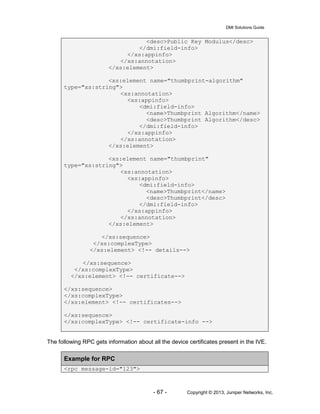
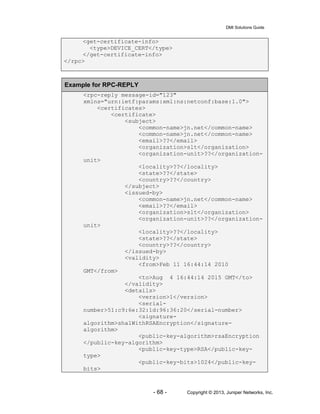
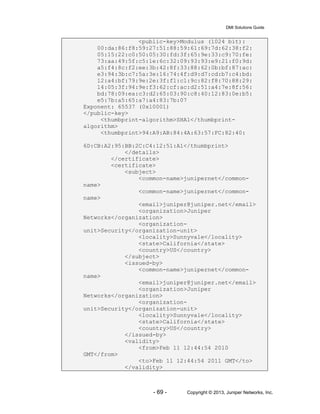
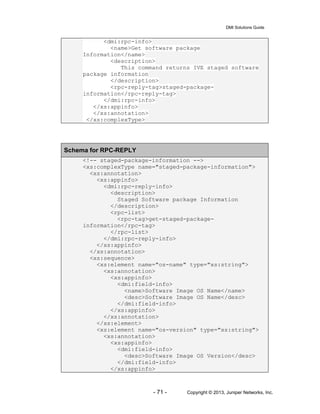
Junos Pulse Secure Access Service
DMI Solutions Guide
Release
8.0
Published: 2013-11-25
Revision 1
DMI Solutions Guide
- 2 - Copyright © 2013, Juniper Networks, Inc.
Juniper Networks, Inc.
1194 North Mathilda Avenue
Sunnyvale, CA 94089 USA
408 745 2000 or 888 JUNIPER
www.juniper.net
This product includes the Envoy SNMP Engine, developed by Epilogue Technology, an Integrated Systems
Company. Copyright © 1986-1997, Epilogue Technology Corporation. All rights reserved. This program and its
documentation were developed at private expense, and no part of them is in the public domain.
This product includes memory allocation software developed by Mark Moraes, copyright © 1988, 1989, 1993,
University of Toronto.
This product includes FreeBSD software developed by the University of California, Berkeley, and its contributors.
All of the documentation and software included in the 4.4BSD and 4.4BSD-Lite Releases is copyrighted by the
Regents of the University of California. Copyright © 1979, 1980, 1983, 1986, 1988, 1989, 1991, 1992, 1993,
1994. The Regents of the University of California. All rights reserved.
GateD software copyright © 1995, the Regents of the University. All rights reserved. Gate Daemon was
originated and developed throughrelease 3.0 by Cornell University and its collaborators. Gated is based on
Kirton’s EGP, UC Berkeley’s routing daemon (routed), and DCN’s HELLO routing protocol. Development of
Gated has been supported in part by the National Science Foundation. Portions of the GateD software copyright
© 1988, Regents of the University of California. All rights reserved. Portions of the GateD software copyright ©
1991, D. L. S. Associates.
This product includes software developed by Maker Communications, Inc., copyright © 1996, 1997, Maker
Communications, Inc.
Juniper Networks, Junos, Steel-Belted Radius, NetScreen, and ScreenOS are registered trademarks of Juniper
Networks, Inc. in the United States and other countries. The Juniper Networks Logo, the Junos logo, and JunosE
are trademarks of Juniper Networks, Inc. All other trademarks, service marks, registered trademarks, or
registered service marks are the property of their respective owners.
Juniper Networks assumes no responsibility for any inaccuracies in this document. Juniper Networks reserves
the right to change, modify, transfer, or otherwise revise this publication without notice.
Products made or sold by Juniper Networks or components thereof might be covered by one or more of the
following patents that are owned by or licensed to Juniper Networks: U.S. Patent Nos. 5,473,599, 5,905,725,
5,909,440, 6,192,051, 6,333,650, 6,359,479, 6,406,312, 6,429,706, 6,459,579, 6,493,347, 6,538,518, 6,538,899,
6,552,918, 6,567,902, 6,578,186, and 6,590,785.
Junos Pulse Secure Access Service DMI Solutions Guide
.
The information in this document is current as of the date on the title page.
END USER LICENSE AGREEMENT
The Juniper Networks product that is the subject of this technical documentation consists of (or is intended for
use with) Juniper Networkssoftware. Use of such software is subject to the terms and conditions of the End User
License Agreement (“EULA”) posted at http://www.juniper.net/support/eula.html. By downloading, installing or
using such software, you agree to the terms and conditions of that EULA.
DMI Solutions Guide
- 3 - Copyright © 2013, Juniper Networks, Inc.
Table of Contents
Table of Contents................................................................................................................. 3
Introduction .......................................................................................................................... 5
Related Information.............................................................................................................. 5
Inbound DMI ........................................................................................................................ 6
Host System and Logical Systems ....................................................................................... 7
Device Specific RPCs .......................................................................................................... 8
create-logical-system........................................................................................................ 9
delete-logical-system.......................................................................................................19
get-user-stats ..................................................................................................................21
get-failed-login-count.......................................................................................................24
get-role-count..................................................................................................................26
get-resource-profile-count ...............................................................................................28
get-vlan-throughput .........................................................................................................30
get-ivs-throughput ...........................................................................................................33
get-rollback-partition-information .....................................................................................35
validate-custom-expression.............................................................................................38
get-active-users...............................................................................................................40
disable-all-users ..............................................................................................................47
enable-all-users...............................................................................................................48
delete-active-sessions.....................................................................................................48
refresh-roles....................................................................................................................53
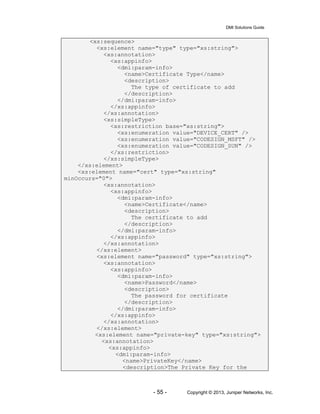
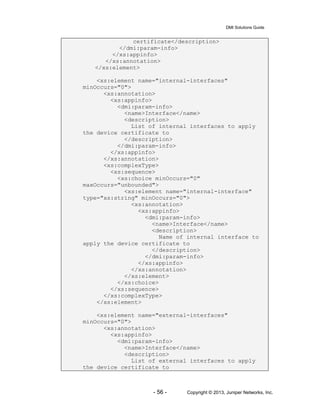
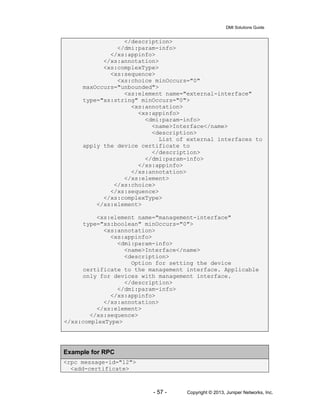
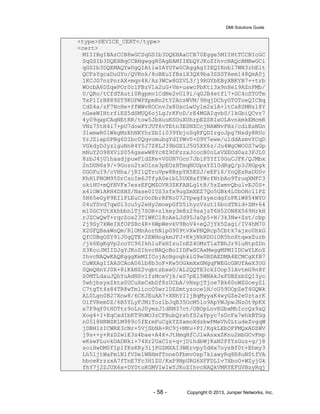
add-certificate..................................................................................................................54
get-certificate-info............................................................................................................59
get-staged-package-information......................................................................................70
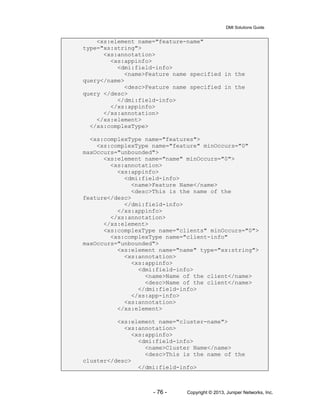
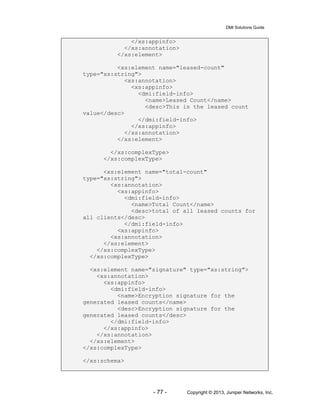
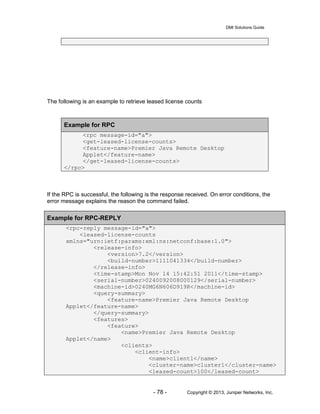
get-leased-license-counts................................................................................................73
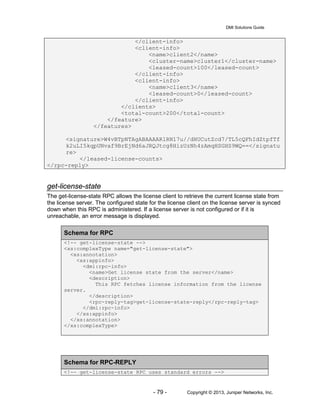
get-license-state..............................................................................................................79
IVE Schema........................................................................................................................81
Sample Code ......................................................................................................................82
Get DMI Agent Configuration...........................................................................................82
Configure DMI Agent.......................................................................................................83
Get Client Types..............................................................................................................84
Add Client Type...............................................................................................................85
Get Network Configuration ..............................................................................................86
Configure Network Settings.............................................................................................87
Create a Realm ...............................................................................................................88
Create a Realm in Logical System...................................................................................91
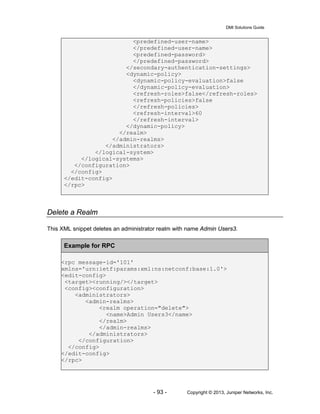
Delete a Realm................................................................................................................93
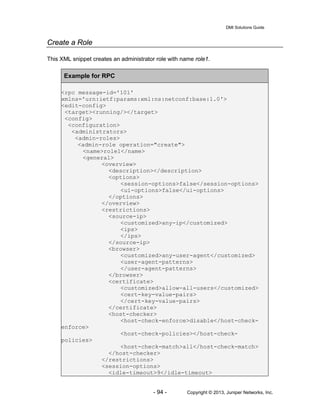
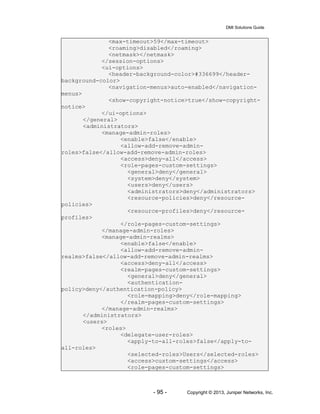
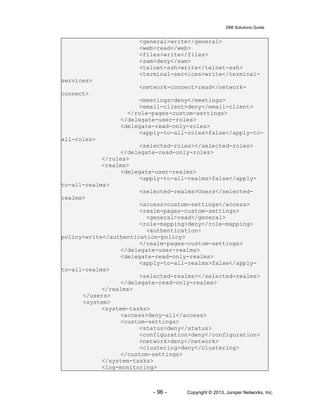
Create a Role ..................................................................................................................94
Create a Role in Logical System .....................................................................................99
Delete a Role ................................................................................................................105
Create a Resource Profile .............................................................................................106
Create a Resource Profilein Logical System..................................................................107
Delete a Resource Profile..............................................................................................107
Create a Resource Policy..............................................................................................108
Create a Resource Policy in Logical System .................................................................109
Delete a Resource Policy ..............................................................................................110
Create a Web Bookmark for a Role...............................................................................110
Create a Web Bookmark for a Role in Logical System ..................................................111
DMI Solutions Guide
- 4 - Copyright © 2013, Juniper Networks, Inc.
Delete a Web Bookmark for a Role ...............................................................................112
Get Syslog Events.........................................................................................................113
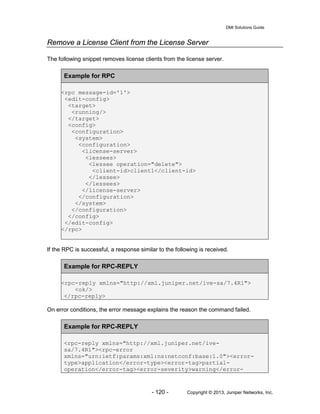
Configure License Client Settings..................................................................................114
Add License Client to License Server............................................................................117
Remove a License Client from the License Server ........................................................120
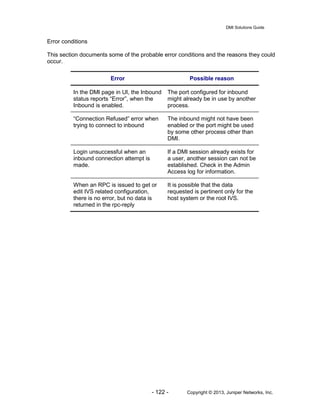
References........................................................................................................................123
DMI Solutions Guide
- 5 - Copyright © 2013, Juniper Networks, Inc.
Introduction
The Device Management Interface (DMI) is an XML-RPC-based protocol used to manage
Juniper devices. The protocol allows administrators and third-party applications to configure
and manage Juniper devices bypassing their native interfaces. The Juniper Secure Access
product, with IVE version 6.4, is compliant with DMI v1.3 specification. The readers of this
document are urged to read the DMI specification before using this guide.
IMPORTANT: This feature is geared toward service providers. Juniper Networks Technical
Support does not offer developer support for this feature. If you require assistance, contact
your Juniper Networks account team.
DMI clients can be stand-alone applications, or can be embedded in larger applications,
such as network management solutions and service provider OSS’s. DMI clients can
connect to the IVE in one of two ways: inbound and outbound. Inbound connection is
initiated into the device by the client, while outbound connection is initiated by the device
into an always-available application hosting a DMI client. Juniper’s NSM product uses the
outbound connection.
The DMI inbound and outbound connection features in the IVE enable the IVE administrator
to connect to and manage the system without having to use the browser as the
administrator’s interface to the IVE. IVE version 6.3 supported the outbound connection
type. 6.4 introduces support for the inbound connection type.
With the new inbound DMI feature, the administrator can now connect to the IVE using an
SSH secure shell Command Line Interface (CLI) to manage the device. The IVE can also be
managed by integrating any SSH-aware, netconf1
supporting application by programming
the application to comply with DMI version 1.3. More information about DMI is available in
the DMI specification document2
.
This document serves as a reference guide for achieving the following tasks in IVE:
• Configuring the inbound DMI agent
• Issuing RPC requests to retrieve the configuration of the device
• Issuing RPC requests to configure the device
• Issuing RPC requests to receive real time logs and alerts from the device
• Issuing IVE specific RPCs to get state parameter data from the device
• Issuing RPC requests for software image management
• Issuing RPC requests to backup/restore device configuration
Related Information
In addition to this guide, the following should be referred to, while administering the IVE
using inbound DMI connection.
♦ DMI specification document2
• The specification document for the Juniper-wide Device Management
Interface
♦ IVE Schema
DMI Solutions Guide
- 6 - Copyright © 2013, Juniper Networks, Inc.
• The XML configuration schema of the IVE. More information about the
schema is available in the later part of this document
♦ Juniper Update repository
• The repository contains the common schema of all DMI compliant devices
and the main configuration schema of IVE. For each release of the product,
the schema is updated in the repository. More information about the
repository can be found in section 5.7.2 of DMI specification document.
♦ RFC 4741: NETCONF Configuration Protocol1
• The protocol specification RFC document of NETCONF, the protocol that is
used extensively by DMI.
Inbound DMI
The inbound DMI connection is available to the administrator of the root IVS in the IVE. The
base license for the IVE will enable DMI Agent configuration option available.
Once the base license is installed, the DMI agent in the IVE can be configured in the DMI
Agent page under the Configuration menu. The page can be used to configure both inbound
and outbound DMI agent.
To enable the inbound DMI agent, the following needs to be configured:
♦ The network interface on which the inbound agent should be enabled
♦ The TCP port on which the inbound agent should accept connections
♦ The administrator realm to be used for authenticating the inbound DMI users
While the internal interface is available for all SA devices, the management interface is
available for inbound in the SA6000 and SA6500 devices. The TCP port needs to be a valid
value between 1 and 65535 and it is important that the port configured is not used by any
other process in the IVE. It is recommended that either the default value or a value higher
than 1024 be used for the TCP port. The default choice for the interface is the internal
interface and the default value for the TCP port is 22.
DMI uses SSH protocol for communication1
. To connect to the IVE using inbound
connection, the standard SSH shell2
can be used as the command line interface. For a
better user experience, a simple client can be built around the standard SSH client. Since
netconf protocol is used by DMI, while connecting to the IVE using inbound, netconf channel
needs to be specified as a parameter in the ssh command.
The following command invokes ssh to connect to the IVE’s inbound DMI agent
ssh –l <user> <ip address> -p <port> -s netconf
The -s parameter tells the ssh server to use the netconf channel for this connection. DMI
relies on the Netconf protocol for managing device configurations.
DMI Solutions Guide
- 7 - Copyright © 2013, Juniper Networks, Inc.
After the user is authenticated, the IVE responds with “system:” capability string to the client.
The SSH client displays this to the user. At this point, the user can execute RPC commands
to configure, manage and get information from the IVE. The standard schema for the RPCs
and the schema for the RPC-replies are elaborated in the DMI specification document.
To close the inbound session, close-session RPC can be used. More information about
close-session RPC is available in section 7.8 of NETCONF Configuration Protocol RFC1
Host System and Logical Systems
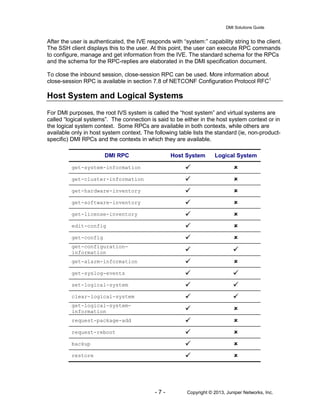
For DMI purposes, the root IVS system is called the “host system” and virtual systems are
called “logical systems”. The connection is said to be either in the host system context or in
the logical system context. Some RPCs are available in both contexts, while others are
available only in host system context. The following table lists the standard (ie, non-product-
specific) DMI RPCs and the contexts in which they are available.
DMI RPC Host System Logical System
get-system-information  
get-cluster-information  
get-hardware-inventory  
get-software-inventory  
get-license-inventory  
edit-config  
get-config  
get-configuration-
information  
get-alarm-information  
get-syslog-events  
set-logical-system  
clear-logical-system  
get-logical-system-
information  
request-package-add  
request-reboot  
backup  
restore  
DMI Solutions Guide
- 8 - Copyright © 2013, Juniper Networks, Inc.
The DMI specification document describes the schema for the standard DMI RPCs and their
replies. The Sample Code section contains examples of some of the RPCs listed in the
table.
Device Specific RPCs
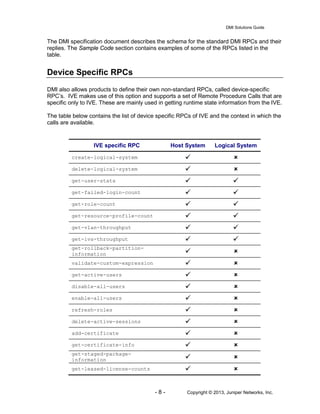
DMI also allows products to define their own non-standard RPCs, called device-specific
RPC’s. IVE makes use of this option and supports a set of Remote Procedure Calls that are
specific only to IVE. These are mainly used in getting runtime state information from the IVE.
The table below contains the list of device specific RPCs of IVE and the context in which the
calls are available.
IVE specific RPC Host System Logical System
create-logical-system  
delete-logical-system  
get-user-stats  
get-failed-login-count  
get-role-count  
get-resource-profile-count  
get-vlan-throughput  
get-ivs-throughput  
get-rollback-partition-
information  
validate-custom-expression  
get-active-users  
disable-all-users  
enable-all-users  
refresh-roles  
delete-active-sessions  
add-certificate  
get-certificate-info  
get-staged-package-
information  
get-leased-license-counts  
DMI Solutions Guide
- 9 - Copyright © 2013, Juniper Networks, Inc.
get-license-state  
The following subsections elaborate these IVE-specific RPCs, outline the schema for the
requests and the replies and also illustrate each of the calls with examples.
create-logical-system
The create-logical-system RPC is used to create a new IVS. This RPC can be issued only in
the Root IVS context.
Schema for RPC
<!-- create-logical-system -->
<xs:complexType name="create-logical-system">
<xs:annotation>
<xs:appinfo>
<dmi:rpc-info>
<name>Create Logical System</name>
<avail>
<matches>
<match>
<operational-mode>logical-
systems</operational-mode>
<value>false</value>
</match>
<match>
<value>true</value>
</match>
</matches>
</avail>
<description>
This command creates a new logical system
</description>
<rpc-reply-tag>create-logical-system-reply</rpc-
reply-tag>
</dmi:rpc-info>
</xs:appinfo>
</xs:annotation>
<xs:sequence>
<xs:element name="name" type="xs:string">
<xs:annotation>
<xs:appinfo>
<dmi:param-info>
<name>Logical System Name</name>
<description>
The name of the logical system to create
</description>
</dmi:param-info>
DMI Solutions Guide
- 10 - Copyright © 2013, Juniper Networks, Inc.
</xs:appinfo>
</xs:annotation>
</xs:element>
<xs:element name="description" type="xs:string"
minOccurs="0">
<xs:annotation>
<xs:appinfo>
<dmi:param-info>
<name>Logical System Description</name>
<description>
The detail description of the logical system
</description>
</dmi:param-info>
</xs:appinfo>
</xs:annotation>
</xs:element>
<xs:element name="enabled" type="xs:boolean">
<xs:annotation>
<xs:appinfo>
<dmi:param-info>
<name>Enabled</name>
<description>
The enable/disable state of the logical
system.
</description>
</dmi:param-info>
</xs:appinfo>
</xs:annotation>
</xs:element>
<xs:element name="initial-configuration"
type="xs:string">
<xs:annotation>
<xs:appinfo>
<dmi:param-info>
<name>Logical System Initial
configuration</name>
<description>
Initialize the IVS using the default
configuration or copy the configuration from an existing
IVS. Specify the name of an existing logical system, or "-
Default Config -"
</description>
</dmi:param-info>
</xs:appinfo>
</xs:annotation>
</xs:element>
<xs:element name="admin-username" type="xs:string"
minOccurs="0">
<xs:annotation>
<xs:appinfo>
<dmi:param-info>
DMI Solutions Guide
- 11 - Copyright © 2013, Juniper Networks, Inc.
<name>Logical System Admin Username</name>
<description>
The default admin username for the logical
system
</description>
</dmi:param-info>
</xs:appinfo>
</xs:annotation>
</xs:element>
<xs:element name="admin-password" type="xs:string"
minOccurs="0">
<xs:annotation>
<xs:appinfo>
<dmi:param-info>
<name>Logical System Admin Password</name>
<description>
The default admin password for the logical
system
</description>
</dmi:param-info>
</xs:appinfo>
</xs:annotation>
</xs:element>
<xs:element name="minimum-guaranteed-users"
type="xs:int">
<xs:annotation>
<xs:appinfo>
<dmi:param-info>
<name>Minimum Guaranteed Users</name>
<description>
The number of concurrent user logins
</description>
</dmi:param-info>
</xs:appinfo>
</xs:annotation>
</xs:element>
<xs:element name="burstable-maximum-users"
type="xs:int">
<xs:annotation>
<xs:appinfo>
<dmi:param-info>
<name>Burstable Maximum Users</name>
<description>
The maximum concurrent user logins during
peak time
</description>
</dmi:param-info>
</xs:appinfo>
</xs:annotation>
</xs:element>
<xs:element name="total-maximum-bandwidth"
DMI Solutions Guide
- 12 - Copyright © 2013, Juniper Networks, Inc.
type="xs:int" minOccurs="0">
<xs:annotation>
<xs:appinfo>
<dmi:param-info>
<name>Total Maximum Bandwidth</name>
<description>
The maximum bandwidth available to this
logical system
</description>
</dmi:param-info>
</xs:appinfo>
</xs:annotation>
</xs:element>
<xs:element name="nc-maximum-bandwidth" type="xs:int"
minOccurs="0">
<xs:annotation>
<xs:appinfo>
<dmi:param-info>
<name>NC Maximum Bandwidth</name>
<description>
The maximum bandwidth available to Network
Connect in this logical system
</description>
</dmi:param-info>
</xs:appinfo>
</xs:annotation>
</xs:element>
<xs:element name="vlans">
<xs:annotation>
<xs:appinfo>
<dmi:param-info>
<name>VLANs</name>
<description>
VLANs available to this logical system
</description>
</dmi:param-info>
</xs:appinfo>
</xs:annotation>
<xs:complexType>
<xs:sequence>
<xs:choice minOccurs="1" maxOccurs="unbounded">
<xs:element name="vlan" minOccurs="1"
maxOccurs="unbounded">
<xs:annotation>
<xs:appinfo>
<dmi:param-info>
<name>VLAN</name>
<description>
Selected VLAN
</description>
DMI Solutions Guide
- 13 - Copyright © 2013, Juniper Networks, Inc.
</dmi:param-info>
</xs:appinfo>
</xsd:annotation>
</xs:element>
</xs:choice>
</xs:sequence>
</xs:complexType>
</xs:element>
<xs:element name="default-vlan" type="xs:string">
<xs:annotation>
<xs:appinfo>
<dmi:param-info>
<name>Default VLAN</name>
<description>
The default VLAN in this logical system
</description>
</dmi:param-info>
</xs:appinfo>
</xs:annotation>
</xs:element>
<xs:element name="sign-in-url-prefix" type="xs:string"
minOccurs="0">
<xs:annotation>
<xs:appinfo>
<dmi:param-info>
<name>Sign-in URL Prefix</name>
<description>
The sign-in URL prefix used for logical
system sign-in
</description>
</dmi:param-info>
</xs:appinfo>
</xs:annotation>
</xs:element>
<xs:element name="internal-interface-virtual-ports"
minOccurs="0">
<xs:annotation>
<xs:appinfo>
<dmi:param-info>
<name>Virtual Ports (Internal
Interface)</name>
<description>
The virtual port on internal interface used
for logical system sign-in
</description>
</dmi:param-info>
</xs:appinfo>
</xs:annotation>
DMI Solutions Guide
- 14 - Copyright © 2013, Juniper Networks, Inc.
<xs:complexType>
<xs:sequence>
<xs:choice minOccurs="0" maxOccurs="unbounded">
<xs:element name="internal-interface-virtual-
port" minOccurs="0" maxOccurs="unbounded">
<xs:annotation>
<xs:appinfo>
<dmi:param-info>
<name>Virtual Port</name>
<description>
Selected virtual port
</description>
</dmi:param-info>
</xs:appinfo>
</xsd:annotation>
</xs:element>
</xs:choice>
</xs:sequence>
</xs:complexType>
</xs:element>
<xs:element name="external-interface-virtual-ports"
minOccurs="0">
<xs:annotation>
<xs:appinfo>
<dmi:param-info>
<name>Virtual Ports (External
Interface)</name>
<description>
The virtual port on external interface used
for logical system sign-in
</description>
</dmi:param-info>
</xs:appinfo>
</xs:annotation>
<xs:complexType>
<xs:sequence>
<xs:choice minOccurs="0" maxOccurs="unbounded">
<xs:element name="external-interface-virtual-
port" minOccurs="0" maxOccurs="unbounded">
<xs:annotation>
<xs:appinfo>
<dmi:param-info>
<name>Virtual Port</name>
<description>
Selected virtual port
</description>
</dmi:param-info>
</xs:appinfo>
</xsd:annotation>
</xs:element>
DMI Solutions Guide
- 15 - Copyright © 2013, Juniper Networks, Inc.
</xs:choice>
</xs:sequence>
</xs:complexType>
</xs:element>
<xs:element name="nc-ip-pools" minOccurs="0">
<xs:annotation>
<xs:appinfo>
<dmi:param-info>
<name>NC IP Ranges</name>
<description>
Network Connect Connection Profile IP
address pools are restricted to the IP ranges listed here
</description>
</dmi:param-info>
</xs:appinfo>
</xs:annotation>
<xs:complexType>
<xs:sequence>
<xs:choice minOccurs="0" maxOccurs="unbounded">
<xs:element name="nc-ip-pool" minOccurs="0"
maxOccurs="unbounded">
<xs:annotation>
<xs:appinfo>
<dmi:param-info>
<name>NC IP Range</name>
<description>
Network Connect connection profile
IP address pool
</description>
</dmi:param-info>
</xs:appinfo>
</xsd:annotation>
</xs:element>
</xs:choice>
</xs:sequence>
</xs:complexType>
</xs:element>
</xs:sequence>
</xs:complexType>
Schema for RPC-REPLY
<!-- logical-system-rpc-reply -->
<xs:complexType name="logical-system-rpc-reply">
<xs:annotation>
<xs:appinfo>
<dmi:rpc-reply-info>
DMI Solutions Guide
- 16 - Copyright © 2013, Juniper Networks, Inc.
<description>
Reply to the create-logical-system and delete-
logical-system RPCs
</description>
<rpc-list>
<rpc-tag>create-logical-system</rpc-tag>
<rpc-tag>delete-logical-system</rpc-tag>
</rpc-list>
</dmi:rpc-reply-info>
</xs:appinfo>
</xs:annotation>
<xs:choice>
<xs:element name="ok">
<xs:annotation>
<xs:appinfo>
<dmi:field-info>
<name>OK</name>
<desc>Success return</desc>
</dmi:field-info>
</xs:appinfo>
</xs:annotation>
<xs:complexType/> <!-- empty element -->
</xs:element>
<xs:element name="rpc-error">
<xs:annotation>
<xs:appinfo>
<dmi:field-info>
<name>RPC Error</name>
<desc>Error return</desc>
</dmi:field-info>
</xs:appinfo>
</xs:annotation>
<xs:complexType>
<xs:sequence>
<xs:element name="error-type">
<xs:annotation>
<xs:appinfo>
<dmi:field-info>
<name>Error Type</name>
<desc>Error Type</desc>
</dmi:field-info>
</xs:appinfo>
</xs:annotation>
<xs:simpleType>
<xs:restriction base="xs:string">
<xs:enumeration value="transport"/>
<xs:enumeration value="rpc"/>
<xs:enumeration value="protocol"/>
<xs:enumeration value="application"/>
DMI Solutions Guide
- 17 - Copyright © 2013, Juniper Networks, Inc.
</xs:restriction>
</xs:simpleType>
</xs:element>
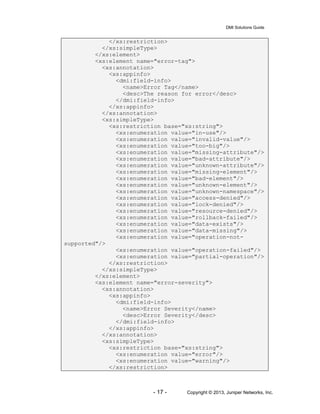
<xs:element name="error-tag">
<xs:annotation>
<xs:appinfo>
<dmi:field-info>
<name>Error Tag</name>
<desc>The reason for error</desc>
</dmi:field-info>
</xs:appinfo>
</xs:annotation>
<xs:simpleType>
<xs:restriction base="xs:string">
<xs:enumeration value="in-use"/>
<xs:enumeration value="invalid-value"/>
<xs:enumeration value="too-big"/>
<xs:enumeration value="missing-attribute"/>
<xs:enumeration value="bad-attribute"/>
<xs:enumeration value="unknown-attribute"/>
<xs:enumeration value="missing-element"/>
<xs:enumeration value="bad-element"/>
<xs:enumeration value="unknown-element"/>
<xs:enumeration value="unknown-namespace"/>
<xs:enumeration value="access-denied"/>
<xs:enumeration value="lock-denied"/>
<xs:enumeration value="resource-denied"/>
<xs:enumeration value="rollback-failed"/>
<xs:enumeration value="data-exists"/>
<xs:enumeration value="data-missing"/>
<xs:enumeration value="operation-not-
supported"/>
<xs:enumeration value="operation-failed"/>
<xs:enumeration value="partial-operation"/>
</xs:restriction>
</xs:simpleType>
</xs:element>
<xs:element name="error-severity">
<xs:annotation>
<xs:appinfo>
<dmi:field-info>
<name>Error Severity</name>
<desc>Error Severity</desc>
</dmi:field-info>
</xs:appinfo>
</xs:annotation>
<xs:simpleType>
<xs:restriction base="xs:string">
<xs:enumeration value="error"/>
<xs:enumeration value="warning"/>
</xs:restriction>
DMI Solutions Guide
- 18 - Copyright © 2013, Juniper Networks, Inc.
</xs:simpleType>
</xs:element>
</xs:sequence>
</xs:complexType>
</xs:element>
</xs:choice>
</xs:complexType>
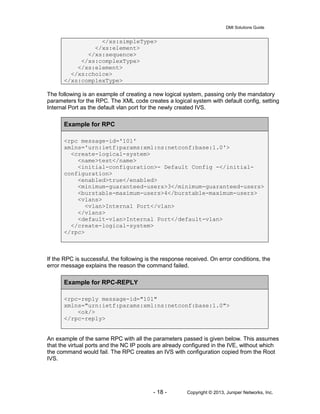
The following is an example of creating a new logical system, passing only the mandatory
parameters for the RPC. The XML code creates a logical system with default config, setting
Internal Port as the default vlan port for the newly created IVS.
Example for RPC
<rpc message-id='101'
xmlns='urn:ietf:params:xml:ns:netconf:base:1.0'>
<create-logical-system>
<name>test</name>
<initial-configuration>- Default Config -</initial-
configuration>
<enabled>true</enabled>
<minimum-guaranteed-users>3</minimum-guaranteed-users>
<burstable-maximum-users>4</burstable-maximum-users>
<vlans>
<vlan>Internal Port</vlan>
</vlans>
<default-vlan>Internal Port</default-vlan>
</create-logical-system>
</rpc>
If the RPC is successful, the following is the response received. On error conditions, the
error message explains the reason the command failed.
Example for RPC-REPLY
<rpc-reply message-id="101"
xmlns="urn:ietf:params:xml:ns:netconf:base:1.0">
<ok/>
</rpc-reply>
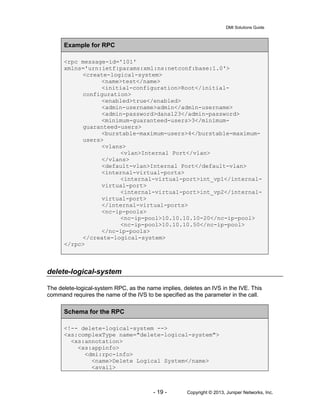
An example of the same RPC with all the parameters passed is given below. This assumes
that the virtual ports and the NC IP pools are already configured in the IVE, without which
the command would fail. The RPC creates an IVS with configuration copied from the Root
IVS.
DMI Solutions Guide
- 19 - Copyright © 2013, Juniper Networks, Inc.
Example for RPC
<rpc message-id='101'
xmlns='urn:ietf:params:xml:ns:netconf:base:1.0'>
<create-logical-system>
<name>test</name>
<initial-configuration>Root</initial-
configuration>
<enabled>true</enabled>
<admin-username>admin</admin-username>
<admin-password>dana123</admin-password>
<minimum-guaranteed-users>3</minimum-
guaranteed-users>
<burstable-maximum-users>4</burstable-maximum-
users>
<vlans>
<vlan>Internal Port</vlan>
</vlans>
<default-vlan>Internal Port</default-vlan>
<internal-virtual-ports>
<internal-virtual-port>int_vp1</internal-
virtual-port>
<internal-virtual-port>int_vp2</internal-
virtual-port>
</internal-virtual-ports>
<nc-ip-pools>
<nc-ip-pool>10.10.10.10-20</nc-ip-pool>
<nc-ip-pool>10.10.10.50</nc-ip-pool>
</nc-ip-pools>
</create-logical-system>
</rpc>
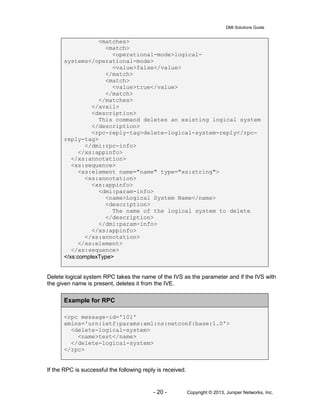
delete-logical-system
The delete-logical-system RPC, as the name implies, deletes an IVS in the IVE. This
command requires the name of the IVS to be specified as the parameter in the call.
Schema for the RPC
<!-- delete-logical-system -->
<xs:complexType name="delete-logical-system">
<xs:annotation>
<xs:appinfo>
<dmi:rpc-info>
<name>Delete Logical System</name>
<avail>
DMI Solutions Guide
- 20 - Copyright © 2013, Juniper Networks, Inc.
<matches>
<match>
<operational-mode>logical-
systems</operational-mode>
<value>false</value>
</match>
<match>
<value>true</value>
</match>
</matches>
</avail>
<description>
This command deletes an existing logical system
</description>
<rpc-reply-tag>delete-logical-system-reply</rpc-
reply-tag>
</dmi:rpc-info>
</xs:appinfo>
</xs:annotation>
<xs:sequence>
<xs:element name="name" type="xs:string">
<xs:annotation>
<xs:appinfo>
<dmi:param-info>
<name>Logical System Name</name>
<description>
The name of the logical system to delete
</description>
</dmi:param-info>
</xs:appinfo>
</xs:annotation>
</xs:element>
</xs:sequence>
</xs:complexType>
Delete logical system RPC takes the name of the IVS as the parameter and if the IVS with
the given name is present, deletes it from the IVE.
Example for RPC
<rpc message-id='101'
xmlns='urn:ietf:params:xml:ns:netconf:base:1.0'>
<delete-logical-system>
<name>test</name>
</delete-logical-system>
</rpc>
If the RPC is successful the following reply is received.
DMI Solutions Guide
- 21 - Copyright © 2013, Juniper Networks, Inc.
Example for RPC-REPLY
<rpc-reply message-id="101"
xmlns="urn:ietf:params:xml:ns:netconf:base:1.0">
<ok/>
</rpc-reply>
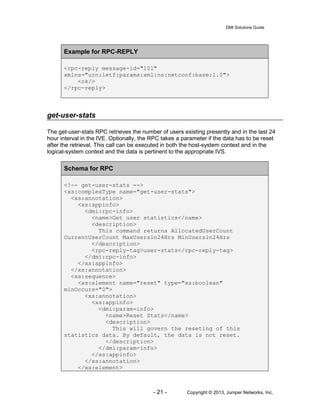
get-user-stats
The get-user-stats RPC retrieves the number of users existing presently and in the last 24
hour interval in the IVE. Optionally, the RPC takes a parameter if the data has to be reset
after the retrieval. This call can be executed in both the host-system context and in the
logical-system context and the data is pertinent to the appropriate IVS.
Schema for RPC
<!-- get-user-stats -->
<xs:complexType name="get-user-stats">
<xs:annotation>
<xs:appinfo>
<dmi:rpc-info>
<name>Get user statistics</name>
<description>
This command returns AllocatedUserCount
CurrentUserCount MaxUsersin24Hrs MinUsersin24Hrs
</description>
<rpc-reply-tag>user-stats</rpc-reply-tag>
</dmi:rpc-info>
</xs:appinfo>
</xs:annotation>
<xs:sequence>
<xs:element name="reset" type="xs:boolean"
minOccurs="0">
<xs:annotation>
<xs:appinfo>
<dmi:param-info>
<name>Reset Stats</name>
<description>
This will govern the reseting of this
statistics data. By default, the data is not reset.
</description>
</dmi:param-info>
</xs:appinfo>
</xs:annotation>
</xs:element>
DMI Solutions Guide
- 22 - Copyright © 2013, Juniper Networks, Inc.
</xs:sequence>
</xs:complexType>
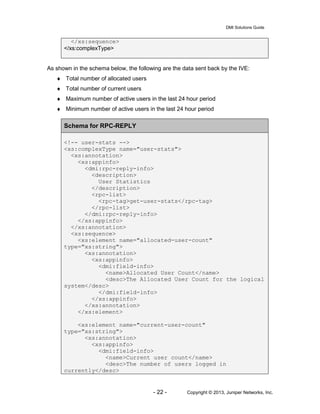
As shown in the schema below, the following are the data sent back by the IVE:
♦ Total number of allocated users
♦ Total number of current users
♦ Maximum number of active users in the last 24 hour period
♦ Minimum number of active users in the last 24 hour period
Schema for RPC-REPLY
<!-- user-stats -->
<xs:complexType name="user-stats">
<xs:annotation>
<xs:appinfo>
<dmi:rpc-reply-info>
<description>
User Statistics
</description>
<rpc-list>
<rpc-tag>get-user-stats</rpc-tag>
</rpc-list>
</dmi:rpc-reply-info>
</xs:appinfo>
</xs:annotation>
<xs:sequence>
<xs:element name="allocated-user-count"
type="xs:string">
<xs:annotation>
<xs:appinfo>
<dmi:field-info>
<name>Allocated User Count</name>
<desc>The Allocated User Count for the logical
system</desc>
</dmi:field-info>
</xs:appinfo>
</xs:annotation>
</xs:element>
<xs:element name="current-user-count"
type="xs:string">
<xs:annotation>
<xs:appinfo>
<dmi:field-info>
<name>Current user count</name>
<desc>The number of users logged in
currently</desc>
DMI Solutions Guide
- 23 - Copyright © 2013, Juniper Networks, Inc.
</dmi:field-info>
</xs:appinfo>
</xs:annotation>
</xs:element>
<xs:element name="max-active-user-count-24hrs"
type="xs:string">
<xs:annotation>
<xs:appinfo>
<dmi:field-info>
<name>Max active user count in the last 24
Hrs</name>
<desc>The Max active user count for a 24 Hrs
moving window</desc>
</dmi:field-info>
</xs:appinfo>
</xs:annotation>
</xs:element>
<xs:element name="min-active-user-count-24hrs"
type="xs:string">
<xs:annotation>
<xs:appinfo>
<dmi:field-info>
<name>Min active user count in the last 24
Hrs</name>
<desc>The Min active user count for a 24 Hrs
moving window</desc>
</dmi:field-info>
</xs:appinfo>
</xs:annotation>
</xs:element>
</xs:sequence>
</xs:complexType>
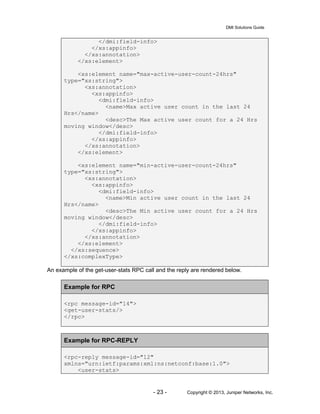
An example of the get-user-stats RPC call and the reply are rendered below.
Example for RPC
<rpc message-id="14">
<get-user-stats/>
</rpc>
Example for RPC-REPLY
<rpc-reply message-id="12"
xmlns="urn:ietf:params:xml:ns:netconf:base:1.0">
<user-stats>
DMI Solutions Guide
- 24 - Copyright © 2013, Juniper Networks, Inc.
<allocated-user-count>10</allocated-user-count>
<current-user-count>3</current-user-count>
<max-active-user-count-24hrs>2</max-active-user-
count-24hrs>
<min-active-user-count-24hrs>0</min-active-user-
count-24hrs>
</user-stats>
</rpc-reply>
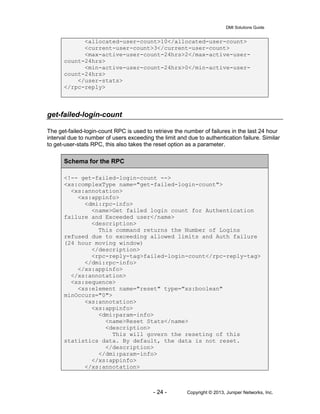
get-failed-login-count
The get-failed-login-count RPC is used to retrieve the number of failures in the last 24 hour
interval due to number of users exceeding the limit and due to authentication failure. Similar
to get-user-stats RPC, this also takes the reset option as a parameter.
Schema for the RPC
<!-- get-failed-login-count -->
<xs:complexType name="get-failed-login-count">
<xs:annotation>
<xs:appinfo>
<dmi:rpc-info>
<name>Get failed login count for Authentication
failure and Exceeded user</name>
<description>
This command returns the Number of Logins
refused due to exceeding allowed limits and Auth failure
(24 hour moving window)
</description>
<rpc-reply-tag>failed-login-count</rpc-reply-tag>
</dmi:rpc-info>
</xs:appinfo>
</xs:annotation>
<xs:sequence>
<xs:element name="reset" type="xs:boolean"
minOccurs="0">
<xs:annotation>
<xs:appinfo>
<dmi:param-info>
<name>Reset Stats</name>
<description>
This will govern the reseting of this
statistics data. By default, the data is not reset.
</description>
</dmi:param-info>
</xs:appinfo>
</xs:annotation>
DMI Solutions Guide
- 25 - Copyright © 2013, Juniper Networks, Inc.
</xs:element>
</xs:sequence>
</xs:complexType>
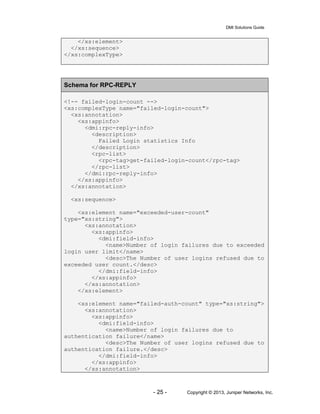
Schema for RPC-REPLY
<!-- failed-login-count -->
<xs:complexType name="failed-login-count">
<xs:annotation>
<xs:appinfo>
<dmi:rpc-reply-info>
<description>
Failed Login statistics Info
</description>
<rpc-list>
<rpc-tag>get-failed-login-count</rpc-tag>
</rpc-list>
</dmi:rpc-reply-info>
</xs:appinfo>
</xs:annotation>
<xs:sequence>
<xs:element name="exceeded-user-count"
type="xs:string">
<xs:annotation>
<xs:appinfo>
<dmi:field-info>
<name>Number of login failures due to exceeded
login user limit</name>
<desc>The Number of user logins refused due to
exceeded user count.</desc>
</dmi:field-info>
</xs:appinfo>
</xs:annotation>
</xs:element>
<xs:element name="failed-auth-count" type="xs:string">
<xs:annotation>
<xs:appinfo>
<dmi:field-info>
<name>Number of login failures due to
authentication failure</name>
<desc>The Number of user logins refused due to
authentication failure.</desc>
</dmi:field-info>
</xs:appinfo>
</xs:annotation>
DMI Solutions Guide
- 26 - Copyright © 2013, Juniper Networks, Inc.
</xs:element>
</xs:sequence>
</xs:complexType>
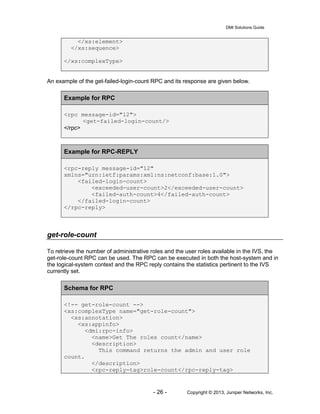
An example of the get-failed-login-count RPC and its response are given below.
Example for RPC
<rpc message-id="12">
<get-failed-login-count/>
</rpc>
Example for RPC-REPLY
<rpc-reply message-id="12"
xmlns="urn:ietf:params:xml:ns:netconf:base:1.0">
<failed-login-count>
<exceeded-user-count>2</exceeded-user-count>
<failed-auth-count>4</failed-auth-count>
</failed-login-count>
</rpc-reply>
get-role-count
To retrieve the number of administrative roles and the user roles available in the IVS, the
get-role-count RPC can be used. The RPC can be executed in both the host-system and in
the logical-system context and the RPC reply contains the statistics pertinent to the IVS
currently set.
Schema for RPC
<!-- get-role-count -->
<xs:complexType name="get-role-count">
<xs:annotation>
<xs:appinfo>
<dmi:rpc-info>
<name>Get The roles count</name>
<description>
This command returns the admin and user role
count.
</description>
<rpc-reply-tag>role-count</rpc-reply-tag>
DMI Solutions Guide
- 27 - Copyright © 2013, Juniper Networks, Inc.
</dmi:rpc-info>
</xs:appinfo>
</xs:annotation>
</xs:complexType>
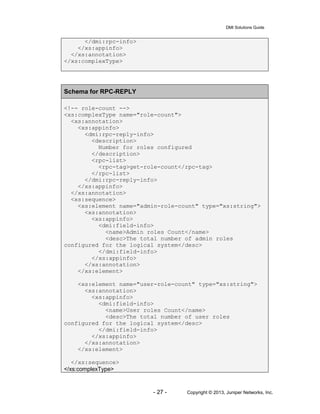
Schema for RPC-REPLY
<!-- role-count -->
<xs:complexType name="role-count">
<xs:annotation>
<xs:appinfo>
<dmi:rpc-reply-info>
<description>
Number for roles configured
</description>
<rpc-list>
<rpc-tag>get-role-count</rpc-tag>
</rpc-list>
</dmi:rpc-reply-info>
</xs:appinfo>
</xs:annotation>
<xs:sequence>
<xs:element name="admin-role-count" type="xs:string">
<xs:annotation>
<xs:appinfo>
<dmi:field-info>
<name>Admin roles Count</name>
<desc>The total number of admin roles
configured for the logical system</desc>
</dmi:field-info>
</xs:appinfo>
</xs:annotation>
</xs:element>
<xs:element name="user-role-count" type="xs:string">
<xs:annotation>
<xs:appinfo>
<dmi:field-info>
<name>User roles Count</name>
<desc>The total number of user roles
configured for the logical system</desc>
</dmi:field-info>
</xs:appinfo>
</xs:annotation>
</xs:element>
</xs:sequence>
</xs:complexType>
DMI Solutions Guide
- 28 - Copyright © 2013, Juniper Networks, Inc.
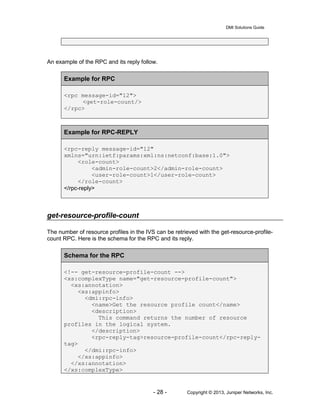
An example of the RPC and its reply follow.
Example for RPC
<rpc message-id="12">
<get-role-count/>
</rpc>
Example for RPC-REPLY
<rpc-reply message-id="12"
xmlns="urn:ietf:params:xml:ns:netconf:base:1.0">
<role-count>
<admin-role-count>2</admin-role-count>
<user-role-count>1</user-role-count>
</role-count>
</rpc-reply>
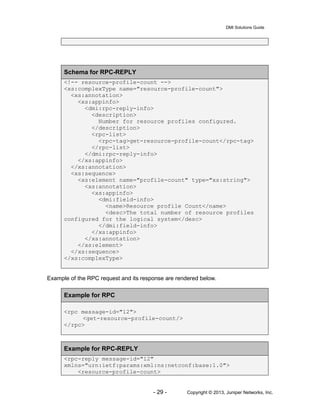
get-resource-profile-count
The number of resource profiles in the IVS can be retrieved with the get-resource-profile-
count RPC. Here is the schema for the RPC and its reply.
Schema for the RPC
<!-- get-resource-profile-count -->
<xs:complexType name="get-resource-profile-count">
<xs:annotation>
<xs:appinfo>
<dmi:rpc-info>
<name>Get the resource profile count</name>
<description>
This command returns the number of resource
profiles in the logical system.
</description>
<rpc-reply-tag>resource-profile-count</rpc-reply-
tag>
</dmi:rpc-info>
</xs:appinfo>
</xs:annotation>
</xs:complexType>
DMI Solutions Guide
- 29 - Copyright © 2013, Juniper Networks, Inc.
Schema for RPC-REPLY
<!-- resource-profile-count -->
<xs:complexType name="resource-profile-count">
<xs:annotation>
<xs:appinfo>
<dmi:rpc-reply-info>
<description>
Number for resource profiles configured.
</description>
<rpc-list>
<rpc-tag>get-resource-profile-count</rpc-tag>
</rpc-list>
</dmi:rpc-reply-info>
</xs:appinfo>
</xs:annotation>
<xs:sequence>
<xs:element name="profile-count" type="xs:string">
<xs:annotation>
<xs:appinfo>
<dmi:field-info>
<name>Resource profile Count</name>
<desc>The total number of resource profiles
configured for the logical system</desc>
</dmi:field-info>
</xs:appinfo>
</xs:annotation>
</xs:element>
</xs:sequence>
</xs:complexType>
Example of the RPC request and its response are rendered below.
Example for RPC
<rpc message-id="12">
<get-resource-profile-count/>
</rpc>
Example for RPC-REPLY
<rpc-reply message-id="12"
xmlns="urn:ietf:params:xml:ns:netconf:base:1.0">
<resource-profile-count>
DMI Solutions Guide
- 30 - Copyright © 2013, Juniper Networks, Inc.
<profile-count>20</profile-count>
</resource-profile-count>
</rpc-reply>
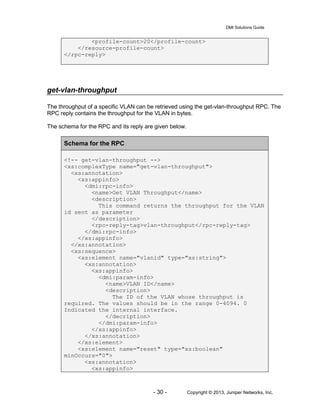
get-vlan-throughput
The throughput of a specific VLAN can be retrieved using the get-vlan-throughput RPC. The
RPC reply contains the throughput for the VLAN in bytes.
The schema for the RPC and its reply are given below.
Schema for the RPC
<!-- get-vlan-throughput -->
<xs:complexType name="get-vlan-throughput">
<xs:annotation>
<xs:appinfo>
<dmi:rpc-info>
<name>Get VLAN Throughput</name>
<description>
This command returns the throughput for the VLAN
id sent as parameter
</description>
<rpc-reply-tag>vlan-throughput</rpc-reply-tag>
</dmi:rpc-info>
</xs:appinfo>
</xs:annotation>
<xs:sequence>
<xs:element name="vlanid" type="xs:string">
<xs:annotation>
<xs:appinfo>
<dmi:param-info>
<name>VLAN ID</name>
<description>
The ID of the VLAN whose throughput is
required. The values should be in the range 0-4094. 0
Indicated the internal interface.
</decription>
</dmi:param-info>
</xs:appinfo>
</xs:annotation>
</xs:element>
<xs:element name="reset" type="xs:boolean"
minOccurs="0">
<xs:annotation>
<xs:appinfo>
DMI Solutions Guide
- 31 - Copyright © 2013, Juniper Networks, Inc.
<dmi:param-info>
<name>Reset Stats</name>
<description>
This will govern the reseting of the
statistics data. By default, the data is not reset.
</description>
</dmi:param-info>
</xs:appinfo>
</xs:annotation>
</xs:element>
</xs:sequence>
</xs:complexType>
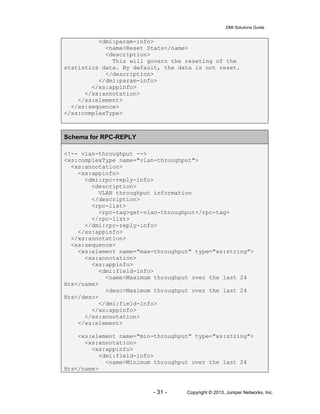
Schema for RPC-REPLY
<!-- vlan-throughput -->
<xs:complexType name="vlan-throughput">
<xs:annotation>
<xs:appinfo>
<dmi:rpc-reply-info>
<description>
VLAN throughput information
</description>
<rpc-list>
<rpc-tag>get-vlan-throughput</rpc-tag>
</rpc-list>
</dmi:rpc-reply-info>
</xs:appinfo>
</xs:annotation>
<xs:sequence>
<xs:element name="max-throughput" type="xs:string">
<xs:annotation>
<xs:appinfo>
<dmi:field-info>
<name>Maximum throughput over the last 24
Hrs</name>
<desc>Maximum throughput over the last 24
Hrs</desc>
</dmi:field-info>
</xs:appinfo>
</xs:annotation>
</xs:element>
<xs:element name="min-throughput" type="xs:string">
<xs:annotation>
<xs:appinfo>
<dmi:field-info>
<name>Minimum throughput over the last 24
Hrs</name>
DMI Solutions Guide
- 32 - Copyright © 2013, Juniper Networks, Inc.
<desc>Minimum throughput over the last 24
Hrs</desc>
</dmi:field-info>
</xs:appinfo>
</xs:annotation>
</xs:element>
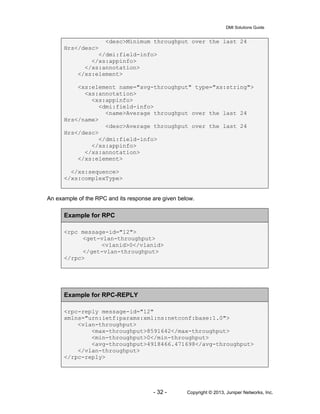
<xs:element name="avg-throughput" type="xs:string">
<xs:annotation>
<xs:appinfo>
<dmi:field-info>
<name>Average throughput over the last 24
Hrs</name>
<desc>Average throughput over the last 24
Hrs</desc>
</dmi:field-info>
</xs:appinfo>
</xs:annotation>
</xs:element>
</xs:sequence>
</xs:complexType>
An example of the RPC and its response are given below.
Example for RPC
<rpc message-id="12">
<get-vlan-throughput>
<vlanid>0</vlanid>
</get-vlan-throughput>
</rpc>
Example for RPC-REPLY
<rpc-reply message-id="12"
xmlns="urn:ietf:params:xml:ns:netconf:base:1.0">
<vlan-throughput>
<max-throughput>8591642</max-throughput>
<min-throughput>0</min-throughput>
<avg-throughput>4918466.471698</avg-throughput>
</vlan-throughput>
</rpc-reply>
DMI Solutions Guide
- 33 - Copyright © 2013, Juniper Networks, Inc.
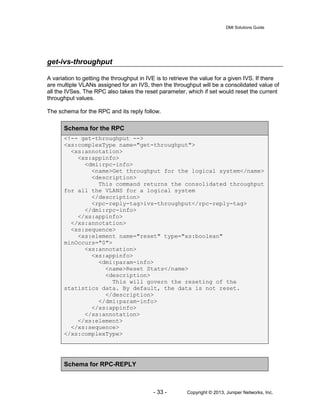
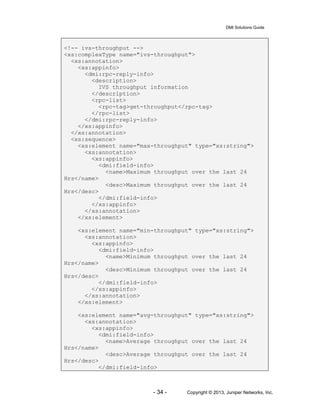
get-ivs-throughput
A variation to getting the throughput in IVE is to retrieve the value for a given IVS. If there
are multiple VLANs assigned for an IVS, then the throughput will be a consolidated value of
all the IVSes. The RPC also takes the reset parameter, which if set would reset the current
throughput values.
The schema for the RPC and its reply follow.
Schema for the RPC
<!-- get-throughput -->
<xs:complexType name="get-throughput">
<xs:annotation>
<xs:appinfo>
<dmi:rpc-info>
<name>Get throughput for the logical system</name>
<description>
This command returns the consolidated throughput
for all the VLANS for a logical system
</description>
<rpc-reply-tag>ivs-throughput</rpc-reply-tag>
</dmi:rpc-info>
</xs:appinfo>
</xs:annotation>
<xs:sequence>
<xs:element name="reset" type="xs:boolean"
minOccurs="0">
<xs:annotation>
<xs:appinfo>
<dmi:param-info>
<name>Reset Stats</name>
<description>
This will govern the reseting of the
statistics data. By default, the data is not reset.
</description>
</dmi:param-info>
</xs:appinfo>
</xs:annotation>
</xs:element>
</xs:sequence>
</xs:complexType>
Schema for RPC-REPLY
DMI Solutions Guide
- 34 - Copyright © 2013, Juniper Networks, Inc.
<!-- ivs-throughput -->
<xs:complexType name="ivs-throughput">
<xs:annotation>
<xs:appinfo>
<dmi:rpc-reply-info>
<description>
IVS throughput information
</description>
<rpc-list>
<rpc-tag>get-throughput</rpc-tag>
</rpc-list>
</dmi:rpc-reply-info>
</xs:appinfo>
</xs:annotation>
<xs:sequence>
<xs:element name="max-throughput" type="xs:string">
<xs:annotation>
<xs:appinfo>
<dmi:field-info>
<name>Maximum throughput over the last 24
Hrs</name>
<desc>Maximum throughput over the last 24
Hrs</desc>
</dmi:field-info>
</xs:appinfo>
</xs:annotation>
</xs:element>
<xs:element name="min-throughput" type="xs:string">
<xs:annotation>
<xs:appinfo>
<dmi:field-info>
<name>Minimum throughput over the last 24
Hrs</name>
<desc>Minimum throughput over the last 24
Hrs</desc>
</dmi:field-info>
</xs:appinfo>
</xs:annotation>
</xs:element>
<xs:element name="avg-throughput" type="xs:string">
<xs:annotation>
<xs:appinfo>
<dmi:field-info>
<name>Average throughput over the last 24
Hrs</name>
<desc>Average throughput over the last 24
Hrs</desc>
</dmi:field-info>
DMI Solutions Guide
- 35 - Copyright © 2013, Juniper Networks, Inc.
</xs:appinfo>
</xs:annotation>
</xs:element>
</xs:sequence>
</xs:complexType>
An example of the RPC and its response are rendered below.
Example for RPC
<rpc message-id="12">
<get-ivs-throughput>
<name>test</name>
</get-ivs-throughput>
</rpc>
Example for RPC-REPLY
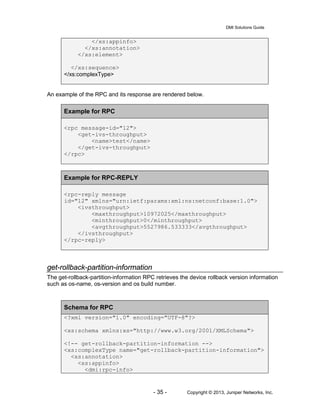
<rpc-reply message
id="12" xmlns="urn:ietf:params:xml:ns:netconf:base:1.0">
<ivsthroughput>
<maxthroughput>10972025</maxthroughput>
<minthroughput>0</minthroughput>
<avgthroughput>5527986.533333</avgthroughput>
</ivsthroughput>
</rpc-reply>
get-rollback-partition-information
The get-rollback-partition-information RPC retrieves the device rollback version information
such as os-name, os-version and os build number.
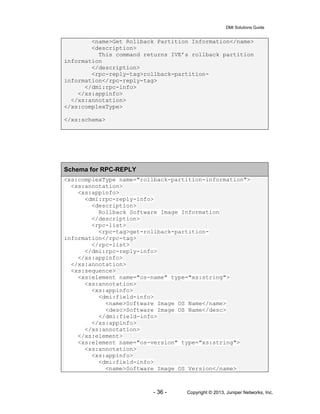
Schema for RPC
<?xml version="1.0" encoding="UTF-8"?>
<xs:schema xmlns:xs="http://www.w3.org/2001/XMLSchema">
<!-- get-rollback-partition-information -->
<xs:complexType name="get-rollback-partition-information">
<xs:annotation>
<xs:appinfo>
<dmi:rpc-info>
DMI Solutions Guide
- 36 - Copyright © 2013, Juniper Networks, Inc.
<name>Get Rollback Partition Information</name>
<description>
This command returns IVE’s rollback partition
information
</description>
<rpc-reply-tag>rollback-partition-
information</rpc-reply-tag>
</dmi:rpc-info>
</xs:appinfo>
</xs:annotation>
</xs:complexType>
</xs:schema>
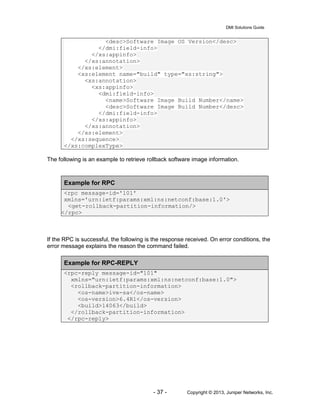
Schema for RPC-REPLY
<xs:complexType name="rollback-partition-information">
<xs:annotation>
<xs:appinfo>
<dmi:rpc-reply-info>
<description>
Rollback Software Image Information
</description>
<rpc-list>
<rpc-tag>get-rollback-partition-
information</rpc-tag>
</rpc-list>
</dmi:rpc-reply-info>
</xs:appinfo>
</xs:annotation>
<xs:sequence>
<xs:element name="os-name" type="xs:string">
<xs:annotation>
<xs:appinfo>
<dmi:field-info>
<name>Software Image OS Name</name>
<desc>Software Image OS Name</desc>
</dmi:field-info>
</xs:appinfo>
</xs:annotation>
</xs:element>
<xs:element name="os-version" type="xs:string">
<xs:annotation>
<xs:appinfo>
<dmi:field-info>
<name>Software Image OS Version</name>
DMI Solutions Guide
- 37 - Copyright © 2013, Juniper Networks, Inc.
<desc>Software Image OS Version</desc>
</dmi:field-info>
</xs:appinfo>
</xs:annotation>
</xs:element>
<xs:element name="build" type="xs:string">
<xs:annotation>
<xs:appinfo>
<dmi:field-info>
<name>Software Image Build Number</name>
<desc>Software Image Build Number</desc>
</dmi:field-info>
</xs:appinfo>
</xs:annotation>
</xs:element>
</xs:sequence>
</xs:complexType>
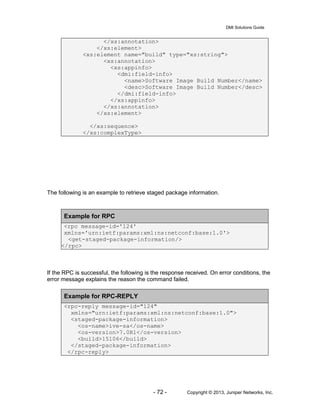
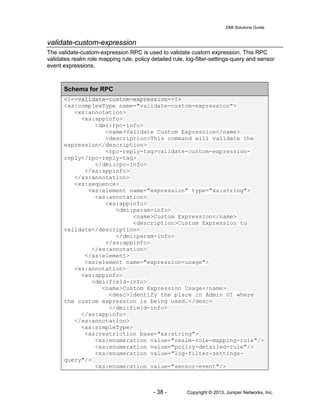
The following is an example to retrieve rollback software image information.
Example for RPC
<rpc message-id='101'
xmlns='urn:ietf:params:xml:ns:netconf:base:1.0'>
<get-rollback-partition-information/>
</rpc>
If the RPC is successful, the following is the response received. On error conditions, the
error message explains the reason the command failed.
Example for RPC-REPLY
<rpc-reply message-id="101"
xmlns="urn:ietf:params:xml:ns:netconf:base:1.0">
<rollback-partition-information>
<os-name>ive-sa</os-name>
<os-version>6.4R1</os-version>
<build>14063</build>
</rollback-partition-information>
</rpc-reply>
DMI Solutions Guide
- 38 - Copyright © 2013, Juniper Networks, Inc.
validate-custom-expression
The validate-custom-expression RPC is used to validate custom expression. This RPC
validates realm role mapping rule, policy detailed rule, log-filter-settings-query and sensor
event expressions.
Schema for RPC
<!--validate-custom-expression--!>
<xs:complexType name="validate-custom-expression">
<xs:annotation>
<xs:appinfo>
<dmi:rpc-info>
<name>Validate Custom Expression</name>
<description>This command will validate the
expression</description>
<rpc-reply-tag>validate-custom-expression-
reply</rpc-reply-tag>
</dmi:rpc-info>
</xs:appinfo>
</xs:annotation>
<xs:sequence>
<xs:element name="expression" type="xs:string">
<xs:annotation>
<xs:appinfo>
<dmi:param-info>
<name>Custom Expression</name>
<description>Custom Expression to
validate</description>
</dmi:param-info>
</xs:appinfo>
</xs:annotation>
</xs:element>
<xs:element name="expression-usage">
<xs:annotation>
<xs:appinfo>
<dmi:field-info>
<name>Custom Expression Usage</name>
<desc>Identify the place in Admin UI where
the custom expression is being used.</desc>
</dmi:field-info>
</xs:appinfo>
</xs:annotation>
<xs:simpleType>
<xs:restriction base="xs:string">
<xs:enumeration value="realm-role-mapping-rule"/>
<xs:enumeration value="policy-detailed-rule"/>
<xs:enumeration value="log-filter-settings-
query"/>
<xs:enumeration value="sensor-event"/>
DMI Solutions Guide
- 39 - Copyright © 2013, Juniper Networks, Inc.
</xs:restriction>
</xs:simpleType>
</xs:element>
</xs:sequence>
</xs:complexType>
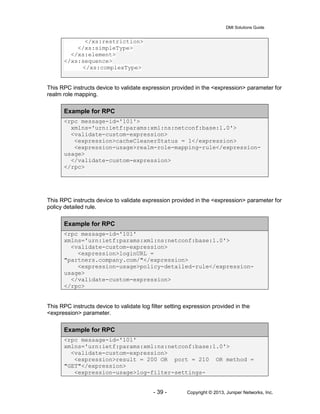
This RPC instructs device to validate expression provided in the <expression> parameter for
realm role mapping.
Example for RPC
<rpc message-id='101'>
xmlns='urn:ietf:params:xml:ns:netconf:base:1.0'>
<validate-custom-expression>
<expression>cacheCleanerStatus = 1</expression>
<expression-usage>realm-role-mapping-rule</expression-
usage>
</validate-custom-expression>
</rpc>
This RPC instructs device to validate expression provided in the <expression> parameter for
policy detailed rule.
Example for RPC
<rpc message-id='101'
xmlns='urn:ietf:params:xml:ns:netconf:base:1.0'>
<validate-custom-expression>
<expression>loginURL =
"partners.company.com/"</expression>
<expression-usage>policy-detailed-rule</expression-
usage>
</validate-custom-expression>
</rpc>
This RPC instructs device to validate log filter setting expression provided in the
<expression> parameter.
Example for RPC
<rpc message-id='101'
xmlns='urn:ietf:params:xml:ns:netconf:base:1.0'>
<validate-custom-expression>
<expression>result = 200 OR port = 210 OR method =
"GET"</expression>
<expression-usage>log-filter-settings-
DMI Solutions Guide
- 40 - Copyright © 2013, Juniper Networks, Inc.
query</expression-usage>
</validate-custom-expression>
</rpc>
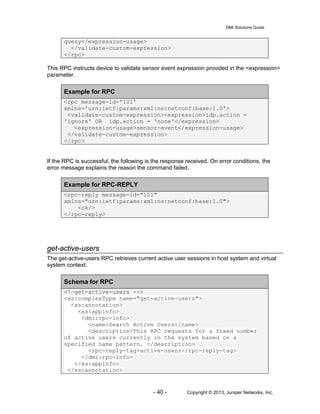
This RPC instructs device to validate sensor event expression provided in the <expression>
parameter.
Example for RPC
<rpc message-id='101'
xmlns='urn:ietf:params:xml:ns:netconf:base:1.0'>
<validate-custom-expression><expression>idp.action =
'ignore' OR idp.action = 'none'</expression>
<expression-usage>sensor-event</expression-usage>
</validate-custom-expression>
</rpc>
If the RPC is successful, the following is the response received. On error conditions, the
error message explains the reason the command failed.
Example for RPC-REPLY
<rpc-reply message-id="101"
xmlns="urn:ietf:params:xml:ns:netconf:base:1.0">
<ok/>
</rpc-reply>
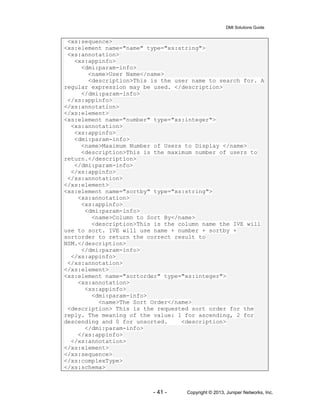
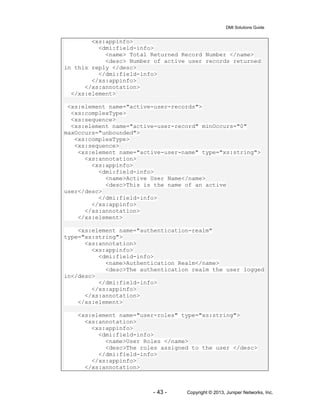
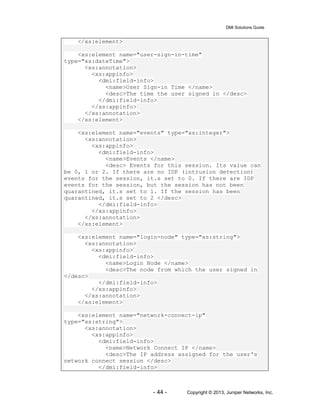
get-active-users
The get-active-users RPC retrieves current active user sessions in host system and virtual
system context.
Schema for RPC
<!—get-active-users -->
<xs:complexType name="get-active-users">
<xs:annotation>
<xs:appinfo>
<dmi:rpc-info>
<name>Search Active Users</name>
<description>This RPC requests for a fixed number
of active users currently in the system based on a
specified name pattern. </description>
<rpc-reply-tag>active-users</rpc-reply-tag>
</dmi:rpc-info>
</xs:appinfo>
</xs:annotation>
DMI Solutions Guide
- 41 - Copyright © 2013, Juniper Networks, Inc.
<xs:sequence>
<xs:element name="name" type="xs:string">
<xs:annotation>
<xs:appinfo>
<dmi:param-info>
<name>User Name</name>
<description>This is the user name to search for. A
regular expression may be used. </description>
</dmi:param-info>
</xs:appinfo>
</xs:annotation>
</xs:element>
<xs:element name="number" type="xs:integer">
<xs:annotation>
<xs:appinfo>
<dmi:param-info>
<name>Maximum Number of Users to Display </name>
<description>This is the maximum number of users to
return.</description>
</dmi:param-info>
</xs:appinfo>
</xs:annotation>
</xs:element>
<xs:element name="sortby" type="xs:string">
<xs:annotation>
<xs:appinfo>
<dmi:param-info>
<name>Column to Sort By</name>
<description>This is the column name the IVE will
use to sort. IVE will use name + number + sortby +
sortorder to return the correct result to
NSM.</description>
</dmi:param-info>
</xs:appinfo>
</xs:annotation>
</xs:element>
<xs:element name="sortorder" type="xs:integer">
<xs:annotation>
<xs:appinfo>
<dmi:param-info>
<name>The Sort Order</name>
<description> This is the requested sort order for the
reply. The meaning of the value: 1 for ascending, 2 for
descending and 0 for unsorted. <description>
</dmi:param-info>
</xs:appinfo>
</xs:annotation>
</xs:element>
</xs:sequence>
</xs:complexType>
</xs:schema>
DMI Solutions Guide
- 42 - Copyright © 2013, Juniper Networks, Inc.
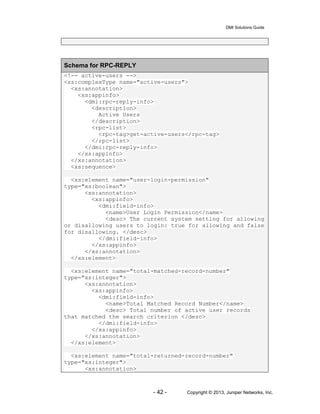
Schema for RPC-REPLY
<!-- active-users -->
<xs:complexType name="active-users">
<xs:annotation>
<xs:appinfo>
<dmi:rpc-reply-info>
<description>
Active Users
</description>
<rpc-list>
<rpc-tag>get-active-users</rpc-tag>
</rpc-list>
</dmi:rpc-reply-info>
</xs:appinfo>
</xs:annotation>
<xs:sequence>
<xs:element name="user-login-permission"
type="xs:boolean">
<xs:annotation>
<xs:appinfo>
<dmi:field-info>
<name>User Login Permission</name>
<desc> The current system setting for allowing
or disallowing users to login: true for allowing and false
for disallowing. </desc>
</dmi:field-info>
</xs:appinfo>
</xs:annotation>
</xs:element>
<xs:element name="total-matched-record-number"
type="xs:integer">
<xs:annotation>
<xs:appinfo>
<dmi:field-info>
<name>Total Matched Record Number</name>
<desc> Total number of active user records
that matched the search criterion </desc>
</dmi:field-info>
</xs:appinfo>
</xs:annotation>
</xs:element>
<xs:element name="total-returned-record-number"
type="xs:integer">
<xs:annotation>
DMI Solutions Guide
- 43 - Copyright © 2013, Juniper Networks, Inc.
<xs:appinfo>
<dmi:field-info>
<name> Total Returned Record Number </name>
<desc> Number of active user records returned
in this reply </desc>
</dmi:field-info>
</xs:appinfo>
</xs:annotation>
</xs:element>
<xs:element name="active-user-records">
<xs:complexType>
<xs:sequence>
<xs:element name="active-user-record" minOccurs="0"
maxOccurs="unbounded">
<xs:complexType>
<xs:sequence>
<xs:element name="active-user-name" type="xs:string">
<xs:annotation>
<xs:appinfo>
<dmi:field-info>
<name>Active User Name</name>
<desc>This is the name of an active
user</desc>
</dmi:field-info>
</xs:appinfo>
</xs:annotation>
</xs:element>
<xs:element name="authentication-realm"
type="xs:string">
<xs:annotation>
<xs:appinfo>
<dmi:field-info>
<name>Authentication Realm</name>
<desc>The authentication realm the user logged
in</desc>
</dmi:field-info>
</xs:appinfo>
</xs:annotation>
</xs:element>
<xs:element name="user-roles" type="xs:string">
<xs:annotation>
<xs:appinfo>
<dmi:field-info>
<name>User Roles </name>
<desc>The roles assigned to the user </desc>
</dmi:field-info>
</xs:appinfo>
</xs:annotation>
DMI Solutions Guide
- 44 - Copyright © 2013, Juniper Networks, Inc.
</xs:element>
<xs:element name="user-sign-in-time"
type="xs:dateTime">
<xs:annotation>
<xs:appinfo>
<dmi:field-info>
<name>User Sign-in Time </name>
<desc>The time the user signed in </desc>
</dmi:field-info>
</xs:appinfo>
</xs:annotation>
</xs:element>
<xs:element name="events" type="xs:integer">
<xs:annotation>
<xs:appinfo>
<dmi:field-info>
<name>Events </name>
<desc> Events for this session. Its value can
be 0, 1 or 2. If there are no IDP (intrusion detection)
events for the session, it.s set to 0. If there are IDP
events for the session, but the session has not been
quarantined, it.s set to 1. If the session has been
quarantined, it.s set to 2 </desc>
</dmi:field-info>
</xs:appinfo>
</xs:annotation>
</xs:element>
<xs:element name="login-node" type="xs:string">
<xs:annotation>
<xs:appinfo>
<dmi:field-info>
<name>Login Node </name>
<desc>The node from which the user signed in
</desc>
</dmi:field-info>
</xs:appinfo>
</xs:annotation>
</xs:element>
<xs:element name="network-connect-ip"
type="xs:string">
<xs:annotation>
<xs:appinfo>
<dmi:field-info>
<name>Network Connect IP </name>
<desc>The IP address assigned for the user's
network connect session </desc>
</dmi:field-info>
DMI Solutions Guide
- 45 - Copyright © 2013, Juniper Networks, Inc.
</xs:appinfo>
</xs:annotation>
</xs:element>
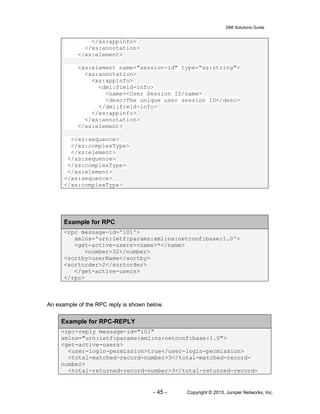
<xs:element name="session-id" type="xs:string">
<xs:annotation>
<xs:appinfo>
<dmi:field-info>
<name><User Session ID/name>
<desc>The unique user session ID</desc>
</dmi:field-info>
</xs:appinfo>
</xs:annotation>
</xs:element>
</xs:sequence>
</xs:complexType>
</xs:element>
</xs:sequence>
</xs:complexType>
</xs:element>
</xs:sequence>
</xs:complexType>
Example for RPC
<rpc message-id='101'>
xmlns='urn:ietf:params:xml:ns:netconf:base:1.0'>
<get-active-users><name>*</name>
<number>32</number>
<sortby>userName</sortby>
<sortorder>2</sortorder>
</get-active-users>
</rpc>
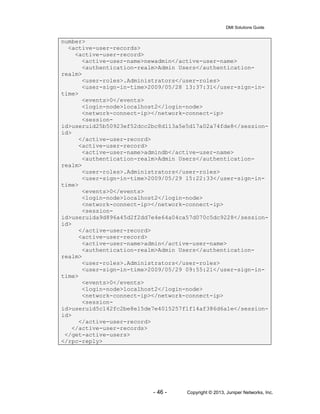
An example of the RPC reply is shown below.
Example for RPC-REPLY
<rpc-reply message-id="101"
xmlns="urn:ietf:params:xml:ns:netconf:base:1.0">
<get-active-users>
<user-login-permission>true</user-login-permission>
<total-matched-record-number>3</total-matched-record-
number>
<total-returned-record-number>3</total-returned-record-
DMI Solutions Guide
- 46 - Copyright © 2013, Juniper Networks, Inc.
number>
<active-user-records>
<active-user-record>
<active-user-name>newadmin</active-user-name>
<authentication-realm>Admin Users</authentication-
realm>
<user-roles>.Administrators</user-roles>
<user-sign-in-time>2009/05/28 13:37:31</user-sign-in-
time>
<events>0</events>
<login-node>localhost2</login-node>
<network-connect-ip></network-connect-ip>
<session-
id>useruid25b50923ef52dcc2bc8d113a5e5d17a02a74fde8</session-
id>
</active-user-record>
<active-user-record>
<active-user-name>admindb</active-user-name>
<authentication-realm>Admin Users</authentication-
realm>
<user-roles>.Administrators</user-roles>
<user-sign-in-time>2009/05/29 15:22:33</user-sign-in-
time>
<events>0</events>
<login-node>localhost2</login-node>
<network-connect-ip></network-connect-ip>
<session-
id>useruida9d896a45d2f2dd7e4e64a04ca57d070c5dc9228</session-
id>
</active-user-record>
<active-user-record>
<active-user-name>admin</active-user-name>
<authentication-realm>Admin Users</authentication-
realm>
<user-roles>.Administrators</user-roles>
<user-sign-in-time>2009/05/29 09:55:21</user-sign-in-
time>
<events>0</events>
<login-node>localhost2</login-node>
<network-connect-ip></network-connect-ip>
<session-
id>useruid5c142fc2be8e15de7e4015257f1f14af386d6a1e</session-
id>
</active-user-record>
</active-user-records>
</get-active-users>
</rpc-reply>
DMI Solutions Guide
- 47 - Copyright © 2013, Juniper Networks, Inc.
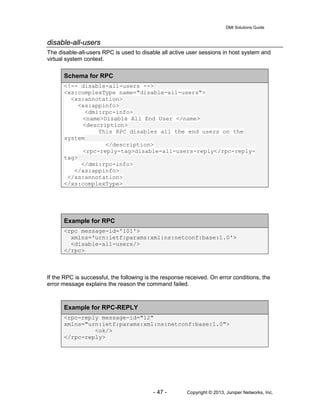
disable-all-users
The disable-all-users RPC is used to disable all active user sessions in host system and
virtual system context.
Schema for RPC
<!-- disable-all-users -->
<xs:complexType name="disable-all-users">
<xs:annotation>
<xs:appinfo>
<dmi:rpc-info>
<name>Disable All End User </name>
<description>
This RPC disables all the end users on the
system
</description>
<rpc-reply-tag>disable-all-users-reply</rpc-reply-
tag>
</dmi:rpc-info>
</xs:appinfo>
</xs:annotation>
</xs:complexType>
Example for RPC
<rpc message-id='101'>
xmlns='urn:ietf:params:xml:ns:netconf:base:1.0'>
<disable-all-users/>
</rpc>
If the RPC is successful, the following is the response received. On error conditions, the
error message explains the reason the command failed.
Example for RPC-REPLY
<rpc-reply message-id="12"
xmlns="urn:ietf:params:xml:ns:netconf:base:1.0">
<ok/>
</rpc-reply>
DMI Solutions Guide
- 48 - Copyright © 2013, Juniper Networks, Inc.
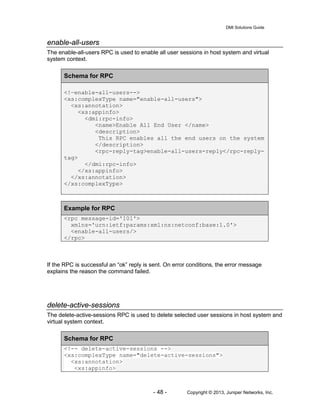
enable-all-users
The enable-all-users RPC is used to enable all user sessions in host system and virtual
system context.
Schema for RPC
<!—enable-all-users-->
<xs:complexType name="enable-all-users">
<xs:annotation>
<xs:appinfo>
<dmi:rpc-info>
<name>Enable All End User </name>
<description>
This RPC enables all the end users on the system
</description>
<rpc-reply-tag>enable-all-users-reply</rpc-reply-
tag>
</dmi:rpc-info>
</xs:appinfo>
</xs:annotation>
</xs:complexType>
Example for RPC
<rpc message-id='101'>
xmlns='urn:ietf:params:xml:ns:netconf:base:1.0'>
<enable-all-users/>
</rpc>
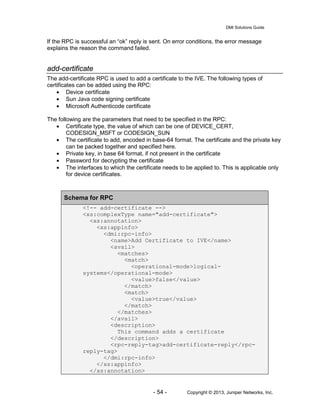
If the RPC is successful an “ok” reply is sent. On error conditions, the error message
explains the reason the command failed.
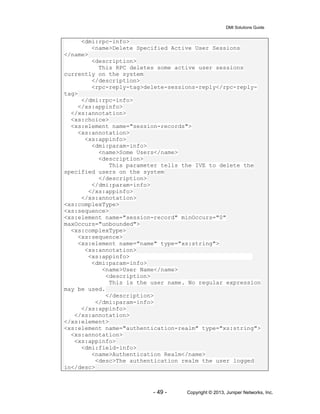
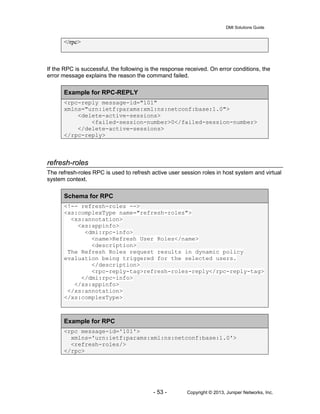
delete-active-sessions
The delete-active-sessions RPC is used to delete selected user sessions in host system and
virtual system context.
Schema for RPC
<!-- delete-active-sessions -->
<xs:complexType name="delete-active-sessions">
<xs:annotation>
<xs:appinfo>
DMI Solutions Guide
- 49 - Copyright © 2013, Juniper Networks, Inc.
<dmi:rpc-info>
<name>Delete Specified Active User Sessions
</name>
<description>
This RPC deletes some active user sessions
currently on the system
</description>
<rpc-reply-tag>delete-sessions-reply</rpc-reply-
tag>
</dmi:rpc-info>
</xs:appinfo>
</xs:annotation>
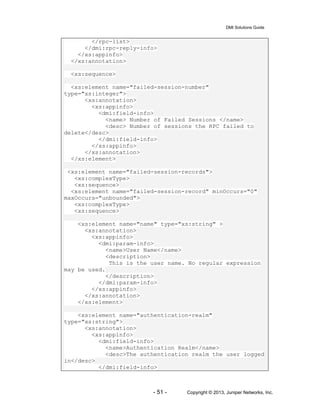
<xs:choice>
<xs:element name="session-records">
<xs:annotation>
<xs:appinfo>
<dmi:param-info>
<name>Some Users</name>
<description>
This parameter tells the IVE to delete the
specified users on the system
</description>
</dmi:param-info>
</xs:appinfo>
</xs:annotation>
<xs:complexType>
<xs:sequence>
<xs:element name="session-record" minOccurs="0"
maxOccurs="unbounded">
<xs:complexType>
<xs:sequence>
<xs:element name="name" type="xs:string">
<xs:annotation>
<xs:appinfo>
<dmi:param-info>
<name>User Name</name>
<description>
This is the user name. No regular expression
may be used.
</description>
</dmi:param-info>
</xs:appinfo>
</xs:annotation>
</xs:element>
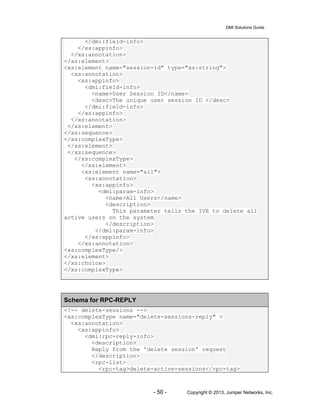
<xs:element name="authentication-realm" type="xs:string">
<xs:annotation>
<xs:appinfo>
<dmi:field-info>
<name>Authentication Realm</name>
<desc>The authentication realm the user logged
in</desc>
DMI Solutions Guide
- 50 - Copyright © 2013, Juniper Networks, Inc.
</dmi:field-info>
</xs:appinfo>
</xs:annotation>
</xs:element>
<xs:element name="session-id" type="xs:string">
<xs:annotation>
<xs:appinfo>
<dmi:field-info>
<name>User Session ID</name>
<desc>The unique user session ID </desc>
</dmi:field-info>
</xs:appinfo>
</xs:annotation>
</xs:element>
</xs:sequence>
</xs:complexType>
</xs:element>
</xs:sequence>
</xs:complexType>
</xs:element>
<xs:element name="all">
<xs:annotation>
<xs:appinfo>
<dmi:param-info>
<name>All Users</name>
<description>
This parameter tells the IVE to delete all
active users on the system
</description>
</dmi:param-info>
</xs:appinfo>
</xs:annotation>
<xs:complexType/>
</xs:element>
</xs:choice>
</xs:complexType>
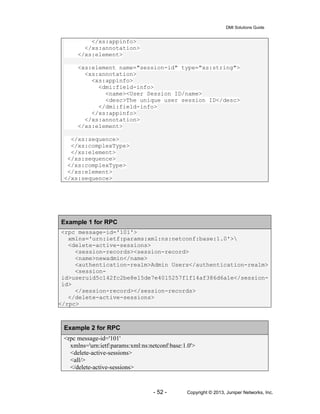
Schema for RPC-REPLY
<!-- delete-sessions -->
<xs:complexType name="delete-sessions-reply" >
<xs:annotation>
<xs:appinfo>
<dmi:rpc-reply-info>
<description>
Reply from the 'delete session' request
</description>
<rpc-list>
<rpc-tag>delete-active-sessions</rpc-tag>
DMI Solutions Guide
- 51 - Copyright © 2013, Juniper Networks, Inc.
</rpc-list>
</dmi:rpc-reply-info>
</xs:appinfo>
</xs:annotation>
<xs:sequence>
<xs:element name="failed-session-number"
type="xs:integer">
<xs:annotation>
<xs:appinfo>
<dmi:field-info>
<name> Number of Failed Sessions </name>
<desc> Number of sessions the RPC failed to
delete</desc>
</dmi:field-info>
</xs:appinfo>
</xs:annotation>
</xs:element>
<xs:element name="failed-session-records">
<xs:complexType>
<xs:sequence>
<xs:element name="failed-session-record" minOccurs="0"
maxOccurs="unbounded">
<xs:complexType>
<xs:sequence>
<xs:element name="name" type="xs:string" >
<xs:annotation>
<xs:appinfo>
<dmi:param-info>
<name>User Name</name>
<description>
This is the user name. No regular expression
may be used.
</description>
</dmi:param-info>
</xs:appinfo>
</xs:annotation>
</xs:element>
<xs:element name="authentication-realm"
type="xs:string">
<xs:annotation>
<xs:appinfo>
<dmi:field-info>
<name>Authentication Realm</name>
<desc>The authentication realm the user logged
in</desc>
</dmi:field-info>
DMI Solutions Guide
- 52 - Copyright © 2013, Juniper Networks, Inc.
</xs:appinfo>
</xs:annotation>
</xs:element>
<xs:element name="session-id" type="xs:string">
<xs:annotation>
<xs:appinfo>
<dmi:field-info>
<name><User Session ID/name>
<desc>The unique user session ID</desc>
</dmi:field-info>
</xs:appinfo>
</xs:annotation>
</xs:element>
</xs:sequence>
</xs:complexType>
</xs:element>
</xs:sequence>
</xs:complexType>
</xs:element>
</xs:sequence>
Example 1 for RPC
<rpc message-id='101'>
xmlns='urn:ietf:params:xml:ns:netconf:base:1.0'>
<delete-active-sessions>
<session-records><session-record>
<name>newadmin</name>
<authentication-realm>Admin Users</authentication-realm>
<session-
id>useruid5c142fc2be8e15de7e4015257f1f14af386d6a1e</session-
id>
</session-record></session-records>
</delete-active-sessions>
</rpc>
Example 2 for RPC
<rpc message-id='101'
xmlns='urn:ietf:params:xml:ns:netconf:base:1.0'>
<delete-active-sessions>
<all/>
</delete-active-sessions>
DMI Solutions Guide
- 53 - Copyright © 2013, Juniper Networks, Inc.
</rpc>
If the RPC is successful, the following is the response received. On error conditions, the
error message explains the reason the command failed.
Example for RPC-REPLY
<rpc-reply message-id="101"
xmlns="urn:ietf:params:xml:ns:netconf:base:1.0">
<delete-active-sessions>
<failed-session-number>0</failed-session-number>
</delete-active-sessions>
</rpc-reply>
refresh-roles
The refresh-roles RPC is used to refresh active user session roles in host system and virtual
system context.
Schema for RPC
<!-- refresh-roles -->
<xs:complexType name="refresh-roles">
<xs:annotation>
<xs:appinfo>
<dmi:rpc-info>
<name>Refresh User Roles</name>
<description>
The Refresh Roles request results in dynamic policy
evaluation being triggered for the selected users.
</description>
<rpc-reply-tag>refresh-roles-reply</rpc-reply-tag>
</dmi:rpc-info>
</xs:appinfo>
</xs:annotation>
</xs:complexType>
Example for RPC
<rpc message-id='101'>
xmlns='urn:ietf:params:xml:ns:netconf:base:1.0'>
<refresh-roles/>
</rpc>
DMI Solutions Guide
- 54 - Copyright © 2013, Juniper Networks, Inc.
If the RPC is successful an “ok” reply is sent. On error conditions, the error message
explains the reason the command failed.
add-certificate
The add-certificate RPC is used to add a certificate to the IVE. The following types of
certificates can be added using the RPC:
• Device certificate
• Sun Java code signing certificate
• Microsoft Authenticode certificate
The following are the parameters that need to be specified in the RPC:
• Certificate type, the value of which can be one of DEVICE_CERT,
CODESIGN_MSFT or CODESIGN_SUN
• The certificate to add, encoded in base-64 format. The certificate and the private key
can be packed together and specified here.
• Private key, in base 64 format, if not present in the certificate
• Password for decrypting the certificate
• The interfaces to which the certificate needs to be applied to. This is applicable only
for device certificates.
Schema for RPC
<!-- add-certificate -->
<xs:complexType name="add-certificate">
<xs:annotation>
<xs:appinfo>
<dmi:rpc-info>
<name>Add Certificate to IVE</name>
<avail>
<matches>
<match>
<operational-mode>logical-
systems</operational-mode>
<value>false</value>
</match>
<match>
<value>true</value>
</match>
</matches>
</avail>
<description>
This command adds a certificate
</description>
<rpc-reply-tag>add-certificate-reply</rpc-
reply-tag>
</dmi:rpc-info>
</xs:appinfo>
</xs:annotation>
DMI Solutions Guide
- 55 - Copyright © 2013, Juniper Networks, Inc.
<xs:sequence>
<xs:element name="type" type="xs:string">
<xs:annotation>
<xs:appinfo>
<dmi:param-info>
<name>Certificate Type</name>
<description>
The type of certificate to add
</description>
</dmi:param-info>
</xs:appinfo>
</xs:annotation>
<xs:simpleType>
<xs:restriction base="xs:string">
<xs:enumeration value="DEVICE_CERT" />
<xs:enumeration value="CODESIGN_MSFT" />
<xs:enumeration value="CODESIGN_SUN" />
</xs:restriction>
</xs:simpleType>
</xs:element>
<xs:element name="cert" type="xs:string"
minOccurs="0">
<xs:annotation>
<xs:appinfo>
<dmi:param-info>
<name>Certificate</name>
<description>
The certificate to add
</description>
</dmi:param-info>
</xs:appinfo>
</xs:annotation>
</xs:element>
<xs:element name="password" type="xs:string">
<xs:annotation>
<xs:appinfo>
<dmi:param-info>
<name>Password</name>
<description>
The password for certificate
</description>
</dmi:param-info>
</xs:appinfo>
</xs:annotation>
</xs:element>
<xs:element name="private-key" type="xs:string">
<xs:annotation>
<xs:appinfo>
<dmi:param-info>
<name>PrivateKey</name>
<description>The Private Key for the
DMI Solutions Guide
- 56 - Copyright © 2013, Juniper Networks, Inc.
certificate</description>
</dmi:param-info>
</xs:appinfo>
</xs:annotation>
</xs:element>
<xs:element name="internal-interfaces"
minOccurs="0">
<xs:annotation>
<xs:appinfo>
<dmi:param-info>
<name>Interface</name>
<description>
List of internal interfaces to apply
the device certificate to
</description>
</dmi:param-info>
</xs:appinfo>
</xs:annotation>
<xs:complexType>
<xs:sequence>
<xs:choice minOccurs="0"
maxOccurs="unbounded">
<xs:element name="internal-interface"
type="xs:string" minOccurs="0">
<xs:annotation>
<xs:appinfo>
<dmi:param-info>
<name>Interface</name>
<description>
Name of internal interface to
apply the device certificate to
</description>
</dmi:param-info>
</xs:appinfo>
</xs:annotation>
</xs:element>
</xs:choice>
</xs:sequence>
</xs:complexType>
</xs:element>
<xs:element name="external-interfaces"
minOccurs="0">
<xs:annotation>
<xs:appinfo>
<dmi:param-info>
<name>Interface</name>
<description>
List of external interfaces to apply
the device certificate to
DMI Solutions Guide
- 57 - Copyright © 2013, Juniper Networks, Inc.
</description>
</dmi:param-info>
</xs:appinfo>
</xs:annotation>
<xs:complexType>
<xs:sequence>
<xs:choice minOccurs="0"
maxOccurs="unbounded">
<xs:element name="external-interface"
type="xs:string" minOccurs="0">
<xs:annotation>
<xs:appinfo>
<dmi:param-info>
<name>Interface</name>
<description>
List of external interfaces to
apply the device certificate to
</description>
</dmi:param-info>
</xs:appinfo>
</xs:annotation>
</xs:element>
</xs:choice>
</xs:sequence>
</xs:complexType>
</xs:element>
<xs:element name="management-interface"
type="xs:boolean" minOccurs="0">
<xs:annotation>
<xs:appinfo>
<dmi:param-info>
<name>Interface</name>
<description>
Option for setting the device
certificate to the management interface. Applicable
only for devices with management interface.
</description>
</dmi:param-info>
</xs:appinfo>
</xs:annotation>
</xs:element>
</xs:sequence>
</xs:complexType>
Example for RPC
<rpc message-id="12">
<add-certificate>
DMI Solutions Guide
- 58 - Copyright © 2013, Juniper Networks, Inc.
<type>DEVICE_CERT</type>
<cert>
MIIIBgIBAzCCB8wGCSqGSIb3DQEHAaCCB70Egge5MIIHtTCCBIcGC
SqGSIb3DQEHBqCCBHgwggR0AgEAMIIEbQYJKoZIhvcNAQcBMBwGCi
qGSIb3DQEMAQYwDgQIAtiwIAYUYw0CAggAgIIEQIRnbl7WN3rhElt
QCFsYgcaDuGYo/QVRnk/8oBEuIfBsiX3QX9ba3SS0T6em148QmA0j
1KCJG7nzPnrAX+mqv4R/Az3WCw8GZVL3/j9RGYbEByXBKYB7++trb
WOcbA6DZqwPOr0clFBzV1a2uG+Vm+uawcPbKti3x9nHel9AZnPMb/
U/QRo/tCfdTAuti0RgpmvlCdNe2vUl9i/qGJB4etfl7+GC4cSTOTm
TxP1IrB889ST9KOPWPXpmRn2tY2AczWVM/9HqjDChyGTGToeQICBq
CdZ4a/zF7NcHe+ffWWvROCnvJx8UxcLwUylm2xlA+ltCa8SMNz18Y
nGxeWIHtrfiES5dSMUQ6ojLgJrKFoD/rE4MGAIqvbS/1kGbiQCvr7
4y09qapCAqNEtRR/tow5JbXuuKSOuXUhrpEZSRIeOLAvnkmkEMcmR
VNz75tH4i7+pU7dowFYJUT6vTEtn3ESNZCcjNAWNvPHz/cdiEsNGn
31wmwR01WkgMzEhNKYhrZbIi039YbjoSq8FQDIrgoJpg7Nsdy8RUc
YrJZiapSPBg6DIbc0QqvomubgYdIYWv0+D9V7ewe/u1ddAzmvYCqD
VGkdyDJyzlguNn84Y5J7Z8LJ39bGX1J5G5XX6z/Ju4WgOWO0S7wGp
mNuY2O98XViS056gxewW8Yc8Z9DFzzxJcocB0oLsVXEOd0az3PJL0
8zbJ4jU1haadjpuwF1dZKe+VGUN7Ocn7JbiP5YfI0GuCJFK/QJMbx
2nD0N6s9/+9Gozo2txO1nx3pEOzHTmqNOUpxYZ10dRgQ/p3JHGpgk
UGOFuI9/cVHha/jRI1QTruVpw8BzpYH5ESJ/eEFi6/YnQEzRaDU0v
KhH1PNOM95DrCscIm6JTfyA0eibL5UXBsfYWrfNtbAo9TruqXMFC3
okiHU+mQfNVFx7eszEFQMZOVR3ZKFABLg1tR/5zZxmvQbulvEJ0S+
x4lOWiARH4DXHS/Nase0I0S3zfx9ugZmXEZ7Qo5GBk4L0bOHcl1PZ
5N65eGyP9EIlFLEuCrOoDbrRFKo07JYpwgfsyecdgfoPKiW854WYO
04uTSvd7qwDl3cu5y2eHy2moepGfD5ihycVzut16bcdTBid+ZM+64
m10GCYUtXkhbbnlTj7SOR+zlkey3m8z29sajzT6H52ON8X569HrkH
rJZCwQwT+rqcZox23T1WKCl8oAeLJd95Ja0p5+N/3k3Nw+Zst/cbp
2j9Sy7kWeIXfOPSBc4R+6WpWevkV9BoV4+eQJjYk5Zagi/IV4hM70
X2GFQBaaWnQm/RlOMnAorhNipG909tvXwPNQRcp5Cbtk7ajxo0hkG
QfCDBgOZY9lJ0gQTE+2EWHngkmJFJ+KkjNkRDOiOR5hnXtqwxZurb
/jk6EgKgVp2coYC96Ikh1uFxHIzuInEZ4OMzT1aTBhJr9luHtpZDn
S3KccJMIIDJgYJKoZIhvcNAQcBoIIDFwSCAxMwggMPMIIDCwYLKoZ
IhvcNAQwKAQKgggKmMIICojAcBgoqhkiG9w0BDAEDMA4ECMCgXfB7
CuWXAgIIAASCAoA06lb8b3oF+Kw5OGkmXxGMgqFWEGcGBUfAeX3UG
0QmQHnYJ0X+8iKkNZ2vqbtzbxeO/AL2QQTE3ckIOop3lAvtmG9n8Y
S0MTLdauJQhYuAdNSv1fzMceVjk/eS7pEl5WNAkJxFDBZsbZQI3yc
5whjbsyxZktx0UCuXeCxbDf8zUCbA/vNspjTjoe7Bk60oWZGceyZ1
C7tgTt4s84TR8wTmliccO5wr1DZSmtyzocelH/oU59UOpZeT4GQWk
AL0Lgn0B27Xnw8/6CKJEuAA7+XNhYI1jBqMyyaK4wyGZe2e0ztarK
OifVRem0Z/6B5YLyFJMiTozlbJqB35OcM5lo9ApYWJpwJNzOt9pKX
x7P9qf0tHDTtr9oLnJ0ymzJ1dRM37ct/OBOpLovEGbxMhIccQs9aQ
Xog4+I+EqCxdIbKT9hWO3zCFBubQrxhfS2aPpyc7sDcFa7ehkBTGg
n0518HRWSK1M989c5fErmFuCgkYZZxmoXdzbwPMeVh0LtudeZvgqW
jDBH1zICWRE3cNr+5VjSbNA+RC9j+MKu+PI/KgkLEbOFPMQxADZWV
j9s++y+RzD2wiE3s4bae+A4X+JtHmqHfCJlwAsxxZKnu2mbGCvFmp
wKswPLuvkDADNki+74Xr2UaC1z+q+jDihdbWjKaN2PfYsGuz+g/j8
soiHwDM0fIp1fKsKRy3ijPGZMXAI3WErvpy5dHx7oysBf0t+Ehmy3
Lh5ljtWaFmlN1fVDelWBHmfTnne0FbmvOsp7kiawyRq8R8uN0tfVA
hbceKrzzxA7fTnE7Fc3H1ZU/KxP9NpURG6XFFDLlv7XboO+WZyjGk
fhY7j2ZJUX6x+DY0toKGMVIwIwYJKoZIhvcNAQkVMRYEFGVBzyRqj
DMI Solutions Guide
- 59 - Copyright © 2013, Juniper Networks, Inc.
OEWZ6Fwz4G9v/uPgHgrMCsGCSqGSIb3DQEJFDEeHhwATQB5ACAAQw
BlAHIAdABpAGYAaQBjAGEAdABlMDEwITAJBgUrDgMCGgUABBRsavo
lCiL9JTZfoPt+4p2AWb7f+wQIDO65WtjEV/QCAggA</cert>
<password>juniper</password>
<external-interfaces>
<external-interface>&#x3C;External
Port&#x3E;</external-interface>
</external-interfaces>
</add-certificate>
</rpc>
If the request is successful an “ok” reply is sent. On error conditions, the error message
explains the reason the command failed.
get-certificate-info
The get-certificate-info RPC is used to get information about a certificate present in the IVE.
The following parameters need to be specified in the RPC to retrieve the information:
• Type of certificate, which can be one of DEVICE_CERT, CODESIGN_MSFT or
CODESIGN_SUN
• Subject common name, an optional parameter. If specified, information about the
certificate with the specified common name will be retrieved and if not, information
about all the certificates of the specified type will be retrieved.
Schema for RPC
<!-- get-certificate-info -->
<xs:complexType name="get-certificate-info">
<xs:annotation>
<xs:appinfo>
<dmi:rpc-info>
<name>Get Certificate from IVE</name>
<avail>
<matches>
<match>
<operational-mode>logical-
systems</operational-mode>
<value>false</value>
</match>
<match>
<value>true</value>
</match>
</matches>
</avail>
<description>
This command gets information about a
certificate
DMI Solutions Guide
- 60 - Copyright © 2013, Juniper Networks, Inc.
</description>
<rpc-reply-tag>certificate-info</rpc-reply-tag>
</dmi:rpc-info>
</xs:appinfo>
</xs:annotation>
<xs:sequence>
<xs:element name="type" type="xs:string">
<xs:annotation>
<xs:appinfo>
<dmi:param-info>
<name>Certificate Type</name>
<description>
The type of certificate to get
</description>
</dmi:param-info>
</xs:appinfo>
</xs:annotation>
</xs:element>
<xs:element name="subject-common-name"
type="xs:string" minOccurs="0">
<xs:annotation>
<xs:appinfo>
<dmi:param-info>
<name>Subject Common Name</name>
<description>
Subject common Name of certificate requested
</description>
</dmi:param-info>
</xs:appinfo>
</xs:annotation>
</xs:element>
</xs:sequence>
</xs:complexType>
Schema for RPC-REPLY
<!-- get-certificate-info-reply -->
<xs:complexType name="certificate-info">
<xs:annotation>
<xs:appinfo>
<dmi:rpc-reply-info>
<description>
Certificate information
</description>
<rpc-list>
<rpc-tag>get-certificate-info</rpc-tag>
</rpc-list>
</dmi:rpc-reply-info>
</xs:appinfo>
DMI Solutions Guide
- 61 - Copyright © 2013, Juniper Networks, Inc.
</xs:annotation>
<xs:sequence>
<xs:element name="certificates">
<xs:complexType>
<xs:sequence>
<xs:element name="certificate" minOccurs="0"
maxOccurs="unbounded">
<xs:complexType>
<xs:sequence>
<xs:element name="subject" minOccurs="0">
<xs:complexType>
<xs:sequence>
<xs:element name="common-name"
type="xs:string">
<xs:annotation>
<xs:appinfo>
<dmi:field-info>
<name>Subject Common Name</name>
<desc>Subject Common Name</desc>
</dmi:field-info>
</xs:appinfo>
</xs:annotation>
</xs:element>
<xs:element name="email" type="xs:string">
<xs:annotation>
<xs:appinfo>
<dmi:field-info>
<name>Subject Email Address</name>
<desc>Subject Email Address</desc>
</dmi:field-info>
</xs:appinfo>
</xs:annotation>
</xs:element>
<xs:element name="organization"
type="xs:string">
<xs:annotation>
<xs:appinfo>
<dmi:field-info>
<name>Subject Organization</name>
<desc>Subject Organization</desc>
</dmi:field-info>
</xs:appinfo>
</xs:annotation>
</xs:element>
DMI Solutions Guide
- 62 - Copyright © 2013, Juniper Networks, Inc.
<xs:element name="organization-unit"
type="xs:string">
<xs:annotation>
<xs:appinfo>
<dmi:field-info>
<name>Subject Organization
Unit</name>
<desc>Subject Organization
Unit</desc>
</dmi:field-info>
</xs:appinfo>
</xs:annotation>
</xs:element>
<xs:element name="locality" type="xs:string">
<xs:annotation>
<xs:appinfo>
<dmi:field-info>
<name>Subject Locality</name>
<desc>Subject Locality</desc>
</dmi:field-info>
</xs:appinfo>
</xs:annotation>
</xs:element>
<xs:element name="state" type="xs:string">
<xs:annotation>
<xs:appinfo>
<dmi:field-info>
<name>Subject State</name>
<desc>Subject State</desc>
</dmi:field-info>
</xs:appinfo>
</xs:annotation>
</xs:element>
<xs:element name="country" type="xs:string">
<xs:annotation>
<xs:appinfo>
<dmi:field-info>
<name>Subject Country</name>
<desc>Subject Country</desc>
</dmi:field-info>
</xs:appinfo>
</xs:annotation>
</xs:element>
</xs:sequence>
</xs:complexType>
</xs:element>
DMI Solutions Guide
- 63 - Copyright © 2013, Juniper Networks, Inc.
<xs:element name="issued-by" minOccurs="0">
<xs:complexType>
<xs:sequence>
<xs:element name="common-name"
type="xs:string">
<xs:annotation>
<xs:appinfo>
<dmi:field-info>
<name>Issuer Common Name</name>
<desc>Issuer Common Name</desc>
</dmi:field-info>
</xs:appinfo>
</xs:annotation>
</xs:element>
<xs:element name="email" type="xs:string">
<xs:annotation>
<xs:appinfo>
<dmi:field-info>
<name>Issuer Email Address</name>
<desc>Issuer Email Address</desc>
</dmi:field-info>
</xs:appinfo>
</xs:annotation>
</xs:element>
<xs:element name="organization"
type="xs:string">
<xs:annotation>
<xs:appinfo>
<dmi:field-info>
<name>Issuer Organization</name>
<desc>Issuer Organization</desc>
</dmi:field-info>
</xs:appinfo>
</xs:annotation>
</xs:element>
<xs:element name="organization-unit"
type="xs:string">
<xs:annotation>
<xs:appinfo>
<dmi:field-info>
<name>Issuer Organization
Unit</name>
<desc>Issuer Organization
Unit</desc>
</dmi:field-info>
</xs:appinfo>
DMI Solutions Guide
- 64 - Copyright © 2013, Juniper Networks, Inc.
</xs:annotation>
</xs:element>
<xs:element name="locality" type="xs:string">
<xs:annotation>
<xs:appinfo>
<dmi:field-info>
<name>Issuer Locality</name>
<desc>Issuer Locality</desc>
</dmi:field-info>
</xs:appinfo>
</xs:annotation>
</xs:element>
<xs:element name="state" type="xs:string">
<xs:annotation>
<xs:appinfo>
<dmi:field-info>
<name>Issuer State</name>
<desc>Issuer State</desc>
</dmi:field-info>
</xs:appinfo>
</xs:annotation>
</xs:element>
<xs:element name="country" type="xs:string">
<xs:annotation>
<xs:appinfo>
<dmi:field-info>
<name>Issuer Country</name>
<desc>Issuer Country</desc>
</dmi:field-info>
</xs:appinfo>
</xs:annotation>
</xs:element>
</xs:sequence>
</xs:complexType>
</xs:element>
<xs:element name="validity" minOccurs="0">
<xs:complexType>
<xs:sequence>
<xs:element name="from" type="xs:string">
<xs:annotation>
<xs:appinfo>
<dmi:field-info>
<name>from</name>
<desc>Date and time the cerificate
is valid from</desc>
DMI Solutions Guide
- 65 - Copyright © 2013, Juniper Networks, Inc.
</dmi:field-info>
</xs:appinfo>
</xs:annotation>
</xs:element>
<xs:element name="to" type="xs:string">
<xs:annotation>
<xs:appinfo>
<dmi:field-info>
<name>to</name>
<desc>Date and time the cerificate
is valid to</desc>
</dmi:field-info>
</xs:appinfo>
</xs:annotation>
</xs:element>
</xs:sequence>
</xs:complexType>
</xs:element>
<xs:element name="details" minOccurs="0">
<xs:complexType>
<xs:sequence>
<xs:element name="version" type="xs:integer">
<xs:annotation>
<xs:appinfo>
<dmi:field-info>
<name>Version</name>
<desc>version</desc>
</dmi:field-info>
</xs:appinfo>
</xs:annotation>
</xs:element>
<xs:element name="serial-number"
type="xs:string">
<xs:annotation>
<xs:appinfo>
<dmi:field-info>
<name>Serial Number</name>
<desc>Serial Number</desc>
</dmi:field-info>
</xs:appinfo>
</xs:annotation>
</xs:element>
<xs:element name="signature-algorithm"
type="xs:string">
<xs:annotation>
DMI Solutions Guide
- 66 - Copyright © 2013, Juniper Networks, Inc.
<xs:appinfo>
<dmi:field-info>
<name>Signature Algorithm</name>
<desc>Signature Algorithm</desc>
</dmi:field-info>
</xs:appinfo>
</xs:annotation>
</xs:element>
<xs:element name="public-key-algorithm"
type="xs:string">
<xs:annotation>
<xs:appinfo>
<dmi:field-info>
<name>Public Key Algorithm</name>
<desc>Public Key Algorithm</desc>
</dmi:field-info>
</xs:appinfo>
</xs:annotation>
</xs:element>
<xs:element name="public-key-type"
type="xs:string">
<xs:annotation>
<xs:appinfo>
<dmi:field-info>
<name>Public Key Type</name>
<desc>Public Key Type</desc>
</dmi:field-info>
</xs:appinfo>
</xs:annotation>
</xs:element>
<xs:element name="public-key-bits"
type="xs:string">
<xs:annotation>
<xs:appinfo>
<dmi:field-info>
<name>Public Key Bits</name>
<desc>Public Key Bits</desc>
</dmi:field-info>
</xs:appinfo>
</xs:annotation>
</xs:element>
<xs:element name="public-key"
type="xs:string">
<xs:annotation>
<xs:appinfo>
<dmi:field-info>
<name>Public Key Modulus</name>
DMI Solutions Guide
- 67 - Copyright © 2013, Juniper Networks, Inc.
<desc>Public Key Modulus</desc>
</dmi:field-info>
</xs:appinfo>
</xs:annotation>
</xs:element>
<xs:element name="thumbprint-algorithm"
type="xs:string">
<xs:annotation>
<xs:appinfo>
<dmi:field-info>
<name>Thumbprint Algorithm</name>
<desc>Thumbprint Algorithm</desc>
</dmi:field-info>
</xs:appinfo>
</xs:annotation>
</xs:element>
<xs:element name="thumbprint"
type="xs:string">
<xs:annotation>
<xs:appinfo>
<dmi:field-info>
<name>Thumbprint</name>
<desc>Thumbprint</desc>
</dmi:field-info>
</xs:appinfo>
</xs:annotation>
</xs:element>
</xs:sequence>
</xs:complexType>
</xs:element> <!-- details-->
</xs:sequence>
</xs:complexType>
</xs:element> <!-- certificate-->
</xs:sequence>
</xs:complexType>
</xs:element> <!-- certificates-->
</xs:sequence>
</xs:complexType> <!-- certificate-info -->
The following RPC gets information about all the device certificates present in the IVE.
Example for RPC
<rpc message-id="123">
DMI Solutions Guide
- 68 - Copyright © 2013, Juniper Networks, Inc.
<get-certificate-info>
<type>DEVICE_CERT</type>
</get-certificate-info>
</rpc>
Example for RPC-REPLY
<rpc-reply message-id="123"
xmlns="urn:ietf:params:xml:ns:netconf:base:1.0">
<certificates>
<certificate>
<subject>
<common-name>jn.net</common-name>
<email>??</email>
<organization>slt</organization>
<organization-unit>??</organization-
unit>
<locality>??</locality>
<state>??</state>
<country>??</country>
</subject>
<issued-by>
<common-name>jn.net</common-name>
<email>??</email>
<organization>slt</organization>
<organization-unit>??</organization-
unit>
<locality>??</locality>
<state>??</state>
<country>??</country>
</issued-by>
<validity>
<from>Feb 11 16:44:14 2010
GMT</from>
<to>Aug 4 16:44:14 2015 GMT</to>
</validity>
<details>
<version>1</version>
<serial-
number>51:c9:6e:32:1d:96:36:20</serial-number>
<signature-
algorithm>sha1WithRSAEncryption</signature-
algorithm>
<public-key-algorithm>rsaEncryption
</public-key-algorithm>
<public-key-type>RSA</public-key-
type>
<public-key-bits>1024</public-key-
bits>
DMI Solutions Guide
- 69 - Copyright © 2013, Juniper Networks, Inc.
<public-key>Modulus (1024 bit):
00:da:86:f8:59:27:51:88:59:61:69:7d:62:38:f2:
05:15:22:c0:50:05:30:fd:3f:65:9e:33:c9:70:fe:
73:aa:49:5f:c5:1e:6c:32:09:93:93:e9:21:f0:9d:
a5:f4:8c:f2:ee:3b:42:8f:33:88:62:0b:bf:87:ac:
e3:94:3b:c7:5a:3e:16:74:4f:d9:d7:cd:b7:c4:bd:
12:a4:bf:79:9e:2e:3f:f1:c1:9c:82:f8:70:88:29:
14:05:3f:94:9e:f3:62:cf:ac:d2:51:a4:7e:8f:56:
bd:78:09:ea:c3:d2:65:03:90:c8:40:12:83:0e:b5:
e5:7b:a5:65:a7:a4:83:7b:07
Exponent: 65537 (0x10001)
</public-key>
<thumbprint-algorithm>SHA1</thumbprint-
algorithm>
<thumbprint>94:A9:AB:84:4A:63:57:FC:82:40:
6D:CB:A2:95:BB:2C:C4:12:51:A1</thumbprint>
</details>
</certificate>
<certificate>
<subject>
<common-name>junipernet</common-
name>
<common-name>junipernet</common-
name>
<email>juniper@juniper.net</email>
<organization>Juniper
Networks</organization>
<organization-
unit>Security</organization-unit>
<locality>Sunnyvale</locality>
<state>California</state>
<country>US</country>
</subject>
<issued-by>
<common-name>junipernet</common-
name>
<email>juniper@juniper.net</email>
<organization>Juniper
Networks</organization>
<organization-
unit>Security</organization-unit>
<locality>Sunnyvale</locality>
<state>California</state>
<country>US</country>
</issued-by>
<validity>
<from>Feb 11 12:44:54 2010
GMT</from>
<to>Feb 11 12:44:54 2011 GMT</to>
</validity>
DMI Solutions Guide
- 70 - Copyright © 2013, Juniper Networks, Inc.
<details>
<version>3</version>
<serial-number>00</serial-number>
<signature-
algorithm>md5WithRSAEncryption</signature-algorithm>
<public-key-
algorithm>rsaEncryption</public-key-algorithm>
<public-key-type>RSA</public-key-
type>
<public-key-bits>1024</public-key-
bits>
<public-key>Modulus (1024 bit):
00:aa:d5:ba:03:cb:14:dd:29:d1:48:63:7c:db:12:
df:06:84:04:d1:e8:30:dd:4b:88:ee:b2:0f:f8:18:
18:f5:5c:14:11:15:5f:37:6f:36:44:c8:21:8c:56:
b5:6e:50:6d:ea:8f:44:79:c4:4c:eb:91:88:de:8d:
db:fd:58:72:db:2c:0f:ab:19:89:bc:43:ee:47:3a:
bd:9d:cb:3f:79:b9:c7:27:82:81:8e:44:fa:2d:63:
b5:57:18:20:39:98:0d:de:c0:1e:5b:71:f8:b7:7e:
e9:85:8f:98:fd:2d:3c:ca:7d:bf:21:f0:40:d1:4f:
de:fe:06:96:70:a8:ce:bd:0b
Exponent: 65537 (0x10001)
</public-key>
<thumbprint-
algorithm>SHA1</thumbprint-algorithm>
<thumbprint>65:41:CF:24:6A:8C:E1:16:67:A1:70:CF:81:B
D:BF:FB:8F:80:78:2B</thumbprint>
</details>
</certificate>
</certificates>
</rpc-reply>
]]>]]>
get-staged-package-information
The get-staged-package-information RPC retrieves the device staged package information
such as os-name, os-version and os build number.
Schema for RPC
<!-- get-staged-package-information -->
<xs:complexType name="get-staged-package-
information">
<xs:annotation>
<xs:appinfo>
DMI Solutions Guide
- 71 - Copyright © 2013, Juniper Networks, Inc.
<dmi:rpc-info>
<name>Get software package
Information</name>
<description>
This command returns IVE staged software
package information
</description>
<rpc-reply-tag>staged-package-
information</rpc-reply-tag>
</dmi:rpc-info>
</xs:appinfo>
</xs:annotation>
</xs:complexType>
Schema for RPC-REPLY
<!-- staged-package-information -->
<xs:complexType name="staged-package-information">
<xs:annotation>
<xs:appinfo>
<dmi:rpc-reply-info>
<description>
Staged Software package Information
</description>
<rpc-list>
<rpc-tag>get-staged-package-
information</rpc-tag>
</rpc-list>
</dmi:rpc-reply-info>
</xs:appinfo>
</xs:annotation>
<xs:sequence>
<xs:element name="os-name" type="xs:string">
<xs:annotation>
<xs:appinfo>
<dmi:field-info>
<name>Software Image OS Name</name>
<desc>Software Image OS Name</desc>
</dmi:field-info>
</xs:appinfo>
</xs:annotation>
</xs:element>
<xs:element name="os-version" type="xs:string">
<xs:annotation>
<xs:appinfo>
<dmi:field-info>
<desc>Software Image OS Version</desc>
</dmi:field-info>
</xs:appinfo>
DMI Solutions Guide
- 72 - Copyright © 2013, Juniper Networks, Inc.
</xs:annotation>
</xs:element>
<xs:element name="build" type="xs:string">
<xs:annotation>
<xs:appinfo>
<dmi:field-info>
<name>Software Image Build Number</name>
<desc>Software Image Build Number</desc>
</dmi:field-info>
</xs:appinfo>
</xs:annotation>
</xs:element>
</xs:sequence>
</xs:complexType>
The following is an example to retrieve staged package information.
Example for RPC
<rpc message-id='124'
xmlns='urn:ietf:params:xml:ns:netconf:base:1.0'>
<get-staged-package-information/>
</rpc>
If the RPC is successful, the following is the response received. On error conditions, the
error message explains the reason the command failed.
Example for RPC-REPLY
<rpc-reply message-id="124"
xmlns="urn:ietf:params:xml:ns:netconf:base:1.0">
<staged-package-information>
<os-name>ive-sa</os-name>
<os-version>7.0R1</os-version>
<build>15106</build>
</staged-package-information>
</rpc-reply>
DMI Solutions Guide
- 73 - Copyright © 2013, Juniper Networks, Inc.
get-leased-license-counts
The get-leased-license-counts RPC allows the admin to retrieve leased license counts and
total counts by providing feature name and client name as queries. If neither feature name
nor client name are provided, all leased counts and total counts are provided in the reply.
Schema for RPC
<!-- get-leased-license-counts -->
<xs:complexType name="get-leased-license-counts">
<xs:annotation>
<xs:appinfo>
<dmi:rpc-info>
<name>Get License leased counts</name>
<description>
This command returns the leased counts for
the license clients configured on this server.
</description>
<rpc-reply-tag>leased-license-counts</rpc-
reply-tag>
</dmi:rpc-info>
</xs:appinfo>
</xs:annotation>
<xs:sequence>
<xs:element name="client-name" type="xs:string">
<xs:annotation>
<xs:appinfo>
<dmi:param-info>
<name>Client Name</name>
<description>
This is the name of the specific
client for which the request is being made.
</description>
</dmi:param-info>
</xs:appinfo>
</xs:annotation>
</xs:element>
<xs:element name="feature-name"
type="xs:string">
<xs:annotation>
<xs:appinfo>
<dmi:param-info>
<name>Feature Name</name>
<description>
This is the name of the specific
feature for which the request is being made.
</description>
</dmi:param-info>
</xs:appinfo>
</xs:annotation>
</xs:element>
</xs:sequence>
DMI Solutions Guide
- 74 - Copyright © 2013, Juniper Networks, Inc.
</xs:complexType>
</xs:schema>
Schema for RPC-REPLY
<!-- leased-license-counts -->
<xs:complexType name="leased-license-counts">
<xs:annotation>
<xs:appinfo>
<dmi:rpc-reply-info>
<description>License Leased counts
information</description>
<rpc-list>
<rpc-tag>get-leased-license-counts</rpc-
tag>
</rpc-list>
</dmi:rpc-reply-info>
</xs:appinfo>
</xs:annotation>
<xs:complexType name="release-info">
<xs:element name="version" type="xs:string">
<xs:annotation>
<xs:appinfo>
<dmi:field-info>
<name>Software version running on this
machine</name>
<desc>Software version running on this
machine</desc>
</dmi:field-info>
</xs:appinfo>
</xs:annotation>
</xs:element>
<xs:element name="build-number"
type="xs:string">
<xs:annotation>
<xs:appinfo>
<dmi:field-info>
<name>Build number of the
software</name>
<desc>Build number of the
software</desc>
</dmi:field-info>
</xs:appinfo>
</xs:annotation>
</xs:element>
</xs:complexType>
<xs:element name="time-stamp" type="xs:string">
DMI Solutions Guide
- 75 - Copyright © 2013, Juniper Networks, Inc.
<xs:annotation>
<xs:appinfo>
<dmi:field-info>
<name>Time stamp at which leased counts
were generated</name>
<desc>Time stamp at which leased counts
were generated</desc>
</dmi:field-info>
</xs:appinfo>
</xs:annotation>
</xs:element>
<xs:element name="serial-number" type="xs:string">
<xs:annotation>
<xs:appinfo>
<dmi:field-info>
<name>Serial number of the license server
hardware</name>
<desc>Serial number of the license server
hardware</desc>
</dmi:field-info>
</xs:appinfo>
</xs:annotation>
</xs:element>
<xs:element name="machine-id" type="xs:string">
<xs:annotation>
<xs:appinfo>
<dmi:field-info>
<name>Machine ID of the license server
hardware</name>
<desc>Machine ID of the license server
hardware</desc>
</dmi:field-info>
</xs:appinfo>
</xs:annotation>
</xs:element>
<xs:complexType name="query-summary">
<xs:element name="client-name" type="xs:string">
<xs:annotation>
<xs:appinfo>
<dmi:field-info>
<name>Client name specified in the
query</name>
<desc>Client name specified in the
query</desc>
</dmi:field-info>
</xs:appinfo>
</xs:annotation>
</xs:element>
DMI Solutions Guide
- 76 - Copyright © 2013, Juniper Networks, Inc.
<xs:element name="feature-name"
type="xs:string">
<xs:annotation>
<xs:appinfo>
<dmi:field-info>
<name>Feature name specified in the
query</name>
<desc>Feature name specified in the
query </desc>
</dmi:field-info>
</xs:appinfo>
</xs:annotation>
</xs:element>
</xs:complexType>
<xs:complexType name="features">
<xs:complexType name="feature" minOccurs="0"
maxOccurs="unbounded">
<xs:element name="name" minOccurs="0">
<xs:annotation>
<xs:appinfo>
<dmi:field-info>
<name>Feature Name</name>
<desc>This is the name of the
feature</desc>
</dmi:field-info>
</xs:appinfo>
</xs:annotation>
</xs:element>
<xs:complexType name="clients" minOccurs="0">
<xs:complexType name="client-info"
maxOccurs="unbounded">
<xs:element name="name" type="xs:string">
<xs:annotation>
<xs:appinfo>
<dmi:field-info>
<name>Name of the client</name>
<desc>Name of the client</name>
</dmi:field-info>
</xs:app-info>
<xs:annotation>
</xs:element>
<xs:element name="cluster-name">
<xs:annotation>
<xs:appinfo>
<dmi:field-info>
<name>Cluster Name</name>
<desc>This is the name of the
cluster</desc>
</dmi:field-info>
DMI Solutions Guide
- 77 - Copyright © 2013, Juniper Networks, Inc.
</xs:appinfo>
</xs:annotation>
</xs:element>
<xs:element name="leased-count"
type="xs:string">
<xs:annotation>
<xs:appinfo>
<dmi:field-info>
<name>Leased Count</name>
<desc>This is the leased count
value</desc>
</dmi:field-info>
</xs:appinfo>
</xs:annotation>
</xs:element>
</xs:complexType>
</xs:complexType>
<xs:element name="total-count"
type="xs:string">
<xs:annotation>
<xs:appinfo>
<dmi:field-info>
<name>Total Count</name>
<desc>total of all leased counts for
all clients</desc>
</dmi:field-info>
<xs:appinfo>
<xs:annotation>
</xs:element>
</xs:complexType>
</xs:complexType>
<xs:element name="signature" type="xs:string">
<xs:annotation>
<xs:appinfo>
<dmi:field-info>
<name>Encryption signature for the
generated leased counts</name>
<desc>Encryption signature for the
generated leased counts</desc>
</dmi:field-info>
</xs:appinfo>
</xs:annotation>
</xs:element>
</xs:complexType>
</xs:schema>
DMI Solutions Guide
- 78 - Copyright © 2013, Juniper Networks, Inc.
The following is an example to retrieve leased license counts
Example for RPC
<rpc message-id="a">
<get-leased-license-counts>
<feature-name>Premier Java Remote Desktop
Applet</feature-name>
</get-leased-license-counts>
</rpc>
If the RPC is successful, the following is the response received. On error conditions, the
error message explains the reason the command failed.
Example for RPC-REPLY
<rpc-reply message-id="a">
<leased-license-counts
xmlns="urn:ietf:params:xml:ns:netconf:base:1.0">
<release-info>
<version>7.2</version>
<build-number>1111041334</build-number>
</release-info>
<time-stamp>Mon Nov 14 15:42:51 2011</time-stamp>
<serial-number>0240092008000129</serial-number>
<machine-id>0240MG6N606D919R</machine-id>
<query-summary>
<feature-name>Premier Java Remote Desktop
Applet</feature-name>
</query-summary>
<features>
<feature>
<name>Premier Java Remote Desktop
Applet</name>
<clients>
<client-info>
<name>client1</name>
<cluster-name>cluster1</cluster-name>
<leased-count>100</leased-count>
DMI Solutions Guide
- 79 - Copyright © 2013, Juniper Networks, Inc.
</client-info>
<client-info>
<name>client2</name>
<cluster-name>cluster1</cluster-name>
<leased-count>100</leased-count>
</client-info>
<client-info>
<name>client3</name>
<leased-count>0</leased-count>
</client-info>
</clients>
<total-count>200</total-count>
</feature>
</features>
<signature>W4vBTpNTAgABAAAARlRN17u//dHUCutZcd7/TL5cQFhIdZtpfTf
k2uLI5kqpUNvaf9BrEjNd6aJRQJtcg8HizUzNh4zAmqHSGHS9WQ==</signatu
re>
</leased-license-counts>
</rpc-reply>
get-license-state
The get-license-state RPC allows the license client to retrieve the current license state from
the license server. The configured state for the license client on the license server is synced
down when this RPC is administered. If a license server is not configured or if it is
unreachable, an error message is displayed.
Schema for RPC
<!-- get-license-state -->
<xs:complexType name="get-license-state">
<xs:annotation>
<xs:appinfo>
<dmi:rpc-info>
<name>Get license state from the server</name>
<description>
This RPC fetches license information from the license
server.
</description>
<rpc-reply-tag>get-license-state-reply</rpc-reply-tag>
</dmi:rpc-info>
</xs:appinfo>
</xs:annotation>
</xs:complexType>
Schema for RPC-REPLY
<!-- get-license-state RPC uses standard errors -->
DMI Solutions Guide
- 80 - Copyright © 2013, Juniper Networks, Inc.
The following is an example to retrieve the current license state
Example for RPC
<rpc message-id="a">
<get-license-state >
</get-license-state>
</rpc>
If the RPC is successful, the following is the response received. On error conditions, the
error message explains the reason the command failed.
Example for RPC-REPLY
Success :
<rpc-reply message-id="a">
<ok/>
</rpc-reply>
Error responses:
<rpc-reply message-id="a"><rpc-error
xmlns="urn:ietf:params:xml:ns:netconf:base:
1.0"><error-type>rpc</error-type><error-
tag>operation-not-supported</error-tag><
error-severity>error</error-severity><error-
message>Failed to fetch lease inform
ation from the server. Please check the event logs
and admin logs for more information.</error-
message></rpc-error></rpc-reply>]]>]]>
<rpc-reply message-id="a"><rpc-error
xmlns="urn:ietf:params:xml:ns:netconf:base:
1.0"><error-type>rpc</error-type><error-
tag>operation-not-supported</error-tag><
error-severity>error</error-severity><error-
message>License server has not been
configured</error-message></rpc-error></rpc-reply>]]>]]>
DMI Solutions Guide
- 81 - Copyright © 2013, Juniper Networks, Inc.
IVE Schema
The IVE XML schema describes the configuration tree of the IVE and is useful in
constructing the requests to configure and manage the IVE. The schema can be
downloaded from the Admin UI in the Export XML page, in the Maintenance menu.
As described in the DMI specification, the standard NETCONF RPCs such as get-config,
edit-config etc. can be used to retrieve and update the configuration. The standard
NETCONF operations such as create, delete, merge and replace are supported by the IVE.
DMI Solutions Guide
- 82 - Copyright © 2013, Juniper Networks, Inc.
Sample Code
In this section, we illustrate some of the operations that are typically executed by the IVE
administrator, by issuing RPCs using the inbound DMI. These examples will not cover all
possible cases and might need certain preconditions for the operation to be successful.
The examples given include operations that are possible only on the host system, or the
Root IVS and operations that are possible in both host and logical systems.
Most of these examples use the standard NETCONF operations get-config and edit-config.
Get DMI Agent Configuration
The following snippet gets the configuration of the DMI agent settings from the IVE.
Example for RPC
<rpc message-id="12">
<get-config>
<source>
<running/>
</source>
<filter>
<configuration>
<system>
<configuration>
<dmi-agent/>
</configuration>
</system>
</configuration>
</filter>
</get-config>
</rpc>
DMI Solutions Guide
- 83 - Copyright © 2013, Juniper Networks, Inc.
The following is an example of the reply received for the RPC requesting information about
DMI agent configuration.
Example for RPC-REPLY
<rpc-reply message-id="12"
xmlns="urn:ietf:params:xml:ns:netconf:base:1.0">
<data>
<configuration xmlns="http://xml.juniper.net/ive-
sa/6.4R1" xmlns:xsi="http://www.w3.org/2001/XMLSchema-
instance" iveData="1508" saData="1407">
<system>
<configuration>
<dmi-agent>
<enabled>true</enabled>
<primary-
server>10.209.117.19</primary-server>
<device-id>C7B91C</device-id>
<hmac-key>netscreen</hmac-key>
<in-enabled>true</in-enabled>
<in-int-port-enabled>true</in-int-
port-enabled>
<inbound-port>22</inbound-port>
</dmi-agent>
</configuration>
</system>
</configuration>
</data>
</rpc-reply>
Note that the parameters are returned only if the values differ from the default values for the
attributes.
Configure DMI Agent
The following snippet configures some of the inbound and outbound settings for DMI agent
in IVE.
Example for RPC
<rpc message-id="12">
<edit-config>
<target>
<running/>
</target>
<config>
DMI Solutions Guide
- 84 - Copyright © 2013, Juniper Networks, Inc.
<configuration>
<system>
<configuration>
<dmi-agent>
<enabled>true</enabled>
<primary-server>10.20.30.50</primary-server>
<primary-port>7804</primary-port>
<backup-server>10.20.30.60</backup-server>
<backup-port>7805</backup-port>
<device-id>TheDeviceId</device-id>
<hmac-key>TheHMAC</hmac-key>
<admin-realm>Admin Users</admin-realm>
<in-enabled>false</in-enabled>
<in-mgt-port-enabled>false</in-mgt-port-
enabled>
<in-int-port-enabled>true</in-int-port-enabled>
<inbound-port>2222</inbound-port>
</dmi-agent>
</configuration>
</system>
</configuration>
</config>
</edit-config>
</rpc>
Note that changing some of the DMI agent settings could make the server close the current
DMI session.
Get Client Types
To get the list of client types available in the IVE, the following get-config RPC can be
issued.
Example for RPC
<rpc message-id="12">
<get-config>
<source>
<running/>
</source>
<filter>
<configuration>
<system>
<configuration>
<client-types/>
</configuration>
DMI Solutions Guide
- 85 - Copyright © 2013, Juniper Networks, Inc.
</system>
</configuration>
</filter>
</get-config>
</rpc>
Add Client Type
The following snippet adds a client type to the client types list. By default, the client type is
added to the top of the list.
Example for RPC
<rpc message-id="12">
<edit-config>
<target><running/></target>
<config>
<configuration
xmlns:xsi="http://www.w3.org/2000/10/XMLSchema-instance">
<system>
<configuration>
<client-types>
<client-type-data operation="create">
<user-agent-string-pattern>*new client
type*</user-agent-string-pattern>
<client-type>smart-phone-html-basic</client-
type>
</client-type-data>
</client-types>
</configuration>
</system>
</configuration>
</config>
</edit-config>
</rpc>
On success, the following reply is received.
Example for RPC-REPLY
<rpc-reply message-id="12"
xmlns="urn:ietf:params:xml:ns:netconf:base:1.0">
<ok/>
DMI Solutions Guide
- 86 - Copyright © 2013, Juniper Networks, Inc.
</rpc-reply>
Get Network Configuration
To get only the network configuration of the device, the network sub tree can be specified in
the filter in the get-config call. The following snippet shows the method to retrieve network
configuration in IVE.
Example for RPC
<rpc message-id="12">
<get-config>
<source>
<running/>
</source>
<filter>
<configuration>
<system>
<network/>
</system>
</configuration>
</filter>
</get-config>
</rpc>
DMI Solutions Guide
- 87 - Copyright © 2013, Juniper Networks, Inc.
Configure Network Settings
The network configuration can be updated using the edit-config RPC and specifying the
additions or modifications in the network sub tree. For example, the following snippet
creates a new VLAN.
Example for RPC
<rpc message-id="12">
<edit-config>
<target>
<running/>
</target>
<config>
<configuration>
<system>
<network>
<vlans>
<node>localhost2</node>
<vlan operation="create">
<name>vlan200</name>
<settings>
<vlan-id>200</vlan-id>
<ip-address>10.20.30.40</ip-address>
<netmask>255.255.0.0</netmask>
<default-gateway>10.20.31.1</default-
gateway>
</settings>
</vlan>
</vlans>
</network>
</system>
</configuration>
</config>
</edit-config>
</rpc>
The VLAN created with the previous RPC can be deleted with the following snippet. Only
the name of the VLAN is needed for deleting it.
Example for RPC
<rpc message-id="12">
<edit-config>
<target>
DMI Solutions Guide
- 88 - Copyright © 2013, Juniper Networks, Inc.
<running/>
</target>
<config>
<configuration>
<system>
<network>
<vlans>
<node>localhost2</node>
<vlan operation="delete">
<name>vlan200</name>
</vlan>
</vlans>
</network>
</system>
</configuration>
</config>
</edit-config>
</rpc>
Create a Realm
The following samples are configurations that are available to both the host system and the
logical systems. To retrieve and edit configuration for IVSes, the configuration subtree
needs to be embedded inside the <logical-systems> tag and the name of the IVS needs to
be specified.
The example below creates a realm with name Admin Users. If a realm with the name
already exists, the RPC will fail.
Example for RPC
<rpc message-id='101'
xmlns='urn:ietf:params:xml:ns:netconf:base:1.0'>
<edit-config>
<target><running/></target>
<config><configuration>
<administrators>
<admin-realms>
<realm operation="create">
<name>Admin Users</name>
<authentication-policy>
<source-ip>
<customized>any-ip</customized>
<ips></ips>
<allow-admin-signin-external-port>false
</allow-admin-signin-external-port>
<allow-admin-signin-internal-port>true
DMI Solutions Guide
- 89 - Copyright © 2013, Juniper Networks, Inc.
</allow-admin-signin-internal-port>
</source-ip>
<browser>
<customized>any-user-agent</customized>
<user-agent-patterns>
</user-agent-patterns>
</browser>
<certificate>
<customized>allow-all-users</customized>
<cert-key-value-pairs>
</cert-key-value-pairs>
</certificate>
<password>
<primary-password-restricted>
allow-passwords-of-minimum-length
</primary-password-restricted>
<primary-password-management>false
</primary-password-management>
<primary-password-minimum-length>4
</primary-password-minimum-length>
<primary-password-expiration-warning-
days>14</primary-password-expiration-warning-days>
</password>
<host-checker>
<evaluate-all-policies>false
</evaluate-all-policies>
<enforce-all-policies>false
</enforce-all-policies>
<evaluate-policy-list>
</evaluate-policy-list>
<enforce-policy-list>
</enforce-policy-list>
<evaluate-logic>all-policies-must-succeed
</evaluate-logic>
</host-checker>
<limits>
<limit-concurrent-users>false
</limit-concurrent-users>
<guaranteed-minimum xsi:nil="true"/>
<maximum>-1</maximum>
</limits>
</authentication-policy>
<role-mapping-rules>
<rule>
<name>rule 0</name>
<user-name>
<test>is</test>
<user-names>*</user-names>
</user-name>
<roles>.Administrators</roles>
<stop-rules-processing>false
DMI Solutions Guide
- 90 - Copyright © 2013, Juniper Networks, Inc.
</stop-rules-processing>
</rule>
<user-selects-role>false
</user-selects-role>
<user-selects-roleset>false
</user-selects-roleset>
</role-mapping-rules>
<description>Default authentication
realm for administrators
</description>
<editing-description>false
</editing-description>
<authentication-server>Administrators
</authentication-server>
<directory-server>None
</directory-server>
<accounting-server>None
</accounting-server>
<secondary-authentication-settings>
<name>-</name>
<authentication-must-succeed>true
</authentication-must-succeed>
<user-name-input>user
</user-name-input>
<predefined-user-name>
</predefined-user-name>
<predefined-password>
</predefined-password>
</secondary-authentication-settings>
<dynamic-policy>
<dynamic-policy-evaluation>false
</dynamic-policy-evaluation>
<refresh-roles>false</refresh-roles>
<refresh-policies>false
</refresh-policies>
<refresh-interval>60
</refresh-interval>
</dynamic-policy>
</realm>
</admin-realms>
</administrators>
</configuration>
</config>
</edit-config>
</rpc>
DMI Solutions Guide
- 91 - Copyright © 2013, Juniper Networks, Inc.
Create a Realm in Logical System
The snippet below creates a realm with name Admin Users, in the IVS named IVS1.
Example for RPC
<rpc message-id='101'
xmlns='urn:ietf:params:xml:ns:netconf:base:1.0'>
<edit-config>
<target><running/></target>
<config><configuration>
<logical-systems>
<logical-system>
<name>IVS1</name>
<administrators>
<admin-realms>
<realm operation="create">
<name>Admin Users</name>
<authentication-policy>
<source-ip>
<customized>any-ip</customized>
<ips></ips>
<allow-admin-signin-external-port>false
</allow-admin-signin-external-port>
<allow-admin-signin-internal-port>true
</allow-admin-signin-internal-port>
</source-ip>
<browser>
<customized>any-user-agent</customized>
<user-agent-patterns>
</user-agent-patterns>
</browser>
<certificate>
<customized>allow-all-users</customized>
<cert-key-value-pairs>
</cert-key-value-pairs>
</certificate>
<password>
<primary-password-restricted>
allow-passwords-of-minimum-length
</primary-password-restricted>
<primary-password-management>false
</primary-password-management>
<primary-password-minimum-length>4
</primary-password-minimum-length>
<primary-password-expiration-warning-
days>14</primary-password-expiration-warning-days>
</password>
<host-checker>
DMI Solutions Guide
- 92 - Copyright © 2013, Juniper Networks, Inc.
<evaluate-all-policies>false
</evaluate-all-policies>
<enforce-all-policies>false
</enforce-all-policies>
<evaluate-policy-list>
</evaluate-policy-list>
<enforce-policy-list>
</enforce-policy-list>
<evaluate-logic>all-policies-must-succeed
</evaluate-logic>
</host-checker>
<limits>
<limit-concurrent-users>false
</limit-concurrent-users>
<guaranteed-minimum xsi:nil="true"/>
<maximum>-1</maximum>
</limits>
</authentication-policy>
<role-mapping-rules>
<rule>
<name>rule 0</name>
<user-name>
<test>is</test>
<user-names>*</user-names>
</user-name>
<roles>.Administrators</roles>
<stop-rules-processing>false
</stop-rules-processing>
</rule>
<user-selects-role>false
</user-selects-role>
<user-selects-roleset>false
</user-selects-roleset>
</role-mapping-rules>
<description>Default authentication
realm for administrators
</description>
<editing-description>false
</editing-description>
<authentication-server>Administrators
</authentication-server>
<directory-server>None
</directory-server>
<accounting-server>None
</accounting-server>
<secondary-authentication-settings>
<name>-</name>
<authentication-must-succeed>true
</authentication-must-succeed>
<user-name-input>user
</user-name-input>
DMI Solutions Guide
- 93 - Copyright © 2013, Juniper Networks, Inc.
<predefined-user-name>
</predefined-user-name>
<predefined-password>
</predefined-password>
</secondary-authentication-settings>
<dynamic-policy>
<dynamic-policy-evaluation>false
</dynamic-policy-evaluation>
<refresh-roles>false</refresh-roles>
<refresh-policies>false
</refresh-policies>
<refresh-interval>60
</refresh-interval>
</dynamic-policy>
</realm>
</admin-realms>
</administrators>
</logical-system>
</logical-systems>
</configuration>
</config>
</edit-config>
</rpc>
Delete a Realm
This XML snippet deletes an administrator realm with name Admin Users3.
Example for RPC
<rpc message-id='101'
xmlns='urn:ietf:params:xml:ns:netconf:base:1.0'>
<edit-config>
<target><running/></target>
<config><configuration>
<administrators>
<admin-realms>
<realm operation="delete">
<name>Admin Users3</name>
</realm>
</admin-realms>
</administrators>
</configuration>
</config>
</edit-config>
</rpc>
DMI Solutions Guide
- 94 - Copyright © 2013, Juniper Networks, Inc.
Create a Role
This XML snippet creates an administrator role with name role1.
Example for RPC
<rpc message-id='101'
xmlns='urn:ietf:params:xml:ns:netconf:base:1.0'>
<edit-config>
<target><running/></target>
<config>
<configuration>
<administrators>
<admin-roles>
<admin-role operation="create">
<name>role1</name>
<general>
<overview>
<description></description>
<options>
<session-options>false</session-options>
<ui-options>false</ui-options>
</options>
</overview>
<restrictions>
<source-ip>
<customized>any-ip</customized>
<ips>
</ips>
</source-ip>
<browser>
<customized>any-user-agent</customized>
<user-agent-patterns>
</user-agent-patterns>
</browser>
<certificate>
<customized>allow-all-users</customized>
<cert-key-value-pairs>
</cert-key-value-pairs>
</certificate>
<host-checker>
<host-check-enforce>disable</host-check-
enforce>
<host-check-policies></host-check-
policies>
<host-check-match>all</host-check-match>
</host-checker>
</restrictions>
<session-options>
<idle-timeout>9</idle-timeout>
DMI Solutions Guide
- 95 - Copyright © 2013, Juniper Networks, Inc.
<max-timeout>59</max-timeout>
<roaming>disabled</roaming>
<netmask></netmask>
</session-options>
<ui-options>
<header-background-color>#336699</header-
background-color>
<navigation-menus>auto-enabled</navigation-
menus>
<show-copyright-notice>true</show-copyright-
notice>
</ui-options>
</general>
<administrators>
<manage-admin-roles>
<enable>false</enable>
<allow-add-remove-admin-
roles>false</allow-add-remove-admin-roles>
<access>deny-all</access>
<role-pages-custom-settings>
<general>deny</general>
<system>deny</system>
<users>deny</users>
<administrators>deny</administrators>
<resource-policies>deny</resource-
policies>
<resource-profiles>deny</resource-
profiles>
</role-pages-custom-settings>
</manage-admin-roles>
<manage-admin-realms>
<enable>false</enable>
<allow-add-remove-admin-
realms>false</allow-add-remove-admin-realms>
<access>deny-all</access>
<realm-pages-custom-settings>
<general>deny</general>
<authentication-
policy>deny</authentication-policy>
<role-mapping>deny</role-mapping>
</realm-pages-custom-settings>
</manage-admin-realms>
</administrators>
<users>
<roles>
<delegate-user-roles>
<apply-to-all-roles>false</apply-to-
all-roles>
<selected-roles>Users</selected-roles>
<access>custom-settings</access>
<role-pages-custom-settings>
DMI Solutions Guide
- 96 - Copyright © 2013, Juniper Networks, Inc.
<general>write</general>
<web>read</web>
<files>write</files>
<sam>deny</sam>
<telnet-ssh>write</telnet-ssh>
<terminal-services>write</terminal-
services>
<network-connect>read</network-
connect>
<meetings>deny</meetings>
<email-client>deny</email-client>
</role-pages-custom-settings>
</delegate-user-roles>
<delegate-read-only-roles>
<apply-to-all-roles>false</apply-to-
all-roles>
<selected-roles></selected-roles>
</delegate-read-only-roles>
</roles>
<realms>
<delegate-user-realms>
<apply-to-all-realms>false</apply-
to-all-realms>
<selected-realms>Users</selected-
realms>
<access>custom-settings</access>
<realm-pages-custom-settings>
<general>read</general>
<role-mapping>deny</role-mapping>
<authentication-
policy>write</authentication-policy>
</realm-pages-custom-settings>
</delegate-user-realms>
<delegate-read-only-realms>
<apply-to-all-realms>false</apply-
to-all-realms>
<selected-realms></selected-realms>
</delegate-read-only-realms>
</realms>
</users>
<system>
<system-tasks>
<access>deny-all</access>
<custom-settings>
<status>deny</status>
<configuration>deny</configuration>
<network>deny</network>
<clustering>deny</clustering>
</custom-settings>
</system-tasks>
<log-monitoring>
DMI Solutions Guide
- 97 - Copyright © 2013, Juniper Networks, Inc.
<access>deny-all</access>
<custom-settings>
<events>deny</events>
<user-access>deny</user-access>
<admin-access>deny</admin-access>
<sensors>deny</sensors>
<client-logs>deny</client-logs>
<snmp>deny</snmp>
<statistics>deny</statistics>
</custom-settings>
</log-monitoring>
<authentication>
<access>deny-all</access>
<custom-settings>
<sign-in-policies>deny</sign-in-
policies>
<sign-in-pages>deny</sign-in-pages>
<endpoint-security>deny</endpoint-
security>
<servers>deny</servers>
</custom-settings>
</authentication>
<maintenance-tasks>
<access>deny-all</access>
<custom-settings>
<system>deny</system>
<archiving>deny</archiving>
<troubleshooting>deny</troubleshooting>
</custom-settings>
</maintenance-tasks>
</system>
<resource-policies>
<access>custom-settings</access>
<web>
<access>read</access>
<additional-access-policies>
<policies></policies>
<access>read</access>
</additional-access-policies>
</web>
<file>
<access>write</access>
<additional-access-policies>
<policies></policies>
<access>read</access>
</additional-access-policies>
</file>
<sam>
<access>deny</access>
<additional-access-policies>
DMI Solutions Guide
- 98 - Copyright © 2013, Juniper Networks, Inc.
<policies></policies>
<access>read</access>
</additional-access-policies>
</sam>
<telnet-ssh>
<access>write</access>
<additional-access-policies>
<policies></policies>
<access>read</access>
</additional-access-policies>
</telnet-ssh>
<terminal-services>
<access>read</access>
<additional-access-policies>
<policies></policies>
<access>read</access>
</additional-access-policies>
</terminal-services>
<network-connect>
<access>deny</access>
<additional-access-policies>
<policies></policies>
<access>read</access>
</additional-access-policies>
</network-connect>
<email-client>
<access>deny</access>
</email-client>
</resource-policies>
<resource-profiles>
<access>deny-all</access>
<web>
<access>deny</access>
<additional-access-profiles>
<profiles></profiles>
<access>read</access>
</additional-access-profiles>
</web>
<file>
<access>deny</access>
<additional-access-profiles>
<profiles></profiles>
<access>read</access>
</additional-access-profiles>
</file>
<sam>
<access>deny</access>
<additional-access-profiles>
<profiles></profiles>
<access>read</access>
</additional-access-profiles>
DMI Solutions Guide
- 99 - Copyright © 2013, Juniper Networks, Inc.
</sam>
<telnet_ssh>
<access>deny</access>
<additional-access-profiles>
<profiles></profiles>
<access>read</access>
</additional-access-profiles>
</telnet_ssh>
<terminal-services>
<access>deny</access>
<additional-access-profiles>
<profiles></profiles>
<access>read</access>
</additional-access-profiles>
</terminal-services>
</resource-profiles>
</admin-role>
<admin-role-default-options>
<session-options>
<idle-timeout>10</idle-timeout>
<max-timeout>60</max-timeout>
<roaming>enabled</roaming>
<netmask></netmask>
</session-options>
<ui-options>
<header-background-color>#336699</header-
background-color>
<navigation-menus>auto-enabled</navigation-
menus>
<show-copyright-notice>true</show-copyright-
notice>
</ui-options>
</admin-role-default-options>
</admin-roles>
</administrators>
</configuration>
</config>
</edit-config>
</rpc>
Create a Role in Logical System
The snippet below creates an admin role role1, in IVS named IVS1.
Example for RPC
<rpc message-id='101'
xmlns='urn:ietf:params:xml:ns:netconf:base:1.0'>
<edit-config>
DMI Solutions Guide
- 100 - Copyright © 2013, Juniper Networks, Inc.
<target><running/></target>
<config>
<configuration>
<logical-systems>
<logical-system>
<name>IVS1</name>
<administrators>
<admin-roles>
<admin-role operation="create">
<name>role1</name>
<general>
<overview>
<description></description>
<options>
<session-options>false</session-options>
<ui-options>false</ui-options>
</options>
</overview>
<restrictions>
<source-ip>
<customized>any-ip</customized>
<ips>
</ips>
</source-ip>
<browser>
<customized>any-user-agent</customized>
<user-agent-patterns>
</user-agent-patterns>
</browser>
<certificate>
<customized>allow-all-users</customized>
<cert-key-value-pairs>
</cert-key-value-pairs>
</certificate>
<host-checker>
<host-check-enforce>disable</host-check-
enforce>
<host-check-policies></host-check-
policies>
<host-check-match>all</host-check-match>
</host-checker>
</restrictions>
<session-options>
<idle-timeout>9</idle-timeout>
<max-timeout>59</max-timeout>
<roaming>disabled</roaming>
<netmask></netmask>
</session-options>
<ui-options>
<header-background-color>#336699</header-
background-color>
DMI Solutions Guide
- 101 - Copyright © 2013, Juniper Networks, Inc.
<navigation-menus>auto-enabled</navigation-
menus>
<show-copyright-notice>true</show-copyright-
notice>
</ui-options>
</general>
<administrators>
<manage-admin-roles>
<enable>false</enable>
<allow-add-remove-admin-
roles>false</allow-add-remove-admin-roles>
<access>deny-all</access>
<role-pages-custom-settings>
<general>deny</general>
<system>deny</system>
<users>deny</users>
<administrators>deny</administrators>
<resource-policies>deny</resource-
policies>
<resource-profiles>deny</resource-
profiles>
</role-pages-custom-settings>
</manage-admin-roles>
<manage-admin-realms>
<enable>false</enable>
<allow-add-remove-admin-
realms>false</allow-add-remove-admin-realms>
<access>deny-all</access>
<realm-pages-custom-settings>
<general>deny</general>
<authentication-
policy>deny</authentication-policy>
<role-mapping>deny</role-mapping>
</realm-pages-custom-settings>
</manage-admin-realms>
</administrators>
<users>
<roles>
<delegate-user-roles>
<apply-to-all-roles>false</apply-to-
all-roles>
<selected-roles>Users</selected-roles>
<access>custom-settings</access>
<role-pages-custom-settings>
<general>write</general>
<web>read</web>
<files>write</files>
<sam>deny</sam>
<telnet-ssh>write</telnet-ssh>
<terminal-services>write</terminal-
services>
DMI Solutions Guide
- 102 - Copyright © 2013, Juniper Networks, Inc.
<network-connect>read</network-
connect>
<meetings>deny</meetings>
<email-client>deny</email-client>
</role-pages-custom-settings>
</delegate-user-roles>
<delegate-read-only-roles>
<apply-to-all-roles>false</apply-to-
all-roles>
<selected-roles></selected-roles>
</delegate-read-only-roles>
</roles>
<realms>
<delegate-user-realms>
<apply-to-all-realms>false</apply-
to-all-realms>
<selected-realms>Users</selected-
realms>
<access>custom-settings</access>
<realm-pages-custom-settings>
<general>read</general>
<role-mapping>deny</role-mapping>
<authentication-
policy>write</authentication-policy>
</realm-pages-custom-settings>
</delegate-user-realms>
<delegate-read-only-realms>
<apply-to-all-realms>false</apply-
to-all-realms>
<selected-realms></selected-realms>
</delegate-read-only-realms>
</realms>
</users>
<system>
<system-tasks>
<access>deny-all</access>
<custom-settings>
<status>deny</status>
<configuration>deny</configuration>
<network>deny</network>
<clustering>deny</clustering>
</custom-settings>
</system-tasks>
<log-monitoring>
<access>deny-all</access>
<custom-settings>
<events>deny</events>
<user-access>deny</user-access>
<admin-access>deny</admin-access>
<sensors>deny</sensors>
<client-logs>deny</client-logs>
DMI Solutions Guide
- 103 - Copyright © 2013, Juniper Networks, Inc.
<snmp>deny</snmp>
<statistics>deny</statistics>
</custom-settings>
</log-monitoring>
<authentication>
<access>deny-all</access>
<custom-settings>
<sign-in-policies>deny</sign-in-
policies>
<sign-in-pages>deny</sign-in-pages>
<endpoint-security>deny</endpoint-
security>
<servers>deny</servers>
</custom-settings>
</authentication>
<maintenance-tasks>
<access>deny-all</access>
<custom-settings>
<system>deny</system>
<archiving>deny</archiving>
<troubleshooting>deny</troubleshooting>
</custom-settings>
</maintenance-tasks>
</system>
<resource-policies>
<access>custom-settings</access>
<web>
<access>read</access>
<additional-access-policies>
<policies></policies>
<access>read</access>
</additional-access-policies>
</web>
<file>
<access>write</access>
<additional-access-policies>
<policies></policies>
<access>read</access>
</additional-access-policies>
</file>
<sam>
<access>deny</access>
<additional-access-policies>
<policies></policies>
<access>read</access>
</additional-access-policies>
</sam>
<telnet-ssh>
<access>write</access>
<additional-access-policies>
DMI Solutions Guide
- 104 - Copyright © 2013, Juniper Networks, Inc.
<policies></policies>
<access>read</access>
</additional-access-policies>
</telnet-ssh>
<terminal-services>
<access>read</access>
<additional-access-policies>
<policies></policies>
<access>read</access>
</additional-access-policies>
</terminal-services>
<network-connect>
<access>deny</access>
<additional-access-policies>
<policies></policies>
<access>read</access>
</additional-access-policies>
</network-connect>
<email-client>
<access>deny</access>
</email-client>
</resource-policies>
<resource-profiles>
<access>deny-all</access>
<web>
<access>deny</access>
<additional-access-profiles>
<profiles></profiles>
<access>read</access>
</additional-access-profiles>
</web>
<file>
<access>deny</access>
<additional-access-profiles>
<profiles></profiles>
<access>read</access>
</additional-access-profiles>
</file>
<sam>
<access>deny</access>
<additional-access-profiles>
<profiles></profiles>
<access>read</access>
</additional-access-profiles>
</sam>
<telnet_ssh>
<access>deny</access>
<additional-access-profiles>
<profiles></profiles>
<access>read</access>
</additional-access-profiles>
DMI Solutions Guide
- 105 - Copyright © 2013, Juniper Networks, Inc.
</telnet_ssh>
<terminal-services>
<access>deny</access>
<additional-access-profiles>
<profiles></profiles>
<access>read</access>
</additional-access-profiles>
</terminal-services>
</resource-profiles>
</admin-role>
<admin-role-default-options>
<session-options>
<idle-timeout>10</idle-timeout>
<max-timeout>60</max-timeout>
<roaming>enabled</roaming>
<netmask></netmask>
</session-options>
<ui-options>
<header-background-color>#336699</header-
background-color>
<navigation-menus>auto-enabled</navigation-
menus>
<show-copyright-notice>true</show-copyright-
notice>
</ui-options>
</admin-role-default-options>
</admin-roles>
</administrators>
</logical-system></logical-systems>
</configuration>
</config>
</edit-config>
</rpc>
Delete a Role
The following snippet deletes an administrator role with name role1.
Example for RPC
<rpc message-id='101'
xmlns='urn:ietf:params:xml:ns:netconf:base:1.0'>
<edit-config>
<target><running/></target>
<config>
<configuration>
<administrators>
<admin-roles>
DMI Solutions Guide
- 106 - Copyright © 2013, Juniper Networks, Inc.
<admin-role operation="delete">
<name>role1</name>
</admin-role>
</admin-roles>
</administrators>
</configuration>
</config>
</edit-config>
</rpc>
Create a Resource Profile
The snippet below creates a telnet resource profile for the role named Users.
Example for RPC
<rpc message-id='101'
xmlns='urn:ietf:params:xml:ns:netconf:base:1.0'>
<edit-config>
<target><running/></target>
<config>
<configuration>
<users>
<resource-profiles>
<telnet-ssh-profiles>
<telnet-ssh-profile operation="create">
<name>New Telnet Profile</name>
<description>Created through
Inbound</description>
<host>10.20.30.40</host>
<port>2345</port>
<roles>Users</roles>
</telnet-ssh-profile>
</telnet-ssh-profiles>
</resource-profiles>
</users>
</configuration>
</config>
</edit-config>
</rpc>
DMI Solutions Guide
- 107 - Copyright © 2013, Juniper Networks, Inc.
Create a Resource Profilein Logical System
The snippet below creates a telnet resource profile for the role named Users, in IVS named
IVS1.
Example for RPC
<rpc message-id='101'
xmlns='urn:ietf:params:xml:ns:netconf:base:1.0'>
<edit-config>
<target><running/></target>
<config>
<configuration>
<logical-systems>
<logical-system>
<name>IVS1</name>
<users>
<resource-profiles>
<telnet-ssh-profiles>
<telnet-ssh-profile operation="create">
<name>New Telnet Profile</name>
<description>Created through
Inbound</description>
<host>10.20.30.40</host>
<port>2345</port>
<roles>Users</roles>
</telnet-ssh-profile>
</telnet-ssh-profiles>
</resource-profiles>
</users>
</logical-system>
</logical-systems>
</configuration>
</config>
</edit-config>
</rpc>
Delete a Resource Profile
The snippet below deletes a telnet resource profile named New Telnet Profile for the role
named Users.
Example for RPC
<rpc message-id='101'
DMI Solutions Guide
- 108 - Copyright © 2013, Juniper Networks, Inc.
xmlns='urn:ietf:params:xml:ns:netconf:base:1.0'>
<edit-config>
<target><running/></target>
<config>
<configuration>
<users>
<resource-profiles>
<telnet-ssh-profiles>
<telnet-ssh-profile operation="delete">
<name>New Telnet Profile</name>
</telnet-ssh-profile>
</telnet-ssh-profiles>
</resource-profiles>
</users>
</configuration>
</config>
</edit-config>
</rpc>
Create a Resource Policy
The example below creates a Windows resource access control list and assigns it to the
Users role.
Example for RPC
<rpc message-id='101'
xmlns='urn:ietf:params:xml:ns:netconf:base:1.0'>
<edit-config>
<target><running/></target>
<config>
<configuration>
<users>
<resource-policies>
<file-policies>
<file-win-acls>
<file-win-acl operation="create">
<name>My Domain Windows Policy</name>
<description>Created through Inbound
DMI</description>
<resources>https://*.mydomain.com/*</resources>
<parent-type>none</parent-type>
<apply>selected</apply>
<role>Users</role>
<read-only>false</read-only>
</file-win-acl>
DMI Solutions Guide
- 109 - Copyright © 2013, Juniper Networks, Inc.
</file-win-acls>
</file-policies>
</resource-policies>
</users>
</configuration>
</config>
</edit-config>
</rpc>
Create a Resource Policy in Logical System
The example below creates a Windows resource access control list in IVS1 and assigns it to
the Users role.
Example for RPC
<rpc message-id='101'
xmlns='urn:ietf:params:xml:ns:netconf:base:1.0'>
<edit-config>
<target><running/></target>
<config>
<configuration>
<logical-systems>
<logical-system>
<name>IVS1</name>
<users>
<resource-policies>
<file-policies>
<file-win-acls>
<file-win-acl operation="create">
<name>My Domain Windows Policy</name>
<description>Created through Inbound
DMI</description>
<resources>https://*.mydomain.com/*</resources>
<parent-type>none</parent-type>
<apply>selected</apply>
<role>Users</role>
<read-only>false</read-only>
</file-win-acl>
</file-win-acls>
</file-policies>
</resource-policies>
</users>
</logical-system>
</logical-systems>
</configuration>
DMI Solutions Guide
- 110 - Copyright © 2013, Juniper Networks, Inc.
</config>
</edit-config>
</rpc>
Delete a Resource Policy
The following snippet deletes a Windows resource access control list resource policy with
name My Domain Windows Policy.
Example for RPC
<rpc message-id='101'
xmlns='urn:ietf:params:xml:ns:netconf:base:1.0'>
<edit-config>
<target><running/></target>
<config>
<configuration>
<users>
<resource-policies>
<file-policies>
<file-win-acls>
<file-win-acl operation="create">
<name>My Domain Windows Policy</name>
<description>Created through Inbound
DMI</description>
<resources>https://*.mydomain.com/*</resources>
<parent-type>none</parent-type>
<apply>selected</apply>
<role>Users</role>
<read-only>false</read-only>
</file-win-acl>
</file-win-acls>
</file-policies>
</resource-policies>
</users>
</configuration>
</config>
</edit-config>
</rpc>
Create a Web Bookmark for a Role
The following example creates a web bookmark for the user role Users.
DMI Solutions Guide
- 111 - Copyright © 2013, Juniper Networks, Inc.
Example for RPC
<rpc message-id='101'
xmlns='urn:ietf:params:xml:ns:netconf:base:1.0'>
<edit-config>
<target><running/></target>
<config>
<configuration>
<users>
<user-roles>
<user-role>
<name>Users</name>
<web>
<web-bookmarks>
<bookmark operation='create'>
<name>Google</name>
<parent>--none--</parent>
<description>Google web site
</description>
<standard>
<url>http://www.google.com</url>
</standard>
</bookmark>
</web-bookmarks>
</web>
</user-role>
</user-roles>
</users>
</configuration>
</config>
</edit-config>
</rpc>
Create a Web Bookmark for a Role in Logical System
The following example creates a web bookmark for the user role Users in IVS named IVS1.
Example for RPC
<rpc message-id='101'
xmlns='urn:ietf:params:xml:ns:netconf:base:1.0'>
<edit-config>
<target><running/></target>
<config>
<configuration>
<logical-systems>
DMI Solutions Guide
- 112 - Copyright © 2013, Juniper Networks, Inc.
<logical-system>
<name>IVS1</name>
<users>
<user-roles>
<user-role>
<name>Users</name>
<web>
<web-bookmarks>
<bookmark operation='create'>
<name>Gmail</name>
<parent>--none--</parent>
<description>Google mail</description>
<standard>
<url>http://mail.google.com</url>
</standard>
</bookmark>
</web-bookmarks>
</web>
</user-role>
</user-roles>
</users>
</logical-system>
</logical-systems>
</configuration>
</config>
</edit-config>
</rpc>
Delete a Web Bookmark for a Role
The following snippet deletes a web bookmark named Google which is created for the user
role Users. Note that multiple identifiers are specified in the RPC. Both the role name and
the bookmark name need to be specified.
Example for RPC
<rpc message-id='101'
xmlns='urn:ietf:params:xml:ns:netconf:base:1.0'>
<edit-config>
<target><running/></target>
<config>
<configuration>
<users>
<user-roles>
<user-role>
<name>Users</name>
<web>
DMI Solutions Guide
- 113 - Copyright © 2013, Juniper Networks, Inc.
<web-bookmarks>
<bookmark operation="delete">
<name>Google</name>
</bookmark>
</web-bookmarks>
</web>
</user-role>
</user-roles>
</users>
</configuration>
</config>
</edit-config>
</rpc>
Get Syslog Events
The get-syslog-events RPC can be used to receive the syslog events. The administrator is
advised to use a separate dedicated channel for receiving the events, as sending other
RPCs in the same channel could potentially create confusion in interpreting the RPC replies
received. default-log-messages is the only log stream supported by an IVE device.
The following example illustrates getting syslog events from the IVE.
Example for RPC
<rpc message-id='101'>
<get-syslog-events>
<stream>default-log-messages</stream>
</get-syslog-events>
</rpc>
All the syslog events that occur after the RPC is issued are notified as they occur in the
inbound session. Filters can be applied to be notified of specific syslog events. For example,
the following snippet notifies only the configuration change events.
Example for RPC
<rpc message-id='101'>
<get-syslog-events>
<stream>default-log-messages</stream>
<event>configuration-change</event>
</get-syslog-events>
</rpc>
DMI Solutions Guide
- 114 - Copyright © 2013, Juniper Networks, Inc.
Syslog events can be filtered for logical systems. The following snippet sets the IVE to notify
those syslog events that are pertinent only to IVS1.
Example for RPC
<rpc message-id='101'>
<get-syslog-events>
<stream>default-log-messages</stream>
<parameter>ivs='IVS1'</parameter>
</get-syslog-events>
</rpc>
Limitations in get-syslog-events
DMI recommends following the draft “draft-shafer-netconf-syslog-00.txt” for implementing
the get-syslog-events RPC. Some limitations in the implementation of the RPC from the
specifications in the draft are mentioned below:
1. recorded argument is not supported in the rpc request. This argument is ignored if
specified in the request.
2. text-pattern argument is not supported in the rpc request. This argument is ignored
if specified in the request.
3. process argument is not supported in the rpc request. This argument is ignored if
specified in the request.
4. priority argument is not supported in the rpc request. This argument is ignored if
specified in the request.
5. The time format specified in start-time and stop-time parameters have to be in UTC
time format. Local time formats with a clock difference from UTC time is not
supported.
6. If event parameter has configuration-change as the value in the RPC request, all
the other filters are ignored. This is used to capture asynchronous configuration
notifications from the IVE.
7. parameter argument can be used to filter IVE logs. The filter implementation
supports custom expressions that can be used as a query for log filters. The
implementation does not support generic regular expressions.
Configure License Client Settings
The following snippet configures the IVE license client settings to enable the IVE to lease
licenses from the license server.
The client device ID specified uniquely identifies the license client in the server. For the
server to lease licenses to the IVE, this client needs to be added to the license server.
DMI Solutions Guide
- 115 - Copyright © 2013, Juniper Networks, Inc.
Example for RPC
<rpc message-id="12"
xmlns='urn:ietf:params:xml:ns:netconf:base:1.0'>
<edit-config>
<target><running/></target>
<config>
<configuration>
<system>
<configuration>
<license-client>
<grantors>
<grantor>
<server-hostname>10.10.10.10
</server-hostname>
<preferred-network>internal
</preferred-network>
<ssl-verify>false</ssl-verify>
<node-config>
<node>localhost2</node>
<client-device-id>10.204.54.212
</client-device-id>
<password-encrypted>
3u+UR6n8AgABAAAAe9Px2XELrbvvAZACco
OJXBM105llgG8QQLNR4hcLNrE=
</password-encrypted>
</node-config>
</grantor>
</grantors>
</license-client>
</configuration>
</system>
</configuration>
</config>
</edit-config>
</rpc>
If the RPC is successful, responses similar to the following are received.
Example for RPC-REPLY
Successfully configured the server on the client:
reply xmlns="http://xml.juniper.net/ive-sa/7.4R1"><rpc-
error
xmlns="urn:ietf:params:xml:ns:netconf:base:1.0"><error-
type>application</error-type><error-tag>partial-
operation</error-tag><error-severity>warning</error-
DMI Solutions Guide
- 116 - Copyright © 2013, Juniper Networks, Inc.
severity><error-app-tag>implicit-change</error-app-
tag><error-message>The configuration has been implicitly
changed</error-message></rpc-error></rpc-reply>]]>]]>
On error conditions, the error message explains the reason the command failed.
Example for RPC-REPLY
Invalid server IP/host name:
<rpc-reply xmlns="http://xml.juniper.net/ive-
sa/7.4R1"><rpc-error
xmlns="urn:ietf:params:xml:ns:netconf:base:1.0"><error-
type>application</error-type><error-tag>operation-
failed</error-tag><error-severity>error</error-
severity><error-message>[/system/configuration/license-
client/grantors/grantor[server-hostname=]/server-hostname]
Empty IP not accepted for required attributes</error-
message></rpc-error><rpc-error
xmlns="urn:ietf:params:xml:ns:netconf:base:1.0"><error-
type>application</error-type><error-tag>operation-
failed</error-tag><error-severity>error</error-
severity><error-message>[/system/configuration/license-
client/grantors] Invalid value for identifier server-
hostname</error-message></rpc-error><rpc-error
xmlns="urn:ietf:params:xml:ns:netconf:base:1.0"><error-
type>application</error-type><error-tag>operation-
failed</error-tag><error-severity>error</error-
severity><error-
message>[/configuration/system/configuration/license-
client/grantors/grantor] Merge-Create: Create instance
failed.</error-message></rpc-error></rpc-reply>]]>]]>
The following example deletes the license server configuration.
Example for RPC
<rpc message-id="12"
xmlns='urn:ietf:params:xml:ns:netconf:base:1.0'>
<edit-config>
<target><running/></target>
<config>
<configuration>
<system>
<configuration>
<license-client>
<grantors>
<grantor operation="delete">
<server-
hostname>10.64.204.39</server-hostname>
<preferred-network></preferred-
DMI Solutions Guide
- 117 - Copyright © 2013, Juniper Networks, Inc.
network>
<ssl-verify></ssl-verify>
<node-config>
<node></node>
<client-device-id></client-
device-id>
<password-
cleartext></password-cleartext>
</node-config>
</grantor>
</grantors>
</license-client>
</configuration>
</system>
</configuration>
</config>
</edit-config>
</rpc>
If the RPC is successful, a response similar to the following is received.
Example for RPC-REPLY
<rpc-reply xmlns="http://xml.juniper.net/ive-sa/7.4R1">
<ok/>
</rpc-reply>
Add License Client to License Server
The following snippet configures concurrent users on the license server.
Example for RPC
<rpc message-id='1'>
<edit-config>
<target>
<running/>
</target>
<config>
<configuration>
<system>
<configuration>
<license-server>
<lessees>
<lessee>
<client-id>client3</client-id>
DMI Solutions Guide
- 118 - Copyright © 2013, Juniper Networks, Inc.
<password-cleartext>juniper</password-cleartext>
<expiration-date>11:59 PM 04/03/2013</expiration-
date>
<platform>sa-6000</platform>
<personality>SA</personality>
<features>
<feature>
<name>Concurrent Users</name>
<reserved-count>10</reserved-count>
<incremental-count>25</incremental-count>
<maximum-count>50</maximum-count>
</feature>
</features>
</lessee>
</lessees>
</license-server>
</configuration>
</system>
</configuration>
</config>
</edit-config>
</rpc>
If the RPC is successful, a response similar to the following is received.
Example for RPC-REPLY
<rpc-reply xmlns="http://xml.juniper.net/ive-
sa/7.4R1"><rpc-error
xmlns="urn:ietf:params:xml:ns:netconf:base:1.0"><error-
type>application</error-type><error-tag>partial-
operation</error-tag><error-severity>warning</error-
severity><error-app-tag>implicit-change</error-app-
tag><error-message>The configuration has been implicitly
changed</error-message></rpc-error></rpc-reply>]]>]]>
Changed the client expiration date:
<rpc-reply xmlns="http://xml.juniper.net/ive-
sa/7.4R1"><rpc-error
xmlns="urn:ietf:params:xml:ns:netconf:base:1.0"><error-
type>application</error-type><error-tag>partial-
operation</error-tag><error-severity>warning</error-
severity><error-app-tag>implicit-change</error-app-
tag><error-message>The configuration has been implicitly
changed</error-message></rpc-error></rpc-reply>]]>]]>
Changed the client reserved/incremental/max:
<rpc-reply xmlns="http://xml.juniper.net/ive-
sa/7.4R1"><rpc-error
DMI Solutions Guide
- 119 - Copyright © 2013, Juniper Networks, Inc.
xmlns="urn:ietf:params:xml:ns:netconf:base:1.0"><error-
type>application</error-type><error-tag>partial-
operation</error-tag><error-severity>warning</error-
severity><error-app-tag>implicit-change</error-app-
tag><error-message>The configuration has been implicitly
changed</error-message></rpc-error></rpc-reply>]]>]]>
On error conditions, the error message explains the reason the command failed.
Example for RPC-REPLY
Attempt to overallocate reserved/incremental/max:
<rpc-reply xmlns="http://xml.juniper.net/ive-
sa/7.4R1"><rpc-error
xmlns="urn:ietf:params:xml:ns:netconf:base:1.0"><error-
type>application</error-type><error-tag>operation-
failed</error-tag><error-severity>error</error-
severity><error-message>[/system/configuration/license-
server/lessees] Client client3&apos;s reservation request
for 10000 units of feature &apos;Concurrent Users&apos;
denied because resources will become over allocated for
platform SA-6000 - total capacity 1000, current reservation
100</error-message></rpc-error><rpc-error
xmlns="urn:ietf:params:xml:ns:netconf:base:1.0"><error-
type>application</error-type><error-tag>operation-
failed</error-tag><error-severity>error</error-
severity><error-message>Commit failed</error-message></rpc-
error></rpc-reply>]]>]]>
Attempt to set incremental to invalid value:
<rpc-reply xmlns="http://xml.juniper.net/ive-
sa/7.4R1"><rpc-error
xmlns="urn:ietf:params:xml:ns:netconf:base:1.0"><error-
type>application</error-type><error-tag>operation-
failed</error-tag><error-severity>error</error-
severity><error-message>[/system/configuration/license-
server/lessees/lessee[client-
id=client3]/features/feature[name=Concurrent Users]]
Client client3 feature Concurrent Users - configured
increment count (25000) is more than the difference
between the reserved count (100) and the maximum limit
(500)</error-message></rpc-error><rpc-error
xmlns="urn:ietf:params:xml:ns:netconf:base:1.0"><error-
type>application</error-type><error-tag>operation-
failed</error-tag><error-severity>error</error-
severity><error-message>Commit failed</error-
message></rpc-error></rpc-reply>]]>]]>
DMI Solutions Guide
- 120 - Copyright © 2013, Juniper Networks, Inc.
Remove a License Client from the License Server
The following snippet removes license clients from the license server.
Example for RPC
<rpc message-id='1'>
<edit-config>
<target>
<running/>
</target>
<config>
<configuration>
<system>
<configuration>
<license-server>
<lessees>
<lessee operation="delete">
<client-id>client1</client-id>
</lessee>
</lessees>
</license-server>
</configuration>
</system>
</configuration>
</config>
</edit-config>
</rpc>
If the RPC is successful, a response similar to the following is received.
Example for RPC-REPLY
<rpc-reply xmlns="http://xml.juniper.net/ive-sa/7.4R1">
<ok/>
</rpc-reply>
On error conditions, the error message explains the reason the command failed.
Example for RPC-REPLY
<rpc-reply xmlns="http://xml.juniper.net/ive-
sa/7.4R1"><rpc-error
xmlns="urn:ietf:params:xml:ns:netconf:base:1.0"><error-
type>application</error-type><error-tag>partial-
operation</error-tag><error-severity>warning</error-
DMI Solutions Guide
- 121 - Copyright © 2013, Juniper Networks, Inc.
severity><error-app-tag>implicit-change</error-app-
tag><error-message>NCF_DELETE: instance does not
exist</error-message></rpc-error></rpc-reply>]]>]]>
DMI Solutions Guide
- 122 - Copyright © 2013, Juniper Networks, Inc.
Error conditions
This section documents some of the probable error conditions and the reasons they could
occur.
Error Possible reason
In the DMI page in UI, the Inbound
status reports “Error”, when the
Inbound is enabled.
The port configured for inbound
might already be in use by another
process.
“Connection Refused” error when
trying to connect to inbound
The inbound might not have been
enabled or the port might be used
by some other process other than
DMI.
Login unsuccessful when an
inbound connection attempt is
made.
If a DMI session already exists for
a user, another session can not be
established. Check in the Admin
Access log for information.
When an RPC is issued to get or
edit IVS related configuration,
there is no error, but no data is
returned in the rpc-reply
It is possible that the data
requested is pertinent only for the
host system or the root IVS.
DMI Solutions Guide
- 123 - Copyright © 2013, Juniper Networks, Inc.
References
1. RFC 4741: NETCONF Configuration Protocol
http://www.ietf.org/rfc/rfc4741.txt
2. DMI Specification version 1.2
3. Secure Shell connectivity tool:
http://www.openssh.com/

Junos pulse-secure-access-service-dmi-solution-guide

  • 1.
    Junos Pulse SecureAccess Service DMI Solutions Guide Release 8.0 Published: 2013-11-25 Revision 1
  • 2.
    DMI Solutions Guide -2 - Copyright © 2013, Juniper Networks, Inc. Juniper Networks, Inc. 1194 North Mathilda Avenue Sunnyvale, CA 94089 USA 408 745 2000 or 888 JUNIPER www.juniper.net This product includes the Envoy SNMP Engine, developed by Epilogue Technology, an Integrated Systems Company. Copyright © 1986-1997, Epilogue Technology Corporation. All rights reserved. This program and its documentation were developed at private expense, and no part of them is in the public domain. This product includes memory allocation software developed by Mark Moraes, copyright © 1988, 1989, 1993, University of Toronto. This product includes FreeBSD software developed by the University of California, Berkeley, and its contributors. All of the documentation and software included in the 4.4BSD and 4.4BSD-Lite Releases is copyrighted by the Regents of the University of California. Copyright © 1979, 1980, 1983, 1986, 1988, 1989, 1991, 1992, 1993, 1994. The Regents of the University of California. All rights reserved. GateD software copyright © 1995, the Regents of the University. All rights reserved. Gate Daemon was originated and developed throughrelease 3.0 by Cornell University and its collaborators. Gated is based on Kirton’s EGP, UC Berkeley’s routing daemon (routed), and DCN’s HELLO routing protocol. Development of Gated has been supported in part by the National Science Foundation. Portions of the GateD software copyright © 1988, Regents of the University of California. All rights reserved. Portions of the GateD software copyright © 1991, D. L. S. Associates. This product includes software developed by Maker Communications, Inc., copyright © 1996, 1997, Maker Communications, Inc. Juniper Networks, Junos, Steel-Belted Radius, NetScreen, and ScreenOS are registered trademarks of Juniper Networks, Inc. in the United States and other countries. The Juniper Networks Logo, the Junos logo, and JunosE are trademarks of Juniper Networks, Inc. All other trademarks, service marks, registered trademarks, or registered service marks are the property of their respective owners. Juniper Networks assumes no responsibility for any inaccuracies in this document. Juniper Networks reserves the right to change, modify, transfer, or otherwise revise this publication without notice. Products made or sold by Juniper Networks or components thereof might be covered by one or more of the following patents that are owned by or licensed to Juniper Networks: U.S. Patent Nos. 5,473,599, 5,905,725, 5,909,440, 6,192,051, 6,333,650, 6,359,479, 6,406,312, 6,429,706, 6,459,579, 6,493,347, 6,538,518, 6,538,899, 6,552,918, 6,567,902, 6,578,186, and 6,590,785. Junos Pulse Secure Access Service DMI Solutions Guide . The information in this document is current as of the date on the title page. END USER LICENSE AGREEMENT The Juniper Networks product that is the subject of this technical documentation consists of (or is intended for use with) Juniper Networkssoftware. Use of such software is subject to the terms and conditions of the End User License Agreement (“EULA”) posted at http://www.juniper.net/support/eula.html. By downloading, installing or using such software, you agree to the terms and conditions of that EULA.
  • 3.
    DMI Solutions Guide -3 - Copyright © 2013, Juniper Networks, Inc. Table of Contents Table of Contents................................................................................................................. 3 Introduction .......................................................................................................................... 5 Related Information.............................................................................................................. 5 Inbound DMI ........................................................................................................................ 6 Host System and Logical Systems ....................................................................................... 7 Device Specific RPCs .......................................................................................................... 8 create-logical-system........................................................................................................ 9 delete-logical-system.......................................................................................................19 get-user-stats ..................................................................................................................21 get-failed-login-count.......................................................................................................24 get-role-count..................................................................................................................26 get-resource-profile-count ...............................................................................................28 get-vlan-throughput .........................................................................................................30 get-ivs-throughput ...........................................................................................................33 get-rollback-partition-information .....................................................................................35 validate-custom-expression.............................................................................................38 get-active-users...............................................................................................................40 disable-all-users ..............................................................................................................47 enable-all-users...............................................................................................................48 delete-active-sessions.....................................................................................................48 refresh-roles....................................................................................................................53 add-certificate..................................................................................................................54 get-certificate-info............................................................................................................59 get-staged-package-information......................................................................................70 get-leased-license-counts................................................................................................73 get-license-state..............................................................................................................79 IVE Schema........................................................................................................................81 Sample Code ......................................................................................................................82 Get DMI Agent Configuration...........................................................................................82 Configure DMI Agent.......................................................................................................83 Get Client Types..............................................................................................................84 Add Client Type...............................................................................................................85 Get Network Configuration ..............................................................................................86 Configure Network Settings.............................................................................................87 Create a Realm ...............................................................................................................88 Create a Realm in Logical System...................................................................................91 Delete a Realm................................................................................................................93 Create a Role ..................................................................................................................94 Create a Role in Logical System .....................................................................................99 Delete a Role ................................................................................................................105 Create a Resource Profile .............................................................................................106 Create a Resource Profilein Logical System..................................................................107 Delete a Resource Profile..............................................................................................107 Create a Resource Policy..............................................................................................108 Create a Resource Policy in Logical System .................................................................109 Delete a Resource Policy ..............................................................................................110 Create a Web Bookmark for a Role...............................................................................110 Create a Web Bookmark for a Role in Logical System ..................................................111
  • 4.
    DMI Solutions Guide -4 - Copyright © 2013, Juniper Networks, Inc. Delete a Web Bookmark for a Role ...............................................................................112 Get Syslog Events.........................................................................................................113 Configure License Client Settings..................................................................................114 Add License Client to License Server............................................................................117 Remove a License Client from the License Server ........................................................120 References........................................................................................................................123
  • 5.
    DMI Solutions Guide -5 - Copyright © 2013, Juniper Networks, Inc. Introduction The Device Management Interface (DMI) is an XML-RPC-based protocol used to manage Juniper devices. The protocol allows administrators and third-party applications to configure and manage Juniper devices bypassing their native interfaces. The Juniper Secure Access product, with IVE version 6.4, is compliant with DMI v1.3 specification. The readers of this document are urged to read the DMI specification before using this guide. IMPORTANT: This feature is geared toward service providers. Juniper Networks Technical Support does not offer developer support for this feature. If you require assistance, contact your Juniper Networks account team. DMI clients can be stand-alone applications, or can be embedded in larger applications, such as network management solutions and service provider OSS’s. DMI clients can connect to the IVE in one of two ways: inbound and outbound. Inbound connection is initiated into the device by the client, while outbound connection is initiated by the device into an always-available application hosting a DMI client. Juniper’s NSM product uses the outbound connection. The DMI inbound and outbound connection features in the IVE enable the IVE administrator to connect to and manage the system without having to use the browser as the administrator’s interface to the IVE. IVE version 6.3 supported the outbound connection type. 6.4 introduces support for the inbound connection type. With the new inbound DMI feature, the administrator can now connect to the IVE using an SSH secure shell Command Line Interface (CLI) to manage the device. The IVE can also be managed by integrating any SSH-aware, netconf1 supporting application by programming the application to comply with DMI version 1.3. More information about DMI is available in the DMI specification document2 . This document serves as a reference guide for achieving the following tasks in IVE: • Configuring the inbound DMI agent • Issuing RPC requests to retrieve the configuration of the device • Issuing RPC requests to configure the device • Issuing RPC requests to receive real time logs and alerts from the device • Issuing IVE specific RPCs to get state parameter data from the device • Issuing RPC requests for software image management • Issuing RPC requests to backup/restore device configuration Related Information In addition to this guide, the following should be referred to, while administering the IVE using inbound DMI connection. ♦ DMI specification document2 • The specification document for the Juniper-wide Device Management Interface ♦ IVE Schema
  • 6.
    DMI Solutions Guide -6 - Copyright © 2013, Juniper Networks, Inc. • The XML configuration schema of the IVE. More information about the schema is available in the later part of this document ♦ Juniper Update repository • The repository contains the common schema of all DMI compliant devices and the main configuration schema of IVE. For each release of the product, the schema is updated in the repository. More information about the repository can be found in section 5.7.2 of DMI specification document. ♦ RFC 4741: NETCONF Configuration Protocol1 • The protocol specification RFC document of NETCONF, the protocol that is used extensively by DMI. Inbound DMI The inbound DMI connection is available to the administrator of the root IVS in the IVE. The base license for the IVE will enable DMI Agent configuration option available. Once the base license is installed, the DMI agent in the IVE can be configured in the DMI Agent page under the Configuration menu. The page can be used to configure both inbound and outbound DMI agent. To enable the inbound DMI agent, the following needs to be configured: ♦ The network interface on which the inbound agent should be enabled ♦ The TCP port on which the inbound agent should accept connections ♦ The administrator realm to be used for authenticating the inbound DMI users While the internal interface is available for all SA devices, the management interface is available for inbound in the SA6000 and SA6500 devices. The TCP port needs to be a valid value between 1 and 65535 and it is important that the port configured is not used by any other process in the IVE. It is recommended that either the default value or a value higher than 1024 be used for the TCP port. The default choice for the interface is the internal interface and the default value for the TCP port is 22. DMI uses SSH protocol for communication1 . To connect to the IVE using inbound connection, the standard SSH shell2 can be used as the command line interface. For a better user experience, a simple client can be built around the standard SSH client. Since netconf protocol is used by DMI, while connecting to the IVE using inbound, netconf channel needs to be specified as a parameter in the ssh command. The following command invokes ssh to connect to the IVE’s inbound DMI agent ssh –l <user> <ip address> -p <port> -s netconf The -s parameter tells the ssh server to use the netconf channel for this connection. DMI relies on the Netconf protocol for managing device configurations.
  • 7.
    DMI Solutions Guide -7 - Copyright © 2013, Juniper Networks, Inc. After the user is authenticated, the IVE responds with “system:” capability string to the client. The SSH client displays this to the user. At this point, the user can execute RPC commands to configure, manage and get information from the IVE. The standard schema for the RPCs and the schema for the RPC-replies are elaborated in the DMI specification document. To close the inbound session, close-session RPC can be used. More information about close-session RPC is available in section 7.8 of NETCONF Configuration Protocol RFC1 Host System and Logical Systems For DMI purposes, the root IVS system is called the “host system” and virtual systems are called “logical systems”. The connection is said to be either in the host system context or in the logical system context. Some RPCs are available in both contexts, while others are available only in host system context. The following table lists the standard (ie, non-product- specific) DMI RPCs and the contexts in which they are available. DMI RPC Host System Logical System get-system-information   get-cluster-information   get-hardware-inventory   get-software-inventory   get-license-inventory   edit-config   get-config   get-configuration- information   get-alarm-information   get-syslog-events   set-logical-system   clear-logical-system   get-logical-system- information   request-package-add   request-reboot   backup   restore  
  • 8.
    DMI Solutions Guide -8 - Copyright © 2013, Juniper Networks, Inc. The DMI specification document describes the schema for the standard DMI RPCs and their replies. The Sample Code section contains examples of some of the RPCs listed in the table. Device Specific RPCs DMI also allows products to define their own non-standard RPCs, called device-specific RPC’s. IVE makes use of this option and supports a set of Remote Procedure Calls that are specific only to IVE. These are mainly used in getting runtime state information from the IVE. The table below contains the list of device specific RPCs of IVE and the context in which the calls are available. IVE specific RPC Host System Logical System create-logical-system   delete-logical-system   get-user-stats   get-failed-login-count   get-role-count   get-resource-profile-count   get-vlan-throughput   get-ivs-throughput   get-rollback-partition- information   validate-custom-expression   get-active-users   disable-all-users   enable-all-users   refresh-roles   delete-active-sessions   add-certificate   get-certificate-info   get-staged-package- information   get-leased-license-counts  
  • 9.
    DMI Solutions Guide -9 - Copyright © 2013, Juniper Networks, Inc. get-license-state   The following subsections elaborate these IVE-specific RPCs, outline the schema for the requests and the replies and also illustrate each of the calls with examples. create-logical-system The create-logical-system RPC is used to create a new IVS. This RPC can be issued only in the Root IVS context. Schema for RPC <!-- create-logical-system --> <xs:complexType name="create-logical-system"> <xs:annotation> <xs:appinfo> <dmi:rpc-info> <name>Create Logical System</name> <avail> <matches> <match> <operational-mode>logical- systems</operational-mode> <value>false</value> </match> <match> <value>true</value> </match> </matches> </avail> <description> This command creates a new logical system </description> <rpc-reply-tag>create-logical-system-reply</rpc- reply-tag> </dmi:rpc-info> </xs:appinfo> </xs:annotation> <xs:sequence> <xs:element name="name" type="xs:string"> <xs:annotation> <xs:appinfo> <dmi:param-info> <name>Logical System Name</name> <description> The name of the logical system to create </description> </dmi:param-info>
  • 10.
    DMI Solutions Guide -10 - Copyright © 2013, Juniper Networks, Inc. </xs:appinfo> </xs:annotation> </xs:element> <xs:element name="description" type="xs:string" minOccurs="0"> <xs:annotation> <xs:appinfo> <dmi:param-info> <name>Logical System Description</name> <description> The detail description of the logical system </description> </dmi:param-info> </xs:appinfo> </xs:annotation> </xs:element> <xs:element name="enabled" type="xs:boolean"> <xs:annotation> <xs:appinfo> <dmi:param-info> <name>Enabled</name> <description> The enable/disable state of the logical system. </description> </dmi:param-info> </xs:appinfo> </xs:annotation> </xs:element> <xs:element name="initial-configuration" type="xs:string"> <xs:annotation> <xs:appinfo> <dmi:param-info> <name>Logical System Initial configuration</name> <description> Initialize the IVS using the default configuration or copy the configuration from an existing IVS. Specify the name of an existing logical system, or "- Default Config -" </description> </dmi:param-info> </xs:appinfo> </xs:annotation> </xs:element> <xs:element name="admin-username" type="xs:string" minOccurs="0"> <xs:annotation> <xs:appinfo> <dmi:param-info>
  • 11.
    DMI Solutions Guide -11 - Copyright © 2013, Juniper Networks, Inc. <name>Logical System Admin Username</name> <description> The default admin username for the logical system </description> </dmi:param-info> </xs:appinfo> </xs:annotation> </xs:element> <xs:element name="admin-password" type="xs:string" minOccurs="0"> <xs:annotation> <xs:appinfo> <dmi:param-info> <name>Logical System Admin Password</name> <description> The default admin password for the logical system </description> </dmi:param-info> </xs:appinfo> </xs:annotation> </xs:element> <xs:element name="minimum-guaranteed-users" type="xs:int"> <xs:annotation> <xs:appinfo> <dmi:param-info> <name>Minimum Guaranteed Users</name> <description> The number of concurrent user logins </description> </dmi:param-info> </xs:appinfo> </xs:annotation> </xs:element> <xs:element name="burstable-maximum-users" type="xs:int"> <xs:annotation> <xs:appinfo> <dmi:param-info> <name>Burstable Maximum Users</name> <description> The maximum concurrent user logins during peak time </description> </dmi:param-info> </xs:appinfo> </xs:annotation> </xs:element> <xs:element name="total-maximum-bandwidth"
  • 12.
    DMI Solutions Guide -12 - Copyright © 2013, Juniper Networks, Inc. type="xs:int" minOccurs="0"> <xs:annotation> <xs:appinfo> <dmi:param-info> <name>Total Maximum Bandwidth</name> <description> The maximum bandwidth available to this logical system </description> </dmi:param-info> </xs:appinfo> </xs:annotation> </xs:element> <xs:element name="nc-maximum-bandwidth" type="xs:int" minOccurs="0"> <xs:annotation> <xs:appinfo> <dmi:param-info> <name>NC Maximum Bandwidth</name> <description> The maximum bandwidth available to Network Connect in this logical system </description> </dmi:param-info> </xs:appinfo> </xs:annotation> </xs:element> <xs:element name="vlans"> <xs:annotation> <xs:appinfo> <dmi:param-info> <name>VLANs</name> <description> VLANs available to this logical system </description> </dmi:param-info> </xs:appinfo> </xs:annotation> <xs:complexType> <xs:sequence> <xs:choice minOccurs="1" maxOccurs="unbounded"> <xs:element name="vlan" minOccurs="1" maxOccurs="unbounded"> <xs:annotation> <xs:appinfo> <dmi:param-info> <name>VLAN</name> <description> Selected VLAN </description>
  • 13.
    DMI Solutions Guide -13 - Copyright © 2013, Juniper Networks, Inc. </dmi:param-info> </xs:appinfo> </xsd:annotation> </xs:element> </xs:choice> </xs:sequence> </xs:complexType> </xs:element> <xs:element name="default-vlan" type="xs:string"> <xs:annotation> <xs:appinfo> <dmi:param-info> <name>Default VLAN</name> <description> The default VLAN in this logical system </description> </dmi:param-info> </xs:appinfo> </xs:annotation> </xs:element> <xs:element name="sign-in-url-prefix" type="xs:string" minOccurs="0"> <xs:annotation> <xs:appinfo> <dmi:param-info> <name>Sign-in URL Prefix</name> <description> The sign-in URL prefix used for logical system sign-in </description> </dmi:param-info> </xs:appinfo> </xs:annotation> </xs:element> <xs:element name="internal-interface-virtual-ports" minOccurs="0"> <xs:annotation> <xs:appinfo> <dmi:param-info> <name>Virtual Ports (Internal Interface)</name> <description> The virtual port on internal interface used for logical system sign-in </description> </dmi:param-info> </xs:appinfo> </xs:annotation>
  • 14.
    DMI Solutions Guide -14 - Copyright © 2013, Juniper Networks, Inc. <xs:complexType> <xs:sequence> <xs:choice minOccurs="0" maxOccurs="unbounded"> <xs:element name="internal-interface-virtual- port" minOccurs="0" maxOccurs="unbounded"> <xs:annotation> <xs:appinfo> <dmi:param-info> <name>Virtual Port</name> <description> Selected virtual port </description> </dmi:param-info> </xs:appinfo> </xsd:annotation> </xs:element> </xs:choice> </xs:sequence> </xs:complexType> </xs:element> <xs:element name="external-interface-virtual-ports" minOccurs="0"> <xs:annotation> <xs:appinfo> <dmi:param-info> <name>Virtual Ports (External Interface)</name> <description> The virtual port on external interface used for logical system sign-in </description> </dmi:param-info> </xs:appinfo> </xs:annotation> <xs:complexType> <xs:sequence> <xs:choice minOccurs="0" maxOccurs="unbounded"> <xs:element name="external-interface-virtual- port" minOccurs="0" maxOccurs="unbounded"> <xs:annotation> <xs:appinfo> <dmi:param-info> <name>Virtual Port</name> <description> Selected virtual port </description> </dmi:param-info> </xs:appinfo> </xsd:annotation> </xs:element>
  • 15.
    DMI Solutions Guide -15 - Copyright © 2013, Juniper Networks, Inc. </xs:choice> </xs:sequence> </xs:complexType> </xs:element> <xs:element name="nc-ip-pools" minOccurs="0"> <xs:annotation> <xs:appinfo> <dmi:param-info> <name>NC IP Ranges</name> <description> Network Connect Connection Profile IP address pools are restricted to the IP ranges listed here </description> </dmi:param-info> </xs:appinfo> </xs:annotation> <xs:complexType> <xs:sequence> <xs:choice minOccurs="0" maxOccurs="unbounded"> <xs:element name="nc-ip-pool" minOccurs="0" maxOccurs="unbounded"> <xs:annotation> <xs:appinfo> <dmi:param-info> <name>NC IP Range</name> <description> Network Connect connection profile IP address pool </description> </dmi:param-info> </xs:appinfo> </xsd:annotation> </xs:element> </xs:choice> </xs:sequence> </xs:complexType> </xs:element> </xs:sequence> </xs:complexType> Schema for RPC-REPLY <!-- logical-system-rpc-reply --> <xs:complexType name="logical-system-rpc-reply"> <xs:annotation> <xs:appinfo> <dmi:rpc-reply-info>
  • 16.
    DMI Solutions Guide -16 - Copyright © 2013, Juniper Networks, Inc. <description> Reply to the create-logical-system and delete- logical-system RPCs </description> <rpc-list> <rpc-tag>create-logical-system</rpc-tag> <rpc-tag>delete-logical-system</rpc-tag> </rpc-list> </dmi:rpc-reply-info> </xs:appinfo> </xs:annotation> <xs:choice> <xs:element name="ok"> <xs:annotation> <xs:appinfo> <dmi:field-info> <name>OK</name> <desc>Success return</desc> </dmi:field-info> </xs:appinfo> </xs:annotation> <xs:complexType/> <!-- empty element --> </xs:element> <xs:element name="rpc-error"> <xs:annotation> <xs:appinfo> <dmi:field-info> <name>RPC Error</name> <desc>Error return</desc> </dmi:field-info> </xs:appinfo> </xs:annotation> <xs:complexType> <xs:sequence> <xs:element name="error-type"> <xs:annotation> <xs:appinfo> <dmi:field-info> <name>Error Type</name> <desc>Error Type</desc> </dmi:field-info> </xs:appinfo> </xs:annotation> <xs:simpleType> <xs:restriction base="xs:string"> <xs:enumeration value="transport"/> <xs:enumeration value="rpc"/> <xs:enumeration value="protocol"/> <xs:enumeration value="application"/>
  • 17.
    DMI Solutions Guide -17 - Copyright © 2013, Juniper Networks, Inc. </xs:restriction> </xs:simpleType> </xs:element> <xs:element name="error-tag"> <xs:annotation> <xs:appinfo> <dmi:field-info> <name>Error Tag</name> <desc>The reason for error</desc> </dmi:field-info> </xs:appinfo> </xs:annotation> <xs:simpleType> <xs:restriction base="xs:string"> <xs:enumeration value="in-use"/> <xs:enumeration value="invalid-value"/> <xs:enumeration value="too-big"/> <xs:enumeration value="missing-attribute"/> <xs:enumeration value="bad-attribute"/> <xs:enumeration value="unknown-attribute"/> <xs:enumeration value="missing-element"/> <xs:enumeration value="bad-element"/> <xs:enumeration value="unknown-element"/> <xs:enumeration value="unknown-namespace"/> <xs:enumeration value="access-denied"/> <xs:enumeration value="lock-denied"/> <xs:enumeration value="resource-denied"/> <xs:enumeration value="rollback-failed"/> <xs:enumeration value="data-exists"/> <xs:enumeration value="data-missing"/> <xs:enumeration value="operation-not- supported"/> <xs:enumeration value="operation-failed"/> <xs:enumeration value="partial-operation"/> </xs:restriction> </xs:simpleType> </xs:element> <xs:element name="error-severity"> <xs:annotation> <xs:appinfo> <dmi:field-info> <name>Error Severity</name> <desc>Error Severity</desc> </dmi:field-info> </xs:appinfo> </xs:annotation> <xs:simpleType> <xs:restriction base="xs:string"> <xs:enumeration value="error"/> <xs:enumeration value="warning"/> </xs:restriction>
  • 18.
    DMI Solutions Guide -18 - Copyright © 2013, Juniper Networks, Inc. </xs:simpleType> </xs:element> </xs:sequence> </xs:complexType> </xs:element> </xs:choice> </xs:complexType> The following is an example of creating a new logical system, passing only the mandatory parameters for the RPC. The XML code creates a logical system with default config, setting Internal Port as the default vlan port for the newly created IVS. Example for RPC <rpc message-id='101' xmlns='urn:ietf:params:xml:ns:netconf:base:1.0'> <create-logical-system> <name>test</name> <initial-configuration>- Default Config -</initial- configuration> <enabled>true</enabled> <minimum-guaranteed-users>3</minimum-guaranteed-users> <burstable-maximum-users>4</burstable-maximum-users> <vlans> <vlan>Internal Port</vlan> </vlans> <default-vlan>Internal Port</default-vlan> </create-logical-system> </rpc> If the RPC is successful, the following is the response received. On error conditions, the error message explains the reason the command failed. Example for RPC-REPLY <rpc-reply message-id="101" xmlns="urn:ietf:params:xml:ns:netconf:base:1.0"> <ok/> </rpc-reply> An example of the same RPC with all the parameters passed is given below. This assumes that the virtual ports and the NC IP pools are already configured in the IVE, without which the command would fail. The RPC creates an IVS with configuration copied from the Root IVS.
  • 19.
    DMI Solutions Guide -19 - Copyright © 2013, Juniper Networks, Inc. Example for RPC <rpc message-id='101' xmlns='urn:ietf:params:xml:ns:netconf:base:1.0'> <create-logical-system> <name>test</name> <initial-configuration>Root</initial- configuration> <enabled>true</enabled> <admin-username>admin</admin-username> <admin-password>dana123</admin-password> <minimum-guaranteed-users>3</minimum- guaranteed-users> <burstable-maximum-users>4</burstable-maximum- users> <vlans> <vlan>Internal Port</vlan> </vlans> <default-vlan>Internal Port</default-vlan> <internal-virtual-ports> <internal-virtual-port>int_vp1</internal- virtual-port> <internal-virtual-port>int_vp2</internal- virtual-port> </internal-virtual-ports> <nc-ip-pools> <nc-ip-pool>10.10.10.10-20</nc-ip-pool> <nc-ip-pool>10.10.10.50</nc-ip-pool> </nc-ip-pools> </create-logical-system> </rpc> delete-logical-system The delete-logical-system RPC, as the name implies, deletes an IVS in the IVE. This command requires the name of the IVS to be specified as the parameter in the call. Schema for the RPC <!-- delete-logical-system --> <xs:complexType name="delete-logical-system"> <xs:annotation> <xs:appinfo> <dmi:rpc-info> <name>Delete Logical System</name> <avail>
  • 20.
    DMI Solutions Guide -20 - Copyright © 2013, Juniper Networks, Inc. <matches> <match> <operational-mode>logical- systems</operational-mode> <value>false</value> </match> <match> <value>true</value> </match> </matches> </avail> <description> This command deletes an existing logical system </description> <rpc-reply-tag>delete-logical-system-reply</rpc- reply-tag> </dmi:rpc-info> </xs:appinfo> </xs:annotation> <xs:sequence> <xs:element name="name" type="xs:string"> <xs:annotation> <xs:appinfo> <dmi:param-info> <name>Logical System Name</name> <description> The name of the logical system to delete </description> </dmi:param-info> </xs:appinfo> </xs:annotation> </xs:element> </xs:sequence> </xs:complexType> Delete logical system RPC takes the name of the IVS as the parameter and if the IVS with the given name is present, deletes it from the IVE. Example for RPC <rpc message-id='101' xmlns='urn:ietf:params:xml:ns:netconf:base:1.0'> <delete-logical-system> <name>test</name> </delete-logical-system> </rpc> If the RPC is successful the following reply is received.
  • 21.
    DMI Solutions Guide -21 - Copyright © 2013, Juniper Networks, Inc. Example for RPC-REPLY <rpc-reply message-id="101" xmlns="urn:ietf:params:xml:ns:netconf:base:1.0"> <ok/> </rpc-reply> get-user-stats The get-user-stats RPC retrieves the number of users existing presently and in the last 24 hour interval in the IVE. Optionally, the RPC takes a parameter if the data has to be reset after the retrieval. This call can be executed in both the host-system context and in the logical-system context and the data is pertinent to the appropriate IVS. Schema for RPC <!-- get-user-stats --> <xs:complexType name="get-user-stats"> <xs:annotation> <xs:appinfo> <dmi:rpc-info> <name>Get user statistics</name> <description> This command returns AllocatedUserCount CurrentUserCount MaxUsersin24Hrs MinUsersin24Hrs </description> <rpc-reply-tag>user-stats</rpc-reply-tag> </dmi:rpc-info> </xs:appinfo> </xs:annotation> <xs:sequence> <xs:element name="reset" type="xs:boolean" minOccurs="0"> <xs:annotation> <xs:appinfo> <dmi:param-info> <name>Reset Stats</name> <description> This will govern the reseting of this statistics data. By default, the data is not reset. </description> </dmi:param-info> </xs:appinfo> </xs:annotation> </xs:element>
  • 22.
    DMI Solutions Guide -22 - Copyright © 2013, Juniper Networks, Inc. </xs:sequence> </xs:complexType> As shown in the schema below, the following are the data sent back by the IVE: ♦ Total number of allocated users ♦ Total number of current users ♦ Maximum number of active users in the last 24 hour period ♦ Minimum number of active users in the last 24 hour period Schema for RPC-REPLY <!-- user-stats --> <xs:complexType name="user-stats"> <xs:annotation> <xs:appinfo> <dmi:rpc-reply-info> <description> User Statistics </description> <rpc-list> <rpc-tag>get-user-stats</rpc-tag> </rpc-list> </dmi:rpc-reply-info> </xs:appinfo> </xs:annotation> <xs:sequence> <xs:element name="allocated-user-count" type="xs:string"> <xs:annotation> <xs:appinfo> <dmi:field-info> <name>Allocated User Count</name> <desc>The Allocated User Count for the logical system</desc> </dmi:field-info> </xs:appinfo> </xs:annotation> </xs:element> <xs:element name="current-user-count" type="xs:string"> <xs:annotation> <xs:appinfo> <dmi:field-info> <name>Current user count</name> <desc>The number of users logged in currently</desc>
  • 23.
    DMI Solutions Guide -23 - Copyright © 2013, Juniper Networks, Inc. </dmi:field-info> </xs:appinfo> </xs:annotation> </xs:element> <xs:element name="max-active-user-count-24hrs" type="xs:string"> <xs:annotation> <xs:appinfo> <dmi:field-info> <name>Max active user count in the last 24 Hrs</name> <desc>The Max active user count for a 24 Hrs moving window</desc> </dmi:field-info> </xs:appinfo> </xs:annotation> </xs:element> <xs:element name="min-active-user-count-24hrs" type="xs:string"> <xs:annotation> <xs:appinfo> <dmi:field-info> <name>Min active user count in the last 24 Hrs</name> <desc>The Min active user count for a 24 Hrs moving window</desc> </dmi:field-info> </xs:appinfo> </xs:annotation> </xs:element> </xs:sequence> </xs:complexType> An example of the get-user-stats RPC call and the reply are rendered below. Example for RPC <rpc message-id="14"> <get-user-stats/> </rpc> Example for RPC-REPLY <rpc-reply message-id="12" xmlns="urn:ietf:params:xml:ns:netconf:base:1.0"> <user-stats>
  • 24.
    DMI Solutions Guide -24 - Copyright © 2013, Juniper Networks, Inc. <allocated-user-count>10</allocated-user-count> <current-user-count>3</current-user-count> <max-active-user-count-24hrs>2</max-active-user- count-24hrs> <min-active-user-count-24hrs>0</min-active-user- count-24hrs> </user-stats> </rpc-reply> get-failed-login-count The get-failed-login-count RPC is used to retrieve the number of failures in the last 24 hour interval due to number of users exceeding the limit and due to authentication failure. Similar to get-user-stats RPC, this also takes the reset option as a parameter. Schema for the RPC <!-- get-failed-login-count --> <xs:complexType name="get-failed-login-count"> <xs:annotation> <xs:appinfo> <dmi:rpc-info> <name>Get failed login count for Authentication failure and Exceeded user</name> <description> This command returns the Number of Logins refused due to exceeding allowed limits and Auth failure (24 hour moving window) </description> <rpc-reply-tag>failed-login-count</rpc-reply-tag> </dmi:rpc-info> </xs:appinfo> </xs:annotation> <xs:sequence> <xs:element name="reset" type="xs:boolean" minOccurs="0"> <xs:annotation> <xs:appinfo> <dmi:param-info> <name>Reset Stats</name> <description> This will govern the reseting of this statistics data. By default, the data is not reset. </description> </dmi:param-info> </xs:appinfo> </xs:annotation>
  • 25.
    DMI Solutions Guide -25 - Copyright © 2013, Juniper Networks, Inc. </xs:element> </xs:sequence> </xs:complexType> Schema for RPC-REPLY <!-- failed-login-count --> <xs:complexType name="failed-login-count"> <xs:annotation> <xs:appinfo> <dmi:rpc-reply-info> <description> Failed Login statistics Info </description> <rpc-list> <rpc-tag>get-failed-login-count</rpc-tag> </rpc-list> </dmi:rpc-reply-info> </xs:appinfo> </xs:annotation> <xs:sequence> <xs:element name="exceeded-user-count" type="xs:string"> <xs:annotation> <xs:appinfo> <dmi:field-info> <name>Number of login failures due to exceeded login user limit</name> <desc>The Number of user logins refused due to exceeded user count.</desc> </dmi:field-info> </xs:appinfo> </xs:annotation> </xs:element> <xs:element name="failed-auth-count" type="xs:string"> <xs:annotation> <xs:appinfo> <dmi:field-info> <name>Number of login failures due to authentication failure</name> <desc>The Number of user logins refused due to authentication failure.</desc> </dmi:field-info> </xs:appinfo> </xs:annotation>
  • 26.
    DMI Solutions Guide -26 - Copyright © 2013, Juniper Networks, Inc. </xs:element> </xs:sequence> </xs:complexType> An example of the get-failed-login-count RPC and its response are given below. Example for RPC <rpc message-id="12"> <get-failed-login-count/> </rpc> Example for RPC-REPLY <rpc-reply message-id="12" xmlns="urn:ietf:params:xml:ns:netconf:base:1.0"> <failed-login-count> <exceeded-user-count>2</exceeded-user-count> <failed-auth-count>4</failed-auth-count> </failed-login-count> </rpc-reply> get-role-count To retrieve the number of administrative roles and the user roles available in the IVS, the get-role-count RPC can be used. The RPC can be executed in both the host-system and in the logical-system context and the RPC reply contains the statistics pertinent to the IVS currently set. Schema for RPC <!-- get-role-count --> <xs:complexType name="get-role-count"> <xs:annotation> <xs:appinfo> <dmi:rpc-info> <name>Get The roles count</name> <description> This command returns the admin and user role count. </description> <rpc-reply-tag>role-count</rpc-reply-tag>
  • 27.
    DMI Solutions Guide -27 - Copyright © 2013, Juniper Networks, Inc. </dmi:rpc-info> </xs:appinfo> </xs:annotation> </xs:complexType> Schema for RPC-REPLY <!-- role-count --> <xs:complexType name="role-count"> <xs:annotation> <xs:appinfo> <dmi:rpc-reply-info> <description> Number for roles configured </description> <rpc-list> <rpc-tag>get-role-count</rpc-tag> </rpc-list> </dmi:rpc-reply-info> </xs:appinfo> </xs:annotation> <xs:sequence> <xs:element name="admin-role-count" type="xs:string"> <xs:annotation> <xs:appinfo> <dmi:field-info> <name>Admin roles Count</name> <desc>The total number of admin roles configured for the logical system</desc> </dmi:field-info> </xs:appinfo> </xs:annotation> </xs:element> <xs:element name="user-role-count" type="xs:string"> <xs:annotation> <xs:appinfo> <dmi:field-info> <name>User roles Count</name> <desc>The total number of user roles configured for the logical system</desc> </dmi:field-info> </xs:appinfo> </xs:annotation> </xs:element> </xs:sequence> </xs:complexType>
  • 28.
    DMI Solutions Guide -28 - Copyright © 2013, Juniper Networks, Inc. An example of the RPC and its reply follow. Example for RPC <rpc message-id="12"> <get-role-count/> </rpc> Example for RPC-REPLY <rpc-reply message-id="12" xmlns="urn:ietf:params:xml:ns:netconf:base:1.0"> <role-count> <admin-role-count>2</admin-role-count> <user-role-count>1</user-role-count> </role-count> </rpc-reply> get-resource-profile-count The number of resource profiles in the IVS can be retrieved with the get-resource-profile- count RPC. Here is the schema for the RPC and its reply. Schema for the RPC <!-- get-resource-profile-count --> <xs:complexType name="get-resource-profile-count"> <xs:annotation> <xs:appinfo> <dmi:rpc-info> <name>Get the resource profile count</name> <description> This command returns the number of resource profiles in the logical system. </description> <rpc-reply-tag>resource-profile-count</rpc-reply- tag> </dmi:rpc-info> </xs:appinfo> </xs:annotation> </xs:complexType>
  • 29.
    DMI Solutions Guide -29 - Copyright © 2013, Juniper Networks, Inc. Schema for RPC-REPLY <!-- resource-profile-count --> <xs:complexType name="resource-profile-count"> <xs:annotation> <xs:appinfo> <dmi:rpc-reply-info> <description> Number for resource profiles configured. </description> <rpc-list> <rpc-tag>get-resource-profile-count</rpc-tag> </rpc-list> </dmi:rpc-reply-info> </xs:appinfo> </xs:annotation> <xs:sequence> <xs:element name="profile-count" type="xs:string"> <xs:annotation> <xs:appinfo> <dmi:field-info> <name>Resource profile Count</name> <desc>The total number of resource profiles configured for the logical system</desc> </dmi:field-info> </xs:appinfo> </xs:annotation> </xs:element> </xs:sequence> </xs:complexType> Example of the RPC request and its response are rendered below. Example for RPC <rpc message-id="12"> <get-resource-profile-count/> </rpc> Example for RPC-REPLY <rpc-reply message-id="12" xmlns="urn:ietf:params:xml:ns:netconf:base:1.0"> <resource-profile-count>
  • 30.
    DMI Solutions Guide -30 - Copyright © 2013, Juniper Networks, Inc. <profile-count>20</profile-count> </resource-profile-count> </rpc-reply> get-vlan-throughput The throughput of a specific VLAN can be retrieved using the get-vlan-throughput RPC. The RPC reply contains the throughput for the VLAN in bytes. The schema for the RPC and its reply are given below. Schema for the RPC <!-- get-vlan-throughput --> <xs:complexType name="get-vlan-throughput"> <xs:annotation> <xs:appinfo> <dmi:rpc-info> <name>Get VLAN Throughput</name> <description> This command returns the throughput for the VLAN id sent as parameter </description> <rpc-reply-tag>vlan-throughput</rpc-reply-tag> </dmi:rpc-info> </xs:appinfo> </xs:annotation> <xs:sequence> <xs:element name="vlanid" type="xs:string"> <xs:annotation> <xs:appinfo> <dmi:param-info> <name>VLAN ID</name> <description> The ID of the VLAN whose throughput is required. The values should be in the range 0-4094. 0 Indicated the internal interface. </decription> </dmi:param-info> </xs:appinfo> </xs:annotation> </xs:element> <xs:element name="reset" type="xs:boolean" minOccurs="0"> <xs:annotation> <xs:appinfo>
  • 31.
    DMI Solutions Guide -31 - Copyright © 2013, Juniper Networks, Inc. <dmi:param-info> <name>Reset Stats</name> <description> This will govern the reseting of the statistics data. By default, the data is not reset. </description> </dmi:param-info> </xs:appinfo> </xs:annotation> </xs:element> </xs:sequence> </xs:complexType> Schema for RPC-REPLY <!-- vlan-throughput --> <xs:complexType name="vlan-throughput"> <xs:annotation> <xs:appinfo> <dmi:rpc-reply-info> <description> VLAN throughput information </description> <rpc-list> <rpc-tag>get-vlan-throughput</rpc-tag> </rpc-list> </dmi:rpc-reply-info> </xs:appinfo> </xs:annotation> <xs:sequence> <xs:element name="max-throughput" type="xs:string"> <xs:annotation> <xs:appinfo> <dmi:field-info> <name>Maximum throughput over the last 24 Hrs</name> <desc>Maximum throughput over the last 24 Hrs</desc> </dmi:field-info> </xs:appinfo> </xs:annotation> </xs:element> <xs:element name="min-throughput" type="xs:string"> <xs:annotation> <xs:appinfo> <dmi:field-info> <name>Minimum throughput over the last 24 Hrs</name>
  • 32.
    DMI Solutions Guide -32 - Copyright © 2013, Juniper Networks, Inc. <desc>Minimum throughput over the last 24 Hrs</desc> </dmi:field-info> </xs:appinfo> </xs:annotation> </xs:element> <xs:element name="avg-throughput" type="xs:string"> <xs:annotation> <xs:appinfo> <dmi:field-info> <name>Average throughput over the last 24 Hrs</name> <desc>Average throughput over the last 24 Hrs</desc> </dmi:field-info> </xs:appinfo> </xs:annotation> </xs:element> </xs:sequence> </xs:complexType> An example of the RPC and its response are given below. Example for RPC <rpc message-id="12"> <get-vlan-throughput> <vlanid>0</vlanid> </get-vlan-throughput> </rpc> Example for RPC-REPLY <rpc-reply message-id="12" xmlns="urn:ietf:params:xml:ns:netconf:base:1.0"> <vlan-throughput> <max-throughput>8591642</max-throughput> <min-throughput>0</min-throughput> <avg-throughput>4918466.471698</avg-throughput> </vlan-throughput> </rpc-reply>
  • 33.
    DMI Solutions Guide -33 - Copyright © 2013, Juniper Networks, Inc. get-ivs-throughput A variation to getting the throughput in IVE is to retrieve the value for a given IVS. If there are multiple VLANs assigned for an IVS, then the throughput will be a consolidated value of all the IVSes. The RPC also takes the reset parameter, which if set would reset the current throughput values. The schema for the RPC and its reply follow. Schema for the RPC <!-- get-throughput --> <xs:complexType name="get-throughput"> <xs:annotation> <xs:appinfo> <dmi:rpc-info> <name>Get throughput for the logical system</name> <description> This command returns the consolidated throughput for all the VLANS for a logical system </description> <rpc-reply-tag>ivs-throughput</rpc-reply-tag> </dmi:rpc-info> </xs:appinfo> </xs:annotation> <xs:sequence> <xs:element name="reset" type="xs:boolean" minOccurs="0"> <xs:annotation> <xs:appinfo> <dmi:param-info> <name>Reset Stats</name> <description> This will govern the reseting of the statistics data. By default, the data is not reset. </description> </dmi:param-info> </xs:appinfo> </xs:annotation> </xs:element> </xs:sequence> </xs:complexType> Schema for RPC-REPLY
  • 34.
    DMI Solutions Guide -34 - Copyright © 2013, Juniper Networks, Inc. <!-- ivs-throughput --> <xs:complexType name="ivs-throughput"> <xs:annotation> <xs:appinfo> <dmi:rpc-reply-info> <description> IVS throughput information </description> <rpc-list> <rpc-tag>get-throughput</rpc-tag> </rpc-list> </dmi:rpc-reply-info> </xs:appinfo> </xs:annotation> <xs:sequence> <xs:element name="max-throughput" type="xs:string"> <xs:annotation> <xs:appinfo> <dmi:field-info> <name>Maximum throughput over the last 24 Hrs</name> <desc>Maximum throughput over the last 24 Hrs</desc> </dmi:field-info> </xs:appinfo> </xs:annotation> </xs:element> <xs:element name="min-throughput" type="xs:string"> <xs:annotation> <xs:appinfo> <dmi:field-info> <name>Minimum throughput over the last 24 Hrs</name> <desc>Minimum throughput over the last 24 Hrs</desc> </dmi:field-info> </xs:appinfo> </xs:annotation> </xs:element> <xs:element name="avg-throughput" type="xs:string"> <xs:annotation> <xs:appinfo> <dmi:field-info> <name>Average throughput over the last 24 Hrs</name> <desc>Average throughput over the last 24 Hrs</desc> </dmi:field-info>
  • 35.
    DMI Solutions Guide -35 - Copyright © 2013, Juniper Networks, Inc. </xs:appinfo> </xs:annotation> </xs:element> </xs:sequence> </xs:complexType> An example of the RPC and its response are rendered below. Example for RPC <rpc message-id="12"> <get-ivs-throughput> <name>test</name> </get-ivs-throughput> </rpc> Example for RPC-REPLY <rpc-reply message id="12" xmlns="urn:ietf:params:xml:ns:netconf:base:1.0"> <ivsthroughput> <maxthroughput>10972025</maxthroughput> <minthroughput>0</minthroughput> <avgthroughput>5527986.533333</avgthroughput> </ivsthroughput> </rpc-reply> get-rollback-partition-information The get-rollback-partition-information RPC retrieves the device rollback version information such as os-name, os-version and os build number. Schema for RPC <?xml version="1.0" encoding="UTF-8"?> <xs:schema xmlns:xs="http://www.w3.org/2001/XMLSchema"> <!-- get-rollback-partition-information --> <xs:complexType name="get-rollback-partition-information"> <xs:annotation> <xs:appinfo> <dmi:rpc-info>
  • 36.
    DMI Solutions Guide -36 - Copyright © 2013, Juniper Networks, Inc. <name>Get Rollback Partition Information</name> <description> This command returns IVE’s rollback partition information </description> <rpc-reply-tag>rollback-partition- information</rpc-reply-tag> </dmi:rpc-info> </xs:appinfo> </xs:annotation> </xs:complexType> </xs:schema> Schema for RPC-REPLY <xs:complexType name="rollback-partition-information"> <xs:annotation> <xs:appinfo> <dmi:rpc-reply-info> <description> Rollback Software Image Information </description> <rpc-list> <rpc-tag>get-rollback-partition- information</rpc-tag> </rpc-list> </dmi:rpc-reply-info> </xs:appinfo> </xs:annotation> <xs:sequence> <xs:element name="os-name" type="xs:string"> <xs:annotation> <xs:appinfo> <dmi:field-info> <name>Software Image OS Name</name> <desc>Software Image OS Name</desc> </dmi:field-info> </xs:appinfo> </xs:annotation> </xs:element> <xs:element name="os-version" type="xs:string"> <xs:annotation> <xs:appinfo> <dmi:field-info> <name>Software Image OS Version</name>
  • 37.
    DMI Solutions Guide -37 - Copyright © 2013, Juniper Networks, Inc. <desc>Software Image OS Version</desc> </dmi:field-info> </xs:appinfo> </xs:annotation> </xs:element> <xs:element name="build" type="xs:string"> <xs:annotation> <xs:appinfo> <dmi:field-info> <name>Software Image Build Number</name> <desc>Software Image Build Number</desc> </dmi:field-info> </xs:appinfo> </xs:annotation> </xs:element> </xs:sequence> </xs:complexType> The following is an example to retrieve rollback software image information. Example for RPC <rpc message-id='101' xmlns='urn:ietf:params:xml:ns:netconf:base:1.0'> <get-rollback-partition-information/> </rpc> If the RPC is successful, the following is the response received. On error conditions, the error message explains the reason the command failed. Example for RPC-REPLY <rpc-reply message-id="101" xmlns="urn:ietf:params:xml:ns:netconf:base:1.0"> <rollback-partition-information> <os-name>ive-sa</os-name> <os-version>6.4R1</os-version> <build>14063</build> </rollback-partition-information> </rpc-reply>
  • 38.
    DMI Solutions Guide -38 - Copyright © 2013, Juniper Networks, Inc. validate-custom-expression The validate-custom-expression RPC is used to validate custom expression. This RPC validates realm role mapping rule, policy detailed rule, log-filter-settings-query and sensor event expressions. Schema for RPC <!--validate-custom-expression--!> <xs:complexType name="validate-custom-expression"> <xs:annotation> <xs:appinfo> <dmi:rpc-info> <name>Validate Custom Expression</name> <description>This command will validate the expression</description> <rpc-reply-tag>validate-custom-expression- reply</rpc-reply-tag> </dmi:rpc-info> </xs:appinfo> </xs:annotation> <xs:sequence> <xs:element name="expression" type="xs:string"> <xs:annotation> <xs:appinfo> <dmi:param-info> <name>Custom Expression</name> <description>Custom Expression to validate</description> </dmi:param-info> </xs:appinfo> </xs:annotation> </xs:element> <xs:element name="expression-usage"> <xs:annotation> <xs:appinfo> <dmi:field-info> <name>Custom Expression Usage</name> <desc>Identify the place in Admin UI where the custom expression is being used.</desc> </dmi:field-info> </xs:appinfo> </xs:annotation> <xs:simpleType> <xs:restriction base="xs:string"> <xs:enumeration value="realm-role-mapping-rule"/> <xs:enumeration value="policy-detailed-rule"/> <xs:enumeration value="log-filter-settings- query"/> <xs:enumeration value="sensor-event"/>
  • 39.
    DMI Solutions Guide -39 - Copyright © 2013, Juniper Networks, Inc. </xs:restriction> </xs:simpleType> </xs:element> </xs:sequence> </xs:complexType> This RPC instructs device to validate expression provided in the <expression> parameter for realm role mapping. Example for RPC <rpc message-id='101'> xmlns='urn:ietf:params:xml:ns:netconf:base:1.0'> <validate-custom-expression> <expression>cacheCleanerStatus = 1</expression> <expression-usage>realm-role-mapping-rule</expression- usage> </validate-custom-expression> </rpc> This RPC instructs device to validate expression provided in the <expression> parameter for policy detailed rule. Example for RPC <rpc message-id='101' xmlns='urn:ietf:params:xml:ns:netconf:base:1.0'> <validate-custom-expression> <expression>loginURL = "partners.company.com/"</expression> <expression-usage>policy-detailed-rule</expression- usage> </validate-custom-expression> </rpc> This RPC instructs device to validate log filter setting expression provided in the <expression> parameter. Example for RPC <rpc message-id='101' xmlns='urn:ietf:params:xml:ns:netconf:base:1.0'> <validate-custom-expression> <expression>result = 200 OR port = 210 OR method = "GET"</expression> <expression-usage>log-filter-settings-
  • 40.
    DMI Solutions Guide -40 - Copyright © 2013, Juniper Networks, Inc. query</expression-usage> </validate-custom-expression> </rpc> This RPC instructs device to validate sensor event expression provided in the <expression> parameter. Example for RPC <rpc message-id='101' xmlns='urn:ietf:params:xml:ns:netconf:base:1.0'> <validate-custom-expression><expression>idp.action = 'ignore' OR idp.action = 'none'</expression> <expression-usage>sensor-event</expression-usage> </validate-custom-expression> </rpc> If the RPC is successful, the following is the response received. On error conditions, the error message explains the reason the command failed. Example for RPC-REPLY <rpc-reply message-id="101" xmlns="urn:ietf:params:xml:ns:netconf:base:1.0"> <ok/> </rpc-reply> get-active-users The get-active-users RPC retrieves current active user sessions in host system and virtual system context. Schema for RPC <!—get-active-users --> <xs:complexType name="get-active-users"> <xs:annotation> <xs:appinfo> <dmi:rpc-info> <name>Search Active Users</name> <description>This RPC requests for a fixed number of active users currently in the system based on a specified name pattern. </description> <rpc-reply-tag>active-users</rpc-reply-tag> </dmi:rpc-info> </xs:appinfo> </xs:annotation>
  • 41.
    DMI Solutions Guide -41 - Copyright © 2013, Juniper Networks, Inc. <xs:sequence> <xs:element name="name" type="xs:string"> <xs:annotation> <xs:appinfo> <dmi:param-info> <name>User Name</name> <description>This is the user name to search for. A regular expression may be used. </description> </dmi:param-info> </xs:appinfo> </xs:annotation> </xs:element> <xs:element name="number" type="xs:integer"> <xs:annotation> <xs:appinfo> <dmi:param-info> <name>Maximum Number of Users to Display </name> <description>This is the maximum number of users to return.</description> </dmi:param-info> </xs:appinfo> </xs:annotation> </xs:element> <xs:element name="sortby" type="xs:string"> <xs:annotation> <xs:appinfo> <dmi:param-info> <name>Column to Sort By</name> <description>This is the column name the IVE will use to sort. IVE will use name + number + sortby + sortorder to return the correct result to NSM.</description> </dmi:param-info> </xs:appinfo> </xs:annotation> </xs:element> <xs:element name="sortorder" type="xs:integer"> <xs:annotation> <xs:appinfo> <dmi:param-info> <name>The Sort Order</name> <description> This is the requested sort order for the reply. The meaning of the value: 1 for ascending, 2 for descending and 0 for unsorted. <description> </dmi:param-info> </xs:appinfo> </xs:annotation> </xs:element> </xs:sequence> </xs:complexType> </xs:schema>
  • 42.
    DMI Solutions Guide -42 - Copyright © 2013, Juniper Networks, Inc. Schema for RPC-REPLY <!-- active-users --> <xs:complexType name="active-users"> <xs:annotation> <xs:appinfo> <dmi:rpc-reply-info> <description> Active Users </description> <rpc-list> <rpc-tag>get-active-users</rpc-tag> </rpc-list> </dmi:rpc-reply-info> </xs:appinfo> </xs:annotation> <xs:sequence> <xs:element name="user-login-permission" type="xs:boolean"> <xs:annotation> <xs:appinfo> <dmi:field-info> <name>User Login Permission</name> <desc> The current system setting for allowing or disallowing users to login: true for allowing and false for disallowing. </desc> </dmi:field-info> </xs:appinfo> </xs:annotation> </xs:element> <xs:element name="total-matched-record-number" type="xs:integer"> <xs:annotation> <xs:appinfo> <dmi:field-info> <name>Total Matched Record Number</name> <desc> Total number of active user records that matched the search criterion </desc> </dmi:field-info> </xs:appinfo> </xs:annotation> </xs:element> <xs:element name="total-returned-record-number" type="xs:integer"> <xs:annotation>
  • 43.
    DMI Solutions Guide -43 - Copyright © 2013, Juniper Networks, Inc. <xs:appinfo> <dmi:field-info> <name> Total Returned Record Number </name> <desc> Number of active user records returned in this reply </desc> </dmi:field-info> </xs:appinfo> </xs:annotation> </xs:element> <xs:element name="active-user-records"> <xs:complexType> <xs:sequence> <xs:element name="active-user-record" minOccurs="0" maxOccurs="unbounded"> <xs:complexType> <xs:sequence> <xs:element name="active-user-name" type="xs:string"> <xs:annotation> <xs:appinfo> <dmi:field-info> <name>Active User Name</name> <desc>This is the name of an active user</desc> </dmi:field-info> </xs:appinfo> </xs:annotation> </xs:element> <xs:element name="authentication-realm" type="xs:string"> <xs:annotation> <xs:appinfo> <dmi:field-info> <name>Authentication Realm</name> <desc>The authentication realm the user logged in</desc> </dmi:field-info> </xs:appinfo> </xs:annotation> </xs:element> <xs:element name="user-roles" type="xs:string"> <xs:annotation> <xs:appinfo> <dmi:field-info> <name>User Roles </name> <desc>The roles assigned to the user </desc> </dmi:field-info> </xs:appinfo> </xs:annotation>
  • 44.
    DMI Solutions Guide -44 - Copyright © 2013, Juniper Networks, Inc. </xs:element> <xs:element name="user-sign-in-time" type="xs:dateTime"> <xs:annotation> <xs:appinfo> <dmi:field-info> <name>User Sign-in Time </name> <desc>The time the user signed in </desc> </dmi:field-info> </xs:appinfo> </xs:annotation> </xs:element> <xs:element name="events" type="xs:integer"> <xs:annotation> <xs:appinfo> <dmi:field-info> <name>Events </name> <desc> Events for this session. Its value can be 0, 1 or 2. If there are no IDP (intrusion detection) events for the session, it.s set to 0. If there are IDP events for the session, but the session has not been quarantined, it.s set to 1. If the session has been quarantined, it.s set to 2 </desc> </dmi:field-info> </xs:appinfo> </xs:annotation> </xs:element> <xs:element name="login-node" type="xs:string"> <xs:annotation> <xs:appinfo> <dmi:field-info> <name>Login Node </name> <desc>The node from which the user signed in </desc> </dmi:field-info> </xs:appinfo> </xs:annotation> </xs:element> <xs:element name="network-connect-ip" type="xs:string"> <xs:annotation> <xs:appinfo> <dmi:field-info> <name>Network Connect IP </name> <desc>The IP address assigned for the user's network connect session </desc> </dmi:field-info>
  • 45.
    DMI Solutions Guide -45 - Copyright © 2013, Juniper Networks, Inc. </xs:appinfo> </xs:annotation> </xs:element> <xs:element name="session-id" type="xs:string"> <xs:annotation> <xs:appinfo> <dmi:field-info> <name><User Session ID/name> <desc>The unique user session ID</desc> </dmi:field-info> </xs:appinfo> </xs:annotation> </xs:element> </xs:sequence> </xs:complexType> </xs:element> </xs:sequence> </xs:complexType> </xs:element> </xs:sequence> </xs:complexType> Example for RPC <rpc message-id='101'> xmlns='urn:ietf:params:xml:ns:netconf:base:1.0'> <get-active-users><name>*</name> <number>32</number> <sortby>userName</sortby> <sortorder>2</sortorder> </get-active-users> </rpc> An example of the RPC reply is shown below. Example for RPC-REPLY <rpc-reply message-id="101" xmlns="urn:ietf:params:xml:ns:netconf:base:1.0"> <get-active-users> <user-login-permission>true</user-login-permission> <total-matched-record-number>3</total-matched-record- number> <total-returned-record-number>3</total-returned-record-
  • 46.
    DMI Solutions Guide -46 - Copyright © 2013, Juniper Networks, Inc. number> <active-user-records> <active-user-record> <active-user-name>newadmin</active-user-name> <authentication-realm>Admin Users</authentication- realm> <user-roles>.Administrators</user-roles> <user-sign-in-time>2009/05/28 13:37:31</user-sign-in- time> <events>0</events> <login-node>localhost2</login-node> <network-connect-ip></network-connect-ip> <session- id>useruid25b50923ef52dcc2bc8d113a5e5d17a02a74fde8</session- id> </active-user-record> <active-user-record> <active-user-name>admindb</active-user-name> <authentication-realm>Admin Users</authentication- realm> <user-roles>.Administrators</user-roles> <user-sign-in-time>2009/05/29 15:22:33</user-sign-in- time> <events>0</events> <login-node>localhost2</login-node> <network-connect-ip></network-connect-ip> <session- id>useruida9d896a45d2f2dd7e4e64a04ca57d070c5dc9228</session- id> </active-user-record> <active-user-record> <active-user-name>admin</active-user-name> <authentication-realm>Admin Users</authentication- realm> <user-roles>.Administrators</user-roles> <user-sign-in-time>2009/05/29 09:55:21</user-sign-in- time> <events>0</events> <login-node>localhost2</login-node> <network-connect-ip></network-connect-ip> <session- id>useruid5c142fc2be8e15de7e4015257f1f14af386d6a1e</session- id> </active-user-record> </active-user-records> </get-active-users> </rpc-reply>
  • 47.
    DMI Solutions Guide -47 - Copyright © 2013, Juniper Networks, Inc. disable-all-users The disable-all-users RPC is used to disable all active user sessions in host system and virtual system context. Schema for RPC <!-- disable-all-users --> <xs:complexType name="disable-all-users"> <xs:annotation> <xs:appinfo> <dmi:rpc-info> <name>Disable All End User </name> <description> This RPC disables all the end users on the system </description> <rpc-reply-tag>disable-all-users-reply</rpc-reply- tag> </dmi:rpc-info> </xs:appinfo> </xs:annotation> </xs:complexType> Example for RPC <rpc message-id='101'> xmlns='urn:ietf:params:xml:ns:netconf:base:1.0'> <disable-all-users/> </rpc> If the RPC is successful, the following is the response received. On error conditions, the error message explains the reason the command failed. Example for RPC-REPLY <rpc-reply message-id="12" xmlns="urn:ietf:params:xml:ns:netconf:base:1.0"> <ok/> </rpc-reply>
  • 48.
    DMI Solutions Guide -48 - Copyright © 2013, Juniper Networks, Inc. enable-all-users The enable-all-users RPC is used to enable all user sessions in host system and virtual system context. Schema for RPC <!—enable-all-users--> <xs:complexType name="enable-all-users"> <xs:annotation> <xs:appinfo> <dmi:rpc-info> <name>Enable All End User </name> <description> This RPC enables all the end users on the system </description> <rpc-reply-tag>enable-all-users-reply</rpc-reply- tag> </dmi:rpc-info> </xs:appinfo> </xs:annotation> </xs:complexType> Example for RPC <rpc message-id='101'> xmlns='urn:ietf:params:xml:ns:netconf:base:1.0'> <enable-all-users/> </rpc> If the RPC is successful an “ok” reply is sent. On error conditions, the error message explains the reason the command failed. delete-active-sessions The delete-active-sessions RPC is used to delete selected user sessions in host system and virtual system context. Schema for RPC <!-- delete-active-sessions --> <xs:complexType name="delete-active-sessions"> <xs:annotation> <xs:appinfo>
  • 49.
    DMI Solutions Guide -49 - Copyright © 2013, Juniper Networks, Inc. <dmi:rpc-info> <name>Delete Specified Active User Sessions </name> <description> This RPC deletes some active user sessions currently on the system </description> <rpc-reply-tag>delete-sessions-reply</rpc-reply- tag> </dmi:rpc-info> </xs:appinfo> </xs:annotation> <xs:choice> <xs:element name="session-records"> <xs:annotation> <xs:appinfo> <dmi:param-info> <name>Some Users</name> <description> This parameter tells the IVE to delete the specified users on the system </description> </dmi:param-info> </xs:appinfo> </xs:annotation> <xs:complexType> <xs:sequence> <xs:element name="session-record" minOccurs="0" maxOccurs="unbounded"> <xs:complexType> <xs:sequence> <xs:element name="name" type="xs:string"> <xs:annotation> <xs:appinfo> <dmi:param-info> <name>User Name</name> <description> This is the user name. No regular expression may be used. </description> </dmi:param-info> </xs:appinfo> </xs:annotation> </xs:element> <xs:element name="authentication-realm" type="xs:string"> <xs:annotation> <xs:appinfo> <dmi:field-info> <name>Authentication Realm</name> <desc>The authentication realm the user logged in</desc>
  • 50.
    DMI Solutions Guide -50 - Copyright © 2013, Juniper Networks, Inc. </dmi:field-info> </xs:appinfo> </xs:annotation> </xs:element> <xs:element name="session-id" type="xs:string"> <xs:annotation> <xs:appinfo> <dmi:field-info> <name>User Session ID</name> <desc>The unique user session ID </desc> </dmi:field-info> </xs:appinfo> </xs:annotation> </xs:element> </xs:sequence> </xs:complexType> </xs:element> </xs:sequence> </xs:complexType> </xs:element> <xs:element name="all"> <xs:annotation> <xs:appinfo> <dmi:param-info> <name>All Users</name> <description> This parameter tells the IVE to delete all active users on the system </description> </dmi:param-info> </xs:appinfo> </xs:annotation> <xs:complexType/> </xs:element> </xs:choice> </xs:complexType> Schema for RPC-REPLY <!-- delete-sessions --> <xs:complexType name="delete-sessions-reply" > <xs:annotation> <xs:appinfo> <dmi:rpc-reply-info> <description> Reply from the 'delete session' request </description> <rpc-list> <rpc-tag>delete-active-sessions</rpc-tag>
  • 51.
    DMI Solutions Guide -51 - Copyright © 2013, Juniper Networks, Inc. </rpc-list> </dmi:rpc-reply-info> </xs:appinfo> </xs:annotation> <xs:sequence> <xs:element name="failed-session-number" type="xs:integer"> <xs:annotation> <xs:appinfo> <dmi:field-info> <name> Number of Failed Sessions </name> <desc> Number of sessions the RPC failed to delete</desc> </dmi:field-info> </xs:appinfo> </xs:annotation> </xs:element> <xs:element name="failed-session-records"> <xs:complexType> <xs:sequence> <xs:element name="failed-session-record" minOccurs="0" maxOccurs="unbounded"> <xs:complexType> <xs:sequence> <xs:element name="name" type="xs:string" > <xs:annotation> <xs:appinfo> <dmi:param-info> <name>User Name</name> <description> This is the user name. No regular expression may be used. </description> </dmi:param-info> </xs:appinfo> </xs:annotation> </xs:element> <xs:element name="authentication-realm" type="xs:string"> <xs:annotation> <xs:appinfo> <dmi:field-info> <name>Authentication Realm</name> <desc>The authentication realm the user logged in</desc> </dmi:field-info>
  • 52.
    DMI Solutions Guide -52 - Copyright © 2013, Juniper Networks, Inc. </xs:appinfo> </xs:annotation> </xs:element> <xs:element name="session-id" type="xs:string"> <xs:annotation> <xs:appinfo> <dmi:field-info> <name><User Session ID/name> <desc>The unique user session ID</desc> </dmi:field-info> </xs:appinfo> </xs:annotation> </xs:element> </xs:sequence> </xs:complexType> </xs:element> </xs:sequence> </xs:complexType> </xs:element> </xs:sequence> Example 1 for RPC <rpc message-id='101'> xmlns='urn:ietf:params:xml:ns:netconf:base:1.0'> <delete-active-sessions> <session-records><session-record> <name>newadmin</name> <authentication-realm>Admin Users</authentication-realm> <session- id>useruid5c142fc2be8e15de7e4015257f1f14af386d6a1e</session- id> </session-record></session-records> </delete-active-sessions> </rpc> Example 2 for RPC <rpc message-id='101' xmlns='urn:ietf:params:xml:ns:netconf:base:1.0'> <delete-active-sessions> <all/> </delete-active-sessions>
  • 53.
    DMI Solutions Guide -53 - Copyright © 2013, Juniper Networks, Inc. </rpc> If the RPC is successful, the following is the response received. On error conditions, the error message explains the reason the command failed. Example for RPC-REPLY <rpc-reply message-id="101" xmlns="urn:ietf:params:xml:ns:netconf:base:1.0"> <delete-active-sessions> <failed-session-number>0</failed-session-number> </delete-active-sessions> </rpc-reply> refresh-roles The refresh-roles RPC is used to refresh active user session roles in host system and virtual system context. Schema for RPC <!-- refresh-roles --> <xs:complexType name="refresh-roles"> <xs:annotation> <xs:appinfo> <dmi:rpc-info> <name>Refresh User Roles</name> <description> The Refresh Roles request results in dynamic policy evaluation being triggered for the selected users. </description> <rpc-reply-tag>refresh-roles-reply</rpc-reply-tag> </dmi:rpc-info> </xs:appinfo> </xs:annotation> </xs:complexType> Example for RPC <rpc message-id='101'> xmlns='urn:ietf:params:xml:ns:netconf:base:1.0'> <refresh-roles/> </rpc>
  • 54.
    DMI Solutions Guide -54 - Copyright © 2013, Juniper Networks, Inc. If the RPC is successful an “ok” reply is sent. On error conditions, the error message explains the reason the command failed. add-certificate The add-certificate RPC is used to add a certificate to the IVE. The following types of certificates can be added using the RPC: • Device certificate • Sun Java code signing certificate • Microsoft Authenticode certificate The following are the parameters that need to be specified in the RPC: • Certificate type, the value of which can be one of DEVICE_CERT, CODESIGN_MSFT or CODESIGN_SUN • The certificate to add, encoded in base-64 format. The certificate and the private key can be packed together and specified here. • Private key, in base 64 format, if not present in the certificate • Password for decrypting the certificate • The interfaces to which the certificate needs to be applied to. This is applicable only for device certificates. Schema for RPC <!-- add-certificate --> <xs:complexType name="add-certificate"> <xs:annotation> <xs:appinfo> <dmi:rpc-info> <name>Add Certificate to IVE</name> <avail> <matches> <match> <operational-mode>logical- systems</operational-mode> <value>false</value> </match> <match> <value>true</value> </match> </matches> </avail> <description> This command adds a certificate </description> <rpc-reply-tag>add-certificate-reply</rpc- reply-tag> </dmi:rpc-info> </xs:appinfo> </xs:annotation>
  • 55.
    DMI Solutions Guide -55 - Copyright © 2013, Juniper Networks, Inc. <xs:sequence> <xs:element name="type" type="xs:string"> <xs:annotation> <xs:appinfo> <dmi:param-info> <name>Certificate Type</name> <description> The type of certificate to add </description> </dmi:param-info> </xs:appinfo> </xs:annotation> <xs:simpleType> <xs:restriction base="xs:string"> <xs:enumeration value="DEVICE_CERT" /> <xs:enumeration value="CODESIGN_MSFT" /> <xs:enumeration value="CODESIGN_SUN" /> </xs:restriction> </xs:simpleType> </xs:element> <xs:element name="cert" type="xs:string" minOccurs="0"> <xs:annotation> <xs:appinfo> <dmi:param-info> <name>Certificate</name> <description> The certificate to add </description> </dmi:param-info> </xs:appinfo> </xs:annotation> </xs:element> <xs:element name="password" type="xs:string"> <xs:annotation> <xs:appinfo> <dmi:param-info> <name>Password</name> <description> The password for certificate </description> </dmi:param-info> </xs:appinfo> </xs:annotation> </xs:element> <xs:element name="private-key" type="xs:string"> <xs:annotation> <xs:appinfo> <dmi:param-info> <name>PrivateKey</name> <description>The Private Key for the
  • 56.
    DMI Solutions Guide -56 - Copyright © 2013, Juniper Networks, Inc. certificate</description> </dmi:param-info> </xs:appinfo> </xs:annotation> </xs:element> <xs:element name="internal-interfaces" minOccurs="0"> <xs:annotation> <xs:appinfo> <dmi:param-info> <name>Interface</name> <description> List of internal interfaces to apply the device certificate to </description> </dmi:param-info> </xs:appinfo> </xs:annotation> <xs:complexType> <xs:sequence> <xs:choice minOccurs="0" maxOccurs="unbounded"> <xs:element name="internal-interface" type="xs:string" minOccurs="0"> <xs:annotation> <xs:appinfo> <dmi:param-info> <name>Interface</name> <description> Name of internal interface to apply the device certificate to </description> </dmi:param-info> </xs:appinfo> </xs:annotation> </xs:element> </xs:choice> </xs:sequence> </xs:complexType> </xs:element> <xs:element name="external-interfaces" minOccurs="0"> <xs:annotation> <xs:appinfo> <dmi:param-info> <name>Interface</name> <description> List of external interfaces to apply the device certificate to
  • 57.
    DMI Solutions Guide -57 - Copyright © 2013, Juniper Networks, Inc. </description> </dmi:param-info> </xs:appinfo> </xs:annotation> <xs:complexType> <xs:sequence> <xs:choice minOccurs="0" maxOccurs="unbounded"> <xs:element name="external-interface" type="xs:string" minOccurs="0"> <xs:annotation> <xs:appinfo> <dmi:param-info> <name>Interface</name> <description> List of external interfaces to apply the device certificate to </description> </dmi:param-info> </xs:appinfo> </xs:annotation> </xs:element> </xs:choice> </xs:sequence> </xs:complexType> </xs:element> <xs:element name="management-interface" type="xs:boolean" minOccurs="0"> <xs:annotation> <xs:appinfo> <dmi:param-info> <name>Interface</name> <description> Option for setting the device certificate to the management interface. Applicable only for devices with management interface. </description> </dmi:param-info> </xs:appinfo> </xs:annotation> </xs:element> </xs:sequence> </xs:complexType> Example for RPC <rpc message-id="12"> <add-certificate>
  • 58.
    DMI Solutions Guide -58 - Copyright © 2013, Juniper Networks, Inc. <type>DEVICE_CERT</type> <cert> MIIIBgIBAzCCB8wGCSqGSIb3DQEHAaCCB70Egge5MIIHtTCCBIcGC SqGSIb3DQEHBqCCBHgwggR0AgEAMIIEbQYJKoZIhvcNAQcBMBwGCi qGSIb3DQEMAQYwDgQIAtiwIAYUYw0CAggAgIIEQIRnbl7WN3rhElt QCFsYgcaDuGYo/QVRnk/8oBEuIfBsiX3QX9ba3SS0T6em148QmA0j 1KCJG7nzPnrAX+mqv4R/Az3WCw8GZVL3/j9RGYbEByXBKYB7++trb WOcbA6DZqwPOr0clFBzV1a2uG+Vm+uawcPbKti3x9nHel9AZnPMb/ U/QRo/tCfdTAuti0RgpmvlCdNe2vUl9i/qGJB4etfl7+GC4cSTOTm TxP1IrB889ST9KOPWPXpmRn2tY2AczWVM/9HqjDChyGTGToeQICBq CdZ4a/zF7NcHe+ffWWvROCnvJx8UxcLwUylm2xlA+ltCa8SMNz18Y nGxeWIHtrfiES5dSMUQ6ojLgJrKFoD/rE4MGAIqvbS/1kGbiQCvr7 4y09qapCAqNEtRR/tow5JbXuuKSOuXUhrpEZSRIeOLAvnkmkEMcmR VNz75tH4i7+pU7dowFYJUT6vTEtn3ESNZCcjNAWNvPHz/cdiEsNGn 31wmwR01WkgMzEhNKYhrZbIi039YbjoSq8FQDIrgoJpg7Nsdy8RUc YrJZiapSPBg6DIbc0QqvomubgYdIYWv0+D9V7ewe/u1ddAzmvYCqD VGkdyDJyzlguNn84Y5J7Z8LJ39bGX1J5G5XX6z/Ju4WgOWO0S7wGp mNuY2O98XViS056gxewW8Yc8Z9DFzzxJcocB0oLsVXEOd0az3PJL0 8zbJ4jU1haadjpuwF1dZKe+VGUN7Ocn7JbiP5YfI0GuCJFK/QJMbx 2nD0N6s9/+9Gozo2txO1nx3pEOzHTmqNOUpxYZ10dRgQ/p3JHGpgk UGOFuI9/cVHha/jRI1QTruVpw8BzpYH5ESJ/eEFi6/YnQEzRaDU0v KhH1PNOM95DrCscIm6JTfyA0eibL5UXBsfYWrfNtbAo9TruqXMFC3 okiHU+mQfNVFx7eszEFQMZOVR3ZKFABLg1tR/5zZxmvQbulvEJ0S+ x4lOWiARH4DXHS/Nase0I0S3zfx9ugZmXEZ7Qo5GBk4L0bOHcl1PZ 5N65eGyP9EIlFLEuCrOoDbrRFKo07JYpwgfsyecdgfoPKiW854WYO 04uTSvd7qwDl3cu5y2eHy2moepGfD5ihycVzut16bcdTBid+ZM+64 m10GCYUtXkhbbnlTj7SOR+zlkey3m8z29sajzT6H52ON8X569HrkH rJZCwQwT+rqcZox23T1WKCl8oAeLJd95Ja0p5+N/3k3Nw+Zst/cbp 2j9Sy7kWeIXfOPSBc4R+6WpWevkV9BoV4+eQJjYk5Zagi/IV4hM70 X2GFQBaaWnQm/RlOMnAorhNipG909tvXwPNQRcp5Cbtk7ajxo0hkG QfCDBgOZY9lJ0gQTE+2EWHngkmJFJ+KkjNkRDOiOR5hnXtqwxZurb /jk6EgKgVp2coYC96Ikh1uFxHIzuInEZ4OMzT1aTBhJr9luHtpZDn S3KccJMIIDJgYJKoZIhvcNAQcBoIIDFwSCAxMwggMPMIIDCwYLKoZ IhvcNAQwKAQKgggKmMIICojAcBgoqhkiG9w0BDAEDMA4ECMCgXfB7 CuWXAgIIAASCAoA06lb8b3oF+Kw5OGkmXxGMgqFWEGcGBUfAeX3UG 0QmQHnYJ0X+8iKkNZ2vqbtzbxeO/AL2QQTE3ckIOop3lAvtmG9n8Y S0MTLdauJQhYuAdNSv1fzMceVjk/eS7pEl5WNAkJxFDBZsbZQI3yc 5whjbsyxZktx0UCuXeCxbDf8zUCbA/vNspjTjoe7Bk60oWZGceyZ1 C7tgTt4s84TR8wTmliccO5wr1DZSmtyzocelH/oU59UOpZeT4GQWk AL0Lgn0B27Xnw8/6CKJEuAA7+XNhYI1jBqMyyaK4wyGZe2e0ztarK OifVRem0Z/6B5YLyFJMiTozlbJqB35OcM5lo9ApYWJpwJNzOt9pKX x7P9qf0tHDTtr9oLnJ0ymzJ1dRM37ct/OBOpLovEGbxMhIccQs9aQ Xog4+I+EqCxdIbKT9hWO3zCFBubQrxhfS2aPpyc7sDcFa7ehkBTGg n0518HRWSK1M989c5fErmFuCgkYZZxmoXdzbwPMeVh0LtudeZvgqW jDBH1zICWRE3cNr+5VjSbNA+RC9j+MKu+PI/KgkLEbOFPMQxADZWV j9s++y+RzD2wiE3s4bae+A4X+JtHmqHfCJlwAsxxZKnu2mbGCvFmp wKswPLuvkDADNki+74Xr2UaC1z+q+jDihdbWjKaN2PfYsGuz+g/j8 soiHwDM0fIp1fKsKRy3ijPGZMXAI3WErvpy5dHx7oysBf0t+Ehmy3 Lh5ljtWaFmlN1fVDelWBHmfTnne0FbmvOsp7kiawyRq8R8uN0tfVA hbceKrzzxA7fTnE7Fc3H1ZU/KxP9NpURG6XFFDLlv7XboO+WZyjGk fhY7j2ZJUX6x+DY0toKGMVIwIwYJKoZIhvcNAQkVMRYEFGVBzyRqj
  • 59.
    DMI Solutions Guide -59 - Copyright © 2013, Juniper Networks, Inc. OEWZ6Fwz4G9v/uPgHgrMCsGCSqGSIb3DQEJFDEeHhwATQB5ACAAQw BlAHIAdABpAGYAaQBjAGEAdABlMDEwITAJBgUrDgMCGgUABBRsavo lCiL9JTZfoPt+4p2AWb7f+wQIDO65WtjEV/QCAggA</cert> <password>juniper</password> <external-interfaces> <external-interface>&#x3C;External Port&#x3E;</external-interface> </external-interfaces> </add-certificate> </rpc> If the request is successful an “ok” reply is sent. On error conditions, the error message explains the reason the command failed. get-certificate-info The get-certificate-info RPC is used to get information about a certificate present in the IVE. The following parameters need to be specified in the RPC to retrieve the information: • Type of certificate, which can be one of DEVICE_CERT, CODESIGN_MSFT or CODESIGN_SUN • Subject common name, an optional parameter. If specified, information about the certificate with the specified common name will be retrieved and if not, information about all the certificates of the specified type will be retrieved. Schema for RPC <!-- get-certificate-info --> <xs:complexType name="get-certificate-info"> <xs:annotation> <xs:appinfo> <dmi:rpc-info> <name>Get Certificate from IVE</name> <avail> <matches> <match> <operational-mode>logical- systems</operational-mode> <value>false</value> </match> <match> <value>true</value> </match> </matches> </avail> <description> This command gets information about a certificate
  • 60.
    DMI Solutions Guide -60 - Copyright © 2013, Juniper Networks, Inc. </description> <rpc-reply-tag>certificate-info</rpc-reply-tag> </dmi:rpc-info> </xs:appinfo> </xs:annotation> <xs:sequence> <xs:element name="type" type="xs:string"> <xs:annotation> <xs:appinfo> <dmi:param-info> <name>Certificate Type</name> <description> The type of certificate to get </description> </dmi:param-info> </xs:appinfo> </xs:annotation> </xs:element> <xs:element name="subject-common-name" type="xs:string" minOccurs="0"> <xs:annotation> <xs:appinfo> <dmi:param-info> <name>Subject Common Name</name> <description> Subject common Name of certificate requested </description> </dmi:param-info> </xs:appinfo> </xs:annotation> </xs:element> </xs:sequence> </xs:complexType> Schema for RPC-REPLY <!-- get-certificate-info-reply --> <xs:complexType name="certificate-info"> <xs:annotation> <xs:appinfo> <dmi:rpc-reply-info> <description> Certificate information </description> <rpc-list> <rpc-tag>get-certificate-info</rpc-tag> </rpc-list> </dmi:rpc-reply-info> </xs:appinfo>
  • 61.
    DMI Solutions Guide -61 - Copyright © 2013, Juniper Networks, Inc. </xs:annotation> <xs:sequence> <xs:element name="certificates"> <xs:complexType> <xs:sequence> <xs:element name="certificate" minOccurs="0" maxOccurs="unbounded"> <xs:complexType> <xs:sequence> <xs:element name="subject" minOccurs="0"> <xs:complexType> <xs:sequence> <xs:element name="common-name" type="xs:string"> <xs:annotation> <xs:appinfo> <dmi:field-info> <name>Subject Common Name</name> <desc>Subject Common Name</desc> </dmi:field-info> </xs:appinfo> </xs:annotation> </xs:element> <xs:element name="email" type="xs:string"> <xs:annotation> <xs:appinfo> <dmi:field-info> <name>Subject Email Address</name> <desc>Subject Email Address</desc> </dmi:field-info> </xs:appinfo> </xs:annotation> </xs:element> <xs:element name="organization" type="xs:string"> <xs:annotation> <xs:appinfo> <dmi:field-info> <name>Subject Organization</name> <desc>Subject Organization</desc> </dmi:field-info> </xs:appinfo> </xs:annotation> </xs:element>
  • 62.
    DMI Solutions Guide -62 - Copyright © 2013, Juniper Networks, Inc. <xs:element name="organization-unit" type="xs:string"> <xs:annotation> <xs:appinfo> <dmi:field-info> <name>Subject Organization Unit</name> <desc>Subject Organization Unit</desc> </dmi:field-info> </xs:appinfo> </xs:annotation> </xs:element> <xs:element name="locality" type="xs:string"> <xs:annotation> <xs:appinfo> <dmi:field-info> <name>Subject Locality</name> <desc>Subject Locality</desc> </dmi:field-info> </xs:appinfo> </xs:annotation> </xs:element> <xs:element name="state" type="xs:string"> <xs:annotation> <xs:appinfo> <dmi:field-info> <name>Subject State</name> <desc>Subject State</desc> </dmi:field-info> </xs:appinfo> </xs:annotation> </xs:element> <xs:element name="country" type="xs:string"> <xs:annotation> <xs:appinfo> <dmi:field-info> <name>Subject Country</name> <desc>Subject Country</desc> </dmi:field-info> </xs:appinfo> </xs:annotation> </xs:element> </xs:sequence> </xs:complexType> </xs:element>
  • 63.
    DMI Solutions Guide -63 - Copyright © 2013, Juniper Networks, Inc. <xs:element name="issued-by" minOccurs="0"> <xs:complexType> <xs:sequence> <xs:element name="common-name" type="xs:string"> <xs:annotation> <xs:appinfo> <dmi:field-info> <name>Issuer Common Name</name> <desc>Issuer Common Name</desc> </dmi:field-info> </xs:appinfo> </xs:annotation> </xs:element> <xs:element name="email" type="xs:string"> <xs:annotation> <xs:appinfo> <dmi:field-info> <name>Issuer Email Address</name> <desc>Issuer Email Address</desc> </dmi:field-info> </xs:appinfo> </xs:annotation> </xs:element> <xs:element name="organization" type="xs:string"> <xs:annotation> <xs:appinfo> <dmi:field-info> <name>Issuer Organization</name> <desc>Issuer Organization</desc> </dmi:field-info> </xs:appinfo> </xs:annotation> </xs:element> <xs:element name="organization-unit" type="xs:string"> <xs:annotation> <xs:appinfo> <dmi:field-info> <name>Issuer Organization Unit</name> <desc>Issuer Organization Unit</desc> </dmi:field-info> </xs:appinfo>
  • 64.
    DMI Solutions Guide -64 - Copyright © 2013, Juniper Networks, Inc. </xs:annotation> </xs:element> <xs:element name="locality" type="xs:string"> <xs:annotation> <xs:appinfo> <dmi:field-info> <name>Issuer Locality</name> <desc>Issuer Locality</desc> </dmi:field-info> </xs:appinfo> </xs:annotation> </xs:element> <xs:element name="state" type="xs:string"> <xs:annotation> <xs:appinfo> <dmi:field-info> <name>Issuer State</name> <desc>Issuer State</desc> </dmi:field-info> </xs:appinfo> </xs:annotation> </xs:element> <xs:element name="country" type="xs:string"> <xs:annotation> <xs:appinfo> <dmi:field-info> <name>Issuer Country</name> <desc>Issuer Country</desc> </dmi:field-info> </xs:appinfo> </xs:annotation> </xs:element> </xs:sequence> </xs:complexType> </xs:element> <xs:element name="validity" minOccurs="0"> <xs:complexType> <xs:sequence> <xs:element name="from" type="xs:string"> <xs:annotation> <xs:appinfo> <dmi:field-info> <name>from</name> <desc>Date and time the cerificate is valid from</desc>
  • 65.
    DMI Solutions Guide -65 - Copyright © 2013, Juniper Networks, Inc. </dmi:field-info> </xs:appinfo> </xs:annotation> </xs:element> <xs:element name="to" type="xs:string"> <xs:annotation> <xs:appinfo> <dmi:field-info> <name>to</name> <desc>Date and time the cerificate is valid to</desc> </dmi:field-info> </xs:appinfo> </xs:annotation> </xs:element> </xs:sequence> </xs:complexType> </xs:element> <xs:element name="details" minOccurs="0"> <xs:complexType> <xs:sequence> <xs:element name="version" type="xs:integer"> <xs:annotation> <xs:appinfo> <dmi:field-info> <name>Version</name> <desc>version</desc> </dmi:field-info> </xs:appinfo> </xs:annotation> </xs:element> <xs:element name="serial-number" type="xs:string"> <xs:annotation> <xs:appinfo> <dmi:field-info> <name>Serial Number</name> <desc>Serial Number</desc> </dmi:field-info> </xs:appinfo> </xs:annotation> </xs:element> <xs:element name="signature-algorithm" type="xs:string"> <xs:annotation>
  • 66.
    DMI Solutions Guide -66 - Copyright © 2013, Juniper Networks, Inc. <xs:appinfo> <dmi:field-info> <name>Signature Algorithm</name> <desc>Signature Algorithm</desc> </dmi:field-info> </xs:appinfo> </xs:annotation> </xs:element> <xs:element name="public-key-algorithm" type="xs:string"> <xs:annotation> <xs:appinfo> <dmi:field-info> <name>Public Key Algorithm</name> <desc>Public Key Algorithm</desc> </dmi:field-info> </xs:appinfo> </xs:annotation> </xs:element> <xs:element name="public-key-type" type="xs:string"> <xs:annotation> <xs:appinfo> <dmi:field-info> <name>Public Key Type</name> <desc>Public Key Type</desc> </dmi:field-info> </xs:appinfo> </xs:annotation> </xs:element> <xs:element name="public-key-bits" type="xs:string"> <xs:annotation> <xs:appinfo> <dmi:field-info> <name>Public Key Bits</name> <desc>Public Key Bits</desc> </dmi:field-info> </xs:appinfo> </xs:annotation> </xs:element> <xs:element name="public-key" type="xs:string"> <xs:annotation> <xs:appinfo> <dmi:field-info> <name>Public Key Modulus</name>
  • 67.
    DMI Solutions Guide -67 - Copyright © 2013, Juniper Networks, Inc. <desc>Public Key Modulus</desc> </dmi:field-info> </xs:appinfo> </xs:annotation> </xs:element> <xs:element name="thumbprint-algorithm" type="xs:string"> <xs:annotation> <xs:appinfo> <dmi:field-info> <name>Thumbprint Algorithm</name> <desc>Thumbprint Algorithm</desc> </dmi:field-info> </xs:appinfo> </xs:annotation> </xs:element> <xs:element name="thumbprint" type="xs:string"> <xs:annotation> <xs:appinfo> <dmi:field-info> <name>Thumbprint</name> <desc>Thumbprint</desc> </dmi:field-info> </xs:appinfo> </xs:annotation> </xs:element> </xs:sequence> </xs:complexType> </xs:element> <!-- details--> </xs:sequence> </xs:complexType> </xs:element> <!-- certificate--> </xs:sequence> </xs:complexType> </xs:element> <!-- certificates--> </xs:sequence> </xs:complexType> <!-- certificate-info --> The following RPC gets information about all the device certificates present in the IVE. Example for RPC <rpc message-id="123">
  • 68.
    DMI Solutions Guide -68 - Copyright © 2013, Juniper Networks, Inc. <get-certificate-info> <type>DEVICE_CERT</type> </get-certificate-info> </rpc> Example for RPC-REPLY <rpc-reply message-id="123" xmlns="urn:ietf:params:xml:ns:netconf:base:1.0"> <certificates> <certificate> <subject> <common-name>jn.net</common-name> <common-name>jn.net</common-name> <email>??</email> <organization>slt</organization> <organization-unit>??</organization- unit> <locality>??</locality> <state>??</state> <country>??</country> </subject> <issued-by> <common-name>jn.net</common-name> <email>??</email> <organization>slt</organization> <organization-unit>??</organization- unit> <locality>??</locality> <state>??</state> <country>??</country> </issued-by> <validity> <from>Feb 11 16:44:14 2010 GMT</from> <to>Aug 4 16:44:14 2015 GMT</to> </validity> <details> <version>1</version> <serial- number>51:c9:6e:32:1d:96:36:20</serial-number> <signature- algorithm>sha1WithRSAEncryption</signature- algorithm> <public-key-algorithm>rsaEncryption </public-key-algorithm> <public-key-type>RSA</public-key- type> <public-key-bits>1024</public-key- bits>
  • 69.
    DMI Solutions Guide -69 - Copyright © 2013, Juniper Networks, Inc. <public-key>Modulus (1024 bit): 00:da:86:f8:59:27:51:88:59:61:69:7d:62:38:f2: 05:15:22:c0:50:05:30:fd:3f:65:9e:33:c9:70:fe: 73:aa:49:5f:c5:1e:6c:32:09:93:93:e9:21:f0:9d: a5:f4:8c:f2:ee:3b:42:8f:33:88:62:0b:bf:87:ac: e3:94:3b:c7:5a:3e:16:74:4f:d9:d7:cd:b7:c4:bd: 12:a4:bf:79:9e:2e:3f:f1:c1:9c:82:f8:70:88:29: 14:05:3f:94:9e:f3:62:cf:ac:d2:51:a4:7e:8f:56: bd:78:09:ea:c3:d2:65:03:90:c8:40:12:83:0e:b5: e5:7b:a5:65:a7:a4:83:7b:07 Exponent: 65537 (0x10001) </public-key> <thumbprint-algorithm>SHA1</thumbprint- algorithm> <thumbprint>94:A9:AB:84:4A:63:57:FC:82:40: 6D:CB:A2:95:BB:2C:C4:12:51:A1</thumbprint> </details> </certificate> <certificate> <subject> <common-name>junipernet</common- name> <common-name>junipernet</common- name> <email>juniper@juniper.net</email> <organization>Juniper Networks</organization> <organization- unit>Security</organization-unit> <locality>Sunnyvale</locality> <state>California</state> <country>US</country> </subject> <issued-by> <common-name>junipernet</common- name> <email>juniper@juniper.net</email> <organization>Juniper Networks</organization> <organization- unit>Security</organization-unit> <locality>Sunnyvale</locality> <state>California</state> <country>US</country> </issued-by> <validity> <from>Feb 11 12:44:54 2010 GMT</from> <to>Feb 11 12:44:54 2011 GMT</to> </validity>
  • 70.
    DMI Solutions Guide -70 - Copyright © 2013, Juniper Networks, Inc. <details> <version>3</version> <serial-number>00</serial-number> <signature- algorithm>md5WithRSAEncryption</signature-algorithm> <public-key- algorithm>rsaEncryption</public-key-algorithm> <public-key-type>RSA</public-key- type> <public-key-bits>1024</public-key- bits> <public-key>Modulus (1024 bit): 00:aa:d5:ba:03:cb:14:dd:29:d1:48:63:7c:db:12: df:06:84:04:d1:e8:30:dd:4b:88:ee:b2:0f:f8:18: 18:f5:5c:14:11:15:5f:37:6f:36:44:c8:21:8c:56: b5:6e:50:6d:ea:8f:44:79:c4:4c:eb:91:88:de:8d: db:fd:58:72:db:2c:0f:ab:19:89:bc:43:ee:47:3a: bd:9d:cb:3f:79:b9:c7:27:82:81:8e:44:fa:2d:63: b5:57:18:20:39:98:0d:de:c0:1e:5b:71:f8:b7:7e: e9:85:8f:98:fd:2d:3c:ca:7d:bf:21:f0:40:d1:4f: de:fe:06:96:70:a8:ce:bd:0b Exponent: 65537 (0x10001) </public-key> <thumbprint- algorithm>SHA1</thumbprint-algorithm> <thumbprint>65:41:CF:24:6A:8C:E1:16:67:A1:70:CF:81:B D:BF:FB:8F:80:78:2B</thumbprint> </details> </certificate> </certificates> </rpc-reply> ]]>]]> get-staged-package-information The get-staged-package-information RPC retrieves the device staged package information such as os-name, os-version and os build number. Schema for RPC <!-- get-staged-package-information --> <xs:complexType name="get-staged-package- information"> <xs:annotation> <xs:appinfo>
  • 71.
    DMI Solutions Guide -71 - Copyright © 2013, Juniper Networks, Inc. <dmi:rpc-info> <name>Get software package Information</name> <description> This command returns IVE staged software package information </description> <rpc-reply-tag>staged-package- information</rpc-reply-tag> </dmi:rpc-info> </xs:appinfo> </xs:annotation> </xs:complexType> Schema for RPC-REPLY <!-- staged-package-information --> <xs:complexType name="staged-package-information"> <xs:annotation> <xs:appinfo> <dmi:rpc-reply-info> <description> Staged Software package Information </description> <rpc-list> <rpc-tag>get-staged-package- information</rpc-tag> </rpc-list> </dmi:rpc-reply-info> </xs:appinfo> </xs:annotation> <xs:sequence> <xs:element name="os-name" type="xs:string"> <xs:annotation> <xs:appinfo> <dmi:field-info> <name>Software Image OS Name</name> <desc>Software Image OS Name</desc> </dmi:field-info> </xs:appinfo> </xs:annotation> </xs:element> <xs:element name="os-version" type="xs:string"> <xs:annotation> <xs:appinfo> <dmi:field-info> <desc>Software Image OS Version</desc> </dmi:field-info> </xs:appinfo>
  • 72.
    DMI Solutions Guide -72 - Copyright © 2013, Juniper Networks, Inc. </xs:annotation> </xs:element> <xs:element name="build" type="xs:string"> <xs:annotation> <xs:appinfo> <dmi:field-info> <name>Software Image Build Number</name> <desc>Software Image Build Number</desc> </dmi:field-info> </xs:appinfo> </xs:annotation> </xs:element> </xs:sequence> </xs:complexType> The following is an example to retrieve staged package information. Example for RPC <rpc message-id='124' xmlns='urn:ietf:params:xml:ns:netconf:base:1.0'> <get-staged-package-information/> </rpc> If the RPC is successful, the following is the response received. On error conditions, the error message explains the reason the command failed. Example for RPC-REPLY <rpc-reply message-id="124" xmlns="urn:ietf:params:xml:ns:netconf:base:1.0"> <staged-package-information> <os-name>ive-sa</os-name> <os-version>7.0R1</os-version> <build>15106</build> </staged-package-information> </rpc-reply>
  • 73.
    DMI Solutions Guide -73 - Copyright © 2013, Juniper Networks, Inc. get-leased-license-counts The get-leased-license-counts RPC allows the admin to retrieve leased license counts and total counts by providing feature name and client name as queries. If neither feature name nor client name are provided, all leased counts and total counts are provided in the reply. Schema for RPC <!-- get-leased-license-counts --> <xs:complexType name="get-leased-license-counts"> <xs:annotation> <xs:appinfo> <dmi:rpc-info> <name>Get License leased counts</name> <description> This command returns the leased counts for the license clients configured on this server. </description> <rpc-reply-tag>leased-license-counts</rpc- reply-tag> </dmi:rpc-info> </xs:appinfo> </xs:annotation> <xs:sequence> <xs:element name="client-name" type="xs:string"> <xs:annotation> <xs:appinfo> <dmi:param-info> <name>Client Name</name> <description> This is the name of the specific client for which the request is being made. </description> </dmi:param-info> </xs:appinfo> </xs:annotation> </xs:element> <xs:element name="feature-name" type="xs:string"> <xs:annotation> <xs:appinfo> <dmi:param-info> <name>Feature Name</name> <description> This is the name of the specific feature for which the request is being made. </description> </dmi:param-info> </xs:appinfo> </xs:annotation> </xs:element> </xs:sequence>
  • 74.
    DMI Solutions Guide -74 - Copyright © 2013, Juniper Networks, Inc. </xs:complexType> </xs:schema> Schema for RPC-REPLY <!-- leased-license-counts --> <xs:complexType name="leased-license-counts"> <xs:annotation> <xs:appinfo> <dmi:rpc-reply-info> <description>License Leased counts information</description> <rpc-list> <rpc-tag>get-leased-license-counts</rpc- tag> </rpc-list> </dmi:rpc-reply-info> </xs:appinfo> </xs:annotation> <xs:complexType name="release-info"> <xs:element name="version" type="xs:string"> <xs:annotation> <xs:appinfo> <dmi:field-info> <name>Software version running on this machine</name> <desc>Software version running on this machine</desc> </dmi:field-info> </xs:appinfo> </xs:annotation> </xs:element> <xs:element name="build-number" type="xs:string"> <xs:annotation> <xs:appinfo> <dmi:field-info> <name>Build number of the software</name> <desc>Build number of the software</desc> </dmi:field-info> </xs:appinfo> </xs:annotation> </xs:element> </xs:complexType> <xs:element name="time-stamp" type="xs:string">
  • 75.
    DMI Solutions Guide -75 - Copyright © 2013, Juniper Networks, Inc. <xs:annotation> <xs:appinfo> <dmi:field-info> <name>Time stamp at which leased counts were generated</name> <desc>Time stamp at which leased counts were generated</desc> </dmi:field-info> </xs:appinfo> </xs:annotation> </xs:element> <xs:element name="serial-number" type="xs:string"> <xs:annotation> <xs:appinfo> <dmi:field-info> <name>Serial number of the license server hardware</name> <desc>Serial number of the license server hardware</desc> </dmi:field-info> </xs:appinfo> </xs:annotation> </xs:element> <xs:element name="machine-id" type="xs:string"> <xs:annotation> <xs:appinfo> <dmi:field-info> <name>Machine ID of the license server hardware</name> <desc>Machine ID of the license server hardware</desc> </dmi:field-info> </xs:appinfo> </xs:annotation> </xs:element> <xs:complexType name="query-summary"> <xs:element name="client-name" type="xs:string"> <xs:annotation> <xs:appinfo> <dmi:field-info> <name>Client name specified in the query</name> <desc>Client name specified in the query</desc> </dmi:field-info> </xs:appinfo> </xs:annotation> </xs:element>
  • 76.
    DMI Solutions Guide -76 - Copyright © 2013, Juniper Networks, Inc. <xs:element name="feature-name" type="xs:string"> <xs:annotation> <xs:appinfo> <dmi:field-info> <name>Feature name specified in the query</name> <desc>Feature name specified in the query </desc> </dmi:field-info> </xs:appinfo> </xs:annotation> </xs:element> </xs:complexType> <xs:complexType name="features"> <xs:complexType name="feature" minOccurs="0" maxOccurs="unbounded"> <xs:element name="name" minOccurs="0"> <xs:annotation> <xs:appinfo> <dmi:field-info> <name>Feature Name</name> <desc>This is the name of the feature</desc> </dmi:field-info> </xs:appinfo> </xs:annotation> </xs:element> <xs:complexType name="clients" minOccurs="0"> <xs:complexType name="client-info" maxOccurs="unbounded"> <xs:element name="name" type="xs:string"> <xs:annotation> <xs:appinfo> <dmi:field-info> <name>Name of the client</name> <desc>Name of the client</name> </dmi:field-info> </xs:app-info> <xs:annotation> </xs:element> <xs:element name="cluster-name"> <xs:annotation> <xs:appinfo> <dmi:field-info> <name>Cluster Name</name> <desc>This is the name of the cluster</desc> </dmi:field-info>
  • 77.
    DMI Solutions Guide -77 - Copyright © 2013, Juniper Networks, Inc. </xs:appinfo> </xs:annotation> </xs:element> <xs:element name="leased-count" type="xs:string"> <xs:annotation> <xs:appinfo> <dmi:field-info> <name>Leased Count</name> <desc>This is the leased count value</desc> </dmi:field-info> </xs:appinfo> </xs:annotation> </xs:element> </xs:complexType> </xs:complexType> <xs:element name="total-count" type="xs:string"> <xs:annotation> <xs:appinfo> <dmi:field-info> <name>Total Count</name> <desc>total of all leased counts for all clients</desc> </dmi:field-info> <xs:appinfo> <xs:annotation> </xs:element> </xs:complexType> </xs:complexType> <xs:element name="signature" type="xs:string"> <xs:annotation> <xs:appinfo> <dmi:field-info> <name>Encryption signature for the generated leased counts</name> <desc>Encryption signature for the generated leased counts</desc> </dmi:field-info> </xs:appinfo> </xs:annotation> </xs:element> </xs:complexType> </xs:schema>
  • 78.
    DMI Solutions Guide -78 - Copyright © 2013, Juniper Networks, Inc. The following is an example to retrieve leased license counts Example for RPC <rpc message-id="a"> <get-leased-license-counts> <feature-name>Premier Java Remote Desktop Applet</feature-name> </get-leased-license-counts> </rpc> If the RPC is successful, the following is the response received. On error conditions, the error message explains the reason the command failed. Example for RPC-REPLY <rpc-reply message-id="a"> <leased-license-counts xmlns="urn:ietf:params:xml:ns:netconf:base:1.0"> <release-info> <version>7.2</version> <build-number>1111041334</build-number> </release-info> <time-stamp>Mon Nov 14 15:42:51 2011</time-stamp> <serial-number>0240092008000129</serial-number> <machine-id>0240MG6N606D919R</machine-id> <query-summary> <feature-name>Premier Java Remote Desktop Applet</feature-name> </query-summary> <features> <feature> <name>Premier Java Remote Desktop Applet</name> <clients> <client-info> <name>client1</name> <cluster-name>cluster1</cluster-name> <leased-count>100</leased-count>
  • 79.
    DMI Solutions Guide -79 - Copyright © 2013, Juniper Networks, Inc. </client-info> <client-info> <name>client2</name> <cluster-name>cluster1</cluster-name> <leased-count>100</leased-count> </client-info> <client-info> <name>client3</name> <leased-count>0</leased-count> </client-info> </clients> <total-count>200</total-count> </feature> </features> <signature>W4vBTpNTAgABAAAARlRN17u//dHUCutZcd7/TL5cQFhIdZtpfTf k2uLI5kqpUNvaf9BrEjNd6aJRQJtcg8HizUzNh4zAmqHSGHS9WQ==</signatu re> </leased-license-counts> </rpc-reply> get-license-state The get-license-state RPC allows the license client to retrieve the current license state from the license server. The configured state for the license client on the license server is synced down when this RPC is administered. If a license server is not configured or if it is unreachable, an error message is displayed. Schema for RPC <!-- get-license-state --> <xs:complexType name="get-license-state"> <xs:annotation> <xs:appinfo> <dmi:rpc-info> <name>Get license state from the server</name> <description> This RPC fetches license information from the license server. </description> <rpc-reply-tag>get-license-state-reply</rpc-reply-tag> </dmi:rpc-info> </xs:appinfo> </xs:annotation> </xs:complexType> Schema for RPC-REPLY <!-- get-license-state RPC uses standard errors -->
  • 80.
    DMI Solutions Guide -80 - Copyright © 2013, Juniper Networks, Inc. The following is an example to retrieve the current license state Example for RPC <rpc message-id="a"> <get-license-state > </get-license-state> </rpc> If the RPC is successful, the following is the response received. On error conditions, the error message explains the reason the command failed. Example for RPC-REPLY Success : <rpc-reply message-id="a"> <ok/> </rpc-reply> Error responses: <rpc-reply message-id="a"><rpc-error xmlns="urn:ietf:params:xml:ns:netconf:base: 1.0"><error-type>rpc</error-type><error- tag>operation-not-supported</error-tag>< error-severity>error</error-severity><error- message>Failed to fetch lease inform ation from the server. Please check the event logs and admin logs for more information.</error- message></rpc-error></rpc-reply>]]>]]> <rpc-reply message-id="a"><rpc-error xmlns="urn:ietf:params:xml:ns:netconf:base: 1.0"><error-type>rpc</error-type><error- tag>operation-not-supported</error-tag>< error-severity>error</error-severity><error- message>License server has not been configured</error-message></rpc-error></rpc-reply>]]>]]>
  • 81.
    DMI Solutions Guide -81 - Copyright © 2013, Juniper Networks, Inc. IVE Schema The IVE XML schema describes the configuration tree of the IVE and is useful in constructing the requests to configure and manage the IVE. The schema can be downloaded from the Admin UI in the Export XML page, in the Maintenance menu. As described in the DMI specification, the standard NETCONF RPCs such as get-config, edit-config etc. can be used to retrieve and update the configuration. The standard NETCONF operations such as create, delete, merge and replace are supported by the IVE.
  • 82.
    DMI Solutions Guide -82 - Copyright © 2013, Juniper Networks, Inc. Sample Code In this section, we illustrate some of the operations that are typically executed by the IVE administrator, by issuing RPCs using the inbound DMI. These examples will not cover all possible cases and might need certain preconditions for the operation to be successful. The examples given include operations that are possible only on the host system, or the Root IVS and operations that are possible in both host and logical systems. Most of these examples use the standard NETCONF operations get-config and edit-config. Get DMI Agent Configuration The following snippet gets the configuration of the DMI agent settings from the IVE. Example for RPC <rpc message-id="12"> <get-config> <source> <running/> </source> <filter> <configuration> <system> <configuration> <dmi-agent/> </configuration> </system> </configuration> </filter> </get-config> </rpc>
  • 83.
    DMI Solutions Guide -83 - Copyright © 2013, Juniper Networks, Inc. The following is an example of the reply received for the RPC requesting information about DMI agent configuration. Example for RPC-REPLY <rpc-reply message-id="12" xmlns="urn:ietf:params:xml:ns:netconf:base:1.0"> <data> <configuration xmlns="http://xml.juniper.net/ive- sa/6.4R1" xmlns:xsi="http://www.w3.org/2001/XMLSchema- instance" iveData="1508" saData="1407"> <system> <configuration> <dmi-agent> <enabled>true</enabled> <primary- server>10.209.117.19</primary-server> <device-id>C7B91C</device-id> <hmac-key>netscreen</hmac-key> <in-enabled>true</in-enabled> <in-int-port-enabled>true</in-int- port-enabled> <inbound-port>22</inbound-port> </dmi-agent> </configuration> </system> </configuration> </data> </rpc-reply> Note that the parameters are returned only if the values differ from the default values for the attributes. Configure DMI Agent The following snippet configures some of the inbound and outbound settings for DMI agent in IVE. Example for RPC <rpc message-id="12"> <edit-config> <target> <running/> </target> <config>
  • 84.
    DMI Solutions Guide -84 - Copyright © 2013, Juniper Networks, Inc. <configuration> <system> <configuration> <dmi-agent> <enabled>true</enabled> <primary-server>10.20.30.50</primary-server> <primary-port>7804</primary-port> <backup-server>10.20.30.60</backup-server> <backup-port>7805</backup-port> <device-id>TheDeviceId</device-id> <hmac-key>TheHMAC</hmac-key> <admin-realm>Admin Users</admin-realm> <in-enabled>false</in-enabled> <in-mgt-port-enabled>false</in-mgt-port- enabled> <in-int-port-enabled>true</in-int-port-enabled> <inbound-port>2222</inbound-port> </dmi-agent> </configuration> </system> </configuration> </config> </edit-config> </rpc> Note that changing some of the DMI agent settings could make the server close the current DMI session. Get Client Types To get the list of client types available in the IVE, the following get-config RPC can be issued. Example for RPC <rpc message-id="12"> <get-config> <source> <running/> </source> <filter> <configuration> <system> <configuration> <client-types/> </configuration>
  • 85.
    DMI Solutions Guide -85 - Copyright © 2013, Juniper Networks, Inc. </system> </configuration> </filter> </get-config> </rpc> Add Client Type The following snippet adds a client type to the client types list. By default, the client type is added to the top of the list. Example for RPC <rpc message-id="12"> <edit-config> <target><running/></target> <config> <configuration xmlns:xsi="http://www.w3.org/2000/10/XMLSchema-instance"> <system> <configuration> <client-types> <client-type-data operation="create"> <user-agent-string-pattern>*new client type*</user-agent-string-pattern> <client-type>smart-phone-html-basic</client- type> </client-type-data> </client-types> </configuration> </system> </configuration> </config> </edit-config> </rpc> On success, the following reply is received. Example for RPC-REPLY <rpc-reply message-id="12" xmlns="urn:ietf:params:xml:ns:netconf:base:1.0"> <ok/>
  • 86.
    DMI Solutions Guide -86 - Copyright © 2013, Juniper Networks, Inc. </rpc-reply> Get Network Configuration To get only the network configuration of the device, the network sub tree can be specified in the filter in the get-config call. The following snippet shows the method to retrieve network configuration in IVE. Example for RPC <rpc message-id="12"> <get-config> <source> <running/> </source> <filter> <configuration> <system> <network/> </system> </configuration> </filter> </get-config> </rpc>
  • 87.
    DMI Solutions Guide -87 - Copyright © 2013, Juniper Networks, Inc. Configure Network Settings The network configuration can be updated using the edit-config RPC and specifying the additions or modifications in the network sub tree. For example, the following snippet creates a new VLAN. Example for RPC <rpc message-id="12"> <edit-config> <target> <running/> </target> <config> <configuration> <system> <network> <vlans> <node>localhost2</node> <vlan operation="create"> <name>vlan200</name> <settings> <vlan-id>200</vlan-id> <ip-address>10.20.30.40</ip-address> <netmask>255.255.0.0</netmask> <default-gateway>10.20.31.1</default- gateway> </settings> </vlan> </vlans> </network> </system> </configuration> </config> </edit-config> </rpc> The VLAN created with the previous RPC can be deleted with the following snippet. Only the name of the VLAN is needed for deleting it. Example for RPC <rpc message-id="12"> <edit-config> <target>
  • 88.
    DMI Solutions Guide -88 - Copyright © 2013, Juniper Networks, Inc. <running/> </target> <config> <configuration> <system> <network> <vlans> <node>localhost2</node> <vlan operation="delete"> <name>vlan200</name> </vlan> </vlans> </network> </system> </configuration> </config> </edit-config> </rpc> Create a Realm The following samples are configurations that are available to both the host system and the logical systems. To retrieve and edit configuration for IVSes, the configuration subtree needs to be embedded inside the <logical-systems> tag and the name of the IVS needs to be specified. The example below creates a realm with name Admin Users. If a realm with the name already exists, the RPC will fail. Example for RPC <rpc message-id='101' xmlns='urn:ietf:params:xml:ns:netconf:base:1.0'> <edit-config> <target><running/></target> <config><configuration> <administrators> <admin-realms> <realm operation="create"> <name>Admin Users</name> <authentication-policy> <source-ip> <customized>any-ip</customized> <ips></ips> <allow-admin-signin-external-port>false </allow-admin-signin-external-port> <allow-admin-signin-internal-port>true
  • 89.
    DMI Solutions Guide -89 - Copyright © 2013, Juniper Networks, Inc. </allow-admin-signin-internal-port> </source-ip> <browser> <customized>any-user-agent</customized> <user-agent-patterns> </user-agent-patterns> </browser> <certificate> <customized>allow-all-users</customized> <cert-key-value-pairs> </cert-key-value-pairs> </certificate> <password> <primary-password-restricted> allow-passwords-of-minimum-length </primary-password-restricted> <primary-password-management>false </primary-password-management> <primary-password-minimum-length>4 </primary-password-minimum-length> <primary-password-expiration-warning- days>14</primary-password-expiration-warning-days> </password> <host-checker> <evaluate-all-policies>false </evaluate-all-policies> <enforce-all-policies>false </enforce-all-policies> <evaluate-policy-list> </evaluate-policy-list> <enforce-policy-list> </enforce-policy-list> <evaluate-logic>all-policies-must-succeed </evaluate-logic> </host-checker> <limits> <limit-concurrent-users>false </limit-concurrent-users> <guaranteed-minimum xsi:nil="true"/> <maximum>-1</maximum> </limits> </authentication-policy> <role-mapping-rules> <rule> <name>rule 0</name> <user-name> <test>is</test> <user-names>*</user-names> </user-name> <roles>.Administrators</roles> <stop-rules-processing>false
  • 90.
    DMI Solutions Guide -90 - Copyright © 2013, Juniper Networks, Inc. </stop-rules-processing> </rule> <user-selects-role>false </user-selects-role> <user-selects-roleset>false </user-selects-roleset> </role-mapping-rules> <description>Default authentication realm for administrators </description> <editing-description>false </editing-description> <authentication-server>Administrators </authentication-server> <directory-server>None </directory-server> <accounting-server>None </accounting-server> <secondary-authentication-settings> <name>-</name> <authentication-must-succeed>true </authentication-must-succeed> <user-name-input>user </user-name-input> <predefined-user-name> </predefined-user-name> <predefined-password> </predefined-password> </secondary-authentication-settings> <dynamic-policy> <dynamic-policy-evaluation>false </dynamic-policy-evaluation> <refresh-roles>false</refresh-roles> <refresh-policies>false </refresh-policies> <refresh-interval>60 </refresh-interval> </dynamic-policy> </realm> </admin-realms> </administrators> </configuration> </config> </edit-config> </rpc>
  • 91.
    DMI Solutions Guide -91 - Copyright © 2013, Juniper Networks, Inc. Create a Realm in Logical System The snippet below creates a realm with name Admin Users, in the IVS named IVS1. Example for RPC <rpc message-id='101' xmlns='urn:ietf:params:xml:ns:netconf:base:1.0'> <edit-config> <target><running/></target> <config><configuration> <logical-systems> <logical-system> <name>IVS1</name> <administrators> <admin-realms> <realm operation="create"> <name>Admin Users</name> <authentication-policy> <source-ip> <customized>any-ip</customized> <ips></ips> <allow-admin-signin-external-port>false </allow-admin-signin-external-port> <allow-admin-signin-internal-port>true </allow-admin-signin-internal-port> </source-ip> <browser> <customized>any-user-agent</customized> <user-agent-patterns> </user-agent-patterns> </browser> <certificate> <customized>allow-all-users</customized> <cert-key-value-pairs> </cert-key-value-pairs> </certificate> <password> <primary-password-restricted> allow-passwords-of-minimum-length </primary-password-restricted> <primary-password-management>false </primary-password-management> <primary-password-minimum-length>4 </primary-password-minimum-length> <primary-password-expiration-warning- days>14</primary-password-expiration-warning-days> </password> <host-checker>
  • 92.
    DMI Solutions Guide -92 - Copyright © 2013, Juniper Networks, Inc. <evaluate-all-policies>false </evaluate-all-policies> <enforce-all-policies>false </enforce-all-policies> <evaluate-policy-list> </evaluate-policy-list> <enforce-policy-list> </enforce-policy-list> <evaluate-logic>all-policies-must-succeed </evaluate-logic> </host-checker> <limits> <limit-concurrent-users>false </limit-concurrent-users> <guaranteed-minimum xsi:nil="true"/> <maximum>-1</maximum> </limits> </authentication-policy> <role-mapping-rules> <rule> <name>rule 0</name> <user-name> <test>is</test> <user-names>*</user-names> </user-name> <roles>.Administrators</roles> <stop-rules-processing>false </stop-rules-processing> </rule> <user-selects-role>false </user-selects-role> <user-selects-roleset>false </user-selects-roleset> </role-mapping-rules> <description>Default authentication realm for administrators </description> <editing-description>false </editing-description> <authentication-server>Administrators </authentication-server> <directory-server>None </directory-server> <accounting-server>None </accounting-server> <secondary-authentication-settings> <name>-</name> <authentication-must-succeed>true </authentication-must-succeed> <user-name-input>user </user-name-input>
  • 93.
    DMI Solutions Guide -93 - Copyright © 2013, Juniper Networks, Inc. <predefined-user-name> </predefined-user-name> <predefined-password> </predefined-password> </secondary-authentication-settings> <dynamic-policy> <dynamic-policy-evaluation>false </dynamic-policy-evaluation> <refresh-roles>false</refresh-roles> <refresh-policies>false </refresh-policies> <refresh-interval>60 </refresh-interval> </dynamic-policy> </realm> </admin-realms> </administrators> </logical-system> </logical-systems> </configuration> </config> </edit-config> </rpc> Delete a Realm This XML snippet deletes an administrator realm with name Admin Users3. Example for RPC <rpc message-id='101' xmlns='urn:ietf:params:xml:ns:netconf:base:1.0'> <edit-config> <target><running/></target> <config><configuration> <administrators> <admin-realms> <realm operation="delete"> <name>Admin Users3</name> </realm> </admin-realms> </administrators> </configuration> </config> </edit-config> </rpc>
  • 94.
    DMI Solutions Guide -94 - Copyright © 2013, Juniper Networks, Inc. Create a Role This XML snippet creates an administrator role with name role1. Example for RPC <rpc message-id='101' xmlns='urn:ietf:params:xml:ns:netconf:base:1.0'> <edit-config> <target><running/></target> <config> <configuration> <administrators> <admin-roles> <admin-role operation="create"> <name>role1</name> <general> <overview> <description></description> <options> <session-options>false</session-options> <ui-options>false</ui-options> </options> </overview> <restrictions> <source-ip> <customized>any-ip</customized> <ips> </ips> </source-ip> <browser> <customized>any-user-agent</customized> <user-agent-patterns> </user-agent-patterns> </browser> <certificate> <customized>allow-all-users</customized> <cert-key-value-pairs> </cert-key-value-pairs> </certificate> <host-checker> <host-check-enforce>disable</host-check- enforce> <host-check-policies></host-check- policies> <host-check-match>all</host-check-match> </host-checker> </restrictions> <session-options> <idle-timeout>9</idle-timeout>
  • 95.
    DMI Solutions Guide -95 - Copyright © 2013, Juniper Networks, Inc. <max-timeout>59</max-timeout> <roaming>disabled</roaming> <netmask></netmask> </session-options> <ui-options> <header-background-color>#336699</header- background-color> <navigation-menus>auto-enabled</navigation- menus> <show-copyright-notice>true</show-copyright- notice> </ui-options> </general> <administrators> <manage-admin-roles> <enable>false</enable> <allow-add-remove-admin- roles>false</allow-add-remove-admin-roles> <access>deny-all</access> <role-pages-custom-settings> <general>deny</general> <system>deny</system> <users>deny</users> <administrators>deny</administrators> <resource-policies>deny</resource- policies> <resource-profiles>deny</resource- profiles> </role-pages-custom-settings> </manage-admin-roles> <manage-admin-realms> <enable>false</enable> <allow-add-remove-admin- realms>false</allow-add-remove-admin-realms> <access>deny-all</access> <realm-pages-custom-settings> <general>deny</general> <authentication- policy>deny</authentication-policy> <role-mapping>deny</role-mapping> </realm-pages-custom-settings> </manage-admin-realms> </administrators> <users> <roles> <delegate-user-roles> <apply-to-all-roles>false</apply-to- all-roles> <selected-roles>Users</selected-roles> <access>custom-settings</access> <role-pages-custom-settings>
  • 96.
    DMI Solutions Guide -96 - Copyright © 2013, Juniper Networks, Inc. <general>write</general> <web>read</web> <files>write</files> <sam>deny</sam> <telnet-ssh>write</telnet-ssh> <terminal-services>write</terminal- services> <network-connect>read</network- connect> <meetings>deny</meetings> <email-client>deny</email-client> </role-pages-custom-settings> </delegate-user-roles> <delegate-read-only-roles> <apply-to-all-roles>false</apply-to- all-roles> <selected-roles></selected-roles> </delegate-read-only-roles> </roles> <realms> <delegate-user-realms> <apply-to-all-realms>false</apply- to-all-realms> <selected-realms>Users</selected- realms> <access>custom-settings</access> <realm-pages-custom-settings> <general>read</general> <role-mapping>deny</role-mapping> <authentication- policy>write</authentication-policy> </realm-pages-custom-settings> </delegate-user-realms> <delegate-read-only-realms> <apply-to-all-realms>false</apply- to-all-realms> <selected-realms></selected-realms> </delegate-read-only-realms> </realms> </users> <system> <system-tasks> <access>deny-all</access> <custom-settings> <status>deny</status> <configuration>deny</configuration> <network>deny</network> <clustering>deny</clustering> </custom-settings> </system-tasks> <log-monitoring>
  • 97.
    DMI Solutions Guide -97 - Copyright © 2013, Juniper Networks, Inc. <access>deny-all</access> <custom-settings> <events>deny</events> <user-access>deny</user-access> <admin-access>deny</admin-access> <sensors>deny</sensors> <client-logs>deny</client-logs> <snmp>deny</snmp> <statistics>deny</statistics> </custom-settings> </log-monitoring> <authentication> <access>deny-all</access> <custom-settings> <sign-in-policies>deny</sign-in- policies> <sign-in-pages>deny</sign-in-pages> <endpoint-security>deny</endpoint- security> <servers>deny</servers> </custom-settings> </authentication> <maintenance-tasks> <access>deny-all</access> <custom-settings> <system>deny</system> <archiving>deny</archiving> <troubleshooting>deny</troubleshooting> </custom-settings> </maintenance-tasks> </system> <resource-policies> <access>custom-settings</access> <web> <access>read</access> <additional-access-policies> <policies></policies> <access>read</access> </additional-access-policies> </web> <file> <access>write</access> <additional-access-policies> <policies></policies> <access>read</access> </additional-access-policies> </file> <sam> <access>deny</access> <additional-access-policies>
  • 98.
    DMI Solutions Guide -98 - Copyright © 2013, Juniper Networks, Inc. <policies></policies> <access>read</access> </additional-access-policies> </sam> <telnet-ssh> <access>write</access> <additional-access-policies> <policies></policies> <access>read</access> </additional-access-policies> </telnet-ssh> <terminal-services> <access>read</access> <additional-access-policies> <policies></policies> <access>read</access> </additional-access-policies> </terminal-services> <network-connect> <access>deny</access> <additional-access-policies> <policies></policies> <access>read</access> </additional-access-policies> </network-connect> <email-client> <access>deny</access> </email-client> </resource-policies> <resource-profiles> <access>deny-all</access> <web> <access>deny</access> <additional-access-profiles> <profiles></profiles> <access>read</access> </additional-access-profiles> </web> <file> <access>deny</access> <additional-access-profiles> <profiles></profiles> <access>read</access> </additional-access-profiles> </file> <sam> <access>deny</access> <additional-access-profiles> <profiles></profiles> <access>read</access> </additional-access-profiles>
  • 99.
    DMI Solutions Guide -99 - Copyright © 2013, Juniper Networks, Inc. </sam> <telnet_ssh> <access>deny</access> <additional-access-profiles> <profiles></profiles> <access>read</access> </additional-access-profiles> </telnet_ssh> <terminal-services> <access>deny</access> <additional-access-profiles> <profiles></profiles> <access>read</access> </additional-access-profiles> </terminal-services> </resource-profiles> </admin-role> <admin-role-default-options> <session-options> <idle-timeout>10</idle-timeout> <max-timeout>60</max-timeout> <roaming>enabled</roaming> <netmask></netmask> </session-options> <ui-options> <header-background-color>#336699</header- background-color> <navigation-menus>auto-enabled</navigation- menus> <show-copyright-notice>true</show-copyright- notice> </ui-options> </admin-role-default-options> </admin-roles> </administrators> </configuration> </config> </edit-config> </rpc> Create a Role in Logical System The snippet below creates an admin role role1, in IVS named IVS1. Example for RPC <rpc message-id='101' xmlns='urn:ietf:params:xml:ns:netconf:base:1.0'> <edit-config>
  • 100.
    DMI Solutions Guide -100 - Copyright © 2013, Juniper Networks, Inc. <target><running/></target> <config> <configuration> <logical-systems> <logical-system> <name>IVS1</name> <administrators> <admin-roles> <admin-role operation="create"> <name>role1</name> <general> <overview> <description></description> <options> <session-options>false</session-options> <ui-options>false</ui-options> </options> </overview> <restrictions> <source-ip> <customized>any-ip</customized> <ips> </ips> </source-ip> <browser> <customized>any-user-agent</customized> <user-agent-patterns> </user-agent-patterns> </browser> <certificate> <customized>allow-all-users</customized> <cert-key-value-pairs> </cert-key-value-pairs> </certificate> <host-checker> <host-check-enforce>disable</host-check- enforce> <host-check-policies></host-check- policies> <host-check-match>all</host-check-match> </host-checker> </restrictions> <session-options> <idle-timeout>9</idle-timeout> <max-timeout>59</max-timeout> <roaming>disabled</roaming> <netmask></netmask> </session-options> <ui-options> <header-background-color>#336699</header- background-color>
  • 101.
    DMI Solutions Guide -101 - Copyright © 2013, Juniper Networks, Inc. <navigation-menus>auto-enabled</navigation- menus> <show-copyright-notice>true</show-copyright- notice> </ui-options> </general> <administrators> <manage-admin-roles> <enable>false</enable> <allow-add-remove-admin- roles>false</allow-add-remove-admin-roles> <access>deny-all</access> <role-pages-custom-settings> <general>deny</general> <system>deny</system> <users>deny</users> <administrators>deny</administrators> <resource-policies>deny</resource- policies> <resource-profiles>deny</resource- profiles> </role-pages-custom-settings> </manage-admin-roles> <manage-admin-realms> <enable>false</enable> <allow-add-remove-admin- realms>false</allow-add-remove-admin-realms> <access>deny-all</access> <realm-pages-custom-settings> <general>deny</general> <authentication- policy>deny</authentication-policy> <role-mapping>deny</role-mapping> </realm-pages-custom-settings> </manage-admin-realms> </administrators> <users> <roles> <delegate-user-roles> <apply-to-all-roles>false</apply-to- all-roles> <selected-roles>Users</selected-roles> <access>custom-settings</access> <role-pages-custom-settings> <general>write</general> <web>read</web> <files>write</files> <sam>deny</sam> <telnet-ssh>write</telnet-ssh> <terminal-services>write</terminal- services>
  • 102.
    DMI Solutions Guide -102 - Copyright © 2013, Juniper Networks, Inc. <network-connect>read</network- connect> <meetings>deny</meetings> <email-client>deny</email-client> </role-pages-custom-settings> </delegate-user-roles> <delegate-read-only-roles> <apply-to-all-roles>false</apply-to- all-roles> <selected-roles></selected-roles> </delegate-read-only-roles> </roles> <realms> <delegate-user-realms> <apply-to-all-realms>false</apply- to-all-realms> <selected-realms>Users</selected- realms> <access>custom-settings</access> <realm-pages-custom-settings> <general>read</general> <role-mapping>deny</role-mapping> <authentication- policy>write</authentication-policy> </realm-pages-custom-settings> </delegate-user-realms> <delegate-read-only-realms> <apply-to-all-realms>false</apply- to-all-realms> <selected-realms></selected-realms> </delegate-read-only-realms> </realms> </users> <system> <system-tasks> <access>deny-all</access> <custom-settings> <status>deny</status> <configuration>deny</configuration> <network>deny</network> <clustering>deny</clustering> </custom-settings> </system-tasks> <log-monitoring> <access>deny-all</access> <custom-settings> <events>deny</events> <user-access>deny</user-access> <admin-access>deny</admin-access> <sensors>deny</sensors> <client-logs>deny</client-logs>
  • 103.
    DMI Solutions Guide -103 - Copyright © 2013, Juniper Networks, Inc. <snmp>deny</snmp> <statistics>deny</statistics> </custom-settings> </log-monitoring> <authentication> <access>deny-all</access> <custom-settings> <sign-in-policies>deny</sign-in- policies> <sign-in-pages>deny</sign-in-pages> <endpoint-security>deny</endpoint- security> <servers>deny</servers> </custom-settings> </authentication> <maintenance-tasks> <access>deny-all</access> <custom-settings> <system>deny</system> <archiving>deny</archiving> <troubleshooting>deny</troubleshooting> </custom-settings> </maintenance-tasks> </system> <resource-policies> <access>custom-settings</access> <web> <access>read</access> <additional-access-policies> <policies></policies> <access>read</access> </additional-access-policies> </web> <file> <access>write</access> <additional-access-policies> <policies></policies> <access>read</access> </additional-access-policies> </file> <sam> <access>deny</access> <additional-access-policies> <policies></policies> <access>read</access> </additional-access-policies> </sam> <telnet-ssh> <access>write</access> <additional-access-policies>
  • 104.
    DMI Solutions Guide -104 - Copyright © 2013, Juniper Networks, Inc. <policies></policies> <access>read</access> </additional-access-policies> </telnet-ssh> <terminal-services> <access>read</access> <additional-access-policies> <policies></policies> <access>read</access> </additional-access-policies> </terminal-services> <network-connect> <access>deny</access> <additional-access-policies> <policies></policies> <access>read</access> </additional-access-policies> </network-connect> <email-client> <access>deny</access> </email-client> </resource-policies> <resource-profiles> <access>deny-all</access> <web> <access>deny</access> <additional-access-profiles> <profiles></profiles> <access>read</access> </additional-access-profiles> </web> <file> <access>deny</access> <additional-access-profiles> <profiles></profiles> <access>read</access> </additional-access-profiles> </file> <sam> <access>deny</access> <additional-access-profiles> <profiles></profiles> <access>read</access> </additional-access-profiles> </sam> <telnet_ssh> <access>deny</access> <additional-access-profiles> <profiles></profiles> <access>read</access> </additional-access-profiles>
  • 105.
    DMI Solutions Guide -105 - Copyright © 2013, Juniper Networks, Inc. </telnet_ssh> <terminal-services> <access>deny</access> <additional-access-profiles> <profiles></profiles> <access>read</access> </additional-access-profiles> </terminal-services> </resource-profiles> </admin-role> <admin-role-default-options> <session-options> <idle-timeout>10</idle-timeout> <max-timeout>60</max-timeout> <roaming>enabled</roaming> <netmask></netmask> </session-options> <ui-options> <header-background-color>#336699</header- background-color> <navigation-menus>auto-enabled</navigation- menus> <show-copyright-notice>true</show-copyright- notice> </ui-options> </admin-role-default-options> </admin-roles> </administrators> </logical-system></logical-systems> </configuration> </config> </edit-config> </rpc> Delete a Role The following snippet deletes an administrator role with name role1. Example for RPC <rpc message-id='101' xmlns='urn:ietf:params:xml:ns:netconf:base:1.0'> <edit-config> <target><running/></target> <config> <configuration> <administrators> <admin-roles>
  • 106.
    DMI Solutions Guide -106 - Copyright © 2013, Juniper Networks, Inc. <admin-role operation="delete"> <name>role1</name> </admin-role> </admin-roles> </administrators> </configuration> </config> </edit-config> </rpc> Create a Resource Profile The snippet below creates a telnet resource profile for the role named Users. Example for RPC <rpc message-id='101' xmlns='urn:ietf:params:xml:ns:netconf:base:1.0'> <edit-config> <target><running/></target> <config> <configuration> <users> <resource-profiles> <telnet-ssh-profiles> <telnet-ssh-profile operation="create"> <name>New Telnet Profile</name> <description>Created through Inbound</description> <host>10.20.30.40</host> <port>2345</port> <roles>Users</roles> </telnet-ssh-profile> </telnet-ssh-profiles> </resource-profiles> </users> </configuration> </config> </edit-config> </rpc>
  • 107.
    DMI Solutions Guide -107 - Copyright © 2013, Juniper Networks, Inc. Create a Resource Profilein Logical System The snippet below creates a telnet resource profile for the role named Users, in IVS named IVS1. Example for RPC <rpc message-id='101' xmlns='urn:ietf:params:xml:ns:netconf:base:1.0'> <edit-config> <target><running/></target> <config> <configuration> <logical-systems> <logical-system> <name>IVS1</name> <users> <resource-profiles> <telnet-ssh-profiles> <telnet-ssh-profile operation="create"> <name>New Telnet Profile</name> <description>Created through Inbound</description> <host>10.20.30.40</host> <port>2345</port> <roles>Users</roles> </telnet-ssh-profile> </telnet-ssh-profiles> </resource-profiles> </users> </logical-system> </logical-systems> </configuration> </config> </edit-config> </rpc> Delete a Resource Profile The snippet below deletes a telnet resource profile named New Telnet Profile for the role named Users. Example for RPC <rpc message-id='101'
  • 108.
    DMI Solutions Guide -108 - Copyright © 2013, Juniper Networks, Inc. xmlns='urn:ietf:params:xml:ns:netconf:base:1.0'> <edit-config> <target><running/></target> <config> <configuration> <users> <resource-profiles> <telnet-ssh-profiles> <telnet-ssh-profile operation="delete"> <name>New Telnet Profile</name> </telnet-ssh-profile> </telnet-ssh-profiles> </resource-profiles> </users> </configuration> </config> </edit-config> </rpc> Create a Resource Policy The example below creates a Windows resource access control list and assigns it to the Users role. Example for RPC <rpc message-id='101' xmlns='urn:ietf:params:xml:ns:netconf:base:1.0'> <edit-config> <target><running/></target> <config> <configuration> <users> <resource-policies> <file-policies> <file-win-acls> <file-win-acl operation="create"> <name>My Domain Windows Policy</name> <description>Created through Inbound DMI</description> <resources>https://*.mydomain.com/*</resources> <parent-type>none</parent-type> <apply>selected</apply> <role>Users</role> <read-only>false</read-only> </file-win-acl>
  • 109.
    DMI Solutions Guide -109 - Copyright © 2013, Juniper Networks, Inc. </file-win-acls> </file-policies> </resource-policies> </users> </configuration> </config> </edit-config> </rpc> Create a Resource Policy in Logical System The example below creates a Windows resource access control list in IVS1 and assigns it to the Users role. Example for RPC <rpc message-id='101' xmlns='urn:ietf:params:xml:ns:netconf:base:1.0'> <edit-config> <target><running/></target> <config> <configuration> <logical-systems> <logical-system> <name>IVS1</name> <users> <resource-policies> <file-policies> <file-win-acls> <file-win-acl operation="create"> <name>My Domain Windows Policy</name> <description>Created through Inbound DMI</description> <resources>https://*.mydomain.com/*</resources> <parent-type>none</parent-type> <apply>selected</apply> <role>Users</role> <read-only>false</read-only> </file-win-acl> </file-win-acls> </file-policies> </resource-policies> </users> </logical-system> </logical-systems> </configuration>
  • 110.
    DMI Solutions Guide -110 - Copyright © 2013, Juniper Networks, Inc. </config> </edit-config> </rpc> Delete a Resource Policy The following snippet deletes a Windows resource access control list resource policy with name My Domain Windows Policy. Example for RPC <rpc message-id='101' xmlns='urn:ietf:params:xml:ns:netconf:base:1.0'> <edit-config> <target><running/></target> <config> <configuration> <users> <resource-policies> <file-policies> <file-win-acls> <file-win-acl operation="create"> <name>My Domain Windows Policy</name> <description>Created through Inbound DMI</description> <resources>https://*.mydomain.com/*</resources> <parent-type>none</parent-type> <apply>selected</apply> <role>Users</role> <read-only>false</read-only> </file-win-acl> </file-win-acls> </file-policies> </resource-policies> </users> </configuration> </config> </edit-config> </rpc> Create a Web Bookmark for a Role The following example creates a web bookmark for the user role Users.
  • 111.
    DMI Solutions Guide -111 - Copyright © 2013, Juniper Networks, Inc. Example for RPC <rpc message-id='101' xmlns='urn:ietf:params:xml:ns:netconf:base:1.0'> <edit-config> <target><running/></target> <config> <configuration> <users> <user-roles> <user-role> <name>Users</name> <web> <web-bookmarks> <bookmark operation='create'> <name>Google</name> <parent>--none--</parent> <description>Google web site </description> <standard> <url>http://www.google.com</url> </standard> </bookmark> </web-bookmarks> </web> </user-role> </user-roles> </users> </configuration> </config> </edit-config> </rpc> Create a Web Bookmark for a Role in Logical System The following example creates a web bookmark for the user role Users in IVS named IVS1. Example for RPC <rpc message-id='101' xmlns='urn:ietf:params:xml:ns:netconf:base:1.0'> <edit-config> <target><running/></target> <config> <configuration> <logical-systems>
  • 112.
    DMI Solutions Guide -112 - Copyright © 2013, Juniper Networks, Inc. <logical-system> <name>IVS1</name> <users> <user-roles> <user-role> <name>Users</name> <web> <web-bookmarks> <bookmark operation='create'> <name>Gmail</name> <parent>--none--</parent> <description>Google mail</description> <standard> <url>http://mail.google.com</url> </standard> </bookmark> </web-bookmarks> </web> </user-role> </user-roles> </users> </logical-system> </logical-systems> </configuration> </config> </edit-config> </rpc> Delete a Web Bookmark for a Role The following snippet deletes a web bookmark named Google which is created for the user role Users. Note that multiple identifiers are specified in the RPC. Both the role name and the bookmark name need to be specified. Example for RPC <rpc message-id='101' xmlns='urn:ietf:params:xml:ns:netconf:base:1.0'> <edit-config> <target><running/></target> <config> <configuration> <users> <user-roles> <user-role> <name>Users</name> <web>
  • 113.
    DMI Solutions Guide -113 - Copyright © 2013, Juniper Networks, Inc. <web-bookmarks> <bookmark operation="delete"> <name>Google</name> </bookmark> </web-bookmarks> </web> </user-role> </user-roles> </users> </configuration> </config> </edit-config> </rpc> Get Syslog Events The get-syslog-events RPC can be used to receive the syslog events. The administrator is advised to use a separate dedicated channel for receiving the events, as sending other RPCs in the same channel could potentially create confusion in interpreting the RPC replies received. default-log-messages is the only log stream supported by an IVE device. The following example illustrates getting syslog events from the IVE. Example for RPC <rpc message-id='101'> <get-syslog-events> <stream>default-log-messages</stream> </get-syslog-events> </rpc> All the syslog events that occur after the RPC is issued are notified as they occur in the inbound session. Filters can be applied to be notified of specific syslog events. For example, the following snippet notifies only the configuration change events. Example for RPC <rpc message-id='101'> <get-syslog-events> <stream>default-log-messages</stream> <event>configuration-change</event> </get-syslog-events> </rpc>
  • 114.
    DMI Solutions Guide -114 - Copyright © 2013, Juniper Networks, Inc. Syslog events can be filtered for logical systems. The following snippet sets the IVE to notify those syslog events that are pertinent only to IVS1. Example for RPC <rpc message-id='101'> <get-syslog-events> <stream>default-log-messages</stream> <parameter>ivs='IVS1'</parameter> </get-syslog-events> </rpc> Limitations in get-syslog-events DMI recommends following the draft “draft-shafer-netconf-syslog-00.txt” for implementing the get-syslog-events RPC. Some limitations in the implementation of the RPC from the specifications in the draft are mentioned below: 1. recorded argument is not supported in the rpc request. This argument is ignored if specified in the request. 2. text-pattern argument is not supported in the rpc request. This argument is ignored if specified in the request. 3. process argument is not supported in the rpc request. This argument is ignored if specified in the request. 4. priority argument is not supported in the rpc request. This argument is ignored if specified in the request. 5. The time format specified in start-time and stop-time parameters have to be in UTC time format. Local time formats with a clock difference from UTC time is not supported. 6. If event parameter has configuration-change as the value in the RPC request, all the other filters are ignored. This is used to capture asynchronous configuration notifications from the IVE. 7. parameter argument can be used to filter IVE logs. The filter implementation supports custom expressions that can be used as a query for log filters. The implementation does not support generic regular expressions. Configure License Client Settings The following snippet configures the IVE license client settings to enable the IVE to lease licenses from the license server. The client device ID specified uniquely identifies the license client in the server. For the server to lease licenses to the IVE, this client needs to be added to the license server.
  • 115.
    DMI Solutions Guide -115 - Copyright © 2013, Juniper Networks, Inc. Example for RPC <rpc message-id="12" xmlns='urn:ietf:params:xml:ns:netconf:base:1.0'> <edit-config> <target><running/></target> <config> <configuration> <system> <configuration> <license-client> <grantors> <grantor> <server-hostname>10.10.10.10 </server-hostname> <preferred-network>internal </preferred-network> <ssl-verify>false</ssl-verify> <node-config> <node>localhost2</node> <client-device-id>10.204.54.212 </client-device-id> <password-encrypted> 3u+UR6n8AgABAAAAe9Px2XELrbvvAZACco OJXBM105llgG8QQLNR4hcLNrE= </password-encrypted> </node-config> </grantor> </grantors> </license-client> </configuration> </system> </configuration> </config> </edit-config> </rpc> If the RPC is successful, responses similar to the following are received. Example for RPC-REPLY Successfully configured the server on the client: reply xmlns="http://xml.juniper.net/ive-sa/7.4R1"><rpc- error xmlns="urn:ietf:params:xml:ns:netconf:base:1.0"><error- type>application</error-type><error-tag>partial- operation</error-tag><error-severity>warning</error-
  • 116.
    DMI Solutions Guide -116 - Copyright © 2013, Juniper Networks, Inc. severity><error-app-tag>implicit-change</error-app- tag><error-message>The configuration has been implicitly changed</error-message></rpc-error></rpc-reply>]]>]]> On error conditions, the error message explains the reason the command failed. Example for RPC-REPLY Invalid server IP/host name: <rpc-reply xmlns="http://xml.juniper.net/ive- sa/7.4R1"><rpc-error xmlns="urn:ietf:params:xml:ns:netconf:base:1.0"><error- type>application</error-type><error-tag>operation- failed</error-tag><error-severity>error</error- severity><error-message>[/system/configuration/license- client/grantors/grantor[server-hostname=]/server-hostname] Empty IP not accepted for required attributes</error- message></rpc-error><rpc-error xmlns="urn:ietf:params:xml:ns:netconf:base:1.0"><error- type>application</error-type><error-tag>operation- failed</error-tag><error-severity>error</error- severity><error-message>[/system/configuration/license- client/grantors] Invalid value for identifier server- hostname</error-message></rpc-error><rpc-error xmlns="urn:ietf:params:xml:ns:netconf:base:1.0"><error- type>application</error-type><error-tag>operation- failed</error-tag><error-severity>error</error- severity><error- message>[/configuration/system/configuration/license- client/grantors/grantor] Merge-Create: Create instance failed.</error-message></rpc-error></rpc-reply>]]>]]> The following example deletes the license server configuration. Example for RPC <rpc message-id="12" xmlns='urn:ietf:params:xml:ns:netconf:base:1.0'> <edit-config> <target><running/></target> <config> <configuration> <system> <configuration> <license-client> <grantors> <grantor operation="delete"> <server- hostname>10.64.204.39</server-hostname> <preferred-network></preferred-
  • 117.
    DMI Solutions Guide -117 - Copyright © 2013, Juniper Networks, Inc. network> <ssl-verify></ssl-verify> <node-config> <node></node> <client-device-id></client- device-id> <password- cleartext></password-cleartext> </node-config> </grantor> </grantors> </license-client> </configuration> </system> </configuration> </config> </edit-config> </rpc> If the RPC is successful, a response similar to the following is received. Example for RPC-REPLY <rpc-reply xmlns="http://xml.juniper.net/ive-sa/7.4R1"> <ok/> </rpc-reply> Add License Client to License Server The following snippet configures concurrent users on the license server. Example for RPC <rpc message-id='1'> <edit-config> <target> <running/> </target> <config> <configuration> <system> <configuration> <license-server> <lessees> <lessee> <client-id>client3</client-id>
  • 118.
    DMI Solutions Guide -118 - Copyright © 2013, Juniper Networks, Inc. <password-cleartext>juniper</password-cleartext> <expiration-date>11:59 PM 04/03/2013</expiration- date> <platform>sa-6000</platform> <personality>SA</personality> <features> <feature> <name>Concurrent Users</name> <reserved-count>10</reserved-count> <incremental-count>25</incremental-count> <maximum-count>50</maximum-count> </feature> </features> </lessee> </lessees> </license-server> </configuration> </system> </configuration> </config> </edit-config> </rpc> If the RPC is successful, a response similar to the following is received. Example for RPC-REPLY <rpc-reply xmlns="http://xml.juniper.net/ive- sa/7.4R1"><rpc-error xmlns="urn:ietf:params:xml:ns:netconf:base:1.0"><error- type>application</error-type><error-tag>partial- operation</error-tag><error-severity>warning</error- severity><error-app-tag>implicit-change</error-app- tag><error-message>The configuration has been implicitly changed</error-message></rpc-error></rpc-reply>]]>]]> Changed the client expiration date: <rpc-reply xmlns="http://xml.juniper.net/ive- sa/7.4R1"><rpc-error xmlns="urn:ietf:params:xml:ns:netconf:base:1.0"><error- type>application</error-type><error-tag>partial- operation</error-tag><error-severity>warning</error- severity><error-app-tag>implicit-change</error-app- tag><error-message>The configuration has been implicitly changed</error-message></rpc-error></rpc-reply>]]>]]> Changed the client reserved/incremental/max: <rpc-reply xmlns="http://xml.juniper.net/ive- sa/7.4R1"><rpc-error
  • 119.
    DMI Solutions Guide -119 - Copyright © 2013, Juniper Networks, Inc. xmlns="urn:ietf:params:xml:ns:netconf:base:1.0"><error- type>application</error-type><error-tag>partial- operation</error-tag><error-severity>warning</error- severity><error-app-tag>implicit-change</error-app- tag><error-message>The configuration has been implicitly changed</error-message></rpc-error></rpc-reply>]]>]]> On error conditions, the error message explains the reason the command failed. Example for RPC-REPLY Attempt to overallocate reserved/incremental/max: <rpc-reply xmlns="http://xml.juniper.net/ive- sa/7.4R1"><rpc-error xmlns="urn:ietf:params:xml:ns:netconf:base:1.0"><error- type>application</error-type><error-tag>operation- failed</error-tag><error-severity>error</error- severity><error-message>[/system/configuration/license- server/lessees] Client client3&apos;s reservation request for 10000 units of feature &apos;Concurrent Users&apos; denied because resources will become over allocated for platform SA-6000 - total capacity 1000, current reservation 100</error-message></rpc-error><rpc-error xmlns="urn:ietf:params:xml:ns:netconf:base:1.0"><error- type>application</error-type><error-tag>operation- failed</error-tag><error-severity>error</error- severity><error-message>Commit failed</error-message></rpc- error></rpc-reply>]]>]]> Attempt to set incremental to invalid value: <rpc-reply xmlns="http://xml.juniper.net/ive- sa/7.4R1"><rpc-error xmlns="urn:ietf:params:xml:ns:netconf:base:1.0"><error- type>application</error-type><error-tag>operation- failed</error-tag><error-severity>error</error- severity><error-message>[/system/configuration/license- server/lessees/lessee[client- id=client3]/features/feature[name=Concurrent Users]] Client client3 feature Concurrent Users - configured increment count (25000) is more than the difference between the reserved count (100) and the maximum limit (500)</error-message></rpc-error><rpc-error xmlns="urn:ietf:params:xml:ns:netconf:base:1.0"><error- type>application</error-type><error-tag>operation- failed</error-tag><error-severity>error</error- severity><error-message>Commit failed</error- message></rpc-error></rpc-reply>]]>]]>
  • 120.
    DMI Solutions Guide -120 - Copyright © 2013, Juniper Networks, Inc. Remove a License Client from the License Server The following snippet removes license clients from the license server. Example for RPC <rpc message-id='1'> <edit-config> <target> <running/> </target> <config> <configuration> <system> <configuration> <license-server> <lessees> <lessee operation="delete"> <client-id>client1</client-id> </lessee> </lessees> </license-server> </configuration> </system> </configuration> </config> </edit-config> </rpc> If the RPC is successful, a response similar to the following is received. Example for RPC-REPLY <rpc-reply xmlns="http://xml.juniper.net/ive-sa/7.4R1"> <ok/> </rpc-reply> On error conditions, the error message explains the reason the command failed. Example for RPC-REPLY <rpc-reply xmlns="http://xml.juniper.net/ive- sa/7.4R1"><rpc-error xmlns="urn:ietf:params:xml:ns:netconf:base:1.0"><error- type>application</error-type><error-tag>partial- operation</error-tag><error-severity>warning</error-
  • 121.
    DMI Solutions Guide -121 - Copyright © 2013, Juniper Networks, Inc. severity><error-app-tag>implicit-change</error-app- tag><error-message>NCF_DELETE: instance does not exist</error-message></rpc-error></rpc-reply>]]>]]>
  • 122.
    DMI Solutions Guide -122 - Copyright © 2013, Juniper Networks, Inc. Error conditions This section documents some of the probable error conditions and the reasons they could occur. Error Possible reason In the DMI page in UI, the Inbound status reports “Error”, when the Inbound is enabled. The port configured for inbound might already be in use by another process. “Connection Refused” error when trying to connect to inbound The inbound might not have been enabled or the port might be used by some other process other than DMI. Login unsuccessful when an inbound connection attempt is made. If a DMI session already exists for a user, another session can not be established. Check in the Admin Access log for information. When an RPC is issued to get or edit IVS related configuration, there is no error, but no data is returned in the rpc-reply It is possible that the data requested is pertinent only for the host system or the root IVS.
  • 123.
    DMI Solutions Guide -123 - Copyright © 2013, Juniper Networks, Inc. References 1. RFC 4741: NETCONF Configuration Protocol http://www.ietf.org/rfc/rfc4741.txt 2. DMI Specification version 1.2 3. Secure Shell connectivity tool: http://www.openssh.com/