Infographics 101
JANUARY 2019
NOCE OFFICE OF INSTITUTIONAL RESEARCH & PLANNING
Introductions
 Name
 Role
 Experience with infographics
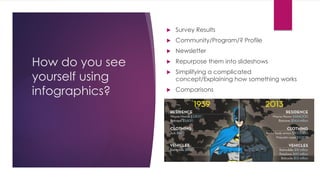
How do you see
yourself using
infographics?
 Survey Results
 Community/Program/? Profile
 Newsletter
 Repurpose them into slideshows
 Simplifying a complicated
concept/Explaining how something works
 Comparisons
What's an infographic?
An infographic is a basically an artistic representation of data and information
using different elements (graphs, pictures, diagrams, narrative, timelines,
check lists, etc.)
The purpose of an infographic is to translate a topic or idea into a form of
visual content. Therefore, before you populate your infographic, step back
and ask yourself a few questions:
 What is the purpose?
 Who is going to be my audience?
 What messages do I want to portray to the viewers?
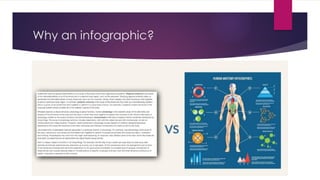
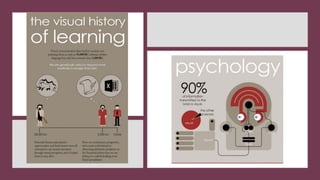
Why an infographic?
Types of Infographics: Which is right for you?
1. Visualized Article: Takes an otherwise lengthy piece of writing and makes it
visual. This makes it easier to understand, helping it to get shared.
2. Flowchart: Can answer a specific question by giving choices to the reader
so they reach the right answer for them.
3. Timeline: Made up of chronological dates that are visualized to make the
graphic interesting and shareable.
4. Useful Bait: Explains something or answers a question by visually showing
how to do it/how it’s done.
Types of Infographics (Cont.)
5. Versus Infographic: Compares two things and places them in a head-to-
head comparison so we can visually see their differences.
6. Number Crunch: Describes an infographic which oozes impressive numbers
and is filled with data and statistics to visualize.
7. Photo Infographic: Uses photos to visualize the content to tell the story.
8. Data Vis: Turns information into something visually creative and appealing,
making them unique and interesting.
Source: https://piktochart.com/blog/8-types-of-infographics-which-right-for-you/
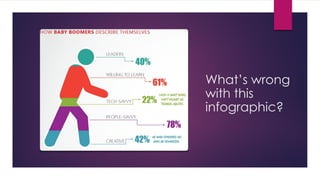
What’s wrong
with this
infographic?
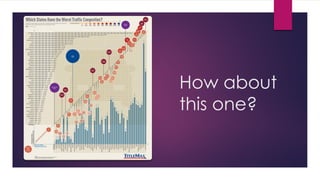
How about
this one?
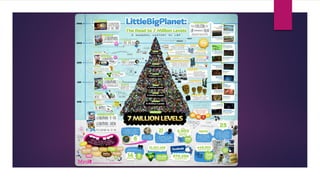
Much better
6 Things to do before starting
 Evaluate your idea
 Who is your audience
 Type of messaging
 Explaining
 Narrative vs picture
 Do your research
 Am I bringing anything new to the table?
 Create an outline
 Draw a rough draft
 Gather your assets
 Icons
 Images
 Photos
 Logo
 Data for charts
 Pick your template type
Building an infographic
 Piktochart.com
 Review buttons and functions on piktochart
 Exporting features
 Printing considerations
Tools
 Creating Infographics:
 Infogram
 Easel.ly
 Piktochart
 Venngage
 Snappa
 Canva
 Visme
 Visualizations:
 Wordle (Word
clouds)
 Creately (Diagrams)
 Kartograph (Maps)
 Animaker (Vids)
 Inspiration:
 Google
 Pinterest
 Templates
 Icons:
 Noun Project
 Mind the Graph
 Freepik
 Iconfinder
 Graphicburger
Resources
 Infographics to help with your infographics
 5 Rules for infographic success
 Golden rules of data visualization
 Infographic layout cheat sheet
Questions

Infographics_101_Training_June_2019_1-min_1.pdf

  • 1.
    Infographics 101 JANUARY 2019 NOCEOFFICE OF INSTITUTIONAL RESEARCH & PLANNING
  • 2.
  • 3.
    How do yousee yourself using infographics?  Survey Results  Community/Program/? Profile  Newsletter  Repurpose them into slideshows  Simplifying a complicated concept/Explaining how something works  Comparisons
  • 4.
    What's an infographic? Aninfographic is a basically an artistic representation of data and information using different elements (graphs, pictures, diagrams, narrative, timelines, check lists, etc.) The purpose of an infographic is to translate a topic or idea into a form of visual content. Therefore, before you populate your infographic, step back and ask yourself a few questions:  What is the purpose?  Who is going to be my audience?  What messages do I want to portray to the viewers?
  • 5.
  • 7.
    Types of Infographics:Which is right for you? 1. Visualized Article: Takes an otherwise lengthy piece of writing and makes it visual. This makes it easier to understand, helping it to get shared. 2. Flowchart: Can answer a specific question by giving choices to the reader so they reach the right answer for them. 3. Timeline: Made up of chronological dates that are visualized to make the graphic interesting and shareable. 4. Useful Bait: Explains something or answers a question by visually showing how to do it/how it’s done.
  • 8.
    Types of Infographics(Cont.) 5. Versus Infographic: Compares two things and places them in a head-to- head comparison so we can visually see their differences. 6. Number Crunch: Describes an infographic which oozes impressive numbers and is filled with data and statistics to visualize. 7. Photo Infographic: Uses photos to visualize the content to tell the story. 8. Data Vis: Turns information into something visually creative and appealing, making them unique and interesting. Source: https://piktochart.com/blog/8-types-of-infographics-which-right-for-you/
  • 10.
  • 11.
  • 13.
  • 14.
    6 Things todo before starting  Evaluate your idea  Who is your audience  Type of messaging  Explaining  Narrative vs picture  Do your research  Am I bringing anything new to the table?  Create an outline  Draw a rough draft  Gather your assets  Icons  Images  Photos  Logo  Data for charts  Pick your template type
  • 15.
    Building an infographic Piktochart.com  Review buttons and functions on piktochart  Exporting features  Printing considerations
  • 16.
    Tools  Creating Infographics: Infogram  Easel.ly  Piktochart  Venngage  Snappa  Canva  Visme  Visualizations:  Wordle (Word clouds)  Creately (Diagrams)  Kartograph (Maps)  Animaker (Vids)  Inspiration:  Google  Pinterest  Templates  Icons:  Noun Project  Mind the Graph  Freepik  Iconfinder  Graphicburger
  • 17.
    Resources  Infographics tohelp with your infographics  5 Rules for infographic success  Golden rules of data visualization  Infographic layout cheat sheet
  • 18.