Copyright © UShareSoft 2014Copyright © UShareSoft 2014
Look Beyond the
Cloud
Industrializing the Creation of Machine Images & Docker
Containers for Cloud Environments
Joris Bremond, Software Development Engineer,
UShareSoft
Copyright
© UShareSoft 2015
Copyright
© UShareSoft 2015
www.usharesoft.com
@usharesoft
www.usharesoft.com
@usharesoft
22
What is ?
Copyright
© UShareSoft 2015
Copyright
© UShareSoft 2015
www.usharesoft.com
@usharesoft
www.usharesoft.com
@usharesoft
33
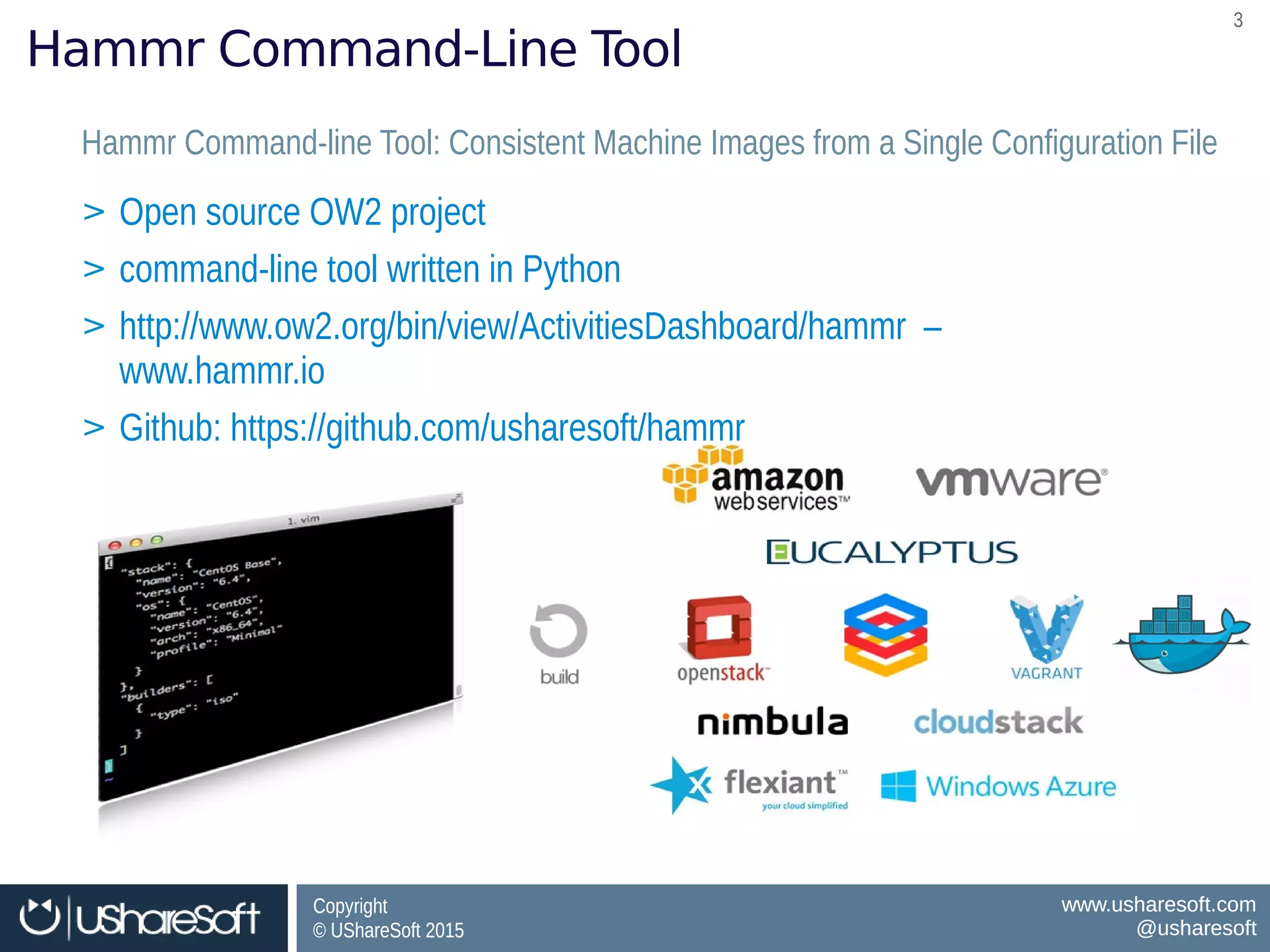
Hammr Command-Line Tool
Hammr Command-line Tool: Consistent Machine Images from a Single Configuration FileHammr Command-line Tool: Consistent Machine Images from a Single Configuration File
> Open source OW2 project
> command-line tool written in Python
> http://www.ow2.org/bin/view/ActivitiesDashboard/hammr –
www.hammr.io
> Github: https://github.com/usharesoft/hammr
> Open source OW2 project
> command-line tool written in Python
> http://www.ow2.org/bin/view/ActivitiesDashboard/hammr –
www.hammr.io
> Github: https://github.com/usharesoft/hammr
Copyright
© UShareSoft 2015
Copyright
© UShareSoft 2015
www.usharesoft.com
@usharesoft
www.usharesoft.com
@usharesoft
44
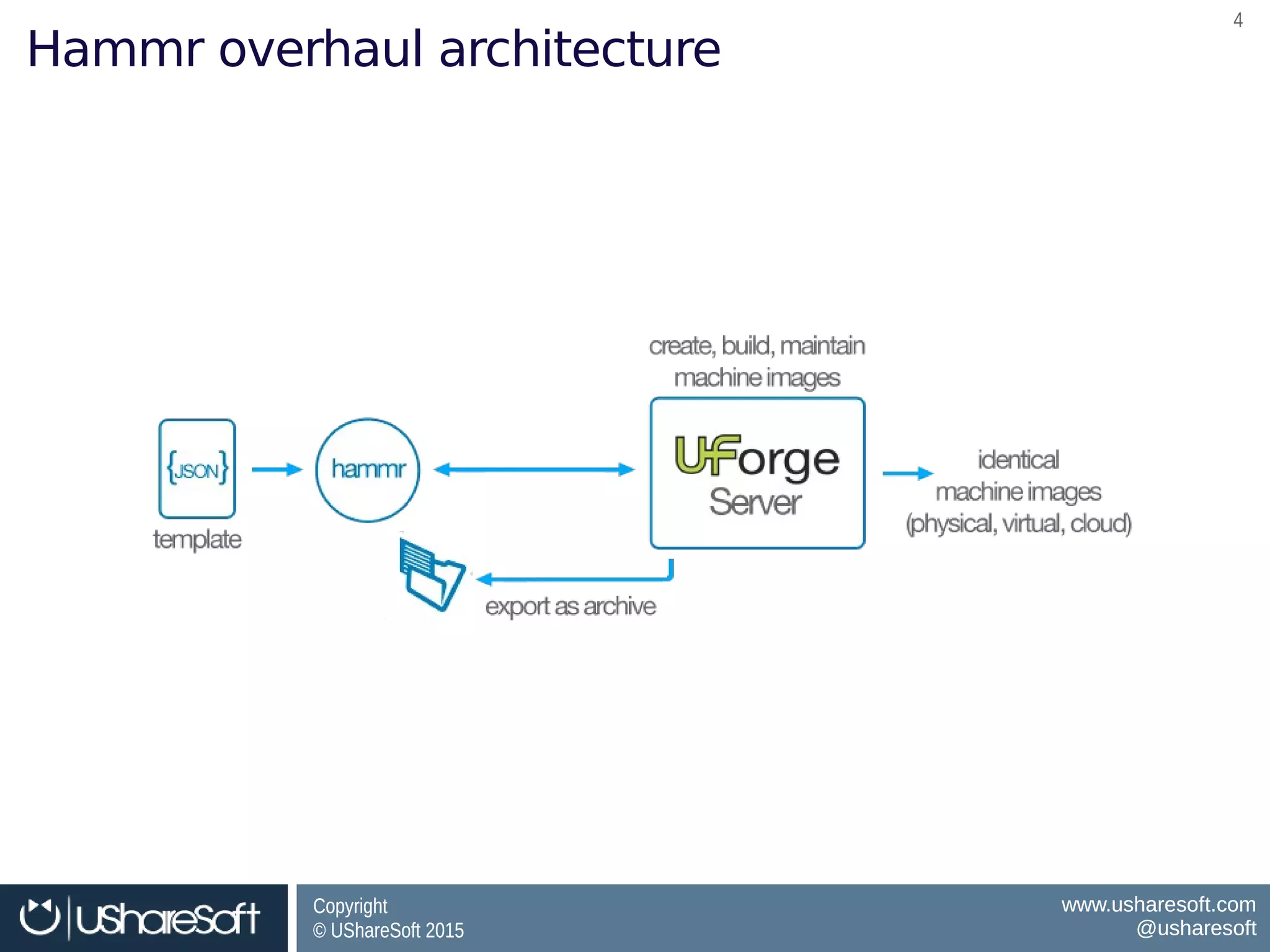
Hammr overhaul architecture
Copyright
© UShareSoft 2015
Copyright
© UShareSoft 2015
www.usharesoft.com
@usharesoft
www.usharesoft.com
@usharesoft
55
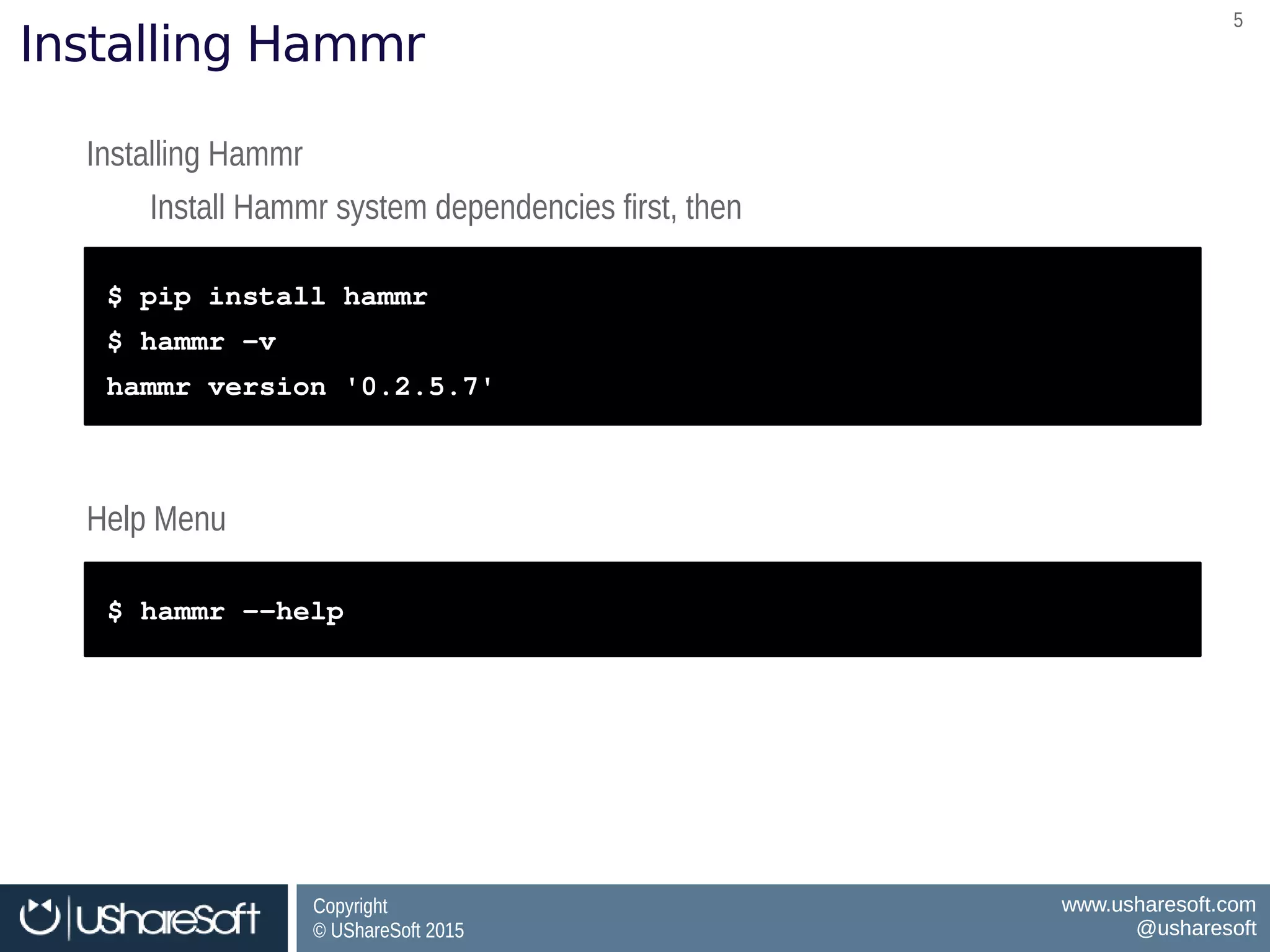
Installing Hammr
Installing Hammr
Install Hammr system dependencies first, then
Installing Hammr
Install Hammr system dependencies first, then
$ pip install hammr
$ hammr –v
hammr version '0.2.5.7'
$ pip install hammr
$ hammr –v
hammr version '0.2.5.7'
Help MenuHelp Menu
$ hammr ­­help$ hammr ­­help
Copyright
© UShareSoft 2015
Copyright
© UShareSoft 2015
www.usharesoft.com
@usharesoft
www.usharesoft.com
@usharesoft
66
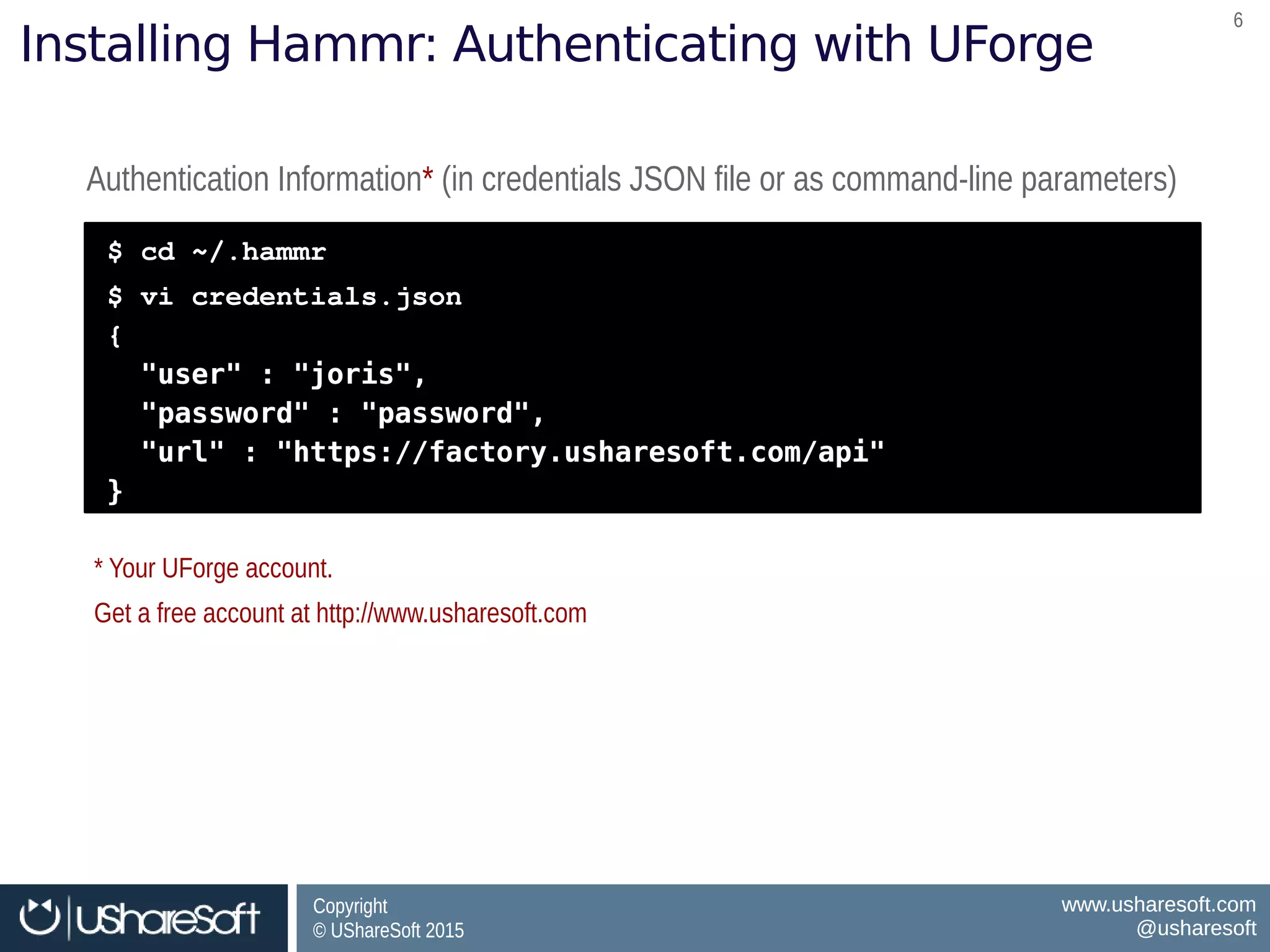
Installing Hammr: Authenticating with UForge
Authentication Information* (in credentials JSON file or as command-line parameters)Authentication Information* (in credentials JSON file or as command-line parameters)
$ cd ~/.hammr
$ vi credentials.json
{
"user" : "joris",
"password" : "password",
"url" : "https://factory.usharesoft.com/api"
}
$ cd ~/.hammr
$ vi credentials.json
{
"user" : "joris",
"password" : "password",
"url" : "https://factory.usharesoft.com/api"
}
* Your UForge account.
Get a free account at http://www.usharesoft.com
* Your UForge account.
Get a free account at http://www.usharesoft.com
Copyright
© UShareSoft 2015
Copyright
© UShareSoft 2015
www.usharesoft.com
@usharesoft
www.usharesoft.com
@usharesoft
77
Creating &
Managing
Your Stacks
Copyright
© UShareSoft 2015
Copyright
© UShareSoft 2015
www.usharesoft.com
@usharesoft
www.usharesoft.com
@usharesoft
88
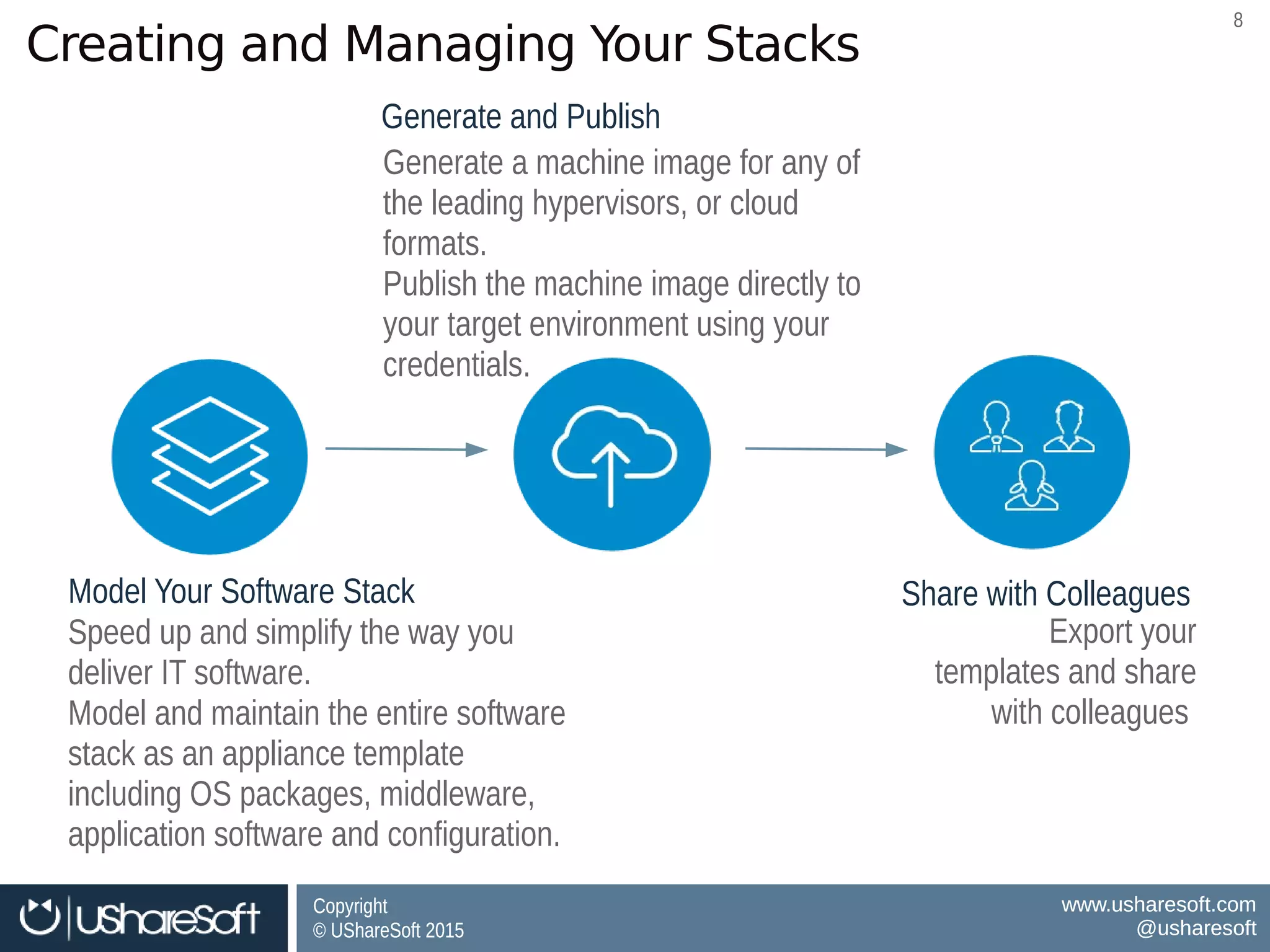
Creating and Managing Your Stacks
Model Your Software StackModel Your Software Stack
Generate and PublishGenerate and Publish
Speed up and simplify the way you
deliver IT software.
Model and maintain the entire software
stack as an appliance template
including OS packages, middleware,
application software and configuration.
Speed up and simplify the way you
deliver IT software.
Model and maintain the entire software
stack as an appliance template
including OS packages, middleware,
application software and configuration.
Generate a machine image for any of
the leading hypervisors, or cloud
formats.
Publish the machine image directly to
your target environment using your
credentials.
Generate a machine image for any of
the leading hypervisors, or cloud
formats.
Publish the machine image directly to
your target environment using your
credentials.
Share with ColleaguesShare with Colleagues
Export your
templates and share
with colleagues
Export your
templates and share
with colleagues
Copyright
© UShareSoft 2015
Copyright
© UShareSoft 2015
www.usharesoft.com
@usharesoft
www.usharesoft.com
@usharesoft
99
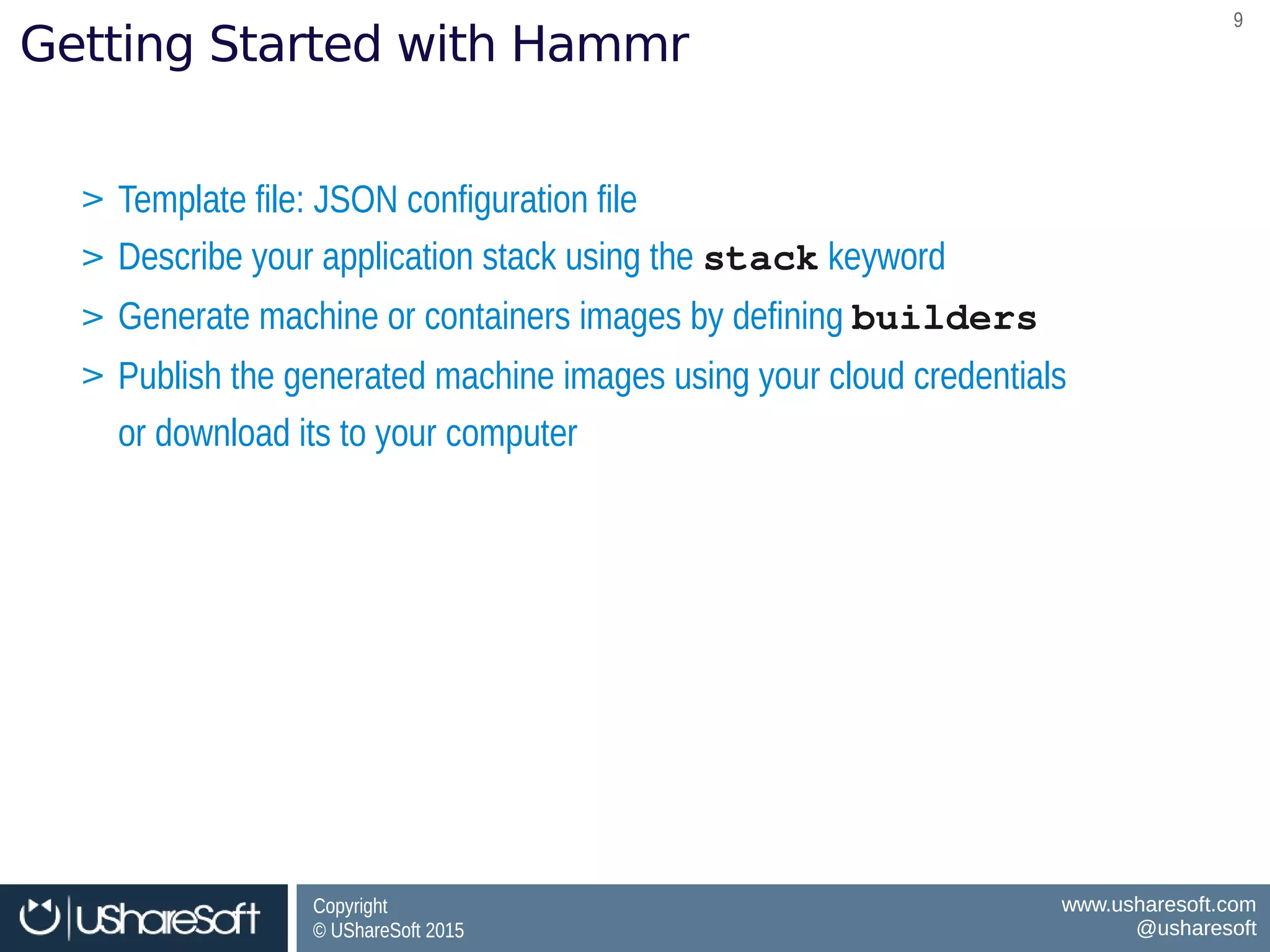
Getting Started with Hammr
> Template file: JSON configuration file
> Describe your application stack using the stack keyword
> Generate machine or containers images by defining builders
> Publish the generated machine images using your cloud credentials
or download its to your computer
> Template file: JSON configuration file
> Describe your application stack using the stack keyword
> Generate machine or containers images by defining builders
> Publish the generated machine images using your cloud credentials
or download its to your computer
Copyright
© UShareSoft 2015
Copyright
© UShareSoft 2015
www.usharesoft.com
@usharesoft
www.usharesoft.com
@usharesoft
1010
Defining your Stack: Example nginx
$ vi nginx-template.json
{
"stack": {
"name": "nginx",
"version": "1.0",
"os": {
"name": "Ubuntu",
"version": "12.04",
"arch": "x86_64",
"profile": "Minimal",
"pkgs": [
{
"name": "nginx"
}
]
},
"installation": {
"diskSize": 12288
}
}
}
$ vi nginx-template.json
{
"stack": {
"name": "nginx",
"version": "1.0",
"os": {
"name": "Ubuntu",
"version": "12.04",
"arch": "x86_64",
"profile": "Minimal",
"pkgs": [
{
"name": "nginx"
}
]
},
"installation": {
"diskSize": 12288
}
}
}
stack keyword defining the content of your stackstack keyword defining the content of your stack
os keyword defining the os profile and packagesos keyword defining the os profile and packages
installation keyword defining the “install” parametersinstallation keyword defining the “install” parameters
Copyright
© UShareSoft 2015
Copyright
© UShareSoft 2015
www.usharesoft.com
@usharesoft
www.usharesoft.com
@usharesoft
1111
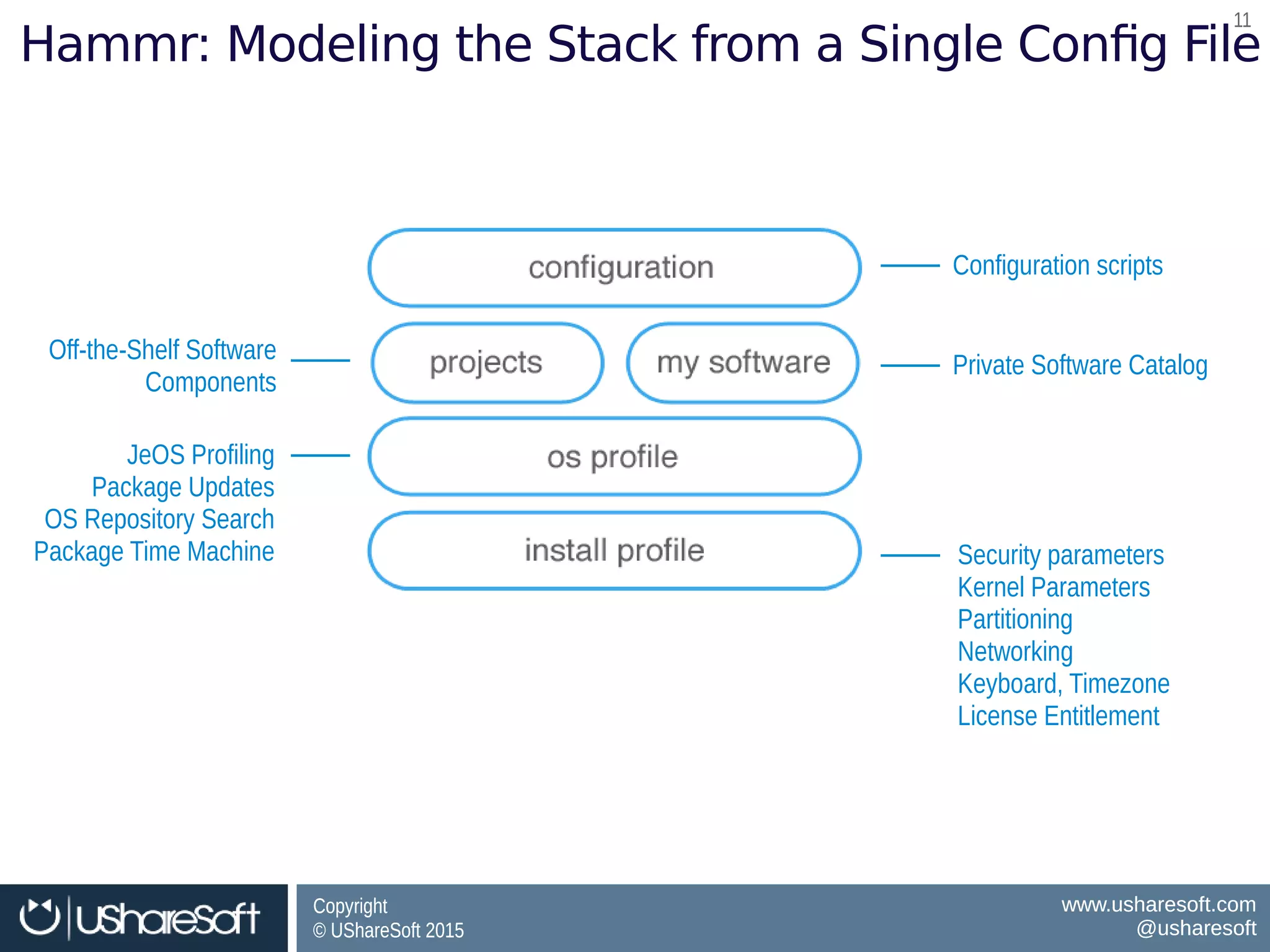
Hammr: Modeling the Stack from a Single Config File
Security parameters
Kernel Parameters
Partitioning
Networking
Keyboard, Timezone
License Entitlement
Security parameters
Kernel Parameters
Partitioning
Networking
Keyboard, Timezone
License Entitlement
JeOS Profiling
Package Updates
OS Repository Search
Package Time Machine
JeOS Profiling
Package Updates
OS Repository Search
Package Time Machine
Off-the-Shelf Software
Components
Off-the-Shelf Software
Components
Private Software CatalogPrivate Software Catalog
Configuration scriptsConfiguration scripts
Copyright
© UShareSoft 2015
Copyright
© UShareSoft 2015
www.usharesoft.com
@usharesoft
www.usharesoft.com
@usharesoft
1212
Creating the Template: Example nginx
Verify the JSON syntax: template validateVerify the JSON syntax: template validate
$ hammr template validate ­­file nginx­template.json
Validating the template file [/Users/james/nginx­template.json] ...
OK: Syntax of template file [/Users/james/nginx­template.json] is ok
$ hammr template validate ­­file nginx­template.json
Validating the template file [/Users/james/nginx­template.json] ...
OK: Syntax of template file [/Users/james/nginx­template.json] is ok
Create the Template: template createCreate the Template: template create
$ hammr template create ­­file nginx­template.json
Validating the template file [/Users/james/nginx­template.json] ...
OK: Syntax of template file [/Users/james/nginx­template.json] is ok
Creating template from temporary [/var/folders/f6/8kljm7cxgn/T/hammr­15888/archive.tar.gz] archive ...
100%|#############################################################################|
OK: Template create: DONE
Template URI: users/root/appliances/898
Template Id : 898
$ hammr template create ­­file nginx­template.json
Validating the template file [/Users/james/nginx­template.json] ...
OK: Syntax of template file [/Users/james/nginx­template.json] is ok
Creating template from temporary [/var/folders/f6/8kljm7cxgn/T/hammr­15888/archive.tar.gz] archive ...
100%|#############################################################################|
OK: Template create: DONE
Template URI: users/root/appliances/898
Template Id : 898
Copyright
© UShareSoft 2015
Copyright
© UShareSoft 2015
www.usharesoft.com
@usharesoft
www.usharesoft.com
@usharesoft
1313
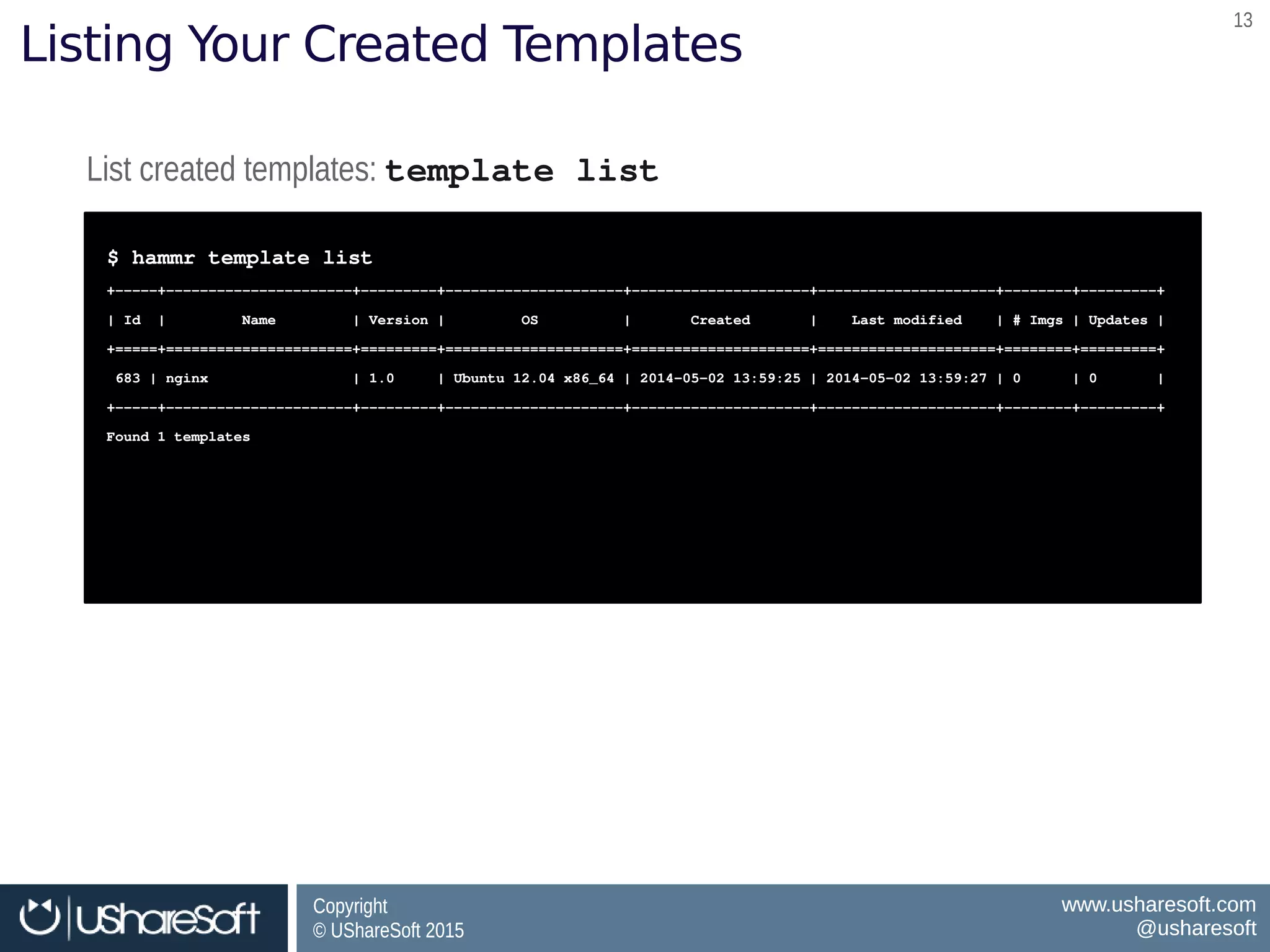
Listing Your Created Templates
List created templates: template listList created templates: template list
$ hammr template list
+­­­­­+­­­­­­­­­­­­­­­­­­­­­­+­­­­­­­­­+­­­­­­­­­­­­­­­­­­­­­+­­­­­­­­­­­­­­­­­­­­­+­­­­­­­­­­­­­­­­­­­­­+­­­­­­­­+­­­­­­­­­+
| Id  |         Name         | Version |         OS          |       Created       |    Last modified    | # Imgs | Updates |
+=====+======================+=========+=====================+=====================+=====================+========+=========+
 683 | nginx                 | 1.0     | Ubuntu 12.04 x86_64 | 2014­05­02 13:59:25 | 2014­05­02 13:59:27 | 0      | 0       | 
+­­­­­+­­­­­­­­­­­­­­­­­­­­­­+­­­­­­­­­+­­­­­­­­­­­­­­­­­­­­­+­­­­­­­­­­­­­­­­­­­­­+­­­­­­­­­­­­­­­­­­­­­+­­­­­­­­+­­­­­­­­­+
Found 1 templates
$ hammr template list
+­­­­­+­­­­­­­­­­­­­­­­­­­­­­+­­­­­­­­­+­­­­­­­­­­­­­­­­­­­­­+­­­­­­­­­­­­­­­­­­­­­+­­­­­­­­­­­­­­­­­­­­­+­­­­­­­­+­­­­­­­­­+
| Id  |         Name         | Version |         OS          |       Created       |    Last modified    | # Imgs | Updates |
+=====+======================+=========+=====================+=====================+=====================+========+=========+
 683 | nginx                 | 1.0     | Ubuntu 12.04 x86_64 | 2014­05­02 13:59:25 | 2014­05­02 13:59:27 | 0      | 0       | 
+­­­­­+­­­­­­­­­­­­­­­­­­­­­­+­­­­­­­­­+­­­­­­­­­­­­­­­­­­­­­+­­­­­­­­­­­­­­­­­­­­­+­­­­­­­­­­­­­­­­­­­­­+­­­­­­­­+­­­­­­­­­+
Found 1 templates
Copyright
© UShareSoft 2015
Copyright
© UShareSoft 2015
www.usharesoft.com
@usharesoft
www.usharesoft.com
@usharesoft
1414
Defining a Builder: Machine Image Format
$ vi nginx-template.json
...stack section omitted
{
"builders": [
{
"type": "openstack",
"account": {
"file": "/home/joris/accounts/openstack-
account.json"
},
"tenant": “opencloudware”,
"image-name": "test-nginx",
"description": "joris test nginx image"
}
]
}
$ vi nginx-template.json
...stack section omitted
{
"builders": [
{
"type": "openstack",
"account": {
"file": "/home/joris/accounts/openstack-
account.json"
},
"tenant": “opencloudware”,
"image-name": "test-nginx",
"description": "joris test nginx image"
}
]
}
builders keyword defining all the machine
images to build
builders keyword defining all the machine
images to build
Image format to buildImage format to build
Machine image registration informationMachine image registration information
Cloud account credentialsCloud account credentials
Copyright
© UShareSoft 2015
Copyright
© UShareSoft 2015
www.usharesoft.com
@usharesoft
www.usharesoft.com
@usharesoft
1515
Defining a Builder: Machine Image Format
$ vi nginx-template.json
...stack section omitted
{
"builders": [
{
"type": "openstack",
"account": {
"file": "/home/joris/accounts/openstack-
account.json"
},
"tenant": “opencloudware”,
"image-name": "test-nginx",
"description": "joris test nginx image"
}
]
}
$ vi nginx-template.json
...stack section omitted
{
"builders": [
{
"type": "openstack",
"account": {
"file": "/home/joris/accounts/openstack-
account.json"
},
"tenant": “opencloudware”,
"image-name": "test-nginx",
"description": "joris test nginx image"
}
]
}
Cloud account credentialsCloud account credentials
$ vi openstack-account.json
{
"accounts": [
{
"type": "openstack",
"name": "My OpenStack Account",
"endpoint": "http://ow2-04.xsalto.net:9292/v1",
"keystoneEndpoint":
"http://ow2-04.xsalto.net:5000/v2.0",
"username": "test",
"password": "password"
}
]
}
$ vi openstack-account.json
{
"accounts": [
{
"type": "openstack",
"name": "My OpenStack Account",
"endpoint": "http://ow2-04.xsalto.net:9292/v1",
"keystoneEndpoint":
"http://ow2-04.xsalto.net:5000/v2.0",
"username": "test",
"password": "password"
}
]
}
Copyright
© UShareSoft 2015
Copyright
© UShareSoft 2015
www.usharesoft.com
@usharesoft
www.usharesoft.com
@usharesoft
1616
Generating Machine Image(s)
Create any cloud account first: account createCreate any cloud account first: account create
$ hammr account create ­­file openstack­account.json
Validating the template file [openstack­account.json] ...
OK: Syntax of template file [openstack­account.json] is ok
Create account for 'ow2stack'...
OK: Account create successfully for [openstack]
$ hammr account create ­­file openstack­account.json
Validating the template file [openstack­account.json] ...
OK: Syntax of template file [openstack­account.json] is ok
Create account for 'ow2stack'...
OK: Account create successfully for [openstack]
Generate the machine images: template buildGenerate the machine images: template build
$ hammr template build ­­file nginx­template.json
Validating the template file [nginx­template.json] ...
Generating 'openstack' image (1/1)
|>>>>>>>>>>>>>>>>>>>>>>>>>>>>>>>>>| 100%: Done, created on ... |<<<<<<<<<<<<<<<<<<<<<<<<<<<<<<<<|
OK: Generation 'openstack' ok
Image URI: users/root/appliances/21/images/47
Image Id : 47
$ hammr template build ­­file nginx­template.json
Validating the template file [nginx­template.json] ...
Generating 'openstack' image (1/1)
|>>>>>>>>>>>>>>>>>>>>>>>>>>>>>>>>>| 100%: Done, created on ... |<<<<<<<<<<<<<<<<<<<<<<<<<<<<<<<<|
OK: Generation 'openstack' ok
Image URI: users/root/appliances/21/images/47
Image Id : 47
Image ID: 47, used to register this generated machine image to the target cloud environmentImage ID: 47, used to register this generated machine image to the target cloud environment
Copyright
© UShareSoft 2015
Copyright
© UShareSoft 2015
www.usharesoft.com
@usharesoft
www.usharesoft.com
@usharesoft
1717
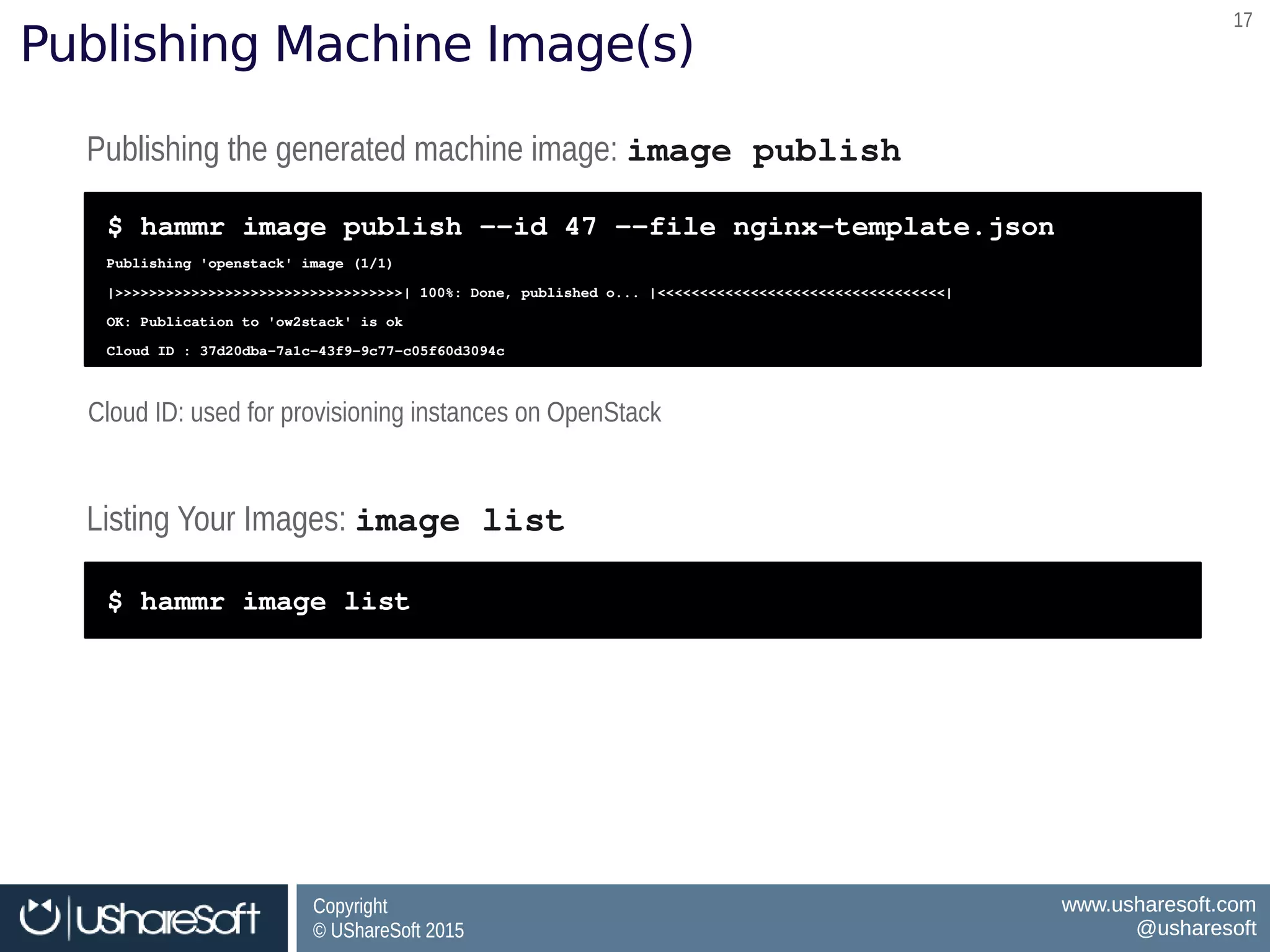
Publishing Machine Image(s)
Publishing the generated machine image: image publishPublishing the generated machine image: image publish
$ hammr image publish ­­id 47 ­­file nginx­template.json
Publishing 'openstack' image (1/1)
|>>>>>>>>>>>>>>>>>>>>>>>>>>>>>>>>>>| 100%: Done, published o... |<<<<<<<<<<<<<<<<<<<<<<<<<<<<<<<<<<|
OK: Publication to 'ow2stack' is ok
Cloud ID : 37d20dba­7a1c­43f9­9c77­c05f60d3094c
$ hammr image publish ­­id 47 ­­file nginx­template.json
Publishing 'openstack' image (1/1)
|>>>>>>>>>>>>>>>>>>>>>>>>>>>>>>>>>>| 100%: Done, published o... |<<<<<<<<<<<<<<<<<<<<<<<<<<<<<<<<<<|
OK: Publication to 'ow2stack' is ok
Cloud ID : 37d20dba­7a1c­43f9­9c77­c05f60d3094c
Listing Your Images: image list Listing Your Images: image list 
$ hammr image list$ hammr image list
Cloud ID: used for provisioning instances on OpenStackCloud ID: used for provisioning instances on OpenStack
Copyright
© UShareSoft 2015
Copyright
© UShareSoft 2015
www.usharesoft.com
@usharesoft
www.usharesoft.com
@usharesoft
1818
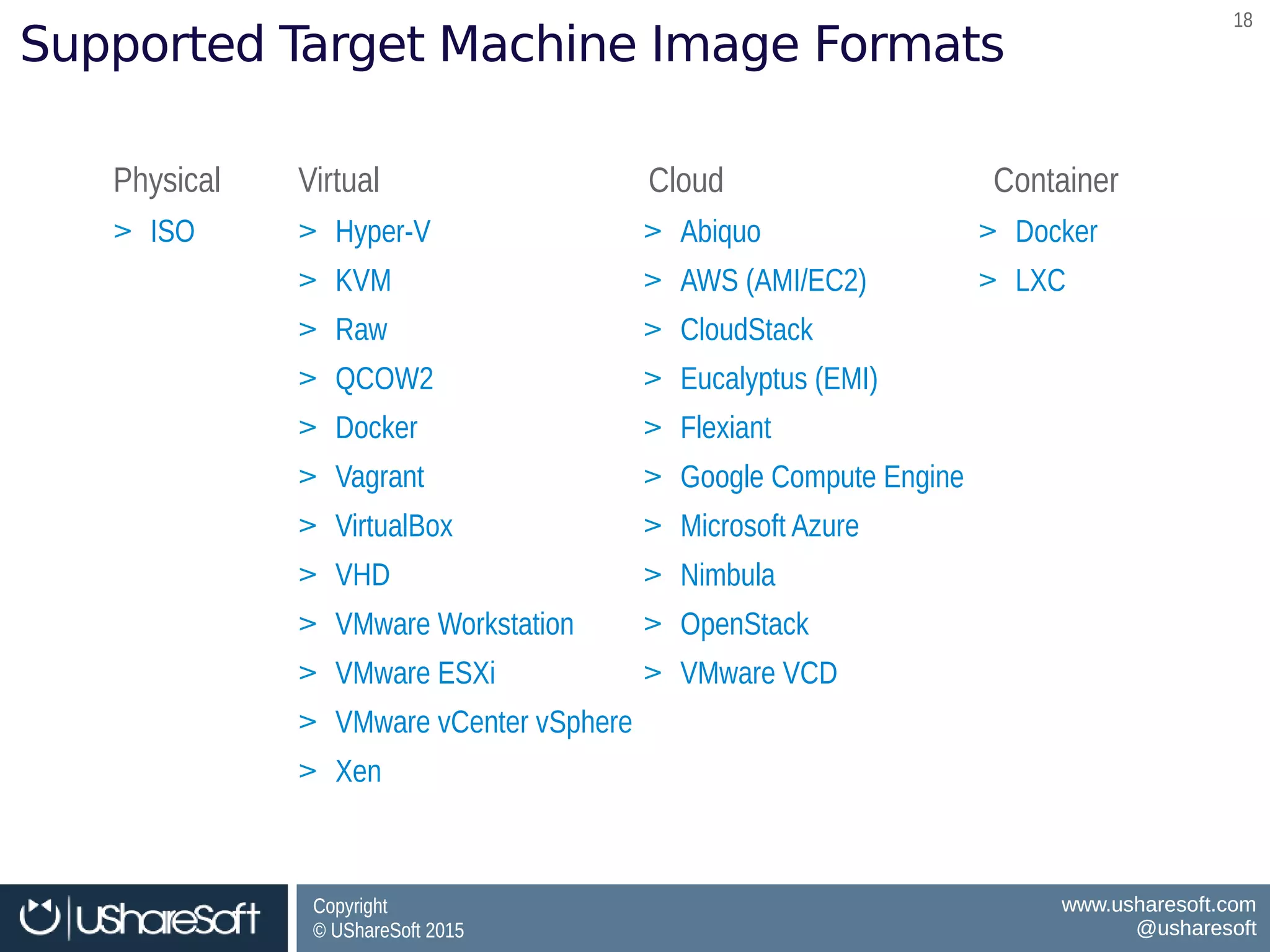
Supported Target Machine Image Formats
> ISO> ISO > Hyper-V
> KVM
> Raw
> QCOW2
> Docker
> Vagrant
> VirtualBox
> VHD
> VMware Workstation
> VMware ESXi
> VMware vCenter vSphere
> Xen
> Hyper-V
> KVM
> Raw
> QCOW2
> Docker
> Vagrant
> VirtualBox
> VHD
> VMware Workstation
> VMware ESXi
> VMware vCenter vSphere
> Xen
> Abiquo
> AWS (AMI/EC2)
> CloudStack
> Eucalyptus (EMI)
> Flexiant
> Google Compute Engine
> Microsoft Azure
> Nimbula
> OpenStack
> VMware VCD
> Abiquo
> AWS (AMI/EC2)
> CloudStack
> Eucalyptus (EMI)
> Flexiant
> Google Compute Engine
> Microsoft Azure
> Nimbula
> OpenStack
> VMware VCD
PhysicalPhysical VirtualVirtual CloudCloud ContainerContainer
> Docker
> LXC
> Docker
> LXC
Copyright
© UShareSoft 2015
Copyright
© UShareSoft 2015
www.usharesoft.com
@usharesoft
www.usharesoft.com
@usharesoft
1919
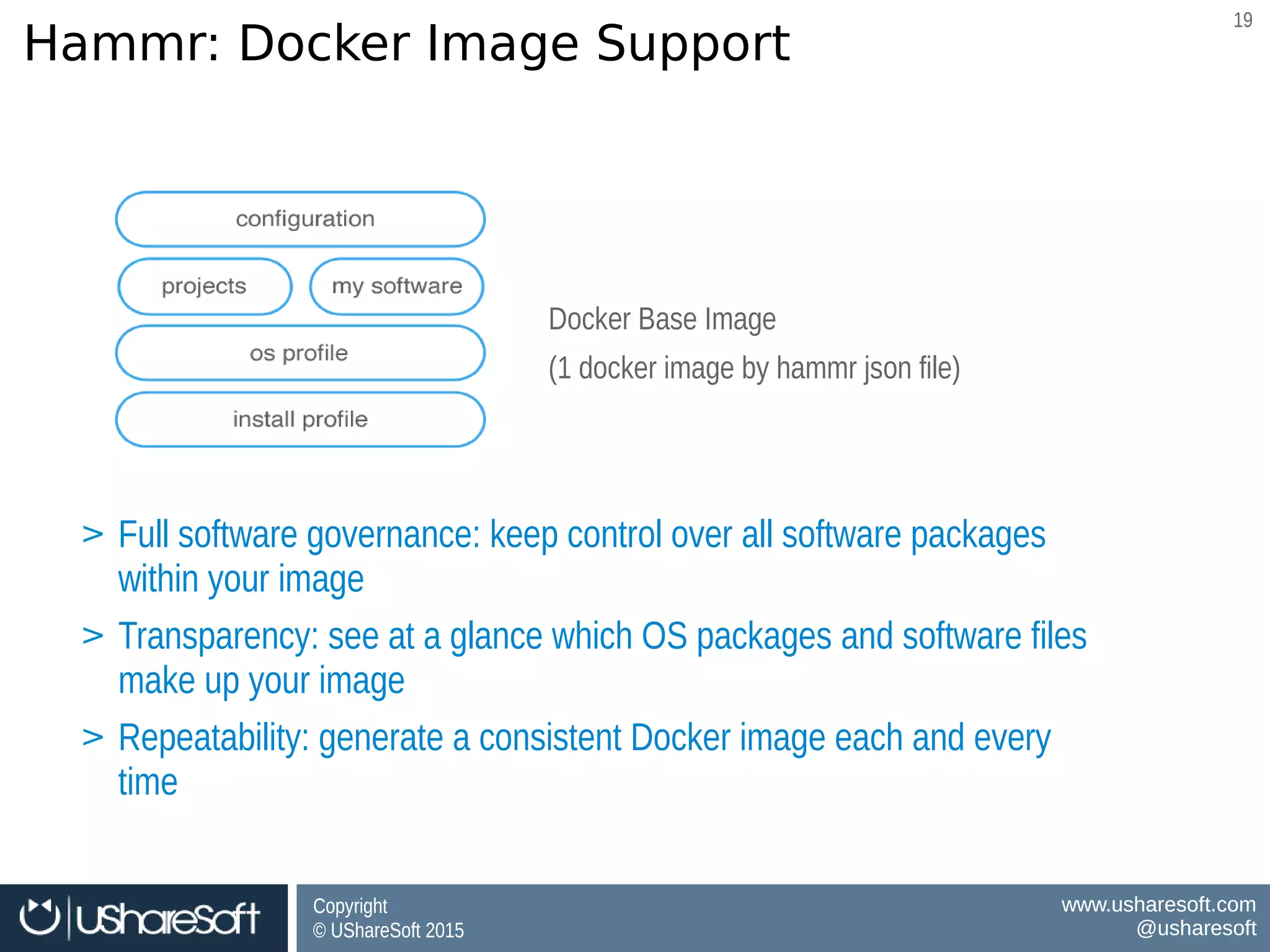
Hammr: Docker Image Support
Docker Base Image
(1 docker image by hammr json file)
Docker Base Image
(1 docker image by hammr json file)
BenefitsBenefits
Software governance for Docker Images
Consistency between VM ↔ Docker Images
Software governance for Docker Images
Consistency between VM ↔ Docker Images
> Full software governance: keep control over all software packages
within your image
> Transparency: see at a glance which OS packages and software files
make up your image
> Repeatability: generate a consistent Docker image each and every
time
> Full software governance: keep control over all software packages
within your image
> Transparency: see at a glance which OS packages and software files
make up your image
> Repeatability: generate a consistent Docker image each and every
time
Copyright
© UShareSoft 2015
Copyright
© UShareSoft 2015
www.usharesoft.com
@usharesoft
www.usharesoft.com
@usharesoft
2020
Migration
Copyright
© UShareSoft 2015
Copyright
© UShareSoft 2015
www.usharesoft.com
@usharesoft
www.usharesoft.com
@usharesoft
2121
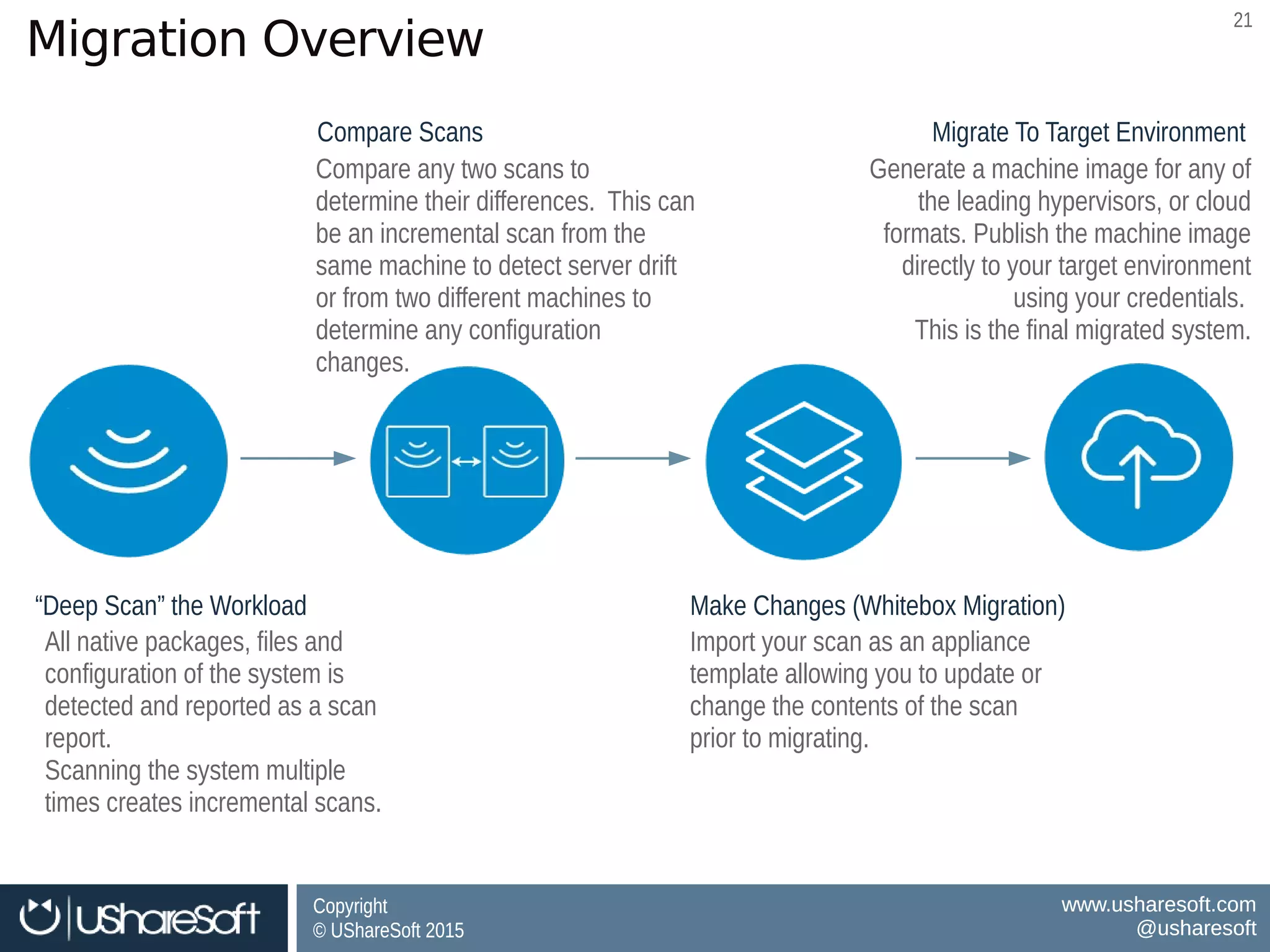
Migration Overview
Make Changes (Whitebox Migration)Make Changes (Whitebox Migration)
Import your scan as an appliance
template allowing you to update or
change the contents of the scan
prior to migrating.
Import your scan as an appliance
template allowing you to update or
change the contents of the scan
prior to migrating.
Migrate To Target EnvironmentMigrate To Target Environment
Generate a machine image for any of
the leading hypervisors, or cloud
formats. Publish the machine image
directly to your target environment
using your credentials.
This is the final migrated system.
Generate a machine image for any of
the leading hypervisors, or cloud
formats. Publish the machine image
directly to your target environment
using your credentials.
This is the final migrated system.
Compare ScansCompare Scans
Compare any two scans to
determine their differences. This can
be an incremental scan from the
same machine to detect server drift
or from two different machines to
determine any configuration
changes.
Compare any two scans to
determine their differences. This can
be an incremental scan from the
same machine to detect server drift
or from two different machines to
determine any configuration
changes.
“Deep Scan” the Workload“Deep Scan” the Workload
All native packages, files and
configuration of the system is
detected and reported as a scan
report.
Scanning the system multiple
times creates incremental scans.
All native packages, files and
configuration of the system is
detected and reported as a scan
report.
Scanning the system multiple
times creates incremental scans.
Copyright
© UShareSoft 2015
Copyright
© UShareSoft 2015
www.usharesoft.com
@usharesoft
www.usharesoft.com
@usharesoft
2222
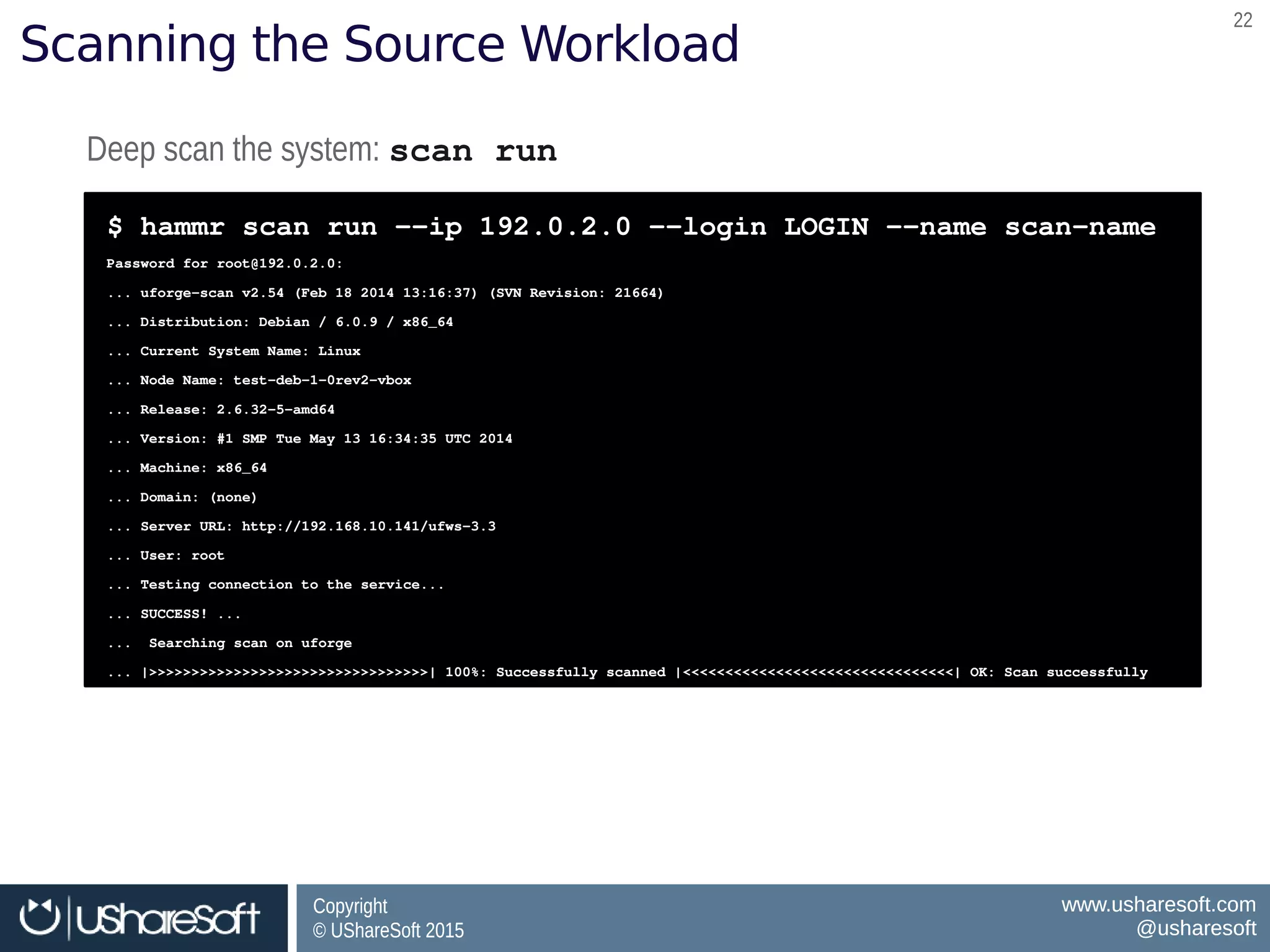
Scanning the Source Workload
Deep scan the system: scan run Deep scan the system: scan run 
$ hammr scan run ­­ip 192.0.2.0 ­­login LOGIN ­­name scan­name 
Password for root@192.0.2.0:  
... uforge­scan v2.54 (Feb 18 2014 13:16:37) (SVN Revision: 21664) 
... Distribution: Debian / 6.0.9 / x86_64 
... Current System Name: Linux 
... Node Name: test­deb­1­0rev2­vbox 
... Release: 2.6.32­5­amd64 
... Version: #1 SMP Tue May 13 16:34:35 UTC 2014 
... Machine: x86_64 
... Domain: (none) 
... Server URL: http://192.168.10.141/ufws­3.3 
... User: root 
... Testing connection to the service... 
... SUCCESS! ...  
...  Searching scan on uforge 
... |>>>>>>>>>>>>>>>>>>>>>>>>>>>>>>>>>| 100%: Successfully scanned |<<<<<<<<<<<<<<<<<<<<<<<<<<<<<<<<| OK: Scan successfully
$ hammr scan run ­­ip 192.0.2.0 ­­login LOGIN ­­name scan­name 
Password for root@192.0.2.0:  
... uforge­scan v2.54 (Feb 18 2014 13:16:37) (SVN Revision: 21664) 
... Distribution: Debian / 6.0.9 / x86_64 
... Current System Name: Linux 
... Node Name: test­deb­1­0rev2­vbox 
... Release: 2.6.32­5­amd64 
... Version: #1 SMP Tue May 13 16:34:35 UTC 2014 
... Machine: x86_64 
... Domain: (none) 
... Server URL: http://192.168.10.141/ufws­3.3 
... User: root 
... Testing connection to the service... 
... SUCCESS! ...  
...  Searching scan on uforge 
... |>>>>>>>>>>>>>>>>>>>>>>>>>>>>>>>>>| 100%: Successfully scanned |<<<<<<<<<<<<<<<<<<<<<<<<<<<<<<<<| OK: Scan successfully
Copyright
© UShareSoft 2015
Copyright
© UShareSoft 2015
www.usharesoft.com
@usharesoft
www.usharesoft.com
@usharesoft
2323
demo
Copyright
© UShareSoft 2015
Copyright
© UShareSoft 2015
www.usharesoft.com
@usharesoft
www.usharesoft.com
@usharesoft
2424
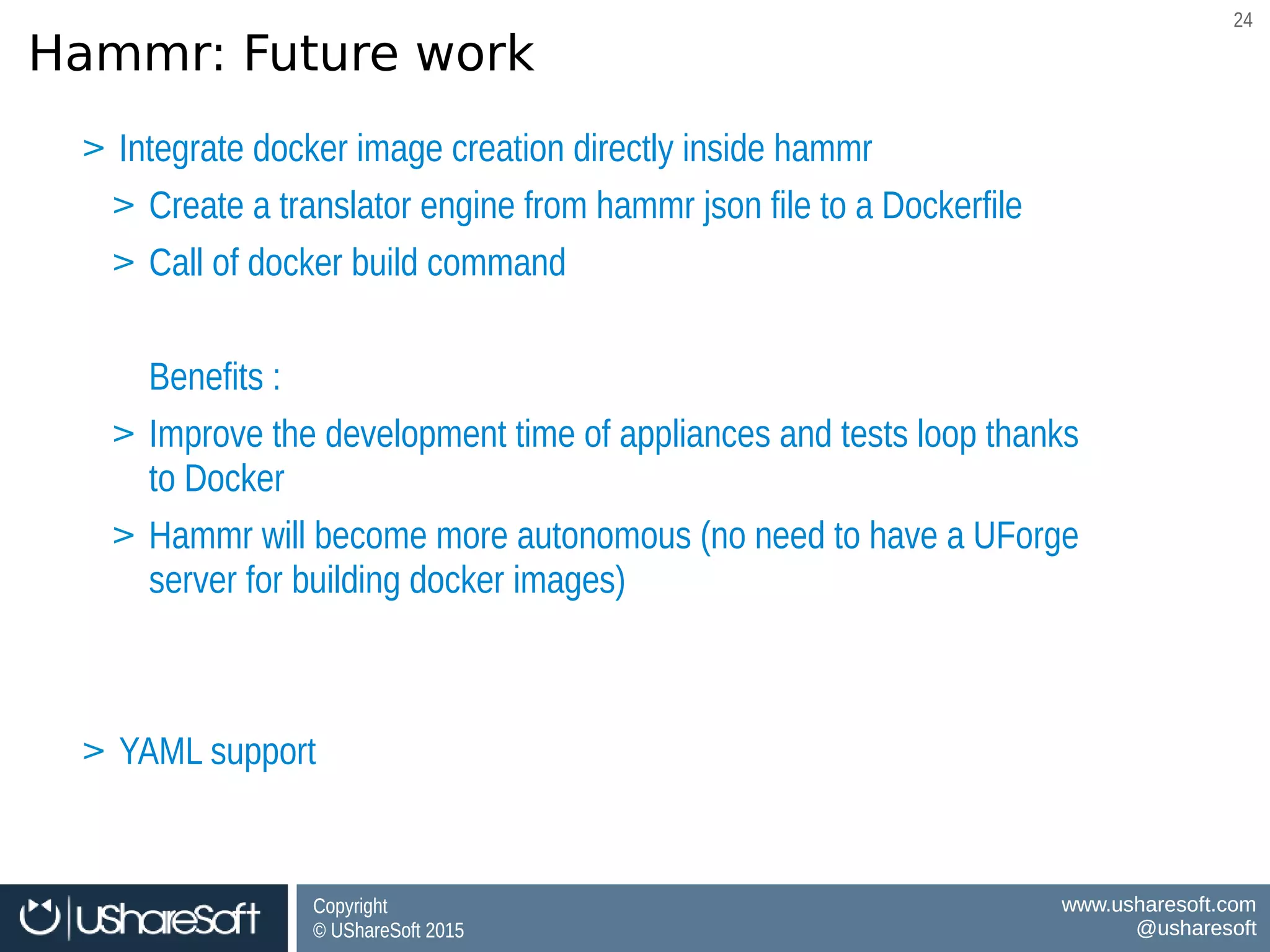
Hammr: Future work
BenefitsBenefits
Software governance for Docker Images
Consistency between VM ↔ Docker Images
Software governance for Docker Images
Consistency between VM ↔ Docker Images
> Integrate docker image creation directly inside hammr
> Create a translator engine from hammr json file to a Dockerfile
> Call of docker build command
Benefits :
> Improve the development time of appliances and tests loop thanks
to Docker
> Hammr will become more autonomous (no need to have a UForge
server for building docker images)
> YAML support
> Integrate docker image creation directly inside hammr
> Create a translator engine from hammr json file to a Dockerfile
> Call of docker build command
Benefits :
> Improve the development time of appliances and tests loop thanks
to Docker
> Hammr will become more autonomous (no need to have a UForge
server for building docker images)
> YAML support
Copyright
© UShareSoft 2015
Copyright
© UShareSoft 2015
www.usharesoft.com
@usharesoft
www.usharesoft.com
@usharesoft
2525
machine image & container builder
for the cloud
It's an open source OW2 project
Use it! Contributions welcome!
hammr.io
ow2.org/ActivitiesDashboard/hammr
https://github.com/usharesoft/hammr
Copyright © UShareSoft 2014Copyright © UShareSoft 2014
Joris Bremond
joris.bremond@usharesoft.com
www.usharesoft.com
@usharesoft

Industrializing the creation of machine images and Docker containers for cloud environments. OW2con'15, November 17, 2015

  • 1.
    Copyright © UShareSoft2014Copyright © UShareSoft 2014 Look Beyond the Cloud Industrializing the Creation of Machine Images & Docker Containers for Cloud Environments Joris Bremond, Software Development Engineer, UShareSoft
  • 2.
    Copyright © UShareSoft 2015 Copyright ©UShareSoft 2015 www.usharesoft.com @usharesoft www.usharesoft.com @usharesoft 22 What is ?
  • 3.
    Copyright © UShareSoft 2015 Copyright ©UShareSoft 2015 www.usharesoft.com @usharesoft www.usharesoft.com @usharesoft 33 Hammr Command-Line Tool Hammr Command-line Tool: Consistent Machine Images from a Single Configuration FileHammr Command-line Tool: Consistent Machine Images from a Single Configuration File > Open source OW2 project > command-line tool written in Python > http://www.ow2.org/bin/view/ActivitiesDashboard/hammr – www.hammr.io > Github: https://github.com/usharesoft/hammr > Open source OW2 project > command-line tool written in Python > http://www.ow2.org/bin/view/ActivitiesDashboard/hammr – www.hammr.io > Github: https://github.com/usharesoft/hammr
  • 4.
    Copyright © UShareSoft 2015 Copyright ©UShareSoft 2015 www.usharesoft.com @usharesoft www.usharesoft.com @usharesoft 44 Hammr overhaul architecture
  • 5.
    Copyright © UShareSoft 2015 Copyright ©UShareSoft 2015 www.usharesoft.com @usharesoft www.usharesoft.com @usharesoft 55 Installing Hammr Installing Hammr Install Hammr system dependencies first, then Installing Hammr Install Hammr system dependencies first, then $ pip install hammr $ hammr –v hammr version '0.2.5.7' $ pip install hammr $ hammr –v hammr version '0.2.5.7' Help MenuHelp Menu $ hammr ­­help$ hammr ­­help
  • 6.
    Copyright © UShareSoft 2015 Copyright ©UShareSoft 2015 www.usharesoft.com @usharesoft www.usharesoft.com @usharesoft 66 Installing Hammr: Authenticating with UForge Authentication Information* (in credentials JSON file or as command-line parameters)Authentication Information* (in credentials JSON file or as command-line parameters) $ cd ~/.hammr $ vi credentials.json { "user" : "joris", "password" : "password", "url" : "https://factory.usharesoft.com/api" } $ cd ~/.hammr $ vi credentials.json { "user" : "joris", "password" : "password", "url" : "https://factory.usharesoft.com/api" } * Your UForge account. Get a free account at http://www.usharesoft.com * Your UForge account. Get a free account at http://www.usharesoft.com
  • 7.
    Copyright © UShareSoft 2015 Copyright ©UShareSoft 2015 www.usharesoft.com @usharesoft www.usharesoft.com @usharesoft 77 Creating & Managing Your Stacks
  • 8.
    Copyright © UShareSoft 2015 Copyright ©UShareSoft 2015 www.usharesoft.com @usharesoft www.usharesoft.com @usharesoft 88 Creating and Managing Your Stacks Model Your Software StackModel Your Software Stack Generate and PublishGenerate and Publish Speed up and simplify the way you deliver IT software. Model and maintain the entire software stack as an appliance template including OS packages, middleware, application software and configuration. Speed up and simplify the way you deliver IT software. Model and maintain the entire software stack as an appliance template including OS packages, middleware, application software and configuration. Generate a machine image for any of the leading hypervisors, or cloud formats. Publish the machine image directly to your target environment using your credentials. Generate a machine image for any of the leading hypervisors, or cloud formats. Publish the machine image directly to your target environment using your credentials. Share with ColleaguesShare with Colleagues Export your templates and share with colleagues Export your templates and share with colleagues
  • 9.
    Copyright © UShareSoft 2015 Copyright ©UShareSoft 2015 www.usharesoft.com @usharesoft www.usharesoft.com @usharesoft 99 Getting Started with Hammr > Template file: JSON configuration file > Describe your application stack using the stack keyword > Generate machine or containers images by defining builders > Publish the generated machine images using your cloud credentials or download its to your computer > Template file: JSON configuration file > Describe your application stack using the stack keyword > Generate machine or containers images by defining builders > Publish the generated machine images using your cloud credentials or download its to your computer
  • 10.
    Copyright © UShareSoft 2015 Copyright ©UShareSoft 2015 www.usharesoft.com @usharesoft www.usharesoft.com @usharesoft 1010 Defining your Stack: Example nginx $ vi nginx-template.json { "stack": { "name": "nginx", "version": "1.0", "os": { "name": "Ubuntu", "version": "12.04", "arch": "x86_64", "profile": "Minimal", "pkgs": [ { "name": "nginx" } ] }, "installation": { "diskSize": 12288 } } } $ vi nginx-template.json { "stack": { "name": "nginx", "version": "1.0", "os": { "name": "Ubuntu", "version": "12.04", "arch": "x86_64", "profile": "Minimal", "pkgs": [ { "name": "nginx" } ] }, "installation": { "diskSize": 12288 } } } stack keyword defining the content of your stackstack keyword defining the content of your stack os keyword defining the os profile and packagesos keyword defining the os profile and packages installation keyword defining the “install” parametersinstallation keyword defining the “install” parameters
  • 11.
    Copyright © UShareSoft 2015 Copyright ©UShareSoft 2015 www.usharesoft.com @usharesoft www.usharesoft.com @usharesoft 1111 Hammr: Modeling the Stack from a Single Config File Security parameters Kernel Parameters Partitioning Networking Keyboard, Timezone License Entitlement Security parameters Kernel Parameters Partitioning Networking Keyboard, Timezone License Entitlement JeOS Profiling Package Updates OS Repository Search Package Time Machine JeOS Profiling Package Updates OS Repository Search Package Time Machine Off-the-Shelf Software Components Off-the-Shelf Software Components Private Software CatalogPrivate Software Catalog Configuration scriptsConfiguration scripts
  • 12.
    Copyright © UShareSoft 2015 Copyright ©UShareSoft 2015 www.usharesoft.com @usharesoft www.usharesoft.com @usharesoft 1212 Creating the Template: Example nginx Verify the JSON syntax: template validateVerify the JSON syntax: template validate $ hammr template validate ­­file nginx­template.json Validating the template file [/Users/james/nginx­template.json] ... OK: Syntax of template file [/Users/james/nginx­template.json] is ok $ hammr template validate ­­file nginx­template.json Validating the template file [/Users/james/nginx­template.json] ... OK: Syntax of template file [/Users/james/nginx­template.json] is ok Create the Template: template createCreate the Template: template create $ hammr template create ­­file nginx­template.json Validating the template file [/Users/james/nginx­template.json] ... OK: Syntax of template file [/Users/james/nginx­template.json] is ok Creating template from temporary [/var/folders/f6/8kljm7cxgn/T/hammr­15888/archive.tar.gz] archive ... 100%|#############################################################################| OK: Template create: DONE Template URI: users/root/appliances/898 Template Id : 898 $ hammr template create ­­file nginx­template.json Validating the template file [/Users/james/nginx­template.json] ... OK: Syntax of template file [/Users/james/nginx­template.json] is ok Creating template from temporary [/var/folders/f6/8kljm7cxgn/T/hammr­15888/archive.tar.gz] archive ... 100%|#############################################################################| OK: Template create: DONE Template URI: users/root/appliances/898 Template Id : 898
  • 13.
    Copyright © UShareSoft 2015 Copyright ©UShareSoft 2015 www.usharesoft.com @usharesoft www.usharesoft.com @usharesoft 1313 Listing Your Created Templates List created templates: template listList created templates: template list $ hammr template list +­­­­­+­­­­­­­­­­­­­­­­­­­­­­+­­­­­­­­­+­­­­­­­­­­­­­­­­­­­­­+­­­­­­­­­­­­­­­­­­­­­+­­­­­­­­­­­­­­­­­­­­­+­­­­­­­­+­­­­­­­­­+ | Id  |         Name         | Version |         OS          |       Created       |    Last modified    | # Imgs | Updates | +=====+======================+=========+=====================+=====================+=====================+========+=========+  683 | nginx                 | 1.0     | Ubuntu 12.04 x86_64 | 2014­05­02 13:59:25 | 2014­05­02 13:59:27 | 0      | 0       |  +­­­­­+­­­­­­­­­­­­­­­­­­­­­­+­­­­­­­­­+­­­­­­­­­­­­­­­­­­­­­+­­­­­­­­­­­­­­­­­­­­­+­­­­­­­­­­­­­­­­­­­­­+­­­­­­­­+­­­­­­­­­+ Found 1 templates $ hammr template list +­­­­­+­­­­­­­­­­­­­­­­­­­­­­+­­­­­­­­­+­­­­­­­­­­­­­­­­­­­­­+­­­­­­­­­­­­­­­­­­­­­+­­­­­­­­­­­­­­­­­­­­­+­­­­­­­­+­­­­­­­­­+ | Id  |         Name         | Version |         OS          |       Created       |    Last modified    | # Imgs | Updates | +=====+======================+=========+=====================+=====================+=====================+========+=========+  683 | nginx                 | 1.0     | Ubuntu 12.04 x86_64 | 2014­05­02 13:59:25 | 2014­05­02 13:59:27 | 0      | 0       |  +­­­­­+­­­­­­­­­­­­­­­­­­­­­­+­­­­­­­­­+­­­­­­­­­­­­­­­­­­­­­+­­­­­­­­­­­­­­­­­­­­­+­­­­­­­­­­­­­­­­­­­­­+­­­­­­­­+­­­­­­­­­+ Found 1 templates
  • 14.
    Copyright © UShareSoft 2015 Copyright ©UShareSoft 2015 www.usharesoft.com @usharesoft www.usharesoft.com @usharesoft 1414 Defining a Builder: Machine Image Format $ vi nginx-template.json ...stack section omitted { "builders": [ { "type": "openstack", "account": { "file": "/home/joris/accounts/openstack- account.json" }, "tenant": “opencloudware”, "image-name": "test-nginx", "description": "joris test nginx image" } ] } $ vi nginx-template.json ...stack section omitted { "builders": [ { "type": "openstack", "account": { "file": "/home/joris/accounts/openstack- account.json" }, "tenant": “opencloudware”, "image-name": "test-nginx", "description": "joris test nginx image" } ] } builders keyword defining all the machine images to build builders keyword defining all the machine images to build Image format to buildImage format to build Machine image registration informationMachine image registration information Cloud account credentialsCloud account credentials
  • 15.
    Copyright © UShareSoft 2015 Copyright ©UShareSoft 2015 www.usharesoft.com @usharesoft www.usharesoft.com @usharesoft 1515 Defining a Builder: Machine Image Format $ vi nginx-template.json ...stack section omitted { "builders": [ { "type": "openstack", "account": { "file": "/home/joris/accounts/openstack- account.json" }, "tenant": “opencloudware”, "image-name": "test-nginx", "description": "joris test nginx image" } ] } $ vi nginx-template.json ...stack section omitted { "builders": [ { "type": "openstack", "account": { "file": "/home/joris/accounts/openstack- account.json" }, "tenant": “opencloudware”, "image-name": "test-nginx", "description": "joris test nginx image" } ] } Cloud account credentialsCloud account credentials $ vi openstack-account.json { "accounts": [ { "type": "openstack", "name": "My OpenStack Account", "endpoint": "http://ow2-04.xsalto.net:9292/v1", "keystoneEndpoint": "http://ow2-04.xsalto.net:5000/v2.0", "username": "test", "password": "password" } ] } $ vi openstack-account.json { "accounts": [ { "type": "openstack", "name": "My OpenStack Account", "endpoint": "http://ow2-04.xsalto.net:9292/v1", "keystoneEndpoint": "http://ow2-04.xsalto.net:5000/v2.0", "username": "test", "password": "password" } ] }
  • 16.
    Copyright © UShareSoft 2015 Copyright ©UShareSoft 2015 www.usharesoft.com @usharesoft www.usharesoft.com @usharesoft 1616 Generating Machine Image(s) Create any cloud account first: account createCreate any cloud account first: account create $ hammr account create ­­file openstack­account.json Validating the template file [openstack­account.json] ... OK: Syntax of template file [openstack­account.json] is ok Create account for 'ow2stack'... OK: Account create successfully for [openstack] $ hammr account create ­­file openstack­account.json Validating the template file [openstack­account.json] ... OK: Syntax of template file [openstack­account.json] is ok Create account for 'ow2stack'... OK: Account create successfully for [openstack] Generate the machine images: template buildGenerate the machine images: template build $ hammr template build ­­file nginx­template.json Validating the template file [nginx­template.json] ... Generating 'openstack' image (1/1) |>>>>>>>>>>>>>>>>>>>>>>>>>>>>>>>>>| 100%: Done, created on ... |<<<<<<<<<<<<<<<<<<<<<<<<<<<<<<<<| OK: Generation 'openstack' ok Image URI: users/root/appliances/21/images/47 Image Id : 47 $ hammr template build ­­file nginx­template.json Validating the template file [nginx­template.json] ... Generating 'openstack' image (1/1) |>>>>>>>>>>>>>>>>>>>>>>>>>>>>>>>>>| 100%: Done, created on ... |<<<<<<<<<<<<<<<<<<<<<<<<<<<<<<<<| OK: Generation 'openstack' ok Image URI: users/root/appliances/21/images/47 Image Id : 47 Image ID: 47, used to register this generated machine image to the target cloud environmentImage ID: 47, used to register this generated machine image to the target cloud environment
  • 17.
    Copyright © UShareSoft 2015 Copyright ©UShareSoft 2015 www.usharesoft.com @usharesoft www.usharesoft.com @usharesoft 1717 Publishing Machine Image(s) Publishing the generated machine image: image publishPublishing the generated machine image: image publish $ hammr image publish ­­id 47 ­­file nginx­template.json Publishing 'openstack' image (1/1) |>>>>>>>>>>>>>>>>>>>>>>>>>>>>>>>>>>| 100%: Done, published o... |<<<<<<<<<<<<<<<<<<<<<<<<<<<<<<<<<<| OK: Publication to 'ow2stack' is ok Cloud ID : 37d20dba­7a1c­43f9­9c77­c05f60d3094c $ hammr image publish ­­id 47 ­­file nginx­template.json Publishing 'openstack' image (1/1) |>>>>>>>>>>>>>>>>>>>>>>>>>>>>>>>>>>| 100%: Done, published o... |<<<<<<<<<<<<<<<<<<<<<<<<<<<<<<<<<<| OK: Publication to 'ow2stack' is ok Cloud ID : 37d20dba­7a1c­43f9­9c77­c05f60d3094c Listing Your Images: image list Listing Your Images: image list  $ hammr image list$ hammr image list Cloud ID: used for provisioning instances on OpenStackCloud ID: used for provisioning instances on OpenStack
  • 18.
    Copyright © UShareSoft 2015 Copyright ©UShareSoft 2015 www.usharesoft.com @usharesoft www.usharesoft.com @usharesoft 1818 Supported Target Machine Image Formats > ISO> ISO > Hyper-V > KVM > Raw > QCOW2 > Docker > Vagrant > VirtualBox > VHD > VMware Workstation > VMware ESXi > VMware vCenter vSphere > Xen > Hyper-V > KVM > Raw > QCOW2 > Docker > Vagrant > VirtualBox > VHD > VMware Workstation > VMware ESXi > VMware vCenter vSphere > Xen > Abiquo > AWS (AMI/EC2) > CloudStack > Eucalyptus (EMI) > Flexiant > Google Compute Engine > Microsoft Azure > Nimbula > OpenStack > VMware VCD > Abiquo > AWS (AMI/EC2) > CloudStack > Eucalyptus (EMI) > Flexiant > Google Compute Engine > Microsoft Azure > Nimbula > OpenStack > VMware VCD PhysicalPhysical VirtualVirtual CloudCloud ContainerContainer > Docker > LXC > Docker > LXC
  • 19.
    Copyright © UShareSoft 2015 Copyright ©UShareSoft 2015 www.usharesoft.com @usharesoft www.usharesoft.com @usharesoft 1919 Hammr: Docker Image Support Docker Base Image (1 docker image by hammr json file) Docker Base Image (1 docker image by hammr json file) BenefitsBenefits Software governance for Docker Images Consistency between VM ↔ Docker Images Software governance for Docker Images Consistency between VM ↔ Docker Images > Full software governance: keep control over all software packages within your image > Transparency: see at a glance which OS packages and software files make up your image > Repeatability: generate a consistent Docker image each and every time > Full software governance: keep control over all software packages within your image > Transparency: see at a glance which OS packages and software files make up your image > Repeatability: generate a consistent Docker image each and every time
  • 20.
    Copyright © UShareSoft 2015 Copyright ©UShareSoft 2015 www.usharesoft.com @usharesoft www.usharesoft.com @usharesoft 2020 Migration
  • 21.
    Copyright © UShareSoft 2015 Copyright ©UShareSoft 2015 www.usharesoft.com @usharesoft www.usharesoft.com @usharesoft 2121 Migration Overview Make Changes (Whitebox Migration)Make Changes (Whitebox Migration) Import your scan as an appliance template allowing you to update or change the contents of the scan prior to migrating. Import your scan as an appliance template allowing you to update or change the contents of the scan prior to migrating. Migrate To Target EnvironmentMigrate To Target Environment Generate a machine image for any of the leading hypervisors, or cloud formats. Publish the machine image directly to your target environment using your credentials. This is the final migrated system. Generate a machine image for any of the leading hypervisors, or cloud formats. Publish the machine image directly to your target environment using your credentials. This is the final migrated system. Compare ScansCompare Scans Compare any two scans to determine their differences. This can be an incremental scan from the same machine to detect server drift or from two different machines to determine any configuration changes. Compare any two scans to determine their differences. This can be an incremental scan from the same machine to detect server drift or from two different machines to determine any configuration changes. “Deep Scan” the Workload“Deep Scan” the Workload All native packages, files and configuration of the system is detected and reported as a scan report. Scanning the system multiple times creates incremental scans. All native packages, files and configuration of the system is detected and reported as a scan report. Scanning the system multiple times creates incremental scans.
  • 22.
    Copyright © UShareSoft 2015 Copyright ©UShareSoft 2015 www.usharesoft.com @usharesoft www.usharesoft.com @usharesoft 2222 Scanning the Source Workload Deep scan the system: scan run Deep scan the system: scan run  $ hammr scan run ­­ip 192.0.2.0 ­­login LOGIN ­­name scan­name  Password for root@192.0.2.0:   ... uforge­scan v2.54 (Feb 18 2014 13:16:37) (SVN Revision: 21664)  ... Distribution: Debian / 6.0.9 / x86_64  ... Current System Name: Linux  ... Node Name: test­deb­1­0rev2­vbox  ... Release: 2.6.32­5­amd64  ... Version: #1 SMP Tue May 13 16:34:35 UTC 2014  ... Machine: x86_64  ... Domain: (none)  ... Server URL: http://192.168.10.141/ufws­3.3  ... User: root  ... Testing connection to the service...  ... SUCCESS! ...   ...  Searching scan on uforge  ... |>>>>>>>>>>>>>>>>>>>>>>>>>>>>>>>>>| 100%: Successfully scanned |<<<<<<<<<<<<<<<<<<<<<<<<<<<<<<<<| OK: Scan successfully $ hammr scan run ­­ip 192.0.2.0 ­­login LOGIN ­­name scan­name  Password for root@192.0.2.0:   ... uforge­scan v2.54 (Feb 18 2014 13:16:37) (SVN Revision: 21664)  ... Distribution: Debian / 6.0.9 / x86_64  ... Current System Name: Linux  ... Node Name: test­deb­1­0rev2­vbox  ... Release: 2.6.32­5­amd64  ... Version: #1 SMP Tue May 13 16:34:35 UTC 2014  ... Machine: x86_64  ... Domain: (none)  ... Server URL: http://192.168.10.141/ufws­3.3  ... User: root  ... Testing connection to the service...  ... SUCCESS! ...   ...  Searching scan on uforge  ... |>>>>>>>>>>>>>>>>>>>>>>>>>>>>>>>>>| 100%: Successfully scanned |<<<<<<<<<<<<<<<<<<<<<<<<<<<<<<<<| OK: Scan successfully
  • 23.
    Copyright © UShareSoft 2015 Copyright ©UShareSoft 2015 www.usharesoft.com @usharesoft www.usharesoft.com @usharesoft 2323 demo
  • 24.
    Copyright © UShareSoft 2015 Copyright ©UShareSoft 2015 www.usharesoft.com @usharesoft www.usharesoft.com @usharesoft 2424 Hammr: Future work BenefitsBenefits Software governance for Docker Images Consistency between VM ↔ Docker Images Software governance for Docker Images Consistency between VM ↔ Docker Images > Integrate docker image creation directly inside hammr > Create a translator engine from hammr json file to a Dockerfile > Call of docker build command Benefits : > Improve the development time of appliances and tests loop thanks to Docker > Hammr will become more autonomous (no need to have a UForge server for building docker images) > YAML support > Integrate docker image creation directly inside hammr > Create a translator engine from hammr json file to a Dockerfile > Call of docker build command Benefits : > Improve the development time of appliances and tests loop thanks to Docker > Hammr will become more autonomous (no need to have a UForge server for building docker images) > YAML support
  • 25.
    Copyright © UShareSoft 2015 Copyright ©UShareSoft 2015 www.usharesoft.com @usharesoft www.usharesoft.com @usharesoft 2525 machine image & container builder for the cloud It's an open source OW2 project Use it! Contributions welcome! hammr.io ow2.org/ActivitiesDashboard/hammr https://github.com/usharesoft/hammr
  • 26.
    Copyright © UShareSoft2014Copyright © UShareSoft 2014 Joris Bremond joris.bremond@usharesoft.com www.usharesoft.com @usharesoft