DEVOPS DELIVERED
sheriffjackson
TAMING MODERN CLOUD
ENVIRONMENTS WITH
TERRAFORM

Nic Jackson
Developer Advocate, HashiCorp
sheriffjackson

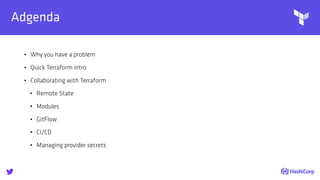
Adgenda
• Why you have a problem
• Quick Terraform intro
• Collaborating with Terraform
• Remote State
• Modules
• GitFlow
• CI/CD
• Managing provider secrets

Why you have a problem!
sheriffjackson

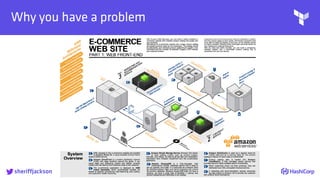
Why you have a problem
sheriffjackson

Why you have a problem
• Infrastructure as a service (e.g. AWS, Azure, GCP, DigitalOcean)
• Platform as a service (e.g. Heroku)
sheriffjackson

Why you have a problem
• Many organizations start with PaaS
• Fast default to IaaS as organization grows
• PaaS is amazing, but limitations do not scale with well with
application complexity
sheriffjackson

What is Terraform?
sheriffjackson

What is Terraform? - Write
• Define infrastructure as code to increase operator productiveity
and transparency
• Configuration can be stored in version control, shared, and
collaborated on by teams
• If it can be codified, it can be automated
sheriffjackson

What is Terraform? - Plan
• Understand how a minor change could have cascading effects
across infrastructure before executing the change
• Plans show operators what would happen, applies execute
changes
• Single workflow across all infrastructure providers (AWS, GCP,
Azure, OpenStack, VMware, and more)
sheriffjackson

What is Terraform? - Apply
• Use the same configuration in multiple places to reduce
mistakes and save time
• Provision identical staging, QA, and production environments
• Effortlessly combine high-level system providers
• Dependency resolution means things happen in the right order
sheriffjackson
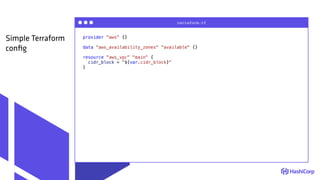
provider "aws" {}
data "aws_availability_zones" "available" {}
resource "aws_vpc" "main" {
cidr_block = "${var.cidr_block}"
}
terraform.tf
Simple Terraform
config

Collaborating with
Terraform
sheriffjackson

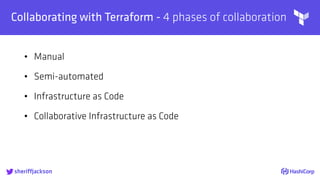
Collaborating with Terraform - 4 phases of collaboration
• Manual
• Semi-automated
• Infrastructure as Code
• Collaborative Infrastructure as Code
sheriffjackson
Terraform

Remote
State
sheriffjackson

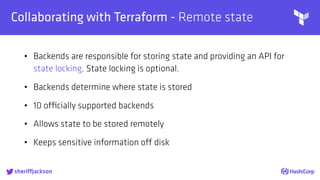
Collaborating with Terraform - Remote state
• Backends are responsible for storing state and providing an API for
state locking. State locking is optional.
• Backends determine where state is stored
• 10 officially supported backends
• Allows state to be stored remotely
• Keeps sensitive information off disk
sheriffjackson

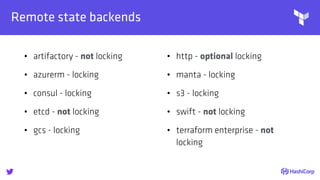
Remote state backends
• artifactory - not locking
• azurerm - locking
• consul - locking
• etcd - not locking
• gcs - locking
• http - optional locking
• manta - locking
• s3 - locking
• swift - not locking
• terraform enterprise - not
locking
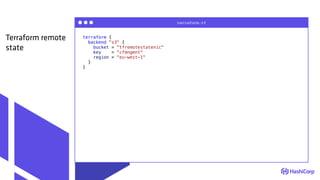
terraform {
backend "s3" {
bucket = "tfremotestatenic"
key = "cfmngmnt"
region = "eu-west-1"
}
}
terraform.tf
Terraform remote
state
Terraform

Introduction
to Modules
sheriffjackson

Introduction to Modules - What is a module?
• A module is simply a blueprint for your application
• A module is a high level abstraction
• A module is your own PaaS
• Modules can be shared in Github or the Terraform Module
registry
sheriffjackson

Introduction to Modules - What is a module?
• Modules abstract complexity
• Module perform a single task and have a single purpose
• Build once, use many
sheriffjackson

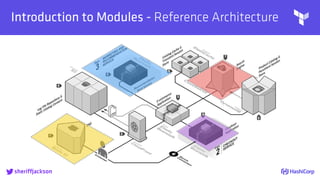
Introduction to Modules - Reference Architecture
sheriffjackson
Terraform
sheriffjackson

Introduction to Modules - Versioning modules
• Ability to use Git tags
• Move immutable versions across environments
sheriffjackson
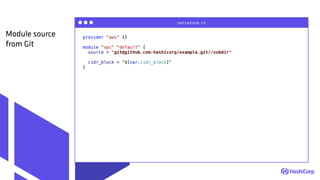
provider "aws" {}
module "vpc" "default" {
source = "git@github.com:hashicorp/example.git//subdir"
cidr_block = "${var.cidr_block}"
}
terraform.tf
Module source
from Git
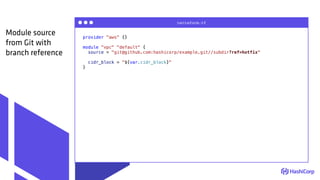
provider "aws" {}
module "vpc" "default" {
source = "git@github.com:hashicorp/example.git//subdir?ref=hotfix"
cidr_block = "${var.cidr_block}"
}
terraform.tf
Module source
from Git with
branch reference

Introduction to Modules - Modules can contain modules
• Modules can be composed of sub-modules
• Sub-modules can be composed of sub-sub-modules
• Sub-sub-modules can be composed of sub-sub-sub-modules
• ...
sheriffjackson

Introduction to Modules - Multi-Cloud
• It will never be possible to write a common abstraction at a
resource level for an instance in different cloud providers
• Modeling infrastructure on a high level such as K8s cluster with
modules allows abstraction and hides implementation
sheriffjackson
Terraform

Terraform
GitFlow and
CI
sheriffjackson

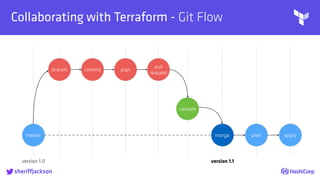
Collaborating with Terraform - Git Flow
sheriffjackson
master
branch commit plan
pull
request
validate
merge plan apply
version 1.0 version 1.1

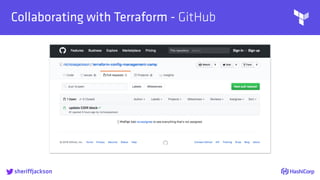
Collaborating with Terraform - GitHub
sheriffjackson

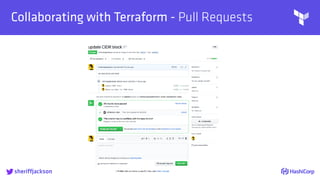
Collaborating with Terraform - Pull Requests
sheriffjackson

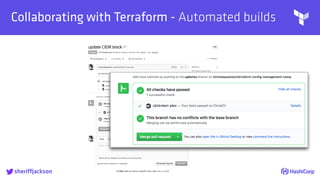
Collaborating with Terraform - Automated builds
sheriffjackson

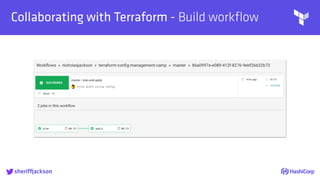
Collaborating with Terraform - Build workflow
sheriffjackson

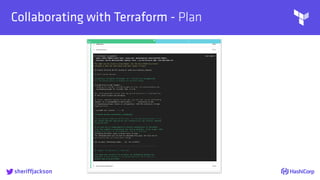
Collaborating with Terraform - Plan
sheriffjackson

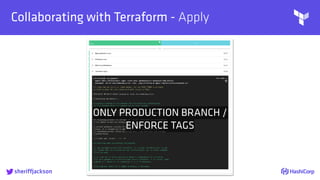
Collaborating with Terraform - Apply
sheriffjackson
ONLY PRODUCTION BRANCH /
ENFORCE TAGS

Public Service Announcement!
• DO NOT EXPOSE Vault / CI WITH PUBLIC GitHub
• THIS IS A SIMPLIFIED EXAMPLE FOR DEMONSTRATION ONLY

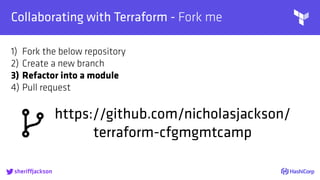
Collaborating with Terraform - Fork me
sheriffjackson
https://github.com/nicholasjackson/
terraform-cfgmgmtcamp
1) Fork the below repository
2) Create a new branch
3) Refactor into a module
4) Pull request
Terraform

Managing
Credentials
With Vault
sheriffjackson

Managing Credentials with Vault - Why?
• Separating read / write credentials
• TTL on credentials with automatic revoke
• Fine grained control over access
• Audit log
• Reduce secret sprawl
• Developers / operators DO NOT require explicit credentials
sheriffjackson

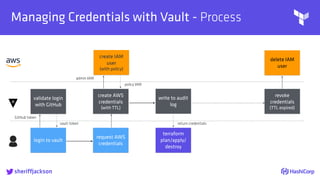
Managing Credentials with Vault - Process
sheriffjackson
login to vault
create AWS
credentials
(with TTL)
create IAM
user
(with policy)
request AWS
credentials
terraform
plan/apply/
destroy
write to audit
log
revoke
credentials
(TTL expired)
delete IAM
user
return credentials
GitHub token
validate login
with GitHub
vault token
admin IAM
policy IAM

AWS Secrets
Managing Credentials with Vault - hierarchy
sheriffjackson
role A
(aws_read)
role B
(aws_write)
policy A
(aws_read)
[read]
policy C
(aws_write)
[read]
policy B
(aws_read)
[read, create]
GitHub Auth
user B
(ricksanchez)
user A
(nicholasjackson)
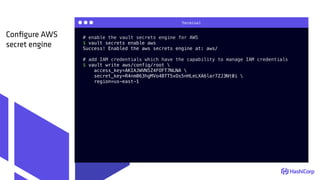
Terminal
# enable the vault secrets engine for AWS
$ vault secrets enable aws
Success! Enabled the aws secrets engine at: aws/
# add IAM credentials which have the capability to manage IAM credentials
$ vault write aws/config/root 
access_key=AKIAJWVN5Z4FOFT7NLNA 
secret_key=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 
region=us-east-1
Configure AWS
secret engine
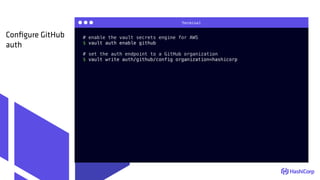
Terminal
# enable the vault secrets engine for AWS
$ vault auth enable github
# set the auth endpoint to a GitHub organization
$ vault write auth/github/config organization=hashicorp
Configure GitHub
auth
{
"Version": "2012-10-17",
"Statement": [
{
"Effect": "Allow",
"Action": ["s3:ListBucket"],
"Resource": ["arn:aws:s3:::tfremotestatenic"]
},
{
"Effect": "Allow",
"Action": [
"s3:GetObject"
],
"Resource": ["arn:aws:s3:::tfremotestatenic/*"]
},
{
"Effect": "Allow",
"Action": "ec2:Describe*",
"Resource": "*"
},
{
"Effect": "Allow",
"Action": "elasticloadbalancing:Describe*",
"Resource": "*"
},
...
terraform.tf
Create a read-only
AWS IAM policy
https://github.com/nicholasjackson/terraform-cfgmgmtcamp/blob/master/vault/templates/aws_read.json
{
"Version": "2012-10-17",
"Statement": [
{
"Effect": "Allow",
"Action": ["s3:ListBucket"],
"Resource": ["arn:aws:s3:::tfremotestatenic"]
},
{
"Effect": "Allow",
"Action": [
"s3:PutObject",
"s3:GetObject",
"s3:DeleteObject"
],
"Resource": ["arn:aws:s3:::tfremotestatenic/*"]
},
{
"Action": "ec2:*",
"Effect": "Allow",
"Resource": "*"
},
{
"Effect": "Allow",
"Action": "elasticloadbalancing:*",
"Resource": "*"
},
terraform.tf
Create a write
AWS IAM policy
https://github.com/nicholasjackson/terraform-cfgmgmtcamp/blob/master/vault/templates/aws_write.json
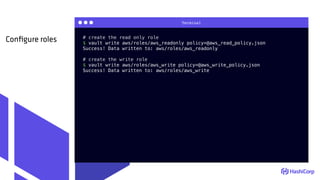
Terminal
# create the read only role
$ vault write aws/roles/aws_readonly policy=@aws_read_policy.json
Success! Data written to: aws/roles/aws_readonly
# create the write role
$ vault write aws/roles/aws_write policy=@aws_write_policy.json
Success! Data written to: aws/roles/aws_write
Configure roles
path "aws/creds/aws_readonly" {
capabilities = ["read"] # "create", "read", "update", "delete", "list"
}
terraform.tf
Create a read-only
Vault policy
path "aws/creds/aws_write" {
capabilities = ["read"]
}
terraform.tf
Create a write
Vault policy
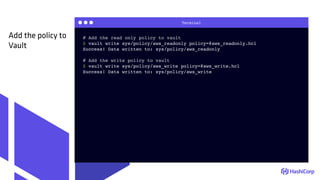
Terminal
# Add the read only policy to vault
$ vault write sys/policy/aws_readonly policy=@aws_readonly.hcl
Success! Data written to: sys/policy/aws_readonly
# Add the write policy to vault
$ vault write sys/policy/aws_write policy=@aws_write.hcl
Success! Data written to: sys/policy/aws_write
Add the policy to
Vault
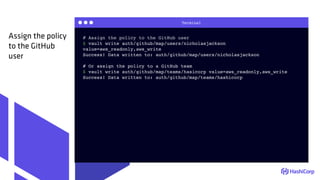
Terminal
# Assign the policy to the GitHub user
$ vault write auth/github/map/users/nicholasjackson
value=aws_readonly,aws_write
Success! Data written to: auth/github/map/users/nicholasjackson
# Or assign the policy to a GitHub team
$ vault write auth/github/map/teams/hasicorp value=aws_readonly,aws_write
Success! Data written to: auth/github/map/teams/hashicorp
Assign the policy
to the GitHub
user
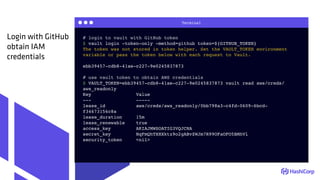
Terminal
# login to vault with GitHub token
$ vault login -token-only -method=github token=${GITHUB_TOKEN}
The token was not stored in token helper. Set the VAULT_TOKEN environment
variable or pass the token below with each request to Vault.
ebb39457-cdb8-41ae-c227-9e0245837873
# use vault token to obtain AWS credentials
$ VAULT_TOKEN=ebb39457-cdb8-41ae-c227-9e0245837873 vault read aws/creds/
aws_readonly
Key Value
--- -----
lease_id aws/creds/aws_readonly/0bb798a3-c4fd-0609-6bcd-
f34673156c8a
lease_duration 15m
lease_renewable true
access_key AKIAJMWSOATIG3VQJCNA
secret_key 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
security_token <nil>
Login with GitHub
obtain IAM
credentials
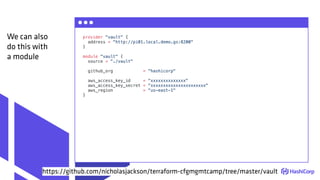
provider "vault" {
address = "http://pi01.local.demo.gs:8200"
}
module "vault" {
source = "./vault"
github_org = "hashicorp"
aws_access_key_id = "xxxxxxxxxxxxxx"
aws_access_key_secret = "xxxxxxxxxxxxxxxxxxxxxx"
aws_region = "us-east-1"
}
We can also
do this with
a module
https://github.com/nicholasjackson/terraform-cfgmgmtcamp/tree/master/vault

Putting it all together
sheriffjackson
THANKS FOR LISTENING
• https://www.terraform.io
• https://www.vaultproject.io
• https://registry.terraform.io
FURTHER INFO:
@sheriffjackson, nic@hashicorp.com
DEVOPS DELIVERED
• https://github.com/nicholasjackson/terraform-cfgmgmtcamp
EXAMPLE PROJECT:
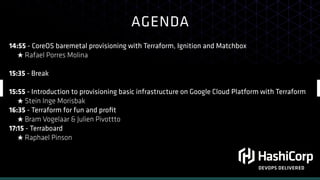
AGENDA
DEVOPS DELIVERED
14:55 - CoreOS baremetal provisioning with Terraform, Ignition and Matchbox
★ Rafael Porres Molina
15:35 - Break
15:55 - Introduction to provisioning basic infrastructure on Google Cloud Platform with Terraform
★ Stein Inge Morisbak
16:35 - Terraform for fun and profit
★ Bram Vogelaar & Julien Pivottto
17:15 - Terraboard
★ Raphael Pinson

Terraform - Taming Modern Clouds

  • 1.
    DEVOPS DELIVERED sheriffjackson TAMING MODERNCLOUD ENVIRONMENTS WITH TERRAFORM
  • 2.
     Nic Jackson Developer Advocate,HashiCorp sheriffjackson
  • 4.
     Adgenda • Why youhave a problem • Quick Terraform intro • Collaborating with Terraform • Remote State • Modules • GitFlow • CI/CD • Managing provider secrets
  • 5.
     Why you havea problem! sheriffjackson
  • 6.
     Why you havea problem sheriffjackson
  • 7.
     Why you havea problem • Infrastructure as a service (e.g. AWS, Azure, GCP, DigitalOcean) • Platform as a service (e.g. Heroku) sheriffjackson
  • 8.
     Why you havea problem • Many organizations start with PaaS • Fast default to IaaS as organization grows • PaaS is amazing, but limitations do not scale with well with application complexity sheriffjackson
  • 9.
  • 10.
     What is Terraform?- Write • Define infrastructure as code to increase operator productiveity and transparency • Configuration can be stored in version control, shared, and collaborated on by teams • If it can be codified, it can be automated sheriffjackson
  • 11.
     What is Terraform?- Plan • Understand how a minor change could have cascading effects across infrastructure before executing the change • Plans show operators what would happen, applies execute changes • Single workflow across all infrastructure providers (AWS, GCP, Azure, OpenStack, VMware, and more) sheriffjackson
  • 12.
     What is Terraform?- Apply • Use the same configuration in multiple places to reduce mistakes and save time • Provision identical staging, QA, and production environments • Effortlessly combine high-level system providers • Dependency resolution means things happen in the right order sheriffjackson
  • 13.
    provider "aws" {} data"aws_availability_zones" "available" {} resource "aws_vpc" "main" { cidr_block = "${var.cidr_block}" } terraform.tf Simple Terraform config
  • 14.
  • 15.
     Collaborating with Terraform- 4 phases of collaboration • Manual • Semi-automated • Infrastructure as Code • Collaborative Infrastructure as Code sheriffjackson
  • 16.
  • 17.
     Collaborating with Terraform- Remote state • Backends are responsible for storing state and providing an API for state locking. State locking is optional. • Backends determine where state is stored • 10 officially supported backends • Allows state to be stored remotely • Keeps sensitive information off disk sheriffjackson
  • 18.
     Remote state backends •artifactory - not locking • azurerm - locking • consul - locking • etcd - not locking • gcs - locking • http - optional locking • manta - locking • s3 - locking • swift - not locking • terraform enterprise - not locking
  • 19.
    terraform { backend "s3"{ bucket = "tfremotestatenic" key = "cfmngmnt" region = "eu-west-1" } } terraform.tf Terraform remote state
  • 20.
  • 21.
     Introduction to Modules- What is a module? • A module is simply a blueprint for your application • A module is a high level abstraction • A module is your own PaaS • Modules can be shared in Github or the Terraform Module registry sheriffjackson
  • 22.
     Introduction to Modules- What is a module? • Modules abstract complexity • Module perform a single task and have a single purpose • Build once, use many sheriffjackson
  • 23.
     Introduction to Modules- Reference Architecture sheriffjackson
  • 24.
  • 25.
     Introduction to Modules- Versioning modules • Ability to use Git tags • Move immutable versions across environments sheriffjackson
  • 26.
    provider "aws" {} module"vpc" "default" { source = "git@github.com:hashicorp/example.git//subdir" cidr_block = "${var.cidr_block}" } terraform.tf Module source from Git
  • 27.
    provider "aws" {} module"vpc" "default" { source = "git@github.com:hashicorp/example.git//subdir?ref=hotfix" cidr_block = "${var.cidr_block}" } terraform.tf Module source from Git with branch reference
  • 28.
     Introduction to Modules- Modules can contain modules • Modules can be composed of sub-modules • Sub-modules can be composed of sub-sub-modules • Sub-sub-modules can be composed of sub-sub-sub-modules • ... sheriffjackson
  • 29.
     Introduction to Modules- Multi-Cloud • It will never be possible to write a common abstraction at a resource level for an instance in different cloud providers • Modeling infrastructure on a high level such as K8s cluster with modules allows abstraction and hides implementation sheriffjackson
  • 30.
  • 31.
     Collaborating with Terraform- Git Flow sheriffjackson master branch commit plan pull request validate merge plan apply version 1.0 version 1.1
  • 32.
     Collaborating with Terraform- GitHub sheriffjackson
  • 33.
     Collaborating with Terraform- Pull Requests sheriffjackson
  • 34.
     Collaborating with Terraform- Automated builds sheriffjackson
  • 35.
     Collaborating with Terraform- Build workflow sheriffjackson
  • 36.
     Collaborating with Terraform- Plan sheriffjackson
  • 37.
     Collaborating with Terraform- Apply sheriffjackson ONLY PRODUCTION BRANCH / ENFORCE TAGS
  • 38.
     Public Service Announcement! •DO NOT EXPOSE Vault / CI WITH PUBLIC GitHub • THIS IS A SIMPLIFIED EXAMPLE FOR DEMONSTRATION ONLY
  • 39.
     Collaborating with Terraform- Fork me sheriffjackson https://github.com/nicholasjackson/ terraform-cfgmgmtcamp 1) Fork the below repository 2) Create a new branch 3) Refactor into a module 4) Pull request
  • 40.
  • 41.
     Managing Credentials withVault - Why? • Separating read / write credentials • TTL on credentials with automatic revoke • Fine grained control over access • Audit log • Reduce secret sprawl • Developers / operators DO NOT require explicit credentials sheriffjackson
  • 42.
     Managing Credentials withVault - Process sheriffjackson login to vault create AWS credentials (with TTL) create IAM user (with policy) request AWS credentials terraform plan/apply/ destroy write to audit log revoke credentials (TTL expired) delete IAM user return credentials GitHub token validate login with GitHub vault token admin IAM policy IAM
  • 43.
     AWS Secrets Managing Credentialswith Vault - hierarchy sheriffjackson role A (aws_read) role B (aws_write) policy A (aws_read) [read] policy C (aws_write) [read] policy B (aws_read) [read, create] GitHub Auth user B (ricksanchez) user A (nicholasjackson)
  • 44.
    Terminal # enable thevault secrets engine for AWS $ vault secrets enable aws Success! Enabled the aws secrets engine at: aws/ # add IAM credentials which have the capability to manage IAM credentials $ vault write aws/config/root access_key=AKIAJWVN5Z4FOFT7NLNA secret_key=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 region=us-east-1 Configure AWS secret engine
  • 45.
    Terminal # enable thevault secrets engine for AWS $ vault auth enable github # set the auth endpoint to a GitHub organization $ vault write auth/github/config organization=hashicorp Configure GitHub auth
  • 46.
    { "Version": "2012-10-17", "Statement": [ { "Effect":"Allow", "Action": ["s3:ListBucket"], "Resource": ["arn:aws:s3:::tfremotestatenic"] }, { "Effect": "Allow", "Action": [ "s3:GetObject" ], "Resource": ["arn:aws:s3:::tfremotestatenic/*"] }, { "Effect": "Allow", "Action": "ec2:Describe*", "Resource": "*" }, { "Effect": "Allow", "Action": "elasticloadbalancing:Describe*", "Resource": "*" }, ... terraform.tf Create a read-only AWS IAM policy https://github.com/nicholasjackson/terraform-cfgmgmtcamp/blob/master/vault/templates/aws_read.json
  • 47.
    { "Version": "2012-10-17", "Statement": [ { "Effect":"Allow", "Action": ["s3:ListBucket"], "Resource": ["arn:aws:s3:::tfremotestatenic"] }, { "Effect": "Allow", "Action": [ "s3:PutObject", "s3:GetObject", "s3:DeleteObject" ], "Resource": ["arn:aws:s3:::tfremotestatenic/*"] }, { "Action": "ec2:*", "Effect": "Allow", "Resource": "*" }, { "Effect": "Allow", "Action": "elasticloadbalancing:*", "Resource": "*" }, terraform.tf Create a write AWS IAM policy https://github.com/nicholasjackson/terraform-cfgmgmtcamp/blob/master/vault/templates/aws_write.json
  • 48.
    Terminal # create theread only role $ vault write aws/roles/aws_readonly policy=@aws_read_policy.json Success! Data written to: aws/roles/aws_readonly # create the write role $ vault write aws/roles/aws_write policy=@aws_write_policy.json Success! Data written to: aws/roles/aws_write Configure roles
  • 49.
    path "aws/creds/aws_readonly" { capabilities= ["read"] # "create", "read", "update", "delete", "list" } terraform.tf Create a read-only Vault policy
  • 50.
    path "aws/creds/aws_write" { capabilities= ["read"] } terraform.tf Create a write Vault policy
  • 51.
    Terminal # Add theread only policy to vault $ vault write sys/policy/aws_readonly policy=@aws_readonly.hcl Success! Data written to: sys/policy/aws_readonly # Add the write policy to vault $ vault write sys/policy/aws_write policy=@aws_write.hcl Success! Data written to: sys/policy/aws_write Add the policy to Vault
  • 52.
    Terminal # Assign thepolicy to the GitHub user $ vault write auth/github/map/users/nicholasjackson value=aws_readonly,aws_write Success! Data written to: auth/github/map/users/nicholasjackson # Or assign the policy to a GitHub team $ vault write auth/github/map/teams/hasicorp value=aws_readonly,aws_write Success! Data written to: auth/github/map/teams/hashicorp Assign the policy to the GitHub user
  • 53.
    Terminal # login tovault with GitHub token $ vault login -token-only -method=github token=${GITHUB_TOKEN} The token was not stored in token helper. Set the VAULT_TOKEN environment variable or pass the token below with each request to Vault. ebb39457-cdb8-41ae-c227-9e0245837873 # use vault token to obtain AWS credentials $ VAULT_TOKEN=ebb39457-cdb8-41ae-c227-9e0245837873 vault read aws/creds/ aws_readonly Key Value --- ----- lease_id aws/creds/aws_readonly/0bb798a3-c4fd-0609-6bcd- f34673156c8a lease_duration 15m lease_renewable true access_key AKIAJMWSOATIG3VQJCNA secret_key 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 security_token <nil> Login with GitHub obtain IAM credentials
  • 54.
    provider "vault" { address= "http://pi01.local.demo.gs:8200" } module "vault" { source = "./vault" github_org = "hashicorp" aws_access_key_id = "xxxxxxxxxxxxxx" aws_access_key_secret = "xxxxxxxxxxxxxxxxxxxxxx" aws_region = "us-east-1" } We can also do this with a module https://github.com/nicholasjackson/terraform-cfgmgmtcamp/tree/master/vault
  • 55.
     Putting it alltogether sheriffjackson
  • 56.
    THANKS FOR LISTENING •https://www.terraform.io • https://www.vaultproject.io • https://registry.terraform.io FURTHER INFO: @sheriffjackson, nic@hashicorp.com DEVOPS DELIVERED • https://github.com/nicholasjackson/terraform-cfgmgmtcamp EXAMPLE PROJECT:
  • 57.
    AGENDA DEVOPS DELIVERED 14:55 -CoreOS baremetal provisioning with Terraform, Ignition and Matchbox ★ Rafael Porres Molina 15:35 - Break 15:55 - Introduction to provisioning basic infrastructure on Google Cloud Platform with Terraform ★ Stein Inge Morisbak 16:35 - Terraform for fun and profit ★ Bram Vogelaar & Julien Pivottto 17:15 - Terraboard ★ Raphael Pinson