Welcome and
General Advice
Teaching Methods and Support Materials
Goldsmiths Inclusive
Teaching and Learning
• These resources are intended for Goldsmiths staff,
but any external visitors are welcome to make use of
them under the Creative Commons License.
• Goldsmiths Inclusive Teaching and Learning by
Goldsmiths, University of London is licensed under a
Creative Commons Attribution-NonCommercial 4.0
International License.
Welcome
• Equality, inclusion and social justice are vitally
important to Goldsmiths.
• Inclusion means that all students, no matter their
sensory, physical or learning differences, religious
or ethnic background, sexual orientation, gender,
age, or family circumstance, will be welcomed as
equal, respected and fully integrated members of
Goldsmiths.
Defining ‘Inclusion’
• Although Reasonable Adjustments Student Agreements
(RASA) will persist, inclusion mean more than picking
out certain individuals or groups and making special
arrangements for them. It means transforming one’s
systems, structures and practice so that what used to be
a special arrangement becomes business as usual.
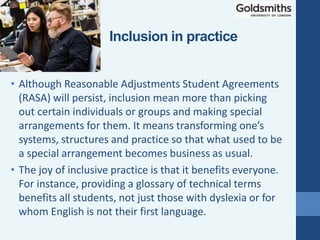
• The joy of inclusive practice is that it benefits everyone.
For instance, providing a glossary of technical terms
benefits all students, not just those with dyslexia or for
whom English is not their first language.
Inclusion in practice
• “Inclusion is not a strategy to help people
fit into the systems and structures which
exist in our societies; it is about
transforming those systems and structures
to make it better for everyone. Inclusion is
about creating a better world for
everyone.”
• Diane Richler, Past President, Inclusion
International.
Inclusion
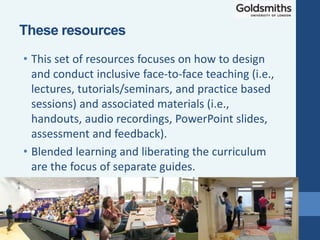
• This set of resources focuses on how to design
and conduct inclusive face-to-face teaching (i.e.,
lectures, tutorials/seminars, and practice based
sessions) and associated materials (i.e.,
handouts, audio recordings, PowerPoint slides,
assessment and feedback).
• Blended learning and liberating the curriculum
are the focus of separate guides.
These resources
• Most of the content has been split up into
elements that can be viewed separately according
to the viewer’s particular interest.
• However, this presentation contains information in
the form of general advice that is relevant to all
forms of face-to-face teaching. Thus, this slide
show should be viewed first.
Modular Content
General Advice
• Support materials for face-to-face teaching include
notes, handouts, PowerPoint slides, readings etc.
• Some materials aid student preparation for teaching
sessions (e.g., Powerpoint slides). These should be
made available well in advance (i.e., at least two or
three days before) and in an easily accessible manner
such as via learn.gold (Goldsmiths’ Virtual Learning
Environment, VLE).
• Allow students to record sessions or better still provide
your own audio recordings or screencasts. Don't forget
to ask the students' permission to record live sessions
in which their contributions may be captured.
Support Materials
• If not already presented on slides or handouts,
write key information on whiteboards.
• Write in large printed rather than cursive
script.
• Use dry-wipe pens with black ink.
• If you are in a large lecture theatre, use the
visualiser (a kind of digital overhead projector
OHP except it projects documents and objects)
• Allow students to photograph whiteboards
and visualiser images.
Support Materials: Whiteboards and
Visualisers
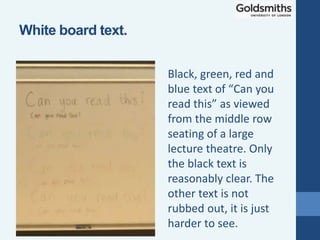
Black, green, red and
blue text of “Can you
read this” as viewed
from the middle row
seating of a large
lecture theatre. Only
the black text is
reasonably clear. The
other text is not
rubbed out, it is just
harder to see.
White board text.
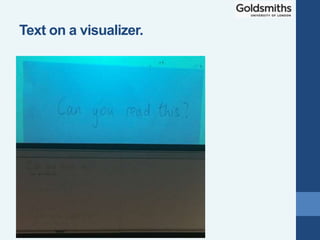
Text on a visualizer.
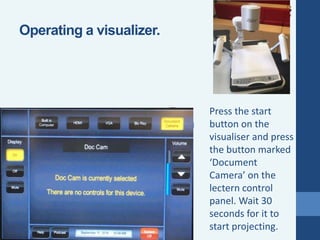
Press the start
button on the
visualiser and press
the button marked
‘Document
Camera’ on the
lectern control
panel. Wait 30
seconds for it to
start projecting.
Operating a visualizer.
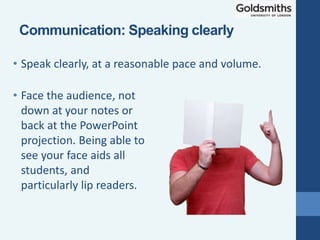
• Face the audience, not
down at your notes or
back at the PowerPoint
projection. Being able to
see your face aids all
students, and
particularly lip readers.
• Speak clearly, at a reasonable pace and volume.
Communication: Speaking clearly
• If students do not understand a point, elaborate
and reword rather than just repeating yourself.
• Use accessible language:
• Define technical terms.
• Provide a glossary.
• Avoid or explain idioms and acronyms.
Communication: Accessible language
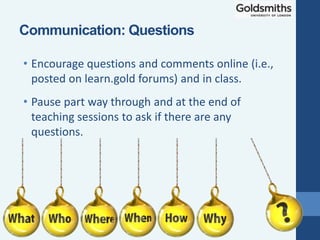
• Encourage questions and comments online (i.e.,
posted on learn.gold forums) and in class.
• Pause part way through and at the end of
teaching sessions to ask if there are any
questions.
Communication: Questions
• Pose open as opposed to closed questions.
Closed questions can be answered with one or
two words or a short phrase. Open questions
elicit longer and more thoughtful answers.
• For example, "How would you define 'inclusion'?"
is better than, "Do you understand what 'inclusion'
means?"
• Pose questions to student.
• Allow students time to come up with an answer. Count
to at least 10 before further prompting or offering an
answer.
Posing Questions
• Minimising background noise can be of benefit
to all students, but particularly those with
hearing impairment or dyslexia.
• Ask people talking loudly outside a teaching space to
be quiet or move to a social area.
• If possible, ask people using noisy equipment such as
power tools to stop until your teaching session is
completed.
• In noisy group work, if possible, arrange quieter areas.
Learning environment
• Start timetabled sessions five minutes past the
hour and finish five minutes before the hour.
• This is important for students who need extra time to get
between consecutively timetabled sessions in separate
locations.
Starting and ending on time
• Emphasise to students the importance
of attendance and punctuality, but as
far as possible be understanding and
flexible in this regard.
• There are many valid reasons why students
may find it difficult to attend or arrive on
time or need to take short breaks during
sessions or to leave early.
• Ask students who arrive on time to sit
toward the middle of seating rows to allow
others easy access and exit.
• If students complain about the comings and
goings of others, discuss the considerations
of inclusion with the whole group.
Attendance and Punctuality
Email: talic@gold.ac.uk
Thank you

Inclusive Teaching - Teaching Methods and Support Materials

  • 1.
    Welcome and General Advice TeachingMethods and Support Materials Goldsmiths Inclusive Teaching and Learning
  • 2.
    • These resourcesare intended for Goldsmiths staff, but any external visitors are welcome to make use of them under the Creative Commons License. • Goldsmiths Inclusive Teaching and Learning by Goldsmiths, University of London is licensed under a Creative Commons Attribution-NonCommercial 4.0 International License. Welcome
  • 3.
    • Equality, inclusionand social justice are vitally important to Goldsmiths. • Inclusion means that all students, no matter their sensory, physical or learning differences, religious or ethnic background, sexual orientation, gender, age, or family circumstance, will be welcomed as equal, respected and fully integrated members of Goldsmiths. Defining ‘Inclusion’
  • 4.
    • Although ReasonableAdjustments Student Agreements (RASA) will persist, inclusion mean more than picking out certain individuals or groups and making special arrangements for them. It means transforming one’s systems, structures and practice so that what used to be a special arrangement becomes business as usual. • The joy of inclusive practice is that it benefits everyone. For instance, providing a glossary of technical terms benefits all students, not just those with dyslexia or for whom English is not their first language. Inclusion in practice
  • 5.
    • “Inclusion isnot a strategy to help people fit into the systems and structures which exist in our societies; it is about transforming those systems and structures to make it better for everyone. Inclusion is about creating a better world for everyone.” • Diane Richler, Past President, Inclusion International. Inclusion
  • 6.
    • This setof resources focuses on how to design and conduct inclusive face-to-face teaching (i.e., lectures, tutorials/seminars, and practice based sessions) and associated materials (i.e., handouts, audio recordings, PowerPoint slides, assessment and feedback). • Blended learning and liberating the curriculum are the focus of separate guides. These resources
  • 7.
    • Most ofthe content has been split up into elements that can be viewed separately according to the viewer’s particular interest. • However, this presentation contains information in the form of general advice that is relevant to all forms of face-to-face teaching. Thus, this slide show should be viewed first. Modular Content
  • 8.
  • 9.
    • Support materialsfor face-to-face teaching include notes, handouts, PowerPoint slides, readings etc. • Some materials aid student preparation for teaching sessions (e.g., Powerpoint slides). These should be made available well in advance (i.e., at least two or three days before) and in an easily accessible manner such as via learn.gold (Goldsmiths’ Virtual Learning Environment, VLE). • Allow students to record sessions or better still provide your own audio recordings or screencasts. Don't forget to ask the students' permission to record live sessions in which their contributions may be captured. Support Materials
  • 10.
    • If notalready presented on slides or handouts, write key information on whiteboards. • Write in large printed rather than cursive script. • Use dry-wipe pens with black ink. • If you are in a large lecture theatre, use the visualiser (a kind of digital overhead projector OHP except it projects documents and objects) • Allow students to photograph whiteboards and visualiser images. Support Materials: Whiteboards and Visualisers
  • 11.
    Black, green, redand blue text of “Can you read this” as viewed from the middle row seating of a large lecture theatre. Only the black text is reasonably clear. The other text is not rubbed out, it is just harder to see. White board text.
  • 12.
    Text on avisualizer.
  • 13.
    Press the start buttonon the visualiser and press the button marked ‘Document Camera’ on the lectern control panel. Wait 30 seconds for it to start projecting. Operating a visualizer.
  • 14.
    • Face theaudience, not down at your notes or back at the PowerPoint projection. Being able to see your face aids all students, and particularly lip readers. • Speak clearly, at a reasonable pace and volume. Communication: Speaking clearly
  • 15.
    • If studentsdo not understand a point, elaborate and reword rather than just repeating yourself. • Use accessible language: • Define technical terms. • Provide a glossary. • Avoid or explain idioms and acronyms. Communication: Accessible language
  • 16.
    • Encourage questionsand comments online (i.e., posted on learn.gold forums) and in class. • Pause part way through and at the end of teaching sessions to ask if there are any questions. Communication: Questions
  • 17.
    • Pose openas opposed to closed questions. Closed questions can be answered with one or two words or a short phrase. Open questions elicit longer and more thoughtful answers. • For example, "How would you define 'inclusion'?" is better than, "Do you understand what 'inclusion' means?" • Pose questions to student. • Allow students time to come up with an answer. Count to at least 10 before further prompting or offering an answer. Posing Questions
  • 18.
    • Minimising backgroundnoise can be of benefit to all students, but particularly those with hearing impairment or dyslexia. • Ask people talking loudly outside a teaching space to be quiet or move to a social area. • If possible, ask people using noisy equipment such as power tools to stop until your teaching session is completed. • In noisy group work, if possible, arrange quieter areas. Learning environment
  • 19.
    • Start timetabledsessions five minutes past the hour and finish five minutes before the hour. • This is important for students who need extra time to get between consecutively timetabled sessions in separate locations. Starting and ending on time
  • 20.
    • Emphasise tostudents the importance of attendance and punctuality, but as far as possible be understanding and flexible in this regard. • There are many valid reasons why students may find it difficult to attend or arrive on time or need to take short breaks during sessions or to leave early. • Ask students who arrive on time to sit toward the middle of seating rows to allow others easy access and exit. • If students complain about the comings and goings of others, discuss the considerations of inclusion with the whole group. Attendance and Punctuality
  • 21.