Connect PowerShell
scripts to native
SharePoint lists for
reporting, notifications
and workflows

11/7/2013

Layer 2 GmbH | Eiffestr. 664b| D-20537 Hamburg, Germany | sales@layer2de | www.layer2.de/en/ | +49 (0) 40 - 28 41 12 30

1
Who is Layer2?
 As a Microsoft Gold Certified Partner and ISV based in
Hamburg (Germany), Layer2 is one of the leading providers
of Microsoft SharePoint and Office 365 apps in Europe with
a major focus on Data Integration, Collaborative Knowledge
Management and Social Networking.
 Layer2 has also been known as a reliable partner to
customers in Central Europe, offering additional consulting
and services in the fields of SharePoint, .NET programming
and IT infrastructure for more than 20 years.

11/7/2013

Layer2 is one of the leading providers of Microsoft SharePoint and Office 365 apps in Europe

2
What is PowerShell?
 Windows PowerShell is Microsoft's task automation and
configuration management framework, consisting of a
command-line shell and associated scripting language built on
.NET Framework. It is often used for administration and
reporting, not only for the Windows operating system but also
for applications platforms like Microsoft Exchange, SQL Server
or SharePoint.
 You can use the Layer2 Cloud Connector (for SharePoint
Online) or the Layer2 Business Data List Connector (for
SharePoint on-premise) to connect the output of such scripts
as reports to synchronize with a native SharePoint list.

11/7/2013

The Cloud Connector makes ALL native SharePoint features available for external data

3
What is the SharePoint Cloud Connector?
 The SharePoint Cloud Connector connects native SharePoint lists and
libraries (on-premise or in the cloud) directly to almost any external data
sources, without any installation on SharePoint in just minutes, codeless
and bi-directional.
 All SharePoint list features are available as usual for your external data, e.g.
views, search, metadata, alerts and even workflows, to take business
actions in SharePoint, when external data records are changed.
 The Cloud Connector simplifies your SharePoint architecture, increases
end user performance and availability, overcomes limitations and solves
many issues that still exists with the SharePoint out-of-the-box data
integration via BDC and BCS today, especially in the cloud.
 The Cloud Connector runs as standalone application (MMC) and Windows
Service on any Windows server or client, safely within the corporate
network. No access to corporate data from outside is required.

11/7/2013

The Cloud Connector makes ALL native SharePoint features available for external data

4
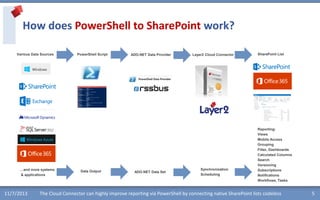
How does PowerShell to SharePoint work?
Various Data Sources

…and more systems
& applications

11/7/2013

PowerShell Script

Data Output

ADO.NET Data Provider

ADO.NET Data Set

Layer2 Cloud Connector

Synchronization
Scheduling

SharePoint List

Reporting:
Views
Mobile Access
Grouping
Filter, Dashboards
Calculated Columns
Search
Versioning
Subscriptions
Notifications
Workflows, Tasks

The Cloud Connector can highly improve reporting via PowerShell by connecting native SharePoint lists codeless

5
PowerShell to SharePoint - Why?
 Reporting using native SharePoint lists: All list features available for the PowerShell
reporting data, e.g. views, filter, grouping, calculated fields, search etc.
 Management Dashboards: Can be connected to the SharePoint lists.
 Mobile Access: PowerShell results are cached in native SharePoint lists for mobile
access, everywhere with any device.
 Notifications on data change: The script is executed scheduled on a regular base (e.g.
every hour). You will be notified in case of data changed by list subscriptions
 Workflows on data change: You can check for specific values, e.g. thresholds and start
your own business logic a workflow, if required. Think about library quotas or any other
reporting issue. Tasks can be created if required.
 Versioning: You have a history of changes for your script output / report.
 File Share Integration: You can list file shares with PowerShell and have the output
available in SharePoint lists to link back to files (e.g. using calculated fields link to
FTP/HTTP).

11/7/2013

The Cloud Connector overcomes limitations and solves issues that still exists with out-of-the-box BDC / BCS

6
Setup the PowerShell script
 As a sample we have used a script service.ps1 that simply lists the
services running on the current computer. Please note the
"param" part with data types, field names and default values that
is required for using SQL with the result set.
 param(
[String]$DisplayName='*',
[String]$Name='',
[String]$Status='',
[String]$ServiceName='',
[String]$ServiceType='',
[Boolean]$CanPauseAndContinue=0,
[Boolean]$CanShutdown=0,
[Boolean]$CanStop=0
)
Get-Service |Sort-Object DisplayName | Select-Object
DisplayName, Name, Status, ServiceName, ServiceType,
CanPauseAndContinue, CanShutdown, CanStop
 You can use any other script

11/7/2013

The Cloud Connector can be easily installed

7
Setup the data source
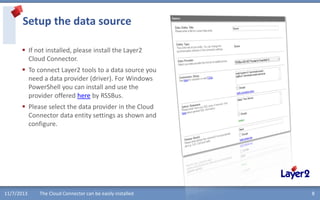
 If not installed, please install the Layer2
Cloud Connector.
 To connect Layer2 tools to a data source you
need a data provider (driver). For Windows
PowerShell you can install and use the
provider offered here by RSSBus.
 Please select the data provider in the Cloud
Connector data entity settings as shown and
configure.

11/7/2013

The Cloud Connector can be easily installed

8
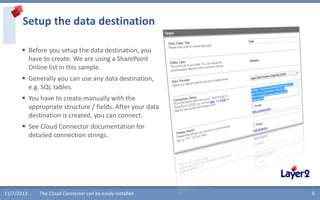
Setup the data destination
 Before you setup the data destination, you
have to create. We are using a SharePoint
Online list in this sample.
 Generally you can use any data destination,
e.g. SQL tables.
 You have to create manually with the
appropriate structure / fields. After your data
destination is created, you can connect.

 See Cloud Connector documentation for
detailed connection strings.

11/7/2013

The Cloud Connector can be easily installed

9
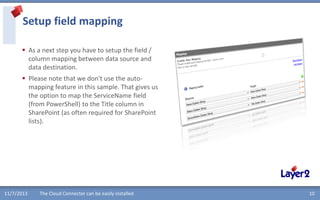
Setup field mapping
 As a next step you have to setup the field /
column mapping between data source and
data destination.
 Please note that we don't use the automapping feature in this sample. That gives us
the option to map the ServiceName field
(from PowerShell) to the Title column in
SharePoint (as often required for SharePoint
lists).

11/7/2013

The Cloud Connector can be easily installed

10
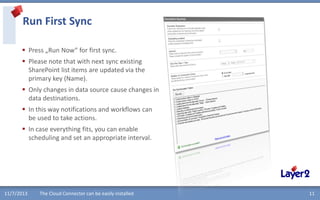
Run First Sync
 Press „Run Now“ for first sync.
 Please note that with next sync existing
SharePoint list items are updated via the
primary key (Name).
 Only changes in data source cause changes in
data destinations.
 In this way notifications and workflows can
be used to take actions.
 In case everything fits, you can enable
scheduling and set an appropriate interval.

11/7/2013

The Cloud Connector can be easily installed

11
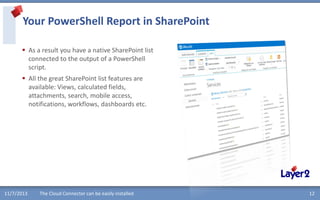
Your PowerShell Report in SharePoint
 As a result you have a native SharePoint list
connected to the output of a PowerShell
script.
 All the great SharePoint list features are
available: Views, calculated fields,
attachments, search, mobile access,
notifications, workflows, dashboards etc.

11/7/2013

The Cloud Connector can be easily installed

12
What else can be connected to SharePoint?
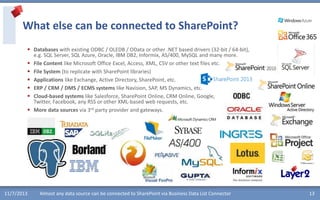
 Databases with existing ODBC / OLEDB / OData or other .NET based drivers (32-bit / 64-bit),
e.g. SQL Server, SQL Azure, Oracle, IBM DB2, Informix, AS/400, MySQL and many more.
 File Content like Microsoft Office Excel, Access, XML, CSV or other text files etc.
 File System (to replicate with SharePoint libraries)
 Applications like Exchange, Active Directory, SharePoint, etc.
 ERP / CRM / DMS / ECMS systems like Navision, SAP, MS Dynamics, etc.
 Cloud-based systems like Salesforce, SharePoint Online, CRM Online, Google,
Twitter, Facebook, any RSS or other XML-based web requests, etc.
 More data sources via 3rd party provider and gateways.

11/7/2013

Almost any data source can be connected to SharePoint via Business Data List Connector

13
Layer2 Partner Program for Reseller and Implementer
 Completely cost-free partner program. No contract required.
 Partner links at our product pages. Sales leads will find you as a local
partner and will contact you for order and implementation support.
 15 - 30% discount on production licenses to use our solutions in your
external customer projects or for resale.
 Place your orders using our on-line shop system. Simply enter your
partner coupon codes to receive your discounts.
 As a partner you can use our solutions internally, for demonstration or
within your intranet, extranet or even Internet as free NFR version.
 Premium support level with high priority and direct access to the
product development team. Joint development options.
Project support, if required.
 Free marketing and sales support, ready to use digital marketing kit
including flyers, presentations and evaluation downloads.

11/7/2013

Layer2 as a vendor is powerful together with its partners - and for its partners.

14
Layer2 company profile
A reliable partner in the fields of SharePoint, .NET-programming and
IT-Infrastructure since more than 20 years
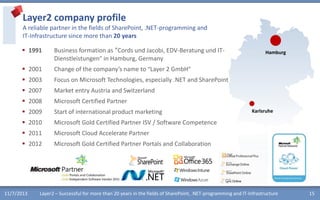
 1991

Business formation as “Cords und Jacobi, EDV-Beratung und ITDienstleistungen” in Hamburg, Germany

 2001

Change of the company’s name to “Layer 2 GmbH”

 2003

Focus on Microsoft Technologies, especially .NET and SharePoint

 2007

Market entry Austria and Switzerland

 2008

Microsoft Certified Partner

 2009

Start of international product marketing

 2010

Microsoft Gold Certified Partner ISV / Software Competence

 2011

Microsoft Cloud Accelerate Partner

 2012

Microsoft Gold Certified Partner Portals and Collaboration

11/7/2013

Hamburg

Karlsruhe

Layer2 – Successful for more than 20 years in the fields of SharePoint, .NET-programming and IT-Infrastructure

15
What are you waiting for?
Please click below to register, download and evaluate @ www.layer2.de/en/ today.
See here for FAQs.

11/7/2013

Make your SharePoint even better – download and try today.

16

Improve PowerShell reporting using SharePoint lists for results

  • 1.
    Connect PowerShell scripts tonative SharePoint lists for reporting, notifications and workflows 11/7/2013 Layer 2 GmbH | Eiffestr. 664b| D-20537 Hamburg, Germany | sales@layer2de | www.layer2.de/en/ | +49 (0) 40 - 28 41 12 30 1
  • 2.
    Who is Layer2? As a Microsoft Gold Certified Partner and ISV based in Hamburg (Germany), Layer2 is one of the leading providers of Microsoft SharePoint and Office 365 apps in Europe with a major focus on Data Integration, Collaborative Knowledge Management and Social Networking.  Layer2 has also been known as a reliable partner to customers in Central Europe, offering additional consulting and services in the fields of SharePoint, .NET programming and IT infrastructure for more than 20 years. 11/7/2013 Layer2 is one of the leading providers of Microsoft SharePoint and Office 365 apps in Europe 2
  • 3.
    What is PowerShell? Windows PowerShell is Microsoft's task automation and configuration management framework, consisting of a command-line shell and associated scripting language built on .NET Framework. It is often used for administration and reporting, not only for the Windows operating system but also for applications platforms like Microsoft Exchange, SQL Server or SharePoint.  You can use the Layer2 Cloud Connector (for SharePoint Online) or the Layer2 Business Data List Connector (for SharePoint on-premise) to connect the output of such scripts as reports to synchronize with a native SharePoint list. 11/7/2013 The Cloud Connector makes ALL native SharePoint features available for external data 3
  • 4.
    What is theSharePoint Cloud Connector?  The SharePoint Cloud Connector connects native SharePoint lists and libraries (on-premise or in the cloud) directly to almost any external data sources, without any installation on SharePoint in just minutes, codeless and bi-directional.  All SharePoint list features are available as usual for your external data, e.g. views, search, metadata, alerts and even workflows, to take business actions in SharePoint, when external data records are changed.  The Cloud Connector simplifies your SharePoint architecture, increases end user performance and availability, overcomes limitations and solves many issues that still exists with the SharePoint out-of-the-box data integration via BDC and BCS today, especially in the cloud.  The Cloud Connector runs as standalone application (MMC) and Windows Service on any Windows server or client, safely within the corporate network. No access to corporate data from outside is required. 11/7/2013 The Cloud Connector makes ALL native SharePoint features available for external data 4
  • 5.
    How does PowerShellto SharePoint work? Various Data Sources …and more systems & applications 11/7/2013 PowerShell Script Data Output ADO.NET Data Provider ADO.NET Data Set Layer2 Cloud Connector Synchronization Scheduling SharePoint List Reporting: Views Mobile Access Grouping Filter, Dashboards Calculated Columns Search Versioning Subscriptions Notifications Workflows, Tasks The Cloud Connector can highly improve reporting via PowerShell by connecting native SharePoint lists codeless 5
  • 6.
    PowerShell to SharePoint- Why?  Reporting using native SharePoint lists: All list features available for the PowerShell reporting data, e.g. views, filter, grouping, calculated fields, search etc.  Management Dashboards: Can be connected to the SharePoint lists.  Mobile Access: PowerShell results are cached in native SharePoint lists for mobile access, everywhere with any device.  Notifications on data change: The script is executed scheduled on a regular base (e.g. every hour). You will be notified in case of data changed by list subscriptions  Workflows on data change: You can check for specific values, e.g. thresholds and start your own business logic a workflow, if required. Think about library quotas or any other reporting issue. Tasks can be created if required.  Versioning: You have a history of changes for your script output / report.  File Share Integration: You can list file shares with PowerShell and have the output available in SharePoint lists to link back to files (e.g. using calculated fields link to FTP/HTTP). 11/7/2013 The Cloud Connector overcomes limitations and solves issues that still exists with out-of-the-box BDC / BCS 6
  • 7.
    Setup the PowerShellscript  As a sample we have used a script service.ps1 that simply lists the services running on the current computer. Please note the "param" part with data types, field names and default values that is required for using SQL with the result set.  param( [String]$DisplayName='*', [String]$Name='', [String]$Status='', [String]$ServiceName='', [String]$ServiceType='', [Boolean]$CanPauseAndContinue=0, [Boolean]$CanShutdown=0, [Boolean]$CanStop=0 ) Get-Service |Sort-Object DisplayName | Select-Object DisplayName, Name, Status, ServiceName, ServiceType, CanPauseAndContinue, CanShutdown, CanStop  You can use any other script 11/7/2013 The Cloud Connector can be easily installed 7
  • 8.
    Setup the datasource  If not installed, please install the Layer2 Cloud Connector.  To connect Layer2 tools to a data source you need a data provider (driver). For Windows PowerShell you can install and use the provider offered here by RSSBus.  Please select the data provider in the Cloud Connector data entity settings as shown and configure. 11/7/2013 The Cloud Connector can be easily installed 8
  • 9.
    Setup the datadestination  Before you setup the data destination, you have to create. We are using a SharePoint Online list in this sample.  Generally you can use any data destination, e.g. SQL tables.  You have to create manually with the appropriate structure / fields. After your data destination is created, you can connect.  See Cloud Connector documentation for detailed connection strings. 11/7/2013 The Cloud Connector can be easily installed 9
  • 10.
    Setup field mapping As a next step you have to setup the field / column mapping between data source and data destination.  Please note that we don't use the automapping feature in this sample. That gives us the option to map the ServiceName field (from PowerShell) to the Title column in SharePoint (as often required for SharePoint lists). 11/7/2013 The Cloud Connector can be easily installed 10
  • 11.
    Run First Sync Press „Run Now“ for first sync.  Please note that with next sync existing SharePoint list items are updated via the primary key (Name).  Only changes in data source cause changes in data destinations.  In this way notifications and workflows can be used to take actions.  In case everything fits, you can enable scheduling and set an appropriate interval. 11/7/2013 The Cloud Connector can be easily installed 11
  • 12.
    Your PowerShell Reportin SharePoint  As a result you have a native SharePoint list connected to the output of a PowerShell script.  All the great SharePoint list features are available: Views, calculated fields, attachments, search, mobile access, notifications, workflows, dashboards etc. 11/7/2013 The Cloud Connector can be easily installed 12
  • 13.
    What else canbe connected to SharePoint?  Databases with existing ODBC / OLEDB / OData or other .NET based drivers (32-bit / 64-bit), e.g. SQL Server, SQL Azure, Oracle, IBM DB2, Informix, AS/400, MySQL and many more.  File Content like Microsoft Office Excel, Access, XML, CSV or other text files etc.  File System (to replicate with SharePoint libraries)  Applications like Exchange, Active Directory, SharePoint, etc.  ERP / CRM / DMS / ECMS systems like Navision, SAP, MS Dynamics, etc.  Cloud-based systems like Salesforce, SharePoint Online, CRM Online, Google, Twitter, Facebook, any RSS or other XML-based web requests, etc.  More data sources via 3rd party provider and gateways. 11/7/2013 Almost any data source can be connected to SharePoint via Business Data List Connector 13
  • 14.
    Layer2 Partner Programfor Reseller and Implementer  Completely cost-free partner program. No contract required.  Partner links at our product pages. Sales leads will find you as a local partner and will contact you for order and implementation support.  15 - 30% discount on production licenses to use our solutions in your external customer projects or for resale.  Place your orders using our on-line shop system. Simply enter your partner coupon codes to receive your discounts.  As a partner you can use our solutions internally, for demonstration or within your intranet, extranet or even Internet as free NFR version.  Premium support level with high priority and direct access to the product development team. Joint development options. Project support, if required.  Free marketing and sales support, ready to use digital marketing kit including flyers, presentations and evaluation downloads. 11/7/2013 Layer2 as a vendor is powerful together with its partners - and for its partners. 14
  • 15.
    Layer2 company profile Areliable partner in the fields of SharePoint, .NET-programming and IT-Infrastructure since more than 20 years  1991 Business formation as “Cords und Jacobi, EDV-Beratung und ITDienstleistungen” in Hamburg, Germany  2001 Change of the company’s name to “Layer 2 GmbH”  2003 Focus on Microsoft Technologies, especially .NET and SharePoint  2007 Market entry Austria and Switzerland  2008 Microsoft Certified Partner  2009 Start of international product marketing  2010 Microsoft Gold Certified Partner ISV / Software Competence  2011 Microsoft Cloud Accelerate Partner  2012 Microsoft Gold Certified Partner Portals and Collaboration 11/7/2013 Hamburg Karlsruhe Layer2 – Successful for more than 20 years in the fields of SharePoint, .NET-programming and IT-Infrastructure 15
  • 16.
    What are youwaiting for? Please click below to register, download and evaluate @ www.layer2.de/en/ today. See here for FAQs. 11/7/2013 Make your SharePoint even better – download and try today. 16