Improving Workflows With 
Grunt.js 
www.clearsitedesigns.com 
© 2014 Clear Site Designs #bigD14 
1 
Just Enough To Be Dangerous
Your Presenters 
www.clearsitedesi 
#bigD14 
2 
We think, create, build, and produce applications 
Preston McCauley 
SENIOR UX ARCHITECT KINECTRA 
@UIDESIGNGUIDE 
Brandon Murray 
SENIOR DEVELOPER 
@BMURMISTRO
www.clearsitedesi 
#bigD14 
3 
How Many Of You Do The 
Following? Do you often repeat yourself? 
• Build web sites 
• Build web applications 
• Create HTML prototypes 
• Use Build Tools Like Phonegap, Ant, Gradle, ie. 
• Work with Javascript or Coffeescript 
• Use pre-processors like Less or Sass 
• Run simple front-end unit testing 
• Spend more time managing your code then creating it
www.clearsitedesi 
#bigD14 
4 
Why You Want To Learn Grunt.JS 
With grunt.js you can do so much: 
• Speed up or entirely eliminate manual and repetitive workflows 
• Find new ways to optimize your day to day processes 
• Use a front-end tool that has widespread adoption 
• Become a contributor to a highly active community 
• Perform tasks like minification, obfuscation, templating and 
more… 
• Get up and running quick
www.clearsitedesi 
#bigD14 
5 
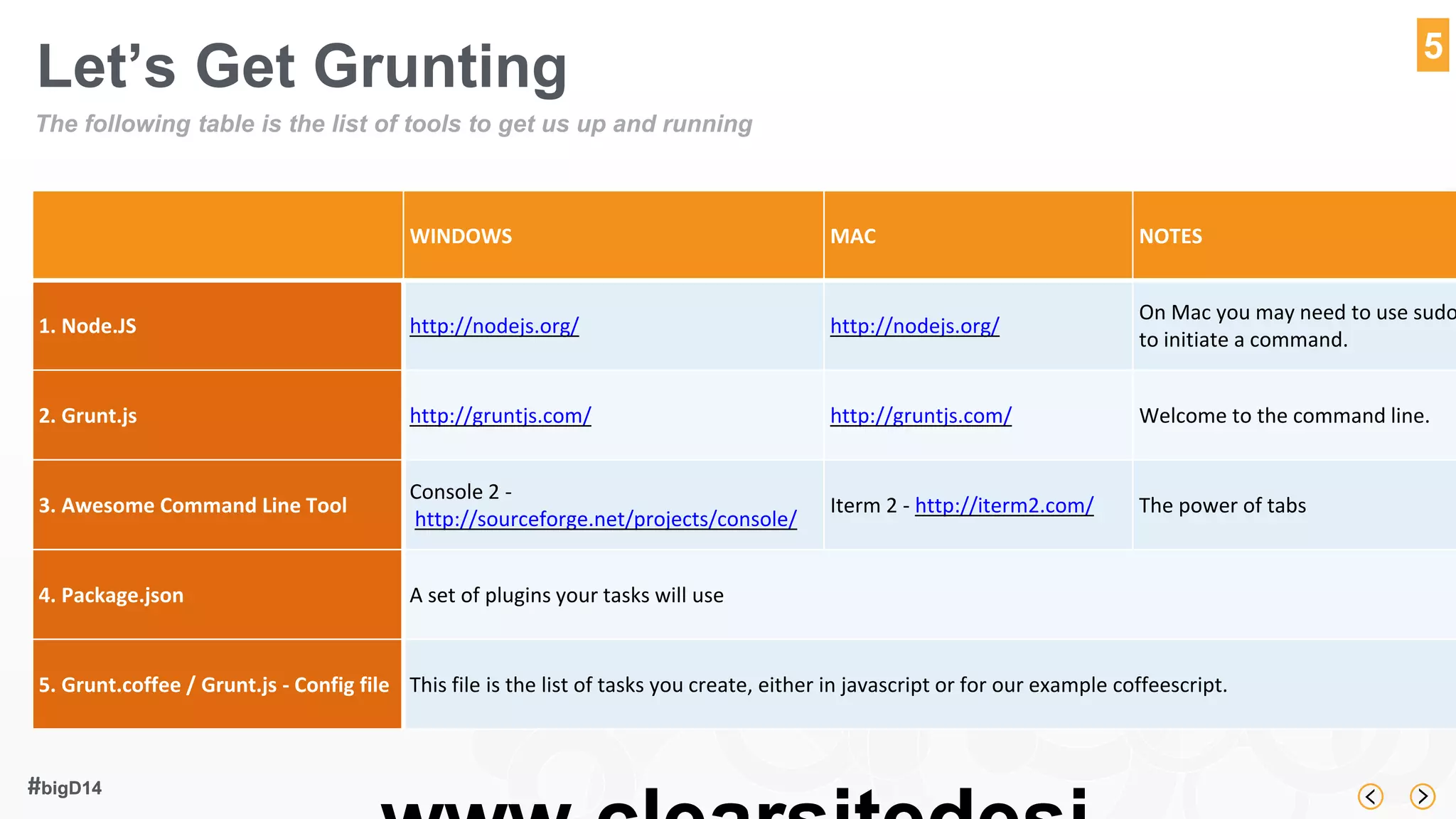
Let’s Get Grunting 
The following table is the list of tools to get us up and running 
WINDOWS MAC NOTES 
1. Node.JS http://nodejs.org/ http://nodejs.org/ 
On Mac you may need to use sudo 
to initiate a command. 
2. Grunt.js http://gruntjs.com/ http://gruntjs.com/ Welcome to the command line. 
3. Awesome Command Line Tool 
Console 2 - 
http://sourceforge.net/projects/console/ 
Iterm 2 - http://iterm2.com/ The power of tabs 
4. Package.json A set of plugins your tasks will use 
5. Grunt.coffee / Grunt.js - Config file This file is the list of tasks you create, either in javascript or for our example coffeescript.
www.clearsitedesi 
#bigD14 
6 
Our Scenario 
As a freelance designer you want to put together a quick template 
structure you can reuse to quickly rollout a new prototype. You have 
decided these are the tasks you want to automate. 
• Keep your pre-compiled resources separate from your 
production code 
• Compile Less in to CSS 
• Use coffee script instead of javascript and compile to javascript 
• Run a quick web server to see your work in real time 
• Watch for changes in our less, coffeescript, compile and refresh 
• Magically refresh the browser when changes occur to any of the 
above. 
• Re-use the entire process on future projects.
It’s Demo Time 
www.clearsitedesigns.com 
© 2014 Clear Site Designs #bigD14 
7 
https://github.com/imaginethepoet/bigd2014grunt

Improving Workflows With Grunt.js - Big D Design 2014 - Dallas Texas

  • 1.
    Improving Workflows With Grunt.js www.clearsitedesigns.com © 2014 Clear Site Designs #bigD14 1 Just Enough To Be Dangerous
  • 2.
    Your Presenters www.clearsitedesi #bigD14 2 We think, create, build, and produce applications Preston McCauley SENIOR UX ARCHITECT KINECTRA @UIDESIGNGUIDE Brandon Murray SENIOR DEVELOPER @BMURMISTRO
  • 3.
    www.clearsitedesi #bigD14 3 How Many Of You Do The Following? Do you often repeat yourself? • Build web sites • Build web applications • Create HTML prototypes • Use Build Tools Like Phonegap, Ant, Gradle, ie. • Work with Javascript or Coffeescript • Use pre-processors like Less or Sass • Run simple front-end unit testing • Spend more time managing your code then creating it
  • 4.
    www.clearsitedesi #bigD14 4 Why You Want To Learn Grunt.JS With grunt.js you can do so much: • Speed up or entirely eliminate manual and repetitive workflows • Find new ways to optimize your day to day processes • Use a front-end tool that has widespread adoption • Become a contributor to a highly active community • Perform tasks like minification, obfuscation, templating and more… • Get up and running quick
  • 5.
    www.clearsitedesi #bigD14 5 Let’s Get Grunting The following table is the list of tools to get us up and running WINDOWS MAC NOTES 1. Node.JS http://nodejs.org/ http://nodejs.org/ On Mac you may need to use sudo to initiate a command. 2. Grunt.js http://gruntjs.com/ http://gruntjs.com/ Welcome to the command line. 3. Awesome Command Line Tool Console 2 - http://sourceforge.net/projects/console/ Iterm 2 - http://iterm2.com/ The power of tabs 4. Package.json A set of plugins your tasks will use 5. Grunt.coffee / Grunt.js - Config file This file is the list of tasks you create, either in javascript or for our example coffeescript.
  • 6.
    www.clearsitedesi #bigD14 6 Our Scenario As a freelance designer you want to put together a quick template structure you can reuse to quickly rollout a new prototype. You have decided these are the tasks you want to automate. • Keep your pre-compiled resources separate from your production code • Compile Less in to CSS • Use coffee script instead of javascript and compile to javascript • Run a quick web server to see your work in real time • Watch for changes in our less, coffeescript, compile and refresh • Magically refresh the browser when changes occur to any of the above. • Re-use the entire process on future projects.
  • 7.
    It’s Demo Time www.clearsitedesigns.com © 2014 Clear Site Designs #bigD14 7 https://github.com/imaginethepoet/bigd2014grunt

Editor's Notes

  • #4 Spend more time is last bullet.
  • #5 This should be part of my story about refusing to learn. Command line gives me
  • #6 This should be part of my story about refusing to learn. Command line gives me