1
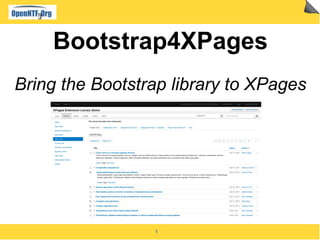
Bootstrap4XPages
Bring the Bootstrap library to XPages
2
About This Presentation
● What it is about
▬ It is introducing a new OpenNTF project called Bootstrap4XPages
▬ It shows how this project can be consumed in existing or new XPages applications
▬ It shows how the library can be tailored for your needs
●
● What it is not
▬ A tutorial on Bootstrap
▬ A tutorial on how to build a Java based XPages library
▬
● Prerequisites
▬ Some XPages development experience, particularly using the extension library
▬ Some XPages library development skils if you want to customize or extend it
▬ Then some Bootstrap knowledge, to get much of the project
3
Agenda
● Introduction to Bootstrap4XPages
● Consuming Bootstrap4XPages
● Contributing to Bootstrap4XPages
4
What is Bootstrap?
● It is a set of user interface elements available to web applications
▬ User interface elements
▬ Carefully crafted CSS styles for typography, navigation, common controls (buttons, edit boxes...)
▬ Layouts, Grids
▬ Responsive design, providing the best viewing experience across devices of various sizes
▬ JavaScript components (set of jQuery plug-ins for user interaction)
▬ Tabs, dialog boxes, tooltips, drop down buttons/menus...
▬
● Very, very, very popular in the web developers community
▬
● Empowering front-end developers to kickstart projects more efficiently and
effectively
▬ Ready to use for great looking applications
▬ Features many add-ons, available freely or for a fee, providing highly customized UI
▬
● Available for free here: http://getbootstrap.com/
5
Why Bringing Bootstrap to XPages?
● Because we want to take the advantage of it :-)
▬ Expertly crafted set of user interface elements
▬ Support for responsive design, Collaboration today is a great example of such a design
http://collaborationtoday.info/
▬ Consume the many add-ons and custom UIs available
▬ Provide an alternate ready to use rendering template to XPages applications
●
● Because there is a high demand from the community
▬ Many XPages projects are already built on top of bootstrap
▬ Several parallel efforts started to make Bootstrap easier to leverage within XPages
▬ Why not joining our forces and extend a single code base, rather than duplicating the effort?
▬
● How does this compare to OneUI?
▬ Share the same objectives of having a professionally built, ready to use, set of UI elements
▬ OneUI is the UI framework used by all ICS products
▬ Great if you want to get your own applications/components share the same
▬ OneUI is also evolving with new capabilities, across IBM
▬ Stay tuned with the up-coming version of N/D
▬
6
Objectives of the Project
● Bring Bootstrap to an XPages Application with minimum work, ideally none
▬ Select the theme and you application is now enabled
▬ Get all the resources (css, js...) served from the core runtime
▬ No resources has to be added within the NSF
▬ Participate in the XPages resource file aggregation for maximum performance
▬ Provide a bootstrap rendering for all the existing XPages components
▬ Core and extension library, including the Dojo controls
▬ Support for multiple versions of Bootstrap
▬ The library is evolving fast, let's keep current, while not breaking the existing apps!
▬ Make it easy to create new Bootstrap specific components
●
● Drag a community around it
▬ Consumers, of course
▬ But also contributors: you can contribute based on your skills and willing
▬ Components, extended themes, samples, applications, documentation, videos, blog post, sharing
your own experience, ...
●
● Make XPages applications shinning!
7
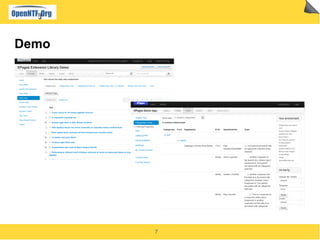
Demo
8
What Do We Have Today?
● Bootstrap4XPages 1.0 is available
▬ Open source project under the Apache 2.0 license
▬ As a ready to use compiled library on OpenNTF, including the source code
▬ http://bootstrap4xpages.openntf.org/
▬ The source code is available on GitHub
▬ Clone it, fork it, ...
▬ https://github.com/OpenNTF/Bootstrap4XPages
●
● Delivered with Bootstrap 2.3.1 and JQuery 1.8.2, and other associated
libraries
▬ DBootstrap: provides a bootstrap theme to Dojo Dijit
▬ Dojo Bootstrap: provides dojo wrappers to Bootstrap components. Not currently used.
●
● Supported platform: Notes/Domino 9.0
▬ 8.5.3 with the extension library might work, but it has not been tried
▬ If anyone wants to make it work, feel free!
9
Agenda
● Introduction to Bootstrap4XPages
● Consuming Bootstrap4XPages
● Contributing to Bootstrap4XPages
10
Getting Started with Bootstrap4Xpages
● Get a ready to use copy of the project
▬ Download the compiled project from OpenNTF
▬ Installation experience is similar to the XPages Extension Library
▬
● Install the Bootstrap4XPages update site in Designer
▬ Go to Designer preferences, activate the eclipse plugin install option, install the update site
▬ Detailed instructions: http://ibm.co/13FSXl3
●
● Installing Bootstrap4XPages on the Domino server
▬ Install the plug-ins directly within the Domino server file system, or in an NSF update site
▬ Detailed instructions: http://ibm.co/19qx082 or http://ibm.co/pkA7Xw
▬
▬
▬
11
2 Steps for Running Bootstrap4Xpages
1. Enable the XPages libraries
[x] com.ibm.xsp.extlib.library
[x] org.openntf.xsp.bootstrap.library
2.
3.
4.
5.
6.
7. Set the XPages theme
▬ Use either
▬ bootstrapv2.3.1
▬ bootstrapv2.3.1r
(“r” is for loading the responsive CSS)
▬
▬
This is it!
12
A Few Advises to the Consumer
● Avoid hard coding styles in your pages
▬ Use the components as they come, as much as possible
▬ Use a custom theme when you want to assign specific styles to components
▬
● Leverage the extension library components, like dialogs, as they are
optimized and well tested with the JSF lifecycle
▬
● Use the build from OpenNTF rather than the source code, in production
▬ The build has its resources (CSS, JS) shrunk, thus providing better performance
▬ Or build the plug-ins yourself – a simple update site export from Eclipse won't do the full build
●
●
13
Current Limitations
● Doesn't (yet) fully matches all the IBM enterprise standards
▬ Accessibility hasn't been tested
▬ Localization is limited to English
▬
● DBootstrap does not consume the Bootstrap style sheets
▬ It comes with its own CSS definition, thus it works well with basic bootstrap, but it doesn't pick-up the
added themes
▬ Moreover, it is not built with LESS, like Boostrap
▬
● The Extension Library leverages some Dojo controls for advanced
components, rather than the Bootstrap ones
▬ Might lead to a few subtle differences
▬ Ex: dialog, tooltips, …
▬
●
▬
14
Agenda
● Introduction to Bootstrap4XPages
● Consuming Bootstrap4XPages
● Contributing to Bootstrap4XPages
15
Installing a Development Environment
● This is just an advise on what to use, your mileage may vary...
● Prerequisites
▬ Domino Designer and Domino Server v9.0+
▬ Eclipse 3.6+, 4.2 recommended
▬ eGit, latest version
▬ http://bit.ly/xTbl3I
● Get and install the Domino Debug plugin from OpenNTF
▬ http://bit.ly/19DJrNN
● Configure Eclipse to use Domino Designer as the target platform
▬ Use JRE1.6 as the system library, with 1.6 compiler for annotations
●
16
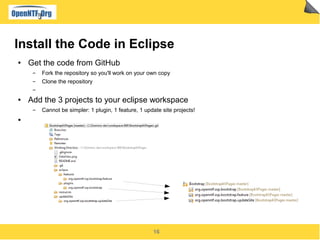
Install the Code in Eclipse
● Get the code from GitHub
▬ Fork the repository so you'll work on your own copy
▬ Clone the repository
▬
● Add the 3 projects to your eclipse workspace
▬ Cannot be simpler: 1 plugin, 1 feature, 1 update site projects!
●
17
The Plug-in Project: org.openntf.xsp.bootstrap
● /src
▬ Contains all the java source code
▬ /.../components: Contains the Bootstrap specific components
▬ /.../renderkit: Contains the JSF renderers for the core and extlib components
▬ /.../config: Contains the JSF/XPages configuration files
▬ /.../theme: Contains the XPages theme files and extension point
▬
● /resources/web/extlib/bootstrap
▬ Contains all the resources served to the browser (js, css..)
▬ Leverages the Extension Library servlet
▬ Accessible with a URL of the form: /.ibmxspres/.extlib/bootstrap/<whatever>
▬
▬
▬
18
The Bootstrap Theme
● Contributed globally using an extension point (8.5.3+)
▬ The theme files are bundled within the plug-in
▬ Theme files can be global themes, or fragments add to existing themes
▬
● The theme is organized in a hierarchy of files
▬ bootstrap.theme – main theme file
▬ bootstrapv231.theme – including the 2.3.1 specific resources
▬ bootstrapv231r.theme – including the 2.3.1 responsive specific resources
▬ bootstrap_extlib.theme – extlib specific properties
▬ bootstrapv231_extlib.theme – extlib specific properties for 2.3.1
▬
● New versions, or extra themes, can be provided with the same mechanism
●
▬
19
How the Theme is Being Used
● The theme files are used to:
▬ Define the resources to be loaded with the page
▬ Bootstrap CSS files
▬ JavaScript files, like JQuery...
▬ Set the default value of some component properties, like styleClass
▬ Forcing the document type to HTML 5
▬ View component style classes
▬ ...
▬ Defining specific components themes
▬ Bootstrap buttons (Button.Submit, Button.Cancel...)
▬ ...
●
▬
20
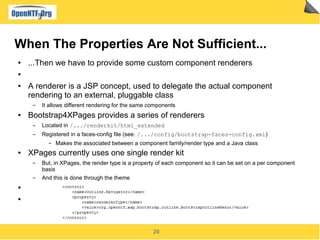
When The Properties Are Not Sufficient...
● ...Then we have to provide some custom component renderers
●
● A renderer is a JSP concept, used to delegate the actual component
rendering to an external, pluggable class
▬ It allows different rendering for the same components
● Bootstrap4XPages provides a series of renderers
▬ Located in /.../renderkit/html_extended
▬ Registered in a faces-config file (see: /.../config/bootstrap-faces-config.xml)
▬ Makes the associated between a component family/render type and a Java class
● XPages currently uses one single render kit
▬ But, in XPages, the render type is a property of each component so it can be set on a per component
basis
▬ And this is done through the theme
●
●
21
Writing a Renderer
● XPages comes with many base classes that can be used as a starting point
▬ Input controls, table/views, menus, ...
● The renderers from the Extension Library had been designed to be extended
▬ Bootstrap4XPages often inherit from them
▬
● Don't reinvent the wheel, try to inherit from existing renderers, or at least
copy/paste their code from the extlib
22
Some Utility Classes
● BootstrapUtil
▬ To find out if Bootstrap is the current theme and grabbing its version
● BootstrapResources
▬ Returns a reference to some common resources
▬ One instance per version of Bootstrap, thus isolating the renderers from the resources locations
● BootstrapFragment
▬ To easily contribute extensions to the Bootstrap library
● Minifier
▬ to shorten the URLs of the Bootstrap resources
●
23
Extend Bootstrap4XPages Yourself
● There are mostly 3 ways to extend the library
▬ Modify the existing source code
▬ Only do that is your extensions are generic enough, and if you want to contribute them back
▬ Use fragments to extend the existing plug-ins
▬ Simplest way for adding code on top of the existing plug-in
▬ Be careful of name collision
▬ Create another library consuming Bootstrap4XPages
▬ This fully isolates the library, at the expense of having a brand new library
24
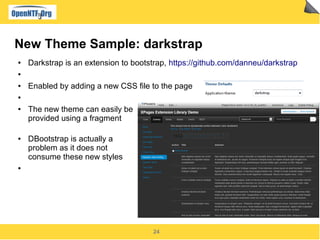
New Theme Sample: darkstrap
● Darkstrap is an extension to bootstrap, https://github.com/danneu/darkstrap
●
● Enabled by adding a new CSS file to the page
●
● The new theme can easily be
provided using a fragment
● DBootstrap is actually a
problem as it does not
consume these new styles
●
25
Building the Project
● The OpenNTF build is currently produced using Eclipse, maven, the Dojo
tools and other software components
▬ Unfortunately, it cannot be distributed in its current form
▬
● But we are looking at a global solution using maven. This should be
applicable as a set of best practices when building N/D OSGi extensions.
So stay tuned!
●
●
26
Do Your Home Work
● Bootstrap4XPages comes with a specific ApplicationConfiguration object,
used by the ApplicationLayout, but it currently adds nothing to the base
object
▬ The Bootstrap4XPages ApplicationLayout renderer currently sets the left and right column styles to
'span2', while the body is 'span8' (see the bootstrap doc for more info)
▬ Exercise:
▬ Add to int properties to the application configuration: leftSize & rightSize
▬ Extend the BootstrapApplicationLayoutRenderer and consume these properties to get
customizable sizes for the column
●
27
And Then Help the Project
● Create, and contribute to OpenNTF, plug-in fragments like the darkstrap one,
encapsulating some popular bootstrap theme
●
● Integrate the responsive Design from Collaboration Today as a standard
feature of the library (collapsing menus under a single button...)
●
● Keep up with the latest Bootstrap releases
▬ 2.3.2 and 3.0 are on their way
●
● Replace the use of dojo by the corresponding Bootstrap components, when
possible (dialogs...)
●
● Create some Bootstrap specific components, even leveraging
JQuery/JQueryUI
▬ Mobile UI?
●
●
28
Many Thanks To
● Niklas Heidloff, for promoting the project and helping a lot, as ever
●
● Peter Tanner, for handling all the legal issues
●
● The XPages community
▬ Mark Leusink, Kathy Brown, Oliver Busse, Slobodan Lohja, Steve Zavocki, Patrick Kwinten … and many
others (sorry for the missing names), for all their work bringing Bootstrap to XPages!
▬
29
Door is opened for Q&A

Bootstrap4 x pages

  • 1.
  • 2.
    2 About This Presentation ●What it is about ▬ It is introducing a new OpenNTF project called Bootstrap4XPages ▬ It shows how this project can be consumed in existing or new XPages applications ▬ It shows how the library can be tailored for your needs ● ● What it is not ▬ A tutorial on Bootstrap ▬ A tutorial on how to build a Java based XPages library ▬ ● Prerequisites ▬ Some XPages development experience, particularly using the extension library ▬ Some XPages library development skils if you want to customize or extend it ▬ Then some Bootstrap knowledge, to get much of the project
  • 3.
    3 Agenda ● Introduction toBootstrap4XPages ● Consuming Bootstrap4XPages ● Contributing to Bootstrap4XPages
  • 4.
    4 What is Bootstrap? ●It is a set of user interface elements available to web applications ▬ User interface elements ▬ Carefully crafted CSS styles for typography, navigation, common controls (buttons, edit boxes...) ▬ Layouts, Grids ▬ Responsive design, providing the best viewing experience across devices of various sizes ▬ JavaScript components (set of jQuery plug-ins for user interaction) ▬ Tabs, dialog boxes, tooltips, drop down buttons/menus... ▬ ● Very, very, very popular in the web developers community ▬ ● Empowering front-end developers to kickstart projects more efficiently and effectively ▬ Ready to use for great looking applications ▬ Features many add-ons, available freely or for a fee, providing highly customized UI ▬ ● Available for free here: http://getbootstrap.com/
  • 5.
    5 Why Bringing Bootstrapto XPages? ● Because we want to take the advantage of it :-) ▬ Expertly crafted set of user interface elements ▬ Support for responsive design, Collaboration today is a great example of such a design http://collaborationtoday.info/ ▬ Consume the many add-ons and custom UIs available ▬ Provide an alternate ready to use rendering template to XPages applications ● ● Because there is a high demand from the community ▬ Many XPages projects are already built on top of bootstrap ▬ Several parallel efforts started to make Bootstrap easier to leverage within XPages ▬ Why not joining our forces and extend a single code base, rather than duplicating the effort? ▬ ● How does this compare to OneUI? ▬ Share the same objectives of having a professionally built, ready to use, set of UI elements ▬ OneUI is the UI framework used by all ICS products ▬ Great if you want to get your own applications/components share the same ▬ OneUI is also evolving with new capabilities, across IBM ▬ Stay tuned with the up-coming version of N/D ▬
  • 6.
    6 Objectives of theProject ● Bring Bootstrap to an XPages Application with minimum work, ideally none ▬ Select the theme and you application is now enabled ▬ Get all the resources (css, js...) served from the core runtime ▬ No resources has to be added within the NSF ▬ Participate in the XPages resource file aggregation for maximum performance ▬ Provide a bootstrap rendering for all the existing XPages components ▬ Core and extension library, including the Dojo controls ▬ Support for multiple versions of Bootstrap ▬ The library is evolving fast, let's keep current, while not breaking the existing apps! ▬ Make it easy to create new Bootstrap specific components ● ● Drag a community around it ▬ Consumers, of course ▬ But also contributors: you can contribute based on your skills and willing ▬ Components, extended themes, samples, applications, documentation, videos, blog post, sharing your own experience, ... ● ● Make XPages applications shinning!
  • 7.
  • 8.
    8 What Do WeHave Today? ● Bootstrap4XPages 1.0 is available ▬ Open source project under the Apache 2.0 license ▬ As a ready to use compiled library on OpenNTF, including the source code ▬ http://bootstrap4xpages.openntf.org/ ▬ The source code is available on GitHub ▬ Clone it, fork it, ... ▬ https://github.com/OpenNTF/Bootstrap4XPages ● ● Delivered with Bootstrap 2.3.1 and JQuery 1.8.2, and other associated libraries ▬ DBootstrap: provides a bootstrap theme to Dojo Dijit ▬ Dojo Bootstrap: provides dojo wrappers to Bootstrap components. Not currently used. ● ● Supported platform: Notes/Domino 9.0 ▬ 8.5.3 with the extension library might work, but it has not been tried ▬ If anyone wants to make it work, feel free!
  • 9.
    9 Agenda ● Introduction toBootstrap4XPages ● Consuming Bootstrap4XPages ● Contributing to Bootstrap4XPages
  • 10.
    10 Getting Started withBootstrap4Xpages ● Get a ready to use copy of the project ▬ Download the compiled project from OpenNTF ▬ Installation experience is similar to the XPages Extension Library ▬ ● Install the Bootstrap4XPages update site in Designer ▬ Go to Designer preferences, activate the eclipse plugin install option, install the update site ▬ Detailed instructions: http://ibm.co/13FSXl3 ● ● Installing Bootstrap4XPages on the Domino server ▬ Install the plug-ins directly within the Domino server file system, or in an NSF update site ▬ Detailed instructions: http://ibm.co/19qx082 or http://ibm.co/pkA7Xw ▬ ▬ ▬
  • 11.
    11 2 Steps forRunning Bootstrap4Xpages 1. Enable the XPages libraries [x] com.ibm.xsp.extlib.library [x] org.openntf.xsp.bootstrap.library 2. 3. 4. 5. 6. 7. Set the XPages theme ▬ Use either ▬ bootstrapv2.3.1 ▬ bootstrapv2.3.1r (“r” is for loading the responsive CSS) ▬ ▬ This is it!
  • 12.
    12 A Few Advisesto the Consumer ● Avoid hard coding styles in your pages ▬ Use the components as they come, as much as possible ▬ Use a custom theme when you want to assign specific styles to components ▬ ● Leverage the extension library components, like dialogs, as they are optimized and well tested with the JSF lifecycle ▬ ● Use the build from OpenNTF rather than the source code, in production ▬ The build has its resources (CSS, JS) shrunk, thus providing better performance ▬ Or build the plug-ins yourself – a simple update site export from Eclipse won't do the full build ● ●
  • 13.
    13 Current Limitations ● Doesn't(yet) fully matches all the IBM enterprise standards ▬ Accessibility hasn't been tested ▬ Localization is limited to English ▬ ● DBootstrap does not consume the Bootstrap style sheets ▬ It comes with its own CSS definition, thus it works well with basic bootstrap, but it doesn't pick-up the added themes ▬ Moreover, it is not built with LESS, like Boostrap ▬ ● The Extension Library leverages some Dojo controls for advanced components, rather than the Bootstrap ones ▬ Might lead to a few subtle differences ▬ Ex: dialog, tooltips, … ▬ ● ▬
  • 14.
    14 Agenda ● Introduction toBootstrap4XPages ● Consuming Bootstrap4XPages ● Contributing to Bootstrap4XPages
  • 15.
    15 Installing a DevelopmentEnvironment ● This is just an advise on what to use, your mileage may vary... ● Prerequisites ▬ Domino Designer and Domino Server v9.0+ ▬ Eclipse 3.6+, 4.2 recommended ▬ eGit, latest version ▬ http://bit.ly/xTbl3I ● Get and install the Domino Debug plugin from OpenNTF ▬ http://bit.ly/19DJrNN ● Configure Eclipse to use Domino Designer as the target platform ▬ Use JRE1.6 as the system library, with 1.6 compiler for annotations ●
  • 16.
    16 Install the Codein Eclipse ● Get the code from GitHub ▬ Fork the repository so you'll work on your own copy ▬ Clone the repository ▬ ● Add the 3 projects to your eclipse workspace ▬ Cannot be simpler: 1 plugin, 1 feature, 1 update site projects! ●
  • 17.
    17 The Plug-in Project:org.openntf.xsp.bootstrap ● /src ▬ Contains all the java source code ▬ /.../components: Contains the Bootstrap specific components ▬ /.../renderkit: Contains the JSF renderers for the core and extlib components ▬ /.../config: Contains the JSF/XPages configuration files ▬ /.../theme: Contains the XPages theme files and extension point ▬ ● /resources/web/extlib/bootstrap ▬ Contains all the resources served to the browser (js, css..) ▬ Leverages the Extension Library servlet ▬ Accessible with a URL of the form: /.ibmxspres/.extlib/bootstrap/<whatever> ▬ ▬ ▬
  • 18.
    18 The Bootstrap Theme ●Contributed globally using an extension point (8.5.3+) ▬ The theme files are bundled within the plug-in ▬ Theme files can be global themes, or fragments add to existing themes ▬ ● The theme is organized in a hierarchy of files ▬ bootstrap.theme – main theme file ▬ bootstrapv231.theme – including the 2.3.1 specific resources ▬ bootstrapv231r.theme – including the 2.3.1 responsive specific resources ▬ bootstrap_extlib.theme – extlib specific properties ▬ bootstrapv231_extlib.theme – extlib specific properties for 2.3.1 ▬ ● New versions, or extra themes, can be provided with the same mechanism ● ▬
  • 19.
    19 How the Themeis Being Used ● The theme files are used to: ▬ Define the resources to be loaded with the page ▬ Bootstrap CSS files ▬ JavaScript files, like JQuery... ▬ Set the default value of some component properties, like styleClass ▬ Forcing the document type to HTML 5 ▬ View component style classes ▬ ... ▬ Defining specific components themes ▬ Bootstrap buttons (Button.Submit, Button.Cancel...) ▬ ... ● ▬
  • 20.
    20 When The PropertiesAre Not Sufficient... ● ...Then we have to provide some custom component renderers ● ● A renderer is a JSP concept, used to delegate the actual component rendering to an external, pluggable class ▬ It allows different rendering for the same components ● Bootstrap4XPages provides a series of renderers ▬ Located in /.../renderkit/html_extended ▬ Registered in a faces-config file (see: /.../config/bootstrap-faces-config.xml) ▬ Makes the associated between a component family/render type and a Java class ● XPages currently uses one single render kit ▬ But, in XPages, the render type is a property of each component so it can be set on a per component basis ▬ And this is done through the theme ● ●
  • 21.
    21 Writing a Renderer ●XPages comes with many base classes that can be used as a starting point ▬ Input controls, table/views, menus, ... ● The renderers from the Extension Library had been designed to be extended ▬ Bootstrap4XPages often inherit from them ▬ ● Don't reinvent the wheel, try to inherit from existing renderers, or at least copy/paste their code from the extlib
  • 22.
    22 Some Utility Classes ●BootstrapUtil ▬ To find out if Bootstrap is the current theme and grabbing its version ● BootstrapResources ▬ Returns a reference to some common resources ▬ One instance per version of Bootstrap, thus isolating the renderers from the resources locations ● BootstrapFragment ▬ To easily contribute extensions to the Bootstrap library ● Minifier ▬ to shorten the URLs of the Bootstrap resources ●
  • 23.
    23 Extend Bootstrap4XPages Yourself ●There are mostly 3 ways to extend the library ▬ Modify the existing source code ▬ Only do that is your extensions are generic enough, and if you want to contribute them back ▬ Use fragments to extend the existing plug-ins ▬ Simplest way for adding code on top of the existing plug-in ▬ Be careful of name collision ▬ Create another library consuming Bootstrap4XPages ▬ This fully isolates the library, at the expense of having a brand new library
  • 24.
    24 New Theme Sample:darkstrap ● Darkstrap is an extension to bootstrap, https://github.com/danneu/darkstrap ● ● Enabled by adding a new CSS file to the page ● ● The new theme can easily be provided using a fragment ● DBootstrap is actually a problem as it does not consume these new styles ●
  • 25.
    25 Building the Project ●The OpenNTF build is currently produced using Eclipse, maven, the Dojo tools and other software components ▬ Unfortunately, it cannot be distributed in its current form ▬ ● But we are looking at a global solution using maven. This should be applicable as a set of best practices when building N/D OSGi extensions. So stay tuned! ● ●
  • 26.
    26 Do Your HomeWork ● Bootstrap4XPages comes with a specific ApplicationConfiguration object, used by the ApplicationLayout, but it currently adds nothing to the base object ▬ The Bootstrap4XPages ApplicationLayout renderer currently sets the left and right column styles to 'span2', while the body is 'span8' (see the bootstrap doc for more info) ▬ Exercise: ▬ Add to int properties to the application configuration: leftSize & rightSize ▬ Extend the BootstrapApplicationLayoutRenderer and consume these properties to get customizable sizes for the column ●
  • 27.
    27 And Then Helpthe Project ● Create, and contribute to OpenNTF, plug-in fragments like the darkstrap one, encapsulating some popular bootstrap theme ● ● Integrate the responsive Design from Collaboration Today as a standard feature of the library (collapsing menus under a single button...) ● ● Keep up with the latest Bootstrap releases ▬ 2.3.2 and 3.0 are on their way ● ● Replace the use of dojo by the corresponding Bootstrap components, when possible (dialogs...) ● ● Create some Bootstrap specific components, even leveraging JQuery/JQueryUI ▬ Mobile UI? ● ●
  • 28.
    28 Many Thanks To ●Niklas Heidloff, for promoting the project and helping a lot, as ever ● ● Peter Tanner, for handling all the legal issues ● ● The XPages community ▬ Mark Leusink, Kathy Brown, Oliver Busse, Slobodan Lohja, Steve Zavocki, Patrick Kwinten … and many others (sorry for the missing names), for all their work bringing Bootstrap to XPages! ▬
  • 29.