Emerging Technology, Tools, and TrendsBy: Leigha Thompson
Many advancements are being made in the world of technology. These new tools are being incorporated into the classroom through technology integration. Some of these tools include:Twitter                         RSSPodcastsSMART boardsEmerging Technology
Twitter is a free social networking and blogging service that enables its users to send and read messages known as tweets. Tweets are text-based posts of up to 140 characters displayed on the author's profile page and delivered to the author's subscribers. Senders can restrict delivery to those in their circle of friends or, by default, allow open access. Users can send and receive tweets via the Twitter website, Short Messaging Services (SMS) or external applications. http://twitter.com/Twitter
Twitter could be used to hear students opinions about certain subject topicsChallenge students to write 140 character stories among other activitiesTeacher could post reminders of up-coming eventsAn outlet for students to ask their teachers questionsA place for students to blog about the day’s lessonTeacher’s could set up short response questions for students to answer on a daily basisUse in the Classroom
Twitter is a way to record thoughts and ideas that you search – it’s a historyParents can follow and stay involved by viewing what is going on in the classTwitter connects you to a larger world outside of the classroom and even the country Students can follow people who do what they want to do or who they admire and get a sense for their job and life Twitter can also improve writing and punctuation Effectiveness of Use in the Classroom
Twitter itself is free for anyone to use Accessing it through SMS may incur phone service provider fees.Twitter is easily accessible via the Internet, a mobile phone, or Short Message ServicesTechnical Costs and Concerns
RSSMost commonly known as "Really Simple Syndication“ or "Rich Site Summary“. RSS is a family of web feed formats used to publish frequently updated works, such as blog entries, news headlines, audio, and video. Document’s includes full or summarized text. These documents are know as web feeds or channels.  Web feeds benefit users by syndicating content automatically. They benefit readers who want to subscribe to timely updates from favored websites or to aggregate feeds from many sites into one place.RSS feeds can be read using software called an “aggregator", which can be web-based, desktop-based, or mobile-device-based. A standardized XML file format allows the information to be published once and viewed by many different programs. The user subscribes to a feed by entering into the reader the feed's URL or by clicking an RSS icon in a web browser that initiates the subscription process. http://www.whatisrss.com/
Teachers: If you already use Weblogs with your students, the uses of RSS should be pretty apparent. Instead of checking out all or your student Weblogs every day, you could just collect their work in your aggregator using their RSS feeds.Students: The idea of aggregating research feeds is especially interesting. Say you have a student that is doing a project or a paper on global warming. That student could actually create an RSS feed that would bring any news about global warming to his aggregator as soon as it was published. And you can create a feed about any topic you want. Use in the Classroom
Student feeds drastically reduced teacher reading time and allow teachers to make all of their classes virtually paperlessIn addition, you can provide individual student Weblog feeds to parents or counselors or whoever else might be interested in that student’s work and be savvy enough to know about RSS.Effectiveness of Use in the Classroom
http://rssfeedreader.com/ is a web site that allows you to use RSS to your web pages for freeTechnical Costs and Concerns
Podcasts are audio recordings that are available online. The word “podcasting” is a portmanteau combining the words “broadcasting” and “iPod.” There are other audio file types that are used for podcasting but in general as long as you have a music player on your computer you should be able to listen to a podcast file.http://www.education-world.com/a_tech/sites/sites074.shtmlPodcasts
From lectures and slideshows to tours and interviews, podcasting engages students in ways the printed pages cannot. Podcasts can be easily supplemented with other downloadable content such as notes, references, and links to related resourcesTeachers are able to select podcast that go along with subject matters that they are teaching in order to add another teaching method for students who may learn in different waysUse in the Classroom
When students know that their lectures will be available as podcasts, they can focus more on what’s being discussed in class, ask questions, and be more engaged rather than worrying about note taking.Podcasts provide constant access to classroom information. Podcasting also reinforces your school’s reputation as technologically savvy and committed to providing a leading-edge learning environment.Effectiveness of Use in the Classroom
Podcasts can be played on any Mac, PC, iPod, or iPhone. So anywhere your students are can be a place for learning.iTunes is a free download for both Mac and PC. iTunes organizes your music and podcasts for free.Podcasteris a Fee-based software for creating audio podcasts http://www.kudlian.net/products/podcaster/Vodcaster is a free download for creating audio and video podcasts                           http://www.potionfactory.com/ Technical Costs and Concerns
The SMART Board is a large whiteboard that uses touch technology for detecting user input that are equivalent to normal PC input devices, such as mice or keyboards. A projector is used to display a computer's video output onto the whiteboard, which then acts as a huge touch screen. It usually comes with 4 digital writing utensils that use digital ink replacing the traditional markers. The digital ink works by using an active digitizer that controls the PC input information for writing capabilities such as drawing or handwritingThere are also buttons that launch a popup keyboard and a right mouse click menu for more input options. The interactive whiteboard is usually mounted on a wall http://jsguilkey.iweb.bsu.edu/professional/Technology/SMARTboard/index.htmSMART Boards
Great for demonstrationsThe board can accommodate different learning stylesAll ages of students respond favorably to board use One-computer classrooms can maximize the use of limited computer accessAn excellent tool for the constructivist educator The boards are clean and attractive toolsStudents with limited motor skills can enjoy board useIt is interactiveIt can interface well with other peripheralsThe board is great for meetings are lessons where the participants need printed copiesUse in the Classroom
Learners show increased motivation and enjoy the interaction the technology offers It makes the subject come alive It captures the attention of learners It encourages the involvement of learners in the subject It enables tutors to use multimedia resources and the internet with a whole class The whiteboard is a colorful tool. Research indicates that students respond to displays where color is employedEffectiveness of Use in the Classroom
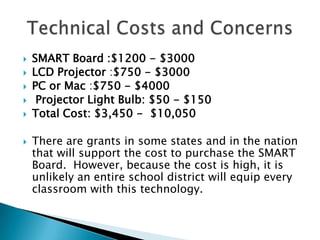
SMART Board :$1200 - $3000LCD Projector:$750 - $3000PC or Mac:$750 - $4000Projector Light Bulb:$50 - $150  Total Cost: $3,450 -  $10,050There are grants in some states and in the nation that will support the cost to purchase the SMART Board.  However, because the cost is high, it is unlikely an entire school district will equip every classroom with this technology.Technical Costs and Concerns

Immerging Technology, Tools, And Trends

  • 1.
    Emerging Technology, Tools,and TrendsBy: Leigha Thompson
  • 2.
    Many advancements arebeing made in the world of technology. These new tools are being incorporated into the classroom through technology integration. Some of these tools include:Twitter RSSPodcastsSMART boardsEmerging Technology
  • 3.
    Twitter is afree social networking and blogging service that enables its users to send and read messages known as tweets. Tweets are text-based posts of up to 140 characters displayed on the author's profile page and delivered to the author's subscribers. Senders can restrict delivery to those in their circle of friends or, by default, allow open access. Users can send and receive tweets via the Twitter website, Short Messaging Services (SMS) or external applications. http://twitter.com/Twitter
  • 4.
    Twitter could beused to hear students opinions about certain subject topicsChallenge students to write 140 character stories among other activitiesTeacher could post reminders of up-coming eventsAn outlet for students to ask their teachers questionsA place for students to blog about the day’s lessonTeacher’s could set up short response questions for students to answer on a daily basisUse in the Classroom
  • 5.
    Twitter is away to record thoughts and ideas that you search – it’s a historyParents can follow and stay involved by viewing what is going on in the classTwitter connects you to a larger world outside of the classroom and even the country Students can follow people who do what they want to do or who they admire and get a sense for their job and life Twitter can also improve writing and punctuation Effectiveness of Use in the Classroom
  • 6.
    Twitter itself isfree for anyone to use Accessing it through SMS may incur phone service provider fees.Twitter is easily accessible via the Internet, a mobile phone, or Short Message ServicesTechnical Costs and Concerns
  • 7.
    RSSMost commonly knownas "Really Simple Syndication“ or "Rich Site Summary“. RSS is a family of web feed formats used to publish frequently updated works, such as blog entries, news headlines, audio, and video. Document’s includes full or summarized text. These documents are know as web feeds or channels. Web feeds benefit users by syndicating content automatically. They benefit readers who want to subscribe to timely updates from favored websites or to aggregate feeds from many sites into one place.RSS feeds can be read using software called an “aggregator", which can be web-based, desktop-based, or mobile-device-based. A standardized XML file format allows the information to be published once and viewed by many different programs. The user subscribes to a feed by entering into the reader the feed's URL or by clicking an RSS icon in a web browser that initiates the subscription process. http://www.whatisrss.com/
  • 8.
    Teachers: If youalready use Weblogs with your students, the uses of RSS should be pretty apparent. Instead of checking out all or your student Weblogs every day, you could just collect their work in your aggregator using their RSS feeds.Students: The idea of aggregating research feeds is especially interesting. Say you have a student that is doing a project or a paper on global warming. That student could actually create an RSS feed that would bring any news about global warming to his aggregator as soon as it was published. And you can create a feed about any topic you want. Use in the Classroom
  • 9.
    Student feeds drasticallyreduced teacher reading time and allow teachers to make all of their classes virtually paperlessIn addition, you can provide individual student Weblog feeds to parents or counselors or whoever else might be interested in that student’s work and be savvy enough to know about RSS.Effectiveness of Use in the Classroom
  • 10.
    http://rssfeedreader.com/ is aweb site that allows you to use RSS to your web pages for freeTechnical Costs and Concerns
  • 11.
    Podcasts are audiorecordings that are available online. The word “podcasting” is a portmanteau combining the words “broadcasting” and “iPod.” There are other audio file types that are used for podcasting but in general as long as you have a music player on your computer you should be able to listen to a podcast file.http://www.education-world.com/a_tech/sites/sites074.shtmlPodcasts
  • 12.
    From lectures andslideshows to tours and interviews, podcasting engages students in ways the printed pages cannot. Podcasts can be easily supplemented with other downloadable content such as notes, references, and links to related resourcesTeachers are able to select podcast that go along with subject matters that they are teaching in order to add another teaching method for students who may learn in different waysUse in the Classroom
  • 13.
    When students knowthat their lectures will be available as podcasts, they can focus more on what’s being discussed in class, ask questions, and be more engaged rather than worrying about note taking.Podcasts provide constant access to classroom information. Podcasting also reinforces your school’s reputation as technologically savvy and committed to providing a leading-edge learning environment.Effectiveness of Use in the Classroom
  • 14.
    Podcasts can beplayed on any Mac, PC, iPod, or iPhone. So anywhere your students are can be a place for learning.iTunes is a free download for both Mac and PC. iTunes organizes your music and podcasts for free.Podcasteris a Fee-based software for creating audio podcasts http://www.kudlian.net/products/podcaster/Vodcaster is a free download for creating audio and video podcasts http://www.potionfactory.com/ Technical Costs and Concerns
  • 15.
    The SMART Boardis a large whiteboard that uses touch technology for detecting user input that are equivalent to normal PC input devices, such as mice or keyboards. A projector is used to display a computer's video output onto the whiteboard, which then acts as a huge touch screen. It usually comes with 4 digital writing utensils that use digital ink replacing the traditional markers. The digital ink works by using an active digitizer that controls the PC input information for writing capabilities such as drawing or handwritingThere are also buttons that launch a popup keyboard and a right mouse click menu for more input options. The interactive whiteboard is usually mounted on a wall http://jsguilkey.iweb.bsu.edu/professional/Technology/SMARTboard/index.htmSMART Boards
  • 16.
    Great for demonstrationsTheboard can accommodate different learning stylesAll ages of students respond favorably to board use One-computer classrooms can maximize the use of limited computer accessAn excellent tool for the constructivist educator The boards are clean and attractive toolsStudents with limited motor skills can enjoy board useIt is interactiveIt can interface well with other peripheralsThe board is great for meetings are lessons where the participants need printed copiesUse in the Classroom
  • 17.
    Learners show increasedmotivation and enjoy the interaction the technology offers It makes the subject come alive It captures the attention of learners It encourages the involvement of learners in the subject It enables tutors to use multimedia resources and the internet with a whole class The whiteboard is a colorful tool. Research indicates that students respond to displays where color is employedEffectiveness of Use in the Classroom
  • 18.
    SMART Board :$1200- $3000LCD Projector:$750 - $3000PC or Mac:$750 - $4000Projector Light Bulb:$50 - $150  Total Cost: $3,450 -  $10,050There are grants in some states and in the nation that will support the cost to purchase the SMART Board.  However, because the cost is high, it is unlikely an entire school district will equip every classroom with this technology.Technical Costs and Concerns